Vishakha can be found writing, crafting or digging Earth. Her love for writing made her switch her profession from a Geologist to a Writer. Additionally, she likes keeping herself engaged in crafting and redecorating spaces. You might found her posting 3 am poetry on her Instagram story. Her proclivity for writing is never-ending.
Ecommerce organizations have to come up with innovative and unique business marketing ideas to stand out from the competition. Optimizing the UI of your store is important to keep your visitors engaged in your store and to enhance customer retention and conversion it is your primary responsibility to focus on improvingcustomer experience.
While retail businesses have suffered during the COVID-19 pandemic, eCommerce brands with a diversified online presence have witnessed a remarkable growth trend in the business. When done correctly, marketing can be a big boost to a company’s bottom line. When done incorrectly, however, it may feel like throwing money into a burning pit.
I am sharing 4 eCommerce brand marketing strategies to fuel your business growth in 2021. I’ve compiled a list of suggestions based on the current environment where businesses cannot afford to lose any of their potential buyers.
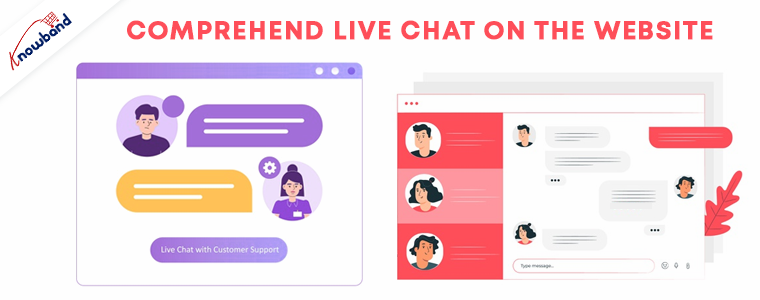
Comprehend Live Chat on the website
Ecommerce customers are more likely to choose live chat support over email and phone because it enables them to connect with customer service representatives in real-time. Furthermore, live chat is fast and friendly and is listed among the best customer support communication channels.
When customers are more likely to shop everything (most of it) from online stores, it is needful to provide better customer service. Hence incorporating live chat via social media messenger will keep you aware of the customer’s needs and pain points.
Provide logistics and embrace home delivery
If a customer relies on your eCommerce brand for shopping during a pandemic, you have to focus on several parameters that influence the customer decision like delivery service, date and time of delivery, hygiene measures, etc.
Embrace home delivery on your eCommerce store and follow all the hygiene measures to stand out from the crowd. This will give your brand a unique identity and will create a positive impact on your customers.
For your eCommerce brand, providing a return policy with defined rules will influence the shopping decision of your customer. If your eCommerce brand does not have a return policy then there will a huge uplift inbounce rate.
Return policies are the guidelines that retailers set up to govern the process of consumers returning or exchanging unused or faulty goods they’ve already purchased. Return policies are an extension of the customer support provided by retailers, and as a result, they appear to be somewhat liberal.
Invite feedbacks and highlight them
Customers who shop online want to make an informed decision. That’s why so many people depend on feedbacks and reviews for local businesses or star ratings when they shop on the eCommerce giant’s website.
You will increase consumer trust in your eCommerce brand by actively soliciting feedback and encouraging consumers to leave product reviews on their website. Providing incentives is the best way to motivate customers for dropping a rating and review on your store.
Conclusion:
This year will be awesome if you implement these four suggestions in your eCommerce brand marketing and customer service strategies. Remember that you can learn more about marketing for your brand in the eCommerce article section, and the KnowBand team is here to help you find new ways to add value to your company.
As some fashion technology companies are successfully raising more cash and rising, there is another segment struggling to survive. Such online businesses are stalling because they are failing to respond to the change in the consumer’s media consumption habits. If you have a PrestaShop fashion store then you must read this article and find out those important features that you have missed so far.
Your products must have the best presentation possible. Since customers can analyze fabrics for their color and texture in retail fashion stores; they can put clothes on and see how they fit; they can see what color looks best on them instantly is not possible for an online store. To cope-up with that, you must have adapted the practices like size charts, color charts, video presentations, and many more.
Is your fashion store ready?
From launching a clothing store website to digital marketing, it requires several functionalities and you need to focus on various aspects of online business.
Now when you have already created your fashion store, you have to see what more can be added and how you can make more money from it in 2021. The customer experience is always a source to improve customer retention and conversion on your store.
Have a look at the top features that should add to your PrestaShop online fashion store that you should focus on.
Let customers add their favorites to Wishlist
There are people who consider adding products to their wishlist that they can buy sometime later. A wish list helps shoppers to create customized lists of items that they want to purchase and to save them for future reference in their user account. Wishlists signify the interest of a consumer in a commodity without an immediate buying intent.
Offering wish lists is an efficient way of reducing shopping cart abandonment and satisfying consumer sales that have indicated purpose but have not ended up buying.
Make it simple to use the Size Guide
Optimize your size guide: build a map of sizes. Display the corresponding sizes for any continent or country if your store ships internationally. If an individual shows your items, decide what size the model is wearing. This will give individuals a clearer understanding of product sizes.
When customers shop online, fitting remains among their primary concerns. And when not treated properly, as orders with incorrect sizes from consumers translate into service and refund requests, it is a source of extra costs for retailers.
Offer Loyalty Program for customer retention
An eCommerce loyalty program is a customer engagement tool aimed at retaining and engaging your current customers, so they purchase, shop more often, or engage more often with your brand in higher amounts.
The loyalty points or reward points increase customer retention. Simple to understand, the best services show a straightforward path to higher levels and incentives, and deliver a fun experience!
Coupon codes – Review Reminders
Asking for feedback or showing a comment form is to let your customers know that you trust the quality of your goods. And in online shops, where the consumer does not communicate directly with the product, the feedback of other customers is a bonus.
To find out more about your customers at the very moment they visit your site, you can use special optimization tools. Knowing your customers better means giving them exclusive deals according to their needs and personal tastes. The Product review reminder and incentive program provides customers some discount offers on every review they drop on your PrestaShop fashion store.
Have a robust Return Management Tool
Is your fashion store ready to manage return orders? The returns are always a headache for fashion store owners. Your store should have robust software that can manage all the returns, order cancelation, and refunds properly.
The return manager developed by KnowBand helps you manage all of it on your PrestaShop fashion store. It is the only available module that has features to handle the order cancellation as well.
Conclusion:
To optimize the online fashion store for further sales, the whole concept is to make the shopping experience better. Sales are more likely to rise if clients like the goods and find the correct details at the right time.
We hope from this article you have learned something new and that as you start or continue your journey as an online fashion retailer, you use it as a guide.
Marketplace platforms are adding new features to their product pages and designs to provide the best customer satisfaction on their platform. eBay, which is an eCommerce platform recently announced that they will allow some sellers to post videos to their listings.
This is not the first time when eBay allowed videos, but previously eBay used a service called WebyClip to upload the video automatically but, the feature was removed in 2017. This time, eBay made an announcement introducing the video feature on storefront and product pages.
eBay is constantly working to provide you with a new, feature-rich platform that will help you engage customers and increase your eBay sales. Adding video capabilities for listings and storefronts is a part of this initiative.
Videos will begin to appear on selected product pages and storefronts in the coming months. In the eBay announcement, they mentioned that they continue to extend these new video features to more sellers in the year 2021. Buyers would be able to watch videos on the eBay app at first, and then on the desktop and mobile web later.
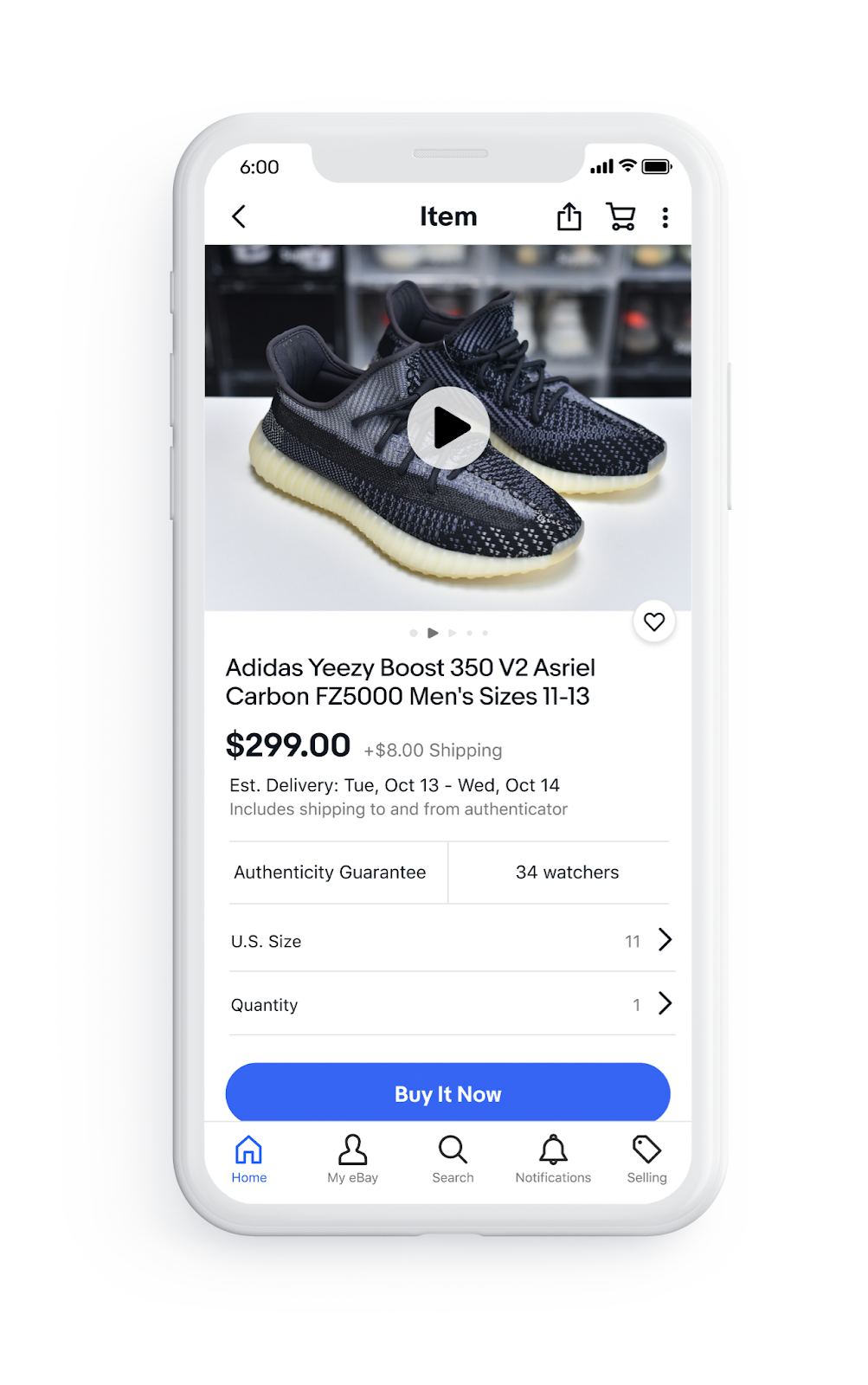
The only information eBay provides was this demo picture on the eBay app.
Video is the next step to assist marketplace sellers in providing more engaging shopping experiences to their existing and prospective customers. Product videos are attractive and they help to show off the goods and brand while also assisting in buyer engagement and sales.
The announcement seems to be chaotic and lacking in specifics, they have mentioned that more details on guidelines and eligibility will be revealed soon.
Sell on eBay from your online store
The eBay platform is preferred by sellers because it is feature-rich and offers a variety of marketplace advantages. It’s now easier to sell on eBay, thanks to the marketplace integration plugins that allow automated product listing, and this new video feature will boost your brand’s visibility.
Marketplace integration plugin allows sellers to link their existing eCommerce website seamlessly to the eBay profile. The seller can manage all the inventories and orders from one place. Additionally, its user-friendly interface provides payment and shipping regulations.
The Marketplace Integration plugin is available for all the major eCommerce platforms. Click on the links below to visit and explore the modules.
The eBay Marketplace Integration module can also be downloaded from PrestaShop Addon Store.
It is a smart solution that can provide you with a quick and easy seller dashboard. Customers can choose from a larger selection of items to find the item they want. Customers can choose from a variety of domestic and foreign shipping options to get their product via the most cost-effective carrier. The eBay marketplace is an amazing platform to expand your business.
PrestaShop Return Manager (RMA) module by Knowband is known as one of the best PrestaShop addons which simplify and fastens the product return management on your eCommerce store and helps you improve customer experience. With the PrestaShop Return manager addon, you can provide easy order return features on your website and can add a return policy for your products.
It’s a harsh reality that you’ll have to issue a refund or return in response to certain legitimate return requests. For making the process convenient, with the same module features, a customer can ask for a refund, credit, or even cancel the order completely or partially. A simple return process on your website can persuade the shopper to return to you the next time he or she shops online. We need to remain open for any chance because this is a long-term game.
The Return manager addon has been downloaded by 2000+ clients on the KnowBand store and PrestaShop Addon store. Some new features have recently been introduced to the PrestaShop Return Manager (RMA) addon in the latest update. In this post, we’ll go through all of the newly added features in detail.
Newly Added Features to the PrestaShop Return Manager (RMA) Addon:
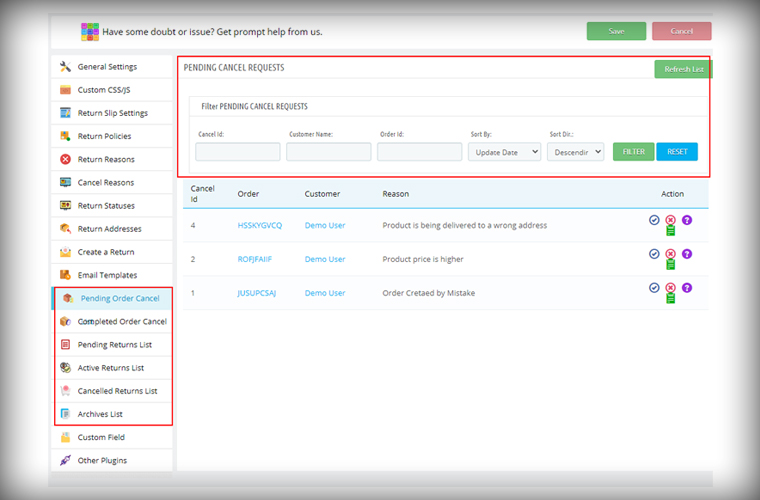
1. Search Option in the Admin panel for all the Listing Tabs
In the latest version of the PrestaShop Return Manager (RMA), the e-merchant can now search and filter the orders on various listing tabs. The search option is added for the following listing tabs pending cancel requests, approved canceled order list, pending returns list, active return orders list, canceled returns list, and archive list. Admin can sort the orders by providing details like Order ID, Customer Name, Respective listing ID, and also with a date.
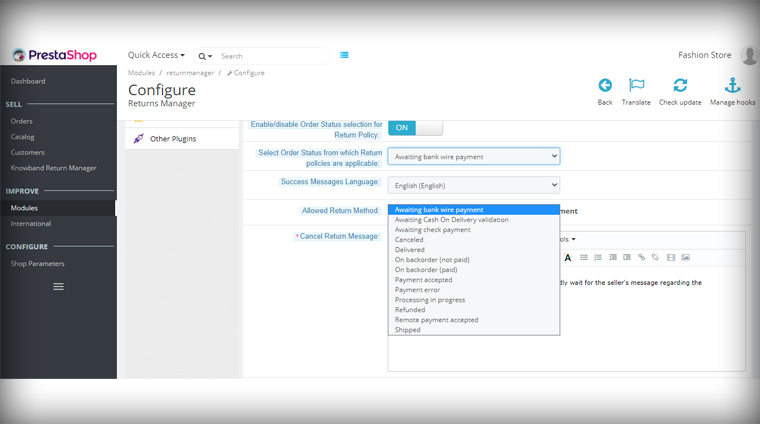
2. Define Order Status to start calculating policy time
The PrestaShop Order Return manager now allows the store admin to set the order status from which the return policy time will be calculated. In the previous version, the clock starts ticking the day order was placed and a delay in order delivery sometimes exceeds the period and customers fail to make the return request. With this feature, the store owner can set the status as ‘Delivered’ for calculating the return policy time.
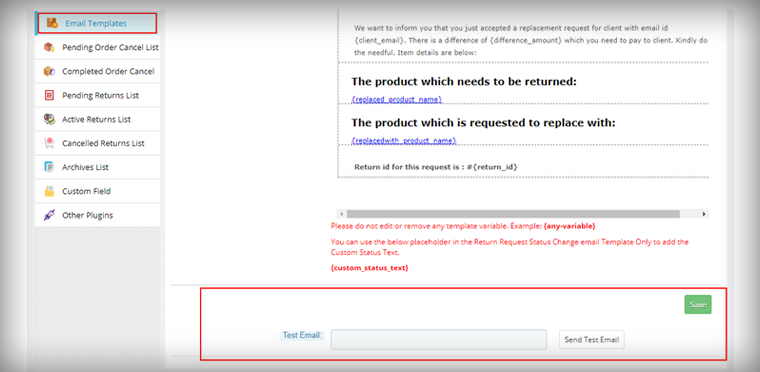
3. Feature in the Admin panel to send Test Email
The module now allows the store admin to send test emails before finalizing the template. This functionality is added to all the provided email templates of PrestaShop Return Manager (RMA) Addon.
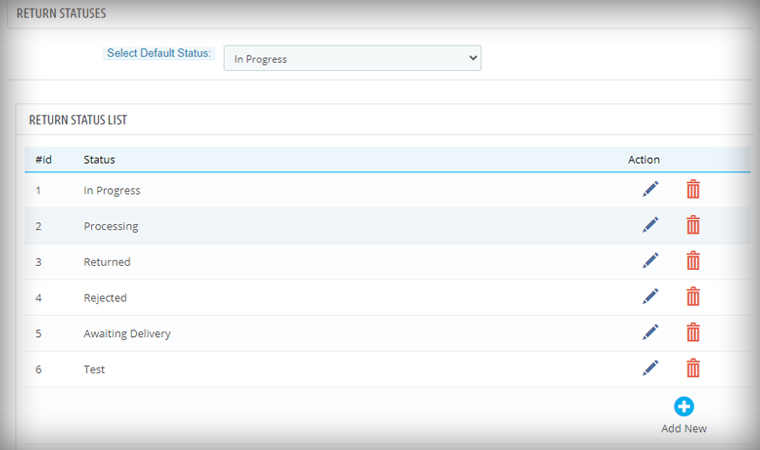
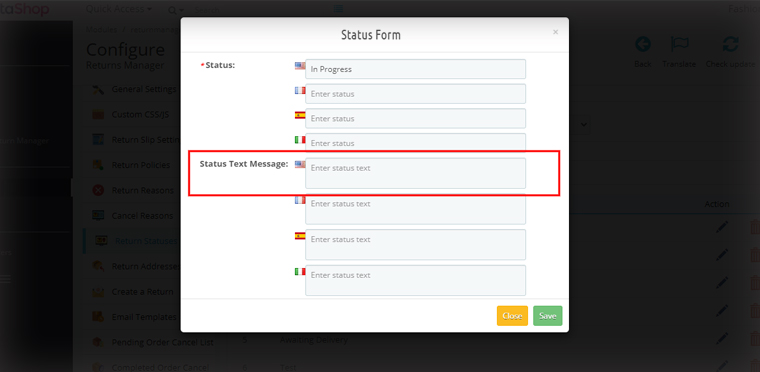
4. For email, templates specify custom Text for each Return Status
Another feature added in the module is an option in the admin panel to add a custom text for each Return Status and created a place holder which can be used in the return status email template.
Admin can add a personalized message in the provided option for every order status. An email with a tailored text will provide more clarity to the customer.
Features added for easier management
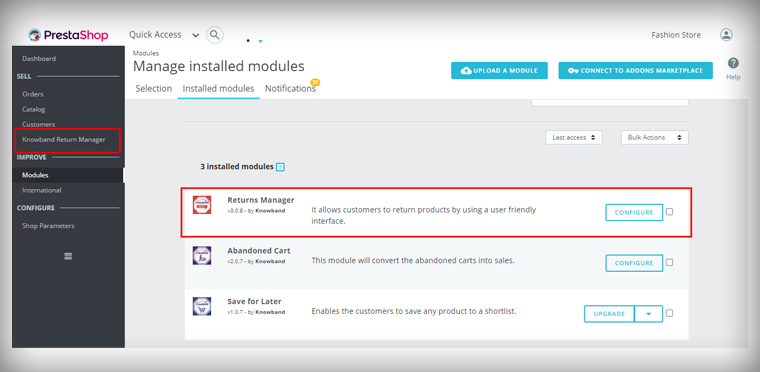
5. Added Left Menu Shortcut of Return manager Addon on the Dashboard
As it is shown in the picture below, the admin is now able to access the PrestaShop Return Manager (RMA) Module from the left menu of the PrestaShop admin panel. This provides quick access to the admin for module configuration.
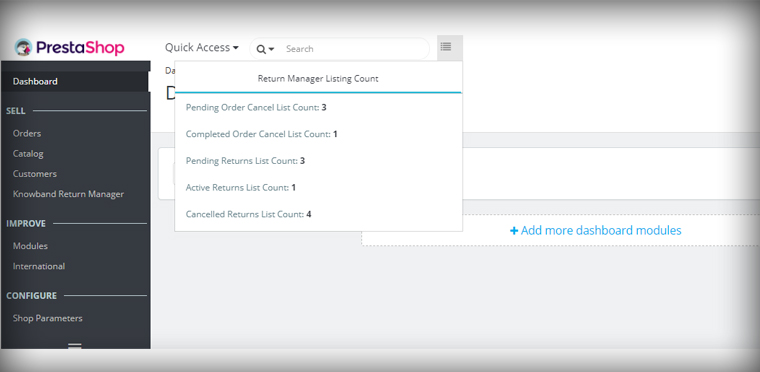
6. Display all Return listing counts on top of the Admin panel
In the Dashboard of the PrestaShop store, the admin can quickly access the return manager listing counts from the option provided on the top. By clicking on any of the listing options, the user will be redirected to the respective listing page.
7. PrestaShop v1.7.7.1 compatibility:
PrestaShop recently launched version PS v1.7.7.1, which includes some new features and bug fixes. We’ve made the PrestaShop Return Manager (RMA) Addon completely compliant with the new PrestaShop version v1.7.7.1.
For other existing features of the module, you can refer to our previous blog post.
Upgrade to the Latest Version of PrestaShop Return manager addon:
Selling on popular platforms expands your business growth and gives you a platform where millions of customers visit every day. Etsy Marketplace is one such opportunity where sellers can reach the zenith. With the aid of Etsy Marketplace Integration extensions, every seller can dream about selling on Etsy with ease.
Etsy is a community of one of a kind. Etsy is a worldwide online marketplace where individuals come together to produce, sell, and purchase and collect unique products. It supports independent creators. There is no warehouse for Etsy, just millions of people selling the stuff they love. The entire selling process is easy, helping you directly connect with manufacturers to find something extraordinary.
Why Do You Need a Marketplace Integration Extension?
If you are a seller or a manufacturer of creative products then this is the platform you are looking for. Managing things over two different platforms can be time taking and required extra effort twice. To save you from this problem, KnowBand created some super-smart marketplace integrators that connect your eCommerce store with the Etsy Marketplace and allows you to manage everything from your store. There are two main reasons you need a marketplace integration module:
It Saves Time
Reduces Extra Efforts
Beyond this, there are several benefits of using a marketplace Integration. Integration of the Etsy API offers the best solution for the listing of goods and synchronizes the product specifics such as price, definition, photos, inventory, etc. to the ongoing Etsy store.
Sellers can handle the shipping and order processing for the Etsy shop from their own eCommerce platform with the use of the Etsy API integration module.
Sellers can also configure cron jobs in order to simplify the synchronization method.
KnowBand’s Etsy Marketplace Integration has Proven to be Useful to Sellers
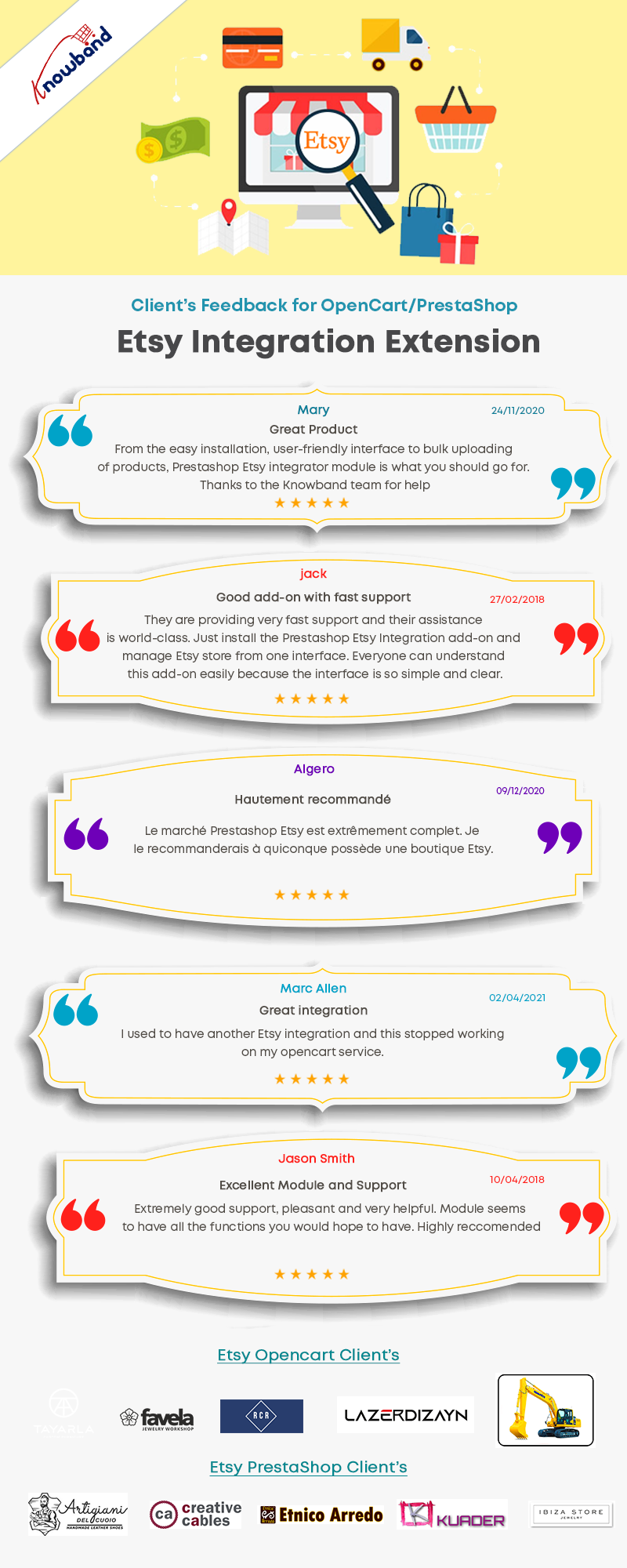
It’s the best time to share some excellent news on the client’s reviews! The Marketplace integration module is connecting many eCommerce stores to Etsy to sell seamlessly. With all-new capabilities, the plugins will help you scale your business much more easily.
The Etsy Marketplace Integration Module has proven to be so useful to sellers that they have been able to seamlessly operate multiple stores with it. We were in constant contact with them at KnowBAnd, understanding their needs, assisting them in their growth, and developing additional features for the much-loved App. Let us now explain what these are. than before.
Clients are happy with KnowBand’s Etsy Marketplace Integration Facilities
How Etsy Marketplace connector helps in selling Products on the Etsy platform?
The Etsy marketplace integration is a tool that enables sellers to list and sell their products on the Etsy marketplace with ease. This module reduces the efforts of listing and inventory management.
In four easy steps, you can connect Etsy and your eCommerce store:
Create an Etsy seller account: An Etsy seller account must be created by the Magento store administrator.
Etsy’s Setup App: Create a marketplace app on Etsy.
Install and Configure: After you’ve set up the seller’s account and the app, you’ll need to install the Etsy integration plugin in your shop. Configure your Etsy shop to meet your needs.
Start Selling: The products in the marketplace are now ready to be sold. The Etsy Magento Integration extension’s admin interface makes it simple to process orders received from the marketplace.
KnowBand’s Etsy-Marketplace Integration Module for major eCommerce Platforms:
The Etsy integration extensions for various eCommerce platforms such as Magento, Prestashop, OpenCart, and Shopify are provided by KnowBand. With more than 10 years of experience, KnowBand’s development team has developed seamless solutions for various eCommerce stores.
The Etsy integration extensions developed by KnowBand are flawless and have been tested for the respective platforms by the Prestashop, OpenCart, and Magento developers. All the criteria of the PrestaShop, OpenCart and Magento testers have been met by the integration extensions.
How to sell PrestaShop Products on Etsy Marketplace?
How to sell OpenCart Products on Etsy Marketplace?
For selling your OpenCart products on the Etsy store, link the two using the marketplace integration extension developed by KnowBand.
How to sell Shopify Products on Etsy Marketplace?
Shopify is growing rapidly and to help you bring your Shopify products to Etsy, KnowBand’s Etsy – Shopify Integration is an amazing plugin.
How to sell Magento Products on Etsy Marketplace?
We also have developed the Etsy-Magento connectors for both Magento and Magento 2 eCommerce websites.
How does Etsy Marketplace Integration assist the sellers?
Store Synchronization Made Simple
It synchronizes the entire eCommerce store products to your marketplace profile in real-time.
Inventory Management and Quick Product Listing
Moreover, it allows the store merchant to enter products in bulk. Also, the seller can create multiple profiles for the Etsy store.
Order Management
The eCommerce store’s admin can process the order from the admin interface just like any other order. The Etsy connector has a dedicated tab for specifying order statuses.
Shipping Management
The admin can develop their own shipping templates for Etsy customers, and they can offer an unlimited number of shipping alternatives as well as map shipping entries to the templates they’ve created.
Cron to automate the process
By executing cron in the back-end of the Etsy Integration plugin, the admin can add, remove, relist, or update product descriptions and pricing. There is no need for manual synchronization with the crons provided by the Etsy integrator.
Top Features of Etsy Marketplace Integration for PrestaShop, OpenCart, and Magento Platforms:
Facilities offered to Etsy Sellers with Marketplace Integration plugin in a nutshell:
User-Friendly Interface
Allows uploading of the products in bulk with ease
Map Attribute and category of eCommerce store products with Etsy marketplace characteristics attributes and category
The tags can be defined by the store admin when creating the profile, and these tags will be synced with the Etsy shop. Tags aid in the visibility of products in search results.
This extension allows the store administrator to create templates for the shipping
Gives you complete control of inventories. The administrator can look at the errors that happened throughout the product listing process.
The ability to sync the actual or special price of the products is available in the Etsy Integration Extension. The type of price – Actual or Special – can be chosen by the store admin when building the profile.
You can easily manage orders from your eCommerce store
There is an option to hide the out-of-stock products.
The secondary language is also supported by this extension.
Set a custom price for items listed in the Etsy store. The Etsy Integration Extension enables store administrators to list things on Etsy at varying prices.
The store owners now have the opportunity to reveal tax breakups in the order of Etsy.
Set the product image size from the admin to sync on Etsy Marketplace.
The admin can set the maximum quantity (Alter Quantity) of products to be synced to Etsy.
There are several features added to the Etsy Marketplace Integration Module which is available for all the major eCommerce platforms such as PrestaShop, Magento, and OpenCart.
Click on the links below to take the demo tour of the Etsy Marketplace Integration Module:
Conclusion: The marketplace integration module is easy to install and configure. The Etsy connection module saves online businesses time and effort by providing an intuitive product, inventory, and order management system. The Etsy integrator walks you through simple steps to get started selling on Etsy with this connection.
For the first 3 months after purchasing the Etsy Integration Extension, Knowband offers totally FREE technical support. We’re even helping you list the products in the ETSY store. Sellers can easily start selling from their existing eCommerce store with the help of the Etsy integration module and reach a wider audience.
KnowBand has everything to uplift your eCommerce business
Every seller who is having an eCommerce website and planning to expand on a marketplace like ETSY, eBay, or Google Shopping can explore the Knowband’s marketplace integration modules here.
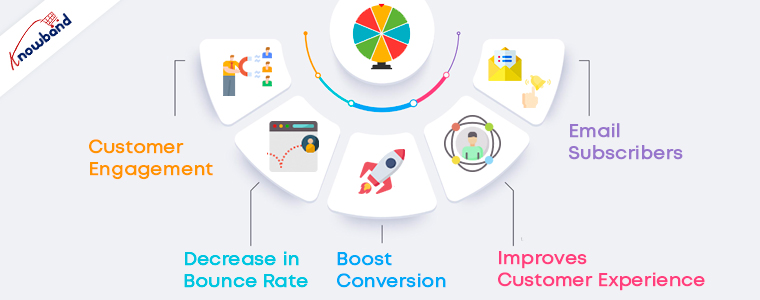
An online store always caters for more conversions, higher customer engagement, and zero bounce rates, and achieving this will be a dream come true.
Is your current marketing strategy working? Are you getting enough business from your online store? These are pressing questions and to overcome that you can try something new and in your online store.
How about adding Gamification to the Online store?
Gamification is the hot tactic businesses are using for marketing their products and to increase customer engagement. It allows users to participate in desired activities, shows a road to mastery, and takes advantage of our human psychological proclivity for gaming. But, Gaming and Gamification are not the same. In fact, Gamification involves a specific game element that can keep your user engaged for longer, and to keep them motivated, users are awarded with rewards at the end. It’s a tool that smart marketers use to improve customer engagement and influence user behavior.
Major problems faced by every online business
A number of factors may have a positive or negative effect on a business. Businesses invest thousands of dollars to remove the barriers coming on the way. Major barriers here are the abandoned cart and increased bounce rate.
For more conversion, it is needful to focus on customer engagement and eCommerce Gamification can help the businesses achieve that. If you have a PrestaShop store and you are concerned about your business growth then the article is all about what you should do in the coming future for increasing customer engagement to create your brand identity.
How can gamification help to overcome eCommerce issues?
Abandoned Cart
We’ve all had those moments when we impulsively choose a slew of things to purchase from an online shop, and only after we “check out” do we realize what we’ve done. We must get rid of things or move on to something better. As a result, the abandoned cart is born. Cart abandonment is widespread in all industries, but eCommerce fashion businesses suffer the most. Customers do not take any action on the abandoned product unless they find a great deal on their abandoned cart.
Your clients are no exception.
The consumer is unlikely to notice unless the items in the cart are highly priced and come with a slew of other benefits such as free delivery or a heavy discount.
Customer Retention
Another challenge that every eCommerce business faces is customer retention. If you have served your customer well enough then there are chances of their coming back. Customer retention works parallel to customer loyalty. That is hard to achieve just like the pot of gold at the end of the rainbow.
The foundation of any meaningful partnership between two individuals is loyalty. Customer loyalty is a daunting task to acquire and maintain. This is why businesses devote a significant amount of money to achieving these objectives. A system of positive reinforcement, incentives, and expressions of gratitude makes it easier to develop loyalty.
Some fun ways to increases customer engagement in your eCommerce store
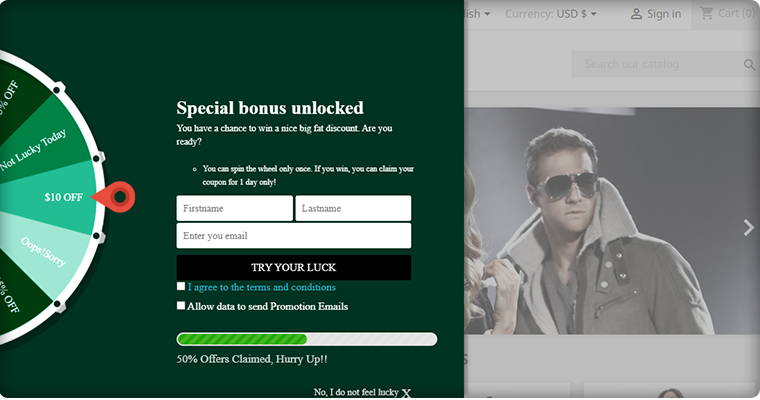
1. Spin-and-Win
This is where you can put your daily bonus to good use (and some other style points). This game strategy is fantastic for fans. On every spin, customers can earn rewards, coupons, or anything specified by the store owner. Furthermore, the visitor enters their email address to obtain a discount coupon code, which is then added to their shopping cart. The perceived value of this promotion, as well as its engaging features such as slide-out animations, gradient coloring, and brand recognition, combine to create a seamless eCommerce gamification experience that keeps consumers interested and encourages them to make a purchase.
Spin and win module is considered an advanced eCommerce gamification plugin because of its look and appealing design. It can be customized for various occasions and events like Halloween, Christmas, New Year, Valentine’s day, Diwali, etc. Keep in mind that the text added should be engaging enough to encourage the buyer to take the chance.
You can use the Spin-and-Win on any page of your website. Be it the landing page or the Product Page and this will surely create a positive impact on your customers because everyone loves having fun!
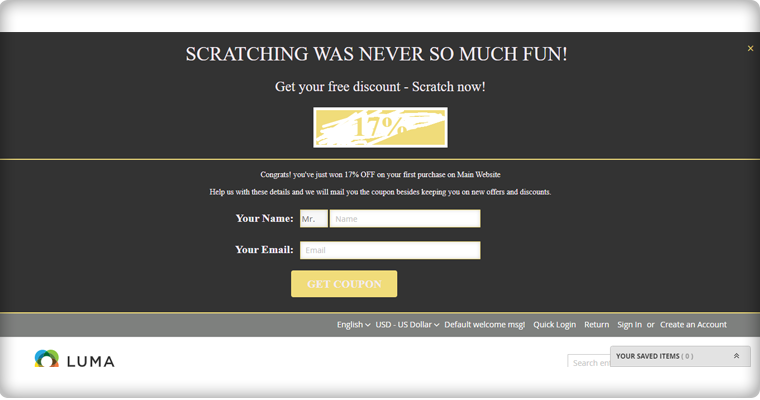
2. Scratch to Win
Consumers enjoy being entertained, and Scratch & Win campaigns have both fun and suspense. Along with customer engagement, this can be used to create a brand identity. Your brand logo, images, and colors can be used on the scratch card.
Scratch-off coupons are an ideal way to improve consumer loyalty and purchase rate. Scratch-offs with coupons and/or prizes are becoming more common in eCommerce stores.
Everyone enjoys the feeling of winning something. Ecommerce businesses may use mobile scratch-off coupons to generate excitement in their stores and on their websites.
Customers know they’ll get something if they play the tempting scratch-off, so the psychological pull of beginning something draws them to the end of the mobile scratch-off card, where they’ll get a reward.
By doing so, you will give your prospect the warm feeling of winning and receiving a reward, as well as gain the customer interaction you were looking for.
3. Loyalty Programs
Loyalty, on the other hand, can be gamified by the use of a point system. To meet your goals, you must have an effective loyalty program. What makes a loyalty program effective?
It improves a customer’s sense of worth. If a customer receives points for doing nothing but spending money, those points feel like they’re a part of their previous purchases. The consumer is attached to them and wants to use them wisely because they have this intrinsic value.
A points system that accumulates over time and can be traded for both virtual and physical goods makes it easy to entice consumers to return for repeat purchases. You can reward loyal customers with discounts and gifts in a similar way. Offering reward points on every purchase will win you the customer as well as their loyalty.
In closing,
Ecommerce gamification has the potential to improve results in many ways. Customer engagement will increase, onboarding will be shortened, and learning interactions will be more effective and meaningful as a result of successful gamification initiatives. Companies benefit greatly from the specific elements of gamification by smoothing out the transition to organizational change.
KnowBand has developed several eCommerce plugins that can help your online business to grow and will take the customer experience to the top tier. Get in touch or write to us at support@knowband.com.
Large eCommerce titans like Amazon, eBay, Alibaba, and such others have gained a monopoly over the eCommerce segment. Not having multiple sales channels and a limited customer reach are the two prime reasons that are hurting the interests of various business entities around the world.
With the competition in the eCommerce marketplace segment at an all-time high, the bigger fishes in this ocean are actually eating up the smaller ones making them as completely extinct. This uneven market share is actually casting a shadow on the future of smaller business entities in this billion-dollar industry.
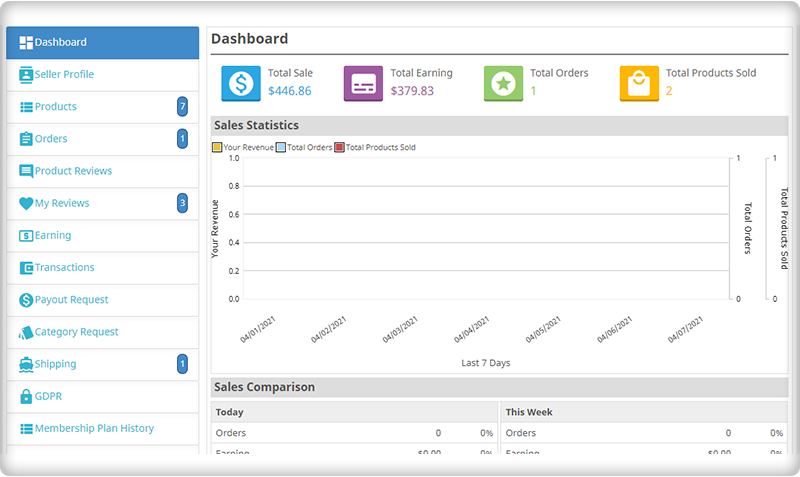
To put an end to all your concerns and miseries, Knowband has come up with this out-of-the-box module that can convert your PrestaShop store into a feature-packed marketplace store.
Introduction to PrestaShop Marketplace Addon-
With the help of these superb PrestaShop modules, small and medium eCommerce stores can have better recognition and presence in the online business community for higher sales opportunities. Now, these smaller online stores can sell their products more effectively by adding their products seamlessly to this marketplace store.
PrestaShop marketplace addon allows seamless seller registration for selling products among your targeted customers. This excellent module has bent the stiff eCommerce laws for numerous small and medium online stores for achieving higher conversions and sales. Let us take a look at some of the unmatched features and functionalities of this PrestaShop marketplace addon.
1. It supports the commission model and membership plans
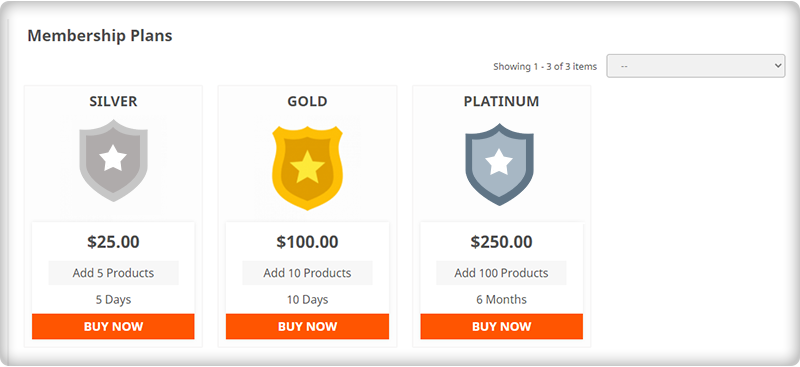
The Prestashop marketplace addon is integrated with the commission revenue model. Store owners can charge a fixed commission for every seller or different from individual sellers. The commission can be set for various categories and products as well. This module also supports the membership plan.
2. Eliminates the need for inventory management-
Now, registered sellers can seamlessly sell their products on their PrestaShop marketplace modules without any trouble. There is no such need to manage the inventory for the products that are offered by you for selling purposes.
The module relieves its sellers from the headache of inventory management while offering their products and services to their targeted customers.
3. Comprises of an efficient email notification system
With this PrestaShop marketplace addon, the involved members of the marketplace community such as buyers, sellers, and store admin can get timely updates and notifications about all the activities regarding their marketplace store. This helps in speedy decision-making and improves the business growth for an online business entity.
4. Provides greater role and authority to store admin
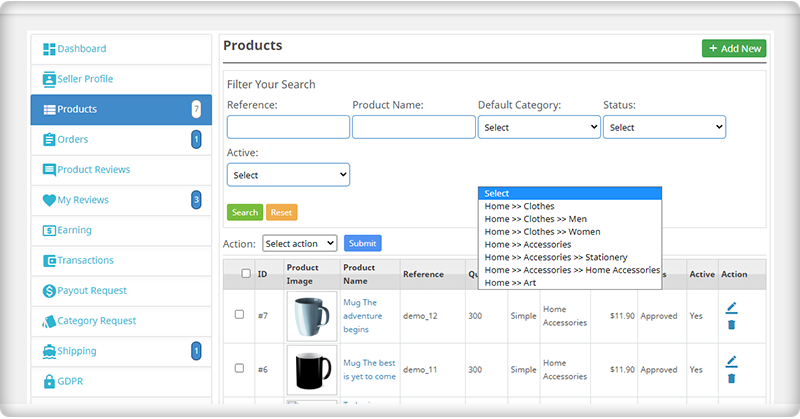
Store admin of this PrestaShop addon is loaded with numerous features and functionalities that impart a great deal of authority in the day-to-day functioning of a marketplace store. Some of the various areas where store admin has the last say are as follows:
– Contains authority to accept or reject seller’s request for selling his/her products on your marketplace store.
– Maintaining commissions for various vendors and individual commission rates for each seller.
– Setting the limit on the number of categories that can be used for sellers for adding their products to your marketplace store.
5. Customer’s Reviews and ratings for sellers and products
The goods can be easily rated and reviewed by customers. From the PrestaShop Marketplace Addon’s backend, the admin may accept or deny seller feedback. On the front-end, these product reviews are shown to the customers to build trust and influence their decision.
Consider these points before launching a Marketplace on PrestaShop
1. Expand your business with PrestaShop Marketplace Mobile App
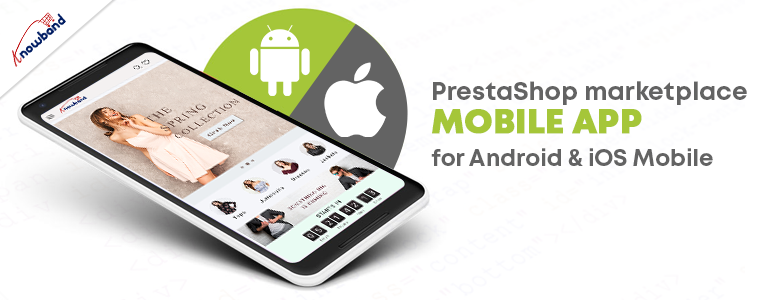
Mobile users are increasing every day, necessitating the creation of a mobile app. While creating a marketplace on the PrestaShop platform, you can plan for a mobile app as well. The PrestaShop Marketplace Mobile App Builder plugin is compatible with the PrestaShop marketplace module and allows you to launch your application for both Android and iOs operating systems.
2. Go Local with PrestaShop Hyperlocal Marektpalce
Post pandemic, there has been a significant change in the shopping behavior of the customers. Most of the customers are choosing local sellers for their purchase and as a business owner, you can take this as an opportunity. Transform your PrestaShop store into a Hyperlocal Marketplace using Hyperlocal Marketplace addon. It has several features that are explained here.
3. Start Service based Marketplace like Urban Company
You can start a service-based marketplace like Fiver, Urban company, etc. For this, you will require two of the PrestaShop modules: Hyperlocal Marketplace Module and Booking and Rental System.
The booking and rental system plugin will allow you to schedule appointments and bookings for the services provided by various sellers on your PrestaShop marketplace. Refer to our previously shared article on How to create a service-based marketplace.
Finally, It is time to revitalize your sales and customer engagement for your online store with the help of this PrestaShop Marketplace Addon that acts as a wonderful multi-sales channel for various PrestaShop store owners. Once, you have the option to sell your products among a large customer base, you can effortlessly improve the chances of your business growth.
Check out the next part of this blog for more information about the PrestaShop marketplace addon.
Looking for an email that can boost customer engagement?
A tailored welcome email can do the thing.
And there are different ways you can make your welcome emails more effective.
These emails, when used correctly, set the tone for the type of relationship you will have with your email subscribers.
Unfortunately, many marketers ignore the impact of welcome emails.
What is a welcome email? It is the first email a subscriber receives after signing up for your email list is known as a welcome email. These messages are usually sent right after someone subscribes to a newsletter or completes a popup form on a website.
Why do you need a welcome email?
You’re making a first impression on behalf of your brand when you send a welcome email to a new blog or newsletter subscriber, or a new client. Videos, special offers, a sign-up form, or just a friendly hello can all be included in welcome emails to help build a relationship with a new customer. A well-crafted welcome email ensures that you make the best first impression possible.
Some Welcome Email Statistics to look upon
Research says, after opt-ins and within the first 24 hours, 45 percent of subscribers make purchases.
They have a higher open rate than any other marketing email, ranging from 50 to 60%.
When compared to standard marketing emails, welcome emails have a 4x open rate and a 5x click-through rate.
40% of the subscribers read every mail who has read the welcome email.
The welcome email can be very effective and is the first step for building the relationship between your brand and the client. Then why miss the chance?
How to write an effective welcome email?
To create an impactful email, it is necessary to prepare a template that can be used now and in the future. Here is the guide to craft a tailored welcome email.
Before creating your first email, you need to understand your clients and know them to make a better impression.
A welcome email will help you confirm that your subscribers are willing and able to purchase. The aim of this data collection should be to obtain a comprehensive understanding of your subscribers and customers.
Now is the time to write a welcome email that will turn your subscribers into new clients. Never make any mistake in the confirmation email because this is your first email and first impression matters.
When writing a welcome email, keep the following points in mind.
Add a catchy subject line
To entice your recipients, use high-quality visuals and advanced elements,
as well as a compelling email copy and value proposition,
Focus on the client’s pain points and provide solutions
It should have a converting call to action.
While interacting with the client through a welcome email, concentrate on the client’s problems and what solution or service you can provide to help them solve them. Whether you have used the popup for subscription or if they subscribed to the newsletter that clearly says that they are interested in your services.
What’s the best way to get welcome emails to work for you?
Welcome emails can be a powerful tool for increasing subscriber engagement when used correctly.
Whether it’s a simple newsletter, lead magnet, contest, or content update, use them to welcome new subscribers to your email list.
With a welcome email, you can boost customer engagement on your online store and a wonderful copy will help you build a strong list of subscribers.
Don’t just send a confirmation email but welcome your customers and turn this into an opportunity.
How to get more email subscribers?
Sometimes, getting new email subscribers is not less than a task. Leverage pop-up forms using pop-up modules on your eCommerce store. KnowBand has designed a few modules for customer engagement and newsletter subscribers. Modules that can offer discounts or deals are a trick that always works in online shopping. To claim these offers, the customer is required to enter the email address and will be motivated to avail the benefits by making a purchase on your online store. Let’s take a look.
Add gamification plugin Spin to Win, this is the most effective email subscription module and it can boost customer engagement as well as the conversion rate on your eCommerce store. Click here to explore the module.
2. Entice them with Scratch off Coupons that contain a discount code or a flat percentage discount. And, to avail the offer, the customer has to enter the email address.
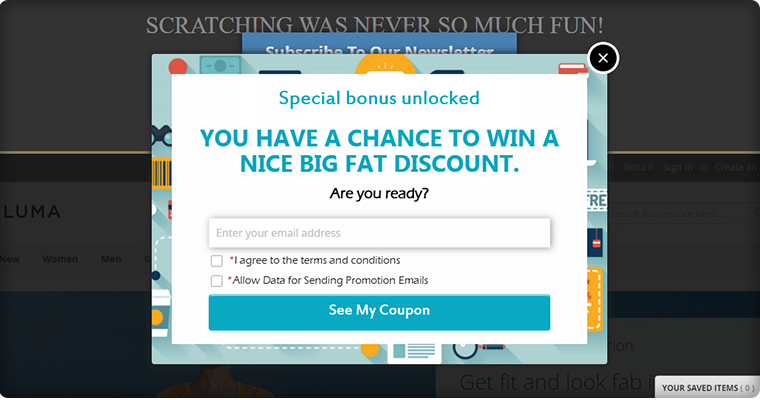
3. You can also use entry/exit pop-up with greetings and coupon codes at the entry point or on any other page of the website. Pop-ups are very popular for entry and exit pages.
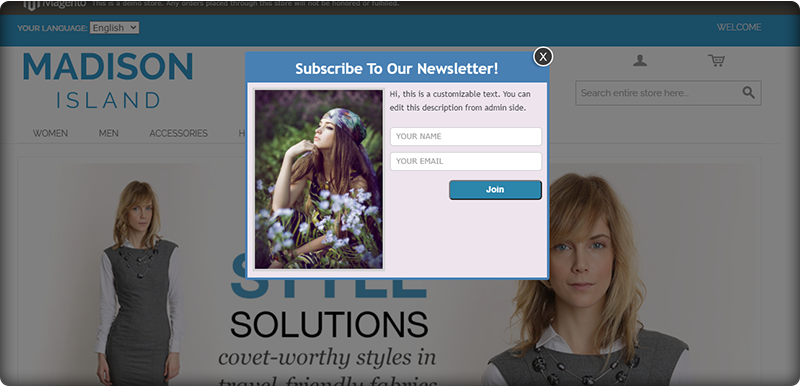
4. I have added the auto-subscribe plugin to the list as it allows the store owner to start the first conversation with the prospect. A visitor who can become a customer soon.
On online platforms, any interaction with the customer starts when they come to your landing page and all these modules add an entry pop-up window on the landing page of your website. These amazing plugins can help you in building your email subscribers list that can be used for welcome email now but in the future for your brand’s marketing.
Finally,
A healthy list of email subscribers is best for email marketing but before jumping to promotional emails, start with a crafted welcome email. This will be your chance to shine and convert the subscriber into a client. Businesses can’t afford to overlook the value of welcome emails. Following the guidelines outlined above will assist you in accomplishing this goal.
>Looking for a way to customize PrestaShop product pages with custom fields?
PrestaShop is the most common eCommerce platform for selling a product online. Adding custom fields in PrestaShop only takes a few moments. A great product description engages the customers and increases the chances of purchase. So, PrestaShop is the best choice when you want to add custom fields to a PrestaShop product page or display alternate product variants with a single click.
In this article, we’ll show you how to use the Advanced Custom Fields module to add custom fields and attributes to the PrestaShop product page and product descriptions.
About the Advance Custom Field Module for PrestaShop
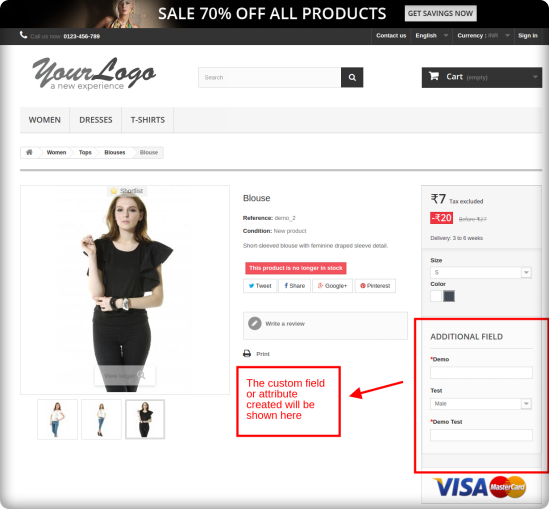
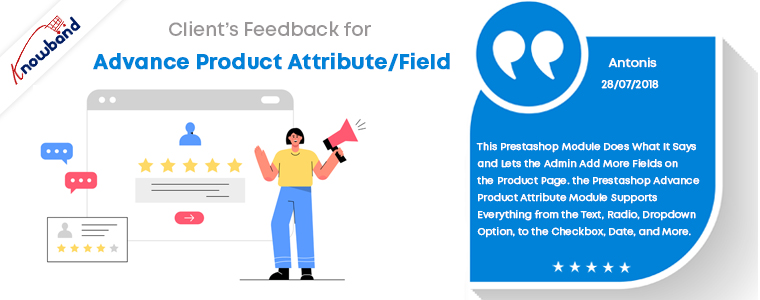
The Knowband Prestashop Advance Product Attribute/Field Addon is a simple way to add extra information fields to the website’s product page. With the aid of this Prestashop Additional Product Field module, the store owner may now collect the necessary data for the product from potential buyers. Thus, the Prestashop Advance Product Attribute module enables e-merchants to include an additional information field on the website’s product pages.
The Prestashop Additional field module makes it easy to add any sort of field and define the label name on the product page. Accordingly, you can configure any aspect of your PrestaShop dashboard. So, PrestaShop Custom Field allows incorporating website information easily that would otherwise require manual data entry.
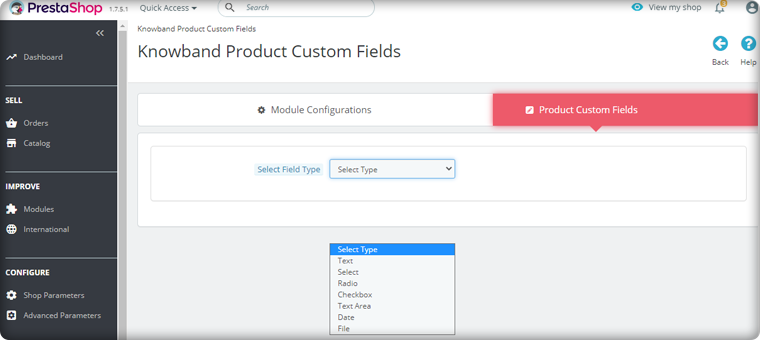
Text, Radio, Dropdown, Date, Select, Checkbox, and Text Area fields are provided by the Prestashop Advance Product Attributes module. As a result, sellers can configure the fields to suit their needs. Changes may be made to specific product pages or the entire website.
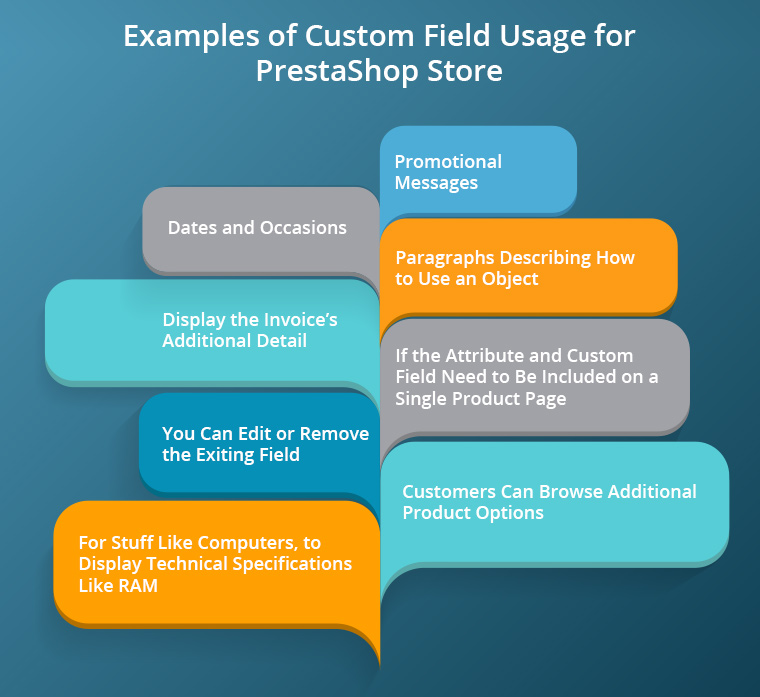
Examples of Custom Field Usage for PrestaShop store:
On the product page of the eCommerce website, the PrestaShop Additional Custom field module introduces new custom fields or attributes.
When would PrestaShop Custom Fields Module be useful?
For stuff like computers, where you’d display technical specifications like RAM and processing power, you’d add additional product details.
Promotional Messages that can be easily modified.
For Dates and occasions, when you’ll have a countdown, auction, or release date.
You can edit or remove the exiting field
If the attribute and custom field need to be included on a single product page.
Customers can browse additional product options in addition to versions.
Paragraphs that describe how to use an object in detail.
The Prestashop Advance Product Attribute/Field module displays the invoice’s additional details.
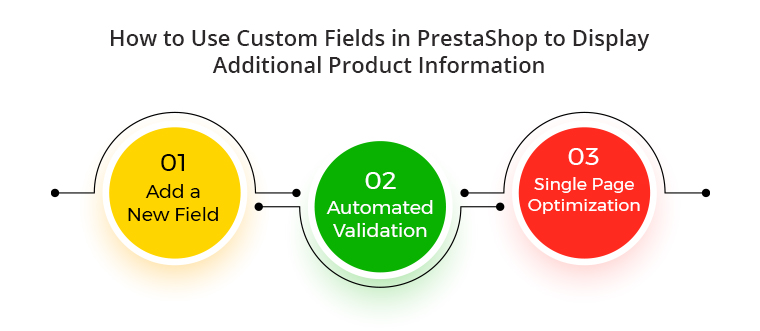
How to display extra product information in PrestaShop using custom fields?
Create a new field
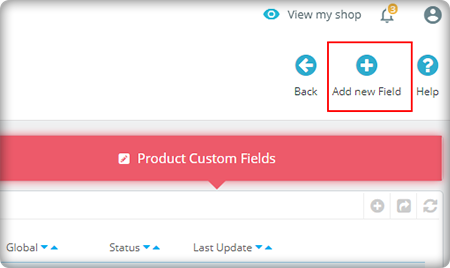
In your PrestaShop Advance custom field dashboard, go to the new Custom Fields tab. Then, click on the tab ‘Add attributes’.
Select the field type according to your requirement
Automated Validation
By choosing them from the drop-down list, the validation criteria for the created fields of the PrestaShop Advanced Product Field module can be defined. As a result, e-merchants save a tonne of time with the automated solution.
Single Page Optimization
If modifications aren’t required on all pages, the PrestaShop Product Page Custom Field plugin allows custom fields to be deployed to just one product page.
Do you want to explore more about the PrestaShop Product Page Custom Field Module?
The advanced product custom field and attribute module have added benefits in that you can add the custom field information on the invoice page. Also, this feature helps you in collecting information about your customers. So, this information can be used in future marketing strategies also while creating the buyer persona. Besides that, it’s a great way to unleash your imagination while also making the boring job of designing product pages a little easier.
Prestashop Custom Product Module is a great module for adding extra data fields to the website’s product page. Also, the product page can be optimised without changing any code. Besides that, we understand that the Advanced Custom Fields module has a learning curve. So, please share your thoughts and questions about adding custom fields to PrestaShop in the comments below!
If you have any concerns related to the Module functionality, contact us at support@knowband.com. Moreover, for any technical assistance simply send a ticket to Knowband.
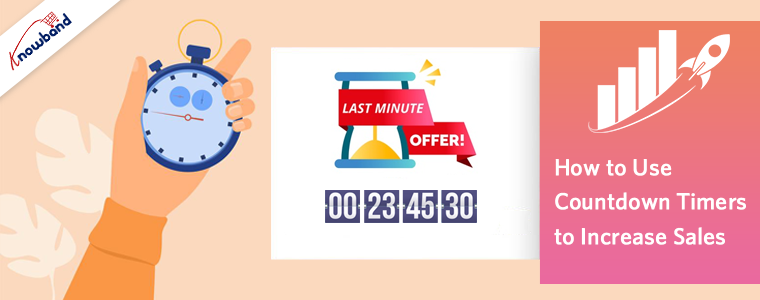
Ever felt like buying a product immediately after seeing the ‘limited time’ offer tag? This happens with everyone, especially when you know that the deal will end soon and you will miss out on the best offer out there. This urgency is created by Countdown Timers.
The countdown timer heats the sense of urgency and scarcity, forcing the users as quickly as possible to make a purchase decision. Simply set the start and end date, and your timer is ready.
Using a countdown timer, you can run flash sales, and limited period sales offering exciting deals and promotions. The sense of urgency created by a countdown timer pushes the user to purchase through psychological tricks. Users who fear that tomorrow they may not be able to afford anything will be more likely to buy it today.
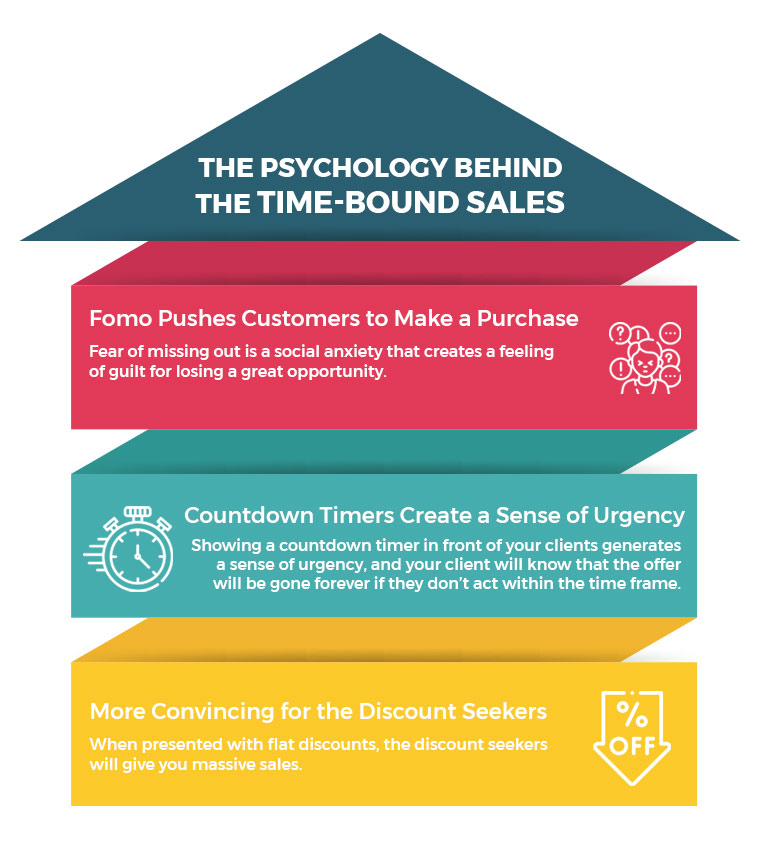
The Psychology behind the Time-Bound Sales
Both limited-quantity products and limited-time products can create a sense of urgency. However, to the scarcity theory, limited-quantity goods and limited-time deals empower sales. Anything will be more alluring the more limited its supply is.
Adding a countdown timer will boost your sales enormously. A limited-time offer means that the units’ discount is only applicable for a short period of time and that if customers do not act right away, there won’t be any more units available for purchase.
1. FOMO Puses Customers to Make a Purchase
Fear of missing out is a social anxiety that creates a feeling of guilt for losing a great opportunity. Do not let your audience go away without purchasing on your website. Use the power of FOMO (Fear of Missing Out) by adding a Countdown Timer on your website.
A countdown timer should accompany any big deal. Why? If the arrangement is there forever, what is the point of acting now? By displaying a countdown timer in front of your clients, you may create a sense of urgency because your clients will understand that the offer will end once the timer expires.
When presented with flat discounts, the discount seekers will give you massive sales. Selling clearance could be a good choice. You will sell out the goods stocked for months as a store owner and bargain seekers can get a decent deal over it. These sales can be the main contributor to your cash flow, which, by replacing the older ones, would make space for the new items.
Never go overboard and make sure you’re honest. It has been shown that urgency is effective, but you must use it honestly. Otherwise, placing the timer on every product gives a feeling that you are running out of business. So, where to put the countdown timer on your website?
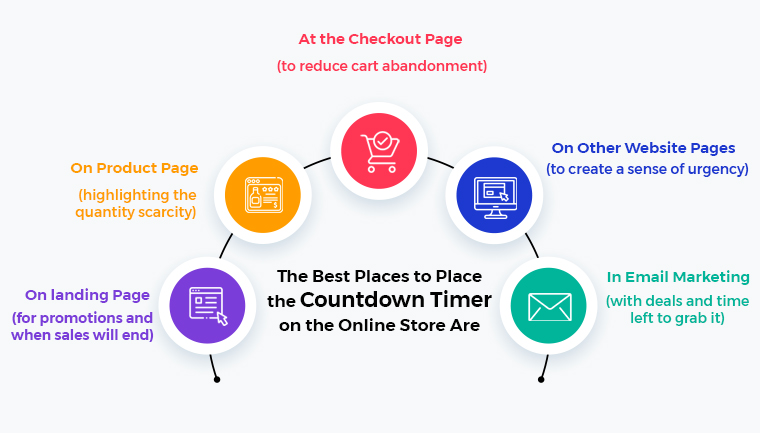
The best places to place the countdown timers on the online store are:
On the landing Page (for promotions and when sales will end)
On the Product Page (highlighting the quantity scarcity)
At the Checkout page (to reduce cart abandonment)
On other website pages (to create a sense of urgency)
In email marketing (with deals and time left to grab it)
How to implement a Countdown Timer on your eCommerce Website?
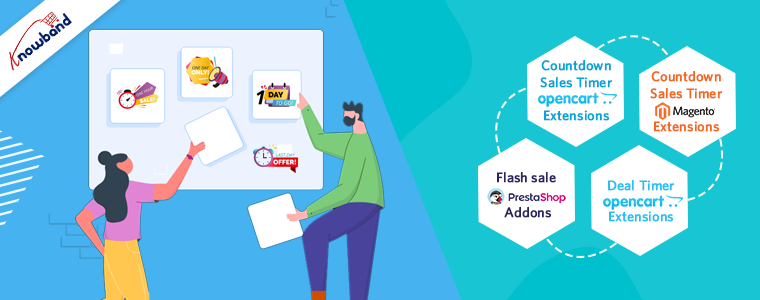
You will not need programming experience or certain skills in your website builder to implement our module. The Countdown timer by Knowband to run flash sales is available for various eCommerce platforms like PrestaShop, OpenCart and Magento.
The module is easy to install and configure. Sharing a few of them for your reference;
Countdown Sales Timer – Opencart Extensions
An efficient strategy to encourage large sales in the eCommerce business is to display bargain prices and free shipping on a selection of products. Due to the limited stock and discounted prices displayed by the OpenCart Countdown Sales Timer extension, customers are forced to decide right away.
Flash Sale – Prestashop Addons
The Prestashop Flash Sale Addons can encourage impulse buying and increase the likelihood that an eCommerce site. The PrestaShop plugin will build the state of urgency. The Prestashop plugin encourages customers to take advantage of the offer and place their order as quickly as feasible.
Deal Timer – OpenCart Extensions
The OpenCart Deal TimerExtensions will allow to add products to the specials list by offering discounts for a set amount of time. The admin can decide whether to display a timer or modules on each layout, position, and sort order for the product listing.
Wrap Up:
The majority of the time, urgency and scarcity push customers to make purchases, ensuring that the store’s conversion time is minimised. The KnowBand Countdown Timers were designed to make complete use of the customer’s psychology. It allows eCommerce stores to push sales efficiently by adding extra countdown clocks to exclusive items or deals.






![New Features Added to PrestaShop Return Manager (RMA) Addon [Version 3.0.8 Released]](https://www.knowband.com/blog/wp-content/uploads/2021/04/New-Features-Added-to-PrestaShop-Return-Manager-Addon.jpg)