Sometimes, the customers may browse the store, add a product to the cart, but at the time of check out, they may cancel the transaction and leave the purchase incomplete. This is known as Cart Abandonment.
Shopping cart abandonment is one of the most important concerns for e-commerce retailers. There can be ample reasons for cart abandonment. Though it is impossible to figure out the exact reason, one can try to analyze the behaviour of the abandoned cart users and work upon it to reduce the cart abandonment rate.
Before finding out ways to reduce cart abandonment, it is important to look for the reasons leading to it. In this article, I have listed out the top 5 eCommerce mistakes that lead to shopping cart abandonment.
1. Hidden charges
Generally, the customers are unaware of the hidden charges incorporated by the seller in the products. The hidden charges may include the shipping cost, transaction fees, etc. The introduction of these charges at the transaction page kills the purchasing mood and results in the abandoned carts. Therefore, the seller must be clear about all the charges that are applicable in the product, so that the customer may make up his mind prior to the purchase.
2. Mandatory sign-ups
There is nothing more frustrating than a mandatory sign-up process on the checkout page. People are ready to abandon the cart to avoid filling up a registration form.
Customers want to check out easily. Adding a barrier in the checkout process will only lessen the chances of conversion. To avoid compulsory registrations, come up with a Guest Checkout or provide a social login facility so that the consumers can get rid of form filling without their flow getting disturbed.
3. Tedious Checkout
The checkout page of an e-commerce store is a crucial step towards the purchase journey of a customer. If optimized, it can boost your conversions otherwise you can face a heavy drop-down in the conversion rate.
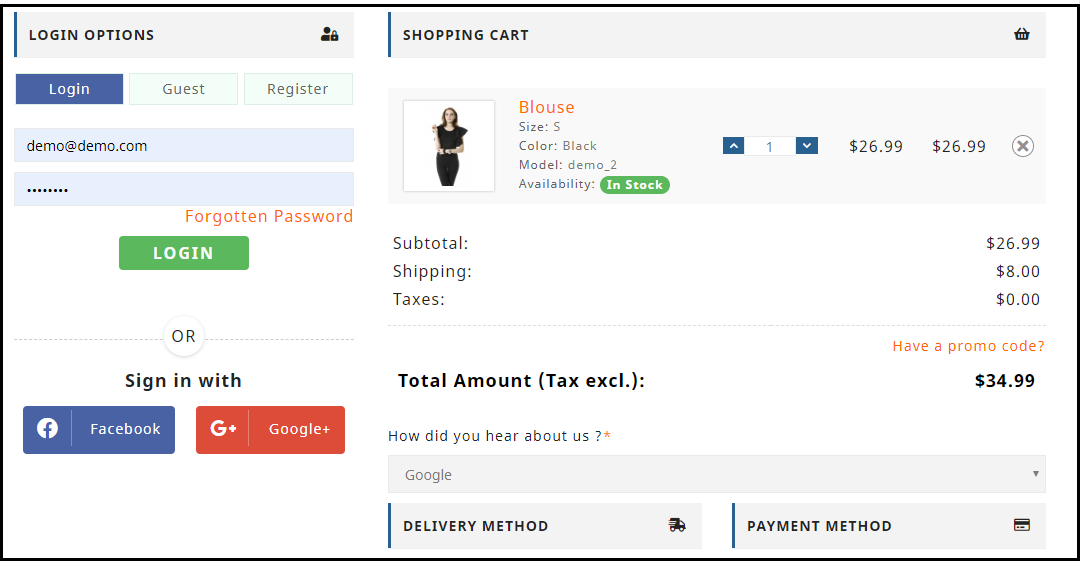
Try to simplify your checkout page. Have clarity. I would suggest adding a one page checkout facility on your store so that the checkout process becomes convenient for customers.
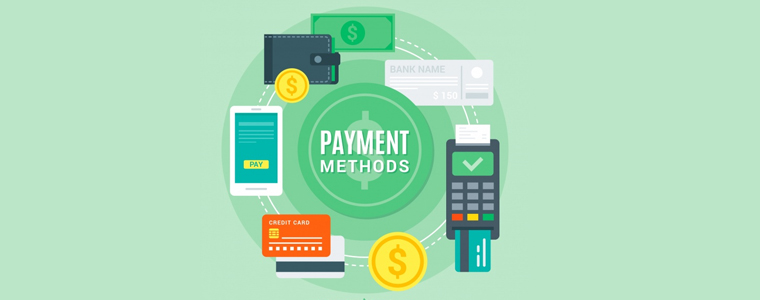
With the introduction of multiple payment gateways, customers expect to make a payment with their desired payment option, yet many e-commerce stores are stuck with a few payment options only. When customers do not find the desired payment mode, they take an exit from the store and look for the product in some other stores.
Why would you let that happen when a person is all set to make a purchase? Provide multiple payment options so that customers can choose their preferred payment option. Also, do not forget to add the e-wallet facility.
5. Less offers
The primary reason why people prefer to shop online is to get heavy discounts and the offers that the customers can avail on a number of products. The major factor contributing to the growth of the online market is choice availability and the offers that customer receives on a daily basis via Email, or pop-ups. Therefore, most of the time a customer expects to receive some kind of discounts on their purchase. In case, the seller fails to provide them with offers, the customer readily abandons the cart and exit the store.
To persuade your customers with some attractive offers, you can look to add the Spin and Win or the Exit popup on your e-commerce store.
Final word
Want to reduce the cart abandonment rate? Check out Knowband’s
The Abandoned Cart module gives a detailed analysis of the abandoned cart users and allows e-retailers to reach out to those users to persuade them to complete the purchase.
A checkout page has a major hand in eCommerce conversions. Without an optimized checkout page, the chances of a shopping cart abandonment increase significantly.
Cart abandonment happens too often during the checkout process and it can occur for a number of reasons. It won’t be wrong to say that it is a curse on eCommerce. So, how do you prevent this from happening?
Let’s try to understand why visitors abandon the checkout page and find out how you can overcome them with simple tweaks.
1. The hidden cost is a conversion killer
The unexpected hidden cost is one of the major reasons why customers abandon the checkout process. According to the Baymard’s research, extra hidden costs such as shipping charge, tax, transaction fee hold the highest percentage (55%) amongst the reasons for abandonment during checkout. Still, most of the eCommerce stores do not reveal the actual order total up-front before the payment page in the checkout process. E-retailers taking overhead, extra, or hidden costs must reveal the exact product amount in the checkout process itself rather than disappointing the customer later on the payment page. In fact, the best place to reveal the estimated cost of the cart is right after a customer selects the shipping option.
2. Compulsory account creation
The compulsory account creation ranks at the 2nd position in the study done by the Baymard Institute to find out the reasons for shopping cart abandonment during checkout. About 34% of customers leave the checkout process just because the web store asked for compulsory account creation to make a purchase.
When so much of alternative options like social login and guest checkout are easily accessible on the websites, it does not seem a wise idea to offer only the traditional account creation option on the checkout page. As a merchant, you should understand that if not you, a majority of your competitors would already be providing the social login and guest checkout options on their e-commerce platform.
Do not let the shoppers bother about creating an account unless you have a very strong reason to hold them back. Do not compel them to visit your rival’s store for easy checkout. Integrate a guest checkout or a social login option on your checkout page today.
3. Too long/complicated checkout process
The length and complexity of a checkout process make a visitor reluctant to leave the checkout page. To overcome this problem, you can think of implementing a single page checkout on your store. Although there’s no clear conclusion to the debate between one page checkout vs multi-page checkout, I would prefer a one-page checkout over a multi-page checkout. Well, even if you are using the multi-page checkout process, make sure to ask only relevant information so that the consumers can make a quick purchase from your store. Amazon’s checkout process, for example, is a multi-page structure, but still, it’s quite simple and fast. It’s because it doesn’t ask for too many details, just the important ones. The account creation step would ask for your name, email, and your desired password and that’s it, you have an Amazon account.
So, either you are offering a multi-page or single-page checkout, the main aim should be to reduce the number of entries in forms used in the checkout process. Whether it is the account creation form or the billing/shipping address form, customers are never going to like if you thinking to capture more than enough details. You can take a reference regarding the best checkout form designing from “5 things you probably didn’t know about eCommerce checkout”.
4. Unsatisfactory return policy
According to the data collected by Invesp, 30% of the products that are ordered online are returned, which is 21.11 higher as compared to the brick-and-mortar store(8.89%). In the same data, it was found that around 58% of the online shoppers want a hassle-free return policy.
The concerns regarding the product return always revolve around a customer’s head. Ever before they decide to make a purchase, the first thing they confirm is whether the product can be returned easily, if in case it contains some problems.
Your return policy plays a major role in the decision-making process of the consumer. In order to provide satisfactory return policy, you must also have an efficient RMA system that allows you to tweak your return structure.
The return process of your eCommerce store should reflect your return policy well. In simple terms, deliver what you have mentioned in your return policy. If you have a flexible return policy but customers are finding a tough time during the return process, it is going to create a negative impact on your store. You can lose the trust of your customers.
Even today, there are many eCommerce companies that are restricted to a few selected payment modes only, which is surely not a good sign considering the various preferences by consumers to make the payment. When consumers do not find their preferred payment mode on the checkout page, they are left with no option except leaving the purchase incomplete. Do not let this happen to your eCommerce store.
Enable multiple modes of payment on your store and allow your visitors to make their own choice for the payment purpose.
Conclusion
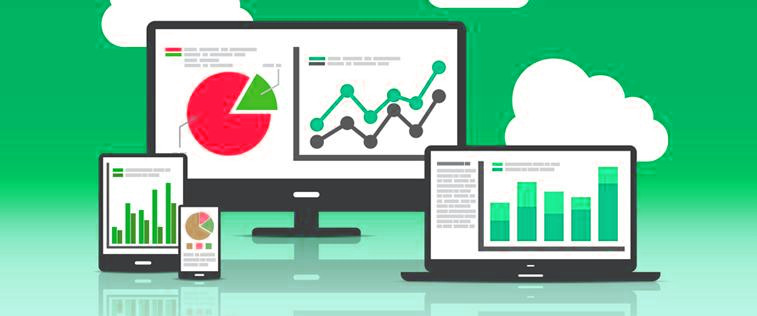
The checkout page is the most important element of the whole conversion funnel. Most of the consumers reaching on the checkout page have the buying intentions at some level. It depends on how well you have structured your checkout page and your return policies to persuade the customers to complete their purchase. To check which step is creating trouble for your store visitors during the checkout, you can try out the Prestashop Checkout page analytics addon. This addon can be a useful solution for you to track all the important metrics of your checkout process.
Avec ce module install sur votre server web, vous pourrez faire l’exp rience de baisse vers le bas dans le panier taux d’abandon. En envoyant des courriels de rappel, vous serez en mesure de suivi avec les Perspektiven qui n’a pas r ussi compl ter l’achat et ont quitt leur panier Avoidn . Prestashop Abandonn panier vous permet d’envoyer des mails suivre sur mesure jusqu’ la fin de retour. Pour attirer les client, propri taire du magasin peut m me envoyer des offres ou des Remises Promotionnelles ajouts dans les e-mails de rappel.
En envoyant ces courriels de rappel, vous serez en mesure de montrer aux client comment vous tes profond ment pr occup et cela vous permettra de b tir la trust forte et la fid lit des Clients pour votre entreprise Les Clients se sentent appr ci s avec le fait que vous leur valeur et essayez de r gler les chooses. Avec ce sentiment, ils pourraient prendre une d cision d’achat de votre magasin.
Caract ristiques de Prestashop Abandonn Panier e-mails de r cup ration
Envoyer des e-mails de r cup ration pour amener les clients revenir
Permettre aux client de r cup rer automatiquement leurs chariots
Integrieren Sie les d tails commerciaux panier dans les e-mails de rappel
Caract ristiques pour admin magasin
Cr ez votre propre mod le e-mail en utilisant du texte, des images, HTML, etc.
Admin peut facilement acc der des informations sur les commandes Avoidn es et num ro de commande
Admin a le contr le total de rappels envoy s, c.- -administrateur peut d cider apr s combien de temps panier sera pris comme Cancellationn et peut galement d finir le temps de retard pour envoyer des mails
Möglichkeit des Personalisator-Mod le de courrier lectronique en ajoutant des variables personnalis es comme le nom du client, des informations produit, r ductions and offres dans le mod le de courrier lectronique.
G rez facilement et voir toutes les entr es de panier Avoidn s, c.- -administrateur peut surveiller les performances en fonction du nombre total de chariots qui ont t converties en ventes et commander.
Pourquoi est-il n cessaire d’installer Prestashop Abandonn panier Addon sur votre magasin
Prestashop Abandonn panier Modul permet d’attirer les visiteurs votre magasin pour compl ter le processus de commande. Un courrier d’ alerte est envoy au compte du client qui lui donne / elle des informations d taill es sur les commandes en cours. La fonctionnalit de ce module vous permet de r cup rer les ventes de commandes qui se loigna avant de partir.
Avantages
Augmenter les Conversions en r cup rant les ventes perdues
Augmenter la fid lit des Clients
Augmenter le retour sur investissement pour votre entreprise
Installez ce module pour faire baisser les taux d’abandon de panier sur votre magasin en mettant en place un solide panier strat gie de r tablissement.
You would have often visited malls for shopping purpose. What did you look for after picking up your items? I am sure your eyes would have been searching for a short checkout line so that you could make a quick checkout.
Let me tell you my case, I went to a store a few days back, picked up some stuff and when it was time to go to the billing counter, I noticed the line was too long. I waited for a few minutes initially but couldn’t keep the patience for long. I left my items there and took an exit from the store.
In e-commerce, this is what we call as Cart Abandonment and a lengthy checkout process is one of the primary reasons for it. This is exactly what happened in my case too. When I realized the checkout would take a lot of time, I dropped the purchase idea.
This is why a simplified and a user-friendly checkout holds very high importance in the eCommerce space. When users find a checkout process lengthy or time-consuming, they abandon their cart and look for better alternatives.
Getting shoppers to your eCommerce store is not difficult, engaging them till the final payment process without disturbing the user experience, is. The checkout page is the most important part of this whole engagement game.
Through this article, I will enlighten you on how to optimize the checkout process and create a user-friendly checkout.
1. Make Account Registration Optional or at least Offer Social Login
Avoiding compulsory account creation is the primary step towards a user-friendly checkout. Do not compel users to signup when they look almost set to make the payment. Making registration process compulsory at the checkout page mostly results in cart abandonment, which causes high conversion loss.
Let the mandatory sign up process not be a hurdle in a successful conversion. Offer Guest checkout or introduce a Social Login option on the checkout page. This would help users in a quick checkout without hampering the checkout experience.
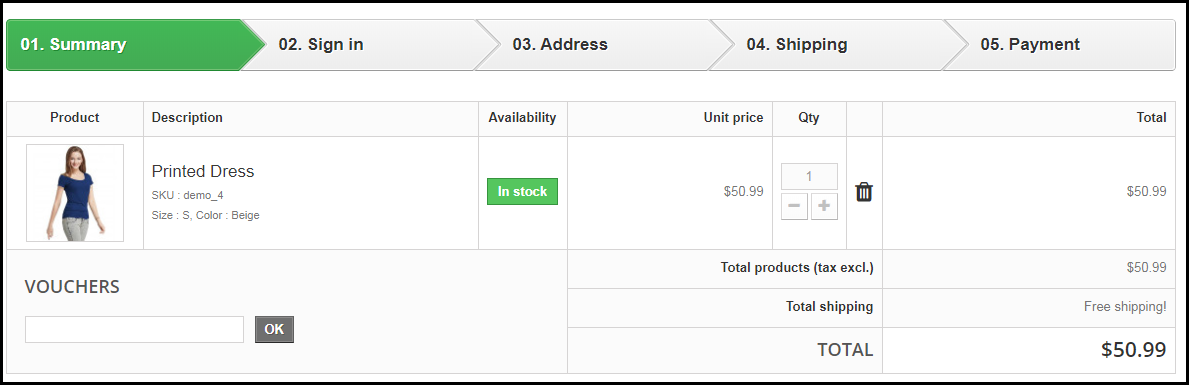
In many of the eCommerce websites, there is no option to update the product quantity right from the checkout page. Hence, if a customer wants to increase or decrease the product quantity, it leaves them with no choice except discarding their current checkout process, going back to the product page, updating the quantity and filling out the entire details again. This spoils the user experience.
So, make sure that you include the option to update the product quantity on the checkout page. Also, ensure that the back button takes the user to the previous page rather than discarding all their information.
3. Add a One Page Checkout
A one-page checkout also called as a single page checkout is also one of the important elements of a user-friendly checkout. Instead of asking users to navigate through multiple steps to fill the checkout form, make it a single step checkout process. It improves user experience, reduces the chances of cart abandonment and eventually leads to increased conversions.
Our One Page Checkout module incorporates all the checkout fields on a single page and helps merchants to allow a quick checkout facility to their customers. The module offers Guest Checkout, Social Login, Multiple Layout Designs, etc. Most importantly, it supports nearly all the major payment methods and shipping services.
4. Display the errors up-front
Mistakes happen very often while filling out the checkout fields and customers are not aware of it until they hit the submit button. They have to submit again and again until the entered inputs are found to be correct. This can be extremely frustrating and become a major barrier in a user-friendly checkout.
Use Inline Validation to counter this hurdle. It identified the inputs in real-time and displays whether the provided details are correct or not when the user switches from one field to another.
5. Display Checkout Progress
Use a progress bar to indicate at which step the customer is present and how many more steps does he or she need to go through before finally placing their order. It is always a good idea to keep visitors updated about their checkout progress.
Many a time, shoppers leave the purchase incomplete because they get tired of filling out the information when they are not aware of the checkout progress. So, give them a clear idea up-front of the number of steps that are needed to make through the checkout.
6. Provide Real-time Customer Support
Customers can have a lot of queries while they are on the checkout page, especially the new visitors. You never know what’s going through a customer’s mind during the purchase.
To assist them with their queries or help them with any trouble they are facing, provide them with real-time support. Adding a live chat option or customer support number would do a great job.
7. Thank Your Customers for Shopping with Your Brand
Leave a “Thank You” note for your customers as soon as they place their order along with the “Order Successful” message, obviously. This is a good sign to appreciate or thank your customers for showing trust in your brand. It improves customer loyalty.
Knowband provides “Better Thank You Page” module that converts a normal order success page into an effective marketing strategy. With the help of this module, the admin can encourage repeat purchases and improve customer retention by offering discounts to their customers for future purchase. It also encourages cross-selling.
The journey from adding the product to the cart to the payment page needs to be smooth and convenient. Having a user-friendly checkout not only ensures more conversions but also keeps you ahead of your competitors. All that a customer craves for is a smooth checkout experience, provide them that.
If you find the above information helpful or have anything to add for a user-friendly checkout, do let me know in the comments below.
Moreover, you can visit our Knowband store and look for a number of checkout modules to help you with an optimized checkout process.
Shopping cart abandonment is a global issue that has been creating problems for online retailers all over the world. Cart abandonment has a huge impact on the sales and conversions of any eCommerce store. Even with the passing time, the problem looms large over the eCommerce platforms.
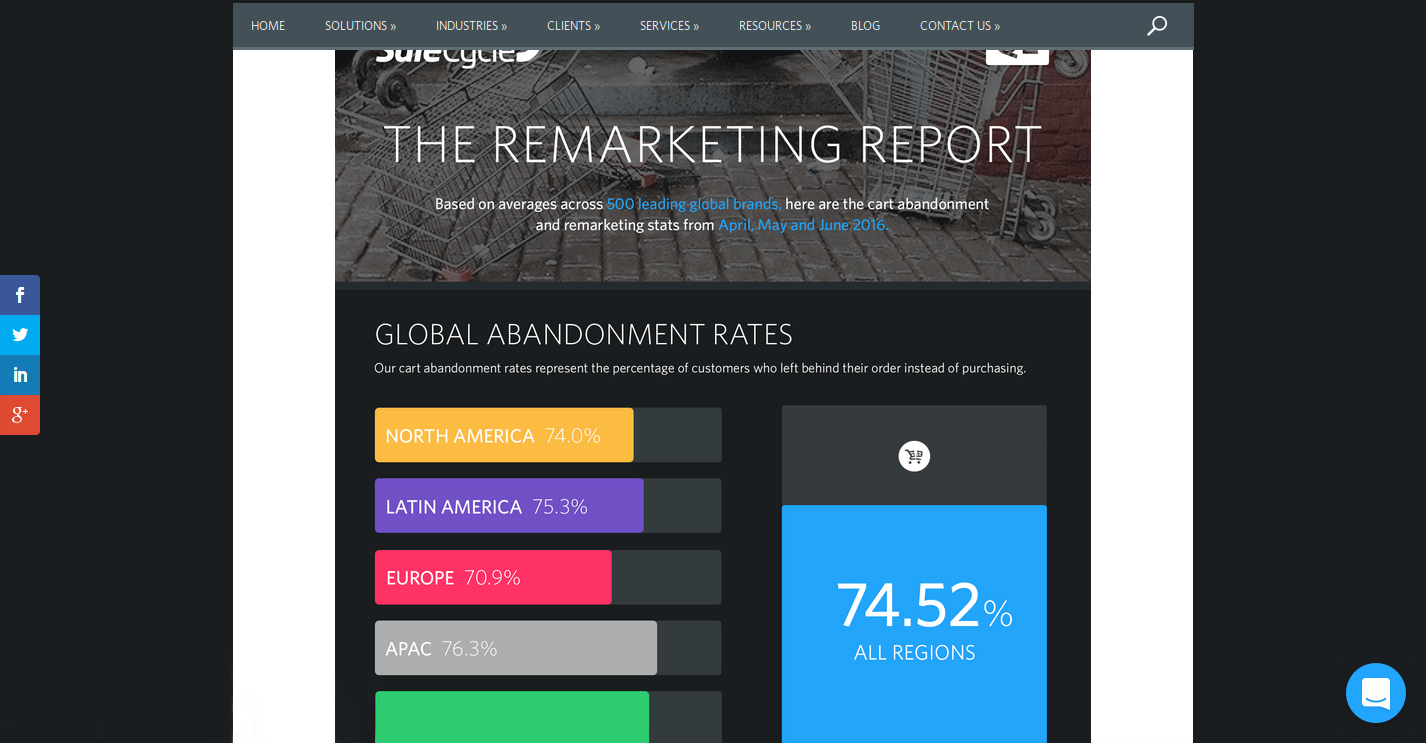
“The Remarketing report” prepared by the SaleCycle, a behavioral marketing company, shows the graveness of the situation. Here are the important insights regarding the same report.
The report shows the shopping cart abandonment trends across regions and industries.
As per the SaleCycle’s research on 500 leading global brands in the second quarter of the year 2016, the following crucial trends were observed.
The shopping cart abandonment was seen to be different for different regions of the world. While it was 74.0% for North American countries, the figure went a little higher for Latin American countries with 75.3%. Similarly, for European countries, the cart abandonment rates were found to be 70.9% while it was 76.3% for the APAC countries.
The overall cart abandonment rate comprising of all the regions was found to be 74.52%.
Apart from the region, the shopping cart abandonment varied considerably as per the industries involved. The rate of shopping cart abandonment for retail was found to be 74.6%, 80.1% for travel related industry and 68.8% for fashion-specific industries.
For the first quarter of 2018, the global cart abandonment rate was found to be 75.6% across all sectors.
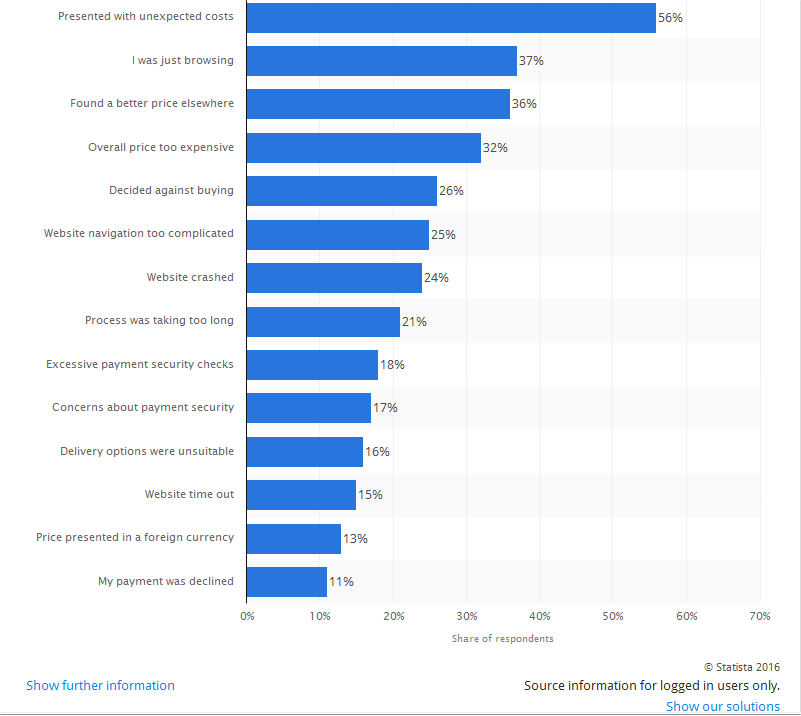
According to another eCommerce report by Statista, a statistics portal company, the shopping cart abandonment is based on a number of factors and problems faced by the online shoppers on an eCommerce store. The list of all the factors that lead to abandoned carts on an online store is explained in the statistical graph as shown below:
Take action against all the factors mentioned in the graph for reducing shopping cart abandonment.
Considering the reasons for shopping cart abandonment and the cart abandonment rate across regions among a wide range of industries, the problem can’t be left ignored at all if a retailer wishes to avoid cart abandonment and improves sales and conversions on their eCommerce store. Here are some of the tips that can help in reducing the shopping cart abandonment on an online store.
1. Reduce overhead expenses on your store
In a competitive business environment, the availability of products at an appealing price is the only thing that can drive conversions and sales in bulk. However, the cost of a product is often increased by the unknown overhead expenses that are present on an eCommerce site.
Some of the common examples of the overhead expenses on an online store are online transaction charges levied by third-party payment gateways, credit card transaction fees, order processing fees, commission amount charged by online marketplaces.
No doubt, it is impossible to run a business on a non-profit basis for any online store but certainly, you can cut down the additional costs in order to avoid cart abandonment. Be precise about the product price. Do not compel your consumers to abandon their cart with hidden charges. Specify your product pricing prominently for grabbing maximum customer engagement and sales.
2. Add Exit-intent popup
Exit popups provide you an excellent opportunity to reduce the cart abandonment rate and maximize conversions. Exit popups work when it is detected that a user is intending to exit the store and presents them a popup containing a deal or an offer.
Let’s say a user is trying to abandon his/her cart and almost ready to take an exit from your store, you can, then, make the user stay by offering them the discount on that product, encouraging them to complete the purchase.
3. Provide Guest checkout
A majority of the consumers bounce back from the store if they are presented a mandatory sign-up during the checkout. This isn’t a great move if you wish to reduce the cart abandonment rate on your store.
Avoid the mandatory sign-up and provide a Guest checkout option to your visitors so that they do not face any hurdle in between their checkout.
4. Establish trust with security badges
When customers provide you their confidential payment details, they put their trust in you. Similarly, you can win their trust by displaying the security badges/logos somewhere on the payment page to give them an assurance that their data is secure.
5. Enhance the functionality of your shopping cart
It is important to have a shopping cart that is capable of performing cart changes in a quick manner. Some of the key features that need to be present in an eCommerce platform for enhancing the functionality of a shopping cart are described below:
It needs to offer large, detailed and functional images of the products.
Easy and quick navigation facility for a better online shopping experience.
Functionality to include product reviews from customers.
Ability to apply discount coupons and gift cards.
E-commerce platform like OpenCart offers a wide range of above-mentioned shopping cart functionalities to improve the online shopping experience of customers. Utilize the functionality of this shopping cart for encouraging more customers towards your online store. Take a dashboard view of the OpenCart platform that allows store owners to perform desired functions on their eCommerce store.
Use an eCommerce platform that can improve the functionality of your online store. Try to enhance the experience of your customers. If you are on standard shopping carts, you may use Shopping Cart extensions and Checkout Extensions, or, you may get the custom implementation for your website.
6. Improve the loading time of your online store
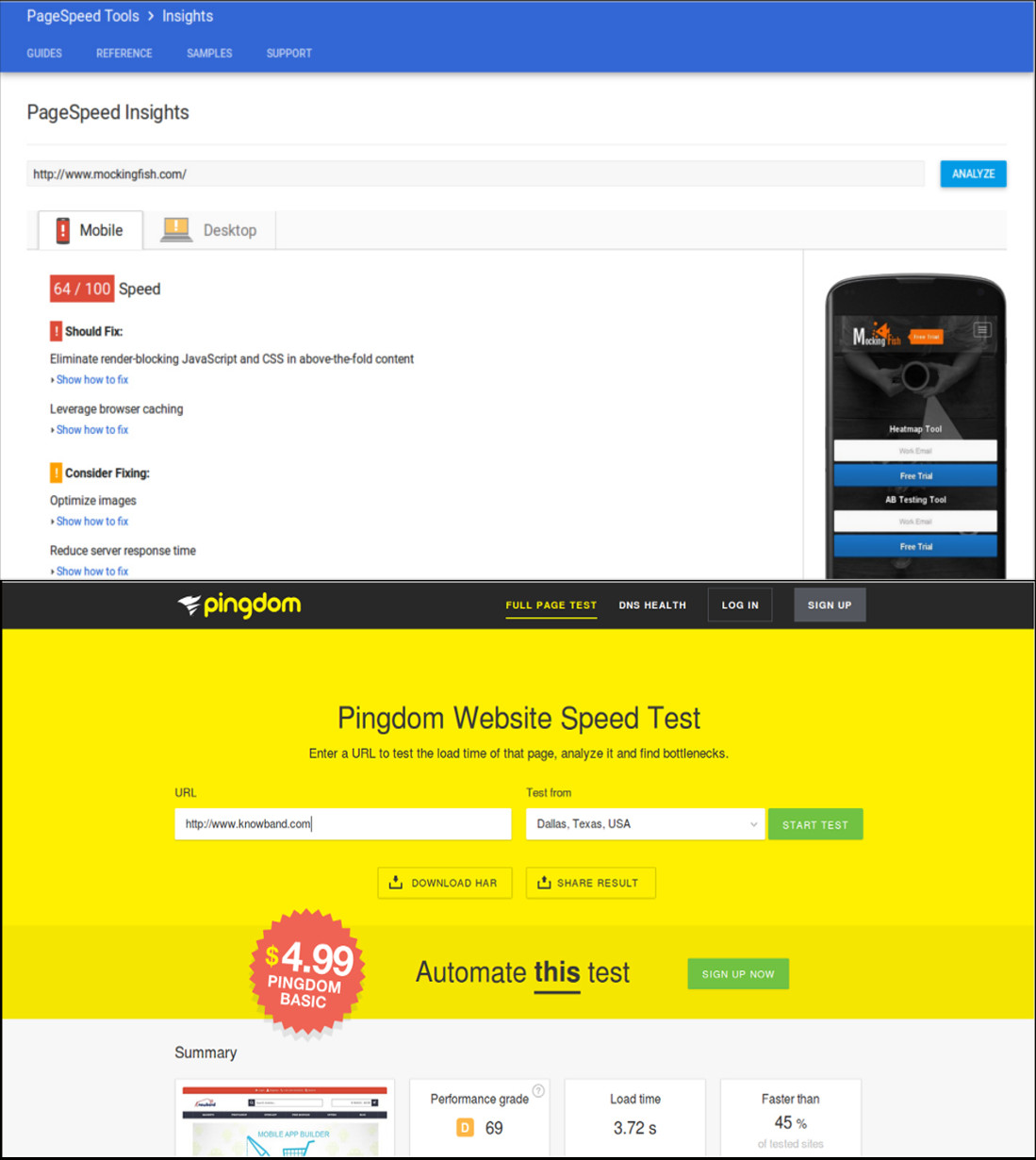
As per the recent report of Hosting Facts, “A single second delay in your website loading time can result in a 7% loss in conversion, and 40% of web users will abandon a website if it takes longer than 3 seconds to load”. This statement itself explains that people are not patient enough when it comes to the website loading time. The average loading time of a website is said to be around 2–3 seconds which can keep the customers engaged, otherwise, the visitor is likely to leave the website.
This is definitely a huge setback for eCommerce store owners as a slow loading website can hurt their conversions and sales. In order to improve the loading time of your eCommerce site, the following site optimization techniques need to be implemented at the earnest level.
Minimize the number of HTTP requests to avoid delay in website loading.
Compress and optimize large size images for your eCommerce site with the help of image and data compression tools/programs like Gzip, JPEG Optimizer, TinyJPG, Caesium, and such others.
Enhance the utility of your CSS files by eliminating browser specific codes and applying shorthand codes.
7. Enhance the website design and accessibility across multiple devices
The global pattern of online shopping has changed drastically with the more number of purchases on an online store made through mobile devices instead of desktops and laptops.
To understand the above scenario, the number of mobile devices (smartphones and tablets) shipped worldwide is estimated to a total of 343.3 million as per the Worldwide Quarterly Mobile Phone Tracker report of International Data Corporation (IDC) for the second quarter of the year 2016. To target such a huge mobile based users, you need to take the required steps to make your website accessible and user-friendly on various devices and screen types. Below are some of the quick fixes that can make your site more accessible and user-friendly.
Use mobile web development technologies like HTML5, CSS3, JavaScript and mobile responsiveness for better site reach and performance.
Enhance the usability of the CTA button on mobile devices by selecting an appropriate size and placement.
Include optimized and reduced page size for mobile content.
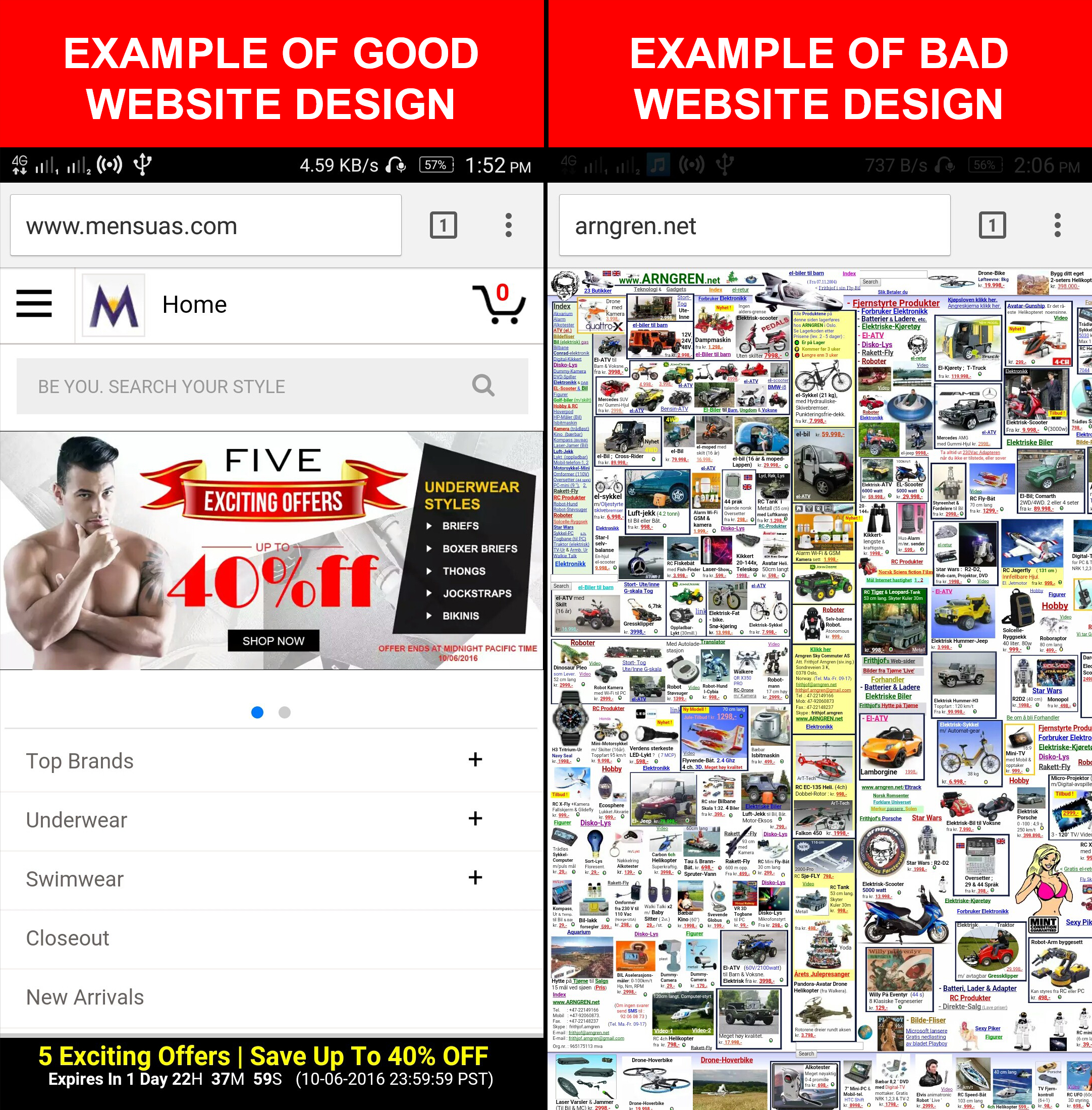
If you want to understand the importance of web design in eCommerce, here is the example for you. Take a look at these two mobile designs that provide a complete insight into a good and bad mobile website design and their impact on the conversions of a website. A good mobile website design encourages customers to browse a website whereas a bad mobile website design completely deviates a visitor and results in shopping cart abandonment along with an increase in the bounce rate.
Focus on the design of your mobile website for grabbing maximum conversions and sales from your customers.
8. Make the checkout process simplified
Make your checkout process more simplified by restricting the number of checkout fields.
People prefer to shop online due to the ease of purchasing products, a variety of options available at a place, the option of product delivery at the customer’s premises and much more. However, if this is robbed from online shoppers, it is certainly going to affect the sales of an online store.
An easy and quick checkout process encourage online shoppers to make a product purchase through a particular eCommerce site. So, ignoring it would be the biggest mistake for any eCommerce store owner.
To improve the checkout process, you need to provide accurate product status, one page checkout process, quick cart customization facility, availability of contact details, easy product return requests, social login facility, the addition of security and trust badges and other such perks to customers.
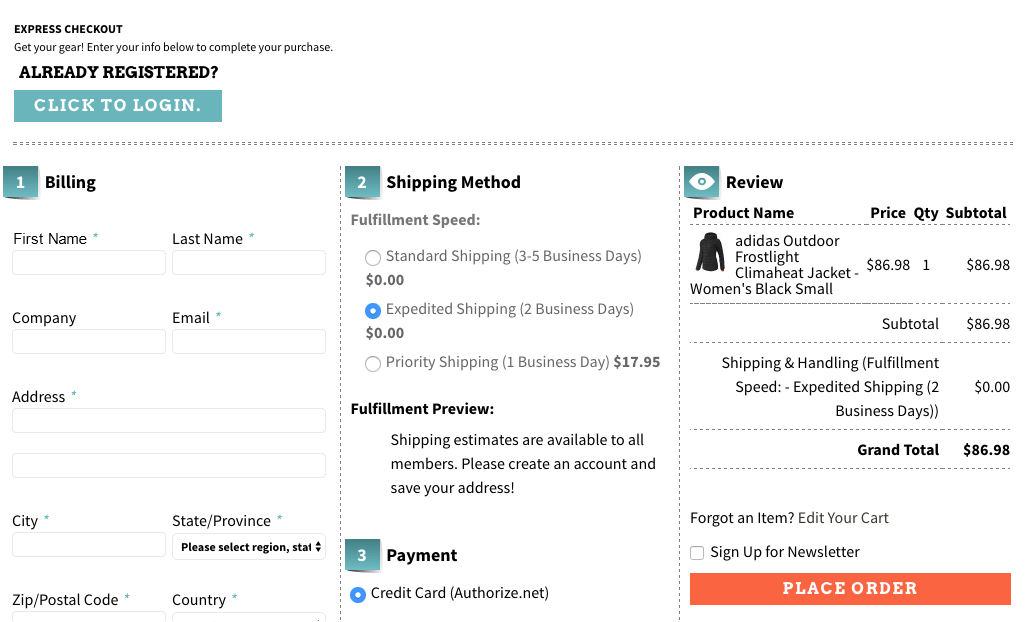
Here is a checkout page of the website Art.com that simplifies the online shopping experience of the customers by providing various features and functionalities.
Offer a simplified checkout process to your customers for improving conversion rates and sales.
9. Bring back abandoned carts through customer re-targeting
Email Marketing can take your business to a long way by encouraging customers to complete their pending shopping orders and can provide you promising results in terms of conversions. These emails are also an important tool for customer re-targeting provided they are engaging, sent at a regular interval of time and provide customers enough reasons to complete their pending shopping orders. E-Commerce store owners need to schedule reminder emails to customers at a regular interval of time in order to remind them about their abandoned shopping carts. They can take the help of email marketing software like MailChimp, ConstantContact, GetResponse, AWeber, etc. that can provide contact details of customers for better customer re-targeting.
10. Offer products at an affordable price
Drive more revenue to your store by pricing your products more effectively. When the competition is too high in a particular business segment, it makes sense to present your products in the most competent manner. You need to have a clear idea about the price of your competitors and should reprice your products accordingly. Once, the customers find your products as most affordable, they will love to buy from your online store irrespective of the competitors available in the market, providing you are not compromising with the quality.
In case, you wish to involve customers directly in the pricing strategies, there are certain eCommerce Extensions that can help customers make a wish about their product price. Make an offer that they can’t resist. In this way, eCommerce store owners can directly know about the interested price segment of their targeted customers.
11. Add multiple payment and shipping options
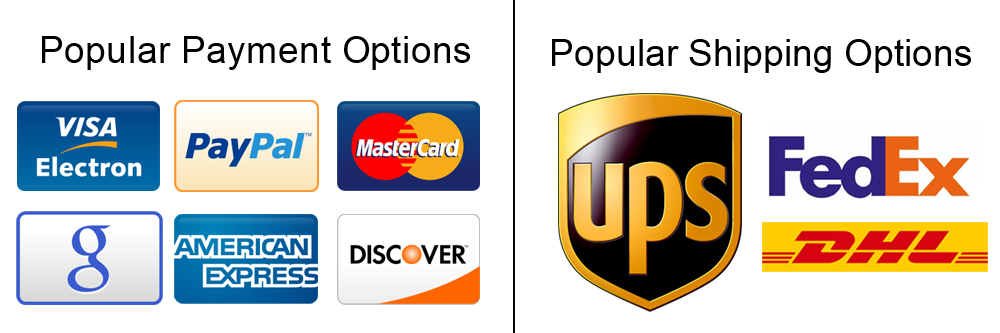
Include multiple payment and shipping options on your eCommerce store for improved checkout experience.
At the final checkout process, numerous online shoppers leave the site when they are unable to find their required payment and shipping options. This is a serious issue and has reduced the conversion rates and sales on various online stores to a significant level.
To overcome this critical situation, store owners need to offer multiple payment and shipping options to reduce the rate of eCommerce abandoned carts. Make a list of the popular payment and shipping options by taking insight from the customer surveys and include them in your online store. Some of the well-known payment methods are PayPal, Visa, MasterCard, Google Checkout, Wire Transfer, SagePay, Boleto. Similarly, you need to include these shipping options such as USPS, DHL, FedEx, USPS to improve the online shopping experience of your store visitors.
12. Use Web Push Notifications
Web Push Notifications is the latest approach followed by online businesses to target the users abandoning their cart. With the help of web push notifications, you can send the abandoned cart notifications to the users not completing their purchase and remind them about the items pending in the cart.
There are many more ways to avoid the cart abandonment on an e-commerce store, however, you will find the above-mentioned methods as the right approach. Take the proactive steps now and perform some major makeover of your eCommerce site to reduce abandoned carts. It’s difficult to get the customers to your website in the first place, and then seeing them leave without buying is even more painful. The best time to act on Abandoned Carts is now, do not miss it.
The growth and expansion of any business be it offline or online depends mainly on the conversions. In the case of eCommerce stores, the conversions are usually referred to as product sales achieved. Agree, every store owner can’t succeed in terms of making bumper sales but it is a fact that every eCommerce store owner has a strong urge about making a significant increase in his/her store sales.
If you are not lucky enough in increasing the sales of your online stores, it is time to start looking for an effective remedy. A low performing eCommerce site in terms of product sales is not of much use and is actually more of a burden if the operational cost of the store is too high. This blog is certainly a big relief for those sales deprived eCommerce store owners who are looking to escape out of the long continuous sales dud. We have figured out some ways and came up with 9 effective tips to improve sales on your eCommerce store.
1. Provide exciting offers and deals to your customers
Almost every online shopper is in search of exciting shopping offers and deals that could persuade them for a quick product purchase. If your eCommerce store is unable to excite its targeted customers through amazing deals, discounts, shopping offers, free shipping service, gift cards, sales coupon, and other such components, it is certainly going to hurt your business fortunes in the long run
2. Offer multiple payment and shipping methods
Don’t be adamant while offering payment and shipping options to your customers but try to be more flexible. You need to make a survey among your customers for including the popular payment and shipping options on your online store for ensuring a comfortable online shopping experience. The presence of only selected payment and shopping options also results in higher shopping cart abandonment and bounce rates.
3. Provide easy navigation around your site
Customers nowadays are very choosy when it comes to a product purchase. They want to look out for a number of products before actually going for the final purchase. In order to offer easy navigation around your eCommerce website, you can take the help of a productive heatmap and A/B testing tool like MockingFish that can improve the customer engagement on a site to a great extent.
4. Remove hurdles from your checkout process
Due to the scarcity of time with online shoppers, eCommerce stores need to focus on ways to improve the checkout process on their site. They need to remove unnecessary fields and checkout steps that are hampering the quick online product purchase of customers. If you want to manage this critical task through an eCommerce plugin, you can take the help of Knowband modules like Prestashop One Page Checkout, OpenCart One Page Checkout, OpenCart One Page Checkout Pro, Magento 2 One Page Checkout for simplifying the checkout process on your eCommerce store.
5. Spread the information about the urgency of your offers
In this competitive business environment, you need to showcase that the advertised offer on your site is much more engaging and is available for a limited time only. Once, your customers are aware of the urgency and limited availability of your shopping offers, they will be much more eager to purchase from your online store. Store owners can convey this message to their targeted customers in the form of appealing CTA buttons and CTA texts for grabbing higher conversion rates and sales.
6. Reduce Cart Abandonment Rate
There’s a heavy impact on sales due to abandoned carts. Though there is no magic to stop someone from abandoning their cart, there are ways that can help you bring the abandoned cart rate under control.
For that matter, you can try out the Abandoned Cart module by Knowband or use Web Push Notifications to give a gentle reminder to your visitors every time they abandon their cart. This way you can make an improvement in your sales.
7. Launch a facebook shop
With over 2.38 billion Facebook users today, not utilizing the Facebook platform means missing out on a great opportunity to improve sales on your eCommerce store. Link your eCommerce store to your Facebook business page, interact with your audience and run contests or offers at regular intervals to increase customer engagement. You can try out the Prestashop FB store addon for integrating your store to your Facebook page. If your brand doesn’t have a Facebook page, create one today.
8. Use popups effectively
Popups are a great way of attracting customers and capturing more sales, but they do not work as easy as it seems. Designing a good popup that could bring conversions requires your time, efforts and most importantly creativity. Pop-ups bring results only if they have been made in such a way that doesn’t unnecessarily irk a user. In fact, e-retailers today, are using pop-ups to engage users in some kind of fun activity, before actually asking for their email address.
Do not kill the interest of your visitors by making the sign-up process on your store mandatory. In this way, you are only restricting a visitor from making a purchase.
Offer Guest Checkout to your visitors or enable social login options. Guest checkout is very helpful for users who do not want to get themselves registered on your platform while the social login option allows visitors to avoid the long registration process by asking them to login with their social accounts.
Conclusion
Do not consider the low sales as the fate of your eCommerce store. Make the required corrections with the help of the above-mentioned informative tips. If you are able to make the changes within the stipulated time, you can effortlessly grab more conversions and sales for your eCommerce store. Keep in check the above-mentioned 9 effective tips to improve sales on your eCommerce store. For more updates regarding eCommerce plugins and other related information, do visit our Knowband store at www.knowband.com
There is not any sure-shot guarantee that every visiting customer on your site can actually get converted into a potential buyer. There are chances that he/she may leave a website due to multiple reasons. Some of these reasons can be slow loading website, complicated checkout process, cluttered website design, difficult navigation movement, high product prices, and other such factors that can make your customers lookout for an alternative site. If you can’t control this trend, you can have serious consequences in terms of business growth and conversions.
Moreover, this scenario of abandoning a site can put a severe dent in the prestige and reputation of an eCommerce store. It can also hurt your chances of conversions and product sales due to increased instances of shopping cart abandonment. By taking a close account of the whole situation, Knowband has developed this Magento Abandoned Cart Alert Extension that can reduce abandoned carts on your site. It is a remarkable plugin that can make your customers remain engaged to your store for optimizing your conversions and sales. Here is a detailed account of the various features and functionalities of this Magento cart abandonment extension that has the potential to overturn your business fortunes among your rivals.
Bring them back with emails, push notifications, and pop-ups
Not every customer reads emails from eCommerce stores flooding their inboxes. The Magento 2 Abandoned cart alert extension provides you with three options to send alerts to your customers.
Email- Discounted or non-discounted
Push Notifications in a web browser
Reminder alert pop-up
Customized pop-ups and emails with deals and offers can trigger your customer’s shopping psychology and they will return back to your store to complete the purchase.
Easy mechanism to entice customers with discounted emails
Discount coupons, gift cards, or voucher codes are the most effective medium that can persuade customers to make purchases through your Magento site. You can easily attach coupon codes, discount cards, or gift cards with this Abandoned Cart Alert email for Magento module with your reminder emails for influencing the purchasing decision of your customers. This approach is an amazing way to keep your visitors engaged to your eCommerce store for getting mega sales and conversions.
Option to create customized email templates for your customers
“One shoe size does not fit all”, similarly you can’t involve all your customers in a similar way. You need to use customized email templates for them in order to make them feel more valued by your business entity. Magento Abandoned Cart Alert Extension also helps in establishing an effective rapport with your customers as personalized email templates make them more loyal and engaged to your Magento site.
If you are determined to reduce the abandoned carts on your site, it is imperative to keep a constant track of the abandoned carts of your customers. With the help of the Magento Abandoned Cart Alert extension, it is now easier to track the abandoned carts of your customers for the seamless recovery of “forgotten” carts. Apart from this, it will also help you in getting a clear insight about the abusive customers that abandon a shopping cart too often.
Effortless cart recovery with a single click
One of the most important factors that can contribute to lowering the shopping cart abandonments is the simplicity in the cart recovery process. It is now possible to recover your abandoned cart quickly with all the cart details and items for a quick product purchase through a single click only. This wonderful characteristic makes it one of the most popular Magento Abandoned Cart alert extension that comes with the most pocket-friendly price as compared to other rival modules. Furthermore, this single-click cart recovery has made the lives of store admin and customers much hassle-free than before.
Provides information about abandoned carts of your customers on your site
If you are determined to reduce the abandoned carts on your site, it is imperative to keep a constant track of the abandoned carts of your customers. With the help of this Magento Abandoned Cart Alert extension, it is now easier to track the abandoned carts of your customers for the seamless recovery of “forgotten” carts. Apart from this, it will also help you in getting a clear insight about the abusive customers that abandon a shopping cart too often.
Conclusion
Thus, it is the right time to grab your share of sales and conversions with the help of this remarkable Magento Abandoned Cart alert plugin that can help in recovering your abandoned carts without any problem. It can help in sending reminder emails to your abandoned customers regarding their pending orders for getting maximum sales and conversion rates. So, visit our Knowband store now and purchase this Magento extension for unmatched business performance.
It would be a hyperbolic statement if any business could claim that they can understand the “nerve and mindset” of their customers. Things are changing at a fast pace and it is literally a “climbing a mountain” task to satisfy every need and requirement of your customer. With this moody behavior of customers, online businesses are mostly at the “receiving end” as it could have a detrimental impact on their conversions and customer engagement. Due to these inhibitions and reservations, while making an online purchase, there has been a significant rise in the number of shopping cart abandonment.
This may be dubbed as a “trivial matter” but it can have a catastrophic effect on the performance of your online store in the long run. These shopping cart abandonments can break all hell on your business prospects if they are not dealt with effectively. Here is a breather for you in the form of these Magento Abandoned Cart extensions that can redefine the performance of your Magento store to a completely different level. Take a quick look at the various features and functionalities of our Knowband extension that is being revered by numerous Magento stores around the world.
Incentivising schemes to boost customer attention and sales
This Knowband extension is truly special in the sense that it encourages customers to make a quick online purchase in exchange for appealing incentives and discount schemes. You need to install these Magento Abandoned Cart Extensions that can provide exciting offers and deals through abandoned cart email reminders to your abandoners for achieving desired conversions and product sales for your online business entity.
Offers facility to track abandoned carts
It is now much easier to track the abandoned carts of your customers for ensuring a seamless improvement in your conversions and sales. Magento Abandoned Cart module can get your visitors tracked without any hassle for effective targeting and retargeting approach. This Knowband extension helps in keeping a close track of your visitor behavior and analyzes the possible reasons behind those abandoned carts on your Magento 2 store.
Retarget with email, reminder pop-up, and browser notification
Due to this constant mood swing, customers can’t make up their minds to make an online purchase through a particular eCommerce store. Retargeting your customers is now easy and you can follow different approaches for the same. Share discounted or non-discounted emails and you can select and default email template. Another way is by sending pop-up notifications and also, Magento Abandoned cart reminder email extension has the facility to send browser notifications (push notification).
Compatible with other stores and themes
One of the most important features of this Magento extension is that it works uninterruptedly with existing eCommerce stores and themes around you. Thus, with the help of the Magento Abandoned Cart Module, you can seamlessly target your wide range of customers that come into the category of various eCommerce business segments. Apart from this, you can use this module with various available themes on your Magento store.
Ensures quick cart recovery for swift targeting
Unlike other eCommerce extensions, getting your abandoned cart back has become a simple task due to the presence of this one-click recovery option. Abandoned customers just have to click on a simple link or button and they can easily access their old shopping cart. With a quick cart recovery option of Magento Abandoned Cart Module, you don’t have to add the desired products from the scratch themselves.
Wrap-up:
It is the beginning of a new dawn in the field of shopping cart abandonments with the emergence of this Magento Abandoned Cart Extensions from the Knowband store. By ensuring seamless recovery of abandoned carts on your store, you can effortlessly achieve higher conversions and product sales among your business rivals. So, come and visit our Knowband store for optimizing your business prospects and to achieve a promising site.
shopping cart abandonments can let your eCommerce business down that can drastically affect your sales. This not only affects your brand reputation but also the trust of your loyal customers. You can’t guess which element on your eCommerce store might work against you and can turn away your potential customers from your site.
Abandoned Carts can bring your conversions and sales to a great halt. Although, you will surely employ various techniques and approaches to deal with shopping cart abandonment there is one PrestaShop module that has brought a considerable change in the whole scenario. PrestaShop Abandoned Cart module is remarkable work from the Knowband team!
Let us explore more about this amazing module by taking a quick look at the various features and functionalities that are explained below:
1. capture the shopping carts of guest and logged- in customers
With the help of this PrestaShop module, you can keep a track of the guest and logged-in customer’s shopping carts that have been left abandoned. With its detailed analytics report, it is now much easier to target abandoners in order to boost your sales and conversions. This PrestaShop Abandoned Cart module can simplify the task of customer retargeting and conversion rate optimization.
2. Reminder email templates in multiple languages
You might have customers from different regions. If you want to grab higher conversions and sales for your eCommerce store, you need to provide preferential treatment to your targeted customers. The language translation feature of this PrestaShop Abandoned Cart module helps in sending personalized reminder emails or you can choose an email template from the listed ones to your abandoned customers in their native language that encourages a swift cart recovery.
With this module, the store owner can send emails automatically after a set delay. Also, the carts are marked abandoned in the same manner.
3. Send them a push notification when surfing through the browser
Not all your customers use the mobile app but are your PrestaShop store is ready for browser surfing? Progressive web apps are the new trend followed by almost every popular online website. In case you have an abandoner who is reaching you through the browser, you can use the push notification feature to grab their attention. Of course, emails are the best tool but sometimes customers just avoid them.
4. Inclusion of coupon codes and other appealing offers
There are times when your persuasive words in an email may not work for your eCommerce store and maybe completely futile. In these circumstances, you need to try out the last resorted option in the form of coupon code inclusion for making the desired conversion rates and cart recovery. It is one of the brilliant features of this PrestaShop Abandoned Cart module that allows the store managers to offer appealing coupon codes, discounts on the shopping cart products for effective customer targeting and sales.
5. Display a pop-up with a discount coupon that motivates
After targeting your customers with emails and push notifications, you can also display a pop-up on their screen whenever they visit your store. The abandoned cart pop-up window can be displayed on one or multiple pages. You can even add some discounts on the entry popup or exit pop-up that can encourage impulse buying. The PrestaShop Abandoned Cart module is different and has several unique features that make it different from any other available module.
6. Detailed statistical report about abandoned carts and converted carts
With this PrestaShop Abandoned Cart module, store admin can get a detailed report about abandoned carts like the number of abandoned carts, the number of recovered carts, conversion rates achieved, and other such crucial information. By having this data, it will be much easier for your store to plan your eCommerce marketing strategies and the pain points to achieve the desired conversions and sales.
Finally,
It is time to keep your abandoned carts under check and think about ways to control and get them converted back again in a seamless manner. For providing expert assistance in this critical task, you need to install this feature-loaded PrestaShop Abandoned Cart module from the Knowband store for a drastic makeover. It will surely make your online store the most preferred destination for making a quick product purchase and improve your business gains.
Customers have now become more selective during online shopping and are not in a mood to compromise with quality, delivery time, and price of the product. They are always looking for a product that is high in terms of quality and performance that is available without any significant delay and comes with the most economical price among other available products.
It may sound to be a hyperbole statement but it is actually what online shoppers are expecting from their eCommerce store owners. On top of it, if they are not getting the required product/services, they will not think twice about leaving a site and will contribute towards shopping cart abandonments.
It could be a severe blow to the reputation of your company if you are unable to control the shopping cart abandonments. If you are not having enough clue about how to check the increasing abandoned carts in your store, it is time to explore this PrestaShop Abandoned Cart module from the Knowband store. Let us explain to you more about the amazing features of this PrestaShop extension for the growth and expansion of your eCommerce store.
Display attractive pop-ups and send endless push notifications-
Many a time, email marketing strategies fail to deliver the expected results because of the frequency of average emails sent or received every day. To combat this situation, the PrestaShop module for Abandoned Cart is integrated with the web-browser push notification feature and entry/exit pop-up for sending a reminder alert to abandoners.
Option to personalize emails in various languages
Personalization makes a tremendous impact on the minds of your customers and can help in effective customer engagement in your store. This PrestaShop Abandoned Cart module provides the facility to create customized emails for your targeted customers by making various personalization attempts. Keep in mind that there are several types of customers and you have to be creative and you have to be creative to entice them.
Functionality to choose CRON jobs as and when required
With this module, it is now possible to manually or automatically update the list of abandoned carts on your store for achieving higher conversion rates and sales. For the orders that are not claimed in the given period of time, the module will mark them abandoned automatically. It allows you to send sequence reminder mails by setting a delay time once a cart is marked abandoned.
Provides facility to include coupon codes in your reminder alerts
Online shoppers are always looking for attractive shopping offers, discounts, and coupon codes that can persuade them to make a quick product purchase. Understanding this mindset, it is now much easier to include engaging discount coupons in your reminder emails for effective targeting of your customers.
Seamless cart recovery for higher customer engagement and sales
One of the main reasons that hamper the conversion of abandoned carts is the ease of cart recovery. This is one of the crucial issues that have been handled effectively by this PrestaShop Abandoned Cart module. Abandoned customers are provided with reminder emails that consist of a direct checkout button that can take users back to their shopping carts with all the added products and cart details. Customers don’t have to scratch their heads anymore for retrieving their abandoned cart due to the presence of this outstanding module.
Boosts decision-making process with analytical reports
This Prestashop extension provides a detailed analytical report about abandoned carts and converted carts in the form of graphs and other statistics. By studying the data of these representation figures, you can seamlessly improve your conversion rates and product sales. The abandoned and converted carts of both logged-in users and guest customers can be tracked with this amazing module.
Wrap-up
If you have been struggling with the sales and conversions on your store, it is time to make amends with the help of this PrestaShop Abandoned Cart module from the Knowband store. In spite of having numerous options in this field, this eCommerce extension has made its own place and mark due to the presence of various unmatched features and functionalities. Don’t be a victim of shopping cart abandonments anymore and take the required action with the support of this extraordinary Knowband module.