Magento Store Locator and Pickup Extension- User Manual

1.0 Introduction

Online store admin can now display the physical stores on the website using Magento Google Maps Store Locator and pickup extension offered by Knowband. The fully functional Magento Google Maps Store Locator plugin allows the admin to display store name, store location, direction, contact details and mail id. The online users can view the location of the store on the website homepage or click on the link to view store locations. This Magento store locator extension also displays the store timing. Customers can view the store directions and visit there easily.
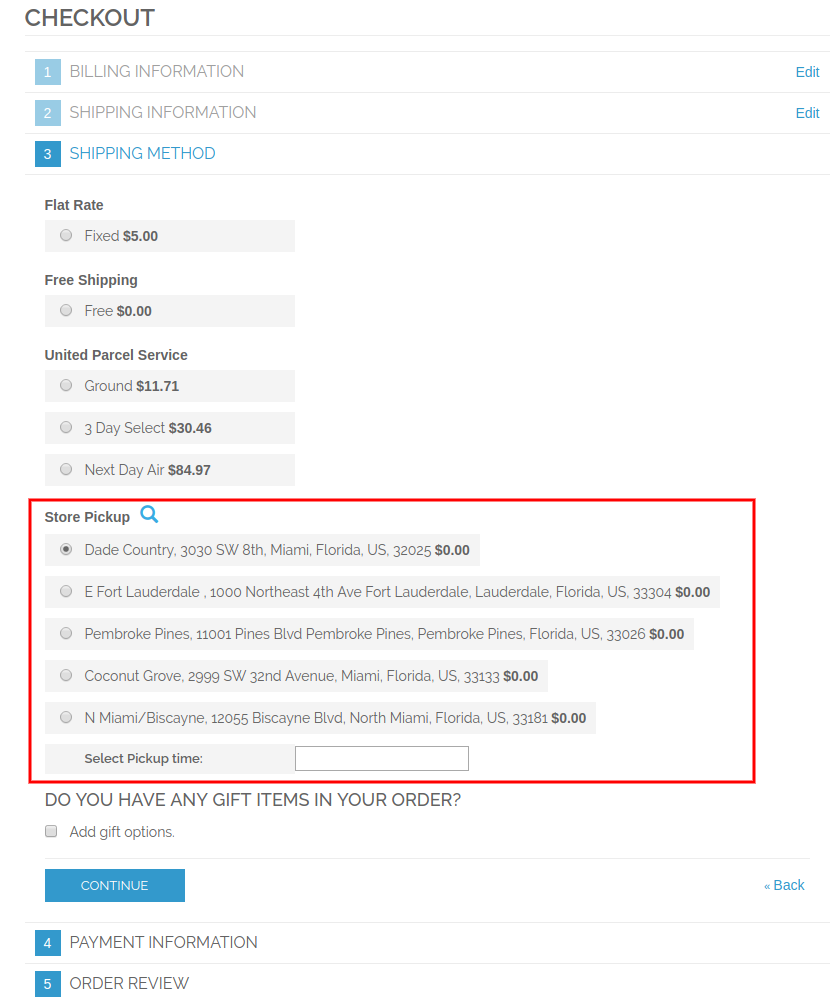
With this Magento store locator and pickup extension, the store admin can offer in-store pickup facility to the customers. The customers can view store details on the checkout page and select the store for pickup. Admin can also charge a fee for this in-store pickup facility.

1.1 Basic Features of Magento Store locator and pickup extension

  • The online store owner can show nearest physical stores to the customers on their website using this Magento Google Maps Store Locator extension.
  • The store admin can generate a Google map API key and use it for Google map integration.
  • The customers can get the direction for any store on Google map available on the website itself.
  • The Magento Google Maps Store Locator plugin allows setting Google map marker image and map zoom level for easy navigation.
  • The Magento store owner can enter the store name, contact number, working hours, address and mail id from the admin interface of Magento Google Maps Store Locator extension.
  • The Magento Store Locator plugin allows selecting distance units as kilometer or miles.
  • The online store admin can show a store locator footer link and also set it’s text, customers can click on this link to view the store locations.
  • Admin can install, configure and customize the Magento Store Locator extension easily without any hassle.
  • The Magento Store Locator module offers a user-friendly interface.
  • The Magento store locator and pickup extension allows showing an image on store locator landing page.
  • The store admin can select the areas from the admin interface of this Magento store locator and pickup module for offering in-store pickup option.
  • Magento store locator and pickup plugin allows the admin to offer in-store pickup facility on the store.
  • Admin can also charge an amount for offering in-store pickup facility on the store.
  • Magento Google Maps Store Locator Module allows setting different pickup amount for various stores.
  • Magento in-store pickup plugin allows uploading store details in bulk.
  • The customers can upload Excel file from the admin interface of this Magento pick-up plugin.

2.0 Installation

The online store merchant can install the Magento store locator extension easily by following these steps:

1. Admin needs to download the extension package from the Knowband store.

2. After downloading the extension package, the store owner will get a zipped file. Unzip the package on the root folder of Magento setup via FTP manager (like Filezilla or WinSCP – download here: https://filezilla-project.org/). The admin will find the files and folders as shown in the image below:

Installation Magento store locator extension3. The extension is now installed and ready for use. In the Admin Panel, go to “System > Knowband Extensions >Magento store locator extension”.

Now the store admin can now use and configure the Magento store locator and pickup extension.

3.0 Admin Interface

After Successful installation, you can apply the settings to display store locator on the front-end interface. In the admin interface, there will be customization options as shown below:

  • General Settings
  • Add/Edit Store

3.1 General Settings

In general settings, there are customization options for displaying the store locator on the website. the various fields are shown below:
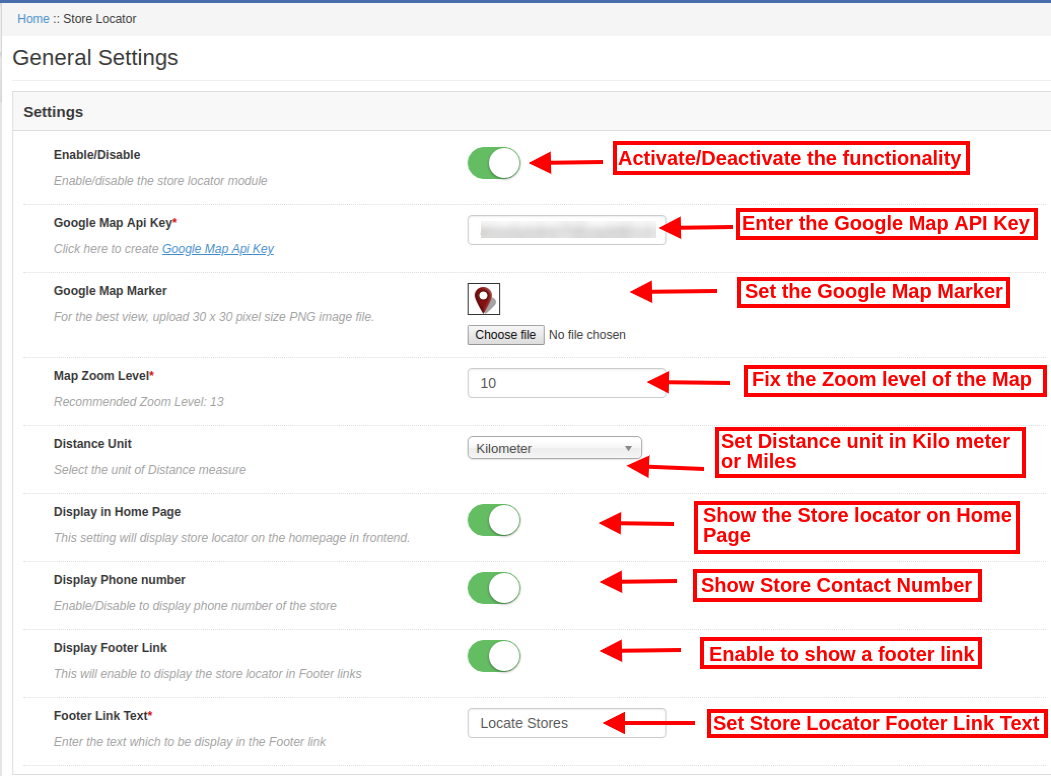
  • Enable/Disable: Activate or deactivate the functionality from the admin interface of this Magento store locator and pickup extension.
  • Google Map API Key: Enter the Google API key for incorporating Google map for showing the store locations. Refer Section 3.1.1 to see the steps to generate Google Map API key.
  • Google Map Marker: Set a Google map marker for showing exact store location to the online users on the website.
  • Map Zoom Level: Set the zoom level of the map. The Magento Google Maps Store Locator module recommends the admin to set map zoom level as 13.
  • Distance Unit: You can select the unit of distance measure in kilometers or miles.
  • Display in Home page: You can enable this setting for showing store locator on the homepage.
  • Display Phone number: Enable the option if you want to display contact number with the store details.
  • Display Footer link: Enable the menu option for displaying a store locator footer link on the website.
  • Footer link text: Enter the text which will display on the website. The customers can click here to view store locations.
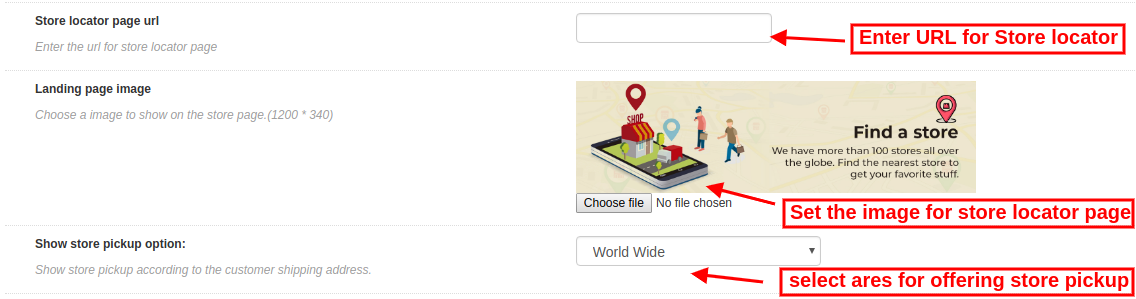
  • Store locator page URL: Here, the store admin can enter the URL for store locator page.
  • Landing page image: Select any image for showing on the store locator page.
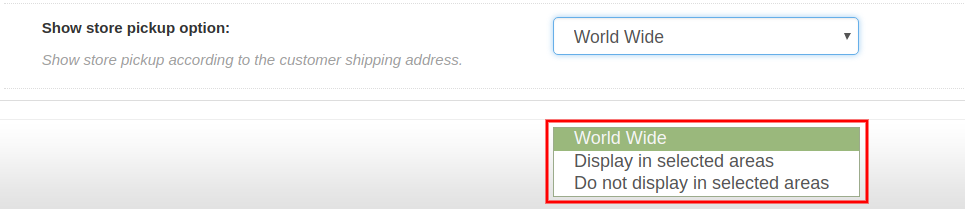
  • Show store pickup option: Admin can show in-store pickup option worldwide or selected areas. This Magento store locator and pickup plugin also provides an option to select the areas where admin doesn’t want to offer in-store pickup facility.

3.1.1 How to generate the Google Map API key

For generating the Google API key, you need to follow these steps:

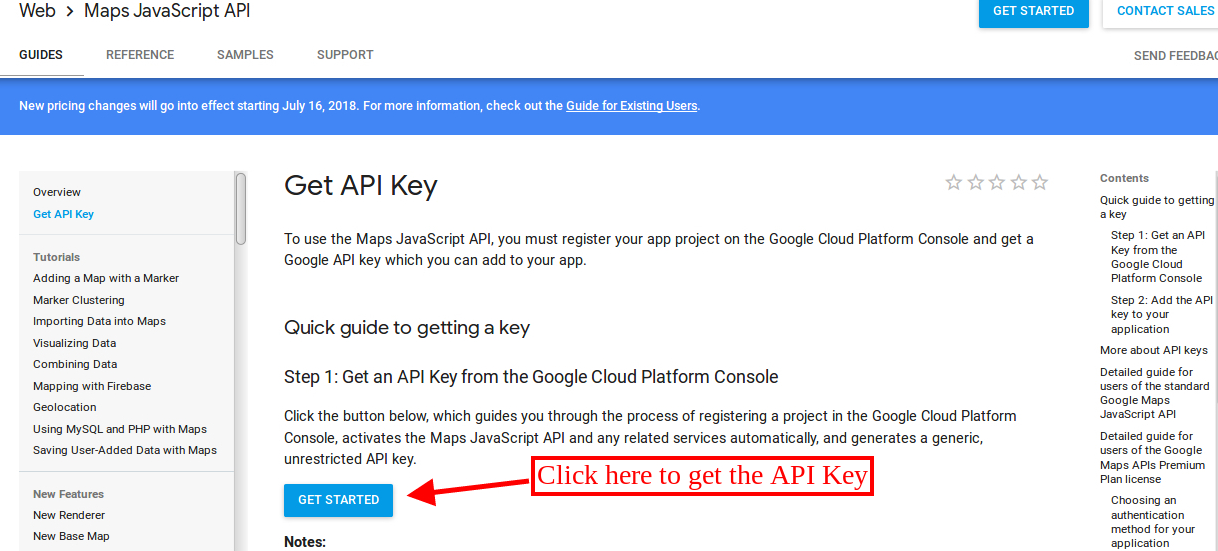
First of all click on the above mentioned link.

  • Click on the “Get Started” button: Click on this button to get Google map API key.
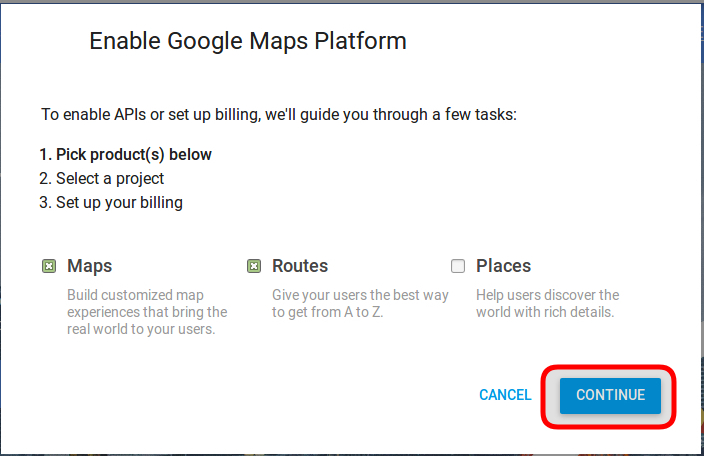
  • Pickup the products: After clicking on the “Get Started” button, a pop-up will display.
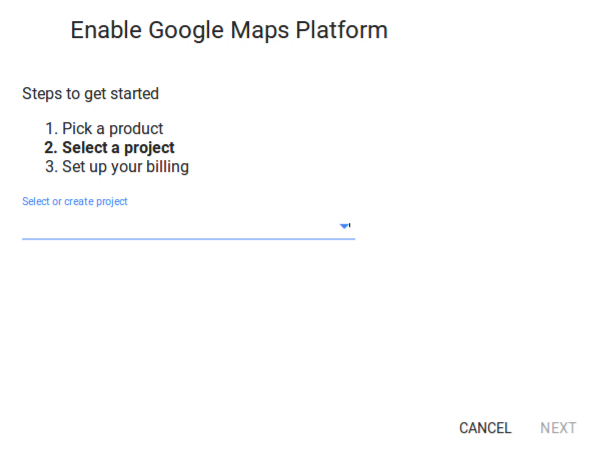
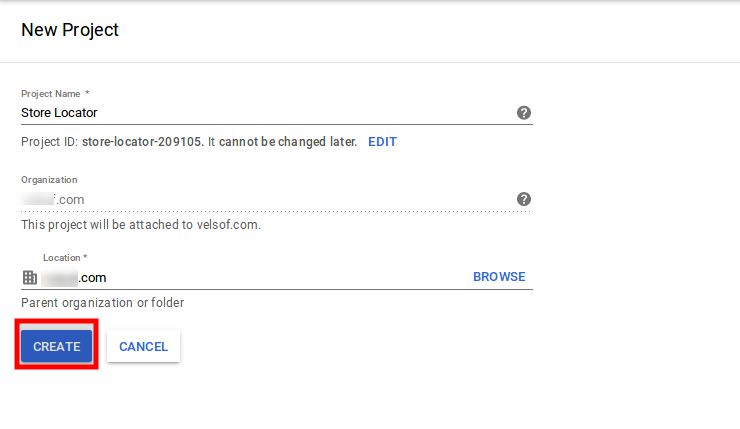
  • Project selection: Here, you can select or create a project.

1. Select a project:
2. Create a new project:
  • Setup the billing: After that, you need to set up the billing.
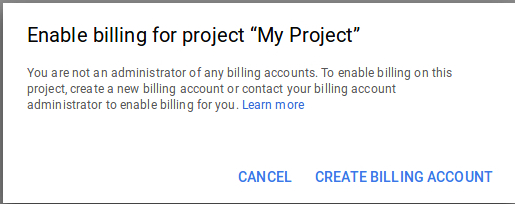
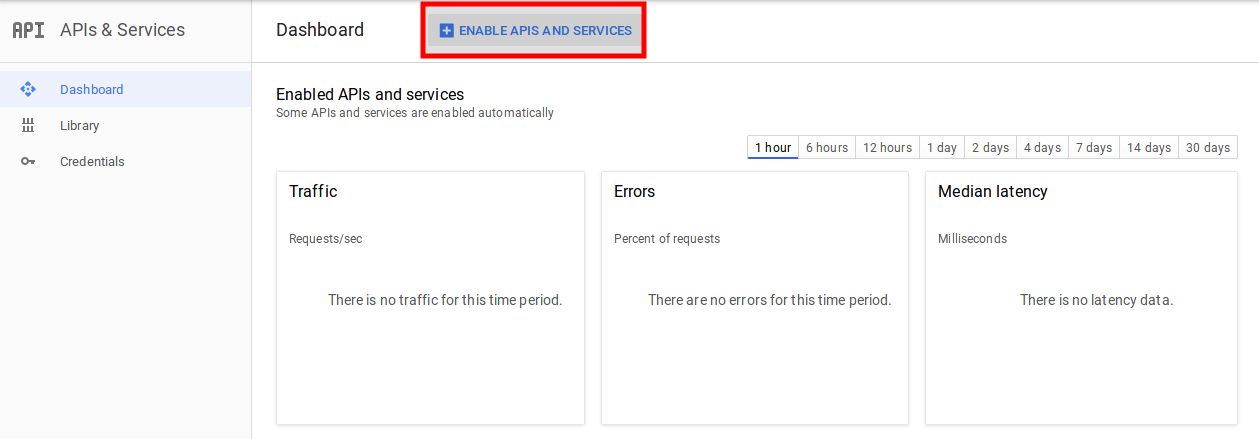
After billing the store admin can get their Google map API key.

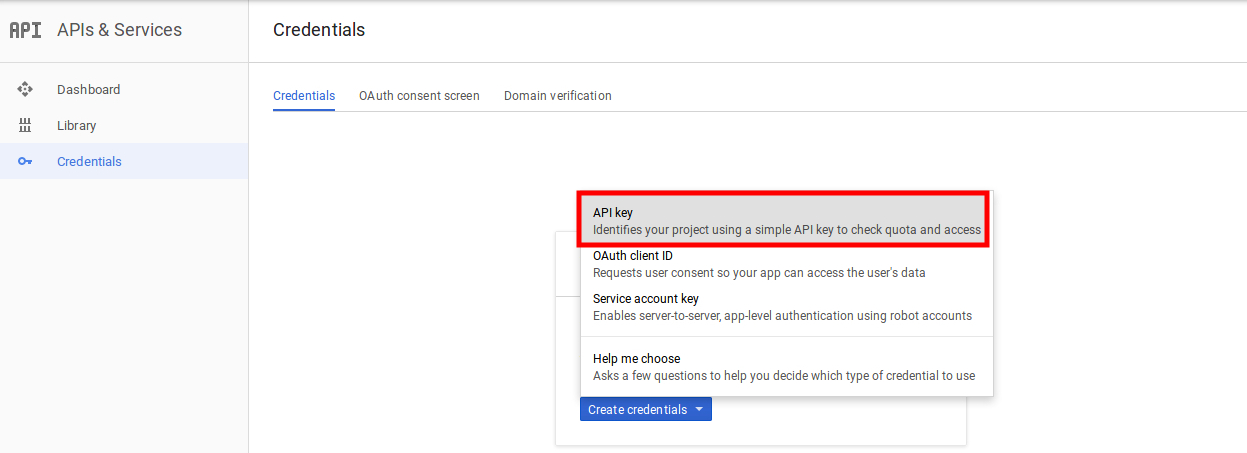
On the Credentials page, you can get an API key:
The store admin can select the API key option:
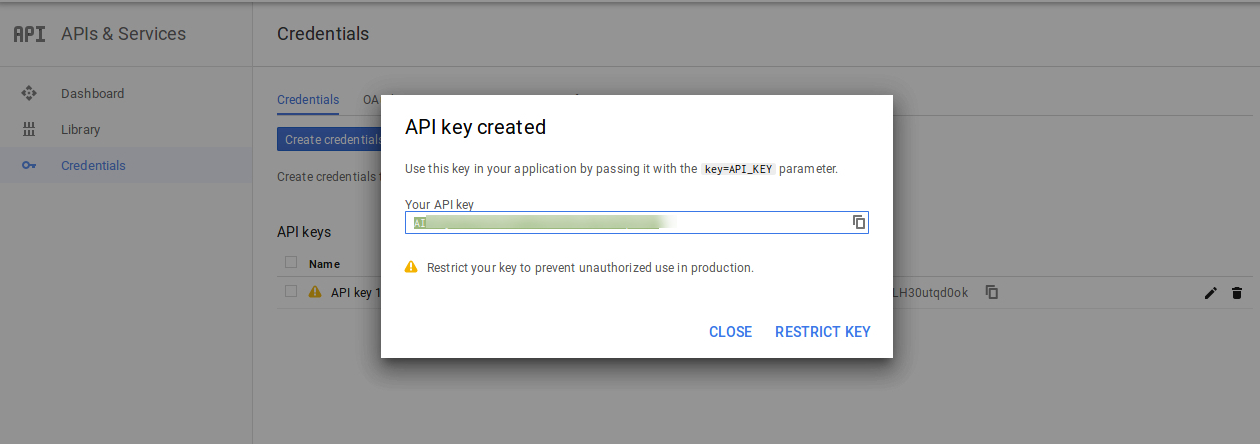
The admin can select the restrict key option from the dialog box to set a browser restriction on the API key.
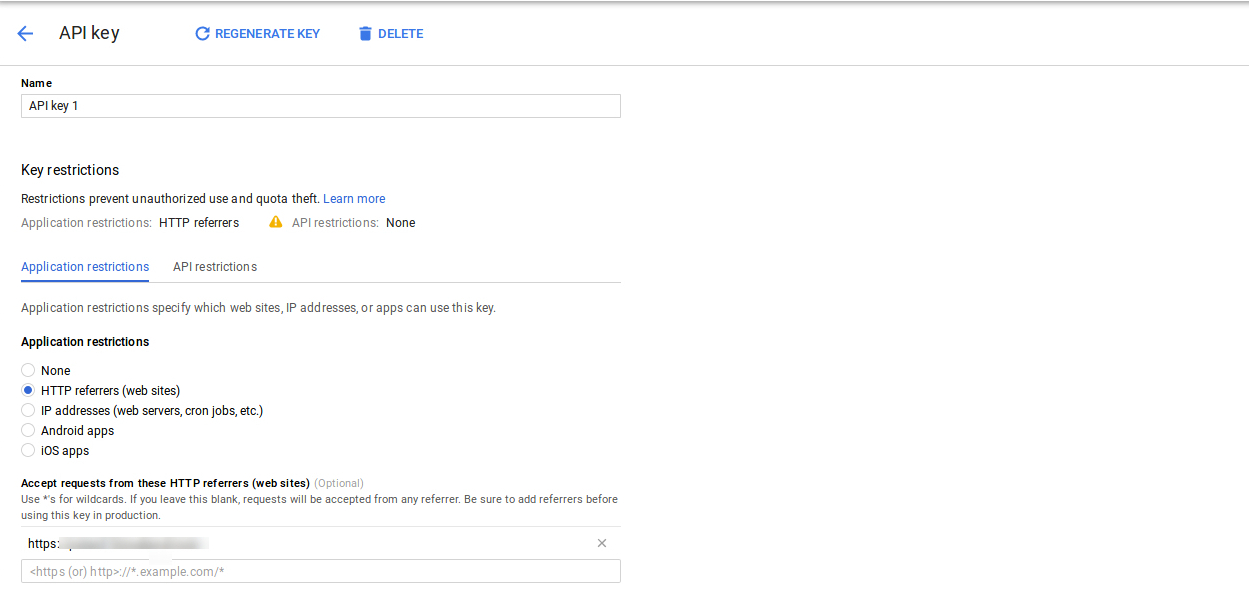
In the Key restriction section, the store admin can select HTTP referrers (web sites), then follow the on-screen instructions to set referrers.
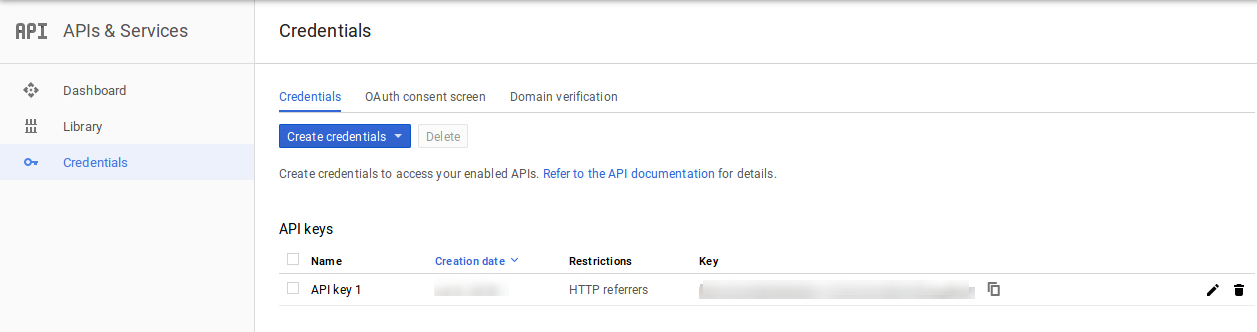
This way the admin can set the Google map API key.
3.2 Add or Edit Store

In this Menu section, there will be a list of available stores. You can add new store details, edit the store details and also delete any store from the list. The section is shown below:
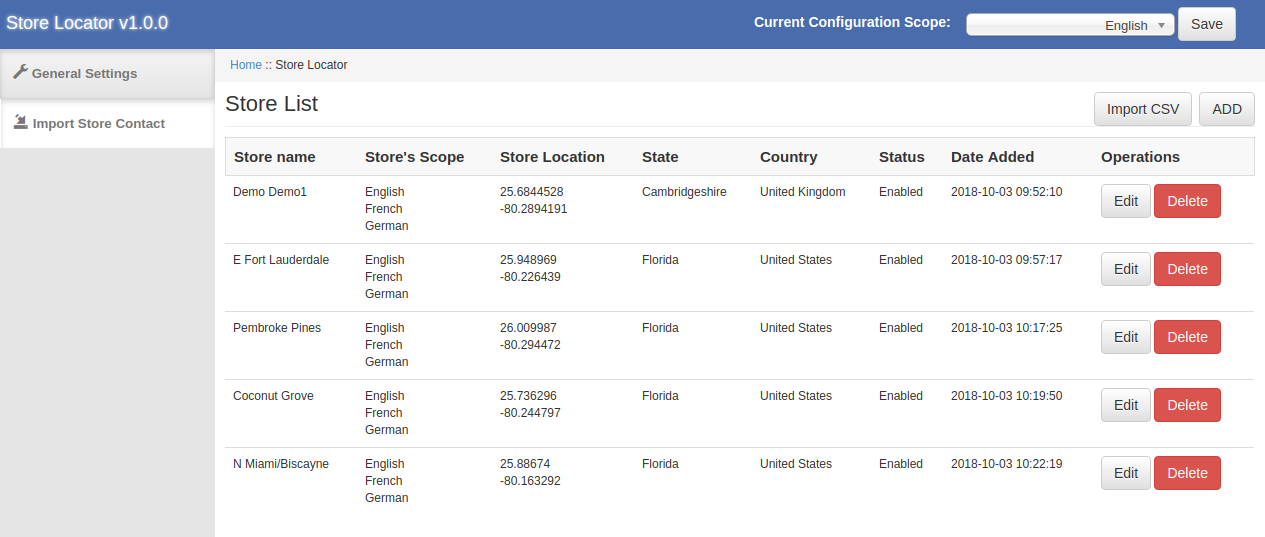
3.2.1 How to Add a new store details

In order to add a new store details, follow these steps:
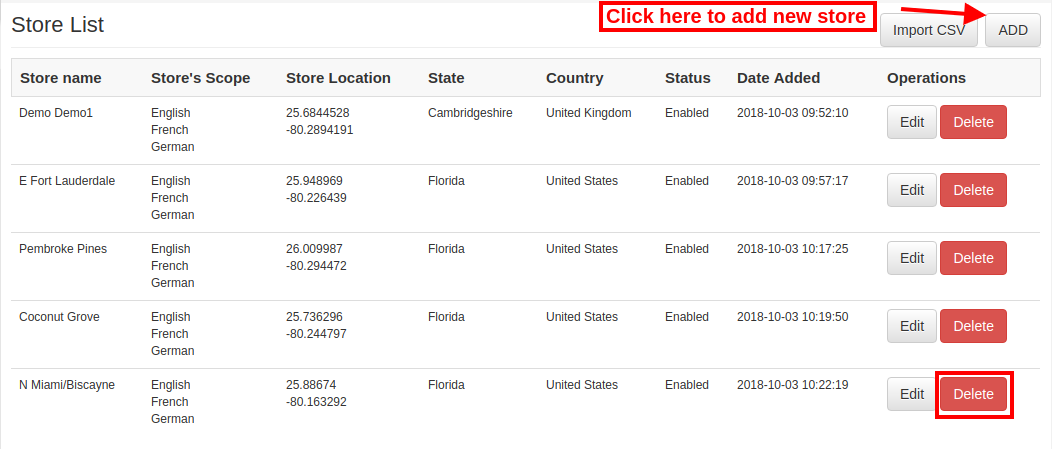
First of all click on “add” button in order to add new store in the list.

After clicking on “add” button, you can view some customization options on the admin interface of Magento Google Maps Store Locator extension.
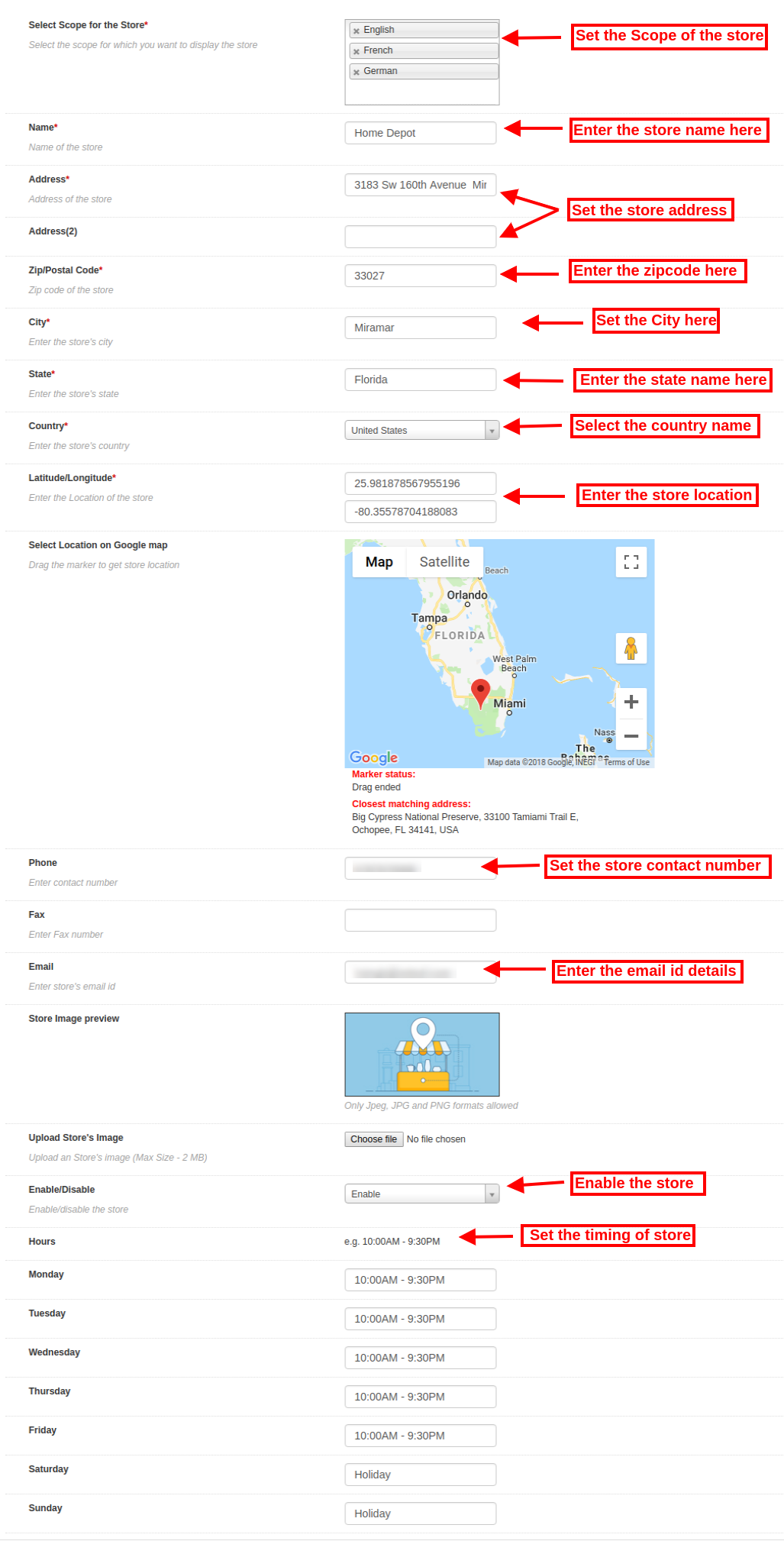
Below-mentioned the customization options:

The store admin can set the store details easily from the admin interface of this Magento store locatorand pickup extension.

  • Select Scope for the store: Select the scope for which you want to display this new store.
  • Name: Here, you can add the name of your store.
  • Address and Address 2: Here, you need to enter address of the store.
  • Zip/Postal Code: Enter the Zip code of the store.
  • City: Enter the city details here.
  • State: Enter the state name where the store is located.
  • Country: Select the country name from the drop-down list.
  • Latitude/Longitude: Admin can enter the exact latitude and longitude of the store here.
  • Select Location on Google map: Set the store location on Google map by dragging the marker to that location.
  • Website: The store merchant can also enter the website of the store from the admin interface of this Magento in-store pickup plugin.
  • Phone: Enter the contact details here.
  • Fax: Enter the fax number if any.
  • Email: Enter the store email id here.
  • Store Image Preview: The store preview will look as shown.
  • Upload Store’s image: Admin can enter store image here.
  • Enable/Disable: Admin can select the option to activate or deactivate the store.
  • Enable Store Pickup: The store admin can activate or deactivate the setting for store pickup option.
  • Enable pickup amount: Admin can charge an amount for offering an in-store pickup facility.
  • Pickup type: Admin can charge pickup amount per product, per quantity or on the bases of the whole order.
  • Amount: Admin can enter the amount which he wants to charge for pickup facility.
  • Hours: Admin can enter the store timing easily from the admin interface of this Magento Google Maps Store Locator extension.

3.2.2 How to Edit the store details

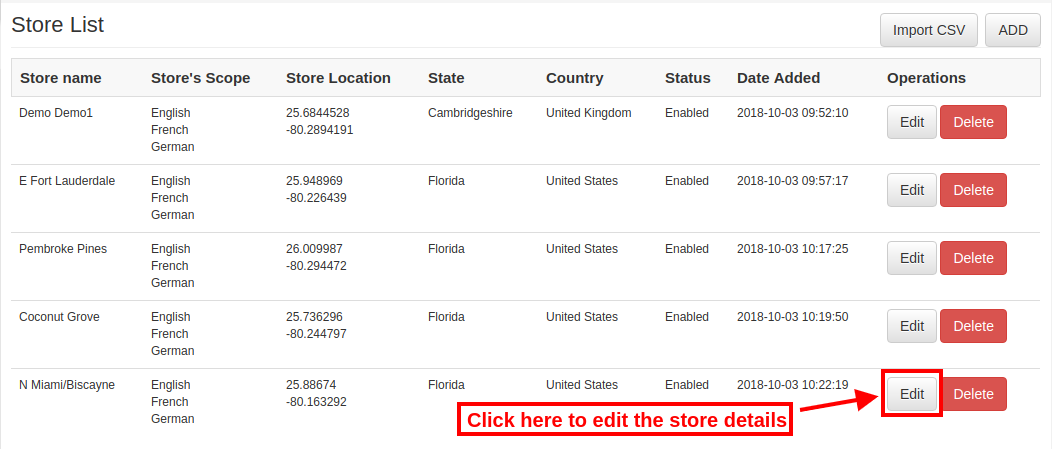
The store owner can edit the store details from the admin interface of the Magento Google Maps Store Locator module. Click on the “Edit” button for updating the store details.
3.2.3 How to Delete the store details

Click on the “Delete” button for deleting any store. After that, the particular store will not be displayed on the website.
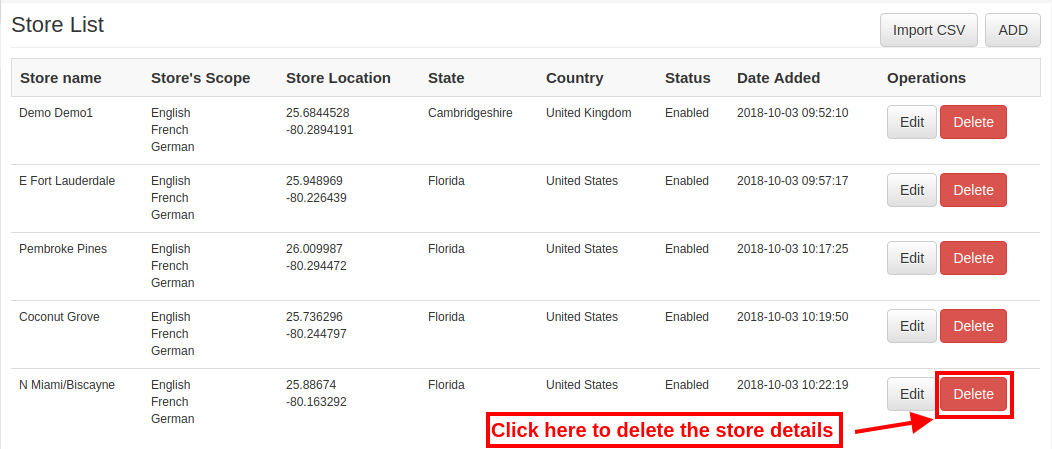
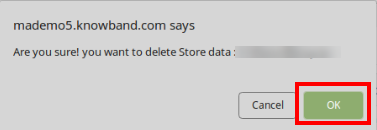
There will be a confirmation pop-up on the same page, when you click on the delete button.

Admin needs to click on the “ok” button for deletion confirmation.
3.3 Import Excel

You can also upload an Excel file with store details in bulk.

The Magento store locator module allows an easy and hassle-free way to upload store details in bulk.

These are the configuration options available in this section:

  • Select Scope for the store: Select the scope of the store. You can select the languages one by one.
  • Excel File: Admin can upload an Excel file if he has one. Admin can also download a Sample Excel file and enter the store details in the same format available in Excel file.
  • Upload File: Admin can upload the Excel file from here.
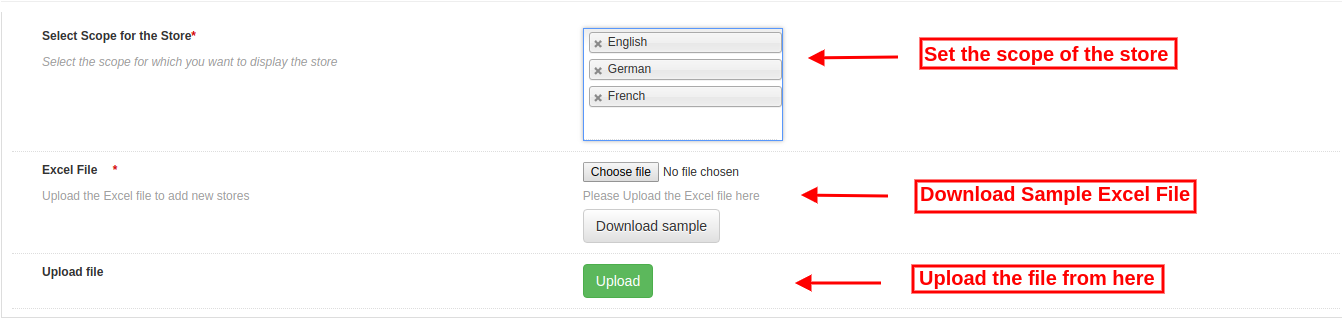
After that, the store details available in the Excel file will display in the store also.

3.4 Store Pickup Global Setting

The online store admin can also apply Global settings for Store pickup. For applying global settings go to System>Settings as shown below:
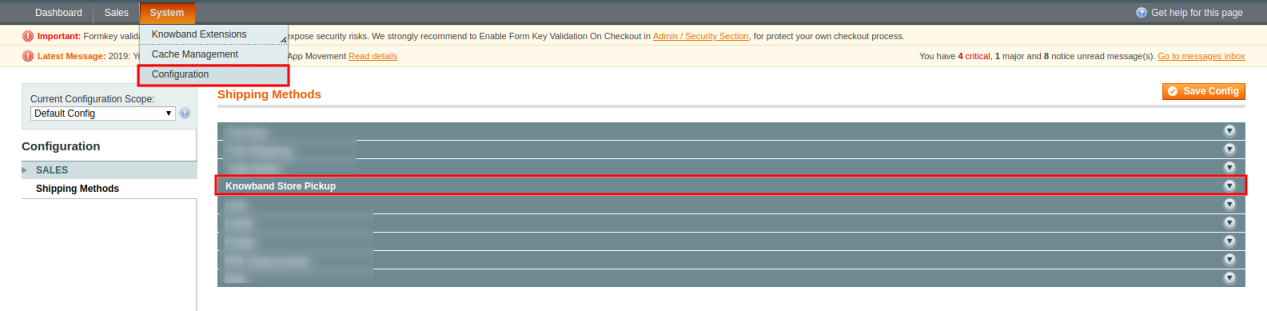
Here, you will see “Knowband Store Pickup” option. After clicking on it, you will get a configuration section.

For Global Settings you will get below-mentioned options:
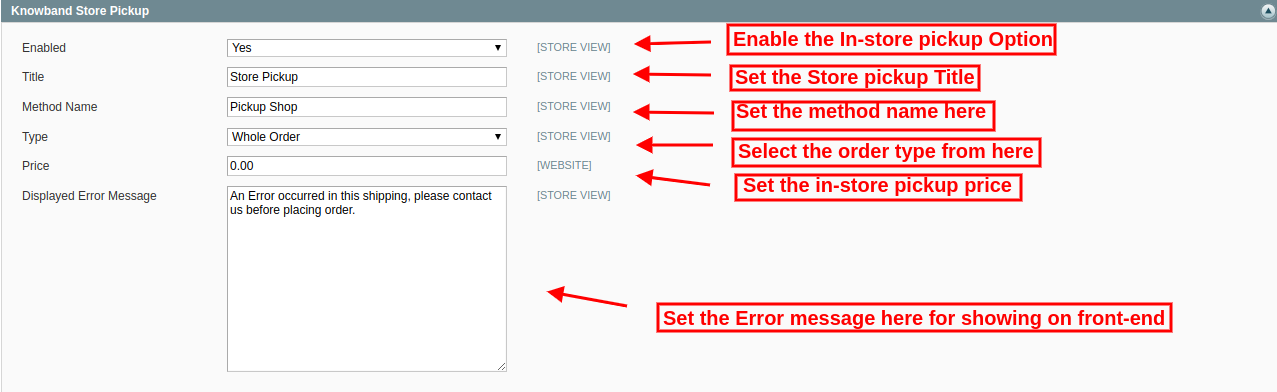
Enable: Enable store pickup option just by a single click.

Title: Set the Title of Store Pickup functionality.

Method Name: Set the method name as per the requirement.

Type: Set the In-store pickup type fro which he wants to charge . Admin can select from the products, whole order and quantity.

Price: Set the in-store pickup price from here.

Display Error Message: Admin can set error text for showing on the website front-end in case of any error while placing in-store pickup based order.

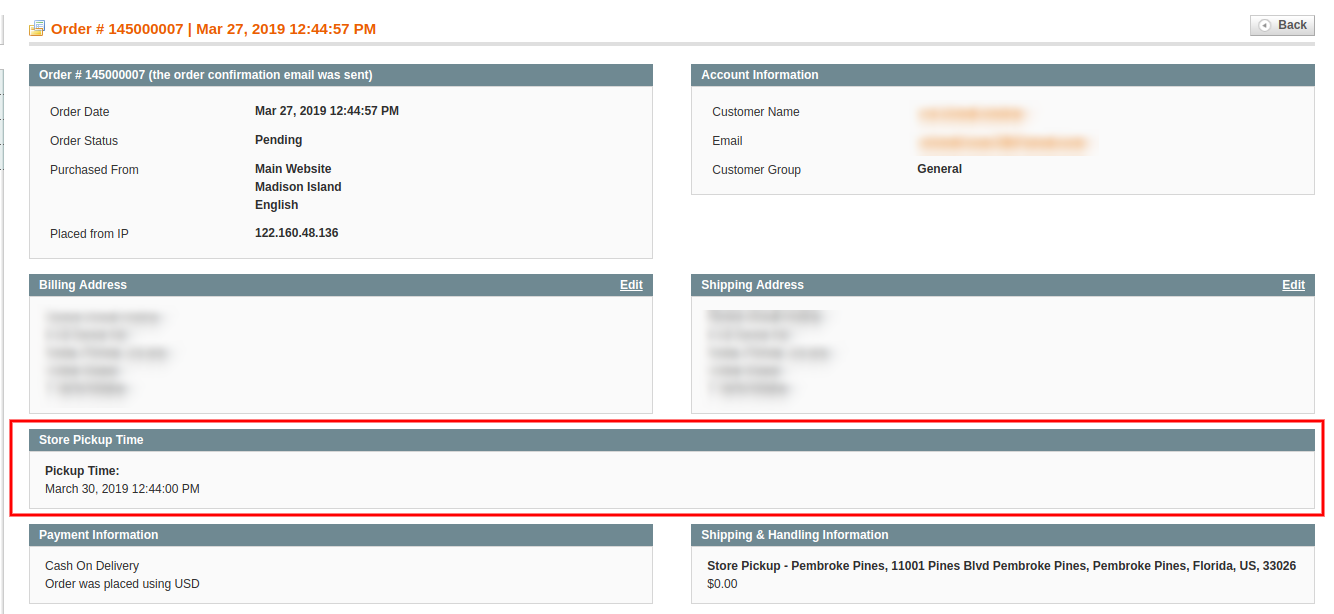
Admin can view in-store pickup based orders from the admin interface:

The store admin can view the customers pickup time and date information from the admin interface. For viewing the preferred delivery date and time, the admin can go to orders menu and click on the “view” option. Here, the store admin can view the time and date details as shown below:
4.0 User Interface

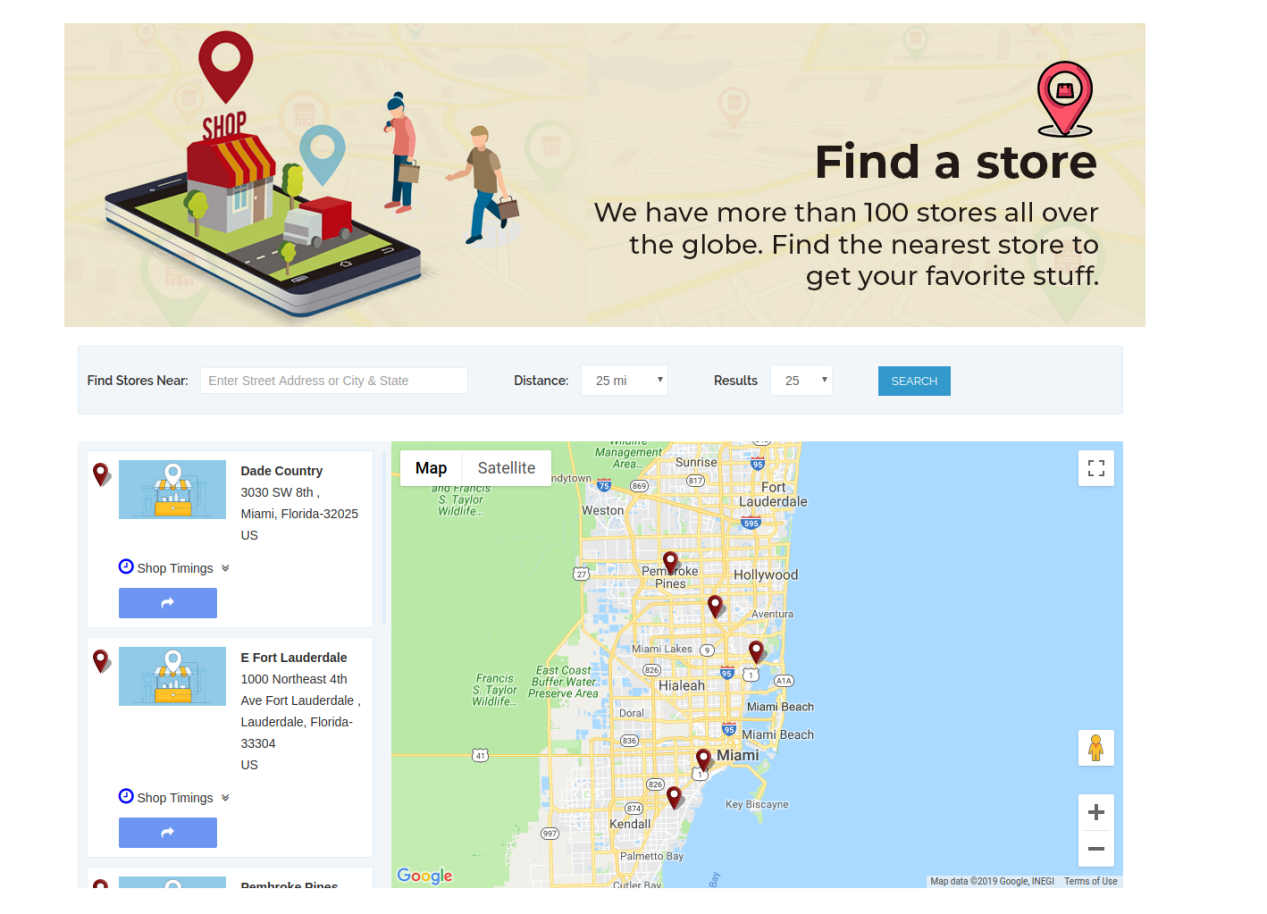
The online users can view the store locator on the website home page. They can also click on the store locator link for viewing the store locations.
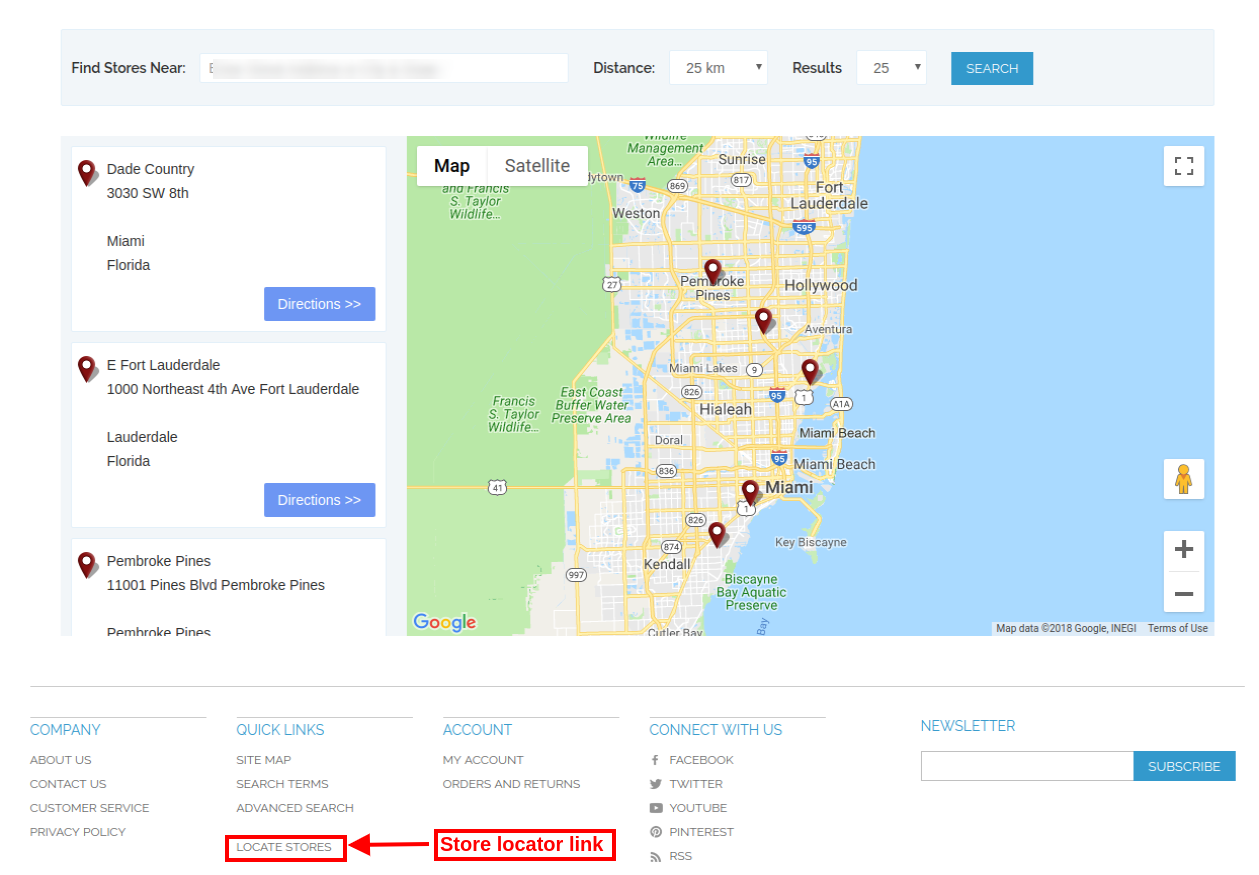
The online users can enter the location and distance for viewing nearest stores. The users can view the available stores, store address and their contact number details also.
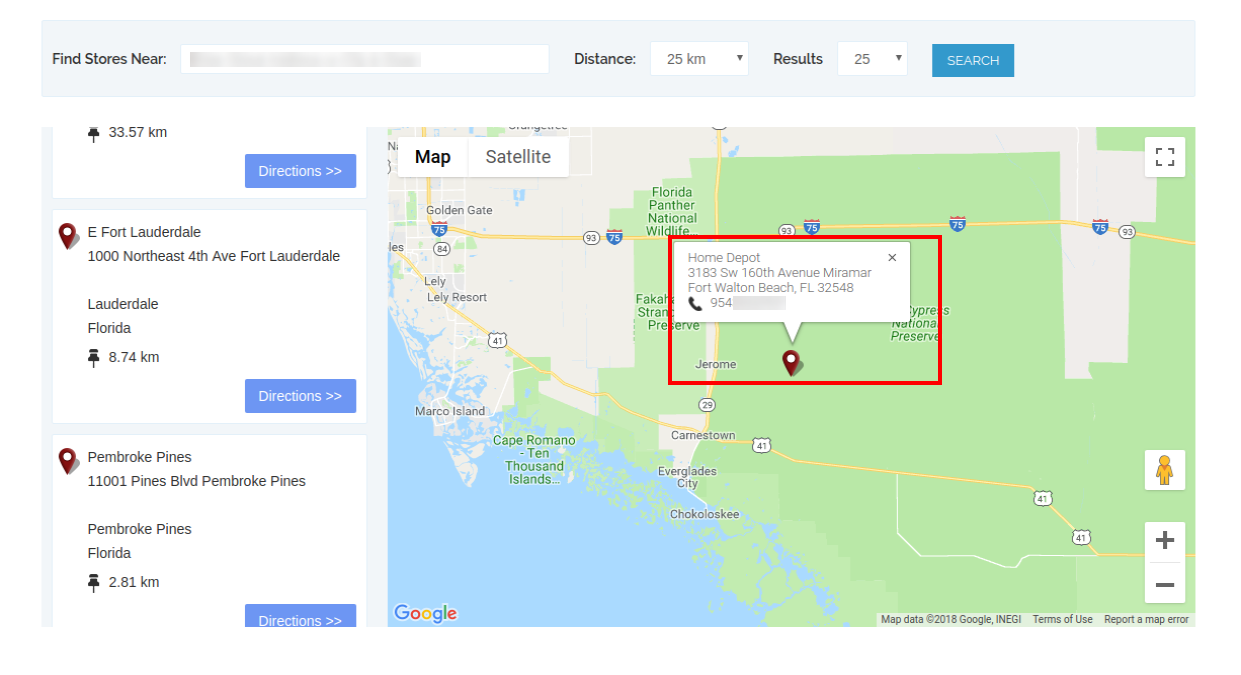
For more details customers can click on the store list. Here, they can get store timing and link for directions.
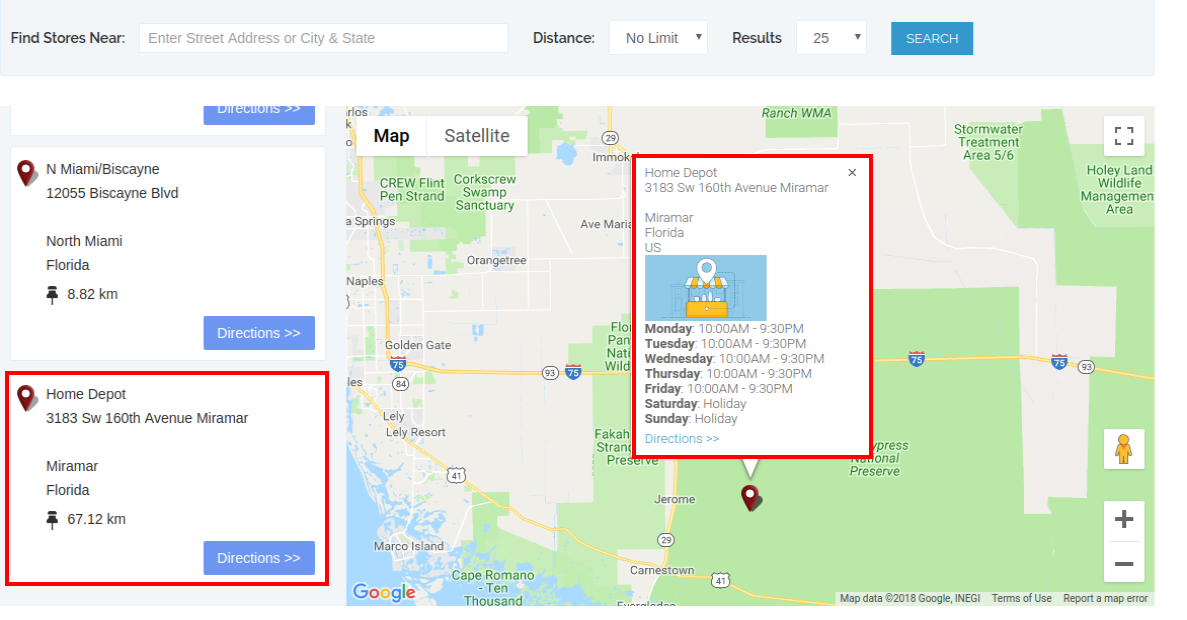
The store locator page will look as shown below:
Customers can view in-store pickup option on the checkout page as shown below:
Customers can click on the “Search” icon for viewing the available stores in their nearest location. They can select the preferred store for in-store pickup.
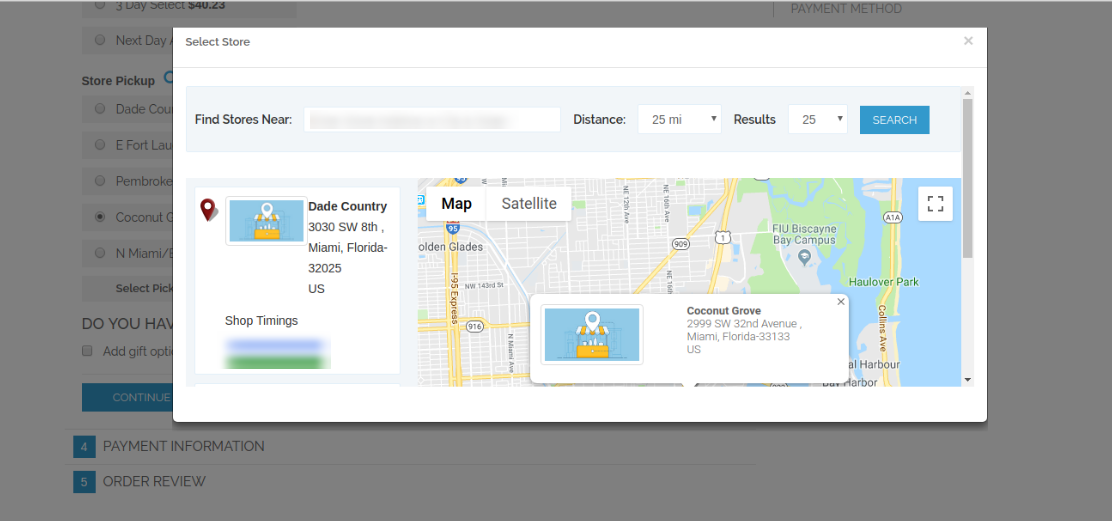
Customers can select the store and pickup time. The customers can now pick the ordered product from the selected store without paying shipping charges.

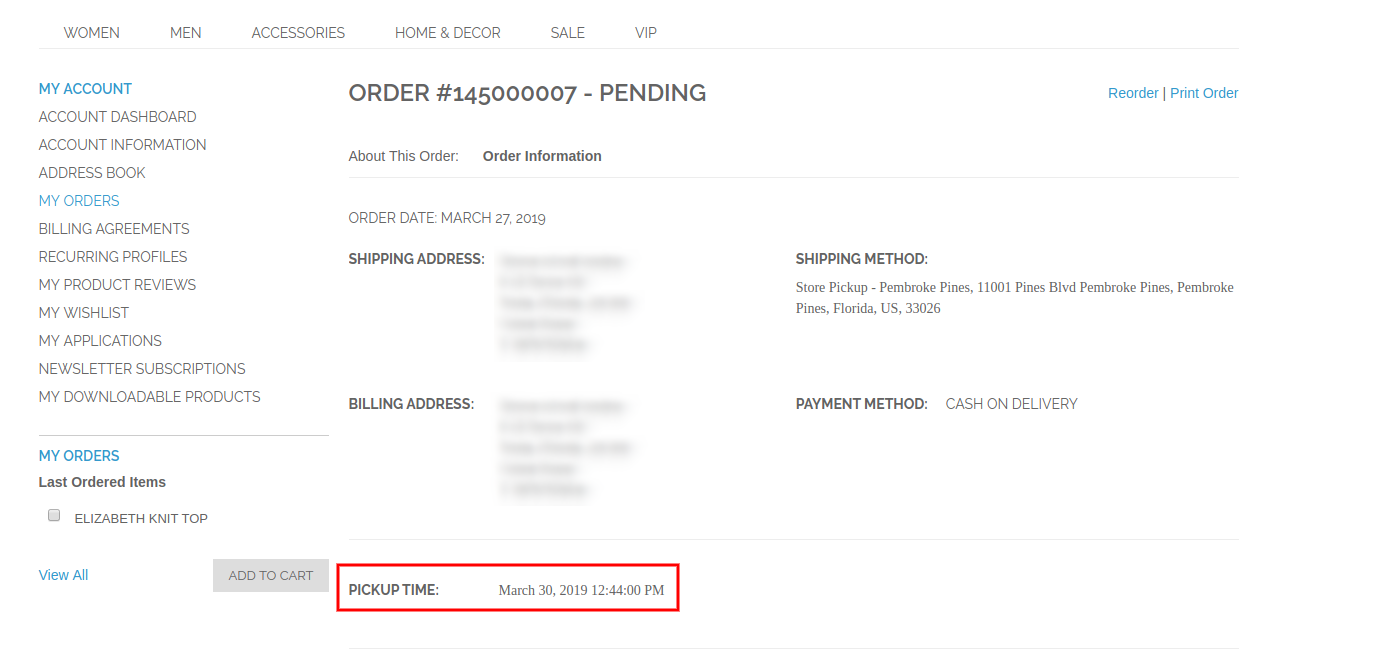
After placing the order, the online customers can view the store pickup time on their invoice bill and order history also.
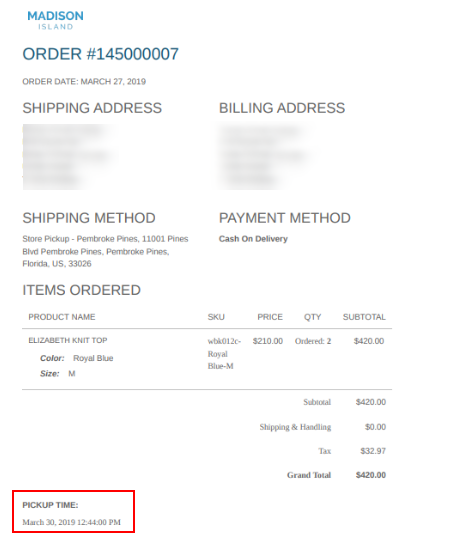
On the order details, customers can view the in-store pickup details as shown below:
Thus, with the help of this Magento Google Maps Store Locator extension, admin can show physical stores on the website easily. Admin can also offer in-store pickup facility on the store. Customers can easily select the nearest store for order pickup and get the product from that store.

For more details please visit here:

Magento Google Maps Store Locator plugin Product page.

Magento Google Maps Store Locator extension Admin Demo link.

Magento Google Maps Store Locator module Front-end Demo.

Get, Set, Sell! Save Big this Holiday with Knowband’s PrestaShop Module Packs: Part 2

Did you read our last blog about Knowband’s Prestashop Module Bundle you can save big this sale season? Well, the celebrations are not over yet! There’s more to come your way.

Committed to empowering your eCommerce site with standout features and functionalities, Knowband offers even more cost-effective Prestashop Module bundles. We unveil heavy discounts on Prestashop Addon packs. Avail the lucrative opportunity instant as the offers expire soon. Let us take a walk through the offerings of Knowband.

Mobile Pack – Mobile App, AMP, Order Look Up

In the mobile-centric shopping environment, you need to keep your store in sync with the requirements of the mobile-first users. This is when the outstanding and best-in-class extensions of our Mobile pack that are especially designed to cater the requirement of the mobile shoppers.

Prestashop AMP Extension

Prestashop Accelerated Mobile Pages Addon allows you to create accelerated mobile pages for the mobile sites. Along with reducing the load time of the webpages with AMP, here are some features that you get with the module.

  • Creates an alternative URL as per AMP format
  • Allows to display the best sellers, features products and new arrivals
  • Show social sharing option on the product page
  • Admin can display the banners on the mobile sites
  • Control over the look and feel of the AMP pages
  • Incorporate Google Analytic to track the report of the AMP pages

Prestashop Mobile Order Lookup Module

With Mobile Order Lookup Module for Prestashop, the store owners can offers an easy option for the customers to track their order status just by using their mobile number and order ID.

  • Enable Customers to view order status without logging in
  • Gives store admin the option to monitor the number of customers who viewed their order status
  • Simple customizable interface

Prestashop Mobile Login Plugin

PrestaShop Mobile Login module incorporates a feature that allows the customers to register in your site using their mobile number with SMS OTP verification. Features of the Prestashop module are listed below:

  • Admin can allow the customers to log in and register using their mobile number
  • Enables OTP verification
  • User-friendly admin interface for easy control
  • E-merchant can set the minimum and maximum length of the mobile number required

Do not let your competitors’ get better off you. Just go mobile by adding the above extensions in your cart. For a pack of 3 Prestashop extensions, you’ll get a handy discount of 15%. Apply the coupon code: MOBILE15 and avail the offer.

Customers’ Trust Booster Pack

Create a lasting and reliable relation with your customer with our Customer’s Trust Booster Pack. Seize the pack of exceptionally well-tailored pack of 3 extensions and boost your customer retention.

Prestashop Page Viewers Counter Extension

Showcase the number of store visitor are currently viewing a particular product with our Prestashop Page View Counter Addon and get the below-discussed features.

  • Both the customer and admin can view the number of current viewers
  • Admin can set the position of the counter
  • Customize the look and feel of the message text

Prestashop Product Sales Count Addon

Prestashop product sales count extension allows you to display the number of times a particular product was purchased, that is, the sale count of your site’s product.

  • Option to show sales count on the product pages
  • Custom CSS and JS option to customize the look and feel
  • Option to set a minimum sales count to show to the customers

Prestashop Website Testimonial Module

Add consumer-generated content in your site with our easy-to-use Prestashop customer testimonial extension. Here are other functionality offered by the addon.

  • Allows the customers to write testimonials and add images as well
  • Mobile-responsive interface
  • Can show the testimonials, Homepage, Left Column, and Right Column

No more coding required to add such features in your site. Just add the feature-rich Prestashop module bundle in your cart and get a discount of an additional 10% with the coupon code: TRUST10.

Coupon Code: TRUST10

Improved User Experience Pack – Infinite Scroll, Quick Login, Switch Language

Cater your customers efficaciously with a user-friendly front-end interface. Offering flat 15% on the Prestashop extensions bundle, Knowband makes sure that you hit your target accurately.

Prestashop Infinite Scroll Addon

Prestashop Endless Scroll Addon replaces page reloads and pagination system with an infinite scroll option that list all the products on the same page. Here are some of the pluses of using this addon:

  • Allows infinite scrolling on the pages with product listing throughout the site
  • Compatible with SEO friendly URLs
  • Adds ‘Load More’ feature to pause infinite scroll after a certain interval of pages
  • Adds ‘Go to Top’ link
  • Customize the look and feel of the front-end interface at a few button clicks

    👉Explore the Module with Our Video Guide

Prestashop Quick Login Popup Extension

Inbuilt Facebook and Google login feature of the Prestashop quick login popup module makes registration and store browsing effortless for your potential customer.

Prestashop Auto Switch Language and Currency Addon

Prestashop Auto Switch Language and Currency Module automatically detects the IP address of the store visitors and converts the website content into the native language of the visitors. Not just this, the currency is also changed into the respective currency of the place from where the site is being browsed.

Purchase all the extensions offered in this pack and apply the coupon code: BETTERUX15, to  get a flat discount of 15%.

Coupon Code: BETTERUX15

Shipping Options Pack

Offer the best-ever shipment to your customers and do not miss out on a single conversion. You can now this at budget-friendly prices with our Shipping Pack. Here are the plugins that you get along with the module bundle.

Prestashop Store Locator and Pickup Addon

The customers get an option to find the nearest store and also enables them to set the time period for product pick up with Prestashop store locator and pickup module. Listed below are additional benefits that you get with the module.

  • Easily activate the store locator and pickup functionality
  • Show the store locator on any page of the website
  • Display the path of the stores on Google map
  • Option for the customer to book pickup slot

Prestashop Preferred Delivery Time Module

Allow your customer to enter their preferred delivery date and time on the Checkout page with Knowband’s Preferred Delivery Time Addon for Prestashop.

Prestashop Shipping Cost by ZipCode Extension

Prestashop Shipping Cost by Zipcode module allows the store admin to apply different shipping cost based on postal codes of the customer. The seamless transaction boosts the chances of customer retention.

  • Add Zones with range of pincodes
  • Fix shipping cost for different zones at a button click
  • Restrict product delivery for a particular zone
  • Download shipping conditions

Prestashop Shipping Timer Module

Prestashop Shipping Timer Addon creates a sense of urgency in the minds of the store visitors and motivates them to place the order. The timer incorporated by the module displays the time limit within which the product will be delivered on the same day.

Prestashop COD with Fee Addon

Provide the option of cash on delivery to their online customers and charge an additional amount for the COD feature with our Prestashop COD with Fee Addon.

  • Effortlessly fix the terms and conditions
  • Set the fee for the cash on delivery feature
  • Create N number of COD conditions
  • Fix the minimum and maximum order limit for using COD option

If you add 4 out of the 5 Prestashop modules from the shipping pack, you’ll get a discount of 15%. In order avail the offer apply the coupon code: SHIP15.

However, if you purchase all the 5 module, you’ll get an alluring discount of 20% with the coupon code: SHIP20

Coupon Code: SHIP15  (For a pack of 4 modules)

Coupon Code: SHIP20  (For a pack of 4 modules)

Security Pack – reCaptcha, Private Shop, Block Spam

Ensure the security of your site in a cost-effective with our security pack and get a discount of 10%.

Prestashop Block Bot/User by IP, Country and User Agent Module

Prestashop Block Bot/User by IP, country or User Agent Addon is an effortless means to keep the malicious bots away from your site by blocking the access to your website for a particular user or bot.

  • Helps you ban the unwanted traffic from spam bots and users
  • Add the restriction by IP, Country or User Agent
  • Admin can even show the header and footer to the blocked users
  • The users can send a request for removing the banishment
  • The request is processed from the back-end

Prestashop Google reCaptcha Addon

Add Google reCaptcha in your Prestashop store without making any changes in the base of the site with Prestashop Google reCaptcha extension. The must-have features in the registration page and checkout page lets real people pass through with ease and protects the site from spammers and bots.

Incorporate these security checks in your site at a flat 10% off. Use the coupon code: SECURE10.

Coupon Code:SECURE10

Prestashop Android and iOS Mobile App Builder

This is not it! Our market-leader Prestashop Android and iOS Mobile App Builder  is now available only for $199. Create your own mobile store for both Android and iOS platforms with a handy discount of 50%. Here is the list of the features that you get along with the eCommerce mobile app.

  • Bundle of themes and fonts to choose from
  • Tablet and mobile responsive
  • Real-time synchronization
  • Multi-lingual and RTL support
  • All Payment and Shipping method compatibility
  • Social login option
  • Easy navigation
  • Voice search (For Android Users)
  • Wishlist
  • Zopim chat support
  • All Coupon and voucher support
  • One page checkout
  • Unlimited push notification
  • Order tracking

Make sure that you don’t miss out on the golden opportunity. Visit Knowband now and upgrade your site as per the present industry need and requirement.

Get, Set, Sell! Save Big this Holiday with Knowband’s PrestaShop Module Packs: Part 1

With the holidays waiting at the threshold, Knowband is all set to assist the eCommerce merchants in the quest of hitting the bull’s eye. Anticipating the joyful holiday mood, Knowband offers a yet another to celebrate with the best-ever remunerative deals. You can now buy the Pack of Extensions and get additional discounts of 10% to 20%. E-retailers can avail the lucrative offer for the Prestashop store.

Save by choosing our module bundles at discounted products and leverage a seamless online transaction. Take a glance at the various Prestashop addon bundles with discount and products on promotion designed to simplify your eCommerce.

E-commerce Pack – Easy Checkout, Win back Customers, Offer Discount

Since the festive seasons are around the corner, leverage the splendid features in your eCommerce site with these top-notch Prestashop Extensions:

Prestashop One Page Checkout Extension:

The Prestashop one step checkout addon can incorporate a single page checkout in your site without making any changes in the base code. Additional features offered by the Prestashop addon are as follows:

  • Compatibility with all types of products
  • GDPR compliance
  • Social Login options
  • Easy way to customize the layout of the checkout page
  • All shipping and payment type support
  • Drag-and-drop feature customize the front-end interface
  • MailChimp Integrator
  • Option to add required field validation
  • Complete cart summary

Prestashop Exit Popup Addon

Prestashop exit-intent email subscription popup extension detects the mouse-movement of the user and displays a popup whenever he/she is about to exit the site. You can showcase discount and other attractive call-to-action and motivate the visitors to reconsider their exit.

Listed below are some of the additional features of Prestashop exit popup module:

  • Fully customizable interface
  • MailChimp Integration
  • Option to set the fixed/percentage discount at button click
  • Customize the text displayed on the popup with ease
  • Get a full report of coupons generated and used in tabular and graphical format

Prestashop Abandoned Cart Module

Track all abandoned carts of your Prestashop store and convert them to sales by regular email follow up with Prestashop abandoned cart addon. Features of Prestashop abandoned cart addon are listed below:

  • Capture abandoned cart of both Guest and logged-in customers
  • Pre-designed email templates to send follow up emails
  • Schedules the follow up emails based on minimum cart value
  • Increase conversion by sending serial reminders
  • Send fixed or percentage based coupons at a button click

Prestashop Multi Vendor Marketplace Addon

Prestashop Marketplace Module by Knowband can help you create an advanced marketplace by upgrading your eCommerce site. The marketplace owner gets to manage the sellers, products, categories, order and other transaction from the back-end of the Prestashop marketplace addon. The third-party sellers can upload their products and sell them to your customers. While the products management and approval can be done from the back-end.

Other features offered by the Prestashop extension are:

  • Set the global as well as order-wise commission with great ease
  • GDPR complaint
  • The admin can approve and manage the products and categories of the marketplace
  • Admin can enable auto or manual-approval for the seller’s profiles
  • Sellers can list their products and admin to add/remove the products to be listed on the marketplace
  • Admin can even approve/disapprove the reviews of the customers
  • Option to add seller’s shipping methods
  • Option for the sellers to request for the payout
  • Default email templates
  • Add custom CSS code in order to change the look and feel of the site

In order to avail the offer, add all the extension of the eCommerce pack in your cart and apply the coupon code. You’ll get an amazing discount of flat 15% if you add any three of the above mentioned modules in your cart and apply the coupon code: COM15.

For a pack comprising of all the four extensions, get an additional 20% off on your cart value. Add the products in your cart and apply coupon code: COM20 and get sky-rocket your eCommerce site at budget-friendly price.

Coupon Code: COM15 (For a pack of 3 PrestaShop module)

Coupon Code: COM20 (For a pack of 4 PrestaShop module)

Social Pack – Offer easy login, Social Shop, Increase social presence

The social is your one-stop destination for boosting your social presence and bring your site at the finger-tip of your prospective customers.

Prestashop Social Login Addon

The Prestashop social loginizer addon incorporates multiple social login options like Facebook, Twitter, LinkedIn and various other platforms in your checkout and registration page of the site.

  • 14 Social login options
  • Mobile, Tablet and Desktop Responsive
  • Easy installation
  • Drag-and-drop option for positioning social login icons
  • Complete tracking reports

Prestashop Social Shop Integrator Addon

The Prestashop FB Store extension by Knowband integrates your Prestashop store with the Facebook page and allows you to display your products on the FB store. The visitors are redirected directly from the Facebook page to the eCommerce site at a button click.

  • Integrates your FB page with your Prestashop site
  • Offers the auto listing options
  • Option to display featured products
  • Creates a Shop tab on your Facebook fan page
  • Retrieve Google Analytics report
  • Change the look and feel of your FB shop
  • Displays the desired products and categories on your Prestashop Facebook Store

Prestashop Share and Win Discount Module

The module adds a social sharing option on the website’s product pages. The customers can share the products and discounts in return. Take a run through the basic feature of the Prestashop share and win discount addon.

  • Allow the online customers to share the product on their Facebook wall
  • They get discounts in return of the share
  • Set the discount in percentage or fixed amount
  • Select the layout of the sharing button to be displayed
  • Add custom CSS and JS codes
  • Admin can view Product Stats

Add all the three Prestashop extensions in your cart and apply the coupon code: SOCIAL10 to get additional 10% discount.

Coupon Code: SOCIAL10

Customer Retention Pack – Increase subscriber base, Affiliate marketing

Boost the subscription base of your site and amplify the chances of conversions by increasing customer retention. Here are the feature-packed plugins that you in this Customer Retention Pack.

Prestashop Spin and Win Exit Popup

The Prestashop Spin and Win Email Subscription addon takes the process of increasing the subscription base of the site and offering giveaways to the next level with a gamified approach. Here are some of the features offered by the best-in-class module.

  • Configured at a few button clicks
  • Subscription popup can be displayed when the visitors enter the site or when they intend to leave. It depends on the choices made by the store admin
  • An alluring replacement of the conventional subscription pop-up
  • built-in MailChimp and Constant Contact integrator
  • Offers a statistical report of the coupons generated and used
  • Pre-designed holiday themes

Prestashop Affiliate & Referral Program Extension

Boost the popularity of your website by arranging a multi-level affiliate program with Prestashop Affiliate and Referral program addon which allows the e-merchant to manage affiliate system on the eCommerce store. The key highlights of the addon are:

  • Allows participation of affiliate
  • Display affiliate registration field on the website
  • Offer different ways of referring the store, that is, viz social media, link sharing via email
  • Customer will get the referrals from the assigned code
  • Set the fixed referral rate and percentage based referral rate for order completion
  • Graphical report of the commission and referrals

Prestashop Reward Points Addon

Offer rewards to the customers each time they purchase a product from your site with our Prestashop reward point extension. Make your customers feel special and increase the chances of customer retention. Here are some of the admin features offered by the module:

  • Generate new as well as repeat sales with ease
  • Increase customers loyalty with attractive discounts
  • Keeps your customers engaged with reward point

Wanna add these features in your site? You can now do it with an additional discount of 15%. Just add the extensions in your site and apply the coupon code: CUS15

Coupon Code: CUS15

Helpdesk Support Pack – Offer best services to the customers

One of the biggest factors that may cripple some easy conversions is the lack of customer support, especially during the busy sale season, is lack of adequate customer support and return policies. You can grab an outstanding pack of three plugins at an additional 15% discount and leverage the astounding features for your valued customers.

Prestashop Deskoid Helpdesk Module

Prestashop desktop helpdesk addon offers an easy-to-use interface that allows effortless tracking and management of the tickets raised by the customers.

  • Incorporates and interface in the front-end that allows the customers to raise tickets for their complaints and queries.
  • Tickets are viewed from the back-end
  • Admin to set the priority of the tickets and update the ticket status
  • Displays instant notification whenever a message is received

Prestashop Return Manager Addon

Create return/replacement policies and manage the return request of the customers with great ease with the intuitive Prestashop Order Return Manager extension. Some of the standout features offered by the modules are listed below:

  • Admin can create N number of return policies
  • Online customer to place return/refund/replacement request
  • Customers get an option to attach the image of the defected product
  • Admin can deny or approve a return request of the customers

Prestashop Social Messenger Extension

The social messenger addon for Prestashop integrates your Prestashop store with the Facebook messenger and allows you to offer chat support to your customers via your messenger account. Here are some of the other features that your get along with the module:

Incorporates the messenger chat option in the front-end
Set the color of the social messenger icon
Multi-lingual compatible
Option to set the messages for auto-responder

Just add all the extension of this bundle in your cart and apply the coupon code: SUPPORT15, to get an additional 15% off.

Coupon Code: SUPPORT15

Legal Pack – GDPR, Age Verification

Make your site complaint with GDPR and incorporate age verification at a button with an additional 10% discount.

Prestashop GDPR Module

Make your store GDPR compliant and offer all the rights under the GDPR to the EU customers with Prestashop GDPR Addon. Here are the rights that you get with the extension:

  • Right of access
  • Right to data rectification
  • Right to erasure
  • Right to data portability
  • Rights related to the automated decision making

Prestashop Age Verification Module

Restrict the audience base of a particular age bracket from browsing your site by adding age restriction with our feature-rich Prestashop Age Verification extension. The key highlights of the module are:

  • GDPR compliance
  • Displays a popup in the front to confirm the age of the visitor
  • Customizable front-end interface
  • Allows the admin to set the opacity of background easily
  • Display/hide the note for the customers
  • Set and display the terms and condition
  • Option to add custom CSS and JS

Buy both the plugins together and avail an additional discount of 10% discount by applying the coupon code: LEGAL10

Coupon Code: LEGAL10

So, what are you waiting for? Just get the Prestashop Addon Bundle that suits your business and get your holiday sales going.

This is not it! There are many more such bundles of extensions yet to come. Stay tuned for more such PrestaShop Module Bundles.

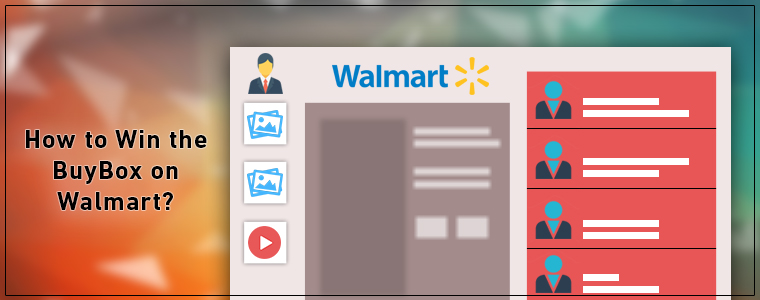
Tips to Win the BuyBox on Walmart

Walmart is one online platform that is giving quite a tough competition for the eCommerce giant Amazon. With its recent acquisition of Flipkart in India and Jet.com earlier in 2016, the company has made it very clear that nothing is stopping them. The eCommerce marketplace is not just shopping for a bigger with the biggies of the industry, but it has also opened up doors for the small vendors to dive into the tech-savvy market.

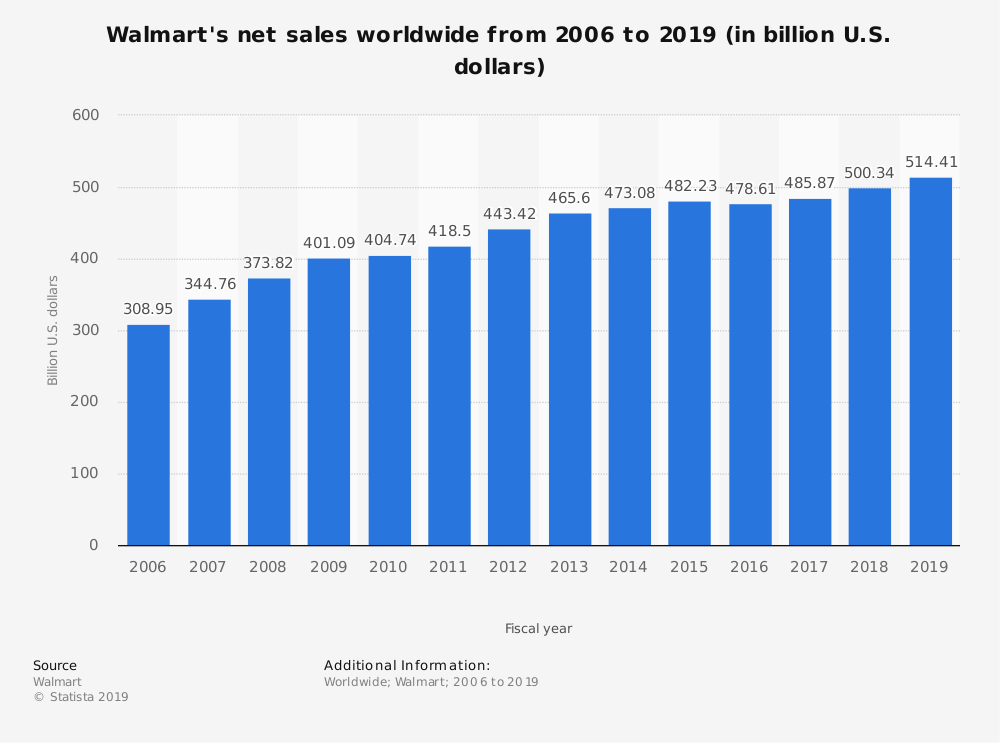
Walmart is the second-largest online shopping destination (after Amazon) in the US. With  495.76 billion U.S. Dollars global net sales, it has marked its presence all over the world and is continuing to gain more success in the future.

Moreover, the eCommerce site has marked its presence in over 27 countries worldwide. Thus, it is indeed a great platform for the e-sellers to reach out to yet another chunk of ready buyers. However, with great opportunity comes great responsibility. The consumer-centric market sought nothing, but the best. Thus, the jam-packed platforms require the sellers to stay at their toes when it comes to catering to the customers with efficiency.

Selling the products worldwide has become effortless with the prominence of Walmart. Getting a shelf on the Walmart Marketplace is not as easy as it seems. There are many pros and cons of selling at Walmart Marketplace. However, if you are accepted as a third party seller on Walmart, it’s necessary to optimize your presence on the same. To help you stay ahead of the cut-throat competition, Walmart provides you an option of BuyBox.

So, what exactly is a BuyBox?

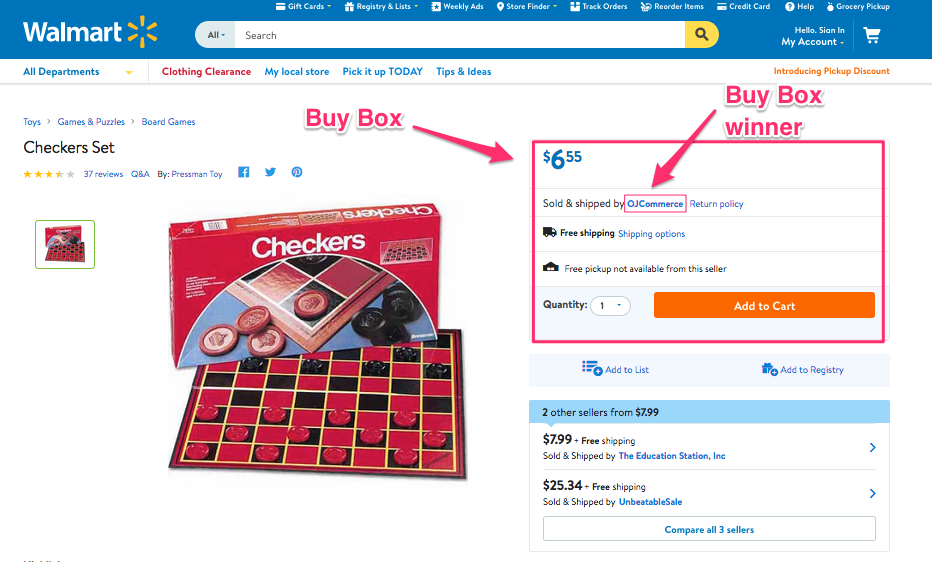
If more than one seller is selling the same product, then, walmart.com displays them on a single page. This page displays the products and their pricing to the customer. Out of these products, one item wins the Buy Box. The customers are drawn to the very first option that they see. As per reports, approximately 85-90 percent of sales are acquired by the seller who wins the Walmart buy box. Hence, winning the buy box is essential for the vendors.

How to win the BuyBox on Walmart?

Product Listing at the lowest price

An online marketplace is a place where multiple vendors are offering the same item at different prices. At this point, the seller that offers the products at the best or the lowest price wins the BuyBox. Content Analytics offers you an automated notification whenever you lose the buy box. Additionally, for the CMS-based eCommerce sites, there are plugins available that help you import the BuyBox report in your store. Thus, you can track the pricing report of the other vendors and reprice the product accordingly. Extensions like Prestashop Walmart integrator, Magento 2, Magento Walmart Integration extension, OpenCart Walmart Integrator Extension, and Shopify Walmart Integrator Extension offers the same functionality for the respective platforms.

In case you manage your Walmart shop without any extension, you can make use of the Walmart Repricer. This tool checks out the lowest price of products on the Walmart store. Not just this, it even changes the price of the product accordingly. On the other hand, if the competitors’ price is higher than that of yours, you can lower the prices, but keep it less than theirs.

Keep the products in-stock

Walmart.com’s buy box algorithm structured to check the inventory of the item competing to win the BuyBox as well. After the pricing is checked, it will see if the products are in-stock or not. If it doesn’t, then, the seller will lose, even if it is being offered at the lowest price. Try to keep the products in stock that are in the wishlist or popular between customers as its unavailability could make you lose potential customers. Ranking of products is also necessary as they should be visible in the search results of customers resulting in good sales and profits.

Offer Cheap Shipping Option

Winning the BuyBox is dependent on the order cost of the order. Thus, the shipping charges can be one of the deciding factors. Thus, it is recommended to use free ‘Value Shipping’. On Walmart, if the total cart value is more than $50. Offer free delivery to the customers along with lower prices.

How can the Knowband’s Walmart Integration extension help you win the BuyBox?

Knowband offers Walmart marketplace integrators for various CMS platforms such as Prestashop, Magento 2, Magento, OpenCart, and Shopify. This is how the plugins can help the e-sellers to win the BuyBox:

  • You can import the BuyBox report of the Walmart marketplace by executing cron in the back-end of the Walmart integrator.
  • You can track the price of your competitor and reprice your product accordingly.
  • The change in the price is synced with the marketplace with the help of the cron job offered by Knowband’s Walmart integrator.

Find out some more related articles:

  1. 9 tips to help you sell more on Walmart Marketplace
  2. How to sell on Walmart Canada?
  3. 5 eCommerce tips and tricks to ensure fast growth
  4. 8 tips to drive more customers on a Marketplace


How to rank your products up in Etsy search results?

Etsy is an eCommerce shopping platform that mainly deals with unique factory-manufactured items. It is the fastest revenue-growing e-shop across the globe.

If you are a seller at Etsy, then you must reconsider your Etsy SEO strategies. Earlier, it was easier to optimize Etsy listings for ranking higher in the search results. Vendors used to fill a few key areas in listing forms and pull off good-enough Etsy ranks for their products. They could even measure their SEO success in the popular marketplace. However, things have changed with time. Taking themselves up a notch in terms of technology, Etsy has changed its search algorithm and is now using Artificial Intelligence (AI). With the smarter search engine, the vendors need to stay in sync with the latest development and optimize their Etsy shop accordingly.

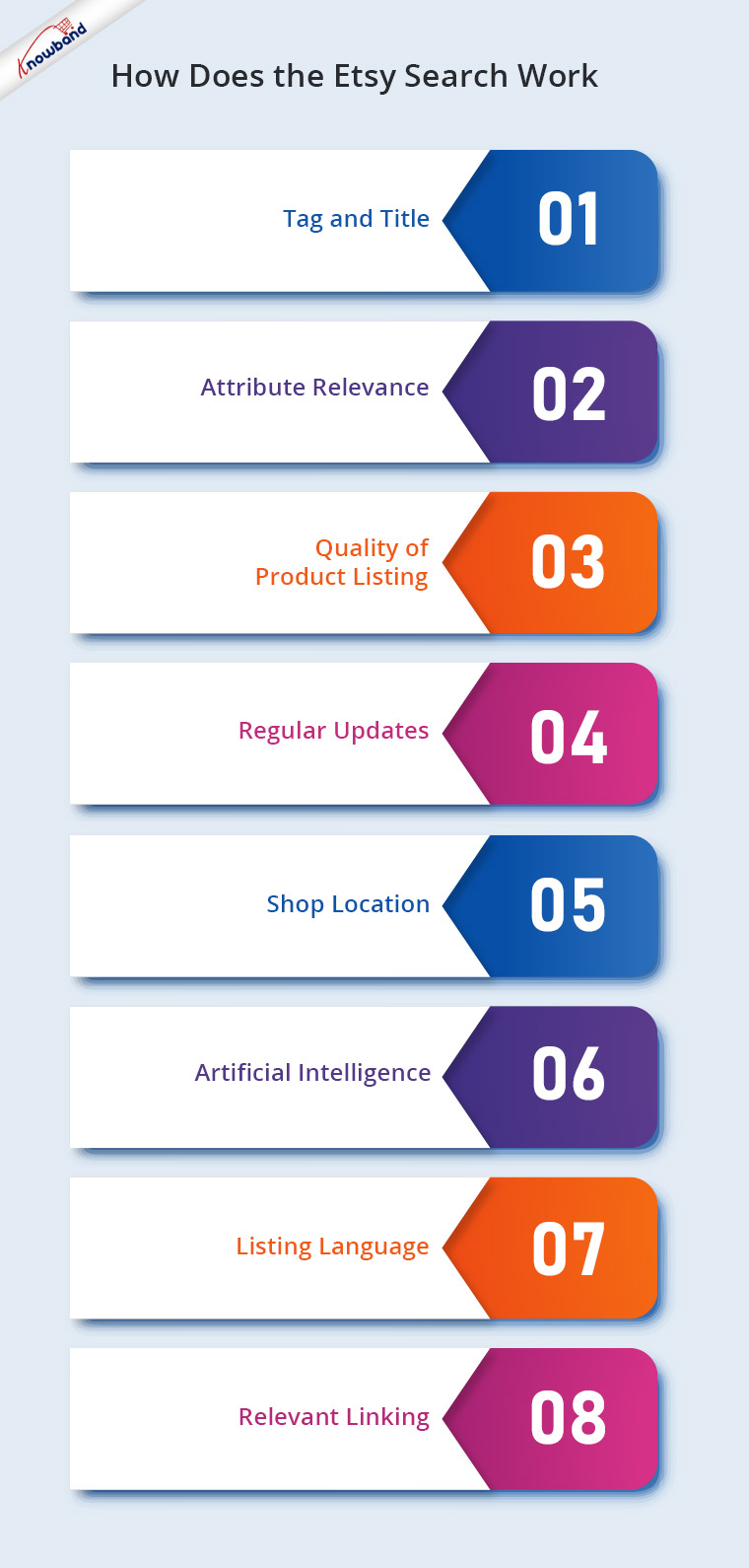
So, how does the Etsy Search work and how to deal with it?

Before we start discussing the optimization tips, you need to understand the exact functioning of the Etsy search engine. Read on to know how exactly it works:

  • Tag and title
  • Attribute Relevance
  • Quality of Product Listing
  • Regular Updates
  • Shop Location
  • Artificial Intelligence
  • Listing Language
  • Relevant Linking

Recommended Read: How to connect your Prestashop store with Etsy Marketplace?

1. Tag and title

Consider Etsy as Google. Just like the latter, the tags and title being used in product details must match the buyer’s search word or phrase. In case, the search terms are not present, then, the product won’t be included in the results.

How to take care of it?

While some of the ranking factors might not be under your control, this one is. Doing a bit of research and curating the product description that includes the title, tags, attributes, and descriptions should be the first thing you do before getting the products listed.

Here are some of the quick tips that can help you tailor a result-driven item description:

a) The product title should be search-friendly. The exact phrase term is given a higher priority. So, keep a check on the product description of the vendors selling the same product. Create the titles on a similar line.
b) Include other relevant keywords and long-tail query terms in the tags and the product description. Etsy allows you to include 13 keywords. So, you should make sure that no tags are left behind.
c) The character limit for the title is 140 characters, however, the search result will only show the first 55 characters, so, the keywords should appear in the beginning.
d) Along with the titles, the tags are considered by the Etsy search engine as well. These search terms hold commercial and intentional relevance. So, make sure that you opt for the tags wisely.

Recommended Read: How to activate/ deactivate a listing in Etsy Marketplace?

2. Attribute Relevance

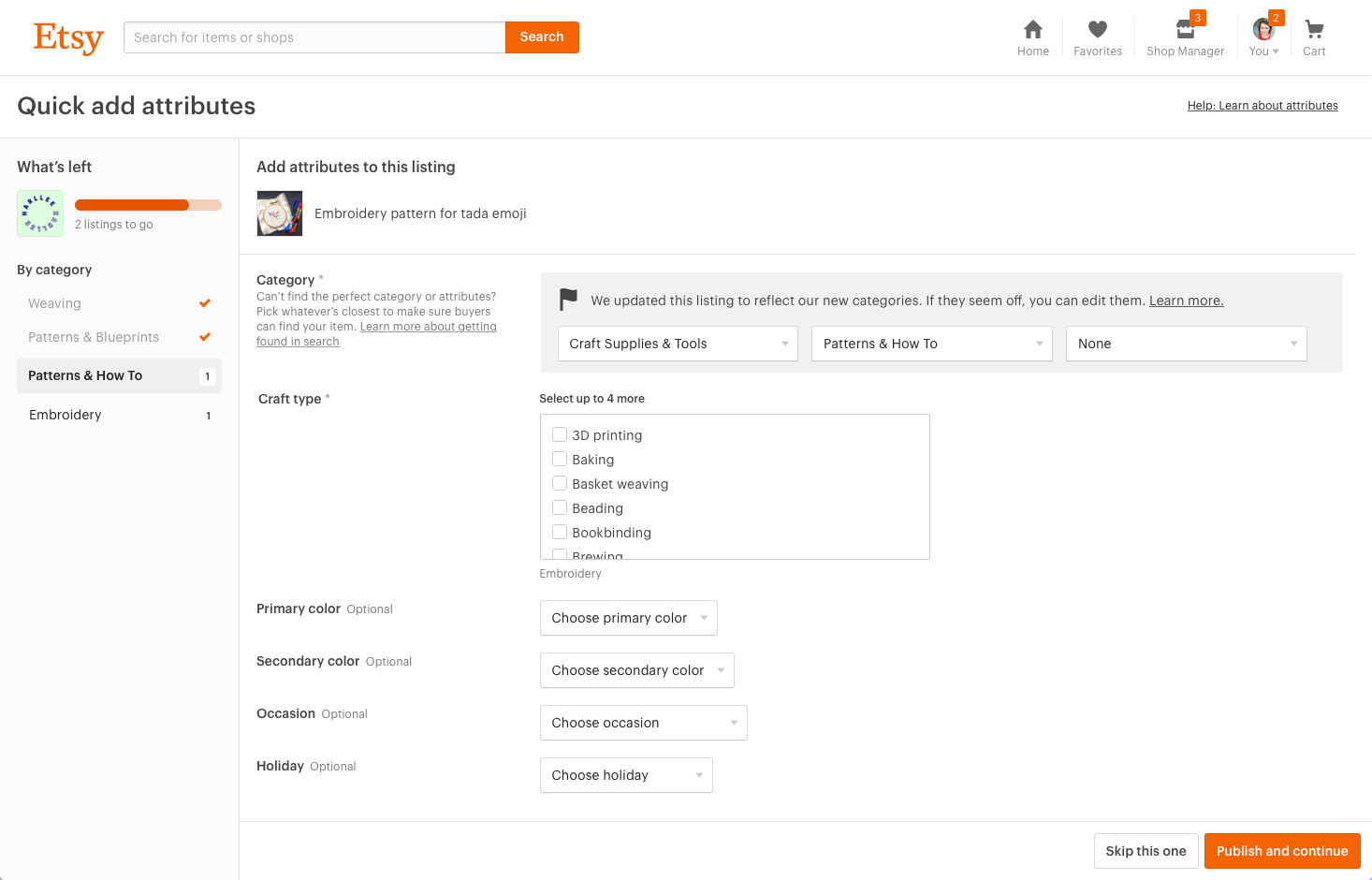
Attributes are another important factor in search relevance. Similar to titles and tags, the attributes can be the deciding factor as the users tend to search for queries such as ‘Black Shoes’, ‘White Princess Dress’ and others.

How to take care of it?

Ideally, a category is been chosen first and then the sub-category while listing the products. This helps you to define the types of attributes to be used, like colour, size and many more. Select as many accurate attributes as each item has related to. This will help in maximizing the brand exposure of your products in search results.

Relevant categories display your products to the right buyers, so It’s important to add some more specific information about the product. This will make it easier for buyers to find your product and go for instant purchase. Sellers can easily map their product categories on Etsy by integrating their eCommerce store with Etsy Marketplace in just a few simple steps.

3. Quality of Product Listing

The more clicks, favourites, or purchases an item, the more its chances to do well in the search result. This is known as ‘listing quality’. However, new shops and the latest listings have a neutral quality score and have no impact on the placement.

How to take care of it?

Etsy has an automated approach in this regard. The added products on Etsy that are grabbing more attention, that is, the products that are getting more clicks items are added to the favourite list more times and have high conversion rates will be given preference. Make sure you are offering unique products and the quality you are providing to the customers is high.

Here are some of the tips that you need to take care of in this regard:

a) Ensure that the buyers get at par experience while using your product.
b) Positive reviews on the product pages provide you with an edge over your competitors.
c) The About Us section of your shop and the seller’s policy must be clear. This can even ensure placement in the Etsy search results.
d) Price can be one of the factors that may lead to low clicks. Avoid pricing the products too low or very high. Do some competitor’s research in this regard and come up with an apt solution.

You can even add the production partners and connect them with product listings at Etsy Marketplace.

4. Regular Updates

Etsy’s search algorithm prefers to rank the products that were recently updated. It takes into consideration how recently an item was listed or relisted.

How to take care of it?

Update the product details, title, and tags regularly. Keep the content fresh and up-to-date with time.

Recommended Read: 5 eCommerce tips and tricks to ensure fast growth

5. Shop location

Etsy search considers the shop location of the vendor and this makes search results more prominent. If searches are made in other countries, then the shop location might not be taken into account. The shop location makes your store prominent and results in a higher ranking of your products. You can even update the shipping profile on Etsy.

How to take care of it?

The rationale behind this is to ensure a faster delivery to online shoppers. The third-party vendors do not have any control over it.

6. Artificial Intelligence

As per Etsy, their search system is now attempting to highlight “results most relevant to the specific buyer” based on some factors. These factors may be the time of day, preferences, and others. This may help the shoppers to get accurate search results, but for the vendors, it’s quite a hurdle. This is because they will no longer see the same results every time you type in a search. Even if they make the searches in incognito mode, they won’t get the same result.

How to take care of it?

With the latest technology coming into play, tracking the search results have become quite an issue for Etsy sellers. Here are a few ways to track the same:

Etsy Rank

It is a rank checker tool that searches Etsy for your items and filters out personalization results. This is a free tool and even allows filtering out bulk reports.

Etsy Stats

The sellers can use the “Search Terms” section to see which keywords are being used by the customers to find your items.

7. Listing Language:

When you sign up on Etsy, it’s important to list the products in the shop language to sell your products. All the listing information of a product should be in the native language of a Marketplace. For example, If a Marketplace works in the French language then the English keywords would not be recognized by the search algorithm of that Marketplace.

How to take care of it?

All the listing information of the product should be in the Etsy Marketplace language only otherwise it will never help to bring up your items.

8. Relevant linking:

Links play an important role in higher search engine ranking. It is a great idea to link your shop page with the product and policies listed on the Etsy Marketplace. The shop page information should contain the following information:

  • Shop Name
  • Shop Description
  • Sales Count
  • Start Date

The shop page information available at the Marketplace will promote the brand and enhance visibility which will ultimately bring more traffic to the store.

Recommended Read: What do the General Settings of the Prestashop Etsy Integration Addon look like?

 Conclusion

Since the competition is at its peak, you need to stay at the edge in every aspect of marketing. No matter what is the quality of the products that you are offering, they won’t be of any worth if it is not visible to prospective customers.

Knowband offers Etsy integrator for the various CMS platforms like Prestashop Etsy Integration Addon, Etsy Magento 2 connector, OpenCart Etsy Integration plugin as well as WooCommerce Etsy Integrator which can make product listing effortless. You can now list the products and the descriptions with a few button clicks. Thus, it becomes easier to update the details in bulk. Moreover, attribute mapping becomes a cakewalk with the automated approach. So, stay in sync with the guidelines of Etsy and optimize the ranking of your products in the search results.

How to know which Social Media Site is Popular among your Target Audience?

Be it an eCommerce website or a brand, catching up with the competition is becoming exceedingly difficult. As per studies, the attention span of the online shoppers has decreased to 8 seconds. Thus, grabbing the attention of the target audience base in this short span is definitely not a cake-walk. While the attention span of the internet users is decreasing on the shopping site, their surfing duration is increasing on the social networking site. This is the reason why social media marketing is becoming an important aspect of digital marketing. Companies and brands are trying to find out more ways to connect with their prospective customers across the various social media platforms.

Over 91% marketers claimed that by spending only a few hours per week, social marketing greatly impacted their brand visibility. So, how do you decide the platform when it comes to social media marketing? Well, you see the number of users of the social media platform and then you choose the one that has the maximum users.

Is that enough?
Not really!
The process isn’t as simple as it seems!

Making wild guesses about the preference of the customers might end you up in a pitfall, resulting in missed opportunities. Thus, instead of going by the conventions, go for smart research. Now, the question arises, how to do that.

How can you find out the social media platforms that are popular among your prospective customers?

Here are some of the ways to get an insight of the customer’s behavior.

Ask them

The best way to find out where your target audience hangs out is to ask them. Create a questionnaire and ask your customers base to fill out the form. Asking them to fill up the form via email is the simplest way to connect with them. Try and reach out to the active members of your community. Ask them about their preference when it comes to connecting with the family and friends online. Additionally, you can even setup a survey and gather the relevant data. The survey should be based on the answer you are looking for. Do not annoy the users with unnecessary questions. Keep it to-the-point and as precise as possible.

Email tracking

If you are doing email marketing for your site, then, adding links of the social outposts in your emails is recommended. Offering an option to the email recipients for sharing the content on Twitter, Facebook, Instagram and elsewhere will even boost your engagement on these platforms. Moreover, you can easily track the user behavior and see if your target audience shared the content on Facebook, Twitter or any other given option.

Social media stalking

Twitter, Facebook and other such social media sites offer you an option to see whether the Gmail ID has been used to create the social media accounts or not. You can use this integration for your business.

Follow the steps mentioned below:

Export the list of your customers’ email addresses
Create a new account on gmail.com.
Upload the .csv file containing your customers’ details to your Gmail account.
Now, create a Twitter and Facebook account with this Gmail ID. Go to “Find Your Friends” of the Twitter sign-up process, select Gmail.

Twitter automatically reads all of the email addresses of your customers stored in Gmail. This allows you to track them on Twitter.

Similarly, for Facebook go to “Find Friends” of the Facebook sign-up process and specify that you have a Gmail account.

That’s it! Your customers will be presented to you and you can start following your target audience.

Analyze your competitors

Another method to find your audience base is to do a little competitor analysis. You are more likely to find your customer base on the platforms where your sites similar to yours are. List out 5 to 10 sites that are serving the same demographics that you are trying to reach. Do a quick online search and check their referral sites.Doing the market survey and analysing the result efficiently, takes already miles ahead of other companies in your field. However, there are dozens of social media platforms where you can promote your brand/company. In order to help you prioritize the various platforms, we’ve broken down the statistical figures of some of the most popular social media platforms where you are more likely to find your target audiences. Read on to know.

Facebook

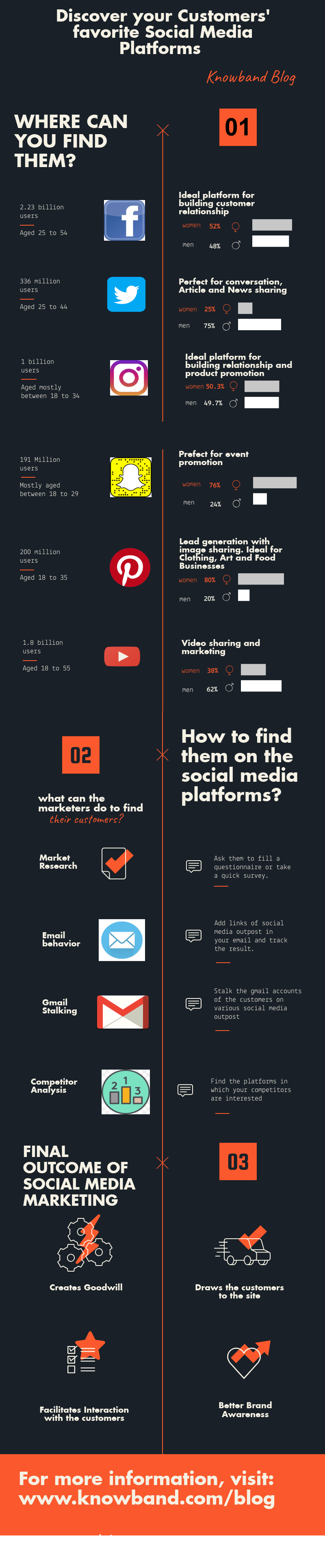
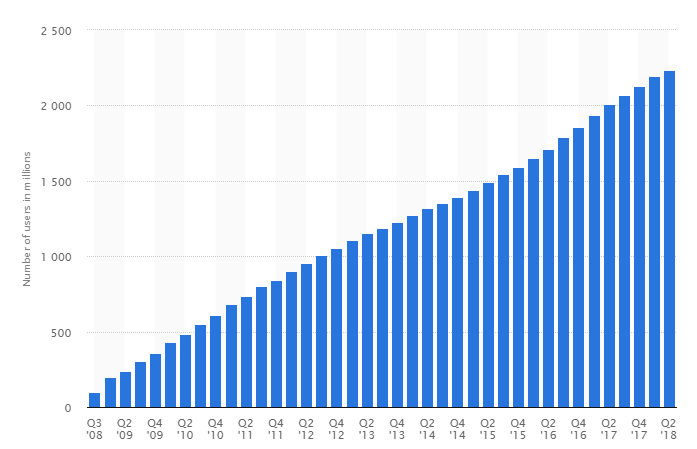
The social networking sites have been coming in and going out, ever since the prominence of internet connectivity has increased. However, Facebook is one platform that has shown exponential growth over the years despite the ups and downs. As of the second quarter of 2018, Facebook had 2.23 billion monthly active users. 50% of 18-24 year-olds go on Facebook when they wake up. Hence, Facebook should and more likely will make up a marginal part of your marketing strategies, regardless of your business model, goals, website traffic and the demographics that you are targeting. In addition to this, the connectivity statistics of Facebook is absolutely enticing for the budding social media marketers.

1. Facebook users consider, on average, 28% of their Facebook friends to be genuine or close friends, which is definitely not a bad number when it comes to spreading the word-of-mouth.
2. 83% of parents with a teen between the ages of 13 and 17 are friends with their child on Facebook.
3. 39% of users say they are connected to people on FB they have never met in person.

For targeting men and women within an age bracket of 25-54, Facebook is inevitable. Facebook is perfect for the companies that target a slightly older market since 44% of users check Facebook several times per day.

YouTube

Till date, YouTube is the only social media platform that gives FB a run for it’s market reach. The broad demographics that it caters is definitely a topping over the cake. 62% of YouTube users are Males. 35+ and 55+ age groups are the fastest growing YouTube demographics. Despite, these exceptionally attractive statistical figures, only 9% of small businesses are on YouTube. Thus, there is for sure room and opportunities for more. Millennials prefer YouTube two to one over traditional television and 37% of the coveted 18 – 34 demographic are binge-watching. So, right from the teenagers and millennials to the adults, if you are searching for your customer base, then, this is one-stop-destination for you.

Twitter

Twitter, to this date, remains the best platform for most B2B businesses model. Despite the character limit, the social networking site can help you reach out to comparatively larger demographics if you are industries like News and Information, eCommerce, Health and Wellness, Travel and Hospitality, Telecom, Finance, Sports and others. Here are some of the stats that will lay some light on the potential that this platform has.

  • 36% of Twitter users are aged under 18 – 29.
  • 23% of them are aged 30 – 49 years.
  • In addition to this, 21% of people aged 50 – 64 year-olds use Twitter.

It is quite evident that if you are trying to reach out to the customer base that comes under a bigger age bracket, then, this is your destination. Moreover, the ratio of men and women using Twitter is approximately the same.

SnapChat

71% of Snapchat users are under 34 years old and 45% of them are aged between 18-24 years. Approximately, 70% of Snapchat users are female. Even in the US, 30% of Millennial use Snapchat regularly. So, if you are targeting millennial, then, this is an ideal platform for you.
Thus, if you are aiming to target the young adults, then, this is one of the ideal platforms for you.

Instagram

With over 500 million users and 59% of the users checking the app every single day, Instagram has great reach. It is particularly an ideal for the companies dealing in Fashion and Lifestyle. Instagram’s most popular demographics include the following:

  • Women users make up to 38% of total Insta users.
  • 59% of the users are under the age bracket of 18-29 years.
  • The urban-located users are 39%.

Pinterest

Social sharing sites like Pinetest are popular among women. In a survey, a substantial 42% of women said that they use Pinterest. On the contrary, the social networking site is popular among only 16% of men. The companies that find their customer base amongst the moms will be interested to know that Pinterest attracts more mature audience than the other social media platforms. Moreover, 60% of the users have children aged 5 years and under.

Over to you

In layman’s word, marketing means presenting the right thing to the right person at the right place and at the right time. Thus, no matter what’s your marketing strategy and how much effort and capital you put in, spotting your customer base and delving into the right place is important. Knowband offers a lot many easy options to boost your social media presence. eCommerce solutions like Prestashop and Magento 2 share and win extension, Prestashop Social Shop addon, order sharing extension for Magento and Prestashop, and many other plugins can help you take your social media presence to the next level.

How to Enable Auto Closure of Issues via SVN Commit in Redmine

Step1: Setup Instructions for Repositories in SVN

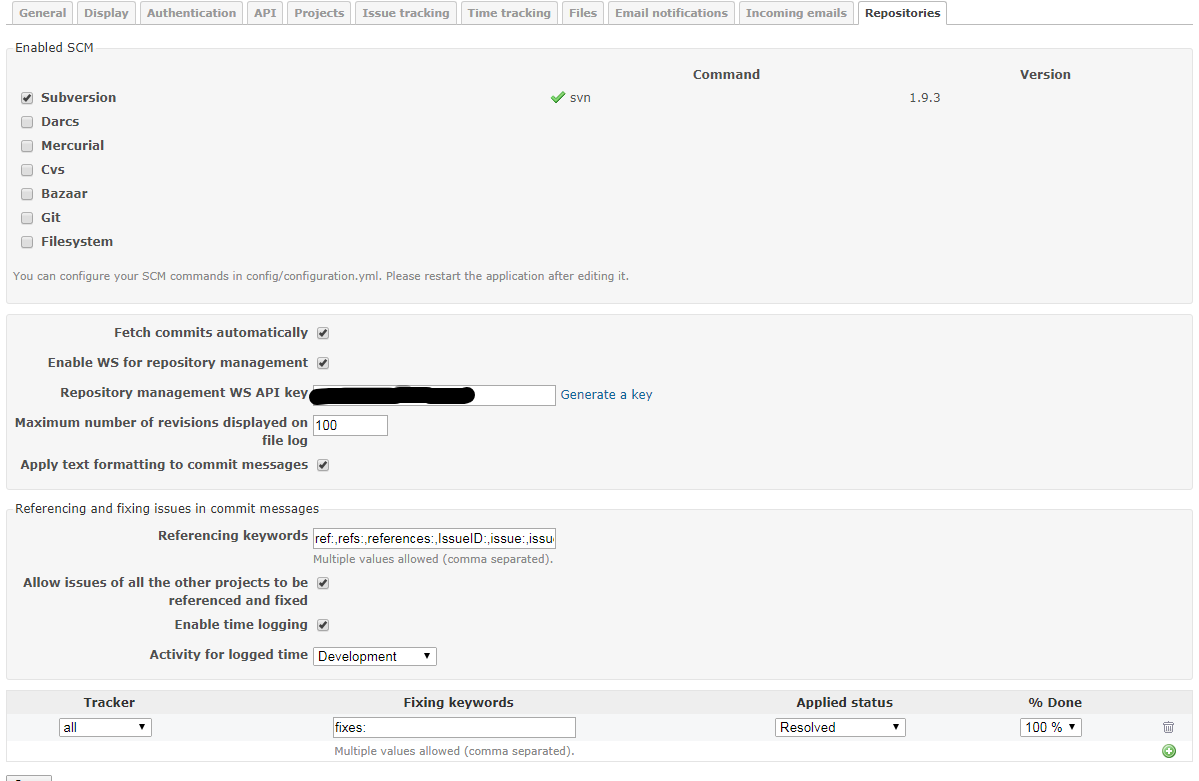
Goto Redmine > Administration > Settings > Repositories and make sure the settings are as shown below:

Fetch commits automatically

When you enable this option the applicatiojn automatically starts retrieving the revisions when the user tries to access the repository page

Default value is: Yes

You can disable this option and automate the call to Repository#fetch_changesets using cron to regularly retrieve the revisions for all of the repositories in the background.

For Velocity: We have not disabled it and at the same time put up an automatic fetch whenever a new commit is made. To know how the same has bene done, please read further. 

Example:

ruby script/runner “Repository.fetch_changesets” -e production

For Redmine 2.x:

ruby script/rails runner “Repository.fetch_changesets” -e production

For Redmine 3.x:

bin/rails runner “Repository.fetch_changesets” -e production

You can setup the automatic call from post-commit (for SVN) and post-receive (for GIT) hook and make the changesets being fetched after each commit. Please note that running the above statement would fetch details for each reporsitory added in any project in Redmine so in case you have large number of such repositories added in the projects then it becomes a time consuming process. For me it was around 10 seconds for 1 repository. I have more than 100 repositoties for various projects so unnecessarily waiting for each fetch everytime a commit is made in any repo does not make sense

You can fetch all the repositories via browser using the following URL:

http : / /<redmine url>/sys/fetch_changesets?key=<your service key>

To fetch only one repository via browser use the following URL: (Fetching only the repository for which the commit was made is far more efficient and less time consuming.

Until you fetch the repository the Tasks in Redmine will not be closed.

Project identifier can either be the number of the project, e.g. id=1 or the identifier name that you gave the project, e.g., id=mobileapp

http : / /<redmine url>/sys/fetch_changesets?key=<your service key>?id=<project identifier>&key=<your service key>

Example: https://www.myredmineurl.com/sys/fetch_changesets?id=mypid&&key=djdj57FGDJmkj67

Read more about post-commit scripts: https://www.redmine.org/projects/redmine/wiki/HowTo_setup_automatic_refresh_of_repositories_in_Redmine_on_commit

Enable WS for repository management

This option should be activated only if you installed the script for automatic SVN repository creation. Default: No. But in order to autofetch each repository on commit, please enable this even if you do not want to create SVN repo automatically.

Repository management WS API key

A secret key for repository management WS. This will be used in fetching each repository secretly.

Maximum number of revisions displayed on file log

It provides a way to limit the amount of revisions which are retrieved from the SCM for a certain, browsed path.

Referencing issues in commit messages

When fetched from the repositories, commit messages are scanned for referenced or fixed issue IDs.
These options lets you define keywords that can be used in commit message to reference or fix issues automatically, and the status to apply to fixed issues.

Default keywords are:

  • for referencing issues: refs:, references:, IssueID: (capital and small matters)
  • for fixing issues: fixes:, closes:

There’s no default status defined for fixed issue. You’ll have to specify it if you want to enable auto closure of issues.
If you want to reference issues without using keywords, enter a single star: * in the Referencing keywords (Administration/Repository) setting. In this case, any issue ID found in the message will be linked to the changeset.

Example of a working commit message using default keywords:

This commit refs #1, #2 and fixes #3

This message would reference issues 1 and 2 and automatically fix issue 3.
After a keyword issue IDs can be separated with a space, a comma or &.

The keywords are caseinsensitive and at least one blankspace or colon is needed between the keyword and the first hash to produce
a match. More examples that will produce the same result as the example above:

This commit refs:#1, #2 and fixes #3
This commit Refs  #1, #2 and fixes #3
This commit REFS: #1, #2 and fixes #3

Enable time logging

Allows time logging directly from commit messages. This only makes sense if you activated the “Time tracking” module in said project. In this case, you can add special words in your commit message to indicate the time you spent on an issue.

The basic syntax for doing that is : @<time>, where time consists in a number of hours or minutes.

Here’s a list of many valid commit messages that would work if you want to say you spent N hours on issue 1234:

Implement feature #1234 @2

Implement feature #1234 @2h
Implement feature #1234 @2hours
Implement feature #1234 @15m
Implement feature #1234 @15min
Implement feature #1234 @3h15
Implement feature #1234 @3h15m
Implement feature #1234 @3:15
Implement feature #1234 @3.25
Implement feature #1234 @3.25h
Implement feature #1234 @3,25
Implement feature #1234 @3,25h

Activity for logged time

This is the type of activity that should be used when detecting there’s a log time in a commit message (see above).


Step2: Making changes in the Project

2. Ensure that you are able to commit and update the Project Repository which you intend to access from the server where Redmine is installed.

For Velocity: For Velocity there is a generic user: velsofsvn which is added to all the repositories and this is the user used on Redmine server to refresh the repository listings when commits happen. So check if this user has access to the repository being setup for auto closure of issues via SVN. In case facing issues with access check if the IP restrictions are there in the repository on Assembla/SVN host.

2. Goto your Project as a system admin and there goto Settings > Modules. Enable Repository Module.

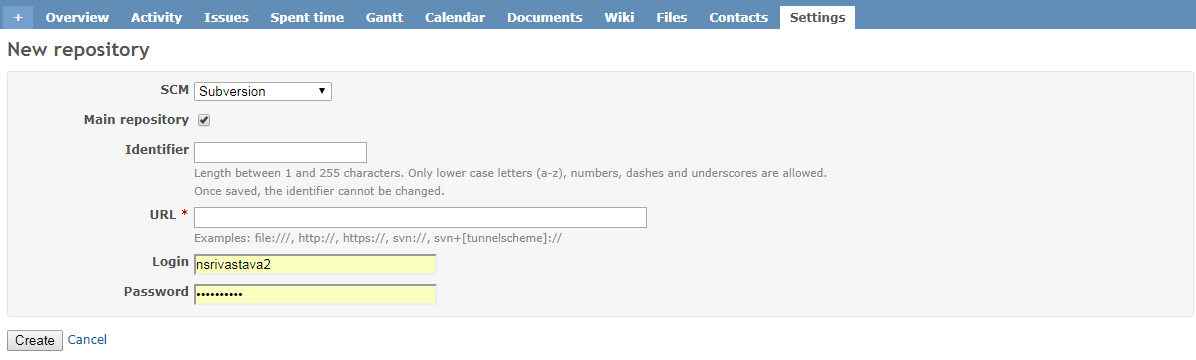
3. Fill in the below shown form in the Repository module for that project:

Identifier: Any name you wish

URL: URL of the Assembla repository. Example: https://subversion.assembla.com/svn/protocol.cdms/trunk

Login: Username which has access to the above repository. For Velocity: velsofsvn

Password: Password which has access to the above repository. For Velocity: Password here:  https://docs.google.com/spreadsheets/d/1DuvyfZgCx125Mv04mhCgXqrOcTW7BQPtSGPbvO9pu-g/

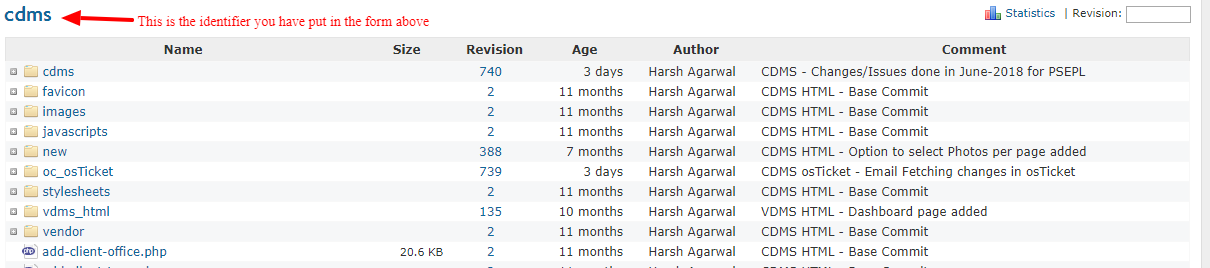
4. Once you have completed Step #3, the Repository will start showing like the way shown below:


Step3: Making changes in Assembla SVN

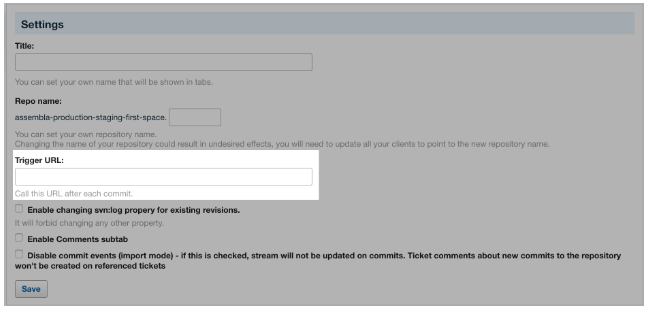
5. To access to this page, you must be an owner or a member with ALL permissions (learn more about roles and permissions). To get here, go to your Assembla SVN repository > Settings > General Settings.

Trigger URL:
This feature calls a specific URL after each commit. Our server sends a request to the remote service specified in the URL. The result will depend on what a user sets this service to do under this specific URL. GET URL after each commit can be used to trigger a build for example.

Here in Trigger URL you have to put in the url dicussed above for Auto Fetching a particular Repository:

Example: https://www.myredmineurl.com/sys/fetch_changesets?id=mypid&&key=djdj57FGDJmkj67

That is it. You should be up and running.

Are you ready for the Magic of Soccer?

The biggest soccer event has begun. Millions of the soccer fans across the globe are pumped to cheer for their teams. It happens once every four years when all the football fans go super crazy. Football is one such sport which has the fans following all over the world. This is also a golden chance for the companies to take advantage of all the excitements around and promote their businesses. But wait! You need to know that FIFA has strict rules and regulations for how the official marks can be used. To check out the details click here.

What is common in eCommerce and Soccer?

There are few similarities in the Football and eCommerce. The energetic game has so many learning’s which can be used to implement a successful strategy for your online store. The commercials and the news regarding the soccer match also give an idea to promote the products and services. Here we will discuss some similarities in Soccer and eCommerce.

Similarity 1: Study the moves of the competitor players and teams

In order to create a successful strategy for winning the match, it is required for the teams to study the moves of the top players of the competitor team and analyze the game plan of the competitor team.

Similarly, in eCommerce, it is required to keep the track of the competitors in order to stay ahead of the competition. You just can’t afford to ignore even the smallest factor as it may prove hazardous.

Listed below are some of the key points that should be kept in mind while competitor analysis –

1) What strategy are they using for the lead generation?
2) What special promotions they are running?
3) What strategy are they using for the SEO?
4) How are they promoting their products and services on Social Media?
5) How are they retargeting their customers?
6) How they are using the email marketing to reach existing customers and what is the email frequency?
7) What is the customer retention techniques used by the competitor stores?

Similarity 2: The ball is faster than the players

To win a match, it is essential for the players to spread out and cover the entire field. If the players will keep on moving the ball then they will able to make a goal. In order to achieve the same, the teams use the different formations. This is the best way by which players organize themselves at the ground is with a formation like 4-4-2, 4-4-1-1, 4-4-3 etc.

In a similar manner, the eCommerce companies need to spread out their wings and tap the various opportunities, trends and technological advancements. Here are some of the points that you to take care of:

1) User-friendly website
2) Beautiful and clear images of the products
3) Well organized product description
4) Awesome promotions
5) Social media presence
6) Multi-channel selling
7) Customer experience – Return, refund, replacement, live chat, helpdesk, shipping, payments etc
8) Review and testimonials
9) Mobile friendly websites/Mobile apps
10) Customer loyalty programs

In this competitive environment, you need to consider multiple points and accordingly offer the best services to your customers. In order to offer best services to your customers read our article “eCommerce Extensions to help you Achieve your Business goals in the Year 2018“.

Now that you are geared up with the rules and the similarities between Football and eCommerce, wonder what should you do next? Here’s the answer.

Prepare your game plan

If you are running any kind of promotion to seek advantage of the soccer-fever you need to play smartly. There are some key points which you need to consider before preparing your promotion strategy. There are 32 countries which are participating in 2018 World Cup. So, if your target audience is from one of these countries, you can plan your promotions based on the national team. Additionally, you can plan promotions based on the interest of the fans in your country. Make sure to follow the instructions given by FIFA regarding the use of the trademarks.

How can Knowband’s extension help you?

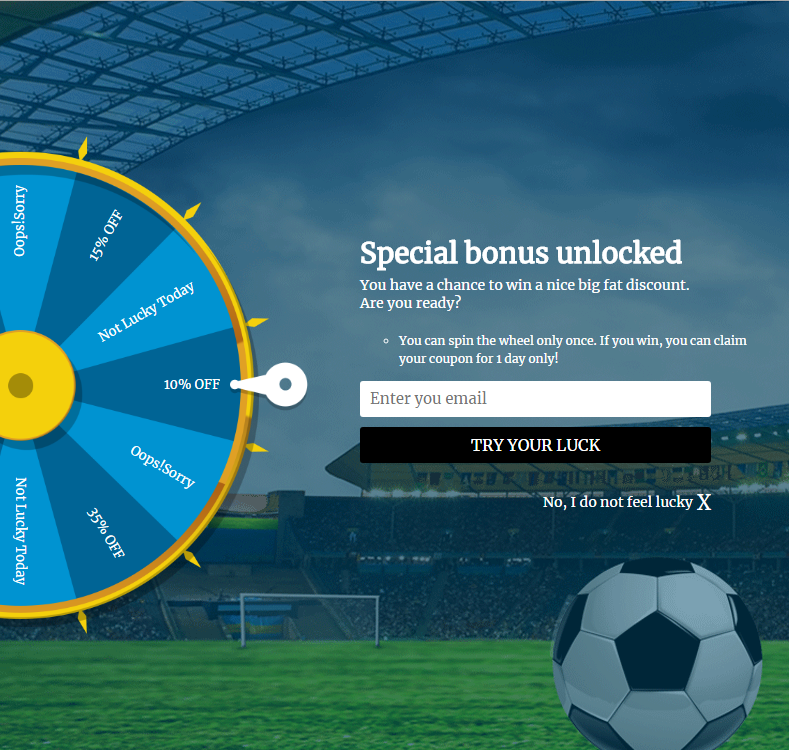
Knowband offers “Spin and Win Popup Extension” for Prestashop, Magento1, Magento2, Opencart and Shopify with the Soccer theme to trigger the sports feel of the fans and motivate them to shop from your site. With the eye-catchy soccer theme, you can grab the attention of the site visitors instantly. This will also help you to increase the rate of customer retention and boost the overall leads. As of now, 2 generic themes and one theme for the selected country are available. You can use these themes to grab the attention of your store visitors; this will help you to achieve your sales goals for the year 2018.

Why should you use Soccer theme at your site?

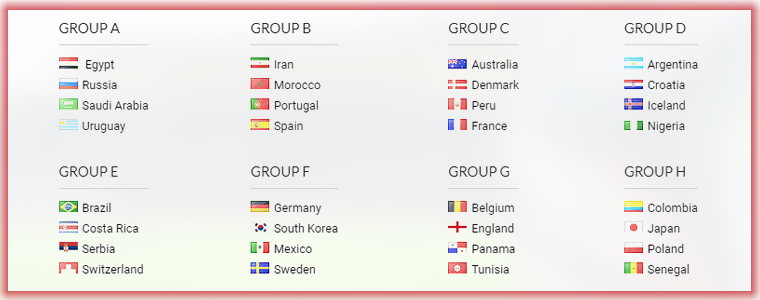
The viewership and fan-following of soccer are in millions across the world. It is the national sport of around 60 nations. There are 32 teams participating in the World Cup. The teams are following:

If your national team is participating in the World Cup, then, you can show your support for the team and even let your customers get the enticing discount during this sports season.

Here a stats for the popularity of the Football.

You will find more infographics at Statista

There are one more stats for the popularity of the Football in the Latin American Countries.


Find more statistics at Statista

Stats showing the interest of the European fans


Find more statistics at Statista

By analyzing these stats we can say that everyone loves the magic of soccer and this is the golden opportunity for you to promote your business as well as reach your business goals.

What is new in the Spin and Win?

We have added some new themes for the Prestashop Spin and Win Popup module. The store admin can change the theme of the Spin and Win Welcome Popup from the back-office. Please see the attached screenshots:

Apart from the generic themes of country, wise themes are also available which will help you to spread the magic of soccer and win the new customers.

Click here to get the Spin and Win Popup module for your Prestashop store.

Click here to get the Spin and Win Popup module for your Magento Store.

Click here to get the Spin and Win Popup module for your Magento 2 Store.

eCommerce Extensions to help you Achieve your Business goals in the Year 2023

In order to achieve the success in the eCommerce business, it is important to stay up to date with the latest trends in the industry. Staying abreast with the current technological advancements and market trends can keep you ahead of the competitors. One of the best ways to achieve your business goals is to steps into the shoes of the well-established businesses and get inspirations from them. The ideal workflow of the eCommerce business should attract the shoppers to the website, filer the prospective customers from the website traffic and then convert them into the paying customers. This can be done by improved customer experience, customer retention strategy and ultimately winning the customer loyalty.

It won’t be wrong to state that even the digital era word-of-mouth plays a vital role. If you offer better services and improved customer experience at your store, then, you will certainly win back old customers and attract new ones. Social media also provides a platform to the online sellers to reach out to the new customers. In this post, we will discuss the most popular strategies which will help you to achieve your business goals in the year 2018.

Strategy#1 Attracting New Customers and Retaining old ones:

Effective lead generation strategy is the secret of the success in the e-commerce. Most of the time, when you visit established e-commerce sites, you may come across the welcome popup offering enticing discounts on the first purchase. In order to avail of this special discount, the visitors need to provide their email-ids. All the top e-commerce giants leave no chances to capture the email-id of the customers. The email address is the best way to establish a new and long-lasting relationship with the customers.

Getting the email addresses of the visitors is not an easy task. In order to get the email id of the visitors, you need to offer special deals to the new visitors. You can offer free shipping or enticing discount on the first purchase. Most of the top brands use this strategy to reach out to the more customers.

How can you use this strategy for your online business?

Gamified Welcome Popup-

Gamification of the site is the best way to retain the customers. Spin and Win popup is a gamified popup which allows the visitors to win the enticing discounts by spinning the wheel just like the roulette-game. The Spin and Win popup is one of the best ways to display an interactive popup to gather the customer information. Customers need to enter their email ids to play the game. The gamified interface develops the interest of the customers and they happily provide their email-ids to play the game.

Spin and Win gamified popup is available for the Magento1, Magento2, Prestashop, OpenCart and Shopify platforms.

Exit Intent Popup

Exit Intent Popup monitors the mouse movement and as soon as the visitor intends to exit, it displays an awesome popup with the discount offer. Special encourages the customers to complete their purchase and helps you to grow your email list.

Exit Intent Popup is available for the Magento1, Magento2, PrestaShop and OpenCart platforms.

Strategy#2 Offer Free Shipping

The latest trend in the eCommerce world is to offer free shipping. Customers prefer to buy with the free shipping option. Most of the sellers on the top marketplace like Amazon, Etsy, Walmart, eBay offers the free shipping.

Why is Free Shipping a must?

1) Shoppers Love Free Shipping option – According to the studies, the online shoppers prefer placing the order of the products if the shipping is free.
2) Competition – The marketplaces like Amazon, eBay, Walmart, Etsy and many more are expanding their presence and offering great benefits to the customers including the free shipping services. So, it is a must for the online business to offer free shipping to retain their existing customers.
3) Free shipping reduces shopping cart abandonment – Most of the time customer leave the cart abandoned because of the additional costs (shipping and taxes).
4) Free Shipping Increases Average Order Value – Shoppers buy more products to qualify for the free shipping.

Tactics to offer free shipping

1) One of the methods to offer free shipping is to include the shipping cost in the product price itself. This approach will work if you offer unique products to your niche market and there are not so many competitors.
2) You can create special promotional to offer free shipping on the products that have a higher margin.
3) You can offer free shipping only for a particular cart value. Orders with the cart value higher than the set limit will be eligible for the free shipping.
4) You can offer free shipping on special sale occasions or during the holiday season.

eCommerce extensions to offer better shipping services:

a) Free Shipping Manager
The Free Shipping Manager extension is available for the Prestashop platform. This addon allows the store admin to create the rules, terms and conditions for shipping charges. The merchants can fix the cart limit beyond which free shipping will be offered. This module can help you to increase revenue and conversion rate of the site. Click here for the details.

b) Shipping Cost by ZipCode:
Sometimes you need to offer shipping charges based on the location of the user. The Shiping Cost by ZipCode extension is the best way to offer shipping charges based on the location of the user. The Shipping Cost by ZipCode module is available for the Prestashop. Similar extension Product Availability check by ZipCode is available for the Magento 1 platform.

Strategy#3 Improve Customer Experience

Better customer experience at your store encourages the customer to browse more products which helps to increase the chances of the purchase. As per the latest trends in the industry, you should try to offer the best experience to the visitors to convert them into a customer.
There are following extensions which can be helpful to you to achieve the same.

a) Infinite Scroll
In the recent years, the growth of mobile devices brings a revolution in the eCommerce world. Now, most of the users prefer to browse the internet by using their handheld devices like mobiles and iPad. Infinite scrolling allows the users to browse more products with ease and improves the user experience for the touch devices. Moreover, the infinite scrolling option works efficiently while mobile browsing as well. Infinite Scroll extension developed by Knowband is available for the Magento 1, Magento 2 and Prestashop platforms.

b) Size Chart
If you sell Footwear or Clothing, then, a size chart on the product page is a must. The Size Chart helps the users to select the correct fit and also reduces the chances of the return. Size Chart extension developed by Knowband is available for the Magento 1, Magento 2, and Prestashop platforms.

c) Product Video
Instead of going through the long text, the users prefer to watch the video for the better understanding of the product. Product videos are more engaging than the text. Knowband offers the Product video extension which allows you to display the videos on the product pages from the video channels like YouTube, Vimeo. Product Video extension is available for the Prestashop, Magento 1 and OpenCart platforms.

d) Wishlist
With the dynamic growth of the marketplaces in the last few years, a new trend emerged in the eCommerce industry. Now shoppers prefer to search for the products on Google or marketplaces like Amazon, Etsy, Walmart, eBay, Cdiscount etc to get a better comparative price and offers before making their purchase decisions. Wishlist feature allows the shoppers to shortlist the products of their choice, so that, they can later place their order for the products. After adding the products to the Wishlist a shopper can access his/her wishlist any time. This saves the time of the shoppers as they can easily add the wishlist products to the cart to place their final order. The Wishlist extension is available for the Prestashop, Magento 1, Magento 2 and OpenCart platforms.

e) Express Checkout
The easy checkout process is the key factor to get the higher sales. Most of the online businesses provide the one step checkout to make the shopping experience of the shoppers hassle-free. One step checkout allows the user to enter the all the details at a single page and reduces the cart abandonment. The one step checkout allows the shoppers to create the account, place order as a guest or login to the account at the checkout page. Knowband offers the One Page Checkout module for the Magento 1, Magento 2, Prestashop and OpenCart platforms.

Strategy#4 Customer Retention Techniques

a) Helpdesk
If you have observed most of the online businesses offers the 24*7 chat support. Recently Chat Boats have also provided an effective tool to improve the customer engagements. By assisting the customers and visitors to make their purchase decisions and after sale inquires you can develop a bond between your brand and the customers. This long-lasting relationship might convert the customers into loyal customers. The Helpdesk extension is available for the Prestashop and Magento 1 platforms.

b) Loyalty Points
Offering loyalty points for each purchase of the customers helps you to retain the customers for a long time. As for each order, customers get the store credit which they can use towards their further purchases encourages the customer to return back to the store to use the store credit available in the account. The Loyalty Points module is available for the Prestashop platform.

c) Return Management
Efficient return policies are one of the most important aspects to retain the customers. The return and refund policy of the online store also encourages the customers to place their orders. In order to offer the hassle free return management online stores can use the Return Manager Extension. Knowband offers the Return Manager Extension for the Prestashop, Magento 1 and Magento 2 platforms.

d) Birthday Surprise
Everyone loves surprises because it shows how much the businesses value the customers. In order to win the trust of the customers, businesses need to go beyond the normal services and offers. You can offer an additional discount to the customers on their birthday. Knowband offers Birthday Coupon module for the Prestashop platform.

Strategy #5 Multi-channel selling

With the evolving technology and changing shopping habits of the customers, it is must for all the sellers to sell their products through multiple channels. All the top marketplaces like Amazon, eBay, Walmart, Etsy etc provides a platform to the sellers to sell their products through the marketplace.

Selling through the multiple channels is the best way to increase the brand reorganization.

In order to sell on multiple channels, the biggest challenge for the sellers is the management of the inventory and shipping. Knowband has developed the Marketplace Integration extensions for the top marketplaces like eBay, Walmart and Etsy. The marketplace integration module automates the product listing process and allows the sellers to manage the inventory and shipping for the marketplace from their existing online store.

eBay Marketplace Integration: eBay Marketplace integration extension is available for the Prestashop, Magento 1 and OpenCart platform.

Etsy Marketplace Integration: Etsy Marketplace integration extension is available for the Prestashop, Magento 1, Magento 2 and OpenCart platform.

Walmart Marketplace Integration: Walmart Marketplace integration extension is available for the Prestashop, Magento 1 and OpenCart platform.

You may also like: 

The Pluses and Minuses of becoming a Walmart Marketplace seller

https://www.knowband.com/blog/ecommerce-blog/pluses-minuses-becoming-walmart-marketplace-seller/

Multi-vendor marketplace: 6 Ways to deals with the Post-holiday glitches

What are sandbox sites in eBay Marketplace?

Facebook is extending ads from users and brands to the Marketplace

Facebook launched the Marketplace in the year 2016, the main objective of the Facebook Marketplace was to allow the users buy and sell locally. In order to promote the marketplace, Facebook has started showing it in the main navigation bar. Facebook Marketplace allows the users to browse the products and services from the people in their localities. As posted on the Facebook business page “Over the past few months, we’ve enabled businesses to list a variety of offerings in Marketplace such as used vehicles, home rentals, home services and jobs. And now, businesses can advertise in Marketplace to reach people where they’re actively shopping.

Ads from businesses appear alongside other products and services in Marketplace, and extending your ads to Marketplace is easy. By selecting Automatic Placements, your ads can appear across our various placement options such as News Feed, Instagram, Messenger, Audience Network and now, Marketplace. Advertising across our platforms enables you to reach your target audience wherever they’re spending time, giving you more opportunities to connect with people likely to be interested in your offerings.

Businesses are already seeing results using ads in Marketplace. Thread Wallets, an accessories company, generated more than 300 purchases while increasing its year-over-year return on ad spend by 41% after adding Marketplace as a placement for its conversions campaigns.

Over the next few weeks, all advertisers targeting audiences in the US, Canada, Australia and New Zealand will be able to run ads in Marketplace using the traffic, conversions, product catalog, video views and reach objectives.”

Use Facebook Shop to grow your business faster

Facebook provides an interface to the users and brands to showcase their products and services on their page. Facebook Shop allows you to display the products from your shop on Facebook. It helps sellers to reach to more audience, in order to reduce the additional efforts of listing the products one by one Facebook has also released the Shop API to automate the process of listing the products on Facebook Shop. By using the Facebook Shop, you can allow the customers to browse and discover the products with ease.

Knowband offers the FB Store Module for the Prestashop store owners to make the process of creating the Facebook Shop hassle-free for the Prestashop store owners.

Benefits of the using FB Shop Module developed by Knowband:

1) Interactive banner to promote your brand:

For the businesses, it is important to win the customer trust. The banner on your Facebook shop allows you to show the vision and purpose, your core values, your culture and behavior. By displaying an attractive homepage banner you can create your brand value.

2) Home Page content:

In this section, you can explain the product and services you offers.

3) Navigation Menu:

You can display the Navigation Menu on the Facebook Shop and highlight the top categories of your Prestashop store on the Facebook Shop page.

4) Featured categories and featured products:

This section allows you to display the featured categories and products on the Facebook shop page.

Please refer to the attached screenshot of the demo Facebook Shop page:

Get the Facebook Shop Module for your Prestashop Store.

Knowband offers Social Media extensions for the different eCommerce platforms like Magento, OpenCart and Prestashop.