Are you experiencing a sudden downfall in your website traffic?
Your website ranking might get affected after every new Google SEO update. Many websites crawl up to the top but a few lose their rankings too.
The dwell time, UX, and focus keywords are some of the major Google ranking factors. These SEO ranking factors might not make you rank unless you optimize your website for its speed.
What is Accelerated Mobile Page (AMP)?
Accelerated Mobile Pages (AMP) is an open-source initiative that aims to boost the performance of mobile web pages. Google and Twitter were the driving forces behind the project.
The technology underpinning AMP allows for lighter, faster-loading pages for smartphone and tablet users. As more individuals use mobile devices as their primary PC, this capability has become increasingly vital.
Optimize Website Speed with AMP
To reduce website loading time on the PrestaShop store, consider using the best AMP Plugin, the PrestaShop Accelerated Mobile Pages module. It helps you cope up with the new Google SEO ranking and gives an exclusive shopping experience to your customers.
Studies say, around 40% of users click away from a website in 3 seconds. Many decide to turn on an ad blocker as soon as they visit the website. Hence, it’s time high time to optimize your Prestashop store so that the visitors spend more time than average.
If it is about shopping experience then Mobile App Builder is also an option but with AMP you do not just make your website gadget-friendly but optimize it for Google SEO ranking too.
Benefits of Accelerated Mobile Pages (AMP)
Helps site owner reduce page load time
Website loading time is a major factor in increasing the bounce rate on a website. The Accelerated Mobile Pages (AMP) reduces the page load time and enhances your website’s performance on mobile devices and tablets.
Visitors spend more time than average
More visitors reach your website if page load time gets reduced. In addition, you attract more visitors to the website with the impressive themes and engaging design.
Various layout and designs
Layout and designs are vital elements of the website and every page has a distinct type of design. An AMP module allows the seller to customize the design and layout of the web pages to emphasize the look and feel of the website.
Faster website than competitors
When there are a lot of competitors, you can win your game by optimizing the speed and page loading time. Many users leave a website because they are impatient and look for other options immediately. Take the advantage of this by accelerating the speed of website pages.
Improves the user experience
The goal of AMP is to improve the user experience by making mobile surfing as simple as possible. The PrestaShop AMP addon adds a professional look to the website that gives a rich browsing experience.
PrestaShop Accelerated Mobile Pages (AMP) can Improve Google Ranking
Module Compatibility
AMP Module PrestaShop Theme Compatibility
Implement the AMP on your PrestaShop websites which is compatible with all the PrestaShop themes other than the default theme. The PrestaShop Accelerated Mobile Pages (AMP) module does not require switching your theme and goes with the current design.
AMP supports all PrestaShop versions
The AMP works for every PrestaShop version. The module is compatible with PrestaShop version 1.6 to the latest PrestaShop version 1.7.
PrestaShop Module Compatibility
If you have several other modules installed on your store and looking for an AMP that supports them, KnowBand’s PrestaShop Accelerated Mobile Pages (AMP) module is the one. It won’t affect the custom settings of your other modules.
How PrestaShop Accelerated Mobile Pages (AMP) Works?
The KnowBand’s PrestaShop AMP effectively makes the website user-friendly and mobile responsive. By implementing the AMP module on your PrestaShop store, you will not just get a fast-loading website but also observe an increment in user engagement along with various custom settings to configure it.
Lets us explore several features and customization options it offers:
Emphasis the brand Identity
Improve look and feel – Use several colors to add a vibe to your store.
Add and shift Logo– Adjust and resize your company’s logo in accordance with the website’s structure.
Showcase Products In Carousel Mode– On the Home page, Category page, product page, etc.
Display your business location and contact options like contact number, email address, etc.
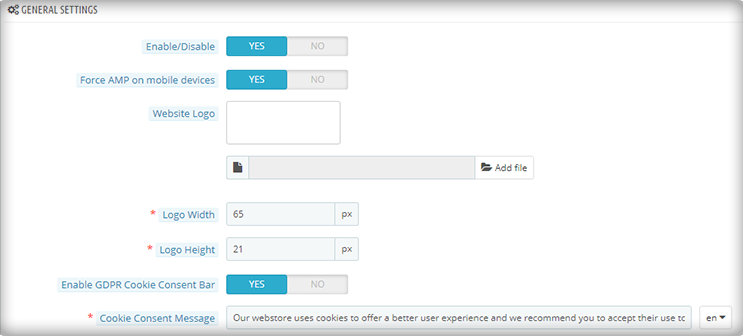
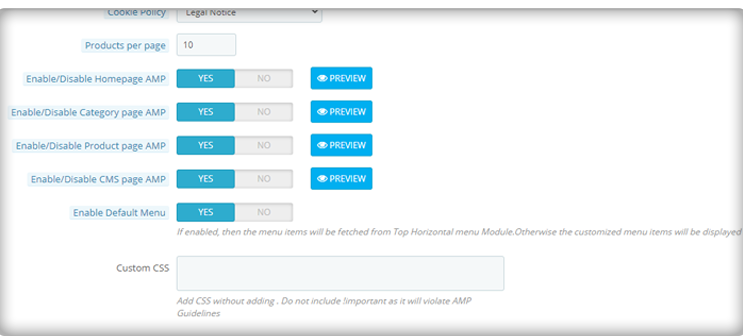
Customize the entire store with PrestaShop AMP Settings
Be it the home page or the product page, the module allows you to customize each and every element of your web pages.
1. Optimize to increase home page dwell time
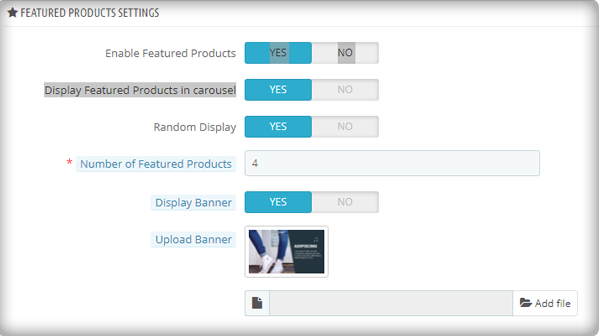
You can use the PrestaShop AMP module to make your Home Page AMP-ready. On the main page, it allows you to display Featured Products, Bestsellers, and New Arrivals. The display banner is being uploaded.
As the image depicts, the customization for the home page to display featured products, besides this, there are options for bestsellers, new arrivals, and others.
More home page customization options:
Adding custom text to the homepage’s top or bottom.
Carousel mode is used to display featured products.
Choosing the number of featured products that will be shown.
In addition, you can show movies from YouTube, Vimeo, and Dailymotion.
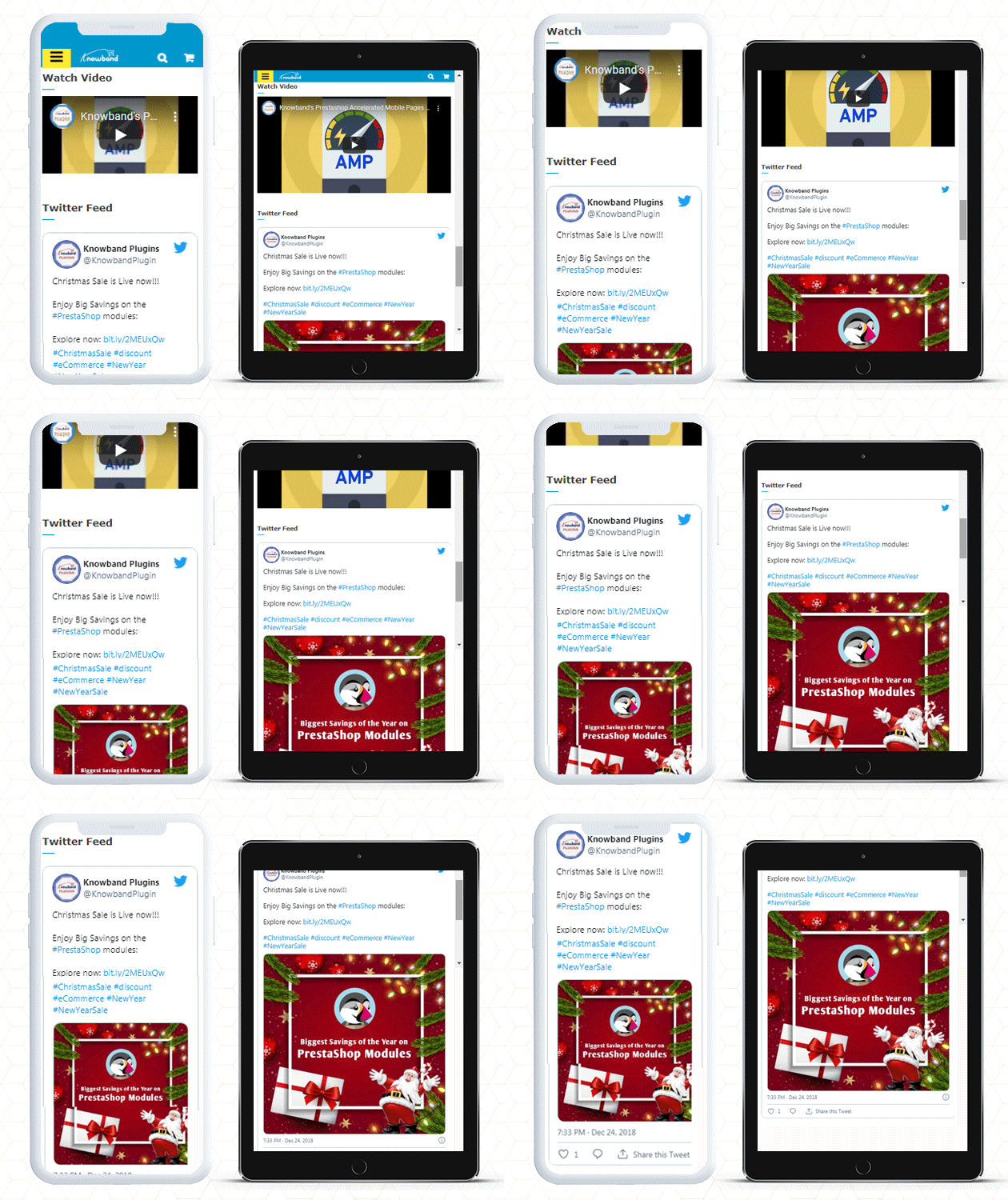
Instagram and Twitter feed can be displayed on Home Page.
2. Customize Category Pages with AMP
You can use the AMP module to enable AMP on Category pages. Displaying custom texts at the top or bottom of your Category page is part of the Category page customization. It allows choosing the right image size for the product.
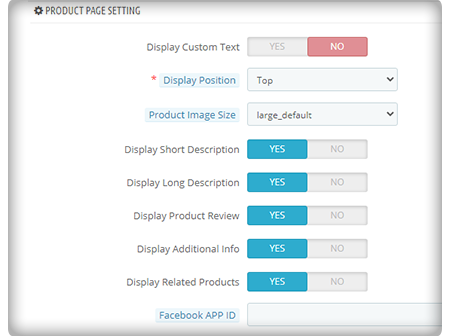
3. Use AMP to customize the product page
You can transform your product pages into AMP-enabled product pages using the PrestaShop AMP plugin. You can customize the product page by displaying custom text, short product descriptions, product descriptions, product reviews, related items, and so on.
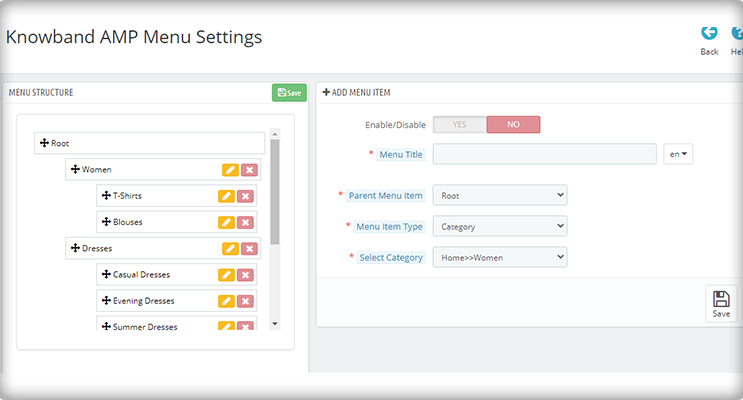
4. Make your menu bar unique
The PrestaShop Accelerated Mobile Pages extension allows you to customize your menu bar to meet your needs.
5. Add colors to the AMP-enabled PrestaShop website
The AMP module allows you to customize the colors on your AMP pages to make them more appealing.
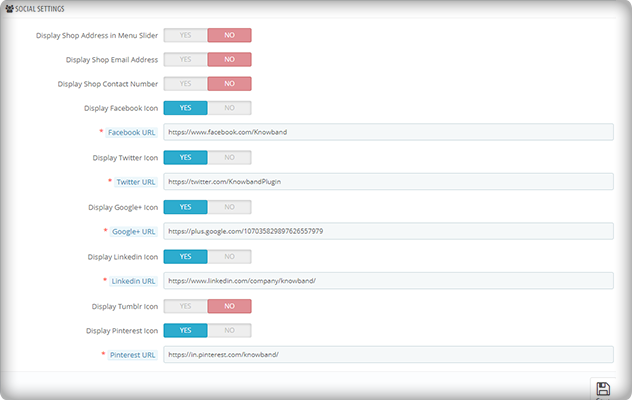
6. Include links to your social media profiles with custom text
On your AMP-enabled website, you can establish a distinct section for displaying your social media company sites. Facebook, Twitter, Google+, LinkedIn, Pinterest, and Tumblr are all part of it. You can also add any other network if you want to.
Aside from that, you may use the menu slider to display your company’s location, email, and phone number.
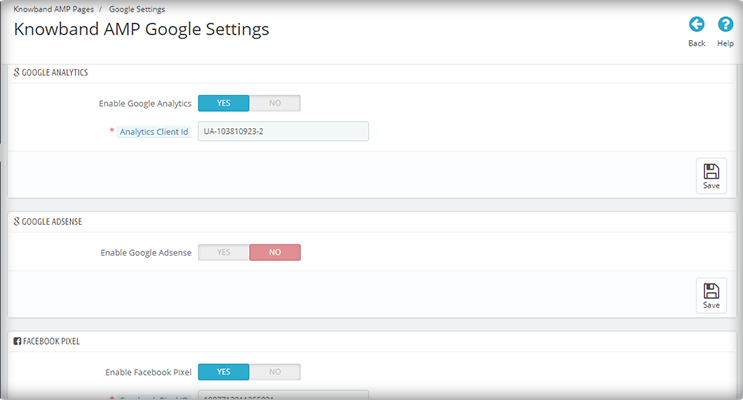
7. Link your Adsense and Google Analytics accounts
The PrestaShop AMP module allows you to link your Google Analytics and Adsense accounts to your AMP-enabled website. This module also allows you to control the sitemap settings and link your Facebook profile.
8. The PrestaShop AMP Module GDPR Cookie Consent Bar
To prevent the hassle of violating the GDPR law, include a GDPR cookie consent bar on your AMP-enabled website.
Note: Your website must be HTTPS enabled for the AMP module to work. The HTTP protocol is incompatible with AMP. As a result, you should strongly consider using the HTTPS protocol when generating AMP pages and content (vs. HTTP).
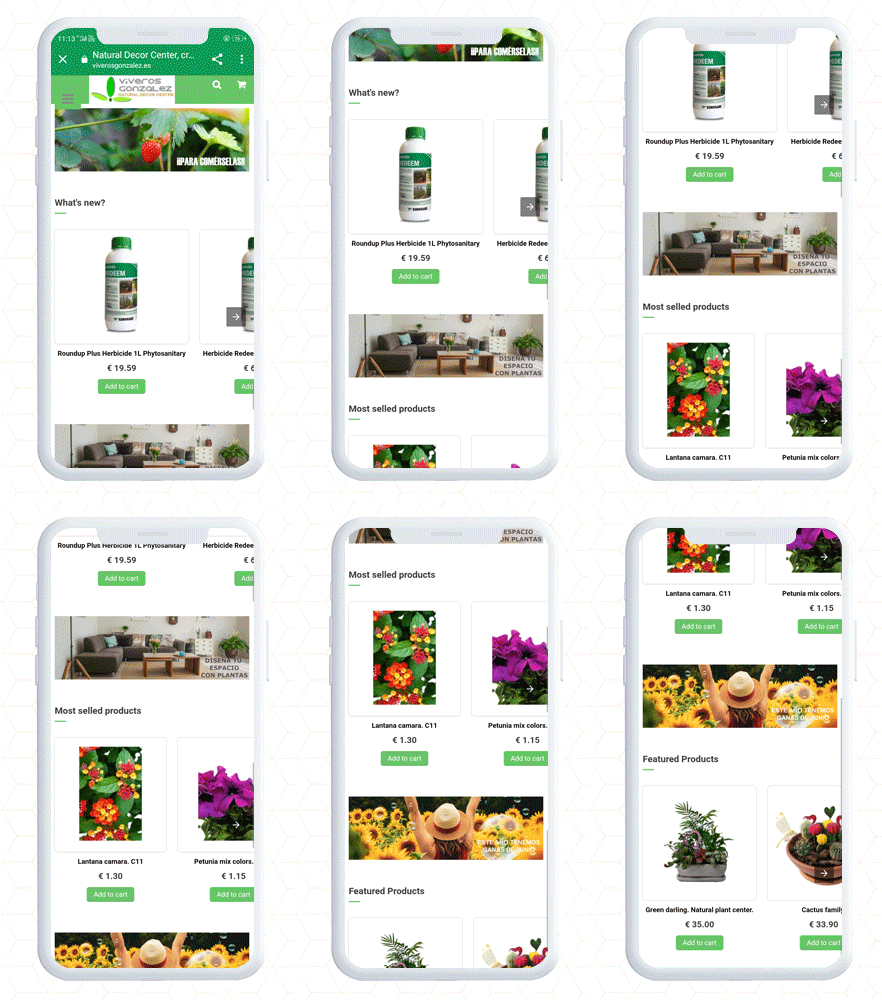
PrestaShop Accelerated Mobile Pages (AMP) example
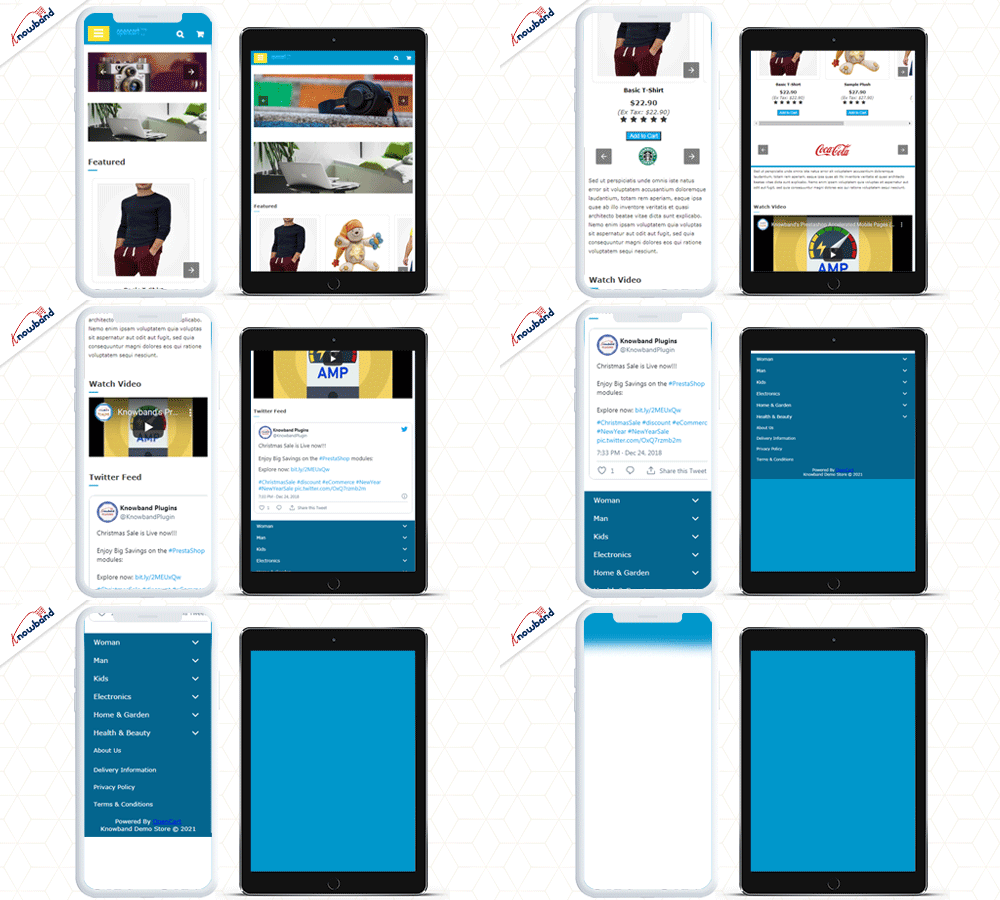
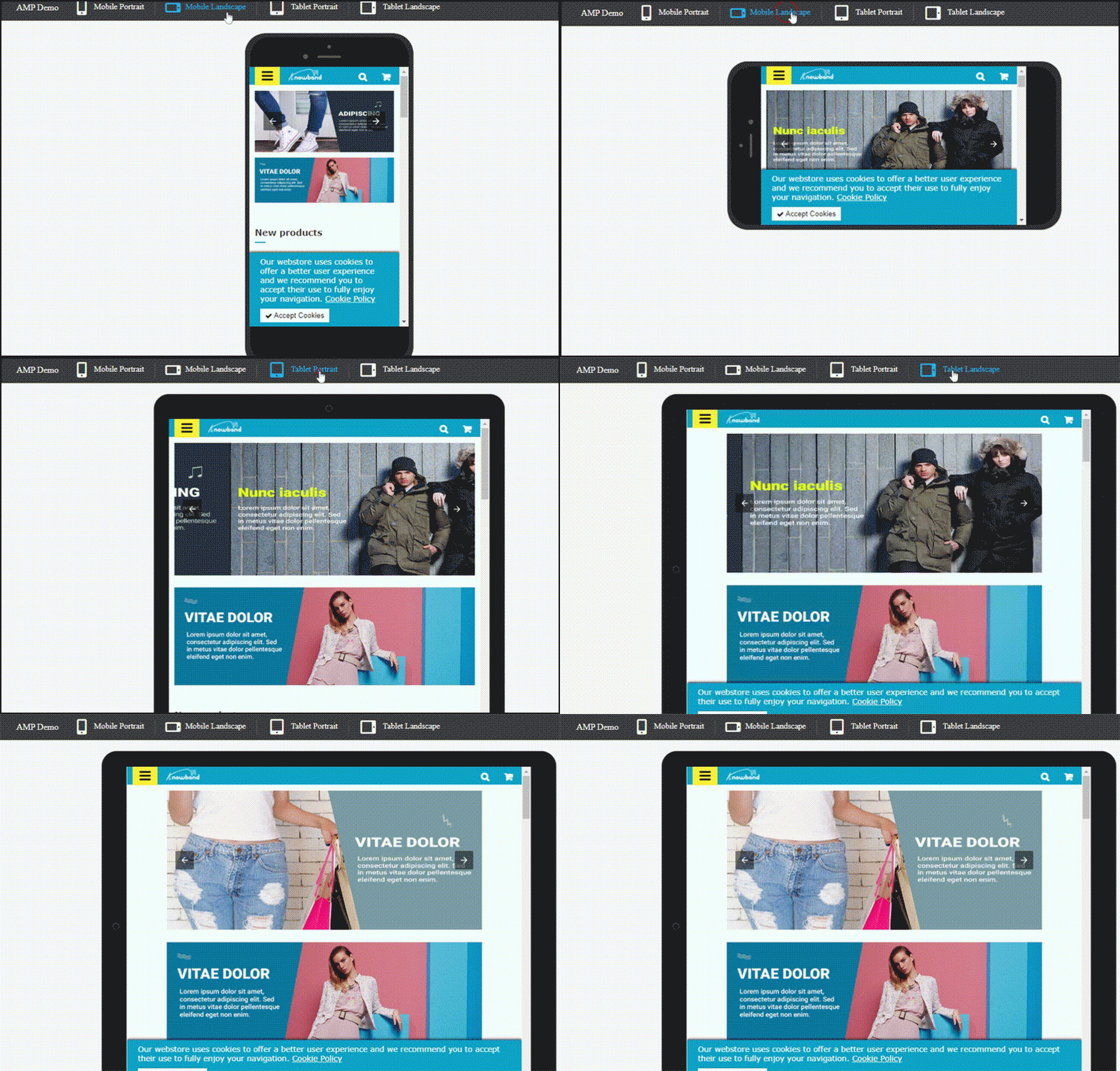
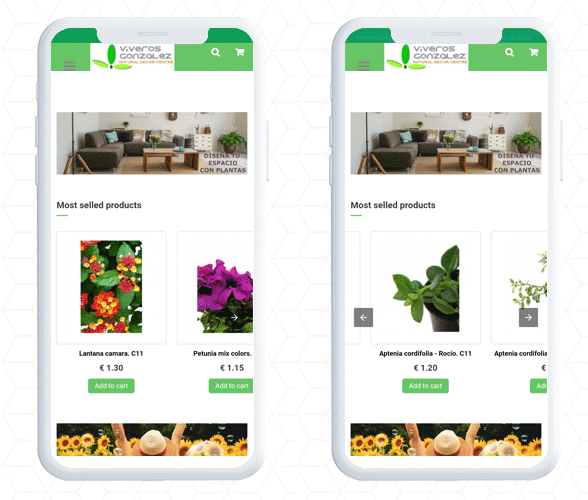
PrestaShop AMP Home Page with navigation slider
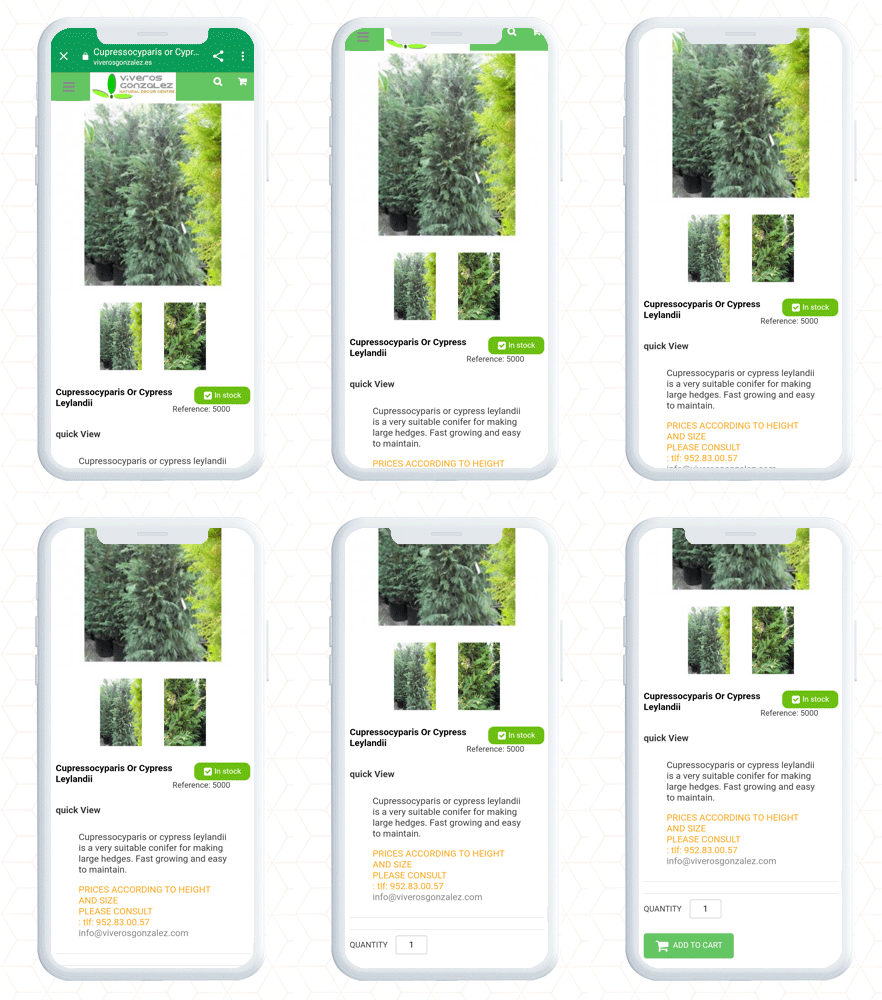
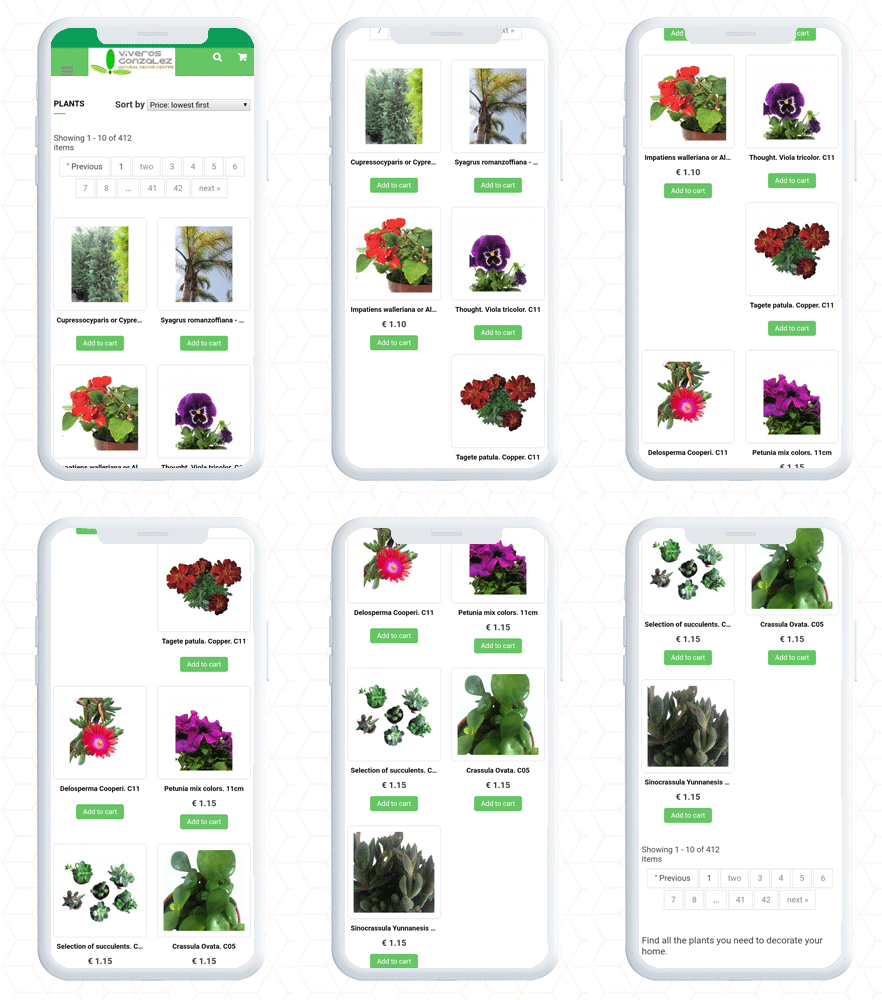
Product Page and Category page PrestaShop AMP
Finally, the PrestaShop Accelerated Mobile Pages (AMP) module lets you optimize your website pages for a user-friendly mobile experience. It gives you complete freedom to customize the home page, category page, and product page layout and designs. By adding a custom logo and text you can create a unique brand identity. Along with these design features, it allows the seller to link the social media account and videos on the home page. There are many other facilities given in the AMP setup.
Consider adding AMP to your website to make it user-friendly, mobile responsive, and SEO friendly with AMP addon.
You need a great checkout page template to get traction for an online store. It’s not always easy to know where to begin or which features are most relevant. With so many competing recommendations for creating an eCommerce experience, identifying trends and best practices for checkout page design and implementation can be difficult.
One Page Checkout PrestaShop 1.6V and One Page Checkout PrestaShop 1.7V developed by Knowband, a PrestaShop Gold Partner Agency provide some of the exciting custom features that our Italian clients have been using in their stores.
A checkout page is a page(s) on an eCommerce store that deal with payment and shipping/billing details. Customers can enter payment information and complete their orders on the checkout tab. The customer’s shipping information, billing information, shipping method, and payment method will be collected during the checkout process, and the customer will be given the option to request the order.
Why use One Page Checkout?
There are several benefits of using one-page checkout on an eCommerce website. Your checkout should be improved regularly, to make it as fast, effective, and frictionless as possible. Customers would have a better shopping experience if you create a simple, easy-to-use, and high-performing checkout. This will reduce checkout abandonment and increase conversions.
Adopt best checkout page practices for ending cart abandonment on the checkout page. These best practices used by various Italian PrestaShop One Page Checkout users for designing, developing, and managing your checkout page will assist you in creating a user-friendly checkout that will improve sales. Additionally, we have analyzed these Italian store’s payment and shipping methods and drawn some conclusions that are discussed in this article.
10 examples of One Page Checkout PrestaShop created by our clients following best practices for best results
1. Tuttii caffe Che Vuoi
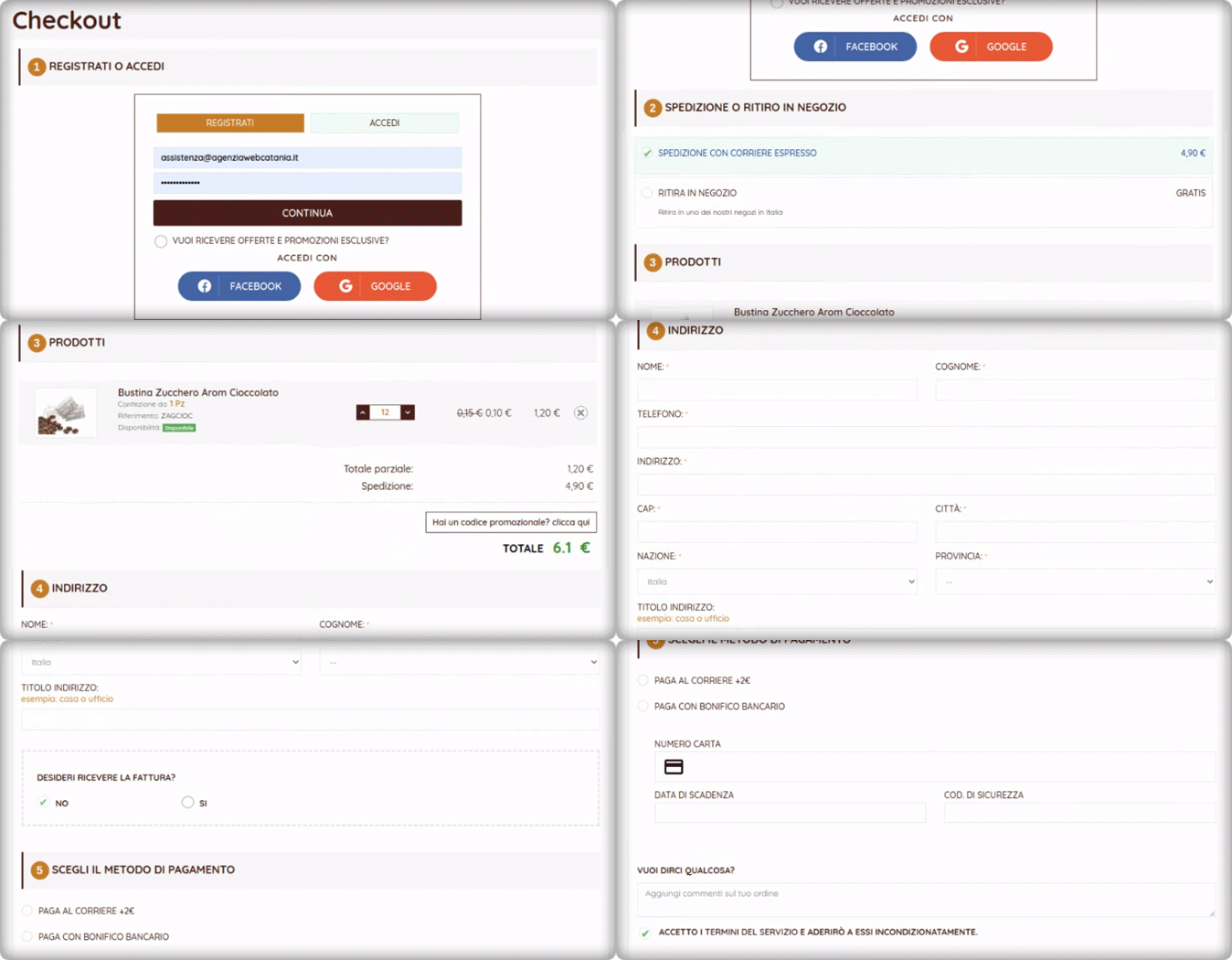
It is an Italian website that has a structured design and navigation for every page. For the checkout page, the website is using the One Page Checkout PrestaShop module with additional customized settings. Social login, single-column layout, simple and clean design of the checkout page reduce bounce rate and cart abandonment rate.
They are offering an In-store pickup facility to their customers. There are several benefits of BOPIS shipping method as it saves money and saves the seller from failed or delayed delivery.
The PrestaShop One Page Checkout by KnowBand is compatible with the PrestaShop Store locator and Pick up module and it has several exciting features that make the process smooth.
2. Preziosa Di Valentina
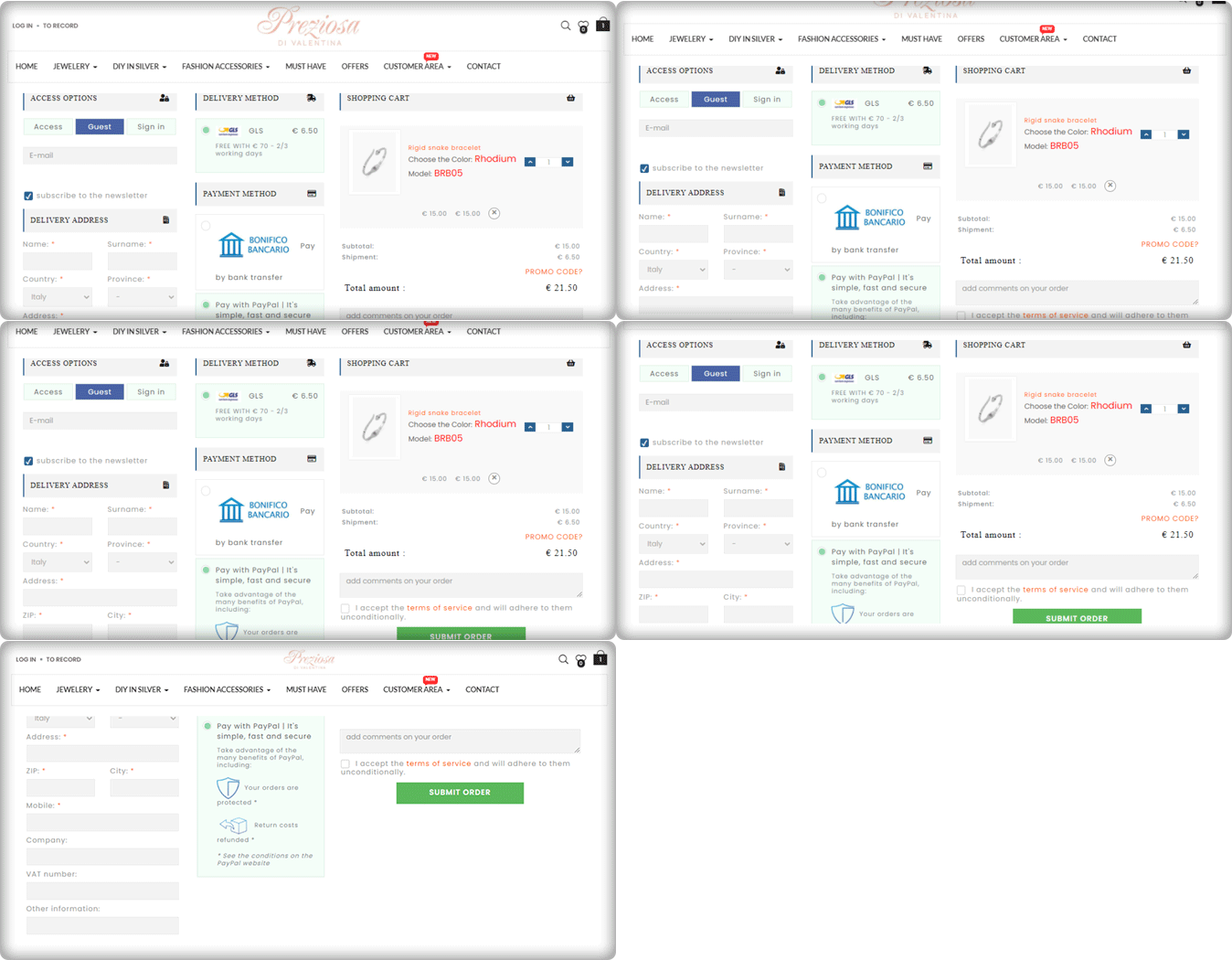
Consumers should never be forced to build an account or register before completing a transaction. Customers are inconvenienced by the additional step (or steps), which slows them down and causes them to question whether or not they want to proceed. Here comes the Guest Checkout to save you from cart abandonment. Preziosa Di Valentina checkout page has guest checkout options so that customers aren’t slowed down and can continue by simply entering their email addresses.
The delivery method used: GLS
Payment methods used: PayPal, Bank Transfer
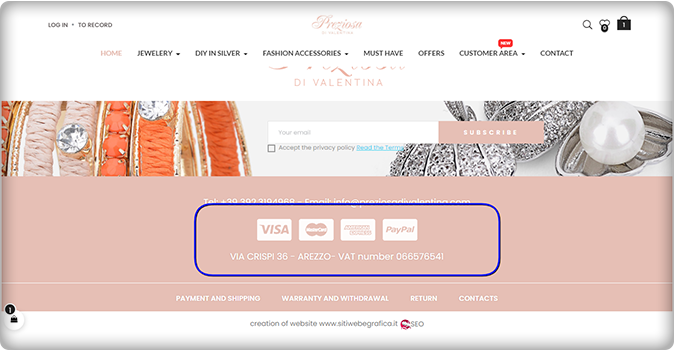
Have a look at the home page of the Preziosa. Displaying available payment methods on the home page of the website could be a great home page design idea! More than one payment gateway is an eCommerce approach that provides convenience to clients.
3. Toven
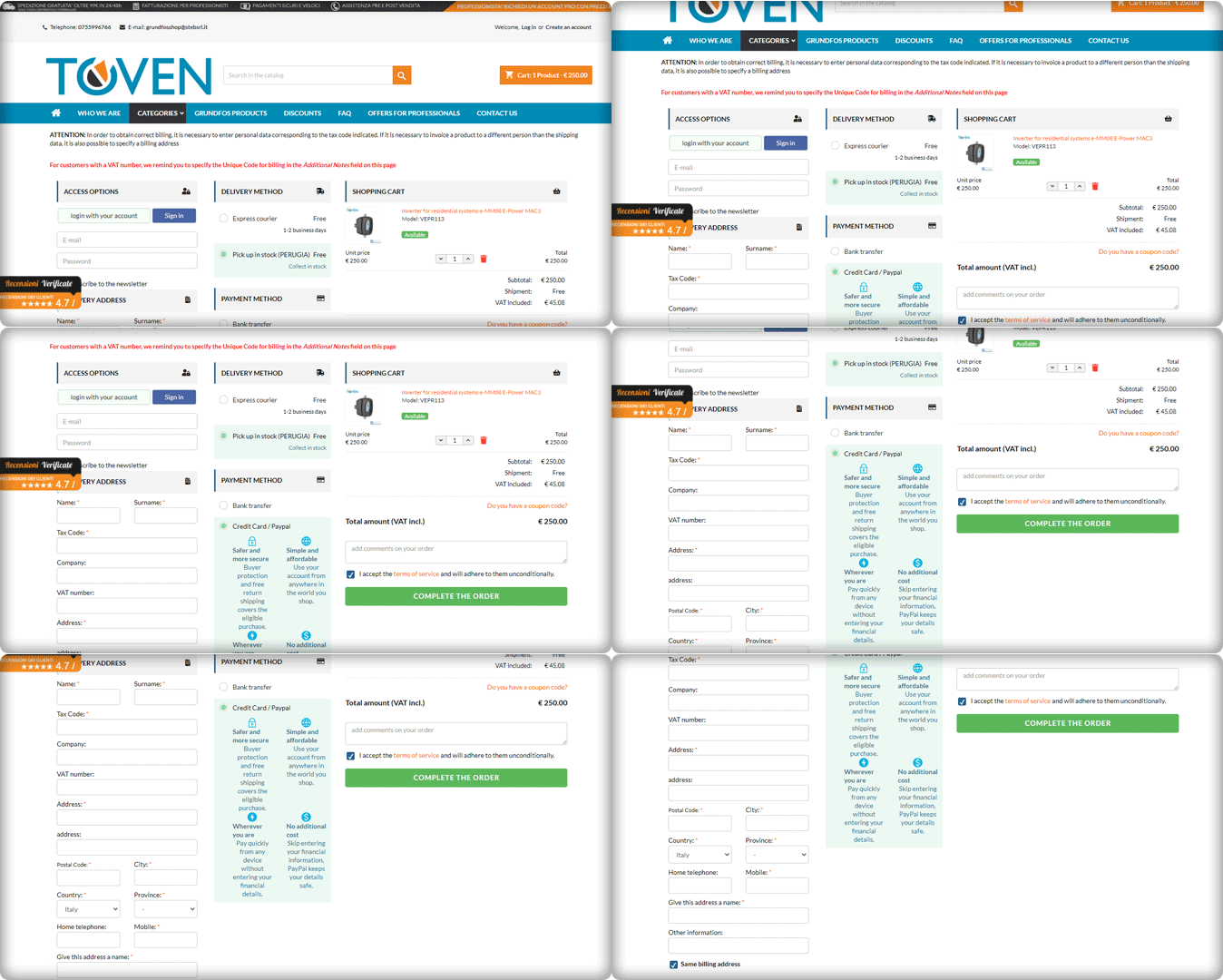
The easier you can make your customers’ checkout process, the more attractive it will be. Always keep in mind that providing an easy, straightforward, and usable process is your primary goal. Continuously improve the process by eliminating unnecessary steps, removing unnecessary form fields, and streamlining it to make it as quick and productive as possible.
Have a look at the Website’s PrestaShop One Page Checkout and its clear CTA. It has a 3-column layout that provides customers with a streamlined user experience.
4. Kraken
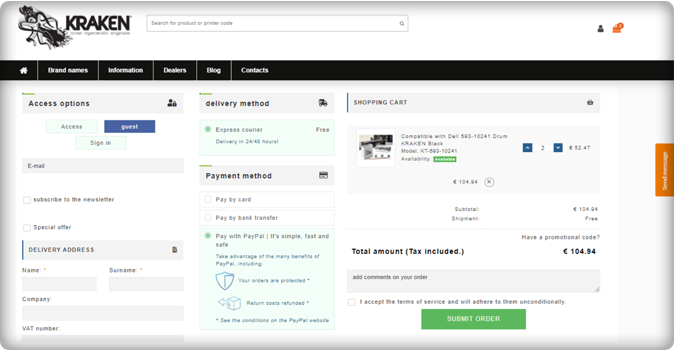
The Italian store Kraken sells premium quality toners. Kraken needed software that enables users to get an exclusive checkout experience and they chose the One Page Checkout PrestaShop plugin to achieve their goal.
The checkout page has a 3-column view that allows Guest Checkout. They have listed express courier delivery options for shipping and payment methods like PayPal, Bank transfer, and credit and debit card options.
Unlike other software where order details are not present on the checkout page, Kraken used half of the page to display the cart information, which is quite appealing gives the user a satisfactory experience.
5. Zoo Mega Shop
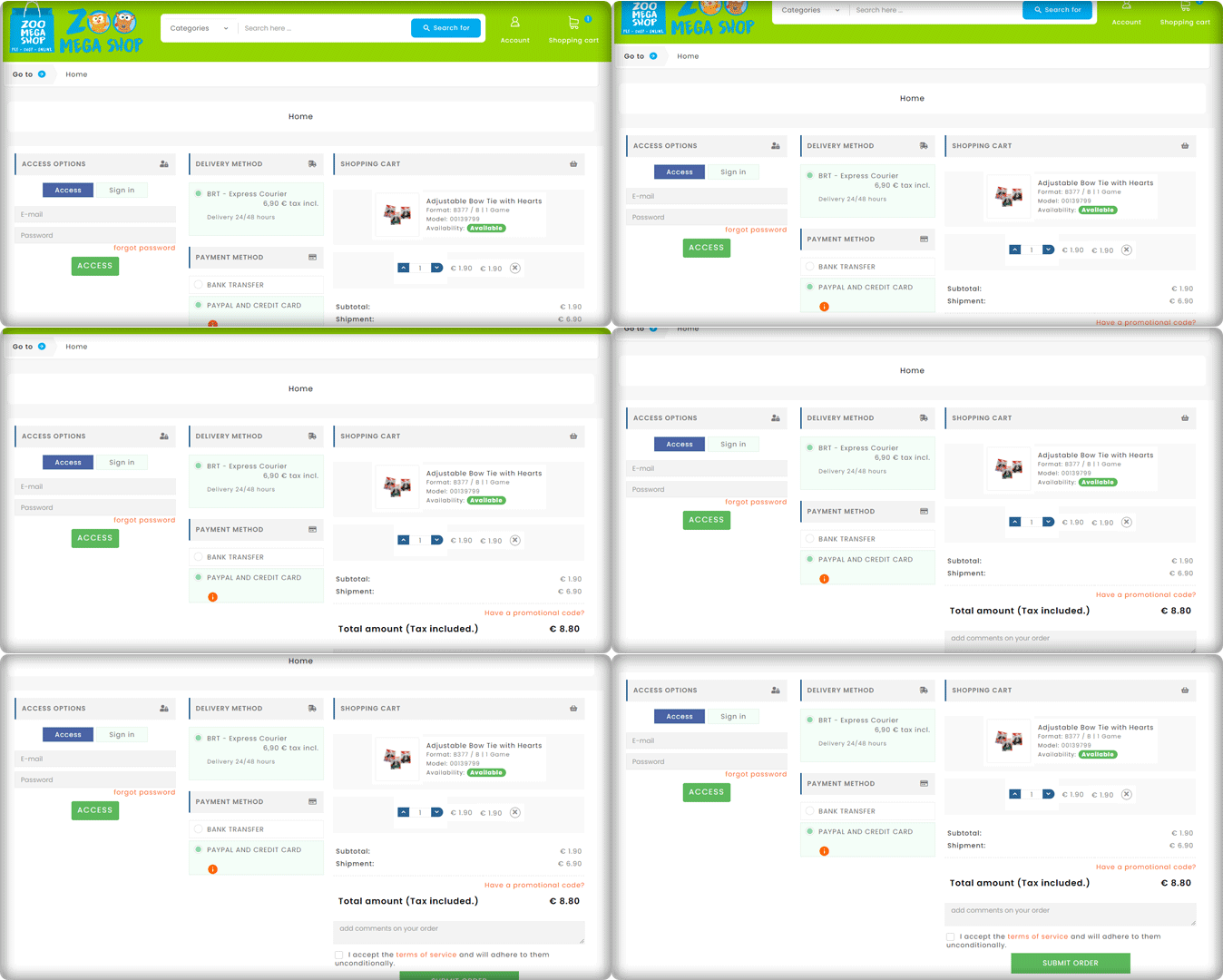
Look at this Checkout page customized by Zoo Mega Store! They used the same module (One Page Checkout PrseatShop 1.6v) with a super clean layout.
Customers can update the product quantity from their checkout page without switching any tab. Isn’t this handy!
6. Riko café
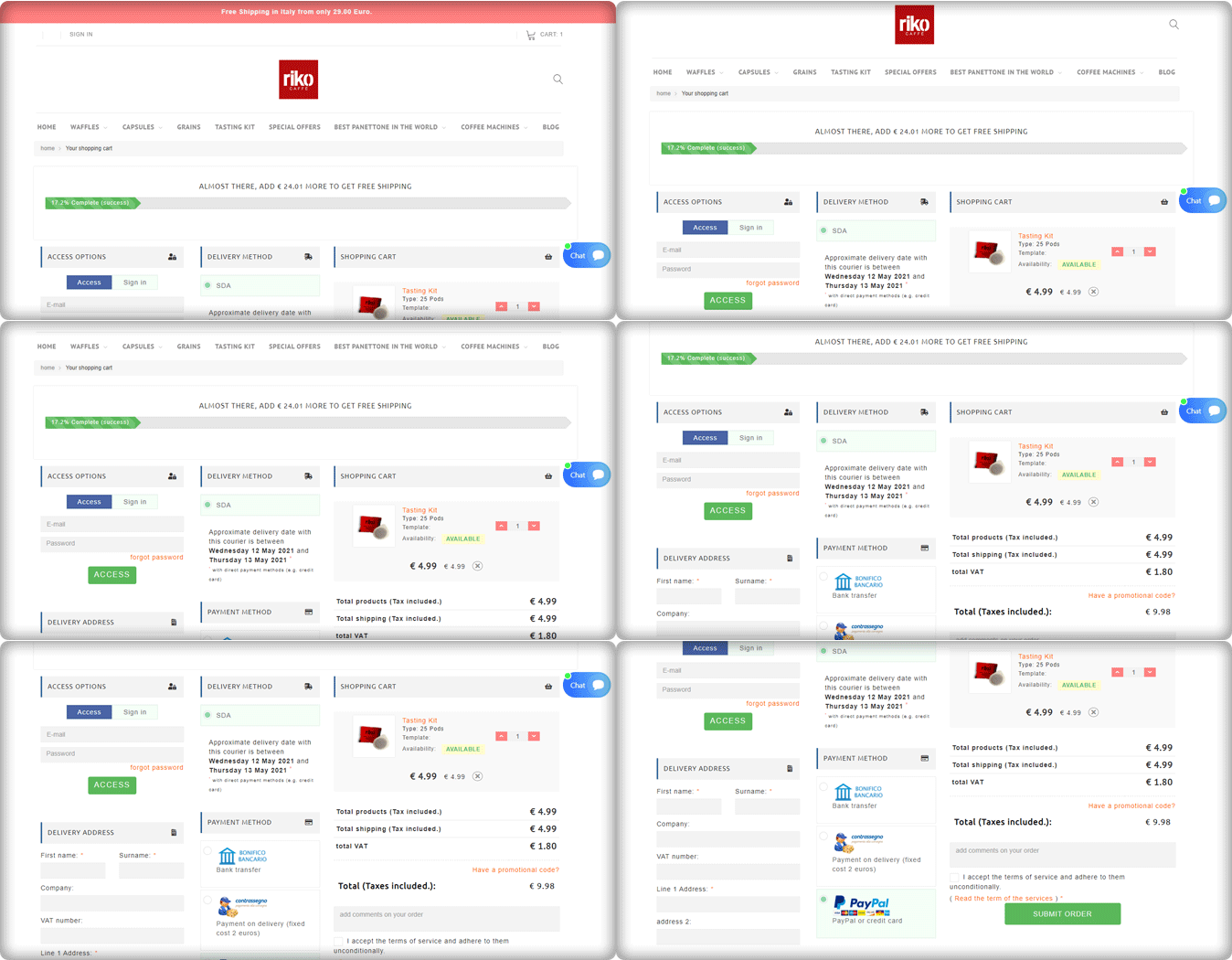
A progress indicator shows you where you are in the checkout phase while still outlining all of the steps. This allows consumers to see where they are in the process, how many steps are left, and how long the process will take in general.
Riko Café is using the progress bar feature of the One Page Checkout PrestaShop module. To provide a much richer user experience, progress bars show users how close they are to completing a collection of… details or performing activities.
They have shown the delivery method along with the details of the expected delivery date. Popular payment methods used in Italy like PayPal, Bank transfer are listed in the Payment section. They are allowing Cash on delivery as well.
7. Staub: Made in France
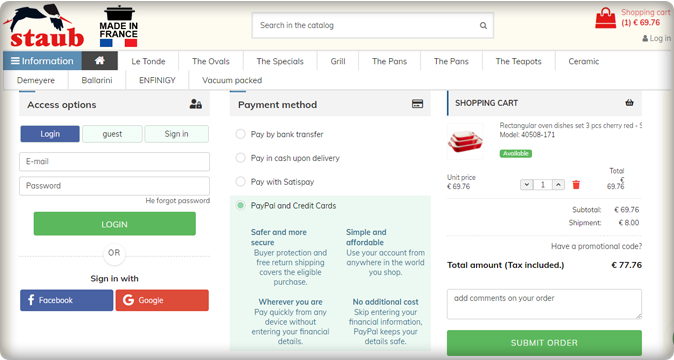
We have a number of things to remember in our everyday life and adding another password to this is something we are least interested in. Save your customers from this misery with the Social login option.
Social login promotes easy and quick registration with an increased number of signups. Staub store is using Social login on their PrestaShop checkout page and providing comfort to their customers.
The collected email addresses and social media information of the customers can be further used in target marketing.
Italy’s popular payment methods listed in the Staub store are Bank transfer, PayPal, Credit card options, Pay with Satispay, and COD.
8. Farmacia Savorani
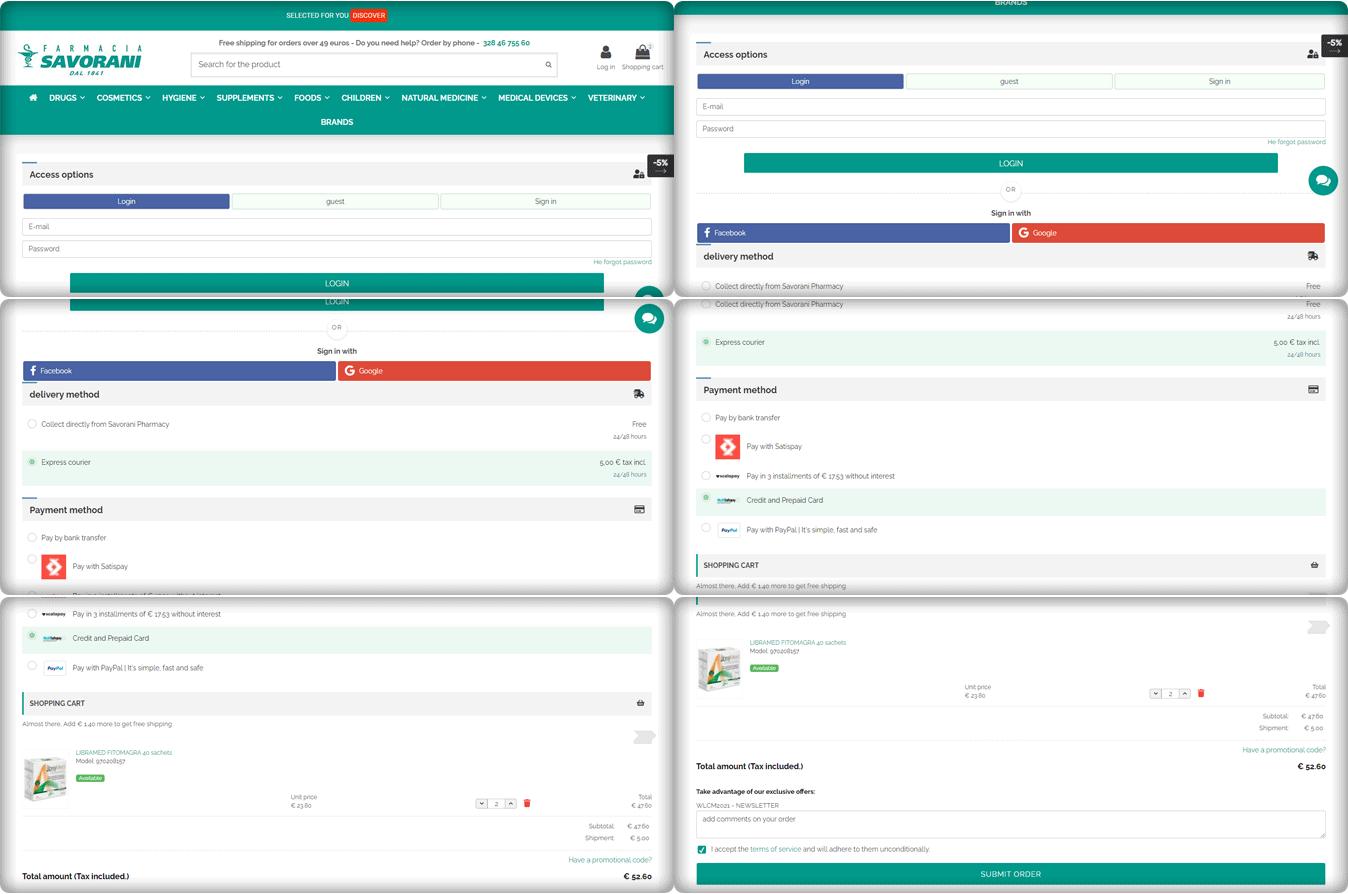
Farmacia Savorani’s checkout page has a simple, clean design that is easy to use. Their checkout follows several best practices. With many templates to choose from, the One Page Checkout PrestaShop layout can easily be customized for the use you need.
This checkout page design has a single-column checkout page. Every part of the process looks structured and clean. They have guest checkout, social login option with Facebook and Google+, several payments and delivery methods used widely in Italy.
The cart products can be seen and updated with ease. Also, customers can add a custom message to the order.
They are providing buy online and pick up in-store options to their customers. This is something that can work magic if you are using the right plugin like KnowBand’s PrestaShop store locater and pickup. Another shipping method is Express courier.
The One Page checkout PrestaShop module by Knowband is compatible with Store locater and pickup addon.
Payment gateways used by Farmacia Savorani are PayPal, Satispay, bank transfer, credit and debit card options, and EMI options.
9. Nextrace Italia
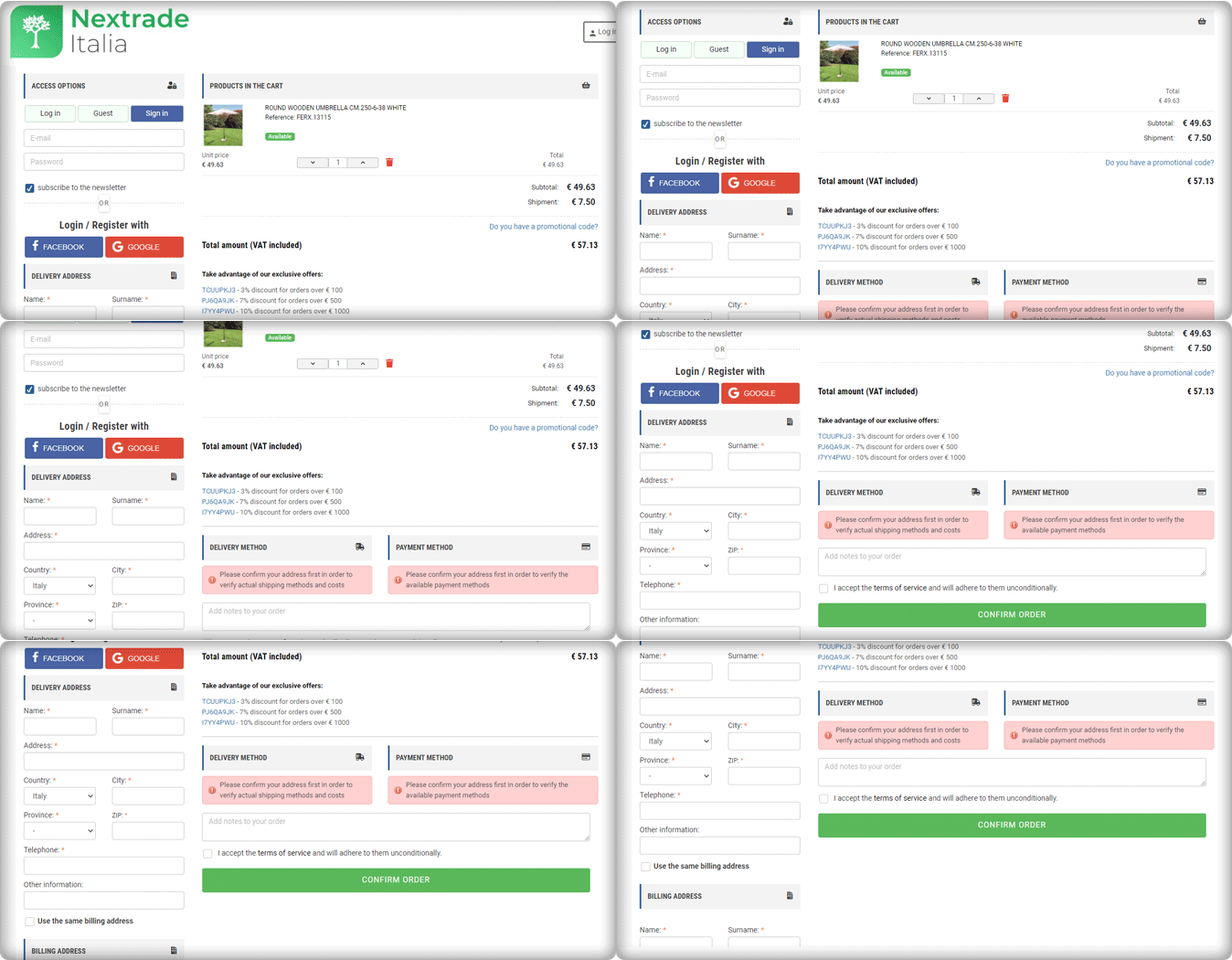
The One Page Checkout PrseatShop module allows the seller to display the delivery methods and payment methods only after they provide their address details. The seller can show specific payment methods for specified shipping methods.
Nextrace Italia is using this feature on their PrestaShop website’s checkout page.
10. Un mondo di mobile
Un Mondo Di Mobile’s website’s checkout page is another best example of a clean and sleek checkout design. This is again created using the One Page Checkout PrestaShop plugin. All the necessary features are used on this page and are fully customized.
With PrestaShop One Page Checkout addon, users can add security badges in the payment section as it builds customer trust.
Conclusions are drawn from the above data for famous Payment gateways and Shipping methods in Italy
We can deduce from the above-mentioned Italian store checkout page details that there are a few commonly used and suitable payment methods.
Every store has a PayPal option listed as their payment gateway.
Along with that, they are accepting payments through Satispay, credit card, debit card, bank transfer, and scalepay.
Some of the stores accepting installments for the orders with ScalePay.
One Page Checkout PrestaShop plugin is compatible with PayPal, Satispay, and other common payment gateways like the card and bank transfer.
For shipping or delivery methods, Italian stores are using GLS Express courier Italy, BRT express delivery Italy, SDA Express Courier Italy, etc.
Out of 10 stores, three are offering an In-store pick-up option. Looks like it is gaining popularity!
One Page Checkout PrseatShop module is compatible with all the famous shipping methods like GLS Express courier, BRT express delivery, SDA Express Courier, etc.
Final thought:
You shouldn’t have to choose between offering high-quality security and fraud prevention and optimizing for the best customer experience. KnowBand’s PrestaShop One Page Checkout 1.6v and 1.7v module is designed with best practices in mind, providing customers with a frictionless user experience, lightning-fast processing, and unrivaled security.
The module facilitates multi-lingual compatibility that allows you to use it in any region of the world. It is compatible with all the other PrestaShop modules like Social Loginizer, Store Locator, etc. developed by KnowBand. The One Page checkout extension is also available for major eCommerce platforms like Magento, Magento 2, OpenCart, etc.
For any eCommerce development services or module, requirements visit Knowband store or drop an email at support@knowband.com to discuss.
One Page Checkout displays all the elements of a conventional checkout, including cart items, billing and shipping addresses, shipping methods, and payment details on a single page. One-page checkouts were first implemented in an attempt to streamline the checkout process by which the number of clicks and pages needed. To give a brisk, we have compiled a few remarkable PrestaShop One Page Checkout examples that are blazing.
For the PrestaShop platform, KnowBand’s One Page Checkout is one such popular module that has 15000+ downloads on the KnowBand store and PrestaShop Addon store. The module is a one-stop solution as it supports multiple payment gateways, shipping options, provided social login option, and has a feature like MailChimp email synchronization.
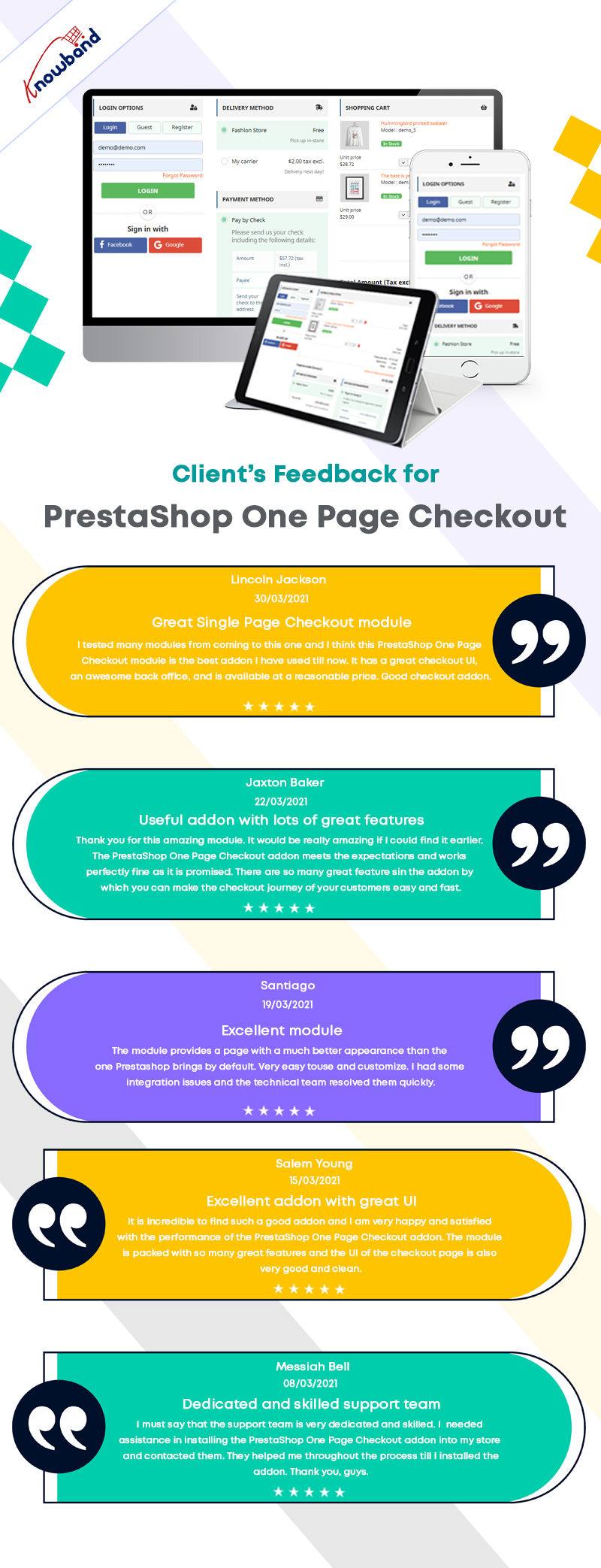
In this blog post, we will show you 7 beautiful examples of PrestaShop One Page Checkout Module that are live and working effectively on various eCommerce stores worldwide. Before jumping to it, let us see what clients have to say about the One Page Checkout and their experience with Knowband.
Prestashop One Page Checkout live examples
1. LUO Online
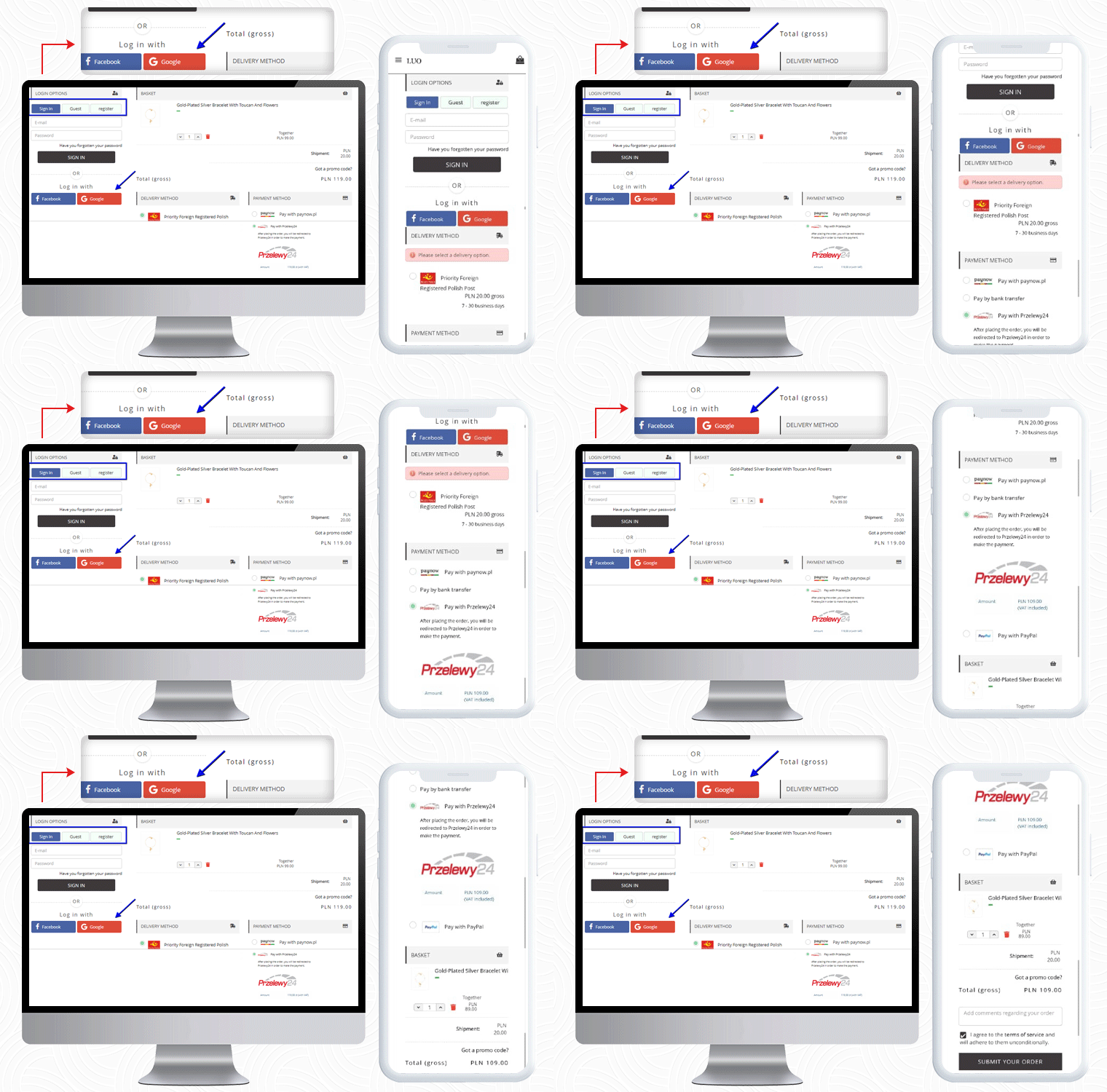
LUO online is a Fashionable Jewelry store created on the PrestaShop platform that delivers products in Poland. To make the checkout experience smooth and quick, LUO is using the One Page Checkout module by KnowBand.
The Mobile responsive checkout page displays all the fields on a single page including the registration column, Social login option, shipping, and payment methods, and the products of the cart. It also supports guest checkout functionality for users who do not want to register.
If a customer has any promo code then they can add that during the checkout process.
Payment Methods listed for Poland Customers: Pay with Paynow, Pay by bank transfer, Pay with Przelewy24, Pay with PayPal
2. LUX DOM Furniture
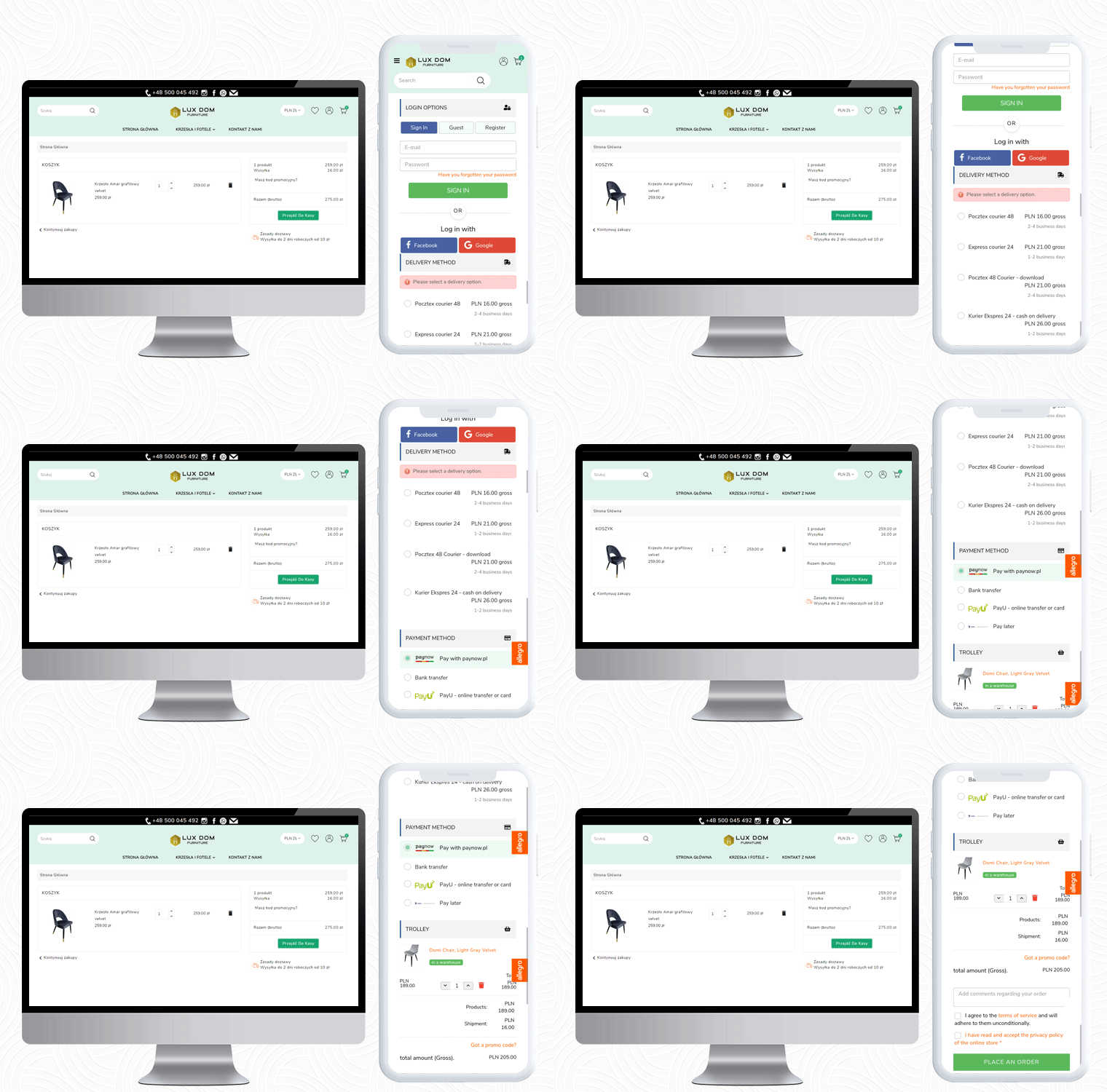
LUX DOM Furniture is a Poland-based furniture website with a customizable three-column checkout page. Users can log in via Social media platforms like Facebook and Google+.
The free delivery eligibility bar is displayed at the bottom of the checkout page. Every order with an amount above 150PLN will be eligible for free delivery.
In the LUX DOM furniture store, there are specific payment methods for specific shipping methods selected.
Payment Methods listed by LUX DOM: Paynow, PayU, Przelew bankowy, Zapłać później
3. Edukacyjna
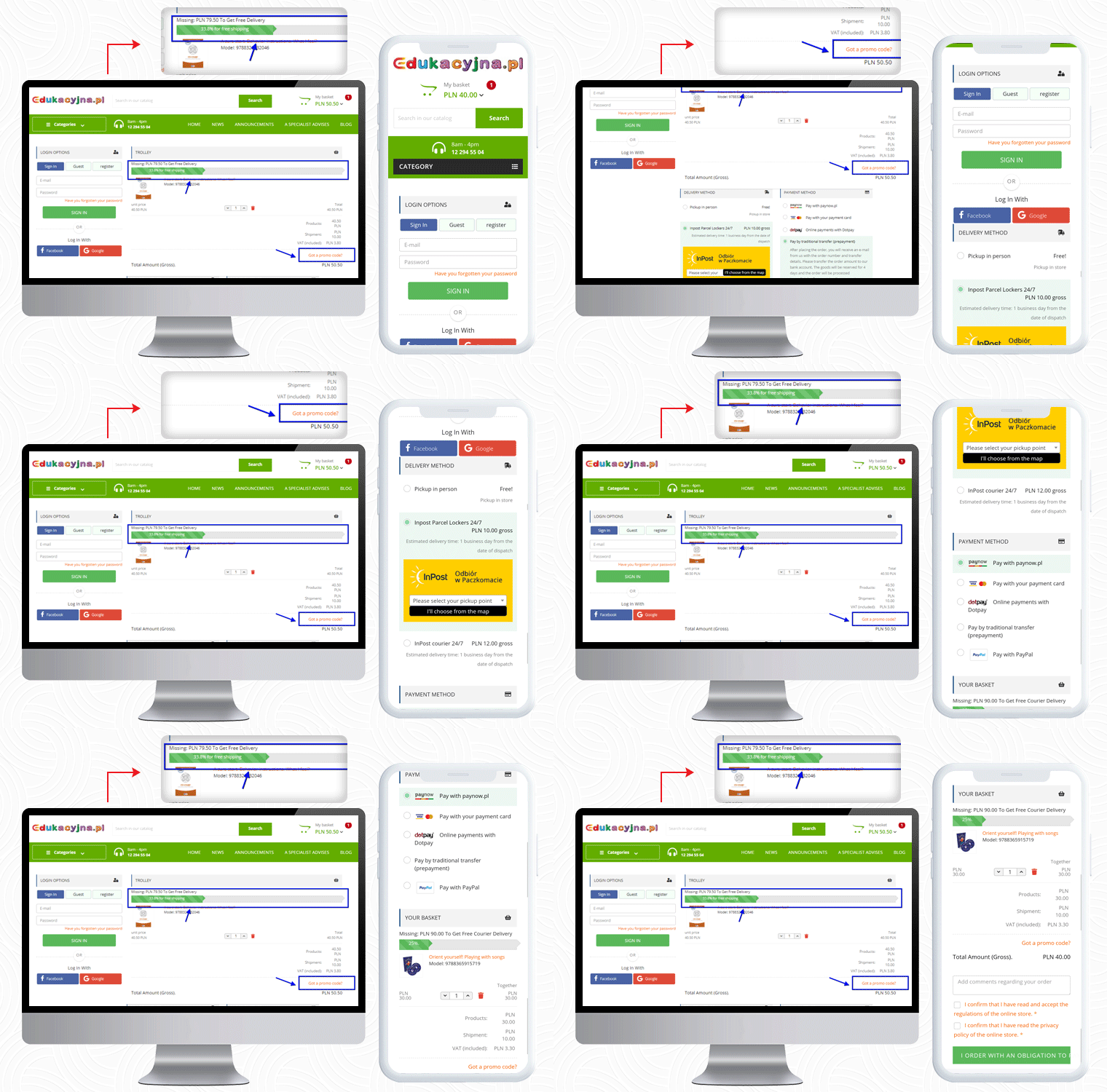
The third live example of the PrestaShop One Page Checkout addon can be observed on Edukacyjna, which is an educational online bookstore. The first educational bookstore in Poland, offering methodology guides for all Polish publishing houses’ textbooks.
The PrestaShop One Page Checkout has several features and Edukacyjna is utilizing those in a proficient manner.
In the picture below, along with the features mentioned earlier, a ‘Progress Bar’ is displayed for the checkout process.
This educational website is providing several payment methods to their customers, and for every shipping method, they have listed different payment methods.
Payment Methods Listed for various shipping methods: Pay with Paynow.pl, Payment via VISA and Master Card, Online payments with Dotpay, Pay in cash on delivery, Pay by traditional transfer (prepayment), Pay by bank transfer with deferred payment (14 days) – only for educational institutions, Pay with PayPal
4. Cyrenzo
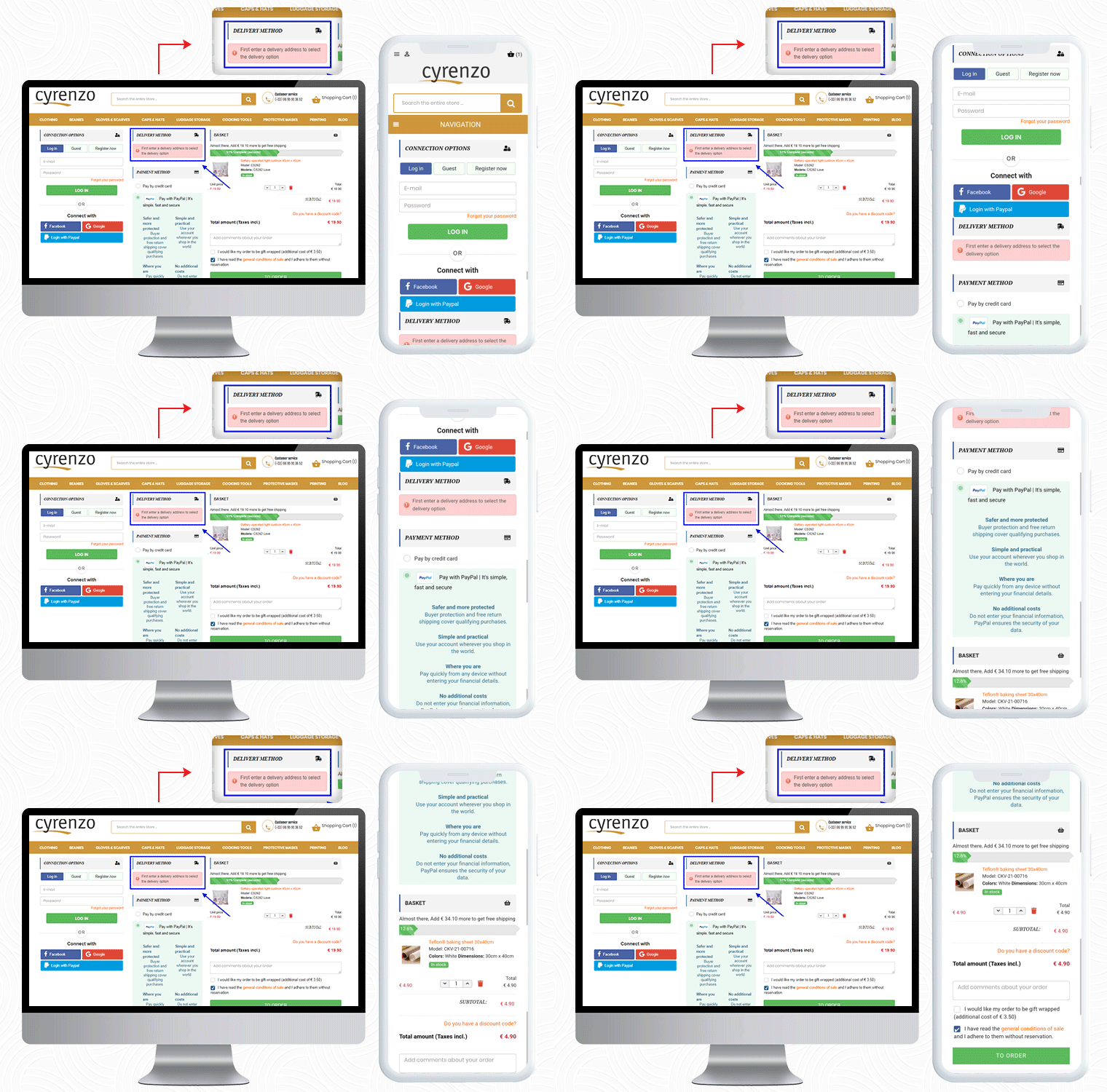
Cyrenzo is France based online store of clothing, accessories, and home products from major brands. They deliver quality products with customized options in France. Cyrenzo has updated its new website to meet current expectations so that users can use it more easily.
They have been using the One Page checkout solution for the final checkout process on their PrestaShop store.
As mentioned, the module is feature-rich and a best seller!
It allows sellers to display the delivery mode only after they enter the delivery address if enabled from the admin panel.
Cyrenzo is also using the PayPal login option along with Facebook and Google on their PrestaShop One Page Checkout. On a single page in a 3-column customizable layout, it displays the progress bar, cart details, payment methods, etc.
Also, to collect any additional information from the customer about the order, the seller can add an additional field before the final order placement.
So far we have shown you four examples of One Page checkout module. Now, I would like to draw your attention to its layout customization feature.
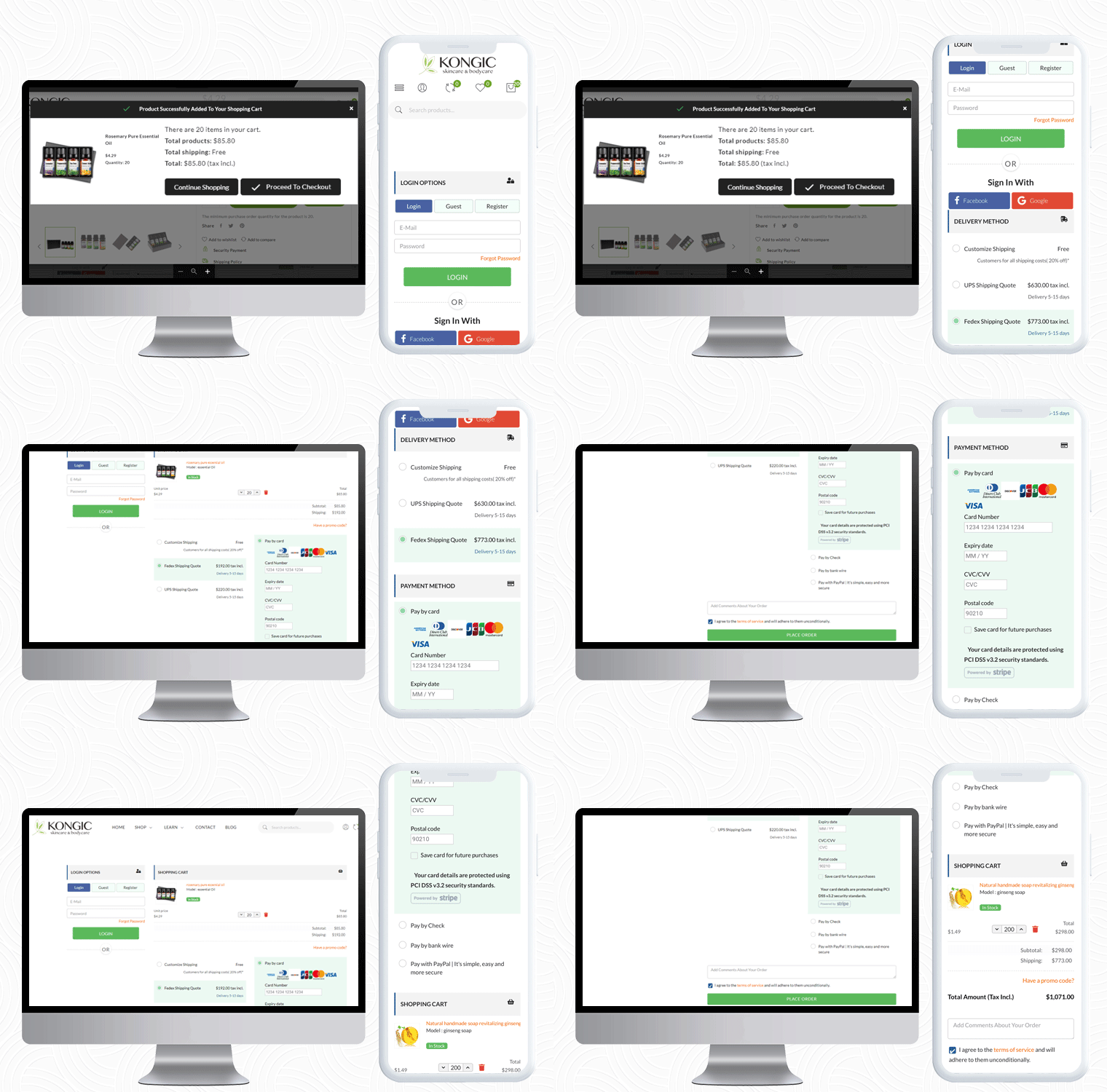
Kongic is an eCommerce company dealing in skincare and body care products. For the checkout page, PrestaShop One Page Checkout is the best fit for their brand.
The checkout page of the Kongic is clean and they have kept enough white space that it giving it a more pristine look.
It is on the seller how and where they want to keep the sections. The module has a drag-n-drop functionality and they can adjust the fields as they want.
It gives you options like 1-column layout, 2-column layout, and 3-column layout. Customize the checkout page as you want to.
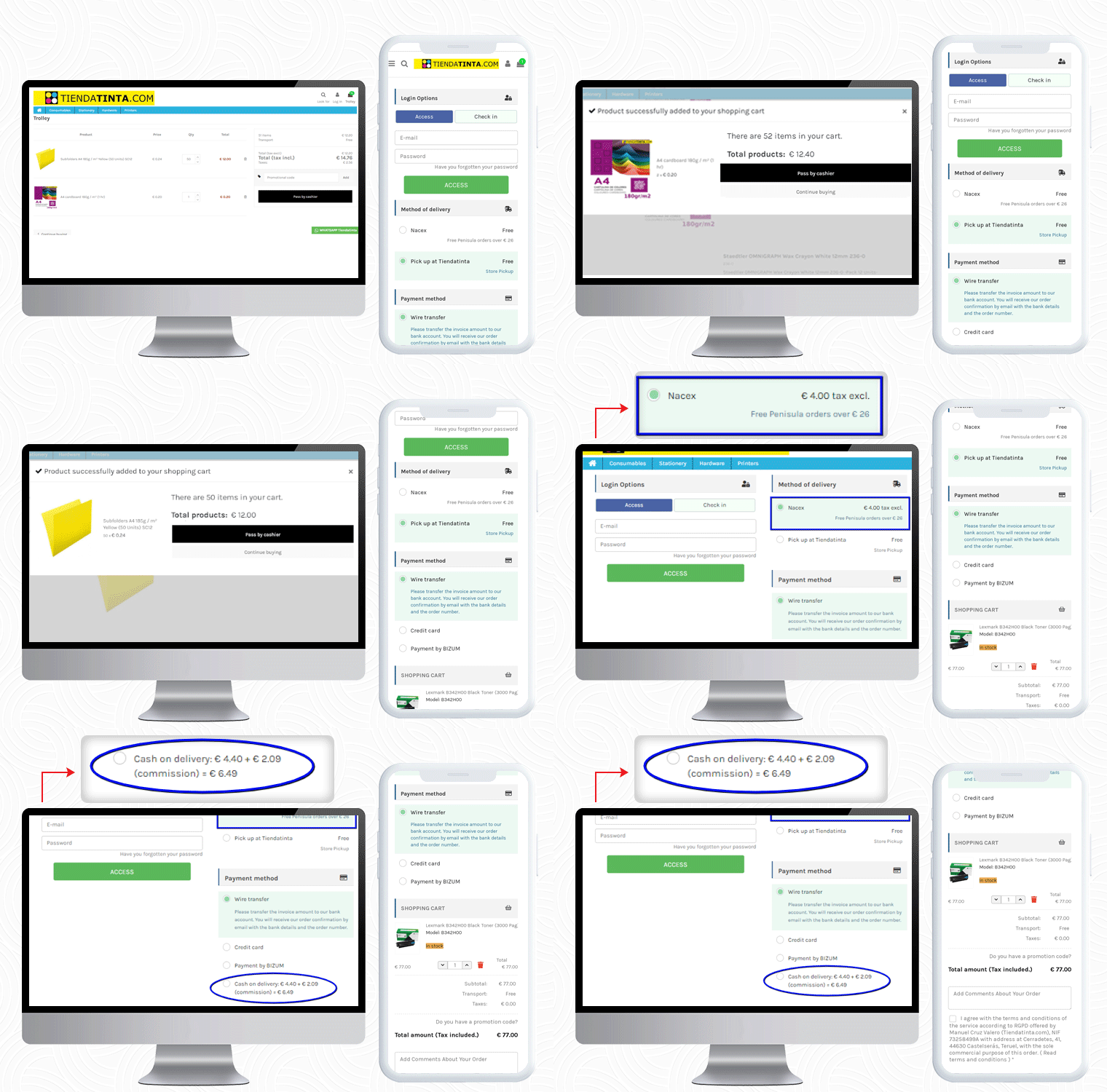
6. Tiendatinta
Tiendatinta is a PrestaShop store that sells Stationery products, hardware, and different types of printers.
They have been using the PrestaShop One Page Checkout solution for checkout that gives a satisfactory experience to their customers.
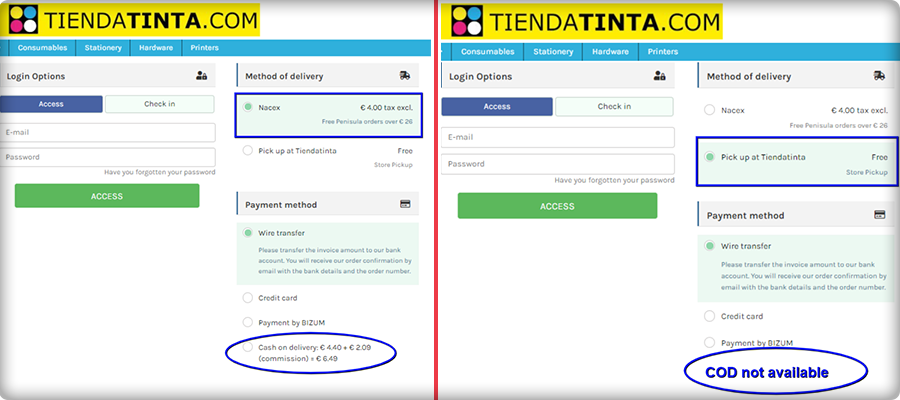
In this PrestaShop One Page Checkout module example, the Cash On Delivery (COD) is only available for the customers who opt for the Nacex method of delivery.
This feature is quite helpful when you have to offer a particular mode of payment gateway for and specific delivery method.
7. JustKBC
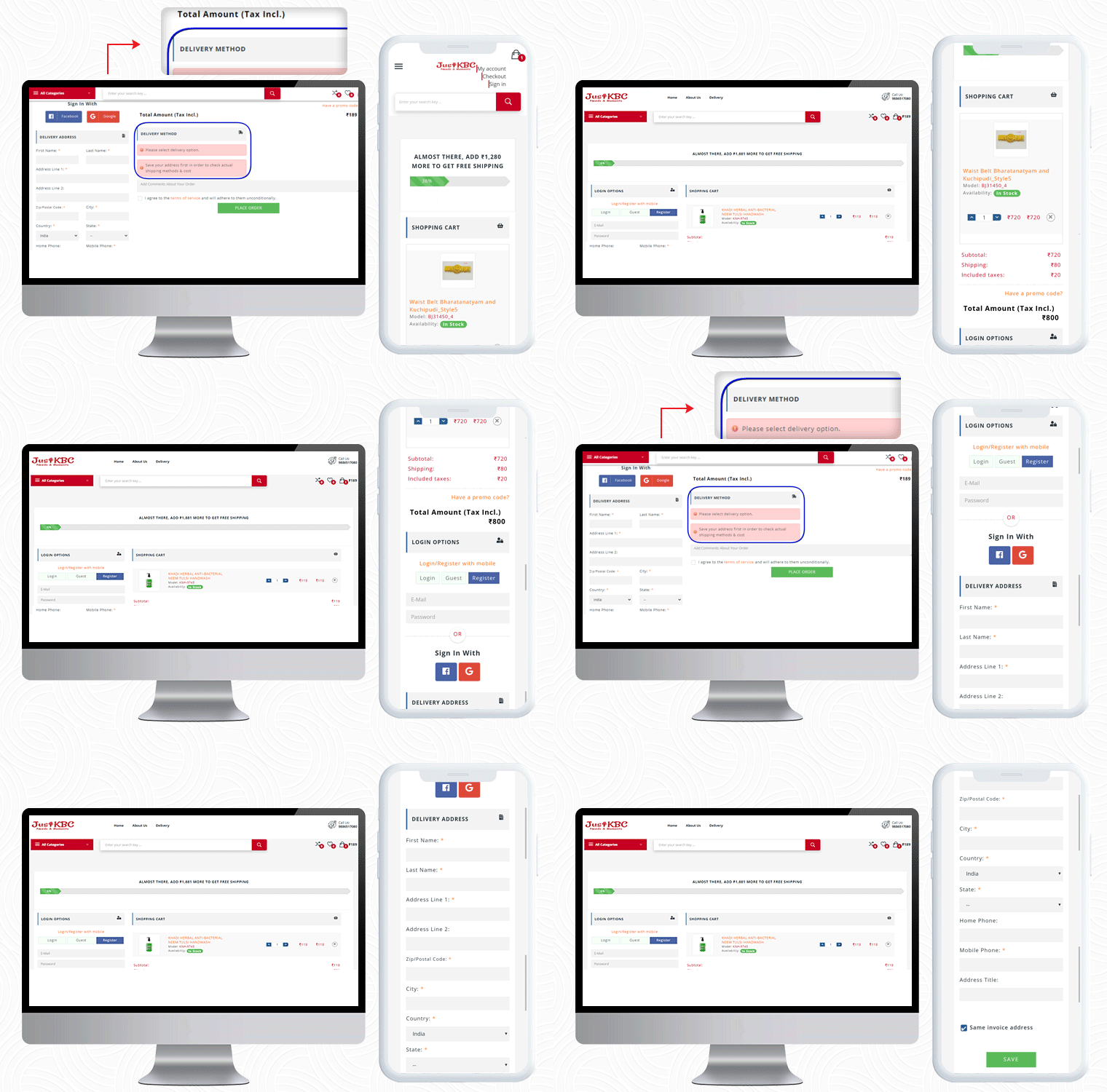
For PrestaShop One Page Checkout real-life example, the JustKBC website is next in the row. They are using a 2-column layout, which is giving the checkout page a clean look.
A free shipping bar at the top of the checkout page encourages customers to shop more and increases average cart value.
On this particular checkout page, if a customer wants to see the delivery options then he has to enter the delivery address first.
If a customer enters false details of ZipCode or forgets and mandatory field, they will see an inline error message. If The customer can allow auto address fill from Google as well.
You can check out some more websites that are using PrestaShop One Page checkout:
The preceding examples demonstrate why PrestaShop One Page Checkout by KnowBand is the best seller Module on Addon Store! Its features and functionalities make it unique and give an exemplary user experience. If you have an eCommerce store on the PrestaShop platform and are searching for a single-page checkout solution, your quest is over. You can go to the KnowBand store and look at the admin panel and front-end module demos.
On our store, you’ll find solutions for all other eCommerce services. All the modules are well-designed from both the seller’s and the customer’s perspectives.
PrestaShop Return Manager (RMA) module by Knowband is known as one of the best PrestaShop addons which simplify and fastens the product return management on your eCommerce store and helps you improve customer experience. With the PrestaShop Return manager addon, you can provide easy order return features on your website and can add a return policy for your products.
It’s a harsh reality that you’ll have to issue a refund or return in response to certain legitimate return requests. For making the process convenient, with the same module features, a customer can ask for a refund, credit, or even cancel the order completely or partially. A simple return process on your website can persuade the shopper to return to you the next time he or she shops online. We need to remain open for any chance because this is a long-term game.
The Return manager addon has been downloaded by 2000+ clients on the KnowBand store and PrestaShop Addon store. Some new features have recently been introduced to the PrestaShop Return Manager (RMA) addon in the latest update. In this post, we’ll go through all of the newly added features in detail.
Newly Added Features to the PrestaShop Return Manager (RMA) Addon:
1. Search Option in the Admin panel for all the Listing Tabs
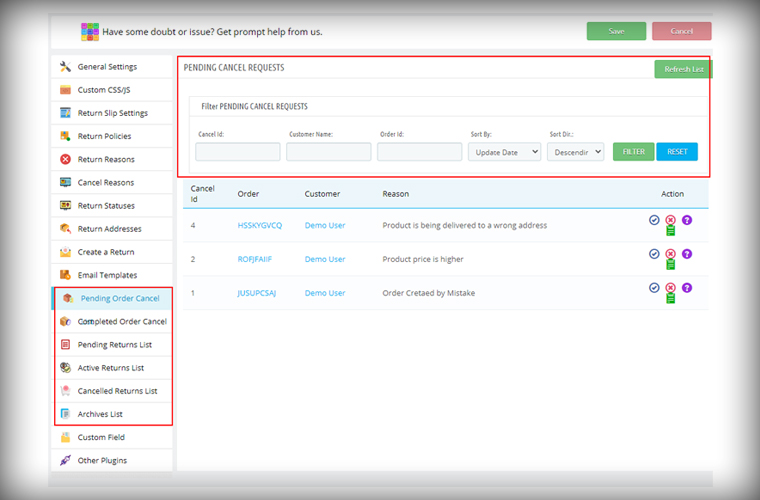
In the latest version of the PrestaShop Return Manager (RMA), the e-merchant can now search and filter the orders on various listing tabs. The search option is added for the following listing tabs pending cancel requests, approved canceled order list, pending returns list, active return orders list, canceled returns list, and archive list. Admin can sort the orders by providing details like Order ID, Customer Name, Respective listing ID, and also with a date.
2. Define Order Status to start calculating policy time
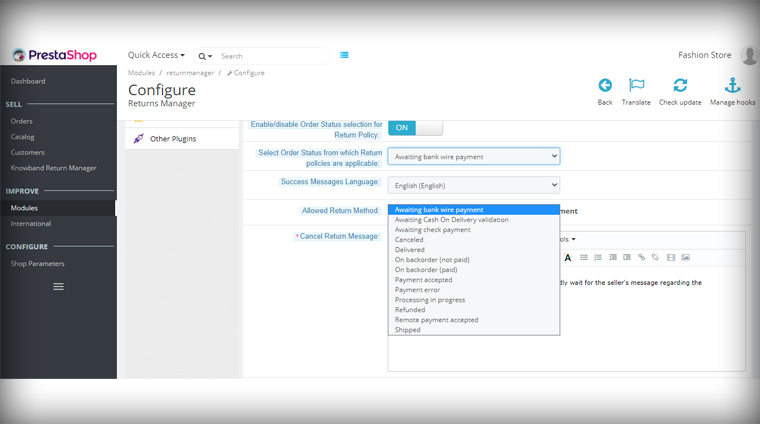
The PrestaShop Order Return manager now allows the store admin to set the order status from which the return policy time will be calculated. In the previous version, the clock starts ticking the day order was placed and a delay in order delivery sometimes exceeds the period and customers fail to make the return request. With this feature, the store owner can set the status as ‘Delivered’ for calculating the return policy time.
3. Feature in the Admin panel to send Test Email
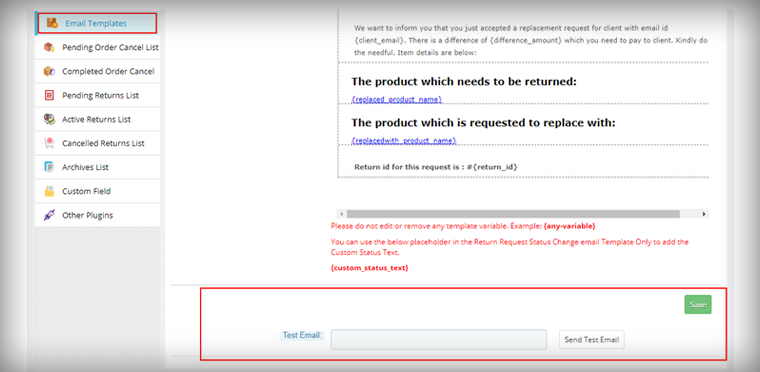
The module now allows the store admin to send test emails before finalizing the template. This functionality is added to all the provided email templates of PrestaShop Return Manager (RMA) Addon.
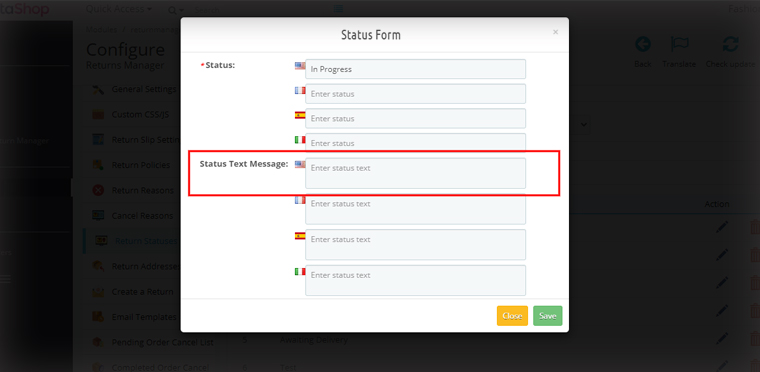
4. For email, templates specify custom Text for each Return Status
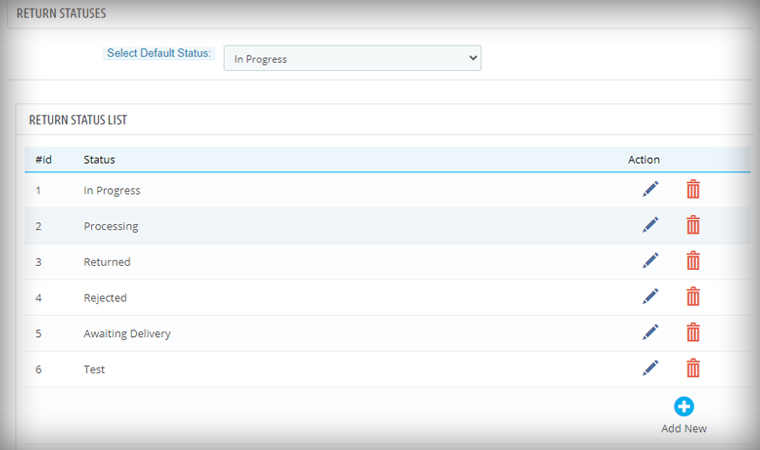
Another feature added in the module is an option in the admin panel to add a custom text for each Return Status and created a place holder which can be used in the return status email template.
Admin can add a personalized message in the provided option for every order status. An email with a tailored text will provide more clarity to the customer.
Features added for easier management
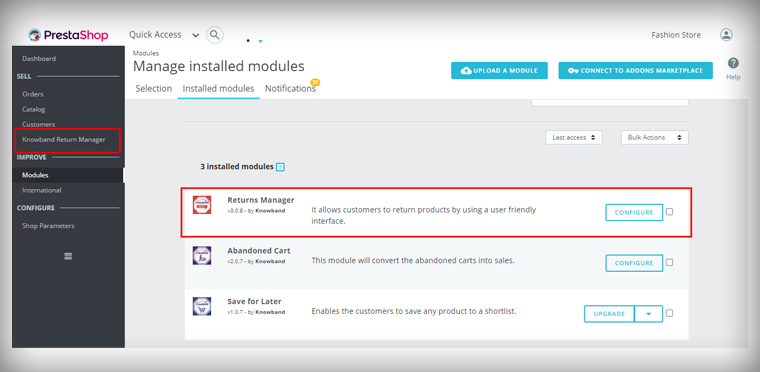
5. Added Left Menu Shortcut of Return manager Addon on the Dashboard
As it is shown in the picture below, the admin is now able to access the PrestaShop Return Manager (RMA) Module from the left menu of the PrestaShop admin panel. This provides quick access to the admin for module configuration.
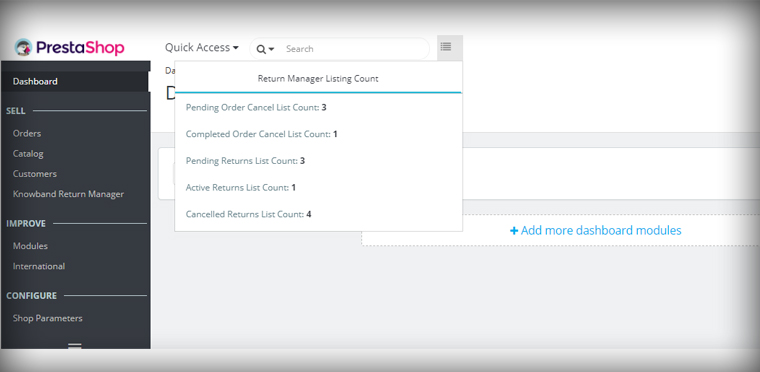
6. Display all Return listing counts on top of the Admin panel
In the Dashboard of the PrestaShop store, the admin can quickly access the return manager listing counts from the option provided on the top. By clicking on any of the listing options, the user will be redirected to the respective listing page.
7. PrestaShop v1.7.7.1 compatibility:
PrestaShop recently launched version PS v1.7.7.1, which includes some new features and bug fixes. We’ve made the PrestaShop Return Manager (RMA) Addon completely compliant with the new PrestaShop version v1.7.7.1.
For other existing features of the module, you can refer to our previous blog post.
Upgrade to the Latest Version of PrestaShop Return manager addon:
PrestaShop is an open-source e-commerce platform that allows users to create their online store with ease. KnowBand develops eCommerce extensions for the PrestaShop platform that allows the PrestaShop platform users to implement new features to their online store to improve the customer experience at their online store.
Velocity has been developing eCommerce plugins under the brand name KnowBand for over ten years and has over 80 PrestaShop plugins. Since the beginning, Knowband has been assigned the SuperHero Support Badge, which they have successfully maintained. PrestaShop is a powerful online store with cutting-edge features and a large selection of themes and models.
Who becomes a Gold Partner Agency with PrestaShop?
Regional and foreign organizations that have received a higher number of points for their dedication and contribution are known as gold partners.
KnowBand- a brand under Velocity is PrestaShop Gold Partner Agency
Knowband PrestaShop Agency is a PrestaShop accredited gold company that serves global clients with personalized PrestaShop e-commerce production services. Prestashop also designated some of our modules as favorite, One Page Checkout, Social Login, Mobile App Builder, Spin and Win and the list goes on. We have served 10000+ clients and have empowered 12000 websites.
Top Selling Modules of KnowBand (Gold Partner) on PrestaShop Addon Store
Our team of skilled and experienced developers has been working on PrestaShop modules for more than 8 years. Several modules have crossed 1000+ downloads and many are among the PrestaShop favorite’s list. Also, KnowBand has completed more than 200 PrestaShop projects on Addon Store.
KnowBand’s One Page Checkout is a feature-rich module that gives PrestaShop merchants a plethora of choices for optimizing their checkout page. It has over 9000+ downloads on the PrestaShop Addon store. This module is multi-lingual compatible and is awarded PrestaShop Best Seller Badge.
The Marketplace module allows PrestaShop store owner to transform their single-vendor website into a Multi-vendor Marketplace. It comes with a one-click installation. It has over 1700 downloads on the PrestaShop Addon store.
Another best seller module on PrestaShop Addon store in Abandoned Cart Recovery module. It has 2000+ downloads till now and lets the sellers send emails, push notifications, and reminder emails to the customers.
Return Manager has been downloaded 1450 times from the PrestaShop addon store. It helps the store owner manage all the product returns, order cancellations, and refunds on the PrestaShop store.
The subscription module, Spin, and Win is PrestaShop Favorite module and has been downloaded over 450 times. It has a gamification interface that adds a fun element to your website and increases customer engagement on your PrestaShop Store.
The Mobile App Builder Plugin helps the PrestaShop store owner to create their Mobile App for iOs and Android operating systems. It is addressed with PS Favorites and has over 400 downloads.
To give your customers a smooth and satisfying shopping experience, Ajax Cart+ helps you create a customized shopping cart on the PrestaShop store. The KnowBand’s PrestaShop Ajax Cart Module has 550+ downloads on the PrestaShop Addon store.
FB-Store integrator is another PrestaShop module that is famous and downloaded many a time on the PrestaShop Addon store. KnowBand developed this to connect the PrestaShop store with FB Fan Page and it synchronizes all the product data of the PrestaShop store with the FB product page.
Modules that enhances Mobile Experience
Our Prestashop Plugin Development services provide online stores with the features and competence they need. You can rely on us for one-of-a-kind and functionally smart plugins. KnowBand-PrestaShop Gold Partner Agency has developed some unique modules to enhance the user experience for mobile users.
· AMP- Accelerated Mobile Pages
The AMP addon developed by KnowBand- PrestaShop Gold Partner Agency speeds up the loading of web pages by reducing the time it takes for them to load. The PrestaShop AMP module enables AMP on a variety of websites, including the Home Page, Category Page, Product Page, and so on. It greatly lowers the bounce rate of your website.
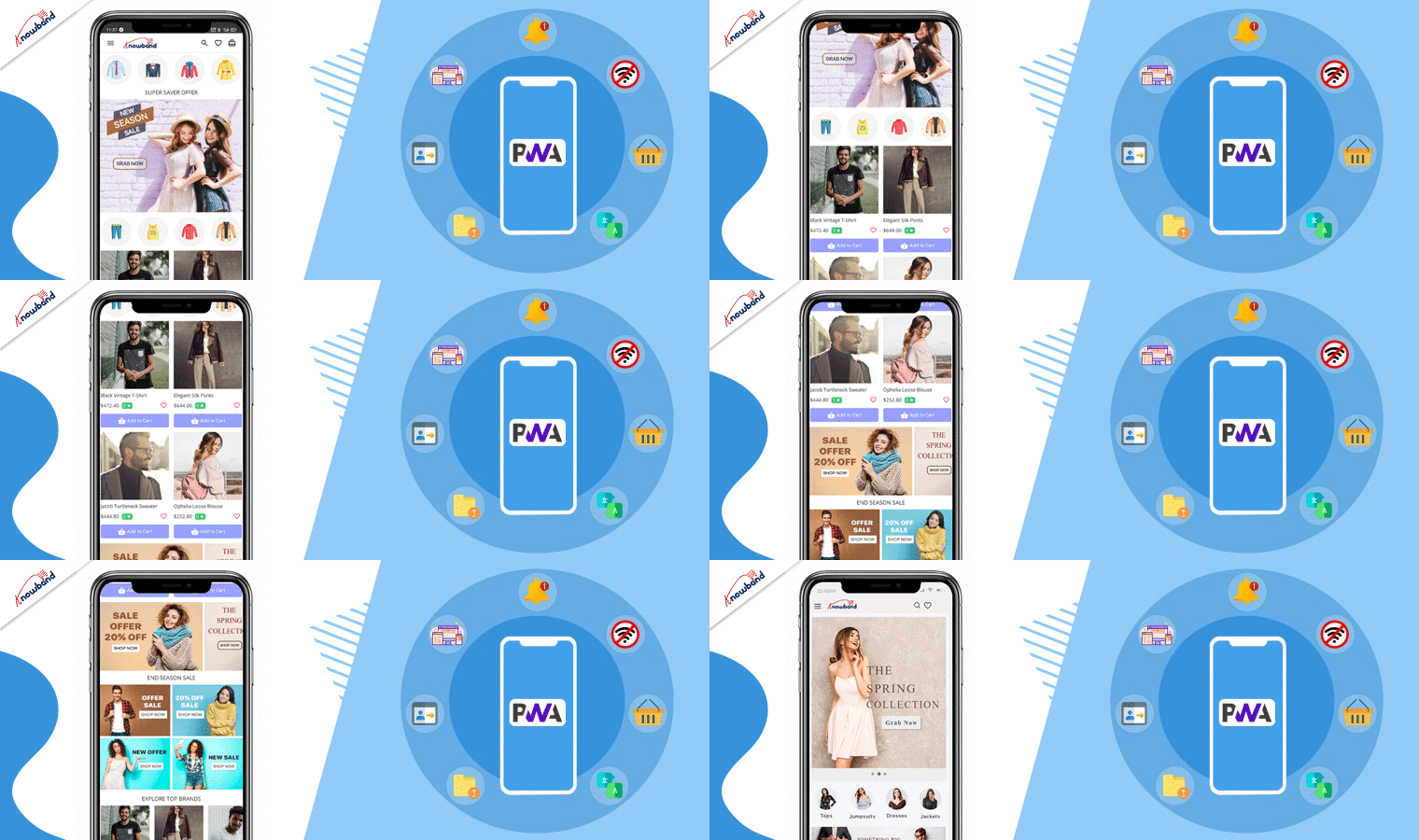
Convert your eCommerce website into a PrestaShop PWA Mobile App and enable your mobile visitors to shop with ease. There is no reliance on Google Play or the Apple App Store. Start shopping after a quick PWA installation with just one tap.
The PrestaShop Mobile Login module enables the admin to have quick registration using a mobile phone number. Customers can log in via OTP received on their contact number. Password recovery is also possible by the ‘Forget Password’ link and customers can also login without providing an email address if the administrator permits it.
New and Innovative Solutions for PrestaShop store
Hyperlocal Marketplace
The hyperlocal marketplaces are trending after the Pandemic outbreak. The PrestaShop Hyperlocal Marketplace allows you to sell your product in a limited region and registered sellers can define their area of the transaction. For further information on PrestaShop Hyperlocal Marketplace, click here.
Delivery Boy Mobile App
The PrestaShop Delivery Boy App enables online store owners to have seamless delivery management. Using the module, the store owner can easily add a delivery boy app, assign orders, and monitor them. You can start your own delivery business and manage it easily with this application.
There are around 100 PrestaShop modules on KnowBand Store and 80+ available on PrestaShop Addon Marketplace.
Finally, Velocity has proved to be an ally for online retailers with over ten years of experience in eCommerce services. All the KnowBand modules One Time Payment modules with no hidden subscription fees. The module comes with lifetime validity and our expert team is always available to help you with any glitch.
Support:
You can reach out to us at support@knowband.com or drop us a comment below if you require any eCommerce support.
We have always been somewhere looking for an alternative to Google Play and Apple store publishing. PWA (Progressive Web Apps) seems to be emerging as the prime option for the same. This technology is the latest trend and becoming more popular with passing time. Even various experts and tech geniuses are referring to PWA as the future.
The Progressive Web App is useful in replicating the exact native-like experience in-browser applications. The major benefit is that the store owner needs not to handle the app store or play store publishing, but rather, the PWA Mobile Apps can be simply installed by opening the website URL on a mobile browser. The customers get the option of adding the PWA app to the home screen as they open the store URL on mobile chrome.
PrestaShop PWA Mobile App Builder
With the automated PWA Mobile App Builder framework, it becomes way simpler to launch the Progressive Web App for PrestaShop stores. Just three simple steps are required for the job:
Major Advantages of PrestaShop Progressive Web App:
Not just the launch process, the PWA mobile apps even come with many features and benefits. Let’s check how useful these PrestaShop PWA Mobile App could be for eCommerce stores:
1. Preferred Choice for Businesses
If we consider the big enterprise names in the eCommerce world, the idea of the Progressive Web App would be much clear. Twitter, Walmart, Alibaba, etc. have already chosen Progressive Web App to improve conversions and revenue. All worldwide small as well as big PrestaShop eCommerce stores can choose PWA Mobile Apps and started growing the sales from mobile audiences instantly.
2. Wider Mobile Audience Targeting
The PrestaShop PWA works perfectly with both Android and iOS(All versions), making it a top-notch choice for eCommerce stores. Worldwide as well as the regional mobile audiences can be covered with this solution. More users visit the website, more will be Progressive Web App installations. The apps will be added to the application drawer along with other apps. The performance will be fully native-like and the users can simply open the app whenever they want to shop products.
3. Less Development Efforts & Cost
With native apps, the eCommerce merchant needs to input huge cost and time in order to get Android and iOS apps developed and published. The publishing process on Google Play and Apple App store is quite tricky and sometimes becomes a headache for non-techie business owners. PrestaShop PWA Mobile App Maker comes as a savior in this situation. The PWA mobile app can be derived directly by opening the store URL on a mobile browser. Your mobile version will be converted into a PWA app, keeping the desktop version working as usual.
4. Handy Admin Panel Control
The PrestaShop PWA Mobile Apps come up with an easy-to-use admin panel to manage & configure the live Progressive Web App. No need to ask the developers or learn to code. The store admin can simply make the required changes and the same will be instantly updated on the live PWA Mobile App. The home page layout configuration allows the store admin to change the look and feel of the live Progressive Web App anytime without any code change.
5. Marketing via Push Notifications
Push notifications have been used for all eCommerce mobile apps in order to achieve marketing and revenue goals. We all would have witnessed the push notifications being received in our mobiles for installed apps. The PrestaShop Progressive App Maker makes this possible in your PWA apps as well. The store merchant will be allowed to configure and send the custom as well as predefined push notifications on mobile devices.
6. Faster Working with Offline Accessibility
The Progressive Web Apps are very lightweight and hardly crash or stops on mobile devices. The technology to create PrestaShop PWA Mobile Apps is advanced and keeps the loading and performance faster when compared with native apps. The faster loading & smooth working can improve the shopping experience of mobile users at par. Another major highlight is that PrestaShop PWA Mobile Apps can work under offline mode (No/slow internet connectivity).
7. More Conversions & Sales
The PWA for PrestaShop can improve mobile conversions for eCommerce businesses. Offering a simplified process to install the app directly from the mobile website directs the users to the Progressive Web App. With layered navigation and simplified checkout, the apps can be a major revenue source for eCommerce business. If we go for Alibaba reference, their PWA app increased conversions by 76%.
Conclusion:
Shift to better tomorrow with eCommerce PWA Mobile App. Your competitors have already moved to the Progressive Web App league and started getting more revenue. Considering the mass adoption of PWA, it’s right time to take your PrestaShop store into a mobile application. Offer an amazing shopping experience with enhanced features like fast performance, offline working, push notifications, SEO, and much more.
Every eCommerce store merchant waits for the holiday season because there is maximum participation of the online shoppers in the store during this time. Along with that holiday season records the highest sales in the entire year. It is time to prepare online store for holiday season.
Over the next few months, the online stores will be planning for a shopping marathon, and eCommerce traders need to get ready to meet the enormous demands that come with that. You need to do the eCommerce holiday planning, starting with effective marketing strategies, offering free shipping and easy returns, and a lot more to stand out from the competitors.
Optimizing the store for all these points is necessary to achieve holiday sales, nothing holds more importance than providing customers with a seamless and hassle-free shopping experience and increase customer retention.
Refer to an eCommerce Holiday Calendar for holiday readiness. As you know, the holiday season begins from Halloween and ends at the arrival of the New Year and you have to plan your marketing campaigns months before it begins.
ECommerce Holiday Season Statistics 2020
If we talk about global m-commerce stats, it has already surpassed eCommerce. The numbers speak about the importance of smooth site functionality on mobile devices.
Did you know m-commerce accounted for 35.8% of the total sales in the US in 2020, as per Statista? For the year 2020, the record sales according to Statista was 755.3 billion US dollars, which was 729.3 in the year 2019 and 701.2 billion dollars in 2018.
Customer Loyalty is a major concern for every business. From the previous year’s eCommerce holiday season data, only 12% of customers are continuing to stay loyal.
During the 4th quarter of 2020, Amazon generated total net sales of 125.56 billion U.S. dollars, surpassing 87.44 billion U.S. dollars in the same quarter of the previous year.
Adobe tweeted, online shoppers spent 4 billion U.S. dollars during 2020’s Cyber Week — a 20.7% increase YoY.
2020 was a delight to small businesses as 44% of people planned to spend on small businesses.
How to prepare your online business for the holidays?
For starters, add some holiday vibe to your online store. Use attractive banners with holiday offers, discounts along with the wishes to make it more engaging. Additionally, you can use eCommerce plugins that enhance customer engagement, brand awareness, customer retention and gives a flawless checkout experience.
Here is the list of 13 modules by KnowBand which can help you optimize your store this holiday season. This is the time to start preparing for a holiday rush to ensure a lucrative selling season.
Modules to increase customer engagement
In a dynamic eCommerce environment, stay ahead of trends and in line with the industry’s fresh and up-to-date trends. Use Spin and Win Popup and Exit Pop up for customer engagement.
1. Add exciting Spin and Win Popup
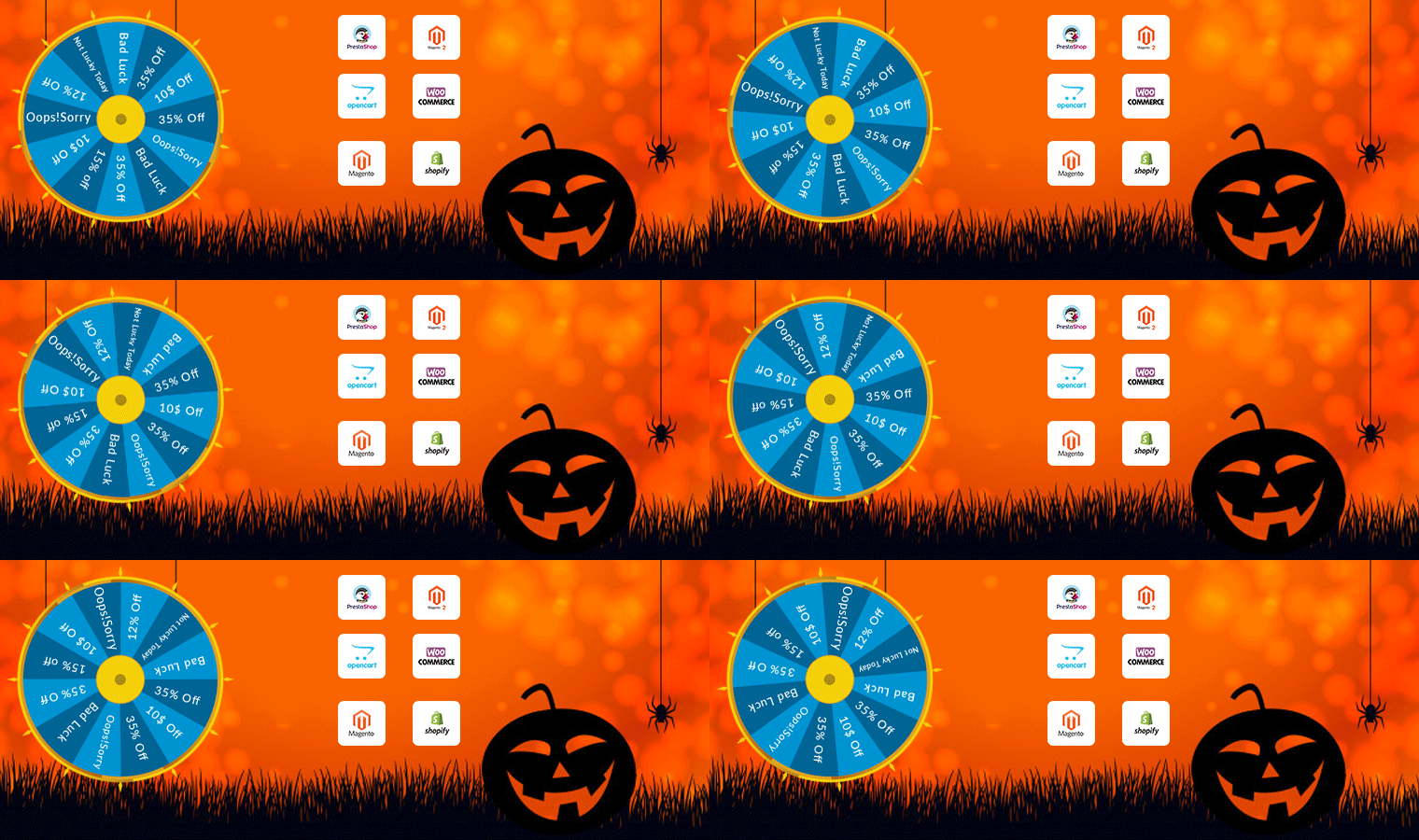
Increase customer engagement on your website by adding a Gamification element. Popup draws the attention of your customers towards the eye-catching spin-win wheel module and engages them in a fun activity.
Along with user engagement, this plugin can be a treat to your home page. It has several themes for every occasion and event, for example, Christmas, New Year, Halloween, and Cyber Monday themes for the holiday season. Visitors are asked to try their luck by spinning the wheel and grab some exciting offers. But, to complete the spin, a user needs to share their email address, which you can use for your eCommerce email marketing campaigns, and thus boost your conversions.
The module provides merchants with tons of customization ranging from designing the look of the popup to set up the time for the popup appearance. Click here to check out the Spin and Win fortune wheel module.
Available for:
PrestaShop, OpenCart, Magento, Magento 2, WooCommerce, and Shopify
2. Exit Pop-up
The next eCommerce Holiday planning idea is to add an Exit Popup in your digital commerce. It is not always used to show an offer. You can configure it as per your requirements based on what outcomes you want to achieve through it.
Exit popup appears when a customer leaves the browsing area or intends to exit the tab. You can make the pop-up as appealing as you can. Also, you can ask for feedback from your customers.
Using the exit pop-up module can reduce the bounce rate, increase customer engagement, and boosts conversions. During the holiday season, you can compel users to shop more from your eCommerce store by offering some exciting offers when they are about to leave.
All eCommerce stores look forward to repeating sales and to make it easier, Knowband has a range of plugins. Adding a Gift Card and Loyalty Point program will be a great holiday season idea.
3. Offer Loyalty Points
Encourage repeat purchases by rewarding your customers with loyalty points. Our Loyalty Points module ensures customer retention as well as customer acquisition. It lets you provide reward points to every new user who performs a sign-up on your store and triggers impulse buying, followed by more loyalty points on the successful purchases.
This marketing strategy converts visitors into potential buyers and makes them stick to your store in the long run. It also enhances brand loyalty to a great extent. You can set up some rules for users like offer loyalty points when customers share their feedback. It can also include offering loyalty points based on the total cart value, product quantity, product price, selected payment methods, etc.
These points can be used as a discount voucher on the checkout page. Click here to check out the Loyalty Point module.
Available for:
PrestaShop, OpenCart, Magento, and Magento 2 store
4. Gift the Product
Since you are setting up your store for the holiday season blast, you can attract visitors and upsell by giving gift products on a fixed amount of purchase.
There are some major advantages of giving gifts with purchase. It increases the average cart value, boosts conversion, and reduces the bounce rate on your store.
Gift the product is an amazing plugin and it can set your sales on fire. It is a sales strategy that attracts and converts the buyers. Refer to this blog that explains how you can use the Gift with Purchase campaign in B2C Marketing.
Available for:
PrestaShop and Opencart
Build Brand Awareness
5. Gift Card Module
While striking off the eCommerce holiday season checklist for customer retention and advance sales, consider selling personalized digital gift cards.
The Gift card module is a must-have plugin for holiday season sales, as it brings new customers to your store. Also, it saves your customer from sending awful gifts to their loved ones.
Other benefits of the Gift Card module are that it boosts brand awareness and makes digital gifting easy. Customers can send photo gift cards with custom messages.
Prestashop, Magento, and OpenCart eCommerce stores.
eCommerce Plugins to improve the shopping experience
When developing an eCommerce website, you have to make sure that the website is mobile responsive and keep users engaged for a while. Create a mobile app for your website or make the pages mobile responsive with the AMP module. You can also use the Progressive web app (PWA) plugin to make your digital commerce user-friendly.
6. Mobile App Builder
Mobile App Builder is not just a module for holiday season sales but it is for everyday user experience.
It lets you transform your eCommerce website into an Android and iOS Mobile App conveniently, without any requirement of coding or technical knowledge. The app will give a rich and user-friendly, experience to smartphone users.
Since users nowadays demand an app for an easy browsing experience, the Mobile App Builder module makes it the best fit to provide an amazing user experience.
The holiday season is coming close, now is the best time to introduce your mobile app and delight your users, and grab huge holiday sales.
Moreover, to achieve the best shopping experience, the Mobile App Builder offers easy customization, Social login, Fingerprint login, and OTP login. Also, it has WhatsApp live chat and Zopim Chat support. The real-time synchronization of the website into App is a bonus. Sell across the world with its multi-lingual support, multiple payment and shipping methods, etc.
We are currently running an exclusive offer for the PrestaShop website owners where they can get an additional 30% discount on the new purchase.
All you need to do is apply the coupon code “MOBI30” during the checkout.
Available for:
Prestashop, OpenCart, and Magento eCommerce stores
7. Reduce site load time with AMP
Our AMP module tackles the slow loading of your website on mobile devices and increases the page load speed to a great extent. When website traffic is at its peak in the holiday season, the website speed may get affected.
Thus, the AMP module, ensures that your mobile users do not find any troublesome experience with your website and are offered a faster and smoother loading.
Also, faster loading not only helps you reduce the bounce rate but also benefits in improved mobile rankings on the search engine.
Talking about its features, you can enable the AMP functionality for multiple pages on your website like the Home page, Category page, Product page, etc. You can also customize these pages as per your requirements.
A Progressive web app provides App like experience when a customer explores the website on a mobile browser. In the holiday season, eCommerce receives a lot of attention, and to keep your customers engaged, you have to provide a responsive interface. PWA makes the store more interactive and user-friendly.
Even with no internet, the website will display the products and loads the pages using saved caches. PWA is smooth, lightweight, and fast loading. Convert your website into a PWA with KnowBand’s Progressive web app builder without any coding knowledge.
A responsive website is engaging and has the potential to convert your visitors into customers and they will spend more time. Provide an awesome user experience to your customers when they visit your store for holiday shopping.
Being an eCommerce store owner, you must provide your customers with a hassle-free checkout experience this holiday season. Unlike the multi-step checkout process, it displays all the checkout elements on a single page and reduces the checkout friction.
To make the checkout path convenient for customers, our One Page Checkout offers Social Login, Guest Checkout, Inline Validation, Google Auto-address fill, and supports nearly all the payment methods and shipping services. A long and complicated checkout shackles the shopping experience which eventually results in cart abandonment.
The Prestashop One Page Checkout is our best seller extension. It has 10000+ downloads on the PrestaShop Addon store while 12000+ downloads on the KnowBand store.
Find the complete features and benefits of the One Page checkout module for the respective platforms:
The Abandoned Cart module helps you recover your lost sales by sending regular follow-up emails to the abandoned carters. With so many competitors, there are hundreds of choices available and many users leave the orders in their cart. While planning for the holiday season, prepare your store to track the user behavior for cart abandonment.
The module reminds users about incomplete purchases and converts them into customers by including exclusive offers in your emails and on a reminder pop-up.
You can send serial emails as reminders and if not sure how to write an abandoned cart email, refer to our guide.
The Abandoned Cart module can boost your conversions significantly.
Are you prepared for managing the order returns? Since the holiday season captures a huge number of orders, there will be returns for sure. Use a return manager to prepare online store for holiday Season. Our Return Manager module ensures that you do not lose out on customers due to a poor return process.
The Return Manager module helps you manage your eCommerce returns conveniently and enhances customer loyalty by making the return process way too easy for the customers.
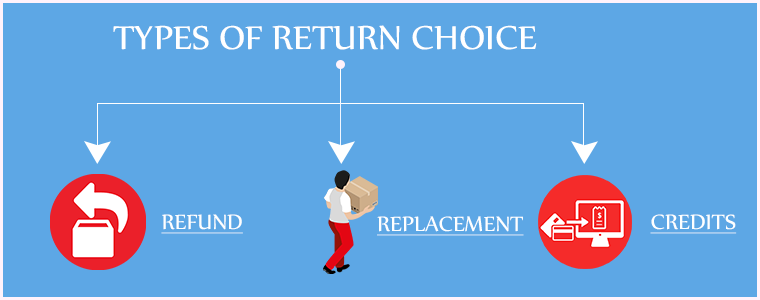
The module provides 3 return choices to the customers in the form of Credits, Refund, and Replacement, and allows them to highlight the defect by uploading the image of the defective/damaged product. One interesting feature of the module is that the admin can create the return request on the customer’s behalf.
PrestaShop Booking and Rental system addon provides your customers with a hassle-free online booking experience and makes it a simple task for the merchants to manage their online bookings.
This PrestaShop addon offers an appointment booking facility, hotel booking facility, and rental booking facility. It lets you adjust your booking days and time slots as per the availability, and you can adjust the price for different days and timing. There is much more it offers for every booking type.
If you have a costume rental business then this Halloween, manage your orders with KnowBand’s Booking and Rental system plugin.
If you wish to transform your online booking PrestaShop website into a mobile app, you can look out for PrestaShop Booking and Rental Mobile App.
13. Product Customization
Consumers are increasingly demanding a customized shopping experience from their favorite brands. Delivering an amazing customer experience that can help you grow sales this Christmas season requires a strong customer data management system and personalization tools.
Personalization benefits have also made their way into the product experience. Customization allows online consumers to create more considerate gifts, which is a product feature that is projected to grow in popularity over time. It’s a brilliant and memorable method to please customers to have a pleasant interface that allows them to customize a product online.
Customers may choose the appropriate printing options for their items with KnowBand’s Product Customizer.
Available for:
Opencart and PrestaShop eCommerce store
14. Multi-vendor marketplace
Earn extra cash this holiday season and make money while you sleep. You can introduce your marketplace website and allow vendors to sell on it. A marketplace runs on various commission models like membership fees, commission model, and subscription plans, etc.
KnowBand’s multivendor marketplace provides major two revenue options. The store manager can create different membership plans. Also, they can charge a commission on products sold.
It has several facilities for the admin and seller of the marketplace. Convert your website into a multi-vendor marketplace like Amazon or ETSY. Whether you are a new or an experienced merchant, you can always look forward to expanding your services.
Available for:
PrestaShop, Magento, Magento 2, and OpenCart eCommerce
Modules to send stock alerts
15. Web Push Notifications
Notifications and stock alerts can drive your customer’s psychology and trigger impulse buying. This holiday season, notify your customers about the new arrivals, price drops, various product statuses, and abandoned cart details.
Knowband’s Web Push Notifications module lets merchants schedule the alerts for their users about product availability with push notifications. For each of them, the user can decide whether they want to receive updates regarding them.
Moreover, you can customize the welcome popup in the holiday season theme that shows the request message for notification approval.
Many customers visit multiple stores to compare product prices. and You can compel the Customer to Return to your Store with the Back in Stock Module. The Back-in-stock module allows the eCommerce store owners to inform the customers about the re-stocked products.
It sends a push notification or an email to registered customers about the product which is back in stock. The customers can opt to get notified when the product of their interest comes back in stock.
You can find the back in Stock Module for your Prestashop and Magento eCommerce store on our Knowband Shop.
The user can refer your store to his/her friends, family, relatives, etc. by sharing with them the affiliate link or the referral code. In addition, they can send it over email and also share the link on social media directly from their affiliate account.
You can assign the commission to the affiliate partner for every new signup via their referral and also provide incentives when the referred user places an order. The commission rate can be set under the configurations of the module. Check out
Wrap up: That’s it. Get your desired module before it gets too late to leave an impact on your holiday sales. One thing is for sure: The online commerce sales on holiday season 2021 will increase and if you don’t have an online presence for your business, you need to get started.
Plan out your goal, remain updated with trends, and use new technologies.
Here are some helpful resources to get you started:
What is the best way to start an online store?
The most effective eCommerce platforms
How to optimize the product page?
If you have to need eCommerce assistance, you can drop a mail to us at support@knowband.com
A great customer support system can reinforce the teams working to achieve respective goals in a company. To fulfill the demands of the customer and improve customer experience, strategic planning, support tools, and a fully dedicated team play a significant role.
The information collected from the user can be implemented to improve customer service by making reasonable policies that can help the company grow and flourish your PrestaShop customer support.
Customer support is an indicator of customer repurchase and loyalty. Customer satisfaction assures you that the customer will be willing to purchase from you in the future.
In a marketplace where companies are competing to grab more customers, a customer support system can back you up. A company with versed customer services can sustain longer and can provide outstanding customer experience.
There are some amazing modules that have been developed by the Knowband team to help you with customer support management and in improvising customer experience on your PrestaShop store.
1. RMA to manage returns and canceled orders
I am putting Return Manager Addon first on the list because sellers find it hectic and fail to manage the return or canceled orders. Prestashop RMA will help you manage the returns easily as it is fully configured and you can track the return orders from the backend of the module.
Store admin can see various choices for reacting to the return if the customer claims that the item arrived damaged or does not fit the listing description. Also, the customer can upload the image of the faulty product with a reason or add one if it does not match the listed description. This will hopefully reduce your tension of order return management.
2. Deskoid Helpdesk system for customer service
The Deskoid Helpdesk system provides a unified customer experience which makes it easier for the customers to shop from your Prestashop online store. The Prestashop Deskoid Helpdesk add-on combines the store with a helpdesk ticket system.
The admin will provide an interface with the aid where clients will contact the support team for any query or problem and it shows the message thread inside the message block hence they can also see old tickets.
3. Facebook Messenger – Live Chat Support Module
Half of the world’s population is using mobile phones and most of them are on social media platforms. The Social Messenger module can be used by PrestaShop store admin for live chat support to enhance the customer experience. It helps customers to connect using their personal Facebook messenger account with the store owners.
The administrator will set the look and feel settings for the icon and window of the social messenger. Live chat support can boost the conversion rate and customer acquisition.
Final Thought:
Customer services are a considerable stream to spend your time and money if you own an eCommerce company. To provide better customer services you should have a live desktop chat support, easy return policy and management system, contact forums or you can provide customer care calling services.
Customer satisfaction and UX plays an essential role in an eCommerce for business growth and productivity. With 24×7 customer support channels show your customer that you care.
Prestashop One Page Checkout Module is the solution to all your conversion issues. If you are facing a lot of cart abandonment on your PrestaShop store it can be because of the lengthy and boring checkout page. Prestashop One Page Checkout v7.0.1, the new version is offering some time-saving features which will reduce checkout time and enhance the customer experience.
The upcoming holiday season can help you overcome the losses you have faced during the COVID-19 outbreak. You can raise your sales with various modules available on the PrestaShop store. The most important of all is the PrestaShop Quick Checkout Page module. It is necessary to replace the conventional multi-page checkout with PrestaShop One Page Checkout. An optimized checkout page for your PrestaShop store will reduce the bounce rate and helps to boost conversions.
What is new in Knowband’s PrestaShop One Page Checkout
We keep updating our best seller PrestaShop One Page Checkout module. It helps sellers boosting conversion and reducing abandoned carts during the holiday season sale.
If you want to know how this checkout module works, give this blog a read. PrestaShop One Page checkout is incorporated with new features:
(New) Customers can Choose Profile type:
This is a new feature added in the PrestaShop One Page Checkout module. Now it allows customers to select a profile type as an individual, or business. This helps the owner in running personalized marketing campaigns. It also lets the owner decide what fields are mandatory for each profile type. In addition, the owner can display the mandatory or some of the fields on the invoice too.
(New) Redirect the Customer to Checkout Page Instead of Cart
With the previous version of PrestaShop One Page Checkout, when a customer hits the call-to-action button on the product page it redirects them to the cart. But with a new feature added, PrestaShop store admin can allow the consumer to jump to the checkout page directly. It will save them from taking extra effort.
(New) Use Payment Address Name for Registration
Prestashop store admin can allow customers to Use Payment Address Name for Registration. Earlier the delivery address was the only option that was used as default registration details. But from now on, if the admin wants he can enable the setting on PrestaShop One Page checkout to use the payment address name for registration.
Checkout features you must not forget about when deciding on your marketing campaigns during holidays
The user interface of One Page Checkout can cast spells on your customers and will do magic to stop them from leaving the website. The PrestaShop Quick One Page Checkout gives you appealing layout options, various login choices like guest checkout, social login with Facebook and Google+, multiple Payment and delivery choices, and what not!
Offer Free Shipping and increase average cart value:
Asking them to shop more with a popup not always works. Besides, you can offer free shipping over a definite amount and they will grab the chance without giving a second thought. Free shipping is the most compelling thing out there.
The store owner can add a free shipping bar on the top of the One Page Checkout Page.
Improve engagement with its simple and sleek UI:
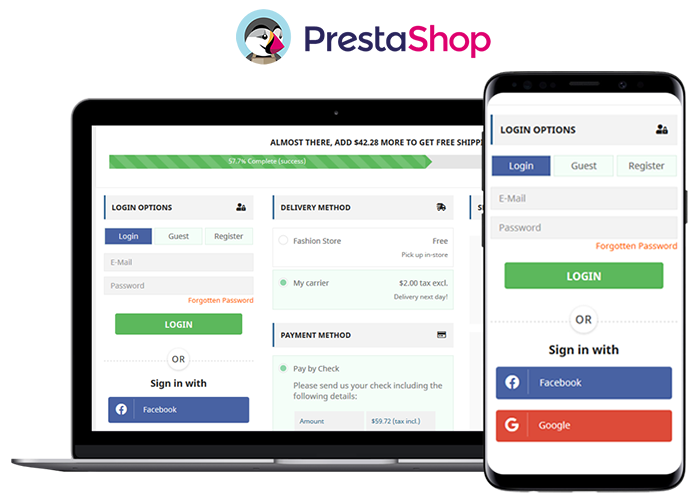
The simple and riveting user interface of the checkout page increases conversions. It helps to convert your visitors into customers with features like guest checkout and social login. All the required fields appear on a single page. No more waiting or jumping pages! Prestashop One Page Checkout is mobile responsive.
Ship-to-pay:
The responsive One Page Checkout has functionality for your PrestaShop store which lets the store owner set the payment mode for available delivery choices. If you don’t want to accept bank checks for fashion store delivery mode then you can disable the service.
Highly Recommended Modules with One Page Checkout
There are many PrestaShop modules available in the market which can fit well into your store. I am going to recommend you two super engrossing modules which are compatible with One Page Supercheckout on your PrestaShop store.
Store Locator and Pick up
The hyperlocal marketplace is the new trend in eCommerce. Prestashop Store Locator and Pickup Module incorporate website delivery features in-store and displays positions in physical stores using Google Maps.
Cash On Delivery with Fee
Offer Cash on Delivery with Fee to your customers on PrestaShop Store. Integrating Cash on Delivery with Fee module along with PrestaShop One Page Checkout can gain the trust and loyalty of a customer. Remove the barrier of secured payment which is a major concern for many. Click here to know more about Cash On Delivery with Fee module for the PrestaShop store.
We have produces a listicle on compatible modules with PrestaShop One Page Checkout, click here to explore.
To wrap up
I have always said that the checkout page is most important when it comes to conversion rates. Replace the existing checkout page with PrestaShop One Page Checkout and you can observe the change by yourself. Prestashop One Page Checkout with these new features can help you grow your business and earn loyal customers. What are you waiting for?
You can visit the Knowband store and check on the modules available for boosting holiday season sales.
When exploring your Instagram or Facebook, you always see feeds that are of interest. Google’s discover feed also shows you the content which you like and would like to spend time on. Naturally, this makes you feel exclusive, and you spend more time without keeping the time track.
Can you give the same experience to your customers while shopping? Ecommerce brands like Myntra or Amazon try to target their inactive leads with personalized email marketing. Giving your customer a personalized shopping experience in this competitive environment could be the right plan to survive in a long race.
Understand the shopping journey of buyers with data and use it well for customer experience personalization. With that, customers who get exclusive treatment will do word-of-mouth marketing.
As an eCommerce store owner, you might have given thought to this. But, you may struggle with How to do it?
Know your customer personally
When you are spending a lot of time and money on focused target marketing, you just don’t need a customer who will make a one-time purchase but your business demands a loyal one. For target marketing, you can consider gathering demographic and psychographic details from a customer. The demographic information can be collected from registration forms but for psychographic information you need more data. To get the details like the interests, values, profession, and lifestyle, you can add custom fields to your registration page.
Proving your customer with loyalty points or rewards at every step of the form filling process will encourage them to fill it. This way, you can get more relevant information for future marketing and product personalization.
You can always ask for:
Their first name
Birthday
products they’re interested in
A preferred channel of communication
Some might like receiving emails but in a limited number while other millennials prefer receiving an SMS just after the purchase is made. It is good to ask the preferred channel of communication for targeted marketing. You can even ask for their interests and genre if a person is buying a book from your store.
A large number of people have no issues if a company spoof into the customer’s information which can provide them with a wow experience. From a report, it has been found that 76% of customers expect companies to understand their demands and requirements. So, people like getting a personalized experience, and it is now a trend that can be followed by an eCommerce store owner to compete with others in the market. Personalization can lead to impulsive buying.
Better to communicate with your customers
Remind your customers about the products they liked to buy or visited but did not make the purchase. You can send a push notification for back-in-stock products. You can ask them to look into their wishlist to reduce the abandoned cart.
It is crucial to choose the right means of communication for interacting with your customer. The selection of a communication channel should be based on the data you have collected. Customers often receive promotional emails and notifications which grab their attention and make them shop more.
Putting efforts in the right direction can help you boost conversion rates and customer retention. Millennials prefer texting overcall. You can use a chat app to provide a solution to their queries. This will be a great deal to give them more customer experience personalization.
Effective use of data for persona
You have the data in your system and what a waste if you are not using it well. Your system knows your customer better than you do.
Have you ever been in a situation when you called a person with the wrong name? This happened to me once, and I never want that to happen again. It instantly loses trust in a relationship. Send emails or greet them in-store by calling their name. This builds up an interactive connection between you and your customer.
You can take the help of segment email marketing by categorizing your customers according to their psychographic data
Understand the need of your customer as per their geographic location. Implement geolocation-based marketing strategies. Add a store locator to your website. In-store shopping is still a trend in millennials.
PrestaShop modules you should not miss on
Do you know that you can enhance the personalized customer experience by adding extensions to it?
It is challenging to keep your customers at a checkout page or the product page when they are doing two things at a time. You must have some striking, captivating website features which will keep them attentive and focused on their purchase. Why not with personalized features that you can add with these modules?
Collect more information
With PrestaShop Custom Registration Fields, the owner of the PrestaShop store will collect information about the customer by adding custom fields to the registration form of the website. Additional Order Forms/Field Manager addon for PrestaShop is another module that can help you gather more information. Custom fields on the order form can be generated with this PrestaShop Additional Order Forms Manager without making any adjustments to the code on the web page.
How to use it?
You can ask your customer to fill up the details which can be optional. You can add this field to the registration form. This way you can collect information about birthdays, anniversaries, or any of the interests which can help you promote your products. You can send a personalized message on their birthday with a greeting or any discount coupon. Store owners can use additional information to develop their services and eventually make more profit from their company.
Celebrate birthdays or anniversaries
You can give discount vouchers or coupons to your customers on their Birthday. Birthday Coupon -PrestaShop addon is a module that can inspire your customers to shop from your store on their birthdays.
How to use it?
You can send an email with a personalized message on their special day. This email will include the birthday coupon or discount voucher. The voucher sent through the mail will be valid for a limited time. The addon comes with multiple default templates. You can use it for various occasions.
Make them loyal customers
It is a dream for brands to have loyal customers. From research, it is found that about 30% of people like to buy the same brand and around 40% choose the same brand if they are offering personalized products. For customer retention and conversions, you can give loyalty points or reward points to your customers.
The PrestaShop Reward Points addon incorporates the reward points feature into your PrestaShop store and allows the admin to offer the rewards point to online shoppers every time they purchase items.
How to use it?
Store owners can give reward points to the customer after every purchase they do. This comes with a set of terms and conditions. The module helps the admin to add multiple rules for redeeming those points. Customers can redeem those points at some point of purchase which will keep them engaged in your store.
There are some rules like Cart Rule, Product Rule, and Behaviour rule for loyalty points. Store owners can offer loyalty points on a specific cart amount, product quantity, based on the payment method, particular product or category, shipping services, etc. It can be given to new customers while placing their first order.
Display recently viewed items
Automatic Related Products addon for the PrestaShop store can help you show the relevant products to your customers. This feature can be added to multiple pages of your eCommerce store.
How to use it?
The feature will show related products to your customers, and this will motivate them to see more and more on your eCommerce store. If they are not satisfied with the one product, they can see more until they get the one.
It has a simple configuration, and the admin can ask customers to provide more information about the product. If they like the product or not? If they need any modifications? By collecting additional customer details, the sellers can better represent them. As a result, online shoppers will have the same user experience with this PrestaShop Additional Field Module on the Product tab.
Attractive email subscription module
Spin And Win – Entry, Exit, and Email Subscription Popup by PrestaShop have a gamified interactive look. It attracts the buyer’s attention and allows them to win offers like discount coupons or free shipping. This is one of the best sellers of PrestaShop and a fantastic module to collect the email addresses of your customer.
How to use it?
You can Get Personal in Email Marketing and send personalized Emails using the information which is provided by the customers. The emails should be sent based on customer behavior. You can go for a personal recommendation to offer a personalized customer experience to your customer. Try to re-engage your leads with promotional messages or pop-up notifications. Email marketing is a free and reliable option to give a customer personalization experience to users.
Greet your customer
Greetings are most valuable when you are building a relationship. Customer-trader relationship is most important when it comes to business. You can use a Better thank you page module for your PrestaShop store.
How to use it?
Add a Better thank you page module to your PrestaShop store and use it to show a pop-up when the customer is leaving your store or after the successful purchase. Also, you can add customized banners or discount coupons for their next purchase. This way, it can help you boost customer retention and make your customer satisfied.
Final thoughts
Increase your sale by providing a personalized shopping experience to your customers. In this era of millennials, Personalisation is the only way to attract a loyal customer base to your store. Create Special Campaigns Based on user behavior and make them feel unique. They don’t like to be treated as a number but an individual. So, It’s time to boost your sales with a customer experience by providing personalization.







![New Features Added to PrestaShop Return Manager (RMA) Addon [Version 3.0.8 Released]](https://www.knowband.com/blog/wp-content/uploads/2021/04/New-Features-Added-to-PrestaShop-Return-Manager-Addon.jpg)