In the fast-paced world of eCommerce, your product descriptions play a critical role in converting casual browsers into paying customers. For PrestaShop store owners, crafting compelling product descriptions can make the difference between a sale and a missed opportunity. Whether you are new to the platform or looking to optimize your listings, this article will outline easy strategies for writing product descriptions that effectively drive sales.
1. Understand Your Audience:
The foundation of any effective product description is knowing who you’re writing for. Before putting words on the page, take time to define your target audience. Are they budget-conscious shoppers, tech-savvy consumers, or trend-following fashion enthusiasts? When you know your audience, you can tailor your language and tone to resonate with them.
For instance, if you’re targeting a young, fashion-forward crowd, your descriptions can be casual and fun, while a more professional audience may respond better to formal language and detailed specifications.
2. Focus on Benefits Over Features:
While listing product features is essential, it’s the benefits that truly sell. Shoppers want to know how a product will improve their lives, not just what it does. For each feature you list, think about how it benefits the customer. Will it save them time, increase comfort, or enhance their appearance?
For example, instead of writing “This coat has a waterproof exterior,” you can say, “Stay dry in any weather with this coat’s waterproof exterior, ensuring comfort no matter the conditions.”
3. Use Engaging and Clear Language:
Clarity is key when writing product descriptions. Avoid technical jargon unless your audience is highly specialized. Furthermore, you should always use short sentences, simple words, and a conversational tone that makes it easy for customers to understand. Engaging language doesn’t have to be complicated — it just needs to communicate the essential information while keeping the reader interested.
At Knowband, we specialize in offering top-notch eCommerce extensions for platforms like PrestaShop, Opencart, WooCommerce, and Magento 2. Our extensions not only enhance the functionality of your store but also allow you to implement strategies like these more efficiently.
4. Tell a Story:
Storytelling is a powerful tool in marketing. When possible, incorporate a story into your product description that helps the customer imagine themselves using the product. This could be as simple as describing a scenario in which the product solves a problem or improves their experience.
For example, if you’re selling a pair of running shoes, you might write, “Imagine lacing up these ultra-lightweight shoes and hitting the pavement, feeling the breeze as the cushioned soles protect your feet with every step.”
5. Incorporate Keywords for SEO:
Search engine optimization (SEO) is essential for driving organic traffic to your PrestaShop store. Including relevant keywords in your product descriptions helps improve your ranking on search engines, making it easier for potential customers to find you. Focus on long-tail keywords that match the product and its use, such as “lightweight running shoes for women” rather than just “running shoes.”
While you want to optimize for SEO, remember not to stuff your descriptions with keywords — always prioritize readability and flow.
6. Use Bullet Points for Easy Scanning:
Many customers don’t read product descriptions word-for-word. Instead, they scan for key information. Using bullet points is an effective way to present features and benefits clearly and concisely. Bullet points help break up text, making it easier for shoppers to pick out the information they need quickly.
For example, if you’re selling a laptop, you could list its key features in a bullet format:
8GB RAM for smooth multitasking
256GB SSD for faster boot times
15.6” Full HD display for vibrant visuals
7. Create a Sense of Urgency:
Sometimes, customers need a little push to make a purchase decision. Creating a sense of urgency in your product descriptions can encourage them to act quickly. Phrases like “Limited stock available,” “Only a few left,” or “Special price ends soon” can motivate customers to buy before they miss out.
At Knowband, we provide PrestaShop store owners with extensions like abandoned cart recovery tools, which allow you to follow up with customers who didn’t complete their purchases. With the right tools, you can recapture sales and boost your store’s performance.
8. Leverage Social Proof:
Social proof, such as customer reviews, user-generated content, and ratings, can significantly influence a customer’s buying decision. In your product descriptions, highlight positive feedback from customers to build trust and encourage others to buy. For example, include a quote from a satisfied customer or mention how many people have already purchased the product.
9. Include a Call-to-Action (CTA):
After highlighting the product’s benefits and features, guide the customer toward the next step. CTAs like “Order now,” “Add to cart,” or “Get yours today” can prompt immediate action and drive more conversions.
A CTA turns a well-crafted product description into a powerful sales tool by creating a clear path for the customer to follow.
Knowband’s Prestashop Plugins
Enhance your PrestaShop store with Knowband’s powerful plugins, offering features like one-page checkout, abandoned cart, mobile app builder, and more for seamless e-commerce management.
Writing product descriptions that sell isn’t about filling up space with words — it’s about crafting compelling, clear, and concise messages that address your customers’ needs. By focusing on benefits, using engaging language, and optimizing for SEO, you can create descriptions that not only inform but also persuade.
At Knowband, we’re here to help PrestaShop store owners succeed. With our range of eCommerce extensions, including tools for SEO optimization, cart recovery, and more, you can take your product listings and your entire store to the next level. Explore our offerings today and see how we can assist in making your PrestaShop store a top performer.
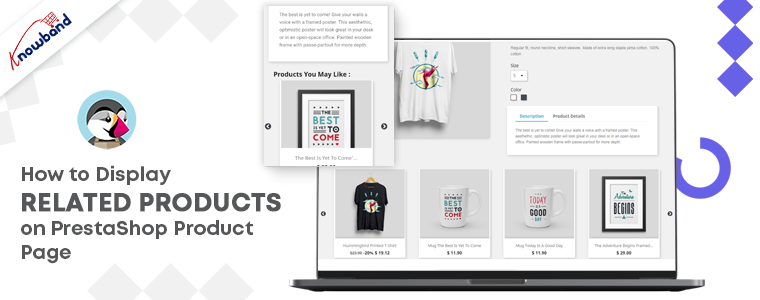
Looking for the finest ways to upsell or cross-sell to customers? Add related products on your PrestaShop website pages. It’s not simply a nice-to-have feature for your e-commerce site; it’s an essential aspect of the sales process. To make your business marketing strategy work well, you can give a shot to upsell and cross-sell. This technique works for every business, be it a small company or an eCommerce like Amazon. If you are not sure, how to display related products on the product page, shopping cart, or various website pages, I will recommend you to add the PrestaShop Automatic Related Product Module to your PrestaShop storefront.
Discover about PrestaShop Automatic related product module
There are several methods for displaying related products on multiple pages. The PrestaShop-related products module can be configured by the store administrator to meet the needs.
Features of PrestaShop Automatic Related Product addon:
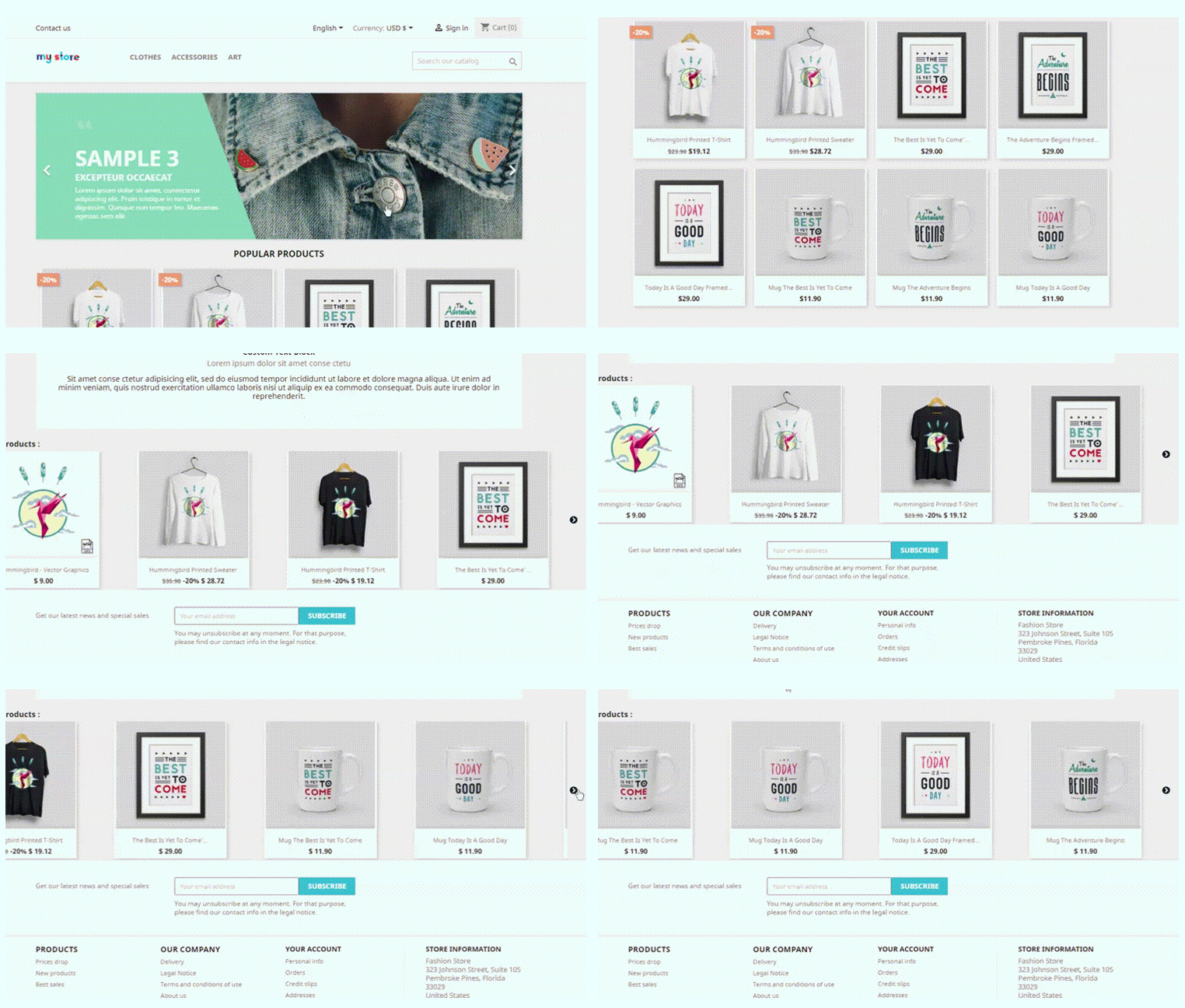
With the aid of PrestaShop Automatic Related Products module, display related products automatically on:
Homepage
Product pages
Category pages
Cart pages
Manufacturer page
Purchase confirmation pages
Store owners can display the most relevant products and can only include available products.
The PrestaShop-related products module allows customizing the title of the related product block in a variety of languages.
Easy positioning of the related products. Show related products in the left column, right column, or at the bottom of the page.
The store manager can choose how to display the related products. Showcase the most popular products, best sellers, new items, or by using user history.
The PrestaShop automatic related product addon allows the manager to show a list of specific products on the related product list.
There is an attribute, keyword filter, that can be specified for particular pages.
Set the maximum number of linked products that can be displayed on various pages.
The PrestaShop-related products module allows specifying the priority mechanism to display related products.
If no related products exist for the first priority requirement, the module will go on to the next level of priority.
How store owners get benefited by showing Recommended Products?
PrestaShop Automatic related product addon has several advantages.
Cross-sell by displaying related products
On the homepage, product pages, category pages, cart pages, manufacturer sites, and purchase confirmation pages; this related product extension displays the related items. Showing a mobile cover when a customer is buying a new mobile phone increases the chances of purchase. This is how cross-selling works.
Several filters to achieve the relevancy
Display only available and in-stock products as related items. Select the method for displaying related products, such as
Top-visited products
Bestsellers
New items
Displaying relevant goods based on user history
Hide out-of-stock from recommended products
Showing a product that is ‘out of stock’ will create a negative impact on your prospect. To save yourself from this situation, you can now hide out-of-stock items from the related product list. After all, customer experience is your priority.
PrestaShop related product module reduce bounce rate
This may happen that a customer does not find the right product while exploring your website. They even get confused about what is best to have. Show related products on the product page to help them find what they were looking for.
Increase average cart value on your PrestaShop store
Customers can buy more things if they look at the products that are similar to the ones they have picked. To improve sales, the administrator can show excellent identical products.
Mobile responsive and compatibility check
The module is responsive to all the devices like mobile phones, tablets, and desktops. Every user can see related products in every browser automatically. The PrestaShoprelated product module is highly compatible with all other Prestashop themes. Multistore compatibility, multi-lingual compatibility, and SSL compatibility are some of the plus points.
Conclusion: It is easy to install and can be a major game-changer if used as a cross-selling tool. It emphasizes the look of the product page and other website pages. Display related products anywhere on the website. To the left, right, or on the bottom of the website page. The PrestaShop Related Product addon maximizes the engagement rate on your store and reduces bounce rate.
So, how long are you going to wait? Now is the time to get this cross-selling solution and take your earnings to the next level.
PrestaShop is an open-source e-commerce platform that allows users to create their online store with ease. KnowBand develops eCommerce extensions for the PrestaShop platform that allows the PrestaShop platform users to implement new features to their online store to improve the customer experience at their online store.
Velocity has been developing eCommerce plugins under the brand name KnowBand for over ten years and has over 80 PrestaShop plugins. Since the beginning, Knowband has been assigned the SuperHero Support Badge, which they have successfully maintained. PrestaShop is a powerful online store with cutting-edge features and a large selection of themes and models.
Who becomes a Gold Partner Agency with PrestaShop?
Regional and foreign organizations that have received a higher number of points for their dedication and contribution are known as gold partners.
KnowBand- a brand under Velocity is PrestaShop Gold Partner Agency
Knowband PrestaShop Agency is a PrestaShop accredited gold company that serves global clients with personalized PrestaShop e-commerce production services. Prestashop also designated some of our modules as favorite, One Page Checkout, Social Login, Mobile App Builder, Spin and Win and the list goes on. We have served 10000+ clients and have empowered 12000 websites.
Top Selling Modules of KnowBand (Gold Partner) on PrestaShop Addon Store
Our team of skilled and experienced developers has been working on PrestaShop modules for more than 8 years. Several modules have crossed 1000+ downloads and many are among the PrestaShop favorite’s list. Also, KnowBand has completed more than 200 PrestaShop projects on Addon Store.
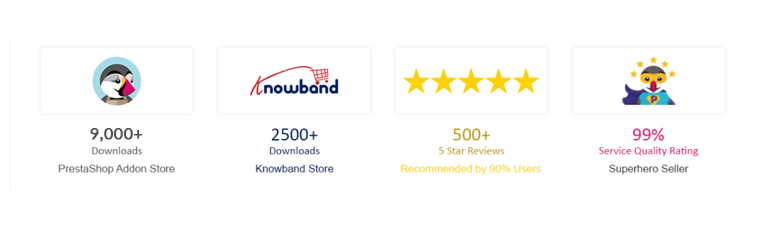
KnowBand’s One Page Checkout is a feature-rich module that gives PrestaShop merchants a plethora of choices for optimizing their checkout page. It has over 9000+ downloads on the PrestaShop Addon store. This module is multi-lingual compatible and is awarded PrestaShop Best Seller Badge.
The Marketplace module allows PrestaShop store owner to transform their single-vendor website into a Multi-vendor Marketplace. It comes with a one-click installation. It has over 1700 downloads on the PrestaShop Addon store.
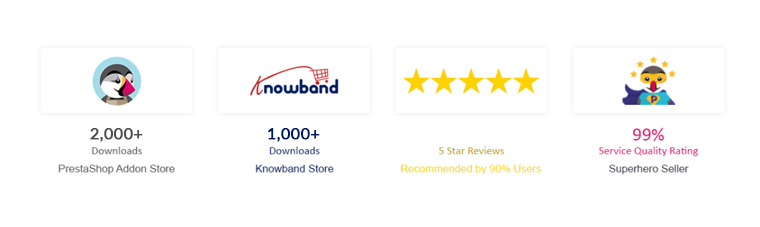
Another best seller module on PrestaShop Addon store in Abandoned Cart Recovery module. It has 2000+ downloads till now and lets the sellers send emails, push notifications, and reminder emails to the customers.
Return Manager has been downloaded 1450 times from the PrestaShop addon store. It helps the store owner manage all the product returns, order cancellations, and refunds on the PrestaShop store.
The subscription module, Spin, and Win is PrestaShop Favorite module and has been downloaded over 450 times. It has a gamification interface that adds a fun element to your website and increases customer engagement on your PrestaShop Store.
The Mobile App Builder Plugin helps the PrestaShop store owner to create their Mobile App for iOs and Android operating systems. It is addressed with PS Favorites and has over 400 downloads.
To give your customers a smooth and satisfying shopping experience, Ajax Cart+ helps you create a customized shopping cart on the PrestaShop store. The KnowBand’s PrestaShop Ajax Cart Module has 550+ downloads on the PrestaShop Addon store.
FB-Store integrator is another PrestaShop module that is famous and downloaded many a time on the PrestaShop Addon store. KnowBand developed this to connect the PrestaShop store with FB Fan Page and it synchronizes all the product data of the PrestaShop store with the FB product page.
Modules that enhances Mobile Experience
Our Prestashop Plugin Development services provide online stores with the features and competence they need. You can rely on us for one-of-a-kind and functionally smart plugins. KnowBand-PrestaShop Gold Partner Agency has developed some unique modules to enhance the user experience for mobile users.
· AMP- Accelerated Mobile Pages
The AMP addon developed by KnowBand- PrestaShop Gold Partner Agency speeds up the loading of web pages by reducing the time it takes for them to load. The PrestaShop AMP module enables AMP on a variety of websites, including the Home Page, Category Page, Product Page, and so on. It greatly lowers the bounce rate of your website.
Convert your eCommerce website into a PrestaShop PWA Mobile App and enable your mobile visitors to shop with ease. There is no reliance on Google Play or the Apple App Store. Start shopping after a quick PWA installation with just one tap.
The PrestaShop Mobile Login module enables the admin to have quick registration using a mobile phone number. Customers can log in via OTP received on their contact number. Password recovery is also possible by the ‘Forget Password’ link and customers can also login without providing an email address if the administrator permits it.
New and Innovative Solutions for PrestaShop store
Hyperlocal Marketplace
The hyperlocal marketplaces are trending after the Pandemic outbreak. The PrestaShop Hyperlocal Marketplace allows you to sell your product in a limited region and registered sellers can define their area of the transaction. For further information on PrestaShop Hyperlocal Marketplace, click here.
Delivery Boy Mobile App
The PrestaShop Delivery Boy App enables online store owners to have seamless delivery management. Using the module, the store owner can easily add a delivery boy app, assign orders, and monitor them. You can start your own delivery business and manage it easily with this application.
There are around 100 PrestaShop modules on KnowBand Store and 80+ available on PrestaShop Addon Marketplace.
Finally, Velocity has proved to be an ally for online retailers with over ten years of experience in eCommerce services. All the KnowBand modules One Time Payment modules with no hidden subscription fees. The module comes with lifetime validity and our expert team is always available to help you with any glitch.
Support:
You can reach out to us at support@knowband.com or drop us a comment below if you require any eCommerce support.
Big brands like Amazon offers an affiliate marketing program and people are earning thousands of dollars with referral and affiliate marketing. It is proven to be a good source of passive income these days.
You might have heard terms like ‘refer and earn’ and came across the links on YouTube videos or blogs dominating a specific category promoting a product. People are making money by influencing others through good content and captivating tactics.
What is Affiliate Marketing?
Affiliate marketing is an opportunity to make passive income. It can work well and do magic if you know how exactly it works. Affiliate marketing is a type of revenue sharing technique. There are many tools available for affiliate marketing. One of the affiliate marketing tools is the ‘Affiliate and Referral Program‘ for your PrestaShop Store.
A person registers himself with an existing product selling website and gets a link for promoting the product. If that link works well and the product gets sold with that particular link, the person who promoted it will get a cookie. Yes, he will get some amount of money on behalf of that purchase. Yay! This is how it works.
Knowband developed a perfect solution for PrestaShop eCommerce store owners, an affiliate marketing tool named PrestaShop Affiliate and Referral Program. What is PrestaShop Affiliate and Referral Program? How you can grow brand awareness and acquire new customers with this affiliate marketing tool? What are the main features of the PrestaShop Affiliate and Referral Program?
We’ll answer all those questions in this blog. If you are interested in affiliate marketing for your store then you must know what ‘Affiliate and Referral Program’ is offering.
Features of ‘Affiliate and Referral Program’- an affiliate marketing tool
1. Several types of referral
The affiliate marketing tool ‘Affiliate and Referral Program’ module allows the affiliate partners to invite new users through various means into your store. The affiliate partners can bring in new customers by sharing a referral code or a referral link with them.
Affiliate marketing and referral programs also allow the affiliate to generate voucher code. Besides that, affiliate partners can share the reference link on various social media platforms such as Twitter, Facebook, Pinterest, right from their affiliate account.
2. Defined referral rate for the affiliates
a global referral rate can be set by PrestaShop store admin for the affiliate partners for the user registration and the order placement.
3. Custom commission for each affiliate
Although the Affiliate marketing tool for PrestaShop the ‘Affiliate and Referral Program’ allows the store administrator to set a fixed global reference rate for the affiliate partners, they can customize this for every different affiliate.
4. A voucher for affiliates on registration
PrestaShop Affiliate Marketing Module allows traders to assign a coupon on the successful user registration of the affiliates. The store administrator can set the value of the voucher and offer it in the form of a fixed discount or a percentage basis. There’s also the option to define the total quantity of vouchers and the limit of vouchers per user.
5. Set validity for your referral program
The Affiliate marketing and Referral Marketing addon provide the option to run the specific referral program for a given time interval. If you define a time period, after the specified period, the reference code will get expire.
6. Keep an eye on registered affiliates
With the Affiliate and Referral Marketing module, you can insight into registered affiliates and look into the details under the ‘Affiliate Customer’ section.
7. Obtain details of the clients referred
“Referral Listing” displays details of the customers who have done the registration via the affiliate link.
8. Check the incentives the affiliates earn
In the “Commission History” tab, the PrestaShop Referral tool allows the store admin to view the incentives earned by the affiliate partners.
9. Check for payout requests from affiliates
The affiliate marketing and referral marketing module allow the affiliate partner to obtain their payout/commission in the form of a voucher or cash.
The affiliate customer must raise a request to withdraw the commission earned from his/her account, which will then be reflected in “Payout Requests.”
Benefits of Referral and Affiliate Marketing Tool
Affiliate marketing increases brand awareness
Increase your brand’s popularity by arranging a multi-level affiliate program in the eCommerce website store.
The program gives refer and earn opportunity
Offer your customers a unique earning opportunity by displaying on the website an option to register an affiliate.
Gather email subscribers
With more registration, you can get more email subscribers. The data can be further used for email marketing strategies. The Affiliate and Referral Program is a boon to the cost of advertising.
Improved conversion
When the referent makes a purchase using the voucher code you can drive more conversions and hence more sales. Giving the affiliates exciting incentives can encourage them to bring more customers to you.
Final Words: People are looking for sources to build up the capital and earn more. This is a chance for eCommerce store owners to bring new customers to their store with the ‘Refer and Earn’ program. Affiliate marketing and a referral program can help you grow your PrestaShop business to the next level. Knowband presents the ‘PrestaShop Affiliate and Referral Program’ addon which helps PrestaShop store owners build brand awareness and effectively increase their user base.
Creating an eCommerce store on Magento 2 is easy, simple, and affordable. Optimize store with some of its best and popular Magento 2 extensions to make it user friendly. A fully developed website that can provide customer satisfaction that increases conversion and reduce cart abandonment rate is all that an eCommerce merchant need.
Optimizing your web store pages related to product and checkout will help you boost conversion. Ensure that the visitor land to correct search results on your website. You will only get conversions if you deliver what you have promised. Consider the design, navigation, and product page, the main factors for website optimization which will lead to the result that is ‘purchase’.
I am going to tell you about some most popular Magento 2 extensions you should have for uplifting the sales.
1. Go smart with Magento 2 Mobile App builder
With the evolving technology, it is quite essential to keep up with the trend. There are 5.2billion mobile users in the world and the graph is predicted to go up by 7.22billion till 2023. Make your eCommerce Magento 2 store completely mobile responsive with the Mobile App builder plugin. The module turns the store into a customizable app and the new version has a lot to offer.
This Magento 2 extension allows the admin to edit the home page design and update the layout. This ensures greater customization and improved user experience for the users of the application. Hence these variables increase customer engagement.
2. Magento 2 One Page Checkout Extension to Boost Conversion
The rushed billing counter in a brick and mortar store drive away from the potential customers. This can happen on an online store if your checkout page is not optimized. Replace the long, boring checkout page with a Magento 2 extension, One Page Checkout. It gives you all the required functionality and super-smooth checkout experience to users.
Reduce checkout friction with Magento 2 One Page Checkout. It offers guest checkout and social login for the buyers who do not like to spend extra time in the registration process. A lot of alluring features like multiple payment and shipping choices and customizable layout are the features that make it the best extension for Magento 2 store.
3. Magento 2 Abandoned Cart Extension to Reduce Cart Abandonment
We have got a solution to all your problems and cart abandonment is the one every seller deals with. Abandoned Cart – Magento 2 Extension, helps the seller to keep the track of all the carts which are abandoned by the customer, and its statistics settings allow the admin to analyze the reasons for the same.
The auto-trigger email functionality is the best feature of the abandoned cart Magento 2 extension as it converts the clogged sales by recovering the carts. Reduce cart abandonment with the Abandoned cart plugin.
4. Magento 2 Return Manager Extension for flexible return management
Product return and cancellation takes place in massive number and to manage the returns, every eCommerce website owner needs a flexible management system. The Return Manager plugin also known as the RMA extension is a perfect plugin for this job. Disappointing the customers by not providing an easy return facility will discourage the customers and degrade your brand reputation.
5. Magento 2 Social Loginizer Extension allows quick sign up
5 out of 10 people do not like to fill up the registration form or like proceeding through an easy way like social login. Social Login only requires the email ID of the user and it synchronizes the information from the social media account of the user. The collected information can be used in personalized email marketing.
Magento 2 Social Loginiser extension comes with 12 social media platform options for easy login. It is compatible with One Page Checkout and helps customers to complete the sign-up process in a few clicks. Social login 12 in 1 Magento 2 extension encourages quick sign-up, captures more leads, and reduces cart abandonment.
Now you know how to uplift sales, reduce cart abandonment, and minimize the checkout friction. There are modules that are designed to increase user experience and built customer loyalty. The Review Reminder and Incentive extension is one that increases customer satisfaction.
The seller can offer Incentives to collect Product Reviews and Rating in Magento 2 stores. Giving customers a source of passive income can be beneficial. 92% of the visitors prefer reading the product reviews given by other customers to make the purchase decision.
7. Magento 2 Spin and Win Extension increases email subscribers
Add a fun game element to your store for gathering more email subscribers for the newsletter. Spin and Win – Magento 2 extension adds a gamified interface to the front end. This is a 3 in one plugin which can be used as an entry popup, exit popup, and email subscription module.
Attract more customers to your store with this customer engaging extension. It helps you increase the conversion rate and customer retention. There are many unique features that make it a part of the top 10 Magento 2 extension list.
8. Magento 2 Store Locator Extension allows the in-store pickup
By staying in their comfort zone and saving both time and energy, shoppers are happy shopping online. Many customers, however, believe in shopping online and picking the orders physically from the store. Online retailers should try to apply the BOPIS factor, i.e. Buy Online and Pick-up In-store, on their website.
The demand for one-click shopping and in-store pickup is increasing. The Store locator and pickup extension of the Magento 2 store detect the Geo-location of the customer to show the most appropriate recommendations for in-store pickup. Add Store Locator extension to Magento 2 store to keep up with the trend.
9. Magento 2 Affiliate and Referral program Extension
Give incentives or commission to the customers for new user registration, order placement, or both. Knowband developed an extension for the Magento 2 Affiliate and Referral Program that enables the customers to have an opportunity to become an affiliate and earn a profit. With this program, the owner can increase brand awareness at a low cost.
Affiliates have an opportunity to share vouchers with their referrals. These vouchers can be used during the checkout process. Customers are always looking for discounts and sellers are always looking to get more potential customers. Offering Incentives and making them an affiliate can solve both the purposes.
10. Magento 2 Multi-vendor Marketplace Extension
With such rising competition, keeping up with the market’s speed & trend is important. Today, the multi-vendor marketplace is attracting lots of vendors. The COVID 19 triggered the situation and now every brick and mortar is willing to sell online. This is the perfect time to convert your eCommerce Magento 2 website into a Multi-Seller Marketplace with a Multi-vendor Marketplace extension.
You will get a passive source of income and sellers will have a platform for their product to sell. The multi-vendor market place is a win-win idea booming these days. The extension has separate dashboards for admin and seller. Easy seller handling, product management, and many such features are incorporated into it. There are various types of online marketplaces and you can start your own with Multi-Vendor Marketplace Extension.
Wrapping up:
These are the top 10 extensions that can be a great fit for your Magento 2 store. I would recommend you to add them to your existing store for boosting sales, improving conversions, and enhancing user experience. To know more about these extensions, you can visit the Knowband store. All the Knowband extensions are designed to increase UX and are easy to configure.
Online shopping from eCommerce websites is now a very common way of shopping. With changing time, the online shopping and pick up in-store concept is gaining thrust. People often opt for home delivery but many are opting for in-store pickup too.
Shoppers love picking their orders from the brick and mortar store because they don’t want to wait for it to deliver which may sometimes kill the excitement if delayed. Buy online and In-store Pickup is the best option for the impatient ones.
You can start offering ‘Click and Collect’ services on your store by incorporating ‘Store Locator and Pickup Extension’ to your existing website. The module developed by Knowband is easy to install and configure. It is catered specially for the merchants who want to allow the in-store pickup to their customers.
How does buy online and pick up in-store works?
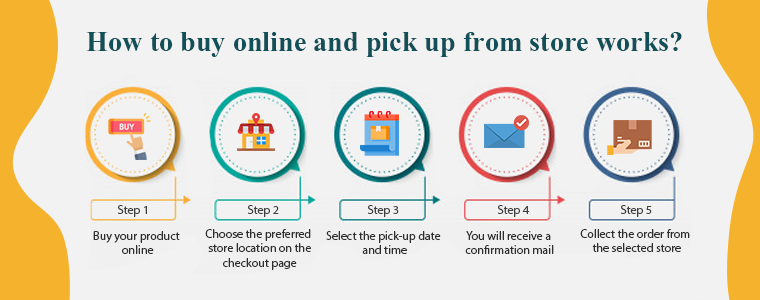
The process of Buy online and Pick up in-store (BOPIS) also known as click and collect is simple and you need to follow the steps mentioned below:
Step 1: Buy your product online
Buy your product online through the website or mobile app of the store you want to purchase from.
Step 2: Choose the preferred store location on the checkout page
After the first step, select the near-by store from which you want to collect the order.
Step 3: Select the pick-up date and time
Following that, you have to mention the date and time on which you will be collecting the order.
Step 4: You will receive a confirmation mail
After the successful checkout, you have to wait for the confirmation mail sent by the store admin.
Step 5: Collect the order from the selected store
In the meantime, the owner will pack your desired items for you.
Yay!! Now you can go and pick-up your order on the selected date.
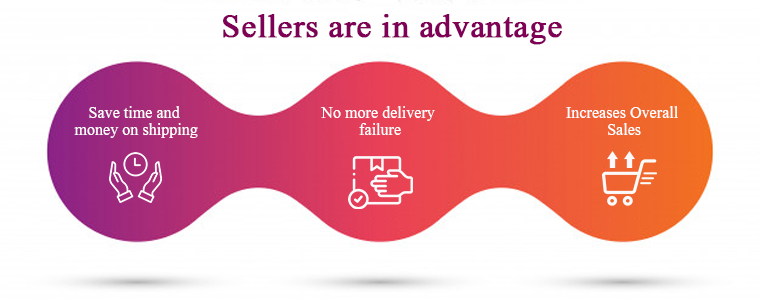
Sellers are in advantage with ‘Click and Collect’
Shoppers want access to products instantaneously. They always look forward to finding a product that is available for instant purchase and ‘Click and Collect’ will lend a helping hand to sellers who believe in customer satisfaction.
The store locator and pick-up module are integrated with Google locations and allow customers to pick up from the nearby store. Some of the major benefits of buy online and pick-up in-store are discussed here.
1. Save time and money on shipping
Higher shipping costs and delayed deliveries are a reason for cart abandonment. Click and collect service saves the shipping cost and encourages more customers to buy online. The merchant even saves money which is spent on the delivery channel.
No delivery boy is required, no transportation charges and moreover you save time.
2. No more delivery failure
Late delivery can affect customer satisfaction and it might cause you, potential customers. But, if a customer purchases the product online and collects it from the store, there won’t be any delay or delivery failure. They can buy online and pick up from the store at their convenience.
3. Increases Overall Sales
Even if a small customer base of your online shoppers converting to click and collect will uplift your sales. In reality, click-and-collect or BOPIS retailers reported an average sales growth of 20%.
• Balance In-Store Inventory
Leveraging BOPIS from nearby brick-and-mortar locations enables order fulfillment. Geolocation intelligence identifies the closest store with the item in stock for delivery after a customer places an order online. If the product in stock is not available in local stores, retailers can conveniently import the items from another store location that has the item available, speeding up the process.
• Increases Average Order Value
When a new customer arrives at your store, there are chances that he will purchase more products from your brick and mortar. This increases the average order value (AOV). Buy online and pick-up in-store hence increases overall sales.
4. Fewer Product Returns
Product returns are the problem faced by every merchant being it small or a big brand. Allowing customers to purchase online and collect the order after trial can help you reduce the number of returns. You can promote this on your online store to grab customer attention and believe me, this will yield favorable results.
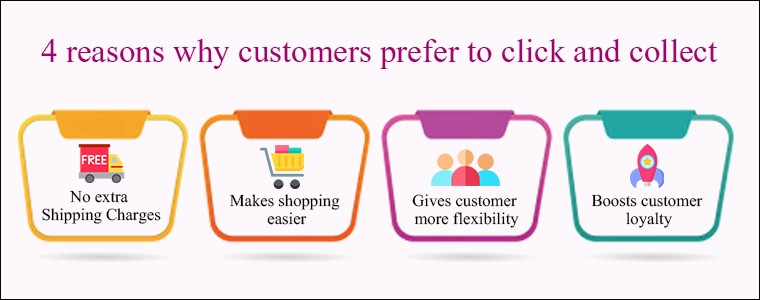
4 reasons why customers prefer Buy online and Pick up in-store
1. No extra Shipping Charges
Customers do not have to pay charges for delivery or fast shipping. They can buy online and pick-up the order at their convenience from the nearest store without any hassle.
2. Makes shopping easier
Many customers afraid to shop from new websites but a store with ‘buy online and pick up in-store’ which is present in their vicinity makes it easier. Let customers decide what they want, when they want it and how they get it. Offering freedom to purchase online, home delivery, or in-store pick-up is advantageous this is everything they are looking for. No late delivery and no more waiting!
3. Gives customer more flexibility
Comfort and convenience are what every human is catering for. Online shoppers want retailers to make purchasing their products and services simpler. Consumers want websites and retailers to work together better as well. An extension like store locator and pick up allows customers to shop any time in their comfort zone and allows them to pick up the order with their convenience. This is the flexibility every customer is looking out for.
4. Boosts customer loyalty
Customer loyalty is a result of customer satisfaction and overall customer journey while purchasing from your store. A business doesn’t work without potential buyers and the factors which can cause you customer opportunity are not an issue anymore.
Since store locator and pickup extension overcomes the major bounce rate issues like extra shipping charges and late delivery for impatient buyers, this is a highly recommended industry trend to implement in your store.
Knowband’s Store locator and Pickup Module for an eCommerce store
You can easily start ‘Buy Online and In-Store Pickup’ in your existing eCommerce store. Knowband is a specialized eCommerce platform that has developed several solutions for demands and requirements that an eCommerce store owner desires. The store locator and Pickup Module is the one designed to attain the need of launching the click and collect option in an online store.
It is integrated with Geolocation functionality and the store owner can easily generate Google API key for the Google maps.
The details like the name of the store, owner details, contact number, and store timings can be displayed using Store locator and Pickup Addon.
The module allows users to select the desired store location, date, and time for order pick-up.
The Store locator and Pickup Module is available for the following platforms:
Any online website on these platforms can incorporate the plugin and start offering click and collect to increase foot traffic in brick-and-mortar stores.
Conclusion:
If the retailer allows connectivity between its online and in-store shopping networks and provides the opportunity to provide the consumer with a real-time feed of available inventory, in-store pickup is not difficult. This immediately lets the customer know if he/she can pick up the order from the desired store right away.
You can implement BOPIS- Buy online and Pickup in-store for better customer experience, grow sales, and to keep up with the trend. Undoubtedly!
The possible benefits to be obtained by entering an online marketplace can differ between industries and firms, and between buyers and sellers. If you are looking for the advantages and the downside of the online marketplace before starting one then you have landed on the right page.
The marketplace model is booming in the business industry and the growth rate is out of the blue. Companies like Amazon, Flipkart, Myntra, ETSY are operating for years and are now at the top.
There are many types of online marketplaces and websites where you can sell your goods to customers who would not otherwise find you, in addition to having your own physical and e-commerce shop. An online marketplace has various advantages for the admin, seller, and buyers.
Benefits of Online Marketplace for your businesses
An online marketplace is a platform for small businesses to bring it on the web. Sellers and merchants are benefited but the customers get the most advantage. Some of the potential advantages are summarised below:
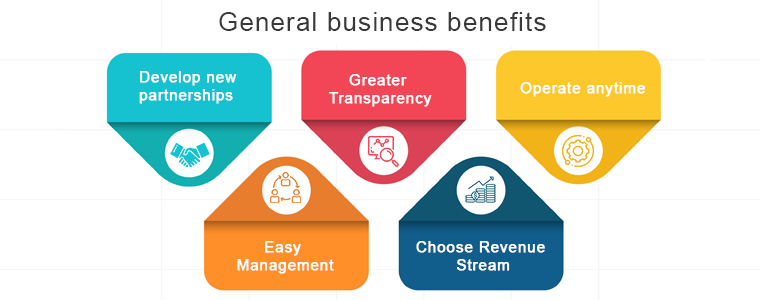
General business benefits
Develop new partnerships:
There are greater opportunities, either within their supply chain or through supply chains, for sellers and buyers to develop new trading relationships. The radar of a marketplace is anytime greater than an individual eCommerce website because many sellers and buyers from different niches come to the same platform for their needs.
Greater Transparency:
Because the availability, rates and stock levels are all available in an open environment; e-marketplaces can provide greater transparency in the buying process.
Operate anytime:
Time restrictions and concerns with various working hours for foreign trade are avoided when round-the-clock operations are feasible. No one has to wait for the shop to open as these marketplaces can be operated anytime from anywhere. The online Marketplace is highly convenient for both sellers and buyers.
Easy Management:
Product Information Management software that automates the bulk upload to your marketplaces of product information. This way, at the same time, you can be sure that the catalog and stock details are standardized in all your networks.
Choose Revenue Stream:
There are two ways the marketplaces earn income, one is commission based and another is by charging subscription or membership fees. Some of the e-marketplaces find commission the best choice as it is easier to operate and is a sustained source of income. While the online marketplaces like OLX make money through premium subscription plans.
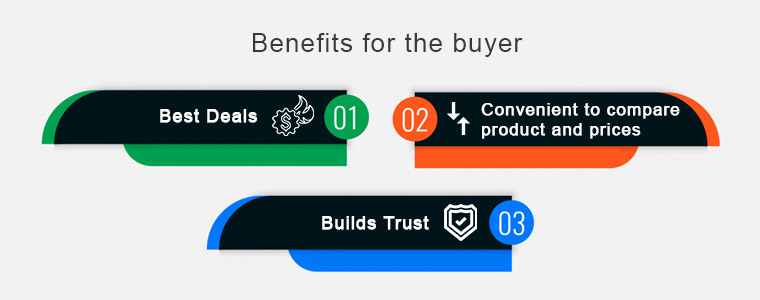
Benefits of the online marketplace for the buyer
Best Deals:
Buyers can secure the best deals due to updated information on the availability and price of the product. An online marketplace brings the right buyers in touch with the right sellers with much greater precision than it could ever happen in a simple web search.
Convenient to compare product and prices:
Instead of wasting time calling individual suppliers, e-marketplaces provide an easy way to compare rates and products on a single platform. One of the key benefits of an online marketplace is that it puts together all deals from different vendors or service providers. Customers are more likely to use an app with a wide variety of choices so that they can select exactly what they want without restricting a single provider to their preference.
Builds Trust:
Developed e-marketplaces provide the customer with a degree of confidence as they exclusively work with vendors who are members. This builds trust and looks convincing when a new customer visits the eCommerce marketplace. A significant number of buyers feel intimidated by sharing card details for financial transactions when they operate on a new website.
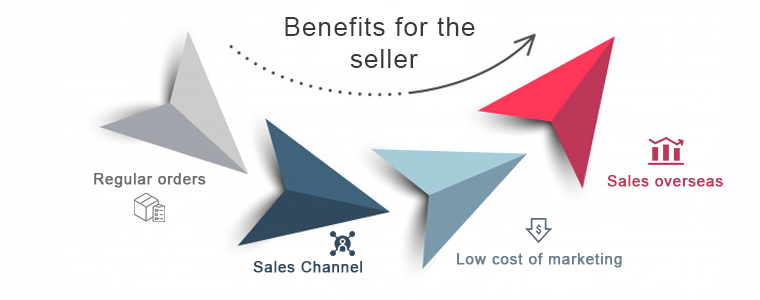
Benefits of the online marketplace for the seller
Regular orders
Sellers get daily requests from both new and existing customers for quotes and products. An e-marketplace increases business opportunities. You could meet customers with whom you’ve never crossed paths before, or pursue new demographic niches and find new prospects for sales.
Sales Channel
You provide multiple touchpoints for clients to connect with your brand when you sell through multiple platforms, online, offline, and everywhere in between. To advertise and sell products, the online marketplace creates an alternative distribution channel.
Low cost of marketing
When compared to other distribution platforms, e-marketplaces may deliver reduced marketing costs. The seller can reach a potential customer with little effort. You can sell right there where potential customers are found without investing either extra time or money. Marketplaces have the benefit that they have their resources, target groups, and customers.
Sales overseas
The global e-marketplaces will provide opportunities that you would not be aware of for overseas sales. Through online marketplaces, overseas sales are incredibly easy. In particular, foreign operators, such as Amazon or eBay, typically provide assistance and rights to retailers. In the face of high inventory levels, an enticing price will persuade foreign customers most of all. Provide multiple payment gateways according to customer demands.
Final Words:
These were the major advantages of the online marketplace but never forget the fact that there is a risk involved in every new business. Different types of online marketplaces are classified considering several parameters like their focus, niche, revenue-generating system, etc. If you want to start your marketplace or sell on an e-marketplace then you should study both advantages and disadvantages. An online marketplace might be the ticket to building a big, profitable business with a lasting impact if you can resolve the challenges.
A great customer support system can reinforce the teams working to achieve respective goals in a company. To fulfill the demands of the customer and improve customer experience, strategic planning, support tools, and a fully dedicated team play a significant role.
The information collected from the user can be implemented to improve customer service by making reasonable policies that can help the company grow and flourish your PrestaShop customer support.
Customer support is an indicator of customer repurchase and loyalty. Customer satisfaction assures you that the customer will be willing to purchase from you in the future.
In a marketplace where companies are competing to grab more customers, a customer support system can back you up. A company with versed customer services can sustain longer and can provide outstanding customer experience.
There are some amazing modules that have been developed by the Knowband team to help you with customer support management and in improvising customer experience on your PrestaShop store.
1. RMA to manage returns and canceled orders
I am putting Return Manager Addon first on the list because sellers find it hectic and fail to manage the return or canceled orders. Prestashop RMA will help you manage the returns easily as it is fully configured and you can track the return orders from the backend of the module.
Store admin can see various choices for reacting to the return if the customer claims that the item arrived damaged or does not fit the listing description. Also, the customer can upload the image of the faulty product with a reason or add one if it does not match the listed description. This will hopefully reduce your tension of order return management.
2. Deskoid Helpdesk system for customer service
The Deskoid Helpdesk system provides a unified customer experience which makes it easier for the customers to shop from your Prestashop online store. The Prestashop Deskoid Helpdesk add-on combines the store with a helpdesk ticket system.
The admin will provide an interface with the aid where clients will contact the support team for any query or problem and it shows the message thread inside the message block hence they can also see old tickets.
3. Facebook Messenger – Live Chat Support Module
Half of the world’s population is using mobile phones and most of them are on social media platforms. The Social Messenger module can be used by PrestaShop store admin for live chat support to enhance the customer experience. It helps customers to connect using their personal Facebook messenger account with the store owners.
The administrator will set the look and feel settings for the icon and window of the social messenger. Live chat support can boost the conversion rate and customer acquisition.
Final Thought:
Customer services are a considerable stream to spend your time and money if you own an eCommerce company. To provide better customer services you should have a live desktop chat support, easy return policy and management system, contact forums or you can provide customer care calling services.
Customer satisfaction and UX plays an essential role in an eCommerce for business growth and productivity. With 24×7 customer support channels show your customer that you care.
When exploring your Instagram or Facebook, you always see feeds that are of interest. Google’s discover feed also shows you the content which you like and would like to spend time on. Naturally, this makes you feel exclusive, and you spend more time without keeping the time track.
Can you give the same experience to your customers while shopping? Ecommerce brands like Myntra or Amazon try to target their inactive leads with personalized email marketing. Giving your customer a personalized shopping experience in this competitive environment could be the right plan to survive in a long race.
Understand the shopping journey of buyers with data and use it well for customer experience personalization. With that, customers who get exclusive treatment will do word-of-mouth marketing.
As an eCommerce store owner, you might have given thought to this. But, you may struggle with How to do it?
Know your customer personally
When you are spending a lot of time and money on focused target marketing, you just don’t need a customer who will make a one-time purchase but your business demands a loyal one. For target marketing, you can consider gathering demographic and psychographic details from a customer. The demographic information can be collected from registration forms but for psychographic information you need more data. To get the details like the interests, values, profession, and lifestyle, you can add custom fields to your registration page.
Proving your customer with loyalty points or rewards at every step of the form filling process will encourage them to fill it. This way, you can get more relevant information for future marketing and product personalization.
You can always ask for:
Their first name
Birthday
products they’re interested in
A preferred channel of communication
Some might like receiving emails but in a limited number while other millennials prefer receiving an SMS just after the purchase is made. It is good to ask the preferred channel of communication for targeted marketing. You can even ask for their interests and genre if a person is buying a book from your store.
A large number of people have no issues if a company spoof into the customer’s information which can provide them with a wow experience. From a report, it has been found that 76% of customers expect companies to understand their demands and requirements. So, people like getting a personalized experience, and it is now a trend that can be followed by an eCommerce store owner to compete with others in the market. Personalization can lead to impulsive buying.
Better to communicate with your customers
Remind your customers about the products they liked to buy or visited but did not make the purchase. You can send a push notification for back-in-stock products. You can ask them to look into their wishlist to reduce the abandoned cart.
It is crucial to choose the right means of communication for interacting with your customer. The selection of a communication channel should be based on the data you have collected. Customers often receive promotional emails and notifications which grab their attention and make them shop more.
Putting efforts in the right direction can help you boost conversion rates and customer retention. Millennials prefer texting overcall. You can use a chat app to provide a solution to their queries. This will be a great deal to give them more customer experience personalization.
Effective use of data for persona
You have the data in your system and what a waste if you are not using it well. Your system knows your customer better than you do.
Have you ever been in a situation when you called a person with the wrong name? This happened to me once, and I never want that to happen again. It instantly loses trust in a relationship. Send emails or greet them in-store by calling their name. This builds up an interactive connection between you and your customer.
You can take the help of segment email marketing by categorizing your customers according to their psychographic data
Understand the need of your customer as per their geographic location. Implement geolocation-based marketing strategies. Add a store locator to your website. In-store shopping is still a trend in millennials.
PrestaShop modules you should not miss on
Do you know that you can enhance the personalized customer experience by adding extensions to it?
It is challenging to keep your customers at a checkout page or the product page when they are doing two things at a time. You must have some striking, captivating website features which will keep them attentive and focused on their purchase. Why not with personalized features that you can add with these modules?
Collect more information
With PrestaShop Custom Registration Fields, the owner of the PrestaShop store will collect information about the customer by adding custom fields to the registration form of the website. Additional Order Forms/Field Manager addon for PrestaShop is another module that can help you gather more information. Custom fields on the order form can be generated with this PrestaShop Additional Order Forms Manager without making any adjustments to the code on the web page.
How to use it?
You can ask your customer to fill up the details which can be optional. You can add this field to the registration form. This way you can collect information about birthdays, anniversaries, or any of the interests which can help you promote your products. You can send a personalized message on their birthday with a greeting or any discount coupon. Store owners can use additional information to develop their services and eventually make more profit from their company.
Celebrate birthdays or anniversaries
You can give discount vouchers or coupons to your customers on their Birthday. Birthday Coupon -PrestaShop addon is a module that can inspire your customers to shop from your store on their birthdays.
How to use it?
You can send an email with a personalized message on their special day. This email will include the birthday coupon or discount voucher. The voucher sent through the mail will be valid for a limited time. The addon comes with multiple default templates. You can use it for various occasions.
Make them loyal customers
It is a dream for brands to have loyal customers. From research, it is found that about 30% of people like to buy the same brand and around 40% choose the same brand if they are offering personalized products. For customer retention and conversions, you can give loyalty points or reward points to your customers.
The PrestaShop Reward Points addon incorporates the reward points feature into your PrestaShop store and allows the admin to offer the rewards point to online shoppers every time they purchase items.
How to use it?
Store owners can give reward points to the customer after every purchase they do. This comes with a set of terms and conditions. The module helps the admin to add multiple rules for redeeming those points. Customers can redeem those points at some point of purchase which will keep them engaged in your store.
There are some rules like Cart Rule, Product Rule, and Behaviour rule for loyalty points. Store owners can offer loyalty points on a specific cart amount, product quantity, based on the payment method, particular product or category, shipping services, etc. It can be given to new customers while placing their first order.
Display recently viewed items
Automatic Related Products addon for the PrestaShop store can help you show the relevant products to your customers. This feature can be added to multiple pages of your eCommerce store.
How to use it?
The feature will show related products to your customers, and this will motivate them to see more and more on your eCommerce store. If they are not satisfied with the one product, they can see more until they get the one.
It has a simple configuration, and the admin can ask customers to provide more information about the product. If they like the product or not? If they need any modifications? By collecting additional customer details, the sellers can better represent them. As a result, online shoppers will have the same user experience with this PrestaShop Additional Field Module on the Product tab.
Attractive email subscription module
Spin And Win – Entry, Exit, and Email Subscription Popup by PrestaShop have a gamified interactive look. It attracts the buyer’s attention and allows them to win offers like discount coupons or free shipping. This is one of the best sellers of PrestaShop and a fantastic module to collect the email addresses of your customer.
How to use it?
You can Get Personal in Email Marketing and send personalized Emails using the information which is provided by the customers. The emails should be sent based on customer behavior. You can go for a personal recommendation to offer a personalized customer experience to your customer. Try to re-engage your leads with promotional messages or pop-up notifications. Email marketing is a free and reliable option to give a customer personalization experience to users.
Greet your customer
Greetings are most valuable when you are building a relationship. Customer-trader relationship is most important when it comes to business. You can use a Better thank you page module for your PrestaShop store.
How to use it?
Add a Better thank you page module to your PrestaShop store and use it to show a pop-up when the customer is leaving your store or after the successful purchase. Also, you can add customized banners or discount coupons for their next purchase. This way, it can help you boost customer retention and make your customer satisfied.
Final thoughts
Increase your sale by providing a personalized shopping experience to your customers. In this era of millennials, Personalisation is the only way to attract a loyal customer base to your store. Create Special Campaigns Based on user behavior and make them feel unique. They don’t like to be treated as a number but an individual. So, It’s time to boost your sales with a customer experience by providing personalization.
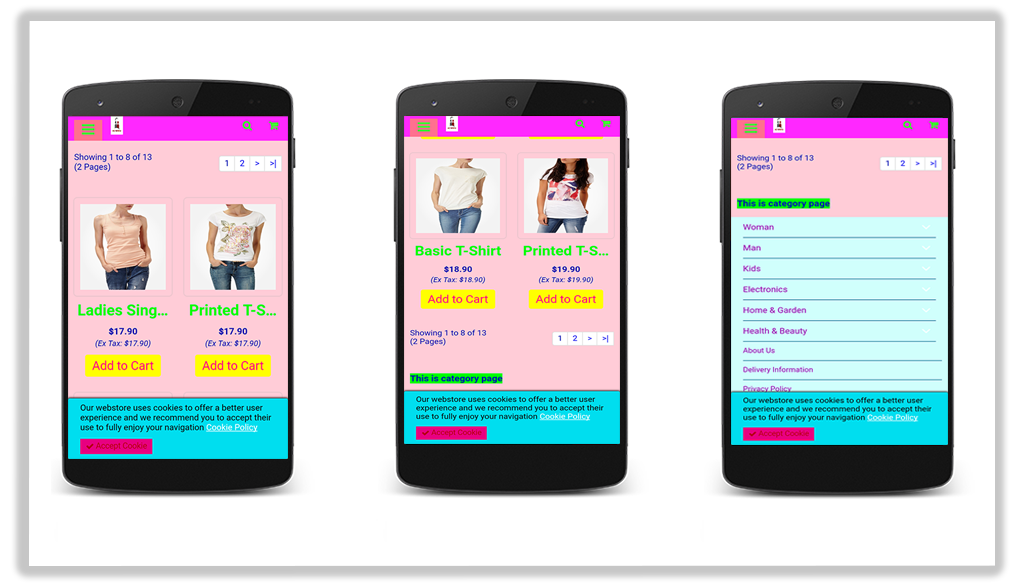
A smooth and mobile-friendly user interface is the core of successful eCommerce websites. To create a fully mobile responsive layout system for the mobile and tablet users, Google Accelerated Mobile Pages(AMP) plugin has taken place into the market. The Google AMP pages are lite and optimized version of your site pages providing a quick responsive UI to the device users. OpenCart Accelerated Mobile Pages Extension by Knowband is one such tool to add Google AMP functionality to your online shop to capture mobile users through smartphones and tablets. Opencart AMP pages improve the web browsing experience by decreasing page load times. Faster mobile browsing is the only way where new customers will dive in and get motivated to purchase order.
More than 60% of your customers are mobile-based so it becomes important to create the AMP pages of store home page, category pages, product pages and CMS pages with the help of OpenCart Accelerated Mobile Pages Module. OpenCart AMP focuses on light content that increases the overall page speed and reduces the bounce rates. The reduced page load time contributes to the growth of traffic and SEO ranking.
1.1 Striking Features
OpenCart Accelerated Mobile Pages plugin offers additional features to the OpenCart site owners. Let us explore one by one.
1. OpenCart Accelerated Mobile Pages Extension adds optimized AMP pages to your website which are instantly loaded on mobile and tablet devices.
2. With the help of the Google Accelerated Mobile Pages(AMP) plugin, you can add Accelerated Mobile Page functionality to the home page, category pages, product pages, and CMS pages.
3. Knowband’s Accelerated Mobile Pages Extension for OpenCart provides an option to customize the home page, category pages, product pages, and CMS pages settings form the back-office.
4. You can upload a desired business logo for the AMP pages. Moreover, you can set the width and height of the site logo.
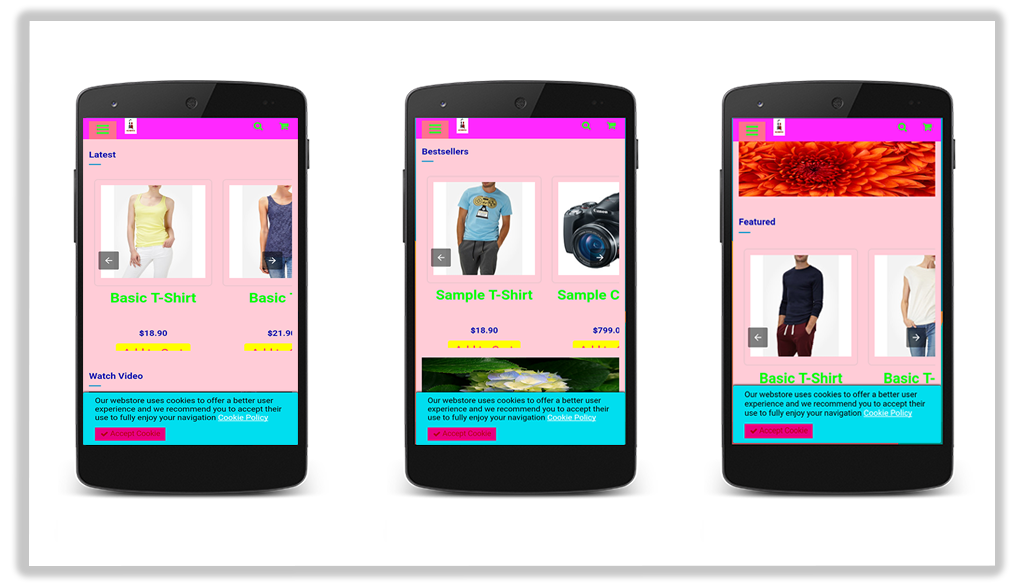
5. OpenCart AMP extension gives an option to display the bestsellers, new arrivals, and featured products on the home page. The e-merchant can set the number of featured products to be shown in a particular section and can be displayed in random order.
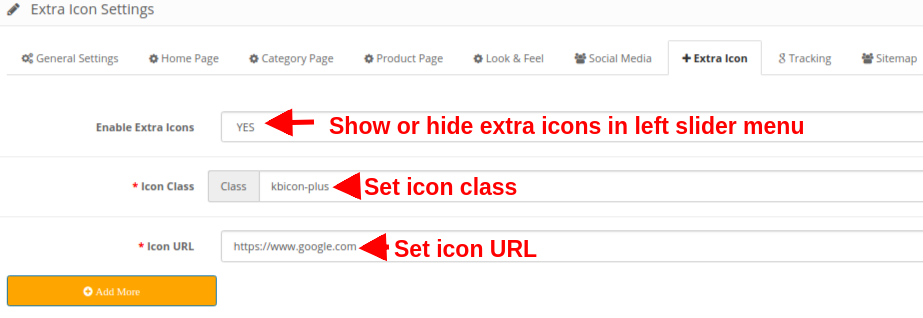
6. OpenCart Accelerated Mobile Pages Module provides an option to add social media sharing on the AMP mobile pages. The store admin can add extra icons apart from the ones provided with the Accelerated Mobile Pages Extension for OpenCart.
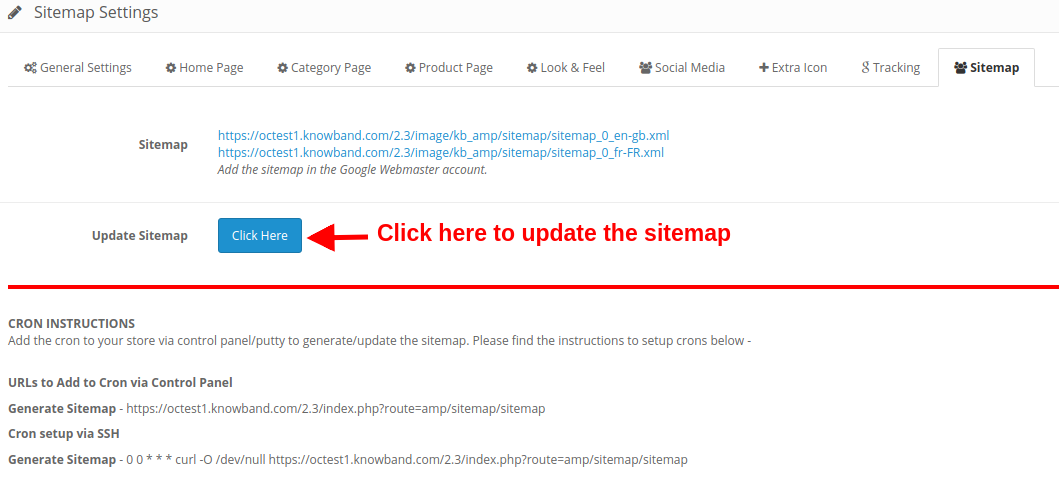
7. By using the Google Accelerated Mobile Pages Module, the OpenCart admin can automatically generate AMP sitemap with the help of a CRON job. They just have to click the Update Sitemap button.
8. Knowband’s OpenCart Accelerated Mobile Pages Addon supports Google Analytics allowing admin to enter the Analytics client Id for tracking the AMP performance.
9. Google Accelerated Mobile Pages Module for OpenCart supports multiple languages.
10. With the help of OpenCart Accelerated Mobile Pages Extension, the admin can set color and background color for AMP website and other different blocks of AMP.
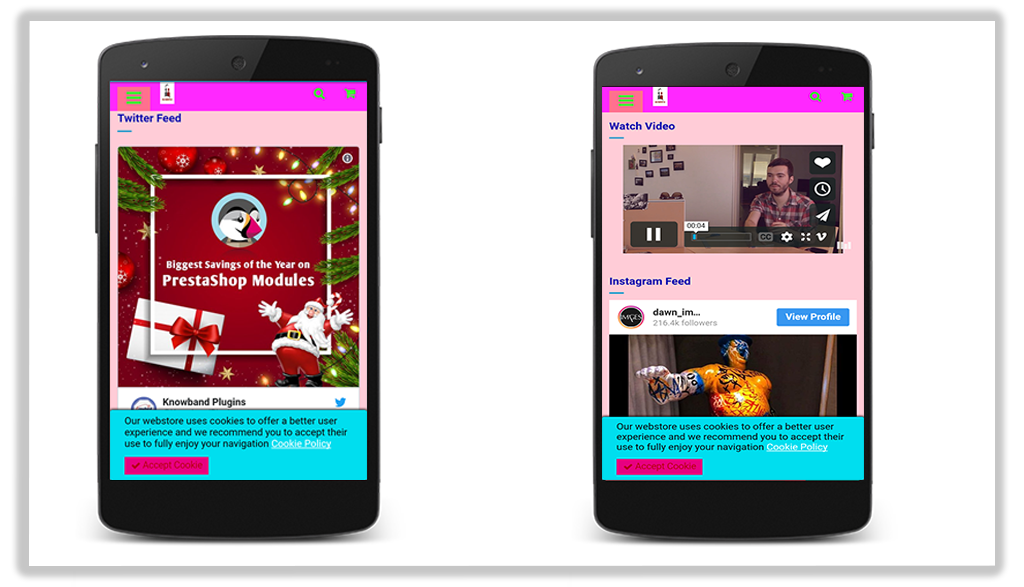
11. To add more information to the AMP, admin can display YouTube, Vimeo and DailyMotion videos on the homepage of mobile pages.
12. Google Accelerated Mobile Pages(AMP) module allows lets you feature Instagram and Twitter feeds on the homepage.
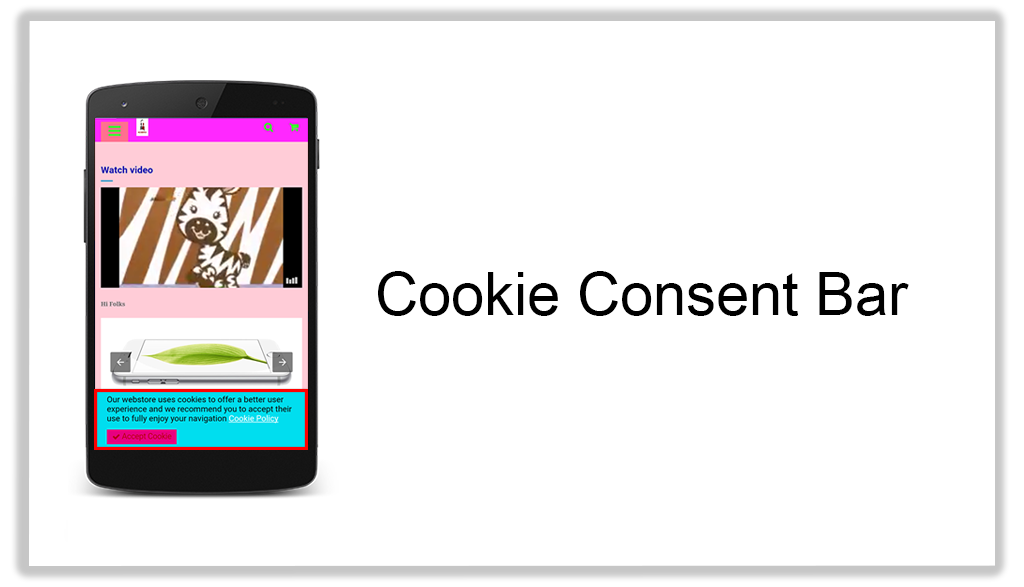
13. The look and feel of cookie consent bar can also be changed from the back-office of Accelerated Mobile Pages Extension for OpenCart.
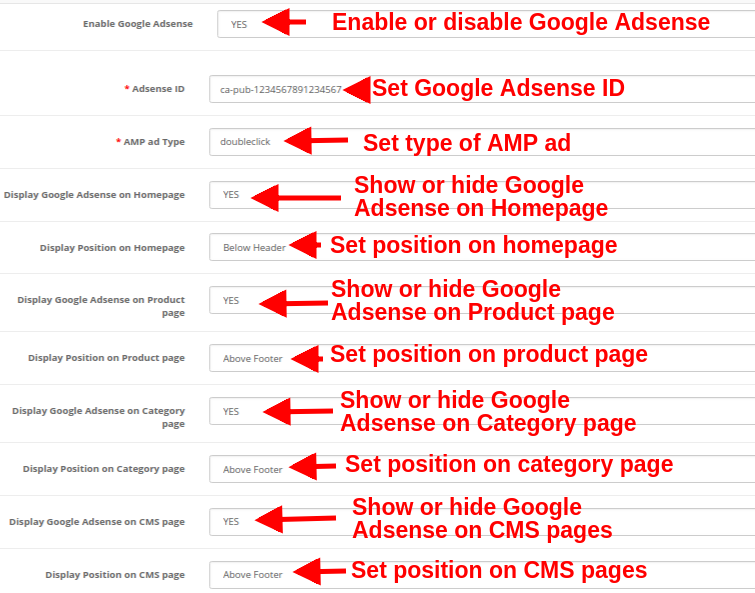
14. Store merchants can display advertisement on all the Mobile Pages by including Google Adsense from the admin interface of this OpenCart extension.
15. Store merchants can also implement Facebook pixel functionality on the mobile pages which helps you track the AMP website visitors.
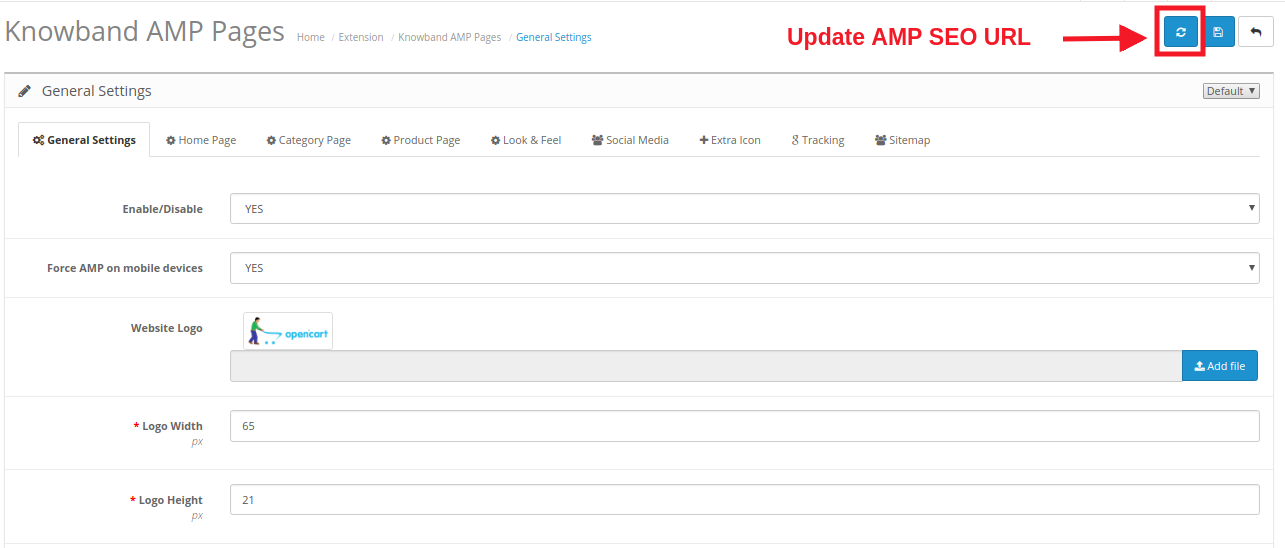
16. OpenCart AMP module allows you to update AMP SEO URL on a single click.
2.0 Installation Guide
Before starting the installation process, you have to buy the OpenCart Accelerated Mobile Pages Extension from the Knowband store. Once purchased, you will receive the following files on your registered email.
Source code file of OpenCart AMP Module in zipped file format.
User Manual of OpenCart AMP Module.
Now in order to install this OpenCart AMP extension for your website, follow the given steps:
1. Unzip the zip file. You will get the folders as shown in the image below
2. Copy all the folders of the zip file in the Root Directory of OpenCart setup via FTP manager.
So, OpenCart Accelerated Mobile Pages plugin is now successfully installed and is ready to use at your store. Go to the admin menu and click on the extensions and thereby click on configure button next to Knowband AMP Pages.
3.0 Admin Interface
Just after successful installation of Google Accelerated Mobile Pages(AMP) plugin on your website, you can configure the AMP settings as per your requirements. Navigate the settings in the given order: Admin Panel > Extensions > Knowband AMP Pages.
The simple to understand admin interface of OpenCart Accelerated Mobile Pages Module is divided into nine sections namely:
Each of these sections has been discussed in detail below.
3.1 General Settings
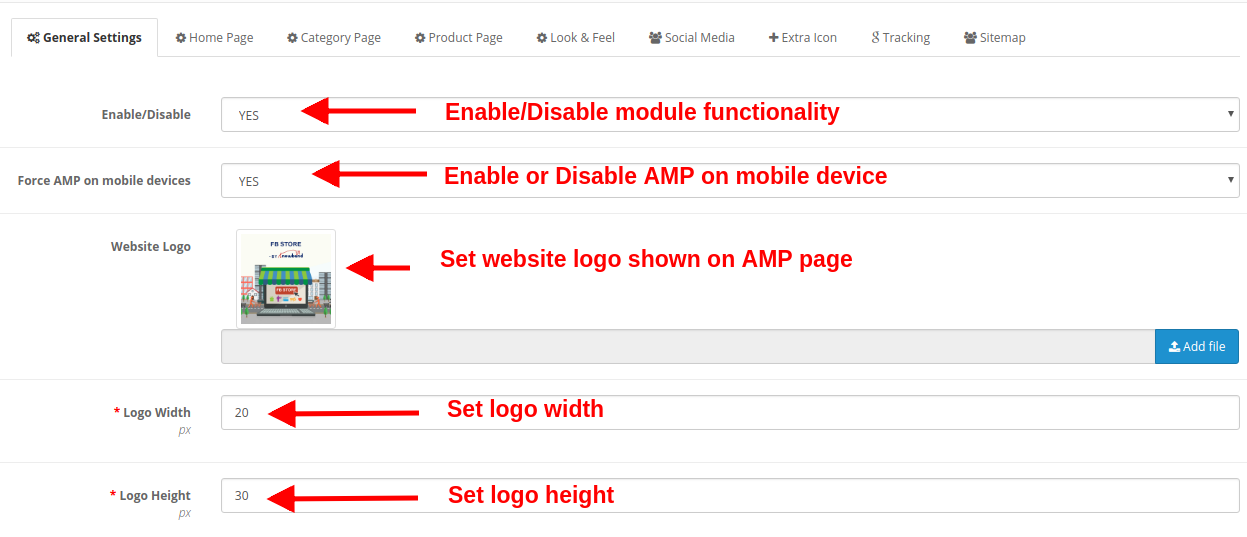
The general settings of Google Accelerated Mobile Pages(AMP) plugin consist of the following configuration options:
Enable/Disable: The whole functionality of OpenCart Accelerated Mobile Pages Module can be enabled or disabled just by selecting Yes or No.
Force AMP on Mobile Devices: This option enables or disables Google AMP functionality for mobile devices only.
Website Logo: The website logo shown on the AMP mobile pages can be changed by uploading a new image file.
Logo Width: This option sets the width for the logo image in pixels.
Logo Height: This option sets the height for the logo image in pixels.
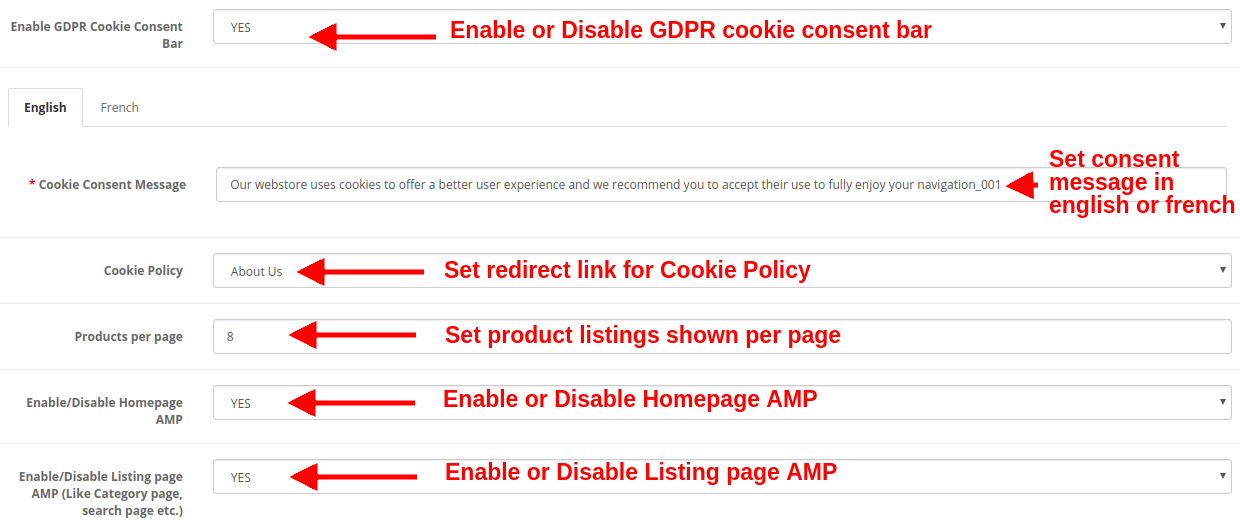
Enable GDPR Cookie Consent Bar: This option enables or disables GDPR cookie consent bar for all the AMP mobile pages of the website.
Cookie Consent Message: This option allows you to set a cookie consent message shown on the consent bar. You can set this text in both English and French language.
Cookie Policy: This option lets you set the URL for Coolie policy. When the user clicks the cookie policy text they are redirected to this specified page automatically.
Products per Page: This option specifies the count of product listings on the category pages of the site.
Enable/Disable Homepage AMP: This option enables or disables Google AMP on the Homepage of the website.
Enable/Disable Listing Page AMP: This option enables or disables Google AMP on listing pages like category page, search page, etc.
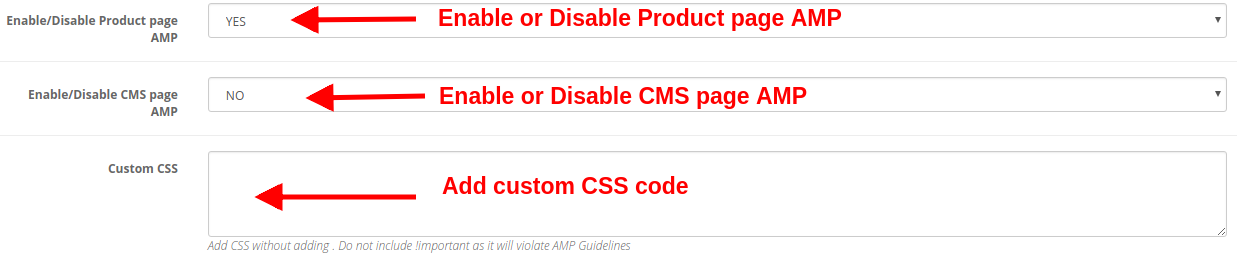
Enable/Disable Product Page AMP: This option enables or disables Google AMP on product pages of the website.
Enable/Disable CMS Page AMP: This option enables or disables Google AMP on different CMS pages of the site.
Custom CSS: You can include custom CSS code to improve the front-end functionality of AMP mobile pages.
By clicking on the “Refresh” button shown in the General Settings of Knowband AMP module, the default URL is automatically updated to AMP SEO URL.
3.2 Home Page Settings
You can configure the AMP settings for the site’s Homepage. These settings are not applied to the other pages like category page, product page, etc. The various settings include:
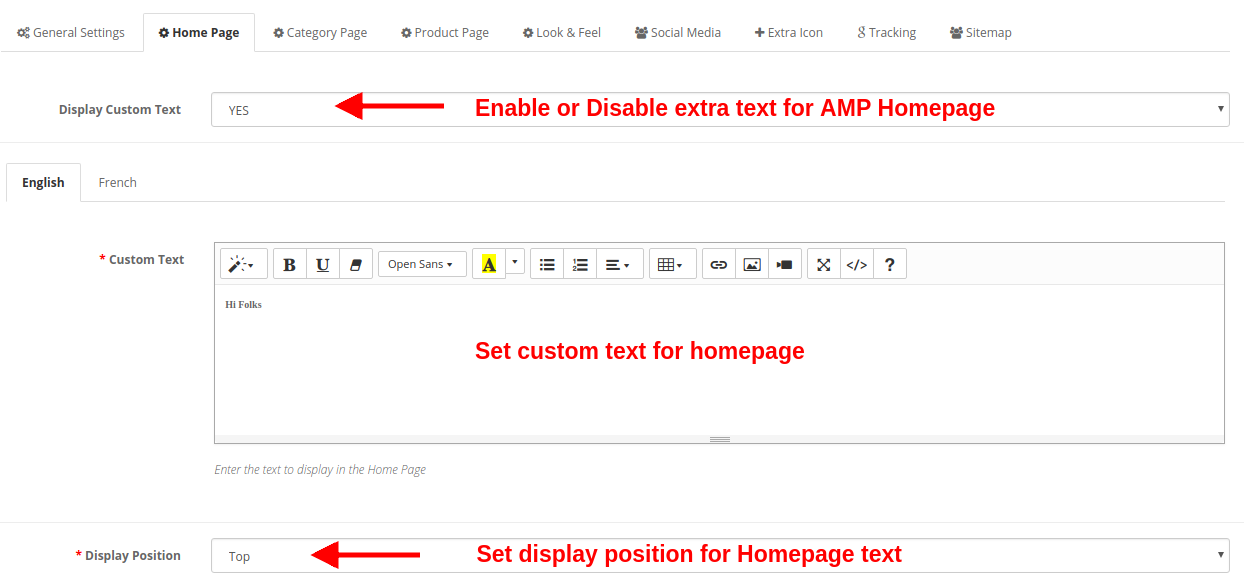
Display Custom text: Using this option, you can set a desired text on the product page. This extra text can be enabled or disabled as per needs.
Custom Text: You can specify the desired text you want to show on the Homepage. This custom text can be set in both English and French language.
Display Position: You can set a specific location where you want to show this custom text. You can show at the top or bottom of the page.
a) Featured Products Settings
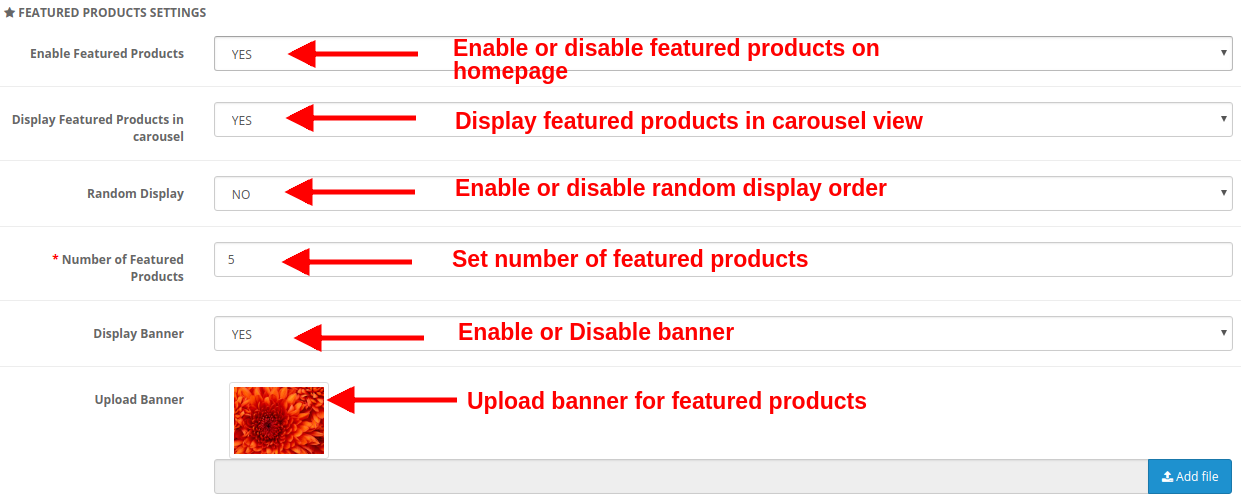
Enable Featured Products: This option lets you to enable or disable the featured products shown on the product page.
Display Featured Products in Carousel: You can enable this option to display the featured products in carousel view. If disabled, the products will be shown in the standard format.
Random Display: This option if enabled shows random featured products. Every time the customer will see random products in the featured category. If this option is disabled, the products will be the same every time.
Number of Featured Products: You can fix the number of products shown in the featured products section of the Homepage.
Display Banner: Enable or disable the banner shown on the featured products section of the homepage.
Upload Banner: This option lets you upload or select the image file you want to show as a banner for featured products.
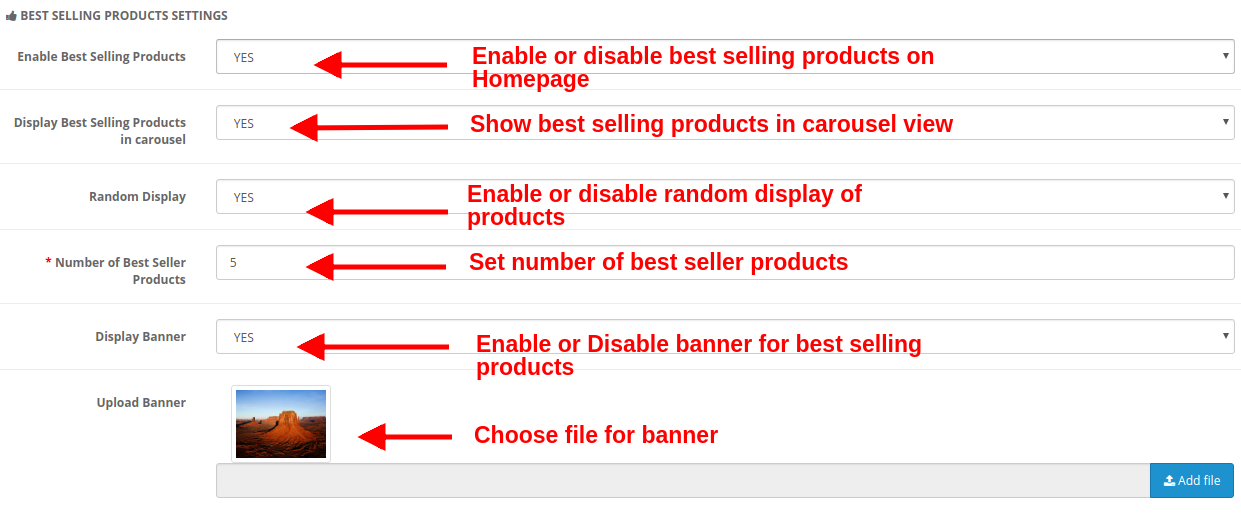
b) Best Selling Products Settings
Enable Best Selling Products: This option lets you enable or disable the best selling products shown on the product page.
Display Best Selling Products in Carousel: You can enable this option to display the best selling products in carousel view. If disabled, the products will be shown in the standard format.
Random Display: This option is enabled shows random best selling products. Every time the customer will see random products in the best selling category. If this option is disabled, the products will be the same every time.
Number of Best Seller Products: You can fix the number of products shown in the best selling products section of the Homepage.
Display Banner: Enable or disable the banner shown in the best selling products section of the homepage.
Upload Banner: This option lets you upload or select the image file you want to show as a banner for best selling products.
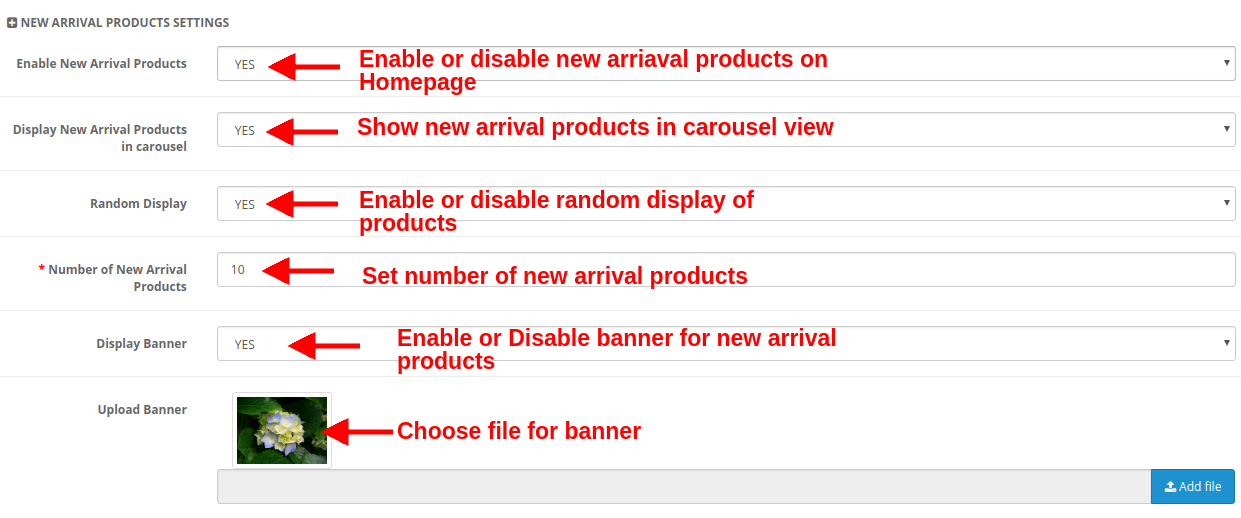
c) New Arrival Products Settings
Enable New Arrival Products: This option lets you enable or disable the new arrival products shown on the product page.
Display New Arrival Products in Carousel: You can enable this option to display the new arrival products in carousel view. If disabled, the products will be shown in the standard format.
Random Display: This option if enabled shows random new arrival products. Every time the customer will see random products in the new arrival category. If this option is disabled, the products will be the same every time.
Number of Best Seller Products: You can fix the number of products shown in the new arrival section of the Homepage.
Display Banner: Enable or disable the banner shown in the new arrival products section of the homepage.
Upload Banner: This option lets you upload or select the image file you want to show as a banner for new arrival products.
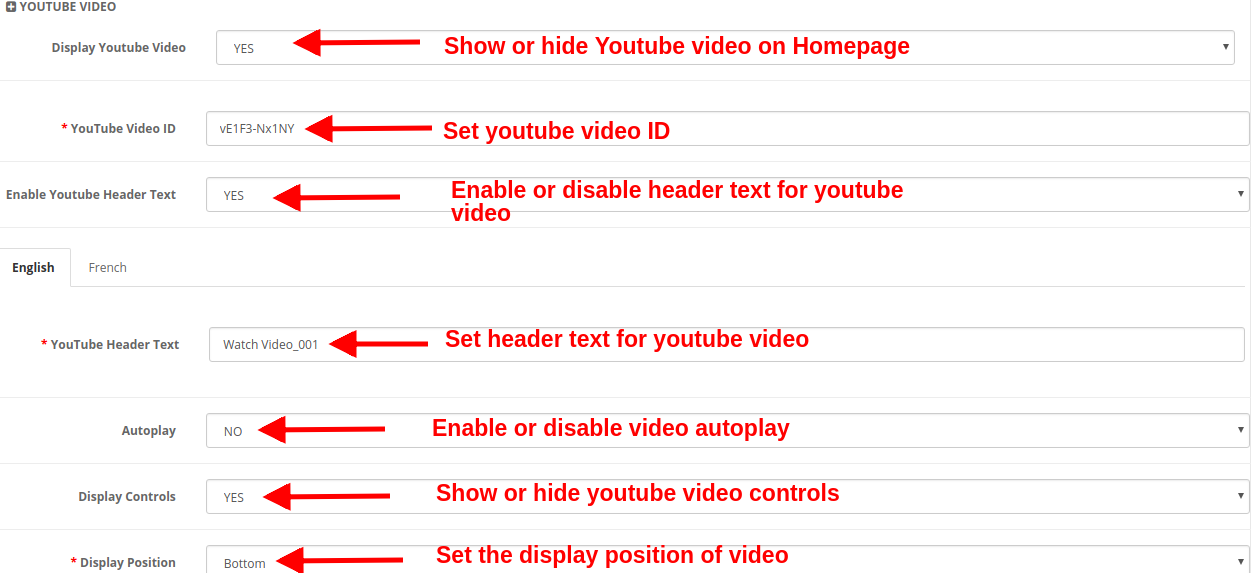
d) YouTube Video
Display Youtube Video: This option lets you show or hide the Youtube video on the Homepage.
Youtube Video ID: With this option, you can set the Youtube video ID corresponding to the specific youtube video.
Enable Youtube Header Text: You can show or hide the header text for the youtube video.
YouTube Header Text: The youtube header text can be changed using this option. You can specify a custom text you want to show as header text for a video. This text can be set for English or French language.
Autoplay: If this option is enabled, the video will automatically play as the homepage loads. But if this option is disabled, the user has to click the play button in order to view the youtube video.
Display Controls: If this option is enabled, the youtube control bar is shown for the youtube video. Else if disabled, the youtube controls are not displayed.
Display Position: You can set the position for the youtube video. This position can be either set to top or bottom.
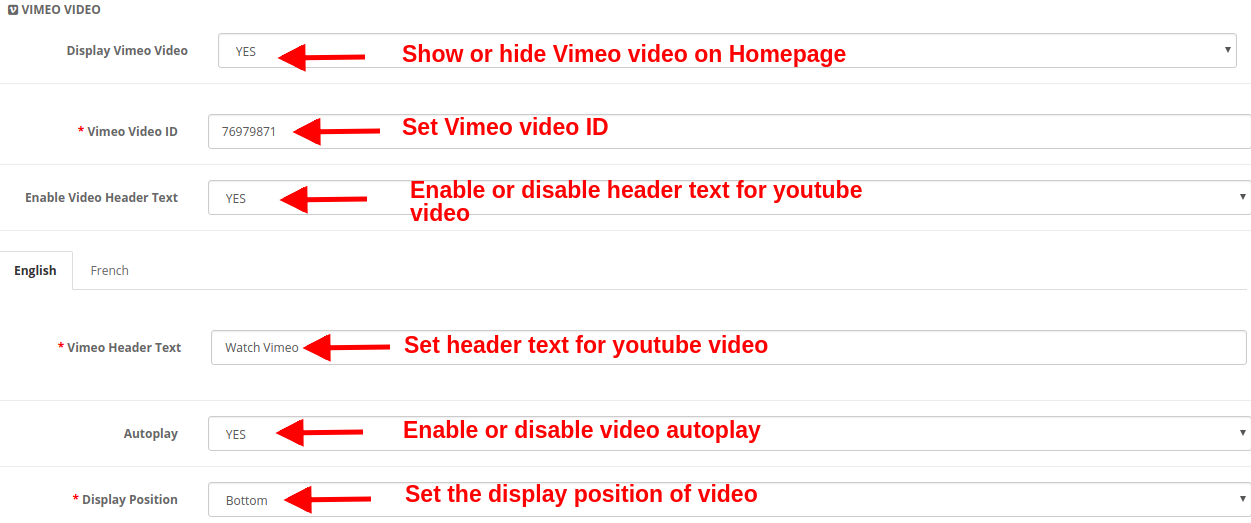
e) Vimeo Video
Display Vimeo Video: This option lets you show or hide the Vimeo video on the Homepage.
Vimeo Video ID: With this option, you can set the Vimeo video ID corresponding to the specific Vimeo video.
Enable Video Header Text: You can show or hide the header text for the Vimeo video.
Vimeo Header Text: The Vimeo header text can be changed using this option. You can specify a custom text you want to show as header text for a video. This text can be set for English or French language.
Autoplay: If this option is enabled, the video will automatically play as the homepage loads. But if this option is disabled, the user has to click the play button in order to view the Vimeo video.
Display Position: You can set the position for the Vimeo video. This position can be either set to top or bottom.
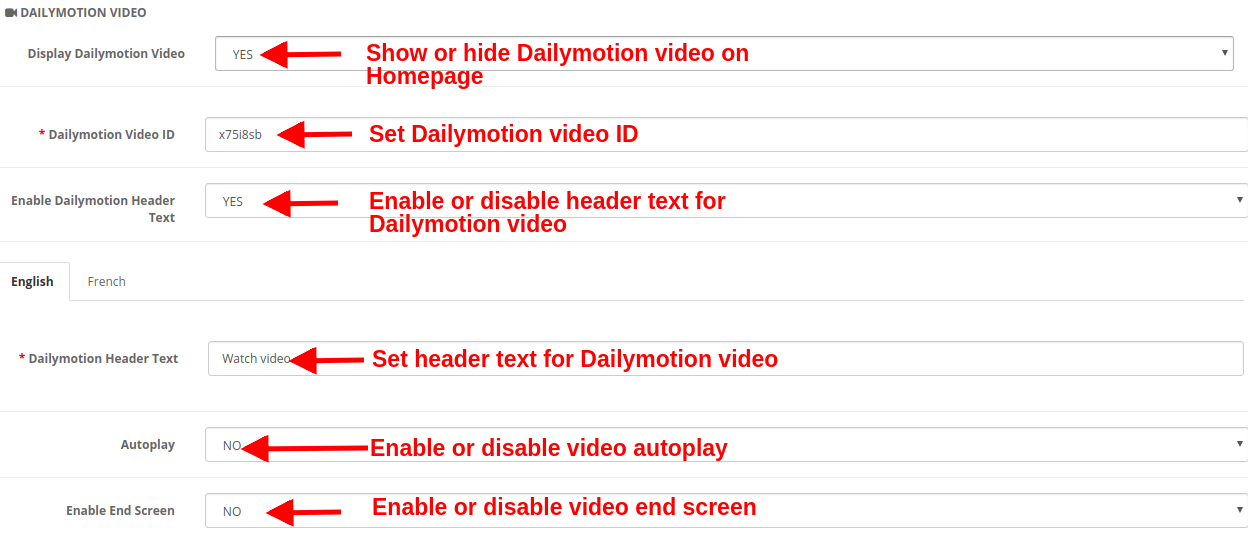
f) Dailymotion Video
Display Dailymotion Video: This option lets you show or hide the Dailymotion video on the Homepage.
Dailymotion Video ID: With this option, you can set the Dailymotion video ID corresponding to the specific Dailymotion video.
Enable Dailymotion Header Text: You can show or hide the header text for the Dailymotion video.
Dailymotion Header Text: The Dailymotion header text can be changed using this option. You can specify a custom text you want to show as header text for the video. This text can be set for English or French language.
Autoplay: If this option is enabled, the video will automatically play as the homepage loads. But if this option is disabled, the user has to click the play button in order to view the Dailymotion video.
Enable End Screen: Show or hide the end screen at the end of the video. If enabled, it will show other recommended videos on the video end.
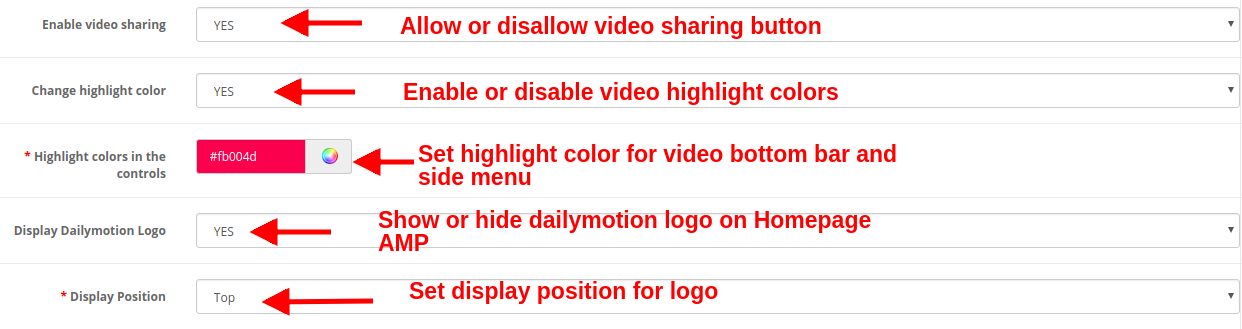
Enable Video Sharing: Show or hide the share option for the Dailymotion video.
Change Highlight Color: Enable or disable video highlight colors.
Highlight Colors in the Control: Pick up the desired color which will be shown on the video bottom bar and side menu bar panel.
Display Dailymotion Logo: You can show or hide the Dailymotion logo on the video.
Display Position: You can set the position for the Dailymotion video. This position can be either set to top or bottom.
g) Instagram Feed
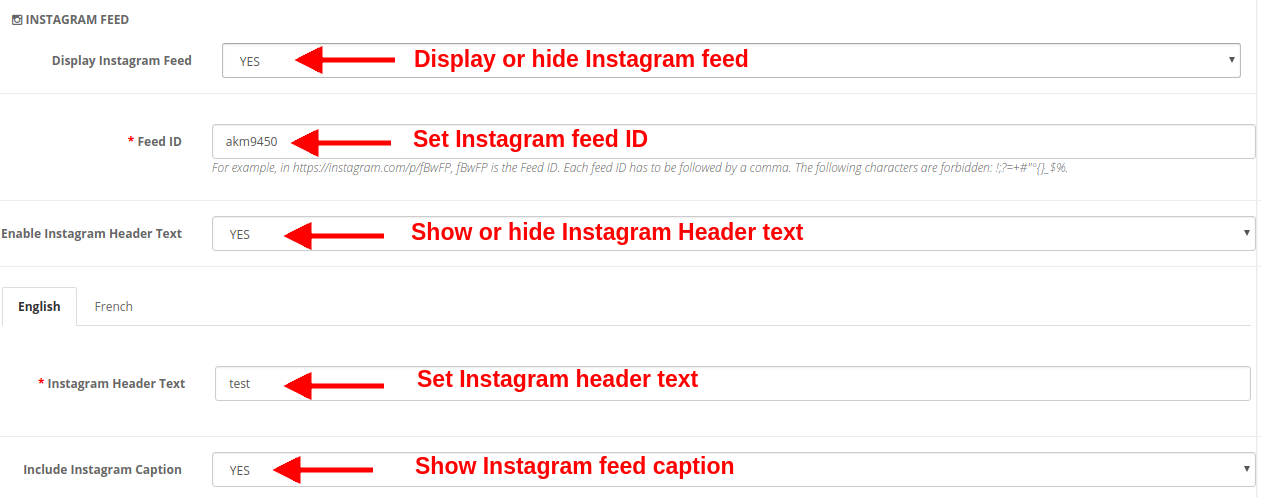
Display Instagram Feed: You can show or hide the Instagram feed on the homepage of the website.
Feed ID: This option allows you to set the Instagram feed ID which will be shown on the Homepage of the website. To set multiple feed IDs, separate each feed ID followed by a comma.
Enable Instagram Header Text: You can enable or disable the header text shown for the Instagram feed.
Instagram Header Text: This option lets you specify the header text for the Instagram post or feed.
Include Instagram Caption: This option shows/hide the Instagram caption for the specific photo or video.
h) Twitter Feed
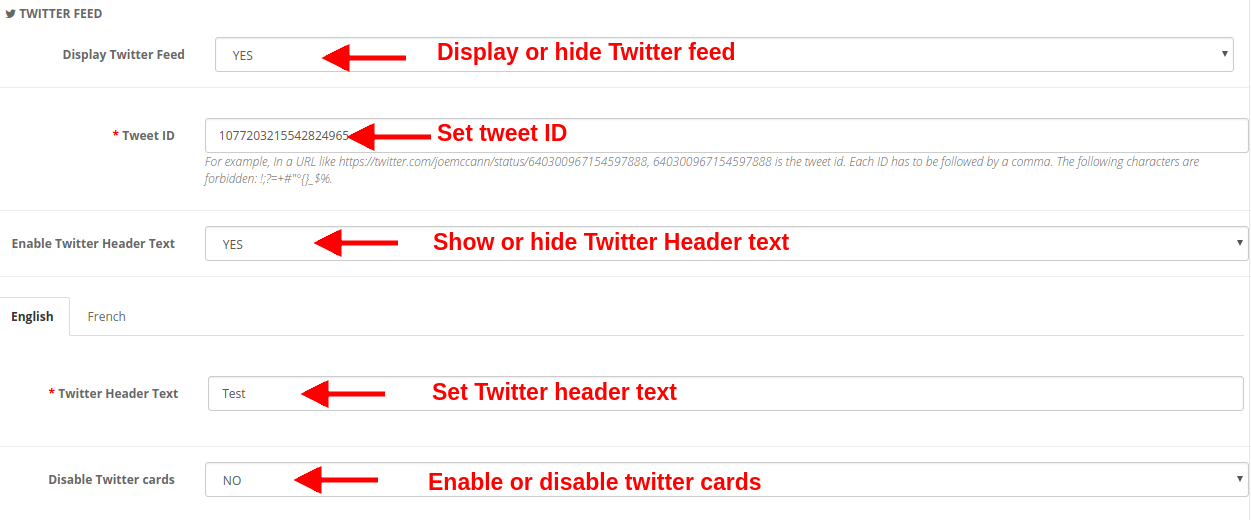
Display Twitter Feed: You can show or hide the twitter feed on the Homepage of the website.
Tweet ID: This option sets the Tweet ID which has to be displayed on the Homepage.
Enable Twitter Header Text: You can enable or disable the Twitter Header Text shown over the tweet.
Twitter Header Text: You can specify the header text for Twitter feeds.
Disable Twitter Cards: If you set Yes for this option, the content is displayed in a compact form. Else if you set this option to No, the detailed twitter feed is displayed on the Homepage.
3.3 Category Page Settings
Under this section of Google Accelerated Mobile Pages(AMP) plugin, you can perform AMP settings for the category pages of the site. The various settings include:
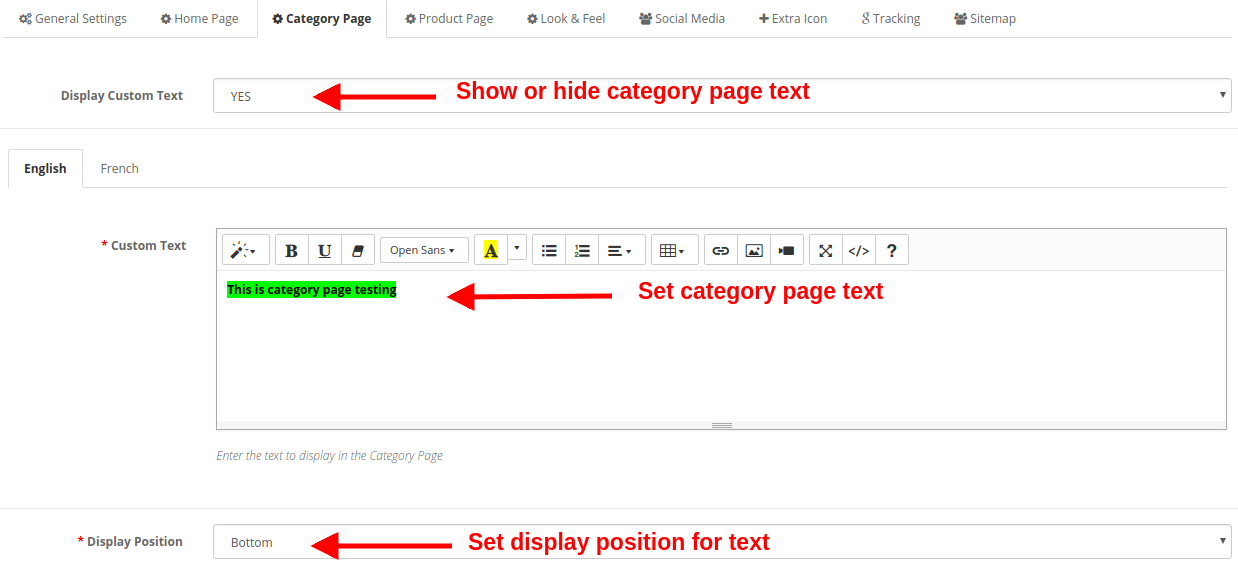
Display Custom Text: You can enable or disable this text shown on the category pages of the website.
Custom Text: Using this option, you can set a desired text for the category pages. This text can be specified in English or French language.
Display Position: You can set the position for this custom text on the category page. The text position can be set to Top or Bottom of page.
3.4 Product Page Settings
Under this section of OpenCart Accelerated Mobile Pages Module, you can perform AMP settings for the product pages of the site. The various settings include:
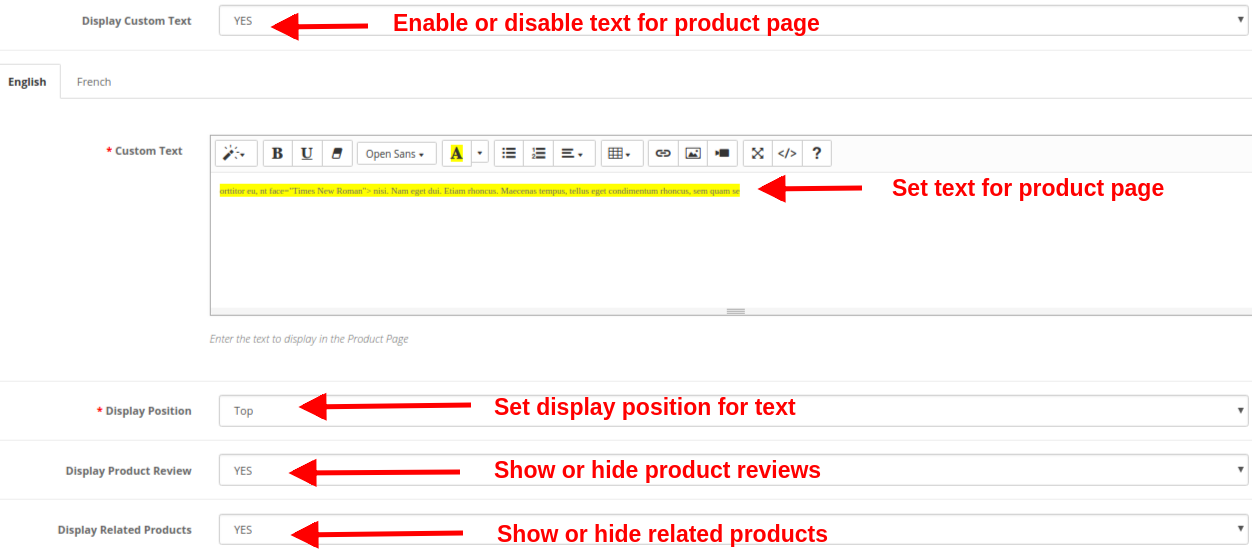
Display Custom Text: You can enable or disable this text shown on the product pages of the website.
Custom Text: Using this option, you can set a desired text for the product pages. This text can be specified in English or French language.
Display Position: You can set the position for this custom text on the product page. The text position can be set to Top or Bottom of page.
Display Product Review: You can show or hide product reviews on the AMP product pages.
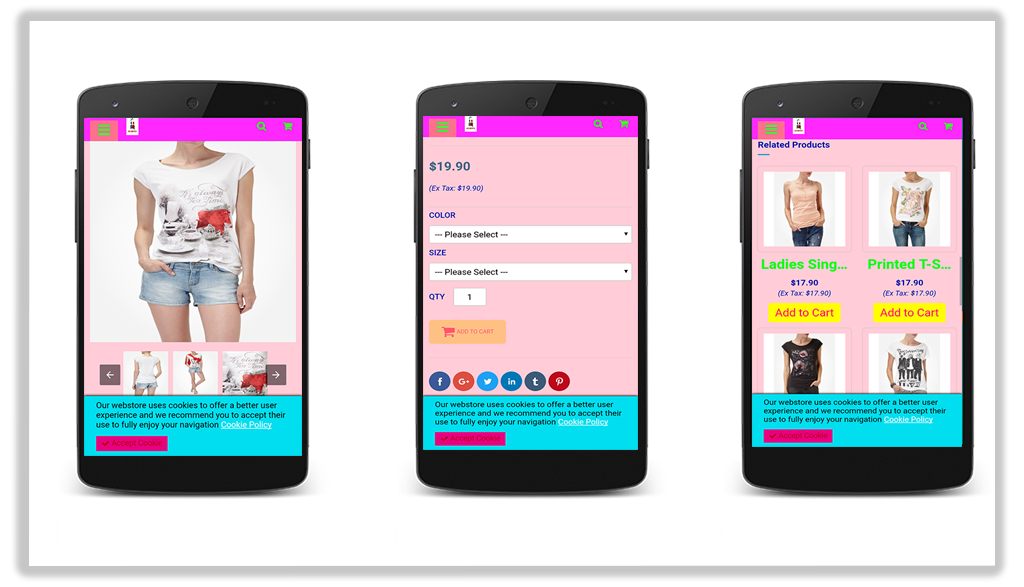
Display Related Products: You can enable or disable related products on the AMP product pages.
3.5 Look and Feel Settings
You can modify the look and feel settings for the AMP pages of your site. The settings can be done for each of the page element. You can make general settings, settings for product page, product listings, category page, and cookie consent bar.
a) General Setting
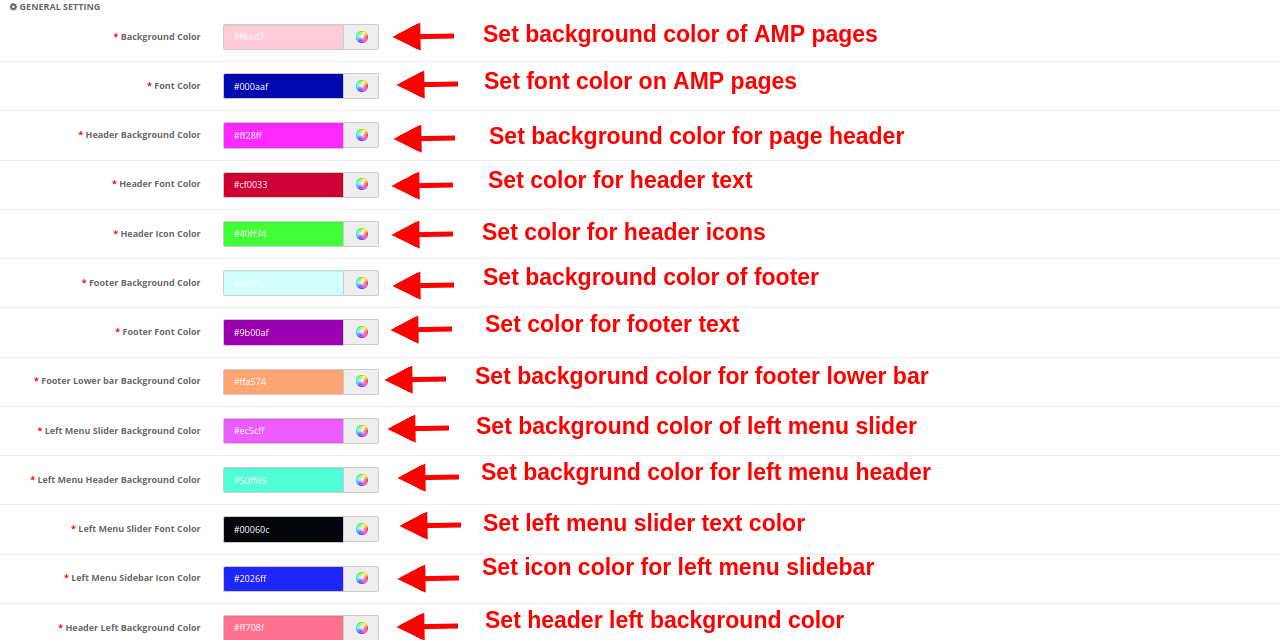
Background Color: This option sets the background color for all the AMP pages.
Font Color: This option sets the font color for the text shown on AMP pages.
Header Background Color: This option sets the background color for the site header.
Header Font Color: This option sets the font color for the text shown in the header section.
Header Icon Color: This option sets the icon color for the icons shown in the header section of the site.
Footer Background Color: This option sets the background color of the footer section of the AMP website.
Footer Font Color: This option sets the font color for the text shown in the footer section.
Footer Lower Bar Background Color: This sets the background color for the lower footer bar.
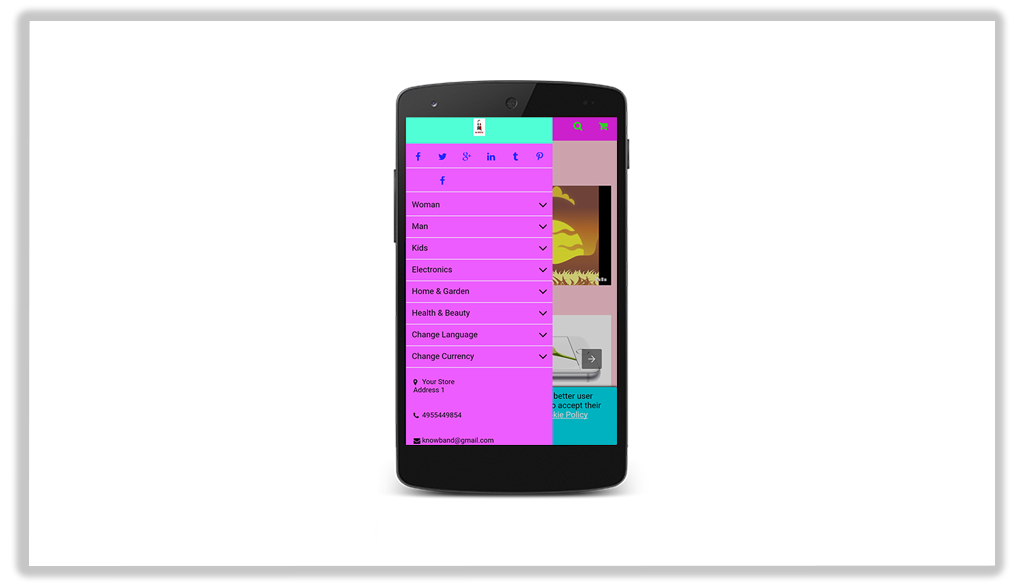
Left Menu Slider Background Color: This option sets the background color for the left menu slider.
Left Menu Header Background Color: This option sets the background color for the left menu header part.
Left Menu Slider Font Color: This option sets the font color for the text shown in the left menu slider.
Left Menu Sidebar Icon Color: This option sets the color for the icons shown in left menu sidebar.
Header Left Background Color: This option sets the background color for the left header section.
b) Product Listing Setting
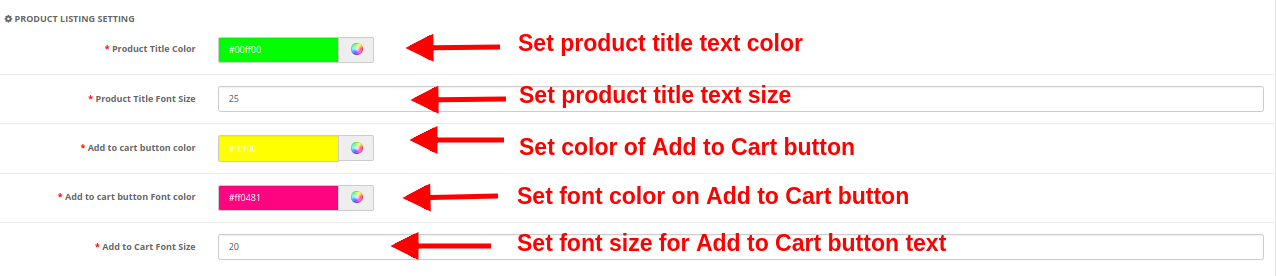
Product Title Color: This option sets the color for the product title text.
Product Title Font Size: This option sets the font size of the product title.
Add to cart button color: This color specifies the background color of the Add to Cart button.
Add to cart button Font color: This sets the font color for the text shown on Add to Cart button.
Add to Cart Font Size: This option sets the size for the text shown on Add to Cart button.
c) Category Setting
Category Heading Font Color: This option sets the color for the text shown as a category heading.
Category Heading Font Size: This option sets the font size for the text shown as a category heading.
d) Product Setting
Product Title Font Color: This option sets the color for the product title text.
Product Title Font Size: This option sets the font size for the product title text.
Add to cart button color: This option specifies the background color of the Add to Cart button.
Add to cart button Font color: This option shows the font color for the text shown on Add to cart button.
Add to cart button Font size: This option shows the font color for the text shown on Add to cart button.
e) Cookie Consent Bar
Cookie Consent Background Color: This option sets the background color for the cookie consent bar.
Consent Message Font Color: This option sets the font color for the text shown as consent message.
Background Color of Accept Button: This option specifies the background color for the Accept Button shown on cookie consent bar.
Font Color of Accept Button: This sets the font color for the text shown on Accept Button.
3.6 Social Media
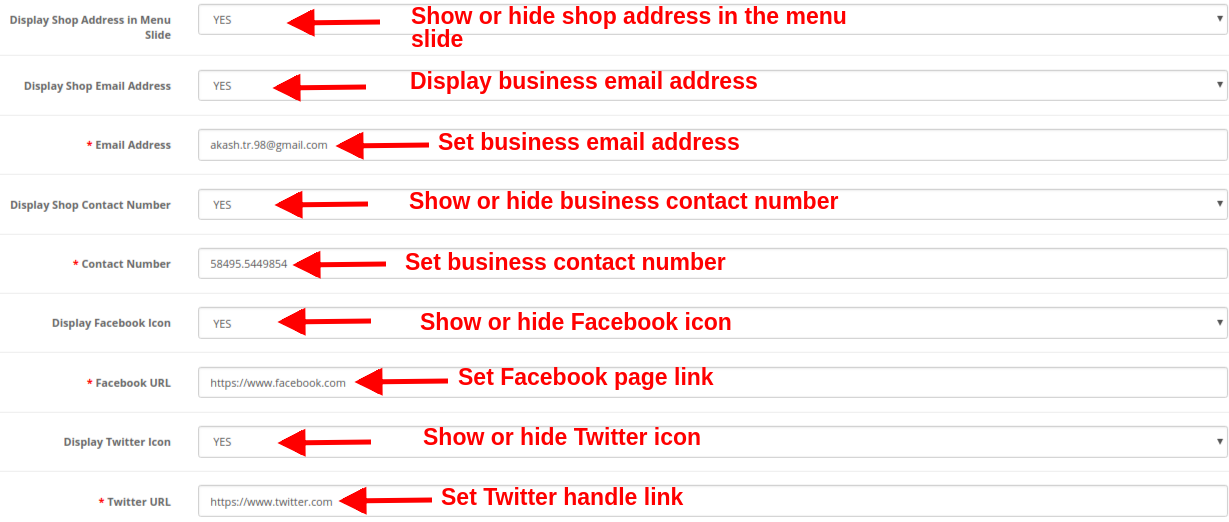
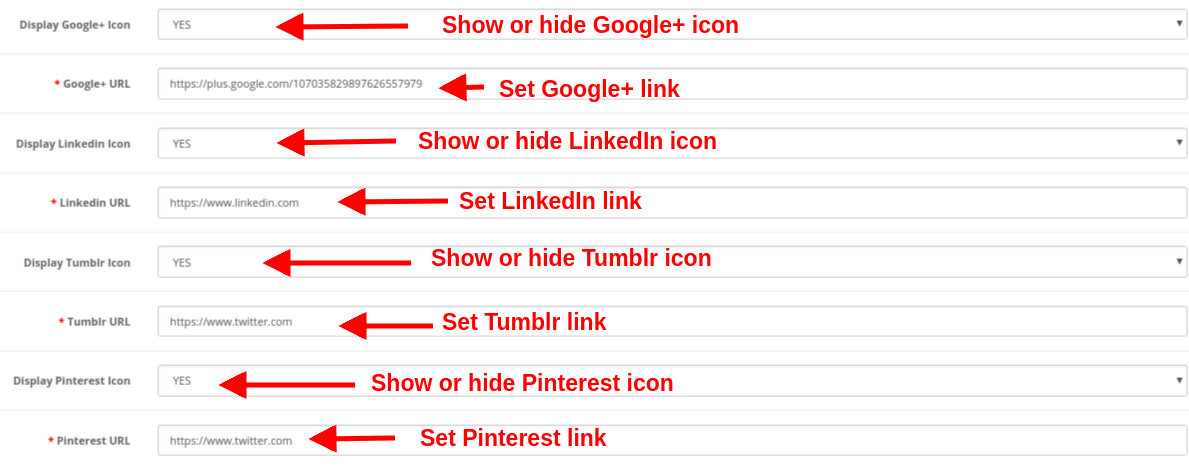
Under the social media settings of Google AMP module, you have an option to add business contact information like address, email ID and contact number. You can also add social channels links to your AMP mobile pages so that customers can direct follow up with their queries or doubts on social media like Facebook, Twitter, LinkedIn, Pinterest, etc. Social channels are one way to keep your users updated about your online business. Admin can perform the following configurations:
Display Shop Address in Menu Slide: Show or hide business address in the left slider menu section.
Display Shop Email Address: Show or hide the email address of your business in the left slider menu section.
Email Address: Set the email address of your business using this option.
Display Shop Contact Number: Show or hide the contact number for your business or shop.
Contact Number: Set the contact number for your online shop.
Display Facebook Icon: Show or hide the Facebook icon in the left menu slider of the website.
Facebook URL: Set Facebook page URL using this option.
Display Twitter Icon: Show or hide the Twitter icon in the left menu slider of the website.
Twitter URL: Set Twitter page URL using this option.
Display Google+ Icon: Show or hide the Google+ icon in the left menu slider of the website.
Google+ URL: Set Google+ page URL using this option.
Display Linkedin Icon: Show or hide the LinkedIn icon in the left menu slider of the website.
Linkedin URL: Set the LinkedIn page URL using this option.
Display Tumblr Icon: Show or hide the Tumblr icon in the left menu slider of the website.
Tumblr URL: Set Tumblr page URL using this option.
Display Pinterest Icon: Show or hide the Pinterest icon in the left menu slider of the website.
Pinterest URL: Set Pinterest page URL using this option.
3.7 Extra Icon
If they want to add more social media icon then they can add here with ease.
Enable Extra Icons: Enable or Disable extra icons in the left slider menu.
Icon Class: Set the icon class using this option.
Icon URL: This option sets a URL corresponding to the icon.
An option to “Add More or Remove” is also provided so that you easily add new icons or delete the existing icons.
3.8 Tracking
The various tracking services offered by this OpenCart Accelerated Mobile Pages Extension allows you to track the performance of AMP pages. The three track services provided are:
Enable Google Analytics: If you want to track the performance of the accelerated mobile pages of your site, this feature allows you to enable or disable Google Analytics functionality. Analytics Client Id: You can enter your Google analytics client ID to configure.
Enable Google Adsense: Activate or Deactivate the Google Adsense functionality from here. Adsense ID: Enter the Adsense ID here. AMP ad type: Enter the supported AMP ad type. This way the admin can specify an identifier for the ad network. The type attribute selects the template to use for the ad tag. Display Google Adsense on Homepage: Enable the option in order to display Google adsense on the Homepage. Display Position on Homepage: Select the position for showing Google adsense on the homepage. Display Google Adsense on the Product page: Enable the option to show Adsense on the Product page. Display Position on the Product page: Select the position for displaying Google adsense on the product page. Display Google Adsense on Category page: Enable the option to show Adsense on a category page. Display Position on Category page: Select the position for showing Google adsense on category. Display Google Adsense on CMS page: Enable the option to show Adsense on the CMS page. Display Position on CMS page: Select the position for showing Google adsense on CMS. Enable Facebook Pixel: Enable or disable the option from here for implementing Facebook pixel tool to track site visitors. Facebook Pixel ID: Enter the Facebook Pixel ID here.
3.9 Sitemap
In this section, the store admin can generate the AMP Sitemap by clicking the button.
As you will hit an enter or click on the “Click Here” button, the sitemap will be automatically updated and will display a “Success” message on the screen.
CRON INSTRUCTIONS
Add the corn to your store via control panel/putty to generate/update the sitemap. Please find the instructions to setup crons below:
After enabling the OpenCart Accelerated Mobile Pages(AMP) Module by Knowband the store admin can enable the settings for the home page, category pages, product pages, and CMS pages. As per the settings enabled by the admin, AMP will look as shown below:
Home Page
Various featured products, new arrivals products, and best seller products can be shown on the Homepage of the website.
You can display YouTube video, Dailymotion video, Vimeo video, Instagram feed, and Twitter feed on the Homepage.
Product Page
Category Page
Cookie Consent Bar
Left Menu Slider
This way the OpenCart Accelerated Mobile Pages Extension converts the general website pages into accelerated mobile pages without any complicated process. The online merchant can implement the OpenCart Accelerated Mobile Pages module easily without any hassle and improve page load time easily without any hassle. The OpenCart Accelerated Mobile Pages Module provides separate settings for the homepage, product pages, category pages and CMS pages which makes configuration easy for the store admin. Admin can take a step ahead to reduce the bounce rate of the website by offering mobile responsive website pages.


-300x300.webp)