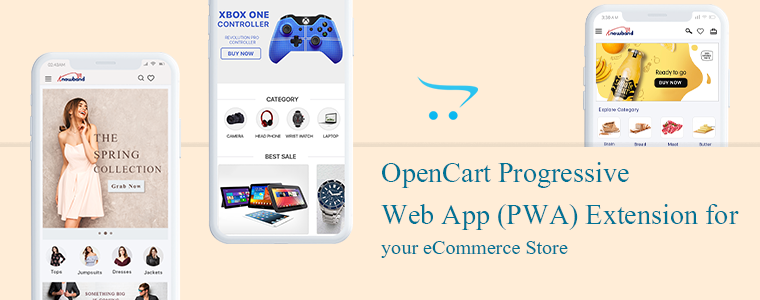
OpenCart Progressive Web Application (PWA) Extension for your eCommerce Store

The Progressive Web Applications turn your regular website into a fast-loading web app that behaves like a mobile application in a browser. The OpenCart Progressive Web Application extension is integrated with all the needful features and converts your website into a dynamic PWA. The Progressive Web Application extension will give your eCommerce customer a feel of using a mobile application when they are actually using the internet browser.

Why is PWA important for an eCommerce website? There are many famous brands like Starbucks, Flipkart, MakeMyTrip, Trivago, Jumia, etc. have seen tremendous growth in customer engagement and conversion rate after launching PWAs. The PWAs are highly reliable and provide customers a smooth user experience.

The PWA technology is not very old but the term was coined by Google in 2015 and then many followed it as it showed positive results in many ways. The OpenCart PWA extension has various features and those will benefit the store owners in various ways.

Some of the features and benefits are discussed in this article. Let’s look at it in depth.

The OpenCart Progressive Web Application

To offer an app-like experience to consumers, a Progressive Web App (PWA) uses modern web technologies.

Our OpenCart Progressive Web Application gives the impression of a native app that keeps them engaged and enhances the overall user experience. It supports push notification very well which improves the accessibility of your website further.

Why is PWA a must-have extension for the OpenCart store?

If you want to provide your visitors with an app-like experience on the mobile web, well then OpenCart Progressive Web App (PWA) is the best solution for your needs.

  • The Progressive Web App supports push notification that improves the conversion rate.
  • PWAs are fast loading that keeps the user engaged and reduces the bounce rate
  • Offline support: They work well in poor network connectivity and even in offline mode(uses cache)
  • These are cost-effective because it saves the cost you require to create a native app
  • PWAs are highly reliable and engaging
  • The OpenCart PWA is a top-notch option for you because it does not require to be uploaded on Apple & Google Play stores.
  • Gadget Friendly: OpenCartProgressive Web Application works well on all mobile devices.
  • It occupies low storage& hardly faces any crash or lag.

Recommended Read: How Progressive Web Apps (PWA) can improve mobile conversions of an eCommerce store?

How does an OpenCart Progressive Web App (PWA) extension works?

This OpenCart Progressive App (PWA) is just like every other OpenCart extension. When this extension is installed on an open cart website, it creates a customizable PWA derived from the website’s data.
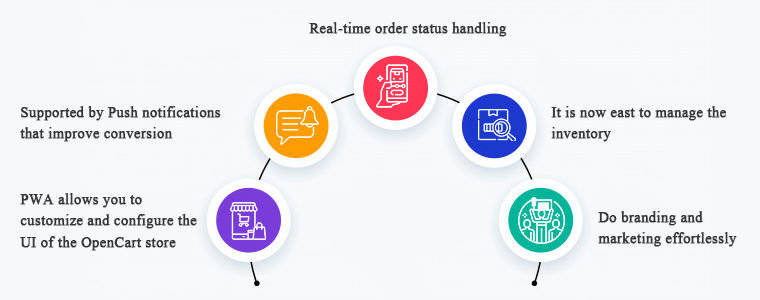
There is a real-time synchronization maintained between both, the website and the PWA.

1.     PWA allows you to customize and configure the UI of the OpenCart store

To manage the PWA user interface, you need not to a professional coder. It is that simple to customize and configure. The OpenCart store owners can select & customize their application name, app icon, logo, splash screen, font styles, etc.

On mobile browser, website users can connect your OpenCart PWA App to their devices’ home screen. Get full power over your app from the extension’s backend panel that to over a few clicks and button toggles.

The appearance of the store will be inspired by the theme and the domain name as you desire it to be.

2.     Supported by Push notifications that improve conversion

For eCommerce mobile apps, push notifications are a benefit driver, if used wisely. The OpenCart PWA Mobile App also helps you to directly give your app users personalized push notifications on their smartphones. The store admin can also schedule the updates listed below from the admin panel:

  • Notification for a successful order
  • Order status updates
  • Follow up notification for abandoned cart

3.     Real-time order status handling

In the OpenCart Progressive Web Application, the order status is changed in real-time. Users of the app will be able to keep eye on the fulfillment of successful orders. The order details remain in sync with the shop.

4.     It is now easy to manage the inventory

The entire inventory of the website will be in automatic synchronization to the app. Also, manual control is not required when it comes to the inventory of apps. Any updates or new additions to the software will also be modified only by refreshing them.

5.     Do branding and marketing effortlessly

If PWA is installed in your OpenCart store, you will be benefited from its handy promotional tools that help you with marketing and running deals in your store. It is a cost-effective extension because you don’t need any extra modules for running deals in your store.

Campaigns & Promotions for Sale

To raise sales you can run different promotional selling deals. Using the home-intuitive screen’s campaign graphics and promote further purchases for users. The admin can also run a flash sale based on a timer and create an emergency for quick purchases.

Works well with other coupons and deals running in store

The PWA app also works for all coupons & vouchers activated on your OpenCart website. It will provide Progressive Web App users with the same discount coupons and vouchers as website users.

Allows Product Sharing on Social Media

A customer believes the other customers. The OpenCart Progressive Web App allows app users to share their choice of beneficial products on various social media with their friends and relatives and inspire them to buy products.

Give your OpenCart customers a seamless shopping experience

Every store owner is looking for the right strategies to provide a better customer experience to their existing and new customers. The PWA has some advanced features that effectively provide a unique and great customer experience.
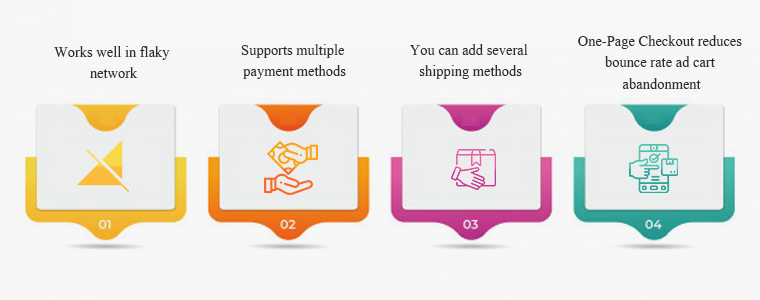
#1- Works well in flaky network

Even with a sluggish & no Internet connection, this OpenCart PWA App will work. Any time they want to search for items or shortlist them, users would not have to wait for good internet connectivity. Not magic though! This happens because of the saved cache files.

#2- Supports multiple payment methods

On your OpenCart PWA app, all the payment options available on your OpenCart website will be active as well. This plugin for the app creator synchronizes all the web-view payment methods.

#3- You can add several shipping methods

On your PWA app, any kind of shipping method active in your OpenCart store also works flawlessly. The OpenCart Progressive Web App means that the shipment & distribution of goods can be managed easily by the users.

#4- One-Page Checkout reduces bounce rate ad cart abandonment

Additionally, the OpenCart Progressive Web Application comes with an integrated One Page Checkout where only the requisite entries are obtained from the customers. Before placing successful orders, it also helps them to review the complete order information in one go and thus minimize cart abandonment.

Conclusion: You might be okay with the website you are using but making it a Progressive Web Application can do wonders! There are several success stories of big brands who converted their stores into PWA and the changes they have observed were remarkable.

Recommended Read:

You can click here and take a demo tour of the OpenCart Progressive Web Application. We at KnowBand create custom mobile apps for almost all the major eCommerce platforms. You can discuss your project ideas with our experts at support@knowband.com. And, drop a comment and let us know if you find this article helpful.

Recommended Read:
How to Add Infinite Scroll to your OpenCart Site (Step by Step)

Do you want to add infinite scroll to your OpenCart store?

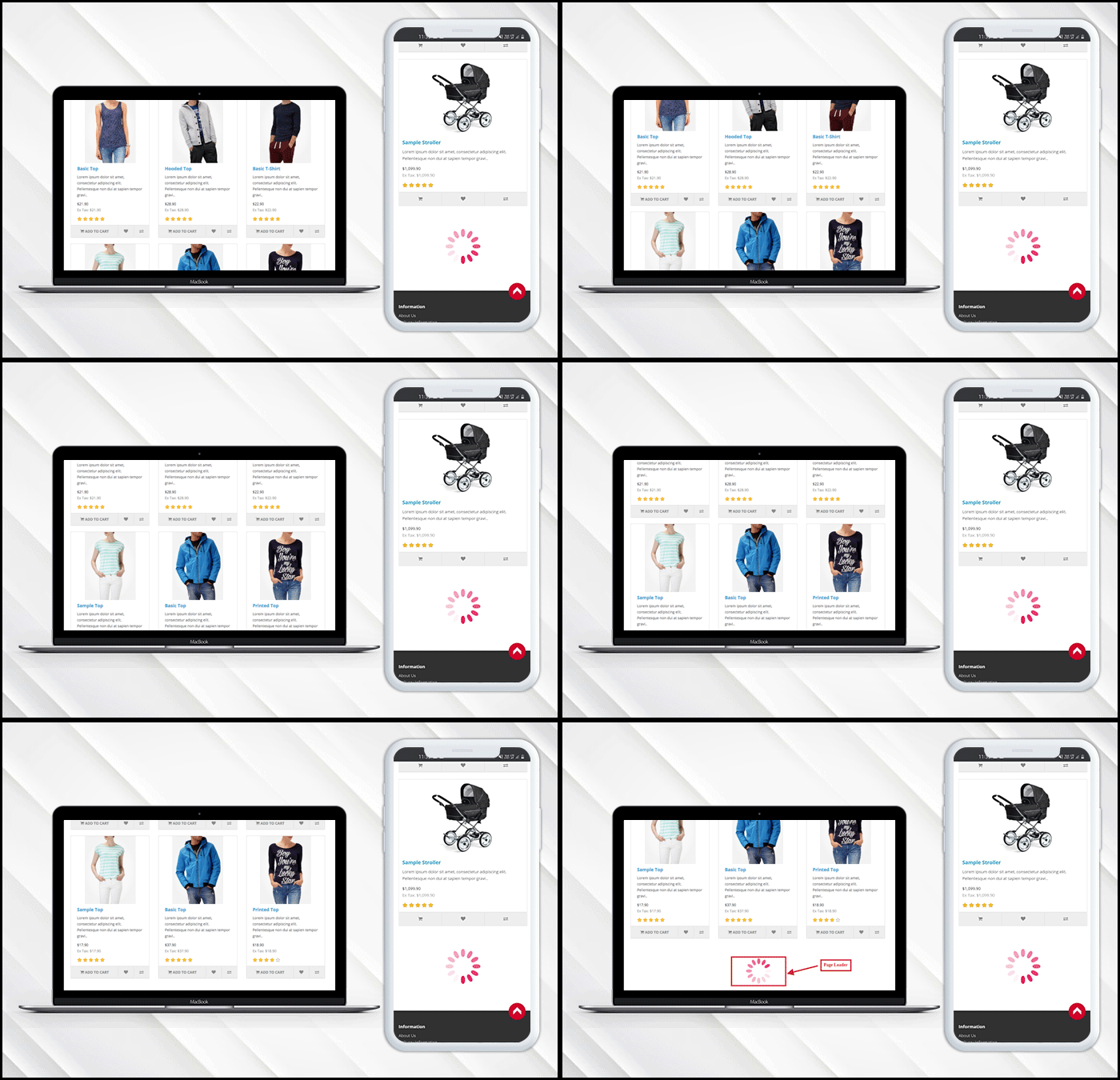
Infinite scroll saves users from switching tab by loading the products automatically after they reach the bottom of the page. In eCommerce, when a user is browsing and exploring products on the store, it is good to show the products in a continuous manner without breaking the flow.

Endless scrolling can be added to the category page, brand page, product page or wherever required. The OpenCart Infinite scroll extension by KnowBand is completely mobile responsive.  Besides, it is compatible with the Journal theme and other OpenCart themes.

This article is a complete step by step guide to install and configure the infinite scroll extension in your OpenCart store.

Introduction to infinite scroll

What is the infinite scroll? For instance, you are shopping on a website and after sliding for a few seconds the content stops loading and there appears a button ‘Load More’. Now without clicking the tab you leave the online store then and there.

On the other hand, when you are exploring news feeds on Facebook it never asks you to switch tabs and you just explore the feeds for a long time without keeping the time record. Facebook is using infinite scroll.

Similarly, eCommerce websites like Amazon are using infinite scroll. In infinite scroll, all the products get loaded on the same page without switching tabs or clicking on any button, unlike pagination.

Is infinite scroll useful for eCommerce?

Infinite scroll, especially on mobile devices, can create a more seamless feel for users. Swiping is what it seems like mobile devices have been made for. Pagination consumes more time in loading may kill exploration, which is a common incentive for users on tablets and phones with infinite scroll. Ad slots can also be found in more suitable locations, as well as on infinite scrolls.

OpenCart Infinite scroll module improves conversion and increases customer engagement to a greater extent. It lowers the bounce rate and increases your on-site time by offering a more streamlined way for users to interact with content.

How to add Infinite Scroll Module on OpenCart store?

The infinite scroll extension allows endless scrolling and is easy to install and configure. OpenCart infinite scroll module enables continuous page loading and customers can navigate to the new page without switching the tab.

Video Tutorial of Infinite Scroll: Click here

Steps to install and configure:

With OpenCart Infinite Scroll Extension by KnowBand you’ll receive the following files:

  • A zipped file containing the OpenCart Infinite Scroll module source code
  • OpenCart Infinite Scroll plugin user manual

Please follow the steps below to install this OpenCart Infinite Scroll Module:

  1. Unzip the zipped piece. As seen in the image below, you’ll get the folders:
  2. Copy all the zip file files and directories to the OpenCart Setup Root Directory via FTP Manager.
  3. The Infinite Scroll module for OpenCart is now built and ready for use. As the image below shows, go to Admin -> Main Menu -> Extensions
  4. Select Infinite Scroll from the list of plugins and, as shown in the image below, you are ready to edit.

What you can do with OpenCart Infinite Scroll Module?

  • The infinite scroll module enables infinite scroll
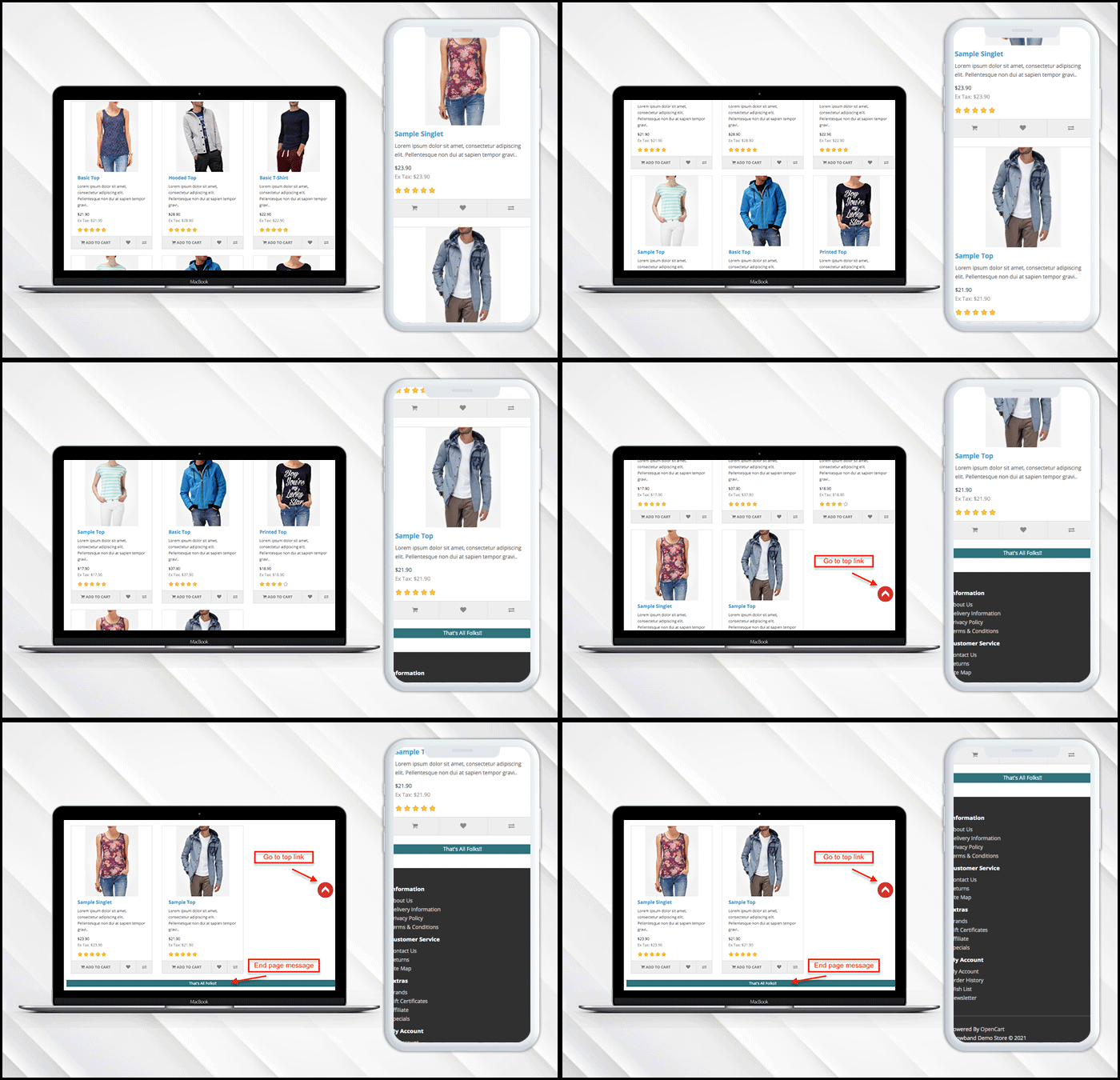
  • If you have a limited inventory then it lets you display a message at the end of the page.
  • Users can go to the top of the page directly by clicking the ‘Go to Top’ button.
  • Additionally, it allows the admin to put a loading browser if products are taking time to load.

Want to show loading browser?

You can display a loading browser in the product page of the OpenCart store in a button toggle.

‘Go to top’ link is needed

When a user reaches the end of the product page, a go-to top link will be displayed on the window.

Admin Panel Settings

How to add a message in the end?

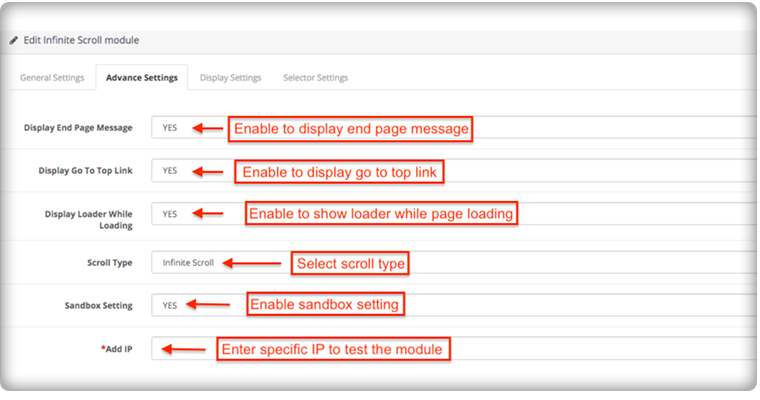
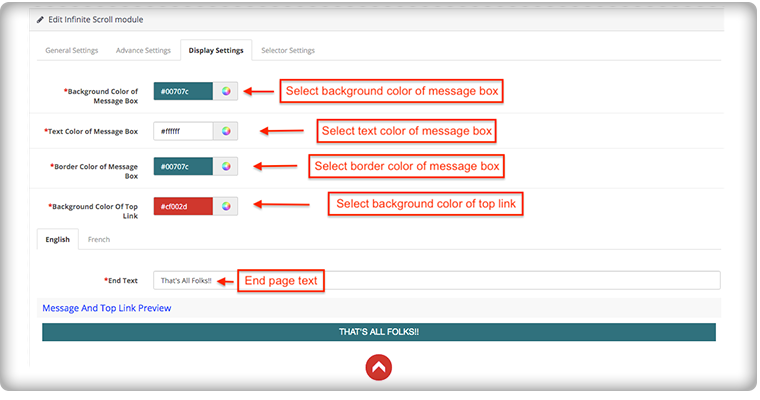
To add the end page message you have to go to the advanced settings of the module, there you can add a text to display the ‘End of Products’ message.

The message can be customized in English and French language. You can edit the color and text from the display setting.

How it appears on the front-end of the OpenCart store:

The OpenCart infinite scroll plugin’s admin panel is extremely simple to use and does not require the implementation of coding skills. Using the OpenCart Fast Scroll module, the admin may choose to display product lists in a grid or list view format.

Compatibility with all OpenCart themes

The OpenCart infinite scroll module is compatible with Journal and other OpenCart themes, so the administrator can configure the look and feel of the infinite scroll according to the theme of their site.

Compatibility: Opencart 2.0.x – 3.0.x

Finally, for your OpenCart online shopping store, infinite scroll can help you boost sales by increasing customer engagement and conversion rate. Infinite scrolling or endless scrolling for eCommerce is suggested by many experts because it has more pros than cons. It is completely responsive and doesn’t conflict with any other installed software or module in your OpenCart store.

This may interest you:

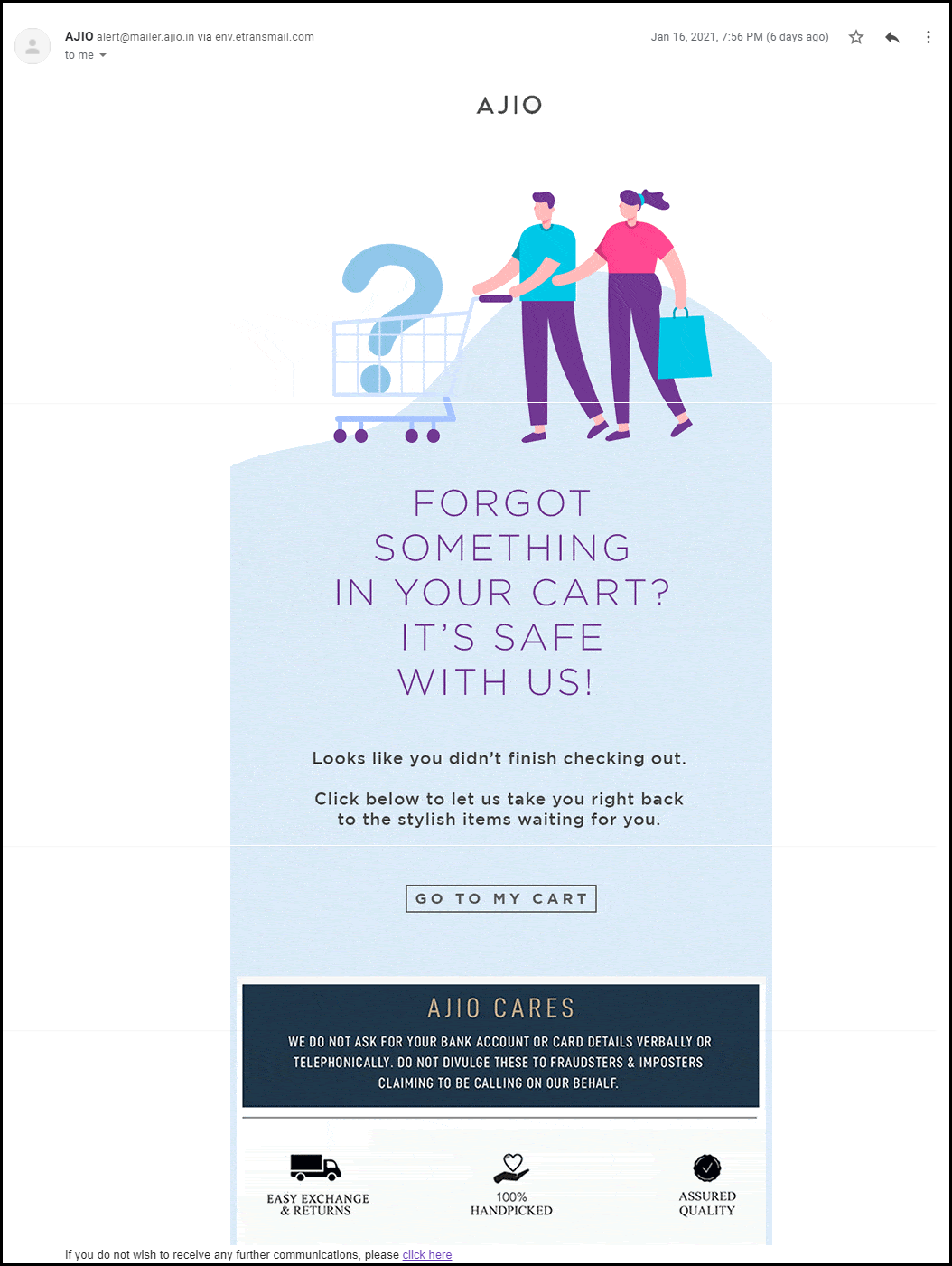
How you should plan your Abandoned Cart Reminder Email for your online store?

You might be spending a lot of money on bringing more visitors to your store via social media advertisements or other paid marketing plans, yet not receiving potential traffic?

If that sounds like you then you need to figure out the hole in your leaky bucket.

What does that mean? Your system of driving traffic isn’t working well. Maybe you have a poor UI or you are not giving them the personalized experience that they deserve. Or, you are just not doing it right.

Did you know that 75 percent of shoppers abandon their carts in mind-numbing ways? This costs an estimated $260 billion in lost sales for online retailers every single year!

You will begin to combat this phenomenon through the implementation of an abandoned cart email strategy.

Sending an abandoned cart reminder email allows you to recover some of your previously lost sales and potentially convert more of the traffic to the website that you attract.

What is an abandoned cart email?

An abandoned cart email is a cornerstone of e-commerce. It is a follow-up email sent to someone who has added products to their cart and proceeded through a portion of the checkout and left the site without buying them.

For the 3 (out of every 4) shoppers who leave a website without completing the checkout process, an abandoned cart email is intended.

The tremendous advantage of abandoned cart reminder email? They are auto-triggered. You can set up a series that goes all on its own and gets money back that would have vanished otherwise.

Why you should send an abandoned cart reminder email?

The thing is, about 75 percent of people who leave their carts usually intend to come back, so you’re leaving serious money on the table if you don’t send abandoned cart emails to jog their minds.

Statistics reveal that most of the customer converts after receiving 3rd abandoned cart reminder email. If you are still not working on your abandoned cart recovery process then you are losing out on a lot.

What strategy you should follow?

You should send an abandoned cart email reminder to your customers who have left your website without completing the purchase. You can send the follow-up email in the sequence.

First, after a specified time delay

Second, after few hours from the time you have sent the first abandoned cart email reminder

Third, a reminder after a day

Fourth, after a few days and

Fifth, in 7 days with a catchy subject line

Now you know when to send the emails but what content will actually work is the major question to ask. Customers won’t convert with the old traditional email tactics but your email should be more personalized, engaging and it should have the capability to convert.

What type of abandoned cart reminder email you should send?

It is easy to build abandoned cart emails and go a great length to bring back reluctant customers.

We’ve addressed ways to decrease shopping cart abandonment in the past. One of the main strategies is to alert shoppers with an abandoned cart email strategy that there’s something in the cart. Always include a reminder of what they have abandoned and prepare a great copy with features highlighted.

1.     Show your product features

Since you know what product you sell you are clear with your niche. In the very first abandoned cart email, you can highlight the features of the abandoned product.

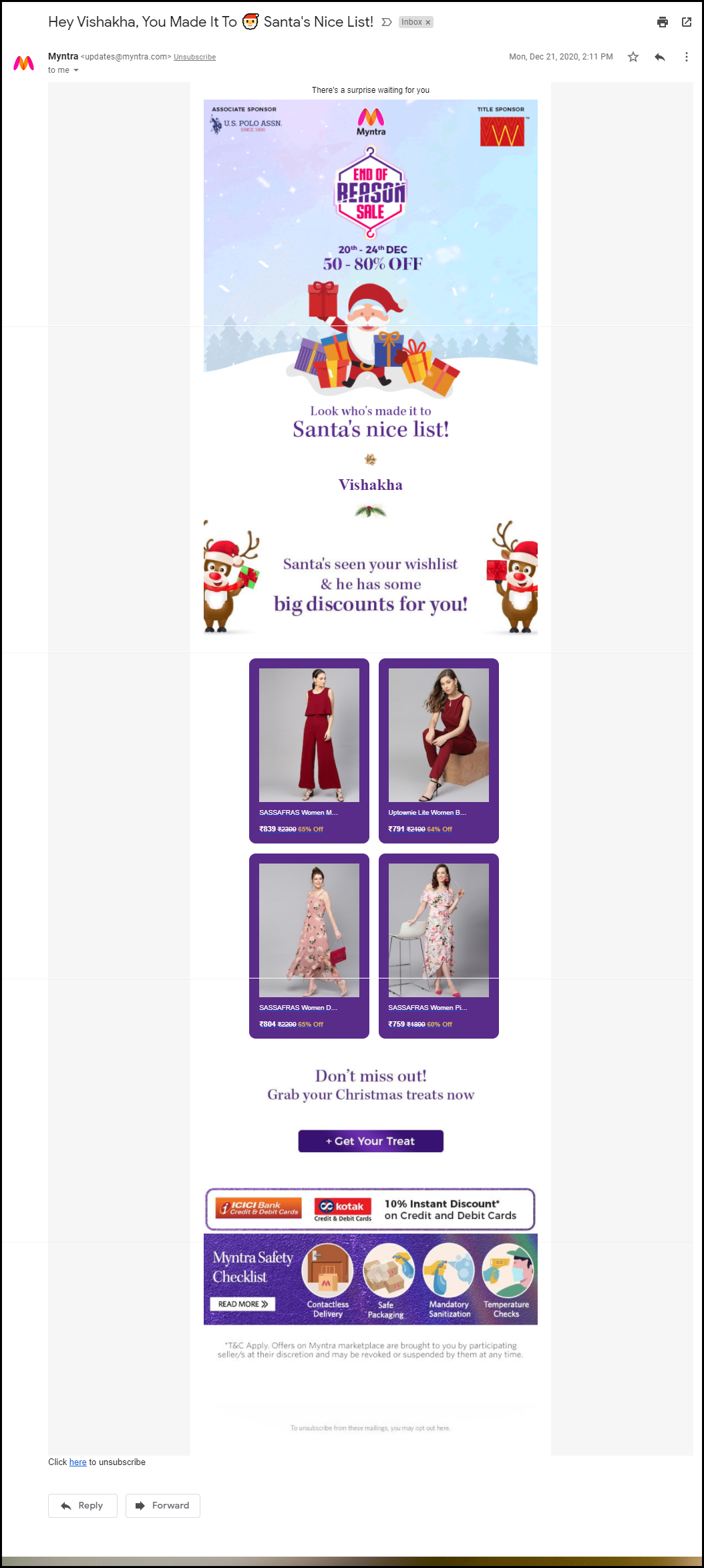
The mail should have a personalized touch. You can use the user’s name in the subject line.

Netflix always uses this tactic when following up with their customers. Also, the subject line clearly defined the purpose of their email.

Calling the customer with a name build loyalty and adds personalization to your abandoned cart reminder email.

When it comes to the subject line, it should be catchy and this definitely grabs the customer’s attention.

2.     Add social proofs, reviews, and testimonials

When sharing a second reminder email to your abandoned carters, remember to add social proofs. Reviews, testimonials work great when it comes to conversion.

It is human behavior that they trust what others say and when it comes to shopping, most of the customers spend more time on reading reviews than on the product description itself.

If you have a digital product like an App or any software then you can add the total number of downloads like ‘Abandoned Cart Module have 8000+ Downloads’

You can add average star reviews of the product with the abandoned cart email copy.

3.      Include video content and catchy graphics

Video marketing is a fancy and most engaging way of digital marketing. The third email, that you will send the other day should have a short video clip with the unpacking of the product by customers or any review video shared by your customers on your social media handle.

Video can be very effective if it’s done right. You can include GIFs or links to your social media handles where customers can see more such videos. It will enhance the customer experience. Use the graphic image that goes well with the product images, use the colors thoughtfully and use genuine product images while sending the reminder email for abandoned cart recovery.

4.     Discount coupon code

Most people abandoned their carts due to their prices. Since the final price is more than what they expected, clients abandon their carts.

If people think about how much they’re going to spend, the prices of each item they add to the cart usually add up. They don’t really care about taxes or delivery, and sometimes lowball the figures if they do.

And there is an easy way to recover the clients who were frightened by the final price: issue a discount.

You can also put a timer that creates the FOMO. Add some catchy lines like

  • Happy Hour Sale!
  • Grab your offer before it goes away!
  • Special Discount on Your Cart!
  • Use the Coupon Code XYZ and avail of this limited-time discount offer!

5.     Make a Bundle to up-sell

Your customer isn’t coming back even after the discount? We have another plan for you. In the 5th reminder of abandoned cart email, offer them products that can be clubbed together.

If a person is having eyeliner in their abandoned shopping cart then you can make a bundle of mascara, kajal, and eyeliner and offer them a good deal like a discount or buy-1-Get-1 offer.

I am sure this will make them visit your store again.

If the customer did not convert after these many reminders then it’s your hard luck! But, you should always try. Along with abandoned cart emails, you can also share back in stock alerts with them using the Back-in Stock module and also offer deals on the products they have put on their wishlist.

How Abandoned Cart Extension From KnowBand Can Help You Achieve Your Business Goals?

The abandoned cart reminder emails can be automated by using a third-party extension. The Abandoned Cart Reminder Email Extension by KnowBand is incorporated with the automation feature. The shopping cart recovery emails will be sent to the customer automatically after a specified time delay.

All the benefits of abandoned cart reminder email can be availed by adding the Abandoned Cart Module in your eCommerce store. It has several features that you can use to bring back your lost sales.

Send Automated reminder emails with OpenCart Abandoned Cart Extension

The Abandoned Cart Email extension developed for the OpenCart platform allows store merchants to send automated reminder emails by tracking the abandoned carts.

With daily email follow-ups, the store admin can now turn the abandoned cart users into clients. You can use the strategies discussed in this article to recover your sales.

The store admin can easily analyze the abandoned cart of the store visitors and give them reminders by email with the aid of the Abandoned Cart Recovery module.

The OpenCart module allows you to send discounted and non-discounted emails. Admin can set minimum cart value to auto-trigger the emails and specify delay time for the same.

It has several customizable email templates that can be used time-to-time for sending reminder emails to abandoned carters.

PrestaShop Abandoned Cart module has some additional advantages

The PrestaShop Abandoned Cart module allows the store owner to send automated reminder emails after the specified time lapse. This PrestaShop module has various other features.

What is extra? The PrestaShop Abandoned Cart Recovery Module allows you to send reminders in three ways.

  1. Send discounted or non discounted reminder emails
  2. Send Push Notification for abandoned carts
  3. Display abandoned cart reminder pop-up to the visitor

In addition, it gives you the entire report of abandoned carts and provides customer behavior data that can be used for sending personalized reminder emails.

Discounted and Non-discounted emails can be sent through the module and you can choose any email template from the listed ones.

It allows you to create your own custom abandoned cart reminder email template for sending series of follow-up emails.

Read: Creative Abandoned Cart Recovery Strategies Your Competitors Aren’t Using

Fringe Benefits of sending Abandoned Cart Reminders

The follow-up reminder for abandoned cart makes it easy for merchants to reduce cart abandonment and improve overall store conversions. More conversion means more sales! The emails with personalized content will enhance the overall customer experience.

The abandoned cart recovery module by KnowBand has several happy customers. You can check out the demo of the extension and visit the product page where customers have shared their reviews.

The module is available for all the major eCommerce platforms like OpenCart, PrestaShop, Magento stores.

Recommended Reads:

Acquire New Customers with Referral and Affiliate Marketing Tool for PrestaShop Store

Big brands like Amazon offers an affiliate marketing program and people are earning thousands of dollars with referral and affiliate marketing. It is proven to be a good source of passive income these days.

You might have heard terms like ‘refer and earn’ and came across the links on YouTube videos or blogs dominating a specific category promoting a product. People are making money by influencing others through good content and captivating tactics.

What is Affiliate Marketing?

Affiliate marketing is an opportunity to make passive income. It can work well and do magic if you know how exactly it works. Affiliate marketing is a type of revenue sharing technique. There are many tools available for affiliate marketing. One of the affiliate marketing tools is the ‘Affiliate and Referral Program‘ for your PrestaShop Store.

A person registers himself with an existing product selling website and gets a link for promoting the product. If that link works well and the product gets sold with that particular link, the person who promoted it will get a cookie. Yes, he will get some amount of money on behalf of that purchase. Yay! This is how it works.

Knowband developed a perfect solution for PrestaShop eCommerce store owners, an affiliate marketing tool named PrestaShop Affiliate and Referral Program. What is PrestaShop Affiliate and Referral Program? How you can grow brand awareness and acquire new customers with this affiliate marketing tool? What are the main features of the PrestaShop Affiliate and Referral Program?

We’ll answer all those questions in this blog. If you are interested in affiliate marketing for your store then you must know what ‘Affiliate and Referral Program’ is offering.

Features of ‘Affiliate and Referral Program’- an affiliate marketing tool

1.     Several types of referral

The affiliate marketing tool ‘Affiliate and Referral Program’ module allows the affiliate partners to invite new users through various means into your store. The affiliate partners can bring in new customers by sharing a referral code or a referral link with them.

Affiliate marketing and referral programs also allow the affiliate to generate voucher code. Besides that, affiliate partners can share the reference link on various social media platforms such as Twitter, Facebook, Pinterest, right from their affiliate account.

2.     Defined referral rate for the affiliates

a global referral rate can be set by PrestaShop store admin for the affiliate partners for the user registration and the order placement.

3.     Custom commission for each affiliate

Although the Affiliate marketing tool for PrestaShop the ‘Affiliate and Referral Program’ allows the store administrator to set a fixed global reference rate for the affiliate partners, they can customize this for every different affiliate.

4.     A voucher for affiliates on registration

PrestaShop Affiliate Marketing Module allows traders to assign a coupon on the successful user registration of the affiliates. The store administrator can set the value of the voucher and offer it in the form of a fixed discount or a percentage basis. There’s also the option to define the total quantity of vouchers and the limit of vouchers per user.

5.     Set validity for your referral program

The Affiliate marketing and Referral Marketing addon provide the option to run the specific referral program for a given time interval. If you define a time period, after the specified period, the reference code will get expire.

6.     Keep an eye on registered affiliates

With the Affiliate and Referral Marketing module, you can insight into registered affiliates and look into the details under the ‘Affiliate Customer’ section.

7. Obtain details of the clients referred

“Referral Listing” displays details of the customers who have done the registration via the affiliate link.

8. Check the incentives the affiliates earn

In the “Commission History” tab, the PrestaShop Referral tool allows the store admin to view the incentives earned by the affiliate partners.

9. Check for payout requests from affiliates

The affiliate marketing and referral marketing module allow the affiliate partner to obtain their payout/commission in the form of a voucher or cash.

The affiliate customer must raise a request to withdraw the commission earned from his/her account, which will then be reflected in “Payout Requests.”

Benefits of Referral and Affiliate Marketing Tool

  • Affiliate marketing increases brand awareness

Increase your brand’s popularity by arranging a multi-level affiliate program in the eCommerce website store.

  • The program gives refer and earn opportunity

Offer your customers a unique earning opportunity by displaying on the website an option to register an affiliate.

  • Gather email subscribers

With more registration, you can get more email subscribers. The data can be further used for email marketing strategies. The Affiliate and Referral Program is a boon to the cost of advertising.

  • Improved conversion

When the referent makes a purchase using the voucher code you can drive more conversions and hence more sales. Giving the affiliates exciting incentives can encourage them to bring more customers to you.

Final Words: People are looking for sources to build up the capital and earn more. This is a chance for eCommerce store owners to bring new customers to their store with the ‘Refer and Earn’ program. Affiliate marketing and a referral program can help you grow your PrestaShop business to the next level. Knowband presents the ‘PrestaShop Affiliate and Referral Program’ addon which helps PrestaShop store owners build brand awareness and effectively increase their user base.

Check out the admin demo and the front demo of the PrestaShop Affiliate and Referral Program module. If you have any concerns regarding this addon, you can mail us at support@knowband.com and our team will resolve your query by the earliest.

This can also interest you:

What Is Bounce Rate? How to Improve it Quickly?

The only goal of any business is to bring new customers and increase sales with the old ones but some visitors do not make it to the endpoint and leave without buying. In eCommerce, it is called the bounce rate. You might be getting enough clicks but no conversions and many website elements can be responsible for bounce rate.

Imagine a person wants to climb a mountain and planned an 11km long trek but he can’t go because the trek dates aren’t matching his holiday dates and he canceled the plan. The same can happen when a customer visits your website and does not find the product they want to buy.

Simply quoting, if a customer visits your website with an intention but he does not complete the action is termed as bounce rate. Let me give you another example, your website sells cosmetics and the customer requires a product that is organic and chemical-free but you fail to provide such a product because of poor categorization. He will immediately leave the site and may not come back.

If you don’t want your customers to bounce back, you need to provide engaging content, strong and powerful search bar.

Why does the user bounce?

A rising bounce rate is an obvious indication that there are off-putting elements or underlying problems that you need to fix on your web. A bounce is caused by a variety of causes and circumstances.

Although there may be several explanations for the elevated e-commerce bounce rates, a list of the common ones is below:

  1. Page didn’t meet expectations: Visitors didn’t find the data or the product in the appropriate manner that they were looking for.
  2. Long loading time: It takes more time for the page to load.
  3. Poor UI and content management: If the user interface of the website is bad and the content isn’t well managed.
  4. Poor navigation and UX: The landing page’s UI is complicated and difficult to understand by the end-user.
  5. The lack of ‘Call to Action’: For customers, poor navigation will increase the bounce rate.

How to reduce bounce rate?

Firstly, you need to optimize the reason behind the bounce rate on your website, and once you do that you can take necessary actions. Sometimes, the bounce rate can cause you so much revenue which is dangerous for your business. Here are some pro tips that can help you reduce the bounce rate on your website:

1.     Do not use unwanted Pop-ups

Unless it is necessary, do not use pop-ups on the entry page. Try pushing it on the exit page or after the user completes the action. A cause of the bounce rate can be a pop-up window that annoys the visitor. If necessary, you can add a gamified element to the entry page for an email subscription or any discount offer. Spin and win

2.     Translate your site for global users

A multilingual website demonstrates the potential for increased sales. Any language that you add to your website has the potential to increase your sales dramatically. In addition to targeting the local market, it would also draw Internet users from other countries by creating a multilingual website. A multilingual website can reduce the bounce rate for international traffic from 80% to 40%.

3.     Improve Page Loading speed

Getting fast page load time can also improve the crawl rate of your website. The quicker it is possible to load pages, the more Google will index pages at one time. High page speed may also increase the crawl requirement of your website. Many users bounce because of high page loading time. Hence, it is pivotal to reduce page loading time.

4.     Invest in UI and make it attractive and engaging

To improve the bounce rate the better UI and engaging content can be helpful. A successful design inculcates trust and makes it intuitive to navigate. People don’t spend a lot of time on places that they don’t like or find hard to navigate. Make it simple by getting a nice template to start with for your visitors. There’s a great list of pretty customizable themes available on the web for various platforms.

5.     Optimize the landing page and product page

The process of optimizing elements on a website to improve conversions is Landing Page Optimization. Optimization of the landing page is a subset of optimization of conversion rate and involves using methods such as A/B testing to enhance the conversion targets of a given landing page. This will improve the bounce rate several times than any other method.

The next possible strategy to improve the bounce rate is by optimizing the product page. You can include social proofs like review and ratings, clear call to action buttons, product videos, and high-quality images to the product page.

6.     Reduce checkout friction

Checkout friction is the major cause of cart abandonment and a higher bounce rate. It is important to remove frictions from your checkout page to decrease shopping cart abandonment, generate sales, newsletter subscribers, and to improve conversions. Adding multiple payment methods, shipping choices, make unnecessary fields optional, and offering social login and guest checkout can help.

You can use the One Page Checkout Module to overcome these issues. Read this to reduce the checkout page friction which can help you in reducing bounce rate.

7.     Make your website mobile responsive

Mobile visitors have far less patience than desktop visitors. To provide mobile users with a better user experience, ensure that your website has a responsive design. Also, the user base of smartphone users is more than desktop users.

8.     Add Personalisation Element

By presenting the data, personalization can help to enhance conversions. To support a specific product, following a centered strategy that is personalized to their behavior and liking would certainly help them in a successful transaction. The conversion and bounce rate are inversely proportional. If the conversion increases it will automatically diminish the bounce rate.

Final Words:

eCommerce Conversion: One of the easiest ways of improving your bounce rate is to boost your conversions. Someone who converts is automatic will not bounce. This guide will teach you how to use A / B testing to get more conversions on your website and other methods.

Minimize the bounce rate of a website: A very in-depth look at the bounce rate, including ways of using Google Analytics to correct a high bounce rate.

Reduce Cart abandonment: This is again a healthier way to reduce the bounce rate and these pro tips will help you reduce abandoned carts on your web store.

For, eCommerce related projects, contact our team at support@knowband.com or drop a reply here in the comment section.

Dealing with Poor Conversions? 5 Reasons and Guaranteed Tactics

Low conversion rate is something that almost every eCommerce business owner is battling. With the increase in the number of companies delving into the online trading scenario, this issue is expected to become even more prominent.

The fact is that the real killers of conversions are minor and this is why they are usually overlooked. So, before you find a solution, you need to dig deep into it’s root cause. Listed below are some of the reasons of poor conversions and the tactics for dealing with them. Let’s check them out:

Reason 1: You are missing out the chunk of mobile users

Img Source: rapidboostmarketing.com

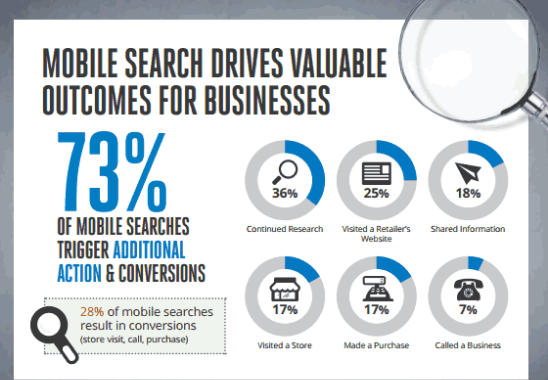
As per a report, 73% of the mobile searches triggers additional actions. Additionally, 28% of the mobile searches result in conversions. If your eCommerce site is not mobile-responsive, then, the online shopping with a smartphone can be summed up in one word – pain. No wonder, 61% of the mobile phone users get frustrated by the shopping experience and move to the competitor’s site. In case, your website is not responsive or not mobile-tested then, you are definitely losing some chances of easy conversion.

Solution:

Make you website mobile responsive. That is, optimize your site so that contents and the images shrink automatically to fit the smaller screen size. In addition, AMP site is a natural fit for the eCommerce companies. Optimize your site as per the AMP guidelines of Google for a better browsing experience of the customers. Upgrade your desktop website into a mobile application. The mobile app builder for the various platforms like Prestashop, Magento, OpenCart and others can help you convert your site into a mobile store.

Reason 2: You haven’t optimized your content

Your web page content must add value to what you are promising to your customers. Visitors should clearly see on the landing and product pages why they should opt for you over others. One of the biggest reasons when you fall short of the desired conversions is when you are not in sync with the changing trends and the customer’s requirement. This is not it! The search queries and browsing, as well as shopping behavior of the customers, are changing with time. Earlier, the contents of the websites were focused on keywords. However, the customers these days tend to search queries instead of just keywords. The location-based searches are on the rise.

Solution:

Along with the keyword, include the long-tail queries in your content. The web contents should include the solution to the queries being searched. Moreover, the search volume of keywords like ‘Best’, ‘Top’ and others have increased. Not saying abreast with this change may be one of the reasons why your customers are not landing on your website. Go for local SEO and provide location-based solutions to the problems of your target audience. The entire content should be curated keeping in mind two questions, ‘Who is your customer?’, ‘What your customer wants?’.

Reason 3: Your CTA is not performing

The call-to-action triggers are the final sale pitch that is responsible for directing the customers to the checkout page. While the store owners might consider is just a button, it is a proven fact that even they can cripple the conversions.

Solution:

The CTA should be immediate and clearly visible to the visitors. Remove the distraction from the around the buttons. Check if the visitors are paying attention to these triggers or not. Make the necessary changes accordingly. Choose the right color combination for maximum impact. Use the low-fiction text for the same like ‘Check out’, ‘Get’, ‘Earn’ and others. Create options and do split testing to get the right solution.

Reason 4: The pop-ups are annoying

The conversion is not only affected by the amount of traffic you are getting on the website. The customer retention is another key aspect. The average session duration of a shopping site is just fringes of seconds. User often leaves a web page in 10-20 seconds. This is when the exit-intent pop-ups come into play. It might sound conventional, but it actually works. In fact, this is one of the most converting elements of a website. However, making the scroll bars or exit pop-ups intrusive can kill your site’s performance. Being too aggressive while curbing the exit intention of your site visitor can, in fact, affect the conversions adversely.

Solutions:

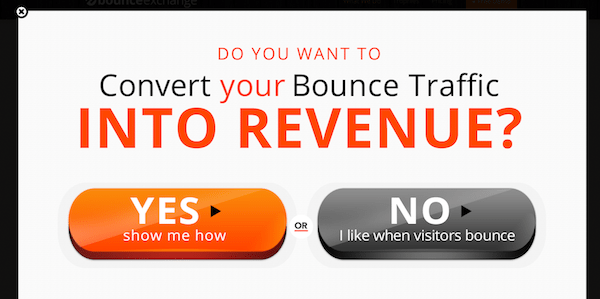
The very first trick to reduce the negative impact of the same is to test the pop-ups before making it live. A/B testing can help you find the exact effect it’ll have on your visitors. The pop-ups with aggressive messages like “No, I don’t traffic on my website and” can give a wrong message. Keep the tone of the messages displayed positive.

In addition, gamified exit pop-ups such as spin and win can really keep your visitors engaged for a longer duration. The more time they spend on your site, the better are the chances of conversions.

Reason 5: You are not redirecting the visitors to the checkout page

Right from poor landing pages to the lengthy checkout procedure, everything is an aspect of the inefficient conversion funnel. Only a seamless shopping experience can redirect the visitors to the payment gateway. In case, the customers are landing on your website, but are not converting into paying leads, then, probably you are redirecting them properly throughout the transaction.

Solution:

A poor landing page is probably the first in the list that is responsible for a low conversion rate. Make sure that you focus on the visual merchandising of the category pages. Proper navigation and filters can help the customers land on the desired product page. This also includes using A/b testing tools that create landing pages on the fly with very little effort. The product page should be optimized and informative enough to present your sales pitch in the best possible way. High-definition images and product videos can provide the customers with the much required clarity. Product tab module which creates information tabs on the product page is one of the ways to make optimum use of the limited space. Once the customer clicks on the ‘Buy Now’ button ensure a flawless transaction. Instead of making it a long and tedious job, go for the one page checkout.

Conclusion

Proper tracking can make a world of difference to your conversion rate. Learn to counter your mistakes from the brick-and-mortar store and focus on the minor changes that are required to deal with low conversions.

Related Stories:

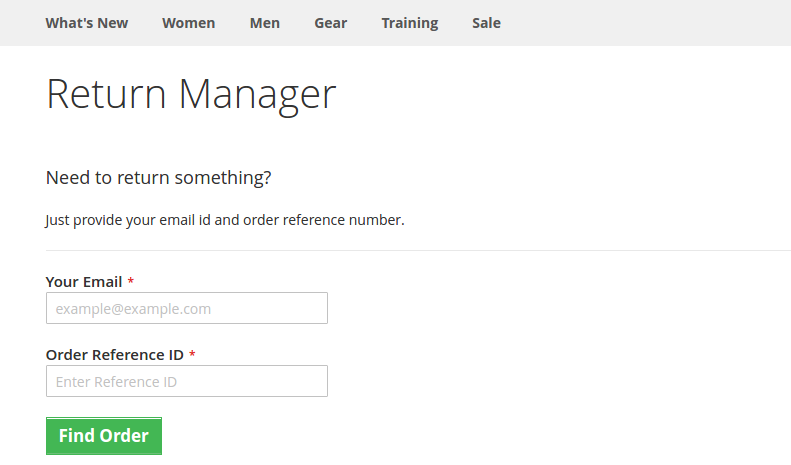
Product Return Manager for Magento-2 that ensures Customer Satisfaction

Lack of a flexible return policy can be a cause for cart abandonment on the checkout page of your online store. And, for a generous return policy, up to 66 percent of customers claim they will spend more. Many retailers, unfortunately, impose strict return policies. There are two ways to go about doing this. To begin with, policies that place an excessive amount of time restriction. Second, policies that enforce a fee for returns, which is typically in the form of shipping. And the others don’t even have a return policy on their store.

What if there is a way that might not just minimize the abandoned carts but might also boost the conversion rates at the same time? Create an ambiance that allows your customers to shop without any tension on your website. I am talking about, returns, refunds, replacements, and exchange management on your websites. Here, I am taking the example of a Magento 2 website to explain how an efficient Magento 2 return manager extension would help you to make online shopping a ball for your customers.

How would a website owner benefit from the Magento2 return manager extension?

With the easy return, more customers will be attracted to shop with you- In the era of huge competition from similar eCommerce sites, if you secure even the slightest competitive advantage against your rivals, you will score fortunes with your conversions. What most of the eCommerce customers fear is the tricky return procedures of the eCommerce websites. By installing the Magento 2 return manager on your website, you can make sure that these tricky procedures are converted to the easiest ones.

  • Single product return: The return manager will allow customers to return the whole cart or even a single product from the cart.
  • Partial Product Return: With Magento 2 Return Manager, customers can also return partial orders from the complete list.
    This feature of the return manager will make sure that customers do not have to return the whole bulk in order to return a single product. Thus, preventing a serious loss that could happen if your Magento 2 return manager could not handle a single product return.
  • Every request is not a return request: Not every customer wishes to return a product or to get a refund. Some might even want to replace or exchange a product. If your return manager extension treats every return request as a refund request, then it is a serious threat to your conversion rate as a whole.

For example, the Magento 2 return manager extension is capable of handling three types of return requests- Replace, Refund, or Get Credit. For those who want to get a refund, for those who want to replace a product, and for those who want to get a refund a buy something else from your site respectively.

Status tracking to keep them informed- When a customer places a return request, he/she wants to stay updated with the procedure. Customers should be able to track the status of the return request in the same way they tracked the product delivery status.

This is one of the trickiest parts of any return management process. An effective return manager extension like the Magento 2 return manager, allows the customers to track their return status very easily using a unique id provided at the time of return request.

The easy returning process with Magento2 return manager

The choice to attach a file: The Magento 2 order refund extension allows customers to attach a file to their replacement/return request.

Request forms, statuses, and reasons are all unlimited: Magento 2 RMA allows the store owner to build an unlimited number of return reasons and statuses to meet the needs of their customers. The admin can easily generate an order refund with the Magento 2 order refund extension.

More about Magento 2 return manager extension

Easy Order Return Manager for Magento 2 aids in the reduction of abandoned carts and ensures that they are as few as possible.

Some other features of Magento 2 Return Manager that benefits your business

  • The admin will handle the return requests of both registered customers and guests using the Magento 2 extension.
  • The request for a return may be approved by the administrator. When the request is accepted, an email trigger will be sent.
  • From the backend of the admin interface, the Magento 2 store admin can also generate return requests on behalf of customers.

Finally,

The importance of an efficient return manager extension on your eCommerce site cannot be ignored. Product returns strategies that are well-organized will result in higher sales, a stronger brand, higher consumer loyalty, and better customer service. The aim of a perfect RMA is to strengthen customer relationships. Choas continuity is being developed by simplified return management. You should not miss any opportunity to optimize the shopping experience on your website. Handling the trickiest return situations with the help of a proper return manager extension is all you need.

It is not just about a Magento 2 website, there are efficient return manager modules and extensions for PrestaShop, and Magento also. You just need to install the respective return manager extension as per your eCommerce platform and you are ready to manage even the trickiest returns on your site.

Liked This? You’ll Like These Too: