Imagine a extension that can bring both buyers and sellers at a single point of engagement for facilitating online business. Strange and unbelievable it may seem to you but it is actually possible with the introduction of this Magento Marketplace extension which is known as Magento Multi vendor Marketplace module among various e- commerce organizations of the world. It has done which was earlier thought as unthinkable and has brought both the potential buyers and sellers at the same platform. Due to its brilliant features, this module is becoming quite popular among the various communities that are involved in the e- commerce business.
An engaging and user friendly interface for both sellers and buyers
The extension offers a wonderful user friendly interface to both the buyers and sellers simultaneously. Now, sellers can easily manage their account profiles, price, product quantity, logo, commission rates, addition or deletion of any products in their product categories and other such parameters through seamless access to their seller accounts. Similarly, buyers can easily check the list of all sellers, name of the sellers, ratings of their products, products displayed by the sellers and other such features through the front end of the admin panel.
Easy registration and management of the seller account
With the help of this Magento extension, buyers as well as any other individual can easily register as seller by selecting the “Register as Seller” option on the registration form. It is also easy to manage the seller accounts with the products that are intended to be sold. Sellers don’t have to maintain the account of the products on their individual site and can easily sell their products online with the help of this module. Sellers have the freedom to make desired changes to their seller accounts and can also check their seller transactions through interactive reports. They can also create their separate product collection by using their own banner, shop logo and custom HTML content. This user friendly interface also helps in providing crucial information like income, revenue per order, items sold and other such features to seller community. Apart from this, sellers can decide special price for their products by using “Special price from” and “Special price to” dates.
This Marketplace extension has helped in providing a new definition to the online shopping by providing various features and functionalities. Now, store admins can easily create their own marketplace for various branded products without any need for maintaining inventory control. Further, in order to increase the global reach and sales of your products, multiple currency systems are supported by this extension so that buyers can easily purchase products in their native currency system. Also, sellers can make use of social URLs so as to include social links on their sellers accounts for increasing their popularity and brand value among the social media customers. With all these features, it is easily understandable that this module is truly a big booster for online business community.
Now, don’t wait for any miracle to happen that can improve the performance and conversion rates for your e- commerce organization but instead surf our e- commerce site www.knowband.com to purchase this extension. It is really a golden opportunity that can improve the fortunes of your business organization to a great extent. If you miss this, then be ready to lag behind your business rivals in terms of conversion rates and product sales.
Checkout process on an e- commerce store is usually a very hectic and gruesome task and often customers end up leaving the process in the middle due to the complexities involved. It has been observed that a major cause of the numerous shopping cart abandonments are the ineffective checkout process. Customers are often asked for unnecessary personal information and are redirected to the numerous pages which ultimately leads them to abandon the current e- commerce store. It is a serious issue and has been giving jitters to numerous e- commerce organizations around the world. But, now, everything is going to be right with the introduction of this Magento One Page Checkout extension which is really a rockstar among the numerous e- commerce checkout extension for Magento stores. Take a look at the different features of this amazing extension.
Feature loaded user friendly admin panel
One of the wonderful feature of this extension is the presence of the feature loaded admin panel that has provided immense power to the store admins. Everything right from managing the content, design and layout of the website has become an easy cakewalk due to the rich features of its admin panel. Further, it is very easy to make any desired changes in the content, design and layout of the website without any technical hiccups. Apart from this, store admins can now enable or disable the desired fields on the checkout page so as to facilitate the effective checkout from their e- commerce store.
Provides option of multiple design layout for checkout page
In order to facilitate the quick and seamless checkout through your e- commerce site, this plugin allows store owners to decide the final layout for their checkout page. You can now keep all your checkout details in a single page so to improve the site usability and to complete the checkout process easily. The store admin has the full control over the complete layout of the checkout page in terms of its design, size, appearance and other features.
Supports multiple computing devices
One of the best feature of this Magento module is its responsive design which has greatly increased the use and performance of this module among numerous available Magento extensions. You can use it on any type of computing devices like desktops, laptops, smartphones and tablets. It offers same level of experience and functionality to users irrespective of the device he/she is using.
Facility to check image preview while making any changes in the shopping cart
With the help of this wonderful plugin, it is now easy to check your product image while adding any products in your shopping cart. Customer will get option to check product image while adding any product item in the shopping cart. Further, user will get the complete details about the shopping cart in the form of eligible coupon codes that can be applied on the shopping cart. All this features makes this module one of the best module for the e- commerce Magento site owners.
So, there is no need for e- commerce organizations to be in panic mode due to the checkout related issues as an effective solution has made its way in the field of e- commerce business segment. Enhance your chances of business growth by adding this e- commerce module in your kitty through our e- commerce site www.knowband.com and be the market leader in your area of business. It is really a savior for the numerous e- commerce organizations of the world.
Online shopping has become one of the most promising business segment and numerous e- commerce organizations are trying their luck in this fastly growing e- commerce business segment. Busy lifestyles and the ease of shopping from a given place has given the sudden boom to this trend of online shopping. It has become a multi billion dollar industry and various e- commerce giants like Amazon, eBay, Alibaba and such others has shown us that it is not some under- estimated business territory. To enhance the online engagement of the customers and sellers, here is a wonderful Magento module known as Magento Multi vendor Marketplace that can take the online shopping experience to an all new level.
Increased functionality and freedom to store admin
The rich features and functionalities provided by this module has made it one of the top 5 Magento extensions. With the help of this extension, store admin can take various crucial decisions like managing of the vendors list, management of the sellers account, providing approval or disapproval to sellers regarding the addition of a product on your marketplace, deciding the commission rates for the vendors, check seller transactions and other such features. It has made the site admin the focal point of all business related activity on your site.
Effective email notification system
One of the top class feature of this wonderful plugin is its effective email notification system. It provides timely updates to all the parties involved in the marketplace namely store admin, vendors and sellers about all the information regarding the marketplace. The module provides regular information about the addition or any changes in the seller or vendor account to admin and any changes in the vendor and seller accounts to the respective vendors and sellers accordingly. It provides important updates and information to all the people that are involved in the business at the marketplace and has earned it the name among the best ecommerce modules.
Helps the seller community by providing the various features
This Magento marketplace extension has given much freedom and functionality to the seller community in the form of various features. Sellers can now manage their account profiles and product details, manage product quantity and price, effective front end login facility, easy access to the sales information, quick changes in the seller page by adding desired logo, banner, HTML content and other such features. It has given the sellers freedom to define their account according to their taste and preferences.
So, it is time to look out for this plugin and any other extensions on our e- commerce site knowband.com for giving a new definition to the online shopping experience. It is really a master plugin that can solve the various concerns of the different communities like sellers, buyers and store admins. Make a master stroke decision now and purchase this plugin for increased conversion rates and product sales.
Are you facing the severe problem of increasing shopping cart abandonments on your e- commerce store? Are your customers taking interest into your advertised products but are not actually buying it? If these are some of the questions whose answers are in affirmative, then it is really a matter of concern for your e- commerce business organization. This is because abandoned customers not only affects your product sales but also affects the brand value and reputation of your business organization. We are well aware about this gruesome situation and its effects on the conversion rates of your e- commerce site. Let us now take note of this Magento Abandoned Cart Extension that can provide a long lasting solution to the above mentioned problem.
Effective information about the abandoned shopping carts
It is one of the important e- commerce Magento extension that has gained immense popularity and use due to its wonderful features. With the help of this module, store owners can have a detailed information about the abandoned carts on their e- commerce store. It provides a clear information about the abandoned carts that are recovered by each individual of the organization and the total number of abandoned carts in module settings. Further, it is now possible to penalise those customers that are in the habit of frequent abandonment of shopping carts.
Increased functionality to both customers and site admin to control the sending of emails
It is now easier for site admin to control the sending of the reminder emails once the checkout process of the pending shopping carts has been performed by the respective customers. Site admin can seamlessly remove the reminder emails regarding that abandoned customers from email queue so as to prevent the further sending of the email messages. Apart from this, module also provides an “Unsubscribe for email” option to its e- commerce customers so that they can stop the sending of reminder emails to their email accounts through their end.
Free technical support and quick installation
Easy installation along with the free technical support are some of the features that makes this Magento extension different from all other existing plugins. It can be easily installed by any individual who has a limited knowledge about the computers and does not require any special technical assistance or support. But, inspite of its simple installation, if you still face any issue during the installation process, you can take the help of our wonderful customer support service which is available at free of cost. For any other plugin related issues, you need to just visit this URL- https://www.knowband.com/helpdesk and our skilled techical support team will do the effective resolution of your problem.
Helps in improving your conversion rates and product sales
By sending repeated reminder emails to your abandoned customers, e- commerce organizations can urge them to complete their pending shopping orders. Due to this, customers get information about their pending orders and can complete them at a suitable time of their choice. Thus, in this way, e- commerce organizations can improve their conversion rates and product sales to a great extent and all the credit goes to this wonderful Magento extension.
So, you don’t have to suffer again due to this long pending issue of abandoned shopping carts as an effective solution has arrived in the form of this Magento Abandoned Cart module. If you want any other information about this superb plugin, you need to surf our e- commerce site www.knowband.com and can take the crucial decision of its purchase based on its excellent features and functionalities.
Getting customers attention towards your e- commerce organization and making them purchase your advertised products is a herculean task due to the emergence of numerous players in the e- commerce business segment. But, what can act as a magnet for your site customers are the interesting shopping coupons or offers that can increase the interest of your customers towards your business organization. By providing your customers an ideal shopping opportunity, e- commerce organizations can easily improve product sales on their site. Some of the features that have made this Prestashop Scratch Coupon Addon a huge success among e- commerce organizations are discussed as follows:
Effective reporting system-
Now, store admin can easily track the number of scratch coupon that are being used by the customers, total number of coupons that are generated by the organization and the coupons that have expired ultimately without being used. All this crucial information is provided effectively through statistical data in the form of charts and graphs. Due to this information, business organizations can make necessary changes in their marketing strategies to improve the utilization of their scratch coupons and to increase their conversion rates.
Easy utilization of the coupon codes-
This Prestashop Scratch Coupon module solves the impending problem of the e- commerce organizations that often complained of having limited coupon codes for customers for providing discounts on various advertised products. But, with this scratch coupon module, it is now easy for the customers to avail discounts from e- commerce store. They just have to scratch coupon code and after scratching their coupons, they will be prompted for an email address. By providing their email address at the requested place, the customers can become eligible for getting the shopping discounts mentioned on the coupon code.
Compatibility with multiple stores-
One of the amazing feature of this scratch coupon plugin is its ability to be used with multiple e- commerce stores. You can easily generate site maps for your different stores and the scratch coupon module can thus detect your multiple e- commerce stores seamlessly. So, it is essentially a one stop solution for all your e- commerce stores catering to different types of potential customers.
Helps in strengthening the appeal and popularity of your store-
By providing various eligible shopping discounts to your customers through these scratch coupon, e- commerce organizations can easily increase the interest and attention of your targeted customers towards your e- commerce site. The scratch coupon will also contribute immensely in completing your earlier abandoned shopping orders and will help in improving your conversion rates to a great extent.
So, scratch coupon is a good opportunity for all those e- commerce organizations that are struggling hard to increase their product sales on their respective e- commerce sites. Just order this wonderful scratch coupon Prestashop Module from our e- commerce site knowband now and improve your conversion rates to a great extent.
Getting the support and loyalty of their customers is very important for any business organization which is working tirelessly for increasing their customer traffic and profit margins. Social media has been able to break geographical boundaries and has helped in establishing customer company rapport among different people. It has emerged as a global platform where business organizations and potential customers can freely interact with each other and can boost their chances of business growth.
E-commerce organizations have seen a booming growth in social media engagement and are able to connect with people in a better way due to the emergence of this Prestashop Social Login Module. Let us take a look at why the Prestashop social login addon is one of the most sought-after modules by numerous e-commerce organizations.
Why Social login is the best eCommerce practice to adopt?
By building social links with your customers, business organizations can easily create necessary awareness about their advertised products in order to increase their sales.
1.According to an analysis conducted, users tend to sign in using Google (70.97 %), Facebook (19.69 %), and Twitter (9.32 %).
Since people enjoy sharing content online, social sharing allows you to reach a larger audience. 78 % say they’ll share messages about goods and services they like on social media. Better data means better marketing choices (potentially)! Use social media advertising channels to reach registered consumers and customers where they already spend much time online.
A marketer’s dream is to get to know their customers and have them share your brand with their networks. From a report, if someone in their social network suggested a new app, 82 % said they’d try it.
These are a few reasons, why you should use social login in your eCommerce website. Let us take a look at why Prestashop social login addon is one of the most sought-after modules by numerous e-commerce organizations.
Easy account login facility-
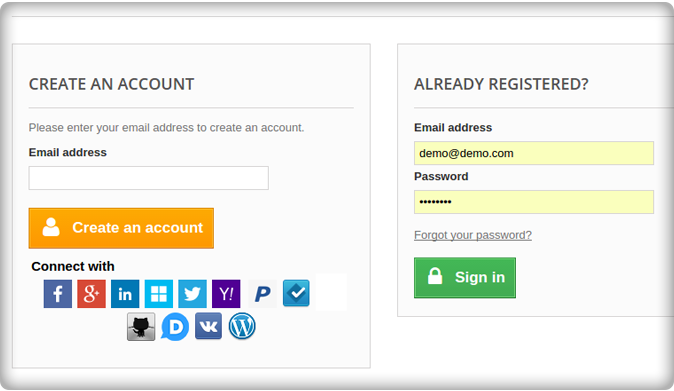
Often, most customers get frustrated due to the time-consuming account login process and leave the process in the middle due to frequent hangups, technical glitches, and interruptions. But, now everything is changed with this Prestashop social login module which allows customers to sign up directly with the help of their social media accounts. Moreover, there is also a “Quick login“ facility in this Prestashop social login addon, which helps in the faster account login by eliminating the need to fill in any account details.
Great functionality and freedom to the store admin-
Now, store admins can easily enable and disable the social media accounts of their customers through the back end. Prestashop social login plugin also provides freedom to the store admin to make changes in the text of the login link and heading of the social bar. Further, this module has 15 social media options and allows the store admin to decide about displaying the social icons vertically or horizontally as per their choice of interest.
Helps in tracking the social media history of customers-
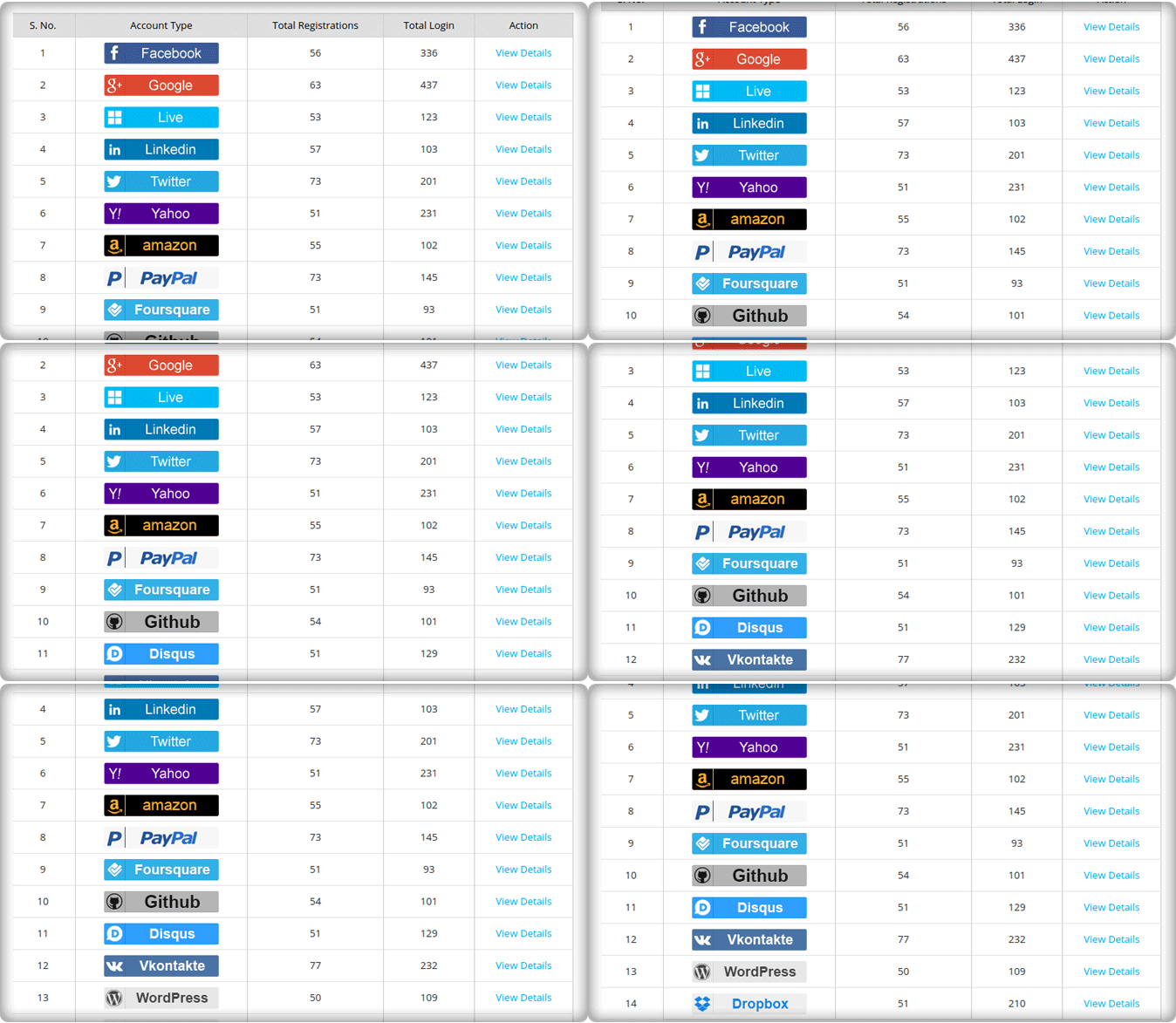
With the help of this Prestashop Social Login plugin addon, store owners can easily track the social media history of their site customers through the help of detailed reports. They can also get crucial information about the most used social media platforms by the customers so that you can advertise products more effectively on those social media sites. It’s easy to keep track of reports. The PrestaShop social login addon’s reports functionality, on the other hand, ensures that the store admin can access the reports from the backend.
Plays a crucial role in increasing brand awareness and product sales-
By engaging customers with your site and its advertised products, e-commerce stores can easily influence people to make purchases through their e-commerce site. Prestashop social login module also helps in increasing the brand awareness and global appeal of your brand when your site visitors share their good views, opinions, testimonials, and product reviews with their family members and friends. In this way, this word-of-mouth appreciation makes other site visitors more inclined towards your advertised products and thus prepares them to make a purchase through your e-commerce store.
Compatibility for several themes
The PrestaShop advanced login popup is compatible with a variety of themes and blends in seamlessly with your store’s design. Getting the PrestaShop social login addon on your eCommerce site is thus a win-win situation for both you and your customers.
In conclusion,
With the increasing use of social media in the business environment, it is the golden chance for your e-commerce organization to consolidate its market position with the help of this Prestashop social login module. This social engagement with your customers will be highly rewarding for your business organization in terms of product sales and conversion rates. Get ready to order this Prestashop social login module from our site www.knowband.com now and rewrite your business destiny again.
It is a well known fact that most of the interested shoppers often turn away from numerous e- commerce sites due to the lack of attractive pricing offers. If you can’t entice your site visitors with your prices, you are ultimately losing out a big opportunity to make product sales. Make your prices reasonable so that they are well within the pockets of your interested customers and can encourage them to make purchase through your e- commerce store. By presenting your advertised product as the most smart purchase with the involved money, you can easily make your product the best buy option for your customers. Further, the smart pricing strategies will help your organization from overcoming the stiff competition in the e- commerce segment and will help in increasing your conversion rates to a great extent. Considering the importance of pricing in the long term business planning, Prestashop Price Alert Addon comes out as a huge saviour for numerous e- commerce organizations. Here are the few features through which this module is writing the new success stories for various business organizations around the world.
Easy user friendly interface-
With the feature packed user interface of your module, store owners can easily set up the price alert for their customers so that they can be informed about the change in your pricing related information. By creating necessary awareness about your pricing, you can prompt site visitors to make purchase through your e- commerce store. So, no more head scratching during the whole procedure of resetting your pricing information as the addon makes this crucial practice an easy cake walk.
Effective functionality of the admin panel-
This module has brilliant front end and back end functionalities that facilitates the seamless experience during the whole price setting procedure. The store admin can easily manage and control every aspect of the price setting through the back end feature of this wonderful addon. It gives unmatched power to store admin to manage nitty- gritty of the whole price setting practice effectively.
Efficient reporting system-
Now, store owners can have access to the intuitive admin interface that helps in getting complete control over your e- commerce store as well as the detailed sales report. The powerful reporting system of the Prestashop Price Alert addon helps in preparing the effective pricing strategies well in advance so as to counter the sales strategies of the various competing business organizations.
Compatibility with different mobile based devices-
With the responsive design of this Addon, e- commerce organizations can actively use this single Prestashop module on different computing devices like desktops, laptops, smart phones and tablets. So, no more additional software upgrades or installation of any other extension for using this module on other computing devices. Thus, it means that you can now target your mobile based customers easily without any hiccups.
So, with the purchase of this single Prestashop Addons, all your pricing related tensions can be put at bay. You can also play a more active role in determining and setting your product pricing with the advent of this module. Place your order now for this wonderful mocule through our e- commerce store knowband and sway your potential customers towards your business organization with effective pricing strategies.
Things can be really bad for any e- commerce organizations when customers are constantly abandoning your e- commerce site and you are actually clueless about what to do to stop this present trend. It is actually a matter of great concern for any business organizations who are working hard to get a comfortable position in the field of e- commerce business. Increasing number of abandoned customers affect both the conversion rates and credibility of your business organization among your targeted customers. But, now e- commerce organizations can take a big sigh of relief due to the emergence of this wonderful Prestashop Abandoned Cart plugin. Here are some of its brilliant features that are selling it as hot pan cakes among its targeted customers.
Facility of customized reminder emails-
The plugin provides a wonderful feature of sending reminder emails to its abandoned shopping cart customers to help them complete their pending shopping orders. Further, they can schedule the number of serial reminders that needs to be sent to a customer, change the email template for their reminder emails, add or ignore the shopping coupons in their reminder emails, can include percentage based or fixed amount based coupons to customers along with/without free shipping facility and other such customization features.
Helps in completing the pending orders effectively-
With the help of this Prestashop Abandoned Cart module, it is easier to target your abandoned customers so as to influence them to complete their pending shopping orders. They can easily recover their earlier selected shopping cart with just a simple click and thus eliminates the need to add products again for making an order. Moreover, customers can easily go to each product page and these facilities are enjoyed by the guest shopper also. This module helps in the addition of the coupon codes into the shopping carts of the abandoned customers and in turn increases the chances of completion of pending shopping order.
Works effectively on various mobile based devices-
As, more and more online sales are happening through various mobile based devices, so the plugin is specially designed to target this growing customer base. Its responsive design allows easy recovery of the customer abandoned carts on mobile devices and helps in increasing the conversion rates for the e- commerce company. So, with this plugin, business organizations can easily cater to different types of customers who are using different devices like desktops, laptops, smart phones and tablets more effectively.
This plugin is a wonderful opportunity for all those e- commerce organizations who are facing the grave situation of increasing shopping cart abandonments. With its purchase, they now have the golden chance to turn their helplessness into their biggest business opportunity and can make outstanding results in terms of conversion rates and product sales.
1.0 How to install the OpenCart Admin Orders plugin on your server?
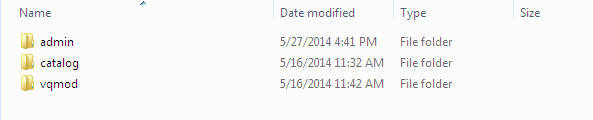
Download the zip from OpenCart & unzip into a folder. After unzipping the folder structure of the OpenCart Admin Orders plugin, you will be able to see a similar screenshot like mentioned below.
Open the upload directory & you will see following folder structure.
Login via FTP & drag-drop all the folders into your server root directory. You don’t have to the change the default theme folder name to your theme folder name.
You must have VQMOD installed for this OpenCart manage order plugin to work. If VQMOD is not installed please download and install from the URL below: https://code.google.com/p/vqmod/
You will find the OpenCart back-end order plugin ready to be installed in the Modules of your OpenCart.
Click on Install link to install the Opencart plugin.
Delete the vqcache files from the vqmod/vqcache folder.
To excess Admin Orders extension, Click on the edit button in the Admin Orders module as shown below.
On clicking the edit button, the Opencart order manager module by Knowband for the plugin will open. It contains navigational bar at the top, the menu on the left and main content in the center as shown below.
2.0 User Manual
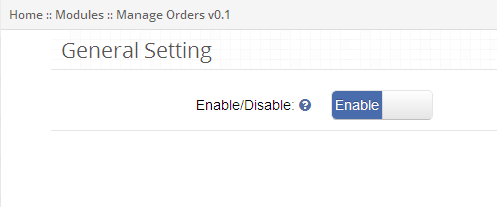
2.1 General Setting Tab
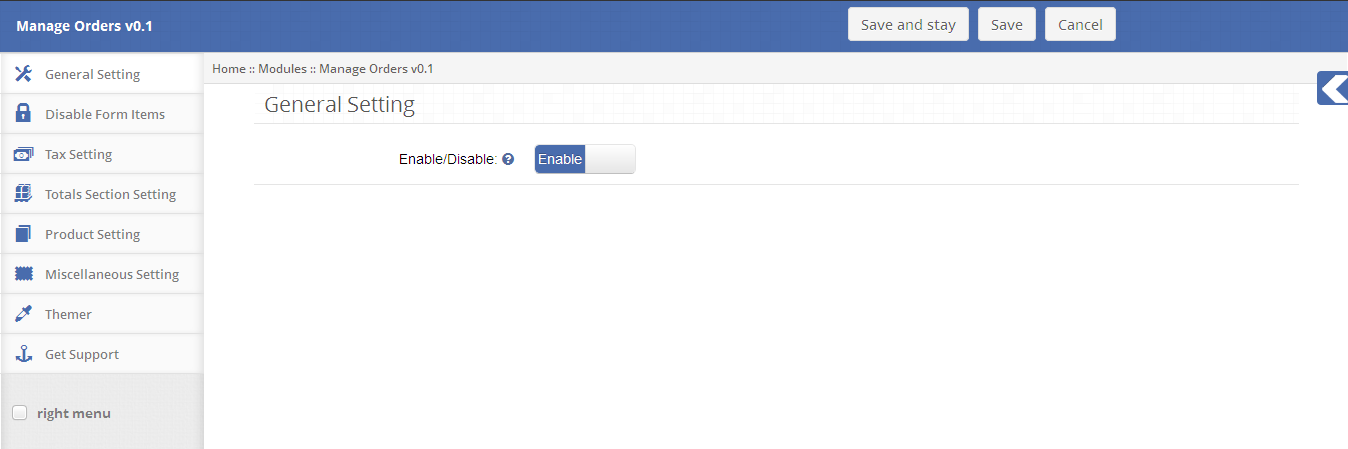
To enable this Opencart order editor plugin, switch the enable button from Disable to Enable which is just on the right of Enable/Disable label.
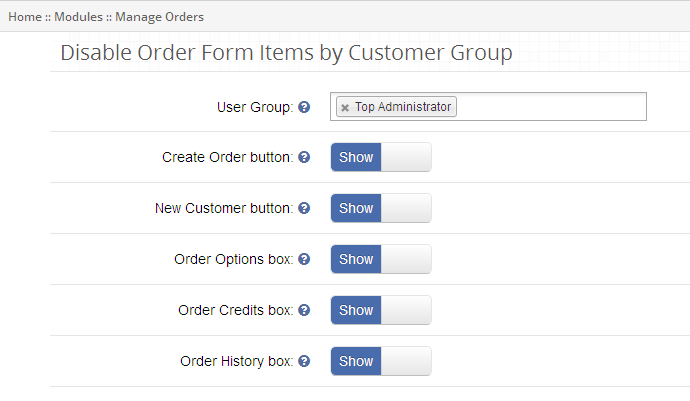
2.2 Disable Form Setting Tab
This tab contains settings for the items which are to be shown/hidden according to the user group in Admin Orders as shown below.
To disable Create Order from the order form, select the user group from the drop-down and switch the button from Show to Hide which is just on the right of Create Order Button label.
To disable New Customer from order form, select the user group from the drop-down and switch the button from Show to Hide which is just on the right of the New Customer Button label.
To disable Order Options from ‘Create order form’, select the user group from the drop-down and switch the button from Show to Hide which is just on the right of Order Option Box label.
To disable Order Credits (i.e., Coupon and Voucher) from ‘Create order form’, select the user group from the drop-down and switch the button from Show to Hide which is just on the right of Order Credits Box label.
To disable Order History from ‘Create order form’, select the user group from the drop-down and switch the button from Show to Hide which is just to the right of Order History Box label.
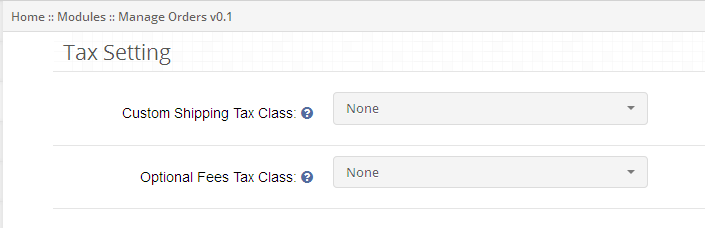
2.3 Tax Setting Tab
This tab of the Opencart admin order contains tax settings for the custom shipping and optional fees which is to be applicable to the Admin Orders as shown below.
To apply the tax to custom shipping, select the tax class from the drop-down else custom shipping won’t be applicable to the default setting.
To apply tax optional fees, select the tax class from the drop-down else optional fees won’t be applicable to the default setting.
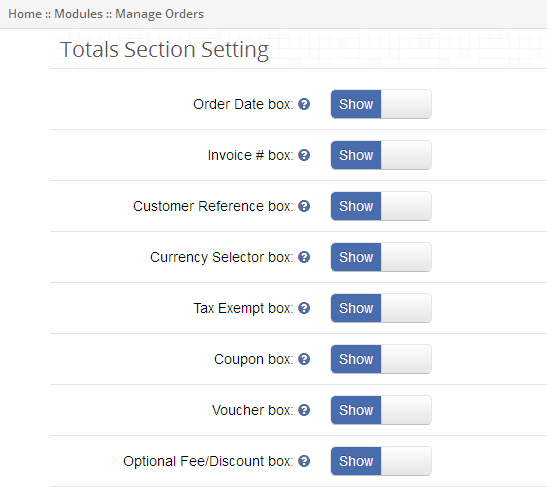
2.4 Totals Section Setting
This tab in the Opencart manage order contain settings for the total section items which are to be shown/hidden in the Admin Orders as shown below.
To hide Order Date from order options, switch the button from Show to Hide which is just to the right of Show Order Date Box label.
To hide Order Invoice from order options, switch the button from Show to Hide which is just to the right of Show Invoice Box label.
To hide Customer Reference from order option, switch the button from Show to Hide which is just to the right of Show Customer Reference Box label.
To hide Currency Selector from order option, switch the button from Show to Hide which is just to the right of Show Currency Selector Box label.
To hide Tax-Exempt from order option, switch the button from Show to Hide which is just to the right of Show Tax Exempt Box label.
To hide Coupon from the total section, switch the button from Show to Hide which is just to the right of Show Coupon Box label. By default, this will be shown on create order form.
To hide Voucher from the total section, switch the button from Show to Hide which is just to the right of Show Voucher Box label. By default, this will be shown on create order form.
To hide Optional Fees/Discount from the total section, switch the button from Show to Hide which is just to the right of Show Optional Fees/Discount Box label.
2.5 Product Section Setting Tab
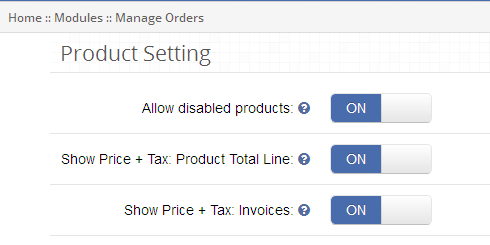
This tab of the Opencart backend order contains settings for the product section items which are to be shown/hidden in the Admin Orders as shown below.
To allow disabled products to be listed in the product list, switch the button from OFF to ON which is just to the right of Allow disabled products label.
To show tax with product totals on the product list, switch the button from OFF to ON which is just to the right of Show Price + Tax: Product Total Line label.
To show tax with the invoice on order invoice, switch the button from OFF to ON which is just to the right of Show Price + Tax: Invoice label.
2.6 Miscellaneous Setting Tab
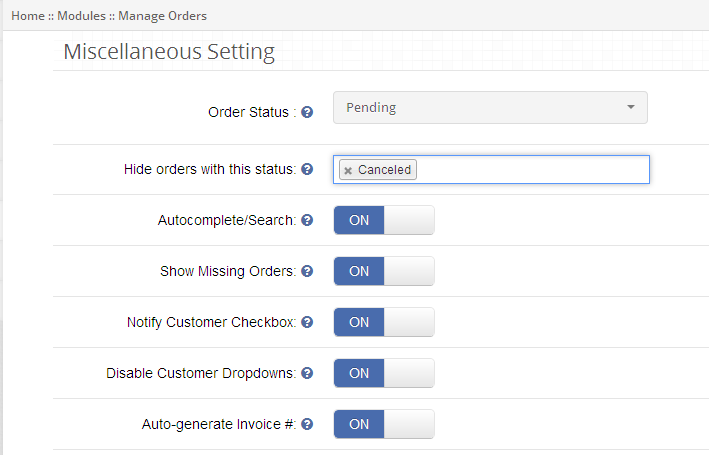
This tab of the Opencart order manager contains the various settings for the Admin Orders as shown below.
To hide the orders according to their status, select the order status from the drop-down which is just to the right of ‘Hide orders’ with this status label.
To enable auto-complete on search, switch the button from OFF to ON which is just to the right of Require Shipping Address label.
To show missing orders in order list, switch the button from OFF to ON which is just to the right of Show Missing Orders label.
You can start the order with Notify Checkbox checked by switch the button from OFF to ON, which is just to the right of Notify Customer Checkbox label.
To disable Customer drop-down from creating order form, switch the button from OFF to ON, which is just to the right of Disable Customer Drop-down label.
To enable auto-generate invoice number for order invoice, switch the button from OFF to ON, which is just to the right of Auto-generate Invoice # label.
3.0 Dashboard
To excess Admin Orders in the Opencart order editor by Knowband, navigate to Sales and Click Admin Orders link from the drop-down as shown below.
3.1 Admin Order Dashboard
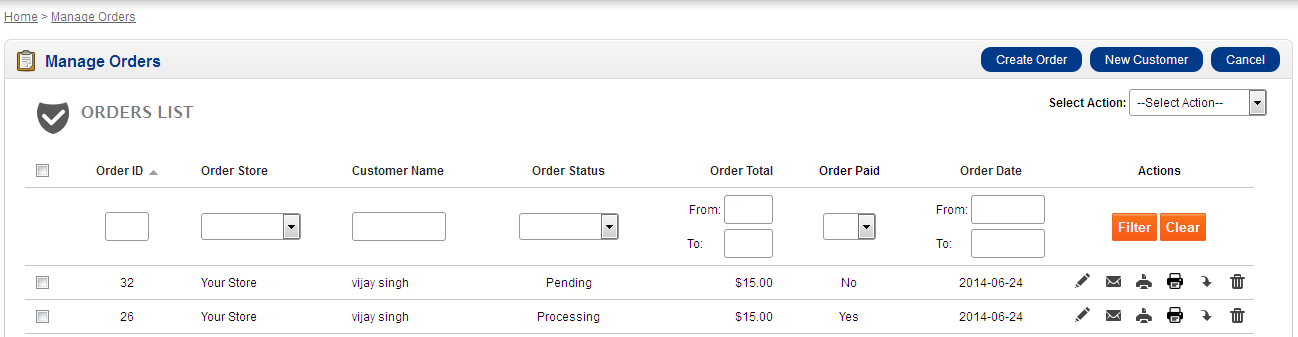
Admin Orders dashboard of the Opencart admin order displays orders list with an option to create, edit, delete, search, email order, print invoice, print packing slip or export order.
3.2 Order Actions
You can perform the following actions on orders listed in order list:
Edit Order: To edit order details, click on Edit Order button as shown in order list action column.
Mail Order: To mail order details to the customer, click on Mail Order button as shown in order list action column.
Print Order: To take print of order, click on Print Order button as shown in order list action column.
Print Packaging Slip: To take the print of order packaging slip, click on Print Packaging Slip button as shown in order list action column.
Export Order: To export order details, click on Export Order button as shown in order list action column.
Delete Order: To delete an order, click on Delete Order button as shown in order list action column.
3.3 Order Search/Filter:
You can search/filter orders according to various order fields in the Opencart manage order such as:
a. Order Date: To search/filter orders in the Opencart backend order according to their creation date, enter order start and end date and click on Filter button as shown in order list action column. b. Order ID: To search/filter orders according to their order ID, enter order ID and click on filter button as shown in order list action column. c. Product Name: To search/filter orders according to their product name, enter the product name and click on Filter button as shown in order list action column. d. Order Total: To search/filter orders according to their total, enter order total range and click on Filter button as shown in order list action column. e. Order Paid: To search/filter orders according to their paid status, select the value from the drop-down and click on Filter button as shown in order list action column. f. Order Status: To search/filter orders according to their status, select the value from the drop-down and click on Filter button as shown in order list action column.
3.4 Bulk Status Update
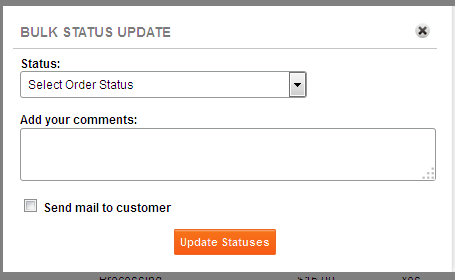
Following steps are involved in updating status of the order in bulk:
Select orders by checking the checkbox associated with each order.
Click on Bulk Status Update button as shown in order list page.
Select the status to be updated from the drop-down list.
Provide any comment (Optional).
Check Notify Customer if wants to notify customers about order status.
Click on Update Status button.
4.0 Create Order
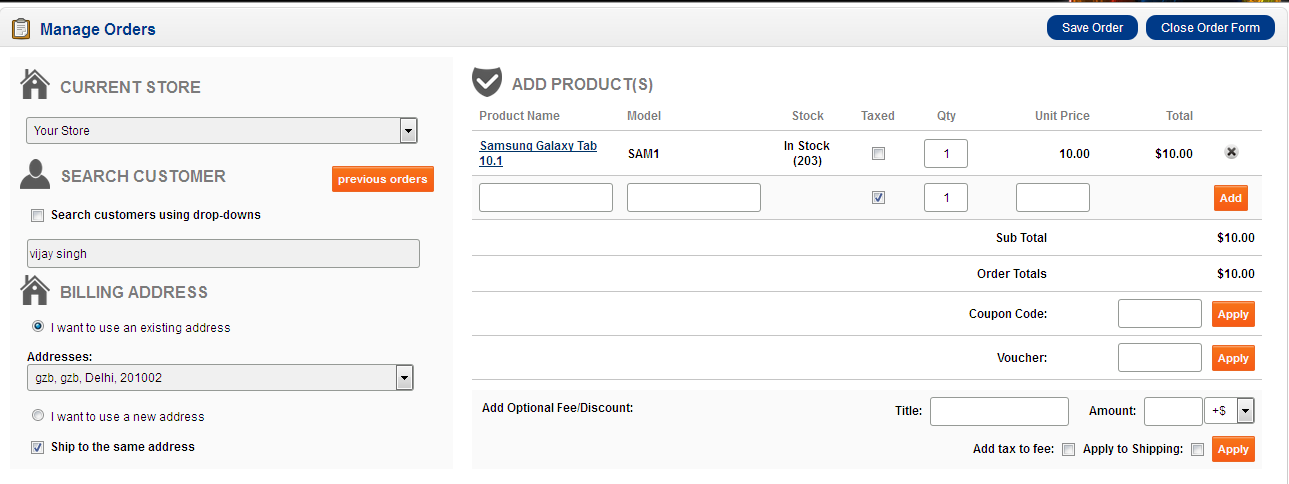
Admin Orders Opencart extension allows the administrator to create order on customer behalf. To add a new order, click the “Create Order” button shown at the top of the page.
Following steps are involved in creating a new order from Admin Orders:
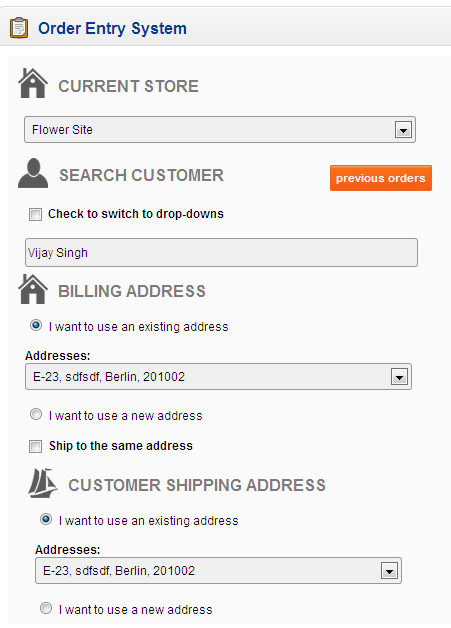
4.1. Search Customer
A customer can easily be searched using methods provided in Admin Orders:
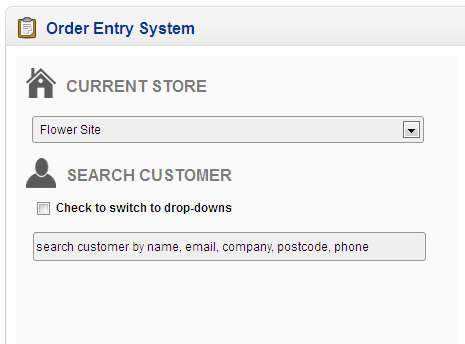
4.1.1 Search customer using a textbox
A customer can be searched according to their name, email, company, postcode and phone number.
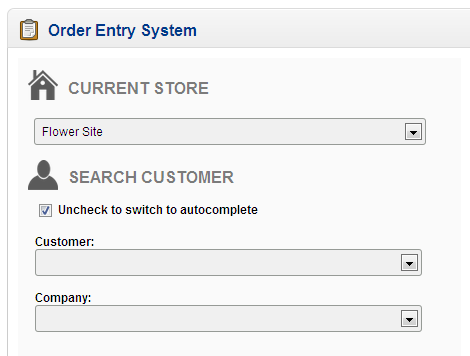
4.1.2 Search customer using the drop-down
You can also search customers either by their name or by their address.
Search customer by name: To search customer by their name, click Check to switch to drop-down checkbox and select customer name from the drop-down.
Search customer by address: To search customer by their address, click Check to switch to drop-down checkbox and select customer address from the drop-down.
4.2 Customer Previous Orders
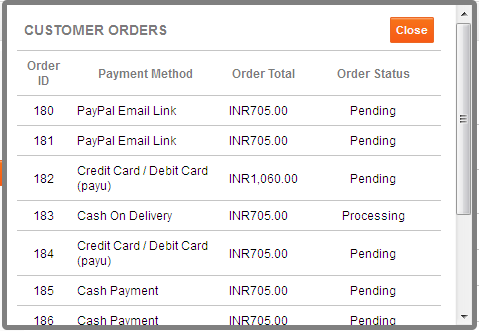
You can view the details of previous orders placed by the customer by clicking Previous Order button in the Opencart order manager as shown below:
You can view the following details for any order in the Opencart order editor such as:
Order ID
Payment Method
Order Total
Order Status
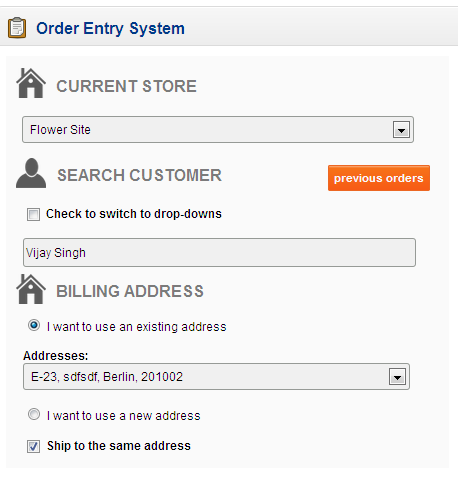
4.3 Billing and Shipping Address
On selecting a customer, the customer billing and shipping address details are auto-filled, which can be edited.
To edit billing address, click I want to use a new address checkbox as shown below.
To edit shipping address, click I want to use a new address checkbox as shown below.
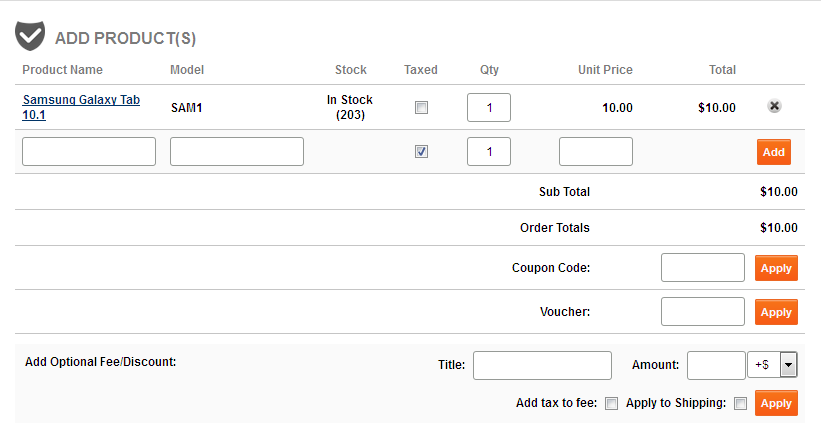
4.4 Add Product(s):
To add product to cart, select product by their name or model and click on Add button.
You can also update the quantity of any product added to the cart.
Apply Coupon (Optional)
To apply a coupon to order, select the coupon value from the drop-down as shown above.
Apply Voucher (Optional)
To apply the voucher to order, enter the voucher value in the text field and click Apply button.
Apply Optional Fees/Discount (Optional)
To apply optional fees/discount to order, enter the optional fees/discount name and value in the text field and click Apply button.
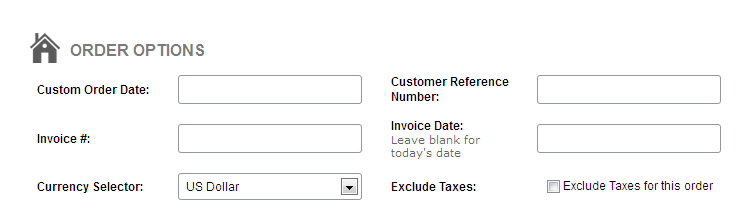
4.5 Order Option Details (Optional)
You can provide the following details for any order such as:
Customer Order Date
Customer Reference Number
Invoice Number
Invoice Date
Currency Selector
Excluded Taxes
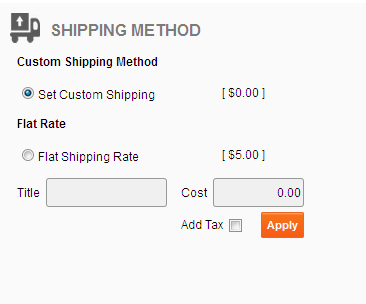
4.6 Shipping Method
1. You can select any of the following shipping methods:
Custom Shipping method:
To use custom shipping method in the Opencart extension, click Set Custom Shipping checkbox and enter custom shipping title and cost and click Apply button as shown below.
Flat Rate:
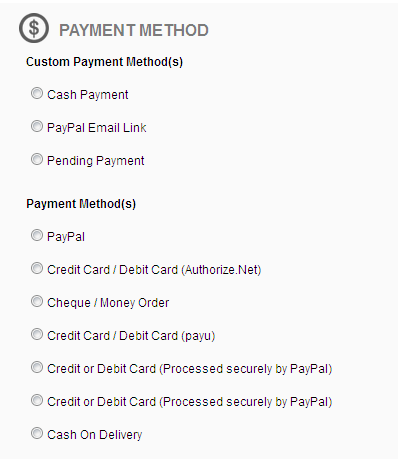
4.7 Payment Method
You can select any of the following payment methods:
Custom Payment Method
To make payment using Admin Orders custom payment method, select any method from Admin Orders Custom Payment Methods.
Cash Payment
Credit Card (Offline)
PayPal Email Link
Pending Payment
Configured Payment Method
To make payment using system configured payment method, select any method from Your Configured Payment Methods.
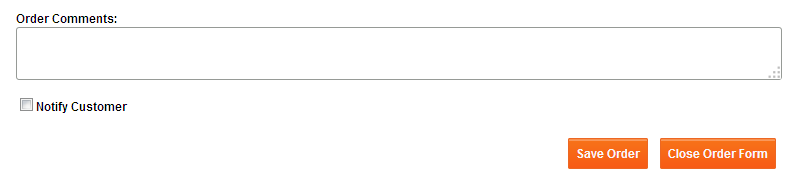
4.8 Comment and Notify Customer
To add a comment for an order, enter your comment in the textbox.
To send order detail to the customer, check Notify Customer checkbox as shown below.
To place an order, click Save Order.
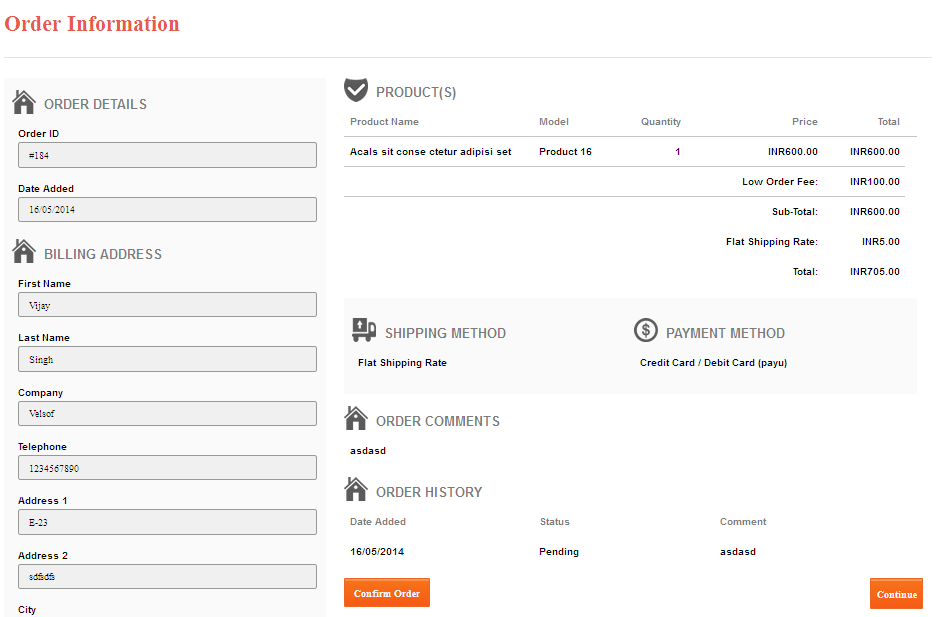
4.9 Notification Mail and Make Payment
A notification mail will be sent to a customer if Notify Customer checkbox is checked which will be containing the link for Order Information page will allow the customer to make payment for their order.
After the payment is successfully processed, the order status will be updated accordingly.
Note: Customer can only be able to make payment for the system configured payment methods.
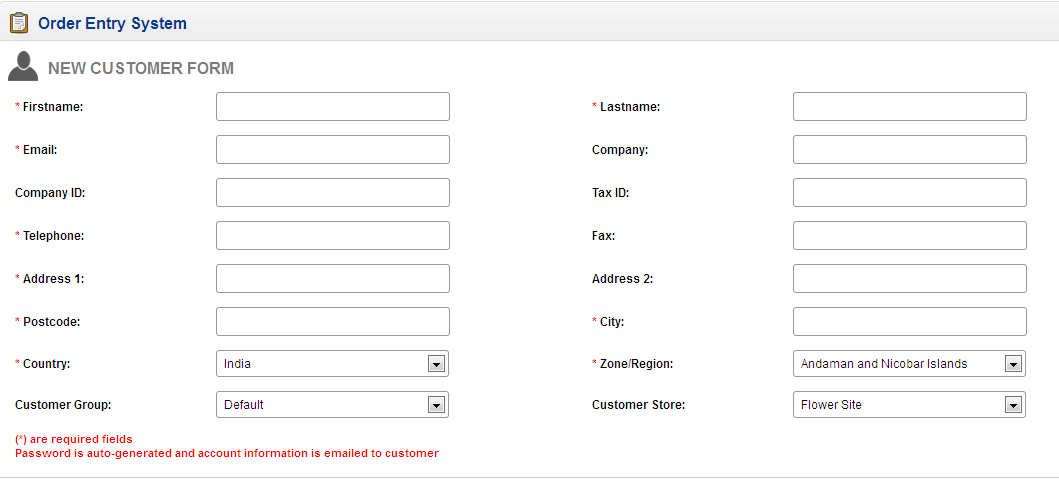
5.0 New Customer
To add a new customer, click the “New Customer” button shown at the top of the page and provide the necessary details needed for new customer registration.
Receiving a product return request from a customer appears like a cumbersome task due to the numerous formalities and complications involved in the whole process. This whole experience becomes an unforgettable nightmare if there are no easy provisions regarding the efficient product return policy.
Due to this increasing problem in the returning policy, customers, as well as the e-commerce organizations, are paying a heavy price and the trust deficit between them is brewing at a faster pace. To simplify the whole return policy and to streamline the return process e-commerce organizations are increasingly adopting Prestashop Return Manager Addon. Here are the few reasons that explain the unlimited fan frenzy about this Prestashop addon.
Easy user-friendly interface-
The module is equally a delight for customers as well due to its easy, user-friendly interface. The updated version of the PrestaShop Return Manager addon has easy to access options. The seller can directly configure the module from the left menu of the admin panel. Also, the product listing details can be checked on the dashboard itself and can be accessed with a single click.
It provides three options to the customers during the product return process which are namely- Get Credit, Replace and Refund. Additionally, order cancellation is also possible with the updated version of the PrestaShop Return Manager addon. Moreover, it provides added functionality to its customers to check the status and history of their product return requests. Customers can choose a reason for their product return request and to show the damaged goods, it allows them to upload the image in the return request form.
Seamless product return policy-
This Prestashop Addon has redefined the whole process of product return to a new level. It is now easier to make a product return request or order cancellation request for any item without involving any terms and conditions and complications. The store owner has the freedom to set the return policy and reasons.
Due to this simplified process, the site admin can easily process the product return request for even a single product or partial order out of a completely given order. Moreover, it has provided the freedom to the admin to approve or deny any product return request if the return request is found to be illegitimate in nature.
In the latest version of PrestaShop Return Manager, the policy time can be calculated after a defined product status. It can be ‘Delivered’, ‘Shipped’, ‘In Process’ etc.
Effective handling of the return product database-
With the help of this Prestashop Return Manager Addon, managing the record of every product return request has become a cakewalk. Every product return request is effectively stored in the store database and is available even after the uninstallation of the module.
The store manager can filter various product listings by sorting them with the customer ID, Return ID, or date. Moreover, the module provides the facility of exporting the completed return request in CSV format. In order to facilitate faster searching of the records, a filter option is provided in the archive list.
Enhanced power to the site admin-
The module has unleashed new powers and flexibility to the site admins and has made them a focal point of the whole product return policy. Merchants can easily process a product return request from the back end of their module on the behalf of their customers.
With PrestaShop Return Manager addon, features like email translation and email template customization are possible so as to make the product return process more simplified and less time-consuming. Now the seller can send a test email, add a customized text message with the order status that can be used in email templates.
In conclusion
So, Prestashop Return Manager Addon has reduced loads of formalities, paperwork, and complications that used to come uninvited with the product return request. It is time to take a long breathe and ease your tensions by purchasing this Prestashop addon from the Knowband store to provide a seamless user experience to customers.