How to Prepare Online Store for Holiday Season- Module Guide

Every eCommerce store merchant waits for the holiday season because there is maximum participation of the online shoppers in the store during this time. Along with that holiday season records the highest sales in the entire year. It is time to prepare online store for holiday season.

Over the next few months, the online stores will be planning for a shopping marathon, and eCommerce traders need to get ready to meet the enormous demands that come with that. You need to do the eCommerce holiday planning, starting with effective marketing strategies, offering free shipping and easy returns, and a lot more to stand out from the competitors.

Optimizing the store for all these points is necessary to achieve holiday sales, nothing holds more importance than providing customers with a seamless and hassle-free shopping experience and increase customer retention.

Refer to an eCommerce Holiday Calendar for holiday readiness.  As you know, the holiday season begins from Halloween and ends at the arrival of the New Year and you have to plan your marketing campaigns months before it begins.

ECommerce Holiday Season Statistics 2020

If we talk about global m-commerce stats, it has already surpassed eCommerce. The numbers speak about the importance of smooth site functionality on mobile devices.

  1. Did you know m-commerce accounted for 35.8% of the total sales in the US in 2020, as per Statista? For the year 2020, the record sales according to Statista was 755.3 billion US dollars, which was 729.3 in the year 2019 and 701.2 billion dollars in 2018.
  1. Customer Loyalty is a major concern for every business. From the previous year’s eCommerce holiday season data, only 12% of customers are continuing to stay loyal.
  1. During the 4th quarter of 2020, Amazon generated total net sales of 125.56 billion U.S. dollars, surpassing 87.44 billion U.S. dollars in the same quarter of the previous year.
  1. Adobe tweeted, online shoppers spent 4 billion U.S. dollars during 2020’s Cyber Week — a 20.7% increase YoY.
  2. 2020 was a delight to small businesses as 44% of people planned to spend on small businesses.

How to prepare your online business for the holidays?

For starters, add some holiday vibe to your online store. Use attractive banners with holiday offers, discounts along with the wishes to make it more engaging. Additionally, you can use eCommerce plugins that enhance customer engagement, brand awareness, customer retention and gives a flawless checkout experience.

Here is the list of 13 modules by KnowBand which can help you optimize your store this holiday season. This is the time to start preparing for a holiday rush to ensure a lucrative selling season.

Modules to increase customer engagement

In a dynamic eCommerce environment, stay ahead of trends and in line with the industry’s fresh and up-to-date trends. Use Spin and Win Popup and Exit Pop up for customer engagement.

1.   Add exciting Spin and Win Popup
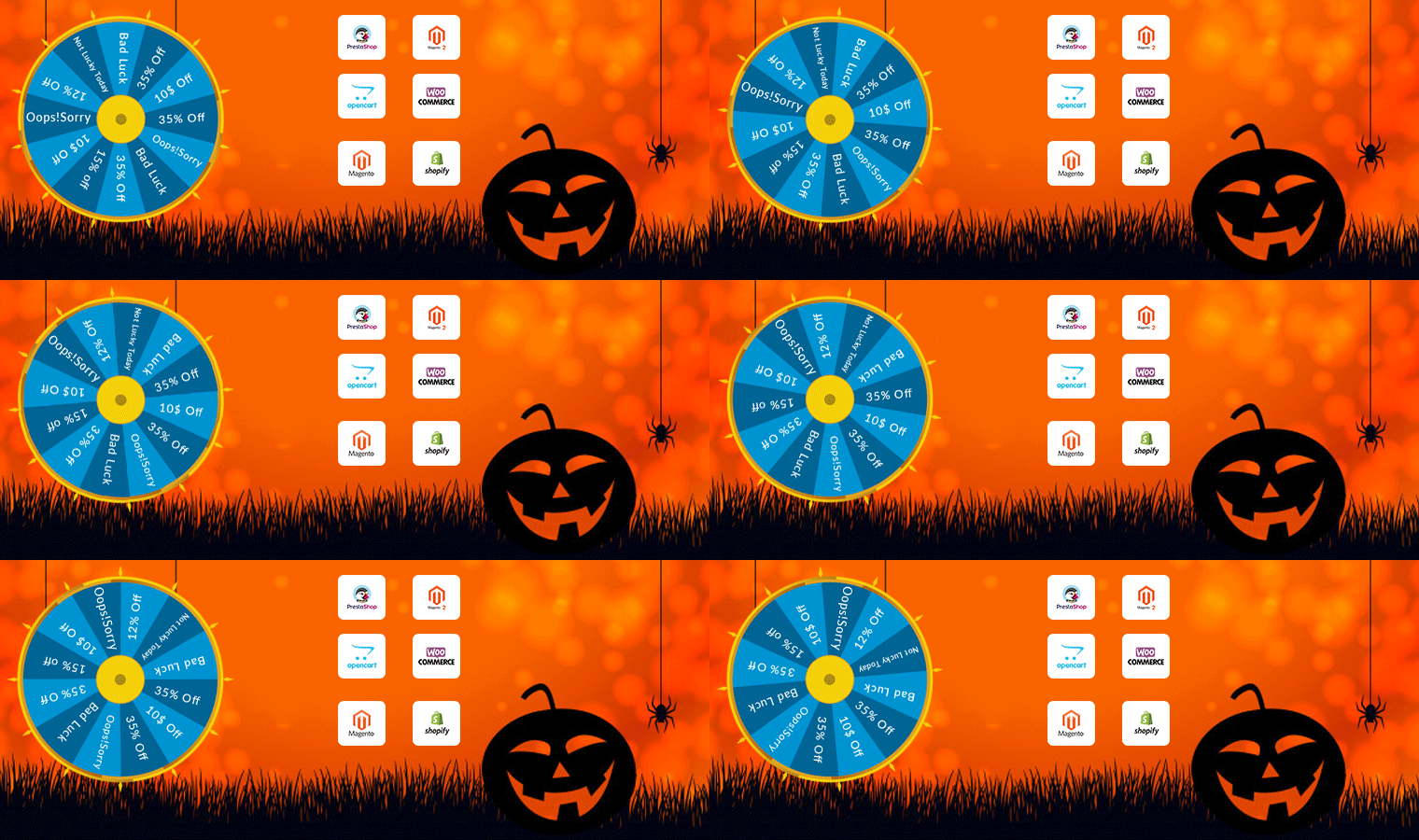
Increase customer engagement on your website by adding a Gamification element. Popup draws the attention of your customers towards the eye-catching spin-win wheel module and engages them in a fun activity.

Along with user engagement, this plugin can be a treat to your home page. It has several themes for every occasion and event, for example, Christmas, New Year, Halloween, and Cyber Monday themes for the holiday season. Visitors are asked to try their luck by spinning the wheel and grab some exciting offers. But, to complete the spin, a user needs to share their email address, which you can use for your eCommerce email marketing campaigns, and thus boost your conversions.

The module provides merchants with tons of customization ranging from designing the look of the popup to set up the time for the popup appearance. Click here to check out the Spin and Win fortune wheel module.

Available for:

PrestaShop, OpenCart, Magento, Magento 2, WooCommerce, and Shopify

2.   Exit Pop-up

The next eCommerce Holiday planning idea is to add an Exit Popup in your digital commerce. It is not always used to show an offer. You can configure it as per your requirements based on what outcomes you want to achieve through it.
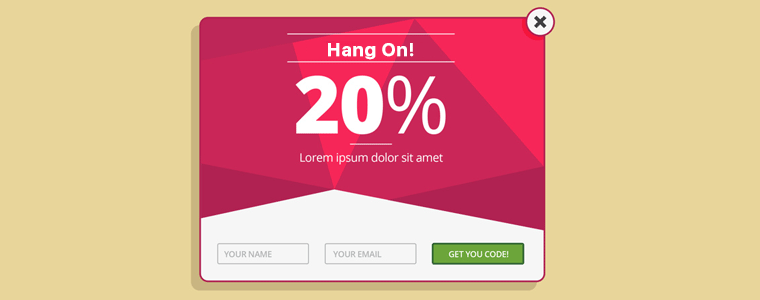
Exit popup appears when a customer leaves the browsing area or intends to exit the tab. You can make the pop-up as appealing as you can. Also, you can ask for feedback from your customers.

Using the exit pop-up module can reduce the bounce rate, increase customer engagement, and boosts conversions. During the holiday season, you can compel users to shop more from your eCommerce store by offering some exciting offers when they are about to leave.

Knowband provides an exit pop-up module.

Available for:

Prestashop, Magento, and OpenCart store

Prepare For Customer Retention

All eCommerce stores look forward to repeating sales and to make it easier, Knowband has a range of plugins. Adding a Gift Card and Loyalty Point program will be a great holiday season idea.

3.   Offer Loyalty Points

Encourage repeat purchases by rewarding your customers with loyalty points. Our Loyalty Points module ensures customer retention as well as customer acquisition. It lets you provide reward points to every new user who performs a sign-up on your store and triggers impulse buying, followed by more loyalty points on the successful purchases.

This marketing strategy converts visitors into potential buyers and makes them stick to your store in the long run. It also enhances brand loyalty to a great extent. You can set up some rules for users like offer loyalty points when customers share their feedback. It can also include offering loyalty points based on the total cart value, product quantity, product price, selected payment methods, etc.

These points can be used as a discount voucher on the checkout page. Click here to check out the Loyalty Point module.

Available for:

PrestaShop, OpenCart, Magento, and Magento 2 store

4.   Gift the Product

Since you are setting up your store for the holiday season blast, you can attract visitors and upsell by giving gift products on a fixed amount of purchase.

There are some major advantages of giving gifts with purchase. It increases the average cart value, boosts conversion, and reduces the bounce rate on your store.

Gift the product is an amazing plugin and it can set your sales on fire. It is a sales strategy that attracts and converts the buyers. Refer to this blog that explains how you can use the Gift with Purchase campaign in B2C Marketing.

Available for:

PrestaShop and Opencart

Build Brand Awareness

5.   Gift Card Module

While striking off the eCommerce holiday season checklist for customer retention and advance sales, consider selling personalized digital gift cards.

The Gift card module is a must-have plugin for holiday season sales,  as it brings new customers to your store. Also, it saves your customer from sending awful gifts to their loved ones.

Other benefits of the Gift Card module are that it boosts brand awareness and makes digital gifting easy. Customers can send photo gift cards with custom messages.

Explore Knowband Gift card Manager extension.

Available for:

Prestashop, Magento, and OpenCart eCommerce stores.

eCommerce Plugins to improve the shopping experience

When developing an eCommerce website, you have to make sure that the website is mobile responsive and keep users engaged for a while. Create a mobile app for your website or make the pages mobile responsive with the AMP module. You can also use the Progressive web app (PWA) plugin to make your digital commerce user-friendly.

6.   Mobile App Builder
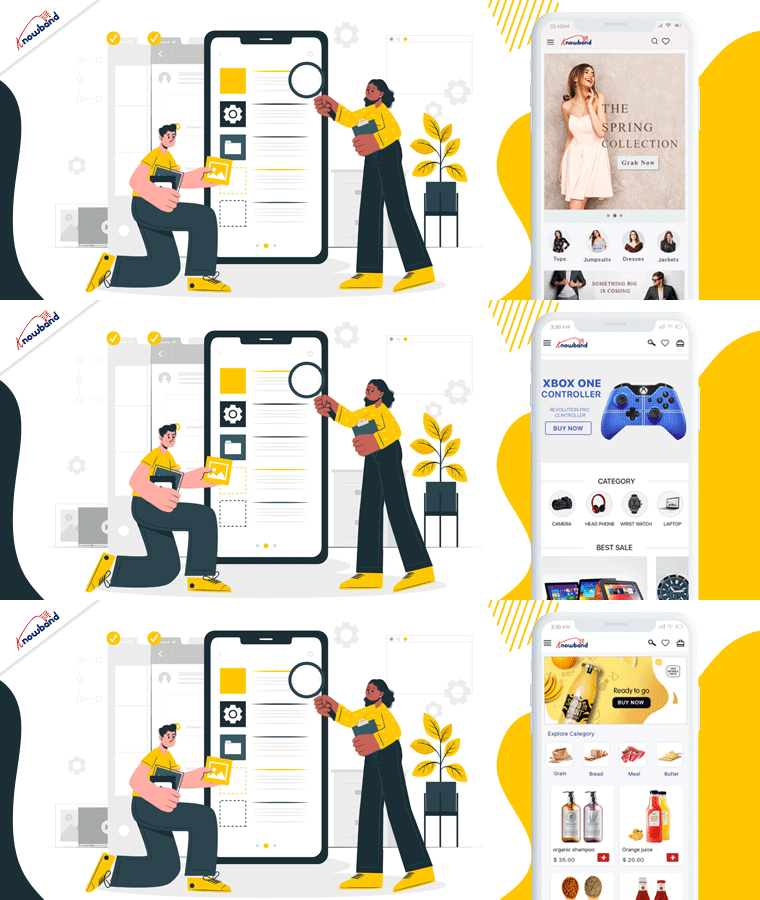
Mobile App Builder is not just a module for holiday season sales but it is for everyday user experience.

It lets you transform your eCommerce website into an Android and iOS Mobile App conveniently, without any requirement of coding or technical knowledge. The app will give a rich and user-friendly, experience to smartphone users.

Since users nowadays demand an app for an easy browsing experience, the Mobile App Builder module makes it the best fit to provide an amazing user experience.

The holiday season is coming close, now is the best time to introduce your mobile app and delight your users, and grab huge holiday sales.

Moreover, to achieve the best shopping experience, the Mobile App Builder offers easy customization, Social login, Fingerprint login, and OTP login. Also, it has WhatsApp live chat and Zopim Chat support. The real-time synchronization of the website into App is a bonus. Sell across the world with its multi-lingual support, multiple payment and shipping methods, etc.

Check out here.

We are currently running an exclusive offer for the PrestaShop website owners where they can get an additional 30% discount on the new purchase.

All you need to do is apply the coupon code “MOBI30” during the checkout.

Available for:

Prestashop, OpenCart, and Magento eCommerce stores

7. Reduce site load time with AMP
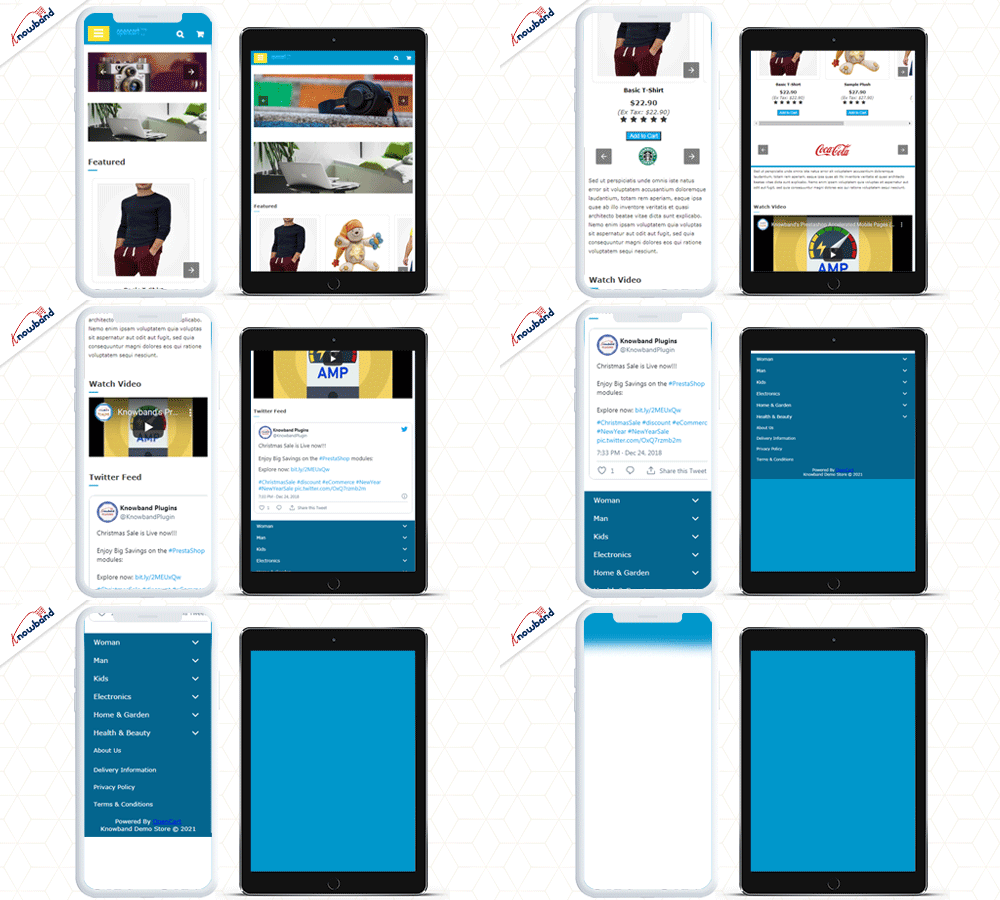
Our AMP module tackles the slow loading of your website on mobile devices and increases the page load speed to a great extent. When website traffic is at its peak in the holiday season, the website speed may get affected.

Thus, the AMP module, ensures that your mobile users do not find any troublesome experience with your website and are offered a faster and smoother loading.

Also, faster loading not only helps you reduce the bounce rate but also benefits in improved mobile rankings on the search engine.

Talking about its features, you can enable the AMP functionality for multiple pages on your website like the Home page, Category page, Product page, etc. You can also customize these pages as per your requirements.

Available for:

PrestaShop AMP Addon

OpenCart AMP Extension

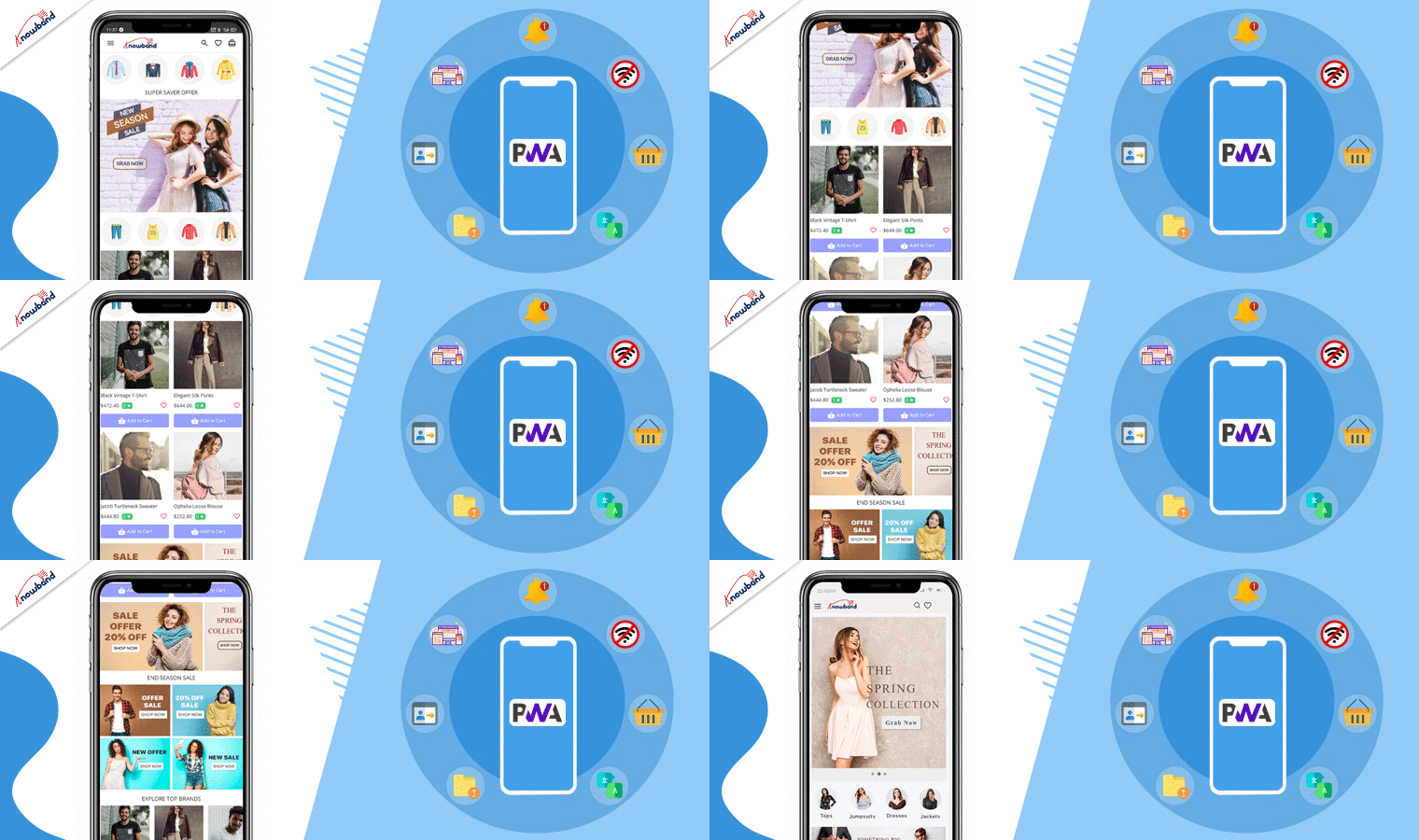
8.   Choose PWA over Native

A Progressive web app provides App like experience when a customer explores the website on a mobile browser. In the holiday season, eCommerce receives a lot of attention, and to keep your customers engaged, you have to provide a responsive interface. PWA makes the store more interactive and user-friendly.

Even with no internet, the website will display the products and loads the pages using saved caches. PWA is smooth, lightweight, and fast loading. Convert your website into a PWA with KnowBand’s Progressive web app builder without any coding knowledge.

A responsive website is engaging and has the potential to convert your visitors into customers and they will spend more time. Provide an awesome user experience to your customers when they visit your store for holiday shopping.

Available for:

PrestaShop, OpenCart, Magento 2, WooCommerce

Recommended Reads:

For flawless Checkout experience

9. One Page Checkout
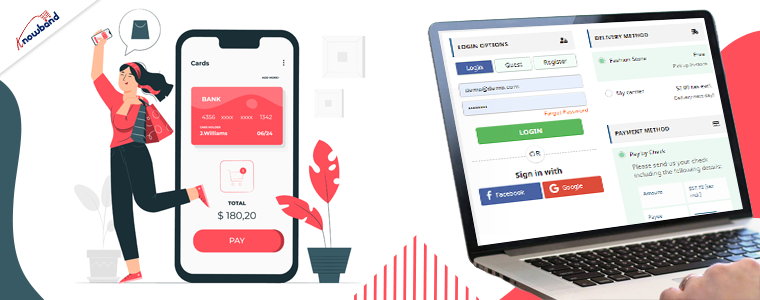
Being an eCommerce store owner, you must provide your customers with a hassle-free checkout experience this holiday season. Unlike the multi-step checkout process, it displays all the checkout elements on a single page and reduces the checkout friction.

To make the checkout path convenient for customers, our One Page Checkout offers Social Login, Guest Checkout, Inline Validation, Google Auto-address fill, and supports nearly all the payment methods and shipping services. A long and complicated checkout shackles the shopping experience which eventually results in cart abandonment.

The Prestashop One Page Checkout is our best seller extension. It has 10000+ downloads on the PrestaShop Addon store while 12000+ downloads on the KnowBand store.

Find the complete features and benefits of the One Page checkout module for the respective platforms:

Prestashop One Page Checkout

OpenCart One Page Checkout

Magento One Page Checkout

Magento 2 One Page Checkout

Marketing technique for abandoned cart recovery

10. Abandoned Cart

The Abandoned Cart module helps you recover your lost sales by sending regular follow-up emails to the abandoned carters. With so many competitors, there are hundreds of choices available and many users leave the orders in their cart. While planning for the holiday season, prepare your store to track the user behavior for cart abandonment.

The module reminds users about incomplete purchases and converts them into customers by including exclusive offers in your emails and on a reminder pop-up.

You can send serial emails as reminders and if not sure how to write an abandoned cart email, refer to our guide.

The Abandoned Cart module can boost your conversions significantly.

Available for:

PrestaShop, OpenCart, Magento, and Magento 2 Abandoned Cart Addons

Module To improve customer loyalty

11. Return Manager
Are you prepared for managing the order returns? Since the holiday season captures a huge number of orders, there will be returns for sure. Use a return manager to prepare online store for holiday Season. Our Return Manager module ensures that you do not lose out on customers due to a poor return process.

The Return Manager module helps you manage your eCommerce returns conveniently and enhances customer loyalty by making the return process way too easy for the customers.

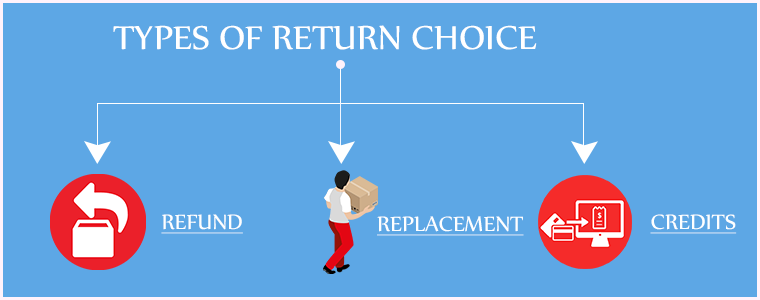
The module provides 3 return choices to the customers in the form of Credits, Refund, and Replacement, and allows them to highlight the defect by uploading the image of the defective/damaged product. One interesting feature of the module is that the admin can create the return request on the customer’s behalf.

Available for:

PrestaShop, Magento, and Magento 2

Extend Your Business Reach

12.  Booking and Rental system for PrestaShop

PrestaShop Booking and Rental system addon provides your customers with a hassle-free online booking experience and makes it a simple task for the merchants to manage their online bookings.

This PrestaShop addon offers an appointment booking facility, hotel booking facility, and rental booking facility. It lets you adjust your booking days and time slots as per the availability, and you can adjust the price for different days and timing. There is much more it offers for every booking type.

If you have a costume rental business then this Halloween, manage your orders with KnowBand’s Booking and Rental system plugin.

Check out the OpenCart and PrestaShop Booking and Rental System addon to know the complete features and benefits.

If you wish to transform your online booking PrestaShop website into a mobile app, you can look out for PrestaShop Booking and Rental Mobile App.

13.   Product Customization

Consumers are increasingly demanding a customized shopping experience from their favorite brands. Delivering an amazing customer experience that can help you grow sales this Christmas season requires a strong customer data management system and personalization tools.

Personalization benefits have also made their way into the product experience. Customization allows online consumers to create more considerate gifts, which is a product feature that is projected to grow in popularity over time. It’s a brilliant and memorable method to please customers to have a pleasant interface that allows them to customize a product online.

Customers may choose the appropriate printing options for their items with KnowBand’s Product Customizer.

Available for:

Opencart and PrestaShop eCommerce store

14.   Multi-vendor marketplace
Earn extra cash this holiday season and make money while you sleep. You can introduce your marketplace website and allow vendors to sell on it. A marketplace runs on various commission models like membership fees, commission model, and subscription plans, etc.

KnowBand’s multivendor marketplace provides major two revenue options. The store manager can create different membership plans. Also, they can charge a commission on products sold.

It has several facilities for the admin and seller of the marketplace. Convert your website into a multi-vendor marketplace like Amazon or ETSY. Whether you are a new or an experienced merchant, you can always look forward to expanding your services.

Available for:

PrestaShop, Magento, Magento 2, and OpenCart eCommerce

Modules to send stock alerts

15. Web Push Notifications

Notifications and stock alerts can drive your customer’s psychology and trigger impulse buying. This holiday season, notify your customers about the new arrivals, price drops, various product statuses, and abandoned cart details.

Knowband’s Web Push Notifications module lets merchants schedule the alerts for their users about product availability with push notifications. For each of them, the user can decide whether they want to receive updates regarding them.

Moreover, you can customize the welcome popup in the holiday season theme that shows the request message for notification approval.

Available for:

PrestaShop Web Push Notifications

Magento Web Push Notifications

Magento 2 Web Push Notifications

16.   Back in Stock Alert module

Many customers visit multiple stores to compare product prices.  and  You can compel the Customer to Return to your Store with the Back in Stock Module. The Back-in-stock module allows the eCommerce store owners to inform the customers about the re-stocked products.

It sends a push notification or an email to registered customers about the product which is back in stock. The customers can opt to get notified when the product of their interest comes back in stock.

You can find the back in Stock Module for your Prestashop and Magento eCommerce store on our Knowband Shop.

Available for:

PrestaShop, OpenCart and Magento

For Customer Acquisition

17. The Affiliate and Referral Marketing

The Affiliate and Referral Program module allows users to register as an Affiliate partner on your store and earn commissions for every successful referral. Affiliate and referral marketing is a sneaky way to earn passive income.

The user can refer your store to his/her friends, family, relatives, etc. by sharing with them the affiliate link or the referral code. In addition, they can  send it over email and also share the link on social media directly from their affiliate account.

You can assign the commission to the affiliate partner for every new signup via their referral and also provide incentives when the referred user places an order. The commission rate can be set under the configurations of the module. Check out

Available for:

PrestaShop Affiliate and Referral Program

Magento Affiliate and Referral Program

Magento 2 Affiliate and Referral Program

Wrap up: That’s it. Get your desired module before it gets too late to leave an impact on your holiday sales. One thing is for sure: The online commerce sales on holiday season 2021 will increase and if you don’t have an online presence for your business, you need to get started.

Plan out your goal, remain updated with trends, and use new technologies.

Here are some helpful resources to get you started:

What is the best way to start an online store?

The most effective eCommerce platforms

How to optimize the product page?

If you have to need eCommerce assistance, you can drop a mail to us at support@knowband.com

Six Types of eCommerce Customers and How to Satisfy Them: Pro Tips

Online shopping is increasing, and customers who are enamoured with eCommerce sites spend countless hours researching the goods they want. There are some very popular quotes which make shopping, therapy, cardio or a hobby. It makes evident just how fixated people can be. There are many different types of eCommerce customers, therefore business owners need to keep each one not just entertained but also motivated to make purchases.

Some eCommerce customers like exploring before buying and some have a focused approach with a to-buy list which makes them good customers. But, being a retailer or eCommerce store owner, you cannot rely on one type of customer. Every shopper is different and they follow a certain pattern of buying with different priorities. Being a retailer, you must have gone to a lot of stores or manufacturers before choosing the item for sale. You also have a pattern which makes you a type of customer. I’m going to talk about some distinct categories of consumers that store owners frequently deal with and offer some expert advice on how to handle various types of eCommerce customers in your business to increase conversions.

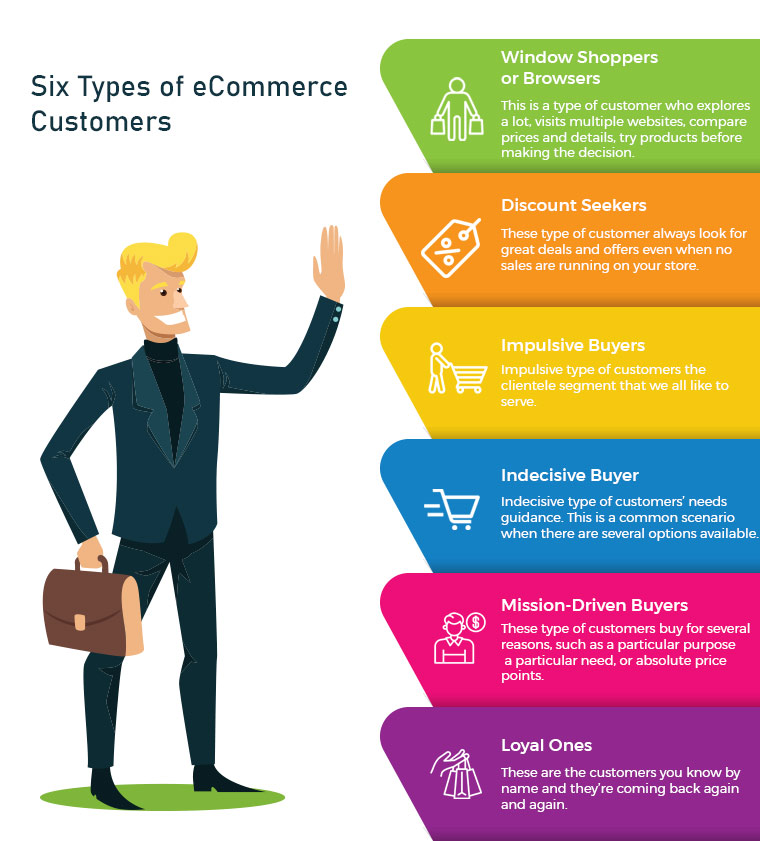
1. Window Shoppers or Browsers

The number one on the list is servers or browsers. This is a type of customer who explores a lot, visits multiple websites, compares prices and details, try products before making a decision. They add products to their cart but never intended to shop from them. Yes, there are many such buyers and you may call them a pain. Can you do something about it? Yes, I guess. There can be ways to attract such visitors and encourage them to buy products from your store.

Greet them well:

If you are a retailer, you must remember to greet them well. Even if they are not asking for any assistance you can provide them one. eCommerce store owners can add any entry or exit popup such as Better Thank you Page module to their store for greeting these types of customers.

Entry or Exit Popup:

Some of the easiest ways to engage your consumers are by the use of innovative methods. The customer’s attention must be drawn to the digital interface and manner of presentation. The gamified interface of Spin and Win Pop-up attracts shoppers to your store. This is a 3-in-one pop-up which is used as an entry pop-up, exit pop up or an email subscription pop-up.

Don’t ignore the browsers, they can become your loyal eCommerce customers if treated right.

2. Discount Seekers

These types of eCommerce Customers respond well to pushy sale tactics. They always look for great deals and offers even when no sales are running in your store. For attracting such buyers you should focus on highlighting what they will save on that particular deal.

Host Clearance or Flash Sales:

These discount seekers can give you huge sales if provided with flat discounts. Clearance sales can be a good option. The products that have been stocked in your store for months can be sold out, and customers looking for discounts will benefit from it.These sales can be a key contributor to your cash flow which will make room for the new products by removing the older ones.

Scratch Card:

You can provide your customers with Scratch Cards while having a purchase. Customers will be attracted to the alluring coupons which can save their deal a lot.

Free Shipping:

Free shipping encourages customers to buy more from your store. A fixed amount of purchase is to be made by the shopper to get free delivery.

Recommended Read: How to Win Customers with Discounts and Boost Sales? 

3. Impulsive Buyers

Impulsive types of customers are the clientele segment that we all like to serve. Nothing is more exciting than helping the impulse shopper to respond favourably to your recommendations. Impulse shoppers, also known as emotional shoppers, make unplanned purchases based on items that are currently appealing to them. Online shopping is a popular example of pulse or emotional buying. They look for products which attract them and you can do that by showing related products or by offering personalisation.

Show Related Products:

If you are dealing with an impulse buyer then make this chance an opportunity. Because they shop when they like it without giving a second thought. Show them what’s new in the store and let them feel, that they will be out of the race if they don’t own it. This can be done with modules like related products.

4. Indecisive Buyer

This is a common scenario when there are several options available. For instance, search for a floral top and the results will blow your mind. hundreds of products will start appearing in various stores. Deciding one will be difficult. Indecisive type of customers needs guidance. Ask them questions and give honest advice. A flexible return policy can also help them with their shopping.

Ask Questions:

Shop owners can help them decide what they want. Provide them with chat support or in-store assistance for choosing the right product. This effort can turn them into loyal eCommerce Customers.

Product Custom Field:

You can add a product custom field with the product description. You can add a field with related questions which can help you understand the need of the buyer. Advance Product Feld extension can be a good fit to improve UX.

Return Manager:

An indecisive customer will be encouraged if he/she knows that the product can be returned if they don’t like it. The Return Manager is a good module to add to your eCommerce store.

5. Mission-Driven Buyers

These can be called researchers or need-based customers. These customers buy for several reasons, such as a particular purpose, a particular need, or absolute price points. As difficult as it can be to please these individuals, they may still become regular customers if they are well taken care of. Provided with a good customer experience which is not available online or on other retailers stores can turn them into loyal customers.

Offer buy-online, Pick Up In-Store:

These types of buyers do not have much time to spend in window shopping or i-store shopping. They can make the purchase online and pick up the product from the store. Implement this new pick-up and drop option in your store to attract mission-driven buyers.

Cross-Selling:

Retailers can help the need-based customer with cross-selling techniques. You can place bread in related products while they are buying milk or a mobile cover if they are purchasing a mobile. The Automatic Related Product module can help you show relevant products on various pages such as the product page, the home page, the shopping cart page, etc.

Recommended Read: How to Cross-sell and Upsell?

6. Loyal Ones

These are the customers you know by name and they’re coming back again and again. Loyal eCommerce Customers already know and enjoy your shop, so now you need to keep them happy. Offer customisation and personalised experience and never lose them to others. The best ones are difficult to find and it is your responsibility to give them your best services. You can give them reward points or loyalty points on every purchase. These types of customers are the best marketers for your store as the more they shop, the more will be the word of mouth communication.

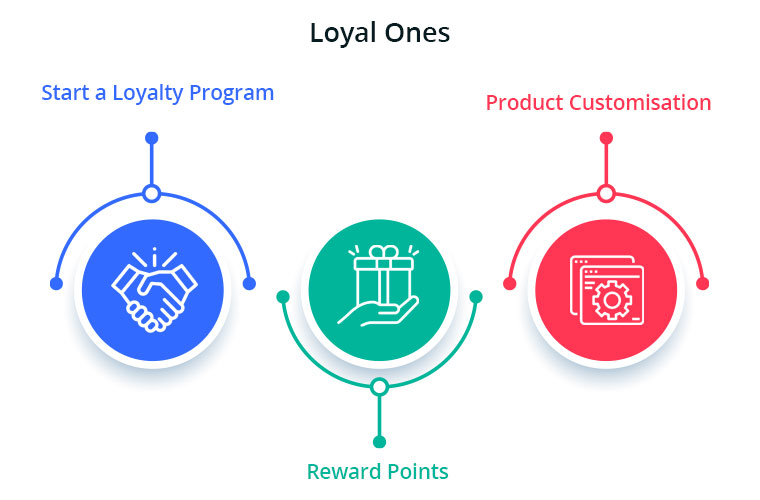
Start a Loyalty Program:

Choose a module or plugin for your eCommerce Store to give loyalty points to your loyal ones. This will motivate these types of buyers to shop again and again from your store. During checkout, the loyalty points can be redeemed for a discount.

Reward points:

You can also give them reward points on various purchases like first purchase, on a fixed amount order, on particular products etc.  The reward points encourage the buyer to make more purchases. It helps the admin boost customer engagement and creates loyal customers.

Product Customisation:

Product customisation and personalisation can turn your sales to the next level. this is one of the most accepted trends. Help them get a personalised product of their taste. The best module for giving a customisation experience is Product Designer/Customization which can provide several choices to you and shoppers.

Recommended Read: Giving Customer Personalisation Experience can Boost Your Sales

Final Tip:

Using this understanding to help turn deals, desires, needs-based and even casual customers into loyal ones will help the business expand. At the same time, ensuring that your loyal customers have a good experience every time they visit your store would only boost your bottom-line income.

Types of Online Marketplaces: Start your own with Multi Vendor Marketplace Module

Thanks to the idea of hyperlocal business models which are redefining the economy with on-demand delivery models. The idea of home delivery is gaining ground and businesses are cashing in on it. BigBasket a famous brand have established their hyperlocal marketplace in the year 2016 and the change in the pattern has provided a wide range of product availability to the customers with super-fast delivery.

With hyperlocal delivery model, BigBasket established an online marketplace for local vendors and sellers and they have integrated a network of all the possible bakeries and popular vendors. This move opened up the doors for many small businesses to grow with the help of a marketplace.

There are multiple types of online marketplaces categorised based on industry, focus and target audience. We will be discussing them one by one and how the Multi Vendor Marketplace Module can help you build your own marketplace is explained.online

Online Marketplace based on Core-Focus:

There are two types of online marketplaces based on focus segments: There are marketplaces that provide either one type of service or sell one category of products and the others are a hub for multiple services with a variety of niche.

  • Vertical Marketplace

A marketplace providing a single type of service and not diving into the pool full of fishes. Let us consider an example of Etsy, what started out as a simple place for people to sell crafts has become a behemoth.

  • Horizontal Marketplace

A marketplace where you will find many services or different types of products on one online platform. For example, a mall where you will find all the brands and products under one roof. An online eCommerce marketplace like Amazon is a horizontal marketplace.

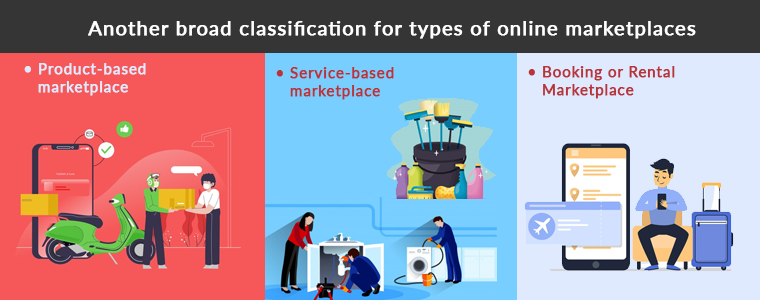
Another broad classification for types of online marketplaces

A major feasible classification for the online marketplace occurs on the verticals they are offering:

·  Product-based online marketplace

This type of online marketplace deals with selling products. Like Amazon and Flipkart are product based marketplaces. Commission and subscription are the two ways product based marketplaces earn money. They can even charge for delivery fees.

·  Service-based online marketplace

An online marketplace where service providers can list and provide services like personal care, cleaning, plumbing, appliance repair, pest control, graphic designing, etc.

Popular service-based online marketplaces are the Urban Company, Fiverr, Upwork who are providing multiple services with hundreds of categories.

·  Booking or rental online marketplace

No chance you haven’t heard about a booking or rental service providing an online marketplace. Ola, Uber, booking.com, MakeMyTrip are the most popular websites for booking or rental Marketplace.

There are modules that can help you in starting a booking and rental marketplace.

Marketplace based on the platform

  • Mobile Commerce

A platform or an online marketplace for the purchase or sale of goods and services through wireless handheld devices or mobile phone

  • eCommerce

A two-party site, e.g. seller – shopper, company owner – investor, etc.

The crowdfunding-the website enables people to post their projects and raise funds through fundraising efforts for their execution.

Marketplaces on the basis of Customer Type:

B2B – an online marketplace for the exchange of goods or services between companies or two business merchants

B2C – an online marketplace for the transaction from the merchant to customer for goods or services

C2C– an online platform for the transaction between customers for goods or services

How to start a Hyperlocal Marketplace with Multi Vendor Marketplace?

An online marketplace should have a seller and customer-driven features covering all possible requirements of the admin, seller, and the consumer. A multi-vendor marketplace extension is a module that can serve you well for setting up a B2B or B2C marketplace.

You can customize the settings as an admin. With Multi Vendor Marketplace module the seller who registers on your marketplace can easily manage the functionality for providing the service or selling a product to the customers.

Benefits of Multi Vendor Marketplace

  • Protection and guarantee for users
  • Authentic sellers and customers
  • Customizable settings and easy to configure from admin and sellers end
  • Track product details and orders for operating intermediate transactions
  • Marketplace handles the complete process
  • Multi vendor Marketplace provides superior customer experience

How to generate revenue with an Online Marketplace using Multi Vendor marketplace addon?

Based on Commission Model

How does the commission model work for Multi Vendor Marketplace? A commission is a percentage or amount of money a person gets when the product or service is being provided to the customer. With the aid of Marketplace Module, the store admin can set up a global commission for the sellers.

Using Multi Vendor Marketplace, commission for the individual sellers can be set. It provides the marketplace owner with the functionality of the category level commission. Marketplace admin can charge different commission rates on various marketplace product categories.

By offering a Membership Plan

Membership plans allow the store administrator to launch a subscription-based program. If the store administrator allows membership plans to work, then all new sellers and current sellers will have to purchase a marketplace membership to list their goods in the Multi Vendor Marketplace.

The marketplace owner can allow a free membership plan in which sellers can list only restricted products. Store admin can also send custom notifications to those sellers whose membership plans are about to expire. By giving a free subscription for a limited period will grab you more sellers in your market place.

Conclusion:

Some vendors and small businesses think it is easier to sell their goods in an online marketplace than to build a website and look for technological tools that handle several e-commerce sites. A marketplace is easy to manage with multi vendor marketplace addon.

If you’re willing to have an omnichannel approach with several online marketplaces, research all the industries and niche and think about which one suits you best and looks more lucrative, to begin with. Then we’ll help you keep your product details in order, safely, conveniently for all your marketplaces and networks.

The Multi Vendor Marketplace module is available for PrestaShop, OpenCart, Magento and Magento-2 stores. The modules are compatible with Return Manager extension available for all the platforms on Knowband store.

Recommended Reads:

Top Four Mobile Commerce Trends Every Retailer Should Know in 2020

No one can deny or ignore the paced growth of eCommerce (retail) industry. With Mobile Phones stepping into the online commerce, the trends of online shopping has fully revamped. With the growing use of smartphones & mobile devices, m-Commerce has grown exponentially in the past decade. Almost every eCommerce business has released their own mCommerce shopping apps by now. So, to be relevant and to be ahead of the competition in the market, e-retailers must be aware of various mCommerce trends.

Although, we all are aware of the growth in smartphone usage and mobile apps preference when it comes to online product purchase. Yet, not all the e-merchants are achieving its full advantage for the online business. Mobile Commerce is a must have for every eCommerce website in 2020. The more you delay, more sales and conversions are losing. Taking your website business to the mobile platform isn’t any sort of luxury anymore, but merely a basic necessity. Don’t go for my word, just take a look at the below statistics:

In year 2017, the mobile eCommerce sales accounted for around 34.5% of total eCommerce sales. [Source: Statista]

By the end of 2021, the growth in this data is expected to be 54% of total eCommerce sales. [Source: Emarketer]

In this write-up, we will elaborate the top 4 eCommerce trends that have been extremely useful for the store owners.

#1. Multi-Platform Shopping Applications

Targeting both Android and iOS smartphone using audience will definitely bring more conversions for you. Offer a pair of native mobile apps for eCommerce website and let users shop from the applications as well. Native eCommerce Mobile Apps are the ones that are published on the app stores (Google Play Store & Apple App store). With a featured shopping app, the users won’t be just limited to the browsing products but keeping them everything available at their fingertips will increase more sales.

Choose a reliable ready-to-launch Mobile App Builder and get everything ready in 2-3 days. The readymade eCommerce Mobile App Maker extension allows the store admin to create apps without any coding or programming. Nor they need to hire a programmer and spend a huge money for the same. Just purchase the right plugin for your eCommerce and rest everything will be automatically handled from creation to publishing on App stores.

PrestaShop Mobile App Builder

OpenCart Mobile App Builder

Magento Mobile App Builder

Magento 2 Mobile App Builder

WooCommerce Mobile App Builder

#2. Progressive Web Application (PWA)

E-Commerce Progressive Web Apps are the ones that are made live on the website (of the store). Whenever mobile website visitors visit a PWA active website, they see a button/tab which says ‘Add-To-Home-Screen’. Upon clicking it, the PWA mobile app gets instantly installed on user devices. That’s it, now the Progressive Web App will work like any other shopping application.

There are a few readymade extensions have the capability to provide fully customizable mCommerce PWA App for online store. The store admin get a very admin friendly dashboard from where they can edit and manage mobile app, send push notifications, etc. These days, to reach out to all possible target audiences, most eCommerce businesses are utilizing both native (Android and iOS) & PWA mobile apps.

PrestaShop PWA Mobile App

OpenCart PWA Mobile App

Magento 2 PWA Mobile App

WooCommerce PWA Mobile App

#3. Multi-vendor Marketplace & Seller Applications


Store owners that wish to have multiple sellers on the store usually opt for a complete package of Multi-vendor marketplace website and mobile applications. This process is simplified by Advanced Multi-vendor Marketplace with Mobile App extensions. Check out them from below links:

PrestaShop Advanced Marketplace with Mobile App

OpenCart Advanced Marketplace with Mobile App

Magento Advanced Marketplace with Mobile App

Magento 2 Advanced Marketplace with Mobile App

Using these, store owners instantly convert their store into full fledged marketplace & mobile app. On such a marketplace, store owners get a very optimized admin panel which let’s them manage every thing like-

  • Vendor Management
  • Seller Request Approval
  • Seller Commission Management
  • New Category Request Approval/ Disapproval
  • Tax Rule Settings
  • Rating & Review Management
  • Seller Order Tracking & Management
  • Sellers’ Transaction Tracking
  • Payout Management

All of the approved sellers on the store get their own unique vendor panels on which they can get following features:

  • Manual & Bulk Upload of Products
  • Order Management
  • Order Tracking
  • New Category Request
  • Commission Based Payout & more.

#4. Digital Payments & Transactions:

There was a time when online shoppers hesitated to make online payments & always opt for ‘Cash On Delivery’ options. But with the passing time & advancements in technologies & cyber securities, more & more shoppers have started to prefer digital payments over other options. In fact, nowadays the users first approach is to choose mobile payments over other options.

And reason is pretty simple for that. Mobile Payments offers much seamless and quick medium to pay for online product purchase. Just a few taps and the money is paid. Over the past few years, various advanced digital payments have been introduced in the market like e-wallets, Apple Pay, Google Pay, Braintree, Stripe, PayPal, Bank transfer etc. The eCommerce store owners can now opt for any payment options on their website and mobile application. As per Statista, mobile payments is expected to increase tenfold by 2021.

Its good to have e-wallets and UPIs integrated in eCommerce Mobile Apps. The users shopping through mobile applications (Android or iOS or PWA) can choose their preferable option to pay and make secure transactions. So, for businesses who have already stepped into mobile commerce or looking for a way to do so, choose a solution offering various digital payments to cater all sorts of mobile using audience.

Closing Comments

These were a few examples of how online shopping behavior is transforming. The store owners who are running their business on online eCommerce platforms should be in check with these trends. Ignoring the need of eCommerce mobile apps will only be a losing factor in matter of sales or revenue or growth.

So, if you are thinking of launching shopping apps for your website, its high time to act upon the same. Check the readymade solutions shared above or discuss more on support@knowband.com. We, at KnowBand offer readymade native (Android and iOS), PWA (Progressive Web App) & Marketplace Mobile Apps for the eCommerce websites build using any of the below platforms:

OpenCart Marketplace Extension: Create Your Own Marketplace

Do you own an OpenCart store and willing to start a marketplace business? OpenCart Multi-Vendor Marketplace extension by Knowband is an exemplary plugin available for your OpenCart Marketplace business.

You must be coming up with a lot of questions for the same. First, what makes a multi-vendor marketplace an appealing business model for a peer-to-peer, B2B, or B2C business? The thing is: you want to make sure that you are working on the most profitable possible business. And that is just what a marketplace is. You can choose an industry to start your business with.

How does the OpenCart Multi-Vendor Marketplace Extension work?

If you are looking for a well-developed option for managing admin and seller interface then OpenCart Multi Vendor Marketplace extension is the solution. The extension has a separate admin interface and seller interface along with the front-end.

The registered seller is provided with a seller dashboard to manage all his orders, product inventory, delivery, and payment gateways and what not! The seller can easily register for selling his products on OpenCart Marketplace and access the dashboard. This is what a marketplace owner wants.

OpenCart Multi-Seller Marketplace plugin has a flawless admin interface that allows admin to manage all the sellers easily. It makes the seller commission management effortless. Proving multiple product choices in different categories is now handy with the OpenCart Marketplace extension.

How Admin of OpenCart Marketplace is Benefited?

Setting up a marketplace itself is an optimum business idea. This can make you plenty of money if done thoughtfully and strategically. All you need is a plan and a management system. The OpenCart Multi Vendor Marketplace extension is fully functional which can be incorporated into your existing single-vendor eCommerce site and converts it into a marketplace.

Easy Commission Management: A Source of Passive Income

The marketplace business is a source of passive income. If you are an owner of the marketplace then you will be earning some commission over every sell completed over your marketplace. The Multi Vendor Marketplace Plugin designed for OpenCart allows the admin to charge the sellers the global as well as the category-based commission.

Prudent management of sellers, products, and categories

It is simple to accept the seller’s profile from the admin panel of the OpenCart Marketplace plugin. The store owner can easily track the profile of the vendor and the items that are posted on sale. The admin can also assign sellers the categories. Besides, the vendors can submit an admin category request that is handled at the back end of the OpenCart Multi Vendor Marketplace plugin.

Offer Several Shipping Choices

OpenCart Marketplace Multi-vendor plugin provides custom delivery options to the customers. A seller is allowed to offer different shipping options for their products.

Track the Orders and Payments

Keeping the track of the sales, orders, and payments is an essential part of the business. The OpenCart Marketplace Extension provides efficient monitoring of the site’s sales report and the pay-outs.

Opencart Multi-Vendor Marketplace plugin offers admin to configure the payment settings for PayPal from the store’s backend. Admin needs to fill in the store’s backend with the Client ID, Client Secret Key, Paypal Email subject, and Paypal Currency.

Attract More Sellers to your Marketplace

Easy Seller Registration

If you want more vendors to sell on your OpenCart Marketplace then install the OpenCart Multi-vendor Marketplace extension because it allows third-party vendor registration in few clicks by simply filling out a form.

Sell Everything

The OpenCart Multseller marketplace extension allows sellers to sell ‘N’ number of products added in different categories. They can easily list the products and manage the inventory. OpenCart Marketplace allows the seller to request for the approval of product categories.

Lucrative Product Page

Sellers can incorporate banners, shop logo, and metadata from the dashboard to make the product page more appealing. An SEO friendly URL can be added by the seller.

Sellers can keep the Track

The sellers can track the Dashboard’s overall transactions and sales report with ease. It makes management simpler and quicker.

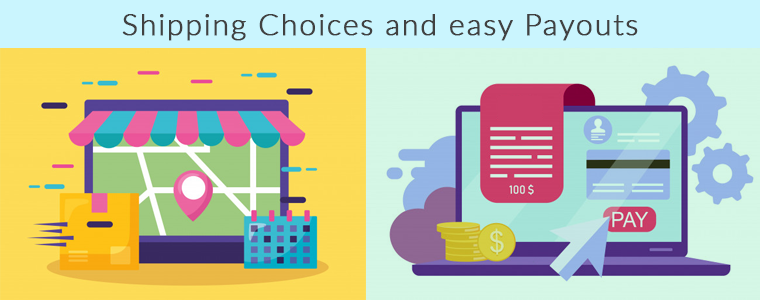
Shipping Choices and easy Payouts

If allowed from the OpenCart Multi seller Marketplace module admin panel, the sellers can add their own shipping methods. This will give customers a lot more choices.

Sellers can request the payment from time to time. This is very simple and easy.

Provide Notifications and Alerts through Email

This has a powerful email notification system that is capable of providing timely updates and feedback to the marketplace community concerned. Provide all the information about activities taking place within the online marketplace to customers, sellers, and store managers for taking the appropriate action at the earnest level. This will help us make the right business decision with no hiccups.

Customers are the Most Benefited Entity

Wonderful services at the most competent price: A customer will be happy to buy a product from your store if he can see what others are saying about the product they are willing to buy. It has been observed that a product that is highly reviewed receives more engagement.

Visitors of the OpenCart Marketplace store can now select the ideal products from a wider range of product choices. Let you the customer decide if the product and the seller are good enough by asking for feedback and reviews. From the seller’s account page, customers can easily contact the product sellers and raise a ticket for their queries and problems.

Final Words

Handling a business is not easy and a small task. Not every business owner can set up their own marketplace and earn money but giving them an opportunity will make the difference. Also, you need a strong and easy-to-use marketplace platform to create a successful marketplace. And to help you find the best platform, we have developed a Multi-Vendor Marketplace Extension for you, to see the demo you can click here.

The Marketplace module is also available for the PrestaShop store and Magento store.

Recommended Reads:

Giving Customers a Personalized Shopping Experience can Boost Online Sales

When exploring your Instagram or Facebook, you always see feeds that are of interest.  Google’s discover feed also shows you the content which you like and would like to spend time on.  Naturally, this makes you feel exclusive, and you spend more time without keeping the time track. 

Can you give the same experience to your customers while shopping? Ecommerce brands like Myntra or Amazon try to target their inactive leads with personalized email marketing. Giving your customer a personalized shopping experience in this competitive environment could be the right plan to survive in a long race.

Understand the shopping journey of buyers with data and use it well for customer experience personalization. With that, customers who get exclusive treatment will do word-of-mouth marketing.

As an eCommerce store owner, you might have given thought to this. But, you may struggle with How to do it? 

Know your customer personally

When you are spending a lot of time and money on focused target marketing, you just don’t need a customer who will make a one-time purchase but your business demands a loyal one. For target marketing, you can consider gathering demographic and psychographic details from a customer. The demographic information can be collected from registration forms but for psychographic information you need more data. To get the details like the interests, values, profession, and lifestyle, you can add custom fields to your registration page.

Proving your customer with loyalty points or rewards at every step of the form filling process will encourage them to fill it. This way, you can get more relevant information for future marketing and product personalization.

You can always ask for:

  •         Their first name 
  •         Birthday  
  •         products they’re interested in
  •         A preferred channel of communication

Some might like receiving emails but in a limited number while other millennials prefer receiving an SMS just after the purchase is made. It is good to ask the preferred channel of communication for targeted marketing. You can even ask for their interests and genre if a person is buying a book from your store.

A large number of people have no issues if a company spoof into the customer’s information which can provide them with a wow experience. From a report, it has been found that 76% of customers expect companies to understand their demands and requirements. So, people like getting a personalized experience, and it is now a trend that can be followed by an eCommerce store owner to compete with others in the market. Personalization can lead to impulsive buying.

Better to communicate with your customers

Remind your customers about the products they liked to buy or visited but did not make the purchase. You can send a push notification for back-in-stock products. You can ask them to look into their wishlist to reduce the abandoned cart.

It has been found that 95% of millennials do shopping while doing other things. Most of them shopped while watching TV or chatting with a friend. Half of the people bought when they are bored with waiting for someone, and some do it when they are traveling.

It is crucial to choose the right means of communication for interacting with your customer. The selection of a communication channel should be based on the data you have collected. Customers often receive promotional emails and notifications which grab their attention and make them shop more.

Putting efforts in the right direction can help you boost conversion rates and customer retention. Millennials prefer texting overcall. You can use a chat app to provide a solution to their queries. This will be a great deal to give them more customer experience personalization.

Effective use of data for persona

You have the data in your system and what a waste if you are not using it well. Your system knows your customer better than you do.

  •         Have you ever been in a situation when you called a person with the wrong name? This happened to me once, and I never want that to happen again. It instantly loses trust in a relationship. Send emails or greet them in-store by calling their name. This builds up an interactive connection between you and your customer.
  •         You can take the help of segment email marketing by categorizing your customers according to their psychographic data
  •         You can enhance the customer experience by offering them products related to their last purchase. A study says, 44% of the customers intended to buy from the same brand or company after getting a personalized shopping experience.
  •         Understand the need of your customer as per their geographic location. Implement geolocation-based marketing strategies. Add a store locator to your website. In-store shopping is still a trend in millennials.

PrestaShop modules you should not miss on

Do you know that you can enhance the personalized customer experience by adding extensions to it?

It is challenging to keep your customers at a checkout page or the product page when they are doing two things at a time. You must have some striking, captivating website features which will keep them attentive and focused on their purchase. Why not with personalized features that you can add with these modules?

Collect more information

With PrestaShop Custom Registration Fields, the owner of the PrestaShop store will collect information about the customer by adding custom fields to the registration form of the website. Additional Order Forms/Field Manager addon for PrestaShop is another module that can help you gather more information. Custom fields on the order form can be generated with this PrestaShop Additional Order Forms Manager without making any adjustments to the code on the web page.

How to use it?

You can ask your customer to fill up the details which can be optional. You can add this field to the registration form. This way you can collect information about birthdays, anniversaries, or any of the interests which can help you promote your products. You can send a personalized message on their birthday with a greeting or any discount coupon. Store owners can use additional information to develop their services and eventually make more profit from their company.

Celebrate birthdays or anniversaries

You can give discount vouchers or coupons to your customers on their Birthday. Birthday Coupon -PrestaShop addon is a module that can inspire your customers to shop from your store on their birthdays.

How to use it?

You can send an email with a personalized message on their special day. This email will include the birthday coupon or discount voucher. The voucher sent through the mail will be valid for a limited time. The addon comes with multiple default templates. You can use it for various occasions.

Make them loyal customers

It is a dream for brands to have loyal customers. From research, it is found that about 30% of people like to buy the same brand and around 40% choose the same brand if they are offering personalized products.  For customer retention and conversions, you can give loyalty points or reward points to your customers.

The PrestaShop Reward Points addon incorporates the reward points feature into your PrestaShop store and allows the admin to offer the rewards point to online shoppers every time they purchase items. 

How to use it?

Store owners can give reward points to the customer after every purchase they do. This comes with a set of terms and conditions. The module helps the admin to add multiple rules for redeeming those points. Customers can redeem those points at some point of purchase which will keep them engaged in your store.

Another extension that can help you with customer retention and customer conversion is PrestaShop Loyalty Point Module.

How to use it?

There are some rules like Cart Rule, Product Rule, and Behaviour rule for loyalty points. Store owners can offer loyalty points on a specific cart amount, product quantity, based on the payment method, particular product or category, shipping services, etc. It can be given to new customers while placing their first order.

Display recently viewed items

Automatic Related Products addon for the PrestaShop store can help you show the relevant products to your customers. This feature can be added to multiple pages of your eCommerce store.

How to use it?

The feature will show related products to your customers, and this will motivate them to see more and more on your eCommerce store. If they are not satisfied with the one product, they can see more until they get the one.

Add more product details

Admin can add n number of details for a product with Advance Product Attribute/Field – PrestaShop Addon. This module allows you to show descriptive information about the product. 


How to Use it?

It has a simple configuration, and the admin can ask customers to provide more information about the product. If they like the product or not? If they need any modifications?  By collecting additional customer details, the sellers can better represent them. As a result, online shoppers will have the same user experience with this PrestaShop Additional Field Module on the Product tab.

Attractive email subscription module

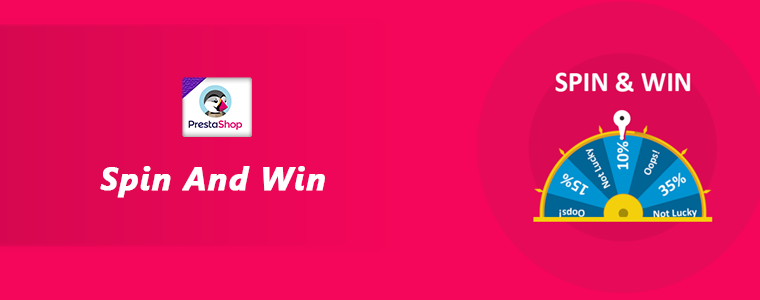
Spin And Win – Entry, Exit, and Email Subscription Popup by PrestaShop have a gamified interactive look. It attracts the buyer’s attention and allows them to win offers like discount coupons or free shipping. This is one of the best sellers of PrestaShop and a fantastic module to collect the email addresses of your customer.

 How to use it?

You can Get Personal in Email Marketing and send personalized Emails using the information which is provided by the customers. The emails should be sent based on customer behavior. You can go for a personal recommendation to offer a personalized customer experience to your customer. Try to re-engage your leads with promotional messages or pop-up notifications. Email marketing is a free and reliable option to give a customer personalization experience to users.

Greet your customer

Greetings are most valuable when you are building a relationship. Customer-trader relationship is most important when it comes to business. You can use a Better thank you page module for your PrestaShop store.


How to use it?

Add a Better thank you page module to your PrestaShop store and use it to show a pop-up when the customer is leaving your store or after the successful purchase. Also, you can add customized banners or discount coupons for their next purchase. This way, it can help you boost customer retention and make your customer satisfied.

Final thoughts

Increase your sale by providing a personalized shopping experience to your customers. In this era of millennials, Personalisation is the only way to attract a loyal customer base to your store. Create Special Campaigns Based on user behavior and make them feel unique. They don’t like to be treated as a number but an individual. So, It’s time to boost your sales with a customer experience by providing personalization. 

Recommended Reads:

How to Simplify the Online Shopping Experience of Customers?

Give Best Infinite/Endless Scrolling Experience to Your eCommerce Customers

Magento 2 PWA Mobile App – User Manual

1.0 Introduction

Being in the retail eCommerce industry, you must have come across the word PWA (Progressive Web App). If yes, you must be also aware of the capability they carry as a shopping application. In case not, you’ve landed in the right place. With the constant growth in the usage of shopping apps (both native & PWA), online stores are shifting to PWA Mobile App development for their businesses. Launching a Progressive Web App is quite a simpler and affordable task these days.

KnowBand has launched Magento 2 PWA Mobile App, a complete no-code and automated tool to launch a Progressive Web App. In simple words, whenever any user opens your store URL on the mobile browser, he will get a prompted message of “Add To Home Screen”. The Magento 2 Progressive Web App will be added in the user’s device like any other app and online purchasing can be done on the go.

1.1 View Demo App:

Explore Progressive Web App demo for Magento 2 and take a glance at how your final apps will look and work:

Demo Store URL: https://ma2demo.knowband.com/pwa/manager/
PWA App URL: https://ma2demo.knowband.com/pwa/pwa-app/


[IMP] Notes For Magento 2 iOS PWA:

–> iOS devices do not offer any inbuilt “Add To Home Screen” prompt. Users need to manually add the Magento 2 PWA Mobile App to the home screen of iPhone or iPad.

–> iOS does not support web push notifications. The push notifications can only be sent to the Android device from the admin panel of Magento 2 PWA Mobile App Builder.

[NEW UPDATE] Magento 2 PWA supports RTL Languages:

The Magento 2 PWA Mobile App Creator now supports all worldwide languages including RTL (Right To Left). The PWA Mobile App for Magento 2 can have languages like Arabic, Hebrew, Persian, etc. The store owner can offer all website languages on the Progressive Web App and can even add new ones.

2.0 Admin Panel Screens:

With the friendly admin panel backend, the store admin can configure and customize the look, feel, and working of the PWA Mobile Application. It’s just a matter of a few clicks and mouse toggles to make changes in the Magento 2 Progressive Web Apps. Let’s take a detailed overview of the Admin panel screens:

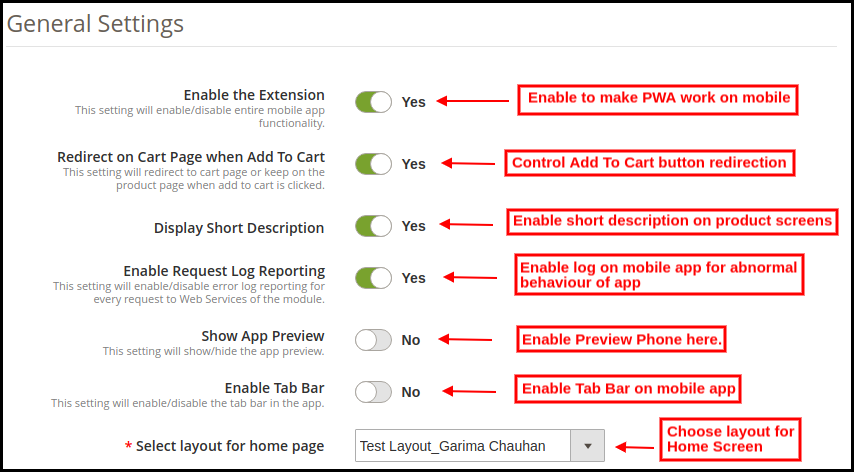
2.1 General Settings:

a) Enable the Extension: Enable Magento 2 PWA module to make web app work on the users’ smartphones.

b) Redirect on Cart Page when Add To Cart: Enable to re-direct users to shopping cart or disable to keep them on the product screen.

c) Display Short Description: Enable to add & display a short description on the product screen of Progressive Web App.

d) Enable Request Log Reporting: Enable this tab to activate the log file on the PWA Mobile App. This log file can be used to rectify any abnormal behavior of Progressive Web Application.

e) Show App Preview: Enable to add a preview phone in the admin panel. All color, font, home screen changes will be displayed in real-time preview phone.

f) Enable Tab Bar: Add a bottom tab bar on the Magento 2 PWA Mobile App.

g) Select Layout for Home Page: Choose desired layouts from the added ones and improve look and feel of app.

h) Image for App Icon: Upload Magento 2 PWA app icon on your own and change the same as well if required.

i) Name For PWA App: Enter the name of the Magento 2 Progressive Web App.

j) Select Font For PWA App: Choose the font of your PWA app for Magento 2.

k) App Button Color: Choose button color for your PWA Mobile App.

l) App Button Text Color: Choose the button text color for your Magento 2 Progressive Web App.

m) App Theme Color: Choose the theme color (header) of your web application.

n) App  Background Color: Choose the background color of the Progressive Web Application.

o) Splash Screen Background Color: Choose the right color option for the background of the PWA app splash screen.

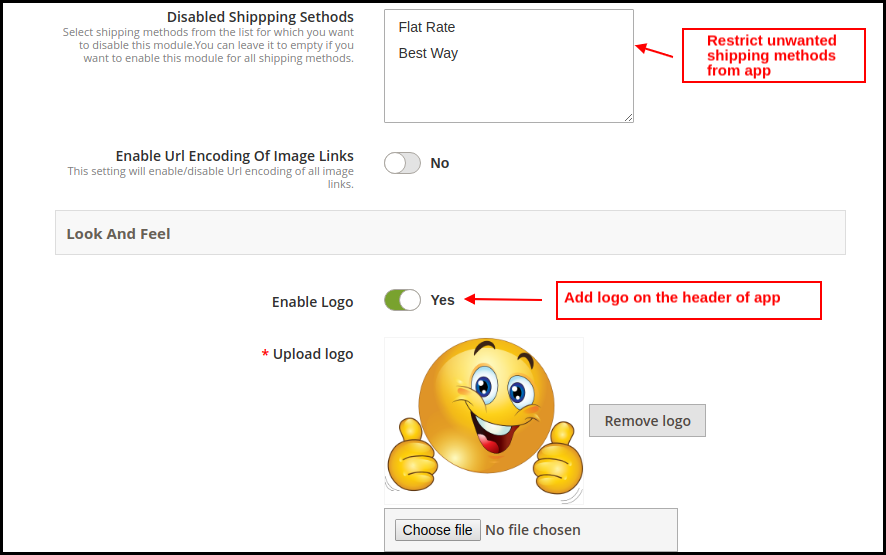
p) Disabled Shipping Methods: Choose shipping methods to be restricted from working in Magento 2 PWA mobile app.

q) Enable & Upload Logo: Add the logo image of your store to be displayed on the header of the PWA Mobile app.

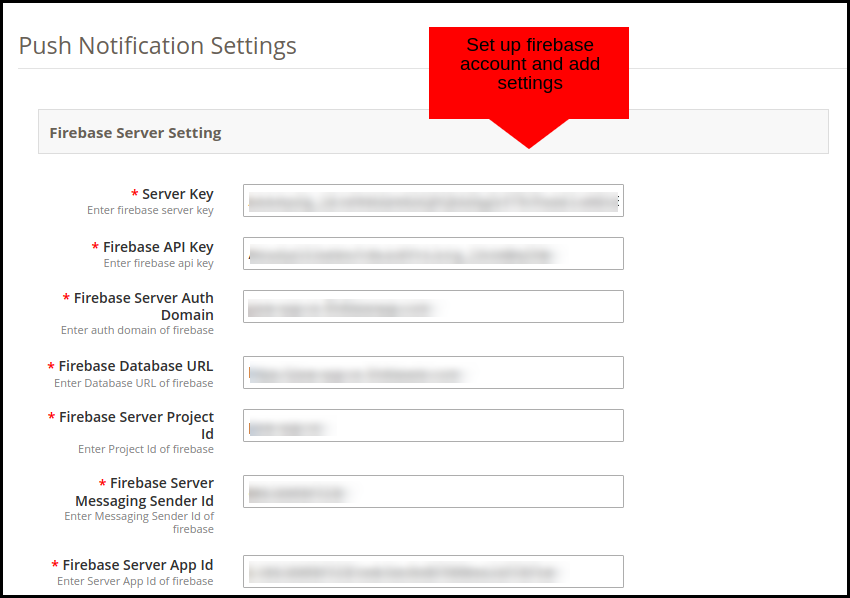
2.2 Push Notifications Settings:

The Magento 2 Progressive Web App offers unlimited push notifications to market and promotes store deals and products. The store admin will get push notifications for a lifetime with no additional charges.

The various fields under this setting tab require a Firebase Account set up. Here’s how you may set one:

How to set up a Firebase Account?

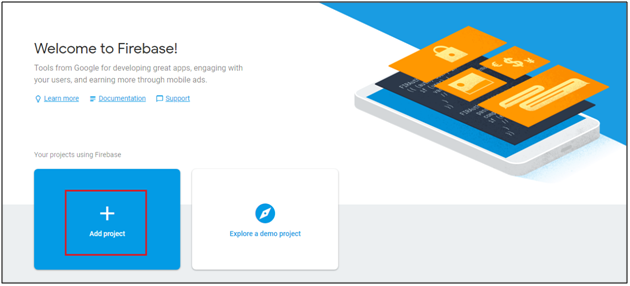
Step 1: Login Google Firebase

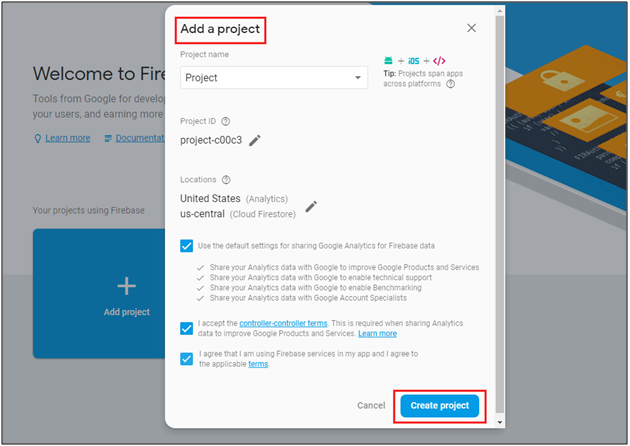
Step 2: Create a New Project
As you click on Add Project, the following dialog box will pop up:


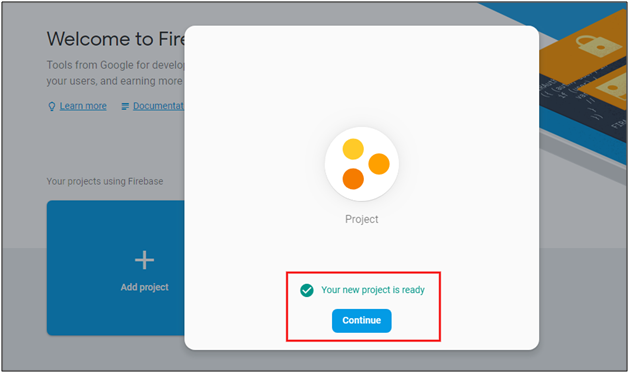
It will take a few seconds to create the project. Once the project is ready, click continue.

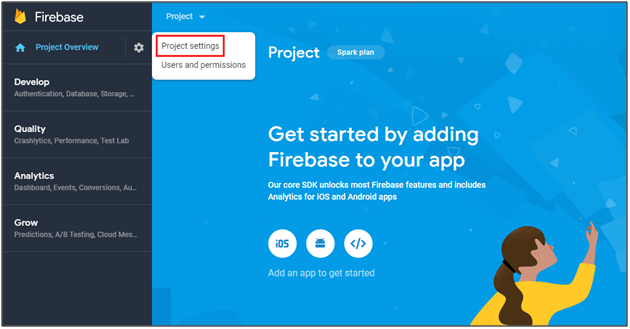
Step 3: Manage Project Settings
Once the project is created, click on Project Settings.

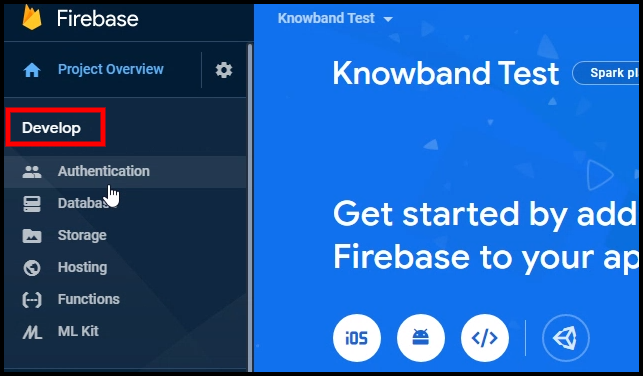
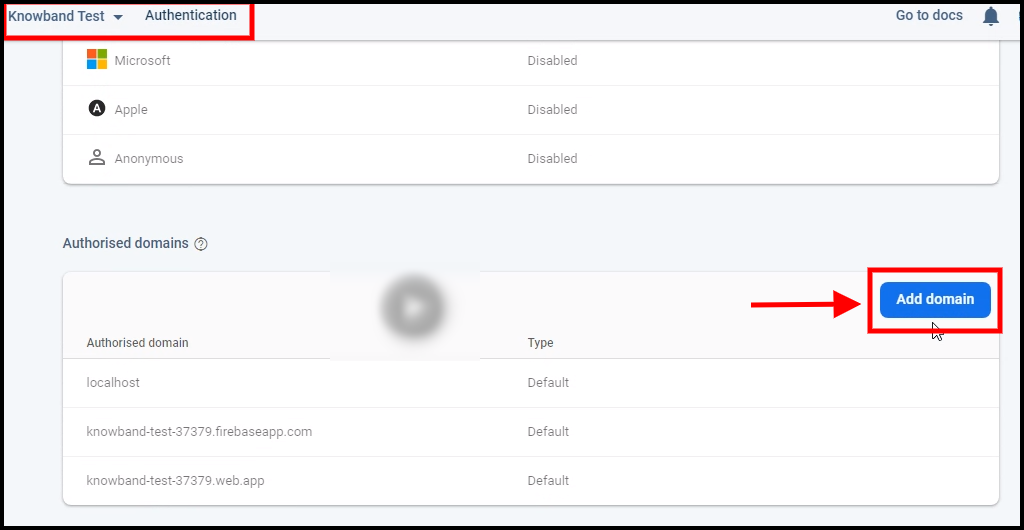
Step 4: Go to Authentication options:


Step 5: Find Firebase Keys
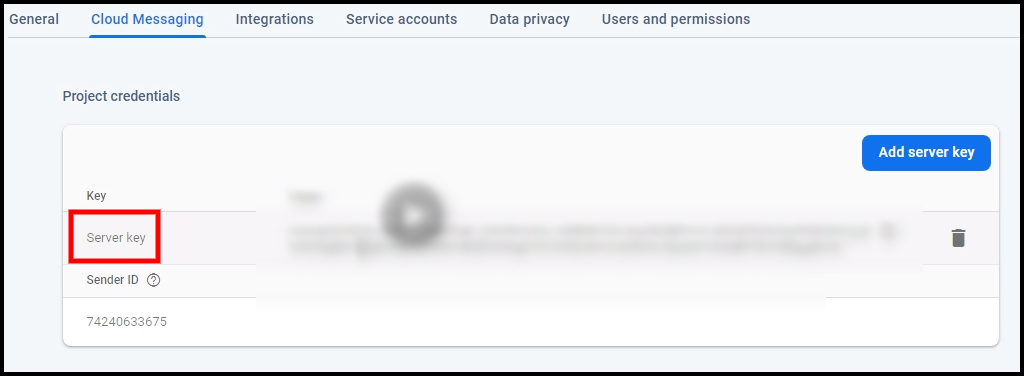
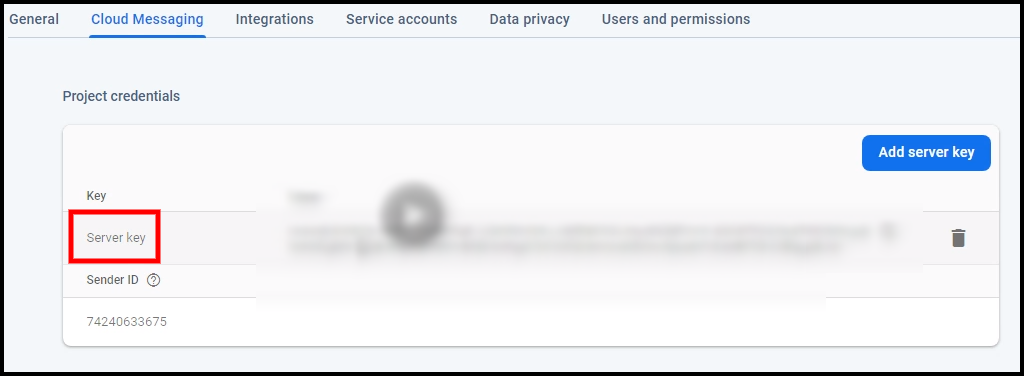
In the project settings, click on Cloud messaging settings. From here, you can directly get the server key.


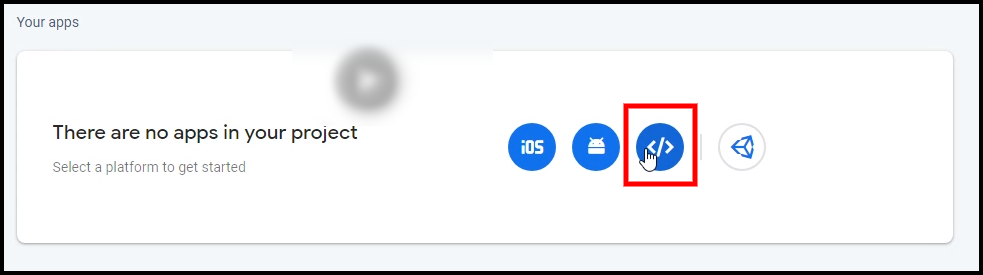
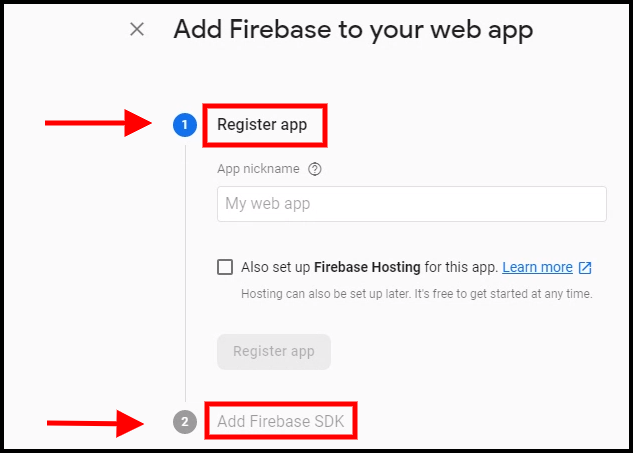
Step 6: Add your Web-App to Firebase

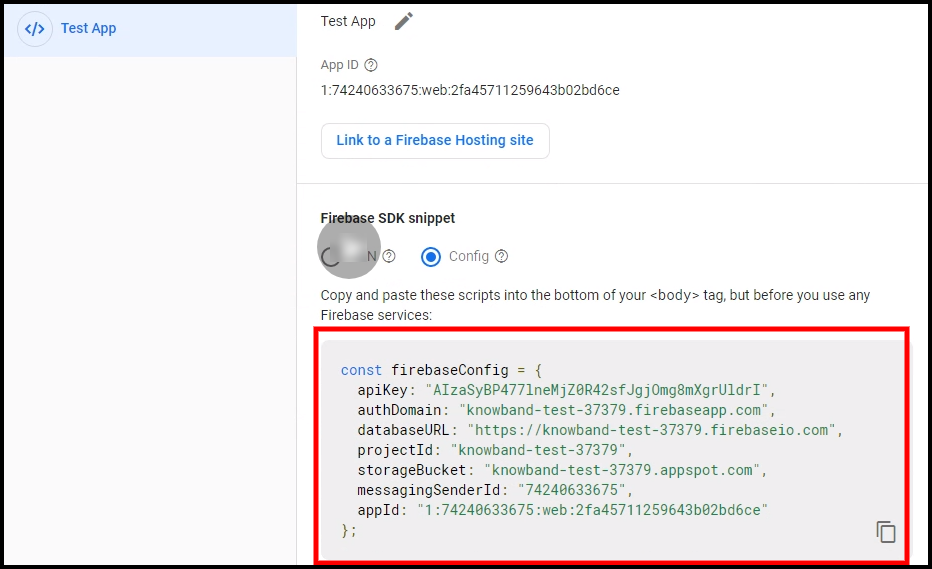
Step 7: Get other firebase related details and paste the same in PWA module admin panel.

Step 8: Get firebase server key from cloud messaging tab in Settings:

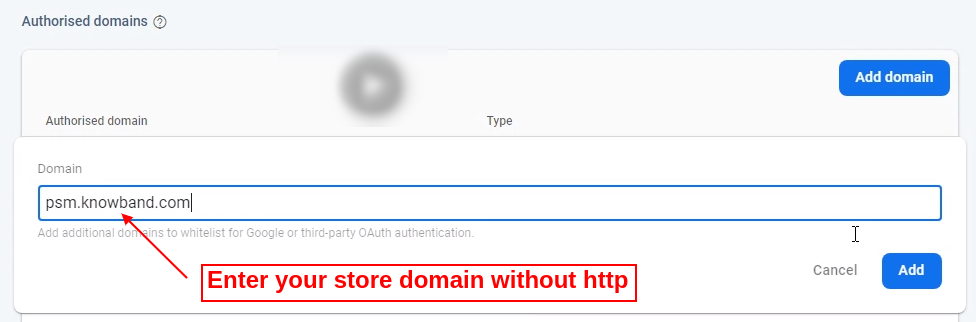
Step 9: Add your domain in authentication>>sign-in.

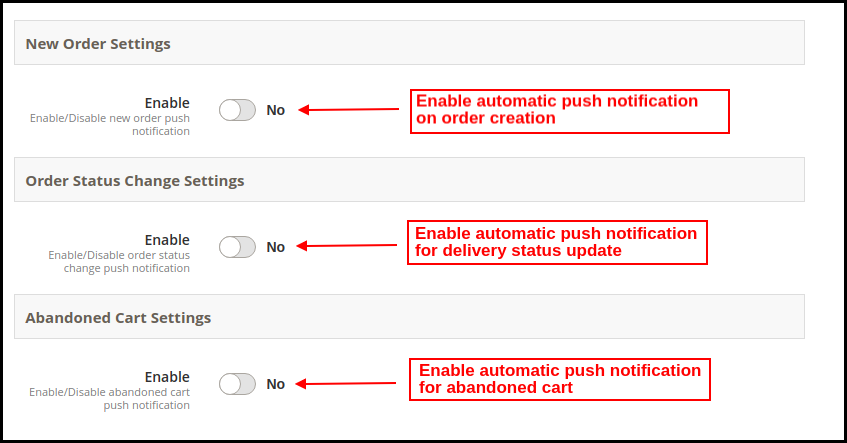
2.21 Automated Push Notifications:

The store admin gets to schedule automated notification sending for the following cases:

a) New Order Settings: Whenever any new order is placed from the Magento 2 PWA Mobile App.

b) Order Status Change Settings: Whenever the delivery status of any order gets changed/updated.

c) Abandoned Cart Settings: Whenever any user leaves product in cart and abandon Progressive Web App.

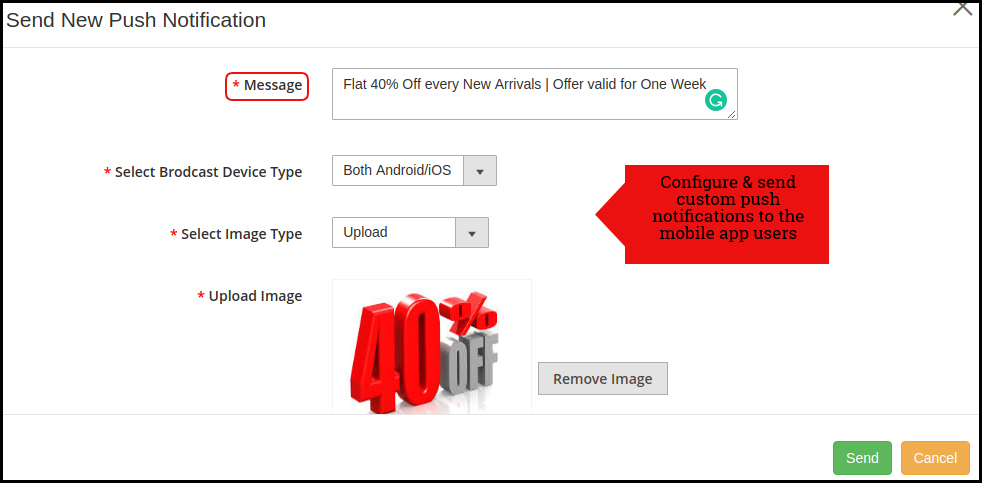
2.22 Manual Push Notification:

As shown in the above snapshot, the store admin can personalize and send manual push notifications to PWA Mobile App users. The message, image, discount offered, redirection link can be added/edited to improve the efficiency of notification and bring more sales.

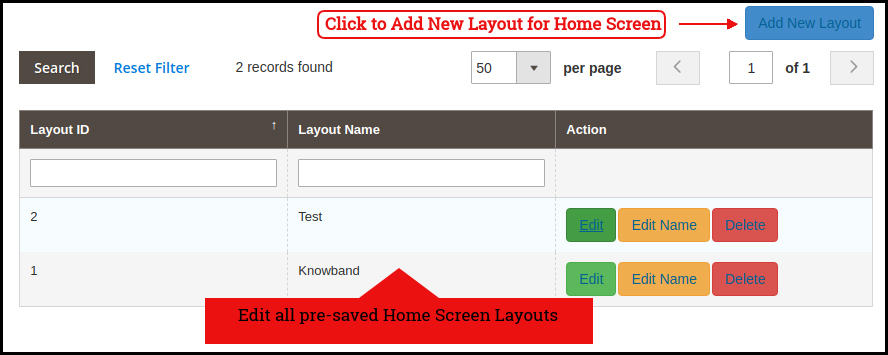
2.3 Home Page Layout:

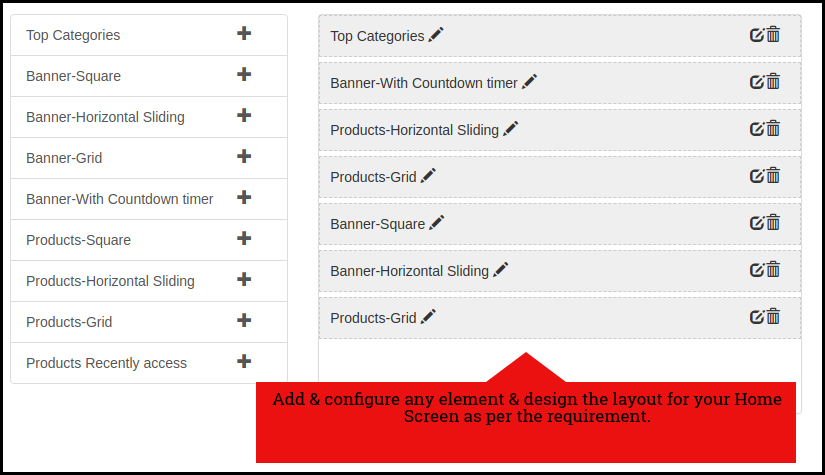
The Magento 2 PWA Mobile App Builder offers a fully customizable DIY editor panel to customize and configure the look and feel of Progressive Web Application. Various new layouts can be added to the admin panel based on upcoming festivals and occasions.

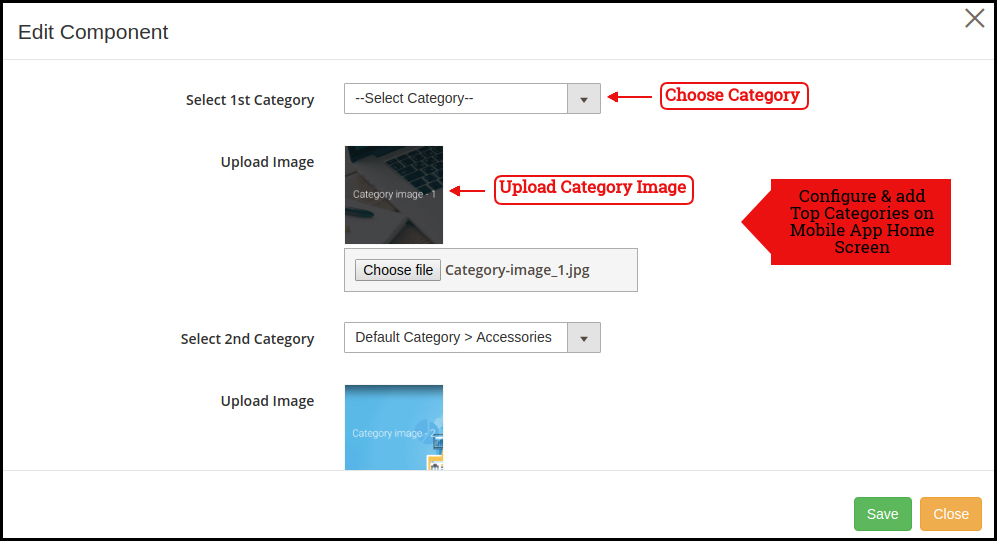
2.31 Top Categories:

2.32 Square Banner:

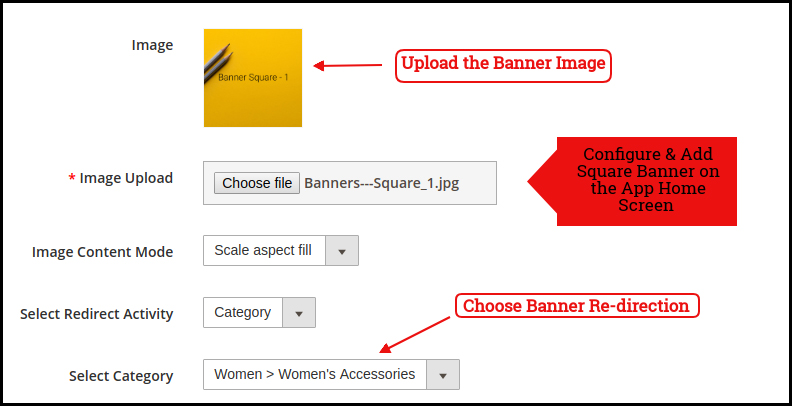
2.33 Sliding Banner:

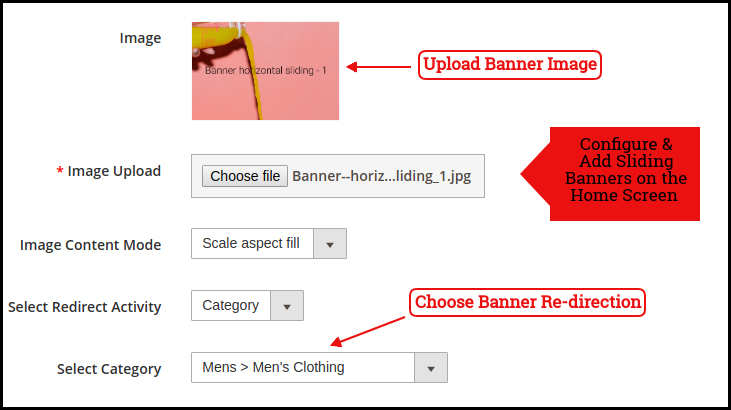
2.34 Grid Banner:

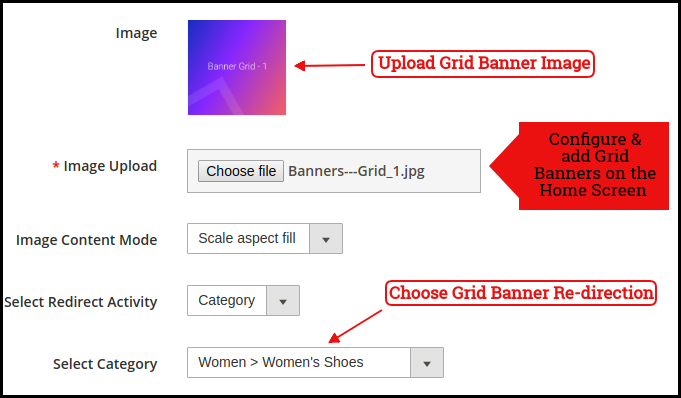
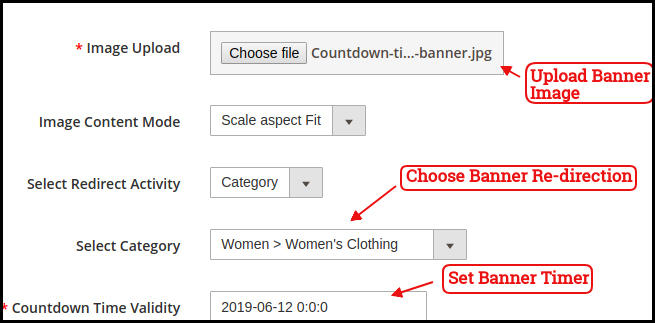
2.35 Countdown Timer Banner

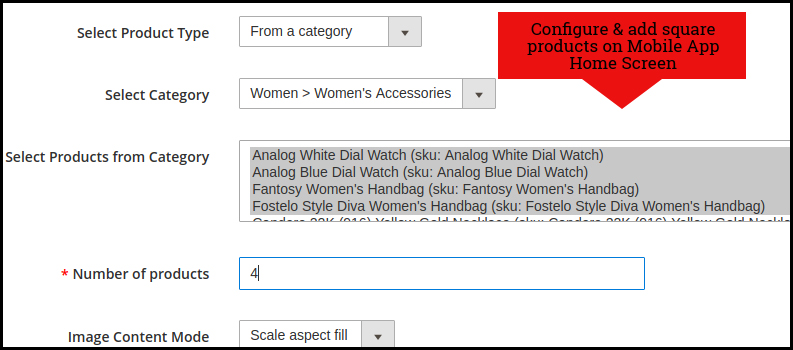
2.36 Square Products:

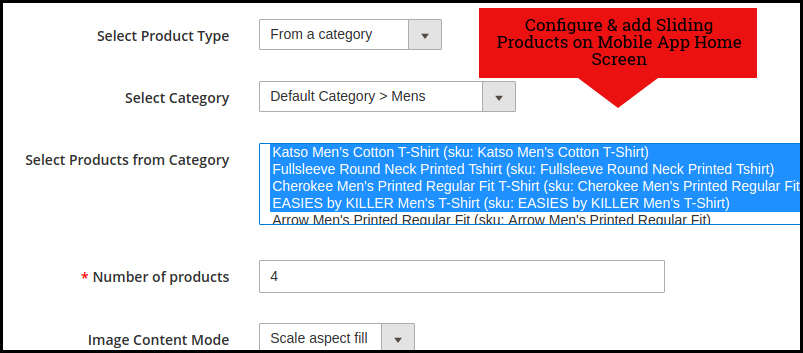
2.37 Sliding Products:

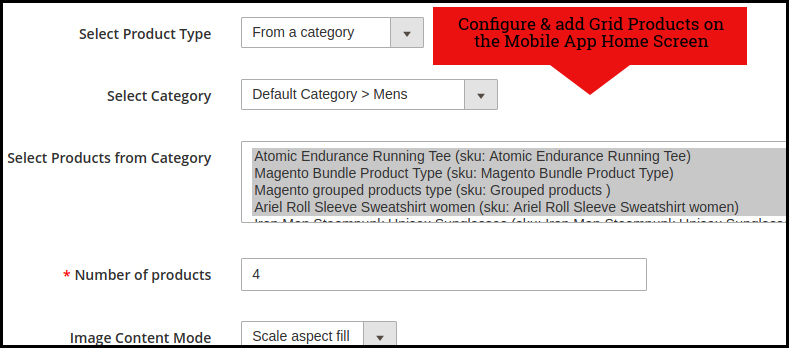
2.38 Grid Products:

How to get Facebook App details?

Facebook App can be created by following below-mentioned steps:-

Step 1: Go to given URL: https://developers.facebook.com/apps/

Step 2: Click on the “Add a New App” button.

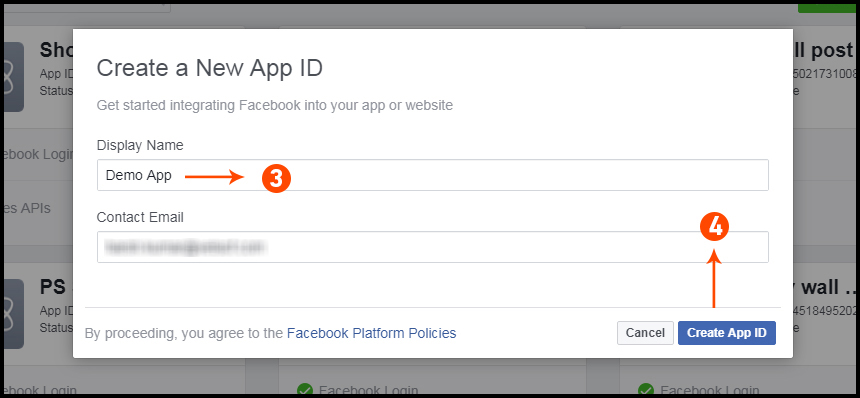
Step 3&4: Enter your App name and email id, then click on “Create App ID” button.

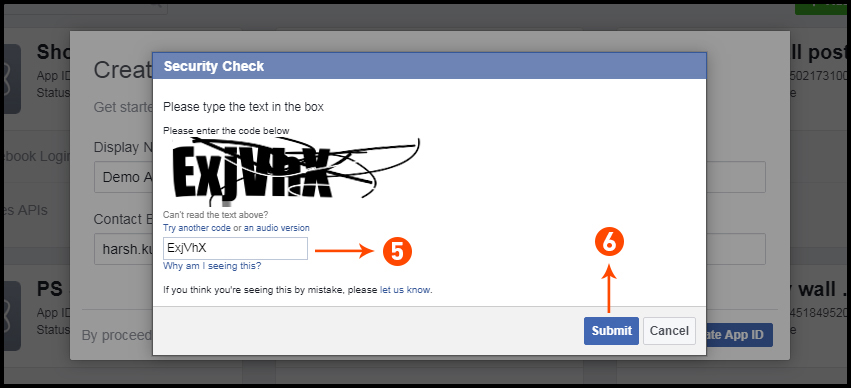
Step 5&6: After clicking on Create App ID you will have to go through a security check as shown:

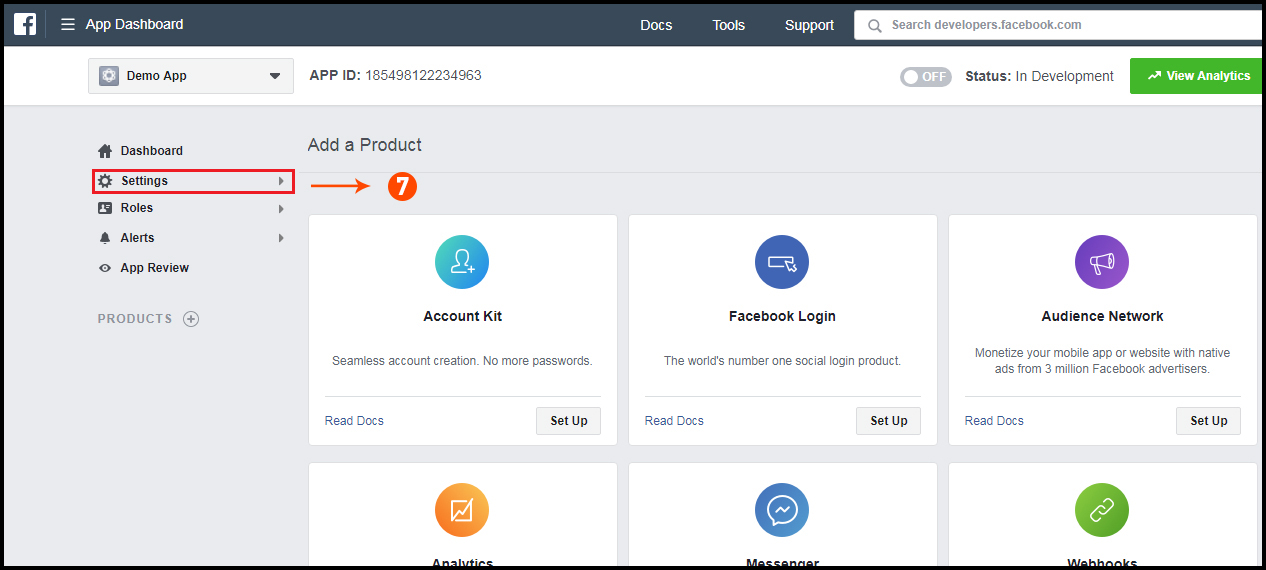
Step 7: Click on “Setting” tab.

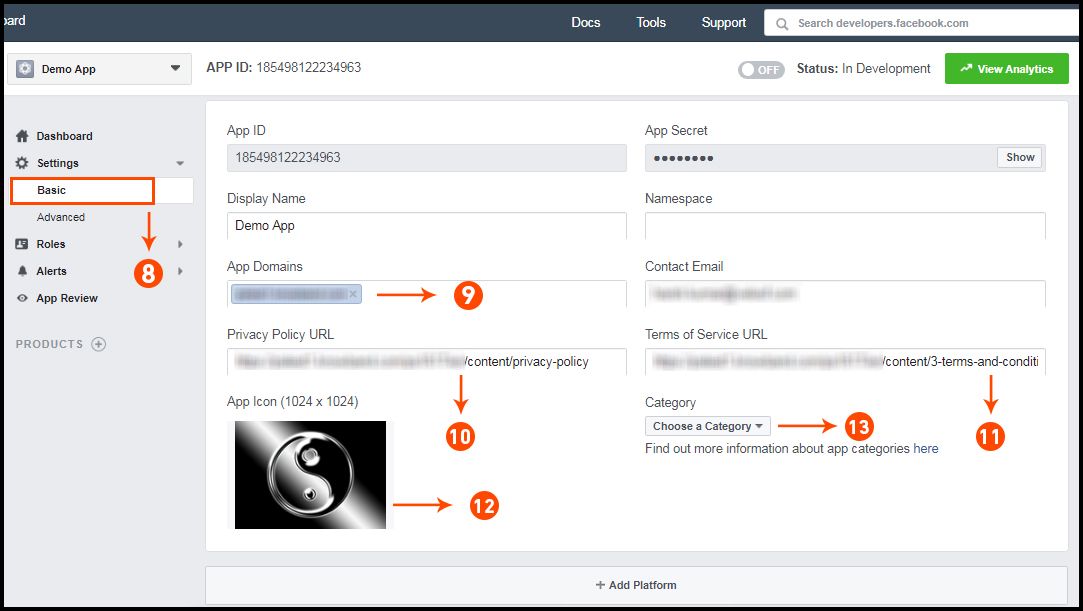
Step 8-13: Two option will be available in the dropdown, Basic and Advanced, click on “Basic”. And then enter your “App Domain”, “Contact Email”, ”Privacy URL”, ”Terms and Conditions URL”, ”Add Logo”, ”Select Category” and click on “Save Changes” button.
App Domains:
yourdomain.com is correct
yourdomain.com/store is incorrect
www.domain.com is incorrect

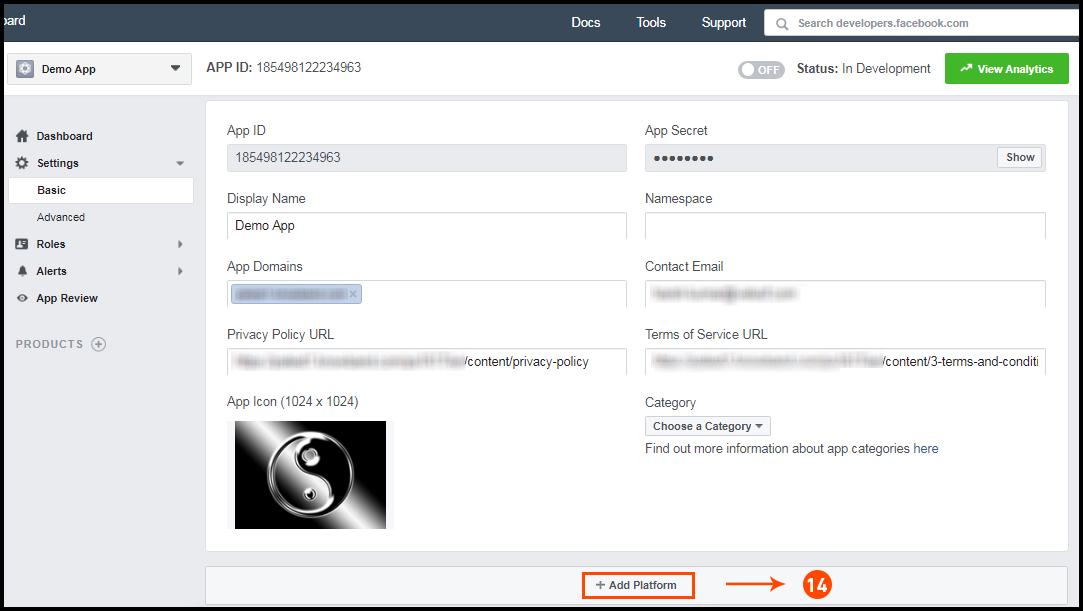
Step 14: Now click on “+Add Platform”.


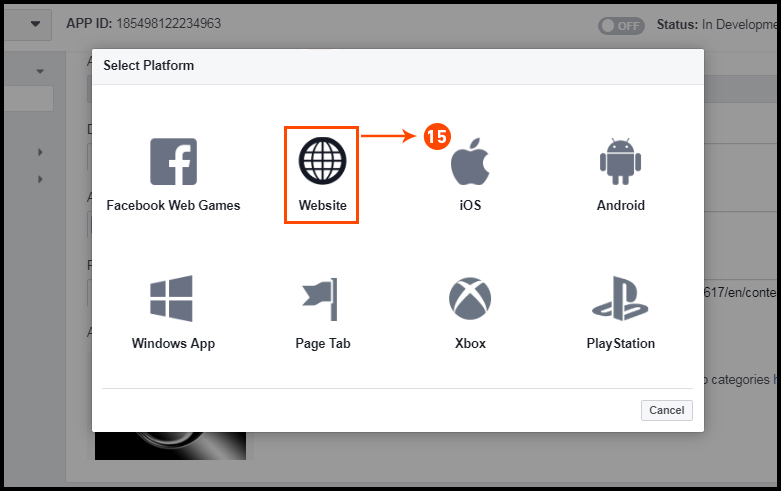
Step 15: 
And select Website as Platform.

Step 16: Now Enter your site URL.


Step 17&18: Click on “Products+” and select Facebook login.


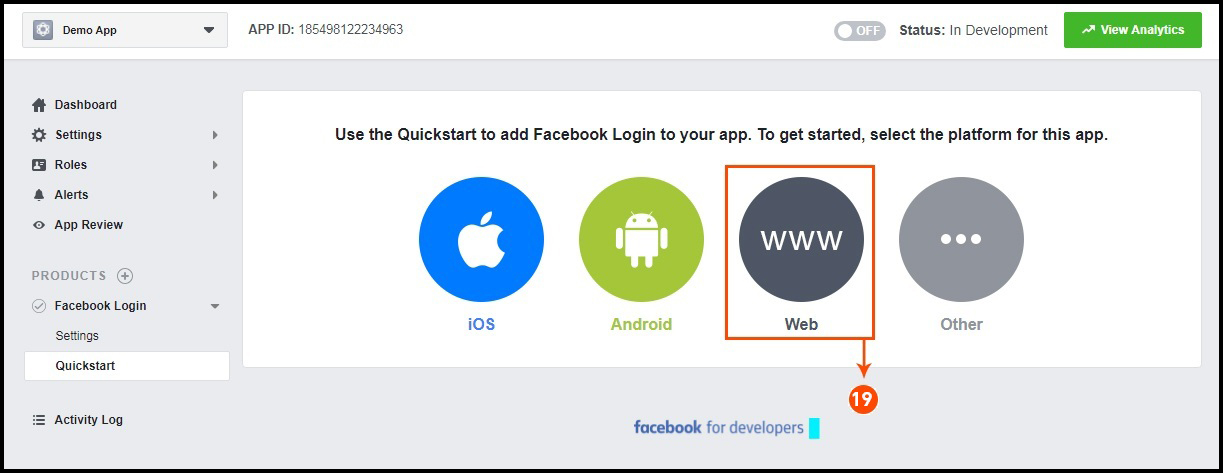
Step 19: Select web as the platform for the app.

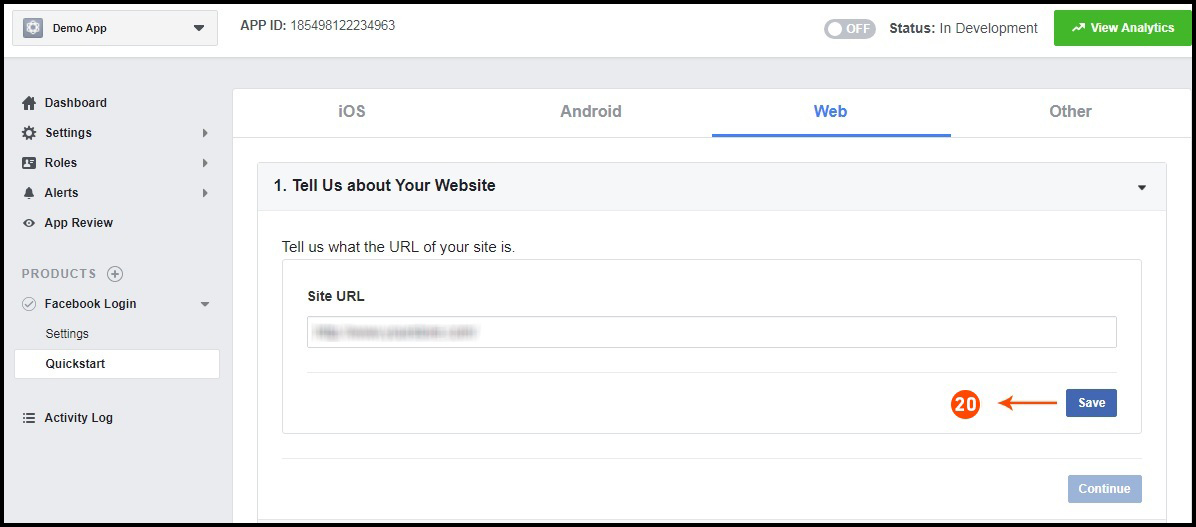
Step 20: Now click on save.


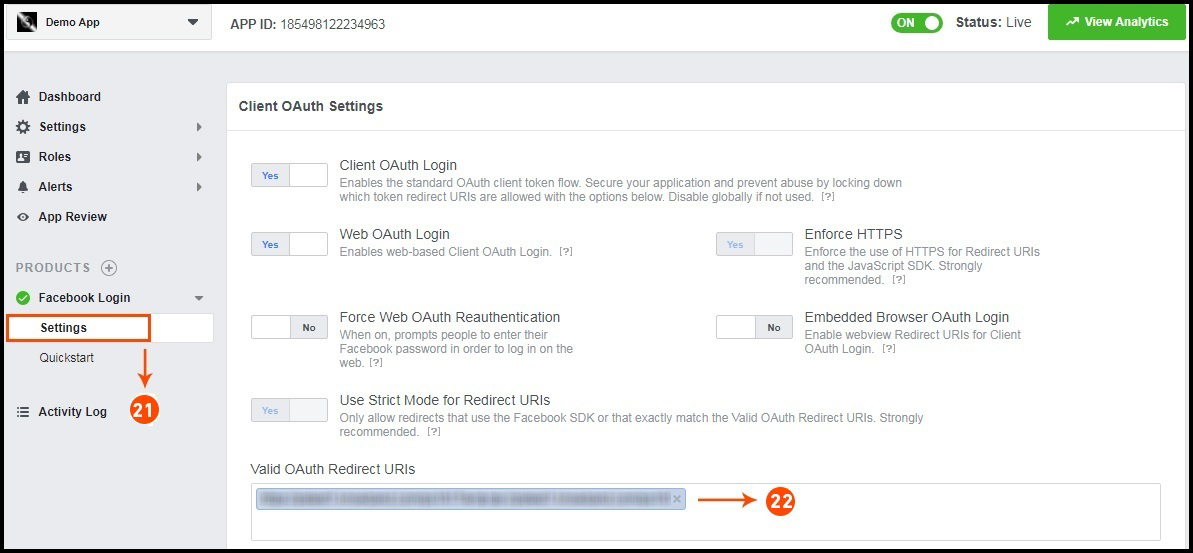
Step 21&22: Click on Settings and add a Valid OAuth Redirect URIs.
Valid OAuth Redirect URIs:
https://example.com/pwa-app/login

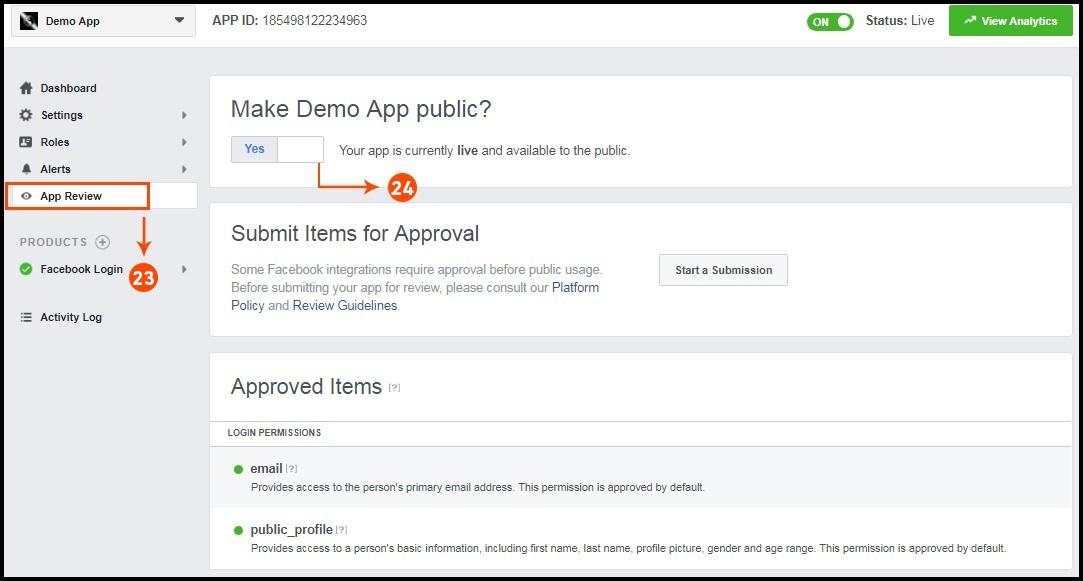
Step 23&24: Click on “App review”. And mark “Make ‘your app name’ Public” to Yes.


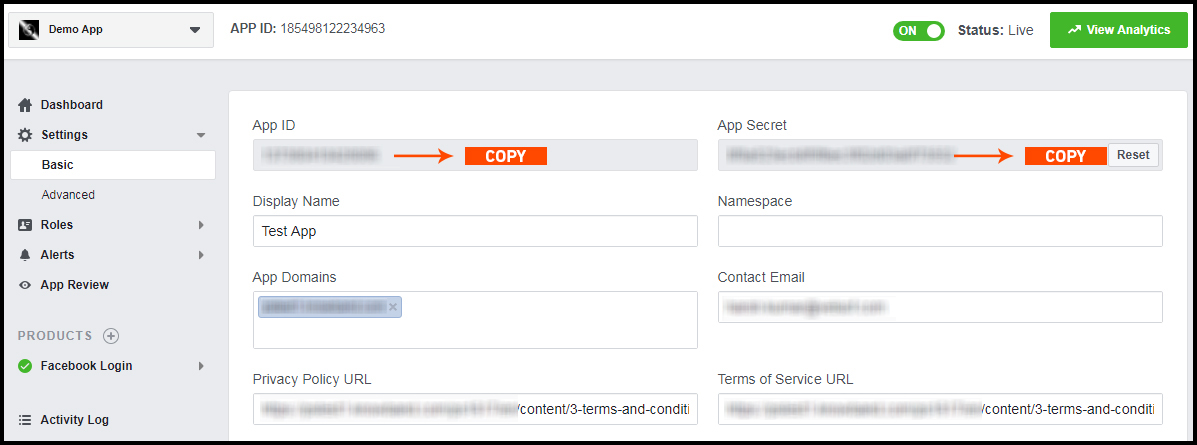
Final Step: Copy the App ID and App Secret and paste it into the fields provided in the module.

How to get Google App details?

  • Go to Google Developers Console
    (https://console.developers.google.com/project) or click on link given top right of the respective tab in module configuration page.
  • Now click on  Create Project on the left of the page.
  • Enter a name for your project and proceed to the next step.
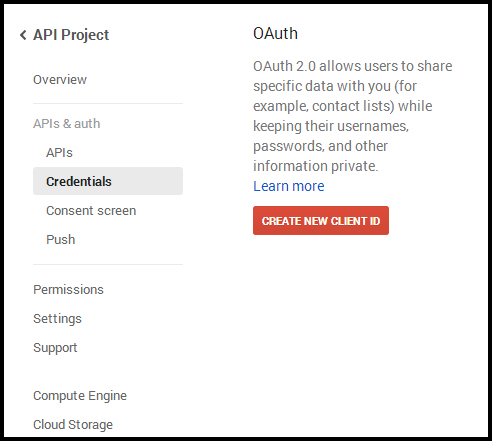
  • Now click on APIs and auth-> Credentials from the left menu as shown below.

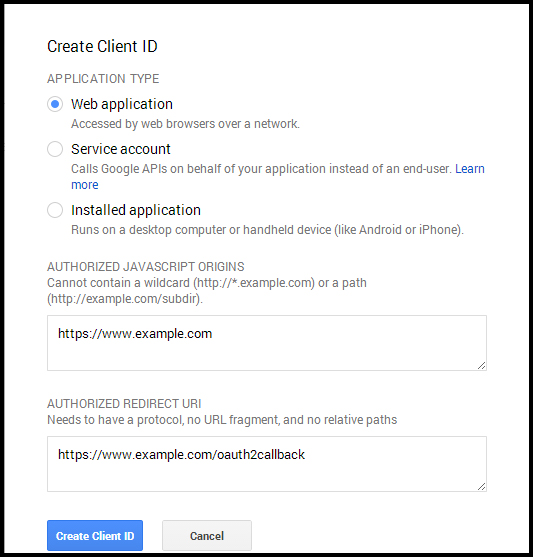
  • Click Create New Client ID button from the right panel of the screen.
  • You may have to fill the form for Consent Screen before proceeding. To do so, that you have to click on Consent Screen in the left menu as shown in the image above.
  • Fill the pop-up form with below details:

Application Type: Web Application.
Authorized JavaScript Origins: Your store domain name (https://www.yourstore.com).
Authorized redirect URI or URI of Loginizer redirect page:
https://example.com/pwa-app/login

  • Now click Create Client ID button to get your Client ID and Client Secret Key.
  • Now you can use the client secret and client ID to let your customers login to your store using their Google account.

3.0 Front End PWA App Screens:

Take a quick glance on seamlessly designed screens of Progressive Web App for Magento 2:

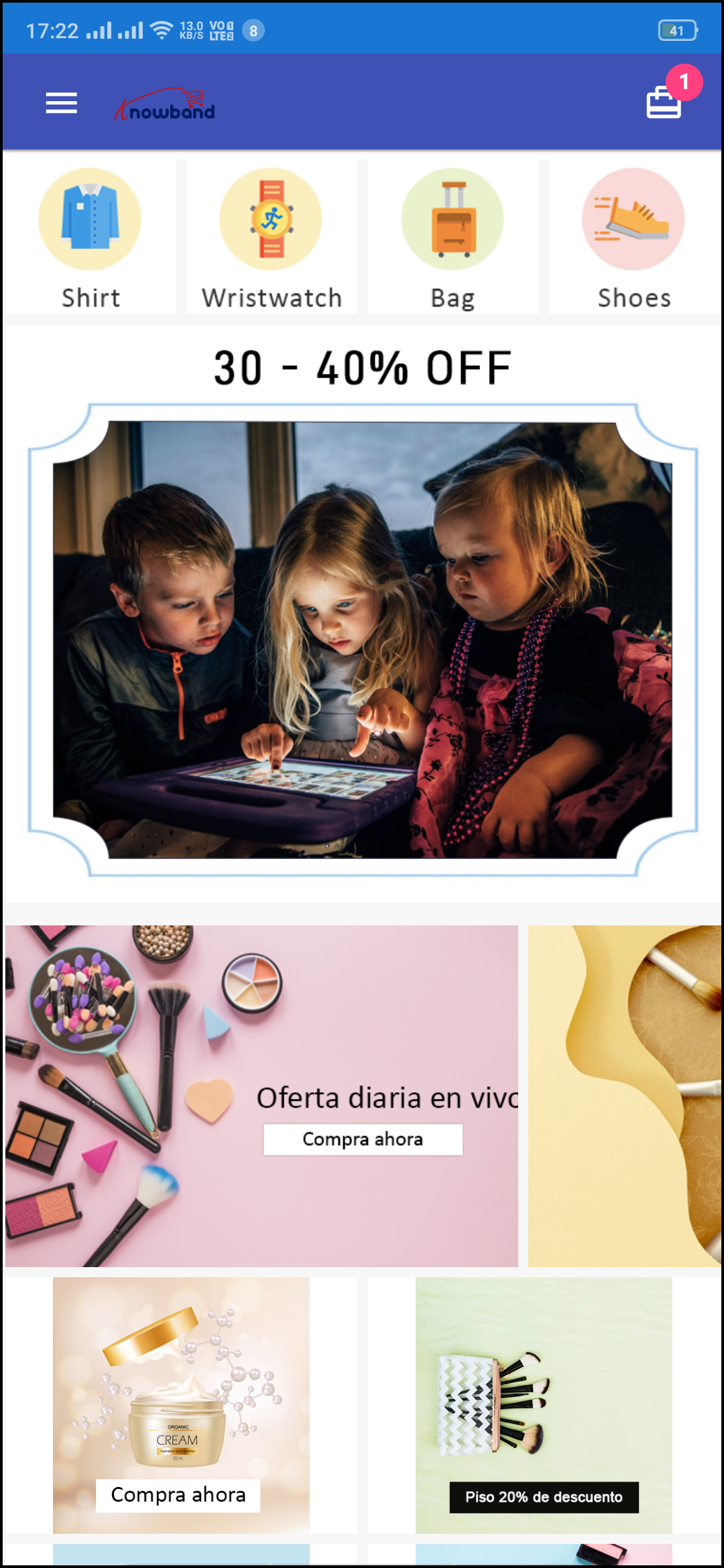
3.1 Home Screen:

The home screen of the Magento 2 Progressive Web App is fully customizable from the admin panel of the module. You can design the layout of app screens the way you want. Custom layouts can be designed in the admin panel based on events, festivals, occasions, etc. and used whenever required.

1. Dynamic Layout:

Using various designing elements (banners, sliders, categories, etc), the store admin can create dynamic layout as per the need.

2. Store Logo:
Add store logo on the header of the PWA app.

3. Shopping Cart:
The shopping cart icon on the top-right corner of the home screen allows users to switch on cart screen.

4. Navigation Menu:
Browse the categories in the apps with left navigation menu on the home screen.

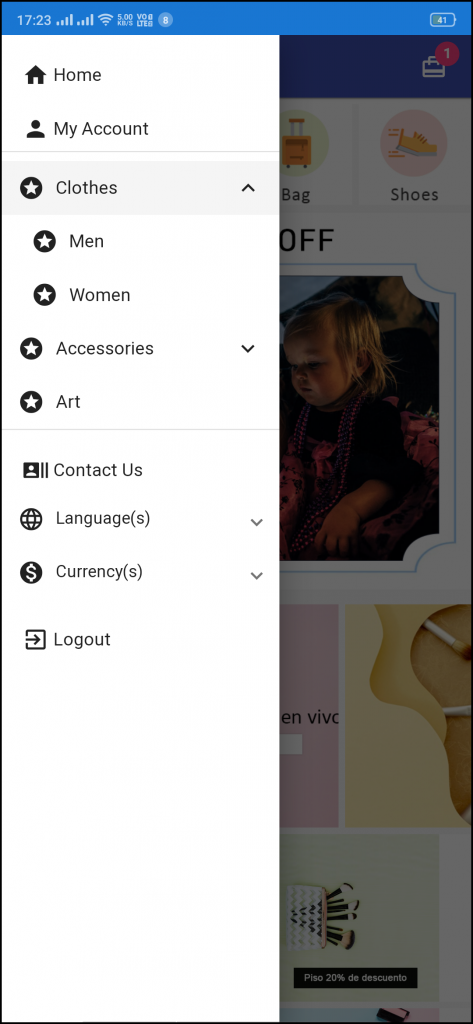
3.2 Left Navigation Menu:

The Magento 2 PWA Mobile Apps come up with seamless categorization of products. The categories on the PWA Mobile App will be the same as available on the website. Online shoppers can easily browse products from multiple categories without any hassle. Various CMS pages can also be added to the left navigation menu using the admin panel.

1. My Account:
My Account option contains all the user personal, shipping, order information. The PWA app shoppers get to view all the stored data related to them & can update the same as well.

2. Categories
Categories displayed in left navigation menu of PWA app are the same as of your website.

3. CMS Pages:
Various CMS pages like About Us, Contact Us, Terms & Conditions, etc. Can be accessed from here.

4. Language(s)
The language option allows PWA app users to view the web-app in their desired language. All available languages are displayed under this option only.

5. Currency(s)
All available currencies on your website are displayed here on Magento 2 PWA app.

6. Login/Logout
Users can easily sign-in/sign-out from Magento 2 PWA app via this option.

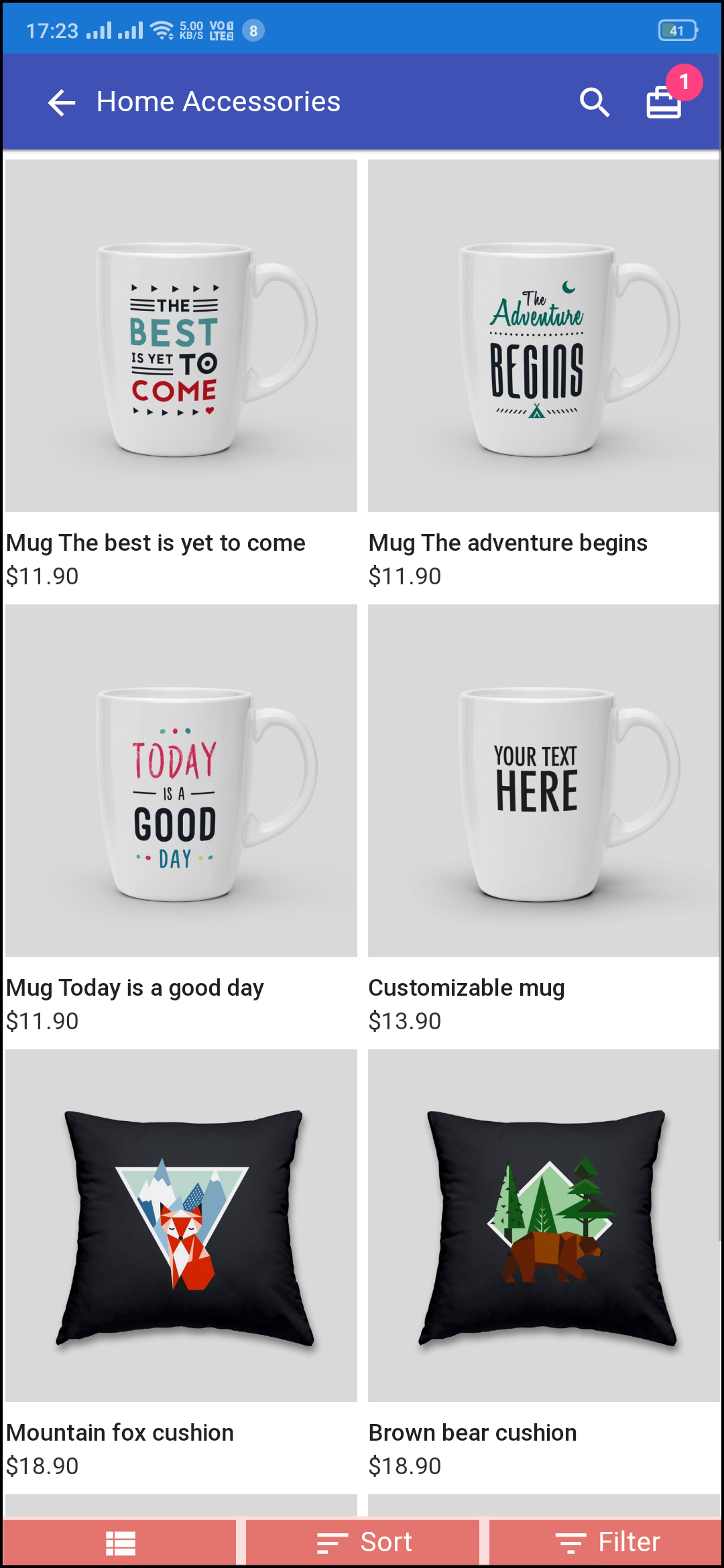
3.3 Category Screen:

1. Multiple Views:
The categories on PWA app for Magento 2 can be viewed in both list and grid view.

2. Sorting:
This option allows the online shoppers to choose the sort order in order to narrow down the search and get desired product with ease.

3. Filter:
Option to filter products simplifies product search. Users can filter all products under categories using various attributes like size, color, price etc.

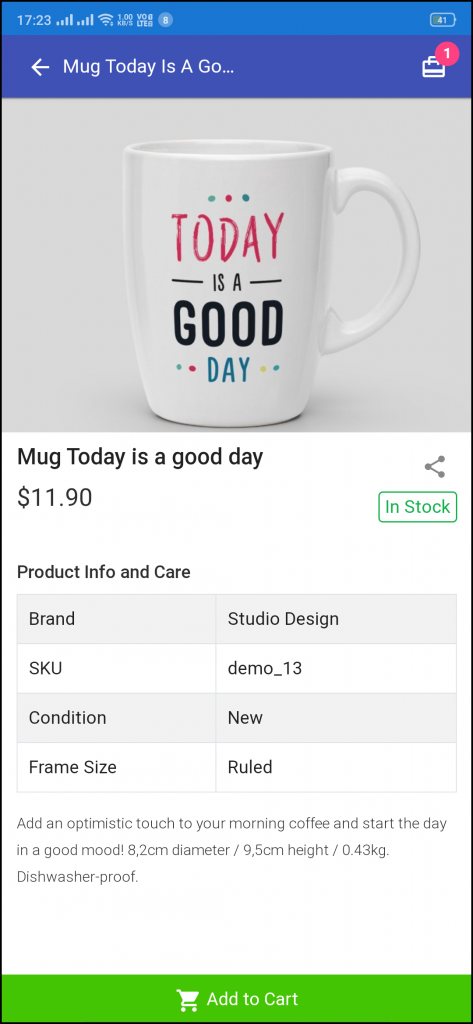
3.4 Product Screen:

The product screen of the Magento 2 Progressive Web App contains all necessary product information the same as of your store. From multiple product images to short and long description helps in making user’s mind for purchase. The product availability is signaled as “In Stock” or “Out Of Stock” based on inventory status.

1. Product Info & Care
The complete product information as available in the inventory will be displayed here.

2. Short Description
Users get to read the short description of your product to quickly make up their minds about the purchase.

3. Product Options:
All the options related to the product like size, color, etc. are displayed here.

5. Add To Cart:
This button allows users to add products into the cart. The users can further process the cart for purchase.

6. Product Social Sharing:
The sharing option for the product allows users to share products on multiple social channels.

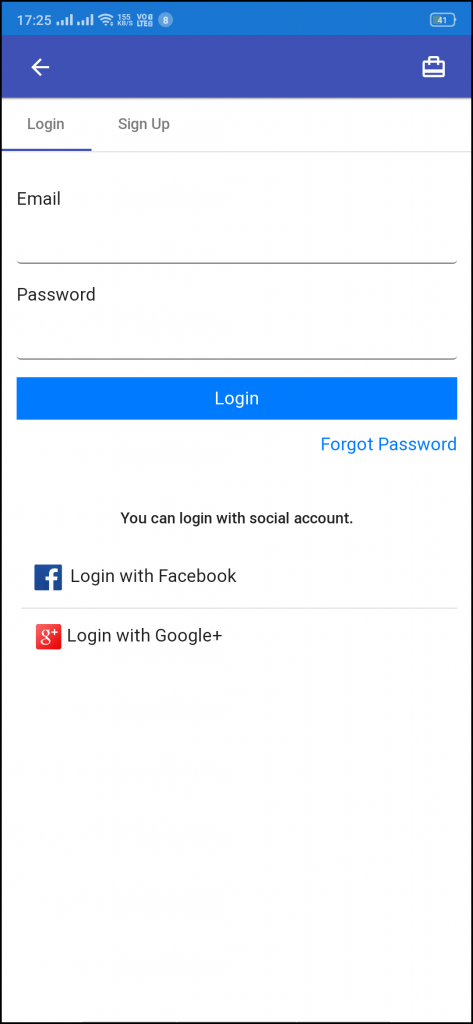
3.5 Login Screen

The Magento 2 Progressive Web App offers quick one-tap login options & make sign-in/registration process more seamless:

– Email Login
– Google Login
– Facebook Login

1. Login
The app users can easily authenticate & login to PWA apps using their previous email login credentials.

2. Sign Up
All the new app users can sign-up & create their account on the store from the Magento 2 PWA App. The sign-up form asks for only the necessary details to create an account.

3. Login with Facebook
The users can log in into the PWA app using their Facebook Account Credentials.

4. Login with Google+
The users can log in into the PWA app using their Google Account Credentials.

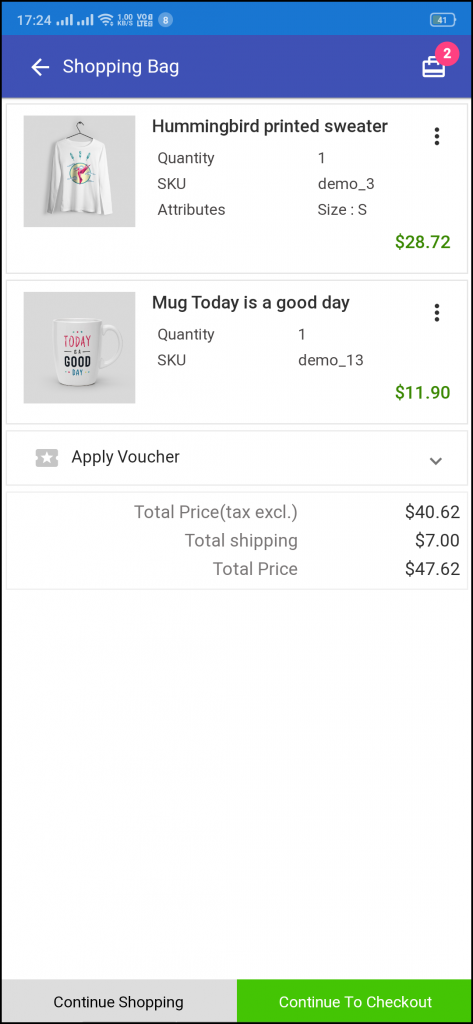
3.6 Shopping Cart Screen:

The shopping bag of Magento 2 PWA apps will display all added products along with their quantity and price to pay. The app users can view product details as well to be sure before purchasing one.

1. Apply Voucher:
This option allows users to use website coupons and grab discount offers.

2. Total Product Price:
The users get to view the complete cost of their shopping bag before proceeding further. It is automatically updated according to any update with product quantity or new addition.

3. Update Product Quantity:
The PWA app users can even update the product quantity with the “Update Quantity” option.

4. Remove Product:
The app users can simply remove the product from the cart by simply tapping the “Remove” option.

5. Continue Shopping:
The app users can leave the cart to browse more products on your app.

6. Continue To Checkout:
The PWA app users can proceed further to the checkout & payment screens just by tapping the “Continue To Checkout” option.

3.7 Checkout Screen:

The PWA Mobile apps for Magento 2 comes with a single screen clutter-free checkout with only relevant & necessary fields required. App users get a complete overview of the order before actually making the payment like shipping details, billing details, order summary, order comment, payment summary.

1. Shipping & Billing Details
This screen provides details of the shipping & billing addresses saved by the user. The user can also edit/save the new shipping address if needed.

2. Order Summary
The app users get to view product details before making payment.

3. Shipping Methods
All available shipping methods are displayed here. Users can choose the one suiting their need.

4. Order Comment
Users can also add any comment related to their order which will be visible to store admin on the order web-page in the backend.

6. Payment Summary
This section displays the complete breakdown payment details involved with the purchase.

7. Proceed To Payment
The PWA app users will be re-directed to the Payment screen after tapping the “Proceed To Payment” button.

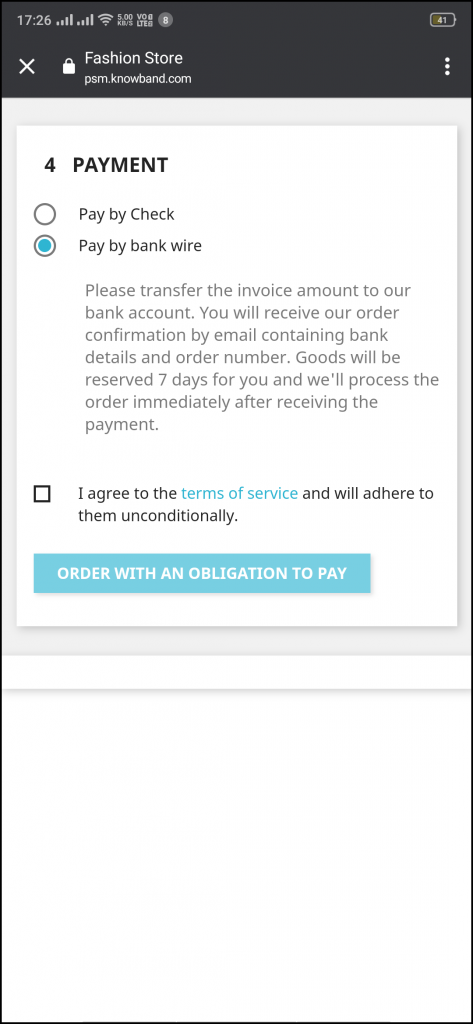
3.8 Payment Screen:

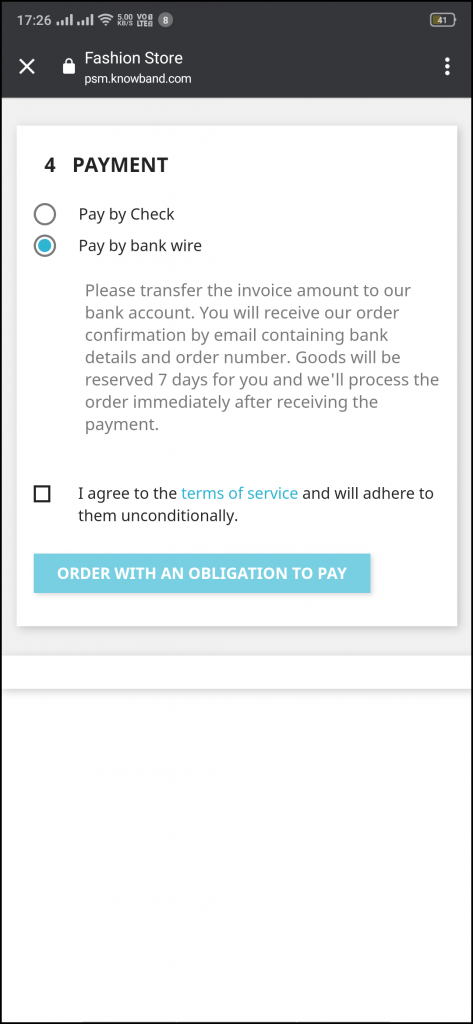
Magento 2 PWA App brings all web-view (website) payments on the app. The app users will find same payment options here as available on the applications. The payment screen of Magento 2 Progressive Web App is fully optimized for app view.

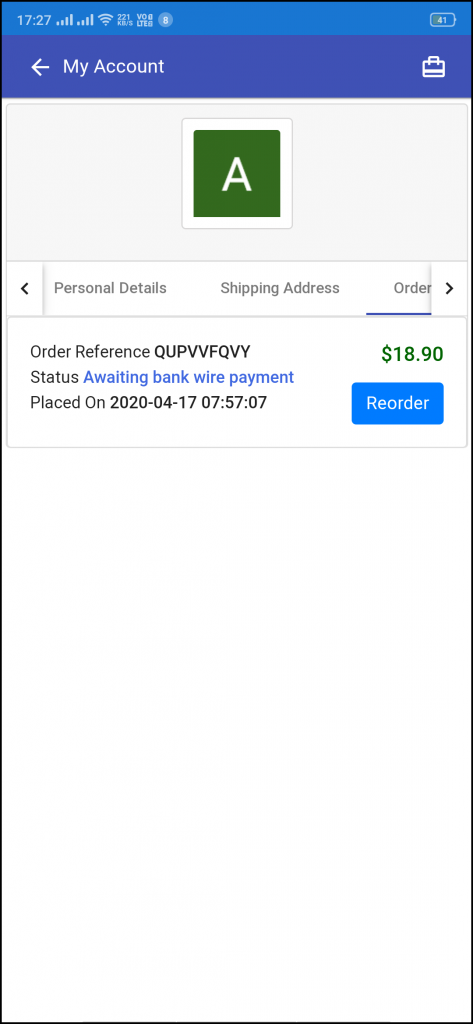
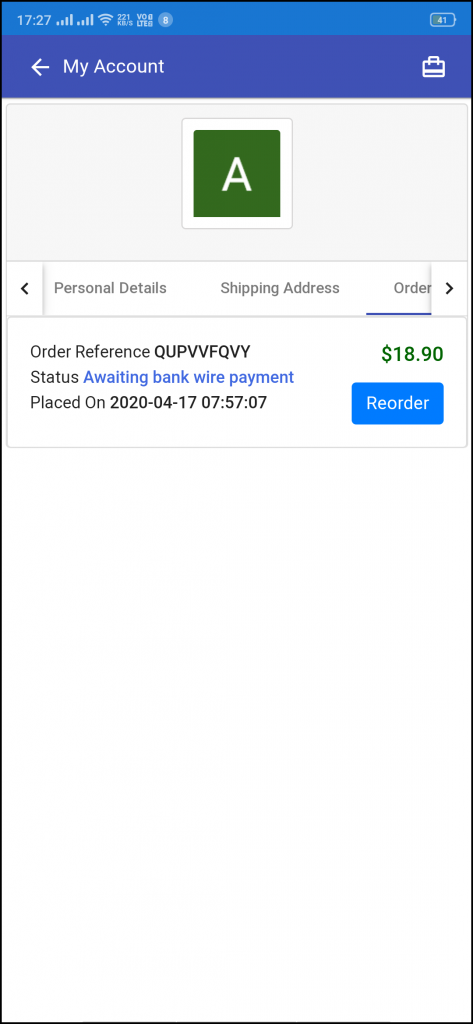
3.9 My Account Screen:

My account screen of the Magento 2 PWA app offers all users details available on the Progressive Web App. The online shoppers get to view the personal details, shipping address, order details, etc.

1. Personal Details
Users can also view & update their pre-saved profile details.

2. Shipping Address(s)
The app users can see the complete list of pre-saved shipping addresses in the PWA app.

3. Order Details
The app users can get to view the complete list of the previously placed orders from the PWA app and their details.

4. Re-order feature
There is a direct re-order button on the My Account screen of the PWA app. All the previous products under this order will be added into the cart with just a single button.

3.10 Order Detail Screen

The Magento 2 Progressive Web App displays complete order details of previous app orders. This screen contains Order Details, Status History, Shipping & Billing Addresses, etc. for every order placed through the Magento 2 PWA app. The app users can quickly view the entire order summary and get to keep track of delivery status as well.

Knowband Comes Up With Some Free Modules To Help eCommerce Businesses

Businesses are going through a rough patch due to the COVID-19 pandemic. There is a complete lockdown order in various countries. Cinemas, restaurants, offices, etc. have been shut. The economy has been hit hard and more challenges lie ahead.

People have put themselves in quarantine to prevent the spread of this deadly virus that is only multiplying the number of victims daily. These are hard times and we do not know how long it will take before the entire world resumes to the normal state again.

In this difficult phase, many people, celebrities, organizations are coming forward and showing their support in some way or the other, be it through donation, distributing food to the needful or exempting rent for the tenants.

We, at Knowband, understand the challenges businesses are facing due to this global pandemic and this is why we have made some of our modules free of cost as a token of support.

Existing Modules Currently Available For Free-

As of now, there are three modules that a user can purchase without paying a penny and we will keep you updated with other free modules whenever they are any.

PrestaShop Product Availability Check by Zip Code

OpenCart Product Availability Check by Zip Code

Magento Product Availability Check by Zip Code

OpenCart Spam Blocker

PrestaShop Spam Blocker

With the help of the first three modules, you can allow your customers to check product availability in their region. And for this, they do not need to head to the checkout page and confirm the availability after filling out the address fields.

The visitors are asked to enter the zip code right on the product page and check the product availability. The “Add to cart” button is disabled if the product is not available for the specified zip code.

The next two modules help you in reducing the spam traffic on your website.

How Can We Help in the Current Scenario?

Coronavirus is spread across cities and countries following which eCommerce businesses are facing major issues with shipping and delivery. Shipping is getting stuck and delayed and the same is the case with order delivery.

So, to make things convenient and time-saving for your visitors and customers, you can place a product check availability section on the product pages. If the product is available for delivery, it will display the estimated delivery date. So right now if there are shipping or delivery related issues, you can extend the delivery time and users would know it right on the product page.

If the product is not available for delivery, it will simply display that the product is not available at this location.

Newly Launched Module For Free-

We have recently launched a new module called Free COVID-19 Information Popup addon which is available for two platforms- PrestaShop and Magento 2.

PrestaShop Free COVID-19 Information Popup

Magento 2 Free COVID-19 Information Popup

This module lets you inform your customers about the recent changes or updates in your business due to the corona outbreak. You can educate them about what precautions to take to avoid the spread of this virus. And if you are running some offers on your website during this period, you can highlight them too through this popup.

It is specifically designed to help you communicate with your website visitors in the easiest way so that you do not get too many queries on your support system.

You can customize the popup text and choose the popup image of your choice. Moreover, you can also control who sees this popup. You have the option to display the popup in selected countries only.

Through all these modules, our motive is to help you-

  1. Retain your customers

  2. Build customer loyalty

  3. Generate some revenue even in this crisis situation

There are no hidden terms and conditions and there is no end date for these offers, at least for now. We are not sure when this COVID-19 pandemic will end so you can grab this offer till the time it is available.

It is time for us to unite and be a helping hand for others. We did our part and we hope that this brought a smile on your face. If it is so, do not forget to leave a comment below.

For any assistance, you can reach out to us at support@knowband.com and for further updates, subscribe to our newsletters.

Best Tips To Customize A PrestaShop Website

Selling products on an eCommerce website rely on the presentation & personalization of the products. In simple words, the functionalities, products, features, etc. should be matching to front-end client requirements. PrestaShop online store customization is all about adding new features and functionalities. While doing so, you must be taking some precautionary measures which will help in branding a unique image to the website without cluttering in any possible way.

The majority of the PrestaShop e-retailers happen to make at least some sort of custom change in their e-store. This is, in fact, a necessity for e-businesses to have a distinctive & unique touch to their eCommerce website. Most businesses opt for this to keep the look & feel of their website in-line with their own unique theme of their business. These customizations not only enhance the graphical design of a website but also contribute to adding more functionalities & improve the shopping experience.

Here are few such factors discussed below that can help you with customizing your eCommerce PrestaShop website.

#1. Customization Using Hooks:

Hooks are basically images that can be used for displaying informative images & also act like CTA sources. We can categorize them into two basic options:

A) Action Hooks:

These hooks are clickable & hence can be used to redirect the site visitor to a relevant page. These kinds of hooks require strategic configuration as their CTR would influence more engagement and sales.

B) Display Hooks:

These hooks are plain images simply for the purpose of displaying various things. Some common areas where hooks are placed:

a) Multiple positions on the homepage.
c) Left/ Right-aligned hooks.
d) Footer’s bottom area.

#2. PrestaShop HomePage Customization:

Generally, on the home-page, the area ‘above the fold’ is what gets the first view on a website. Similar to newspapers, websites also have the most important news highlights on the top half of their home page, such an approach to design & customize the PrestaShop homepage helps to engage customers in a more productive way. Some of the home-page designs that can be customized include:

● Sticky Navigation Menu/ Bar with Company Logo, Signup link, search box, etc.
● Slider Images with hyperlinks to relevant topics.
● Banner Images of selected categories of the products being sold on the e-store.
● Hyperlinked Infographic for sale, lotteries, offers, coupons, time-based flash-sale, new arrivals, brand launches.
● Widgets/ add-ons for social accounts like a Facebook block with like/share/follow buttons.
● Static/ dynamic chatbots.
● Gamified CTA (Call to Action) like ‘spin & win’ discount wheels or gamified newsletter/ notification subscriptions.
● Banners for top-seller/ top-brand.
By now, you would have probably realized how these additions would not only make such an e-store stand out for looks & functionalities but also serve the purpose of growing conversions.

A lot of these modifications can be made using the PrestaShop Modules. And because PrestaShop is an open-source eCommerce platform even more edits can be made by manually coding the required functionalities. So the eCommerce businesses on PrestaShop automatically get an additional advantage here to build their site according to their own unique business needs.

#3. PrestaShop Footer Customization:

The footer of the PrestaShop website enables the e-store admins to showcase various widgets & functionalities. Some can be added via PrestaShop Add-on Modules while some come pre-installed. Even more, can be added via coding or customization.

Footer, for all the webpages, is mostly kept common. So, it is crucial to have all the important things available in it. It offers instant access to your customers for all necessary links & information no matter where they’re displayed on the Prestashop website.

Few common footer customizations are listed below:
● Newsletter Signup Segment
● Social Channel Icons
● Sitemap (HTML Sitemap)
● Company Certifications & Payment Methods
● Quick Navigation Links
● Sign-in /Sign-up Links / ‘My Account’ section
● Contact details of the Company

#4. Other Customizations:

A) CMS Icons:

To display extra information about your PrestaShop store such as payment options, refund policies, etc, admin can use the CMS icons. Clicking them takes the user to the relevant page.

B) Top Side Banner:

This is a default feature that admins can enable/disable. This adds a thin banner on the extreme top of the page with the purpose to show the special offers, discounts, limited-time shipping, etc.

C) Social Sharing Icons/ Links:

With these icons, your e-shoppers can share the link of their choice of products with their friends, family & acquaintances. Prefer to add the links for Facebook, Pinterest, Whatsapp, etc.

Conclusion:

As they say, often little things make the biggest impact. Adding more customized functionalities to your store would help in the growth of the business. These just are a few examples of how PrestaShop Customization can be utilized. Apart from these, there are unlimited numbers of customizations that can be implemented. Feel free to discuss with us on support@knowband.com and get a quote for the required customizations.
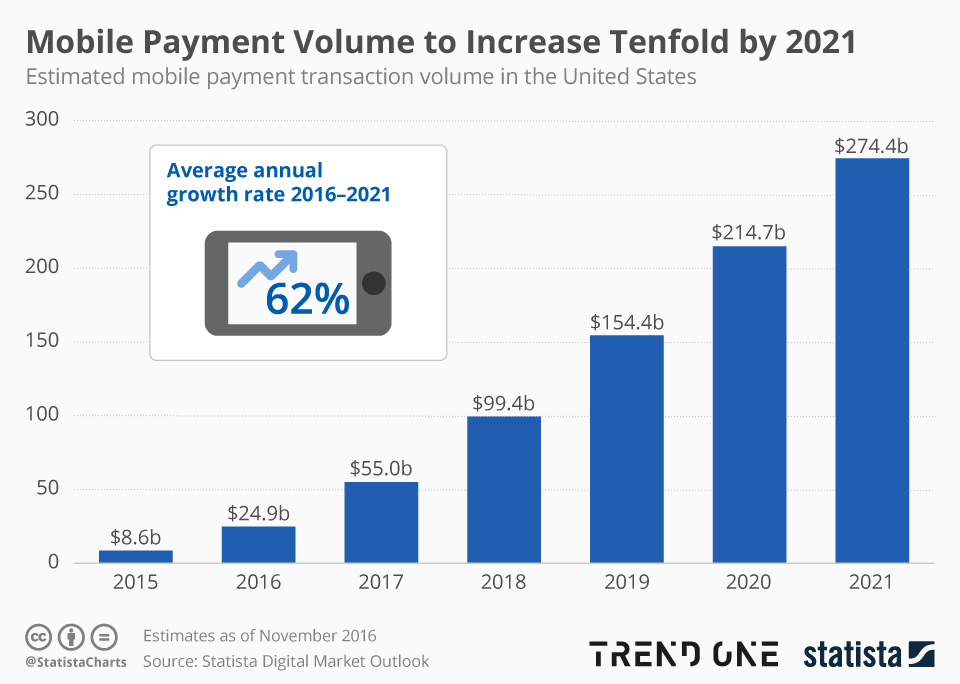
Visit KnowBand Plugins to get eCommerce plugins for all platforms.

KnowBand Featured As Dominant Future E-Commerce Tools Provider From 2020-2026

After being listed as the top mobile commerce solution provider, KnowBand plugins once again featured as leading eCommerce plugins and solutions providers in the market. We feel privileged that the company will dominate the online retail industry from 2020-2026.
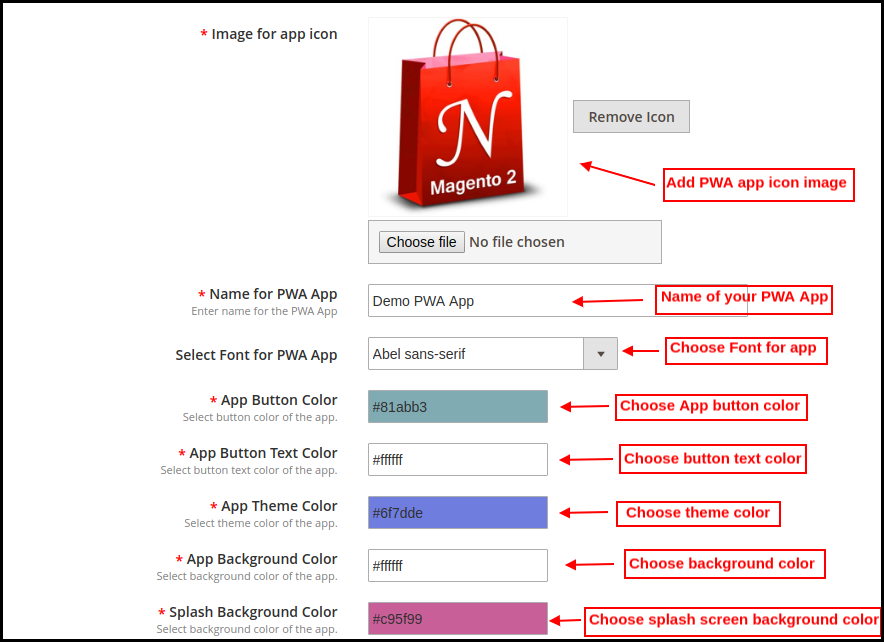
Read the complete report from:

https://bit.ly/2xw41GJ

Summary Of Market Research Report:

Various global researchers and analysts have predicted that the eCommerce industry is assured to witness a steep graphical growth from the year 2020 to 2026. The report has been drafted with the data & statistics in the past decade. Among leading key players in the online eCommerce industry, KnowBand has also made a prominent position.
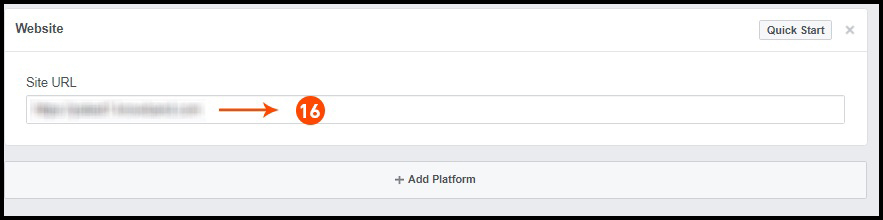
One-Stop Solution To All E-Commerce Needs:

We, at KnowBand, are considering this acknowledgment as a responsibility to stand up-to-the expectations of store owners as well as front end audiences. With such thoughts, our entire pool of team members are highly motivated to make available plugins more promising and featured along with new launches as well.
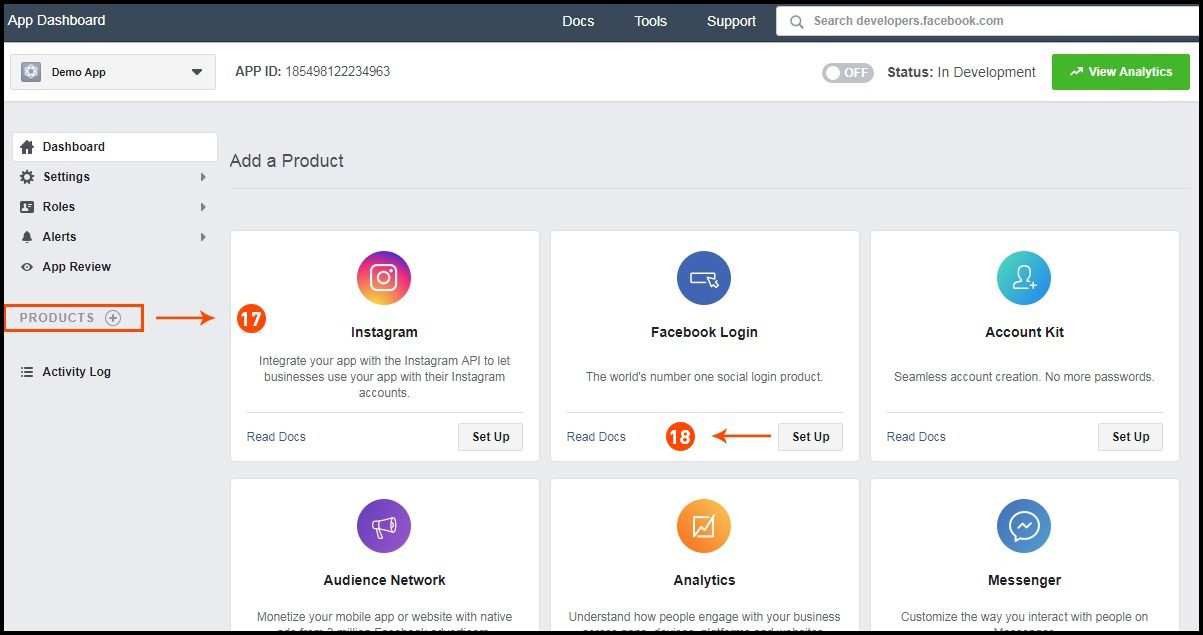
Hence, for all the eCommerce store owners out there, check out these plugins and add more functionalities to your store:

PrestaShop Plugins
OpenCart Plugins
Magento Plugins
Magento 2 Plugins
WooCommerce Plugins

Mobile Applications for Every Online Business:

Along with plugins/extensions for eCommerce, Mobile App Builder allows all retail store owners to launch a native shopping app. Selling products just via the website isn’t enough in 2020. Having a mobile shopping app enhances the reach of your business to a wide range of smartphone-based audiences.
To ease out the app development complexities, an automated framework Mobile App Maker develops Android & iOS apps in 3 simple steps:

1. Purchase & install the extension.
2. Fill the pre-requisites form.
3. Get them published on Google Play & Apple App Store.

That’s easy is it to own a mobile app with us. Along with that, the following features are the prime highlights of the apps:

  • Dynamic Home Screen Customization
  • Complete Admin Panel Control
  • Real-time Inventory & Database Management
  • Google, Facebook, Fingerprint, Phone Number Login
  • Zopim (Zendesk) & WhatsApp Chat
  • Multi-lingual & RTL Language Support
  • All Website Payment Method Support
  • All Shipping Method Support
  • Coupons & Vouchers Support
  • Unlimited Push Notifications
  • Compatible With Multi-vendor Marketplace
  • Seamless Checkout Screen
  • Order Tracking & Status Update, and many others…

Check out the extension for all platforms from:

PrestaShop Mobile App Builder
OpenCart Mobile App Builder
Magento Mobile App Builder
Magento 2 Mobile App Builder
WooCommerce Mobile App Builder

Start using these amazing tools from KnowBand today and add value to your business.