You would have often visited malls for shopping purpose. What did you look for after picking up your items? I am sure your eyes would have been searching for a short checkout line so that you could make a quick checkout.
Let me tell you my case, I went to a store a few days back, picked up some stuff and when it was time to go to the billing counter, I noticed the line was too long. I waited for a few minutes initially but couldn’t keep the patience for long. I left my items there and took an exit from the store.
In e-commerce, this is what we call as Cart Abandonment and a lengthy checkout process is one of the primary reasons for it. This is exactly what happened in my case too. When I realized the checkout would take a lot of time, I dropped the purchase idea.
This is why a simplified and a user-friendly checkout holds very high importance in the eCommerce space. When users find a checkout process lengthy or time-consuming, they abandon their cart and look for better alternatives.
Getting shoppers to your eCommerce store is not difficult, engaging them till the final payment process without disturbing the user experience, is. The checkout page is the most important part of this whole engagement game.
Through this article, I will enlighten you on how to optimize the checkout process and create a user-friendly checkout.
1. Make Account Registration Optional or at least Offer Social Login
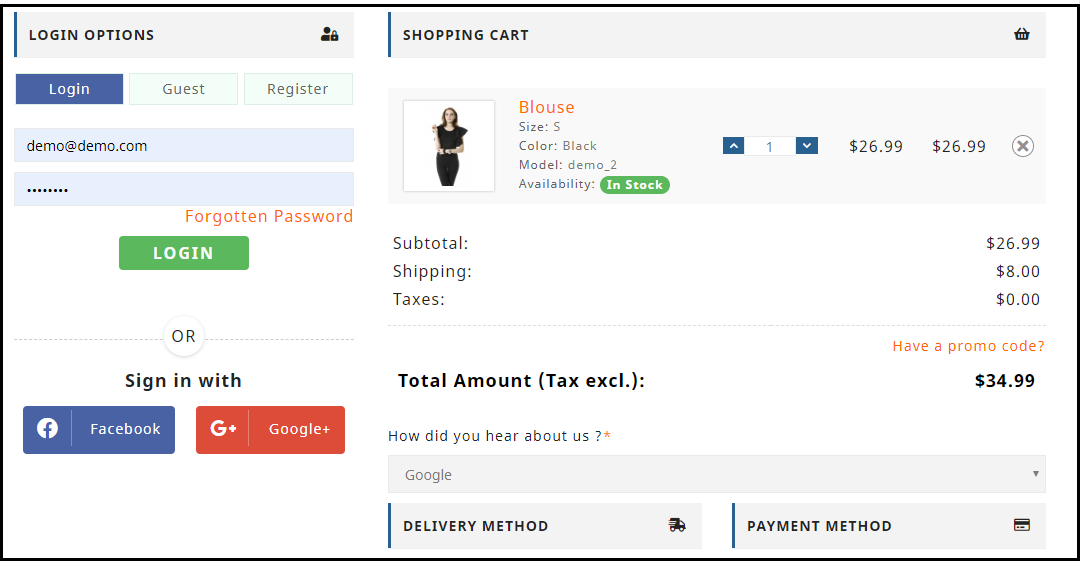
Avoiding compulsory account creation is the primary step towards a user-friendly checkout. Do not compel users to signup when they look almost set to make the payment. Making registration process compulsory at the checkout page mostly results in cart abandonment, which causes high conversion loss.
Let the mandatory sign up process not be a hurdle in a successful conversion. Offer Guest checkout or introduce a Social Login option on the checkout page. This would help users in a quick checkout without hampering the checkout experience.
In many of the eCommerce websites, there is no option to update the product quantity right from the checkout page. Hence, if a customer wants to increase or decrease the product quantity, it leaves them with no choice except discarding their current checkout process, going back to the product page, updating the quantity and filling out the entire details again. This spoils the user experience.
So, make sure that you include the option to update the product quantity on the checkout page. Also, ensure that the back button takes the user to the previous page rather than discarding all their information.
3. Add a One Page Checkout
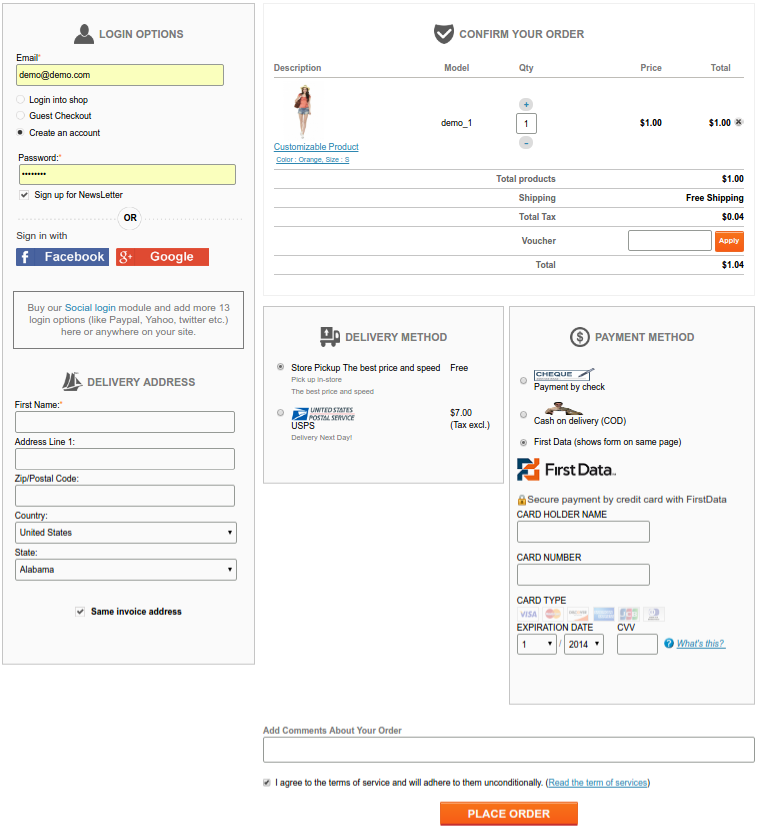
A one-page checkout also called as a single page checkout is also one of the important elements of a user-friendly checkout. Instead of asking users to navigate through multiple steps to fill the checkout form, make it a single step checkout process. It improves user experience, reduces the chances of cart abandonment and eventually leads to increased conversions.
Our One Page Checkout module incorporates all the checkout fields on a single page and helps merchants to allow a quick checkout facility to their customers. The module offers Guest Checkout, Social Login, Multiple Layout Designs, etc. Most importantly, it supports nearly all the major payment methods and shipping services.
4. Display the errors up-front
Mistakes happen very often while filling out the checkout fields and customers are not aware of it until they hit the submit button. They have to submit again and again until the entered inputs are found to be correct. This can be extremely frustrating and become a major barrier in a user-friendly checkout.
Use Inline Validation to counter this hurdle. It identified the inputs in real-time and displays whether the provided details are correct or not when the user switches from one field to another.
5. Display Checkout Progress
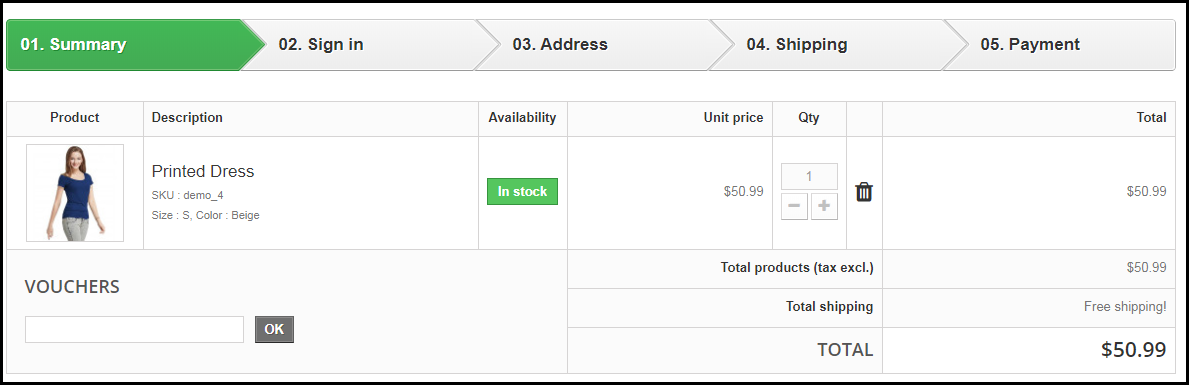
Use a progress bar to indicate at which step the customer is present and how many more steps does he or she need to go through before finally placing their order. It is always a good idea to keep visitors updated about their checkout progress.
Many a time, shoppers leave the purchase incomplete because they get tired of filling out the information when they are not aware of the checkout progress. So, give them a clear idea up-front of the number of steps that are needed to make through the checkout.
6. Provide Real-time Customer Support
Customers can have a lot of queries while they are on the checkout page, especially the new visitors. You never know what’s going through a customer’s mind during the purchase.
To assist them with their queries or help them with any trouble they are facing, provide them with real-time support. Adding a live chat option or customer support number would do a great job.
7. Thank Your Customers for Shopping with Your Brand
Leave a “Thank You” note for your customers as soon as they place their order along with the “Order Successful” message, obviously. This is a good sign to appreciate or thank your customers for showing trust in your brand. It improves customer loyalty.
Knowband provides “Better Thank You Page” module that converts a normal order success page into an effective marketing strategy. With the help of this module, the admin can encourage repeat purchases and improve customer retention by offering discounts to their customers for future purchase. It also encourages cross-selling.
The journey from adding the product to the cart to the payment page needs to be smooth and convenient. Having a user-friendly checkout not only ensures more conversions but also keeps you ahead of your competitors. All that a customer craves for is a smooth checkout experience, provide them that.
If you find the above information helpful or have anything to add for a user-friendly checkout, do let me know in the comments below.
Moreover, you can visit our Knowband store and look for a number of checkout modules to help you with an optimized checkout process.
The PrestaShop Checkout addon also called PrestaShop One Page Checkout is a PrestaShop extension that replaces the conventional multi-page checkout process on your Prestashop store with a single page checkout system.
Having a PrestaShop One Page Checkout is beneficial for your Prestashop store as it helps in improving the conversion rate by optimizing the checkout page and making the checkout process simple and quick.
Check out some live PrestaShop One Page Checkout globally:
This blog listicle will give you a clear idea about the PrestaShop One Page Checkout and how you can customize it for your PrestaShop store.
Online Shoppers have to go through a number of steps when they are on the checkout page. On top of that, they are presented with a registration form in between, which disturbs their flow. To be very honest, a majority of consumers do not like to fill lengthy registration forms or create an account during the checkout, yet a number of e-commerce stores have made it mandatory on their website.
As a result, some consumers choose to abandon their carts and look at other stores that provide a simpler and better checkout facility. PrestaShop One page checkout addon deals with such scenarios and aims to provide a better checkout experience to your store visitors.
Prestashop One Page Checkout works in different ways to curb various loopholes in a checkout process that may be killing your conversions and increasing shopping cart abandonment. Let’s look at how Prestashop One Page Checkout helps in making your checkout process better.
For the consumers who hesitate to create an account on your store or do not like to get registered, you can provide them with the Guest checkout option and encourage them to make a quick purchase.
2. Social login makes the signup quick
Customers can use their Facebook, Google, or PayPal accounts to sign-up on your store. It saves shoppers’ time from lengthy form filling and makes their way easy for the checkout.
3. Customers can Easily Update Cart Quantity on the checkout page
A user who wants to make changes to the product quantity does not need to go back to the product page. He or she can update it right from the checkout page.
4. Google Auto-address fill reduces extra efforts
Enabling this feature automatically fills the address fields at the checkout page. As soon as a user starts typing his/her address fields, the address suggestions are displayed and upon picking an address, the related address fields are filled automatically.
5. Multiple Payment methods and Shipping services support
The PrestaShop One Page Checkout addon supports almost all the major payment modes and shipping services.
Compatible with Mollie Payment Method: The PrestaShop Checkout allows adding several payment methods. The latest version of the module is fully compatible with the Mollie payment method.
7. MailChimp, SendinBlue, and Klaviyo email Integrator support
Every time an email address is captured, it will be automatically synced to your MailChimp, Klaviyo, or SendinBlue account, provided you have set up the API key from the back-end for the respective platforms.
8. Remove unnecessary fields from the Checkout page
With PrestaShop One Page Checkout, you can choose which checkout fields you want to display on the checkout page. From all the checkout fields, you can specify which fields to show and which fields to hide. Besides, you can also mark fields as mandatory or optional.
9. Arrange Checkout fields through Drag and Drop functionality
Prestashop One Page Checkout module lets you organize checkout fields as per your preference. For example, if you want to place a field above any other field, you can simply do that by picking the field and dropping it to the desired position.
Statistics: Data helps in planning
10. View Abandoned Checkout Statistics [New]
Find out how many abandoned checkouts have taken place in your store, what was the revenue of those abandoned checkouts, and view the checkout conversion rate with the help of PrestaShop One Page Checkout.
11. Examine the user behavior on the Checkout page [New]
Also, explore which checkout fields are hampering the user experience that is leading to checkout abandonment. It displays the percentage for every checkout field. Higher percentage fields mean maximum visitors are facing trouble with those options.
12. Increase average cart value with free shipping tab[New]
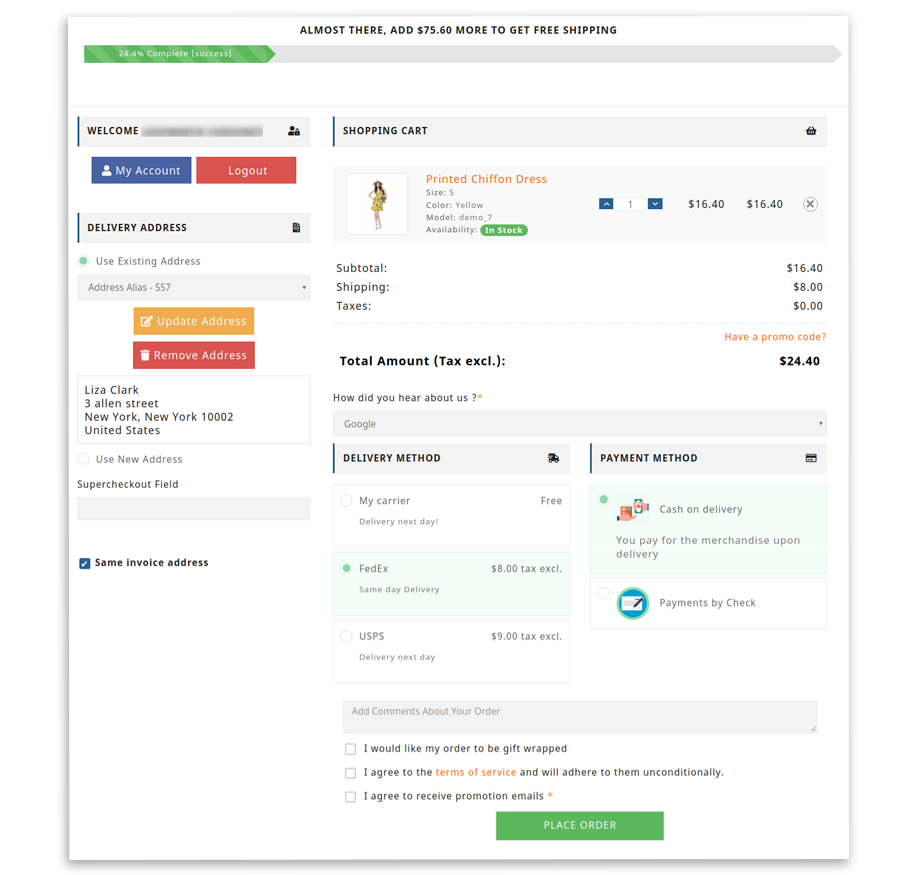
The one-page checkout module has a feature that lets you define a minimum amount for displaying the free shipping option. If a visitor is shopping for or above the given amount, he will see a banner that would tell how much more does they need to shop to avail free shipping benefits.
13. Show Product Price With Taxes [New]
With the PrestaShop One Page Checkout addon, the e-merchant gets four options for displaying the total price of the goods. You may choose to display the default PrestaShop price, the price inclusive of tax, the price exclusive of tax, or the price inclusive and exclusive of tax.
14. Display custom fields in invoice [New]
The store owner can also enable the option to display the added custom field in the invoice of the order placed, thanks to a new update in Knowband’s PrestaShop One Page Checkout addon.
15. PrestaShop One Page Checkout is highly compatible with:
Compatible for free products (No payment method will be displayed)
It is compatible with digital/virtual products (No shipping method will be displayed)
Compatible with customizable products and displays entire information on the shopping cart, including all customized details
One Page Checkout supports multi-lingual feature
Works responsively on all the devices like mobile, tablets, desktop
Steps to set up One Page Checkout on your PrestaShop store?
1. Download and install the PrestaShop one-page checkout extension.
2. After installation, enable the extension by going to modules>SuperCheckout>configure.
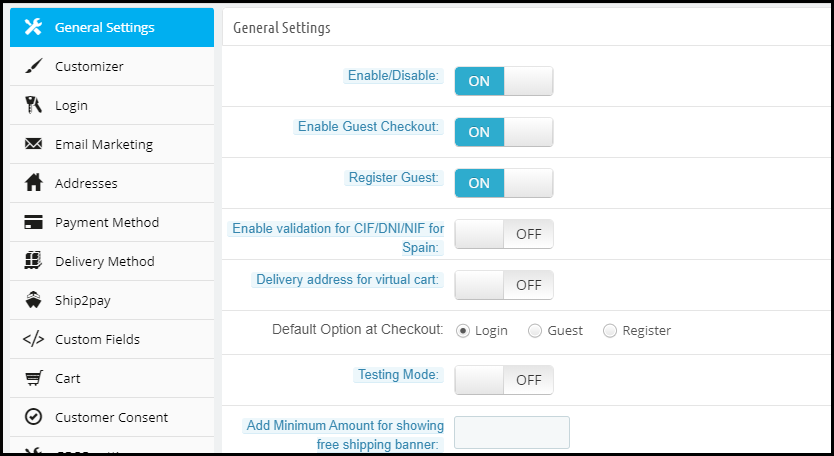
3. After you click configure, the following screen will appear-
The General settings contain the option to enable/disable the one-page checkout module, enable/disable Guest checkout, setting a default checkout option, test mode functionality, CIF/ DNI/ NIF validator for Spain visitors, etc.
Customizer contains the options to adjust the color of the “Place Order” button on the checkout page.
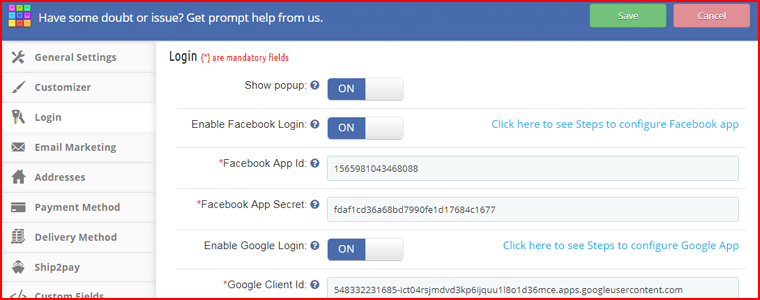
Moreover, the Login tab allows you to add the social login facility to your checkout page.
More features to customize your checkout page on the PrestaShop website
Under Email Marketing settings, you can activate different email marketing tools like MailChimp, SendinBlue, Klaviyo, etc. to collect user information directly in these accounts whenever a user provides his data.
The Addresses tab consists of options like Inline validations, Auto-detect country, Auto address fill. Under the same tab, you can choose which fields you want to keep mandatory for your store visitors and which are optional.
The payment method tab allows you to select the payment modes that you want to provide to consumers.
Similarly, the Delivery method tab lets you choose the shipping services that you want your users to avail.
Ship2Pay provides you with the options to decide which payment modes do you want to provide for a particular shipping service.
Under the Cart tab, you can specify the cart details that you want to display on the checkout page.
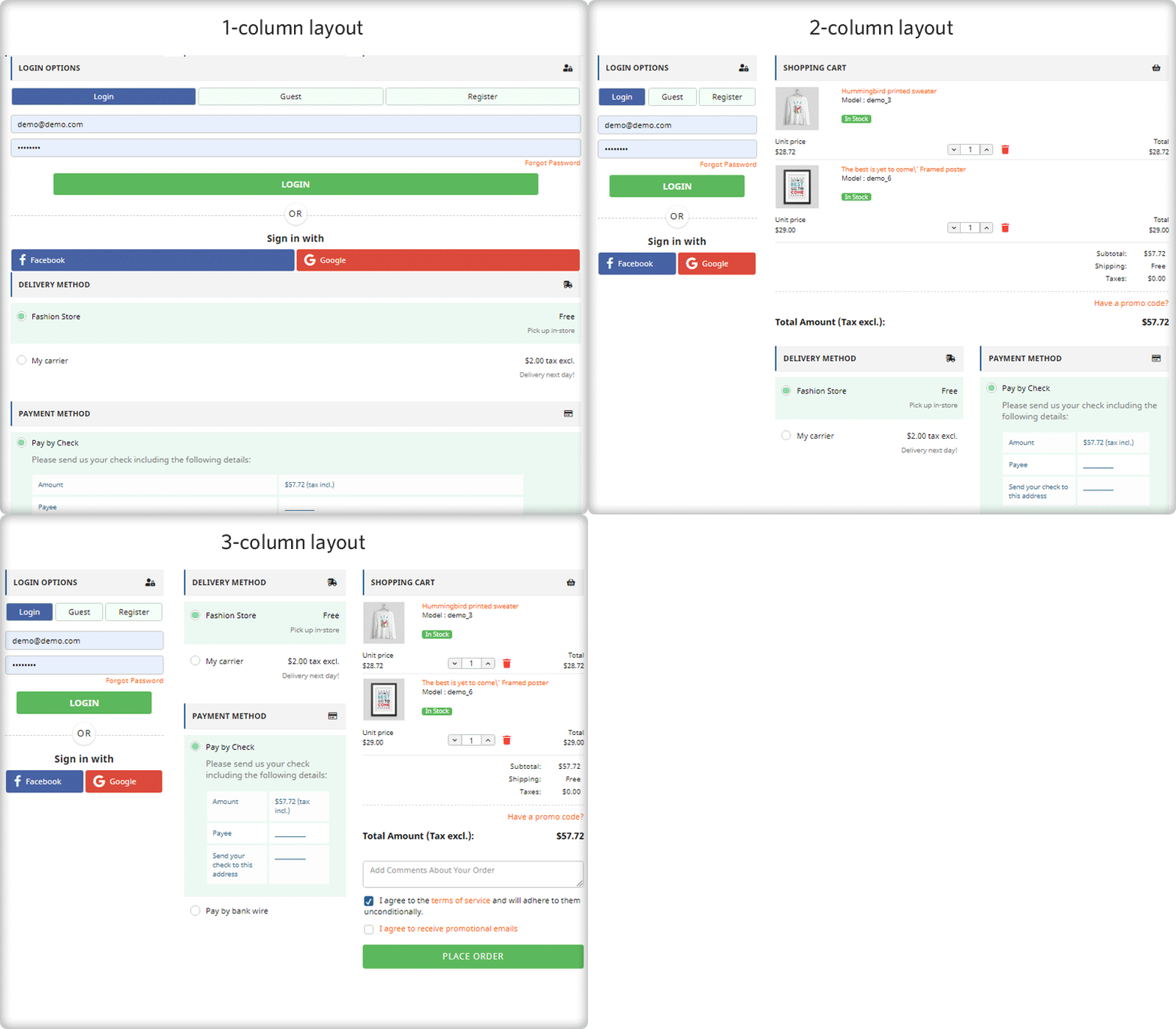
In addition, the Design tab lets you design your checkout page in a single-column layout, 2 column layout, or 3 column layout.
2 new features that have been added to this checkout module are Abandoned Checkout Statistics and Checkout behavior report which have already been explained above.
One Page checkout have been in the eCommerce industry for the past few years. However, the kind of eCommerce experience that has been improved using these one step checkouts need not any introduction. From quickest checkouts to conversion optimization, eCommerce store owners see one page checkouts as a tool of improvement. Improvement in customers experiences, improvement in conversion optimization, improvement in competitive advantages against the rivals and much more.
In this article, I am basically going to explain how a perfect one page checkout would look and behave with the customers to provide the eCommerce sites a better checkout page.
Reduced entries in one-page checkouts- A one page checkout is basically adopted to provide the quickest checkout experiences. Sometimes, we get confused between a one step checkout and a quick checkout experience. The line between the two is very thin.
A pure one page checkout module would work by compacting each and every step of a multi step checkout into a single page. From customer information, shipping address, to payment options each and every step is reduced onto a single page.
However, a better quick checkout design would not only consist of a one page checkout but would also show a decrease in number of entries. These reduced entries are obtained by skipping the redundant or unnecessary entries from the generic checkouts.
For example, in generic checkouts, we would find different entries for mobile number and telephone number. In quick checkouts, we might have the option to skip the telephone number and provide only the mobile number in the form.
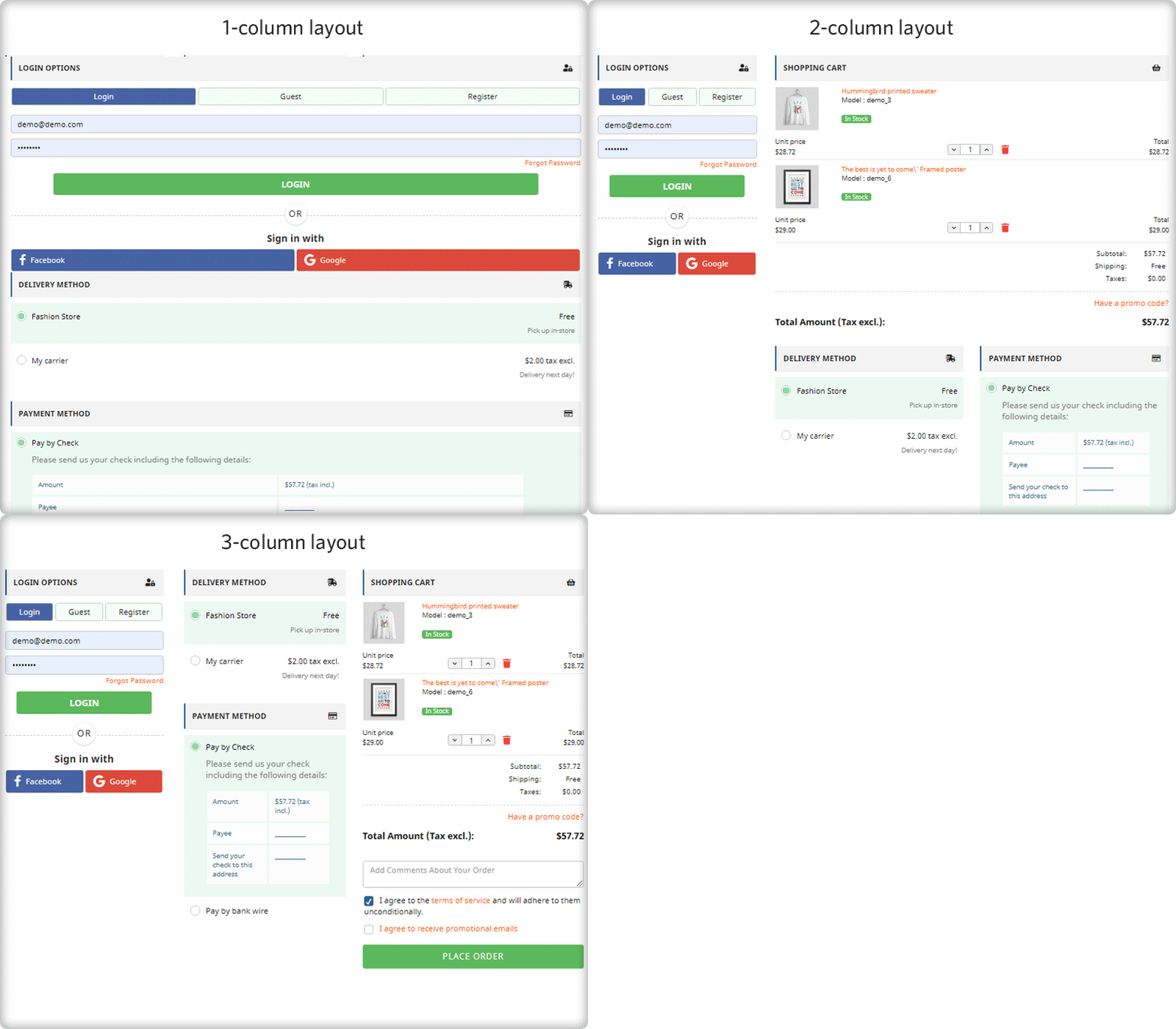
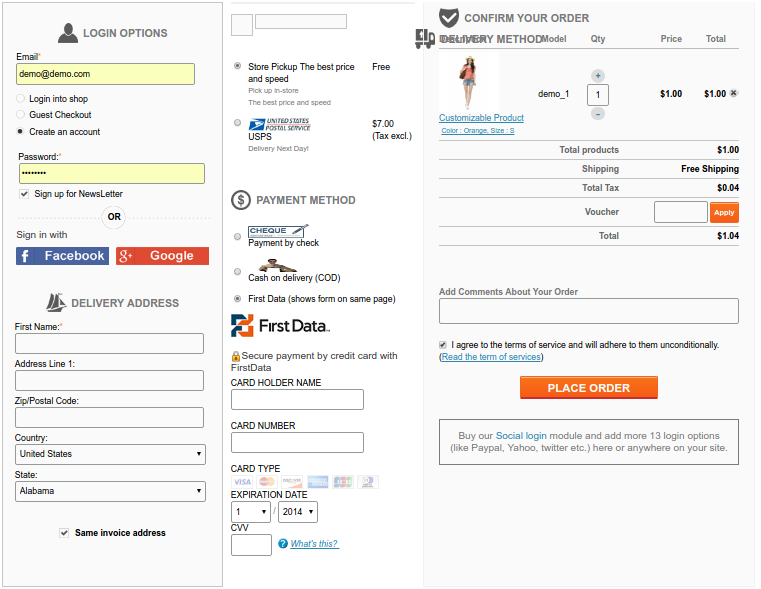
Designs and layouts-There are basically three types of layouts that are used by the one step checkouts to compact the whole process on one page. The single column, the two column, and the three column layout.
The single column layouts are generally adopted by those sites which do not ask much of the information. This information can be compacted in a single page without increasing the page length. In case if the number of the entries required are much larger, then a two or three column layout is a better option.
One column layout2 Column layout3 column layout
By changing the layout options we can re-arrange the one step checkout to switch the designs and constitute the required fields in a single page accordingly.
Checkout speed and steps- As we know that one page checkout would definitely compact the multi page structure into a single page structure. However, just the compaction of steps is not enough to get a proper one page checkout; at least the customer’s experience will not improve until you work on the speed of the checkout. The checkout speed can be increased by:
Removing the unwanted or not necessary fields from the checkout page.
Removing the redundant fields.
If any field on the checkout page can be helpful but not necessarily required by you, you should make it optional.
Pre-filling the customer information from the user account.
Reduced the use of graphics intensive objects like carousels.
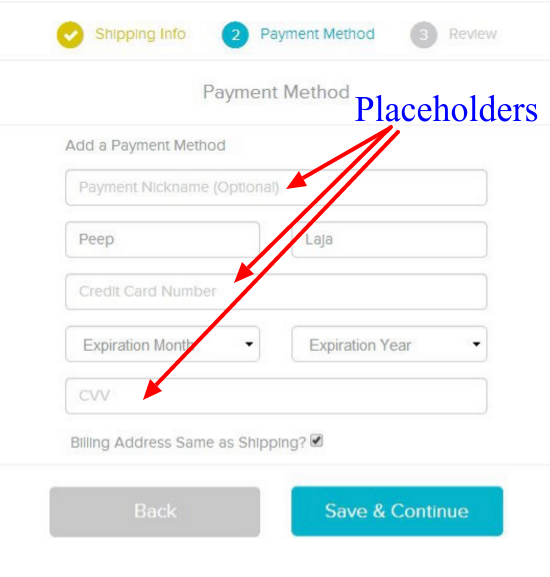
Behavior of fields on checkout page- To reduce the size of the one page checkout and make them conversion friendly, you can skip the labels of text fields and use placeholders instead. However, in some cases, labels are more effective than placeholders. For example, if a checkout form consists of a large number of fields, the user might get confused about the kind of entries he has filled when he reviews the entries afterward.
So, placeholders can be used as a guiding tool to make the fields clearer and it is a better option them using them in place of labels. These placeholders can consist of pre-filled examples.
Placeholders can guide the users in filling correct information
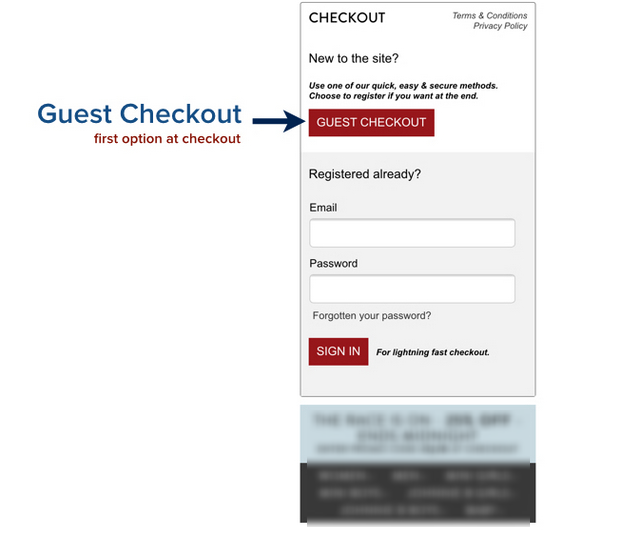
Option of Guest Checkout- There are certain chances that a customer might have come to your online store for the first time and he might not have a user account. A compulsory requirement of sign up would definitely encourage the shopper to abandon your cart. Instead like every effective checkout process, your one page checkout should be able to accept the guest checkouts. The guest checkout just includes the manual entry of email address and customer information. Later on the customer might choose to sign up, but as of now, it would not hamper your conversion at least.
So, like every effective checkout process, you should make sure that your one step checkout is efficiently accepting guest checkouts. It would not only improve your conversion rate but would also help you prevent shopping cart abandonments on your store.
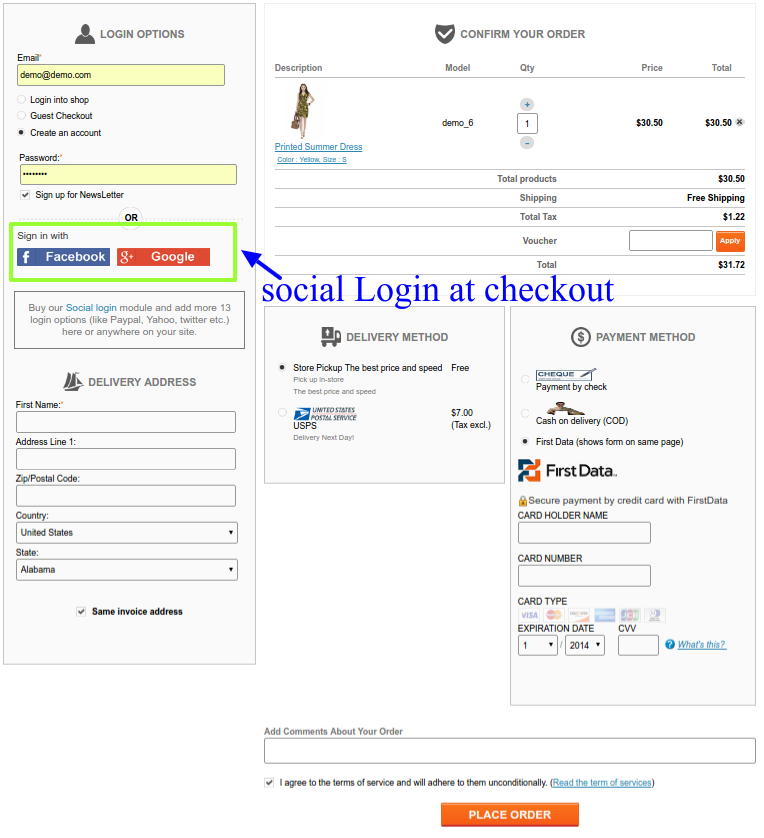
Social login at checkout page-
There are various social Login modules that allow the eCommerce store owners to accept social login on their online stores. These social login options allow the users to login or sign up to a site without a need to fill the registration forms. It is one of the ways adopted by eCommerce store owners for conversion optimizations.
It is a useful feature to include in the one page checkout page too. When a shopper reaches to your checkout pages, he would definitely not want to go back and create an account on your shop first. Instead, you can allow the shopper to use his/her Facebook, Gmail or PayPal account to register on the store. Once the shopper sign-ups using the social login, he would be again directed back to the one step checkout page and can continue from the same.
Best Practices and features of a one-page checkout module
Every one page checkout is adopted by the online store owners to improve their sales and conversions. If it goes wrong, it will result in nothing and would destroy the customers experience in addition. Choose a one step checkout module that has at least these basic features. For PrestaShop, OpenCart and Magento stores, Knowband provides effective one page checkout modules that include all of the above-discussed features and much more.
Shopping cart abandonment is a global issue that has been creating problems for online retailers all over the world. Cart abandonment has a huge impact on the sales and conversions of any eCommerce store. Even with the passing time, the problem looms large over the eCommerce platforms.
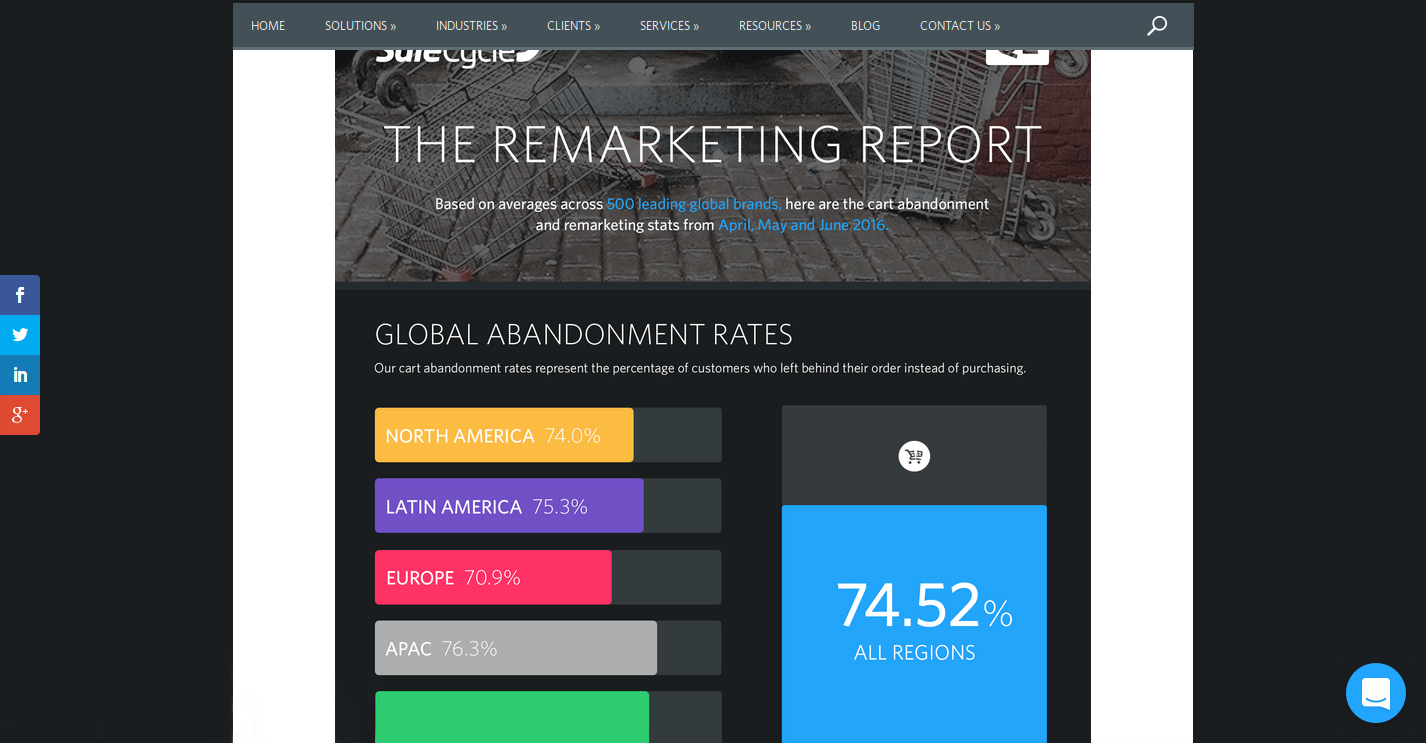
“The Remarketing report” prepared by the SaleCycle, a behavioral marketing company, shows the graveness of the situation. Here are the important insights regarding the same report.
The report shows the shopping cart abandonment trends across regions and industries.
As per the SaleCycle’s research on 500 leading global brands in the second quarter of the year 2016, the following crucial trends were observed.
The shopping cart abandonment was seen to be different for different regions of the world. While it was 74.0% for North American countries, the figure went a little higher for Latin American countries with 75.3%. Similarly, for European countries, the cart abandonment rates were found to be 70.9% while it was 76.3% for the APAC countries.
The overall cart abandonment rate comprising of all the regions was found to be 74.52%.
Apart from the region, the shopping cart abandonment varied considerably as per the industries involved. The rate of shopping cart abandonment for retail was found to be 74.6%, 80.1% for travel related industry and 68.8% for fashion-specific industries.
For the first quarter of 2018, the global cart abandonment rate was found to be 75.6% across all sectors.
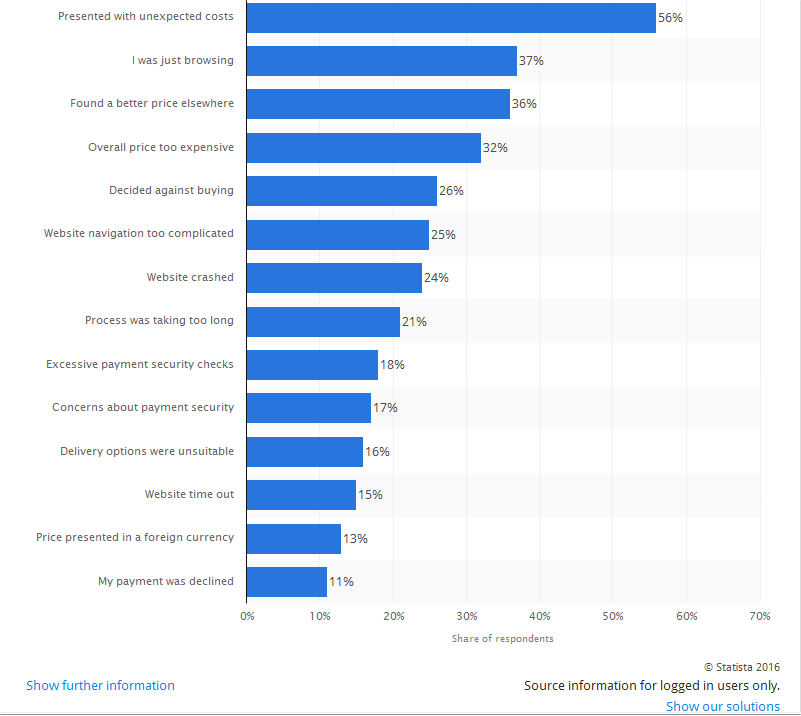
According to another eCommerce report by Statista, a statistics portal company, the shopping cart abandonment is based on a number of factors and problems faced by the online shoppers on an eCommerce store. The list of all the factors that lead to abandoned carts on an online store is explained in the statistical graph as shown below:
Take action against all the factors mentioned in the graph for reducing shopping cart abandonment.
Considering the reasons for shopping cart abandonment and the cart abandonment rate across regions among a wide range of industries, the problem can’t be left ignored at all if a retailer wishes to avoid cart abandonment and improves sales and conversions on their eCommerce store. Here are some of the tips that can help in reducing the shopping cart abandonment on an online store.
1. Reduce overhead expenses on your store
In a competitive business environment, the availability of products at an appealing price is the only thing that can drive conversions and sales in bulk. However, the cost of a product is often increased by the unknown overhead expenses that are present on an eCommerce site.
Some of the common examples of the overhead expenses on an online store are online transaction charges levied by third-party payment gateways, credit card transaction fees, order processing fees, commission amount charged by online marketplaces.
No doubt, it is impossible to run a business on a non-profit basis for any online store but certainly, you can cut down the additional costs in order to avoid cart abandonment. Be precise about the product price. Do not compel your consumers to abandon their cart with hidden charges. Specify your product pricing prominently for grabbing maximum customer engagement and sales.
2. Add Exit-intent popup
Exit popups provide you an excellent opportunity to reduce the cart abandonment rate and maximize conversions. Exit popups work when it is detected that a user is intending to exit the store and presents them a popup containing a deal or an offer.
Let’s say a user is trying to abandon his/her cart and almost ready to take an exit from your store, you can, then, make the user stay by offering them the discount on that product, encouraging them to complete the purchase.
3. Provide Guest checkout
A majority of the consumers bounce back from the store if they are presented a mandatory sign-up during the checkout. This isn’t a great move if you wish to reduce the cart abandonment rate on your store.
Avoid the mandatory sign-up and provide a Guest checkout option to your visitors so that they do not face any hurdle in between their checkout.
4. Establish trust with security badges
When customers provide you their confidential payment details, they put their trust in you. Similarly, you can win their trust by displaying the security badges/logos somewhere on the payment page to give them an assurance that their data is secure.
5. Enhance the functionality of your shopping cart
It is important to have a shopping cart that is capable of performing cart changes in a quick manner. Some of the key features that need to be present in an eCommerce platform for enhancing the functionality of a shopping cart are described below:
It needs to offer large, detailed and functional images of the products.
Easy and quick navigation facility for a better online shopping experience.
Functionality to include product reviews from customers.
Ability to apply discount coupons and gift cards.
E-commerce platform like OpenCart offers a wide range of above-mentioned shopping cart functionalities to improve the online shopping experience of customers. Utilize the functionality of this shopping cart for encouraging more customers towards your online store. Take a dashboard view of the OpenCart platform that allows store owners to perform desired functions on their eCommerce store.
Use an eCommerce platform that can improve the functionality of your online store. Try to enhance the experience of your customers. If you are on standard shopping carts, you may use Shopping Cart extensions and Checkout Extensions, or, you may get the custom implementation for your website.
6. Improve the loading time of your online store
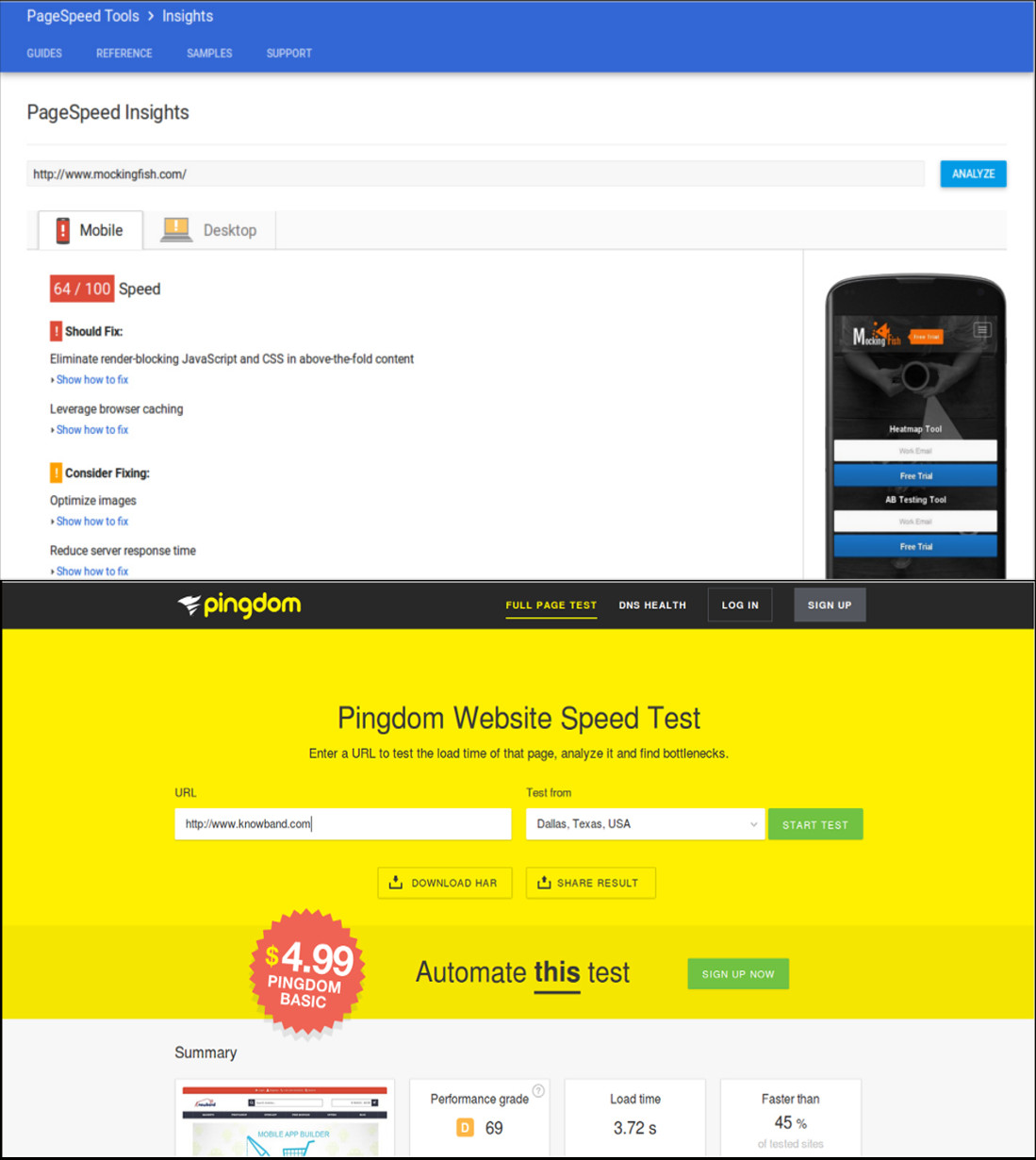
As per the recent report of Hosting Facts, “A single second delay in your website loading time can result in a 7% loss in conversion, and 40% of web users will abandon a website if it takes longer than 3 seconds to load”. This statement itself explains that people are not patient enough when it comes to the website loading time. The average loading time of a website is said to be around 2–3 seconds which can keep the customers engaged, otherwise, the visitor is likely to leave the website.
This is definitely a huge setback for eCommerce store owners as a slow loading website can hurt their conversions and sales. In order to improve the loading time of your eCommerce site, the following site optimization techniques need to be implemented at the earnest level.
Minimize the number of HTTP requests to avoid delay in website loading.
Compress and optimize large size images for your eCommerce site with the help of image and data compression tools/programs like Gzip, JPEG Optimizer, TinyJPG, Caesium, and such others.
Enhance the utility of your CSS files by eliminating browser specific codes and applying shorthand codes.
7. Enhance the website design and accessibility across multiple devices
The global pattern of online shopping has changed drastically with the more number of purchases on an online store made through mobile devices instead of desktops and laptops.
To understand the above scenario, the number of mobile devices (smartphones and tablets) shipped worldwide is estimated to a total of 343.3 million as per the Worldwide Quarterly Mobile Phone Tracker report of International Data Corporation (IDC) for the second quarter of the year 2016. To target such a huge mobile based users, you need to take the required steps to make your website accessible and user-friendly on various devices and screen types. Below are some of the quick fixes that can make your site more accessible and user-friendly.
Use mobile web development technologies like HTML5, CSS3, JavaScript and mobile responsiveness for better site reach and performance.
Enhance the usability of the CTA button on mobile devices by selecting an appropriate size and placement.
Include optimized and reduced page size for mobile content.
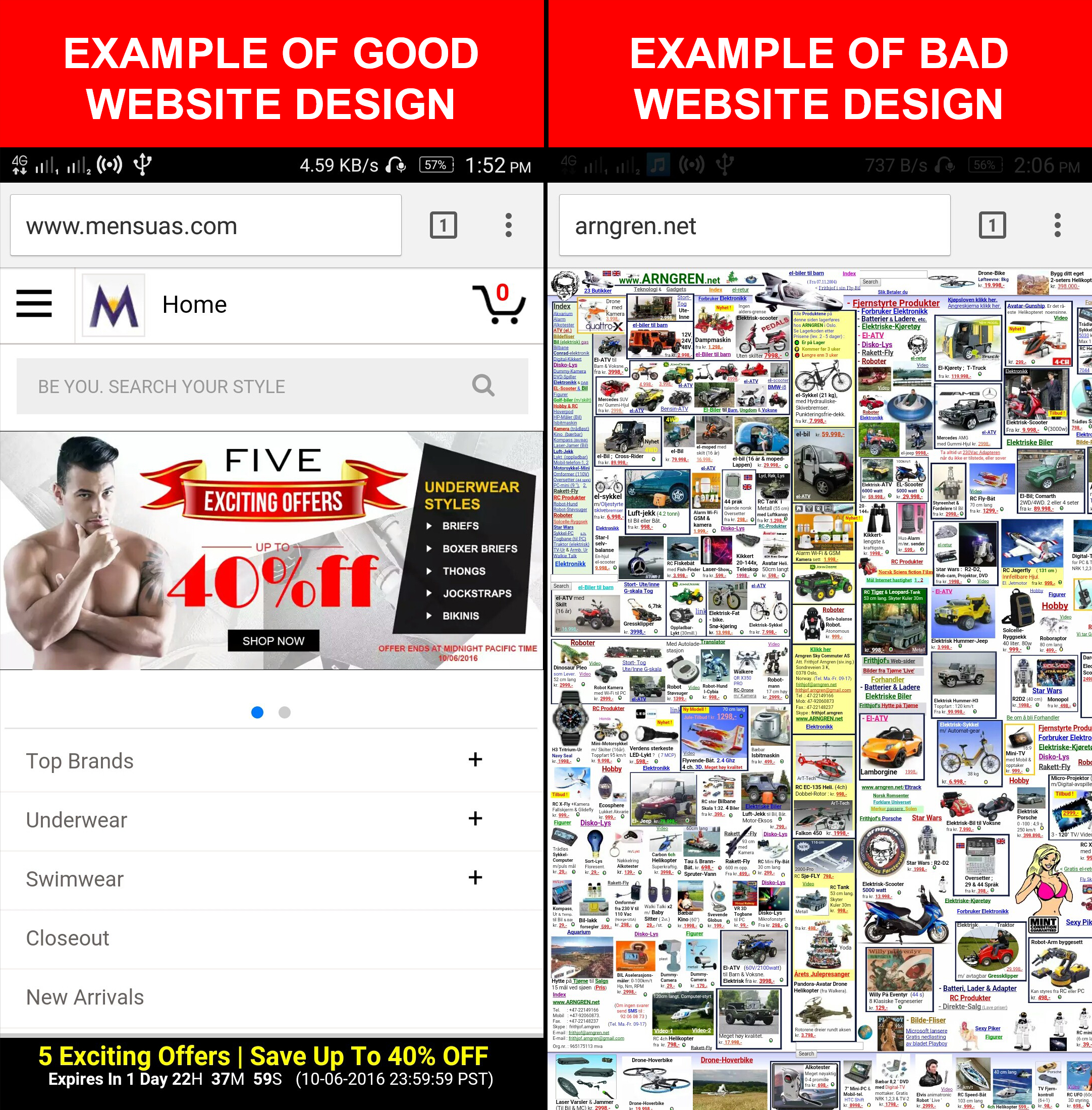
If you want to understand the importance of web design in eCommerce, here is the example for you. Take a look at these two mobile designs that provide a complete insight into a good and bad mobile website design and their impact on the conversions of a website. A good mobile website design encourages customers to browse a website whereas a bad mobile website design completely deviates a visitor and results in shopping cart abandonment along with an increase in the bounce rate.
Focus on the design of your mobile website for grabbing maximum conversions and sales from your customers.
8. Make the checkout process simplified
Make your checkout process more simplified by restricting the number of checkout fields.
People prefer to shop online due to the ease of purchasing products, a variety of options available at a place, the option of product delivery at the customer’s premises and much more. However, if this is robbed from online shoppers, it is certainly going to affect the sales of an online store.
An easy and quick checkout process encourage online shoppers to make a product purchase through a particular eCommerce site. So, ignoring it would be the biggest mistake for any eCommerce store owner.
To improve the checkout process, you need to provide accurate product status, one page checkout process, quick cart customization facility, availability of contact details, easy product return requests, social login facility, the addition of security and trust badges and other such perks to customers.
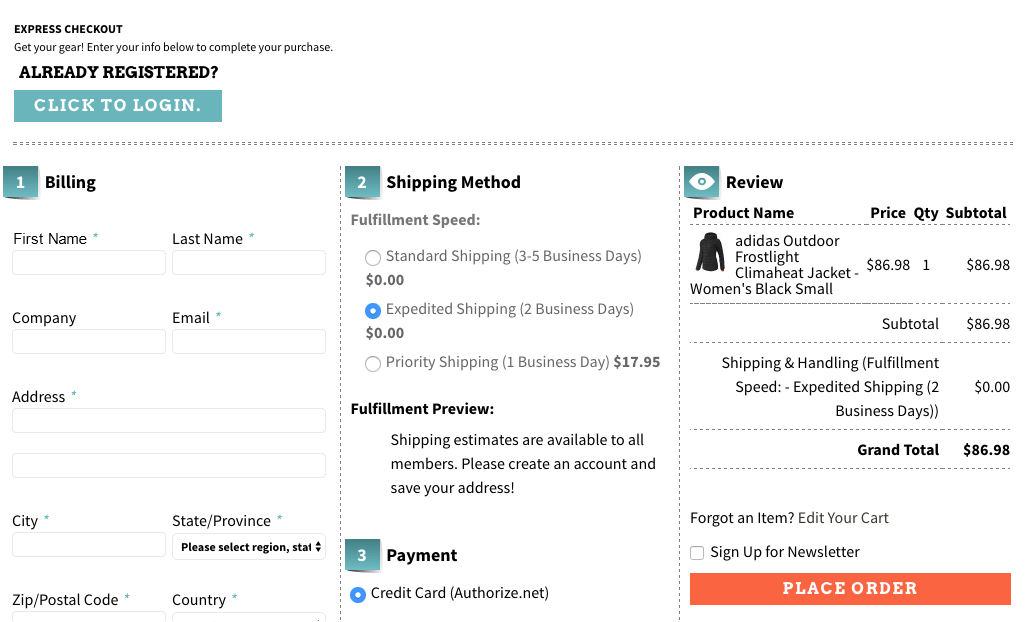
Here is a checkout page of the website Art.com that simplifies the online shopping experience of the customers by providing various features and functionalities.
Offer a simplified checkout process to your customers for improving conversion rates and sales.
9. Bring back abandoned carts through customer re-targeting
Email Marketing can take your business to a long way by encouraging customers to complete their pending shopping orders and can provide you promising results in terms of conversions. These emails are also an important tool for customer re-targeting provided they are engaging, sent at a regular interval of time and provide customers enough reasons to complete their pending shopping orders. E-Commerce store owners need to schedule reminder emails to customers at a regular interval of time in order to remind them about their abandoned shopping carts. They can take the help of email marketing software like MailChimp, ConstantContact, GetResponse, AWeber, etc. that can provide contact details of customers for better customer re-targeting.
10. Offer products at an affordable price
Drive more revenue to your store by pricing your products more effectively. When the competition is too high in a particular business segment, it makes sense to present your products in the most competent manner. You need to have a clear idea about the price of your competitors and should reprice your products accordingly. Once, the customers find your products as most affordable, they will love to buy from your online store irrespective of the competitors available in the market, providing you are not compromising with the quality.
In case, you wish to involve customers directly in the pricing strategies, there are certain eCommerce Extensions that can help customers make a wish about their product price. Make an offer that they can’t resist. In this way, eCommerce store owners can directly know about the interested price segment of their targeted customers.
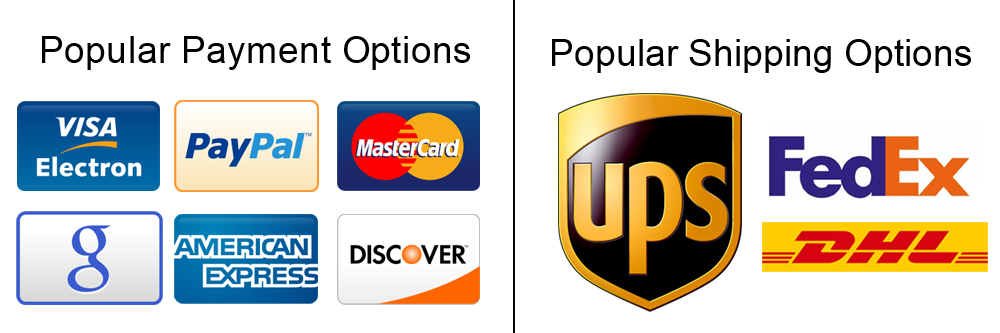
11. Add multiple payment and shipping options
Include multiple payment and shipping options on your eCommerce store for improved checkout experience.
At the final checkout process, numerous online shoppers leave the site when they are unable to find their required payment and shipping options. This is a serious issue and has reduced the conversion rates and sales on various online stores to a significant level.
To overcome this critical situation, store owners need to offer multiple payment and shipping options to reduce the rate of eCommerce abandoned carts. Make a list of the popular payment and shipping options by taking insight from the customer surveys and include them in your online store. Some of the well-known payment methods are PayPal, Visa, MasterCard, Google Checkout, Wire Transfer, SagePay, Boleto. Similarly, you need to include these shipping options such as USPS, DHL, FedEx, USPS to improve the online shopping experience of your store visitors.
12. Use Web Push Notifications
Web Push Notifications is the latest approach followed by online businesses to target the users abandoning their cart. With the help of web push notifications, you can send the abandoned cart notifications to the users not completing their purchase and remind them about the items pending in the cart.
There are many more ways to avoid the cart abandonment on an e-commerce store, however, you will find the above-mentioned methods as the right approach. Take the proactive steps now and perform some major makeover of your eCommerce site to reduce abandoned carts. It’s difficult to get the customers to your website in the first place, and then seeing them leave without buying is even more painful. The best time to act on Abandoned Carts is now, do not miss it.
The growth and expansion of any business be it offline or online depends mainly on the conversions. In the case of eCommerce stores, the conversions are usually referred to as product sales achieved. Agree, every store owner can’t succeed in terms of making bumper sales but it is a fact that every eCommerce store owner has a strong urge about making a significant increase in his/her store sales.
If you are not lucky enough in increasing the sales of your online stores, it is time to start looking for an effective remedy. A low performing eCommerce site in terms of product sales is not of much use and is actually more of a burden if the operational cost of the store is too high. This blog is certainly a big relief for those sales deprived eCommerce store owners who are looking to escape out of the long continuous sales dud. We have figured out some ways and came up with 9 effective tips to improve sales on your eCommerce store.
1. Provide exciting offers and deals to your customers
Almost every online shopper is in search of exciting shopping offers and deals that could persuade them for a quick product purchase. If your eCommerce store is unable to excite its targeted customers through amazing deals, discounts, shopping offers, free shipping service, gift cards, sales coupon, and other such components, it is certainly going to hurt your business fortunes in the long run
2. Offer multiple payment and shipping methods
Don’t be adamant while offering payment and shipping options to your customers but try to be more flexible. You need to make a survey among your customers for including the popular payment and shipping options on your online store for ensuring a comfortable online shopping experience. The presence of only selected payment and shopping options also results in higher shopping cart abandonment and bounce rates.
3. Provide easy navigation around your site
Customers nowadays are very choosy when it comes to a product purchase. They want to look out for a number of products before actually going for the final purchase. In order to offer easy navigation around your eCommerce website, you can take the help of a productive heatmap and A/B testing tool like MockingFish that can improve the customer engagement on a site to a great extent.
4. Remove hurdles from your checkout process
Due to the scarcity of time with online shoppers, eCommerce stores need to focus on ways to improve the checkout process on their site. They need to remove unnecessary fields and checkout steps that are hampering the quick online product purchase of customers. If you want to manage this critical task through an eCommerce plugin, you can take the help of Knowband modules like Prestashop One Page Checkout, OpenCart One Page Checkout, OpenCart One Page Checkout Pro, Magento 2 One Page Checkout for simplifying the checkout process on your eCommerce store.
5. Spread the information about the urgency of your offers
In this competitive business environment, you need to showcase that the advertised offer on your site is much more engaging and is available for a limited time only. Once, your customers are aware of the urgency and limited availability of your shopping offers, they will be much more eager to purchase from your online store. Store owners can convey this message to their targeted customers in the form of appealing CTA buttons and CTA texts for grabbing higher conversion rates and sales.
6. Reduce Cart Abandonment Rate
There’s a heavy impact on sales due to abandoned carts. Though there is no magic to stop someone from abandoning their cart, there are ways that can help you bring the abandoned cart rate under control.
For that matter, you can try out the Abandoned Cart module by Knowband or use Web Push Notifications to give a gentle reminder to your visitors every time they abandon their cart. This way you can make an improvement in your sales.
7. Launch a facebook shop
With over 2.38 billion Facebook users today, not utilizing the Facebook platform means missing out on a great opportunity to improve sales on your eCommerce store. Link your eCommerce store to your Facebook business page, interact with your audience and run contests or offers at regular intervals to increase customer engagement. You can try out the Prestashop FB store addon for integrating your store to your Facebook page. If your brand doesn’t have a Facebook page, create one today.
8. Use popups effectively
Popups are a great way of attracting customers and capturing more sales, but they do not work as easy as it seems. Designing a good popup that could bring conversions requires your time, efforts and most importantly creativity. Pop-ups bring results only if they have been made in such a way that doesn’t unnecessarily irk a user. In fact, e-retailers today, are using pop-ups to engage users in some kind of fun activity, before actually asking for their email address.
Do not kill the interest of your visitors by making the sign-up process on your store mandatory. In this way, you are only restricting a visitor from making a purchase.
Offer Guest Checkout to your visitors or enable social login options. Guest checkout is very helpful for users who do not want to get themselves registered on your platform while the social login option allows visitors to avoid the long registration process by asking them to login with their social accounts.
Conclusion
Do not consider the low sales as the fate of your eCommerce store. Make the required corrections with the help of the above-mentioned informative tips. If you are able to make the changes within the stipulated time, you can effortlessly grab more conversions and sales for your eCommerce store. Keep in check the above-mentioned 9 effective tips to improve sales on your eCommerce store. For more updates regarding eCommerce plugins and other related information, do visit our Knowband store at www.knowband.com
Online shopping is all about ease of a product purchase as people don’t have time to roam every shop in search of a product or service. With the busy lifestyles of people and the option of home product delivery, online shopping has been growing with leaps and bounds. People are continuously involving with eCommerce stores to save themselves from the task of visiting multiple shops and handling multiple shopping bags. There are numerous factors that can act as barriers to your online shopping experience.
Among these factors, a complicated checkout process is seen as one of the prominent reasons that can affect the conversions and sales of an online store. If you are not having an engaging checkout process on your PrestaShop store, it is time to take the help of these Prestashop checkout modules to optimize your checkout page and bring more conversions. Take a quick look below:
Prestashop one page checkout puts together all the steps of a standard checkout on a single page and allows your consumers to complete their transactions quickly. It speeds up the checkout process and reduces the possibilities of cart abandonment. Prestashop’s one-page checkout helps you boost your sales by a good margin.
Prestashop one-page checkout allows social login options to consumers to make the registration process easy and fast.
Prestashop One page checkout addon provides the option of a Guest checkout for visitors who do not want to get themselves registered on your platform.
This addon has Mailchimp Integrator that sends a visitor’s email address directly to your MailChimp account.
The module offers multiple shipping and payment methods.
Prestashop fast checkout addon allows customers to update the product quantity right from the checkout page.
Prestashop one page checkout offers multiple layouts to display the cart details.
This module also contains the Google auto-address fill feature, enabling your visitors would be suggested the address when they start filling the address field.
One Page checkout addon is GDPR Compatible, Mobile Responsive, and has multi-lingual support.
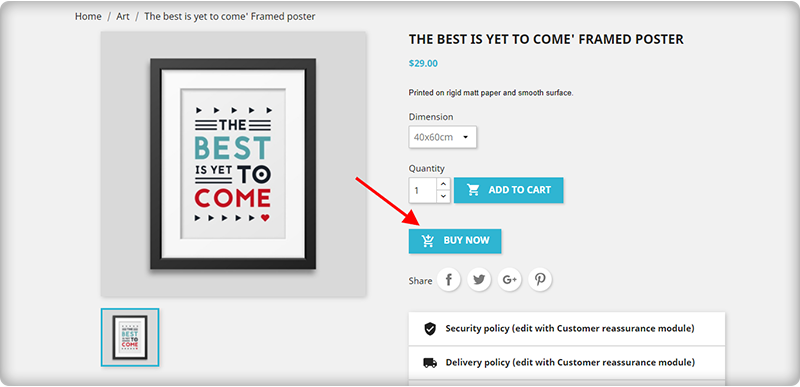
Prestashop one-click checkout is a great option for those online shoppers who wish to do an instant purchase without disturbing their existing cart. This addon avoids the process of adding a product to the cart before purchase. Store visitors can simply click on the Buy Now button and buy a product instead of adding the product to the cart and removing the existing cart items.
Prestashop one-click checkout addon displays a “Buy Now” button on your store products to trigger impulse buying, ensuring higher sales.
Prestashop one-click direct checkout is time-saving. By not interfering with the existing shopping cart, visitors can place an order quite comfortably. This improves your conversion rate.
The one-click checkout module is fully responsive and multi-store compatible.
If you are unable to entice your visitors to your PrestaShop store, you can take the help of this PrestaShop “Gift the product” module from the Knowband store. Also, this PrestaShop checkout extension is very helpful for improving your conversions as it offers free products based on your cart price. Here are some of the wonderful features of this PrestaShop Gift product module.
Prestashop Gift the Product addon provides a great range of freedom to store admin for accomplishing various tasks like display of products at the front end, ability to show listed gift products, ability to control the display of gift products at the front end, and much more.
The module can be quickly installed and configured without any technical assistance.
Prestashop gift the product module works perfectly with various mobile devices and screen sizes.
The module also provides customers the freedom to choose the free gift as per his/her interest.
4. PrestaShop checkout payment fee addon
It is one of the amazing PrestaShop checkout modules that allows merchants to include various payment fees that are involved with various payment methods on a site. With this clear information, it is now possible to improve the checkout process on your site without any glitches. Apart from this, it will also help in improving customer engagement and conversions on your PrestaShop store. Some of the exciting features of this PrestaShop module for including payment fees are:
Prestashop checkout payment fee addon provides information about the payment methods that charge additional fees.
Displays the percentage or fixed price of the products.
It offers a facility to enable or disable currency conversion.
Prestashop checkout payment fee addon works with various payment methods that charge additional payment fees.
Additionally, it offers free technical support.
5. PrestaShop Cash On Delivery with Fee
To keep up with the trend, you have to offer services that are in demand. Cash on delivery is the most demanding and needful feature for digital commerce. It streamlines the delivery process and reduces abandoned carts. Wondering how? Many customers feel intimidated while sharing their credit/debit card details on a new website. The COD module helps in optimizing the PrestaShop checkout process.
Customers can get COD without any extra fees otherwise store owners can charge extra for the same
Customers do not have to share any bank details with the store owner
The COD option can be applied to selected products or categories
It boosts conversion and overall revenue of the PrestaShop store
6. PrestaShop Store locator
For the PrestaShop Checkout optimization, you can also install the store locator addon. It can help you provide services like Buy Online and Pay In-Store (BOPIS). This is another in-demand facility that customers look forward to. It displays a map to the customer and shows all the nearby stores to visit and shop. below are the features that the module provides:
Easy and effortless to implement buy online and pick up in-store facility
Displays the store locations on google map with the list of nearby stores
The module is multi-store compatible and supports multiple languages
7. PrestaShop Delivery Boy App
Manage your deliveries effortlessly with PrestaShop Delivery Boy Application. This application allows delivery boys to choose their consignments. Along with the PrestaShop Mobile App Builder, the delivery boy app can provide real-time product tracking to customers. This application makes the delivery process seamless.
It has a separate login option for both the delivery boy and the store owner.
The app can be published to Google Play Store and the iOS store.
It provides order acceptance and rejection options to the delivery boys but they have to mention the reason for rejecting the order
Customers will receive an email notification when the delivery boy picks up the order. Moreover, they will have to provide OTP to the delivery boy on order delivery
The app is compatible with KnowBand’s Mobile App Builder.
8. Prestashop Checkout page analytics
Keeping a constant track of customer’s activity is important. It can provide you crucial information about the purchasing behavior of your site visitors. Once, you are aware of the checkout journey of the visitors, you can take the required steps to improve conversions on your PrestaShop store. Take a look at the various features that makes this Knowband extension as one of the most popular PrestaShop checkout modules for your online store.
Prestashop checkout page analytics addon provides complete statistical information about your site visitors while making an online purchase.
It helps in maintaining the email addresses and cart details of your customers.
Prestashop checkout page analytics provides seamless recovery of abandoned carts on a PrestaShop store.
Prestashop checkout page analytics provides customer details, cart details, analytical data for ensuring higher conversions and product sales.
Easy search facility through email.
Conclusion
Don’t take your customers for granted while they are making an online purchase from your PrestaShop store. With the help of all these PrestaShop checkout modules, you can remove the various hurdles that may be affecting your conversions to a great extent. It is time to visit our Knowband store and grab your share of conversions with these feature-packed eCommerce modules.
It is often seen that consumers end up abandoning their cart due to a complex checkout process that makes the customer feel alienated from your site and forces them to look out for a better alternative. This is why it is important to simplify the checkout process and it can be done with the help of the PrestaShop One Page Checkout.
If you do not work upon your checkout process, it can affect your business in the long run. If the checkout process of your Prestashop store is too lengthy or complicated, it is time to pay a little attention to it. An unoptimized checkout page can kill your e-commerce conversions.
Online shoppers look for a simplified checkout process while they make a purchase. E-retailers know how much importance a simplified checkout page holds and for this reason, they keep on looking for ways to simplify the checkout process. If you are having an e-commerce store on the PrestaShop platform and looking for ways to simplify the checkout process of your store, you can opt for PrestaShop One Page Checkout addon.
PrestaShop One Page Checkout Addon
PrestaShop One Page Checkout helps you get rid of the unnecessary fields from the checkout page and displays all the checkout steps on a single page. Here are some of the wonderful features of the PrestaShop One Page Checkout addon that can help to simplify the checkout process.
PrestaShop One Page Checkout offers Easy Login facility
Account creation is the most time-consuming aspect of a checkout process. When a consumer looks all set to make a purchase, the intention of purchasing is brought down drastically when consumers are presented with a long and compulsory account registration form.
To overcome this issue and make sure consumers do not abandon their cart in between their checkout journey, One-page checkout comes up with the social login option so that the online shoppers do not get frustrated with the registration task and proceed further easily. With social login, people can sign in with their Facebook or Google+ account.
Besides social login, PrestaShop One Page Checkout addon also offers Guest Checkout facility so that visitors can checkout without requiring to sign-up on the website.
PrestaShop One Page Checkout displays the error in real-time-
This PrestaShop checkout extension has the inline validation facility that informs users about the possible errors in their checkout form. A green tick is displayed to the users if the information they have entered is correct else the error is marked by displaying the red cross sign. This helps a user identify the mistakes in real-time and correct them, what otherwise would have been a failed submission and users would have been asked to provide the details again.
Supports multiple Shipping and Payment methods-
The excitement of the purchase is often turned into disappointment due to the lack of desired payment options during the checkout process. E-commerce stores that do not focus on providing multiple payment modes and shipping services fail to capture more conversions. PrestaShop One Page Checkout addon supports multiple payment methods and shipping services. Thus, if you want to provide your users with a lot of options to choose from, you can integrate the various payment and shipping methods on the Prestashop One Page Checkout.
Multiple Layout Designs-
Sticking to a typical layout can sometimes turn out to be tedious for consumers. Hence, trying out different layouts can be an ideal solution. PrestaShop One Page Checkout offers 3 layout designs. You can redesign the layout of your checkout page at regular intervals and see which one is making the best fit for your business.
Customize Cart and Checkout fields-
PrestaShop One Page Checkout provides you with the option to customize your checkout fields. You can specify which fields you want to keep on the checkout page and which fields you want to hide. You can also choose whether to keep a field as mandatory or optional. And most importantly, you can set a priority of the checkout fields through drag and drop, which means if you want to place a particular field above any other field, the one page checkout module will let you do that easily.
You can also show or hide some specific cart fields as well.
Free Shipping Banner [New]-
This recently added feature in the PrestaShop One Page Checkout module lets you display a free shipping banner on the top of your checkout page. From the back-end, you can specify the amount for or above which the free hipping bar would be displayed to a user. This tends to increase your average order value since this encourages customers to shop for a bit more to receive free shipping.
Get insights into Abandoned Checkouts [New]-
This feature in the PrestaShop One Page Checkout displays the count of abandoned checkouts alongside the revenue missed because of it. You can also view the checkout conversion rate and the total number of orders placed. This can be filtered out for a specific period.
The data is presented in a tabular form as well as graphical form.
Track Checkout Behaviour Report [New]-
PrestaShop One Page Checkout also helps you find out which checkout field is causing a hindrance on the checkout page for your visitors. It displays a percentage for all the checkout fields. Higher the number means it is causing the most trouble for your potential customers. This provides you with an opportunity to optimize it so that you can improve your conversions.
Conclusion
If there is anything that can make or break the chances of conversion, it is the checkout page. It is the most overlooked area by e-retailers and they look to simplify it as much as they can. A simplified checkout leads to great user experience and great user experience leads to more sales.
Do try out PrestaShop One Page Checkout to simplify the checkout process of your PrestaShop store and let us know how it worked out for you.
Ignoring your checkout process on your PrestaShop store for a while? It is time to make amends and work towards the improvement of the online shopping experience for your targeted customers. Your clients might be scratching their heads when making a purchase on your eCommerce store due to which your business suffers a significant drop in conversion rates and product sales.
To set yourself apart from the competition, don’t puzzle your online shoppers with a complicated checkout process. Find a checkout page that allows you to remove unnecessary fields or steps. Instead, find the best PrestaShop checkout solution to delight your customers and eliminate any doubt they may have.
A non-engaging checkout solution brings fewer sales and site traffic. It would be an altogether different story with the help of these five amazing PrestaShop extensions by the Knowband store.
Nothing comes as a respite for eCommerce store owners other than the news of getting improved checkout functionality at no cost at all. With the presence of the PrestaShop checkout module (free version), there are no longer multi-page checkout formalities. Everything has been consolidated into a one-page checkout solution.
The PrestaShop checkout addon provides a complete cart summary to shoppers for better customer engagement and product sales. It consists of multiple payment and shipping methods for store owners to boost the interest of their online shoppers for doing shopping through your online store. Further, it works independently of other available third-party extensions and gives a satisfactory user experience to your PrestaShop store customers.
You can seamlessly provide amazing quick checkout functionality to your customers without making changes in your existing shopping cart while purchasing a single product. Some top-notch features of this PrestaShop One-click checkout (Buy Now) extension are as follows:
Seamless and quick customization facility.
Fully mobile responsive design for enhanced functionality for smartphones, tablets, and other mobile-based devices.
Compatible with all types of themes.
Translation facility for 17 languages.
Independent working to provide seamless functioning with third-party modules.
With the Single-Page PrestaShop checkout module, it is now much easier to customize the checkout process for your online store by displaying/hiding the various checkout fields. It consists of a brilliant drag-and-drops feature for layout customization that makes changing much easier and faster.
There are various functionalities like integration of desired payment and shipping method, SEO friendly and SSL secure design, in-built social media integration, guest checkout, social media log in, Google auto-address fill, mobile responsive design, compatibility with all browsers, and other such features. Grab this module for once and provide an amazing checkout experience to your targeted customers.
the PrestaShop One Page Checkout addon allows the owner to see the abandoned checkout statistics and checkout behavior report. In addition, PrestaShop allows you to display the product prices with or without taxes on the checkout page.
The module is a best seller with 5000+ downloads on the Knowband store and 9000+ downloads on the addon store.
These numbers can tell you how impactful it is!
Click here to explore the module features and free demo.
4. PrestaShop checkout page analytics
Customer tracking is an important part to provide a seamless checkout experience for online shoppers. It gives a clear insight into the reasons or steps that are causing your customers to abandon their cart. Store owners will get a full report in terms of monthly, weekly, and annual statistics with PrestaShop checkout page analytics to improve their merchandise revenue, customer loyalty, and conversion rates.
This PrestaShop checkout page analytics module also allows customers to record email id and cart details in order to assist shoppers who experienced technical issues or problems during the checkout process. Once you have all the essential statistical information with you, it will be much simpler for you to recover your abandoned carts and lost sales opportunities.
5. PrestaShop checkout payment fee addon
To show additional fees which are charged by various payment methods on your store, you need to install this PrestaShop checkout payment fee addon extension. The module can show percentage-based or fixed price-based additional fees that are charged by each payment method.
Besides this, there are other amazing functionalities like enabling/disabling currency conversion, compatibility with all payment methods having additional fees, quick installation, and configuration, and other such features.
Wrapping Up:
These PrestaShop checkout addons by Knowband have all the required features and functionalities that can easily set your cash counter on fire. Once you have the support of these above-mentioned PrestaShop checkoutaddons, you can easily win the decisive battle of conversion rates, product sales, and site traffic. Don’t miss this opportunity to get the initial business lead for your online store.
Which PrestaShop checkout addon should you choose?
If you’re testing first, start with the free One Page Checkout. If most of your sales come from single-product purchases, the One Click Checkout addon reduces friction faster than a full checkout overhaul. Stores with high cart abandonment should prioritise Checkout Page Analytics first, you need the data before you can fix the problem. Updated September 10, 2026
Considering this in mind, we have introduced an amazingly faster and seamless checkout for your store- the all new “Prestashop Responsive Checkout”
With almost half of website traffic coming from mobile devices, it is really important for you to have a responsive design for your website’s checkout page.
Prestashop One Page Responsive Super Checkout is designed specifically for the screen size your customer is using. The Responsive design of this extension is not only pleasing to eyes but also improves conversions by providing a faster and easier checkout experience to customers.
Stress Free and Fast Checkout-
Responsive design is aimed to provide a smoother and faster navigation. We carefully and intelligently consider every detail of the buying process to make checkout process frictionless for your users. By adapting to any screen size, this extension provides your customers with a user-friendly checkout experience. The overall graphic design is so clear, simple and easy to understand that it keeps customers focused on placing an order.
On mobile devices the real estate of a website becomes very limited, therefore the order summary and other checkout page details switches to the bottom on right side of the mobile screen. This further helps customers finish the purchase with less scrolling ultimately resulting in more orders for your store.
SEO-
Google actually recommends websites that use responsive design for higher ranking on search results. It is because having one URL for each page across all devices makes it easier for customers to interact with your site. Moreover, using a single URL prevents redirecting which reduces load time, allowing Google to crawl your website faster.
Better Conversion rates-
With a responsive checkout optimized for all screen sizes, businesses will be able to target more number of mobile users. This in turn would further promote more sales and conversions.
Conclusion
So, is a responsive checkout a better methodology for eCommerce retailers to increased revenue generation and conversion optimization?
At Knowband, we have been designing the right approach for delivering a mobile based experience to help businesses achieve their goals significantly. If you are looking for the same, the do contact us.