“Magento Affiliate and Referral program extension incorporates an Affiliate Account section on your Magento store and allows users to register as an affiliate and earn incentives for every successful referral. The incentives or commission are provided for new user registration, order placement or both.”
Affiliate and Referral Programs are excellent marketing strategies for any brand. It involves less cost and provides significant value in return. You would have often seen brands running a “Refer and Earn” program or YouTubers mentioning their affiliate link on the video description. That is what we call the Referral and Affiliate Marketing respectively.
Magento Affiliate and Referral Program extension
Knowband presents the Affiliate and Referral program extension for Magento that helps Magento store owners build brand awareness and increase their user base efficiently.
Features of Magento Affiliate and Referral Program extension
1. Multiple types of referral
Magento Affiliate and Referral Program extension lets the affiliate partners invite new users to your store through various means. The affiliate partners can bring in new customers by sharing with them a referral code or a referral link.
They can also provide a voucher to the referent which the latter can use while making a purchase. In addition to this, affiliate partners can share the referral link on various social media platforms like Twitter, Facebook, Pinterest, right from their affiliate account.
2. Set the referral rate for the affiliates
Magento store admin can define a global referral rate for the affiliate partners for the user registration and the order placement.
3. Personalize commission for each affiliate
Though the Magento Affiliate and Referral Program extension allows the store admin to set a fixed global referral rate for the affiliate partners, they can personalize it for every different affiliate.
4. Assign your affiliates with a voucher on their registration as an affiliate
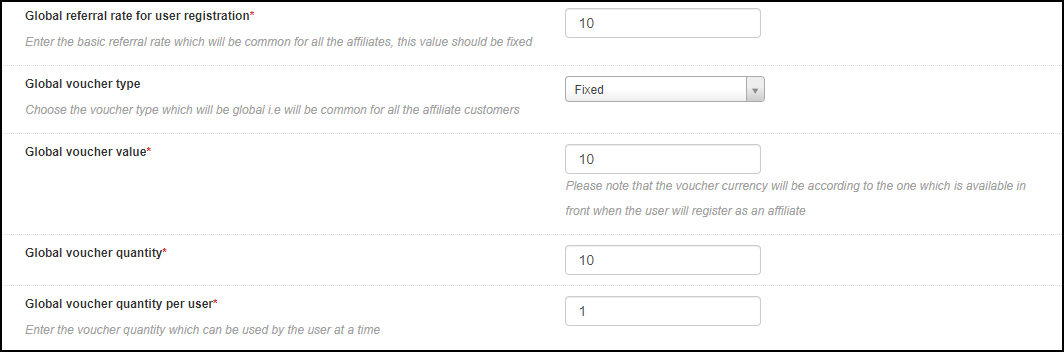
Magento Affiliate Program extension allows merchants to assign a voucher to the affiliates on their successful registration. The store admin can set the voucher value and offer it in the form of a fixed discount or on a percentage basis.
There is also the option to define the overall voucher quantity and voucher limit per user.
5. Set a period for your referral program
Magento Referral Program extension provides the option to run the referral program for a limited time. If you define a time period, the referral code won’t work after the specified period.
6. Get insights into registered affiliates
You can check the details of the registered affiliates under “Affiliate Customers.”
7. Get insights into referred customers
“Referral Listing” displays the data of the customers who have registered through the affiliate’s link.
8. Check incentives earned by the affiliates
Magento Referral program allows store admin to view the incentives earned by the affiliate partners under the “Commission History” tab.
9. Check payout requests raised by affiliates
Magento Affiliate and Referral Program extension lets the affiliate partner get their payout/commission in the form of a voucher or cash.
The affiliate customer needs to raise a request from his/her account to withdraw the earned commission, which will then be reflected under “Payout Requests.”
Benefits of Magento Affiliate and Referral Program extension
1. Magento Affiliate and Referral extension helps you acquire new customers. With more user sign-ups, you will get more leads which will be beneficial for your email marketing campaigns.
2. Magento Affiliate and Referral Program increases brand awareness since it follows word of mouth marketing.
3. You can drive more conversions and hence more sales when the referent makes a purchase using the voucher code.
4. You can maximize your sales by putting minimum efforts.
5. Offering exciting incentives to the affiliates can encourage them to bring you more customers.
6. Magento Affiliate and Referral Program is a boon for your advertisement cost.
Check out the admin demo and the front demo of the Magento Affiliate and Referral Program extension. If you have any concern regarding this module, you can mail us at support@knowband.com and our team will resolve your query to the earliest.
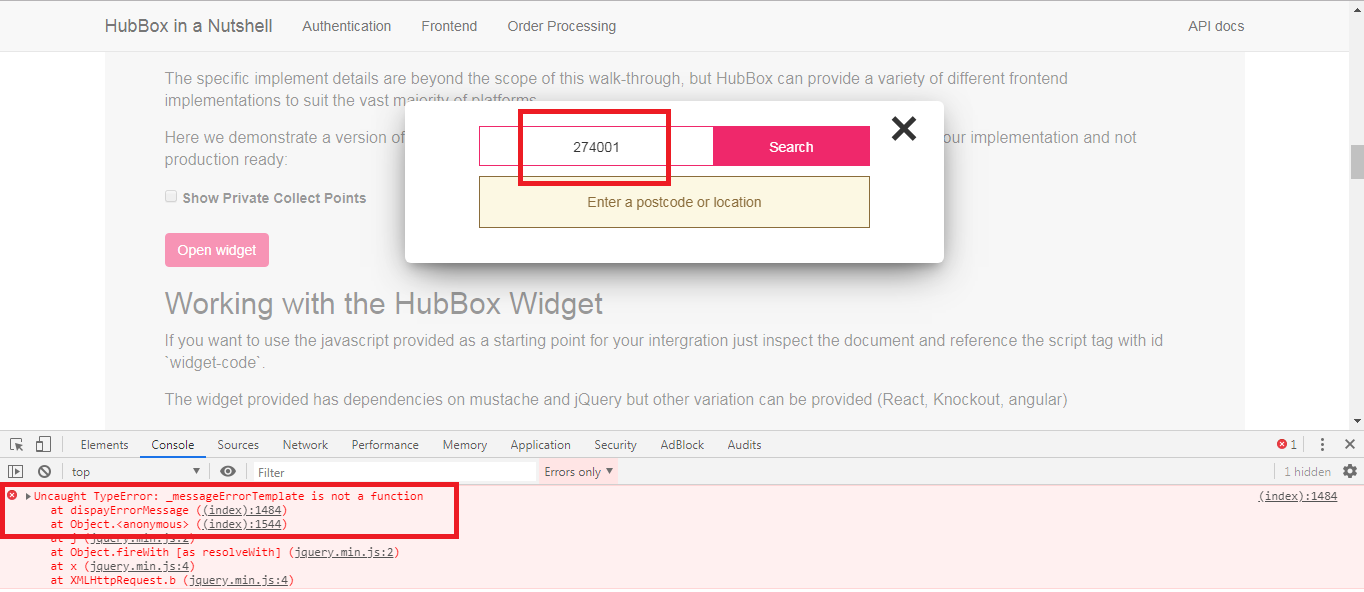
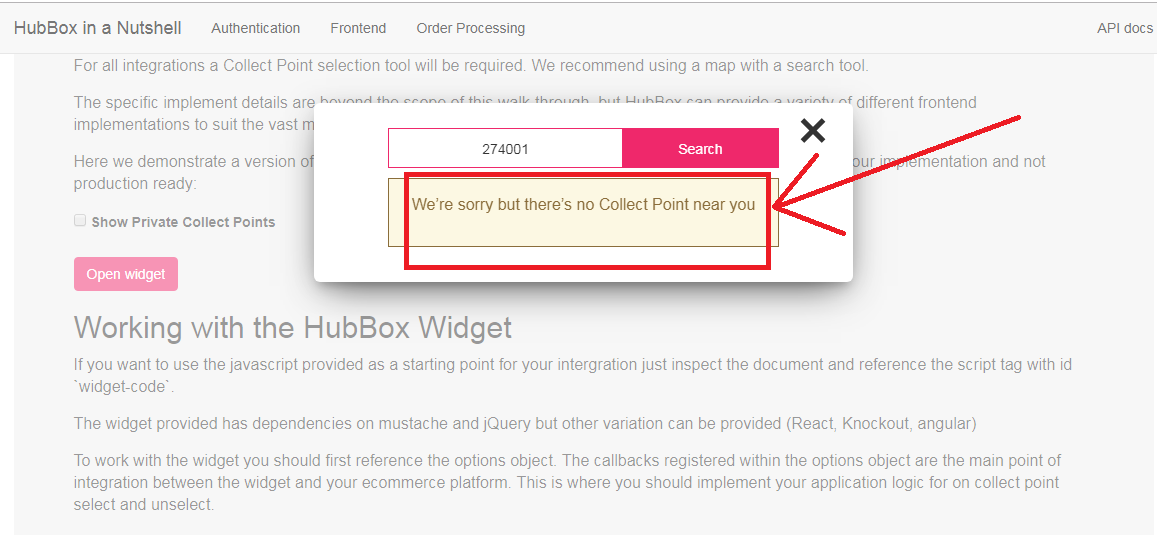
On searching the wrong address in the HubBox popup, there is no error message. When checked on the console, you are getting an error like “_messageErrorTemplate is not a function“.
Solution
The error: “_messageErrorTemplate is not a function” is coming because this function is not declared as function in the HubBox library.
To fix this issue you need to make some changes in the library of HubBox:
var _messageErrorTemplate = Mustache.render(_messageError || "");
var _messageWarning = $(selectors.messages.warning).html();
var _messageWarningTemplate = Mustache.render(_messageWarning || "");
and replace this with the below code:
var _messageErrorTemplate = function() { return Mustache.render(_messageError || ""); };
var _messageWarning = $(selectors.messages.warning).html();
var _messageWarningTemplate = function() { return Mustache.render(_messageWarning || ""); };
By declaring ‘_messageErrorTemplate‘ and ‘_messageWarningTemplate‘ as function, now you will get an error message on searching wrong address in the HubBox popup.
For e-retailers, the holiday season signifies only thing- more sales. It is that time of the year when there is maximum participation of the online shoppers in the eCommerce websites, and eCommerce merchants use this opportunity to maximize their sales.
Though the holiday season is all about increasing the sales graph, for the e-retailers, it requires tons of efforts to achieve it. You need to prepare a roadmap for the entire season, create effective marketing strategies, focus on your competitors, and a lot more to stand out from the rest.
While all these points are imperative to achieve holiday sales, nothing holds more importance than providing customers with a seamless and hassle-free shopping experience. The final quarter of the year captures a large number of visitors and it is your responsibility to convert them into regular customers.
For that matter, you need to focus on a few aspects like customer engagement, customer retention, user experience, etc. In this article, I will be presenting the list of our Top 10 modules that will help you cover every aspect and grab conversions better than ever in the coming holiday season.
The holiday season commences from Halloween and ends at the arrival of the New Year.
For Checkout optimization
1. One Page Checkout (PrestaShop, OpenCart, Magento and Magento 2)
Our One Page Checkout module helps you optimize your checkout page, to allow your customers with a hassle-free checkout experience.
Unlike the multi-step checkout process, it displays all the checkout elements on a single page and reduces the checkout friction.
To make the checkout path convenient for customers, our One Page Checkout offers Social Login, Guest Checkout, Inline Validation, Google Auto-address fill and supports nearly all the payment methods and shipping services.
Find the complete features and benefits of the checkout module for the respective platforms:
2. Spin and Win (PrestaShop, OpenCart, Magento, Magento 2, WooCommerce and Shopify)
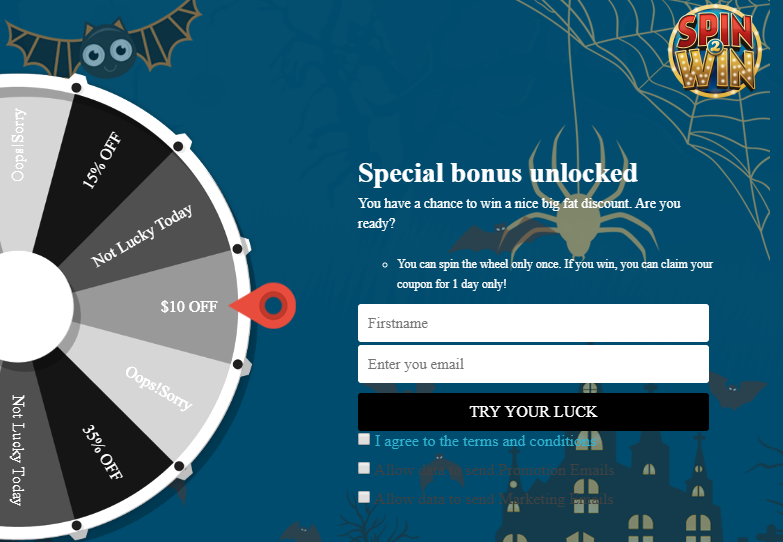
Increase customer engagement on your website by adding a Gamification element to it. The Spin and Win gamified popup draws the attention of your customers towards the eye-catching spin-win wheel and engages them in a fun activity.
Visitors are asked to try their luck by spinning the wheel and grab some exciting offers. But, in order to spin, a user needs to provide his/her details like name and email address.
So, this Spin and Win module not just builds customer engagement but also provides you with a nice way to obtain customer data and grow your email list, which you can use for your email marketing campaigns, and thus boost your conversions.
The module provides merchants with tons of customization ranging from designing the look of the popup to setting up the time for the popup appearance. Check out
3. Loyalty Points (PrestaShop, OpenCart and Magento)
Encourage repeat purchases by rewarding your customers with loyalty points on every purchase. Our Loyalty Points module ensures customer retention as well as customer acquisition.
The module lets you provide loyalty points to every new user who performs a sign-up on your store and triggers impulse buying, followed by more loyalty points on the successful purchase.
It converts visitors into potential buyers and makes them stick to your store in the long run. It also enhances brand loyalty to a great extent.
The Loyalty Points module lets merchants set up their terms and conditions for users in order to gain loyalty points. It can include offering loyalty points based on the total cart value, product quantity, product price, selected payment methods, etc.
The loyalty points earned by a user can be used as a discount voucher on the checkout page. Check out
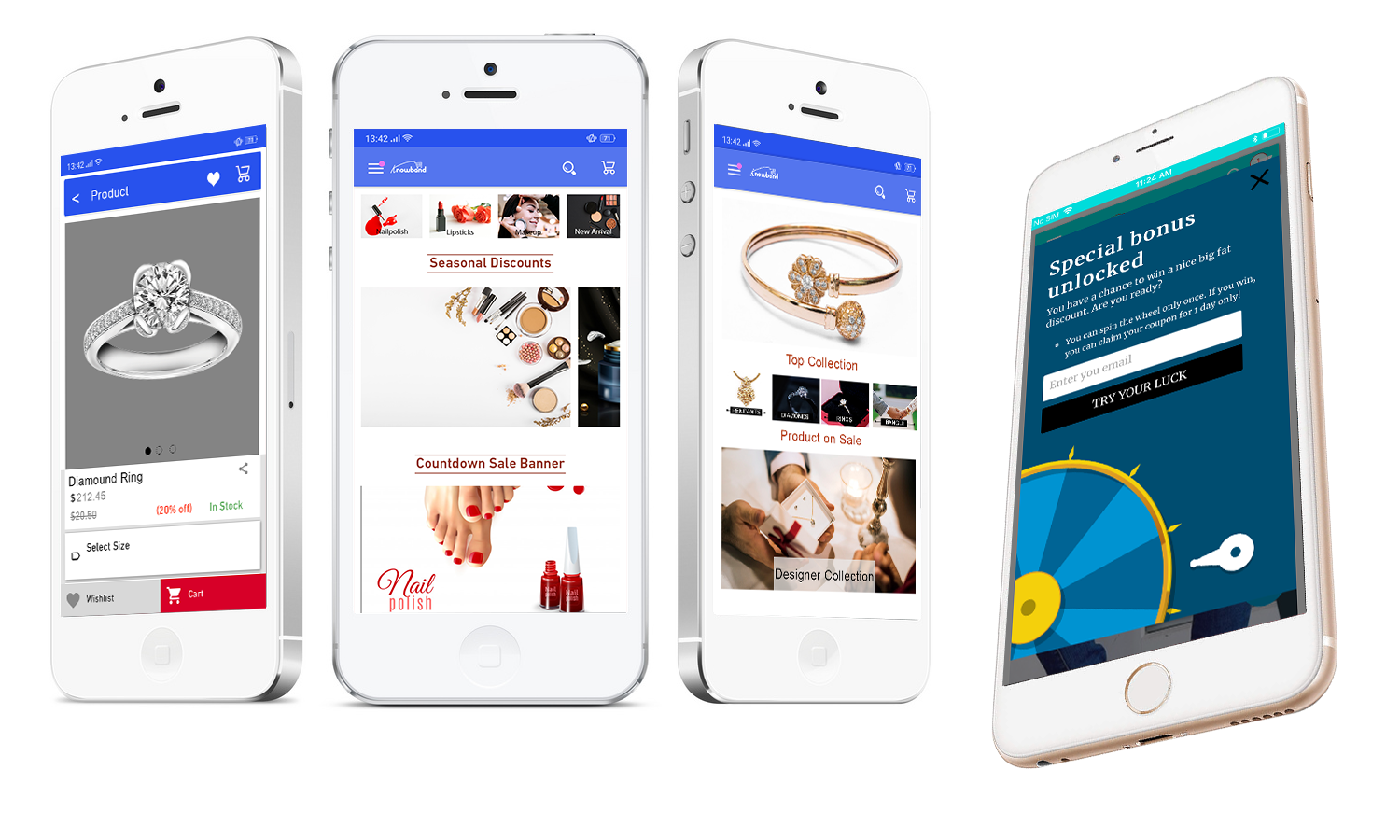
Our Mobile App Builder lets you transform your eCommerce website into an Android and iOS Mobile App conveniently, without any requirement of coding or technical knowledge, and helps you develop a rich, user-friendly, and a smartphone and tablet responsive mobile app for your business.
Since users nowadays demand an app for easy browsing experience, the Mobile App Builder module makes it the best fit to provide amazing user experience.
The holiday season is coming close, now is the best time to introduce your mobile app and delight your users, and grab huge holiday sales.
The Mobile App Builder offers Easy customization, Social login, Fingerprint and OTP login, WhatsApp and Zopim Chat support, Real-time synchronization of Website into App, supports multiple payment and shipping methods, etc. Check out
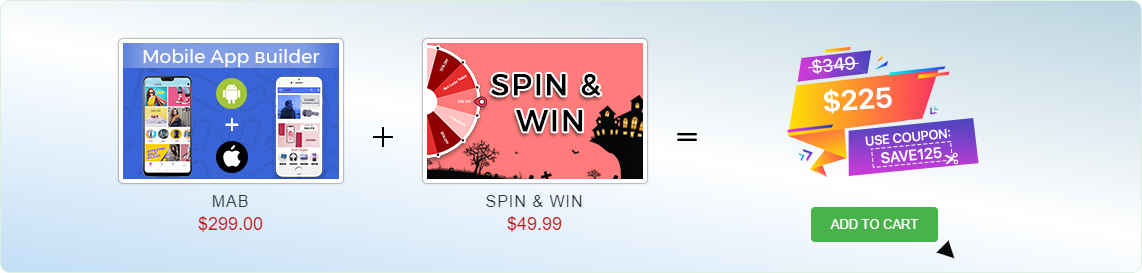
We are currently running an exclusive offer for the PrestaShop website owners where they can purchase a combo of PrestaShop Spin and Win and PrestaShop Mobile App Builder for just $225.
The individual cost of both these addons is $299 and $49.99 respectively. But with our combo pack, you will get a heavy discount of $125 and can get it for just $225.
All you need to do is apply the coupon code “SAVE125” during the checkout.
For improved site speed on mobile devices
5. AMP- Accelerated Mobile Pages (PrestaShop and OpenCart)
Our AMP module tackles the slow loading of your website on mobile devices and increases the page load speed to a great extent.
Did you know m-commerce accounted for 40% of the total sales in the US in 2018, as per Statista? If we talk about global m-commerce stats, it has already surpassed eCommerce. The numbers speak about the importance of smooth site functionality on mobile devices.
The AMP module, thus, ensures that your mobile users do not find any troublesome experience with your website and are offered a faster and smoother loading. Faster loading not only helps you reduce the bounce rate but also benefits in improved mobile rankings on the search engine.
Talking about its features, you can enable the AMP functionality for multiple pages on your website like Home page, Category page, Product page, etc. You can also customize these pages as per your requirements. Check out
6. Abandoned Cart (PrestaShop, OpenCart, Magento and Magento 2)
The Abandoned Cart module helps you recover your lost sales by sending regular follow-up emails to the abandoned cart users. The module reminds users about the incomplete purchase and allows you to convert them into customers by including exclusive offers in your emails.
It lets you define a period after which the cart is automatically assumed to be abandoned. You can, thereafter, track those users and send them the abandoned cart reminder through your emails. The email content can be personalized.
The Abandoned Cart module can boost your conversions significantly. Check out
The Return Manager module helps you manage your eCommerce returns conveniently and enhances customer loyalty by making the return process way too easy for the customers.
Since the holiday season captures a huge number of orders, there will be returns for sure. Our Return Manager module ensures that you do not lose out on customers due to a poor return process.
The module provides 3 return choices to the customers in the form of Credits, Refund and Replacement, and allows them to highlight the defect by uploading the image of the defective/damaged product. One interesting feature of the module is that the admin can create the return request on the customer’s behalf. Check out
PrestaShop Booking and Rental system addon provides your customers with a hassle-free online booking experience and makes it a simple task for the merchants to manage their online bookings.
This PrestaShop addon offers appointment booking facility, hotel booking facility and rental booking facility. It lets you adjust your booking days and time slots as per the availability, and you can adjust the price for different days and timing. There is much more it offers for every booking type.
9. Web Push Notifications (PrestaShop, Magento and Magento 2)
Knowband’s Web Push Notifications module lets merchants alert their users about the abandoned cart, drop in the product price, product availability (when back in stock) and the order status. For each of them, the user can decide whether he or she wants to receive updates regarding them.
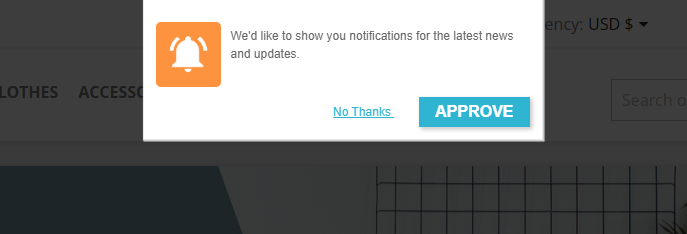
For the Web Push Notifications to work, the visitor needs to click on approve when the notification popup appears. This welcome popup can be customized as per your desire.
The module allows you to fix a time for the notification delivery. You can either send the notifications immediately or schedule them for a fixed time. Check out
10. Affiliate and Referral Program (PrestaShop, Magento and Magento 2)
The Affiliate and Referral Program module allows users to register as an Affiliate partner on your store and earn commissions for every successful referral.
The user can refer your store to his/her friends, family, relatives, etc. by sharing with them the affiliate link or the referral code. They can send it over email and also share the link on the social media directly from their affiliate account.
You can assign the commission to the affiliate partner for every new signup via their referral and also provide incentives when the referred user places an order. The commission rate can be set under the configurations of the module. Check out
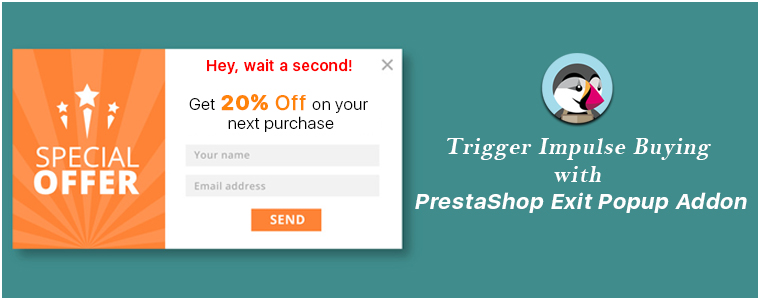
“Grab customer attention and trigger impulse purchase when the user decides to leave your store, with PrestaShop Exit Popup addon.”
Popups are amazing as far as they are not hampering the user experience or disturbing the user flow. This is where Exit popups have been effective as they tend to appear only when a user shows the intent to take an exit from your website.
We, at KnowBand, understand the value of user experience in the eCommerce industry and also the merchants’ zeal to gain more conversions. This is what led us to develop an Exit popup that could maintain the user experience and allow merchants with an opportunity to get more conversions.
If you own an eCommerce website on the PrestaShop platform and looking for such addon, PrestaShop Exit Popup is exactly what you need.
PrestaShop Exit Popup addon
PrestaShop Exit Popup addon displays an interactive popup to your site visitors as soon as it detects the user’s intention to leave your website; by tracking the mouse movement. It helps you make one final attempt to stop the user from leaving your store by grabbing their attention through some exclusive offers.
Note: PrestaShop Exit-Intent Popup can also be used as an Entry Popup.
Why you should have the PrestaShop Exit-Intent Popup?
PrestaShop Exit Popup is a feature-packed addon that provides PrestaShop merchants with some effective tactics to draw customer attention towards your store offers and persuade them to make a purchase.
Let’s have a look at the features of the PrestaShop Exit Intent Popup.
1. Make perfect adjustments for the Popup appearance
PrestaShop Exit Popup lets you perform plenty of customizations to deliver the popup effectively to your visitors and customers.
Specify when you want to display the popup
The addon provides you with 3 options to set the time for the popup appearance. You can choose to display the popup
– as soon as the visitor enters your store
– after a user has spent certain time on your store (you can mention the time after which you want to display the popup)
– the user has scrolled down to a certain limit (you can mention the scroll percentage)
– after the user has visited a few pages on your website(you can mention the minimum number of page visits to show the popup)
Specify the pages on which you want to display the popup
You can choose to display the popup either on all pages or show/hide it for some selected pages.
Choose who you want to display the exit popup
Admin has the choice to show the popup to all visitors, new visitors or returning visitors.
Set a display frequency of the popup
Merchants can set the popup display frequency for every visit, one visit per hour, one visit per day, one visit per week or one visit per month.
Restrict popup appearance for users of some specific regions
You can choose to display the popup either to worldwide visitors or disable it for users of some specific countries.
Select a minimum screen size for the popup display
Admin can define a minimum screen resolution below which the popup will not be displayed to the user.
Hide popup automatically after a certain time
PrestaShop Exit Popup addon provides you with the option to make the popup disappear automatically after a few seconds.
2. Personalize the look and feel of the Popup
PrestaShop Exit-Intent popup comes up with pre-existing themes to design your popup. You can give it an attractive CTA, adjust the look with various colour customization options, etc.
3. Customize your offers
Select what you want to offer through the exit pop-up to your visitors- whether a free delivery, a gift, or some discount on the purchase.
4. Mailchimp, Klaviyo and SendinBlue Integrator
Every time a user provides his/her data while collecting the offer, their data would be sent directly over to your Mailchimp, Klaviyo and SendinBlue account, whichever you are using for the Email marketing purpose.
5. Customize your Emails
You can personalize the email content that would be sent to the users as soon as they provide their email address in the popup.
6. Graphical and Pie chart analysis
PrestaShop Exit Popup module shows the graphical comparison of the total generated coupons and used and unused coupons.
You can track where your users are coming from, which device they are using whether it is a mobile or desktop, etc.
7. Compatibility and Support
PrestaShop Exit-Intent Popup is GDPR compatible, multi-store compatible and Mobile, Tablet and Desktop Responsive.
PrestaShop Email subscription Popup addon provides many other features like setting up the coupon expiry duration, email verification during checkout to confirm whether the coupon code is used by the same user who generated it at first place or not, etc.
Benefits of PrestaShop Exit Intent Popup:
1. Trigger impulse buying at the last moment
2. Obtain customer data efficiently for your email marketing campaigns
3. Boost your conversions
4. Encourage purchases through exclusive offers and discounts
5. Increase your average site time
The Bottom Line
Conventional popups are not effective anymore. They have become an annoyance for the users and if prompted repeatedly, can compel them to never visit your store again. With PrestaShop Exit Popup, you get one of the best ways to grow your subscribers list and increase your eCommerce conversions.
If you have any concern regarding this module, you can reach out to us at support@knowband.com and our team would be happy to assist you with your queries.
Consumers’ demand for tailor-made products has reached the sky in recent times. Going back a few years, this was primarily limited to personalized mobile cases and mugs where people used to have their pictures printed on their mobile case or gift personalized mugs to their close ones, and it was more or less seen in brick-and-mortar stores.
Product customization has now turned into a vast online business and it is being offered for a variety of products. Some brands have their whole business based on product customization while some are adding customization trends to their business to enhance the shopping experience.
What is Product Customization?
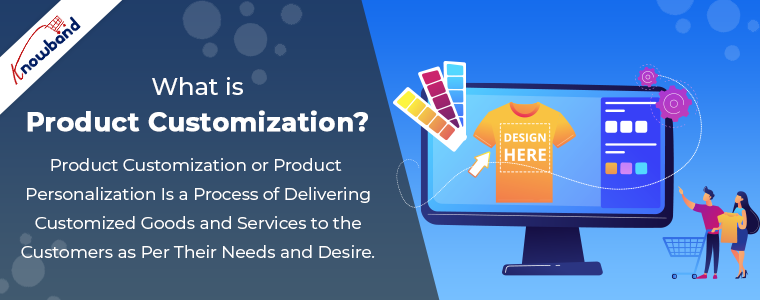
Product Customization or Product Personalization is a process of delivering customized goods and services to the customers as per their needs and desire. Customers can either approach a merchant to make certain customizations in a product or personalize the products themselves, exactly the way they want. The latter is what the online stores offer, where customers can customize the products online.
Product customization has made a stand in the eCommerce market and has caught the attention of e-retailers. Let’s try to understand why the Product Configuration service has gained popularity among the eCommerce merchants.
Benefits of Product Customization
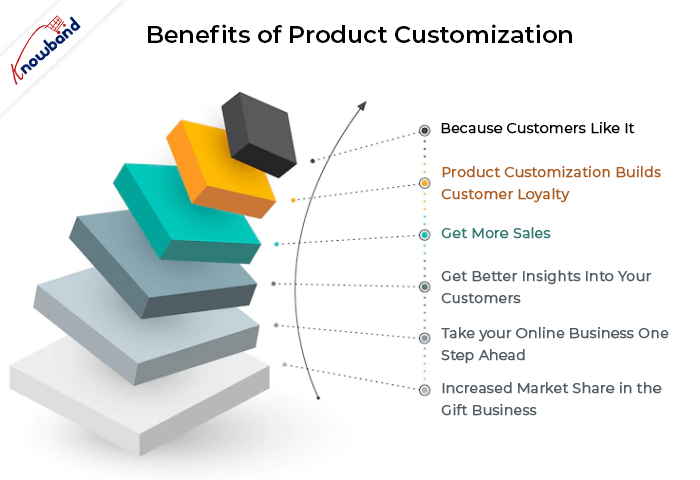
1. Because Customers Like It
Starting a business hugely depends on customers’ liking towards it, and the idea of personalization has been gladly accepted by the customers.
Product customization adds a personal touch to the product. When customers design it their way, the end product not just remains a product but a feeling gets attached to it no matter whether they are doing it for their own or for someone else.
Since customers like the personalization concept, it provides Brands with an excellent opportunity to excel in the eCommerce market.
2. Product Customization builds Customer Loyalty
One of the major benefits of product customization is that it develops customer loyalty. And there is no better way to gain customer loyalty than offering them full access to design the product as per their taste. The primary reason for earning that loyalty is customer satisfaction.
Apart from customer loyalty, product customization enhances brand loyalty. If you provide your customers with ample customization options, they will more likely feel attracted to your brand and would prefer it over your competitors in future purchases.
Product Personalization establishes a connection between the brand and the customers and improves customer retention to a significant level.
3. Get More Sales
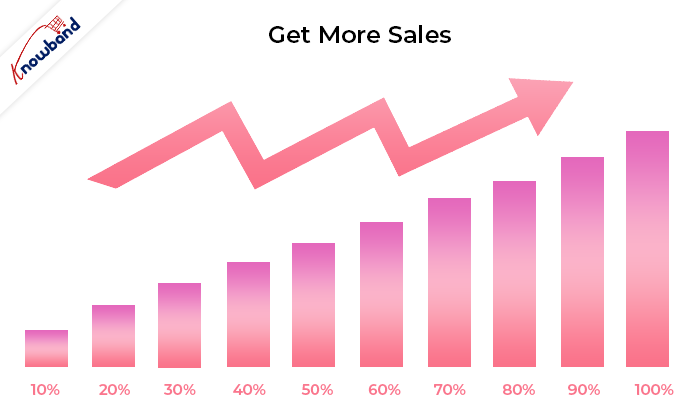
Moving further to the advantages of Product Customization is that it brings you sales.
In the end, there is only one thing that matters- the number of sales. If you have made your customers loyal to your brand, sales aren’t going anywhere.
Customers do not hesitate in paying extra for a personalized item because they do not see it just as a product but something of their own. I can back this through a study by Deloitte which reports that 1 in every 5 consumers would not mind paying 20% extra for an exclusive product.
Also, as per Invesp, 59% of the marketers are getting a good ROI after offering the product personalization facility.
Product Personalization also encourages word-of-mouth marketing because if one customer feels totally satisfied with your services, he or she would definitely recommend your Brand to others. This way, you can expect a higher count in your sales figure.
4. Get Better Insights into your Customers
Adding to the benefits of product customization is that a personalized purchase gives you a more detailed analysis of your customer’s preferences, likings, and taste than a normal purchase.
When customers purchase customized products, Brands can collect that information and utilize it to offer products based on their previous preferences.
So, we can say that Product Personalization helps you know better about your customers and offers you an advantage over your competitors.
53% of the online shoppers feel that brands that offer product personalization provide a valuable service.
45% of the shoppers are more likely to shop from a store that offers personalized recommendations.
The increasing popularity of product customization has made the online shopping experience intriguing for the customers. So, it is high time to start offering product customization services and take your business to the next level.
If you have an eCommerce website on the Prestashop Platform, you can consider using PrestaShop Product Customizer/Designer.
6. Increased market share in the gift business
With the introduction of technology, India’s gifting business has seen a transformation. Online gifting has exploded in popularity in recent years, with an estimated market value of $84 billion by 2024.
People enjoy providing personalized gifts to their loved ones. And personalizing a product turns an otherwise mundane item into a thoughtful present!
Offering a product customization facility helps you own the gift product industry as more and more transactions are made online.
Product Customization module by KnowBand
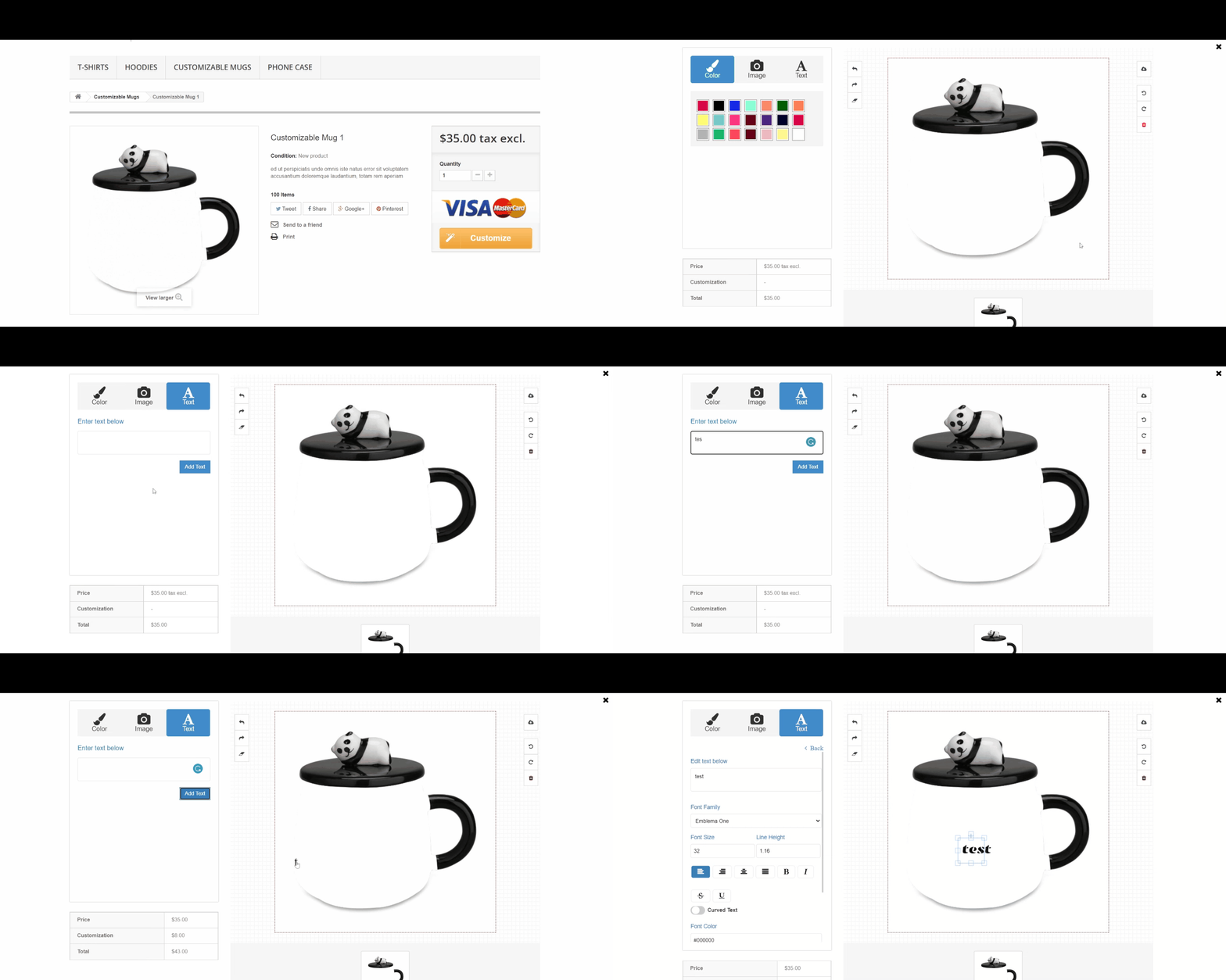
Knowband offers a Product Customization module that lets you provide customization services to your customers. It adds a customization tab on your product pages and allows your customers to personalize a product as per their desire.
From adding the desired images to putting up a customized text and QR code, the Product Designer module comes with a variety of features to help customers personalize the products exactly the way they want.
It also provides merchants with many customization settings like setting up the customization price, providing customers with the design preview, and much more. So, if you want to add the customization facility to your Business, I would highly recommend you to try this module. It provides you with an amazing opportunity to increase the average order value. If you have a website on the PrestaShop or OpenCart platform, you can try out-
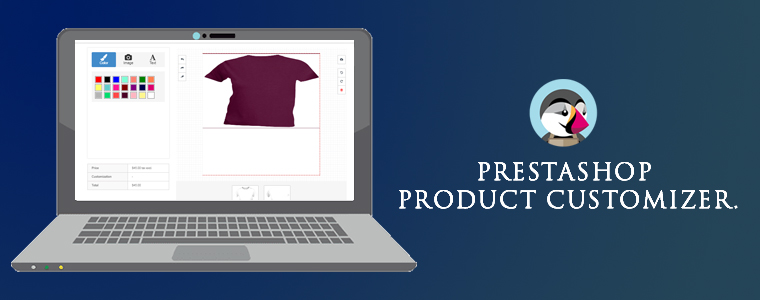
“Allow customization/personalization on your store products by offering a design panel to your customers on the product page with the help of PrestaShop Product Customizer, also referred to as Product Designer.”
You would have often seen people having personalized mobile cases, t-shirts, pillows, mugs, etc. This is what we call as Product Customization where people can customize a product as per their desire.
Earlier, the customization services were mainly available in the offline market but now, it has caught the attention in the online eCommerce market as well. People are looking for brands that offer product customization facility.
Following the interest of people towards product customization, Knowband has introduced the Product Customizer module that helps online businesses provide product customization facility to their customers.
PrestaShop Product Customizer/Designer is a great way to enhance the shopping experience of the users by providing them with some wonderful customization features.
Key Features of PrestaShop Product Customizer
Here is what our PrestaShop Product Designer addon offers:
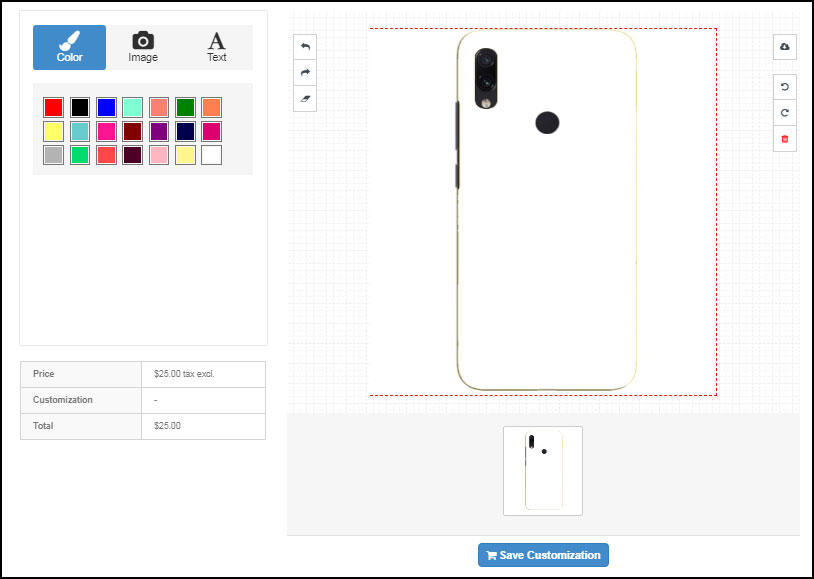
1. Merchants can add pre-existing templates for the customers. If the user likes it, he or she can easily pick and place the image on the product they want to customize.
Or merchants can simply let the customers put their preferred picture on the product.
2. With PrestaShop Product Customization module, merchants can allow their customers to pick the desired colour from a number of colour options to adjust the look and feel of the product.
3. Allow customers to place a text on the product. You can add as many font styles as you want for some unique and attractive text appearance.
4. When the product customization is done, customers can preview it in the cart and also download its PDF.
Note: These options are available under the basic module configuration. The product customization conditions can be set up by visiting Catalogs>Products
Once you have added the products to your website from the back-end, you can perform tons of customization for every different product, from the Products tab. From there, the admin can
1. Specify whether the product should be available for customization or not.
2. Specify the maximum image upload size.
3. Set a price for the image placement on the product.
4. Allow customers to download the PNG file of the customized product.
5. Allow resizing and rotation of the text.
6. Allow customers to add a QR code on the product.
7. Display image filters
8. Set a price to add text
9. Enable cost per character
10. Set the price to add QR
11. Set a fixed price for the complete customization
12. Enable/Disable the text block on the customization page.
13. Set a minimum and maximum text length.
14. Allow text transparency and curve
15. Allow customization on different sides of a product. For example, in the case of a t-shirt, you can enable customization for either sides or both.
Final Word
With plenty of customization features, PrestaShop Product Customizer makes it the best fit to offer product customization to your users.
If you face any issue in this module or have any query regarding this, you can contact us anytime at support@knowband.com
Click here to visit the Product Page. Take a complete tour of the module by testing out the admin demo and the front demo. You can also refer to the user manual for any confusion.
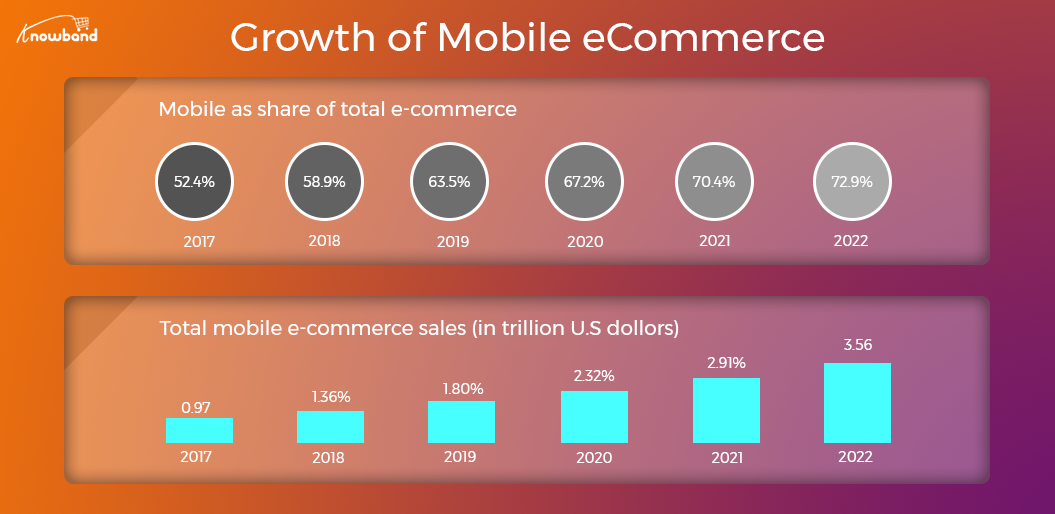
The revolution in the mobile app space has created a significant buzz in our lives. Almost every sector has been digitized with the impact of mobile apps & the eCommerce industry isn’t an exception to this. After online commerce, mobile commerce has changed the perception of how users shop products these days. Various research & studies are confirming the fact that users prefer eCommerce mobile app & are more loyal to that as compared to desktop websites. The simple factor behind it is that the users get all relevant product information at their fingertips.
Mobile commerce & customer loyalty go hand-in-hand. When it comes to bonding of your online store with worldwide users, mobile apps are the best solution. Those days are gone when marketing through websites was enough to bring potential users to your store. Currently, mobile apps are the bridge between your business & the user. Technically, an app takes your store straight to user’s pockets, compel them to browse & purchase products.
Here, I am discussing a few points which will hopefully clear the value of launching mobile shopping apps. Read them:
#1 Keep users updated about latest happenings
In online shopping, the users are always keen to get the best products at reasonable prices. If you can adapt this strategy, it will make a huge impact on your sales. At times, the users keep on spending their valuable time in searching best offers. Don’t let them struggle. Try to keep them fully notified & updated about the best deals on your store along with upcoming sale or offers. You can even let specific users pre-sales offer before it’s available in general.
Marketing store deals & offers is much easier with a handy push notification tool. It not only builds your brand reputation but also notifies users about the offers even when they are not using the app. The personalized push notifications will deliver the right information to the users & compel them for instant purchase.
Also Read:
#2 Personalize App Home Screen for better Experience:
The home screen has its importance for a shopping app as the basis interaction begins here only. Try to highlight daily deals, best offers, new arrivals, seasonal discounts, etc. with attractive banners & graphics. This will compel the users to browse the selected product grouping & has the high chances of successful purchase as well. The store admin can even go for Flash Sale or Timer sale to create the necessary spark.
More you personalize the app, more it gets able to connect with users. The users even feel more valued with the availability and ease of everything required. Keep other screens of your app simple & intuitive offering better user experience gaining customer loyalty in return.
Also Read:
#3 Offer Discount Coupons & Rewards to boost sales
Coupons had been a strengthening factor in increasing the conversion rate of your online store. That too for the long past back. It will also work with mobile apps. Make sure the coupons running on your website also work on mobile apps & allow users to avail the valid discount. It will even reduce the rate of cart abandonment.
Everyone around us loves to get a price drop or something extra while shopping products. You can use your mobile app to build the right strategy for that. Offer reward points for their previous purchases or let them earn points by app referral system. It will also invite other users to your app & will maintain a sense of excitement about the purchase.
Also Read:
#4 Provide 24*7 User Support to gain trust
Customer interaction is a must for an online business. Often, the users need some sort of confirmation or having doubts before making payment. We should have a relevant medium to curb out their queries. Mobile Apps are the best suited for this job. They allow the users to directly contact you with inbuilt WhatsApp or Zopim chat options.
The prompt response to their queries will make them satisfied & increase customer engagement as well. Moreover, it brings you the best chance to improve user retention & gain loyalty. This is also one of the leading factors behind satisfactory feedback for your products.
Also Read:
#5 Strengthen your positive brand image
The mobile apps improve the visibility & reach of your online store & thus strengthen your brand presence worldwide. Nowadays all the leading eCommerce giants are majorly accessed through their mobile apps. That big is the scope of mobile apps in today’s market branding.
Your app icon in the user’s devices, brand logo in apps makes sure that whenever users browse the mobile, your app will notify them about the brand. Keeping all your online store details readily available for users, the mobile apps form a positive image for your brand improving user retention & loyalty.
Also Read:
Conclusion:
With the above-discussed points, it must have been clear that mobile Commerce app can be a potential source of engagement & loyalty for your eCommerce business. It connects well with the right audience & hits where it should. Thus, to build strong user-base with increased revenues, creating an eCommerce mobile app should be your very next move.
While using the library provided by HubBox, there is an error occurring-
require(C:\wamp64\www\HubBox\sample\src\public/../../vendor/autoload.php): failed to open stream: No such file or directory in C:\wamp64\www\HubBox\sample\src\public\index.php on line 14
Solution
This error occurred because of dependencies on files that are missed. You need to solve this issue by using below steps:
Step1: Delete the file sample/composer.lock from the library.
Step2: Make a folder with the name “vendor” under /sample/
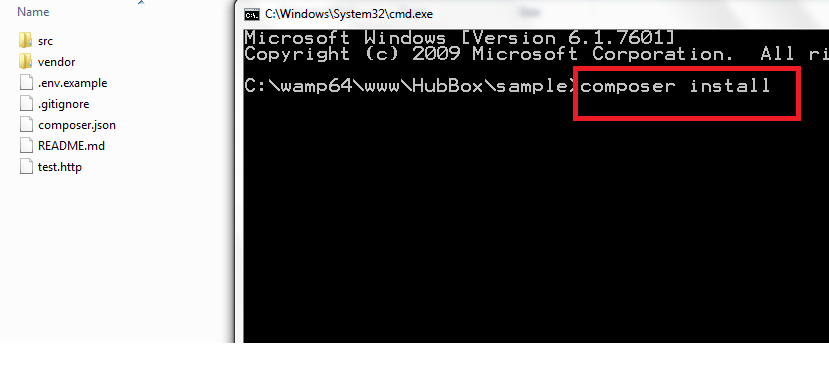
Step3: Run the command “composer install” in command prompt at /sample/
It will download all the dependency files which are required.
After successfully downloading all the dependencies, you will able to use the HubBox library.
Magento Loyalty Points Extension by Knowband allows the online merchant to give loyalty points to the online users on new registration, first order, any specific order placed by the customers and other events. The online customers can generate a coupon of these loyalty points and use it on their next purchase from the store. The online store admin can this way increase the conversion rate of the website by offering loyalty points to the customers using this Magento Loyalty Points Extension.
Loyalty points make the online users come back and order again and again from the store. The online merchant can set the conditions according to which, customers will get loyalty points. The Magento Loyalty Points module allows the online merchant to offer loyalty points on the customer’s birthday. This Magento Loyalty points system extension is mobile responsive, customizable and offers smooth functioning.
1.1 Basic Features of this Magento Loyalty Points Extension
The Magento Loyalty reward points plugin helps the store admin to offer loyalty points to the customers.
By offering loyalty points, the online merchant can ensure customer retention and customer acquisition.
The online merchant can set terms and conditions for providing loyalty points. The Magento Loyalty Points module allows applying Cart, Product Rule and Behavior rule from the admin interface.
The Magento Loyalty points system extension provides an option to set the price amount for a single loyalty point.
The online store admin can also set the order status on which the online users can get loyalty point.
The online merchant can set the loyalty point expiry date and also send alert notification to the customers before set days of expiry date.
The online admin can also offer loyalty points on customer’s birthday and also restrict this functionality to the specific customers by by selecting customers group.
The Magento Customer reward points plugin provides instructions to setup cron. Admin can get the URLs to Add to Cron via Control Panel and also get instructions of Cron setup via SSH.
The Magento Loyalty points system extension also provides an option to offer loyalty points to any specific customer by setting the loyalty points, validity, status and email id for sending loyalty points. The store merchant can also upload CSV file for adding points.
The eCommerce store merchant can create various rules and apply them for offering loyalty points. The online users can get loyalty points when he meets the conditions.
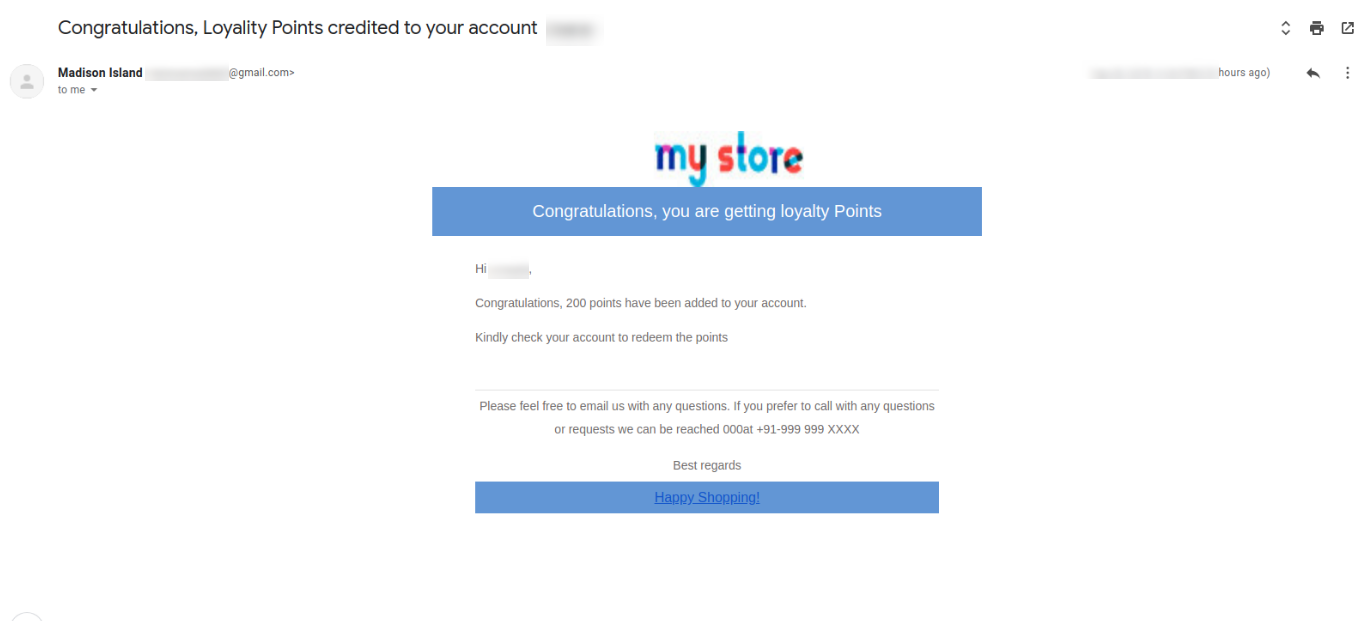
The Magento Loyalty reward points plugin provides an option to send an email informing them regarding loyalty points.
The Loyalty points extension for Magento allows the online store admin to view the loyalty point balance of all customers from the admin interface.
The Loyalty points extension for Magento provides an option to change the status, validity and number of loyalty points.
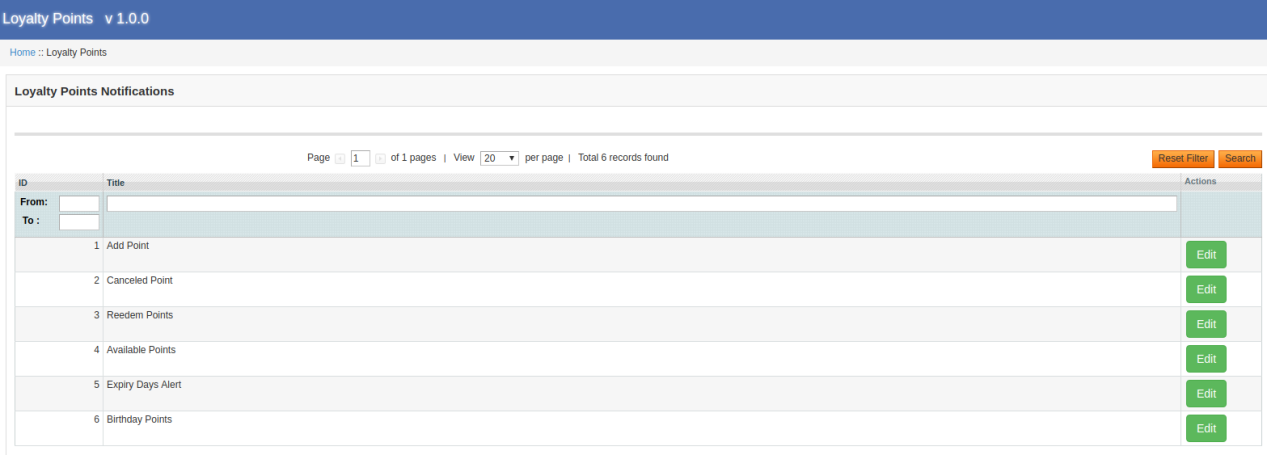
The loyalty points module provides ready-made email templates that can be further customized. The online merchant can enable the settings for sending email while offering loyalty points.
2.0 Installation of Magento Loyalty Points Module
The online store merchant can install the Magento Loyalty Points Extension easily by following these steps:
1. Download the extension package from the Knowband store.
2. After downloading the extension package, you will get a zipped file. Unzip the package on the root folder of Magento setup via FTP manager (like Filezilla or WinSCP – download here: https://filezilla-project.org/). The store admin will find the files and folders as shown in the image below:
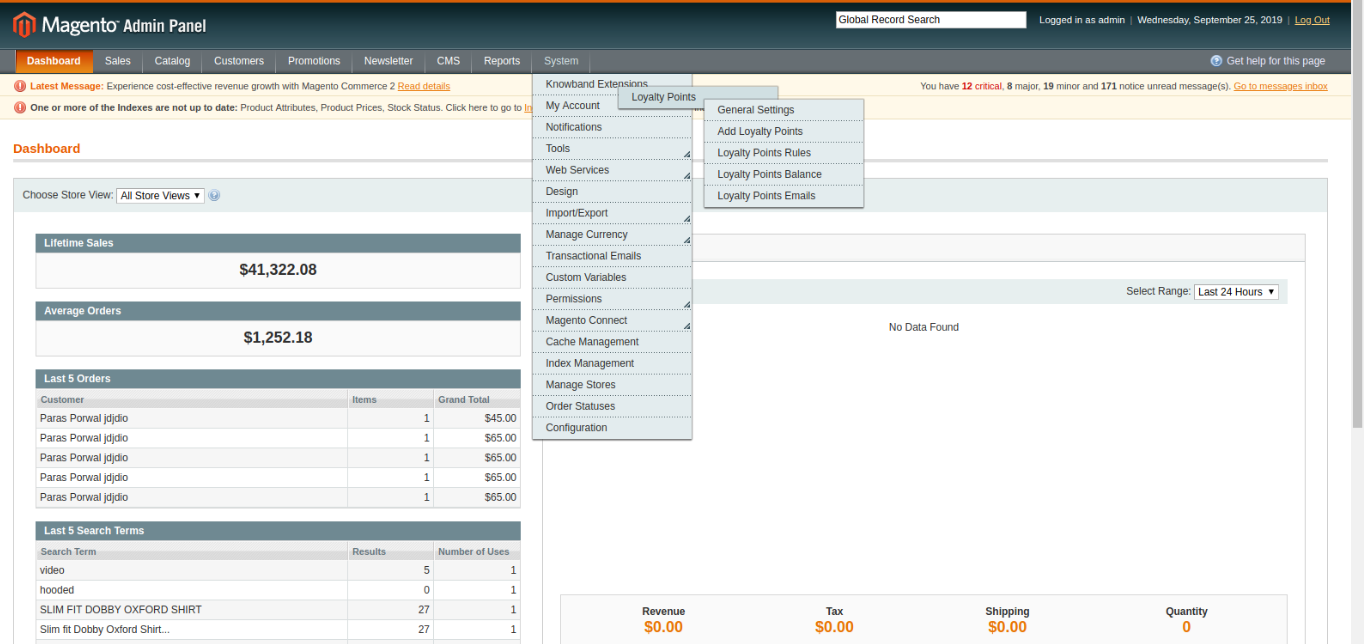
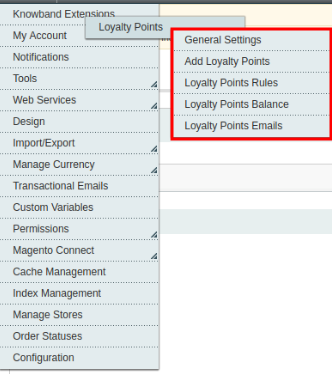
3. The extension is now installed and ready for use. In the Admin Panel, go to “System > Knowband Extensions >Magento Loyalty Points Extension”.
Now, the store admin can use and configure the Magento Loyalty Points module.
3.0 Admin Interface
After successful installation, the eCommerce store merchant can easily configure the Magento Loyalty points system extension. There are multiple configuration options as shown below:
General Settings
Add Loyalty Points
Loyalty Points Rules
Loyalty points balance
Loyalty points Emails
Admin can easily apply settings and configure them easily.
3.1 Loyalty Points – General Settings
The store admin can apply loyalty points related settings and also offer loyalty points on birthdays.
3.1.1 General Settings
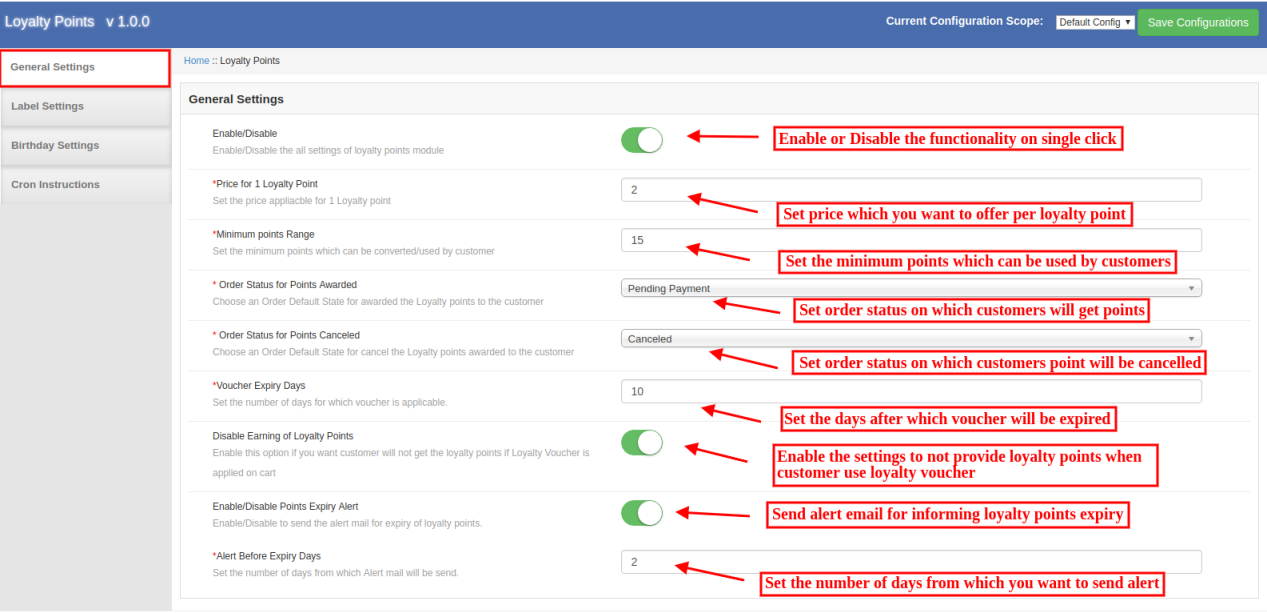
In General Settings, the store admin can configure basic settings related to loyalty points. The online merchant can apply these settings from the admin interface of this Magento Loyalty reward points plugin:
Enable/Disable: click on the button for activating or deactivating loyalty points functionality.
Price for 1 loyalty point: Here, set the price which will be applicable for 1 loyalty point.
Minimum Points Range: Set the least loyalty points which can be used by the customers.
Order Status for Points Awarded: Set the order default status on which customers will get loyalty points.
Order Status for Points canceled: You can also set the order status on which loyalty points will be canceled from the customer’s account.
Voucher Expiry days: Set the number of days after which voucher will get expired.
Disable Earning Of Loyalty Points: Enable this option if you don’t want to offer loyalty points to the customers if a loyalty voucher is applied in cart.
Enable/Disable Points Expiry Alert: Enable the option if you want to send an email to alert the customers about the expiry of loyalty points.
Alert Before Expiry Days: Set the number of days from which you want to send an alert email.
3.1.2 Label Settings
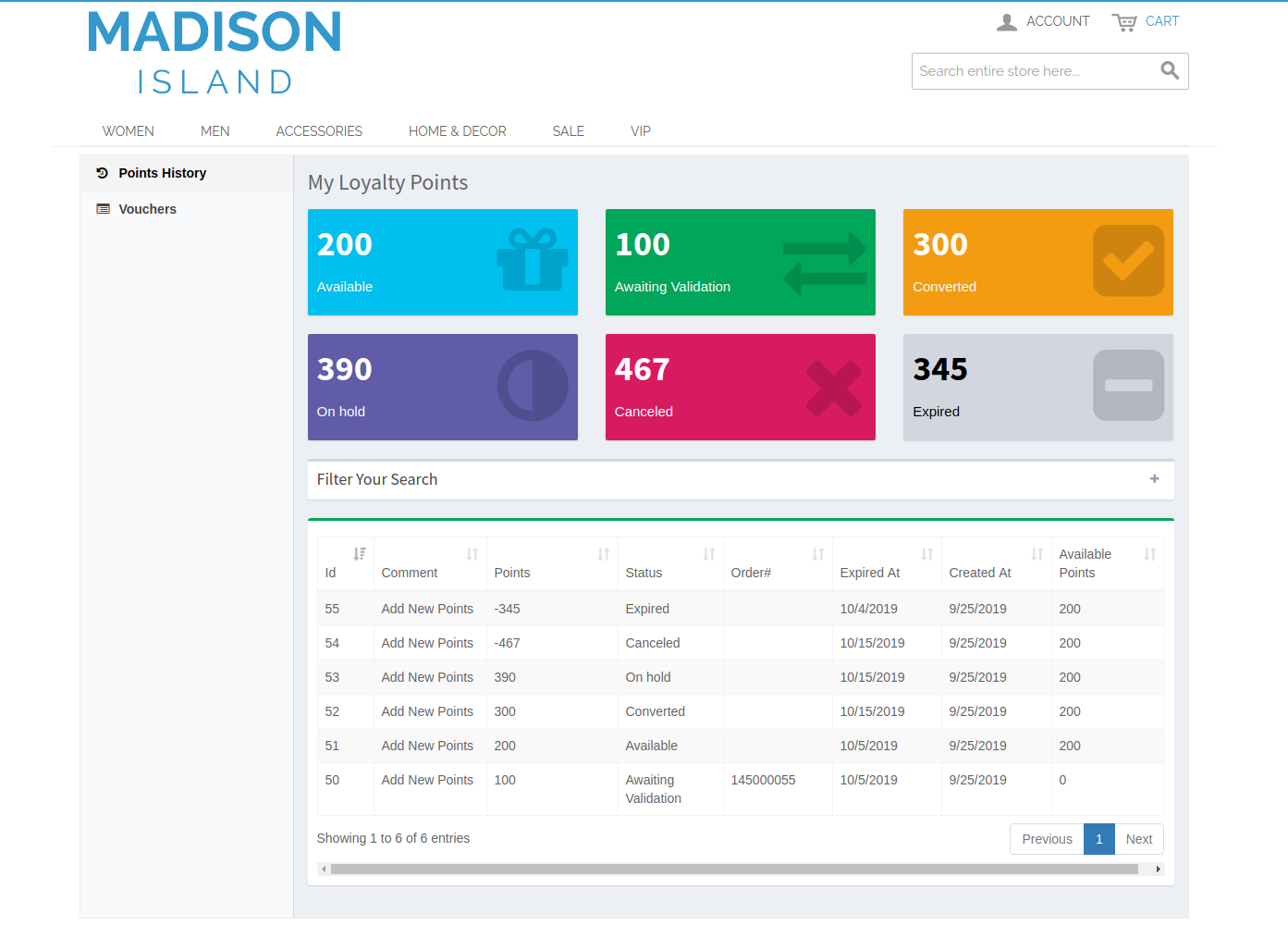
Here, the online store admin can set the label for loyalty points. The Magento Loyalty reward points plugin allows setting label for Awaiting Validation, Converted, On Hold, Available, Canceled and Expired loyalty points.
3.1.3 Birthday Settings
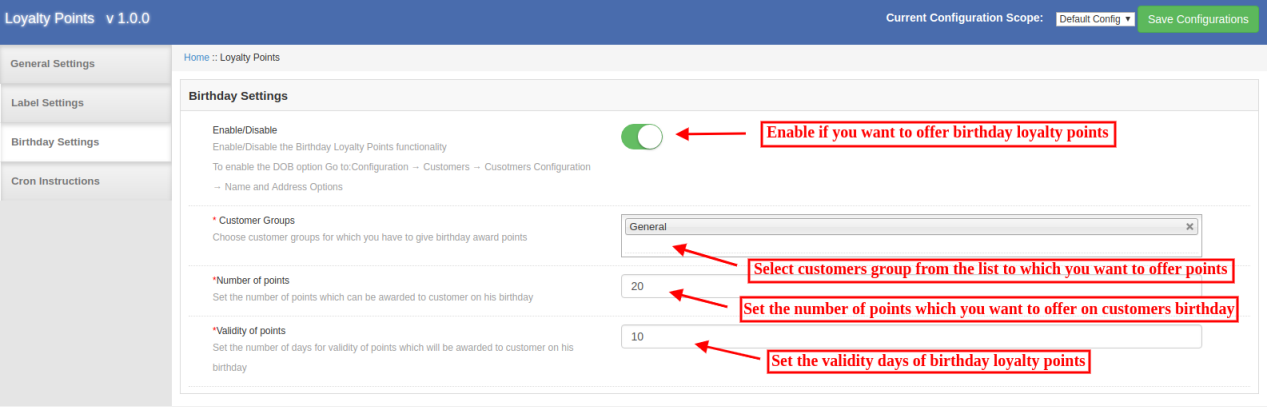
The Magento Loyalty points system extension allows the store admin to apply settings for offering birthday loyalty points. There will be customizable options as shown below:
Enable/Disable: The online store merchant can enable or disable the settings from the Magento Loyalty points system extension admin interface in order to offer loyalty points on birthdays.
Customer Groups: Select the customer group to whom you want to offer loyalty points on their birthday.
Number of points: Set the number of loyalty points which you want to offer on customers birthday.
Validity of Points: Set the number of days for which loyalty points will be valid.
3.1.4 Cron Instructions
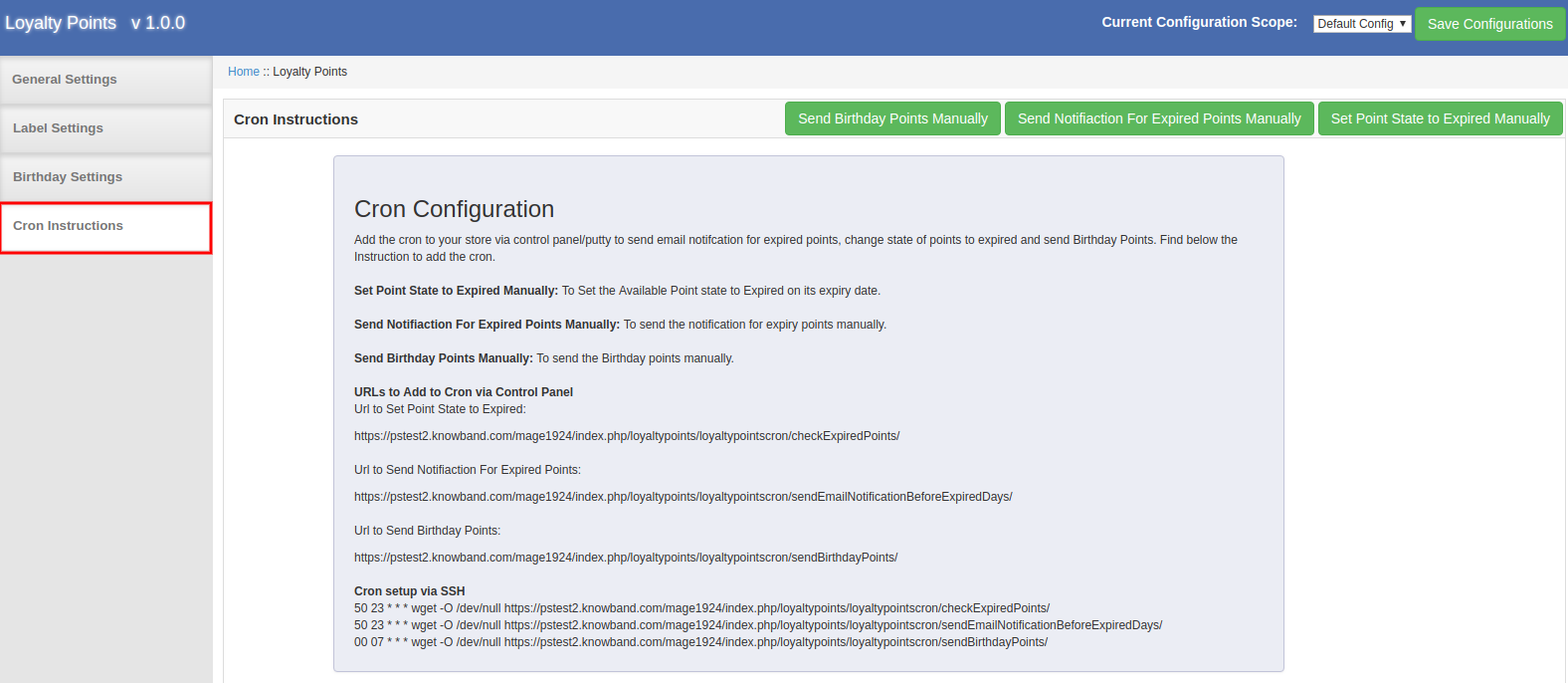
The Magento Loyalty Points Extension provides instructions to setup cron. It provides URL to add to cron via Control Panel. The Store admin can also view the instructions to setup cron via SSH.
Admin can configure cron and manage the overall process of offering loyalty points. This way, admin can send birthday points manually, send a notification for expired points and set loyalty point state to expired manually.
3.2 Add Loyalty Points
Here, the store admin can apply settings related to loyalty points. View the detailed description of all the configuration options.
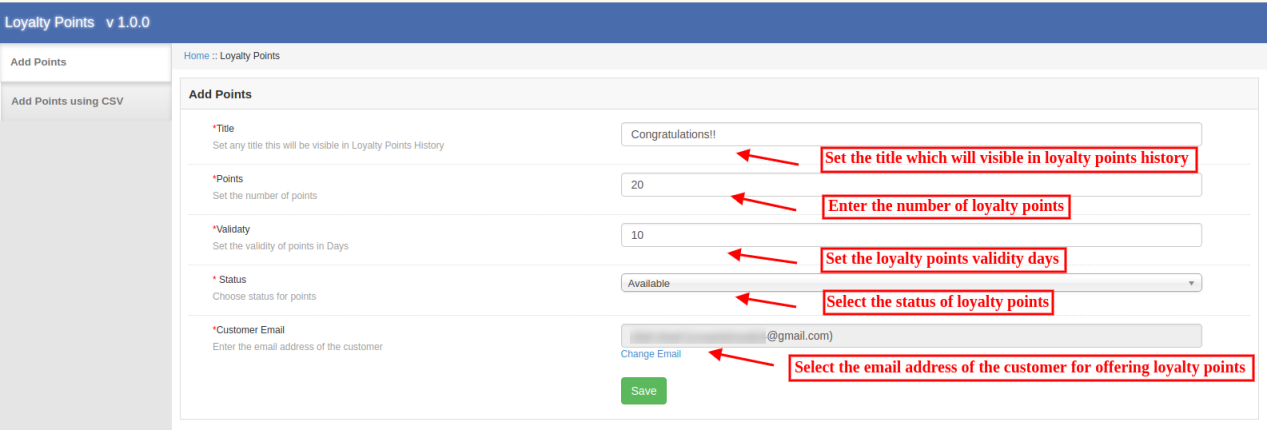
3.2.1 Add Points
The online merchant can offer loyalty points for the customers by selecting their email id from the Magento Loyalty points system extension admin interface. Check the customization options below:
Title: Set the loyalty points title which will be shown in loyalty points history.
Points: Set the number of loyalty points.
Validity: Set the points validity days.
Status: Select the status for points.
Customer Email: Enter the customer’s email id here.
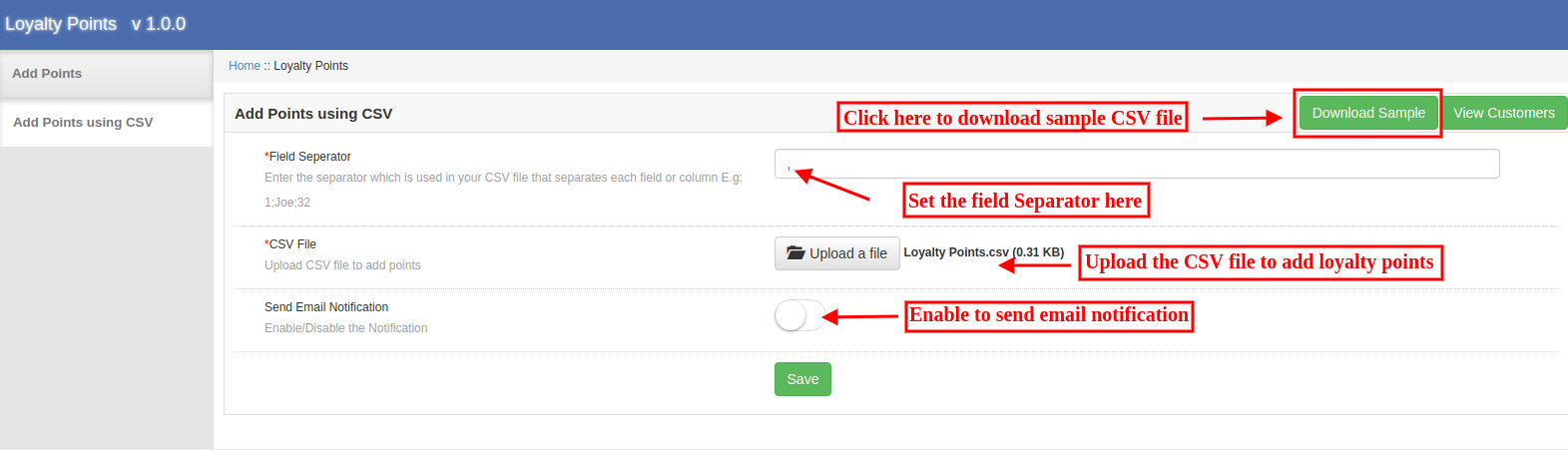
3.2.2 Add Points Using CSV
Admin can download the sample CSV file and then add loyalty points with other details. Then the admin can upload the updated CSV files for offering loyalty points.
Field Separator: Set the field separator for every column.
CSV File: Upload CSV File to add loyalty points .
Send Email Notification: Enable or Disable email notification option from the admin interface of Magento Loyalty points and discount module.
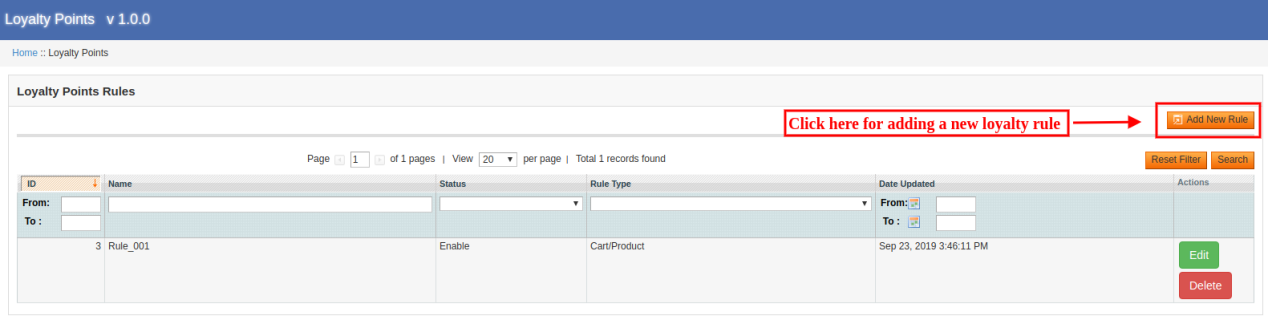
3.3 Loyalty Points Rules
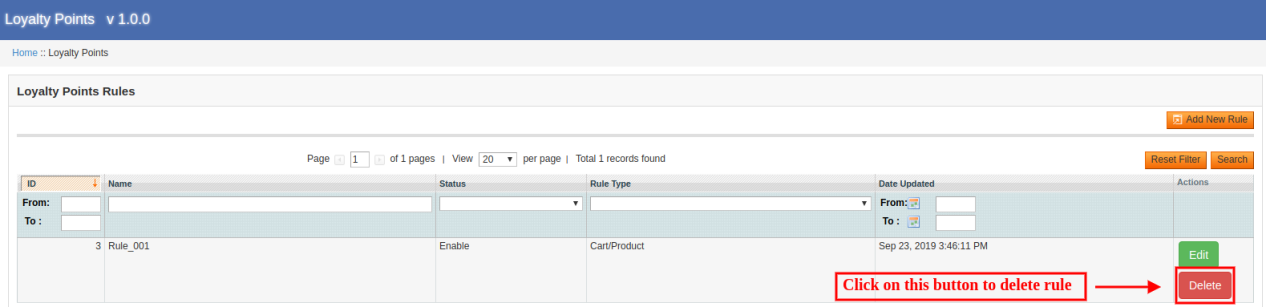
Admin can create multiple rules for loyalty points. The Magento Reward points module allows for adding various rules without any limitations. Admin can edit or delete any rule anytime from the Magento Reward points module admin interface.
3.3.1 Add new Loyalty Rule
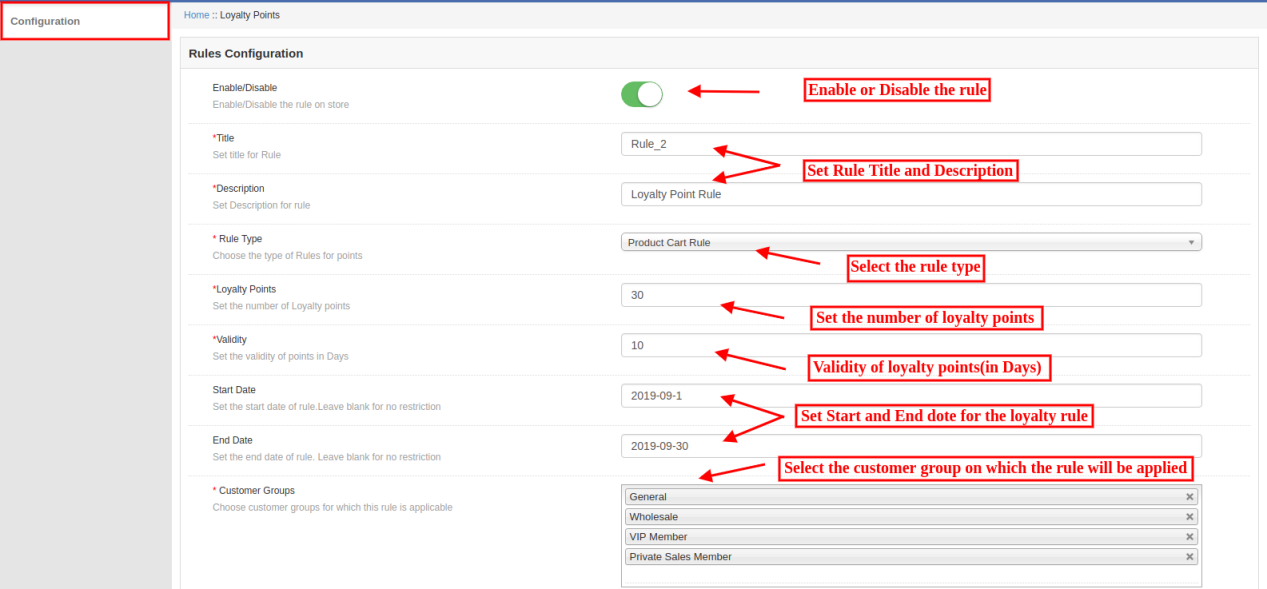
Admin can apply the settings and add new rules easily from the Loyalty points extension admin interface.
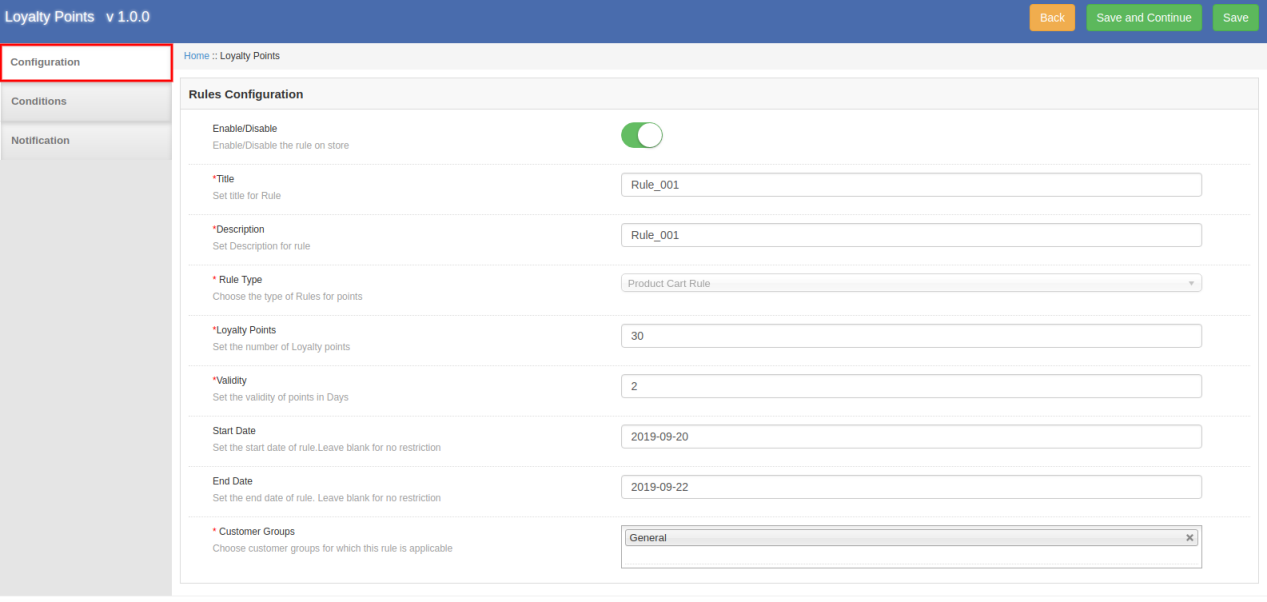
Enable/Disable: Enable or Disable The rule for the website.
Title: Set title for the rule.
Description: Set the rule description.
Rule Type: Choose the type of Rules for points.
Loyalty Points: Set the number of loyalty points.
Validity: Set the validity of loyalty points in days.
Start Date: Set the start date of the rule. Admin can leave it blank if he doesn’t want to put any restriction.
End Date: Here, set the end date for the rule. An online merchant can leave it blank for no restriction.
Customer Groups: Select the customer’s group for which this loyalty rule is applicable.
There are several rule types which are based on product cart and behavioral rule.
A. Product Cart Rule
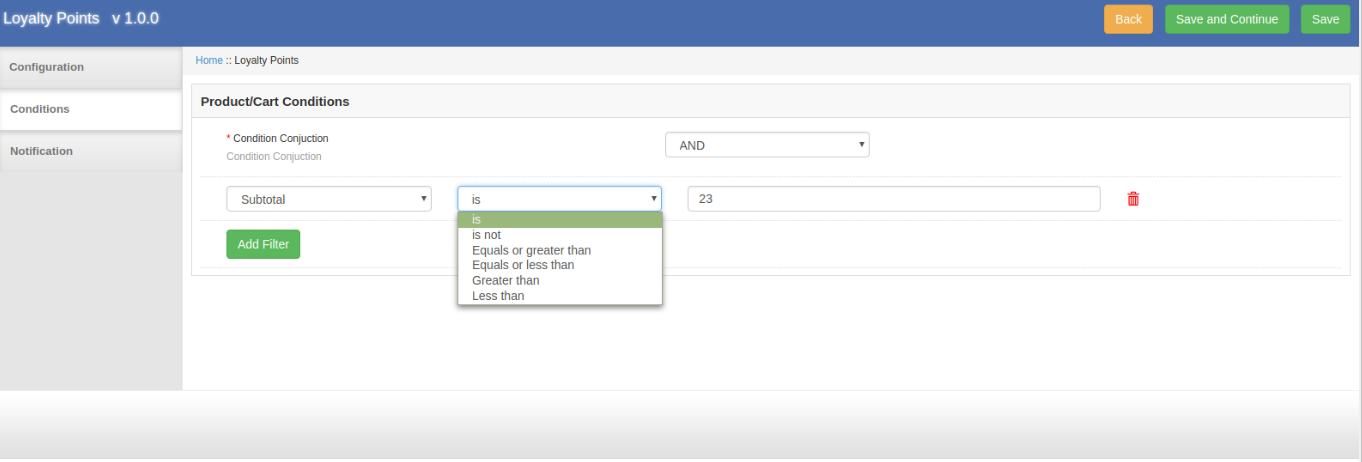
1. Offer loyalty points based on the cart subtotal
The online merchant can apply conditions on cart subtotal amount. There may be several conditions and customers can get loyalty points when the condition meet properly.
The customers can get discount when the subtotal is any specific amount, is not a specific amount when cart total amount is equal to or greater than selected amount when cart amount is equal or less than the selected amount, greater than the selected amount, less than the amount as per the module settings.
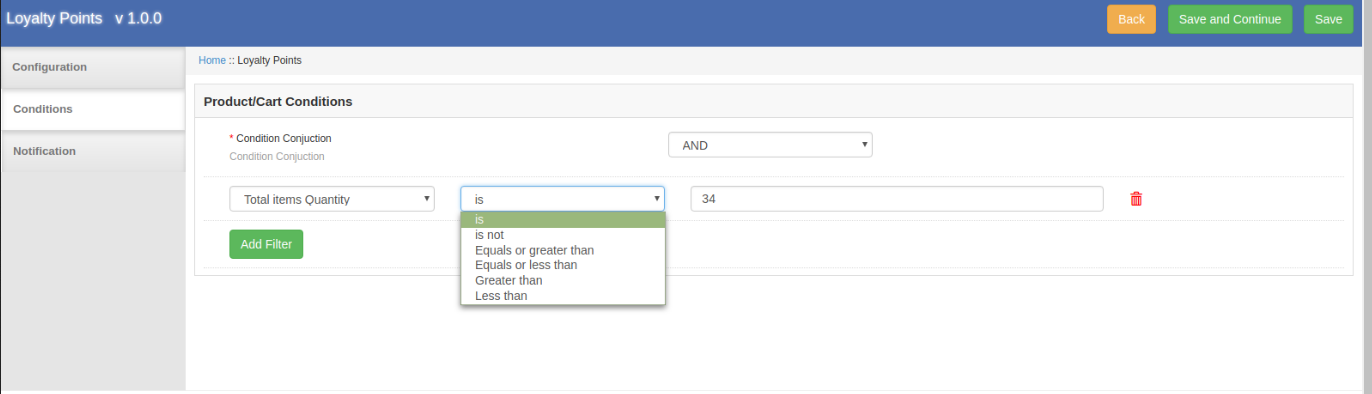
2. Offer loyalty points based on the item quantity
Admin can provide loyalty points to the customers when they shop for specific product quantity. Similar conditions as “cart subtotal” can be included in item quantity.
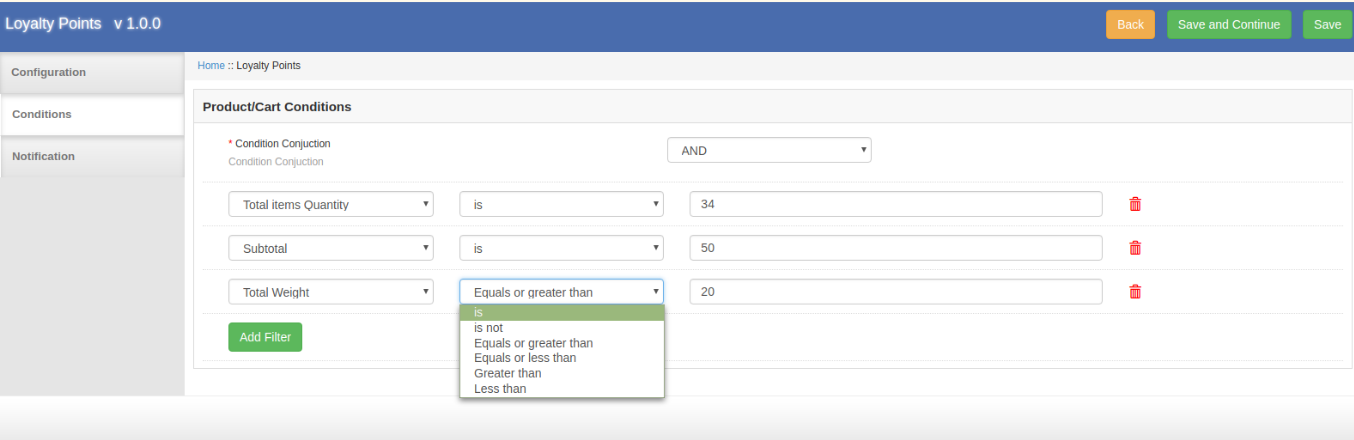
3. Offer loyalty points based on the total weight
Define what should be the total weight of the cart to earn loyalty points.
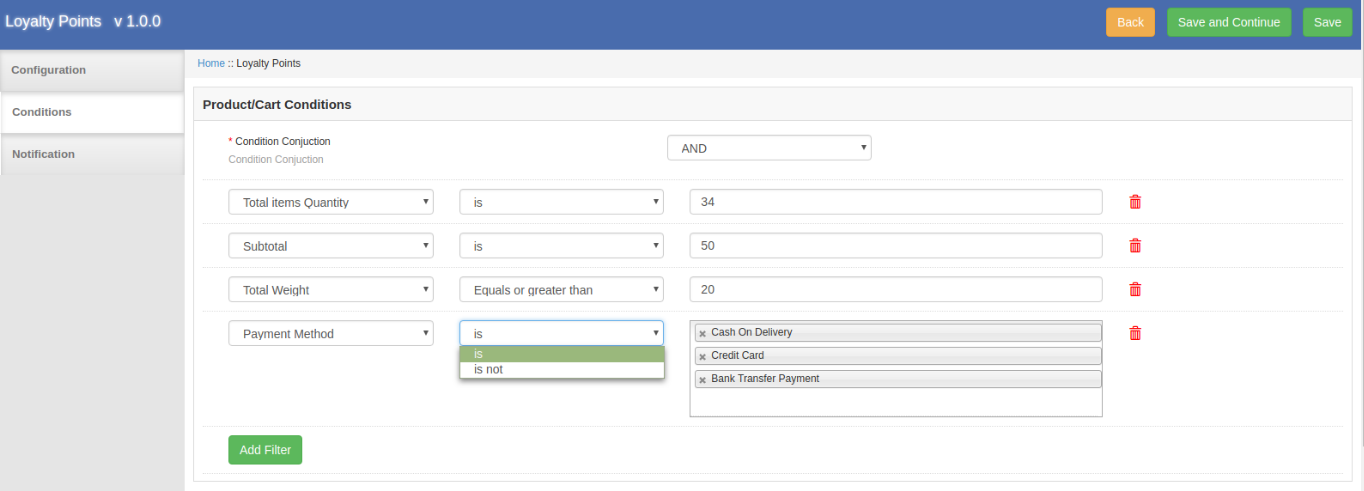
4. Offer loyalty points based on the Payment method
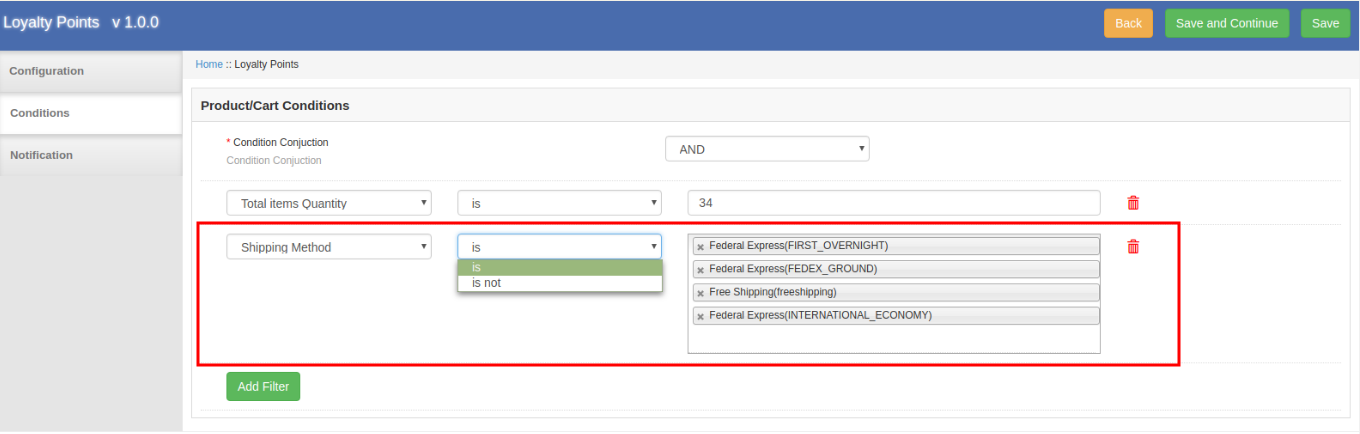
The Loyalty points extension for Magento allows the store admin to provide loyalty points when any customer makes a payment through the specified payment method.
5. Offer loyalty points based on the shipping method
The store admin can provide loyalty points when a customer opts for the defined shipping service.
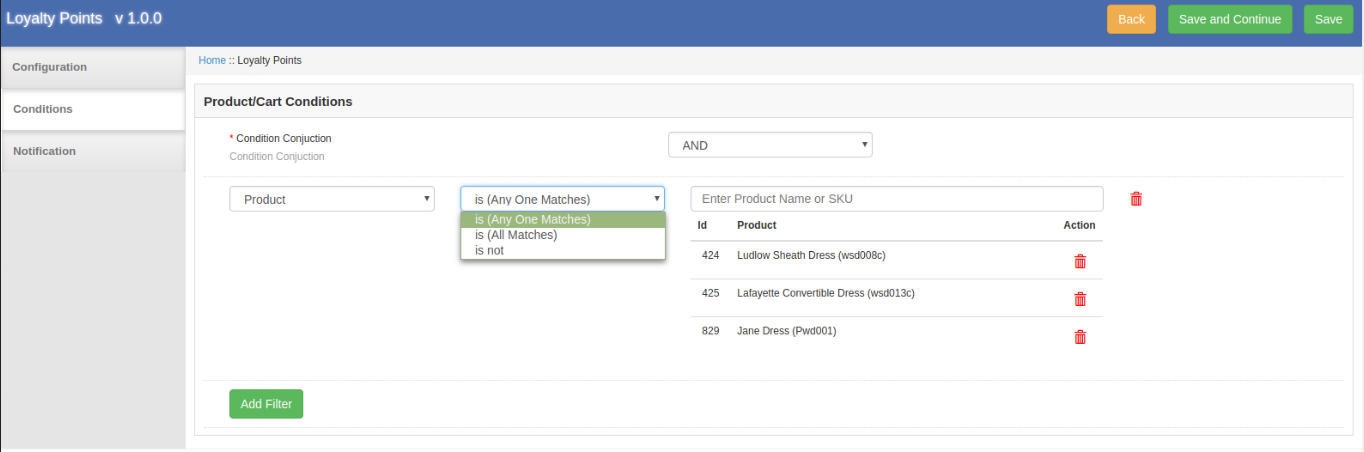
6. Offer loyalty points based on the product
The Magento Loyalty points system extension allows the online store admin to offer loyalty points when cart products match with all/any selected product or no product matches.
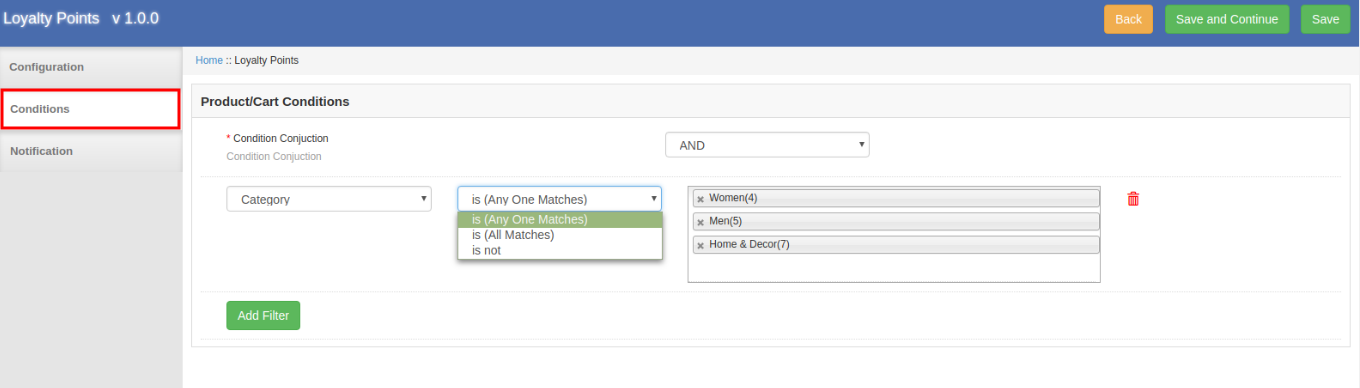
7. Offer loyalty points based on the Product
The online merchant can offer loyalty points when customers purchase from a certain category(all or any matches)/do not purchase from the specific category.
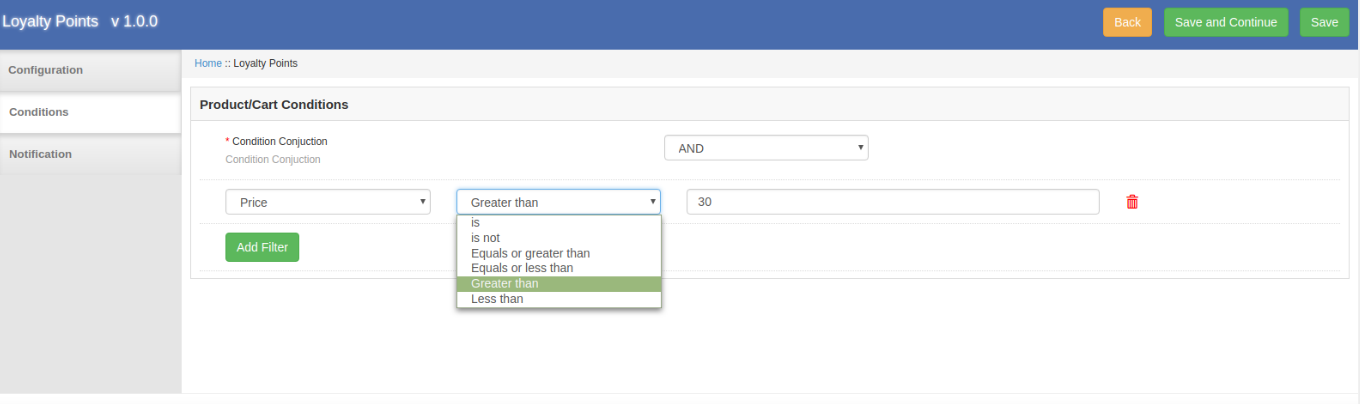
8. Offer loyalty points based on the price
The Loyalty points extension for Magento allows the store admin to offer loyalty points when the cart price meets conditions as per the Loyalty points extension settings. Similar conditions as “cart subtotal” can be included in Price Settings.
9. Offer loyalty points based on the attribute set
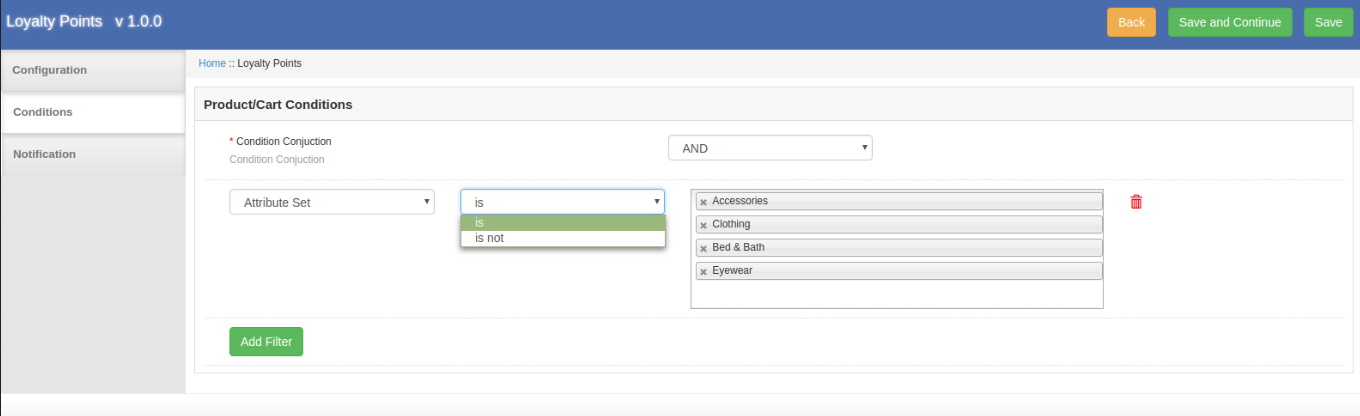
The online store admin can set the conditions related to attribute sets. The customers can get reward points if added products from/not from a specific attribute set. (As per the conditions)
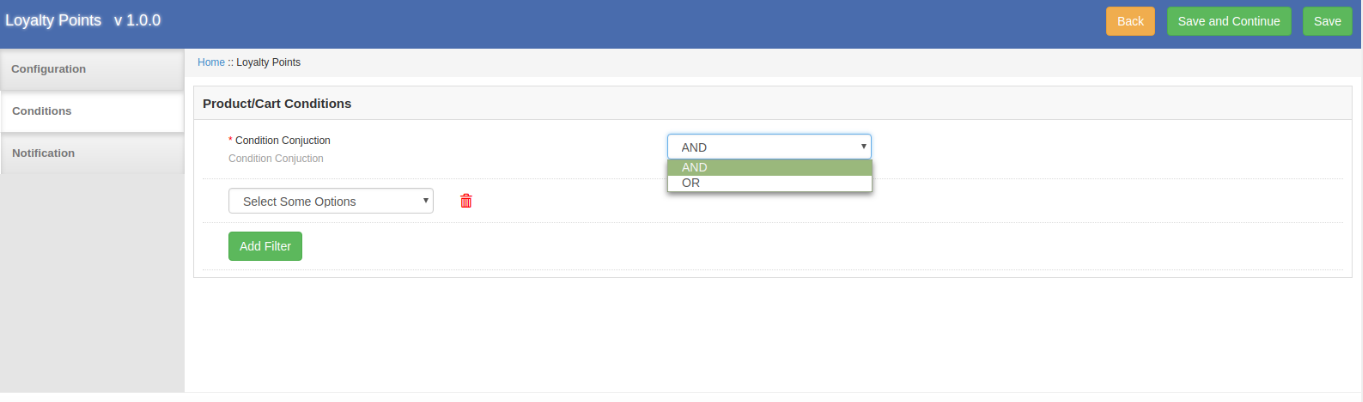
Note: In the conditions section, the online merchant can select “AND” or “OR” condition conjunction. All conditions should match for offering loyalty points while using “AND” conjunction and any of the condition should math while applying “OR” conjunction.
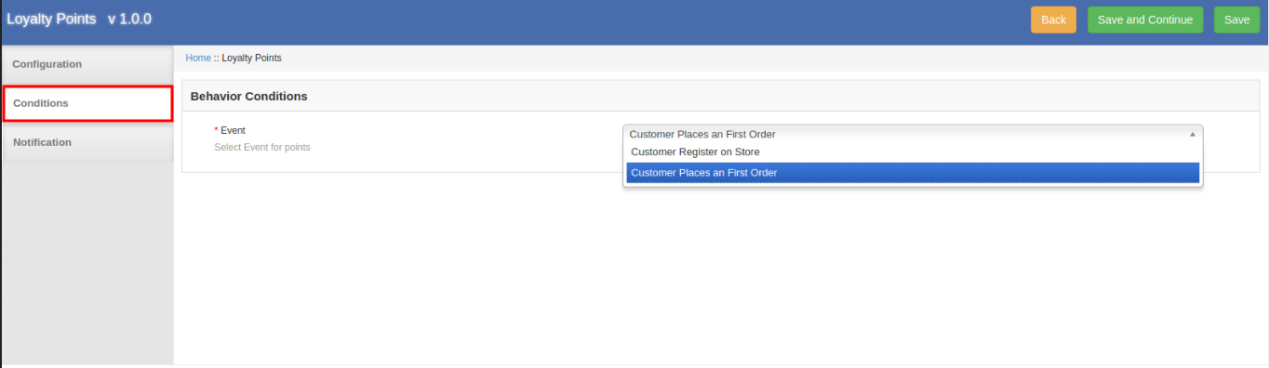
B. Behavior rule
1. Offer loyalty points on registration
Online users can get loyalty points on successful registration.
2. Offer loyalty points on first order
The online users can get loyalty points on their first order if the admin selects this event.
3.3.2 Edit Loyalty Rule
The online store admin can edit the rule settings from the admin interface of this Magento Loyalty reward points plugin.
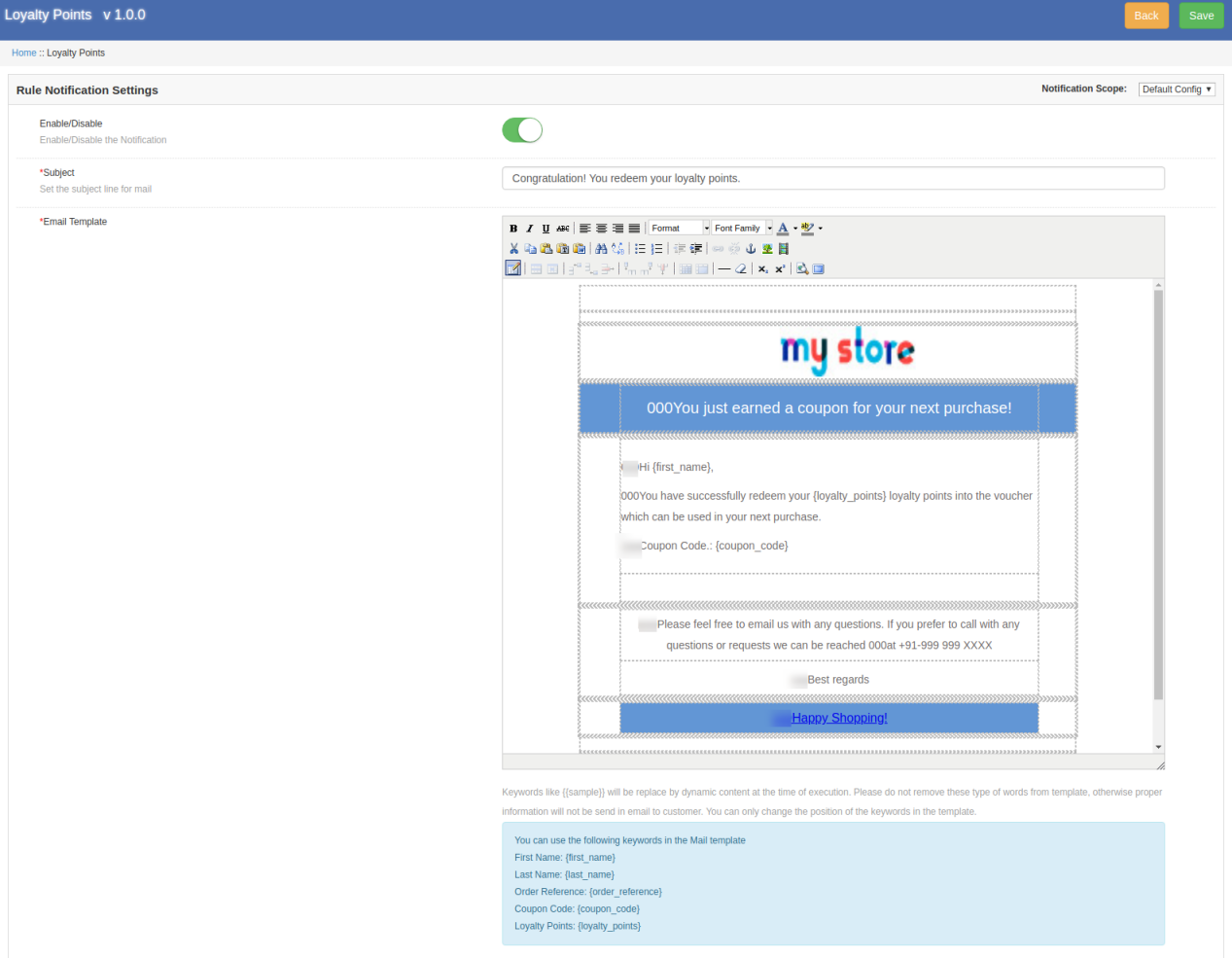
Email Notification: The online merchant can send an email with the loyalty point details will be sent to the customers if they get any loyalty point. The online merchant can enable or disable the settings for sending an email notification. The online merchant can also customize the email template easily.
3.3.3 Delete Loyalty Rule
The Magento Loyalty reward points module allows deleting the loyalty rules from the Magento Customer reward points plugin admin interface.
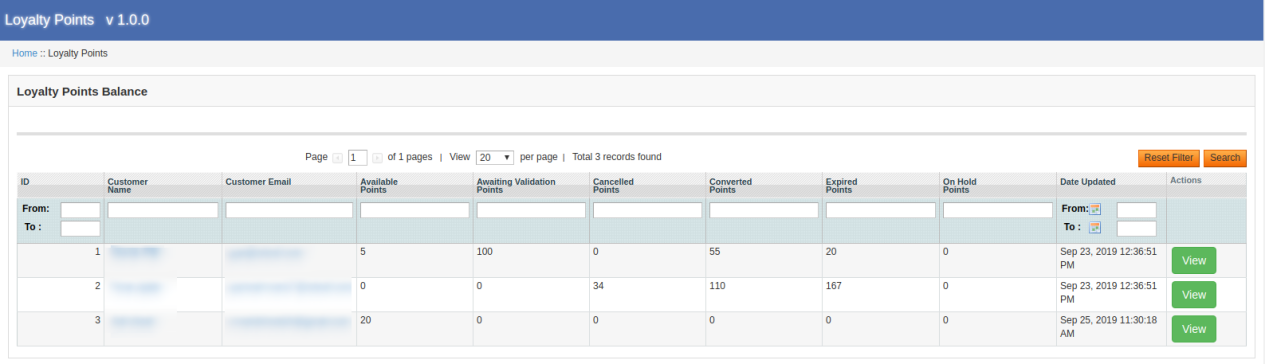
3.4 Loyalty points balance
The online store admin can view the list in which he can check loyalty points balance of the customers.
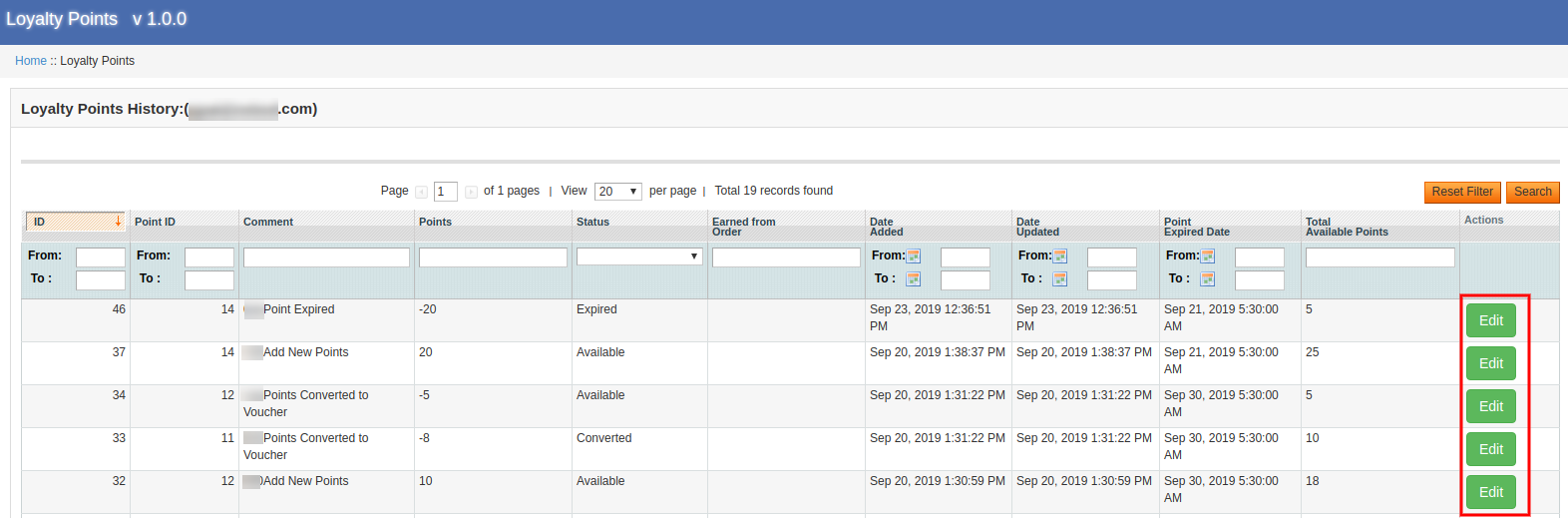
Admin can apply filters and also reset it. The store admin just needs to click on the “view” button for checking the details. Admin can also edit the details.
Title: Admin can change the title for showing on loyalty points history.
Points: Set the number of loyalty points from the admin interface of this Magento Customer reward points plugin.
Validity: Set the validity of loyalty points in days.
Status: Change the status of loyalty points.
Customer Email: Admin can also change the customer’s email.
3.5 Loyalty Points Emails
Admin can view a list of default emails and edit the emails as per the requirements.
The online store admin can customize the ready-made email templates.
Enable/Disable: Admin can activate or deactivate email notification.
Subject: The online store merchant can set the email subject line.
Email Template: The online merchant can configure the email by adding images, HTML text and description.
4.0 User Interface
The online users can get loyalty point on registration, first-order events and they can also get loyalty points on any specific order and cart state.
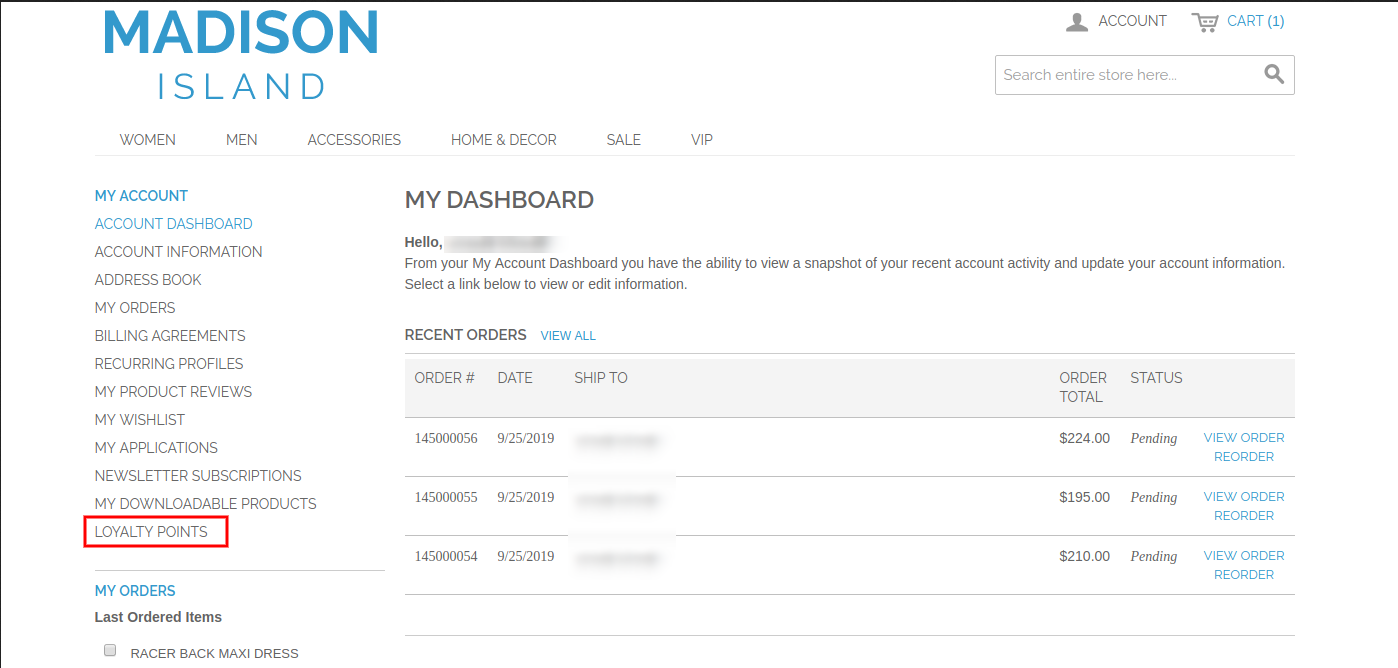
They can view the loyalty points from the “My Account” section.
They can view the loyalty points details on the loyalty points history and they can convert the loyalty points into the discount coupon.
In any case when two or more situations get common then the customers will get the highest loyalty point from any of the applied condition.
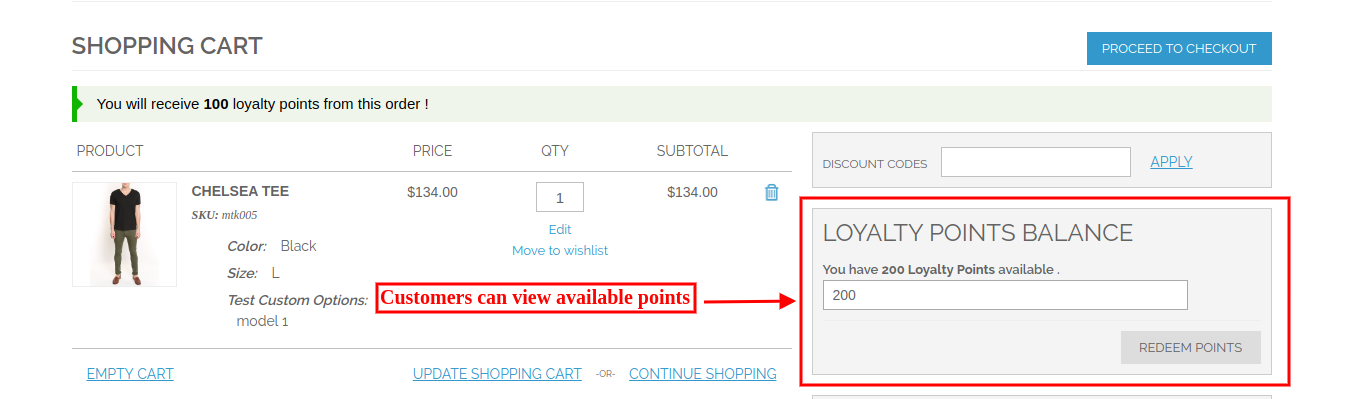
The online users can view the total available loyalty points.
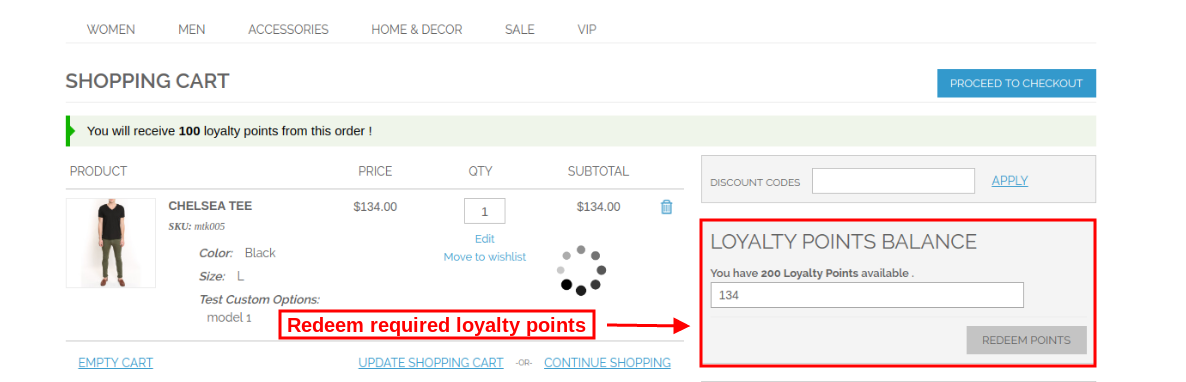
The online users can enter the amount which they want to redeem.
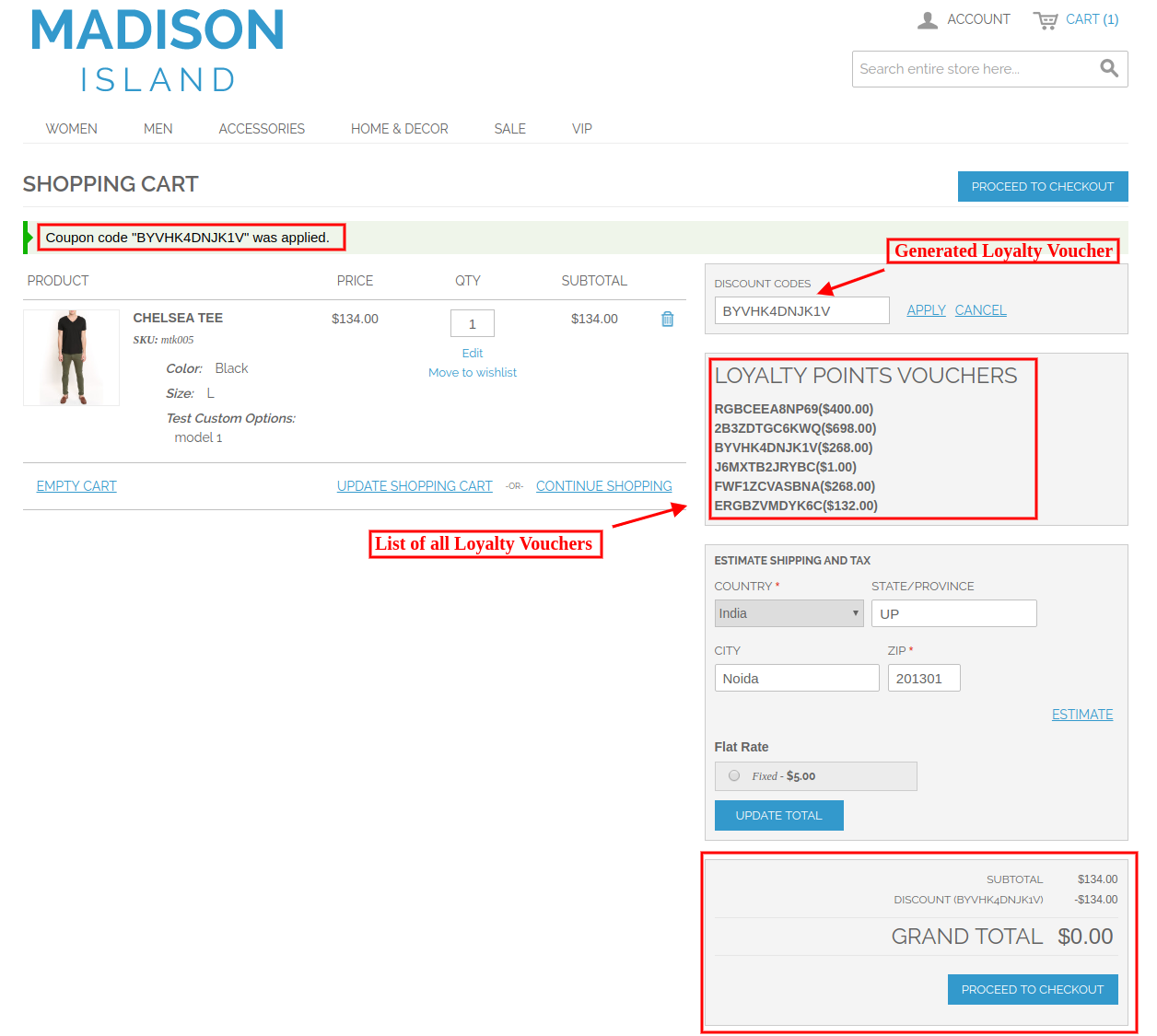
Customers need to apply loyalty voucher for availing discount.
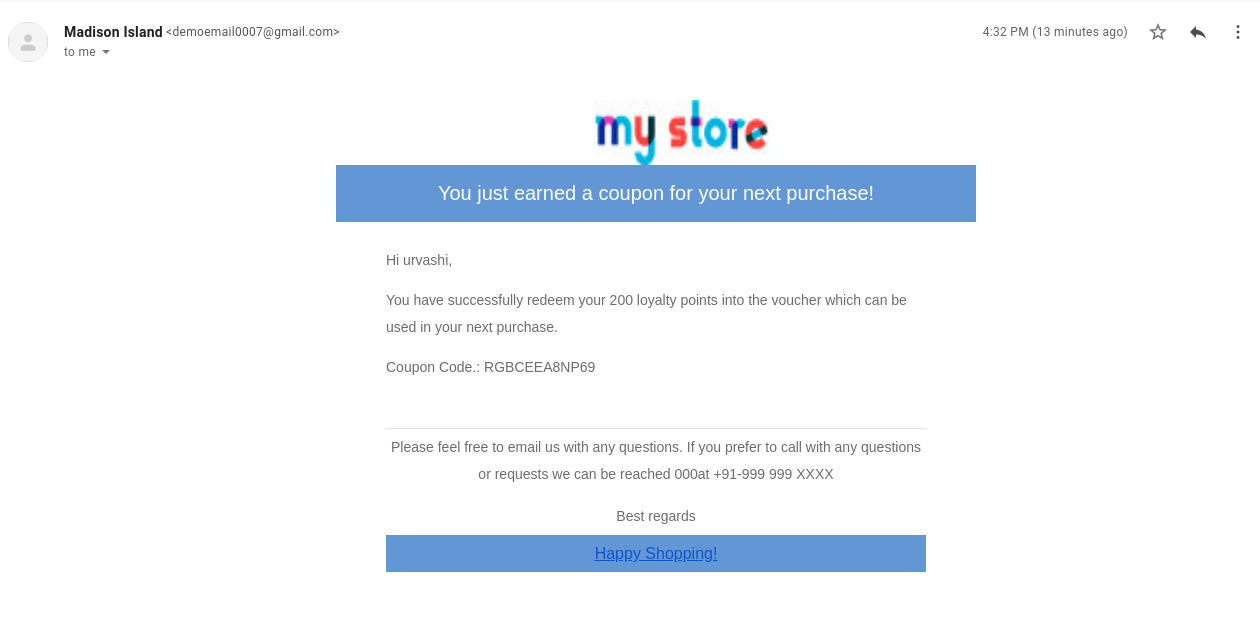
The online users can also get email notifications when they get loyalty points.
This way, the online merchant can place order and get loyalty points.
“Turn the normal search engine of your website into a Custom Search Engine (CSE) with Google Custom Search, and pave the way for higher traffic to your multiple websites along with increased visibility.”
If you are having multiple websites of a similar niche, it is possible to display the results of your overall websites at one place. Google Custom Search helps you do so.
What is Google Custom Search?
Google Custom Search is a great way to limit the Google search results and filter them into some domain-specific results only. It is basically a search bar which you can add to your website to display only those products or relevant things that belong to your websites. The searched keyword must be mapped with other websites as well.
To put it simply, Google Custom Search shrinks the overall search results and provides only that data that falls under the added domains.
How to add a Google Custom Search Engine to your Website?
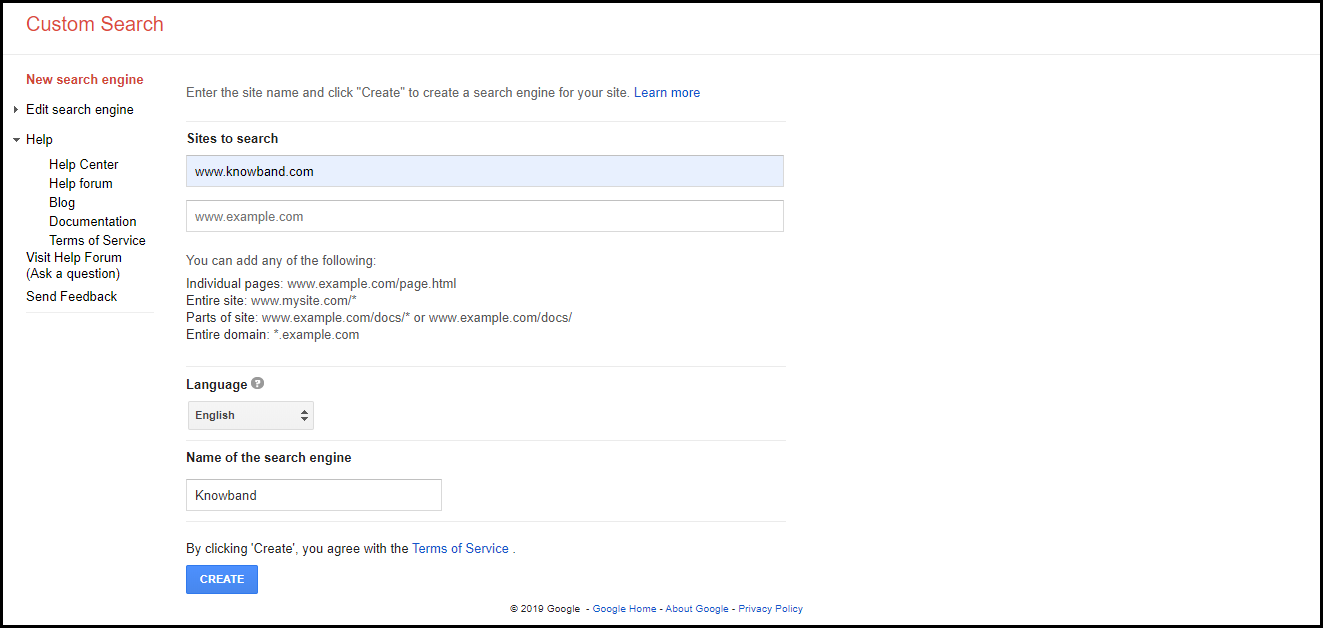
3. Enter your website URL and click on “Create”. The name of the search engine will be automatically fetched after you enter the URL.
Congrats! Your custom search engine has been created.
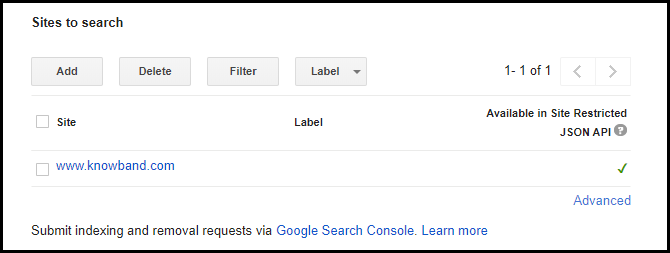
If you want to add multiple websites, click on “Add”
After you have successfully created the custom search engine, the next steps would be:
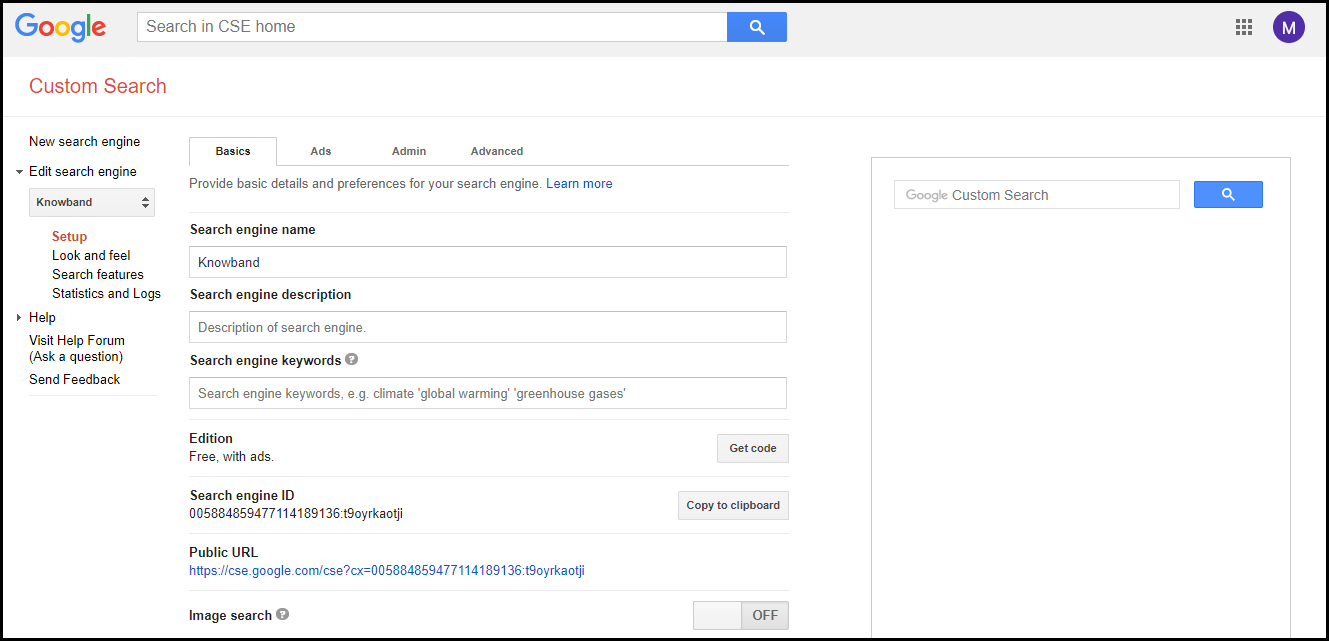
4. Click on “Control Panel”, you will be presented with a Basics tab.
5. Now there are two options through which you can add the google custom search engine to your website.
First, you click on “Get code” that requires a bit of technical work, or second, you just copy the Search engine ID and paste it under a Google Custom Search module/plugin.
If you have a PrestaShop website, we recommend using the PrestaShop Google Custom Search addon that makes it just a one-click task to place the Google Custom Search bar on your website. It comes with a variety of features to enhance the search functionality. Do check it out.
That’s it. The Google Custom Search Engine will now appear on your site and will be ready to function.
So now let’s say I have two websites xyz.com and abc.com
I have added them under the Google Custom Search and pasted the search engine ID to my website. Now every time a user performs a search through my website, only the search results falling under these two websites will be displayed to the user.
Benefits of having a Google Custom Search Engine
Let’s now come back to the title of our topic. Why should you have Google Custom Search Engine on your website? What are the benefits of having a Google custom search engine?
Easy to Implement and Customize
Did you find it challenging to implement the Google CSE on your website, with the steps that I have mentioned above? I am pretty sure you didn’t.
It is not rocket science. All it requires is just a few basic steps to follow. Moreover, you can customize the custom search bar and search results as you desire. The implementation and customization become way too easy with our PrestaShop Google Custom Search addon.
Improves the Overall Traffic and Visibility of your Websites
Google Custom Search has the potential to boost the traffic and visibility of your websites since the results are limited to specific domains. What otherwise could have been missed through a normal google search as it displays the worldwide results, Google Custom Search ensures that those results are displayed through the custom search engine.
Auto-Complete
The autocomplete feature suggests the relevant results to the users in real-time as soon as they start typing their search query.
This can be enabled from the Control Panel.
Apart from autocomplete, Google Custom Search offers many other amazing features like customizing the interface of the search results page, changing its background colour, image search, autocorrect, different font styles. In fact, you can even remove the Google Branding.
Google Custom Search also gives you a track record of what your users are searching for.
Conclusion
Since the custom search engine uses Google’s search algorithms, it provides appropriate results that are relevant to a user’s query.
If you do not use Google CSE, it is time to shift your focus towards it.
If you liked this article on Google Custom Search or feel there is something to add in this topic, do let me know in the comments below.
PrestaShop owners can check out the admin demo and front demo of the PrestaShop Google Custom Search.