Check out KnowBand’s OpenCart One Page Checkout Plugins in Action

To make the online store more engaging, you need a great checkout page design. Not just the home page needs optimization but the checkout page desires more of it. Online shoppers get pissed with a clumsy design when they have already invested most of their time in finding their favorite product. For OpenCart stores, KnowBand has been developing solutions for a decade. We are presenting some of the best KnowBand’s OpenCart One Page Checkout examples that are live worldwide.

OpenCart One Page Checkout Demo

Why Should you have One Page Checkout?

OpenCart platform leverages several clients worldwide. There are different plugins free or paid that stores use to increase conversions, engagement, design, and other website elements. Many of the stores only focus on home page design, product page design, and shopping cart development and forget to optimize another major part, the checkout page. As a result, they lose conversions on the checkout page leads to shopping cart abandonment.

Hence, it is crucial to add a checkout page that is easy to operate with effortless configuration settings. OpenCart One Page Checkout Extension is solving these problems for many businesses.

Check out these OpenCart One Page Checkout Plugin in Action

If you are here to find out how this exclusive OpenCart One Page Checkout extension works, we won’t make you wait

1.     JM Imports Checkout Page is live
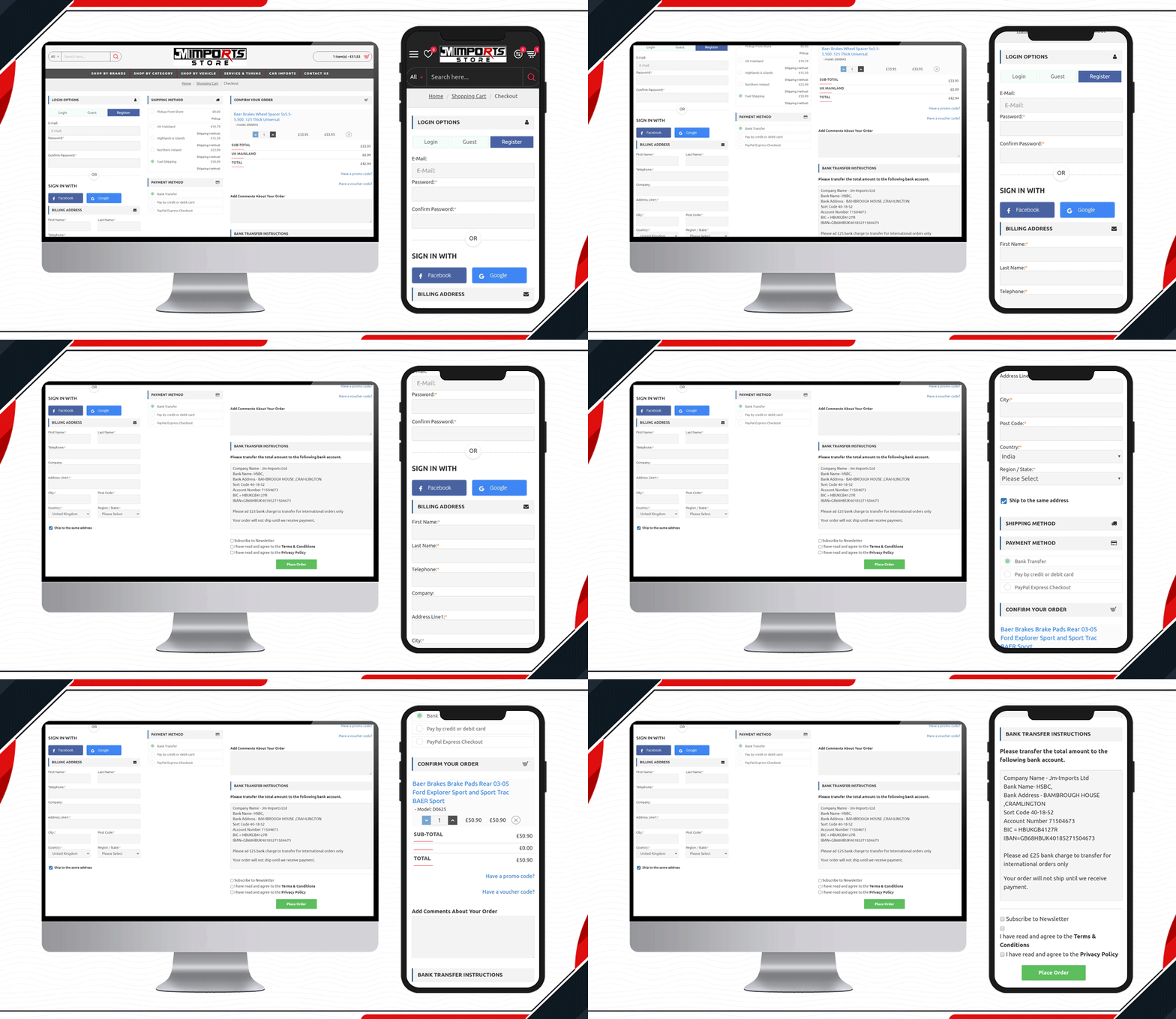
JM Imports is a cart import company in the UK. Their auto-parts selling platform is using KnowBand’s OpenCart One Page Checkout Pro extension. They have been using a 3-column layout that includes a registration column facilitating Facebook login, Google login, and Guest checkout. It has several payment and shipping methods for customers giving them a quick checkout experience.

2.     Check out the MYW Checkout Page
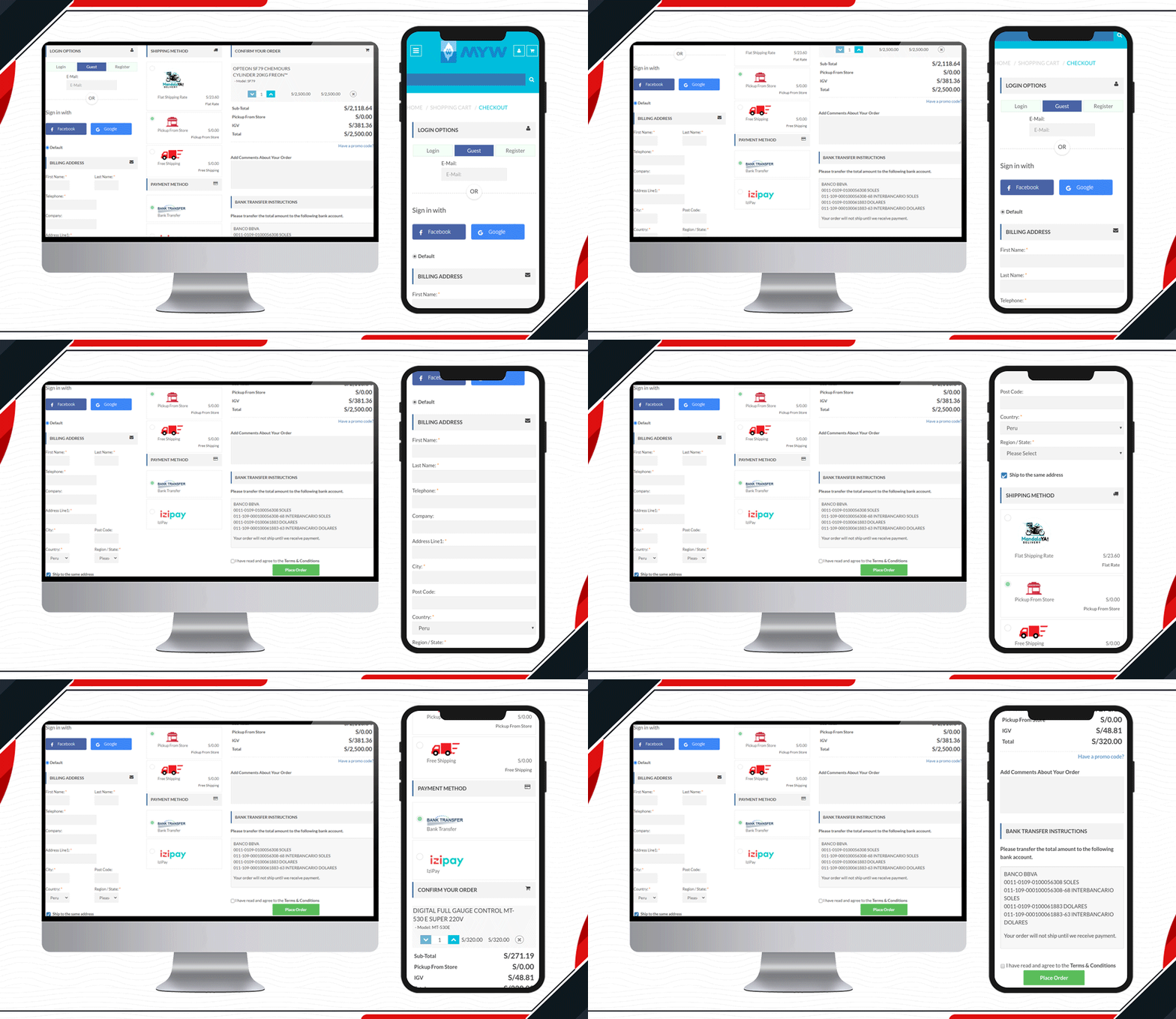
The sole purpose of MYW is to provide a satisfactory shopping experience to their customer from quotation to shipment. To meet their purpose, they have installed KnowBand’s OpenCart One Page Checkout extension for smooth and easy checkout. MYW are the importers for refrigerating products.

The icon display in the shipping methods and shopping cart product image display makes the checkout page appealing.

3.    Placasur is using OpenCart One Page Checkout
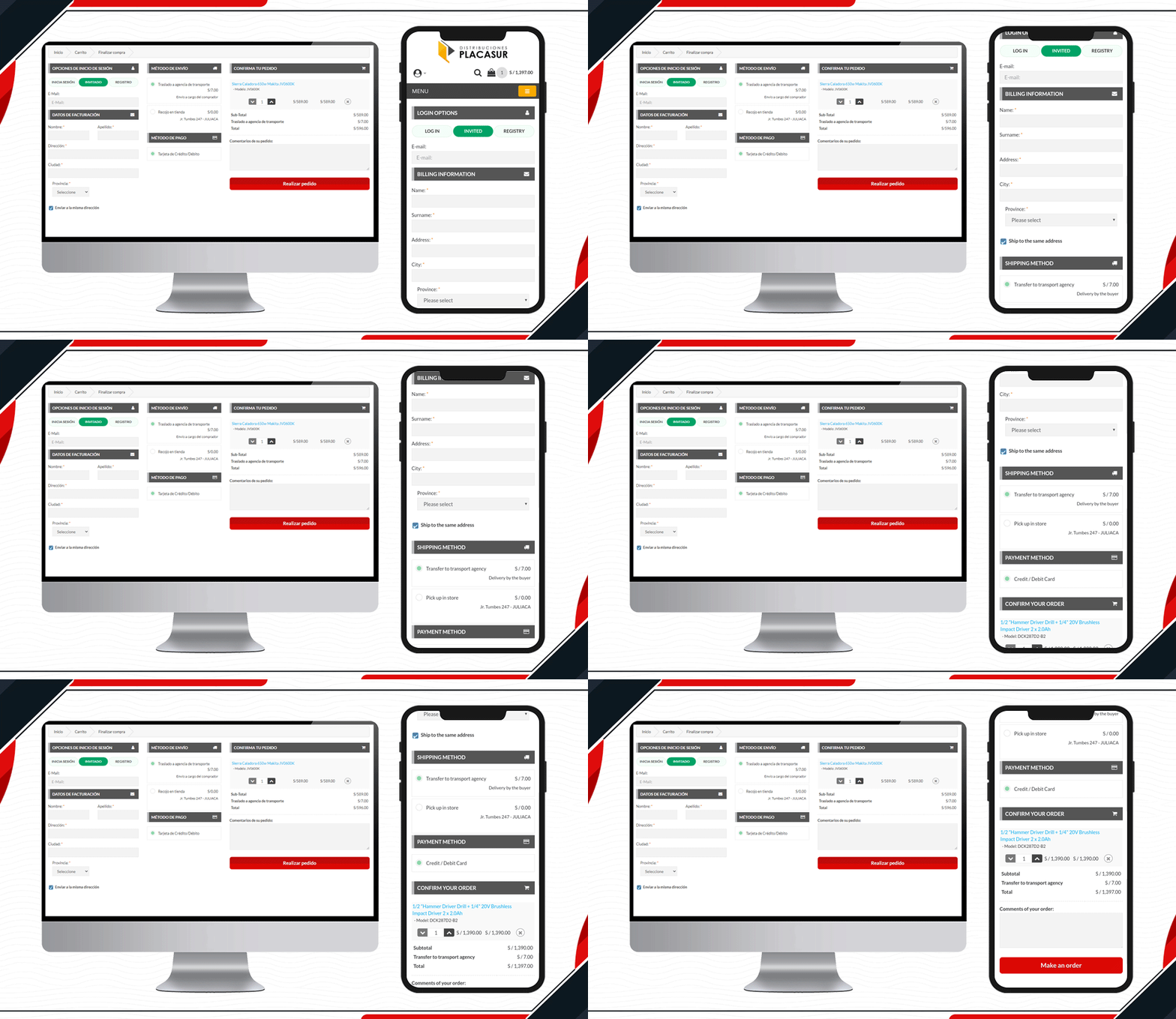
To keep customers engaged, a good checkout practice is removing unnecessary fields. The KnowBand’s OpenCart One Page Checkout Plugin allows users to keep some fields optional that can be skipped by customers. Pleasure has customized its checkout page beautifully. It has limited fields and looks clear and engaging.

4.     Trailer Stuff Checkout page in action
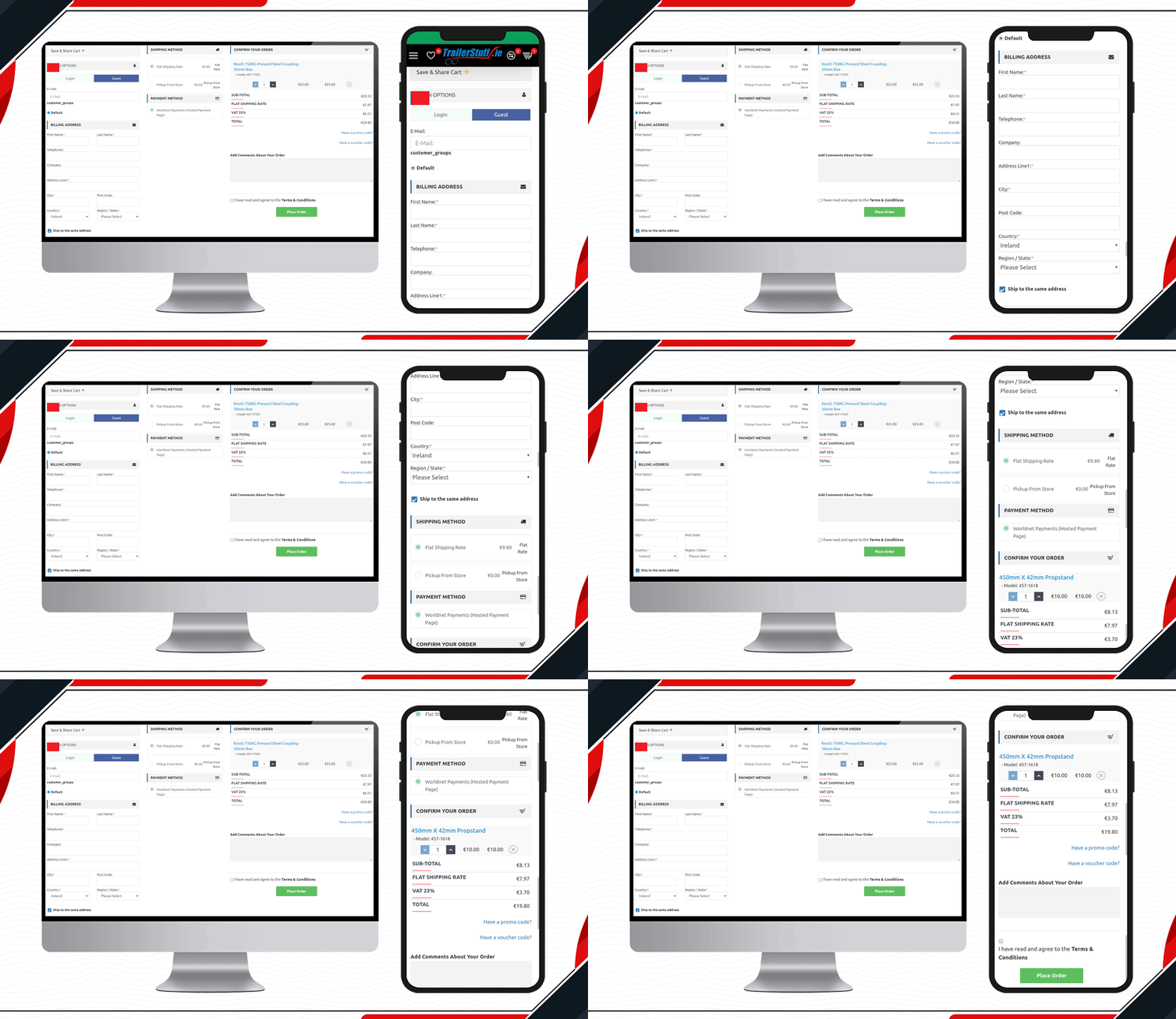
Trailer Stuff delivers products in Ireland. Their shipments require on-time delivery and to make the ordering process smooth, they are using One Page Checkout Extension in their Opencart store. From registration to payment, every field on the checkout page is configured. Moreover, they have also added a save the cart option on the checkout page.

5.     Look at this Yeonhi Checkout Page
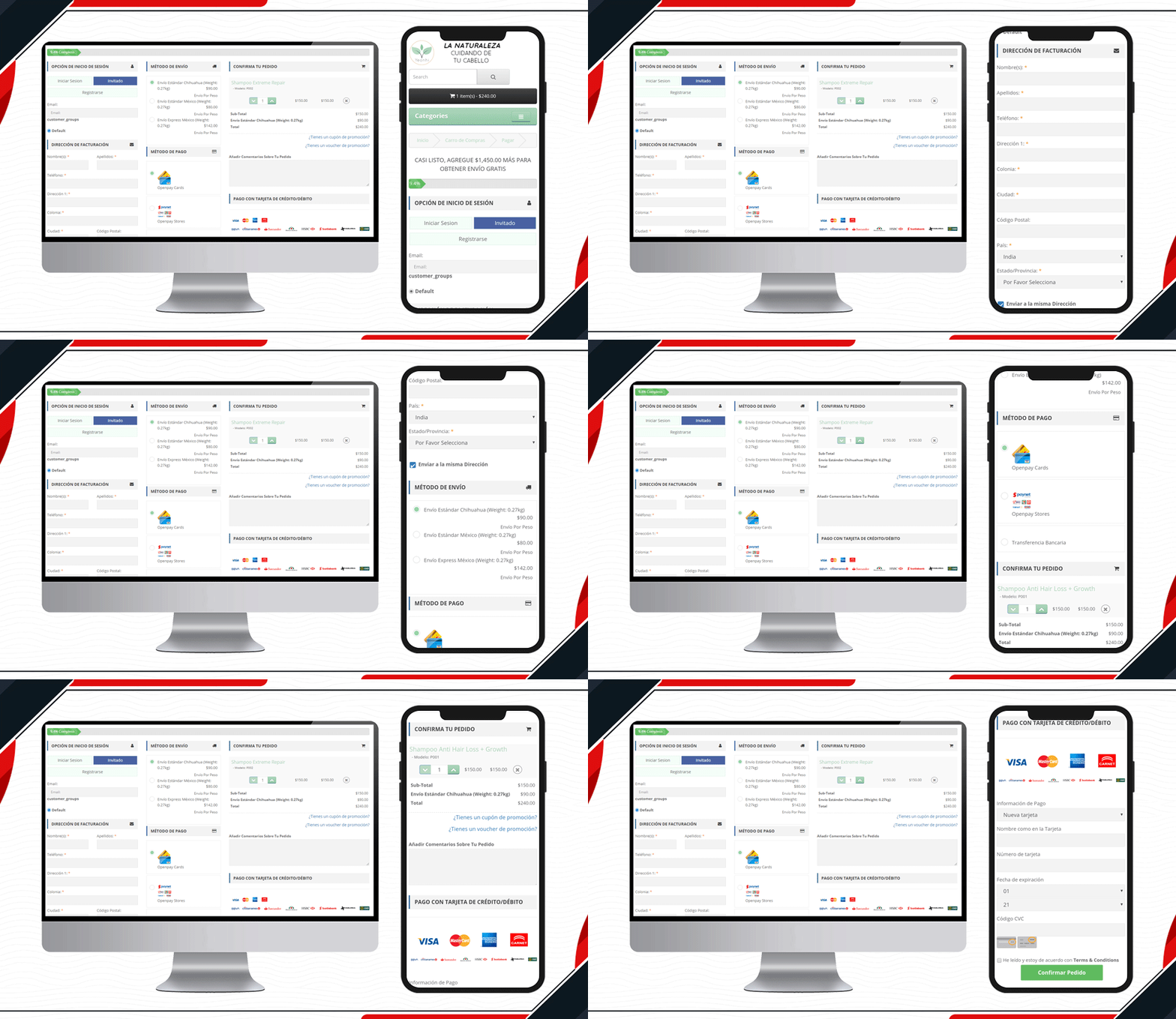
Yeonhi’s checkout page is very sleek with a great design. It appears that the checkout process is simple and quick. They have been using KnowBand’s OpenCart One Page checkout plugin with a shipping bar at the top. This indicates the free shipping progress, which means the customer will get free shipping if the progress bar reaches 100%. Follow these tips to reduce shipping cost.

6.     Custom Made Casino Checkout page
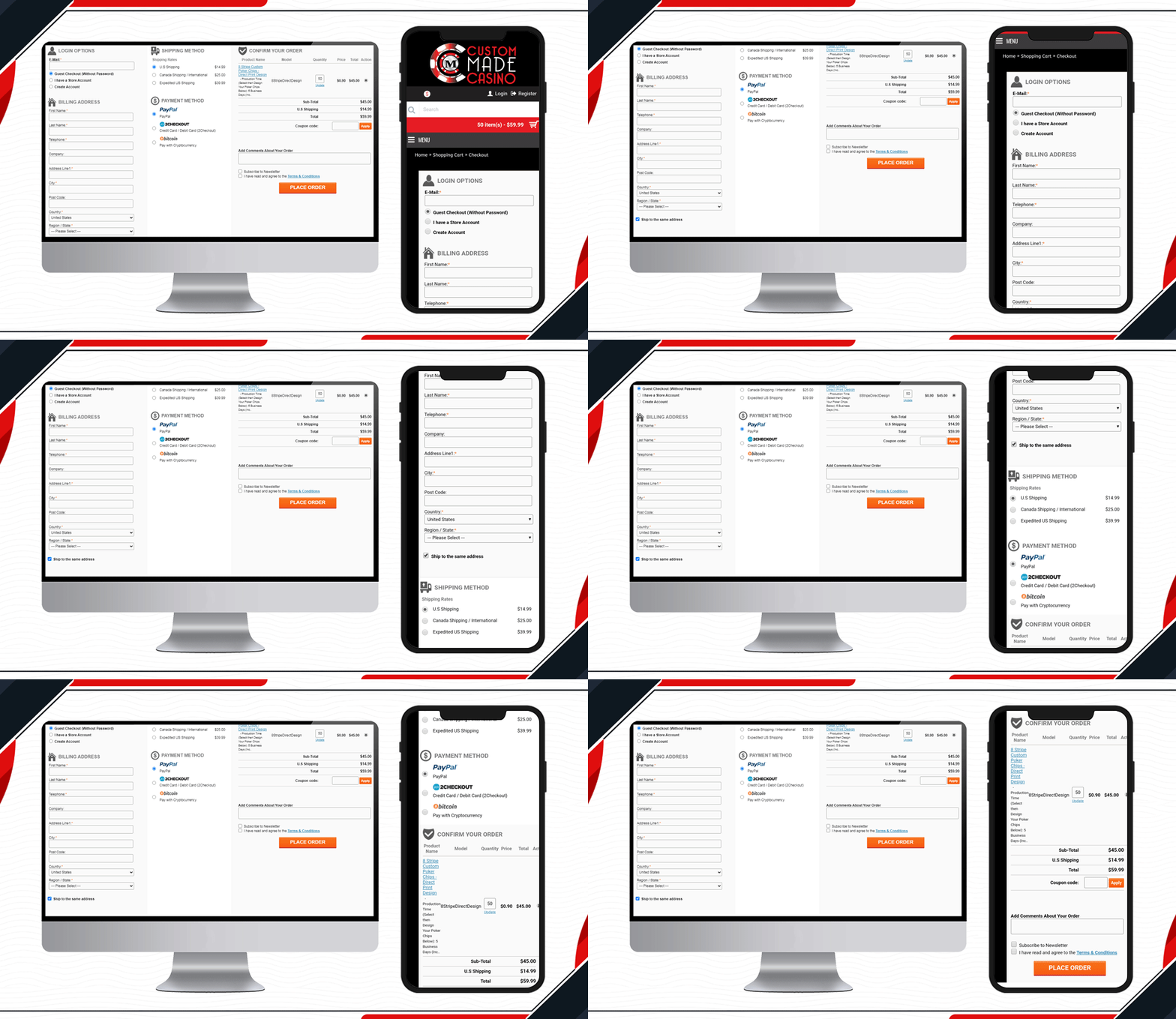
Custom Made Casino website is a treat if you like playing Casino. Let’s not dig much into its services, instead, go straight to its checkout page design. They have been using One Page Checkout on their OpenCart website to make the transactions easy-peasy.

When buying chips in the store, the customer will have to provide printable details like the name that you want on the chips, color, printable font colour, etc. Along with other checkout page elements, you will find all these details on the shopping cart section.

7.     DcmGSM Considered One Page Checkout
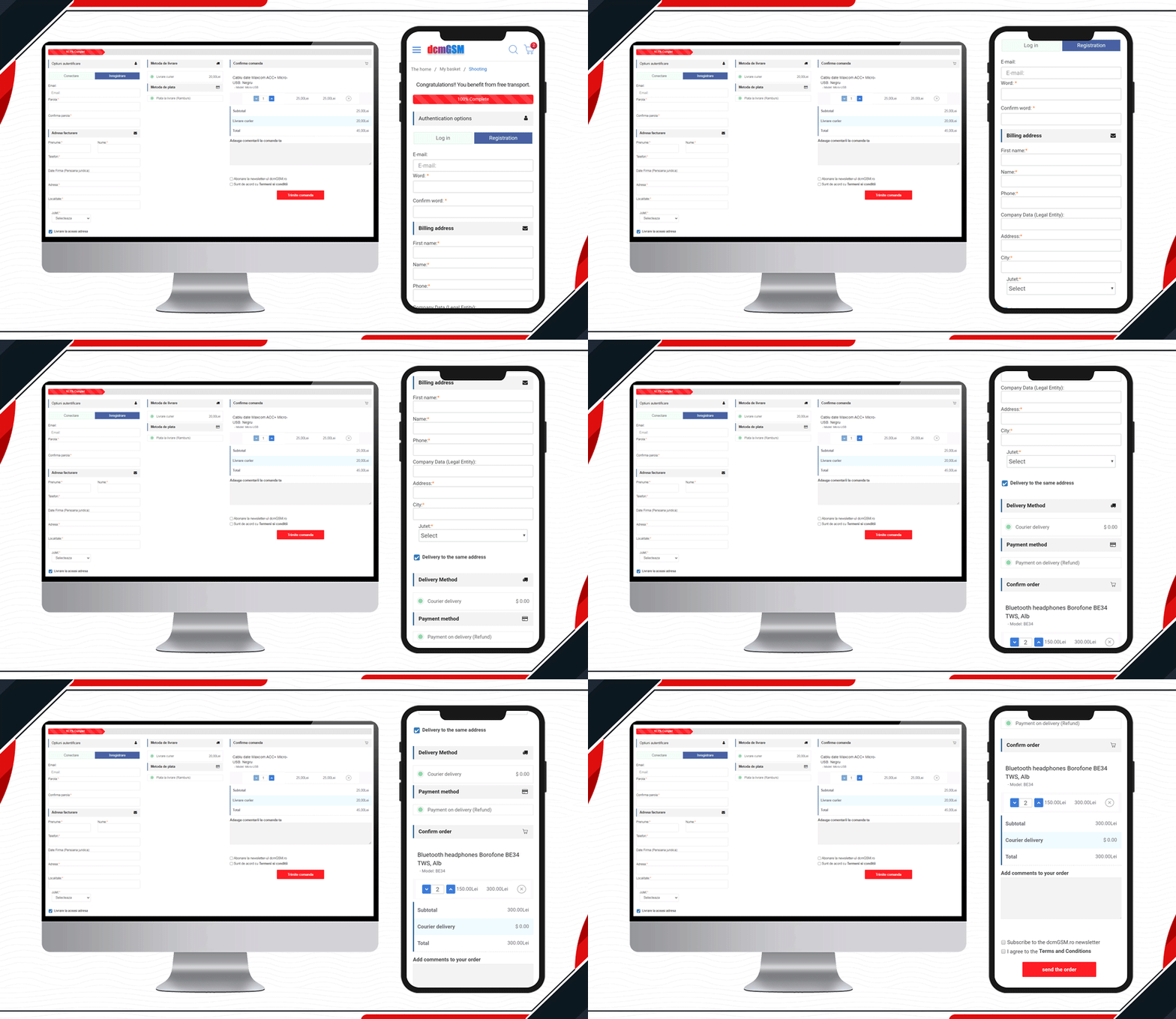
One-stop for any phone accessories.  DcmGSM is a company that provides a solution for all your phone-related gadgets from USB cables to mobile cases. It is an OpenCart website and to provide a wonderful checkout experience, they are using KnowBand’s OpenCart One Page Checkout.

Free shipping bar to Facebook login and optional fields to the extra comment field, all features are used on the website checkout page. Have a look!

8.     Custom made Golf Events Checkout Page
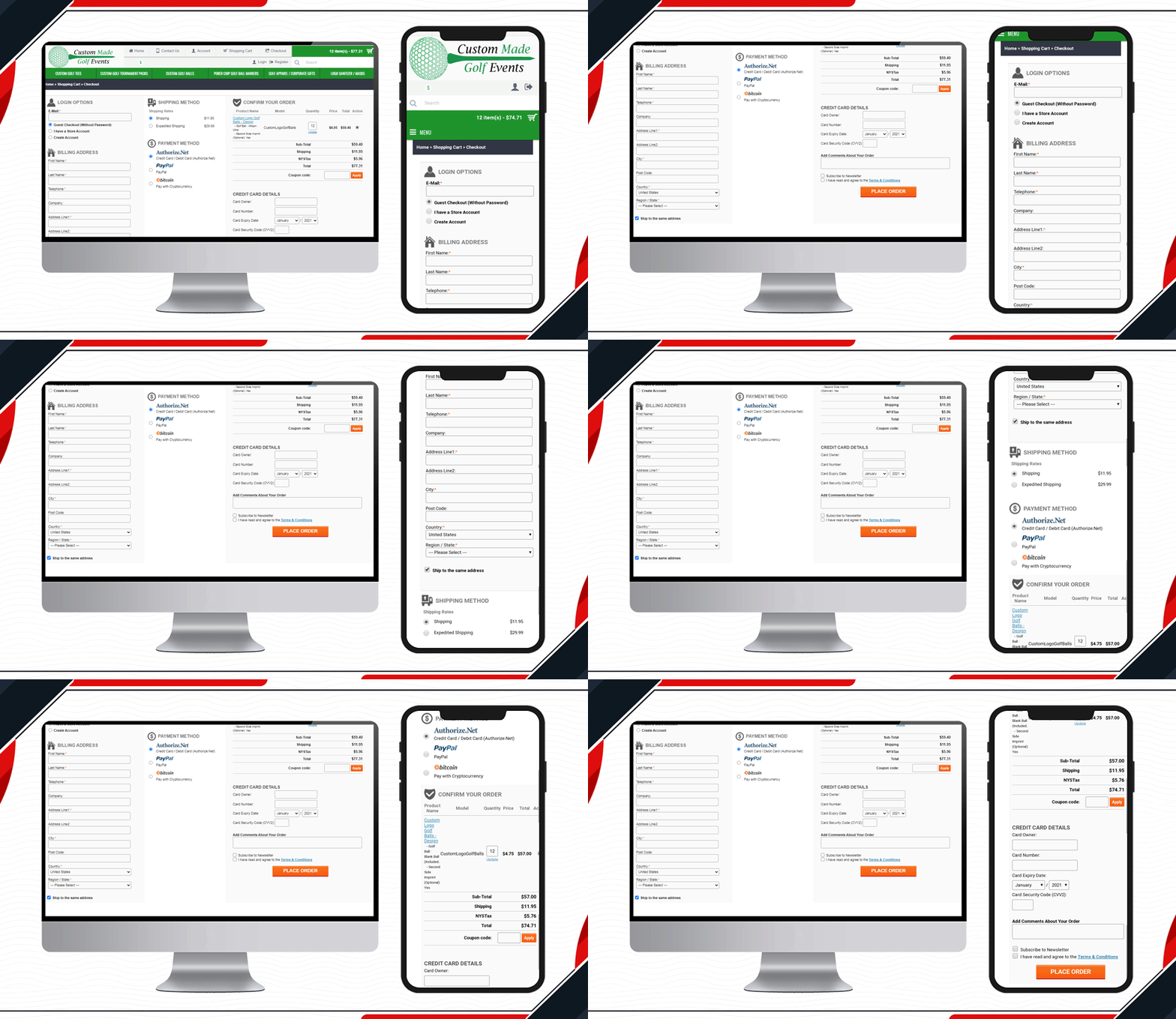
All golf-related items are available on this website. To make the checkout process simpler and quicker for the golf lover, Custom-made Golf Events is using KnowBand’s OpenCart One Page checkout.

9.     Look at Luce Art Shop Checkout Page
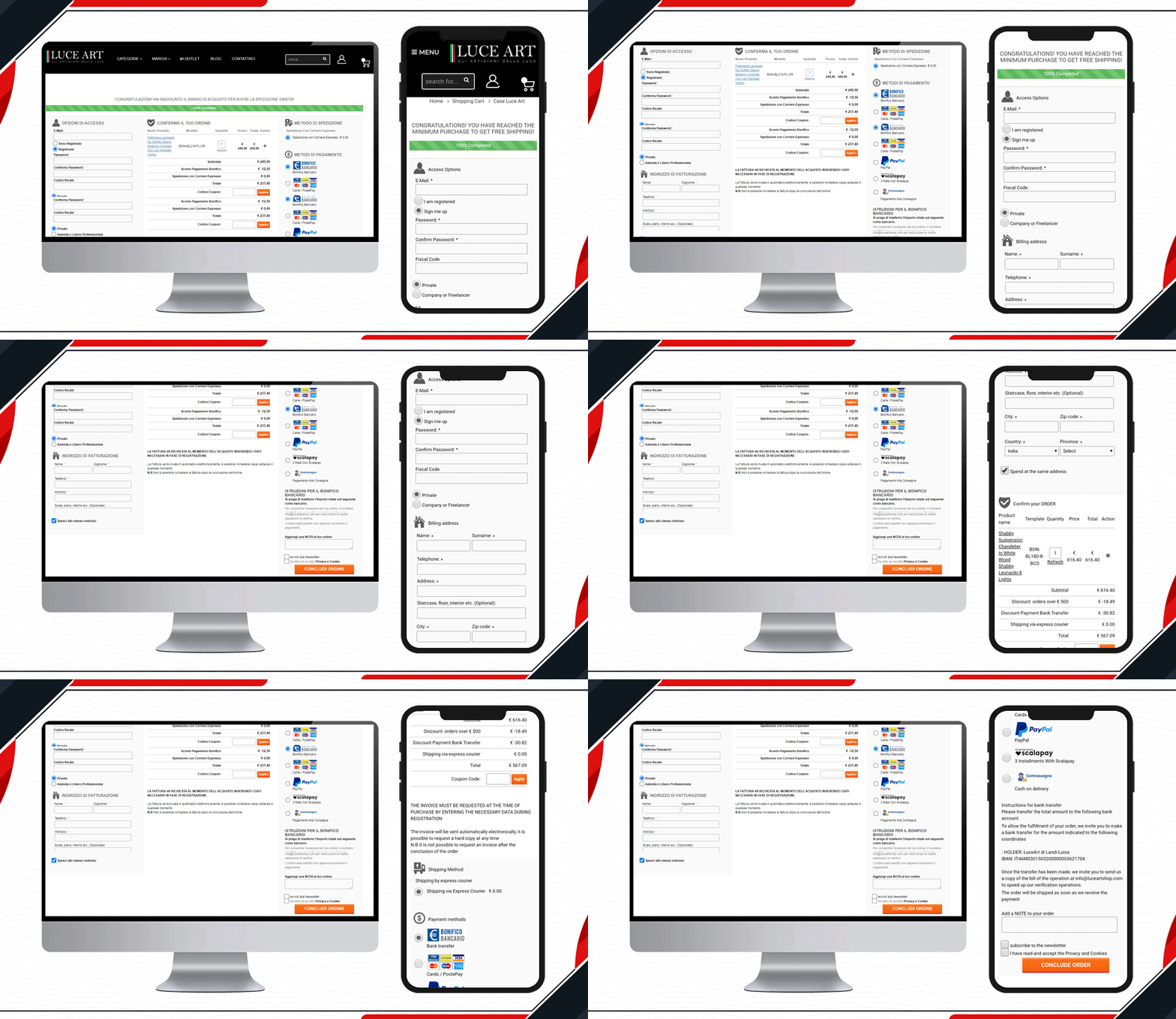
Luce Art is a hub for creative lights. They have been using a single-page checkout for their checkout page. You can see your orders in the shopping cart of the checkout page. It has a free shipping bar, social login, guest checkout, multiple shipping methods, payment gateways, and all the other informative fields clubbed in a single page with a three-column layout.

10. Live One Page Checkout on GH Store
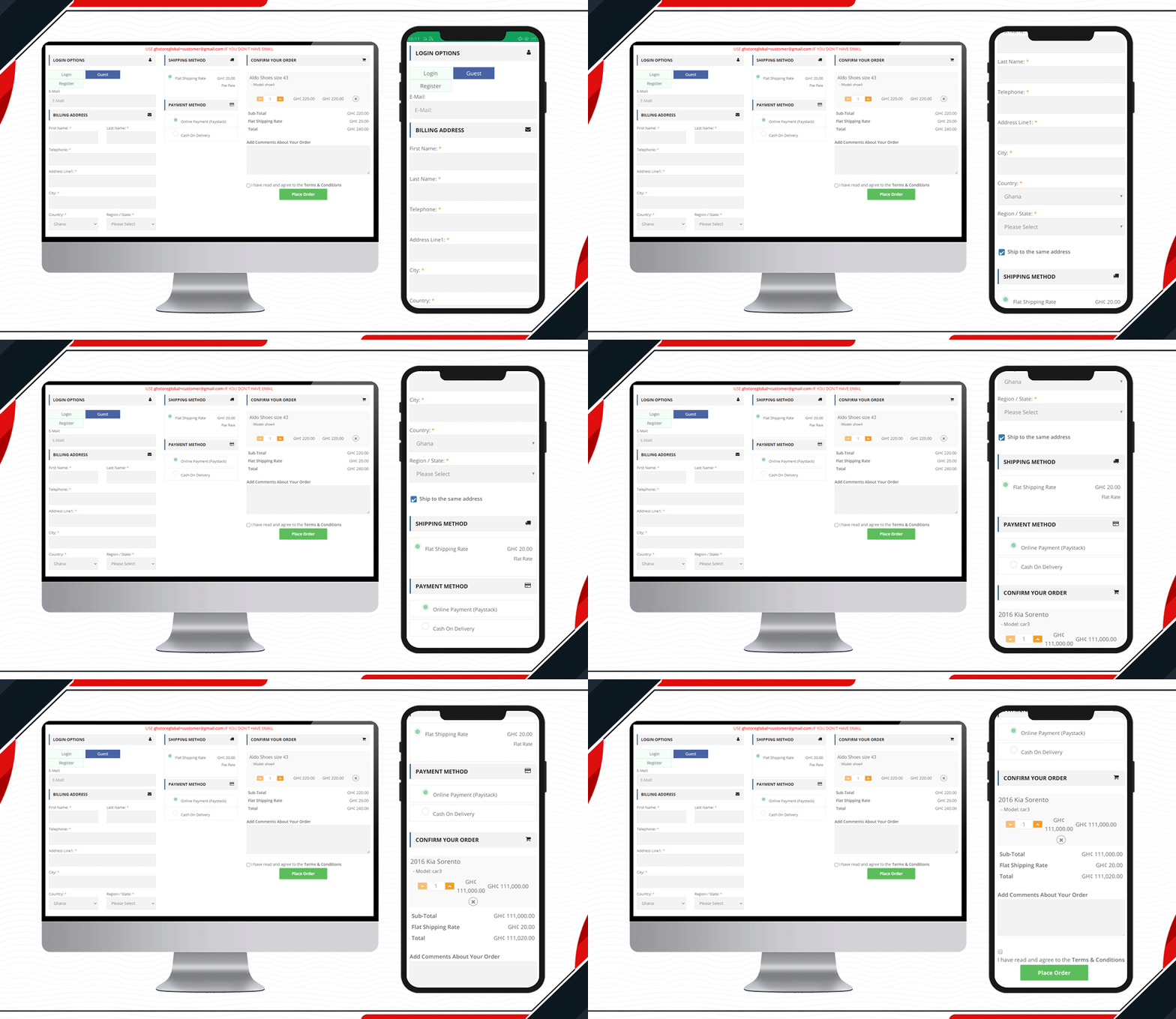
Another live example of Knowband’s One Page Checkout is available on the GH Store website. It is a general store where you can find everything that a household requires in everyday routine. They have streamlined the checkout page design by using KnowBand’s One Page Checkout.Ffree

Checkout page elements that every OpenCart owner should look for

  1. Single Page Checkout
  2. Guest checkout
  3. Social login
  4. Cart display section
  5. Custom payment methods
  6. Add Custom Shipping methods
  7. Customizable layout and design
  8. Security badge options

Finally, to get a better understanding of the checkout page design and layout follow this blog.

For OpenCart or any other eCommerce website-related requirements visit the KnowBand store. Several plugins are available that can help you optimize your store from the landing page to the final transaction.

KnowBand’s OpenCart Extensions live on UK based JM Imports

JM Imports is a high-performance and exotic car specialist in the UK, serving from 2002. They stock brand new parts as well as aftermarket parts in a wide range. Anything from air intakes to turbos is available for every brand in the market. They import auto parts from Japan and other countries. You will find everything from simple upgrades to bespoke solutions for your vehicle under one roof. They have created their digital store on the OpenCart platform. The KnowBand’s OpenCart extensions like One Page Checkout, Abandoned cart, Infinite scroll, Facebook Share and Win and PDF invoice are live on the JMImports Parts store.

For a company like JM Imports, customer satisfaction and customer experience are of prime importance. Therefore, they have to use plugins that provided the ultimate shopping experience to their client. Thus, they have been using KnowBand’s OpenCart extensions. Every plugin designed and developed by KnowBand is quality tested and provides an excellent shopping experience to customers.

We have discussed here all the live extensions installed on JM Imports along with their benefits:

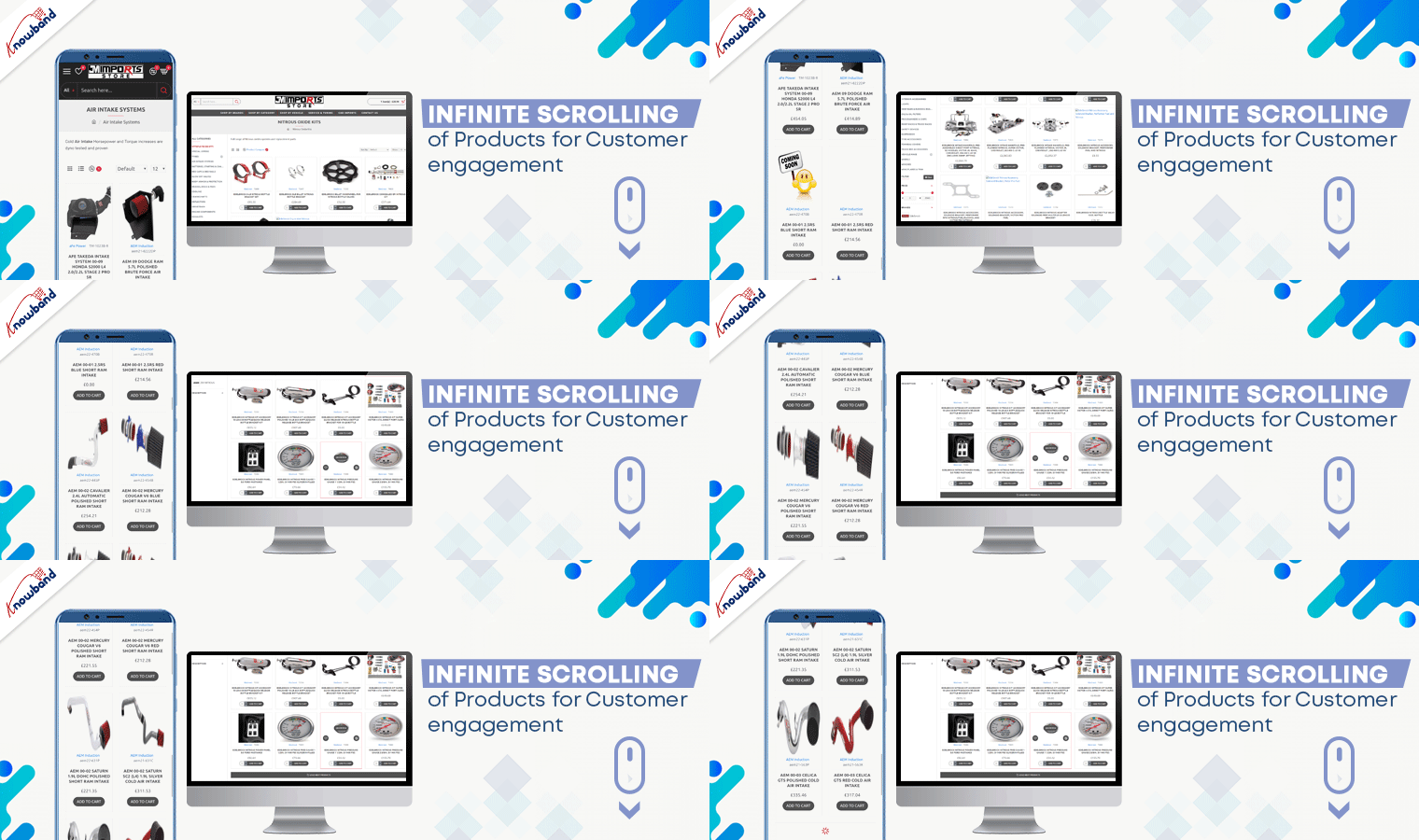
Infinite Scrolling of Products for Customer engagement

The product page optimization technique includes not just the look and appearance but also the UX. Product infinite scrolling improves customer experience and engagement rate on the product page.

On JM Imports, products get loaded continuously when the user scrolls down. However, after certain products get a load, a bar with the message ‘Load More’ appears. Admin can decide the product display quantity for this.

Benefits:

  • Effortless product scrolling
  • Higher Customer Engagement
  • Better User Experience

Facebook Share and Win to increase Brand Awareness

Users can share products on various social media platforms from the JM Imports website. This functionality is applicable with Facebook Share and Win. Additionally, it allows customers to win rewards, discount coupons, and incentives after sharing the product on their user profile page.

Benefits:

  • Increases Brand Awareness
  • Improves Customer retention rate
  • Get Potential Customers

Great Checkout Experience with One Page Checkout Pro

OpenCart is an open-source platform with thousands of clients globally. Knowband’s OpenCart extension One Page Checkout- Pro is live on JM Imports auto-parts store.

It has a Three-Column Layout that clearly displays all the fields. The design of the checkout page is elegant. The One Page Checkout is more user-friendly than a Multi-Page Checkout.

Features of KnowBand’s One Page Checkout Pro: Facebook and Google login options, Guest Checkout, multiple shipping methods, several payment gateways including PayPal, Shopping cart display, update product quantity on the checkout page, and additional field with a message.

Check out the Demo Here: OpenCart One Page Checkout Pro

Benefits:

  • Reduces Cart Abandonment
  • Time Saving and effortless
  • Authentic Data for email marketing

Share PDF invoices with Customers

When placing an order on JM Imports, the customer receives a PDF invoice along with the order email. For these features, JM Imports downloaded KnowBand’s Opencart Extension ‘PDF Invoice’. The invoice contains the header logo, store title, header title along payslip.

Admin can add some additional details such as shipping address, order info, and store details in the PDF invoice.

Benefits:

  • Looks professional
  • Fully customizable
  • Easy to track the purchase history

Abandoned Cart Serial emails

Cart abandonment is a threat to eCommerce businesses. To overcome this, store owners send abandoned cart emails which are very effective. JM Imports is using Opencart Abandoned Cart extension for sending serial emails to customers. The auto cron functionality makes it effortless.

Benefits:

  • Higher Conversion Rate
  • Less Abandoned Cart
  • Tracking the

Why Choose KnowBand for Your OpenCart Solutions?

KnowBand is working in the eCommerce domain since 2010 and has thousands of international clients. We believe in customer satisfaction and deliver products that uplift your sales on your digital platform. Here are some extra advantages that make KnowBand’s OpenCart Extensions superior to the others:

  • Mobile responsive
  • Multi-lingual compatible
  • Multi-store compatibility
  • SSL Compatible
  • Theme compatible

We have several extensions for your Opencart store and other major eCommerce platforms. Do drop a comment or send us an email to discuss your requirements.

You may like to read more success stories: 

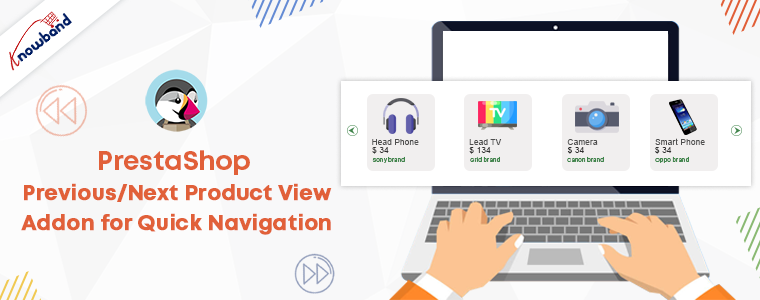
PrestaShop Previous/Next Product View Addon for Quick Navigation

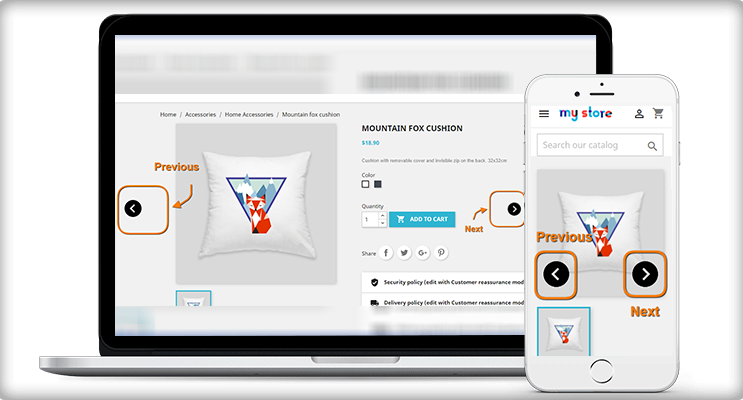
PrestaShop Previous/Next Product View Addon allows users to see the previous and next products without opening the product page. The customers will get easy and quick navigation of the products with this addon.

Jumping tabs and going back to previous tabs for the product page is tedious and unappealing. However, you can achieve a better user experience with PrestaShop Previous/Next Product View Addon. UX experience is the most intricate element between your website and the customer. Good UX will enhance the customer experience on your online store.

The PrestaShop Previous/Next Product View addon navigates the customers easily to the previous and next product.

What Is the Purpose of the Previous/Next Buttons?

Building a PrestaShop website isn’t enough to create a fantastic online business. Thus, being an eCommerce business owner, you should prioritize the shortcomings of PrseatShop default features and also look for solutions to functional concerns. PrestaShop by default does not allow product navigational buttons. For better product navigation, buttons can be added.

1.     Make it easier for your customers to do business with you

Visitors to your online store will be able to navigate and flick through products more easily after installing previous/next buttons. This not only makes your clients’ lives easier but also enhances their engagement and improves your conversion rate.

2. Time-saving feature

Customers can now simply navigate between previous and subsequent products without having to return to the catalog or search result page. Furthermore, buyers will not have to switch back and forth between catalog and product pages as frequently, saving them time and increasing the likelihood of placing an order.

With these two exponential benefits, you clearly get the understand how important this feature is.

How to set up the PrestaShop Previous/Next Product View Addon?

The installation of this module is as simple as the other PrestaShop addons. Few simple steps to follow and you are done.

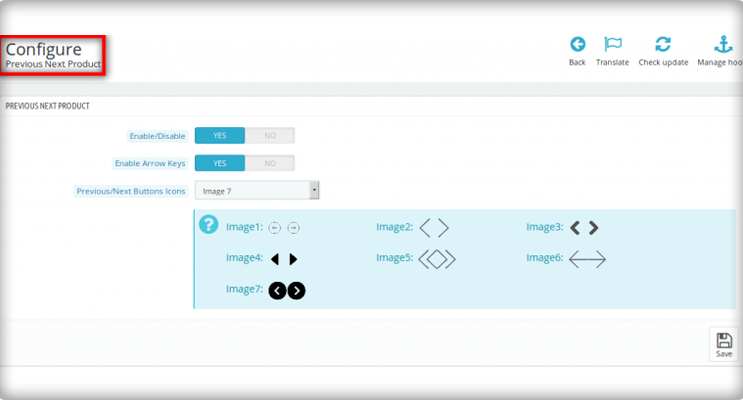
The next step is the module configuration:

Easily Add Previous Next Button

With the module, you can easily enable/disable the previous and next navigation on the product. It allows the user to switch the product.

Change the Previous Next button Icon

To give it an excellent look, you can choose any one of the icons from the given options. There are several choices for the buttons. You could choose a button of an image as the icon.

Add colours to the buttons

To make it look more attractive, add some colours to the buttons. The border and background colour of buttons can be changed without modifying the code in the Prestashop product scrolling.

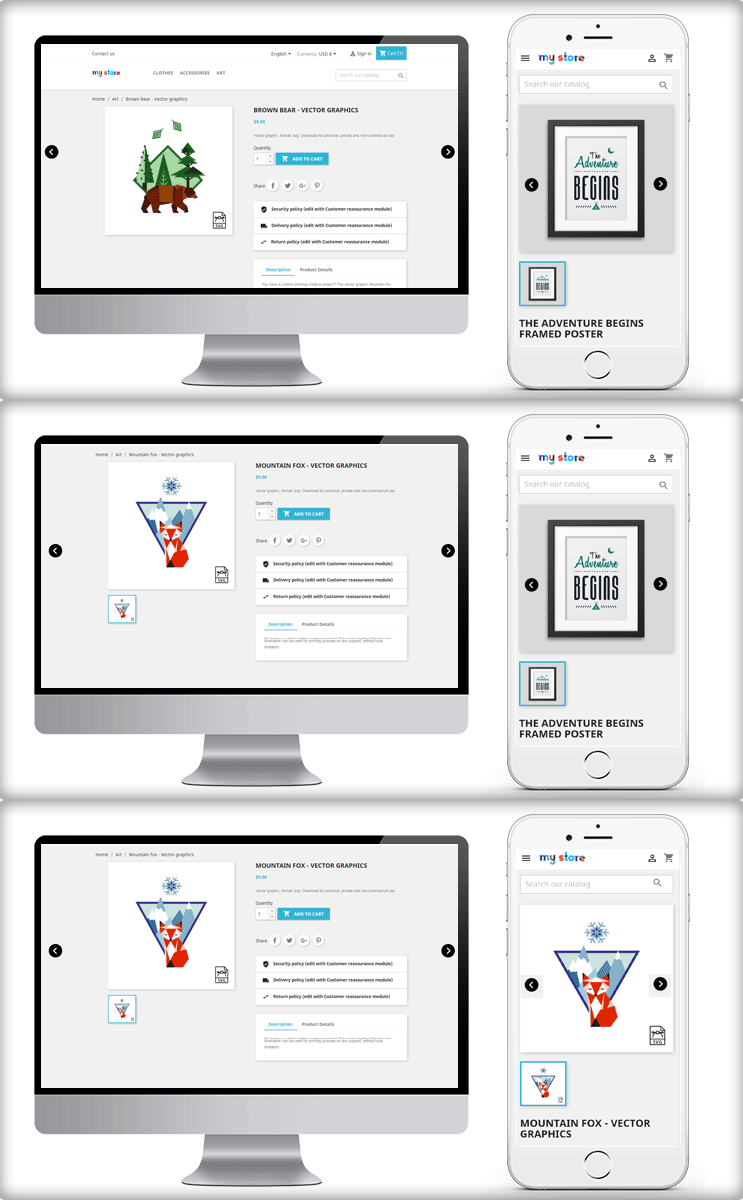
Now have a look at the front end of the module

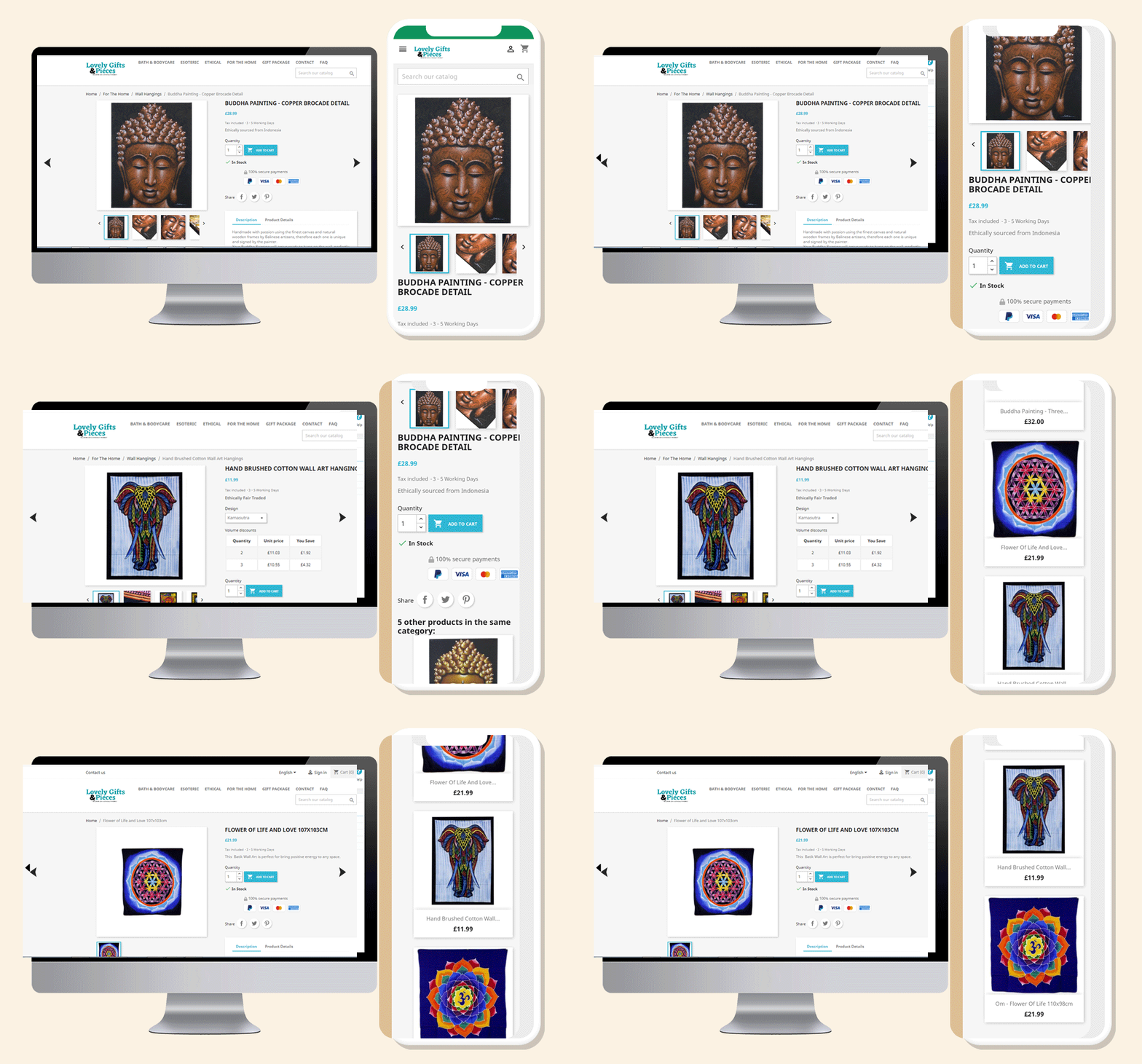
Access to the products becomes easy with PrestaShop Previous/Next product view addon. The customer does open a product to see the dimensions and features. With previous next buttons, multiple products can be seen without going back to the product page.

Check out the module in action on Lovely Gifts and Pieces

Do you want to add a previous/next button for easy product navigation on your store’s product pages? Lovely Gifts and Pieces are using the module on their store for easy navigation of the products.

Use Knowband’s customized extension to save your consumers time and make their buying more convenient. Choose the design and feel of the button based on your preferences to make it simple and appealing to users.

Live Demo

PrestaShop Previous/Next Product Addon for Quick Navigation of the products

You may like to read:

PrestaShop Back-in-Stock Module- Unique Approach to Capture Lost Sales

Offer Birthday Coupons to Your PrestaShop Customers And Win their Loyalty

Stunning Live Examples of PrestaShop One Page Checkout Addon by KnowBand

Etsy Overtaking the Brazilian Marketplace Elo7, for handmade items

Etsy overtaking Elo7, the Brazilian marketplace which is popular for its handmade products. Elo7 is a unique platform for handmade items in Brazil that falls in the top 10 list. Etsy is a world-famous marketplace that is known for its unique handmade products. Sellers can sell their art and crafts to people who admire and understand the value of handmade items.

The official announcement was made on the Etsy platform. The Elo7 has around 1.9million active buyers and 56000 sellers, a great advantage for Etsy. The company is selling its stakes to Etsy for US$217 million in cash with some adjustments to it. The Elo7 is a huge marketplace with over 8 million products for sale. Appears like, Etsy is going to make huge profits from this acquisition in the coming days.

In regards to this major takeover, Josh Silverman, Etsy, Inc. CEO, said, “Elo7 is the ‘Etsy of Brazil,’ with a purpose and business model similar to our own”.

Why Etsy is overtaking Elo7?

As mentioned, the Elo7 is a top-ranking peer-to-peer Brazilian marketplace with a large customer base. Several local sellers and millions of products will benefit Etsy in various ways.

Another advantage for Etsy is that the company will not have to make big changes in the policies as both have the same niche.

Elo7 is expected to provide Etsy with a range of local brands in the rapidly rising Latin American market. Along with this, the eCommerce penetration is around 10% since Brazil is the largest eCommerce market in the region.

The eCommerce market is expected to reach $1 trillion by 2020. In 2021, it is expected to be around $29 billion, with a 26% increase forecasted CAGR through 2024.

Elo7 is well-positioned to benefit from Etsy’s expertise to accelerate growth and value creation in the Brazilian Marketplace.

Etsy also acquired Depop

Recently, Etsy acquired another famous marketplace Depop that has a very similar business model to Etsy. The acquisition with Depop and Elo7 is significant thus has a tremendous growth opportunity in respective countries.

About Etsy Marketplace

Etsy, Inc. is empowering creative individuals since 2005 with its two-sided online marketplace. It brings together millions of enthusiastic and creative shoppers and merchants from all over the world. Etsy.com is a global destination for one-of-a-kind and creative items. Etsy buyers get inspiration from handmade unique products curated by creative businesses.

Reverb, a leading global online marketplace for buying and selling new, used, and vintage musical instruments, is also owned by Etsy, Inc.

How to sell on Etsy?

Start selling on Etsy with simple registration and become a seller. If you own a business that creates unique products, Etsy is the platform for you. Anyone can become a merchant on this creative hub.

There is a chance that you are already selling products on your website. As a result, it becomes daunting when you have to manage the same inventories at two different places.

To save yourself from this horrible task, you should use a marketplace integrator. This indeed reduces extra efforts and help you manage orders and inventories from your website itself.

KnowBand Etsy Marketplace Integration

The marketplace integration for Etsy is robust that allows you to connect your website with your Etsy profile. The real-time sync, easy order management, stock management and inventory management will become easy and effortless.

The Etsy Marketplace Integration plugin is installed by more than 450 PrestaShop stores. KnowBand’s Marketplace plugins are available for PrestaShop, OpenCart, Magento and Magento2 platforms. There are 100+ downloads for every platform.

Facilities provided by Etsy Marketplace integration:

  • Automated product listing
  • Seamless store integration
  • User-friendly UI/UX
  • Easy order management
  • Payment and Shipping Regulations

Demo for the Marketplace integration is available. Click here to explore more.

Finally, Etsy is an amazing platform where you can find good business opportunities. Create unique stuff and start selling on the world’s only platform that has given value to handmade products and their creativity.

Recommended Reads:

OpenCart Android App is a Hit for MumbaiShoppers

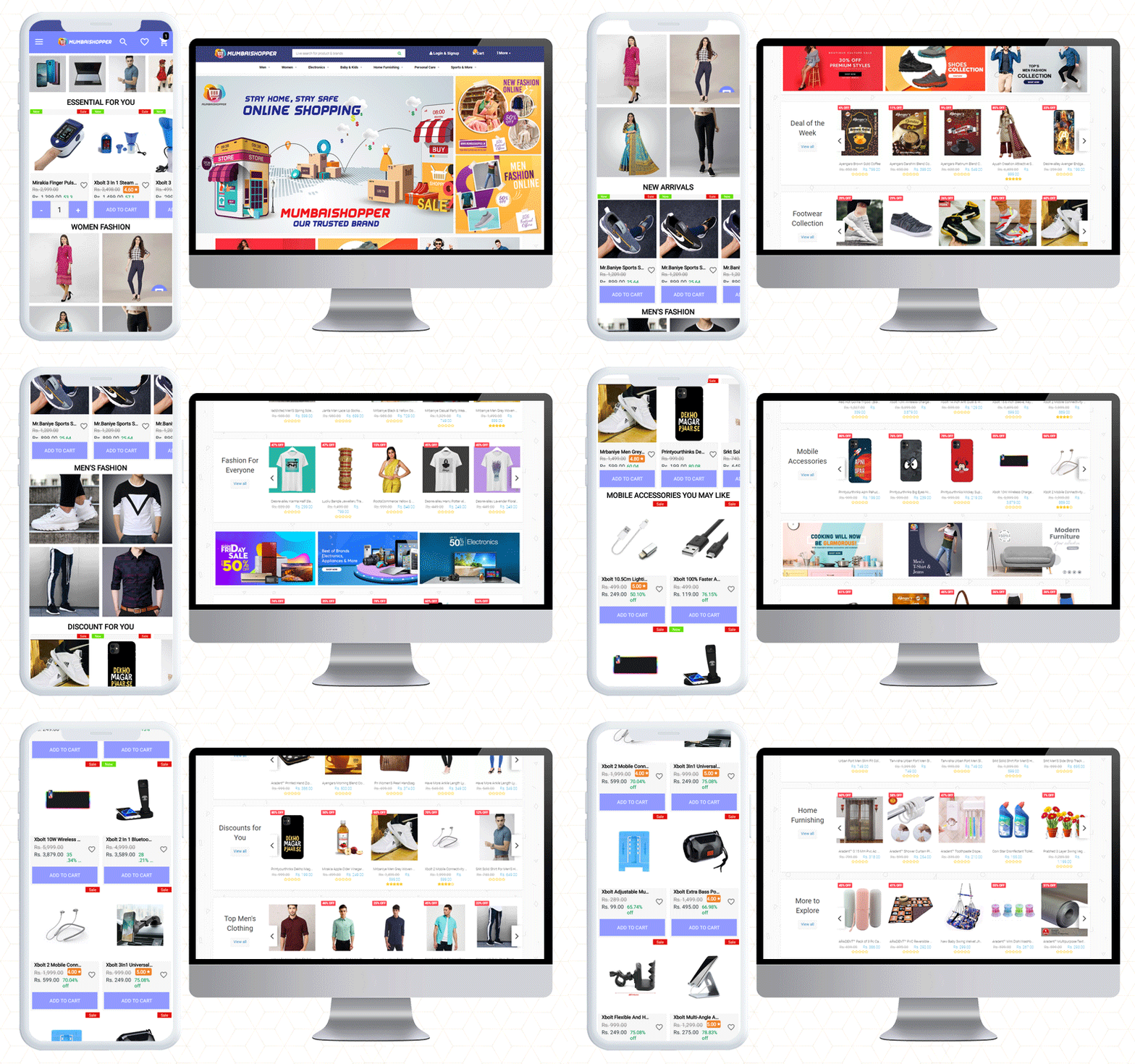
Do you have a count on the mobile apps you are using right now? Two, three, or maybe 10 at a time! The increase in the usage of mobile applications cannot be ignored. As mobile users are increasing rapidly, so is the demand for mobile apps. MumbaiShopper is a Marketplace for Mumbaikars. They have built their website on the OpenCart platform. To design their OpenCart Android App, they have used KnowBand’s OpenCart Mobile App Builder plugin.

From a fashionable home page design to a checkout page, it is personalized for sophisticated UI/UX. The CTAs, cart design, customer support, and many other features are a part of this mobile app builder plugin. This mobile app offers more exclusive facilities to customers and the admin. Let’s dive in to explore!

MumbaiShopper OpenCart Android Mobile App

As said before, the MumbaiShopper is a marketplace where you will find everything from fashion to furniture. If you want to shop baby products, fashion, electronics, or sports ranges, you will find everything at Mumbaishopper.

MumbaiShopper OpenCart Mobile App supports multiple currencies. You can see the prices in USD and INR. The categories, product listings, home page design, cart design; everything is up to the mark.

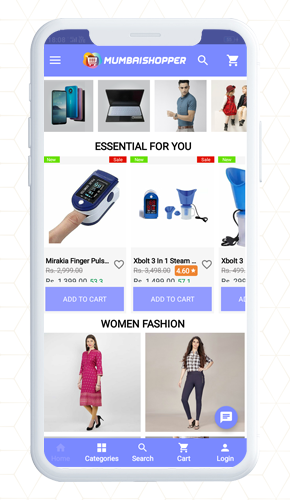
Have a look at the attractive home page!

The theme of the MumbaiShopper OpenCart Android app is similar to the website which is exceptional.

In midst of tough competition, the application needs to be user-friendly and appealing. It is quite certain to add color pallets, graphic images, banners, and logos that match your website theme.

For instance, the banner display is completely customizable. On the home page, show top categories, square banners, sliding banners, or products in the grid pattern. It is all up to you.

Have a look at the app design and its theme colors.

Isn’t it engaging!

About the Shopping Cart

Customers can add products to the cart quickly. The shopping cart of the app has two options:

  1. Shop more
  2. Proceed to checkout

It has clear navigation because the CTAs in the app are bold and aloud

Every change on the website is in Real-Time synch

The changes and updates that are made on MumbaiShopper Website are reflected directly on the Mobile App. It has real-time synchronization.

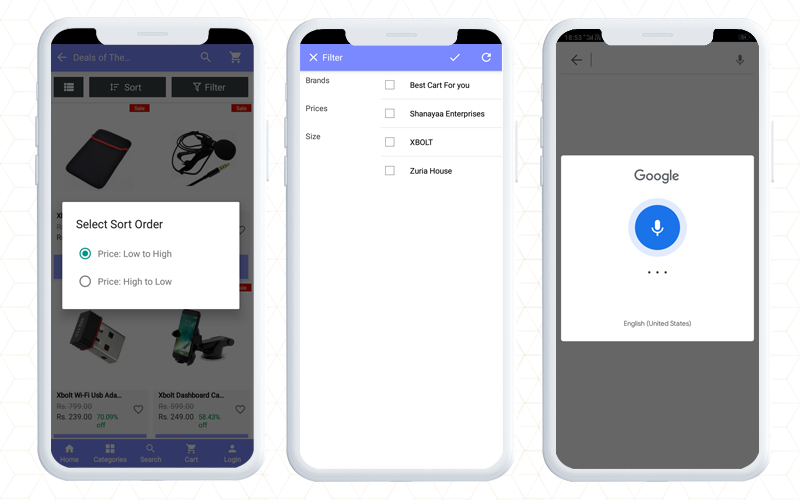
Finding the right product is easy

Find out the product you want by sorting and using the filter. Decide first and then apply filters. Sort it as relevancy, price, or bestseller.

It gives a satisfactory customer experience to OpenCart Android App users. It helps them in finding a product of their choice.

Voice search makes it easier.

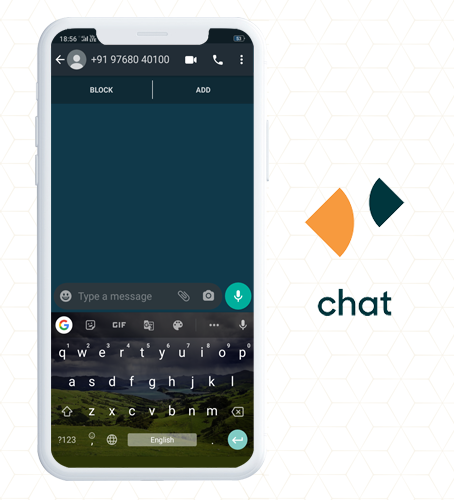
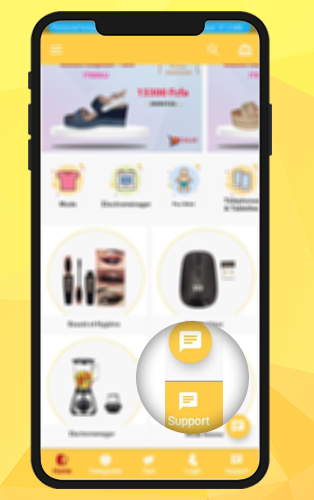
Whatsapp and Zopim for live chat support

The customers can get quick support from the MumbaiShopper team using WhatsApp chat and Zopim chat support options. WhatsApp live Chat is available because Customer service is the topmost priority of every brand.

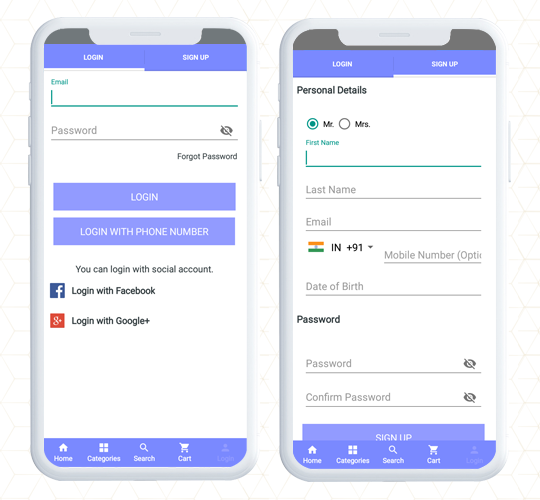
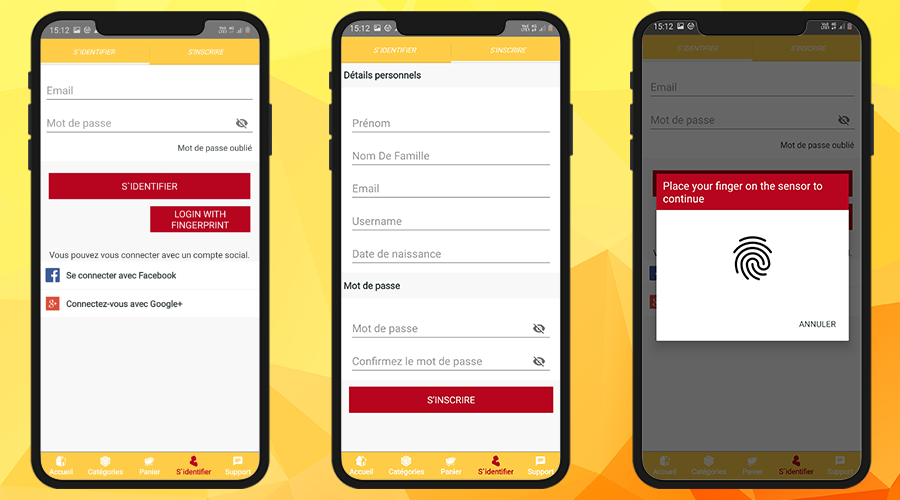
Quick Login and Sign up saves time and efforts

While most of the world population is connected via social media, why shouldn’t we take advantage? The OpenCart Mobile app has Google login and Facebook sign-up options for netizens.

Along with this, customers can register using their mobile number. This allows them to log in using OTP.

Additionally, a fingerprint login option is also available for the customers.

Multiple Payment and Shipping Support for every customer

As the user completes the registration process, they will have to make the payments first, then choose the shipping method for their product delivery on MumbaiShopper Store.

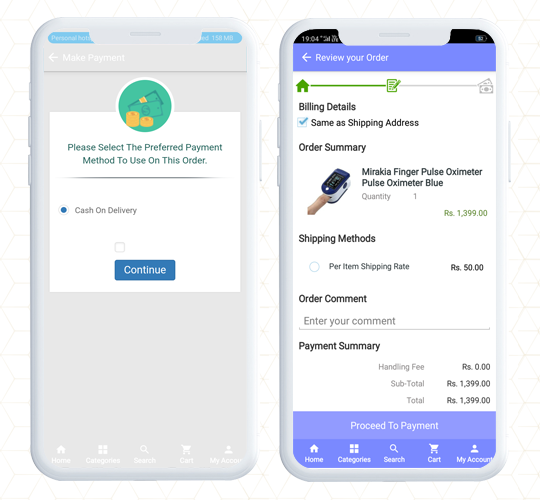
More conversion with One Page Checkout

The MumbaiShopper OpenCart Android App has a single-page checkout screen, as a result, it makes product purchase easier for front-end users. One Page Checkout provides quick checkout that refects in the reduction of abandoned carts. This also improves the app’s usability for order placement.

It is possible to run promotions on the OpenCart mobile App

Yes, you can run promotions on your OpenCart store if you have KnowBand’s OpenCart mobile app builder. The MumbaiShopper product range is wide and to entice customers, they run deals and discounts.

Deals of the Day, Deal of the Week, and Discounts for you are some listed categories in the MumbaiShopper OpenCart Mobile App.

The app allows the store owner to run promotions and coupons that are applicable on the website.

You can add Spin to Win promotional gamified element to your mobile app only if the same is available on your website.

Bring new customers to store

Wondering how? The MumbaiShopper store has a social sharing option for products.

The OpenCart Mobile App allows customers to share products on their social media profiles. This also attracts more attention from their friends and family. Hence brings you, new potential visitors.

Feature to track the traffic

With Google Analytics integration, OpenCart Android App allows tracking app performance standards, in short, you can set new goals. On the mobile app, the store administrator can monitor traffic and plan marketing campaigns accordingly.

To sum up, like the MumbaiShopper store, you can also make your mobile app using the Opencart Mobile App builder plugin. The application has almost everything that you need for a mobile app. Check out the live demo or get the free OpenCart mobile app to have a preview of your store.

We believe in customer satisfaction. If you want any custom feature that is not included in the Mobile App Builder, let us know in the comment below.
Read more Mobile App Sucess Stories  

OpenCart Loyalty Points Extension – User Manual

1.0 Introduction

Did you know that increasing your customer retention rate by 5% boosts your profits by as much as 95%? But far too often, businesses choose to focus on attracting new shoppers – not looking after existing ones. Understandably, you want to grow your customer base. But how do you keep hold of the people who are more likely to buy from you again? Well, one solution is to create a customer loyalty program that rewards those shoppers who come back. Knowband OpenCart Loyalty Points Extension can easily solve this problem.

1.1 What are Loyalty Points?

Loyalty points are the reward-based points that are awarded to the customers when they fulfill some conditions on your online store. These conditions can be anything like a specific product, minimum cart value, category, etc. The points collected by the customer can be converted into discounts which can be used by the customer to decrease some amount of the cart.

A loyalty points program is a marketing strategy designed to encourage customers to continue to shop or use the services of a business associated with the program. This is used to engage the customer in making more and more shopping decisions on our web store by giving them more and more points so that the customer has more and more interest in buying more items from the store.

The process of creating a loyalty point program can be a very difficult task, hereby Knowband’s OpenCart Loyalty Points extension will simplify this task for you. This plugin allows the admin to create different types of conditions, if the customer satisfies any of these conditions, the customer will be automatically awarded the loyalty points defined by the admin. This reward point extension will also keep the track of the loyalty points rewarded.

1.2 How does it work?

The working of the OpenCart Loyalty Points module is explained by the following points.

  • Firstly the Admin needs to create rules in the loyalty point rules tab.
  • The Admin also needs to add conditions according to the rules type he/she is creating.
  • Once the rules are created, if the customer fulfills the conditions of a rule, the customer will be rewarded according to the points stated in that particular rule he/ she fulfilled.
  • Once the customer gains some points, they can use those points to get discounts on their next purchase.
  • Once the customer has applied points in the cart and placed an order, the points will be automatically removed according to the points they have used.

1.3 Salient Features of the OpenCart Loyalty Point module

  1. OpenCart Loyalty points system grants loyalty points to your customers for placing an order with a specific cart value, creating an account, ordering a certain product, etc. The loyalty points are defined specifically for different rules.
  2. OpenCart Loyalty reward points can be offered manually or automatically to the customers based on their cart value, product selection, or site activity.
  3. With this Loyalty points module, you can set the discount equivalent to a single loyalty point. A custom conversion rate can be set to different currencies of the module.
  4. OpenCart Loyalty points module gives an option to set minimum cart amount to be eligible to apply loyalty points discount.
  5. The tax over OpenCart loyalty discount coupons can be enabled or disabled from the backend.
  6. The loyalty points module for OpenCart allows you to set various progression names in multiple languages.
  7. OpenCart Loyalty Points module lets you create unlimited loyalty points rules based on the customer’s Cart, Product, or Behavior.
  8. With this reward point plugin, you can set the title, description, the number of loyalty points, start date, end date, and validity for each rule.
  9. You can modify, enable, disable or delete the existing rules from the module Admin settings of the Reward points extension.
  10. The status and detailed history of OpenCart loyalty discount points can be viewed at the backend.
  11. With the OpenCart customer loyalty system, you can easily get into the details of loyalty points earned by the customers of the store. It keeps a list of customers with how many points they have spent, available, and on hold.
  12. The different emails sent for points, credit points cancellation and points redemption can be modified from the back-office of this OpenCart Loyalty reward points module.
  13. OpenCart Loyalty points system is simple to enable or disable from the module Admin settings interface.
  14. The OpenCart loyalty points module is multi-lingual compatible.

2.0 Installation Guide

Once purchased, you will receive the following files in your registered email.

Source code of OpenCart Loyalty Points module in zipped file format.

User Manual of OpenCart Loyalty Points module.

Now to install this on your OpenCart Store, follow the given steps:

Step 1: Unzip the zip file. You will get the folders as shown in the image below

Step 2: Now choose the OpenCart version according to your store and open that specific OC folder. After opening it you will see the following content.

Step 3: Copy and paste the content inside the upload folder inside your Opencart store folder.

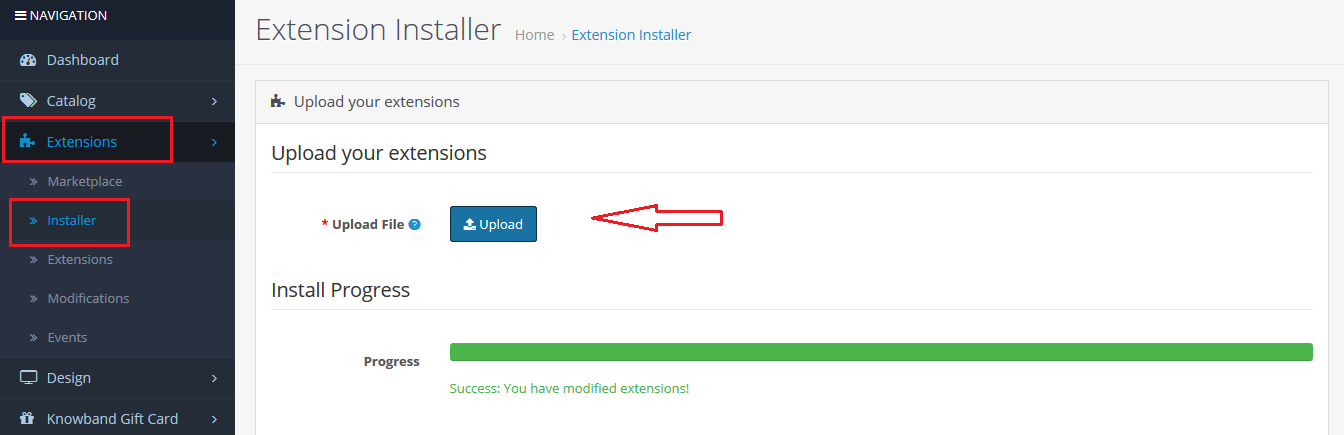
Step 4: Go to Extensions and then Installer. From here, you can upload the ” kbloyalty_point.ocmod.zip” (for OC3.0.x) file and install the extension.

So, the OpenCart Loyalty Points Module is now successfully installed and is ready to use at your store. Go to the admin menu and click on the extensions. Choose the Extension Type as Modules. You will find a list of modules. Select the Knowband Loyalty Point Module.

3.0 Admin Interface

The Admin Interface of OpenCart Abandoned cart recovery email extension includes the following main settings:

  • Module Configuration
  • Loyalty Points Rules
  • Loyalty Points Balance
  • Loyalty Point History

3.0.1 Module Configuration

This tab consists of all the module configurationally settings.

3.0.2.1 General Settings

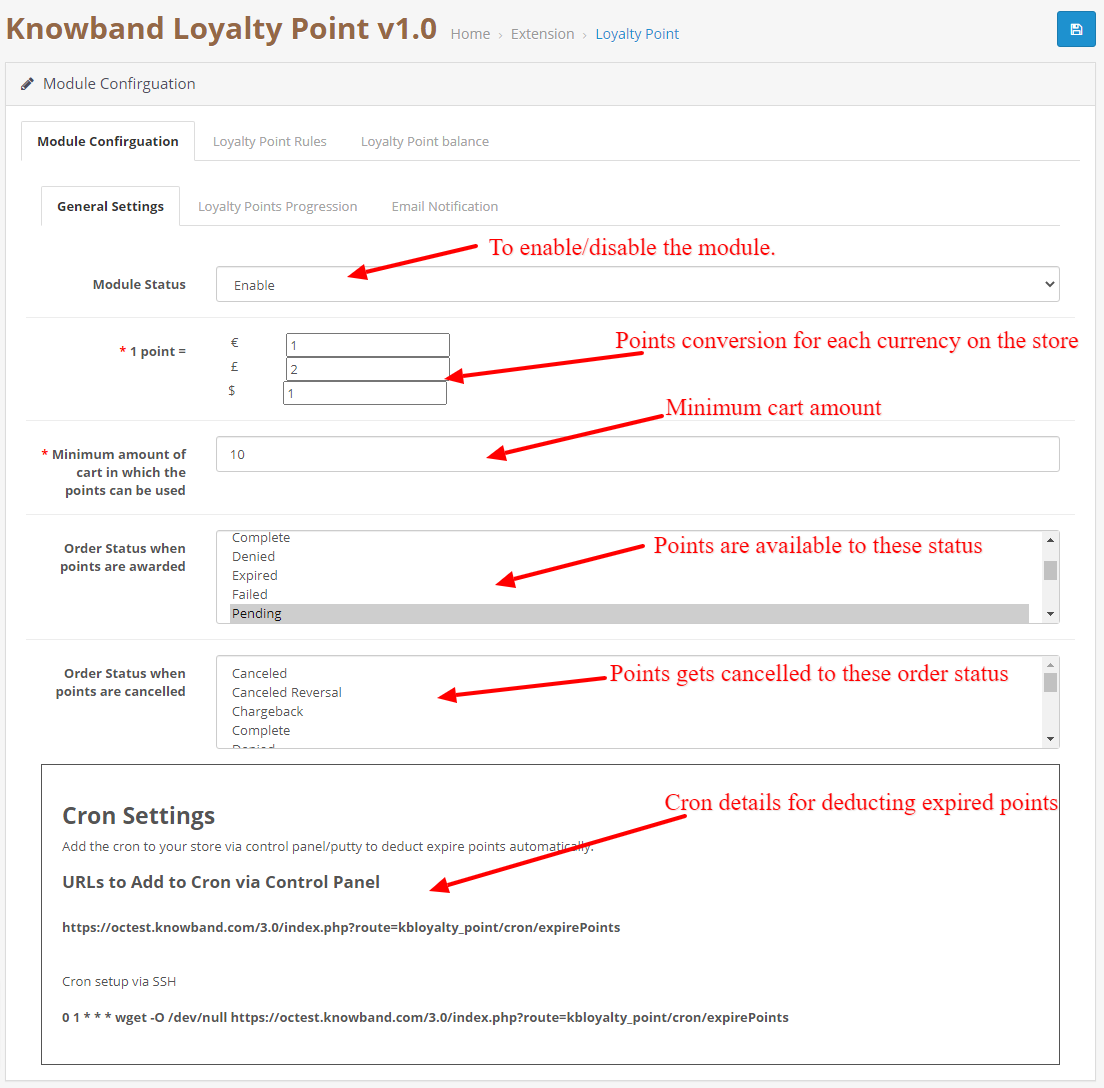
  1. Enable/Disable: Initially, this field of the OpenCart loyalty points module by Knowband will be “OFF”. Admin can enable/disable the Opencart module by turning ON/OFF in this setting.
  2. Point Conversion: In this field, you can set the conversion rate for each currency added to your store.
  3. Minimum Cart Amount: This filed allows you to set a minimum cart amount on which the points can be used or not.
  4. Apply Taxes:  If enabled, the discount generated by the points will be applied to the taxes as well and if it is disabled the discount will not be applied to the taxes.
  5. Order Status for Available points:  If the order status gets the selected status from admin the points will be automatically available to the customer.
  6. Order status for Cancelled points: If the order status gets the selected status from admin the points will be automatically available to the customer.
  7. Cron Settings: Details of the cron are showed, This cron is used to deduct available points from the customer who has not used and passed the expiration date.

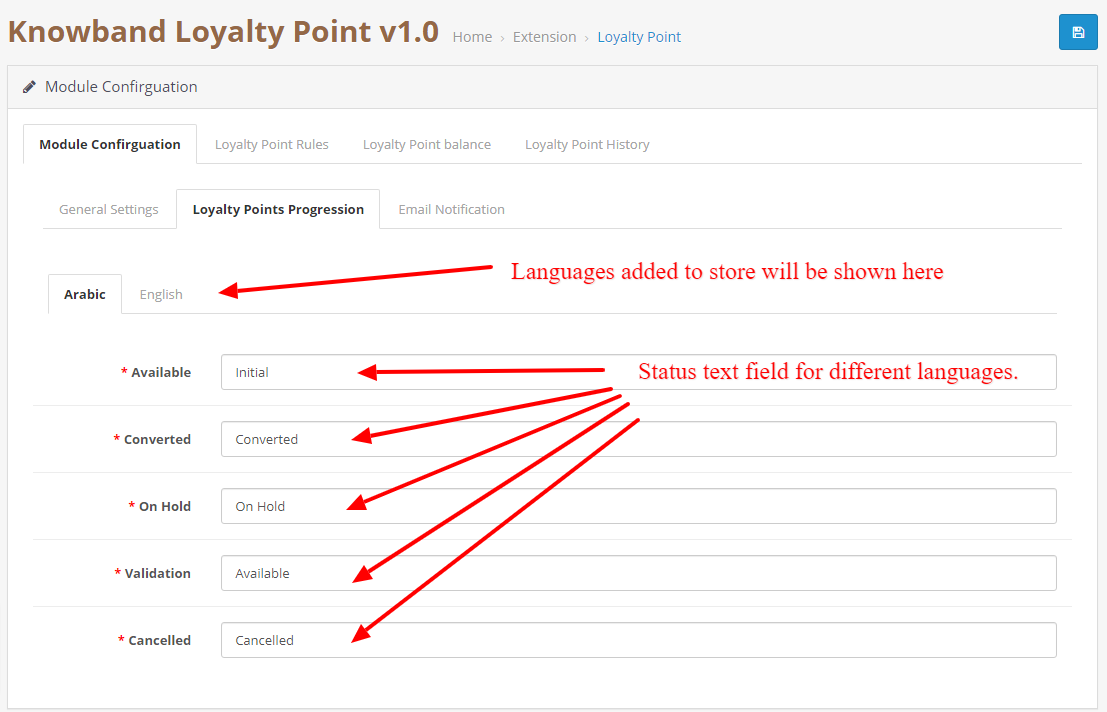
3.0.2.2 Points Progression Settings

This allows you to change the language/text as per your requirement of the loyalty points progression statuses. You can change the language for each status in each language added to your store.

3.0.2.3 Email Notification.

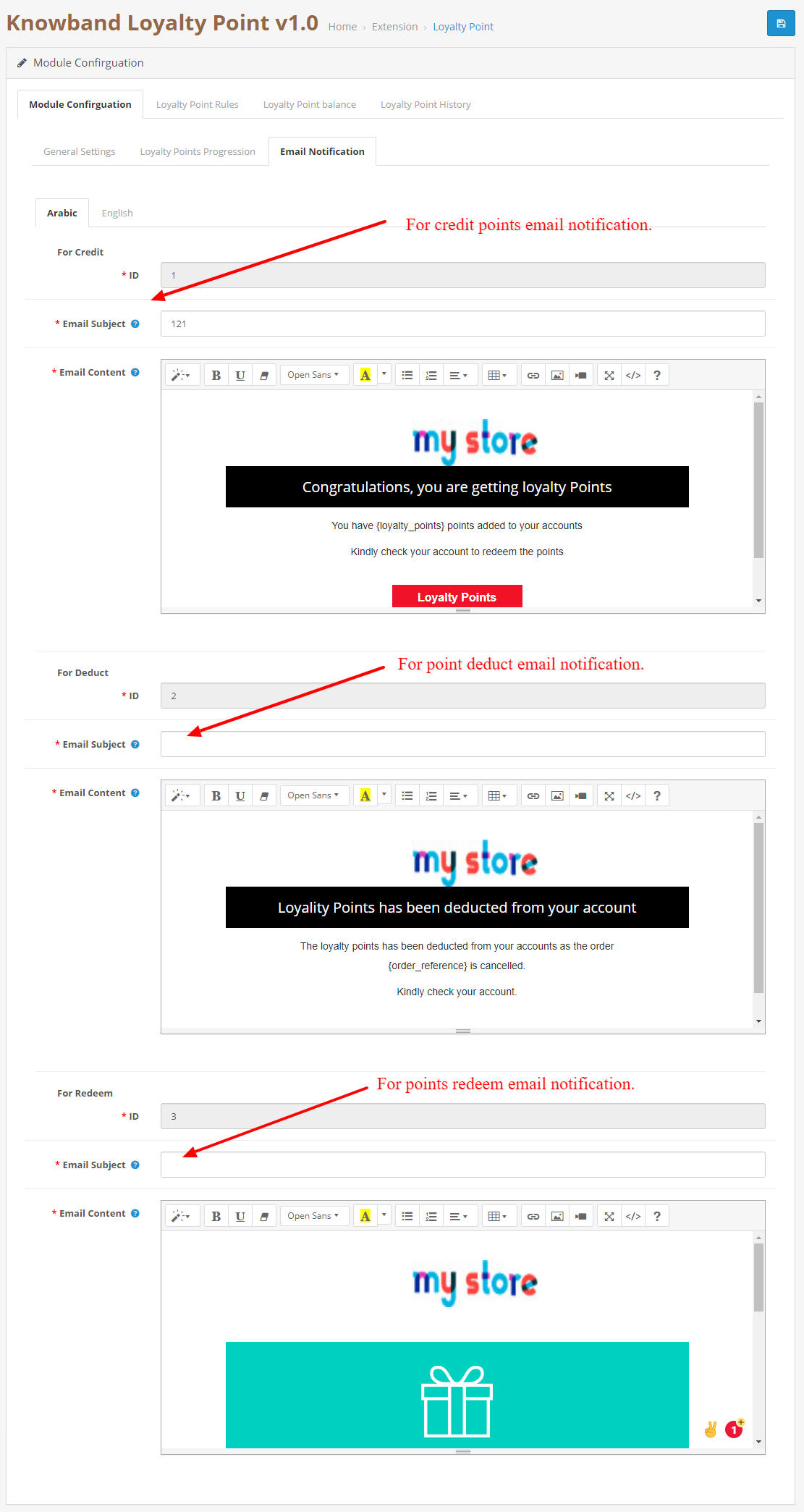
In this tab, you can customize the credit, deduct and redeem notification emails for each language.

3.0.3 Loyalty Point Rules

In this tab, you can see all the rules that are created in the store. The Admin can create new rules and edit the existing rules using this tab.

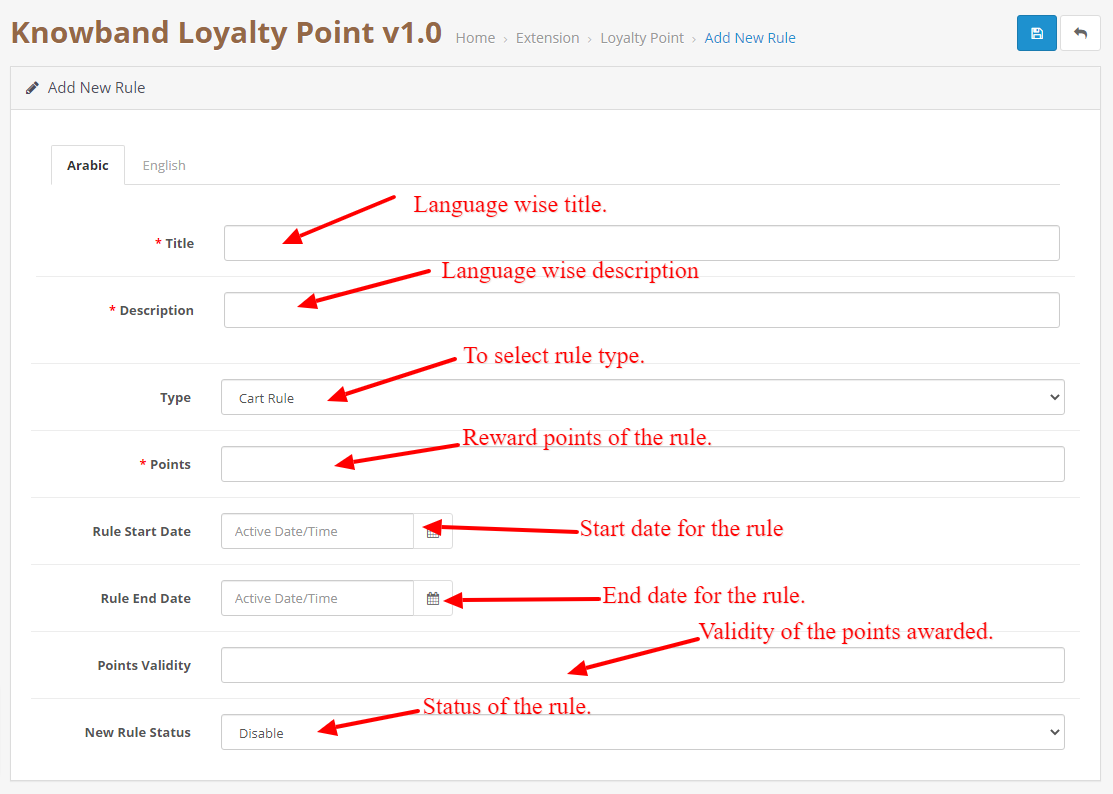
3.0.3.1 New Rule

When the Admin will click on the new rule button, they will be redirected to the New rule page. On this page, you can create a new rule by filling the form.

  • Title: Add a title to the rule in each language added to the store.
  • Description: Add description to the rule in each language added to the store.
  • Rule Type: Select the rule type. It can be a cart, product, or behavior rule.
  • Points: Add the number of points that will be awarded to the customer if the conditions are fulfilled.
  • Rule Start Date: This field will be used to add a Start date for the rule.
  • Rule End Date: This field will be used to add an End date for the rule.
  • Validity: This field is used to add validity to the points which will be added to the customer. You can add no. of days in the field.
  • Rule Status: To enable/disable the rule.

3.0.3.2 Edit Rule

This page is used to edit the rule data. It consists of the following tabs:

  • Configuration: This tab is exactly similar to add a new tab but here you can change the details of the rules except for the rule type.
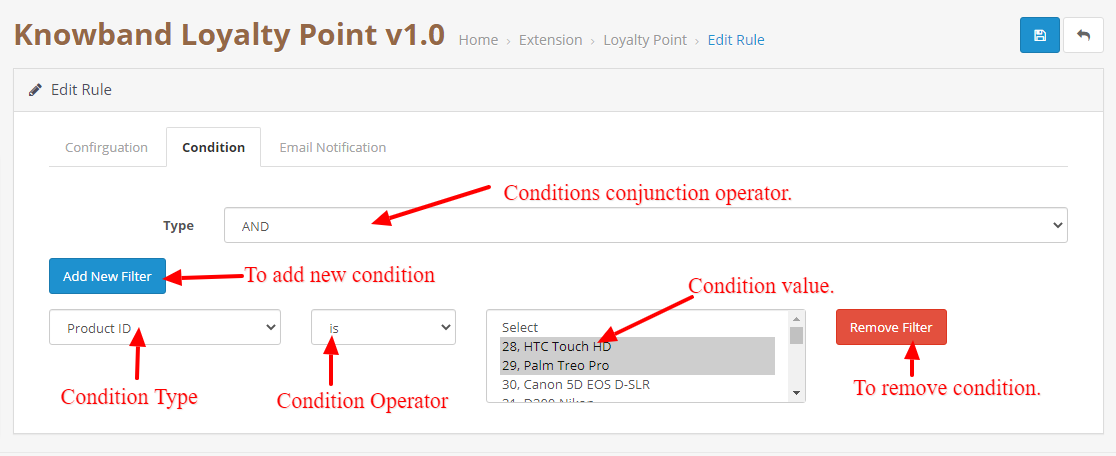
  • Condition: This tab is used to add the condition to the rule. The admin can add or delete the conditions as per their liking and different rule types have different conditions.

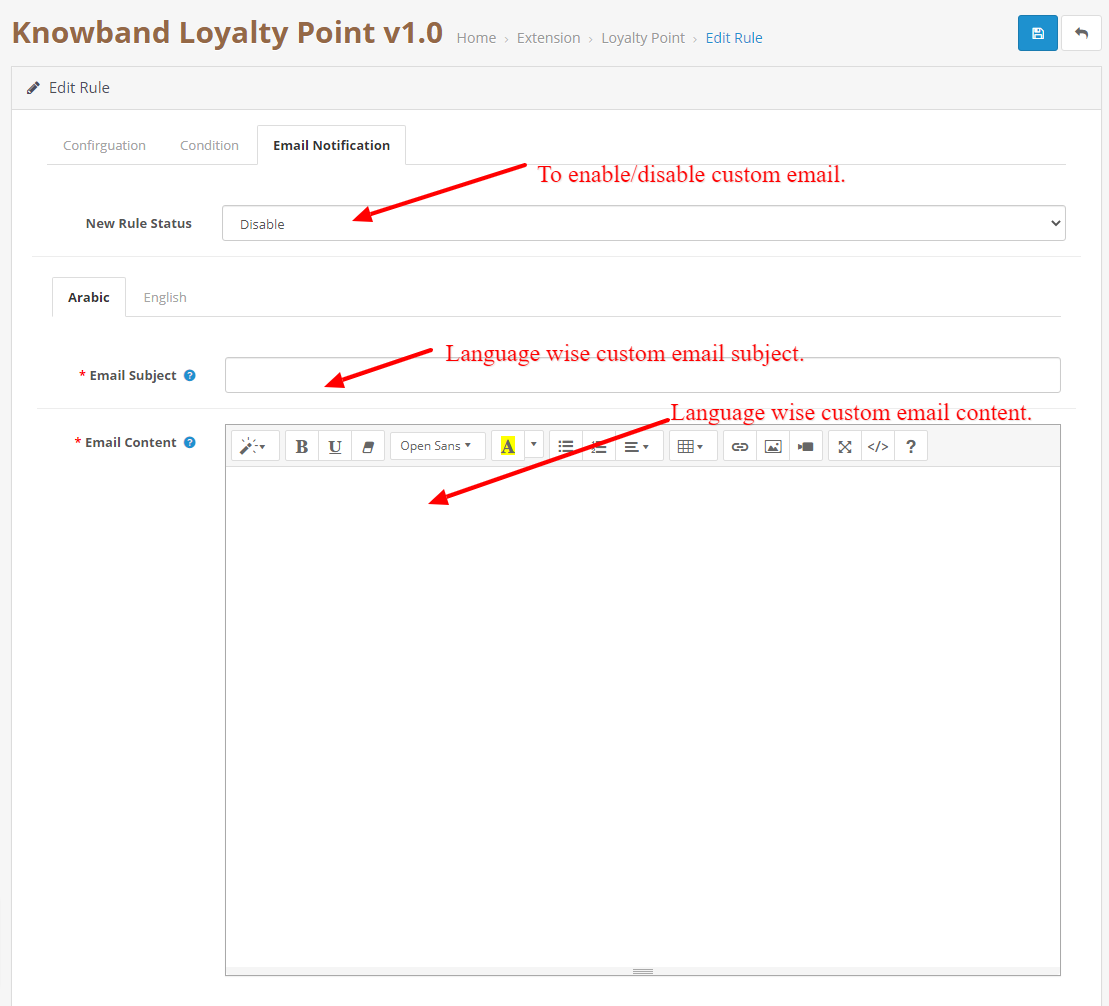
  • Email Notification: This is to add a custom rule notification. This email will be sent if the rule condition is satisfied by the customer and points are awarded to the customer.

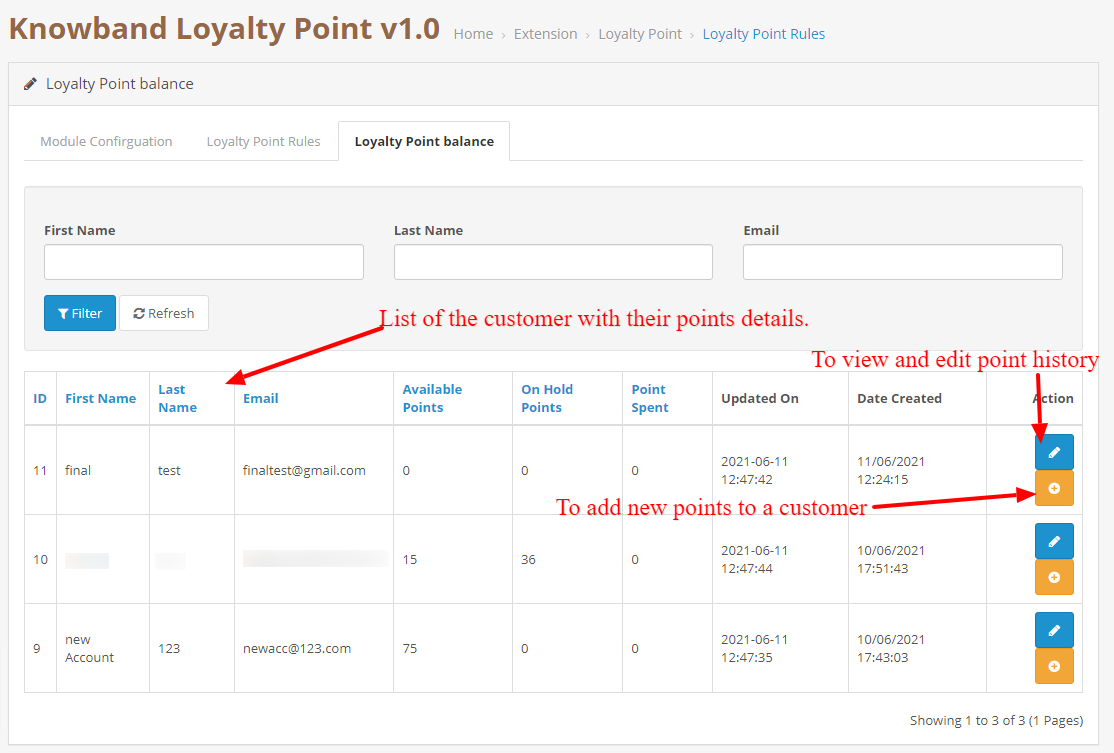
3.0.4 Loyalty Point Balance

This tab consists of a listing of each customer that has been awarded points. It will contain a list which will describe how many points are available to the customer, how much are on hold, how much they have spent.

3.0.4.1 Loyalty Point History

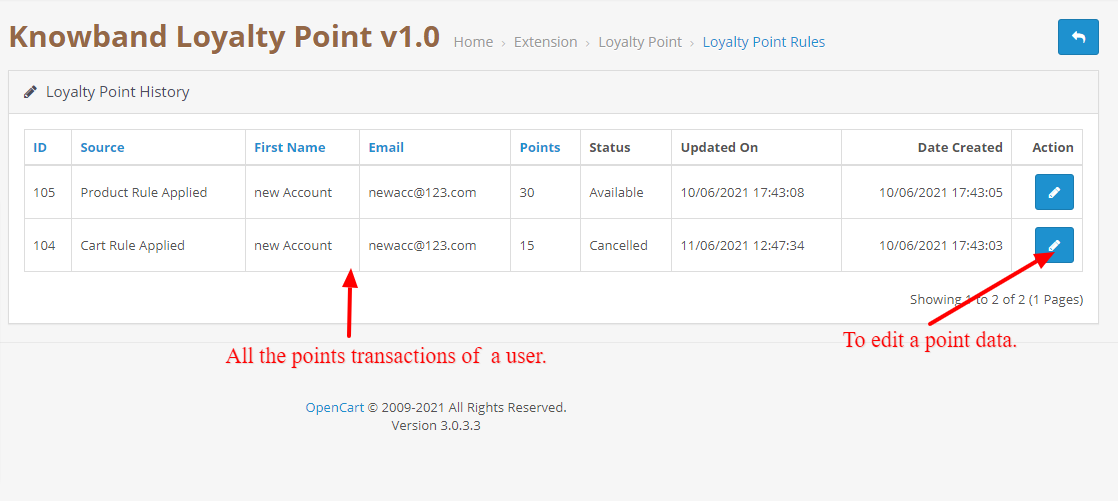
When the Admin will click on the edit history button, they will be redirected to the history page which will show all the transactions of the selected customer.

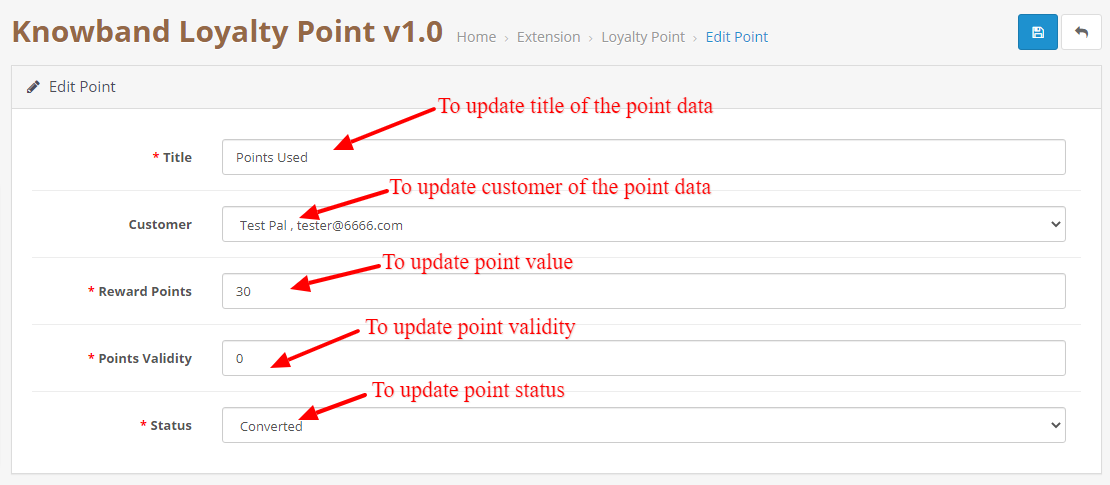
3.0.4.1.1 Edit Point Data

This page can be used to change the point data. This can be used to change the status of the point, point value, point title, and validity. This page is also similar to add a new point data page but this is used to update the data.

3.0.4.1.2 Add New Point Data

This will be opened when the admin will click on the add points button in the balance tab. This is used to add new points to the selected customer.

4.0 User Interface

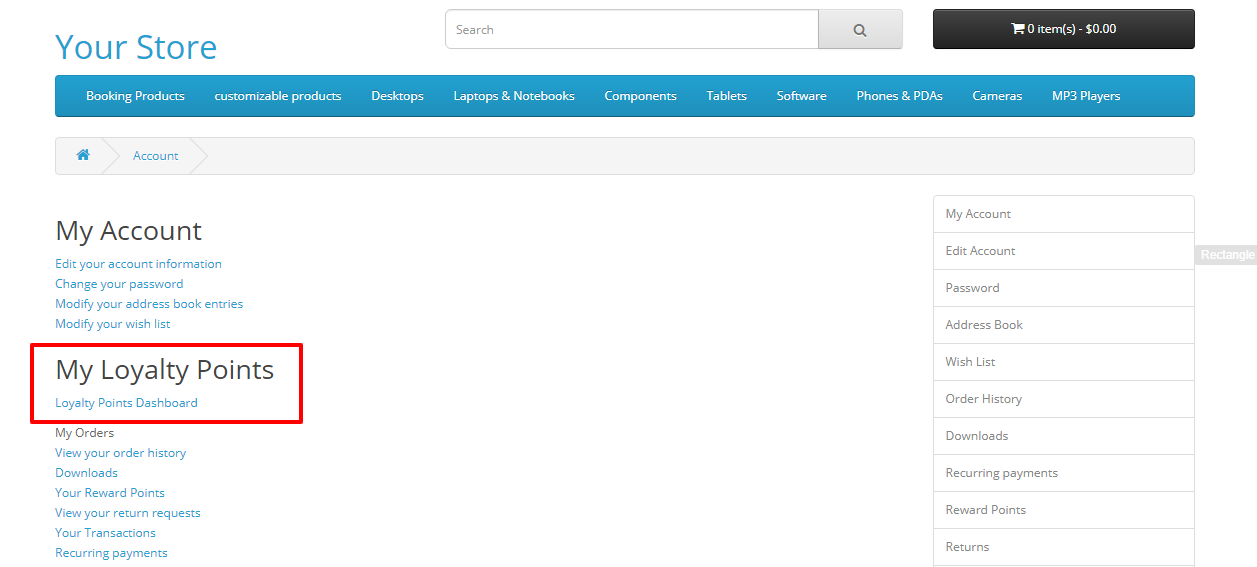
4.1 Once the module is enabled from the customer can go to their loyalty point dashboard by clicking the Loyalty points dashboard in the account section.
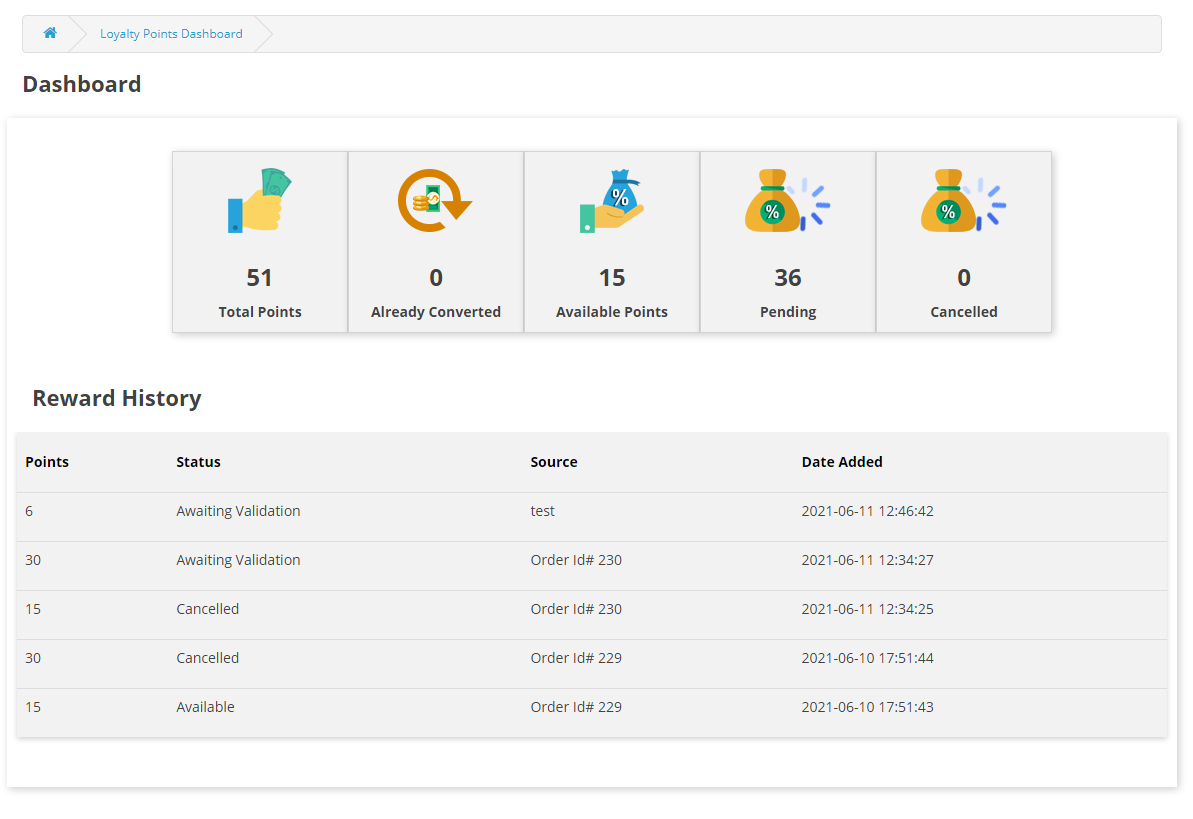
4.2 In the dashboard the customer can see all the point transactions as well as how many points are available to them, how many they have spent and how many points are on hold.

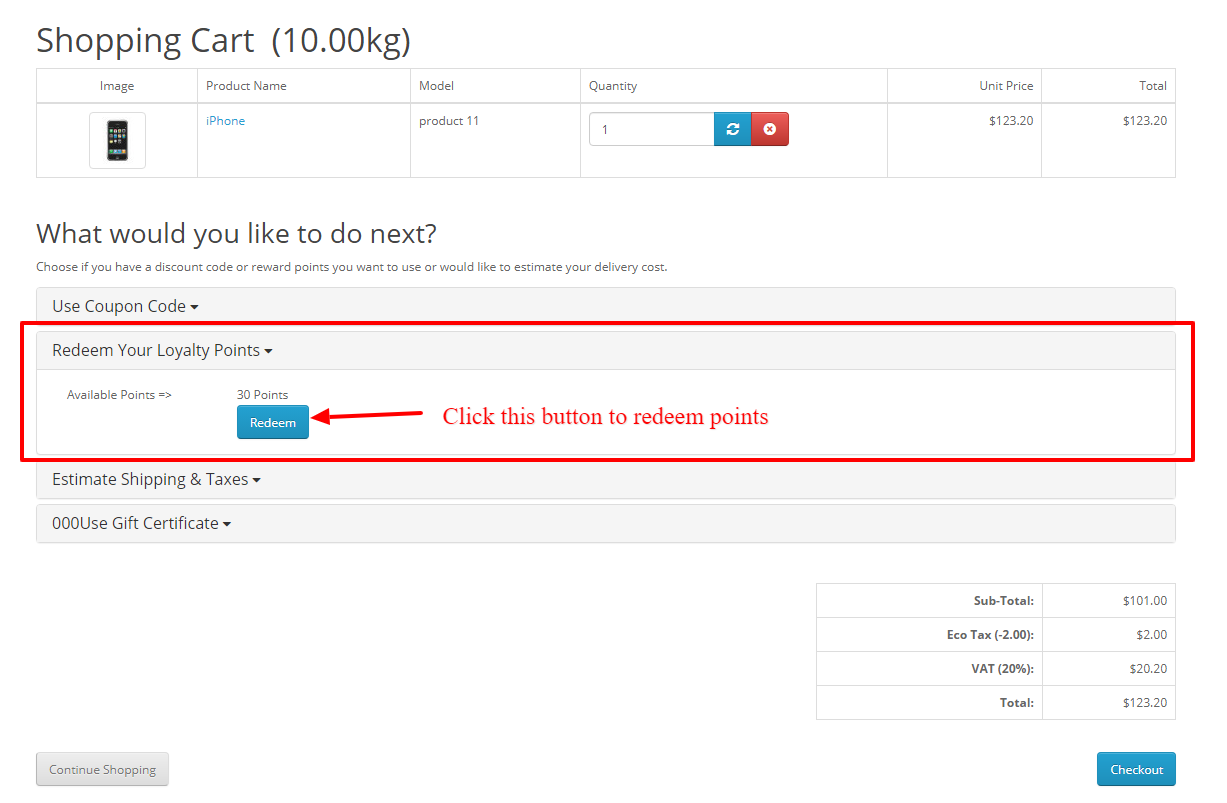
4.3 If the customer has some loyalty points then an accordion will be shown on the cart page where the customer can use those points to convert them into discounts. They just have to click on the redeem now button and the points will be converted into discounts.

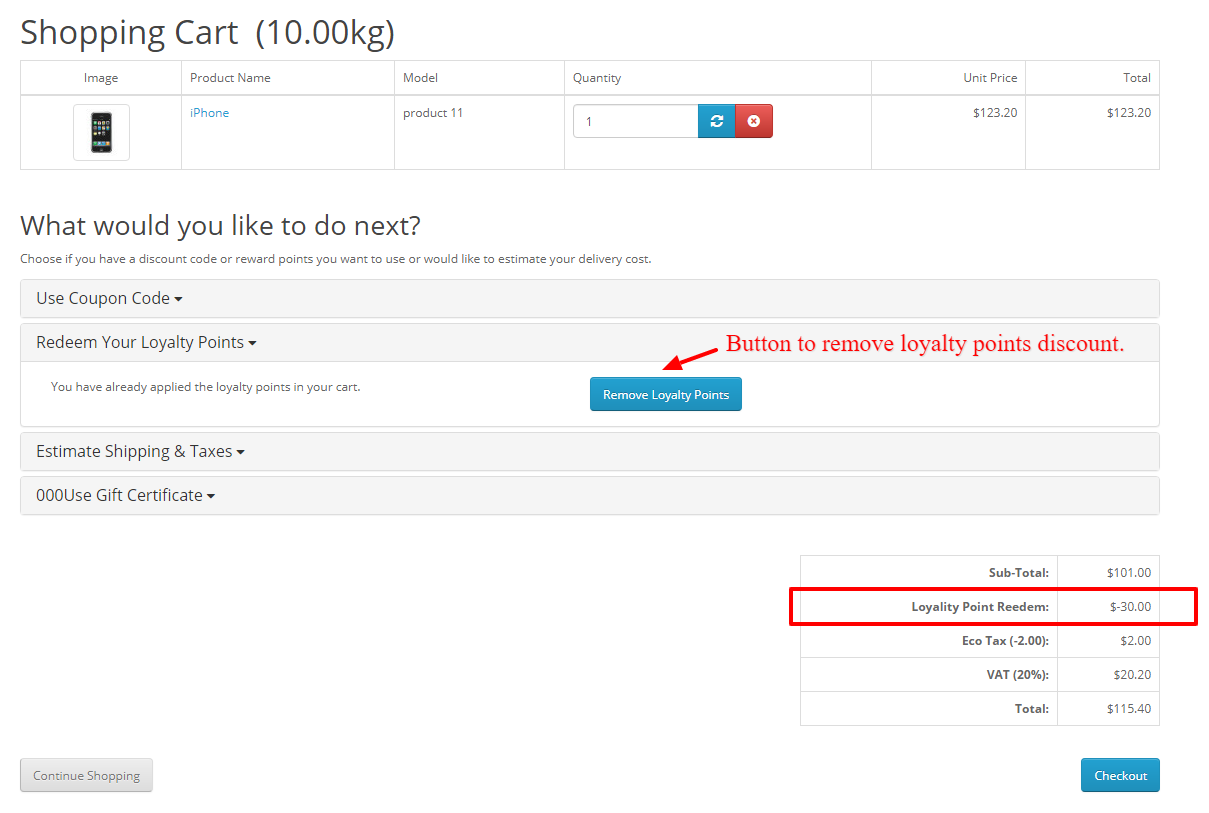
4.4 Once the points are redeemed they will be shown in the cart total section and the customer can also cancel points if they want to by clicking on the remove points button.

In case of any issue, drop an email to support@knowband.com OR click here to raise the ticket.

Buy OpenCart Loyalty Points extension: https://www.knowband.com/opencart-loyalty-points

Admin Demo:

Front Demo:

OpenCart Loyalty Points extension from the OpenCart Marketplace:

Facebook is Introducing Shops to WhatsApp and Other Commerce Updates

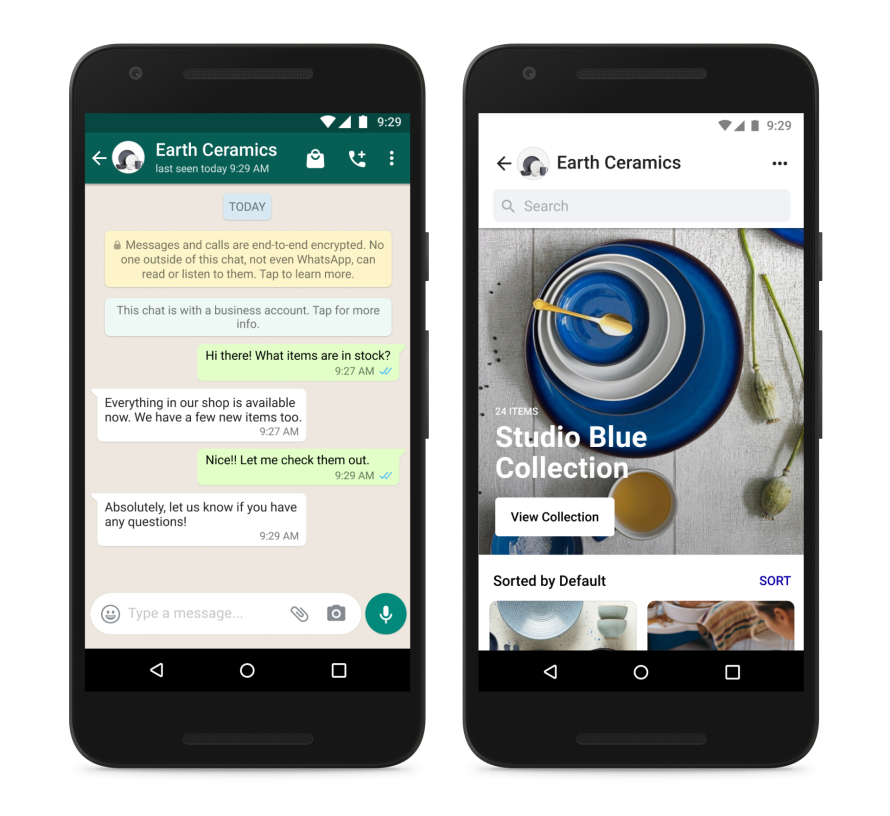
Facebook is implementing the ‘Shop’ feature in the messaging app WhatsApp and Facebook Marketplace.

In a recent Facebook post, Mark Zukerberg mentioned new commerce tools that are coming on the way. The latest updates are for Facebook, Instagram, and WhatsApp that will help businesses make buying more convenient.

We have covered all the upcoming features of the most used social media platforms. Give it a read!

WhatsApp Shop Feature

You’ll soon be able to view a Shop on WhatsApp and interact with a business before making a purchase.

Shops on Marketplace

In the United States, the social media giant will make it possible for Shops products to be added to Marketplace. This will be an opportunity as Facebook has more than 1 billion people visit each month. They are planning to waive the fees for business sellers by June 2022. A big announcement for small businesses!

Personalized Facebook Shop Ads

Facebook and Instagram have become personal branding platforms for content creators, and digital marketers. People are running ads among the targeted audience. Businesses want to give smooth and relevant shopping experiences and want to provide a purchasing experience as personalized as your News Feed. That’s why Facebook is launching Shops advertising, which delivers personalized ad experiences based on people’s buying history.

AR Try-On Feature Has Been Expanded

Commerce goes hand in hand with technology. With the implementation of AR and virtual reality, the eCommerce sector is seeing a lot of new additions in marketing and branding style. Facebook is investing in immersive technologies such as augmented reality and artificial intelligence, which will provide the foundation for future online shopping.

Personalized experience

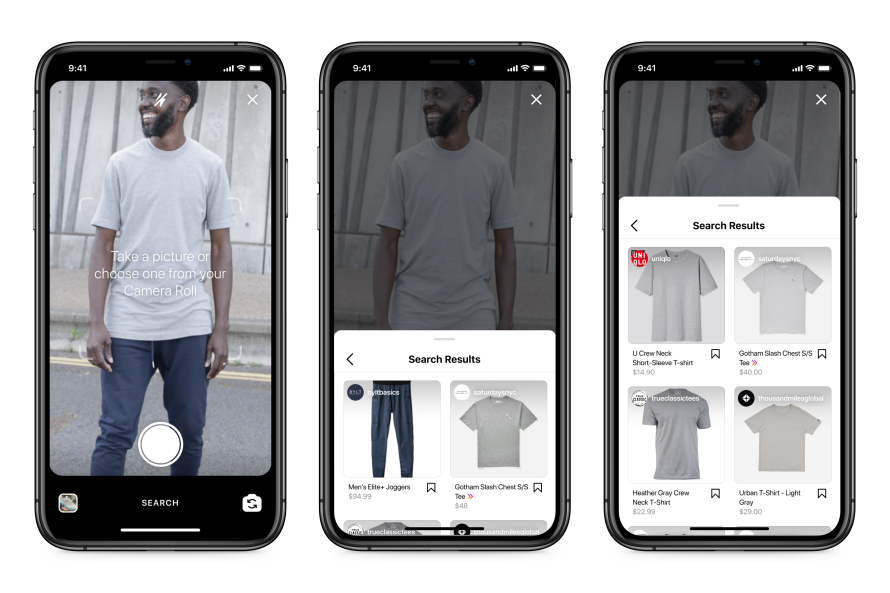
Users shopping on the company’s photo-sharing site Instagram will be able to click on goods and identify comparable products in Shops using an artificial intelligence technique called ‘visual search,’ which will be tested in the coming months.

  • Virtual Search

Users will be able to use this search from within the app or from their own camera rolls, according to Zuckerberg. With AR, they will help users imagine products before they make the purchase. Wondering how you can add this feature to your store?

  • Review and rating for Instagram Business

Facebook will be adding ratings and reviews to products in Shops on Instagram over the coming months.

  • One shop for every platform

Businesses simply need to create their shop once for it to work on Facebook, Instagram, and WhatsApp.

Please check the details on the official platform – Click Here.

eCommerce Modules to increase the customer engagement

Create Shop at Facebook Fan Page
Knowband offers a Facebook Shop module for PrestaShop & Magento platforms that allows the store owners to sync the products from the store to the Facebook Shop. Facebook page visitors can view the products on Facebook. This module helps to automate the product listing and update the inventory status without any additional efforts.

Facebook Share and Win Discount
Encourage customers to share the products on Facebook to win special discounts. The discount coupon code can be used to make a purchase at the store. This module is available for PrestaShop, OpenCart platforms.

Search By Image:
Allow customers to search products by image. Visual search helps the customers to easily find the products and improves the user experience. The Image Search Module is available for the PrestaShop and OpenCart platforms.


This may interest you:


Add Free Product to Cart Extension for OpenCart Store

On your OpenCart store, give customers a free product that they like as a gift when they shop. With the visually powerful ‘OpenCart Add Free Product to Cart’ extension, you can boost your sales rates and make clients feel fortunate. Receiving gifts gives us joy! It builds a relationship between the receiver and the giver. With OpenCart Gift the Product extension, build that connection with your customers. The plugin allows customers to add a free product to their cart when they meet the rules set by the store owner.

How ‘OpenCart Add Free Product to Cart’ extension does works for customers?

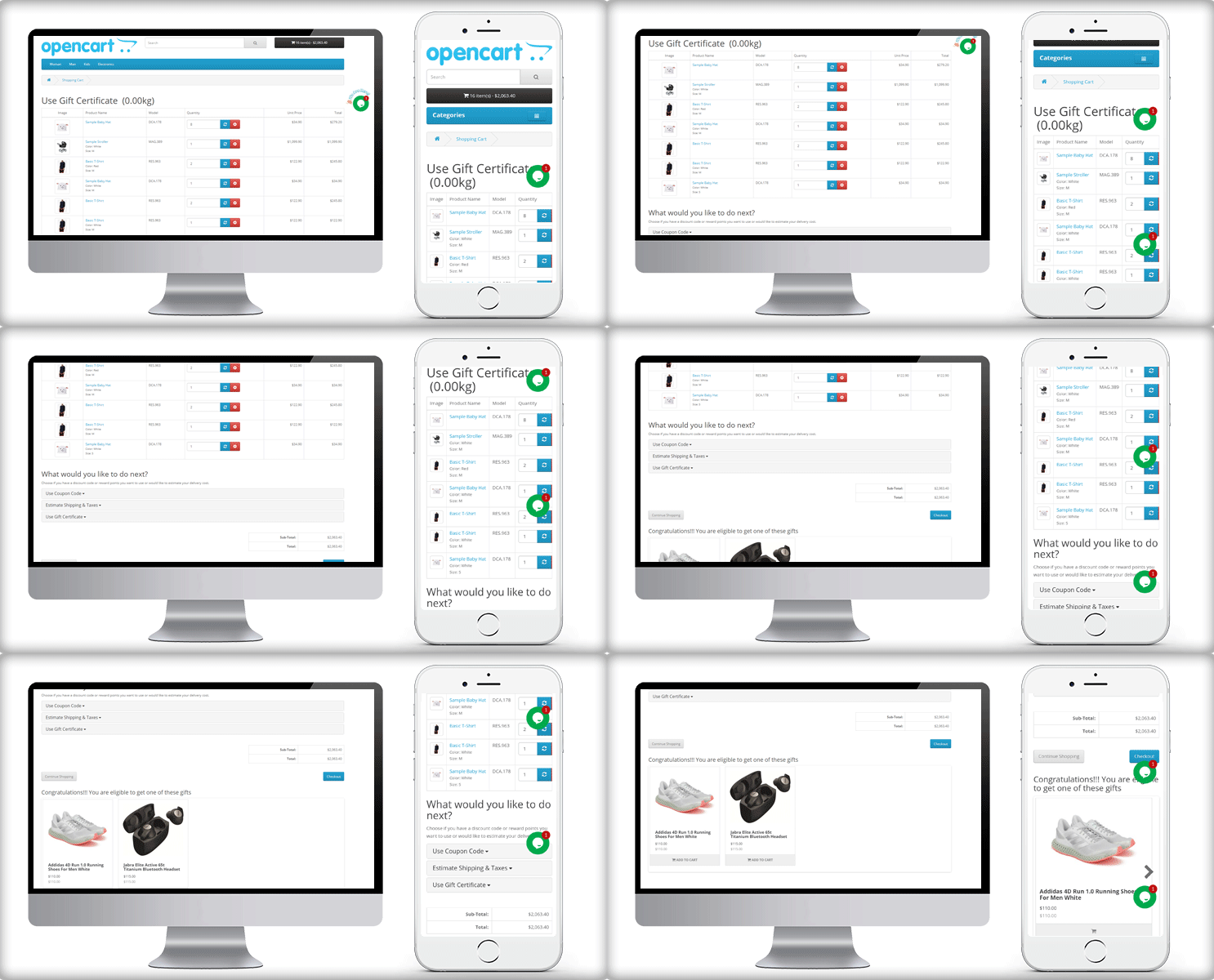
On the front end, a customer can see some selective products that they can add to their cart as a free gift.

Is there a free product for everyone? A person who meets the eligibility criteria gets a free product from the store. This can be $X and as the customer makes the purchase more than that amount, he is free to add a product as free gift.

How it will appear in the Shopping Cart and During Checkout?

What are the ways to set the rules?

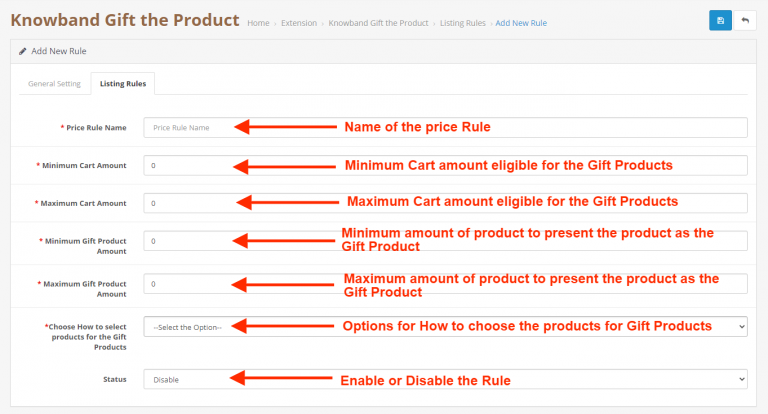
Store admin can define the eligibility criteria for OpenCart Gift the Product extension. Set rules to give free products to the customer.

#Rule1

Add a specific number of products from which the customer will choose the free gift.

#Rule2

Set a minimum cart value above which you want to give them a free product. You can set a maximum value and make multiple rules.

#Rule3

Put minimum and maximum amount for the FREE PRODUCT. The free product block will display products in between that range.

#Rule4

Choose How to select products for the free Products- By category name or specific product name

#Rule5

Select a layout to display the free gift product block on the cart page. There are two layout options in OpenCart Gift the Product extension:

  1. Normal listing products
  2. Sliding listing products

Admin benefits of the Free Gift Extension:

The OpenCart Gift the Product extension has several advantages for the store admin

  1. It is multi-store compatible and supports multiple languages. Any user can access and take the advantage of any browser.
  2. Increases average cart value: By giving free gift products at a certain amount, the average order value increases.
  3. This plugin helps to boost customer engagement by offering a free product with their order.
  4. Admin can specify different price rules to offer different free presents based on the amount of money in the cart.
  5. Give a better appearance and feel with the available layout

Customers adore free products!

  • Customers can choose the free gift product of their choice after their cart value reaches the required threshold.
  • They can add more products to their cart to receive a free gift item of their choice.

Conclusion

A gift-with-purchase plugin is an excellent approach for online businesses to increase their visibility, compete in the crowded e-commerce market, and increase sales. Everyone appreciates freebies, especially if they are useful and genuine. Get your OpenCart Gift the Product module!

This may interest you:

OpenCart Extension to Send Back-In-Stock and Low Stock Alerts

Top 10 Opencart Extensions to Boost Customer Experience

3 Amazing OpenCart Extensions to Expand your Business Miraculously


How to Use Gift with Purchase campaign in B2C Marketing

Every time a free gift or a product brings out the kid in me. I still feel revived when I get a free product on my purchase.
This must be the case with every customer (most of them). Consider giving a free gift with purchase(GWP). Running such campaigns increases customer engagement rate on online stores.
Free gifts excite every type of customer. Wondering if there is a type? Here is the guide that explains how to attract every one of them. And offering free gift works for most of the types.

What is Free Gift with Purchase campaign?

The free gift with purchase is not a new trick. Brands have been using this for years. The sellers allow customers to add a free product to their cart when they fulfill the eligibility criteria.

An example can explain this better! Suppose, you buy a product that costs you $X and you get the chance to add a free product that costs $Y.

It is a method that can boost the engagement rate and conversion. It also increases the average cart value.

Brands like ‘Victoria Secret’ take advantage of this Gift with Purchase campaign. They offer free products as gifts to their customer if they shop above a fixed amount.

Let us now look at the advantages it offers.

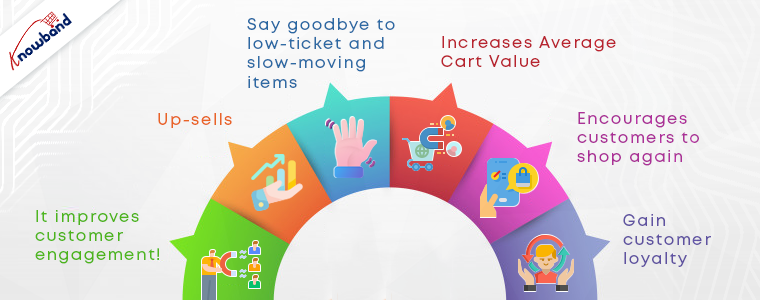
How Gift-with-Purchase campaign benefits your business?

Why you should Offer a Free Gift with Purchase? Gift-the-product or Gift-with-purchase campaigns have been benefiting the companies for years. You just have to turn around and you will find many brands running on this very same idea.

1.     It improves customer engagement!

A gift with purchase is unquestionably an important component of a great customer engagement system for establishing great client connections.

When a customer gets a chance to see the free products, they try to explore them. Eventually, spends more time on the website.

2.     Up-sells

Up-selling is a crazy method that motivates customers to buy expensive products spending extra on comparatively better products and getting a free gift is always a win.

3.     Say goodbye to low-ticket and slow-moving items

If you have stuff decked up in your warehouse for a long time, you can easily get rid of it. Add them to your free product list and give them as free gifts.

4.     Increases Average Cart Value

Another exponential benefit of a free gift with purchase campaign!  To get a free product, customers do not hesitate in spending a few extra bucks. It increases the average cart value.

5.     Encourages customers to shop again

Free gifts are usually complementary products. A customer who received it with their purchase may want to buy it again.

6.     Gain customer loyalty

When you give something to your customers, you want them to have the best possible experience in your store. Hence, they respond as loyal customers.

Spice up the campaign by creating urgency

FOMO has become a real thing when we talk about marketing. Run this free gift with purchase campaigns for a limited period. Customers feel that they may lose on something great if they don’t take the action now.

Add a Count-down timer

A timer with a free product campaign will definitely add some FOMO to it. Refer to this count-down timer guide where we have covered all possible ways you can use it.

Run Limited period offer

You can promote this free gift-with-purchase campaign for a limited time. Mention ‘Offer valid till…..’ when sharing emails or promoting them on social media. How to offer discounts for a limited time?

Reward with Loyalty Points

Marketing campaigns always have a place for loyalty programs. The customers get a chance to redeem their points on their next purchases. More retention, more sales!

Plan out upcoming eCommerce events for the second half of the year. Looking for an eCommerce marketing calendar for 2021?

How to include a Free Gift with Purchase on your eCommerce store

There are several ways you can do this. Use super handy addons available online to run this gift the product campaign.

If you are a PrestaShop user or an OpenCart store manager, you might like Gift the Product addons developed by KnowBand.

The Gift the Product plugin allows customers to add the products of their choice to their cart. Admin can set eligibility criteria based on the amount, categories, also offer this on specific products. It has an appealing front-end view that looks great on your website.

Check out the live demo of the module now:

PrestaShop Free Gift the Product Addon

OpenCart Gift the Product Extension 

Conclusion:

‘Add free products to cart’ campaigns will bring you more loyal customers. With that, repeat purchases, more conversions, up-selling are the other advantages. Give it a try and see how it works on your online store.

Here are some blogs for business marketing tips:

Kevajo WooCommerce Mobile App Success Story to Get Inspired From in 2021

Kevajo WooCommerce Mobile App is a one-of-a-kind shopping experience that saves you time and money. With the Kevajo WooCommerce iOS and android app, you can find anything you want at the lowest possible price. The App is created using KnowBand’s WooCommerce Mobile App Builder plugin designed for Android and iOS platforms. There are several features that can inspire the design and structure of your custom-made mobile app.

Total App Downloads (Android): 1000+

Kevajo Mobile App features that make it handy!

Shopping when you shop! Do you have a favorite piece of clothing?

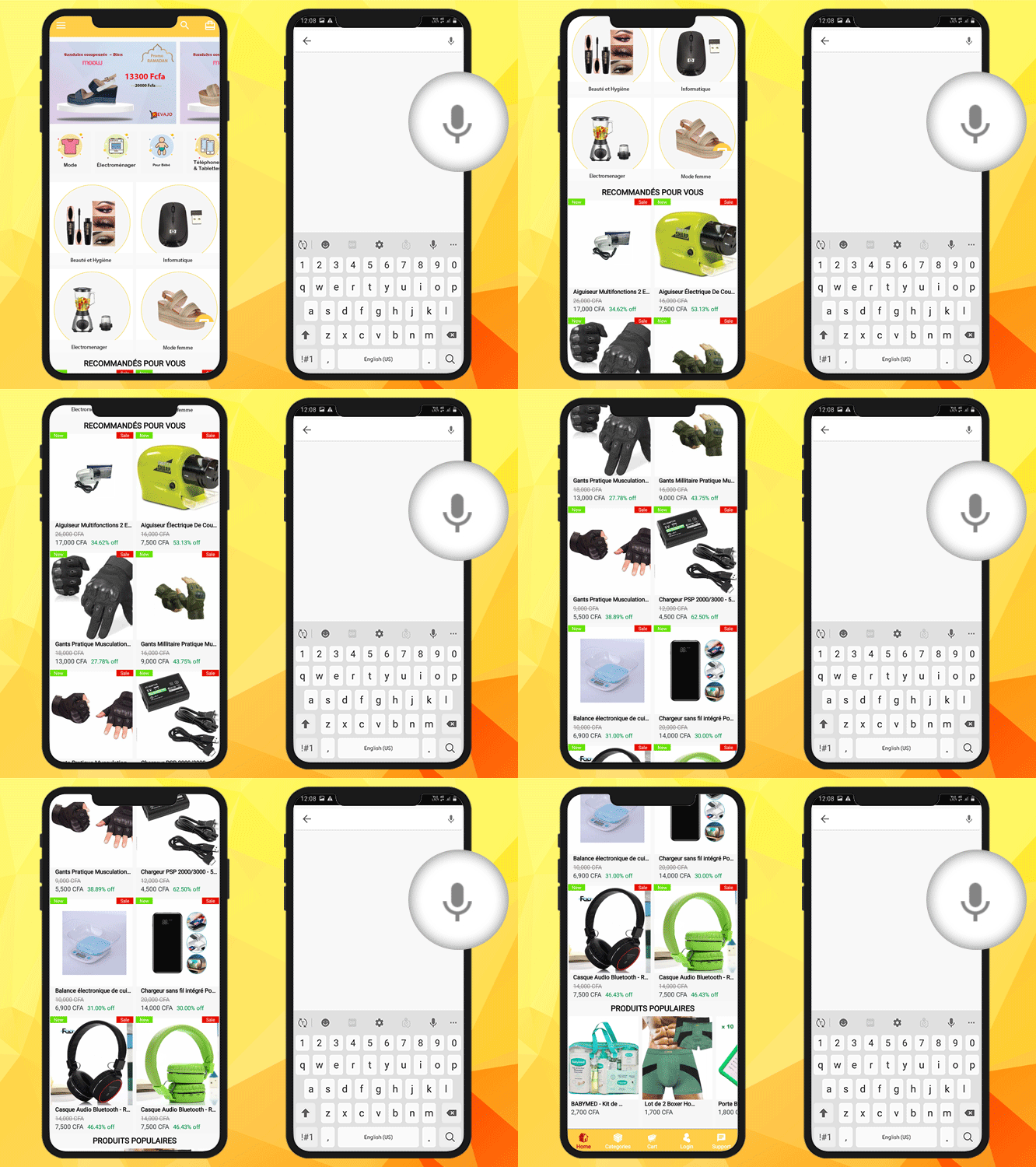
Tell Kevajo and it’ll help you find high-quality pieces at the best possible prices. It has a voice search feature that finds the relevant product through spoken voice commands rather than typing.

Look through tens of thousands of products to find something that interests you. The home page is very well designed with a categories button, menu option at the top. The home page design contains promotional banners, categories in a pictorial format, recently viewed products, and some recommendations. Clear call to action buttons provides convenience to the visitors.

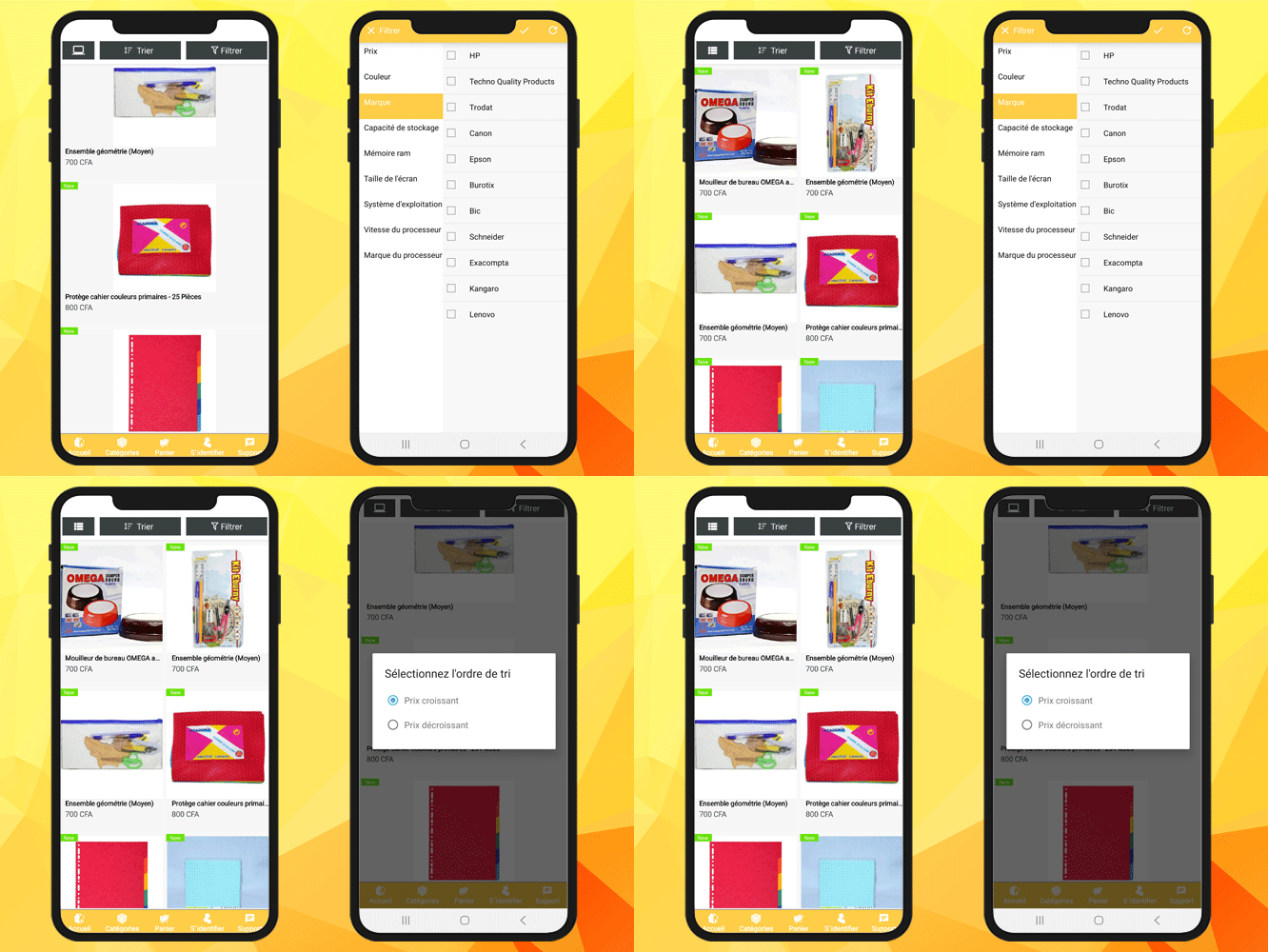
The product page of the WooCommerce Mobile app has two layout options. And with that, there are sort and filter buttons to help users find their choice of product with ease.

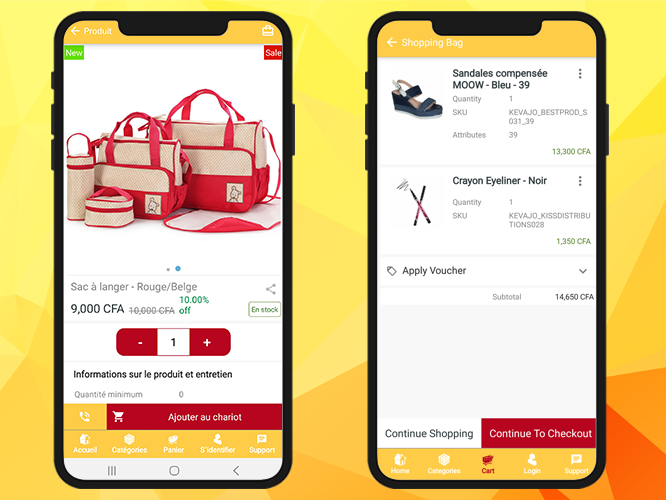
Once a customer find their favorite product on the mobile app, it is important to redirect them. A shopping cart with a button that motivates them to ‘shop more’ or ‘leads to direct checkout’ is the perfect place.

Custom features makes the Kevajo App different. Customers can directly make a phone call from the product page if they have any queries. The product quantity can be updated and it clearly displays if the product is ‘in stock’ or ‘out of stock.

To complete the purchase, a customer has to sign-up first and then log in to their account. The sign-up form has limited entries and for login, there are features like email and password login, social login with Facebook and Google+ and a fingerprint login option.
KnowBand adds custom features to the mobile app as per the requirements. WooCommerce Mobile App created with WooCommerce mobile app builder customized for Kevajo has a live chat support option that redirects the customer to WhatsApp Application.
About the KnowBand WooCommerce Mobile App Builder

A robust mobile app is a result of smart work done by expert designers and developers. The WooCommerce mobile app builder plugin by KnowBand provides all the necessary features and custom design options to give a satisfactory user experience. It is easy to list the app on Google Play store and iOS stores.
If you are looking for a mobile app solution for your WooCommerce website then this is the best time to buy the plugin as KnowBand is running an exciting deal. Click on the image below to take the product demo of the WooCommerce mobile app and I assure you that it is the best solution for your store.

The Mobile App Builder is also available for Magento, Magento 2, OpenCart, and PrestaShop platforms. Have a look at the portfolio of the mobile apps developed by KnowBand!

Success Stories that inspire!!