Best OpenCart Rating, Review and Incentive Extension to Reward your Customers

The OpenCart Review and Incentive Module offer a way for your customers to connect with you, as well as to promote sales on your eCommerce store. The product reviews Incentive extension allows you to add a customer review feature to all the products available in the store.

Simply informing consumers of the availability of a product or service is no longer adequate; customers are now willing to benefit from the first-hand experience. Hence, KnowBand developed the Review and Incentive Extension for all popular eCommerce platforms.

In addition, public transportation, hospitality, recruiting, retail, and health care have all gained insights from customer feedback in order to optimize their marketing strategies and develop their services.

A feedback system adds credibility and influences the buying decisions of the customers. Businesses that do not have feedback will lack the ability to develop their business.

So, if you have an OpenCart store then the ‘OpenCart Review and Incentive Extension‘ can help you grow your business.

The OpenCart Review and Rating Extension

The extension comes with the incentive system. Customers earn some points as a reward that they can redeem later. This motivates users to leave a review which helps other buyers when making a purchase decision.

With the aid of this OpenCart product review module, eCommerce store owners can now inspire their customers to leave their reviews of the different items. Get more feedback and ratings for your site to ensure new users. This also offers persuasive reasons for consumers to go back to your site, thereby improving user engagement and eventually converting.

Some of the functionalities with benefits are highlighted in this article. Give it a read and decide for yourself if it is thoughtful to add this module to your OpenCart store.

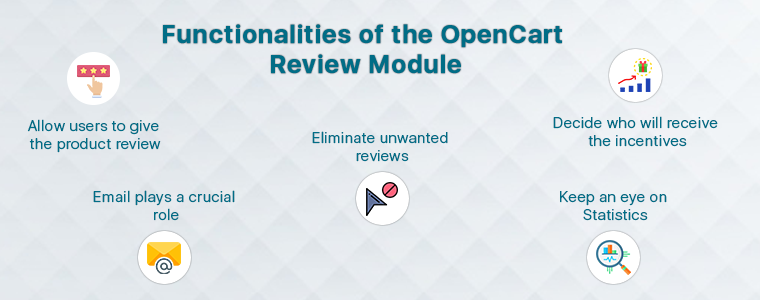
Functionalities of the OpenCart Review Module:

Not every store owner needs to be a coder hence the OpenCart Review and Incentive extension is designed in a way that everyone can configure and manage it with ease.

1.      Allow users to give the product review:

You can enable the feature with a toggle button switch and decide incentives. Also, numbers can be set by the store administrator.

2.      Email plays a crucial role

Emails are very effective ways to increase traffic on your website. The customer who drops a review will be given the reward via email. You can add catchy subject lines to it and email templates can be configured as needed.

3.      Eliminate unwanted reviews:

The admin will set the moderation rules for the reviews. The reviews can be published either directly or after approval by the admin. It depends on the choice of the option.

By removing noise from unwanted and unjustified feedback, companies may be assured that only real, quality reviews are a current indicator of their online credibility.

4.      Decide who will receive the incentives

Items or categories in which the admin wishes to be considered for reward and reminder can be chosen. This way you can categorize the customers and manage them carefully.

5.      Keep an eye on Statistics:

This is the most beneficial feature of the OpenCart Review and IncentiveExtension. The data and report system of the module offers you detailed statistics based on different criteria that you can analyze.

Merchant Benefits of OpenCart Review and Incentive Module:

The ultimate goal of every merchant is to increase sales in their store. To achieve the targets, store owners try various tactics like running deals, offering coupons, following up the leads, and many more marketing strategies.

The OpenCart Review and Incentive Module is a complete package as it offers you several benefits.

1.     Collects more feedback:

It provides a convenient way to attract more and more feedback from current customers.

2.     Increases credibility:

Reviews and testimonials will help create much-needed credibility with new customers. At the same time, it leads to the buying decision of the tourists.

3.     More customer retention:

OpenCart review and Incentive extension in exchange for the reward app offers a persuasive argument for consumers to return to the store.

4.     Better conversion:

Offers and discounts can inspire them to shop in the store. So, you’re having a few fast conversions.

5.     Enhances customer engagement

Customer spends more time on your store giving a review and reading others feedback, therefore, reviews and rating system increases customer engagement.

Recommended Read: How Gamification Increases Customer Engagement on Your eCommerce Store
Overall Impact of the reviews on your store

Reviews not only can influence customer decisions but also boost the reputation of a brand. Reviews have the power to create consumer trust and inspire people to engage with the brand. Customer interaction eventually contributes to increased results for companies.

  • customers win rewards and incentives that motivate the buyers
  • Positive reviews influence buying decisions and promote rational buying.
  • It creates better product understanding for new users hence become a buying motivation.

Conclusion:

People are talking, people are listening. Online review is potentially the most effective, mutually beneficial tool any company can employ and any user can support it. With everyone reading and making decisions based on feedback from other customers, how important do you think the review is to your business?

The KnowBand team specializes in increasing consumer activation to inspire current decision-making and long-term brand loyalty. If you are looking for any feature to add to your OpenCart store then you may find a module for that in our store or you can contact us at support@knowband.com.

Recommended Read:

OpenCart Wish List Module that drives sales and engagement

Not every time you purchase products by directly adding them to the cart and checking out immediately. You often save some products for final review and add them to your wish list. The term ‘wish list’ sounds fascinating. In eCommerce, users can add all the products they are liking and willing to buy sooner or later to their wish list. Users won’t have to add to their cart until they’re ready to check out.

There is a high cart abandonment rate for most e-commerce brands, but few know how to reduce it. Abandoned cart reminder email strategies were addressed in a previous blog post that surely works. In this article, you will learn how a wish list can improve conversions in your OpenCart store. You can also find out about the most popular products and categories of the store that you can use in making marketing strategies and inventory management.

What is a wish list?

The wish-list feature enables e-commerce clients to build a list of goods that they are not yet ready to purchase, but that they plan to buy for themselves or receive as a gift in the future. Wish lists provide shoppers with a convenient way to arrange the items they want, making it unnecessary for quick reminders to use the shopping cart.

Not only do well-built wish lists lower the rate of cart abandonment (because of shoppers), they help boost the site’s customer experience by making it easier for customers to purchase from you and inspiring others to do the same.

Why do you need a wish-list or save for later option in your eCommerce store?

Besides the obvious advantage of enhancing the shopping experience of the consumer, Wishlist has the potential to provide online retailers with a much broader, strategic value. A Wishlist provides an incentive for clients to save products “for later” if at that moment they do not commit to a purchase and find them easily once they return to your shop.

  1. You will give your prospects a chance to save the items they will later show interest in.
  2. They help you keep track of what your customers want.
  3. They help you predict stock levels properly and manage inventory.
  4. You can use the wishlist data to have targeted marketing
  5. Easily assess the efficacy of your overall marketing activities by monitoring which goods end up on the wishlists of your customers.

Every Thing about OpenCart Wish List Module

1.     Attractive front-end representation

The wish list display should be attractive and clean. The look and feel of the front-end of the OpenCart Advance Wish List Module are neat and clean. It has a direct call to action button for adding products to the cart. You can edit want the button color, font, and other details according to the theme.

2.     Allows customer to maintain a private wish list:

The OpenCart Wish List Module acts as a handy way to remember the items that made it to the list, which is particularly important for major future events, such as weddings, new babies, housewarmings, etc. when assembling gift lists or drawing shopping lists. Mobile shoppers find this feature especially appealing because on a smaller screen it saves a lot of “browsing” time.

3.     Top Wish-listed Product and Categories

From this point of view, you might be tempted to suggest that you do not need a wishlist because you already know which of your best-selling items are. The advanced OpenCart wishlist addon helps the store vendor to evaluate the product that is most requested or most common. The category/product review reports can be presented by the OpenCart store admin in the form of a graph.

4.     Wish list module does Customer Analysis

The favorite product list addon of OpenCart helps the eCommerce merchant to evaluate the customer lists with the shortlisted product quantities and other details.

5.     Order Analysis Report

An Order listing tab is offered by the OpenCart wishlist extension. It allows the store manager to analyze the ordered products that were on the wishlist of the customers.

Benefits of OpenCart Wish List Module:

To see what items consumers save for later and what items they buy, you will analyze the data, which will help you find the underlying problems that hamper your sales: do customers need more data? Are they abandoning carts due to product price? Will discounts and deals work for them?

Conclusion: It improves the overall customer experience and for the merchant, it provides them with the data like the products that are most popular and frequently added to the cart. Some products are most added but least purchased. In that case, you can see where it is going wrong? Here the product analysis report will help.

Recommended Reads:

How to Add Infinite Scroll to your OpenCart Site (Step by Step)

Do you want to add infinite scroll to your OpenCart store?

Infinite scroll saves users from switching tab by loading the products automatically after they reach the bottom of the page. In eCommerce, when a user is browsing and exploring products on the store, it is good to show the products in a continuous manner without breaking the flow.

Endless scrolling can be added to the category page, brand page, product page or wherever required. The OpenCart Infinite scroll extension by KnowBand is completely mobile responsive.  Besides, it is compatible with the Journal theme and other OpenCart themes.

This article is a complete step by step guide to install and configure the infinite scroll extension in your OpenCart store.

Introduction to infinite scroll

What is the infinite scroll? For instance, you are shopping on a website and after sliding for a few seconds the content stops loading and there appears a button ‘Load More’. Now without clicking the tab you leave the online store then and there.

On the other hand, when you are exploring news feeds on Facebook it never asks you to switch tabs and you just explore the feeds for a long time without keeping the time record. Facebook is using infinite scroll.

Similarly, eCommerce websites like Amazon are using infinite scroll. In infinite scroll, all the products get loaded on the same page without switching tabs or clicking on any button, unlike pagination.

Is infinite scroll useful for eCommerce?

Infinite scroll, especially on mobile devices, can create a more seamless feel for users. Swiping is what it seems like mobile devices have been made for. Pagination consumes more time in loading may kill exploration, which is a common incentive for users on tablets and phones with infinite scroll. Ad slots can also be found in more suitable locations, as well as on infinite scrolls.

OpenCart Infinite scroll module improves conversion and increases customer engagement to a greater extent. It lowers the bounce rate and increases your on-site time by offering a more streamlined way for users to interact with content.

How to add Infinite Scroll Module on OpenCart store?

The infinite scroll extension allows endless scrolling and is easy to install and configure. OpenCart infinite scroll module enables continuous page loading and customers can navigate to the new page without switching the tab.

Video Tutorial of Infinite Scroll: Click here

Steps to install and configure:

With OpenCart Infinite Scroll Extension by KnowBand you’ll receive the following files:

  • A zipped file containing the OpenCart Infinite Scroll module source code
  • OpenCart Infinite Scroll plugin user manual

Please follow the steps below to install this OpenCart Infinite Scroll Module:

  1. Unzip the zipped piece. As seen in the image below, you’ll get the folders:
  2. Copy all the zip file files and directories to the OpenCart Setup Root Directory via FTP Manager.
  3. The Infinite Scroll module for OpenCart is now built and ready for use. As the image below shows, go to Admin -> Main Menu -> Extensions
  4. Select Infinite Scroll from the list of plugins and, as shown in the image below, you are ready to edit.

What you can do with OpenCart Infinite Scroll Module?

  • The infinite scroll module enables infinite scroll
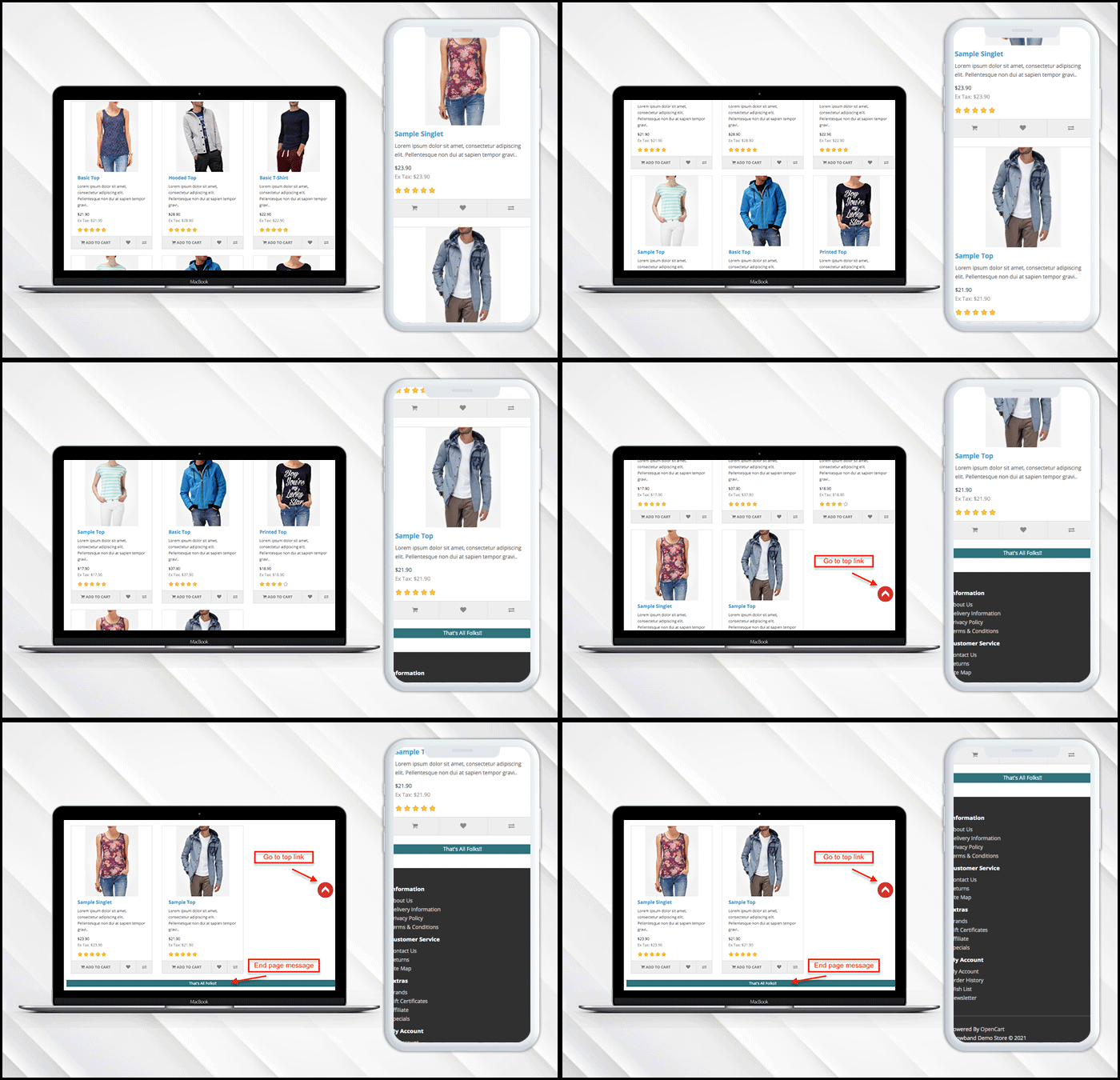
  • If you have a limited inventory then it lets you display a message at the end of the page.
  • Users can go to the top of the page directly by clicking the ‘Go to Top’ button.
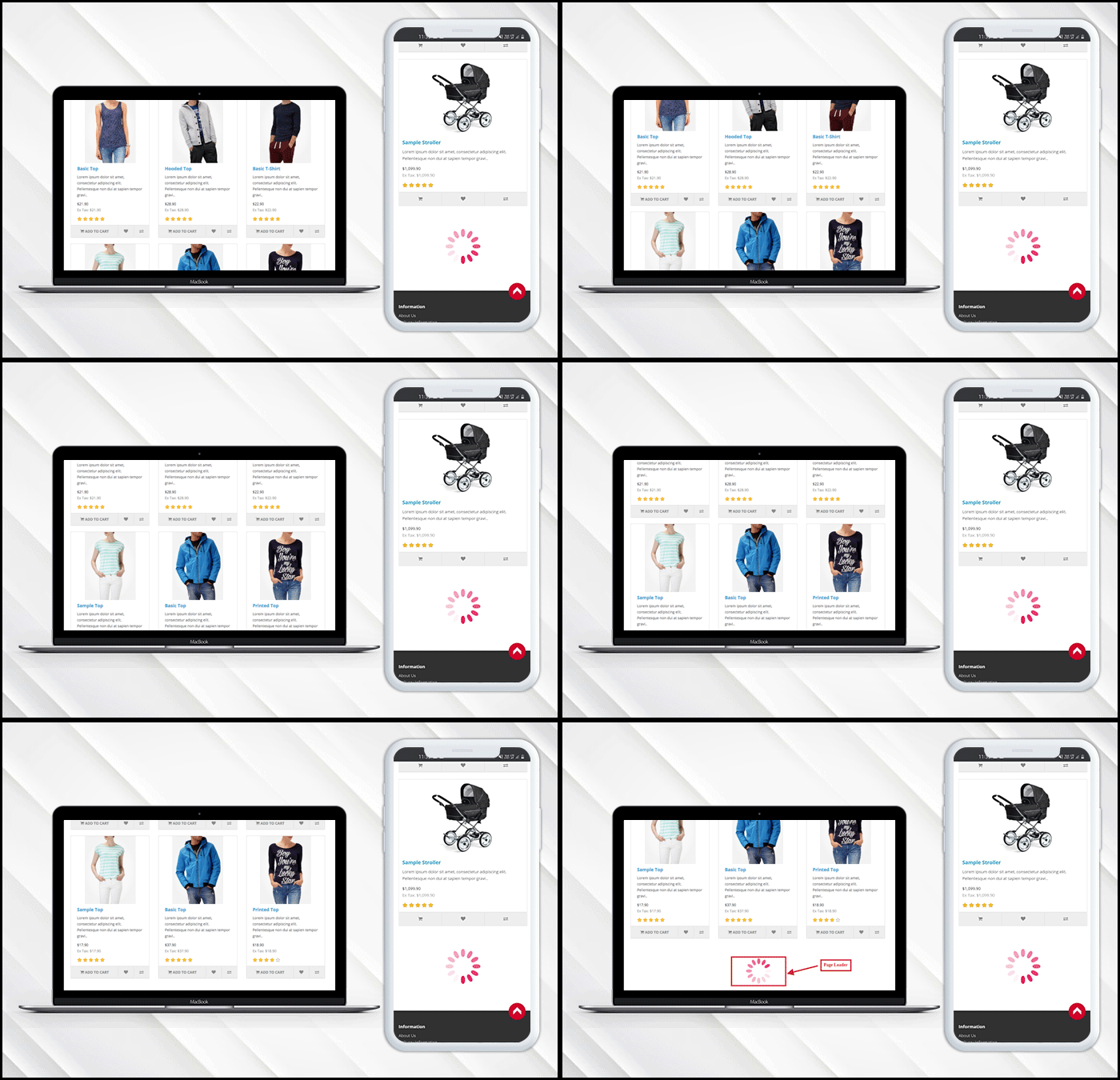
  • Additionally, it allows the admin to put a loading browser if products are taking time to load.

Want to show loading browser?

You can display a loading browser in the product page of the OpenCart store in a button toggle.

‘Go to top’ link is needed

When a user reaches the end of the product page, a go-to top link will be displayed on the window.

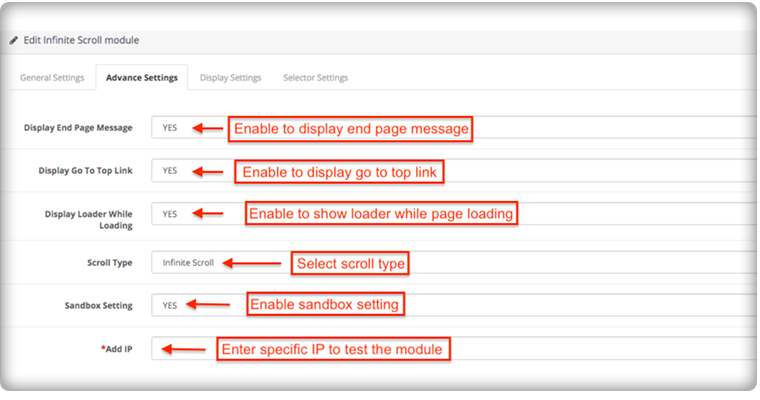
Admin Panel Settings

How to add a message in the end?

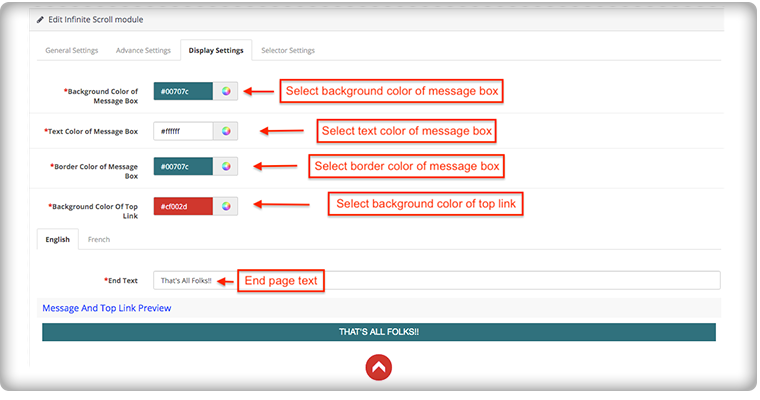
To add the end page message you have to go to the advanced settings of the module, there you can add a text to display the ‘End of Products’ message.

The message can be customized in English and French language. You can edit the color and text from the display setting.

How it appears on the front-end of the OpenCart store:

The OpenCart infinite scroll plugin’s admin panel is extremely simple to use and does not require the implementation of coding skills. Using the OpenCart Fast Scroll module, the admin may choose to display product lists in a grid or list view format.

Compatibility with all OpenCart themes

The OpenCart infinite scroll module is compatible with Journal and other OpenCart themes, so the administrator can configure the look and feel of the infinite scroll according to the theme of their site.

Compatibility: Opencart 2.0.x – 3.0.x

Finally, for your OpenCart online shopping store, infinite scroll can help you boost sales by increasing customer engagement and conversion rate. Infinite scrolling or endless scrolling for eCommerce is suggested by many experts because it has more pros than cons. It is completely responsive and doesn’t conflict with any other installed software or module in your OpenCart store.

This may interest you:

Accelerate the Checkout Process with OpenCart Single Page Checkout

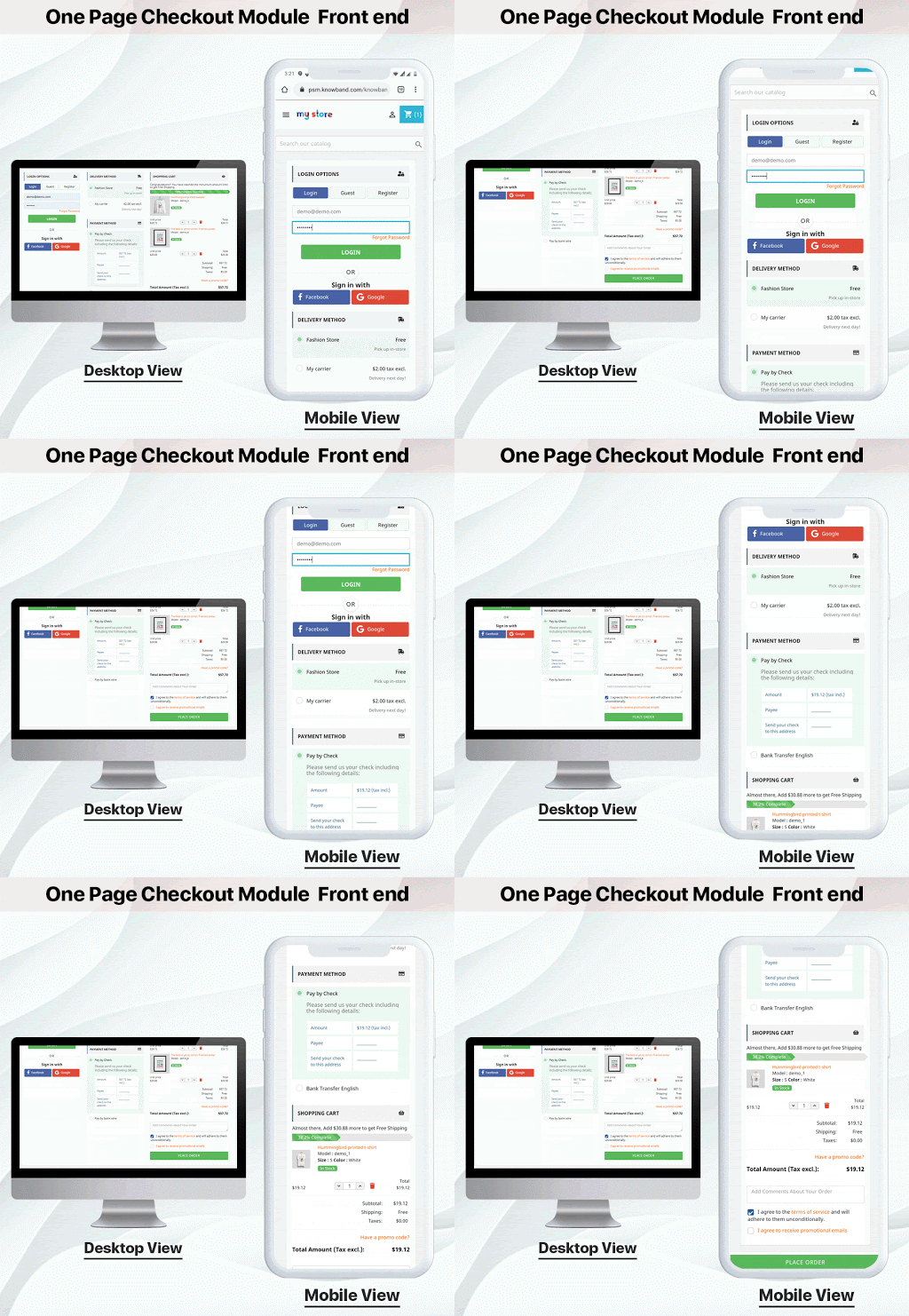
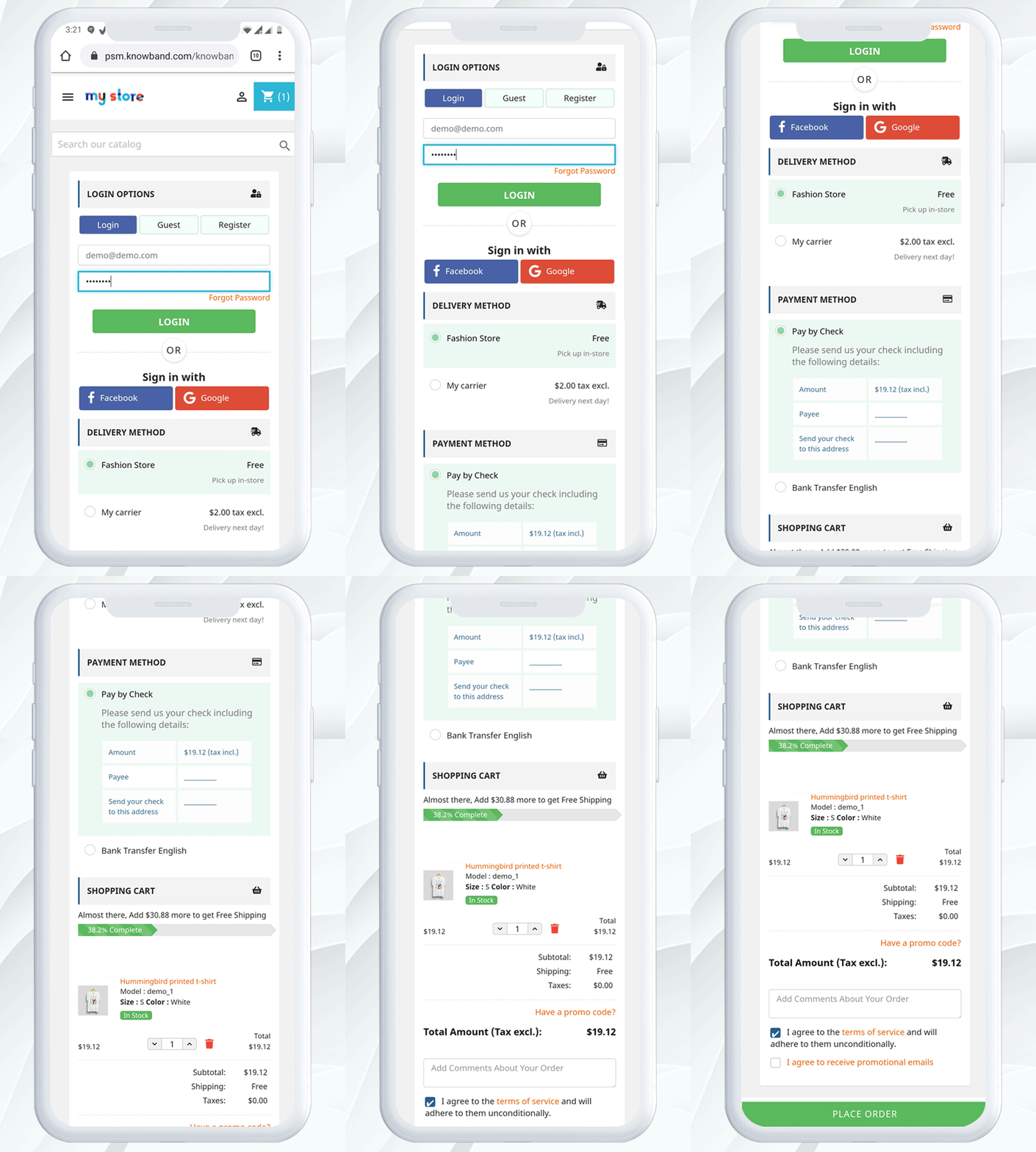
The checkout page should be responsive and user-friendly with a balanced page layout and structure. OpenCart One Page Checkout module, developed by KnowBand offers you easy signup, customizable layout, several payments, and shipping method support, and a lot more that makes it best and unique. The OpenCart One Page Checkout module’s latest version compatible with the Journal theme, Opencart v2.0.x – v3.0.x versions of OpenCart. OpenCart Single Page Checkout optimizes the checkout page by speed-up the process.

No customer wants to waste more time checking out. They want a checkout process that is legible, easy, and safe. By eliminating lengthy multi-step checkout, an eCommerce store owner may provide their customers with a simple single-page checkout. As consumers see that only on a single page can their e-Commerce experience be completed, they are more likely to finish the purchase.

Wondering why you should switch to One Page Checkout from Multi-Page Checkout? It is always a hot topic of discussion among eCommerce experts. You can read One Page Checkout vs Multi-Page Checkout and find out which is better for your store.

For better understanding, some of the best features of the OpenCart One Page Checkout Module are discussed in this blog that will accelerate the checkout process on your OpenCart store.

Quick Sign Up by Social Media

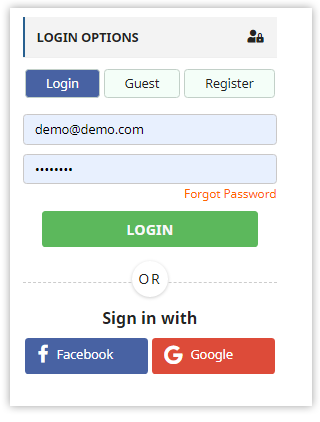
Social login is the new login trend, which significantly increases the number of registrations. With a social login option like Facebook and Google, the one-page checkout plugin is integrated. It saves time, and more specified information is received by the store owner. The social login option enhances the conversion rate for customers.

Guest Checkout

The Guest checkout option is provided by a page checkout module by KnowBand. This is an attractive feature that can save clients from filling out a long registration form. If a client does not want to go through a sign-in process, instead of abandoning the cart, he/she can make a guest checkout. If the user is already registered in the store then he can checkout directly.

Save time by removing extra fields

The Quick Single Page Checkout is the compact multi-step checkout version with a decreased number of entries. The OpenCart One-Page Checkout module that has minimal mandatory fields and no options for additional data entry will save time for the user. Some of the fields can be kept optional.

Show Product Details and Update Cart

You can also modify the cart fields in a similar way to the checkout field customization. You can specify which cart elements you want to display to the users with OpenCart One Page Checkout. You can hide the voucher entry from the Cart page, for instance, or display only a few limited fields. For both registered and non-registered users, this can be set up in a few steps.

Google auto address fill and auto-detect country code

With the enabled country auto-detect tab, the user’s location will be auto-detected. The administrator can show or hide the feature from the back end of the One Step Checkout extension of OpenCart. This is a valuable tool that can help clients and administrators alike. This reduces the time for form filling. As soon as the customer begins to fill out the address information, Google Auto-Address Fill displays the address suggestions.

Additional Features:

Layout and Structure Customization

One page checkout shows all the elements on a single page, such as registration, sign-in, payment methods, shipping methods, cart information, etc. A helpful UI allows clients to complete the transaction hassle-free in contradiction to the multiple phase checkout module. There are similar elements in the multiple-step checkout, but it looks tiring and long. It is mobile responsive.

Support for multiple shipping and payment methods

Almost all major shipping and payment methods are supported by the OpenCart One Page Checkout extension, so you can provide your customers with many shipping and payment options to choose from. A default shipping and payment method can also be set. In addition, for every method of shipping, you can specify which payment methods would apply to it.

Compatibility with Journal Theme

The Single Page Checkout Module is Compatible with the Journal 2 and Journal 3 themes of OpenCart. If you need any help with the compatibility of the theme, please contact our support team after purchasing the extension and we will help you to make the extension compatible with the theme of your store without charging any additional costs.

Conclusion: The OpenCart One Page Checkout Pro is designed to reduce the rate of abandonment of shopping carts. It is a quicker, smarter, and better checkout page that substitutes its advanced features for the default checkout. This module decreases the time required for the checkout as well as collects personal data that you can use in planning your digital marketing strategies.

Recommended Reads:

Top 10 Features to Consider While Creating a Marketplace on OpenCart Platform

The rapid growth of the sharing economy is triggered by the increasing number of new online marketplaces. If your idea was to create an online marketplace to allow the exchange of products or services quickly and easily-congratulations! You can name yourself, an entrepreneur!

With the idea of an online marketplace, you might have explored how to create one? And what features you should consider before developing software or purchasing a pre-built module? How will you attract sellers and customers to your marketplace?

Sometimes we feel like we own too much stuff and this can happen with your marketplace too. To make it look attractive and clean, you need to have the functional UI with all the functionalities placed adequately. Clear navigation for both the seller and the customer is a must. This article is for the business entrepreneurs who are looking forward to developing their marketplace and will help you decide what features marketplace users need the most.

1.     Look for a lucrative monetization model

“Before looking for the answer to” How to create a marketplace? “Answer the question” How am I going to make money from my product? To attract investors and become globally competitive, all ventures have to produce revenue. No exception in the marketplace. There are many forms for your online marketplace to be monetized:

Commission– For any good purchase on the website, the marketplace charges a percentage or fixed fee.

Subscription: To use the marketplace, consumers pay a monthly/annual charge

Product Listing: To list the products, the sellers have to pay some amount.

OpenCart Marketplace Module supports the commission revenue model. The marketplace admin will generate income from the sellers on every order. You can refer to this article for a better understanding of the commission management for the OpenCart Marketplace extension developed by Knowband.

2.     Admin Panel features to consider:

The admin interface of a marketplace extension should allow you to monitor and make the necessary adjustments to support your customers.

If, for example, the terms of service are breached, an administrative interface should be able to monitor behavior on the network and issue warnings. We have designed interfaces for our clients so that it is easy to discover and censor offensive acts such as negative language easily.

It is also possible to use the administrative interface to authorize vendors and products, build customer outreach materials, run promotions, and adjust marketplace settings. It should allow you to keep the track of the seller’s earning, customer feedback, like which suppliers are doing well and which could use some assistance.

The OpenCart Marketplace module has all the above-mentioned functionalities and the admin can keep eye on every move of the seller. The admin can see the order status that will be determined for commission and earning.

3.     It should have a functional seller dashboard:

Rapid onboarding for vendors

You’re going to have to make the seller dashboard and customer handling simpler for sellers, not harder. Keep the sign-up and product listing process as simple as possible for your vendors.

The less time it takes to get started on your website, the more likely individuals are to sign up with you to sell.

Sellers can easily register and enlist their products on your OpenCart Marketplace. Sooner you approve the seller profile earlier he will be able to sell on the marketplace.

4.     Easy Inventory management

Fortunately, by establishing a strong inventory plan from day one, many of the blockades and challenges ravaging eCommerce marketplace inventory management can be easily resolved. Inventory Management is the lifeline for retail sellers, as the success of the business relies on delivering the right order to the right customer at the right time.

The stock management is effortless with the OpenCart marketplace module. It sends the stock notification to sellers and removes out of stock products automatically. To add new products for maintaining the inventory, the seller can bulk upload the product list in .CSV format.

5.     Order handling

Control of marketplace order saves you time on manual tasks and eliminate mistakes in order processing. Speaking of efficiency, from the time a customer clicks “order” to the moment the product leaves your warehouse, consider how much time it actually takes you to process a transaction.

The order handling is uncomplicated when you have a module like OpenCart Multi-vendor Marketplace. It allows the store admin and sellers to change the order status. The seller can handle every minute of action through the seller dashboard.

6.     Payments and payouts

Marketplaces make it tougher than their standard online shops when it comes to payment processing. Customers need an effortless payment system, whether credit cards, debit cards, digital wallets, PayPal, or COD. Some do intimidate while sharing the credit or debit card details hence, you can provide them COD. These are primary online shopping choices whose icons may alternatively be clearly shown in the top corners or near landing page banners or in the menu section.

From their Dashboard, the sellers get to see the order earnings, the pending amount, and the commission paid. The seller can raise payout requests to the owner and the store owner can make the payments manually through OpenCart Marketplace Plugin.

7.     Notify sellers with email

To maintain transparency on your platform you need to notify your sellers and customers about every move. The OpenCart Marketplace module has several pre-crafted email templates that can be used by the admin to send an email notification to the seller after the order is received, payment processes, review approved or removed, and much more.

This maintains transparency, fulfills realistic expectations, and enhances the user experience.

8.     Do not forget about the customer expectations

How can customer support be sustained in a multi-seller marketplace rapidly introducing a new range of products and services? Obviously, ensuring that the current service standards of the retailer are met in the marketplace is critical. In a marketplace, the consumer experience should not get distressed.

What does OpenCart Module offer for customer support?

  • Customer Seller helpdesk:  In order to get help for pre-sale inquiries or post-sale inquiries, the customer may contact the vendors.
  • Manage returns:  The returns for the goods can easily be initiated by the clients. The administrator will be able to view and process return requests from the vendor dashboard.

9.     Compatible and gadget responsive

A mobile-friendly eCommerce shop provides you with an opportunity to stay ahead of your rivals. You’d have more chances of ranking well in search engines, more visitors, and you’d be able to win their loyalty through content interaction and responsive design.

The robust Opencart Marketplace module is compatible with the mobile app. It is compatible with all the themes and models of OpenCart and it supports all currency types. You can sell any type of product digital or physical in the marketplace.

10. Let seller decide the shipping method

To improve the delivery experience, cutting down the shipping cost you need to provide multiple shipping options. In the early stages of operation, using a single shipping service makes sense because order sizes are typically not large enough to warrant using more than one carrier. However, as the company grows and online sales increase, failing to diversify your shipping strategy to meet your increasing needs puts you at risk of inefficient fulfillment of orders and increasing shipping costs.

The OpenCart Multi seller Marketplace admin can enable the seller to create multiple shipping templates. The shipping methods that vendors build will be listed in the Marketplace. And, the marketplace manager can also add or delete the shipping methods created by the seller.

Some Other helpful features of OpenCart Marketplace Module:

  • Admin can approve the product and seller reviews from his end
  • The invoice generated can have either admin’s details or seller’s details or both.
  • By providing coupon code discounts to buyers, the sellers can give the customers a special discount and run promotions
  • Admin can add multiple custom fields on the seller registration page
  • Admin can assign categories and products to the seller
  • All the products can be reviewed before publishing them on the marketplace.

Wrap-up:

These are the favorable features and functionalities you need to look at before launching a marketplace. The OpenCart marketplace module can help you with all these most required features. Remember, a marketplace is a platform for buyers to buy and seller’s toes ell. So, you need to keep your foot in their shoe and find the best you can give.

If you have a brilliant idea that you want to bring to life – drop us an email at support@knowband.com or you can drop a line in the comment section. The Knowband team helped many eCommerce entrepreneurs build a better platform by helping our clients measure the right things. The marketplace module is also available for PrestaShop and Magento 2.

Recommended Read:

How to Attract Sellers on OpenCart Marketplace

Attracting sellers on a marketplace is more difficult than setting up an online store. The multi-vendor marketplace is the most prominent trends in the eCommerce industry. If you are looking forward to creating your own marketplace then OpenCart Marketplace Module can be the solution that will convert your OpenCart website into a Multi-Vendor Marketplace.

The OpenCart Marketplace extension is easy to configure and in a few simple steps you can start your own marketplace similar to eBay, Amazon, ETSY, etc., that too without coding. It allows customers to register as a seller on your marketplace and provide them with a platform to sale their products.

Are you facing problems in approaching sellers to your OpenCart Marketplace?

Marketplace extension makes everything effortless but attracting sellers is intimidating and is still a task. When your platform is ready, onboarding sellers on your marketplace and making them add their products should be the very first step of your marketplace project.

Being able to attract a large number of suppliers would likely decide the marketplace’s performance and make it appealing to customers. This article will explain to you how to attract sellers to your OpenCart online marketplace after launching a successful online eCommerce marketplace.

1.   Make smart strategies to market your marketplace

If you have launched or planning to launch a marketplace on the OpenCart website then your first target should be on marketing. If you have launched a website and you fail to grab the potential traffic then the whole process and efforts will go in vain. Develop a plan for customer acquisition by knowing your target audience and their purchase pattern.

  • Social Media is advantageous

If you belong to millennials then you know the importance of social media. After starting the OpenCart Multi vendor marketplace, promote your products on every possible social media platform to attract the potential customer. Try to make a profile that is easier to find and join the right groups. Share knowledgeable and thoughtful content. Irrelevant and useless content can push your customers away.

  • Pay attention to branding with ad

If you want to attract sellers to your OpenCart marketplace then you must have an excellent branding strategy that will help them grow. By explaining your branding plans and advertisement methods you can convince sellers to choose your marketplace as an e-commerce business platform. There are many options available for advertising your marketplace to reach customers such as running classic ads in newspapers, magazines, video advertising, and television ads.

  • Navigate the sellers with catalogs and blog posts

Let the world know about your marketplace seller’s success stories and reviews. With some marketing data, an insightful blog can tempt the sellers and get them close to your shop. In addition, Google indexes blogs can easily assist the administrator in a limited time to draw the interest of numerous sellers around the world.

2.   Let sellers know about the commission management plan

Sellers would love to register with your marketplace if you are maintaining the transaction transparency. OpenCart Marketplace plugin allows customers to register as sellers and has an option for affiliate customers incorporated within. Consider the following points for offering effortless commission management and to track earning:

  • With OpenCart Marketplace Module, the store owner can charge commission globally, product wise, category wise, or even a different commission to individual sellers. Explain this to the sellers beforehand to maintain the transparency.
  • Feel free to inform them about the tax charges and with the OpenCart marketplace plugin, the admin can add that tax charges in commission.
  • Follow a payment strategy for the payouts. You can make payments every day, weekly, or monthly. This leaves the books at the end of the sellers clean and liquidity preserved.

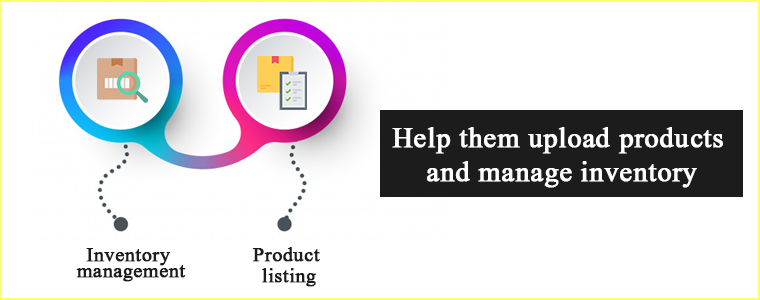
3.   Help them upload products and manage inventory

For all online retailers, inventory management is the greatest dilemma. This is another justification for them to hesitate to delve into the marketplace of multi-vendors. With the OpenCart Multi vendor marketplace, sellers can list their products with ease.

  • Inventory management

Offering inventory assistance can encourage sellers to register on your OpenCart marketplace. With the multi-vendor extension, sellers are able to monitor their store products and update customers with the required details. This significantly improves the acquisition of buyers and makes it easier to attract sellers.

  • Product listing

Adding new products on a marketplace appears to be difficult but now product listing is not a tedious task. Sellers can upload the CSV file for bulk enlisting of the products or add them one by one.

4.   Educate the sellers

Optimize the marketplace according to the vendors’ needs and it will become easier to persuade the vendors.

  • Teach sellers about the whole concept of the marketplace to make it easier for them.
  • Conduct consumer modules and training sessions because it helps sellers to understand the features and benefits.

The Marketplace’s limitless functionality will make sellers feel like they’re using their own website. Simple management of inventory, payment options, and order management will make the sellers’ whole business transaction smooth.

5.   Offer a customer support system

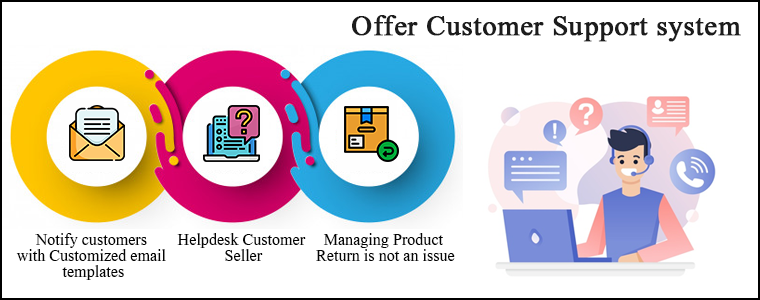
To encourage sellers to sell on your OpenCart marketplace, you must optimize the customer seller support system. It is needed to notify customers about the order status from time to time, provide good customer service to enhance customer experience which can boost customer retention rate.

  • Notify customers with Customized email templates

The OpenCart Marketplace extension provides numerous email templates to handle the entire contact between sellers and administrators, sellers & customers in the marketplace.

  • Helpdesk Customer Seller

In case of any question related to the product, customers may directly contact the sellers on the OpenCart Multi-Vendor Marketplace. This in turn draws buyers towards the brand and forces them to go for instant purchase.

  • Managing Product Return is not an issue

The returns can easily be initiated by the customers for the products. The OpenCart Multi-vendor marketplace seller and admin both will be able to access return requests from the vendor dashboard and process them.

6.   Consumer Sales Promotion

Sales promotion has been shown to be a successful marketing strategy for both mature and emerging companies to reach the customer about a new product. A new customer might not only be of interest to you but also be outstanding in the competition.

  • Reduce cost with discount

Studies have shown that when their prices are temporarily reduced, it is tempting to purchase more items.

  • Offer Coupons

The client would be inclined to buy from you again with gifts, discounts, coupons, and promo codes.

OpenCart Marketplace Extension allows sellers to run discounts and promotions by offering coupon codes to the customers.

In addition, the OpenCart Marketplace extension built by Knowband has several other features that make it much easier to dig into the multi-vendor scenario for the store administrator. These alluring features make the selling process effortless for the vendors.

How Knowband helps you in Creating Your OpenCart Multi vendor Marketplace?

1. Activate or deactivate seller profile

The administrator may easily enable a vendor to sell on the store from the OpenCart multi-vendor marketplace backend. If a seller’s profile is disabled, all the goods of that seller are automatically deleted.

2. View orders and the order status

The store administrator of OpenCart can monitor orders from the admin panel. On the admin screen, a list of orders with vendor details and order status will be shown.

3. Manage Product listing

OpenCart multi-vendor marketplace store owner has control to approve the products enlisted by sellers. Admin may set the appropriate field of approval globally or for the individual sellers.

4. Track customer-seller transactions

It is easy to track customer-seller transactions and total seller earnings from the marketplace module’s admin panel with the admin commission.

5. View and update seller review and product feedback

The vendor and the items in the store can be rated and reviewed by the customer. The OpenCart Multi-vendor marketplace plugin allows the seller to search, edit, and approve all customer feedback.

6. Versatile approach:

The robust mobile app is compliant with the OpenCart Multi-vendor Marketplace extension. It is compatible with all the themes and modules of OpenCart. The OpenCart Marketplace extension is compatible with all currency types. All types of products can be sold on the OpenCart Multi-vendor Marketplace extension.

Conclusion

It won’t be justified if I say you won’t face any difficulty after launching a marketplace because you will have to face a lot of problems while going through the process. Incorporating OpenCart Multi vendor Marketplace Plugin will reduce your extra efforts and help you run the store smoothly. You can refer to the user manual of the OpenCart Multi-Vendor marketplace for a better understanding of the module.
The chicken-and-egg problem of the marketplaces is not new but this is what it is. Set up your OpenCart marketplace and start generating revenue even when you are asleep.

For any queries feel free to write to us at support@Knowband.com

Buy Online and Pick up In-Store: How Click and Collect can Win Customers and Grow Sales

Online shopping from eCommerce websites is now a very common way of shopping. With changing time, the online shopping and pick up in-store concept is gaining thrust. People often opt for home delivery but many are opting for in-store pickup too.

Shoppers love picking their orders from the brick and mortar store because they don’t want to wait for it to deliver which may sometimes kill the excitement if delayed. Buy online and In-store Pickup is the best option for the impatient ones.

You can start offering ‘Click and Collect’ services on your store by incorporating ‘Store Locator and Pickup Extension’ to your existing website. The module developed by Knowband is easy to install and configure. It is catered specially for the merchants who want to allow the in-store pickup to their customers.

How does buy online and pick up in-store works?

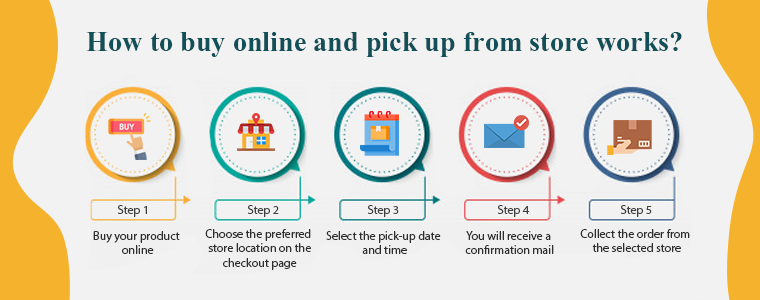
The process of Buy online and Pick up in-store (BOPIS) also known as click and collect is simple and you need to follow the steps mentioned below:

Step 1: Buy your product online

Buy your product online through the website or mobile app of the store you want to purchase from.

Step 2: Choose the preferred store location on the checkout page

After the first step, select the near-by store from which you want to collect the order.

Step 3: Select the pick-up date and time

Following that, you have to mention the date and time on which you will be collecting the order.

Step 4: You will receive a confirmation mail

After the successful checkout, you have to wait for the confirmation mail sent by the store admin.

Step 5:  Collect the order from the selected store

In the meantime, the owner will pack your desired items for you.

Yay!! Now you can go and pick-up your order on the selected date.

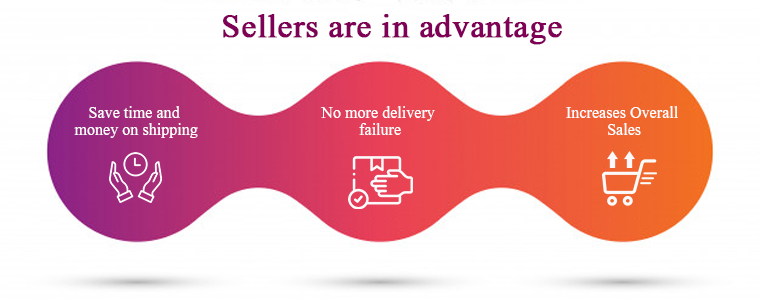
Sellers are in advantage with ‘Click and Collect’

Shoppers want access to products instantaneously. They always look forward to finding a product that is available for instant purchase and ‘Click and Collect’ will lend a helping hand to sellers who believe in customer satisfaction.

The store locator and pick-up module are integrated with Google locations and allow customers to pick up from the nearby store. Some of the major benefits of buy online and pick-up in-store are discussed here.

1.        Save time and money on shipping

Higher shipping costs and delayed deliveries are a reason for cart abandonment. Click and collect service saves the shipping cost and encourages more customers to buy online. The merchant even saves money which is spent on the delivery channel.

No delivery boy is required, no transportation charges and moreover you save time.

2.        No more delivery failure

Late delivery can affect customer satisfaction and it might cause you, potential customers. But, if a customer purchases the product online and collects it from the store, there won’t be any delay or delivery failure. They can buy online and pick up from the store at their convenience.

3.        Increases Overall Sales

Even if a small customer base of your online shoppers converting to click and collect will uplift your sales. In reality, click-and-collect or BOPIS retailers reported an average sales growth of 20%.

•       Balance In-Store Inventory

Leveraging BOPIS from nearby brick-and-mortar locations enables order fulfillment. Geolocation intelligence identifies the closest store with the item in stock for delivery after a customer places an order online. If the product in stock is not available in local stores, retailers can conveniently import the items from another store location that has the item available, speeding up the process.

•       Increases Average Order Value

When a new customer arrives at your store, there are chances that he will purchase more products from your brick and mortar. This increases the average order value (AOV). Buy online and pick-up in-store hence increases overall sales.

4.        Fewer Product Returns

Product returns are the problem faced by every merchant being it small or a big brand. Allowing customers to purchase online and collect the order after trial can help you reduce the number of returns. You can promote this on your online store to grab customer attention and believe me, this will yield favorable results.

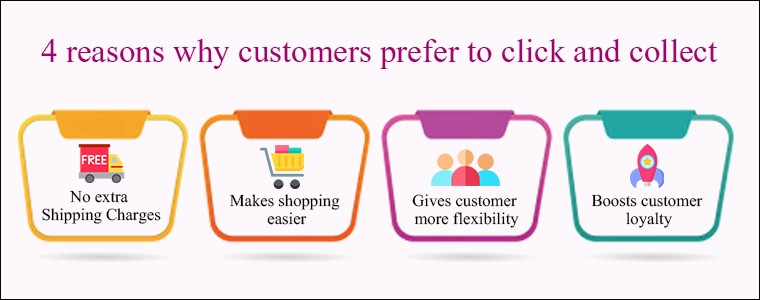
4 reasons why customers prefer Buy online and Pick up in-store

1.        No extra Shipping Charges

Customers do not have to pay charges for delivery or fast shipping. They can buy online and pick-up the order at their convenience from the nearest store without any hassle.

2.        Makes shopping easier

Many customers afraid to shop from new websites but a store with ‘buy online and pick up in-store’ which is present in their vicinity makes it easier. Let customers decide what they want, when they want it and how they get it. Offering freedom to purchase online, home delivery, or in-store pick-up is advantageous this is everything they are looking for. No late delivery and no more waiting!

3.        Gives customer more flexibility

Comfort and convenience are what every human is catering for. Online shoppers want retailers to make purchasing their products and services simpler. Consumers want websites and retailers to work together better as well. An extension like store locator and pick up allows customers to shop any time in their comfort zone and allows them to pick up the order with their convenience. This is the flexibility every customer is looking out for.

4.        Boosts customer loyalty

Customer loyalty is a result of customer satisfaction and overall customer journey while purchasing from your store. A business doesn’t work without potential buyers and the factors which can cause you customer opportunity are not an issue anymore.

Since store locator and pickup extension overcomes the major bounce rate issues like extra shipping charges and late delivery for impatient buyers, this is a highly recommended industry trend to implement in your store.

Knowband’s Store locator and Pickup Module for an eCommerce store

You can easily start ‘Buy Online and In-Store Pickup’ in your existing eCommerce store. Knowband is a specialized eCommerce platform that has developed several solutions for demands and requirements that an eCommerce store owner desires. The store locator and Pickup Module is the one designed to attain the need of launching the click and collect option in an online store.

  • It is integrated with Geolocation functionality and the store owner can easily generate Google API key for the Google maps.
  • The details like the name of the store, owner details, contact number, and store timings can be displayed using Store locator and Pickup Addon.
  • The module allows users to select the desired store location, date, and time for order pick-up.

The Store locator and Pickup Module is available for the following platforms:

Store Locator And Pickup – Prestashop Addons

Store Locator – Magento ® Extensions

Store Locator – Magento 2 ® Extensions

Store Locator – Opencart Extensions

Any online website on these platforms can incorporate the plugin and start offering click and collect to increase foot traffic in brick-and-mortar stores.

Conclusion:

If the retailer allows connectivity between its online and in-store shopping networks and provides the opportunity to provide the consumer with a real-time feed of available inventory, in-store pickup is not difficult. This immediately lets the customer know if he/she can pick up the order from the desired store right away.

You can implement BOPIS- Buy online and Pickup in-store for better customer experience, grow sales, and to keep up with the trend. Undoubtedly!

Recommended Reads:

OpenCart Marketplace Extension: Create Your Own Marketplace

Do you own an OpenCart store and willing to start a marketplace business? OpenCart Multi-Vendor Marketplace extension by Knowband is an exemplary plugin available for your OpenCart Marketplace business.

You must be coming up with a lot of questions for the same. First, what makes a multi-vendor marketplace an appealing business model for a peer-to-peer, B2B, or B2C business? The thing is: you want to make sure that you are working on the most profitable possible business. And that is just what a marketplace is. You can choose an industry to start your business with.

How does the OpenCart Multi-Vendor Marketplace Extension work?

If you are looking for a well-developed option for managing admin and seller interface then OpenCart Multi Vendor Marketplace extension is the solution. The extension has a separate admin interface and seller interface along with the front-end.

The registered seller is provided with a seller dashboard to manage all his orders, product inventory, delivery, and payment gateways and what not! The seller can easily register for selling his products on OpenCart Marketplace and access the dashboard. This is what a marketplace owner wants.

OpenCart Multi-Seller Marketplace plugin has a flawless admin interface that allows admin to manage all the sellers easily. It makes the seller commission management effortless. Proving multiple product choices in different categories is now handy with the OpenCart Marketplace extension.

How Admin of OpenCart Marketplace is Benefited?

Setting up a marketplace itself is an optimum business idea. This can make you plenty of money if done thoughtfully and strategically. All you need is a plan and a management system. The OpenCart Multi Vendor Marketplace extension is fully functional which can be incorporated into your existing single-vendor eCommerce site and converts it into a marketplace.

Easy Commission Management: A Source of Passive Income

The marketplace business is a source of passive income. If you are an owner of the marketplace then you will be earning some commission over every sell completed over your marketplace. The Multi Vendor Marketplace Plugin designed for OpenCart allows the admin to charge the sellers the global as well as the category-based commission.

Prudent management of sellers, products, and categories

It is simple to accept the seller’s profile from the admin panel of the OpenCart Marketplace plugin. The store owner can easily track the profile of the vendor and the items that are posted on sale. The admin can also assign sellers the categories. Besides, the vendors can submit an admin category request that is handled at the back end of the OpenCart Multi Vendor Marketplace plugin.

Offer Several Shipping Choices

OpenCart Marketplace Multi-vendor plugin provides custom delivery options to the customers. A seller is allowed to offer different shipping options for their products.

Track the Orders and Payments

Keeping the track of the sales, orders, and payments is an essential part of the business. The OpenCart Marketplace Extension provides efficient monitoring of the site’s sales report and the pay-outs.

Opencart Multi-Vendor Marketplace plugin offers admin to configure the payment settings for PayPal from the store’s backend. Admin needs to fill in the store’s backend with the Client ID, Client Secret Key, Paypal Email subject, and Paypal Currency.

Attract More Sellers to your Marketplace

Easy Seller Registration

If you want more vendors to sell on your OpenCart Marketplace then install the OpenCart Multi-vendor Marketplace extension because it allows third-party vendor registration in few clicks by simply filling out a form.

Sell Everything

The OpenCart Multseller marketplace extension allows sellers to sell ‘N’ number of products added in different categories. They can easily list the products and manage the inventory. OpenCart Marketplace allows the seller to request for the approval of product categories.

Lucrative Product Page

Sellers can incorporate banners, shop logo, and metadata from the dashboard to make the product page more appealing. An SEO friendly URL can be added by the seller.

Sellers can keep the Track

The sellers can track the Dashboard’s overall transactions and sales report with ease. It makes management simpler and quicker.

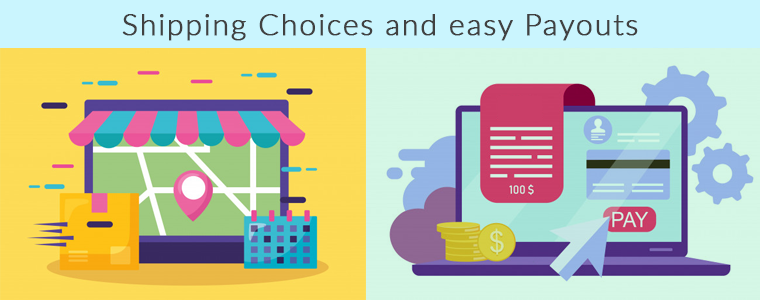
Shipping Choices and easy Payouts

If allowed from the OpenCart Multi seller Marketplace module admin panel, the sellers can add their own shipping methods. This will give customers a lot more choices.

Sellers can request the payment from time to time. This is very simple and easy.

Provide Notifications and Alerts through Email

This has a powerful email notification system that is capable of providing timely updates and feedback to the marketplace community concerned. Provide all the information about activities taking place within the online marketplace to customers, sellers, and store managers for taking the appropriate action at the earnest level. This will help us make the right business decision with no hiccups.

Customers are the Most Benefited Entity

Wonderful services at the most competent price: A customer will be happy to buy a product from your store if he can see what others are saying about the product they are willing to buy. It has been observed that a product that is highly reviewed receives more engagement.

Visitors of the OpenCart Marketplace store can now select the ideal products from a wider range of product choices. Let you the customer decide if the product and the seller are good enough by asking for feedback and reviews. From the seller’s account page, customers can easily contact the product sellers and raise a ticket for their queries and problems.

Final Words

Handling a business is not easy and a small task. Not every business owner can set up their own marketplace and earn money but giving them an opportunity will make the difference. Also, you need a strong and easy-to-use marketplace platform to create a successful marketplace. And to help you find the best platform, we have developed a Multi-Vendor Marketplace Extension for you, to see the demo you can click here.

The Marketplace module is also available for the PrestaShop store and Magento store.

Recommended Reads:

How eCommerce Mobile Apps enhance Customer Loyalty?

The revolution in the mobile app space has created a significant buzz in our lives. Almost every sector has been digitized with the impact of mobile apps & the eCommerce industry isn’t an exception to this. After online commerce, mobile commerce has changed the perception of how users shop products these days. Various research & studies are confirming the fact that users prefer eCommerce mobile app & are more loyal to that as compared to desktop websites. The simple factor behind it is that the users get all relevant product information at their fingertips.

Mobile commerce & customer loyalty go hand-in-hand. When it comes to bonding of your online store with worldwide users, mobile apps are the best solution. Those days are gone when marketing through websites was enough to bring potential users to your store. Currently, mobile apps are the bridge between your business & the user. Technically, an app takes your store straight to user’s pockets, compel them to browse & purchase products.

Here, I am discussing a few points which will hopefully clear the value of launching mobile shopping apps. Read them:

#1 Keep users updated about latest happenings

In online shopping, the users are always keen to get the best products at reasonable prices. If you can adapt this strategy, it will make a huge impact on your sales. At times, the users keep on spending their valuable time in searching best offers. Don’t let them struggle. Try to keep them fully notified & updated about the best deals on your store along with upcoming sale or offers. You can even let specific users pre-sales offer before it’s available in general.

Marketing store deals & offers is much easier with a handy push notification tool. It not only builds your brand reputation but also notifies users about the offers even when they are not using the app. The personalized push notifications will deliver the right information to the users & compel them for instant purchase.

Also Read:

#2 Personalize App Home Screen for better Experience:

The home screen has its importance for a shopping app as the basis interaction begins here only. Try to highlight daily deals, best offers, new arrivals, seasonal discounts, etc. with attractive banners & graphics. This will compel the users to browse the selected product grouping & has the high chances of successful purchase as well. The store admin can even go for Flash Sale or Timer sale to create the necessary spark.

More you personalize the app, more it gets able to connect with users. The users even feel more valued with the availability and ease of everything required. Keep other screens of your app simple & intuitive offering better user experience gaining customer loyalty in return.

Also Read:

#3 Offer Discount Coupons & Rewards to boost sales

Coupons had been a strengthening factor in increasing the conversion rate of your online store. That too for the long past back. It will also work with mobile apps. Make sure the coupons running on your website also work on mobile apps & allow users to avail the valid discount. It will even reduce the rate of cart abandonment.

Everyone around us loves to get a price drop or something extra while shopping products. You can use your mobile app to build the right strategy for that. Offer reward points for their previous purchases or let them earn points by app referral system. It will also invite other users to your app & will maintain a sense of excitement about the purchase.

Also Read:

#4 Provide 24*7 User Support to gain trust

Customer interaction is a must for an online business. Often, the users need some sort of confirmation or having doubts before making payment. We should have a relevant medium to curb out their queries. Mobile Apps are the best suited for this job. They allow the users to directly contact you with inbuilt WhatsApp or Zopim chat options.

The prompt response to their queries will make them satisfied & increase customer engagement as well. Moreover, it brings you the best chance to improve user retention & gain loyalty. This is also one of the leading factors behind satisfactory feedback for your products.

Also Read:

#5 Strengthen your positive brand image

The mobile apps improve the visibility & reach of your online store & thus strengthen your brand presence worldwide. Nowadays all the leading eCommerce giants are majorly accessed through their mobile apps. That big is the scope of mobile apps in today’s market branding.

Your app icon in the user’s devices, brand logo in apps makes sure that whenever users browse the mobile, your app will notify them about the brand. Keeping all your online store details readily available for users, the mobile apps form a positive image for your brand improving user retention & loyalty.

Also Read:

Conclusion:

With the above-discussed points, it must have been clear that mobile Commerce app can be a potential source of engagement & loyalty for your eCommerce business. It connects well with the right audience & hits where it should. Thus, to build strong user-base with increased revenues, creating an eCommerce mobile app should be your very next move.