If you have been around an eCommerce site for an online shopping, you would have felt the need of a simplified checkout experience that could save your significant time and efforts for a quick product purchase. Checkouts are capable to drive higher conversions and sales on an online store as nobody has so much time and patience to purchase a product online after so much headache. If you are not able to make things simpler for your online buyers, they will definitely find another alternative option which could hurt your business chances in the long run. Here are some of the wonderful PrestaShop checkout addons that can be a game changer for your online business.
This amazing PrestaShop checkout addon is a promising Knowband extension that can optimize the performance of your eCommerce store. It can redefine the online shopping experience of your customers in a completely different manner by reducing the multi page checkout form to a single page. With this module, you can persuade your targeted customers towards your online store for maximum conversions and sales. Some of the exceptional features of this PrestaShop extension are as follows:
In- built quick login facility through social media sites like Facebook, Google+ and much more.
Offers responsive design to ensure seamless accessibility on multiple devices.
Helps in quick customization of shopping cart for a brilliant checkout experience.
Ensures effortless addition of coupon codes and vouchers on checkout page.
Works uninterruptedly with other third party themes and extensions.
If you need a simple checkout process for your eCommerce store without paying a single penny, you need to go for this PrestaShop One Page checkout module. It is one of the most dynamic checkout addon that has transformed the shopping experience for numerous online buyers. This Knowband module has helped in providing multiple shipping and payment methods to customers in order to help them in a quick checkout process. Apart from this, you can easily access the entire cart summary without any problem for a swift online shopping experience. The PrestaShop checkout addons consists of an interactive admin panel that makes customization a much seamless task for grabbing instant customer attention and conversions. Let us explore some of the other features and functionalities of this PrestaShop module which are described below:
Helps in reducing shopping cart abandonments by a simple checkout form.
Offers safe and secure checkout experience to customers.
Highly compatible with all other browser and themes.
Customization in shopping cart is now much easier.
Quick checkout process with the help of a 3 column checkout design.
Don’t ruin your business chances with an existing checkout experience for your online store as it is the foremost priority for any buyer while making an online purchase. If you are not vigilant at the right time, you might end up losing your conversions and sales to your rivals. So, roll up your sleeve now and install any of these PrestaShop checkout addons for a tremendous business makeover.
Social communication over the years has changed a lot and is gradually transforming with the emergence of new communication devices. Gone are those days when important social messages and information used to be conveyed through playing drums. Now, with the significant technological advancement, social media has become quite popular among people for social communication purposes. It is breaking new success records with a humongous user base of more than a billion and is equally popular among all age groups.
With its ever increasing popularity and global reach, it is now actively used by various businesses around the world for improving their customer reach and business fortunes. In order to keep pace with this global trend, Knowband has come up with this social login plugin for OpenCart stores for a complete business overhaul. This feature loaded module can open a new chapter of social engagement for your online business in order to achieve higher conversions and customer engagement. Let us take a quick tour of this OpenCart Social Login module about its diverse range of features and functionalities.
1. Quick changes in the position of social login options-
The placement of social login options do have a tremendous impact on the attention span of visitors and affects your chances of conversions and sales. You need to take the help of an effective heatmap tool like Mocking Fish that can inform you about the most engagement areas of your website through the help of its detailed click heatmap reports. Based on these reports, you can decide the appropriate position for your social login options like at the top, bottom, left or right of your site. This position and placement will optimize the usability and performance of your social login plugin for OpenCart stores.
2. Presence of different button types-
In order to improve customer engagement and conversions for your site, you need to check the button size of your social login options. According to your site design, layout and targeted customers, you can opt for large sized social buttons or can go for small sized social buttons. It is one of the important characteristics of this social login plugin for OpenCart stores that are simply unmatched in terms of services and functionalities.
3. Comes with engaging and user friendly interface-
With the presence of a simple and interactive interface, it is now a coherent task to perform various customizations on your site without any problem. This social login plugin for OpenCart makes it easier for store admin to make desired changes on their site for getting better sales and conversion rates. There is no need for any special assistance and skill to make various customizations and modifications in your OpenCart site.
Take a deep dive into the exceptional features of this social login plugin for OpenCart that can improve the social reach and customer engagement of your eCommerce site. It is definitely the every single penny spent on its purchase. Go grab this OpenCart module for now and witness great changes in your business fortunes in the long run.
shopping cart abandonments can let your eCommerce business down that can drastically affect your sales. This not only affects your brand reputation but also the trust of your loyal customers. You can’t guess which element on your eCommerce store might work against you and can turn away your potential customers from your site.
Abandoned Carts can bring your conversions and sales to a great halt. Although, you will surely employ various techniques and approaches to deal with shopping cart abandonment there is one PrestaShop module that has brought a considerable change in the whole scenario. PrestaShop Abandoned Cart module is remarkable work from the Knowband team!
Let us explore more about this amazing module by taking a quick look at the various features and functionalities that are explained below:
1. capture the shopping carts of guest and logged- in customers
With the help of this PrestaShop module, you can keep a track of the guest and logged-in customer’s shopping carts that have been left abandoned. With its detailed analytics report, it is now much easier to target abandoners in order to boost your sales and conversions. This PrestaShop Abandoned Cart module can simplify the task of customer retargeting and conversion rate optimization.
2. Reminder email templates in multiple languages
You might have customers from different regions. If you want to grab higher conversions and sales for your eCommerce store, you need to provide preferential treatment to your targeted customers. The language translation feature of this PrestaShop Abandoned Cart module helps in sending personalized reminder emails or you can choose an email template from the listed ones to your abandoned customers in their native language that encourages a swift cart recovery.
With this module, the store owner can send emails automatically after a set delay. Also, the carts are marked abandoned in the same manner.
3. Send them a push notification when surfing through the browser
Not all your customers use the mobile app but are your PrestaShop store is ready for browser surfing? Progressive web apps are the new trend followed by almost every popular online website. In case you have an abandoner who is reaching you through the browser, you can use the push notification feature to grab their attention. Of course, emails are the best tool but sometimes customers just avoid them.
4. Inclusion of coupon codes and other appealing offers
There are times when your persuasive words in an email may not work for your eCommerce store and maybe completely futile. In these circumstances, you need to try out the last resorted option in the form of coupon code inclusion for making the desired conversion rates and cart recovery. It is one of the brilliant features of this PrestaShop Abandoned Cart module that allows the store managers to offer appealing coupon codes, discounts on the shopping cart products for effective customer targeting and sales.
5. Display a pop-up with a discount coupon that motivates
After targeting your customers with emails and push notifications, you can also display a pop-up on their screen whenever they visit your store. The abandoned cart pop-up window can be displayed on one or multiple pages. You can even add some discounts on the entry popup or exit pop-up that can encourage impulse buying. The PrestaShop Abandoned Cart module is different and has several unique features that make it different from any other available module.
6. Detailed statistical report about abandoned carts and converted carts
With this PrestaShop Abandoned Cart module, store admin can get a detailed report about abandoned carts like the number of abandoned carts, the number of recovered carts, conversion rates achieved, and other such crucial information. By having this data, it will be much easier for your store to plan your eCommerce marketing strategies and the pain points to achieve the desired conversions and sales.
Finally,
It is time to keep your abandoned carts under check and think about ways to control and get them converted back again in a seamless manner. For providing expert assistance in this critical task, you need to install this feature-loaded PrestaShop Abandoned Cart module from the Knowband store for a drastic makeover. It will surely make your online store the most preferred destination for making a quick product purchase and improve your business gains.
1.0 Introduction of Prestashop Paypal Direct Payment Addon
For the online payment system, PayPal is one of the world’s most trusted online payment solutions. The PayPal Direct Payment Addon seamless way to integrate your Prestashop eCommerce store and you can automatically receive the payment from the customers into your PayPal account. The Prestashop payment extension is basically developed for the PrestaShop eCommerce site owners to let their customers pay for their purchase credit or debit cards without having to log into their PayPal account.. This Prestahsop addon is basically a payment module that allows the store admin to automatically transfer the payments of the sales into their PayPal account.
1.1 Benefit of the Admin:
The Admin can easily integrate the module to the PrestaShop store without any hassle.
This Prestashop product payment addon gives the sandbox options to the e-merchant. Sandbox option allows the store admin to test the account and then go live.
The Prestashop PayPal payment extension enables the online store owner to enable/disable the addon any time.
This Prestashop payment module enables the store admin to select the mode i.e. Sandbox or Live mode.
The Admin can easily configure the PayPal client id and secret key.
This Prestashop PayPal payment addon is no setup fees or long-term contracts.
This Prestashop Paypal direct payment addon process the payment transactions directly on your website without redirecting to PayPal officeal page.
This Prestashop PayPal payment addon is secure, fast, easy and efficient.
1.2 Benefit of the Customer
Customer can easily pay the purchase amount without having to the PayPal account.
The Prestashop PayPal Direct Payment is one of the online payment solutions most recognized by customers.
Secure Payment method.
Technology for Development
Language: PHP FrameWork: PrestaShop
2.0 Installation
Installation Guide
To install this Prestashop Paypal payment addon to follow the following steps:
Download the Paypal Direct Payment module.
Unzip the package in /modules directory of your PrestaShop store via FTP manager (like Filezilla or WinSCP – download here: https://filezilla-project.org/).
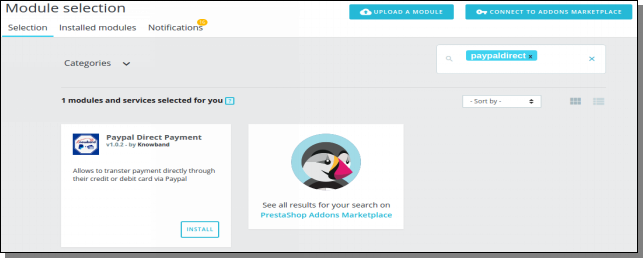
After adding this folder, You will be able find the Paypal Direct Payment addon that is ready to be installed in the “Modules Selection” in your PrestaShop store as shown below.
In case, you are not able to find module in admin modules list, please try searching addon with following details –
Keyword – paypaldirectpayment Author – Knowband Category – Payments and Gateways Filter By – Installed & Not Installed / Enabled & Disabled
For Prestashop 1.7.x.x
4- Click on the Install link to install. Once the Prestashop extesion is installed properly the ‘Install’ link will be converted to ‘Configure’.
Note: The Module folder “paypaldirectpayment” should be writeable for the proper working of module. Please make the folder permission to 755.
3.0 Admin Interface
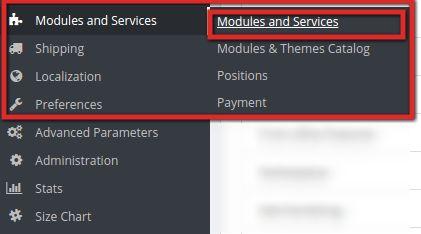
An Admin can access the interface of this module by navigating to the following address:
1. Navigate to Modules and Services >> Modules and Services
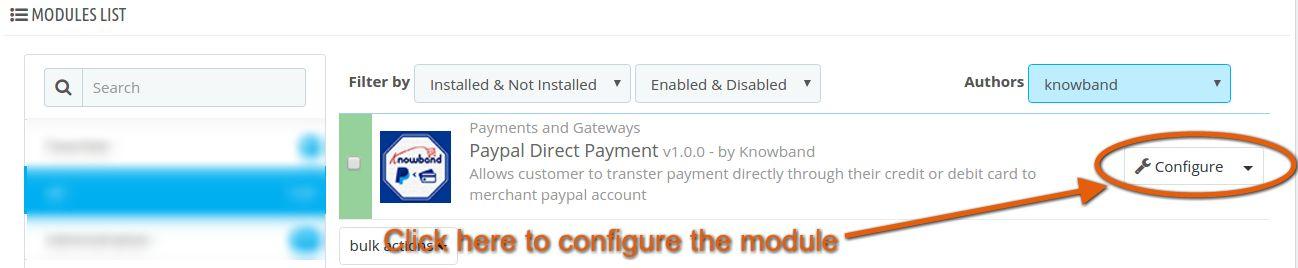
2. The list of modules installed on your site will open. Now search for paypal direct payment in the search box, you will find the following interface. In the following interface click on the Configure button:
4.0 Admin Configuration Panel
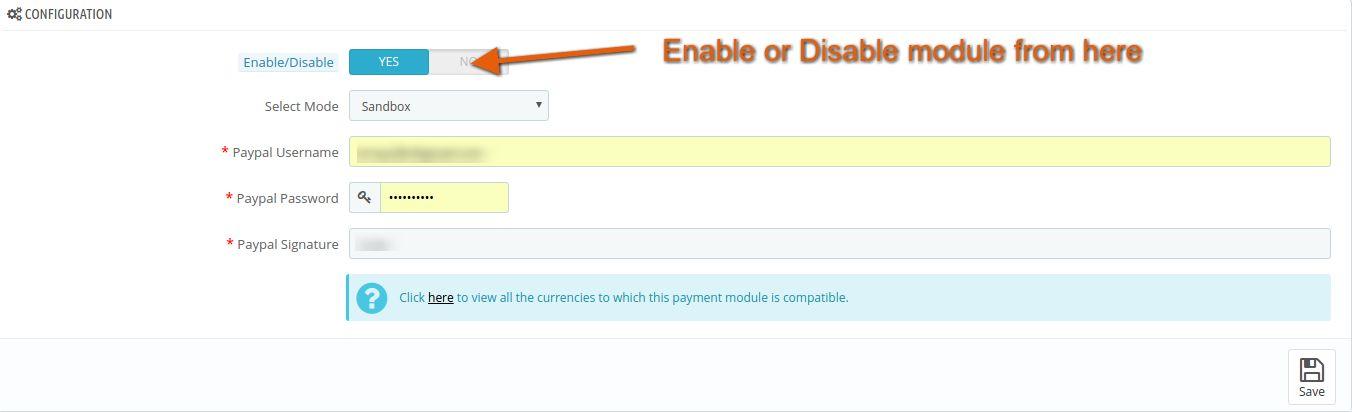
The Admin configuration interface looks like this:
4.1 Menu Items
Please find the description of each input below:
Enable/Disable: This is an on/off switch. The Admin has the option to Enable/Disable the Prestashop paypal direct payment addon. If enabled, then only this Prestashop addon and all its settings will be working otherwise there will be no impact of this Prestashop module on the store. Select Mode: This is a select box in which admin can select mode. Select “Sandbox” mode for testing purposes. However for actually using the Prestashop Paypal payment extension on your live store you need to select “Live” mode. Paypal User Name: This is a text box in which an admin can enter their Paypal Account’s Username. Paypal Password: This is a text box in which an admin can enter their Paypal Account Password. Paypal Signature: This is a text box in which an admin can enter their Paypal Signature.
After filling up the form, click on “Save” button to save the configuration into the system.
Note: This Prestashop PayPal direct addon support only those counties and currencies which are supported by Paypal payment method. You can check by clicking on the link as shown above whether your selected currency on the shop is compatible with this Prestashop PayPal product payment extension or not.
If you do not have a Sandbox Account, Click on the link “Create your Sandbox Account” as shown above.
5.0 Front End Interface
This interface is accessible only by a customer account who is opting Paypal to make the payment for his/her purchase on the store.
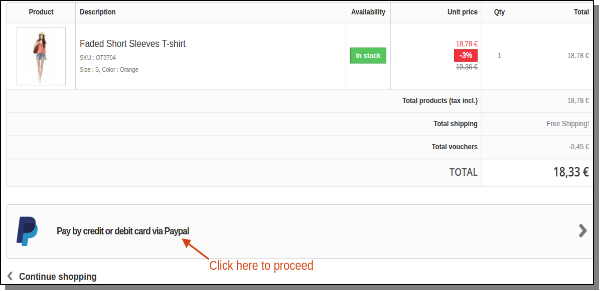
If the back end is correctly configured, a customer will see the following interface on the payment method page of the checkout process.
For Prestashop 1.6.x.x
For Prestashop 1.7.x.x
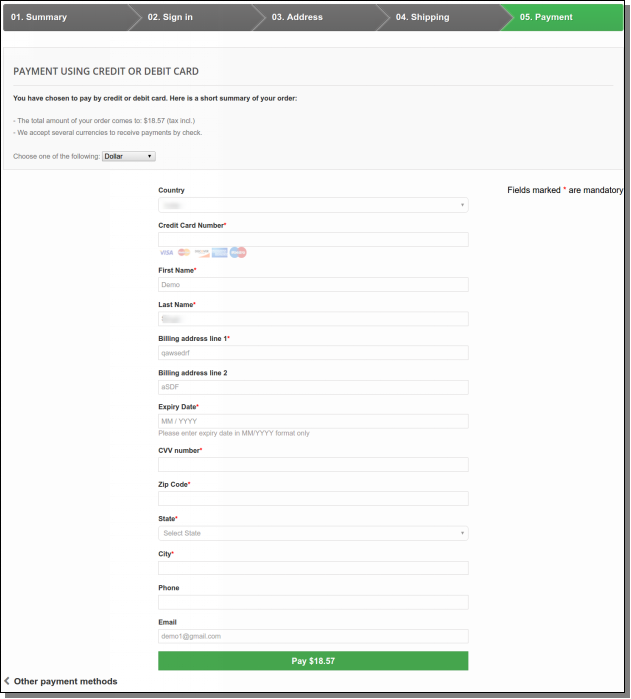
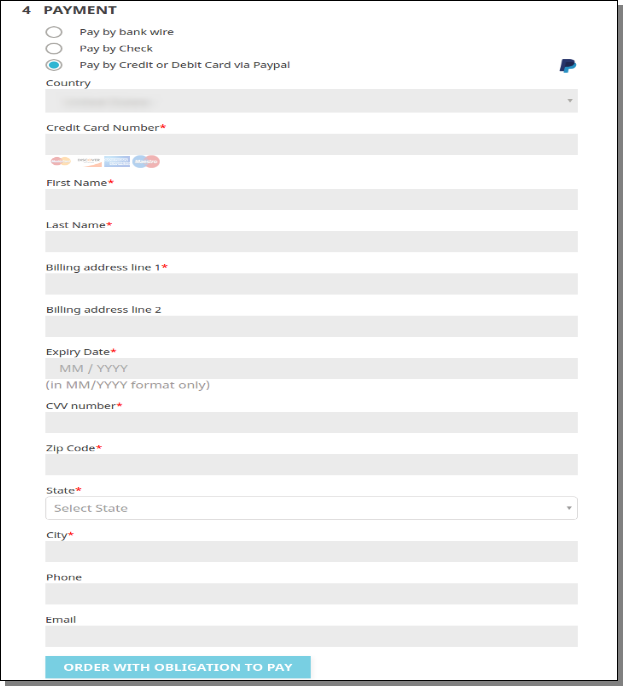
To continue with the payment through Paypal method click on “Pay by credit or debit card” as indicated in the screenshot above. Clicking the link will direct the user to the following interface:
For Prestashop 1.6.x.x
For Prestashop 1.7.x.x
Please find the description of each input below:
Country: This option shows the countries that is allowed for the customer. Choose the country to which costumer belongs to.
Credit Card Number: Enter the credit card or debit card number.
First Name: Enter your first name.
Last Name: Enter your last name.
Billing Address: Enter your billing address for the purchase.
Expiry Date: Enter credit or debit card’s expiry date.
CVV number: Enter CVV number of credit or debit card.
Zip Code: Enter your zip code of the billing address.
State: a Select state for the billing address for the purchase.
City: Enter your City Name.
Phone: Enter your Phone number.
Email: Enter your email ID.
After filling the form, Click on “Pay” button to validate your details. If it is valid then it will proceed for the payment for your purchase.
Note: Select the country and currency for the payment according to the supporting currencies and countries by Paypal payment method.
Recommendations
If Prestashop PayPal product payment addon is not working after installation then please check permissions on addon folder. The folder should be writable. Please make the folder permission to 755.
You can try Prestashop PayPal Direct Payment addon for on your Prestashop website. KnowBand’s Prestashop PayPal payment extension helps you increase customer engagement to your store & build the brand loyalty.
Social networks are the platforms that are not only effective in improving the social engagement of your site but can also contribute in important key performance indicators (KPIs) like conversion rates, product sales and site traffic. The growing user base of social media sites like Facebook, Twitter, Google+, Instagram and such others have painted a rosy picture about the impact of social media on various business entities. In this interconnected world of internet, the social media is directing the sales and business activities of various companies around the world. If you are having online businesses but are still unaware about the use of social media, you are certainly making an unforgettable mistake that could cost you heavily.
Considering the impact of social media on the growth and expansion of your business, it becomes the chief priority for online businesses that are thinking about utilizing the services of various social media sites. In order to play a guiding role in this direction, Knowband has come up with excellent Magento social extensions that can transform the entire nature of social engagement on your Magento sites. Let us explore more about these wonderful Magento extensions that are explained below.
Customers now a days are very choosy and unpredictable while making an online shopping through any eCommerce site. It is very difficult to fulfill the ever growing expectations and demands of your online shoppers which creates a challenging environment for the growth of your business entity. With this Magento social extension, you can offer multiple social login options to your targeted customers to ensure a seamless account login facility. Now, customers don’t have to fill out any time consuming form for getting quick access to their social media account but everything is made much simplified due to the presence of “Quick login” facility provided by this extension. Some of the exceptional features that are part of these Magento social network extensions from Knowband store are as follows:
Presence of an interactive popup login option.
Compatibility with various mobile based devices.
Seamless activation or deactivation of social media account.
Facility to change the position of your social icons on your eCommerce site
Access to social media tracking reports and much more.
Facebook being one of the most popular social media platform makes customer more comfortable to go for login process on an eCommerce site instead of other available login options. This Magento Facebook Loginizer module has made the customer login facility much simplified than before. There is no need for any password remembrance and customers can seamlessly login through the use of Facebook credentials. If you want to explore why this extension is one of the most popular Magento social network extensions, you need to take a quick look at the features below:
Consists of a user friendly admin interface for easy configuration facility.
Works independently with other third party modules and themes.
Compatible with multiple browsers and mobile devices.
Seamless installation and configuration.
Provides free technical support for quick issue resolution
Start focusing on various social media platforms as they can influence the growth and conversions of your eCommerce store. If you are still not vigilant in this direction, you may have to face dire consequences in terms of conversion rates and sales. Don’t wait any longer and install these Magento social network extensions for a complete business makeover.
If there is one thing that can effortlessly drive customers towards your online store, it can’t be none other than a simplified checkout experience. Every online shopper is eager to make a quick purchase without getting harassed in the form of a lengthy checkout process on an online store. In this jet age, people are opting for online shopping due to consumption of less time, non handling of multiple shopping bags, easy viewing of other related products and other such factors. If you are not going to improve the shopping experience of your targeted customers, you are simply passing the sales opportunity to your competitors.
It does not require any other clarification and reasons to declare that “checkout process is the gateway to higher sales and customer engagement”, so start focusing on it as early as possible. If you are short of idea or vision, you can take a cue from the excellent PrestaShop checkout addons from Knowband store for delivering a simplified checkout process. Let us take a quick look towards various checkout addons that can optimize your online shopping experience.
If you are determined to provide an easy product purchase for a single product without making any modification in your shopping cart, you need to go for this PrestaShop One click checkout (Buy Now) module. It is a marvelous module from Knowband store that has wide range of features like mobile responsive layout, compatibility with different themes, translation facility for multiple languages, independent working, quick installation and much more to optimize the online shopping experience of your customers.
With the support of the analytical information about the checkout behavior on your store, you can now plan out your sales activity and conversion rates in a much better way than before. The module helps in realizing the checkout steps which have caused the customers to abandon a shopping cart and leave an online store. It provides a detailed analysis about the checkout behavior of your site visitors which is an important factor for customer targeting. It is one of the most promising PrestaShop checkout addons for any eCommerce store owner and has the potential to bring about a drastic revolution to the entire online shopping experience.
Revealing and adding the extra charges implemented by various payment methods at the end of checkout process are one of the prominent reasons for increasing the shopping cart abandonments for any eCommerce store. People are often dissatisfied with an online store when they discover any additional charges only at the last instance of checkout process. However, this scenario is not going to be repeated again with the emergence of this PrestaShop checkout payment fee addon module. It reveals the extra payment charges that are levied by various payment methods on your PrestaShop store and does not give any “last minute” surprise or shock by charging a whopping amount. With several unmatched features and functionalities, it is one of the most popular PrestaShop checkout addons that can make a tremendous improvement in the checkout experience of your online store.
It is time to reinvent the shopping experience of your store by utilizing the amazing features and functionalities of various PrestaShop checkout addons from Knowband store. If you can persuade your customers to make product purchase through your eCommerce store, you can seamlessly achieve higher conversions and product sales among your rivals. So, it is all just a matter of “Easy shopping experience for excessive shopping through your store“. Go take a right approach in this direction.
Busy lifestyles of people have restricted their outdoor activities to a great extent and they are now exploring various alternatives to accomplish various tasks. Shopping is one such activity which has seen a tremendous change in the last few years and this once thought outdoor activity has become the comfort task of your home. Now, you don’t have to roam here and there carrying your shopping bags as you can get the desired products at your doorstep with the help of online shopping facility.
With this comfort of home shopping, numerous eCommerce stores have emerged on the block that claims to take away all your worries related to online shopping experience. However, there are instances when online shoppers have experienced difficulty in making changes in their shopping carts and leave a site in the middle not to return back again. In order to take your online shopping to a new level, Knowband has come up with an excellent Ajax Cart module for PrestaShop stores. It can certainly transform your old shopping cart into a more feature packed dynamic cart for a seamless online shopping. Here are the few ways by which this PrestaShop Module can act as a game changer for your eCommerce store.
1. Comes equipped with easy to use admin panel-
This PrestaShop Ajax Cart+ Module has an simple, engaging and feature packed admin panel to make quick customization or modifications in the module and site settings. With this admin panel, you can make changes in the layout, appearance and design of your site according to your business requirements and customer expectations for grabbing maximum customer attention.
2. Can be easily installed and configured without any external help-
One of the main reason for the worldwide popularity of this Ajax Cart module for PrestaShop stores is that it can be installed and configured without any trouble. It does not require any special skill-set and technical knowledge during its installation which makes it easier to be used by anyone. You just have to perform simple click functions and this extraordinary module is installed and ready to use for your PrestaShop store.
3. Has extensive reach and presence on multiple devices and platforms-
Unlike other eCommerce modules, this Ajax Cart module for PrestaShop is not built for any particular device and has a responsive layout that makes it suitable to be used across multiple devices. Now, you just need a single module and it can efficiently cater to your targeted customers that are using various devices such as desktop, laptop, smart phones and tablets.
4. Works independently without interfering with the working of other modules and themes-
If you are having third party themes and modules on your PrestaShop store, you can install this PrestaShop Ajax Cart+ module without thinking about the performance and working of other such modules and themes. This is because this PrestaShop addon is designed in such a way that it works independently without any interference and influence on any other theme or module.
If you are looking towards making a big leap in terms of conversion rates, customer engagement and sales, this is your golden chance with the emergence of this Ajax Cart module for PrestaShop stores. It has all the features and functionalities that can transform your online store into a unstoppable champion in its particular business segment. Go grab this PrestaShop addon and make your mark now.
When the benchmarks are sometimes too high and customer mindsets are too difficult to be decoded, making a product sales becomes a critical task. The problem becomes even more complicated when you are having a limited customer base and reach among your rivals which makes chances of product sales more dimmer for your online store. In these circumstances, the emergence of online marketplace acts as a fresh breeze for numerous store owners that are struggling to revive their sales and conversion rates.
Considering the above challenges of product sales, this is definitely a cheerful news for various Magento site owners as they can now avail the services of a feature loaded Magento multi vendor Marketplace Extensions. With this eCommerce module, it is now much easier to convert your Magento store into a wonderful marketplace without any hurdle. This module has changed the business rules and has made eCommerce business much more simplified than before. If you are still asking for reasons to adopt Magento extensions, you need to check out the various unmatched features that are mentioned below:
Offers multi sales channel facility for its sellers
The main motive of any online marketplace is to provide a platform for buyers and sellers community to carry out their eCommerce transaction of product selling/purchasing. Buyers are provided opportunity to register as “sellers” through “Register as Seller” option present on the registration form for a seamless product selling.
Supports various themes and currencies for your store
This Magento multi vendor marketplace extension is built to support various types of themes be it inbuilt or third party for increasing the popularity and reach of your online store. Apart from this, you can handle wide range of customers belonging to different countries due to its compatibility with multiple currencies.
Discourages the practice of inventory management
Carrying out eCommerce business has become a cakewalk experience with the presence of this Magento multi vendor marketplace module. Now, sellers can sell their products online without worrying about their inventory management which is one of the most time consuming and critical task for any store owner.
Consists of an effective notification system through mails
Now, all the stakeholders in an online marketplace store comprising of buyers, sellers and store admin can get instant updates and notifications through emails regarding any changes in seller account, buyers account or any other activity performed by store admin.
Provide information about involved sellers for making the right product choice
This Magento multi vendor marketplace module offers product reviews and ratings for seller accounts in order to help buyers make the right decision. By analyzing the reviews and ratings of various sellers, online buyers can decide which is the right product for them.
Don’t expect to change the harsh winds of conversions and sales into the favor of your eCommerce store. Instead, you need to take a more proactive approach by installing this Magento multi vendor marketplace extension on your Magento store. Remember “A stitch in time saves nine”, so invest a little money into this module and get assured business results.
CSV import/export plugins enables sellers of Prestashop Marketplace to add their products using CSV. Sellers can also add combinations for products via CSV. For any updation in their products they can simply export them by choosing category or their status and after them import them back.
Steps For Installation
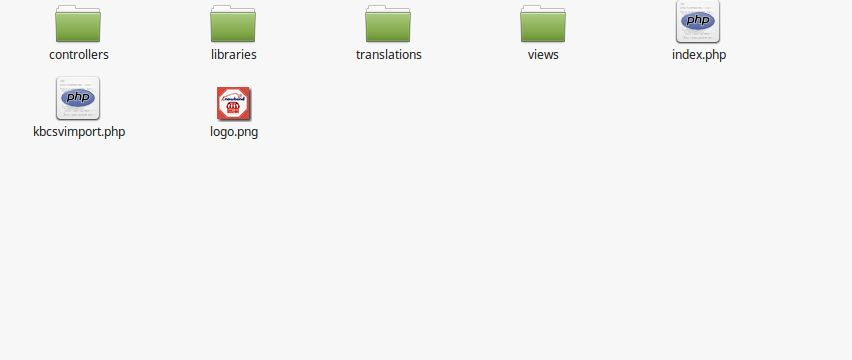
1. Folder structure of the CSV import/export plugin folder.
2. Copy the whole folder named as kbcsvimport into your modules folder of the root directory of your PrestaShop store through FTP.
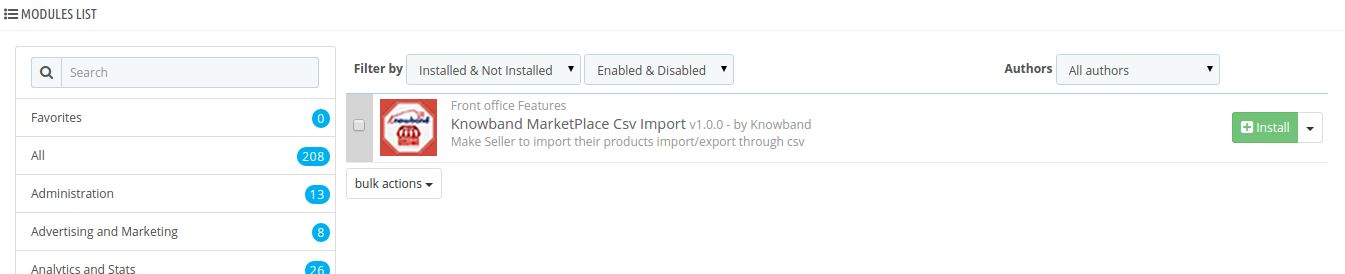
3. After that you will be able find the plug-in ready to be installed in the Modules in your PrestaShop store as shown below.
5. After installing you have to merge attached kbmarketplace folder into your modules folder of the root directory of your PrestaShop store through FTP.
Admin Module Interface
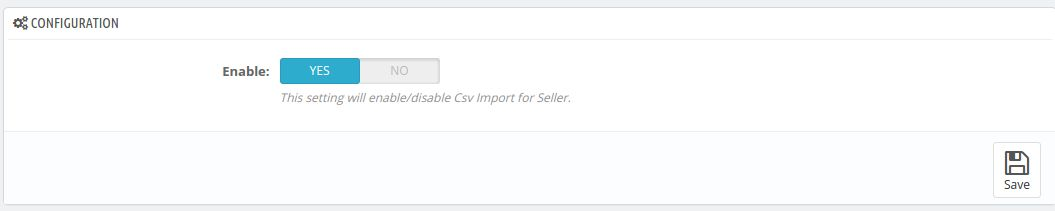
Here store owner can only enable/disable the module.
After installing plug-in into store, the plug-in will provide Configuration tabs in the interface.
Configuration
Enable/Disable: To enable the plugin, switch the enable button from NO to YES. Default value will be NO.
Front Module Interface
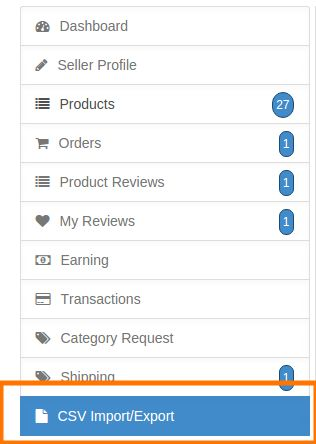
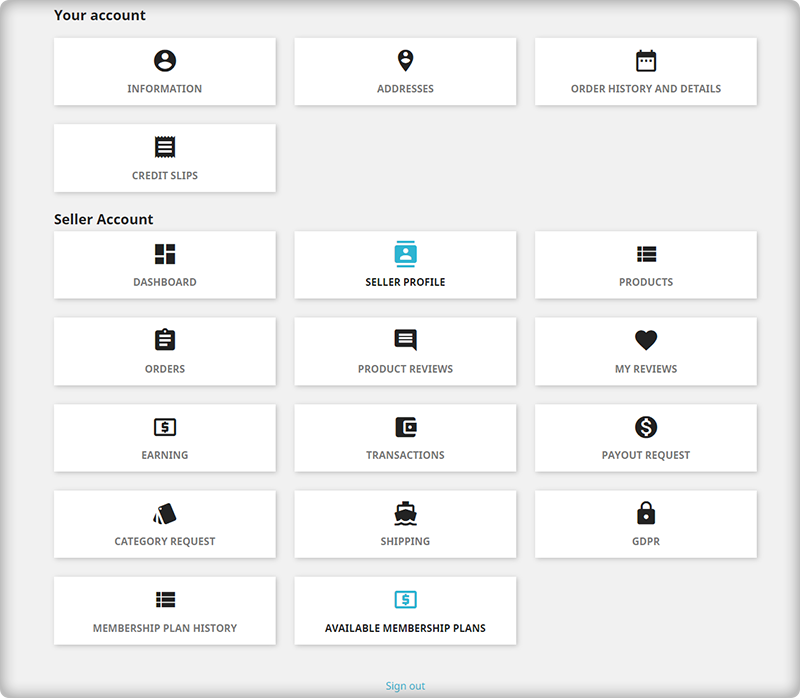
After Installing this plugin a CSV Import/Export tab is added under seller Menu tab.
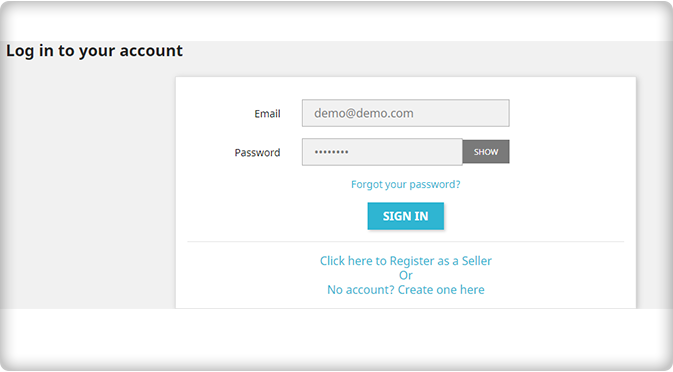
When the admin enables this plugin the approved seller(s) are able to use CSV import/export.
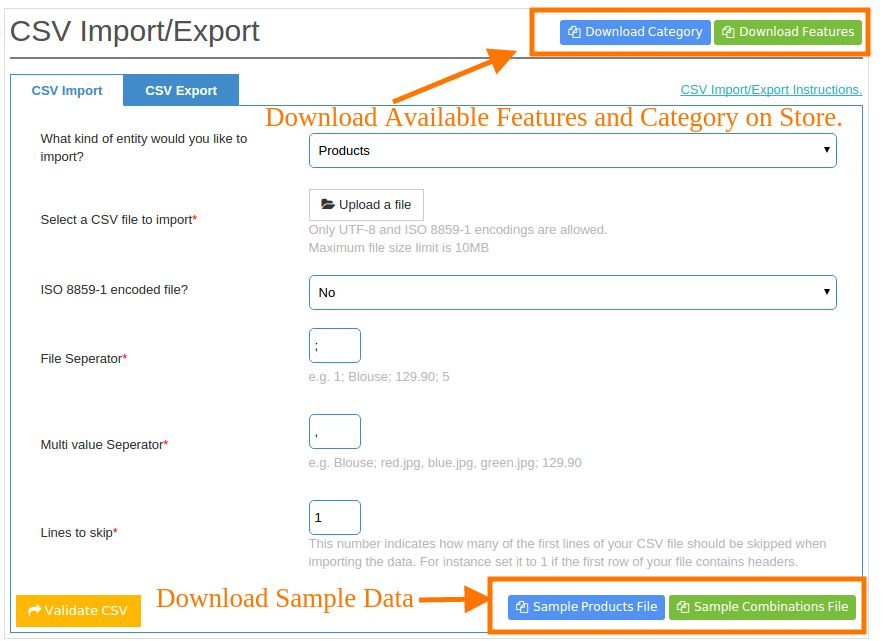
Here seller can import CSV for products as well as for combination and export their products.
CSV Import
1 . What kind of entity would you like to import : Select the entity which you like to import whether products or combinations.
2 . Select a CSV file to import : Select CSV file from your system.
3 . ISO 8859-1 encoded file? : If you want to encode the CSV file select it as Yes.
4 . File Separator : The value of separator which you used to separate column in CSV file is set to be here.
5 . Multi Value Separator : The value of separator which you used to separate multi value in CSV file is set to be here.
6 . Lines to skip: Enter the number of lines which you want to skip from top of the CSV files.
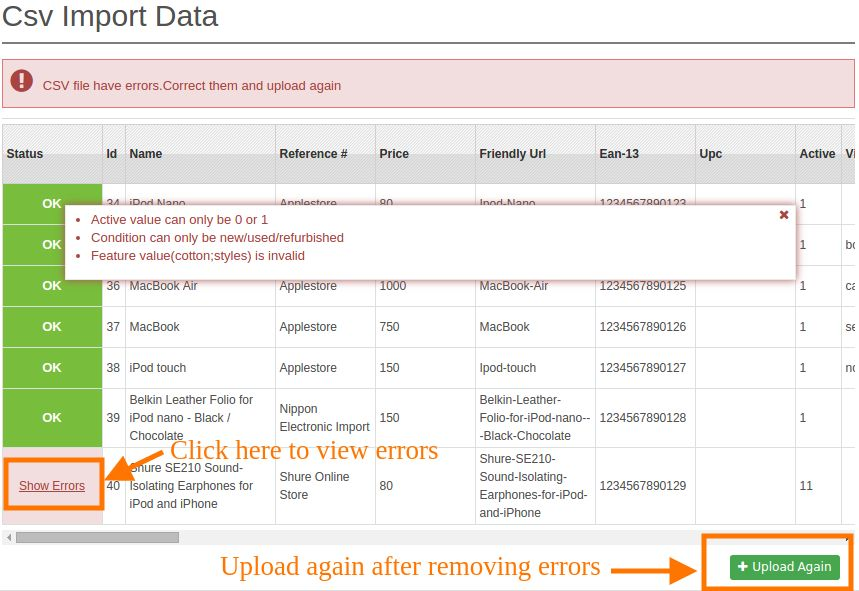
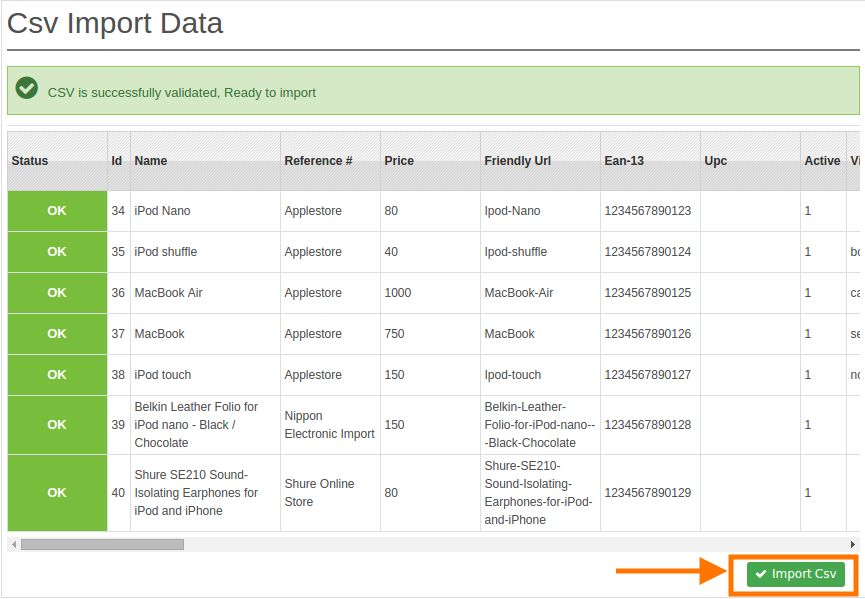
After Clicking on Validate data a CSV view is render if the CSV have errors then it will be shown in this correct them and upload the CSV again by clicking on Upload Again
button.
If all will be Ok then seller would able to import a CSV by clicking on Import CSV button.
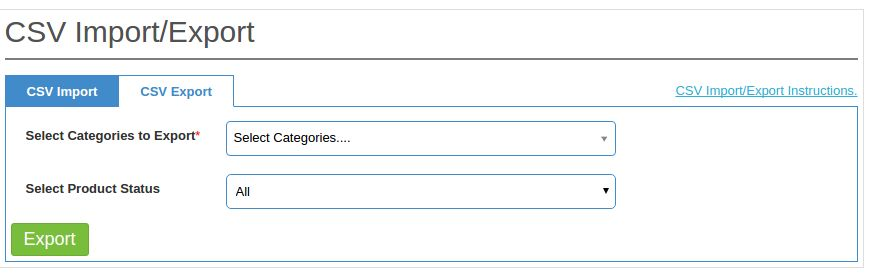
CSV Export
1 . Select Categories to export : Select the categories of the product for which you want to export the products.
2 . Select Product Status : You can also export products by their status.
Points for CSV Import
1. By using this option you can only import the CSV for products and their combinations.
2. Before importing any CSV file kindly download sample file(s) for reference.
3. You have to strictly follow the CSV format as in sample files(s) no other format will be accepted.
4. You Can not use `:` as file separator or multivalue separator in CSV files.
5. For adding a new product you have to set the value of Id field in CSV file to be zero i.e 0 .
6. For updating any product provide the id of the product in the Id field in CSV file.
7. You have to provide the id of Categories in CSV which you can come to know by download the Category file by clicking on `Download Category` button which is available on top of the import form .
8. You can also set features of product by providing feature name and its value (e.g Compositions:Cotton). You can provide multiple features separated by comma or any other multivalue separator. Please make sure that you have to add one feature for a product. You can also get the available features on store by clicking on `Download Features` button.
Note: We match features name and its value by matching the string in case insensitive form so make sure that no two features can have the same name.
9. You can also come to know the available combination on store by clicking on `Download Combination` button after selecting entity `Combinations` in import form.
10. You can set combinations for product by providing attribute name and its value (e.g Color:Blue). You can also provide multiple attributes for one combination separated by comma or any other multivalue separator. Please make sure that you have to add one attribute for a combination.
Note: We match attribute name and its value by matching the string in case insensitive form so make sure that no two attributes can have the same name.
11. There is also a sample data for csv files which can be download by clicking on button provided below in the form.
Points for CSV Export
1. As if you want to update products in bulk. You can do it in a simple way.
2. Simple export the products which you want to edit. Edit them and import it back.
3. You can Export your products in CSV format by choosing particular Category.
4. You can also Export your products on the basis of their status.
Marketplaces are seen as the new medium of business opportunities as they can improve the sales and conversion rates for any online store. They serve as an external sales channel that provides merchants a chance to sell their products or items if they are unable to influence customers on their online store for the first time. These online marketplaces are seen as a major relief for various small and medium eCommerce stores that do not have a much stronger customer base and visibility in the online world.
Everything is going to change sooner with the emergence of this PrestaShop Marketplace module that can provide an opportunity to each and every PrestaShop store to turn themselves into a full-fledged marketplace store for achieving desired business returns. Here, we are exploring the amazing features of this PrestaShop Marketplace Module that has been a blessing in disguise for the large community of sellers that are spread around the world.
1. Facilitates easy registration facility for seller community
The brilliant USP of this excellent eCommerce marketplace is its effortless registration facility for the seller community. Now, sellers can seamlessly register from the front end itself by selecting the “Register as Seller” option on the registration form.
2. Easy account management
With this PrestaShop Marketplace Module, sellers can effortlessly manage all their account activity through the front end only without any requirement for back end login. They can manage their account profile and product details without any problem.
3. Offers analytical data for quick decision making
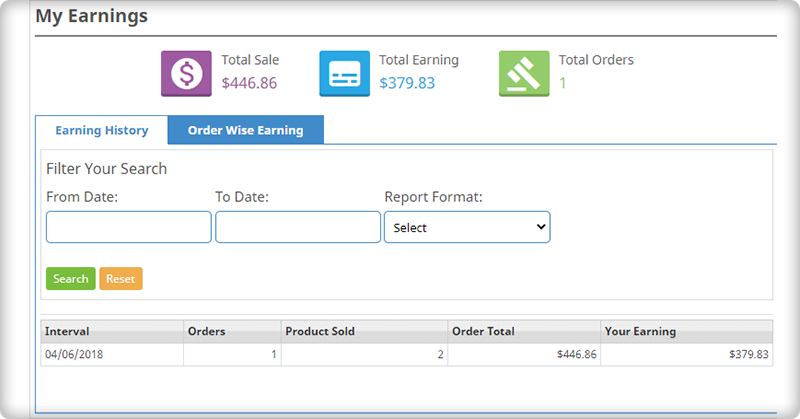
Tracking customer and checkout behavior on a site is a critical task as it influences the purchasing decision, customer engagement, conversions, and product sales. This PrestaShop Marketplace module helps in tracking sales information in the form of average revenue per order statistics, items sold, order earnings of sellers, and other such data in the form of graphs and other analytical figures.
4. Provides easy customization facility
Sellers can now quickly add banner, shop logo, custom HTML, additional special price, product enable/disable, product quantity update, and other such elements on their seller account without any hassle. Due to this brilliant feature, making changes in the seller’s account has become a cakewalk experience for numerous store owners across the world.
5. Helps in displaying detailed reports to seller account holders
This PrestaShop Marketplace Module provides detailed nature of reports in the form of income, revenue per order, items sold, interactive seller transaction report, and other such information. In this way, it is much easier for any PrestaShop store to achieve its desired goals and business aspirations.
6. Payout Management
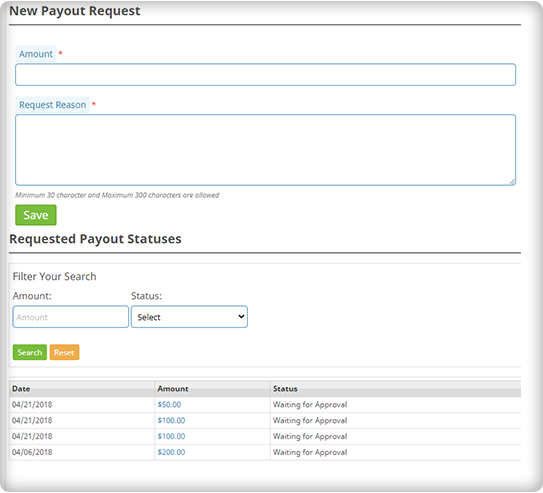
The sellers will seek a payout for the remaining balance. The seller may specify the payout sum and purpose, as well as choose one of the three payment methods available.
Admin will approve Payout requests with a single click of a button. For initiating the payout request of the sellers, PrestaShop Marketplace Module provides Bank wire, Pay by Check, and PayPal options.
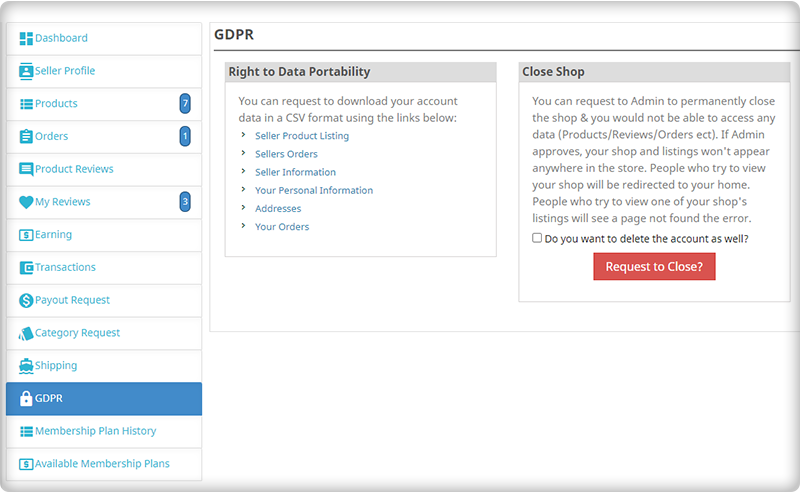
The PrestaShop Marketplace Module is compatible with Marketplace Mobile Application and you can build your application in a few clicks. It is GDPR compliant and supports multiple languages and currencies.
PrestaShop Marketplace Gold Plan
The Gold Plan is a package of several marketplace modules that supports PrestaShop Marketplace addon and adds several extra features to it.
Along with multi-vendor Prestashop Marketplace modules, the following modules are included in the Marketplace Gold plan.
The Prestashop Marketplace Gold plan enables the store owner to expand his or her company.
Conclusion:
It is time to explore the business potential of your PrestaShop store with the help of a feature-loaded eCommerce marketplace that can provide equal opportunities for both the seller and buyer communities. You need to install this outstanding PrestaShop Marketplace Module for your online store that can transform it into an extraordinary online marketplace for boosting your chances of business growth, conversion rates, and product sales.
If you missed reading the previous article, PrestaShop Marketplace Addon Part-1, Click here and explore more…