“Allow customization/personalization on your store products by offering a design panel to your customers on the product page with the help of PrestaShop Product Customizer, also referred to as Product Designer.”
You would have often seen people having personalized mobile cases, t-shirts, pillows, mugs, etc. This is what we call as Product Customization where people can customize a product as per their desire.
Earlier, the customization services were mainly available in the offline market but now, it has caught the attention in the online eCommerce market as well. People are looking for brands that offer product customization facility.
Following the interest of people towards product customization, Knowband has introduced the Product Customizer module that helps online businesses provide product customization facility to their customers.
PrestaShop Product Customizer/Designer is a great way to enhance the shopping experience of the users by providing them with some wonderful customization features.
Key Features of PrestaShop Product Customizer
Here is what our PrestaShop Product Designer addon offers:
1. Merchants can add pre-existing templates for the customers. If the user likes it, he or she can easily pick and place the image on the product they want to customize.
Or merchants can simply let the customers put their preferred picture on the product.
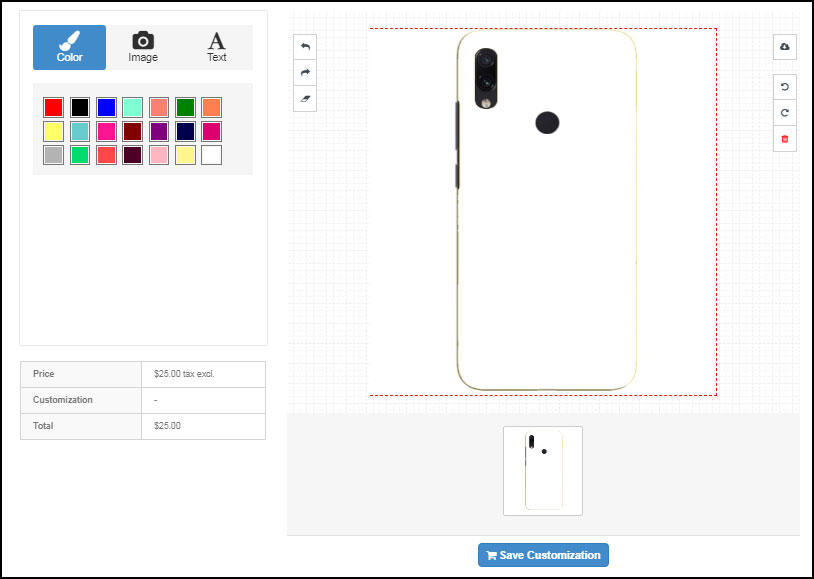
2. With PrestaShop Product Customization module, merchants can allow their customers to pick the desired colour from a number of colour options to adjust the look and feel of the product.
3. Allow customers to place a text on the product. You can add as many font styles as you want for some unique and attractive text appearance.
4. When the product customization is done, customers can preview it in the cart and also download its PDF.
Note: These options are available under the basic module configuration. The product customization conditions can be set up by visiting Catalogs>Products
Once you have added the products to your website from the back-end, you can perform tons of customization for every different product, from the Products tab. From there, the admin can
1. Specify whether the product should be available for customization or not.
2. Specify the maximum image upload size.
3. Set a price for the image placement on the product.
4. Allow customers to download the PNG file of the customized product.
5. Allow resizing and rotation of the text.
6. Allow customers to add a QR code on the product.
7. Display image filters
8. Set a price to add text
9. Enable cost per character
10. Set the price to add QR
11. Set a fixed price for the complete customization
12. Enable/Disable the text block on the customization page.
13. Set a minimum and maximum text length.
14. Allow text transparency and curve
15. Allow customization on different sides of a product. For example, in the case of a t-shirt, you can enable customization for either sides or both.
Final Word
With plenty of customization features, PrestaShop Product Customizer makes it the best fit to offer product customization to your users.
If you face any issue in this module or have any query regarding this, you can contact us anytime at support@knowband.com
Click here to visit the Product Page. Take a complete tour of the module by testing out the admin demo and the front demo. You can also refer to the user manual for any confusion.
PrestaShop Google Custom Search addon incorporates a Google Custom Search bar on your PrestaShop website. The custom search bar specifically displays your website results for the searches made by a user, thus shrinking the overall Google search results to your website specific results only.
If you want to filter out your website products from a thousand products available on Google, PrestaShop Google Custom Search is everything you need. It functions just like the actual Google search engine except that the search results are customized or say restricted to your website only.
Let’s talk about the features and benefits.
Features of PrestaShop Google Custom Search
1. Replace your default search bar with Google Custom Search Bar
PrestaShop Google Custom Search addon adds a Google Custom Search Bar on your website by replacing the default search bar.
In case you want to switch to the default one, simply disable the “Replace with default Search bar” option under the configuration of this PrestaShop addon.
2. Specify the number of results per page
Mention the number of search results that you would like to display for every page. The search results per page can range from 1 to 20.
3. Sorting available as per relevance and date
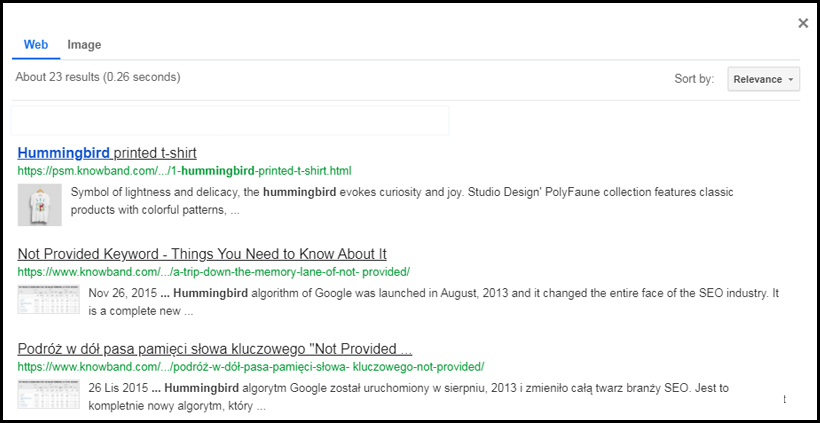
Online visitors can filter out the search results based on the relevancy or the date posted. Relevant sorting will help a user to find the most useful results while sorting as per the posting date will help in finding the latest updates.
On disabling the sorting function, the results will, by default, be displayed as per their relevancy.
4. Add an image tab on the search results
Display images based on the searched keyword by enabling the “Image search” option under PrestaShop Google Custom Search configurations.
5. Autocomplete
The autocomplete feature helps a user to find the relevant results quickly. The search bar starts displaying results in real-time, as soon as the user starts typing his search query.
Note: Sorting, Autocomplete and Image search can be enabled/disabled from the Custom Search Control Panel as well.
6. Open link in new tab
Every search result will open in a new tab so that you do not lose your visitors off on existing pages.
Benefits of Google Custom Search
1. Improve your SEO rankings
Wondering how? Well, the searches made through the Google Custom Search bar are indexed like a normal Google search query, which helps in improving your website ranking on the Google Search Engine.
So, do not get confused on how the Google Custom Search Bar is different from a normal search bar.
2. Increase your website traffic
Since the search results are restricted to your website only, PrestaShop Google Custom Search makes a great opportunity to increase the traffic on your website.
Apart from these, Google Custom Search helps you reduce your website’s bounce rate which eventually increases the average site time.
The search functionality of your eCommerce website plays a crucial role in the purchase decision of a customer. If customers do not easily find what they are looking for, they will likely take an exit and never return, making you lose out on potential customers.
This is why the search functionality holds very high importance to gain customer loyalty and provide customers with a hassle-free online shopping experience.
For PrestaShop website owners, we present the PrestaShop Search Auto-suggest addon that can improve the search functionality of the website and help people find the desired products easily.
Auto-suggest or autocomplete is a feature that predicts what the user is looking for, even before the user has finished typing his/her search query.
Features to look out in PrestaShop Search Auto-suggest addon:
1. Choose minimum letters to start performing a search
Set the minimum number of letters that need to be entered in the search box for the search function to work. For example, if a customer is looking for a pair of shoes, the search results would be displayed only after the customer has typed “sho” and not before it.
2. Search with the category name
Search for a particular category by typing the category name in the search box.
3. Search with the product name
Search for a particular product by typing the product name in the search box.
4. Display price along with the products
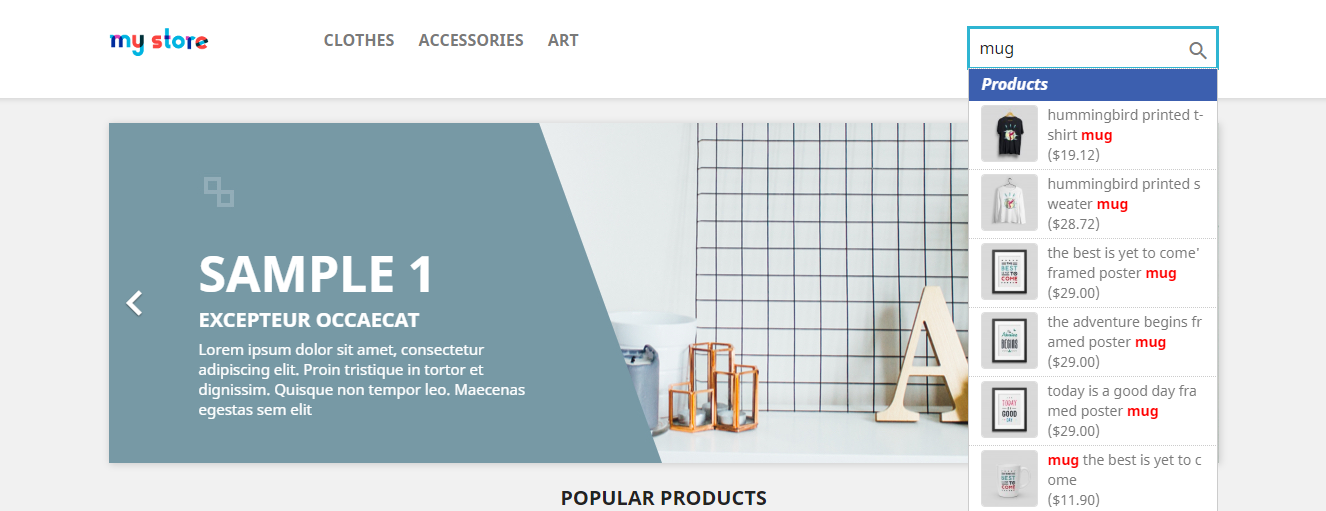
PrestaShop Search Auto-suggest addon lets you display the product price in the search results. If enabled, the product price will be mentioned right below the product name when a user types a search query.
5. Set a limit for the search results
With the help of PrestaShop Quick search addon, you can choose how many results you want to display in the search results, at once.
6. Allow search with product description, tags, SKU, UPC, EAN
A user can search for a product with its description, tags, EAN(European Article Number), UPC(Universal Product Code) and SKU(Stock Inventory Unit).
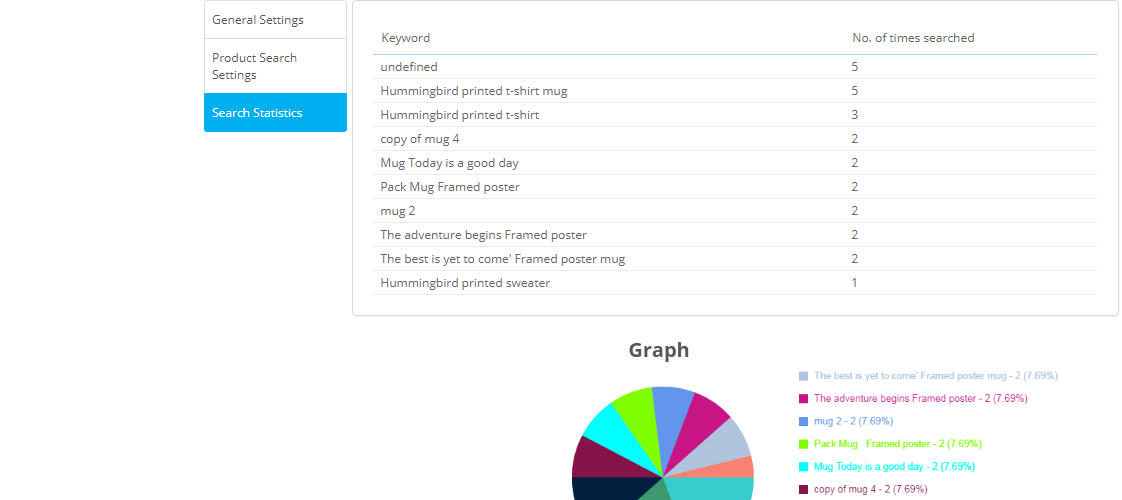
7. Get a complete analysis of the searched terms
PrestaShop Search Auto-suggest addon provides you with the statistics of the most searched keywords in your eCommerce website.
It displays the keywords along with the number of times they have been searched.
The stats can also be seen in the form of a pie chart.
8. Filter search results based on the stock status
With PrestaShop Search Auto-complete addon, you can display only those items that are currently in stock and hide the out-of-stock ones. Or you can display every kind in the search results, whether it is in stock or out of stock.
PrestaShop auto-suggest also provides you with the option to display only the products that have a specific quantity. For example, if you set the quantity range from 0 to 5, then only if the quantity of the product that a user is trying to search is between 0 and 5, products will be shown in the search results.
9. Instant display of results as a drop-down list
The search results are displayed instantly with the images as a drop-down list.
10. Customize your search bar
Adjust the colour of the highlighted keyword, background colour of the heading and the font colour to give your search bar an appealing look.
Why should you have PrestaShop Search Auto-suggest addon?
1. Easy and quick search functionality
2. Enhance user experience
3. Reduce bounce rate by displaying relevant results to users
4. Help customers find the desired product in no time.
The PrestaShop Search Auto-suggest addon is fully responsive, SSL compatible, multi-store compatible, multi-browsers compatible and compatible with all PrestaShop themes.
The holiday season is coming close. It is that time of the year when e-retailers look for every single opportunity to attract customers to their store and maximize sales.
The holiday season alone captures sales equivalent to the sales during the rest of the year. According to NRF, holiday sales for 2021 are expected to rise by around 4% as compared to 2020.
If you are a PrestaShop store merchant, here are the top 10 PrestaShop addons that you should implement in your store, to boost your holiday sales.
Grab customer attention and enhance customer engagement on your website by adding a gamified interface to it.
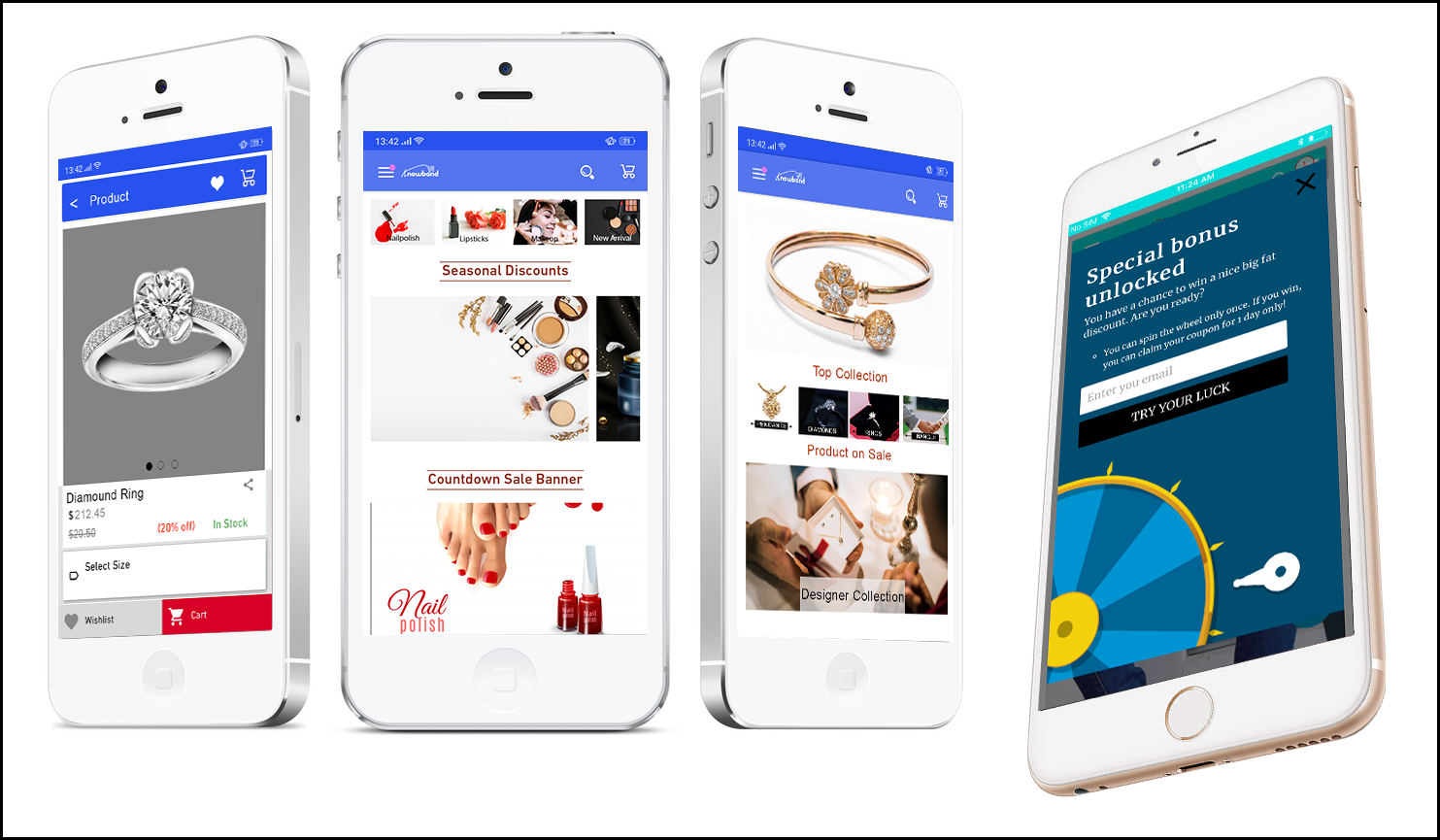
Knowband’s Spin and Win addon for PrestaShop is one of the best PrestaShop addons to increase customer engagement and your email list. It provides your visitors with a gamifying experience when they visit your store, by displaying them a Spin and Win wheel popup.
PrestaShop Spin and Win addon allows you to design your popup as per the occasion. Give a festive look to your website and provide the festival feel to your visitors. With the help of PrestaShop Spin and Win addon, you can set your popup theme for Halloween, Christmas, New Year, etc.
The more attractive your popup will look, the more engagement it will create. Let visitors spin the wheel and earn some exciting offers. The holiday season is the perfect time to lure visitors with some discounts and offers and convert them into potential buyers.
2. PrestaShop Gift Card Manager
This holiday season, when customers will be too busy shopping, make their task easy and save their time by offering them the Gift Card option.
PrestaShop Gift Card Manager allows you to create multiple gift card templates for multiple occasions. It also comes with pre-existing gift card templates for Easter, Halloween, Christmas, etc. You can give a festive look to your gift cards to catch the holiday spirit and boost your holiday sales.
Let customers spread the love through your gift cards. Gift cards will not only increase your holiday sales but also make the best way to increase your brand awareness.
Let a lengthy and a complicated checkout not be a barrier in your conversions during the peak holiday hours. Replace the conventional multi-step checkout with a single page checkout.
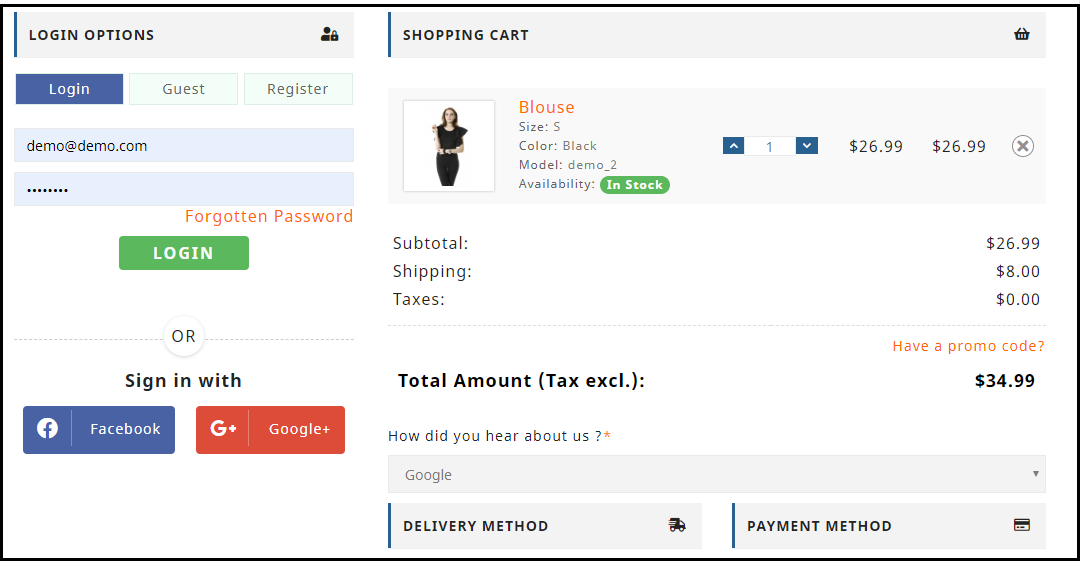
PrestaShop One Page Checkout puts all the checkout fields on a single page and provides your customers with a smooth and hassle-free checkout. To simplify your checkout process, it offers Guest Checkout, Social Login (through Facebook, Google and PayPal) and supports all major payment methods and shipping services. There are tons of other customizations which a merchant can make to make the checkout process convenient.
Mobile Apps have taken the user experience to a whole new level. Today, a majority of customers prefer having a mobile app as it is far more convenient than browsing a website. With that being said, launching a mobile app for your brand will not only increase customer engagement but also boost your revenue to a great extent.
Transform your PrestaShop website into a native Android and iOS mobile app with the help of PrestaShop Mobile App Builder and provide your customers with an enhanced online shopping experience.
Features like Real-time synchronization, Unlimited Push Notification, Fingerprint Login, Zopim and WhatsApp Chat support, etc. make the PrestaShop Mobile App Builder highly exciting.
With mass orders, also increases the order returns and the delay in the product return can irk customers.
So, speed up your return process and manage your eCommerce returns conveniently with PrestaShop Return Manager addon. Apart from the usual Refund and Replacement process, it provides your customers with the option to opt for the “Store Credits” which they can receive for the product amount. It ensures customer loyalty as well as customer retention since the customer would surely be visiting your store again in the future to utilise the credits.
Make the journey of your new customer as well as the existing customers exciting by rewarding them some loyalty points every time they make a purchase on your store. This is a perfect idea to acquire new customers and ensure repeat purchases, especially during the holiday season.
Knowband’s Loyalty Points addon for PrestaShop focuses on customer retention and customer acquisition, at the same time. You can reward loyalty points to a new visitor when they sign-up on your store, and turn him/her into your loyal customer within no time. The points can be used as a discount voucher.
If you offer loyalty points for every purchase that a customer makes on your store, you can generate huge holiday sales.
One of the most helpful PrestaShop modules for this holiday season would be PrestaShop Abandoned Cart.
Brands witness a high number of abandoned carts during the holiday season. Those numbers can cost you a huge loss in the revenue. Though you cannot put a stop to cart abandonment, you can surely recover some lost sales and even a slight recovery in the cart abandonment rate can add to a huge amount in the total revenue.
PrestaShop Abandoned Cart addon allows you to track and chase the abandoned cart users and helps you recover the lost sales by sending regular follow-up emails.
This PrestaShop module reduces the cart abandonment rate, ultimately resulting in increased conversions.
8. PrestaShop Affiliate and Referral Program
Referral programs can be a big boost to your e-commerce sales. While the holiday season is approaching, you can start a referral program and provide exciting incentives to users when they refer your brand to his/her friends, family or relatives and the latter makes a successful purchase.
You can run such a referral program on your store with the help of PrestaShop Affiliate and Referral Program addon. A customer can register as an affiliate on your store, share your website link with his other people and earn vouchers or cash when the referent successfully registers or makes a purchase.
The product delivery takes too long during the holiday season, making customers run out of patience. Because of bulk orders, it becomes difficult for the shipping providers to ship every product in a quick span.
Customers, too, know this very well. In such cases, PrestaShop Store Locator and Pickup addon manages things quite conveniently.
If you have your stores located in multiple locations, you can display them at the front end of your website and allow customers to select their nearby store so that they do not have to wait too long for the product to get delivered. Customers can reach out to the nearby store and pick up their item.
During occasions like Halloween or Christmas, people look to buy costumes on rent. There is a heavy demand for it. Hence, if you run such business, you can provide people with theme-based costumes or dresses on rent and boost your holiday sales.
You still have time to get everything set before the holiday season starts. Try out these 10 PrestaShop addons and capture huge sales in the coming holiday season.
Are you looking for some effective social media addons for your Prestashop website? There are plenty of social media plugins available that will help you gain social engagement, drive quality traffic to your store and get more conversions. In this article, I have listed 6 social media addons that will be helpful for your Prestashop store. Check them out.
The module offers up to 15 social login options that include Facebook, Google, Instagram, Twitter, Linkedin, Amazon, PayPal, Live, WordPress, Dropbox, Yahoo, GitHub, Disqus, Foursquare and VKontakte. It encourages quick sign-up and reduces password fatigue.
With PrestaShop Social Loginizer, you can track the total number of registrations and total login from various social media accounts. You can customize the login options and also select the pages where you want to showcase the social login block, for example, on the Home Page, Product Page, Category Page, Checkout Page, etc.
2. PrestaShop Instagram Shop Gallery
PrestaShop Instagram Shop Gallery addon adds an attractive Instagram Gallery section on your PrestaShop website. The Instagram gallery consists of the posts that are fetched from Instagram using specific hashtags.
So, basically with this module, you can define the hashtags for which you want to fetch the related images and map your products on those images.
The module makes it very similar to Instagram Shoppable Posts and offers many customizations to adjust the look and fool of your PrestaShop Instagram Gallery.
3. PrestaShop FB Store
PrestaShop FB Store addon helps the PrestaShop store owners integrate their E-commerce store to their Facebook business page.
The module allows you to display your store products on your Facebook page, under the “Shop Now” tab. It is also known as the Facebook shop.
In this module, you can select the categories and products that you want to display on your Facebook shop. Also, you can set the limit of products that you want to feature.
You can also track the traffic coming to your website through facebook shop by providing your Google Analytics ID.
Note: To use this module, you need to have a minimum of 2K likes on your Facebook page.
4. PrestaShop Facebook Share and Win Discount
PrestaShop Facebook Share and Win Discount is an amazing tool to reward your users for promoting your products. This addon allows you to provide some discount to your users every time they share your product on their Facebook wall. This not only increases product visibility but also encourages word-of-mouth.
The module adds a Facebook “Share to get discount” button on your product pages.
PrestaShop Facebook Share and Win Discount addon also allows you to provide a flat discount value or some percentage discount to your customers. You can specify the discount value and set its validity.
5. PrestaShop Twitter Feed
PrestaShop Twitter Feed addon helps you display your twitter posts on your PrestaShop website. This addon offers tons of customizations, letting you make your twitter feed appear on the footer, left column or the right column of your website.
You can also choose where you want to display your tweets, for example, on the Home page, Login page, Product Page, Category Page, Account page.
PrestaShop Twitter feed addon provides you with the option to set your tweets limit.
You can select a Light or Dark theme for the twitter widget.
To make any further changes without touching the coding section, you can use the Custom CSS option.
6. PrestaShop Order Social Sharing
PrestaShop Order Social Sharing addon lets customers share their order details on a number of social networking platforms like Facebook, Twitter Google+ and lets you make custom changes as per your requirements.
It basically helps customers suggest or share a word about their order/product to their social friends and thus provides the latter with a direct link to check out the product.
Final Word
Having social media addons can make things interesting for your Brand as well as your store visitors.
I hope this article on “6 must-have social media addons for your Prestashop store” helped you in finding the best and suitable social media modules for your website.
If you found this information useful, do let me know by leaving a comment below or if you need any assistance in any of the modules, you can contact us at support@knowband.com
The online booking system has made life much easier than before. Today, if I need to go somewhere, I can book a cab. If I need to consult a doctor, I can create an appointment in a few taps. If I am heading out of the station and need a place to stay, I can reserve a room without any hassle.
The online reservation system has added convenience to the daily lifestyle of the people. People, now, do not worry about getting a booking as they know they have the option to book a facility anytime. And it can be done within a few steps.
Witnessing various benefits of an online booking system, many online businesses have now started offering booking facilities to their customers. If you are also looking to add a reservation system to your online business, PrestaShop Booking and Rental System will help you do so.
PrestaShop Booking and Rental system allows you to create and manage multiple booking services, be it an Appointment, Car/Bike Rental or a Hotel Booking. It lets your customers book an online service anytime from anywhere.
If you own a store on the PrestaShop platform where you want to make people book a service without facing any trouble, PrestaShop Booking and Rental system is the one-stop solution.
PrestaShop Booking System
PrestaShop Booking System is basically classified into three types:
1. Appointment Bookings
2. Hotel Bookings
3. Rental Bookings
1. PrestaShop Appointment Booking system
Appointment booking tools are mostly used for a doctor visit, home checkup, and other professional services.
With the help of PrestaShop Appointment Booking system, you can
– Allow your customers to book an appointment effortlessly.
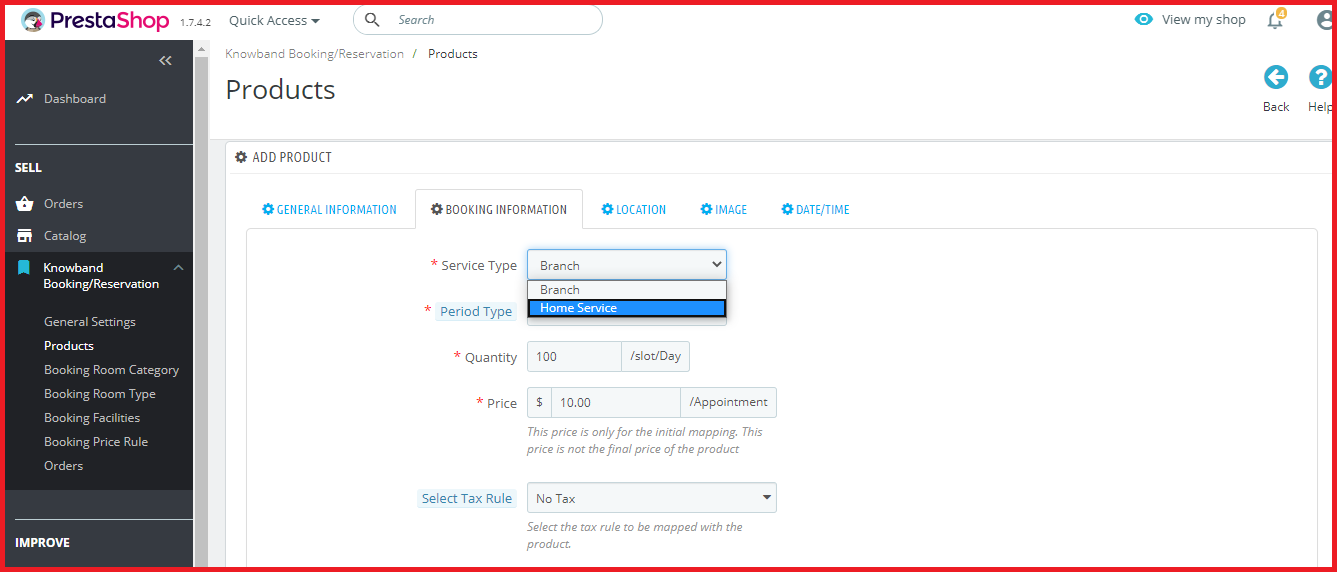
– Provide two types of appointment services: Branch visit or Home service.
– Set the number of bookings that you wish to take per slot per day.
– Set an upfront booking price.
– Specify the days and time slots for which the appointments can be generated.
– Adjust the booking price for different timings.
2. PrestaShop Hotel Booking System
Online hotel bookings take place in huge number nowadays. Customers can check multiple hotels online, check the price, room condition, hotel facilities and much more.
With the help of PrestaShop Hotel Booking system, you can
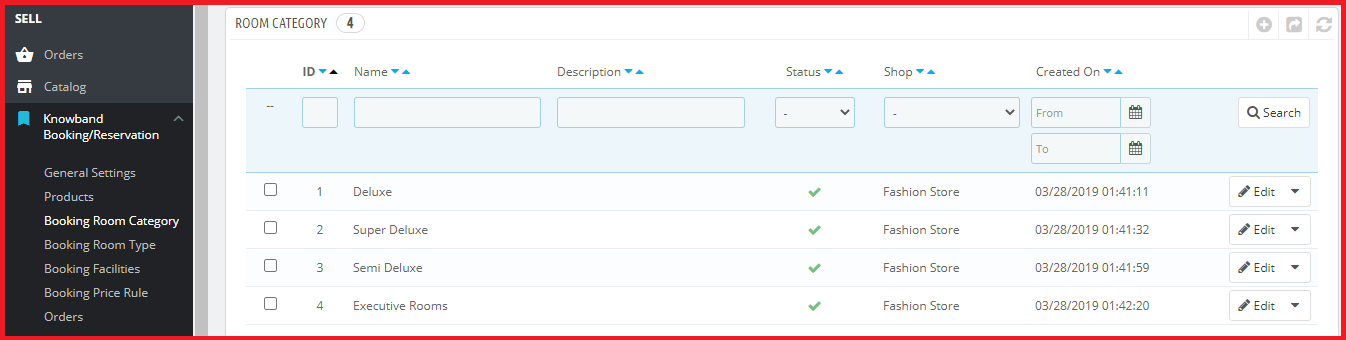
– Assign categories to your hotel rooms, for example, Deluxe, Premium, Flagship, etc.
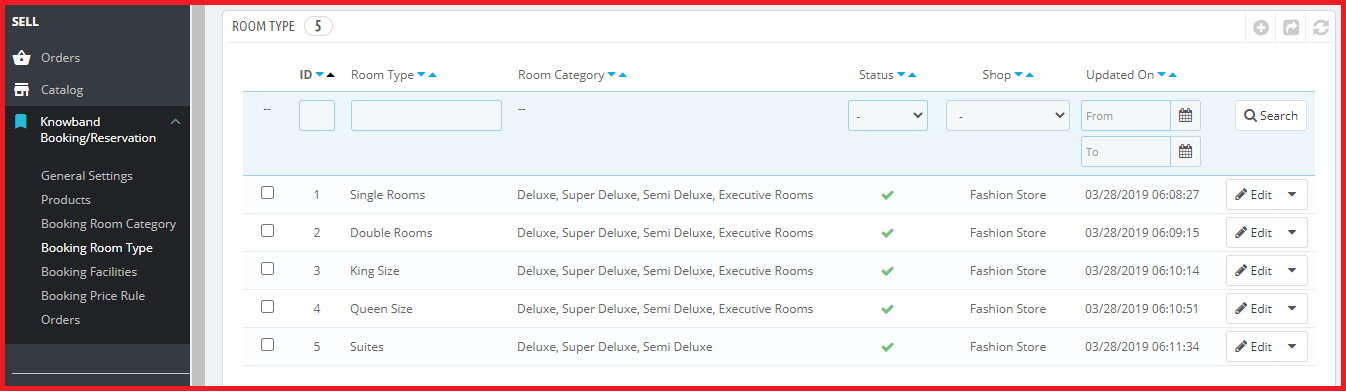
– Specify the hotel room type, for example, Single Bedroom, Double Bedroom, etc.
While adding a room type, you can also specify the maximum children and adult allowed for that particular room.
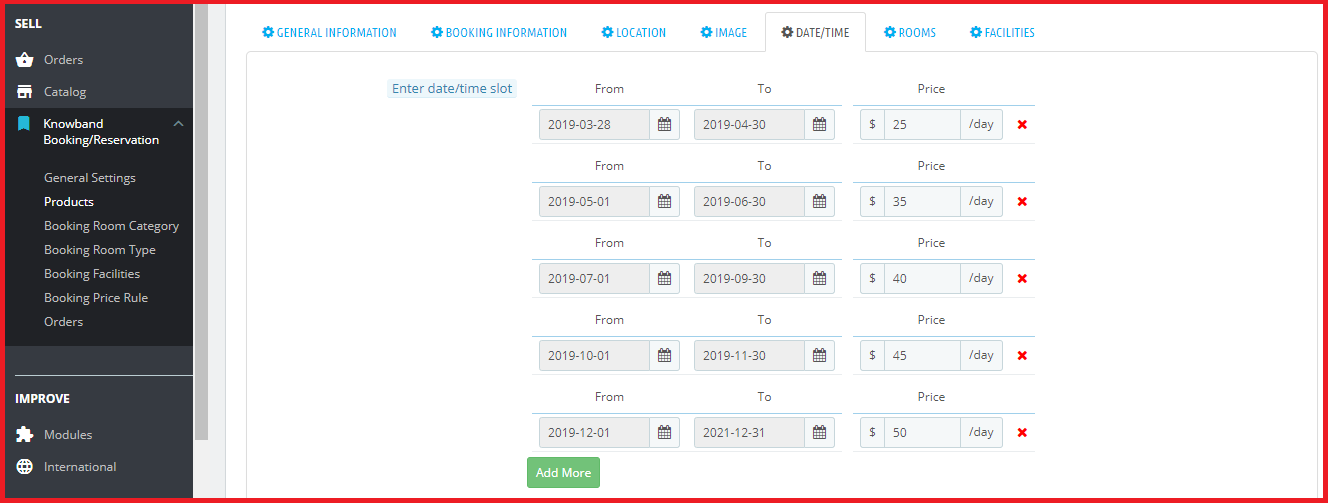
– Specify the period within which the hotel bookings can be made.
– Display an upfront booking price.
– Adjust the booking price for different time periods.
– Set an additional price for different categories and room type.
– Specify the minimum and the maximum number of days for which a booking can be made.
– Specify the booking quantity per day for different room type and category.
– Define the hotel rating and display it on the front-end.
– Set a check-in and check-out time.
– Add hotel and room amenities like AC, WiFi, TV, Parking facility, Elevator, etc.
3. PrestaShop Rental Booking System
People usually prefer to book a car or a cycle/bike, depending on the travelling distance they want to cover. Many online businesses have been set up from where users can rent a vehicle.
The PrestaShop Rental module is further classified into
Daily Rentals
Hourly Rentals
With the help of PrestaShop Rental system, you can
– Specify the number of bookings that can be made per slot per day
– Define the days for which the rental bookings can be made.
– Specify the minimum and the maximum number of hours for which a booking can be made. (This is particularly for hourly rentals)
– Display an upfront booking price
– Specify the minimum and the maximum number of days for which a user can obtain the rental booking facility.
– Adjust the booking price for different slots.
– Add facilities that the customer would receive, for example, an AC bus or a Non-AC bus.
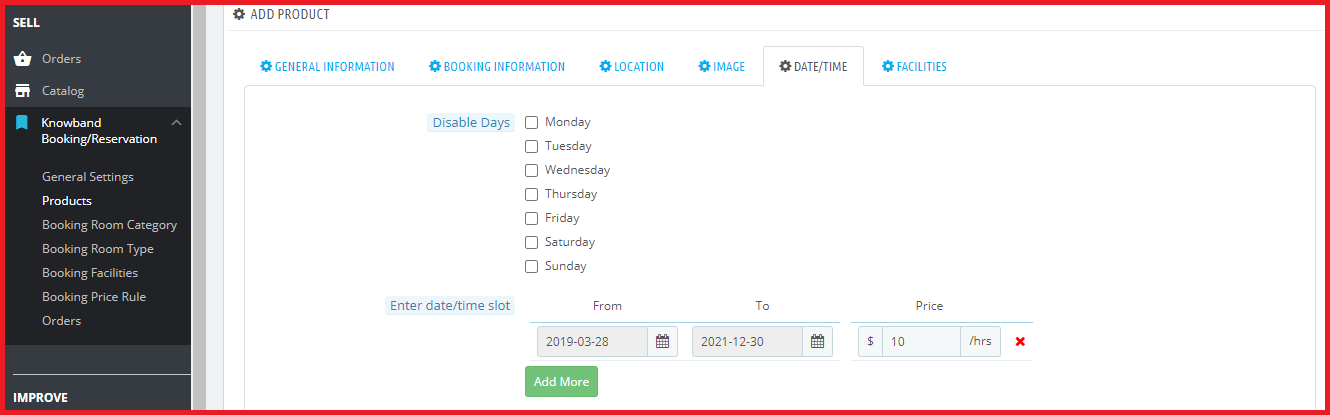
PrestaShop Booking System also allows you to offer a discount to your customers on a particular date or for a particular period. Apart from this, it lets you check your booking orders which can be viewed under the “Orders” tab.
Final Word
PrestaShop Booking and Rental system can facilitate online booking system of your PrestaShop website. It enhances the online booking experience of your customers and lets you manage your bookings comfortably. With PrestaShop Booking system, you can provide a 24×7 booking facility to your users.
Try out the PrestaShop Reservation and Booking system today and enjoy the ample features and benefits that it offers!
The most awaited PrestaShop version 1.7.6.0 is now released. Yes, you have heard it right. PrestaShop has now announced PrestaShop 1.7.6.0 on its official website. It took a long journey to deliver this biggest release since 1.7.1.0. After a development period of six months, PrestaShop is happy to announce its latest release. How worth is it? Well, we wish that it perfectly suits your eCommerce business needs in the long run. Moreover, we hope that you enjoy its latest updates and improvements.
What all PrestaShop features are added or improved?
This new version, PrestaShop 1.7.6.0 focuses on improving the existing features of PrestaShop and bringing them back to the merchants. During the whole improvement process, the code quality standards were maintained. Quickly, download the latest PrestaShop version 1.7.6for your store and enjoy the latest features and benefits.
New Features
Front office
New template design for emails sent to customers. The design is specially optimized for mobile displays so as to improve the shopping experience and customer relationship with the merchants.
Improved display of price details (product price, shipping, taxes, etc.) at different levels of the purchase process to gain customer trust and boost conversions.
Improved profile menu with allowed access to resources (documentation, training, agencies, help center, etc).
An updated version of the Product Comments module featuring rich snippets.
The various sorts and filters on product listing pages are fully refactored. A new price slider is also added.
Apart from new updates, there are various improvements which include:
Improved Catalog mode: Choose how to showcase your websites and display/hide product prices.
Improved currency management subsystem. You can add custom currencies for example.
Improved SEO for products with combinations.
Back office
Simple management of transactional emails directly from a new back-office page: Email Theme.
Show gathered prices for a product. Eg.“Price (tax incl.)” column has been added to the product listing. It is now possible to check both taxes included and excluded prices for each product.
New helper cards have been integrated on important pages to improve the software onboarding: Categories, Customers, Pages, Employees.
Dynamic preview of search engine results is enabled for other pages: Product page, Categories, CMS.
New watermark module has been updated to 1.7 (available in the Module Catalog).
Improved translation system for modules supporting multiple languages.
The Design section of the back office has been reconfigured. Gives an overview of all design features (RTL, logos, favicon and theme) so you can easily manage them the way you want.
The back-office administration is optimized for mobile devices.
PrestaShop addons Compatible with Prestashop Version 1.7.6.0
As new versions are released, you have to update your PrestaShop website to the latest store version. The very first step is to migrate all the data to keep their shop updated and fully-functional. Once the website is migrated to the updated version, the next step is to find themes and Prestashop addons compatible with the PrestaShop latest version 1.7.6. With Knowband, you can find all the compatible modules, templates, support, training to customize your online store.
Here is a list of the PrestaShop addons that will flawlessly work with the latest PrestaShop release 1.7.6.0.
One Page Checkout: Convert the multi-page checkout design of your site into a single page checkout design with PrestaShop One Page Checkout. With multiple social login options, MailChimp Integrator, Guest Checkout, and many other rich features, PrestaShop One page Super checkout is a high ranked PrestaShop addon with 5000+ downloads and five-star ratings. Buy PrestaShop One Page Checkout from PrestaShop Addon Store and get high conversion rates for your store. PrestaShop one page checkout addon is now compatible with the latest PrestaShop version 1.7.6.0
Abandoned cart: Another five-star rated module, PrestaShop Abandoned Cart addon helps you to reduce the cart abandonment rate in your store. This Prestashop addon tracks the abandoned carts & sends a reminder to the abandoned cart users via email and pushes them to come back to the store and complete their purchase. With the help of PrestaShop Abandoned cart addon, you can improve the conversion rates by recovering the pending carts. With 1000+ downloads, you can buy this Prestashop addon from Addon Store. PrestaShop Abandoned Cart module is compatible with the latest PrestaShop version 1.7.6.0
Social Login: Add numerous social login options to your PrestaShop store using PrestaShop Social Loginizer and improve the shopping experience of your customers. This five-star rated Prestashop addon encourages your customers for quick signup.PrestaShop Social loginizer addon has over 1000 downloads, you can also buy Social Loginizer module from PrestaShop Store. PrestaShop Social loginizer addon is compatible with the latest PrestaShop version 1.7.6.0
Marketplace: Target your new audience and serve your customers with products from multiple retailers using PrestaShop Marketplace addon. Turn your store into a marketplace and provide a choice of selecting products and services to your customers. This five-star rated Prestashop module has completed 500+ downloads. Buy PrestaShop Marketplace addon for your store. PrestaShop Marketplace addon is compatible with the latest PrestaShop version 1.7.6.0
Advance Wishlist:PrestaShop Advanced Wishlist allows online shoppers to save the shortlisted product to their wishlist. The five star rated PrestaShop addon boosts the shopping experience of the shopper and so reduces the cart abandonment rate as well. This Prestashop module has reached 100+ downloads. Purchase the module from PrestaShop Addon Store. PrestaShop Advance Wishlist addon is compatible with the latest PrestaShop version 1.7.6.0
Return Manager: Manage the product return requests of your customers and allow easy return & replacement with the help of PrestaShop Return Manager. The module has already 500+ downloads. This is one of the popular five-star rated PrestaShop addons that provide a flexible RMA system for your store. Buy PrestaShop RMA from Addon Store and easily manage returns at your store. PrestaShop Return Manager addon is compatible with the latest PrestaShop version 1.7.6.0
Spin and Win: Are your visitors getting bored at your store? Add an interactive gamified interface using PrestaShop Spin and Win pop up addon and compel visitors to shop your site products. With over 100 downloads, Spin & Win is ranked among top-rated modules as it is highly used as an email subscription popup. This 3 in 1 popup shows fun-filled wheel interface asking email of the visitors in order to exchange discount coupons with them. Buy Spin and Win Email Subscription Popup from Addon Store. PrestaShop Spin and win popup addon is compatible with the latest PrestaShop version 1.7.6.0
Etsy Integrator: With PrestaShop Etsy Integration addon, add an effective interface to manage the product listing, inventory and orders for the Etsy marketplace from the PrestaShop Back Office. PrestaShop Etsy Integration has reached 100+ downloads and is ranked among the four star rated modules. Go and buy this PrestaShop addon now. PrestaShop Etsy Integration addon is compatible with the latest PrestaShop version 1.7.6.0
Mobile App Builder: Transform your eCommerce site into a fully-functional mobile app with PrestaShop Mobile App Builder (for Android and iOS). The customizable designs and layouts offered by this addon have contributed to four star rating performance on PrestaShop Addon Store. Over 100 downloads are completed, you too can get it for your store. Convert your site into a fully-featured app with Knowband Mobile App Builder. PrestaShop Mobile App Builder is compatible with the latest PrestaShop version 1.7.6.0
Some other recommended modules: Apart from the above listed, Knowband offers you some other PrestaShop modules to increase the revenues and conversion rates of your store. Go and get them from the Knowband store at the provided links:
Knowband, one of the leading eCommerce development company has shown its major contribution to the design and development of PrestaShop modules. The team of highly skilled and experienced developers has covered over 50 plugins for PrestaShop. These PrestaShop modules are compatible with the latest version 1.7.6.0.
With such high rated addon projects on PrestaShop Addon Store, Knowband is ranked among Superhero developers and badged as Modules Partner Creator as well.
What does the Superhero Developer Ranking say?
To help the user in picking up the right product, PrestaShop has set up an expertise ranking system. Each developer who contributes his/her product at addon store is marked with some kind of expertise level. Knowband ranks as a Superhero among the community of developers. They respond to customer queries in less than two hours of time. Customers who seek their support have rated their service quality to 99%. How amazing is that? You too can create your own custom store with Knowband modules for PrestaShop.
Are you pissed of with the low conversion rate of the website? Every eCommerce store owners aims at increasing their conversion rate. Their main motive should be boost the user experience at each step in the conversion funnel, so that, the store visitors are constantly motivated to place their order. Optimizing the product page, landing pages of the website is a must when it comes to customer retention. Additionally, the e-merchants should stay in touch with other technological advancement, market trends in order to amp-up the user engagement.
If you own a Prestashop-based eCommerce site and are struggling with the problem of low conversion, then, this write-up may help you out. There are lots of addon available for Prestashop which can make your website interactive and can help you to increase the conversion rate. Here I am sharing a few Prestashop addons which might enhance the shopping experience of the customers and boost the conversion rate of your store.
How to convert your site visitors into buyers?
If your customers are leaving the store after adding the products to the cart because of some reasons, then, you need to deal with the cart abandonment. In order to bring back the customer to your store, Knowband offers Prestashop abandoned cart extension.
Prestashop Abandoned cart addon provides an easy-to-understand interface to the store admin in order to track abandoned carts on their site. The plugin lists out the cart details of the store visitors who have left products in their cart. With the automated approach of the Prestashop abandoned cart extension, the admin can send serial reminders to those customers with discounts and other offers. The constant reminder might compel them to return back to the store and place the order. The readymade email templates makes it easier for the e-marketers to send follow up emails. The Prestashop Abandoned cart recovery addon module also tracks customers language and send personalized follow-up emails with their full name in their own language.
How to engage the site visitors?
There are times when the customer land on your website, but leave the site without buying anything. Dealing with the bounce and exit rate of the site is another issue that might take a toll on your store’s conversion. This can be handled by boosting the user engagement and giving them compelling reasons to stay. To increase the interaction between the customer and you store you may try Prestashop exit popups addon.
Prestashop exit intent popup extension displays an interactive subscription popup every time the customer intends to exit the site. This is done by tracking the mouse movement of the visitor. The conventional exit popup enables the admin to offer discounts to the store visitor just when they intend to exit. Thus, the visitors might reconsider their exit. Additionally, the shoppers are required enter their email IDs in order to claim the discounts. This increases the email base of the site. The Prestashop exit intent email subscription extension offers MailChimp Integration as well that makes email marketing effortless. The store admin can design the exit popup to match the website’s theme by adding custom background image and custom CSS and JS codes.
How to suggest more related products to the customer?
Upselling and cross selling is another easy way to motivate the customers to buy more. Suggest similar and related products to the customers at the product page itself. For this Knowband offers Prestashop Automatic Related Products Addon.
Prestashop Automatic Related Product Module helps the store owner to set related products which will help the store owner to increase the average cart value of an individual purchase on your store.
How to intimate your customer about the update?
At times the customer is ready to purchase the product, but the product is either out of stock or the rate is too high for the customer. This may lose you some easy conversions. How will your customer will able to get the update that the product is restocked and available with discount on it? Knowband’s Prestashop Product update notification addon is the solution.
The customers can subscribe for an email notification regarding a particular product’s inventory or price change. This Prestashop Product update notification extension then lists out the subscription and enable the store admin to send the mails to the subscribed customer when there wish list in restocked. The Prestashop module automatically sends an email to the subscribed customers when the product is back-in-stock or its price is changed.
How to redirect your customer to your website?
Some times, the customers likes a product, but it is not in stock. You may update the inventory later, but how will your customer will be able to know about the update?
Prestashop Back in Stock Notification addon sends a reminder email to the subscribed customer. As soon as the product is restocked, this addon sends the mail and the customer once again land up to your website. With the help of this Prestashop back in stock notification plugin, the customers can subscribe to back-in-stock email alert on out-of-stock products. When the product is available the module automatically sends the mail to the customer.
Above mentioned Prestashop addon will not only help in increasing the conversion rate, but also makes the website look and feel attractive as well as user friendly. So, optimize your website with these quickfire addon and boost the site’s conversion.
As the GDPR is in enforcement now and after a lot of hassle most of the online businesses in EU are now compliant with the new data protection law. To help the Prestashop store owners to achieve the GDPR compliance, Knowband released the Prestashop GDPR module which handles the rights of the customers and automates the entire process for the hassle-free management. As the other module which has been installed in your Prestashop store also stores the data of the customers so it is required to make these modules compliant with the GDPR so that on the data export or deletion request of the GDPR required action can be performed. In this blog post, we will go through all the details of the GDPR and share the details of all the GDPR compliant modules so that you can upgrade your store to achieve the GDPR compliance.
We will start with the Prestashop GDPR Compliance module by Knowband, Prestashop GDPR module handles the following rights of the customers:
1) Right of access
2) Right to data portability
3) Right to rectification
4) Right to erasure
5) Rights related to the automated decision making
6) Right to restrict processing
Other features of the Prestashop GDPR Compliance Addon:
1) Cookies consent bar and cookie blocker
2) Allow guest users to access the GDPR rights
3) Download customer data from the back-office
4) Delete customer data from the back-office
5) Advance settings for the data deletion
6) Data anonymization
7) Compatibility with the other GDPR compliance module
8) User consent (checkboxes) at the registration and contact form
For more details regarding the Prestashop GDPR module click here.
As we informed our valued customers through the newsletter that Prestashop has introduced 4 types of hooks to make the Prestashop modules (which collects the personal data of the customers) compliant with the GDPR. In order to make the Prestashop modules compliant with the official GDPR module developers need to integrate these hooks to the module. After integrating these hooks customer will be able to export the data captured by the respective module. Similarly, on the data deletion request, the customer data will be deleted from the modules. For the details on how to make your module compliant with the GDPR module, please click here.
In order to make the native modules GDPR compliant Prestashop has also released the 2 new versions of the Prestashop – 1.7.3.3 and 1.6.1.19. Please click here for the details.
Express checkout is the best way to improve the conversion rate of your store. The one page checkout module allows you to display billing address, shipping address, payment and shipping options on the same page and saves the time of the user to complete the order. You can enable the one step checkout for the guest users and new users can also easily create an account with ease. Social login option is one of the best features of the One Page Checkout module. One Page checkout module by Knowband supports multiple shipping and payment methods. Prestashop One Page Checkout Module is now GDPR compliant. Click here to upgrade your One Page checkout Module. Note: If you have made any custom changes in the module then we will recommend you to contact our support team to save the changes. Please click here to get in touch with the helpdesk team.
Prestashop Marketplace module allows the store admin to convert their Prestashop store into a marketplace like Amazon, Walmart, Etsy etc, so that multiple sellers can list their items in the marketplace. Converting your store into a marketplace helps you to offer more products and services to the customers at a better price. You can earn commision from the sellers listed on the marketplace. Prestashop GDPR Module is now GDPR compliant. Click here to check the details.
Note: If you have made any custom changes in the module then we will recommend you to contact our support team to save the changes. Please click here to get in touch with the helpdesk team.
The Spin and Win Popup module is one of the best ways to collect the leads. The gamified popup design of the module allows the customer to spin the wheel to get the enticing discount on their purchase. Prestashop Spin and Win Popup module is now GDPR compliant. Click here for the details.
The Prestashop Wishlist module allows the customers to save the products of their choice to the wishlist so that later they can view and place their order for these products. This saves the time of the customers and improves the customer experience at your store. The Wishlist module also helpful for the store admin to understand the customer behavior. Admin can check the statistics of the products saved in the Wishlist. Advance WishList Module is now GDPR compliant. Click here for the details.
The Return Manager module is one of the must-have extension for the Prestashop store owners. If you are in EU then this module can help you to comply with the EU laws. As per EU law customers have the 14 days cool off period in which they can return the product. By using the Return Manager addon you can provide a hassle free return process for the customer. The Return Manager Module also helps the sellers to manage the returns effectively and you can also keep the track of all the returned items. Prestashop Return Manager Module is now GDPR compliant. Click here for the details.
The Prestashop Abandoned Cart module is an effective way to reduce the cart abandonment and win back the customers. You can send the serial reminders to the customers to complete their purchase. Prestashop Abandoned Cart Module is now GDPR compliant. Please click here for the details.
The Gift Card Manager Addon helps you to boost the sales. By using the Gift Card Module you can create and sell gift cards on your store. The customers can purchase the gift cards and share it with their friends. Prestashop Gift Card Manager Addon is now GDPR compliant. Please click here for the details.
Prestashop Reward Points addon allows the sellers to award their customers on completing their purchase. The Reward Points helps the store owner to retain the customers so that they can keep on visiting the store to use the reward points. Prestashop Reward Points Module is now GDPR compliant. Click here for the details.
The Prestashop Birthday Coupon module allows the store admin to send the birthday wishes to the customers. Admin can offer a special discount to the customers on their birthday. Prestashop Birthday Coupon Module is now GDPR compliant. Click here for the details.
Product reviews are the must to win the customer trust. You can ask for the reviews to the customers who have purchased your store products. You can also offer some additional discount to the customers to post their reviews. Prestashop Review Incentive Module is now GDPR compliant. Click here for the details.
Prestashop Order Custom Field Module allows the store admin to add the additional details on the checkout page. By adding the custom fields on the checkout page admin can collect the additional details from the customers. This information can be used for the effective marketing. Prestashop Order Custom Field Module is now GDPR compliant. Click here for the details.
In order to increase the customer engagement on the store, the admin can allow the customers to set the alert for the drop in the product price. In case of any drop in the product price, the customer will get the email notification with the product link. Prestashop Price Alert Module is now GDPR compliant. Please click here for the details.
Instead of disabling the out of stock products the Prestashop store admin can use the Back in Stock Notification module to convert the visitors into the customers. Customers can set the alert for the restocking so that as soon as the product will be restocked the customer will receive the email notification for the same. Prestashop Back in Stock Notification module is now GDPR compliant. Please click here for the details.
The Prestashop Product Update Notification module allows the customers to set the alert for the products. On opting for the price alert the customer will receive the alert for the stock alert and price change. Prestashop Product Update Notification module is now GDPR compliant. Please click here for the details.
We will keep updating this post for the more GDPR compliant modules.