Optimizing your website for search engines is SEO. The goal of website optimization is to make websites easier for search engines to understand and rank. To ensure that your website and its content are visible on search engine results pages, you can utilize a variety of strategies, all of which are collectively referred to as “SEO.” When owning a website, SEO is something you should get good at. Your website’s position in search results on Google and other search engines is continuously changing. Moreover, if you want to outperform the competition, you must have the latest information on SEO.
What Are the Methods of Website Optimization?
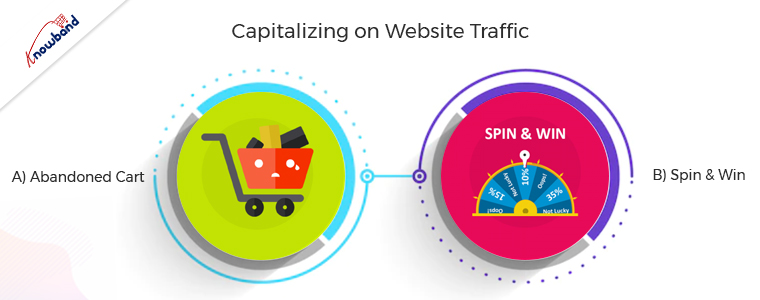
Capitalizing on Website Traffic
This method is very important because benefits come from users who come to the website. The conversion of the incoming traffic to the website is possible only if they stay long enough on the website and for this, various methods are possible. Apart from the engagement, it is very important to follow up with the customers if they are abandoning the cart.
A) Abandoned Cart
The abandoned cart module is very useful for following up with customers who are visiting the website but are not purchasing. Customers sometimes leave the website without completing their purchase. Furthermore, sending a reminder for the abandoned cart is important to remind them of their basket. The users receive email follow-ups for completing the purchase with a discount which entices the customers.
B) Spin to Win
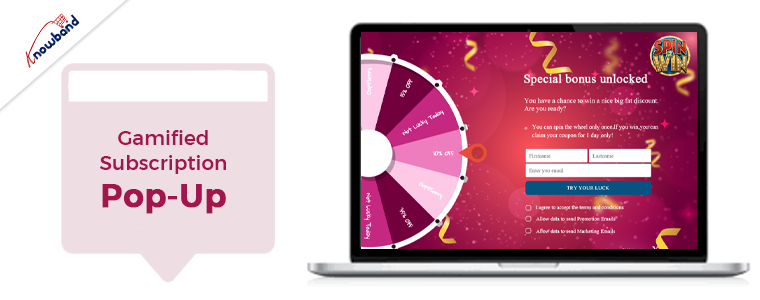
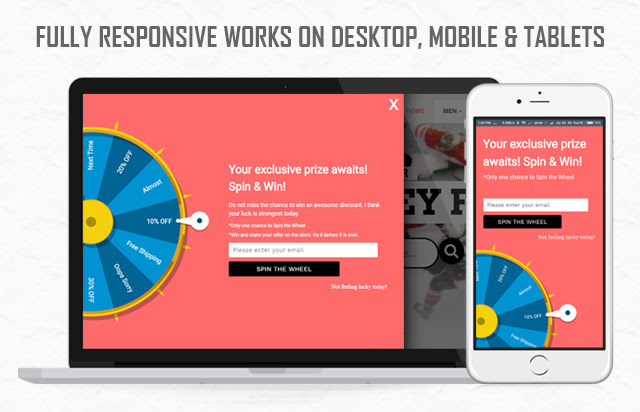
The email subscription popup comes in handy to increase the number of subscribers to the website and also to increase sales. The gamified email subscription popup provides the customers with free discount codes or gifts, which entices the customers. The users have the excitement to spin the wheel when they know they will receive awards for doing so. Visitors do not hesitate to enter their email addresses when using this gamified plugin to subscribe to the website. The Spin and Win modules are not like other subscription popups, which irritate the users. Additionally, it encourages customers to subscribe to the online store.
Optimize The Website for Mobile
It is very important to optimize the website for mobile, as mobile apps are gaining preference over websites. Furthermore, online businesses are always looking to have a streak of growth. Additionally, after properly establishing the website for the online store, the customers launch the mobile app for their business. Mobile apps are very trending for eCommerce businesses these days, and customers also prefer to purchase mobile apps. A major number of sales come from mobile apps only if a business has them in active condition. The navigation of mobile apps is easy, and they are easily accessible, which makes them preferable.
Speed Up the Checkout Page
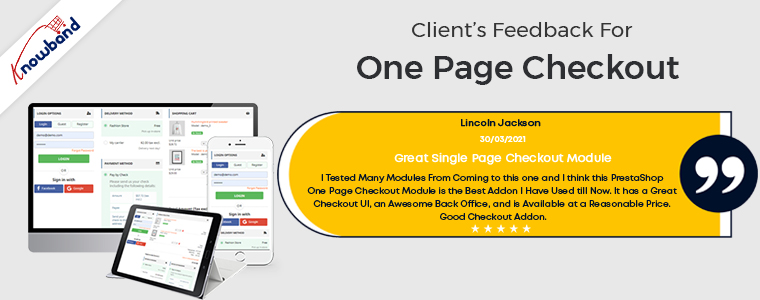
A successful checkout integration is necessary for any online store to function properly. Customers become irritated with the traditional and lengthy checkout process. Customers should have an easy time completing the checkout procedure and feel at ease doing so. Customers can complete their purchases quickly and easily with the help of our one-page checkout module. Our single-step checkout makes it simple for the user on the checkout page by providing all the information on one page. The checkout process requires you to browse through several pages, which is annoying. Customers do not like to spend a lot of time on checkout, and this causes cart abandonment. As seen in our customers’ reviews, our one-page checkout has been effective in preventing such problems. The single-page checkout module lets the customer checkout within one minute, whereas the default checkout takes over two minutes.
Give The Customers What They Expect and Desire
Whenever customers visit the store, they should receive free shipping and goodies. Additionally, it will make their experience better in the store and boost customer retention.
A)Free Shipping Manager
The overall price of the cart affects the conversion rate drastically. When you enable the free shipping manager plugin, it provides customers with free shipping for their orders. Customers tend to add more products to their cart when they see that they can offset the shipping cost by adding some products. The free shipping module is used to define the terms under which users can receive free shipping. The users gain motivation if they see a free shipping option on their purchase, which makes them come back for more shopping.
B)Gift the Product
Customers like physical gifts, and when they receive them for free, they will surely be joyful. The gifts are available to select depending on customers’ cart value. The customers will surely be wanting to receive the gifts for free, which will make them increase their shopping cart value. The gift the product plugin is sure to increase the overall sales of the online store as it makes the customer increase their cart value. Moreover, users will be happy when they receive the gifts for free, which makes them want to purchase from the store more often.
In the End
In this article, we have been discussing the ideas of optimizing the website. In case you have any concerns related to the above methods then you can connect with us at support@knowband.com. We provide custom developments depending on the business requirements, so we can help you with your specific demands as well. Moreover, we want to inform you that if you want to add some functionalities to our module, then we can do the same for you as well. Kindly let us know in case of any concerns or issues related to our module.
For having a profitable business, it is very important to have a good online presence. Customers want websites to be easily navigable and intuitive. It is important to provide customers with a seamless browsing experience, and apart from these various benefits and offers, others should also be present.
With so much competition in the eCommerce market, it is very hard to establish your ground. To have a good and established website, it is very important to have some points implemented in the website that are essential for a successful website.
Boost Customer Engagement
It is very important to increase the engagement of the customers on the website. If customers spend more time on the website, there is a greater chance that they will purchase if they browse for an extended period. An exit pop-up module is there, which can increase customer engagement on the website. As soon as the customer tries to exit the browser, an exit popup appears with offers for the user. The users will be happy to use the discounts and will continue to shop from the website. This will increase their engagement and increase their customer base. With this exit intent pop-up, the users spend more time and end up making a purchase, which thereby results in profit for the eCommerce website.
Checkout Page
Checkout is a very important part of the eCommerce website, as, without it, the purchase is not complete. A good checkout integration is necessary for any online store to function properly. It is not pleasing for the customers to use the long drawn-out checkout process. Users should have an easy time completing the checkout procedure and feel at ease doing so. Online shoppers can complete their purchases quickly and easily with the help of our single-step checkout plugin. With the one page checkout plugin, it is simple for the users to checkout as all the information is present on one page.
The default checkout process requires you to browse through several pages, which is annoying. Due to customers’ dislike of lengthy, drawn-out checkouts, cart abandonment occurs. The single-page checkout has been effective in preventing such problems, which is evident from the customer reviews.
Email Follow-Up Addon
For resolving the issue of cart abandonment by users, the email follow-up plugin is useful. The abandoned cart module is activated when users add an item to their shopping carts and then remove it for any reason. One of the biggest problems e-commerce companies are dealing with is cart abandonment. This plugin assists in increasing cart conversion and decreasing cart abandonment, hence recovering lost sales. Using the abandoned cart module, we can send clients several follow-up emails if they leave items in their shopping carts. There are two variations of these follow-up emails: those with discounts and those without discounts. Customers will be persuaded to finish their purchases with this alluring offer. We send reminders to them when they forget to finish the purchase so that they will remember to complete the purchase.
Gamified Subscription Pop-Up
The email subscription popup helps boost both sales and website subscriber numbers. Customers are persuaded to subscribe to the email list with this “spin and win” plugin that offers them gifts or discount codes. As they will be receiving rewards for spinning the wheel, users are eager to spin it in hopes of receiving the free rewards. When employing this gamified plugin to subscribe to the website, users subscribe without hesitation as they are receiving gifts. Unlike other subscription pop-ups that annoy customers, the Spin and Win modules don’t do so, as they are not like the other subscription pop-ups. Additionally, customers are encouraged to sign up for the online store.
Free Shipping
The conversion rate greatly impacts the total cost of the cart. Free shipping is offered to clients for their orders when the free shipping manager plugin is enabled. When customers realize that by purchasing additional items, they can reduce the cost of shipping, they are more likely to add more items to their shopping cart. The conditions for providing customers with free shipping are configurable in the free shipping module. When an eCommerce website offers free delivery, people are happy to make a purchase and are more likely to return to make additional purchases.
Wrapping It Up
In this article, we have been discussing the various implementations we can perform to improve the website. In case you have any concerns or issues related to our module, you can connect with us at support@knowband.com. We also assist with custom developments as per your requirements. Also, we can add a feature to the module or modify the module depending on your business requirements. Kindly let us know so that we can assist you with your requirements.
If you are looking for shipping and delivery related extensions for your OpenCart based website, you have landed at the right place.
In this write-up, I have compiled a list of six OpenCart extensions that would not only add shipping and delivery related features on your website but also enhance the customer shopping journey at the same time.
The extension adds a “Check Availability” section on your product pages where shoppers can enter their area zip code and check if their desired product is available for delivery at their location or not.
If the business doesn’t deliver to that area, it displays that the product is not available at the specified zip code. If available, customers are displayed the estimated delivery date.
From the back-end, you can add multiple zones and map products accordingly, and adjust other settings.
On the checkout page (under delivery method), a new section is added named “Your Preferred Delivery Time” where customers can choose the desired date and time slot if they want to receive the order at a specific date and time.
From the back-end, you can specify the minimum delivery gap (in days) for preferred delivery. You can also adjust the time slots, set the delivery time, specify delivery days and also allow customers to update the delivery date and time even after placing the order.
3. Free Shipping Manager
OpenCart Free Shipping Manager lets you offer free shipping to customers only if they match the eligibility criteria set by you from the back-end.
This module is helpful since customers now look to get free shipping on their order. From the back-end configurations, you can specify the minimum amount for which a customer needs to shop if he or she wants to get free shipping on his/her order.
Similarly, you can specify the weight which must watch if the customer wants to enjoy the free shipping benefit.
The extension also lets you disable the free shipping facility for specific countries.
Free shipping increases the chances of conversion to a significant extent and also helps you increase your average order value.
4. Store Locator
OpenCart Store Locator and Pickup extension helps you register your local stores on the website so that customers can easily locate and navigate to those stores and examine the product physically.
At the same time, the extension also encourages the in-store pickup facility that allows customers to self-pickup their order at the desired date and time.
You can add multiple stores from the back-end with their complete information and also specify the days and timings on which the stores remain open.
When customers are on the checkout page, they can choose the pickup option and select the nearby store from where they can pick-up their item.
5. Shipping Timer
OpenCart Shipping Timer extension integrates a shipping timer on your product pages through which customers are displayed the time within which they need to shop if they want their product to get shipped on the same day.
You can set the timer validity for a single day or multiple days and also set the start and end time of the countdown timer.
Besides, you can specify the days on which the timer would be displayed to the users. You can also customize the shipping timer banner.
This is basically to encourage customers to make the online payment right at the checkout page instead of choosing to pay later at the time of delivery. But since many consumers hesitate to share their card details online, you can provide them with the Cash on Delivery (COD) option along with some additional charge.
You can set up different charges for the different order amount. There are many other customizations you can make from the back-end.
For any kind of assistance regarding the above-mentioned shipping and delivery related OpenCart extensions, kindly reach out to us at support@knowband.com
When we go through OpenCart forum, we come across many such questions where merchants put forward their requirements which we feel can be fulfilled by the extensions which aren’t popular or which they are not aware of.
Popular extensions are always on demand while other extensions get unnoticed. In this write-up, I will be covering those useful but highly underrated extensions that can be fruitful for the OpenCart merchants.
1. Preferred Delivery Time
OpenCart Preferred Delivery Time extension allows customers to pick a desired date and time slot for their order delivery. Many times, it happens that customers want to receive the product on a fixed date and time slot; majorly when they want to gift someone or when they do not want to miss on the product due to their unavailability. With this module, you can encourage users to choose the preferred delivery date and time as per their convenience and availability.
From the back-end configurations, you can adjust the time-slots, specify the non-delivery days and also allow consumers to update the delivery date and time even after they have placed the order.
2. Advanced One Page Checkout
If you do not want your customers to go through a multi-step checkout process and want to offer a short and seamless checkout experience, OpenCart Advanced One Page Checkout is the extension you need.
The extension adds a responsive one page checkout popup on your website and allows customers to switch between the checkout fields without requiring to load multiple pages or getting the URL changed. It offers guest checkout, social login, option to customize checkout fields, etc. and encourages a quick checkout.
3. Store Locator and Pickup
OpenCart Store Locator and Pickup extension encourages the in-store pickup facility and allows your customers to self-pickup the items from your stores at their desired date and time slot. They can locate the nearby stores and choose the pickup date and time accordingly.
You can add (manually or through CSV upload) multiple stores, adjust the pick-up timings and perform various other tasks from the back-end.
4. Spam Blocker
On the forum, many OpenCart merchants complain about receiving spam traffic on their website. This can be avoided by OpenCart Spam Blocker.
OpenCart Blocker lets you restrict bots coming to your website from various IP addresses. You can specify those IP addresses and block them. Similarly, you can prevent spammers from different countries or User agents (Mozilla, Chrome, etc).
In case if you block a genuine customer, they can raise an unblock request which you can check from the back-end. The extension helps you keep your website safe and secure with real users.
5. Free Shipping Manager
Consumers crave free shipping. They get delighted if they do not have to pay the shipping price but offering free shipping isn’t easy especially for small and mid-scale companies.
With OpenCart Free Shipping Manager, you can create certain free shipping rules, such as Free shipping on a certain amount and certain weight. You can specify the amount and weight of the order which needs to be matched for a customer to get free shipping on his/her order. You can also specify countries which will be restricted from the free shipping rules.
The extension helps in increasing the average order value on your store.
6. Private Shop
OpenCart Private Shop extension allows merchants to make their shop or store private. They can restrict access to their store and let only selected customers or wholesale members explore it.
You can privatize the entire store or restrict access to some specific pages only. Users are required to sign-up initially and only after the admin’s approval from the back-end, they will be able to access the store.
7. Product Availability Check by Zipcode
OpenCart Zipcode Validator extension adds a “Check Availability” tab on your product pages, using which shoppers can check whether the product is available for delivery at their location or not by specifying their area zip code.
This saves a customer’s time as they do not need to head to the checkout page, put their address and then confirm whether it is eligible for delivery or not at your location. A customer cannot proceed to the checkout page without checking the product availability.
8. PDF Invoice
OpenCart PDF Invoice extension allows merchants to send customers their order’s invoice in the PDF format in the order confirmation email. They can also download it from their order history.
The extension comes with multiple options to customize the invoice.
9. Cash on Delivery with Fee
OpenCart Cash on Delivery with Fee extension lets you charge some additional fee to your customers on their COD order. It is helpful for those shoppers who do not want to share their card details with the website and are ready to pay some additional amount for cash-on-delivery mode. You can charge customers with a fixed or percentage-based fee.
For any queries or assistance regarding these OpenCart extensions, kindly contact us at support@knowband.com
A report by the Baymard Institute says that ‘High Shipping Cost’ is the topmost reason for shopping cart abandonment in the USA, nearly accounting for half of the total abandoned carts.
Ecommerce retailers, primarily mid-scale business owners, often encounter shipping challenges as popular brands like Amazon have already set the standard so high by offering free shipping or keeping the shipping price minimal.
In this write-up, I have listed a few shipping challenges faced by e-retailers and have also put forward the required solution. Let’s have a look.
1. Choosing the Shipping Provider
When starting out your online business, you may rely only on one or two shipping providers. Even while picking one, you may find yourself in a lot of confusion. As your business grows, you will have to come up with more choices for your customers.
FedEx and USPS are ideal to start with. With time, you will get a better understanding of what’s best for your business, like knowing about the best shipping providers which have a reasonable operation cost and take less transit time.
2. Free Shipping
Though free shipping is often seen as a marketing tactic to increase sales, it involves compromising with the profit margin.
If your online business is well set-up, you may adjust with the concept of free shipping, however, the same cannot be said for new businesses.
Start-ups cannot afford to offer free shipping easily as it will be difficult to include the overall shipping cost into the product. But it’s also a fact that free shipping is necessary to entice customers and encourage them to purchase.
Some of the effective ways to offer free shipping without affecting your profit margin much are-
E-retailers slightly increase the product price to cover the shipping cost.
3. Damage during Transit
One of the major eCommerce shipping challenges e-retailers face is the safe transit of the product from the warehouse to the customer’s delivery address.
Many times, the customers complain that the product was not in a good state or damaged when it reached them. Though it is possible that it was already in a bad condition, it is very likely that it got damaged during the transit.
Fragile items need to be packed carefully else they can get damaged.
To overcome this, ensure that the packaging is rightly done. Get to know everything about the shipping provider before you tie-up with them.
4. Flat Rate Shipping
Another dilemma that eCommerce retailers find themselves in is whether to have a flat rate shipping pattern or not.
Flat shipping rate has its pros and cons. Setting up a flat shipping rate for every kind of product without understanding and comparing the product value of other items on your store can backfire as well.
For example, a flat shipping rate for a lesser value product may seem too high and the same shipping rate can eat your profit if its actual shipping cost is more than the flat shipping rate.
Offering the right shipping rate is crucial to avoid cart abandonment.
How can we play a role in your eCommerce shipping?
Knowband provides a variety of modules related to shipping that can be beneficial for your eCommerce website. The modules are-
Free Shipping Manager
This module is available only for the PrestaShop website owners. It allows the merchants to adjust the terms and condition from the back-end configurations in order to offer free shipping to the shoppers.
You can specify the factors that need to be matched to get free shipping.
One Page Checkout
This checkout module supports a majority of shipping methods such as Mondial Relay, So Colissimo, Ulozenka Delivery, Zasielkovn Delivery, LP Express 24 Delivery, Paczkomaty InPost, Zasilkovna, Poczta Polska (owppoczta), Webshipr, Paczka w Ruchu.
Available for PrestaShop, this module allows you to adjust the shipping cost for different regions.
Product Availability Check by Zipcode
This module adds a zip code validator on your product pages, hence allowing shoppers to check whether the product is available for delivery at their location or not. It is available for PrestaShop, OpenCart and Magento.
In order to achieve the success in the eCommerce business, it is important to stay up to date with the latest trends in the industry. Staying abreast with the current technological advancements and market trends can keep you ahead of the competitors. One of the best ways to achieve your business goals is to steps into the shoes of the well-established businesses and get inspirations from them. The ideal workflow of the eCommerce business should attract the shoppers to the website, filer the prospective customers from the website traffic and then convert them into the paying customers. This can be done by improved customer experience, customer retention strategy and ultimately winning the customer loyalty.
It won’t be wrong to state that even the digital era word-of-mouth plays a vital role. If you offer better services and improved customer experience at your store, then, you will certainly win back old customers and attract new ones. Social media also provides a platform to the online sellers to reach out to the new customers. In this post, we will discuss the most popular strategies which will help you to achieve your business goals in the year 2018.
Strategy#1 Attracting New Customers and Retaining old ones:
Effective lead generation strategy is the secret of the success in the e-commerce. Most of the time, when you visit established e-commerce sites, you may come across the welcome popup offering enticing discounts on the first purchase. In order to avail of this special discount, the visitors need to provide their email-ids. All the top e-commerce giants leave no chances to capture the email-id of the customers. The email address is the best way to establish a new and long-lasting relationship with the customers.
Getting the email addresses of the visitors is not an easy task. In order to get the email id of the visitors, you need to offer special deals to the new visitors. You can offer free shipping or enticing discount on the first purchase. Most of the top brands use this strategy to reach out to the more customers.
How can you use this strategy for your online business?
Gamified Welcome Popup-
Gamification of the site is the best way to retain the customers. Spin and Win popup is a gamified popup which allows the visitors to win the enticing discounts by spinning the wheel just like the roulette-game. The Spin and Win popup is one of the best ways to display an interactive popup to gather the customer information. Customers need to enter their email ids to play the game. The gamified interface develops the interest of the customers and they happily provide their email-ids to play the game.
Exit Intent Popup monitors the mouse movement and as soon as the visitor intends to exit, it displays an awesome popup with the discount offer. Special encourages the customers to complete their purchase and helps you to grow your email list.
The latest trend in the eCommerce world is to offer free shipping. Customers prefer to buy with the free shipping option. Most of the sellers on the top marketplace like Amazon, Etsy, Walmart, eBay offers the free shipping.
Why is Free Shipping a must?
1) Shoppers Love Free Shipping option – According to the studies, the online shoppers prefer placing the order of the products if the shipping is free. 2) Competition – The marketplaces like Amazon, eBay, Walmart, Etsy and many more are expanding their presence and offering great benefits to the customers including the free shipping services. So, it is a must for the online business to offer free shipping to retain their existing customers. 3) Free shipping reduces shopping cart abandonment – Most of the time customer leave the cart abandoned because of the additional costs (shipping and taxes). 4) Free Shipping Increases Average Order Value – Shoppers buy more products to qualify for the free shipping.
Tactics to offer free shipping
1) One of the methods to offer free shipping is to include the shipping cost in the product price itself. This approach will work if you offer unique products to your niche market and there are not so many competitors.
2) You can create special promotional to offer free shipping on the products that have a higher margin.
3) You can offer free shipping only for a particular cart value. Orders with the cart value higher than the set limit will be eligible for the free shipping.
4) You can offer free shipping on special sale occasions or during the holiday season.
eCommerce extensions to offer better shipping services:
a) Free Shipping Manager
The Free Shipping Manager extension is available for the Prestashop platform. This addon allows the store admin to create the rules, terms and conditions for shipping charges. The merchants can fix the cart limit beyond which free shipping will be offered. This module can help you to increase revenue and conversion rate of the site. Click here for the details.
b) Shipping Cost by ZipCode:
Sometimes you need to offer shipping charges based on the location of the user. The Shiping Cost by ZipCode extension is the best way to offer shipping charges based on the location of the user. The Shipping Cost by ZipCode module is available for the Prestashop. Similar extension Product Availability check by ZipCode is available for the Magento 1 platform.
Strategy#3 Improve Customer Experience
Better customer experience at your store encourages the customer to browse more products which helps to increase the chances of the purchase. As per the latest trends in the industry, you should try to offer the best experience to the visitors to convert them into a customer.
There are following extensions which can be helpful to you to achieve the same.
a) Infinite Scroll
In the recent years, the growth of mobile devices brings a revolution in the eCommerce world. Now, most of the users prefer to browse the internet by using their handheld devices like mobiles and iPad. Infinite scrolling allows the users to browse more products with ease and improves the user experience for the touch devices. Moreover, the infinite scrolling option works efficiently while mobile browsing as well. Infinite Scroll extension developed by Knowband is available for the Magento 1, Magento 2 and Prestashop platforms.
b) Size Chart
If you sell Footwear or Clothing, then, a size chart on the product page is a must. The Size Chart helps the users to select the correct fit and also reduces the chances of the return. Size Chart extension developed by Knowband is available for the Magento 1, Magento 2, and Prestashop platforms.
c) Product Video
Instead of going through the long text, the users prefer to watch the video for the better understanding of the product. Product videos are more engaging than the text. Knowband offers the Product video extension which allows you to display the videos on the product pages from the video channels like YouTube, Vimeo. Product Video extension is available for the Prestashop, Magento 1 and OpenCart platforms.
d) Wishlist
With the dynamic growth of the marketplaces in the last few years, a new trend emerged in the eCommerce industry. Now shoppers prefer to search for the products on Google or marketplaces like Amazon, Etsy, Walmart, eBay, Cdiscount etc to get a better comparative price and offers before making their purchase decisions. Wishlist feature allows the shoppers to shortlist the products of their choice, so that, they can later place their order for the products. After adding the products to the Wishlist a shopper can access his/her wishlist any time. This saves the time of the shoppers as they can easily add the wishlist products to the cart to place their final order. The Wishlist extension is available for the Prestashop, Magento 1, Magento 2 and OpenCart platforms.
e) Express Checkout
The easy checkout process is the key factor to get the higher sales. Most of the online businesses provide the one step checkout to make the shopping experience of the shoppers hassle-free. One step checkout allows the user to enter the all the details at a single page and reduces the cart abandonment. The one step checkout allows the shoppers to create the account, place order as a guest or login to the account at the checkout page. Knowband offers the One Page Checkout module for the Magento 1, Magento 2, Prestashop and OpenCart platforms.
Strategy#4 Customer Retention Techniques
a) Helpdesk
If you have observed most of the online businesses offers the 24*7 chat support. Recently Chat Boats have also provided an effective tool to improve the customer engagements. By assisting the customers and visitors to make their purchase decisions and after sale inquires you can develop a bond between your brand and the customers. This long-lasting relationship might convert the customers into loyal customers. The Helpdesk extension is available for the Prestashop and Magento 1 platforms.
b) Loyalty Points
Offering loyalty points for each purchase of the customers helps you to retain the customers for a long time. As for each order, customers get the store credit which they can use towards their further purchases encourages the customer to return back to the store to use the store credit available in the account. The Loyalty Points module is available for the Prestashop platform.
c) Return Management
Efficient return policies are one of the most important aspects to retain the customers. The return and refund policy of the online store also encourages the customers to place their orders. In order to offer the hassle free return management online stores can use the Return Manager Extension. Knowband offers the Return Manager Extension for the Prestashop, Magento 1 and Magento 2 platforms.
d) Birthday Surprise
Everyone loves surprises because it shows how much the businesses value the customers. In order to win the trust of the customers, businesses need to go beyond the normal services and offers. You can offer an additional discount to the customers on their birthday. Knowband offers Birthday Coupon module for the Prestashop platform.
Strategy #5 Multi-channel selling
With the evolving technology and changing shopping habits of the customers, it is must for all the sellers to sell their products through multiple channels. All the top marketplaces like Amazon, eBay, Walmart, Etsy etc provides a platform to the sellers to sell their products through the marketplace.
Selling through the multiple channels is the best way to increase the brand reorganization.
In order to sell on multiple channels, the biggest challenge for the sellers is the management of the inventory and shipping. Knowband has developed the Marketplace Integration extensions for the top marketplaces like eBay, Walmart and Etsy. The marketplace integration module automates the product listing process and allows the sellers to manage the inventory and shipping for the marketplace from their existing online store.
There are many aspects to manage the online business like: marketing strategy, social media optimization, email marketing- the list goes on and on. Present time most of the online merchants offering free shipping to their customer & they see the result free shipping generates more sale. Knowband offers you a Prestashop Free Shipping Manager Addon.
The Knowband Prestashop Free Shipping manager addon allows the admin to offer free shipping to the customers. Not just this, the admin can even apply shipping charges when the cart value is below a certain limit. All this can be done following few simple customization option at the back end of the admin interface of the module.
The shipping charges are determined by two factors. They are listed below:
The cart value or the total price of the order: The store admin can determine the shipping charges as needed when the cart value of the shopper is below a certain limit. This limit can be set by the store owner himself.
The total weight of the order: The store admin can even charge shipping amount when the weight of the parcel exceeds beyond a certain permissible limit.
1.1 Benefits of Merchant
The Prestashop free shipping manager addon is aimed at making it easier for the store owner to manage the shipping cost of their website. Listed below are some of the objectives that can be achieved by the Prestashop extension:
Terms & Conditions: It allows the store owner to set the terms and conditions for the shipping of the eCommerce store. The admin can offer free shipping or charge an amount as per his wish.
Free Shipping by Price: It allows the store owner to set the price of cart value below this price admin won’t be allowed the Free shipping by price.
Free Shipping by Weight: It allows the store merchant to set the minimum and maximum limit of the weight of the package below this weight they can charge the shipping cost.
Free Shipping by Zone: It allows the PrestaShop admin to select the country where they want to offer free shipping by zone.
Free Shipping by Carrier: It allows the owners to select the carrier option which his/her want to provide the free shipping option.
Look and Feel Settings: In this option admin can change the background color, button color and border color of the free shipping block.
Customer Selection: In this option, Prestashop store merchant can select the customer according to the need.
The Free shipping comples customer to add more product to the shopping cart.
These Prestashop addons motivate customers to spend more time on your website and your customers will feel in control of what they’re spending on.
1.2 Benefits of Customer
This Prestashop Free Shipping manager module shows a block on cart summary which gives the exact information about the condition.
This Prestashop Free Shipping manager extension gives them access to a customer to buy the product with free shipping.
2.0 Installation
After purchasing the Prestashop Free Shipping manager addon, you will get following files as listed below in the apk folder:
freeshipping.zip (contains source code of the module)
User Manual
In order to install the extension in your Prestashop store follow the below mentioned steps:
Unzip the freeshipping.zip file. It would contain a number of files and folders as shown below
Copy the entire content, that is, the files and folders of the unzipped folder. Paste the same into the “Modules” folder of your store’s directory. Follow the below-mentioned address path – Root Directory/modules/.
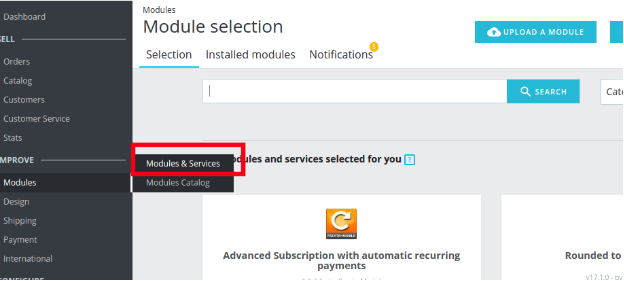
The plugin is all set to be installed in the store. Go to the Store Admin and then to‘Modules and Services’. Your module will be shown as below –
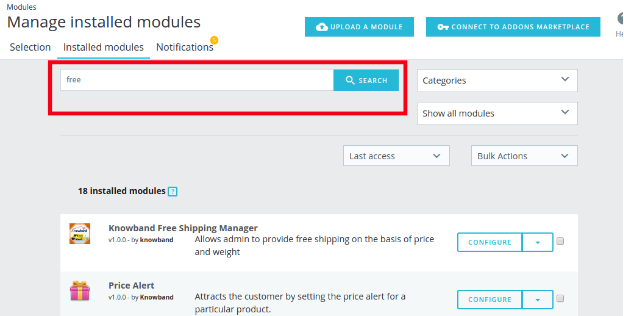
In case, you are not able to find module in admin modules list, you can do so by searching for it with the details mentioned below-
Keyword – Free Shipping
Category – Front office
Filter By – Installed & Not Installed / Enabled & Disabled
Click on the “Install” button just next to your module. It would show a pop-up for your confirmation. Click on “Proceed with the installation” option. This step will install the module and show notification – “Module(s) installed successfully”.
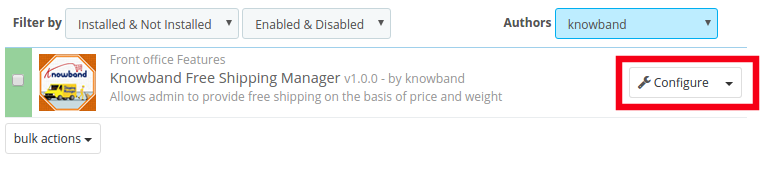
Once the installation is complete, you can get an access to the admin interface of the module by clicking on the “Configure” button.
3.0 Admin Interface
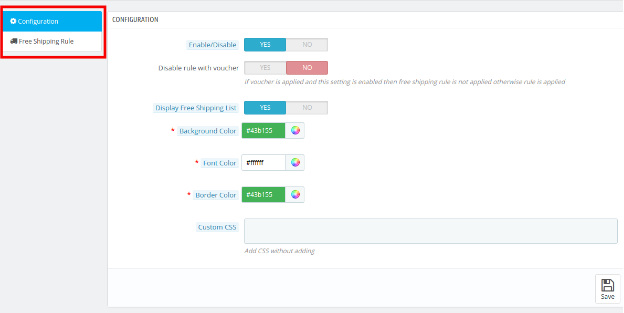
The Prestashop Free Shipping Manager addon is fully configurable. The best thing is the configuration settings can be updated via the admin interface by just clicking the buttons. No code changes are required for the same. The admin interface of the extension has two customization options. They are listed below:
1- Configuration
2- Free Shipping Rule
These options are discussed in detail below:
3.1 Configuration Settings
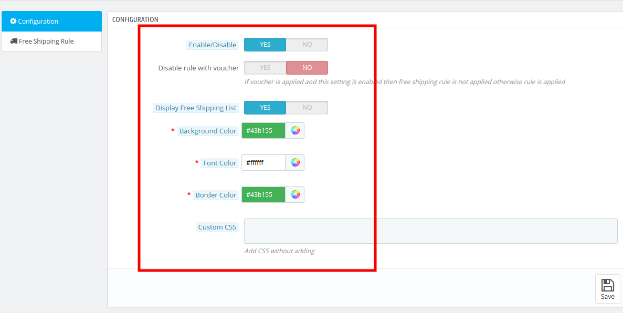
The ‘configuration’ tab of the Prestashop Free Shipping Manager extension offers the seven options to admin that are shown on image below:
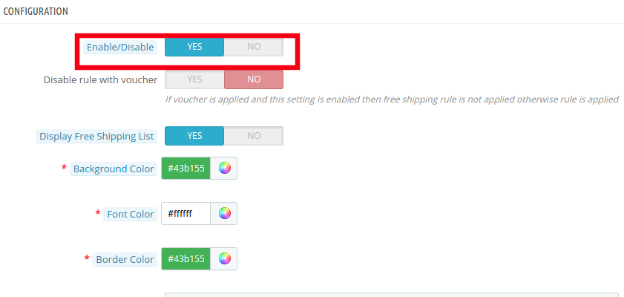
3.1.1 Enable the module: In this section admin can enable/disable the module. This can be done with a button toggle as shown below.
Listed below are some of the options that are offered to the store owner by Prestashop Free Shipping Manager Module.
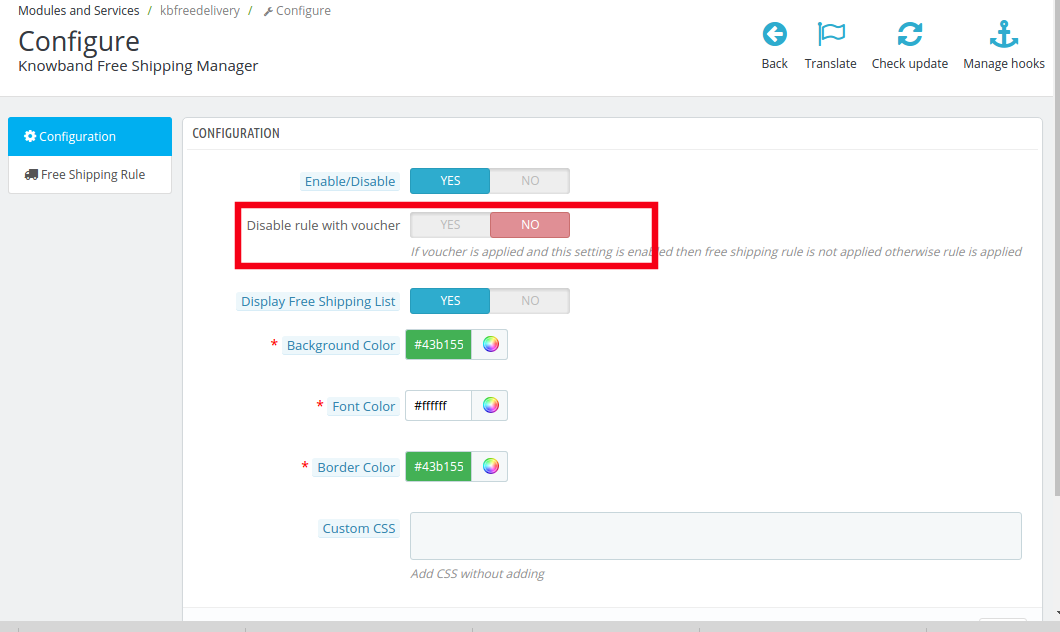
3.1.2 Disable Rule With Voucher
Once this setting is disabled, the free shipping offer will not be applicable even when the voucher is applied.
As it is disabled, the free shipping rule will not be applicable if the voucher is applied on any purchase.
In case, you want to offer free shipping even if any voucher code is applied, then, you can do so by enabling the button.
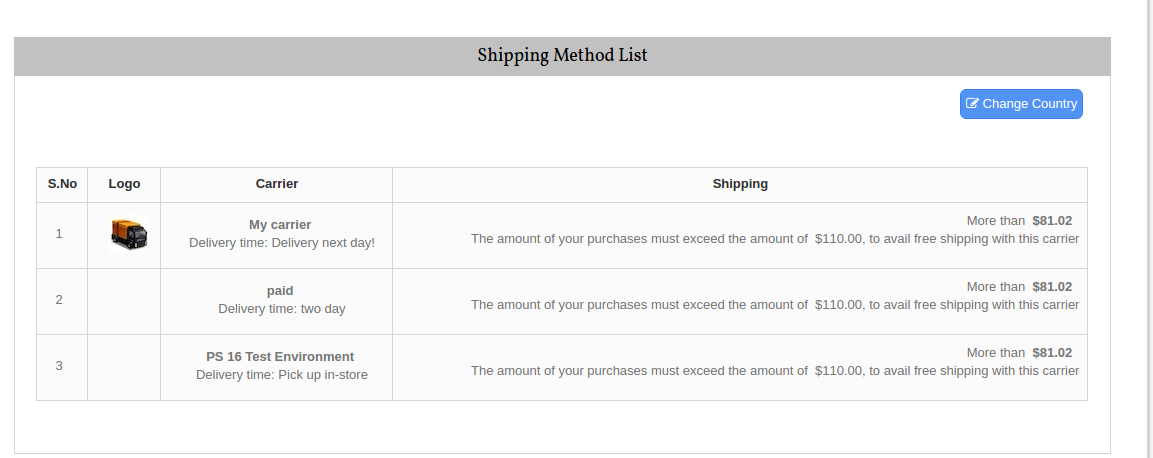
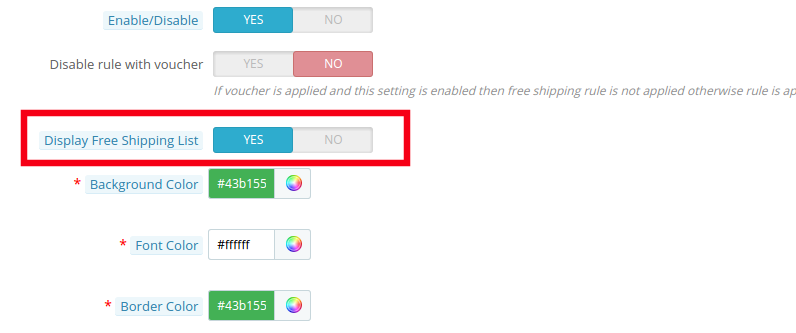
3.1.3 Display Free Shipping List
The various free shipping methods can be displayed to the visitors on the website. The list will be shown as mentioned in the image below.
However, if the Prestashop store admin wants to remove the feature, he can do so by disabling the button mentioned below.
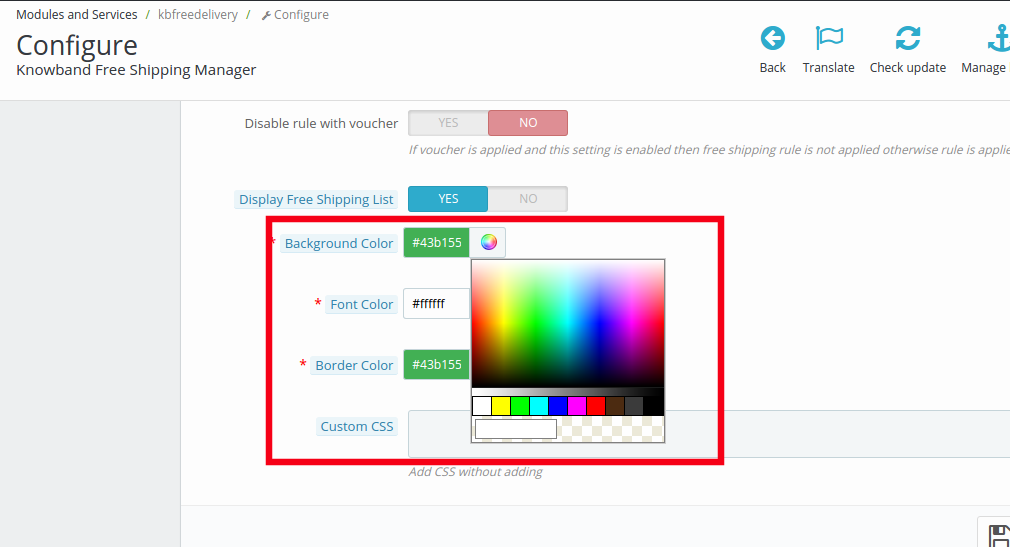
3.1.4 Background Color
The color picker can help you change the background color of the free shipping display.
You may the color that suits the theme of your Prestashop store.
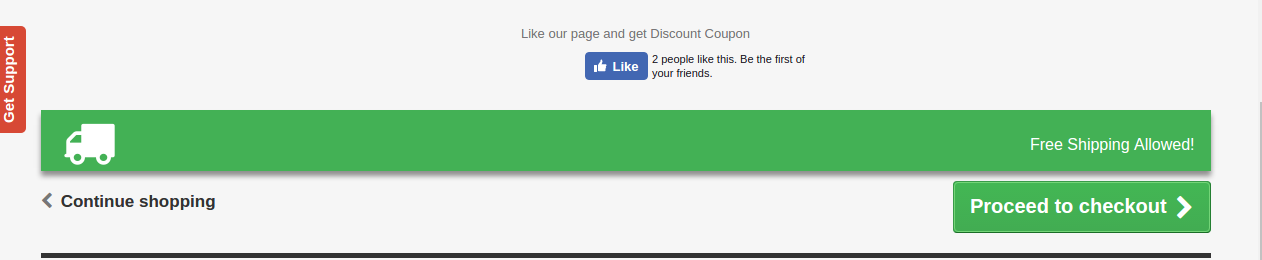
The message will be displayed in the front end of the website as shown in the image below.
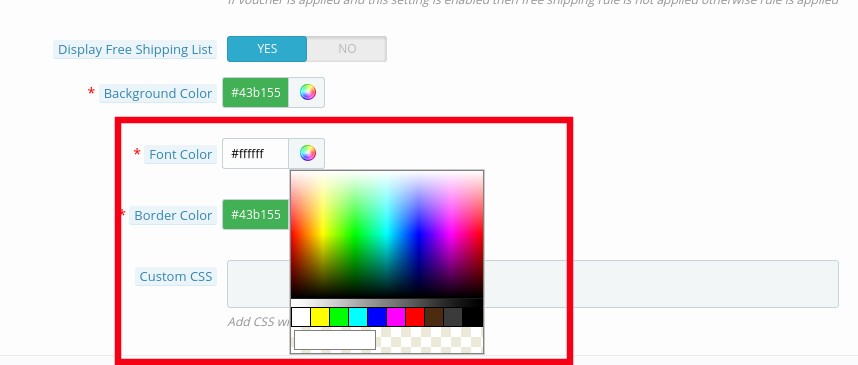
3.1.5 Font Color
The font color of the message that is to be flashed on the website can be picked and set from here.
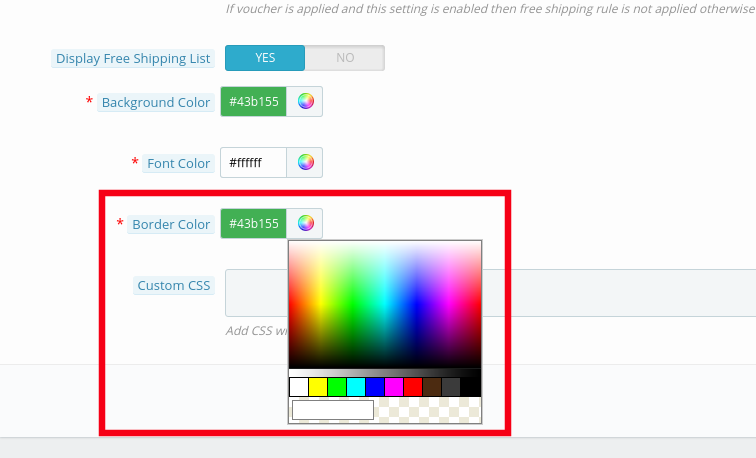
3.1.5 Border Color
The entire block can be customized as per the requirement of the website. The border color of the box can be selected and changed from color picker as shown in the image below.
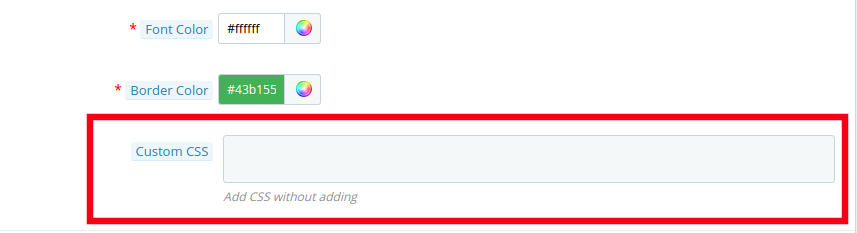
3.1.6 Custom CSS
Any custom change in the look and feel of the module can be done from here. The store admin can customize it by entering custom CSS code in the block shown below.
3.2 Free Shipping Rule
The online merchants get full access to change and modify the terms and conditions of shipping method on their website. All this can be done by just filling up few information.
Follow the steps mentioned below in order to make the changes:
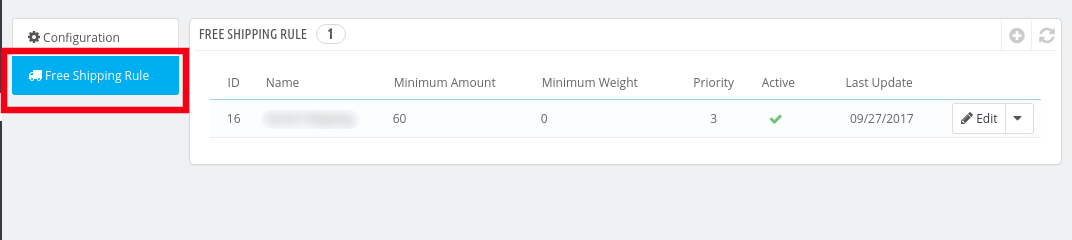
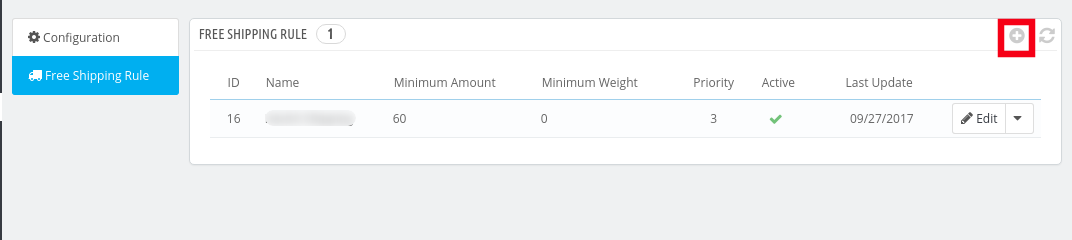
Go to “Free Shipping Rule”. You’ll be redirected to the interface where you will get the list of the rules already fixed by you.
In order to add new rules click on the ‘+’ sign on the right end of the page as shown in the image below:
You’ll be redirected to “Add Free Shipping Rule” page.
Listed below are some of the information that you need to enter in order to set the free shipping rules.
Enter the Name: Enter the name of the shipping rule. It can be anything as per your convenience.
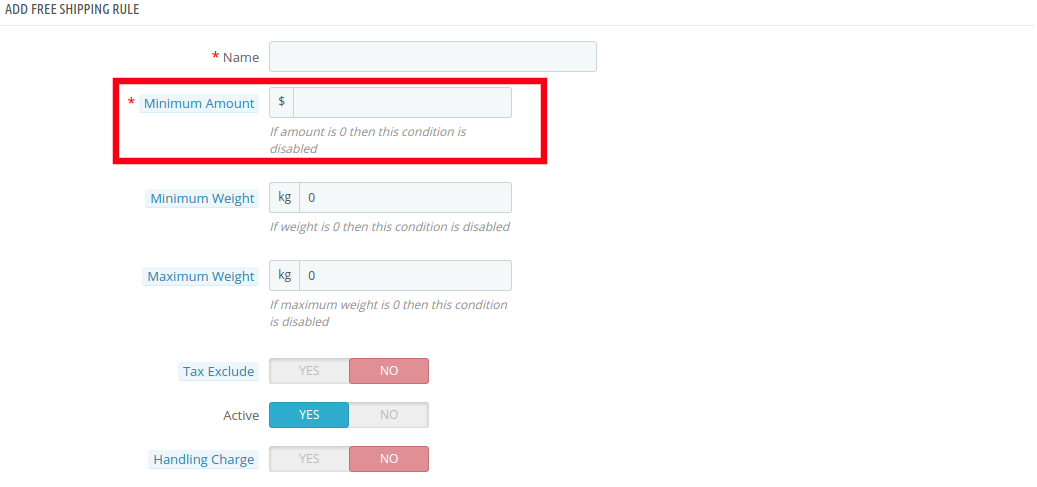
Minimum Amount: Enter the minimum cart value at which you want to offer the free shipping by price options. This facility will be disabled at the store if the minimum amount is ‘0’.
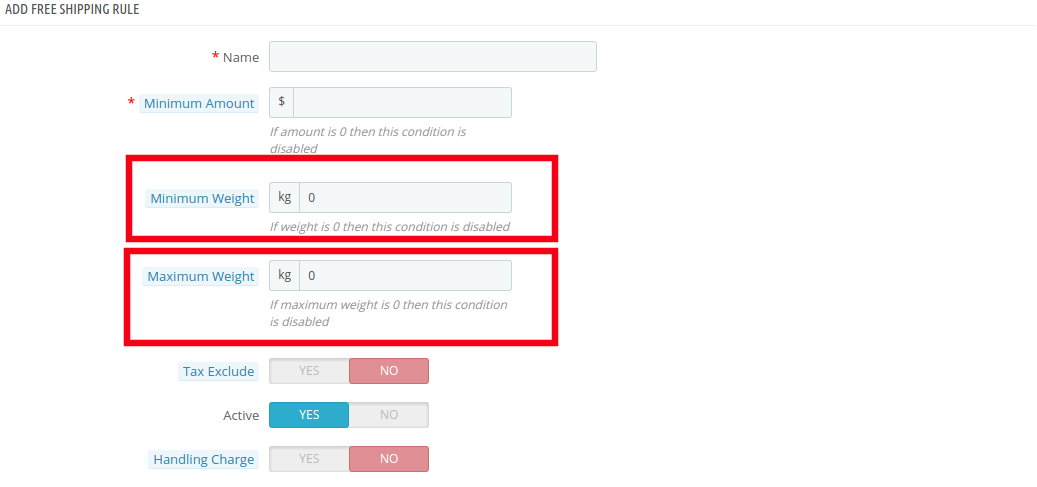
Minimum Weight and Maximum Weight: Set the minimum and maximum weight of the parcel beyond which you are looking to charge the shipping cost. Below this limit, the site will by default offer free shipping facility. The weight is to be entered in Kilogram.
Tax Exclude: You can include the tax or exclude it from the shipping charges by enabling or disabling the button mentioned below.
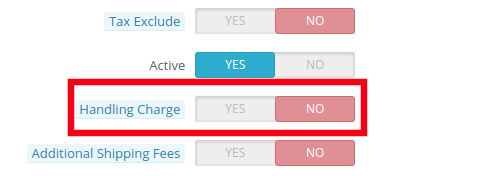
Handling Charge: The merchant can even include the handling charge in the shipping cost by enabling this button. Otherwise, he can leave it disabled.
Additional Shipping Charge: In case of any additional shipping charge, the store owner can enable the button shown in the image below.
Zone: The Prestashop Free Shipping Manager Addon even allows the store admin to set free shipping facility as per the geographical location of the customer. The admin can choose the zones where he wants to offer this facility and give the facility to customer to buy the products free shipping by zone.
Carrier: In this section prestashop store admin can selectall the carrier options in which you would like to include this facility.
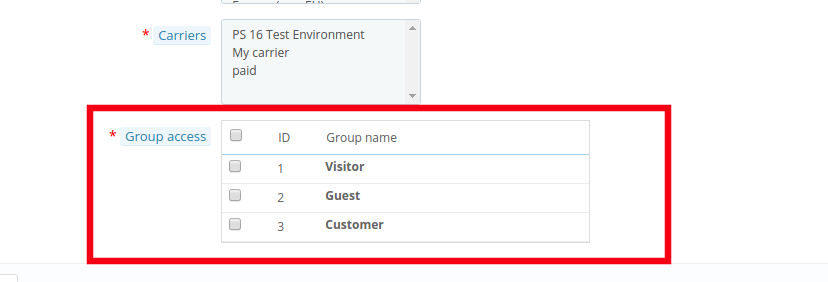
Group Access: The store admin can offer the free shipping facility to the Registered Customer, the Visitors or the New Customers as per his wish. Just check the options that you want to include in the feature.
4.0 Website UI
The changes done in the prestashop store back-end will be reflected in the front-end of the website.
4.1 Free Shipping Block
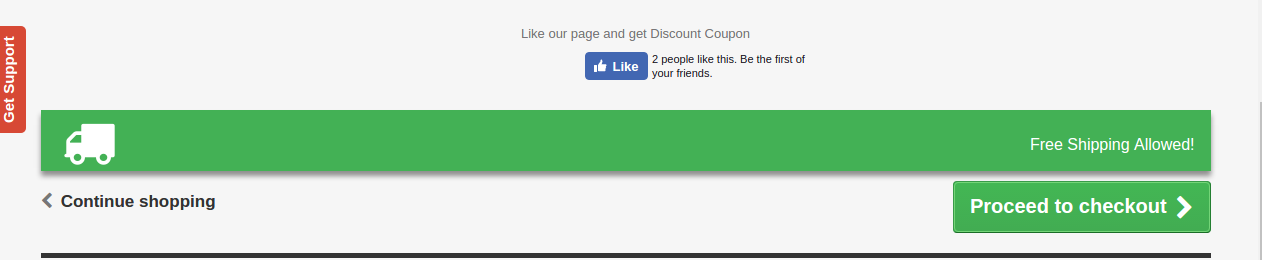
The free shipping block will be shown as mentioned below.
4.2 Free Shipping Limit
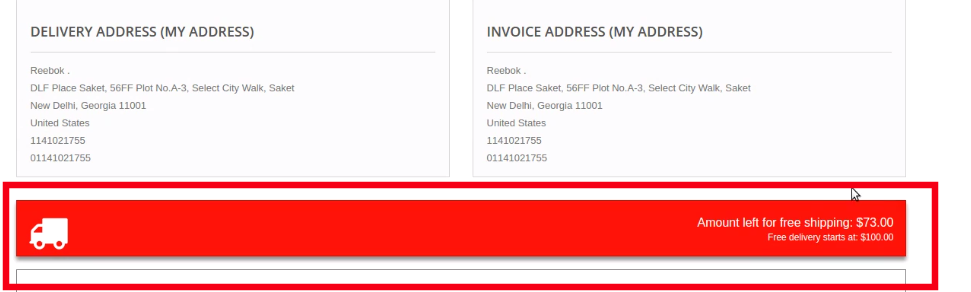
In case you have fixed any limit for the offering free shipping than the same will be shown on the cart of the shopper. If the customer select the product below the cart limit this block shows a block on cart summary which gives them the exact information on the condition to fulfill.
4.2 Free Shipping List Display
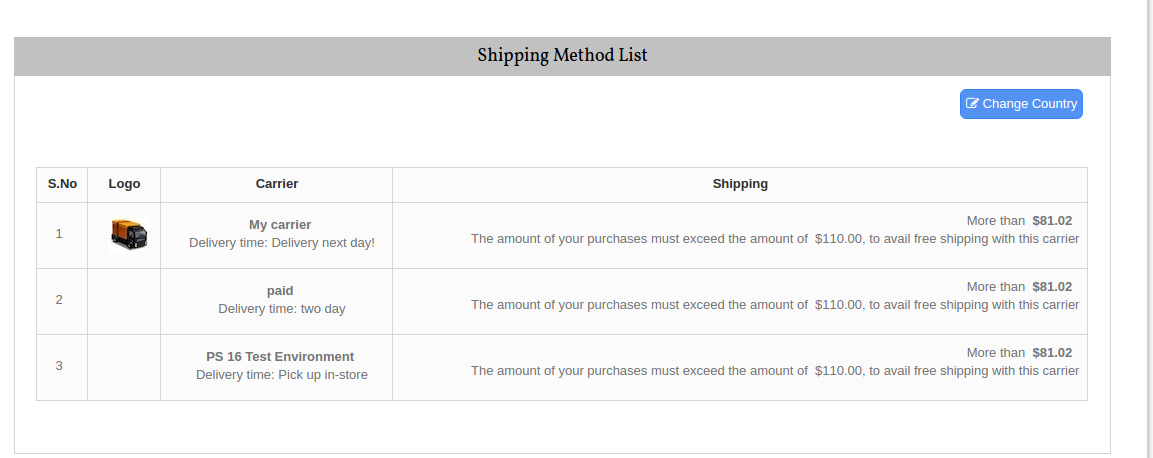
The entire list of the free shipping methods will be displayed on the website if the functionality is enabled by the store admin. This can provide a better user experience and ensure more transparency during the transaction.
Now you can try Prestashop free shipping manager module for on your Prestashop website. KnowBand Prestashop Free Shipping Manager Addon helps you enagege more customer to your store & increase the customer base.