Why Magento Marketplace Extension is a Boom for Buyers?

Online business is thronged with various activities of online selling and purchase that it is difficult to maintain momentum with so much competition around. With so much players involved in a particular business segment, it seems to be a daunting task to grab the immediate attention of your targeted customers. Buyers in an online business environment are confused about how to select the best vendors for a product or service among so many available options.

The process of finding the right vendor often becomes much critical if you have to hunt down the various vendors in an online business. Thank God, this scenario has been made simpler with the presence of this Magento Marketplace module that has brought various buyers and sellers at one place for ensuring a simplified online shopping experience. Let us now discuss how this Magento marketplace extension has helped buyers in their shopping activities.

It helps in selecting the right seller by providing the required seller information

Buyers often do not have an idea about how to select the right seller for making an online purchase. However, this is one such critical area where this Magento marketplace module can be a big advantage for Magento site owners. The Magento marketplace module can provide the list of all sellers along with their rating on this multi seller marketplace module for simplified online purchase. With the help of this critical information, buyers can make the right choice of sellers in a smooth manner. The Magento marketplace module enables buyers to search for any seller on the marketplace in a quick manner for making the right purchasing decision.

Helps in providing email customization facility

If the buyer has any concern about the product of a seller or any other general information, he/she can send the desired email asking for the required information. Apart from this, buyers can also send customized emails to sellers through the help of back end functionality. Due to the presence of this feature, the Magento marketplace module has become one of the most popular Magento Extensions in the eCommerce business segment.

Provides an informative product page to buyers

This Magento marketplace extension has grabbed the instant attention of global buyers due to the presence of its informative product pages. Buyers can view the important information like seller name, seller rating and other seller details on the product page itself for facilitating quick purchasing decision. Besides this, buyers can get critical information about various related products from the same seller on the product page for making the quick product purchase.

Offers quick option for buyers to register as sellers

It would be simply amazing if there could be a Magento marketplace extension that can offer simple seller registration facility to buyers and this is exactly what this Knowband extension can do for you. It provides “Register as Seller” option to buyers on the front end of the marketplace store for helping buyers to become sellers in a simple way. Now, you can both purchase products as well as offer products to other people as sellers on this Magento marketplace module. There is no need for back end registration for sellers and everything can be managed from the front end itself.

Provides Inventory Management System

Inventory management is the most difficult aspect in an eCommerce store which requires constant attention and management. It is the USP of this Magento Marketplace extension that can eliminate inventory management related issues. Store admin can effortlessly create their exclusive marketplace store for boosting the growth chances of multiple small and medium eCommerce vendors with the help of this Magento marketplace module. The whole process of online selling and purchase has become much simplified due to the absence of an inventory management system.

Supports an amazing email notification system for timely updates

It is important in an online business environment to provide timely alert and updates about various events that are happening on a marketplace store. The Magento marketplace module has an effective email notification system that can ensure alerts to all involved participants of an online store like sellers, buyers and store admin regarding various activities. You can constantly track the eCommerce activities on your Marketplace store with the help of this Magento marketplace extension.

This Magento marketplace module is definitely a remarkable module for buyers community and can boost their online shopping experience to a great extent. This feature loaded Magento Marketplace extension can be a great help to the buyers and can help in simplifying the online shopping experience to a great extent. Visit our Knowband store and avail this Magento Marketplace Extension at a special price due to an ongoing offer which is valid till 31st July. Grab this Magento marketplace module and boost your business presence to a great extent.

Related Stories:

How can you Analyze the Checkout Behavior of your PrestaShop Customer?

For optimizing the performance of your online store, it is important to keep a check on your store activity from time to time. Apart from the various activities that are performed on the store, checkout process is the most critical one as it guide the visiting customers to the conversion funnel. It is important to track the checkout behavior of your customers for reducing shopping cart abandonments and to improve sales.

Although, you might have understood the importance of tracking the checkout behavior but now the big question arises- How can you perform the tracking of checkout behavior in a smooth manner? Well, this is a serious question that deserves your immediate attention. Understanding the importance of tracking and analysis for your online business, Knowband has come up with this PrestaShop checkout Addon that is packed with multiple features. This PrestaShop Addon can analyze the checkout behavior of your visitors in a seamless manner. Here are the various ways in which PrestaShop checkout page analytics can help you out in the critical task of conversion rate optimization.

It helps in keeping a track on the customer behavior-

Tracking customer behavior for better conversions and sales is not a naive exercise as you need to be aware about the loopholes in your checkout process. With the effective knowledge about your checkout process, you can effortlessly grab more conversions and sales for your PrestaShop store. Besides, it will help in quick resolution of the weak areas of your checkout process for a promising future ahead.

Ensures effective collection of email addresses and cart details of customers-

With the support of this PrestaShop checkout addons, it is now much easier to collect the email addresses and cart details of your targeted customers without any hassle. With the help of these email addresses, you can avail the services of email marketing for better customer targeting and acquisition. This situation can then be exploited effectively by sending personalized emails to customers regarding the completion of their pending shopping orders.

Offers detailed statistical data for increasing store productivity-

Having a proper glance at your statistical data regarding checkout behavior can help in improving your sales, customer engagement and conversions to a great extent. This PrestaShop checkout addons can provide detailed statistical information in the form of weekly, monthly and yearly based statistical report about your online store. Apart from this, store owners can also set the dates to view reports about their online store. Thus, better understanding of analytical data can boost conversions for your store in a smooth manner.

Quick recovery of the abandoned carts-

When you are in an eCommerce  business segment, it is important to grab the maximum sales by recovering the lost abandoned carts on your site. This PrestaShop checkout addons for quick recovery of abandoned carts can be a major factor for improving your business fortunes. It can inform you about the abandoned carts on your store for their effective targeting in terms of conversions and sales.

You can’t afford to overlook the checkout process of your PrestaShop store if you are thinking about grabbing more sales and conversions for your online store. For better understanding and simplification of the checkout process, you need to embrace this PrestaShop checkout addons without any second thought. Do visit our Knowband store to avail the wonderful features and functionalities of this PrestaShop checkout page analytics for your store.

You Might Also Like:

How can you get feature loaded Mobile Apps for your OpenCart site?

If you are thinking about expanding your business to new areas and territories, mobile apps are the way to go ahead. It is a well known fact that more and more people are using mobile based devices for surfing and doing online shopping. Especially, in case of eCommerce business, more number of sales are driven by mobile based devices rather than desktops and laptops. Considering this crucial fact, it is important to have an engaging mobile app for your OpenCart store.

No doubt, you must be aware about the use of mobile apps in eCommerce business for driving sales and conversions. These mobile apps facilitate quick product purchase and thus save customers from the headache of door- to- door shopping and handling of multiple shopping bags. In case, you are not having an appealing mobile app for your OpenCart store, it is time to embrace this OpenCart Mobile App Builder module from our Knowband store. The module consists of several features and functionalities that can help in delivering a powerful mobile app for your online store. This amazing module can help in providing customized mobile app for your business. Here is a step by step instructions about how you can achieve mobile app as per your business requirements and needs.

  • In order to achieve a mobile app that can drive more conversions and sales, you need to first purchase this OpenCart Mobile App Builder module from our Knowband store.
  • Once, you have this OpenCart module with you, it is now much easier to create the required API on the admin panel of your OpenCart store.
  • Now, you will have a set of questions regarding the nature of your business and app details which you need to answer for providing the required feedback during the development of mobile app for your OpenCart site.
  • Now, you need to provide all the details to the development team of our Knowband store for making desired customization in your OpenCart mobile app. After making all the required changes, the final apk file for your mobile app will be provided to you.
  • Finally, store owners can get their mobile application (apk) file published on the Google Play Store by themselves or they can also get it accomplished by our skilled OpenCart developers in return of a small charge.

Thus, in this way, getting a mobile app for your OpenCart site is now much easy and faster than before. With the presence of wide range of functionalities and customization option, this OpenCart Mobile App Builder module is the best option to go for. It can help in improving the reach and conversions of your business through mobile apps to establish your feet firmly in your business domain. Come and grab this OpenCart module from our Knowband store without any delay for maximum business impact.

Related Stories

How can Sellers Improve their Sales in an eCommerce Business?

When you have so much competition in a business segment, it is often difficult to make your mark among so many competitors. Especially, in the field of eCommerce business, sellers have to keep on exploring new ways and mediums to boost their product sales among their targeted customers. You have to remember one thing that you are not the only one in the competition, so don’t expect every online shopper to turn up at your store for making a quick purchase.

This becomes one of the most important concern as no seller would want to have lesser sales and customer engagement on his/her site. However, many sellers are experiencing inadequate sales and are looking out for alternatives to improve their business fortunes. If you are one of those unfortunate sellers, you can have a sigh of relief as this Knowband extension has carved out a niche place for itself among various Magento multi vendor marketplace Extension that are available in the market. Let us understand how it can enhance the sales of various sellers in an eCommerce business by checking out these features.

Easy and quick registration facility for sellers

The sellers can now sell their products online in a simple way due to the easy registration facility for sellers on this Magento marketplace extension. The extension provides simple front end registration facility to sellers through “Register as Seller” option in order to ensure a trouble free selling environment for them. There is no back end registration facility in this Marketplace extension for higher sales.

Allow great features and functionalities to manage seller’s account/h3>

This Marketplace extension for Magento stores is packed with numerous features and functionalities for helping out its sellers in a big way. You can utilize this Magento Marketplace extension for transforming online store into a marketplace for optimizing your business chances as a seller in an eCommerce business. You can manage your account profile, add/delete/manage products, option to add special price for their products, quick enable/disable/delete of bulk actions on a seller products page and other such features without any hassle.

Can get a clear idea about their sales activity through analytics report and sales tracking/h3>

This feature packed marketplace module for Magento sites provides effective information regarding the sales activity of various sellers on a marketplace store. It can offer statistical information based on average revenue per order statistics, items sold, income, seller transactions and other such critical information in a seamless manner. With the support of all this vital information, you can effortlessly grab more sales and conversions for your online store.

Allow sellers to make quick customization in their seller page

Now, this Magento multi vendor Marketplace extension can help in grabbing more customer engagement and sales due to the quick customization facility provided to it. Sellers can now seamlessly add banner, shop logo, customized HTML content, social URLs and other such components in their seller account page. By making their seller account page more interactive and engaging, it will be much easier for sellers to achieve higher product sales, customer engagement and conversions without much efforts. Thus, it is definitely a Marketplace module to boost conversions and sales for numerous sellers around the world.

Don’t let your business suffer further due to low sales and customer engagement on your online store. It is the right time to install this affordable Marketplace extension for Magento store owners who may not be able to avail the services of other Magento multi vendor Marketplace plugins due to their steep prices. This Knowband extension comes with a bundle of features and functionalities without punching a major hole into your pocket. Avail this Magento extension for your online store by visiting our Knowband store.

You Might Also Like:

How can PrestaShop Marketplace Module Improve your business Chances?

When you are facing a tough competition in your business domain, it is important to explore the alternative sales channel for enhancing your business fortunes. The eCommerce business is a very unpredictable one and there are no dedicated rules that can help in achieving the higher conversion rates. In this grim scenario, being an eCommerce store owner can be a bit challenging for you in terms of conversion rates and sales.

If you are looking out for away from this grave situation, it is finally time to make amends by utilizing the PrestaShop Marketplace Addon for your online store. You can’t sit still and wait for any miracle to take place that can help you in making use of online marketplaces for better business growth. For people who are still ignorant about the effect of marketplaces on their eCommerce business, let us take a quick below.

It eliminates the problem of maintaining inventory for selling your products online-

Handling and keeping the inventory up to date is a very critical and demanding task. It involves a lot of human labor and time which is required during inventory management. However, with the emergence of this PrestaShop Advanced Marketplace addon, there is no need for any inventory management for offering your products to online shoppers. It will save your time and money that is involved in this task of inventory management.

Opportunity to sell your products easily-

Online marketplaces are meant to sell and purchase products in an online business scenario and it can be accomplished only with a simple selling opportunity. Among various available PrestaShop Marketplace Addons, this PrestaShop extension is unique as it helps in providing an easy front end registration facility to sellers on a marketplace store. With this feature, you can understand the impact of online marketplaces on the sales and conversions of your eCommerce site.

Provides timely alerts and updates about activity on your marketplace store-

This PrestaShop marketplace addon has a powerful email notification system that is capable to provide timely alerts and notifications to all other concerned persons in the marketplace community. It can provide all the information about events that are happening inside your online marketplace to buyers, sellers, and store admin for taking required action at the earnest level. This will help in taking the right business decision without any hiccups.

Offer wonderful services at the most competent price-

Although, much has been said about the performance of this PrestaShop extension but there can still be few people left who might ask the question- What are the benefits of a PrestaShop module? The answer to this question is that this multi platform compatible PrestaShop module is available for just a few dollars only. It means the functionalities of this module can be accessed seamlessly on desktops, laptops, smartphones, and tablets without any problem. When you compare the level of features and functionalities that are available in other PrestaShop MarketPlace Addons, you will observe a great deal of difference in the price tag.

So, make the most of this online business scenario by grabbing the required sales and conversions through this PrestaShop Marketplace module from Knowband store. This PrestaShop addon can take the sagging conversion rates and sales of your eCommerce store to great heights. Get the best out of your PrestaShop site with the help of this feature-packed module by making the online purchase of addon from Knowband store.

This Would Also Interest You:

Prestashop Facebook Post Feed – User Manual

1.0 Introduction

Prestashop Facebook Post Feed is an addon which provides a feature to advertise your Facebook Page on your store by adding Facebook window (Notification bar) in the left or right. Users can click on this bar and see the summary of added Facebook Page. Users can also like and comment on the same. This advertisement helps to share information/updates about the store and can increase the conversions.

1.1 Features of the Prestashop Facebook feed addon

The feature-packed module includes:

  • The Prestashop addon is fully customizable and can be activated or deactivated from the back end.
  • The Facebook feed addon by Knowband allows you to show the Facebook posts of your page on their website along with the Like button.
  • Without having any knowledge about coding, the admin can install and configure the module effortlessly.
  • The Prestashop Facebook Post Feed plugin is multi-lingual and multi-currency taking your business to a wider reach.
  • The addon lets your followers your posts, like them and follow your news as well as notification without actually going on FB. Hence, it generates more traffic and sales in the store.
  • The admin can change the background color and the color of the notification bar in accordance with the theme of the store.
  • The Facebook Post Feed is an easy way to promote your business by sharing the news, posts, and other notifications while the customers find an easy way to like them by hitting the ‘Like’ button.
  • The store admin can preview the changes made in the back end and see how they’ll look on the front end.

2.0 Steps For Installation

After purchasing Prestashop facebook wall feed module from Knowband, you will get the following files as listed below:
1. Compressed File in ZIP format (contains source code of the module)
2. User Manual

Follow the following steps to install the Prestashop addon:

  • Unzip the compressed file. It would contain files and folders as shown below – 

  • Copy all the files and folders of the unzipped folder into your store “modules” directory on the path – Root Directory/modules/.
  • Now, the Prestashop facebook feed module is ready to be installed in your store and you can find that in Store Admin -> Modules and Services. It would be shown as below –

  • Click on “Install” button to install the module. It would show a pop-up for your confirmation. Click on “Proceed with the installation” option. This step will install the module and show notification – “Module(s) installed successfully”.

3.0 How to configure module?

Admin can setup or configure Prestashop Facebook Post Feed module through Admin Panel of store by following steps given below –

  1. Go to Store Admin -> Modules and Services
  2. Find “Facebook Post Feed” and click “configure” button given corresponding to the module.
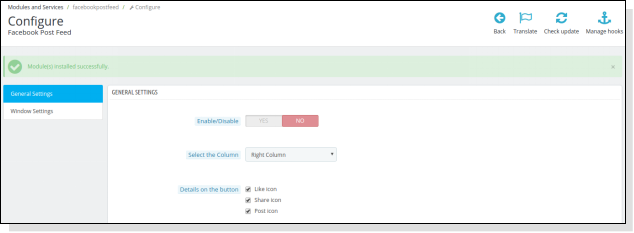
  3. It would open a new page as shown below –

There are following sections available to configure this Facebook feed module –

  1. General Settings
  2. Window Settings

Each section is explained below –

3.1 General Settings

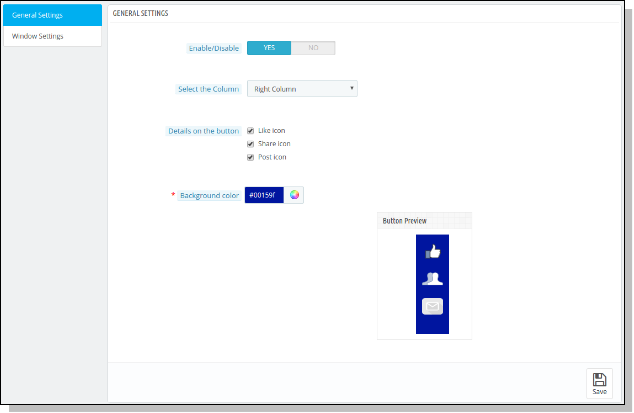
This section allows admin to enable/disable Prestashop Facebook Post Feed module with some other general settings like column selection, background color, and the details on the button (the like icon, share icon and post icon).
You have to follow steps given below to configure General Settings –

  1. Go to the Module and Services -> Module and Services
  2. It would list all the modules of the store. Find ‘Facebook Post Feed’ in modules list.
  3. Now click on ‘Configure’ button given corresponding to the ‘Facebook Post Feed’ module.
  4. It would redirect the Store Owner or Admin to a new page as shown below –
  5. Update the values of given fields corresponding to ‘General Settings’ as per need.
  6. Now click on ‘Save’ and it would validate and save the provided values.
  7. That’s it.

This section contains following options –

  1. Enable/Disable: Initially, this will be “OFF”. Admin can enable/disable add-on functionality by turning this “ON/OFF”.
  2. Select the column: This is a drop down box in which the admin can select that the page button which he has selected should appear in the left column or the right column of the store.
    3.Details on the button: Here, admin can select icons to display on Facebook Button. Choices can be Like Icon, Share Icon and Post Icon.
    4.Background Color: This is a color picker in which admin can decide what should be background color of the button appearing on the screen.

3.2 Window Settings

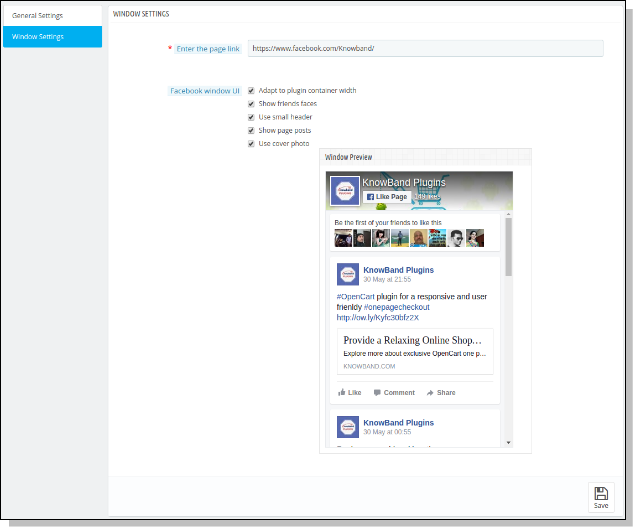
This section allows admin to update the settings for the Facebook window being shown on the storefront.
You have to follow steps given below to configure Window Settings –

  1. Go to the Module and Services -> Module and Services
  2. It would list all the modules of the store. Find ‘Facebook Post Feed’ in modules list.
  3. Now click on ‘Configure’ button given corresponding to the ‘Facebook Post Feed’ module.
  4. It would redirect Store Owner or Admin to a new page. Click on “Window Settings” and it would open a new section as shown below – 
  5. Update the values of given fields corresponding to ‘Window Settings’ as per need.
  6. Now click on ‘Save’ and it would validate and save the provided values.

That’s it.

This section contains following options –

  1. Enter the page link: Here, the admin has to enter the page link to show posts of that page on the window added by the module on the storefront. By default, Facebook Page will be shown.
  2.  Facebook window UI: Here, admin can decide what should be the UI of the window which is appearing on the screen. This option allows admin to include the following options:

a) Adapt to plugin container width
b) Show friends faces
c) Use small header
d) Show page posts
e) Use cover photo

4.Store Front Appearance

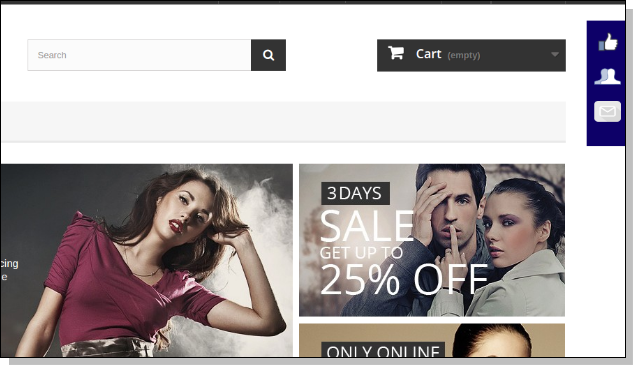
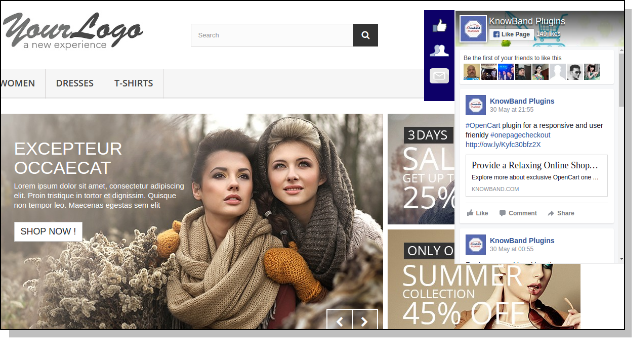
After enabling Prestashop facebook wall feed, a button starts to appear on every page of the shop and the appearance of the button is according to the settings done in the back end of the module.

The module at the front-end appears as follows –

Recommendations

Refresh home page of your store every time you enable/disable plugin. If the Prestashop Facebook Post Feed plugin is not working after installation then please check permissions on modules folder. The folder should be writable. Please make the folder permission to 755.

We hope that we have covered all the concerns regarding the installation and product guide of this PrestaShop Addon. You should also check our blog on How to simplify your checkout process of PrestaShop store.

Prestashop Gift The Product Addon – User Manual

Introduction of Prestashop Gift The Product Addon

The Prestashop Gift The Product addon by Knowband gives the benefits to both, the customer and the consumer. This module will absolutely help the merchant to increase the sales of the store and on the other hand, it will surely get the customers benefited by offering them products for free. This Prestashop extension will be the best option for a merchant to get the customers to his stores.

Objectives:

With the help of this Prestashop free gift addon by Knowband, the website owners can get the following things:

  • Increase in the customer’s engagement.
  • Reduction of the risk of cart abandonment.
  • Increase in the sale of the store.
  • Customer will be rewarded with freebies.
  • Prestashop gift product encourages the customer to buy things more often.

This Prestashop freebie addon will be one of the best options for the merchant to get the customers to his store.

Installation:

To install this Prestashop freebie addon, please follow the following steps:

1. Add addon folder under modules folder of your system.

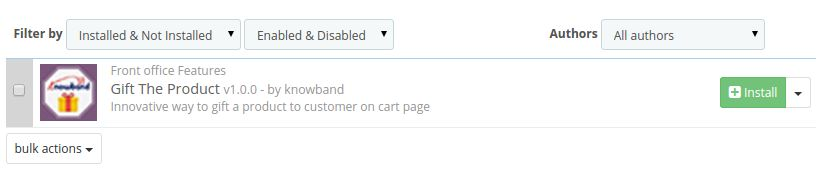
2. After adding this addon folder, system will list the addon on module page under front office feature category as given below:

3. Click install to install Prestashop Addon.

Administration Module:

In admin module, you’ll see following options to configure this Prestashop promotion gift module:

1. General Settings

2. Price Rules

Each section is described in details below:

General Settings:

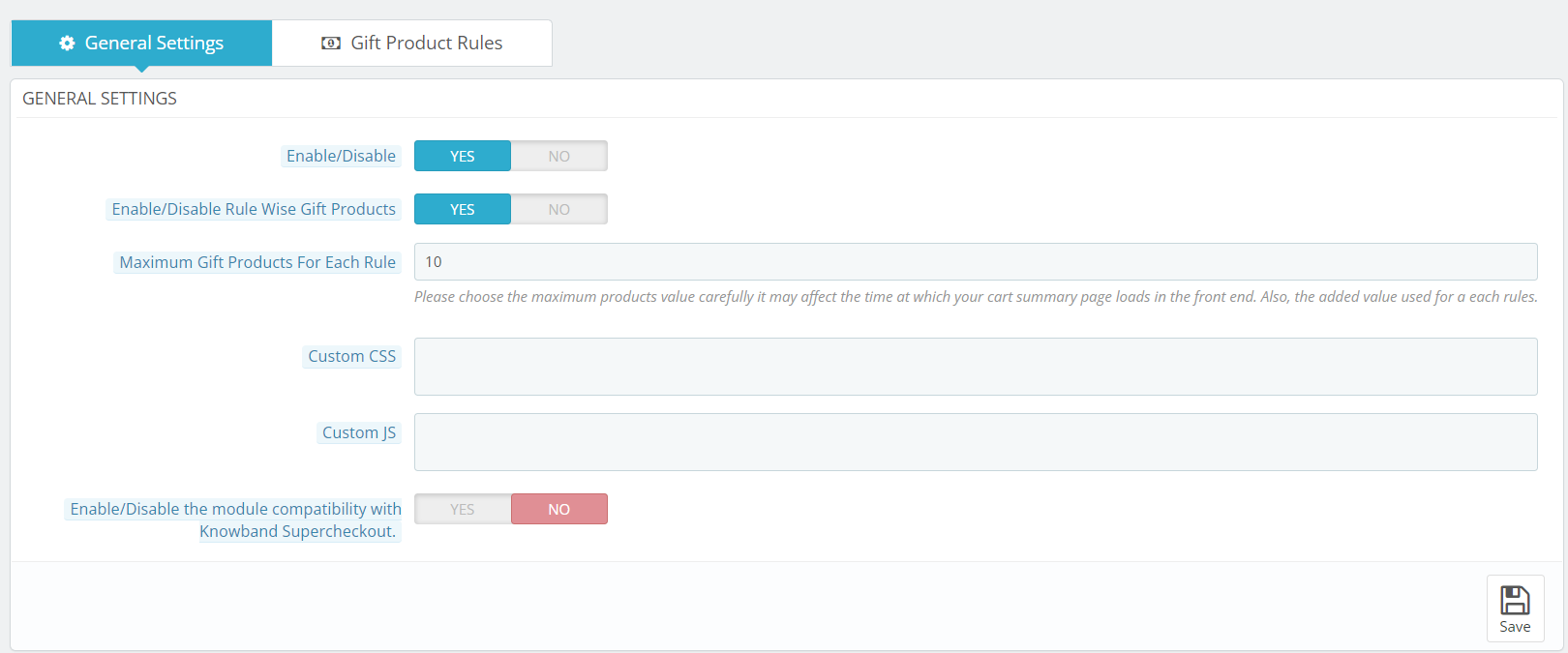
This section of Prestashop gift the product addon will have the following options to configure this Prestashop gift module:

1. Enable/Disable: This option has a toggle button with two specific values, i.e. YES and NO. This Prestashop reward gift addon will only work if this is set to YES. If you select NO, then none of the features will work. By default, this option is set to NO. You’ll need to select YES.

2. Enable/Disable Rule Wise Gift Products: This field is provided so that admin can set the restriction on the number of gift products displayed on the front for selection.

3. Maximum Gift Products For Each Rule: If this field is enabled then customer can chose more than 1 gift product according to the specified rules.

4. Custom CSS and JS: These fields have been given to the admin so that he can change the look and feel of the front end of the Prestashop free gift addon.

5. Enable/Disable the module compatibility with Knowband Supercheckout: This option has a toggle button with two specific values, i.e. YES and NO. This Prestashop reward gift addon will work with Knowband One Page checkout if this is set to YES. If you select NO, then it will not work with One page checkout module. 

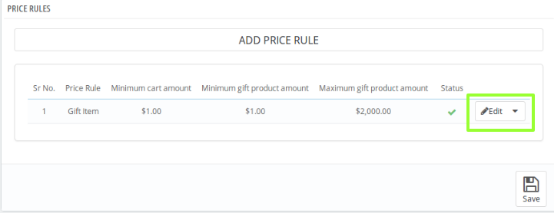
Price Rules:

In this section of Prestashop gift module, the admin will have to make the following price rules that will decide the gift product.

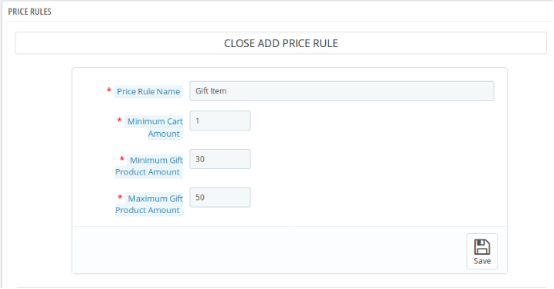
1. Price Rule Name: Here, you need to enter the name of the price rule that you want to be saved.

2. Minimum Cart Amount: Now, the admin will have to set the minimum cart amount to decide the Prestashop gift product.

3. Minimum Gift Product Amount: In this field of Prestashop freebie addon by Knowband, the admin will have to enter the minimum product amount of the gift products.

4. Maximum Gift Product Amount: Lastly, the admin will have to enter the maximum product amount of the gift products.

The Gift products which will be in between the entered price range will be shown to the customer in the front end.

This is how the Price Rule section looks like:

On clicking the edit button, a form will appear Where you’ll have to make the desired changes. This is how the Price Rule form looks like:

Front End Module

Once the Knowband Prestashop product purchase reward addon is enabled, a block will appear just below the cart summary on the front end saying “CONGRATULATIONS!! YOU ARE ELIGIBLE TO GET ONE OF THESE GIFTS”. This block will include the gift products according to the price rules which have been decided by the admin in the back-end of Prestashop gift the product addon.

We hope that we have covered all the concerns regarding the installation and product guide of this Prestashop Discount and Promotion Addon.

Prestashop gift the product addon Link: https://www.knowband.com/prestashop-gift-the-product

Admin Demo for Prestashop gift the product addon: https://ps.knowband.com/demo3/16/admin1/index.php?controller=AdminLogin&token=ffa17b0c72ff8c0ab7cf3e344c5ae4fc&redirect=AdminModules&demo_lang=en

Front Demo for Prestashop gift the product addon: https://ps.knowband.com/demo3/16/en/login

Watch Video Tutorial of Prestashop free gift addon:

Tutorial: Watch the YouTube Video Guide

To help you set up and use the Knowband PrestaShop Gift The Product Module, we have prepared a comprehensive YouTube tutorial video. This video demonstrates step-by-step how to install, configure, and manage gift rules to enhance your store’s promotional campaigns.

In This Tutorial Video, You Will Learn:

  • How to install and activate the Gift The Product module in your PrestaShop store

  • How to create gift rules based on cart value, product purchase, categories, or customer groups

  • How to display gifts on product pages and cart pages

  • How to manage multiple gift offers and set priority levels

Watch the tutorial here:


If you are a store owner and looking for an appealing option that can attract the customers to the store, then Prestashop freebie addon is the best solution for offering free gift products to your customers on completing the final checkout of the product.
Gifting can make anybody happy and if you don’t believe then you can simply buy Prestashop gift the product addon and experience better results for your Prestashop store.

For any questions, assistance, or custom modifications related to the Gift The Product module, contact our support team:
support@knowband.com

Some Amazing PrestaShop Coupon Extensions for your store

Well!! Every online shoppers must be excited to hear about any discount coupons, gift cards or scratch cards while doing online shopping from a site. It not only encourages them to shop more but also builds their trust and loyalty towards your online store. This in turn, helps in improving your conversion rates and product sales to a great extent. It is a open fact that freebies and amazing shopping deals/offers can help in grabbing more customer attention towards your eCommerce site to enhance your business fortunes. It is also an amazing way to grab that initial lead among your competitors by offering your customers exciting shopping offers and deals.

This is a great day for PrestaShop owners to boost their conversions and sales by taking the assistance of various feature packed PrestaShop coupon extensions that can make your cash counters ringing again. These PrestaShop addons can persuade your customers to spend more time on your site and search various products on your website for a quick purchase. Here are some of the PrestaShop Module from Knowband store that can be a game changer for your online store.

1. PrestaShop Facebook share and win discount-

With the support of this Prestashop Facebook share module, you can revolutionize your marketing strategies by encouraging your customers to share your products on sites like Facebook in return of amazing discount coupons. This PrestaShop coupon extensions not only boosts your sales but also helps with your social engagement. Here are some of the amazing features of this PrestaShop Facebook share and win discount addon. Take a look below:

  • The Prestashop Facebook share and win module offers quick sharing of the product on the Facebook wall of your customers.
  • The Prestashop Facebook share and win module provides the ability to check status of shared products on your site.
  • The Prestashop Facebook share and win module helps in boosting the customer engagement and traffic on your PrestaShop site.
  • The Prestashop Facebook share and win module offers easy discount to customers in return of the product sharing on their Facebook wall.
  • The Prestashop Facebook share and win module by Knowband works effectively with various devices and platforms like desktops, laptops, smart phones and tablets.

2. PrestaShop Scratch Coupon-

Ensuring appealing discounts and shopping offers are a great way of bringing customers and sales on your online store. If you are looking to enhance the performance and productivity of your PrestaShop site, this PrestaShop Scratch Coupon addons is the ideal match for you. This PrestaShop Scratch Coupon Module can offer wonderful scratch discounts to your customers for increasing their interest towards your products and site. Some of the amazing features and functionalities of this PrestaShop scratch coupon module are described below:

  • The scratch coupon module consists of a user friendly admin panel to perform various changes and customizations in a seamless manner.
  • The scratch coupon module ensures simple installation and configuration within few clicks.
  • The Prestashop scratch coupon module is designed to handle various multi- lingual eCommerce stores.
  • The scratch coupon module by Knowband provides timely and detailed reporting regarding all the coupons used, expired and remaining for enhancing the sales and conversions on your store.
  • The scratch coupon is compatible with various PrestaShop themes and eCommerce stores.
  • The Prestashop scratch coupon module wrks with various available devices and platforms like desktops, laptops, smart phones and tablets.

3. PrestaShop Product Jackpot-

If you are facing a decline in your sales and conversions on your PrestaShop store, this PrestaShop Product Jackpot module can help you improve your business fortunes. This PrestaShop Coupon extension provide customers a chance to win Jackpot in terms of a free product on your site. Let us take a look at some of the amazing features of this module which is explained below:

  • The Prestashop Product Jackpot module provides facility to select few products or whole category for the game.
  • The Prestashop Product Jackpot module by Knowband offers facility to exclude some products of a category for the Jackpot offer.
  • The Prestashop Product Jackpot module provides admin the freedom to control coupon validity.
  • The Prestashop Product Jackpot module supports multiple devices and platforms like desktops, laptops, smart phones and tablets.

So, don’t compromise with the dropping sales of your online store but take the required action by taking the help of these PrestaShop Coupon extensions from Knowband store. They have all the features and functionalities that can take the conversions and sales of your PrestaShop store to a new heights. Go grab them for the better performance of your eCommerce store from this Knowband store.

This Would Also Interest You

Try Out Free Magento Ajax Popup for Login and Registration Related issues

Account logins and customer registrations are a crucial part of every successful website as they tend to affect customer engagement and conversions drastically. You need to offer a simplified login and registration facility to your customers in order to improve their attention span on your Magento site. With a simplified login and registration processes, visitors on my site are loving spending their time and making online purchases through my online store.

However, if you are not having an adequate traffic on your site, you need to avail the services of this Magento Ajax Popup for login and registration related issues. It comes equipped with numerous features and functionalities that can improve the user experience on your Magento site without any problem. Do take a look at its salient features that are described below:

Offers a quick login and registration facility

It has been observed that the most obvious reason for increasing shopping cart abandonments on an online store is the complicated login and registration process on an eCommerce site. If you are looking to bring more customer and conversions on your Magento site, this Magento Ajax Popup for login and registration can be your ultimate savior. It can eliminate various hurdles that may be affecting the customer login and registration processes on your online store by offering a quick popup interface for Sign In, Sign Up and Forgot Password facility.

Provides relief from multiple page reloads

Earlier, Magento platform was suffering from a complicated Sign In and Sign Up process that requires multiple page reloading again and again. This not only consumes the precious time of customers but also affect the customer engagement on a great extent. However, with the introduction of this Magento Ajax Popup for login and registration, this long pending issue has been resolved completely as it is based on the Ajax technology.

Comes equipped with interactive admin panel

In the business scenario, you need to make changes and customization in your site from time to time for grabbing maximum customer attention and conversions. This often becomes a cumbersome task if you don’t have the support of a user friendly and interactive admin panel. This free Magento extension helps store admin to accomplish various site tasks and activities in a smooth manner through the back end functionality of this module.

The module can be installed and configured easily

There are multiple users who are not much aware about technical knowledge and they needs a module for their eCommerce store that does not require any external help for installation purposes. If you are a non technical guy, you can still enjoy the features and functionalities of this Magento Ajax Popup for login and registration based issues with the help of few clicks only.

Does not come with any price

This Ajax Popup login extension for Magento is packed with multiple features and functionalities that are aimed at simplifying the customer login and registration facility on your online store. It is a remarkable plugin due to the presence of various features that does not hurt your pocket in any way. This is because the module is available for free of cost that makes it within the reach of everyone in a simple manner.

It will not be a wise decision to take chances with your conversions and sales due to the presence of a complicated customer login and registration processes. All you need to do is to install this Magento Quick Ajax Login extension from our Knowband store without spending a single penny. It is a wonderful plugin that can transform your online business in a big way. So, grab your module without any cost for your Magento site.

Related Stories: