Prestashop SEO Wizard Addon – User Manual

1.0 Introduction

With the help of Prestashop SEO Wizard Addon the Prestashop store admin can enhance the visibility of the eCommerce site in a hassle free way. The Knowband Prestashop SEO Wizard module simplifies the most time-consuming works of SEO by automating the entire process. The Prestashop Merchant can now create the sitemaps or the XML files for the web pages as well as interlink URL of targeted pages with the anchor text at a button click. The site mapping can be done in multiple languages.

Searching the keywords in the contents of the site and then manually adding the links was quite a task earlier, but not anymore. The Prestashop SEO Wizard Module makes the entire process automated. It searches for the keyword in the long or short description in the front-end and adds the links automatically. Even the meta tags for the web pages can be added from the admin interface. You can optimize the product, category, manufacturer or even the CMS pages in a few simple steps. Become an SEO expert and let your web store rank higher in the SERP of the various search engines.

1.1 Project Objectives

Prestashop SEO expert addon offers a number of optimization options. Some of them are listed below:

1. The Prestashop SEO module allows the admin to create the XML file of the various web pages at a button click. Easing out the task of sitemap creation, the website can now rank be fetched by Google in minimal time.

2. The Prestashop SEO Wizard Addon searches for the specified keywords from the content of the website and attaches relevant links to it in minimal time.

3. The priority of the web pages, as well as the frequency of web crawling, can be set as well.

4. The store admin can include the nofollow or dofollow as per their wish. At the same time, the option to open the links in new tab can be incorporated without making any code changes.

1.2 Benefits of the Merchant

  • With the help of this Prestashop SEO Wizard Extension, the Prestashop store admin can create the XML sitemap of the PrestaShop as per desires.
  • The Store admin has access to set the priority if the web pages as per need.
  • This Prestashop SEO Expert addon allows the admin to set the frequency of the crawling as his/her requirement.
  • The Merchant can enable/disable the image option in the sitemap.xml file of the product pages.
  • The Prestashop SEO Expert Addon allows the e-merchant to enable/disable the sitemap at any time.
  • The Prestashop SEO addon gives the option to the store admin to add the link on the targeted keywords of the entire site as their need. It saves a lot of time to the admin.
  • The Admin can already add interlink on the targeted keywords edit or delete as per desires.
  • This Prestashop SEO Wizard addon enables the admin to keyword for the interlinking is searched in the short or long description of the products.
  • With the help of this Prestashop SEO Wizard module, the store admin to add the follow or no follow a link and it also allows the admin to open the link in new tab.
  • This Prestashop SEO expert module allows the store merchant to optimize the meta tags, meta title, meta description of the products, manufacturer, and categories page.
  • The Admin can optimize the products, categories, CMS, Manufacturers, product meta tag, update category meta tag and update manufacturers meta tags of the website incorporated in the front-end of the website from the Optimization Setting tab.
  • The entire interlinking is done from the back-end of the Prestashop XML file creation module.
  • The Prestashop SEO Expert extension allows the admin to restore the initial data via the group.
  • This Prestashop automated site interlinking Module in multilingual support.
  • This Prestashop SEO Wizard extension compatible with multiple stores.
  • Prestashop Sitemap generator Module for SEO helps the merchant to improve the visibility of the website.

2.0 Installation

After purchasing the Prestashop SEO Wizard Module, you’ll get following files as listed below:

1. kbseowizard.zip (contains source code of the module)

2. User Manual

Follow the steps mentioned below to install the extension:

  • Unzip the kbseowizard.zip file. It would contain files and folders as shown in the image below –
  • Copy all the files and folders from the extracted folder and paste them into “Modules” directory of your store. Follow the path – Root Directory/modules/.

3. The Prestashop SEO addon can be installed on your store now. You can find that in Store Admin -> Modules and Services. It would be shown as below –

You may even search for the module in the admin modules listwith the following details –

Keyword – SEO Wizards

Category – Front office

Filter By – Installed & Not Installed / Enabled & Disabled

4. Click on “Install” button to install the Prestashop SEO Wizard extesnion. It would show a pop-up for your confirmation. Click on “Proceed with the installation” option. This step will install the Prestashop module and show notification – “Module(s) installed successfully”.

3.0 Admin Interface

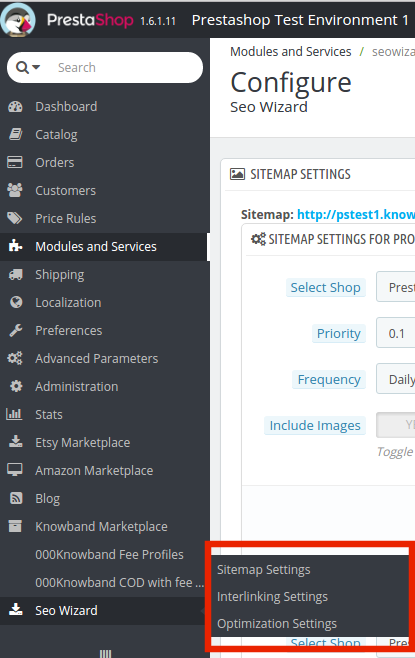
This Prestashop module allows the e-merchants to enhance the various SEO aspects of the site. Right from the sitemaps to the interlinking everything can be done in one link. This is the most time consuming and tedious task for the e-marketers. The Prestashop SEO wizard addon makes it simple and a matter of moments. You can find the Prestashop SEO expert extension in the main menu of the admin interface.
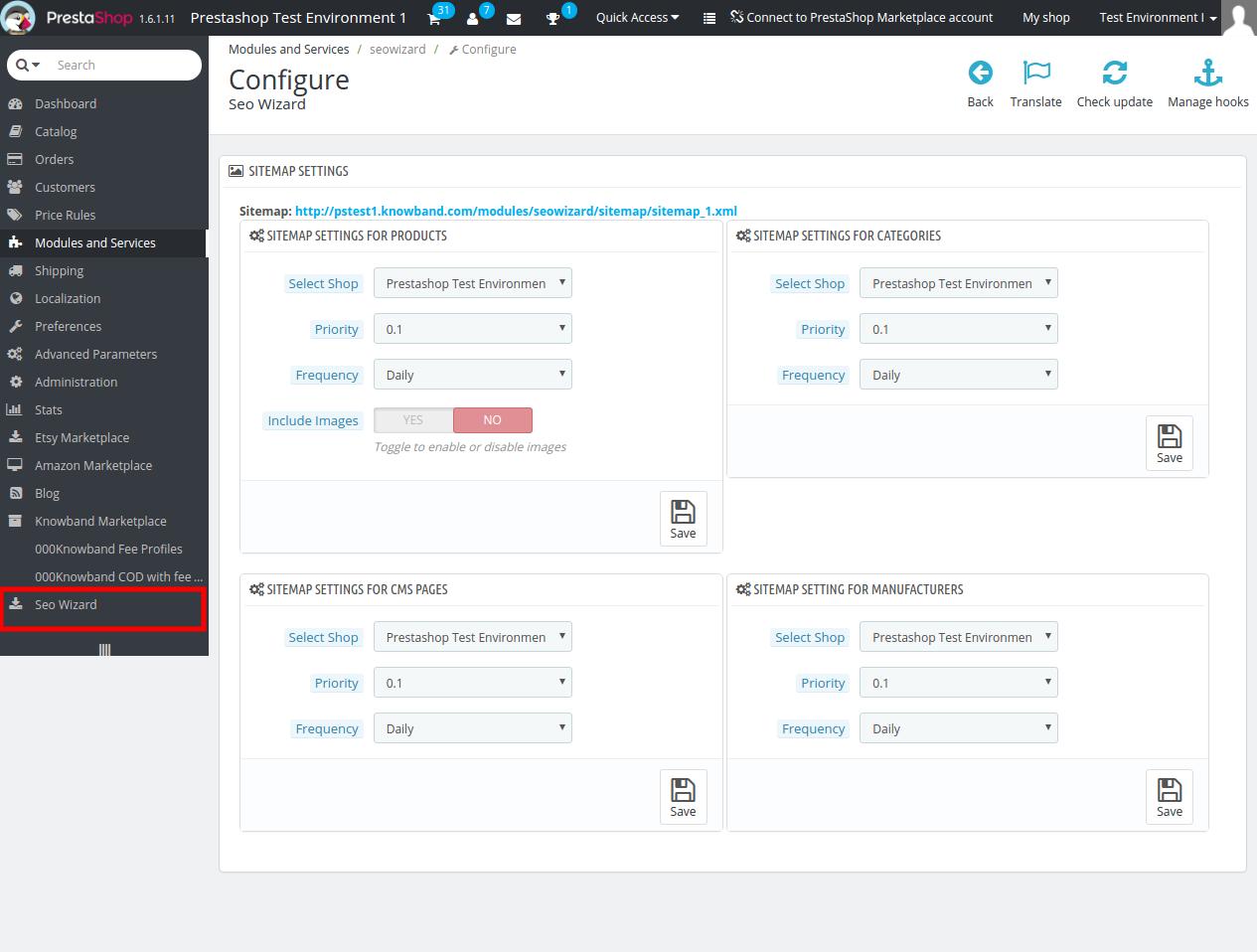
It basically offers four optimization options. They are listed below:

  • SiteMap Setting
  • Interlinking Setting
  • Optimization Setting
  • Meta Tag Settings

3.1 How is the Site Map created?

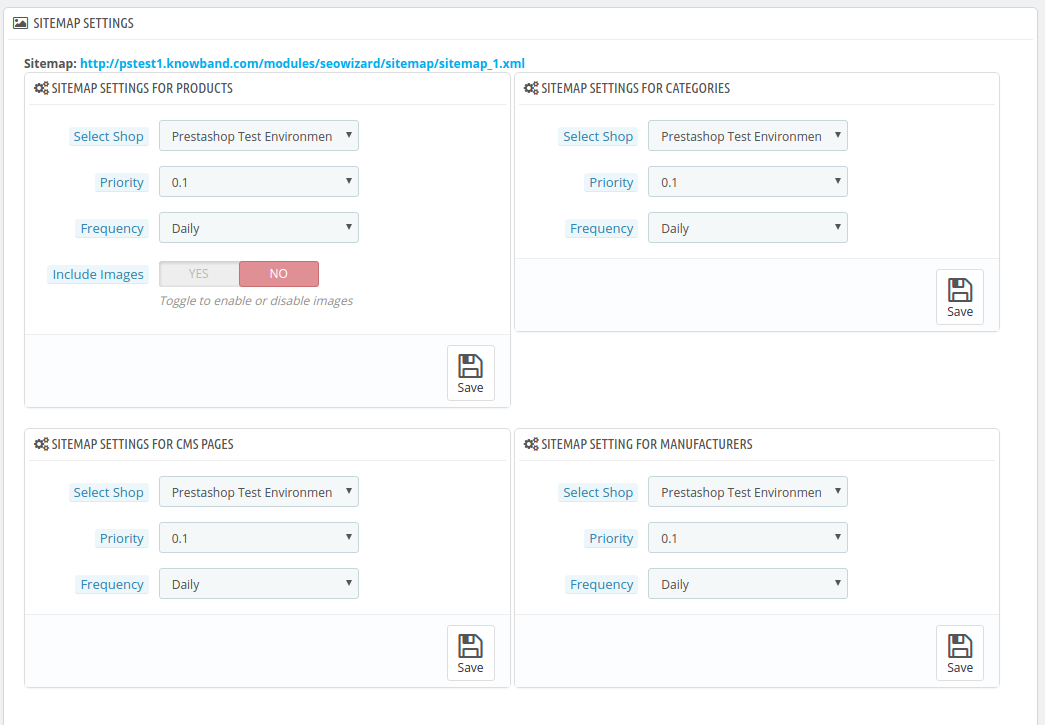
The site map of the web pages makes it easier for Google to find your sites. The creation of .XML file involved a lot of steps, but it can now be done at a button click.

The Prestashop SEO addon allows the admin to create the sitemap or the .xml file for four different web page types. They are:

  • For Products
  • For Categories
  • For CMS Pages
  • For Manufacturers

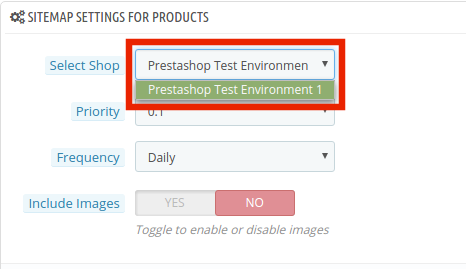
The Prestashop SEO Expert Extesnion is multi-store compatible. The admin can Select Shop from the dropdown menu in which they are looking to include the optimization option.
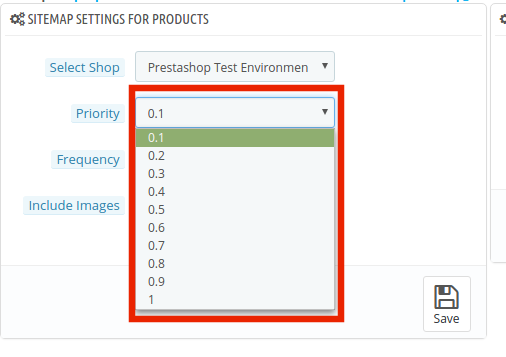
In addition, the admin can set the priority of each web page type as per the need. All he needs to do is to select the priority rank.
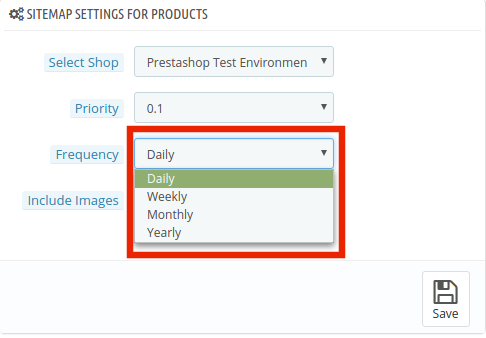
The frequency in which you want Google to crawl the web page can be selected. The crawling frequency can be set on Daily, Weekly, Monthly and Yearly basis.
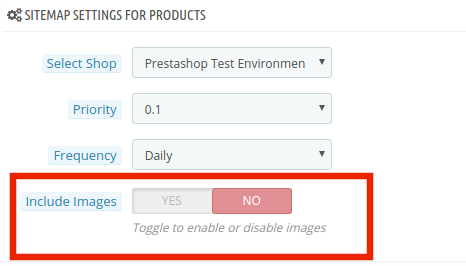
In addition, the admin can include the sitemapping of the product images just by a button click.
Make the changes and click on ‘save’. The .xml file will be created automatically. The link of thesame can be viewed at the top as shown in the image.
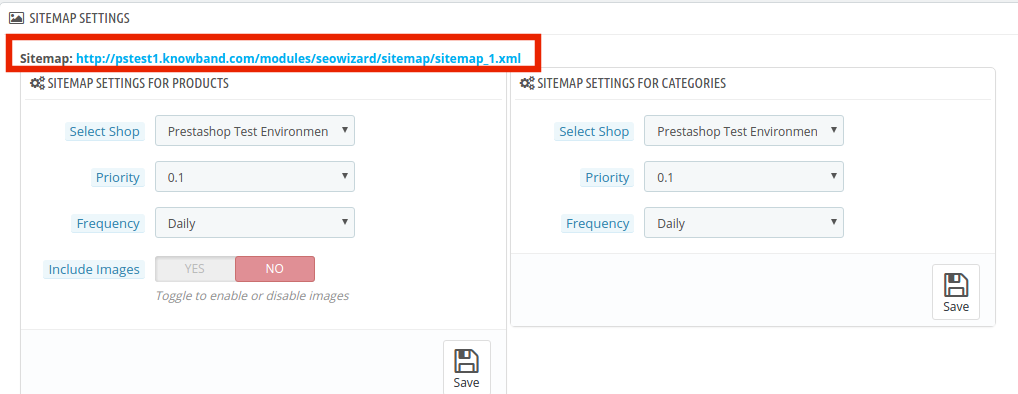
This Pretashop SEO wizard addon shown the xml file is obtained in the usual format.

The same process is followed in all the four web page types.

3.2 How is the Interlinking done on the site?

3.2.1 How is the new links created?

The Prestashop SEO Wizard extesnion allows the admin to add links to the keywords mentioned in the website in one go. Once the keyword and the link are mentioned in the back-end, the Pretsahop addon fetches for the word in the short description of the product pages and other web pages. The keywords are then converted to the anchor tag and specified links are attached to it.

In order to do the interlinking, go the ‘Interlinking Setting’ of the Prestashop SEO expert module. It shows the list of the already created links and keywords. In order to create new once, click on the ‘+’ in the top right section.
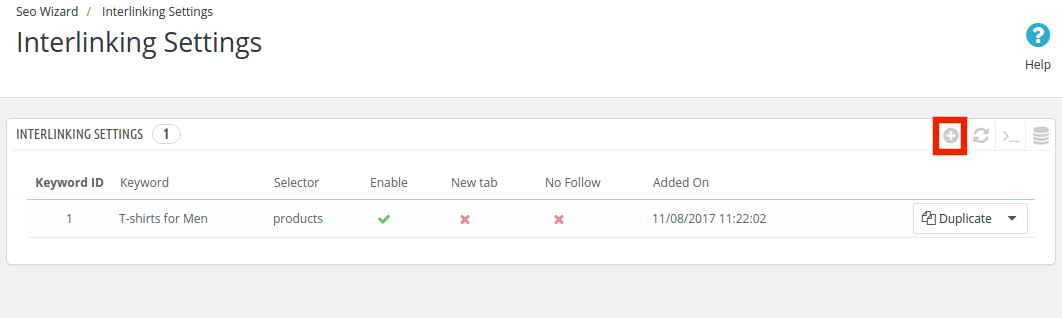
Enter the information required in the admin interface.
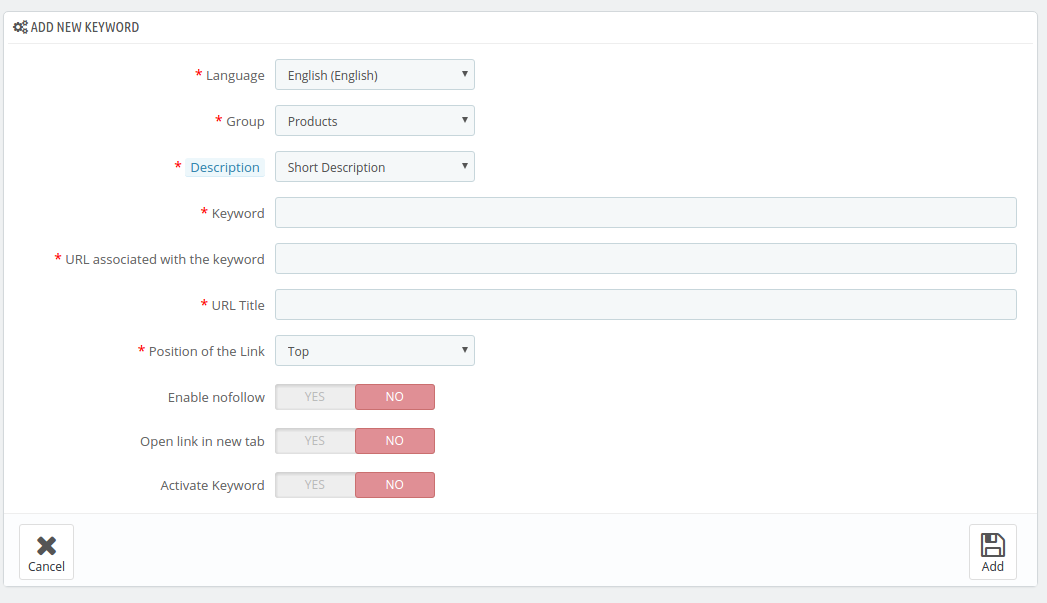
  1. Language: The Prestashop SEO Wizard module offers multi-lingual support and the changes can be done in various languages.
  2. Group: The group or type of web page, that is, Product, Manufacturer, CMS pages or Categories, can be selected from here. The interlinking will then be done in those pages only.
  3. Description: This field is only for the product pages. The merchant can either select the ‘Short’, ‘Long’ or ‘Short and Long’ description. The keyword entered will then be searched in the selected descriptions and interlinking will be done in the same.
  4. Keyword: Enter the keyword that you want to use as an anchor text.
  5. URL: The URL that is to be linked with the keyword is mentioned in this section.
  6. The position of the Link: The position of the link, that is, Top or Bottom can be selected here.
  7. Enable Nofollow: The link can be used as a nofollow or a dofollow link as per the requirement of the user. In case you want to keep it as a nofollow link, switch the button on.
  8. Open in New Tab: By enabling this feature, you can make sure that the links will open in the new tab instead of the same tab.
  9. Activate Keyword: The keywords can be activated by toggling the button here.

3.2.2 How are the links keywords edited or deleted?

The keywords and the related information can be edited by clicking on ‘Edit’ button as shown below. The admin interface even offers the options to delete the existing ones.

3.3 How are the changes incorporated in the website?

The entire interlinking done in the backend can be incorporated in the front-end of the website from the Optimization Setting tab.
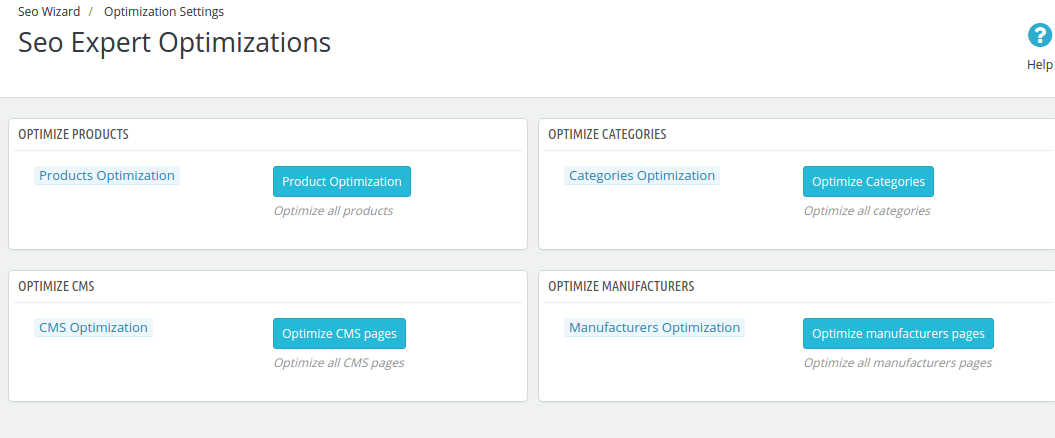
The changes can be implemented on the front-end of the website by clicking on the ‘Optimize’ button. This option is available for all the different page type of group. Each page type can be optimized separately.

3.4 How to add Meta Tags in the Web Pages?

This Prestashop SEO Wizard addon simplifies the most time-consuming task of the e-marketers. The meta tags, that is, the meta titles, descriptions and keywords can be added for the product pages, category pages as well as for the manufactures.

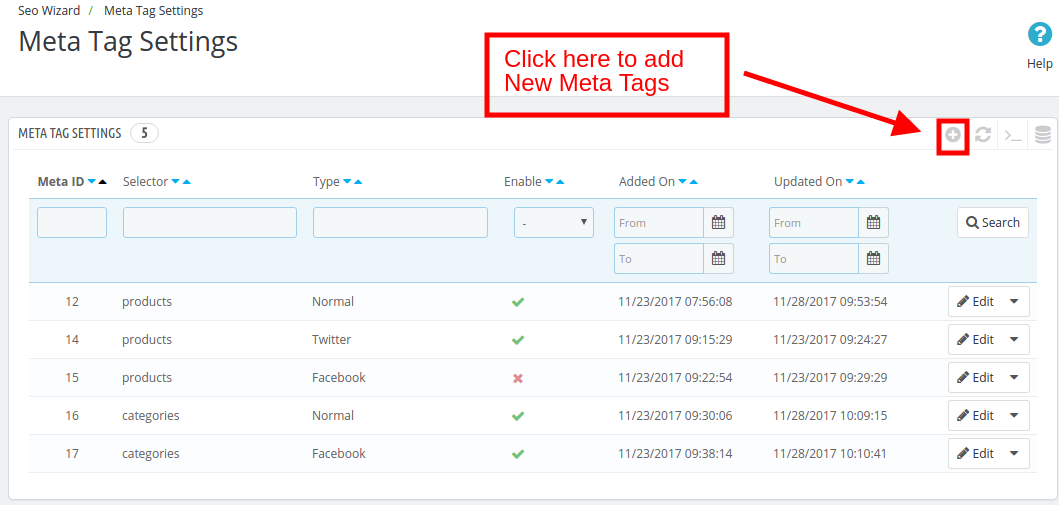
The list of the tags already created can be viewed in the ‘Meta Tag Setting’ tab. In order to create the new one, click on the ‘+’ sign in the top right corner of the admin interface.
The meta tags can be, then, entered by filling up the required information fields.
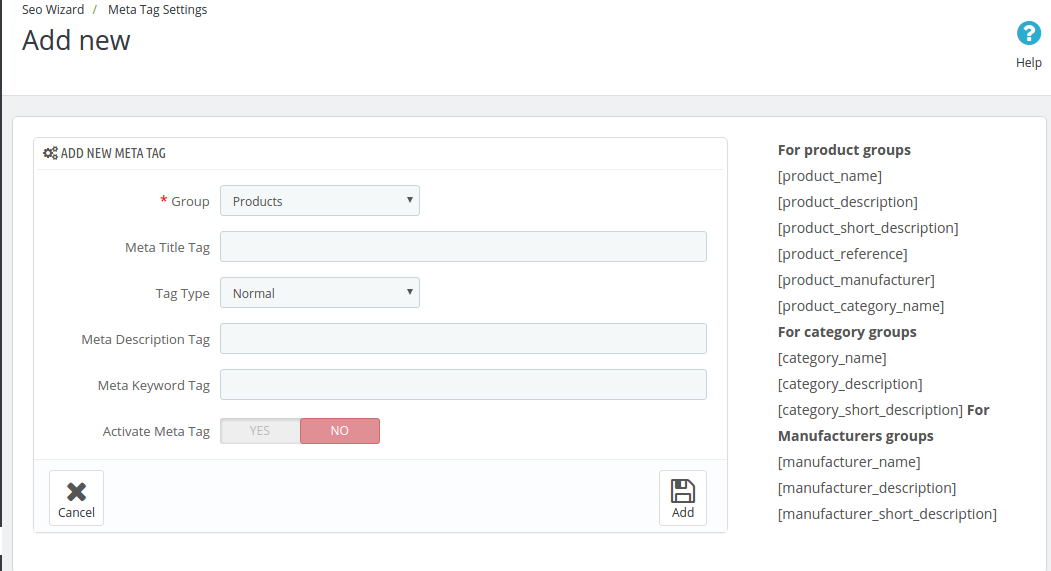
Group: Select the group type in which you want to add the tags. You can choose from the Products, Categories or Manufacturer.
Meta Title Tag: Enter the meta title for the web page here.
Tag Type: The tag type can be Normal, Facebook or Twitter. The admin can select any from the drop-down menu.
Meta Description Tag: The short meta descriptions of the web page can be entered here.
Meta Keywords Tag: The keyword relevant to the web pages can be entered here. You can enter the main keywords, it’s variants as well as the long-tail keywords here.
Activate Meta Tag: The meta tags can be enabled/disabled by toggling the button.

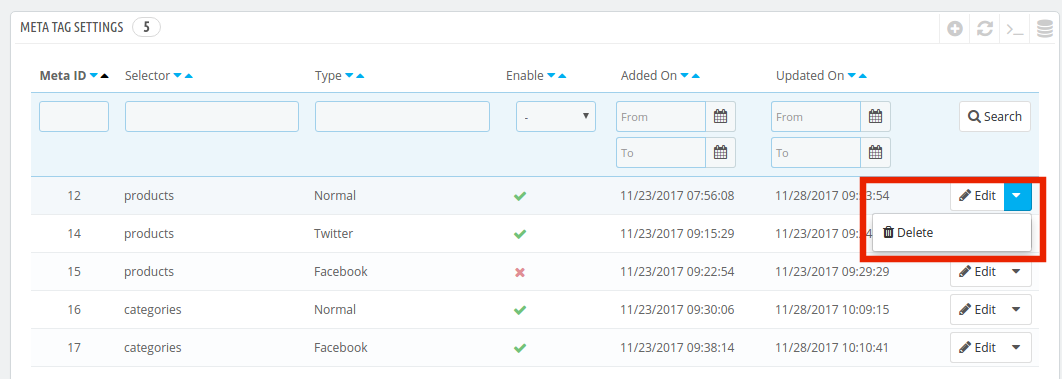
The created tags can be edited or deleted as shown below:
Now you can try Prestashop SEO Wizard module for on your Prestashop website. KnowBand Prestashop SEO Addon helps you engage more customer to your store & increase the customer base. The Prestashop XML file creation Extension allows the admin to manage SEO of the website easily without any hassle. The online seller can easily manage the interlinking, XML file creation and meta tags generation without any lengthy and time taking process.

The Prestashop Merchant can now create the sitemaps or the XML files for the web pages as well as interlink URL of targeted pages with the anchor text (read more about it here – Linkio.com) at a button click. The site mapping can be done in multiple languages.

For more Prestashop Addons please visit Knowband.

For more details about this SEO wizard module:

Prestashop SEO Expert Module link.
Prestashop SEO Expert Module Admin Demo link.
Prestashop XML file creation Extension Front Demo link.
Prestashop Sitemap generator Module for SEO User manual.
Knowband Prestashop SEO Wizard Addon store link.

Please contact us at support@knowband.com for any query or custom change request as per your business requirement.

Holiday Sales Countdown: Things that your Customers would Expect

The commencement of the holiday season demands the eCommerce store to stay one step ahead and plan for the occasion. The beginning of holiday sales provides the web store with better opportunities to connect with the visitors, treat them well, and in return gain better sales from them. This is the main reason that every store owner wants to be prepared for the holiday sales and plan it a long ago.

In order to be sure that the sales made are better than last time, shopping sites not only need to equip themselves with quality products but take into consideration the expectation of the buyer as well. While the greetings and best wishes play an important role in establishing a better customer-seller relationship, the buyer expects a bit more which could make their holiday season a feast for their pockets.

There are various ways in which a web store can make sure that the customers are happy with the service provided and make sure they return to the store even after the holiday sales to make future purchases. Some of the things a customer expects from the web store during holiday sales are discussed below.

Occasional discounts

Discounts are a part of online shopping. Even during the non-holiday sales, a regular customer would expect the store to provide them some discounts or incentives on their purchase, but this expectation gets high especially during this season.

Thus, in order to make your store standout amongst the crowd of many stores, you need to provide the customers with deals that they can’t turn their eyes off to. It will help you to make better sales and at the same time the customers are highly motivated to make a purchase using the discounts provided by the web store. It just sets the bar high for your sales.

Personalized Experience

Every customer desires to get a unique experience while visiting their favorite store. To make this happen, the store owner can provide custom personalization with products and services as per their requirements. Customer experience personalization involves designing or producing services and products to meet the individual requirements of the customer.

Surveys say that a growth of 5 to 15% can be observed if a store starts providing custom solutions to every individual customer. To collect information, the store owner can run surveys with popup forms; add extra fields on the product page and checkout page. The customer experience can be improved with better greetings while a customer visits the store and after he makes the purchase.

This is a fast and simple way to implement a personalized customer journey that will inevitably lead to happy future customers.

Notifications

The holiday season is the busiest time of the year. Every customer cannot turn towards the store to check for the availability of products. Therefore, it becomes the responsibility of the eCommerce stores to provide them with that information. The holiday preparation of the eCommerce stores should include the marketing tactics to keep the customers informed.

He customers are highly delighted when they see a product or an offer on a product which they would like to make a purchase on. These types of initiatives by the web stores are highly appreciated by the buyers and they are more likely to visit the store. The shopping sit can provide these kinds of updates to the user in many forms such as through calls, emails, or push notifications.

The web store should not restrict them to customer-oriented marketing, they can use the social media platforms to make the general customers aware of the store sales and the better opportunities they might be missing if they don’t take a look at the web store.

Free shipping

One of the biggest concern for the buyers during the holiday sales is the receiving of the products. As it is peak time and all the customers are highly encouraged to involve themselves in other activities. The eCommerce sites could come front and provide them with the free delivery option.

It will enlighten the mood of the customers and will help in increasing their trust in your store. The online stores need to manage their free shipping efficiently. The Prestashop free shipping module is one such module that can help the Prestashop store.

The module makes sure that the customers are made available to fee shipping by taking their product value in mind. The sellers can set free shipping priorities by zones, price, and weight. These types of commitment made by the stores are highly expected by the buyers and they love to get these types of treatments.

Win back campaigns

There must always be some time of encouragement for the customers to keep making a purchase. Every customer wants to enroll themselves into a bigger part of something. This can be made available by the web store by keeping the win-back campaigns.

The buyers can make a purchase from the site and in return, each of them has an equal chance of winning a grand prize or something like that. Here are various ways the websites can provide those opportunities to the customers either through a luck draw a number system. This keeps the buyer occupied and boosts them to make sales to improve their chances of winning the bigger prize.

Help and support

The sales can be confusing even for the customers. Therefore, they can require help anytime. In order to be sure that the visitors are provided with every possible help, the stores must encourage the 24/7 services with the live chat feature where the customers can clear their doubts regarding every product related provable.

These types of services prove to be an effective means of encouraging customers to make a purchase and boost their motivation level. The chat feature is becoming more common but the holiday sales demand a better assistance system. Redirecting the conversation from negative to positive places focus on the proposed solution.

When the outcome takes center stage, it reduces the odds that customers will be upset. A better help and support team to improve the sales made during the holiday sales.

Over to You

The web store must consider the fact that a customer will only make a purchase when he thinks the store is providing them with available services. If this is not the case then the chances of making sales are lowered during these sales. Therefore, the web-store must be prepared with all available elements to improve the conversions during holiday sales.

Related Stories

Stay Away from these Mistakes Before Launching your eCommerce Business

The idea of expanding the business to the online sellers has encouraged to open the online stores. The eCommerce market is expanding at a very rapid rate. Observing the behavior of the online buyers is the key aspect to optimize your services in order to serve your customers in a better way. On one hand, the idea of having a shopping site is feasible, but to popularize it among the target audience is quite a task. The mass existence of such store has led the new comers to work on a clear and well worked strategy, so that, all the efforts made in order to make the store grow and gain profit goes hand in hand. There are various points which must be kept in mind before launching an eCommerce business. As, to make a presence among existing giants will require to work on various areas for establishing a successful store.

Here are some of the points which must be considered before launching an eCommerce store so that the visitors can flow in the store and make a purchase.

Lack of research

Starting an eCommerce store could be a tricky deal. One of the important things that must be taken into consideration before starting an eCommerce store should be proper research. Starting up any new venture requires lots of research. Whether it’s a retail store or online. This research is required to gain complete information about the market, however if this is missing one may enter into a wrong market. A complete research must be performed regarding the habits, behavior and preferences of the customers in the market. It would be advised to take some leads from the already established shopping stores who are doing fine in business. This will provide you with ideas and strategies that can help you to grow better and reach out to potential buyers. Absence of proper results may lead to panic and frustration if the store doesn’t make required sales.

Low budget

Remember you are trying to get into a market where people want you to buy your products. Thus, having a proper budget plan for every small details will help you flourish rapidly. Financing is an important aspect for marketing of the products without which you can suffer huge losses. The store may need to get promoted and advertised in order to get customers which requires money. Plan your budget and sending on every single aspect that will help you gain the desired results.

Lack of Interaction

Once the visitors start to flow into your store, they need more than just products to get engaged. The web store must be incorporated with various features that will keep your visitors occupied and turn them into paid buyers. Providing with a proactive chat services is one of the ways. Motivate the existing customers to leave their feedback and queries. Rectify their doubts and keep the entire process interactive. In order enhance the customer engagement, make use of interactive elements in the store such as gamified pop ups. They help in better engagement of the customers and help them stay in the store and make better purchases. Absence of these interactive pop ups might cause your store to lose on the potential leads that have been generated. On other hand the online store must be prepared for better customer navigation using the easy process flow. It not only helps your newly involved visitors to make a purchase but also makes sure that they enjoy their purchase from the store.

Not using the digital platform wisely

It is another thing to have a better equipped eCommerce store and different to get the customers attention towards it. Therefore, make sure that the store is optimized for better search results. For this purpose, the web store can take help of SEO. These services help in improving the store visibility by taking various factors into consideration which are not possible on self-level. The better use of keywords which targets the Google search results to your store can be of great help in promoting the eCommerce store. There are various other aspects such as web design, use of better elements in the site which are offered by these services. Make sure you use them so that it becomes easy for store to come out from the shadows and make a place in the market.

Marketing glitches

The inclusion of quality products and renowned brand is not sufficient for the people to know about the store availability. Therefore, making proper usage of other factors such as content marketing and digital marketing will help in making better presence. The online stores must try to keep the users informed about the existence about the store by making proper use of social media, contents and blogs. Keep posting regularly about the products offered by the store so that the visitors may check in about it and roll in to the web store. The use of paid media can also be done, so that the influence of the store is made on the audience. The Facebook followers can help your business grow. Hence, go for social media marketing is a must.

Lack of execution

Even with the help of paid media and other marketing techniques, it is not a assured that the business will flourish over time So, make sure that you execute the business plan in its best shape. Your execution plan should have product photography and a brief summary of how it helps the customers as top priority. People need to know what they are buying with clear images and basic details about the products. Make sure that the web store is provided with all the necessary information required for a better purchase from the buyers.

Over to You

Establishing a successful online store requires a lot of research to be done and proper strategies to be executed. Therefore, several factors must be taken into consideration which will help in making sure that the web store sees the success and required customer inflow in the eCommerce store.

Key Factors to Consider Before iOS App Development

The rapid rise in the mobile technology and its influence on the users has led the eCommerce businesses to take a leap from desktop to mobile sites and apps. Bringing the entire store readily available to the online shoppers whenever they need is one of the ways to flourish over the industry. This is why upgrading your business from eCommerce to m-commerce is a must. The popularity of mobile app is also at it’s peak. With an overall user base of 4 billion, it has proved to be a significant area where the online stores can develop an app and reach out to the potential buyers.

The best part of technological advancement is that this up-gradation can now be done with minimal hassle. There are mobile app builder extensions available for the various platforms such as Prestashop, Magento, OpenCart and others. Though, the popularity of android app is on peak but at the same time the iOS users also share an appreciable contribution to the online marketing. The user base of iOS contributes to 20% of the overall mobile users which is a huge number when trying to take over the market.

The app developers need to make sure that the app they develop for Apple app store must meet certain criteria before launching them. In order to be sure of launching a better iOS app that reaches to the users faster and convince them to make a purchase several key factor must be kept in mind. These small details may create a big difference.

Let’s take a look at some of the top things you should be careful about when developing your mobile app for Apple’s iOS platform.

Do some ground research

The app developers might not consider this fact but the iOS apps are meant to make a sale in the store. Unlike the play store where the android apps can be easily made available in the market and reach the users, the iOS apps are meant to be sold. Therefore, these apps are handpicked by the authorities themselves. They don’t want any app to be a part of the iOS user community that doesn’t sell itself. A well research and forward planning must be done by the developing team before launching the app. They must consider all the aspects of the app which may jeopardize the success that they could have made using the app.

The app must be original

Using the already picked concept and developing an app out of no originality will land you in a situation where the app may not be able to make it to the market. Thus, the app developers must take their time, use some hints from other successful apps and try to build an app that is based on the original concept. That kind of approach will guarantee that you do not make profit on the App Store, and that your app will never be successful. Since the club is so elitist, there are a lot less apps in general than you would find on the Play Store. This makes it easier to spot unoriginal apps and call them out. Using a previously successful concept will lead on to negative response from the customers and the chances are that the Apple store authorities may discard the app as it has not the features to make out large impact among the users.

Enable better features

It is also one of the established fact that the App introduces some of the most advance features with their phones. Therefore, it becomes equally important for the iOS app developers to keep the users preferences in mind and iOS trends in mind. They must try to match the latest features that are introduced and the app must give the users a taste of their phones better features. The users will like to test that features and will make use of your app for this purpose. The success of some of the apps is often based upon this concept.

Test your app

The app is made to find a spot where the customers pay for the service. It might not be possible at few instances that the developers are able to trigger all the mistakes that are incorporated in the app. This demands a lot of testing and checks from the developer site. The use of a 3rd party or a dummy user crowd can be mad which can use the apps and check for its feasibility in the store. It is always a good thing to delay the launch of the app than to make it available early and cause a damage to reputation due to the presence of different bugs and issues faced by the users.

Let the feedback roll in

Feedbacks are a part of better marketing. The app developers might think that their app is best and fit for the users but this may not be the real case. Thus, taking the advice from the fellow developers and putting the app to beta testing might help a lot in improving the app quality. Any feedback is a good feedback, no matter in what form. Take advice and suggestion from the concerned people who might give their valuable suggestion in improving the app and may encounter some of the issues which you might have skipped during your observation. This helps in delivering an app that is useful for the users.

Over to You

There is always the room for development and if you are planning to launch an iOS app than there are several things you must keep in mind. The mobile store can definitely improve your business chances. A good app is appreciated by users, suggested by enthusiasts and promoted by the Apple store itself.

You Might Also Like:

Magento Spin and Win Module – User Manual

Introduction to Magento Spin and Win(Email Subscription) Extension

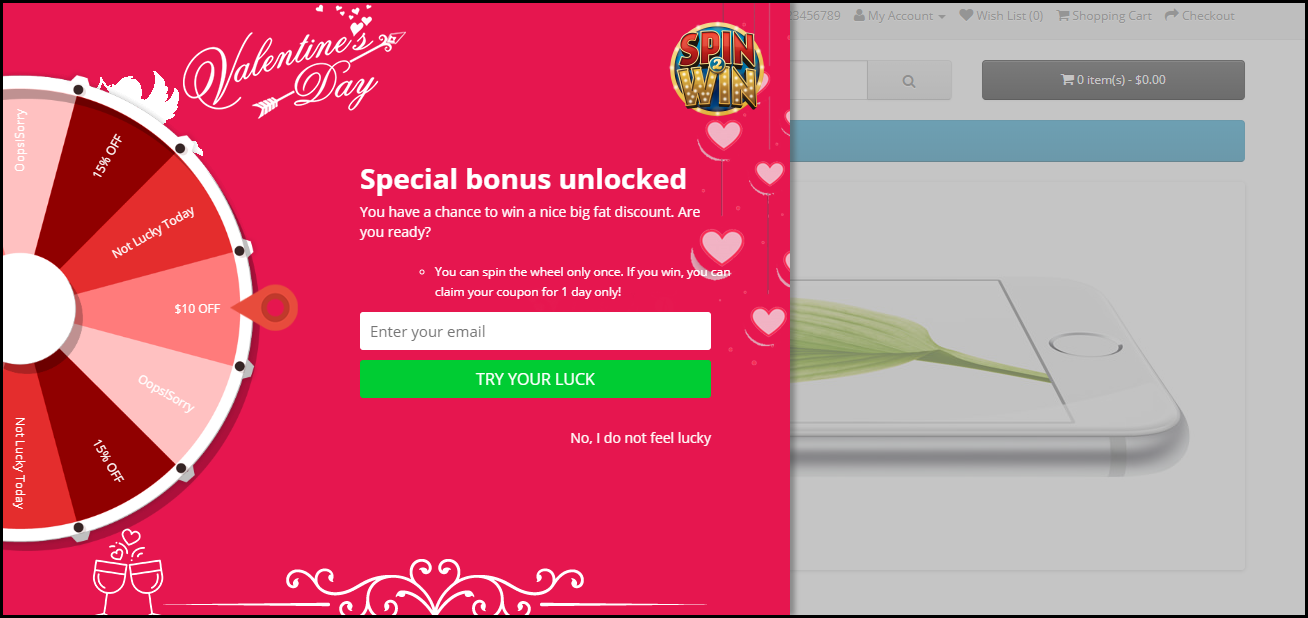
Knowband’s Magento Spin and Win (email subscription) extension takes the opportunity of the customer interaction to its maximum potential. The seemingly easy task of retaining the customers is actually the biggest challenge in the eCommerce scenario. Highly responsive and interactive spin and win pop-up makes this tedious job easier for the sellers and fun-filled for the customers. Without boring them with the annoying subscriber notification, the exit-intent popup compels the customers to enter their email id in order to spin the wheel. The gamified interface in return provides alluring offers to the customers which can be further used for shopping from the site. The addictive lucky draw contest lures the visitors to visit the site again and again.

The Extension is a 3 in 1 pop up:

a. Entry Pop up: Display the pop up as soon as the visitor enters the website.

b. Exit Pop up: Display the pop up as soon the visitor tries to leave the website (The extension works on the exit intent of the visitors)

c. Email subscription pop up: The Interactive extension is used to capture emails for newsletter subscription. The email Id entered in the Subscription pop up is directly integrated with the Mail Chimp and Klaviyo account of the Magento store admin.

1.1 Merchant Benefits

  • Increased customer engagement on your store using interactive gamified interface.
  • Increased customer base by capturing email Ids for Newsletter subscription, which can be later used for personalized promotions and email marketing.
  • High Impact on direct sales and ensures returning customers
  • Turns normal visitors into potential buyers
  • Fully customizable Email subscription pop up
  • Offers detailed reporting.
  • Intuitive back end interface, which is easy to understand and configure.
  • New attractive themes for spin and win popup helps merchant in drawing the attention of the visitors.

1.2 Features of Magento Spin and Win-Email Subscription extension

1. Lets your customer spin the wheel and win discounts using a fun filled spin-win game.

2. Responsive Exit pop up, Entry pop up or Email Subscription pop up

3. It is a great tool to enhance customer base as the customer has to enter their email Ids to get the discounts.

4. The Interactive email subscription pop up converts normal visitors into potential buyers by offering a complete new way to offer discounts.

5. This Exit pop up extension is fully customizable, you can match it with your website theme.

6. Offers 5 Ready-made email templates, Magento store admin can customize them further.

7. Offers Mail Chimp and Klaviyo Integration

8. Look and Feel settings to set spin and win pop up background color, font and button color, Display Image, etc.

9. Customize the email subscription pop up using Custom CSS and JS.

10. Email Recheck option to restrict the use of same email Id to get discounts multiple times.

11. Pull Out Tab facility to close the Spin and Win subscription pop up.

12. Choose whom to display, where and when to display, maximum display frequency of the Spin and win (email subscription) pop up

13. Option to display the pop up on Category page, Home page, Product page etc.

14. Option to set the discounts on each slice and the probability of each slice.

15. Check the performance of the interactive spin and win pop up by comparing the total generated vs used coupons using interactive graphical reports and tabular reports.

16. Intuitive back end interface.

17. Desktop, Mobile and Tablet responsive design

18. Multi lingual supported

19. Magento Spin and Win is Compatible with all themes.

1.3 Installation of Magento Spin and Win-Email subscription pop up extension:

Follow the simple steps in order to install the Magento Spin and Win Extension:

  1. Download the extension package from the Knowband store.
  2. You’ll get a zipped file. Unzip the package on the root folder of your Magento setup via FTP manager (like Filezilla or WinSCP – download here: https://filezilla-project.org/). You’ll find the files and folders as shown in the image below:
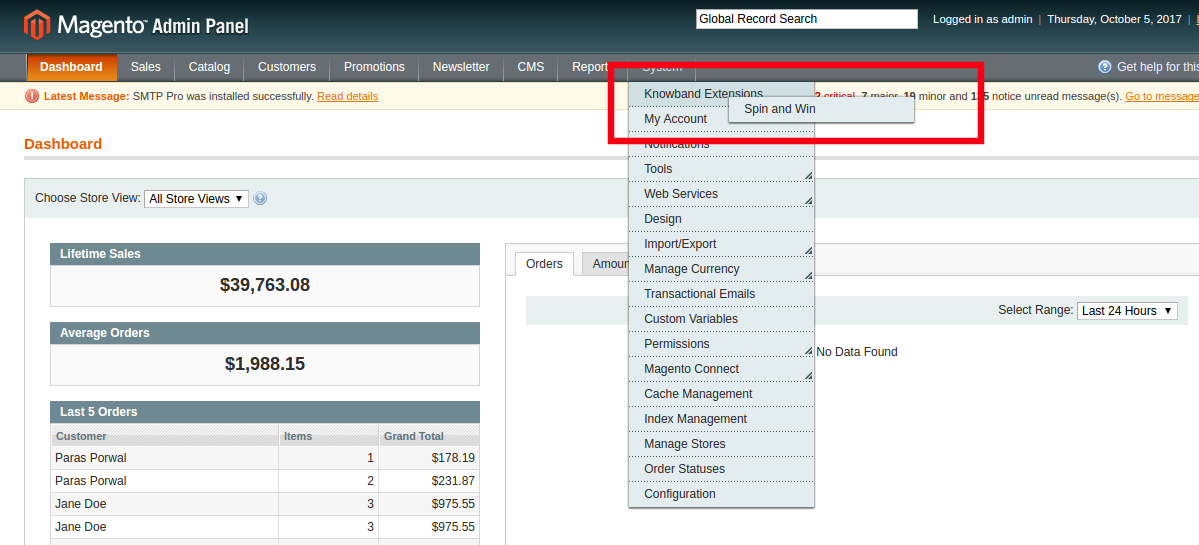
  3. The extension is now installed and ready for use. In Admin Panel, go to “System > Knowband Extensions > Ajax Spin and Win”.

You can now use and configure the extension.

Admin Interface

The web admin interface of highly responsive Magento Wheelio offers complete customization option to the store admin. The various features and functionalities offered by the extension can be modified from the admin panel. Some of the customization options offered by the plugin includes the following:

  • General settings
  • Display settings
  • Look and feel settings
  • Slice settings
  • Email marketing
  • Email settings
  • Statistics

Let us discuss the various customization options which are discussed in detail.

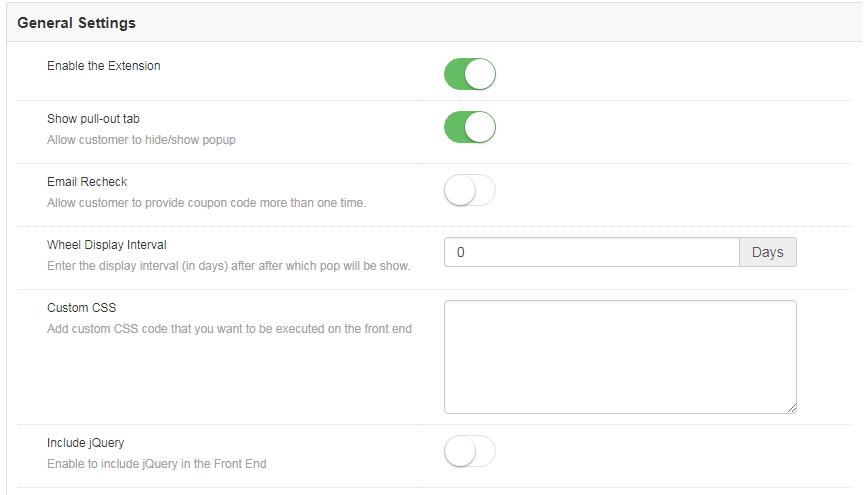
General Settings

The General settings offer a number of customization options. The various fields in this tab are discussed below.

1.2.1.1How to enable and configure the extension?

  1. Enable the extension

The various customization options include enabling or disabling the plugin as well. The admin can switch the button to enable the extension on the Magento store.

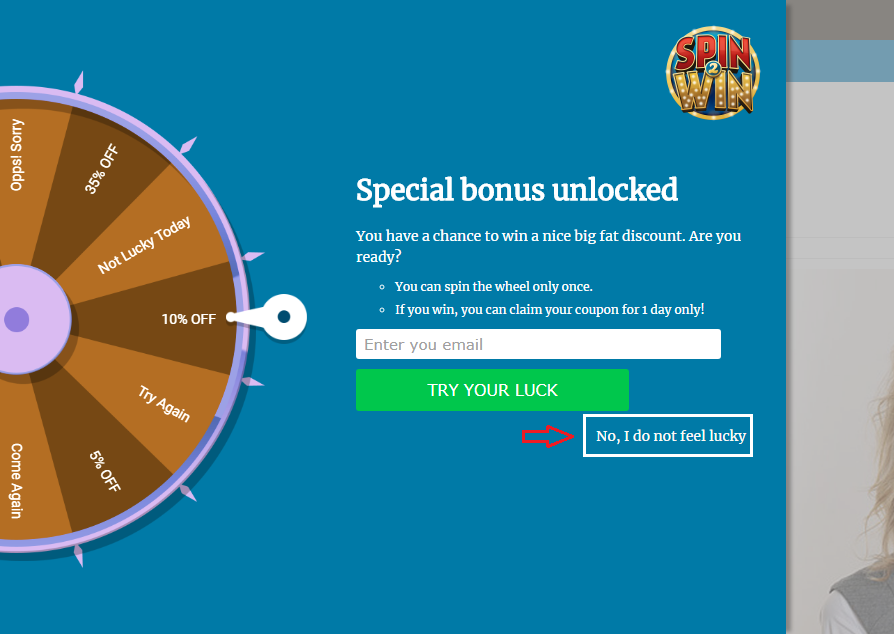
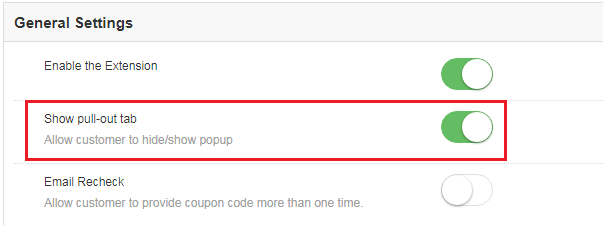
  1. Show Pull-out tab

The site visitors can remove the spin wheel from the screen of the website by clicking on the ‘No I do not feel lucky’ button.

Magento Spin and Win wheel can be brought back to the screen if this option is enabled.

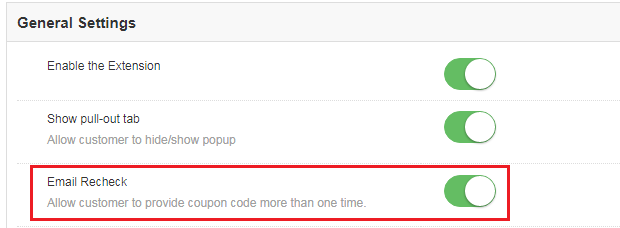
  1. Email Recheck

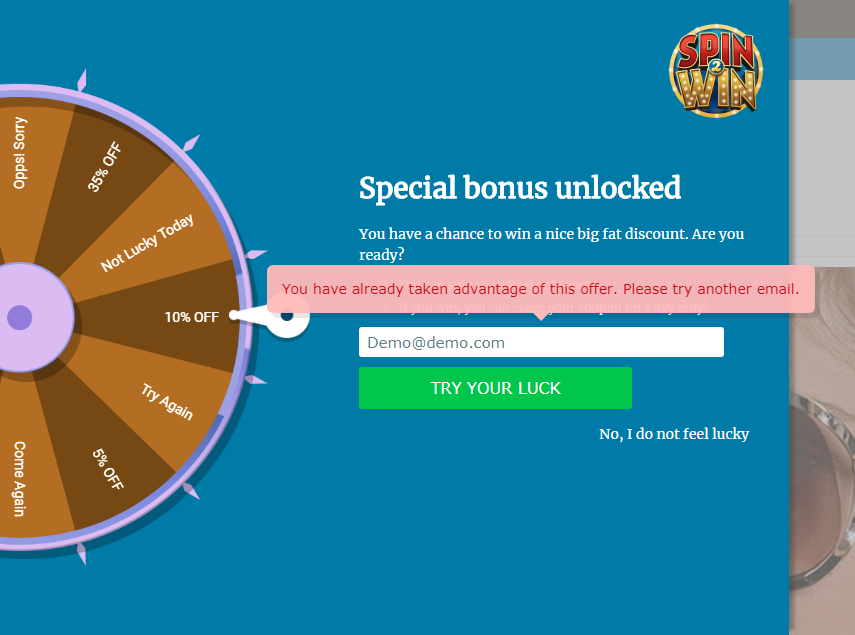
Magento Spin and Win can check the duplicity of email ids entered in the Email subscription pop-up by enabling this option. Once this is enabled, the store visitors can spin the wheel only once with a single email id.

This makes sure that one email id can avail the offer only once. In case the same id is used to spin the wheel twice, then, the extension will flash a message as shown in the image below.

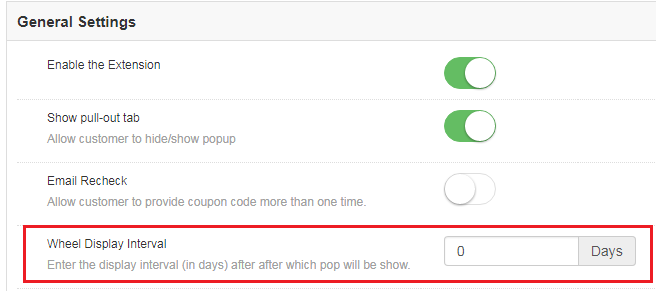
  1. Wheel Display Interval

This field allows the Magento store admin to set the number of days after which the pop-up will be shown on the website. By default, it is set to 0.

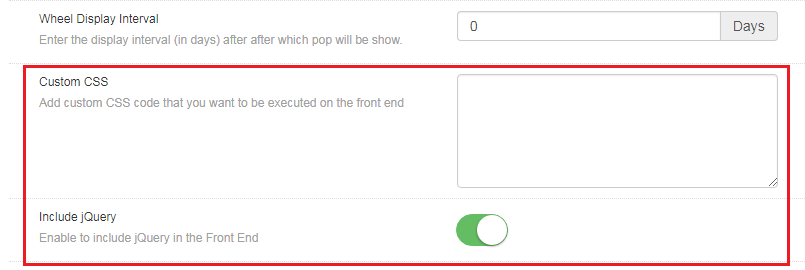
  1. Custom CSS

Magento store admin gets to change the look and feel of the Magento extension by including Custom CSS code in this section.

  1. Include jQuery

Magento store admin can enable the JQuery in the front end by enabling this button. This option allows him/her to include jQuery in the extension.

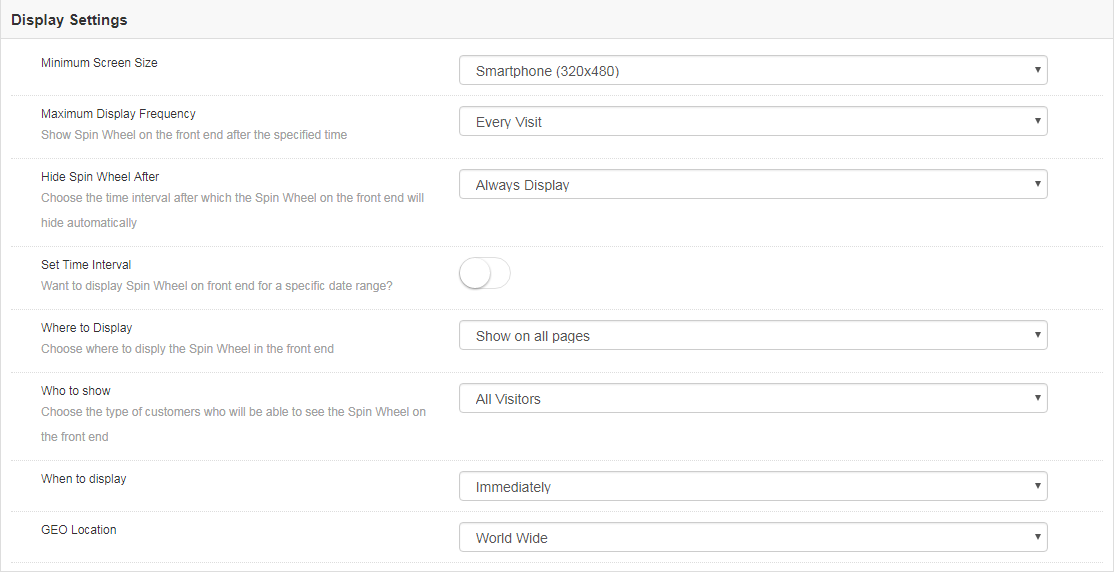
Display Setting

This tab allows the Magento store admin to change the display settings of the interactive pop-up shown in the front-end of the eCommerce site.

The various customization options are discussed in detail below:

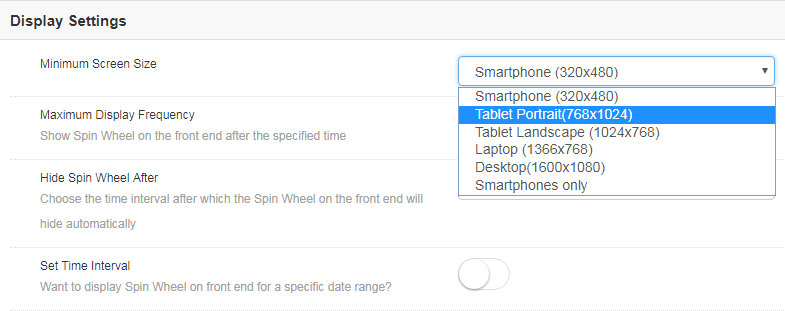
  1. Minimum Screen Size

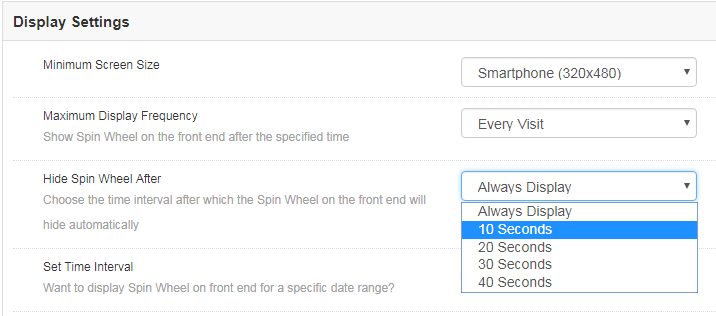
This tab can help you set the minimum standard size of the screen with which the extension will be compatible. Select the minimum screen size and the extension will flawlessly work on any size larger than the one selected.

The admin gets to choose from a number of options in the drop-down list. All he needs to is to select the one that he finds suitable.

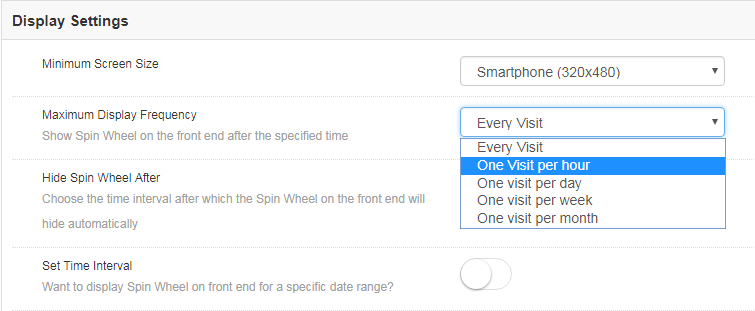
  1. Maximum Display Frequency

You can even select the maximum frequency of the email subscriptiondisplay. The admin gets to choose from the varied options in the list. You can either allow the wheelio to pop-up on every visit of the customer or else, you can set it’s display on hourly, weekly or monthly basis.

  1. Hide Spin Wheel After

Along with the display option, the store admin gets an option to hide the spin wheel as well. Magneto store admin can either display the wheel all through the customer’s visit unless it is manually removed by the customers. The merchant can even set the time after which it will be removed from the web page.

  1. Set Time Interval

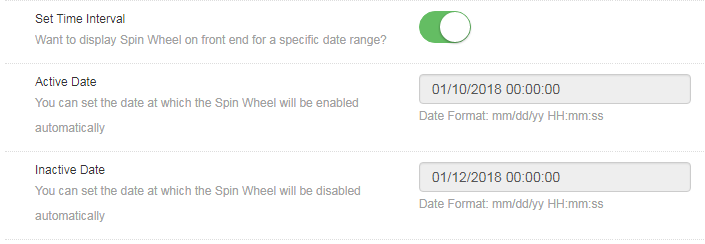
Do you want to display the gamified pop-up for a certain time? This tab allows you to set the duration when you want display or hide the email subscription pop up. All you need to do is to enable the button shown in the image below.

Once it is enabled, you will get an option to set the time and date of the duration when you want the spin wheel to be enabled or disabled on the front-end.

Enter the date in the prescribed format, that is, mm/dd/yy as well as the time in both the sections. The Exit intent pop up will be displayed only in between the duration set.

  1. Where to Display

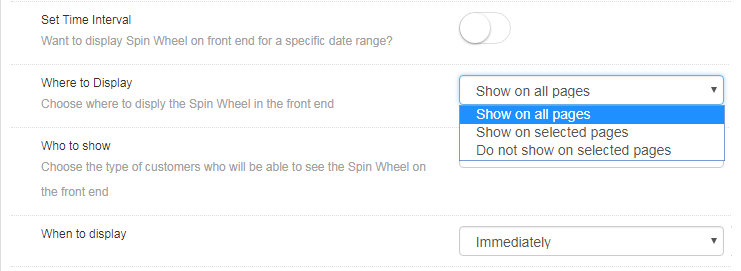
The entry and exit pop-up can be displayed anywhere in the website. No code changes are required to be done for the same. All the admin needs to do is to select the web page where he wants this spin and win extension to show up.

By default, the ‘Try your Luck’ wheel will be shown on every page of the website. However, if the admin wants to display it on a particular page only, he can choose ‘Show on selected pages’. The admin will then get an option to choose the pages where he wants to flash this email subscription pop-up.

  1. Who to Show

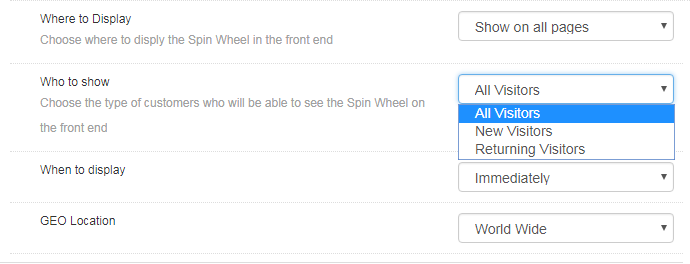
Choose your target audience whom you want to avail the coupons offered by the spin the wheel extension. You can either show the wheel to all the visitors, or to the new visitors or to the customers who are visiting your site again.

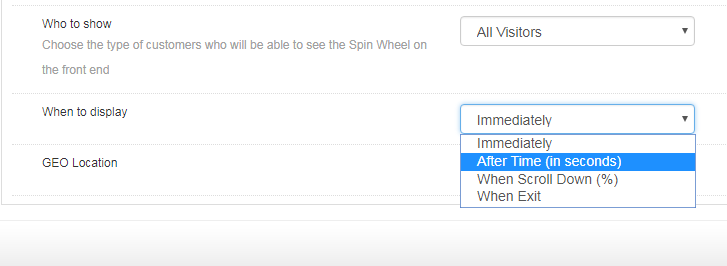
  1. When to Display

Choose the time which you think is feasible for displaying the wheel by selecting one from the options shown in this tab.

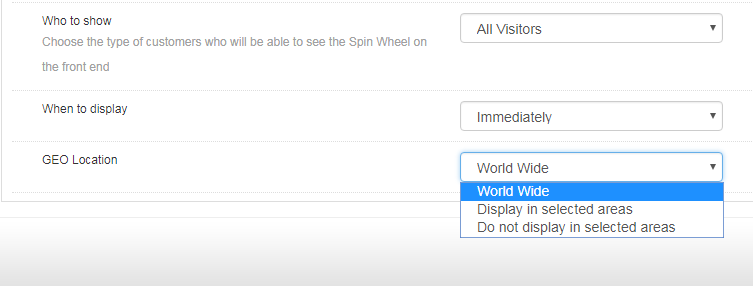
  1. GEO Location

The admin can even select the GEO location in which he wants to display the pop-up.

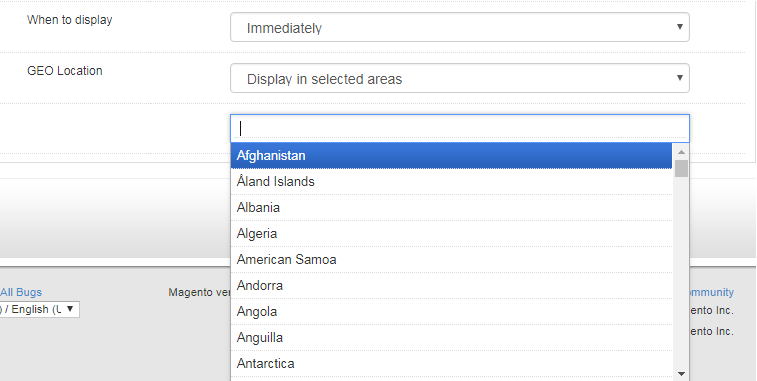
Selecting the default option of worldwide will allow to display the extension at every places where the website is being viewed. In case, you want to display or do not want to display it at a particular location, then, you can select the place as shown in the image below.

Look and Feel Settings

Along with the various customization options, the web admin panel allows to change the look and feel of the entire Magento email subscription pop-up.

1.2.3.1 How to change the look of the spin wheel?

Here are some of the ways in which you can change the look and feel of the spin and win(Exit Intent pop up) extension.

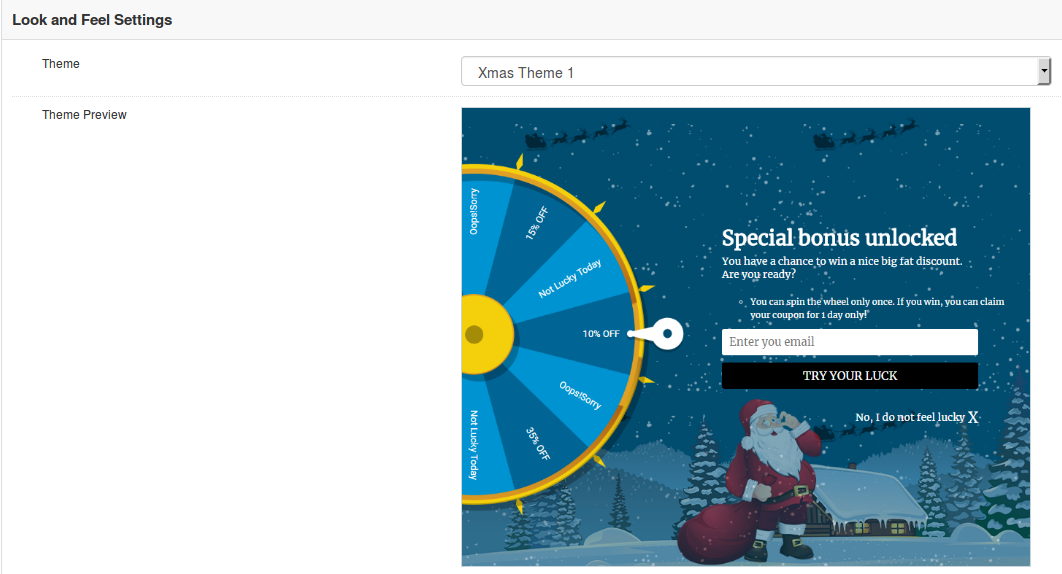
  1. Theme: Admin can select a desired theme for the spin and win email subscription popup based on different occassions like Thanksgiving, Easter, Black Friday, Christmas etc
  2. Theme Preview: Using this option of Magento Spin and Win module, you can preview a template before applying the final changes to your website.
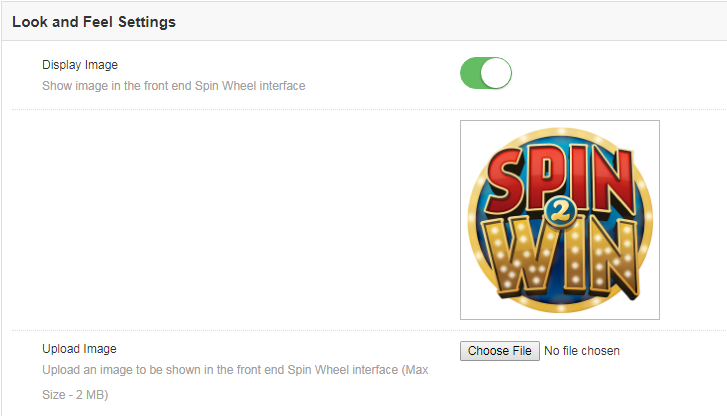
  3. Display image

Magento spin and win extension allows the store owner to show an image on the spin wheel. The image can enabled by switching the button as shown below.

Not just this, the admin can even change the image as per the requirement by choosing it from the local drive.

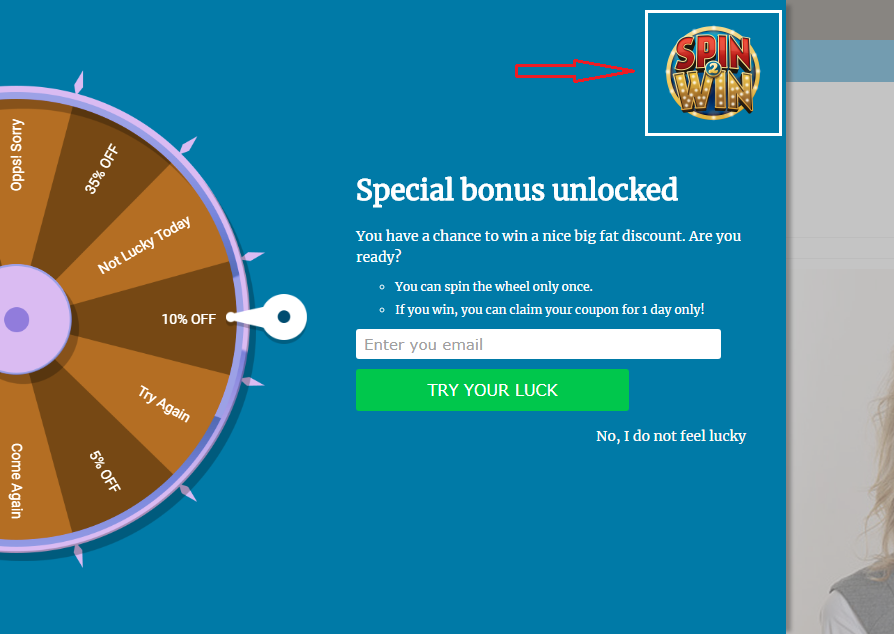
The image selected at the back end of the extension will be shown in the front end.

  1. Background and Font Colors

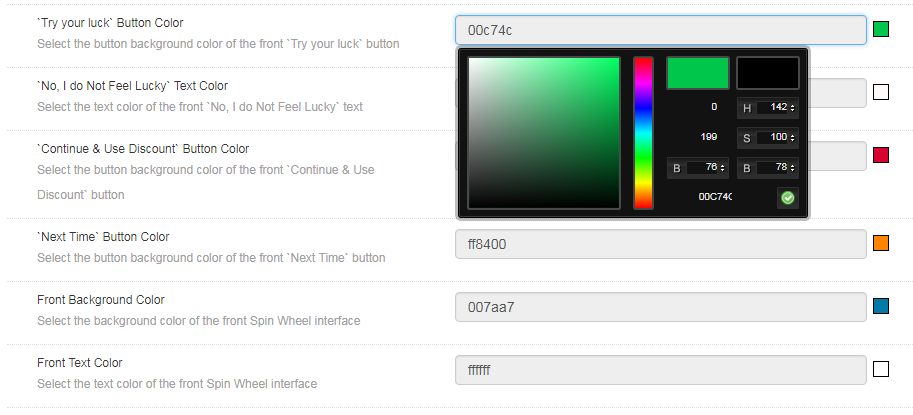
The Responsive Email subscription pop up extension offers a completely customizable interface. Right from the background color of the wheel to the color of the slices as well as font color, everything can be changed by selecting the color that suits the theme of your website.

‘Try your luck’ button color: This can change the font color of the button that is clicked before spinning the wheel.

‘No, I do not Feel Lucky’ color: Change the font color of the button by selecting the shade from here.

‘Continue & Use Discount’ and ‘Next Time’ button color: Select the color of this button in accordance with the color of the background.

Front Background Color: Select the background color of the front interface of the spin wheel from here.

Front Text Color: The font color of the text displayed on the interface can be changed from here.

Slice Settings

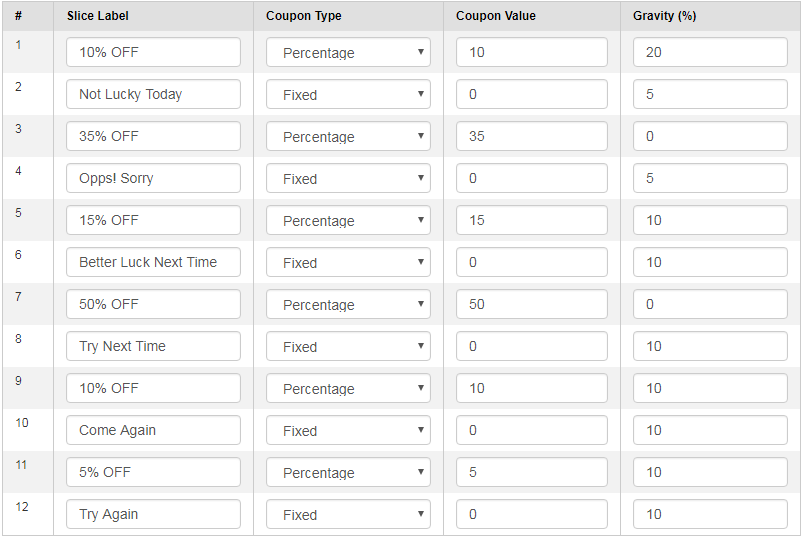
Not just the look and feel of the spin wheel, even the slices of the wheel can be changed and customized as per the need of the Magento store admin. There are 12 slices offered in the admin panel by default. The discounts offered, the label of the slice, the coupon type as well as the value coupon.

In addition, the possibility of a particular slice being selected after the spin can be set as well. Enter the desired value in the Gravity column accordingly. This value cannot be greater than 100 or less than 1. Moreover, the sum of the value of all the 12 slices should not exceed 100.

Email Marketing

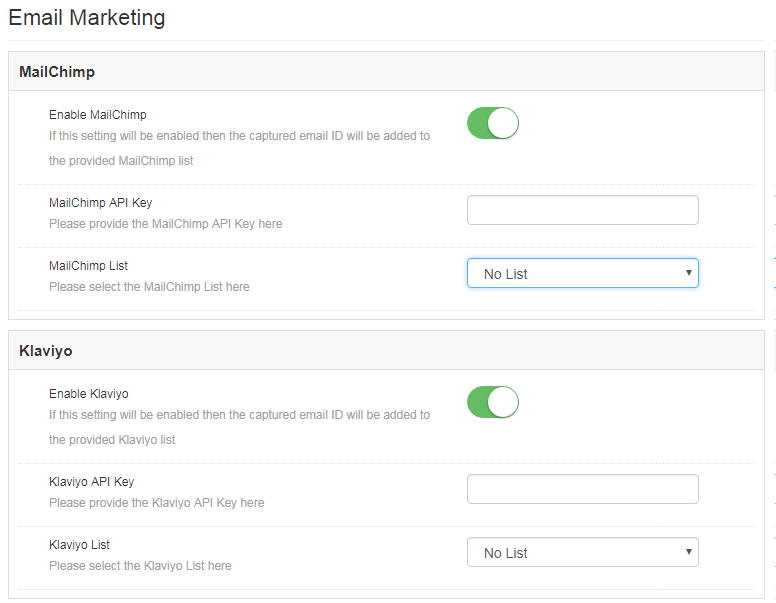
The Spin and Win extension has an inbuilt email integrator. The email ids of the store visitors captured by the plugin is automatically added to the MailChimp, Klaviyo accounts of the Magento store owner. Reducing the effort and time consumed in manual synchronization, the Magento email integrator makes email marketing easier for the merchants.

All you need to do to enable this functionality is, enter the API Key of your account, select the list of the email ids that you want to synchronize and your job is done. You are now ready to send promotional triggers in order to compel your customers to visit your store back.

Email Settings

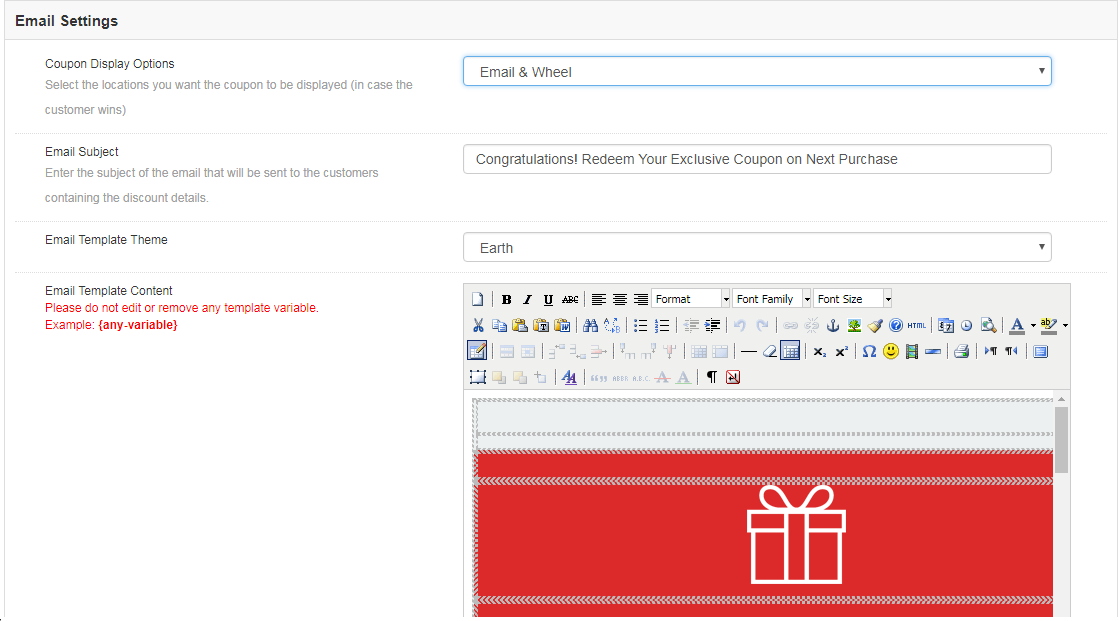
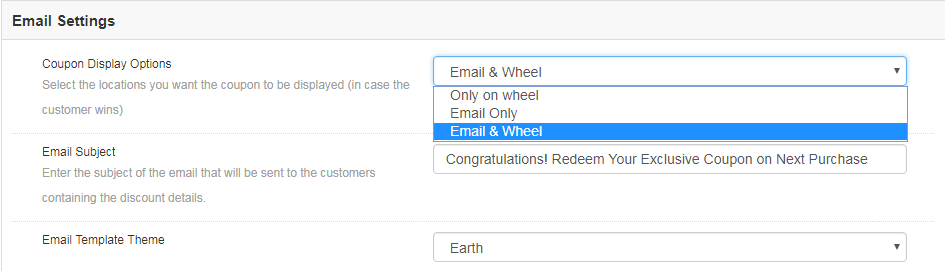
The coupon generated by the spin wheel can be copied directly from the wheel and used for shopping. At the same time, the coupons can be sent to the customers via email notification. It depends on the admin. He can choose the Coupon Display Option that suits his business model best.

Instead of setting the subject line manually for every mail, you can directly change it from the admin panel and set it for each and every email that is to be send to the customers.

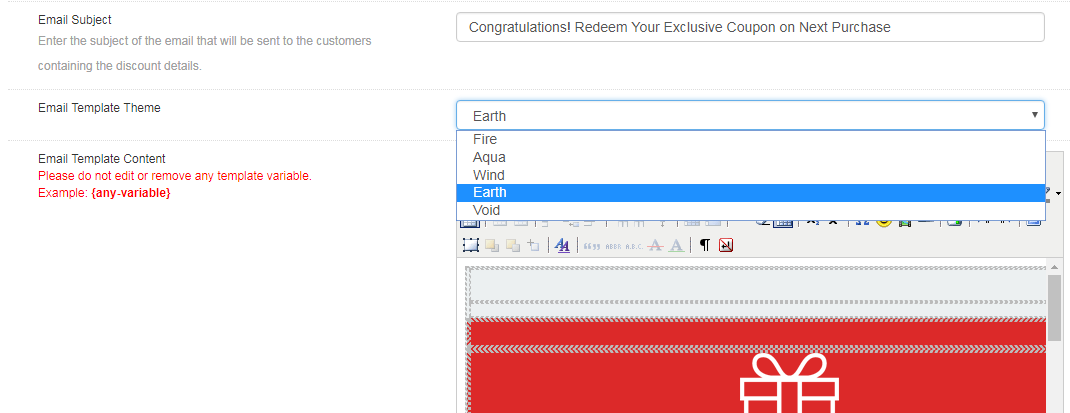
The email integrator comes with a bundle of email templates. The store admin can choose the one that he finds attractive, personalize it as per the need and send it to the prospective customers.

Statistics

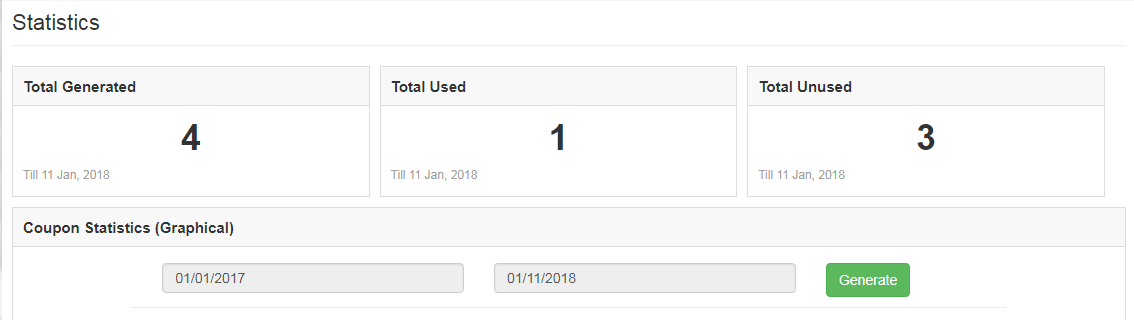
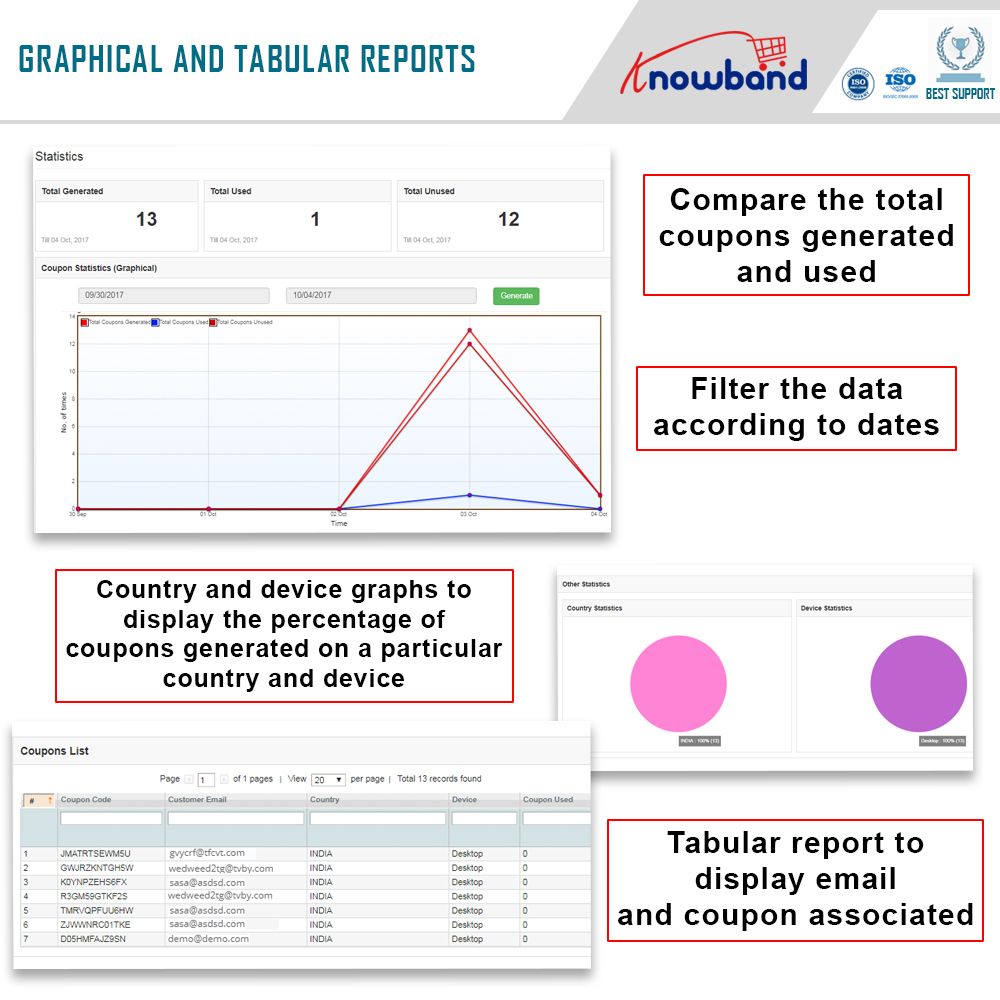
Magento Spin and win extension offers the statistical report of the number of coupons that are generated along with the number of coupons that were used and the ones that were left unused.

The same report is generated in tabular as well as in the graphical format. The report can be filtered by selecting the dates.

This tab even generates country-wise statistics. Along with this, it offers the insight whether the coupon was generated on the desktop computers or on any other device.

Store Front-end

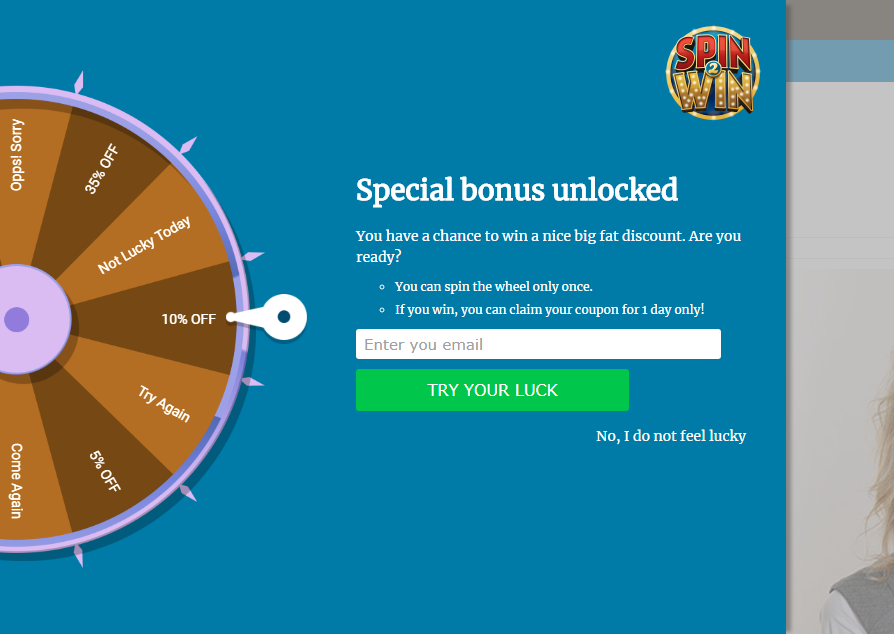
Once Spin and Win extension is enabled, the interactive pop-up will show up in the front end of the eCommerce store.

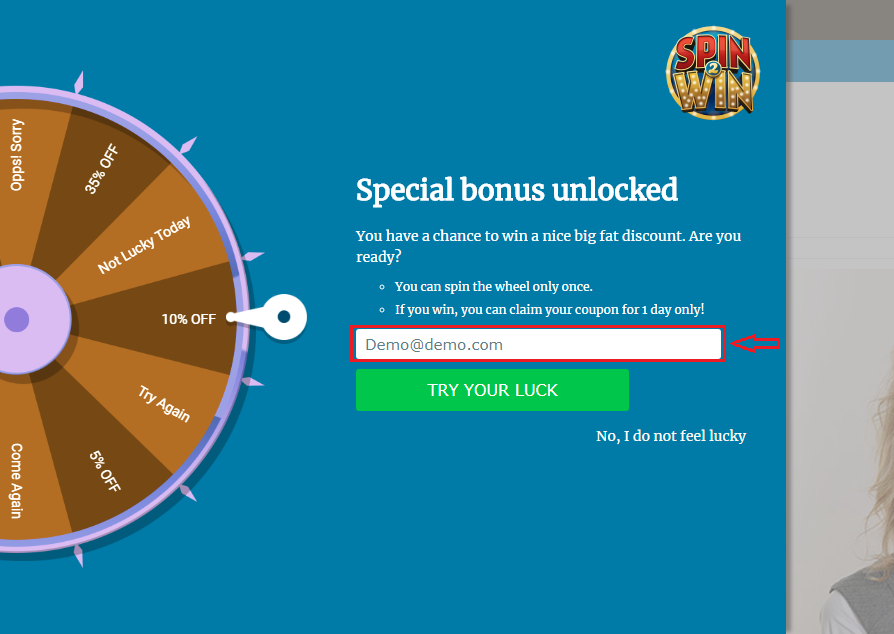
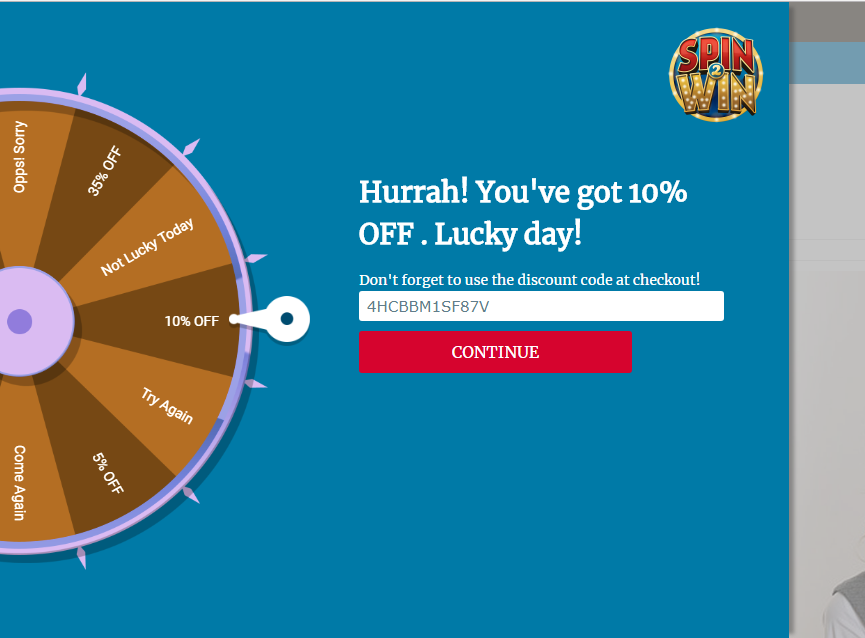
The store visitors can spin the wheel by entering their email ids. Thus, you need not stick to the annoying exit pop-ups in order to get the personal data of the customers. You can effortlessly lure them by offering enticing giveaways in return of spinning the wheel.

The coupon will be generated automatically once the wheel spins. The customer can then avail the offer by copying the code.

The same code can even be conveyed to the customers via email notification.


Disclaimer: In case the “Spin and Win” wheel popup does not display at the front, kindly clear the cache or delete the cookies. Sometimes cookies prevent the popup from displaying at front.

6 Customer Retention Hacks to Make the Visitors Purchase More

The trend of online shopping is at its peak, therefore, the idea of making sales to a potential buyer along with the idea of customer retention requires efforts and strategies. With numerous options available, customers are not restricted to a single store in order to make a purchase.

Thus, the process of customer retention is quite a task for eCommerce owners. Focusing on customer retention along with customer acquisition can offer great returns for any business in a long run. Below discussed are some of the ways in which shopping sites can make sure that their customers are retained and get satisfied with the overall shopping experience.

1. Subscription services

One of the better ways to make sure that the customers are retained in the web store is by getting more subscribers. It helps in increasing the average number of sales per customer. Subscriptions are the bread and butter of retention marketing. Once a customer is subscribed then they can be bought back to the store for making more sales. There are numerous ways of getting subscriptions and if the online websites follow the right approach then they can easily make more retained customers. Instead of sticking to the conventional subscriber pop-ups, the online shopping sites can go for the gamified pop-ups that can lure the visitors back to the store.

2. Optimize the website

It is difficult to gain higher traffic as it would be a costly process but the web store can be personalized in a better way so that the visitors who take a look at the website would like to make a purchase. The eCommerce stores need to provide the visitors with a better experience by working on important aspects of the website. They could make use of high-quality images to provide better information about the product, making the predictive search bar better, including the trust elements in the web store so that the customers may build better trust on the store and would be engaged in a better manner. This helps in attracting new customers and at the same time, the old customers are retained.

3. Reward the customers

The web stores need to make sure that their customers are being rewarded at a definite time interval. Rewarding the customers by various means helps in maintaining a better relationship between the customer and the online store. The customers who make purchases from your store are likely to demand something in return. If the eCommerce store doesn’t reward the loyalty of the customers then the factor leading them to make more purchases is lost. Therefore, the websites must make sure that they offer some kind of rewards either in form of reward points or discount coupons must be provided timely. This will surely encourage them to make more purchases from your store. Click here to know how you can reward your loyal customers.

4. Collect feedbacks and reviews

There is no doubt that the customers have their own level of understanding of the website. Thus, you must provide them with the chance to speak up and let them understand their problems or suggestions. This makes the customer believe that the website cares for their opinions. The use of honest reviews from the customers should also be used and attached to the product page. If you want to increase the conversion rates of your eCommerce website, interact with your customers. Talk to them directly. Having a Live Chat feature within your website will just do the job for you perfectly. Emails take time to get drafted. Moreover, the customer’s testimonial on the website can build a trust factor in the minds of other visitors. Thus, motivating them to make more purchases.

5. Provide better process flow

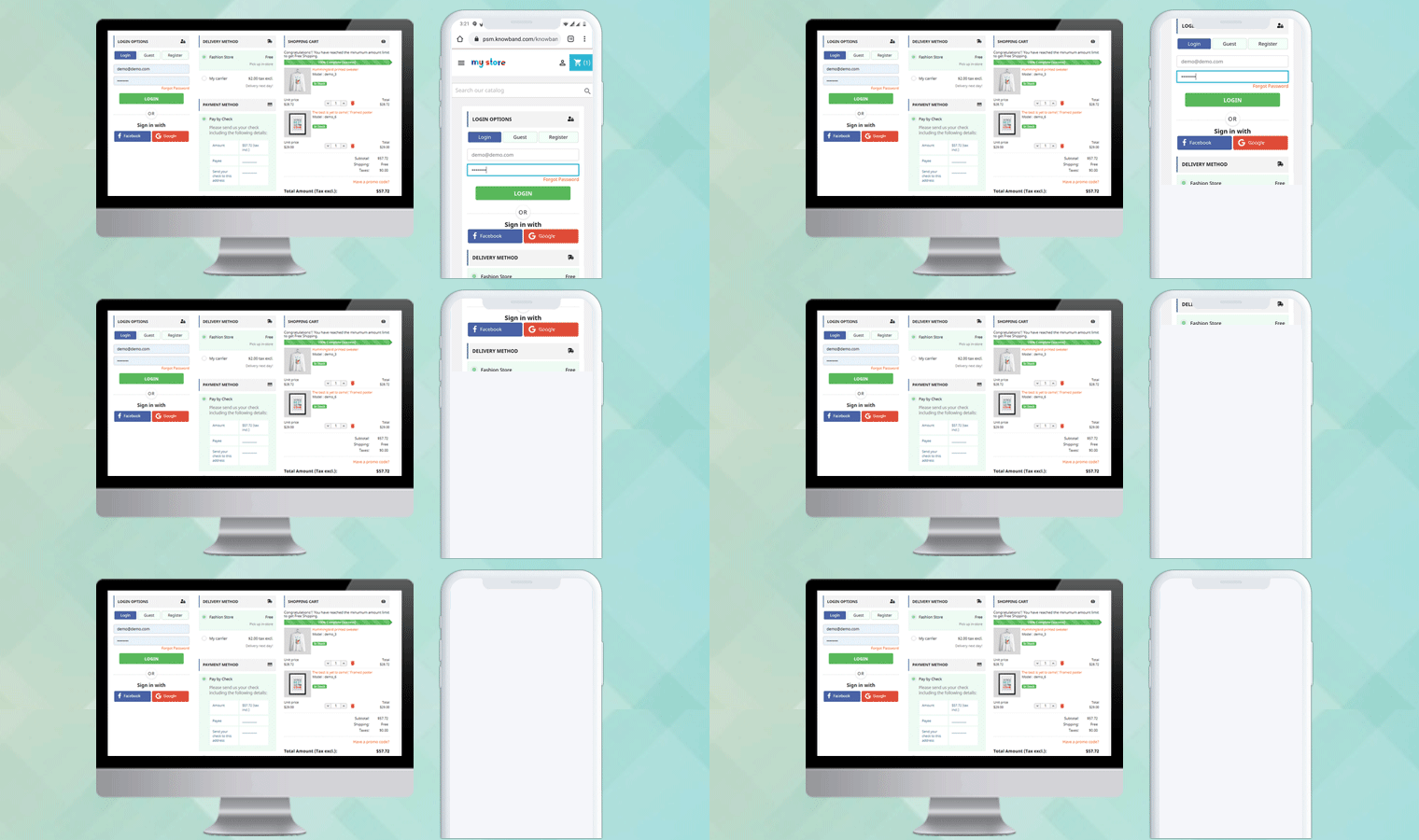
Customer retention is followed by a process. If the eCommerce store wants to make better customers purchase they need to provide them with better process flow. Some of the ways would be providing easy login and quick checkouts. The customer needs to make better and fast purchases and the one-page checkout enables them with the same. The customer doesn’t need to move from page to page in order to complete the purchase. The one-page checkout extension for Magento, Prestashop, OpenCart, and other eCommerce platforms can be used to enable this feature. Options like this not only enhance the customer’s experience but also provides better purchase options for retention. Cross-selling the product while the customers are checking out of the page is another way to retain the customers.

6. Improve website performance

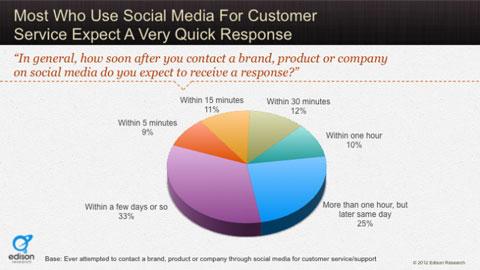
Don’t make your customers wait too long. The buyers have a definite amount of time in order to make a purchase and with every second they start to lose trust in the website. Therefore, making sure that the customers are responded at an expected rate will help in building better trust. Moreover, the involvement of the customers in making a purchase from the eCommerce store declines at a very rapid rate with increasing response time. Website performance plays an important role in determining the retention of the customer in the store.

Over to You

The eCommerce store wants to grow at a rapid rate and acquire new customers but it is equally important to retain the old customers as they serve the basis for regular purchase. Therefore, the online store must make sure that they incorporate various strategies and features so that the customers are entertained and obliged to make a purchase from the shopping store more often.

Click here to ensure customer retention on the eCommerce store

You Might Also Like:

Support:

Knowband is an eCommerce solution provider, serving clients worldwide for more than a decade. For any eCommerce website development solution and module requirements, visit the KnowBand store. You can write to us at support@knowband.com and our team will be happy to help you.

5 Features that Highly Influence the Customer’s Decision in Making Purchase

One of the biggest aspects of eCommerce that sums up their success rate is the way they influence the customers. The entire process of taking the visitors from the landing page to the checkout page is all about user engagement. In order to be more productive with the shopping site, various other areas must be covered apart from the product quality and service assurance. The customers has now moved on from the traditional form of making a purchase to online purchases. Therefore, it becomes quite important for the eCommerce store owners to present the sites in best way and try to reach out to the customer.

In order to get better understanding of the customer’s decision of making a purchase, we can discuss some of the points that can help the stores to get better conversions.

1. Product placement

It is quite important for the web stores to know the fact that the buyers are not going to make a purchase on the products which are dig deep in the store. The chances of making a purchase on the product that is available in the 6 page of a particular product are quite low as compared to the same product that has been presented in the page 1. Thus, the placement of the product plays a very crucial role in determining the behavior of the customers and making a better sales to them. the customer wouldn’t like to spend their time in searching for the product and digging deep into the website. Moreover, refreshing the web page every time may even be time consuming. This is when the infinite scroll can help you out. There are module available for adding such functionality in the websites. For instance, Prestashop infinite scroll, Magento infinite scroll and others. Showcasing the products in the single page can make the visitors delve into the site in a better way.

👉Explore the Module with Our Video Guide

2. Easy purchase options

Why bother to make a purchase from your store when the online transaction is easier on other sites? This question must be taken into consideration by the store owners when trying to provide the customers with better services. The customers always look for some kind of assistance when it comes to making a purchase as most of the stores provide the product from the same brand. In this regard, the shopping site can provide the customers with assistance when it comes to different aspects. One of the way to provide customers with easy purchase option could be by providing the one page checkout option. There are extensions available for the various eCommerce platforms such as Magento one page checkout module or Prestashop one page supercheckout. It saves the customers a lot of time and saves the extra efforts they need to put in order to complete the purchase.

3. Marketing campaigns

Keeping the customers informed about your offerings is the best way to aid the purchase decision of the customers. Advertisement play an important role in influencing the visitor’s decision to make a purchase. The eCommerce stores must always try to keep the customers informed about the various activities going in the web store. It helps in creating an awareness among the users and also helps in attracting a better crowd to the store. To commence a successful marketing campaign the online stores must first do a research and try to figure out the various concerns of the potential buyers and then target the audience. The increasing trend of promoting the products through blogs and post is also catching attention. The eCommerce store can use this strategy to improve the product understanding among the customers and encourage them to make a purchase.

4. Better branding of the products

The most common customer behavior that has been observed is the pattern in choosing a product. Majority of the customers prefer to make a purchase on the product that is directly related to a bigger brand or a self-established brand. Creating a brand image of not just the site, but even of the products being catered is must. This not only entrusts the customers that they are receiving a quality product, but also ensure the trust elements in the product.

5. Solve their queries

The availability of a chat support system in a website highly motivates the visitors to make a purchase. As, the visitors look onto the web store than the chances may arise where the users may find some complications with the products or their understanding is not developed. In that case if the online store provides them with the required assistance than the chances of making sales are improved. In other case, the users can use this feature to get their other doubts cleared. The customers like to get a response on their queries as soon as possible. If they are provided with the immediate response than they may be influenced to make a purchase from the store else the website is more likely to lose a potential buyer which could have been a paid customer otherwise.

Over to You

The customer behavior is highly complex and to completely figure out the best ways to tackle the customer decision, one needs to dig deep. The general points which are experienced as common traits that are shown by the visitors can be worked on by the online stores. The web stores can make use of additional addons to gain better conversions from the visitors.

Liked This? You’ll Like These Too:

Current Technology Trends for iOS Mobile Apps

The current trend followed by mobile app has completely changed from what it used to be some years ago. The mobile apps are becoming more resolved and focus primarily on the real-time problem encountered by the users. The iOS mobile apps are also developed keeping the user’s concern in mind. There was a time when apps which were made available to fulfill common purposes were introduced. Now the focus has shifted from developing apps for entertainment to developing an app for better usage and focus on a targeted objective.

The mobile app builder can be used for developing an app for the iOS platform but the owner must come to make sure that the app they want to develop must attract users to come up and download it. Even the Apple store will feature your mobile app only if they find that the app is able to sell itself. Thus, the mobile apps which follow the latest technology and trend are more likely to reach out to users and get featured else they would be lost like million other mobile apps in the app store about which the users would never come to know.

We can discuss some of the current technology trends in the iOS mobile apps that could help the app developers in developing an app that gets featured and makes better sales in the app store.

Accelerated Mobile Pages (AMP)

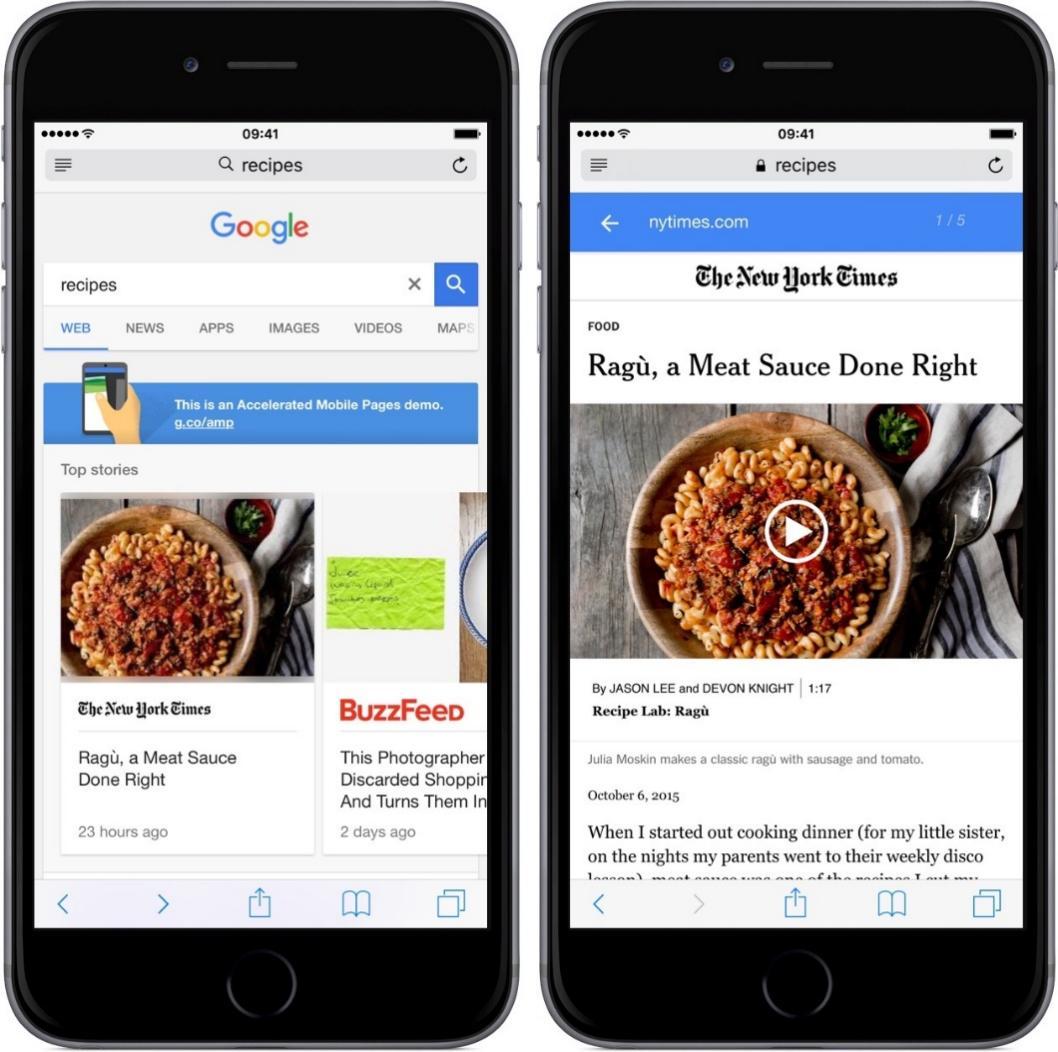
The introduction of Google’s AMP (Accelerated Mobile Pages) has brought a revolution in the traditional means of presenting the content in the websites. The web pages and the ads presented in the AMP will load instantly which provides the users with smooth experience and better engagement. Publishers and advertisers can now decide how to present their content and what technology vendors to use. This can be done all by maintaining and improving key performance indicators. It has proved to be a better means of responding to the users as if the website takes a long time t load than no matter how good the content is, the user won’t wait to check it out.
Internet of Thing

Internet of Things is the new generation technology that is catching attention at a very rapid rate. The mobile apps are being developed for watches, belts, and gears which take networking to a whole new level. With the Internet of Things growing in the current scenario, the virtual world and real world are merging and the time is near when the line between two states will completely be erased. This technology can be operated and used to its ultimate by the use of mobile apps. The introduction of the latest Apple smartwatch is one such example of incorporating the use of the IoT concept in mobile apps.
On demands apps

The rise in popularity for on-demand eCommerce mobile app is in the rise. Right from getting a taxi to making a purchase on the daily items. These mobile apps are going to take over the whole mobile community by the end of 2020. Thus, the app developers must make sure that they are developing apps which can fulfill the demands of the customers or are concerned with the requirements of the users. One of the major factors that encourages the app developers to introduce such app is due to the fact that all the tech giant wants to promote the mobile marketing and these mobile apps will prove to be an effective step in reaching the required results.

M-Commerce app development

Upgrading your online shopping site into m-commerce can help you stand apart. The shift to mobile and make the business bloom by leveraging the power of mobile phones. The shopping apps are an effortless way to target a larger audience. Thus, turning towards mCommerce is the new trend and eCommerce sites must consider it.
Currently, there are various automatic plugins to own native mobile apps for your eCommerce store. These readymade Mobile App Builder are pre-built in such a way that you can create a pair of featured eCommerce mobile apps in a few steps. This plugin is available for PrestaShop, Magento, Magento 2, OpenCart, WooCommerce, and Shopify eCommerce platform. Thus, mCommerce mobile app development is now way simpler than ever.

Security features

Security has been a concern for the iOS users for a long time. Therefore, the Apple store makes sure that all the mobile apps included in the store are made to pass through a security check and they may have trusted certificates before making it public for the users. As the hackers would try to breach into the little security gaps in order to gain access to the important and confidential information. According to a survey 75% of the mobile apps wouldn’t even apps the security tests in the first instance and 70% app directly violate the policy as laid by the iOS developing team. Thus, making sure that the app meets all the required ground rules laid will help in getting the app picked in the Apple store.

Beacon and location based services

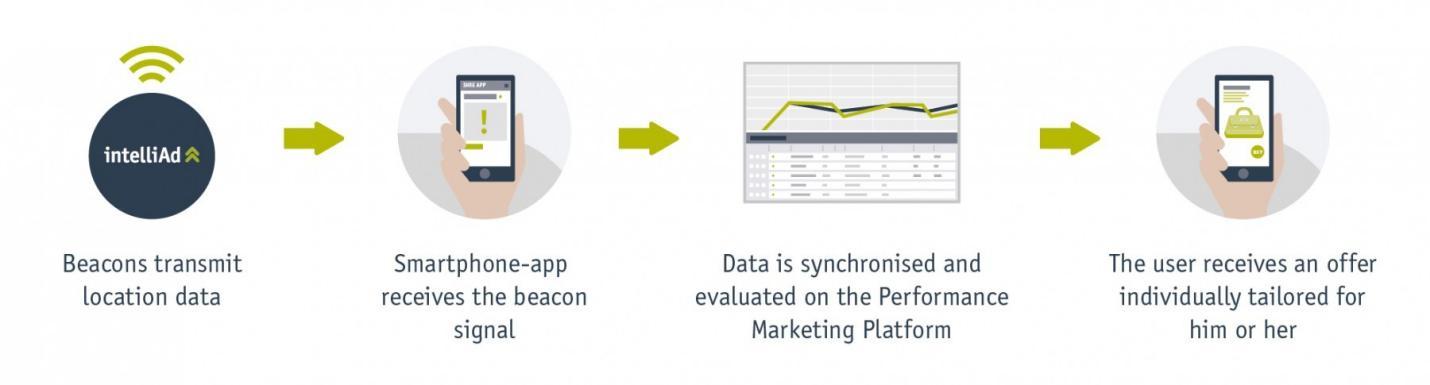
Integrated location-based services like Apple’s iBeacon are quite popular. The rise in such technology gives the app developer a chance to move from the traditional Wi-Fi method and shift to the new trend. The apps must be designed to provide iOS users with the best services and offer that they can avail as per their specific location. This advanced technology gives a major scope to personalized app marketing. Making availability of such apps will help in meeting the new standards and surely the chances are to get featured in the iOS mobile app store.

Over to You

The introduction of the new technology has led the app developers to move from the traditional method of developing apps. The app developer snow needs to enhance their skills when it comes to making an app available. iOS is developing at a rapid rate so must the app. The chances are better for a mobile app to reach majority if they incorporate better concept.

Liked This? You’ll Like These Too: