Introducing Knowband Prestashop Customer Wallet Addon

Prestashop Customer Wallet Addon offered by Knowband helps to make the payment for the product bought during check-out with the help of the e-wallet system. Furthermore, with the assistance of customer’s wallets, payments done by customers become easier, quicker, and more secure. Regardless of the time or place, you can do it from anywhere and anytime. 

All they have to do is add money to their digital wallet with the help of credit/debit cards or even online payment. As a result, you can utilize the e-wallet system at the time of purchase from your eCommerce store.

Prestashop Wallet System Module’s features you must know:

  • Use customer wallet for payments

With the usage of the Prestashop Wallet System Module, store admin can easily permit clients to make payments. These payments can be done by the wallet.
  •  Enable or disable the module

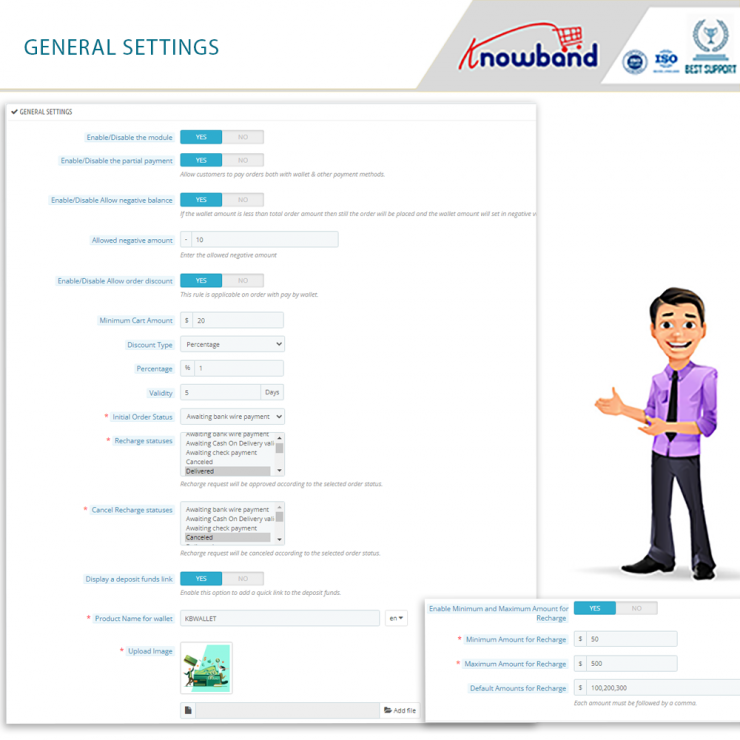
Enabling or disabling Prestashop Wallet System Module is very easy. This module can be enabled as well as disabled by the store merchant from the backend of the addon. 

  • Partial Payment

Another incredible feature of the addon is partial payment feature which allows customers to utilize the value available in the wallet along with other payment methods. 

To make you understand better, let’s take an example. A customer has $50 in the wallet however the value of the order is $100. In this situation, he will face problems. Now, he can utilize the wallet money with another payment method easily. Besides that, he can even go for a credit/debit card or online payment for the same.

  • Prestashop Customer Wallet Module offers negative balance functionality

Negative balance functionality is one of the incredible feature of the module. In case the customer has a less amount in the wallet than the total order value, he/she can place the order. After this happens, the wallet amount goes into the negative value. The customer, for example, has $90 in his wallet. The order will still go through even if the cart value is $100. As a result, the wallet will show a $10 negative balance.

  • Name and image of the wallet is customizable

Prestashop Wallet System module allows store merchant to name the customer’s wallet according to his wish. Similarly, the product image in the cart can be customized when the client is recharging the wallet.

  • Set maximum and minimum amount for recharge

Prestashop Wallet System Module allows the store admin to set a maximum as well as the minimum amount for wallet recharge. Further, he can even set a fixed amount for wallet recharges even if he disables the functionality.

  • Effortlessly track customer wallets 

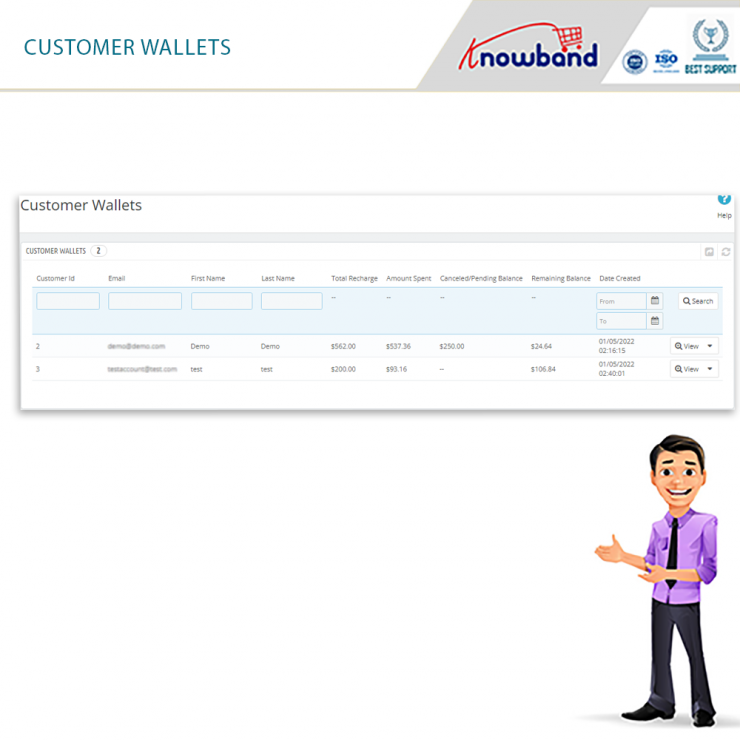
Prestashop Customer Wallet Addon  offers a feature called tracking customer wallets effortlessly. With the help of this feature, the admin can seamlessly track the clients that are using their digital wallets for making payments. Total Recharge, Amount Spent, Canceled/Pending Balance, he can check everything and more from the backend.

  • Tracking the wallet orders is easy:

Store merchants can easily track all the wallet orders swiftly.  

  • Discount settings

Discount settings is a great feature offered by Prestashop Wallet System Module. Furthermore, with the help of this feature, store merchants can easily promote the wallet functionality by providing discounts on the same. When the customer pays via an e-wallet system, he can easily offer cashback or a discount. Another benefit merchants attain is setting up rules for discounts which includes:

  1. How much should be the cart value for the discount?
  2. Decide if the discount is to be fixed or percentage-wise.
  3. Discount expiration
  • Status update: 

The admin can simply update the Initial Order Status, Recharge Status, and Cancel Recharge Status from the back of the Customer Wallet.

  •  Showcase a Deposit Fund Link in the front end: 

With Prestashop Wallet System Module, you can deposit the fund link in the front end. with that this functionality allows the store admin to showcase the tiny wallet balance icon throughout the website and this functionality only works when you enable it. When the merchant hovers on the icon, it pulls out and suggests recharging the wallet.

  • Setting the maximum and minimum amount for recharge:

Here, the admin can set a maximum and minimum amount for wallet recharge. Further, in case he disables the functionality, he can set a fixed amount for wallet recharges.

  •  Cron addition: 

The admin can run the Cron functionality for deleting the Recharge Products automatically.

  • Tracking customer wallets is effortless:

 Here, the admin can seamlessly track the customers who use their digital wallets for making payments. He can check Total Recharge, Amount Spent, Canceled/Pending Balance, and more from the backend.
Can the admin expect benefits from the module?

  • Prestashop store admin can expect a lot of benefits from the module. The module functions similarly to an online payment gateway. Furthermore, the possibility to pay a portion of an order using a wallet can be enabled by the store administrator. Furthermore, he or she can complete the remaining tasks using a different payment method.
  • The customer’s wallet transaction can be viewed by the admin from the backend of the module. Moreover, the customer’s wallet transaction history in detail can be viewed as well. 
  • Purchases made with the wallet, the store admin can even track them.
  • Every customer love discounts. With the assistance of the Prestashop Customer Wallet Addon , the store admin is free to offer discounts to the customers. Furthermore, the admin can decide, whether he wants to keep the discount fixed or percentage-wise for the customers.

Customer benefits of the Prestashop Customer Wallet Addon :

1. Prestashop Customer Wallet Addon allows customers to add money to their wallets by using different payment options. 

2. Customer can still pay for the order even if there isn’t enough money in the wallet for payment. This will lead to a negative balance in the wallet. The amount gets deducted when the customer recharges the wallet.

3. Prestashop Customer Wallet Addon allows customers to access their wallet balances and transactions by logging into their accounts.

Final Thought

Store merchants who are new to this eCommerce business might not be aware of the importance of a payment system. The payment system is one of the most important factors that might influence whether or not a potential consumer stays on your site. Customers have shown that they prefer to shop on websites that offer a variety of payment options. Some people prefer to pay using cash, while others prefer to use a credit card. The concept of paying with a digital wallet, on the other hand, has recently taken the eCommerce industry by storm. The wallet feature in online retailers has a big impact on the conversion rate of customers. Hence, Prestashop Customer Wallet Addon.

In case you find any issue with the installation of the module or any other feature, feel free to write us at support@knowband.com. Along with the efficient module, Knowband also provides efficient post-sales support to the customers.
Admin Demo

Store Demo

User Manual

Clients find Knowband’s PrestaShop Gift Card Module Impactful on Holiday Sales

Do you also get confused while choosing the gifts for your friends and family? When I purchase a gift, what bothers me the most is if they will like it or not. If you’re anything like me, you’ll be able to relate to this. It does affect the buying decision. But, I am grateful for the unique gifting choice of ‘Gift Cards.’

These days many eCommerce websites and retailers sell gift cards in their stores. You can easily send the card to your friends and they can buy whatever they like using the Gift Card amount. If you are a PrestaShop store owner and want to sell Gift Certificates in your store then I will explain how easy it is to add a Gift Card to your store. This blog will be your complete end-to-end guide with real-life examples and client feedbacks.

How Do Gift Card Works & PrestaShop stores make money on them?

Gift cards are like prepaid debit cards that have money loaded on them for future usage. These are commonly utilized both online and in person. Many eCommerce stores offer Gift Cards on their store with fixed or custom amount options.

There will be a minimum and maximum initial loading amount on many gift cards. The receiver will have the freedom of spending the loaned amount in buying products from that store. Some eCommerce also allow partial usage of the card while most of the cards are for a one-time purchase.

As a sender (existing customer) purchase a gift card, it generates advance revenue for the store. Once the card is sent, there are high chances that the receiver will be a newbie for your store. Hence, increases advance sales and customer acquisition rate.

Any customer with the gift card must check its eligibility and validity when they buy or receive a gift card.

Boosting sales is easier with Prestashop gift card addon

Not only digital gift cards are beneficial for customers because it saves their time in searching for the right gift but for merchants as well as it increase your online business’s sales, especially during the Christmas or New Year season, or the holiday season. You might not be aware but more than half of customers enjoy sending gift cards to their friends and family.

With the PrestaShop Gift Card Addon,

you can increase your earnings while also bringing new clients to your online store. The module’s ability to sell gift vouchers also aids brands in promoting their labels without having to spend additional money on marketing.

It’s a Smart Move if you Sell Gift Cards on PrestaShop Store

  1. Advance Revenue
  2. Acquire new Customers
  3. Promote Brand Identity
  4. Personalized Shopping Experience

This gift card captures new orders, particularly during the holiday season when they are sold in greater numbers. Selling gift cards on the PrestaShop store also enhances the entire holiday season’s earnings.

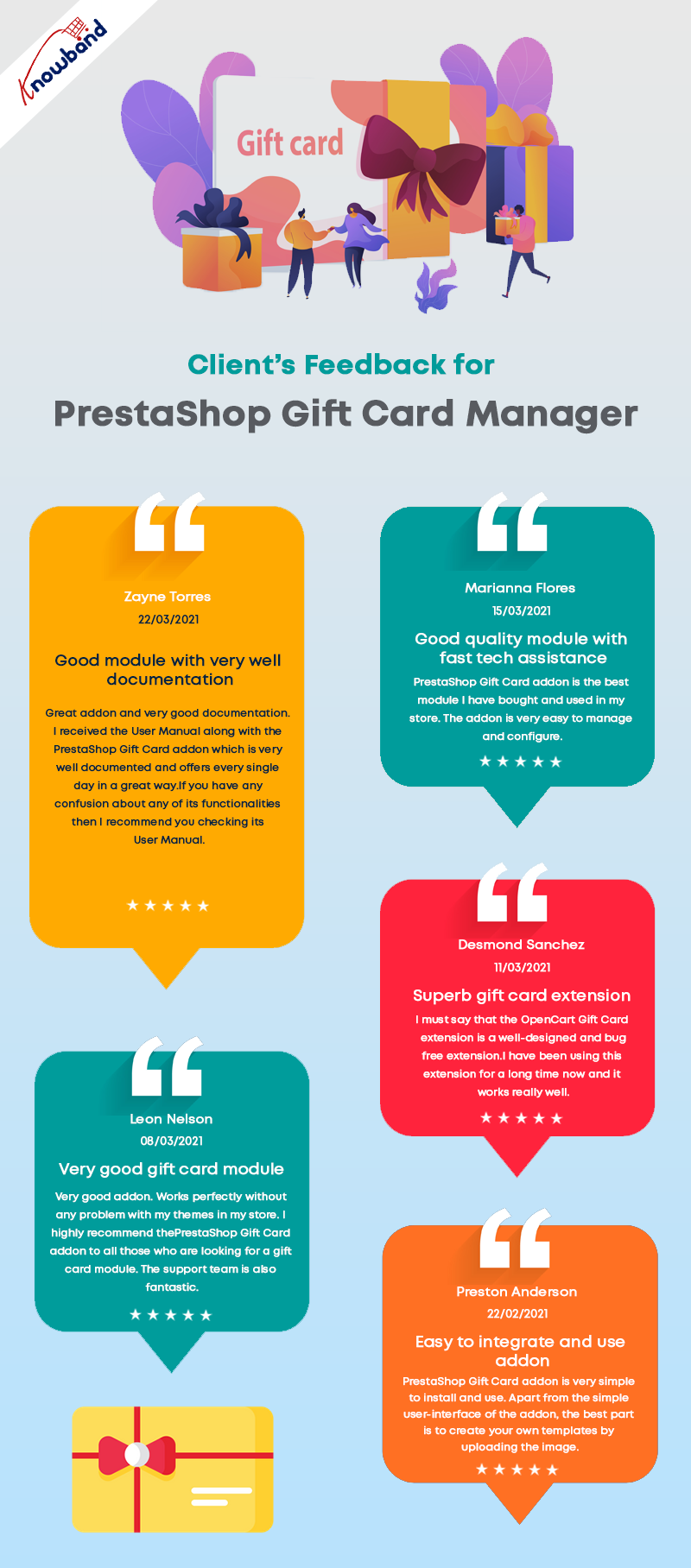
Clients love this fancy module- Feedback

Why KnowBand’s Gift Card is their first choice for Holiday Sales

The gift card area can be installed and easily added to your PrestaShop eCommerce store. These gift certificates/cards can be sold with festive themes like Christmas, New Year, Mother’s Day, Valentine’s Day, etc. Clients have experienced that the PrestaShop Gift Card Manager leads to a rise in sales in a short period of time.

Better UI

The module’s installation is extremely straightforward and requires no high-level coding skills. With that, it comes with a great UI design for the admin panel as well as the front-end view.

Better accessibility of Gift Card feature on PrestaShop Website

The Prestashop Gift Voucher Module by Knowband allows you to add a gift voucher button to several parts of your website, including the header, footer, and left section of the page.

Fancy Themes for every occasion

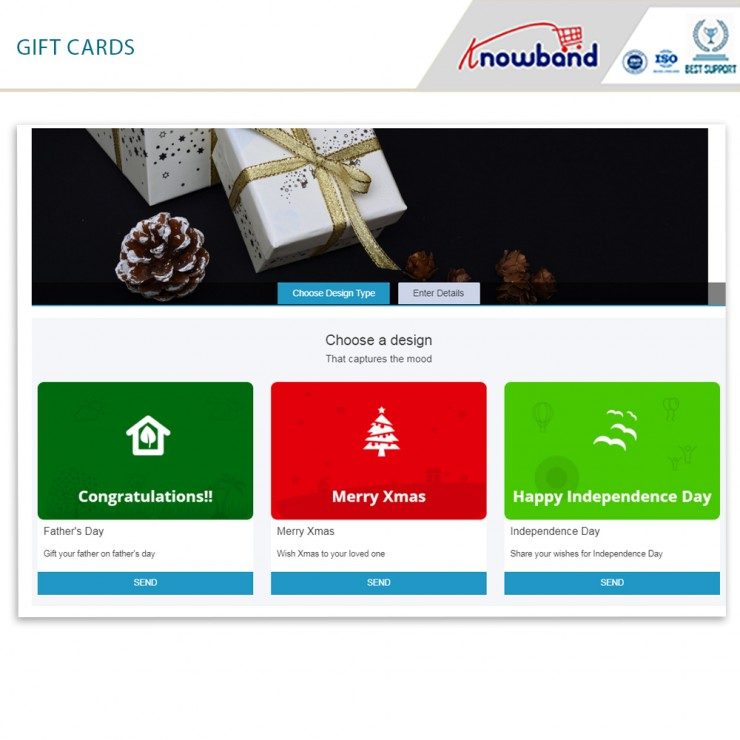
Not every person likes to have a similar design gift card for every occasion. This module gives enough freedom to merchants to customize their gift cards for different occasions such as birthdays, Christmas, anniversaries, Halloween, New Year’s Eve, Father’s Day, Mother’s Day, and so on. Similarly, store owners can create new templates with immediate subjects from the back office.

Upload an image and create custom gift cards

Visitors may create and send a personalized gift card using the PrestaShop Gift card manager, which includes a picture upload feature. A sender can now send a gift card with a personalized image. One way of sending gift card is via email with a custom note and one is, you can print the gift card by yourself.

Custom emails and ready-made templates

The Prestashop Gift Card Addon by Knowband includes a note email template for informing the giver and recipient on the status of their gift cards. From the module’s back office, the admin can quickly change the text of this email. On the receiving end of the gift card, customers can include a note for their loved ones.

How do customers send Gift Card to friends and Family

The module allows two methods:

  1. Send the gift card over email with a custom note
  2. Print it yourself and send it to your loved ones

Track Gift Card Order History

The use of the gift voucher code in the checkout is displayed on the coupon history tab. The following information will be displayed: Order ID, Customer Name, Amount, and Date Added.

Cron Functionality

Customers will appreciate the ability to send gift cards on the day of the event. Cron allows the PrestaShop store administrator to schedule the email’s delivery.

Knowband’s PrestaShop Gift Card Module enhances your customers’ buying experience in your business by making events more memorable for their friends and family. It aids in the retention of current clients as well as the acquisition of new clients for your company.

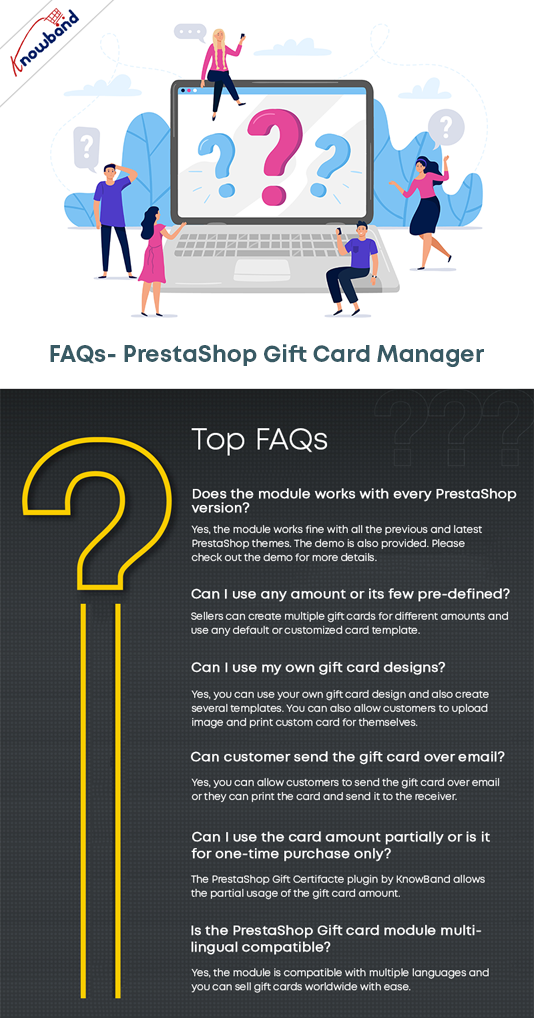
FAQ – PrestaShop Gift Card Manager Module

To Wrap up

So, what are your thoughts on the subject? If you own a Prestashop store and want to grow your business faster and want to attract more and more clients this Christmas and New year, this is something you should look into. For your business, digital cards are critical. The PrestaShop Send Gift Card extension is a highly functional, configurable, and handy module that will help your eCommerce store increase sales and conversions. Knowband is offering Prestashop Gift Card Module at $42.40. Further, the Knowband is offering Year End Sale- Min 20% Off Sitewide + Extra 20% Off. Use Code: KBOFF20.


Click here to explore the module and learn why digital gift cards are a must-have on every eCommerce store?

If you are unaware of the benefits of selling gift cards then click here.

How to Offer a Free Gift with Purchase on PrestaShop Store

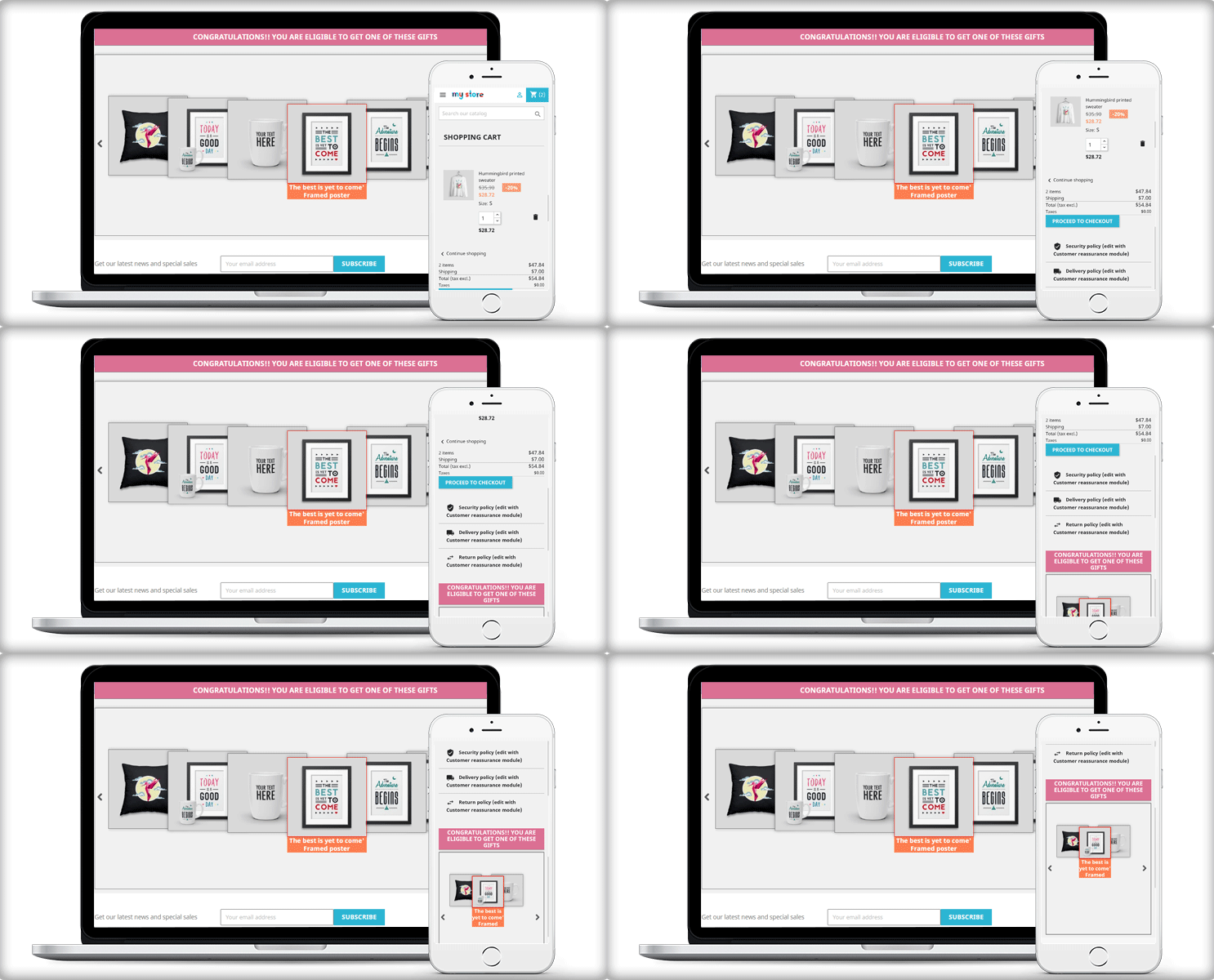
Gifts with purchase are a terrific approach to grow your business because they function as client marketing gifts! With the PrestaShop Gift with Purchase Addon, offer a free product from your store to encourage new and existing customers to buy more of your products. 

This Prestashop free gift module gives your customers gifts based on the value of their cart. Admin can control the cart’s range, quantity, and price from the backend.

Auto Add a free gift to the customer cart with PrestaShop Gift the Product Module

Some customers will undoubtedly be ecstatic to receive specific items and will place an order only for the purpose of receiving them.

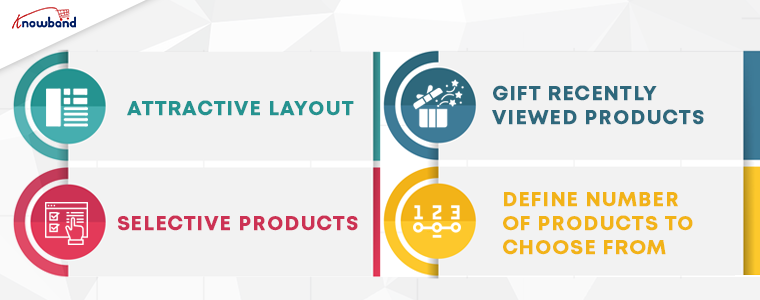
  1. Attractive Layout: There are two distinct layouts for this Prestashop gift module. Any of these layouts can be used by the administrator to display the gifts to consumers on the front end.
  2. Selective products: The admin can manage the assortment of gift products that are displayed in front of clients in the backend.
  3. Gift recently viewed products: It has a feature to display the customer’s recently viewed products. These can be listed and offered as a free gift with purchase.
  4. Define a number of products to choose from: The admin can also choose how many gift products to display on the front end. 

The gift addition offers a very appealing manner of listing the gift products, which will undoubtedly entice customers to continue the checkout process.

The product purchase reward module generates positive energy and encourages clients to return to the site.

Let the customer add the free gift to their cart

The fact that this strategy necessitates a client action is its largest stumbling block. The free product will not be immediately added to the customer’s cart as a result of the discount. Prior to entering the checkout procedure, the customer must do it manually.

How PrestaShop Gift with Purchase Module works?

If you feel like rewarding your customers to earn loyalty, offer free gifts with purchase. This should be based on specific rules. With PrestaShop Gift with Purchase Module, you can create eligibility rules:

Offer a free product when a customer spends $X amount

Create the rules based on the cart total. Any customer who shops in your store will be eligible only if their cart value exceeds the minimum eligibility limit.

Offer free gifts on limited product purchases

Set rules to offer the free product based on different criteria like – on a category, based on Price, selected Products, etc. 

Add Gift price amount to automate the process

The store manager can add a minimum and maximum amount for gift price. 

Based on these rules, the products will be displayed automatically on the PrestaShop Gift with purchase block.

Layout options 

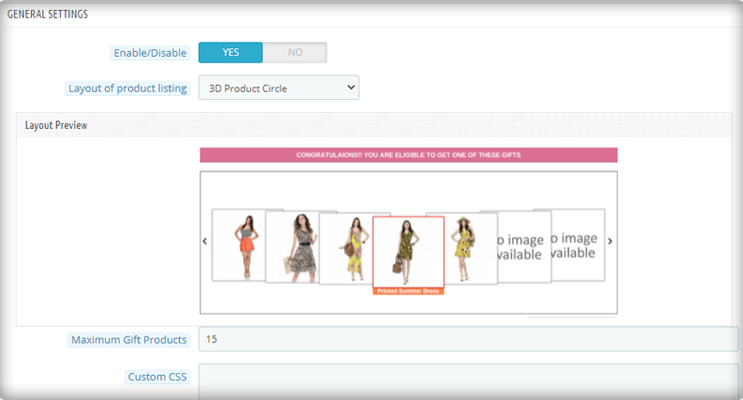
The module offers two layout options: 3D- Product Circle view and Normal Listing of Products. It gives an attractive look to the block.

To add the recently viewed items in the free gift with purchase option, you must add a minimum of 10 products.

Admin Benefits of Prestashop Gift with Purchase Module-

The consumer will be able to see what kind of rewards he/she will receive when placing a specific order. There are several admin benefits of gift with purchase addon.

  • Sales in the store will increase.
  • This PrestaShop freebie addon will enhance consumer engagement.
  • Seller may establish a variety of price rules. 
  • Different rewards can be offered on the basis of cart price.
  • The best layout can be selected that matches the store theme
  • Offer non-selling products as free gifts to get rid of old stocks
  • The module is mobile responsive
  • Multi-store compatible and supports all the languages

You did an excellent job!

We have addressed the best features of the gift with the purchase module. It allows you to give your customers a free product in exchange for their spending a bit more. The PrestaShop gift with purchase module offer is just one of the many strategies you can use to boost average order value.

Two Effective Modules to Keep Away Spammers and Bots from PrestaShop store

As many as 200 million Captcha tests are estimated to be performed online every day. Nearly half (43 percent) of all UK organizations have reported cybersecurity breaches or attacks in the last 12 months, according to the Cyber Security Breaches Survey. Such data breaches have resulted in missing files, corruption of devices, processes, or websites, and even loss of properties or intellectual property.

In the year 2020, many CMS platforms were attacked by ‘KashmirBlack’ and it camouflaged itself very well and stays undetected. This can happen any time and many websites face this fake bots issue every day. If you do not have a Google reCaptcha test and Spam blocker on your PrestaShop website, here’s what you need to know about them and how your company or blog will benefit from them. 

Spammers generally add fake comments on your website and you may observe fake registrations. We present two modules that could prove to be efficient in blocking bots and spammers from accessing your website and doing malicious activities to help you get rid of spammers.

How to Prevent PrestaShop website from Spammers and Bots? 

To save your website from spammers and bots, we have two modules that can help you deal with this. Let’s dive into it.

  • PrestaShop Google reCaptcha 

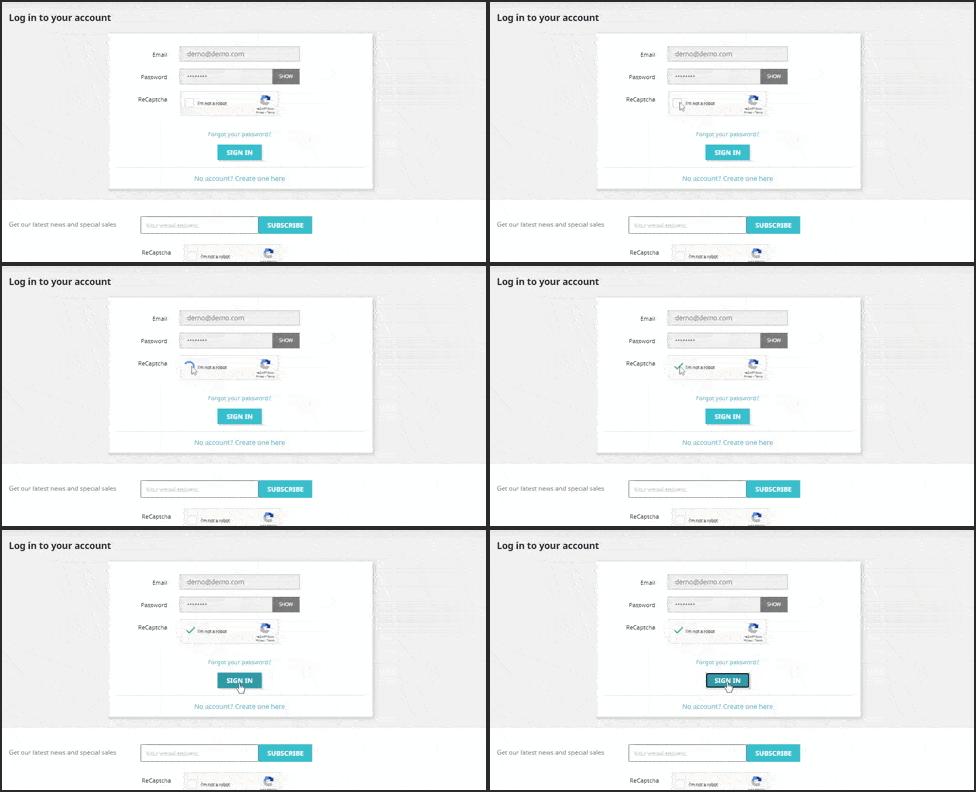
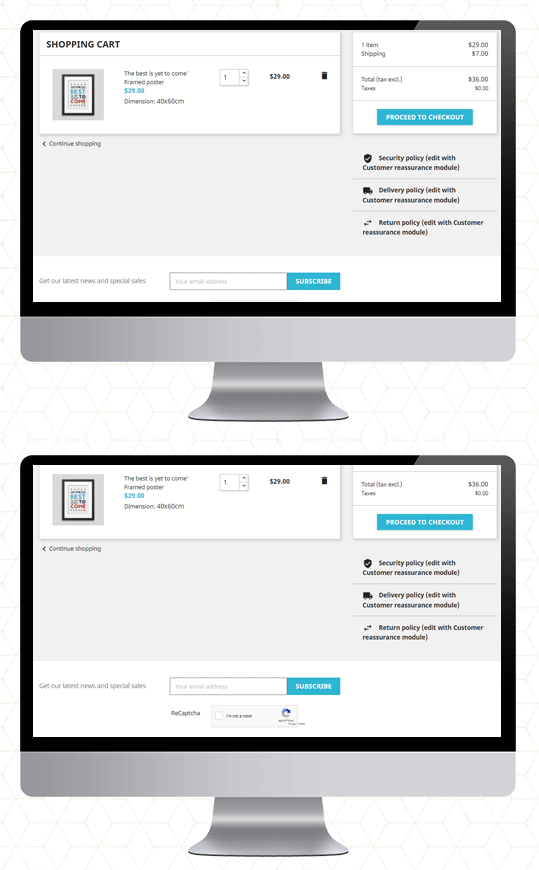
The easiest way to fight fake registrations on your website is PrestaShop Google reCaptcha.   It applies to your website a protection layer. Google reCaptcha can be enabled on the following pages of your website. 

  1. Customer Registration Page 
  2. Login Page

  3. Contact Page
  4. Forget Password Page
  5. Supercheckout Page
  6. Newsletter subscription

You may define the reCaptcha for each page accordingly: v2 reCaptcha or v3 reCaptcha. These are the two available options and these can be used as per your need. 

The old reCaptcha, i.e. v2, is a basic version that shows the “I am not a robot” checkbox that enables individuals to go through that specific page quickly. While the v3 reCaptcha uses machine learning and advanced risk analysis to recognize human bots. It works with all the PrestaShop themes. 

Save yourself from transaction frauds: Along with this, the Google reCaptcha is also compatible with Knowband’s PrestaShop One Page Checkout. It is the most effective way to prevent your store from transaction fraud.

Click on the links to take the admin demo and front-end demo tour of PrestaShop Google reCaptcha Module. 

Do not let the spammers affect your business!

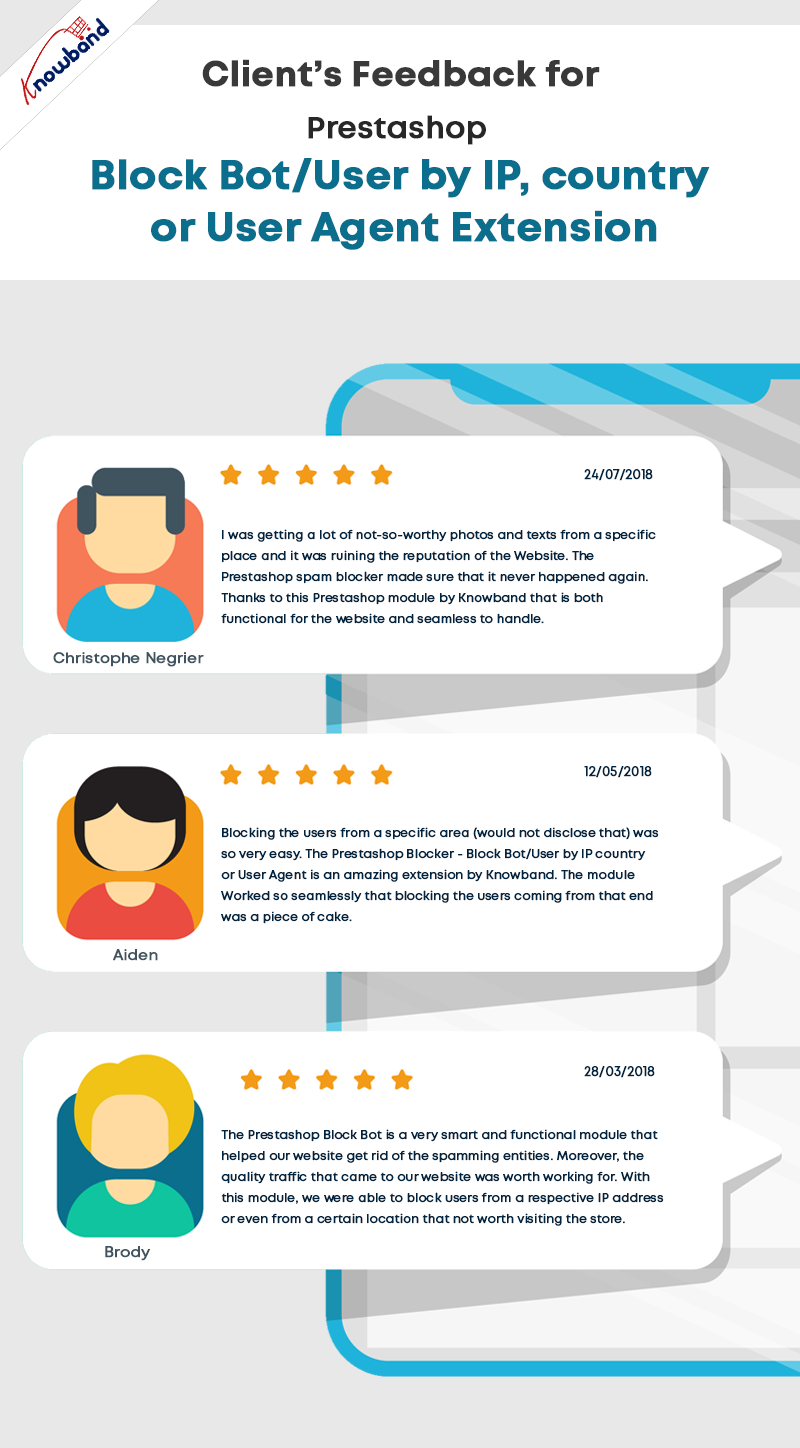
  • PrestaShop Bot and Spam Blocker

Fed up with the bot registrations and fake sign-ups! 

The PrestaShop Spam Blocker Module allows you to block the visitor by tracking the IP address, country (location), or user agent. 

It is simple to block the IP addresses that look fishy or you find suspicious. It also allows to input several IPs. altogether. Or, instead of blocking, you can allow your PrestaShop store to access only that IPs.

Similarly, you can position countries in the block list if you are witnessing a high amount of spam traffic from a particular location.

The next functionality it offers is to block spammers/bots from a particular user-agent landing on your website.

Sometimes it may happen that you are blocking a genuine person. In that case, it is possible for the customer to communicate with the website owner and ask them to undo it.

Also, if you want to exclude a country or a region from providing your services, you can make that happen. The blocker allows blocking the region where you are not delivering or selling your products.

The admin will monitor the back-end requests and make the decision accordingly.

Install Spam and Bot Blocker module on your PrestaShop store. Explore the Admin Panel and Front-end demo of the Bot and Spam Blocker module on the KnowBand store. 

Final Words

This tough fight between the website owners and the spammers will never end. Spammers will continue to spam to spoil your business. The Google reCaptcha and PrestaShop Bot and Spam Blocker will be extremely beneficial to get rid of spammers and bots on your website. 

For any query related to PrestaShop modules, you can drop us a comment or write us at support@knowband.com  

You may like to read:

How to Integrate google reCAPTCHA with PHP

KnowBand Celebrating 10K+ PrestaShop One Page Checkout Installs on Addon Store

Creative Abandoned Cart Recovery Strategies Your Competitors Aren’t Using

9 Checkout Conversion Killers Driving Your Buyers Away

How to Display Related Products on PrestaShop Website Pages

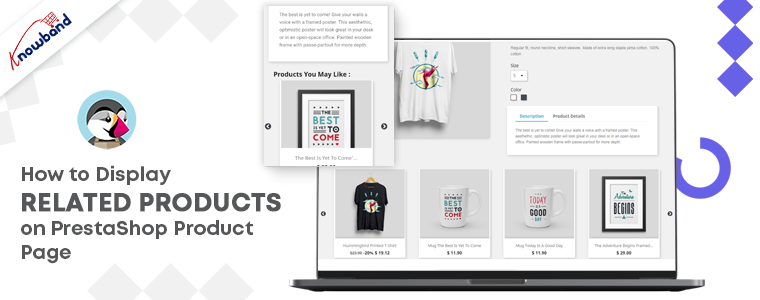
Looking for the finest ways to upsell or cross-sell to customers? Add related products on your PrestaShop website pages. It’s not simply a nice-to-have feature for your e-commerce site; it’s an essential aspect of the sales process. To make your business marketing strategy work well, you can give a shot to upsell and cross-sell. This technique works for every business, be it a small company or an eCommerce like Amazon.  If you are not sure, how to display related products on the product page, shopping cart, or various website pages, I will recommend you to add the PrestaShop Automatic Related Product Module to your PrestaShop storefront.

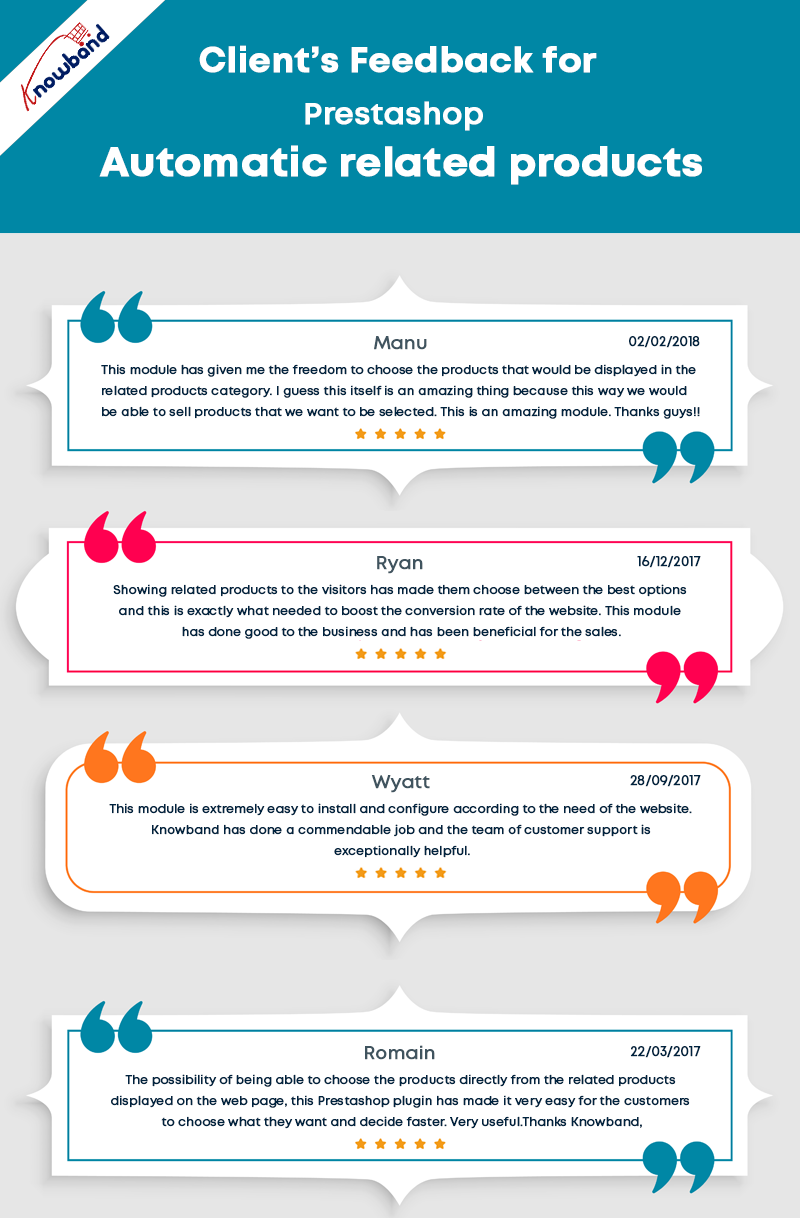
Discover about PrestaShop Automatic related product module

There are several methods for displaying related products on multiple pages. The PrestaShop-related products module can be configured by the store administrator to meet the needs.

Features of PrestaShop Automatic Related Product addon:

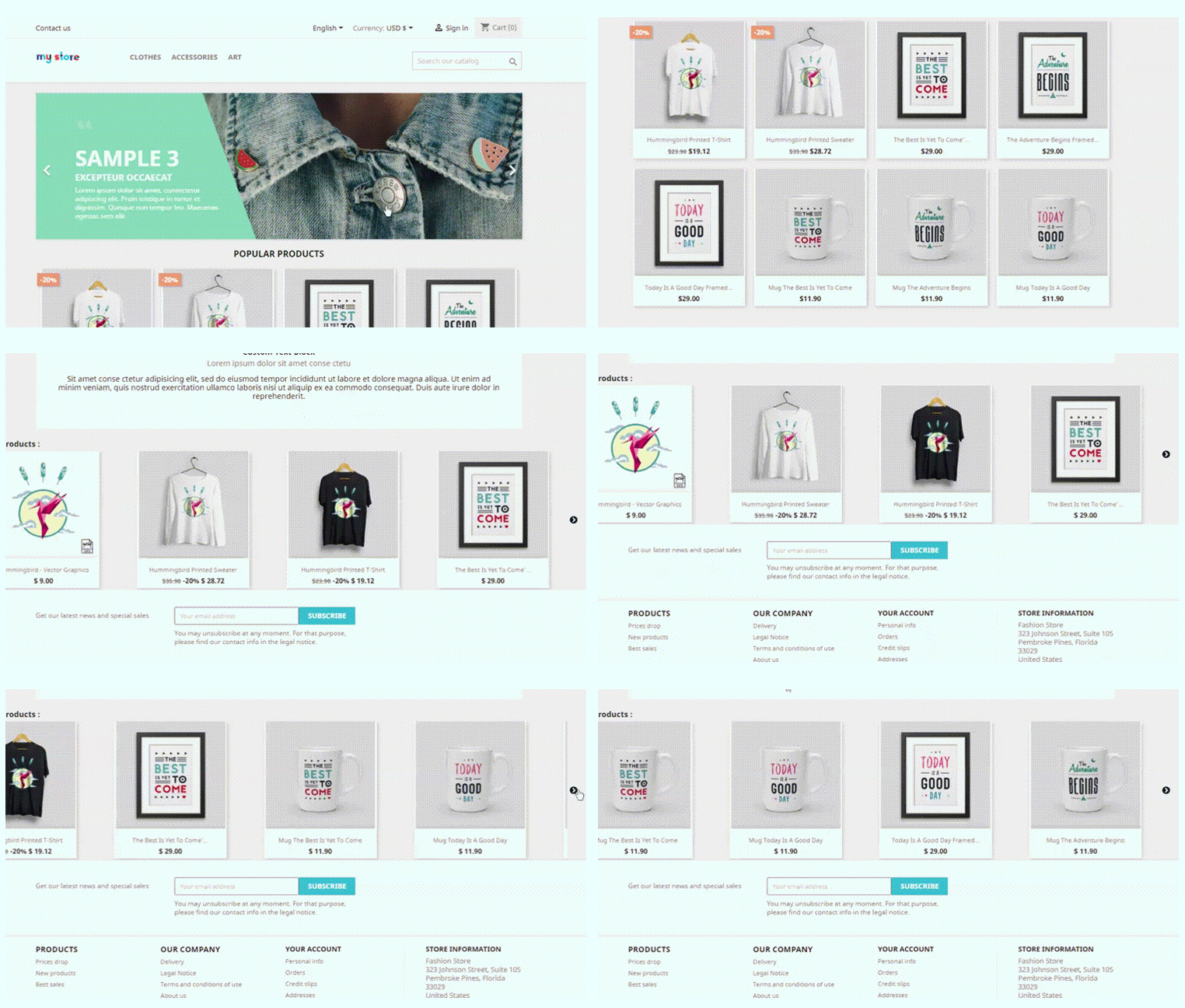
  • With the aid of PrestaShop Automatic Related Products module, display related products automatically on:
    • Homepage
    • Product pages
    • Category pages
    • Cart pages
    • Manufacturer page
    • Purchase confirmation pages

  • Store owners can display the most relevant products and can only include available products.
  • The PrestaShop-related products module allows customizing the title of the related product block in a variety of languages.
  • Easy positioning of the related products. Show related products in the left column, right column, or at the bottom of the page.
  • The store manager can choose how to display the related products. Showcase the most popular products, best sellers, new items, or by using user history.
  • The PrestaShop automatic related product addon allows the manager to show a list of specific products on the related product list.
  • There is an attribute, keyword filter, that can be specified for particular pages.
  • Set the maximum number of linked products that can be displayed on various pages.
  • The PrestaShop-related products module allows specifying the priority mechanism to display related products.

If no related products exist for the first priority requirement, the module will go on to the next level of priority.

How store owners get benefited by showing Recommended Products?

PrestaShop Automatic related product addon has several advantages.

Cross-sell by displaying related products

On the homepage, product pages, category pages, cart pages, manufacturer sites, and purchase confirmation pages; this related product extension displays the related items. Showing a mobile cover when a customer is buying a new mobile phone increases the chances of purchase. This is how cross-selling works.

Several filters to achieve the relevancy

Display only available and in-stock products as related items. Select the method for displaying related products, such as

  1. Top-visited products
  2. Bestsellers
  3. New items
  4. Displaying relevant goods based on user history

Hide out-of-stock from recommended products

Showing a product that is ‘out of stock’ will create a negative impact on your prospect. To save yourself from this situation, you can now hide out-of-stock items from the related product list. After all, customer experience is your priority.

PrestaShop related product module reduce bounce rate

This may happen that a customer does not find the right product while exploring your website. They even get confused about what is best to have. Show related products on the product page to help them find what they were looking for.

Increase average cart value on your PrestaShop store

Customers can buy more things if they look at the products that are similar to the ones they have picked. To improve sales, the administrator can show excellent identical products.

Mobile responsive and compatibility check

The module is responsive to all the devices like mobile phones, tablets, and desktops. Every user can see related products in every browser automatically. The PrestaShoprelated product module is highly compatible with all other Prestashop themes. Multistore compatibility, multi-lingual compatibility, and SSL compatibility are some of the plus points.

Conclusion: It is easy to install and can be a major game-changer if used as a cross-selling tool. It emphasizes the look of the product page and other website pages. Display related products anywhere on the website. To the left, right, or on the bottom of the website page. The PrestaShop Related Product addon maximizes the engagement rate on your store and reduces bounce rate.

So, how long are you going to wait? Now is the time to get this cross-selling solution and take your earnings to the next level.

More ways to customize the product page

How to add Custom Fields to PrestaShop Product Pages

10 Must-have Addons to Optimize Prestashop Product Pages

How to Optimize the Product Page Content for Better User Engagement?

The New UI of KnowBand’s PrestaShop Marketplace Builder Makes Configuration a Breeze

The latest release of PrestaShop Multi-Vendor Marketplace Plugin brings significant improvements to the UI design of the admin interface for the marketplace users. The enhancements are focused on admin panel configuration UI design and plugin compatibility across the plugin. It also has the latest feature update in the seller dashboard for product uploading.

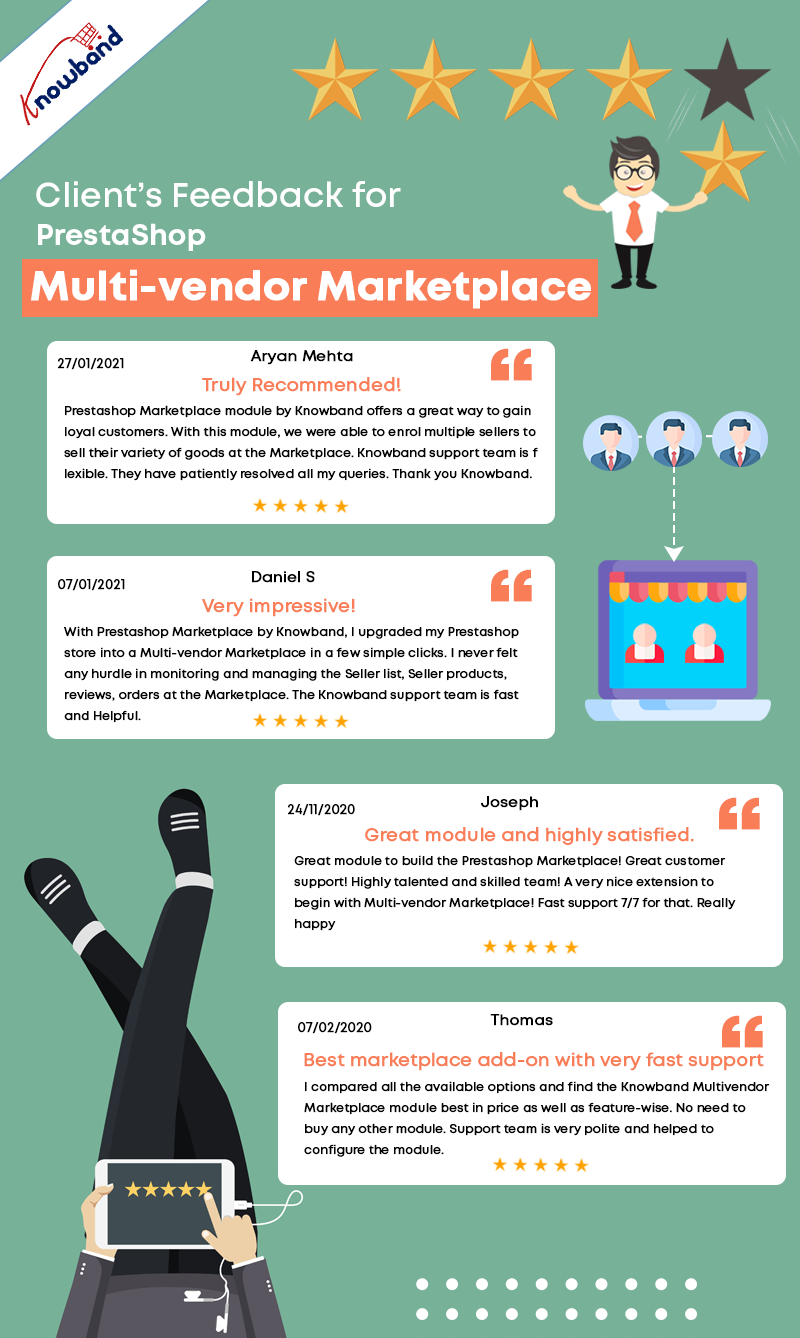
PrestaShop Marketplace builder addon is listed in KnowBand’s best seller products.  We have crossed 3000 downloads for KnowBand’s PrestaShop Multi-vendor Marketplace plugin that means 3000+ clients are using the Marketplace module. It builds up the best marketplace on PrestaShop and allows merchants to build a seller community.

What is new for admin?

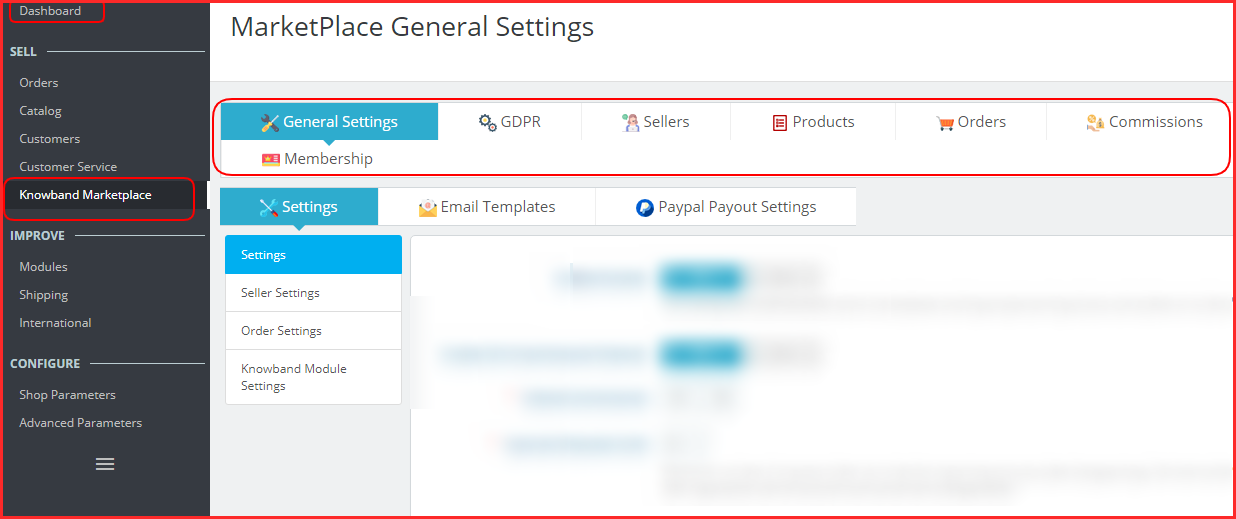
In the latest update of KnowBand’s PrestaShop Marketplace builder, the UI is changed entirely and now is more accessible and easy to understand.

The configuration can be done with ease because the admin will find all the settings in groups.

The General Settings section includes the most common settings like mentioning payment methods, seller form details, allowing general seller settings, and order features.

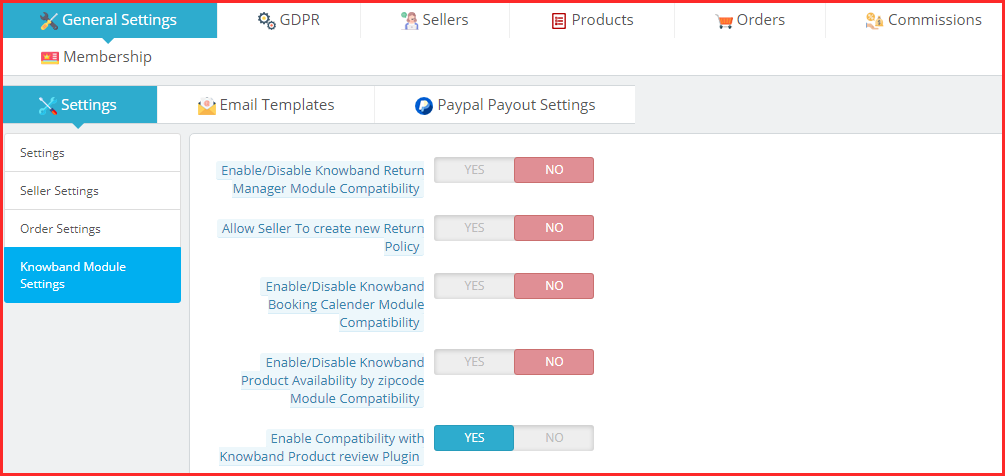
Also, the admin can integrate the compatible modules like booking calendar, return manager, product availability check, etc.

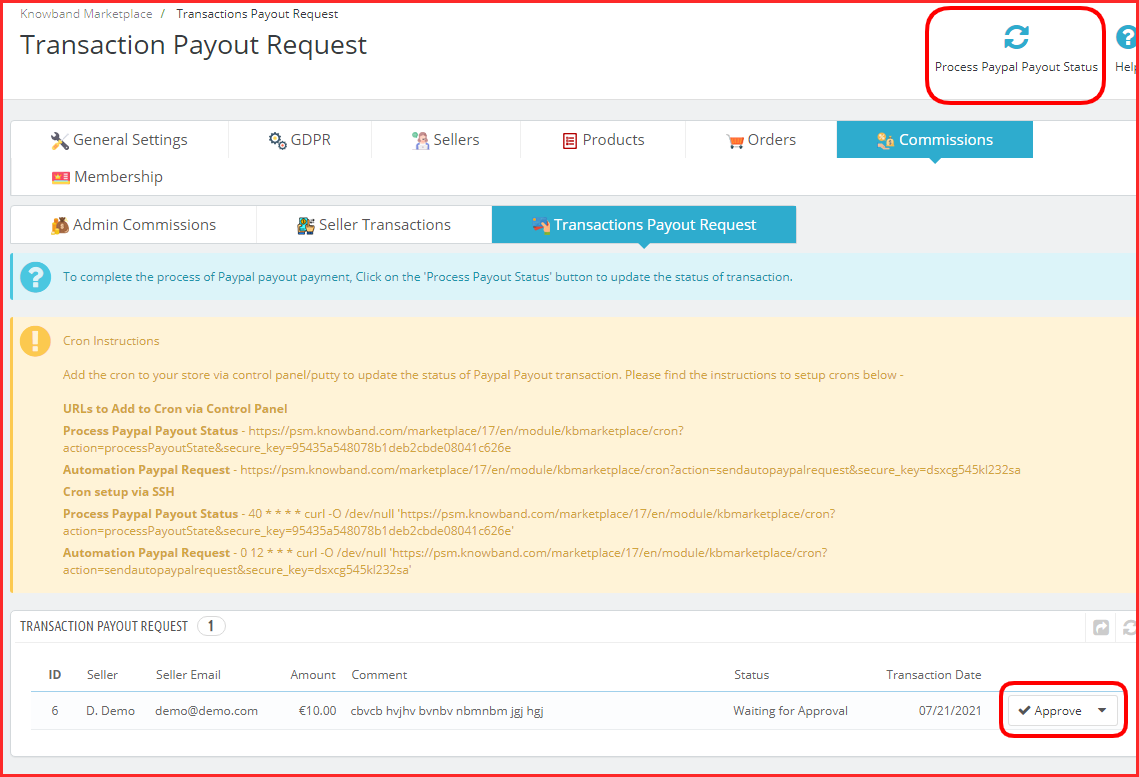
Furthermore, with the new UI design, the admin will have to hit the PayPal Payout button and add the details to set the PayPal API.

In the same manner, all the other configuration setting menus have been placed together.

How admin can manage the seller dashboard options and seller profile?

In the seller tab of the settings, the admin can see all the registered sellers of the marketplace.  Along with this, the approval requests are featured in a separate section where the admin can approve and disapprove the sellers.

Managing seller form is simple and adding new custom fields can be done in a few clicks.

Admin can define the category-wise commission, check and approve seller reviews, manage seller shipping methods, check out the shipping status of various sellers, and a lot more.

Since, assigning categories to sellers in admin’s capacity, when a seller places a category request, admin can check that in a provided menu and can approve or disapprove it.

How to manage the payouts in this latest version of the PrestaShop Marketplace plugin?

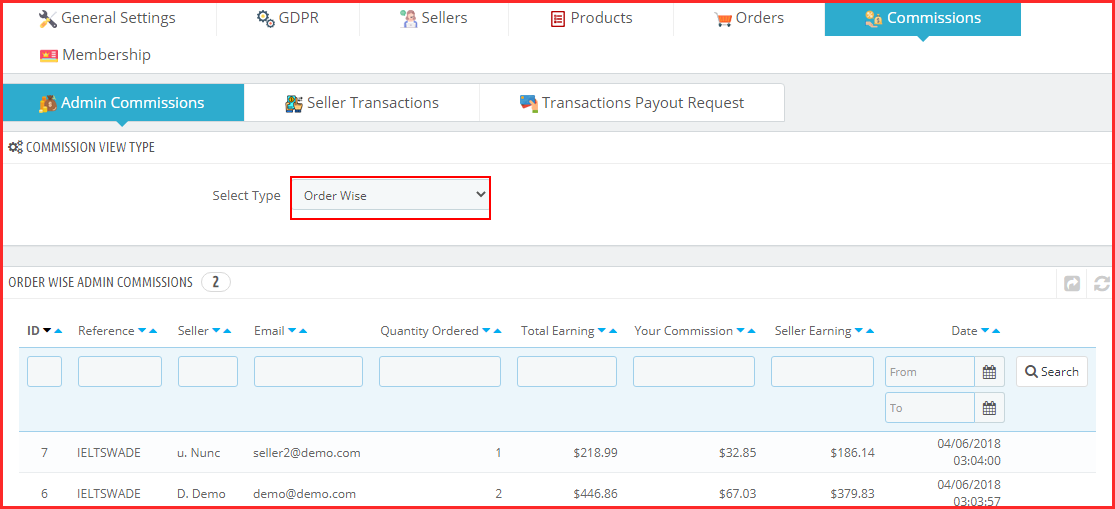
In the commission section of settings, the admin will be able to manage the commissions.

To see the profits you are making on your marketplace, visit the admin commission section.

It provides two options:

  1. Order wise commissions
  2. Category wise commissions

In the PrestaShop marketplace builder module, the admin receives the payments and the seller gets the payouts. In the next section, the admin can see the transaction history and seller balance history.

Also, the payout requests will be visible here.

Once, the store owner clicks on the Process Paypal Payout Status, all the approved sellers will receive the funds.

It is very easy to manage things here as the module has cron functionality featured.

Admin Interface Demo of PrestaShop Marketplace builder- KnowBand

List of Compatible Modules with PrestaShop Marketplace Builder plugin

KnowBand has developed some plugins that are easy to configure and save you time while managing a marketplace. To add some additional features in PrestaShop Marketplace, you can use other PrestaShop plugins that are specially designed for improving user experience. KnowBand has a PrestaShop marketplace gold plan with various modules discussed here.

To provide a ticket feature so a seller can raise a query, add marketplace sellers-admin ticket system PrestaShop addon. Also, if you want to provide better services on your marketplace, adding a ticket system for customers will be a great idea. Consider using a customer-seller ticket addon for this.

Sometimes a seller wants to close their shop for a while and for that, you can install PrestaShop marketplace sellers vacation mode addon. There are other compatible plugins for seller invoices, for adding a badge to seller profile, low stock alert addon, and the deal manager that allows sellers to run various discounts on their shop.

Check out the PrestaShop Marketplace Gold Plan here.

In addition, there are other compatible modules for the marketplace like return manager, booking and rental system, product availability check by zip code, and Review, reminder, and incentives.

What is new for Sellers of PrestaShop Marketplace?

With one exceptional addition, the seller dashboard of PrestaShop Multi-Vendor marketplace addon is the same as the previous one.

Seller Dashboard

For complete feature exploration, you can read the user manual of KnowBand’s PrestaShop Marketplace Builder.

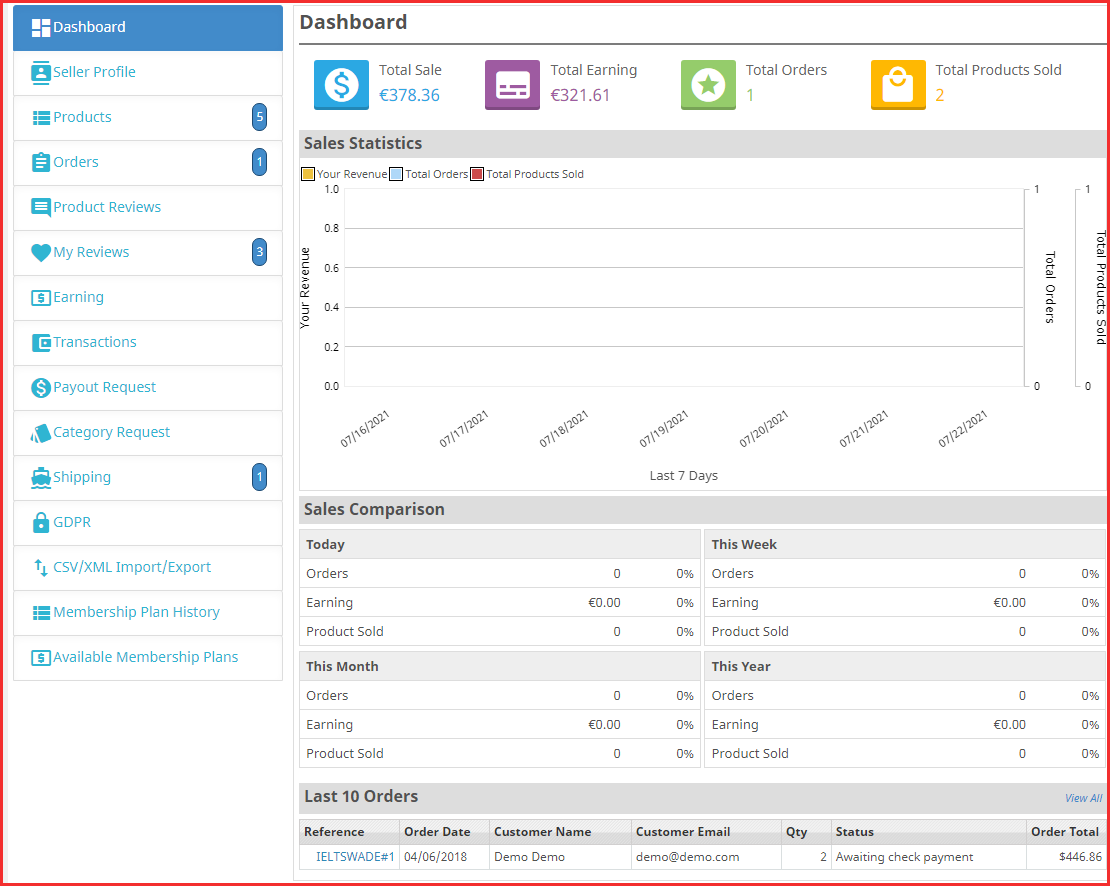
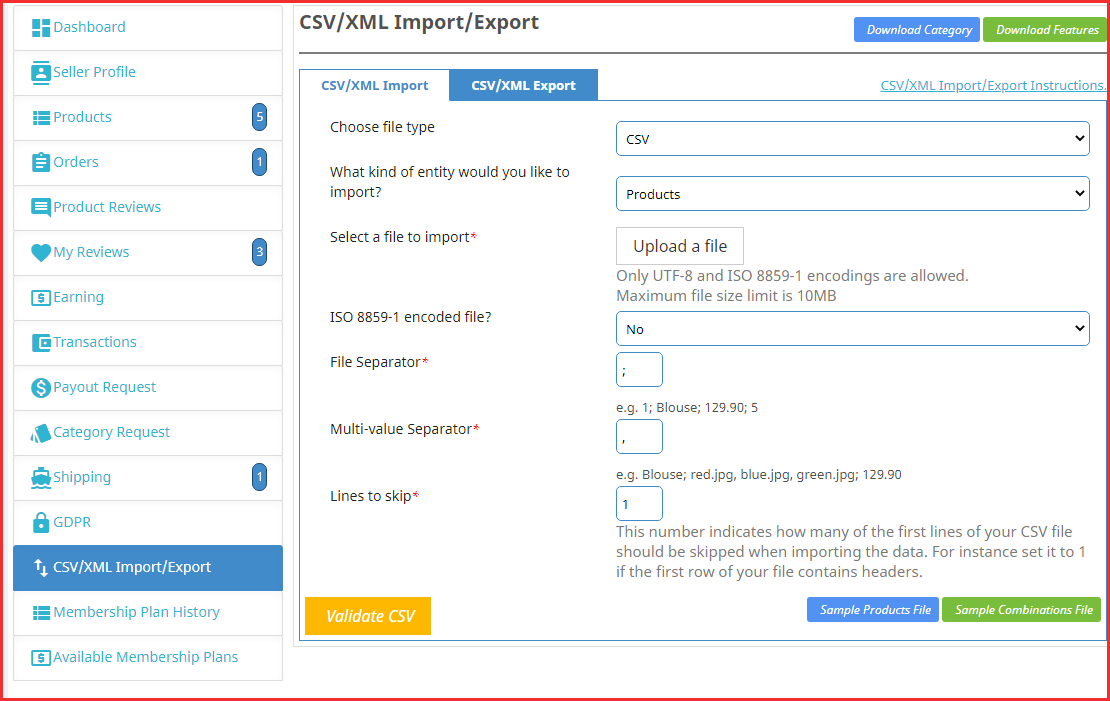
CSV/XML Import/Export- New feature added

Sellers were facing difficulty updating the products or purchasing a separate module for mass product uploading. In the recent update, we have added the CSV/XML Import/Export feature to the PrestaShop Marketplace Builder module- Knowband.

Now sellers can upload the products in bulk and combinations. It will save tons of time and the work will be simply done.

Seller Dashboard Demo of PrestaShop Marketplace builder- KnowBand

FAQs of PrestaShop Marketplace Builder for multiple sellers

PrestaShop Marketplace Builder Module Related Blogs

Complete Hyperlocal Package Solution for your On-Demand Delivery Business

Sneak peek at the new Membership Plan feature of the PrestaShop Multi-Vendor Marketplace Addon

What do customers like about a Marketplace?

Admin and sellers both earn direct profits from a marketplace. Admin can expand their business by offering more products and services while sellers can reach out to the new customers by selling on a marketplace.

On the other hand, a customer gets a lot of advantages when they purchase from a platform where several product choices are available at a comparable price.

How do customers get benefited from a marketplace?

  • As we know that the feedback plays an important role in buying decisions, they can read and drop reviews. On a marketplace created with KnowBan’s plugin, the reviews are allowed for the product and the sellers.
  • Customers can visit a seller profile to check out their products and catalog. This way, they get the opportunity to explore the seller’s shop.
  • In a marketplace, a customer gets a variety of choices and a chance to buy a product at a reasonable price.
  • They get multiple shipping options and payment methods. Also, they feel a marketplace is a safer environment to make any transactions.

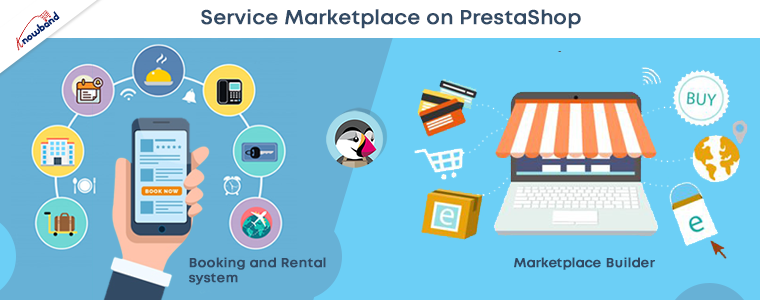
Start Service Marketplace with PrestaShop Marketplace Builder Plugin

To start a service marketplace, you will need some additional plugins with the PrestaShop Marketplace builder addon. Moreover, for providing an amazing shopping experience to customers, the service marketplace should have a robust system for the management of clients and services.

And to fulfill that requirement, you can add the Booking and Rental system to your Multi-vendor Marketplace. It will become super easy to book the appointments and the services with KnowBand’s PrestaShop Booking and Rental System. It also allows hotel bookings and hourly rental facilities.

Do you have area limitations for providing your services? Adding a booking and rental system to a hyperlocal marketplace allows you to add the location option and maps for your clients.

Get started with your services-based marketplace using a couple of plugins. This is the most affordable way you can start a service marketplace on the PrestaShop platform.

Make your Marketplace mobile responsive:

To make your website fast loading, that gives a better customer experience, it is needful to make it gadget friendly. For creating a completely responsive website, you can use PWA builder and AMP builder to decrease the website loading time. PWA builder gives your website an app-like interface without any technical code change.

Also, you can create a PrestaShop marketplace mobile app for iOS and Android in a few simple steps. Choose a mobile app builder plugin for your PrestaShop Multi-Vendor Marketplace and PrestaShop Hyperlocal Marketplace.

For any eCommerce custom changes and services, get in touch with our expert team at support@knowband.com. We believe in customer satisfaction and help eCommerce businesses in creating their business websites.

Add PrestaShop Accelerated Mobile Pages (AMP) to Improve Shopping Experience

Are you experiencing a sudden downfall in your website traffic? 

Your website ranking might get affected after every new Google SEO update. Many websites crawl up to the top but a few lose their rankings too.

The dwell time, UX, and focus keywords are some of the major Google ranking factors. These SEO ranking factors might not make you rank unless you optimize your website for its speed.

What is Accelerated Mobile Page (AMP)?

Accelerated Mobile Pages (AMP) is an open-source initiative that aims to boost the performance of mobile web pages. Google and Twitter were the driving forces behind the project.

The technology underpinning AMP allows for lighter, faster-loading pages for smartphone and tablet users. As more individuals use mobile devices as their primary PC, this capability has become increasingly vital.

Optimize Website Speed with AMP 

To reduce website loading time on the PrestaShop store, consider using the best AMP Plugin, the PrestaShop Accelerated Mobile Pages module. It helps you cope up with the new Google SEO ranking and gives an exclusive shopping experience to your customers.  

Studies say, around 40% of users click away from a website in 3 seconds. Many decide to turn on an ad blocker as soon as they visit the website. Hence, it’s time high time to optimize your Prestashop store so that the visitors spend more time than average. 

If it is about shopping experience then Mobile App Builder is also an option but with AMP you do not just make your website gadget-friendly but optimize it for Google SEO ranking too.

Benefits of Accelerated Mobile Pages (AMP)

  • Helps site owner reduce page load time

Website loading time is a major factor in increasing the bounce rate on a website. The Accelerated Mobile Pages (AMP) reduces the page load time and enhances your website’s performance on mobile devices and tablets.

  • Visitors spend more time than average

More visitors reach your website if page load time gets reduced. In addition, you attract more visitors to the website with the impressive themes and engaging design.

  • Various layout and designs

Layout and designs are vital elements of the website and every page has a distinct type of design. An AMP module allows the seller to customize the design and layout of the web pages to emphasize the look and feel of the website.

  • Faster website than competitors

When there are a lot of competitors, you can win your game by optimizing the speed and page loading time. Many users leave a website because they are impatient and look for other options immediately. Take the advantage of this by accelerating the speed of website pages.

  • Improves the user experience

The goal of AMP is to improve the user experience by making mobile surfing as simple as possible. The PrestaShop AMP addon adds a professional look to the website that gives a rich browsing experience.

PrestaShop Accelerated Mobile Pages (AMP) can Improve Google Ranking

Module Compatibility

  • AMP Module PrestaShop Theme Compatibility

Implement the AMP on your PrestaShop websites which is compatible with all the PrestaShop themes other than the default theme. The PrestaShop Accelerated Mobile Pages (AMP) module does not require switching your theme and goes with the current design. 

  • AMP supports all PrestaShop versions

The AMP works for every PrestaShop version. The module is compatible with PrestaShop version 1.6 to the latest PrestaShop version 1.7.

  • PrestaShop Module Compatibility

If you have several other modules installed on your store and looking for an AMP that supports them, KnowBand’s PrestaShop Accelerated Mobile Pages (AMP) module is the one. It won’t affect the custom settings of your other modules. 

How PrestaShop Accelerated Mobile Pages (AMP) Works?

The KnowBand’s PrestaShop AMP effectively makes the website user-friendly and mobile responsive. By implementing the AMP module on your PrestaShop store, you will not just get a fast-loading website but also observe an increment in user engagement along with various custom settings to configure it.

Lets us explore several features and customization options it offers:

Emphasis the brand Identity

  • Improve look and feel – Use several colors to add a vibe to your store.
  • Add and shift Logo– Adjust and resize your company’s logo in accordance with the website’s structure.
  • Showcase Products In Carousel Mode– On the Home page, Category page, product page, etc.
  • Display your business location and contact options like contact number, email address, etc.

Customize the entire store with PrestaShop AMP Settings

Be it the home page or the product page, the module allows you to customize each and every element of your web pages.

1. Optimize to increase home page dwell time 

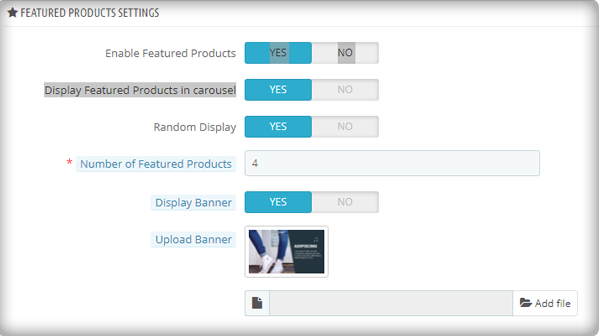
You can use the PrestaShop AMP module to make your Home Page AMP-ready. On the main page, it allows you to display Featured Products, Bestsellers, and New Arrivals. The display banner is being uploaded. 

As the image depicts, the customization for the home page to display featured products, besides this, there are options for bestsellers, new arrivals, and others.

More home page customization options:

  • Adding custom text to the homepage’s top or bottom.
  • Carousel mode is used to display featured products.
  • Choosing the number of featured products that will be shown.
  • In addition, you can show movies from YouTube, Vimeo, and Dailymotion.
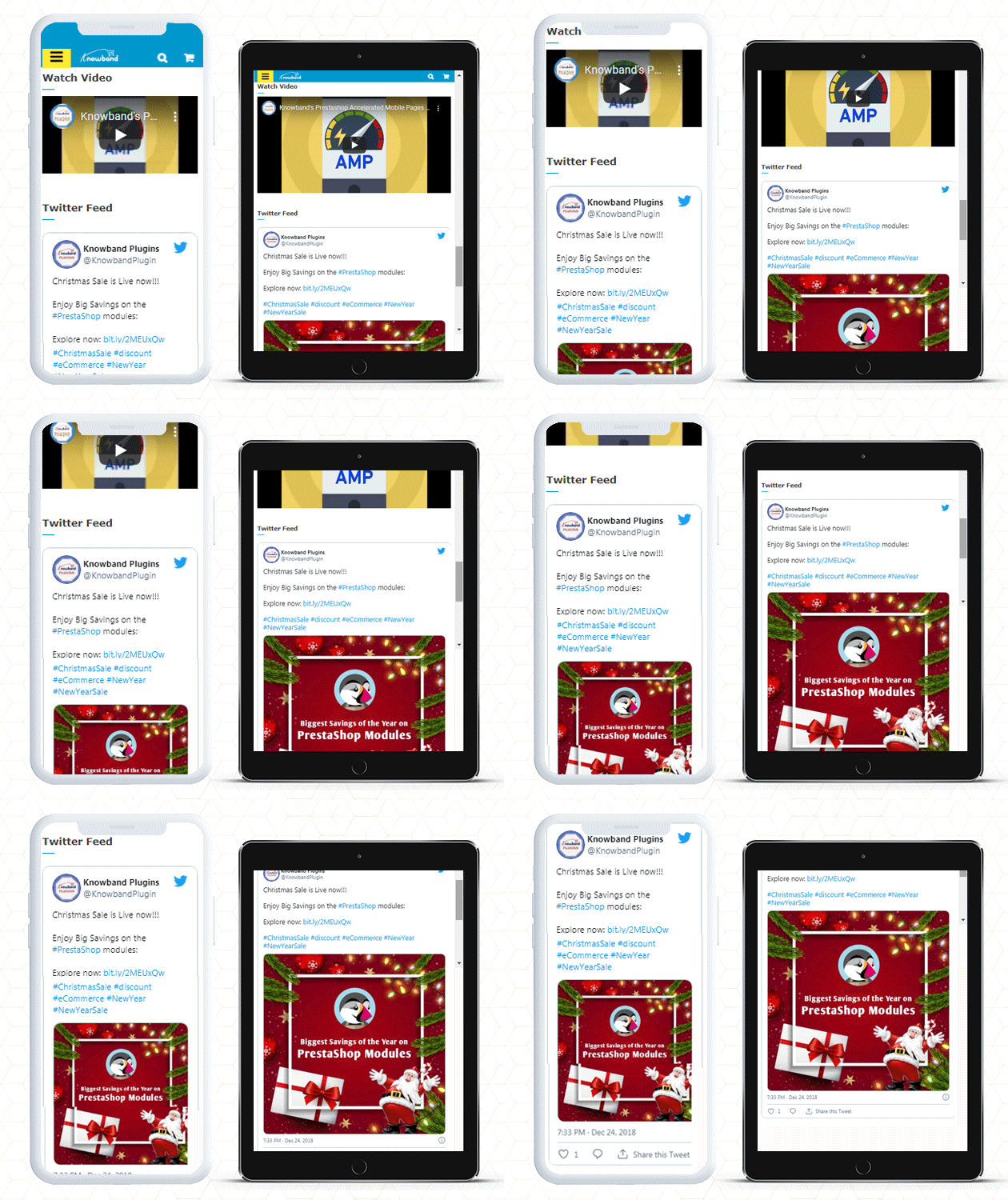
  • Instagram and Twitter feed can be displayed on Home Page.

2. Customize Category Pages with AMP 

You can use the AMP module to enable AMP on Category pages. Displaying custom texts at the top or bottom of your Category page is part of the Category page customization. It allows choosing the right image size for the product.

3. Use AMP to customize the product page

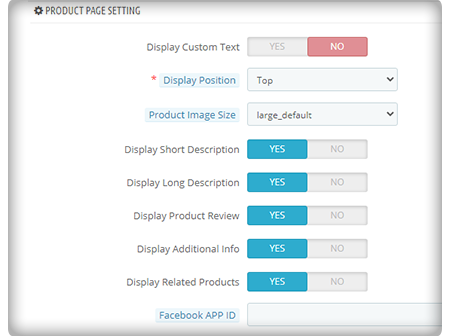
You can transform your product pages into AMP-enabled product pages using the PrestaShop AMP plugin. You can customize the product page by displaying custom text, short product descriptions, product descriptions, product reviews, related items, and so on.

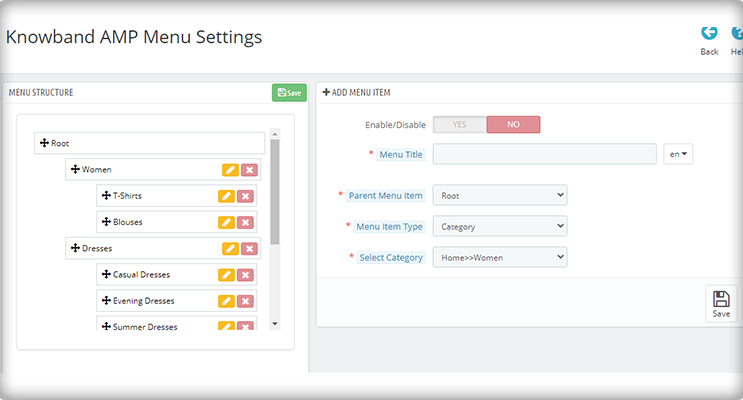
4. Make your menu bar unique

The PrestaShop Accelerated Mobile Pages extension allows you to customize your menu bar to meet your needs. 

5. Add colors to the AMP-enabled PrestaShop website

The AMP module allows you to customize the colors on your AMP pages to make them more appealing.

6. Include links to your social media profiles with custom text

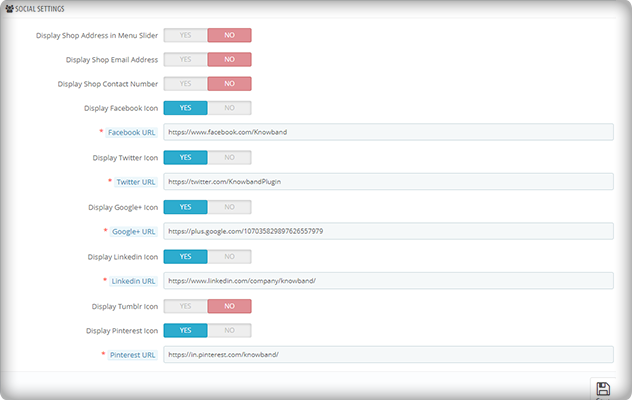
On your AMP-enabled website, you can establish a distinct section for displaying your social media company sites. Facebook, Twitter, Google+, LinkedIn, Pinterest, and Tumblr are all part of it. You can also add any other network if you want to.

Aside from that, you may use the menu slider to display your company’s location, email, and phone number.

7. Link your Adsense and Google Analytics accounts

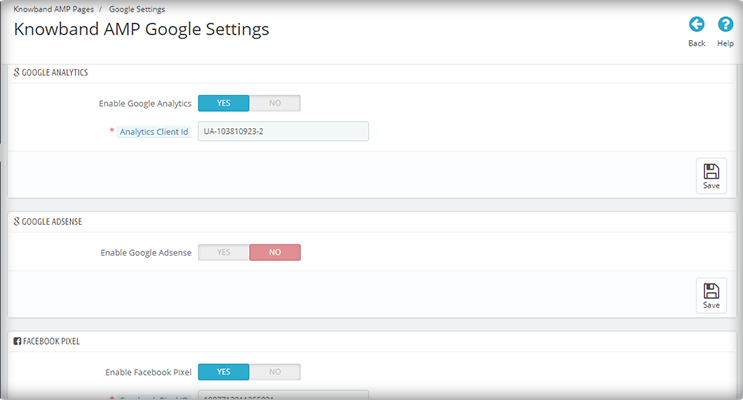
The PrestaShop AMP module allows you to link your Google Analytics and Adsense accounts to your AMP-enabled website. This module also allows you to control the sitemap settings and link your Facebook profile.

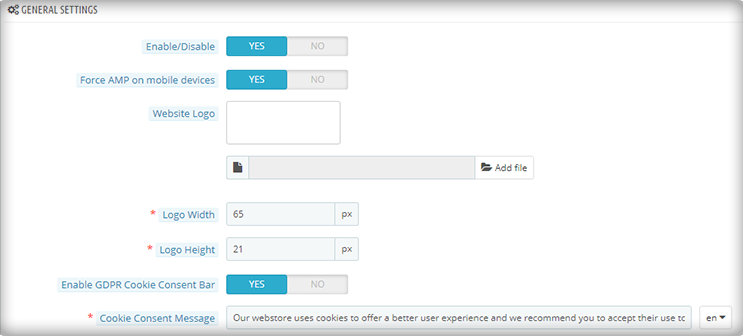
8. The PrestaShop AMP Module GDPR Cookie Consent Bar

To prevent the hassle of violating the GDPR law, include a GDPR cookie consent bar on your AMP-enabled website.

Note: Your website must be HTTPS enabled for the AMP module to work. The HTTP protocol is incompatible with AMP. As a result, you should strongly consider using the HTTPS protocol when generating AMP pages and content (vs. HTTP).

PrestaShop Accelerated Mobile Pages (AMP) example

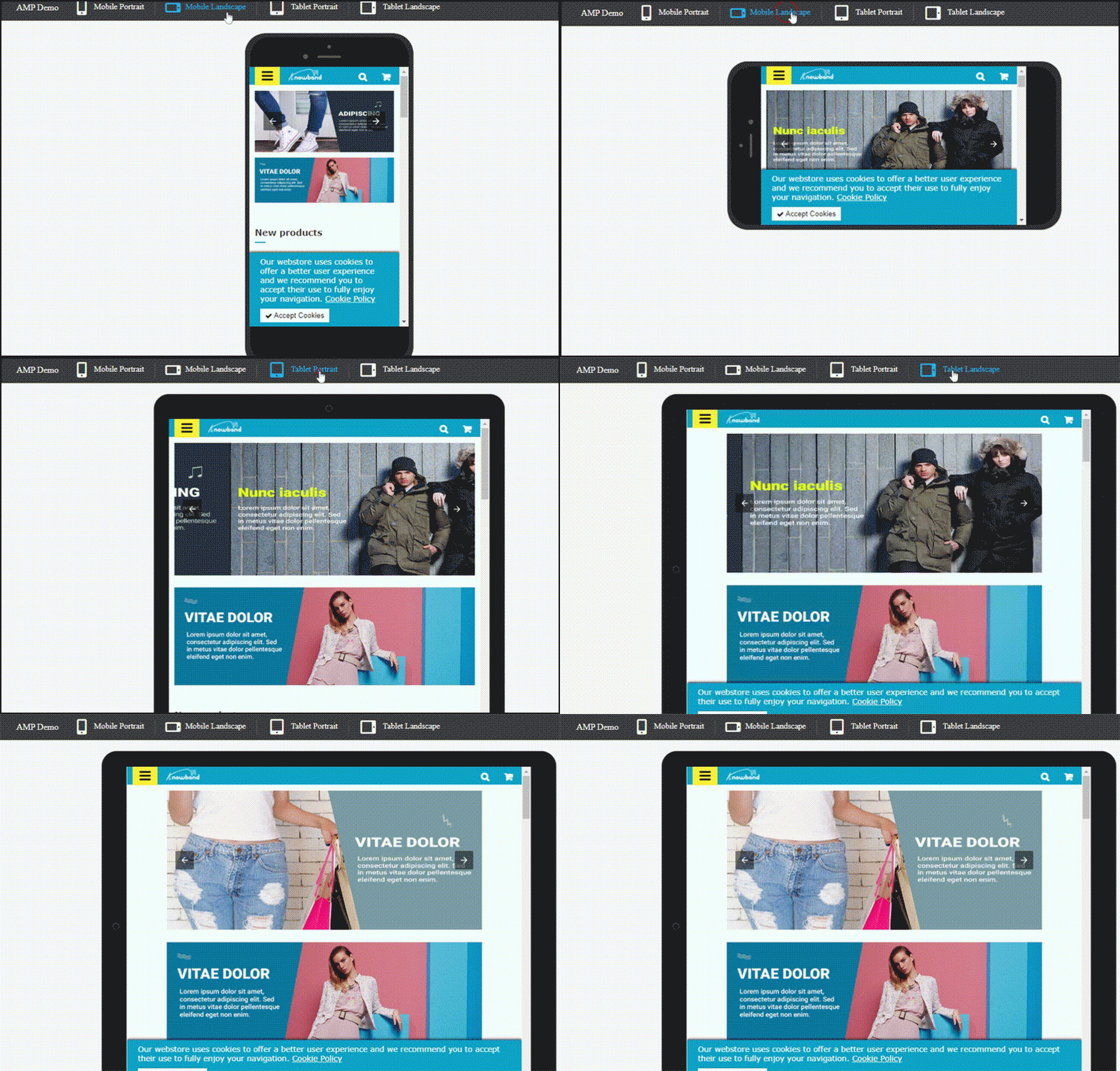
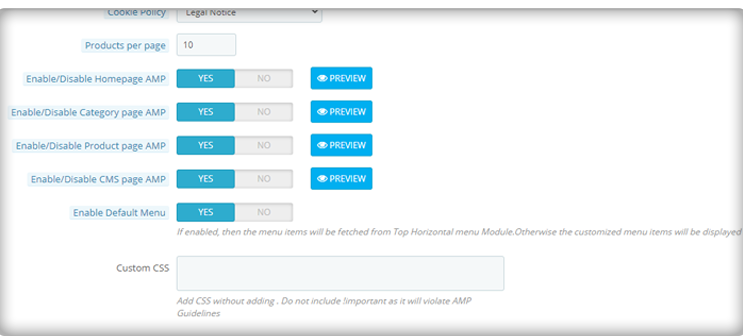
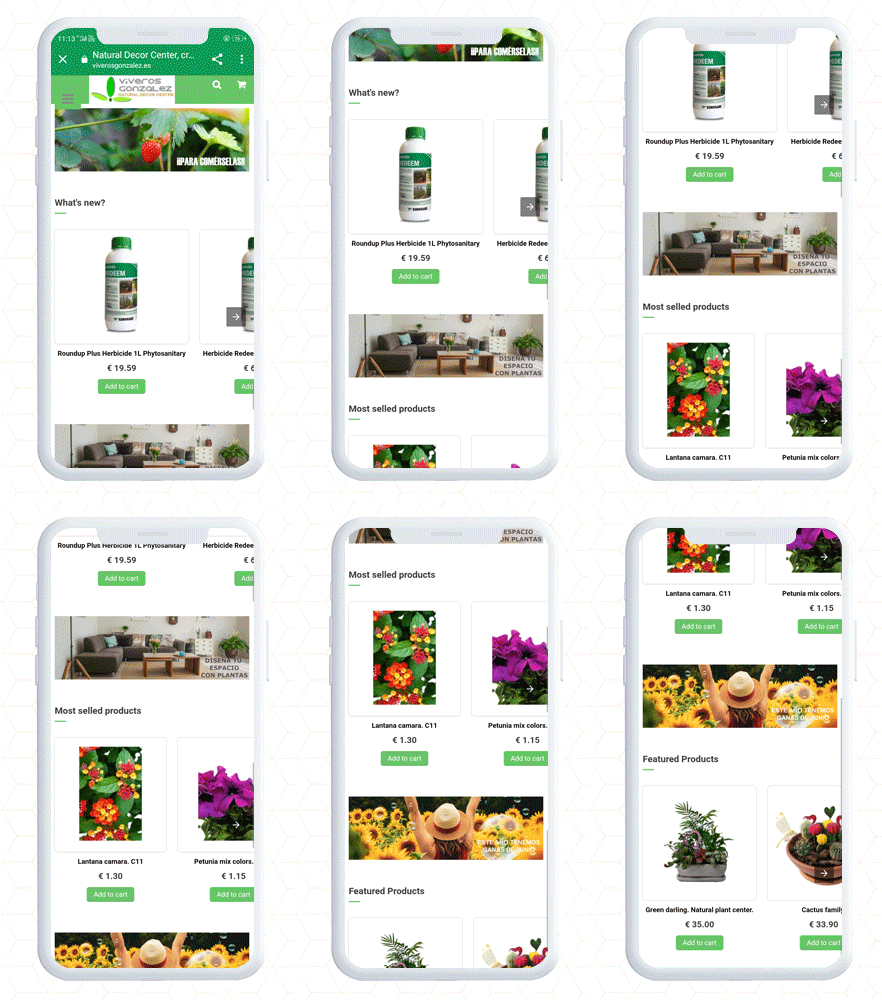
PrestaShop AMP Home Page with navigation slider

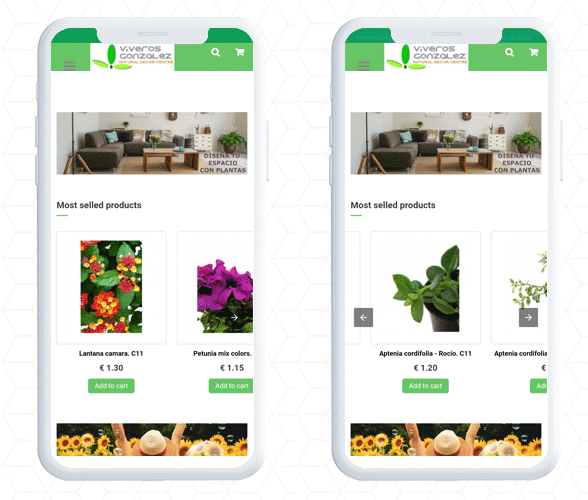
Product Page and Category page PrestaShop AMP

Finally, the PrestaShop Accelerated Mobile Pages (AMP) module lets you optimize your website pages for a user-friendly mobile experience. It gives you complete freedom to customize the home page, category page, and product page layout and designs. By adding a custom logo and text you can create a unique brand identity. Along with these design features, it allows the seller to link the social media account and videos on the home page. There are many other facilities given in the AMP setup.

Consider adding AMP to your website to make it user-friendly, mobile responsive, and SEO friendly with AMP addon.

Contact us: support@knowband.com

Download PrestaShop AMP: 

Click here to check out the demo on the KnowBand store

Click here to check out the demo on PrestaShop Addon Store

What is New in KnowBand’s PrestaShop One Page Checkout module V7.0.1

The PrestaShop One Page Checkout by KnowBand is a solution to all your cart abandonments and bounce rate problems. It is a custom checkout page that lets the admin track customer behavior and conversion rate with multiple PrestaShop checkout settings.

At KnowBand, we always thrive to offer the best possible solutions to your eCommerce problems. To fulfill that, we bring timely updates along with new features. Our PrestaShop checkout module is ready with a new feature. Prestashop Checkout Plugin by KnowBand has 22000+ downloads combined on the Official Addon store and the KnwoBand store.

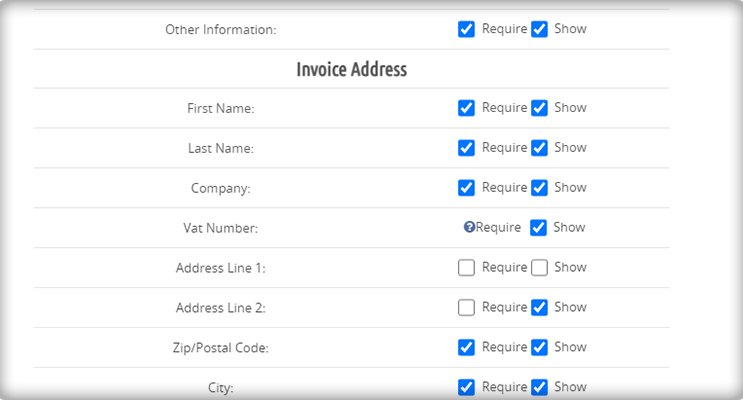
In the latest update, some new features like customer and business record fields for the checkout page have been added which was a demanded feature of many PrestaShop companies.

Here are some glimpses of the PrestaShop Checkout Module’s upcoming update.

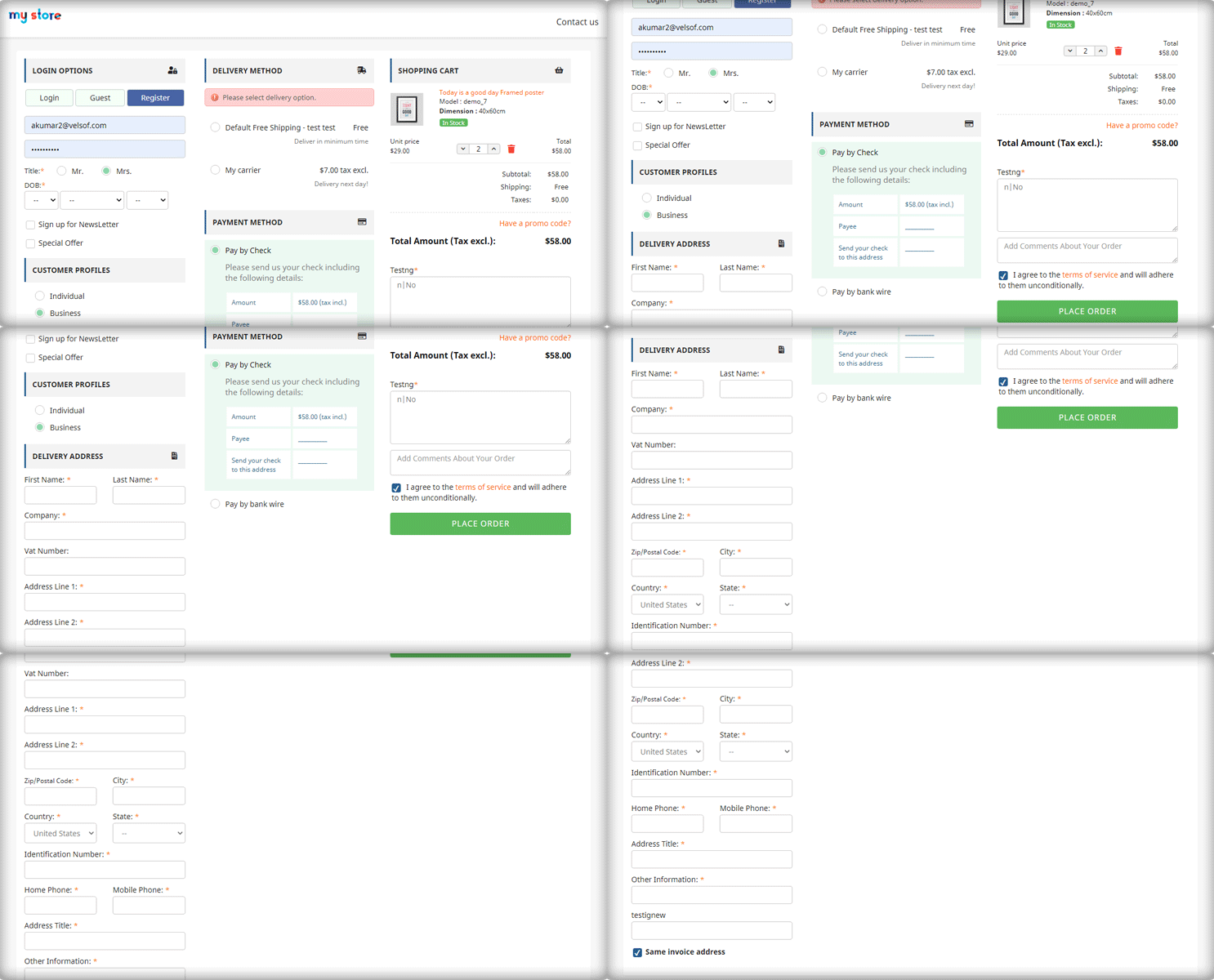
A look at the new Customer Profile feature of PrestaShop One Page Checkout [7.0.1]

The One Page Checkout  module has a variety of features, the most notable of which are:

Optimize the checkout page based on customer type

Map different fields in PrestaShop Checkout Settings

PrestaShop Checkout module lets you customize your eCommerce checkout field based on the type of client.

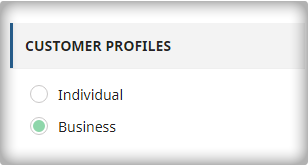
  1. Business
  2. Individual
  3. Agency

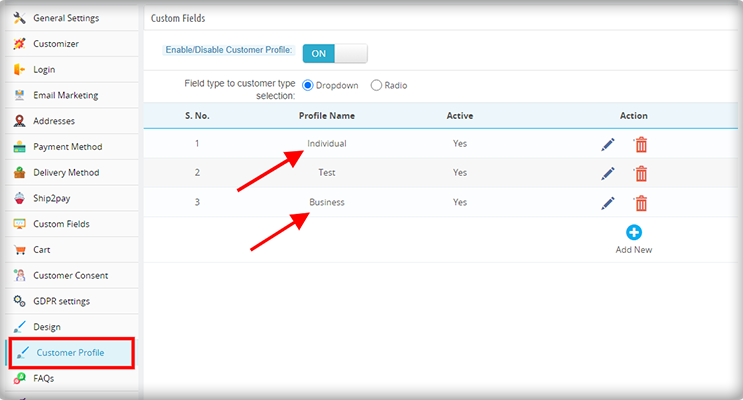
It also allows you to create a custom client type and customize it, as well as make it optional or mandatory. An option is provided in the admin to create the customer profile.

Besides this, admin can create separate profiles for different types of customers such as business customers and personal orders and show different fields for checkout for each type of profile.

Also, for mandatory and optional fields, the admin can edit the created profiles.

Display recorded fields on Invoice

After this new update, you will be able to display recorded fields on the Invoice as well.

Multi-lingual Compatibility

The PrestaShop Checkout Module is compatible with multiple languages such as French, Spanish, Italian, Polish, etc.

Compatibility with PrestaShop Version 1.7

This new version of PrestaShop One Page Checkout is compatible with all the PrestaShop versions 1.6 to 1.7.

What all One Page Checkout Offers

The One Page checkout module is PrestaShop Best Seller with 10000+ downloads on PrestaShop Addon store and 12000+ on KnowBand store. Its most authentic design and layout customization options make it unique.

PrestaShop One Page Supercheckout Demo

The Module has features like social login, guest checkout, show optional and mandatory fields, inline error validation.

In addition, the checkout settings include layout customization, google address auto-fill, display shopping cart, add custom fields for collecting clients’ information.

Along with this, the admin can add multiple shipping methods and multiple payment gateways on the PrestaShop One Page Checkout.

Explore Live Examples of PrestaShop One Page Checkout

Check out some live examples of client’s websites that are using this super amazing module:

Here are some Stunning Live Examples of PrestaShop One Page Checkout Addons that are in action. Moreover, we have combined some examples for specific countries with their payment gateways and shipping methods. Have a glance at 10 elite examples of PrestaShop Checkout for Spain with a list of active payment gateways and shipping methods.

When we say worldwide, we actually mean it, and here are another top 10 PrestaShop Checkout Module examples of Italy with the best checkout page practices to follow. Poland and France are other countries that have several clients who are using PrestaShop One Page Checkout. Give a read and explore the features of 10 on fleek PrestaShop Checkout Page examples of Poland eCommerce stores.

Extend Support Period and Get an Additional Savings

Are you already using the PrestaShop One Page Checkout?

Here are steps to extend the support period:
1) log in to your PrestaShop account.
2) Go to the Downloads under the My Orders tab.
3) Here you will find an option to extend the support period. Click on the desired time period for the support.
4) At the checkout page, an additional discount will get applied automatically.

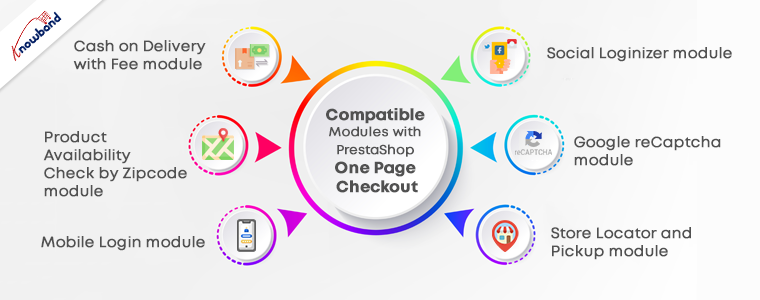
PrestaShop Plugins Compatible with One Page Checkout

From the landing page to final payment, KnowBand is developing solutions for a decade for PrestaShop.

1.      Cash on Delivery with Fee module

The COD module for PrestaShop allows you to add a Cash-On-Delivery facility to your website. With this, you can add COD in the payment methods of PrestaShop One Page Checkout.

2.       Product Availability Check by Zipcode Plugin

Let your customers know if the product is available in your store for delivery at their location by adding the zip code. Check out the module here.

3.       PrestaShop Mobile Login module

Allows users to do a quick login using their mobile number. The contact verification is done by the OTP send vis SMS on customer’s number.

4.      PrestaShop Social Loginizer module

Customers can log in to your store with not just one social media platform but from any one of the 14 different choices. Have a look at the PrestaShop Social Login Module.

5.       Google reCaptcha PrestaShop module 

To prevent your site from bots and spammers, consider Google Recaptcha on your store. You can use it for the login page, registration page, contact page, if a customer forgets the password, on the checkout page, and for newsletter subscription.

6.       Store Locator and Pickup module

To offer BOPIS, we have developed the Store Locator and Pick Up module for the PrestaShop platform. It allows the customer to select a nearby store to collect the order. It has an inbuilt Google Map facility for navigation.

Why KnowBand?

KnowBand is a Gold Partner Agency of PrestaShop and has developed several eCommerce modules. We have international clients and we also deliver custom products. It also gained the superhero seller ranking on the Addon store.

Contact us at support@knowband.com for any custom website development and module development services.

KnowBand Celebrating 10K+ PrestaShop One Page Checkout Installs on Addon Store

We are excited to announce that the KnowBand’s PrestaShop Checkout Page has crossed 10000+ downloads this month. These numbers are increasing every day on PrestaShop Addon Store. Also, the downloads have exceeded a count of 12000+ on the KnowBand store.

We are awarded with PrestaShop Gold Partner Agency and have Superhero Sellers ranking. A PrestaShop development agency is awarded Superhero Seller ranking when they have an average rating of 5 stars.

From Conqueror to Captain and now Superhero Seller, KnowBand proved itself as a PrestaShop developer. It has happened because of our talented team who has made this product a success! I’d like to extend our profound gratitude to every member of the Knowband for their support on behalf of the team.

We strongly believe this wouldn’t have been possible without your trust in our products and services. The PrestaShop One Page Checkout Addon has several high-quality features. The 10K downloads on the PrestaShop Addon store and 12K on KnowBand, explain it very well!

Why Customers Choose KnowBand as their PrestaShop Development Partner?

If you are reading this content, you might know about the PrestaShop platform already. KnowBand is a PrestaShop Gold Partner agency. We believe in providing the most sophisticated and satisfactory customer experience. On the official PrestaShop addon store, KnowBand is recognized as a Superhero Seller. We have also become the Module Partner Creator of PrestaShop Marketplace.

Every product developed by KnowBand is quality tested by technical experts. Who doesn’t want to give a smooth and satisfactory customer experience? Keeping this in mind, we have developed around 80 PrestaShop addons to help you flourish your business.

All the modules have amazing UI/UX design with super handy module configuration options. One Page Checkout is developed with the same perspective and it is loved by many. The amazing products, customer service, and customer support are reasons for people’s choice.

Our PrestaShop One Page Checkout Clients worldwide:

Not sure which company to choose for your next development project? If you are puzzled about it KnowBand provides you the best Prestashop development services.

The PrestaShop platform is being used worldwide. It has thousands of clients all over. Our clients trust KnowBand products. We are aware that trust is earned and it takes time. KnowBand has become a PrestaShop Partner agency, providing PrestaShop development services since 2010.

Every plugin be it a marketplace addon or an exit pop-up, customers use our solution for their PrestaShop website.

Similarly, PrestaShop One Page Checkout has users all across the globe. Have a look at some live examples of One Page Checkout:

PrestaShop Best Sellers

Apart from the One Page Checkout, several other PrestaShop modules have crossed 1000+ downloads.

Below is the list of modules that have earned the best seller badge on the PrestaShop Addon store. Every PrestaShop store should count on them.

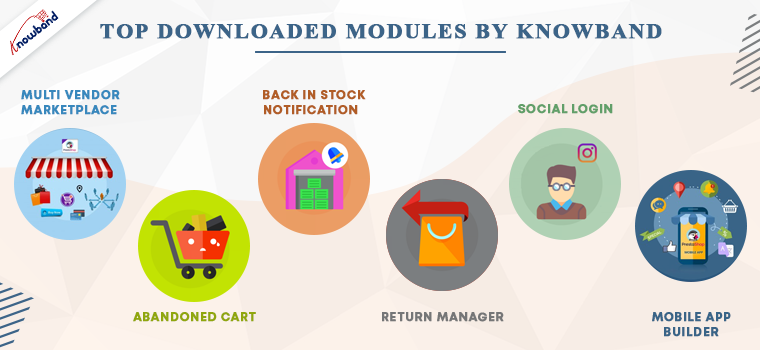
PrestaShop Abandoned cart Addon– Track the carts and allows the admin to send serial abandoned cart reminders. It has options like Email, pushes notifications, and pop-ups for customers.

PrestaShop Return Manager Module– Customer can make return requests with ease. The store manager can track the returns and reasons.

Multi-vendor marketplace Addon– Great application to convert your existing website into a functional marketplace in just a few simple steps.

PrestaShop Back-in-stock addon– Send stock alerts, subscription mail, low stock messages, and back-in-stock alerts with this module.

Social login PrestaShop Module–  Allow customers to log in with 14 different social media platforms. It is compatible with PrestaShop One Page Checkout.

KnowBand’s most in-demand solutions for eCommerce

Marketplace Builder: Our marketplace module is one of the best sellers on the PrestaShop Addon store. Create a marketplace in 3 simple steps. Download the module, configure it and start selling!

Mobile App Builder: Not sure if your website is bringing enough traffic? Get a mobile app for your PrestaShop store that has all the necessary features. The mobile app builder is available for Android and iOS systems.

The marketplace with a booking and rental system provides tremendous growth opportunities. It is also compatible with android and iOS Mobile apps.

Website Development Services: KnowBand is providing eCommerce solutions for more than a decade. We have helped thousands of clients in developing their websites and optimizing them for higher conversions.

Hire Us

Add innovative addons to your PrestaShop store

Innovation is the key to compete and win. KnowBand has developed some modules by following innovative approaches for modern business trends.

With no delay, you can start selling on the world’s most popular marketplaces using the Marketplace integration addon. KnowBand thrives to create solutions that make your business stand out. PrestaShop Booking and rental system, Accelerated Mobile Pages (AMP) are other, Delivery Boy App, Store locator to start BOPIS are some of those.

These days, on-demand print businesses are booming. It’s time you can start your own with this super amazing Product Customization addon. Think about a business idea and explore the KnowBand store for the services. In case you couldn’t find what you are looking for, KnowBand can provide a custom solution for eCommerce website.

Get your custom PrestaShop development solutions and ace it!

Why KnowBand PrestaShop One Page Checkout is Users Favorite

1.     Provides quick sign up and registration

It provides easy login to customers. Allows Social media login with Facebook, PayPal, and Google+ and email registration.

Every customer can now login within seconds with social login and mobile login. Anyone in hurry can checkout as a guest.

2.     Its unique layout

The layout design is different and has three variations. Prestashop One Page Checkout users can choose a single-column layout, double-column layout, or a three-column layout.

3.     Customers get informed while filling in wrong details

If anyone makes an error while filling the form, it shows an inline message. Google auto address fill and auto-detect region features are a bonus.

4.     Several payment gateways and shipping methods

Adding multiple payment methods and shipping methods with an individual payment method is now possible with PrestaShop One Page Checkout.

5.     Shopping cart details on the checkout page

The PrestaShop One Page Checkout shows all the cart products on the checkout page. Customers can increase or decrease the product quantity there itself. Additional features that no other module offers

6.     GDPR Compliant

The PrestaShop Single Page Checkout is GDPR compliant. Users who do not want to share their information with the store can request it.

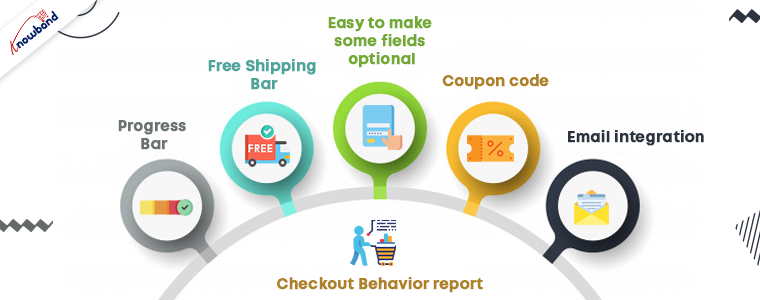
7.     Free Shipping Bar

Any condition/rule can be added for offering free shipping. To get the offer, customers have to meet the eligibility. This increases the average cart value.

8.     Easy to make some fields optional

If you think, not every detail in the registration form is necessary; you can make that field optional. Offering fields to skip can reduce the bounce rate.

9.    Admin can Create Customer Profiles

In the upcoming version of the PrestaShop Checkout Page, the admin can create customer profiles however they like to:

  • Individual
  • Business
  • Agency

10. Coupon code

Customers can put in the coupon code if they have any.

11. Email integration

To make your marketing campaigns more effective, you cannot ignore the importance of email marketing.

  • Allows easy email integration options with Sendinblue, MailChimp, and Klavio.
  • Ask them to subscribe to newsletters.

12. Checkout Behavior report

This is to find out the pain points of your customers. The reports show the checkout behavior of the customers. Abandoned carts, orders, missed sales and many other things can be tracked.
Advantages of PrestaShop One Page Checkout:

The PrestaShop store owners can give a unique and explicit checkout experience to their users. One Page Checkout appears to be quick and easier than multiple page checkouts.

  1. Increases conversions- The fast process, quick login and registration options, guest checkout increases the conversion rate.
  2. A fall in bounce rate- Multiple payment and shipping methods add more weight to the conversion rate and reduces bounce rate.
  3. Increases average cart value: Customers try to grab the free shipping offers as they see them. Hence, it increases the average cart value.
  4. Mobile responsive
  5. Multi-lingual and multi-store compatible

All these features have made it a success. A huge achievement for the KnowBand family!

Live Demo

PrestaShop One Page Supercheckout

Admin Panel

Front End View

In conclusion, we believe that we have reached 10K downloads for PrestaShop One Page Checkout is because our clients trust us. We’ll continue to enhance our relationship with our community by providing exclusive and prompt services to our clients. Start your business on the PrestaShop platform with the PrestaShop partner agency using modules developed by KnowBand.

PrestaShop Back in Stock Module- Unique Approach to Capture Lost Sales

Notify customers when products are back in stock, and your PrestaShop revenue will increase quickly. Use the PrestaShop Back in Stock module to start recapturing missing revenue. Send notifications to consumers as soon as the products return to stock. It takes just 5 minutes to set up.

PrestaShop Back-in-Stock – Unique Approach to Capture Lost Sales

Back-in-stock alerts are a perfect way for PrestaShop stores to boost sales. Don’t miss out on sales because the products are out of stock. Increase your sales with web push notifications for back-in-stock products. You can send an initial email when a customer subscribes for a back-in-stock alert, low-stock alerts, and a final notification email with the Back-in-stock message.

We’ve all discovered things that were out of stock but we don’t go back to the store to see if it’s still there. Why do you expect your customers to do it? Influence them using emails and send push notifications to bring them back to your online store. You will get more sales and observe a boost in conversion rate.

Adding an email opt-in to your subscriber list will help you grow your list

The majority of low stock and back-in-stock warning forms only obtain the customer’s email address to inform them when a product returns to stock. Take advantage of the fact that they’re paying attention by asking them to join your email list at the same time. Sellers who use this strategy see a large improvement in their email subscriber list size, which leads to increased sales.

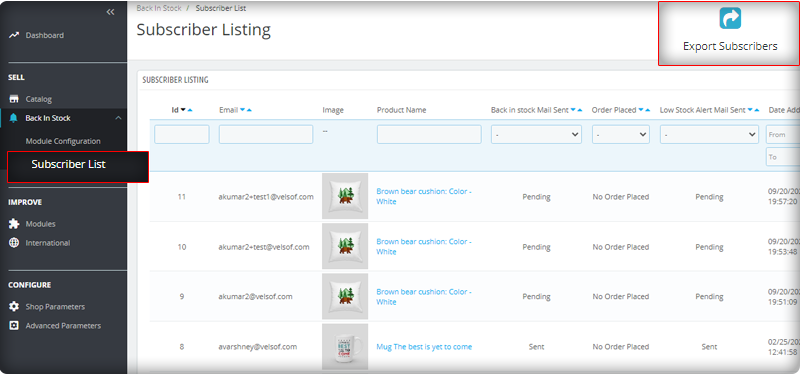
You can observe the subscriber listing on the admin panel at the left menu where all the installed modules are listed.

V3 Google reCaptcha is integrated with PrestaShop Back in Stock module to keep away the spammers and bots.

Add Custom Field in the Back in stock Subscription Box

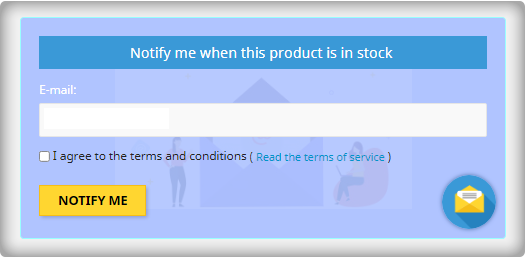
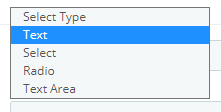
Collecting information from customers to send personalized emails will be easier. PrestaShop Back in stock addon provides an option to add custom fields in the subscription box. You can now add text, radio option, and other custom fields to gather more details about the customers.
Send automated emails for Low-stock and Back-in-stock

The PrestaShop Back-in-stock Module is a tool for email marketing. Customers usually receive hundreds of promotional emails and most of them are ignored but an email with a catchy subject line has more chances of getting opened. The module allows sellers to send a customized email with tailored text and subject lines. Along with an initial welcome email, you can send low-stock alerts to the subscribers and notify them about the restocked products.
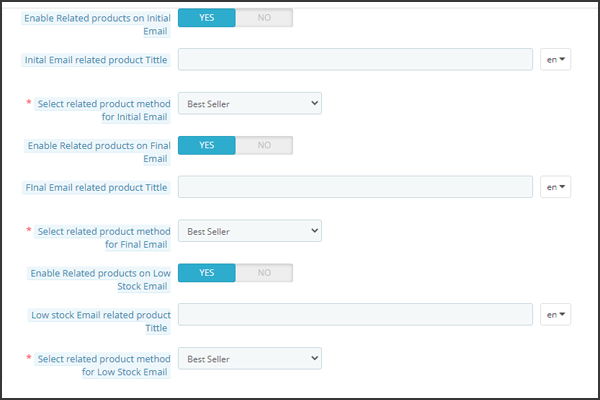
Add related products to email template and cross-sell

Heard the phrase ‘killing two birds from one stone, the module works the same way. It lets you send back in stock alerts as well as has an option to send related products. A seller can add details like bestsellers, products of the same category, specific products, etc. If a seller opts for the Specific products option, then he will have to specify the products in the respective tab as shown in the image below.

Send alerts via your email provider like Mailchimp

It is critical that you build your brand, and one way to do so is to ensure that the emails you send are sent from your domain. You’ll be able to use a variety of features to boost the success of your back in stock campaigns if you use an advanced eCommerce email provider like Mailchimp, Klavio, or Sendinblue. And, the PrestaShop back-in-stock module allows you to do so.

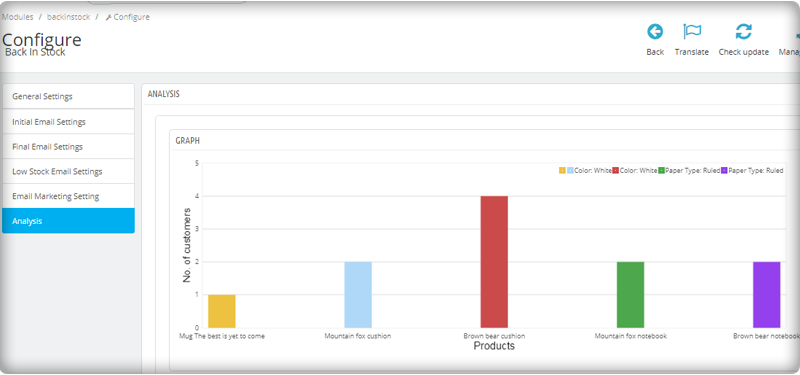
Real-time Analytics for PrestaShop

View a full report on customers who have subscribed to web push alerts for back-in-stock products. To increase sales, identify the most successful items, maximize inventory, and run promotional campaigns.

The new version has UTM Parameters

The UTM parameters are short text codes, you insert into URLs (or links) to monitor the success of a webpage or a campaign. Built-in analytics are available on social media sites. These allow you to track key metrics such as likes, shares, and website clicks. You can add UTM parameters to the PrestaShop Back in stock module and take advantage.

To wrap up: The Back-in-Stock emails are one-of-a-kind alerts as they create curiosity, influence the buying motives, and increase the chances of sales. If you are not sending alerts like low-stock or back-in-stock to your customers, you are making a huge mistake. Get your ‘Back-in-stock’ module today to grab your lost sales.

For eCommerce website development, module requirements, or mobile app development for your online store, KnowBand has experts and ready-made tools. Visit us at www.knowband.com or drop a message at support@knowband.com.

Recommended Reads: