Stunning Live Examples of PrestaShop One Page Checkout Addon by KnowBand

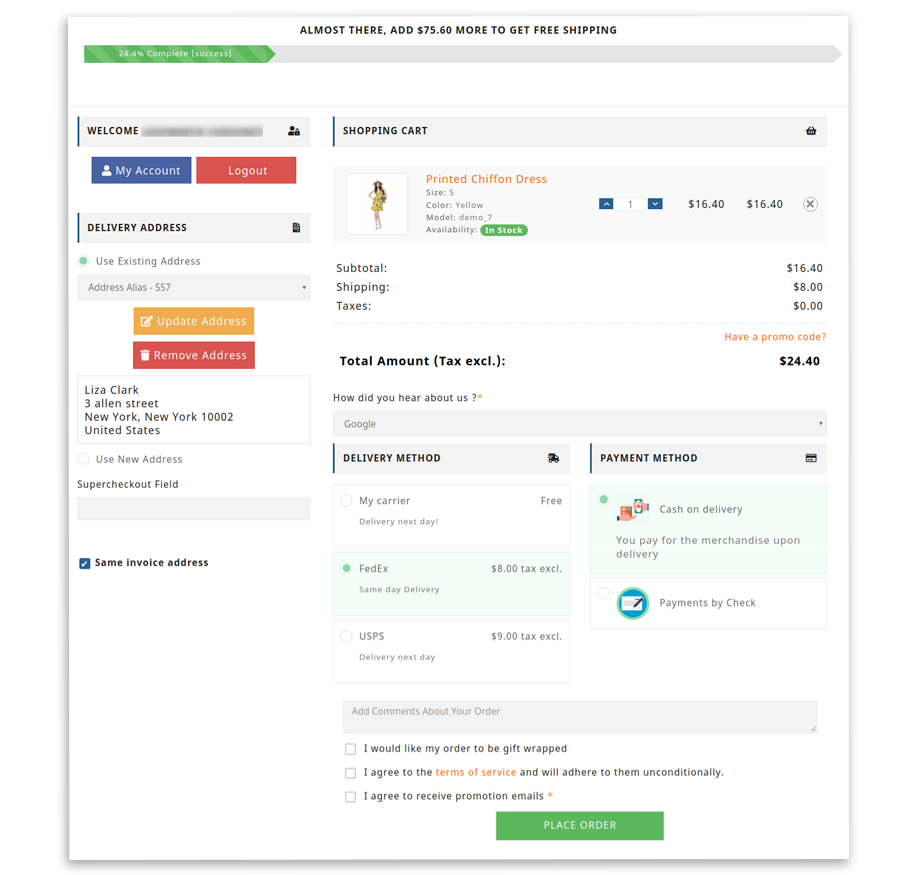
One Page Checkout displays all the elements of a conventional checkout, including cart items, billing and shipping addresses, shipping methods, and payment details on a single page. One-page checkouts were first implemented in an attempt to streamline the checkout process by which the number of clicks and pages needed. To give a brisk, we have compiled a few remarkable PrestaShop One Page Checkout examples that are blazing.

For the PrestaShop platform, KnowBand’s One Page Checkout is one such popular module that has 15000+ downloads on the KnowBand store and PrestaShop Addon store. The module is a one-stop solution as it supports multiple payment gateways, shipping options, provided social login option, and has a feature like MailChimp email synchronization.

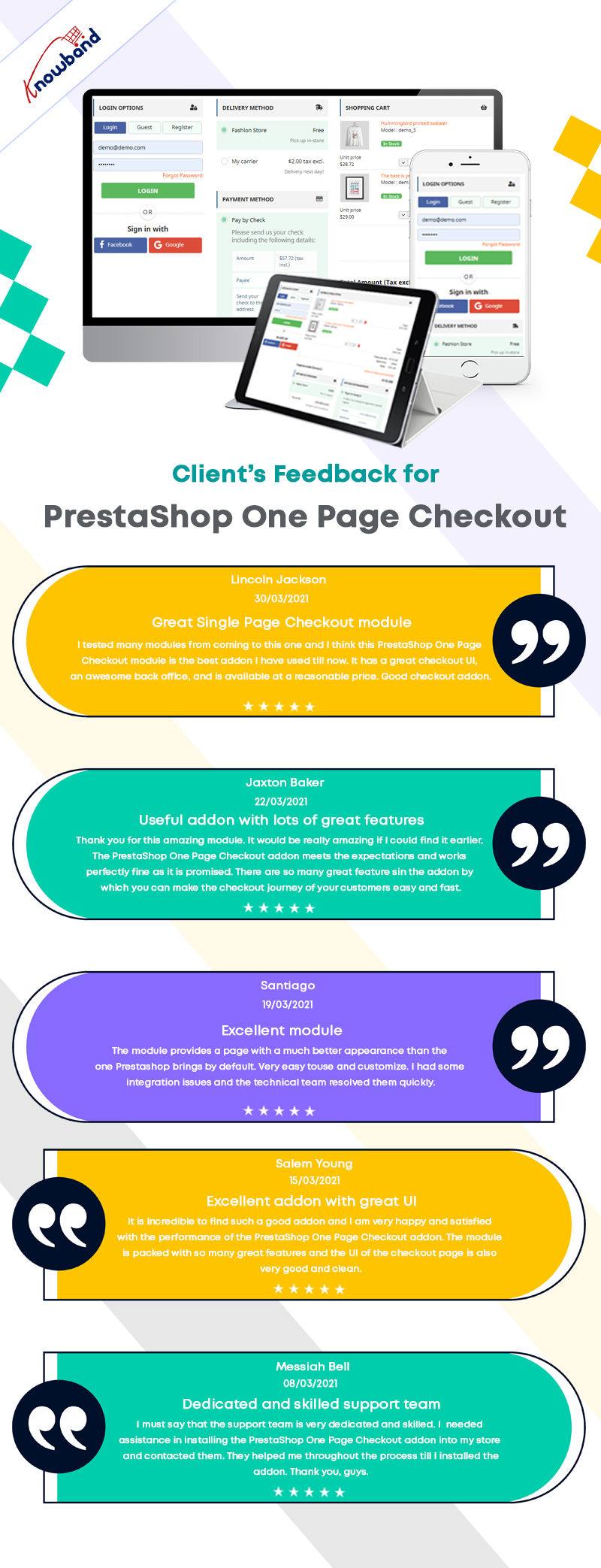
In this blog post, we will show you 7 beautiful examples of PrestaShop One Page Checkout Module that are live and working effectively on various eCommerce stores worldwide. Before jumping to it, let us see what clients have to say about the One Page Checkout and their experience with Knowband.
Prestashop One Page Checkout live examples

1.     LUO Online

LUO online is a Fashionable Jewelry store created on the PrestaShop platform that delivers products in Poland. To make the checkout experience smooth and quick, LUO is using the One Page Checkout module by KnowBand.

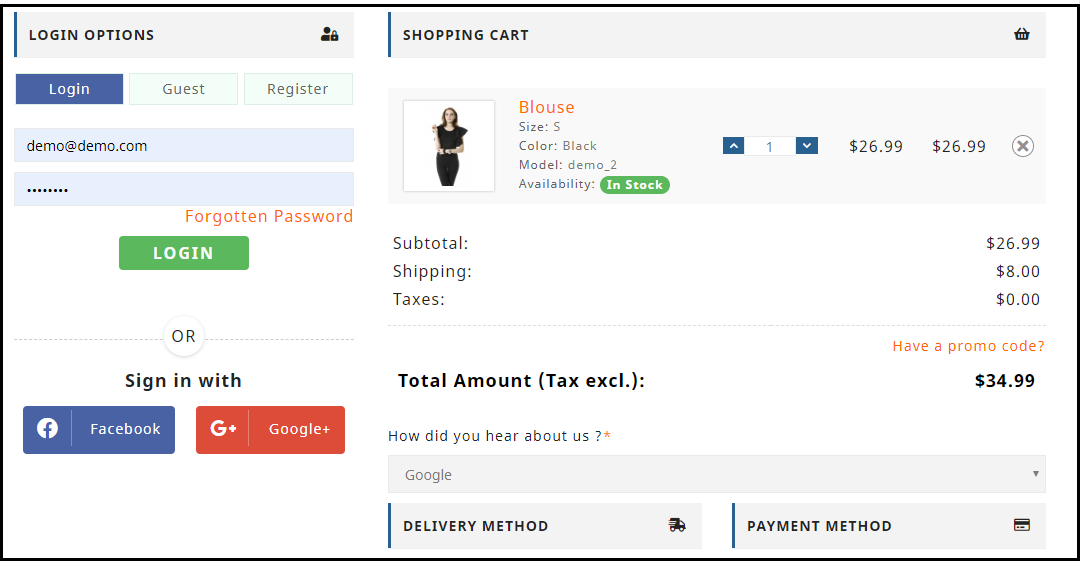
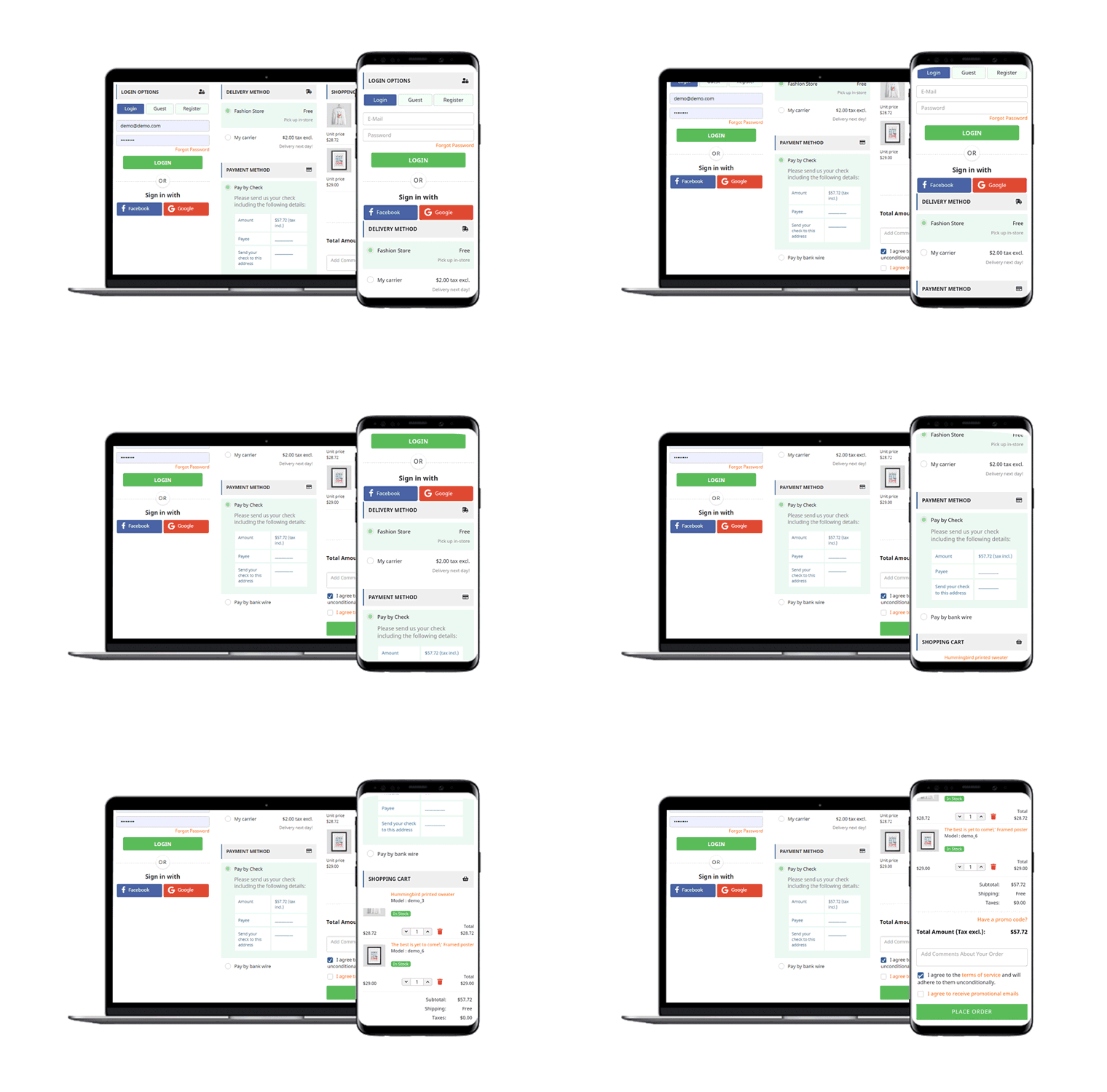
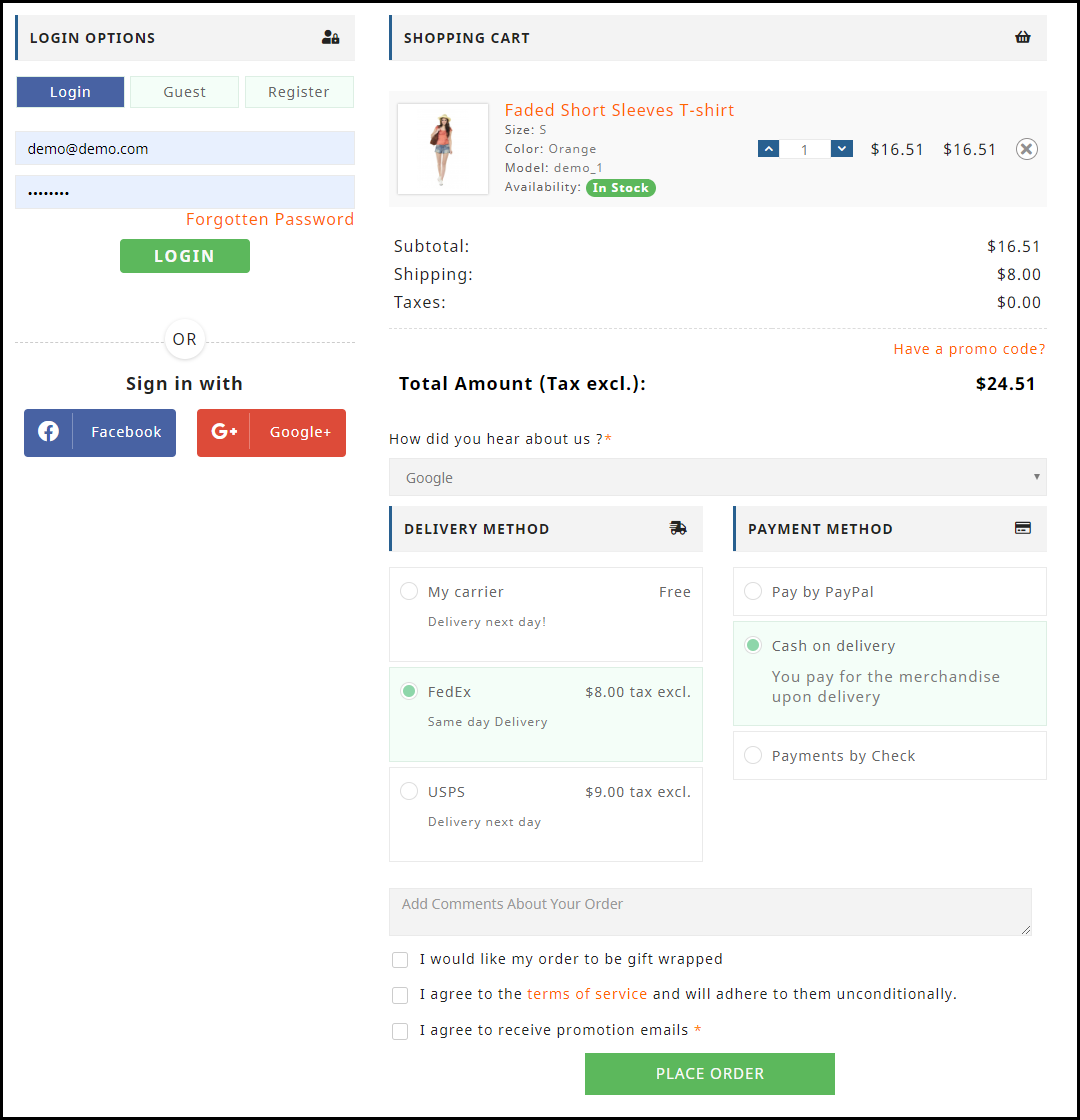
The Mobile responsive checkout page displays all the fields on a single page including the registration column, Social login option, shipping, and payment methods, and the products of the cart. It also supports guest checkout functionality for users who do not want to register.
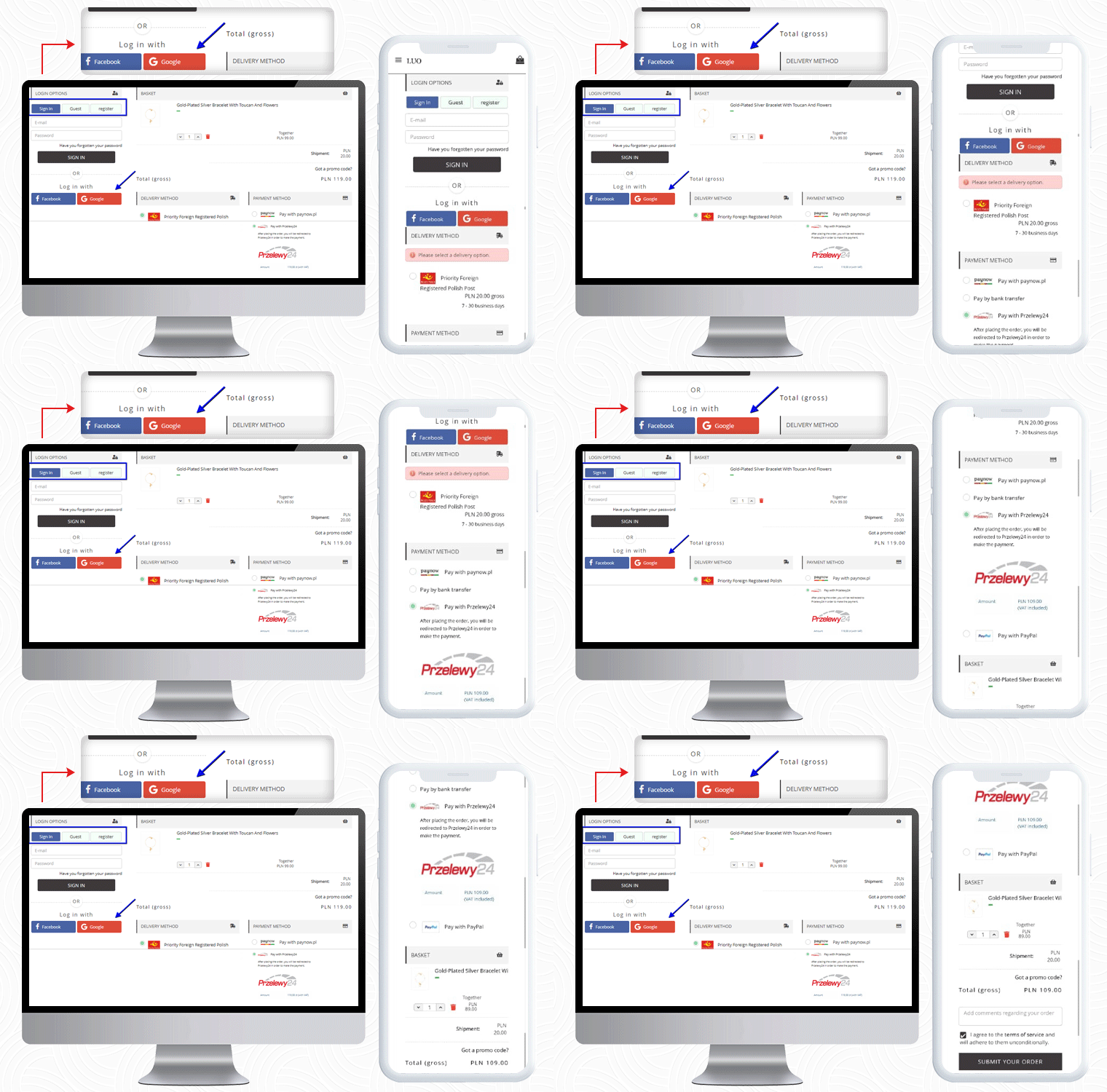
If a customer has any promo code then they can add that during the checkout process.

Payment Methods listed for Poland Customers: Pay with Paynow, Pay by bank transfer, Pay with Przelewy24, Pay with PayPal

2.     LUX DOM Furniture

LUX DOM Furniture is a Poland-based furniture website with a customizable three-column checkout page. Users can log in via Social media platforms like Facebook and Google+.

The free delivery eligibility bar is displayed at the bottom of the checkout page. Every order with an amount above 150PLN will be eligible for free delivery.
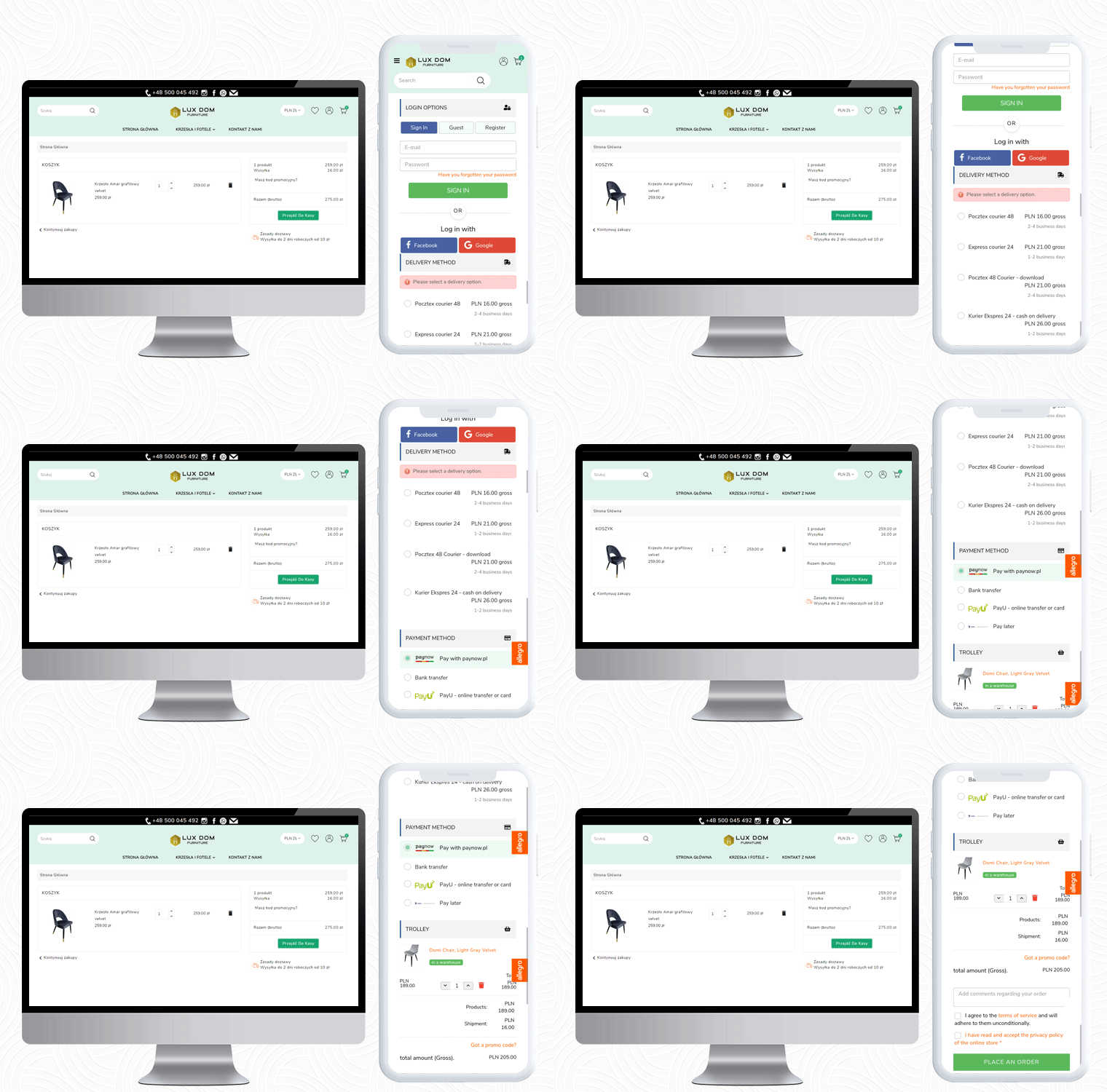
In the LUX DOM furniture store, there are specific payment methods for specific shipping methods selected.

Payment Methods listed by LUX DOM: Paynow, PayU, Przelew bankowy, Zapłać później

3.     Edukacyjna

The third live example of the PrestaShop One Page Checkout addon can be observed on Edukacyjna, which is an educational online bookstore. The first educational bookstore in Poland, offering methodology guides for all Polish publishing houses’ textbooks.

The PrestaShop One Page Checkout has several features and Edukacyjna is utilizing those in a proficient manner.

In the picture below, along with the features mentioned earlier, a ‘Progress Bar’ is displayed for the checkout process.
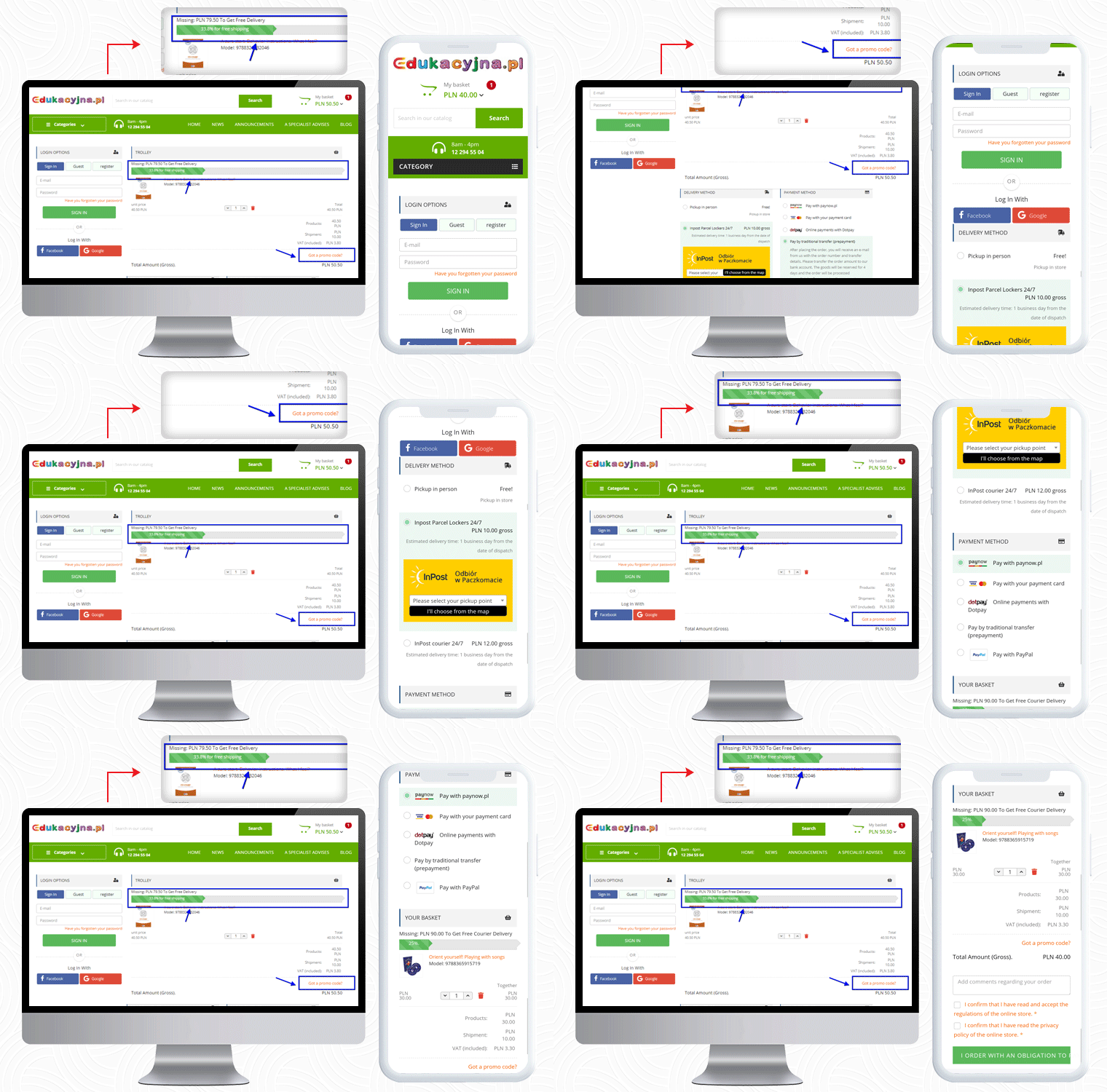
 

This educational website is providing several payment methods to their customers, and for every shipping method, they have listed different payment methods.

Payment Methods Listed for various shipping methods: Pay with Paynow.pl, Payment via VISA and Master Card, Online payments with Dotpay, Pay in cash on delivery, Pay by traditional transfer (prepayment), Pay by bank transfer with deferred payment (14 days) – only for educational institutions, Pay with PayPal

4.     Cyrenzo

Cyrenzo is France based online store of clothing, accessories, and home products from major brands. They deliver quality products with customized options in France. Cyrenzo has updated its new website to meet current expectations so that users can use it more easily.

They have been using the One Page checkout solution for the final checkout process on their PrestaShop store.

As mentioned, the module is feature-rich and a best seller!

It allows sellers to display the delivery mode only after they enter the delivery address if enabled from the admin panel.
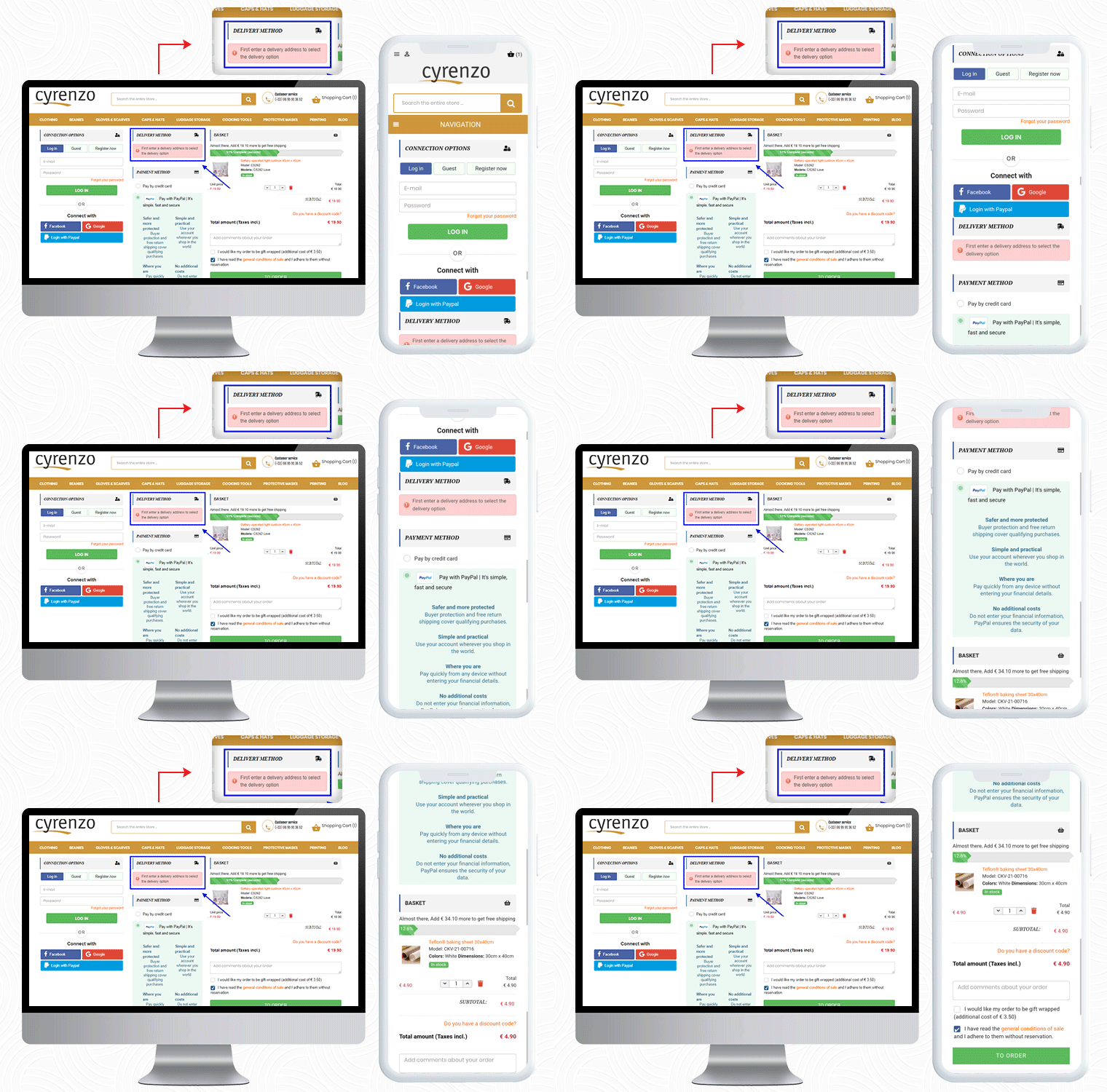
Cyrenzo is also using the PayPal login option along with Facebook and Google on their PrestaShop One Page Checkout. On a single page in a 3-column customizable layout, it displays the progress bar, cart details, payment methods, etc.

Also, to collect any additional information from the customer about the order, the seller can add an additional field before the final order placement.

Visit KnowBand store for Product Demo:

5.     Kongic

So far we have shown you four examples of One Page checkout module. Now, I would like to draw your attention to its layout customization feature.

Kongic is an eCommerce company dealing in skincare and body care products. For the checkout page, PrestaShop One Page Checkout is the best fit for their brand.

The checkout page of the Kongic is clean and they have kept enough white space that it giving it a more pristine look.
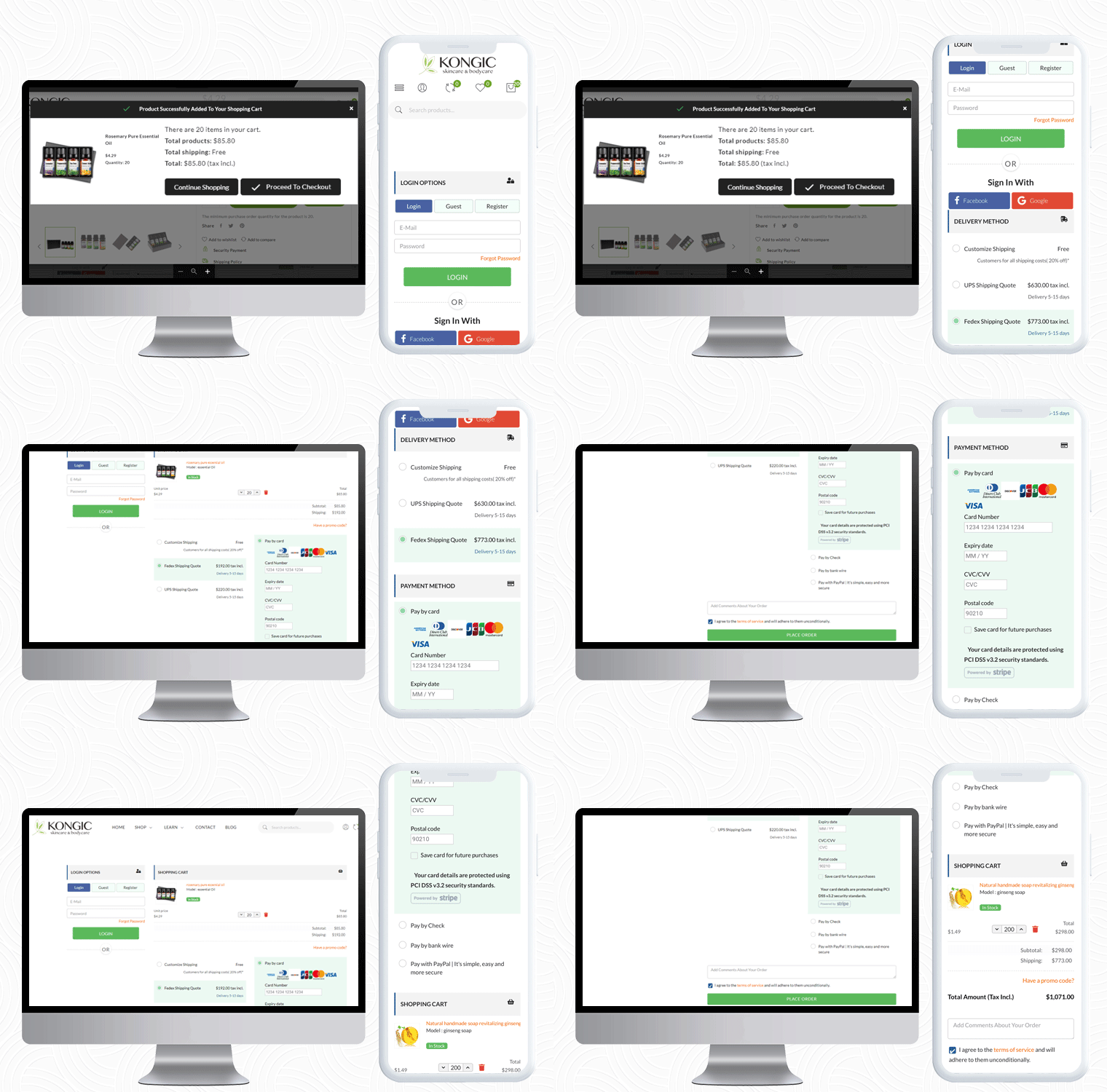
It is on the seller how and where they want to keep the sections. The module has a drag-n-drop functionality and they can adjust the fields as they want.

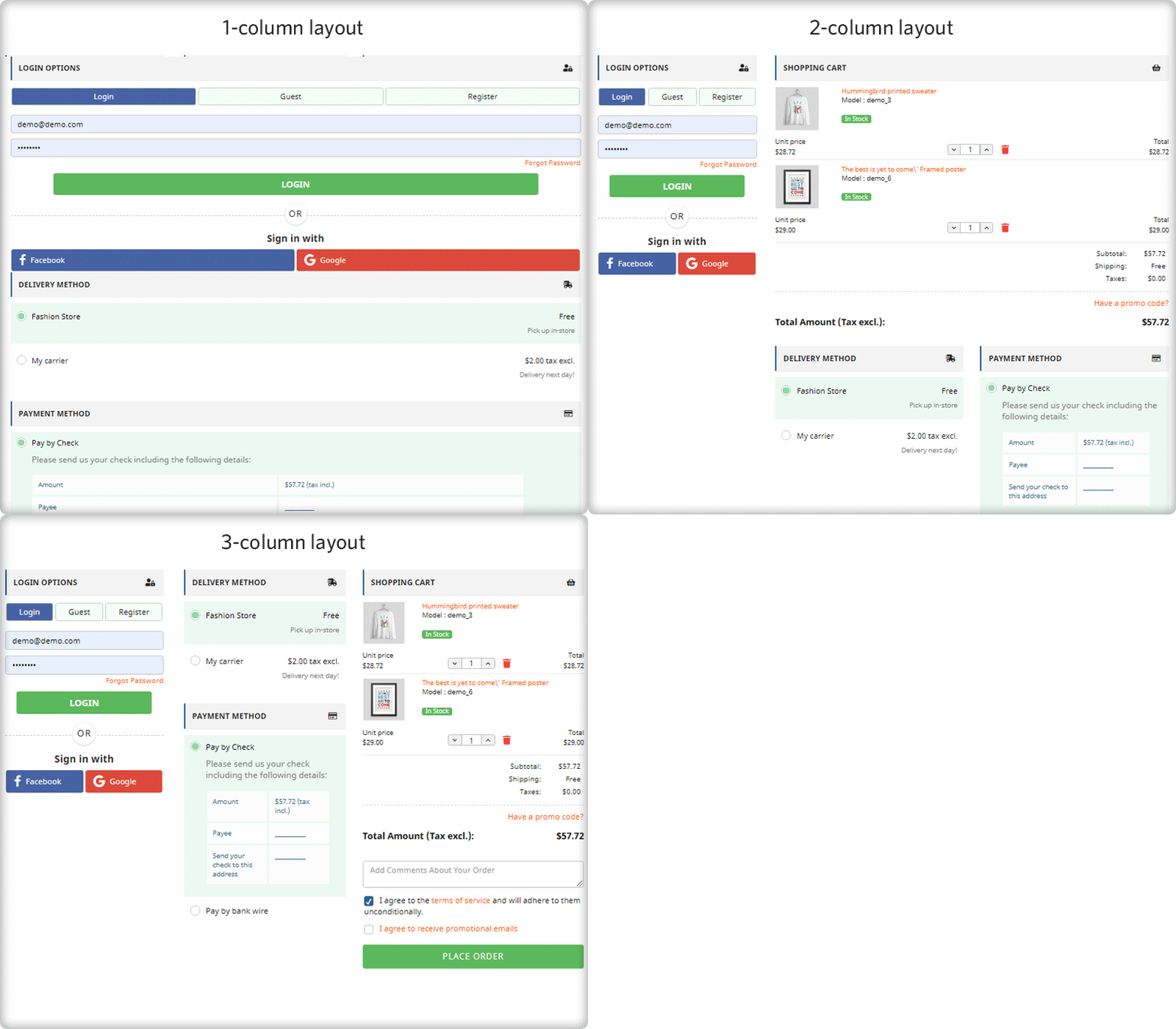
It gives you options like 1-column layout, 2-column layout, and 3-column layout. Customize the checkout page as you want to.

6.     Tiendatinta

Tiendatinta is a PrestaShop store that sells Stationery products, hardware, and different types of printers.

They have been using the PrestaShop One Page Checkout solution for checkout that gives a satisfactory experience to their customers.
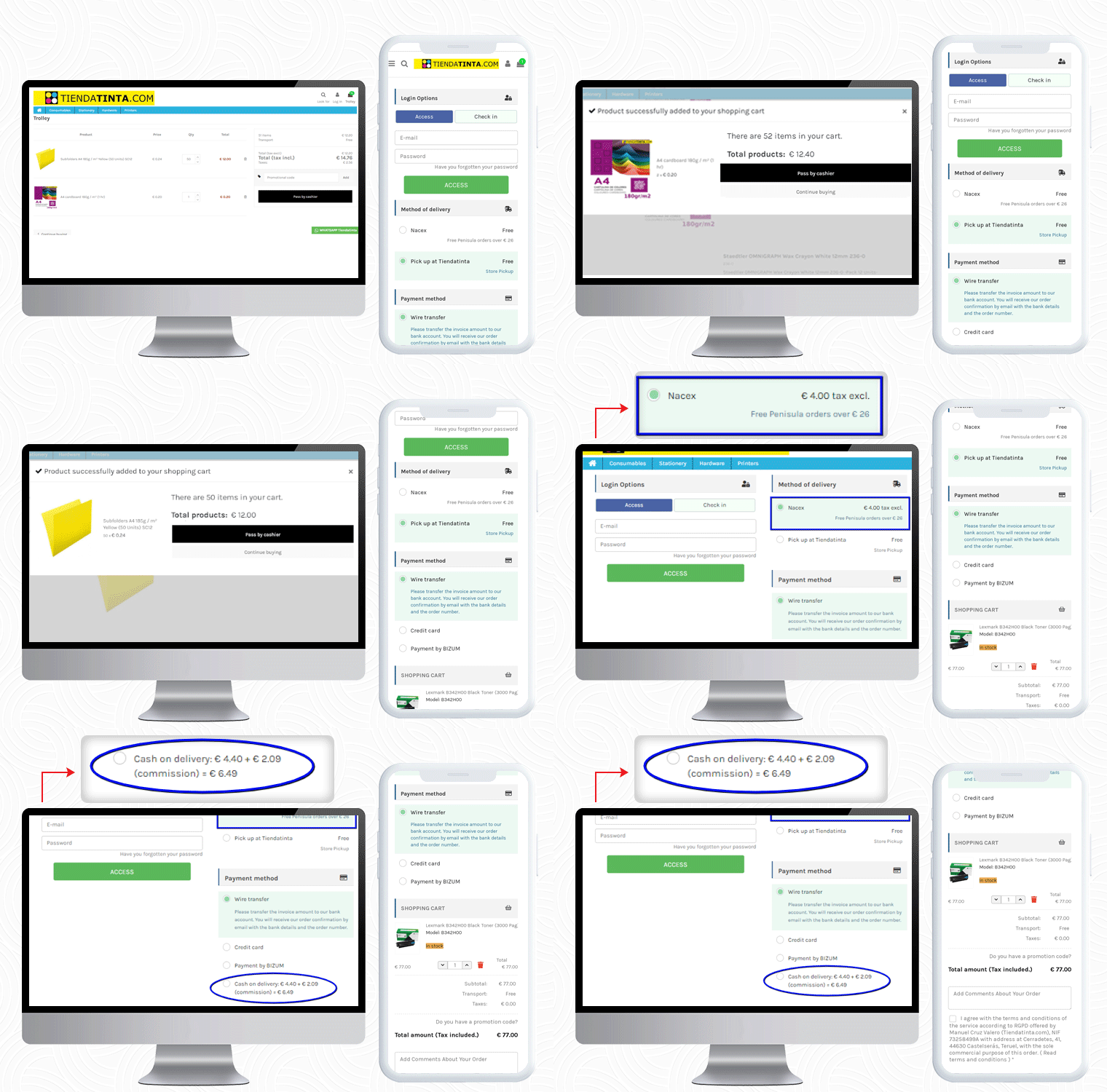
In this PrestaShop One Page Checkout module example, the Cash On Delivery (COD) is only available for the customers who opt for the Nacex method of delivery.
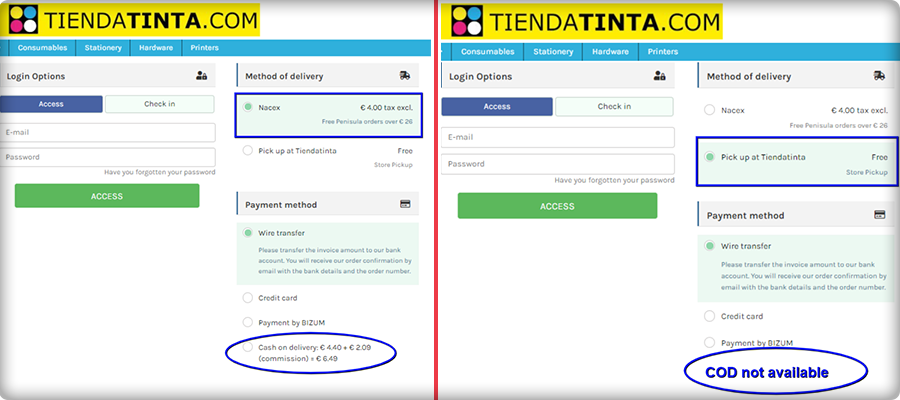
This feature is quite helpful when you have to offer a particular mode of payment gateway for and specific delivery method.

7.     JustKBC

For PrestaShop One Page Checkout real-life example, the JustKBC website is next in the row. They are using a 2-column layout, which is giving the checkout page a clean look.

A free shipping bar at the top of the checkout page encourages customers to shop more and increases average cart value.
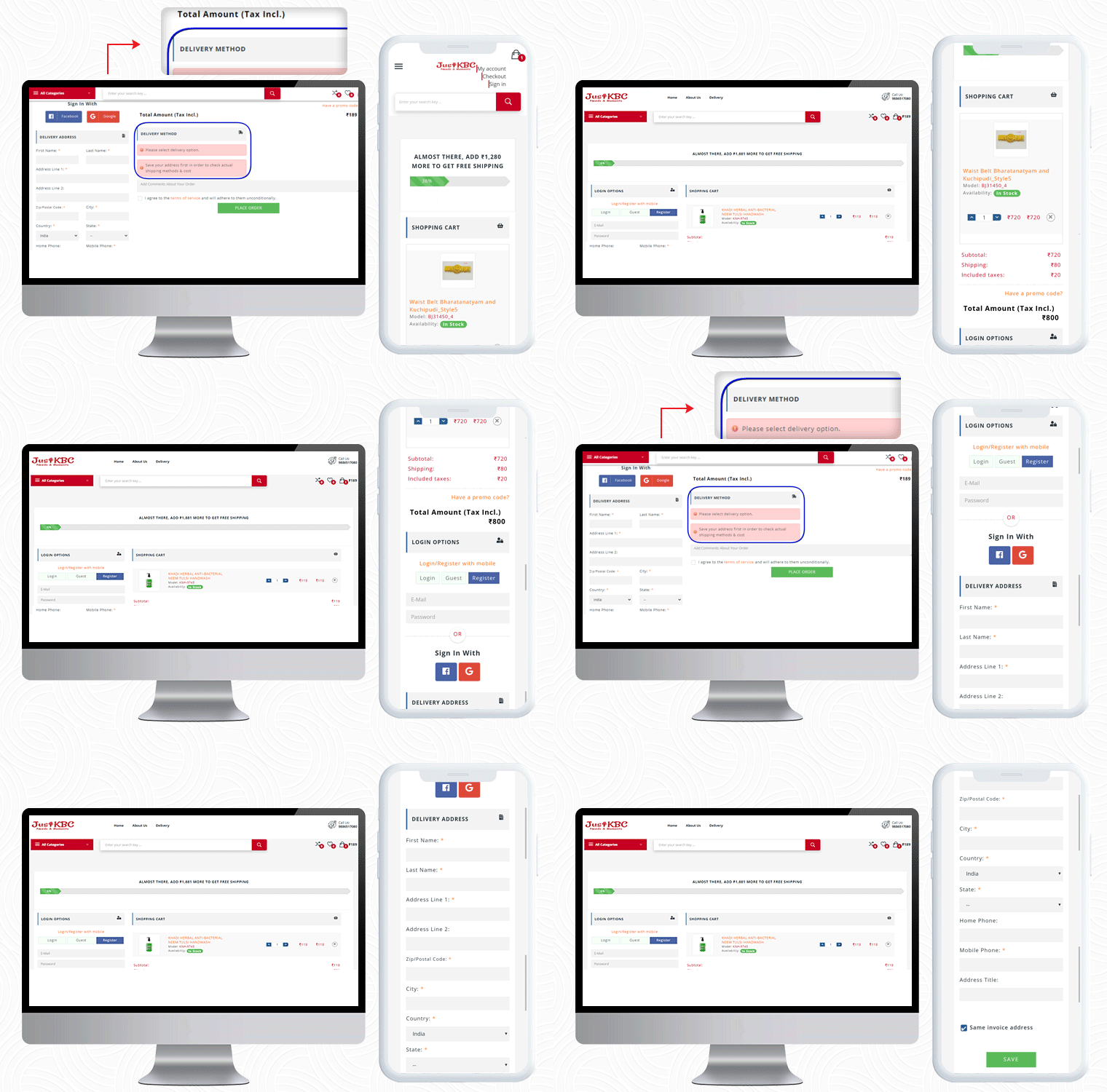
On this particular checkout page, if a customer wants to see the delivery options then he has to enter the delivery address first.

If a customer enters false details of ZipCode or forgets and mandatory field, they will see an inline error message. If The customer can allow auto address fill from Google as well.

You can check out some more websites that are using PrestaShop One Page checkout:

10 Best Checkout Page Examples and Practices for Italian PrestaShop store

Ten on fleek Checkout Page Examples of Poland PrestaShop eCommerce stores

10 Elite Examples of Checkout for Spain PrestaShop stores

To Wrap-up:

The preceding examples demonstrate why PrestaShop One Page Checkout by KnowBand is the best seller Module on Addon Store! Its features and functionalities make it unique and give an exemplary user experience. If you have an eCommerce store on the PrestaShop platform and are searching for a single-page checkout solution, your quest is over. You can go to the KnowBand store and look at the admin panel and front-end module demos.

On our store, you’ll find solutions for all other eCommerce services. All the modules are well-designed from both the seller’s and the customer’s perspectives.

Read More about PrestaShop One Page Checkout:

[Version 6.0.9 Released] New Features Added to PrestaShop One Page SuperCheckout Addon

PrestaShop One Page SuperCheckout is known as one of the best PrestaShop addons which simplify and fastens the checkout process of your eCommerce store and helps you improve the conversion rate of your business. With the Prestashop Fast Checkout addon, you can eliminate the risk of cart abandonment on the checkout page and can get more successful orders on your store in comparison to the multi-page checkout. Since the users don’t have to go to multiple pages to fill in the checkout details, the addon makes it easy and convenient for your online customers to easily and quickly complete the checkout and place their orders.

Knowband’s PrestaShop One Page Supercheckout addon is one of the best-selling addon with around 8000+ downloads on the Knowband store and 9000+ downloads on the PrestaShop Addon store. The addon has over 500+ 5* reviews on both the stores. Recently, there are some new features have been added to the addon in the new v6.0.9 version. In this article, we will be discussing all these newly added features in the module in brief.

Newly Added Features to the PrestaShop One Page SuperCheckout addon:

1. Select Methods to Display Total Price of the Product: 

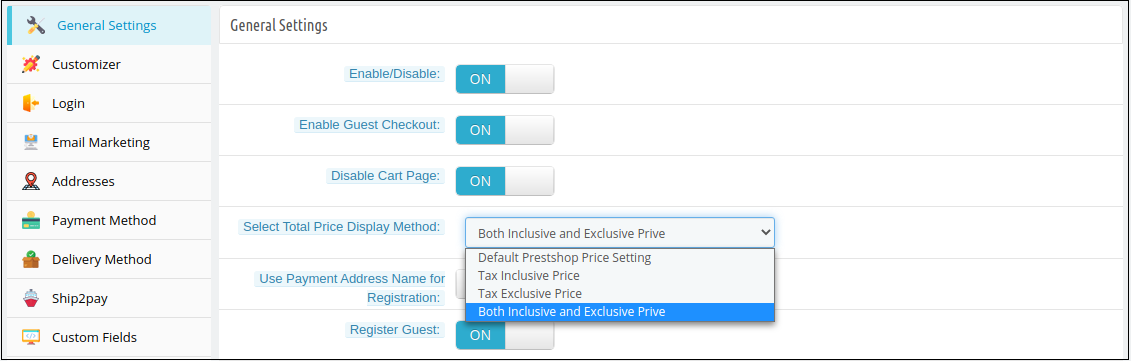
In the latest version of the PrestaShop Quick Checkout addon, the e-merchant can now choose to display the total price of the product in various ways. The store owner can choose to display the PrestaShop default price, the total price of the product inclusive tax or exclusive tax, or both i.e., inclusive and exclusive tax. The store owner can select these display options from the ‘Select Total Price Display Method’ section in the General Settings tab in the back office.

Whichever method is selected by the store owner, will be displayed in the Shopping Cart section on the checkout page.

2. Show Custom Field in the Invoice: 

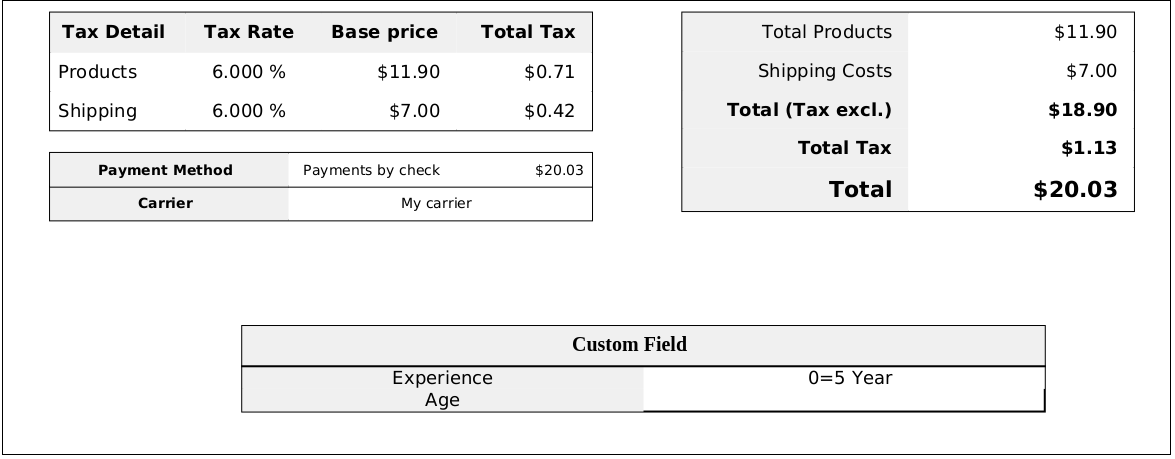
With this feature, the store owner can enable displaying the information filled in the custom field on the invoice of the placed order. The store owner can enable or disable this ‘Display Custom Field in Invoice’ feature from any or all the custom fields in the back office of the PrestaShop Simplified Checkout addon. The customers can view the custom field details in the received invoice of the placed order.

3. Compatibility with PrestaShop v1.7.7.1: 

PrestaShop recently released its latest version PS v1.7.7.1 with some new features and fixes. With the latest update in the PrestaShop One Step Checkout Addon, we have made the addon fully compatible with the latest PrestaShop version v1.7.7.1.

4. Compatibility with Zasielkovna and gmparcellocker modules: 

The module is now completely compatible with the gmparcellocker and Zasielkovna modules.

5. Fixed Compatibility Issue with Mollie Payment Method: 

In the newly released version of the module, all the issues with the compatibility of the module with the Mollie Payment Method have been fixed.

Other Important Features of the PrestaShop Responsive One Step Checkout addon:

1. Social Login feature: 

The addon allows the online shoppers to easily and quickly sign-in with popular social media accounts like Google, Facebook, and Paypal. Login with social accounts not only reduces the manual efforts of the online buyers but also saves them from creating a new account to place their orders.

2. Guest Checkout functionality: 

As many online shoppers don’t like to get registered and share details on a new unknown eCommerce website, this Guest checkout feature in the PrestaShop One Page SuperCheckout helps them place their online orders without registering themselves on the website. The online users can place their orders as guest customers or can also create a new account or sign-in to their existing accounts right from the checkout page without any hassle.

3. Integration with MailChimp, SendinBlue, and Klaviyo: 

The Prestashop One Page Checkout offers integration with popular email service providers such as MailChimp, Klaviyo, and SendinBlue. After the integration of these accounts with the module, the collected database of the online users will automatically be synced to these accounts.

4. Easy Look and Feel Checkout Page Customizations: 

The e-merchant can easily customize the look and feel of the checkout page including change the color of text, button background, button border, etc.

5. Manage Checkout Fields: 

The store owner can easily manage the fields of the page from the back office of the Prestashop One Page SuperCheckout. From showing or hiding the fields or making the fields mandatory or optional, the store admin can do everything easily from the admin interface. He can also re-arrange the steps with drag and drop functionality.

Upgrade to the Latest Version of the addon:

PrestaShop One Page SuperCheckout

User Manual

Admin Demo

Front Demo

You can also download the addon from the official PrestaShop Addon store.

PrestaShop Starter Pack: Must-Have PrestaShop Modules To Start Your Store

If you have just built your eCommerce website on the PrestaShop platform, you would be looking around for some PrestaShop plugins that you should integrate on your website as a beginner. Your search ends here.

In this article, I have put forward some of the basic yet effective PrestaShop modules to start with. We also call this the PrestaShop starter pack. Check them out.

1. One Page Checkout

PrestaShop One Page Checkout converts the default multi-step checkout process of your PrestaShop based website into a One Page Checkout. It aims to improve the checkout experience of your customers besides boosting your conversions by encouraging a quick and hassle-free checkout.

The module provides Guest Checkout, Facebook, Google and PayPal Login, option to customize checkout fields, multiple shipping services and payment methods support, layout customization, and much more. You can also display a free shipping banner on the top of the checkout section that helps to increase the average order value. It is a GRPR compatible module.

One Page Checkout has been downloaded 5000+ times on the official addon store and more than 2500+ times on our Knowband store.

2. Abandoned Cart

PrestaShop Abandoned Cart addon lets you track the abandoned carts on your website and provides you with the opportunity to convert those users into customers. The module aims to recover lost sales and helps you reduce the cart abandonment rate on your website.

Talking about some of its key features, it lets you create an abandoned cart alert; you need to specify the duration after which the cart is automatically assumed to be abandoned and a reminder email is sent to the user. The email functionality can be customized from the back-end configurations.

It also offers different types of discount email templates through which you can persuade the abandoned cart users to complete their purchase by providing a discount code inside the email.

3. Spin and Win

PrestaShop Spin and Win adds a Gamification element to your website in the form of a Spin and Win popup. The module focuses on certain aspects like increasing user engagement, reducing website’s bounce rate, boosting the average site time but most importantly, it is an email subscription popup that helps you grow your email list and scale-up your conversions.

With the help of this module, you can customize the look and feel of the popup and the text on it. Besides, you can configure the popup display settings like the display frequency, when to show, where to show, on which pages to show the popup, etc. It also provides you with the option to customize the popup slices as per the way you want.

4. Affiliate and Referral Program

PrestaShop Affiliate and Referral Program addon is an exciting way to boost your brand awareness and acquire new customers. The module allows users to register as an affiliate on your website, after approval of which they can earn rewards/incentives upon referring the website to others.

The user can share his/her referral code with others which they can use during the sign-up process. They can also share a direct referral link to sign-up and also share the link directly on their social media platforms or on someone’s email address.

The referral is considered successful if a new user has registered or made a purchase; depending on the configurations set from the back-end. Upon successful referral, the rewards are provided to the affiliate which can be claimed in the form of a discount voucher or the affiliate customer can raise a payout request.

5. SEO Optimizer

PrestaShop SEO Optimizer also referred to as URL redirect or URL cleaner module helps you convert the URLs of your website into SEO-friendly URLs. You can rewrite duplicate URLs and perform three types of redirect; 301 redirect, 302 redirect and 303 redirect. The module helps you improve the performance of your website on the search engine.

It’s a multi-lingual module, is SSL compatible, and also has multi-store compatibility.

6. SEO Wizard

PrestaShop SEO Wizard addon helps you manage the SEO of your web pages. The module automatically updates interlink and metadata on your website after the cron is executed from the back-end. The optimization is offered for four different web pages that include Product pages, Category pages, CMS pages and Manufacturer pages.

For any kind of assistance or query, reach out to us at support@knowband.com and our support team will reach out to you to the earliest.

You May Also Like:

10 Must-have Addons to Optimize Prestashop Product Pages

6 Must-Have Social Media Addons For Your PrestaShop Store

Top 10 PrestaShop addons to boost your Holiday sales

Top 10 PrestaShop addons to boost your Holiday sales

The holiday season is coming close. It is that time of the year when e-retailers look for every single opportunity to attract customers to their store and maximize sales.

The holiday season alone captures sales equivalent to the sales during the rest of the year. According to NRF, holiday sales for 2021 are expected to rise by around 4% as compared to 2020.

If you are a PrestaShop store merchant, here are the top 10 PrestaShop addons that you should implement in your store, to boost your holiday sales.

1. PrestaShop Spin and Win

The first one in our list of PrestaShop holiday modules is the PrestaShop Spin and Win.

Grab customer attention and enhance customer engagement on your website by adding a gamified interface to it.

Knowband’s Spin and Win addon for PrestaShop is one of the best PrestaShop addons to increase customer engagement and your email list. It provides your visitors with a gamifying experience when they visit your store, by displaying them a Spin and Win wheel popup.

PrestaShop Spin and Win addon allows you to design your popup as per the occasion. Give a festive look to your website and provide the festival feel to your visitors. With the help of PrestaShop Spin and Win addon, you can set your popup theme for Halloween, Christmas, New Year, etc.

The more attractive your popup will look, the more engagement it will create. Let visitors spin the wheel and earn some exciting offers. The holiday season is the perfect time to lure visitors with some discounts and offers and convert them into potential buyers.

2. PrestaShop Gift Card Manager

This holiday season, when customers will be too busy shopping, make their task easy and save their time by offering them the Gift Card option.

PrestaShop Gift Card Manager allows you to create multiple gift card templates for multiple occasions. It also comes with pre-existing gift card templates for Easter, Halloween, Christmas, etc. You can give a festive look to your gift cards to catch the holiday spirit and boost your holiday sales.

Let customers spread the love through your gift cards. Gift cards will not only increase your holiday sales but also make the best way to increase your brand awareness.

Read:

Why Digital Gift Cards are important to your business?

Get more Holiday sales by setting up a Gift Card section on your store

3. PrestaShop One Page Checkout

Let a lengthy and a complicated checkout not be a barrier in your conversions during the peak holiday hours. Replace the conventional multi-step checkout with a single page checkout.

PrestaShop One Page Checkout puts all the checkout fields on a single page and provides your customers with a smooth and hassle-free checkout. To simplify your checkout process, it offers Guest Checkout, Social Login (through Facebook, Google and PayPal) and supports all major payment methods and shipping services. There are tons of other customizations which a merchant can make to make the checkout process convenient.
4. PrestaShop Mobile App Builder

Our another high rated module in the list of PrestaShop holiday addons is PrestaShop Mobile App Builder.

Mobile Apps have taken the user experience to a whole new level. Today, a majority of customers prefer having a mobile app as it is far more convenient than browsing a website. With that being said, launching a mobile app for your brand will not only increase customer engagement but also boost your revenue to a great extent.

Transform your PrestaShop website into a native Android and iOS mobile app with the help of PrestaShop Mobile App Builder and provide your customers with an enhanced online shopping experience.

Features like Real-time synchronization, Unlimited Push Notification, Fingerprint Login, Zopim and WhatsApp Chat support, etc. make the PrestaShop Mobile App Builder highly exciting.

To know more, read: This Holiday Season, launch Spin-wheel integrated PrestaShop Mobile App to boost sales

5. PrestaShop Return Manager

With mass orders, also increases the order returns and the delay in the product return can irk customers.

So, speed up your return process and manage your eCommerce returns conveniently with PrestaShop Return Manager addon. Apart from the usual Refund and Replacement process, it provides your customers with the option to opt for the “Store Credits” which they can receive for the product amount. It ensures customer loyalty as well as customer retention since the customer would surely be visiting your store again in the future to utilise the credits.

6. PrestaShop Loyalty Points

Adding to the list of our PrestaShop holiday modules is PrestaShop Loyalty Points.

Make the journey of your new customer as well as the existing customers exciting by rewarding them some loyalty points every time they make a purchase on your store. This is a perfect idea to acquire new customers and ensure repeat purchases, especially during the holiday season.

Knowband’s Loyalty Points addon for PrestaShop focuses on customer retention and customer acquisition, at the same time. You can reward loyalty points to a new visitor when they sign-up on your store, and turn him/her into your loyal customer within no time. The points can be used as a discount voucher.

If you offer loyalty points for every purchase that a customer makes on your store, you can generate huge holiday sales.

Read: Benefits of a Loyalty Program for your online business

7. PrestaShop Abandoned Cart

One of the most helpful PrestaShop modules for this holiday season would be PrestaShop Abandoned Cart.

Brands witness a high number of abandoned carts during the holiday season. Those numbers can cost you a huge loss in the revenue. Though you cannot put a stop to cart abandonment, you can surely recover some lost sales and even a slight recovery in the cart abandonment rate can add to a huge amount in the total revenue.

PrestaShop Abandoned Cart addon allows you to track and chase the abandoned cart users and helps you recover the lost sales by sending regular follow-up emails.

This PrestaShop module reduces the cart abandonment rate, ultimately resulting in increased conversions.

8. PrestaShop Affiliate and Referral Program

Referral programs can be a big boost to your e-commerce sales. While the holiday season is approaching, you can start a referral program and provide exciting incentives to users when they refer your brand to his/her friends, family or relatives and the latter makes a successful purchase.

You can run such a referral program on your store with the help of PrestaShop Affiliate and Referral Program addon. A customer can register as an affiliate on your store, share your website link with his other people and earn vouchers or cash when the referent successfully registers or makes a purchase.

9. PrestaShop Store Locator and Pickup

Another PrestaShop holiday season module to look out for is the PrestaShop Store Locator and Pickup.

The product delivery takes too long during the holiday season, making customers run out of patience. Because of bulk orders, it becomes difficult for the shipping providers to ship every product in a quick span.

Customers, too, know this very well. In such cases, PrestaShop Store Locator and Pickup addon manages things quite conveniently.

If you have your stores located in multiple locations, you can display them at the front end of your website and allow customers to select their nearby store so that they do not have to wait too long for the product to get delivered. Customers can reach out to the nearby store and pick up their item.

10. PrestaShop Booking and Rental system

Have a renting business? Now manage everything online with PrestaShop Booking and Rental system addon.

During occasions like Halloween or Christmas, people look to buy costumes on rent. There is a heavy demand for it. Hence, if you run such business, you can provide people with theme-based costumes or dresses on rent and boost your holiday sales.

You still have time to get everything set before the holiday season starts. Try out these 10 PrestaShop addons and capture huge sales in the coming holiday season.

This might also interest you:

Knowband’s list of modules to look out for this Holiday season

10 Halloween Marketing Ideas to Uplift your Sales this October

6 must-have social media addons for your PrestaShop store

5 Quickfire Prestashop Addons that can Boost your Conversions

10 Must-have Addons to Optimize Prestashop Product Pages

One Page Checkout vs Multi-Page Checkout

The success of your eCommerce business does not depend on how many people visit your website but on how many of them convert. The more conversions you get, the more revenue you make and it majorly depends on your checkout page.

Which checkout process do you follow? One Page Checkout or Multi-Page Checkout?

Customers desire a simplified checkout experience. A long and complicated checkout hampers the shopping experience which eventually results in cart abandonment. For a convenient checkout process, website owners are shifting towards one-step checkout, leaving the traditional multi-step checkout process behind.

The debate revolving around a One-page checkout vs Multi-page checkout is never-ending. While some eCommerce professionals prefer one-step checkout, some feel a multi-step checkout is a better option.

In this article, I will put forward the differences between the checkout process and help you make a better choice.

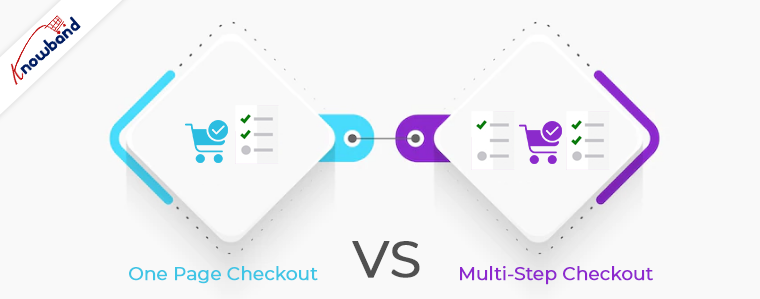
One Page Checkout

One Page Checkout puts up all the elements of a standard checkout process on a single page and lets the customers fill out the checkout fields in any particular order.

Pros of One Page Checkout

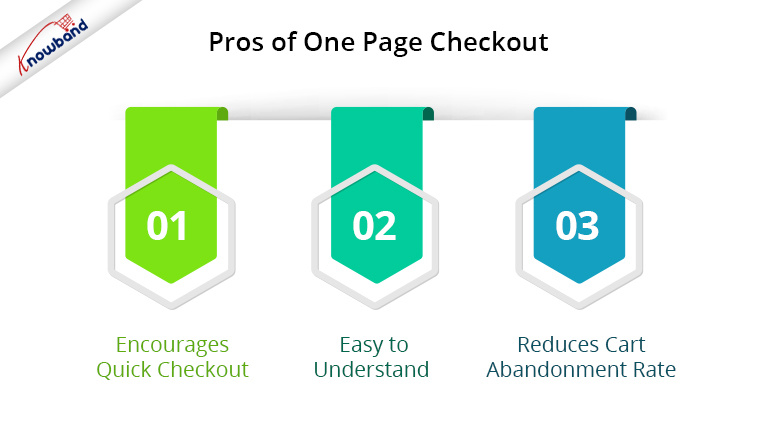
1. Encourages Quick Checkout

With all the checkout-related details upfront, it allows customers to check out quickly. They get rid of clicking multiple times to head towards the next step (in the case of multi-step checkout) and can enter all their details regarding billing, shipping, and payment on the same page.

2. Easy to Understand

A one-step checkout makes the page design simple and easy to understand and presents a clear picture in front of the customers. This also makes it easy for them to verify their details since they do not need to switch between pages.

3. Reduces Cart Abandonment Rate

An intricate checkout is one of the main reasons for shopping cart abandonment. It is therefore important to optimize your checkout process and provide customers with a smooth checkout experience- One Page Checkout is the best way to do that.

Recommended Read: 10 Benefits of Social Login in eCommerce

Cons of One Page Checkout

1. Slow Loading

Displaying a high volume of content on a single page can cause slow loading on your website. A slow checkout can turn away your visitors and make them search for the product on your competitor’s store.

2. Uncomfortable

Customers who are familiar with a multi-page checkout might not find the one-page checkout comforting.  A long checkout form can seem clunky and might discourage a customer from making the purchase.

Multi-Page Checkout

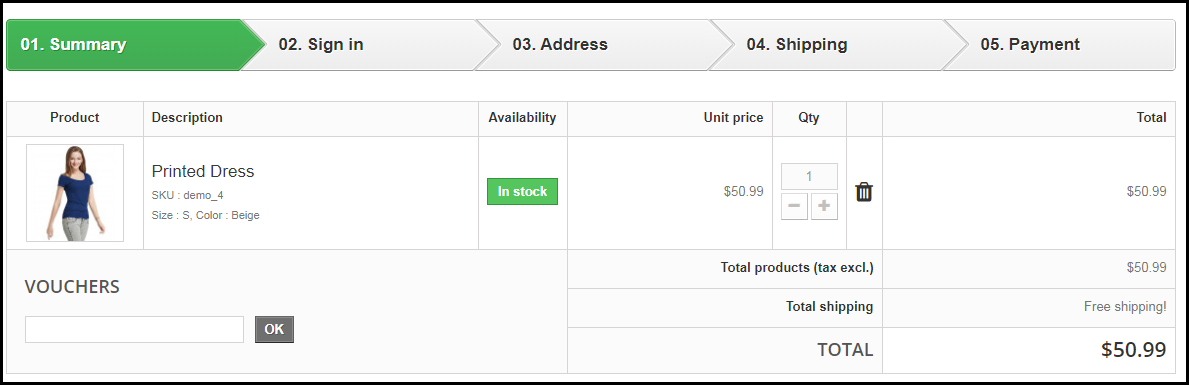
A multi-page or multi-step checkout breaks down the entire checkout process into several pages. Customers have to fill in their details on each page separately to finish the checkout process.

Pros of a Multi-Page Checkout

1. Customers Feel More Secure

Filling all the required details step by step makes customers feel more secure about their purchase, especially if they are purchasing something expensive.

2. Layout Looks Clean

The layout of a multi-step checkout does not look bulky since the checkout fields are divided into several pages which makes the layout clean and uncluttered.

Recommended Read: 8 Checkout Page Mistakes that may be Killing your Conversions

Cons of Multi-Page Checkout

1. Lengthy and Time-Consuming

Because of more number of pages, shoppers find multi-page checkout a lengthy and time-consuming process. Ultimately, customers run out of patience and are compelled to abandon their shopping carts. What’s worse is they decide to purchase from a different store.

2. Difficulties in Correcting Information

Mistakes happen very often while filling out the checkout fields. In a multi-page checkout, customers are left with no choice except to return to the previous page and correct the information. On many e-commerce websites, there is no option to edit and customers are asked to fill in the entire details again. This causes frustration among customers and creates a high chance of cart abandonment.

One Page Checkout vs Multi-Step Checkout: Which one to choose?

If you are in a dilemma about which one has better benefits, I would say- Go with a single-page checkout. These days, a single-page checkout is overtaking multi-page checkout because store owners are more focused on providing customers with a way to complete their transactions in one go rather than asking them to follow several steps.

Consider this: You go to an offline store. After you are done picking what you want, you go to one of the billing counters to make the payment. Tell me which counter do you look for? The counter is less crowded and takes less time for you to make the payment and check out from the store, right? Similar is the case with online stores. Shoppers want to check out as early as possible.

One Page Checkout by Knowband

Our One-page checkout offers various rich features that enhance your store’s checkout process and make it fast and convenient. The module is available for PrestaShop, OpenCart, Magento and Magento 2.

PrestaShop One Page Checkout

OpenCart One Page Checkout

Magento 2 One Page Checkout

Key Features of One Page Checkout Module

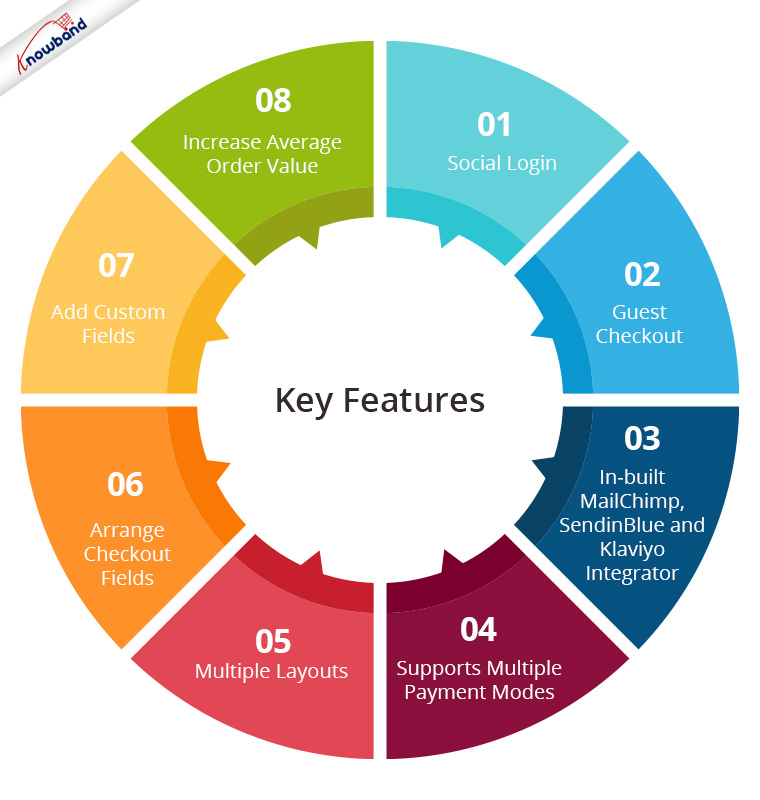
1. Social Login

One page Quick Checkout offers social login options that allow users to register on your store with their Facebook, Google and PayPal accounts

2. Guest Checkout

Visitors who want to shop from your store without getting registered can make a purchase easily with the Guest Checkout option.

3. In-built MailChimp, SendinBlue and Klaviyo Integrator

You can collect the email address of your subscribers directly from the respective email service providers as soon as they log in to your store or subscribe to your newsletters.

4. Supports Multiple Payment modes and Shipping Services

Apart from Credit and Debit cards, Our Quick Checkout module supports various payment methods such as PayPal, PayU, Stripe, Sage Pay, Mobilpay, Ogone, Pago Facil, QuickPay, First Data, Paysera, Braintree, Checkout, etc.

Besides, it supports various shipping services such as Mondial Relay, So Colissimo, Ulozenka Delivery,  LP Express 24 Delivery, Webshipr, Zasielkovn Delivery, Paczkomaty InPost, Paczka w Ruchu, etc.

5. Multiple Layouts

One Page Fast Checkout module offers 3 layout designs: 1-column, 2-column, and 3-column. You can customize the layout accordingly.

6. Arrange Checkout Fields

Set the checkout fields’ priority with the drag and drop feature. Pick a checkout field and drop it to the desired position.

7. Add custom fields

If you want to add some additional fields to your checkout page, you can do it easily with the One Page Fast Checkout module.

8. Increase Average Order value by displaying a Free shipping banner

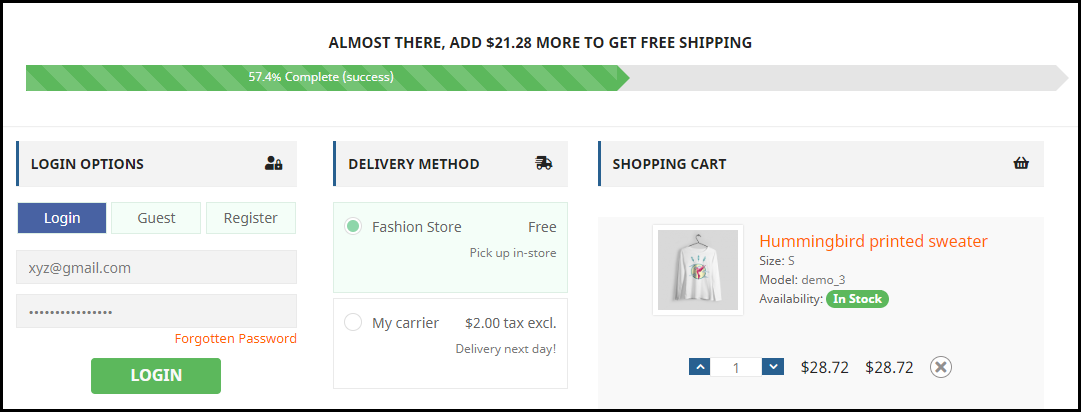
This feature is specifically for the PrestaShop platform where the admin can specify the minimum amount for the customers to avail of the free shipping facility. If the customer’s cart amount is lesser than the specified amount, he or she will be displayed the extra amount they need to shop for if they want to get free shipping. This eventually increases your average order value.

9. Choose Total Price Display Methods

The e-merchant can now select from a variety of approaches for how to show the total cost of the items on the checkout page. From the One Page SuperCheckout addon’s back office, the store admin can select the PrestaShop default price, price inclusive of tax, price exclusive of tax, or both inclusive and exclusive of tax.

10) Track Customer Checkout Behaviour

In order to eliminate the pointless processes that are annoying the clients, the admin can evaluate the percentage of data filled or skipped by online users who abandoned their cart.

One page checkout is GDPR compatible and has a fully mobile responsive layout. It has multi-lingual support.

Final Thoughts

Whether you follow one step checkout or a multi-step checkout process, make sure to maintain the checkout flow. Ask for relevant information only. Get into the zone of your customers and try to figure out what changes you can make to improve the customer experience.

At the end of the day, it is totally your call. If you have some more points to add to this article, do let me know in the comments below. I would like to know your take as well. What do you prefer for your eCommerce website?

Everything you need to know about PrestaShop One Page Checkout addon

The PrestaShop Checkout addon also called PrestaShop One Page Checkout is a PrestaShop extension that replaces the conventional multi-page checkout process on your Prestashop store with a single page checkout system.

Having a PrestaShop One Page Checkout is beneficial for your Prestashop store as it helps in improving the conversion rate by optimizing the checkout page and making the checkout process simple and quick.

Check out some live PrestaShop One Page Checkout globally:

This blog listicle will give you a clear idea about the PrestaShop One Page Checkout and how you can customize it for your PrestaShop store.

10 Elite Examples of Checkout for Spain PrestaShop stores

Stunning Live Examples of PrestaShop One Page Checkout Addon by KnowBand

10 on fleek Checkout Page Examples of Poland PrestaShop eCommerce stores

10 Best Checkout Page Examples and Practices for Italian PrestaShop store

Why KnowBand’s PrestaShop One Page Checkout?

Online Shoppers have to go through a number of steps when they are on the checkout page. On top of that, they are presented with a registration form in between, which disturbs their flow. To be very honest, a majority of consumers do not like to fill lengthy registration forms or create an account during the checkout, yet a number of e-commerce stores have made it mandatory on their website.

As a result, some consumers choose to abandon their carts and look at other stores that provide a simpler and better checkout facility. PrestaShop One page checkout addon deals with such scenarios and aims to provide a better checkout experience to your store visitors.

Prestashop One Page Checkout works in different ways to curb various loopholes in a checkout process that may be killing your conversions and increasing shopping cart abandonment. Let’s look at how Prestashop One Page Checkout helps in making your checkout process better.

You Might Also Like:

1. It Offers Guest Checkout

For the consumers who hesitate to create an account on your store or do not like to get registered, you can provide them with the Guest checkout option and encourage them to make a quick purchase.

2. Social login makes the signup quick

Customers can use their Facebook, Google, or PayPal accounts to sign-up on your store. It saves shoppers’ time from lengthy form filling and makes their way easy for the checkout.

3. Customers can Easily Update Cart Quantity on the checkout page

A user who wants to make changes to the product quantity does not need to go back to the product page. He or she can update it right from the checkout page.

4. Google Auto-address fill reduces extra efforts

Enabling this feature automatically fills the address fields at the checkout page. As soon as a user starts typing his/her address fields, the address suggestions are displayed and upon picking an address, the related address fields are filled automatically.

5. Multiple Payment methods and Shipping services support

The PrestaShop One Page Checkout addon supports almost all the major payment modes and shipping services.

Compatible with Mollie Payment Method: The PrestaShop Checkout allows adding several payment methods. The latest version of the module is fully compatible with the Mollie payment method.

6. Variety of Layouts to give an interesting look

PrestaShop Quick Checkout extension provides 3 layout designs, namely: 1-column layout, 2-column layout, and 3-column layout.

7. MailChimp, SendinBlue, and Klaviyo email Integrator support

Every time an email address is captured, it will be automatically synced to your MailChimp, Klaviyo, or SendinBlue account, provided you have set up the API key from the back-end for the respective platforms.

8. Remove unnecessary fields from the Checkout page

With PrestaShop One Page Checkout, you can choose which checkout fields you want to display on the checkout page. From all the checkout fields, you can specify which fields to show and which fields to hide. Besides, you can also mark fields as mandatory or optional.

9. Arrange Checkout fields through Drag and Drop functionality

Prestashop One Page Checkout module lets you organize checkout fields as per your preference. For example, if you want to place a field above any other field, you can simply do that by picking the field and dropping it to the desired position.

Statistics: Data helps in planning

10. View Abandoned Checkout Statistics [New]

Find out how many abandoned checkouts have taken place in your store, what was the revenue of those abandoned checkouts, and view the checkout conversion rate with the help of PrestaShop One Page Checkout.

11. Examine the user behavior on the Checkout page [New]

Also, explore which checkout fields are hampering the user experience that is leading to checkout abandonment. It displays the percentage for every checkout field. Higher percentage fields mean maximum visitors are facing trouble with those options.

12. Increase average cart value with free shipping tab[New]

The one-page checkout module has a feature that lets you define a minimum amount for displaying the free shipping option. If a visitor is shopping for or above the given amount, he will see a banner that would tell how much more does they need to shop to avail free shipping benefits.

13. Show Product Price With Taxes [New]

With the PrestaShop One Page Checkout addon, the e-merchant gets four options for displaying the total price of the goods. You may choose to display the default PrestaShop price, the price inclusive of tax, the price exclusive of tax, or the price inclusive and exclusive of tax.

14. Display custom fields in invoice [New]

The store owner can also enable the option to display the added custom field in the invoice of the order placed, thanks to a new update in Knowband’s PrestaShop One Page Checkout addon.

15. PrestaShop One Page Checkout is highly compatible with:

  • Compatible for free products (No payment method will be displayed)
  • It is compatible with digital/virtual products (No shipping method will be displayed)
  • Compatible with customizable products and displays entire information on the shopping cart, including all customized details
  • One Page Checkout supports multi-lingual feature
  • Works responsively on all the devices like mobile, tablets, desktop

Steps to set up One Page Checkout on your PrestaShop store?

1. Download and install the PrestaShop one-page checkout extension.

2. After installation, enable the extension by going to modules>SuperCheckout>configure.

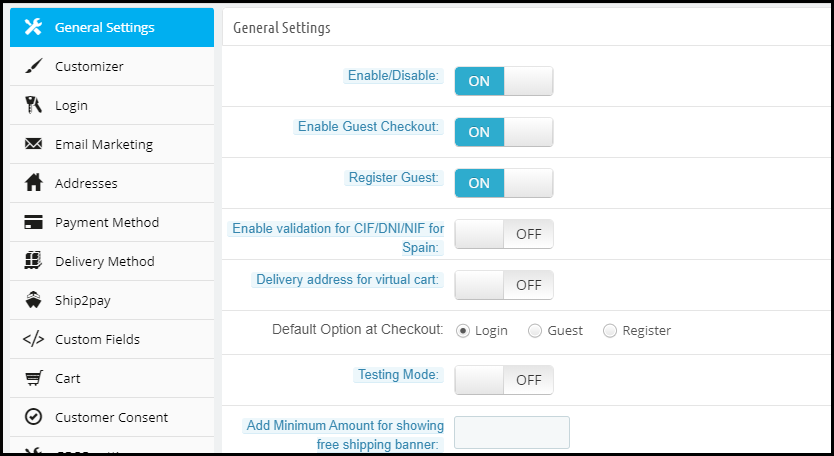
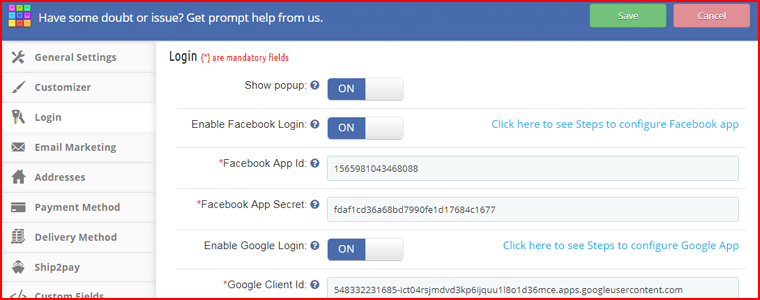
3. After you click configure, the following screen will appear-

The General settings contain the option to enable/disable the one-page checkout module, enable/disable Guest checkout, setting a default checkout option, test mode functionality, CIF/ DNI/ NIF validator for Spain visitors, etc.

Customizer contains the options to adjust the color of the “Place Order” button on the checkout page.

Moreover, the Login tab allows you to add the social login facility to your checkout page.

More features to customize your checkout page on the PrestaShop website

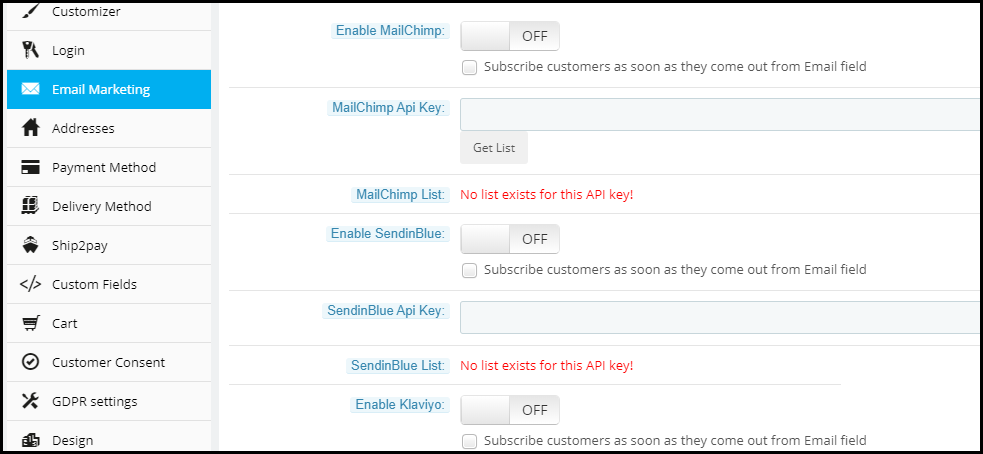
Under Email Marketing settings, you can activate different email marketing tools like MailChimp, SendinBlue, Klaviyo, etc. to collect user information directly in these accounts whenever a user provides his data.

The Addresses tab consists of options like Inline validations, Auto-detect country, Auto address fill. Under the same tab, you can choose which fields you want to keep mandatory for your store visitors and which are optional.

The payment method tab allows you to select the payment modes that you want to provide to consumers.

Similarly, the Delivery method tab lets you choose the shipping services that you want your users to avail.

Ship2Pay provides you with the options to decide which payment modes do you want to provide for a particular shipping service.

Under the Cart tab, you can specify the cart details that you want to display on the checkout page.

In addition, the Design tab lets you design your checkout page in a single-column layout, 2 column layout, or 3 column layout.

2 new features that have been added to this checkout module are Abandoned Checkout Statistics and Checkout behavior report which have already been explained above.

For complete in-depth details regarding the Prestashop one-page checkout addon, please refer to PrestaShop One Page Checkout User Manual.

👉Explore the Module with Our Video Guide