[Version 2.0.2 Released] New Features Added To PrestaShop Mobile Apps

Having all the latest features in a mobile app is something that every business is concerned about these days. The same is the case with eCommerce businesses too. To cater to the app users in the best possible way, shopping apps must be laced with the latest features as they help improve the UI & UX of the app.

For PrestaShop, a popular open-source eCommerce platform, mobile applications have become more efficient now. With the addition of 3 new features described below, KnowBand Plugins have rejuvenated their PrestaShop Mobile App Builder module.

Simple Steps To Launch A PrestaShop Mobile App:

1. Purchase PrestaShop Mobile App Builder module.

2.  Fill the app pre-requisite form. (We need these details to create apps)

3. Review your final app before confirm to publishing it on the app stores.

Note: We only publish apps with your developer accounts (Google Play and Apple App store) without any extra charges at our end.

Quick Glance to New Feature Additions:

#1. ‘Add-To-Cart’ Quick Access:
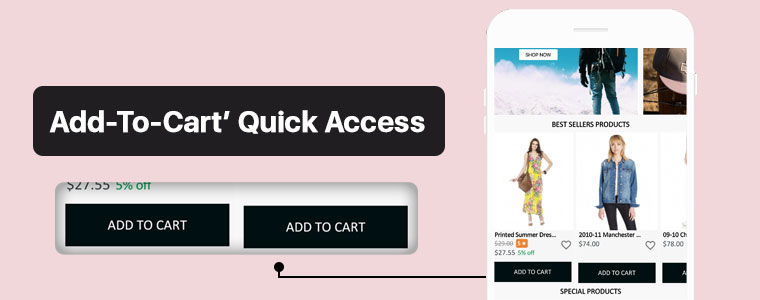
This new feature adds the ‘Add-To-Cart’ button on the Category Page & also on the Home-Page wherever product blocks are used. This way, app users won’t have to open the individual product pages in order to add that product to their cart. App users can quickly add their choice of products from the category or home-page.

Now, the user can simply browse the app and keep on adding products into cart seamlessly.

#2. Related Products On Product Screen:
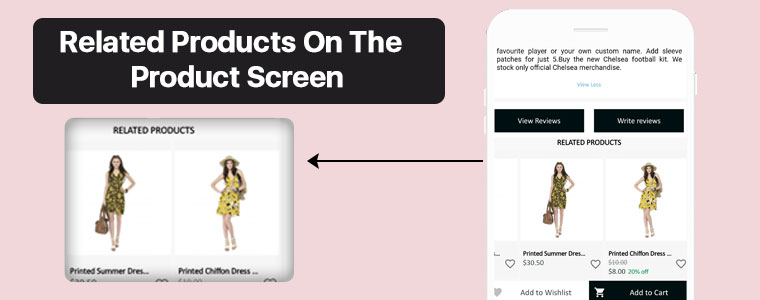
On an eCommerce product page, one great way to motivate the customers’ to shop more is to show some products related to the main product on that page. To serve this purpose, now the PrestaShop Mobile App Builder is compatible with our Automatic Related Products module.

Now, it’s way simple to showcase related products on both website and apps and improve revenue through cross-selling.

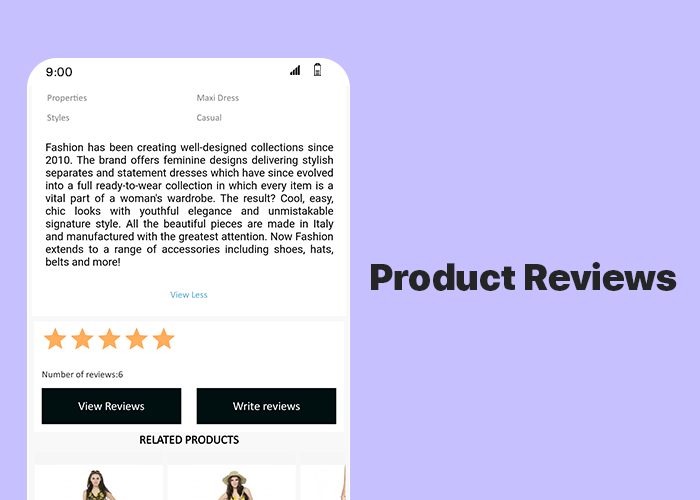
#3.  Product Reviews and Ratings:

On the product page, app users can rate the products & write & submit their product reviews. Upon approval, they are displayed on the product page so that others can view it for reference. The PrestaShop Mobile App Builder is compatible with the default Product Comments Module.

Now, showcase user reviews & ratings for products on app and motivate new buyers for more purchases.

Compatibility With Other PrestaShop Modules:

1. Multi-vendor Marketplace Module:

With the use of this module, store owners can easily transition their single-vendor PrestaShop App to a multi-vendor PrestaShop App. Because the Mobile App Builder module is compatible with the Marketplace module (both by KnowBand Plugins), all of the processes are automatic. All you need to do is install the marketplace module on your PrestaShop website.

Having a marketplace allows the store owner to have multiple sellers on his/her store, each with a unique vendor panel. Store owners can sell their own products too on a marketplace & also make profits by taking commissions from the vendors.

–> Check out combo pack of (Multi-vendor Marketplace + Mobile App) below:

https://www.knowband.com/prestashop-advanced-marketplace-with-mobile-app

2. Booking & Rental Module:

This module by KnowBand allows eCommerce stores to have all the functionalities & layout of a booking or a rental app/ website. Now, this module is also compatible with the PrestaShop Mobile App Builder module by KnowBand.

–> Check out combo pack of (Booking and Rental + Mobile App) below:

https://www.knowband.com/prestashop-booking-and-rental-mobile-app

3. Image Search Module:

The Image Search module allows the app user to search for products of your e-store using any reference image that they either clicked with their phone camera or using any reference image from their phone’s gallery. You can also enable this feature automatically in your PrestaShop App by installing this module on your PrestaShop website.

–> Check out Image Search Module from below:

https://www.knowband.com/prestashop-image-search

4.‘Spin & Win’ Module:

Using this module, store owners can show a ‘spin & win’ discount wheel which the customers can spin to avail any one of the discounts mentioned on the pie wheel. Enable this feature on your PrestaShop App by installing this ‘Spin & Win’ module on your PrestaShop website & configure it & then simply set its toggle switch to ‘ON’ (from the App Builder module).

–> Check out Spin-win module from below link: 

https://www.knowband.com/prestashop-spin-and-win

5. Related Products Module:

This PrestaShop module, by KnowBand, displays a list of products related to the main product (on the product page). When an app user is shopping for a particular product, he/she will be able to see related products when they scroll down on that product page. Equip your PrestaShop Mobile App with this feature by simply installing the ‘Related Products’ module on your PrestaShop website.

–> Check out Related Products from below link: 

https://www.knowband.com/prestashop-automatic-related-product

Now that all the new features, compatible modules & installation steps are covered, let’s take a look at core features of the PrestaShop Mobile App Builder module & learn how it can benefit your business.

Core Features & Benefits Of The PrestaShop Mobile App Builder:

#1. Multi-Lingual & Multi-Currency Support:

This app maker module is great for businesses who are willing to launch a PrestaShop App that supports multiple languages & currencies. It can help with localization & even with expansion to multiple countries.

#2. DIY Home-Page Editor:

This feature allows the store admins to design their app’s homepage without having to code. All the tools provided in the DIY Homepage editor of this module are easy-to-use. Admins can add, rearrange & configure various components like sliders, banners, grids, recent product tab, count-down timer, etc. Admins can make multiple layouts & enable anyone of them at a time. This again saves them from designing at the last moment.

Regularly updated & re-designed homepage keeps the app users engaged & allows the business to display the most relevant & in-trend content on their homepage.

#3. Unlimited Push Notifications:

Your app users who have enabled push notifications on your app will be able to receive the notifications that you (admin) create & send from the backend of this PrestaShop Mobile App Builder module.

There is no limitation with this module because store admins can send an unlimited number of push notifications to their app users. Push notifications help to re-engage the app users & remind them about any abandoned cart items, order status, upcoming sale & its benefits & a lot more.

#4. Offline Mode Working:

The PrestaShop Mobile Apps are made to work in offline mode as well i.e. under slow internet or no internet connectivity. Online shoppers get to browse apps with pre-loaded screens without actually needing the internet.

#5. Admin Panel Control:

The mobile apps for PrestaShop can be fully controlled by the friendly admin panel. The store admin can make a few clicks and button toggles and make the app work as per the requirement. The flexibility and customizable options with this extension make it the most preferred choice for store owners.

Drop us an email at support@knowband.com or check all such amazing features in detail from:

https://www.knowband.com/prestashop-mobile-app-builder

[Success Story – Goldengrocery] Grocery Mobile App for E-Commerce

Online shopping has now become a major part of almost everyone’s life. Be it apparels, or electronics, or even groceries, more & more netizens are preferring to shop online now. One major reason for this preference is mobile applications. Mobile devices like smartphones & tablets have become a staple for almost every person worldwide. This factor makes it high time for eCommerce businesses to bring their store to a mobile app.

In this write-up, we will elaborate on a Grocery Shopping Native Mobile App that has been built using an eCommerce Mobile App Builder plugin developed by KnowBand. This plugin is meant to be installed on the eCommerce website. Using the data of that website, the app builder plugin automatically builds a shopping app & its APK & IPA files are published on the Google Play Store & Apple App Store.

One of the grocery shopping apps built using KnowBand’s eCommerce Mobile App Builder is ‘Golden Grocery’. The ‘Golden Grocery’ mobile app is a feature-rich native application both on the frontend as well as the backend. Take a look at the user-end of the ‘Golden Grocery’ Native Mobile App.

Website Link: https://goldengrocery.in/

Mobile App Link: https://play.google.com/store/apps/details?id=com.goldengrocery.androidapp&hl=en_US

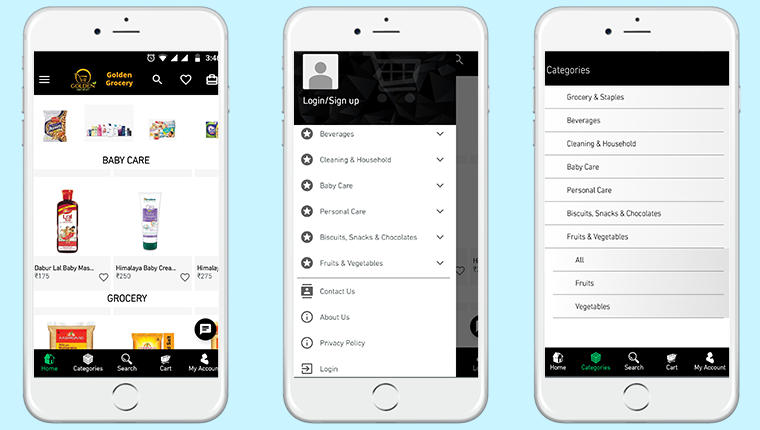
Home-Page, Menu & Category Page:


These app screens are of ‘Golden Grocery’ Mobile App. The 3 screens above display the HomePage, Navigation Menu & the Category Page respectively. Using the eCommerce Mobile App Builder plugin, store owners get a customizable app. They can easily design their home-page of their app using various home-page editor tools provided on the backend of the eCommerce Mobile App Builder plugin.

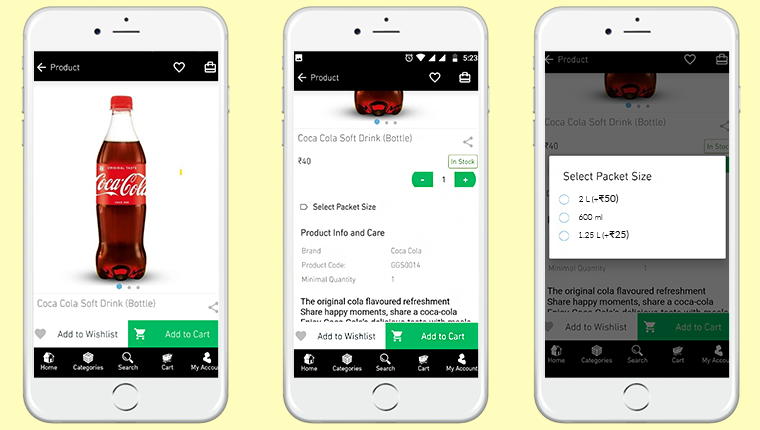
Product Page:


Shown above is the product screen of the ‘Golden Grocery’ Native Mobile App. It includes multiple product displays, page sharing icon (for multiple platforms), product quantity stepper, product specifications, description, wishlist button, ‘Add-to-Cart’ button & much more.

From the backend of the eCommerce Mobile App Builder, store admin can even select whether clicking the ‘Add-to-Cart’ button would send the app user directly to the cart page or whether it would keep the user on the same product page for break-free shopping.

We are grateful to have received great feedback about our eCommerce Mobile App Builder extension from our client (Golden Grocery). We are glad that they found our plugin easy to use & were able to launch their new app without any hassle & in the least time possible.

As a leading eCommerce solution provider, we, at KnowBand, will continue to provide the best tools & services to various eCommerce businesses around the world. Take a look at our range of Native eCommerce Mobile App Builder extensions:

PrestaShop Mobile App Builder 

OpenCart Mobile App Builder 

Magento Mobile App Builder 

Magento 2 Mobile App Builder

WooCommerce Mobile App Builder 

Features Of The E-Commerce Mobile App Maker Extension:

#1. Multi-Lingual Support:

This feature makes your shopping app support various international languages. It is ideal for businesses that serve internationally or in a language other than English. RTL languages like Arabic, Persian are also supported.

#2. Support For Multiple Currencies & Payment Gateways:

This feature allows your app to support various international currencies & payment gateways. As the eCommerce Mobile App builder plugins by KnowBand are open-source solutions, even more currencies & payment gateway support can be added as per business requirements.

#3. Live Chat Support:

This equips your Shopping App with in-app Whatsapp/ Zopim Chat Support. It connects your app users to your chat support team.

#4. Push Notifications:

From the backend of the eCommerce Mobile App Builder, store admins can create, automate & send an unlimited number of Push Notifications to their app users. It’s highly useful for e-retailers as these notifications play a huge role in boosting customer retention & to reduce the cart abandonment rate.

#5. Simplified Logins:

For a smoother onboarding, visitors can be made to sign-in into your app via fingerprint authentication or via their social accounts i.e. Google, Facebook, etc.

#6. Live Synchronization:

Both the website & the app remain in-sync with each other because Mobile App, created using this shopping app maker plugin, uses the same database as that of its equivalent website. This also ensures automatic inventory management.

#7. Complete Technical Support:

With the paid version of this extension, you get a free 3 month support period. This support includes assistance in building, optimizing, & launching your eCommerce App. If required, your app can further be customized according to your needs- such as setting up returns & refunds, etc.

#8. Simplified Backend:

Store admins can instantly make changes in their app by editing/ re-configuring the App Builder plugin from their website backend. This helps a lot with instantly customizing the app’s home page, or to create/ automate/ send push notifications, customize the tab-bar, etc. All these re-edits take just a minute to make & they instantly show up on the mobile app as well..

Conclusion:

Apart from all the features mentioned above, a lot more features are provided by default. Some of them are- one-page checkout, Offline accessibility, pre-saved addresses, social sharing options for multiple platforms, compatibility with ‘Spin & Win’ plugin, compatibility with Image Search Plugin, etc.

Hence, if you own a Grocery store on PrestaShop, OpenCart, Magento, or WooCommerce, drop us an email at support@knowband.com to discuss more.

WooCommerce PWA Mobile App Plugin (v1.0.1) | New Feature Upgrades

Mobile Applications have become a major source of leads for almost every kind of eCommerce business. Whether it’s a native or hybrid or a PWA app, being available to the customers on their most used device is always a great approach.

In the past 5 years, Progressive Web Apps (PWA) have become very popular among the app users & very profitable for eCommerce businesses. Various eCommerce platforms are allowing easier mediums to build & launch a PWA Mobile App. To bring the WooCommerce store owners into this landscape, our experts at KnowBand have developed & launched an automated WooCommerce PWA Mobile App Builder plugin which simply integrates with your website & gives you a fully customizable WooCommerce PWA.

This PWA maker plugin is a no-code solution although it still provides easy-to-use DIY tools using which store admins can modify their PWA without any efforts. Also, on the user-end, the app users get the best in class UI & UX just like any high-end mCommerce store.

Check it out from below link:

https://www.knowband.com/woocommerce-pwa-mobile-app

New Feature Upgrades in WooCommerce PWA Builder (v1.0.1)

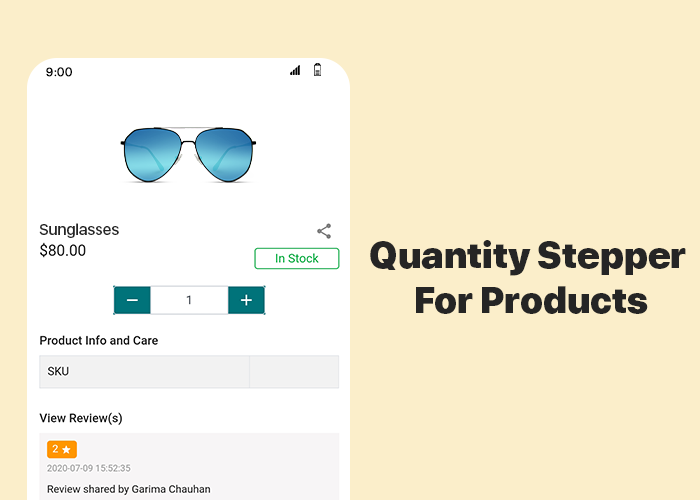
#1 Quantity Stepper For Products:

As usual, for convenience, online Shoppers like a simpler but feature-rich interface on an e-store. Things like adding multiple quantities of products or changing the quantity at the time of checkout & while being on the cart, improve the shopping experience of the app users. All such features are by default added in the PWA build using the WooCommerce PWA plugin. This newly added feature allows the app users to change the product quantity by stepping it up (+) or down by one unit.

#2 Product Reviews:

This feature allows the app users to write & submit reviews of the products that they bought from your store. Reviews play a huge role in the eCommerce apps & websites. They can motivate others to purchase the products & increase your sales & revenue.

Simple Steps To Launch WooCommerce Progressive Web App:

  1. Purchase the WooCommerce PWA Mobile App Builder Plugin.
  2. Install the plugin on your WooCommerce website.
  3. Fill the app pre-requisite form & review your PWA before making it live.

How Are PWA Installed On Users’ Devices?

A PWA Mobile app is simply made live on the company’s website. There is no need of publishing it on the Google Play Store or Apple App Store. Whenever shoppers visit such a website on their mobile internet browsers, they are shown an ‘Add-To-HomeScreen’ popup on their screen. Once they click it, the PWA automatically gets installed on that user’s mobile device. The PWA then appears to work just like any regular mobile apps on a mobile device.

Major Features Of WooCommerce PWA Builder Plugin:

1. Simplified PWA Admin Panel:

The store owners and admins can easily configure their WooCommerce PWA App, design its home-page layout, manage push notifications & do a lot more without a hassle.

2. Unlimited Push Notifications:

It allows the store admins to send an unlimited number of push notifications to their app users and keep them engaged. Admins can also send personalized notifications and automate and schedule some of the common ones like the abandoned cart notifications, order status & order confirmation notifications. Use relevant graphics and catchy messages with desired redirect links on your Push Notifications.

3. Multi-lingual & Multi-currency Support:

The eCommerce PWA Apps built using these plugins support multiple currencies and multiple languages including RTL scripts like Arabic, Persian, etc.

4. Offline Accessibility:

By default, the Progressive Web Apps support offline access. Because of data caching, PWA Apps work even when the app user is offline or under slow internet connection.

5. All Payment & Shipment Methods:

All of the payment and shipment methods active on your website will automatically be active and fully functional on WooCommerce PWA App.

6. Social Login & Quick Sharing:

App users can easily onboard your WooCommerce PWA App with hassle-free social login options i.e. via their Facebook & Google accounts.

The PWA Apps built using this WooCommerce PWA plugin also provides a quick sharing link on the product pages. App users can hence easily share their choice of products on any of their social media handles.

7. Order Tracking:

App users can also track all of their active orders and stay updated with the status of orders’ delivery. Any changes/ updates in the status of the order instantly reflect on the app & also in the form of the automated order status notification.

Concluding:

With such a powerful tool available in the market, WooCommerce store merchants can stop worrying about the hassle & time involved in building a PWA. Grab your own WooCommerce PWA Mobile App Maker Plugin & launch your new PWA asap. 

For any assistance or query, feel free to reach out to our experts at support@knowband.com. Our team would be happy to help you.

How to sell on eBay with these Pro tips

With over 1.2 billion listings on eBay, sellers have to compete a lot for the attention of eBay’s 182 million active buyers. And this is a little tough for the new sellers. So this is the main reason most of the sellers are looking for some tips to getting started selling on eBay. This marketplace is not only too vast but also complicatedalso be complicated at times. If you are new to eBay, it is best to start slowly, learn the landscape, read the rules, find out about the fee structure, and grow your eBay hobby or business methodically. Here are some pro tips for the sellers to sell on eBay Marketplace.

Make your post outstanding

By using some eye-catching words in the header can grab a buyer’s attention. Your headline description must be clear. Inside your description, all your product conditions must be clearly specified. Along with the headline and description, product image plays an important role in the buyer’s attention.

Apply Seller Initiated Offer

Recently eBay Marketplace introduced a new feature called Seller Initiated Offer, which can be directed to buyers who put a product in their watch list or who have a product in their cart. For example, if a buyer adds a laptop to their watch list or cart, that’s a clear indication a buyer is interested in a product, and so you as the seller can go into the Seller Hub and check the specific listing and see that people have shown interest. Then, the seller can send an exclusive offer with a personalized message.

Timing is key, price your item right

According to eBay, Sunday is the best day for purchases, followed by Saturday and Monday. To sell your items quickly, think of the time and most important what products people want. For instance, Christmas items will do better in early December than March. You get the idea. As for pricing, make sure your item is perfectly priced as most buyers purchase a product after comparing it to others. Free shipping also helps to sell your product more quickly.

Understand Seller Limits

Selling limits are ruled for all sellers, but they are more strict for new sellers. It places certain limits on sellers to prevent any kind of fraud. New sellers have different limits like account limits, category limits, and item limits.  After you have successfully sold a few products, then you can request higher selling limits. 

Choose the Right Listing Category

The product listing category is very important in the marketplace. Always put the product in the right category. For instance, the right category for a smartphone is electronics than any other category. If you put your product in the wrong category then no one buys it because they are looking for a product that matches the right category.

Other selling tips:

Be clear about your return or refund policies; build up your seller reputation by asking happy customers to post a short review and star rating, and advertise your eBay post elsewhere, including auction sites and social media, to maximize your reach.

Use eBay extensions to list your e-commerce store products on eBay:

We provide the best extensions which help you to list your products on eBay Marketplace from the e-commerce stores like Prestashop, Opencart, and Magento. Listing your products individually on these platforms is a very time-consuming process. So these extensions help you to save your time and money.

Some benefits of these extensions are as follows:

  1. Bulk product listing: With the help of eBay integration extensions sellers can upload products in bulk and they can map the e-commerce store categories with the eBay categories as well.
  2. Profile Management: Sellers can upload products by creating multiple profiles. Under profile, Management sellers can also select the basic settings. Profile-based product listing will help you to list different products in different categories on the marketplace.
  3. Product listing: Under this tab, sellers can see their product status. From this tab, the seller can check which checks that which products linked to which category, their listing ID and their listing status, etc.
  4. Price Management: Using this feature sellers can list their product at a different price than their e-commerce store price. They can adjust the price higher or lower on the basis of fixed and percentage-wise.
  5. Various Payment Methods: eBay integration extension helps the seller to set the payment methods as per their choice.
  6. Quantity Management: Admin can add a quantity buffer while listing products on eBay to avoid any out-of-stock orders. This module also allows admin to sync inventory in bulk from store admin to eBay.
  7. Shipping Management: Admin can create multiple shipping profiles and can also offer free shipping or international shipping on eBay using our module.
  8. Return Policy: Admin can manage eBay return policy settings from the module itself.

Conclusion:

So, if you are selling on eBay or you are a new one then you must follow these tips to get the most of eBay. These tips will help you to sell your products more quickly. And if you are selling on other e-commerce stores like Prestashop, Opencart, and Magento in addition to eBay Marketplace then you must use these integration extensions to save your time and efforts.

Related Articles:

4 Ultimate Tips To Increase Sales On eBay

How to Rank Higher and Get Your Listings Seen in eBay Search?

How to list a product in eBay Marketplace?

Success Story of Marketplace Integration (eBay, Etsy) for Men’s Fashion Store

6 OpenCart Extensions for Shipping and Delivery Purpose

If you are looking for shipping and delivery related extensions for your OpenCart based website, you have landed at the right place.

In this write-up, I have compiled a list of six OpenCart extensions that would not only add shipping and delivery related features on your website but also enhance the customer shopping journey at the same time.

Let’s take a look.

1. Product Availability Check by Zip Code

OpenCart Product Availability Check by Zip Code extension allows your customers to confirm the product availability before they head towards the checkout page.

The extension adds a “Check Availability” section on your product pages where shoppers can enter their area zip code and check if their desired product is available for delivery at their location or not.

If the business doesn’t deliver to that area, it displays that the product is not available at the specified zip code. If available, customers are displayed the estimated delivery date.

From the back-end, you can add multiple zones and map products accordingly, and adjust other settings.

2. Preferred Delivery Time

OpenCart Preferred Delivery Time extension allows your customers to pick up the desired date and time slot for their order.

On the checkout page (under delivery method), a new section is added named “Your Preferred Delivery Time” where customers can choose the desired date and time slot if they want to receive the order at a specific date and time.

From the back-end, you can specify the minimum delivery gap (in days) for preferred delivery. You can also adjust the time slots, set the delivery time, specify delivery days and also allow customers to update the delivery date and time even after placing the order.

3. Free Shipping Manager

OpenCart Free Shipping Manager lets you offer free shipping to customers only if they match the eligibility criteria set by you from the back-end.

This module is helpful since customers now look to get free shipping on their order. From the back-end configurations, you can specify the minimum amount for which a customer needs to shop if he or she wants to get free shipping on his/her order.

Similarly, you can specify the weight which must watch if the customer wants to enjoy the free shipping benefit.

The extension also lets you disable the free shipping facility for specific countries.

Free shipping increases the chances of conversion to a significant extent and also helps you increase your average order value.

4. Store Locator

OpenCart Store Locator and Pickup extension helps you register your local stores on the website so that customers can easily locate and navigate to those stores and examine the product physically.

At the same time, the extension also encourages the in-store pickup facility that allows customers to self-pickup their order at the desired date and time.

You can add multiple stores from the back-end with their complete information and also specify the days and timings on which the stores remain open.

When customers are on the checkout page, they can choose the pickup option and select the nearby store from where they can pick-up their item.

5. Shipping Timer

OpenCart Shipping Timer extension integrates a shipping timer on your product pages through which customers are displayed the time within which they need to shop if they want their product to get shipped on the same day.

You can set the timer validity for a single day or multiple days and also set the start and end time of the countdown timer.

Besides, you can specify the days on which the timer would be displayed to the users. You can also customize the shipping timer banner.

6. Cash on Delivery with Fee

OpenCart Cash on Delivery with Fee extension allows merchants to charge an additional fee on cash on delivery option.

This is basically to encourage customers to make the online payment right at the checkout page instead of choosing to pay later at the time of delivery. But since many consumers hesitate to share their card details online, you can provide them with the Cash on Delivery (COD) option along with some additional charge.

You can set up different charges for the different order amount. There are many other customizations you can make from the back-end.

For any kind of assistance regarding the above-mentioned shipping and delivery related OpenCart extensions, kindly reach out to us at support@knowband.com

30 Days Money Back Guarantee for eCommerce Mobile Apps | KnowBand

Mobile apps are of great importance especially for online businesses (eCommerce) that are willing to launch their new mobile application. Having the right eCommerce mobile apps with all the right set of features & functionalities is something that every such business wishes to have. Although in some scenarios, some businesses may not feel satisfied with their mobile application & may want to modify it or they may even wish to get their money refunded.

Well, that’s what this write-up is about. On all of our eCommerce Mobile App Builder extensions, we are offering a 30-day Money-back Guarantee. The extension is available for following eCommerce platforms: 

PrestaShop Mobile App Builder

OpenCart Mobile App Builder

Magento Mobile App Builder

Magento 2 Mobile App Builder

WooCommerce Mobile App Builder 

Based on the feedback from a few of our clients, we realized that some clients may need some time to figure out if the app builder extension is right for their needs. We have various guides in the form of articles, video tutorials, admin demo links & free version of our eCommerce Mobile App Builder extensions. Despite that, some unawareness may still persist which may lead to dissatisfaction with the app builder. This 30-day money-back guarantee will be favorable to them.

For some clients with a different or unique business model, the generalized layout of our e-commerce app builder extensions may not be suitable or it may not be suitable for them to get their general layout app modified to turn it into a mobile app suitable for their needs. This 30-day money-back guarantee can also help to a huge extent.

Note: With this offer, we will create and send APK to you for review. Money-back is only valid if you are not satisfied and don’t publish it on Google Play Store. If the app is published, we won’t offer you a refund.


We have been regularly updating & upgrading our eCommerce Mobile App Builder extensions to equip it with the latest technologies & features. Both on the frontend as well as the backend, we intensively test our extensions to avoid any bugs or glitches so that we serve the best to our clients. This has left us with positive reviews & feedback from the majority of our clients.

It’s not just us but our clients who have labeled our eCommerce mobile app builder extensions as one of the most efficient & cost-effective app builder solutions for eCommerce domains. We are proudly confident in all of our eCommerce Mobile App Builder extensions & introducing a money-back guarantee proves it even more.

[Great Deal] Top Features You Will Get In Shopping Apps:

The shopping apps for websites built on PrestaShop, OpenCart, Magento 2 & WooCommerce comes with all basic and necessary eCommerce features and functionalities. Here are listed some of the major ones to thrive your business with no hindrance:

#1. Unlimited Push Notifications:

For any sort of eCommerce mobile apps, push notifications are kind of a must. Their dominance over traditional email marketing approaches and growing sales figures are solid reasons for how mobile push notifications are worthy of every business. 

In shopping apps as well, push notifications to play a huge role in boosting customer engagement, retention & sales. This feature is something that you will get in our eCommerce app & many of these notifications can also be configured to be scheduled or automated. Some examples of those are abandoned cart notifications, order status notifications, etc.

KnowBand’s Mobile App Builder even offers custom notification in the admin panel which can be sent to the users and motivate them for more sales. All running deals and offers can be promoted via mobile push notifications.

Read More: How easy is it to send Push Notifications on PrestaShop Mobile Apps?

#2. Multi-Lingual & Multi-Currency Support:

To expand the audience reach, more & more online shopping businesses are including support for multiple languages & currencies. To cater to such businesses & to make app launching more convenient for them, most shopping apps nowadays support these features.

It wasn’t facile to take your business to cross borders and sell products like your store was there only. Our Mobile Apps helps in achieving the same. The native eCommerce Apps come with all languages support including RTL ones like Arabic, Hebrew, Urdu, Persian, etc. Hence, whatever languages on your eCommerce store, same will be on the mobile apps as well.

Read More:  RTL (Right to Left) Language Support for Mobile Apps – The need of the hour?

#3. Real-Time Synchronization:

It’s a must-have feature for any sort of app including shopping apps. With this feature, both the mobile as well as the website always remains in live synchronization with each other. This way store admins don’t have to manage their mobile app separately. 

Often, eCommerce store owners complain of problems managing their huge inventory on both websites and apps. To reduce the manual efforts, we have offered 100% synchronization in our apps allowing automatic realtime updates in the app inventory whenever any new additions or changes done on the store.

Read More: Coding Or Non-Coding: What to choose for eCommerce mobile app?

#4. One-Page Checkout:

No eCommerce business wants its customers to get frustrated due to lengthy checkout processes. To aid that the ‘One-Page Checkout’ feature is common in almost every online shopping app these days.

The users get a simplified checkout experience with easy order submission with quick review of details related to purchase.

Read More: One Page Checkout vs Multi-Page Checkout

#5. Live-Chat Support (Zopim & WhatsApp):

Live-Chat options are the frontline of customer support for every online shopping application. In the eCommerce Mobile App Builder extensions, Whatsapp & Zopim Chat Support is provided by default. These are two very popular platforms. Especially, Whatsapp is something every netizen uses these days.

All of the features mentioned above and even more are available in our E-Commerce Mobile App Builder extensions for platforms like PrestaShop, OpenCart, Magento & WooCommerce. We aim to put the best & the latest in our extensions & will continue to do so to cater to our clients in a better way.

We hope you find our eCommerce Mobile App extensions even more helpful & convenient. As always, you can reach out to us at support@knowband.com for any of your queries or assistance.

How to Win Customers with Discounts and Boost Sales?

Consumers love discounts and I am no exception. While purchasing something online, I look for coupon codes. This is the natural consumer behaviour.

Discount coupons are helpful to entice customers to shop and not only it boosts your sales but brings higher conversions.

As per a survey conducted by Statista in 2019 that had 1000 respondents, 92% of the US consumers said they had used coupons for shopping.

With consumers getting habitual of using coupons and benefitting from other discount and promotions as well, it’s vital to implement a strong promotional strategy.

The strategy should focus on acquiring new customers and retaining the existing ones.

Why should businesses offer Discounts?

Apart from consumers’ love for discounts, here are a few reasons why online stores should offer it.

1. Boost Sales

While discounts may seem a compromise in the profit, they boost your sales significantly. Offering discounts or running promotions at regular intervals keeps customers hooked with your brand. Moreover, discounts reduce the possibility of cart abandonment.

2. Attract New Customers

Targeting visitors with promo codes that would be applicable only on the first purchase holds the potential to bring you a lot of new customers.

This is the ideal way to convert a visitor into a customer. Exclusive coupon codes for the first time users/shoppers are highly persuasive.

You can highlight the promo code on various places such as on your website’s home page, social media accounts, or reach out to those users via email who have registered on your store but haven’t shopped yet.

3. Increase Website Traffic

After the first two points, this doesn’t need much explanation. As you market your offers and promotions on different platforms, it will likely bring more visitors to your website. Ensure that they are not just exploring your website but also getting converted.

Related: 7 Ways to Increase your Website Traffic

4. Build Loyalty

Consumers feel valued when you reward them with discounts or coupon codes which ultimately builds customer loyalty. Nothing would please a brand more than loyal customers.

Types of Discounts

I have put forward 7 types of discounts or promotion strategies that you can use to entice customers.

1. Discount on the First Purchase

Having already discussed this above, this type of promotion should run forever on your website. You never know when a visitor comes across your brand and if there’s nothing for him/her on their first purchase, they might not show interest in shopping from your website.

Have exclusive and alluring discount coupons for first-time shoppers.

2. Bundled/Package Discounts

As it suggests, this type of discount includes offering a bundle of products at a slightly lesser price than the sum of the individual cost of those items. It provides you with the opportunity to sell more number of items and eventually increases your average order value.

Check your inventory and see products that complement each other. Create a bundle and offer them at a discounted price. You would probably have products that aren’t purchased independently. Including them in a package increase their sales count as well. This is an effective cross-selling strategy.

3. Pre-payment Discount

This type of discount is usually offered to make customers pay the complete order amount at the time of checkout.

For example, on many eCommerce websites, customers are encouraged to pay full amount at once using the online payment method and get a discount on their order else they are devoided of discount if they choose cash on delivery.

This is also seen on hotel booking websites where there is a price difference for paying online and paying at the hotel.

4. Seasonal Discounts

E-commerce sales touch the sky during the holiday season. When occasions like Halloween, Black Friday, Cyber Monday, Christmas, etc. arrive, consumers look to shop and spend a lot.

Brands introduce occasion-based coupon codes to give customers a heavy discount on their purchase or announce a sale prior to the occasion highlighting how much discount they would get on the coming sale.

5. BOGO Deals

BOGO deals, abbreviated for Buy One Get One are great promotional deals from the cross-selling perspective, having a significant impact on your average order value.

These are highly enticing deals where customers get two items at the price of one or get a complimentary product worth the same amount on the primary purchase.

You can run deals like Buy 2, Get 1 or Buy 3 and get the 4th one free to encourage customers to spend more.

Different Ways of Offering a Discount

Implement discount strategies at different moments in a customer journey. Let’s see how you can win customers by offering them discounts in different ways.

1. Use Popups

Popups are amazing to present your offers, deals, promotions or coupons to your website visitors. Some of the popups that you can consider are-

Exit-Intent Popup

This popup appears only when a user is trying to take an exit from your website. So you can use this to attract users at the last moment and change their mind.

You can try our Exit popup module and highlight your offers.

Spin and Win popup

This popup works exceptionally well for websites. It adds a Gamification element on your website in the form of a spin and win wheel. Users can spin the wheel and earn some exciting discounts.

Scratch coupon

Use our scratch coupon module that places an unscratched coupon on the header and generates curiosity in the visitors to scratch the coupon and see the discount coupon code which they can claim on the checkout page.

2. Persuade Abandoned Cart Users with Discount

Not chasing your abandoned carts can cost you a high number of conversions and lost sales. Reach out to those abandoned cart users and persuade them to complete their purchase by offering them a discount.

You can check out our Abandoned Cart module for this matter.

3. Referral Offers

Referral marketing is one of the best ways to encourage customers to spread a word about your brand and get rewarded in return.

So, you can run some referral programs like “Invite your friends and you both get $5 OFF on your next purchase.” This will help you acquire new customers and boost brand awareness.

Final Thoughts

The game of deals and discounts is necessary to survive in the rapidly growing eCommerce market. If you want to be ahead of your customers, you will have to come up with some exciting offers.

While discount and coupons are exciting for customers, make sure you are not compromising much on the profit margin especially if you are a new business. Consider every factor before you start running deals on your website.

Top PWA apps for PrestaShop developed by KnowBand in 2020

Nowadays almost every online business is transitioning its mobile website to a Progressive Web App for all the good reasons. For online shopping, the usage of mobile devices has already surpassed desktops & laptops. Globally, on an average 52% of netizens used their smartphones to shop for something online, based on a report by Statista. To cater to such audiences, Progressive Web Apps are a great medium.

Building & launching Progressive Web Apps is comparatively more convenient than doing the same with Native Mobile Apps. This is also because PWAs are compatible with every kind of mobile device. KnowBand offers a readymade tool to transform your regular eCommerce store into featured PWA shopping apps with:

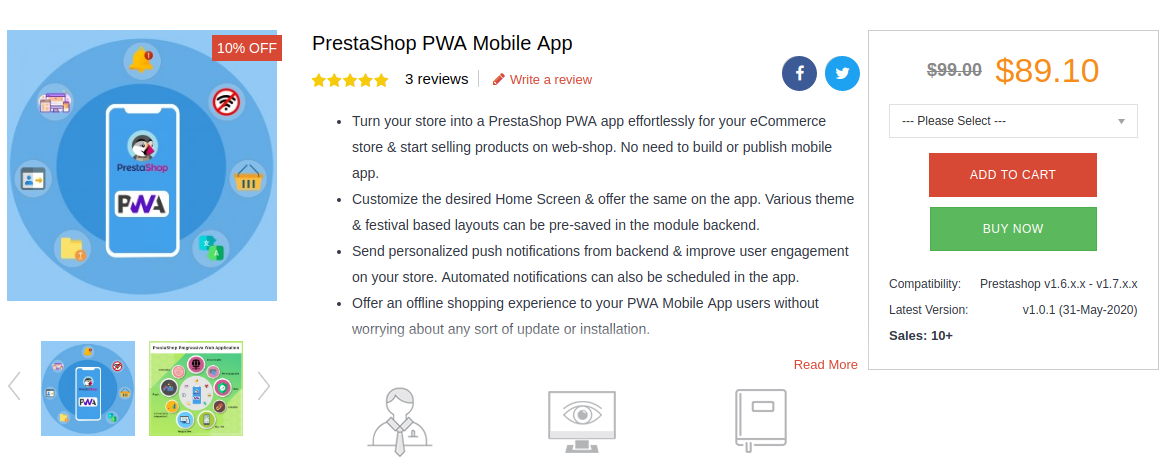
–> PrestaShop PWA Mobile App

Available for other platforms as well:

–> OpenCart PWA Mobile App

–> Magento 2 PWA Mobile App

–> WooCommerce PWA Mobile App

KnowBand, a leading eCommerce solution provider, has developed & launched a bunch of eCommerce PWA Mobile Apps for its clients & in this writeup, we are briefing on some of the top PrestaShop PWAs that have been developed by KnowBand in 2020. Here are those web apps:

1. Bony Liquors:

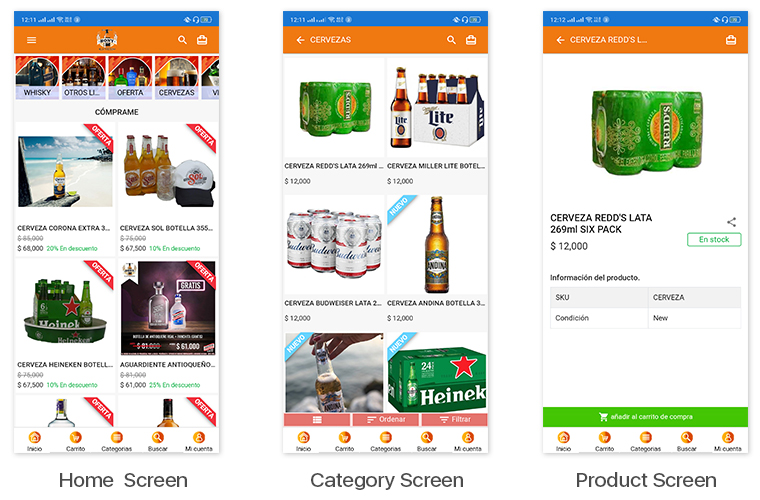
Bony Liquor is an online store based in Spain selling beverages, drinks, cigarettes & complimentary snacks to its customers. With the help of experts at KnowBand, they launched their PrestaShop Progressive Web App on their mobile website. Their PWA has many of the latest UI elements that keep the user experience at par. It also has social login options via Facebook & Google accounts. App users can easily shop for the products they need & pay via various payment modes.

The best thing about PWA is that mobile website visitors can install their web app from their mobile website itself. The installed PWA then looks & appears to work just like every other app on users’ mobile devices.

Check out PWA from below link: 

https://www.licoresbony.com/ (Copy and paste URL in the mobile browser and “Add To Home Screen”)

2. LibrairieZbookstore:

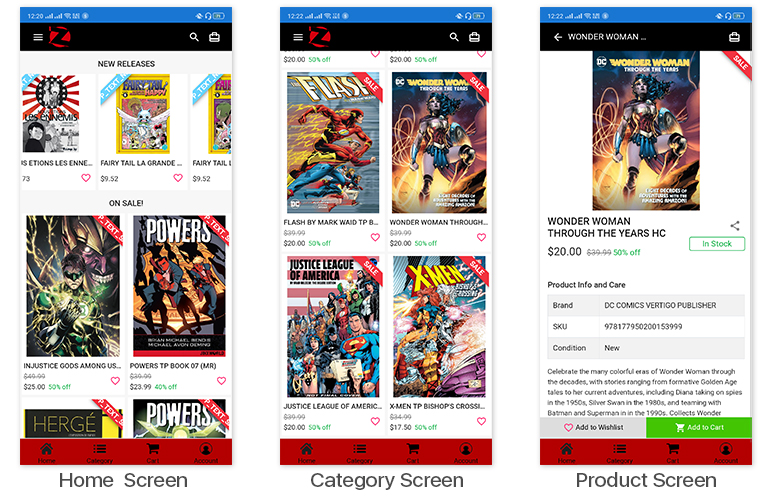
LibreairieZbookstore is an online PrestaShop store where customers can buy books & comics from a wide range of collections available at their store. KnowBand’s PWA module helped them launch their PrestaShop PWA that their store admin can customize anytime as per their needs. The PWAs built using KnowBand’s modules are white-label apps that allow the store owners to modify their apps by themselves without the need for coding.

Check out PWA from below link: 

https://librairiezbookstore.com/ (Copy and paste URL in the mobile browser and “Add To Home Screen”)

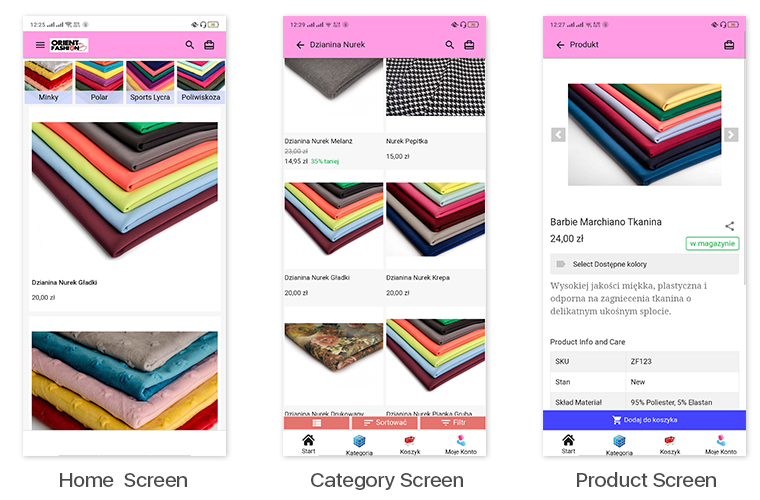
3. Orient Fashion:


This eCommerce store is a multi-lingual & multi-currency store that sells fabrics & its cutouts to its customers. Their Progressive Web App built by KnowBand also supports all of the languages & currencies of their website. All of their coupons & vouchers on their website are also supported on their PrestaShop PWA.

Check out PWA from below link: 

https://orientfashion.pl/ (Copy and paste URL in the mobile browser and “Add To Home Screen”)

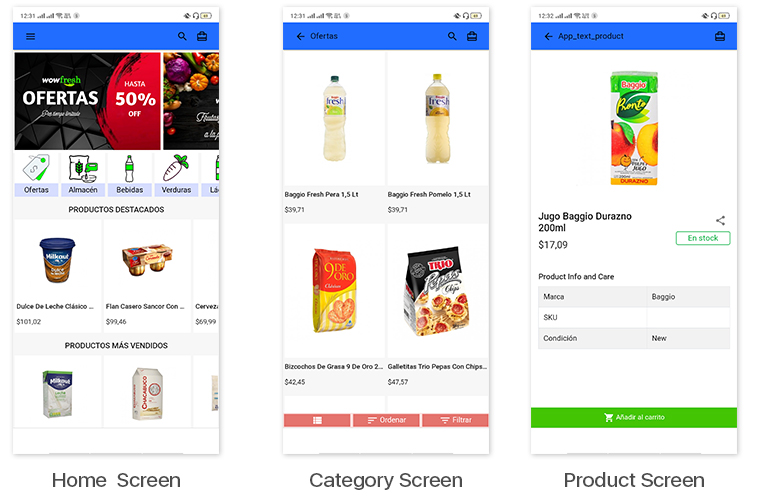
4. WowFresh:

WowFresh is an online store built on PrestaShop that sells groceries, snacks & beverages. The store is mainly in the language Spanish. Its mobile site visitors can download its PWA from the ‘Add To Homescreen’ popup /tab on the mobile website.

Check out PWA from below link: 

https://wowfresh.com.ar/ (Copy and paste URL in the mobile browser and “Add To Home Screen”)

5. Kittags:

Kittags is a UK based eCommerce website that sells regular & customizable tags that can be attached to backpacks, strolley bags, luggage, etc. Its website is built on PrestaShop & the store admins at Kittags used the PrestaShop PWA Builder module, developed by KnowBand, on the backend of their website to automatically build & launch their Progressive Web App.

Check out PWA from below link: 

https://www.kittags.co.uk/ (Copy and paste URL in the mobile browser and “Add To Home Screen”)

PrestaShop PWA Builder Module By KnowBand:


The PrestaShop PWA Mobile App Maker module is an automated plugin that can be used on a PrestaShop website just like any other regular module. Upon installing the PrestaShop PWA module, the store admins get a full-fledged PWA on their mobile website (frontend) & its configuration dashboard on the website backend. They can hence customize their web app using the DIY tools provided on the backend dashboard.

Once the PWA mobile app is made live on the website, mobile website visitors can simply install the Progressive Web App on their mobile device by clicking on the ‘Add To HomeScreen’ button displayed on that mobile website.

The PrestaShop PWA Mobile App module is laced with a number of frontend & backend features. Some of those features include-

#1. Multi-Lingual & Multi-Currency App:

The web apps built using this PrestaShop PWA Maker module by default support multiple international currencies & languages including the RTL scripts like Arabic.

#2. Offline Mode Accessibility:

App users can seamlessly use your PWA even when they are unable to connect to the internet. This allows offline browsing of the pages & even the category pages that users had already visited before.

#3. Unlimited Push Notifications:

The PrestaShop PWA module by KnowBand keeps no limitations on the Push Notifications. Store admins can send an unlimited number of notifications to their app users. These notifications can be created from the backend of this module (installed on the website).

#4.  DIY Home-Page Layout Editor:

This DIY tool gives immense control to the store owners & admins when it comes to changing the home-page layout. Multiple components like sliders, banners & grids for product display & banner images are provided. Even the countdown-timer banner tool & recently accessed products slider is included in the list of components. Just drag & drop them to rearrange & configure each of the components without a hassle.

#5. Live-Synchronization:

This module keeps your PWA as well as your PrestaShop website in real-time synchronization with each other. It exempts you from having to manage your PWA manually.

#6. Social Login & Sharing:

App users can login into the app using their Facebook or Google accounts. Also, on every product page, quick sharing links are provided for multiple social media platforms.

#7. All Payment & Shipment Methods Support:

All of the Payment & Shipment methods active on your PrestaShop website will by default be active on your eCommerce PrestaShop PWA.

#8. One-Page Checkout:

To make the checkout experience convenient for the app users, a single page checkout screen is provided on which the app users can even select a pre-saved address. They can easily update the quantity of the product & add or remove coupon codes etc without having to navigate to any other page.

#9. Order Tracking:

This PrestaShop PWA Creator module even offers an order tracking feature to the app users. They can track their active orders from within the web app.

How seller can take benefit from Google shopping free listing

Due to coronavirus pandemic, eCommerce traffic has suddenly increased because of lockdown, and also no one wants to leave their homes. Most of the peoples are now shopping online due to lockdown. In this difficult time, Google Shopping allows merchants to list their products in free.

This free listing helps many smaller businesses who are unable to afford Google Shopping. It provides the opportunity to increase a store’s visibility, featuring their products to the millions of users who use Google Shopping every day.

What actually is Google Shopping:

Similar to other ad platforms like Facebook or Instagram ads, Google Shopping ads – also known as Product Listing Ads (PLAs) – are another way to gather customers and make conversions and sales. Although Google Shopping ads are not much popular as compare to other social media platforms, but still they account for over 16 percent of eCommerce industry sales.

Google Shopping ads appear on the top right corner of the search results. They are much different from the text ads seen in search results because they include pictures of the product.

Because these ads give shoppers all the relevant information they need – price, picture, etc. – these ads have a higher chance of conversions. In fact, the conversion rate of Google Shopping is 30 percent higher than other text ads. These make Google Shopping such a powerful platform.

Golden Chance For Existing And New Users:

Existing sellers are now able to list their full inventories as opposed to promoting only some products through paid ads on the platform. New merchants can now apply to list products for free through Google’s Merchant Center.

New Partnerships:

As part of this, Google is also collaborated with PayPal to help bring more merchants onto the platform in a faster way by letting them connect their existing Paypal accounts for accepting online payments. Google is also working with eCommerce companies such as Shopify to ensure businesses that operate their work mostly through their websites can quickly shift to selling on Google Shopping.

How sellers can optimize their listings to get more conversions:

This gives relief to small sellers but, it also promotes tough competition. Google will still surface product listings from vendors that submit clean, relevant, and frequently updated information. To do well in the game, your product feed must be well-optimized. Following are key points to remembers while optimizing your listing:

Title And Description:

When you creating titles and product descriptions avoid keyword stuffing. For titles, pick a target keyword and put it close to the front of your product title as possible. 

Attractive Image:

Product images are generally used to attract customers. The first impression is the last impression. Keep it professional and remove any kind of watermarks, logos, or additional text, etc.

Effective Price:

Make sure to analyze competitor prices for similar products and price yours accordingly. Since there will be no way to bid on the incremental traffic you would get from these free organic listings, it will be even more important to have a strategic approach with pricing.

Targeted Category:

Your product category is playing an important role as it is a backend attribute that Google takes into consideration when populating the Shopping search results. Your product will be more relevant if you choose more targeted categories.

How we can help you to list your store products to Google Shopping?

We provide you Google Shopping integration Extensions that help you to integrate your eCommerce stores with Google shopping easily. With the help of these integration extensions, you can easily promote your products on Google Shopping.

 So if you are also selling on eCommerce platforms like Prestashop, Opencart, and Magento then you must try these extensions.

The major benefits of these extensions are as follows:

Profile Management: Sellers can promote products on Google Shopping by creating various profiles.This will allow the sellers to select basic settings like category selection, currency selection, etc.

UTM Tracking: Sellers can easily track their traffic came from Google Shopping using different UTM parameters.

Feed Management: Sellers can schedule their product listing by creating feeds. After creating feeds products will be listed automatically without any manual interference.

Audit Logs: Sellers can also track all their activities by checking the audit logs.

Enable or Disable Products: Using a single click seller can enable or disable their product listing from Google Shopping.

Conclusion:

This is a golden opportunity for small businesses that are unable to afford paid ads. Google Shopping free listing helps you to provide more conversion. Moreover, if you are selling on other eCommerce platforms like Prestashop, Opencart and Magento then you can also try our Plugin which helps you to drive more traffic and sales to your online stores.

Related Articles:

How to sell on Google Shopping?

Google Express: A Complete guide

Now List your products on Google Shopping for free

10 Tips to Double Your Ecommerce Conversions in 2023

Every eCommerce website owner looks to improve conversions on their store. More eCommerce conversions mean more revenue. Whether you have just started your eCommerce business or been in the journey since long, there’s always room for improvement which you can work upon to boost your conversion rate.

There are certain tricks, strategies, and best practices for it. Putting all together, here are the top 10 tips to consider for higher eCommerce conversions.

1. Improve Your Page Loading Speed

If your website or web pages take time to load, it can severely affect your eCommerce conversions. Studies suggest that visitors bounce off from websites that take more than 3 seconds to load.

To test the loading speed of your website/web pages, use Google PageSpeed Insights or Pingdom.

A slow-loading website can hinder the shopping experience of your customers and they may choose to abandon the purchase mid-way.

Consider upgrading your hosting plan or switching web hosts to accommodate more website traffic. Remove unnecessary large files that are taking too much space.

2. Optimize your Website for Mobile Devices

Since the majority of the website traffic comes from mobile devices (smartphones) nowadays, it’s important to optimize your website accordingly.

Mobile Commerce is on the rise and has already surpassed eCommerce. A mobile-friendly eCommerce website brings more conversion than the non-friendly ones.

Take help of Google AMP for faster loading of mobile web pages. It helps you reduce your website’s bounce rate to a significant extent and improves the browsing experience of your mobile visitors.

Knowband provides the AMP plugin for PrestaShop and OpenCart platform.

Related: Benefits of Google Accelerated Mobile Pages (AMP) for eCommerce

3. Focus on simplifying your Design

One of the keys to boosting eCommerce conversions is simplifying your website design. From the homepage to the checkout page, every element should be highly optimized.

Eliminate clutter. Avoiding filling your website with too many elements and make it easy for users to navigate. You do not want to distract customers from their purpose, right?

Make use of whitespace and use visuals sparingly on your homepage. A simple, clean and well-organized website enhances user experience. Besides, it keeps the customer’s focus on your products and encourages them to explore your website without getting distracted.

4. Use High-Quality Visuals

Visuals play a crucial role in your eCommerce conversions. Texts aren’t enough to drive sales; you need high-quality images and videos.

Try to give as much information as you can through visuals. Give customers the type of experience they would feel when they are holding the product in their hands.

Take pictures from every angle with pinch-in and pinch-out zoom functionality. Use product videos to demonstrate how the product works. For example, if you are selling an automatic washing machine, show how to operate it or let’s say you are selling shirts, show how it would look on a person. Also, add a product size chart to highlight the measurements and let users know the model height as well so that if their height is the same, they can relate with it.

Don’t compromise on the image quality. Hire a professional photographer.

5. Simplify Checkout

As per Baymard Institute, 21% of the abandoned carts take place due to a long and complicated checkout process.

The fact confirms that if your checkout process isn’t convenient, shoppers will likely give up the purchase. Every extra step added in your checkout process reduces your chances of conversion.

Simplify it as much as you can. Keep only those fields which are highly important; avoid asking for unnecessary information.

I would recommend using One Page Checkout that converts the standard checkout process into a single page checkout. It puts all checkout-related information on one page and allows customers to check out quickly.

Try out Knowband’s One Page Checkout for PrestaShop, OpenCart, Magento and Magento 2.

6. Chase Abandoned Carts

Cart Abandonment is inevitable no matter how many strategies you apply. But that doesn’t mean you should give up on abandoned carts easily. Even if you recover a small percentage of those abandoned carts, it can add a certain value to your revenue.

Reach out to the abandoned cart users and persuade them to complete the purchase. Take regular follow-up as well but don’t overdo it.

It’s easier to sell to someone who has added the product to his/her cart than to a complete stranger. With Knowband’s Abandoned cart module, you can track abandoned carts and target those users accordingly.

Lesser the cart abandonment rate, higher the eCommerce conversions.

7. Leverage Social Proof

Why should consumers put trust in your brand? Why should they buy from you and not from your competitors? How do they believe in your quality services?

This is where social proof becomes valuable.

Do you know a consumer reads an average of 10 online reviews before finalizing their purchase decision?

Include reviews on your product pages. Yes, there will be some negative reviews as well but if you only highlight positive reviews, it can make shoppers doubt the authenticity.

Do not forget to highlight testimonials on your homepage. Testimonials are a great boost to your eCommerce conversions. They build customer trust by highlighting the experience of your previous clients or customers with your brand.

8. Provide Free Shipping

Offering free shipping to shoppers is one of the best ways to boost your conversion rate.

As per Invesp, 9 out of 10 consumers find free shipping to be the number 1 incentive to shop online. Also, orders with free shipping have a 30% higher average order value.

Today, most of the eCommerce websites offer free shipping so if you want to compete, you need to do the same else customers will likely prefer other brands over your brand.

You can slightly adjust your products’ price to cover the shipping cost. Now you can easily manage free shipping with our Free Shipping Manager, which is available for PrestaShop and OpenCart.

If you still don’t feel free shipping is a good idea, I would like to tell you that high shipping cost is the primary reason for shopping cart abandonment.

9. List Multiple Payment Options

How would you feel if a consumer finds everything so perfect on your website, decides to purchase but stops at the last moment just because you don’t provide enough payment options?

That would seriously hurt. This is not the way you would want to see a conversion getting failed. Different consumers have likings towards different payment options and that’s why you need to offer multiple payment options. Credit Cards and Debit Cards simply won’t be enough.

Accept digital wallets/e-wallets like Google Pay, Amazon Pay, PayPal, and some more in trend.

10. Display Trust Badges

With too much of hoax and fraudulent activities taking place over the Internet nowadays, consumers have become a bit sensitive and fearful to share their card details online.

People have been deceived and lost their money. Others don’t want to be a victim of it. It’s your responsibility to ensure your customers that their information is safe with you.

Highlight the trust badges on your website, mainly on the checkout page that includes security logos related to site security, anti-virus, payment protection, etc.

Final Thoughts

There are some other ways as well such as offering guest checkout, adding a live chat support option to your website, creating a customer-friendly return policy, etc.

Follow the above-mentioned tips and I am pretty sure you would be able to boost your eCommerce conversions.

If you need more details into a particular point, you can leave a comment below. For assistance regarding modules, you can contact us at support@knowband.com