Are you experiencing a sudden downfall in your website traffic?
Your website ranking might get affected after every new Google SEO update. Many websites crawl up to the top but a few lose their rankings too.
The dwell time, UX, and focus keywords are some of the major Google ranking factors. These SEO ranking factors might not make you rank unless you optimize your website for its speed.
What is Accelerated Mobile Page (AMP)?
Accelerated Mobile Pages (AMP) is an open-source initiative that aims to boost the performance of mobile web pages. Google and Twitter were the driving forces behind the project.
The technology underpinning AMP allows for lighter, faster-loading pages for smartphone and tablet users. As more individuals use mobile devices as their primary PC, this capability has become increasingly vital.
Optimize Website Speed with AMP
To reduce website loading time on the PrestaShop store, consider using the best AMP Plugin, the PrestaShop Accelerated Mobile Pages module. It helps you cope up with the new Google SEO ranking and gives an exclusive shopping experience to your customers.
Studies say, around 40% of users click away from a website in 3 seconds. Many decide to turn on an ad blocker as soon as they visit the website. Hence, it’s time high time to optimize your Prestashop store so that the visitors spend more time than average.
If it is about shopping experience then Mobile App Builder is also an option but with AMP you do not just make your website gadget-friendly but optimize it for Google SEO ranking too.
Benefits of Accelerated Mobile Pages (AMP)
Helps site owner reduce page load time
Website loading time is a major factor in increasing the bounce rate on a website. The Accelerated Mobile Pages (AMP) reduces the page load time and enhances your website’s performance on mobile devices and tablets.
Visitors spend more time than average
More visitors reach your website if page load time gets reduced. In addition, you attract more visitors to the website with the impressive themes and engaging design.
Various layout and designs
Layout and designs are vital elements of the website and every page has a distinct type of design. An AMP module allows the seller to customize the design and layout of the web pages to emphasize the look and feel of the website.
Faster website than competitors
When there are a lot of competitors, you can win your game by optimizing the speed and page loading time. Many users leave a website because they are impatient and look for other options immediately. Take the advantage of this by accelerating the speed of website pages.
Improves the user experience
The goal of AMP is to improve the user experience by making mobile surfing as simple as possible. The PrestaShop AMP addon adds a professional look to the website that gives a rich browsing experience.
PrestaShop Accelerated Mobile Pages (AMP) can Improve Google Ranking
Module Compatibility
AMP Module PrestaShop Theme Compatibility
Implement the AMP on your PrestaShop websites which is compatible with all the PrestaShop themes other than the default theme. The PrestaShop Accelerated Mobile Pages (AMP) module does not require switching your theme and goes with the current design.
AMP supports all PrestaShop versions
The AMP works for every PrestaShop version. The module is compatible with PrestaShop version 1.6 to the latest PrestaShop version 1.7.
PrestaShop Module Compatibility
If you have several other modules installed on your store and looking for an AMP that supports them, KnowBand’s PrestaShop Accelerated Mobile Pages (AMP) module is the one. It won’t affect the custom settings of your other modules.
How PrestaShop Accelerated Mobile Pages (AMP) Works?
The KnowBand’s PrestaShop AMP effectively makes the website user-friendly and mobile responsive. By implementing the AMP module on your PrestaShop store, you will not just get a fast-loading website but also observe an increment in user engagement along with various custom settings to configure it.
Lets us explore several features and customization options it offers:
Emphasis the brand Identity
Improve look and feel – Use several colors to add a vibe to your store.
Add and shift Logo– Adjust and resize your company’s logo in accordance with the website’s structure.
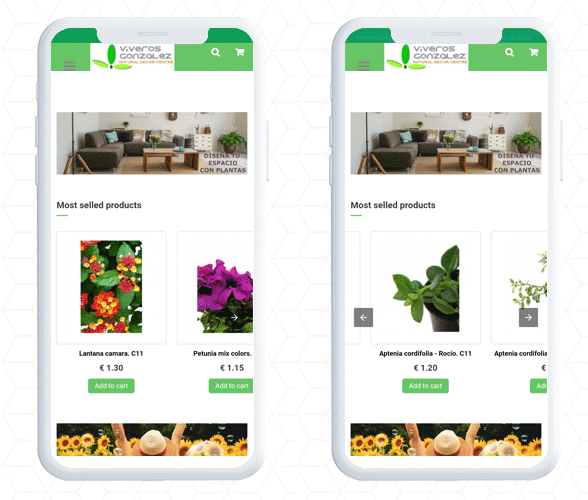
Showcase Products In Carousel Mode– On the Home page, Category page, product page, etc.
Display your business location and contact options like contact number, email address, etc.
Customize the entire store with PrestaShop AMP Settings
Be it the home page or the product page, the module allows you to customize each and every element of your web pages.
1. Optimize to increase home page dwell time
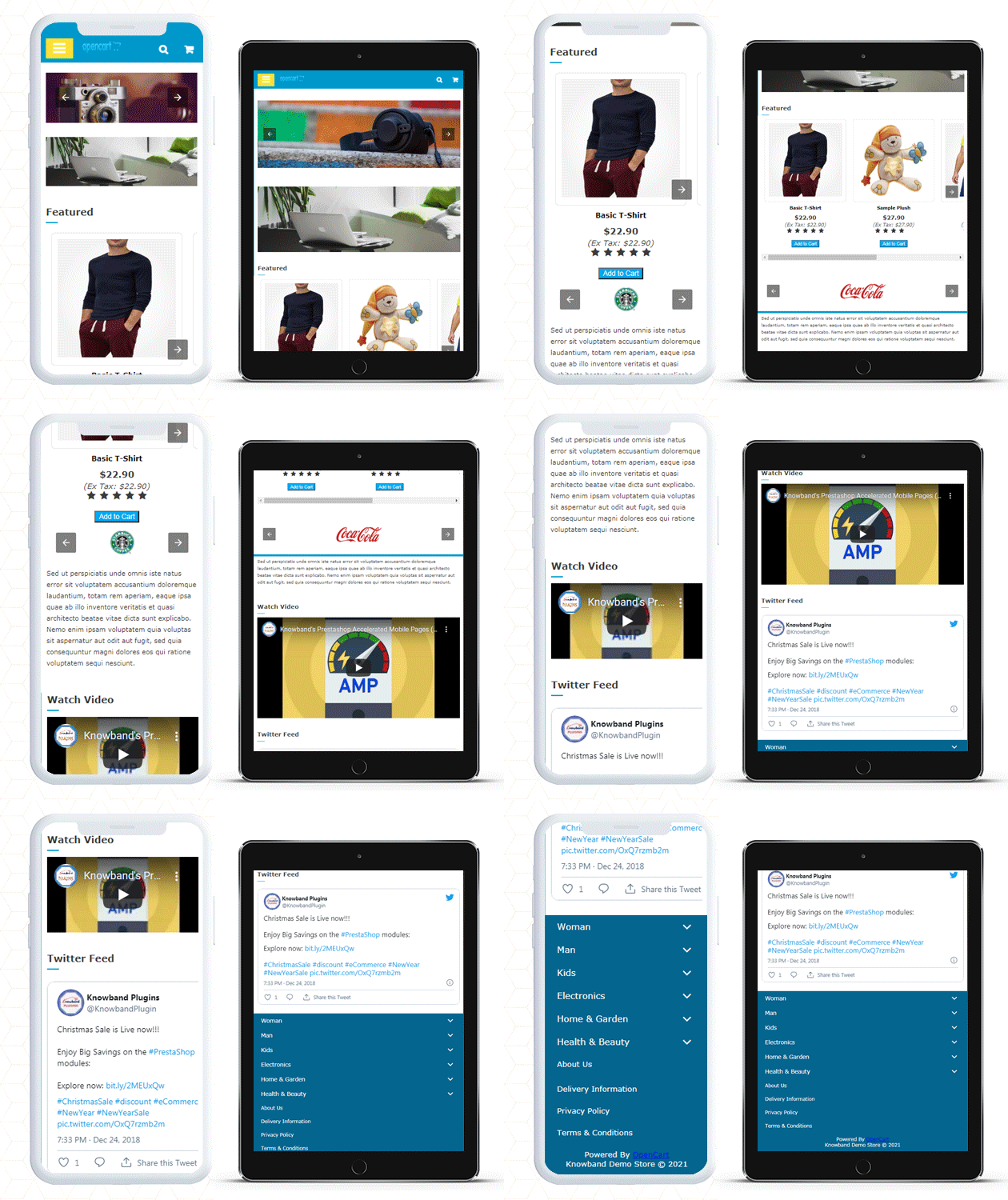
You can use the PrestaShop AMP module to make your Home Page AMP-ready. On the main page, it allows you to display Featured Products, Bestsellers, and New Arrivals. The display banner is being uploaded.
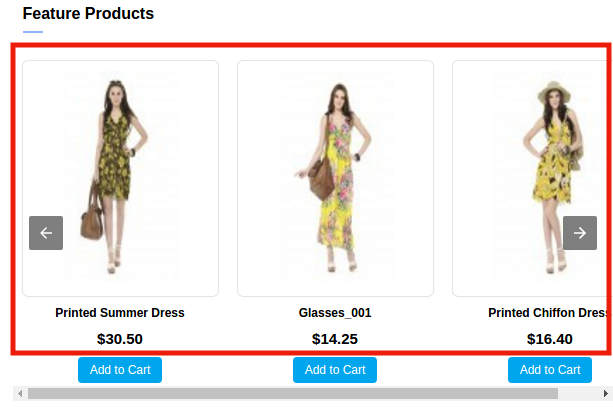
As the image depicts, the customization for the home page to display featured products, besides this, there are options for bestsellers, new arrivals, and others.
More home page customization options:
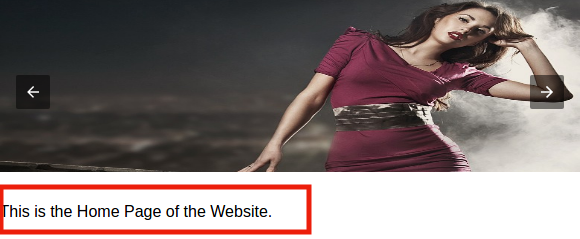
Adding custom text to the homepage’s top or bottom.
Carousel mode is used to display featured products.
Choosing the number of featured products that will be shown.
In addition, you can show movies from YouTube, Vimeo, and Dailymotion.
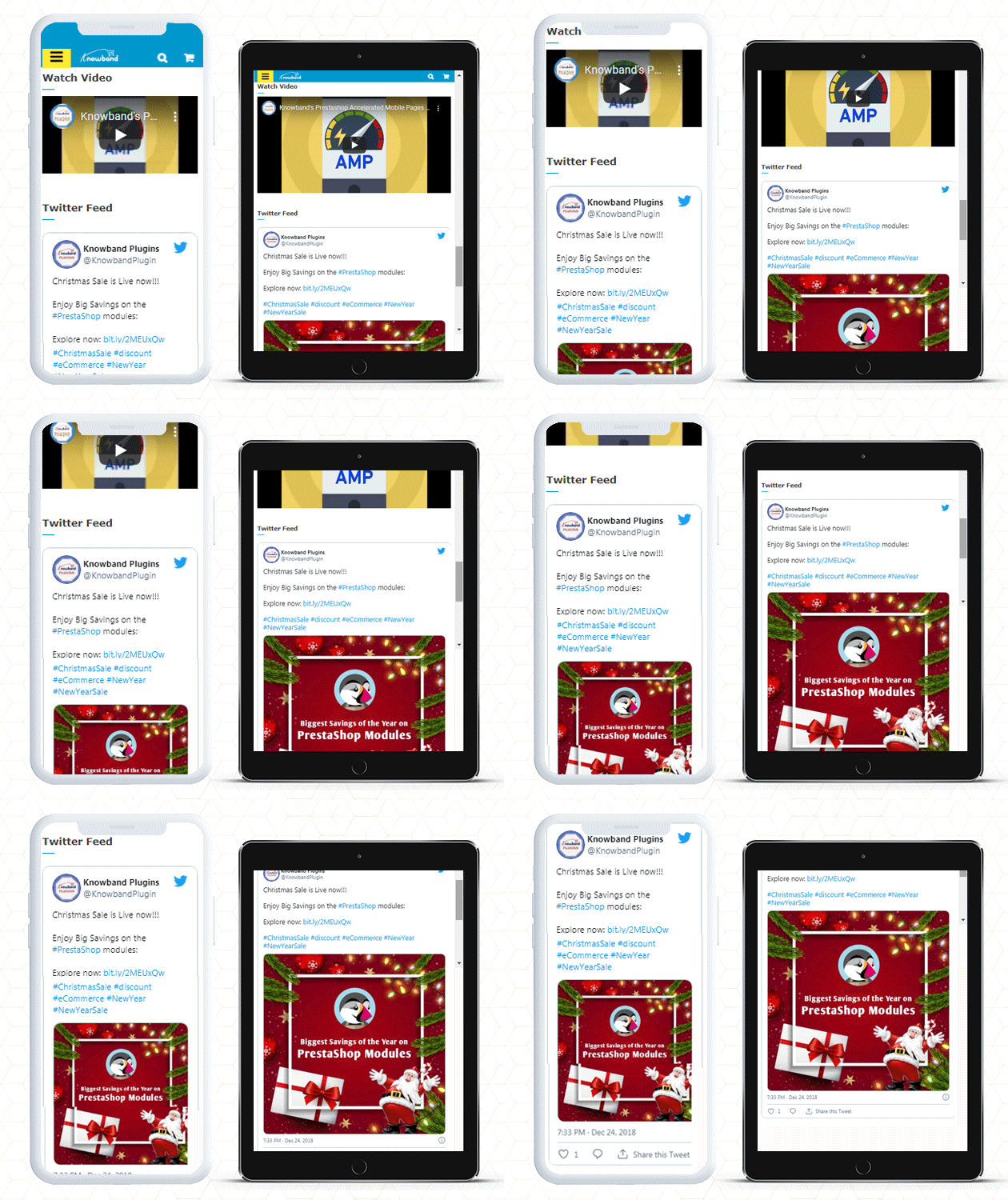
Instagram and Twitter feed can be displayed on Home Page.
2. Customize Category Pages with AMP
You can use the AMP module to enable AMP on Category pages. Displaying custom texts at the top or bottom of your Category page is part of the Category page customization. It allows choosing the right image size for the product.
3. Use AMP to customize the product page
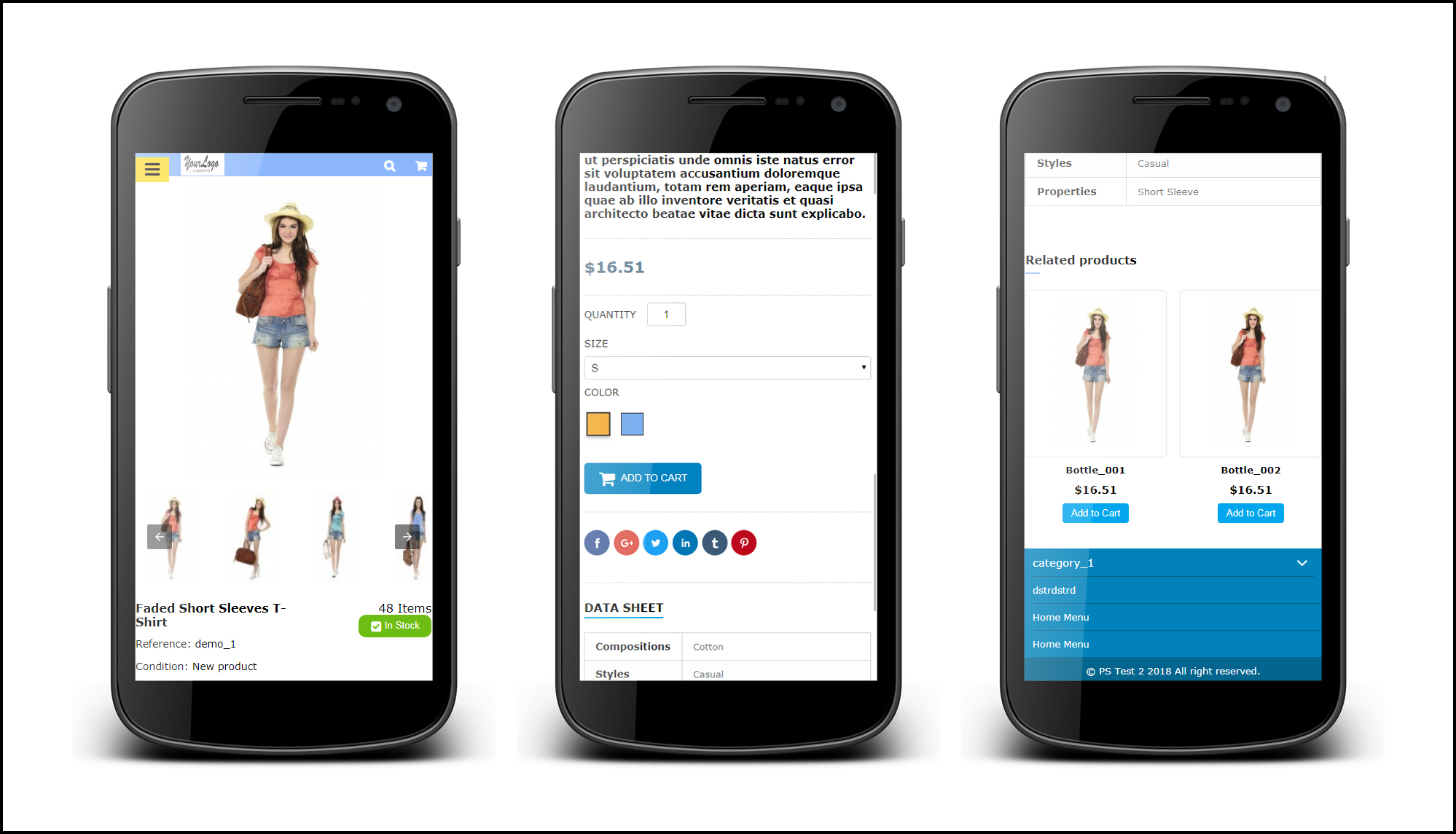
You can transform your product pages into AMP-enabled product pages using the PrestaShop AMP plugin. You can customize the product page by displaying custom text, short product descriptions, product descriptions, product reviews, related items, and so on.
4. Make your menu bar unique
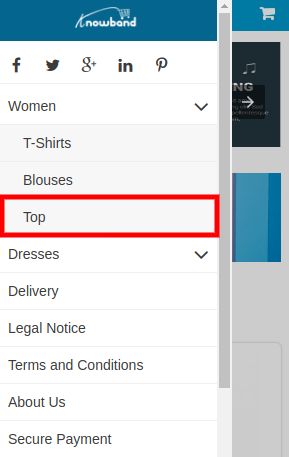
The PrestaShop Accelerated Mobile Pages extension allows you to customize your menu bar to meet your needs.
5. Add colors to the AMP-enabled PrestaShop website
The AMP module allows you to customize the colors on your AMP pages to make them more appealing.
6. Include links to your social media profiles with custom text
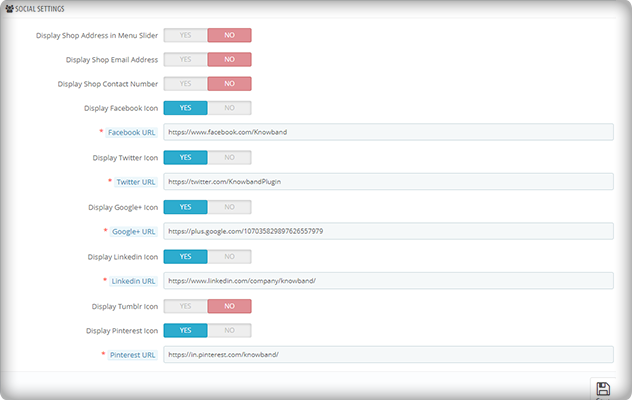
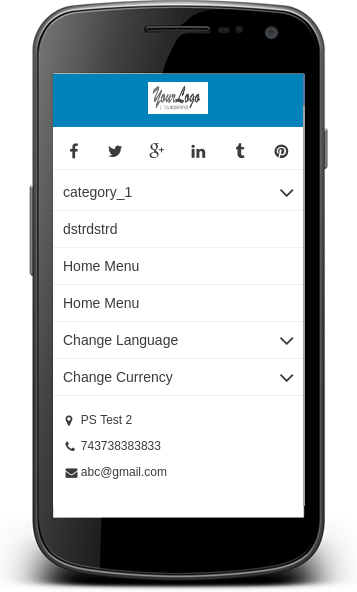
On your AMP-enabled website, you can establish a distinct section for displaying your social media company sites. Facebook, Twitter, Google+, LinkedIn, Pinterest, and Tumblr are all part of it. You can also add any other network if you want to.
Aside from that, you may use the menu slider to display your company’s location, email, and phone number.
7. Link your Adsense and Google Analytics accounts
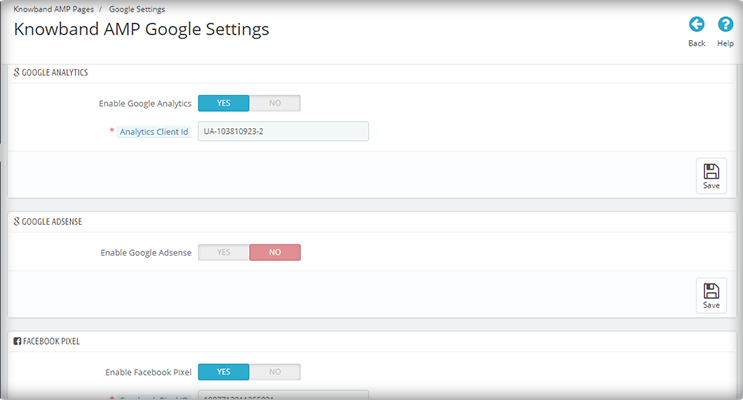
The PrestaShop AMP module allows you to link your Google Analytics and Adsense accounts to your AMP-enabled website. This module also allows you to control the sitemap settings and link your Facebook profile.
8. The PrestaShop AMP Module GDPR Cookie Consent Bar
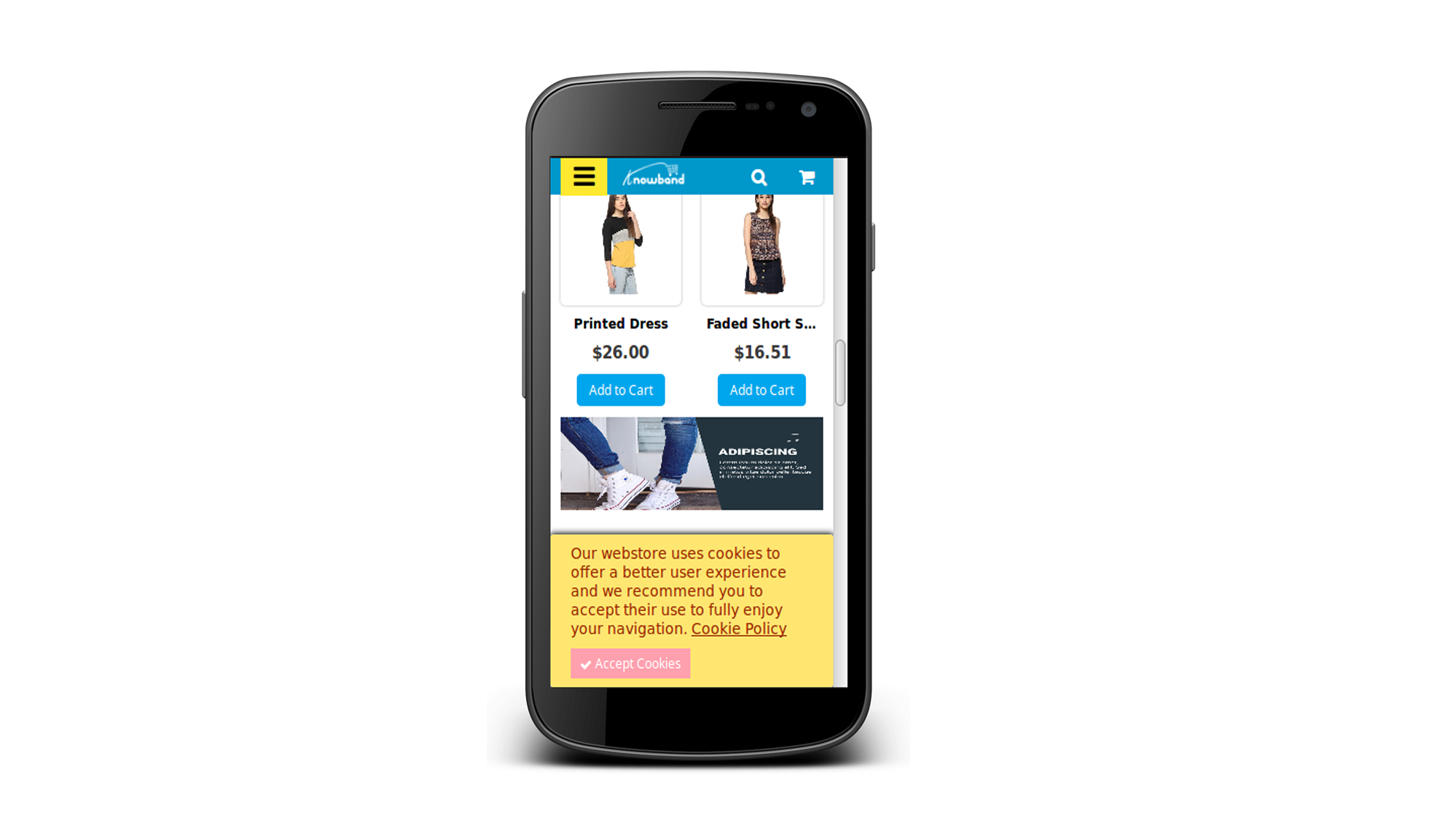
To prevent the hassle of violating the GDPR law, include a GDPR cookie consent bar on your AMP-enabled website.
Note: Your website must be HTTPS enabled for the AMP module to work. The HTTP protocol is incompatible with AMP. As a result, you should strongly consider using the HTTPS protocol when generating AMP pages and content (vs. HTTP).
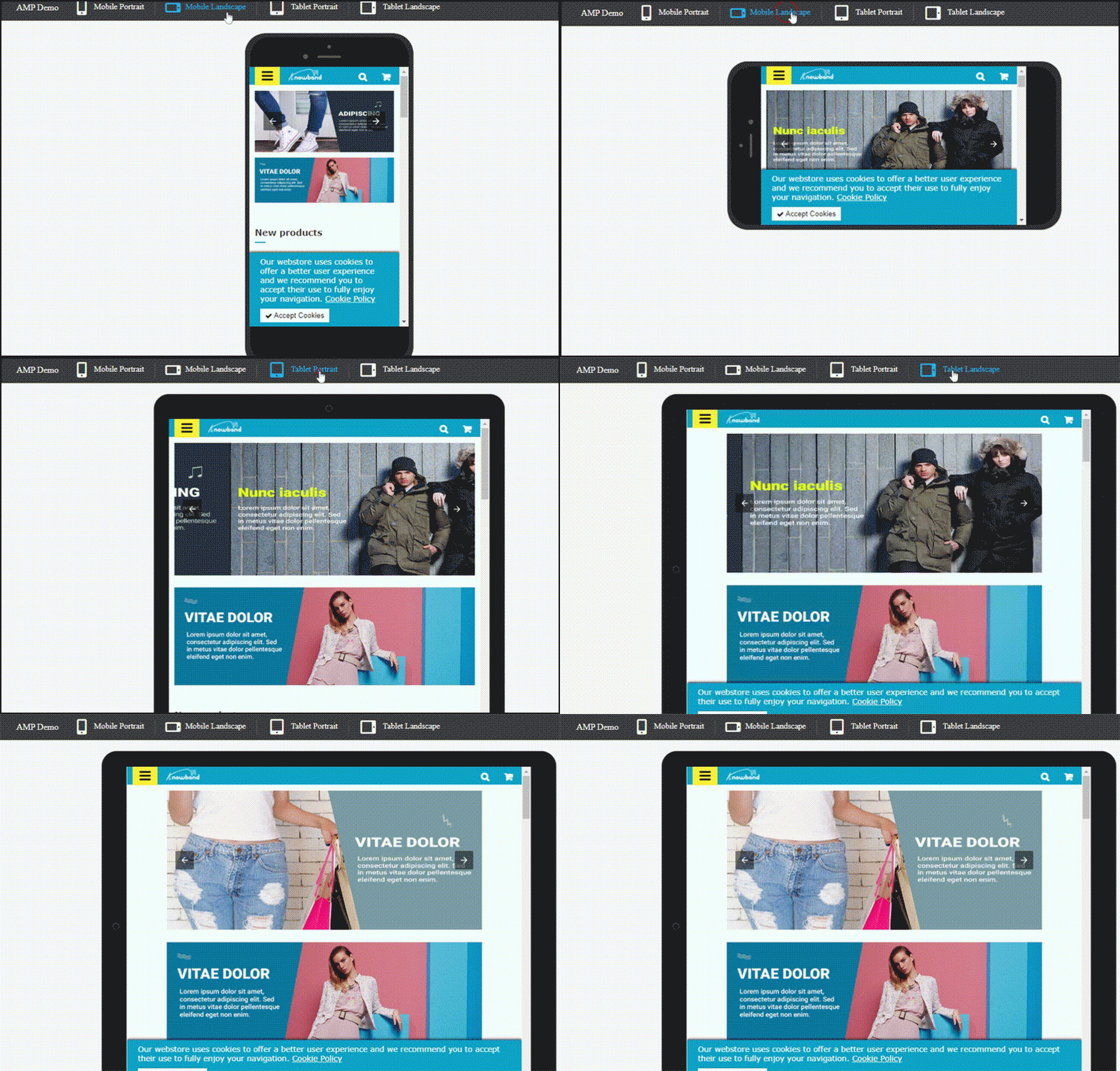
PrestaShop Accelerated Mobile Pages (AMP) example
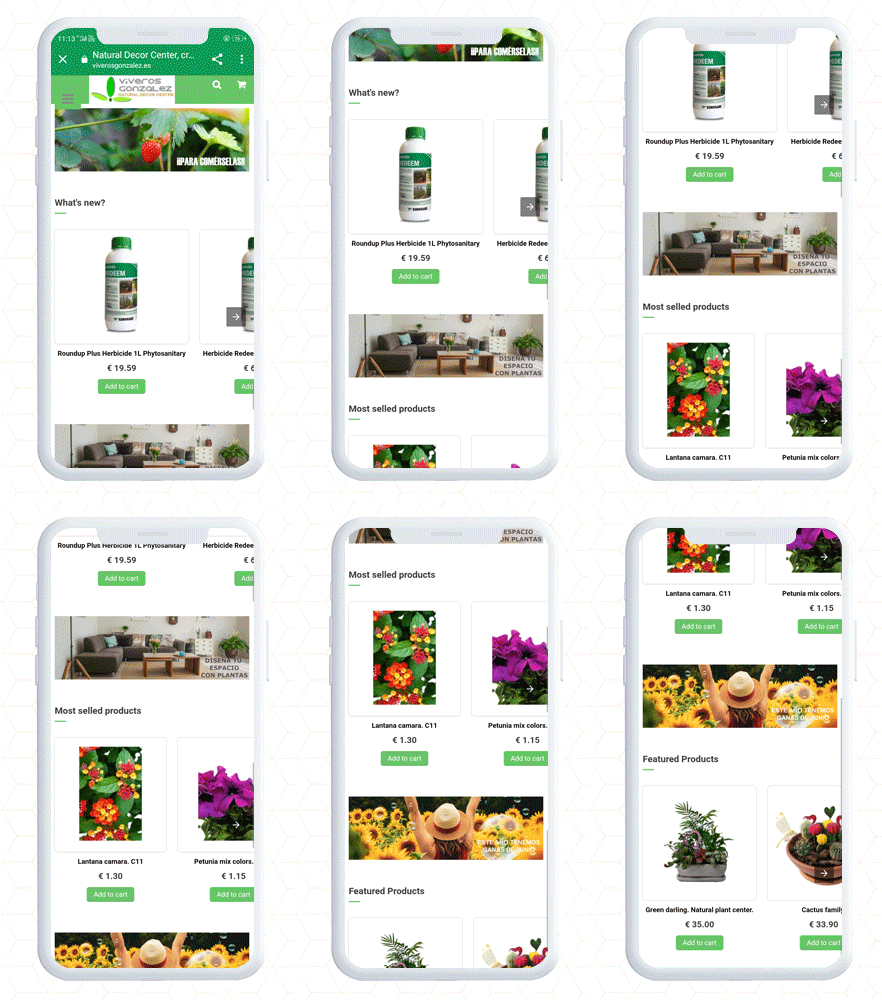
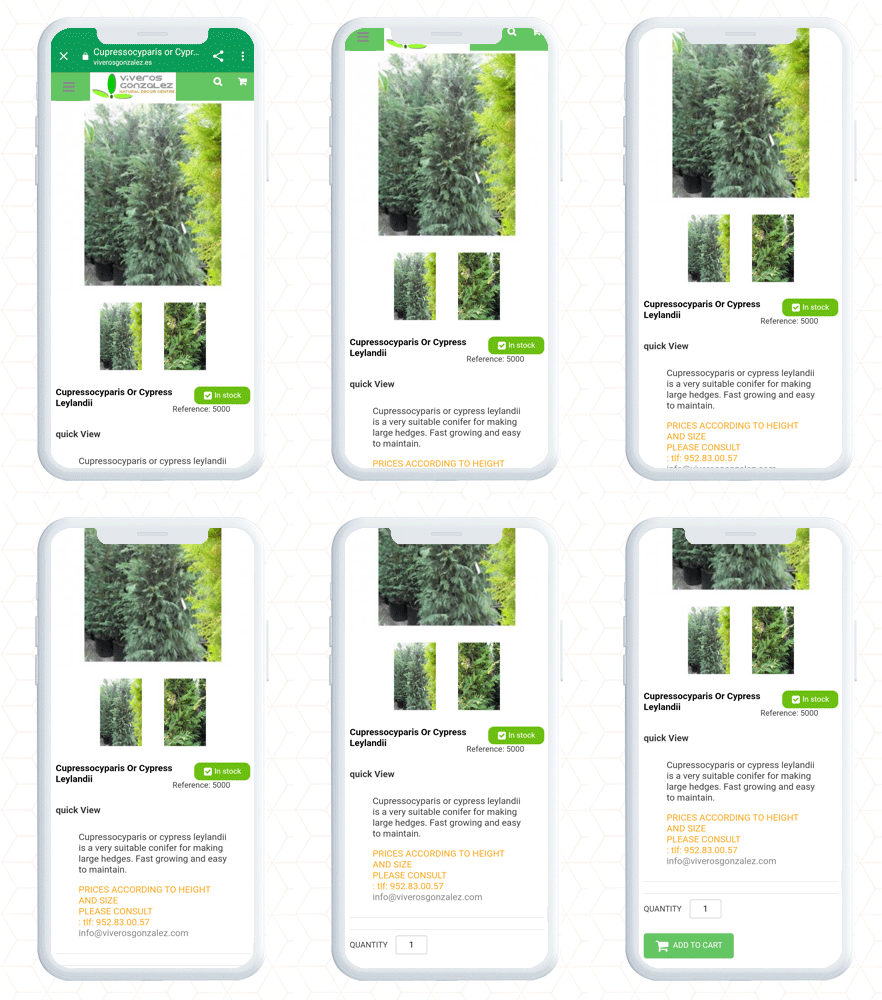
PrestaShop AMP Home Page with navigation slider
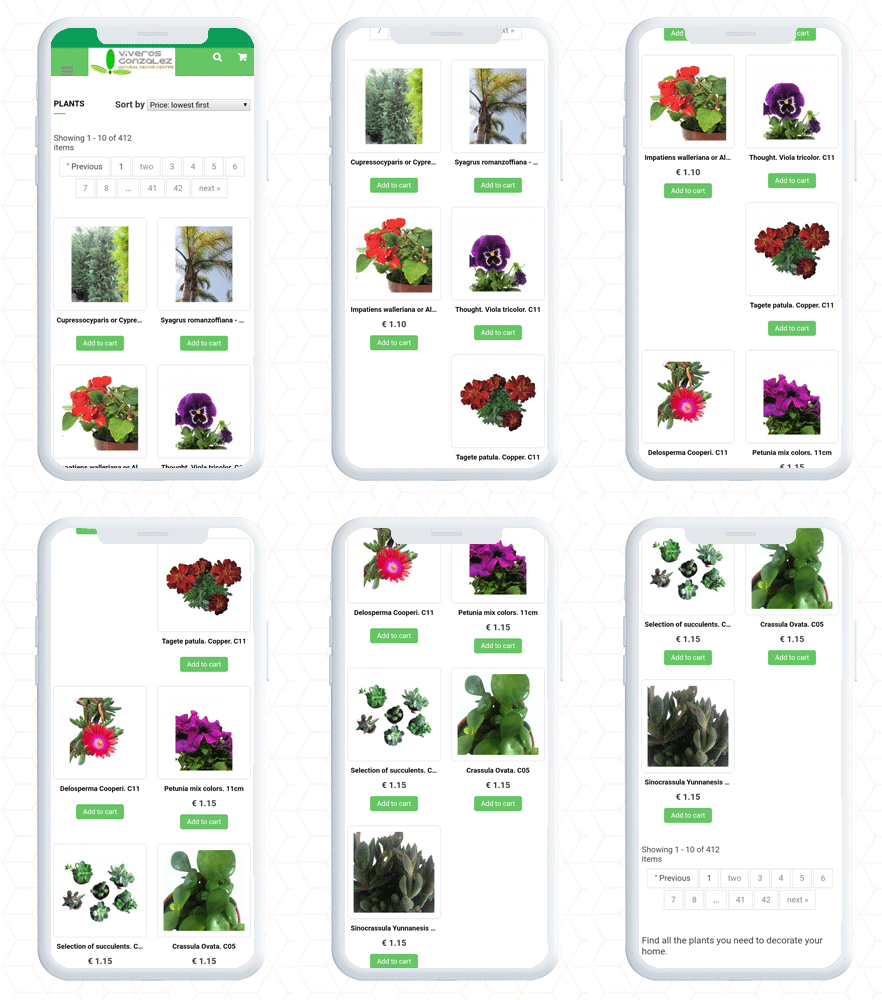
Product Page and Category page PrestaShop AMP
Finally, the PrestaShop Accelerated Mobile Pages (AMP) module lets you optimize your website pages for a user-friendly mobile experience. It gives you complete freedom to customize the home page, category page, and product page layout and designs. By adding a custom logo and text you can create a unique brand identity. Along with these design features, it allows the seller to link the social media account and videos on the home page. There are many other facilities given in the AMP setup.
Consider adding AMP to your website to make it user-friendly, mobile responsive, and SEO friendly with AMP addon.
For e-retailers, the holiday season signifies only thing- more sales. It is that time of the year when there is maximum participation of the online shoppers in the eCommerce websites, and eCommerce merchants use this opportunity to maximize their sales.
Though the holiday season is all about increasing the sales graph, for the e-retailers, it requires tons of efforts to achieve it. You need to prepare a roadmap for the entire season, create effective marketing strategies, focus on your competitors, and a lot more to stand out from the rest.
While all these points are imperative to achieve holiday sales, nothing holds more importance than providing customers with a seamless and hassle-free shopping experience. The final quarter of the year captures a large number of visitors and it is your responsibility to convert them into regular customers.
For that matter, you need to focus on a few aspects like customer engagement, customer retention, user experience, etc. In this article, I will be presenting the list of our Top 10 modules that will help you cover every aspect and grab conversions better than ever in the coming holiday season.
The holiday season commences from Halloween and ends at the arrival of the New Year.
For Checkout optimization
1. One Page Checkout (PrestaShop, OpenCart, Magento and Magento 2)
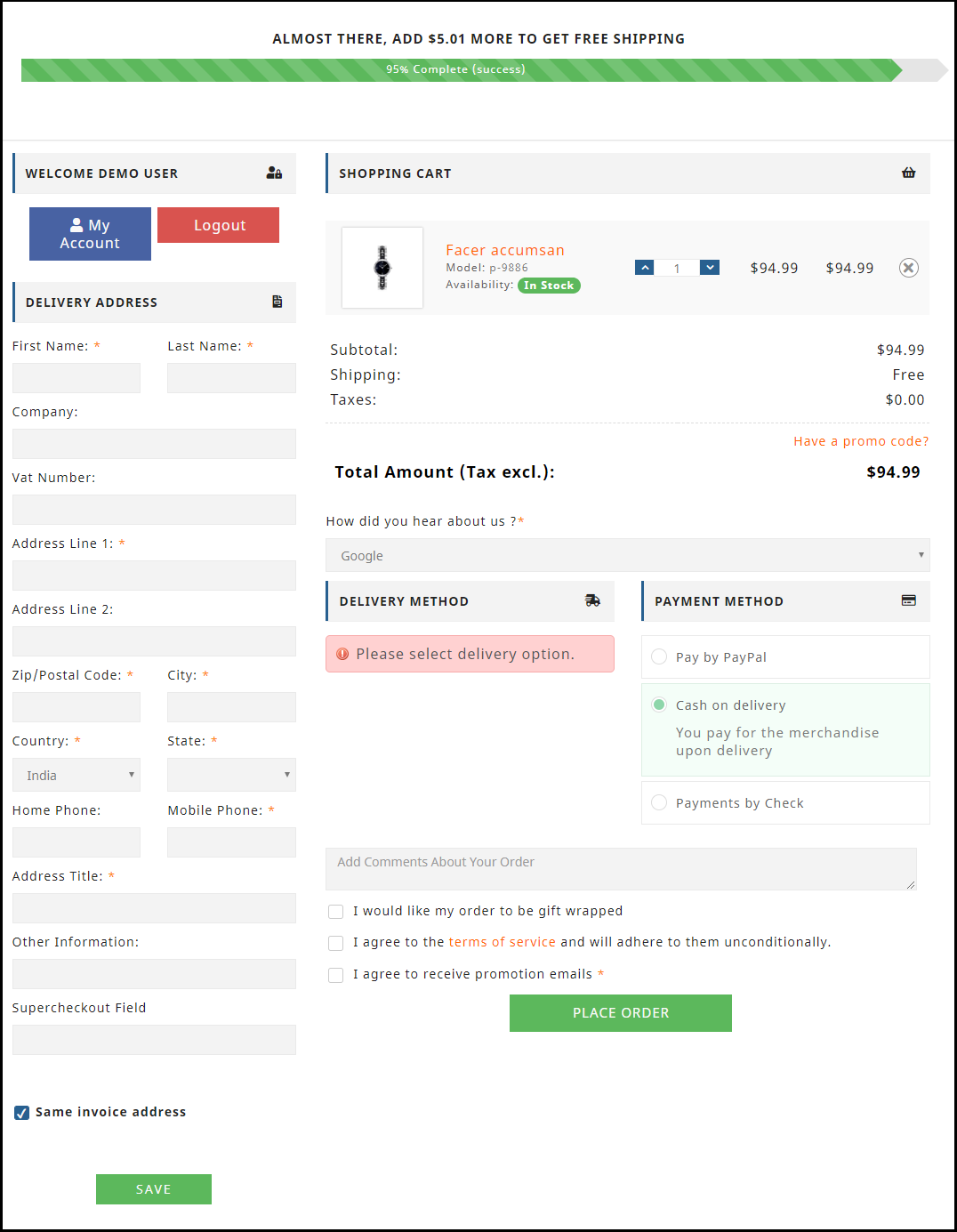
Our One Page Checkout module helps you optimize your checkout page, to allow your customers with a hassle-free checkout experience.
Unlike the multi-step checkout process, it displays all the checkout elements on a single page and reduces the checkout friction.
To make the checkout path convenient for customers, our One Page Checkout offers Social Login, Guest Checkout, Inline Validation, Google Auto-address fill and supports nearly all the payment methods and shipping services.
Find the complete features and benefits of the checkout module for the respective platforms:
2. Spin and Win (PrestaShop, OpenCart, Magento, Magento 2, WooCommerce and Shopify)
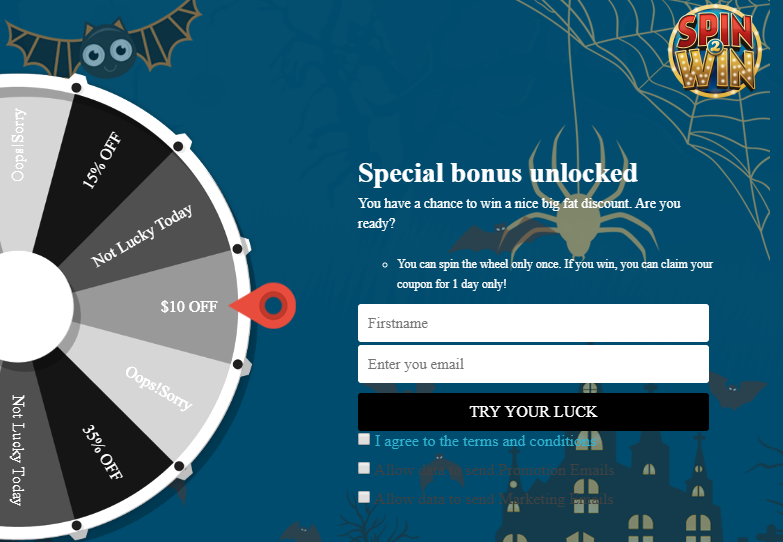
Increase customer engagement on your website by adding a Gamification element to it. The Spin and Win gamified popup draws the attention of your customers towards the eye-catching spin-win wheel and engages them in a fun activity.
Visitors are asked to try their luck by spinning the wheel and grab some exciting offers. But, in order to spin, a user needs to provide his/her details like name and email address.
So, this Spin and Win module not just builds customer engagement but also provides you with a nice way to obtain customer data and grow your email list, which you can use for your email marketing campaigns, and thus boost your conversions.
The module provides merchants with tons of customization ranging from designing the look of the popup to setting up the time for the popup appearance. Check out
3. Loyalty Points (PrestaShop, OpenCart and Magento)
Encourage repeat purchases by rewarding your customers with loyalty points on every purchase. Our Loyalty Points module ensures customer retention as well as customer acquisition.
The module lets you provide loyalty points to every new user who performs a sign-up on your store and triggers impulse buying, followed by more loyalty points on the successful purchase.
It converts visitors into potential buyers and makes them stick to your store in the long run. It also enhances brand loyalty to a great extent.
The Loyalty Points module lets merchants set up their terms and conditions for users in order to gain loyalty points. It can include offering loyalty points based on the total cart value, product quantity, product price, selected payment methods, etc.
The loyalty points earned by a user can be used as a discount voucher on the checkout page. Check out
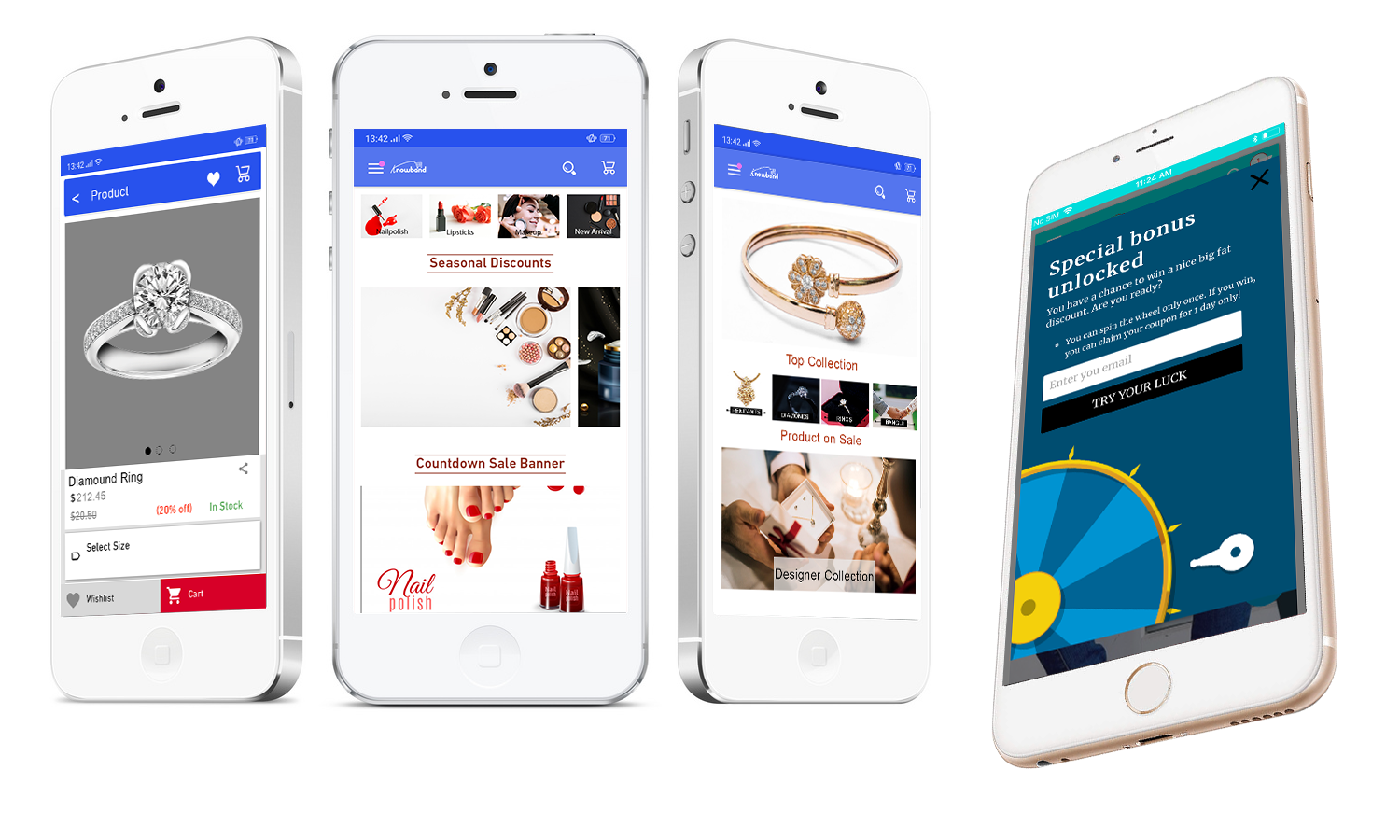
Our Mobile App Builder lets you transform your eCommerce website into an Android and iOS Mobile App conveniently, without any requirement of coding or technical knowledge, and helps you develop a rich, user-friendly, and a smartphone and tablet responsive mobile app for your business.
Since users nowadays demand an app for easy browsing experience, the Mobile App Builder module makes it the best fit to provide amazing user experience.
The holiday season is coming close, now is the best time to introduce your mobile app and delight your users, and grab huge holiday sales.
The Mobile App Builder offers Easy customization, Social login, Fingerprint and OTP login, WhatsApp and Zopim Chat support, Real-time synchronization of Website into App, supports multiple payment and shipping methods, etc. Check out
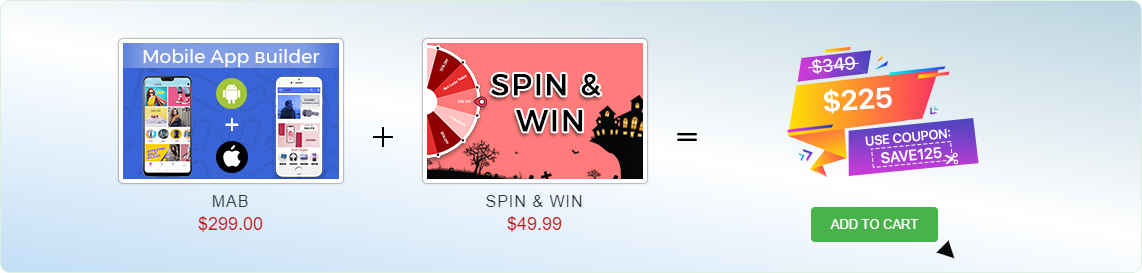
We are currently running an exclusive offer for the PrestaShop website owners where they can purchase a combo of PrestaShop Spin and Win and PrestaShop Mobile App Builder for just $225.
The individual cost of both these addons is $299 and $49.99 respectively. But with our combo pack, you will get a heavy discount of $125 and can get it for just $225.
All you need to do is apply the coupon code “SAVE125” during the checkout.
For improved site speed on mobile devices
5. AMP- Accelerated Mobile Pages (PrestaShop and OpenCart)
Our AMP module tackles the slow loading of your website on mobile devices and increases the page load speed to a great extent.
Did you know m-commerce accounted for 40% of the total sales in the US in 2018, as per Statista? If we talk about global m-commerce stats, it has already surpassed eCommerce. The numbers speak about the importance of smooth site functionality on mobile devices.
The AMP module, thus, ensures that your mobile users do not find any troublesome experience with your website and are offered a faster and smoother loading. Faster loading not only helps you reduce the bounce rate but also benefits in improved mobile rankings on the search engine.
Talking about its features, you can enable the AMP functionality for multiple pages on your website like Home page, Category page, Product page, etc. You can also customize these pages as per your requirements. Check out
6. Abandoned Cart (PrestaShop, OpenCart, Magento and Magento 2)
The Abandoned Cart module helps you recover your lost sales by sending regular follow-up emails to the abandoned cart users. The module reminds users about the incomplete purchase and allows you to convert them into customers by including exclusive offers in your emails.
It lets you define a period after which the cart is automatically assumed to be abandoned. You can, thereafter, track those users and send them the abandoned cart reminder through your emails. The email content can be personalized.
The Abandoned Cart module can boost your conversions significantly. Check out
The Return Manager module helps you manage your eCommerce returns conveniently and enhances customer loyalty by making the return process way too easy for the customers.
Since the holiday season captures a huge number of orders, there will be returns for sure. Our Return Manager module ensures that you do not lose out on customers due to a poor return process.
The module provides 3 return choices to the customers in the form of Credits, Refund and Replacement, and allows them to highlight the defect by uploading the image of the defective/damaged product. One interesting feature of the module is that the admin can create the return request on the customer’s behalf. Check out
PrestaShop Booking and Rental system addon provides your customers with a hassle-free online booking experience and makes it a simple task for the merchants to manage their online bookings.
This PrestaShop addon offers appointment booking facility, hotel booking facility and rental booking facility. It lets you adjust your booking days and time slots as per the availability, and you can adjust the price for different days and timing. There is much more it offers for every booking type.
9. Web Push Notifications (PrestaShop, Magento and Magento 2)
Knowband’s Web Push Notifications module lets merchants alert their users about the abandoned cart, drop in the product price, product availability (when back in stock) and the order status. For each of them, the user can decide whether he or she wants to receive updates regarding them.
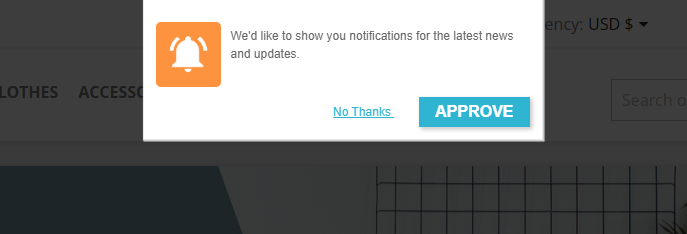
For the Web Push Notifications to work, the visitor needs to click on approve when the notification popup appears. This welcome popup can be customized as per your desire.
The module allows you to fix a time for the notification delivery. You can either send the notifications immediately or schedule them for a fixed time. Check out
10. Affiliate and Referral Program (PrestaShop, Magento and Magento 2)
The Affiliate and Referral Program module allows users to register as an Affiliate partner on your store and earn commissions for every successful referral.
The user can refer your store to his/her friends, family, relatives, etc. by sharing with them the affiliate link or the referral code. They can send it over email and also share the link on the social media directly from their affiliate account.
You can assign the commission to the affiliate partner for every new signup via their referral and also provide incentives when the referred user places an order. The commission rate can be set under the configurations of the module. Check out
“OpenCart AMP Extension reduces the page load time of your website in mobile devices and offers faster loading to enhance the experience of your mobile users”
According to a report by Invesp, more than 2 billion people use their mobile devices for online shopping, globally. Also, as per Statista, 53.9% of all U.S retail e-commerce is expected to be generated via m-commerce, by 2021.
Mobile Commerce or M-commerce looks promising to be a dominating e-commerce force in the upcoming years. With the increase in the number of mobile users, e-retailers have started looking out for ways to optimize their e-commerce website for mobile and one such way is the implementation of Google AMP.
What is Google AMP?
Accelerated Mobile Pages or AMP is an initiative by Google that is designed to offer faster loading of web pages on mobile devices.
Data from KISSmetrics reveals that if a website takes more than 3 seconds to load, 40% of people are likely to abandon the page, resulting in an increased bounce rate. This is where AMP comes in handy.
AMP for OpenCart
An AMP-enabled web page or website is the topmost priority for a customer when they are looking for any info on the search results.
OpenCart AMP (Accelerated Mobile Pages) Extension optimizes your website and converts your website pages into flexible mobile pages when browsed via a mobile device, and delivers content quickly. It gets rid of all the clunky elements from your website and displays only the relevant content. OpenCart Accelerated Mobile Pages is a powerful mobile optimization tool that helps you index your mobile pages faster.
Features of OpenCart AMP Extension
1. Home Page AMP
OpenCart Google AMP module helps you implement the AMP functionality on the Homepage of your website.
You can display a custom text on the Home Page and select whether you want to display it on the top or bottom.
Display Featured Products, Bestsellers, New Arrivals on your Home page.
Choose a minimum number of featured products, best sellers, new arrivals that you want to display.
Display featured products, best sellers, new arrivals in a carousel mode.
You can also add videos from YouTube, Vimeo, DailyMotion and display them on your Home Page. Videos can be set to autoplay.
OpenCart AMP extension allows you to display Instagram or Twitter feed on the Home Page.
2. Category Page AMP
Implement Google AMP on your category page and allow quick navigation to your users through the listed categories.
Create a custom text for the category page and select the display position.
3. Product Page AMP
Implement AMP on your product pages with the help of the OpenCart AMP module.
Create a custom text for the product page and select the display position.
Display product reviews and related products.
4. CMS Page AMP
Implement AMP on CMS (Content Management System) pages and optimize the website content for mobile users.
5. Customize the Look and Feel for the Mobile Devices
Try out different color options and make your AMP-enabled website appealing in front of mobile users. Google AMP OpenCart consists of a “look and feel” tab, from where you can customize the website appearance accordingly.
6. Add your Social Media Pages
You can add your social media pages to your AMP-enabled website. With the OpenCart AMP extension, you can add your Facebook page, LinkedIn Page, Instagram account, Twitter account, Pinterest account, and Tumblr account, etc.
7. Enable Google Analytics, Google AdSense, and Facebook Pixel
You can link your Google Analytics ID to track the performance of AMP pages. Similarly, you can link the Google AdSense and Facebook pixel id.
Apart from these features, you can
Upload your website logo and adjust its width and height
Upload a banner for featured products, best sellers, and new arrivals.
Create your cookie consent message
Select the number of products to be displayed on a single page.
AMP for OpenCart FAQ
Does the AMP extension support the Journal theme?
Ans: Yes, the module does not get affected by the Journal theme. The UI of the AMP pages will remain the same as configured. (Independent of the site theme).
Does the AMP Extension require coding?
Ans: No, it does not require any coding to set up.
Can customers change the home page design and add products on the home page?
Ans: Yes, with the Accelerated Mobile Pages, the home page design can be customized. Admin can change the banners, colors, look and feel and add featured images of the home page.
Does the app support multiple languages?
Ans: Yes, the OpenCart AMP extension is multi-lingual and works well with all the languages.
Can I add Social media profiles to the home page of Accelerated Mobile Page?
Ans: It is very easy to embed Twitter and Instagram profiles on the AMP extension. Check out the admin demo for the same.
Is KnowBand Opencart AMP (Accelerated Mobile Pages) compatible with the Marketplace website?
Ans: Yes, the extension is compatible with any website including the marketplaces.
Since AMP provides instant loading, the bounce rate of your website decreases. OpenCart AMP extension helps you gain excellent conversions from mobile devices which otherwise could have been lost due to the poor page load speed. By speeding up the website load time, AMP will push your site above in the mobile search engine rankings. It will enhance the user experience and increase your website visibility.
Try out the OpenCart AMP Extension today! If you have any queries regarding this extension, feel free to ask in the comments below or you can raise a ticket at support@knowband.com
1.0 Introduction of Knowband Prestashop Accelerated Mobile Pages (AMP) Addon:
Accelerated mobile pages or AMP can effortlessly boost the performance of the websites on the mobile devices. AMP provides convenient access to information on the Internet from the screens of smartphones and tablets. AMP is an advance Google technology which reduces the load time of the mobile website. With the introduction of mobile-first indexing, the goal of every eCommerce store owner should be to reduce the load time of their websites for the mobile users. High load time increases the bounce rate of the website. For increasing the performance of Prestashop store website on mobiles, Knowband offers the Prestashop Accelerated Mobile Pages (AMP) Module.
Prestashop AMP module allows the admin to convert the home page, category pages, product pages and CMS pages into fast-loading AMP pages. By limiting the data displayed, Prestashop Accelerated Mobile Pages Module reduces the load time of the mobile sites. Also, with the Prestashop addon, the e-merchant has an ability to enable/disable additional sections on the webpages like Best Sellers, Featured Products, New Arrival. You can now provide amazing user experience to your audience base who browses the site through their handheld devices. In the mobile generation, once your mobile-first customers are happy, sales will happen easily.
1.1 Features of Prestashop Accelerated Mobile Pages Module:
1. Prestashop Accelerated Mobile (AMP) Module allows the store admin to convert web page to AMP without making any core changes in the code of the website. This limits the data displayed on the mobile site, thus, boosting the load time of the same. In short, the Prestashop addon can amp up the load time of the mobile sites by creating accelerated mobile pages of the site. However, it will not affect the load time or performance of the desktop sites.
2. With the help of the Prestashop AMP Module, the store admin can convert the home page, category pages, product pages and CMS pages to AMP.
3. Knowband’s Prestashop Accelerated Mobile(AMP) addon provides an option to the store owner to customize the home page, category pages, product pages and CMS pages settings form the back-office.
4. The admin can upload the Business logo on AMP and they can also fix the width and height of the website.
5. Prestashop AMP Module offers the store merchant an option to add the Custom CSS for adding the additional functionality.
6. Google Accelerated Mobile Pages Module enables the store admin to enable/disable the display of the bestsellers option, featured and new products on home page. Apart from this, they can set the number of featured products to be shown in a particular section. The random products are automatically fetched and displayed to the user.
7. The Prestashop store owner can change the banner of the best sellers, featured and new products on the homepage.
8. Prestashop Accelerated Mobile Pages (AMP) module has provided the social media sharing options on the AMP. Even admin can add more icon by adding the script.
9. The Admin can customize the categories of AMP from the back-end of the Prestashop AMP Module. The customers to browse categories from the AMP page.
10. By using the Google Accelerated Mobile Pages Module, the admin can automatically generate AMP sitemap with the help of CRON.
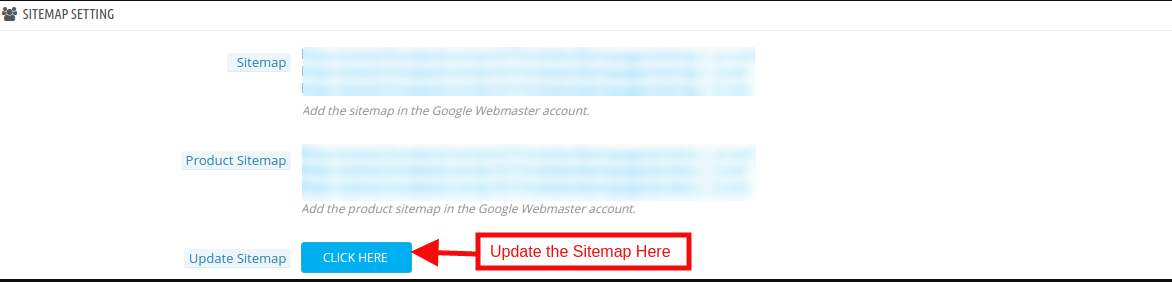
11. The Admin can generate AMP sitemap by click the button.
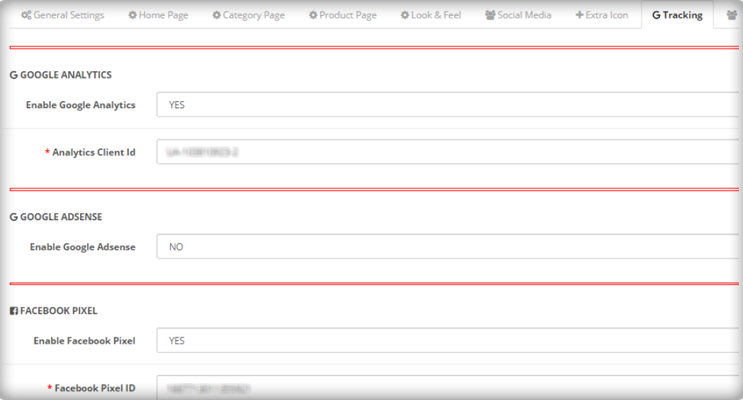
12. Knowband’s Prestashop Accelerated Mobile Pages Addon supports Google Analytics. The eCommerce admin can enter the Analytics client Id for tracking the AMP performance.
13. Google Accelerated Mobile Pages Module supports multiple languages.
14. With the help of Prestashop AMP Module, the Prestashop store admin can set color and background color for AMP website and other different blocks of AMP.
15. Prestashop AMP module is easy to use and handle.
16. This Knowband’s Prestashop AMP Module also supports GDPR compatibilty. Admin can map the cookie policy to any CMS page of the website.
17. The eCommerce store owner can show YouTube, Vimeo and DailyMotion videos on the homepage of mobile pages.
18. Google Accelerated Mobile Pages(AMP) Addon provides an option to display Instagram and twitter feeds on the homepage.
19. The e-merchant can manage the look and feel of cookie consent bar from the admin interface without any hassle.
20. The store admin can display advertisement on all the Mobile Pages by including Google adsense from the admin interface of Prestashop Accelerated Mobile Pages module.
21. The store owner can also implement Facebook pixel on the mobile pages. Facebook pixel is an analytic tool which tracks the store visitors.
Technology for Development
Language: PHP
FrameWork: PrestaShop
2.0 Steps For Installation of Prestashop Accelerated Mobile Pages (AMP) Addon:
1.The folder structure of the Prestashop AMP module.
2. Copy the whole folder named as product update into your modules folder of the root directory of your PrestaShop store through FTP.
3. You will be able to find the product AMP plug-in ready to be installed in the Modules in your PrestaShop store as shown below.
4. Click on the Install link to install the plugin.
Now, your Prestashop Accelerated Mobile Pages (AMP) Plugin is ready to use and click on “Configure” link to configure this Prestashop module by Knowband.
3.0 Admin Interface
After installing Google Accelerated Mobile Pages(AMP) Module into the store, the Prestashop addon will provide the following interfaces:
1. General Settings
2. Home Settings
3. Category Page Settings
4. Product Page Settings
5. Menu Settings
6. Look and Feel Settings
7. Social Media Settings
8. Extra Icon Settings
9. Google Settings
10. Sitemap Settings
Each interface of this Knowband’s Accelerated Mobile Pages (AMP) module for Prestashop is explained below.
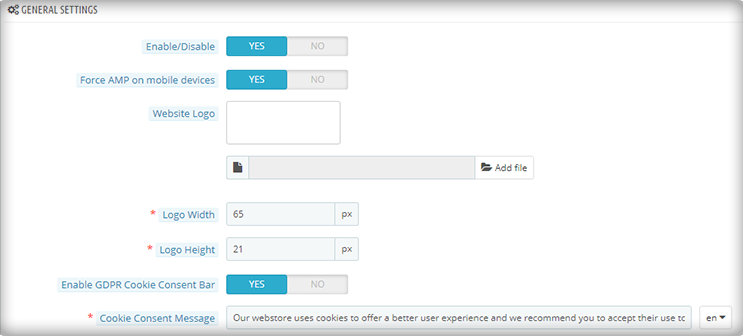
3.1 General Settings
General Settings tab of this Prestashop AMP addon has following options:
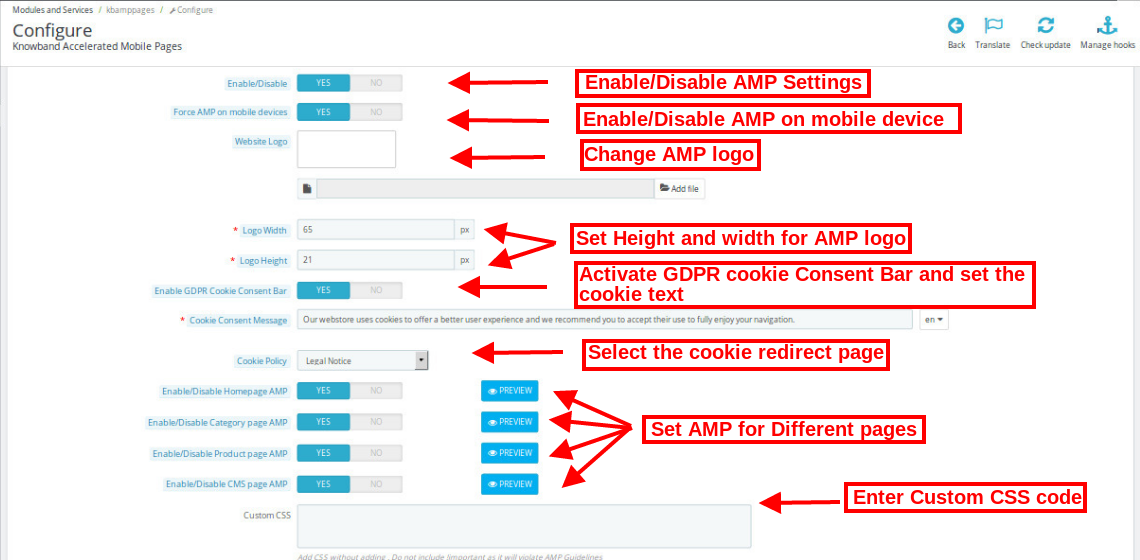
Enable/Disable: Initially, this field of Prestashop Accelerated Mobile Pages module by Knowband will be disabled. The admin can enable/disable the plugin by toggling the button.
Enabling this setting will convert the Website Pages into AMP.
Force AMP on Mobile Device: In this section of Knowband Prestashop AMP addon, the admin can enable the settings to AMP pages on Mobile Device.
Website Logo: Using this option of the Google Accelerated Mobile Pages(AMP) Module, the store merchant can upload or change the logo of the AMP.
Logo Width: Here the store admin can set the width of the Logo in Pixel.
Logo Height: Here the store admin can set the height of the Logo in Pixel.
Enable GDPR Cookie Consent Bar: Admin can enable/disable this setting to display on AMP pages.
Cookie Consent Message: Admin can add custom text for cookie consent bar displayed to the user.
Cookie Policy: Admin can select the page which is to be displayed on Cookie Policy.
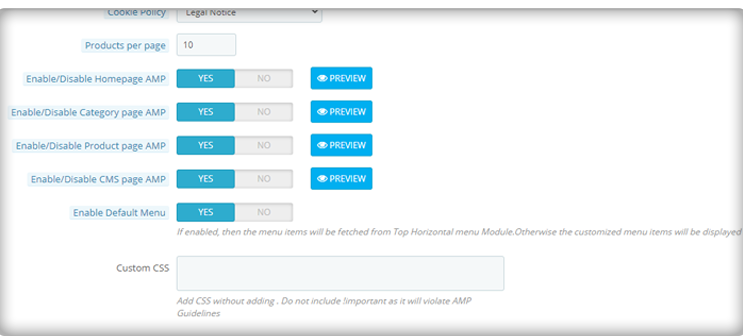
Enable/Disable Home Page AMP: The store admin can enable/disable AMP on the Home Page of the site. After enabling the option, the admin can check the Home page AMP by clicking on the Preview button.
Enable/Disable Category Page AMP: The store admin can enable/disable AMP on the category pages. After enabling the option, the admin can check category page AMP by clicking on the Preview button.
Enable/Disable Product Page AMP: Using this option of the Prestashop Accelerated Mobile Page (AMP) addon, the store admin can enable AMP on the product pages AMP of the site and can view the same by clicking on the PREVIEW button.
Enable/Disable CMS Page AMP: Prestashop AMP Page Module gives an option the store retailer to convert the CMS page to AMP. The look and feel of the pages can be viewed by clicking on the Preview button.
Custom CSS: Prestashop store admin can add Custom CSS code as per business requirement in this section.
3.2 Home Page Settings
In this tab of the Prestashop Accelerated Mobile Pages (AMP) Addon by Knowband, the admin can enable/disable the display of new arrivals, best sellers and featured products on the AMP Home page of this Prestashop module in various languages. This tab will have the following options:
1. Home Page Settings 2. Featured Product Settings 3. Best Selling Product Settings 4. New Arrival Product Settings
3.2.1 Home Page Settings:
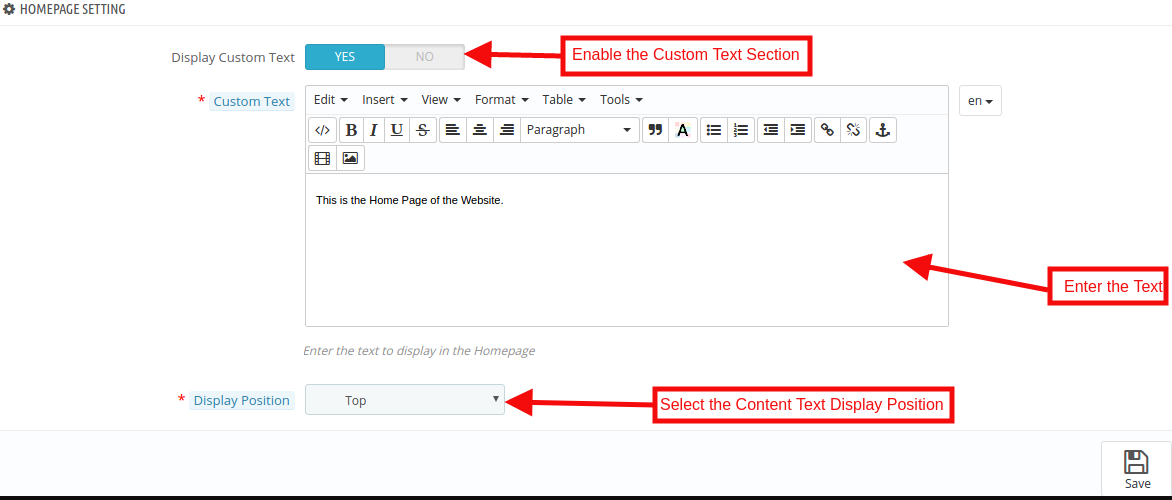
Display Custom Text: The Admin can enable/disable the Custom Text option here.
Custom Text: In this Google Accelerated Mobile Pages Addon, the store admin can change the text of the Home page block.
Display Position: The admin can select the display position that will be reflected the front end of the site.
3.2.2 Featured Products Settings:
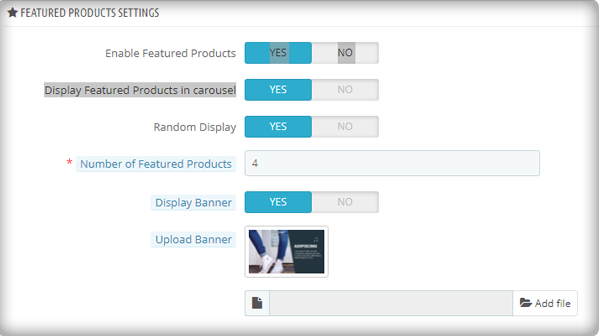
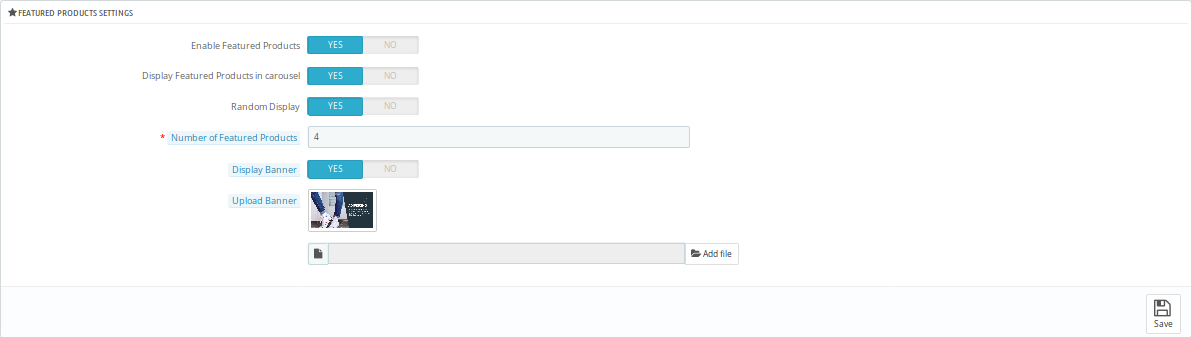
Enable Featured Products: Using this option of the Prestashop AMP extension, the eCommerce store admin can enable/disable the featured products section.
Display Featured Products in Carousel: Here the store admin can the featured products in the carousel.
Random Display: The Store admin can enable/disable the Random product display option. After enabling this feature, random product display in the particular section in AMP.
Number of Featured Products: Knowband’s Prestashop Accelerated Mobile Pages Addon allows the store admin to select the number of products which they want to show in the Feature Product section.
Display Banner: The eCommerce merchant can enable/disable the display banner option.
Upload Banner: In this field, the store admin can upload the banner for the featured product.
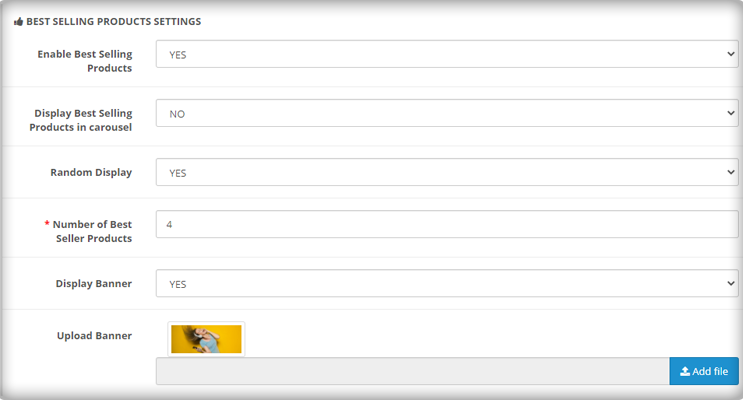
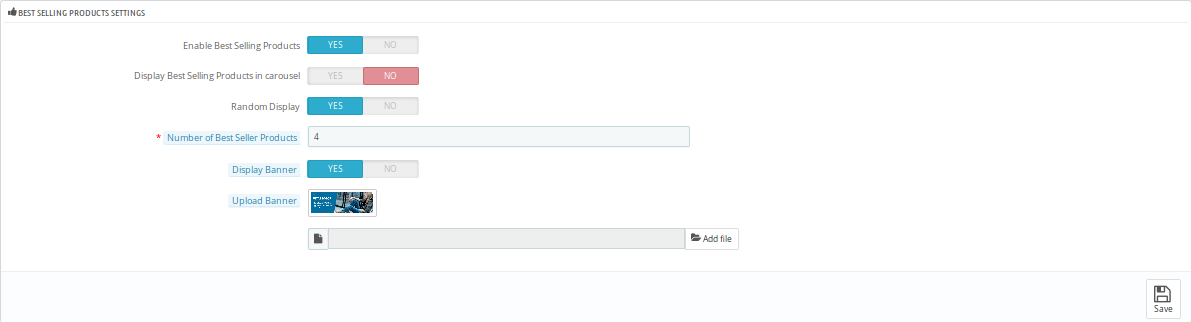
3.2.2 Best Selling Products Settings:
In this tab, the Prestashop store admin can customize the settings of the best selling product. Refer to the attached screenshot below:
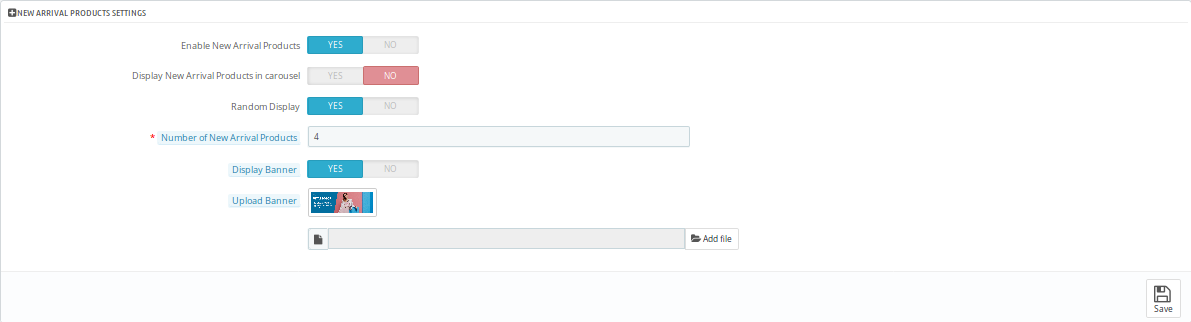
3.2.3 New Arrival Products Settings:
The admin has control over the display of New Arrival Product positions on AMP pages.
3.2.4 YouTube Video
Here, you can apply the settings for showing the YouTube videos.
Display Youtube Video: The store admin can enable or disable the settings to show youtube videos on the homepage.
Youtube video id: The online store admin can enter the video id in order to display it on the homepage.
Enable Youtube header text: The Prestashop Accelerated Mobile Pages Addon provides an option to enable the settings for showing youtube video’s header text.
Youtube header text: Admin can set the header text in various languages.
Autoplay: Admin can apply the settings for video autoplay.
Display controls: Admin can show the display controls by enabling the option.
Display positions: The store admin can show the display position for the videos.
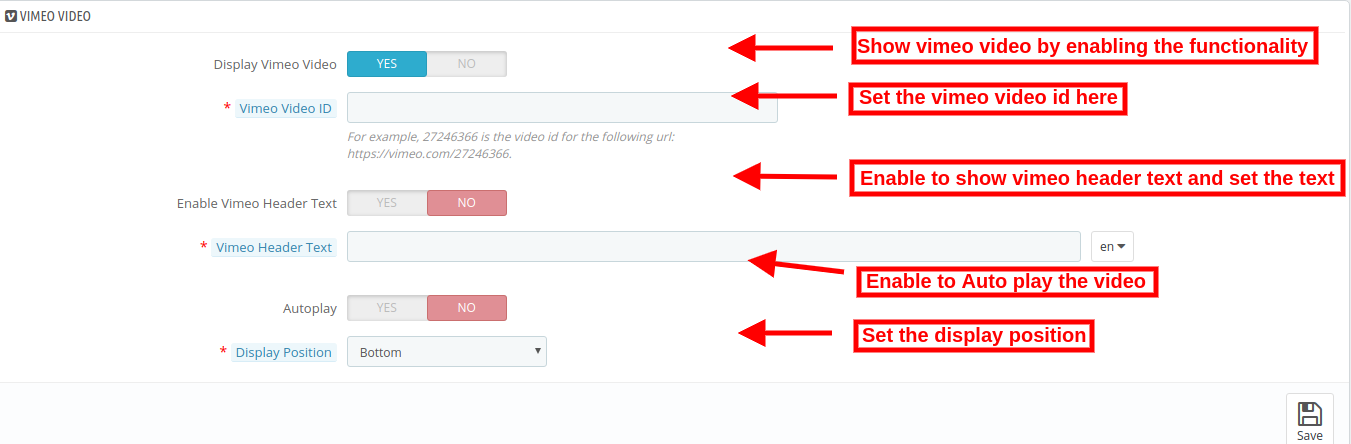
3.2.5 Vimeo Video
The store admin can also show Vimeo videos on the website’s homepage by applying these settings.
Enable the settings for showing Vimeo video on the homepage. Customization options are same as youtube videos.
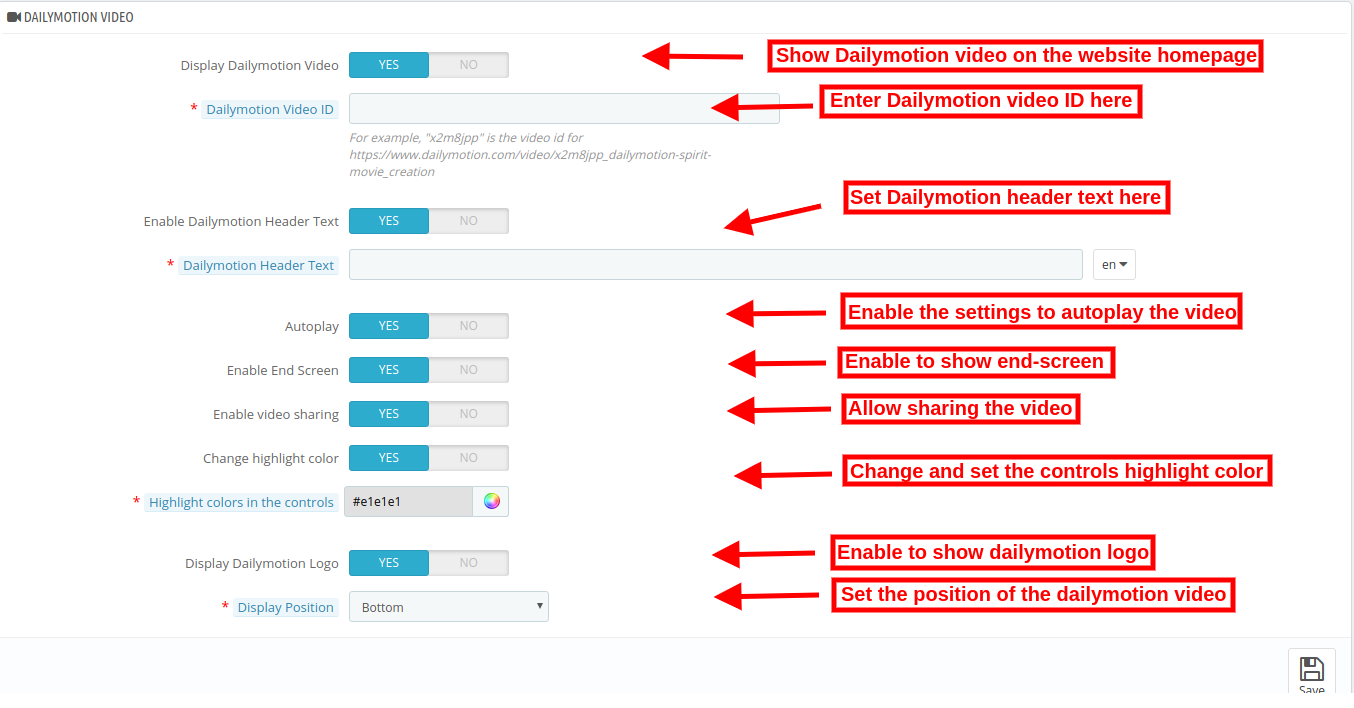
3.2.6 DailyMotion Video
As an eCommerce store admin, you can also show DailyMotion videos on the website homepage by applying these settings.
Display DailyMotion Video: The store admin can show DailyMotion videos on the homepage.
DailyMotion Video ID: The online store admin can enter the DailyMotion video id from the admin interface of this Google Accelerated Mobile Pages (AMP) Addon.
Enable DailyMotion Header Text: The store admin can enable or disable the settings from the admin interface.
DailyMotion Header text: Enter the header text here.
Autoplay: Enable to Auto play videos.
Enable End Screen: Enable the settings to show the end screen.
Enable video sharing: Allow video sharing by enabling the options.
Change Highlight color: Admin can also enable the settings in order to change the highlight color.
Highlight colors in the controls: Set the color from the color picker tool.
Display DailyMotion Logo: Enable the settings in order to display DailyMotion logo.
Display Position: Set the video position from the admin interface.
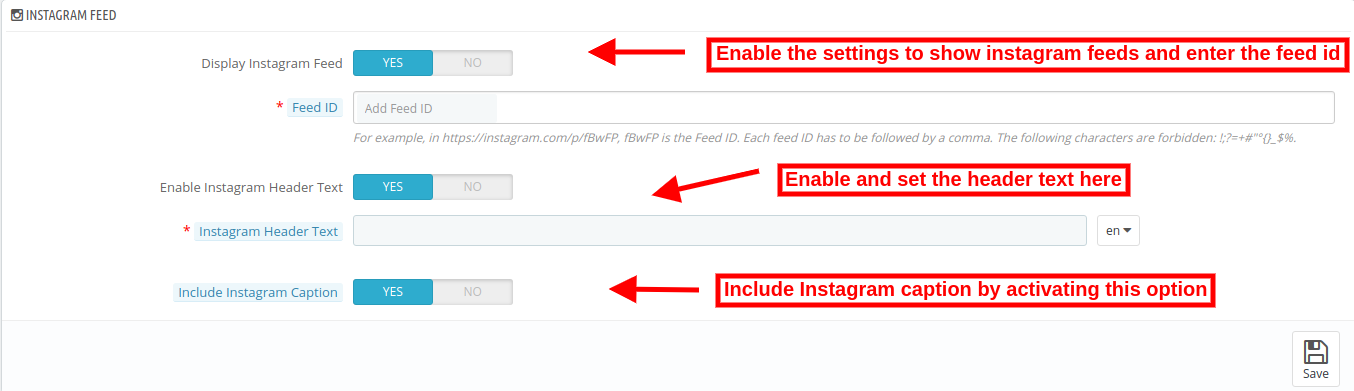
3.2.7 Instagram feed
Admin can show Instagram feeds on the homepage.
Display Instagram feed: Enable the settings to display Instagram feeds.
Feed id: Enter the feed id here.
Enable Instagram Header Text: Switch the button to yes in order to display header text.
Instagram Header Text: Enter the header text for Instagram.
Include Instagram Caption: Enter the Instagram caption in order to display it on the website homepage.
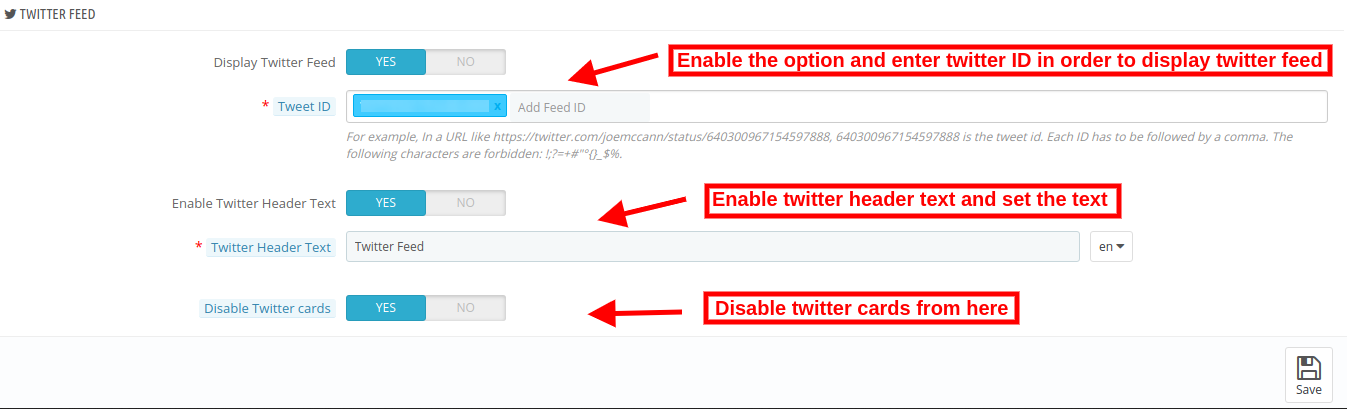
3.2.8 Twitter Feed
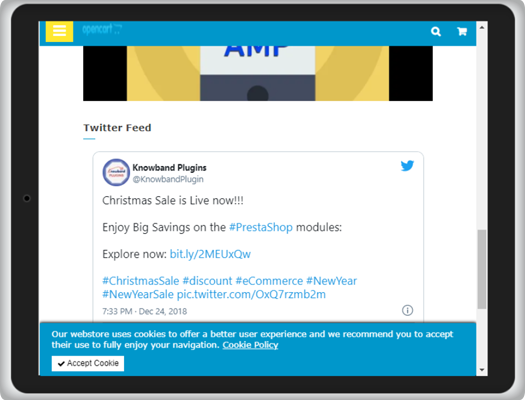
The online store admin can show twitter feed on the homepage if he wishes to do so.
Display Twitter Feed ID: Enable the settings in order to display twitter feeds on the homepage of the website.
Twitter ID: Enter the twitter id here.
Enable twitter header text: Enable the settings for showing header text.
Twitter Header text: Set the header text here.
Disable Twitter cards: By enabling the option you can show twitter cards on the homepage.
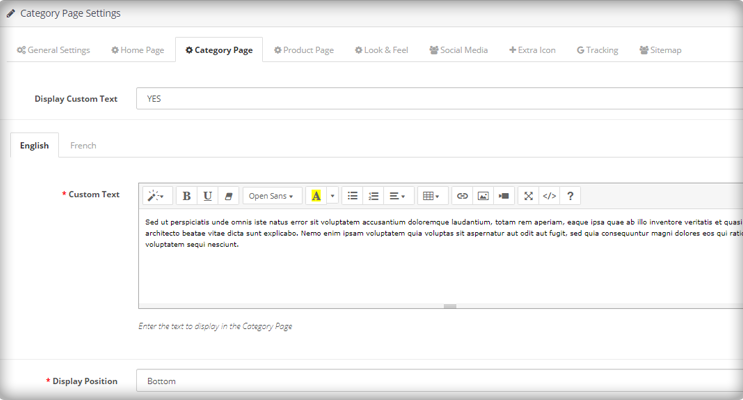
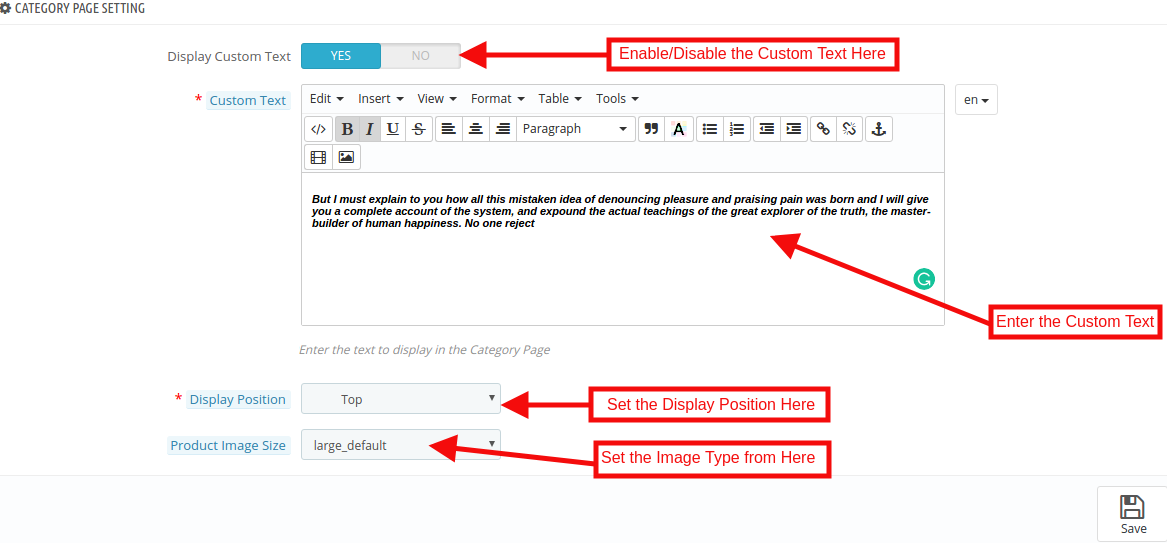
3.3 Category Page Settings
The Category Page Settings tab of the Prestashop Accelerated Mobile Pages Addon allows the admin to add the text and images. Apart from this, the admin can also define the position of the text on the Category page. This tab will have the following options:
Display Custom Text: The Admin can enable/disable the Custom message option.
Custom Text: Using this option of the Prestashop AMP Module, the eCommerce store admin can set the message of the category Page.
Display Position: In this tab, the store admin can change the display position as per desires. These changes will be reflected in the front of the store.
Product Image Size: The Prestashop store admin can set the Image type here.
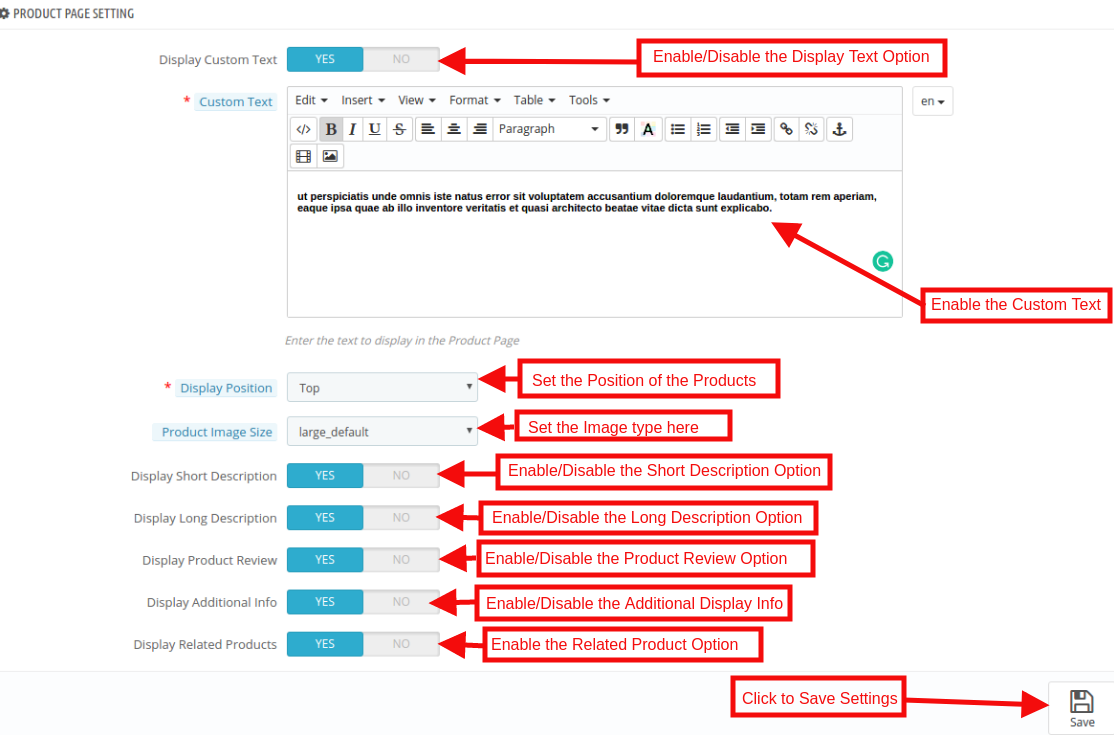
3.4 Product Page Settings
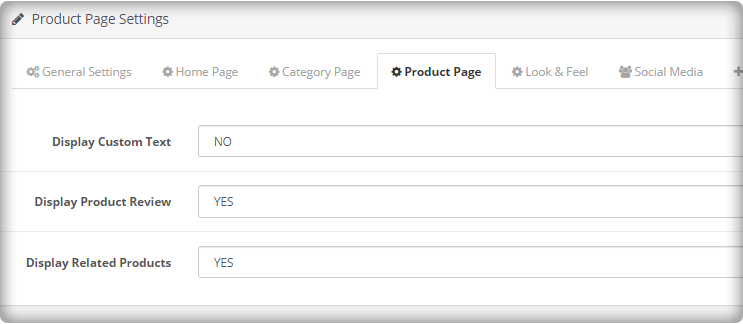
The admin has control over product page settings on AMP pages. This tab will have the following options:
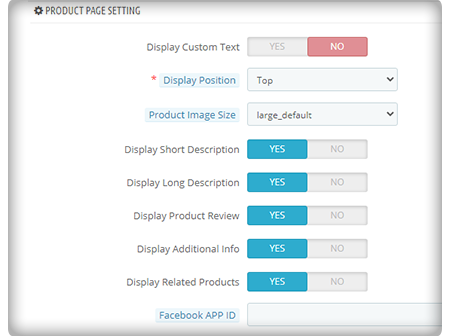
Display Custom Text: The Admin can enable/disable the Custom message option.
Custom Text: Using this option of the Prestashop AMP Module, the eCommerce store admin can set the message of the Category Page.
Display Position: In this option, the store admin can change the display position as per desires. These changes will be reflected in the front-end of the store.
Product Image Size: The Prestashop store admin can select the image size to be displayed here.
Display Short Description: In this option, the store admin can show the short description of the product by enabling this feature.
Display Long Description: The store owner has an option to show the long description of the product as per the requirement.
Display Product Review: By using the Prestashop Accelerated Mobile Pages Module, the store admin can enable the Product review option. After enabling this feature, product review will be shown in the front-end of the store.
Display Additional Info: By enabling this feature, the admin can show the additional info of the products.
Display Related Products: By enabling this option, the store admin can display related product. These changes will be reflected in the front of the store.
3.5 Menu Settings
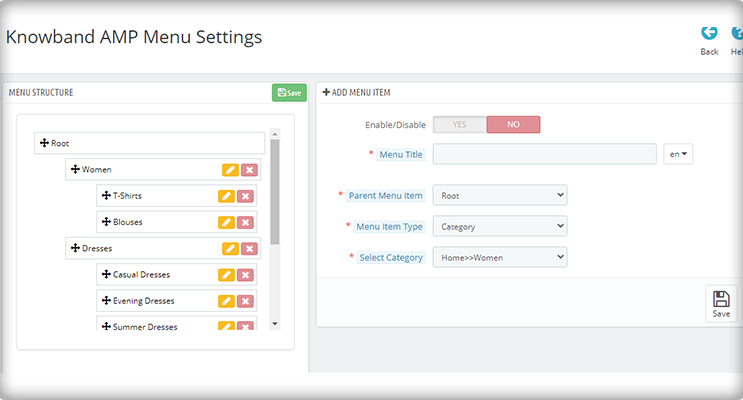
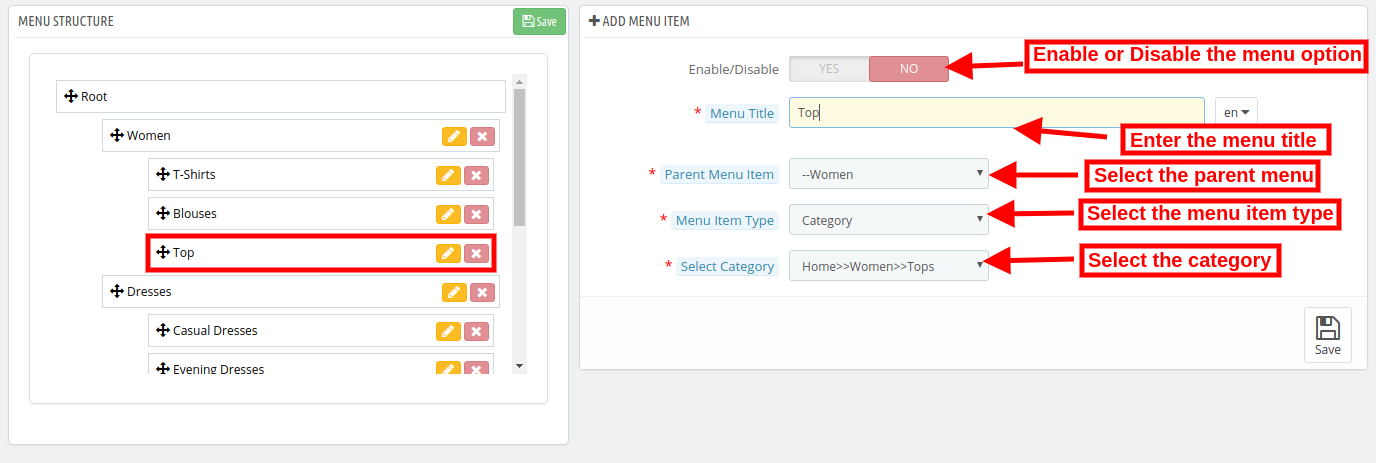
In this Tab, the Prestashop store admin can configure the menus on AMP. The admin can even add new menu options. This tab will have the following options:
Enable/Disable: The admin can enable the AMP in menus by toggling the button.
Menu Title: Prestashop AMP Addon by Knowband allows the store admin to add the Menu by entering the title here.
Parent Menu Item: Here the eCommerce merchant can select the Parent menu as per the desire.
Menu Item Type: The Admin can select the item type of menu.
Select Category: The Store admin can select the specific page where they want to redirect the user to the defined AMP page.
NOTE: These Changes shown in the Menu Structure section.
3.6 Look and Feel Settings
The Admin can control the color settings, personalize their website AMP colors as per your needs. They can change the AMP page colors according to your theme and preferences. This tab will have the following section:
1. General Settings
2. Product Listing Settings
3. Category Settings
4. Product Settings
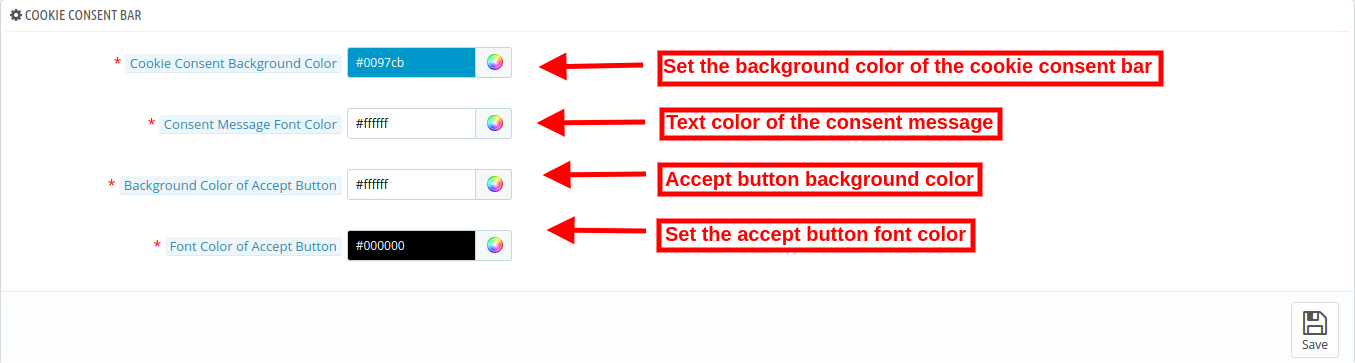
5. Cookie Consent Bar Settings
3.6.1 General Settings
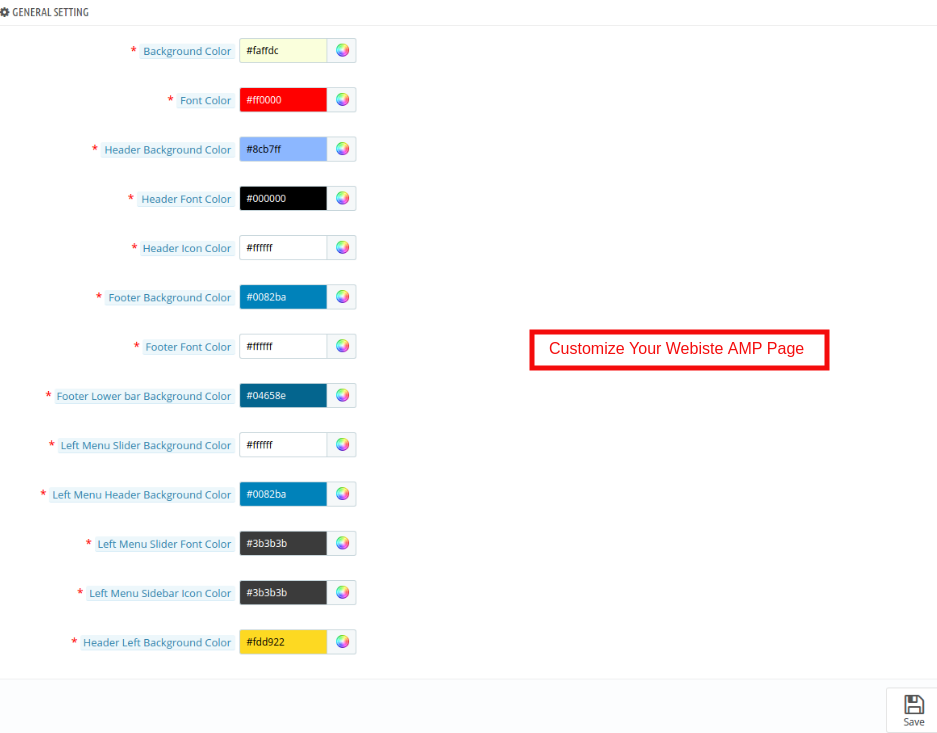
In this tab of the Prestashop Accelerated Mobile Pages(AMP) addon by Knowband, the admin can customize the AMP Homepage settings. This tab will have the following options:
Background Color: The Admin can change the background color of the home page.
Font Color: The admin can change the font color from this section.
Header Background Color: This field of Prestashop Accelerated Mobile Pages (AMP) Module allows the admin to set the header background color.
Header Font Color: Using this option of the Prestashop AMP module, the admin can set the font color of the text displayed in the Header section.
Header Icon Color: The Prestashop store admin can change the icon color of the.
Footer Background Color: This option of the Google Accelerated Mobile Pages(AMP) Module allows the admin to set the background color of the Footer.
Footer Font Color: The admin can change the font color from this section.
Footer Lower Bar Background Color: The Store merchant can change the background color of the Footer Lower Bar.
Left Menu Slider Background Color: The Prestashop Merchant can change the Left menu slider background color in this section of Knowband Accelerated Mobile Pages(AMP) For Prestashop.
Left Menu Header Background Color: The Prestashop store admin can change the left menu header background color as per the requirement.
Left Menu Slider Font Color: The admin can change the font color from this section.
Left Menu Sidebar Icon Color: The admin can change the icon color from this section.
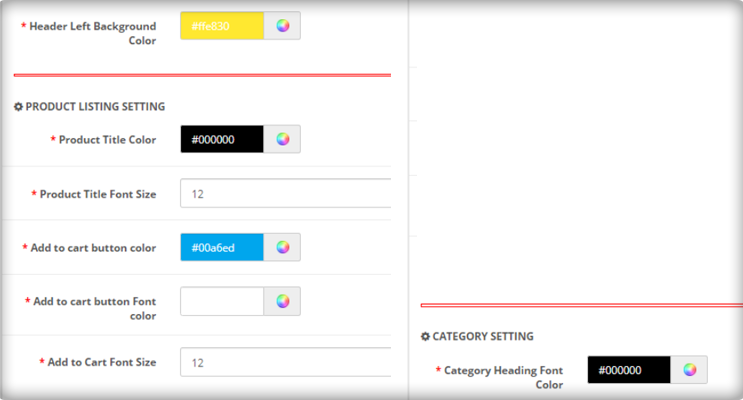
Header Left Background Color: In this section of Prestashop Accelerated Mobile Pages(AMP) Module allows the admin to set the header left background color.
3.6.2 Product Listing Settings
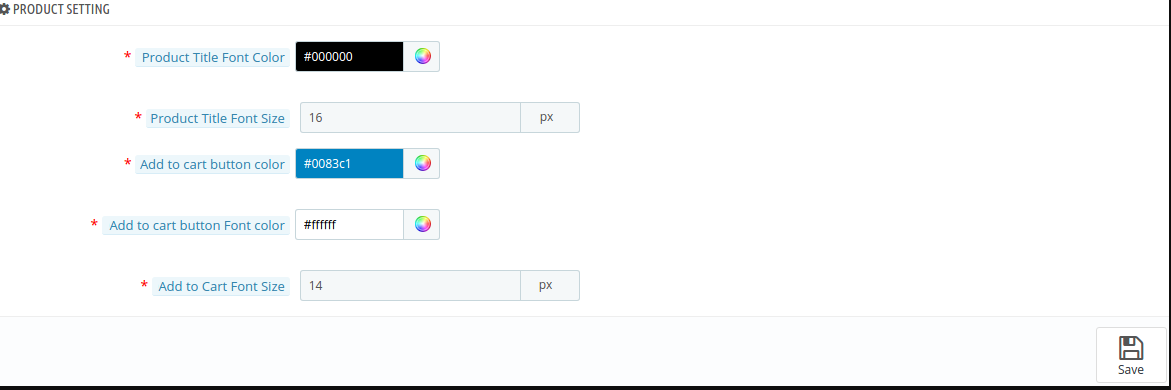
The admin can customize the settings of the Product listing as per the requirement. Below mentioned the option:
Product Title Color: In this section of Google Accelerated Mobile Pages(AMP) Module allows the admin to change the Product title color.
Product Title Font Size: The Store admin can set the font size of the Product.
Add to Cart Button Color: Knowband’s Prestashop AMP Pages module allows the admin to change the Add to Cart Button Color as per desires.
Add to Cart Button Font Color: The admin can customize the font color of the Add to Cart button.
Add to Cart Font Size: The Store admin can set the font size of the Add to Cart button.
3.6.3 Category Settings
In this tab, the store admin can customize the settings of the Category pages. These changes will be reflected in the front of the store.
Category Heading Font Color: The Prestashop store admin can change the category heading font color as per the requirement.
Category Heading Font Size: The admin can change the font color from this section.
3.6.4 Product Settings
In this section, the Admin can customize the Product settings as per the requirement. The configuration option of this section is same as discussed in the Product listing section.
3.6.5 Cookie Consent Bar
The store admin can set the look and feel of the cookie consent bar.
Cookie Consent Background color: Select the cookie consent background color with the help of color picker tool.
Consent message font color: Select the front color for consent message.
Background color of Accept button: Select the “Accept” button background color.
Font color of accept button: Set the font color of accept button using color picker tool.
3.7 Social Media Settings
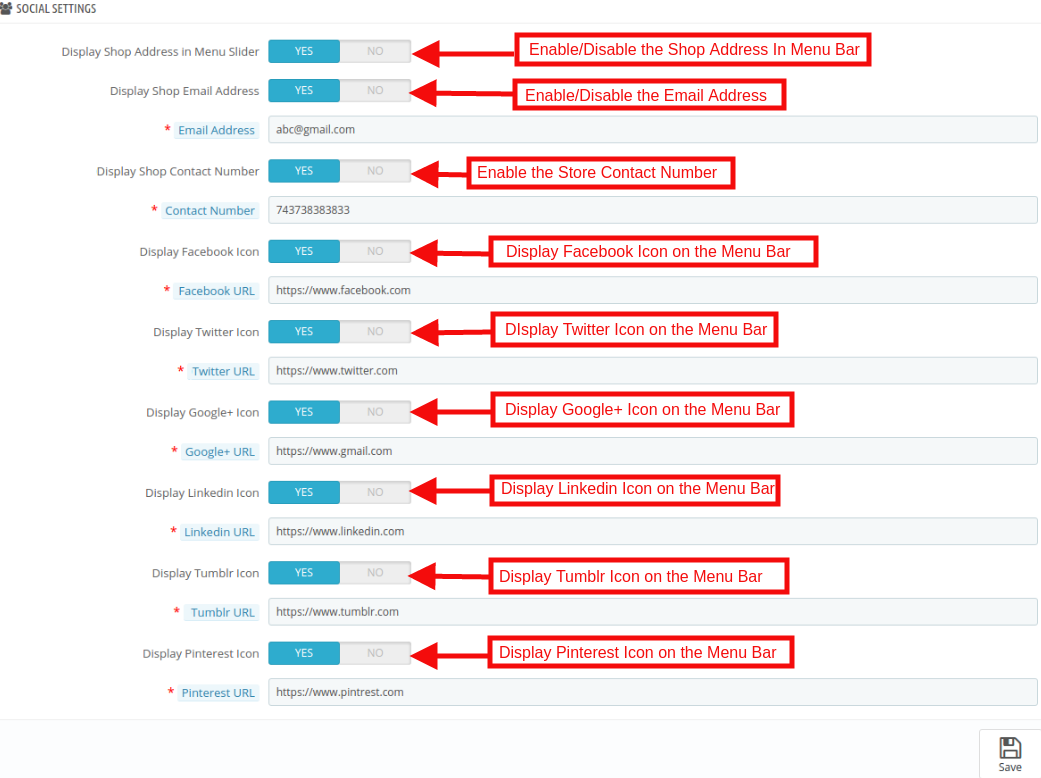
In this section of the Prestashop AMP module, the store admin can enable/disable the social media sharing option on the AMP webpages. All the enabled social media sharing options will be shown on the AMP. This tab will have the following options:
Display Shop Address in Menu Slider: The Admin can show the Store address by enabling this feature.
Display Shop Email Address: The Prestashop store owner can show the email address.
Display Shop Contact Number: In this field, the store admin can display the contact details of the site.
Display Facebook Icon: The store admin has the option to display a Facebook icon in the menu bar. For this admin need to specify the Facebook page URL in the respective field.
Display Twitter Icon: This section the admin can enable/disable the Twitter icon.
Display Google Icon: By using this Option the Prestashop store merchant can display the Google icon in the menu bar. For this admin need to Specify the Google page URL in the respective field.
Display Linkedin Icon: In this section, the store admin can display the Linkedin icon here. The Store admin must need to enter the URL of the profile.
Display Tumblr Icon: The Prestashop store owner can show the Tumblr profile here.
Display Pinterest Icon: The Store admin has the option to display a Pinterest icon in the menu bar. For this admin need to Specify the Pinterest page URL in the respective field.
3.8 Extra Icon Settings
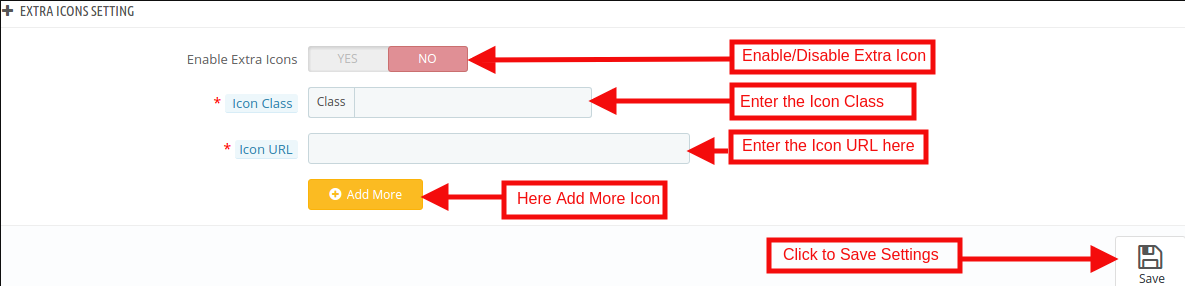
In this section, the admin can add the extra social media icon as per the requirement of the business. This tab will have the following options:
Enable Extra Icon: The Prestashop store admin can enable/disable the extra icon feature. If they want to add more social media icon then they can add here with an ease.
Icon Class: The Admin can enter the Icon class.
Icon URL: In this tab, the store admin can Icon URL as per desires. These changes will be reflected in the front of the store.
3.9 Google Settings
The store admin can apply AMP Google settings from this section.
3.9.1 Google Analytics
Admin will need to have the Analytics Client ID in order to configure this feature.
Enable Google Analytics: If you want to track the performance of the accelerated mobile pages of your site, this feature allows the admin to enter Google Analytics client.
Analytics Client Id: The eCommerce merchant can enter your Google analytics client ID to configure.
3.9.2 Google Adsense
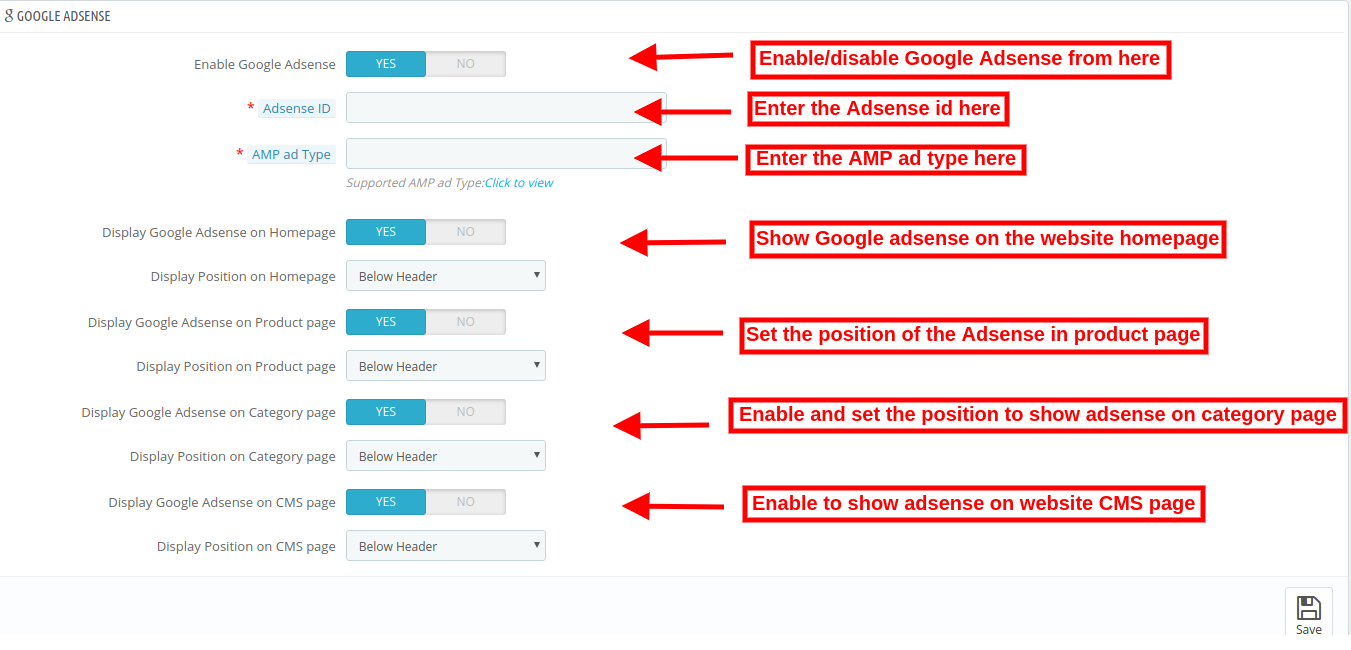
Enable Google Adsense: Activate or Deactivate the functionality from here.
Adsense ID: Enter the Adsense ID here.
AMP ad type: Enter the supported AMP ad type. This way the admin can specify an identifier for the ad network. The type attribute selects the template to use for the ad tag.
Display Google Adsense on Homepage: Enable the option in order to display Google adsense on Homepage.
Display Position on Homepage: Select the position for showing Google adsense on homepage.
Display Google Adsense on Product page: Enable the option to show adsense on Product page.
Display Position on Product page: Select the position for displaying Google adsense on product page.
Display Google Adsense on Category page: Enable the option to show adsense on category page.
Display Position on Category page: Select the position for showing Google adsense on category.
Display Google Adsense on CMS page: Enable the option to show adsense on CMS page.
Display Position on CMS page: Select the position for showing Google adsense on CMS.
3.9.3 Facebook Pixel
Facebook pixel is a analytic tool which helps to track store visitors. You can also implement this to get store visitor details on the Accelerated Mobile Pages.
Enable Facebook Pixel: Enable or disable the option from here for implementing Facebook pixel tool to track site visitors.
Facebook Pixel ID: Enter the Facebook Pixel ID here.
3.10 Sitemap Settings
In this section, the store admin can generate the AMP Sitemap by clicking the button.
Generating the Sitemap are here.
How to Generate Sitemap for AMP?
The Admin can generate Sitemap by running CRON.
Accelerated Mobile Pages(AMP) module allows the store admin to setup Cron via
URLs to Add to Cron via Control Panel
Cron setup via SSH
CRON Configuration:
In order to generate the Sitemap automatically, the Prestashop store admin can set up the cron job. There are two options available in the admin panel of the module.
1. The Admin can run the cron manually.
Add the cron to your store via control panel/putty to generate/update the sitemap. Please find the instructions to setup crons below –
4.0 Front Interface of the Prestashop Accelerated Mobile Pages Module:
After enabling the Prestashop Accelerated Mobile Pages(AMP) Module by Knowband the store admin can enable the settings for the home page, category pages, product pages and CMS pages. As per the settings enabled by the admin, AMP will look as shown below:
Home Page:
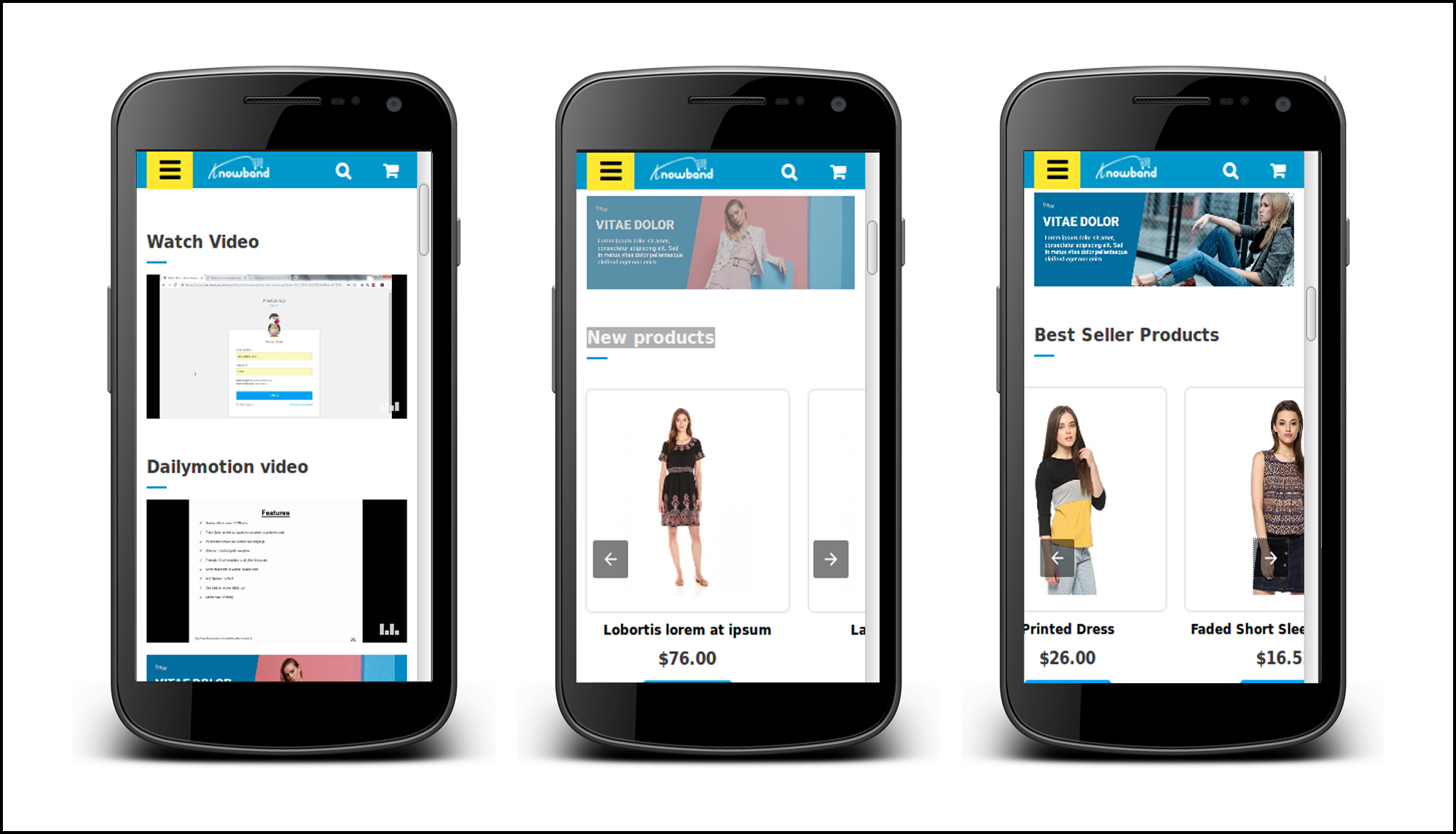
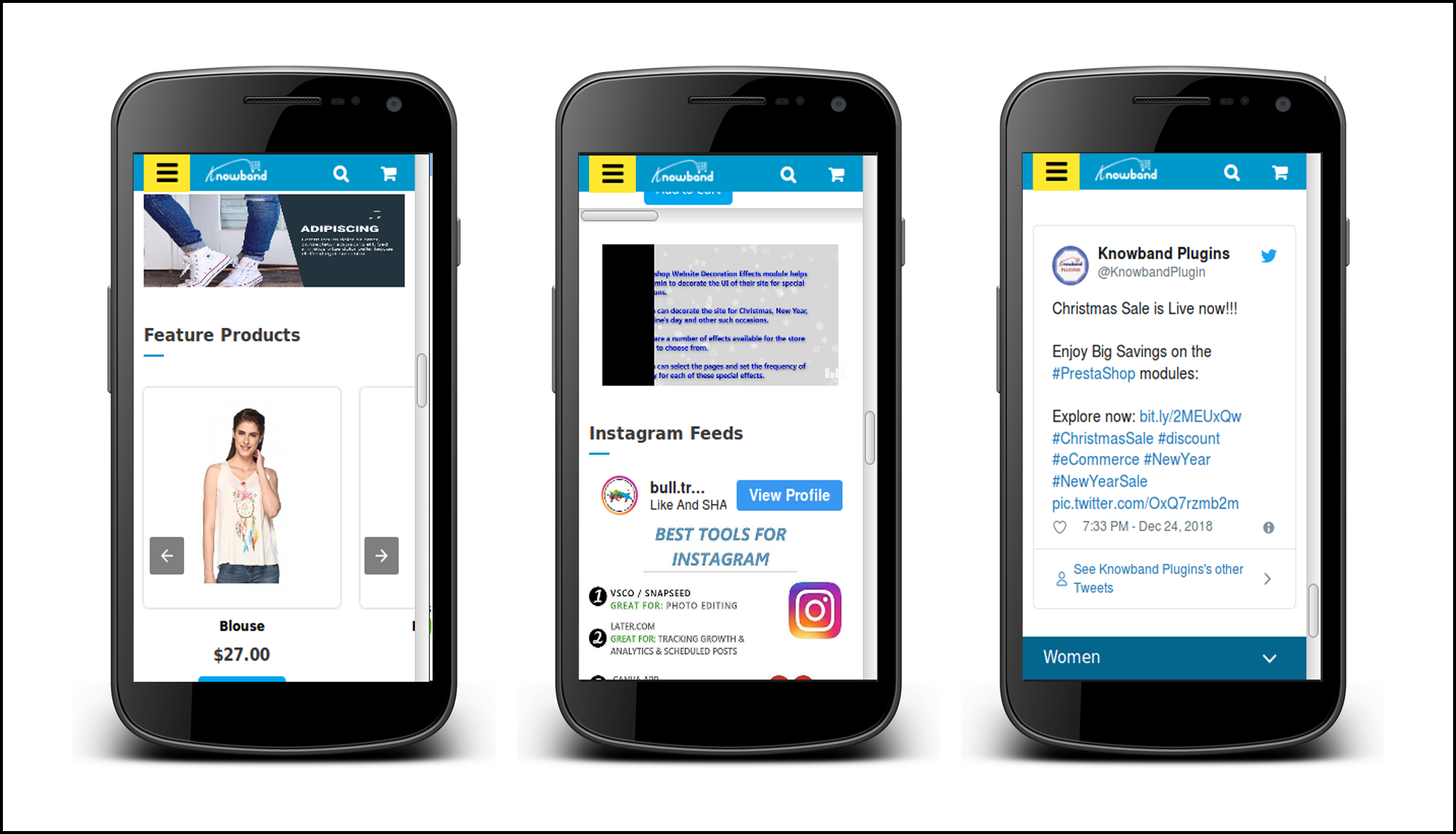
Prestashop AMP Pages allows the admin to show the Best Seller, New Products and Features Product on the Home page. For better user engagement.
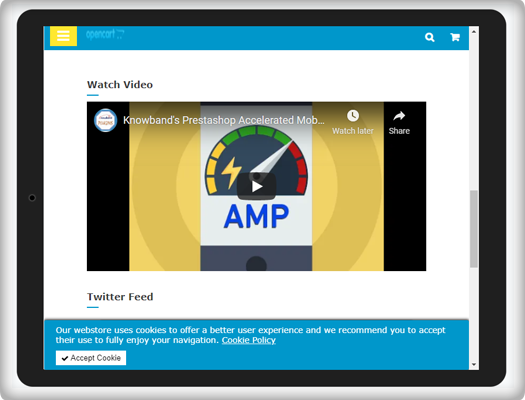
Now the online store admin can also show Youtube video, Vimeo video and Dailymotion video on the website homepage.
Apart from that, the store admin can show Instagram feeds and twitter feeds on the homepage.
Category Page
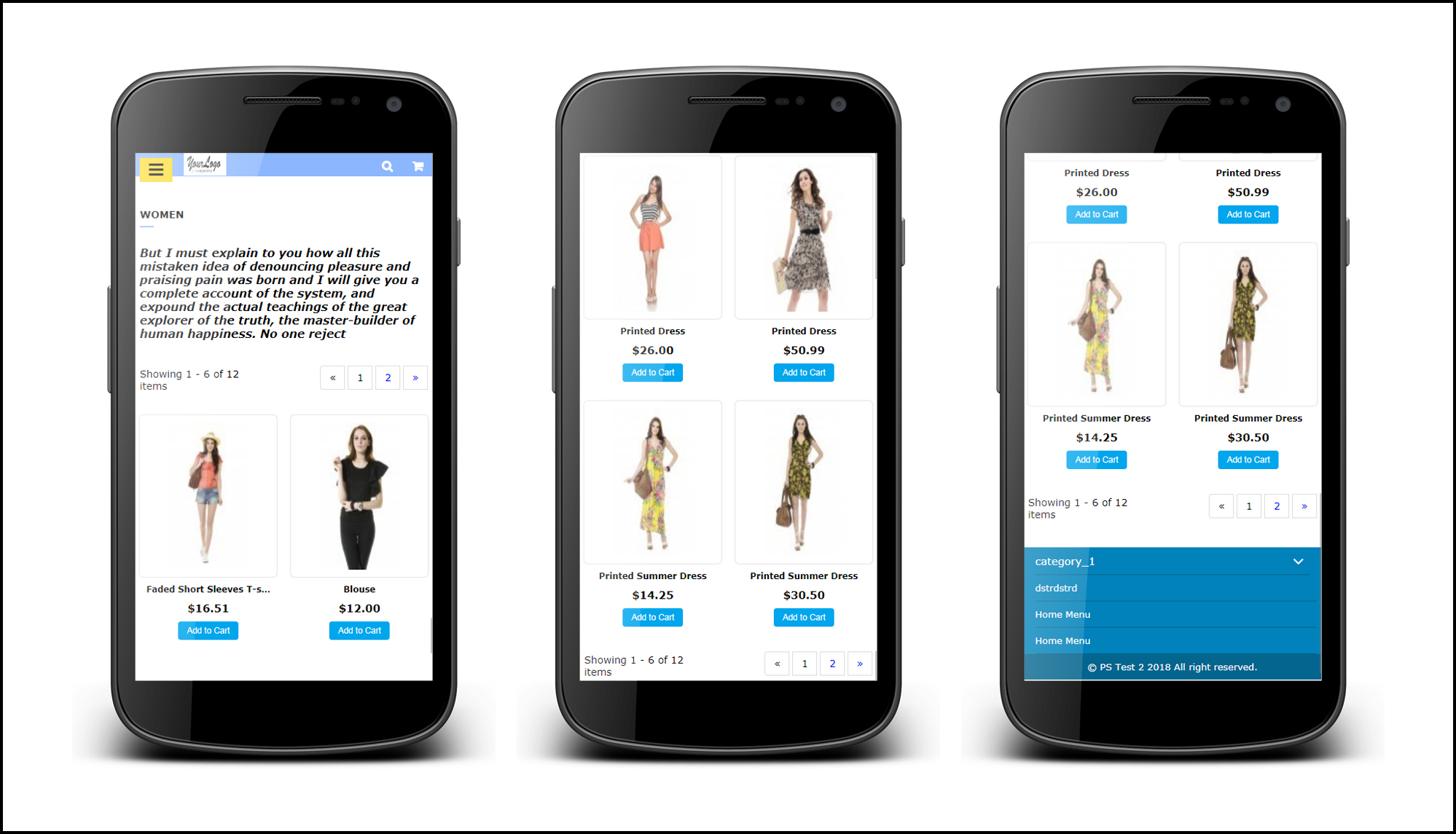
As per the setting enabled by the admin, the Category AMP Pages on the Mobile device will appear like this screenshot.
Product Page
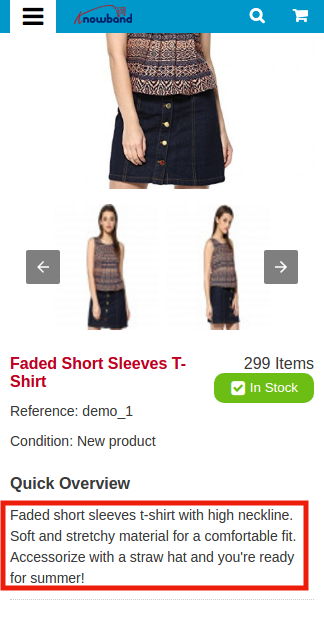
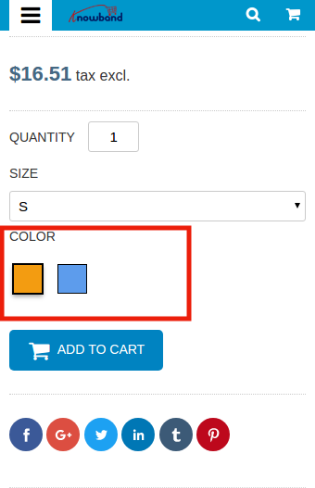
As per the setting enabled by the admin from the back-office the layout of Product AMP Page on the Mobile device will appear like this screenshot.
CMS Page
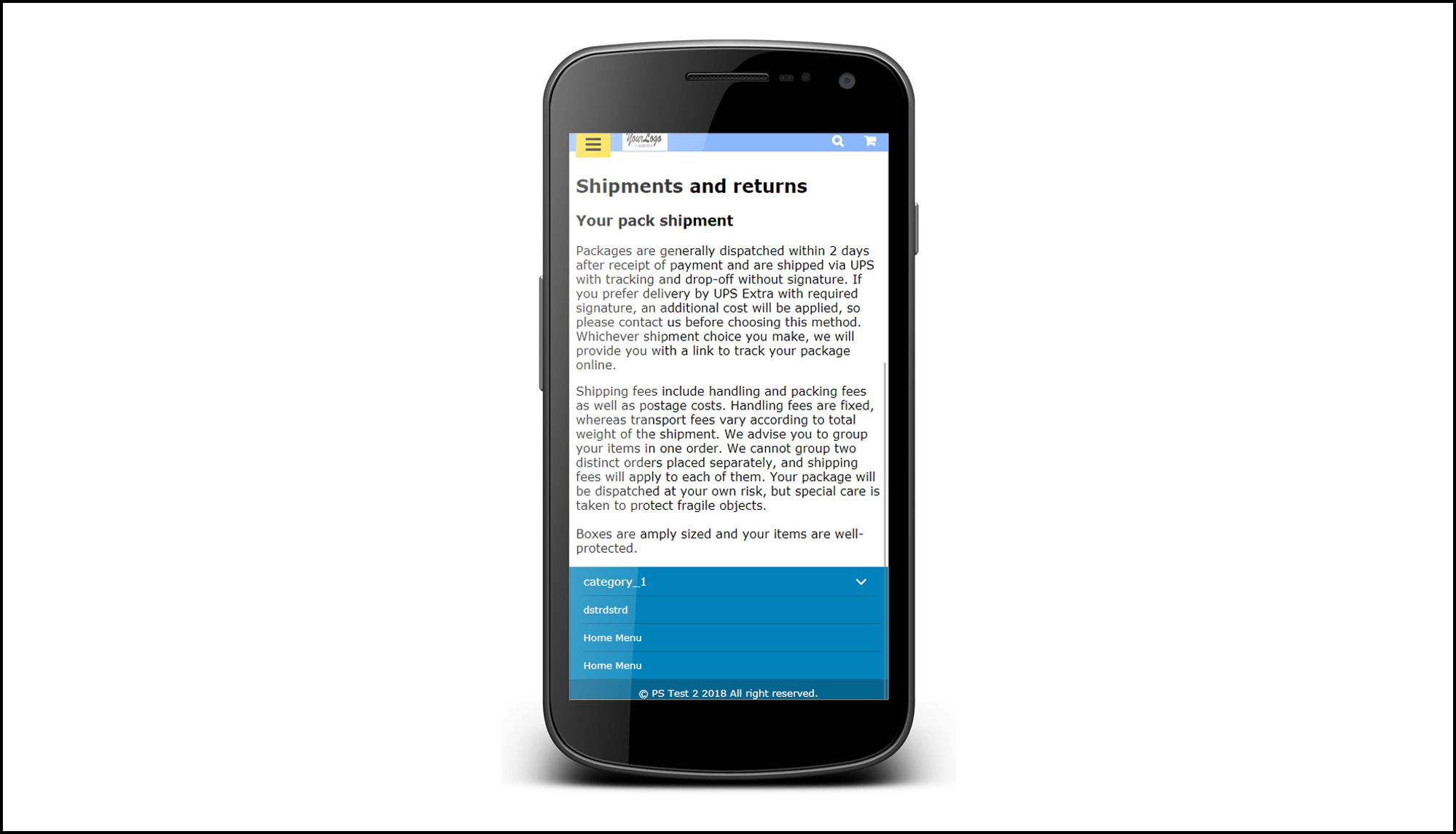
The Admin can view the CMS page setting like below settings.
Menu Icon
Prestashop Accelerated Mobile Pages shows the Menu icon like this.
Cookie Consent Bar
Cookie consent bar will be displayed as shown below:
This way the online store admin can increase the speed of mobile website pages and offer a better store experience to the online store visitors and customers. This Prestashop Accelerated Mobile Pages module converts the general pages into accelerated mobile pages. The Prestashop Accelerated Mobile Pages Addon provides simple and easy steps to set up accelerated mobile pages. The e-merchant can separately configure the homepage, product pages and category pages. The Prestashop store admin can easily manage all the settings of Prestashop Accelerated Mobile Pages module without changing even a single line of codes. The e-merchant can also show product videos, menu items and social media icons easily.
For more information about PrestaShop Accelerated Mobile Pages(AMP) Addon:
The ever-changing market and consumer behavior have compelled the eCommerce store owners to stay on their toes. With the aim of easing out the pressure of the online business units, Google keeps on updating its policies and schemes from time-to-time. The quest to stand out in the competitive market will be easier if the eCommerce store owners stay abreast of Google’s update. Google AMP or Accelerated Mobile Pages is one of the updates of Google that is expected to take the online market by storm
Google AMP project was launched in the year 2016 but was restricted to a few segments. However, the project now provides an option to the eCommerce companies to build their sites in the AMP format.
What is Accelerated Mobile Pages (AMP)?
Google AMP is an initiative by Google for publishers to make web pages load faster on mobile devices. With M-commerce in trend, AMP proves to be very beneficial to take mobile shopping to the next level.
Around 40 to 50% of the sites are abandoned because of the slow load time, especially in the handheld devices. Catering to this prominent problem of the mobile site owners, this project of Google makes the mobile pages load faster.
The remarkable load time is achieved in two ways. First of all the developers are required to create their pages in accordance with the guidelines prescribed by Google. There is a narrow set of web technology that is required to be used during the web page creation. This technology forbids most of the JavaScript which ultimately reduces the load time of the pages. Secondly, the web pages are served from Google’s server when the page is visited through Google Search.
Effect of AMP on eCommerce business
The whole purpose of Google AMP is to make the web pages load faster, ensure customer retention and boost conversions by simplifying the shopping experience of mobile users. There has been a major shift in online shopping from desktops to mobile devices. Even the famous eCommerce platform like Prestashop offers Prestashop Mobile App Builder modules to help the owners have their own shopping applications. Thus, a project that resolves the problem of slow mobile experience of the customers will definitely give an edge to the businesses.
Impact of Google AMP on online marketing
Having discussed the effect of the Accelerated Mobile Pages on eCommerce, it is inevitable to note that it will have a huge impact on online marketing. Listed below are some of the effects of the same. Take a look.
AMP-enabled web pages will rank higher in SERPs. As per a report shared by Google recently, 9 out of 10 online customers are more likely to shop if they find the mobile experience informative. This is the biggest reason the AMP-enabled article will prove a boon for online marketers. The AMP contents will rank higher in the SERP. Since the number of internet users who seek advice and tips on their mobile phones has increased in the recent past, the articles that are ranking in the first 3 positions of Google’s SERP will reap results for their respective stores.
AMP is open source
Google AMP allows people to incorporate the changes as per their needs. Hence, the marketers can now formulate their content with close reference to the consumer behavior of their niche audience. The contents will get more readers and so the traffic of the mobile sites will increase ultimately.
A boon for SEM
The paid ads with AMP-enabled pages will stand out from your competitors. Ads in AMP use Https and will be more engaging and innovative. Hence, it is likely to have a positive impact on both the organic and inorganic results.
Reduced load time
Loading time is the major factor leading to an increase in the bounce and exit rates. With Google AMP, the quick load speed will have the readers stay longer on your page, hence reducing the bounce rate. In addition to that, a low bounce rate helps to validate the search engines that whether your web page is in accordance with what the visitors are looking for. Along with a number of benefits, it has certain cons for online marketers as well. Some of them are listed below.
The AMP contents are currently simple articles. These web pages would not provide any subscription or a form-filling option to the users.
Even though ranking the pages on Google SERP will become easier, the budget invested in content marketing will definitely increase.
Adding to the troubles, Google will not accept the content in AMP cache unless the content is free of all the errors.
Final Say
While the mobile app can improve your business, Google AMP can take your business to new heights. Google AMP accelerates content marketing, and the Android app builders should gear up for the changes that the search engine is expected to see.