O negócio on-line está repleto de várias atividades de venda e compra on-line que é difícil manter o ritmo com tanta concorrência. Com tantos jogadores envolvidos em um determinado segmento de negócios, parece ser uma tarefa difícil atrair a atenção imediata de seus clientes-alvo. O negócio de comércio eletrônico é muito imprevisível e não há regras dedicadas que possam ajudar a alcançar as taxas de conversão mais altas. Nesse cenário sombrio, ser proprietário de uma loja de comércio eletrônico pode ser um pouco desafiador para você em termos de taxas de conversão e vendas. Além disso, com as crescentes expectativas dos clientes e a pressão de fazer vendas, é definitivamente o momento certo para começar a explorar. canal de vendas alternativo.
Se você está procurando por um caminho a partir desta situação grave, é finalmente hora de fazer as pazes, utilizando o Mercado de vários vendedores extensões para sua loja online. Temos o prazer de informar que nossa empresa, a Knowband, criou este extraordinário Prestashop, Magento 2, OpenCart e Magento, Isso gerou novas esperanças entre os pequenos e médios fornecedores em termos de conversões e vendas.Marketplace
Gestão suave de comissão
Com a ajuda da extensão do mercado, o administrador da loja pode gerenciar com facilidade as taxas de comissão de vários fornecedores com base em uma porcentagem global ou até mesmo definir taxas de comissão para vendedores individuais. Tudo pode ser gerenciado sem problemas a partir do back-end da loja.
Restrição no limite de produtos e uso de categorias para vários vendedores
O número de produtos e categorias que podem ser usados para adição de produtos por vários vendedores é definido pelo administrador. Agora, o administrador da loja tem todo o poder decisivo para tomar todas as decisões relacionadas à restrição do número de categorias de produtos para os vendedores em suas lojas de mercado.
Fácil gerenciamento da conta do vendedor através de uma interface interativa
Embora, como cliente, você tenha várias opções para selecionar o melhor módulo de mercado entre vários plug-ins do Marketplace disponíveis. No entanto, essa extensão de mercado de vários fornecedores da Knowband é a melhor escolha devido à presença de uma interface de usuário interativa que facilita o gerenciamento de várias tarefas. Você pode fazer alterações rápidas na conta do vendedor através deste design de painel de vendedor atraente e amigável.
Elimina
Manipular e manter o inventário atualizado é uma tarefa muito crítica e exigente. Envolve muito trabalho e tempo humanos que são necessários durante o gerenciamento de estoques. No entanto, com o surgimento desse complemento do Marketplace, não há necessidade de nenhum gerenciamento de inventário para oferecer seus produtos aos compradores on-line. Isso economizará tempo e dinheiro envolvidos nessa tarefa de gerenciamento de estoque.
Alertas oportunos e atualizações sobre a atividade na sua loja do mercado
Customers have become impatient due to their busy lifestyles and are not ready to spend even few minutes on a site for login and registration issues. Infact, these are some of the core issues that have contributed in higher bounce rates and shopping cart abandonments on an eCommerce site. Nobody would like to spend their precious time in login and registration issues and would like to look out for a better alternative site that can offer these difficult tasks in a smooth manner. With the endless hard work and flawless expertise of its web developers, Knowband has come up with this Magento Ajax Popup Loginizer extension that is built to transform the entire login and registration process without any trouble. Here are the various reasons that make this Magento extension a priceless extension among various site owners.
Eliminates the time consuming page reloading
This Ajax Popup login extension for Magento sites has achieved much respect in eCommerce business environment due to its quick login and registration process. This has actually become possible due to the presence of Ajax web technology which is involved behind the development of this Magento extension. It has eliminated the default page reloading problem of Magento sites during login and registration process.
Offers customization facility for site admin
It is now much easy to make any changes in the login and registration facility on your site with the help of this Magento Quick login extension that has an interactive backend interface. Site admin can make various configurations and customizations like hiding/showing signup and forget password options, making changes in link text and much more.
Can be installed and configured in a coherent manner
We all know the life of certain non technical people become miserable when it comes to installation and configuration of a software application. Keeping this concern in mind, Knowband has introduced this Magento Ajax Popup for login and registration that can be installed and configured within few clicks only. There is no requisite for any special skills and development knowledge regarding the installation and configuration of this Magento extension.
Works independently with other available extensions
This Ajax Popup login extension for Magento sites is designed in such a way that it can work without interfering with other available Magento extensions on your site. You don’t have to take troubles regarding the working of this Knowband Extensions as it does not require any special API or upgrades.
Comes equipped with free technical support
It is possible that certain issues can arise with this free Magento extension regarding its configuration and customization that can affect your overall performance in the long run. If you encounter any such problem, you can get free technical assistance from our Knowband team by visiting this link.
It is now a thing of past to have time consuming and difficult login and registration process with the emergence of this Ajax Popup login extension for Magento sites. You would not have to suffer trust deficit and bounce backs of your customers due to this Ajax based Magento extension. Visit our Knowband store and redefine the login and registration related processes of your site with the help of this Magento Ajax Popup Loginizer module.
“Discount coupons”, “gift cards”, “voucher cards” or other such shopping offers are the buzz words that can effortlessly grab the customer attention towards an online store without any effort. You need to be constantly on your toes to persuade your targeted customers for making a product purchase through your OpenCart store. No doubt, it is a challenging task considering the changing market dynamics and customer behavior, but the situation can be brought under control with the help of these OpenCart coupon extensions from Knowband store. These modules have been a major force to reckon with when it comes to customer engagement, conversions and product sales.
Want to know more about these OpenCart coupon extensions? Check out below to know more about their amazing features and functionalities that can optimize the performance of your OpenCart store.
1. OpenCart Scratch Coupon
Online shoppers are always looking for exciting shopping offers and deals that can give them ample reasons to indulge in online shopping. If you have this Knowband Opencart Scratch Coupon extension, it will be much easier for you to provide engaging scratch coupon that can be redeemed by the customers effortlessly. In this way, you can bring more site traffic, conversion rates and product sales on your OpenCart store with the help of this scratch coupon module. Here are some of the brilliant features that makes OpenCart Scratch Coupon module as one of the best OpenCart coupon extensions for OpenCart platform.
The Opencart Scratch Coupon module facilitates easy installation and configuration by any non technical individual.
The Opencart Scratch Coupon module by Knowband supports multiple platforms and devices due responsive design.
The Opencart Scratch Coupon module provides facility to make changes in the offered discount amount, eligible time period to avail coupon code and much more.
The Opencart Scratch Coupon module offers timely reporting and analytical data to store admin regarding the performance and status of their coupon codes.
The Opencart Scratch Coupon module presents detailed information about all the coupon related statistics for understanding the impact of scratch discount coupons on your store.
The Opencart Scratch Coupon module provides free technical support and assistance.
It is high time to install this OpenCart scratch coupon extension on your store to minimize abandoned customers and bounce backs on your site. Besides, it can also play an amazing role to improve your sales and conversion rates.
2. OpenCart Sales Coupon Enhancer
If you are not having any idea about how to generate appealing coupon codes, Opencart Sales Coupon Enhancer is surely the module to go for. With multiple features and functionalities, this OpenCart extension has become one of the most popular and sought after OpenCart sale coupon modules that can change the fortune of your store in an effortless manner. Take a look at its salient characteristics that are mentioned below:
The Opencart Sales Coupon Enhancer module by Knowband allows store admin to create coupon codes based on customer groups, shipping methods and payment methods.
The Opencart Sales Coupon Enhancer module helps in deciding the validation rules for your coupon code.
The Opencart Sales Coupon Enhancer by Knowband is compatible with various types of online stores and themes.
The Opencart Sales Coupon Enhancer offers free technical support service and updates.
The Opencart Sales Coupon Enhancer module can be installed and configured in a seamless manner.
The Opencart Sales Coupon Enhancer does not conflict with the existing coupon code system.
The Opencart Sales Coupon Enhancer by Knowband offers various statistical reports to get a complete idea about the coupon generation mechanism.
Don’t let the business opportunity pass away to your rivals in terms of customer engagement, conversions and bumper sales. All you need is the support of these OpenCart coupon extensions that have the unmatched potential to achieve initial lead for your eCommerce store. So, just visit our Knowband store and we can help you in the quick makeover of your online business.
This addon is basically an Prestashop Marketplace Addon. The Marketplace admin can create seller badges based on the various parameter to be satisfied by a seller to obtain one. Seller badges are displayed to the customers once they visit the seller profile page or product page of a particular seller. Admin can create Seller Badges for his sellers like Best Seller, Best Customer Support, Best New Seller etc. Parameters to obtain one can be set from the back-end panel of admin.
So, keeping this in mind, this ad-don will provide features to customer through which customer can see a seller badge and interprete the kind of seller on the marketplace.
This interface will have two fields for the admin in the back end. Both of the fields are listed below-:
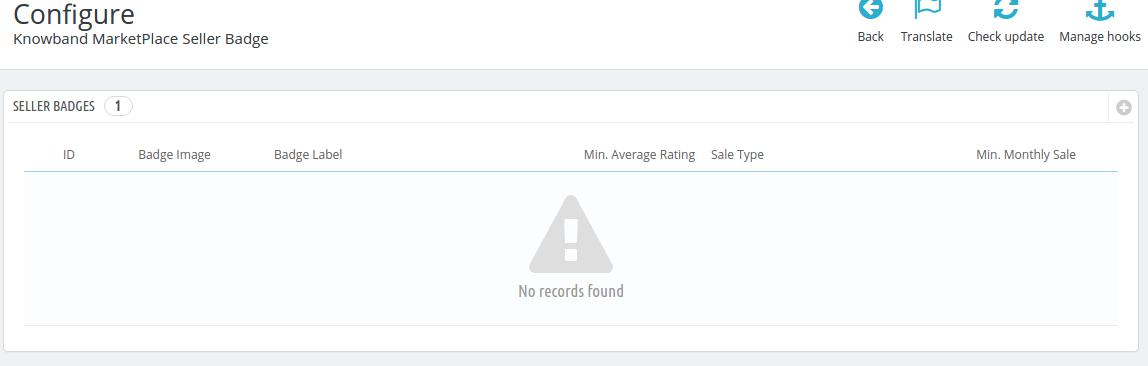
List of seller badges
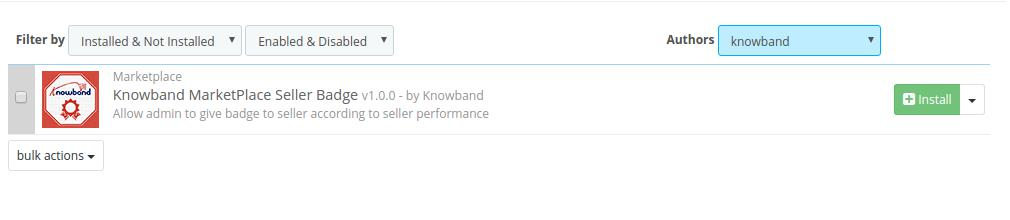
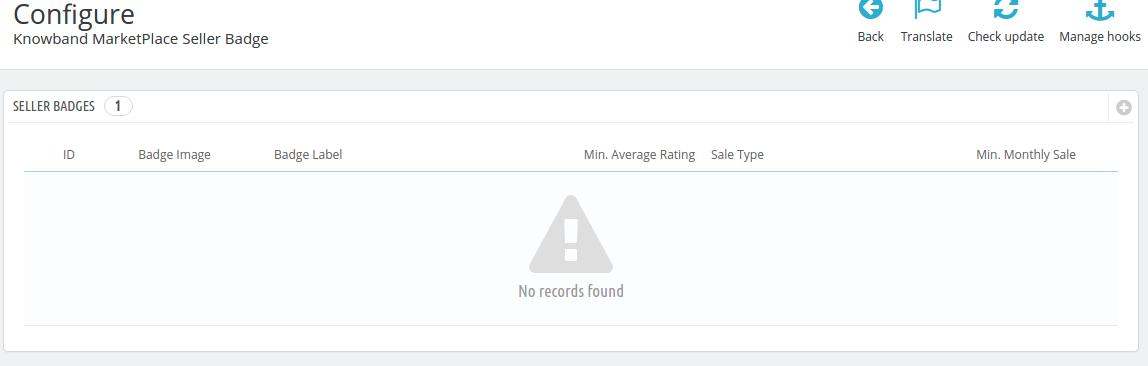
The list of seller badges already applied can be found in the Configuration settings in inside Modules and Services >> Modules and Services on the admin panel.
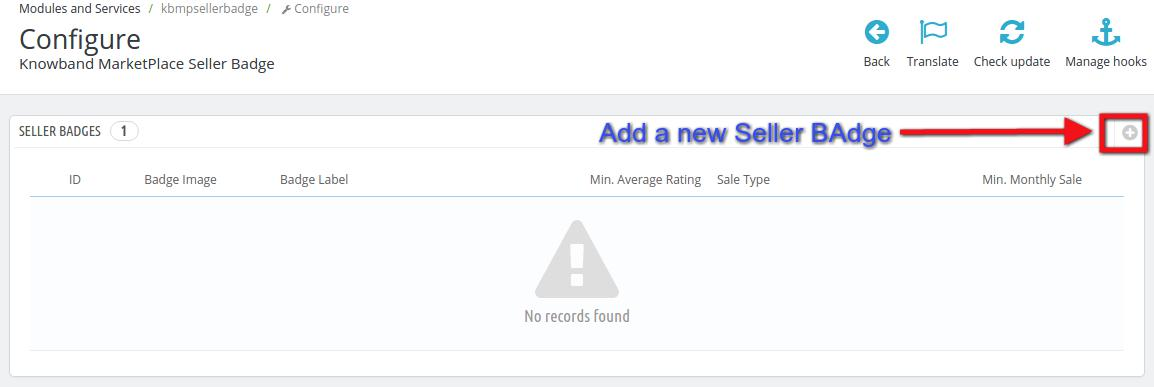
Add new Seller Badge:
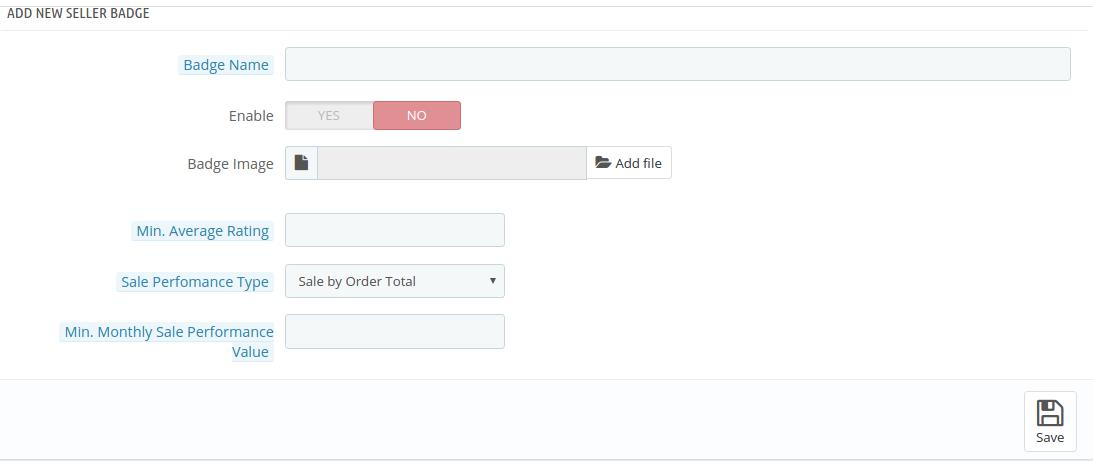
Admin can add a New Seller Badge on his marketplace site by navigating to Modules and Services >> Modules and Services >> Knowband Marketplace Seller Badge >> Add New (Plus Icon)
1. Badge Name: Give a name to your seller badge. This name is for admins personal reference, it will not be displayed to any one else.
2. Enable: Select the status as Yes if you want the badge to be active on the marketplace.
3. Badge Image: Upload an image for the badge that will be visible to the customers on the sellers profile page or the product page of the particular seller.
4. Min. Average Rating: Provide the Rating Parameter to achieve the particular badge. For example, you can decide seller has to get at least 3 stars to obtain this badge.
5. Sale Performance Type: Provide a parameter that will be used to decide if a seller is eligible for the particular badge. You can select from two types of parameters, Sale by Order Total or Sale by Product Sold.
If you select Sale by Order total, then the eligibility of seller will be checked on the basis of total orders processed by him on his store.
If you select the Sale by Product Sold, then the eligibility will be tested on the basis of the total products sold by a seller on his store.
6. Min. Monthly Sale Performance Value: Enter the minimum Monthly sale required for a seller to be eligible for the particular badge.
7. Save : Save once your settings are done.
Customer Interface
Here the customers can see the badges acquired by the sellers on two types of interfaces.
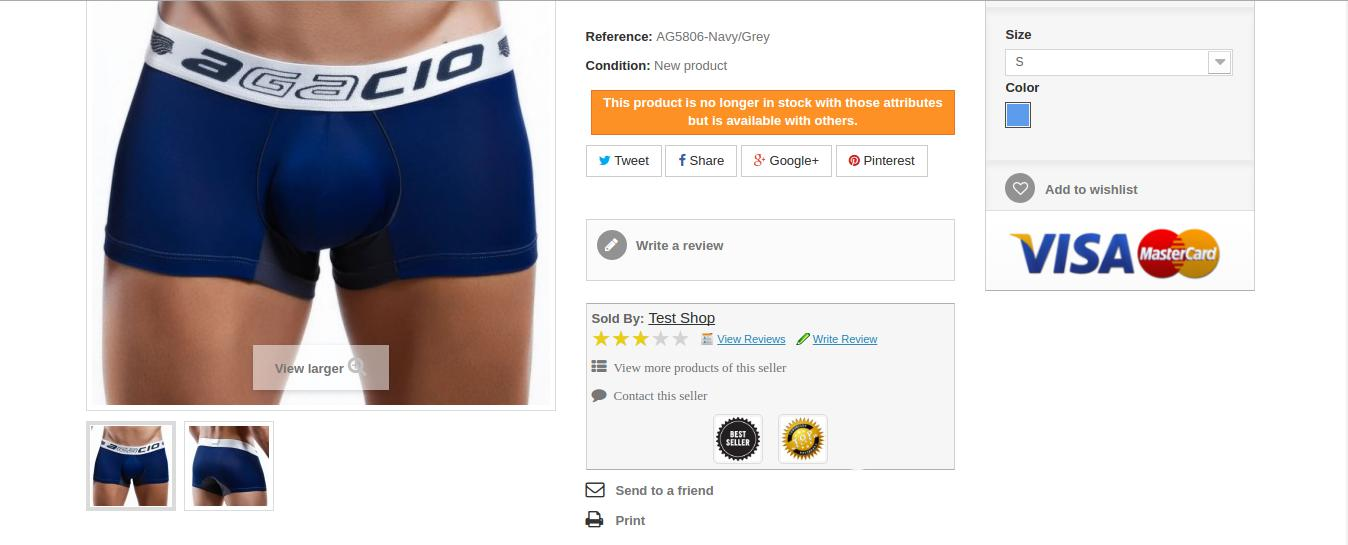
Product page Interface
1. The Product Page of the particular seller as shown in the screen shot below:
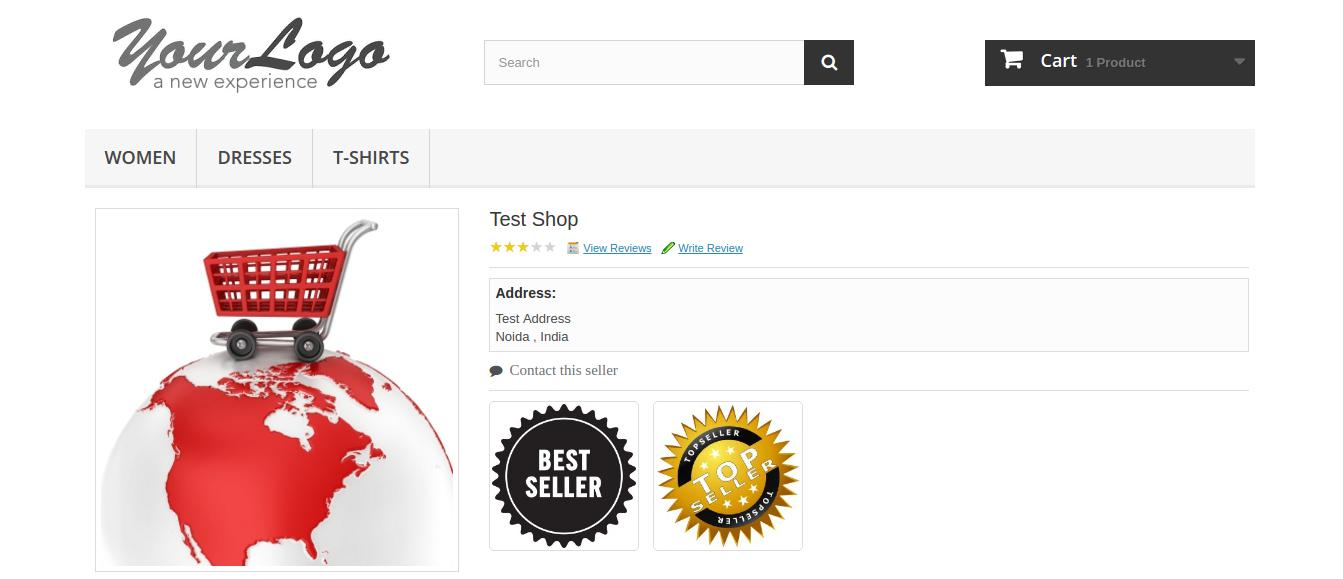
Seller Profile interface
2. The seller profile Page on the front end of the store.
Configuration Page
This is a page where seller can enable/disable this feature from customers. After disabling this, customer cannot see the Seller Badges on the marketplace. Also, Admin can configure the badges from the same interface.
Businesses around the world are thriving on the basis of customer and social engagement which helps in building the trust and loyalty around your company. You need to be in the “good books” of your customers so that they can swear in the name of your product when it comes to quality and performance. It is important to give time and attention to social engagement as the business potential of sites like Facebook, Twitter, Google+, Instagram, LinkedIn and others are known all across the globe.
With gradual time and technological advancements, social media sites are the new growth engines for various businesses around the world. It would be completely naive to stay away from this global platform of business promotion due to its widespread usage and popularity. If you have understood the importance of these social platforms for business promotion and higher conversions, it is time to pay attention to this social login extension for OpenCart stores. The Opencart extension is an excellent OpenCart social extension that can optimize your chances of business engagement among your rivals. Here are some of the reasons that will force you to give a try to this OpenCart Social Login module from Knowband store.
Eliminates chances of frequent customer redirects and time consuming customer login process-
Online shoppers are often much irritated due to the time consuming customer login process on an online store which affect their customer engagement to a great extent. With the help of this Opencart social login extension, you can offer multiple social login options to your targeted customers. In this way, it increases customer engagement on your site which can optimize your chances of conversion rates and sales.
Quick installation and configuration facility-
This Opencart social login extension is a superb Opencart extension as it can be easily installed and configured by any individual having the basic computer skills. There is no need for any special hardware and software requirement for its effortless installation. You can manage and control the entire process with the help of few clicks only.
Allows store admin to choose positions of login options-
The placement of site elements do have a strong impact on the customer attention and can affect your business chances. The back end interactive admin panel of this Opencart social login extension provides store admin freedom to make changes in their login link as well as social bar heading. Apart from this, they can also choose the location to place their social login options on site like at the top, bottom, left or right.
Option to choose the desired button sizes-
With this one Opencart social login extension stores, it is now much easier to perform the right button size for your site. Depending upon the layout, design and nature of your targeted customers, store admin can select the small or large size social media buttons for grabbing maximum conversions and sales.
You would commit the biggest blunder in the eCommerce business scenario if you are still not serious about utilizing the features and functionalities of this Opencart social login extension. Don’t be a loser in your business domain and make the right move by purchasing this Opencart social login extension from our Knowband store.
There is not any sure-shot guarantee that every visiting customer on your site can actually get converted into a potential buyer. There are chances that he/she may leave a website due to multiple reasons. Some of these reasons can be slow loading website, complicated checkout process, cluttered website design, difficult navigation movement, high product prices, and other such factors that can make your customers lookout for an alternative site. If you can’t control this trend, you can have serious consequences in terms of business growth and conversions.
Moreover, this scenario of abandoning a site can put a severe dent in the prestige and reputation of an eCommerce store. It can also hurt your chances of conversions and product sales due to increased instances of shopping cart abandonment. By taking a close account of the whole situation, Knowband has developed this Magento Abandoned Cart Alert Extension that can reduce abandoned carts on your site. It is a remarkable plugin that can make your customers remain engaged to your store for optimizing your conversions and sales. Here is a detailed account of the various features and functionalities of this Magento cart abandonment extension that has the potential to overturn your business fortunes among your rivals.
Bring them back with emails, push notifications, and pop-ups
Not every customer reads emails from eCommerce stores flooding their inboxes. The Magento 2 Abandoned cart alert extension provides you with three options to send alerts to your customers.
Email- Discounted or non-discounted
Push Notifications in a web browser
Reminder alert pop-up
Customized pop-ups and emails with deals and offers can trigger your customer’s shopping psychology and they will return back to your store to complete the purchase.
Easy mechanism to entice customers with discounted emails
Discount coupons, gift cards, or voucher codes are the most effective medium that can persuade customers to make purchases through your Magento site. You can easily attach coupon codes, discount cards, or gift cards with this Abandoned Cart Alert email for Magento module with your reminder emails for influencing the purchasing decision of your customers. This approach is an amazing way to keep your visitors engaged to your eCommerce store for getting mega sales and conversions.
Option to create customized email templates for your customers
“One shoe size does not fit all”, similarly you can’t involve all your customers in a similar way. You need to use customized email templates for them in order to make them feel more valued by your business entity. Magento Abandoned Cart Alert Extension also helps in establishing an effective rapport with your customers as personalized email templates make them more loyal and engaged to your Magento site.
If you are determined to reduce the abandoned carts on your site, it is imperative to keep a constant track of the abandoned carts of your customers. With the help of the Magento Abandoned Cart Alert extension, it is now easier to track the abandoned carts of your customers for the seamless recovery of “forgotten” carts. Apart from this, it will also help you in getting a clear insight about the abusive customers that abandon a shopping cart too often.
Effortless cart recovery with a single click
One of the most important factors that can contribute to lowering the shopping cart abandonments is the simplicity in the cart recovery process. It is now possible to recover your abandoned cart quickly with all the cart details and items for a quick product purchase through a single click only. This wonderful characteristic makes it one of the most popular Magento Abandoned Cart alert extension that comes with the most pocket-friendly price as compared to other rival modules. Furthermore, this single-click cart recovery has made the lives of store admin and customers much hassle-free than before.
Provides information about abandoned carts of your customers on your site
If you are determined to reduce the abandoned carts on your site, it is imperative to keep a constant track of the abandoned carts of your customers. With the help of this Magento Abandoned Cart Alert extension, it is now easier to track the abandoned carts of your customers for the seamless recovery of “forgotten” carts. Apart from this, it will also help you in getting a clear insight about the abusive customers that abandon a shopping cart too often.
Conclusion
Thus, it is the right time to grab your share of sales and conversions with the help of this remarkable Magento Abandoned Cart alert plugin that can help in recovering your abandoned carts without any problem. It can help in sending reminder emails to your abandoned customers regarding their pending orders for getting maximum sales and conversion rates. So, visit our Knowband store now and purchase this Magento extension for unmatched business performance.
Mobile Apps are the recent trends that have boosted the businesses around the world due to their ease of functionality, quick purchasing capability and their seamless installation on various mobile platforms. These apps are especially playing a bigger role in the eCommerce business due to their tried and tested potential in online shopping facility. Furthermore, the growing presence of mobile phones around the world has made apps an important medium of customer engagement for various businesses. They are going to rule the global business landscape in the times to come ahead.
If you are having an eCommerce store and thinking about its expansion among your rivals, you need to go towards engaging mobile apps that are the ultimate business future. In order to make your OpenCart store journey towards mobile apps a seamless task, you need to go for this OpenCart Mobile App Builder module from Knowband store for achieving mind blowing apps for your business. This app can definitely give a big boost to your business chances and can help you stay ahead from your rivals in a seamless manner. Here are some of the ways by which your mobile apps can stand out from other rival apps.
It can be accessed on multiple devices and platforms
These mobile apps are in built in such a way that they can be installed and accessed on multiple Android devices like smart phones and tablets. They come with a responsive design that makes their use much wider and global in reach for expanding your business reach. With the help of this OpenCart extension, you can effortlessly get a wonderful mobile app whose functionality and use is beyond any particular Android device.
Makes account login facility a hassle free experience
No doubt, account login is an important constituent for every online store and plays a crucial role in customer targeting approach. In order to tackle this critical situation, this OpenCart Android App Builder plugin comes with various social media login options to facilitate an effortless account login facility. Thus, it saves the precious time of customer and improves chances of conversions for your OpenCart store.
Provides option to improve the look and feel of the app
This wonderful Knowband OpenCart extension has a bundle of amazing interactive themes that can provide an all together different look and feel to your mobile app. You can use these appealing themes to increase the worth and acceptance of your mobile app among your customers. In this way, you can improve your chances of conversions and sales for your OpenCart store without any hassle.
Implement the advanced searching facility
Searching has seen a major transformation over the years and it is currently governed by voice based search facility. Keeping this trend in focus, Knowband has implemented the voice based searching facility for its customers with the help of this OpenCart Mobile App Builder module for making searching more interactive than before. You just have to speak for the desired items to be searched and the search engine will provide you required results based on your voice based search inputs.
Reflects store changes automatically on your mobile app
With this OpenCart extension, you can make an effective synchronization of your OpenCart store with your mobile app. It is definitely a wonderful approach as you don’t have to make required store changes on your mobile app again due to this synchronization facility. Everything needs to be done for once without consuming more time and efforts.
What are you thinking about now? Do you still need more reasons to adopt this OpenCart Mobile App Builder module for getting those power packed mobile apps? Don’t wait anymore and visit our Knowband site to purchase this OpenCart module that is within your pocket range. It is your passport to a brilliant mobile app for your OpenCart store.
This online shoppers is always in the search of exciting offers, reward points and deals. This is one of the ways to encourage them to purchase the products. If your eCommerce store is unable to trigger the purchase decision of the customers, then, it is certainly going to hurt your business in the long run. Knowband’s Prestashop Reward Points Addon will prove to be a great bonus to the merchants store as it can motivate the customer purchase more and more products. The customers can win reward points in return of the purchases.
Knowband’s Prestashop Loyalty Points Module enables the customers to win reward points after he/she has placed any order. The reward points allows the customers to shop even more at discounted prices. Once the customer has won enough reward points, they can get discount in return of the points.
All the settings regarding the Prestashop reward points addon and the discount values will be given to the merchant in the backed of the extension. Now the Prestashop Reward Points addon is compliant with GDPR. The online mercant can activate the settings to delete the customer details on GDPR data deletion request. The admin can also display a privacy policy consent on the website and also set it’s text and URL in different languages.
1.1 Benefit of Merchant Prestashop Reward Points Addon
Knowband’s Prestashop Loyalty Points Module enables the admin to give the loyalty points to customer when they place their order.
This Prestashop Reward Points Addon allows the admin can set rules for guest as well as registered customer.
The admin can set the N number of discount and reward points rules according to the need.
The Prestashop Reward Points extension allows the admin to view the list of customers used rewards points and remaining rewards points.
This Prestashop Addon helps the admin to engage more the customer to the website.
This Prestashop reward points addon motivate the customer to place another order to use reward points.
It helps the admin to reward the loyal customer by giving them loyality points.
With help of this Prestashop reward points addon, the admin can increase revenue and conversion of website.
Presatashop Loyality Points Extension helps you to improve your popularity by letting the customers share the reward points with others.
The online merchant can also set the GDPR related settings from the admin interface of this Prestashop Reward Points Module.
The Prestashop product purchase reward extension allows the admin to set the privacy policy consent, it’s text and links in different languages.
The e-merchant can also activate the settings for deleting the customer data on GDPR data deletion request.
1.2 Benefit of Customer Prestashop Reward Points Addon
Customer can use the reward points to they make purchase in the future.
This Prestashop Loyalty Points Module allows the customer to share the loyalty points with their friends.
Customer can view the reward points his/her profile.
2. Installation
To install this Prestashop Purcharse points addon, please follow the following steps:
Add addon folder under modules folder of your system.
After adding this Prestashop addon folder, system will list the addon on module page under “front office feature”category as given below:
In admin module, there will be following options to configure this Prestashop Reward Points addon. The Prestashop Addon includes 7 tabs and they are as follows
1. General Settings.
2. Guest Reward Points Settings.
3. Guest Discount Settings.
4. Registered Customer Reward Points Settings.
5. Registered Customer Discount Settings.
6. Email Settings.
7. Statistics.
Each section is described in details below.
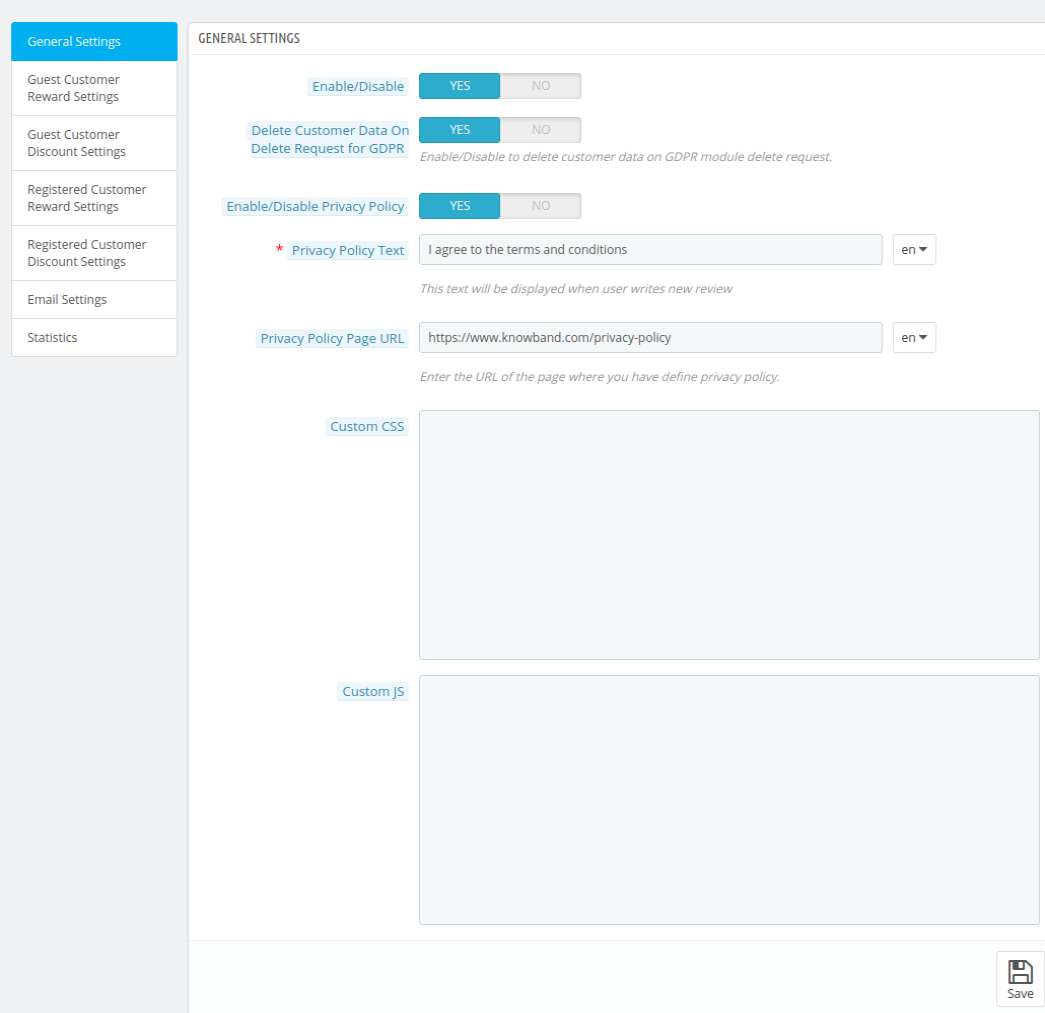
3.1 General Settings
This section will be having following options to configure the Prestashop loyalty points addon.
1. Enable/Disable: This option will be having a toggle button with two specific values ON and OFF. This module will only work if this is set to ON. If this is set to OFF then none of the feature will be working and not even impacting any other section of website. By default, this option will be OFF.
2. Delete customer data on Delete request for GDPR: The online store admin can enable the settings to delete the customer details on GDPR deletion request.
3. Enable/disable privacy policy: The online merchant can activate or deactivate the settings for showing privacy policy consent check-box.
4. Privacy policy Text: The online merchant can set the privacy policy text from the admin interface in different languages.
5. Privacy policy URL: The online store owner can set the privacy policy URL from the admin interface of this reward point module.
6. Custom CSS and JS: These fields have been provided to let the admin change the look and feel of the front end of the module. So if he feels to add certain CSS or JS in the front the he can enter those into these field respectively.
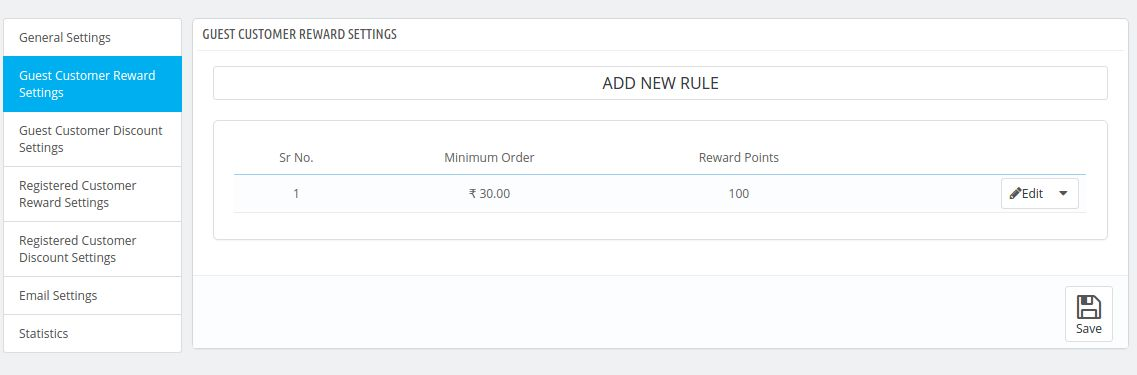
3.2 Guest Reward Points Settings
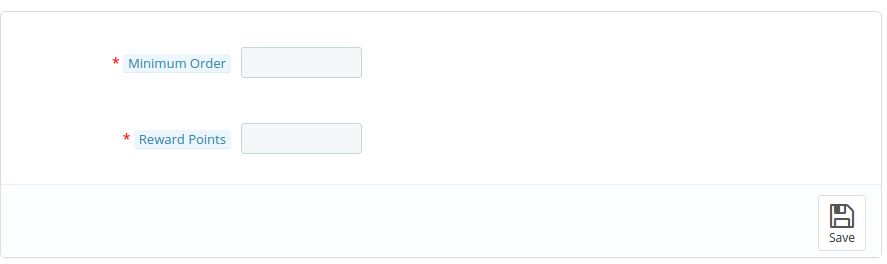
In this tab the merchant will enter the rules according to which a guest customer will win the reward points. When the merchant will click on the add new button available in the tab then a pop up will appear which will have the following fields in it-
1. Minimum Order : Here the admin will enter the minimum amount of the order which has to be their to give the customer certain reward points.
2. Reward Points : Here the admin has to enter the number of reward points which a customer will be awarded after placing the order if he satisfies the above two conditions.
Admin can even edit or delete the created rule by clicking on the action buttons which will be available in the same row where the rule will be listed.
Form which will appear after clicking on add new button-
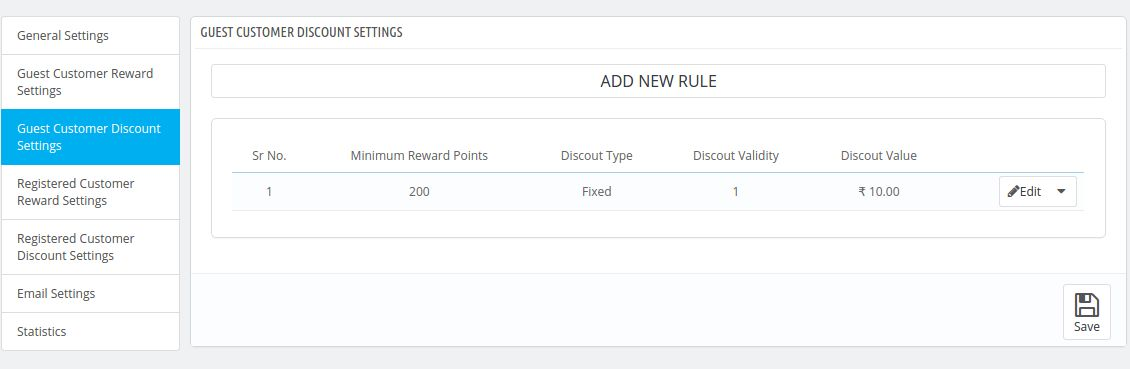
3.3 Guest Discount Settings
The settings done in this tab will only work for guest customers.In this tab the merchant will have to enter the discount and reward points settings i.e after how many reward points the customer will get discount. Fields which will be available in these tab are-
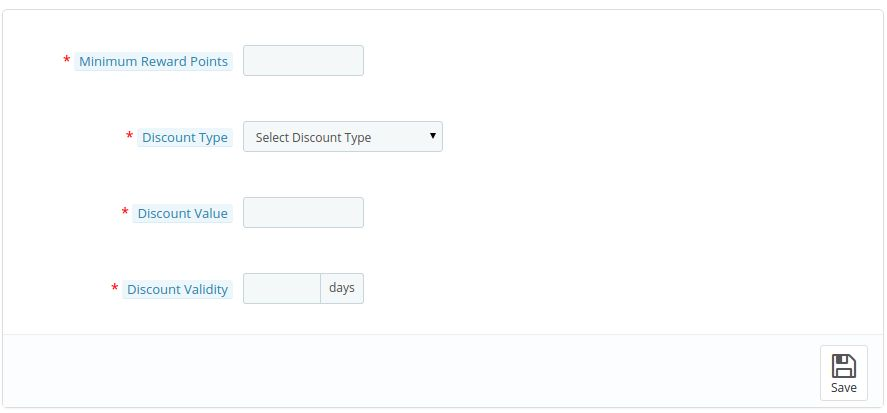
1. Minimum Reward Points : In this field he admin will enter the minimum amount of reward points which a customer should have to satisfy this rule.
2. Discount Type : In this field the admin will select the type of discount which will be given to customer if he satisfies the above conditions. It may be percentage or fixed discount.
3. Discount Value : In this field the admin has to enter the discount value which the customer will get after applying the minimum reward points.
4. Discount Validity : In this field the admin will enter the discount validity of the discount which will be generated
Form which will appear after clicking on add new button.
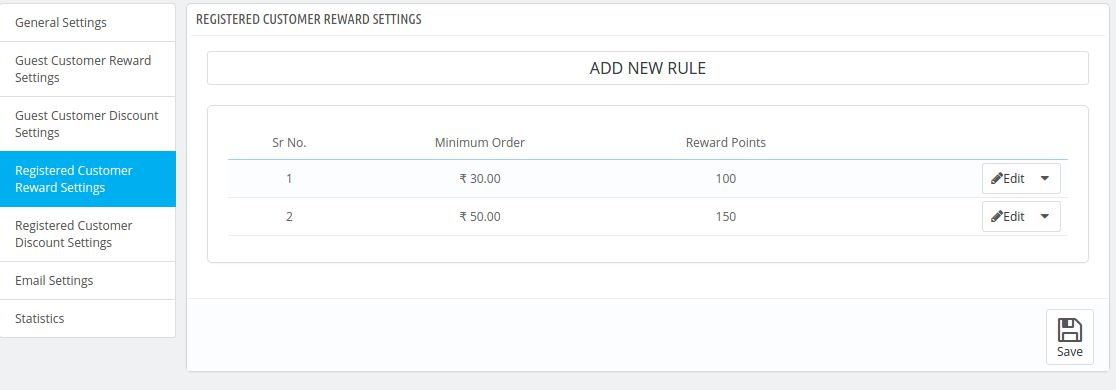
3.4 Registered Customer Reward Settings
This tab will be same as the guest reward settings tab. But the only difference in this tab is that it will work only for the customers who are registered.
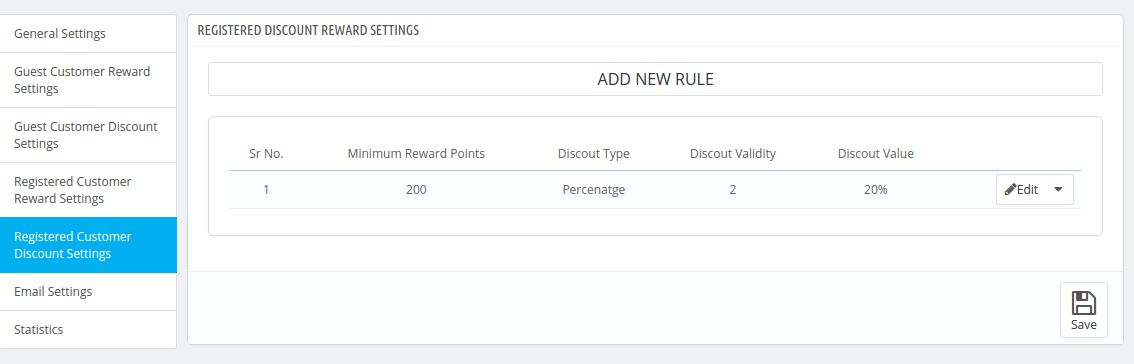
3.5 Registered Customer Discount Settings
This tab will be same as the settings for the guest discount settings tab. But the only difference in this tab is that it will work only for the customers who are registered.
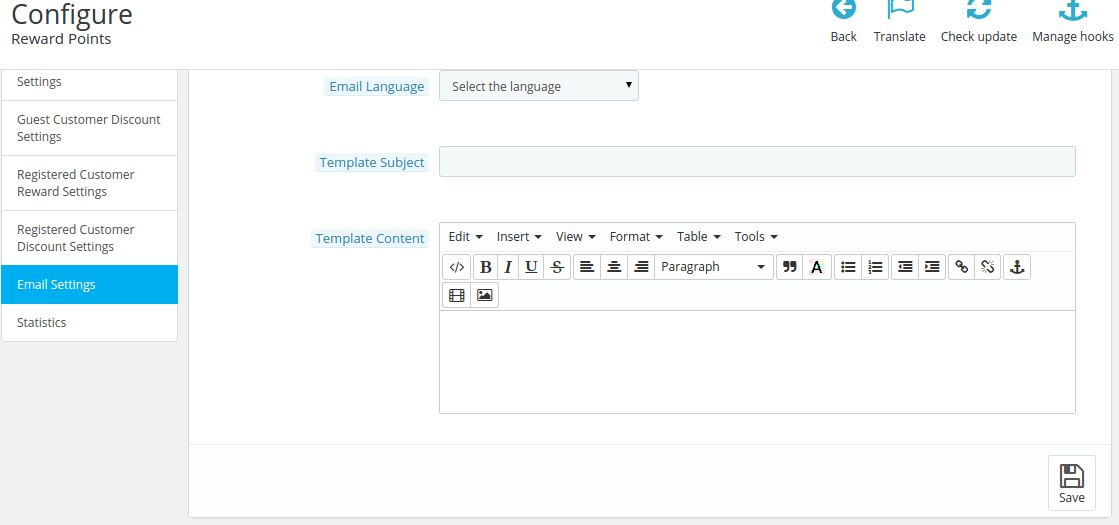
3.6 Email Settings
When the customer will share its reward points with other customer from the front end then the customer to whom the reward points are shared will get a mail from the store end to let them know about the reward points added to their account.
1. Select Language: Here the admin will select the email language using which he will send the email to the customers who have won the jackpot
2. Email Subject: Here the admin can enter the email subject. What ever subject the admin will enter in this email field will be used as the subject of the email sent to the customer whenever they will win any jackpot in the front.
3. Email Content: Here the admin can enter the email content which will be sent to the customers who will win the jackpot in the front..
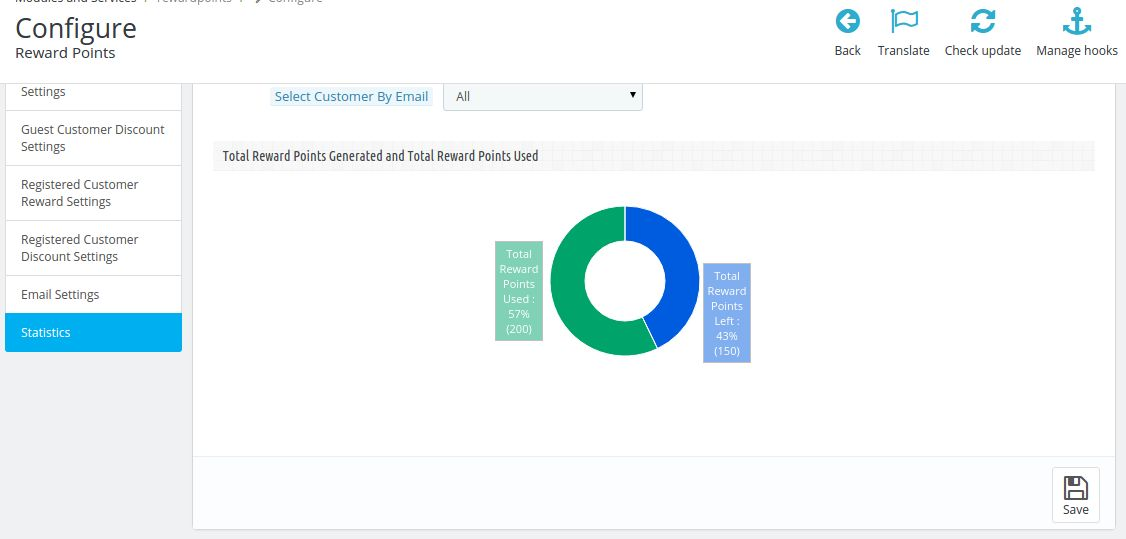
3.7 Statistics
In this tab admin can view the stats of the reward points which are generated till date. The admin may also view the total number of reward points generated and used and may also filter the reward points according to the customer those who have used this module to get reward points.
4. Front End Module
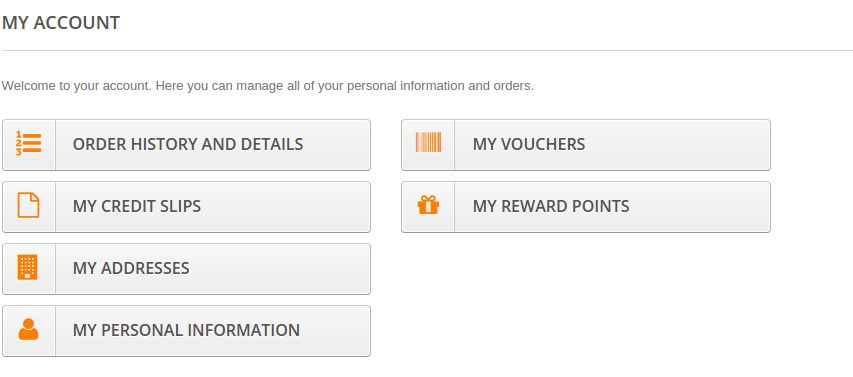
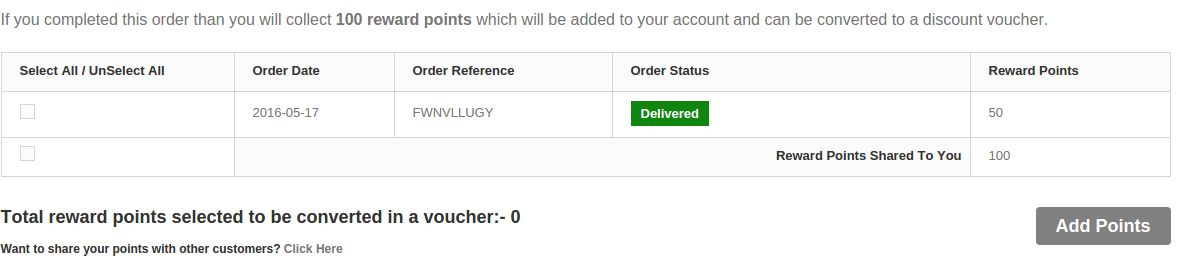
When the module is enabled from the admin panel then it will first appear in the account of the customers. A link stating My Reward Points starts appearing in the account of the customers, On clicking the link the customer will be directed to the list of reward points which they have won by placing different orders. If the order of the particular reward points is delivered then those reward point will be available for use to the customer.
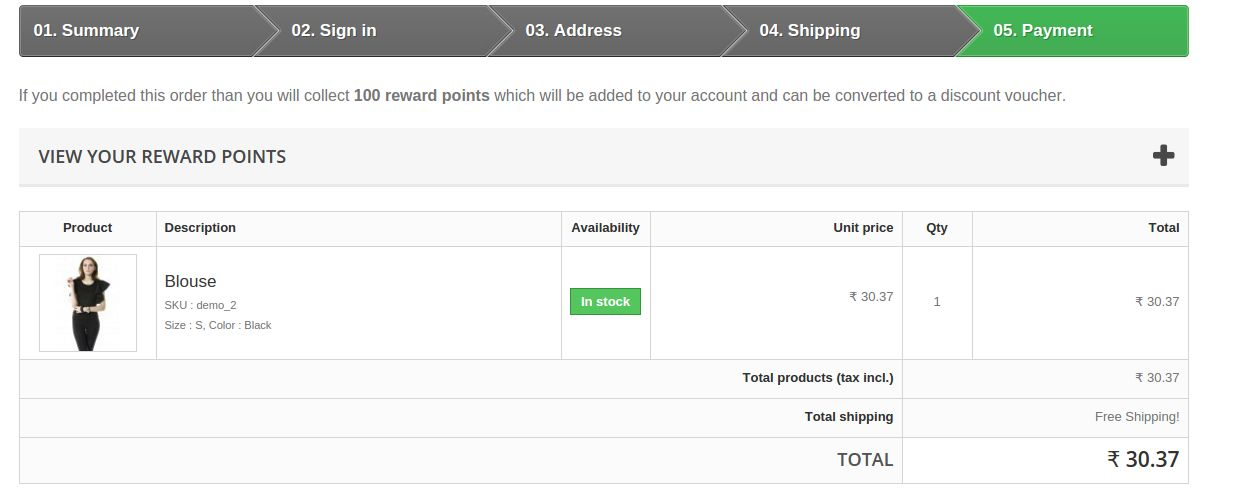
The Prestashop Loyalty Points Addone will also appear above the cart when the customer is about to do the payment for the order. The customer can view his/her reward points and add those reward points to the cart.
You can try Prestashop reward points addon for on your Prestashop website. KnowBand’s Prestashop Loyalty Points extension helps you reward the loyal customer to your store & increase the revenue of website.
The Prestashop Mobile Order Lookup Addon by Knowband is designed for the Prestashop eCommerce businesses and enables the customer to view order info or order status without logging into the account. The Prestashop order details module also allows the store owner to keep a track of the orders and view the customer status.
Merchant Benefits of the Prestashop Mobile Order Lookup Addon:
The Prestashop mobile order lookup module by Knowband lets the customers track their order status without logging into the account in the store.
Use of Prestashop order details addon, the store merchant can track the customer details from the back-office of the module.
Knowband’s Prestashop Order Lookup addon gives store admin the option to monitor the number of customers who viewed their order status.
The Online store merchant can customize the look and feel of the Order Lookup button text and color from the back-end of the Prestashop shipping details module.
Prestashop mobile order lookup module by Knowband allows the admin to change or add the new test which are shown above order lookup result.
This Prestashop order lookup module supports the multiple themes.
Prestashop order details addon by Knowband reduces the burden on manual support system through real-time tracking.
Knowband’s Prestashop mobile order lookup addon admin interface extremely easy to use.
2.0 Installation
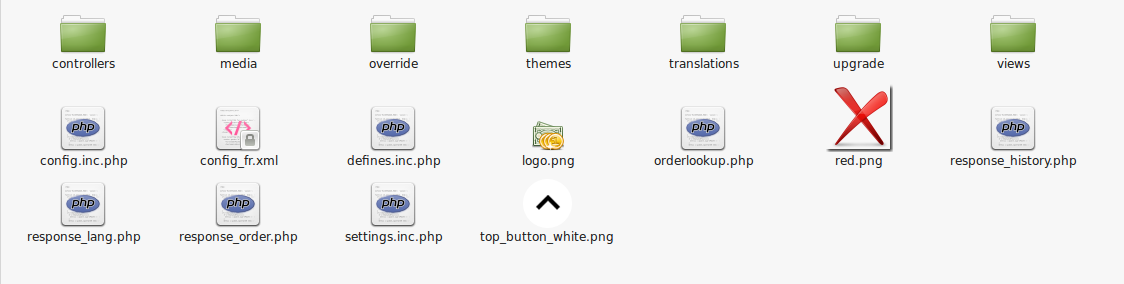
The screenshot below shows the folder structure of the Order Lookup plugin folder.
Folder structure of the Order Lookup plugin folder.
Copy the whole folder named as order lookup into your modules folder of the root directory of your PrestaShop store through FTP.
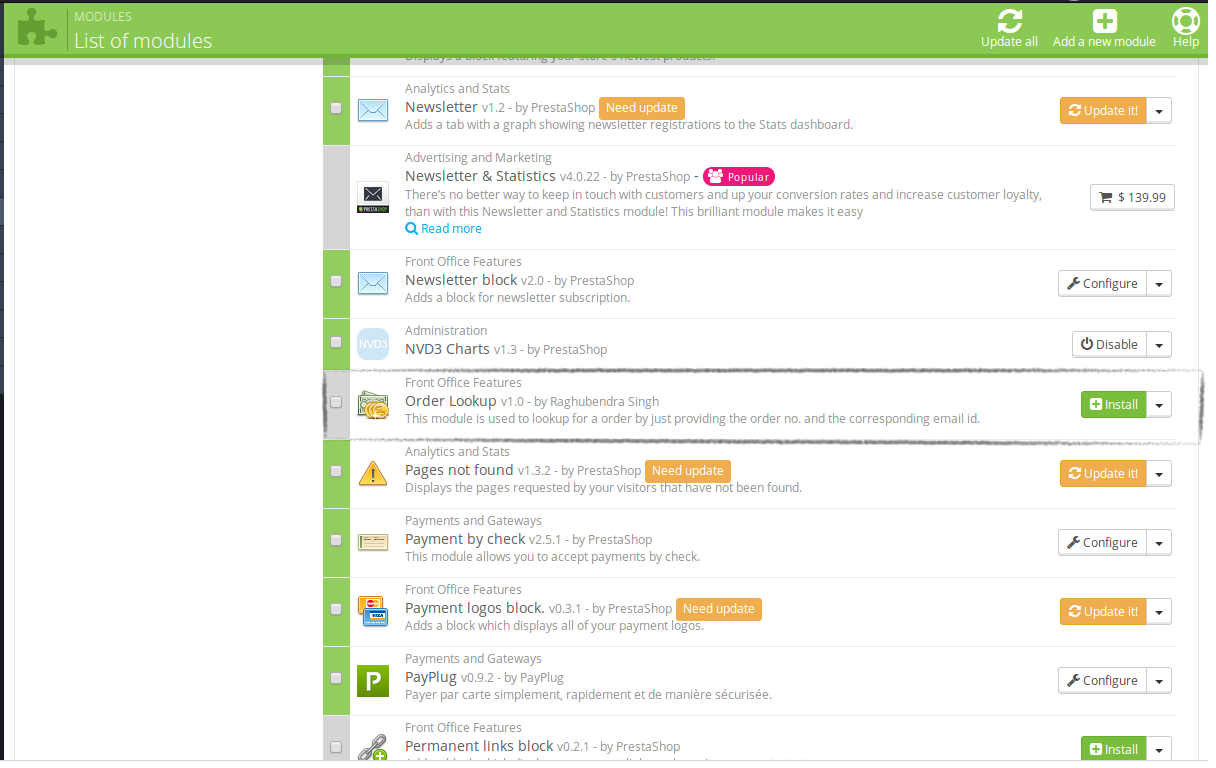
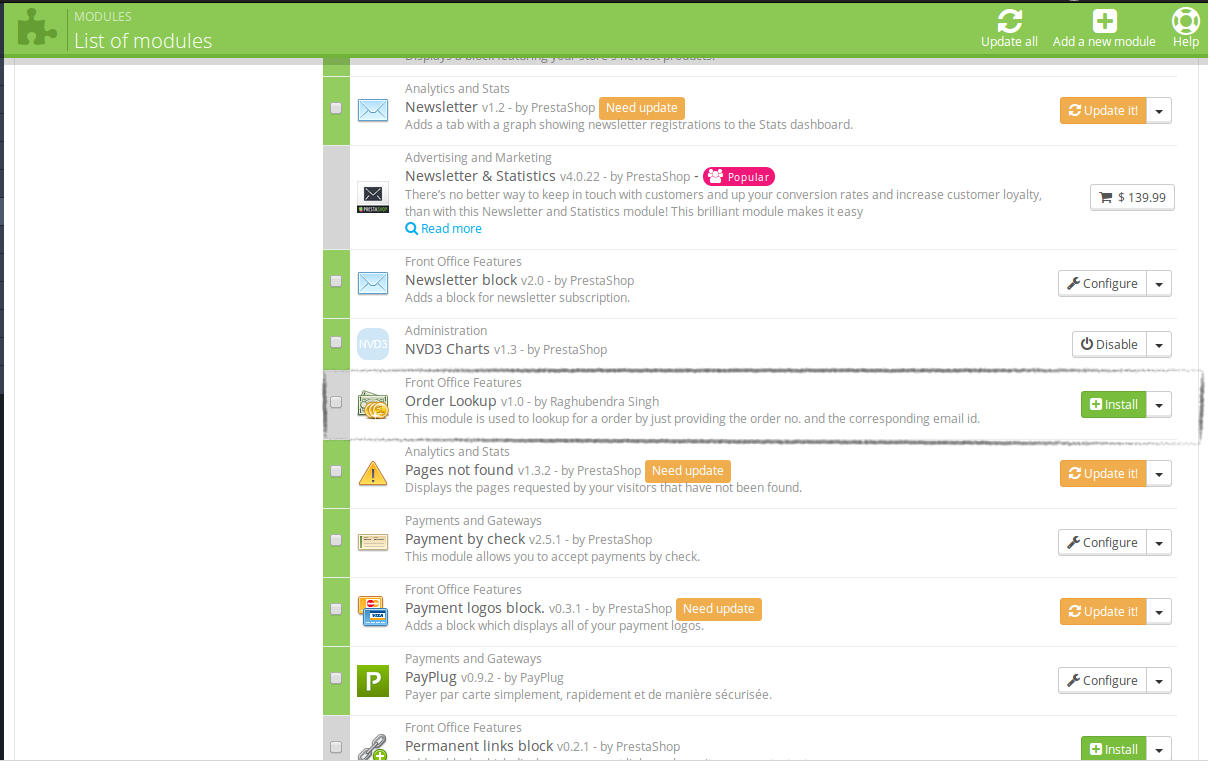
You will be able to find the Prestashop order details addon ready to be installed in the Modules in your PrestaShop store as shown below.
Click on the Install link to install the Mobile order lookup Prestashop addon.
3.0 Admin Module
Here, the Prestashop store owner can change the various settings of this plugin according to the requirements which will be reflected on front-end as well as in the admin panel.
To install this plug-in, please follow the following steps:
Add all whole plugin folder to the modules folder into the root directory of the PrestaShop Store.
After adding the plug-in files, then the system will list the plug-in on the module page.
Click on install/uninstall according to the need.
3.0.1 Admin Interface
After installing Prestashop order details module into the store, it will provide the following interface:
General Settings
Lookup Statistics
Language Translator
Get Support
Each interface is explained below.
3.0.1.1 General Settings
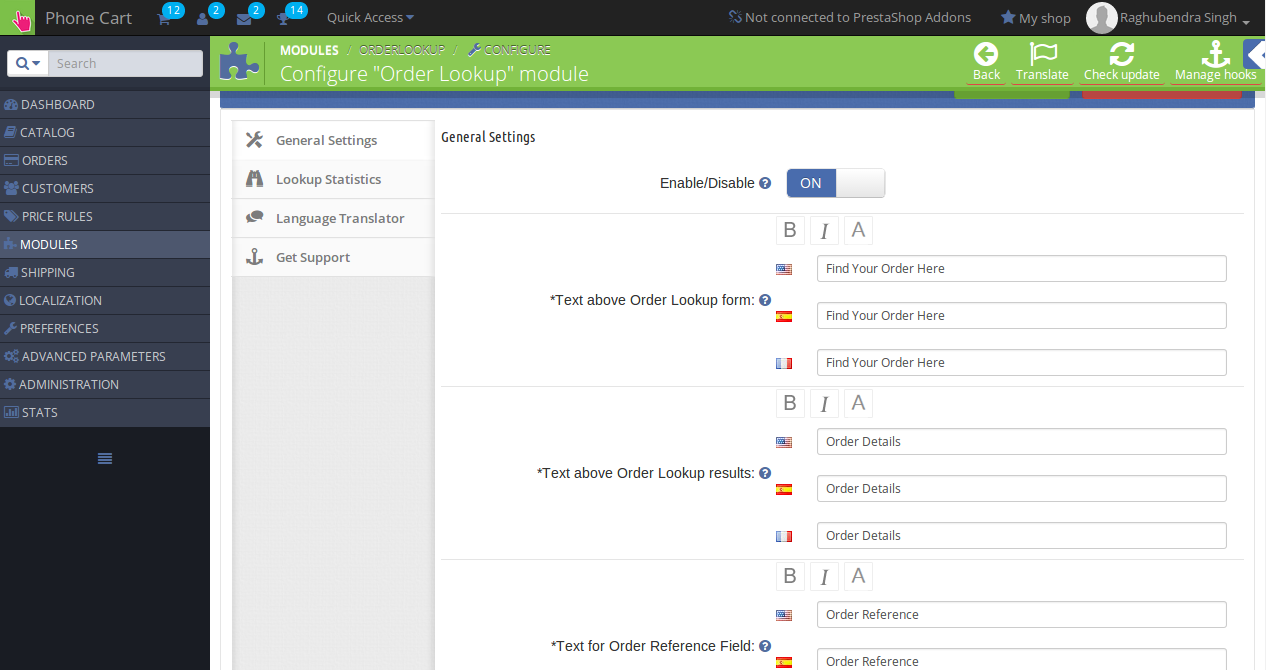
On clicking the configure link on the module listing page (configure link will automatically appear once you install the plugin), the system will open general settings tabs by default as shown in the screen below:
Initially, the fields in the above form will be already filled with their default values.
Enable/Disable: Initially, this will be OFF. The Prestashop store Admin can enable/disable plug-in by turning ON/OFF this setting.
Text control: Here, the admin can control text which would be shown on Order Lookup page and on the result page. Admin can also set different text, text layout and text color for all the languages available in the system. The type of format and text set by the admin in these controls are visible at front-end for the corresponding language selected.
Color control: Here, the admin can control colors of the buttons which would be shown on Order Lookup page and on the result page.
3.0.1.2 Lookup History
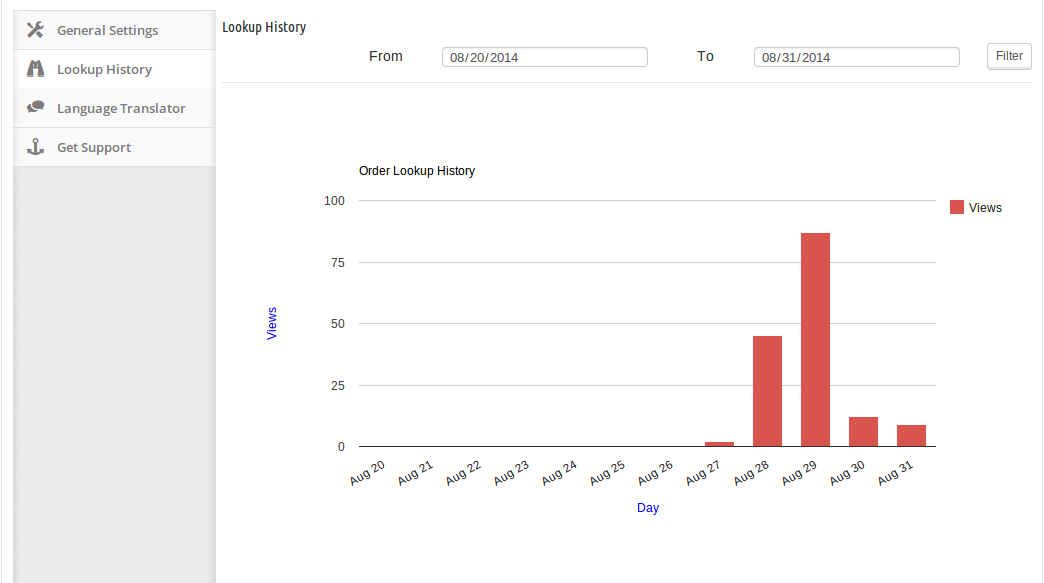
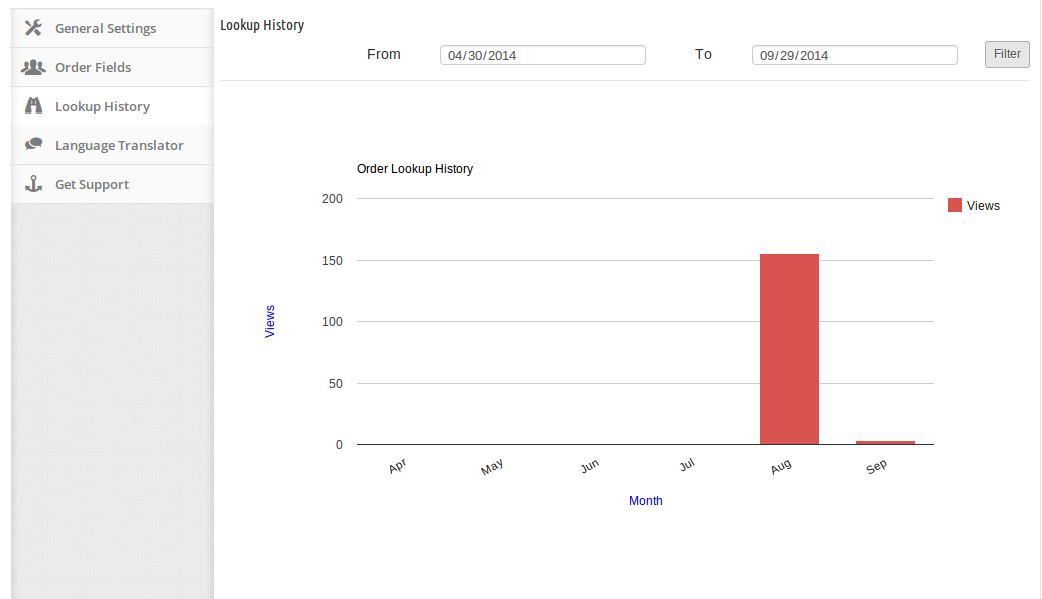
In this tab, Prestashop order status plugin will show the statistics of Lookup page view in terms of number. Reports will be displayed in the form of graphs. With the help of these statistics, the admin will be able to know at which time, Order Lookup page opened most. The store owner can enter any range and the system will show the results accordingly. By default, the graph will show the stats for the current week. The lookup stats are shown as follows:
3.0.1.3 Language Translator
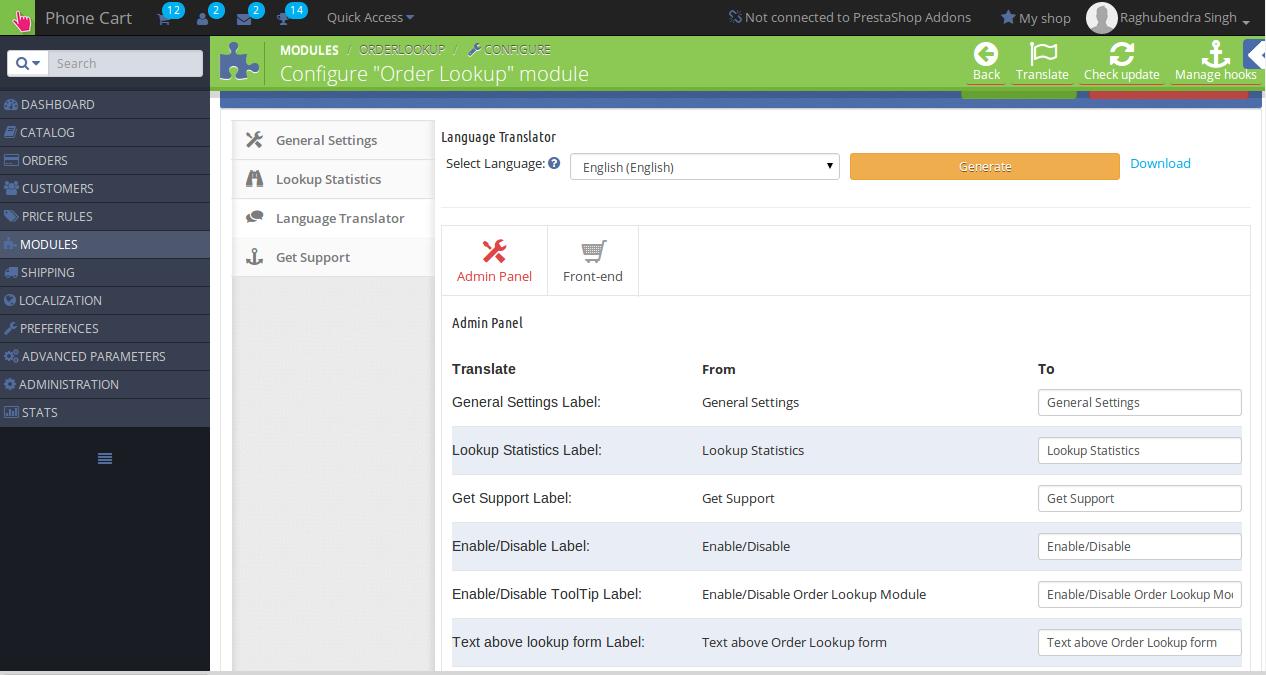
In this section, the admin can enter the text and can also change the texts that are displayed in the admin panel as well as front-end for the Mobile order lookup Prestashop addon. The interface for the language translator consists of two tabs through which the admin can enter the language texts for the admin panel and front-end. The admin can also download the language file generated. The language translator looks like the following:
3.0.1.4 Get Support
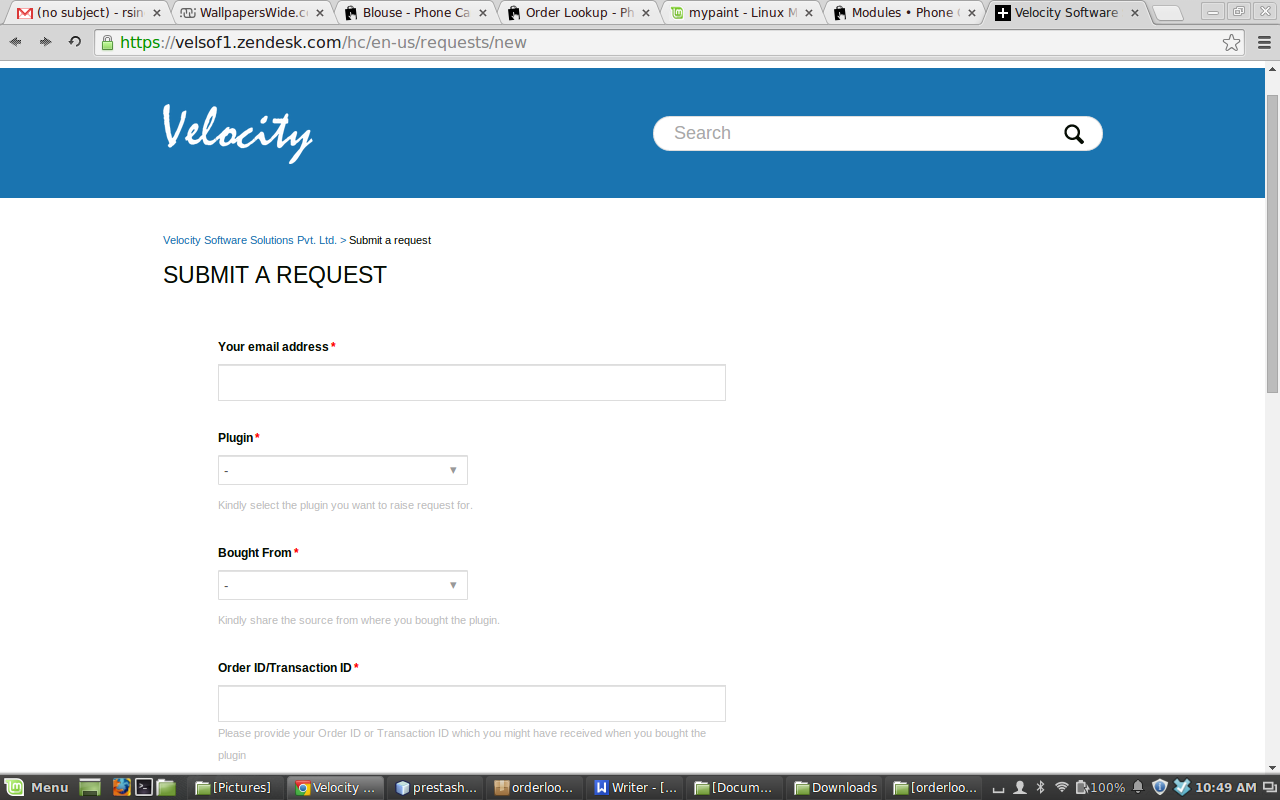
If the admin has found any issue regarding the Prestashop plugin and wants any type of support, then via this link, he/she can create a ticket for any query on our help desk support. On clicking this link, a new tab open with where the admin can generate the ticket for support.
4.0 Front End Module
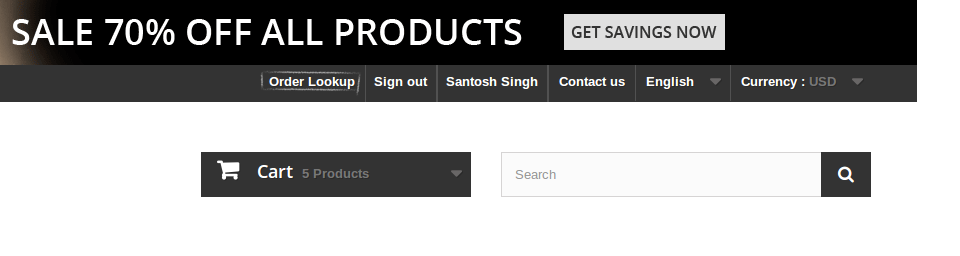
At the front end, the customer will see a link on top menu which will redirect the customer to Order lookup form page.
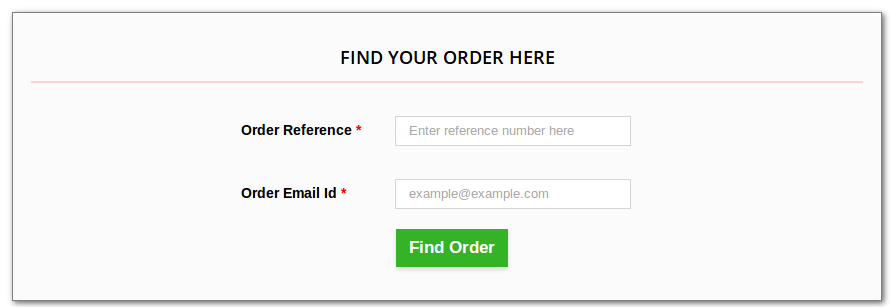
When the customer will click on the link, a new page would open which will ask for Order reference and email id.
The link to the order lookup page will appear as follows:
When the customer clicks on the link, a new page would open which will ask Order reference and email id.
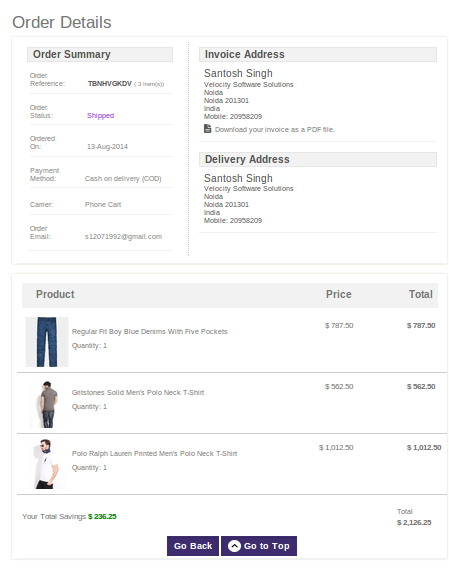
After entering correct details, the customer will be shown the corresponding Order data.
Recommendations :
Refresh home page of your store every time you enable/disable plugin. If the Prestashop extension is not working after installation then please check permissions on modules folder. The folder should be writable. Please make the folder permission to 755.
For more information about Prestashop Mobile Order Lookup:
Customers are often having a hard time while accessing their order details due to various complexities involved in the entire process. They have to provide multiple information before they can finally get an access to their order details. This is definitely the most annoying moment for any customer and can affect the business chances of an eCommerce site in the long run. Order details are one of the crucial aspect of an online purchase and it is an important parameter that can affect the customer engagement on your site.
This has been a long standing concern for numerous online business owners and they are looking for an effective solution for their customers. With continuous efforts and years of expertise in the eCommerce Module development services, Knowband has come up with this amazing Magento Mobile Order Lookup extension that has bring a major change in the area of accessing customer order details. It has removed the various barriers that were earlier involved in providing a quick access to customer order details. Let us take a plunge into the wonderful features and functionalities of this Magento Extensions by taking a quick look below:
Ensures quick access to customer order details
Unlike the previous requirement of logging into your site account for accessing your order details, this Knowband extension is definitely much way ahead from its rival modules. This is because customers just have to use their email address and order ID for getting complete information about their order due to this feature loaded Magento Order Lookup extension. There is no need of customer login and everything can be accessed in a much seamless manner.
Provides a clear idea about the number of visiting customers regarding the order status
Now, with the help of this Magento Mobile Order Lookup extension, it is now much easier to get a fair idea about the number of customers that are visiting your Magento site to access their order details. Once, you have the required information about the order detail seeking customers, you can target them in a much better way for future business engagement.
Compatible with various devices
This Magento extension is built on a mobile responsive layout that makes it perfect for various devices like desktops, laptops, smart phones, tablets and much more. It means that there is no conflict of performance and functionality of this Magento Order Lookup extension irrespective of the screen size used by the customers. It offers same level of user experience on multiple devices without any hitch.
Supports a user friendly admin panel
Magento site owners can now perform various changes and customizations on their site due to the presence of this user friendly and interactive admin panel. It makes implementation of changes much simpler than before and does not require any technical knowledge by store admin at all. The admin panel consists of various interactive features and options that makes the entire customization process a seamless task.
Can be installed and configured without any trouble
We know that we are not dealing with highly technically skilled customers and thus we have tried to make our Magento Order Lookup extension a mass module. It can be easily installed and configured by any individual with basic technical know how and does not require any specialized knowledge for these tasks. Due to the ease of operations, this Knowband extension has become much favorite among numerous Magento store owners around the world.
So, don’t make things complicated for your customers by making them struggle very hard during the process of accessing order details. This Magento Order Lookup extension has emerged as a supporter to introduce big bang reforms in the online shopping experience by providing an easy way to offer customer order details in a seamless manner. So, visit our Knowband store at www.knowband.com and install this Magento extension for a revamped user experience and for boosting higher conversions on your online store.