Things to look while adding a Magento 2 social login on your site

I can recall the days when all the websites would ask to fill a very lengthy registration form for accessing a site or buy products from the sites. Moreover, by that time there was no any other option for the owners of the site too. When social login become popular, most of the users found it very interesting and it is still the most popular way to log into a website. Especially, the eCommerce shopping has become very user-friendly with social login options.

Magento is one of the most popular eCommerce platforms which shares a major proportion of eCommerce websites across the world. The recently launched Magento 2 is a more advanced form of this ultimate platform and has come up with a better eCommerce management engine than the former. So like every other eCommerce website, a Magento 2 site too requires a Magento 2 social login option. I am sure that you do not want to ignore the importance of social login for your Magento 2 site.

Magento 2 social login extension

Like every other eCommerce platforms, Magento 2 can extend its basic functionalities by installing a Magento 2 extension. Since social login option is not there in Magento 2 by default, you will need to find a good Magento 2 social login extension for your website.

These tips can be useful in your search for Magento 2 social login extension

  • Choose a standard social login extension – Magento 2 is already a huge platform with a broad range of inbuilt functionalities. Any Magento 2 social login module you choose should not seek heavy resources from the system. If the Social login extension is not properly optimized, it will just counter the conversions by making your front end slow. So make sure that the extension is coded strictly according to the standards laid for Magento 2 platform. Choosing an experienced Magento 2 developer is a wise choice as he/she would have a proper knowledge of the standards.
  • Design and configuration complexity– In order to configure a social login option on any website, typically, the configuration steps are very simple. You just need some details from your social account to be filled in. These details can be retrieved from the social account itself. For example, you can find the steps to get the details for Facebook login in this article. So, you should make sure your Magento 2 social login extension is not complex and provide the easy option to put these details in a user-friendly way.
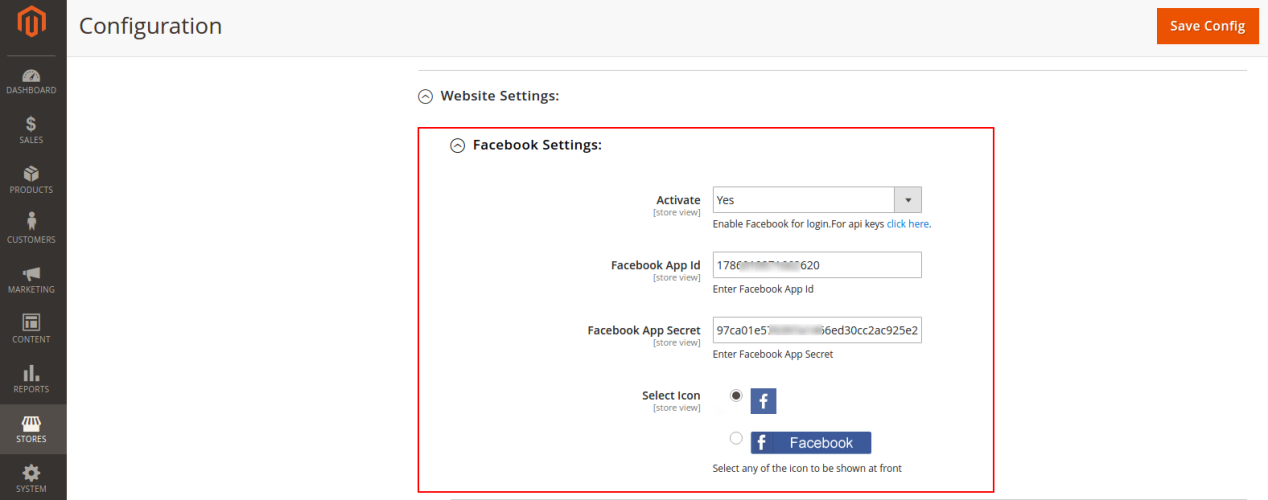
  • You should be able to enable or disable the social login anytime- Any feature added in your Magento 2 store using an extension should allow the admin to enable and disable the same at anytime. There might be certain occasions when you might not want to allow social login for some time or you might just want to disable a particular social login option. Uninstalling the extension is not a user-friendly approach and takes some time. A good social login extension will always allow the admin to enable or disable the feature anytime. Moreover, it should also allow the admin to enable/disable a certain social login option only. Say, disable the Facebook login and keep Google Login active.
  • Easily discoverable link for social login- There is no use of your Magento 2 social login if your users cannot find them easily. To make sure the users are able to find the social login easily, you can add the options at two places – at regular sign in or sign up page and at the top menu bar (Header link). Something like these:

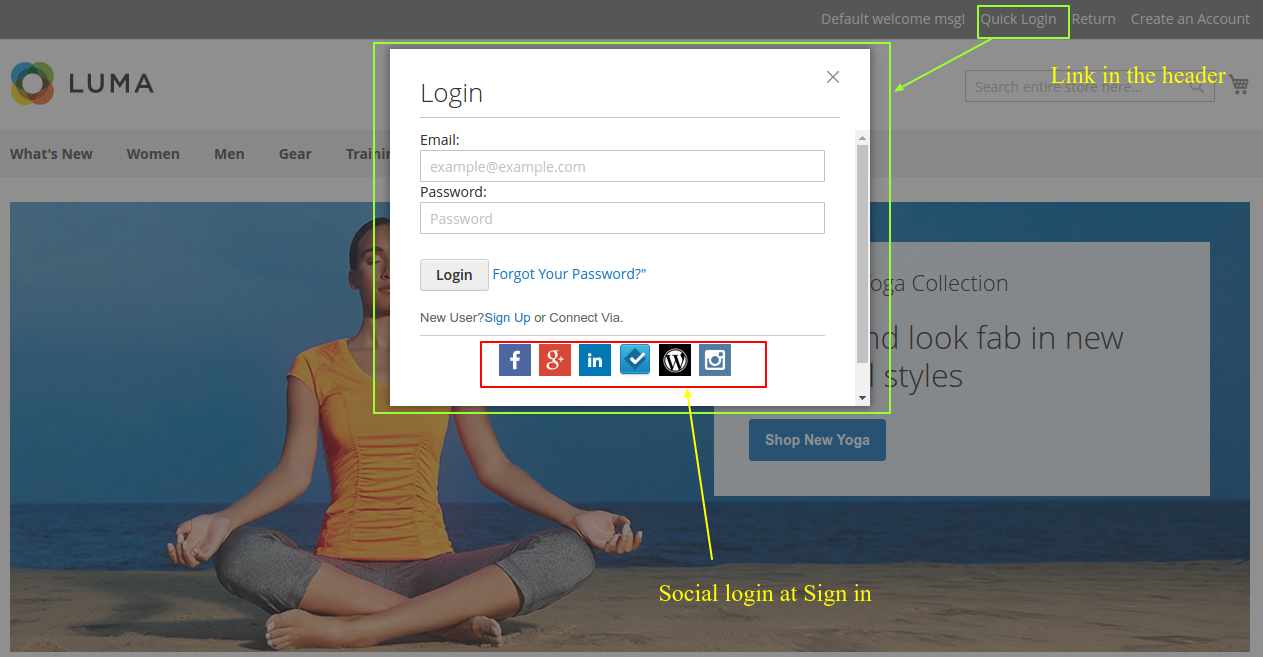
  • Most important – is it economical? – The price of any Magento extension is a bit higher as compared to the similar module for other eCommerce platforms like OpenCart and PrestaShop. So, you might not want to waste such a huge amount of money on something that can come also in a lesser amount. Most of the social login extension either provide a single option or at most three social login options- Facebook login, Google login, and Twitter login.

Website owners are often forced to purchase the social login extensions for all of these popular options separately. As a result, there is a huge amount of investment that might not be afforded by every business owner.

To counter this, plugin developers have come up with various all in one social login extensions. Knowband’s Magento 2 social loginizer is one such extension that has the option to enable Facebook login, Google Login, and Twitter login using a single Magento 2 extension. Not just that, you can configure a total of 13 social login options using the same extension. Paypal login, WordPress login, Dropbox login are one of them. Thus, saving the money that can buy you 12 other useful modules for your store.

Finally,

While choosing a Magento 2 social login extension, it is very important that you tally the above-discussed factors. Missing these might end you up with either a useless module or a set of extensions costing fortunes. Knowband Magento 2 social login extension could be a wise choice in this regard.

Liked This? You’ll Like These Too

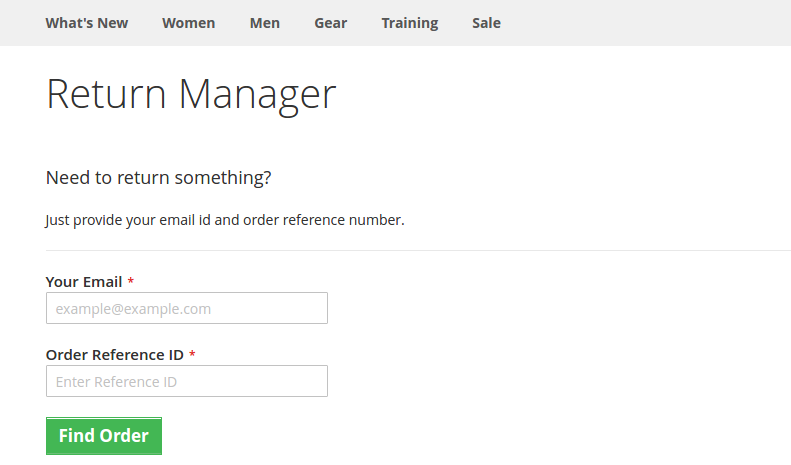
Product Return Manager for Magento-2 that ensures Customer Satisfaction

Lack of a flexible return policy can be a cause for cart abandonment on the checkout page of your online store. And, for a generous return policy, up to 66 percent of customers claim they will spend more. Many retailers, unfortunately, impose strict return policies. There are two ways to go about doing this. To begin with, policies that place an excessive amount of time restriction. Second, policies that enforce a fee for returns, which is typically in the form of shipping. And the others don’t even have a return policy on their store.

What if there is a way that might not just minimize the abandoned carts but might also boost the conversion rates at the same time? Create an ambiance that allows your customers to shop without any tension on your website. I am talking about, returns, refunds, replacements, and exchange management on your websites. Here, I am taking the example of a Magento 2 website to explain how an efficient Magento 2 return manager extension would help you to make online shopping a ball for your customers.

How would a website owner benefit from the Magento2 return manager extension?

With the easy return, more customers will be attracted to shop with you- In the era of huge competition from similar eCommerce sites, if you secure even the slightest competitive advantage against your rivals, you will score fortunes with your conversions. What most of the eCommerce customers fear is the tricky return procedures of the eCommerce websites. By installing the Magento 2 return manager on your website, you can make sure that these tricky procedures are converted to the easiest ones.

  • Single product return: The return manager will allow customers to return the whole cart or even a single product from the cart.
  • Partial Product Return: With Magento 2 Return Manager, customers can also return partial orders from the complete list.
    This feature of the return manager will make sure that customers do not have to return the whole bulk in order to return a single product. Thus, preventing a serious loss that could happen if your Magento 2 return manager could not handle a single product return.
  • Every request is not a return request: Not every customer wishes to return a product or to get a refund. Some might even want to replace or exchange a product. If your return manager extension treats every return request as a refund request, then it is a serious threat to your conversion rate as a whole.

For example, the Magento 2 return manager extension is capable of handling three types of return requests- Replace, Refund, or Get Credit. For those who want to get a refund, for those who want to replace a product, and for those who want to get a refund a buy something else from your site respectively.

Status tracking to keep them informed- When a customer places a return request, he/she wants to stay updated with the procedure. Customers should be able to track the status of the return request in the same way they tracked the product delivery status.

This is one of the trickiest parts of any return management process. An effective return manager extension like the Magento 2 return manager, allows the customers to track their return status very easily using a unique id provided at the time of return request.

The easy returning process with Magento2 return manager

The choice to attach a file: The Magento 2 order refund extension allows customers to attach a file to their replacement/return request.

Request forms, statuses, and reasons are all unlimited: Magento 2 RMA allows the store owner to build an unlimited number of return reasons and statuses to meet the needs of their customers. The admin can easily generate an order refund with the Magento 2 order refund extension.

More about Magento 2 return manager extension

Easy Order Return Manager for Magento 2 aids in the reduction of abandoned carts and ensures that they are as few as possible.

Some other features of Magento 2 Return Manager that benefits your business

  • The admin will handle the return requests of both registered customers and guests using the Magento 2 extension.
  • The request for a return may be approved by the administrator. When the request is accepted, an email trigger will be sent.
  • From the backend of the admin interface, the Magento 2 store admin can also generate return requests on behalf of customers.

Finally,

The importance of an efficient return manager extension on your eCommerce site cannot be ignored. Product returns strategies that are well-organized will result in higher sales, a stronger brand, higher consumer loyalty, and better customer service. The aim of a perfect RMA is to strengthen customer relationships. Choas continuity is being developed by simplified return management. You should not miss any opportunity to optimize the shopping experience on your website. Handling the trickiest return situations with the help of a proper return manager extension is all you need.

It is not just about a Magento 2 website, there are efficient return manager modules and extensions for PrestaShop, and Magento also. You just need to install the respective return manager extension as per your eCommerce platform and you are ready to manage even the trickiest returns on your site.

Liked This? You’ll Like These Too:

What are the benefits of Magento’s ajax based cart extension for your eCommerce website?

Magento has proven itself as an effective platform in the eCommerce arena. It has been the driving force behind various eCommerce websites that are standing firm and delivering. Keeping up with the various technological advancement in the market, it keeps on updating its platform by introducing various conversion effective extensions timely. The latest in this series is the ajax cart extension. The new Magento extension has already started creating a buzz about its efficiency and conversion driving abilities. Before you go on to install this update, let us discuss the various benefits that you can expect after installation.

Benefits of Magento’s ajax cart extension

The cart extension module is another effective tool from the house of Magento.

Have a look at the various benefits that cart extension module carries for your website.

  1. Cuts loading time: The Ajax based cart extension allow you to cut the time which is wasted in reloading of the pages. The customer can easily add the product to his/her cart and make a purchase without waiting for the product page to load every time. He/she can easily make the choice either to continue shopping or head away directly from the ‘Add to cart’ page. It takes away the frustration that occur while reloading of the pages even for a minor change in the cart.
  2. Hassle free editing: Customers can make any addition or subtraction in the cart without any hassle, that too by directly clicking on the product. They need not wait to land on the product page each time to make such changes. This will make the visiting experience of your website more prolific and connective. The more seamless you make your customer experience the more is the chance to optimize your conversion.
  3. Allows comparison among products: The new extension allows the customers to compare between the products. The visitors on your website can easily compare the products by just adding them to the compare list rather than visiting the product pages individually for each product. This saves a lot of time while providing a holistic overview of products to the customer.
  4. Freedom of customization: The extension allows you to make various customization on the front end of your web page. For instance, you can introduce various animation effect to show the movement of the product in and out of the cart. This customization option allows you to make the changes that have the potential to grab the eye of the visitors.

Final say

By enhancing your eCommerce website with the above mentioned features the Magento’s ajax cart extension directly pings at the chances of optimizing your conversions. Being a reliable and consistent platform, Magento has always provided its user an opportunity to explore their business potential and this extension is on the same lines.

This Would Also Interest You:

Why you need a one-page checkout extension for Magento?

Competition is the eCommerce market is never a new concept. Sites keep experimenting with their site elements to impress their customers and score better conversion than their rivals. Checkout module is one such element in any eCommerce site which decides the fate of conversion and revenue generation on the whole. Considering this, Magento is one of those eCommerce platforms which is most popular in eCommerce entrepreneurs. It’s generic that Magento too has its own default checkout extension which handles the order processing on the websites effectively.

So, why custom checkout extensions for Magento then?

Question is why custom checkout extensions are so popular even for this highly popular platform? If Magento is so popular with for its efficiency, then why one goes for custom checkout extension for his eCommerce site?

For any eCommerce platform (let it be PrestaShop, OpenCart or Magento), the checkout pages are designed keeping in mind the requirements of a complete package. By complete package, we mean everything that is required for the eCommerce site to process an order successfully. Now let’s look at some reasons for why website owners choose to go for a custom checkout extension rather than sticking to the default checkout.

1. It would all be identical

Every eCommerce website developed on Magento would look exactly the same like any other Magento site. For delivering a unique user experience and providing a USP, entrepreneurs choose custom themes and templates. However, the checkout processes will still look the same like any other Magento site.

To differentiate checkout of one Magento site with another, custom checkout extensions play a great role. These Magento checkout extensions, provide the features to easily customize their look and feel so that no site possess an identical checkout process.

2. Multi-page checkout in default

The default checkout of Magento possesses a multiple page structure. The users are directed from pages to pages to complete a checkout process. I need not tell that how multi-page structure is often seen as a loophole in your conversions. Customers visiting your website for shopping would not like to keep moving from pages to pages. They just want to complete the checkout process ASAP.

Considering this, A Magento one page checkout extension helps website owners by providing a single page checkout structure. The compact structure makes sure that no unnecessary re-directions are given to the customers and the whole process is completed in a single step. The key USP of your sales strategy is your checkout process. Once the customers are on the checkout page, it takes few clicks to convert it into a sale. While some eCommerce sites involve the users so much in the process itself which deviates the users from being a potential customer to a shopping cart abandoned.

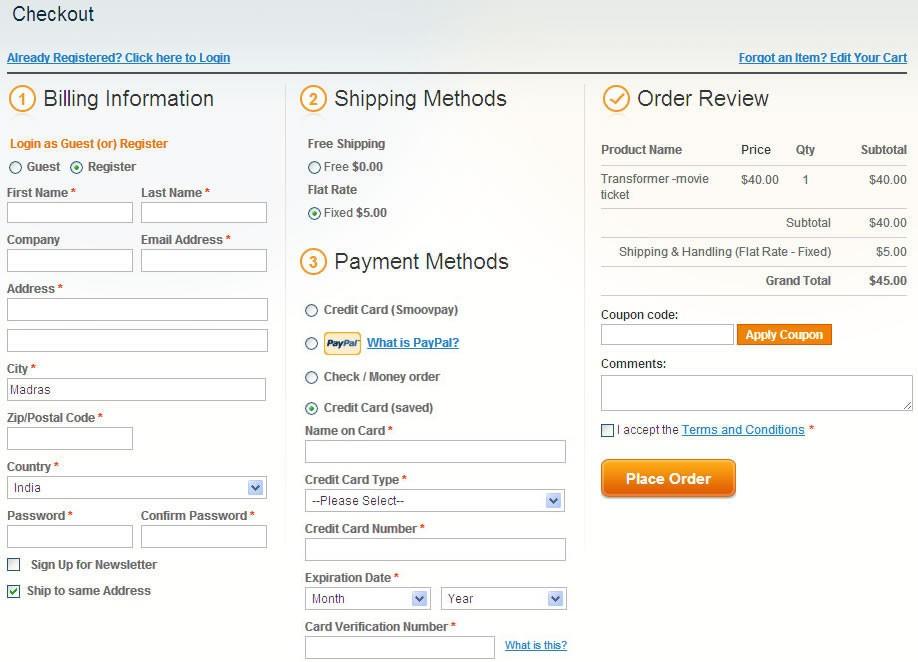
A one page Magneto checkout extension would look something like this and would make sure the conversion funnel is focused on completing the checkout process rather than getting too much involved and tangled:

Compacting a multi-page checkout to a one-page checkout structure in Magento

3. Extra clicks and extra steps would cost you conversions

Despite default checkout in Magento is undoubtedly efficient, one cannot afford to loose the customers just because of some extra clicks and steps required. If you do not use a compact or one-page checkout, there are certain chances on your Magento store that you might loose the customers because of extra clicks they have to do.

Let’s take an example of checkout queue in a supermarket. What do you do there? If you find a queue longer than expected, you start looking for the other queue which is comparatively shorter. Shame goes to a Magento checkout. If a customer finds your checkout process lengthy, he starts looking for an alternative and he gets that too. None, of the eCommerce sites, would waste the chance to steal your customers. If you cannot provide a suitable checkout experience, somebody else will.

4. Checkout speed is critical

In default checkout extension, the users are asked to fill so much of details that are not even required necessarily. For example, Fax number and telephone number need not be filled necessarily if mobile number is already provided. There many other fields in the default Magento checkout extension which can be omitted in the custom checkout extensions, and would still complete the process successfully. Making the checkout process as smooth as possible would make sure the conversion funnel filters all the potential customers as customers.

Conclusion

When a customer starts checkout process in a one-page checkout extension, nothing distracts him on the page. These checkout extensions are developed keeping in mind the conversion funnel and information requirement for the website admin. The concept is, a simple and hassle-free checkout process can provide you better conversions and competitive advantages against those sites which are still stuck with the generic checkout process. If you are looking for a such Magento checkout extension for your site, Knowband can help you with its one-page checkout-Magento extension.

Liked This? You’ll Like These Too

Decoding the SEO settings of Magento 2 platform

Magento 2 platform is the recent upgrade which is dedicated for Magento users around the world. This eCommerce platform is equipped with multiple features and functionalities that are aimed at simplifying the online shopping experience. For the growth and online popularity of your Magento 2 site, this platform consists of various SEO settings that can handle a wide range of functions.

In this blog, we are taking a quick tour around the various SEO settings that are a part of this featured loaded Magento 2 platform. If you want to optimize the performance of your Magento site, here are the various SEO features that need to be considered for better online search engine rankings.

Meta Data

Apart from the standard default titles and meta descriptions that can be set on the individual basis for a store through HTML Head fields, there is one more addition in this latest Magento 2 upgrade. It consists of Product Fields Auto-Generation feature that allows establishing a pattern for titles and meta descriptions for all the products on a Magento 2 site automatically. However, this new feature does not contain the facility to customize auto generation per products groups for any business requirements.

Canonicals

While applying canonical tags on category pages under SEO settings in Magento 2 platform, it needs to be understood that the canonical tags pointing to the main category URL are also present for sorting and filtering pages with parameters. This may not be a great way to handle partially duplicate content but it is still better than having numerous URLs with parameters that are indexed by Google.

XML sitemap

Magento 2 update consists of a feature that allows automatic inclusion of images to your sitemap for improved Google rankings of images. This feature is an extra addition besides the earlier SEO features of crawl delay and update frequency. Besides this, the eCommerce platform provides site owners an option that enables them to add XML sitemap URL into the robots.txt file.

Robots.txt

With this latest Magento upgrade, it is easy to edit your robots.txt file from the admin grid. Unlike the previous Magento platform, it does not require any FTP or other formalities for implementing changes in the robots.txt file. You need to further utilize the services of Google Console for having a clear insight into the performance of directives present in a file work.

Rich Snippets for products

This latest Magento 2 platform consists of microdata facility for product pages by default. It does not contain any option to perform editing through the admin panel which is actually not required. With this markup, you can achieve rich snippets on Google search results pages. However, in the case of adding any organization, breadcrumbs or another markup, the site owners need to install feature driven Magento 2 extensions on their site.

Easy integration of Google Analytics and Google Adwords tools

Integrating any site analytics, customer tracking and heatmap extension like Google Analytics along with keyword planner tools like Google Adwords is a cakewalk exercise for latest Magento 2 platform. It consists of special fields that allow site owners to insert the tracking codes without performing any changes in the templates.

This Magento 2 upgrade possesses many improved SEO functionalities for Magento site owners. For fulfilling any other specific SEO features, you can add any desired eCommerce extensions on your site.

Final words

Magento 2 platform is the latest Magento upgrade that is impressive and powerful due to its exceptional features and functionalities. It is packed with numerous SEO features that can help in optimizing the online visibility and search engine rankings on various search engines. In addition to these inbuilt SEO features, site owners can include any desired Magento 2 extensions through any eCommerce plugin development services company. For getting amazing eCommerce extensions at the most affordable price, site owners can also visit the Knowband store.

You Might Also Like:

How can One Page checkout improve your checkout process?

Implement the one page checkout functionality on your Magento store for higher conversions.

If you are looking to improve the sales of your eCommerce store, it is important to analyze the checkout process of your site. It is one of the important element that can lead you to conversion or shopping cart abandonments. The checkout process is observed as an important part of any eCommerce store that needs to be improved for achieving higher conversions.

If you are unable to make improvements on the checkout functionality, it is sure to make a significant impact on your conversion rates and sales. To reduce the increasing abandoned carts, numerous Magento site owners are putting their money behind the Magento One Page Checkout extension. Here are the various reasons that support the claim that a checkout extension can help in optimizing the sales and conversions for your online store.

Don’t miss out on giving error reporting information

Error reporting in a checkout process helps in quick completion of the placed order.

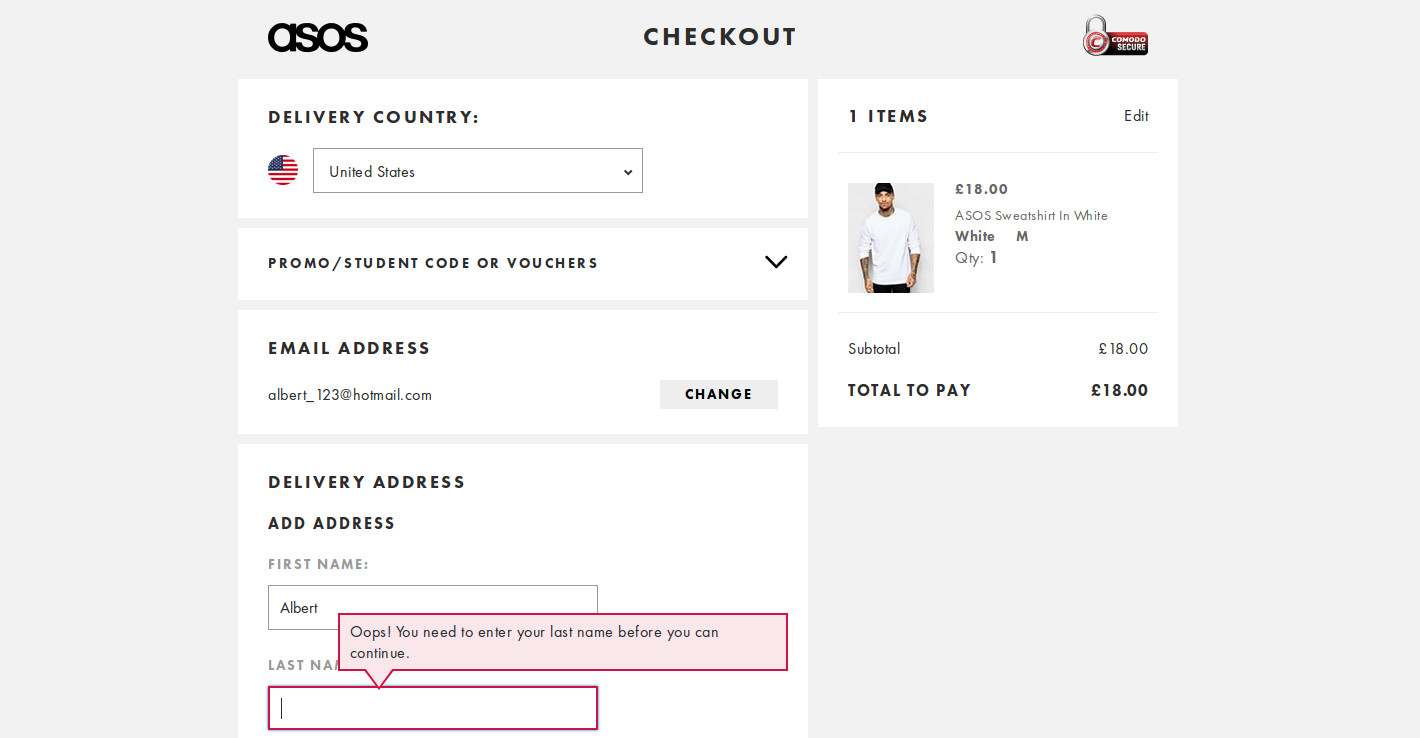
It would be a great idea to inform customers about the errors encountered by them on the checkout page itself. This error reporting will help in completing your checkout process in a timely manner, thereby reducing the chances of shopping cart abandonments. An ideal checkout extension should be capable of informing customers about their checkout related errors, so install the same on your store. For better understanding, look at the checkout page of this Asos site that provides timely error reporting information to its customers regarding the placed order. In this scenario, customers can eliminate the errors shown on the Asos site checkout page for improving product sales.

Check out the validity of your coupon codes

Provide the option of promo or coupon codes in your checkout process for higher conversions.

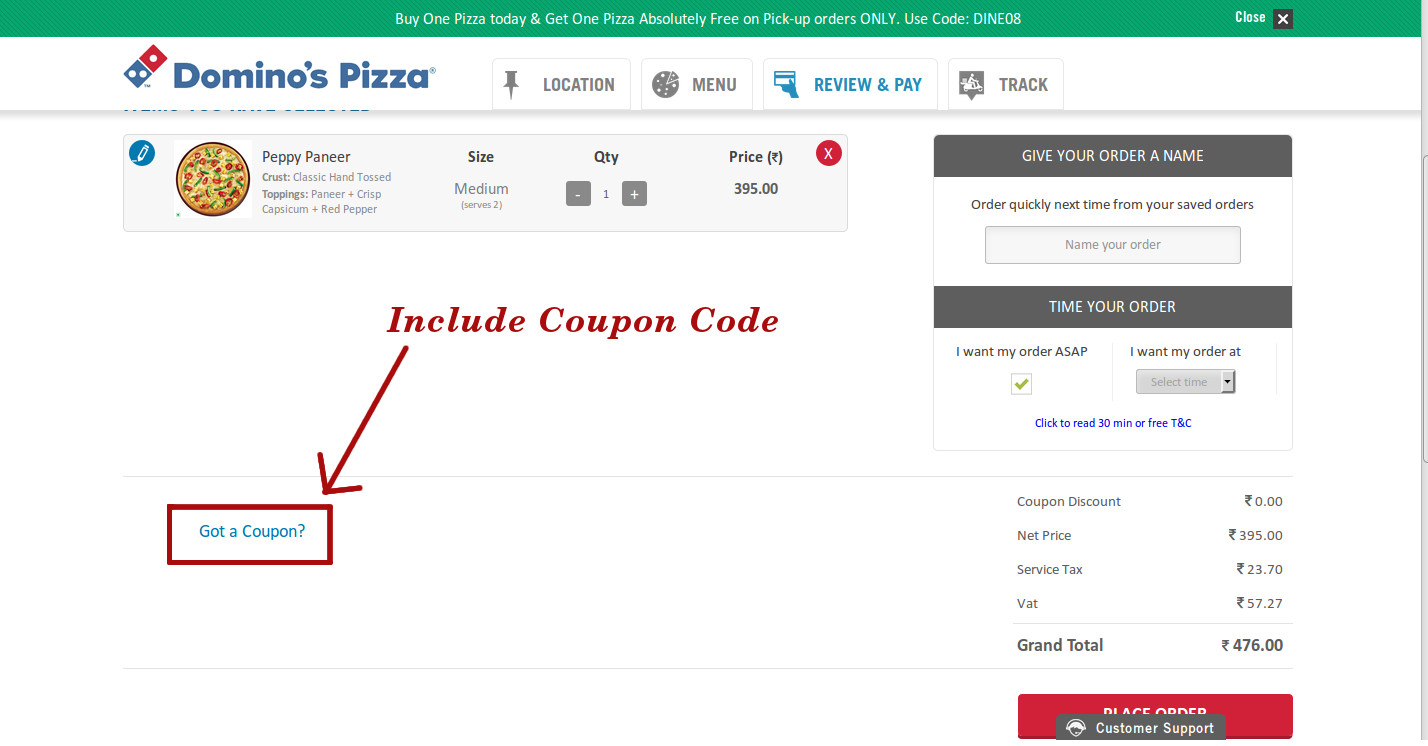
Tempting your customers with impressive coupon codes or promo codes are a great way to boost the sales of your online store. It is a common human behavior to look out for discount coupons while purchasing a product from an online store. The presence of exciting coupons or promo codes encourages the customer to complete an existing order. This strategy is best utilized by Domino’s, a global pizza chain that prompts its customer to use their coupon code to avail the pricing discounts on their placed pizza order as shown in the image below.

So, don’t forget to opt a checkout page extension that allows you to provide coupon codes to  your visiting customers on the site.

Offers alternative payment and shopping options

It is observed that presence of multiple payment and shipping options helps in improving the customer engagement on an online store. Don’t force your targeted customers to make an online purchase through your existing payment and shipping options only. This concern is best addressed by this feature packed Magento One Page Checkout from Knowband store that simplifies the online shopping experience for Magento sites. It offers freedom to customers to choose any of the available payment and shipping options for a smooth checkout experience. Multiple payment options not only optimizes the product sales and conversions but also helps in building the customer trust towards an online store.

Helps in minimizing the checkout formalities

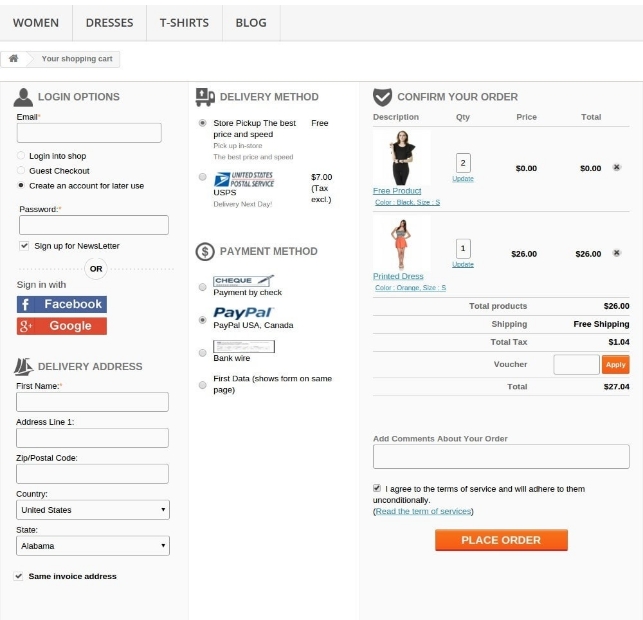
Customers making an online purchase are too busy which makes them opt for this online shopping mode instead of making door-to-door shopping. It is obvious that they would not want to waste their time on unnecessary checkout formalities but this is not the case in the real time scenario. Due to the complicated checkout formalities, the opportunity of making better sales through a simplified checkout process is lost eventually. According to a report of Baymard on the checkout usability, “An average site can increase its conversion rates by 35.26% through the help of a simple checkout process”. It is important to restrict your checkout formalities to a single page only for grabbing maximum customer attention and sales. If you want to experience how a one page checkout formality can help your online store, you need to take a quick look at this image shown below:

A single page checkout process can help in optimizing the sales and conversions of an online store.

Closing tips

There is not a single online store that can boast of having improved sales and conversions without the presence of a simple checkout process. It is an important constituent of any eCommerce store that can easily win sales and customers at the first time only. Don’t hesitate to implement quick changes in your checkout process if it can help you earn some more customers and conversions. The success of your eCommerce store lies in keeping your checkout process flexible and customer friendly.
You Might Also Like:

How does partnership of Magento Commerce with Acquia a real game changer?

Yesterday, 2nd November, 2016 was a big day for eCommerce site owners as Magento Commerce and Acquia has announced their partnership to offer a rich digital experience to customers. This integration is a big news for Magento site owners as it enables them to control the customer journey by providing personalized content-rich experiences.This collaboration will help eCommerce store owners to avail the best-in-class content management and personalization services along with the diverse Magento eCommerce functionalities. The importance of personalization in eCommerce can be understood from the statement of Tom Erickson, CEO of Acquia as

“Commerce as we know it has changed, and the imperative has emerged for brands and merchants to deliver powerful, personalized experiences”. He further stated that “Acquia and Magento combine the best attributes of open source development — agility, speed, innovation and security. Together, we’re putting the power back in the hands of merchants and brands to allow them to control every pixel of the experience throughout the customer journey.”

Impact of this business collaboration on B2B and B2C merchants

The coming together of Magento and Acquia is one of the good things that has happened in the eCommerce industry in the recent times. Take a quick look below to understand how it can be of great help in the present eCommerce scenario.

Offers wide scale personalization-

This partnership has helped in providing context based real time experiences to customers irrespective of the device or channel used by them.

Improves decision making process-

With this collaboration, it is now easy to implement and manage the content-rich eCommerce experiences for any store.

Enhanced authority to marketers-

Now, the marketing team can work more closely with the merchants to offer a detailed content-rich digital experiences and help in merchandising activities.

Great flexibility-

This business collaboration has offered a wide range of flexibility to numerous eCommerce sites to fulfill any market conditions and expectations.

To get a better insight about this partnership in terms of eCommerce, check out this statement of Mark Lavelle, CEO of Magento Commerce

“At the heart of this partnership is a shared open-source heritage and vision for delivering on next-generation commerce and customer experiences that are unprecedented for the industry.” He further elaborated that “The combined power of our respective technologies and our thriving global ecosystems will allow our customers to drive unbridled innovation, engage consumers like never before, and pave the way for the commerce experiences of tomorrow.”

For ensuring a better Magento eCommerce experience, Acquia and Magento have integrated the Drupal CMS with Acquia Lift solutions to deliver personalized eCommerce solutions to customers. It can help in bringing content, commerce, and context at one place for simplifying the customer journey. Some of the companies that are working to utilize this new business collaboration are MRM//McCann and Optaros, Third & Grove, Born Group, Inviqa, and HS2.

This collaboration was announced by Acquia Chief Product Officer, Chris Stone and CEO of Magento, Mark Lavelle at the Acquia Engage, which is an annual customer conference. For more details about this business collaboration, check out this link.

In case, you wish to add desired Magento extensions on your eCommerce site, you need to visit our Knowband store. The company also provides customized eCommerce plugin development services for Magento, OpenCart, and PrestaShop platforms.

How your current Magento checkout might destroy your online business?

Magento is a competent platform to manage even a huge eCommerce site. The kind of flexibility we get on this platform is impeccable. I personally see this eCommerce platform as a tool to help to launch a large scale eCommerce business in any online market. The e-commerce market is a massive arena of competition between the large number of sites that are built on several platforms like PrestaShop, OpenCart, Shopify, Drupal commerce and much more. The e-commerce market is a huge playground with several other players like you or even better than you. While surviving the competition from your rival sites, you cannot afford to lose this battle just because of a very small mistake. I am talking about the default Magento checkout process. It is a multi-step checkout process that takes multiple steps to finish a checkout process.The default Magento checkout is a competent option, but it lags in certain areas that might really mesh with your online business. To survive with your online business in the midst of a massively competitive environment, it is not wise to depend on the generic checkout process to make profits. You need to have a competitive advantage over all the players in your domain, and your domain says that you have to provide the maximum possible user engagement to impress a visitor for completing the checkout process. The need here is for a competent Magento checkout module that will not only help you survive the market but will also bring customers for you. If you keep on depending on the generic checkout processes, you might end up in a very messy condition with a breakout of shopping cart abandonments.

There was a time when only countable number of eCommerce sites were ruling the market. But, today no site can claim to have the customers for granted. Even the biggest players always keep researching about the new ways to lure the customers on their sites. Knowing this, if you still think you can depend on the default Magento checkout, then trust me! It is not a nice idea for the health of your online business.

Adopt a one-page checkout module to establish a competitive advantage

One page checkout is a way to shrink the multi pages checkouts into a simple page. Using a one-page checkout module for your Magento checkout process, you can effectively have a competitive advantage over those rival sites who are still stuck with the generic Magento checkout option.

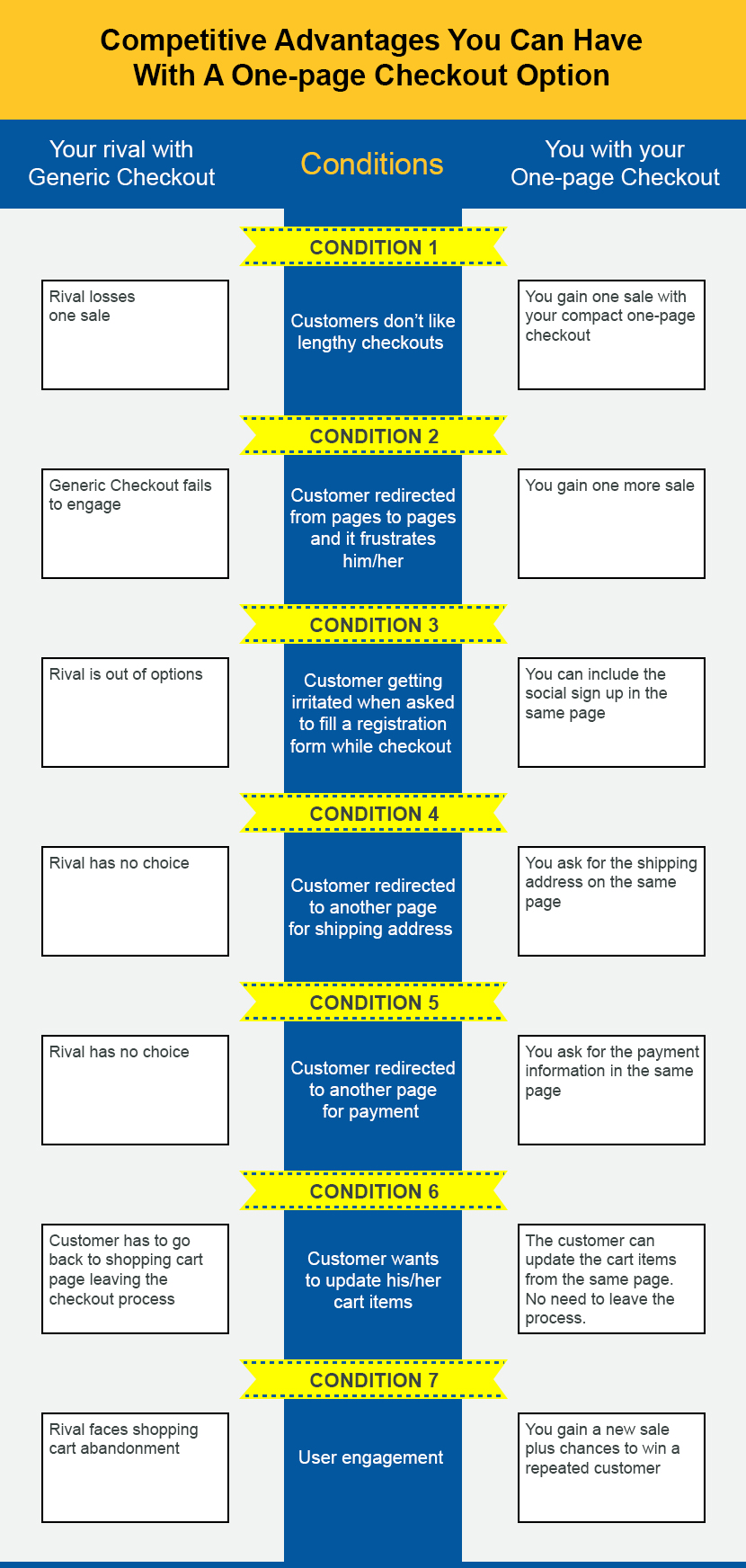
What are the competitive advantages you can have with a one-page checkout option?

It is not only about the providing a single page and saving the unnecessary redirections but is is about creating an engaging user experience that will save the frustrations of online shopping and encourage the user to come back again. Making a sale is one thing, but gaining a repeated customer is all you want today. It takes a lot of effort to fetch a customer to your and it takes much more to retain that customer on your site.

Here are some of the qualities I would hope to be consisted in a competent one page Magento checkout module:

1. Adopt a Magento checkout that would allow the customers to complete the whole checkout process on a single page- Every one-page checkout must include this trait to be called as a one-page checkout module.

2. Adopt a Magento checkout that would allow sign ups or sign in from the checkout page itself- Instead of redirecting the customer to a new page for sign up a one-page checkout module allows the features like social login to allow login from the same page.

3. Customers should be allowed to sign up using a social login option-

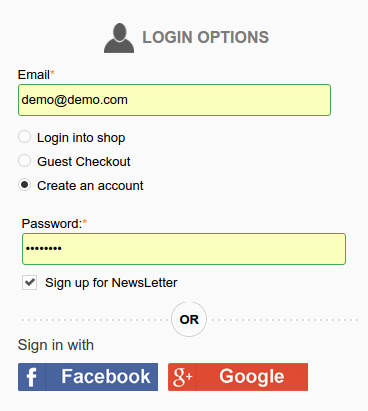
Social login can be integrated into the one-page checkout to propel the user experience.

Social login can improvise the conversion chances to the maximum because the effort for form filling while sign up is eliminated using it. A social login can be integrated into the Magento checkout process to look something like this:

4. Allow the customers to fill all the data from a single page-

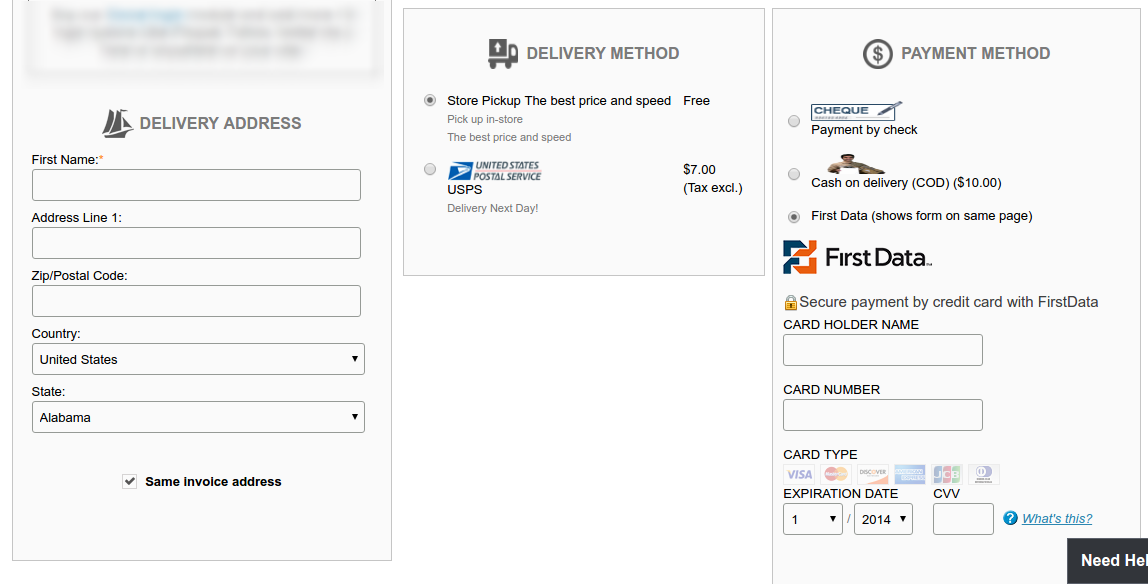
Compacting the multiple pages in one with reduced the effort from the customer.

A competent One page Magento checkout would allow the users to fill the details like Shipping address, delivery options, select payment options and confirm the order from the same page. Similar to this:

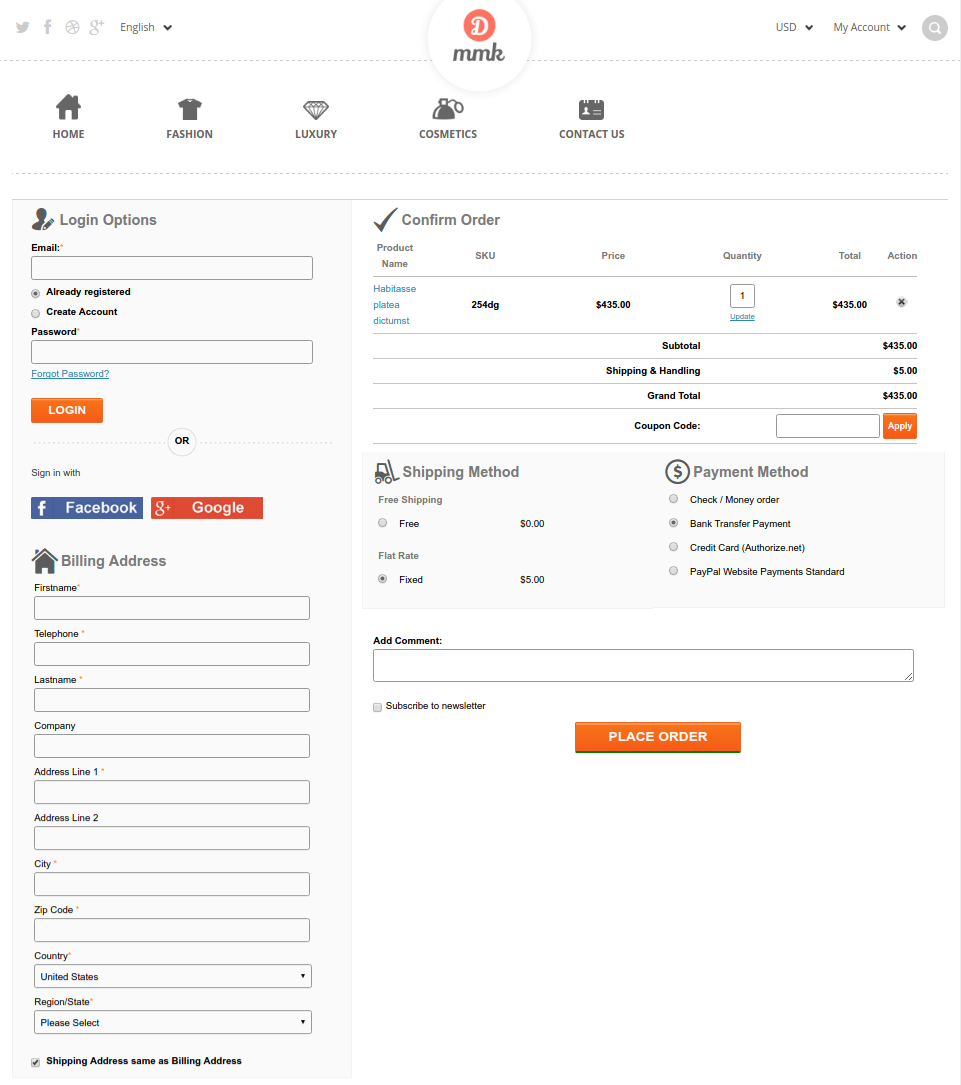
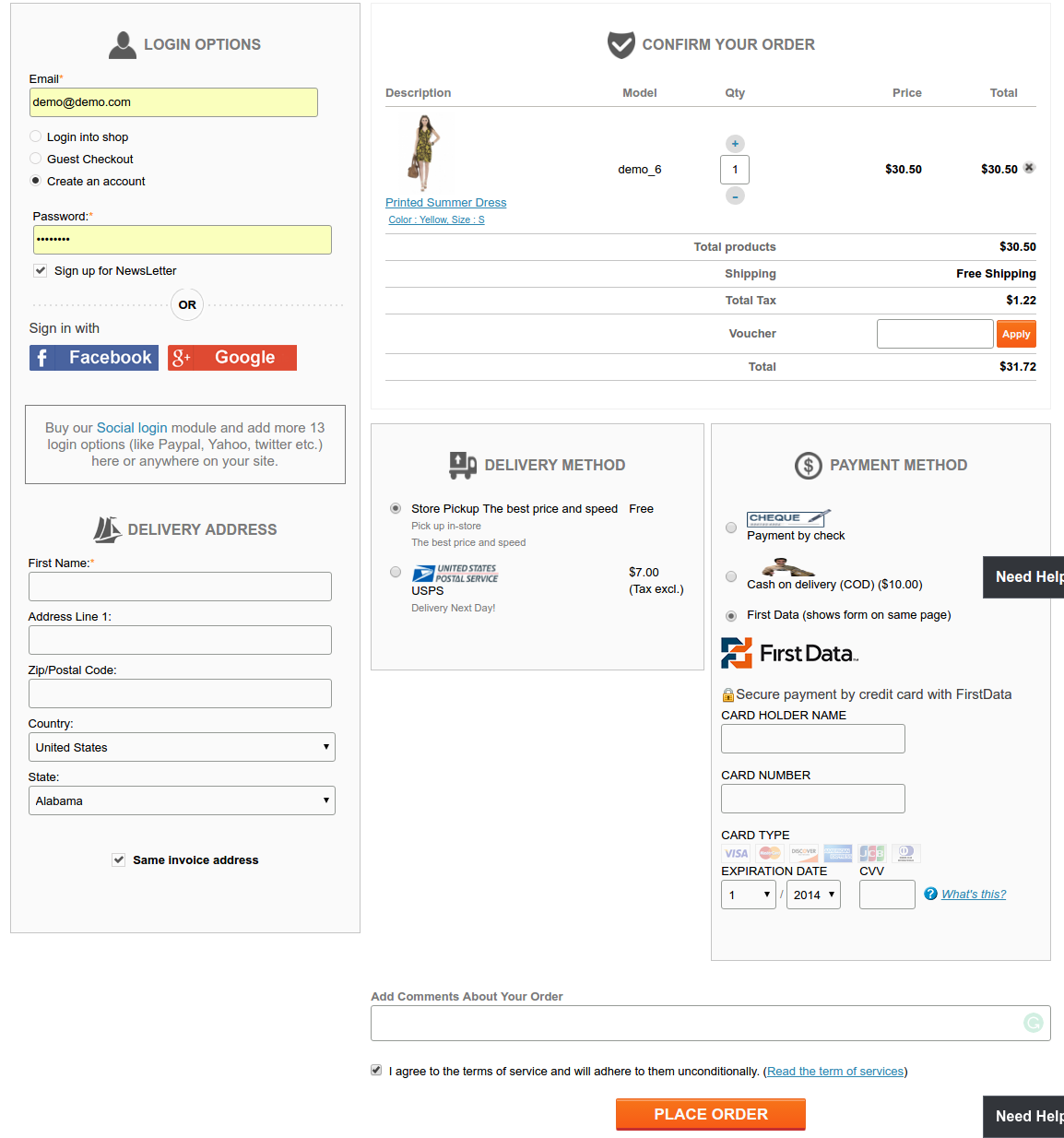
5. On the whole, a complete look for the one Page checkout on your Magento site would look something like this:

Complete view of an all in one Magneto Checkout page.

A clean and unambiguous checkout would surely improve the level of UX on your site. So, it is a must that you strictly check if your adopted one page Magento checkout is providing a neat and understandable interface too. I am not against the generic Magento checkout, in fact, Magento also has a quite competent one-page checkout in its default installation. I just want to share a view of how you should look for a one-page checkout and compare the ways in which a competent custom checkout module can improve the UX on your site.
You Might Also Like:

How can you make Blog Integration in Magento a hassle free task?

Blogging holds a key importance in the field of business promotion and marketing as they help in keeping customers engaged to a website. People who visit a particular website like to navigate across some of the common sections of a site like home page, category pages, About Us, blogs and other such areas. It is important to add new updated content from time to time on your site to build a loyal army of readers that are ready to engage with you on a professional business front.

When it comes to blogging, WordPress is one of the most popular CMS platform that was originally developed for the blogging purposes. It is much easier to add a blog, make changes and include special elements like images, links, text formatting on WordPress that makes it all the more important as a blogging environment. Earlier, Magento store owners were in grave trouble as they were unable to acquire the unmatched blogging features of WordPress platform on their Magento site. However, now everything is going to change with the emergence of this Magento Blog extension from Knowband store that allows site owners to integrate WordPress platform into their Magento site.

Before we go further and help you with the integration of WordPress platform into the Magento store, it is important to understand the benefits of this integration for your Magento site.

  • The integration helps in utilizing the features of WordPress platform and Magento functionalities in an eCommerce store.
  • It helps in improving the SEO performance of products on an eCommerce store.
  • This integration allows site owners to make use of the best features of any of the platforms such as static blocks, navigation menus and cart related data.
  • It helps in promoting the products from a Magento site by providing the direct links on the WordPress blogs.
  • The integration offers single login options for avoiding barriers in order completion and optimizing the Magento user experience for better sales.

Steps to be followed during the installation of this Magento blog extension

If you are thinking about adding a blog into your Magento site, I will recommend you to go for Magento Blog extension from Knowband store. This extension can make blog addition on a Magento site a seamless task. In case, you are experiencing any issue about how to utilize the functionalities of this Knowband extension, check out the simple installation steps mentioned below:

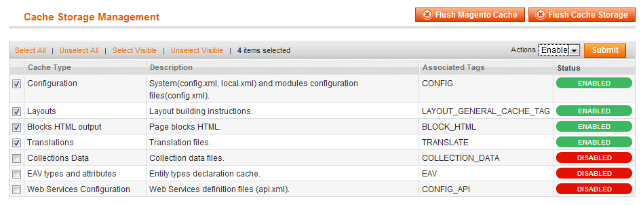
1. Ensure that the cache is disabled-

Check out the cache settings of Magento site for the better performance of this Knowband extension.

For a Magento store owner, it is important to disable the caching for improving the user experience of customers. If you are experiencing any problem in the performance of this Magento Blog extension, it is important to check out the cache settings on the Magento site is disabled. In case, the caching is not disabled on a Magento store, here are the simple steps that need to be performed for the same.

– The site admin first needs to log into the back end of the Magento store.
– Now, he/she should navigate the path Systems -> Cache Management.
– The admin needs to select all the cache and then click on the ‘disable’ option drop the drop down menu.
– Finally, it is time to save the changes done on the back end of the site.

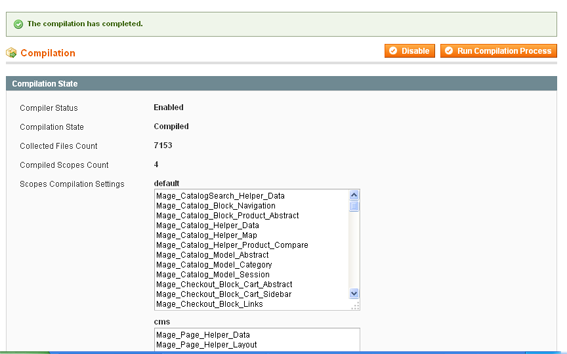
2. Check that the Compilation mode on the Magento back end is disabled-

Perform the changes in the compilation settings of the Magento site for ensuring a hassle free installation.

To ensure a flawless working of the Magento Blog extension, it is essential to have a clear view that the compilation mode on the site is disabled. For performing this task on a Magento site, here are the simple steps that needs to be followed.

– First login to the back end of your Magento site through the required credentials.
– Now, follow the path System -> Tools -> Compilation from the admin panel.
– Check that the compiler status is “Disabled” or not.
– If it is not disabled, click on the required “Disable” button located on the right hand side of the screen.

3. Other arbitrary requirements of the installation- Apart from the changes done in the back end of the Magento console, there are other things that can influence the performance of a Magento Blog extension on a site. Here are the certain things to be considered.

– Check all the required files of the extension are present.

– Provide FTP access to your Magento site.

– Although, we can use the Connect Manager tool for the installation of a Magento extension. I would recommend you to go for the manual installation in order to control the entire installation process.

– If the performance of the installed blog extension from Knowband store does not seem appropriate, it is time to take a quick look on the package.xml file in the app- code directory. This particular file is used by the Magento Connect to arrange the files at their proper place. After carefully reviewing the extension files on your Magento store, it is time to use the FTP client for bringing all the required files onto the store root of the Magento instance.

– For ensuring the proper addition of pages on the Magento admin console, ensure that you have clicked on “Flush Cache Storage”. It is also recommended to log in and log out of your site for the better installation and loading of the required extension files. In case, there is some problem that arises during the clearing of the cache through admin console, it is advised to take the help of FTP client .

– With these steps, the required Magento Blog extension will be installed in a seamless manner. Once installed, user can locate the folder named as “knowband_wordpress” and can rename it based on his/her choice.

Once, all these crucial steps are implemented without any problem, Magento site owners are now better prepared to integrate WordPress platform into their site for improved blogging experience. If you are eager to include blogs on your Magento site in a coherent manner, it is time to install this Magento Blog extension at the earnest level. Visit the Knowband site at www.knowband.com and equip yourself with the ability to integrate WordPress blogs on your Magento site.

What makes Magento as the best choice for eCommerce sites?

It is rightly said that “Winner easily takes the required customer attention and gets known to people in a short span of time” same is the case with this Magento platform. The success of an eCommerce site is dependent on the platform which is used for the back end. No doubt, there is a sudden influx of a wide range of eCommerce platforms but Magento has found a niche place for itself among those available options.

If you have been looking for an effective platform for the development of an eCommerce site, you don’t need to look beyond this Magento platform. It is bundled with a wide range of features and functionalities that makes Magento as the most ideal choice for eCommerce website development. Let us now discuss those features one by one as mentioned below:

Open Source platform

In this era of paid services, anything which is available for free comes as a wonderful option and Magento platform is one such wonderful example. Being an open source eCommerce platform, Magento can be easily installed and customized by anyone without any issue. As per a survey, around 80% of eCommerce websites are based on Magento platform and are generating big bucks in their individual business segment.

Optimized for better SEO results

In order to improve the search engine rankings of Magento site, you need to utilize the various built- in SEO tools of Magento platform. With the help of these tools and features, it would be easier for search engines to crawl website pages for better site visibility. Magento has various various SEO features like auto generated sitemaps, SEO friendly URLs, customized meta descriptions for products, categories and content pages.

Easy store management facility

Magento platform has made it much easier to manage an eCommerce store in a smooth manner due to various features. It has amazing product and category management features that helps in managing various products on a store in a quick manner. It also helps in maintaining the stock control by tracking all the available products on a Magento site. In case you are having a Magento Marketplace store, you can take the help of various Magento Marketplace extensions from Knowband such as Magento Marketplace Low Stock Notification Extension, Magento Google Analytic, Magento Marketplace Contact Admin Extension and others for a flawless store management facility.

Offers a quick checkout and payment gateway setup

In order to provide a wonderful shopping experience to its customers, Magento platform comes integrated with a wide range of payment options like SagePay, PayPal, Google Checkout and others for a quick checkout facility. Apart from this, Magento allows online shoppers to purchase multiple products simultaneously and make checkout quickly. For making further improvements in Magento checkout process, you can take the help of these Magento checkout extensions such as Magento One Page Checkout, Magento One Page Checkout Lite version and others.

Comes with analytics and reporting for better store performance

For optimizing the performance of a Magento site, this eCommerce platform comprises of various Magento Google analytics and reporting tools. With the help of these tools, it is now easier to study statistics, sales reports, business intelligence, product popularity and other business related information. Magento extensions such as Magento Report Extension, MockingFish- Heatmap and A/B Testing tool and others can provide a vast range of statistical data for improving store performance.

By analyzing all these crucial points, it could be easily understood that Magento is undoubtedly the king in the field of eCommerce website development due to exceptional features and Magento extensions. Choose this eCommerce platform and remain assured about a promising and successful online store in your particular business domain.

Liked This? You’ll Like These Too