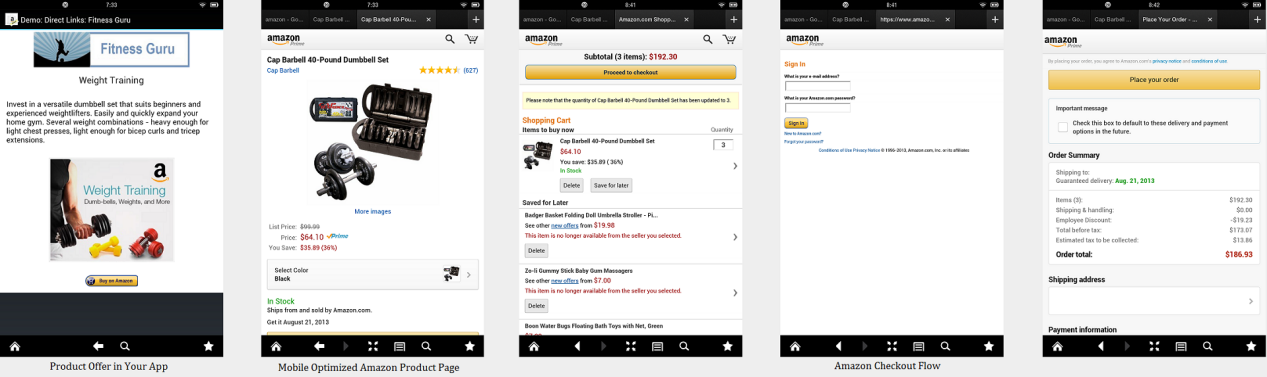
How to Optimize the Product Page Content for Better User Engagement?

The distribution of contents in a web store is directly responsible for visitor engagement on the website. This is one way of providing the customer a better understanding about the products and services that is being offered by the eCommerce store. This won’t be wrong to say that a poorly optimize product page may result in loss of interest of the customer to inquire more about the product and go for its purchase. Thus, it is highly recommended to have a properly structured web page as per the need and requirement of the customer.

The optimization of a product may include various features from the selection of color theme to presentation of the products. Therefore, special attention needs to be taken in this regards. Most of the time, there are certain aspects in the product page that skips the attention of the designers which may ultimately cost some revenue. Moreover, it may even create several communication gap between the seller and the customers. The gap can result in the loss of the customer of the web store. However, if the contents of the landing pages are structured wisely, then, it can surely lure the customers to the checkout page.

Listed below are some of the features that should be included in the product page to optimize it to a very large extent.

1.  Inclusion of review and ratings

The customers wouldn’t want to bind themselves to make purchase if they are sure about the quality. Mostly the online shoppers rely on the reviews and ratings of the product before making their purchase decision. Therefore, the product page must provide the customer’s testimonial and feedback.

2.  Easy navigation

The navigation along the product page must be made smooth and easy. The customer would like to browse the web store more, if they are given the liability of checking out the web store in a proper manner. The usage of Infinite scroll can help the customer to browse all the products in a single page. The customer don’t have to put efforts in surfing through new page for every time they want to look for more options. The infinite scroll saves both time and efforts for the customers. In the same manner the customers must also be provided with the option to return to the homepage or their cart with a single click. The infinite scroll proves to be an easy approach if the customer has already purchases sufficient products and want to leave the web store. The web store must try the infinite scroll module to prove assistance to the customers at every possible way.

4.  Products video

One of the missing feature that most of the product page face are the Product videos. Most of the time, the product page is provided with only the page of the product. It surely helps the customers in relating them with the product but doesn’t completely satisfy their minds. Therefore, a better approach would include incorporating the product video to the product page. It gives a better insight of the product to the customer’s and they can have clear thoughts about buying the product. The addition of the product Video on the product age can be done easily by using the Magento Product video module. The module automatically attaches the video of the products to their respective pages in easy steps. It helps in making better sales by providing better glimpse of the product to the customers. Hence, the growth in the number of effective conversions are increased significantly.

5.  Alluring CTAs

The process of intriguing the purchase decision of a the web store visitor is quite troublesome. Now, the seller must come to their aid by providing to help them make up their mind. One of the best approach to make it possible is by providing the customers with the proper call-to-action. Adding coupon codes on the websites can motivate them to complete the transaction. At the same time, the buttons such as ‘Buy Now’, ‘Add to Cart’, and other such trigger should be placed properly in such a way that should instantly grab the attention of the customer.

Over to You

The optimization of the product page is the immediate need of every web store. Most of the web store keep a timely update of their product page in order to meet the requirements of the customers. It has become a basic necessity of the customers to be provided with various features in order to have a better shopping experience. Thus, the web store must optimize their product page to boost their conversions.

For more Information About Magento Product Video Module visit here:-

Module Link: https://www.knowband.com/magento-product-video

User Manual Link: https://www.knowband.com/blog/user-manual/magento-user-manual/magento-product-video-extension/

3 Magento Extensions to acquire customer data

Acquiring customer data is important for any online business. It helps the brand to get better insights into their customers. The availability of more customer data helps online businesses optimize their email marketing campaigns and make a personal connect with their users. If you are a Magento store owner, read this article to know about the 3 Magento extensions that would help you acquire customer data.

1. Magento Social Loginizer

One of the best ways to collect user data is by providing the social login option. Magento Social loginizer extension focuses on simplifying the registration process of the user by offering 15 social login options. With the ease of registration, the possibility of acquiring customer details becomes very certain. The social login option proves to be effective for both the customer as well as the merchant. If, on one hand, it makes the sign-up process convenient for the customer, on the other hand, it helps e-retailers acquire more customer data and perform personalized email marketing.

2. Magento Spin and Win Pop up

Gathering customer data is not easy anymore. You need to play smart to persuade your visitors to enter their details. A popup like Spin and Win proves to be beneficial in such cases.

Magento Spin and Win popup extension provides a gamifying experience to your visitors by displaying a spin and win wheel. It asks the customer to spin the wheel and earn some amazing discounts and offers on your store. Upon spinning the wheel, users are asked to provide their details in order to claim the discount.

Customer engagement on an eCommerce store largely depends on the kind of experience users find on your store, and Magento Spin and Win popup extension makes sure that it keeps the customers engaged in your store.

 3. Magento Auto Subscribe

Magento Auto Subscribe extension adds a subscription form to your Magento store and helps the web store acquire the customer data. You can place the subscription form on various web pages. Moreover, it auto-subscribes a customer for your store’s newsletters when he or she registers on your store or check out. You can customize the subscription form as per your preference and design its look and feel.

Over to You

Acquiring customer data is not difficult if you follow the right tactics. Try out the above-suggested Magento extensions and start capturing more user data. Have some more extensions to add? Drop down in the comments below.

6 Reasons you need a Magento Mobile App for your Fashion Store

Andriod mobile application and iOS apps are one of the most anticipated advancements in the technology as well as in the eCommerce industry. Right from retail to travel, none of the industries have stayed away from the online shopping scenario. However, the fashion industry is one of the most active on the internet. In the US, approximately 96% of fashion brands now have an Instagram presence, tapping into our heightened engagement with imagery. Surprisingly, even today 60% of the online business worldwide don’t have an app to conduct their business on the mobile ecosystems. This implies that they are losing approximately 60% of their prospective customers who prefer shopping through their phones.

Magento offers an easy and handy way to upgrade your business unit in the form of Magento App Builder Extension. All the fashion store owner on Magento can now have their application in a few simple steps. Wonder why you require a mobile app when your website is working just fine for you? Here are some of the reasons that will make it obvious for you. Have a look.

1. Smooth performance

If you own a fashion store, then, you need to stay at an arms distance to your customers. In the fashion driven-world, the need and requirements of the style-customers are never ending. You just need to uplift their purchase intention. One of the ways to do so is to stay in touch with them through follow-ups and promotional messages, via email and SMS. Hence, they need a smooth performing device that can help them browse the store whenever they feel like. The Magento mobile app builder offers the much-needed seamless functionality that can compel them to stay at your store, thus, amplifying the chances of conversion.

2. Handles higher traffic

The fact that the shopping mobile application of the hand held devices is more engaging than the mobile responsive websites is the only reason for the inclination of the store owners towards it. In fact, the standalone software offers many other umpteen benefits. The Magento Andriod App builder is one tool that can engage more customers and have the capacity of handling more traffic than the mobile responsive websites. The mobile sites tend to load slowly and crash most of the time when the traffic is higher. This frustrates the prospective customers and may cost you some conversions. Thus, the powerful and fast Magento mobile app builder is one of the ways to retain your customers.

3. Personalized approach

The personalized approach of the mobile provides a better experience not just to the users, but to the store managers and owners as well. The Magento mobile app builder provides better control of the online business to the merchants. Keeping a track of the overall transactions and sales becomes easier with the mobile app. The application comes with a bundle of themes to choose from. You can design your store as per your requirement. The Magento mobile app will be compatible on multiple devices such as Android phones, tablets, and others. At the same time, the mobile app is multi-lingual. The users get the facility of social login and voice search. With the advanced features you can easily rule the mobile app.

4. Easy functionality for the online merchants

Along with the front-end features, Magento mobile app provides full backend control to the store admin. The mobile app analytics is easy to understand. The owners need not have technical skills to track the data. A close study of the data can even give you an insight of the consumer behavior. The Magento mobile app can be installed and configured easily. It does not require manual synchronization with the Magento store. Moreover, it supports most of the Android versions.

5. Hassle-free shopping experience during sales season

One of the biggest challenges for the fashion store owners is to prepare for the holiday seasons of the year. This is the time of the year that decide the fate of your business for the entire year. While 64% of the online shoppers rely on the smartphones and mobile devices for shopping, the sale season is makes the mobile website more prone to slow load time, crash and other server related issues. Magento mobile app builder is an ice breaker in your current sales condition. Its quick and personalized shopping experience will help you retain the flocks of online shoppers even after the sales season.

6. Enhanced push notification

It is said that if you are sending follow-up emails and messages to your customers once in 90 days, then, you are losing 95% chances of their conversions. This makes the presence of push notification inevitable in the applications. The push notification of these stores can keep the shoppers notified about the deals, discounts, offers and flash sales offered by the site. Not just this, it can even help the online marketers in tapping the abandoned cart. You can offer special discounts and offers and send personalized messages for the particular products added in the cart.

Final say

The mobile app is not just a means to engage the users for a longer period of time, it definitely ensures transparency in your business model. Thus, it a means to build the trust with the customers. The smart and dedicated user-centric eCommerce tool is a perfect way to boost the business of the Magento fashion stores. check out the user manual for Magento mobile app builder and find the Magento mobilw app for your business model.

You Might Also Like:

4 Quickfire Addons to Improve your Business in a Magento Marketplace

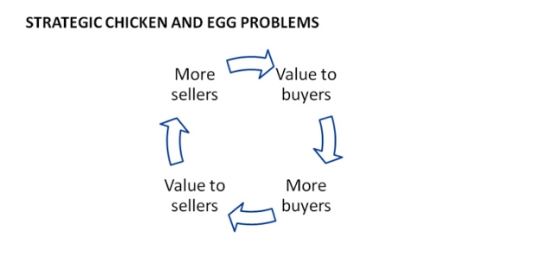
The chicken and egg problem is one of the most prominent problems of online business. The platform serves both sides of the market, that is, the supply side and the demand side. Satisfying both the aspects of the business scenario is a tricky affair, you need to take care of both the side in one go. This is when the chicken-and-egg problem comes into play. The development of marketplaces that have facilitated measures to deal with the issue.

What exactly is a marketplace?

The concept of a marketplace or a multi-vendor platform refers to a specific model that facilitates shopping from many different sources. The operator of the marketplace does not own any inventory. The aim of the business is to bring various sellers and buyers at one platform. They present the inventory of other sellers to a user and facilitate the transaction between the two. Magento is an ultimate example of an online marketplace.

Bringing the customers and sellers together on a single platform, the marketplace provides an efficient mechanism to manage the supply and demand problem. The operator of the marketplace acts as a trusted third party between the client and seller. This third party is responsible for shipping directly the product to the end customer. The entire business model of marketplaces is limited to commissions on sales.

The Magento Multi Vendor/Seller Marketplace module supports various small and medium eCommerce stores to extend their reach and cater to a larger target audience. With this Magento marketplace extension, the seller can directly connect with distinct buyers. Carving out a niche place for itself among various available Magento Marketplace (multi-vendor) extensions, the store owners can boost their sales to great extent.

While the multi-vendor Magento marketplace extension makes the transaction cinch, there are a lot of technicalities involved. In order to ease the task, there are a lot of addons available. Let us discuss various features and functionalities of Magento marketplace extension that can make the entire thing simpler for your raising the bar of your business standards.

1. Marketplace low stock notification addon

Marketplace low stock notification addon helps in keeping a track of the product quantity in the inventory. This Magento marketplace extension allows the seller to stay in line with efficient inventory management. This Magento marketplace extension sends an alert or notification every time a low quantity of products on the marketplace store is detected. Installing the Magento marketplace extension helps the seller get rid of the prominent issue of keeping a track on the inventory. Here are some of the feature this Magento markeplace plugin offers.
  • The Admin can decide the quantity below which the emails alert will be to send to sellers.
  • Cron can be scheduled to check product status.
  • The Magento marketplace module can work even without CRON by checking product quantity on success order page. The email template can be managed by the admin Admin can decide the id with which emails will be sent.
  • This Magento marketplace module is multi store compatible, compatible with all languages and SSL.

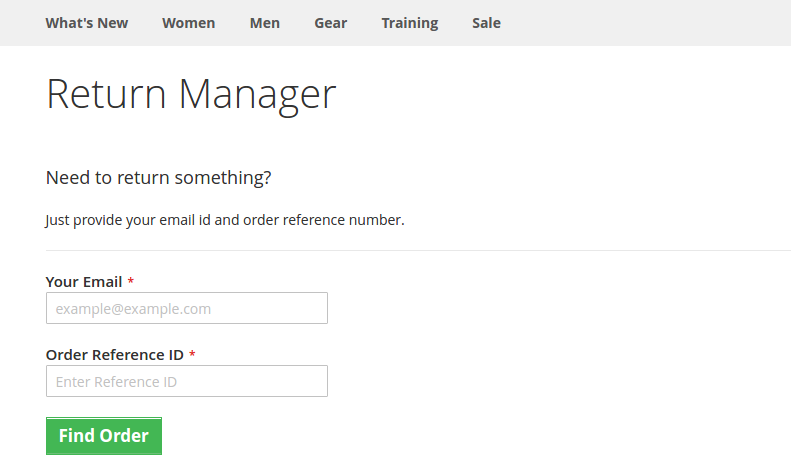
2. Return manager addon

80% of the total sale is expected to be returned. Thus, the return request management is one of the trickiest considerations for the sellers in the marketplace. The Magento Return Manager extension manages the refund and returns request of the customers. The seller gets an email notification every time such request is raised by the consumer.

Here are some of the features offered by the return manager extension.

  • The Magento return manager extension allows the customers to return the products directly to the seller.
  • The return manager extension keeps the seller aware about refund/return request through email notification.
  • The Magento return manager extension by Knowband allows the admin to control the number of days when the request can be raised from the date of purchase customers.
  • The return manager module offers the admin to see all refund requests from the customers to sellers.
  • The return manager module is multi store and SSL comaptible as well as compatible with all languages.

3. Magento Sellers Shipping Charge and Invoice addon

Proper billing with cost breakdown along with invoice is something that online shoppers just can’t compromise. Magento Sellers Shipping Charge and Invoice Addon take this problem off your shoulder. The extension enables the seller to generate the invoice of the order and add the shipping charges as well.

Features of the plugin are as follows:
  • It provides control for admin to set global shipping charges for all sellers.
  • It allows sellers to set their own shipping charges for their added products and provides per product Shipping charge.
  • Provides invoice generation feature for Sellers.
  • Admin can change error message, title and shipping method name from the backend.
  • Multi Store compatible

4. Magento Market Place Import/Export Addon

Keeping a check on the products being added and removed on the store is the biggest heck for sellers, regardless of the platform. While the aim of the marketplace to reach out to greater audience base, this is one issue that is inevitable. Magento Market Place Import/Export Addon enables sellers to import/export their products and its combinations from excel sheet.

Features offered by this Magento marketplace plugin is as follows:

  • Sellers can import/export their products and categories with the help of this Magento marketplace plugin.
  • The Magento marketplace module allows the admin to enable this import and export feature for a particular sellers only.
  • The Magento marketplace module offers various filter options while exporting products.
  • This Magento marketplace plugin by Knowband allows the sellers to perform bulk Add, Update and Delete operations.
  • The respective Magento marketplace plugin is multi-store compatible Compatible with Excel sheet
  • Thsi Magento markeplace module is easy to integrate with our Multi vendor marketplace module.

Final say

These are some of the addons that have made the life of the sellers of the Magento marketplace easier. It saves their time by allowing them to perform bulk operations with minimal effort. Optimize your marketplace with these handy tools and boost your sales.

Liked This? You’ll Like These Too:

3 marketplace add-ons to attract sellers on Magento Multi-Vendor Marketplace

The Magento Multi-Vendor Marketplace Extension is a solution that converts your Magento eCommerce store into an online multi-vendor marketplace site. Just like a physical Shopping mall or marketplace where you can invite sellers to open their shop and sell their products. In return to it, you have the option to take commission from the sellers as the rent for the online space you would provide them in your complex (marketplace site).

Marketplace ad-dons on the other hand, are those extensions which add new features and functionalities to the Magento marketplace extension. These features add new opportunities for the marketplace admin and sellers to manage various aspects of the whole marketplace. There are ad-dons for SEO improvement, Conversion Rate Optimization, Product Management, Helpdesk management and much more.

Here in this article, we are going to enlist 3 such marketplace ad-dons that can help you make a strong relationship with your sellers. These extensions provide some extended accessibility options that make the operation of the marketplace shop easier for the sellers. By using these ad-dons, the marketplace admin can create an improved UX for the sellers/merchants/vendors and encourage more sellers to come and register a shop account on the marketplace.

Now, if you ask, why it’s so important to keep the sellers happy, then just understand the Chicken and Egg problem of a Marketplace business, and you will understand.

1. The Marketplace Contact Admin ad-don

Any seller who wishes to register on a marketplace would first of all want to know if he is doing business with a responsible business on the other side. Not having a seller support system is a clear sign of chances for negligence in seller grievance handling by the marketplace admin. No seller would want to open a shop in a marketplace where they can’t even register their query or complaint if needed.

In this situation a marketplace site can always provide the desired support to its sellers with a seller support system on board. The Marketplace Contact Admin ad-don is one such seller support system that would be liked by your onboard sellers.

  • It allows a seller to create a query or complaint ticket with the marketplace admin right from the seller dashboard.

  • Allows admin to check the complaint and queries from all the sellers and reply back repetitively.

The seller or admin might not be logged for the whole time to instantly see the tickets and replies. That’s why, along with the messages on the marketplace interface, the ad-don also sends an email to the seller and admin whenever a new message is received.

This ad-don could be a great extension for the marketplace. With better user experience and seamless seller support, you will have a USP on your marketplace site that will attract more and more Merchants to do business with you.

2. The Marketplace Return Manager Ad-don

When we look at the eCommerce competition level in 2017, keeping the sales rate at desired level is a complex task. When everyone in eCommerce market is busy recovering their abandoned carts, new sales generation seems to be a mega task.

However, if you are not able to complete this mega task and keep your marketplace’s conversion rate optimal, you would hardly attract any new seller to your site. Moreover, there are chances that the onboard merchants would also pull their hands back.

In this situation, you need to keep your customers happy by providing every possible facility that can be imagined on an eCommerce store as of now. Happy customers mean more sales, more sales mean happy sellers.

The option for easy returns is one such facility which every eCommerce customer looks out for. You will hardly find an eCommerce customer making a purchase without reading the products return policy of the store. That’s where you need a return management ad-don on your marketplace.

  • With easy return facility through the ad-don, you can allow your customers to place a return, refund or replacement request directly to the concerned sellers.

  • The admin and sellers both get notified on a new return request. The sellers can process the return request and can approve/disapprove it based on the marketplace’s return policies.

Now based on your return policies you can use this ad-don to create an ultimate shopping experience on your marketplace. Of course, the customers will like the return and refund facility. Such facilities to the customers can help generate more sells and a good name for your website in the market.

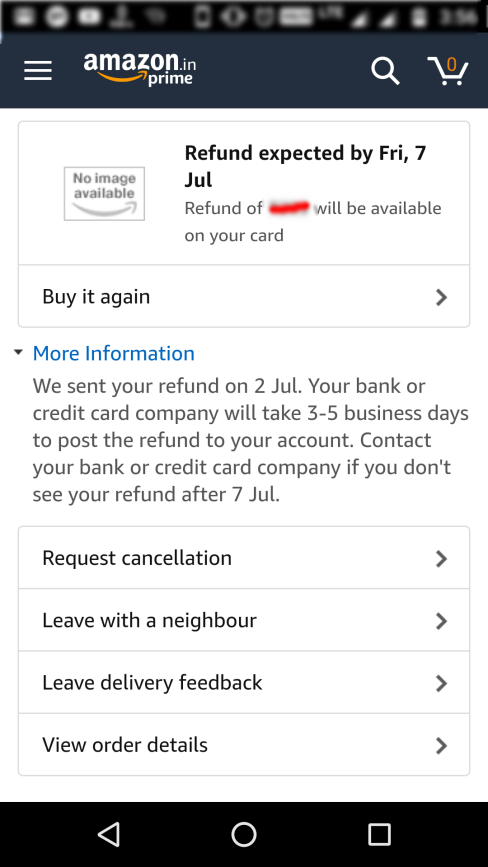
Who doesn’t like the speedy refund management of Amazon on failed for undelivered orders? Despite, I had an undelivered order experience due to courier boy’s mistake, I was happy to place a re-order with Amazon because they refunded me for the undelivered order so fast.

That’s how even a bad shopping experience cannot stop your customers to trust you if you have a recovery plan like easy refund and returns.

3. Marketplace Seller Vacation Mode Ad-don

Whether you have a run a marketplace site or an inventory based eCommerce store, customer experience is one such thing that will decide the fate of your business. But you cannot expect your website to provide even a decent customer experience when you cannot fulfill the orders on time.

On a marketplace, the failure to fulfill an order on time can happen due to many reasons:

  • Product was out of stock
  • Courier service’s mistake
  • Seller didn’t dispatch the order or time etc.

Whatever be the reason for the failure in product delivery or order fulfillment, the bad name is going to stick on your marketplace; not on the seller. So it’s your job to make sure that sellers are dispatching the orders on time.

Now, that’s a hectic task. Not always but sometimes there might come a situation for a seller when he/she might not be available to fulfill an order received for his product. The reason could be anything:

The seller might have gone on a holiday and he might not have anyone else deployed to manage the marketplace shop till then. The reasons for the holiday could be numerous- recreational or unavoidable circumstances.

In such situation, when the seller would not be available to fulfill the orders, it’s a sure thing that you will lose some happy customers due to this.

How to avoid this?

The Marketplace Seller Vacation Mode Ad-don is the answer. Behind explanation of all these situations, my main aim was to introduce this ad-don as a big problem solver, and it efficiently does that.

This ad-don allows a seller to turn on the vacation mode before going for any such holidays. In this situation:

  • All the product listing from the particular seller will get hidden from the customers. That is, the customers will not see the products of this seller on the marketplace until he is back from the holiday.
  • The seller can set an automatic timer to turn off the vacation mode, or can manually do it when he is back from the holiday.
  • The marketplace admin sees the list of all the sellers who have turned on their vacation mode.
  • The admin can choose to approve or disapprove a seller’s vacation mode request. That means, the sellers cannot turn on the vacation mode until the admin allows them.

So, admin is still the boss, sellers cannot just go on the vacation every now or then.

Over to you

So, these three features on any marketplace site are definitely the conversion booster and saver as well. The Magento Multi-Vendor Marketplace Extension is backed by many such ad-dons like these. You can have a free demo of both the Admin panel and Front-end interface. Have a tour of the extension as see how it can help you launch a marketplace business of your own.

Liked This? You’ll Like These Too:

How we eliminated 3 crucial design drawbacks of a One-Page Checkout in our extension?

Updated on 31-Jan-2018 

One page checkout has been in the debate for a very long time now. The whole idea of simplified checkout revolves around the optimizing the shopping experience of the store visitor. The shopping site will lead to conversions only when the customers are able to complete their transaction effortlessly.

How can one page checkout optimize your site?

The online shoppers prefer to make purchases only if the web store offers easy to approach and with minimal efforts. Here are some of the ways in which the this feature can optimize the shopping site and enhance the user experience.

  • Most of the e-marketers advocate the incorporation of a single-page checkout as it is an easier approach for the customers to complete their transactions. The online shoppers prefer going with the idea of single page checkout as it reduces the time consumed in reloading the web pages.
  • The idea of using super page checkout is more convincing than the traditional idea where the customers have to be jumped from page to page filling out all the details. The e-sellers can help the customer complete their transaction with minimal effort. Even though the number of fields remains almost the same, the shoppers can view the length of the form left to be filled. This provides them a psychological motivation to complete the transaction.

There are dozens of articles on the topics like “Should you choose a one-page checkout?” “Pros and Cons of One Page Checkout” and so one. Most of these articles effectively address the drawbacks, but it seems like we have been promoting these drawbacks like they are there forever and cannot be taken down anyhow.

Let’s face the truth, every new introduction has some cons for sure. Gradually, with the development and research, these cons fade away for sure.

In this blog, I am going to address 3 such cons of a one-page checkout which we eliminated from our Magento one page checkout extension and also the PrestaShop One page checkout module. Most of these cons were never there in our checkout extension, as we took care of them while in the development and testing phase itself.

One page checkout fixed drawbacks

1. So much of details on a single page? It will be congested

Most of the checkout pages, when introduced in the past, had this problem. It was really a massive task to adjust everything from a multi-page checkout on a single page.

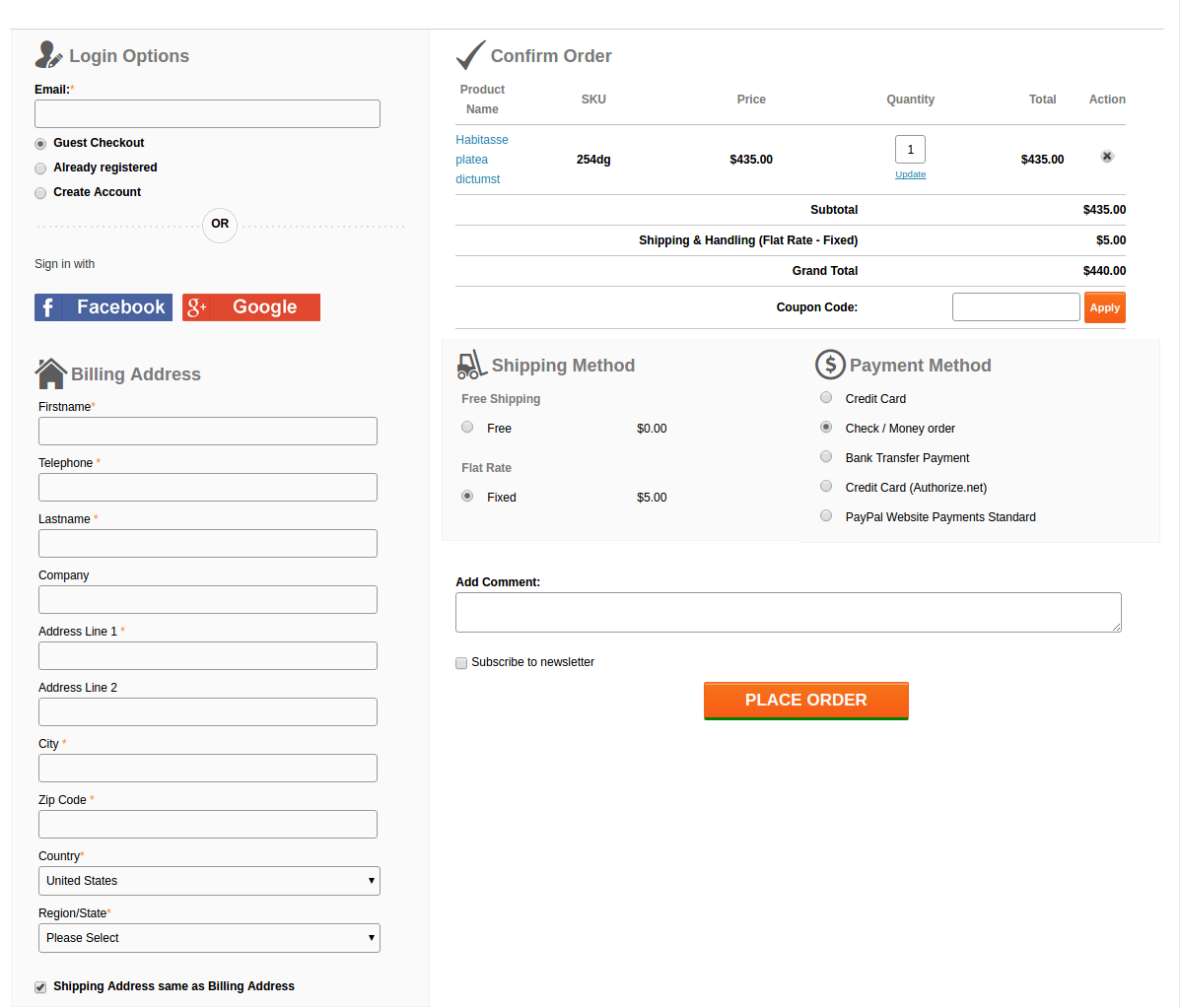
The most problematic challenge was to fit all those checkout elements on a single page and it should provide a full view of the whole checkout page as well. Moreover, all the checkout elements like login, delivery address form, billing address form, payment options, shipping options, and cart review should not overlap with each other, and neither they should overlap on themselves.  A lot of HTML, CSS, JavaScript, and Ajax were needed to be handled to keep the design all fine with the default as well as the third party Magento themes. But we intended to keep them as lesser as possible for faster page loading.

This is what we came up with:

A lot of HTML, CSS, JS, and Ajax were tweaked by our designers to fit all the elements neatly and clearly on a single page and also to keep the page loading time optimal. Moreover, thanks to our designers, after all these, there was sufficient space left to add the Social login option using Facebook and Google+ on our checkout page.

2. The form on the page are congested with no white-spaces and proper label usage

While designing the forms, the main aspects that we were looking for were:

  • Keeping the forms compact
  • All the necessary fields should be there
  • Fields should have proper white-spaces
  • Labels should not confuse the users
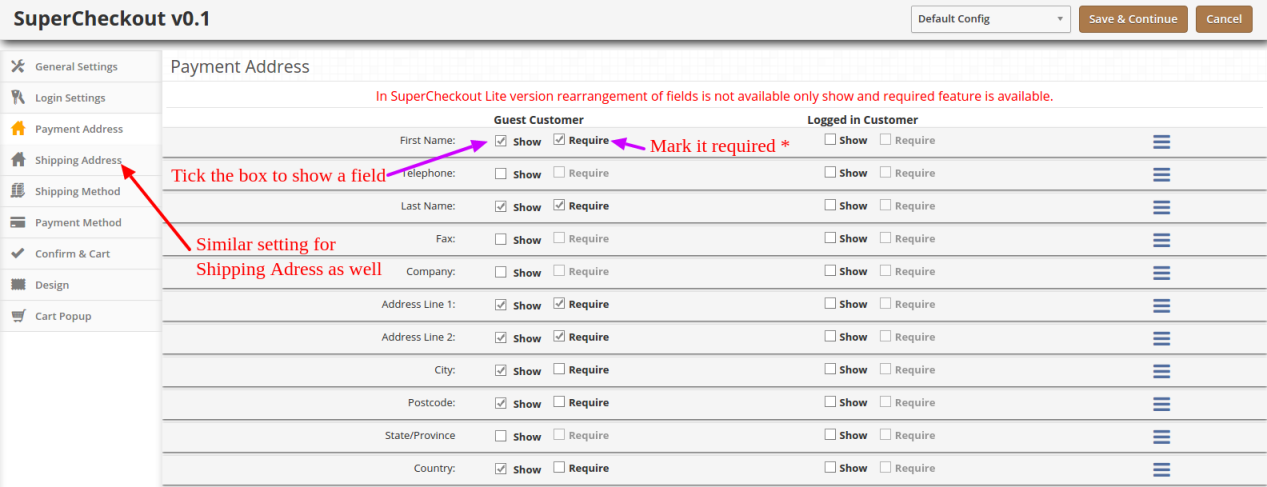
  • Admin should be able to choose which form field he wants to show on the page to customers.

Labels

Labels were coming out as a major concern here. If we would keep the labels by the side of the respective fields, the horizontal length of the form would give a very less space for the other sections on the page.

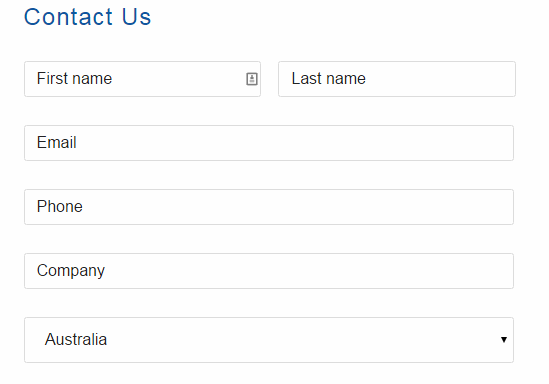
We also thought about a form design where we would skip the labels and use Placeholders in place of them. Something like this:

But, there was a problem in that. For considerably long forms like Billing and Address forms, if customer once filled the detail, and the later stage if he would want to re-check them, he would get confused about what actually are these details. Since the placeholder vanishes away as you type in, and there is no label as well, there always remains a confusion if my details are right or wrong.

We didn’t want your customers to get into such confusion and forget the main goal of making a purchase, that’s why we drop the idea. Otherwise, it could have saved a lot of space as well.

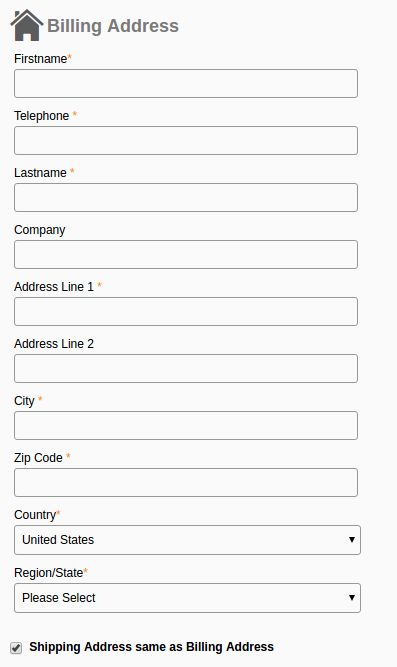
Finally, we decided to not to compromise with the user experience anyhow and we adopted the label placement above the fields as shown in this image:

It saved the horizontal space that we needed for other elements and also helped in one another feature which has been discussed below.

The necessary fields

After dealing with the label placement, the last thing in the forms that gave us a nightmare was to include every necessary field in the form. Problem is, the term necessary is quite relative here. A form field which is necessary for one store owner might be of no use to the other.

For example, the VAT number, and Company Name is a necessary field of a store owner who has a B2B selling business. All of your European business clients would also need this field for making the purchases on your store. On the other hand, a store owner who directly sells to the individual consumers would have no use of the fields like VAT Number and Company Name.

How we handled it?

It was a time to open our checkout extension a bit and give the store owners some easy yet crucial development access. We add a feature in our module, using which the admin can easily enable, disable, add, and delete a field from the checkout form. That too, without editing the code. All this can be done from the backend itself.

So, if any of the fields is not usable for a store owner, he can simply hide it with a simple click and save. No need to go through the complex Magento or PrestaShop codes to do this now.

3. Frequent page reload on cart update

Those multi-page checkouts have a dedicated page for editing the shopping carts. It was a challenge for us to include the shopping cart on the checkout page. Customers would frequently update the cart by increasing or decreasing the product counts, removing a product from the cart and so one.

All these requests required a page reload to update all the checkout details and information according to the latest cart status. If a product has been removed from the cart, we needed to update the total cost, cart product quantity, shipping methods and so on with it.

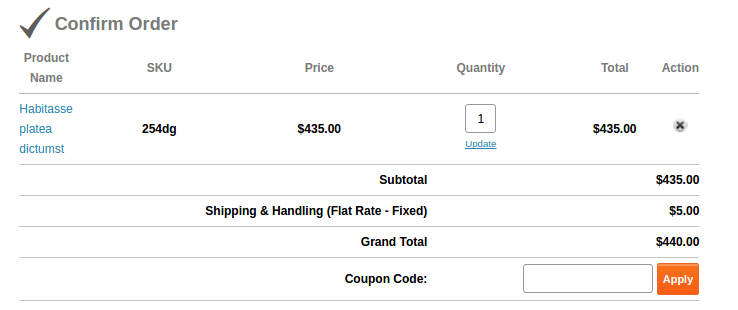
It would have become so irritating for the customers if the checkout page would reload every now and then. This challenge is faced by every one-page checkout development. However, we managed to fix it with the Ajax based shopping cart and form update request.

Now, with Ajax shopping cart and updates, if a customer changes anything in the cart, all the dependent details would get automatically updated without reloading the whole checkout page. Even the customer can apply a coupon code to the cart and page would validate the coupon without being reloaded.

This is how we solved these issues in our checkout extension. You can have a free demo to experience all these features of the extension. Free Demo one page checkout Magento and PrestaShop and OpenCart.

This functionality can be added to a Prestashop site with the help of Prestashop one page super checkout addon. The same extensions are available for Magento, Opencart and other eCommerce platforms as well. Whether you go for the Prestashop addon, Magento extension or OpenCart plugin, it enables the customers to complete their transaction and make the product purchase on the same page. It is one of the best features for reducing the exit rate at the checkout page. The customers are annoyed if they are redirected to lengthy checkout process in order to complete the purchasing. Thus, one-page checkout makes sure that the customers can complete the purchase by filing up all the necessary details in one single page and provides the customers with an easy approach to complete the purchase.

You Might Also Like:

Best 20 free resources to get support for Magento

According to a data from BuiltWith, there are currently 250,642 live Magento sites worldwide and this count is still increasing day by day. So many eCommerce stores on Magento means so many problems for each of them to deal with. Naturally, website owners can face problems while using any eCommerce platform.

Fortunately, Magento does not leave it’s users in disguise and has various resources to provide the help. It gives me a great pleasure to compile a list of all the useful resources that you can leverage to keep running with the Magento eCommerce platform.

Where can you find the support about Magento issues?

In order to get a help/assistance/support for solving the different issues that you may face while running your business on this great platform, you can primarily latch on four categories of resources:

  • Magento Related Forums
  • Magento Related Blogs
  • Magento Related Social Groups
  • Certified Magento developers

Magento has one of the biggest communities

Magento is used by the website owners from different countries in the world. It has reached to almost every party you can imagine . Especially it is so popular in the countries like United States, Canada, United Kingdom, Germany, France, Italy, India, and Netherlands etc.

When this platform has users from every corner of the globe, it is more likely to possible that links given in this article would belong to different languages and region. It’s perfectly fine, as you have translators that can help in understanding and communicate with them.

How would this list help the developers?

Resources compiled in this list will not only help the website owners to get the support for their Magento stores but would also help the developers to generate leads to make new customers. You might find customers for your Magento Extensions, themes, and custom Magento development.

Magento Related forums

Here is the list of top Magento forums that you can visit to find a support. URLs for all the mentioned forums will be given in the list. You can copy and paste these URLs into your browser and visit them.

1. Official Magento Forum

The official Magento forum has currently 245797 members and more than 63,000 live posts. Before going anywhere, it is the best place to find the support and solution to your Magento related issues. Here you can post your issues, browse the threads of already created issues, Stay updated with latest Magento news, and much more.

Just don’t forget to stay abide the forum rules and regulations while posting anything over there.

Link to Forum: www.community.magento.com

2. Expert Magento Forum

Expert Magento Forum is the most popular resources after the official forum to get support for Magento related issues. Not just issues, you can find the news updates, Magento job updates, and freelance projects, etc.

Currently, there are 10,790 members with 7,529 threads and 25,406 active posts.

Link to Forum: www.magentoexpertforum.com

3. Magento Stack Exchange Forum

Magento Stack Exchange is a special version of the popular forum “Stack Exchange” forum. It is a question and answer platform where users can get the information from very basics to advanced level topics and issues.

The best place to find a support for any of your Magento related issues, even if you are a beginner. From Magento configuration to coding related issues, you can expect this platform to give you an answer to everything about Magento.

Link to Forum: www.magento.stackexchange.com

4. Magesolution Forum

Magentosolution community is incredibly active and the best place for Magento beginners as well as advanced programmers to get the support. Generally, the people behind this forum are the ones who reply to your queries. The moderators take pretty active part in the discussions too.

The forum claims to reply to your queries in less than 24 hours on the weekdays and less than 48 hours on the weekends. Moreover, they also post articles and blogs related to Magento which are also quite helpful.

Link to Forum: magesolution.com/support/forums/

5. Magento community Russian

This is the official Russian Magento forum which is one of the most popular international forums for Magento. The expert Russian developers are always active and ready to help the needy. Most of the times, I have found the solutions for my those Magento issues which were not there on the English version of the forum. So, it is a useful resource that you can bookmark.

You can easily understand the posts and thread on this forum by using translators.

Link to Forum: community.magento.com/t5/Russian/bd-p/russia

6. Magento community German

This official Magento forum is especially for the very active German Magento Community. You may also want to have a look at this forum to find solutions and resources.

Link to Forum: www.community.magento.com/t5/German/bd-p/germany

7. Go Mage Magento Forum

This is a quite young forum yet it has a decent population of Magento developers, users, and website owners. You can always check the useful resources provided here in the form of forum threads, blogs, and articles.

Link to Blog: www.magentoforum.com

8. Escola Magento Forum

This forum was created for sharing useful Magento related information and discussing on various issues and solutions. It also provides Magento tutorials, blogs, and articles. It can be a very useful resource for Magento developers.

Link to Forum: www.forum.escolamagento.com

9. Polish Magento Forum

This is a special forum for Polish Magento community. However, you can easily access the resources, tips, tricks, tutorials, issues, threads etc by just using a translator.

Obviously, you won’t want to loose a useful resource when language is no more a bar.

Link to forum: www.magentoforum.pl/

10. Magentovietnam Forum

This is a special forum for Vietnamese Magento community. However, it is easily accessible throughout. It is one of the most useful forums in my list here.

Just translate and see how useful it can be to your Magento development and Management related tasks.

Link to forum: www.magentovietnam.com

Magento Related Blogs

Forums are considerably the best way to get the support for all your Magento related issues and requirements. However, most of the people don’t know about all the useful forums they can leverage. As an alternative or the next level, Magento related blogs come quite handy and easily accessible.

Given below is the list of top 10 Magento related blogs that can be pretty helpful to you:

1. The home team (Knowband blog)

Knowband is primarily an eCommerce plugin and extension development company. Apart from Magento, here you can find useful blogs, tips, tricks, tutorials, and insights about PrestaShop, OpenCart and various eCommerce related topics. You can also find the detailed user manuals, and documentations about all the ecommerce plugins and extensions developed at Knowband.

Link to blog: www.knowband.com/blog/

2. Magento official blog

Magento has an official blog where you can find latest News, updates, articles released by the official Magento team. Here, you can also find various guest posts and case studies posted by the Several Magento experts, website owners, and developers.

Link to Blog: www.magento.com/blog

3. DLTR

What could be better than getting the tips and tricks from a certified and experienced Magento developer? DLTR is one such blog written by Damodar Bashyal a certified Magento developer. This blog is a very good repository of valuable contents that basically deals with technical stuff. It’s worth a look.

Link to Blog: www.dltr.org/blog

4. Inchoo

Inchoo is one of the most popular blogs for Magento. Here you can find the solutions to various real context issues related to Magento. From trending news to technical contents with usable codes, you can find a great help here.

Link to Blog: inchoo.net/blog/

5. Magetraining

Magetraining is basically a Magento training company for Merchants. Its blog is quite resourceful and you can find a lot of valuable information that can be applied in your Development and Magento operation related tasks.

Link to Blog: www.magetraining.com/uk/blog/

6. Aheadworks

Aheadworks blog not only publishes the Magento related contents but the latest news, updates, and article on various eCommerce related trends and developments. It is quite popular among the readers.

Link to Blog: blog.aheadworks.com

7. Magento Fox

This amazing blog provides a great compilation of Magento news, tips, tricks, and tutorials. You can also find Magento tutorial videos here.

Link to Blog: www.creare.co.uk/blog/magento

8. Amastyteam

Run by Magento developers this blog can be quite useful for referring to the useful Magento tips, tricks, articles, and tutorials. This is one of the pretty active blogs where they produce a lot of contents.

Link to Blog: www.blog.amasty.com

9. Magenticians

Run by expert Magento developers, writers, and guest post contributors this blog is a useful platform to get the resources and insight about Magento news, updates, development related contents, Magento SEO tips, etc.

Link to blog: magenticians.com

10. Fooman

Fooman has been publishing contents for a very long time now. Here you easily can find a good ultimate repository of useful Magento related blog posts and other articles. It’s full of informative contents about Magento 1 and Magento 2.

Link to Blog: www.store.fooman.co.nz/blog

Summary

The resources mentioned in this post can come pretty handy for most of your Magento related requirements. You can refer to these resources for getting a support on various aspects like:

  • Development related issues
  • Tips and tricks
  • News updates
  • Tutorials
  • Training
  • E-Commerce Insights
  • Magento SEO and much more.

Hopefully, this post will act as a directory to access the best support for Magento. Let me know in comments if you can name some more useful resources for the global audience. All suggestions are welcomed here.

In case you cannot find satisfying support from these resources, you are always welcomed to get in touch with us. Our certified Magento developers are also active in most of the forums and guest posting blogs. Feel free to contact us.

You Might Also Like:

How to Update Magento 2 to the latest version using Composer?

Magento 2 is the latest major release of the Magento eCommerce platform which is available in both the community and enterprise editions. Magento keeps releasing the updates to keep the platform secure and up-to-date with latest new requirements.

This article provides a complete guide for upgrading a Magento 2 store using the composer. Magento 2 with its command line interface saves a lot of time for the developers in module management, cache management, updates and lot more. That’s why we are going to use the Command Line Interface to update the Magento 2 here.

Why should you update your Magento 2 store?

Here are the following reasons for why you should update Magento 2:

  • For keeping your website secure with latest Security Patches
  • For getting new UI Updates For Functionality Improvement
  • For Bug Fixes For support of Latest Features
  • For Website Speed and Performance Improvement
  • For New Payment Methods Support For improved integration with 3 party Magento 2 extensions, Google Analytics, Shipping Methods, Payment Gateways etc.

Important Note:

You can use the Magento 2 Command Line Interface (CLI) upgrade only when you have installed your Magento 2 by using the Composer or the Zip file from the official Magento website. CLI upgrade won’t work if you have cloned your Magento 2 store from GIT repository.

Update Magento 2 using Composer

Follow these steps and commands to upgrade your Magento 2:

1. You will need the full file system access to do this upgrade. If you have the full file system ownership, then, first of all, connect to your web server via SSH.

2. Now login to your Magento 2 server using any SSH client. You can use the Putty SSH client here.

3. After establishing the SSH connection, Navigate to your Magento 2 root directory.

4. Now, run the following command:

composer require magento/product-community-edition 2.1.3 –no-update

NOTE: Here you can change the version number accordingly. For example, if you want to upgrade the Magento 2.0.x version, then change the edition accordingly.

5. Now, run this command:

composer update

NOTE: If you are prompted for authentication then you need to enter your magento.repo authentication keys after running the above command.

6. Now, run these three commands in the same order:

rm -rf var/di/* var/generation/* var/cache/* var/log/* var/page_cache/*

php bin/magento cache:clean

php bin/magento cache:flush

NOTE: If you are using the Magento file system Cache storage then go to the next step. Otherwise, if you are using other Cache storage like Memcached, Varnish, and Redis then you will need to clear the cache manually for them.

7. Now, Run the following commands:

php bin/magento setup:upgrade

php bin/magento setup:di:compile

php bin/magento indexer:reindex

8. Check the new version number using the following command:

php bin/magento –version

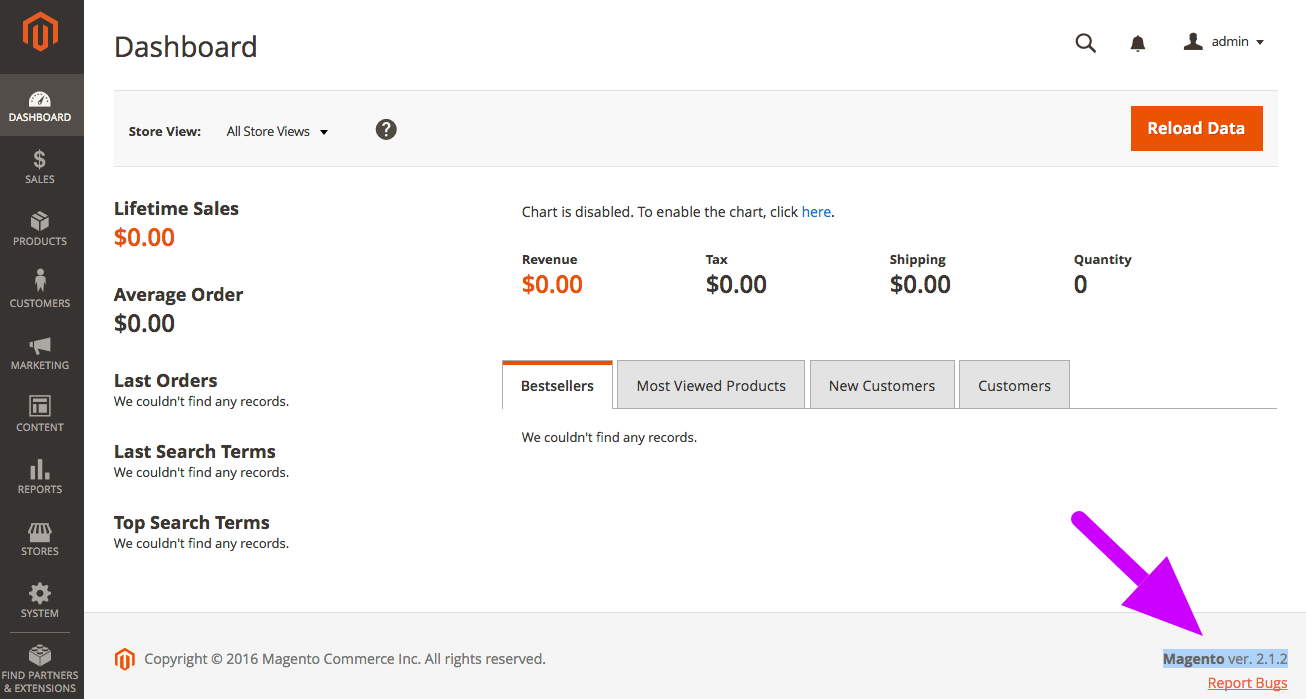
9. You can also verify the version number by going to your Magento 2 Admin Panel and refreshing the window. To check if you have successfully completed the update, see the Magento 2 version number at bottom right corner of the page. If there is any error, try clearing the cache again after resetting the file permission.

Finally

We have completed the Magento 2 update here. There are various other methods to update your Magento 2 store as well. However, this method is one of the quickest ones and saves a lot of time. Do let us know if you need any assistance in the update or searching for Magento and Magento 2 extensions. We have a pretty good collection of that.

You Might Also Like:

How to add Facebook Like and Twitter Follow button on your Magento Store?

The past decade has witnessed an immense growth in the social media popularity. The best thing happened when social media started helping businesses to establish a solid web presence, generate strong leads, and increase website traffic through an effective marketing strategy.

With social media today you can reach to your first-time visitors as well as the repeat customers in multiple ways and showcase the best your business has to offer. A well developed and organized social networking strategy is very crucial when you depend on social media for marketing, lead generation and much more.

Different forms of social media engagement provide multiple ways to improve the user experience and brand image of your business. Features like social login, Facebook login, click to tweet, share on Facebook, follow on Twitter are some examples of how social media can be integrated on your site itself.

Today we are going to discuss on such integration that you can do on your Magento store- how to add the Facebook’s “Like button” and Twitter’s “Follow button” on your Magento store? This addition will help you to improve the social media visibility of your Magento pages by allowing users to Like or Follow your brand.

Get Facebook Like button code

Let’s start with Facebook like button then we will add the Twitter “Follow” button. So, for adding the Facebook Like button first visit the Facebook’s developer site and navigate to the following URL.

https://developers.facebook.com/docs/plugins/like-button

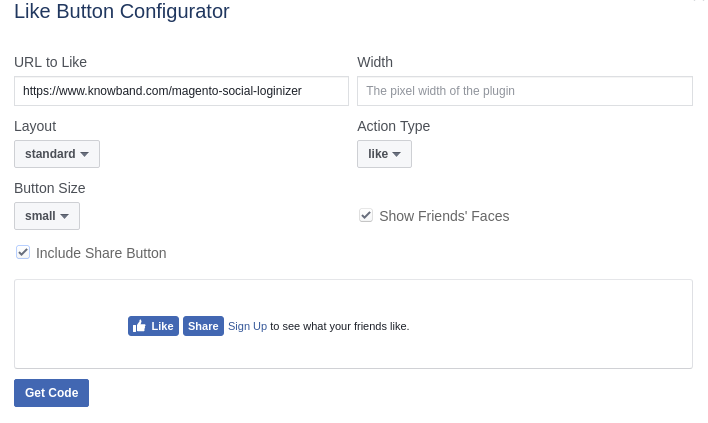
You will find the following form asking some details to be filled in.

  • Enter your website page URL or your Facebook social page’s URL in the “URL to Like Section”
  • Enter the width of the button that you wish.
  • Select the button layout and hit the Get Code button below.

If you also want to show the Facebook “Share” button by the side of Like button, you can check the check-box that says “include Share Button”.  Keep the code screen as it is, and proceed to the next step.

Get the Twitter Follow button code

To get the Twitter’s Share button code you need to first visit the following Twitter URL.

https://publish.twitter.com/

You will see the following page:

Here, enter your Twitter page URL and follow the on-screen instructions to get the Share button code.

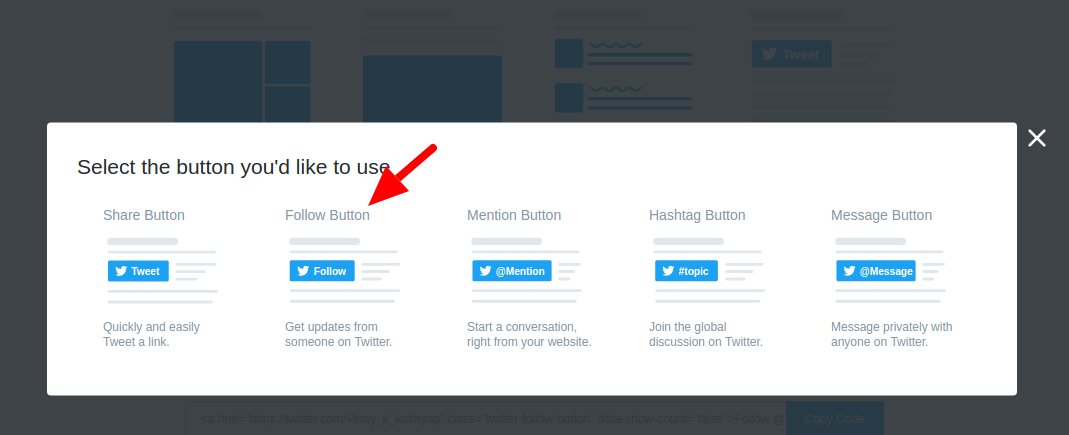
Scroll down to find the following interface and click as shown in the image below:

Next, you will see a pop-up. Here you need to click on the “Follow Button” option as shown in the image below:

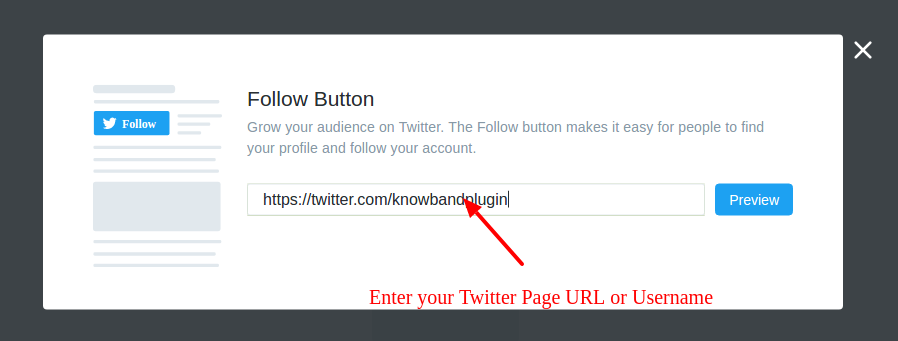
The next interface will ask you to enter either your Twitter Page URL or your Twitter Username. Enter anyone and click Preview. You will get the code.

Add social buttons to your Magento store

Now we have the Facebook Like button and Twitter Share button code. I am going to add these social buttons on my Magento Product Page. So I need to edit the following file from website’s FTP.

MAGENTO_ROOT/app/design/frontend/[DESIGN_PACKAGE]/[THEME]/template/catalog/product/view.phtml

Open the view.phtml file in any of the editors you like to use. I am using Netbeans. You can use any text editor like notepad, Notepad++, etc.

You have the option to add these social buttons on any position on the page. However, I have chosen the space below the Product title on the page.

So, to add the social buttons on the space below the Product name on your Magento page, search for the following code in the view.phtml file.

<div class="product-name">     
<span class="h1"><?php echo $_helper->productAttribute($_product, $_product->getName(), 'name') ?></span> 
</div> 
<div class="price-info">     
<?php echo $this->getPriceHtml($_product); ?>     
<?php echo $this->getChildHtml('bundle_prices') ?>     
<?php echo $this->getTierPriceHtml() ?> 
</div>

After this code, add a new <div> with class=”social-info”. Inside this new <div>, add the codes that you have got from Facebook and Twitter respectively. The code would look something like this:

<div class="product-name">

<span class="h1"><?php echo $_helper->productAttribute($_product, $_product->getName(), 'name') ?></span>

</div>

<div class="price-info">

<?php echo $this->getPriceHtml($_product); ?>

<?php echo $this->getChildHtml('bundle_prices') ?>

<?php echo $this->getTierPriceHtml() ?>

</div>

<!-- Social Buttons -->

<div class=”social-info”>

<!-- Code for Twitter Follow button -->

<a href="https://twitter.com/knowbandplugin" class="twitter-follow-button" data-show-count="false">Follow @knowbandplugin</a><script async src="//platform.twitter.com/widgets.js" charset="utf-8"></script>

<!-- Code for Facebook Like button -->

<div id="fb-root"></div>

<script>(function(d, s, id) {

var js, fjs = d.getElementsByTagName(s)[0];

if (d.getElementById(id)) return;

js = d.createElement(s); js.id = id;

js.src =

"//connect.facebook.net/en_GB/sdk.js#xfbml=1&version=v2.9";   fjs.parentNode.insertBefore(js, fjs); }(document, 'script', 'facebook-jssdk'));</script>

<div class="fb-like" data-href="https://www.facebook.com/Knowband/" data-layout="standard" data-action="like" data-size="small" data-show-faces="true" data-share="true"></div> </div>

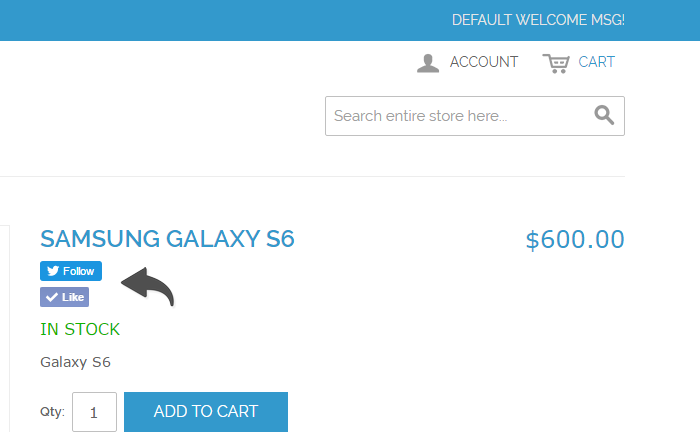
When done with the code addition, Save the file. Clear the Cache Magento cache and navigate to your product page to see if you are successful in adding the social buttons to your Magento store.   It would look something like this if added correctly:

To conclude

Social media has become an inseparable organ of the businesses thriving because of it. Whether it is through social login plugins, Social advertisement, or social sharing, social media is helping businesses in uncountable ways. Which kind of social media options do you use in your business? Do let us know in the comments.

Want to learn more? Read our posts on:

How to start a PrestaShop Twitter login on your PrestaShop store?

Setting up the Google Login for PrestaShop sites

You Might Also Like: