How to use Google Analytics for tracking Shopping cart abandonment?

Google Analytics is an ultimate solution by Google to help you on almost every issue of your store. From website traffic, Adwords, Search engine optimize to even conversion rate optimization, you can see the use of Google Analytics everywhere.

In this article, we will see how can you set a conversion funnel on Google Analytics. This will not only help you to know how and when visitors bounce from your store but also let you measure the rate of cart abandonment in a time period.

Funnel and the Goal

To track the shopping cart abandonment on your store, you will need to set up two reports for your store:

  • A Goal and
  • A funnel

Goal

The goal is typically an URL, page, time, or CTA where you want your customers to visit or click and you have a conversion objective with that goal.

For example, here our aim is to track the shopping cart abandonment so we will add the goal as the “Thank You page” or so-called “order confirmation page”. If the visitors reach to the thank you page, it means he/she has completed the purchase process and you have a successful conversion now. So the objective is see if a customer reaches to this page.

Funnel

A funnel is a path that the visitors take to reach the goal.

For example, not every visitor who exits your site without a purchase is a cart abandoner. Only those customers will be considered for shopping cart abandonment tracking who add a product to the cart and leave the site without checking out. So our funnel will include the pages like “cart page” and “checkout page”.

Google Analytics: Set up the Shopping cart funnel

Step 1: Sign in to your Google Analytics account.

Step 2: After logging in, click on the Admin tab

Step 3: Select your profile and Click on the Goals
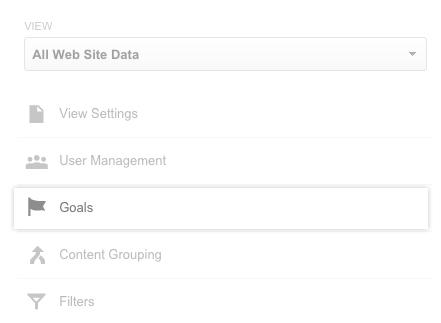
Step 4: Click on the +NEW GOAL button to set a new goal.
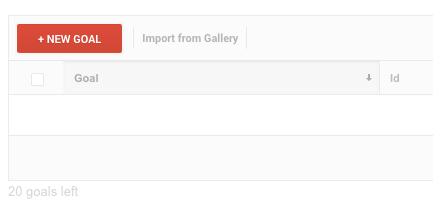
Step 5: In Goal Setup select Custom and click on the Continue button.

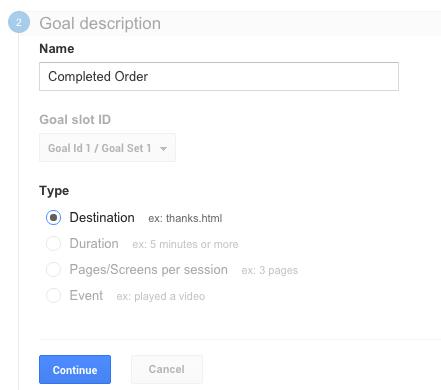
Step 6: On the next page, you will be asked to set up your Goal Description and Goal Type.

Here we are setting up the goal for our order success page, so I will Name it as “Completed Order”.

I will choose the Type as the “Destination” as it’s an URL that I want to add.

Click Continue after making the set up as explained.
Step 7: On next page, you will need to enter the URL of your destination. Since we want to add the order success page in the destination, we will enter its URL in the same.

Please note: If your thank you page’s URL is static and does not contains dynamic values, keep it as “Equals to”. While if your URL contains a dynamic value at the end, you should select “ Begins With” option.

Use destination Equals to if the URL is something like this:

“www.example.com/checkout/thankyou”

Use destination Begins With if URL is something like this:

“www.example.com/checkout/thankyouid=12234”  

Step 8: Now, turn on the Funnel option. Here you will need to enter all the URLs or steps that lead the customer to the Thank You page. Enter all the intermediate steps/URL starting from the Shopping cart till the thank you page.

Set the “Required” option for the first URL in the funnel as “NO”.

You would probably need to make a test purchase on your store and note down every important URL you want to track from in the process. For the time being, I am adding these two dummy URLs:

  • Cart page (URL-example.com/checkout/cart/)
  • Checkout page (URL-example.com/checkout/onepage/)
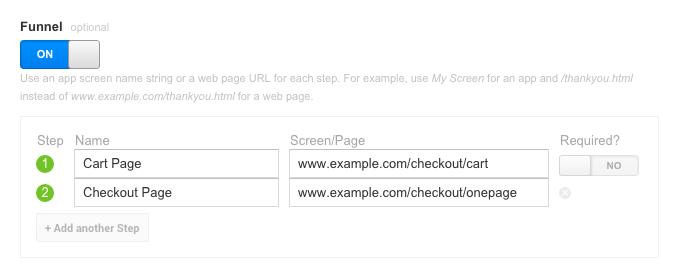
Step 9: After adding all the URLs in the funnel, click “Save” to save your new goal.

Step 10: Google Analytics will start collecting the data for your sale funnel over the next 24 hours.

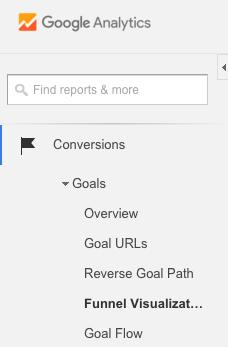
Step 11: To view your funnel report, go to “Conversions” tab and then Goals>>Funnel Visualization.
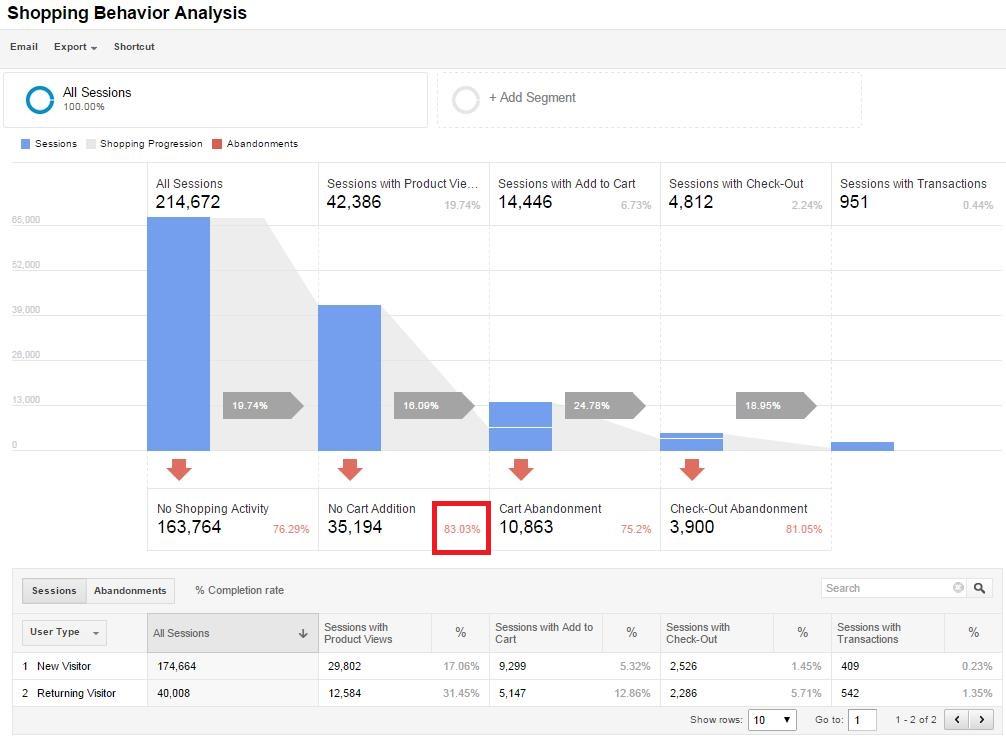
The funnel visualization will look something like this as per your funnel set up:
An easy solution

Google Analytics always has a treasure of information for your eCommerce store. However, it’s not that easy to setup the right tracking environments. Especially when you not proficient with it, it will give you a hard time even reading the reports. With experience, you will become a proficient user and Google Analytics will flow like butter for you.

Google analytics definitely makes the process of tracking and finding the bottlenecks of your conversion funnel effortless. However, the job is not done yet. Churning the data and converting these abandoners into paying customers is your responsibility?

How to convert the abandoned cart into leads?

According to experts and Analytic toolmakers, “If your shopping cart abandonment rate is X%, you are not actually losing X% of your sales”. If you make a closer analysis, you’ll see that actually only the 30%-40% of the abandoning customers come to your site with a buying intention. So, you can atleast achieve these many conversions if not 100%. Discussed below are some quick-fixes that can help you take care of the abandoned carts.

Find the exact pitfalls

The Google analytic provides a greater insight of the abandonment behavior of the store visitors. In addition to the numbers, you can figure out the exact place from where they left your site. Dig a bit deeper and see for the places of the site that are having higher bounce rates. Check the aspects at those areas that are not motivating the visitors to go further. Take the shoppers before they leave the door. Optimize the pain areas for your customers and make them stay for longer.

Go for retargeting

The retargeting methods like email marketing, push notification, SMSs and others might sound conventional, but is an effective way to bring the prospective customers back to the store. Sending personalized emails and regular follow-ups has helped a lot of stores achieve their target. Instead of sticking to the generic format of the email, send their personalized mails.

Offer reasons for conversion

See the products that the visitors have saved in their cart and offer them discounts on that particular products. Push notifications can really help if you are using eCommerce mobile apps. Notify them whenever their cart is on sale. This can give them compelling reasons to return to your store and place the orders.

Boost the session time

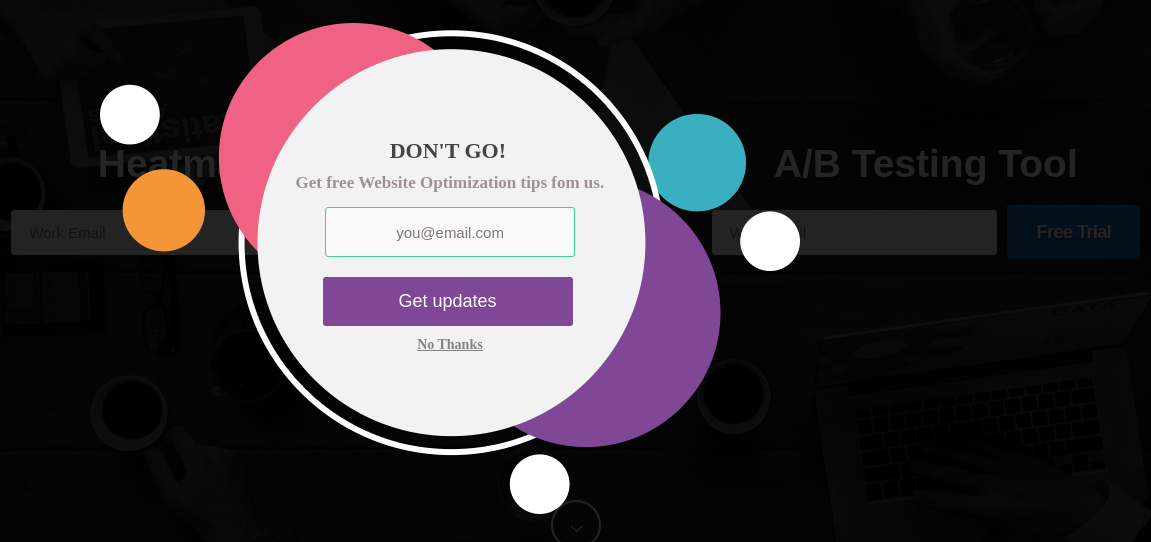
It is no news that the more time the visitors spend on your site, the more will be the chances of conversion. This is when exit popups might help you. However, the exit popups are considered annoying by online shoppers. You can use some gamified popups at the exit-intent of the customers instead of the conventional popups. Knowband’s Spin and Win exit popup for Prestashop, Magento, Magento 2, OpenCart and WooCommerce are one of the ways to reduce the bounce rate of the site without annoying the customers.

For the time being, you might want to have a look at a more specialized and easier alternative to tracking the cart abandonments on your store. If so, Abandon cart extension for PrestaShop, Magento and OpenCart could be a great option for you. You might want to try the free demo of these extensions.

  • This extension helps you to track all the abandoned carts on your store and automatically send cart serial reminders to the respective customers.
  • This is not only an abandoned cart tracker but also an automatic abandoned cart recovery tool by using proper follows.
  • The automatic follow ups will be done from time to time through email. These emails may consist of a simple plain reminder or an offer for the customer to encourage him to complete the checkout.
  • There is also a direct checkout button the email that will automatically take the customer to the checkout page with all the products in the cart already added.

Check out the module description for more detail and free live demo.

recover abandoned cart, how to use Google analytics to recover abandoned cart, how to recover abandoned cart, recover abandoned cart with Google analytics,

Liked This? You’ll Like These Too

Best eCommerce platforms for starting a multi-vendor marketplace

The eCommerce world has started shifting its base towards the multi-vendor model in the past few years. Being mutually beneficial and inclusive in nature, it not only caters to the demand of sellers, but also brings delight to the customers by providing a wide range to choose from.  The best thing is most of these platforms are open-source and you don’t have to pay a penny for using them to build your eCommerce site.

A ready-made eCommerce site, what could be better than this?-a ready-made marketplace site, perhaps?

As a result, the developers around the globe have come up with various solutions that allow the inventory model website owners to convert their site to a multi-vendor marketplace.

Top eCommerce platforms that can be easily used for developing a marketplace by a simple module installation.

1. Magento

With currently more than 251,287 live eCommerce stores running on the Magento platform, it is one of the top-most eCommerce platforms worldwide. With almost 25% of the total market share of eCommerce platforms, Magento is a popular brand that powers many other top brands like Burger King, Huawei, Pepe Jeans & Liverpool F.C etc.

Despite Magento poses a number of suitable features built-in for B2B eCommerce, it cannot be used as a multi-vendor platform in its default form.Fortunately, because of high-end flexibility and massive scalability, Magento can be introduced to the multi-vendor features by installing the Marketplace extension.

The Magento Multi-vendor marketplace extension is a custom solution developed by certified Magento developers. By simply installing this extension you can convert your existing inventory based Magento store to a ready-made marketplace site. It introduces some new features to the Magento platform which facilitate the operation of a marketplace site. These extra features include the:

  • Management for seller account registration
  • Management for seller account approval and declination
  • Management for different shops by different sellers
  • Management for Product upload by sellers
  • Management for Seller product approval or declination
  • Management for Marketplace Commissions, and much more.

2. PrestaShop

PrestaShop is one of the top eCommerce platforms in European nations, which is also getting popular across the globe these days. If you are a PrestaShop store owner, and thinking about owning a Marketplace site, you are on the right path. With the extraordinary flexibility and superb community support PrestaShop is always the best choice for developing a marketplace site. Like Magento, PrestaShop does not support the multi-vendor feature by default. However, with the highly active PrestaShop community, nothing is impossible on this platform. The PrestaShop Marketplace Module developed by the expert community developers makes the conversion of a PrestaShop store into a marketplace site so easy. You just need to spare a minute to install the Marketplace module on your store, and bingo, you own a marketplace site now.

Here is the detailed account of some excellent functionalities that are offered by this PrestaShop module:

  • Provides better control over seller accounts
  • Authority to accept/reject the seller’s request
  • Manages the commission rates for the multiple vendors
  • Ability to restrict product categories for multiple sellers
  • Easy management of the seller’s account on front

 3. WooCommerce

WooCommerce is definitely the solution for all the business minds around who are planning to have their own marketplace. WooCommerce, however, is a plugin that converts a WordPress powered site into an eCommerce store. While this platform has powers over 4,00,000+ sites, WooCommerce is ideal for creating a multi-vendor site as well.

Here are some of the key features this platforms that can take your business to new heights:

  • It has reduced the cost of inventory management. Thus, managing the digital and physical stock becomes effortless.
  • The CMS platform comes with a bundle of payment methods like COD, PayPal, BACS, and others.
  • The multiple shipping methods enables you to manage the logistics with greater ease.
  • You can run complex marketing strategies with this intuitive interface. Moreover, WooCommerce can even be used to sell affiliate products.
  • Other than this, it supports all types of products, simple, bundled, virtual, configurable, and others. Your third-party sellers can effortlessly list their products on your sites.

In the quest of choosing the best CMS platform for creating a multi-vendor marketplace, WooCommerce is definitely a prominent name for you. However, Magento and WooCommerce are having a cut-throat competition in the egg-and-spoon race. If you are over the edge in picking up one, then, here are some points that can help you out in making a decision.

  • WooCommerce is user-friendly and easy-to-use. For a non-techie who is planning to make it big in the eCommerce industry, WooCommerce can definitely be a solution. On the other hand, Magento requires advanced coding skills. Managing the store might become difficult without delving into code changes.
  • Magento allows you to operate multiple stores from a single back-end. However, WooCommerce doesn’t offer the multi-store functionality.
  • Magento is specifically designed for eCommerce, so, it is ideal for large enterprises. While WooCommerce is perfect for all size of the organization. Hence, in the long run, Magento definitely has an edge over the other platforms.

4. OpenCart

Opencart is another open-source CMS platform that may do wonders for you while creating a standard online marketplace. OpenCart offers a feature-rich interface along with powerful catalog functionality. OpenCart offers an enormous range of plugins to optimize the UI and UX of your site.

  • The user-friendly and easy-to-use interface makes OpenCart the best CMS platform for creating a marketplace, especially, for the store owners who do not have much technical knowledge.
  • Additionally, upgrading the OpenCart store into an online marketplace with the OpenCart marketplace plugin is effortless as well.
  • The vendors get an easy way of registering as a seller of the site and manage their profile. They can list the products from the dashboard and track/manage the inventory at a single button-click.
  • The store admin can manage every single seller and their products from the back-end of the OpenCart multi-vendor marketplace extension.
  • The ease of tracking is coupled with effective commission management. The admin can fix the commission to be charged to the sellers. The amount fixed will be automatically deducted from the total earning of the sellers.

5. Magento 2

  • Online business is growing every day so to match it more efficient and structured platforms are required.
  • Magento 2, the upgraded version, is a suitable platform for both medium and large-sized eCommerce stores.
  • It can work well with both HHVM and PHP7 that make eCommerce user friendly.
  • Magento 2 offers a more seamless and effortless user experience as the catalog and web pages open more quickly.
  • Moreover, Magento 2 offers more flexibility and adaptability to meet all types of customers requirements.
  • Magento 2 offers more flexibility in terms of secure checkout procedure.
  • Customers can easily log out in guest mode without being concerned about passwords.
  • With Magento 2, videos can be added on the main page just by adding the video link, title, and a short description.

Final Words

The choice of the CMS platforms should depend on your business requirement. No matter what you choose, make sure that the multi-vendor marketplace extensions makes the management and tracking effortless for you.

Liked This? You’ll Like These Too

Le migliori piattaforme di e-commerce per l'avvio di un mercato multi-vendor

Il mondo dell'eCommerce ha iniziato a spostare la sua base verso il multi-vendor

Di conseguenza, gli sviluppatori di tutto il mondo hanno messo a punto varie soluzioni che consentono ai proprietari dei siti Web del modello di inventario di convertire il loro sito in un mercato multi-vendor.

Superiore

1. Magento

Con attualmente più di 251,287 live negozi di eCommerce in esecuzione sulla piattaforma Magento, è una delle migliori piattaforme di eCommerce in tutto il mondo. Con quasi il 25% della quota di mercato totale delle piattaforme di eCommerce, Magento è un marchio popolare che alimenta molti altri marchi come Burger King, Huawei, Pepe Jeans e Liverpool FC, ecc.

Magento è una piattaforma Open-Source, e sicuramente una piattaforma ideale per costruire un sito di e-commerce, in particolare un mercato multi-vendor. Tuttavia, nonostante Magento presenti un numero di funzioni adeguate integrate per eCommerce B2B, non può essere utilizzato come piattaforma multi-vendor nella sua forma predefinita.

Fortunatamente, a causa della flessibilità di fascia alta e della massiccia scalabilità, Magento può essere introdotto nelle funzionalità del multi-vendor installando l'estensione Marketplace.

L’ Estensione del marketplace di Magento Multi è una soluzione personalizzata sviluppata da sviluppatori Magento certificati. Semplicemente installando questa estensione puoi convertire il tuo negozio Magento esistente basato su inventario in un sito di marketplace già pronto. Introduce alcune nuove funzionalità della piattaforma Magento che facilitano il funzionamento di un sito di mercato. Queste funzionalità extra includono:

  • Gestione per la registrazione dell'account venditore

  • Gestione per approvazione e declinazione dell'account venditore

  • Gestione per diversi negozi di venditori diversi

  • Gestione per il caricamento del prodotto da parte dei venditori

  • Gestione per l'approvazione o la declinazione del prodotto del venditore

  • Gestione per le commissioni di Marketplace e molto altro.

Oltre a queste funzionalità ci sono molte altre funzionalità che puoi controllare sulla demo dell'estensione dal link sopra riportato. Inoltre, ci sono anche Marketplace Addons per questa estensione che può essere utilizzata per aggiungere alcune funzionalità più avanzate al tuo sito di marketplace.

2. PrestaShop

PrestaShop è una delle migliori piattaforme di eCommerce nelle nazioni europee, che sta diventando popolare in tutto il mondo in questi giorni. Se sei proprietario di un negozio PrestaShop e pensi di possedere un sito Marketplace, sei sulla buona strada. Con la straordinaria flessibilità e l'eccezionale supporto della community, PrestaShop è sempre la scelta migliore per lo sviluppo di un sito di mercato. Come per Magento, PrestaShop non supporta la funzionalità multi-vendor per impostazione predefinita. Tuttavia, con la comunità PrestaShop molto attiva, nulla è impossibile su questa piattaforma.Il modulo di PrestaShop Marketplace sviluppato dagli sviluppatori di comunità esperte rende la conversione di un negozio PrestaShop in un sito di mercato così facile. Hai solo bisogno di risparmiare un minuto per installare il modulo Marketplace nel tuo negozio, e bingo, sei il proprietario di un sito marketplace ora.

Ecco l'account dettagliato di alcune funzionalità eccellenti offerte da questo modulo PrestaShop:

  • Fornisce un controllo migliore sugli account del venditore-

Come amministratore del negozio, hai il pieno controllo sulla gestione di vari account venditore sul tuo negozio di mercato. È possibile gestire e monitorare l'elenco dei fornitori in modo coerente. Oltre a questo, è anche possibile visualizzare l'elenco di tutti i venditori sul tuo negozio di mercato.

  • Autorizzazione ad accettare / rifiutare la richiesta del venditore-

Una delle caratteristiche salienti di questo modulo di Marketplace è la libertà di archiviare admin per accettare o rifiutare le richieste del venditore di aggiungere prodotti sul proprio marketplace store. Prima che ogni venditore deve creare un account venditore sul mercato che può essere approvato o non approvato dall'amministratore del marketplace.

  • Gestisce i tassi di commissione per i vari fornitori-

L'amministratore del negozio può gestire agevolmente i tassi di commissione per vari fornitori in base a una percentuale globale o addirittura impostare tariffe di commissione per i singoli venditori.

  • Possibilità di limitare le categorie di prodotti per più venditori-

L'amministratore del negozio può decidere il numero di categorie di prodotti che possono essere utilizzate per l'aggiunta di prodotti da parte di più venditori. I venditori possono caricare i prodotti solo nelle categorie consentite.

  • Facile gestione dell'account del venditore su front-

I venditori registrati ottengono un pannello venditore per gestire i propri negozi di Marketplace sul front-end stesso. È il modo migliore per salvare i venditori dal difficile pannello di back-office e fornire i controlli di gestione più semplici e personalizzati sul fronte stesso.

Oltre a queste funzionalità, i fornitori possono controllare separatamente i propri negozi. Inoltre, questo modulo è supportato anche da diversi Addons del mercato che può essere usato per estendere le sue funzionalità.

?3. WooCommerce

WooCommerce è sicuramente la soluzione per tutte le menti aziendali che stanno pianificando di avere il proprio marketplace. WooCommerce, tuttavia, è un plugin che converte un sito alimentato da WordPress in un negozio di e-commerce. Mentre questa piattaforma ha poteri sui siti 4,00,000 +, WooCommerce è ideale anche per creare un sito multi-vendor. Ecco alcune delle caratteristiche chiave di queste piattaforme che possono portare la tua azienda a nuovi livelli:

  • Ha ridotto il costo della gestione delle scorte. Pertanto, la gestione dello stock digitale e fisico diventa semplice.
  • La piattaforma CMS include un pacchetto di metodi di pagamento come COD, PayPal, BACS e altri.
  • I molteplici metodi di spedizione consentono di gestire la logistica con maggiore facilità.
  • È possibile eseguire complesse strategie di marketing con questa interfaccia intuitiva. Inoltre, WooCommerce può anche essere utilizzato per vendere prodotti affiliati.
  • Oltre a questo, supporta tutti i tipi di prodotti, semplici, in bundle, virtuali, configurabili e altri. I venditori di terze parti possono elencare facilmente i loro prodotti sui tuoi siti.

Nel tentativo di scegliere la migliore piattaforma CMS per la creazione di un mercato multi-vendor, WooCommerce è sicuramente un nome di rilievo per voi. Tuttavia, Magento e WooCommerce stanno avendo una gara spietata nella gara uovo-e-cucchiaio. Se sei in vantaggio nel raccoglierne uno, quindi, ecco alcuni punti che possono aiutarti a prendere una decisione.

WooCommerce è user-friendly e facile da usare. Per un non-techie che sta pianificando di diventare grande nel settore dell'eCommerce, WooCommerce può sicuramente essere una soluzione. D'altra parte, Magento richiede abilità di codifica avanzate. La gestione del negozio potrebbe diventare difficile senza dover effettuare modifiche al codice. Magento ti consente di gestire più negozi da un unico back-end. Tuttavia, WooCommerce non offre la funzionalità multi-store. Magento è progettato specificamente per l'eCommerce, quindi è ideale per le grandi aziende. Mentre WooCommerce è perfetto per tutte le dimensioni dell'organizzazione. Detto questo, si dovrebbe tenere conto del fatto che quando si parla di una configurazione multi-vendor, l'espansione del business è il risultato finale. Quindi, a lungo termine, Magento ha sicuramente un vantaggio rispetto alle altre piattaforme.

4. OpenCart

Opencart è un'altra piattaforma CMS open source che potrebbe fare miracoli mentre crei un mercato online standard. OpenCart offre un'interfaccia ricca di funzionalità e potenti funzionalità di catalogo. OpenCart offre una vasta gamma di plugin per ottimizzare l'interfaccia utente e l'UX del tuo sito. L'interfaccia user-friendly e di facile utilizzo rende OpenCart la migliore piattaforma CMS per la creazione di un marketplace, in particolare per i proprietari di negozi che non hanno molte conoscenze tecniche. Inoltre, l'aggiornamento del negozio OpenCart in un mercato online con il Plugin di mercato OpenCart è anche senza sforzo.

I venditori ottengono un modo semplice di registrarsi come venditore del sito e gestirne il profilo. Possono elencare i prodotti dalla dashboard e monitorare / gestire l'inventario con un solo clic del mouse. L'amministratore del negozio può gestire ogni singolo venditore e i suoi prodotti dal back-end dell'estensione del marketplace multiproprietà di OpenCart.

La facilità di tracciamento è accompagnata da un'efficace gestione delle commissioni. L'amministratore può fissare la commissione da addebitare ai venditori. L'importo fissato verrà automaticamente detratto dal guadagno totale dei venditori.

5. Magento 2

in linea

Le parole finali

La scelta delle piattaforme CMS dovrebbe dipendere dai requisiti aziendali. Indipendentemente da ciò che scegli, assicurati che le estensioni del marketplace di più fornitori ti facilitino la gestione e il monitoraggio.

Questo mi piaceva? Ti piaceranno anche questi


Impact of GST on eCommerce Marketplace

“The consensus we arrived with States for amending the Constitution to implement GST is a major breakthrough. This alone has the potential to make India competitive and attractive for investment.”  ~ Narendra Modi, PM, India

India, on 1st of July, 2017, is all set to ink a new chapter in its constitution with the introduction of GST bill. After clearing the constitutional amendment in both the houses of Parliament, the bill is aimed to provide better indirect tax administration and bring an efficient law that will check tax evasion. Despite the fact that it is all set to affect every sector of India, the eCommerce platform is expected to be the most affected one them all. India is poised to become the second largest online marketplace in the coming year after China. The write-up attempts to present an overview on GST and it’s impact on the eCommerce marketplace. GST is a complicated reform like most of the taxation matters.

The write up has complied the various aspect of GST and its impact on the eCommerce platform. Listed below are the points covered:

 1. Current taxation system

  • Issues with current system

2. GST

  • Meaning
  • History
  • Threshold limit
  • Tax collection at the Source

3. Effect of GST on online marketplace

4. Advantages of GST on eCommerce

1. How is Indian taxation system structured today?

As per constitution, the current taxation system is divided into center and states. There are certain exclusive areas where both the levels of government levy tax.

In the current taxation structure, states have multiple rates, including the VAT along with additional taxes on inter-state trade. The standard VAT rate for goods in most of the states is about 12.5-15% while standard rate at the Centre is 12.5%. The combined rate ranges to a minimum of 25%.

The taxes are further divided into:

 1. Direct taxes

Income tax is a tax that is levied on the income or profits of the person who pays it and includes the tax on the company profits, rather than on goods or services. These taxes are referred to as direct taxes and are an exclusive domain of central government.

2. Indirect taxes

On the other hand, the tax levied on goods and services rather than on the income and profit is known as an indirect tax. This is again an exclusive domain of central government. While the taxes on consumption are the exclusive domain of state governments.

Issues with the current arrangement?

The central government levies its indirect tax called central excise on every product that has to be manufactured before it is consumed. Consider a product ‘A’ that is to be manufactured. The central excise will be levied on the factory gate. Once the product reaches a retail outlet, the end consumer has to pay a consumption dubbed value added tax.

If the manufacturer imports the raw material from another state, the state government levies tax along with the central excise on the same product. Not only this, if product A is manufactured in one state and sold in another, then, it is considered as ‘export’. In this case, the state when the product is manufactured will collect an export tax called central sales tax.

Hence, India is economically fragmented. The multiple taxes increases the cost and makes economic activities way more complicated. This made the introduction of ‘one nation, one tax’ system inevitable.

2. Goods and Services Tax

Meaning

GST is a Value Added Tax (VAT) proposed to be a indirect tax. It is levied on manufacture, sale and services at the national level. The GST is aimed at replacing all the indirect taxes levied on goods and services by Indian Central and State government separately.

This is referred to as a comprehensive, multi-stage, destination-based tax that will be levied on every value addition. The multi-stage refers to the multiple steps that a product goes through. Starting from the point where the raw material is bought, the finished product goes to the wholesaler, followed by the retailer and finally reaches the end user.

With the introduction of Goods and Services Tax, there will be 3 kinds of applicable Goods and Services Taxes:

CGST: where the revenue will be collected by the central government

SGST: where the revenue will be collected by the state governments for intra-state sales

IGST: where the revenue will be collected by the central government for inter-state sales

ClearTax explain the meaning of GST and tax structure under the new regime with a simple tabular representation.

Transaction New Regime Old Regime
Inter-state Sales CGST + SGST VAT + Central Excise/ Service Tax
Intra-state Sales IGST Central Sales Tax + Excise/ Service Tax

History of GST in India

The journey of GST so far has been described below.

2000: The Vajpayee government proposed the concept of GST by setting up committee to draft the same.

2004: The Kelkar Task Force was created for the implementation of Fiscal Responsibility and Budget Management (FRBM) Act, 2003. The committee suggested a comprehensive GST.

2006: A proposal to introduce a national level GST by April 1, 2010 was mooted in Budget Speech for the year

2007: Empowered Committee of State Finance Ministers started working on GST roadmap. The Joint Working Group submitted its report to EC in the same year

2009: First Discussion Paper was released by Empowered Committee

2011: The constitution 115th amendment bill was introduced in Lok Sabha for levy of GST

2014: The constitution 122nd amendment bill was passed by Lok Sabha. This enabled the introduction of GST by April 2016

2016: The constitution 122nd amendment bill passed by Rajya Sabha

2017: GST council clears state GST and Union Territory GST Laws

Threshold limit under GST

Every business that has a turnover of more than Rs. 20 Lakhs have to get mandatorily registered under GST. The taxpayers who are already registered under VAT/Service Tax should register under GST as well. The small businesses can either opt for composition scheme or they can get voluntarily registered under GST. It is anticipated that the threshold limit will be calculated on a pan-India basis. This means that the transaction may be liable to be taxed under GST if the total turnover (of all transactions all over India) exceeds the threshold limit. This is another positive aspect for the eCommerce players as they operate in various states of the nation.

Tax-collection-at-source (TCS)

In an online transaction, the eCommerce operator is a mediator between the buyer and the seller. So, the very first question that is raised is that whether VAT is applicable on the commission or is it a service or is it a composite contract?

The much-awaited draft of Model GST Law (the ‘Model Law ’) was released in June 2016. The destination-based consumption taxation as proposed under GST would ensure that all states get their share of revenue on the basis of actual consumption of goods in such state. The sub-section (a) of Section 43B clarifies the definition of aggregator. It says, “Any person who provides services either by an application or communication device which enables a buyer and seller to connect and procure goods or services under any brand / trade name is termed as an aggregator”.
The Model GST law, finalized by the GST council, provides for 1% Tax-collection-at-source (TCS) to be deducted by the eCommerce operators. According to the Model law, every electronic commerce operator shall collect up to 1% TCS, as may be notified on the recommendations of the council, of the net value of taxable supplies made through it by other suppliers where the consideration with respect to such supplies is to be collected by the operator. However, turns out TCS is in direct conflict with the government’s vision of ‘Make in India’ campaign and ‘ease of doing business’. The obligation of tax collection at source is cast in respect of supplies made by the suppliers online. While the suppliers supplying goods and services from a brick and mortar structure are not obligated to any such tax. Thus, this provision would hamper the business than facilitate doing of business.

In July 2016, Sachin Bansal said, “A seamless national supply chain that is agnostic to supply or demand destination is urgent, important and overdue for three reasons. First, it is India’s development trajectory to reduce poverty. Second, it will improve enterprise productivity . Finally, it is about empowering consumers and producers.” 


However, as per a article published in The Hindu, with the introduction of TCS clause has there would be a risk of locking up about Rs. 400 crore of capital per annum. This will ultimately result in approximately 2 Lakh people losing their job. The three eCommerce giants: Amazon, Flipkart and Snapdeal has joined hands for the first time to voice concern over this clause.

Having discussed about the basic definition of GST, here’s a compilation of the impact it will have on the online marketplace.

3. Effect of GST on online marketplace

The eCommerce industry is expected to flourish and grow under the new GST era. The standardization that the system promises is expected to have a huge impact on the industry as well as the online marketplace.

In the current regime, the online marketplace charges service tax to the vendor for providing services. However, in the GST system, the eCommerce marketplace would charge CGST + SGST or IGST depending on the nature of the transactions.

Listed below are some of the impacts that this system will have on the online marketplace, in particular.

Effect on Pricing

In the current tax structure, the different state imposes different VAT on the same good. The online players tend to price their goods at discounted prices, in order to promote its business. As a result, they enter tie-ups to take advantage of the tax arbitrage. With GST, there will be a standard tax rate for every product. Making tax arbitrage impossible, it will bring the offline sellers and e-tailers on the same level in term of pricing.

Unregistered online merchants

With GST, all the online sellers will be forced to get themselves registered. GST registration is mandatory where the turnover is Rs. 20 lakh or more. The merchants without proper registration will be weeded out, irrespective of their turn over.

Credit Pool

The companies need to have a higher credit pool than they do in the current taxation system. As per quoted by a senior officer of an eCommerce company, “Small sellers in the industry will have cash-flow issues as they will have to claim refunds for tax paid on inputs, which e-tailers will not be able to account for.”

Registration of the Company

The place of supply, in the case of B2C transactions, would be the location of the service provider. While the place of supply in case of B2B transactions would be the location of the service recipient. There are chances that the eCommerce companies would need to pay applicable CGST + SGST in the state where the service recipient is located. As a result of which, these companies would require getting registered in almost all the states where the service recipients (i.e. vendors) are located. The centralized registration system will not be applicable anymore.

Compliance issue on returns and refunds

This is probably the most perplexing issue for the online marketplace. The eCommerce companies offer the facility of COD and easy returns and refunds. As a result of which approximately 15 to 20 million transactions per month in which the return and refunds have to be done. The returns are now required to be filed monthly by both the parties. The refund adjustments will affect the tax liability.

4. Advantages of GST on eCommerce

According to experts, the GST impact has two major advantages for the eCommerce players.

No cascading taxes

The GST model facilitates seamless credit throughout the supply chain. Removing the cascading effect of taxes, the GST system will bring down the overall cost of supplies and the price of the finished product ultimately. It is hoped that this cost benefit would be ultimately passed on to the customers or help in increasing the profits of the companies.

Consolidation of the tax rates

In the current system, there are differential rates of VAT for the same goods in different States. However, GST rates at both the Central and State level are expected to be uniform and harmonized. This would drastically reduce disputes among tax authorities and e-commerce players. Moreover, the tax rate on the output side is expected to be higher. All the output taxes will be creditable on the provision of services to the seller. The online marketplace can also claim the credit for all taxes on the input side.

Ease of Doing Business

GST system is a step ahead towards facilitating the initiative of ‘Start-up India’ of Modi Government. The aspiring entrepreneurs wouldn’t have to knock on multiple doors in the various cities. This was one of the biggest barriers in starting up, but with the ‘one tax’ system, India might go a few notches higher in the World Bank’s Ease of Doing Business Index.

A push for warehousing

The logistics and warehousing department of eCommerce companies are expected to be one of the biggest beneficiaries of GST. The eCommerce players had to maintain multiple warehouses across the states and cities to avoid central sales tax. This increased the cost of operations. With the introduction of GST, they can maintain warehouses in strategic locations. This will balance out the operation cost and reduce the dent in their profitability.

Final Say

GST is a great move for online businesses. Even though the new regime will be accompanied by new ways of tax calculation, it will eventually bring clarity and tax obligation.

Related Post

5 revenue generation models multi-vendor marketplaces can use

What’s your ultimate objective with your multi-vendor marketplaces website? It’s selling more and more, or earning more and more?

Sounds weird? Let me explain

The line asks a simple question that what is more important to you- generating more sales or generating more revenue from your online marketplace site?

It seems pretty obvious that you can generate revenue only if you are selling. So, is selling more important because it automatically generates the revenue?

Maybe! Perhaps! Etc.

What if I tell you that your marketplace site does not depend on sales alone to generate revenue. There are other revenue generation models that can act as an integral part of your business model. They can operate in parallel to the sales by monetizing the services that your marketplace site can offer in addition to the marketplace products.

Here is a list of 5 monetization mechanisms or revenue generation models that you can use on your marketplace site to generate some extra revenue from your business:

1. Advertising Revenue Model

Advertising is one of the most popular and oldest revenue generation models. You can generate revenue by renting out advertising space on your site. The websites showing their Ads will pay you based on the respective advertising model. Here you can adopt two different models of advertisement:

Cost per Mille (CPM): CPM, which is also called as Cost per Thousand impressions is an advertising model that allows you to charge in proportion to the number of Ads displayed to the site visitors.

Cost Per Click(CPC): CPC model generates the revenue based on the number of clicks a particular Ad is receiving by your site visitors.

You can use any of the two advertising models to generate revenue on your marketplace site by simply showing ads to your visitors. While doing this, make sure your website design is optimized enough to place the Ads where it does not overshadow your main revenue generation model that is selling your products.

You have to be cautious about the website design to make sufficient white spaces for showing the ads. Otherwise, contact a web designer who would tweak the design as per your requirement for advertising.

2. Sponsored Site Channel model

Typically a site that wants to promote its contents on another site would have to pay for showing its Ads. This revenue model is not exactly the revenue generation model but a cost-saving model.

Here the companies or two sites enter into a ‘contra-deal’ agreement where neither of the two sites needs to pay for advertising. They commit to promoting each other’s content as a ‘give and take’ format.

3. Freemium revenue model

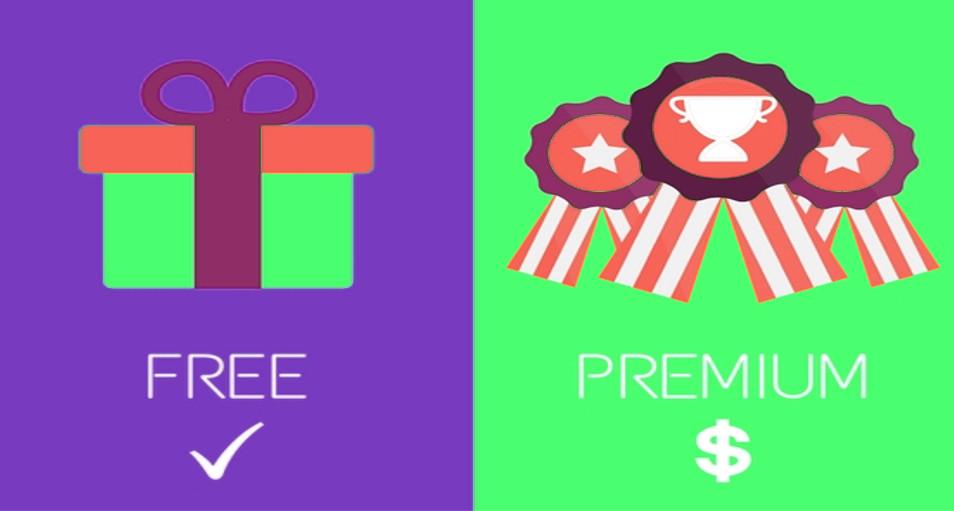
Many web services and marketplaces use this model to generate pretty decent revenue. The central idea behind the freemium model is to provide as many users with the free services and encourage them to upgrade to the paid version of the same.

In one of the approaches, you provide your users with a free trial with limited access and give an option for upgrading to the paid service to acquire the full advanced features and access.

PS: Here the access to the service or features is limited, but is given for an unlimited period.

For example, we provide the Free Magento Multi-vendor Marketplace extension with some restricted features for an unlimited period. The customers can choose to keep using the free restricted version for as long as they want or can unlock the full features by purchasing the Magento Multi-vendor Marketplace extension, Prestashop Marketplace addon, and OpenCart Multi seller Marketplace plugin for the respective fields.

Another example could be Dropbox which provides free 2 GB could data storage to the free users.

There is another approach in the same model where a fully-fledged trial of the full product or services is offered to the users for a limited period of time. The users are given an option to either stop using the services after the trial period or pay for it to keep using.

PS: Here the access to the service of product features is full but the time period for trial is restricted or limited.

For example, Amazon offers full access to its “Amazon Prime” service for free one month. After that, you can either stop using it or subscribe to the monthly subscription to use it for more time.

You can use these models to offer some premium services and generate extra revenue. You can adopt a similar approach like Amazon Prime which provides free same-day shipping to the Prime members.

4. Subscription or membership model

Subscription-based revenue generation is one of the oldest models, and it is still in full-fledged today.

A marketplace site has uncountable ways to leverage this model to generate some extra revenue from the business:

  • Membership for sellers: Asking sellers/vendors/merchants to subscribe to a membership for registering a seller/merchant account on your marketplace.
  • Membership for customers: Asking customers to subscribe to a membership for availing benefits like free shipping, same-day delivery, Shipping package insurance, early access to flash sales, etc.
  • Membership for customers part-2: There is another kind of membership for customers that marketplaces selling virtual products like MP3s, Videos, Software, etc can use. Here, basically, your main revenue generation would be through the premium members only.

For example, Netflix videos library allows only the subscribed users to see the videos. It primarily follows a subscription-based revenue model.

5. Sales commission Revenue model

Of course, I had to include this point. Taking commission from the seller/vendors/merchants on their sales is the primary revenue generation model on which a large number of marketplaces are surviving.

The entire community of sellers and retailers follow this model. There are a number of online marketplaces that allow the e-merchants to sell their products to a larger chunk of customers. The only difference is how and how much commission sellers need to pay for selling on a marketplace. Earlier the complexities of dealing with the inventory management and order processing of the two stores intimidated the e-sellers to go for multi-channel selling. However, the work has become easier now. Knowband offers a line of feature-rich marketplace integrators to the eCommerce sites that are based on the CMS platforms like Prestashop, Magento, OpenCart, Magento 2, and others. With the help of these intuitive integration solutions, you can keep your marketplace shop in sync with your online shopping sites.

Here are some examples of the online marketplaces that allow multi-channel selling:


The sales commission revenue model is not that simple as it seems. Different marketplaces use different approaches to earn the commission. You need to first decide the commission model that you want to use and then customize your Seller management panel to handle the commissions as per your requirement.

Similarly, if you own an online marketplace, charging the commission and managing multiple vendors becomes even more difficult. However, managing the commission model becomes effortless with the help of the various CMS plugins like Magento multi-vendor marketplace, Prestashop multi vendor marketplace addon, or OpenCart marketplace module.

You need to be also aware that most of the multi-vendor marketplace extensions support only the per-product-sale commission. If you want to use any other commission model, then you might need to use an extension or get the requirements developed by an expert eCommerce development company.

Liked This? You’ll Like These Too

I modelli di generazione di entrate 5 possono essere utilizzati dai mercati multi-vendor

Qual è il tuo obiettivo finale con il tuo sito web multi-vendor? Sta vendendo sempre di più o guadagna sempre di più? Suona strano? Lasciatemi spiegare La linea pone una semplice domanda: che cosa è più importante per te: generare più vendite o generare maggiori entrate dal tuo sito di marketplace online? Sembra abbastanza ovvio che puoi generare entrate solo se vendi. Quindi, la vendita è più importante perché genera automaticamente le entrate? Può essere! Forse! Ecc. E se ti dicessi che il tuo sito di marketplace non dipende solo dalle vendite per generare entrate. Esistono altri modelli di generazione dei ricavi che possono fungere da parte integrante del tuo modello di business. Possono operare in parallelo alle vendite monetizzando i servizi che il sito del tuo mercato può offrire in aggiunta ai prodotti del mercato. Ecco un elenco dei meccanismi di monetizzazione 5 o dei modelli di generazione dei ricavi che puoi utilizzare sul tuo sito marketplace per generare entrate extra dalla tua attività:

1. Modello delle entrate pubblicitarie

La pubblicità è uno dei modelli di generazione di reddito più popolari e più antichi. Puoi generare entrate attraverso l'affitto di spazi pubblicitari sul tuo sito. I siti web che mostrano i loro annunci ti pagheranno in base al rispettivo modello pubblicitario. Qui puoi adottare due diversi modelli di pubblicità:

Costo per Mille (CPM): Il CPM, che viene anche chiamato costo per mille impressioni, è un modello pubblicitario che ti consente di addebitare in proporzione al numero di annunci visualizzati dai visitatori del sito.

Costo per clic (CPC): Il modello CPC genera le entrate in base al numero di clic che un determinato annuncio riceve dai visitatori del tuo sito. Puoi utilizzare uno qualsiasi dei due modelli pubblicitari per generare entrate sul tuo sito di mercato semplicemente mostrando annunci ai tuoi visitatori. Durante questa operazione, assicurati che la progettazione del tuo sito Web sia sufficientemente ottimizzata per collocare gli annunci in modo che non offuschi il tuo modello di generazione di entrate principale che vende i tuoi prodotti. Devi essere cauto sul design del sito web per creare spazi bianchi sufficienti per mostrare gli annunci. Altrimenti, contatta un web designer che modificherebbe il design secondo le tue esigenze di pubblicità.

2. Modello di canale sito sponsorizzato

In genere un sito che vuole promuovere i suoi contenuti su un altro sito dovrebbe pagare per mostrare i suoi annunci. Questo modello di entrate non è esattamente il modello di generazione di reddito, ma un modello di riduzione dei costi. Qui le aziende o due siti stipulano un accordo di "contra-deal" in cui nessuno dei due siti deve pagare per la pubblicità. Si impegnano a promuovere i contenuti l'uno dell'altro come un formato 'dare e avere'.

3. Modello di reddito di Freemium

Molti servizi web e marketplace utilizzano questo modello per generare entrate piuttosto decenti. L'idea centrale del modello freemium è quella di fornire a tutti gli utenti i servizi gratuiti e incoraggiarli ad aggiornare alla versione a pagamento della stessa. In uno degli approcci, fornisci ai tuoi utenti una prova gratuita con accesso limitato e offri un'opzione per l'aggiornamento al servizio a pagamento per acquisire le funzionalità e l'accesso completi.

PS: Qui l'accesso al servizio o alle funzioni è limitato, ma viene fornito per un periodo illimitato. Ad esempio, forniamo il Estensione del Marketplace Multi-vendor di Magento con alcune funzionalità limitate per un periodo illimitato. I clienti possono scegliere di continuare a utilizzare la versione limitata gratuita per tutto il tempo che vogliono o possono sbloccare tutte le funzionalità acquistando il Estensione del Marketplace di Magento Multi,?Addon del Marketplace Prestashop e OpenCart Plugin Marketplace multi venditore per i rispettivi campi. Un altro esempio potrebbe essere Dropbox che fornisce 2 GB in grado di memorizzare i dati agli utenti gratuiti. C'è un altro approccio nello stesso modello in cui una prova completa del prodotto o dei servizi completi viene offerta agli utenti per un periodo di tempo limitato. Agli utenti viene data la possibilità di interrompere l'uso dei servizi dopo il periodo di prova o di pagare per continuare a utilizzare.

PS: Qui l'accesso al servizio delle funzionalità del prodotto è completo ma il periodo di tempo per la prova è limitato o limitato. Ad esempio, Amazon offre l'accesso completo al suo "Amazon Prime"un servizio gratuito per un mese, dopodiché puoi smettere di usarlo o iscriverti all'abbonamento mensile per usarlo per più tempo. Puoi utilizzare questi modelli per offrire alcuni servizi premium e generare entrate extra. approccio come Amazon Prime che fornisce la spedizione gratuita nello stesso giorno ai membri Prime.

4. Abbonamento o modello di abbonamento

La generazione di entrate basata su abbonamento è uno dei modelli più vecchi ed è ancora a pieno regime oggi. Un sito di marketplace ha innumerevoli modi per sfruttare questo modello per generare entrate extra dal business:

  • Iscrizione per i venditori: Chiedere ai venditori / venditori / commercianti di iscriversi a un abbonamento per registrare un account venditore / commerciante sul tuo marketplace.
  • Iscrizione per i clienti: Chiedere ai clienti di iscriversi a un abbonamento per usufruire di vantaggi come la spedizione gratuita, la consegna nello stesso giorno, l'assicurazione del pacchetto di spedizione, l'accesso anticipato alle vendite flash ecc.
  • Iscrizione per customerspart-2: C'è un altro tipo di adesione per i clienti che possono utilizzare i marketplace che vendono prodotti virtuali come MP3, video, software ecc. Qui, fondamentalmente, la tua generazione di entrate principale sarebbe solo attraverso l'abbonamento premium.

Ad esempio, la libreria di video Netflix consente solo agli utenti iscritti di vedere i video. Principalmente segue un modello di entrate basato su abbonamento.

5. Commissione delle vendite Modello di entrate

Naturalmente, ho dovuto includere questo punto. Prendendo le commissioni dal venditore / venditore / commerciante sulle loro vendite è il modello di generazione di reddito primario su cui un gran numero di mercati sono sopravvissuti. L'intera comunità di venditori e rivenditori segue questo modello. L'unica differenza è come e quanto i venditori della commissione devono pagare per vendere su un mercato. Ecco alcuni esempi:

  • Amazon: Amazon addebita ai venditori professionisti una tariffa annuale fissa per l'inserimento dei propri prodotti sul proprio marketplace. Non addebita una tassa per articolo a questi venditori.
  • eBay: eBay addebita una tassa di inserzione per l'inserimento di un prodotto sul proprio sito. Inoltre, addebita anche la commissione sul valore finale come commissione sulla vendita del prodotto.
  • Mercato PrestaShop: Il marketplace PrestaShop è un sito in cui gli sviluppatori vendono i loro moduli PrestaShop. Carica la commissione in base alla vendita per prodotto.

Il modello delle entrate delle commissioni di vendita non è così semplice come sembra. Mercati diversi usano approcci diversi per guadagnare la commissione. È necessario prima decidere il modello di commissione che si desidera utilizzare e quindi personalizzare il pannello di gestione del venditore per gestire le commissioni secondo le proprie esigenze. Devi essere anche consapevole che la maggior parte del estensioni di mercato multi-vendor supporta solo la commissione di vendita per prodotto. Se si desidera utilizzare qualsiasi altro modello di commissione, potrebbe essere necessario utilizzare un'estensione o ottenere i requisiti sviluppati da un esperto società di sviluppo eCommerce.

Questo mi piaceva? Ti piaceranno anche questi

Answers to the top FAQs regarding selling on Amazon

Amazon, the most popular marketplace with the huge base of loyal customers. Started as an online bookstore, today after 20 years, it is the digital retailer of choice for customers across the globe.

In 2016, in U.S alone, Amazon made the net sales worth $136 billion. With more than 310 million active customer accounts worldwide, Amazon is definitely a pool of leads and sales for the sellers.

Want to leverage this huge pool of opportunities?

Thinking about selling on Amazon now?

Hold on for a moment!

Big opportunities do not just knock on your doors without any benefit for themselves. There are risks and vulnerabilities attached to everything that glitters.

Why don’t you take a sneak peek at our post “Why you should and shouldn’t sell on Amazon and eBay?” You will have a clear idea of the golds and stones of selling on Amazon.

So, as a seller, to make sure your products get prime success on the giant marketplace, read this post till the end because I am going to answer some really important questions that we often come across about selling on Amazon.

I am certain that these answers would clear countless confusions that you might already have in your mind as a seller on Amazon.

FAQs regarding selling on Amazon

The fundamental questions

1. What is Amazon Buy Box?

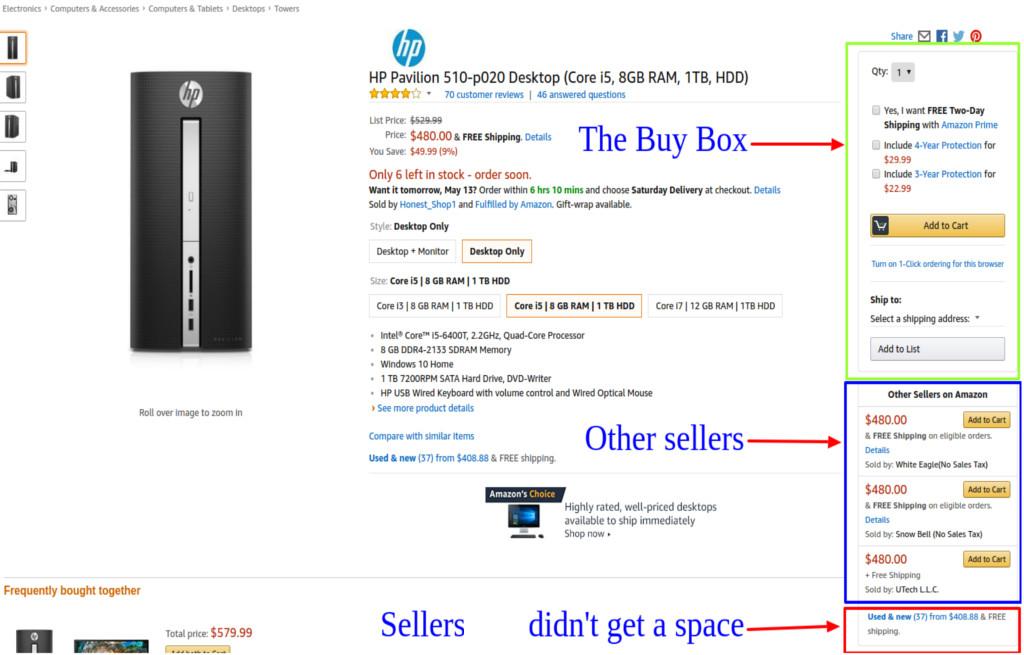
Simply, the Buy Box is a section on the product detail page where customers get the direct option to add a product to the shopping cart.

Amazon in-houses uncountable number of sellers on its marketplace. Many of these sellers offer products that are also being offered by various other sellers on the site. Since Buy Box is the highlighted area on the product page, sellers ending up in the box receive more sales than those who missed it.

Sellers compete on various grounds to get into the buy box so that their product receives the maximum sale.

2. How does Amazon decide the winner of the Buy Box? 

As Amazon is the home to thousands of sellers like you, becoming a featured seller in the Buy box is really a tough nut to crack. You will always find a huge number of sellers already competing for space.

It’s pretty unrealistic to think your store is ever going to rank that higher to get featured on the Buy Box. You many think of ‘Other Sellers’ section which is comparatively lesser competitive. However, not that lesser as you think, the sellers who miss the Buy Box with few scores usually get featured in the other sellers section.

But still, it’s really important to know how the Buy Box ranking works. Who knows you might be able to leverage some of the requirements and end up in the Buy Box someday.

A number of factors affect the listing in the Buy Box as well the Other Sellers section.

  • Product Pricing- Products pricing does not only include the price of the product but also the shipping cost included with it. Customers mostly prefer low prices while browsing the marketplace. Offering a competitive price with shipping cost included may get you significant attention, if not the Buy Box.
  • Selling history on Amazon- Seller with long, and positive selling histories generally have stronger chances to get in the featured list.
  • Reviews and feedback- On Amazon, reviews are important like nothing else. Customers get the best possible ways to post honest reviews about the experience with the product delivery, product itself, and sellers too. Though Amazon does not use reviews and rating as a factor in ranking the sellers, a significant amount of negative reviews and feedbacks can still force the marketplace site to ban your shop or suspend your listing.

There are numerous other factors that act as a determiner in deciding your seller ranking. As a rule of thumb, the most effective measure is to deliver the best quality products on time and ensure a communication with the customer if required.

3. What is Amazon FBA?

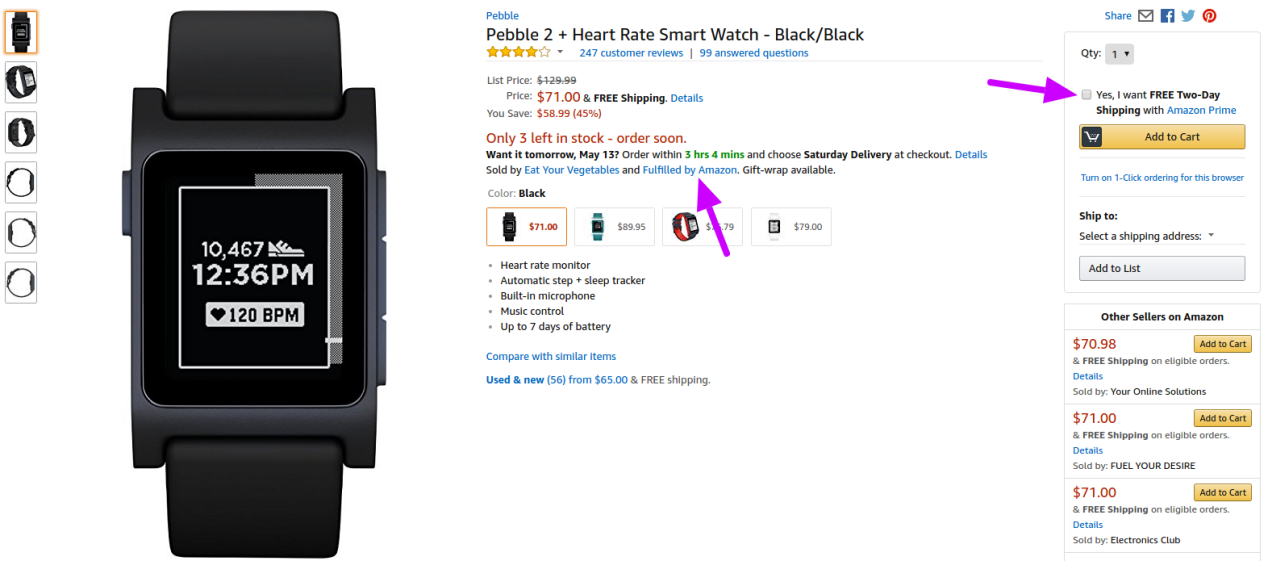
Amazon FBA or so-called Fulfillment by Amazon is a service offered by this marketplace to its sellers. Here, using this service you, as a seller, can send your merchandise to one of the Amazon’s fulfillment centers to be stocked. When you receive an order for that merchandise, Amazon ships it to the customers directly from their stock.

This service helps the sellers to concentrate on selling, while Amazon will handle the product delivery and customer care. Of course, there is a cost involved in using the FBA services.

Other benefits of FBA involves:

  • An extended reach to the Amazon Prime members who generally order the Amazon-fulfilled products.
  • More chances to win the Buy Box as compared to the non-FBA sellers.

Did you know?

79 % of sellers use FBA for some or all of their sales

FBA is definitely a serious program to try out when you are thinking about selling on Amazon.

4. I already have my own eCommerce site, should I sell on Amazon?

Having your own eCommerce store is never a restriction. In fact, Amazon does not care if you have your own site or not. You can always create an Amazon seller account and start listing your products.

77 % of sellers use multiple sales channels- Marketplace, own site, and brick and mortar shop. Out of these, a quarter of sellers have their own webshops based on different platforms like Magento, OpenCart, PrestaShop, Shopify etc.

When so many multi-channel selling options are already there, the marketplace giant cannot allow sellers to promote their own sites on its platform. That’s understandable. Any marketplace would not want you to steal the commission and traffic it can generate with your sales on the marketplace itself.

So, stay in compliance with the Amazon’s cross-channel promotion restrictions and you will not have a problem even if you sell on both your site and Amazon simultaneously.

5. Can I sell on Amazon from my own eCommerce site?

When you have your own eCommerce site and you are a seller on Amazon too, you won’t want to drop the sales anywhere. However, it becomes so cu-cumbersome to maintain the best efforts on both the platforms at the same time.

When you concentrate on your Amazon listings, you are somewhat pulled off your site and vice versa. This dilemma makes many sellers rethink the idea of selling on Amazon. Still, they completely understand that selling on Amazon can bring some serious sales, it would be foolish to give up the Amazon shop. On the other hand, giving up your own eCommerce site is also not a wise decision.

This is where Amazon integration services come as a savior. Amazon provides the amazing MWS (Amazon Marketplace Web Service) that allow developers to use the MWS API and develop some integration solutions to make the life of sellers easier.

These integration solutions are simply an extension to your eCommerce site which connects your site with your Amazon seller account.

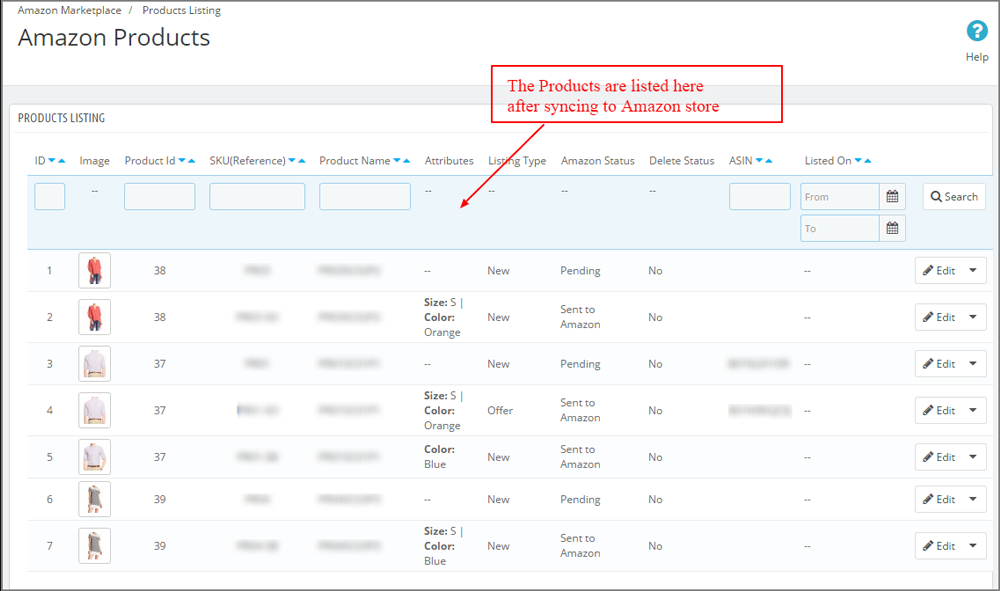
For example, if you install our PrestaShop Amazon Marketplace integrator on your PrestaShop based store, you will be able to manage all your Amazon listings from your PrestaShop store itself. You will not have to go to your Amazon seller account to:

  • Upload the new products
  • Update the old listings
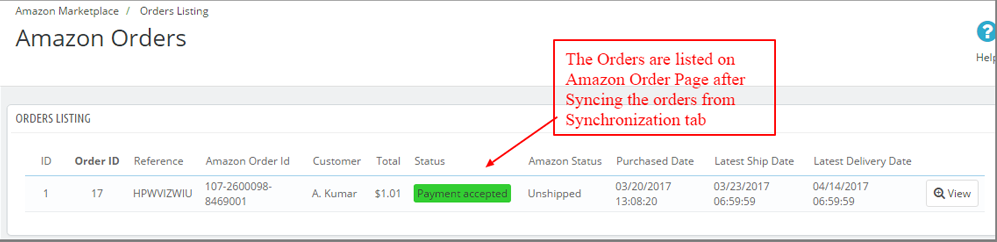
  • Manage the orders received on Amazon

You can do all these tasks from your PrestaShop back-office itself after a few initial setup and configuration.

So, yes, you can always sell on Amazon from your own eCommerce site directly by using the Amazon integration services and solutions.

Other Important FAQs

6. A product that I want to sell is already listed on Amazon by other sellers too, should I list a new product or just associate it with this listing? 

Amazon allows only a single listing for a particular product in its catalog. All the sellers who want to sell a product that has already been listed in the catalog must associate their listing with the old listing in the catalog.

If you create a second product, Amazon will consider it as a duplicate listing and will immediately remove it.

7. Why does Amazon not reimburse me the correct amount for shipping cost? 

Amazon decides the shipping cost reimbursement on the basis of the distance between the merchant’s origin and customer’s shipping address and also the weight of the product. However, sometimes the calculation does not match with the actual expense of the seller on shipping.

PS: The cost reimbursed by the Amazon can be less as well as more than the actual expense by the seller.

8. Why Can’t I map some of the shipping options with my products? 

Amazon typically does not want to take the risk of delayed product delivery. A delayed product delivery, (even if it’s the mistake of the seller) directly affects the marketplace’s reputation. So, it’s better to tell correctly about the delivery time, it does not matter if it’s a slower one; customers should get the product on or before the committed date.

So, at the initial phase of your seller account on Amazon, you might not get the access to map quick delivery options like same day, or next day, or two days to your products. You have to earn the access to those options by establishing a history of reliable shipping with the slower shipping speeds. Once you have a nice long history of on-time product delivery with the slower options, you will gradually get the access to quick shipping options.

9. What should I do when I am on a vacation and not available to fulfill the order? 

Amazon provides a great option for sellers to temporarily remove all the open listings in the event of taking a holiday, going for vacation, or for any random reason. By using the Listing Status feature, you can deactivate all your self-fulfilled listings while you don’t have to worry regarding your FBA listings. The FBA listings will be fulfilled by the Amazon itself, so you don’t have the option to take down FBA listings using the same option.

Please note:  Before changing the status of your listings, you should make sure none of your previous orders are pending. The already placed orders will not get automatically canceled; you have to manage it manually either by canceling the order or by fulfilling it before activating the vacation mode.

10. How to activate or deactivate the vacation mode using Listing Status?

When you are going for the vacation, you can set your listings “Inactive” by following these steps:

  • Go to Listing Status page from your seller account.
  • Select the status as Inactive.
  • Click Submit button to save your selection and within one hour your self-fulfilled listings will be removed from the live product listing on Amazon.

When you come back from the vacation, you can reactivate all your listings by following these steps:

  • Go to Listings Status page in the same way from your seller account.
  • Now, select the Status as Active.
  • Save the selection by clicking Submit button. The listings will be live again within one hour.

PS: This feature is only available to some sellers. If you cannot find the “Edit” button next to Listing Status, you don’t have the authorization to use this feature.

11. Which policies should I be aware of before starting to sell on Amazon?

You should be aware of the following Amazon’s policies that concern the sellers:

To conclude

While deciding to sell on Amazon, the best thing to consider is how well you know your business and how can you manage the complexities of selling on marketplaces. If you already own an eCommerce site and want to drive more sales, selling on a popular marketplace is the obvious and best recommendation with integration solutions.

If you have the time and resources, you can choose to sell on multiple marketplaces at a time. Like many of our PrestaShop clients use the “eBay Marketplace Integration” and “Etsy Marketplace Integration” along with the Amazon Integration solution. Multi-channel selling has proven to be a quite beneficial choice for them.

Related Stories:

Attention sellers: eBay to ban active content from June 2017

Now it has become an old news. We all know about eBay’s decision to remove all active contents from the site. This is one on the cons of selling on eBay where you have to stay ready to adopt biggest changes frequently. Never mind, even with these cons we know that selling on eBay is important.

How will it affect the eBay sellers?

Many eBay sellers use listing templates to make their product listing look nice and standing out. So, far almost all of these templates made use of active contents. eBay sellers who also have their own eCommerce site use eBay integration modules to manage the eBay listing from their a site itself. Many of these integration solutions also use active contents.

By active content, we mean that piece of code which runs a script on the page. According to eBay, active content that they would ban includes “JavaScript, Flash, Plug-ins, and form actions that can create features such as cross-platform promotion or video embedding”

With eBay banning these active contents, templates using such contents will no longer function. In the worst case, the seller using the active content after June 2017 would loose the listings after these listings being removed by the eBay.

So, you must make sure you are all ready and compliant with the new rules before June rolls up and kills your listing.

How can you know whether you comply or not?

eBay refers to this testing tool for sellers to check the mobile friendliness of their listings.

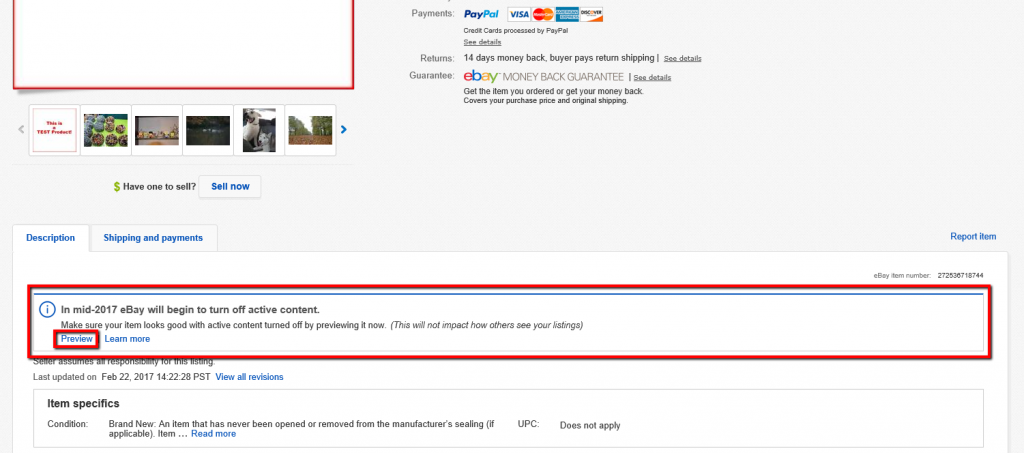
Moreover, eBay also provides a preview mode to see how your listing would look without active content.

“To use the tool, view your item page and click the preview option in the item description tab. This preview link is only visible to you, the seller. Buyers cannot see this option and previewing the item does not alter the description in any way.”

Why is eBay making this huge change?

According to eBay “The use of active content in listings, including JavaScript, Flash, plug-ins and form actions, can negatively impact the user experience by inhibiting mobile purchasing, increasing page load times, and increasing security vulnerabilities”

eBay understands the importance of being mobile friendly and knows that hassle-free mobile experience is the biggest requirement here. As many of eBay sales involve at least one visit from the mobile device, ignoring the mobile experience is what eBay is looking for.

While active contents like Flash fails to load properly or even at all on the mobile devices, they degrade the customer experience ultimately degrading the site’s name, and eBay does not seem to be in a mood to tolerate this.

Do not forget the impact on the page load speed it will have after removing the active contents. The page load speed can be exponentially improved by removing such contents.

The most important concern behind active contents that eBay revealed was the security threats. Active content can lead to security issues, like injection of malware to the pages which would also infect the eBay users’ devices.

Most interesting thing that eBay came up is telling sellers that they can enjoy improved exposure to search engines if they remove the active contents. How? eBay didn’t explain that, but I guess, without active contents the listing would go mobile-friendly and since Google uses mobile friendliness as one of ranking signals, it would improve the visibility and ranking on the Google search engine.

How to adopt eBay’s new guidelines?

With the notification regarding active content, eBay has also released a guidance for what you need to do to adopt the new changes. They have clearly notified that users need to remove all their active contents and use alternatives wherever applicable. If you use template, integration tool, and other such tools from third parties, you need to speak to them and get an information on what they are doing to make their solution comply with active content guidelines.

One thing that is worth to note here is that eBay statement:

“If you are a new Store subscriber, we highly recommend that you do not invest in any custom html stores experience, as this will not be supported long term”

eBay suggests an alternative way- stick with the native eBay stores experience. It clearly implies that eBay is planning to completely deactivate the custom template use in coming future. For the time being, it’s not a problem as it will take some time. However, it’s important to comply with the guidelines if you are using templates now.

Is PrestaShop eBay Integration module safe?

If you are using our PrestaShop eBay Marketplace Integration module or thinking about using it, you need not worry about the active content compliance. There are two reasons for that:

  • It is not a shop template module, it is an eBay listing management solution that enables a PrestaShop store owner to manage his/her eBay listings from PrestaShop store itself. So, it does not target the product front pages, instead, it targets the product listing.
  • It uses the simple Native eBay product listing steps to map the PrestaShop listing with eBay listing following eBay product listing guidelines. So, there is no chance that it uses the active content.

Liked This? You’ll Like These Too

7 Awesome eCommerce Ideas for 2017

2017 is on full fledge, so is the eCommerce market. It’s almost half past and we are all set to step inside the rest half of the adventure.

Adventure? Yes, if you are an eCommerce entrepreneur and your business is still kicking, you know what I mean.

This year, till now, has witnessed so many start-up successes, while some were not so lucky. Are you one of those lucky ones?

If ‘Yes’, congrats! You did the job right till now. If ‘No’, there is no problem. In this post, I have compiled a list of some really useful eCommerce ideas that you can still adopt to keep on kicking. Hopefully, if you do it right, you might get something to reestablish your business, if you were not so lucky earlier.

So, here it goes.

1. Take Mobile Optimization as priority now

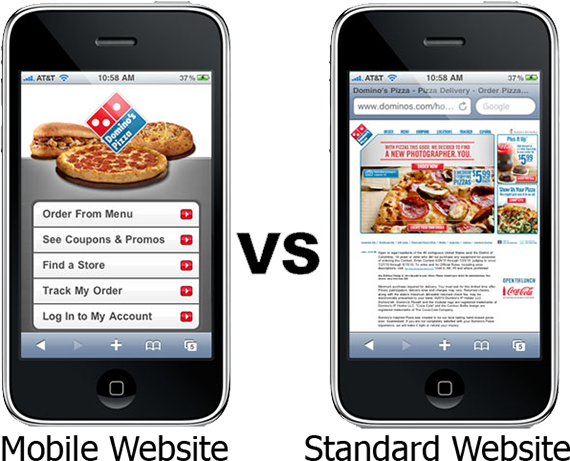
Jordan Linberg, Founder, and Owner of Stardust Memorials says  “If your web-store isn’t mobile-friendly, do something about it right now. Mobile shopping (phones and tablets) is the future of eCommerce, and websites that are not mobile responsive are going to be a bigger and bigger barrier to success for their owners” – Information courtesy: Practical Ecommerce

He got it right. Optimizing for mobile is a topic that is being discussed from the time unknown now. Ask any successful web-shop owner, you will get the same answer- they took mobile optimization as a priority.

Mobile optimization today is not just a crucial CRO requirement but also a strong signal in search engine optimization (SEO). How? Just look at these stats and you will find the answer:

“According to Google 61% of users are unlikely to return to a mobile site they had trouble accessing and 40% would visit a competitor’s site instead”- Source

Are you ignoring the mobile experience of your store? you are not just pushing your potential customers away but also sending them straight to your rival’s site that has better mobile experience than yours.

“57% of users say they won’t recommend a business with a poorly designed mobile site” – Source

E-Commerce website design is not just about looks today- it’s all about the user experience. While content optimization is a crucial factor on every website, eCommerce sites still have to do a lot more than just optimizing contents.

The ultimate goal with a user on your web-shop is to complete the checkout and receive a successful order. That can only be achieved if your site is responsive enough for the customer to easily perform everything from browsing a product page to completing the checkout, right from a mobile device.

“Google officially consider mobile friendliness as one of its ranking signals”- Source

Till now we have been looking at the stats that revealed how you are killing your sales and conversion by not optimizing for mobile. The above fact just pushed us to look at a more dangerous side – Mobile SEO.

When you have a site that is well optimized for mobile users, you are a hero in Google’s eyes. However, by not optimizing for mobile yet, you are surely fixing a bad spot in the same eyes. You will find yourself nowhere in the mobile SERPs and even if somehow you are visible somewhere, bounce rates would make you itch your head like anything.

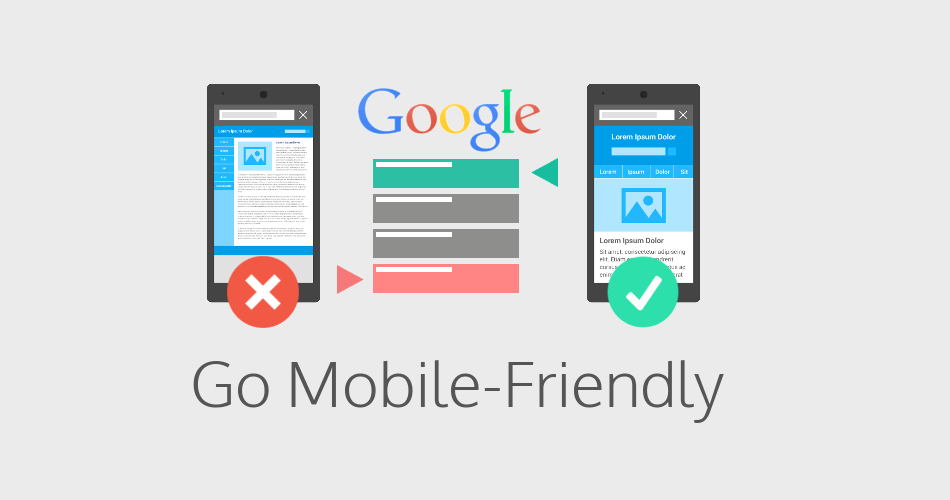
You can use the Google Mobile-Friendly Testing tool to know if you are a hero or a need some more work in mobile optimization.

So, it’s almost mid 2017, and mobile commerce is on full fledge. Tougher days are yet to come, optimize for mobile today to secure your business. In fact, why just secure? You can actually touch the sky of revenue generation by making the best possible optimizations.

2. Focus on your new customers and retain them

As eCommerce sellers, we presume that a customer would order only once. As a result, we take a very less interest in generating repeat sales from the new customers. Well! That’s a mistake, a big one I would say.   Undervaluing the new customers not only affects the new customer acquisition but also make the growth stagnant. If you check the sample of your past customers, every repeat customer on your store was once a new customer. Perhaps, it’s your product quality, quicker product delivery, better mobile experience, or the well-optimized checkout process that has encouraged a new customer to shop once again on your store.

It’s time that you understand that the same channel that has pulled a new customer can also generate repeat sales. Acquiring a new customer is tough, and tougher is to retain them. However, with some serious optimization and marketing, it is possible to generate repeat sales more easily than acquiring a new one.

It’s a time to make some loyal customers and boost your conversion rate in 2017

3. Update your social Ads frequently

Today, if you are something of a popular image on the social channels, you start producing gold with your business. Social media, the fastest and easiest medium to carry your words to the millions can also break your brand image if gone wrong.

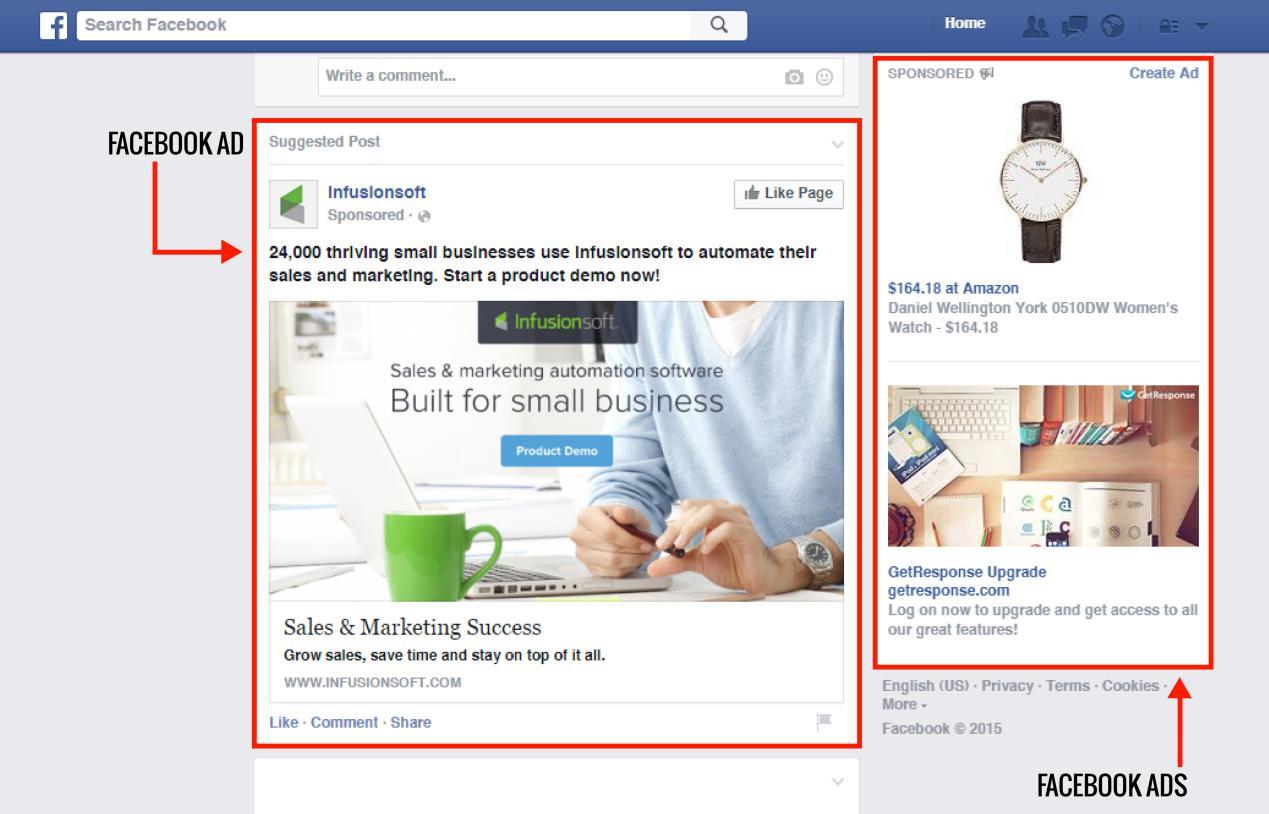
Facebook Ads for example. You may have launched a successful Facebook Ad campaign which is doing quite well. But if you are showing the same Ad again and again to the same not-interested customer, you are irritating him/her and killing your brand image at the same time.

What that worked on one customer may not work on another. Michael Stancil, Director of Commerce, Wedding Wire, says that you should keeping changing the images, and Ad text of your Ads every week. In this way, your same Ad will always look fresh and will have something new for each time. Perhaps, some random change might hit even the not-interested customer and get you a successful conversion.

Read: Social media trends that you should follow for your business in 2017

Leverage every possible Ad type that you can get on the social platforms. Especially for a platform Like Facebook where ROI is always impressive, you can’t say no to it. Not just Facebook, even Snapchat is not far behind, and who can ignore YouTube which has become a major target for the businesses around the globe.

On the whole, get on these social channels with your Ads and follow the best practices to keep them fresh and updated.

4. Don’t be an orthodox, make wise decisions

It’s a human tendency to easily believe in the things that we hear from the surroundings. Gradually these believe develop into conventions and we start confronting anyone countering those conventions.

You would not purchase a cell phone without researching the complete specs, reviews, ratings, performance, battery capacity, RAM, ROM, and customer support. This information helps you to make an informed decision that is backed by a data-driven research. So, why would you make your Add to cart button Yellow, Send reminder emails, and remove guest checkout option without understanding the data behind making such a decision?

Just because, the yellow color works so well for Amazon, it doesn’t mean it will also work for you. Just because, ASOS increased the checkout rate without having guest checkout option, it doesn’t mean it would work for you too.

If you are an eCommerce entrepreneur, stay away from these orthodoxies. Businesses run on facts, data, and analytics. For everything you believe about your business, make sure you have enough data to prove it right.

Use the business analytic tools like Google Analytics, A/B testing, and heatmapping to collect the data that drives your business. These tools will not only help you to know about the actual scenario correctly but will also present a deeper insight about your target customers.

For example, A/B testing your decision to make your Add to cart button ‘Orange’, would give you a statistically proven data that would either support or oppose your decision.

Yes, you should go like this!

In this way, you can avoid the Orthodox beliefs and make an informed decision with higher success chances. In 2017 and onwards, a decision backed by the analytic and research is always more efficient and correct as compared to baseless beliefs.

5. Get ready for a new Analytic tool-

Google Optimize Who doesn’t know about Google Analytics? The well-known business tool that acts as a base for every decision we make. It’s popular not just because it’s free, but for its efficiency to present even the minor datum in so much detail. Furthermore, who can forget the Content Experiments?

Well, 2017 has brought something equally special as Google Analytics – the Google Optimize and Optimized 360. After keeping in Beta stage for a prolonged period, Google finally made these two tools available to the general public in March 2017.

These two tools have already created a buzz in the market. It would be interesting to see how Google Optimize (the free version) would hold the market. Rest, the Optimize 360 might be a luxury for most of us with a cost around $150,000/year.

Want to compare the two tools? Google has already done it for you.

For online store owners, the new free A/B testing tool from Google might be a perfect and better replacement for Google Analytic Content Experiments. If you are not an orthodox believer, and you believe in leveraging data for making the decisions, perhaps it’s a time you should give it a shot.

6. Track your Cart abandonments

The whole eCommerce market is moaning from the pain of Abandonment curse. Believe it or not, probably all the perceptions that you have about Shopping cart abandonment till now is incorrect.

A quite popular perception is “If your shopping cart abandonment rate is 67.89%, you are losing 67.89 % of your sales”.

But that’s not true!

The biggest idea for eCommerce in 2017 would be to change this perception once and for good. In fact, this perception completely follows the orthodox believe that we discussed in the fifth point.

It’s completely wrong to assume that every visitor adding a product to the cart has a definite intention to buy only. You would be surprised to know that hardly 30-40% of these visitors actually have an intention to buy when they add a product to the cart. However, even then it does not indicate a definite commitment to purchase.

So, before setting your Abandoned cart recovery tool to bombard the reminder emails, hold your horses for a moment and rethink whom should you target actually?

Any Idea? You will get it, after reading my post about Abandoned Cart- Biggest lie you probably believe to be true.

7. Mobile-first-index may hit the floor anytime

By the end of 2016, Google buzzed the whole SEO world with its announcement for the new Mobile First Indexing algorithm.

We discussed in the first point how Google wants you to go mobile friendly. However, the mobile-first-index is something that goes beyond “wants” and takes you to “You have to”.

In all the mobile based announcements and updates before mobile-first-index, the impact was totally on your mobile SEO. When this update would be live, Google will index your mobile version of the site first, and your whole ranking (both on mobile and desktop) would be based on how Google sees your mobile site.

That means if Google does not like your mobile site, it will drop your ranking not only on mobile search results but also on desktop SERP.

Image courtesy: search engine land

Worried? You should be, but there is still some time. The Mobile-First-Index update is still in testing phase and is not going to be live any sooner, at least for a couple of months yet.

Leverage the time you have. If you have not optimized for the mobile-first-indexing yet, start optimizing now. You have a lot of work to do. Before that do not forget to go through the words from Google’s official notification on webmasters. Google has already given there a list of “what you should do and what not”.

To Summarize

It’s clear that you are not going to step in 2018 with your business if you have ignored the mobile commerce. From mobile-optimization to mobile-first-index, 2017 and Google both want you to go mobile friendly as soon as possible.

Similarly, an interesting idea to thrive in 2017 would be to stop being orthodox and start accumulating data-driven ideas through analytics. It also involves changing our perceptions over various myths and conventions- shopping cart abandonment as an example.

It’s also the time when we develop a profound focus on- customer acquisition, customer retention, and customer remarketing to leverage every chance for conversion and revenue generation.

On the whole, 2017 can be a year for you if you are well packed with these three aspects:

  1. Decisions backed by data to support it; not baseless beliefs.
  2. Acquire customers and by every mean, retain them.
  3. Evolve with the new SEO trends, go mobile first.

Liked This? You’ll Like These Too

5 surefire ways to gather email data on your online store

Email is cheap, email is fast, email is still kicking and will keep thriving in the future. The bottom line is it is an important marketing tool that is accessible by any marketer for promoting, pushing, and broadcasting the company’s words to the millions.

But before that, you need the email addresses of your target customers to contact them. How would you get their email addresses?

The wrong way

Purchase email data from an agency !?! That I wouldn’t recommend. The email data collected by these agencies consist of a huge pool of email addresses that might not even be relevant to your business. If you use these data, you have a 99% chance of ending up in the spam folders of those users.

The best way

The best way would be to use your own online store to collect the data. The data collected from your own store would be more relevant as these users are interested in your business, that’s why they are there on your site.

There are several ways to collect the email address on your online store. I have chosen the 5 surefire ways that never fail and when combined, provides enough pool of relevant data for your email marketing campaign.

1. Use an efficient email marketing tool

You are going to collect, keep, and use thousands of email addresses, you need a tool that can organize your collected email data and keep them all safe at a single place.

Obviously, you need an email marketing tool to send thousands of emails and run your email marketing campaign. Some email marketing tools that are popular in this category are:

These email marketing tools have hundreds of servers that ensure your mail sent through them avoid the spam filters and is delivered to the right inbox on the right time.

The best thing is that the tools can be integrated right into your eCommerce platform by installing respective modules or extensions.

For example, the PrestaShop Mailigen and MailChimp Integrator module is used to connect your PrestaShop store with your Mailigen and MailChimp account’s email data repository. That is, all the email data that will be collected from your store would be synced and saved in your email marketing account.

So, you need a third-party email marketing tool for:

  • Saving the collected email data
  • Launching an email marketing campaign

2. Collect Email addresses from the checkout

Checkout process would be the most obvious and straightforward place to collect the email addresses. Despite this many marketers make a huge mistake.  They collect the email addresses of only those users who create an account. There are no means to collect the data from non-registered users.

A simple newsletter opt-in box could be really helpful to collect email data from even the non-registered users. In fact, there are newsletter extensions that are capable of creating opt-in boxes that directly sync the email data with your email marketing tool.

For example, Opencart Newsletter Integrator plugin can do the same job on your OpenCart based store. It syncs the email data with your MailChimp, Constant Contact and iContact account if configured.

3. Use motivations as a lead magnet

By default, people feel reluctant to sign up for the newsletter subscription or fill any registration form. You won’t be able to add new email addresses to your data unless people are motivated to sign up for your newsletters. These motivations can actually convert your boring subscription forms into an exciting opportunity to grab.

You can use several motivations. For example:

Search engine watch asks the users to subscribe to get free daily updates from the SEO experts.

Mensuas uses exclusive coupons and offers as a motivation to push users towards newsletter subscription.

You can use various other lead magnets to attract the customers towards your email collection interface. That too without using a newsletter opt-in or subscription form. I am talking about other means of collecting the email data on your store:

  • A free giveaway contest can provide you thousands of entries in a comparatively lower time than the newsletter opt-ins. Deploy a giveaway contest on your store and provide the contest entry through a simple registration form.
  • Use a self-coupon generation form that would send the coupon codes to the user’s email address after the user provides it in the form.

For example, PrestaShop Scratch coupon module shows a virtual scratch coupon which users can scratch using the cursor to see how much discount they have won. After that, they need to provide their email address to receive the coupon code.

4. Use exit intent tracking & entry pop-ups

Most of the marketers think that pop-ups annoy the customers and they highly oppose the use of pop-ups on their sites. But I have found that this thought is one of the orthodox beliefs, they have never tested it on their own stores.

For example, we thought the same until we tested an exit pop-up on MockingFish. The results were surprising. We received the highest sign-up rate after implementing the exit intent pop-up which looks like this.

So, if you are still up against the idea of using pop-ups to collect the email data, you should once test a similar pop-up on your shop. You may start with something of less risky- like on the blog page for example. Just test it and see how it does.

Another type of pop-up that could be tried is the entry pop-up. Well, this idea is not supported by many. Showing a pop-up just after visitor lands on the site could be risky. Perhaps something of great value to the users might not irritate them. Something like this could be less risky:

Don’t be afraid of using the pop-ups and pop-up promotions. Use them wisely and provide some value to the users, they will certainly convert and provide quite relevant and more likely to convert users.

5. Use auto-subscriptions and email address capturing-

For all the ways that we have read till now in this post, you have to depend on the users to fill and submit a form for collecting the email address. Auto-subscriptions work a bit differently where email address entered by the user is automatically captured and synced with the repository without even submitting a form.

For example, Magento Auto-subscribe extension is capable capturing the email address of a user from the checkout page without even letting the customer know about it. As soon as the customer comes out of the email field the extension triggers the capture event that copies the email address to your MailChimp or Constant Contact repository even if the customer does not click the submit button.

The same process can also be followed in several website forms that you use- exit pop, newsletter pop-up, etc.

Conclusion

Once you have the email address, the main work begins- sending the emails. With a personally collected email data on your own store, you have the permissions of the users to send them the targeted emails. Moreover, as they already expect an email from the store, you have more chances of high open rates. Use the email marketing tools to plan the campaigns and schedule emails at different time lines.

Sending regular emails remind customers that we exist and have stories to tell and offers to give. A more engaging relationship can be created with email conversations. Just remember to send some different types of emails occasionally apart from the marketing emails. Perhaps a monthly news update, free e-book, or a loyalty coupon, could be a great occasional change.

Liked This? You’ll Like These Too