With the tremendous increase in the number of mobile users, it has become an inevitable need for the online sellers to upgrade their businesses to the mobile devices. This is one of the factors, if ignored, can lead to very high losses. This required a lot of effort and time of the store owners earlier. Tapping the customer base that are using mobile devices for shopping purpose was quite a task for the store owners a while ago.
In order to make sure that the Prestashop site owners are well connected to their customers, Knowband has come up with Prestashop Mobile App Builder Module. This module helps the Prestashop site owners to build mobile app for their business with minimum effort and in no time.
If you are a Prestashop site owner and struggling to connect to your customers then this plugin might change the complete scenario for you. It will help you grow your business and allow you to provide an engaging platform for all your customers.
Let us discuss some of the salient features of Prestashop Mobile App Builder.
Increased Traffic
According to a survey by Statista, “Around 150 billion Apps were downloaded in 2016”. It is evident that the purchase behavior of the online shoppers are shifting towards mobile apps. Therefore, eCommerce sellers need to understand the urgency of the situation. The mobile app are one of the best ways to lure the customers to your web store. As the number of mobile users are more, hence, traffic on web store in increased considerably. The mobile app builder helps create an alluring app for your business. The flawless application is an effective way to tap the customer base who are shopping via the handheld devices. Moreover, the attractive themes and the seamless procedure ensures customer retention. Hence, if you are looking to double your store’s traffic, then, this is surely one of the ways to achieve your target.
Interactive Platform
The Prestashop Mobile App Builder addon provides an interactive platform for the mobile users. It is provided with multiple theme layouts, fonts, designs and graphics. All these features helps in making your app more engaging and enables seller to connect with the customers easily. The voice search facility of the Android mobile app makes the app even more mesmerizing. It provides the user for better product option.
Compatibility
A large portion of mobile users use Android while many prefer iOS and Windows too. Prestashop Mobile App plugin is designed in such a way that it is compatible with multiple devices and platforms. It helps the eCommerce seller to connect with their users, irrespective of the device that they are using or the platform on which their device works.
Easy Synchronization
The module provides with easy synchronization between the mobile app and the Prestashop Store. The mobile app is made to support all types products that are available in the eCommerce store. The mobile app builder makes the products easily accessible to the customers. In addition to a smooth transaction, the app supports all sorts of payment and shipping methods. Thus, you are provide multiple choices to your customers and ensure best shopping experience.
Additional Features
The Prestashop Mobile App Builder Module comes with a number of additional features. It enables the customer to view all the products from a particular seller. It even enables to customers to view and write the reviews for the products. The product review and ratings can help them to a great extent in determining the other customer’s experiences with the product. The retina ready display of the app allows the visitors to take a clear look at the product images, thus, aiding their purchase intentions.
The Social Login feature makes it easier for the customers to sign up in the mobile app. Knowband’s Prestashop Mobile App Builder is compatible with multiple social media login options including Facebook and Google+. Thus, it provides the customer easy login and shopping experience.
Technical benefits
The Mobile App Builder plugin is easy to run, understand and use. It doesn’t require much technical knowledge for the store owners to run the mobile app on their own. The Knowband team has made it easier for Prestashop owners to have a mobile app. All you need to do is to buy the Mobile App Builder module and enable it on your Prestashop store. Then, provide the development team with some basic information about the design layout of your mobile app.
The development team will customize the mobile store according to your demand. The apk of the application will be provided to you and you are all set to release your mobile app on Google Play Store.
Over to you
The trend of online marketing is changing every day and mobile apps are definitely a better means to stay connected to your customers. Thus, the sellers must stay in line with the basic mCommerce Consideration in order to optimize their growth.
The increasing popularity of the social media platforms among the online shoppers have make it one of the most inevitable part of marketing. If we take a look at the statistics, you’ll find that there have an abrupt rise in the total number of users on the social media. Therefore, it is one of the best platforms for the eCommerce stores to promote their product. These platform provides better opportunities to the seller in term of the reaching out to greater number of customers and enhancing the store’s visibility. The foremost concept of marketing includes targeting the right audience and catering them with sufficient information about your products and product count. The Facebook wall posts that showcases your offerings and store information can helps in engaging more customers on the social media platform and at the same time making effective conversions.
1. Easier way to update FB wall
Knowband has come up with Shopify FB Wall Post module. The module enables all the Shopify site owners to connect to their customers on Facebook with attractive and informative wall posts. It is one of the better way to reach to the potential buyers and improve the chances of conversions. The wall post has a higher chances of reaching the required customers as it is easy to access and less time consuming. Keeping the customers informed about your store activity through Facebook is a better than motivating them to visit the store all the time.
2. Contest based marketing
According to a survey by bufferapp, “About 35% online users engage themselves in the product purchase when they get proper information about it”. Therefore web store owners may use this as an opportunity to boost their sales and increase the rate of conversions. If acted properly, it can help in the tremendous increase in the product sales. You can post your content on Facebook. The images and contents can intrigue the visitors to post their comments. Thus, you can increase the engagement even more. Hence, it won’t be wrong to state that this is a less time-consuming to indulge into content marketing.
3. Organize giveaways
Giveaways are one of the best approach to engage the customers. More customers are likely to register themselves to your web store for free giveaways. The seller can use this to promote his products in the future or inform the customer about the ongoing offers or current discounts.
4. Set up a FB Store
If you run an eCommerce store than setting a FB store might boost the sales up for you. Facebook is most popular social media platform. Thus, providing your customers to use your services without actually visiting the store will surely help you grow. Shopping through FB store is the new concept and your customers will surely love to use your FB store to avail your services. It saves them time and will make their experience better with you.
5. Keep the customers informed through FB page
The eCommerce store owners may use a FB page to promote their products. Just create a page and keep your customers updated about your products, deals and discounts offered by you. With the help of this page, you can allow your customers to learn more about your products. This feature helps in increasing the customer data and using it for future references. The customers will be happy to hear about your products, without having to spend their time.
6. Invite the feedback and reviews
One of the most important factor, which is often neglected by the eCommerce store owners. Try to be invite more reviews and feedback about your products and services. It helps you in getting a better understanding of the customer’s priorities and queries. At the same time, customers can easily connect with you. This process also promotes the idea of social sharing and enhances the rate of sales up to a great extent by spreading word-of-mouth.
Most of the customers prefer to shop online rather than visiting the physical store. The best part about online shopping is the deal and discounts that customers can avail on their favorite products. The convenience, ease of shopping and alluring discounts has led to a tremendous increase in the number of online buyers. This has opened new opportunities for the eCommerce store owners to grow their business. Now, the main task for the store owners is to divert the customers to their web stores. In order to do so, most of the sellers have come up with different offers, combo products and discounts.
The customer doesn’t seek for offers solely. In order to attract huge traffic to your website, the store owners must come with better options to engage their customers. The traditional ideas of email subscription has become appears to be a bit boring for the customers. Therefore, the seller must come up with better alternatives to attract the customers to their web stores.
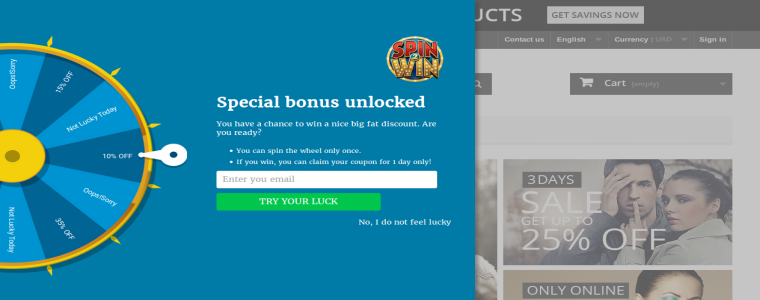
The Prestashop Spin and Win Module is one such way to increase the web traffic to your Prestashop Site. The spin and win module generates a very playful pop up. Also, the spin and win module ensures high sales as well as satisfied customers.
If your Prestashop website is facing low customer engagement or some interactive addons, then, Prestashop Spin and Win plugin is made for you. Try the spin and win module and you will see a boom in the web traffic of your website.
The following features of the spin and win will help you to determine, how this spin and win module can help in generating high sale and immediate conversions.
Increased Web Traffic
The customer seeks for a better experience and this spin and win module provides them with it. The spin and win module is a better alternative to the classic annoying pop ups. Spin and win presents the offers and discount to the customers in a much creative and playful way. Most of the users would love to spin the wheelio and avail offers, rather than getting discounts by some subscription email. The annoying messages popping up in the screen can annoy the visitor out of the store, however, spin and win is one of the way to keep them hooked to the site. The playful way of spinning the wheel can make shopping and browsing fun for the online shoppers. Thus, spin and win can effortlessly reduce the exit rate and enhance the website traffic.
Better UI And UX
The customer would love to be enrolled in your website, if they are provided with better interface and at the same time a good experience. The interactive exit pop up works collectively in that direction. The spin and win plugin generates a pop up, which can be used as entry, exit or time-out pop up. Thus, making it easier for the seller to interact more with the customers. The spin and win enables the buyers to check all the standing offers from the seller in an enticing way.
Email Integrator
The spin and win module enables the customers to spin the roulette after entering their email ids. This spin and win module provides the seller with the customers email id, which can be used in the future for promoting other products. The store admin can customize the spin and win module as per his convenience. The visitor can spin the wheel with a single email id only once. Thus, spin and win increases the customer base of the store owner. Not just the Prestashop email integrator even integrates the ids with MailChimp and other marketing platforms. Thus, spin and win module even facilitates email marketing by increasing the number of subscribers.
Increased Customer Interaction
The Prestashop Spin and Win plugin is a better option to provide customers with deals and discounts. It presents the offers in a much creative way rather than the old ordeal manner. The customer avail the offers instantly. The responsive popup generates the coupon code automatically that can be further used for shopping. The code can even be send via email to the customers. The code is generated instantly and the customers can use the code for shopping at the same time. The spin and win module increases the website interaction with the customers.
Boost The Sales
The presence of such a creative pop up tempts the customers to spin the Wheel named spin and win module. The main idea behind the pop up is the presentation. The spin and win module is a pleasing way to give offers and discounts to the customers. Moreover, spin and win module can make even a small discount appear as if they won a bargain. The spin and win module helps in boosting the sales. The pop up can be used as an exit pop up too, therefore, in case customer is willing to leave he may be engaged with the fun experience of spinning a wheelio.
Conclusion:
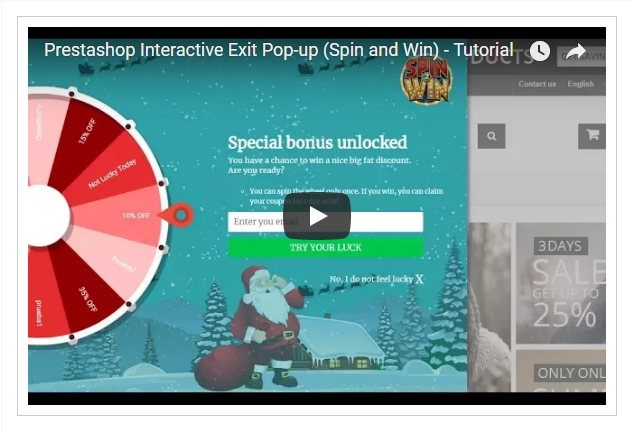
The customers like to shop smartly and with the availability of multiple choices, the seller needs to provide them with better alternatives for shopping. The best thing is that the spin and win module is easy to use and requires not technical help. A Tutorial Video about Prestashop Spin and Win Module. Thus, Knowband has come up with the spin and win module that fits with the idea for creating an effective promotion campaign on Prestashop.
With the large number of people using social media platforms like Facebook, Twitter and Instagram, it has led the eCommerce owners to shift their concerns to the very important aspect of social media marketing. The seller needs to keep their customers updated about the products, running offers and different discounts. The customers are more likely to check the discounts offered by store if they are presented in intriguing way. Moreover, one of the better way of providing the customer with the product information is through the FB wall post.
According to a survey by Huffington Post, “On an average more number of people interacted with their content through Facebook than the actual app itself”. So, it encourages the store owners more to promote their product on Facebook.
Therefore, Prestashop FB wall post module enables the Prestashop site owners to promote their products on Facebook via wall post.
If you are running a Prestashop site and feel like your product is not reaching the target audience than this module might help you. Try the module and see the rise in your sales.
The FB wall post may boost your sales in following ways-:
Store Visibility
The Prestashop Facebook share module helps you in generating automatic wall post for Facebook. It will help you to promote your store on Facebook. As the popularity of Facebook is quite large among the people hence, it becomes easy to promote a product using this platform. More people are likely to visit the store, if they tend to see it though interactive platform. The FB wall post enables you to spread out words about your store, offers available and the ongoing sales. It is much better approach than the traditional marketing. You can post your product images, categories, brands as well as the discount coupons being offered by the store. This creates a curiosity among the users and gives the web store a better visibility.
Increase Customer Engagement
The module enables the customers to check the eCommerce store products, offers and discounts without visiting the store. The convenience of getting information through the social media post makes it more approachable for the web stores to engage the customers and gather their attention towards the web store. Therefore, it serves as a better alternative to checking the web store itself. Moreover, the wall post provides the customers with the option to make purchase, so, it saves them a lot of time. The module engages the customer by offering them all the information without letting them leave their social media platform, this acts as one of the major advantage of using the Facebook wall post to promote the web store without putting the customers out of their comfort zone.
Target the Right Audience
The FB wall post plugin allows you to generate automatic as well as manual wall post. Therefore, the seller is free to promote his products on Facebook, depending upon the web traffic at a particular time. The seller can generate automatic posts to keep new visitors informed about the store and offers. The manual post can be generated when the seller the traffic of potential buyers is maximum, thus, providing engagement for the users based upon their preferences. Moreover, it is easier to identifying the purchase behavior of the customers on Facebook. You can easily identify the products that they find interesting by tracking their likes and share. Hence, it is an effortless way to target the right audience.
Easy Synchronization
The module provides the seller with the advantage of easy synchronization between the wall post and the actual web store. It helps the web store to auto sync the post to the FB wall without having to give a second look on the FB wall post separately. The seller can post all the products, offers and low stock counts on Facebook via wall post. The easy synchronization makes it quite efficient. In case, if any customer is willing to avail the offer than they can be easily redirect to the web store from the wall post itself. The customers can browse all the features of the web store through the wall post by some simple clicks. This feature helps the web stores to provide easy and simple approach to reach out to maximum potential buyers without putting more efforts.
Add-on Features
The module is multi-lingual compatible and supports more than 14 languages. It helps the seller to promote their brand or products to people with different ethnicity. Therefore, a larger number of audience can be covered by the web stores in order to make a sale. It also helps the customers to relate themselves better with the website. The module is compatible with all the Prestashop themes which makes it work with all the themes making the website look more attractive. The seller can optimize the look of their wall post to look more engaging and interactive. The key point of providing a better UI to the customers can be fulfilled by making the use of this module. Moreover, this plugin doesn’t conflict with other Prestashop plugins and is easy to use and configure.
Social Sharing
The power of social media is undetermined. It can turn people into celebrities and products into a trend. Therefore, one of the main advantage of using the module is to get more coverage. Most of the people tend to like one or more products in the web store via the wall post. In this case, if the viewer think that the product is worth mentioning to one of their known ones, they can share the post with them. This way a chain of promotion is formed which eventually leads on to a better promotion of the product for the web store. The more coverage received by the products increased its chances of making a sale. This is definitely one of the ways to facilitate referral marketing and spread the word-of-mouth.
Final Say
In order to keep the customers informed about the products and offers, sellers must follow the social media trends that may change eCommerce. It helps the customers to be informed about the products and as well as increase the sale of your products.
One of the biggest problem with the eCommerce store owners is to retain their customers. Most of the time, if a customer doesn’t find better products or deals, they tend to leave the website. In such cases, the seller must come with a better idea to keep the customers engaged to the website. Thus, the idea of exit popup proves to be a better option, in order to lure back the customer to the web store.
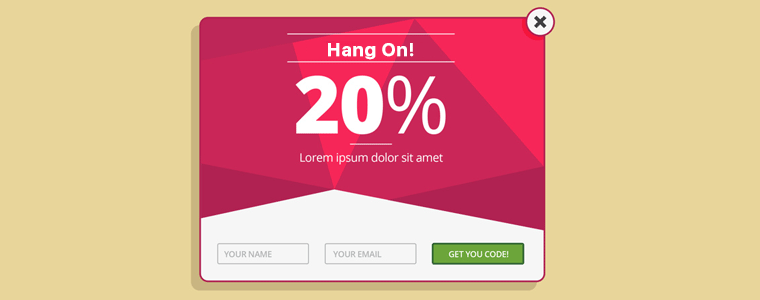
Therefore, Knowband has come up with Shopify Exit popup module. The module allows the Shopify site owners to generate an exit popup when the customer is about to exit the web store. The exit popup offers the discounts to the customer just when they intend to leave the site. The exit popup encourages the customer to check the web store once again and avail the offer received.
The Shopify exit popup module is one of the better approach to redirect the attention of the customers to the website. So, if you are a Shopify site owner, who wishes to improve traffic to their website, then Shopify exit popup might be the tool you are seeking for.
The Exit popup benefits the eCommerce stores in following ways:-
Increase Web Traffic
Well, the exit popup redirects the customers to the web store again. Hence, exit popup provides them with an opportunity to make a purchase on products with the discounts they received through exit popup. The customers can browse through the web store again for the products to avail the discounts with the exit popup. The exit popup increases the customer’s activity on the web store and increases the web traffic considerably. There are playful exit popups that not just retains the existing customers, but even helps acquiring new ones. Spin and win is one such example of the exit popups which makes shopping a more fun experience for the customers and at the same time generate better revenues for the web stores.
Boost the Sales
The customers are tempt to avail the offers, they received through exit popups. Thus, they re-enter the web store in order to use the discount code or the avail the offer received. The exit popup turns out to be a win-win situation for the sellers as well as the customers. Curbing the exit intend of the customers, the exit popups help in enhancing the customer engagement to a greater extend. However, at the same time, the exit popups are considered to be annoying by some of the customers. In order to make it fun and engaging at the same time for the customers, you can use gamified exit popup. Shopify Spin and Win module is one such way to convert the visitors into leads without annoying them. The interactive exit popup of wheelio is not a playful way to offer giveaways to the customers and curtail their exit intend. Thus, by enhancing the engagement, the exit popup not just increases the traffic of the site, but even boost the sales at the same time.
Better UI and UX
The whole idea of providing discount offers to the customer upon their exit is to stop them from exiting the store. It provides the customers with a better interface to connect with the seller. The idea of providing offers to the customers via discounts coupons enhances the customer’s experiences. The discounts received while they intend to the exit from the store imparts a feeling of trust on the web store. The exit popup bends the customer to make purchase from your web store in the near future. While just asking the customers to enter their email ids and offering 10% discount is tedious, the exit popups can make the entire thing exiting and fun for the customers. The gamified and attractive exit popups introduced in the recent past makes the interface of your website alluring. Thus, by enhancing the UI as well as UX, the exit popup is one way to staying in the good books of the customer.
Email Integrator
The exit popup allows the user to avail discount after they have entered their email id. Therefore, now the store owner is provided with personal details of the customers. Hence, the seller can now use the information of the customers for the future sales promotion with the exit popup. The exit popup helps in increasing the product visibility. Some of the exit popup plugins including the Wheelio module is an email integrator that integrates the email ids in the MailChimp, Klaviyo and other account of seller. Thus, exit popup is one of the ways to make email marketing a cinch and lure the customers back to the store.
Reduced Abandoned Carts
The exit popup is one of the best method to deal with the problem of abandoned carts. According to a survey by Baymard, “There is about 70% average documented online shopping cart abandonment rate”. Therefore, it becomes a challenging problem for the eCommerce store owners to get better conversions. The exit popup lures the customers to use the discount code and complete their purchase, which otherwise they would have left without going to the checkout page. The web store can provide the customers with various offers and discounts, so that they may get back to the web store and re consider exiting the store. Exit popup has a very high success rate in reducing the number o abandoned cart rate.
Better marketing options
Once the attention of customer is redirected back to the web store then it becomes quite easy for the web store to market them more products. The sellers get a chance to showcase some of their more products which the customers may find suitable to make a purchase on. Thus, the web store is able to make sales out using these exit popups. Therefore, the idea of using exit popup to get back to the leaving customers may help the web store to makes sales on more products.
Conclusion
The idea of marketing is tough and if you are not in sync with the what’s happening in the eCommerce market. One of the biggest hack to reduce exit rate and abandoned cart is by cutting short of the mistakes of the checkout page that may be killing your conversions. The exit popup is an effective way to boost up your sales and make effective conversions. So, find a solution for your site and take your business to the next level.
With the availability of multiple eCommerce stores, online shoppers have a number of options to choose from. But what leads to the decision making of the shoppers when it comes to choosing the best store among all? Can you guess?
It’s the User Interface. Apart from UI, it is the UX. Your website appearance is the first impression of your eCommerce store on your visitors. If it doesn’t look pleasing, you won’t be able to make your visitors stay on your store. A good user interface is followed by good user experience. If your UI is impressive but you are failing to provide a comfortable browsing experience to your visitors, you are probably not going to see them back on your store.
So, in order to provide customers with a smooth and pleasant experience, enhancing the user interface as well as the user experience is a must. Bridging the gap between the user experience and user interface is highly important for the success of an eCommerce store. E-commerce merchants use different tools and features on their web stores to make it more interactive and engaging. One such method to enhance the UI and UX of an eCommerce website is the Infinite scrolling.
Infinite scrolling, also referred to as Endless scrolling, eliminates the pagination process from your store by bringing the automatic and continuous loading. As a user scrolls downs the page, the product list continues to populate. As a result, users do not require to click on the next page to browse further.
The Infinite Scroll module by Knowband helps the eCommerce merchants get rid of the conventional pagination system. It adds an automatical scroll on the product listing page and enables the user to easily navigate through your store products, on a single page. If you run an e-commerce store on Prestashop, OpenCart, Magento or Magento 2, you can avail the benefits of this Infinite Scroll module. Try them out:
Are you still sitting on the fence of whether to implement this infinite scroll feature on your store or not? Here are some of the compelling reasons that would help you make up your mind.
Infinite scroll is time-saving
As an e-retailer, your primary focus should be to maintain the user flow when they are present in your store. A pagination process can disturb the user flow and create frustration when users go through a number of pages. Infinite Scrolling, on the other hand, makes the browsing interesting and time-saving.
Infinite scrolling offers Easy browsing
One of the main advantages of infinite scrolling is that it makes browsing easy. With the automatic loading of products, the customers just need to scroll to find their desired product. But continuous scrolling, sometimes, can make a user dig so deep that it will be difficult to reach to the top of the page again. For this matter, the Infinite Scroll module contains a “Go to top” button to make a user easily navigate to the top section of the page.
Infinite Scrolling increases session duration
To be very true, users get bored and tired after browsing a number of pages. They do not even look further to see more results and take an exit from your store. This isn’t the case with Infinite Scrolling. When products are displayed continuously on a single page to the users, they browse more products and spend more time on your store, which helps in increasing the average time spent by a user on your site.
Infinite Scroll offers fast browsing
Customers prefer fast loading. They just hate to wait for the pages to load. Clicking on the next page several times and waiting for the page to load every time can irk your visitors. Infinite Scrolling overcomes this issue and keeps adding the next page content automatically. Users find this way more convenient.
Amazing for touchscreen devices
Touchscreen mobile devices are heavily dominating keypad devices over the last few years. Today, almost every user owns a touchscreen mobile phone. This is why Infinite Scrolling is considered to be the ideal way and preferred over pagination by e-commerce merchants. It gets so simple to just use a thumb to navigate to different pages. Facebook is a prime example.
Infinite Scrolling creates more user engagement
When the content gets loaded quickly, it makes a user stay longer on the page, hence increases customer engagement. Because of the continuous appearance of products, users find themselves interacting in your store for a longer period.
Conclusion
Customers love the Infinite Scrolling feature. It enhances their user experience and keeps them engaged in your store. I guess this is enough for you to make this feature available on your e-commerce store. Check out the Infinite Scroll modules and let me know the results that you obtain afterward.
The internet has granted users with access to explicit content and data, irrespective of the age bar. This has led to the minors getting exposed to the content which is not suitable for them. Does your website deal with adult products or contents that require age verification? Do you want to put up the age restriction on your website?
Age verification services can be expensive and a time-consuming process, but no worry. we have made it easy for you. If you want to add the age verification set up on your website, PrestaShop Age verification addon is all you need.
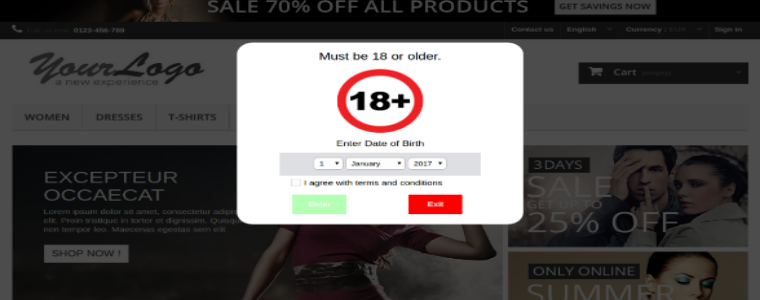
The Prestashop Age Verification module is one such option for the Prestashop store merchants that restricts access to the website for the users under a certain age. If the website contains explicit content, then the module is a good method to avoid minors from entering the website. This helps website owners to prevent minors from exploring the adult-based content if they entered the site accidentally. It serves as an initiative in stopping cyberbullying.
Listed below are some of the ways in which age verification plugin can help you.
Customizable flash messages:
The module doesn’t require much technical knowledge. It can be installed and used immediately. The module enables the admin to flash a pop-up message, which would read a warning to the visitors when they enter the website. The pop up is used as a warning about the contents or products inside the website. The pop up can be used to display a message with a small description of the website and the contents and products of the website.
Age Restriction:
The Prestashop Age verification module can be customized as per the admin’s choice. The warning pop up can be generated with links, either to provide direct access to the website or after entering the Date of Birth. Internet safety is one of the growing concern and sincere efforts need to be put in order to stop cyberbullying. The Prestashop age verification module works toward making Internet a safe experience for everyone. The features provided by this module enables the users to stay safe and enjoy the bright side of the Internet.
This feature helps in making sure that the user is eligible to access the contents and products available in the website.It helps in keeping, visitors of a certain age group, mostly the minors, out of the website, making the site age restricted.
Customizable pop-ups:
Apart from that, this module provides a winsome look to the website. As the admin can customize the pop up to make it looks more appealing. The pop up can be designed to look convincing, with the proper usage of a relating picture. The admin can also read a warning with the pop up for the users. The module helps in making the website more interactive. As, the pop up message reads warning about the age limit, hence, most of the time users will enter or exit the site accordingly. The feature also ensures the users about the product quality available on the website.
Secure:
The Prestashop age verification module provides a safe access to the contents and products for minors. Apart from that, the module is multi-store compatible. It enables the admin to link multiple stores using the single module. The module is SSL compatible, so all the data of the user is safe during any transactions.
Checks cyberbullying:
Internet safety is one of the growing concern and sincere efforts need to be put in order to stop cyberbullying. The Prestashop Age verification plugin works toward making the Internet a safe experience for everyone. The features provided by this module enables the users to stay safe and enjoy the bright side of the Internet.
With the trust of more than 20,000 store owners, Knowband has provided the optimization feature with the module that gives the website a winsome look. The admin can design the layout of the pop-up message. The placement of the Age Verification pop up makes it more interactive and engaging. The module makes it possible for the visitors to leave certain websites if they opened it accidentally.
How can Knowband help?
Knowband provides a module to best suit your website and the Prestashop Age Verification module is designed in such a way that the minimum age bar limit can be configured. The admin gets an editorial feature of displaying a message along with pop up, to provide users with information about the website contents and products.
The Age Verification Module provided for Prestashop store owners, takes the customer’s expectations into consideration. The general perspective of a person entering a website maybe curiosity. Through the message, admin can make sure that the users are about the content or product they are about to view.
The Prestashop Age verification module can be customized as per the admin’s choice. The warning pop up can be generated with links, either to provide direct access to the website or after entering the Date of Birth. This feature helps in making sure that the user is eligible to access the contents and products available on the website. It helps in keeping the minors out of the website. This helps the web store owner to get full control on the module and make it look as per they see it more beneficial.
Knowband provides 100’s of plugins to make E-Commerce a better experience. The Prestashop Age verification module is can be optimized in a way that all its components can be edited as per the need and can help you target the right audience. The admin can use a relatable picture, to make users aware of the website contents and age limit. With the easy availability of the internet for people of all age group, the age verification bar is a must for most of the site.
Conclusion:
This module enables the admin to target suitable users for their content and products. Meanwhile, making sure the website is not accessible to a particular section of internet users. Are you looking for any such addon for your store? Visit Knowband to get the solution to all your problems.
Creating a product-based photo album on Facebook has always been a time-consuming and painful process for the eCommerce store owners. While the social media marketing is the key to success in the eCommerce ecosystem, getting rid of the hurdles have always been a tough task.
Prestashop Fb Album module is one such addon that makes the job easier for the Prestashop store owners. This powerful tool can increase the customer engagement along with the number of Facebook followers of your online store.
1.1 Project Objectives
The module can be used by the store owner to achieve following objectives:
The Prestashop plugin allows the store owner to create a new album on Facebook directly via the admin panel of the module.
The admin can even customize the existing albums.
The visitors can perform a product search via a simple product name or brand
Select the desired photos of a particular product and post the complete album on the Facebook page with just a click of a button
Enhances the look and feel of the Facebook page with alluring visual communication
2.0 Installation
Once the purchase and download is complete, you’ll find following files in the module folder:
1. facebookalbum.zip (It contains source code of the module)
2. User Manual
Follow the following steps to install the extension:
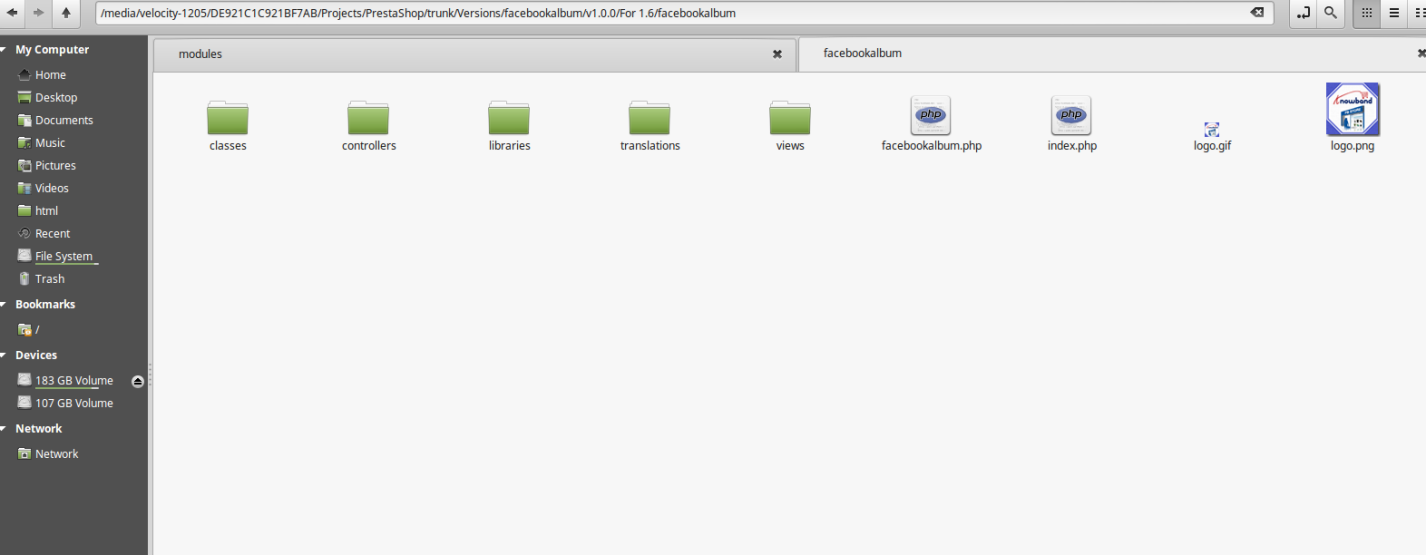
Unzip the facebookalbum.zipfile. It would contain files and folders as shown in the image below.
Copy all the files and folders of unzipped folder into your store “modules” directory on the path – Root Directory/modules/.
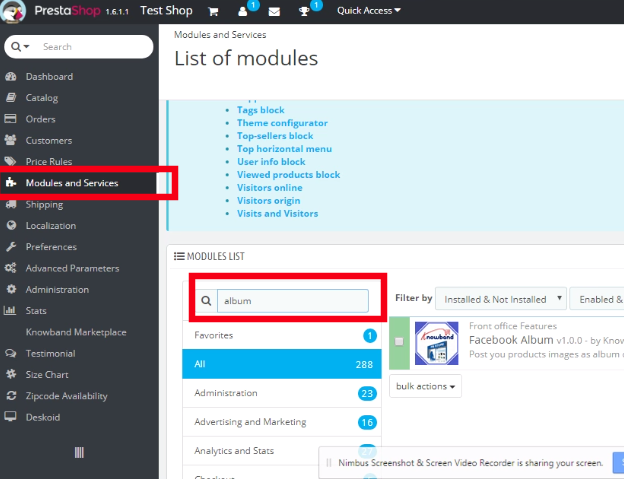
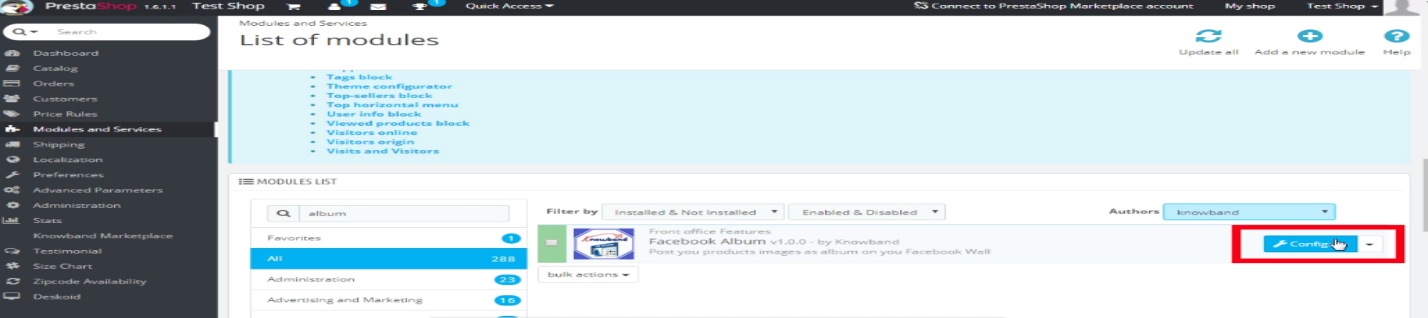
The module is now ready to be installed in your store. Go to the Store Admin and then to Modules and Services. Seach the name of your plugin in the Search tab, as shown in the image below.
Click on “Install” button to install the module. It would show a pop-up for your confirmation. Click on “Proceed with the installation” option. This step will install the module and show notification – “Module(s) installed successfully”.
The module is now successfully installed and ready for use. You can configure it as per your store requirement from the admin panel.
3.0 Facebook App Creation
Facebook App can be created by following steps mentioned below:-
1. Go to given url mentioned below:
https://developers.facebook.com/apps/
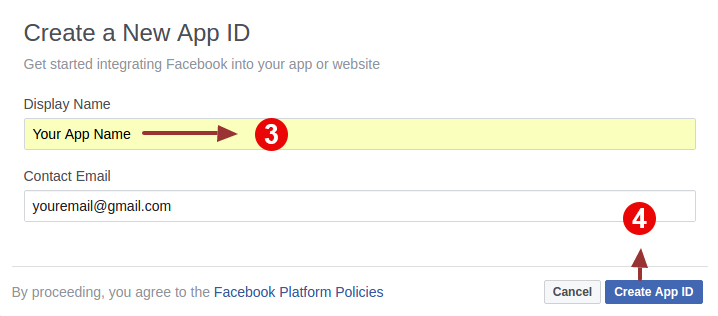
2. Click on the “Add a New App”button.
4. Enter your App name and email id, then click on “Create App ID” button.
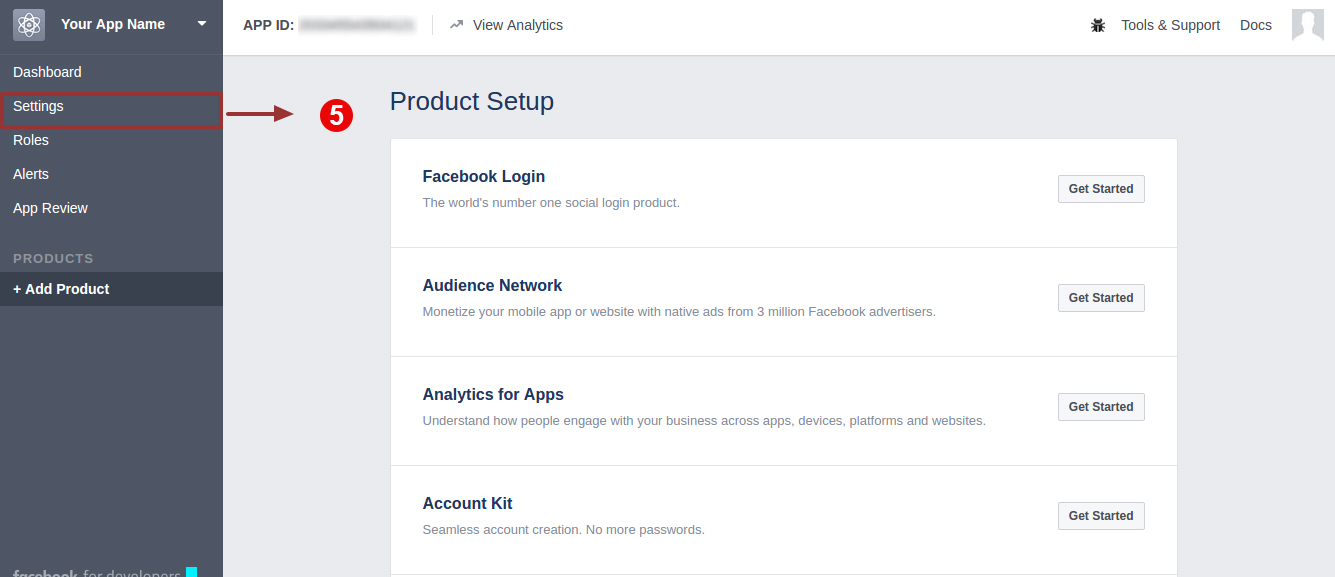
4. Click on “Setting” tab.
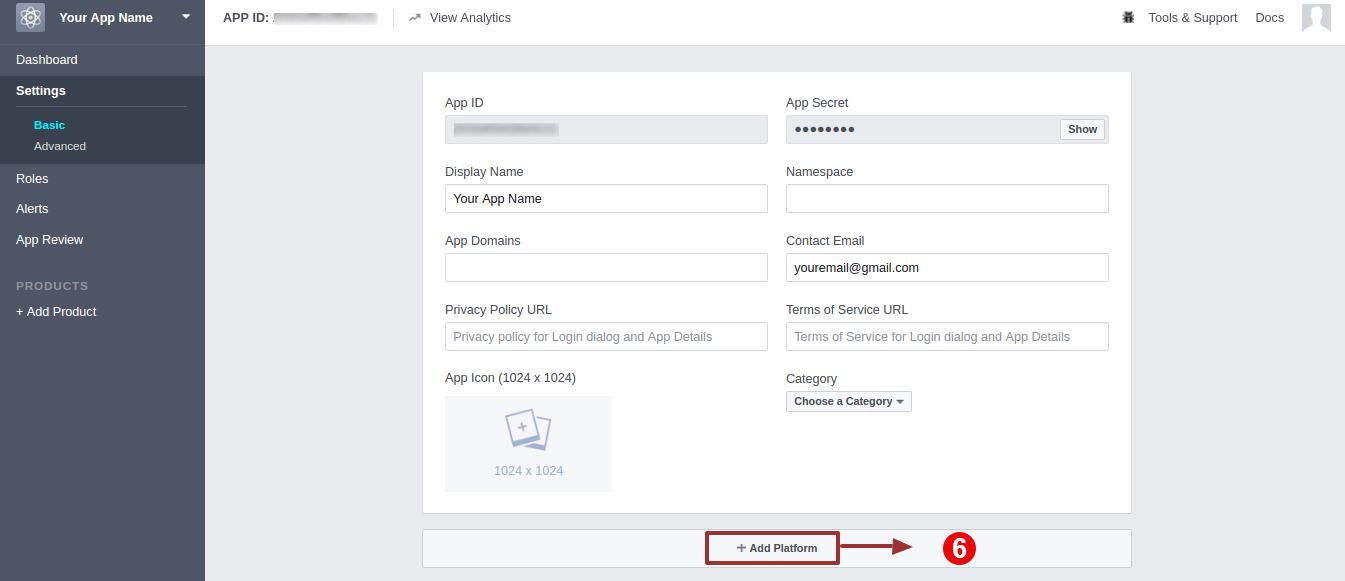
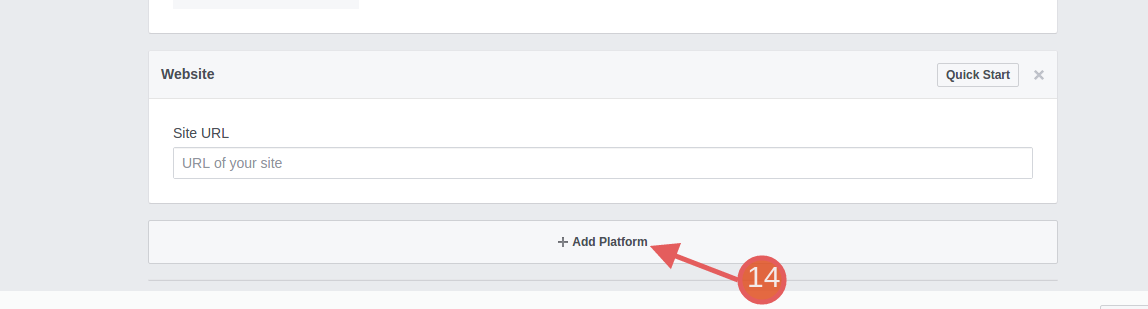
5. Click on “Add Platform”.
6. Choose “Website” as platform.
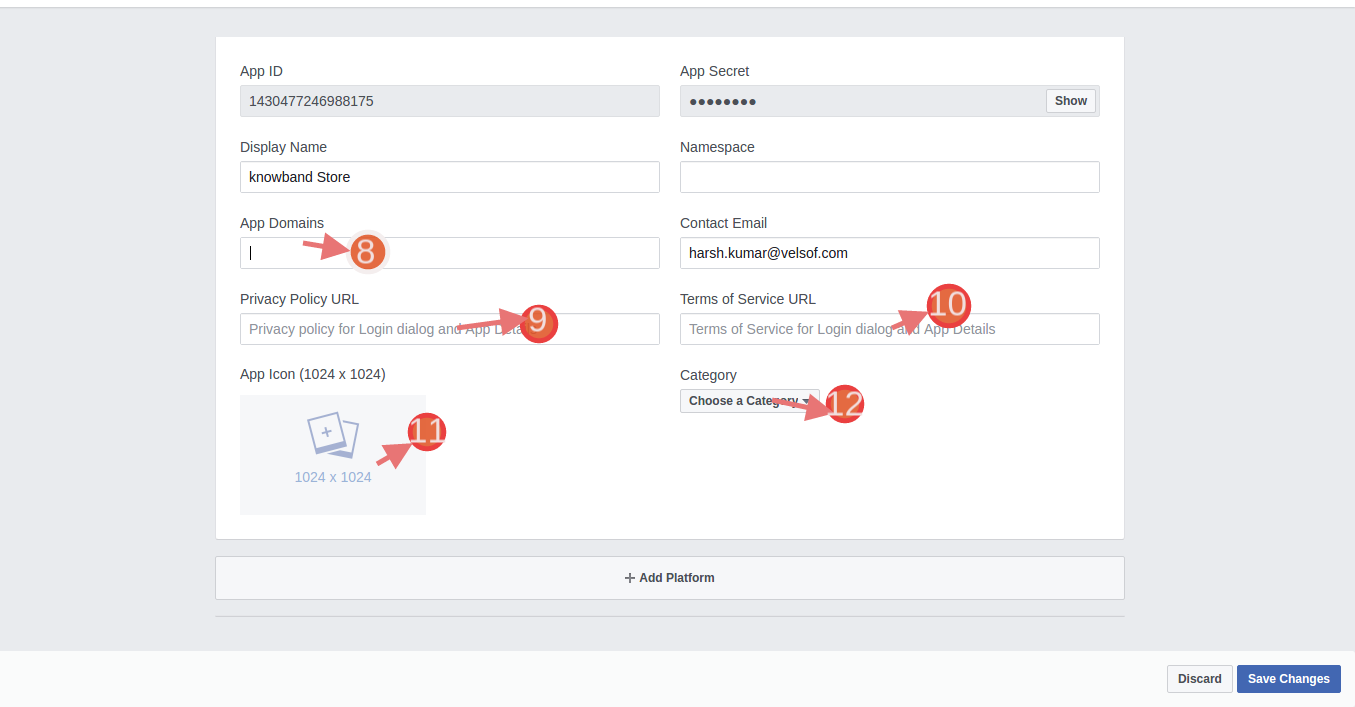
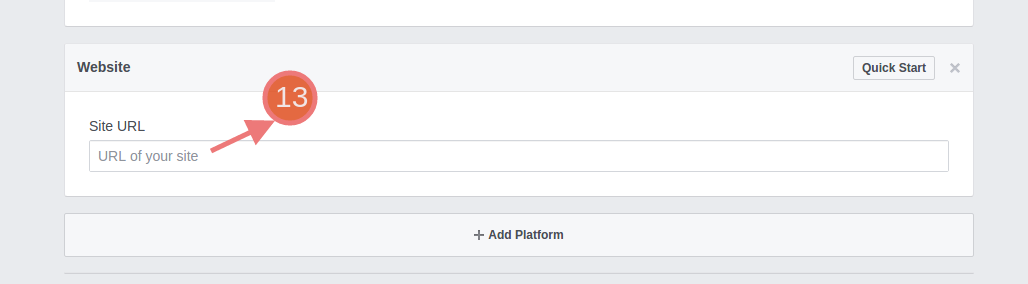
7. Enter your “App Domain” , “Contact Email”,”Privacy url”,”Terms and Conditions url”,”AddLogo”,”Select Category”,“Site URL” and click on “Save Changes” button.
App Domains:
yourdomain.com is correct
yourdomain.com/store is incorrect
www.domain.com is incorrect
Enter your Site URL.
Once again click on “Add Platform to add Page”
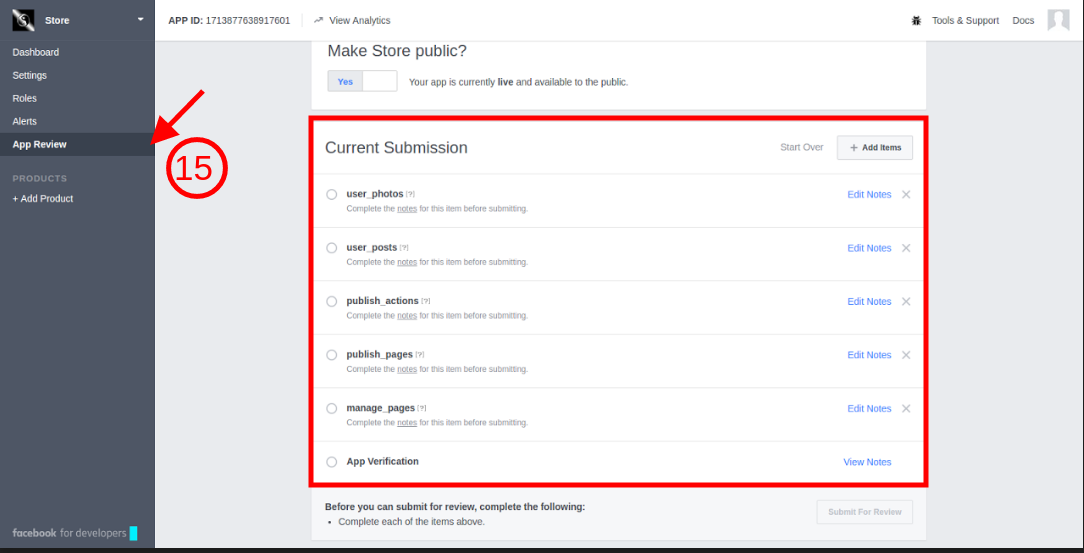
8. Under “App Review” tab:-
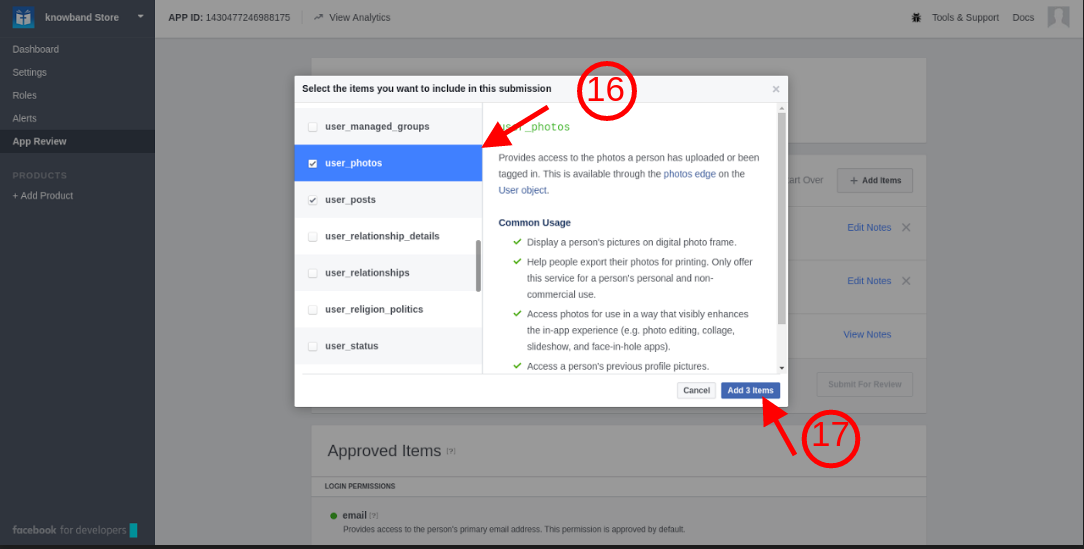
Check all the permissions shown in the tab.
Select ‘User Photo’ tab and then click on ‘Add 4iteks’
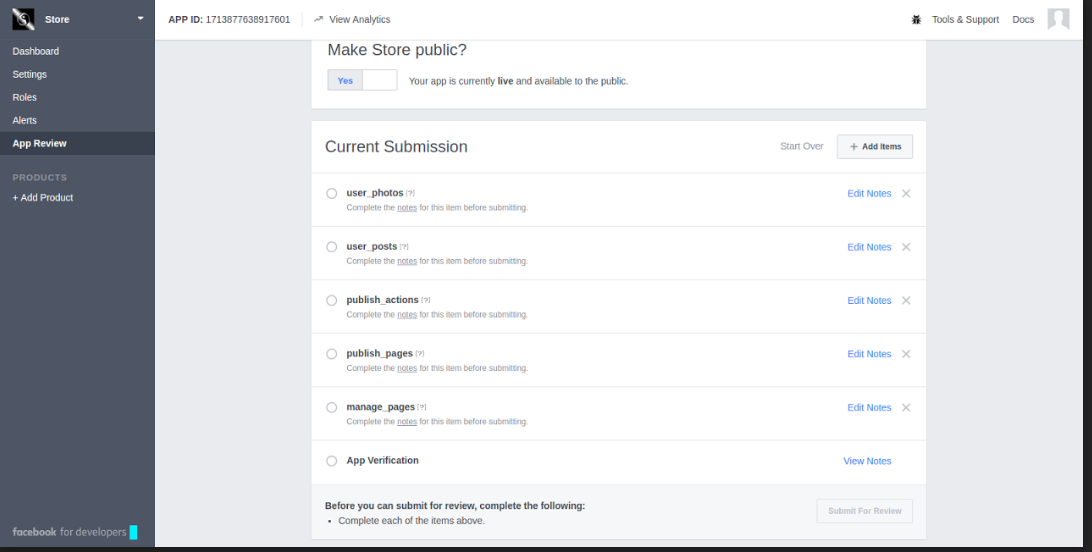
After following the steps mentioned above, the screen will be displayed as shown below.
4.0 Admin Interface
The store owner gets complete access to the change the various functionality offered by the plugin. In order to go to the admin panel, click on the ‘Configure’button.
4.1 How to sync Prestashop FB Album Module with the eCommerce store?
On clicking the “Configure” button, the admin will be redirected to the admin interface of the module.
The configuration page includes following setting options:
Facebook App Setting
General Setting
Album Setting
Cron Setting
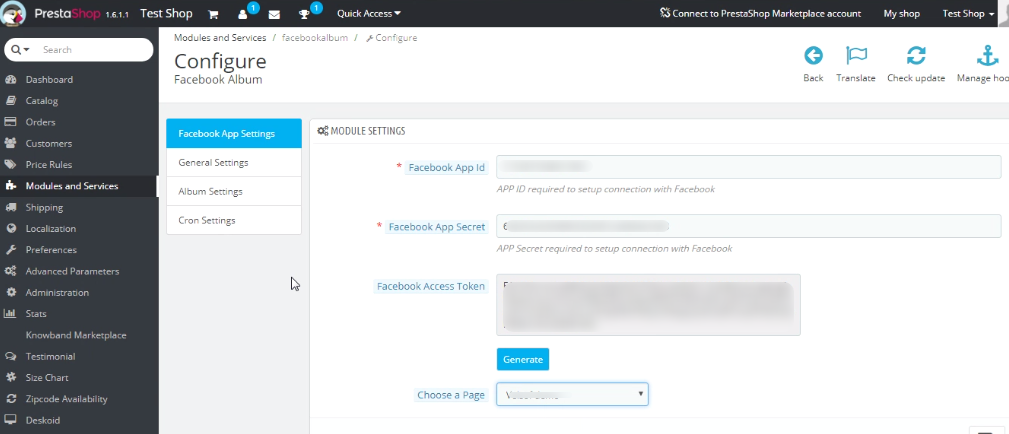
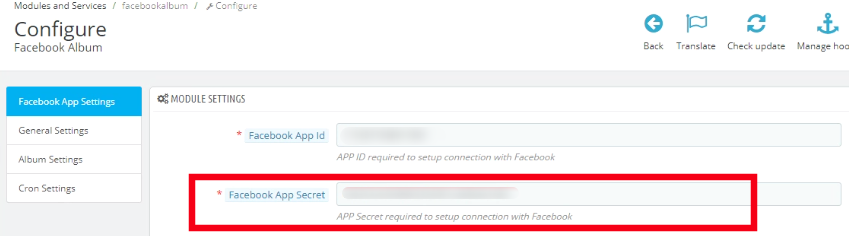
The first step includes the process of ‘Facebook App setting’. That is, the store admin will be asked to save the “Facebook App Id” and “Facebook App Secret” and connect to Facebook as shown below:-
4.1.1 Where can you find the Facebook App Id and App Secret?
The Facebook App Setting includes the process to the sync the Facebook profile of the store owner. Follow the below-mentioned steps:-
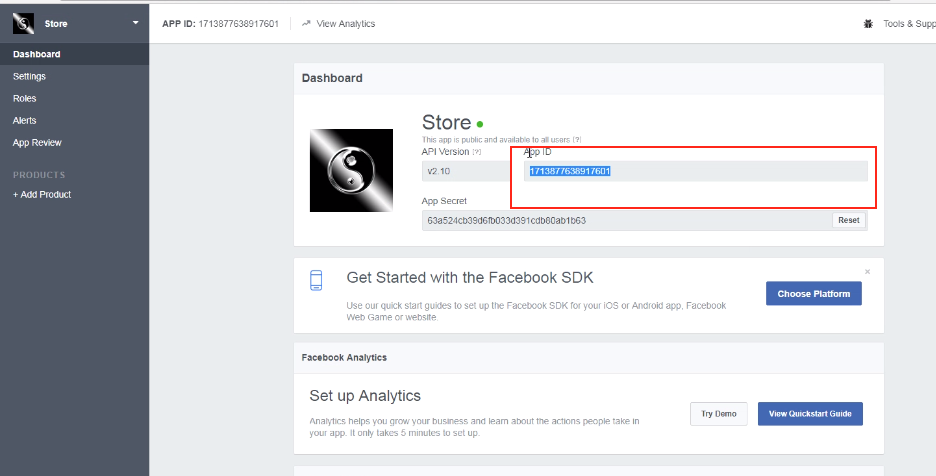
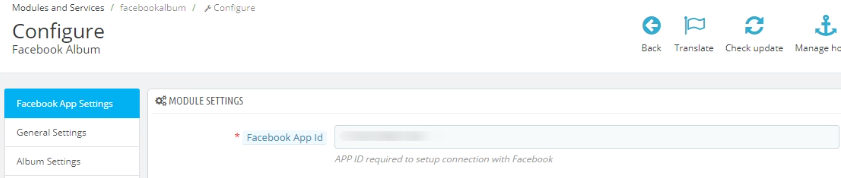
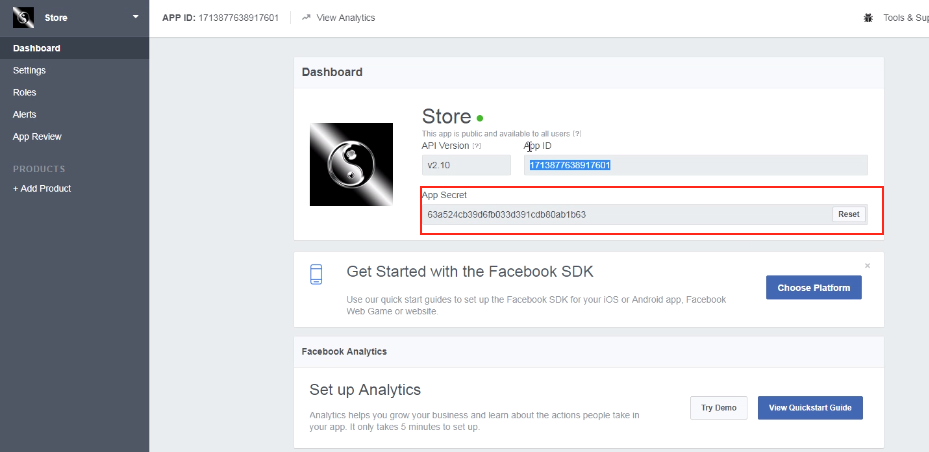
Facebook App Id:- In order to find the App id, go to the dashboard of your Facebook App. Copy the app id from the column shown in the image below and paste it in the setup page of the module.
Facebook App Secret:- The next thing you need to do is to copy the Facebook App Secret from the dashboard. Copy the App Secret from the next column as shown in the image below and paste it in the admin interface of the module.
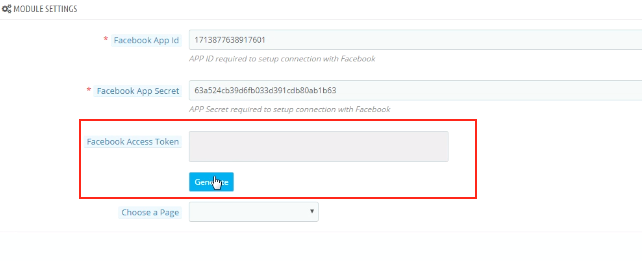
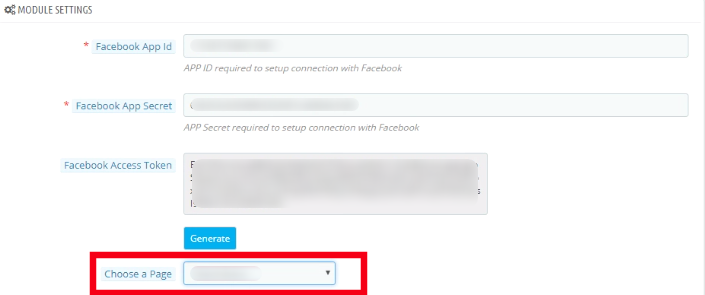
Facebook Access Token: Once the App id and App secret are saved, the Facebook Access Token will be generated automatically. Click on the ‘Generate’ button. This button will be disabled by default and will be enabled only when the App Id and App Secret is entered.
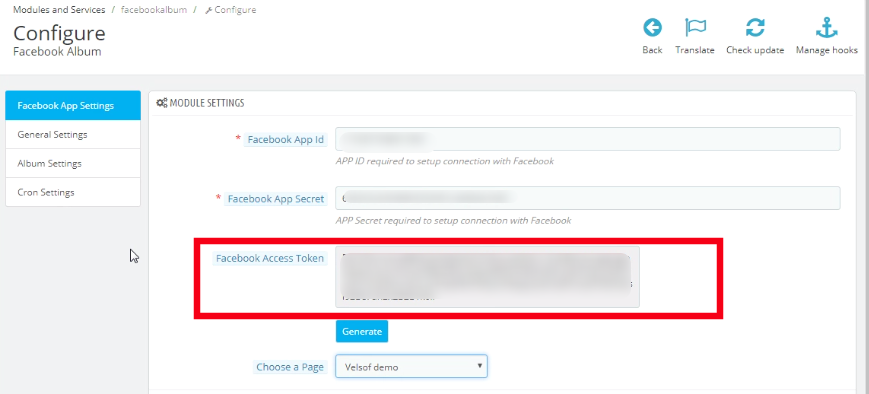
As you click on the button, you will get a pop-up for Facebook Login. Log in your Facebook store and the access token will be generated.
The module is now synced with your Facebook store and is ready for use.
‘Choose the Page’ from the options given in the dropdown list and save the changes. The posts will be displayed on the page selected by you. For instance, we take the page as shown in the image below.
4.2 How to customize the front end of the Facebook Album?
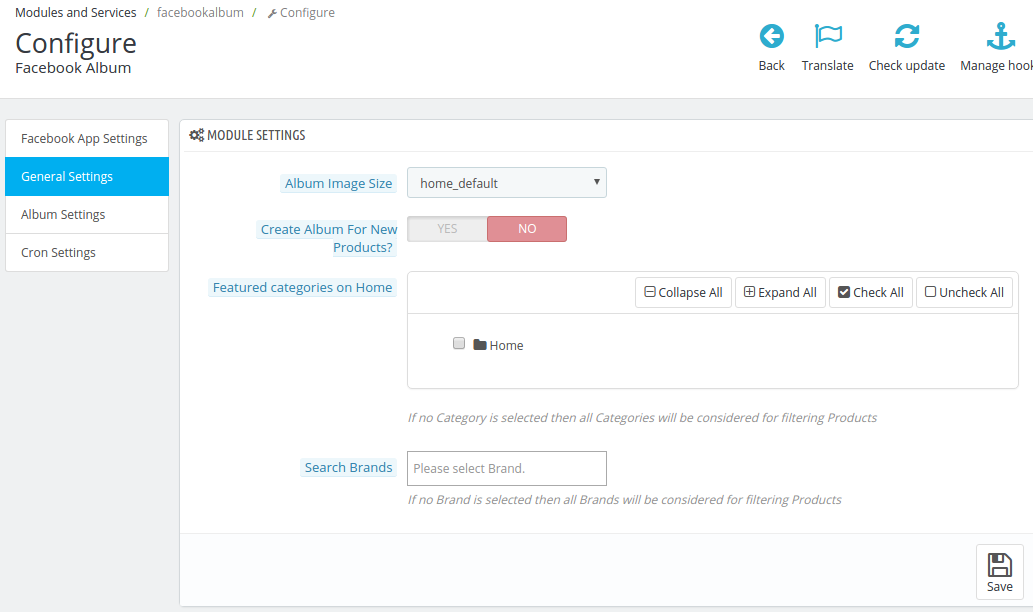
On adding/editing any profile, the admin will be asked to connect to Facebook App. Once the module is successfully synced with the Facebook Page of the admin, the store owner can customize the look and feel of the album to be displayed on the Facebook page. The ‘General Setting’ offers various customization options. Let us discuss the customization options one-by-one.
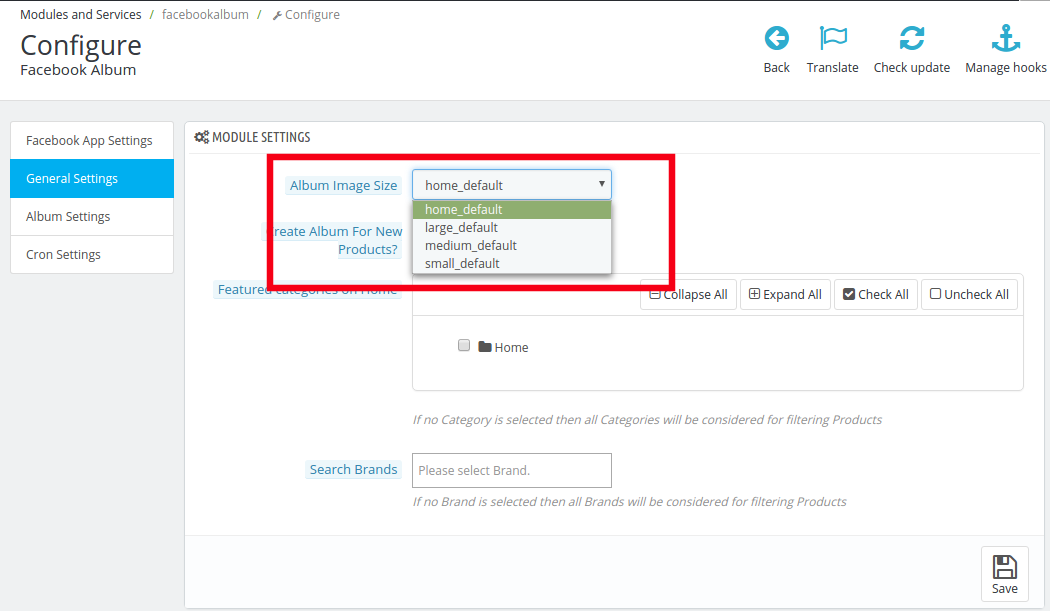
4.2.1 Album Image Size
The size in which you want to display the image of your album can be selected from here. There are various options available in the drop box, you may choose the one that suits your requirement.
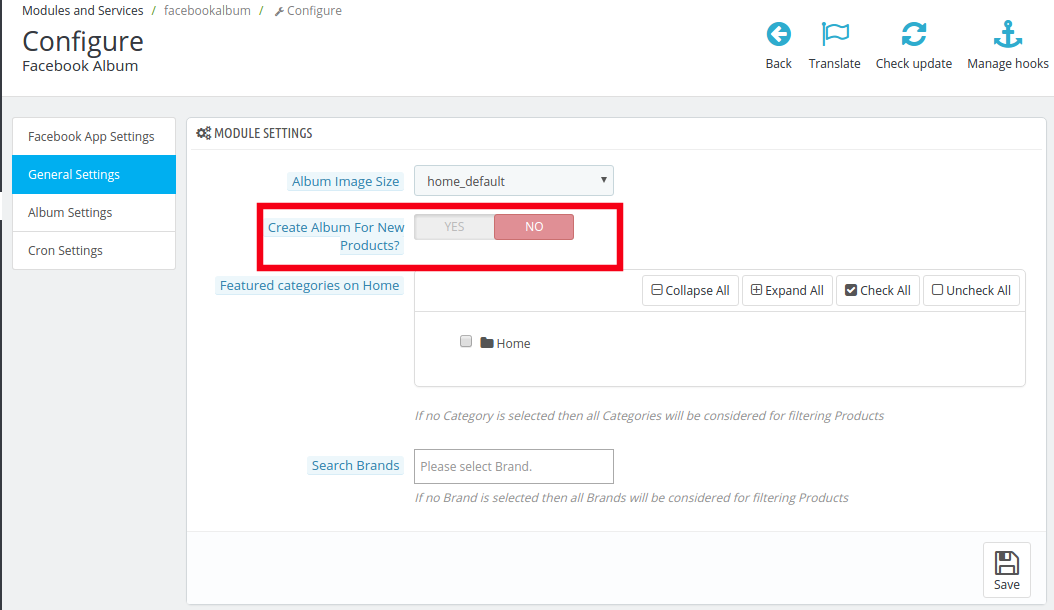
4.2.2 Create Album for new product
This option provides you a choice to select Whether you want to create a look book for the new arrivals or not. You may enable or disable it as per your requirement.
As this feature is enabled, a series of questions are asked to the user.
4.2.2.1 Choose an album from the existing ones for the album of new products
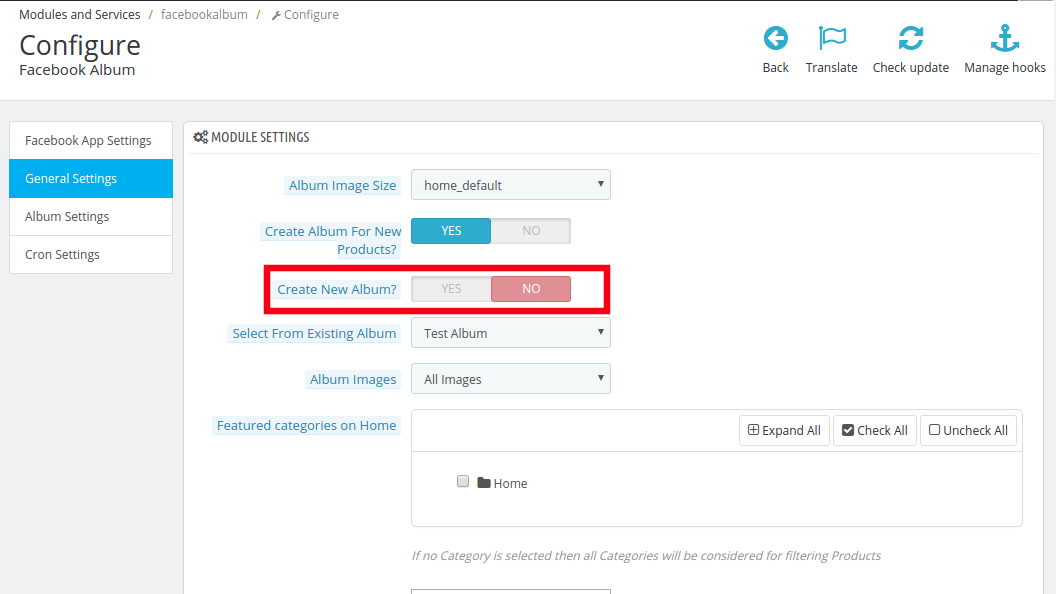
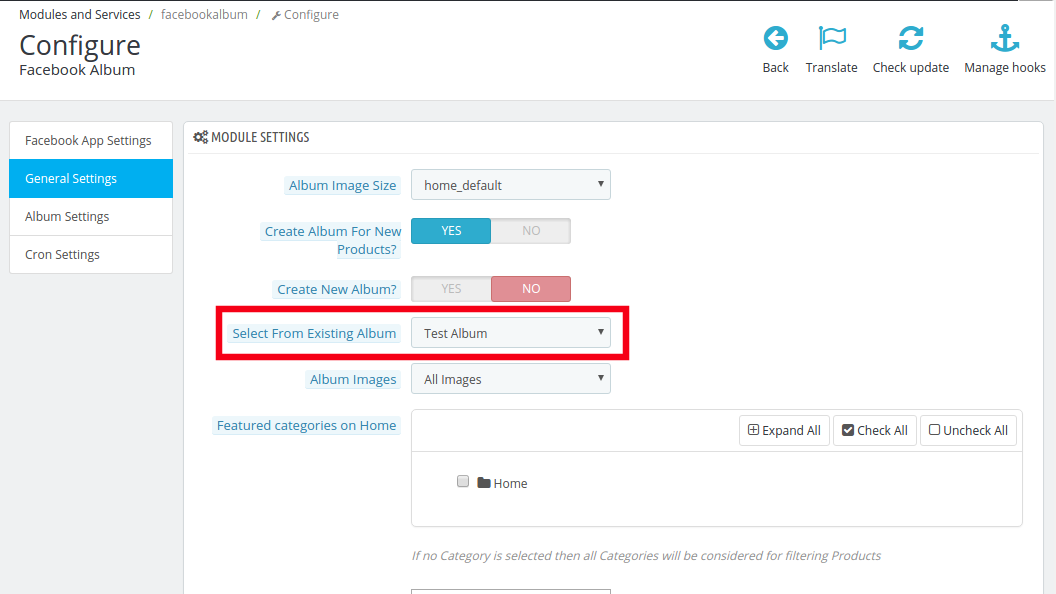
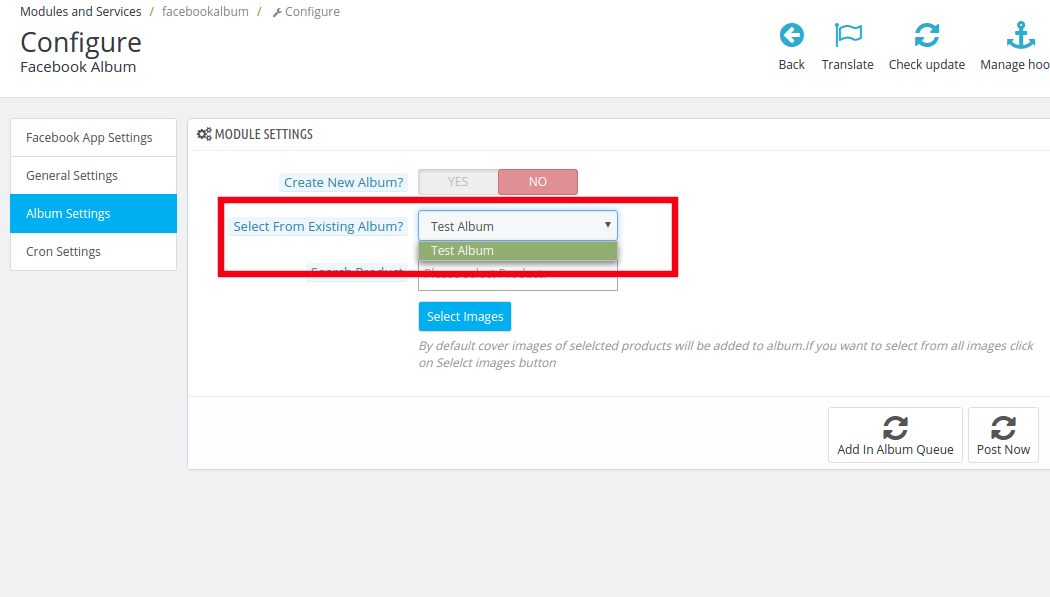
The store admin can either create an entirely new album for the new arrivals or else he choose one from the existing albums. In order to choose one from the existing albums, disable Create New Album.
The albums already existing on your Facebook Page will be displayed in the drop box of the next column, that is, Select from Existing Album. Make your selection and then choose the images you want to display.
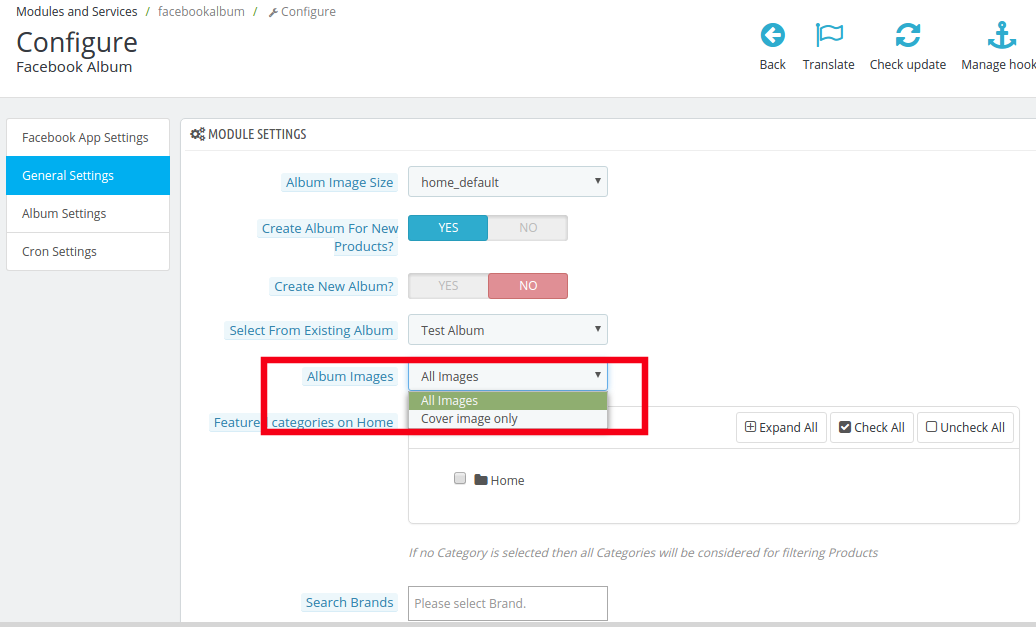
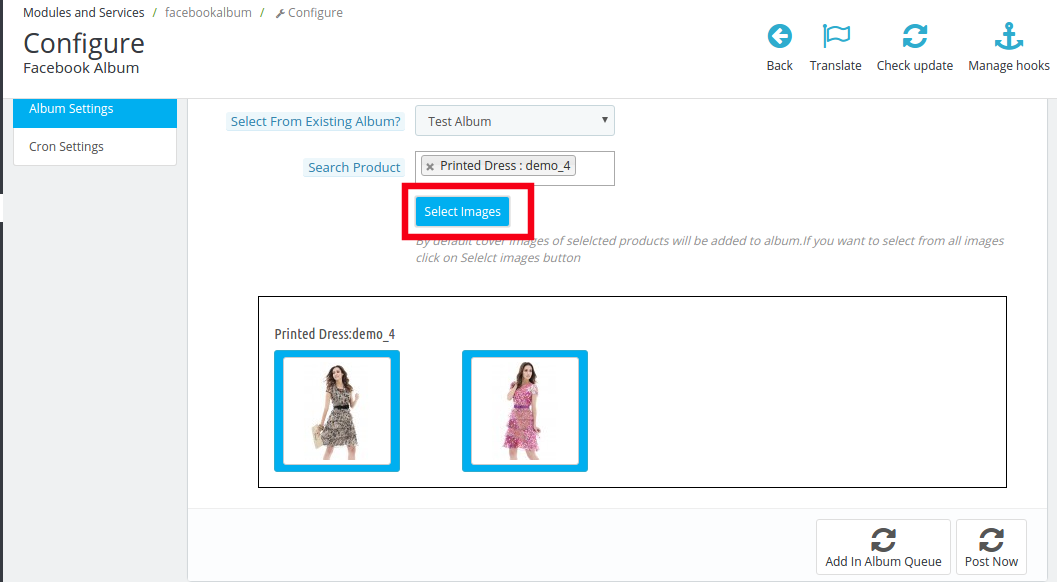
You can either select All Images or just the Cover Image from the Album Image section as shown in the image below.
4.2.2.2 Create a new album for the new products
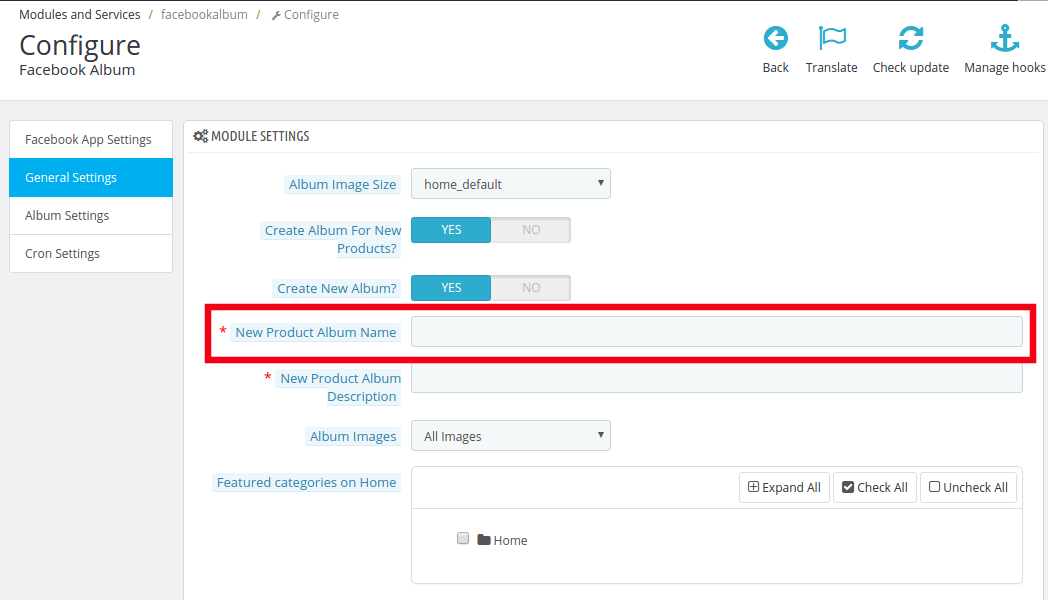
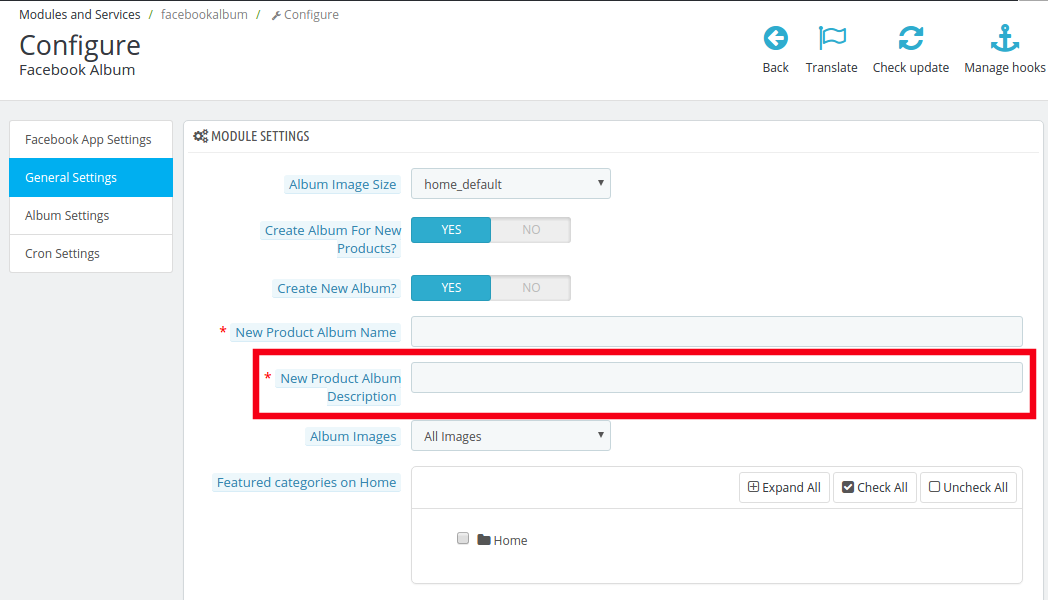
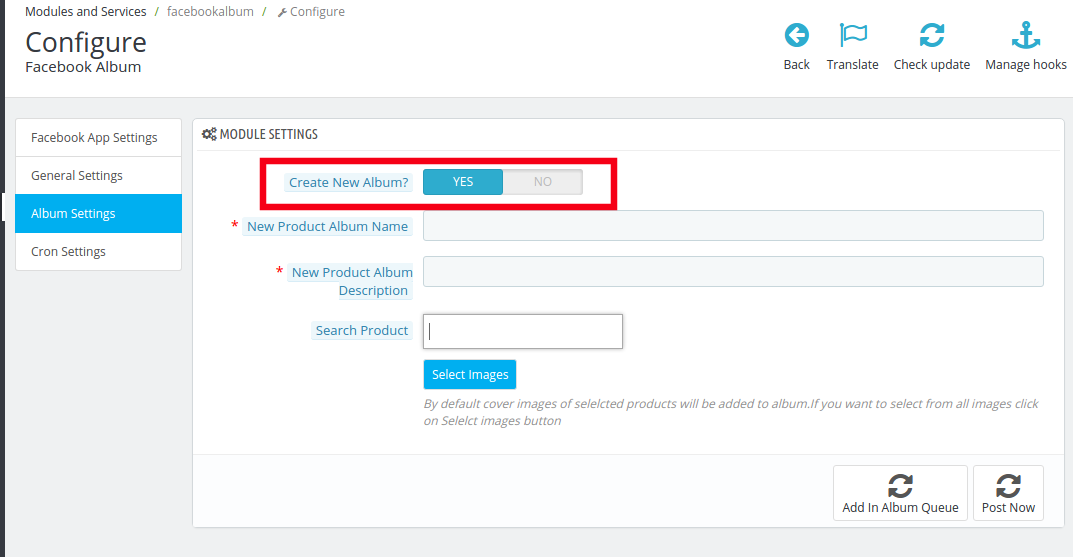
Prestashop FB Album plugin even offers you an option to create a new album for the new products. In order to do so, enable Create New Album.
Enter the name of the album in the section New Product Album Name.
Write a short New Product Album Description in the next column.
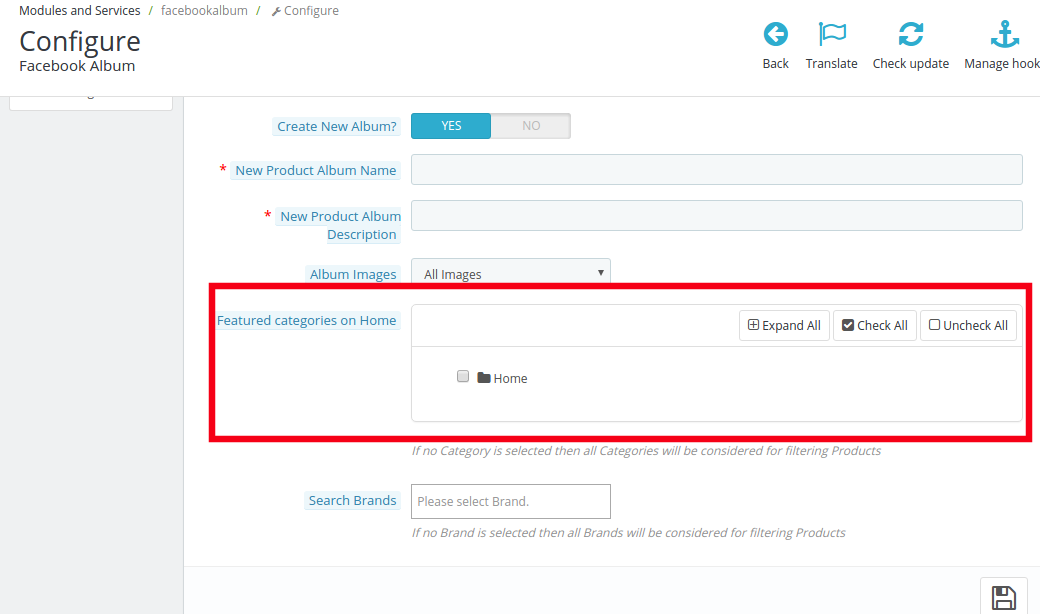
4.2.4 Featured categories on Home
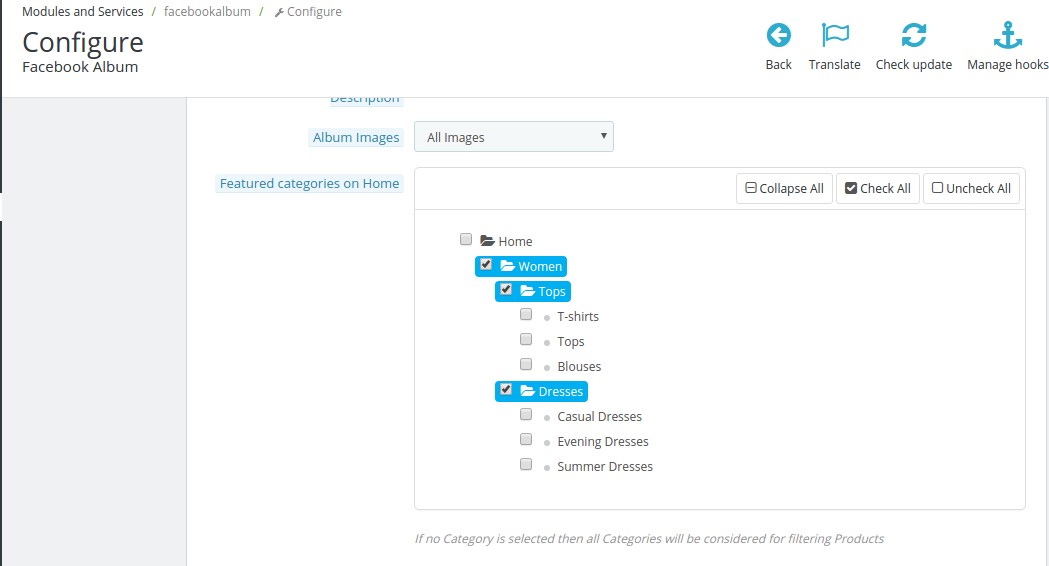
Select the featured categories of your eCommerce store that you want to display in the photo album.
The entire category can be view by clicking on the Expand All button. Check the categories that you want to include and the changes will be synced in your Facebook Album.
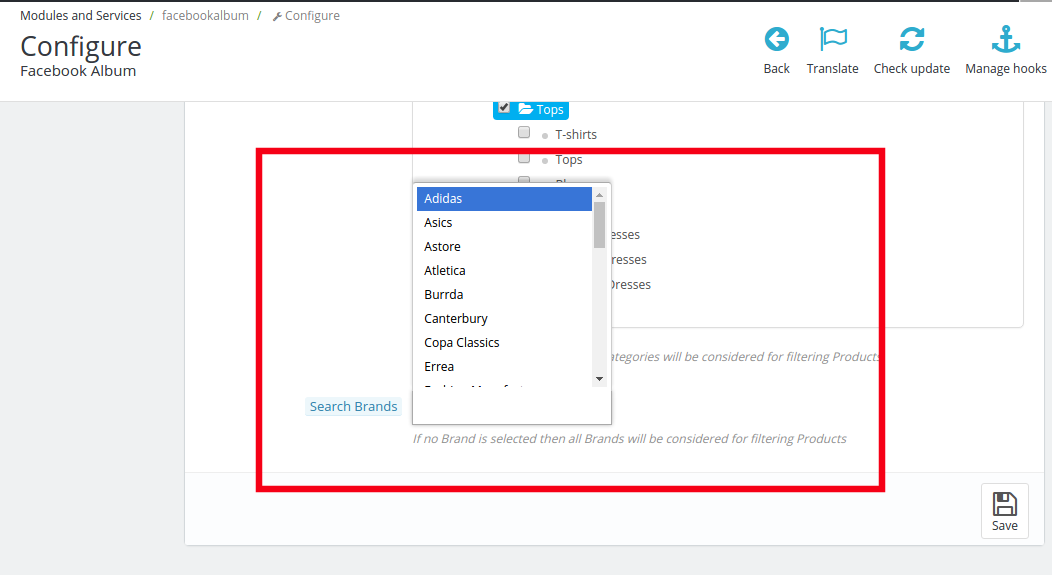
4.2.4 Search Brand
Select the brands from the choice offered that you specifically want to include in the search filters. In case, none of the brand is selected than the module will consider all the brand for filtering products.
4.4 How to customize the photo album?
There are two functionalities offered by this customization option. They are listed below.
Customization the existing albums
Creation of new album
Let us discuss them one-by-one in details.
Customization of exiting album
In order to customize the existing album, select the one from the dropdown list of Select from Existing Album.
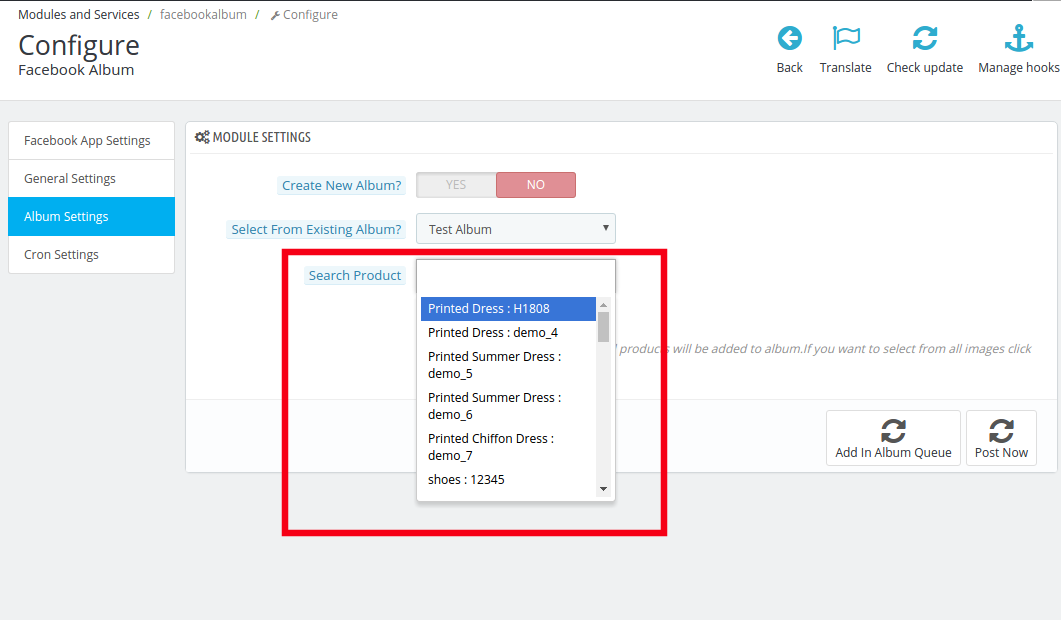
Once the album is selected, choose the image of the product that you want to include in the album from Search Product option.
As you hit the Search button, the images of that product will be displayed you can choose the image that you need to include in the photo album.
You can either Add the image in the album queue or you can choose the option of Post Now.
Creation of New Album
In order to create a new album enable the Create New Album option.
Enter name of the product album and the description in the following sections.
Select the images of the product in the same way as it was done earlier.
The album is ready to be displayed on the Facebook Page of your store.
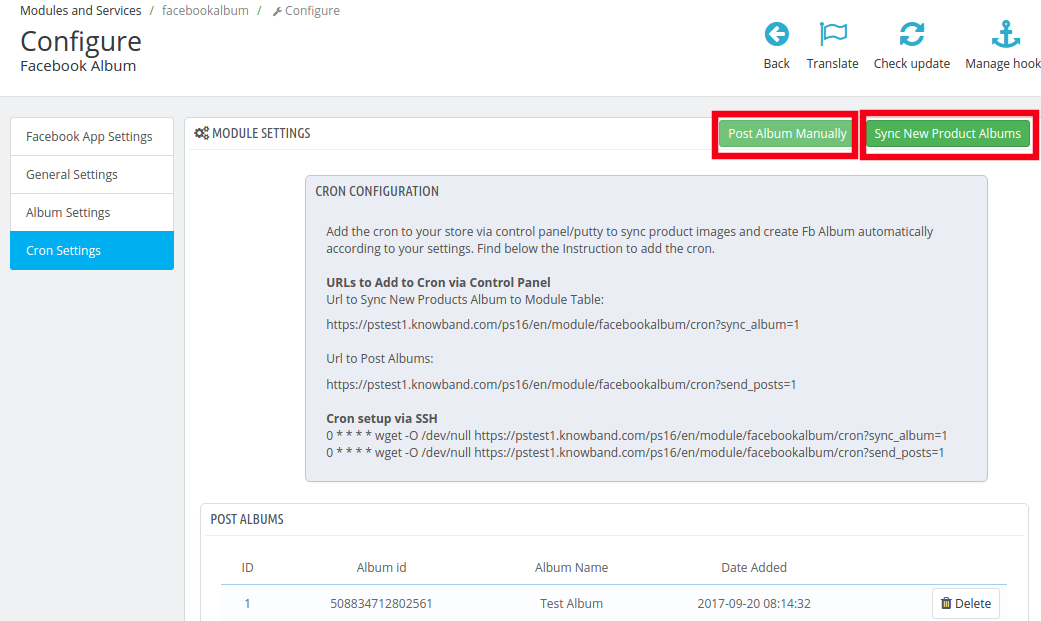
4.4 How can Cron Setting help?
The Cron setting allows you to sync your photo albums and post it on the Facebook page.
‘Sync New Product Album’ will allow you to sync the products album on your Facebook page. The albums will, then, get listed below.
On clicking the ‘Send Album Manually’, the album will get posted on the Facebook Wall of the admin.
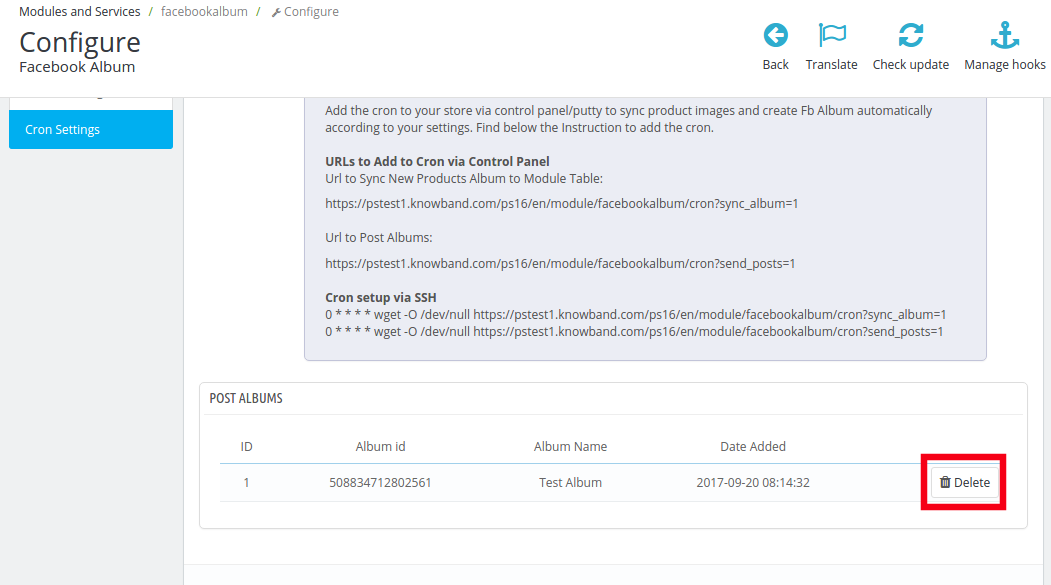
The admin can even delete the listed albums from the queue by clicking on the ‘Delete’ icon.
5.0 Facebook Photo Album UI
Once you have configured Prestashop Facebook Album module and synced with the Facebook profile, the photo albums will be shown on your Facebook page.
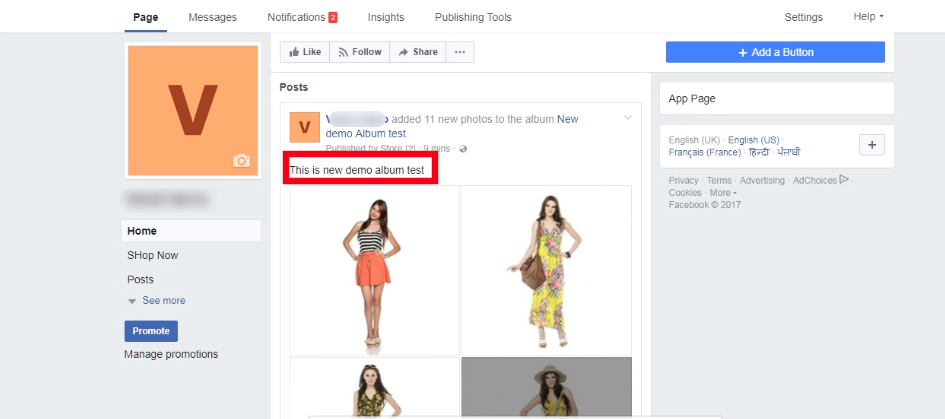
5.1 Facebook Photo Album
The album will be shown on the Facebook as shown in the image below.
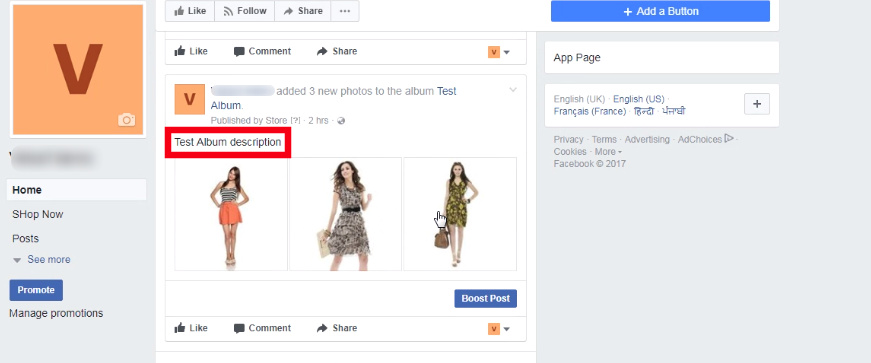
5.2. Photo Album with description
Right from the products images to the descriptions, everything will be shown on the wall post of your Facebook page.
As an online store visitor, most of us will relate to the fact that an exit popup, while you are browsing a site, are annoying. From a prospect of an eCommerce store owner, the good news is that it actually works. The classic discussion of whether to have this functionality on your site or not is still on.
The statistics have given a green signal to exit pop-ups. Especially, the gamified exit popups have shown double the conversions as compared to the traditional ones. Listed below are some of the reasons that show the worth of having such triggers when the visitor plans to exits.
How Pop-up Optimization can Curtail your Exit Rate?
Customer engagement is the key to enhance the chances of conversion. Hence, the exit popup triggers can hold the visitor back and can enable you to retarget your products. Using exit popup marketing tactics while the users are still browsing the site may be fatal. Hence, using an exit popup at the end is a no-lose trick.
The exit popup serves the purpose without breaking the natural flow of the customers. The usual behavior of online visitors includes the process of web search. Once they end up on the landing page, they browse the products and leave the site if they are not satisfied with the price or the product.
Thus, offering a discount just as they are about exit may help them reconsider.
Moreover, the exit popup gives enough time to the visitors to browse the site and grab the information being offered. However, trying anything of this sort, in the beginning, may distract them.
Having discussed the various benefits that make use of exit popup inevitable, it is now time to lay some light on how to make full use of it. The blog has compiled some of the hacks that can help you optimize the exit popup for your site. Scan the points mentioned below and get the desired result.
Apply these pro tips for exit pop-up
1. Get rid of the monotony
Even though the whole idea of exit popups is to keep the visitors from leaving the site, it can still ruin the entire user experience if not targeted appropriately. The tedious and boring exit popups asking for the visitors to enter their email ids may even reduce the chances of them revisiting your site.
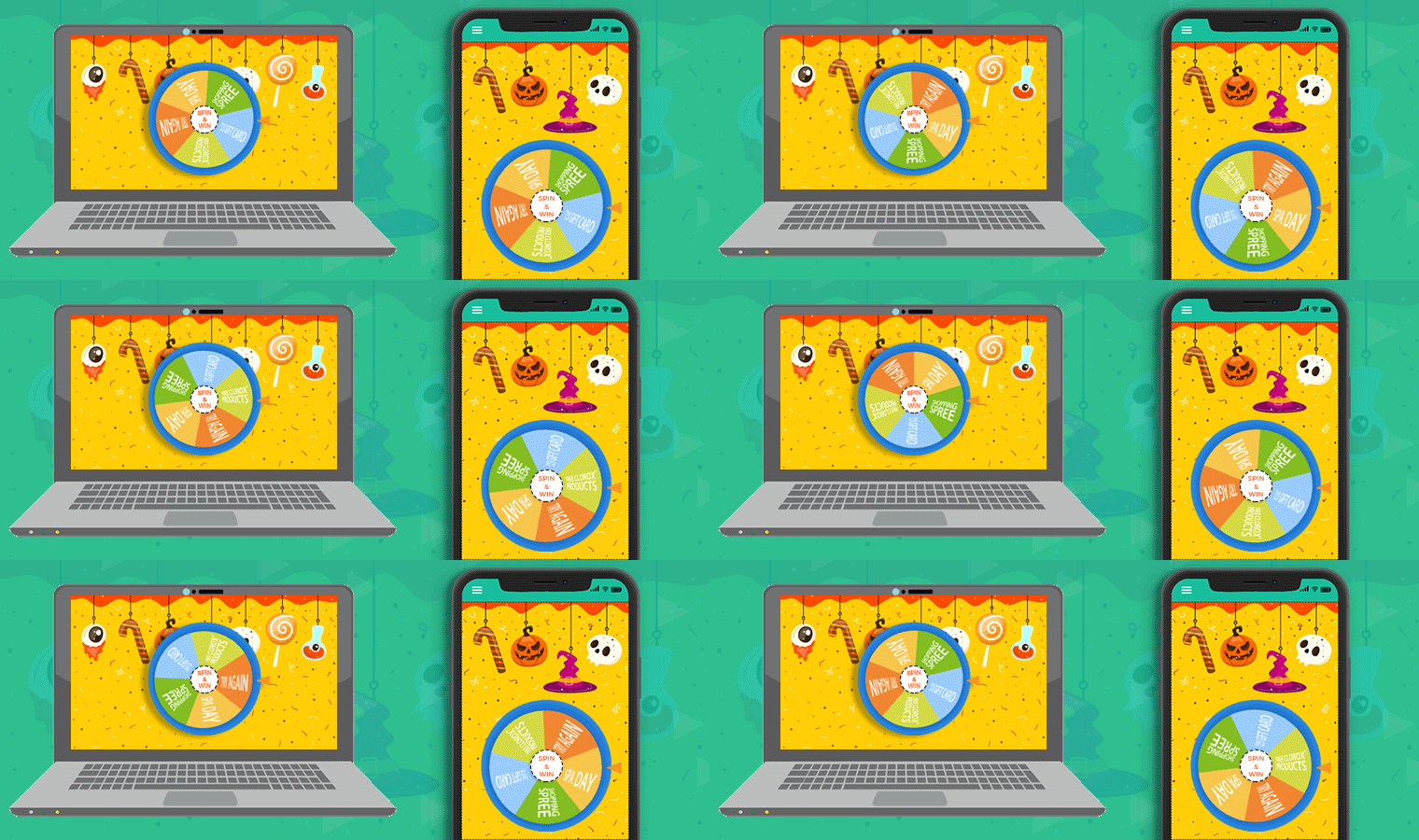
Hence, the very first exit popup hack is to make them interesting. Prestashop spin and win module are one of the examples of a fun-filled exit popup. Instead of flashing the annoying messages on the screen, the exit popup module provides a playful interface to visitors. This exit popup is made to spin a wheel by entering their email ids.
Additionally, the pop-up displays multiple themes for holidays, events, and festivals such as Halloween, valentines day, Diwali, New Year, etc. The Spin and Win pop-up also display the number of offers grabbed by visitors.
The prizes won can be used while shopping. The use of exit popup is not just an effective way to improve customer engagement but can help to enhance the UX without annoying them. Hence, making it enjoyable is one of the ways to exit popups effective.
2. Make it appear as if the customers have hit a bargain
The messages in the exit popup need to be in line with the visitors’ activity. The visitors of eCommerce usually look for offers and discounts. Their online searches are in general aimed at comparing the prices of the product.
However, the free coupons sometimes fail to entice the visitors. Its human psychology that if a discount of 10% is offered to them by a person distributing pamphlets, it may not intrigue them. While they will be happy if they bargain the same amount or win the discount through a context.
The Spin and Win exit popup is one of the ways to cater to this human psychology. To wrap things up, use innovative ways to give away the prizes and even a small offer will be well appreciated.
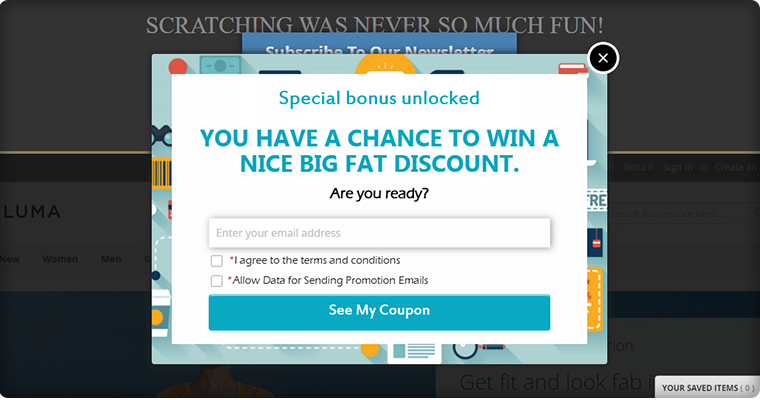
NOTE: You can use spin and win as entry pop-up, exit-popup as well as email subscription pop up
3. Keep it mobile responsive
A significant share of the eCommerce traffic comes from mobile phones. Hence, making your website mobile responsive is not enough. Even these exit popups should be responsive enough to effectively curb this traffic into leads. Considering this aspect, no matter what type of exit popup you use, it should be mobile responsive. View your exit popup on the screen of the mobile as well as other handheld devices. The content and the CTA buttons should be placed optimally. Some of the exit popups may even ask visitors to download your mobile applications when they try to leave the site.
4. Give visitors an option to say no
Ironically, the exit popups that allow the customers to say “no” are the ones that are less annoying for the visitors. The exit popups that cover the entire screen and provide no option to remove them are considered most annoying. Moreover, instead of the ‘X’ button, the use of ‘Yes’ and ‘No’ buttons are considered more effective. It has a psychological impact and compels the visitors to read the text. The aggressive text such as “No thanks, I don’t want to boost my sales” and other such contents at times make the user think twice. However, it may not be fruitful every time.
More PrestaShop Modules to use as Exit Popup
1. PrestaShop Exit Pop-up Addon
Use an exit popup addon on the PrestaShop store to increase the conversion on your store. The Exit Popup developed by Knowband displays a pop-up window on the visitor’s screen as soon as they intend to leave the website. It can also be used as an entry popup.
2. Scratch Card as Exit Popup
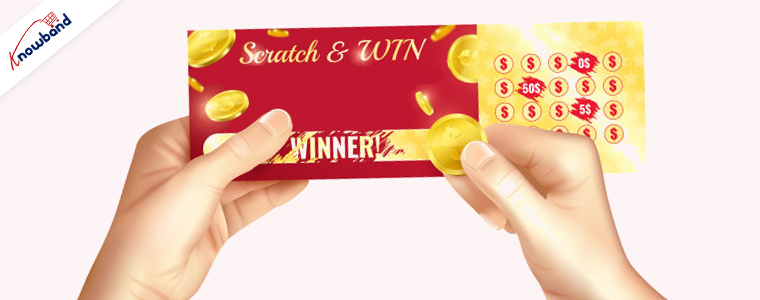
Another way you can stop your visitors from leaving your website is by offering a scratch coupon. The scratch card for PrestaShop allows you to customize it for various activities.
3. Abandoned Cart reminder Popup
You can also consider using an abandoned cart reminder pop for the customers who left products in their cart. The abandoned cart addon does not just allow you to send a popup but also reminder emails and push notifications. many features are included in this powerful converting tool. Read this pro tips article to learn how to design and send serial reminders for reducing abandoned carts.
Conclusion
Before wrapping up the entire write-up, here are some of the key points that you need to consider before design an entry or even exit popup for your website.
User experience is the key.
The content of the enter or exit popup should be self-explanatory.
Give people a choice to exit as well.
Use an attractive and engaging design in the enter or exit popup.
Make the entire scenario fun for the visitors.
Don’t just give away the offer. Ensure that your customers feel as if they have won the deal.
Do not promise anything that you can’t keep. You need to build the trust factor with your customers.
A number of eCommerce businesses have used this strategy to reduce their exit rates and raise conversions. However, it now the time to take the marketing tactics to the next level by ditching the traditional methodologies and considering the human psychology. Work on the things that your target audience is looking for and avoid introducing the things that annoy them. Optimize your site with an exit popup like the Spin & Win module and boost your conversions effortlessly.
1.0 Introduction to Prestashop Email subscription popup – Spin and Win
PrestaShop is a free, open-source eCommerce solution. Anyone can create his/her store using Prestashop with minimal effort. The admin needs no technical knowledge to set up the Prestashop store. Prestashop Email subscription popup by Knowband has replaced the old way of email subscriptions as the old-fashioned way of offering a 10% discount in exchange for email ids does not excite the visitors. We at Knowband have come up with a new way of engaging the customers with the website. Prestashop Spin and Win (Prestashop Email Subscription popup) addon display an interactive and responsive gamified interface in the front-end of the website.
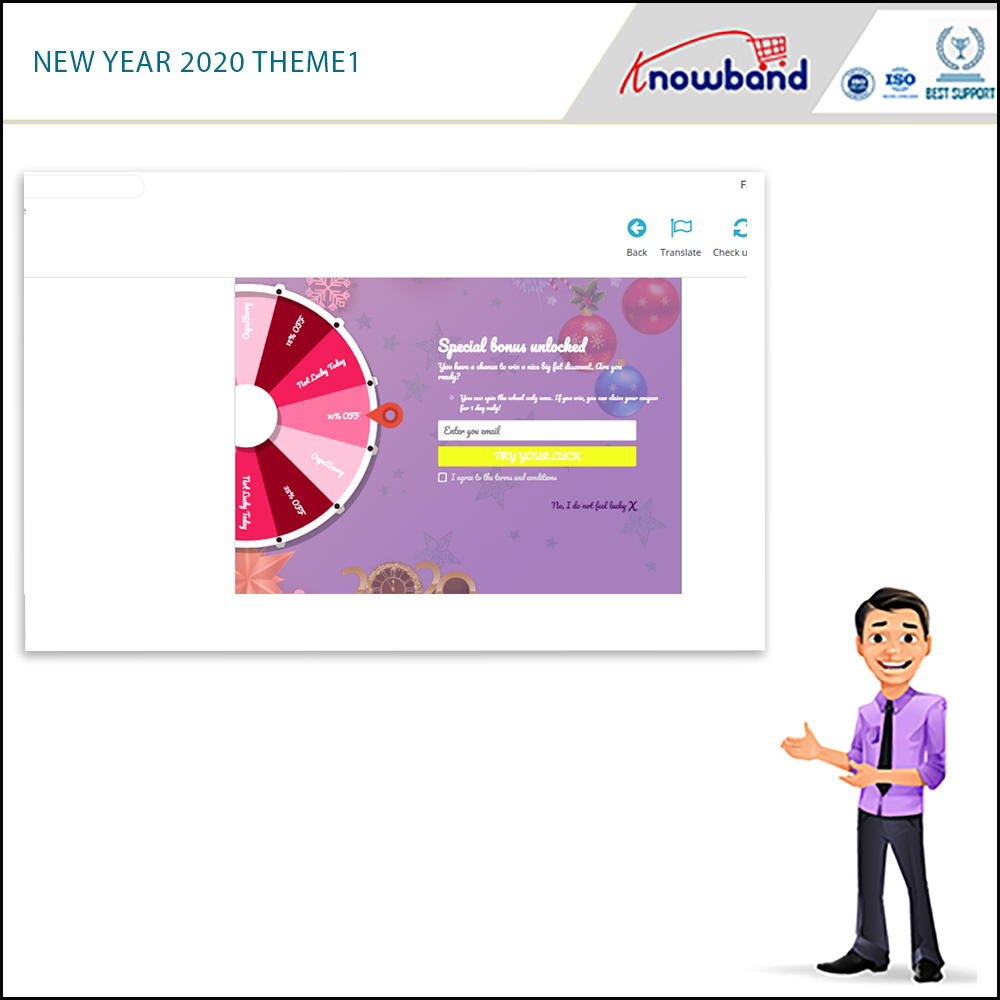
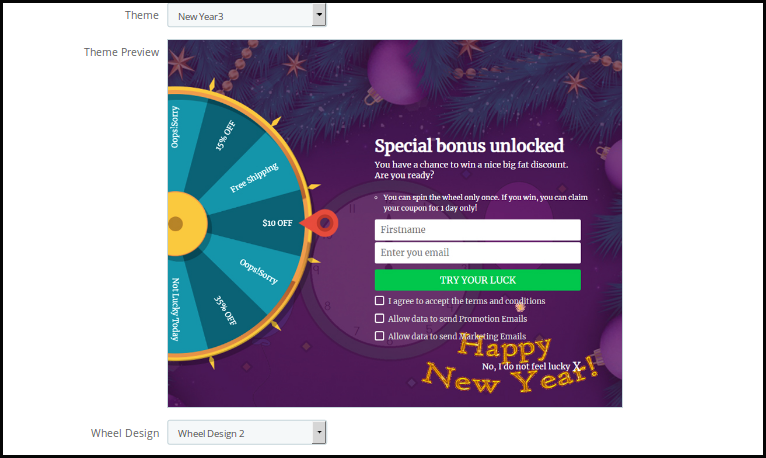
New themes available: In 2020, there are 4 New Year themes available for the store admin.
Spin and Win addon is now compliant with the GDPR. GDPR settings are available in the module using which the Prestashop admin can comply with the rules of the GDPR. Please refer to the GDPR Settings to know more about the GDPR.
The overall functionality of Spin and win(a responsive email subscription pop up):
1. The customer visits the website.
2. Newsletter subscription pop up appears on the Prestashop storefront. (is usable as an entry or exit pop up)
3. The user enters the email Id.
4. Spin the spin and win pop up and get discounts
5. Email Ids entered are captured by the addon.
The responsive and interactive email subscription pop interface enhances the customer experience and compels them to visit your site again. The addonis usable as an exit-intent pop-up as well as email subscription pop-ups in the eCommerce sites.
What’s New?
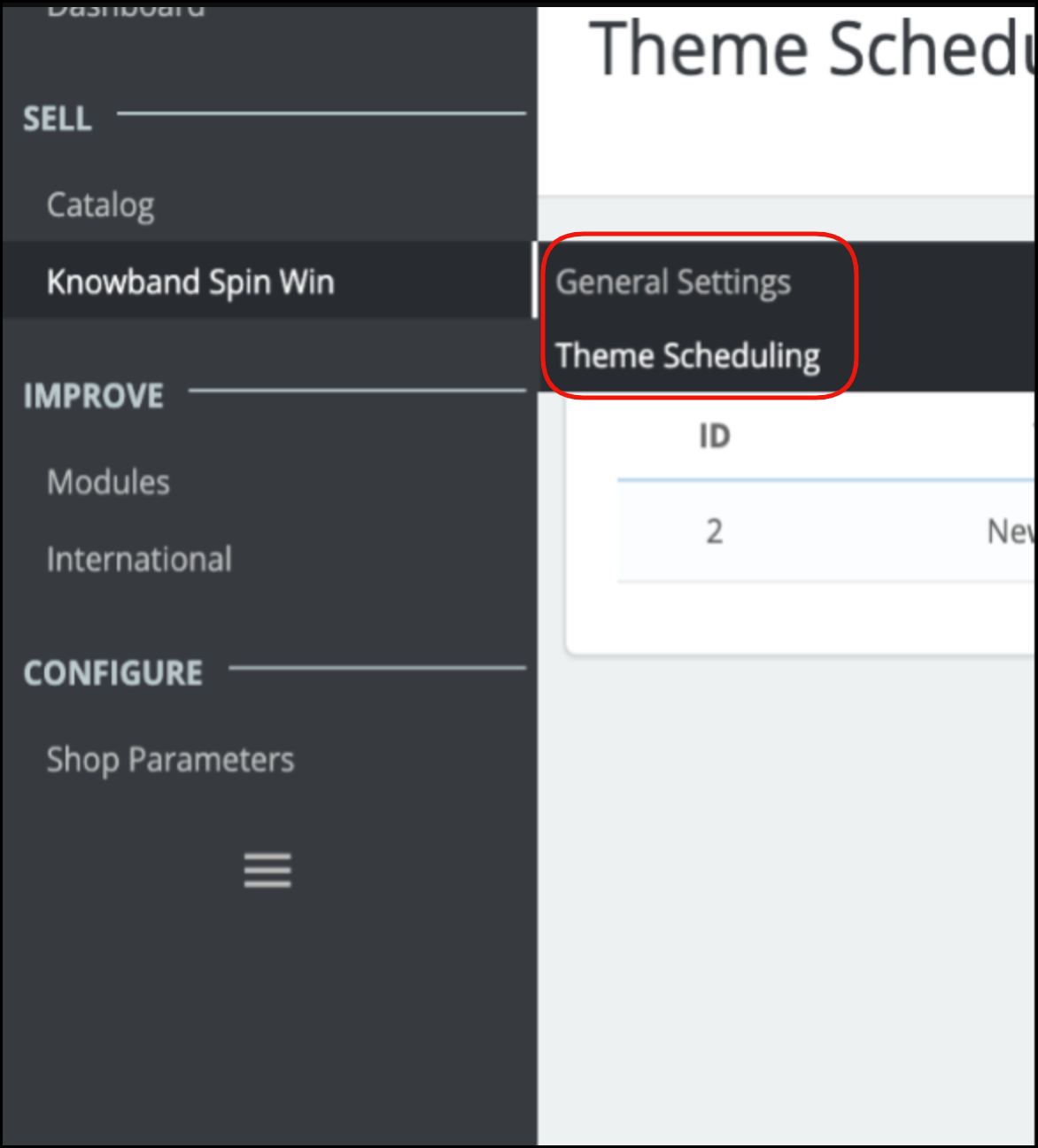
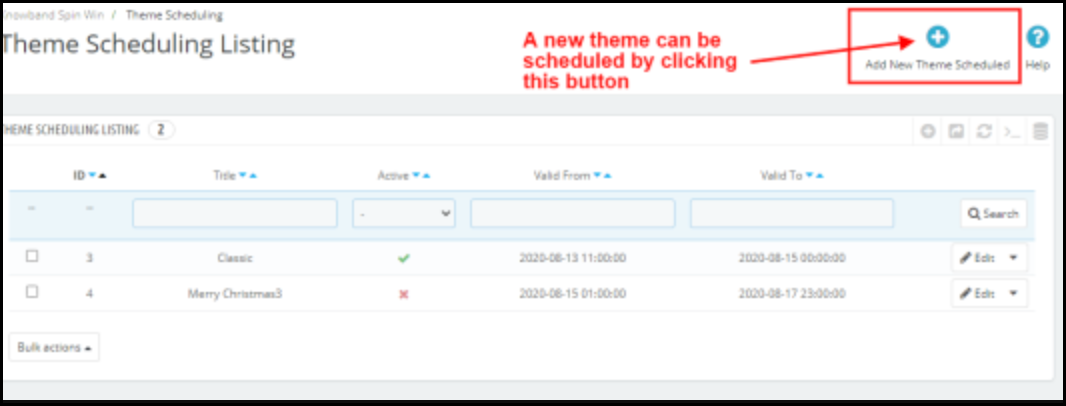
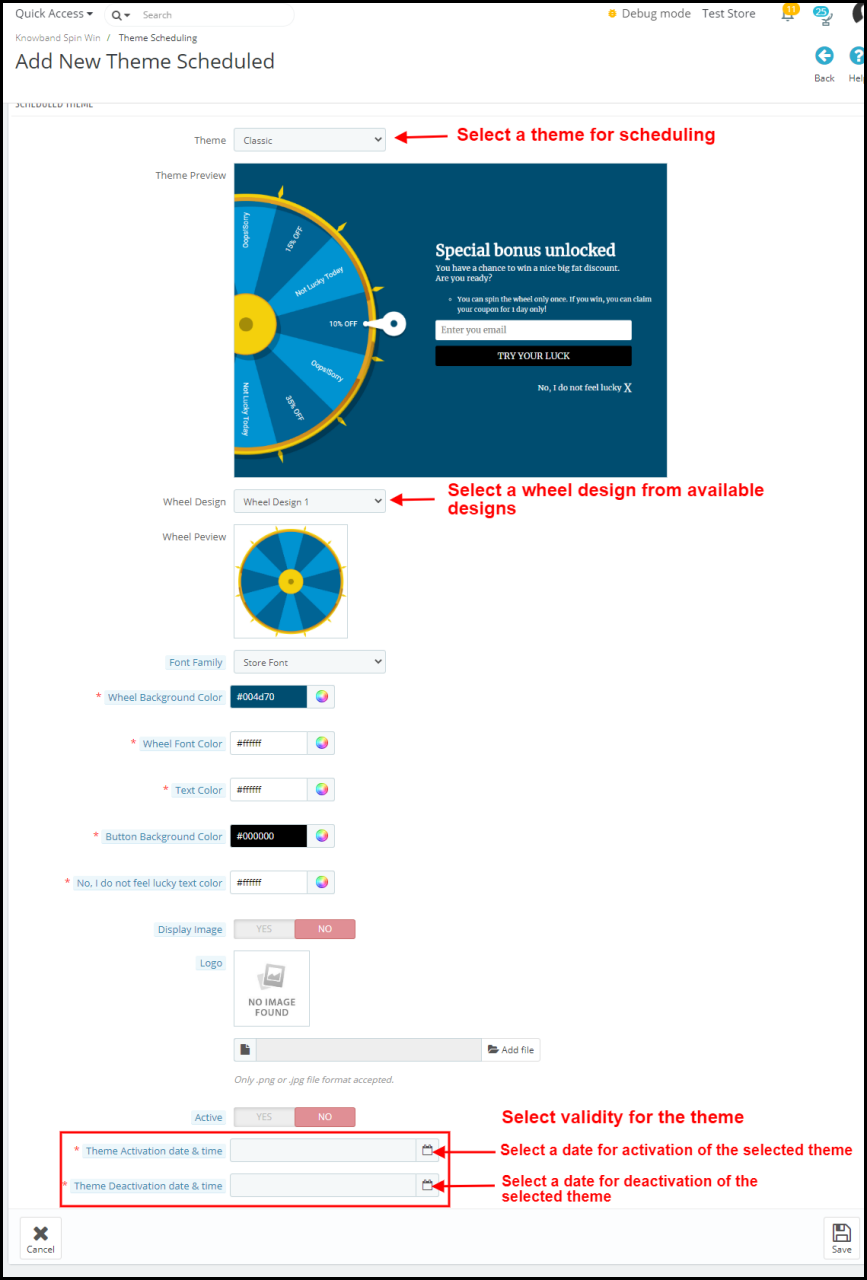
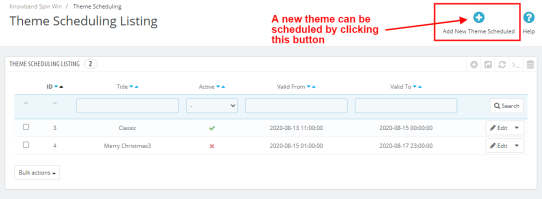
Theme Scheduling: The eCommerce store owner can schedule a theme for any occasion by adding the start and end date.
Update Number of Slices: This new feature allows the admin to select the number of slices for when. Now admin can select 6, 8, or 12 slices for the wheel.
Export Email Functionality: Updated version has Export Email functionality to export emails of customers into a CSV file from the admin panel.
Show Progress meter: Under the general setting of Spin and Win, the store admin can set the Progress meter percentage which will display on the front end of the Popup.
Provide an option to customers to choose to generate a coupon with or without email ID: If the admin enables, it has the functionality to provide an option for customers to choose whether they want to provide their email id or not.
Testing based on IP Address: The eCommerce store owners can now test the Spin and Win addon before actually implementing it on the store by entering their IP Address.
Set Coupon Expiry day: This new feature allows the admin to set the coupon expiry date even after the coupon is generated.
Minimum Amount filled: Under the slice settings tab, the admin can now set the minimum value the cart should have for the coupon. Further, that the customer uses.
1.1 Merchant Benefits of this Newsletter subscription popup addon:
By using this Exit popup cum Entry popup addon, the store owners can achieve the following things.
Boosts Lead generation.
The customer can claim the discount by entering their email id. Hence, it increases the customer base of the store user.
The responsive and interactive user-friendly interface ensures a high impact on direct sales. It improves the overall conversion rate, using coupons and discounts.
Turn Visitors into potential buyers and improve conversion rates by offering users a completely different way to win discounts.
Fully Customizable subscription pop up
Detailed Reporting.
Export Email subscriber list in.CSV format
Theme scheduling for occasions without taking extra effort.
The look and feel of the spin and win pop up as well as the email notification is customizable from the back end.
GDPR Settings are available in the module using which the Prestashop admin can comply with the rules of GDPR.
New classic themes for Spin and Win popup help e-merchants in drawing user attention on different occasions. New Holiday themes for Christmas and New Year are available to attract more and more visitors to the store.
Effortlessly generate a fixed coupon code for each Spin Win slice.
Restrict the compatibility of Spin and Win coupons with other active coupons of the store.
The store owner can now display the latest New Year 2020 themes on his website.
1. Responsive 3 in 1 pop-up: Is usable as an Entry pop up, Exit pop up, or Email Subscription pop up.
2. The admin can select from the multiple available wheel designs as well as spin and win themes to choose from.
3. The new version allows the admin to schedule a valid active and expiry date for a theme. After the expiry date, it will be set to the default one.
4. The interactive Spin and Win game lures customers and helps admin to engage more customers thereby increasing the customer base of the site.
5. The interactive Spin and Win game lures customers and helps admin to engage more customers thereby increasing the customer base of the site.
6. The back-end offers Readymade Email Templates which is further customizable.
7. The store admin can change the look and feel of the Prestashop exit pop-up as per the requirement. The admin can now apply the latest New Year 2020 themes as well on his website.
8. Prestashop Spin and Win (email subscription) pop up offers Mail Chimp, Klaviyo and, SendinBlue Integration.
9. Spin and win popup allows the admin to choose the number of slices in a wheel. There are 6, 8, and 12 sliced wheel options available.
10. Show the progress meter on the front end with a progress percentage. This will display with a label that the admin adds.
11. Prestashop Exit pop up allows admin to provide an option for customers to choose whether they want to provide their email id or not.
12. Set the discounts and offers on each slice and also set the gravity of each slice, the slice with maximum gravity will have larger occurrences.
13. Prestashop Newsletter subscription popup addon allows admin to customize the email subscription pop up using Custom CSS and JS without making any changes in the base code
14. Prestashop Entry popup addon allows admin to choose whom to display, where and when to display, maximum display frequency of the Spin and win (email subscription) pop up.
15. Prestashop Newsletter subscription popup offers wheel sound options which adds a sound when the Spin wheel rotates, it gives a more lively feeling of the Spin and Wins game.
16. Prestashop Exit intent popup addon offers an option to show fireworks on the Spin and Win popup when a customer wins a discount to make the win of the customer more exciting and fun.
17. Prestashop Newsletter popup offers an Email Recheck option on the cart as well. Just to make sure if the customer who is applying the coupon is the same who played the Spin and Win game.
18. Prestashop Exit popup addon allows admin to choose the pages to display the pop up i.e, Category page, Home page, Product page, etc.
19. Email Recheck option to Restrict the same Email Id from availing the discount coupon more than once.
20. Prestashop Newsletter subscription popup addon offers to Pull Out Tab facility for customers as spinning the wheel is not compulsory for visitors.
21. Prestashop Newsletter popup addon allows Prestashop admin to preview the Email subscription popup and the Spin wheel at the admin panel itself.
22. Prestashop Email Subscription popup addon offers a Responsive and Interactive user-friendly interface that ensures a high impact on direct sales. Turn Visitors into potential buyers and improve conversion rates by offering users a completely different way to win discounts.
23. Prestashop Spin and win is compliant with the GDPR, GDPR settings are available in the Spin and Win admin panel. Using these settings admin can comply with the rules of GDPR.
24. Prestashop Spin and Win module offers Detailed Reporting
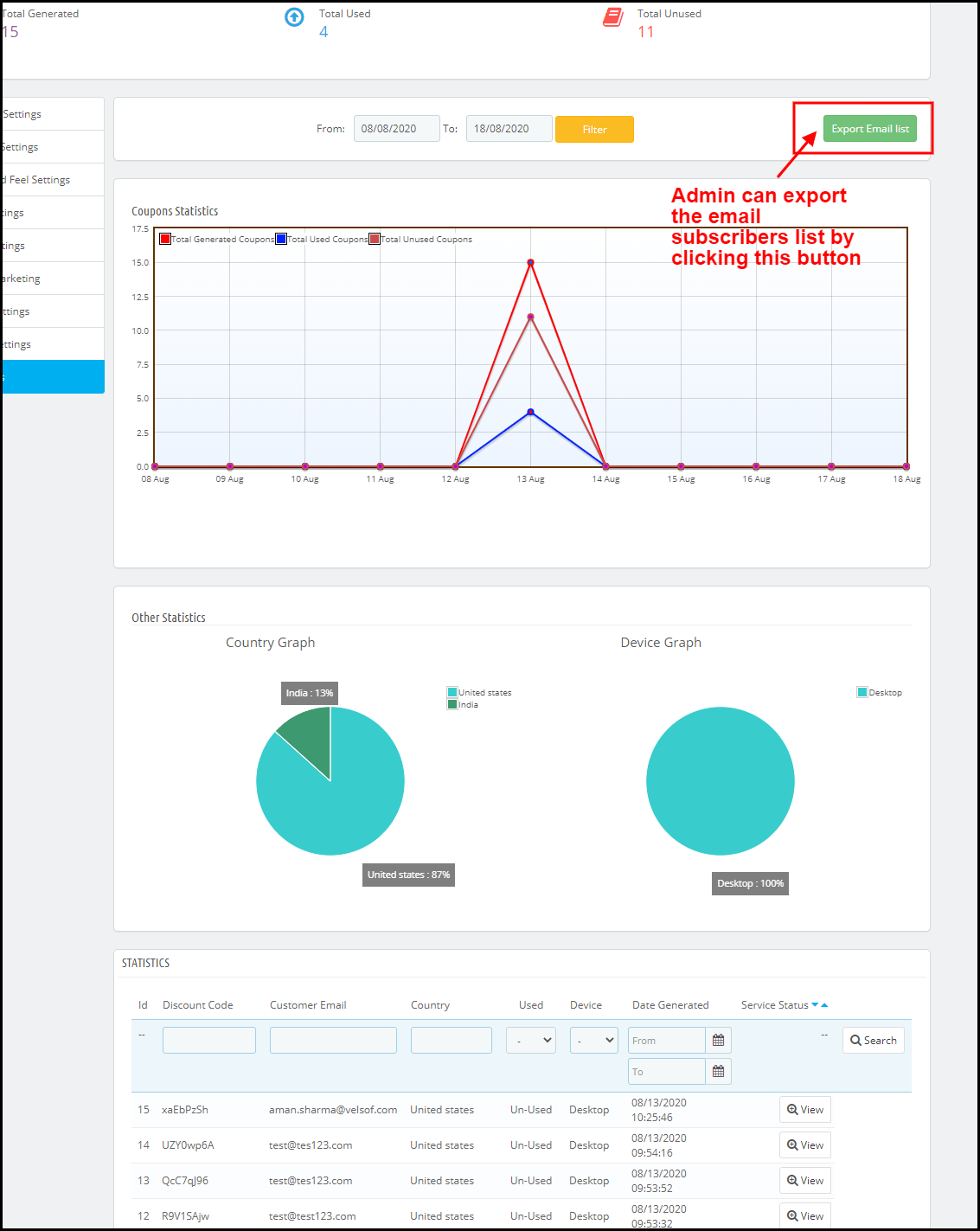
Check the performance of the interactive spin and win pop up by comparing the total generated vs used coupons using interactive graphical reports
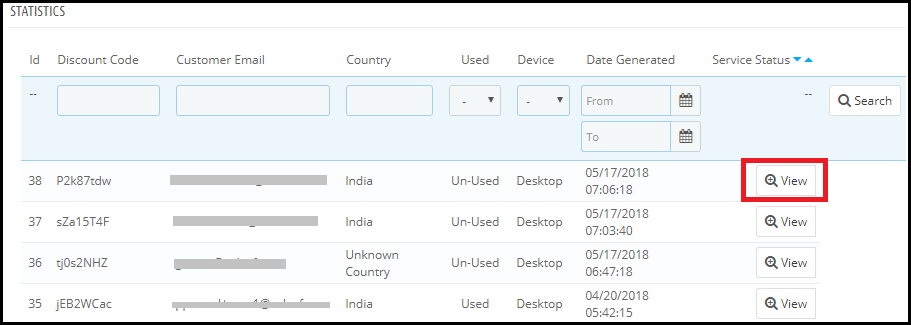
Tabular reports displaying coupon codes, details of coupon holders (customers), the country where the addon is usable, and the device on which the customer uses it.
The report which incorporates email addresses of the customers can be exported in the form of.CSV file
27. Prestashop Spin and Win are Compatible with all themes.
28. Desktop, Mobile, and Tablet responsive design
29. Prestashop Spin and Win popup module allow the admin to control the compatibility of Spin and Win coupon with other site coupons. If this feature disables, then the coupon generated from Spin and Win will not work with the other active coupons. They can also set a coupon expiry date as well.
30. Admin can generate a fixed coupon code for each slice of the Spin Wheel. They can also fix the minimum cart value customers should have to generate the discount coupon.
31. This interactive spin and win popup offer a direct coupon generation functionality that allows the customers to generate a spin win coupon without filling any user name fields.
32. Prestashop email subscription popup allows admin to select one or more customer groups which include: visitor, guest, the customer.
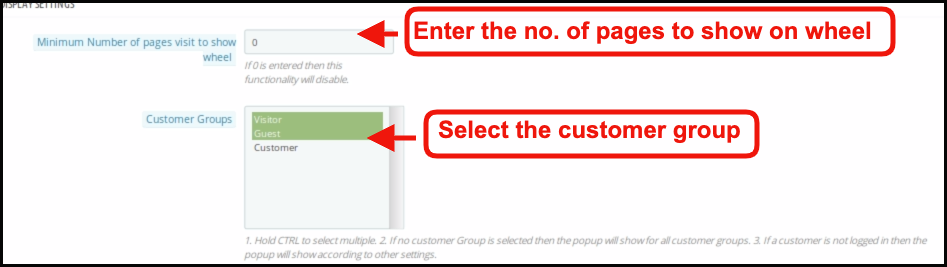
33. Admin can set the visibility of Spin and Win popup on the specified number of page visits. If 0 is entered then this functionality will disable and the user will see the spin wheel popup as they enter the site.
34. Prestashop Interactive popup addon allows the store owners to test the module before implementing it on the store.
2.0 Installation of Spin and Win – Responsive Email Subscription pop up
Once you purchase the addon, follow the below steps:
Go to the Store Admin -> Modules and Services.
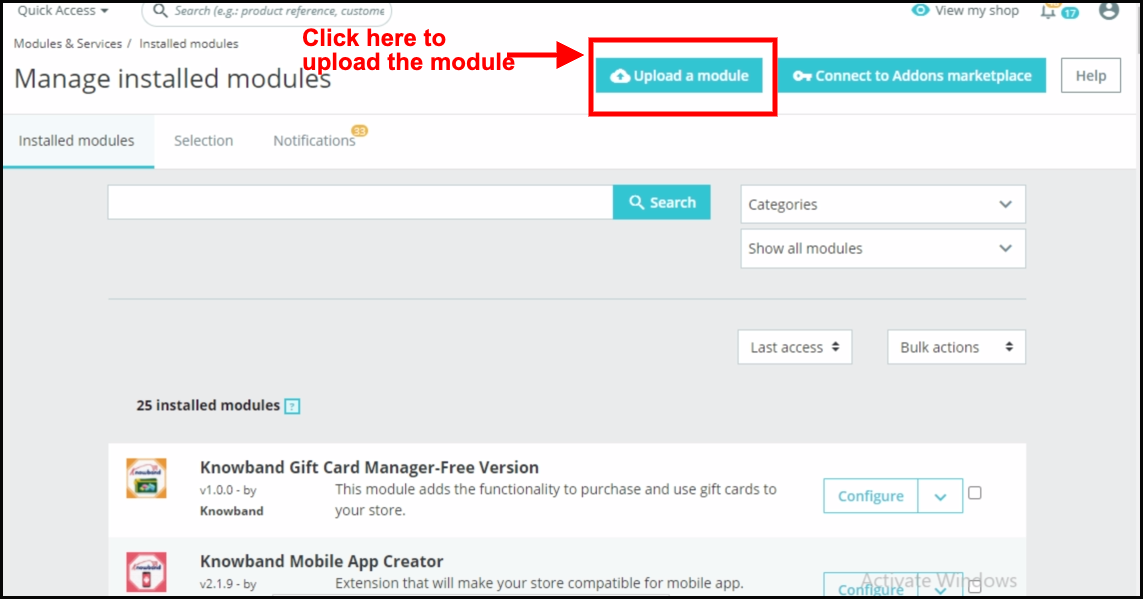
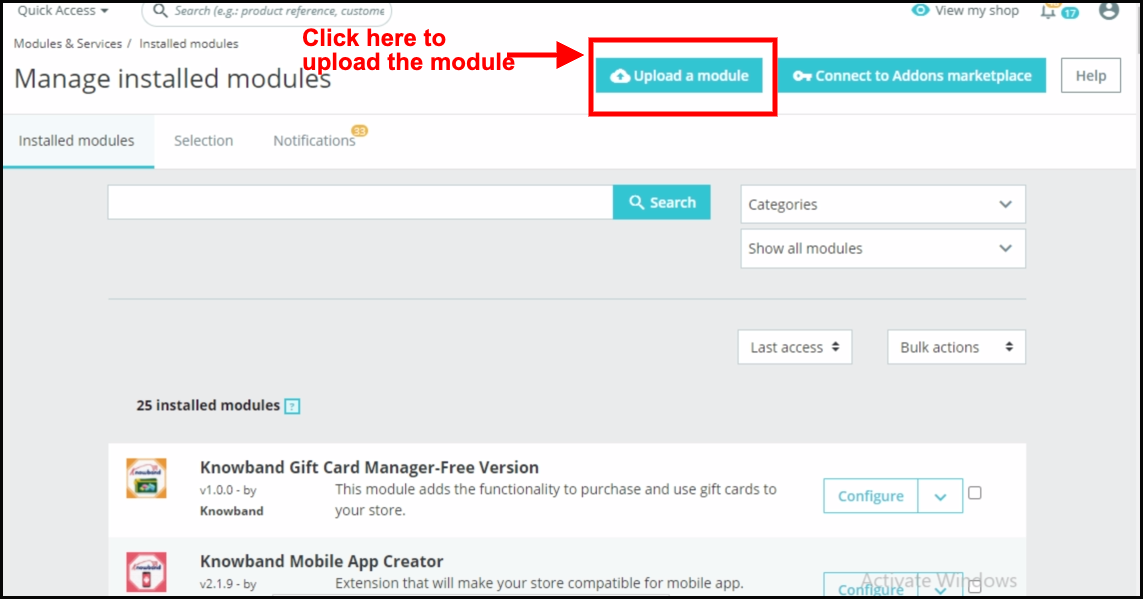
2. Click on “ Upload a module”. You can drag or drop the file or can simply select the file from the system.
Once the file is completely uploaded, a notification of “Module(s) installed successfully” will display.
3.0 Admin Interface – Spin and Win – Entry, Exit, and Email subscription pop up
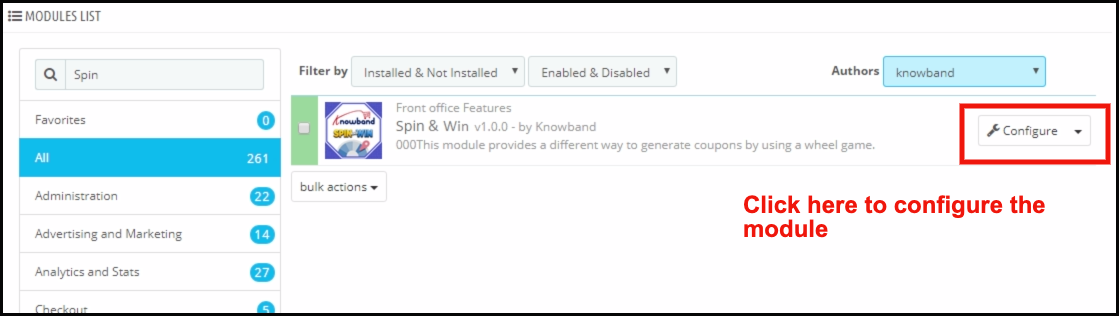
Once the installation is complete, the next steps include configuring the addon. Click on the ‘Configure’ button just next to Prestashop Spin and Win Addon.
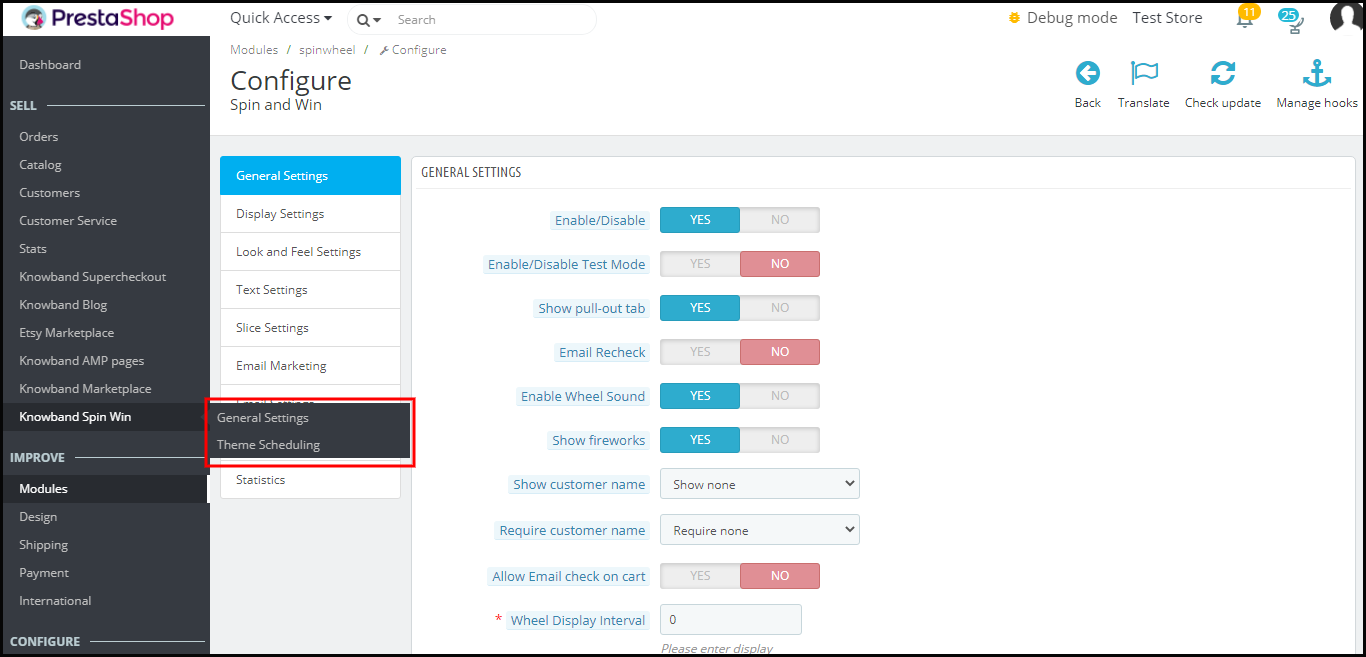
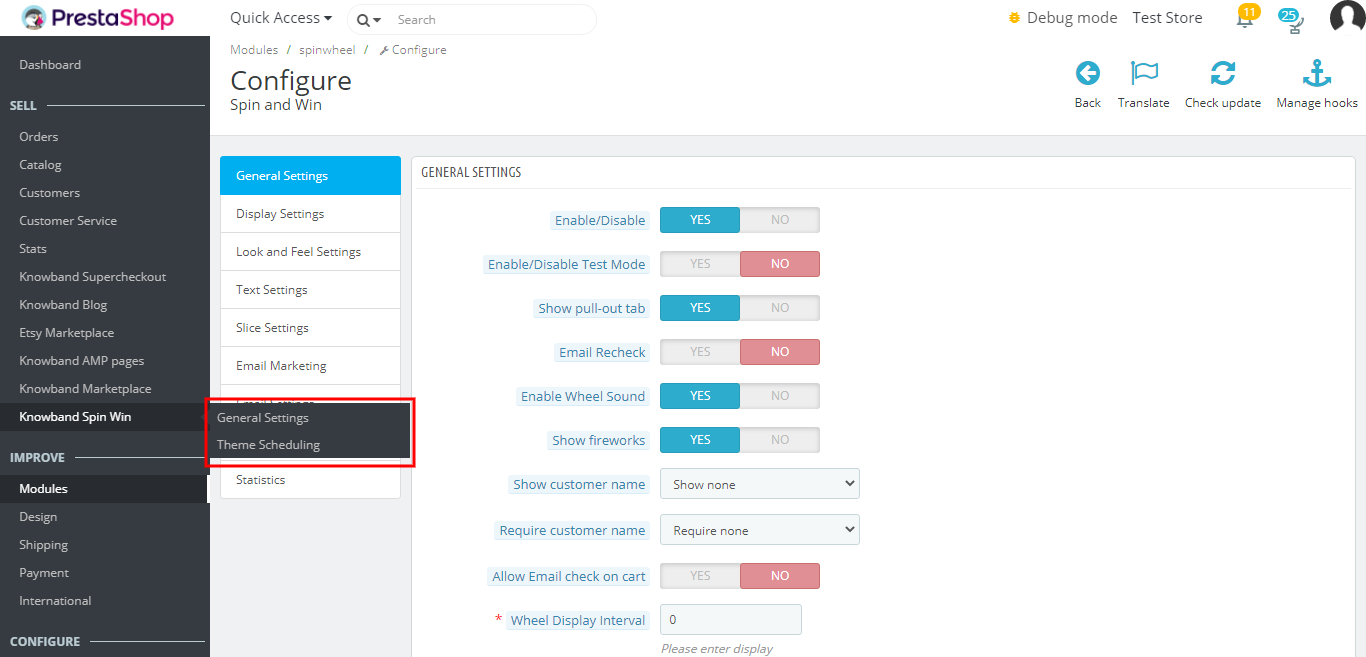
The Prestashop admin panel of the addon offers various customization options to the Prestashop store owners. The new version has two default setting options separately for General settings and Theme scheduling.
3.1 How to start the configuration process?
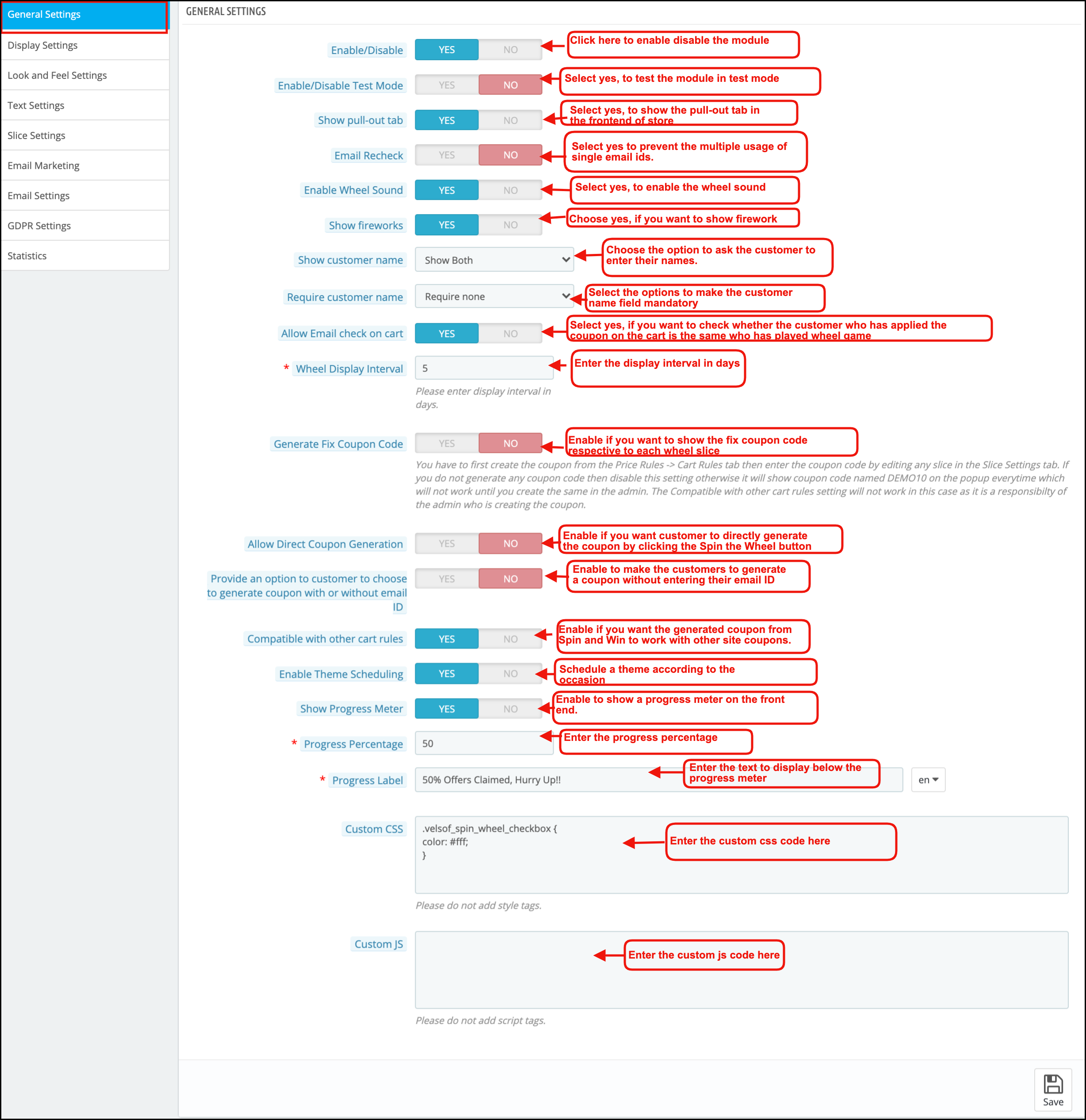
On clicking configure from the module listing page, Prestashop Admin will be redirected to the configuration page. The very first tab in the main menu includes “General Setting” as shown below:-
Listed below are some of the customization options that can help the admin make the initial changes in their Spin and Win (email subscription) Addon.
1. Enable/Disable:-The admin can enable or disable the addon using this setting.
2. Enable/Disable Test Mode:- The store admin can enable the test mode and enter their IP Address to test the module before implementing it in the store
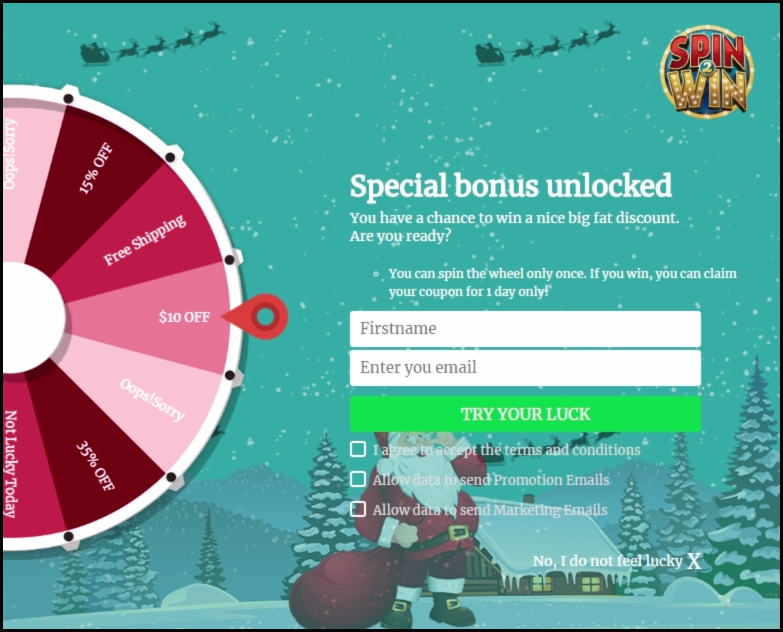
3. Show Pull-out Tab:- The visitors of the website can remove the spin and win pop up by clicking on the ‘I’m not feeling lucky link as shown in the image below.
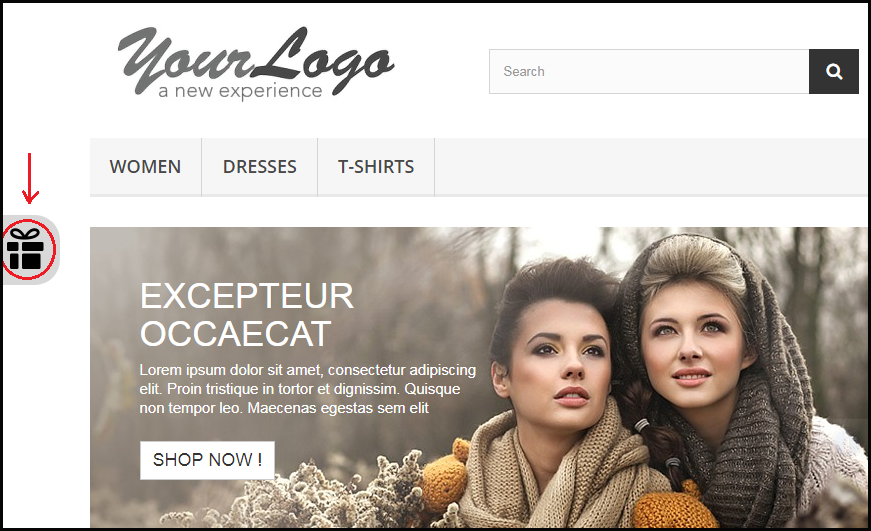
By enabling this setting, the store owner can provide the option to pull the spin and win spin and win pop up back on the screen by the user.
The customer can click on the gift icon on the left side as highlighted in the image above to pull out the email subscription pop up spin and win pop back.
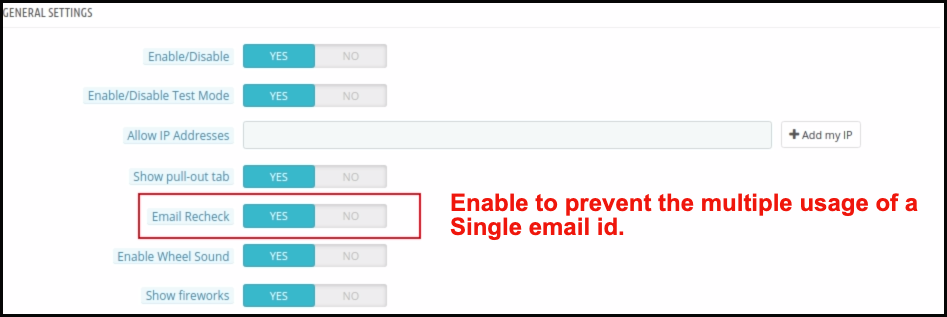
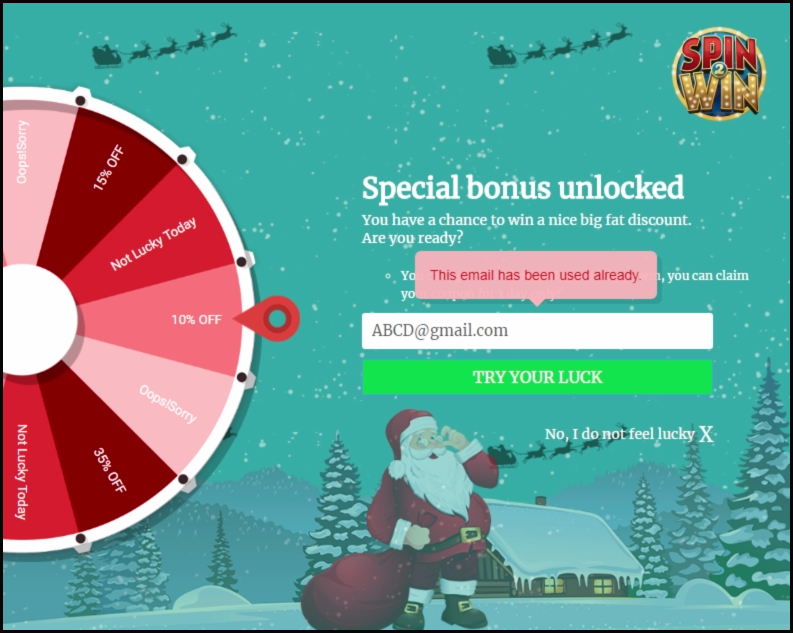
4. Email Redundancy Check:- This provides an option on the Prestashop store to verify the email id of the customer to ensure that there is no repetition of email ids. In case, the customers are only allowed to use coupon code ones. The customers cannot use the single email id twice. This can be done by enabling the Email Recheck option as shown in the image below.
In case the same email id is entered again, a message will be shown as below.
5. Enable Wheel Sound: Prestashop store admin can enable wheel sound. Further, the wheel will generate a tapping sound when he enables this option.
6. Show Fireworks: Prestashop Newsletter subscription popup addon offers an option for admin to show fireworks on the email subscription popup when a customer wins a discount. Admin can enable this setting to make the win of the customer more special and exciting.
7. Show Customer Name: Prestashop admin can now ask for the Customer name before a customer plays the Spin and Win game.
8. Require Customer Name: Prestashop admin has an option to make the Customer name field mandatory or optional.
9. Allow Email Recheck on Cart: This option will check whether the customer who has applied the coupon on the cart is the same who has played the Spin and Win the game.
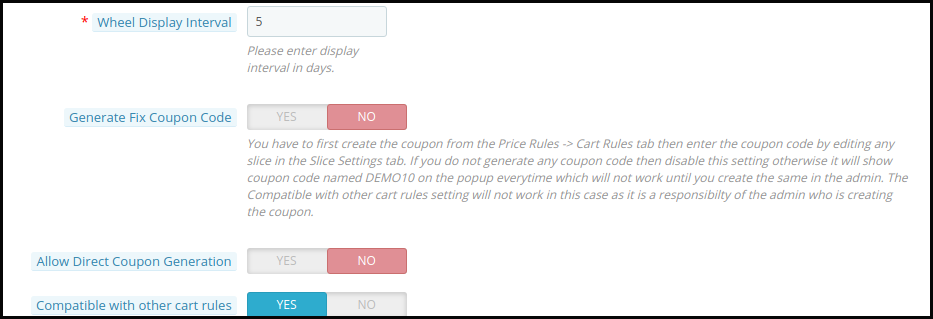
10. Spin and win pop up Display Interval:- Prestashop store admin can enter the number of days after which the Spin and win pop up(email subscription pop up) will display to the customer.
11. Generate Fix Coupon Code: Admin can enable/disable this option to add fix coupon code respective to each wheel slice under the Slice Settings tab of the module. For this, the admin has to first create the coupon code from the Price Rules -> Cart Rules tab then enter the coupon code by editing a particular slice.
12. Allow Direct Coupon Generation: If the admin enables this setting, then the customer can directly generate the coupon by clicking the Spin the Wheel button. If he disables it, then the customer has to fill in the required information to play the game.
13. Provide an option to customers to choose to generate a coupon with or without email ID: With Prestashop Spin and win, the admin can allow users to generate a coupon without entering their email ID.
14. Compatible with other cart rules: Admin can control the compatibility of spin and win coupon code with other active coupons on site. If the admin disables this setting, then the coupon generated from Spin and Win will not work with other site coupons.
15. Enable Theme Scheduling: If the admin enables this, he can now schedule a theme according to the occasion, and once the validity of the theme gets over, it will be set to the default theme.
16. Show Progress Meter: With this new feature of Exit pop up, the admin can show a progress meter on the front end.
17. Progress Percentage: Prestashop spin and win module allow admin to insert a value for displaying the progress percentage i.e. the value for offers claimed.
18. Progress label: In this tab, the admin can add a text which will display below the progress meter like ‘75% Offers Claimed, Hurry Up!!’.
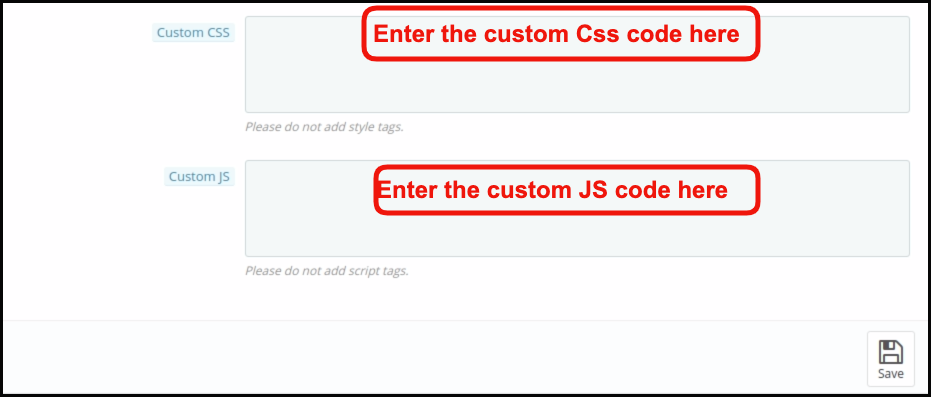
19. Custom CSS and Custom JS:- The admin can even change the look and feel of the addon as per their need by entering the custom CSS and custom JS code in this section.
Save the changes that you have made in the configuration setting.
3.2 How to change the Display Settings?
This option enables you to change the setting of the display of this email subscription Spin and win pop up. It includes the following setting options.
1. Minimum Number of pages visit to show wheel: Admin can set the minimum count of site pages while should be visited to show the spin wheel to customers. If the admin enters 0, then the functionality disables.
2. Customer Groups: Admin can select one or more groups to which the spin and win popup will display. Use the CTRL key to select multiple options.
3. Minimum Screen Size: The drop-down list offers a few screen sizes for the admin to choose from.
4. Maximum Display frequency: The admin can select the frequency of the spin and win pop up email subscription pop up display here. Select one option from the multiple choices offered in the drop-down list.
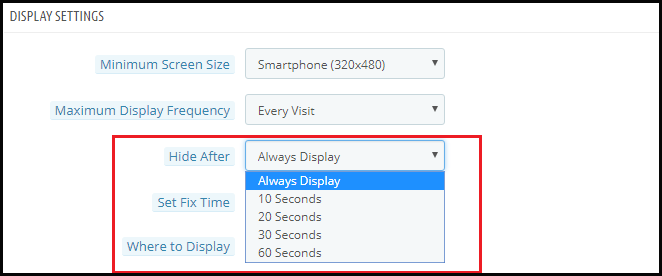
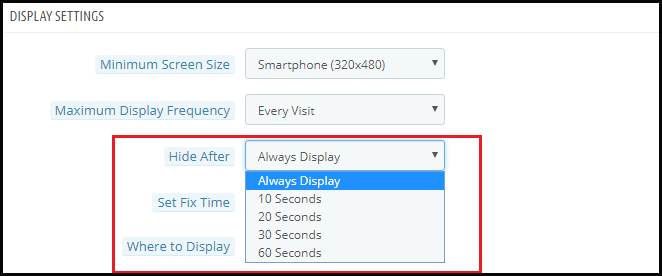
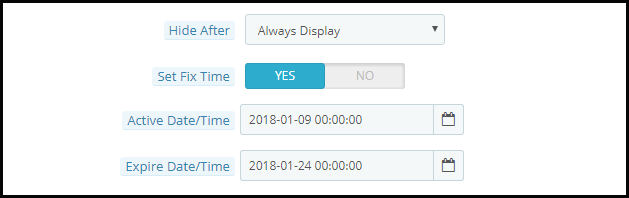
5. Hide After: The admin can select the time interval in seconds after which he wants to hide the spin and win pop up and win pop up.
6. Set Fix Time: You can enable or disable the fixed time from here.
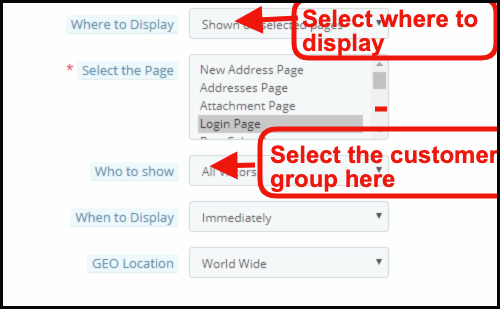
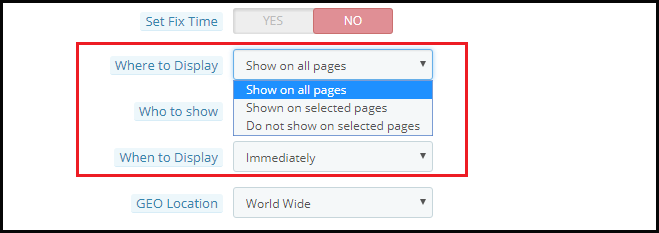
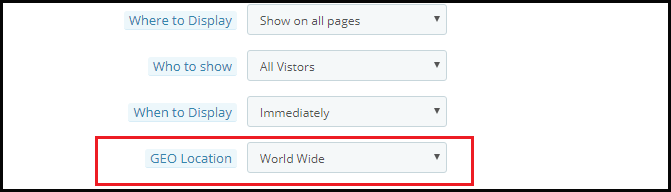
7. Where to Display: You can select the pages where you want to display the spin and win pop up. Admin can select Product page, category, Home page to display this interactive and responsive email subscription pop up.
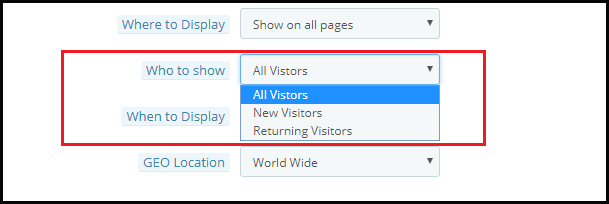
8. Who to Show: You can select the visitors to whom you want to show the spin and win pop up. You may select ‘All Visitors’, ‘Registered Visitors’, or ‘Guest Visitors’.
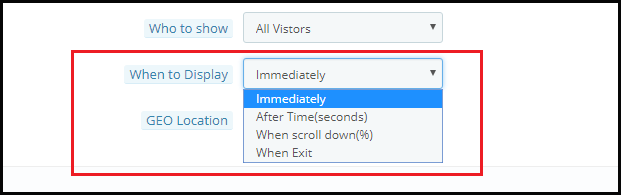
9. When to Display: You may choose exactly when you want the spin and win pop up to display. You can either display it immediately when the customer lands on your site or after some time or when the visitor scrolls down or you can use it as an exit intent pop up.
10. Geo Location: You can even select the display option as per the Geolocation of the visitor.
3.3 How can the look and feel of the addon be changed?
The Look and Feel Setting in the Prestashop admin panel allows you to change the look of the spin and win pop up as it appears on the website.
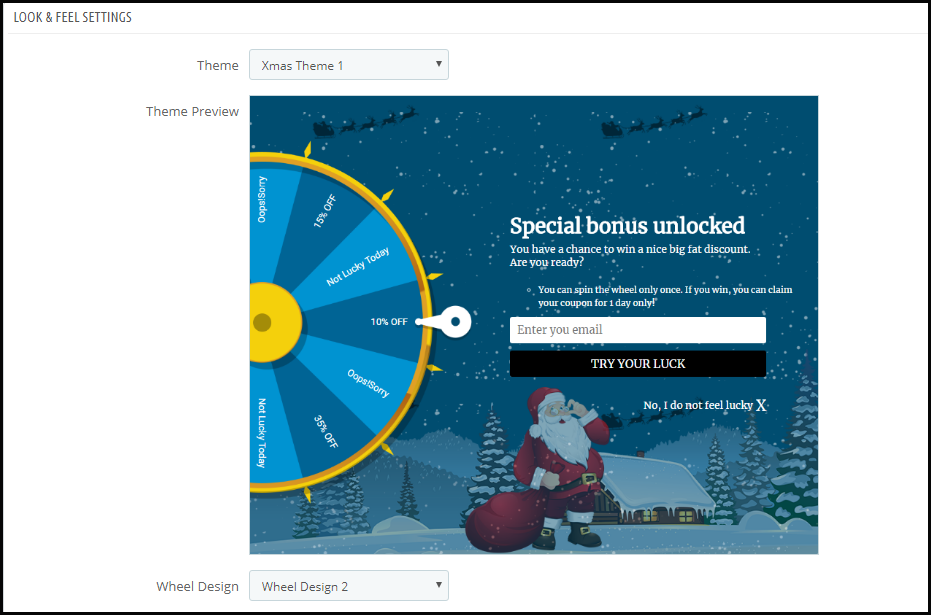
1. Theme: Prestashop admin can see the preview of the Prestashop Newsletter popup in the admin panel itself before making it live. There are multiple themes to choose from. Admin can choose as per the occasions like New Year and Christmas. The PrestaShop admin can now apply the latest New Year 2020 themes on his website. There are 4 eye-catching New Year 2020 themes to choose from.
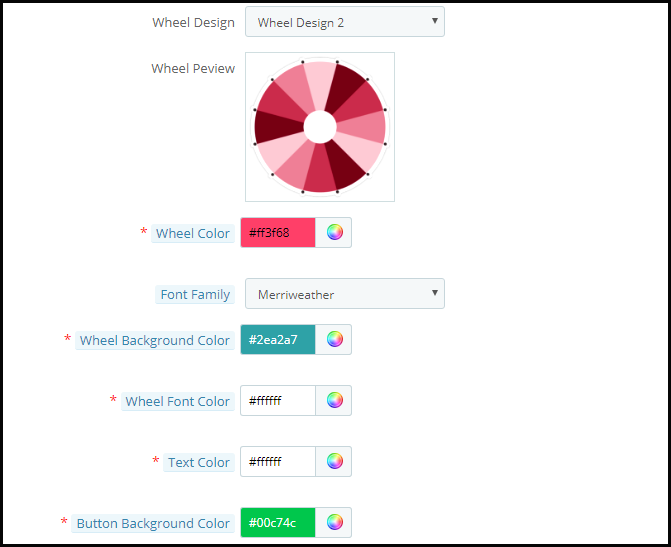
2. Wheel Design: Prestashop store admin can change the Design of the spin wheel. Prestashop admin can also see the preview of the Spin wheel in the admin panel itself.
3. Wheel Color: Prestashop admin can select the color of the Wheel using this option. The spin wheel is customizable in endless ways and the admin can even match it with the Prestashop store theme.
4. Font Family: Prestashop email subscription popup allows Prestashop admin to choose the Font suitable on the Newsletter subscription popup.
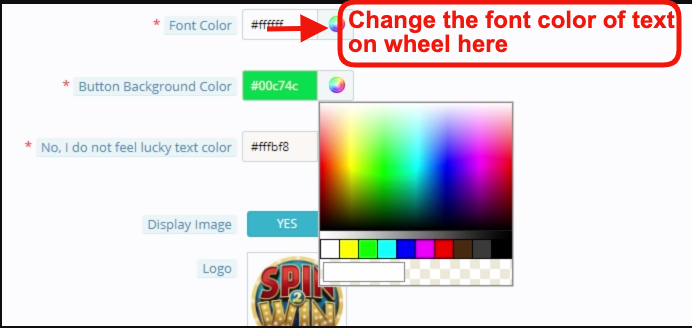
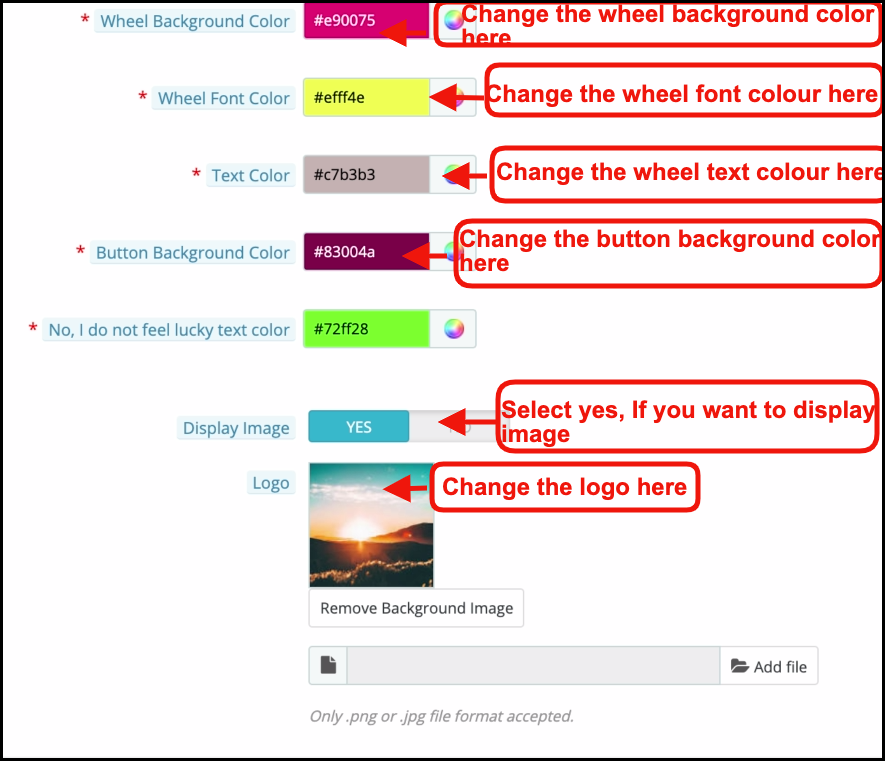
5. Wheel Background and Font color: Background color and Fonts on the Spin Wheel are customizable using these options.
6. Text Color and Button Background color: The Text color and the Button background color on the Email subscription popup is customizable using these options.
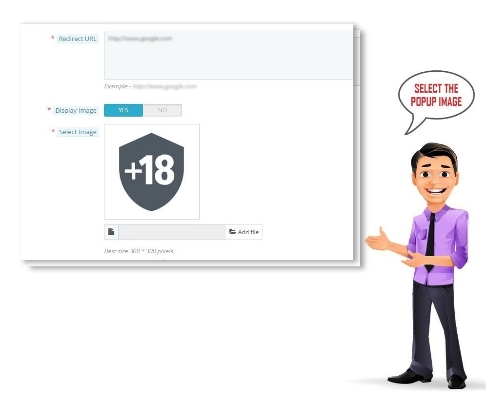
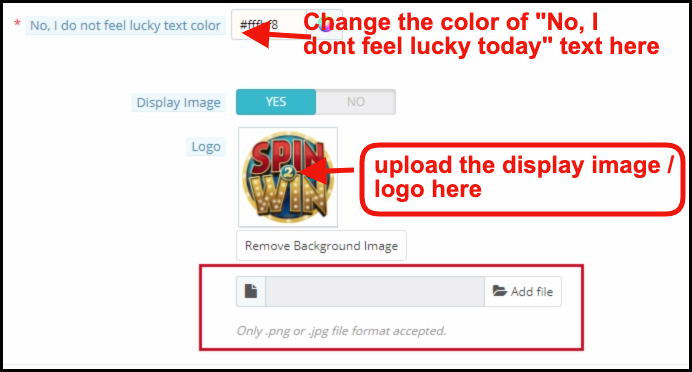
7. Display Image: You can enable or disable the Display Image by selecting the Yes or No button.
You can change the logo that displays with the spin and win pop up. The image of the logo to display can be selected from the device by clicking on the Add File button as shown in the image below.
The changes made here will be reflected on your website.
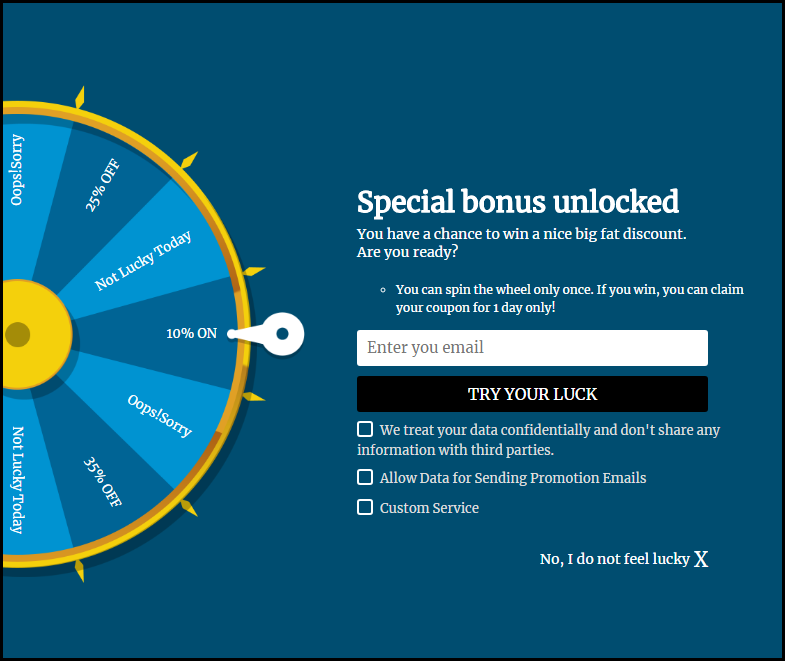
The spin and win pop up shown on the website includes the ‘Try Your Luck’ button. You can change the color of the button by changing the setting of ‘Button Background Color’.
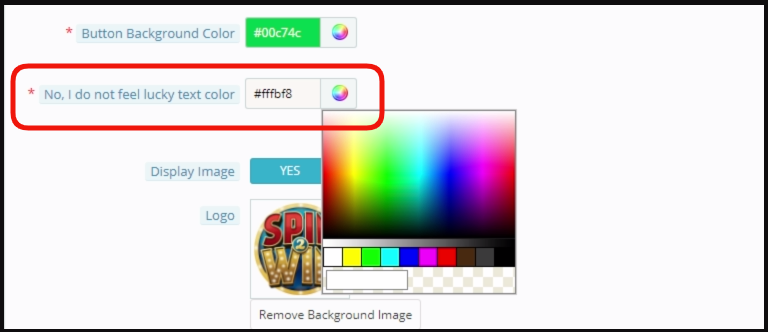
Even the font of ‘I’m not feeling lucky’ can be changed as shown in the image below.
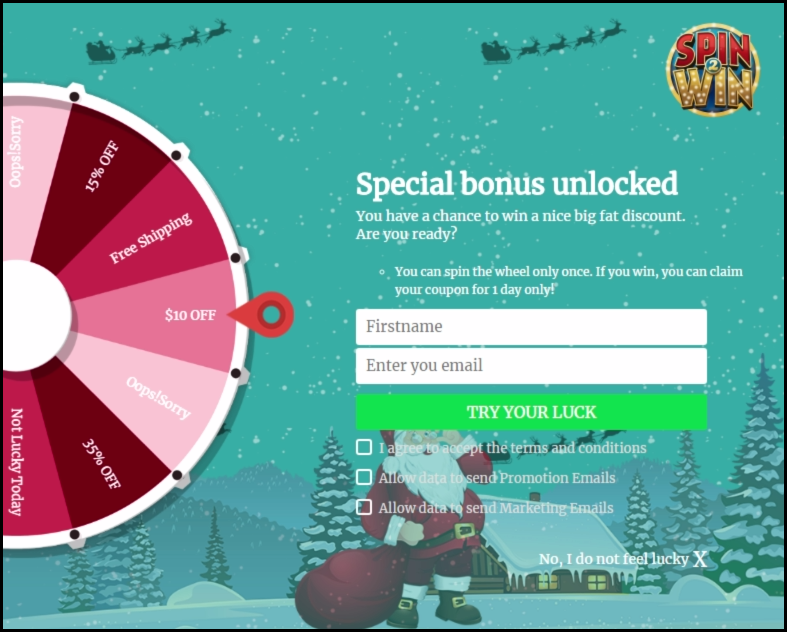
The entire changes made by you will be reflected on the front end as shown in the image below.
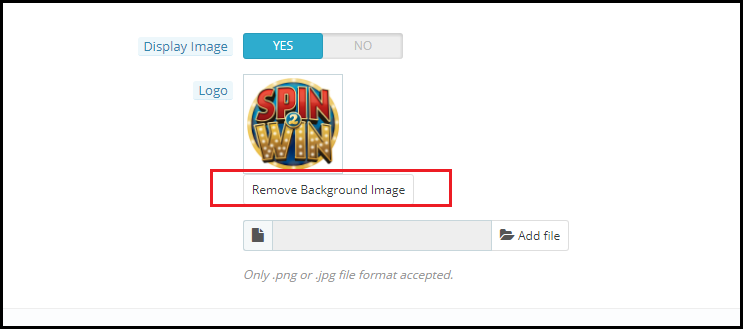
At last, the admin panel even provides an option to remove the background image if he wants to by clicking on the Remove Background Image Button.
3.4 How can the look and feel of the Spin and win pop up be changed?
The admin can change the look and feel of the spin and win pop up by changing the Look and Feel Settings configuration in the ‘Wheel Setting’ option.
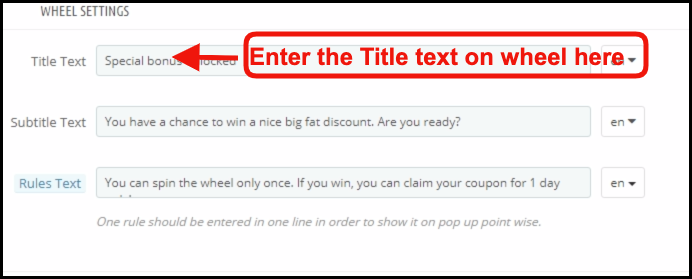
3.5 How can Prestashop admin change the Text on the Email Subscription pop up?
Prestashop admin can change the text on the Email Subscription pop up using the Text settings. Admin can customize the text in any language.
3.6 Can admin change the setting of the different slices of the Spin and win pop up?
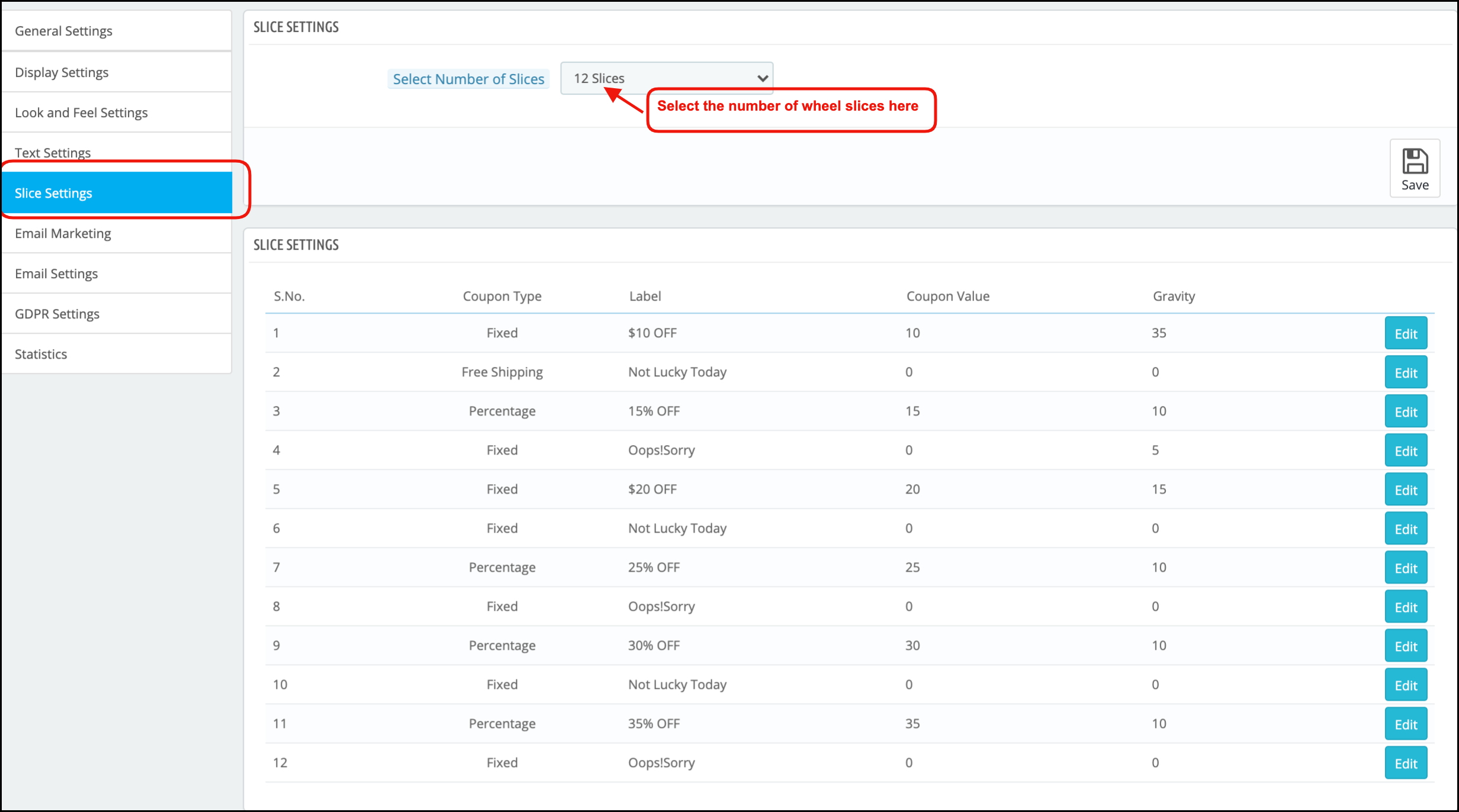
Yes, even the settings and the text or offers available in the different slices of the spin and win pop up can be changed from the ‘Slice Setting’ option.
As you click on the setting, you will get an option to select the number of slices to show on the front end and the list of the various slices will be shown.
Select Number of Slices: With the Updated version of the spin and win module now admin can select out of six, eight, or twelve slices for the front end.
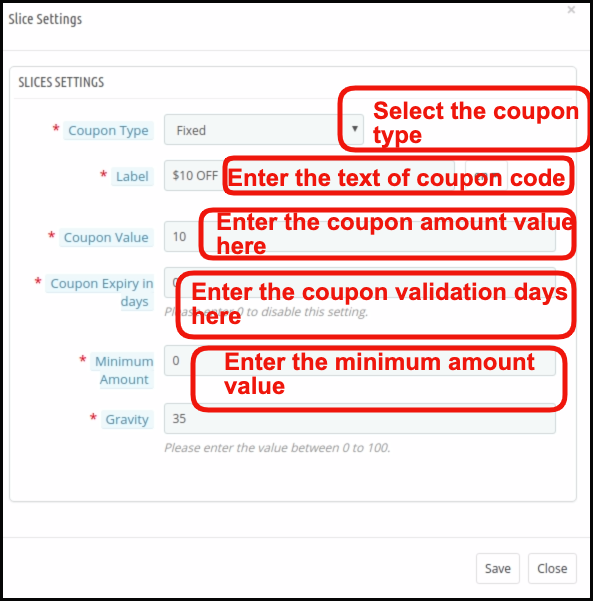
Each slice can be configured by clicking on the Edit button.
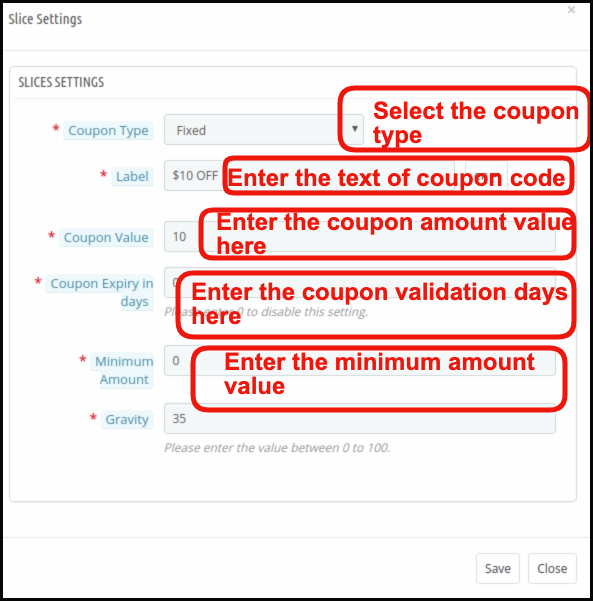
As you click on the Edit button, a pop up will appear where Prestashop store admin can set the Coupon Type (Which can be Fixed or in Percentage or gift or free shipping ), Label, Coupon Value, Coupon expiry in days, minimum amount, Gravity and fix coupon code. Save the changes and the same will be reflected in the spin and win pop up shown on your website.
3.7 How is the email customized?
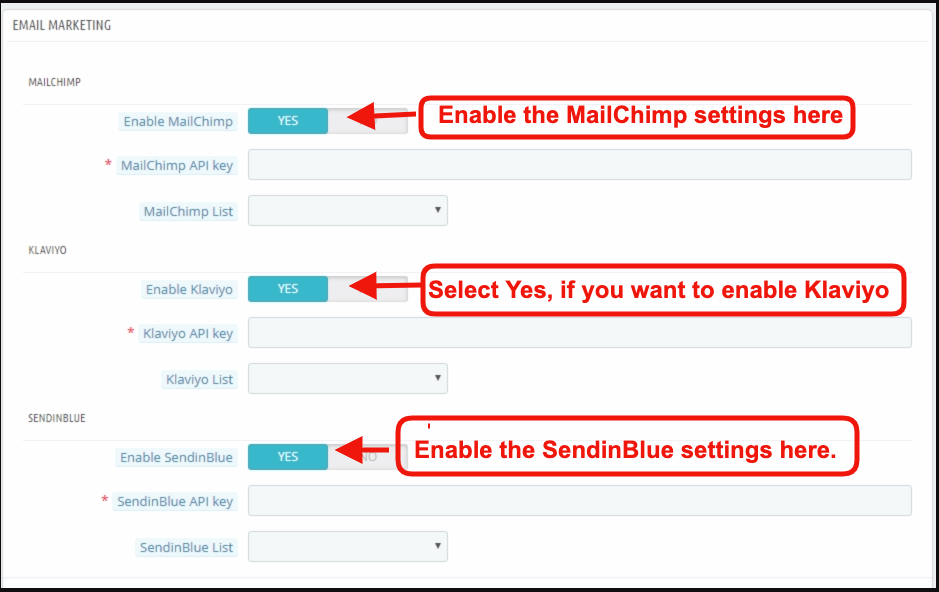
Prestashop spin and win addon offer Mail Chimp, Klaviyo and, SendinBlue integration. The email Id entered in the email subscription popup is automatic with the store owner’s Mail Chimp, Klaviyo and, SendinBlue account. The emails captured are usable for personalized promotions.
3.8 How can I change the email settings?
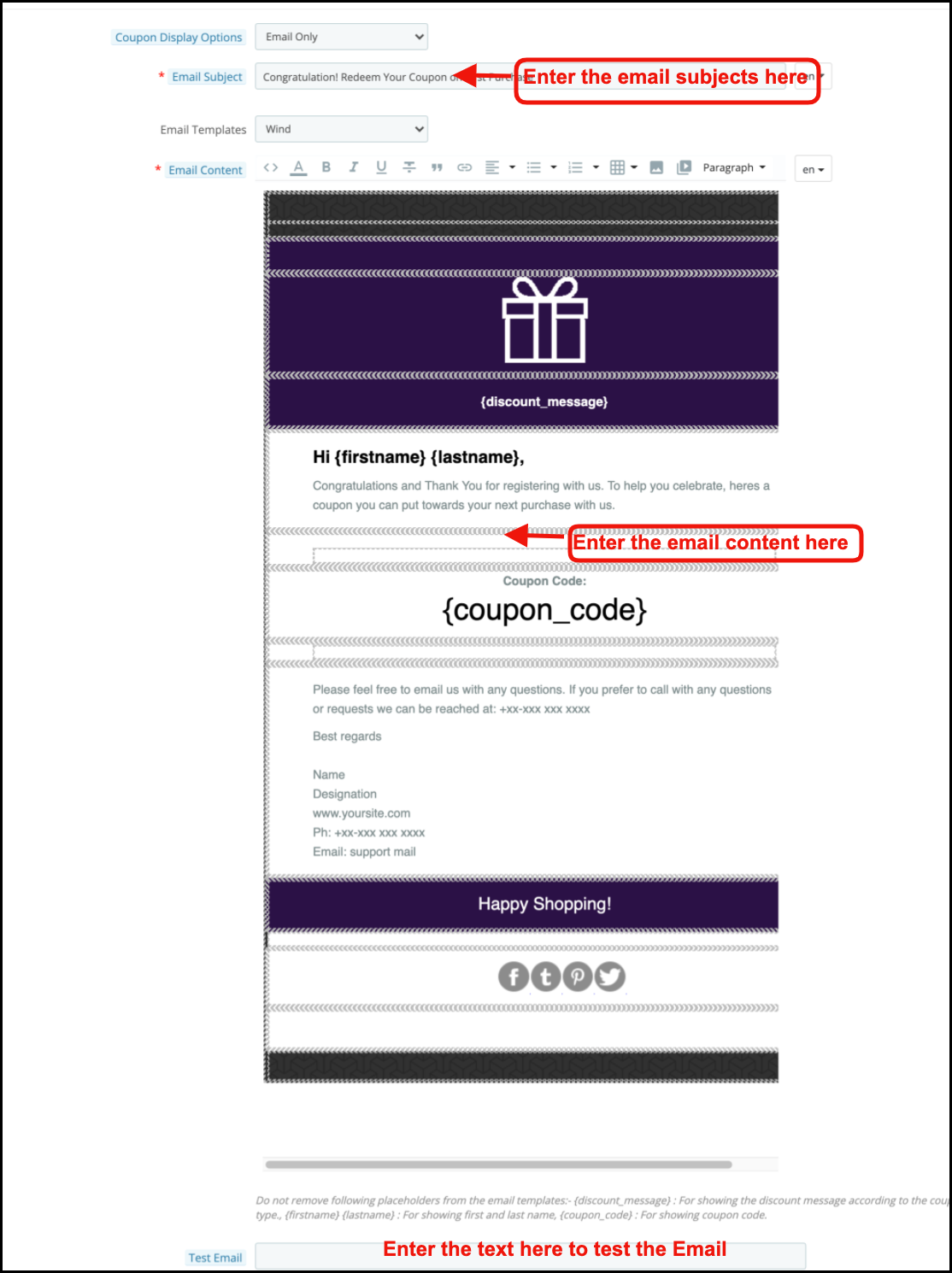
The ‘Email Setting’ option allows the admin to customize the email templates that are sent to the customers.
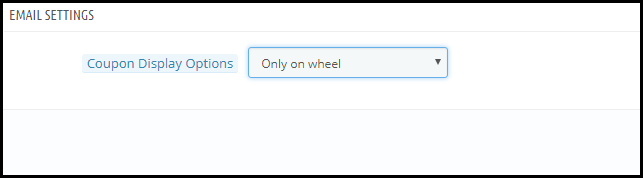
Coupon Display Options: It allows the admin to choose the places where he wants to display the coupon. Namely ‘Only on Wheel’, ‘Email Only’, ‘Email & Wheel’.
Email subject: Set the subject of the email in this tab.
The Email Templates: In the next tab sellers can choose the templates from the available templates.
Email content: In this tab, the store owner can customize the email body at his convenience.
3.9 GDPR Settings
GDPR or General Data Protection Regulation is a new act that will be enforced from 25 May 2018. It is mandatory for all the companies which are handling the personal data of EU citizens. GDPR offers various rights to the customers (mentioned below) which helps them to keep their data safe and secure.
1. The right to be informed
2. The right of access
3. The right to rectification
4. The right to erasure
5. The right to restrict processing
6. The right to data portability
7. The right to object
8. Rights concerning automated decision making and profiling
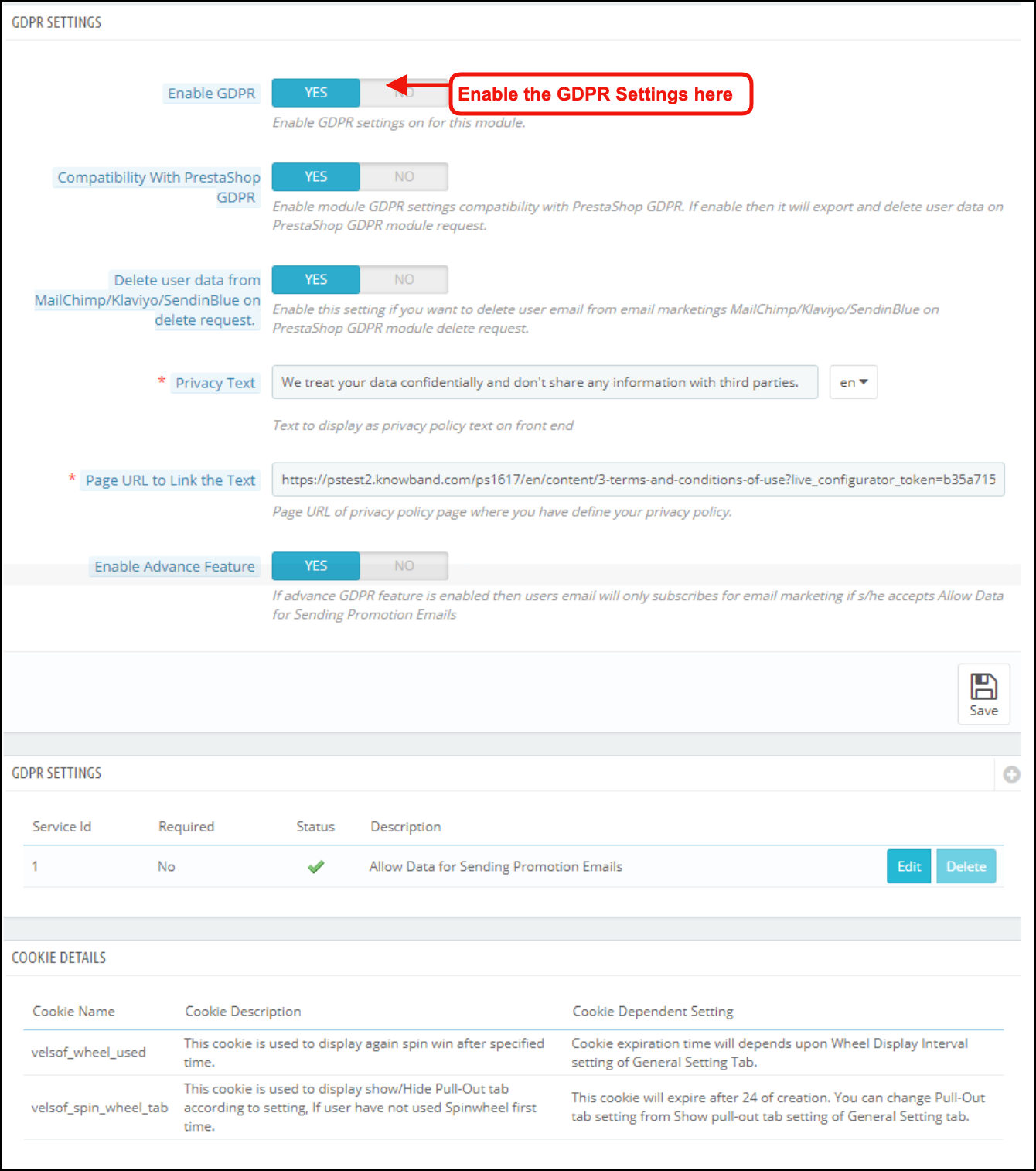
GDPR settings will help the Prestashop store admin to comply with these rules. Please refer to the attached screenshot in which we have highlighted the GDPR Settings tab.
a) Enable GDPR: Enable or disable the GDPR options using this option. There are the following options in the GDPR settings tab for the merchants to make the popup module compliant with the GDPR. The GDPR settings will remain unavailable by default and as per the business need, the store admin needs to enable it.
b) Compatibility with Prestashop GDPR: Admin has the option to enable/disable this feature. If you are using the official GDPR module then you must need to enable this setting. The main purpose of this feature is to export and delete user data on the PrestaShop GDPR module request. It is also compatible with Prestashop GDPR Module developed by Knowband.
c) Delete user data from MailChimp/Klaviyo/SendinBlue on delete request: As the Spin and Win pop-up addon syncs the captured email ids to the MailChimp/Klaviyo/SendinBlue email service providers (third-party service providers, so if this setting is on and you use the services of any one of these email service provider then on the data deletion request the subscriber details will get deleted automatically).
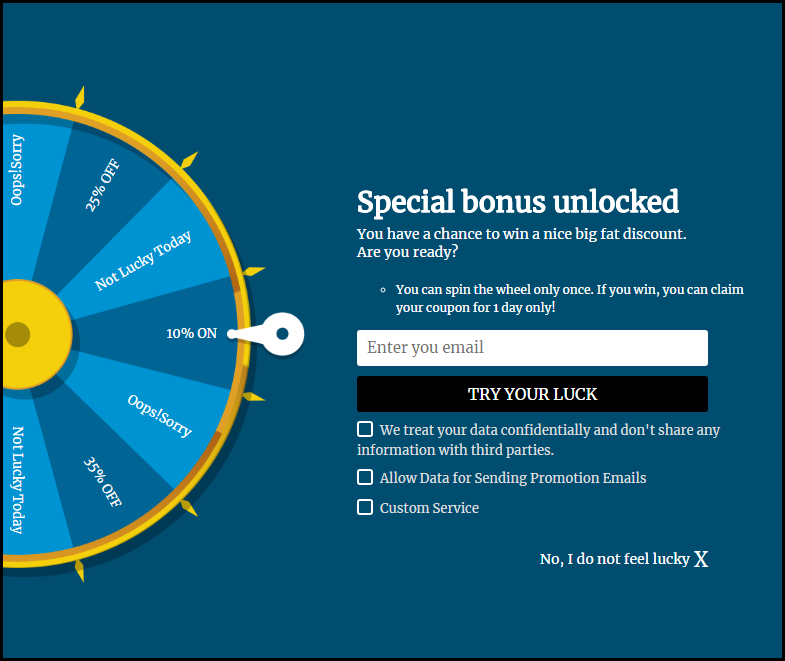
d) Privacy Text: The module will add a checkbox to the pop-up design with the privacy text; this text will be visible to the front-end user at the time of entering the email id in the email box.
e) Page URL to Link the Text: Admin can add the link to “Privacy Policy” or any other page with this message.
f) Enable Advanced Feature: This option allows the store admin to add more checkboxes to the pop-up design for marketing permission or any other permission like age verification (age should be 16+).
If the admin enables the Advance Feature setting, then he will be able to access the additional checkbox setting option. As per requirement, the admin can add multiple checkboxes.
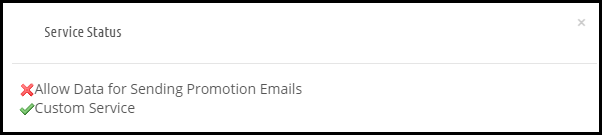
g) Service Settings: All the additional checkboxes that the admin adds will be listed under the Service Settings. Admin can add multiple checkboxes with ease.
How to add a new checkbox:
1. Click on the (+) sign to add a new checkbox.
Note: By default one service will be listed on the service list and the admin can update the text for the service.
2. On clicking the + sign will open a pop-up and admin need to enter the details like – Service Label, Make service mandatory and Enable Service.
Service Label: This is a text input field. The text entered here will be visible to the front-end user.
Make Service Mandatory: This is a toggle button. If this is set to Yes, then this field will be marked as Mandatory, and without confirming the checkbox visitors will not be able to get the offer.
Enable Service: Admin has the choice of Enable/Disable a service at any time.
Cookie Details:
As the Spin and Win module uses the Cookies so the description and the use of these cookies have been listed in the section so that the admin can put these details on the Cookie Policy or Privacy Policy page.
Record of consent:
As soon as the user opt-in for the promotion and spin and the wheel to get the discount coupon code. The Spin and Win Pop-up module keeps the proof of the opt-in, as it is needful for the lawful processing of the captured data. As the unique coupon code is generated each time so the Statistics tab of the Spin and Win GDPR Compliant Module also records the permissions of the users. Please refer to the attached screenshot.
On clicking the view button admin can check the permission of the user.
After enabling the GDPR Settings the Spin and Win pop-up design will look like this –
3.10 How is the statistical report of the Spin and win pop up generated?
Yes, the Prestashop admin has complete access to the statistical report of the visitors who spin the wheel and claim the coupon generated by the same. The report is generated in both graphical and tabular format.
(New Feature) Export Email List: Now Prestashop Exit Pop Up allows the store admin to export the list of email subscribers by clicking the Export Email Button on the Statistics Setting Page.
4.0 Theme Scheduling
Theme Scheduling is the new feature in Prestashop Spin and Win email subscription module. This feature allows the admin to select the validity date and expiry date for a particular theme. Prestashop Store owner can now set a schedule for displaying a specific theme on a particular occasion and this will automatically change to the default theme on the theme deactivation date.
Add New Theme Schedule: Prestashop store admin can add a new theme schedule by clicking the ‘Add New Theme Schedule’ button.
For this, you can select the theme type and change the look and feel of the wheel. (refer 3.3 Look and Feel Setting)
The new feature in Theme Scheduling
Active: With Prestashop spin and win module admin can activate or deactivate a new theme schedule by a toggle button.
Theme Activation date and time: If the new theme is activated, the store admin will have to enter the date and time for the activation of a particular theme.
Theme Deactivation date and time: The activated theme will be deactivated on the date and time entered in this tab. This allows the admin to apply a theme for the Spin and Win module for a fixed time and the store admin can plan this way before the special day.
Disclaimer: In case the “Spin and Win” wheel popup does not display at the front, kindly clear the cache or delete the cookies. Sometimes cookies prevent the popup from displaying at the front.