7 eCommerce Trends And Development To Follow In 2018

We are now almost at the verge of welcoming the year of 2018. You must have planned your strategies to ramp up faster, sell more and more, have better SEO ranking, beat your competitor and so many things. 2017 has been a year of eCommerce where competition has grown way faster than the total growth of the eCommerce market itself. This means, sites would have to come up with something new, unique, and extraordinary to gain the traction of customers.

Consequently, this has led to various research and developments which have given exciting trends to the eCommerce market this year. Here, I am going to discuss various eCommecre trends and developments that have happened this year, and also those who are yet to happen and we would be seeing them in the upcoming time.

1. Growth of Digital Payment wallets

A few years ago cash on delivery was the most preferred payment option by the customers. Reasons are:

  • Users did not trust the online payment option
  • Users did not trust the website to deliver the product on time or even deliver the product at all after getting the payment in advance.

Well, the conception was cleared gradually, and people started using online payment options through their debit/credit cards, or net banking. With the next development in terms of Digital Payment Wallets, like Apple Pay, Amazon Pay, and PayPal etc, customers no longer need to take out their credit/debit cards to make a payment online. These payment wallets provide an option to directly pay online by using a fingerprint scanning or a pin number only.

The adoption of Digital Payment Wallets by different businesses and customers has been in trend from 2016 and 17 itself, and it will only grow in 2018. With faster payment processing and least requirement for user input, they provide an enhanced user experience to the customers. I can predict that a huge number of customers in the coming time are going to expect eCommerce stores to offer multiple Digital Payment wallets as a payment option.

2. The race of Faster Product Delivery

Over the past few years the rate of eCommerce product delivery has decreased dramatically. There was a time when you have to wait for weeks, or even a whole month to get your ordered product in hand. However, the current situation has become faster and precise in terms of product delivery. There are various factors which have helped and encouraged the store owners to quicken the same.

  • Grown up competition and comparative shopping by the customers where they can compare the product delivery time, product price, and a lot of variables of the same product being offered by multiple sites. The site having the fastest delivery time may get the order.
  • Development of automated and multi-sync inventory management system has made the process of product dispatch faster.
  • Automated Pick Pack systems have reduced the chances of error while labeling and packing a product box for delivery.
  • Adoption of click and collect method. The collection centers of the eCommerce store are the place where customers after placing an order can personally visit and collect their product even on the same day.

There have been a lot of development in product delivery in the past few years, but the most exciting one that I look forward this year is Amazon’s ‘Drone Delivery’ being termed as ‘Amazon Prime Air’. Amazon tested its first Drone Delivery on 7 December 2016 which was a success. Amazon’s drone delivered an item of around five pounds weight which took less than 30 minutes from the nearest Amazon docking station. This is exciting, we can hope that 2018 would be a great year for product delivery with such innovations. Hopefully, Amazon will soon expand the service to other corners of the globe.

3. Personalized shopping with Artificial Intelligence

This trend has now become an evergreen item in trending list for any year from the past several years. This is complex and trickier, but the most looked forward development. The scope of AI is not limited to eCommerce only, it has a lot to do with any of the fields you can think about. For eCommerce, despite it’s still in development and will continue for very long, it has already contributed a lot.

Did you think how Amazon shows your previous viewed products on your homepage only?

Artificial intelligence is tending to reach a level where it can help in our daily lives. The growth of AI based digital assistants like, Google Assistant, Siri, Cortana, Alexa on Amazon Echo etc have made it possible to talk to the machines.

The same technology is being used to integrate chat bots on eCommerce sites, where users can chat with the robots and get an instant reply for their queries. We can hope in the coming future that AI will work even better and we would be seeing the interconnected networks of different devices controlled by AI. It wouldn’t be a surprise if Google Home will order the grocery online (when grocery stock is exhausted) without even you telling it to do so. Well, that’s a certain development to come, but it’s far for now. However, the current AI development is perfectly a trend to follow this year in eCommerce.

4. Mobile commerce

It’s an old news now. Mobile devices are being used more than desktops to browse the internet, especially the eCommerce sites. The twist is, if we ignore the mobile apps, hardly a few eCommerce sites have a perfect mobile experience for their customers. As a result, shoppers use this highly accessible platform to either window shop or just check the product. To purchase a product they wait till a desktop or laptop is around.

The reason is, the mobile interface of most of the sites is not user-friendly as if they have completely ignored that their products can also be purchased from the mobiles too. Especially, the checkout pages are not at all designed for mobile, this makes users doubtful about the security, speed, and convenience of the mobile checkout. Moreover, mobile checkouts or even the normal pages are hardly fast enough, most of them are not responsive at all.

Did you know that 40% of people abandon a website that takes more than 3 seconds to load?

Luckily, with search engines like Google totally supporting the mobile-friendly sites in their ranking algorithms, many sites have started focusing on the mobile versions of their sites too. The growth of one-page checkout systems is also one such innovation in the mobile as well as desktop commerce. One of the latest trends from Google in this category is “Google will now start indexing mobile sites first”. It’s an interesting trend to follow this year.

Furthermore, the growth of Digital payment wallets discussed above is also a crucial element in the Mobile commerce growth. With easy and quick payment options, customers are using mobile checkouts more and more with the digital payment wallets.

5. Competition for local market has heated up

The big eCommerce giants like Amazon and eBay has significantly expanded their customer base across the globe. With their presence in the local market of various countries, the local online retailers are also trying their best to keep a hold. This fight for the local market is providing different opportunities to the local online shoppers- reduced product prices, free shipping options, faster delivery time, and a lot more.

Flipkart and Indian eCommerce giant has recently got $1 billion investment from Tancent and Microsoft, even eBay is expected to invest $500 million in the upcoming days. – information source

The heat of the competition can be judged with the Amazon’s move to invest $5 billion in its India operation. Earlier the investment was around $2 billion, which Amazon increased dramatically to $5 billion. – information source

Whatever be the reason for such a huge investment in the local market, it would be interesting to see how it goes for both the local and international giant.

6. Google’s direct attempt to break into premium CRO tool market

This time Google has entered in the premium CRO tool market with it’s two new products- Google Optimize and Optimize 360. Google Optimize is a free A/B testing tool, while Optimize 360 is a more advanced version which comes as a paid service. For a long time, both of the tools were in beta version, whom Google finally made stable in March 2017.

This trend would be an interesting one to follow by the eCommerce store owners. It would be more interesting to see, how these offerings are going to affect the market of already established third-party tools like Adobe Target, Optimizely, VWO, and MockingFish etc.

7. Integration of eCommerce stores with marketplaces like Amazon and eBay

Selling on the popular marketplaces is a wise decision to take. However, when you already run your own eCommerce site, it becomes a bit difficult to manage your site and marketplace store separately. We already know that selling on these platforms can bring a lot of sales to your business depending on various factors. What if you have an eCommerce store of your own, it doesn’t mean you can’t sell on marketplaces.

Considering the situation, the marketplace integration solutions are the important development that you should follow this year. Integration solutions have been developed by various developers for various eCommerce platforms which enable the site owners to integrate their marketplace store’s dashboard on their site back-office itself. Using these solutions site owners need not manage both the entities separately. They can perform everything as a marketplace seller from their own website itself.

For example, there are solutions for PrestaShop-Amazon integration using Amazon Web service, eBay integration, and Etsy integration too.

PrestaShop: A Valuable eCommerce Platform or a Wrong Turn?

Today, when only the biggest eCommerce sites like Amazon, Alibaba, eBay, Etsy, etc are the only ones with huge global acknowledgment, why it is still said that eCommerce is a hit?

The reason is, despite only a few big sites are in the global limelight, the niche based inventory model sites are doing so well in their limited local market. The brick and mortar based business owners are budding into eCommerce entrepreneurs by adopting easiest solutions to make their retail an online shop.

The easiest solutions that I am talking about are the various eCommerce platforms that provide a ready-made eCommerce site on the go. PrestaShop is one such eCommerce platform which is becoming popular among the eCommerce entrepreneurs day after day. A large number of eCommerce business aspirants has chosen this platform to launch the eCommerce site of their dreams and claim their share in the huge profit that eCommerce generates each second.

Current stats about PrestaShop

  • PrestaShop was launched on 31st July 2008, in France.
  • Currently, it is powering more than 250,000 eCommerce sites worldwide in 60 different languages.
  • PrestaShop Shares the total market share of 9% for open-source eCommerce platforms.
  • According to W3Techs, there are total 0.5% PrestaShop websites out of all the websites on the internet.

This is an impressive stat. 0.5% of total websites on the internet is a huge share. So, PrestaShop is very popular I guess.

In all these good talks about PrestaShop, haven’t we ignored the fact that PrestaShop is not the most popular eCommerce platform? I mean if PrestaShop is the best that you can have for your startup, why Magento, Shopify, WooCommerce etc are being chosen by several other entrepreneurs?

The reason is, none of the eCommerce platforms can be said to be a perfect solution. Factors that differentiate these platforms and allow them to survive parallelly highly depend on requirements, usability, flexibility, modules, ease of use and a lot more.

This is where you need to ask yourself “Is PrestaShop a perfect solution for your eCommerce stratup?” Let’s examine it.

Factors that make PrestaShop better than others

1. Ease of use

Usability is one factor that makes PrestaShop better than most of the eCommerce platforms. Most of the entrepreneurs come from a non-technical background. They hardly have the knowledge of coding and other technical stuff.

Luckily PrestaShop has been designed to be used by any kind of user. It doesn’t matter if you are a tech savvy user or have zero coding skills, You can setup a store and manage it all without any hassle.

From installation to configuring the whole website, from product uploads to managing the orders from your customers, you get the easiest interfaces to do it all.

You can install PrestaShop using the guided interface that clearly explains everything you need to do in the process. In fact, the cloud version of PrestaShop saves you from the hassle of installation and directly provides the ready-made store, waiting for you to upload the products and start selling on the go.

2. Highly extensible

PrestaShop possesses a number of built-in features to get a ready made store for you. These features include:

  • Store personalization
  • SEO friendly URLs
  • Product upload management
  • Shipping management
  • Supply management
  • Customer management
  • Discount management
  • Order Management etc.

Apart from these features, the platform allows the addition of any number of new features through PrestaShop modules. By simply installing a PrestaShop module, you can add a functionality that has not been given in the default system. Moreover, you can also enhance the built-in functionalities through these modules.

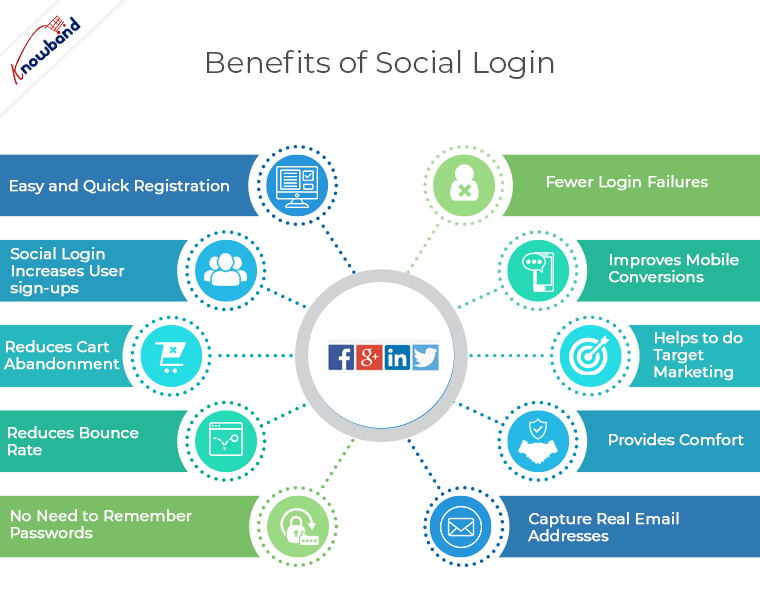
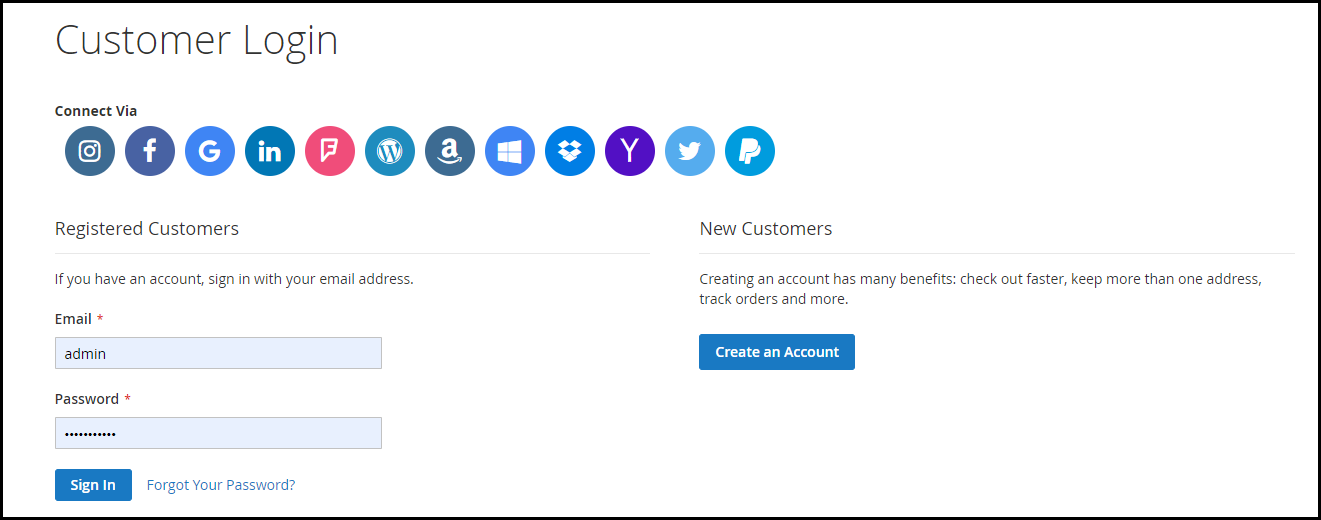
For example, Social Login is a quite important requirement for the eCommerce website to improve their site’s usability for their customers but is not present in default PrestaShop system. The good news is, you can easily integrate this functionality by installing a social login module.

The extensiveness in PrestaShop is not limited to the modules only. It saves you from the cost and effort of designing your new eCommerce store by simply allowing third party PrestaShop themes to be installed.

Frankly, every other eCommerce platform allows the module and theme extension, then how it makes PrestaShop better than them? This question takes me to my next point.

3. Huge number of modules and themes

PrestaShop has a huge community of users, developers, and website owners. It is one of the most active communities where you can find the solutions for everything about PrestaShop.

This highly active community consist of a very big population of third-party PrestaShop developers. These developers contribute to the community by developing the PrestaShop modules, themes, and templates for every trending need and requirement.

The official PrestaShop marketplace is a hub of all your modules, themes, and template requirements. Moreover, some big community developers also sell their modules and other developments on their own official sites. You need to just Google your requirement, and a large number of PrestaShop modules fulfilling them would be shown to you in the SERPs.

This is where PrestaShop beats most of the eCommerce platforms available today. As compared to other eCommerce platforms, PrestaShop modules and themes are so easily available and at a very lower cost than others. It is because of the massive competition among the developers, you can get some pretty fair deal in modules, themes and other custom developments from these developers.

4. Mobile Friendliness

Mobile Optimization is not an option, it has become a necessity today. If your eCommerce site is not optimized for mobile viewing you will loose your business in no time.

PrestaShop is a mobile-ready platform, which has been fully optimized for responsive viewing. The well optimized mobile responsive shopping cart allows your customers to easily shop on your site from their mobile phones.

Not just the shopping cart, the default PrestaShop theme is also fully mobile responsive. That means, your shoppers can browse anything and everything on your site without having an irritating experience on their mobile phones.

Moreover, almost all of the third-party modules and themes are also mobile responsive as the developers too know that mobile is important for your business. This mobile friendliness of PrestaShop is enough to make it one of the best eCommerce platforms in terms of usability for the customers.

5. A guided and well-supported platform

PrestaShop is one of the best platforms in terms of user support and guidance to use the platform. You can get all the valuable documentations and support whenever you need them. In fact, you can find all the documentations about all the PrestaShop versions on the website of PrestaShop itself.

This mainly includes comprehensive information about installation, features, settings, version upgrade, and much more. There are official as well as third-party forums and communities that support the website owners in various tasks and issue resolution activities.

The PrestaShop forums or community officially support the users by answering their queries. Moreover, they also provide paid support and training courses whenever you require. This also includes custom module development as per your requirement.

6. It’s highly flexible

There is very little left to talk about the flexibility as I have talked a lot about it when I mentioned about the modules and themes to extend the functionalities. Something that I would like to add in this would be the possibility of developing a module for almost every requirement you can think of. Other platforms also allow modules and themes to be installed, so what’s the difference here?

The difference is there in the feasibility to develop modules for a wide variety of needs and requirement. In fact, with a single module installation, you can even get even the most complex functionalities.

A perfect example of one such module is the “Marketplace Module”. A single PrestaShop module that can convert your whole PrestaShop store into a fully-fledged marketplace site.

Before the first marketplace module was introduced, no one would have thought that an originally inventory based eCommerce platform can also be used to develop a huge marketplace site. A site where you can add and manage new sellers/vendors.

This is the kind of flexibility that PrestaShop provides which is not found in most of the other eCommerce platforms.

7. It’s free to use

PrestaShop is fully open-source and free eCommerce platform. This means you don’t need to spend a penny if you want to use PrestaShop platform to build your online store. You can download the PrestaShop file for free and install it on your web server. As soon as you install it, you are ready to start selling from your store without spending a single amount.

Unlike various other hosted eCommerce platforms like Shopify, BigCommerce, Volusion etc, PrestaShop does not charge you for using it as a platform to build your site.

The places where you will need to spend some money are:

  • Installing a paid PrestaShop theme
  • Installing a paid PrestaShop module
  • Getting a custom theme or module
  • Hosting your website with a paid web host and
  • Paid training courses

These expenditures are important, necessary, and you will happily pay for them if you require them. With PrestaShop, at least you can save the money that would have been spent it getting an access to the platform itself.

8. I didn’t miss the basic features

The features and benefits of PrestaShop that I have mentioned in the above points are the ones that make PrestaShop stand out from the rest. However, I have not mentioned the basic functions because it’s understandable that PrestaShop does not omit these basic features either. PrestaShop seamlessly provides these features too:

  • Fully functional and easy to use Back-end interface.
  • Flexibility to support a large number of payment options.
  • Flexibility to Provide multiple payment options to customers at a time.
  • SEO friendly URLs for any controller or page on your store.
  • CMS page management.
  • Extensive shipping management.
  • Multi-lingual platform- more than 60 languages.
  • Multi-store feature.
  • Easily available latest security patches and upgrades.
  • Comprehensive reporting system etc.

Places where you might find PrestaShop difficult

As mentioned in the beginning, PrestaShop is not the most popular platform. What could be the reasons? Is it a wrong turn to adopt PrestaShop?

I can certainly say, it would not be a wrong turn to choose PrestaShop. It is just that not all the eCommerce platforms have everything you would need. The needs and requirements for a perfect and highly competitive eCommerce platform are changing day by day. The platform which can match up with the changing trends can only become the entrepreneurs choice.

1. It highly depends on the modules

Despite PrestaShop already provides all the essential features by default, it lags some important trends that have become a necessity for today’s entrepreneur. For example, It has been ages when social login feature was introduced to the websites and developers.

Even after so many upgrades and updates, PrestaShop has not included this feature in the default installation. A website owner seeking this very basic feature has to purchase a third party module for the same.

PrestaShop depends on third party and official modules for most of the trending features. Probably they do not want to burden the default installation with the features that can be easily achieved by installing a simple module.

2. The major upgrades do not support carry-forward

By carry-forward I mean the ability of the PrestaShop modules to be used with all the major versions without any change in the module.

The recent major upgrades still supported by PrestaShop include:

  • PrestaShop version 1.5
  • PrestaShop version 1.6
  • PrestaShop version 1.7

Each time when a new major upgrade is released and if you decide to upgrade to the new version you will not be able to use your old PrestaShop modules or theme on the new version. That is, either you need to upgrade your module according to the new PrestaShop version or buy a new module developed for the new major version.

Luckily, there is not much to worry as a PrestaShop store owner. Third party developers are highly active and they make their modules compatible with the new version as soon as it is released. If you are lucky you need to just ask your module developers for the upgrade they will provide you the new module version without any cost.

3. Scalability could be a problem

PrestaShop is best suited for small to medium sized businesses. When it comes to scaling it as a fully-fledged giant eCommerce site, it is not the best option. With a massively increased scale of the store, you may notice lags in the various aspects like page loading time, back-ends performance, database overload etc.

By a fully fledged website, we mean the very big eCommerce sites that can be compared with the biggest eCommerce giants. If you have the intention to build another Amazon, probably you must look for an enterprise level solution like Magento Enterprise edition or build your own framework.

Scalability limit on PrestaShop is not that small as it seems. You can handle thousands of SKUs, Sellers, and Customers without any hassle. In case if you have millions of SKUs in your mind then PrestaShop could be a wrong turn.

To Roundup

PrestaShop has proven to be an efficient eCommerce platform and is still trying its best to prove better on various grounds. Of course, it’s not a perfect solution, and there are limitations with major upgrades, scalability. However, considering its target users, it has got everything they would need to launch a successful medium sized eCommerce site.

Nevertheless, it offers various benefits and greater flexibility with a competitively lower investment cost. It cannot be termed as a perfect platform but would not be a wrong turn either.

I can say that Magento is a better solution than PrestaShop for large scale eCommerce sites. While PrestaShop could be a great choice for small to medium sized business which is comparatively more in number.

Black Friday and Cyber Monday Throw-back: Lessons you can Learn from 2016

The Black Friday sales touched remarkable heights last year. With a record-breaking $ 3.34 sales, the eCommerce industry saw a boost of around 21%. But beyond the statistics, it is the lesson that the e-retailers should focus on. The incredible achievements of the year 2016 has for sure shaped a lot of trend to follow this year as well.

The blog has outlined some of the essential takeaways of the sales season of last year. Amp yourself up with these facts and get ready for the busiest season of the year.

It is not a one-day affair

One of the biggest aspect that requires the consideration of the e-marketers is that this is not a one-day affair. This implies that the expectation of the customers won’t end on same day. In fact, there is a huge customer base who actually waits for the post-sale offers. There were a lot of sites last year that extended their deals from Black Friday to Black November. What was earlier a single day sale has now turned into a week-long sale. The eCommerce giants like Amazon extended there sales from Black Friday to Thanksgiving. And this is what your customers will be expecting this year as well. While the bargain hunters must have already started hitting the internet to strike the right deal, it is important to provide them with what they are looking for.

Suggestion: With few more days to go, it is high time that you gear up for the extended sales season. This behavior might continue the entire holiday season. Thus, you need to gear up for the holidays accordingly. Do not expect close the deal and achieve the target on the same day. There are many more opportunities ahead and you need to be prepared for the same.

Mobile domination is the key

It is interesting to note that 75% of the total net searches online was done using mobile phones. Moreover, 55% of the online purchases was done using hand-held devices. The mobile domination is bound to increase this season as well. Moreover, if we take a close insight into the consumer behavior, we’ll see that the online shoppers expects to get everything then and there. This is what makes it even important to bring the store at an arms distance of the customers. In addition to this, another exciting figure shows that the mobile apps touched a peak of 1.2 million installs on Black Friday.

Suggestion: The very first consideration is to make the website mobile-responsive which you must have already done. However, the last minutes preparation for the busiest week must include the final testing as well. Make sure that the site is ready to handle the unexpected traffic coming from the mobile devices. The additional holiday functionalities such as exit pop-ups must be working on the mobile phones as well as. Besides, this is the best time upgrade your site to a mobile platform. Knowband’s mobile app builder can help you go mobile even in the eleventh hour. Whether you have a eCommerce store on Prestashop, Magento, OpenCart or any other platform, you can convert it into a complete mobile store. Provide lucrative offers in return of the downloads and motivate your loyal customers to install your application.

Greater traffic, but lesser revenue

This was one of the observations last year. The website traffic was more than the expectation while the revenue earned was less. This is proven fact that the customers are spending less than expectation. The reason might be the presence of so many choices or the intention of the customers to hit a better deal. This may hit you hard if you are still not prepared to counter the same. The e-merchants should focus on the aiding the purchase intention of the visitors. Provide compelling reasons to customers to avoid procrastination and place the order instantly. Another way to curb these exits is to showcase deadline offers to the customers. Provides the customers with the offers that they just can’t resist. One day delivery option with a countdown timer can do the magic. Something like Prestashop shipping timer is one such way to create the sense urgency in the minds of the shoppers.

Suggestion: Get your landing pages ready for unexpected traffic. Along with this, be ready to get less conversions that expected. This is when the role of the re-marketing and re-targeting comes into play. The holiday season are more prone to cart abandonment. Use this as an opportunity for future conversions. The Black Friday is getting longer every year and this trend may continue in the future as well. The opportunities would not end after this day. The e-marketers need to stay at their toes in order to bring these customers back to the store.

Let them hit the bargain

The whole idea of Black Friday and Cyber Monday sales is to get an edgy deal. With so many options to choose from, even the expectation of the online shoppers has gone up. Thus, the flat discounts may not intrigue them. You need to lure them to checkout page, but in a subtle way. Even though it is the perfect time for aggressive marketing, it might not be fruitful at times. In addition, the bargain seeker love to shop early. According to report, more than half a million visit on the eCommerce store happened at 1 AM in the morning.

Suggestion: With the above-mentioned aspect in mind, the e-marketers need to find out innovative ways of giveaways to attract the visitors. Instead of going with the conventional means, provide them an opportunity to hit a bargain. The interactive gamified pop-ups such as spin and win can be of some help. The process of spinning the wheel in order to get offers makes the customers feel as if they have won something hit a bargain. Even a small discount may be well-appreciated. Moreover, offering mid-night offers may boost up the sales to new heights.

Wrap up

The expectation of the customers is high. While any strategic changes in this hour may be hazardous, this is the perfect time to make some back-up plans. As well as, it important that you plan out the post-holiday sales strategies. Use the takeaways from the last year and tap the opportunities effectively.

You Might Also Like:

Prestahop Cash on Delivery with Fee Module – User Manual

1.0 Introduction

The inconvenience of making online payments is one of the major cause of cart abandonment. Online shoppers are still intimidated by the idea of sharing their card details. Is this fact costing you some conversions? Offer your store visitors with an option to make the payment in cash at the time of receiving their order with the help Prestashop Cash on Delivery with Fee module. In return for the cash payment feature, the store owners can charge a fee to the customers. This is one of the ways to curb the exit intent and conversion of the visitors into paying leads.

The store owners can now charge a commission/fee to the customers when they choose the cash on delivery payment method. Online shoppers can now select their desired payment mode without sharing their card detail. In addition, the eCommerce store owners can reduce the cart abandonment and the surcharges can boost the revenue effortlessly.

1.1. Project Objectives

Prestashop COD for fee promises to take the burden off your shoulders. The list of the advantages offered by the Prestashop module is ever-lasting. Some of them are listed below:

1. It offers an easy way to manage the COD options with an additional commission of the eCommerce store.

2. The Prestashop eCommerce store admin gets to manage and create the fee profiles with minimal effort and in the least time.

3. The orders received with the COD option can be tracked from the back-end of the admin interface.

4. The payment method is a perfect way to help those customers in completing their online transaction who are not willing to opt for the online payments and PayPal wallet.

1.2. Features:

  • This Prestashop Cash on Delivery with Fees Extension is very easy to install and configure.
  • The Prestashop COD with Fees addon allows admin to set terms and conditions and fee for the cash on delivery.
  • The Prestashop Cash on Delivery addon is highly customizable.
  • The Prestashop Cash on Delivery with surcharge offers admin to enable/ disable, edit, delete the fee structure any time.
  • N number of COD conditions can be created.
  • The cash on delivery module with extra fee allows admin to set return fees percentage.
  • The eCommerce store admin can select minimum or maximum order limit for which cash on delivery fees will be charged.
  • Admin can select the category, country, a particular manufacturer, shipping option to apply Cash on delivery charges.
  • This cash on delivery fees extension allows admin to keep track on the Cash on delivery orders.
  • The payment method can be shown to the registered customers, guest visitors or new customers as selected by the store admin.
  • The cash on delivery facility addon supports multiple languages.
  • The Prestashop cash on delivery with extra charges module is multi-store compatible.
  • The Prestashop COD with Fees extension is compatible with the latest version of Prestashop.
  • The Prestashop cash on delivery with surcharge is web browser-compatible.

2.0 Installation

Order the module from the store and you will get the following files and folders as listed below:

1. A zipped folder including the source code of the module

2. User Manual

In order to install the module in your Prestashop store follow the below-mentioned steps:

  • Unzip the zipped file. It would contain files and folders as shown below –

  • Copy all the files and folders of the unzipped folder and paste them into your store “Modules” directory. Follow the path in your local drive – Root Directory/modules/.

3. The Prestashop Cash on Delivery with Fees module is now ready to be installed. You can find that in Store Admin -> Modules and Services.

You can find the module in admin modules list by using the following details:

Keyword – Cash on Delivery with Fee

Category – Payment and Gateway

Filter By – Installed & Not Installed / Enabled & Disabled

  • Click on “Install” button to install the module. It would show a pop-up for your confirmation. Click on “Proceed with the installation” option. This step will install the module and show notification – “Module(s) installed successfully”.
  • Once the installation is complete, you can configure the module by clicking the button as shown below:

3.0 Admin Interface

The online shoppers need not fumble into the lengthy checkout process. The e-merchants can reduce their burden by offering the cash on delivery option. The Prestashop Addon requires no technical assistance. The COD with surcharges can be managed in a few simple steps.

3.1 How to start configuring the module?

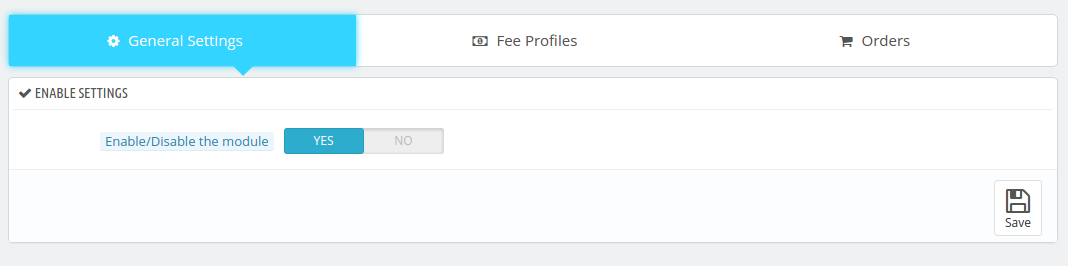
Enabling the functionality in your Prestashop store is just a button away. Toggle the button shown below and the feature will be enabled/disabled from the store.

3.2 How to Add or Edit the COD with fee profile?

The ‘Fee Profile’ tab allows the Prestashop eCommerce store admin to define the additional fee as well as the terms and conditions for the cash on delivery.

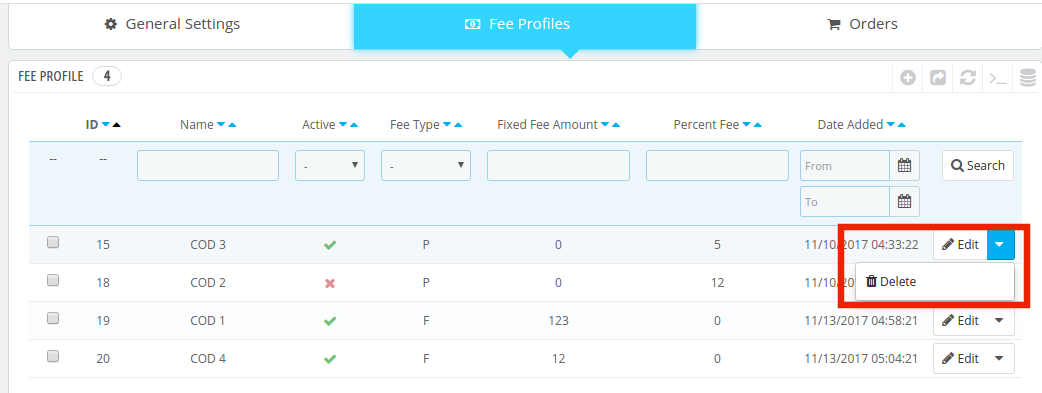
3.2.1 How to edit or delete the existing fee profile?

The Prestashop eCommerce store admin gets an option to edit or delete the existing profiles or conditions. All they need to do is to select the profile and click on the buttons shown below.

3.2.2 How to Create New COD with Fee Profile?

In order to add new profiles, click on ‘+’ sign at the top right section of the admin interface.

The information required to be filled in order create the feed profile are mentioned in detail below:

1. Enable or Disable Payment Method: The eCommerce store admin can enable or disable the payment method from here.

2. Name: Enter the name of the payment profile in this section. The name can be entered in multiple languages. Select the desired language from the drop-down list. The payment name should be unique, otherwise, it shows an error message.

3. Payment Image: You can enter the image that you want to showcase in the front-end along with the payment profile. You may select the image from the local drive. Just make sure that it’s resolution is 60*60px.

  • Fee Type: The fee or the surcharge in return of the COD facility can either be a fixed amount or percentage. The Prestashop eCommerce store admin can select the option from the drop-down list. Once the option is selected the amount or the percentage value can be entered as required.

In case, you choose ‘Fixed Type’, then, you’ll be asked to enter the amount as shown below.

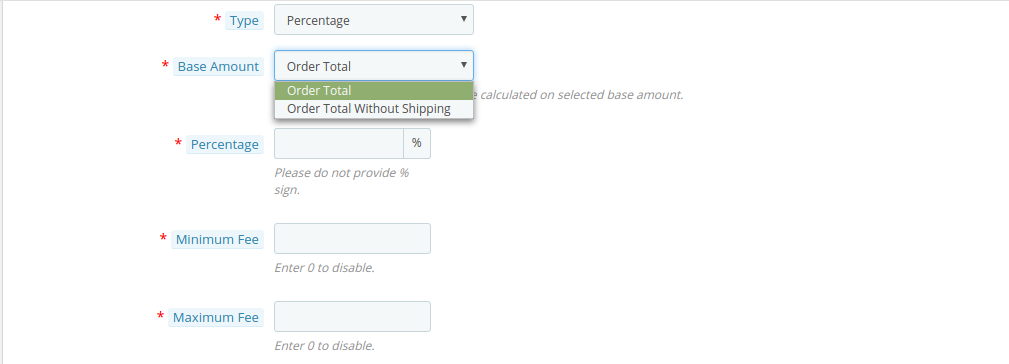
When the ‘Percentage’ type is selected, then, you’ll be asked to enter the base amount on which the percentage will be charged. The base amount can be the total amount that includes the shipping cost or the amount excluding the shipping cost. You can choose any one from the drop-down list and then enter the percentage amount in the next section.

Moreover, the Prestashop eCommerce store admin gets an option to enter the minimum and maximum fee amount. The surcharge will then lie within the provided range.

5. Minimum and maximum order amount: The Prestashop Cash on Delivery with Fees addon allows e-merchants to fix the minimum and maximum order amount within which the cash on delivery feature will be offered to the customers.

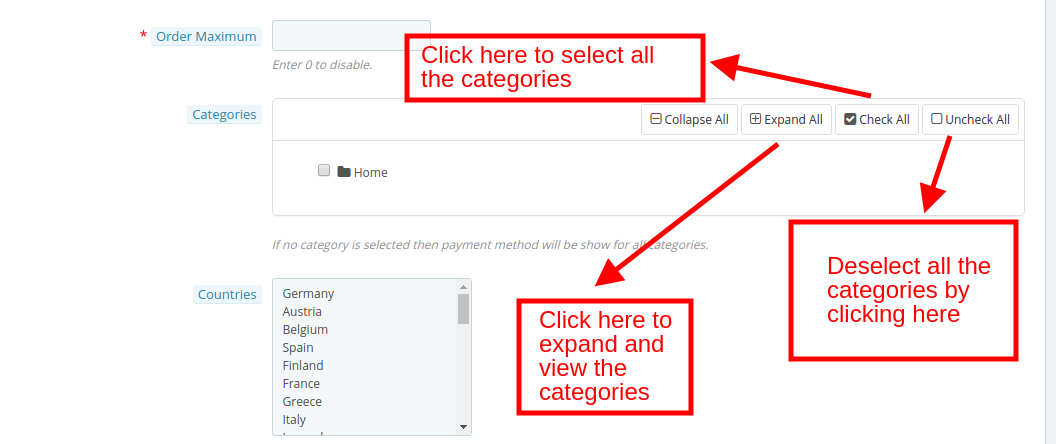
6. Select Categories: The Prestashop eCommerce store admin gets an option to select or de-select the categories in which the COD feature is to be added from the back-end as shown in the image below.

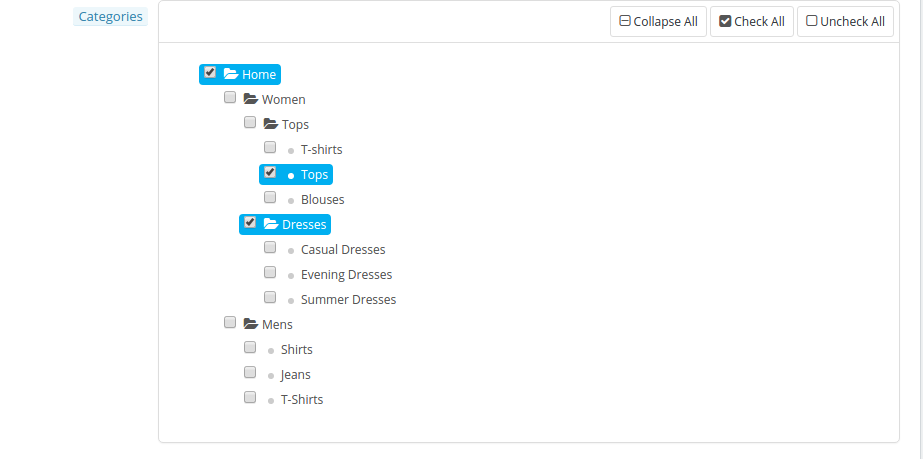
The Prestashop eCommerce store admin can expand the categories and select the one in which they are looking to include the feature as shown in the image below.

In case, none of the categories is selected then the payment method will be automatically shown in every category available in the store.

7. Country Selection: The Prestashop Cash on Delivery with surcharge addon allows to select the countries and locations where you are looking to provide this feature.

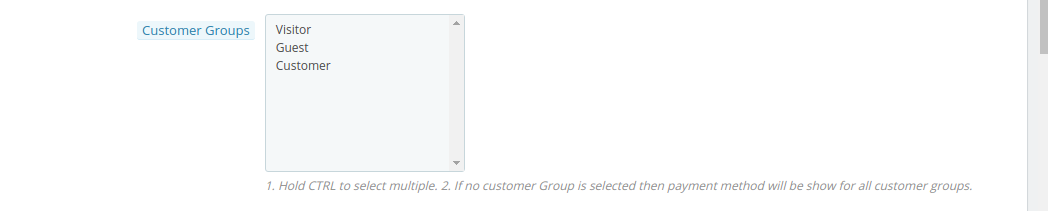
8. Select Customer Group: The feature can either be offered to all the customers or else you can select the desired group from the Guest Visitors, Registered customers or First-time visitors.

9. Select the Carrier: The feature can be enabled in selected carrier or shipping options. The same can be selected from the list of the options.

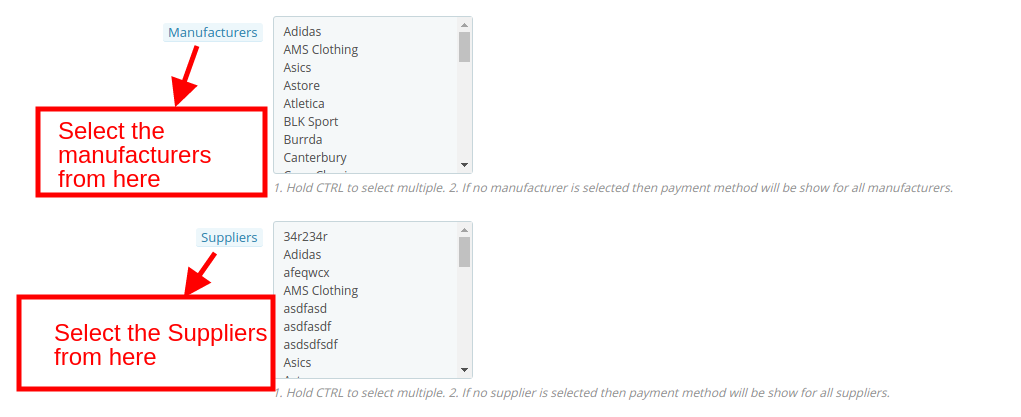
10. Select the Manufacturer and Suppliers: The Prestashop admin can even select the name of manufacturers and suppliers for offering this functionality.

11. Edit the Text of the Checkout Page: The text that is to be flashed at the checkout page of the website can be edited from this section. This can be done in various languages. Select the desired language from the down-down options.

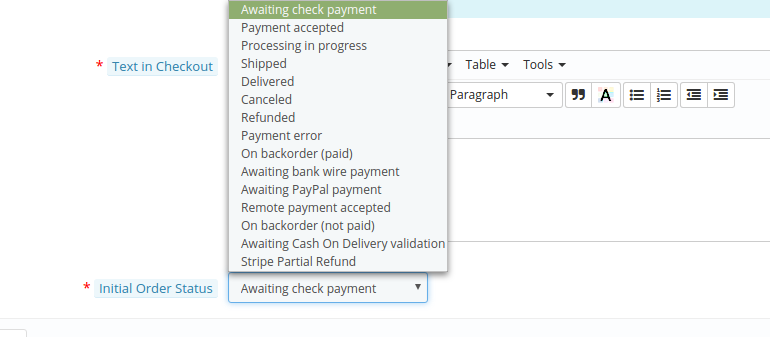
12. Select the Payment Status: The initial payment status when the customer selects this payment mode can be selected from here.

3.3 How to track the orders opting for the COD payment mode with the fee?

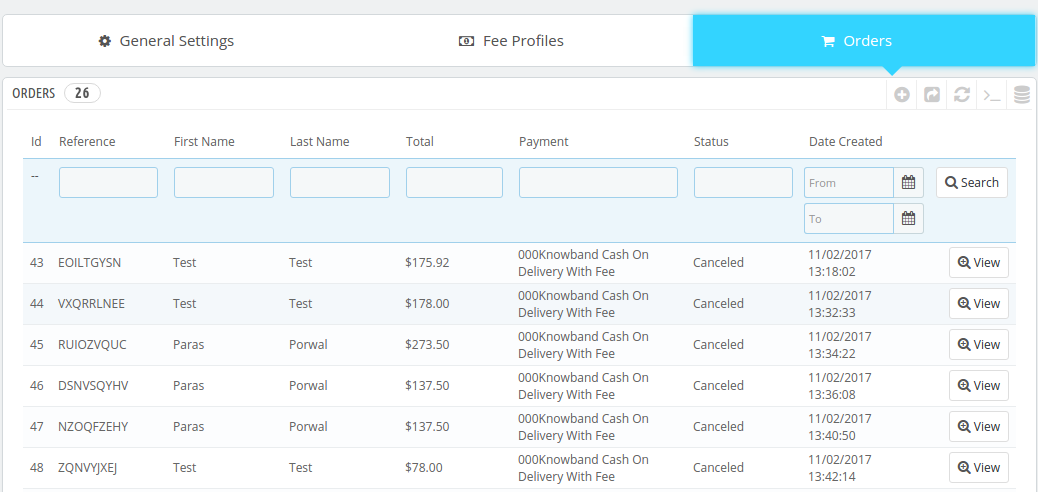
The ‘Order’ tab of the admin panel allows the e-merchants to view all the orders that opted for the cash on delivery payment mode with surcharge. Use the filters to find the required orders easily. The ‘View’ button can straight away take you to the profile of that particular order.

4.0 Website UI

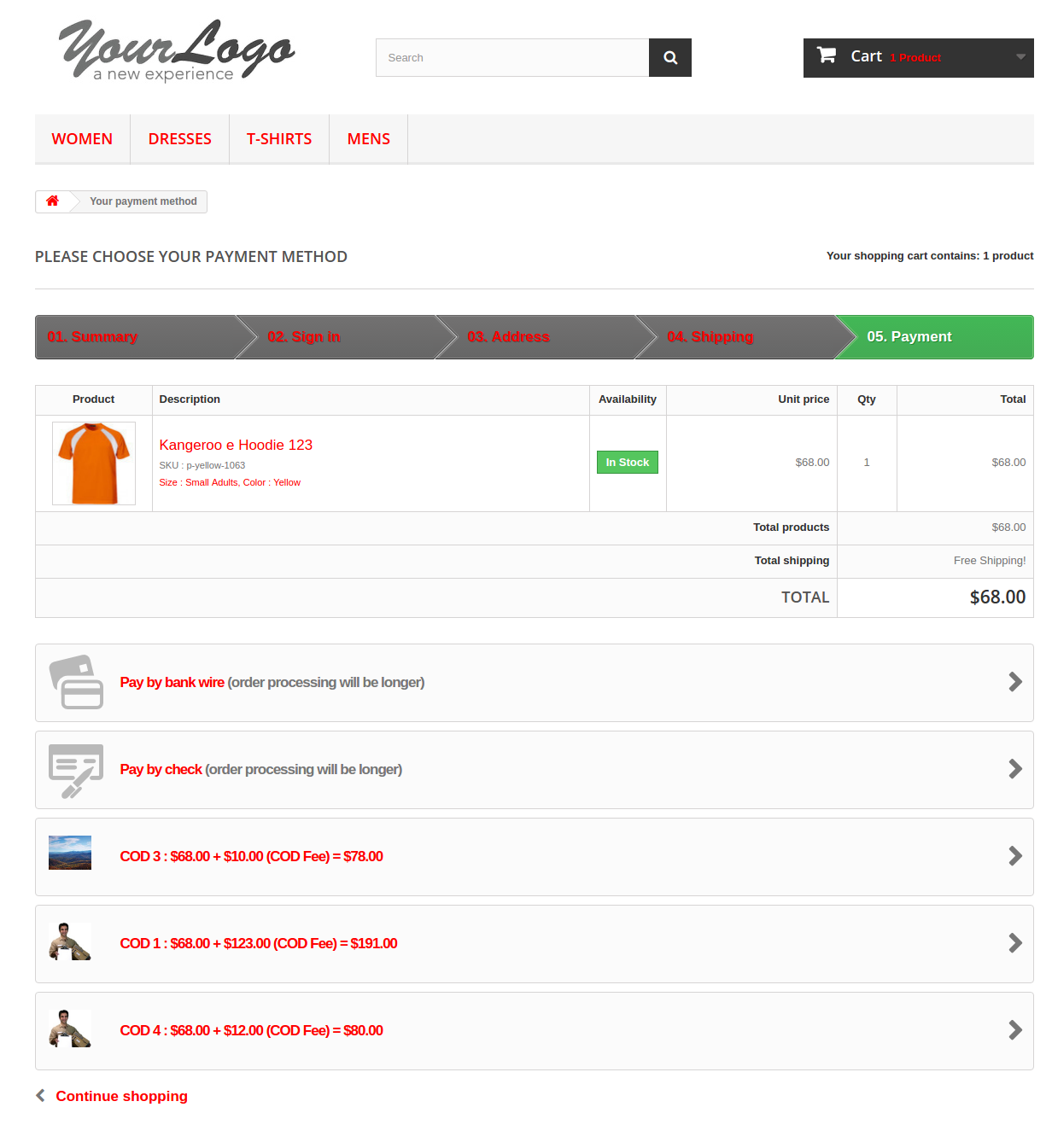
The customers can easily avail this facility. All they need to do is to add to the product in their cart and select the shipping method. The options available in the payment methods include the COD with fee methods.

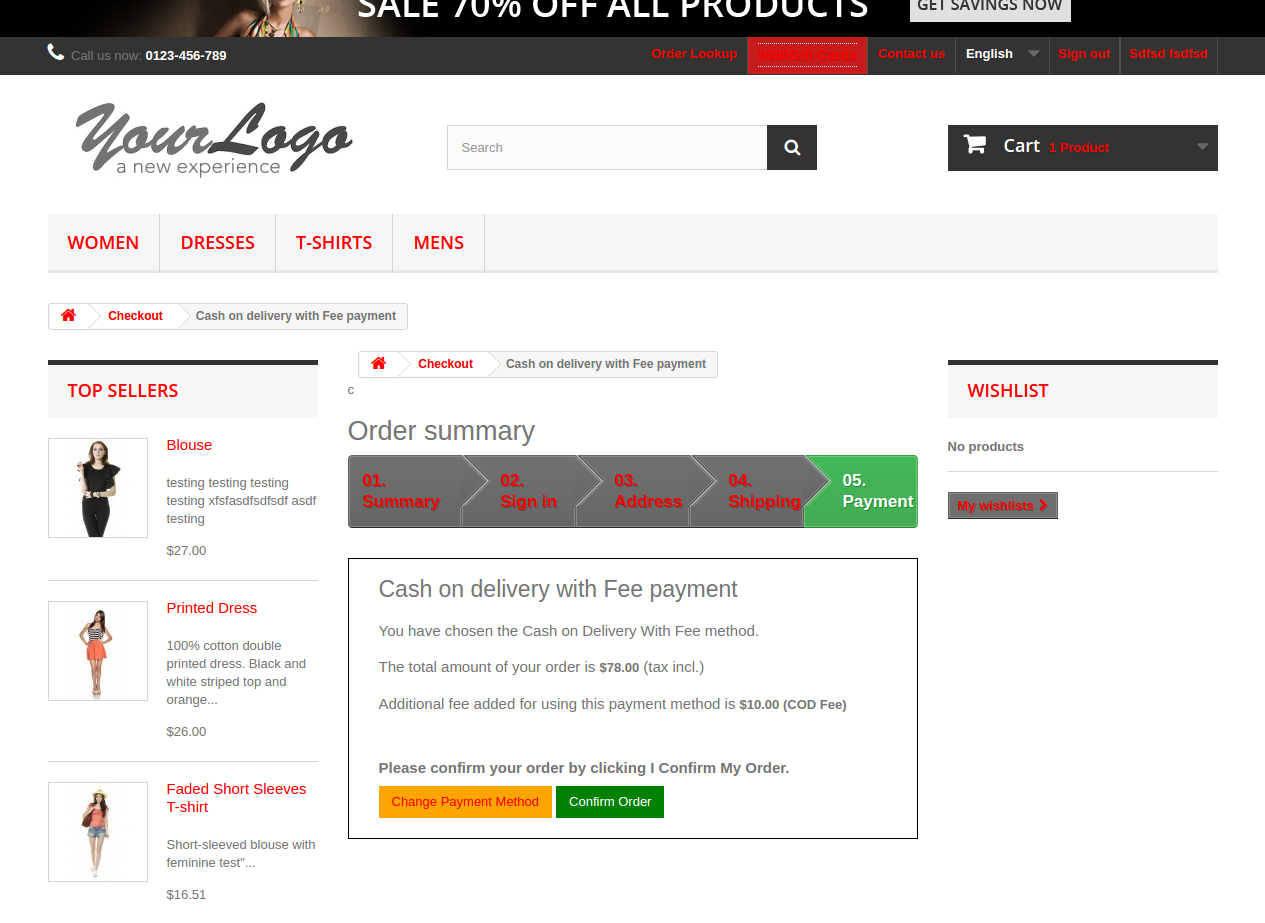
The customers may select the option that they find feasible and the amount will be calculated including the surcharge. A message will be shown to the customer showcasing the total amount along with the fee.

They can change the payment method from here on or may continue with the selected option. Once the transaction is complete a confirmation message is sent.


This way, the online store merchant can provide cash on delivery payment option to the online customers who don’t want to make online payment or any other payment option. This Prestashop cash on delivery with fees module is highly customizable and offers smooth functioning. The store admin can charge fee for offering cash on delivery option. Sometimes, customers don’t complete their order if cash on delivery option is not available. The online merchant can resolve this issue by offering cash on delivery option. The Prestashop cash on delivery module with extra fee allows setting minimum and maximum order value for availing cash on delivery payment facility. The e-merchant can set the cash on delivery fee from the admin interface of this Prestashop cash on delivery fees addon. The Prestashop cash on delivery with surcharge plugin allows setting fixed or percentage-based amount as fees.  The Prestashop cash on delivery with surcharge module is mobile responsive, multi-store compatible and multi-lingual compatible.

For more Prestashop addons please visit Knowband.

For more details about this Prestashop Cash on delivery module:

Prestashop Cash on Delivery Module with extra fee Module Link

Prestashop Cash on Delivery with Fees Module Admin Demo Link

Prestashop Cash on Delivery Module Front Demo Link 

Prestashop Cash on Delivery fees Addon User Manual Link

Prestashop CoD with fees Addon YouTube Video

Please contact us at support@knowband.com for any query or custom change request as per your business requirement.

Prestashop Product Tabs Module – User Manual

1.0 Introduction

Prestashop, the open source eCommerce solution can now ensure better user interaction and engagement. Prestashop Product Tabs module offers an easy way to optimize the product page of the website. With the help of this extension, the store admin can add N number of tabs on the product page. These tabs can showcase text messages or videos. Lack of information in this web page can put off the customers when they are just a step away from making payment. The Prestashop product information module makes sure that the store visitors are never short of the desired information.

The e-merchants can facilitate the purchase decision of the customer by adding supplementary tabs and providing additional information. The admin can use the addon to enhance the presentation of their offerings.

1.1. Project Objectives

Prestashop product page tabs addon allows the e-vendors to achieve the following objectives:

  • The Prestashop module helps you create and add extra tabs on the product page. The new tabs can be used to show additional information in order to enhance the user’s interaction.
  • Provide better product clarity to the customers by showcasing its videos or related instructional videos and others.
  • The tabs can be added and edited on all the product pages of the site as well as in a particular web page as per the requirement of the user.
  • Prestashop product tabs module makes it easier for the store admin to optimize the web pages. The created tabs can be edited just by clicking a few buttons.

1.2. Features of Prestashop product page tabs

  • The eCommerce store admin can add n number of information tab on the product pages.
  • The tabs are highly customizable.
  • There is no need to change the code in the back-end.
  • Prestashop additional information allows store admin to showcase shipping, product related information and stock information.
  • Prestashop Add Extra custom tabs module allows store admin to add related videos and how to videos on product pages.
  • The store owner can create tabs for a single product page or all the pages on the website.
  • The store admin can add text or videos.
  • Prestashop Product extra tabs extension allows to edit or delete already created tabs.
  • The store admin can monitor the entire list of the tabs on a single page.
  • Prestashop product extra information tabs plugin is multi-store compatible.
  • Prestashop Add Extra custom tabs module is multi-lingual compatible.
  • This module is compatible with all Prestashop themes and the latest version of Prestashop.

2.0 Installation

In order to install the Prestashop addon on your store, purchase it from the store. Once it is purchased, you will get following files as listed below:

1. producttabs.zip with the source code of the module

2. User Manual

Follow the below-mentioned steps to install the extension:

  • Unzip the zipped file. It would contain files and folders as shown below –

  • Copy all the files and folders of the unzipped folder into your store “Modules” directory on the path – Root Directory/modules/.

3. Now module can be installed on your Prestashop store. You can find it in Store Admin -> Modules and Services. It would show as below –

In case, you may search for the same in the Search bar with following details-

Keyword – Product tabs

Category – Front office

Filter By – Installed & Not Installed / Enabled & Disabled

  • Click on “Install” button to install the module. It would show a pop-up for your confirmation. Click on “Proceed with the installation” option. This step will install the module and show notification – “Module(s) installed successfully”.

3.0 Admin Interface

The task of changing the layout of the webs pages was earlier a challenge, but with the help of Prestashop product page tabs module, you can now do it in a matter of moment.

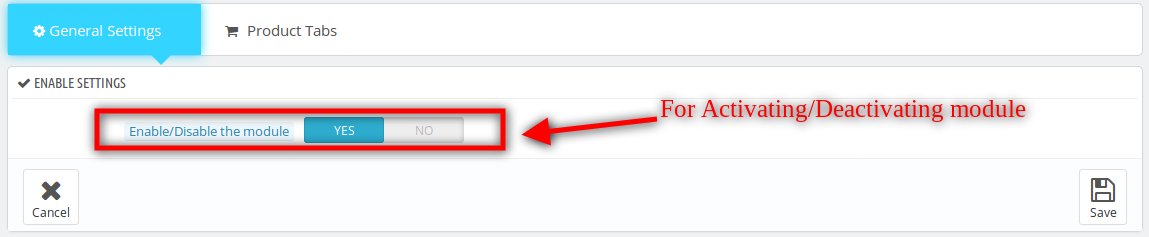
  • Enable/Disable: Installing and configuring the Prestashop module is a cakewalk for the store owners. The functionality can be enabled in the store just by toggling the button shown in the image below.

3.1 How to Create New Tab on the Product Page?

Prestashop product extra tabs extension allows the store to create custom tabs on all the product pages in one go. These tabs can showcase the shipping conditions, website’s terms, and conditions, related videos or any other information. All this can be done from the ‘Product Tabs’ of the admin interface.

3.1.1 Create New Tab

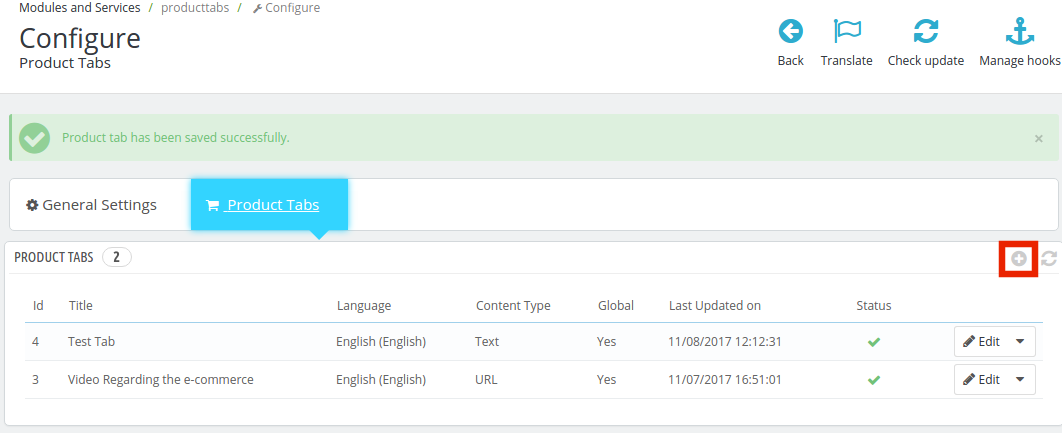
The interface shows the entire list of the created product tabs. In order to create a new tab, click the ‘+’ sign at the top right side of the admin panel.

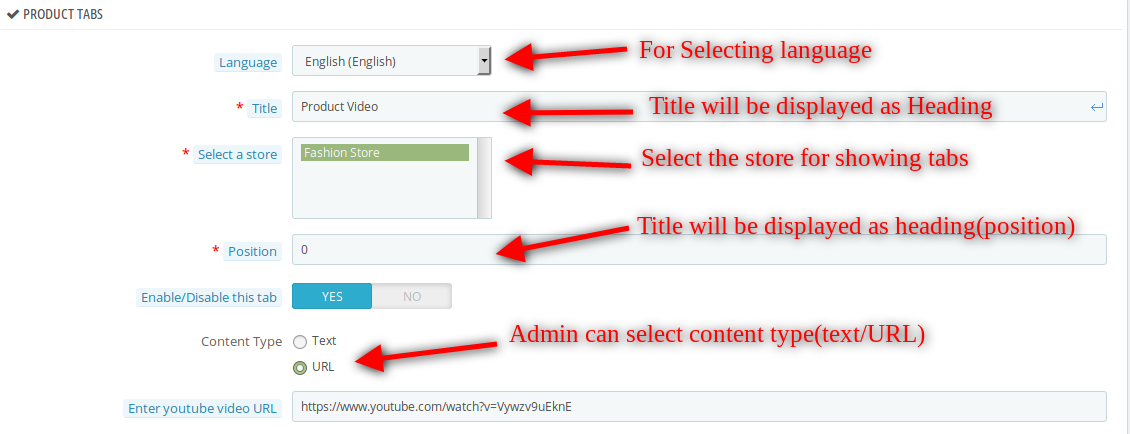
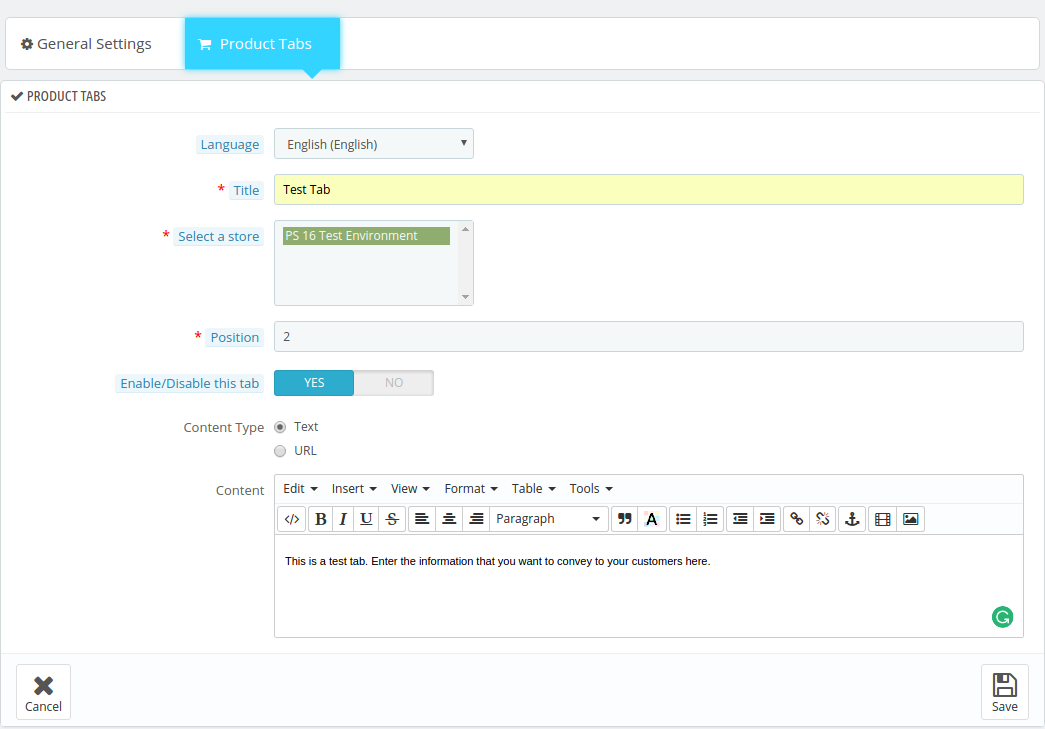
  • Language: The multi-lingual tab can showcase the messages in multiple languages. The Prestashop eCommerce store admin is required to select the desired one as per the requirement.
  • Select the Store: Prestashop product information addon is multi-store compatible. The changes can be incorporated on more than one store from a single interface. The entire list of the stores is shown in this field. The admin can select the one in which he wants to make the changes.
  • Position: The position specifies the order of the information display. The tabs will be displayed on the web page as the specified order by the Prestashop eCommerce store admin.
  • Enable/Disable this Tab: The tab can be enabled or disabled from the website just by switching the button on or off.
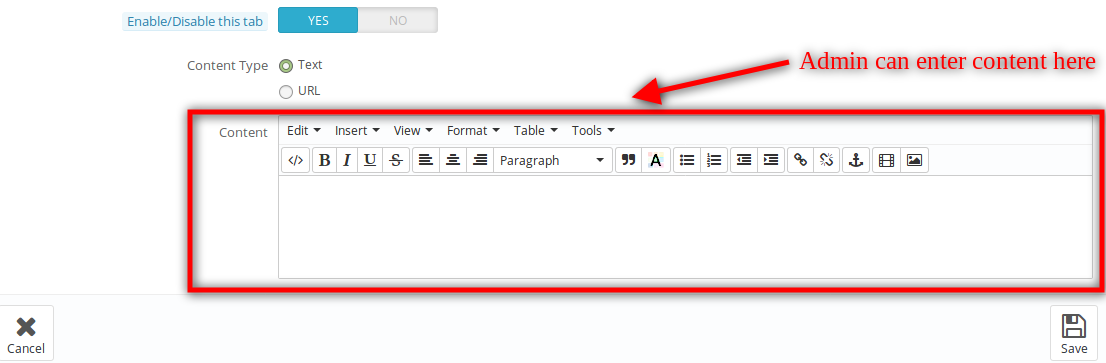
  • Content-Type: This field specifies the type of the content that you are looking to showcase. The admin can flash the Text messages or the videos in these tabs. The options can be selected from the radio button.

  • Content Details or Videos: The description of the information that is to be displayed at the front-end of the website can be written. The same message will be shown on the product page.
    In case, the Prestashop eCommerce store admin is looking to show a video, then, he can select the option ‘URL’.

The YouTube Video URL can be entered in the tab and the video will be shown on the website.

3.1.2 Edit or Delete the Created Tab

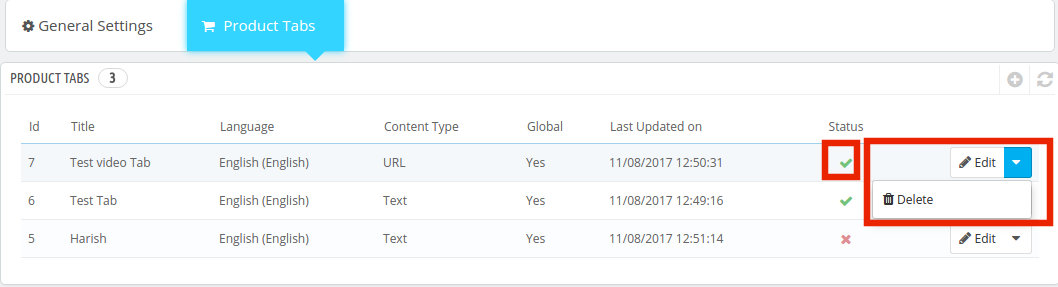
The interface lists out the entire tabs created by the store admin. The e-merchants are offered the option to Edit or Delete them as shown in the image below. The status of the module can be changed from enabled to disabled at a button click.

In case, the Prestashop store admin chooses to edit the tab, he’ll be offered an interface to make the necessary changes as required.

3.1.3 How to Create a New Tab in a Single Product Page?

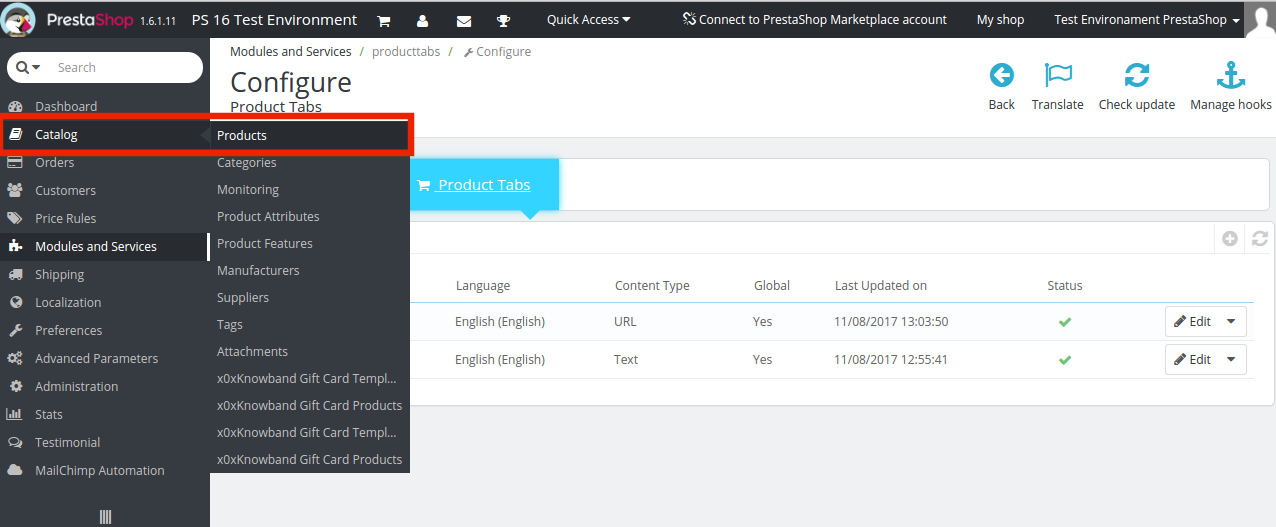
The changes can be implemented on single web pages. For doing so, follow the path in the main menu of the admin panel: Catalog -> Products

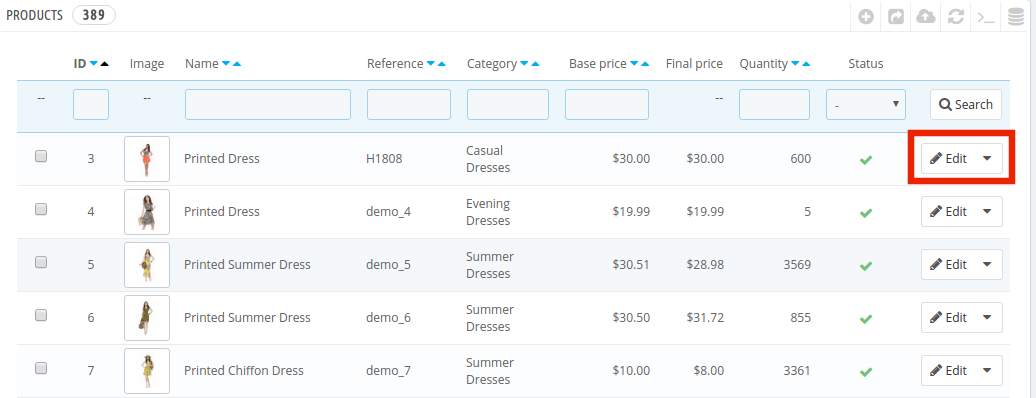
Select the product page from the list in which you want to make the changes and click on the ‘Edit’ button.

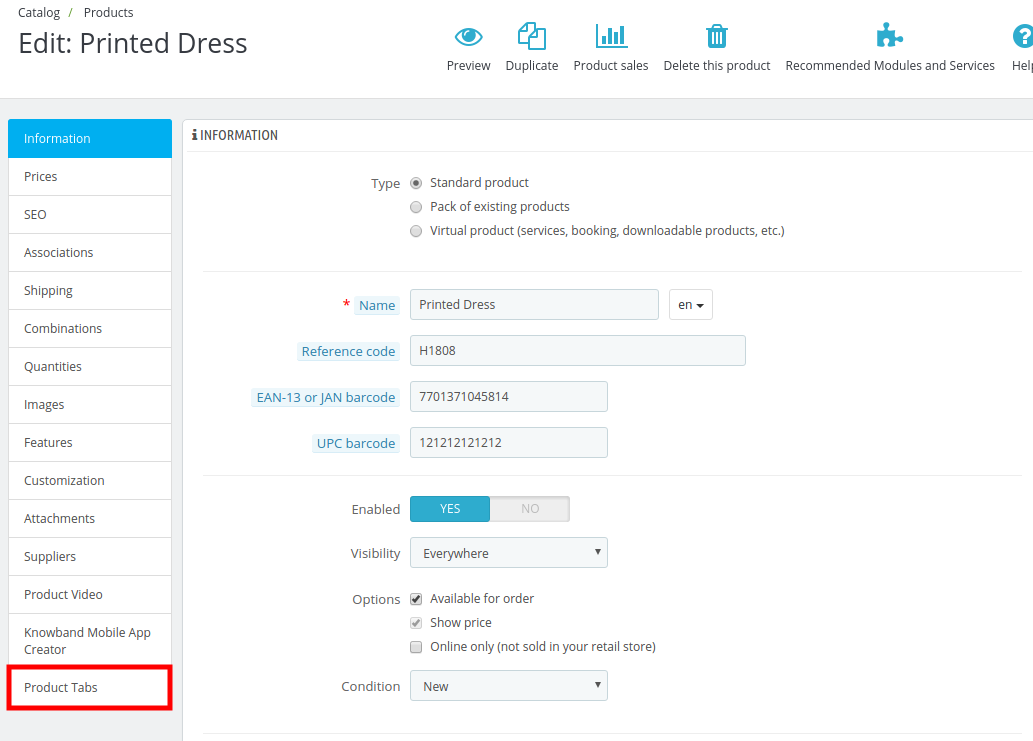
The various customization options includes the option to create the product tab as if the module is enabled. It is shown in the image below:

The Product Tabs option allows the admin to add supplementary information on the product page by following the same procedure as earlier. However, these changes will be incorporated only in that particular web page.

4.0 Website UI

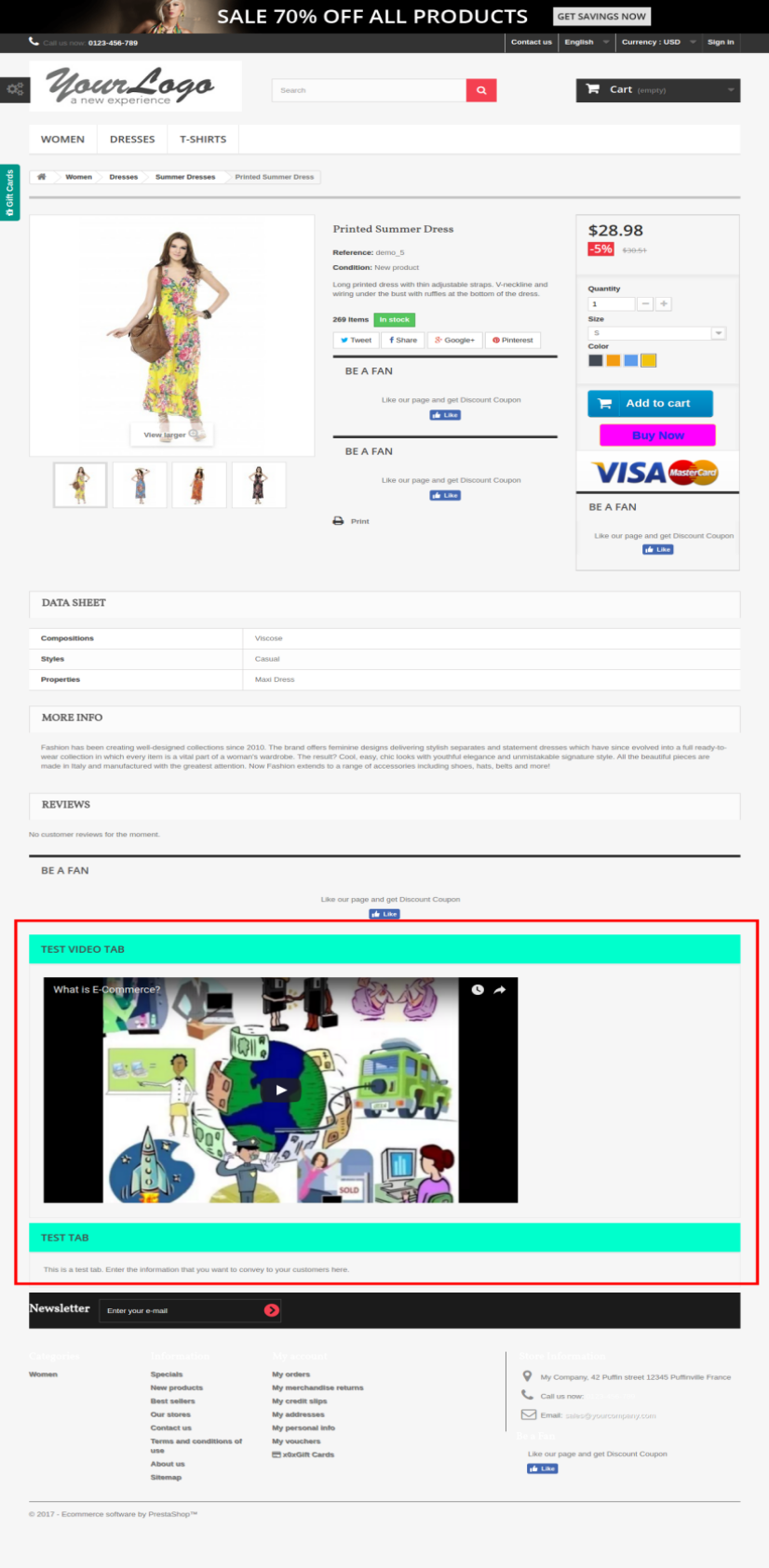
The added tab will be shown at the front end of the website as below. The tabs will be placed as per the location prescribed in the backend.

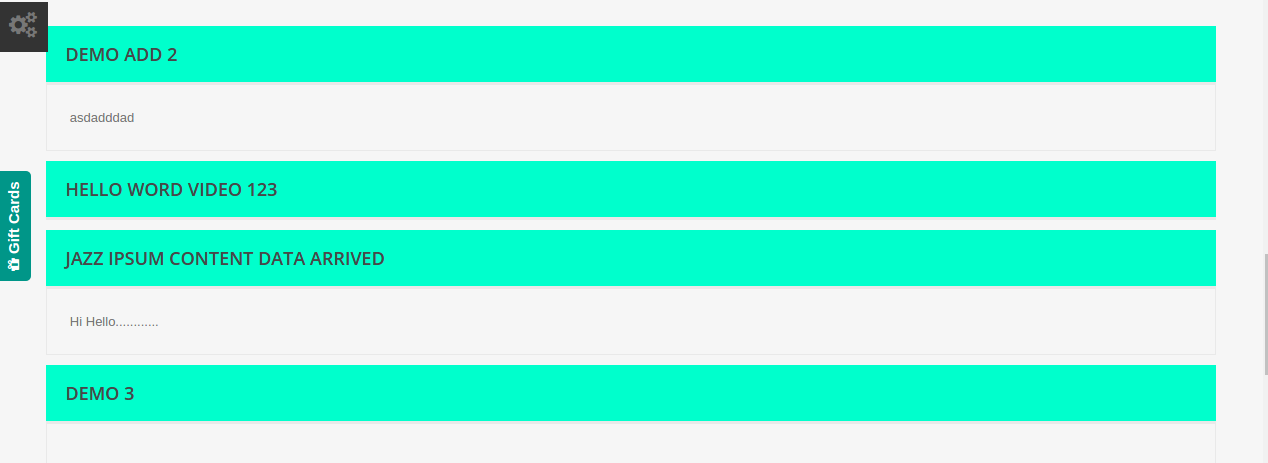
The site visitors can collapse or expand the tab by clicking on it. The interface will look very similar to what is shown in the image below.

For more details, please visit here:

Prestashop product tabs Module Link: https://www.knowband.com/prestashop-product-tabs

Prestashop additional information Admin Demo Link: https://psm.knowband.com/producttabs/16/admin1/index.php?controller=AdminModules&token=2a1dbe1666dd87fb270314503584878b&configure=producttabs&tab_module=front_office_features&module_name=producttabs

Prestashop product page tabs Front Demo: https://psm.knowband.com/producttabs/16/en/

Prestashop product information Youtube video:  https://www.youtube.com/watch?v=-3iLLxwkyYs

Please contact us at support@knowband.com for any query or custom change request as per your business requirement.

6 Surprising ways a Mobile App can Boost your Small Businesses

Online businesses are thriving on the support of mobile devices. This is one of the biggest hacks that need to be taken care of for all over the world for business expansion and growth opportunities. Since the reliance of the online shoppers on mobile devices is increasing and the purchasing behavior of online shoppers have changed drastically, the key to success for SMEs is to stay in sync with the market trends. The number of online purchases has risen tremendously through mobile devices rather than desktops or laptops. Hence, it won’t be wrong to state that the mobile apps are one of the aspects that require close consideration of the online store owners.

Some of the crucial facts that explain the importance of a mobile app for an eCommerce store is listed below:

  • The rate of global mobile app downloads is expected to reach up to 284 billion by the year 2020. The revenue generated by mobile apps were estimated to surge $51 billion in the year 2016. Hence, the potential that this market has got in the future is huge.
  • Google Play is expected to reach the mark of 166 billion along with the market share of iOS which will rise to the level of 35.2 billion, in terms of the number of apps available on these stores.

Having discussed these startling statistical figures, it is clear that the significance of mobile applications on the online businesses cannot be ignored. This is especially inevitable when you have a Startup or if you own a small business with a limited customer base.

If you one such businessman, but you are still not active in the direction of mobile app development, you will have to bear the harsh business consequences. Listed below are some of the importance of mobile apps in a virtual environment, especially for small businesses that may bring your attention to this aspect.

Helps in boosting the brand awareness

With a surge in the reliance of handheld devices globally, the mobile applications provide higher chances of reaching out to their targeted customers. Moreover, there has been a significant increase use of mobile devices for doing online searches. As per a survey, 45% of the online purchases are done by mobile devices. While the mobile responsive websites are one of an alternative, it may even fail to enhance the customer experience. Hence, a mobile app can help you get a deeper reach among your targeted customers. Whether you have an eCommerce store on Prestashop, OpenCart or Magento, having a mobile app for your store is just a matter of moments. Mobile App Builder plugin from Knowband store offers an easy way to take your online store to the mobile devices. The apps so created are compatible with all the devices. Hence, with a greater reach and better user experience, you can effortlessly boost your brand awareness and image ultimately.

Better way to stay in touch with your target audience

In the competitive scenario, staying in the good books of your customer is the key. Moreover, with so many options to choose from, the chances of being forgotten by your customers is more likely. Hence, you need to stay at an arms distance to your prospective customers. Mobile apps are one of the ways to achieve this milestone. Considering the challenges experienced by customers while shopping online, mobile applications offer a better user experience. The expectation of the online shoppers of getting everything then and there is increasing at a greater pace. Hence, the chances that they would open up a desktop and then browse your store is less likely. The app can keep you just a click away from the lead. Moreover, the options of push notification is another way that can keep your customers reminded about the activities and deals that you are running on your store.

Enhances geo-targeting

Location-based services are in demand for the past couple of years. With the introduction and popularity of Voice searches, the search queries of online shoppers are changing. They now search for solutions instead of keywords. Earlier the query for a Chinese Restaurant was ‘Best Chinese Restaurant’, and others. However, now it has changed to ‘Chinese Restaurant near me’ or ‘Where can I find a Chinese Restaurant nearby?’. Hence, for a start-up and small business to have an edge over the big players of the industry, geo-targeting is the key. Smartphones allow you to collect information about its users, including their geographical location. Offering location based prompt services is easier when you have a mobile app for your business. All you need to do is to optimize your content in such a way that the online searchers get the solution for their queries.

Aid remarketing

The more efficiently you remarket your product, the more will the chances of conversions. Mobile applications not just allow you to sell the products easily, it even helps marketing your businesses in a better way. The Push notifications of the shopping applications have been estimated to have a strong impact on user’s attention. On an average, it has 40% click through rate. Moreover, their engagement is higher than that of an email and the SMS triggers. Since the target audience is most of the time glued to their phones, it is definitely the best platform to bring your business, no matter how small or new it is, in the eyes of the customers. Not just this, the modern day applications provide a better interface to keep a track on the orders generated through the mobile apps. The online activities can be tracked on the Google Analytics account of the store owner. Hence, coming up with a surefire marketing tactics is not a tough job.

Boosts customer engagement and conversions

It is now much easier to stay engaged with your customers with the help of a mobile app. Irrespective of the location of the customers, you can now stay in touch with them 24 x 7. The apps, thus, help in delivering better customer engagement leading to conversions. The ease of mobile connectivity with the company, especially, in case of eCommerce stores, mobile apps can encourage customers for a quick product purchase. It is often seen that customers are reluctant to make an online purchase. This is because of the complicated user experience offered on a site. Mobile apps offer a better user experience due to the presence of numerous features and functionalities on a mobile device.

Enhances visibility of your store

While enhancing the position of your online store on Google SERP quite a time-consuming task, ranking your mobile app on the app store and the se is much easier. The more downloads you achieve, the higher you’ll rank on the various search engine. Moreover, mobile apps are a brilliant way to target customers without any hassle. The store owners can give a personal touch to their marketing strategies. It can thus help you strengthen your relationship with your customers. Bridging the gap between UX and UI, the mobile app will definitely help enhance the visibility of your store.

Wrapping up

A mobile app can provide the much-needed competitive advantage to your online store. Engage the users in a more personalized and interactive way in a seamless and cost-effective way. If you are trying to take your business to the next level, then mobile apps need to be included in your business expansion plans. We, at Knowband, offer an intuitive to have a mobile app for your online store. So, create an amazing OpenCart, Magento, or PrestaShop mobile app for your website and grab higher conversions and sales.

Related Stories

PrestaShop Gift Card Manager Extension- User Manual

1.0 Introduction

The digital gift card is a pleasant commodity to buy, sell, and receive! Whoever bought the digital gift card, saves time, fuel, and efforts to find the right thing to gift. Whoever receives it, find lucky enough to save from getting the wrong thing. Finally, whoever sells it, find cash upfront for an unsold thing! If you are looking for a perfect e-gift card addon, then, KnowBand PrestaShop gift card manager module helps you send the gift card to anyone without any hassle. With easy customer acquisition, the e-merchants can now double their revenue

The PrestaShop gift card manager Addon by Knowband allows the PrestaShop store owners to manage the gift cards according to the need. This PrestaShop gift card voucher addon is an effortless way to engage more customers with the website. The pre-paid vouchers can help the e-merchants aid the purchase intention of the store visitors and easily convert them into paying leads.

This PrestaShop gift card addon gives the flexibility to a customer to buy the gift card online and send Gift vouchers to friends via email on a specific date and time. The sender can print a gift card for giving it in person. It provides the functionality to create a personalized image gift card. Online shoppers can order gift cards for special occasions for their near and dear ones.

How Gift Card can help you to boost sales in your store?

  • 81% of online buyers prefer to buy a gift card for a birthday, anniversary, holiday season, or festival.
  • 38% of adults buy a gift voucher for a friend’s birthday.
  • One of the biggest selling days of the gift card is Father’s Day. In contrast, only 24,7% of moms wish to get a gift card for Mother’s Day, putting above homemade stuff, greeting cards, and dinner.
  • 12% of buyers will buy gift cards for Wedding wishes and presents.

These are major facts that can prove the importance of the Gift card.

Prestashop gift card addon by Knowband has rich functionality that can help the admin to increase the revenue by selling gift cards.

1.1 Benefits for merchant

The store owner can increase customer engagement and the number of potential buyers on his/her PrestaShop store as well as boost their revenue. The following are the benefits for the merchant:

  • The store admin can add multiple gift cards in a matter of moments from the backend of the PrestaShop gift card addon.
  • PrestaShop gift manager addon by Knowband allows the store admin to set the card amount, validity period and other conditions that can be set from the backend of the PrestaShop send gift card module.
  • The PrestaShop store admin even gets easy options to change and edit the look and feel of the cards that will be shown in the front-end.
  • With the help of the PrestaShop gift voucher addon, the store admin can easily add the gift card templates according to the need.
  • The orders for the gift cards is trackable at a button click from the admin interface of the PrestaShop gift card manager module.
  • Knowband PrestaShop gift card addon enables the store merchant to show the gift card buttons on which page they want to show.
  • Even the email template for sending the gift cards and its PDF format to the recipient is customizable in a few easy steps from the backend of the PrestaShop gift card addon.
  • This PrestaShop send gift card module increases conversions especially for occasions like holidays.
  • PrestaShop Gift Card Manager addon by Knowband allows you to earn more revenue, get new customers by sending online gift cards, and offer discounts on the vouchers.

1.2 Benefits of customer

  • Customers can easily buy a gift card for their loved ones.
  • This PrestaShop gift card module by Knowband is best for those customers who are helpless for selecting a gift.
  • Customers can send a gift card with a custom image that the sender can upload while making the gift card purchase.
  • PrestaShop gift card add-ons allow online buyers to send the gift cards to their loved ones on the desired date and time.
  • The receiver of the Gift Card can redeem the amount partially while purchasing in the store.

2.0 Installation

After purchasing the PrestaShop gift card module from the store and you’ll get the following files.

1. The zipped file that consists of the source code of the module

2. User Manual

Follow the following steps to install the PrestaShop gift card manager extension:

Extract the “kbgiftcard.zip” zip file.

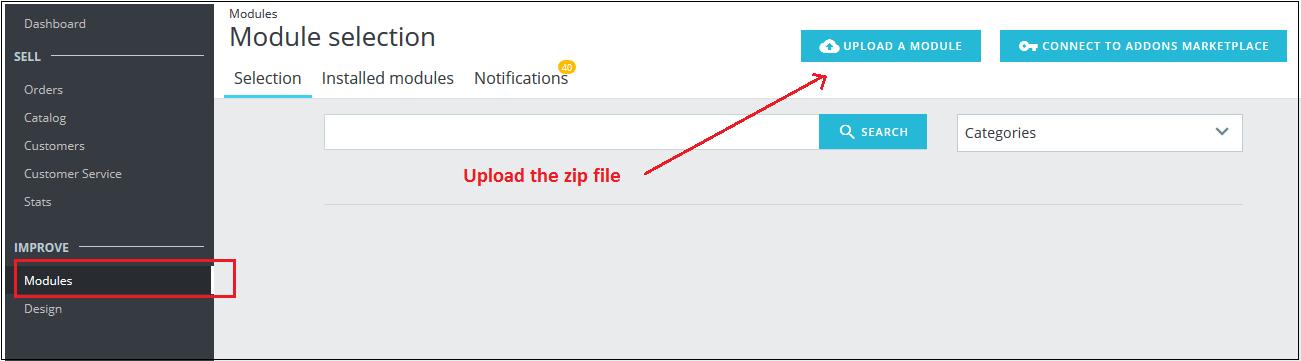
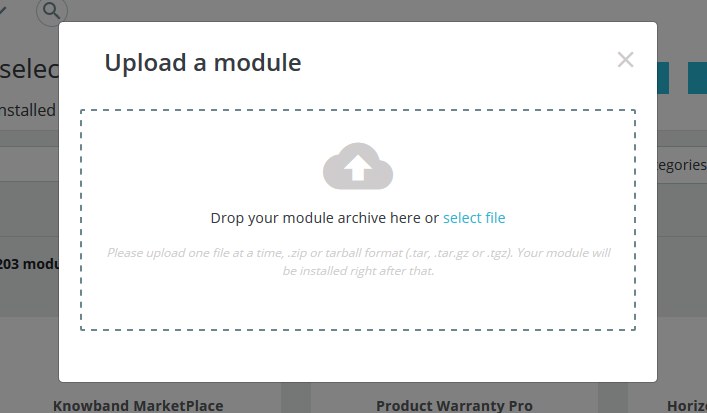
Go to the “Modules” section and click on the “Upload a Module” button. Select the “kbgiftcard.zip” file.

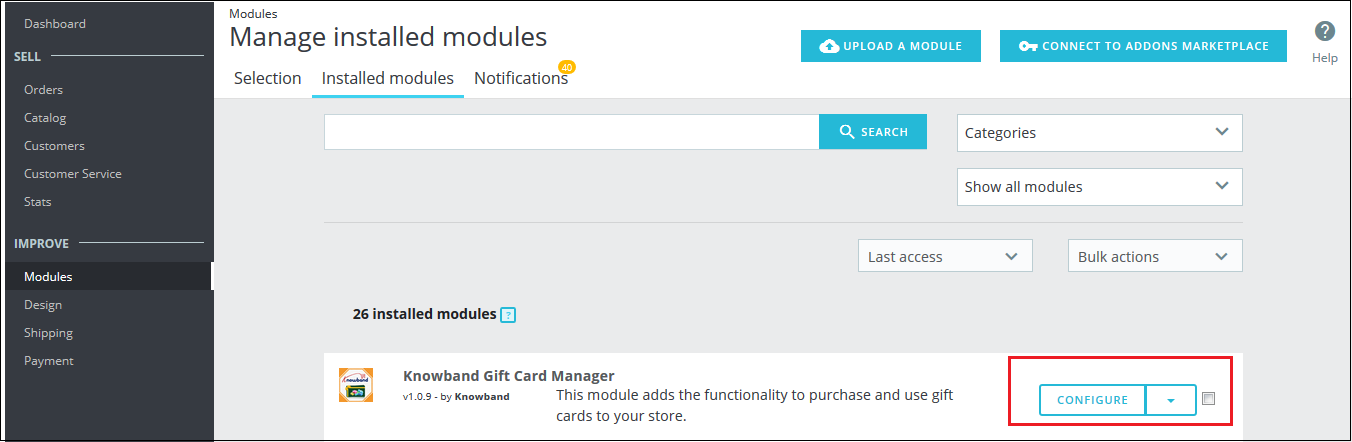
The PrestaShop gift card module is now ready for configuration. You can find that in Store Admin -> Modules. It would be shown as below –

You may even search for the module in the admin modules list by using the following details –

Keyword – Gift Card Manager

Category – Pricing and Promotion

Filter By – Installed & Not Installed / Enabled & Disabled

3.0 Admin Interface

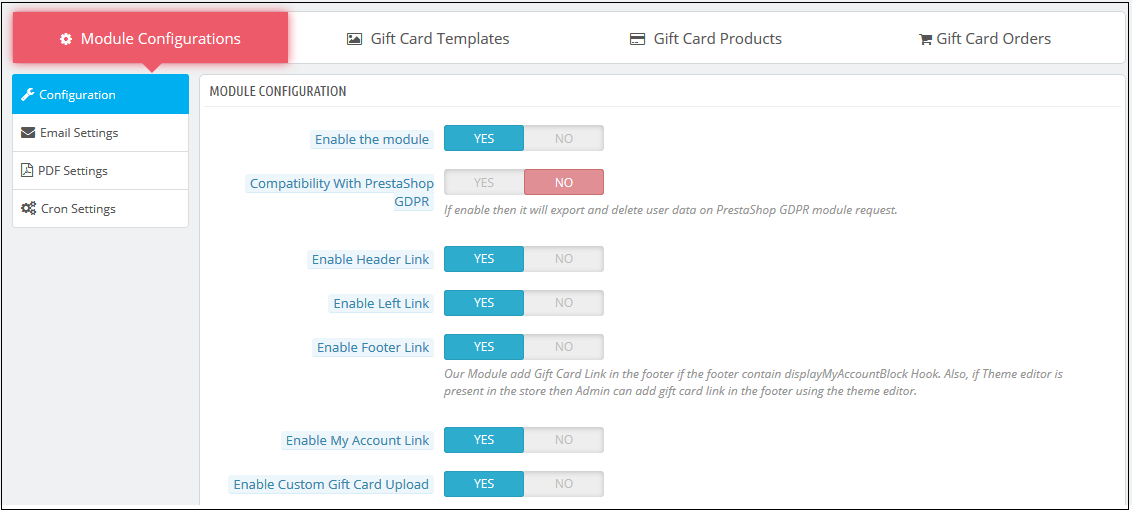
The admin can enable and configure the PrestaShop Gift Card module by Knowband easily in a few simple steps. The admin interface of the addon has four customization options. They are below:

  • Module Configuration
  • Gift Card Templates
  • The Gift Card Products
  • Gift Card Orders


The various options are below in detail:

3.1 Module Configuration

The ‘Module configuration’ tab of the PrestaShop gift voucher addon offers the four features to admin that are below:

  • Configuration
  • Email Settings
  • PDF Settings
  • Cron Settings

The following features are available in detail below:

3.1.1 Configuration Tab

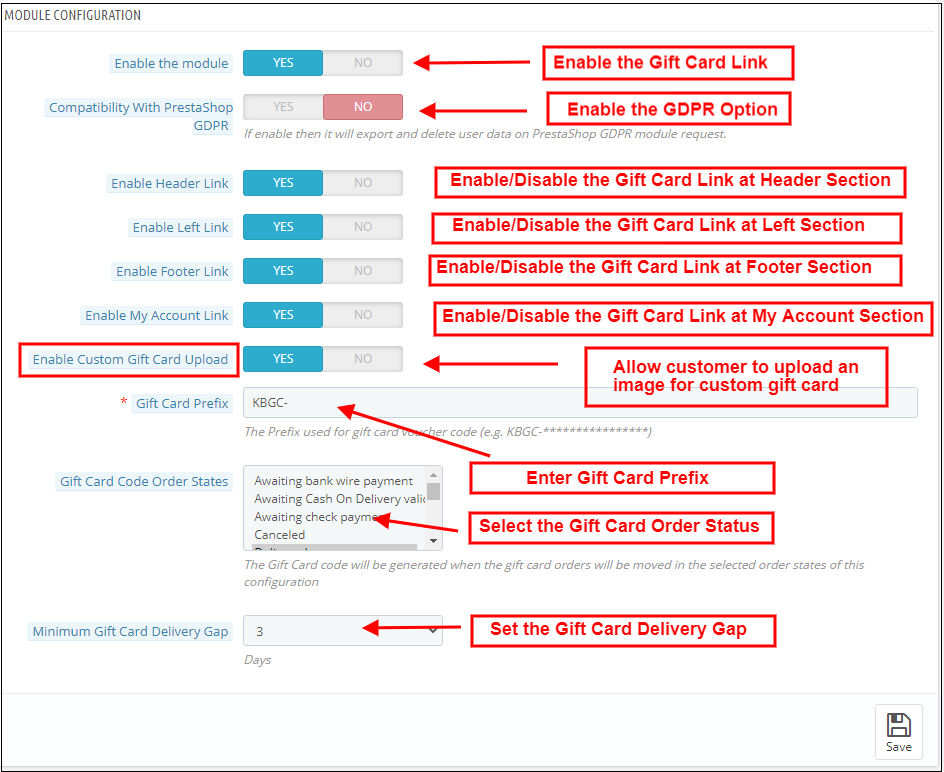
When the admin comes to the configuration tab of the PrestaShop gift card extension. The  configuration tab shows the multiple features that are shown below:

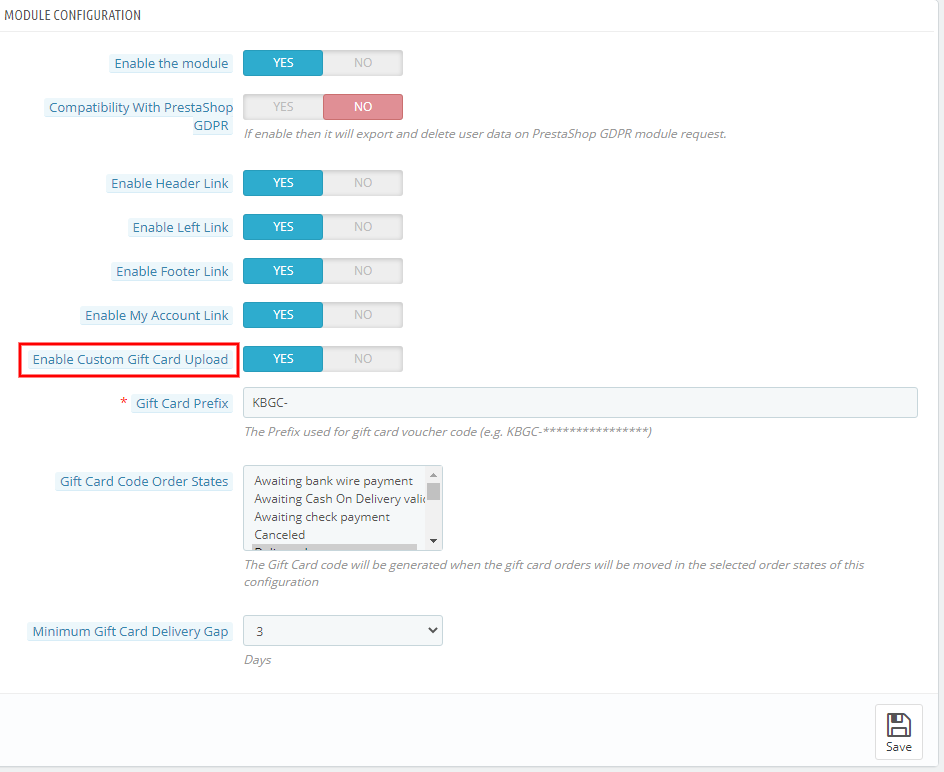
1. Enable the module: When the admin comes to the configuration tab of the PrestaShop gift voucher addon, he/she needs to enable the same from the backend. This happens with a button toggle as shown below.

2. Compatibility with PrestaShop GDPR: If the admin enables the settings, then the customers can access their GDPR rights to delete or export the customer data from their store

Note: If you are using the official GDPR module then you must need to enable this setting. The main purpose of this feature is to export and delete user data on the PrestaShop GDPR module request. It is also compatible with PrestaShop GDPR Module developed by Knowband.

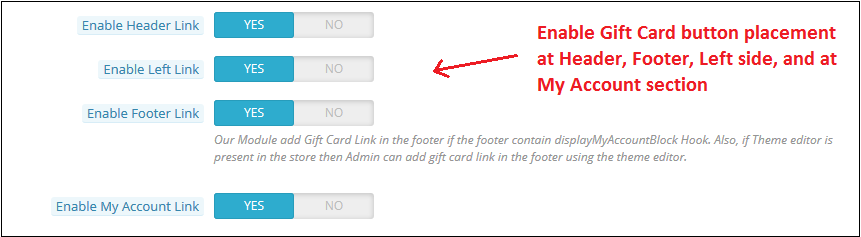
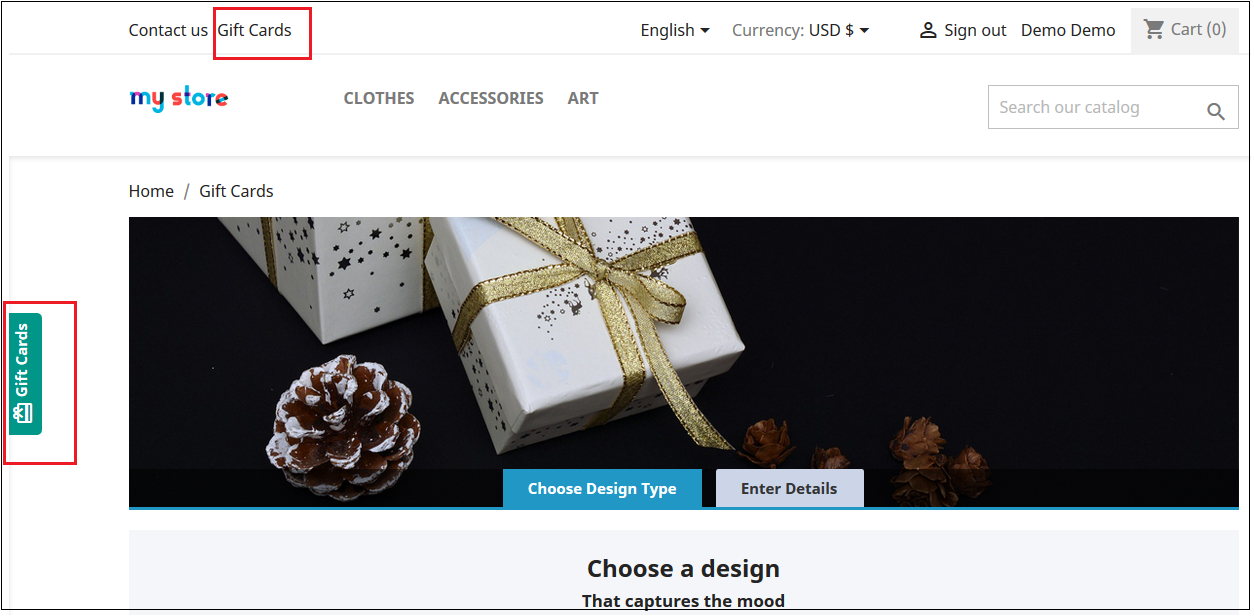
The link to the eCommerce gift cards can place on the web pages as per the requirement. The admin can enable or disable the link at the header or footer. It is placeable at the left side of the website where the visitors pay maximum attention. In addition, the option to redirect the customers to the ‘Gift card page’ can be provided in the ‘My Account’ page of the registered customers.

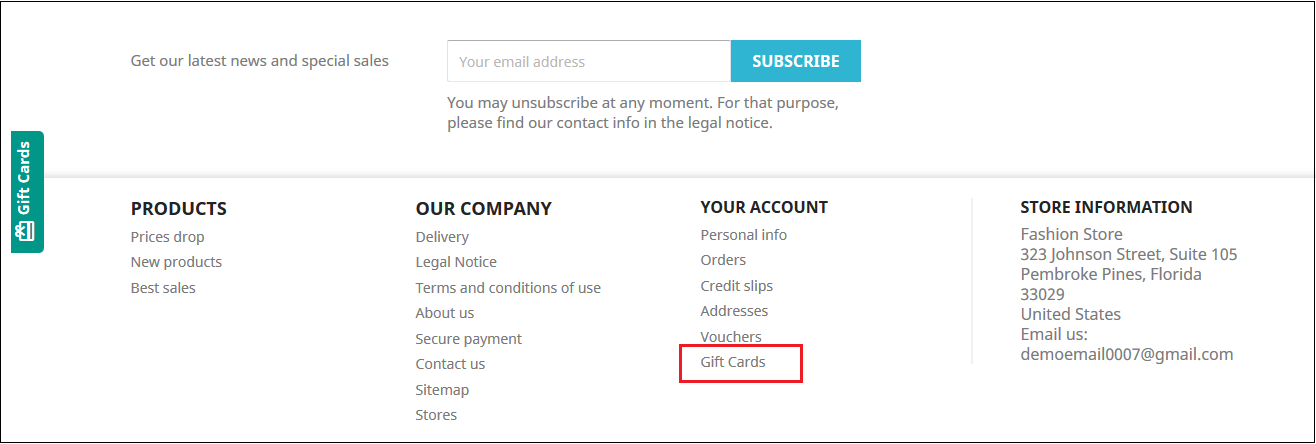
The links will be shown in the front-end of the website as shown below:

In the header & At the left side of the web page

In the footer

My Account Page

3. Enable Custom Gift Card Upload: If the admin enables this, the Gift Card Module allows users to upload an image to personalize a custom Gift cards.

4. Gift Card Prefix: In this option PrestaShop gift card addon the admin can set the prefix for the voucher code of the pre-paid gift card from here. The code enters in the format KBGC – ******

5. Gift Card order Status: The admin gets an option to select the status of the orders. The gift card code will be generated when the order is moved in any of the selected order states.

6. Minimum Gift Card Delivery Gap: The PrestaShop gift voucher allows the store admin to specify the minimum duration of the day. Further,  when the order places and the day of the gift card delivery.

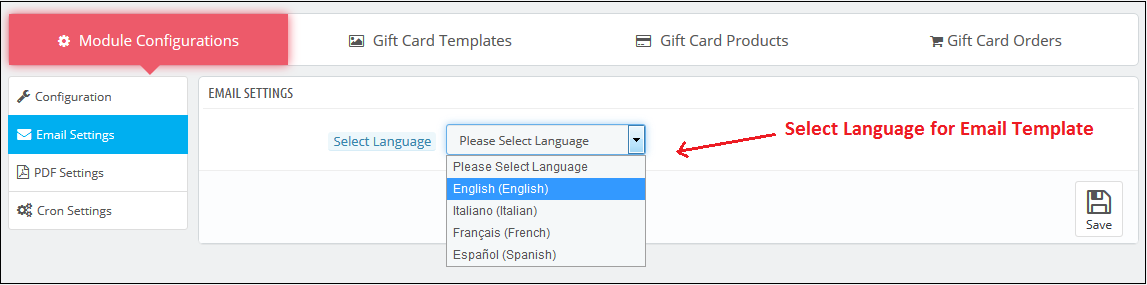
3.1.2 Email Setting

The customer gets an option to print the gift cards or else they can be sent to the receiver via email. The PrestaShop gift card module by Knowband offers default email templates that can be personalized as per the requirement of the store admin.

In addition, the PrestaShop gift voucher module offers multi-lingual support. The emails can be sent in various languages. The admin can select the desired language from the drop-down list.

Once the language is selected, the entire email right from the subject line to the content can be edited and personalized as per the requirement.

3.1.3 PDF Setting

The buyer can print the PrestaShop gift voucher module in PDF format. The PDF file of the Gift voucher can be printed in different languages. The admin can edit the content of the file. The changes made in the backend will be reflected in the PDF.

The admin needs to select the language as done in the email settings.

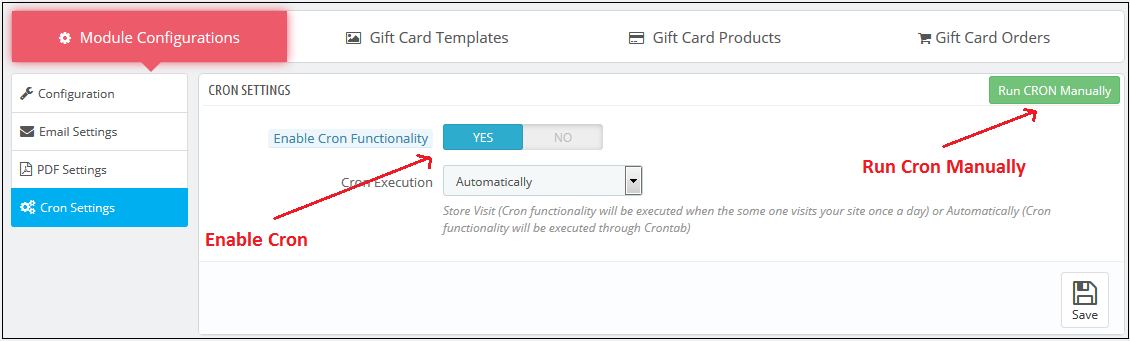
3.1.4 Cron Setting

You can add the Cron to your store via the control panel to send gift card vouchers automatically.

3.2 How to customize the template of the gift card?

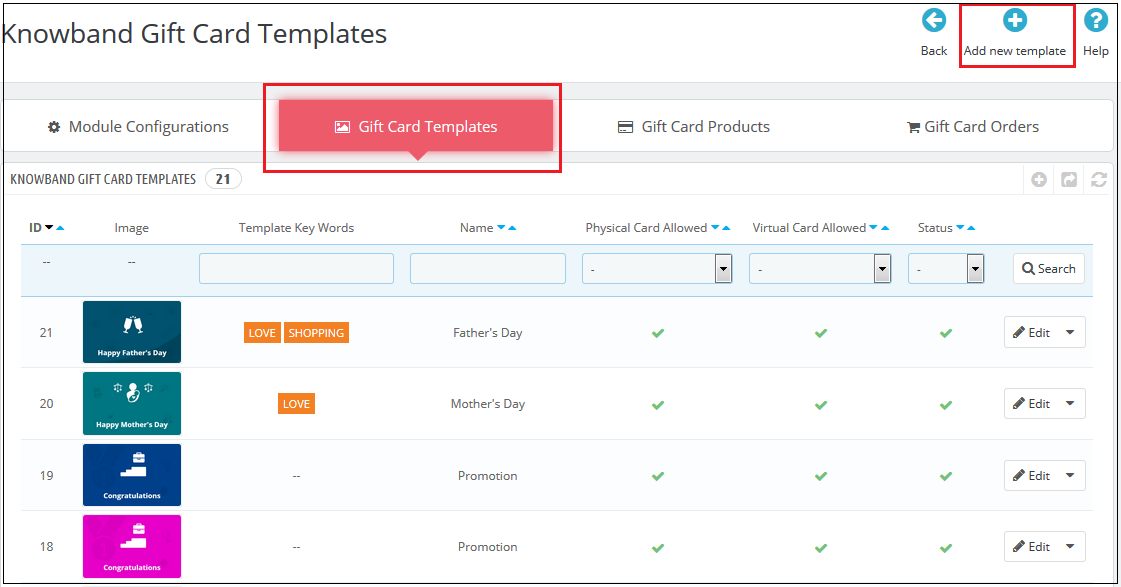
3.2.1 Add New Gift Card Template

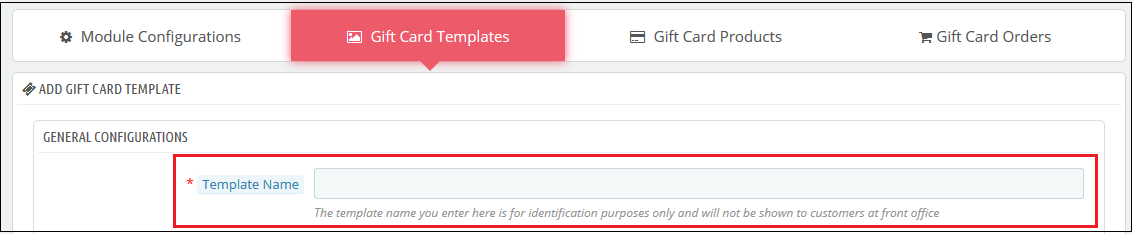
To create the new templates for the PrestaShop gift card manager addon, go to the Gift Card template tab and then click the ‘Add New Template’ option or ‘+’ sign at the top right side of the module.

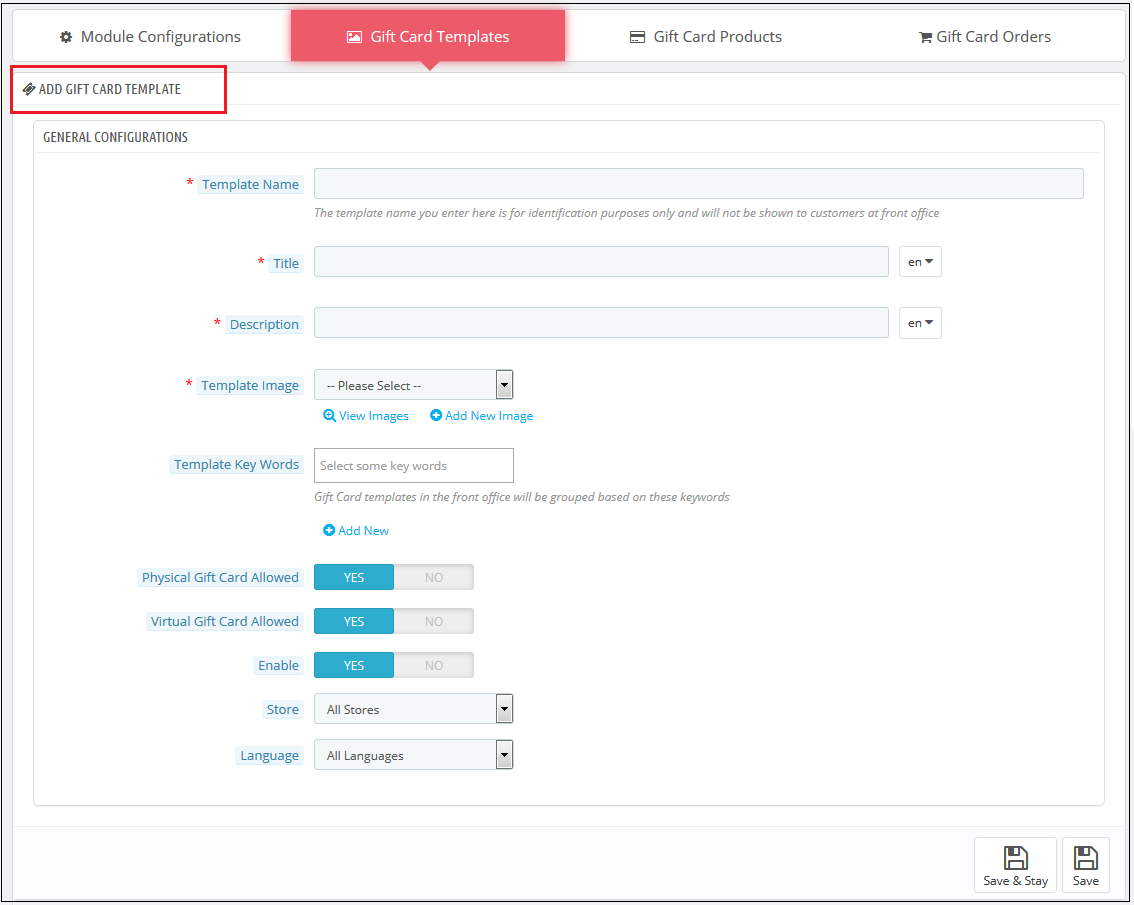
Fill up the information to create the template as shown in the image:

1.  Template Name: The PrestaShop send gift card addon allows the store admin to name the template in this section.

2. Title and Description: With PrestaShop Gift Card Module, the admin can add a title and description for the Gift Card template.

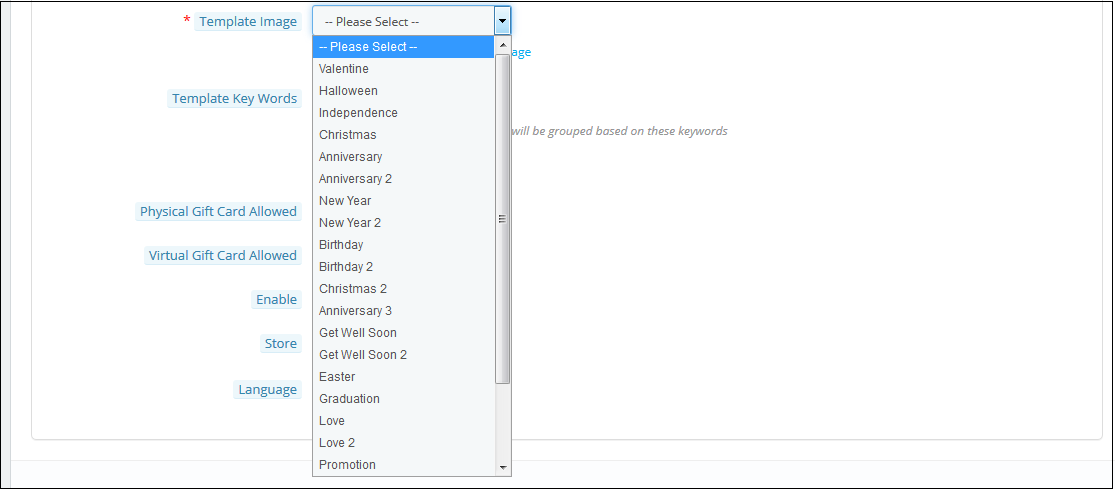
3. Template Image: The admin can select the image or the layout of the gift cards that will be shown in the front-end of the eCommerce site.

The images for the various occasions can be saved in the back-end of the PrestaShop gift card addon. The admin selects the occasion to find the image as shown below:

The store admin can even view the images for the various events that have been saved or can create a new image for the same.

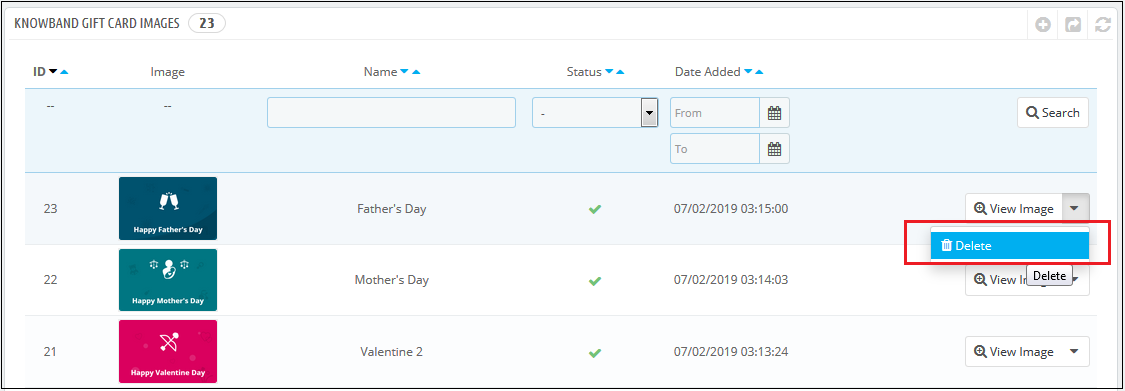
As you click on the ‘View Image’, you’ll head to the page below.

The list showcases the entire images that were created and saved. You can view the complete image or even delete it if is necessary.

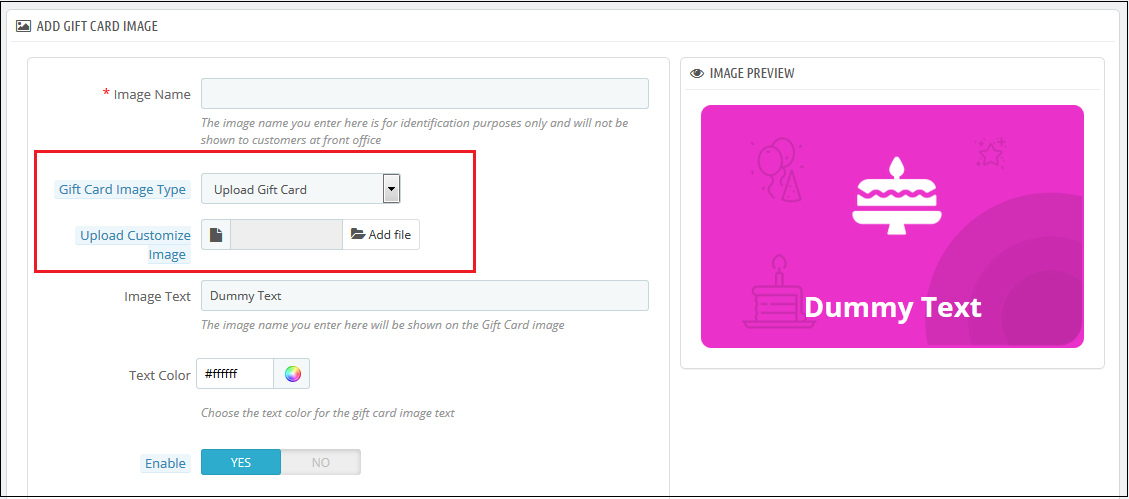
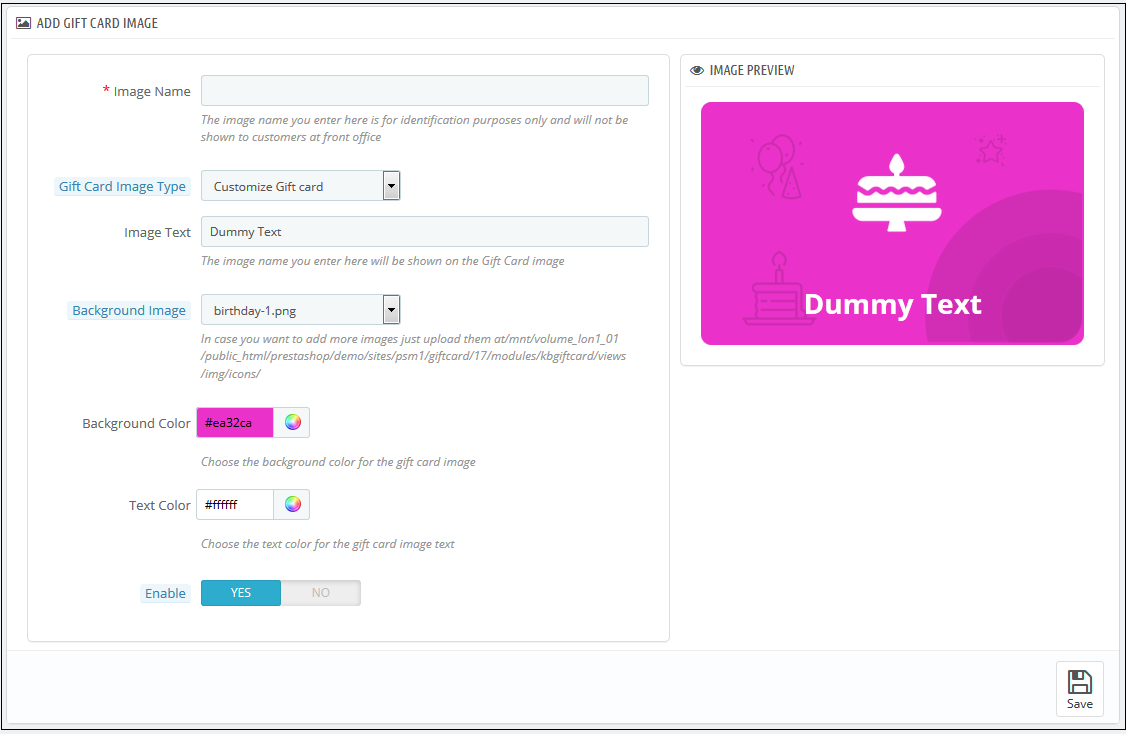
To create new images, click ‘Add New Image’ as shown below. The admin can choose a Gift Card Image Type. The store admin can customize the gift card or upload custom images also.

You can enter the image name and the text of the image to be shown on the gift card. Even the background image and color, as well as font color, can be changed at a button click. Preview the final image before making it live on the website.

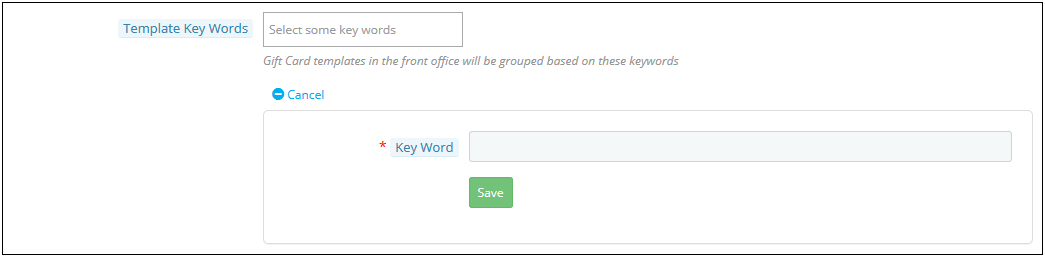
4. Template Keywords: The keywords of the gift cards can be selected from the list as shown below.

To create new keywords, click on ‘Add New’.

The admin can enter the keywords and save them here.

5. Physical Gift Card Allowed: The PrestaShop gift card manager addon by Knowband allows the store admin to enable the physical gift card for this template.

6. Virtual Gift Card Allowed: The functionality will allow the e-cards.

7. Enable: The functionality can enable or disable the template.

8. Stores: The PrestaShop gift voucher module is multi-store compatible. The admin can either enable the functionality in all the stores or can select anyone from the drop-down list.

9. Languages: The admin can select the desired language for the template from the drop-down list.

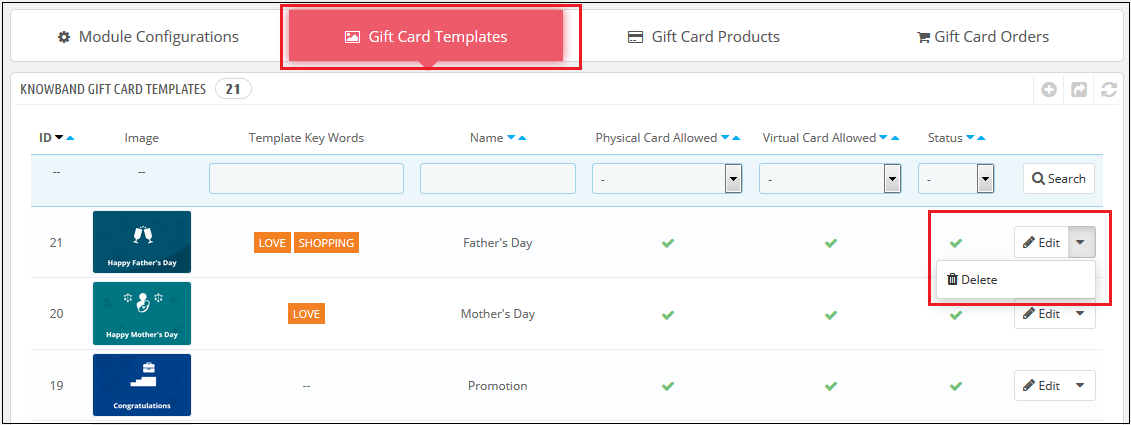
3.2.2 Edit Gift Card Template

The admin even gets an option to edit the template or delete from the section shown below:

3.3 How to customize the gift cards product?

3.3.1 Create New Conditions for the gift vouchers

The e-merchants can customize the pre-paid gift card products in a few simple steps.

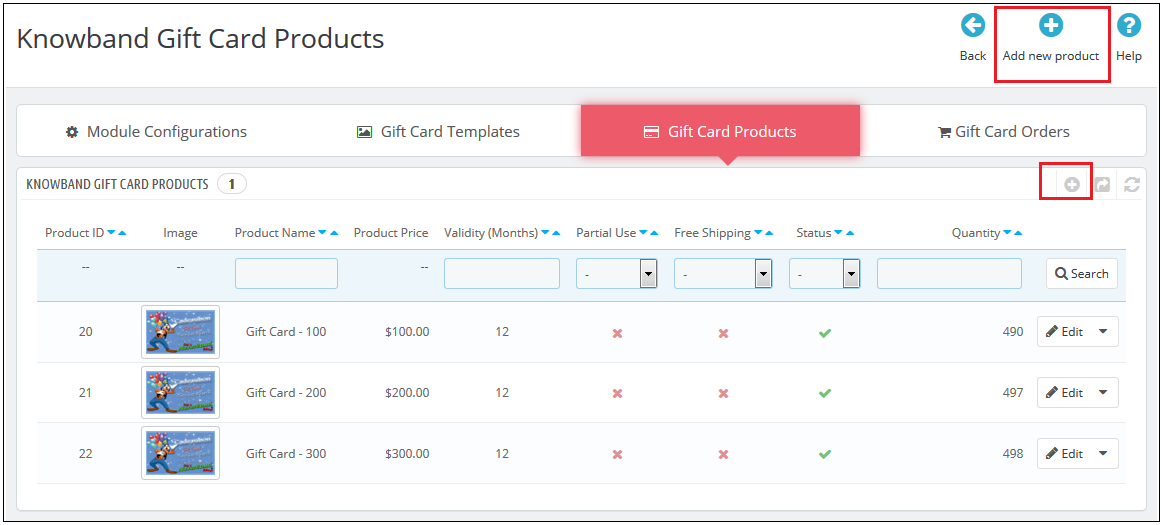
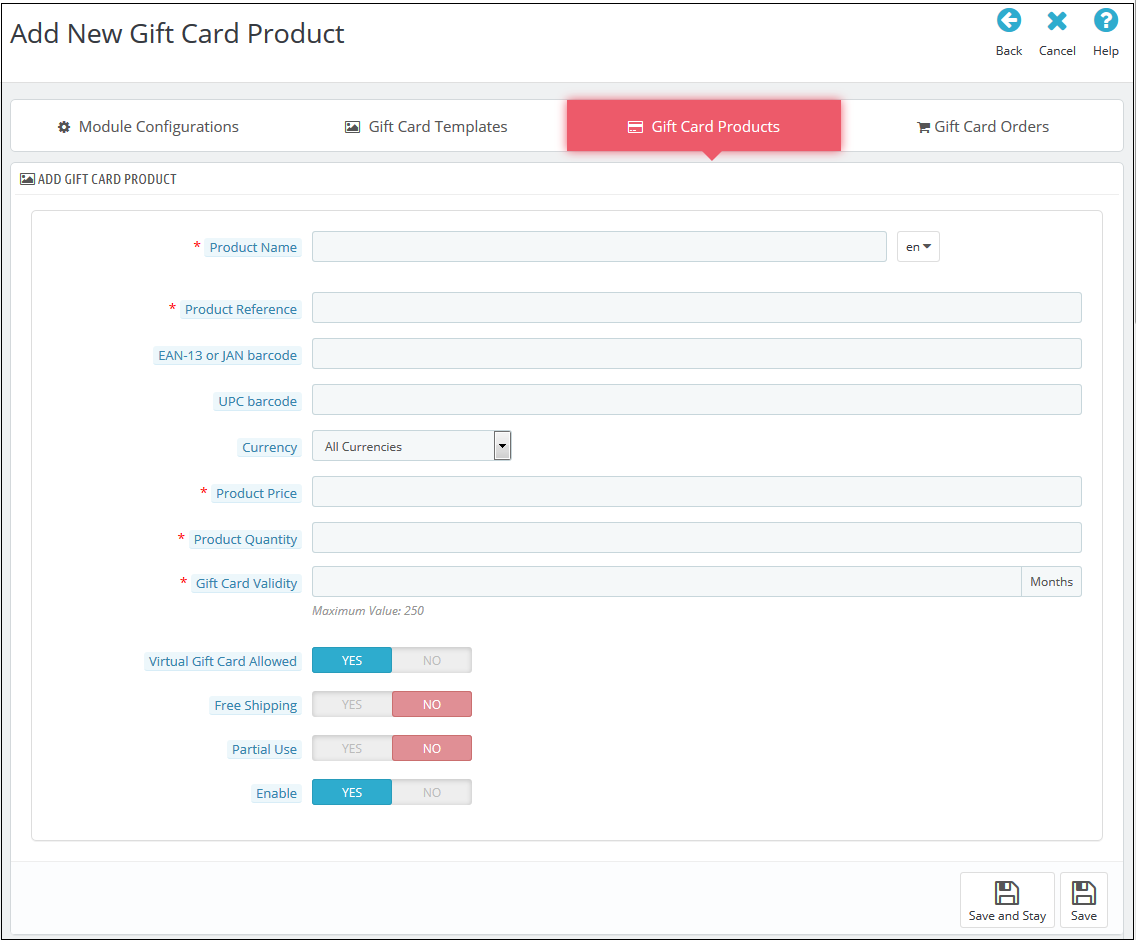
In the ‘Gift Card Product’ tab go to the ‘Add New Product’ or click on the ‘+’ sign in the top right section.

Below is the information that you need to provide for creating the product.

Product Name: Enter the name of the product here. It can be Happy Anniversary, Happy Birthday, Merry Christmas, or any other.

Product Reference: This includes the unique reference id. The admin can enter the internal reference code as per the requirement.

EAN-13 or JAN barcode: This product code is widely used internationally, but is specifically included for Europe and Japan. It is a super-set of UPC code and will be acceptable in North America.

UPC barcode: This product code is acceptable in almost all countries.

Currency: The admin can select the currency for the card from the drop-down list.

Product Price: The gift card amount enters here.

Gift Card Validity: The validity period in months of the gift card enters here.

Virtual Gift Card Allowed: Enable e-card by switching on the button.

Partial Use: The eCommerce seller can even allow partial use of the voucher amount.

Enable: The admin can enable or disable the PrestaShop gift voucher module from here.

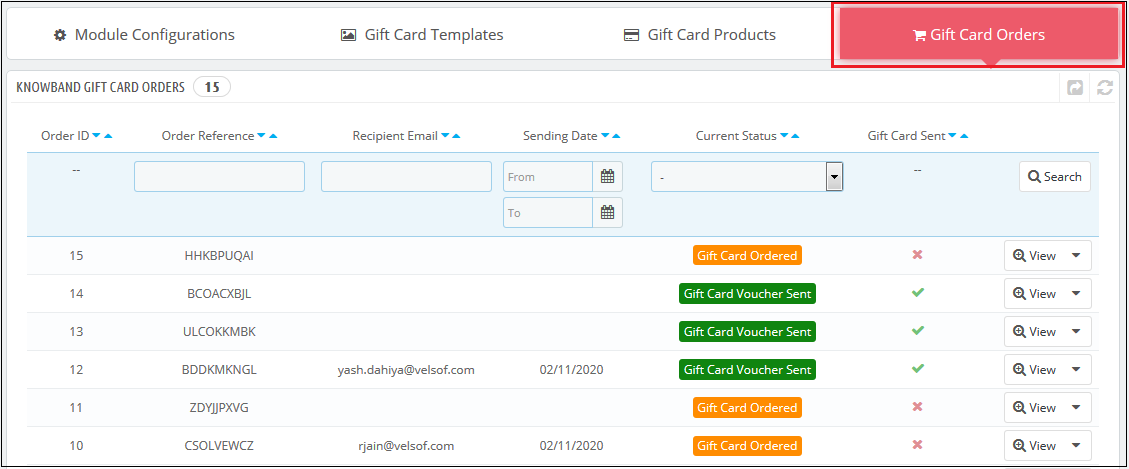
3.3 Track the order for the gift cards of the site

The Gift Card Order tab provides the entire list of the orders received for the gift cards. It involves the recipient email, date of sending as well as the status of the gift cards.

In the ‘Gift Card Order’ tab go to the ‘View’ button in the right section. This section shows the entire information about the order.

4.0 Website UI

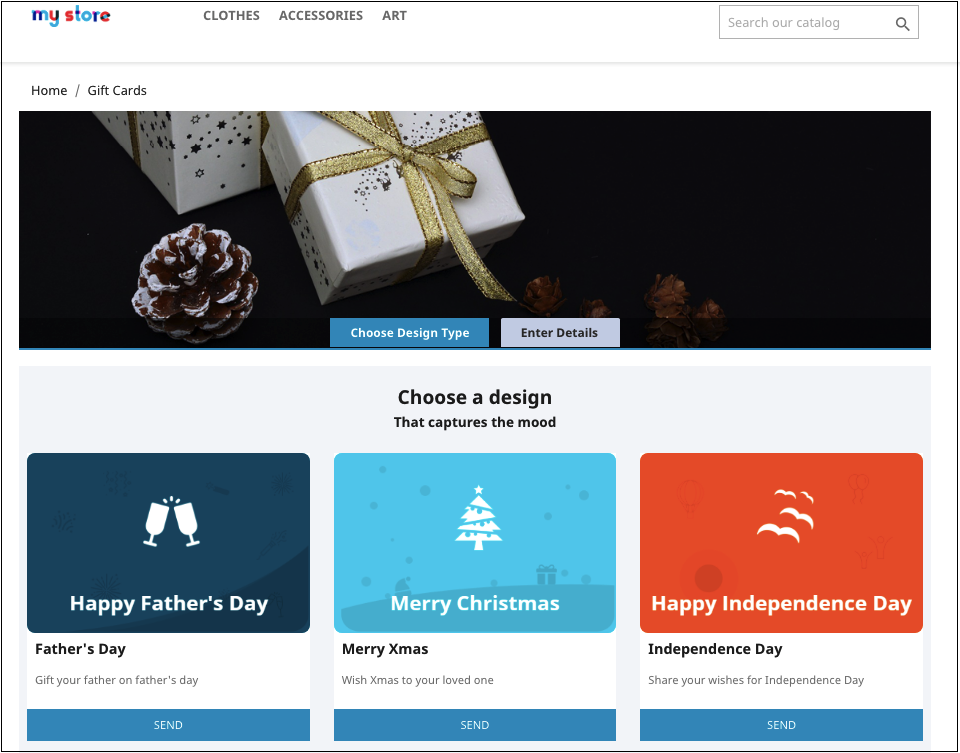
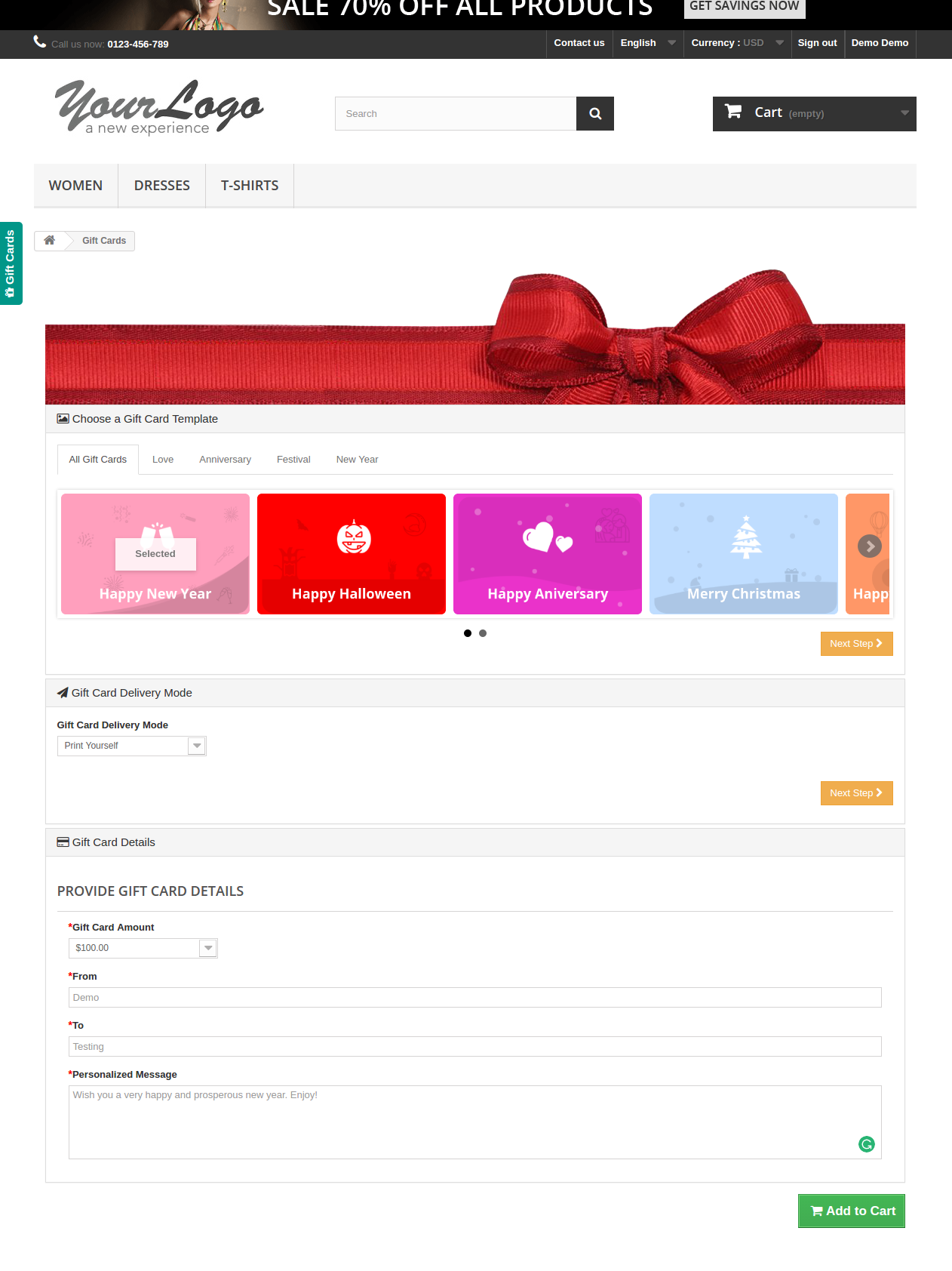
The links to the gift cards page can be viewed in the front end as opted by the store admin. Once the store visitors click on the link, they will head to the gift card page of the site.

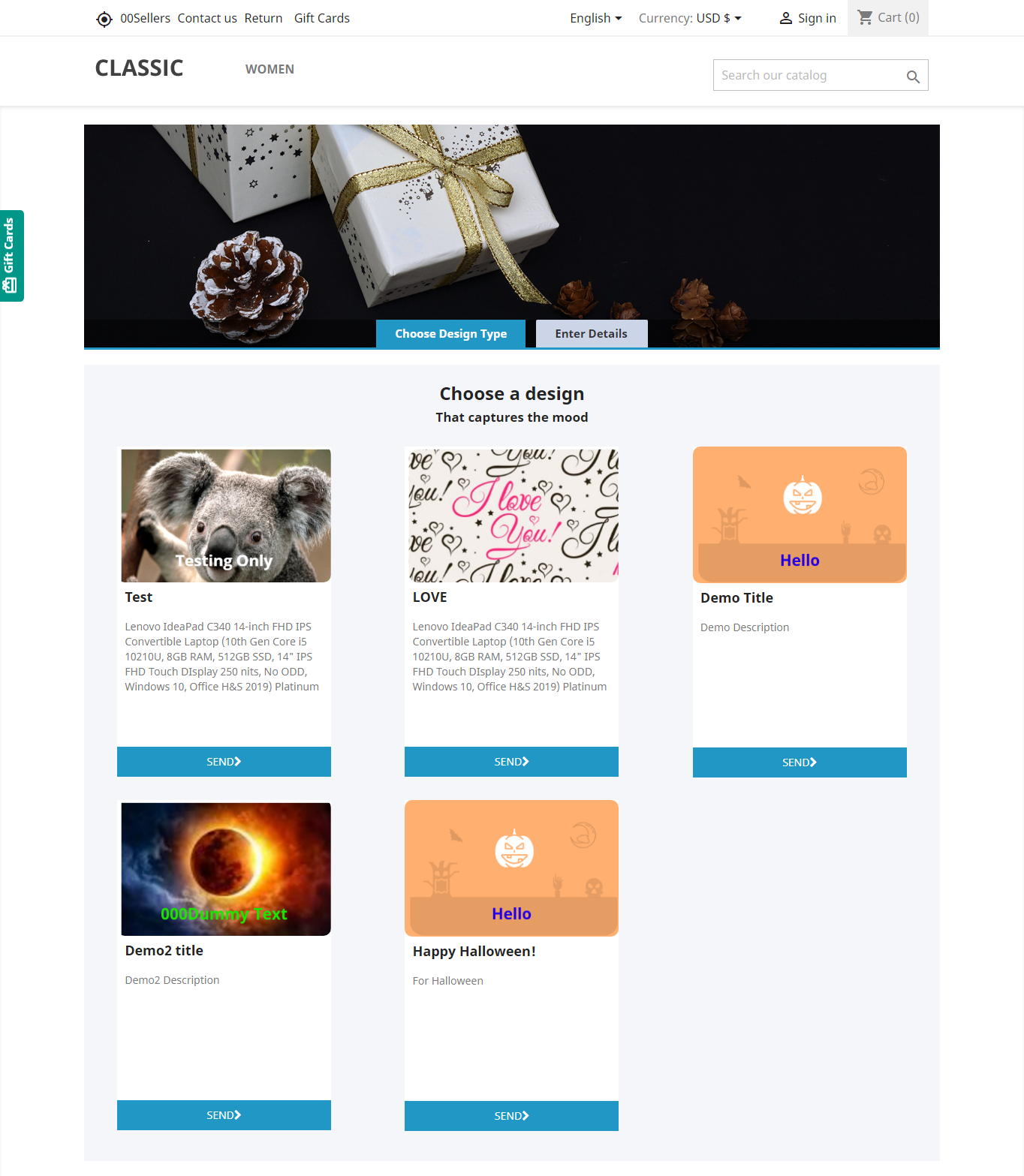
The PrestaShop gift card manager addon by Knowband is the front-end of the website will be shown very similarly to the image below:


Shopping for the same is easy. The customers can select the card for different occasions. For instance, he chooses the Happy Halloween card. All he needs to do is to click on the Send button of the card.

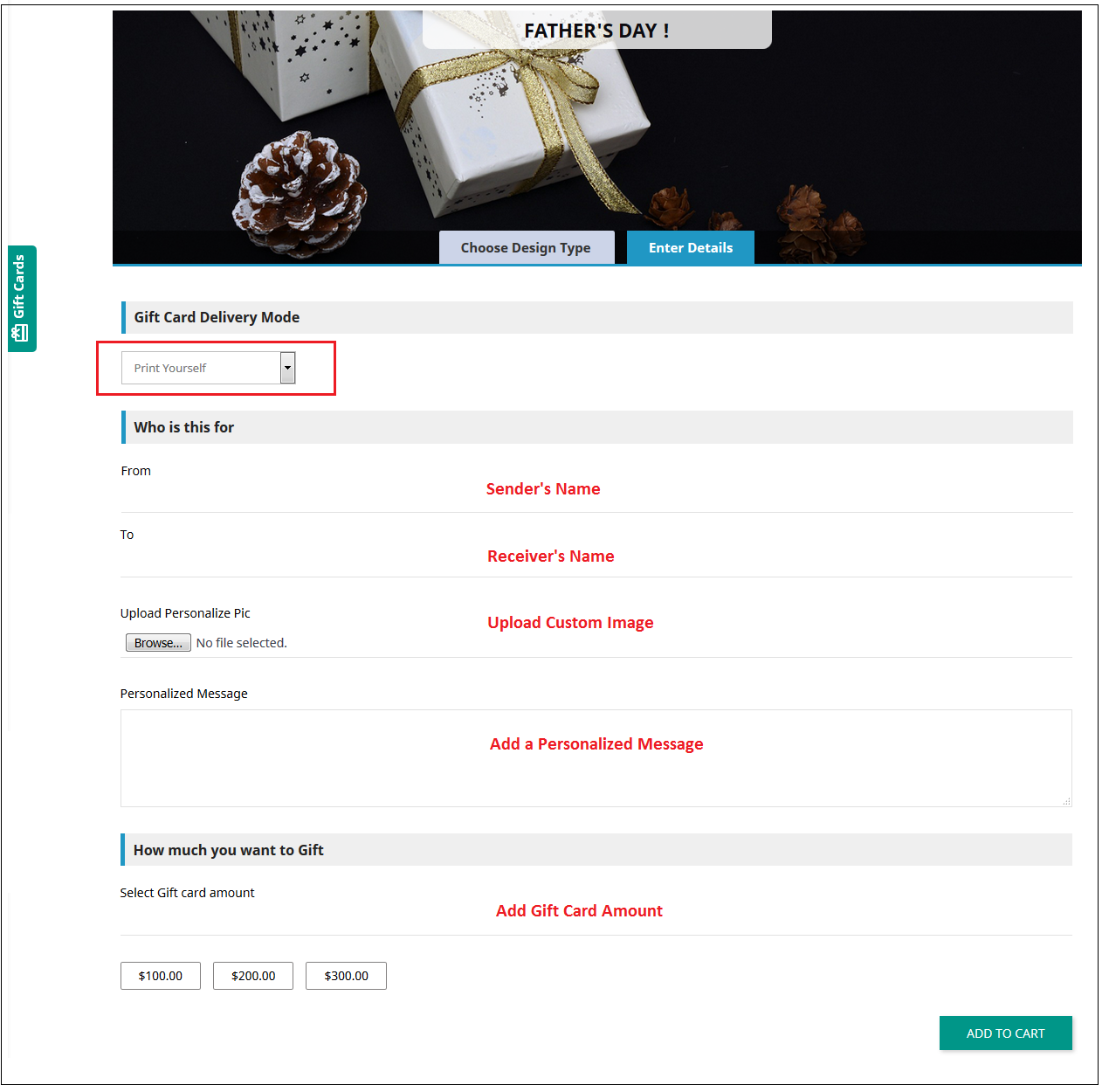
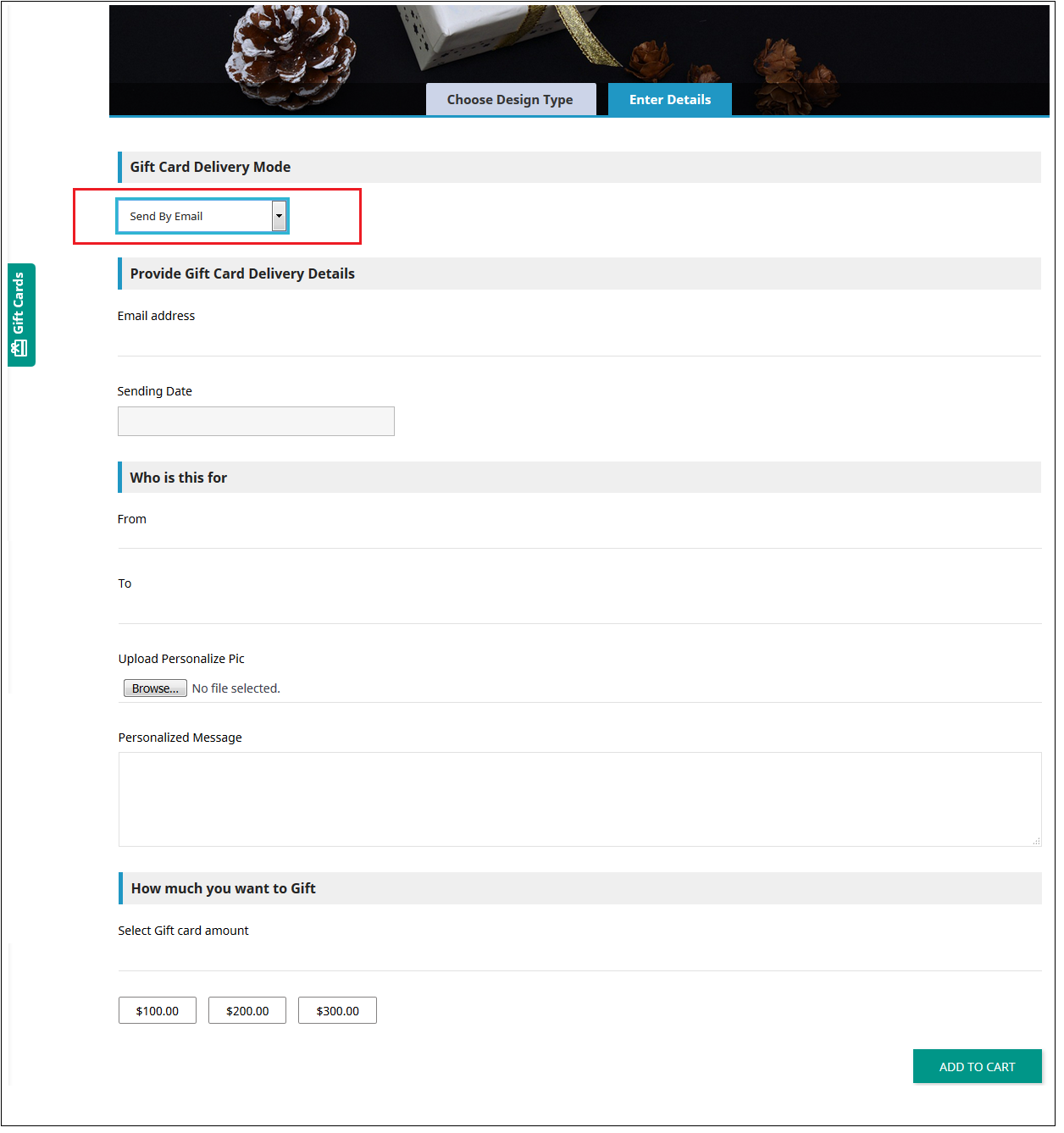
The customer will head to the ‘Enter Details’ page where he can add all the needful details.

He can print the card or send it via email. The sender and receiver names along with the message can be mentioned in the section as shown below.

Upload Image: The sender can upload a custom image for a Personalised Gift Card.

Print By Yourself: Insert the details to print the gift card.

Send via email: Add the email address of the receiver, upload a custom image, and a note for your loved one.

Add the product to the shopping cart and proceed to the checkout page. The gift card will then be sent to the receiver.

Now you want to buy gift cards for your near and dear ones this PrestaShop addon is a way to connect with you with just one click. KnowBand PrestaShop Gift Card Module helps you engage more customers to your store.

Tutorial: Watch the Video Guide

To help you set up and use the PrestaShop Gift Card Manager Module, we have created a detailed YouTube tutorial. The video explains the installation process, configuration options, and how to manage gift cards step by step.

Watch the tutorial here:

Module Link: https://www.knowband.com/prestashop-gift-card

Video Link: https://www.youtube.com/watch?v=hLQWuBfvnRE
Admin Demo Link: https://psm.knowband.com/demo/?module=giftcard&demo=admin&referrer=kb&lang=en
Font End Demo Link: https://psm.knowband.com/demo/?module=giftcard&demo=front&referrer=kb&lang=en
Addon Store Link: https://addons.prestashop.com/en/wishlist-gift-card/29376-knowband-gift-card-manager.html

Please contact us at support@knowband.com for any query or custom change request as per your business requirement.

5 Conventional Mistakes that are Killing your Email Subscriptions

The e-retail is now not just restricted to a few eCommerce giants. It is actually steering international platform. At the same time, the era of growth hack is marked with the commencement of a number of start-ups. While the acquisition of new website traffic is inevitable, customer retention is what contributes to the overall success of the eCommerce platforms. It is said that an increase in 5% of customer retention can boost sales by 25% — 125% depending on other factors as well.

With so many shopping sites and ample choices for online shoppers, the seemingly easy task of getting their email addresses is actually a challenge, the same goes true with customer retention. E-commerce subscriptions are one of the ways to repeat purchases. It won’t be wrong to state that it is an easy hack to amortize the acquisition cost with repeat purchases. Thus, it is inevitable to say that in order to increase your sales, you need to increase your customer base.

The conventional subscription pop-ups have been a trend in the eCommerce ecosystem ever since their commencement. However, these pop-ups have been rather accused of putting the customers off instead of motivating them to enter their email addresses. Going with the outrageous tactics of mouse-hover pop-ups and others have shown results, but at the same have their own negative impact. Hence, being careful with these conventional mistakes is the key when it comes to increasing the subscription of the site.

In a nutshell, let us discuss some of the mistakes that may be killing your eCommerce subscriptions. Check them out.

Mistake 1: Sticking to the traditional means

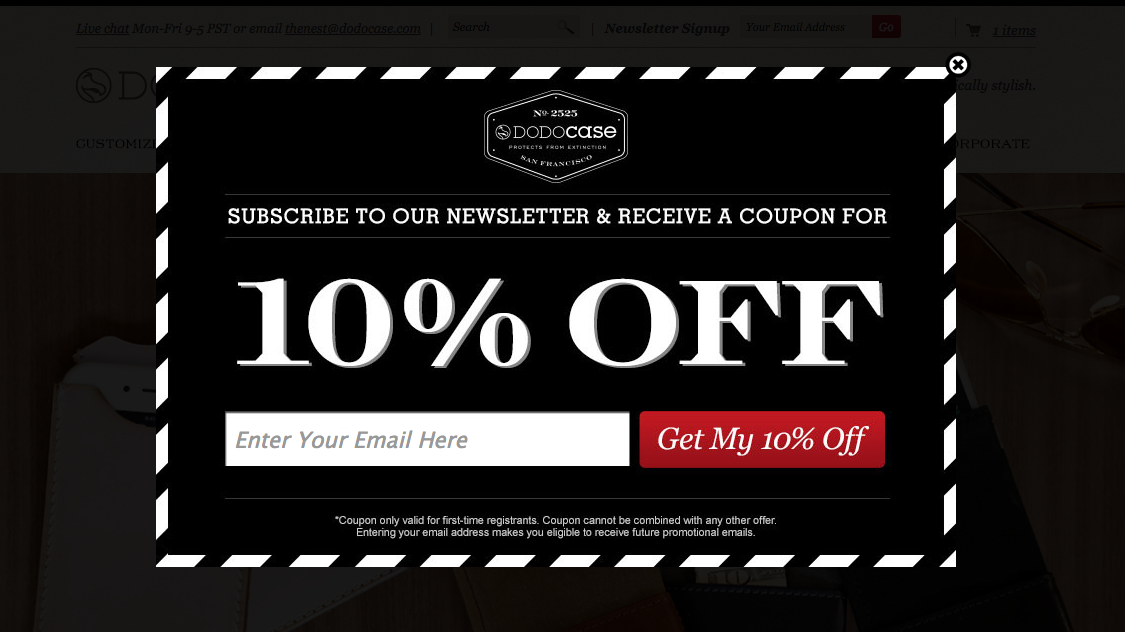
Do you really think a store visitor would share his or her personal details with you in return for the small discounts that you are offering? Why would they subscribe to your newsletters or marketing programs without feeling the need? The chances of this happening are very slim. To grow your email list, you need to have a slightly different approach. This is where the Scratch Coupon popup and Exit popup can do wonders for you. Scratch coupon popup can arouse curiosity in your visitors whereas an Exit popup can help you get the email addresses of your visitors at the end moment, basically when a user is about to leave your store.

To avail the benefits of the Scratch coupon on your online store to get more subscribers, you can try out Knowband’s Scratch coupon addon for Prestashop, Scratch Coupon extension for OpenCart, Scratch coupon extension for Magento and Scratch coupon extension for Magento 2.

Similarly, you can check out the Exit popup addon for Prestashop, Exit popup extension for OpenCart, Exit popup extension for Magento and Exit popup extension for Magento 2.

Mistake 2: No personalized touch

Online marketing is now being over-powered with emotional marketing. The coming era is all about finding the emotional connection with your prospective customer base. A lot is being talked about customer behavior and the personalization of marketing tactics with this insight. The very first thing that any of the e-marketers would do is to get an understanding of customer behavior. The real-time behavior can be used to provide a personalized touch to the campaign. E-commerce companies can boost brand awareness and generate quality leads by creating a personal connect with the audience. Not making use of the customer’s insight is the biggest mistake that e-merchants are committing even today. Optimize your communication and you shall reap the desired result.

Mistake 3: Not being innovative

If you wish to capture maximum email addresses of your visitors, a general popup offering a discount and asking users to enter their email address won’t work. You need to innovate the way you ask your visitors to subscribe to you. Let your creativity speak. Get your users involved in some kind of fun activity.

Gamification is one of the ways to make the entire process fun and addictive for store visitors. Something like Spin and Win popup can help the e-merchants motivate their customers to enter their email ids without annoying them. The interactive pop-up asks the users to try their luck by rotating the wheel and allows them to avail the best offers of the online store only by entering the email ids. The gracious way of engaging the visitors can set your site rocking, increasing customer engagement So, be innovative and start spinning some leads.

Checkout Knowband’s Spin and win: Entry, Exit and Email Subscription popup for Prestashop, Spin and Win popup extension for Magento, Spin and Win popup extension for Magento 2, Spin and Win popup extension for OpenCart and Spin and Win popup for WooCommerce.

Mistake 4: Lack of customer interaction

Online shoppers these days are in a habit of researching things on the internet. Thus, content marketing is one of the ways to trigger the interest of the visitors on your site. Provide them with the information they are looking for with quality content. Not just the web store’s content, even the contents you post on the third party sites plays a vital role. Blog posting on quality sites can help you attract a larger audience. You may even ask them to subscribe to the blogging site for the updates on the same. In addition, interacting with the customers is the best way to keep them engaged and lure them to subscribe. Provide real-time chat services and customer support.

Mistake 5: Not leveraging the social media platform

The social media sites are the best platforms to find your audience base and boost up your sales. Facebook, Instagram, and other such sites can help you get a better insight into the customer’s behavior. So, leverage the power of social media platforms effectively. Interact and engage with them in these sites. There are sites that use the option of auto-subscribe. They may get you some easy instant leads, but in the long run, it may hit hard on the trust factor. Building up a strong and lasting relationship with the target audience is the key to success. Tricking them into subscriptions may cost you some loyal customers. So, create a connection on these platforms and use it efficiently in order to enhance the customer base.

Final Word

The more visitors you add to your email subscribers list, the better are the chances of conversions and sales. At the same time, the customers should never feel like they are being forced by the online stores into subscribing for their marketing emails. There are many factors to look out before asking for the subscription, but the idea of presenting them in front of the customers must be done in a manner where both the merchant and the buyer feel comfortable.

Prestashop SEO Wizard Addon – User Manual

1.0 Introduction

With the help of Prestashop SEO Wizard Addon the Prestashop store admin can enhance the visibility of the eCommerce site in a hassle free way. The Knowband Prestashop SEO Wizard module simplifies the most time-consuming works of SEO by automating the entire process. The Prestashop Merchant can now create the sitemaps or the XML files for the web pages as well as interlink URL of targeted pages with the anchor text at a button click. The site mapping can be done in multiple languages.

Searching the keywords in the contents of the site and then manually adding the links was quite a task earlier, but not anymore. The Prestashop SEO Wizard Module makes the entire process automated. It searches for the keyword in the long or short description in the front-end and adds the links automatically. Even the meta tags for the web pages can be added from the admin interface. You can optimize the product, category, manufacturer or even the CMS pages in a few simple steps. Become an SEO expert and let your web store rank higher in the SERP of the various search engines.

1.1 Project Objectives

Prestashop SEO expert addon offers a number of optimization options. Some of them are listed below:

1. The Prestashop SEO module allows the admin to create the XML file of the various web pages at a button click. Easing out the task of sitemap creation, the website can now rank be fetched by Google in minimal time.

2. The Prestashop SEO Wizard Addon searches for the specified keywords from the content of the website and attaches relevant links to it in minimal time.

3. The priority of the web pages, as well as the frequency of web crawling, can be set as well.

4. The store admin can include the nofollow or dofollow as per their wish. At the same time, the option to open the links in new tab can be incorporated without making any code changes.

1.2 Benefits of the Merchant

  • With the help of this Prestashop SEO Wizard Extension, the Prestashop store admin can create the XML sitemap of the PrestaShop as per desires.
  • The Store admin has access to set the priority if the web pages as per need.
  • This Prestashop SEO Expert addon allows the admin to set the frequency of the crawling as his/her requirement.
  • The Merchant can enable/disable the image option in the sitemap.xml file of the product pages.
  • The Prestashop SEO Expert Addon allows the e-merchant to enable/disable the sitemap at any time.
  • The Prestashop SEO addon gives the option to the store admin to add the link on the targeted keywords of the entire site as their need. It saves a lot of time to the admin.
  • The Admin can already add interlink on the targeted keywords edit or delete as per desires.
  • This Prestashop SEO Wizard addon enables the admin to keyword for the interlinking is searched in the short or long description of the products.
  • With the help of this Prestashop SEO Wizard module, the store admin to add the follow or no follow a link and it also allows the admin to open the link in new tab.
  • This Prestashop SEO expert module allows the store merchant to optimize the meta tags, meta title, meta description of the products, manufacturer, and categories page.
  • The Admin can optimize the products, categories, CMS, Manufacturers, product meta tag, update category meta tag and update manufacturers meta tags of the website incorporated in the front-end of the website from the Optimization Setting tab.
  • The entire interlinking is done from the back-end of the Prestashop XML file creation module.
  • The Prestashop SEO Expert extension allows the admin to restore the initial data via the group.
  • This Prestashop automated site interlinking Module in multilingual support.
  • This Prestashop SEO Wizard extension compatible with multiple stores.
  • Prestashop Sitemap generator Module for SEO helps the merchant to improve the visibility of the website.

2.0 Installation

After purchasing the Prestashop SEO Wizard Module, you’ll get following files as listed below:

1. kbseowizard.zip (contains source code of the module)

2. User Manual

Follow the steps mentioned below to install the extension:

  • Unzip the kbseowizard.zip file. It would contain files and folders as shown in the image below –
  • Copy all the files and folders from the extracted folder and paste them into “Modules” directory of your store. Follow the path – Root Directory/modules/.

3. The Prestashop SEO addon can be installed on your store now. You can find that in Store Admin -> Modules and Services. It would be shown as below –

You may even search for the module in the admin modules listwith the following details –

Keyword – SEO Wizards

Category – Front office

Filter By – Installed & Not Installed / Enabled & Disabled

4. Click on “Install” button to install the Prestashop SEO Wizard extesnion. It would show a pop-up for your confirmation. Click on “Proceed with the installation” option. This step will install the Prestashop module and show notification – “Module(s) installed successfully”.

3.0 Admin Interface

This Prestashop module allows the e-merchants to enhance the various SEO aspects of the site. Right from the sitemaps to the interlinking everything can be done in one link. This is the most time consuming and tedious task for the e-marketers. The Prestashop SEO wizard addon makes it simple and a matter of moments. You can find the Prestashop SEO expert extension in the main menu of the admin interface.

It basically offers four optimization options. They are listed below:

  • SiteMap Setting
  • Interlinking Setting
  • Optimization Setting
  • Meta Tag Settings

3.1 How is the Site Map created?

The site map of the web pages makes it easier for Google to find your sites. The creation of .XML file involved a lot of steps, but it can now be done at a button click.

The Prestashop SEO addon allows the admin to create the sitemap or the .xml file for four different web page types. They are:

  • For Products
  • For Categories
  • For CMS Pages
  • For Manufacturers

The Prestashop SEO Expert Extesnion is multi-store compatible. The admin can Select Shop from the dropdown menu in which they are looking to include the optimization option.

In addition, the admin can set the priority of each web page type as per the need. All he needs to do is to select the priority rank.

The frequency in which you want Google to crawl the web page can be selected. The crawling frequency can be set on Daily, Weekly, Monthly and Yearly basis.

In addition, the admin can include the sitemapping of the product images just by a button click.

Make the changes and click on ‘save’. The .xml file will be created automatically. The link of thesame can be viewed at the top as shown in the image.

This Pretashop SEO wizard addon shown the xml file is obtained in the usual format.

The same process is followed in all the four web page types.

3.2 How is the Interlinking done on the site?

3.2.1 How is the new links created?

The Prestashop SEO Wizard extesnion allows the admin to add links to the keywords mentioned in the website in one go. Once the keyword and the link are mentioned in the back-end, the Pretsahop addon fetches for the word in the short description of the product pages and other web pages. The keywords are then converted to the anchor tag and specified links are attached to it.

In order to do the interlinking, go the ‘Interlinking Setting’ of the Prestashop SEO expert module. It shows the list of the already created links and keywords. In order to create new once, click on the ‘+’ in the top right section.

Enter the information required in the admin interface.

  1. Language: The Prestashop SEO Wizard module offers multi-lingual support and the changes can be done in various languages.
  2. Group: The group or type of web page, that is, Product, Manufacturer, CMS pages or Categories, can be selected from here. The interlinking will then be done in those pages only.
  3. Description: This field is only for the product pages. The merchant can either select the ‘Short’, ‘Long’ or ‘Short and Long’ description. The keyword entered will then be searched in the selected descriptions and interlinking will be done in the same.
  4. Keyword: Enter the keyword that you want to use as an anchor text.
  5. URL: The URL that is to be linked with the keyword is mentioned in this section.
  6. The position of the Link: The position of the link, that is, Top or Bottom can be selected here.
  7. Enable Nofollow: The link can be used as a nofollow or a dofollow link as per the requirement of the user. In case you want to keep it as a nofollow link, switch the button on.
  8. Open in New Tab: By enabling this feature, you can make sure that the links will open in the new tab instead of the same tab.
  9. Activate Keyword: The keywords can be activated by toggling the button here.

3.2.2 How are the links keywords edited or deleted?

The keywords and the related information can be edited by clicking on ‘Edit’ button as shown below. The admin interface even offers the options to delete the existing ones.

3.3 How are the changes incorporated in the website?

The entire interlinking done in the backend can be incorporated in the front-end of the website from the Optimization Setting tab.

The changes can be implemented on the front-end of the website by clicking on the ‘Optimize’ button. This option is available for all the different page type of group. Each page type can be optimized separately.

3.4 How to add Meta Tags in the Web Pages?

This Prestashop SEO Wizard addon simplifies the most time-consuming task of the e-marketers. The meta tags, that is, the meta titles, descriptions and keywords can be added for the product pages, category pages as well as for the manufactures.

The list of the tags already created can be viewed in the ‘Meta Tag Setting’ tab. In order to create the new one, click on the ‘+’ sign in the top right corner of the admin interface.

The meta tags can be, then, entered by filling up the required information fields.

Group: Select the group type in which you want to add the tags. You can choose from the Products, Categories or Manufacturer.
Meta Title Tag: Enter the meta title for the web page here.
Tag Type: The tag type can be Normal, Facebook or Twitter. The admin can select any from the drop-down menu.
Meta Description Tag: The short meta descriptions of the web page can be entered here.
Meta Keywords Tag: The keyword relevant to the web pages can be entered here. You can enter the main keywords, it’s variants as well as the long-tail keywords here.
Activate Meta Tag: The meta tags can be enabled/disabled by toggling the button.

The created tags can be edited or deleted as shown below:

Now you can try Prestashop SEO Wizard module for on your Prestashop website. KnowBand Prestashop SEO Addon helps you engage more customer to your store & increase the customer base. The Prestashop XML file creation Extension allows the admin to manage SEO of the website easily without any hassle. The online seller can easily manage the interlinking, XML file creation and meta tags generation without any lengthy and time taking process.

The Prestashop Merchant can now create the sitemaps or the XML files for the web pages as well as interlink URL of targeted pages with the anchor text (read more about it here – Linkio.com) at a button click. The site mapping can be done in multiple languages.

For more Prestashop Addons please visit Knowband.

For more details about this SEO wizard module:

Prestashop SEO Expert Module link.
Prestashop SEO Expert Module Admin Demo link.
Prestashop XML file creation Extension Front Demo link.
Prestashop Sitemap generator Module for SEO User manual.
Knowband Prestashop SEO Wizard Addon store link.

Please contact us at support@knowband.com for any query or custom change request as per your business requirement.