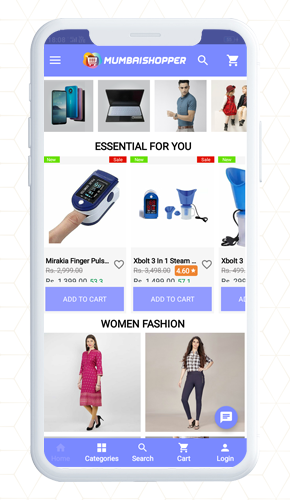
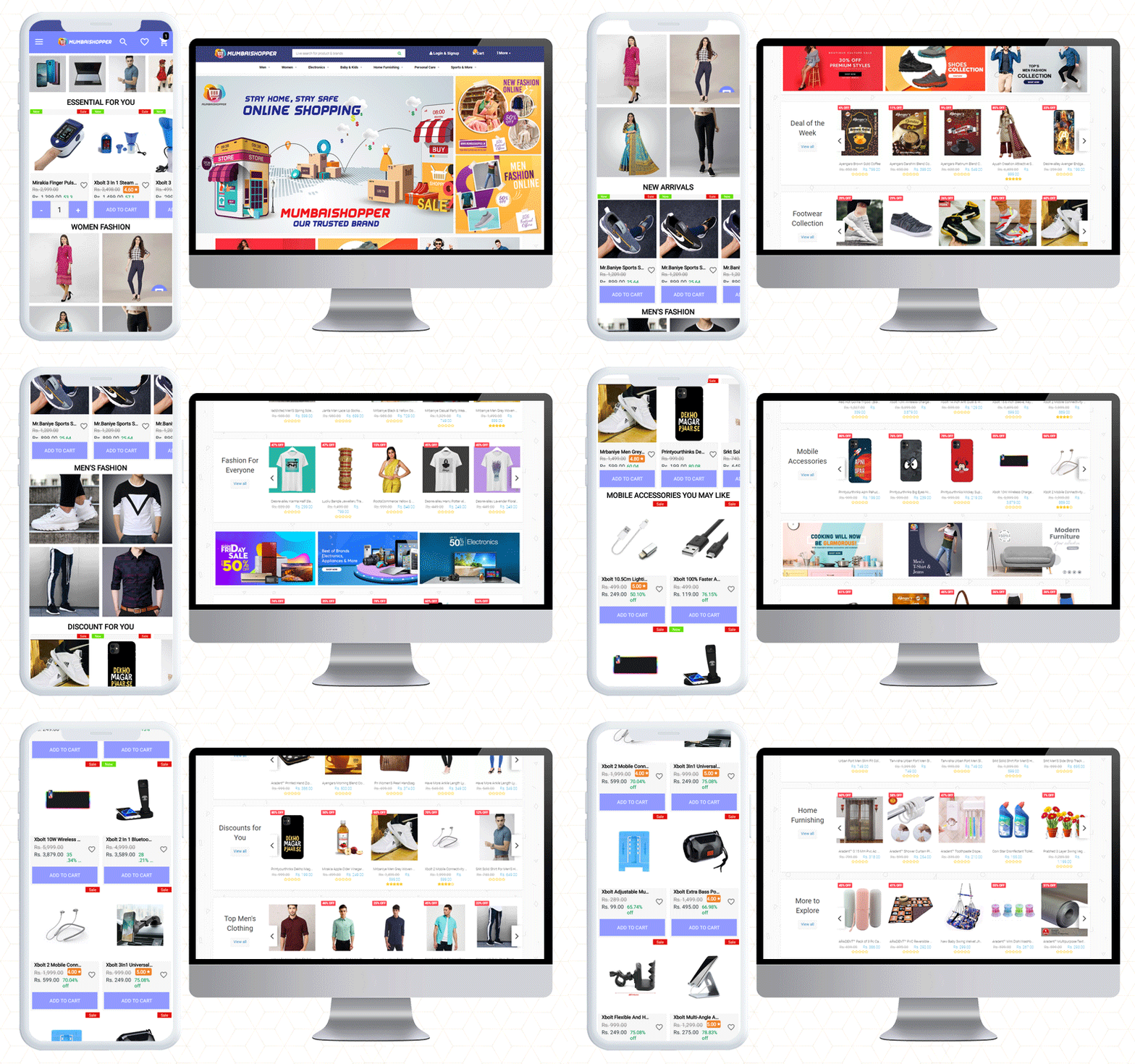
Do you have a count on the mobile apps you are using right now? Two, three, or maybe 10 at a time! The increase in the usage of mobile applications cannot be ignored. As mobile users are increasing rapidly, so is the demand for mobile apps. MumbaiShopper is a Marketplace for Mumbaikars. They have built their website on the OpenCart platform. To design their OpenCart Android App, they have used KnowBand’s OpenCart Mobile App Builder plugin.
From a fashionable home page design to a checkout page, it is personalized for sophisticated UI/UX. The CTAs, cart design, customer support, and many other features are a part of this mobile app builder plugin. This mobile app offers more exclusive facilities to customers and the admin. Let’s dive in to explore!
MumbaiShopper OpenCart Android Mobile App
As said before, the MumbaiShopper is a marketplace where you will find everything from fashion to furniture. If you want to shop baby products, fashion, electronics, or sports ranges, you will find everything at Mumbaishopper.
MumbaiShopper OpenCart Mobile App supports multiple currencies. You can see the prices in USD and INR. The categories, product listings, home page design, cart design; everything is up to the mark.
Have a look at the attractive home page!
The theme of the MumbaiShopper OpenCart Android app is similar to the website which is exceptional.
In midst of tough competition, the application needs to be user-friendly and appealing. It is quite certain to add color pallets, graphic images, banners, and logos that match your website theme.
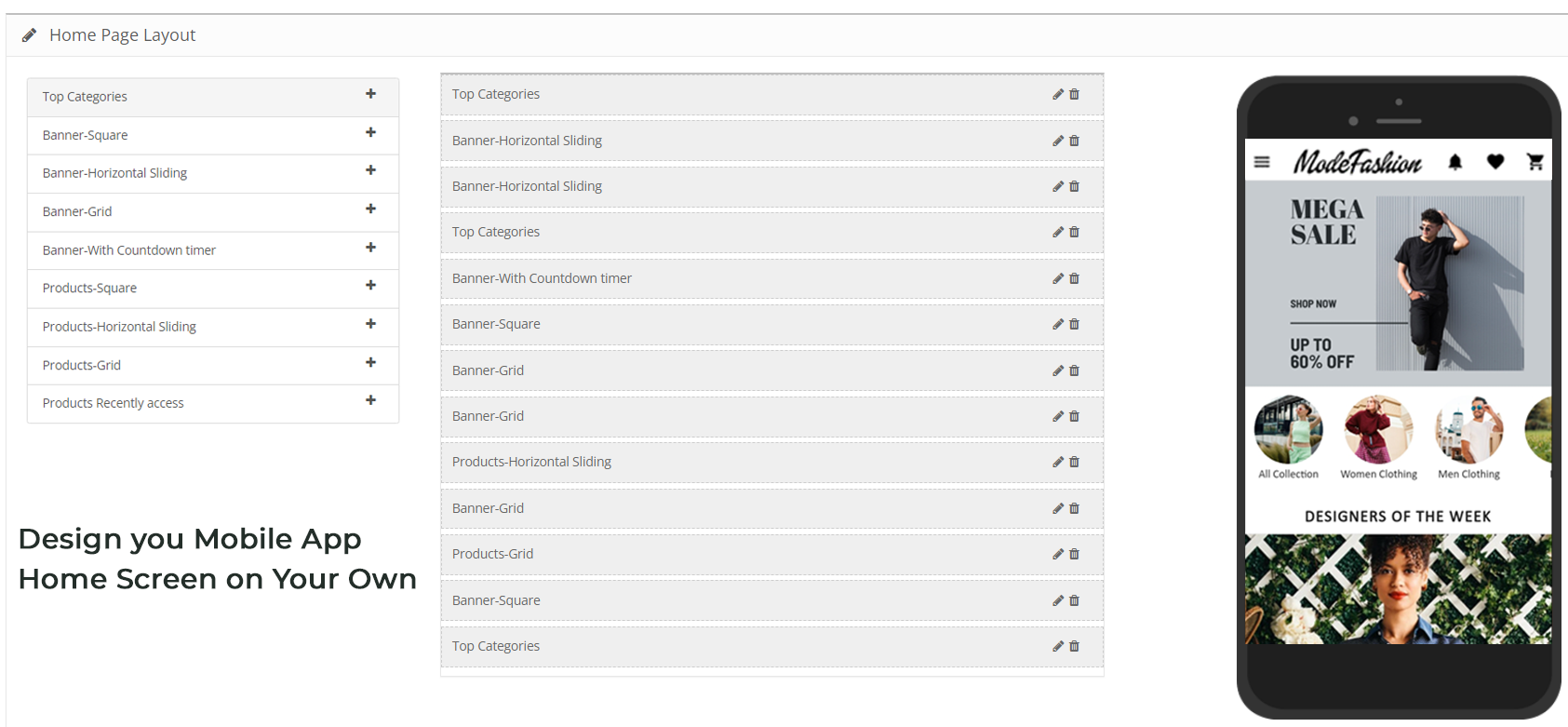
For instance, the banner display is completely customizable. On the home page, show top categories, square banners, sliding banners, or products in the grid pattern. It is all up to you.
Have a look at the app design and its theme colors.
Isn’t it engaging!
About the Shopping Cart
Customers can add products to the cart quickly. The shopping cart of the app has two options:
Shop more
Proceed to checkout
It has clear navigation because the CTAs in the app are bold and aloud
Every change on the website is in Real-Time synch
The changes and updates that are made on MumbaiShopper Website are reflected directly on the Mobile App. It has real-time synchronization.
Finding the right product is easy
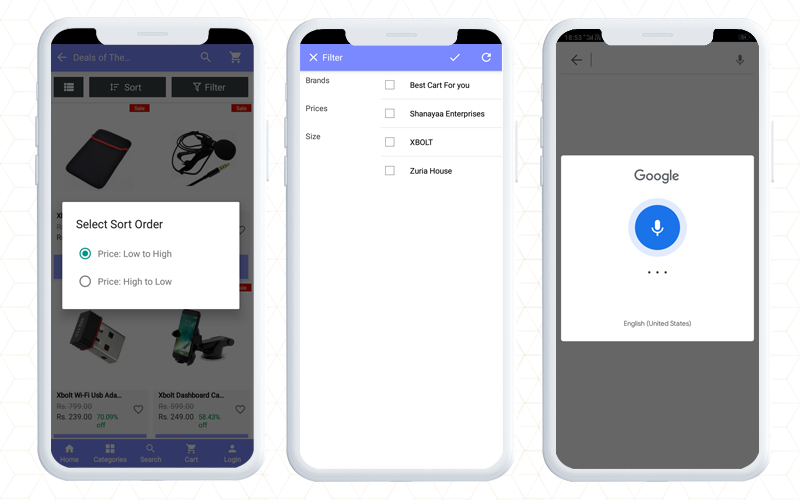
Find out the product you want by sorting and using the filter. Decide first and then apply filters. Sort it as relevancy, price, or bestseller.
It gives a satisfactory customer experience to OpenCart Android App users. It helps them in finding a product of their choice.
Voice search makes it easier.
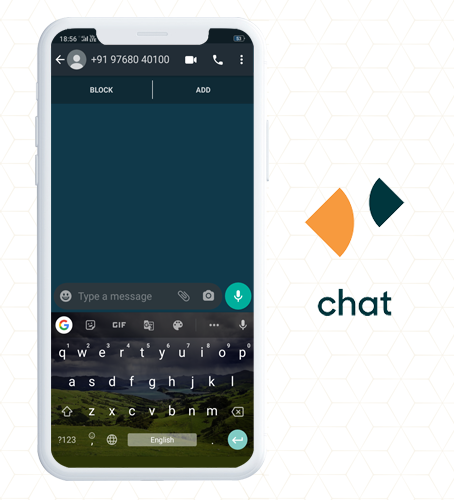
Whatsapp and Zopim for live chat support
The customers can get quick support from the MumbaiShopper team using WhatsApp chat and Zopim chat support options. WhatsApp live Chat is available because Customer service is the topmost priority of every brand.
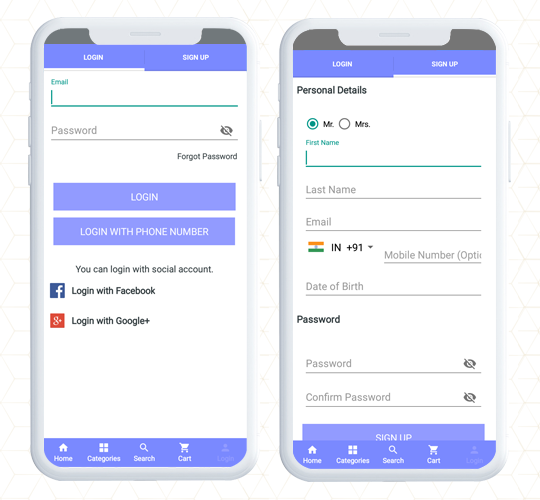
Quick Login and Sign up saves time and efforts
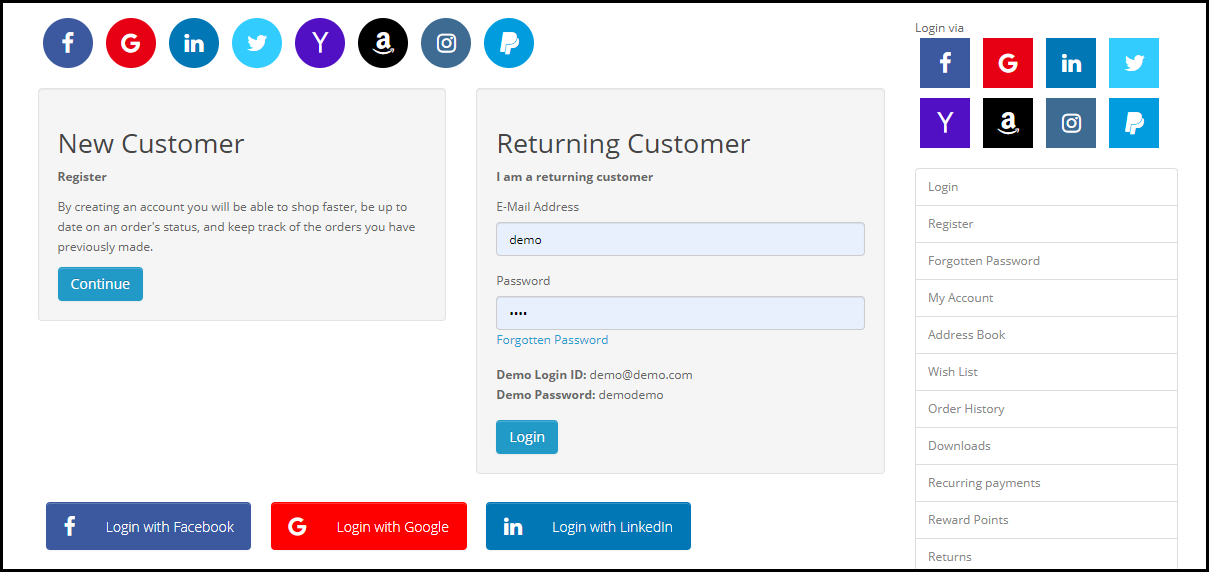
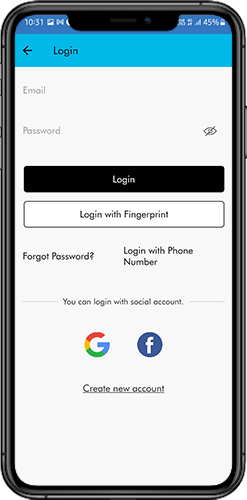
While most of the world population is connected via social media, why shouldn’t we take advantage? The OpenCart Mobile app has Google login and Facebook sign-up options for netizens.
Along with this, customers can register using their mobile number. This allows them to log in using OTP.
Additionally, a fingerprint login option is also available for the customers.
Multiple Payment and Shipping Support for every customer
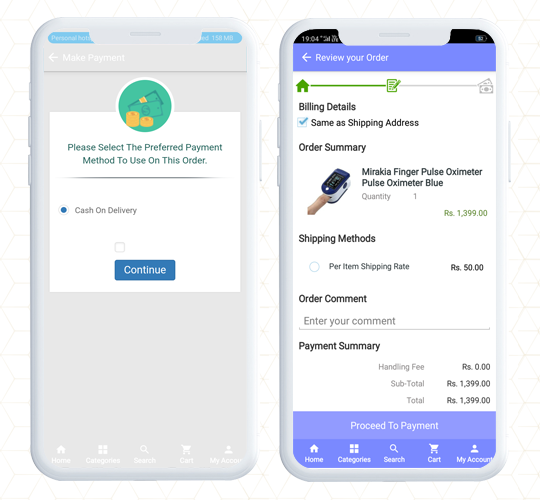
As the user completes the registration process, they will have to make the payments first, then choose the shipping method for their product delivery on MumbaiShopper Store.
More conversion with One Page Checkout
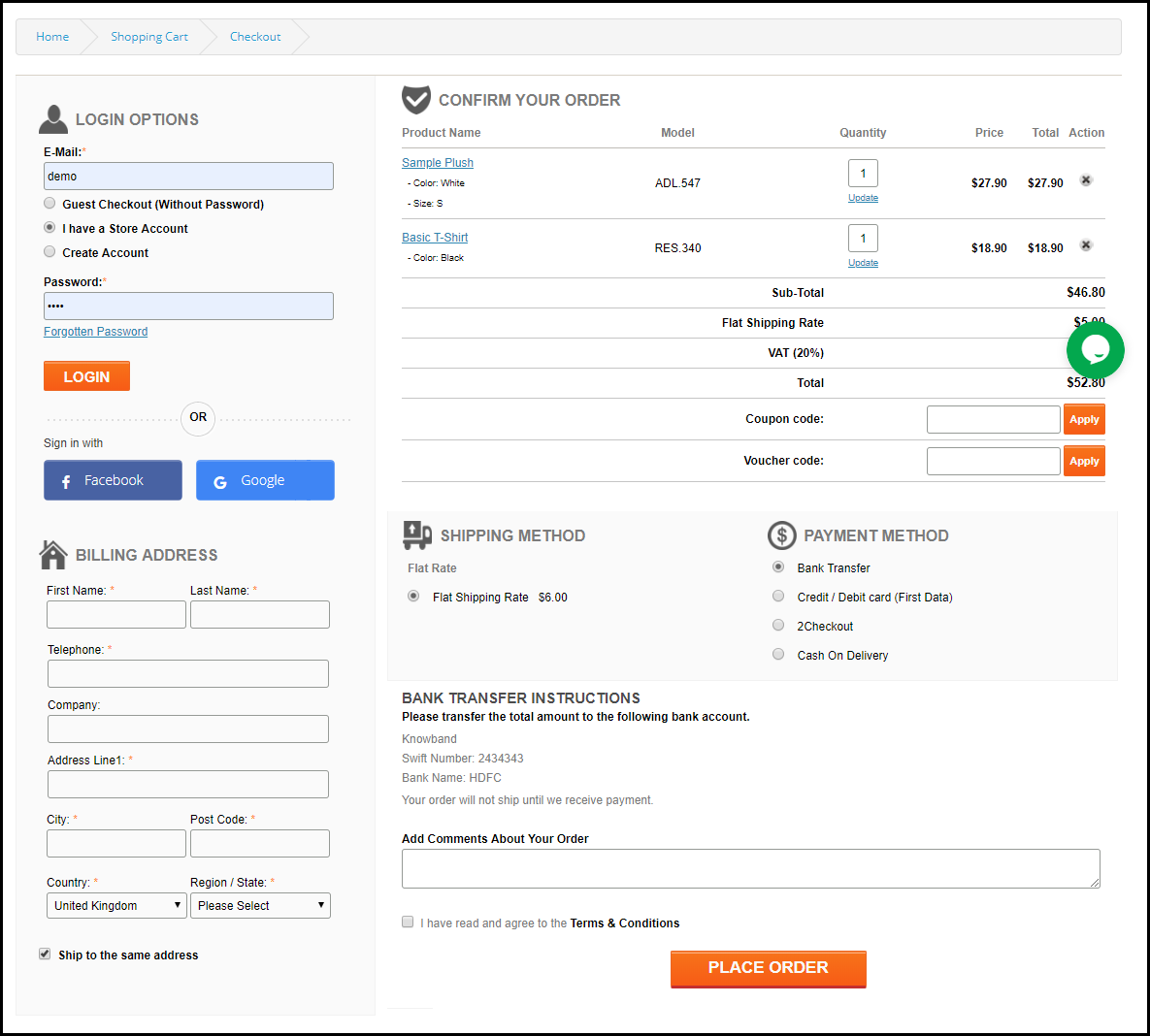
The MumbaiShopper OpenCart Android App has a single-page checkout screen, as a result, it makes product purchase easier for front-end users. One Page Checkout provides quick checkout that refects in the reduction of abandoned carts. This also improves the app’s usability for order placement.
It is possible to run promotions on the OpenCart mobile App
Yes, you can run promotions on your OpenCart store if you have KnowBand’s OpenCart mobile app builder. The MumbaiShopper product range is wide and to entice customers, they run deals and discounts.
Deals of the Day, Deal of the Week, and Discounts for you are some listed categories in the MumbaiShopper OpenCart Mobile App.
The app allows the store owner to run promotions and coupons that are applicable on the website.
You can add Spin to Win promotional gamified element to your mobile app only if the same is available on your website.
Bring new customers to store
Wondering how? The MumbaiShopper store has a social sharing option for products.
The OpenCart Mobile App allows customers to share products on their social media profiles. This also attracts more attention from their friends and family. Hence brings you, new potential visitors.
Feature to track the traffic
With Google Analytics integration, OpenCart Android App allows tracking app performance standards, in short, you can set new goals. On the mobile app, the store administrator can monitor traffic and plan marketing campaigns accordingly.
To sum up, like the MumbaiShopper store, you can also make your mobile app using the Opencart Mobile App builder plugin. The application has almost everything that you need for a mobile app. Check out the live demo or get the free OpenCart mobile app to have a preview of your store.
We believe in customer satisfaction. If you want any custom feature that is not included in the Mobile App Builder, let us know in the comment below.
The rapid rise in the mobile technology and its influence on the users has led the eCommerce businesses to take a leap from desktop to mobile sites and apps. Bringing the entire store readily available to the online shoppers whenever they need is one of the ways to flourish over the industry. This is why upgrading your business from eCommerce to m-commerce is a must. The popularity of mobile app is also at it’s peak. With an overall user base of 4 billion, it has proved to be a significant area where the online stores can develop an app and reach out to the potential buyers.
The best part of technological advancement is that this up-gradation can now be done with minimal hassle. There are mobile app builder extensions available for the various platforms such as Prestashop, Magento, OpenCart and others. Though, the popularity of android app is on peak but at the same time the iOS users also share an appreciable contribution to the online marketing. The user base of iOS contributes to 20% of the overall mobile users which is a huge number when trying to take over the market.
The app developers need to make sure that the app they develop for Apple app store must meet certain criteria before launching them. In order to be sure of launching a better iOS app that reaches to the users faster and convince them to make a purchase several key factor must be kept in mind. These small details may create a big difference.
Let’s take a look at some of the top things you should be careful about when developing your mobile app for Apple’s iOS platform.
Do some ground research
The app developers might not consider this fact but the iOS apps are meant to make a sale in the store. Unlike the play store where the android apps can be easily made available in the market and reach the users, the iOS apps are meant to be sold. Therefore, these apps are handpicked by the authorities themselves. They don’t want any app to be a part of the iOS user community that doesn’t sell itself. A well research and forward planning must be done by the developing team before launching the app. They must consider all the aspects of the app which may jeopardize the success that they could have made using the app.
The app must be original
Using the already picked concept and developing an app out of no originality will land you in a situation where the app may not be able to make it to the market. Thus, the app developers must take their time, use some hints from other successful apps and try to build an app that is based on the original concept. That kind of approach will guarantee that you do not make profit on the App Store, and that your app will never be successful. Since the club is so elitist, there are a lot less apps in general than you would find on the Play Store. This makes it easier to spot unoriginal apps and call them out. Using a previously successful concept will lead on to negative response from the customers and the chances are that the Apple store authorities may discard the app as it has not the features to make out large impact among the users.
Enable better features
It is also one of the established fact that the App introduces some of the most advance features with their phones. Therefore, it becomes equally important for the iOS app developers to keep the users preferences in mind and iOS trends in mind. They must try to match the latest features that are introduced and the app must give the users a taste of their phones better features. The users will like to test that features and will make use of your app for this purpose. The success of some of the apps is often based upon this concept.
Test your app
The app is made to find a spot where the customers pay for the service. It might not be possible at few instances that the developers are able to trigger all the mistakes that are incorporated in the app. This demands a lot of testing and checks from the developer site. The use of a 3rd party or a dummy user crowd can be mad which can use the apps and check for its feasibility in the store. It is always a good thing to delay the launch of the app than to make it available early and cause a damage to reputation due to the presence of different bugs and issues faced by the users.
Let the feedback roll in
Feedbacks are a part of better marketing. The app developers might think that their app is best and fit for the users but this may not be the real case. Thus, taking the advice from the fellow developers and putting the app to beta testing might help a lot in improving the app quality. Any feedback is a good feedback, no matter in what form. Take advice and suggestion from the concerned people who might give their valuable suggestion in improving the app and may encounter some of the issues which you might have skipped during your observation. This helps in delivering an app that is useful for the users.
Over to You
There is always the room for development and if you are planning to launch an iOS app than there are several things you must keep in mind. The mobile store can definitely improve your business chances. A good app is appreciated by users, suggested by enthusiasts and promoted by the Apple store itself.
OpenCart is one of the most widely used eCommerce platforms. Even though the ease of doing business with the help of this CMS system is intriguing, the online customers seek way more features than the basic ones offered by it. This is when the role of the extensions come into play.
This article talks about the 7 OpenCart extensions that you must implement on your OpenCart store in order to enhance customer experience and provide them with better services. Let’s have a look.
1. OpenCart Social Loginizer
The OpenCart Social Loginizer extension offers 8 social login options to the customers including the likes of popular social media network such as Facebook, Instagram and Twitter, and allows the customers to access the web store without getting themselves registered.
Visitors can use their social media login details during the sign-up process. This saves a lot of time of the customer, and at the same time, the bounce rate of the website also reduces to a large extent. This OpenCart extension is quite handy as most of the time, the customers are already logged into their social media accounts, hence, it makes the registration process easy.
2. OpenCart One Page Checkout
The idea of filling out the information in multiple steps during the checkout may seem quite annoying for the customers who wish to make a quick purchase.
The OpenCart One Page Checkout extension puts together all the checkout fields involved in a multi-step checkout on a single page and enhances the checkout experience of the customers. This OpenCart extension offers the Guest Checkout Facility, Social login facility, supports multiple shipping and payment methods, etc. It is a feature-packed extension that focuses on simplifying the checkout process of your OpenCart website.
3. OpenCart Mobile App Builder
Many brands today are now trying to launch their mobile app in order to simplify the shopping experience of their mobile users, also because the majority of the online transactions are now taking place through mobile devices.
The OpenCart Mobile App Builder helps the website owners easily launch a mobile app for their brand without any knowledge of coding. The Mobile App Builder provides Social Login, Fingerprint login, OTP login, Home Page Layout Customization, Zopim and WhatsApp Chat Support, Multiple Payment and Shipping support, Unlimited Push Notifications, Simplified Checkout and much more.
4. OpenCart Abandoned Cart
Every website owner has to deal with Abandoned Carts. This is something which cannot be put an end to if you are running an online business. But there are certain modules that will help you reduce the number of abandoned carts on your website and OpenCart Abandoned Cart module by Knowband is one of them.
This OpenCart extension lets you track the abandoned cart users, and allows you to convert them into your customers through regular email follow-ups. You can include discounts in your reminder emails to persuade those users to complete their purchase.
5. OpenCart Exit Pop-up
Wouldn’t it be amazing if you could make a sale even when a user is trying to take an exit from your website? This is the job of Exit Popups, i.e. to draw your visitor’s attention at the very last moment.
With OpenCart Exit Popup extension, you can display an email popup to your visitors right when they intend to leave your website. In the popup, you can display some enticing offers to grab their attention and encourage them to use those offers during their purchase.
Apart from boosting conversions, this OpenCart extension is quite effective in increasing user engagement on your website which simultaneously increases the average time on site.
6. OpenCart Spin and Win
Obtaining the email address of your website visitors is not an easy task anymore. People usually don’t share their details with any online platform unless they get something valuable.
With OpenCart Spin and Win extension, you can acquire the email address of your visitors without putting much effort. Besides, this OpenCart extension increases user engagement on your website and boosts your eCommerce conversions.
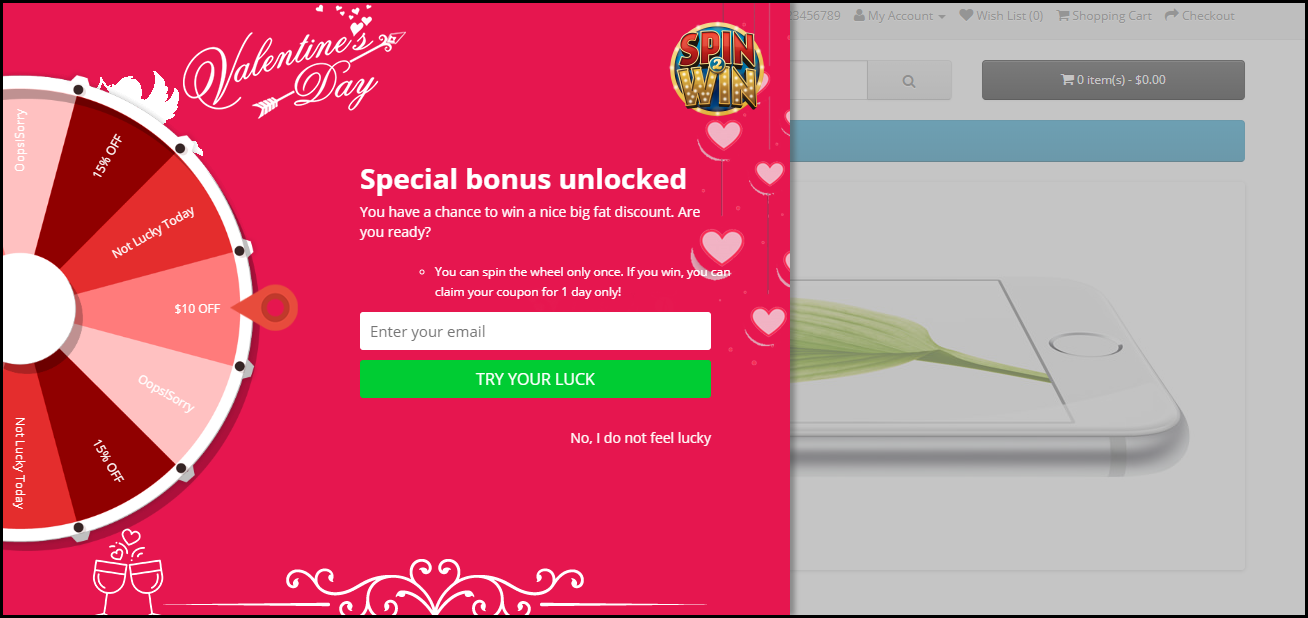
The module adds an attractive and fun-filled Spin 2 win on the front-end of your website, making your users curious to spin the wheel. You can customize the popup slices as per your choice and also design the popup for various occasions like Halloween, Christmas, Black Friday, New Year, etc.
To spin the wheel, users would be required to enter their email address which would make it easy for you to capture the email address of your visitors.
Over to You
The availability of multiple OpenCart extensions has helped the web store owners to make their store a better place for the online shoppers and the feasibility of these modules in various aspects definitely takes the user experience to the next level.
If you need any assistance in these OpenCart extensions, you can contact us at support@knowband.com
eCommerce store owners are always in search of better alternate to connect with the customers. The immediate need to make the web store attractive and more engaging encourages the sellers to keep the web store updated. Most of the time, a customer prefers to make a purchase from a web store if the product of his/her interest is readily available. Thus, bringing the entire store into the pocket of the customers is a must. Thus, upgrading the eCommerce website on the mobile platform is a must.
It won’t be wrong to state that the mobile commerce is the latest development in the eCommerce scenario. The mobile phones have proved to be a great step in making online trading easier for the sellers. The easy accessibility and reachability of the mobile phones makes shopping effortless for the customers. The shifting trend of desktop sites towards mobile apps is proving to establish new milestones for the eCommerce store owners.
If you are a web store owner and want you want your products to reach out to more potential buyers, then, Knowband’s Mobile app builder for Android and iOS may enable you in doing so. The multiple features provided by the applications prove to be a better way to engage more customers and enhance your store’s conversion. According to a survey, “54% of the customers prefer mobile apps to make purchase over desktop sites”. Thus, it’s always a better option to get a new head start to your business with better options. Mobile apps are currently trending and has proved to be an effective option to feature your products in the market in a much better way.
Let us discuss some of the feature of Mobile app builder which can help the web store in touching new heights.
1. Customizable
The web stores may deal in sales of various products and items. Thus, every store owner has different expectations from the mobile app to gain better response. The mobile apps that are developed are fully customizable. The store owner has the full control over all the features starting from the look and feel of the mobile app to the checkout options. The sellers can make sure that the store has multiple features which describe the thought process of the seller. The representation plays a key role in binding the customers, thus, using mobile app builder to get a mobile app assures greater customer retention and app visibility.
2. Attractive
Any seller would expect the store to look attractive and engaging. Thus, the multiple theme layout and color combinations offered by mobile app builder makes it sure for the seller to express the product identity in the most advanced form. The store owner get full liability to select the store theme and match them with different products and categories to fit in. Apart from the theme layout, the very immediate need of the customer is to connect with the web store and the products or services that it offers. The retina ready display and the uncluttered layout of the application ensure best user experience. Thus, aiding the visitors in making their purchase decision. Moreover, the mobile app builder offers comes with a number of alluring themes. The admin can choose the one that he find interesting.
3. Compatibility
The introduction of different types of hand held devices and the platforms that they run on has made it tough for the merchants to reach out to their prospective customers. Our mobile app builder has made it easier for the store owners in making sure the seller is connected to customers irrespective of the platform or mobile they are using. It supports the mobile app to be compatible to multiple devices like Smartphones, tablets, iPads and others. In addition, it supports most of the eCommerce platforms like Prestashop, Magento, OpenCart, Shopify and others which are currently trending in the market. No matter if the customer is using Android or iOS in their mobiles, the mobile app builder develops the app to be compatible with all the OS. This helps the customers to access the web store throughput without any difficulty.
4. Allows the admin to stay in touch with the customers
The mobile app builder by Knowband helps the admin stay in touch with the customers 24*7. The push notification allows you to keep them informed about the activities of the store. The task of making marketing easy for seller and customers is well maintained and the smooth running of the store via mobile app is maintained. The live chat option can help your sort out the queries of the store owner then and there. The real time interaction ensure at par customer engagement.
5. Additional features
Any product is incomplete if it doesn’t provide any additional features to make it better. The mobile app builder enables the mobile apps to be compatible with multiple languages. The RTL language feature of the mobile app allows you to take your business at an international platform. This is one of an inevitable feature to ensure that the mobile app is a success in the Middle East Asian countries and the gulf countries where customers prefer store interaction in Arabic and Hebrew rather than English. Over it, the automatic synchronization also enables the store owners to keep the products on app updated with respect to desktop site.
Over to You
The mobile app builder is a complete package, which provides immense features for the web store to grow more and better using the mobile apps. Thus, it keeps the sellers in trend with the market and keep their customers updated about the store in a much better and convincing manner.
The introduction of the mobile phones to eCommerce is not new. The rising popularity and the easy access to mobile phones have compelled the eCommerce store owners to take their businesses to the mobile platform. After all, mobiles do serve the purpose of making shopping fun and convenient for the internet users. The mobile store helps the customers to browse eCommerce store with much more convenience.
As, the number of mobile users is growing day by day, it has become an effective way for the eCommerce store owners to connect to their customers in a more defining way. One of the advantage of using mobile apps is the large access to mobile phones. Thus, it helps the sellers to reach out to maximum people and at the same time it helps in boosting the sales and make better conversions.
While this has opened up an ocean of opportunities for the merchants, the introduction of eCommerce players and the ease of upgrading the business into m-commerce has increased the competition. One of the biggest hacks to stay of the competition is to keep yourself in line with the market trends and technological advancements. For the eCommerce business runners, here are some of the latest market trends in m-commerce that you need to consider in order to stay abreast with the customer expectation.
The time spend on mobile apps is expected to increase
With the introduction of 2016, there have been an increase in popularity of the voice search. Along with this, the location-based services are on a rise and will continue to lead the market in the years to comes. Hence, the content of the mobile application for any eCommerce company needs to be curated with these two aspects in mind. The content of the mobile app should have location reference. Along with this, instead of targeting keywords, the content should provide the solution of the queries being searched by the target audience. The voice searches include questions such as ‘Chinese restaurant near me’ and other such queries. The contents should be updated accordingly.
Easier navigation a must-have
Not just in the eCommerce ecosystem, even in mobile commerce, 1 out of 4 customers are expected to abandon the cart if they find the store navigation complex. Thus, this adds to the need of focusing on the mobile apps. While the mobile responsive websites will continue to outpace the application as they do not require any installation, they are more likely to annoy the visitors with complicated navigation. The mobile apps, in this case, will prove handy in curbing the cart abandonment.
The need to bring the store in the customer’s pocket
As per a recent report of Google, the ‘Right here’ and ‘Right now’ requirement of the online shoppers are on a rise. Moreover, 50% of the smartphone users are likely to place their order immediately. They not just want the load time of the web store to be less, but they even wants the stores to be at their arm distance. Thus, the online retailers need to bring in the entire website in the pocket of their target audience. What can be better option that having an app for your business. Moreover, the application should sought at making the shopping experience easier and fun for the consumer. Easier check-in and checkout process with social login options will ensure greater customer retention.
Social engagement is a must
Even in the m-commerce ecosystem, the social media platforms are more likely to steal the show. Overall, 60% of the consumer times spent on social media is on mobile. Hence, the mobile application for the eCommerce businesses should be optimized to tap this audience. Promoting the app on these platforms and incorporating deep links and other features in order to increase the number of downloads is a must.
Having discussed the above-mentioned trends that are expected to follow in the m-commerce industry, it is now time to elaborate how can a mobile application help your business model. If you are a Prestashop site owner than you can easily switch your web site to mobile app by using Prestashop Mobile App builder module. Knowband offers an easy and effortless module for that can help you take your eCommerce business to the next level. Similar extensions are available for Magento, OpenCart and other platforms as well.
Let us take a look on some of the evolution in mobile eCommerce which can help the stores to grow more and better.
1. Better traffic
The accessibility of mobile phones has grown up to more than 3 billion peoples. Thus, it ensures that more users can help the seller in re directing a better crowd to their stores. The introduction of m-commerce can help the web stores to get a better traffic on their stores which will be a good sign for better sales. It also helps in making more conversions.
2. Reachability
Mobile phones are reachable at almost every place. Customers don’t have to reach out to desktop sites in order to make a purchase. They can easily reach out to their mobile phones and make purchase. It has helped the seller to reach out to maximum potential buyers who would have otherwise given a second thought of making a purchase. A better option to make purchase will surely help the seller to reach out more.
3. Convenience
Mobile apps are more convenient when compared to desktop sites. One of the immediate advantages of mobile apps is the convenience. Most of the time a customer will hesitate to go through desktop sites and make a purchase. With the introduction of mobile aps marketing has become way too easy. The customers can now reach out to their mobile app any time and make a purchase on any of the product they like. It has helped the customers to make immediate purchase.
4. Direct sales
Mobile apps helps in making direct sales. The visitor can use the mobile app to browse the web store and see the product and make a purchase. Unlike, desktop sites where they have to go through all the products and then settle down for their likes after searching many options. Mobile apps provide direct approach to get the products. The customers just has to select category and make a purchase. It just gets better with using the mobile apps for customers in order to make a purchase.
5. Better approach
Seller always keep the customers experience as priority. If the customers have a better experience with a web store than they are more likely to visit the store again. Thus, keeping this factor in mind the seller need to make a better approach to reach out to customers. The customers can visit the store using mobile apps making a purchase and getting better deals. Thus, mobile app ensures a better marketing opportunity for both sellers and the customers.
6. Social Sharing
One of the best feature provided by the mobile apps is social sharing. Most of the time when a customer likes the product they want to share it with their friends, thus mobile apps prove a great way to do that. They enable the customers to share the products with others. It helps in promoting the product even without the seller promoting it directly. The mobile apps are quite handy and can always be used to grow market. The social feature of mobile apps makes the store more prone to growing and get better sales.
Conclusion
Most of the time a customer would like to make purchase through mobile apps due to better convenience. Hence, the seller must be oriented towards providing customers with better services. The m-commerce is taking over the market rapidly and if a store owners doesn’t change with trend than they are most likely to lose a large portion of potential buyer. It will reduce the sales made.
The mobile Commerce has come way ahead than online eCommerce in the past few years. It has proved its worth as the most effective way to drive your business conversions and sales. We can witness today that every individual has access to the smartphones and internet facility, new doors of business opportunities and growth have opened. So, if you are currently running an OpenCart store but have not yet geared up for mobile shopping apps as well, you need to consider KnowBand’s OpenCart Mobile App Builder.
How Mobile App Builder extension is the right solution for you?
The OpenCart Mobile App Builder is an innovative & automated framework through which you can easily create native Android & iOS shopping apps. This extension saves you from any sort of technicalities or coding involvement neither for developing or managing.
This native eCommerce Mobile App Maker keeps your website sync with apps in real-time. Thus, you need not manage the app inventory on a manual basis. All the website details & info will be automatically fetched on apps. Moreover, the friendly module backend allows you to control the designing & workflow of apps on your own. Let’s explore more about how this plugin works.
OpenCart Mobile App Builder: Free Vs Paid Versions
FREE Version – To Test Your Store on Demo Apps:
Want to check how your store will look on mobile apps? Use KnowBand’s OpenCart Mobile App Maker free version & get satisfied even before purchase. Follow these simple steps in order to test the same:
Step 1: Install module on your store
You just need to get a FREE module from here. You will receive a zipped file in your downloads section. Install the same on your store using FTP details. After successful installation, enable the module from backend.
Open the app & enter your website URL. That’s it, now your store will run on our apps.
PAID Version – To Build & Publish Your Own Apps:
Creating and getting Android & iOS App was never this easy as it is now with OpenCart Mobile App Builder. Its just a matter of 3 simple steps:
Step 1: Purchase our Module from here. Step 2: Fill our pre-requisites form. Step 3: Get final apps in 2-3 days.
Apart from this, the module provides a complete backend control along with 3 months of free support. We would even publish the apps free of cost for you.
Top Features with Mobile App Builder Extension:
1. Customize & Design App Home Screen:
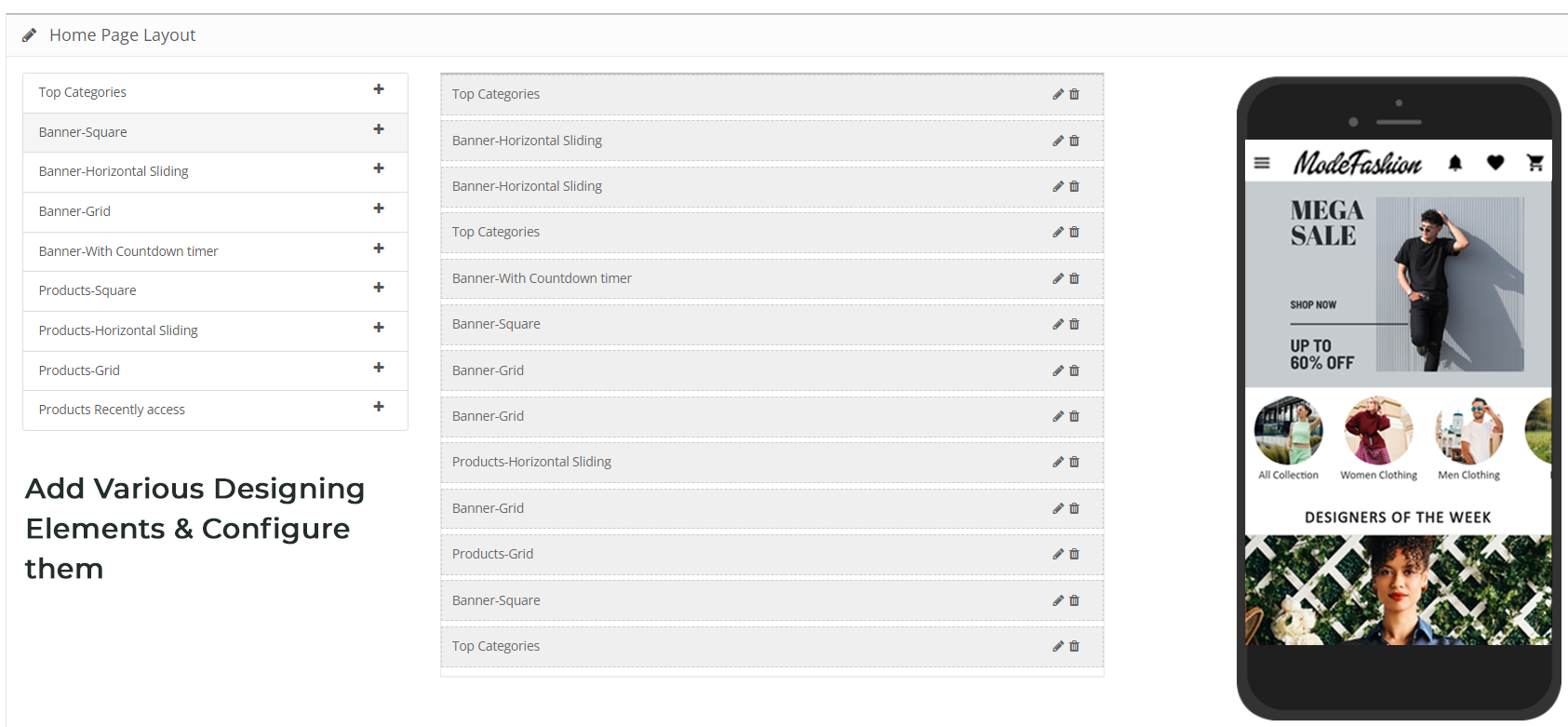
The OpenCart store admin gets the option to customize & create multiple layouts in the module backend. With this functionality, you can design the home screen as per various occasions & festivals. You can even edit the pre-saved layouts whenever required. Here, is the list of available designing elements in the backend:
Top Categories (Square shaped category icons)
Square Banners (Square shaped banners)
Horizontal Sliders (Rectangular sliders)
Grid Banners (Multiple banners in Grid form)
Countdown Timer Banner (Timer-based flash sale banner)
Square Products (Square shaped product listings)
Horizontal Sliders (Rectangular shaped product sliders)
Grid Products (Multiple products in Grid form)
Recent Products (Products which user visited recently)
2. Real-time Synchronization:
Keeping everything synced is a tough yet necessary task for an eCommerce store admin. Our OpenCart Mobile App Builder establishes perfect sync between website & apps which brings the entire inventory on mobile apps.
3. Complete Backend Access:
The OpenCart Mobile App Builder gives you the complete backend control to make the changes in app & manage it on your own. You can easily customize the design of your mobile Apps and other functionalities over a few mouse clicks.
4. Simplified login Process:
The Mobile App Builder for OpenCart comes up with various login options like Google, Facebook, Phone number(OTP) and Fingerprint which makes it easier for the users to enter your app & browse products.
5. Provide Direct Zopim & WhatsApp Chat:
Solving your user queries promptly is much easier with inbuilt Zopim(formerly known as Zendesk) & WhatsApp chat in your mobile apps.
6. Multi-lingual & RTL Support:
It is difficult to develop different Apps in different languages. By developing the Android & iOS apps with OpenCart Mobile App Maker, you can easily expand your reach worldwide. The mobile apps support both multiple languages including RTL ones.
7. Personalized Push Notifications:
You can easily send unlimited manual and automatic push notifications to app users from the backend of OpenCart Mobile App Builder. This promotional tool helps in driving engagement, sales, and revenue on your store.
8. Shipping Methods Support:
The OpenCart Mobile App Builder supports all sorts of website shipping methods on mobile apps. You can offer the same shipping to app users as of website.
9. Complete White Label:
Your OpenCart Mobile Apps will be branded as per your website. You can use your own splash screen, icon etc. on app. The store logo can also be added on the header of mobile apps.
10. Easier Mobile Promotions:
The OpenCart Mobile App Builder module brings personalized push notification feature through which the store admin can send sale & promotional push notifications to the users & improve user retention & revenue.
11. Enhanced Layered Navigation:
The OpenCart Mobile Apps offers the easiest navigation with filter/sort, keyword/voice search. The smooth screen flow guides the users to the desired products in no time.
12. Include Multi-payments:
The OpenCart Mobile App Maker brings all your website payment methods on mobile apps along with Paypal & COD in addition. Furthermore, any other native payment can also be integrated into the app over a fair price. The apps even support multiple currencies as well.
13. Coupons & Vouchers Support:
Every discount/offer coupon or voucher code which is active on your website will also work on mobile apps as well.
14. Simplified Checkout for Easy Orders:
With a single screen checkout process, the OpenCart Android & iOS apps make the order submission seamless for mobile shoppers. This helps in improving the shopping experience of the users & ultimately sales.
15. Real-time Order Tracking:
The Mobile Apps with OpenCart Mobile App Builder have the functionality to view the previous app order delivery status. The order status gets updated on the app as of website automatically.
You can offer an e-mail subscription pop-up on your app having a gamified spin-win interface. This helps in capturing the user data which can be used for re-marketing purposes afterward. You need to just install OpenCart Spin & Win extension on your store. The same pop-up will also work on your website as well.
Our mobile apps are even compatible with OpenCart multi-vendor marketplace plugin. The entire marketplace can be brought on the same mobile apps without any effort. You can visit this combo module (Marketplace + Mobile App) for more details:
It’s time to catch up the speed & mobile apps could be the missing accelerator for your website. So, go ahead & launch a full-fledged pair of shopping apps today.
Develop FlutterOpenCart Mobile App for your eCommerce store with KnowBand’s OpenCart Mobile App Builder & start observing a sudden growth in your store conversions & sales.
1.0 Introduction
If you are an OpenCart website owner & currently selling products on your website, try KnowBand’s automated mobile apps solution & take your business to the mobile world. The OpenCart Mobile App Builder is the pre-configured framework designed to develop FlutterAndroid & iOS apps for your online website. This ready-to-go mobile app solution is the most advanced & smartest solution to own a pair of fully functional Android & iOS stores without any coding or technical skills.
KnowBand has made a mark in the eCommerce industry as a leading mobile app provider for almost all the major eCommerce platforms. Its OpenCart Mobile App Builder is the easiest way to build feature-packed OpenCart Mobile Apps in just 3 simple steps:
2. Share the app-related specifications & requirements.
3. Get your own FlutterOpenCart Apps in 2-3 days.
We, at KnowBand, are an exceptionally skilled and proficient pool of programmers, designers, and other involved professionals. We can deliver an OpenCart mobile app that closely matches your personal expectations and business requirements. If you are not sure about the utility of this mobile app for your OpenCart store, let us throw some light on this amazing OpenCart Mobile App Builder.
Latest Enhancements in Opencart Mobile App Builder v4.8
The OpenCart Mobile App Builder Extension now introduces two powerful new integrations with the AI-Powered Chatbot Extension and the Opencart VideoMate Extension. These latest integrations significantly improve customer engagement, automate support, and enhance product presentation within your mobile application.
The Opencart AI Chatbot Extension leverages popular and advanced AI models of 2026, such as OpenAI ChatGPT, Google Gemini, Claude, and DeepSeek, enabling intelligent, real-time customer interaction directly inside the mobile app.
The Opencart Video Manager Extension transforms the shopping experience with immersive video carousels and a floating video player, helping merchants showcase products in a more engaging and conversion-driven format.
Together, these features make the OpenCart Mobile App Builder a complete AI-powered mobile commerce solution for modern eCommerce stores.
1.1 Prominent Features of OpenCart Mobile App Builder:
The following are some of the major features you’ll get in your OpenCart Mobile Apps:
–> Customizable Home Screen Layout (Complete Flexibility)
1.2 Recent Enhancements in Opencart Mobile App Builder!
1. Dynamic Position of the Signup-Login Popup in Home Page Layout: Admins can now customize the position of the signup-login popup on the home page, offering a more flexible user experience.
2. Enhanced Review Pages:
Write Review: Simplified process for customers to leave feedback.
Read Review: Improved interface for browsing reviews.
Review on Product Page: Reviews are now more accessible directly on product pages.
3. Video in Banner Elements: We have introduced video options in the banners available for the app’s home page layout. Now, the admin can add a YouTube video or can also upload a video below 2 MB for the square, horizontal, grid, and countdown banner components.
4. Push Notification Updates: Recently Firebase has officially deprecated the older cloud messaging API. Due to that the admin configurations now support uploading Firebase key JSON files for better management.
5. CMS and Layout Redirection in Banners and Category Elements: Banners and category elements available in the home page layout now support redirection to CMS and multi-layered layouts.
6. Automatic Banner Sliding in Horizontal Banner Slider: Horizontal banner sliders now feature automatic sliding, improving user engagement. The admin can also add the time difference on which he wants to slide the banners automatically.
7. List and Grid View for Product Listing Screen: Users can toggle between list and grid views on the product listing screen for more convenient browsing. This new feature not only improves the UI but also provides more convenience to the customers while browsing the products.
8. Common Notification by Admin: Admins can now send common notifications to all users, ensuring important messages reach everyone. Furthermore, customers can check all the past notifications in the notification tab available in the app.
9. Custom Banner Element in Home Page Layout: Now, the Opencart admin can upload banners of any size, offering greater customization of the home page.
10. Redirection in Top Category Element: Top category elements now support redirection to specific layouts, improving user navigation.
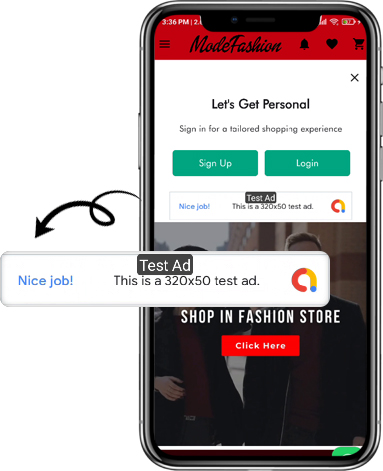
11. Advertisement Setting: The enhanced OpenCart Mobile App Builder allows store admins to turn their apps into revenue-generating channels by incorporating in-app advertisements. With Google AdMob integration, admins can now display banner ads on various app pages, creating a seamless way to generate additional income while keeping users engaged.
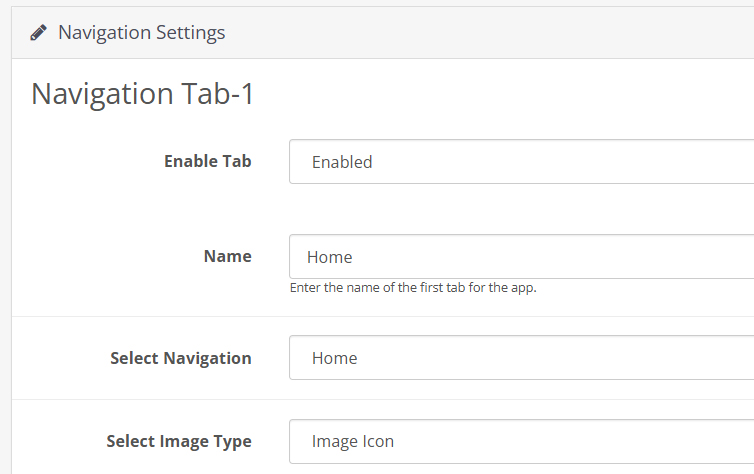
12. Navigation Setting: With flexible customization options, the store admin can adjust the look and feel of the tab bar layout. Now, the modules allow the admin to choose the names, set redirections, choose icons, and personalize color schemes, offering a unique and branded app experience that aligns with their store’s style.
Knowband’s OpenCart Mobile App Builder
The OpenCart Mobile App Builder by Knowband helps you create a mobile app for your store without coding. Easily turn your website into a user-friendly app!
KnowBand offers a demo of OpenCart Mobile Apps before actual mobile app development. We have brought free of cost demo for all the eCommerce store owners out there.
2.1 View Our Demo Store working on Apps
Take a look at our app functionalities with our demo OpenCart Mobile Apps. We have integrated our demo store with the app in order to let you explore the app working. All you need to do is to follow these simple instructions:
Step 1: Download and install the Nautica OpenCart Mobile App on your testing device. Here, are the links to OpenCart Demo Apps:–> Apple App Store–> Google Play Store
Step 2: Open the App and tap the “View Demo” button being displayed on the splash screen. Enter some relevant details like Name, E-mail & Store URL & experience our demo store running on the demo app.
Note: To access the Admin Panel of KnowBand’s OpenCart Mobile App Builder on our demo store, visit here.
2.2 View Your Store working on Demo Apps
Want to test your own store on the demo apps. Well, we made even that possible with 3 simple steps:
Step 2: Install the Demo Apps (links in the previous section) on your mobile testing device. Open the App & enter your website URL in “View Your Store”.
Step 3: Tap “View Your Store” and start experiencing your own store on OpenCart Demo apps.
Note: This Free version of Mobile App Builder is just for the demo purpose & no APK/IPA files will be provided with this module. In order to get your own APK/IPA files, you need to purchase the paid version of the OpenCart Mobile App Builder.
3.0 Build OpenCart Mobile App in 3 Simple Steps
Once you are satisfied with the demo apps working, it’s time to build your own mobile apps. The process to develop mobile apps with OpenCart Mobile App Builder is only a matter of these 3 simple steps:
Step 1: Purchase & Install Module on your website.
If there is any issue while publishing the app on respective stores, we would get it done for you.
4.0 Admin Panel Screens
Once the OpenCart Mobile App Builder is installed on the website, let’s take a look at its backend panel configuration. First of all, go to Extensions>>Modules>>KnowBand Mobile App Creator & click on configure option. It will bring the following interfaces to you:
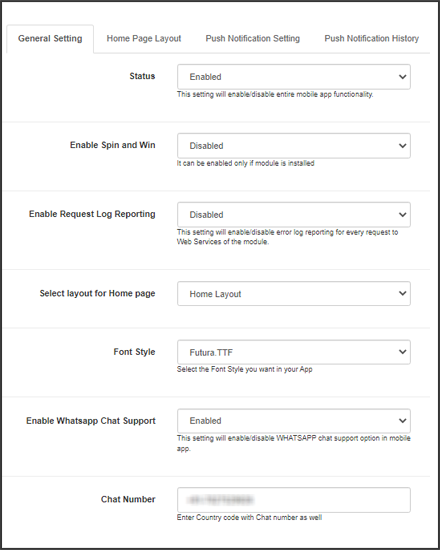
4.1 General Settings:
a) Status: Enable/disable the OpenCart Mobile App Builder module to make the apps work on mobile devices.
b) Enable Back in Stock: This option allows the admin to enable/disable Knowband’s back-in-stock module in the apps.
c) [New] Enable Spin & Win: This option allows the admin to enable or disable the Knowband’s Spin & Win Module in the mobile app.
d) [New] Enable AI Chatbot: You can now enable the AI Chatbot on your mobile app using the Opencart AI Chatbot Extension.
e)[New] Enable Videomate: Now, admins can easily add the instagram reels, shorts, videos in trending vidgets using the Opencart Videomate Extension
f) Font Style: This option provides multiple font styles to suit your app’s appearance.
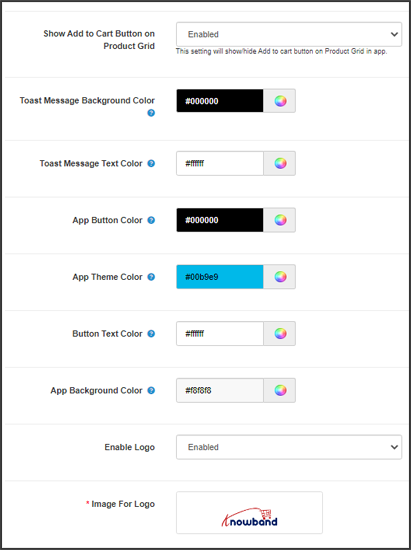
g) Show Add to Cart Button on Product Grid: If you want to show/hide the “add to cart” button from the product listing pages, you can manage the same from this button.
h) Mandatory Phone Number at Registration: Make the mobile number field optional/mandatory on the app’s sign-up page from here.
i) Redirect on Cart Page when Add to Cart: If you want users to directly redirect to the cart page upon clicking on the “add to cart” button, you can enable this option from here.
j) Enable Notification List Feature: This button allows the store admin to enable/disable the notification feature in the Android and iOS apps.
k) Enable Sing-up Pop-up: You can enable/disable the login pop-up for the non-logged-in customers in the app.
l) Enable Request Log Reporting: Enable the error log on mobile apps. This log file is used when the app shows any error or abnormal behaviour.
m) Select Layout for Home Page: Choose the desired layout for your app home screen. You can create multiple layouts under the Home Page Layout tab.
n) Enable WhatsApp Chat Support: Enable/disable the WhatsApp chat option on mobile apps.
o) App Button Color: Choose the button color for your apps.
p) App Theme Color: Choose the theme color for your apps.
q) App Button Text Color: Choose a button-text color for your apps.
r) App Background Color: Choose a background color for your apps.
p) Enable Logo: Enable the logo in your mobile apps. You can upload the logo image which will be displayed on the header of the mobile apps.
q) Fingerprint Login: Enable/disable fingerprint login in mobile apps.
r) Phone Number Login: Enable/disable phone no login in the mobile apps.
s) Disabled Shipping Methods: Disable the shipping methods that you do not want to display in the apps.
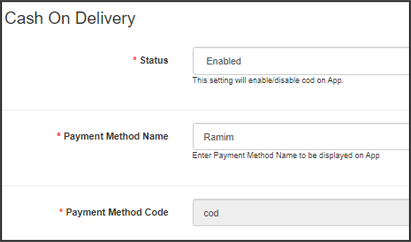
4.2 Payment Methods:
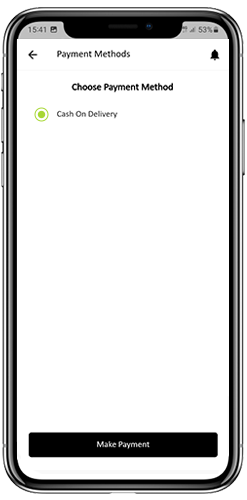
The OpenCart Mobile App Creator offers additional COD payment option to make the payments easier in the apps. The mobile apps with this extension already support web-view payment options in mobile apps.
4.3 Push Notifications:
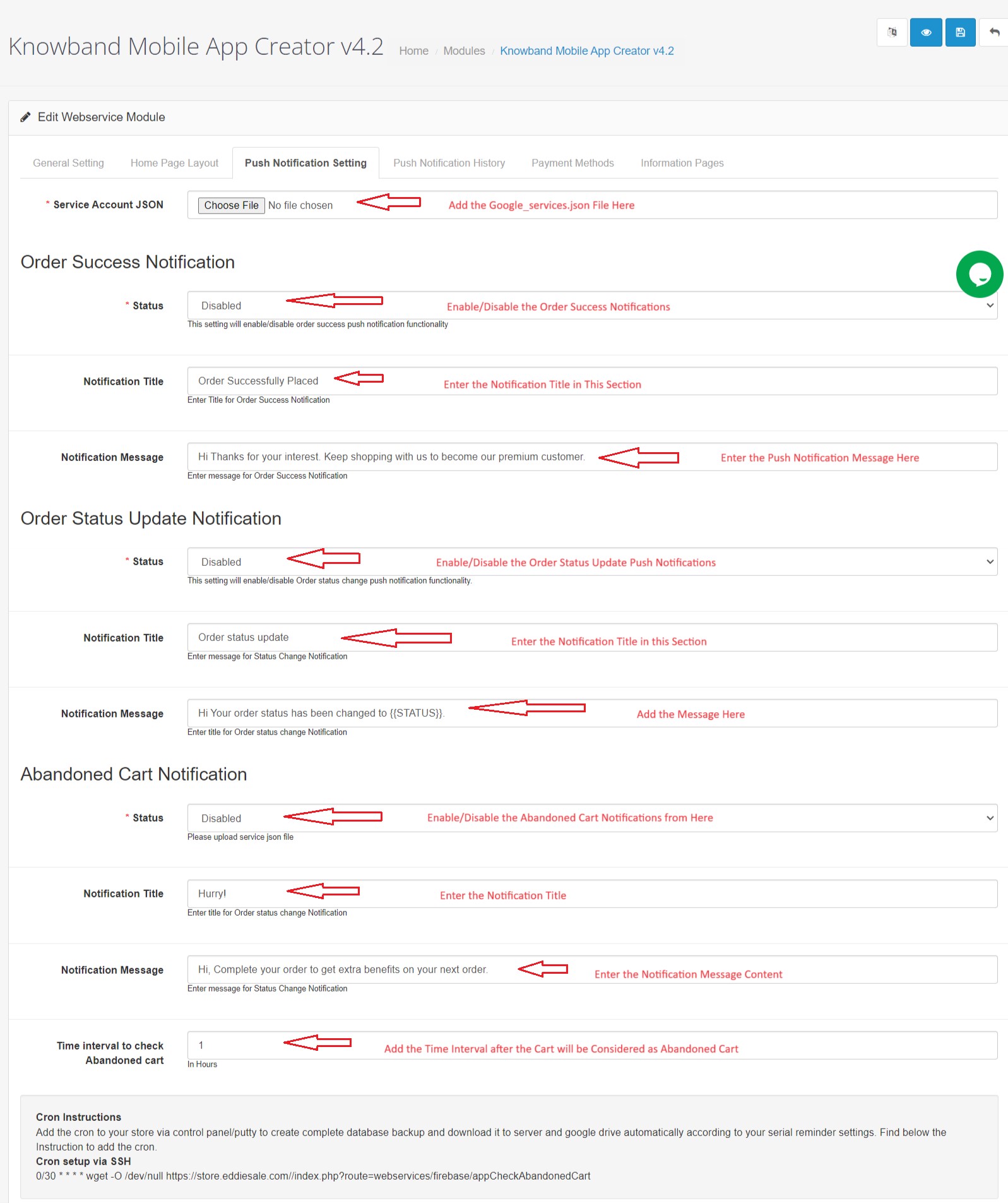
a) Service Account Json: In order to set-up the push notification in both the Android and iOS app, you will have to add the google_services.json file in this section. You can get the same in your Firebase account or can also ask the Knowband support team for the JSON file for your Firebase project.
b) Order Success Notification: Configure an automated order creation push notification which would be sent automatically on the user’s apps who successfully create an order.
c) Order Status Update Notification: Configure an order status update notification which would be sent automatically to the users whenever there is an update in order delivery status.
d) Abandoned Cart Notification: Configure automated abandoned cart notification which would be sent automatically to the users who left their products in the cart.
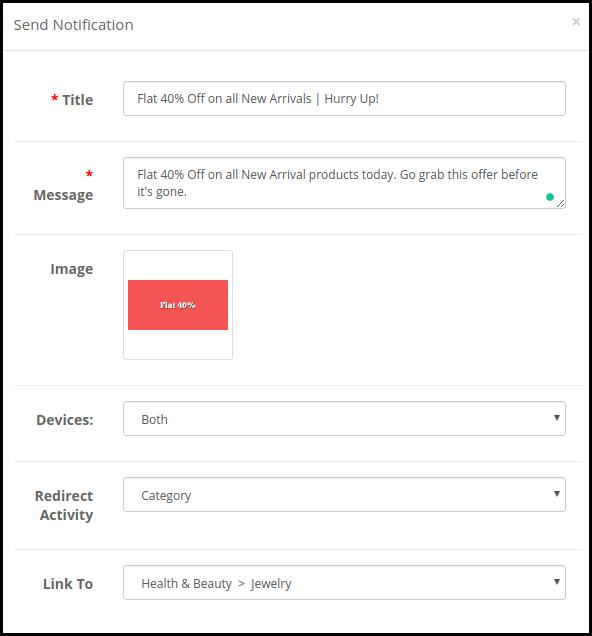
e) Send Notification: The store admin can even send manual notifications & highlight any deal or discount to the mobile app users.
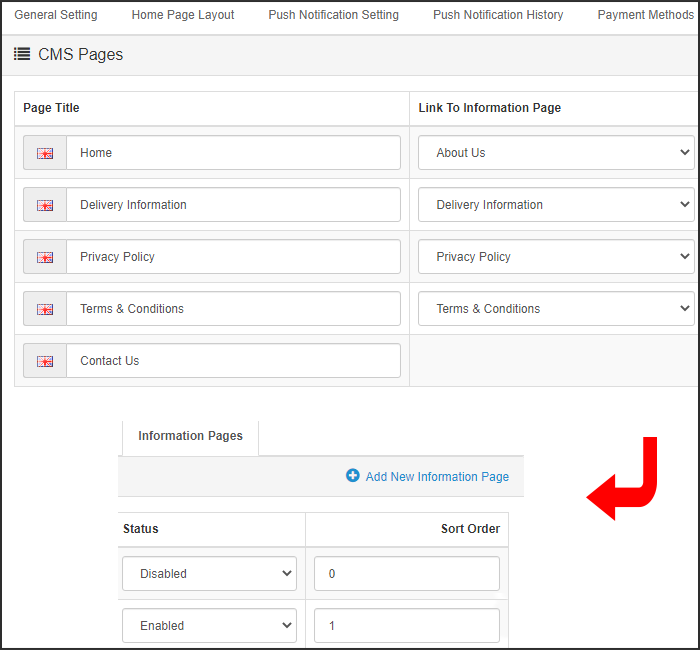
4.4 Information Pages:
This tab of the OpenCart Mobile App Maker allows you to manage the CMS pages on the apps. You can customize the name and landing page of various CMS along with their sort order. New pages can also be added from here if there is a requirement.
4.5 Home Page Layout:
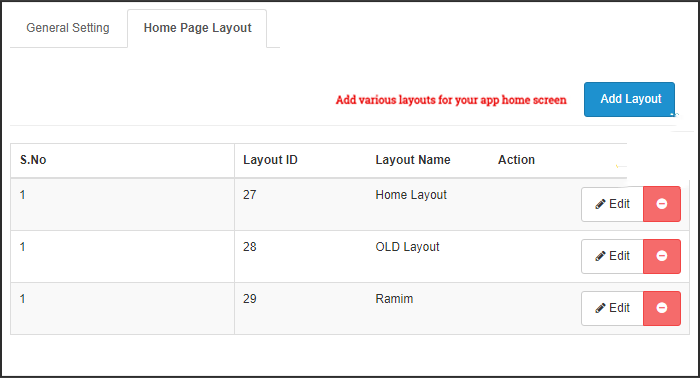
The OpenCart Mobile App Builder allows you to create & save various intuitive & appealing layouts for your mobile app home screen.
After adding the layout, click on Edit option & start adding & configuring various elements for your app home screen.
The store admin can configure the following design elements on the mobile app home screen:
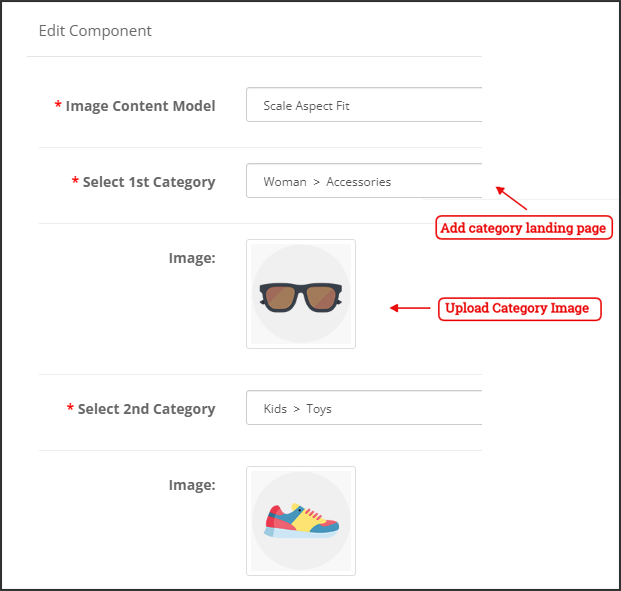
Top Categories:
These are the categories displayed on the top of the home screen in the form of squares. You can configure their images & landing pages from the backend. Maximum 8 such categories are added of which 4 are mandatory.
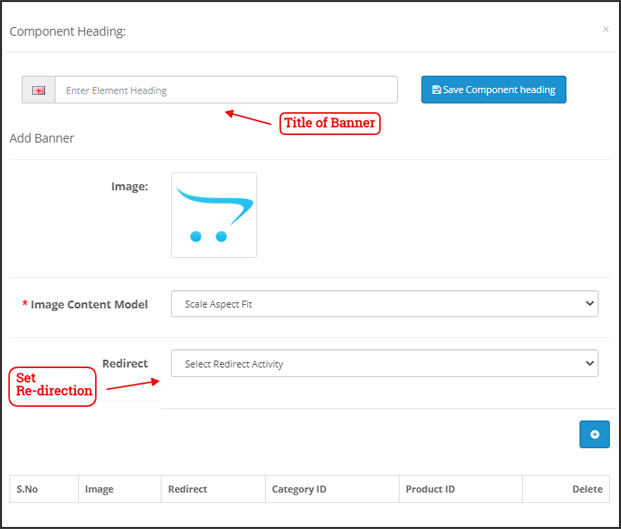
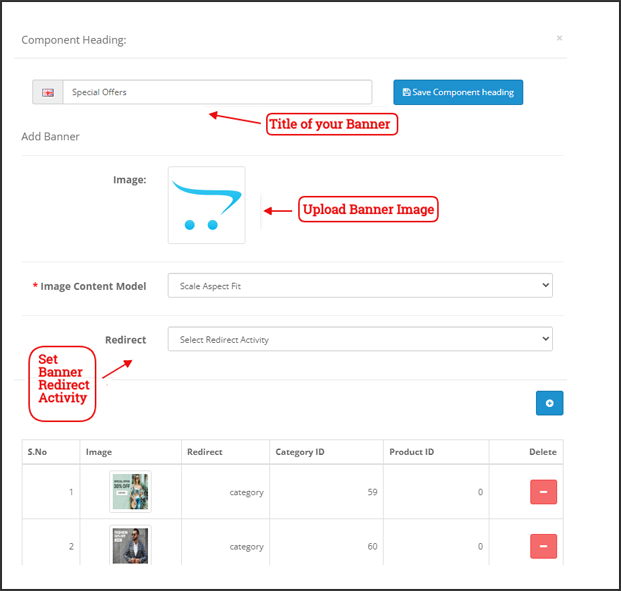
Square Banner:
You can offer a square-shaped banner on the home screen of OpenCart Mobile App whose image & landing page link can set from the backend.
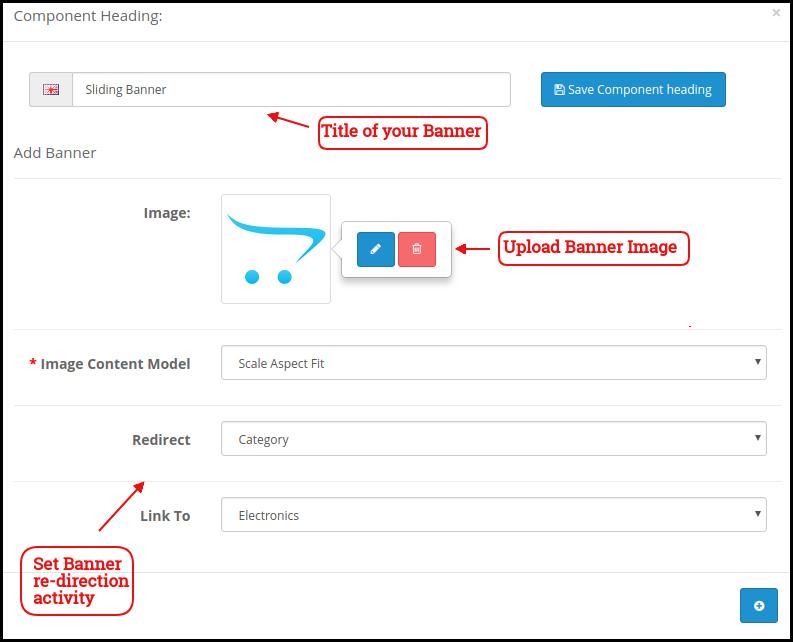
Sliding Banner:
These are the sliders for your home screen which can be configured from the module backend.
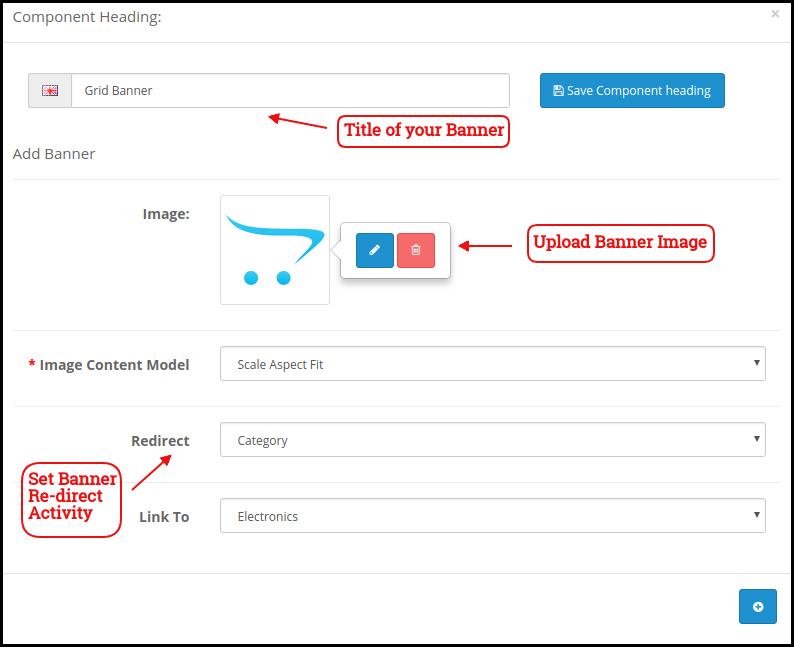
Grid Banner:
These are the banners for the app home screen displayed in the form of a grid listing & can be customized accordingly.
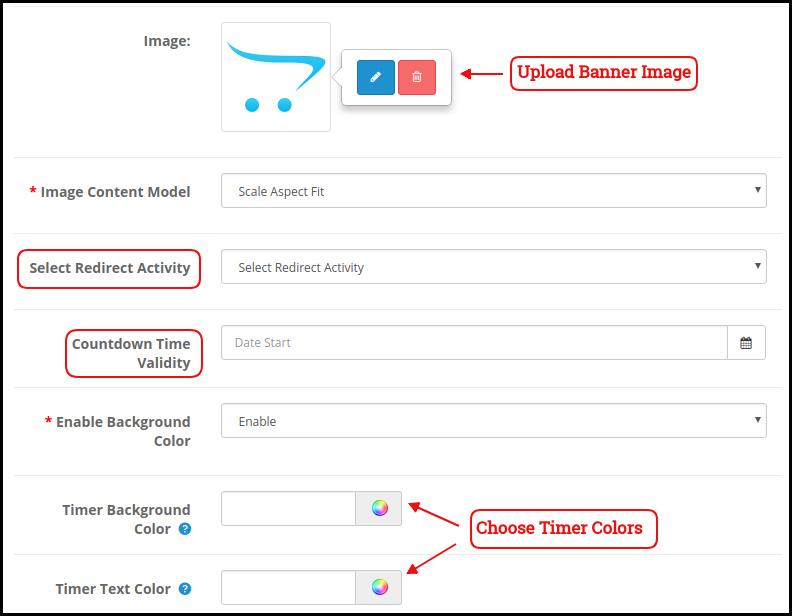
Countdown Banner
The OpenCart Mobile App Maker offers a count-down timer banner in your mobile apps. You can configure the banner image, landing page, and timer from the backend.
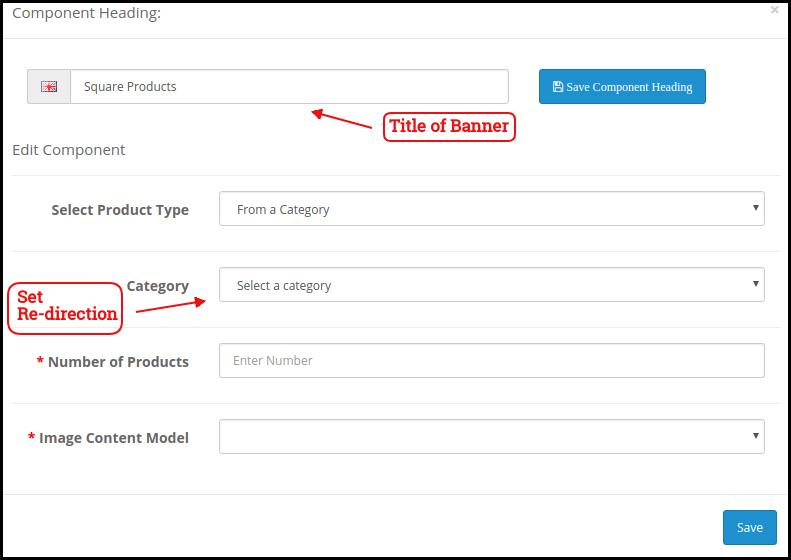
Square Products:
You can even list the products in square listing on the mobile app home screen.
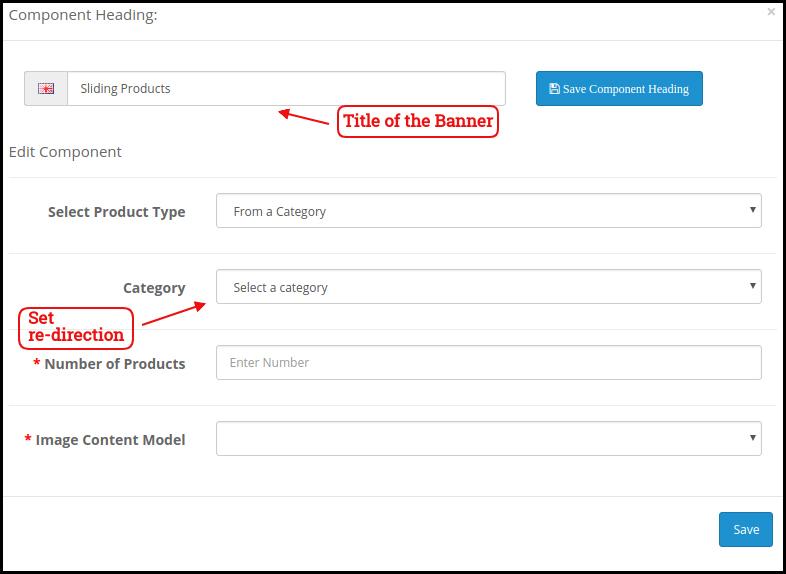
Sliding Products
The products can be displayed in the slider view on the mobile app Home Screen & can be configured from backend panel.
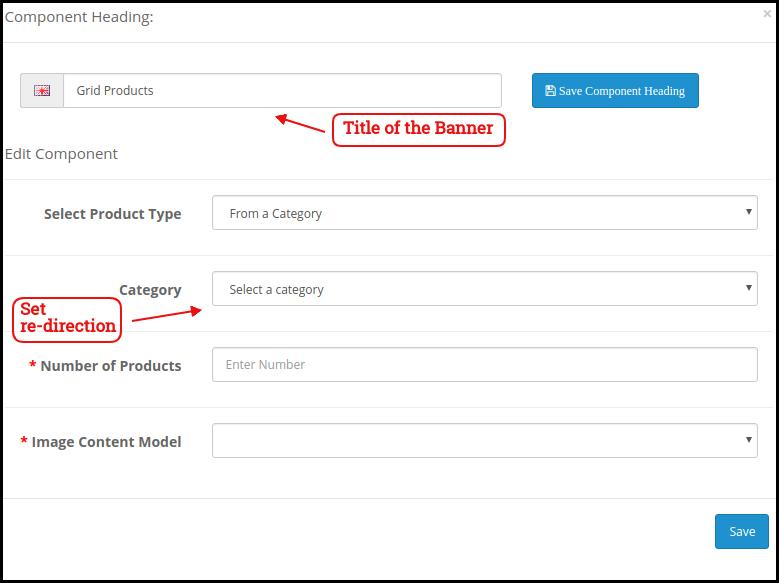
Grid Products:
The products can be displayed in the grid view on the home screen.
Products Recently Accessed:
The OpenCart Mobile App Creator offers the recent products tab on the mobile app home screen which displays recent products viewed by the user. You can just add the element in your layout to display the same on the home screen.
Login/Sign up Pop-up:
The Opencart admin can encourage the customers to keep their account logged in in the apps by showing a dynamic login/sign-up pop-up on the home page of the app.
Advertisement Banner:
The Opencart App admin can select the position of the advertisement banner on the home page with this layout component.
Note: The store admin can add up to 20 elements while designing the layout in the backend panel.
4.6 Advertisement Setting:
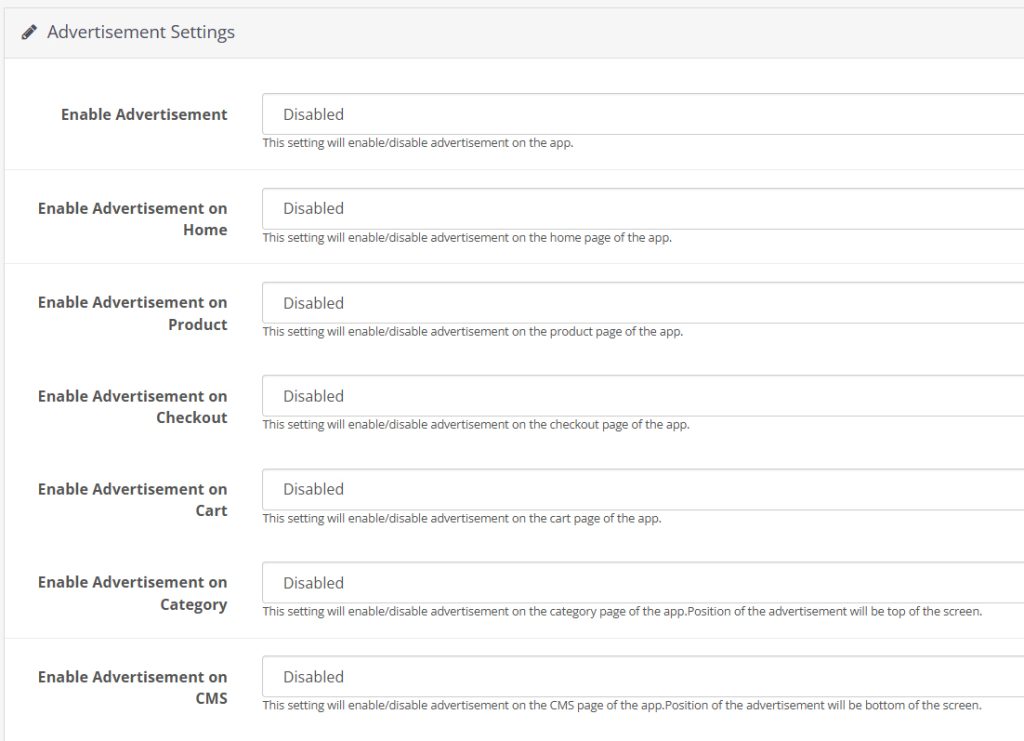
The updated Opencart App Maker allows the store admin to use their apps as an additional income channel by providing in-app advertising features in the apps. The new app comes with Google AdMob integration that allows the admin to show banner advertisements on the different pages of the app.
Enable Advertisement:
This setting will enable/disable the advertisements in the apps.
Enable Advertisement on Home:
If you want to enable/disable the advertisement feature on the home page of the app, you can use the following button.
Home Ad Unit ID:
The admin can find the Ad Unit ID on the Google AdMob console. Once done, you can enter the unit ID in the following section.
Enable Advertisement on Product:
This button will enable/disable the advertisement on the product page of the app.
Product Ad Unit ID:
Enter the Product Ad Unit ID in this section.
Select Product Position:
Using this option, the store admin can select the position of the Ad on the product page. This feature allows the admin to select from the below product image and description or above the add to cart button or related product section, providing more flexibility to the store admin.
Enable Advertisement on Checkout:
Using this button, the store admin can enable/disable the Advertisements on the checkout page.
Checkout Ad Unit ID:
Enter the Unit ID here.
Select Checkout Position:
Select the Advertisement position from here. The store admin can select from various options like top of the screen, bottom of the screen, above the products, and below the shipping methods.
Enable Advertisement on Cart:
Enable/Disable the advertisement on the cart page with this button.
Cart Ad Unit ID:
Enter the Unit ID for the banner on the cart page.
Select Cart Position:
The store admin can select the ad position from here. This option allows the admin to select from below the products or above the products option.
Enable Advertisement on Category:
This feature will enable/disable the Advertisement on the category page.
Category Ad Unit ID:
Enter the category Ad Unit ID.
Enable Advertisement on CMS:
Enable/Disable the advertisement on the CMS pages from here.
CMS Ad Unit ID:
Add the CMS Ad Unit ID.
4.7. Navigation Setting:
The Opencart Mobile App Builder provides the admin with the option to modify the look and feel on the bottom navigation bar of the app. Using the built-in features, the store admin can modify the name, redirection, icon, and color combinations of the tab bar layout.
Here is a detailed overview:
Enable Tab:
The store admin can enable/disable the bottom navigation icons from the following option.
Name:
Enter the navigation icon name here.
Select Navigation:
Select the redirect activity from home, cart, category, search, and profile from here.
Select Image Type:
The store admin can select if he wants to upload a custom image for the navigation bar components or the option to select built-in images is also there under the configurations.
In total, the app provides 5 different bottom navigation bar icons that can be configured with the help of the above-mentioned guide.
5.0 Mobile App Screens:
5.1 Home Screen:
The OpenCart Mobile App Builder offers a dynamic home screen in the mobile apps which can be easily designed from the backend panel. The store admin gets the complete flexibility to design & craft the home screen as per his/her choice. The OpenCart Mobile App Builder offers the following designing elements:
–> Top Categories
–> Square Banners
–> Sliding Banners
–> Grid Banners
–> Square Products
–> Sliding Products
–> Grid Products
–> Countdown Timer Banner
–> Recently Viewed Products
-> Login/sign up Pop-up.
The positioning of these attributes can also be changed as well just with simple drag & drop.
a) Dynamic Layouts: Craft alluring home screen layouts on your own which connect with the users & compel them to make the purchase.
b) Website Logo: Add your store logo in the module backend & display the same on the header of the app.
c) Search: The search option in the OpenCart Mobile App allows the users to search for products without any hassle. Keyword makes it easier for the buyers to get the right product in the least time.
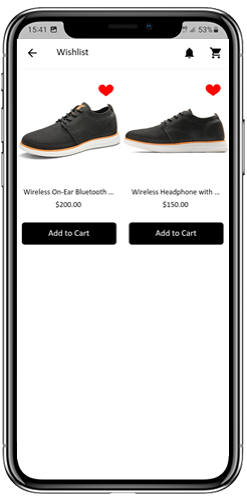
d) Wishlist: Wishlist option in the OpenCart Mobile App lets you bookmark the products regarding future purchase.
e) Shopping Cart: The users can access the shopping cart from the top-right corner of the home screen.
f) WhatsAppYour OpenCart Mobile App users can directly contact you regarding any query or concern through WhatsApp chat option on the home screen.
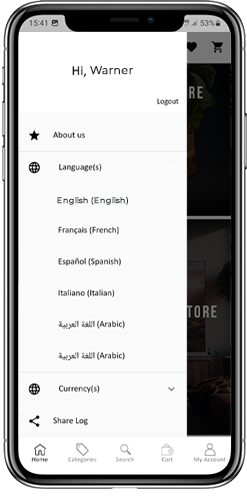
5.2 Accordion Menu (Navigation Bar)
The OpenCart Mobile Apps for Android & iOS come up with easy to use categorization of your store products. The online shoppers get to browse all the categories in the navigation bar along with all CMS pages.
The Accordion menu categories are the same as of your store & it provides the following options:
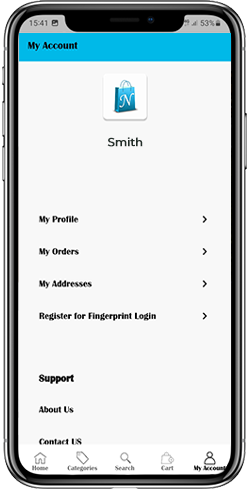
My Account: The My Account screen of OpenCart Mobile App contains all the user information like Personal Details, Shipping Address(s) & Order Details. There is even an option for the users to register their fingerprints. The online shoppers get to view complete personal details from here & update the password as well.
Categories: All your store categories are fetched on the mobile apps as well. Offer a multi-level categorization to your app users & let them browse products with ease.
CMS Pages: All of your website CMS pages like About Us, Contact Us, Terms & Conditions, etc will be displayed here.
5.3 Category Screen:
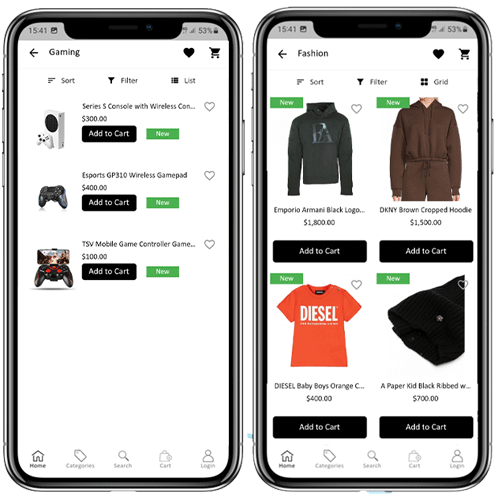
All sorts of categorizations available on your the OpenCart stores will be displayed in the mobile apps as well. The category screen has two views: Grid & List view. The product image, name, and price is displayed for all product listings. The mobile apps with OpenCart Mobile App Maker have multiple filter & sorting options which simplify product search for the users.
Sort: Sort option in OpenCart Mobile Apps allow the users to view products in Low to High or High to Low category.
Filter: Filter down the category products with various attributes like price, cost etc. & search desired products without any efforts.
5.4 Product Screen:
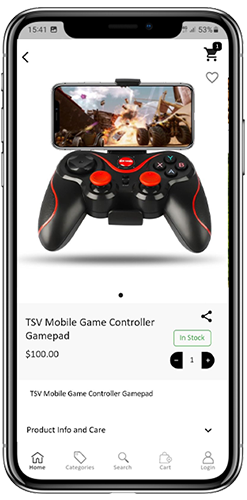
The product screen of the OpenCart Mobile App is as simple & easy-to-use as it could get. Every product has multiple images displayed along with its name & price. The product availability is also displayed as “In Stock” or “Out Of Stock”. The product screen has the following other options:
Product Options: Various options related to the product like size, color, etc. are displayed on the product screen. These options are the same as available on your website.
Short Description: Users get to read the short description of your product to quickly make up their minds. The OpenCart Mobile App displays both short & full descriptions of the products.
Product Info & Care: All the information related to the specific product is displayed under this section. This is the same information as of the website.
Add To Wishlist: The users can even add the products into the wishlist bag from here. The products added in wishlist are bookmarked for the future purchase.
Add To Cart: The Add To Cart button allows you to add product in the cart which can be processed further in successful order creation.
Product Social Sharing: The OpenCart Mobile App has the option to share the products on different social platforms, Bluetooth & e-mail. The users can share the products with their friends & relatives & bring potential users to your store.
5.5 Wishlist Screen:
The OpenCart Mobile App Builder has a wishlist bag allowing the users to bookmark products for future purchases. The users can view the list of all wishlist products from this screen. It has the following options:
Add To Cart:
The app users can add the wishlist product directly into shopping cart with Add To Cart option.
5.6 Login Screen
The OpenCart Mobile App Creator offers various one-tap login options & make sign-in/registration process more seamless:
Login: The app users can authenticate & access OpenCart Mobile Apps using e-mail sign-in credentials.
Sign Up: All the new users can sign-up & create their account on the store from the mobile App. The sign-up form of the OpenCart Mobile App is fully uncluttered.
Login with Phone Number: Your OpenCart Mobile App comes up with a phone number login option as well which allows users to verify OTP & log in without any hassle.
Login with Fingerprint: Your app users also get an option to log in with a fingerprint. This biometric authentication allows the users to login apps in seconds.
Login with Facebook: The users can log in into mobile apps using their Facebook Account Credentials.
Log in with Google: The users can log in into app using their Google Account Credentials.
5.7 Shopping Cart Screen:
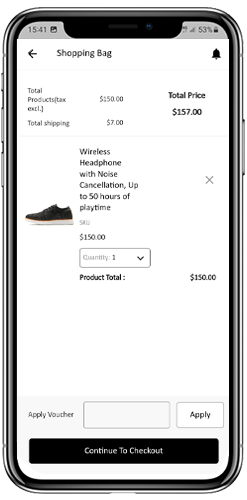
The Shopping Cart screen of your OpenCart Mobile App will display all products added into shopping cart.
The app user’s can view Product name, quantity, total price & shipping cost. This screen has the following options:
1. Apply Voucher:This option allows the users to get discounts & offers by entering valid coupons & voucher running on your website.
2. Total Product Price:The users can view the complete cost of their shopping bag which is automatically updated as per any addition in the cart.
3. Update Product Quantity:The users can even update the specific product quantity.
4. Remove Product:The app users can simply remove the product from the cart.
6. Continue To CheckoutThe app users can proceed further to the checkout & payment screens just by tapping the “Continue To Checkout” option. It will re-direct users on the checkout screen.
5.8 Checkout Process:
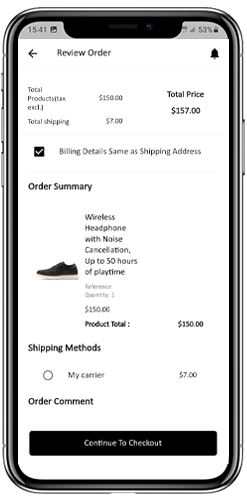
There is a simplified checkout process in the OpenCart mobile app builder. Details like shipping details, billing details, order numbers, order comments, and others are available for customers in the checkout process of the mobile app.
Orders can be placed by just following a few easy steps on the eCommerce mobile apps.
Users can choose a product and add it to their cart. After clicking on the shopping bag, the customer can select the appropriate amount of a product. In addition, mobile app users can view the total number of products and shipping prices.
At the bottom of the same page, the customer also gets the option to apply any vouchers and coupon codes.
2. The user can review the order after selecting the Continue to Checkout option and can see various details. Such as product pricing, shipping cost, shipping address (editable on the same page), order summary (number of products), and total price.
Moreover, the customer can choose their preferred shipping method on the same page. In addition, the user can specify any particular requests or requirements in the order comment field at the bottom of the screen.
3. After clicking on the continue to checkout option, the front end mobile app user will be redirected to the payment method screen. On this screen, customers can choose from all the payment alternatives available on the e-commerce website. The Android and iOS apps consist of a cash-on-delivery payment option by default.
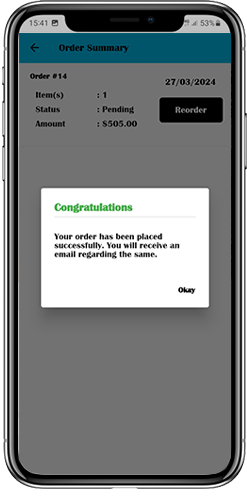
4. Once the user has completed the online payments, he or she will be forwarded to the order summary screen. In which, the customer can view the order status, order number, and amount, along with other information. The order confirmation popup message will also appear on the screens of mobile app users.
5.9 Payment Screen:
The payment screen on OpenCart Mobile App displays both web-view & Flutterapp payment methods. The OpenCart Mobile Apps supports all sorts of website payment options along with PayPal & COD payment methods. Moreover, various other native payment options like PayU, Apple Pay, Amazon Pay, Braintree, Stripe etc. can also be added in your mobile app over a fair price.
5.10 My Account Screen
My Account screen of the OpenCart Android/iOS App allows the users to view the complete account details including a list of all previous orders by just tapping on my orders option. My Account screen has the following other options:
Order History:The users get to know about complete order details created on the app. The order creation date, reference, price & delivery status is available on this screen.
Update Profile:Users can also update their pre-saved profile details like First or last name, phone number & password.
Shipping Address(s):The app users can see the complete list of saved Shipping Addresses. New Shipping address can also be added from here.
Order Details:The app users can view the complete list of the previously placed orders from the app.
Re-order feature:There is a direct re-order functionality allowing the users to repeat the order just by clicking the “Re-order” button
5.11 Order Detail Screen
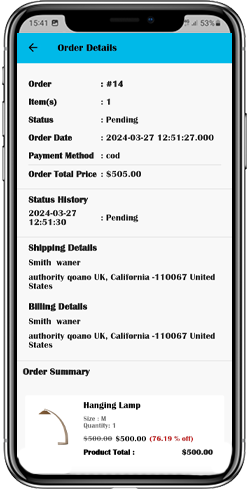
Order details screen of OpenCart Android & iOS App provides complete order detail such as shipping address, product summary, shipping and payment method, and total cost summary. This order detail is of the previous order placed by you. The users can even track the delivery of previously placed orders directly from this screen.
5.12. In-App Advertisement Samples:
The admin can set the advertisement banners on the different pages of the app. Here’s how it will look to your customers.
6.0 Advanced OpenCart Marketplace with Mobile App
KnowBand’s OpenCart Marketplace converts your online website into a fully-fledged marketplace. The OpenCart Mobile App Builder is fully compatible with OpenCart Marketplace extension. This means you can bring the entire marketplace listing on the same OpenCart Android & iOS Mobile Apps. Thus, launch a pair of Marketplace-compatible Mobile Apps with KnowBand & attract a large base of sellers & customers to your store.
–> As the user clicks on the Seller option, he/she is redirected to the Seller page of the mobile store. The user can view the list of the sellers of the marketplace along with their ratings.
–> The customers can click on the name of the seller in order to see his profile and the product being offered. The sellers can log in with their username and password. They are then redirected to the dashboard.
7.0 OpenCart Mobile App Builder for Android and iOS – Video Tutorial
This video tutorial walks you through the complete configuration of the OpenCart Mobile App Builder extension by KnowBand. Learn how to set up your app from backend to frontend with step-by-step guidance on:
General Settings
Push Notification Settings
Payment Methods
Home Page Layout
And many more essential configurations
By the end of this tutorial, you’ll be able to fully configure your OpenCart mobile app for both Android and iOS, ensuring a smooth and professional setup.