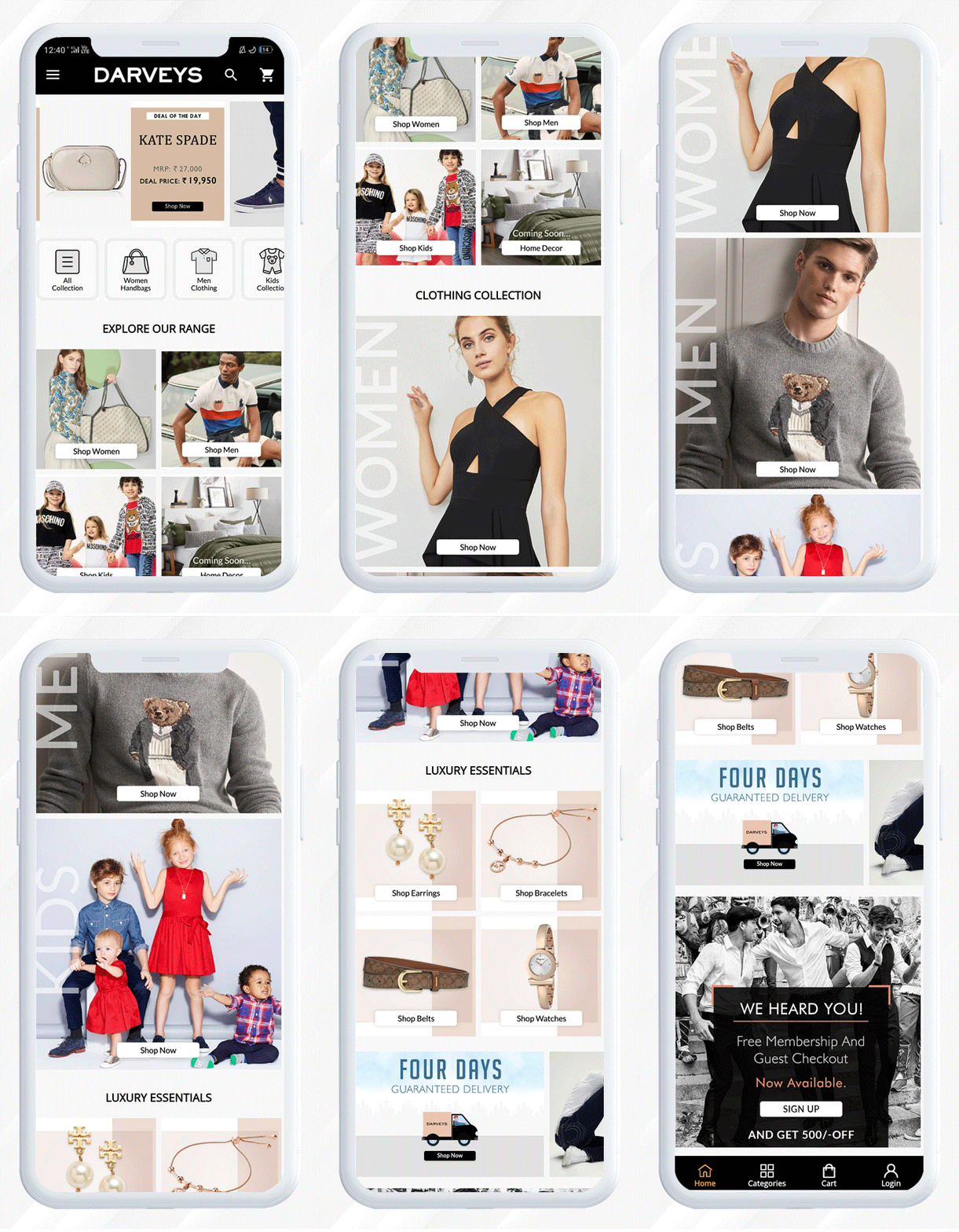
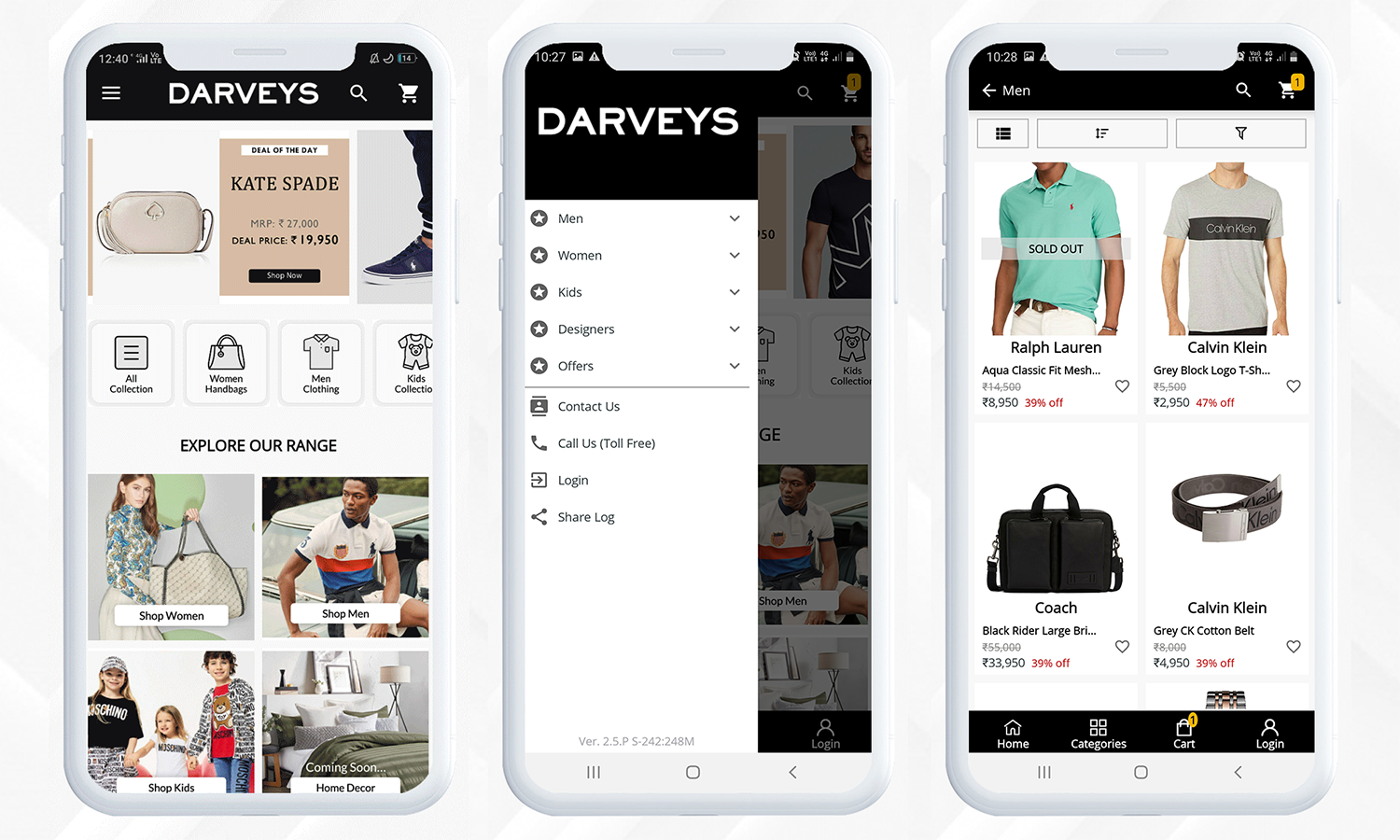
It’s past time to revamp your wardrobe of all things opulent and to indulge in designer fashion with ease and at reasonable prices. This article is a walkthrough example of a luxury brand that has created their mobile app using Magento Mobile App Builder and have been a part of many fashion lovers.
Get to Know the Luxury Fashion Store- The Darveys
Darveys brings a wide range of designer labels from around the world to your fingertips. The online shop is a must-visit destination for high-end clothes, designer handbags, boots, and accessories, among other things. Darveys online store features all of the designers that aren’t readily available in India.
Darveys is India’s one-stop-shop for luxury labels such as Prada, Coach, Jimmy Choo, Diesel, Burberry, Calvin Klein, Michael Kors, Kate Spade, Ralph Lauren, Armani Jeans, Christian Dior, Dolce Gabbana, Fendi, Furla, Emporio Armani, Tory Burch, Balmain, Balenciaga, DKNY and many more.
For creating a Mobile Application for this luxury fashion store, Darveys trusted Knowband’s Magento Mobile App Builder. The mobile app module helped this online discounted luxury retail venture to build a fully-functional application for their store available for both Android and iOs users. Darveys offers Luxurious Men’s clothing, Women’s clothing, Luxury bags, and Luxurious Accessory Brands for brand lovers.
Darveys Mobile App Features that makes the app useful
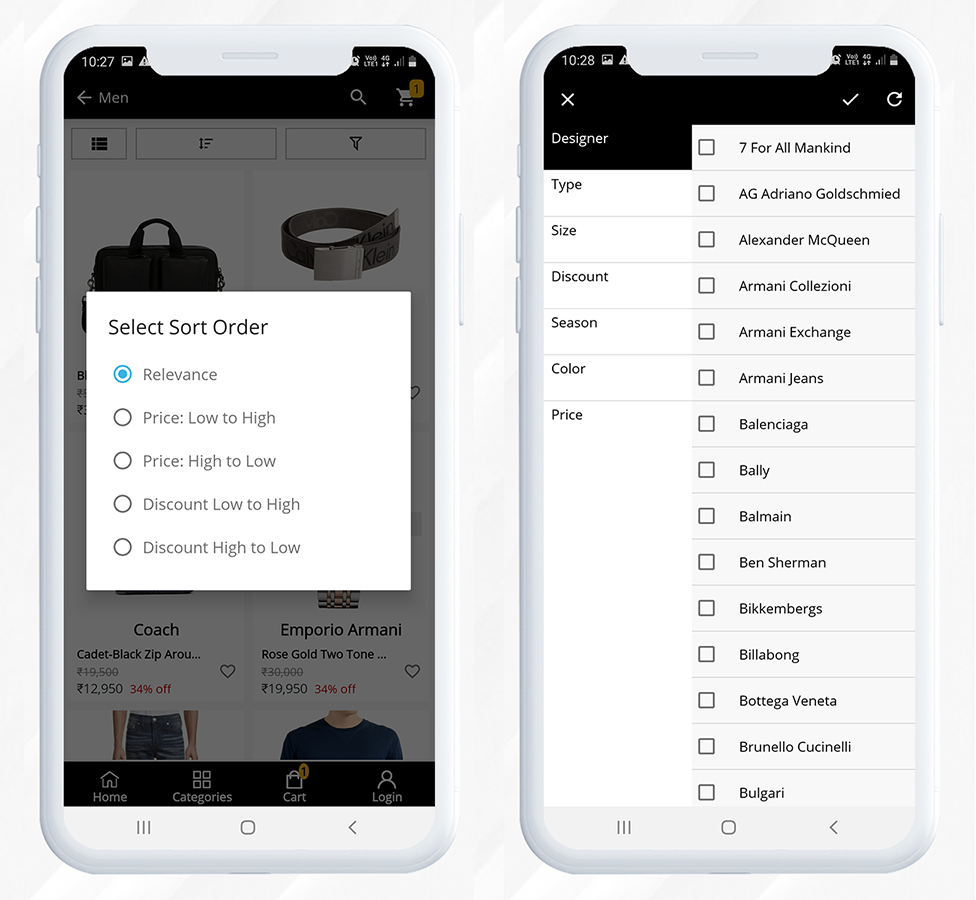
The Darveys mobile application is fast loading and organized. It has a custom landing page and a perfect mobile product page with clear navigations.
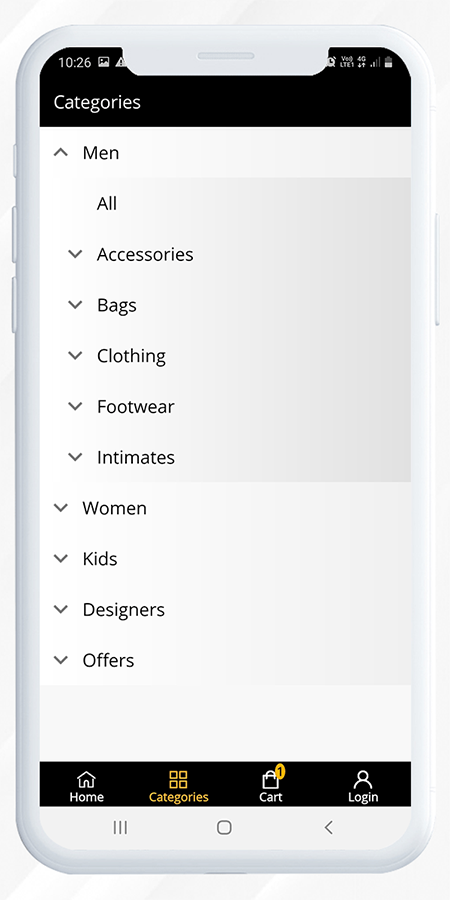
The application has a category tab for users to find the products with ease. Every category has several sub-categories to make the search task easier.
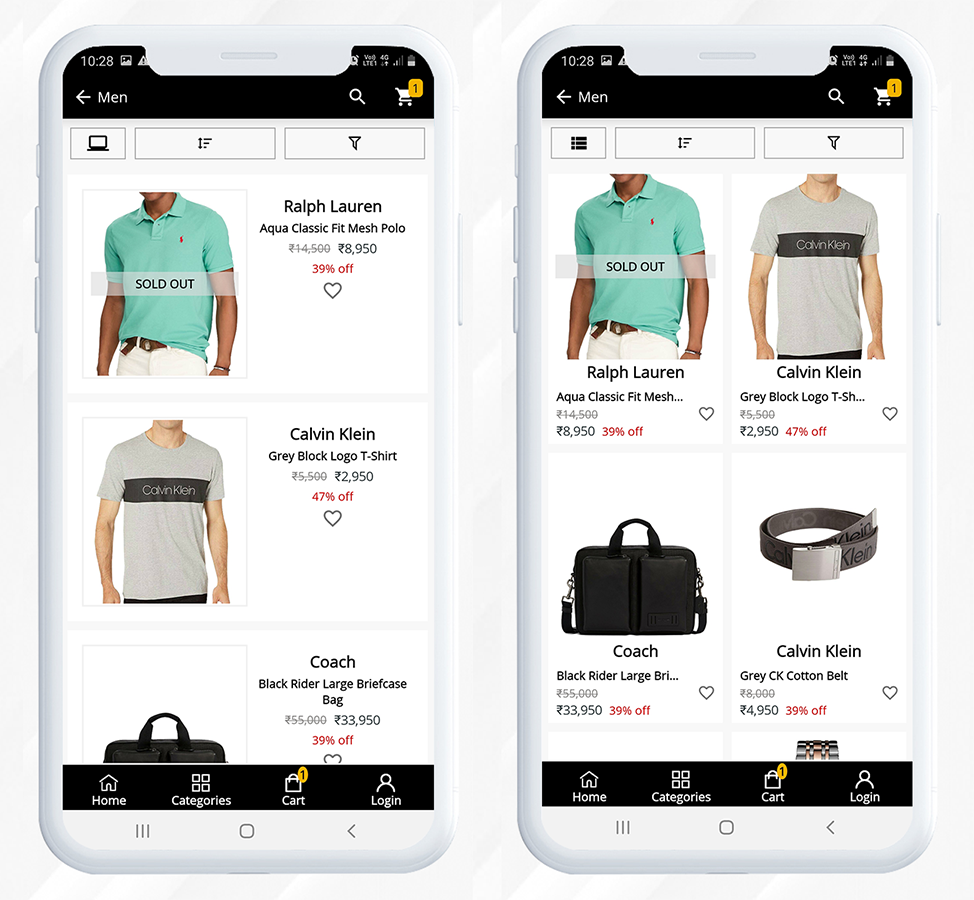
They even run discounts on luxury brands, like Deal of the Day, Flash Sales, Season Sales, etc. Customers can change the layout of the product display according to their convenience.
For improvising the shopping experience, filter and sorting options are provided on the product page.
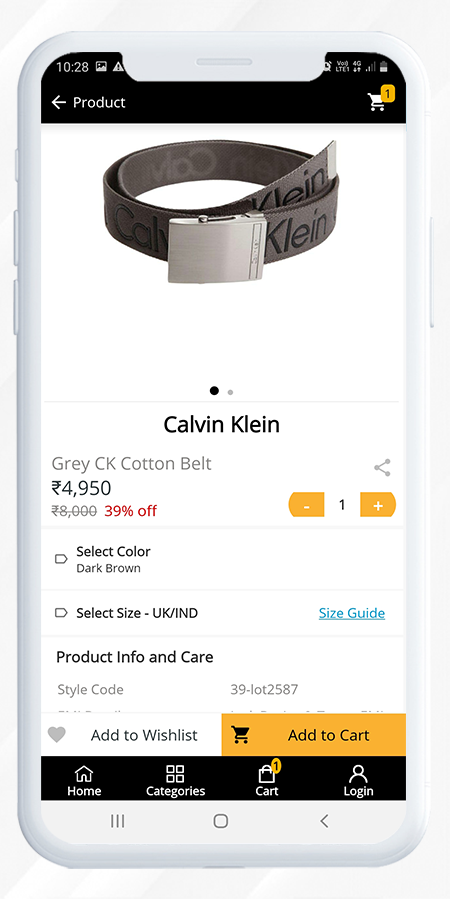
When a customer visits a product, sometimes they like to add that to their future shopping list, and for that, the app has a wish list option.
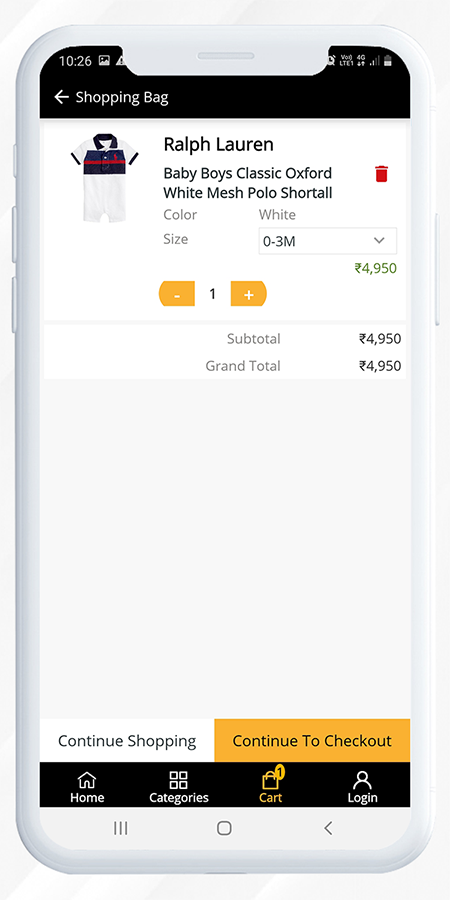
From the product page, the quantity can be updated for the cart. The CTAs are very well defined and any user can simply use the app. After adding a product to the cart, it will redirect the user to the shopping cart page. Now users can either proceed directly to the checkout page or they can continue shopping.
Checkout, Payment and Shipping methods in Magento Mobile App developed for Darveys
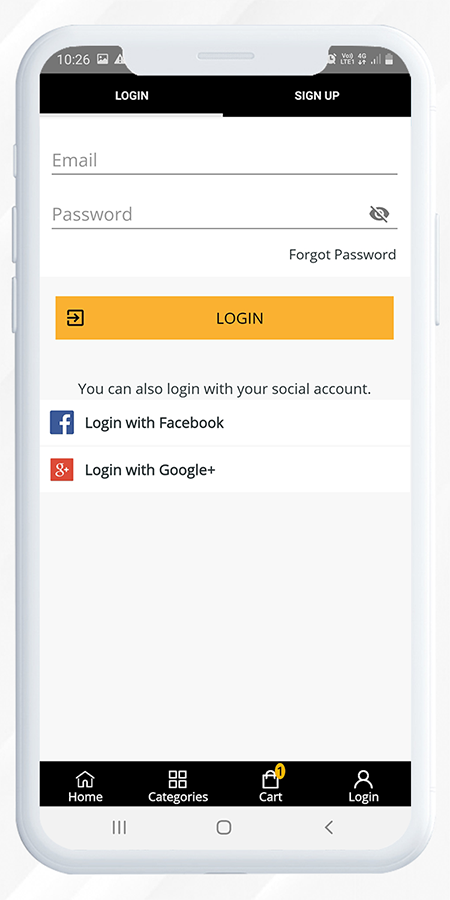
Now let’s see how a user can do superfast checkout on the Darveys Mobile App. If a user is already registered with the Darveys, then he just has to provide an email address and password or he can log in using Facebook or Google+ on Darveys mobile app.
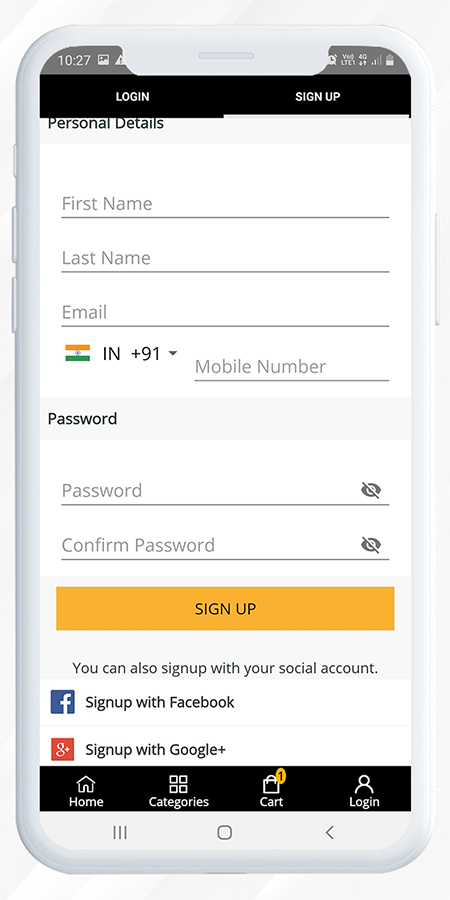
Also, the sign-up process or the registration process is simple and requires few simple steps to complete. To avoid the registration process, a new user can also sign-up using their social media accounts.
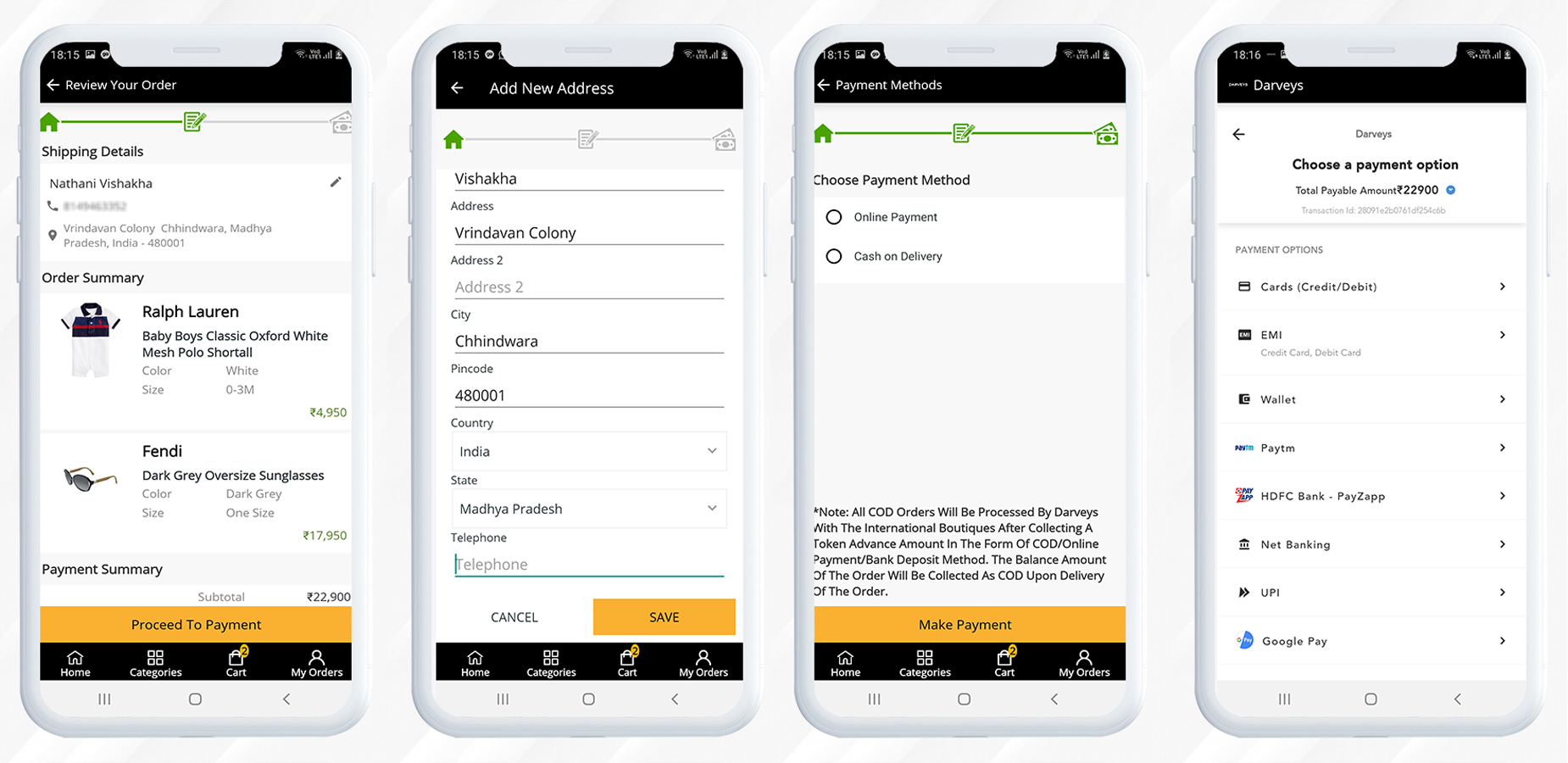
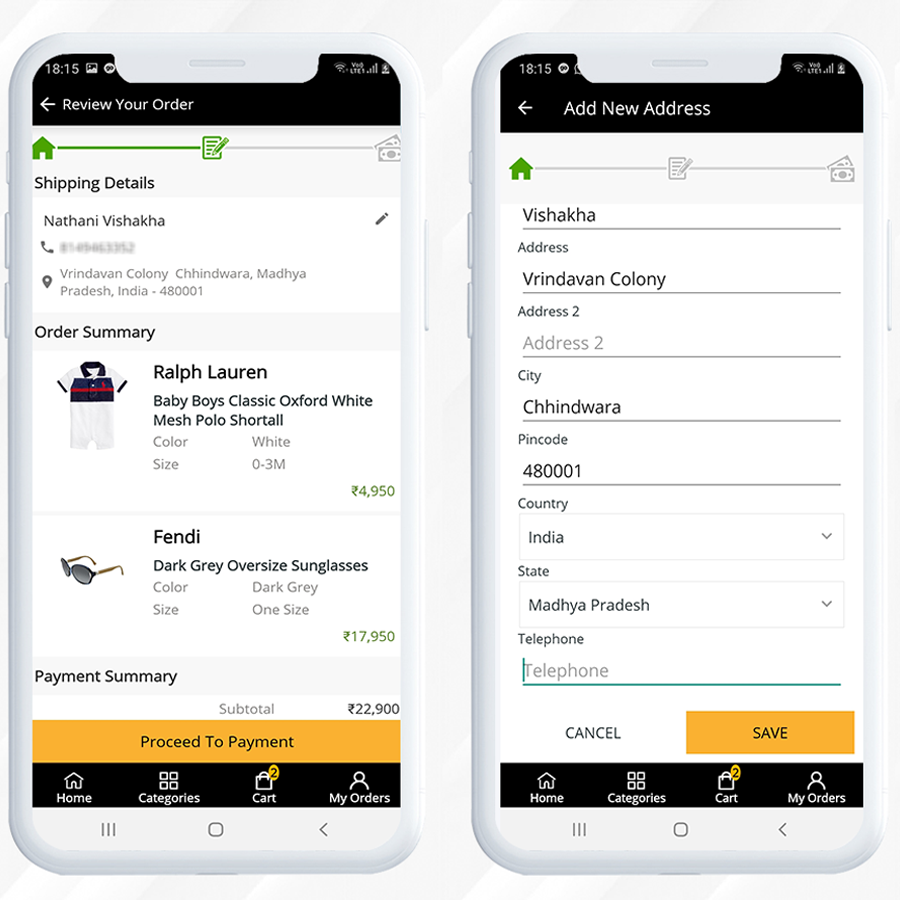
The checkout page of darveys mobile app created with Mobile App Builder has single page checkout design and can enhance the user experience the most. The customer will have to enter the shipping details first.
After selecting the payment method (COD or Online Payment Method) their order will be placed.
Wrapping-up
This mobile app is a live example of Knowband’s Magento Mobile App Builder plugin that is exclusively designed and customized from the customer’s point of view and it helps your business to reach the zenith.
Knowband provides custom mobile app development services and website development services for various eCommerce platforms. We believe in quality and our eCommerce products are trusted by thousands of clients all across the globe.
For any eCommerce module, you can visit our store or you can reach out to us at support@knowband.com via email.
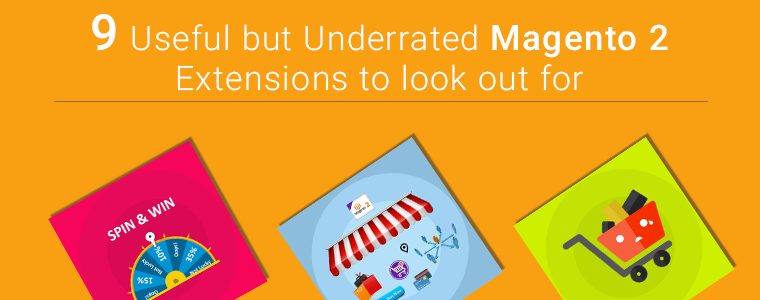
One of the most common questions we get from users is, ‘Which extensions do people normally use on Magento 2 store?’ You often struggle when exploring for the extension which matches your store’s requirement. The holiday season is right around the corner and extensions like One Page checkout, Spin and Win email subscription module, Multi-Vendor Marketplace and Abandoned Cart are the popular Magento 2 plugins which you are already aware with.
In this article, I’ll be highlighting some ‘not so famous’ but best Magento 2 plugins that might help you with your sales, conversions, bounce rate or abandon cart issues.
Let’s dive into it.
1. Custom Registration Fields
I am adding Custome Registration Fields Magento 2 extension at the top of the list. If you want to give personalised customer experience to your users and need more information from the user then you need to add some custom fields. A Magento 2 plugin, Custom Registration Fields is developed to help you add custom fields on the registration page of your eCommerce store. This can be useful to gather more information for providing custom personalisation experience to customers.
2. Earn Loyalty Points- Magento 2 Extension
Online shop owners can now attract more customers by giving them loyalty points on various occasions. You must offer loyalty points to your existing customers or on the new registration because it can get you to achieve customer acquisition. Loyalty Points – Magento 2 Plugin will increase customer engagement and boosts customer retention.
3. Become an Affiliate or Referral
Affiliate and referral programs are sources of passive income. The affiliate and referral program plugin for Magento 2 is highly customisable and feature-rich. Any customer can register as an affiliate and an affiliate customer earn money in exchange for the purchase done through their channel.
The Magento 2 Customer Affiliate and Referral program allow the store owner to display social media icons for sharing the referral link on social media platforms like Facebook, Twitter and Pinterest.
4. Gift Card Manager
One of the best ways to call new customers on your store to shop is by offering them a dynamic product called Gift Card. It is the new preferred way of showering love on special ones on special occasions. Gift Card saves the time of the indecisive user and gives them a choice to present the best on any event.
With Magento 2 Gift Card Manager extension, you can increase your customer base, generate advance revenue and increase brand awareness. The gift card can be sent via email on the desired date or the sender can print it for delivering it physically.
If the customer shares the store product on Facebook, it allows the e-marketer to offer a fixed or percentage-based discount. Customers will get a coupon code. It is the sneakiest way of advertising without any additional effort. This Magento 2 plug-in multiplies the customer base, brings new customer and increases brand awareness.
6. Return manager
If you are looking for a solution to manage your cancelled orders and return orders then Magento 2 Return Manager Extension is all that you need. It allows the customers to raise a return request and add a reason for the return. Customers can ask for a return, refund or replacement.
It reduces the extra efforts and manages the return requests flawlessly. Admin can place the order return button in different sections of the front end. Do not miss out on potential customers because a return policy on eCommerce store brings more loyal customers to your store.
7. Product Size Chart- Magento 2 Plugin
When it comes to buying an outfit, online shoppers mostly have concerns about the size of the product. They aren’t sure which size will fit them perfectly. This inevitably causes customers to place a return request later due to the size issue.
You can incorporate a Product Size Chart extension in your Magento 2 store. A size chart allows you to improve the purchase experience of shoppers and also makes your product page user-friendly. You will observe a downfall in product return or exchange rate.
Incorporate social login option in your checkout page because it reduces cart abandonment by improving the conversion rate graph.
9. Preferred delivery time
Some of our users ask for an extension through which the product can be delivered to their customer on the desired date and time. The Preferred Delivery Time extension for Magento 2 is the one you need.
By installing this extension you can allow customers to pick a desired date and time slot for the delivery of their order. Be it a birthday or an anniversary, now you can deliver a gift on their special day.
Final Thought:
These are the extensions that can reduce cart abandonment, boost the conversion rate, increase your eCommerce sales and give your customers a user-friendly experience. Install these extensions to your Magento 2 store and enhance the customer experience.
Knowband provides Magento plugin development services to enhance the functionality of your eCommerce stores. There are many extensions available on Knowband store for Magento, Magento 2, PrestaShop and OpenCart store. www.knowband.com
Creating an eCommerce store on Magento 2 is easy, simple, and affordable. Optimize store with some of its best and popular Magento 2 extensions to make it user friendly. A fully developed website that can provide customer satisfaction that increases conversion and reduce cart abandonment rate is all that an eCommerce merchant need.
Optimizing your web store pages related to product and checkout will help you boost conversion. Ensure that the visitor land to correct search results on your website. You will only get conversions if you deliver what you have promised. Consider the design, navigation, and product page, the main factors for website optimization which will lead to the result that is ‘purchase’.
I am going to tell you about some most popular Magento 2 extensions you should have for uplifting the sales.
1. Go smart with Magento 2 Mobile App builder
With the evolving technology, it is quite essential to keep up with the trend. There are 5.2billion mobile users in the world and the graph is predicted to go up by 7.22billion till 2023. Make your eCommerce Magento 2 store completely mobile responsive with the Mobile App builder plugin. The module turns the store into a customizable app and the new version has a lot to offer.
This Magento 2 extension allows the admin to edit the home page design and update the layout. This ensures greater customization and improved user experience for the users of the application. Hence these variables increase customer engagement.
2. Magento 2 One Page Checkout Extension to Boost Conversion
The rushed billing counter in a brick and mortar store drive away from the potential customers. This can happen on an online store if your checkout page is not optimized. Replace the long, boring checkout page with a Magento 2 extension, One Page Checkout. It gives you all the required functionality and super-smooth checkout experience to users.
Reduce checkout friction with Magento 2 One Page Checkout. It offers guest checkout and social login for the buyers who do not like to spend extra time in the registration process. A lot of alluring features like multiple payment and shipping choices and customizable layout are the features that make it the best extension for Magento 2 store.
3. Magento 2 Abandoned Cart Extension to Reduce Cart Abandonment
We have got a solution to all your problems and cart abandonment is the one every seller deals with. Abandoned Cart – Magento 2 Extension, helps the seller to keep the track of all the carts which are abandoned by the customer, and its statistics settings allow the admin to analyze the reasons for the same.
The auto-trigger email functionality is the best feature of the abandoned cart Magento 2 extension as it converts the clogged sales by recovering the carts. Reduce cart abandonment with the Abandoned cart plugin.
4. Magento 2 Return Manager Extension for flexible return management
Product return and cancellation takes place in massive number and to manage the returns, every eCommerce website owner needs a flexible management system. The Return Manager plugin also known as the RMA extension is a perfect plugin for this job. Disappointing the customers by not providing an easy return facility will discourage the customers and degrade your brand reputation.
5. Magento 2 Social Loginizer Extension allows quick sign up
5 out of 10 people do not like to fill up the registration form or like proceeding through an easy way like social login. Social Login only requires the email ID of the user and it synchronizes the information from the social media account of the user. The collected information can be used in personalized email marketing.
Magento 2 Social Loginiser extension comes with 12 social media platform options for easy login. It is compatible with One Page Checkout and helps customers to complete the sign-up process in a few clicks. Social login 12 in 1 Magento 2 extension encourages quick sign-up, captures more leads, and reduces cart abandonment.
Now you know how to uplift sales, reduce cart abandonment, and minimize the checkout friction. There are modules that are designed to increase user experience and built customer loyalty. The Review Reminder and Incentive extension is one that increases customer satisfaction.
The seller can offer Incentives to collect Product Reviews and Rating in Magento 2 stores. Giving customers a source of passive income can be beneficial. 92% of the visitors prefer reading the product reviews given by other customers to make the purchase decision.
7. Magento 2 Spin and Win Extension increases email subscribers
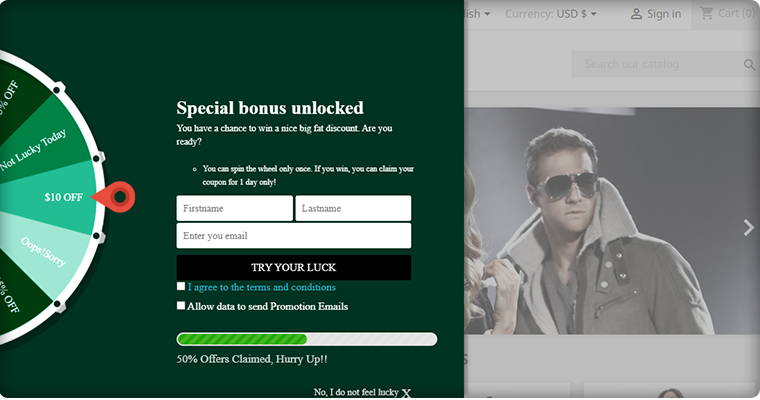
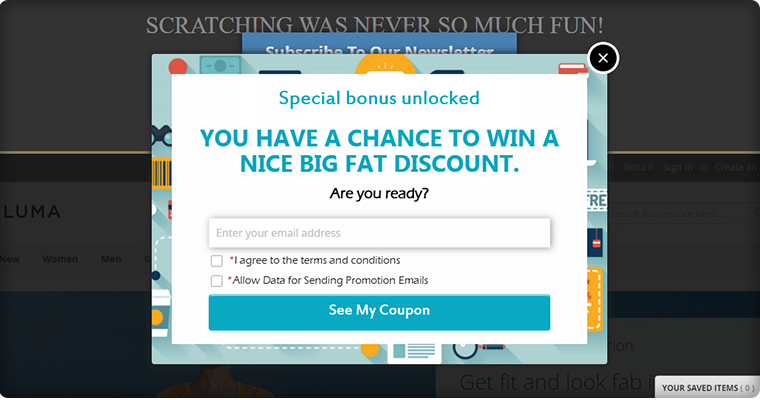
Add a fun game element to your store for gathering more email subscribers for the newsletter. Spin and Win – Magento 2 extension adds a gamified interface to the front end. This is a 3 in one plugin which can be used as an entry popup, exit popup, and email subscription module.
Attract more customers to your store with this customer engaging extension. It helps you increase the conversion rate and customer retention. There are many unique features that make it a part of the top 10 Magento 2 extension list.
8. Magento 2 Store Locator Extension allows the in-store pickup
By staying in their comfort zone and saving both time and energy, shoppers are happy shopping online. Many customers, however, believe in shopping online and picking the orders physically from the store. Online retailers should try to apply the BOPIS factor, i.e. Buy Online and Pick-up In-store, on their website.
The demand for one-click shopping and in-store pickup is increasing. The Store locator and pickup extension of the Magento 2 store detect the Geo-location of the customer to show the most appropriate recommendations for in-store pickup. Add Store Locator extension to Magento 2 store to keep up with the trend.
9. Magento 2 Affiliate and Referral program Extension
Give incentives or commission to the customers for new user registration, order placement, or both. Knowband developed an extension for the Magento 2 Affiliate and Referral Program that enables the customers to have an opportunity to become an affiliate and earn a profit. With this program, the owner can increase brand awareness at a low cost.
Affiliates have an opportunity to share vouchers with their referrals. These vouchers can be used during the checkout process. Customers are always looking for discounts and sellers are always looking to get more potential customers. Offering Incentives and making them an affiliate can solve both the purposes.
10. Magento 2 Multi-vendor Marketplace Extension
With such rising competition, keeping up with the market’s speed & trend is important. Today, the multi-vendor marketplace is attracting lots of vendors. The COVID 19 triggered the situation and now every brick and mortar is willing to sell online. This is the perfect time to convert your eCommerce Magento 2 website into a Multi-Seller Marketplace with a Multi-vendor Marketplace extension.
You will get a passive source of income and sellers will have a platform for their product to sell. The multi-vendor market place is a win-win idea booming these days. The extension has separate dashboards for admin and seller. Easy seller handling, product management, and many such features are incorporated into it. There are various types of online marketplaces and you can start your own with Multi-Vendor Marketplace Extension.
Wrapping up:
These are the top 10 extensions that can be a great fit for your Magento 2 store. I would recommend you to add them to your existing store for boosting sales, improving conversions, and enhancing user experience. To know more about these extensions, you can visit the Knowband store. All the Knowband extensions are designed to increase UX and are easy to configure.
Online shopping from eCommerce websites is now a very common way of shopping. With changing time, the online shopping and pick up in-store concept is gaining thrust. People often opt for home delivery but many are opting for in-store pickup too.
Shoppers love picking their orders from the brick and mortar store because they don’t want to wait for it to deliver which may sometimes kill the excitement if delayed. Buy online and In-store Pickup is the best option for the impatient ones.
You can start offering ‘Click and Collect’ services on your store by incorporating ‘Store Locator and Pickup Extension’ to your existing website. The module developed by Knowband is easy to install and configure. It is catered specially for the merchants who want to allow the in-store pickup to their customers.
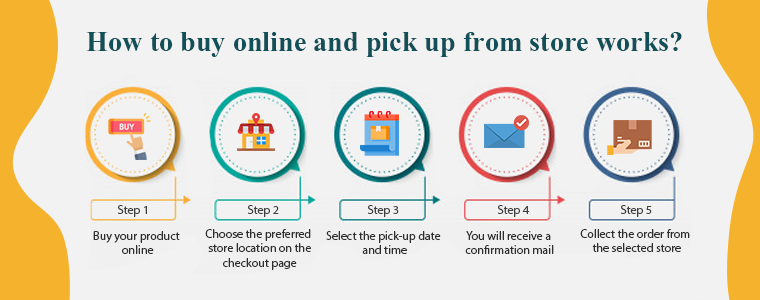
How does buy online and pick up in-store works?
The process of Buy online and Pick up in-store (BOPIS) also known as click and collect is simple and you need to follow the steps mentioned below:
Step 1: Buy your product online
Buy your product online through the website or mobile app of the store you want to purchase from.
Step 2: Choose the preferred store location on the checkout page
After the first step, select the near-by store from which you want to collect the order.
Step 3: Select the pick-up date and time
Following that, you have to mention the date and time on which you will be collecting the order.
Step 4: You will receive a confirmation mail
After the successful checkout, you have to wait for the confirmation mail sent by the store admin.
Step 5: Collect the order from the selected store
In the meantime, the owner will pack your desired items for you.
Yay!! Now you can go and pick-up your order on the selected date.
Sellers are in advantage with ‘Click and Collect’
Shoppers want access to products instantaneously. They always look forward to finding a product that is available for instant purchase and ‘Click and Collect’ will lend a helping hand to sellers who believe in customer satisfaction.
The store locator and pick-up module are integrated with Google locations and allow customers to pick up from the nearby store. Some of the major benefits of buy online and pick-up in-store are discussed here.
1. Save time and money on shipping
Higher shipping costs and delayed deliveries are a reason for cart abandonment. Click and collect service saves the shipping cost and encourages more customers to buy online. The merchant even saves money which is spent on the delivery channel.
No delivery boy is required, no transportation charges and moreover you save time.
2. No more delivery failure
Late delivery can affect customer satisfaction and it might cause you, potential customers. But, if a customer purchases the product online and collects it from the store, there won’t be any delay or delivery failure. They can buy online and pick up from the store at their convenience.
3. Increases Overall Sales
Even if a small customer base of your online shoppers converting to click and collect will uplift your sales. In reality, click-and-collect or BOPIS retailers reported an average sales growth of 20%.
• Balance In-Store Inventory
Leveraging BOPIS from nearby brick-and-mortar locations enables order fulfillment. Geolocation intelligence identifies the closest store with the item in stock for delivery after a customer places an order online. If the product in stock is not available in local stores, retailers can conveniently import the items from another store location that has the item available, speeding up the process.
• Increases Average Order Value
When a new customer arrives at your store, there are chances that he will purchase more products from your brick and mortar. This increases the average order value (AOV). Buy online and pick-up in-store hence increases overall sales.
4. Fewer Product Returns
Product returns are the problem faced by every merchant being it small or a big brand. Allowing customers to purchase online and collect the order after trial can help you reduce the number of returns. You can promote this on your online store to grab customer attention and believe me, this will yield favorable results.
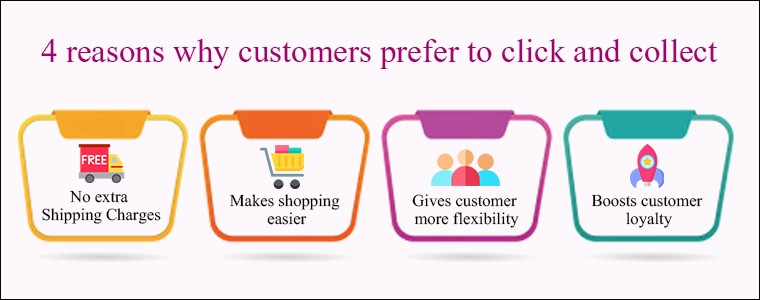
4 reasons why customers prefer Buy online and Pick up in-store
1. No extra Shipping Charges
Customers do not have to pay charges for delivery or fast shipping. They can buy online and pick-up the order at their convenience from the nearest store without any hassle.
2. Makes shopping easier
Many customers afraid to shop from new websites but a store with ‘buy online and pick up in-store’ which is present in their vicinity makes it easier. Let customers decide what they want, when they want it and how they get it. Offering freedom to purchase online, home delivery, or in-store pick-up is advantageous this is everything they are looking for. No late delivery and no more waiting!
3. Gives customer more flexibility
Comfort and convenience are what every human is catering for. Online shoppers want retailers to make purchasing their products and services simpler. Consumers want websites and retailers to work together better as well. An extension like store locator and pick up allows customers to shop any time in their comfort zone and allows them to pick up the order with their convenience. This is the flexibility every customer is looking out for.
4. Boosts customer loyalty
Customer loyalty is a result of customer satisfaction and overall customer journey while purchasing from your store. A business doesn’t work without potential buyers and the factors which can cause you customer opportunity are not an issue anymore.
Since store locator and pickup extension overcomes the major bounce rate issues like extra shipping charges and late delivery for impatient buyers, this is a highly recommended industry trend to implement in your store.
Knowband’s Store locator and Pickup Module for an eCommerce store
You can easily start ‘Buy Online and In-Store Pickup’ in your existing eCommerce store. Knowband is a specialized eCommerce platform that has developed several solutions for demands and requirements that an eCommerce store owner desires. The store locator and Pickup Module is the one designed to attain the need of launching the click and collect option in an online store.
It is integrated with Geolocation functionality and the store owner can easily generate Google API key for the Google maps.
The details like the name of the store, owner details, contact number, and store timings can be displayed using Store locator and Pickup Addon.
The module allows users to select the desired store location, date, and time for order pick-up.
The Store locator and Pickup Module is available for the following platforms:
Any online website on these platforms can incorporate the plugin and start offering click and collect to increase foot traffic in brick-and-mortar stores.
Conclusion:
If the retailer allows connectivity between its online and in-store shopping networks and provides the opportunity to provide the consumer with a real-time feed of available inventory, in-store pickup is not difficult. This immediately lets the customer know if he/she can pick up the order from the desired store right away.
You can implement BOPIS- Buy online and Pickup in-store for better customer experience, grow sales, and to keep up with the trend. Undoubtedly!
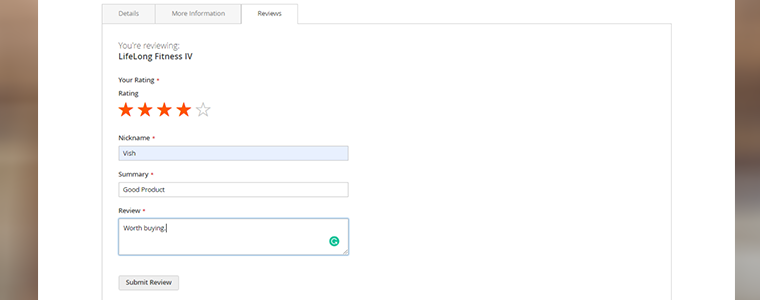
Online reviews and ratings are a medium for customers to share their feedback with the seller and the world. In Magento 2, the product rating is an inbuilt feature but reviews play a pivotal role in increasing sales and decreasing product return rates. How about offering incentives for a review? For collecting more reviews you can offer incentives as a reward to the customer with Magento 2 Product Review and Rating Extension. Genuine reviews build trust through transparency and Google SEO prioritises the company or products which includes product rating and reviews.
In this article, we will show you how to attract more visitors to give product ratings in your Magento 2 store in exchange for the incentives. A survey says 92% of the consumers now read online reviews. There is a possibility that the product is getting less than 3 stars or poor reviews which drives customers away. This is a chance for the seller to accept the flaw and work on the product issues based on genuine reviews.
It is important to have a review section on the product page as 88% of online shoppers take the purchase decision based on star ratings and reviews.
Magento 2 Product Review Reminder and Incentives Extension collects and displays valuable reviews which encourage other customers to buy the same product. Offer Incentive to collect Product Review and Rating with Magento 2 extension.
Offer Incentives for a review
With Magento 2 Product Review and Rating Incentives Extension you can offer some amount as an incentive to the visitors or the existing customer for dropping a review for the product. Store admin can approve or disapprove the review. After the approval by the admin, that person will get an incentive as a reward.
Email Notification informing if you are lucky to get the incentive
An email notification will be sent to the reviewer if admin approves the review and accepts it for incentive reward. The Magento 2 product review and rating extension have some pre-crafted email templates for:
A notification mail to admin will be sent if someone writes a new review
When a review is accepted and incentives are included
A template when admin accepts the review and exclude incentive
An apology mail template when admin disapproves the review
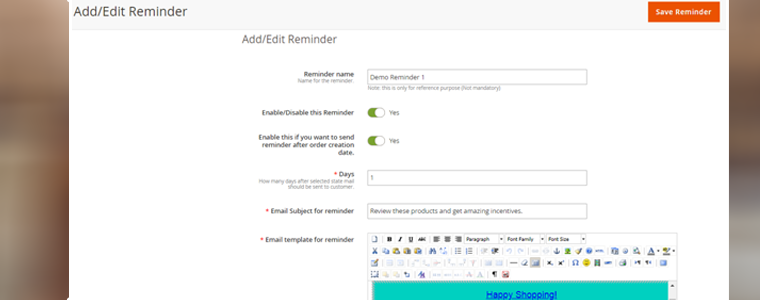
Entice the customers with an incentive-plan reminder email
A custom email setting for the reminding about the incentive plan against a review is an alluring feature of Magento 2 product review and rating extension. Admin can set a time and shoot a follow-up mail to the customers reminding them about the review incentive plan.
Exclude product from review booster and incentive system
If Magento 2 store wants to exclude some of the products from review booster and incentive system then he can. The review and rating system for Magento 2 allows admin to configure the exclude settings by adding products or categories for which he/she doesn’t want to offer an incentive amount.
Keep the record
There is no harm in analysing the reports and keeping the track of product reviews reports and customer’s reports. With Magento 2 product review and rating incentive system, the owner can see the review reports, product review reports and customer review reports with the incentive details.
Why Review Reminder and Incentives Extension matter?
Reviews can be negative or positive and before buying a product people choose to read both. Try approving mixed reviews otherwise, the customer finds it suspicious.
There are some advantages of having a review system in your eCommerce store:
Transparency and trust: It builds trust through transparency and customers prefer buying products with good reviews.
Reward with Incentive: Allows customers to earn incentives by giving feedback
Google might show you on top– Google improves your SEO ranking in search results if your website has a rating and review system.
Lower returns: Customers rely on feedback for purchase and it has been observed that the return rates decrease for a reviewed and rated product.
Genuine feedback: You can improve the quality of your product by observing the reviews because genuine feedback allows you to analyse the faults and issues of the product.
Final Thought:
As I mentioned earlier that a review can be positive or negative and I prefer reading negative reviews over positive ones. Not because I rejoice or derive pleasure from the misfortunes of others but to find out if the product is worth buying or not. Magento 2 Product Review Reminder and Incentives plugin is a good option if you believe in close-review system because the owner can approve the reviews before displaying them.
If you are looking for a product review extension for Magento 2 store then increase your sales and conversions with this perfectly designed module. The Product Review Reminder and Incentives module is also available for PrestaShop and Magento platform!
If you have any queries or suggestions then feel free to drop one in the reply section. Or if you need any assistance, you can contact us at support@knowband.com
It’s 2020 & by now most online businesses have realized the importance of mobile applications. Mobile devices, especially smartphones, always remain switched on & connected to the internet & more importantly, they are in quick reach of the smartphone users. For businesses, this makes mobile devices the best medium to be present.
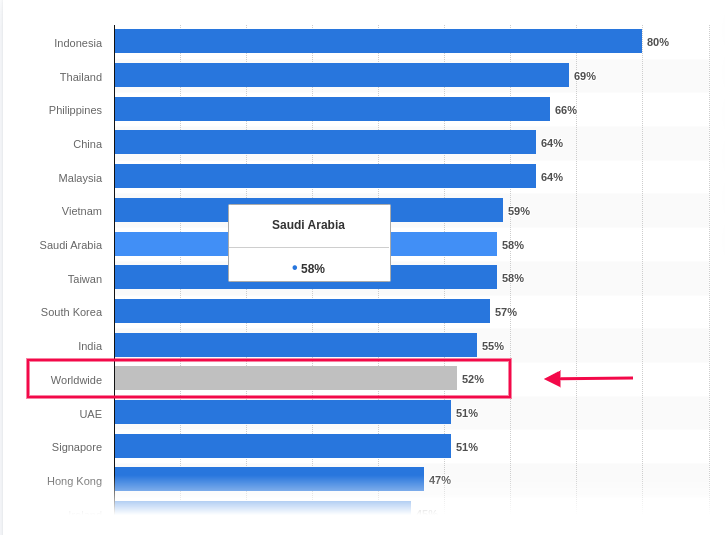
Based on a report by Statista, the global average percentage of online shoppers, who used their mobile devices to shop online, was 52%. This clearly states the urgency to provide a better shopping experience on mobile devices. Native Mobile Applications & Progressive Web Apps are a great solution to this.
Out of these, Progressive Web Apps (PWA) have been around for only 5 years now but in just a short amount of time, they have gained huge popularity among smartphone users as well as businesses. Upon transitioning to PWA, almost every eCommerce business has reported an exponential increase in conversion rates, app downloads & a lot more. You can check out the reports of Starbucks, Flipkart, Alibaba, etc. for your reference.
Building & launching is indeed very convenient for e-merchants now because of technological advancements & automated tools. In this write-up, we will elaborate on how you can also grow your eCommerce business, built on Magento 2, using a readymade tool.
The Magento 2 PWA Mobile App Creator extension is that ultimate tool. Whether you have a single-vendor Magento 2 website or a multi-vendor Magento 2 website, you can easily use this PWA maker tool on your website to automatically build a PWA Mobile App for your online store.
Doesn’t it seem magical? Well, it’s just the perfect use of web technologies.
How Does A Magento PWA Mobile App Builder Tool Work?
Just like any other Magento 2 extension, this PWA Maker tool is also a Magento 2 extension. Upon installing this extension on a Magento 2 website, it builds a customizable PWA derived from the data of that website. This keeps both the website & the PWA in live synchronization with each other.
Speaking of a customizable PWA, the Magento 2 PWA Maker tool provides the store-admins with various easy-to-use editing tools on the backend using which they can customize their PWA while it’s live. There is no need to worry about any downtime. Also, on the user-end, all the best & latest UI/ UX elements are equipped to provide an excellent user experience.
How Can Netizens Install A PWA?
Progressive Web Apps aren’t published in any of the app stores. Instead, they are made live on the website (on which this extension is installed). This means whenever netizens visit such a PWA active mobile-website, they are greeted with an ‘Add-To-HomeScreen’ popup at the bottom of the screen. Once they click it, the PWA automatically gets installed on their mobile device & appears to work just like any other mobile app on the mobile device.
How Store Owners Can Launch A PWA Using The Magento 2 PWA Builder?
Step 2: Install this extension on your Magento 2 website.
Step 3: Fill the app pre-requisite form & review your app before making it live on your mobile website.
Features Of The Magento 2 PWA Builder Plugin:
#1. Simplified PWA Admin Panel:
The store owners and admins can easily configure their PWA App, set its color theme, logo, design the home-page layout, & do a lot more without a hassle. For their home-page, they can use any of the predefined components (like sliders, banners, product blocks, countdown-timer banner, etc.), configure it & rearrange them the way they want.
#2. Unlimited Push Notifications:
Store admins can send an unlimited number of push notifications to their app users and keep them engaged. Admins can also send personalized notifications & also automate & schedule some of the common ones like the abandoned cart notifications, order status notification. Admins can also use relevant graphics and catchy messages with desired redirect links on your Push Notifications.
#3. Multi-lingual & Multi-currency Support:
The Magento 2 PWA App built using this tool supports multiple currencies and multiple languages including RTL scripts like Arabic, Persian, etc. The Progressive Web Apps are capable of expanding your business reach across borders simply without any additional effort.
#4. Offline Accessibility:
By default, the Progressive Web Apps support offline access. Because of data caching, PWA Apps work even when the app user is offline or under slow internet connection.
#5. All Payment & Shipment Methods:
All of the payment and shipment methods active on your Magento 2 website will automatically be active and fully functional on your Magento 2 PWA App.
#6. Social Login & Quick Sharing:
App users can easily onboard your Magento 2 PWA App with hassle-free social login options i.e. via Facebook & Google accounts. The PWA App built using this readymade tool also has a quick sharing link on the product pages. App users can hence easily share their choice of products on any of their social media handles.
#7. Order Tracking:
App users can also track all of their active orders and stay updated with the status of their order’s delivery. Any changes/ updates in the status of the order instantly reflect on the app & in the form of an order status push notification.
#8. Quick Login Options:
With traditional E-mail sign up & login options, the Magento 2 PWA Mobile App comes with inbuilt Google and Facebook login allowing users to seamlessly access the app in no time.
#9. Customizable Home Screen:
The PWA mobile app for Magento 2 comes with a customizable home screen whose layout can be designed from the admin panel. The store admin gets to craft and makes changes in the home screen as per any festival, sales or any other occasion.
Apart from just having a mobile-optimized eCommerce website &/or native mobile application (on the app store), having a PWA gives businesses more opportunity to reach all kinds of audiences with fewer efforts. With the use of a powerful ready-made tool like the Magento 2 PWA Mobile App Builder, building, launching & managing a PWA becomes a thousand times more convenient than building one from scratch.
So why wait longer? If you have a Magento 2 website for which you need a PWA, reach out to our experts at support@knowband.com or simply own your PWA maker tool from the Knowband e-store.
The eCommerce store owners can now submit their products to Google Shopping and bring in new visitors to their site from the search engine with Knowband’s Magento 2 Google Shopping integration extension. The Magento 2 extension is designed to connect the store with the Google Merchant Center.
The Google Shopping Magento 2 integration module creates XML feeds and syncs them with the merchant center with the help of the cron jobs. All you need to do is to have a merchant account in the Google Merchant Center. The connection between the account and the store is done with the help of the API details.
1.1. Admin Features of Magento 2 Google Shopping Integrator:
Here are some of the key highlights of the Google Shopping Magento 2 connector:
The connection between the Magento store and the Google Merchant Center is set up at a few clicks.
The real-time synchronization makes the products listing, feed synchronization, and inventory management effortless.
Once the connection is established, the admin can list the products and related details with the help of a profile-based approach. The Magento 2 Google Shopping connector supports all types of products, simple, configurable, or downloadable.
The profile-based listing enables many-to-one category mapping options. The products of the selected category are synced in bulk with Google Shopping Magento 2 connector.
The attribute mapping becomes effortless with Google Shopping Magento 2 synchronization extension as well.
Additionally, the admin can view the product listing from the back-end of the Magento 2 Google Shopping integrator. The e-merchants can remove the listed products by clicking a button.
The Magento 2 Google Merchant Center connector is designed to achieve an error-free listing. However, in case any product is not listed successfully, you can view the error details at a button click.
The admin can create feeds for the profiles and sync them with the Google Merchant Center by executing cron in the back-end of the Google Shopping Magento 2 integrator. You can even schedule the time for feed synchronization.
The cron options offered by Magento 2 Google Shopping integrator even allow the store admin to sync the status of the products from Google Shopping to the store.
The audit log section of the Google Shopping Magento 2 connector keeps track of the status of the various task running in the back-end.
2.0 Installation
After purchasing Magento 2 Google Shopping Integration extension, the store admin will get the following files:
1. Knowband_Googleshopping.zip which contains the source code of the Google Shopping Integration Magento 2 plugin.
2. User Manual which includes all the details and helps regarding the extension.
Follow the steps mentioned below to install the Magento 2 Google Shopping Integration module at your store:
This extension requires Google Client API, so you need to add the “google/apiclient”: “^2.2” into the composer.json file and update the composer.
Get the Magento 2 Google Shopping Integrator from the Knowband store and download the extension package.
The package has a zipped file. Unzip the package.
Create a folder {Magentoroot}/app/code/Knowband/Google Shopping
Upload the extracted content in the above folder via FTP manager (like Filezilla or WinSCP – download here: https://filezilla-project.org/).
Now run below commands to install the plugin:
php -f bin/magento module:enable –clear-static-content Knowband_Googleshopping
php -f bin/magento setup:upgrade
php -f bin/magento setup:di:compile
php bin/magento setup:static-content:deploy
The extension is now installed and ready for use. In Admin Panel go to “Knowband Extensions >Google Shopping”.
You can now configure and use the Magento 2 Google Shopping Integrator.
3.0 Admin Interface
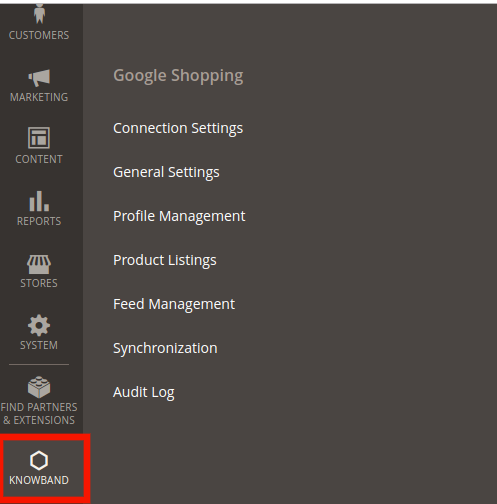
Once the installation is complete, you can find the Magento 2 Google Shopping API integrator in the main menu. Click on Knowband and you’ll find the module as shown in the image below:
3.1. Connection Settings
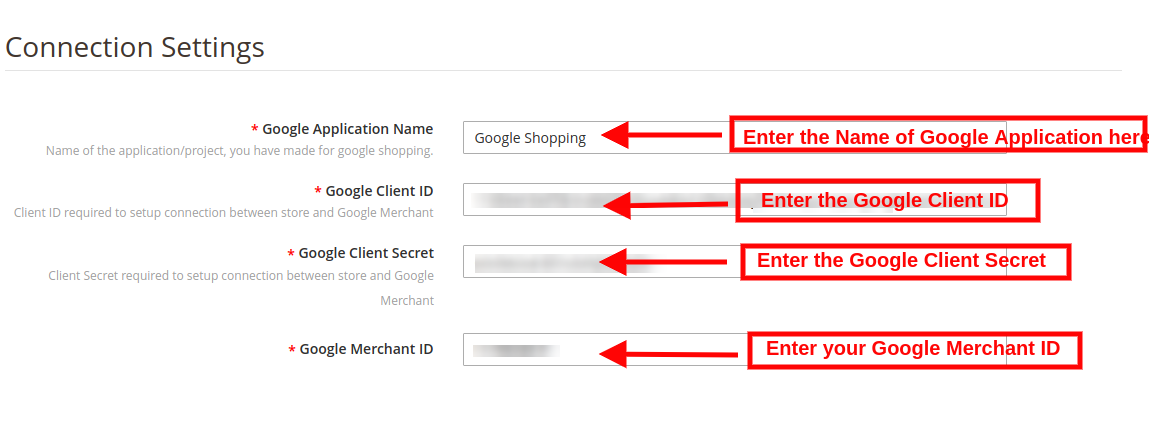
The connection can be set up between the Google Merchant Center and the Magento store from this tab of Google Shopping Magento 2 integration plugin. You need to create an account at Google Merchant Center and obtain the client ID, client Secret and Merchant ID. Refer to Appendix A.
Google Application Name: Enter the name of the project/application that you created for Google Shopping in this section.
Google Client ID: Obtain the Client ID from your Merchant account and enter the same here. This will authenticate the connection between the store and the Google Merchant.
Google Client Secret: Enter the client secret to set up the connection.
Google Merchant ID: Provide the merchant ID of your Google merchant center account here.
3.2. General Settings
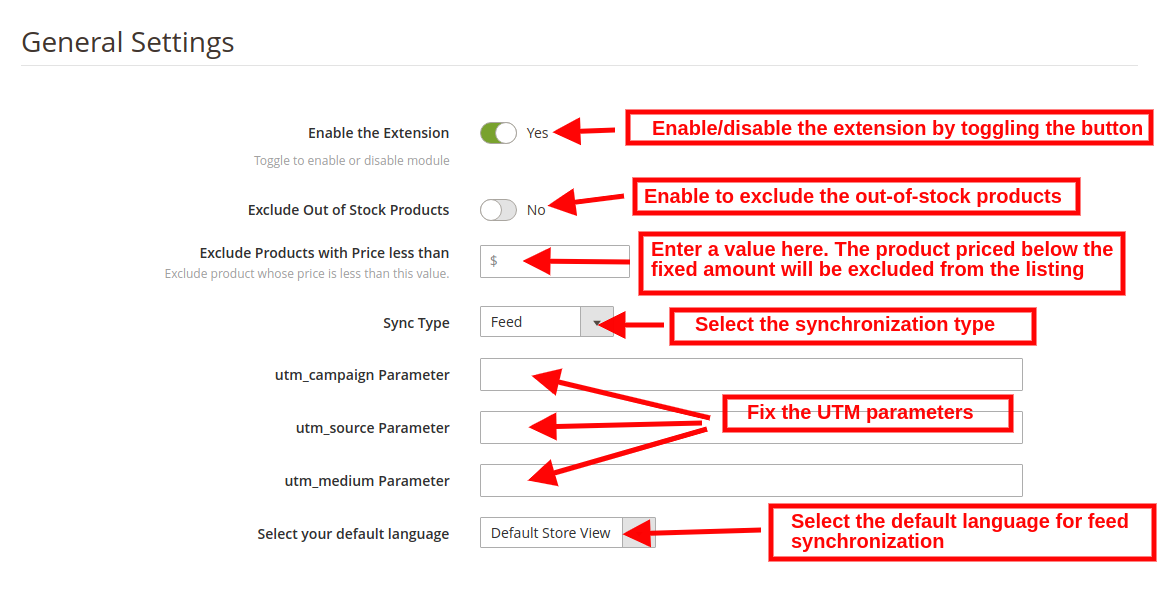
You can do the basic configuration changes in this section of the Magento 2 Google Shopping integrator. The various fields of this tab are discussed below:
Enabled: Toggle this button to activate this Google Shopping Magento 2 API integration plugin.
Exclude Out of Stock Products: The Google Shopping Magento 2 connector allows you to create a profile and list the products in bulk at the Merchant Center. However, some products may go out of stock. The admin can disable out-of-stock products by enabling this button. If enabled, only the in-stock product will be displayed in Google search results.
Exclude Products with Price less than: Enter a fixed amount. Only the products that are priced above the fixed amount will be displayed in the search results.
Sync Type: Select the synchronization type from the drop-down menu. The two options: Content API and Feed.
utm_campaign Parameter, utm_source Parameter, utm_medium Parameter: Enter the UTM for tracking the traffic received via Google Shopping.
Select your default language: The module offers multi-lingual support. Select the default language from this section.
3.3. Profile Management
The admin can create, edit or delete profiles from this tab of the Magento 2 Google Shopping Integration extension.
3.3.1 How to Create New Profiles?
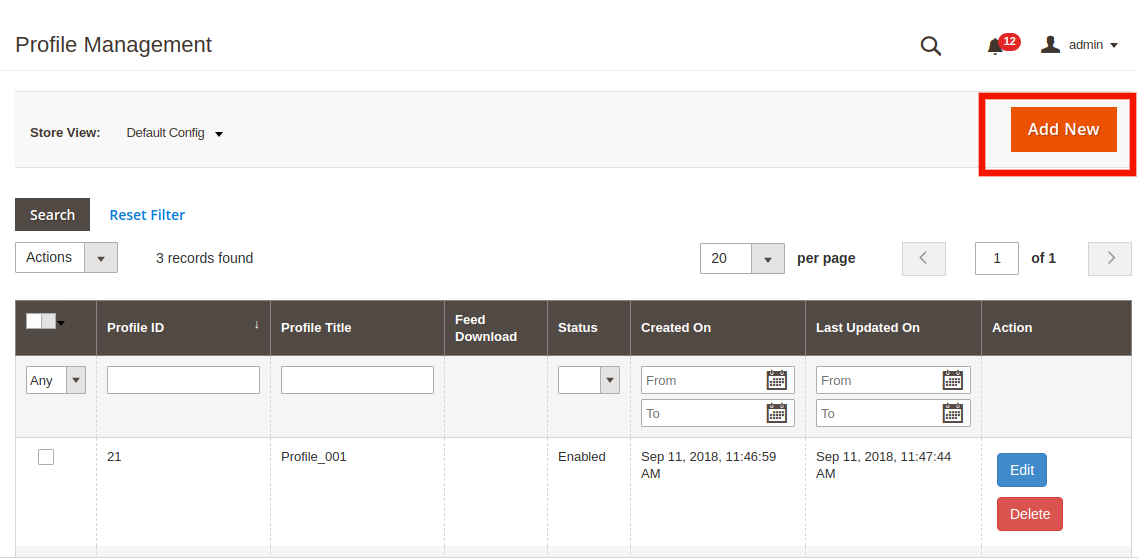
Click on the ‘Add New Profile’ or ‘+’ sign in order to create a new profile.
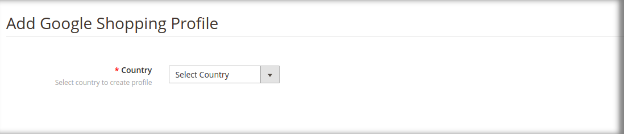
This will redirect you to the profile management section.
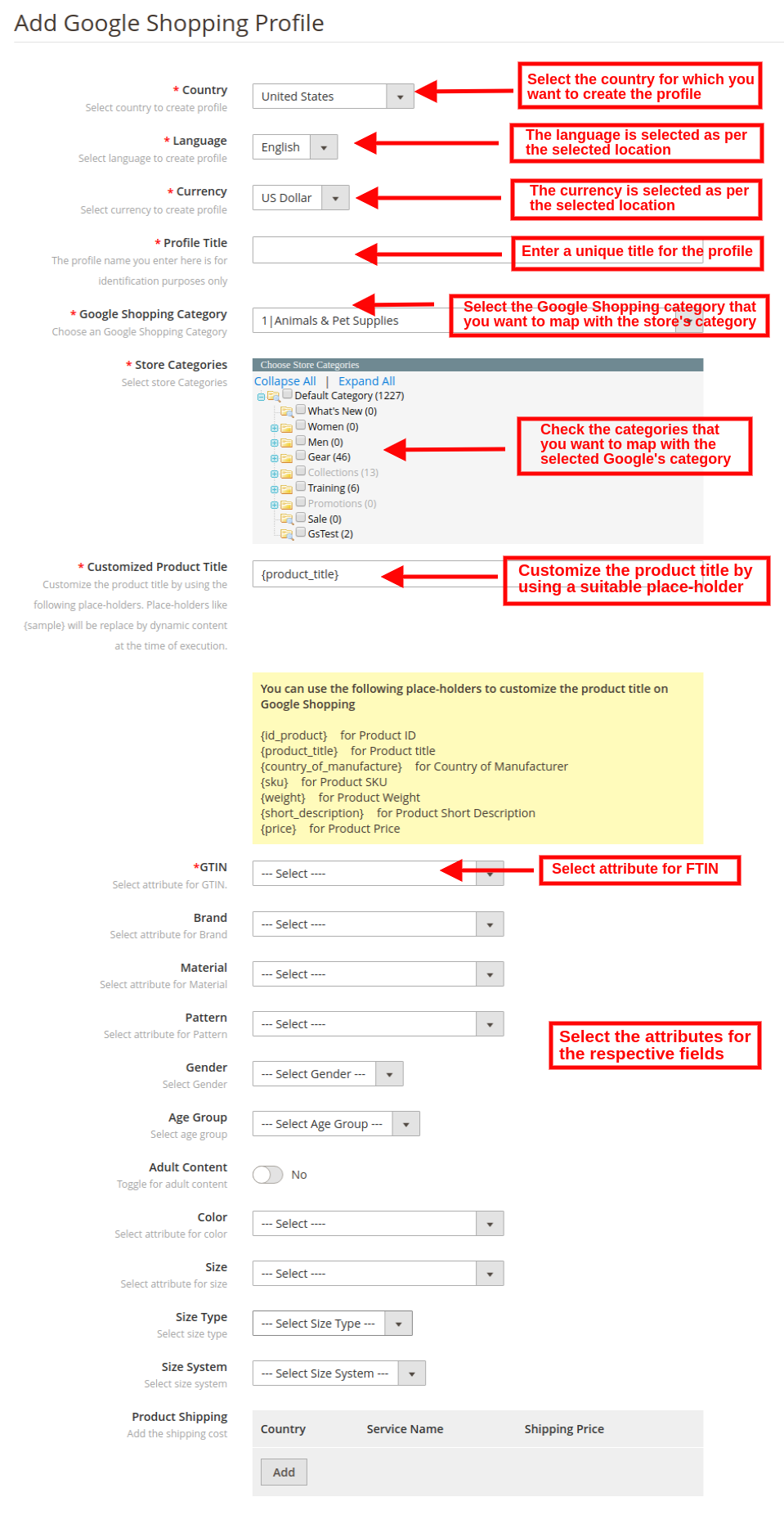
Country: Select the Country from the drop-down list.
Language: The language will be selected by default as per the country selected.
Currency: The currency will be displayed by default according to the country selected.
Profile Title: Enter the name of the profile here.
Google Category: Select the Google category that you want to map the categories of the store.
Store Category: Expand the category and check the categories that you want to map with the selected category of Google.
GTIN: Here, you will map the product unique field so that the Magento 2 Google Shopping Connector can identify products according to the mapped attribute. You must also have to provide unique field mapping for product attributes as well. The various options to choose from include: Reference No., UPC, EAN13. The mapping can then be done based on the selected attribute.
Customize Product Title: Customize the product title by using the following place-holders.
{id_product} for Product ID
{product_title} for Product title
{manufacturer_name} for Manufacturer name
{supplier_name} for Supplier name
{reference} for Product Reference
{ean13} for Product EAN13
{short_description} for Product Short Description
{price} for Product Price
Material: Select the material of the product.
Pattern: Choose the pattern from the drop-down menu.
Gender: Select the Gender for which the product is intended. The options are Male, Female or Unisex.
Age Group: Select the age group that is expected to use the product.
Adult Content: Specify if the product has any adult content or not.
Color: Use the color attribute to describe your product’s color. This information helps create accurate filters, which users can use to narrow search results.
Size: The size attribute describes the standardized size of your product. Your product Ad will appear in the results that are filtered by size.
Size Type: The attribute describes the cut of your product. The supported value for this field includes regular, petite, plus, big, tall and others. This helps create accurate filters.
Size System: With this attribute, you can explain which country’s sizing system your product uses.
Product Shipping: Select the shipping method for the particular product.
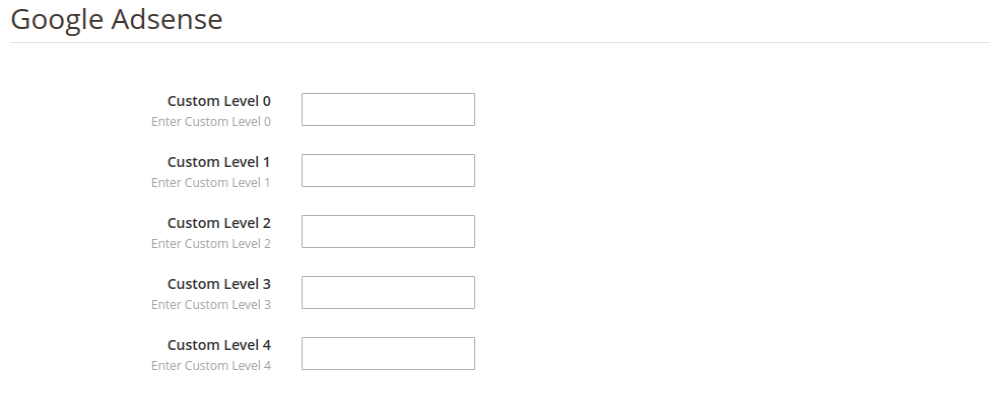
Google Adsense:
Google Adsense refers to the campaign that you’ll run on Google Adwords. Custom labels, Custom Label 0 through Custom Label 4, allow you to create specific filters to use in your Shopping campaigns. Use these filters for reporting and bidding on groups of products. The information you include in these attributes won’t be shown to users.
3.3.2 How to Edit the Existing Profile?
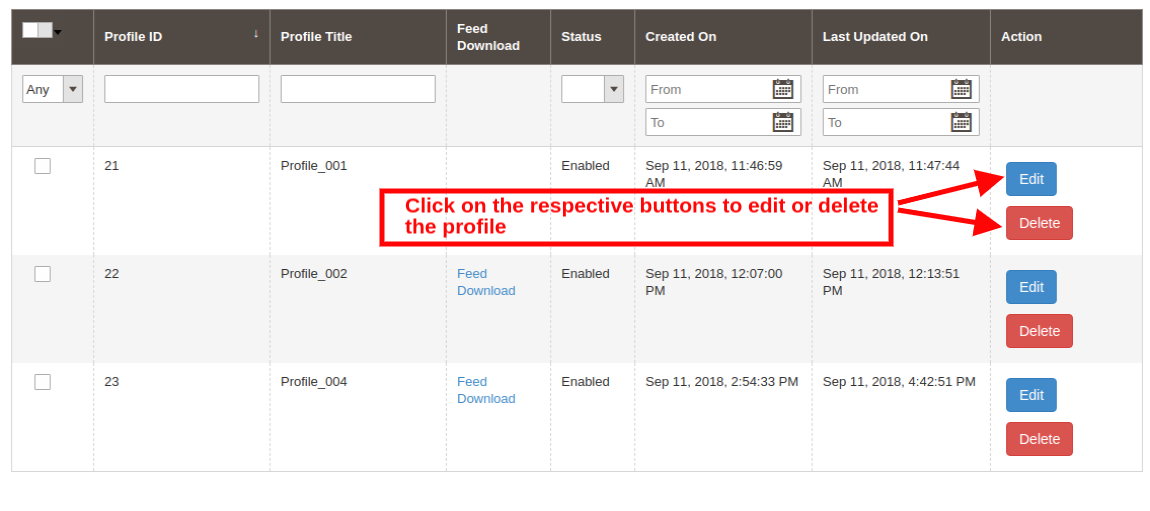
The admin can even edit or delete the profile at a button click.
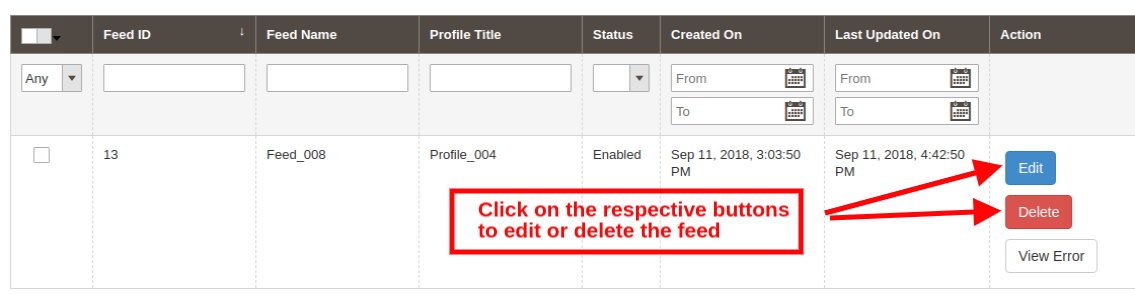
Click on the Edit or Delete button corresponding to each profile respectively, in order to edit or delete them.
3.4. Feed Management
The feed is created in order to display the products on Google search results. The admin can create N number of feeds and schedule the same for synchronization.
3.4.1 How to create new feeds?
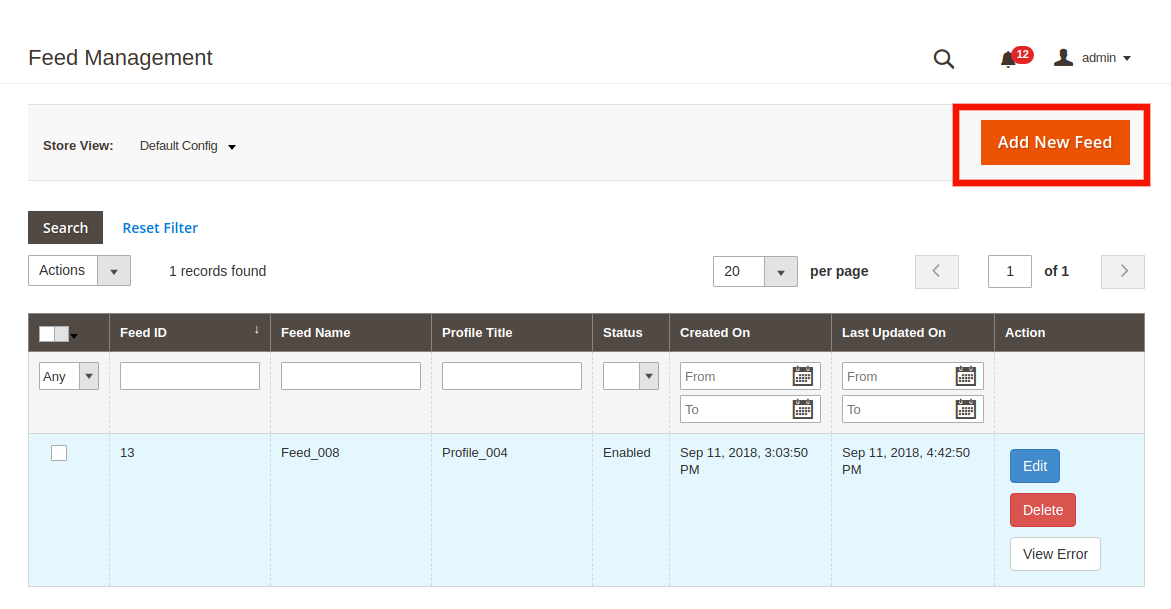
Click on the ‘Add New Feed’ or ‘+’ sign in order to create a new profile.
This will redirect you to the feed creation page of the Magento 2 Google Shopping synchronization extension. The various fields of the interface are discussed below:
Select Profile: The list of the profiles created in the profile management tab of the Magento 2 Google Shopping Integration module will be shown this tab. Select the profile whose product you want to sync with Google Merchant Center.
Feed Label: Enter a unique name for the Feed.
Feed Upload Schedule: Select the schedule of the feed upload.
Set Hour: Select the number of hours in which you want to schedule the feed.
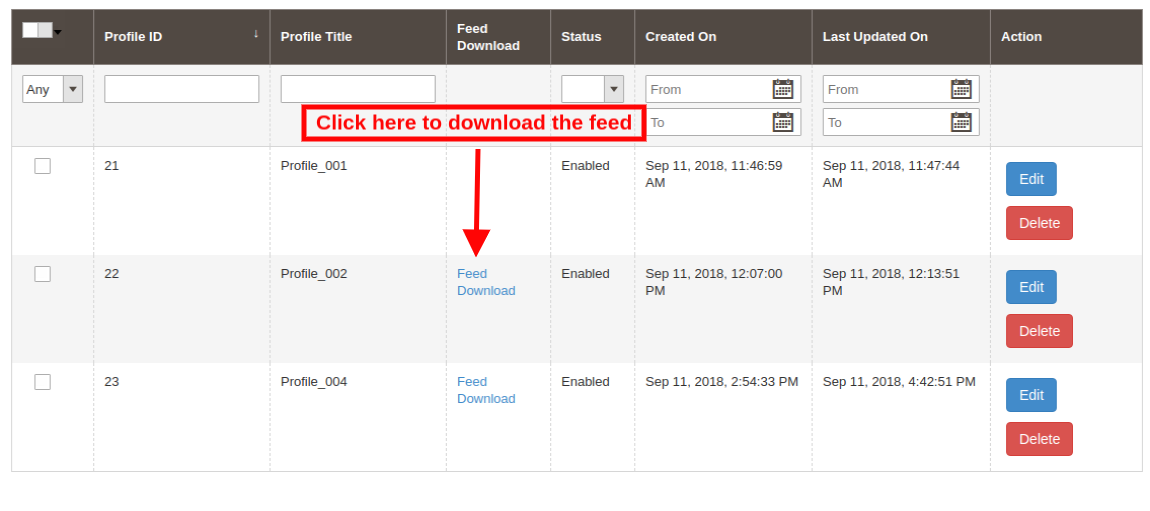
3.4.2 How to download feeds?
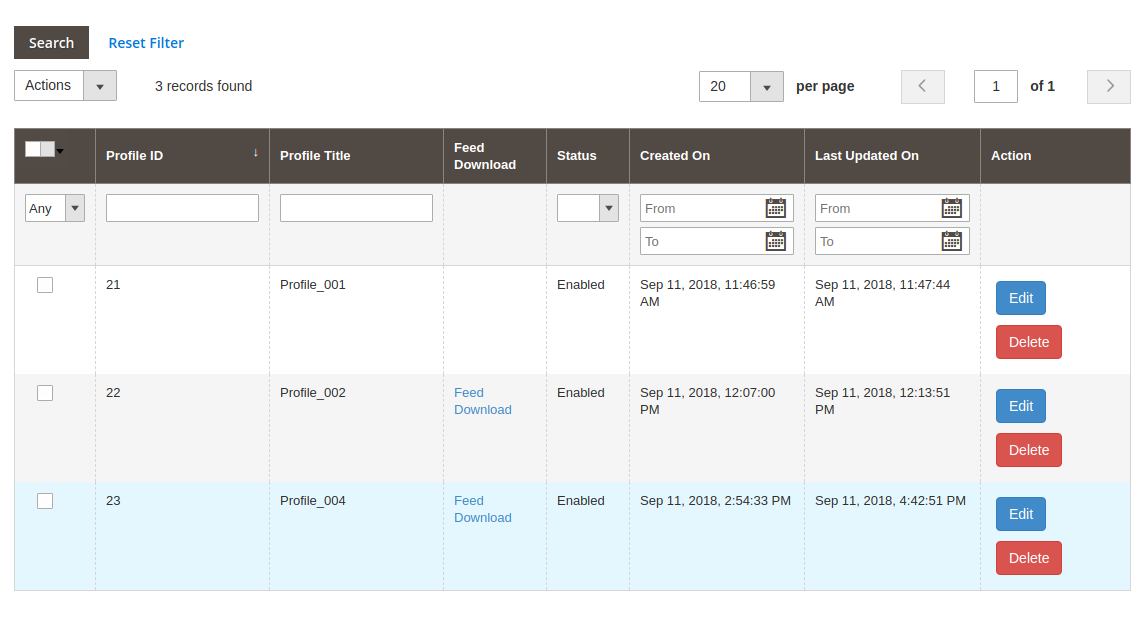
The admin can even download the feed from the respective profile. For this go to the Profile Management tab of Google Shopping Magento 2 integrator. The download option will be shown in the Feed Download section as shown below:
3.4.3 How to Edit/Delete feeds?
In order to edit or delete the feeds, click on the Edit or Delete button corresponding to each feed.
The admin even gets an option to view the report in case any error occurs while feed synchronization. This can be done by clicking on the View Error option as shown in the image below:
3.5. Product Listing
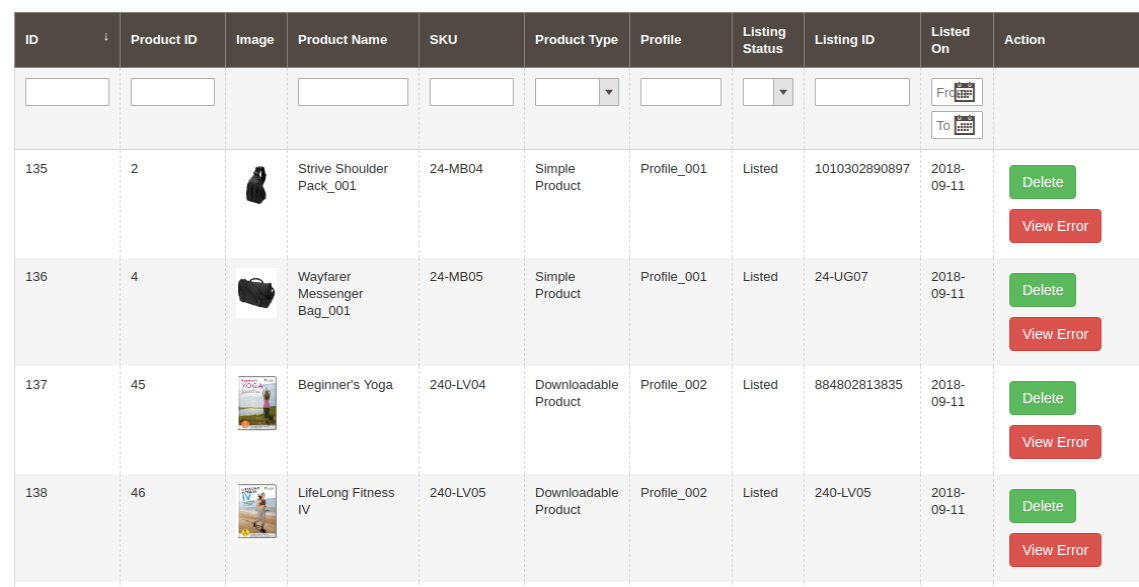
This section of the Magento 2 Google Shopping integration plugin shows the report of the products listed at the Merchant Center.
The Google Shopping Magento 2 integration module allows the following action to the admin.
Renew: The Renew button can relist the products whose listing has expired. Once this action is executed successfully, the action will be changed to ‘Halt’.
Delete: The admin can remove the product by clicking on ‘Delete’.
View Error: The admin can View Error occurred while listing the product.
3.6. Synchronization
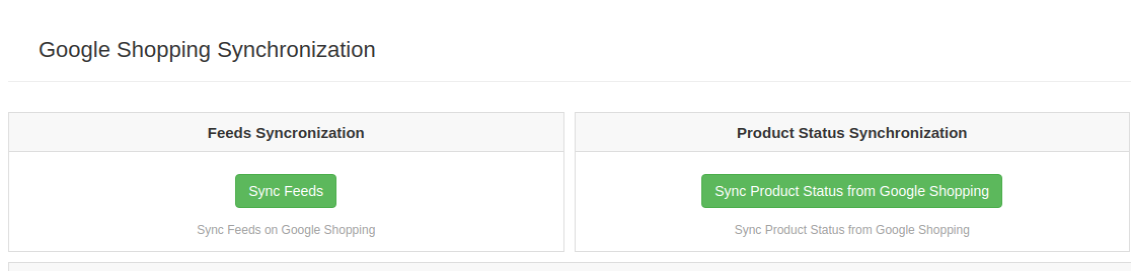
The Synchronization tab of the Magento 2 Google Shopping Integration module offers a cron option for real-time synchronization. Here are the cron options available.
Sync Feed on Google Shopping: ‘Sync Feed’ cron will synchronize the feed on Google Shopping.
Sync Products Status from Google Shopping: This button can sync the product status from Google shopping to the web store.
3.7. Audit Log
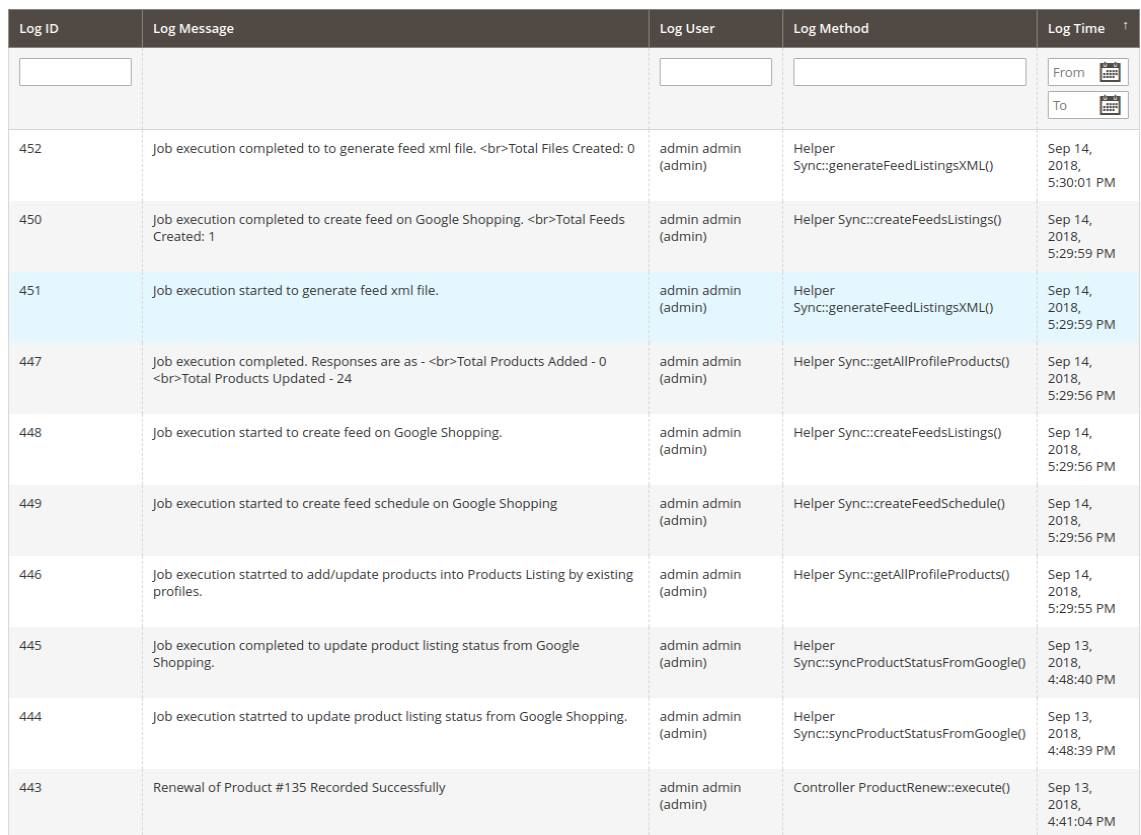
The admin can view the status of the task running in the back-end in the Audit Log tab of Google Shopping Magento 2 Integration plugin.
4.0. Appendix
How to Create Google Shopping Account?
Before uploading your products on Google shopping, you must have your Google merchant account. If you don’t have then please follow the below URL:
https://merchants.Google.com
Follow the instructions given on the above URL and create your account.
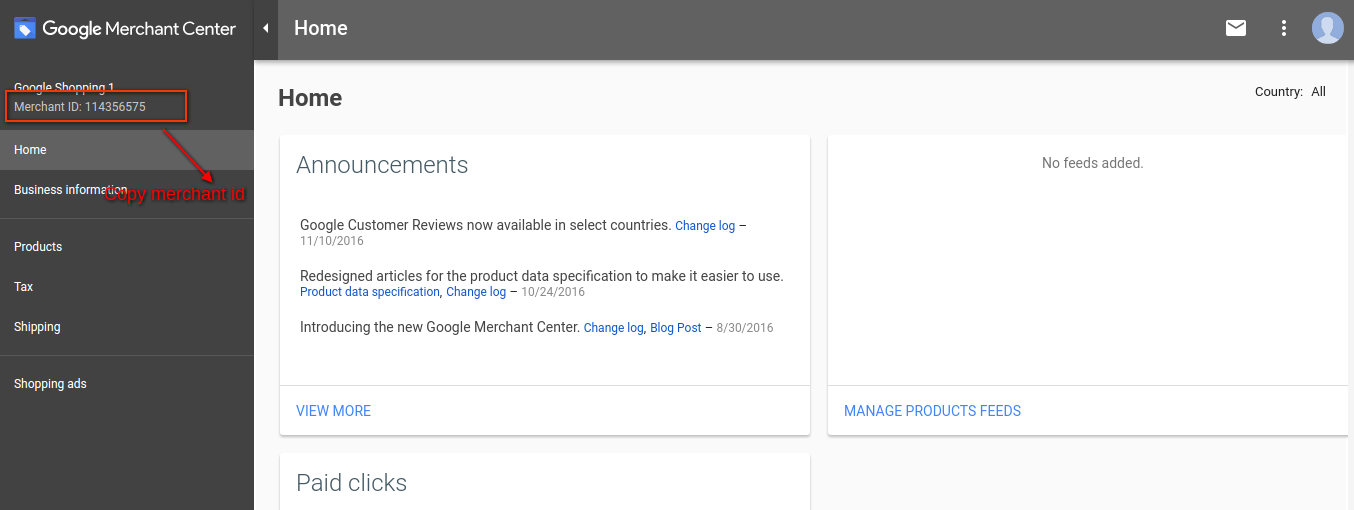
After creating your account, you will be redirected to your merchant center homepage as shown in below screen:
Copy your merchant id highlighted in the above screen and save it in module configurations.
Verify your Website for Google Merchant Account
This verification process is a compulsory process to upload your products to Google Shopping. If you do not verify your site then the module will not be able to upload products and may result in an error.
To verify your website, please follow the below instructions:
Step 1: Go to the “Business Information” tab in your Google Merchant Account.
Step 2: Under “About Your Business” tab, provide the URL of your store. For example, https://www.example.com. Save URL.
Step 3: After saving the website URL, Under the “Website” tab, Click on “Claim Your Website” link. This will show you the link to an HTML file. Download this file and upload it to your root directory of the store.
Step 4: After uploading the HTML file, execute the URL given by Google in step 3.
Step 5: Click on the “Verify & Claim” link.
4.1 How to get a Client ID and Secret?
To get Google client id and secret you need to create a project in Google developer account. Please go to the below URL to sign into the Google developer account.
https://console.developers.Google.com
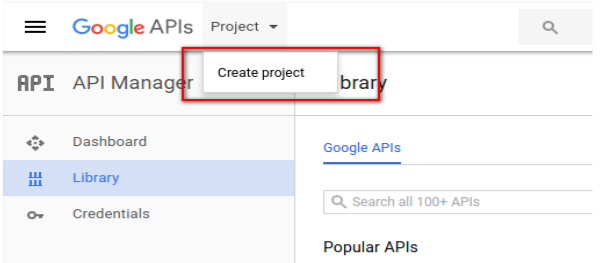
On the above URL, create a project by clicking the link shown in below screen:
Step 1: Name your Project Name and then click on the “Create” link. After creating a project, Google will redirect to the same page and your new project will be selected.
Step 2: Go to the library tab, search for “Content API for Shopping ”. Enable this API for this project.
Step 3: Click on the “Credentials” tab. This tab will show 3 tabs.
Step 4: Set your application name in “OAuth Consent Screen” and save it.
Step 5: Click on the “Credentials” tab and click on the “Create Credentials” button.
Step 6: After clicking the “Create Credentials” button, Google will be shown credentials type options. Choose “Auth client ID”.
Step 7: Set application type as “Web Application”.
Step 8: Set the “Authorized Redirect URIs” field. Your redirect URI is given on the module configuration page. Please copy from there and paste it into this field.
Step 9: Click on the “Create” button. After saving credentials, Google will generate the client id and secret for you. Copy and paste them into the corresponding field in module configuration.
Note: For more details instructions, follow URL https://developers.Google.com/identity/sign-in/web/devconsole-project
Note: If you are getting an error while getting your refresh token. Please also try after “Allowing Less Secure App” in your Google account.
For more values, please follow the below URL and read the documentation:
Migrated your eCommerce store to the updated version Magento 2.0? Well, let’s build a pair of native Mobile Apps for the same.
Having a Magento 2 Mobile App for your eCommerce website is much more than just a sales & marketing tool as it enhances your revenue & loyalty in just minimal efforts. But, building a native Magento 2 Mobile App is a lot tougher than it seems as you have to indulge in all sorts of coding languages & expensive tools/software. This article actually covers two basic questions regarding your Magento 2 Mobile APP:
Ques 1: Why you should start selling on App along with Magento 2 website? Ques 2: How can you get a powerhouse app for your Magento store?
Well, stick to the end of this article & hopefully you will get all your answers.
Magento 2 Mobile Apps: An Introduction
The Magento eCommerce platform has almost all varieties of multi-sized businesses from small-scale industries to start ups. And that too seems to be growing since the Magento has launched its updated version with issues fixed & updated features. Since this is a new platform & the majority of store owners are still deciding to move to the mobile platform, you can take a lead by transforming your website into native Magento 2 Android & iOS app.
As far as profits are concerned, having a Magento 2 Native App will definitely lure heavy mobile user base to your store which will ultimately boost user engagement & sales. Offering your users an amazing shopping app is also the reason behind more sales & revenue. So, getting a featured Magento 2 Mobile App is the next big thing you could do for your store after migration.
Magento 2 Mobile Apps: Development (3-steps Only)
We have made Magento 2 Mobile Apps development process as simple as it could for you. All you need to do is to follow these 3 simple steps:
Step 1: Purchase Magento 2 Mobile App Builder module & install the same on your store. Step 2: Share your app specifications/requirements with our pre-requisites form. Step 3: Get developed APK/IPA files & publish on respective App Stores.
If you face any issue, we will assist you in publishing your app.
Magento 2 Mobile Apps: Unbelievable Features
Your Magento 2 Mobile Apps would have numerous features & functionalities that definitely be a game-changer for your business. Let’s take a look at the major ones of them:
1. User-friendly Interface: The Magento 2 Mobile Apps come up with simple yet friendly interface which makes mobile app shopping fun for the users. Various intuitive font options are also there in the app.
2. Customizable Home Screen: The way you offer your app look & feel decides the no. of purchases you are gonna get. The Magento 2 Mobile App Creator offers a fully flexible home screen with all sorts of customization. The store merchant gets various attributes to craft the home screen:
Top Categories
Multiple Banners (Square, Grid, Sliding)
Multiple Products (Square, Grid, Sliding)
Countdown Timer Banner
Recently Viewed Products
All these designing elements are fully configurable & their positioning can be changed with just drag & drop feature.
3. Tab Bar Icon: Magento 2 mobile app comes with tab bar icon functionality which allows users to quickly switch among one section to another section of the app. Tab bar icon functionality makes the experience of app users smoother & simpler.
4. Web-admin Panel Access: The Magento 2 Mobile App Maker offers complete module backend access to the store merchants & let them design & manage the app on their own.
5. Live Synchronization: The Magento 2 Mobile Apps are in 100% synced with your website & which reverts all sorts of website updates on Mobile App. Your Mobile App inventory automatically gets updated as of website.
6. Tablet & Mobile Support: The Magento 2 Mobile App Creator offers tablet & mobile supported apps for your website which runs flawlessly on user’s devices. Whether it’s an iPhone, iPad, Android phone or tablet.
7. Multi-lingual & RTL Support: The Magento 2 Mobile App Maker offers both multi-lingual & RTL writing support on Android & iOS apps. You can offer your app to users living in any corner of the world.
8. One-tap Login: The Mobile Apps with Magento 2 Mobile App Creator offers Google/Facebook/OTP/Fingerprint login options for the shoppers.
9. 24*7 Chat Support: Your Magento 2 Mobile Apps come up with 24*7 Zopim & WhatsApp chat support which makes it easier for the app user to contact directly with the store admin.
10. Easy Payments: The Magento 2 Mobile App Creator supports all sorts of website payment options on the mobile app. You can even add various other native payment methods over a small fee.
11. All Shipping Methods Support: Your Magento 2 Mobile App supports all sorts of website shipping methods & eases the trade for you.
12. All Product Type Support: The Magento 2 Mobile App Creator supports all sorts of products on Mobile App like the single, bundled, configurable, grouped, downloadable, etc.
13. Layered Navigation: The Magento 2 Mobile App has multiple filtering & sorting options which makes the product search more seamless.
14. Voice Search (Android Only): The Magento 2 Mobile App Maker offers advanced voice search in Android App to make the search process easier.
15. Coupons & Vouchers Support: The Magento 2 Mobile App Maker supports all sorts of coupons & vouchers in Mobile App. Your app users can also use active website coupons/vouchers.
16. Simplified Checkout Screen: Easier the checkout process, more are the chances of successful purchases. The Magento 2 Mobile App Builder offers a single-screen checkout approach in Android & iOS apps.
17. Real-time Order Tracking: Curb out your app user’s insecurities with real-time order tracking functionality in Magento 2 Android & iOS apps.
18. Push Notifications: The Magento 2 Mobile App has a handy push notification tool which allows you to send unlimited push notifications regarding daily deals & highlights. Both automated & manual notifications are offered with Magento 2 Mobile App Creator.
19. Wishlist: Sometimes the users will not purchase the products for some reason like unavailability of size, color, product, etc. But, Mobile app for Magento 2 comes with inbuilt wishlist functionality which allows users to save their desired products on it for future purchases.
Conclusion
There might be a variety of Magento 2 Mobile App solutions as of now but, not all of them have such easy process & sale-pushing features. KnowBand has designed this module completely admin-friendly & provided almost every access into your hands. The features are more than enough to make your eCommerce store selling hassle-free on Mobile App.
The merchants who haven’t upgraded their store to Magento 2 & still using the old version can also take their store to the mobile platform with Magento Mobile App Builder. Go & build one for your store today.
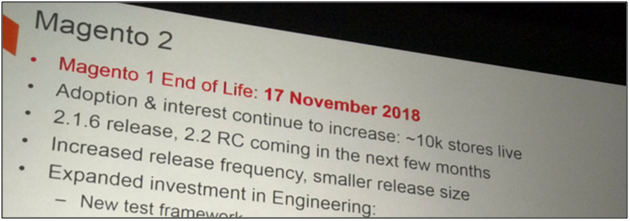
Lately, we all have been listening to the news that Magento 1 is going to end this November 2018. Well, it appears to be a fuss to me as there is no reputable source available to confirm the authenticity of the news.
Why the rumor spread in the first place?
Actually, the rumor came out when Magento announced that they are stopping the support and updates for Magento 1 in the Meet Magento Prague in the year 2017.
I just had a call with the technical team — so support for 1.x will be till June 2020. This may be pushed out in the course of the year- but will not be any time before that.
No reasons to worry
Hence, we needn’t worry about the end of Magento 1.x anymore till there isn’t any public announcement by the officials. Owners should continue to work forward with their store. You might be planning to migrate to Magento 2 platform but that doesn’t mean that you will be deprived of the services and support of Magento 1.x.
Magento 2 is the latest major release of the Magento eCommerce platform which is available in both the community and enterprise editions. Magento keeps releasing the updates to keep the platform secure and up-to-date with latest new requirements.
This article provides a complete guide for upgrading a Magento 2 store using the composer. Magento 2 with its command line interface saves a lot of time for the developers in module management, cache management, updates and lot more. That’s why we are going to use the Command Line Interface to update the Magento 2 here.
Why should you update your Magento 2 store?
Here are the following reasons for why you should update Magento 2:
For keeping your website secure with latest Security Patches
For getting new UI Updates For Functionality Improvement
For Bug Fixes For support of Latest Features
For Website Speed and Performance Improvement
For New Payment Methods Support For improved integration with 3 party Magento 2 extensions, Google Analytics, Shipping Methods, Payment Gateways etc.
Important Note:
You can use the Magento 2 Command Line Interface (CLI) upgrade only when you have installed your Magento 2 by using the Composer or the Zip file from the official Magento website. CLI upgrade won’t work if you have cloned your Magento 2 store from GIT repository.
Update Magento 2 using Composer
Follow these steps and commands to upgrade your Magento 2:
1. You will need the full file system access to do this upgrade. If you have the full file system ownership, then, first of all, connect to your web server via SSH.
2. Now login to your Magento 2 server using any SSH client. You can use the Putty SSH client here.
3. After establishing the SSH connection, Navigate to your Magento 2 root directory.
NOTE: Here you can change the version number accordingly. For example, if you want to upgrade the Magento 2.0.x version, then change the edition accordingly.
5. Now, run this command:
composer update
NOTE: If you are prompted for authentication then you need to enter your magento.repo authentication keys after running the above command.
6. Now, run these three commands in the same order:
NOTE: If you are using the Magento file system Cache storage then go to the next step. Otherwise, if you are using other Cache storage like Memcached, Varnish, and Redis then you will need to clear the cache manually for them.
7. Now, Run the following commands:
php bin/magento setup:upgrade
php bin/magento setup:di:compile
php bin/magento indexer:reindex
8. Check the new version number using the following command:
php bin/magento –version
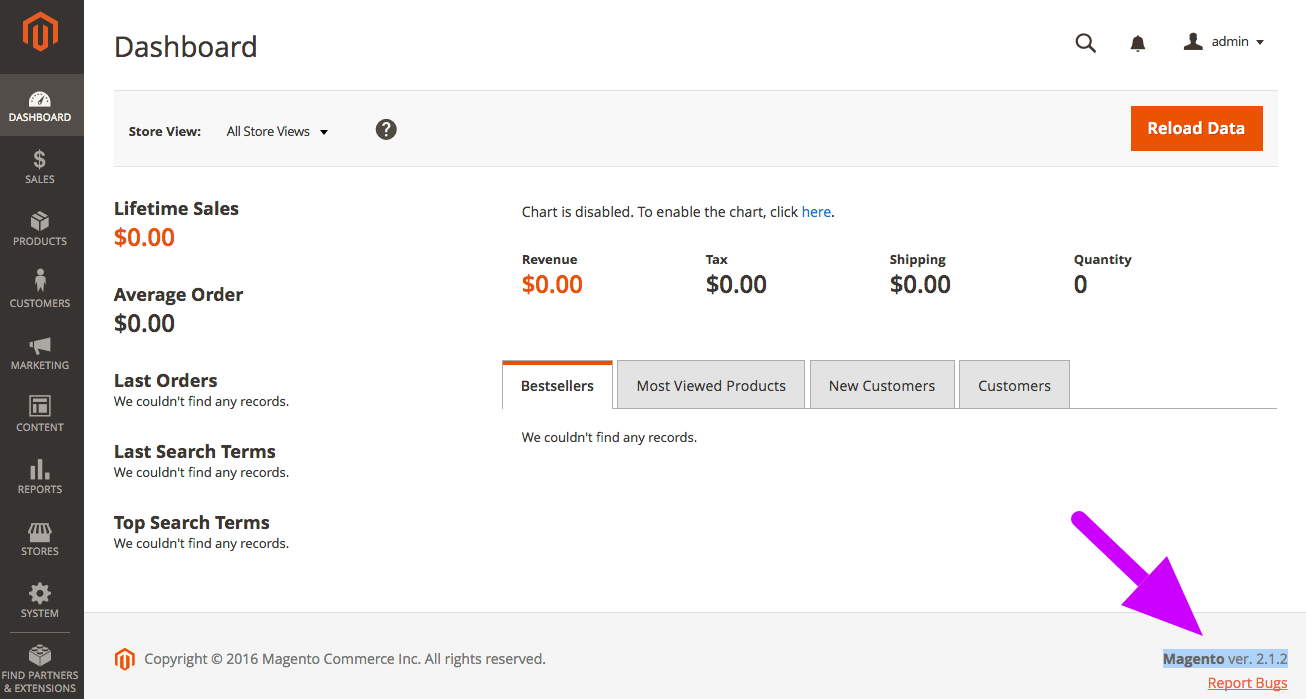
9. You can also verify the version number by going to your Magento 2 Admin Panel and refreshing the window. To check if you have successfully completed the update, see the Magento 2 version number at bottom right corner of the page. If there is any error, try clearing the cache again after resetting the file permission.
Finally
We have completed the Magento 2 update here. There are various other methods to update your Magento 2 store as well. However, this method is one of the quickest ones and saves a lot of time. Do let us know if you need any assistance in the update or searching for Magento and Magento 2 extensions. We have a pretty good collection of that.