How PrestaShop One Page Checkout can Boost Holiday Season Sale

Prestashop One Page Checkout Module is the solution to all your conversion issues. If you are facing a lot of cart abandonment on your PrestaShop store it can be because of the lengthy and boring checkout page. Prestashop One Page Checkout v7.0.1, the new version is offering some time-saving features which will reduce checkout time and enhance the customer experience.

The upcoming holiday season can help you overcome the losses you have faced during the COVID-19 outbreak. You can raise your sales with various modules available on the PrestaShop store. The most important of all is the PrestaShop Quick Checkout Page module. It is necessary to replace the conventional multi-page checkout with PrestaShop One Page Checkout. An optimized checkout page for your PrestaShop store will reduce the bounce rate and helps to boost conversions.

What is new in Knowband’s PrestaShop One Page Checkout

We keep updating our best seller PrestaShop One Page Checkout module. It helps sellers boosting conversion and reducing abandoned carts during the holiday season sale.

If you want to know how this checkout module works, give this blog a read. PrestaShop One Page checkout is incorporated with new features:

(New) Customers can Choose Profile type:

This is a new feature added in the PrestaShop One Page Checkout module. Now it allows customers to select a profile type as an individual, or business. This helps the owner in running personalized marketing campaigns. It also lets the owner decide what fields are mandatory for each profile type. In addition, the owner can display the mandatory or some of the fields on the invoice too.

(New) Redirect the Customer to Checkout Page Instead of Cart

With the previous version of PrestaShop One Page Checkout, when a customer hits the call-to-action button on the product page it redirects them to the cart. But with a new feature added, PrestaShop store admin can allow the consumer to jump to the checkout page directly. It will save them from taking extra effort.

(New) Use Payment Address Name for Registration

Prestashop store admin can allow customers to Use Payment Address Name for Registration. Earlier the delivery address was the only option that was used as default registration details. But from now on, if the admin wants he can enable the setting on PrestaShop One Page checkout to use the payment address name for registration.

Checkout features you must not forget about when deciding on your marketing campaigns during holidays

The user interface of One Page Checkout can cast spells on your customers and will do magic to stop them from leaving the website. The PrestaShop Quick One Page Checkout gives you appealing layout options, various login choices like guest checkout, social login with Facebook and Google+, multiple Payment and delivery choices, and what not!
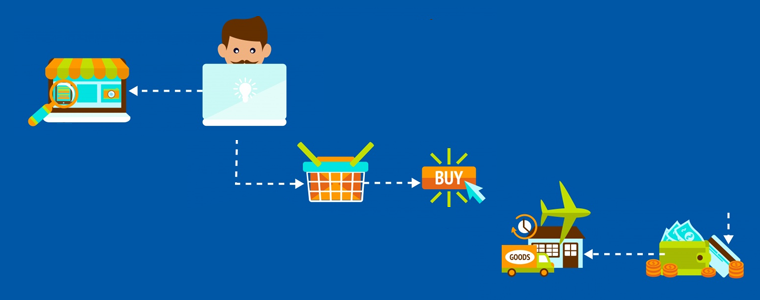
Offer Free Shipping and increase average cart value:

Asking them to shop more with a popup not always works. Besides, you can offer free shipping over a definite amount and they will grab the chance without giving a second thought. Free shipping is the most compelling thing out there.
The store owner can add a free shipping bar on the top of the One Page Checkout Page.

Improve engagement with its simple and sleek UI:
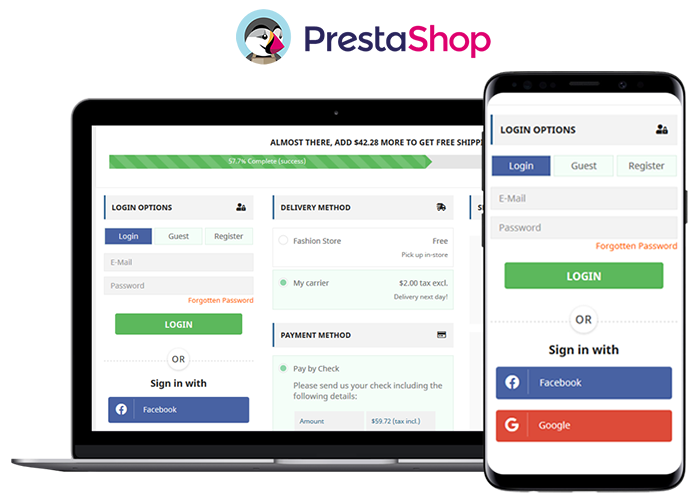
The simple and riveting user interface of the checkout page increases conversions. It helps to convert your visitors into customers with features like guest checkout and social login. All the required fields appear on a single page. No more waiting or jumping pages! Prestashop One Page Checkout is mobile responsive.

Ship-to-pay:

The responsive One Page Checkout has functionality for your PrestaShop store which lets the store owner set the payment mode for available delivery choices. If you don’t want to accept bank checks for fashion store delivery mode then you can disable the service.

Highly Recommended Modules with One Page Checkout

There are many PrestaShop modules available in the market which can fit well into your store. I am going to recommend you two super engrossing modules which are compatible with One Page Supercheckout on your PrestaShop store.

Store Locator and Pick up

The hyperlocal marketplace is the new trend in eCommerce. Prestashop Store Locator and Pickup Module incorporate website delivery features in-store and displays positions in physical stores using Google Maps.

Cash On Delivery with Fee

Offer Cash on Delivery with Fee to your customers on PrestaShop Store. Integrating Cash on Delivery with Fee module along with PrestaShop One Page Checkout can gain the trust and loyalty of a customer. Remove the barrier of secured payment which is a major concern for many. Click here to know more about Cash On Delivery with Fee module for the PrestaShop store.

We have produces a listicle on compatible modules with PrestaShop One Page Checkout, click here to explore.

To wrap up

I have always said that the checkout page is most important when it comes to conversion rates. Replace the existing checkout page with PrestaShop One Page Checkout and you can observe the change by yourself. Prestashop One Page Checkout with these new features can help you grow your business and earn loyal customers. What are you waiting for?

You can visit the Knowband store and check on the modules available for boosting holiday season sales.

Recommended Reads:

Manage Order Returns and Order Cancellation with PrestaShop RMA Module

10 Useful but Underrated PrestaShop Modules to look out for

PrestaShop Smart One Page Checkout Addon -User Manual

9 Checkout Conversion Killers Driving Your Buyers Away

9 Checkout Conversion Killers Driving Your Buyers Away

An eCommerce store owner observes maximum cart abandonment when a buyer reaches the checkout page. What factors are responsible for cart abandonment and acting as conversion killers? Talking about the statistics, it is been observed that sixty-nine out of a hundred people abandoned their cart on the checkout page.  Optimizing your checkout process is as important as the website optimization.

There might be many visitors to your blog posts or product pages. But, are they giving you any business? If not, then below are 9 most common checkout conversion killers that drive your customers away.

1.     Mandatory Registration during Checkout:

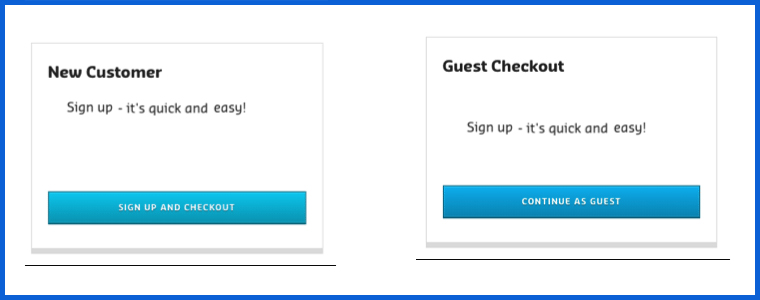
Forcing your customers to set up an account before they can complete their transaction could kill your conversions. Therefore, make sure that your website always allows customers to shop as visitors without having to register.

You can provide them guest checkout facility or social login option which will make it easier for them without taking much time.

2.     Long and complicated Process:

Nothing is more irritating than filling in super-long forms with complicated fields before you make a purchase. Stop enticing consumers to buy additional items with pop-ups. They sometimes interrupt the checkout process and end up doing more damage than good.

So make your signup form simple and quicky. Make sure that they include relevant drop-downs, radio buttons, and an indication of optional information. Most importantly, hold field labels so that consumers can quickly fill out what they need.

3.     Lacking or Weak Product Details:

It’s just profanity! How do you picture someone buying from you when you don’t have a convincing, thorough explanation of the product. Forget about that. Online shopping is like an impersonal activity. The best way to persuade a customer to buy is through words and amazing images! Start putting some bewitching images to your product description for not making your customers head off.

4.     Never-ending loading time:

Do you like waiting for someone or something? Neither you nor is your customers would like that. Optimize your checkout page for speed. Analyze and cut off the extra fields and graphics from the page which can be a conversion killer. Long loading time will demotivate your customer and encourages them to leave the site.

5.     Lack of payment options:

You can provide several payment options already available for the checkout. The mode of payment is a necessary element to focus on. In the competitive market place you must have an online payment option but having multiple modes can be advantageous. You can put some common secured payment options on your checkout page. Payment gateways provide encryption to keep your customer’s information secure. It provides a more streamlined and convenient experience for them — especially on mobile devices.

6.     Not being mobile-responsive:

A growing amount of online transactions are taking place over mobile devices. Almost any way you look at the numbers, millennials are more open to accepting and more likely to participate on mobile devices than their older counterparts. Customers who shop on their smartphones and tablets have less time than they do on desktops. Buttons need to be bigger and easier to reach, shape fields need to be minimized to speed up the checkout process, and labels and text need to be clearly visible. Ensuring that the checkout process is designed for mobile shoppers is important. You can lose many if your website doesn’t work well with mobile.

7.     Extra Shipping and Hidden Costs:

Imaging, you are buying something online. The product costs $20 and then you move to the checkout page where you see the cost raised by $5. This was the cost they were charging as taxation. You will be discouraged and might leave the checkout process immediately.

If you don’t reveal all the expenses in advance, you’re turning your customers away. 23 percent of customers cancel their purchases because they do not realize the additional costs in advance. Therefore, make sure that you display all costs right on your product page to make the customer experience easier. If you are charging extra for shipping, make sure to highlight it with the product cost on the product page. This can be a conversion killer and will add another order to your abandoned cart list.

8.     Not enough Product reviews:

Product reviews are an essential part of the branding and marketing of an online store. They help create trust and loyalty, and they usually define what sets the goods apart from others. Reviews help your store increase sales, and you can persuade customers to leave more of them. When the comments are found to be credible and correct, they will most certainly listen to them.

9.     Website isn’t Secure:

Customers don’t always like using their credit cards online, so it can be even more difficult if you’re a new small business that still builds confidence in your audience. As an online retailer, you need to make customers feel comfortable about the security of your checkout process. The positive thing about incorporating PayPal Checkout is that PayPal is an internationally recognized payment brand.

A simple mention of secure payment on the payment section will reassure your buyers that there won’t be any foul play.

Final Thoughts:

In order to stop cart abandonment, you can install a checkout module to your eCommerce store which will be incorporated with all the important payment gateways, customizable fields, social login options, and much more. By adding One Page Checkout addon to your store you can get rid of all these conversion killers. Knowband offers One Page Checkout modules for PrestaShop, OpenCart and Magento stores.

One Page Checkout – PrestaShop Addons

One Page Checkout Pro – OpenCart Extensions

One Page Checkout – Magento ® Extensions

One Page Checkout – Magento 2 ® Extensions

Could you think of any other checkout killers that can scare consumers away? Please let me know in the comments below.

You May Like To Read:

Benefits of Having Multiple Payment Options on the Checkout Page

10 Tips to Double Your eCommerce Conversions in 2020

One page checkout for eCommerce stores, Is it a one stop solution for all your issues?

All you need to know about PrestaShop Advanced One Page Checkout

10 Tips to Double Your Ecommerce Conversions in 2023

Every eCommerce website owner looks to improve conversions on their store. More eCommerce conversions mean more revenue. Whether you have just started your eCommerce business or been in the journey since long, there’s always room for improvement which you can work upon to boost your conversion rate.

There are certain tricks, strategies, and best practices for it. Putting all together, here are the top 10 tips to consider for higher eCommerce conversions.

1. Improve Your Page Loading Speed

If your website or web pages take time to load, it can severely affect your eCommerce conversions. Studies suggest that visitors bounce off from websites that take more than 3 seconds to load.

To test the loading speed of your website/web pages, use Google PageSpeed Insights or Pingdom.

A slow-loading website can hinder the shopping experience of your customers and they may choose to abandon the purchase mid-way.

Consider upgrading your hosting plan or switching web hosts to accommodate more website traffic. Remove unnecessary large files that are taking too much space.

2. Optimize your Website for Mobile Devices

Since the majority of the website traffic comes from mobile devices (smartphones) nowadays, it’s important to optimize your website accordingly.

Mobile Commerce is on the rise and has already surpassed eCommerce. A mobile-friendly eCommerce website brings more conversion than the non-friendly ones.

Take help of Google AMP for faster loading of mobile web pages. It helps you reduce your website’s bounce rate to a significant extent and improves the browsing experience of your mobile visitors.

Knowband provides the AMP plugin for PrestaShop and OpenCart platform.

Related: Benefits of Google Accelerated Mobile Pages (AMP) for eCommerce

3. Focus on simplifying your Design

One of the keys to boosting eCommerce conversions is simplifying your website design. From the homepage to the checkout page, every element should be highly optimized.

Eliminate clutter. Avoiding filling your website with too many elements and make it easy for users to navigate. You do not want to distract customers from their purpose, right?

Make use of whitespace and use visuals sparingly on your homepage. A simple, clean and well-organized website enhances user experience. Besides, it keeps the customer’s focus on your products and encourages them to explore your website without getting distracted.

4. Use High-Quality Visuals

Visuals play a crucial role in your eCommerce conversions. Texts aren’t enough to drive sales; you need high-quality images and videos.

Try to give as much information as you can through visuals. Give customers the type of experience they would feel when they are holding the product in their hands.

Take pictures from every angle with pinch-in and pinch-out zoom functionality. Use product videos to demonstrate how the product works. For example, if you are selling an automatic washing machine, show how to operate it or let’s say you are selling shirts, show how it would look on a person. Also, add a product size chart to highlight the measurements and let users know the model height as well so that if their height is the same, they can relate with it.

Don’t compromise on the image quality. Hire a professional photographer.

5. Simplify Checkout

As per Baymard Institute, 21% of the abandoned carts take place due to a long and complicated checkout process.

The fact confirms that if your checkout process isn’t convenient, shoppers will likely give up the purchase. Every extra step added in your checkout process reduces your chances of conversion.

Simplify it as much as you can. Keep only those fields which are highly important; avoid asking for unnecessary information.

I would recommend using One Page Checkout that converts the standard checkout process into a single page checkout. It puts all checkout-related information on one page and allows customers to check out quickly.

Try out Knowband’s One Page Checkout for PrestaShop, OpenCart, Magento and Magento 2.

6. Chase Abandoned Carts

Cart Abandonment is inevitable no matter how many strategies you apply. But that doesn’t mean you should give up on abandoned carts easily. Even if you recover a small percentage of those abandoned carts, it can add a certain value to your revenue.

Reach out to the abandoned cart users and persuade them to complete the purchase. Take regular follow-up as well but don’t overdo it.

It’s easier to sell to someone who has added the product to his/her cart than to a complete stranger. With Knowband’s Abandoned cart module, you can track abandoned carts and target those users accordingly.

Lesser the cart abandonment rate, higher the eCommerce conversions.

7. Leverage Social Proof

Why should consumers put trust in your brand? Why should they buy from you and not from your competitors? How do they believe in your quality services?

This is where social proof becomes valuable.

Do you know a consumer reads an average of 10 online reviews before finalizing their purchase decision?

Include reviews on your product pages. Yes, there will be some negative reviews as well but if you only highlight positive reviews, it can make shoppers doubt the authenticity.

Do not forget to highlight testimonials on your homepage. Testimonials are a great boost to your eCommerce conversions. They build customer trust by highlighting the experience of your previous clients or customers with your brand.

8. Provide Free Shipping

Offering free shipping to shoppers is one of the best ways to boost your conversion rate.

As per Invesp, 9 out of 10 consumers find free shipping to be the number 1 incentive to shop online. Also, orders with free shipping have a 30% higher average order value.

Today, most of the eCommerce websites offer free shipping so if you want to compete, you need to do the same else customers will likely prefer other brands over your brand.

You can slightly adjust your products’ price to cover the shipping cost. Now you can easily manage free shipping with our Free Shipping Manager, which is available for PrestaShop and OpenCart.

If you still don’t feel free shipping is a good idea, I would like to tell you that high shipping cost is the primary reason for shopping cart abandonment.

9. List Multiple Payment Options

How would you feel if a consumer finds everything so perfect on your website, decides to purchase but stops at the last moment just because you don’t provide enough payment options?

That would seriously hurt. This is not the way you would want to see a conversion getting failed. Different consumers have likings towards different payment options and that’s why you need to offer multiple payment options. Credit Cards and Debit Cards simply won’t be enough.

Accept digital wallets/e-wallets like Google Pay, Amazon Pay, PayPal, and some more in trend.

10. Display Trust Badges

With too much of hoax and fraudulent activities taking place over the Internet nowadays, consumers have become a bit sensitive and fearful to share their card details online.

People have been deceived and lost their money. Others don’t want to be a victim of it. It’s your responsibility to ensure your customers that their information is safe with you.

Highlight the trust badges on your website, mainly on the checkout page that includes security logos related to site security, anti-virus, payment protection, etc.

Final Thoughts

There are some other ways as well such as offering guest checkout, adding a live chat support option to your website, creating a customer-friendly return policy, etc.

Follow the above-mentioned tips and I am pretty sure you would be able to boost your eCommerce conversions.

If you need more details into a particular point, you can leave a comment below. For assistance regarding modules, you can contact us at support@knowband.com

8 Checkout Page Mistakes that may be killing your eCommerce Conversions

The checkout page is the conversion deciding factor for any eCommerce website. If you are driving a good amount of traffic on your store but the conversions are hitting very low, there are probably some flaws in your checkout page.

Though checkout is not the only barrier (there can be some other factors as well such as the website UX), it is the most vital element among other elements on your eCommerce website.

A huge difference can be made in eCommerce conversions if online businesses rectify their checkout page mistakes. In this article, I have listed out 8 checkout page mistakes that may be killing your eCommerce conversions, along with their solutions.

Mistake 1 : No Guest Checkout option

Mandatory registration on the checkout page adds to the topmost reasons for shopping cart abandonment. Online shoppers feel annoyed when presented with a sign-up form during the checkout process.

Forcing visitors to create an account only increases the number of fields to be covered before making the payment. Some of the eCommerce stores even ask users to verify their account, leading to a troublesome checkout experience.

This can be avoided by offering the Guest Checkout facility. Guest Checkout allows users to get rid of the registration process and helps them make a quick checkout, enhancing your conversion rate.

Mistake 2: Not offering Social Login

Almost every eCommerce website today provides users with the facility to sign in using their social media accounts. Not having the social login option on the checkout page can affect your eCommerce conversions.

Providing the social login option eases up the registration task (single-click registration), maintains the checkout flow and allows users to get rid of remembering the password.

Most people remain logged in on their Facebook or Instagram. Hence, a social login option reduces the extra efforts put during the sign-up process by allowing users to sign-up with their existing social information.

Related:

10 Benefits of Social Login in eCommerce

Social Login Best Practices

Try out Knowband’s Social loginizer module that provides you with up to 15 social login options to implement on your eCommerce website. Check out:

Magento Social loginizer, Magento 2 Social loginizer, PrestaShop Social Loginizer, OpenCart Social Loginizer.

Mistake 3:  Not using the Progress Bar on the Checkout Page

Shoppers might give up the purchase idea if they are unaware of the number of checkout steps involved in the checkout process.

It is important to display which stage a customer is at present when they are on the track of completing their purchase. Showing the progress of the checkout puts up a clear picture in front of the user regarding how many fields they have covered and how many more they would have to go through before they could finally place their order.

Mistake 4: No Trust Factor

With too many online frauds taking place nowadays, online shoppers do not put their trust on a website so easily while making the payment. No matter how amazing your website looks, if customers feel a trust issue, they won’t make the payment. As simple as that.

To build customer’s trust, show off the security badges on the checkout page, and make customers feel relaxed. Add an additional security layer by making your website SSL certified.

Mistake 5:  Not having a Proper Return Policy

Online shoppers do have concerns regarding the products they purchase. There is always a doubt regarding a defective or an incorrect order getting delivered. And customers want to ensure what would happen in such cases.

This is where your return policy plays its part. If it is not satisfying enough from the customer’s point of view, they will not proceed further in their checkout.

Pay attention to your return policy and make sure they encourage users to make a purchase.

Related: 6 Pieces of Advice for an Effective eCommerce Return Policy

Mistake 6:  Not providing Multiple Payment Options

If you are still stuck with Credit Card and Debit Card only, you are surely missing out on huge eCommerce conversions. Limited payment options would not help you in the long run. Online shoppers look for varieties, be it for products or for the payment methods.

With digital wallets in trend, it would be wise to implement the major e-wallets in your store. It would provide your customers with a number of payment options to choose from and help them choose the preferred payment option while making the payment.

Mistake 7:  Not having a User-Friendly Checkout

A lengthy and complicated checkout process involving unnecessary fields adds to the frustration among online shoppers which is followed by cart abandonment.

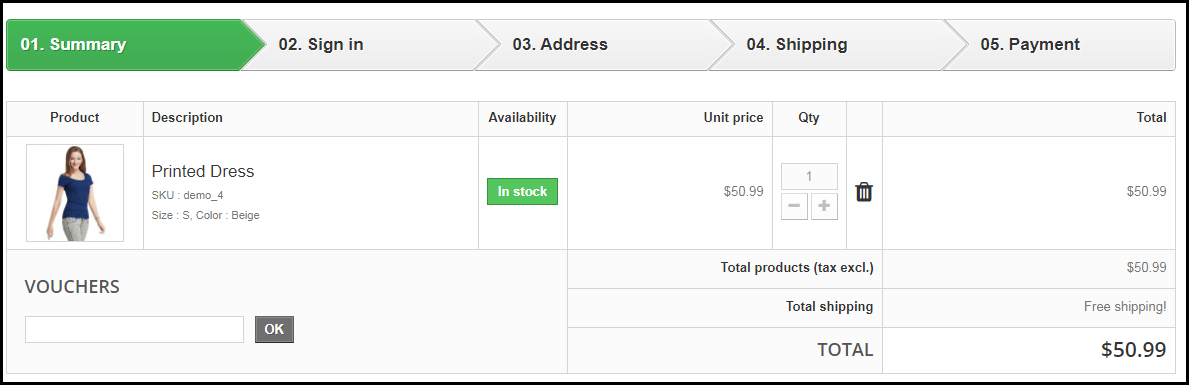
It is, therefore, crucial to optimize your checkout page and make it user-friendly. One of the ways to do so is by upgrading your multi-step checkout to a one page checkout. A single page checkout puts all the checkout fields at one place.

Related: One Page Checkout vs Multi-Page Checkout

Knowband’s One Page Checkout is amongst our highest-selling modules that lets you simplify your checkout page and grab more eCommerce conversions. Check out this module for various eCommerce platforms-

PrestaShop One Page Checkout

OpenCart One Page Checkout

Magento One Page Checkout

Magento 2 One Page Checkout.

Mistake 8:  Checkout Page is not Mobile-Friendly

The majority of online shoppers these days browse a website through handheld devices. This is the reason why mobile apps are gaining huge popularity. However, with limited storage space, people avoid installing a lot of apps.

For shoppers using mobile devices to make a purchase, it is important to make the checkout page mobile responsive. For your information, around 1.6 billion people use mobile devices to shop online globally, says a report by Invesp. So you can imagine the impact it can have on your conversions.

Make sure that the checkout process works as conveniently on a mobile device as it does on the desktop.

Final Word

Put your feet in your customer’s shoes and think what could be the possible areas for improvement on your checkout page. Are you feeling satisfied? Is it hampering your checkout experience? If so, work on those factors to simplify the checkout experience of online shoppers.

Keep an eye on these 8 checkout page mistakes that could possibly kill your eCommerce conversions.

Found this useful? Drop your comments below.

Also, give a read to:

7 Useful Tips for a User-Friendly Checkout

How to Simplify the Online Shopping Experience of Customers?

8 PrestaShop Checkout Modules to Improve your Checkout Process

Online shopping is all about ease of a product purchase as people don’t have time to roam every shop in search of a product or service. With the busy lifestyles of people and the option of home product delivery, online shopping has been growing with leaps and bounds. People are continuously involving with eCommerce stores to save themselves from the task of visiting multiple shops and handling multiple shopping bags. There are numerous factors that can act as barriers to your online shopping experience.

Among these factors, a complicated checkout process is seen as one of the prominent reasons that can affect the conversions and sales of an online store. If you are not having an engaging checkout process on your PrestaShop store, it is time to take the help of these Prestashop checkout modules to optimize your checkout page and bring more conversions. Take a quick look below:

1. Prestashop One page Super Checkout

Prestashop one page checkout puts together all the steps of a standard checkout on a single page and allows your consumers to complete their transactions quickly. It speeds up the checkout process and reduces the possibilities of cart abandonment. Prestashop’s one-page checkout helps you boost your sales by a good margin.

  1. Prestashop one-page checkout allows social login options to consumers to make the registration process easy and fast.
  2. Prestashop One page checkout addon provides the option of a Guest checkout for visitors who do not want to get themselves registered on your platform.
  3. This addon has Mailchimp Integrator that sends a visitor’s email address directly to your MailChimp account.
  4. The module offers multiple shipping and payment methods.
  5. Prestashop fast checkout addon allows customers to update the product quantity right from the checkout page.
  6. Prestashop one page checkout offers multiple layouts to display the cart details.
  7. This module also contains the Google auto-address fill feature, enabling your visitors would be suggested the address when they start filling the address field.
  8. One Page checkout addon is GDPR Compatible, Mobile Responsive, and has multi-lingual support.

2. Prestashop One click checkout

Prestashop one-click checkout is a great option for those online shoppers who wish to do an instant purchase without disturbing their existing cart. This addon avoids the process of adding a product to the cart before purchase. Store visitors can simply click on the Buy Now button and buy a product instead of adding the product to the cart and removing the existing cart items.

  1. Prestashop one-click checkout addon displays a “Buy Now” button on your store products to trigger impulse buying, ensuring higher sales.
  2. Prestashop one-click direct checkout is time-saving. By not interfering with the existing shopping cart, visitors can place an order quite comfortably. This improves your conversion rate.
  3. The one-click checkout module is fully responsive and multi-store compatible.

3. PrestaShop Gift the product

If you are unable to entice your visitors to your PrestaShop store, you can take the help of this PrestaShop “Gift the product” module from the Knowband store. Also, this PrestaShop checkout extension is very helpful for improving your conversions as it offers free products based on your cart price. Here are some of the wonderful features of this PrestaShop Gift product module.

  1. Prestashop Gift the Product addon provides a great range of freedom to store admin for accomplishing various tasks like display of products at the front end, ability to show listed gift products, ability to control the display of gift products at the front end, and much more.
  2. The module can be quickly installed and configured without any technical assistance.
  3. Prestashop gift the product module works perfectly with various mobile devices and screen sizes.
  4. The module also provides customers the freedom to choose the free gift as per his/her interest.

4. PrestaShop checkout payment fee addon

It is one of the amazing PrestaShop checkout modules that allows merchants to include various payment fees that are involved with various payment methods on a site. With this clear information, it is now possible to improve the checkout process on your site without any glitches. Apart from this, it will also help in improving customer engagement and conversions on your PrestaShop store. Some of the exciting features of this PrestaShop module for including payment fees are:

  1. Prestashop checkout payment fee addon provides information about the payment methods that charge additional fees.
  2. The checkout payment fee addon comes with a simple installation process and configuration facility.
  3. Displays the percentage or fixed price of the products.
  4. It offers a facility to enable or disable currency conversion.
  5. Prestashop checkout payment fee addon works with various payment methods that charge additional payment fees.
  6. Additionally, it offers free technical support.

5. PrestaShop Cash On Delivery with Fee

To keep up with the trend, you have to offer services that are in demand. Cash on delivery is the most demanding and needful feature for digital commerce. It streamlines the delivery process and reduces abandoned carts. Wondering how? Many customers feel intimidated while sharing their credit/debit card details on a new website. The COD module helps in optimizing the PrestaShop checkout process.

  1. Customers can get COD without any extra fees otherwise store owners can charge extra for the same
  2. Customers do not have to share any bank details with the store owner
  3. The COD option can be applied to selected products or categories
  4. It boosts conversion and overall revenue of the PrestaShop store

6. PrestaShop Store locator

For the PrestaShop Checkout optimization, you can also install the store locator addon. It can help you provide services like Buy Online and Pay In-Store (BOPIS). This is another in-demand facility that customers look forward to. It displays a map to the customer and shows all the nearby stores to visit and shop. below are the features that the module provides:

  1. Easy and effortless to implement buy online and pick up in-store facility
  2. Displays the store locations on google map with the list of nearby stores
  3. The module is multi-store compatible and supports multiple languages

7. PrestaShop Delivery Boy App

Manage your deliveries effortlessly with PrestaShop Delivery Boy Application. This application allows delivery boys to choose their consignments.  Along with the PrestaShop Mobile App Builder, the delivery boy app can provide real-time product tracking to customers. This application makes the delivery process seamless.

  1. It has a separate login option for both the delivery boy and the store owner.
  2.  The app can be published to Google Play Store and the iOS store.
  3. It provides order acceptance and rejection options to the delivery boys but they have to mention the reason for rejecting the order
  4. Customers will receive an email notification when the delivery boy picks up the order. Moreover, they will have to provide OTP to the delivery boy on order delivery
  5. The app is compatible with KnowBand’s Mobile App Builder.

8. Prestashop Checkout page analytics

Keeping a constant track of customer’s activity is important. It can provide you crucial information about the purchasing behavior of your site visitors. Once, you are aware of the checkout journey of the visitors, you can take the required steps to improve conversions on your PrestaShop store. Take a look at the various features that makes this Knowband extension as one of the most popular PrestaShop checkout modules for your online store.

  1. Prestashop checkout page analytics addon provides complete statistical information about your site visitors while making an online purchase.
  2. It helps in maintaining the email addresses and cart details of your customers.
  3. Prestashop checkout page analytics provides seamless recovery of abandoned carts on a PrestaShop store.
  4. Prestashop checkout page analytics provides customer details, cart details, analytical data for ensuring higher conversions and product sales.
  5. Easy search facility through email.

Conclusion

Don’t take your customers for granted while they are making an online purchase from your PrestaShop store. With the help of all these PrestaShop checkout modules, you can remove the various hurdles that may be affecting your conversions to a great extent. It is time to visit our Knowband store and grab your share of conversions with these feature-packed eCommerce modules.

You Might Also Like: