Magento 2 Web Push Notification Extension – User Manual

1.0 Introduction

For online store owners, it is important to attract new visitor’s attention to their website and also engaging those who already visited it. One great tactic that look promising is web push notifications. Being a store owner, if you have not implemented push notifications for your website, then you are missing some great business opportunities. In order to integrate web push notifications for your site, Knowband offers Magento 2 Web Push Notification Module that will allow admin to send real-time push notifications to their existing and new customers. Web Push Notification module gives you constant power to engage your audience via different kind of push alerts like back in stock alert, price alert, order status alert, abandoned cart alert, etc.

Magento 2 Push Notification for web browsers like Chrome and Firefox displays welcome popup on the user’s device asking for their consent to send alerts on various events. Push notifications are delivered instantly to the users which build up their constant engagement on the store. Magento 2 Browser Notification extension allows admin to send personalized push messages. With this extension, the admin can create and send personalized product recommendations to their customers based on their individual browsing and purchase history. Push notifications are highly responsive over mobile and tablet devices so you can achieve easy interaction with your customers. Web push notifications implemented using Magento 2 Browser Notification extension helps you in delivering various alert messages in real time which has a higher response rate compared to an email which subsequently leads to higher marketing ROI.

1.1 Striking Features of Magento 2 Cart Reminder Push Notification Module

No hassles and coding efforts are involved in the integration of web push notifications to the website. Before that, quickly take an insight into the highlights offered by this Magento 2 Web Push Notifications extension.

1. Magento 2 Web Push Notification Module offers a direct, real-time marketing technique for sending tailored push notifications to dormant users like breaking news updates, notifying customers when items are back in stock or drop price alerts. No matter whether are accessing the site or not, the subscribers will receive timely alerts triggered by the admin.

2. Magento 2 Order Status Update Push Notification triggers a welcome notification popup on the site frontend as the user visits the site. This is a permission popup asking the user to allow or deny automatic updates.

3. Magento 2 Browser Notification extension sends automated notifications for different events like when a user places an order, order status is changed, product price is updated, product stock is updated, or the cart is abandoned.

4. The template and message can be personalized for price alert notifications, stock alert push notifications, abandoned cart alerts or other kinds of custom notifications with the help of this Magento 2 Website Push Notification extension.

5. The notification title, action buttons, popup image shown over the welcome notification popup can be configured from the back-office of this Magento 2 Cart Reminder Push Notification Module.

6. With Magento 2 Browser Notification extension, admin can test web push notifications right after sending them by registering with the send test feature. Push notifications can be tested immediately or at some scheduled time.

7. To integrate push notification service to the website, the admin needs to configure firebase settings from the backend of Magento 2 Web Push Notification Module.

8. Magento 2 Browser Notification extension offers five default push notification templates which can be customized or deleted from back-office. Admin can create multiple custom notification template if they require for their business for announcing offers and new arrivals.

9. Web push notifications are perfectly compatible with browsers like Google Chrome, Firefox, and other browsers as well.

10. Magento 2 Cart Reminder Push Notification Module allows admin to create any type of push notifications with a custom message, title, URL and images. The link can be added to the complete notification popup or to the popup button specifically.

11. Admin can view the list of notification subscribers and product subscribers from the backend of Magento 2 Web Push Notifications extension.

12. Magento 2 Web Push Notification Module allows admin to send the notifications immediately or on a particular time. This functionality can be handled using the cron job. Admin can run the cron job in order to send all scheduled notifications instantly.

13. Magento 2 Web Push Notifications extension lets admin test the promotional alerts before sending it to the actual subscriber base.

14. Web Push Notification For Magento 2 offers a responsive UI for desktop and mobile devices.

15. Magento 2 Order Status Update Push Notification plugin works on multiple store views.

16. Magento 2 Browser Notification extension provides a simple backend interface which can be effortlessly configured by the store admin.

2.0 Installation Guide of Magento 2 Browser Notification Extension

1. Once after purchasing Magento 2 Web Push Notification Module from the Knowband store, you will get the following files on your registered email:

  • Source code file of Magento 2 Web Push Notification Module in zipped file format.
  • User Manual of Magento 2 Website Push Notification Extension.

2. Unzip the extension package.

3. Create a folder{Magentoroot}/app/code/Knowband/Webpushnotification

4. Upload the extracted content in the above folder via FTP manager (like Filezilla or WinSCP – download here: https://filezilla-project.org/).

5. Add the following dependencies in the Magento root composer.json file:
“mobiledetect/mobiledetectlib”: “^2.8”,
“geoip2/geoip2”: “^2.9.0”
And below command to install the above dependencies:
composer update

6. Now run below commands to install the plugin:
php -f bin/magento module:enable –clear-static-content Knowband_Webpushnotification
php -f bin/magento setup:upgrade
php -f bin/magento setup:di:compile
php bin/magento setup:static-content:deploy

The Magento 2 Web Push Notifications extension is now installed and ready to use.

3.0 Admin Interface of Magento 2 Web Push Notifications Extension

Just after successful installation of Magento 2 Web Push Notification extension on your website, you can create and activate web push notifications for your store in accordance with business requirements. Navigate the settings in the given order: Admin Panel > Knowband > Web Push Notifications

The simple to understand admin interface of Magento 2 Browser Notification extension is divided into eight main sections namely:

1.General Settings
2.Templates
3. Send Push Notifications
4.Delay Push Notifications
5.Subscribers
6.Product Subscribers
7.History
8.Statistics

Each of these sections has been discussed in detail below.

3.1 General Settings

The general settings of Magento 2 Web Push Notification extension is further sub-divided into four sections namely:

1.Configurations
2.Firebase Settings
3.Product Sign Up Box Settings
4.Welcome Notifications Settings

3.1.1 Configurations

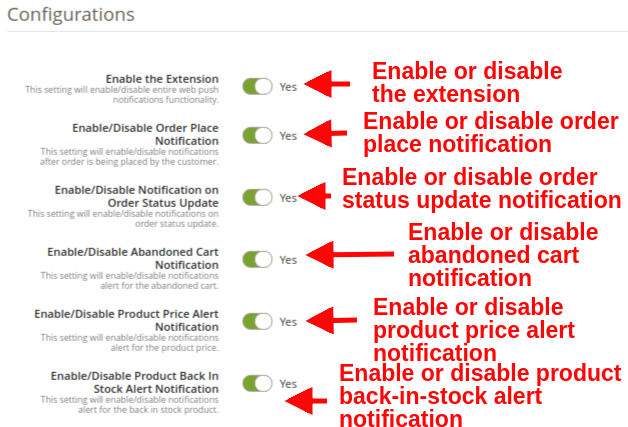
  • Enable the Extension: This option enables or disables the whole functionality of Magento 2 Web Push Notification Module with the help of toggle button. On enabling this, customer will see a push notification request popup box on their screen.
  • Enable/Disable Order Place Notification: This setting enables or disables the notifications after the customer places an order. Admin can send order status notification to the customer after enabling this option.
Magento 2 Web Push Notification Module

  • Enable/Disable Notification on Order Status Update: This setting will enable or disable the notifications on order status update.
  • Enable/Disable Abandoned Cart Notification: This setting will enable or disable the notifications when the customer abandons their cart. This notification only triggers if the customer has abandoned the cart.
  • Enable/Disable Product Price Alert Notification: This setting will enable or disable the notification alert for the product price. As there is a drop in product price, product subscribers will receive a notification alert.
    Note: These settings are only applicable when the users subscribe for the product notification.
  • Enable/Disable Product Back In Stock Alert Notification: This setting will enable or disable the notification alert for the product stock. When the out-stock product comes back in stock, product subscribers will be notified.
    Note: These settings are only applicable when the user subscribes for the product notification.

3.1.2 Firebase Settings

Firebase works in the backend as a service responsible to push mobile and desktop notifications to users while they are accessing a particular website. These settings are usually set one time during initial module setup.
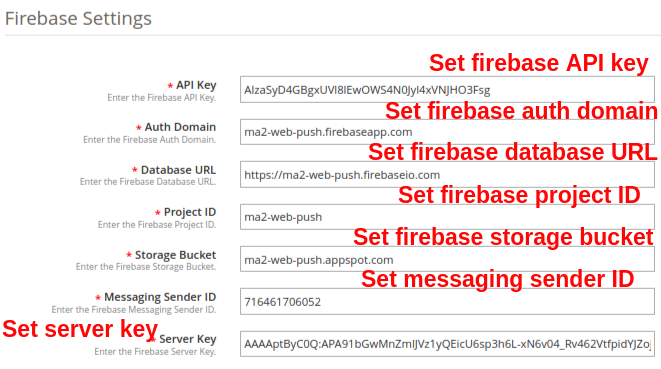
  • API Key: This option allows you to specify the Firebase API key.
  • Auth Domain: This option allows you to set Firebase auth domain value.
  • Database URL: Using this option you can set the Firebase database URL.
  • Project ID: This option lets you set the Firebase project ID.
  • Storage Bucket: With this option you can specify Firebase storage bucket.
  • Messaging Sender ID: This option sets the Firebase messaging sender ID.
  • Server Key: This option will set the Firebase server key.

3.1.3 Product Sign Up Box Settings

In this tab of the Magento 2 Cart Reminder Push Notification Module, the admin can edit the sign-up box settings for the product. Customers who will subscribe to the product will receive its price and stock related alerts. Under this tab, you will get the following options:
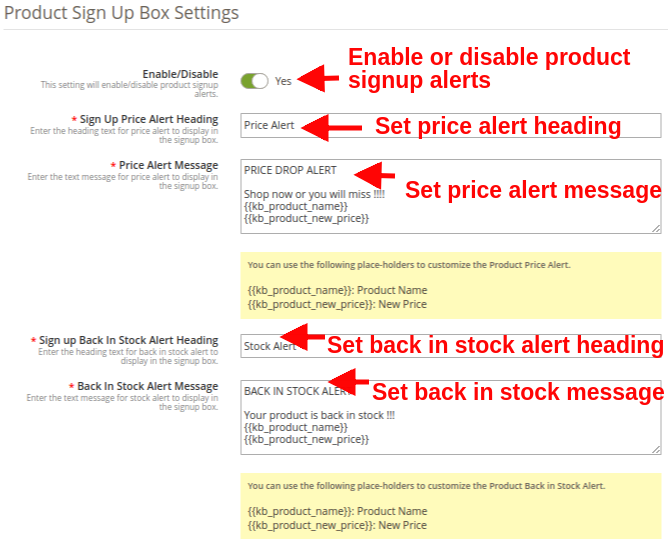
  • Enable/Disable: This option enables or disables the product signup alerts. If enabled, module will show the Subscription box in the front-end of the store where the customer can subscribe for product price alert or back in stock product alert.
  • Sign Up Price Alert Heading: This field allows you to set a heading for the price alert notification box.
  • Price Alert Message: You can set a desired push notification message flashed on Price alert subscription box.
  • Sign Up Back In Stock Alert Heading: This field allows you to set a custom heading for the back-in-stock notification box.
  • Back In Stock Alert Message: You can set a desired push notification message flashed on Back-in-stock alert box.
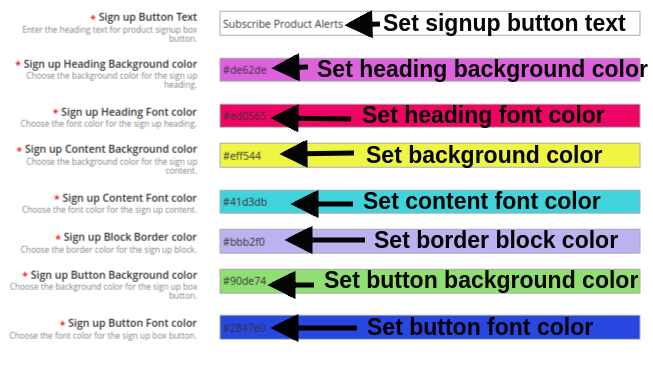
  • Sign Up Button text: You can modify the text shown on the product subscription or signup popup.
  • Sign up Heading Background color: You can change the background color for the sign up box heading.
  • Sign up Heading Font color: This option allows you to change the subscription box heading font color as per requirement using color picker tool.
  • Sign up Content Background color: You can change the Subscription box background color using this option.
  • Sign up Content Font color: The admin can change the font color of subscription box text with this option.
  • Sign up Block Border color: This field of Web Push Notification module allows you to set the border color for the signup notification box.
  • Sign up Button Background color: This option lets you set the background color for the product subscription button shown in sign-up box.
  • Sign up Button Font color: This option lets you set the font color for the product subscription button text.

3.1.4 Welcome Notification Settings

Under this section of Magento 2 Web Push Notification module, the admin can customize the look and feel of the Welcome notification box. This Welcome Notification box will be shown in the front-end of the store when the customer enters the store. The users can click on approve button for getting the site notifications or can cancel the option. This section contains the following options:
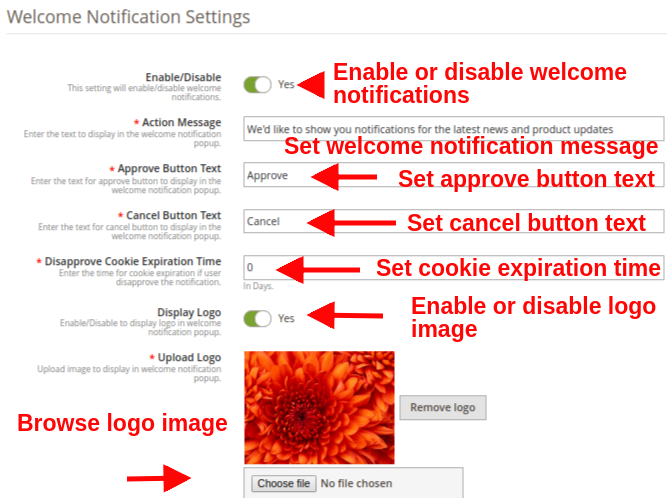
  • Enable/Disable: Admin can enable/disable this Permission Box on the frontend. If enabled, the permission box will be shown in the front-end of the store.
  • Action Message: This option sets the display text for the welcome notification popup.
  • Approve Button Text: You can enter the display text for the Approve button shown over welcome notification popup box.
  • Cancel Button Text: You can enter the display text for the Cancel button shown over welcome notification popup box.
  • Disapprove Cookie Expiration Time: This option sets the time for cookie expiration if user disapprove the notification. Like if this value is set to 2, and the user clicks on Cancel/Disapprove button then the welcome notification permission box will be shown to that user after two days.
  • Display Logo: This option allows you show/hide the display logo for the welcome notification popup.
  • Upload Logo: Using this option, you can browse and upload a desired logo image for the welcome notification popup.
    Note: Web push notification module allows the admin to run cron to send the push notification immediately or after a fixed time.

3.2 Templates

Web Push Notification For Magento 2 offers five default ready-made templates which are fully-customizable and gives flexibility to create new templates as per business needs. Under this section, you can customize or add a new Web Push notification template. The five default notification templates offered include:
1. Order Place Notification Alert
2. Product Back In Stock Alert
3. Product Price Alert
4. Abandoned Cart Alert
5. Order Status Update Alert
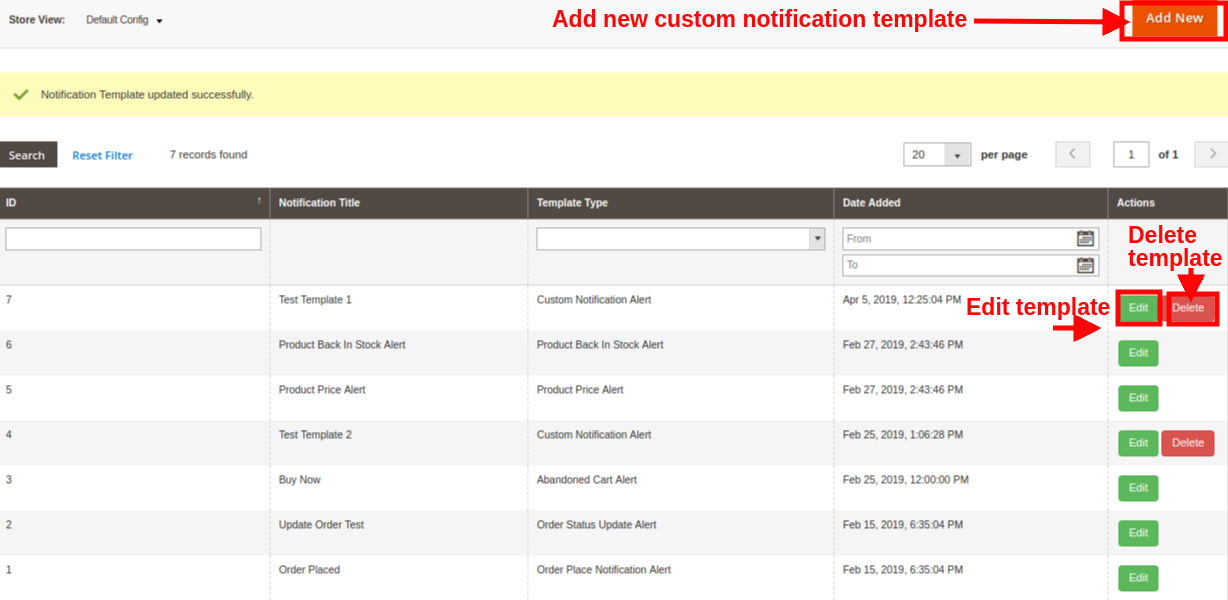

Note: The default notification templates can be modified but cant be deleted by the admin. While the new created templates can be modified or deleted from this section.

3.2.1 How to add Custom Notification Template?

An option to add templates of Push Notification for web browsers is provided at the back-office. Simply click on “Add New” button for creating a custom notification template. Fill the following fields in order to create a new notification template for the store.
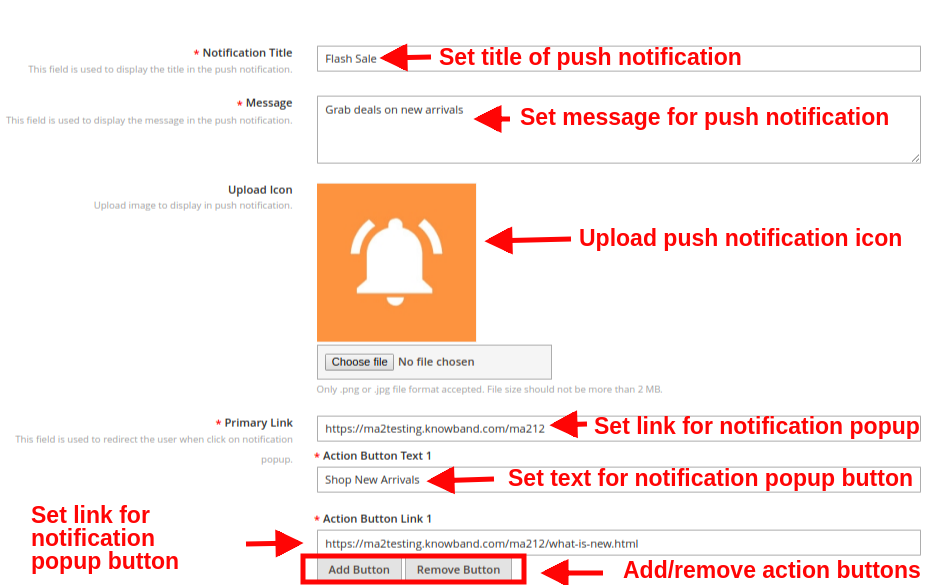
  • Notification Title: With this option, admin can set a title for web push notification.
  • Message: Using this option, you can set a custom message for the web push notification.
  • Upload Icon: This field allows you to choose a desired icon for the custom push notification.
  • Primary Link: With this option, you can set a primary link for the push notification. When the user clicks on the notification popup, they are redirected to this specific link.
  • Action Button: You can add as multiple action buttons to display on the push notification popup box. These buttons can be set with different text and action button link.
  • After the successful entry of details, the new custom template would be added in the “Push Notification Template” table.
    Note: The Admin can add the N no of Custom template for a various promotional offer like Flash Sale, Buy 2 Get 1, Happy hours and more.
    The other default notification template include:
  • Product Back In Stock Alert: When the admin changes the status of the Product quantity to in-stock from the back-end of the module, back in stock push alerts are sent to the customer.
  • Product Price Alert: When the admin changes the product price and they offer a discount price then the price alert push notification is sent to the customer.
  • Abandoned Cart Alert: This Magento 2 Browser Push Notification module sends an abandoned cart notification to the customer when they leave their cart.
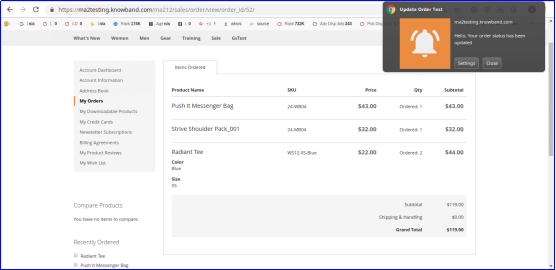
  • Order Status Update Alert: When the admin changes the status of the order, this order status push notification is sent to the customer.
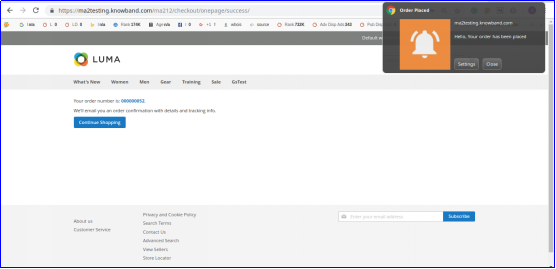
  • Order Place Notification Alert: As the customer will place an order, this alert is automatically sent to them.

3.3 Send Push Notifications

Magento 2 Cart Reminder Push Notification Module allows admin to send push notifications manually. For this, you have they have to select the template and send time for the push notification. Once the notification is set, you can test it in two ways:

1.Admin can register as admin and then test the push notification. This notification alert is only send to the registered admin not the subscribers.
2.If the admin finds no issue in the push notification, they can send push notification directly to all the subscribers.
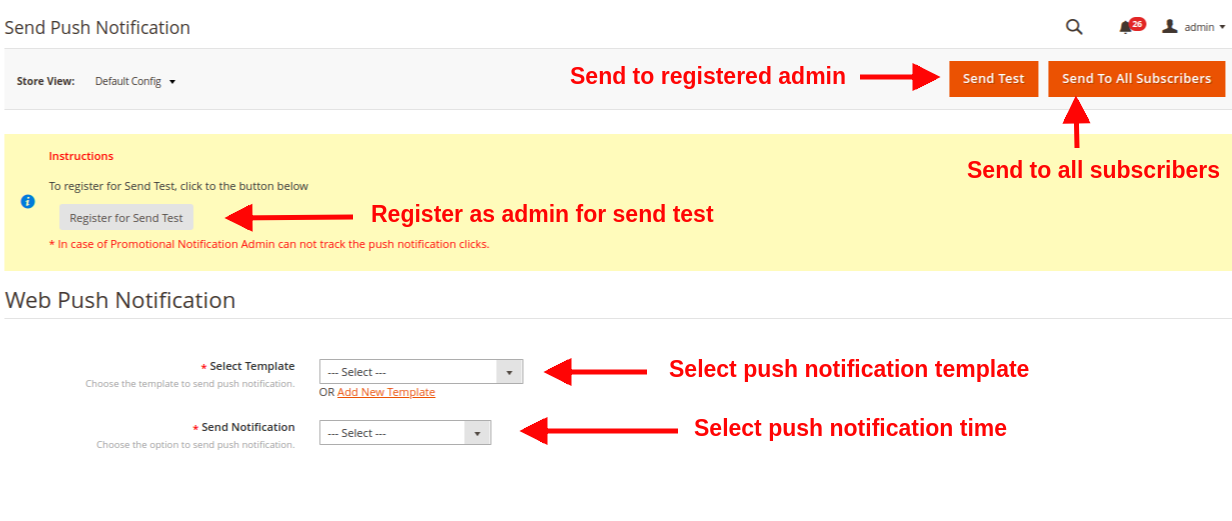
  • Select Template: This option allows admin to choose the template for notification from the existing ones.
  • Send Notification: Admin can send the notification immediately or on a scheduled time.

When the admin sends push notification at a particular time, then the cron has to run manually. Here are the cron instructions:

1. Delay Push Notification CRON
https://www.example.com/ma212/kbwebpush/index/delayPushCron/?SID=dgaqkeauhluhn4cmtaug3gahl2
2. Abandoned Cart Notification CRON
https://www.example.com/ma212/kbwebpush/index/abandonedCartCron/?SID=dgaqkeauhluhn4cmtaug3gahl2

3.4 Delay Push Notifications

Web Push Notification for Magento 2 allows the admin to schedule the notification for a particular time. All the scheduled notification will be displayed in the Push Delay Notification tab along with their status.

 

3.5 Subscribers

Under this section of Magento 2 Web Push Notifications extension, admin can view the total list of subscribers who have allowed the push notifications. Records of users who deny the push notification are not shown in this panel.

The admin can keep a track on the subscribers along with their details like browser name, browser version, platform, device type, country, subscription time and user type.

3.6 Product Subscribers

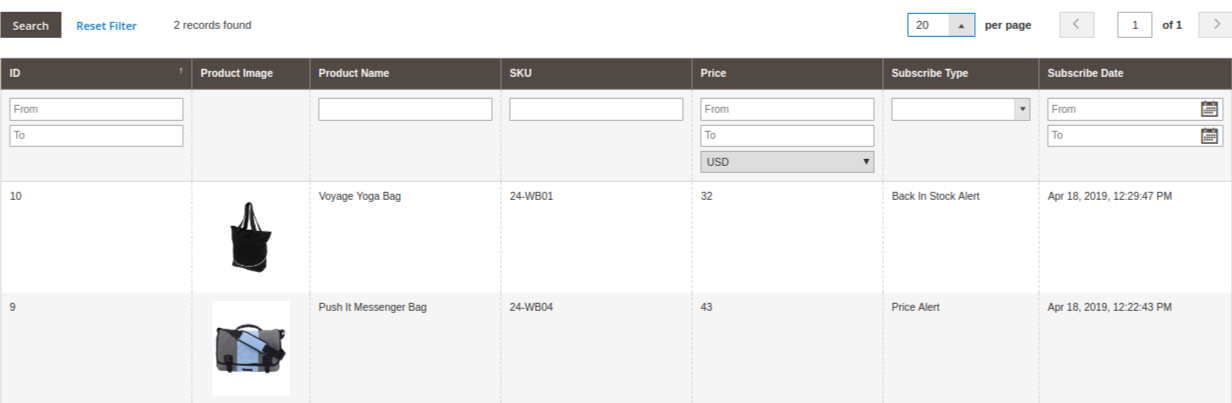
Web Push Notification For Magento 2 also gives a detailed view to the product subscribers along with their subscription type detail. Admin can see which product is subscribed along with its name, product image, product SKU, Price, Subscription type and subscription date.
 

3.7 History

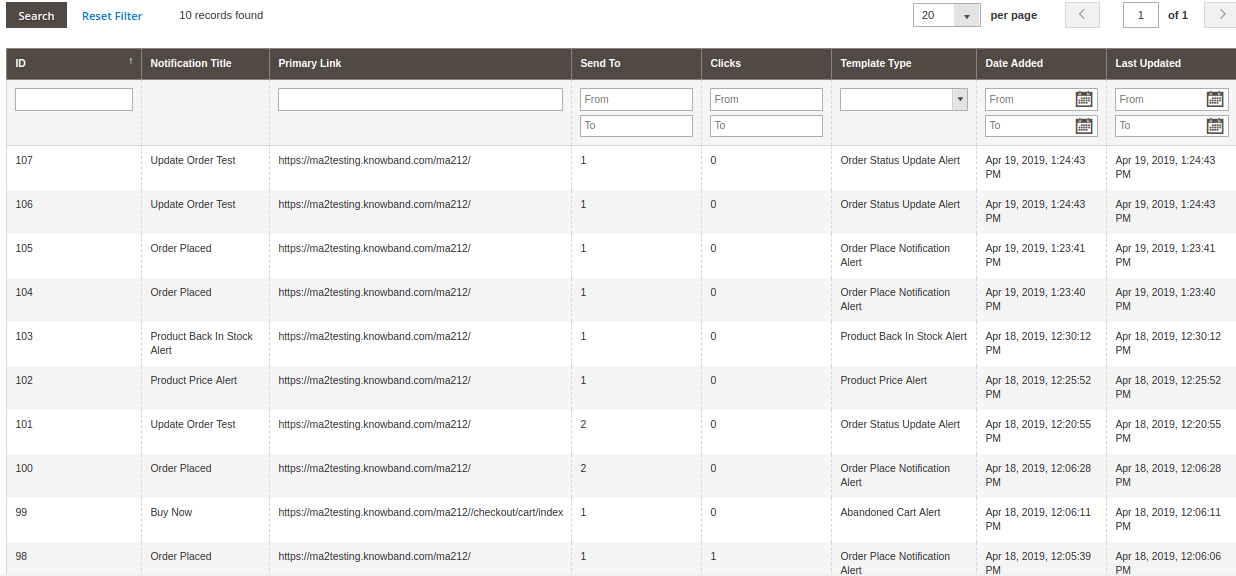
Magento 2 Web Push Notification Module allows the store admin to view the overall history of web push notifications generated for different events like order place, order status update, price alert, abandoned cart and others. Admin can filter the results based on push notification type or date created. From this section, they can even view the total customers who received a particular push notification.
3.8 Statistics

Magento 2 Website Push Notification extension provides a simple interface to understand the subscription analytics. Admin can easily view the number of desktop subscribers and mobile subscribers. Additionally, you can view particular subscribers coming through Chrome and Firefox browsers.

Note:

  • Total Subscribers are the users who have approved the push notifications for their system or device. This includes both desktop and mobile subscribers.
  • Total Campaigns are the total push notifications sent for different events.
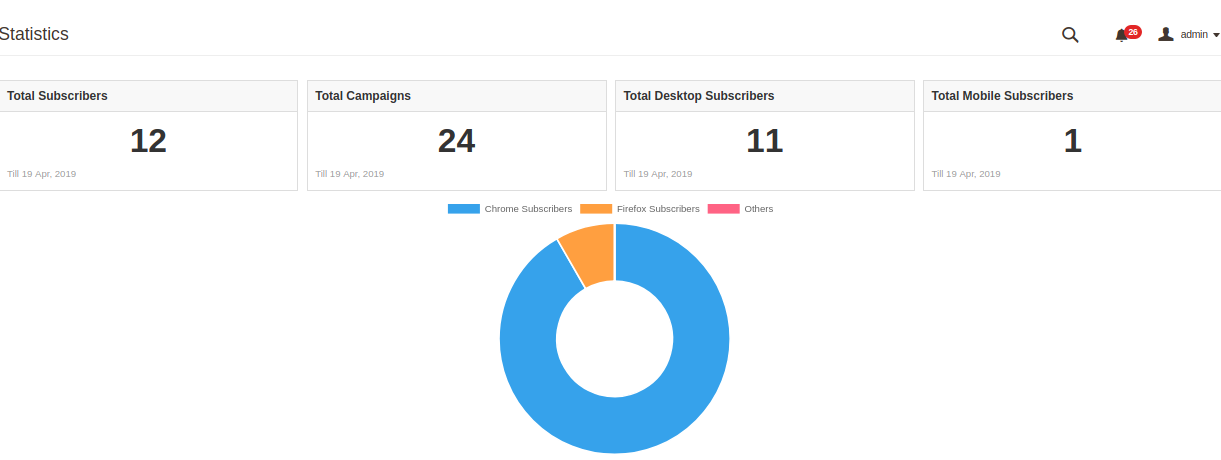
Report analysis can also be done using graphical statistics as shown in the below image with the help of filter option.
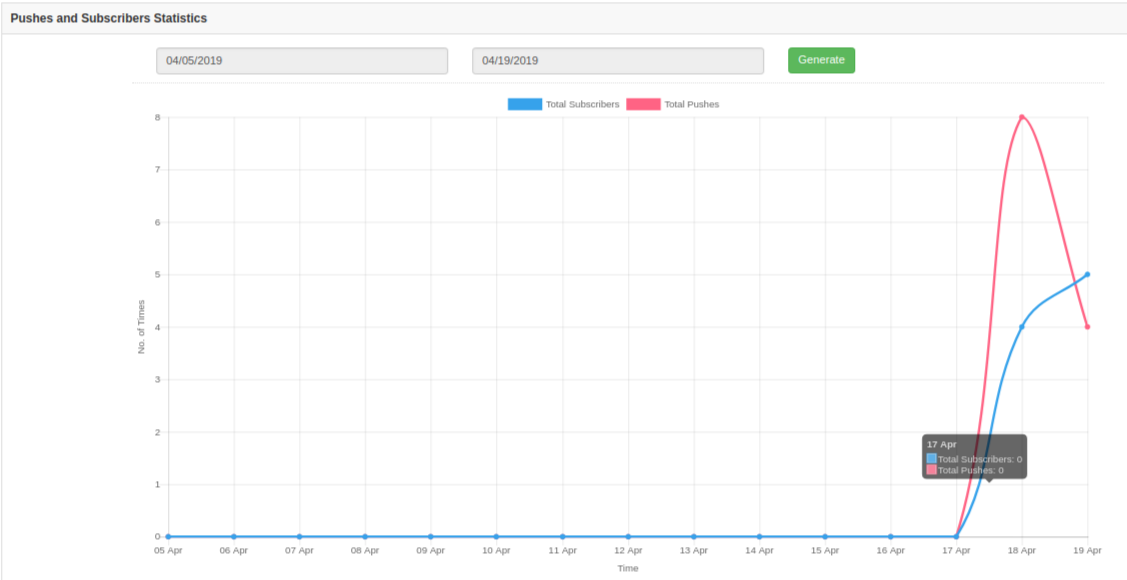
These graphical stats provide information about the total number of subscribers and the total number of push notifications sent to those subscribers.

4.0 Front Interface of Magento 2 Browser Notification extension

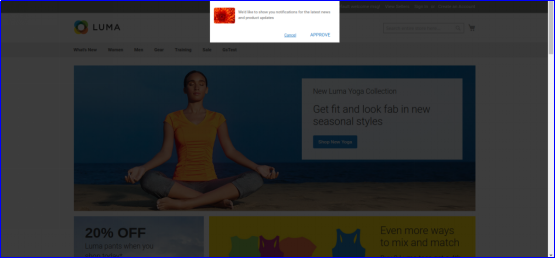
A)Welcome Notification Box
This welcome notification box contain buttons to approve or disapprove the alert subscriptions. As the user visits the site, this subscription popup is shown on their front, which they have to either approve or deny. If they “Deny” they will not get any site or product related notifications. If they “Approve”, they will receive sale alerts, offers information and product related updates like back in stock, price drops and abandoned cart.

B)Order Place Notification Alert

C)Order Status Update Alert
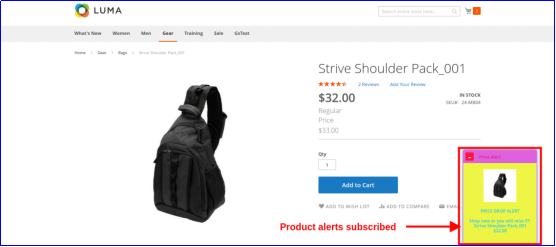
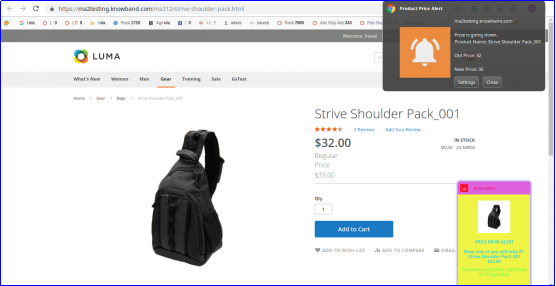
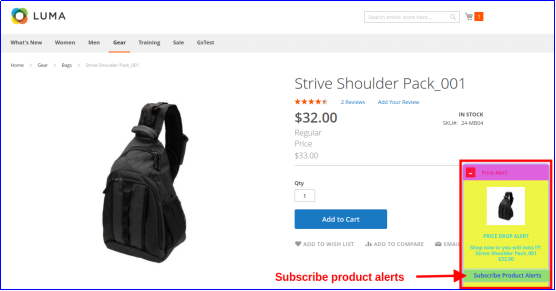
D)Product Price Alert

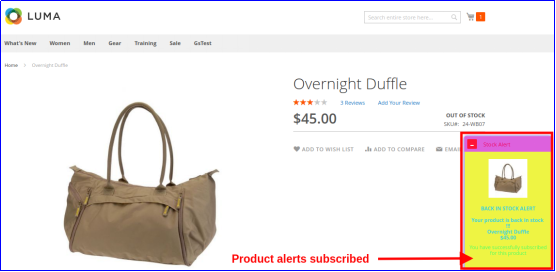
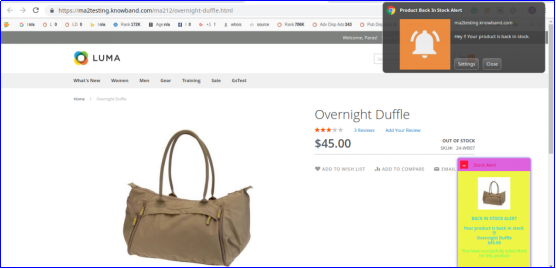
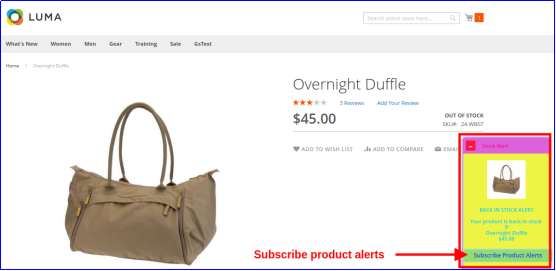
E)Product Back In Stock Alert

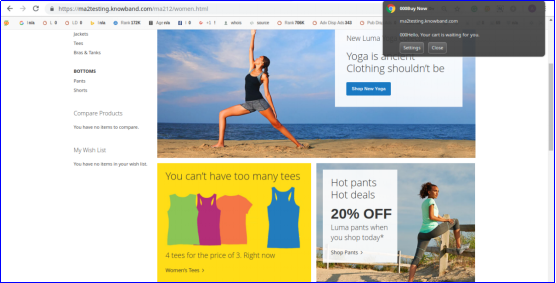
F)Abandoned Cart Notification Alert
12 Ways to Reduce Shopping Cart Abandonment

“This write-up talks about Cart Abandonment and covers sub-topics such as cart abandonment reasons, cart abandonment stats, and it also provides you with cart abandonment solutions that will help you reduce shopping cart abandonment on your website.”

Abandoned Carts are a headache for website owners. It is painful to see shoppers adding items into the cart, but then deciding to give up the purchase on the checkout page. Though it is not in our hands to control abandoned carts, however, there are certain ways to reduce shopping cart abandonment.

What is Cart Abandonment?

When a user adds an item to his/her shopping cart but leaves in between without completing the purchase, it is known as Shopping Cart Abandonment.

Cart Abandonment Reasons

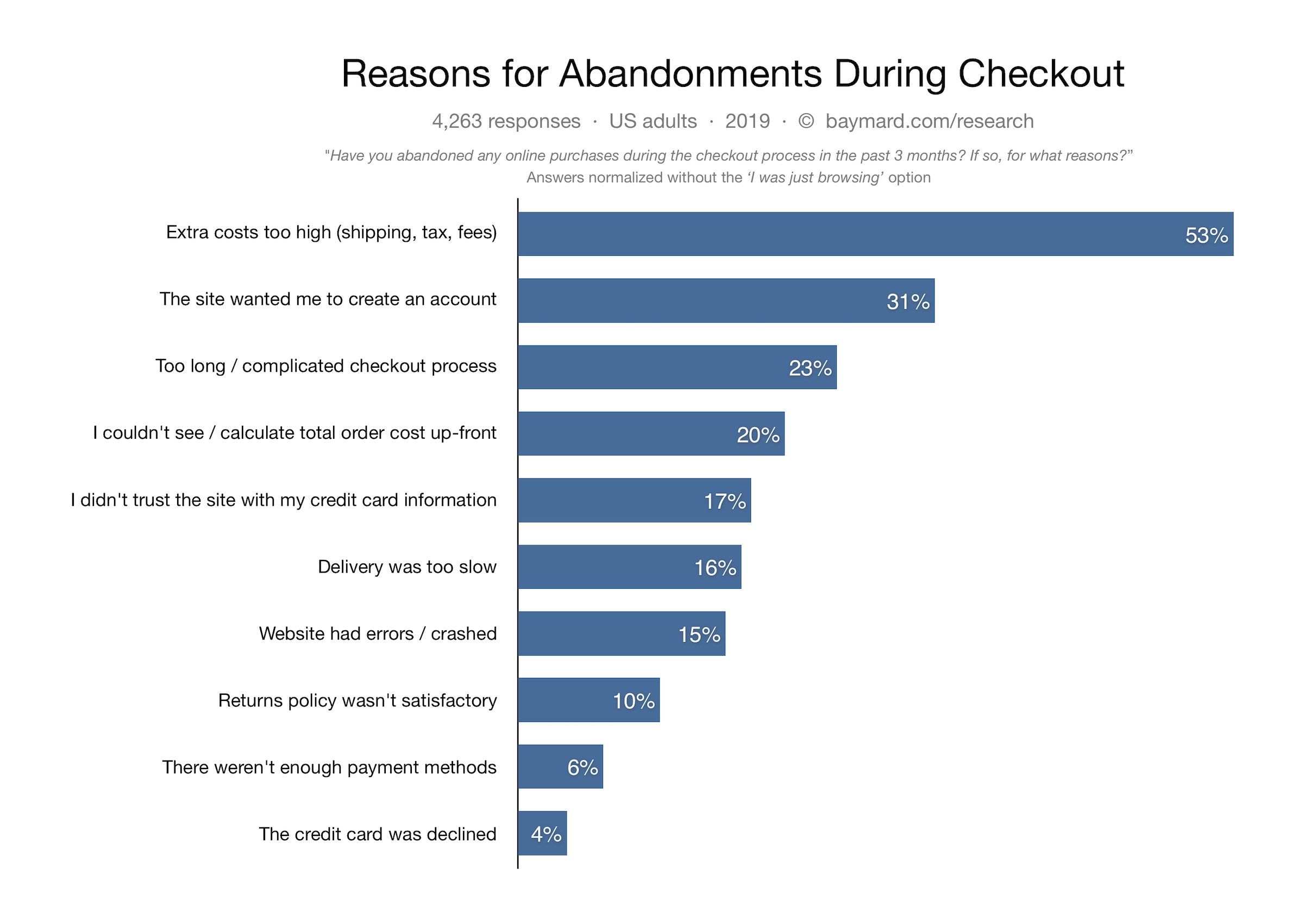
Below are some of the primary reasons for cart abandonment as per Baymard Institute.

High Shipping Cost

Mandatory Sign-up

Lengthy and Complicated Checkout

Internal Website errors

Security Issues

Late Delivery

Unsatisfactory Return Policy

Not enough payment options

Image Source: Baymard Institute

Cart Abandonment Statistics

Baymard Institute collected the cart abandonment stats of various eCommerce websites and found the average cart abandonment rate to be nearly 70%, i.e. every 7 out of 10 shoppers abandon their cart for some reason.

Statista also confirms the same. And as per the stats shared by Barilliance, abandoned carts are majorly seen in mobile devices.

How to Reduce Shopping Cart Abandonment?

How irking it would be to see hundreds or thousands of visitors on the checkout page but leaving without buying anything. Being a website owner, it feels bad to lose out on those prospects.

But hey! It happens with every online business and like everyone, you should also look for some ways to minimize abandoned carts. After knowing the reasons behind shopping cart abandonment, let’s check out how you can reduce the cart abandonment rate on your eCommerce website.

1. Provide a Clear Vision of the Overall  Cost

People usually do not expect the cart value to exceed very higher on the payment page. But sometimes, the additional charges like shipping cost, delivery charges, tax charges, hidden costs and surcharges create a huge difference between the product value and the cart value. Make sure to avoid this.

Be transparent about the overall costs. Display it upfront at the time of purchase. By doing so, at least you do not surprise your customers later and are giving them a clear idea of the total price beforehand.

Or you can simply offer free shipping. This is one of the best ways to reduce shopping cart abandonment. To adjust the shipping cost, you can slightly increase the product price.

Related: Free Shipping Strategies: Why to Offer? How to Offer? When to Offer?

2. Build Trust through Security Badges

Another solution for reducing cart abandonment is displaying security badges.

Online shoppers are highly concerned about sharing their card details. With online frauds rising rapidly in the Internet world, it is not easy for consumers to put their trust into an online business, especially if it is the one with whom they are interacting for the first time.

Consumers have a fear of losing their hard-earned money. Hence, it is important to make customers feel secure about their payment-related stuff.

What is the solution?

Add security logos to your checkout page. Something like Norton Secured, McAffe secure can boost the confidence inside customers and reduce the cart abandonment possibility. Besides, consider making your website SSL certified if it isn’t. By adding an SSL certificate to your domain, your site looks authoritative.

3. Take help of Exit Pop-ups

Exit pop-ups are probably one of the best ways to recover abandoned carts. What’s exciting about them is that they provide you with an opportunity to convert a visitor into customer right when they are about to leave your website.

Through exit popups, you can draw visitors’ attention towards your offerings at the very last moment and encourage them to use it on their purchase. The appearance of an exit popup when the user is trying to exit, leaving the cart abandoned, can bring a significant change in your cart abandonment rate.

This last-minute try can boost your conversions if your offers are convincing. Want to implement the exit popup functionality on your website? Try out the Exit Intent Popup by Knowband which is available for various eCommerce platforms-

PrestaShop Exit Popup

OpenCart Exit Popup

Magento Exit Popup

Magento 2 Exit Popup

4. Add Guest Checkout and Social Login

Forcing customers to create an account at the checkout page is one of the major reasons for cart abandonment. I seriously do not understand the point of adding this hurdle in between a successful checkout.

I do understand that you want to acquire the customer data but asking for it by breaking the checkout flow is not the ideal way.

So what should you do?

Offer a Guest Checkout as well as Social login. By having these two options on your checkout page, not only you will reduce the cart abandonment rate but also enhance the user experience.

Let users check out as a guest if they are not comfortable signing up. Social login, on the other hand, encourages quick signup.

Related: 10 Benefits of Social Login in eCommerce

5. Simple and User-Friendly Checkout

A lengthy and complicated checkout is one of the primary reasons for shopping cart abandonment. When a shopper is on the checkout page, he wants to check out as quickly as possible. The longer you make your customers wait, higher will be the chances of cart abandonment.

Keep the checkout form short, simple and clean. Avoid filling it with unnecessary elements. Ask for the necessary information only. To make the checkout experience of your visitors smoother, you can go for a One Page Checkout. A one page checkout places all the checkout fields on a single page and lets customers checkout comfortably. Try out Knowband’s One Page Checkout-

PrestaShop One Page Checkout

OpenCart One Page Checkout

Magento One Page Checkout

Magento 2 One Page Checkout

Related: One Page Checkout vs Multi-Page Checkout

6. Display Checkout Progress

It can be frustrating for consumers to be at the checkout page but with no endpoint in sight. They keep filling the information and keep moving to the next pages only to find out that it is a very long and time-consuming process. This eventually leads to customers abandoning their cart.

Use a progress bar to indicate where the visitor is present. A progress bar displays the overall steps a customer needs to go through to complete their checkout and fills as soon as they move further.

It’s better to tell your customers beforehand what all will be required to enter before they could take an exit.

7. Provide Easy Navigation

Make it easy for the visitors to navigate around your website. Do not clutter it with clunky designs. The smoother the journey of your visitors, lesser will be the abandoned carts.

It is still seen in many eCommerce websites that when a user clicks on the back button after filling out a particular page, the entire information is removed and customers are asked to fill their details again. This is annoying for the users.

Make sure that the buck button is fully functional and does not erase the already entered information.

8. Chase Abandoned Carts

Shoppers abandoned their cart? No issues. Go after them. You might not be able to convert all but at least a few of them will surely convert. And if the cart abandonment rate drops by even a small percentage, it can add a significant amount to your revenue.

Knowband’s Abandoned Cart Module

Check out the Abandoned Cart module by Knowband. This lets you track your abandoned cart users and helps you recover lost sales. Through this module, you can specify a duration after which the cart is automatically assumed as abandoned, and then you can remind those users through follow-up emails. You can add a coupon code inside your emails and there are a lot more functionalities in this module. Check out

PrestaShop Abandoned Cart

OpenCart Abandoned Cart

Magento Abandoned Cart

Magento 2 Abandoned Cart

9. Increase Payment Options

You just cannot disappoint your customers with the lack of payment options on the checkout page. And it will be heartbreaking to see a customer abandoning the cart because of the unavailability of the desired payment option or not having enough payment options.

People have switched to digital wallets, also called as e-wallets. Thus, having only limited payment options like Credit Card and Debit Card would not be enough. The more options you provide to your customers, the more comfortable they would be while making the payment.

10. Make your Website Mobile-Friendly

M-commerce has already surpassed eCommerce. A majority of people are now using their mobile devices to shop online. This makes it necessary to have a mobile-friendly version of your website. If your website looks appealing on the desktop, make sure it looks the same and is responsive on handheld devices as well. Failing to do so can result in a higher bounce rate and higher cart abandonment rate. Optimize your website.

11. Improve the loading speed of your Web Pages

If your web pages, specifically the checkout pages, are taking a lot of time to load, it isn’t a great sign for conversions, it could severely affect your sales. The slow loading in a website frustrates the customers and he/she ultimately ends up in leaving the cart abandoned.

So, optimize your checkout page and improve its quality and speed. For faster loading of web pages on mobile devices, you could take the help of Google Accelerated Mobile Pages or simply AMP. Knowband provides AMP module for PrestaShop and OpenCart.

PrestaShop AMP addon

OpenCart AMP extension

Related: Benefits of Google AMP for eCommerce

12. Have a clear Return Policy

Many a time, shoppers abandon their cart because they are not satisfied with the business’ return policy. There is a desire to purchase but due to an unsatisfactory return policy, shoppers decide not to go for the purchase.

Have a good and clear return policy. Provide them sufficient days to return the product if it has got some defects. Users will be more confident while making a purchase.

Related: 6 Pieces of Advice for an Effective eCommerce Return Policy

Final Word

That’s it. The above-mentioned tips will surely help you reduce cart abandonment rate on your website. Over time, you may find some new tactics as well.

If you want to add something that you feel is missing from this article, do drop a comment below. For any kind of assistance in the modules, contact us at support@knowband.com

What’s your take on reducing cart abandonment?

5 eCommerce tips and tricks to ensure fast growth

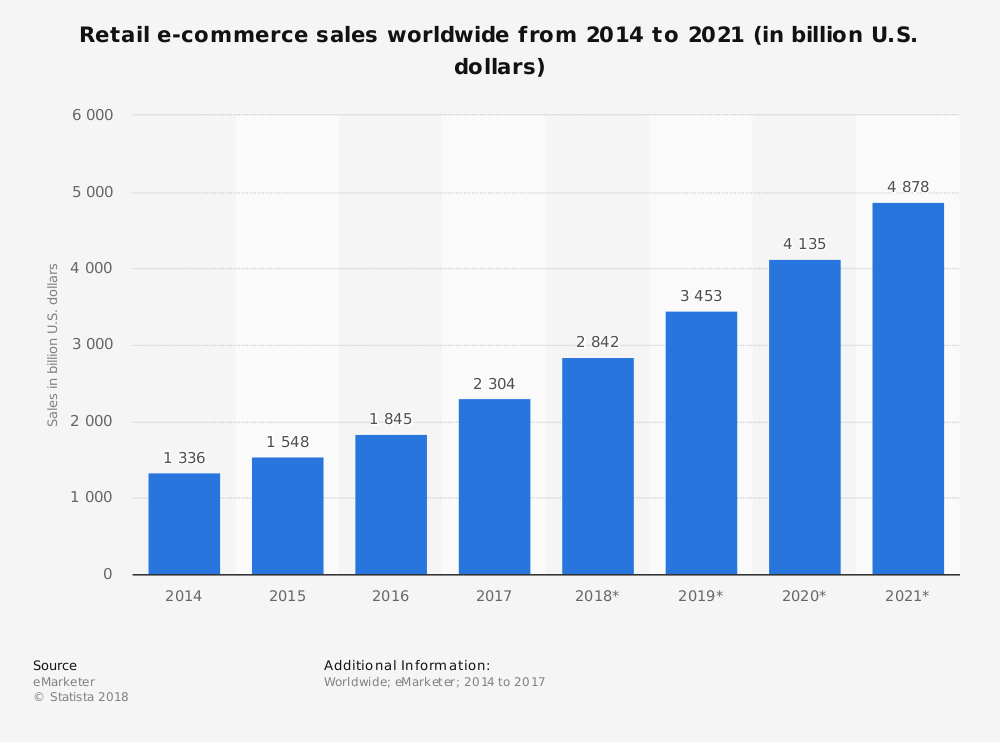
In this age of the digital world, awareness has become a prerequisite for every individual and all the industries are growing so rapidly that we never know what becomes trendy like how. The one such industry which has grown manifolds and thanks to the 4G Internet is the eCommerce industry. For those who are not aware of it, the eCommerce industry is one of the fastest growing industries all over the world. And the biggest gift given by this industry is the trend of online shopping ruling the world. Individuals from every corner of this globe are indulged in this process and saving their time and energy. According to Statista, e-retail revenues are projected to grow to 4.88 trillion US dollars in 2021.

However, rapid growth also brought huge competition between different eCommerce merchants. The increase in eCommerce businesses led to the competition heat up between these merchants. This made them responsible to keep pace with some new eCommerce trends especially those involving technical advances to shape consumer behavior.

Here are the 5 tips and tricks to ensure fast growth in eCommerce business:

1. Enhance video content and marketing:

Video marketing is one of the best and most popular ways of content marketing nowadays. As consumers love watching videos nowadays, it’s an easy and fun way to actively engage customers on your eCommerce website resulting in the upliftment of sales and revenues.

To overcome the competition, it’s the most beneficial way to improve your eCommerce growth and take it up to new heights of success. By embedding the videos from social media like youtube or adding video-based design elements, sellers can easily enhance their home page or product page which can attract more customers towards your store.

2. Serve Omnichannel consumers:

In today’s interconnected digital era, customers are searching for their favorite product on more than one online channel or Marketplace. According to Statista, Amazon accounted for 56.1 percent of the segment’s traffic, eBay accounted for 19.5% traffic, Walmart 3.8% and Etsy accounted for 3.5% of traffic. These numbers are clearly the resemblance of the crucial need to serve omnichannel consumers by marketing the products and services on all the available channels or Marketplaces.

Today, it’s easier than before to promote your brand or product online but before that, sellers need to turn their ideas into an eCommerce business. Just be sure to market your website on different platforms like social media, renowned marketplaces like Amazon, eBay, Etsy, Walmart as well as on small retail stores too. Never ever leave an opportunity to promote your brand store in any possible way. And no matter which channel you are selling, always sell genuine and reliable products to build customer’s trust in your brand and eCommerce store too. It will not only help you to increase customer traffic but also differentiate your eCommerce store with others.

3. Mark ways towards success with AI Chatbots:

If you want to give tough competition to other sellers, you can try your hands on the 24/7 assistance feature given by AI empowered chatbots. Customers love immediate response for their queries and chatbots are the perfect solution for this. Automated chatbots can resolve any kind of query of numerous customers at the same time. However, they can’t think outside the box, recognize misspelled words or evaluate incomplete queries as their creativity is limited by the code that created them.

But, thanks to these technological advancements as they have made these chatbots smart and sophisticated too. They are SSL compatible and multilingual too which helps you attain customer satisfaction in regional areas too. Therefore, it will increase the consumer traffic on your website leading to a lump sum amount of sales and revenues.

4. Voice search is a new boon:

It usually happens when customers are unable to write the correct spelling of their desired product and are unable to find it on the website. This leads to a decrease in the conversion rate of the website as the qualified leads also turn into non-qualified ones. Voice search is the new trend in these online stores as it helped many who were unable to write the correct spelling on the search tab. They can just simply speak the name of their product and it will be presented on their mobile screens.

According to Statista, 35 percent of users stated that they would consider purchasing food via their voice assistant in the future. Some latest gadgets for voice search like Google Play, Alexa by Amazon, Amazon Echo, etc. are some of the best innovations for eCommerce platforms. Many online store owners have already adopted the voice search functionality for their online eCommerce business. The advancement of voice search is an outgrowing opportunity when it comes to enhancing your SEO and this could also be enhanced by improving your product description on the website.

5. Safe and secure payment method:

When it comes to checkout, customers believe in a safe and secure checkout and payment method as there are many people who leave the cart abandoned due to the lack of trust which can end up losing potential customers. The final stage of online shopping should be smooth and simple as many people get frustrated due to the complex checkout process and payment gateways.

According to Statista, 69.23 percent of digital shopping carts and baskets were abandoned in the year 2017 and the purchase was not completed. Many times, it is due to the lack of trust in payment gateways on the checkout. So, if you want to improve the conversion rate of your website and want to be an extra edge over other competitors, be sure to provide a simple checkout process and secured payment options. You can apply PrestaShop one page checkout addon on your eCommerce store.

Final Verdict:

As the eCommerce industry continues to evolve, the most important responsibility is to provide a positive consumer shopping experience. Sellers should remain aware of the latest eCommerce trends which include omnichannel marketing, chatbots, video content and marketing, and a simplified checkout and payment process, and it will definitely help you to stand out from your eCommerce competitors.

Competition is at its peak and we have to overcome this. To remain an extra edge over others, KnowBand offers Marketplace integrators that enable sellers to integrate their eCommerce store to some renowned marketplaces like Etsy, eBay, Walmart, Google Shopping and Newegg. You can now list the products and the descriptions at a few button clicks. Thus, it becomes easier to update the details in bulk. Moreover, the attribute mapping becomes a cake-walk with the automated approach. So, integrate your eCommerce store and earn a huge chunk of profits.

Find more related articles here:

  1. Keys to successfully buy online and pick up in-store 
  2. 8 tips to drive more customers on a Marketplace
  3. 6 Summer Holiday eCommerce shipping mistakes to avoid
  4. 9 tips to help you sell more on Walmart Marketplace

Keys to successfully buy online and pickup in-store

The day to day advancement of eCommerce is not hidden anymore. Shoppers are comfortable buying online by sitting in their comfort zone and saving time and energy both. However, many shoppers believe in-store pickup of the product from their nearby store.

The demand of in store pickups as well as in store returns of online purchases is increasing rapidly. Being an eCommerce store owner, you should fulfil this demand to increase your significance in between customers. The fulfilment of customer expectations will drive you to the immense success by increasing your sales and revenues. However, it’s matter of to concern to tell that half of the online retailers are not interested in offering these capabilities to their beloved customers. Online retailers should try implementing the BOPIS factor on their website i.e Buy Online, Pickup, In-store.

Implementing this strategy will work but in addition to this, there are various tactics you need to apply to make this work successfully. So, before you imply BOPIS, you have to follow some major key factors to successfully enhance your online store.

1. It begins with on-site promotion:

As we all know, the best buy product is a eye-catcher in between customers. The consideration phase is the time where a product catches an eye of the customer presenting and compelling to try some other alternative for the same. By integrating BOPIS offer early in the browse experience i.e before consideration phase, it would attract customers and will transform it into best buy wisely which could lead sellers to gain good conversion rates.

2. Post sale emailing:

Whenever a customer chooses BOPIS mode at the time of purchase, a post sale email should be sent to customers with all the standard order details. But they should also include the information anticipating the needs of the customers such as (i) what they need to bring to retrieve their order, (ii) links to the address on maps, (iii) special parking info, and (iv) where to go inside the store. You can also include a photo or others visuals of what customers should seek to reach your store conveniently.

3. Availability of parking:

Almost everyone own cars nowadays. It’s pretty obvious that customers must head towards your store in their cars. It’s the responsibility of the store retailers to provide a convenient parking place to the customers. Convenient parking appeals time driven customers. Instead of spending money on billboard advertising, try to dig out a suitable parking area in a dense urban city.

4. Maintaining discipline in the store:

Who like chaos? Obviously no one. The physical store owner knows the importance of discipline in the store. Consumers had to stand in queue for hours to wait for their turn. The long queues are the result of distorted management of the store. BOPIS encourages for creating dedicated experiences for in-store pickup. The retailers can quickly retrieve the orders without diverting (and frustrating) sales associates. This helps in shortening of the queues and decreased the chaos in the store too.

5. Experimenting and Improving is the key to success:

The most obvious reason because of which the store do not imply in store pickup is the cost. It’s expensive to overhaul back-end logistics, retrofit stores, and train employees. A less obvious problem is the speed at which BOPIS is evolving. Many retailers struggle to find the best fit for them and their customers.
However, as this generation relies on innovation and advancement, you should keep experimenting and improve your store. Innovative companies are never afraid of experiments- emphasising their strengths to encourage in-store pickup shopping.
While in-store pickups do not burden sales associates, it basically increases the value of in-store visits. Customers can easily walk out just by taking their order without talking to the retailers or they can easily leave the product if they are not satisfied with it.

6. Innovative companies are advancing — emphasising the strengths of in-store shopping:

The companies who are constantly experimenting with their business strategies and are bringing out innovation in them are constantly stepping towards success. Sellers should try to provide some offers to lure more and more consumers towards your website. For example, sellers should give some cool offers and discounts to the consumers who opted for in store pickup. And if this strategy prove worthwhile, you can increase the use of this strategy for immense success.

Online returns is a boon in increasing sale nowadays. Returning in-store allowed sellers to change the product according to their size, fit or missteps of a well-intentioned gift giver.

Over to you:

In short, there are many ways to leverage in-store visits. As consumer expectations rise and the challenges from Amazon mount, look for more experimenting from retailers.

KnowBand offers store locator and pickup for different CMS platforms like PrestaShop, Magento, Magento 2 and OpenCart. The eCommerce store admin can allow the customers to find the store availability. The customers can find the nearest store and also pick up the product. The store pickup extension allows the admin to provide a pickup option to the customers. The e-merchant can show the store details on the Google map. The customers can also have the driving directions.

The Google Maps Store Locator plugin is highly customisable the admin can show the distance, contact number and store timing also. The in-store pickup module offers a user-friendly interface. The admin can easily configure this plugin on their eCommerce website without any hassle. Store pickup plugin offers multi-lingual compatibility too which enabled consumers who are comfortable with their regional languages only.

Find more articles out here:

  1. 8 tips to drive more customers on a Marketplace
  2. 6 Summer Holiday eCommerce shipping mistakes to avoid
  3. 7 ways to boost up your sales using Social Media

4 Ultimate Tips To Increase Sales On eBay

The marketplace is the professional seller community that provides sellers a platform for selling their products and earn a huge chunk of profits. eBay is one of the best and most popular Marketplaces all over the world. Selling on eBay will definitely help sellers to earn a huge chunk of profits. Sellers can avail access to millions of customers worldwide which will rapidly boost up sales and revenues.

With over 182 million active users, eBay is a continuously growing marketplace that has provided a lot of sellers a platform with an infinite conversion rate. Selling on eBay marketplace is a dream for many sellers and luckily if you got this chance then here are the 4 ultimate tips which would help you to increase your sales on eBay:

1) Make friendly communication with your customers:

This point may sound murky but trust me this is the most useful way to all your leads. In today’s world, you have to play smartly and try to provide an enhanced shopping experience to your beloved customers to be remembered for the long term and repeated sales. Instead of running towards materialistic things, sellers should keep a check on the quality of the product as it is directly related to the feedback of consumers.

eBay has an outcome with a user-friendly interface for marketplace sellers which lures them to sell more and to add more product listings to it. It’s very important to understand the market base and go for the right decision which will suit best for your niche.

For example, if you deal in eyewear and the summer season is around the corner then my dear friend, you should add some cool sunglasses to your listings and earn a huge chunk of profits and a huge customer base too.

2) Use relevant tools for increment in the sale:

Sellers should be efficiently involved in multichannel selling as it is a big boon nowadays. For the past 10-20 years, multichannel selling is one of the most popular ways of marketing in all forms of selling and will be even in the future too.

All sales channels are efficiently interlinked with each other to achieve every possible facet and convert them into fruitful leads.

So interlinking and back-linking your website on different selling platforms and website blogs would be beneficial to you in terms of sales and revenues.

Although the process sounds a bit tricky due to the presence of certain tools but believes me, these tools help you to easily manage the products, inventory and their prices too.

So, here are some tools discussed which helps in increasing sales on eBay:

i) When you manage your eBay orders Directly:

Managing orders directly could be a hectic task on eBay. However, the journey from selling on the store to selling on eBay has taken a few steps ahead. Here are some Product Lister services which will certainly help you list your products in bulk in just a single click.

ii) When you manage your orders from an online store:

eBay Marketplace supports all the tools used for conversion rate optimization driven by the concept of multi-channel selling. If you own an eCommerce store on an open-source platform like Magento, PrestaShop, etc., or on SaaS-based platforms like Shopify, etc., then you can use various eBay Integration Apps which come with the following features:

  1. Product Listing
  2. Seamless Store Integration
  3. Profile-based upload
  4. Order Management
  5. Payment and Shipping Regulation
  6. Inventory Update
  7. Seller’s Dashboard
  8. View error
  9. User-friendly interface

This is the sure-shot method to achieve Conversion Rate Optimisation!

3) Product Detail Optimisation:

Just imagine your product is shown interest by your customers but you failed to describe your product efficiently. How will a customer feel? Frustrated, right? Why is this so? This is because the way you described your product was not appropriate for a customer to understand and this will result in loss of sales.

Once your product detail is been optimized, it’s also important to rank your product listings in the search results. If your products are not visible on the top of search results, then there is no benefit from product detail optimization.

Below are some of the points to be kept in mind as they will directly help sellers to rank their products on top of the search results.

a) Keywords and Titles should be a priority!

Being able to identify and use the correct keywords is the most important task to perform. The product keyword should be user-friendly so put yourself in customer’s shoes and try to think like them and search any product using the keywords that come to your mind first.
Titles should be nice and user-friendly and it is important to use the relevant keywords. A title will help to attract the huge amount of traffic to your eBay listings.
Although eBay has set its own algorithm this strategy is totally inevitable and could really work to rank your product listings.

b) Include multiple and high-quality images:

eBay’s search engine analyses product images by analyzing the number of photos and the product information conveyed by them. So if you want to rank your product on top of the list, it is important to use high-quality photos with detailed information about the product.

Avoid using overly bright colors and click a picture in light background with high resolution to get a clear image of the product. Always try to click multiple photos of the product from different angles as it helps the customers to know more about the product. The image should be uncluttered and should not be overlayed with other text or line art.

c) List your product in relevant category:

Selecting a relevant category is incredibly important as this directly influences the search results and helps the buyer to find your products. Opting a wrong category will definitely limit you from being found by customers. So list your products accordingly in the category and your listings should comply with eBay algorithms.

4) Popularity and efficiency in Market to build customer’s trust:

In the current scenario where the customer is the thrown owner and we work only in the direction of achieving better consumer experience, it’s the responsibility of sellers to include them in your selling process and involves them actively.

You can make the visitors and customers a part of your process by the following simple practices:

  • Reviews: Sometimes there are customers who are not sure about the quality of the product at the time of purchase. To overcome this, it’s very important for you to grab feedback from your customers on your products in order to ensure that the products are working well and what is needed for the betterment.
  • e-mail advertisement: email marketing is one of the best ways to promote your business nowadays. With the help of email, you can initiate different e-mail campaigns to let your customers know about your upcoming products.
  • Social Media Marketing: Social Media Marketing is the primary key to marketing key these days. Consumers today are at-least present on one social media profile these days, so you can make the leads out of it by promoting your brand on the same. You can make your brand profile and follow random customers. This will not only help you to promote your brand, but it will also help you to direct your followers on eBay which can give you good leads in return.

Conclusion:

The above compilation of 4 ultimate tips would definitely help you to optimize, enhance and emerge out as a leading seller on eBay Marketplace. Just follow these simple guidelines like product description, shipping process, customer reviews and many more. So try to accommodate all these strategies and keep yourself updated about the latest trends and techniques and excel like never before!

You can now list the products and the descriptions at a few button clicks with the help of eBay Integrators by Knowband. Knowband provides Integrators for the various CMS platforms like PrestaShop eBay Integration Addon, Magento eBay Integrator, as well as OpenCart eBay Integration plugin.

Find out more related articles here:

  1. How to Launch a Marketplace like Etsy and Ebay?
  2. How to Rank Higher and Get Your Listings Seen in eBay Search?
  3. How to create an eBay Sandbox Account?
  4. How to Create eBay Application to Get Required API Keys and User Token?
  5. What are sandbox sites in eBay Marketplace?
  6. How to revise and relist in eBay Marketplace?
  7. How to list a product in eBay Marketplace?

8 tips to drive more customers on a Marketplace

Customers are the life force of an eCommerce Marketplace. It’s important to keep them engaged and happy in your eCommerce store because it is one of the ways to compel them for buying products. Each and every aspect is important in driving more customers to a marketplace. The tactics applied by you must be relevant and should engage customers on your website.

Selling on a Marketplace like Etsy, eBay, Walmart, etc. in between thousands of competitors is not a cakewalk. Maintaining a healthy relationship with customers is the basic step to be taken for better sales and revenues. Customers play a key role in bringing new users to your website. At times, it could be a love-hate relationship between customers and sellers which can lead to the downfall of sales. So, it’s pretty obvious that if there would be no potential customers, there would be no sales.

As the eCommerce industry is steadily growing every day including new trends and ideas, sellers should keep an eye on the growing competition to apply some new strategies to overcome it. It’s very important to draw the eye of the customers on your Marketplace.

Taking this into action, here are 8 tips that enable you to drive more customer traffic on your online Marketplace and results in good sales and revenues:

1. Take heed of every angle associated:

The services offered by a seller could be at their best only when you pay attention to each and every minor aspect associated with customer traffic. A good seller should also be a good brainstormer who can think of every aspect to give the best services to its customers. Every mind has a great plan and these plans could be implemented to generate profits. Analyze the targeted customers by knowing their demands and try to fulfill them. This will attract users to your website which can later turn into potential customers.

Brainstorm a little and target customers by following these tips:

  • Keep track of your targeted customers on social media like Facebook, Instagram, etc. You can get to know more about them and build your personal brand accordingly.
  • Always remain updated with the latest technology to provide a great shopping experience for your customers.
  • Provide them a smooth checkout process. If we believe Statista, 69.23% of digital shopping carts were abandoned in the year 2017. It could be due to a complex checkout process. You can reduce your cart abandonment rate by making the check-out process easier for the customer. Have a look at PrestaShop one-page checkout addon for your eCommerce store.

2. Drive Organic traffic to your website by excellent SEO:

Involving huge organic traffic from all over the world is definitely not a cakewalk. Like you, there are many more Marketplaces dreaming of potential traffic on their store but unable to achieve the same.

To overcome this competition, you must be well equipped with an excellent SEO to stay an extra edge over others. SEO is like the backbone for the marketplace which gives accurate balance to it. And the foremost way of excellent SEO is back-links. Back-links generate the highest amount of traffic on any website on Google. It also helps to rank you high in the Google search results. High ranking automatically gives you more traffic and relevant customers too.

3. The advertisement game:

Imagine you are searching for a product on Google and got some Google Ads in search results for the same product at different prices. Purchasers will definitely compare the prices by visiting different websites and will go for the best purchase. Focus on advertising your eCommerce store can optimize your website traffic. Customers will get to know about your Marketplace and will attract them to visit the same.

There are 3 varieties of campaigns you can run with Google ads is Search, Display, and Response. You can also show an ad on social media sites too. Now, you have to choose and advertise your products on any of these according to the availability of targeted customers. If you are targeting young people, then you can advertise your eCommerce store on social media. This can help you generate good leads on a daily basis.

4. Generating leads through Email Marketing:

Email Marketing is one of the most popular and advantageous strategies to convert prospects into customers. It helps in building the trust of customers and eventually generating loyal customers, making you capable to acquire profitable leads 24*7.

Email notifications are the most common way today to inform customers about the latest offers and discounts going on a Marketplace. It is a fact that people who buy through email notifications pay more as compared to the people who don’t avail of these offers. So, this means email notifications are also helping you in generating more revenues. So, start working from today to avail of good leads. In the market, there are lots of solutions present which make your email marketing easier.

5. Think like a customer, perform like a seller:

This is the utmost important tip to drive customer traffic on the eCommerce Marketplace. The product and service provided by the store admin could solely impact the purchasing decisions of customers. Remember one thing to catch a thief a policeman also have to think like a thief. Therefore, your strategies should be specialized according to the customer’s thinking strategy.

You should provide some tempting options which attract potential customers towards your goods and services. This will not only generate good leads but will also attract new users to your website. Since Marketplace has access to millions of customers worldwide, sellers can promote their products according to the demands of different communities and improve their cross-border sales too.

6. Focus on Quality, not Quantity:

Although your promotion is too good that you are getting immense traffic of customers but that doesn’t mean you will avail a huge chunk of profits. The quality of a product plays the most important role in acquiring the trust of the customers and confirming repeat sales too. Quality is always a one-step important factor than quantity.

Selling bad quality products demotes the reputation of the Marketplace and leads to the downfall of sales and revenues. So, it’s important to keep the focus on the quality of the products sold by sellers otherwise, it will lead to a serious downfall of your Marketplace platform.

7. Result-oriented behavior of sellers:

Sellers should already comprehend the demands made by the targeted audience and fulfill them by their goods and services to generate good revenues. The result-oriented approach towards your goods and services may enable you to inspect the whole scenario from a customer’s perspective.

However, the above fact can’t give assurance for the huge revenues as all potential customers are different from each other. The approach made by you should be precise and accurate and should generate better results.

8. Choose your social media wisely:

You may clearly have an idea that social media engages a huge number of audiences and is the best way to attract the eyes of purchasers towards your profile. However, it’s also important to choose the right social media platform by examining them closely and looking for the best one where you can find your targeted community of shoppers on a high scale.

Finally,

The above-mentioned points will definitely increase your website traffic which will result in higher sales and revenues. Regardless of whatever you sell on your eCommerce website, being a digital entrepreneur makes you responsible to analyze the traffic. On the website, implement some diligent strategies to convert them into potential leads. This will not only increase your website’s conversion rate but also make you earn a huge chunk of profits.

Convert your traffic into meaningful leads with KnowBand. Explore Marketplace integrators that enable sellers to integrate their eCommerce website to some renowned Marketplaces like eBay, Etsy, Walmart, Google Shopping, Newegg, and many more.

Features of Marketplace Integrators:

  1. Effortless product listing process with the bulk uploading feature.
  2. Mapping of the store attribute and category with the respective Marketplace attributes and category.
  3. Effective management of the product inventory.
  4. Effective management of the Marketplace orders.

Find out some more related articles here:

  1. 9 tips to help you sell more on Walmart Marketplace
  2. Why Marketplace is in trend?
  3. eCommerce Website or Marketplace? Where to sell on?

6 Summer Holiday eCommerce shipping mistakes to avoid

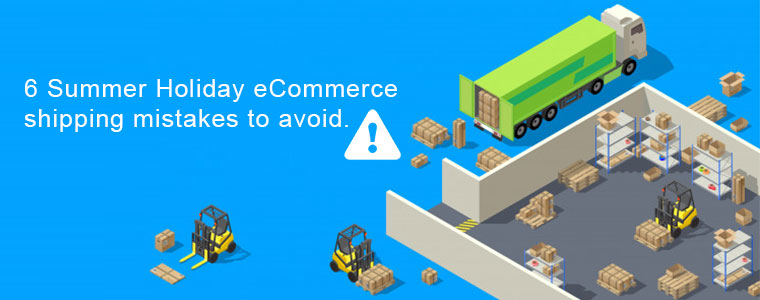
Customers expect fast delivery. Being an online seller, providing customers with their products is no more than a mission. And when the product is to be delivered under the scorching sun, the mission becomes more complex and hard to achieve. The Holiday sales season is the main culprit to increasing complexities in “Mission Delivery”.

However, the holiday season comes up with huge opportunities for making good sales and revenues. It also ensures immediate sales and profits. It also comes with an opportunity to make sales in the future too. For many eCommerce businesses, the question that comes in their mind is “should we offer free shipping?” and if yes then “how should we offer free shipping?” and many more.

Being a seller, it’s very important to come up with some diligent strategies to take advantage of these holidays in a fruitful way.

Many times, retailers are able to do more than one annual sale in a few months only. As it is a good opportunity to increase their sales and revenues, this could also bring the opportunity for shipment errors.

Since, every aspect should be up to the mark, shipping failure could scuttle all your opportunities and will result in loss of sales. The shipping glitch would not only make retailer pay extra shipping charges but also create frustrated customers, killing the chances of repeat sales too.

Although it is difficult to fulfil all the shipment related problems we can at least learn from our missteps and avoid them in the future. Here are 5 shipping mistakes to avoid this summer are as follows:

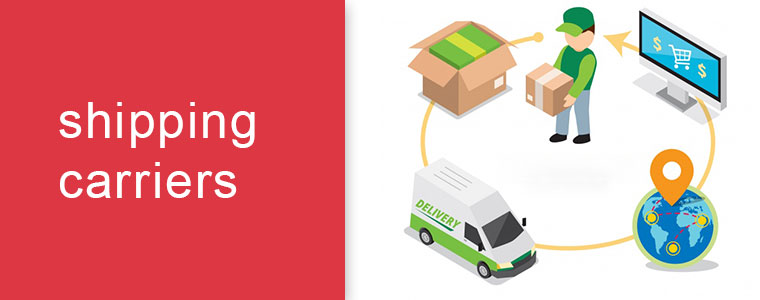
1. Not communicating with shipping carriers:

Almost every summer holiday sale has a deadline. Online customers expect their product to arrive by this deadline unless you set a proper set of guidelines. Each carrier service has its deadline for summer holiday sales. So, before the summer holiday approaches, it’s better to be in touch with them to know their delivery schedules.

Generally, orders are needed to be placed 10 days before from the day the customer wants the delivery. However, the date will differ a little depending upon the location of the warehouse and order destination too. So, it’s important to talk with your carrier service to confirm the delivery on that particular eve otherwise, you can lose the order and perhaps lose customer’s trust too.

2. Not maintaining enough resources:

Imagine you have 20 employees who can pick, pack, label and pile 200 orders in a day. That means if you accept 400 orders a day, then it would be difficult for you to fulfil the shipment process on time. Hence, you will be unable to handle the placed orders resulting in loss of sales and revenues.

To avoid this situation, you should think wisely and play smartly. Whenever the sale is high especially in holidays, you can hire temporary workers or call them in shifts. This will help you to maintain all the placed orders easily.

3. Insufficient packaging material:

Now you have enough human resource and plenty of inventory to work with. But as soon as you started to pack the products, one of your workers says – We are out of Bubble wraps.

If you are supposed to ship 1000 orders per day, then you must be equipped with 1000 cartons along with bubble wraps, tapes and other packing materials. Running out of packaging material would slow down the shipping process resulting in delayed delivery.

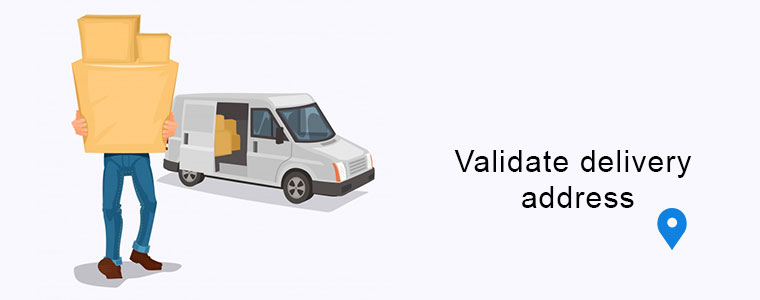
4. Forget to validate delivery address:

Once the order is packed and out for delivery, the delivery agent is unable to find the address and returns back with the product. It often happens that due to an incorrect address, the orders are unable to be delivered.

Jonathan Poston, director of technical SEO for The Tombras Group once said – “An incorrect zip code can not only throw off shipping but can land a package into an almost infinite state of limbo”. A wrong address can lead to big problems. So, always validate the shipping address before placing the order to avoid shipment related problems in the future.

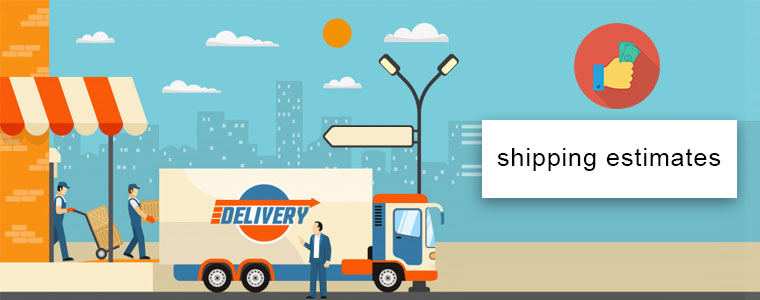
5. Fallacious shipping estimates:

Bad shipping can lead to the biggest consequences for your eCommerce business. Shipping is a very double edged game. If you make a lower estimate and provide one day delivery, then you have to pay the difference while if your shipping rate is too high, then the customer will automatically leave the cart abandoned.

According to Statista, 73 percent of respondents stated that free delivery greatly impacts their decision to purchase an item online. Shipping charges are the top reason behind cart abandonment as customers don’t want to pay delivery charges. So, you should be accurate with your shipping estimates to grab maximum leads.

6. Spoiling the surprises on Holiday sales:

It’s better to deliver the products in a plain box rather than delivering in branded logo box and that too with the invoice attached on it. So you can avoid making this mistake so that the giver get some time to hide his surprise from the would be a receiver.

Over to You:

After viewing all the above mistakes created by retailers in the shipping process, it’s important to learn from our missteps and try to avoid them in future for better generation of sales and profits. Regardless of whatever method or carrier you are using for delivery, it’s important to choose the right carrier for shipping process. Also it’s very important to keep a check on the quality of your products as many times sellers deliver bad quality products which is results harms your Marketplace reputation. So, work hard, play smart!.

Selling was never that convenient before! KnowBand offers Marketplace Integrators which enables sellers to integrate their eCommerce store with renowned Marketplaces like Etsy, eBay, Walmart, Google Shopping and Newegg. They are available for various CMS platforms like Magento, PrestaShop, Shopify, Magento 2 and OpenCart.

Features of Marketplace Integrators are as follows:

  1. Effortless product listing process with the bulk uploading feature.
  2. Mapping of the store attribute and category with the respective marketplace attributes and category.
  3. Effective management of the product inventory.
  4. Effective management of the marketplace orders.

Find out some more related articles:

  1. 7 ways to boost up your sales using Social Media
  2. How to improve sale for your eCommerce store in 2019?
  3. The Future of eCommerce – Innovation to success
  4. Why you should sell on an eCommerce Marketplace?

How to sell on Walmart Canada?

It is undeniable that the huge involvement of modern technology in today’s generation has dramatically changed the lives of individuals and businesses throughout the world. As a result, the trend of online shopping became popular in every corner of the globe. Everyone likes to surf on the digital waves for online shopping today. Being a seller, you should understand the increasing demand for online shopping leading you in a billionaire soon. And when we talk about selling products online, Marketplace is the first name that comes in our mind. Marketplaces like Walmart, Etsy, eBay, Walmart Canada are in many trends right now.

Selling on Marketplace will help you to provide recognition globally followed by a huge chunk of profits. If we talk about global Marketplaces, Walmart is the first name that comes in our mind. With 344 million visits of customers, it is considered as one of the renowned Marketplaces worldwide. Walmart Canada is the Canadian division of Walmart and now provides sellers a lucrative opportunity to sell their products on Walmart Canada too.

So, before jumping to the procedure of becoming a seller, let us know about Walmart Canada in detail:

Walmart Canada is the Canadian division of one of the biggest and popular online Marketplaces globally – Walmart. Headquartered in Mississauga, Ontario, it was founded on March 17, 1994, as a discount store with the purchase of the Woolco Canada chain from the F. W. Woolworth Company. It came up under the flagship of Canada’s online store i.e Walmart.ca. With a chain of 410 stores, Walmart doubled its revenue by this online store and now planning to increase its product quantity in Canada.

What products can be sold on Walmart Canada?

Retailers who deal in the following range of products can become a third party seller on Walmart Canada:

  • Electronic Appliances
  • Outdoor Living
  • Sports & Accessories
  • Furniture and lifestyle products
  • Clothing and Accessories
  • Footwear
  • Jewelry & Watches
  • Movies, Music, & Books
  • Gifts & Holidays
  • Automotive, and many more.

How to sell on Walmart Canada?

  • Apply online for Registration:

To sell on Walmart Canada, firstly you have to register yourself on Walmart Canada Seller center. For that, you have to send an email on mkplslcomm@walmart.com with all your documents attached and wait for their reply. After that, Walmart Canada will verify all your documents and luckily if your request is accepted, you can proceed further.

After receiving an invite mail and account creation, upload all your relevant certificates including your bank account information to meet the minimum requirements to be a vendor. You can also be asked to share some more information about your company and products. This is done with the motive to increase the trust level of your business brand name.

  • Product listing:

Now, the main step is uploading your products on the website of Walmart Canada Marketplace. Walmart let the sellers to manually list the products in their Walmart’s product catalog. It also lets you upload the products in bulk via bulk upload or product feed option.

Listing of products manually could be a breathtaking process as it’s very difficult to upload every product one by one and is a time taking the process too. Instead of uploading products manually, you can use an integrator which directly maps your products listed on your eCommerce website to the Walmart Canada Marketplace. Walmart Integrator by Knowband helps you to integrate your eCommerce website with Walmart Canada Marketplace.

  • Order Management:

Walmart Canada even provides you the facility to set up and test your order management connection and other features. You are just required to send your products feed for testing either in bulk or under any specific products and categorization.

Launch your request and start selling:

After verifying all the functions listed on the seller’s dashboard, just click “Yes” on the confirmation page and you are ready to launch. Meanwhile, the Walmart team will review your account, products, and settings and will finally make them live.

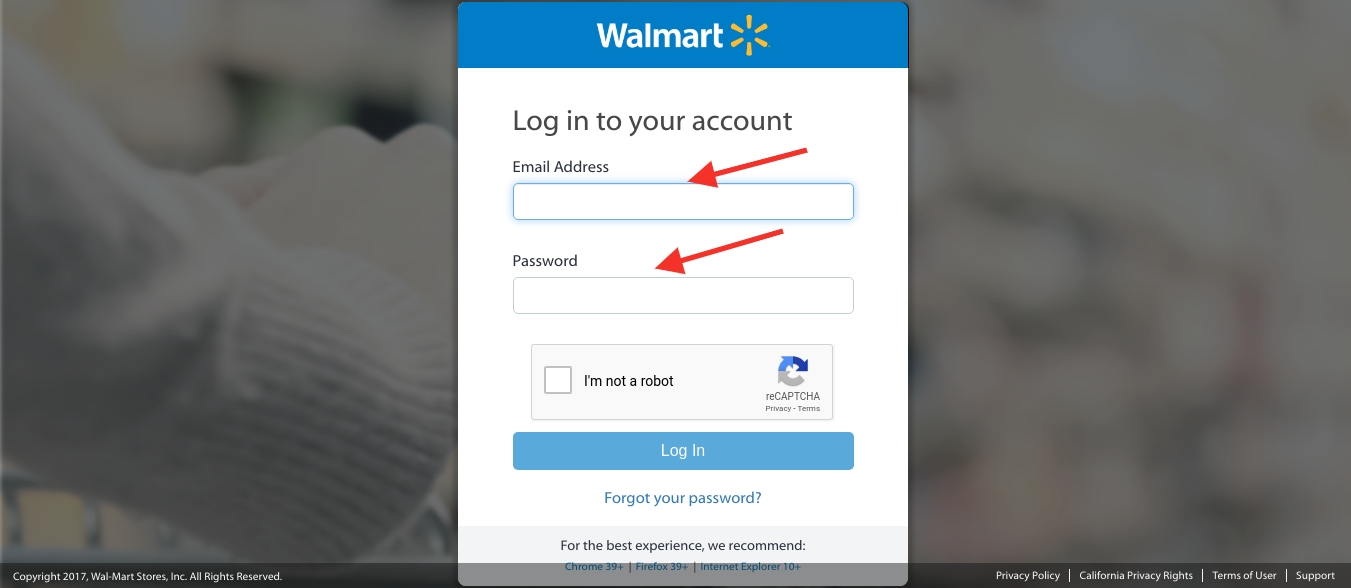
Congratulations! You are now a Walmart Canada seller! Just log in on the Walmart Canada seller page and you are ready to generate fruitful leads in the future.

Benefits of selling on Walmart Canada Marketplace:

  1. Walmart Canada has established itself as one of the best and trustworthy global Marketplaces in Canada.
  2. Selling on Walmart Canada Marketplace owns a huge customer base which is a huge opportunity for sellers to earn huge chunks of profits.
  3. Walmart Canada Marketplace also provides brand recognition which helps in building trust between users and convert them into potential customers.
  4. The dedicated Walmart Canada support team is always there to help customers with any kind of query or hassle while shopping online.
  5. Global Marketplaces like Walmart Canada helps sellers to expand their reach globally. This leads to increasing cross border sales of sellers resulting in increased sales and revenues.

The comfort provided by Walmart Canada to its customers made this platform the best from all other marketplaces. This platform lets you increase your business and sales drastically. So what are you waiting for? Get, set and go for Walmart Canada Sellers in few simple steps.

Cost to Sell on Walmart Canada:

Although selling on Walmart Marketplace could make you earn a huge chunk of profits but Walmart also takes advantage of the same. Walmart charges sellers a referral fee ranging from 6% to 20% of the product’s selling price, depending on the category. Walmart charges a very less referral fee as compared to Amazon. So, being a seller on Walmart can make you a billionaire one day.

How KnowBand can help you to sell on Walmart Canada Marketplace?

Knowband offers Magento Walmart Canada Integration Extension which is a smart solution for an eCommerce store owner to clear out the complexities of selling products on Walmart. It works by providing an API Integrator between an eCommerce store and the Walmart marketplace. It bridges the gap between your eCommerce store and Walmart Canada with the help of which sellers can easily map their product listings on the Marketplace website. Once the integration is successful, the admin can update all the product listings on Walmart Marketplace from the back-end without even visiting the Marketplace site.

Features of Magento Walmart Canada Marketplace Integrator Extension:

  1. Real-time synchronization: Magento Walmart Canada Integration Extension offers a real-time synchronization by connecting the Magneto store with the Walmart Marketplace. Walmart Canada Magento Integrator.
  2. Inventory Management: The store admin can manage the inventories listed at the Walmart Marketplace from the admin panel of the Magento Walmart Canada Integration Module. Product details, price, and Inventory can be synchronized by the admin with one click.
  3. Profile-based listing: Magento Walmart Canada API Integrator offers admin access to create Unlimited profiles. Profile-based listing helps in bulk product upload.
  4. Attribute and category Mapping: With the help of Walmart Canada Integrator, the online merchant can map the attributes and categories of the store with the attributes and categories of the Walmart Marketplace.
  5. Shipping Management: Shipping methods at the Walmart Marketplace are managed and monitored by the admin from the back-end of the store. The online eCommerce owner can add or delete any shipping method at the Walmart Marketplace ad per his need and convenience.

Find out some more articles here:

  1. 9 tips to help you sell more on Walmart Marketplace
  2. How to rank your products up in Walmart search results?
  3. The Pluses and Minuses of becoming a Walmart Marketplace seller
  4. Tips to Win the BuyBox on Walmart
  5. The Pluses and Minuses of becoming a Walmart Marketplace seller
  6. How can a vendor optimize his presence on Walmart Marketplace?

7 ways to boost up your sales using Social Media

Social media platforms are emerging as a new stage for eCommerce and retail companies to market their brands.

Just think about the last time you visited an eCommerce website to buy something, went to the check-out page, stepped back, and left the cart abandoned.

However, we can say either you were in no mood to purchase the product or you stepped back because of expensive shipping charges or got baffled with the super tricky checkout process.

According to Statista, 69.23% is the average cart abandonment rate for online shopping which clearly shows the slipping off of potential leads you have been continuously hustling down the line. However, there could be many reasons for the incomplete conversion of your potential leads.

How social media can help you out?

Social Media is a great tool and the most popular way of promoting your business or brand in between audiences. Today, every individual is present on at least one social media platform. In fact, 86% of the people follow the social media handles of the brands they want to get associated with. Still, these brands are unable to generate great revenues by leveraging the benefits of social media. So, how social media could help you out in achieving your sales targets?

Today’s generation is dependent on technology for the latest updates and offers and also wants great support in favor. This makes social media play a crucial role in promoting these brands either small or large, in fact, social media also serves in promoting well-established industries too.

Well, let’s take a ride through some of the ways in which social media can help you to boost up your sale are as follows:

1. The Hashtag Game:

It’s the best way to stand out from the competition and appear on the top of the list in any hashtag look searched out by your potential customers on social media platforms. Many organisations are working on the same strategy by keeping the hashtag game consistent. If you are planning to launch a new product or coming up with some new scheme, there is no need to hesitate in adding multiple hashtags as it will provide you transparency from other brands.

Here you can see the example:

#sales#marketing#socialmedia#clothing#productmarketing
#digitalmarketing#advertisemnts#entrepreneurship#realestate
#motivation#encourage#seo#hustle#potential#technology
#strategy#brand#like#onlineshopping#instagood#instalike
#startup#eCommerce#love#style#onlinemarketing#success

Make sure to use the closest and related hashtags that represent your business’s core interest as clear as possible. Confusing customers by using irrelevant hashtags could also lead you to the pitfall of your business sales. Utilise the hashtags wherever needed and stick to one medium only.

2. Disseminate deals via Social Media:

Social media works great in broadcasting the latest deals you have come up with. Offering an extraordinary price on your products but just for a limited time. This will attract customers to your website and compel them to go for instant purchase. Reveal the deal to generate some amazing leads on your online eCommerce store but be sure not to reveal the exact time frame of the same.

This strategy will assure you that customers will regularly check their feeds for some latest deals and offers and also could visit your social profile to know some more glimmer deal. Since many customers will visit to your online store so be prepared for heavy traffic on your website.

3. Offer discounts and coupons:

Coupons can help you sell more products as individuals always try to look up for the best deal and discounts on the products. Offering a coupon could attract customers towards your product and will help you convert your traffic into potential leads. You can facilitate your customers by providing them coupon code that is only accessible to the individuals who have liked your page on social media platforms like Facebook or followed you on Instagram or twitter etc.

The above methods are truly functional and will surely attract huge amount of audience through social sites to your brand store. This will lead to an increment in a number of supporters and followers.

4. Provide free shipping:

Free shipping is a blessing for every individual out there. If we believe Statista, 73 percent of respondents stated that free delivery greatly impacts their decision to purchase an item online. Shipping charges are the top reason behind cart abandonment as customers don’t want to pay delivery charges. So try to provide free shipping to your social media followers and grab the maximum leads. Make sure to provide the free shipping on any festival occasions as it is the season of maximum sale and this can help you in generating huge revenues and profits through social media platforms.

5. Exercise Giveaway contests!

This is the most attractive way of luring your customers towards your website as it could efficiently return you a good amount of revenues. Perform a giveaway contest on your social media page that requires individuals to sign up on your brand store. This exciting way would definitely increase the possibility to produce new leads. These contests provide good offers and discounts which incorporate a motivating force in customers to go for instant purchase and take your business to a new horizon!

The individual should be able to choose in between three distinct modes of a similar subject and enter to win the prize. This strategy is not only to generate leads or serve as an acknowledgment of the brand, but it also enables to expand the social stage online. Make sure that each individual who enters the advancement must like the Facebook page to look at the endowments.

6. Post Multiple pictures:

Whenever you post a picture on social media platforms like Facebook or Instagram, it’s obvious to get a reaction. You can urge your followers to like share and comment on your daily posts and feed. Facebook simply actualised another calculation that will re-post a connection each time somebody remarks on it. It’s important to remain consistent towards social media posting. Posting a picture implies more presentation and information about the product. Getting a huge number of “likes” prompts more individuals towards your post, so make sure to post multiple pictures of your products with each advancement you post.

7. Increase your exposure on Social Media Platforms:

It’s important for a seller to mark their presence on a social platform. They should ask their customers to follow and share their social media profile. It’s a meaningful way of connecting to online networking accounts, which can result in a higher conversion of leads. This is the most incredible method to get the word out.

You should also generate your email signature on your blog entries, press releases or pamphlets. It eventually acquires followers which helps you to find out more business deals and resulting in a huge chunk of profits.

Over to You:

The above mentioned points are some of the effective ways in embracing the standards of your brand store online. However, it would also help you in grabbing some good leads on your plate. So, start working from the day itself by luring your customers with various discounts and offers through your social media handle. Regardless of whether you owe a local store or an eCommerce store, creating your profile on social media platforms is very important. It encourages your brand among huge number of audience to generate good sales and revenues.

How KnowBand can help you?

KnowBand is a technical solution provider specifically for eCommerce platforms. The extensions provided by us are loaded with multiple features which helps in the full fledged development of your eCommerce store. KnowBand offers multi vendor Marketplace Extensions which enables you to convert your eCommerce website into a Marketplace like eBay, Etsy, Walmart, Amazon etc. It is available for different CMS platforms like PrestaShop, Magento, Magento2, OpenCart

Key features of Multi vendor  Marketplace are following:

  • Manage sellers
  • Approval configuration
  • Manage the commission from the sellers
  • Customised e-mail templates for notification
  • Product management
  • Compatible with Mobile App of the same Multi-Vendor Marketplace.

Related Articles:

Dropship Model vs eCommerce Marketplace

With the evolution of modern technologies, eCommerce industry has taken a boon and continuously growing towards success. The endless advantages provided by online trading make it popular among sellers and buyers both. Being a seller, it’s important to understand the increasing demand for handheld technologies and should come up with the latest strategies to serve their customers with an amazing shopping experience. Sellers need to think of selling either by Dropshipping or via an eCommerce Marketplace.

If you have any kind of connection with the retail sector or online businesses then you must be familiar with the terms eCommerce Marketplace and Dropshipping. Many of you might have seen the industry publications, social media ads talking about the benefits of selling on Marketplace or benefits of dropshipping. But how will someone know the exact meaning and difference between these two buzzwords? Well, this article will let you know the answer to the question mentioned above.

Dropshipping:

The practice of Dropshipping is a kind of an eCommerce model which helps an eCommerce store owner to sell products without owning or managing any inventory that means sellers don’t need to invest in acquiring inventory, warehouse or in shipping methods. Dropship model is super beneficial for the startups where they can not invest a huge amount in the initial phase of their business. It let many small business owners earn a good amount of profit in fewer investment.

It is a hassle-free process providing a bundle of advantages due to which it gained popularity in the eCommerce community. Dropshipping lets you free from managing warehouses and inventories. This allows eCommerce store owners to offer a large number of Stock Keeping Units and can even give a try to new vendors for more variety of products. Meanwhile, the retailer can also experiment with new product categories according to the latest trend going in the market. This option is less risky and difficult than a traditional wholesale store.

However, this smart technique needs an eCommerce store owner to remain aware and be smart as it has to be executed with proper technology and diligence. However, the reckless behaviour of retailers can cost them high as they can lose control on the processes like shipping process, data of inventory, product information, etc. This could lead them to severe losses, otherwise dropshipping could be a boon for online businesses.

eCommerce Marketplace:

Selling on an eCommerce Marketplace is always in trend as it helps sellers to gain a huge number of profits. Some of the renowned Marketplaces like Amazon, Etsy, eBay, Walmart, Google Shopping, Newegg etc. provides a recognisable, value traffic platform to many retailers where they can set up their brand shop and sell between millions of customers. Retailers can leverage the well-structured facilities of Marketplace without investing a single penny on the same.

The idea of selling on a Marketplace could be a great deal of profit. Marketplaces like Amazon, Etsy, eBay, Walmart, Google Shopping etc. are doing wonders in terms of business growth. The access to a huge number of audience let sellers earn a huge chunk of profits. Marketplace also helped sellers to provide brand exposure and recognition which makes them trustworthy brand between customers and they can buy products without any inconvenience.

However, there are many marketplaces that deliver goods on the behalf of retailers that means, whenever a buyer buys a product, the store admin and vendors get notified automatically. After this, the Marketplace shipping agent will collect the product directly from the vendor if the retailer has no stock and delivers it to the buyer. This clearly shows that even Marketplace works on the process of dropship when needed.

Dropship Program:

Setting up a Marketplace is definitely not a cup of tea for every retailer. Many retailers who want to increase their trading power online, they go for some dropship programs to expand their product inventories and offerings to generate more sales and revenues.

An excellent example of a dropship program is launched by Crate and Barrel. Their dropship program is all about to market and sells products from different vendors that lie in their product verticals. This strategy helped them to sell a wider range of items with unlimited shelf space.

Over To You

At this point, we have a full-fledged idea about the difference between dropshipping and an eCommerce Marketplace. So, which one is better? Well, there is no single answer as it totally depends on the type of business you wish to pursue from an eCommerce standpoint.

There are many brands which are aiming to access huge no. of audience via a single platform with minimum barriers involved. In this case, they should look forward to shaking hands with some renowned Marketplaces like Etsy, eBay, Amazon, Walmart etc. On the other hand, there are many small business owners who can not afford to invest a huge amount of money on inventory. It’s a good choice for startups to go for dropship model as they can skip the risk of loss in inventory at the initial stage of their business.

There is no full-fledged solution when it comes anything related to online business. So, it’s up to you to choose the best model for your business type as it totally depends on what kind of goods you sell. It’s important to choose wisely as it will help sellers in the overall growth of their business. Regardless of whether you choose the dropship model or an eCommerce Marketplace, it’s important to increase the relevant sales and traffic on your website. So, what are you waiting for, start focusing on your online eCommerce business as soon as possible?

Gaining huge profits was not that easy before. Integrate your eCommerce store with the Marketplaces like Etsy, eBay, Walmart and others in just a few simple steps. KnowBand offers Marketplace Integrators for various CMS platforms like PrestaShop, OpenCart, Magento and Shopify which allows you to present your products among larger audience and encourage the brand awareness as well.

Find out some more related articles here:

  1. The Future of eCommerce – Innovation to success
  2. Why Marketplace is in trend?