PrestaShop Gift Card Manager to Sell Gift Vouchers

“Set up a gift card section on your PrestaShop website effortlessly to provide the online gift cards facility to your store visitors with PrestaShop Gift Card module.”

The demand for gift cards has increased over the years and it has become a go-to option for people whenever they want to gift something to their close ones. It is difficult to come up with a gift idea that everyone likes. People are too busy to explore and buy something and if the recipient doesn’t like that gift, the efforts and time will go in vain.

Thus, gift certificates have become the most effortless and easy gifting option. You can now easily add Gift Vouchers as a product on your Prestashop store using Knowband’s PrestaShop Gift Voucher Module.

On occasions like Father’s Day, Mother’s Day, and on the holiday season when we have Halloween, Black Friday, Christmas, etc, Gift Cards are sold in huge numbers.

The holiday season is approaching and it is the best opportunity for you to start selling personalized gift cards in your store. With our Gift Card module, it becomes easy to put up different types of gift cards on your website.

Create Gift Cards to sell on PrestaShop Store
How do PrestaShop Digital Gift Card works?

  1. Place gift card Product link on multiple places
  2. Pre-existing customizable gift card templates for the Birthday Gift Voucher, multiple festivals, etc.
  3. Allow Print or email customized Photo Gift Cards
  4. Set up multi-priced gift certificates
  5. Set gift cards validity
  6. Allow gift cards purchase in multiple currencies
  7. Allow partial usage of gift cards
  8. Customize Gift card emails to send a gift certificate
  9. Track your gift card orders
  10. Multi-lingual, multi-store, and GDPR compatible

Benefits of Selling Gift Cards on your PrestaShop Store

A gift card is not just an easy-to-buy alternative gifting option but it gives you more than that.

  1. Boost your sales and revenue

This module is responsible for increasing sales and revenue as many indecisive shoppers get a chance to buy a product that does not require much effort. Customers can add the Gift Card product to the cart, customize and buy.

  1. Grow Brand Awareness

Moreover, it adds value to your brand identity. Word of mouth plays a crucial role to increase brand awareness. Every gift card contains a prefix and the Gift Card templates can have the logo and brand name on them.

  1. Acquire New Customers

By selling Gift Card on the PrestaShop store, you attract several customers who were not really your direct visitors. The Gift Card buyer will give the card to a friend or a family member and eventually, they will shop from your store to claim that.

  1. Advance sales

The gift cards also generate advance revenue as the customer buys them in advance for a specific amount and later the recipient will buy products from the store by using the digital card.

Features of PrestaShop Gift Card Addon [Detailed]-

  1. Create Gift Card

  • Default Gift Card Templates:

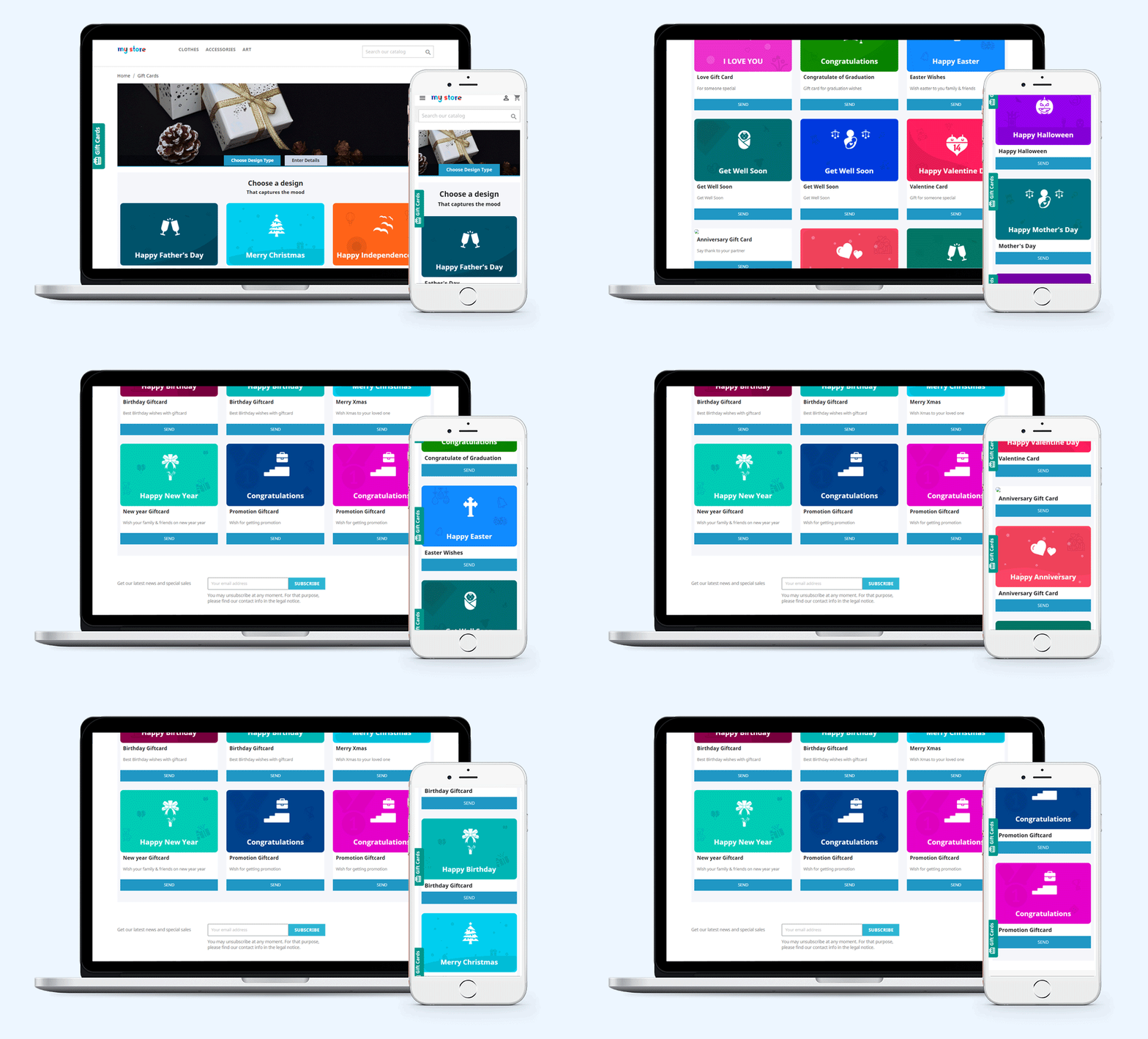
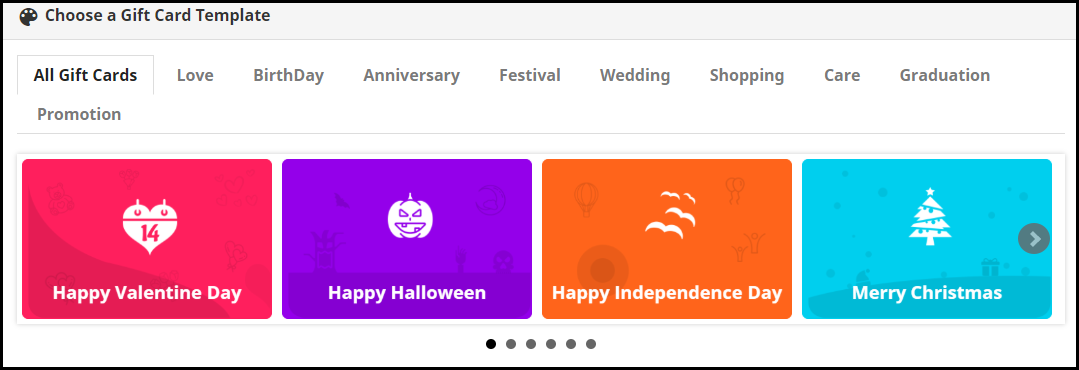
PrestaShop Gift Card Manager offers gift vouchers for multiple occasions like Birthdays, anniversaries, Halloween, New Year, Mother’s Day, Father’s Day, Valentine’s Day, etc. These gift card templates can be easily customized. Besides, you can add new gift cards if you want.

  • Customized Photo Gift Cards

The customer can add a picture to their gift card and give it a personal touch. This unique way of printing digital gift cards with custom images attracts more new shoppers to your store as personalization is a major branding factor these days.

  1. Advanced Admin Control

  • Add Gift Card Link to Multiple Places

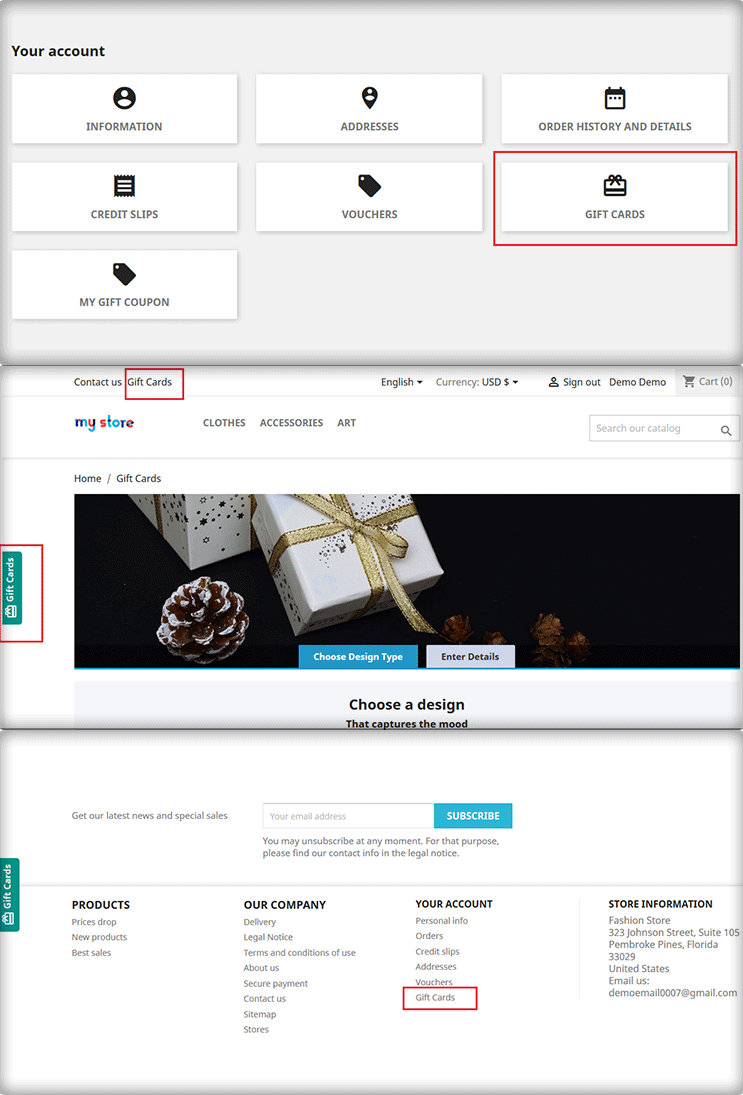
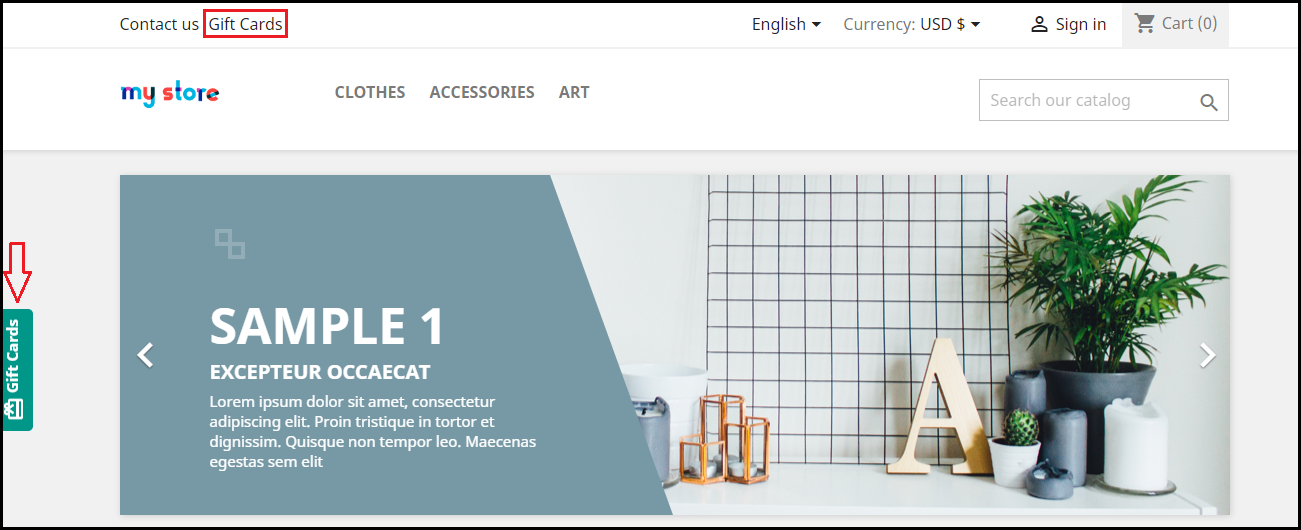
PrestaShop KnowBand Gift card plugin lets you display the gift card link in multiple places to highlight your gift card section in front of your store visitors. It can be placed on the header, footer, my account section, and on the center-left of the screen.
  • Gift Card Delivery Settings

Set a date to deliver. You can define a minimum delivery gap for the PrestaShop gift certificate to reach the recipient or a date to send an email including the gift card details

  • Type of delivery

For a particular gift type, you can choose whether it should be allowed for physical delivery and virtual delivery. If a card is virtual then there is no point in charging a shipping fee. Hence, the seller can decide the shipping charges for the type of delivery.

  1. Flexible Pricing Scheme

PrestaShop Gift Card Manager Addon lets you set up multi-range gift cards on your website so that customers can choose a gift card as per their budget.

For a gift card of a specific value, you can define its quantity, make it available for multiple currencies, set the gift card validity, and allow free shipping and partial usage.
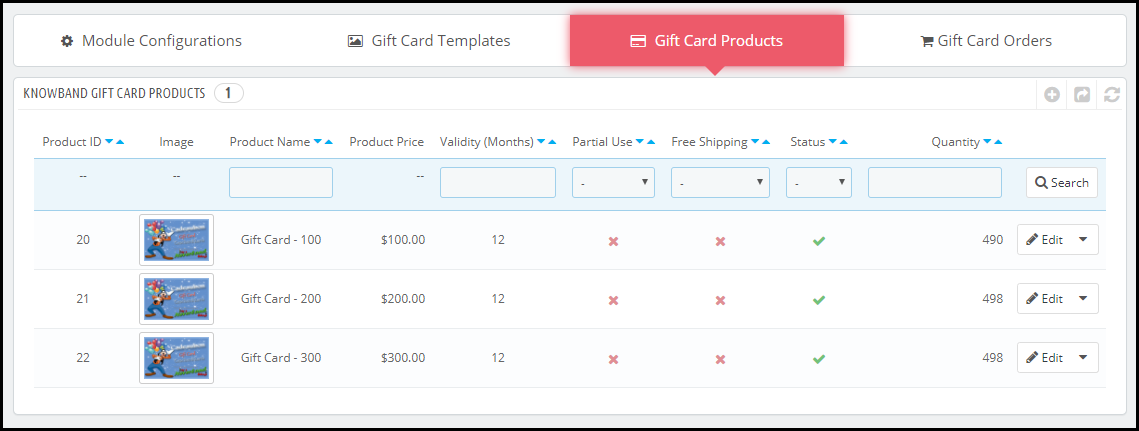
  1. Unique Branding Techniques

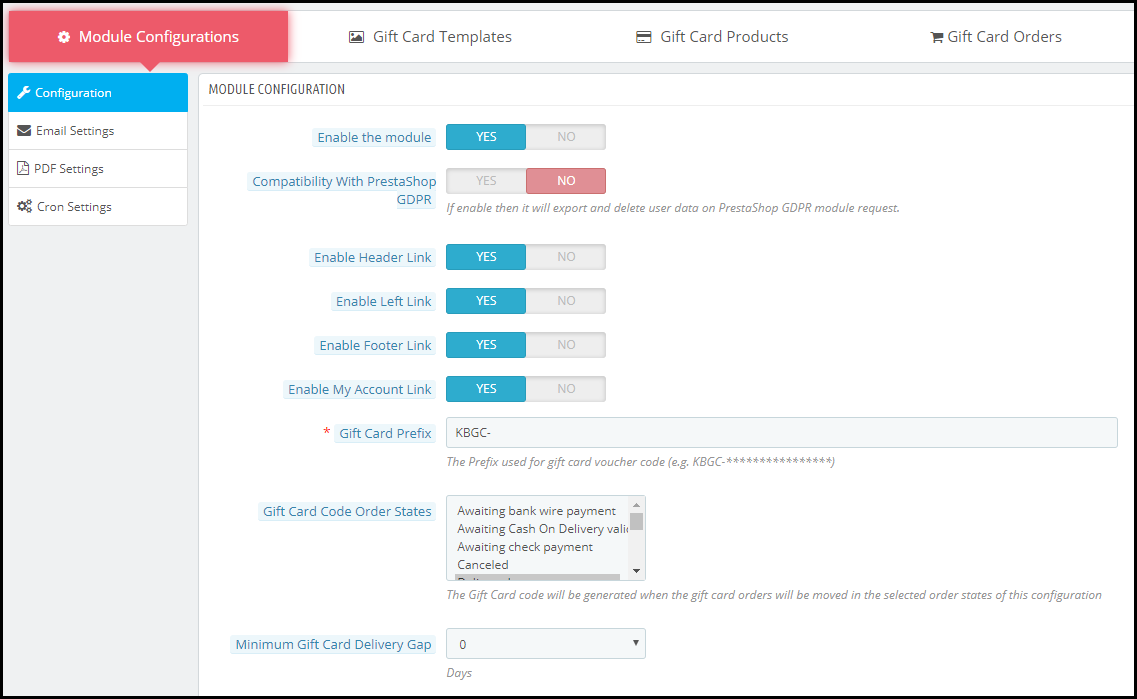
Set up a prefix for your Gift cards that does your Brand promotion. To create a unique card template, it provides options like adding a name, category, keyword, etc. You can make your own templates by using an image with the logo and brand name.

  1. How to Generate Gift Card Code?

With this PrestaShop premium gift card, you can specify the order status. It can be the payment status like awaiting payment, awaiting COD, Canceled, delivered, etc.  For the gift card voucher code generation, the seller will have to define ar specific order status.
  1. Notify with Email Alerts and PDF

PrestaShop Gift voucher module lets you customize the emails that would be delivered to the sender and the receiver. Customers can download the Gift card in PDF format.

  1. Categorize the Gift Cards

You can define categories for gift cards and put the relevant ones under them. For example, gift cards related to Christmas, New Year, and Cyber Monday can be put under the “Holiday Gift Cards” category and say if you have multiple gift cards for Birthdays, all of them can be displayed under the “Birthday Gift Cards” category. This makes it easy and quick for a customer to choose the desired gift card.
  1. Track your gift card orders easily

Tracking the orders and keeping their record is a great business practice. The section comprising of gift certificate orders displays the order reference, recipient’s email address, sending date, and the gift card status.

  1. PrestaShop Gift Card Module Compatibility

PrestaShop Gift Card Module is multi-store compatible, has multi-lingual support, and also provides GDPR compatibility. It is also compatible with every PrestaShop version from 1.6 to 1.7.

Finally, The holiday season is approaching and it is the best opportunity for you to start selling personalized gift cards in your store. With our Gift Card module, it becomes easy to put up different types of gift cards on your website.

For any assistance or query regarding this module, reach out to us at support@knowband.com

You may also like:

Why Digital Gift Cards are Important to your eCommerce Business?

Get more Holiday sales by setting up a Gift Card section on your store

Give Some Holiday Season Flair to an Ecommerce Website Design

Offer Birthday Coupons to Your PrestaShop Customers And Win their Loyalty

Mobile App Marketing: How to Promote your Mobile App?

Imagine if WhatsApp could only be used on a browser! Every time you have to browse it, you open Google, type the URL and then access it.

This would have created immense frustration among users. Thankfully, it is not the case. It was launched as an app and all it requires is just a single tap to open the application.

Today, the count of smartphone users having access to the Internet is huge and in this rapidly evolving eCommerce world, the demand for mobile apps has increased significantly.

Consumers look for convenience. For every small need, they demand a mobile app and this is the reason why mobile apps have gained huge popularity.

In this write-up, I have talked about mobile app marketing and put forward my views on some effective ways to promote your mobile app. Before we begin, let’s check a few stats around the mobile app.

Mobile App Statistics

As per the stats collected by Statista–

– The number of mobile app downloads, worldwide, in the year 2019 crossed the 200 billion mark and the revenue generated through mobile apps was found to be 462 billion USD.

– As of the last quarter of 2019, the number of apps available on the Google Play Store and the iOS store was 257 million and 1.8 million respectively.

According to the reports shared by App Annie, the mobile app downloads are expected to hit the 258 billion mark by 2022.

Mobile App Marketing Strategy

If you have set up a mobile app for your business, here is how you can promote your mobile app and boost your downloads.

1. Create Awareness

Just like when the shooting of a movie starts and the news related to it circulates to the fans, you should follow a similar approach to promote your mobile app.

When your app is in the development stage and is ready to be rolled out soon, create awareness about it in advance. Let your target audience know what they can expect from your mobile app. Give a sneak peek of its UI and features. Put simply, you need to arouse curiosity in your target audience.

2. Highlight on Website

If you drive a handsome amount of traffic on your website on a daily basis, this could be a huge plus point in your mobile app marketing strategy.

Highlight the mobile app download link on your website, and it should definitely be on the Home page. You can display it through a header strip or a footer strip. Just make sure that it is easily noticeable but at the same time, not hampering the user experience.

Besides, you can make use of popups as well for its promotion. Design a clean and appealing popup with a compelling call-to-action.

3. Promote through your Blog

Having a blog keeps your visitors updated about any news, information, or launch related to your brand. And for your mobile app marketing strategy, a blog is a useful asset.

Let the readers know that you have launched or about to launch a mobile app to make their experience even better and smoother. Inform them about the journey of your mobile app development, tell them how convenient it would be for the users.

4. Reach out to your Email Subscribers

One of the best strategies for mobile app marketing would be to promote it in front of your email subscribers. Informing them about the launch of your mobile app can boost its downloads. Communicate with them at regular intervals to make them familiar about your mobile app.

You can also ask your email subscribers to drop feedback about your mobile app. No one can provide you with better feedback than your loyal subscribers. Ask them about its performance, their experience with the app, or if there is something that they feel should have been added or needs to be improved.l

5. Mobile App Marketing using Video

Videos are powerful in capturing user attention. And this is why you should create a video for your mobile app as well. Keep it short and crisp and up to the point.

Do not stretch the video to a point where it becomes boring. You only have a few seconds time to impress the users, try to make the best use of it.

Related: 7 Benefits of Video Marketing for Your eCommerce Business

6. Promote on Social Media

Can there be a better platform these days for promotion than social media? Facebook and Instagram are two of the largest social media platforms and have a huge audience base with people of all age categories. If you have a business page set up on those networks, you can leverage them to promote your mobile app.

Your target audience is probably waiting for you on social media to hear the news of your mobile app launch. Let them know it has arrived.

7. Start Advertising

I wonder if this point would be valid for all businesses as advertising can be a bit expensive and not every business can afford this mobile app marketing strategy.

You can advertise your app on YouTube or if you have a high budget, you can also approach a channel broadcasting unit to display ads on their channel. For budget-friendly marketing, you can take the help of social media ads.

8. Reach out to Influencers/YouTubers

You would have often seen YouTubers indirectly promoting an app in between their videos. Many brands are following this approach to promote their app. They contact a YouTuber who has a good number of subscribers and whose videos get huge hits on the platform. When people watch that video, they get to know about the app.

You too should give it a try. Get in touch with an Influencer or a YouTuber and ask them to promote your app.

9. Submit on App Review Websites

You will find a number of websites on the Internet where you can submit your app and ask the team behind the website to review it. People often visit app review websites to read about the most useful, latest and trending apps.

Once approved and listed on the website, you can expect a handful of downloads from there.

10. Reward

No matter how amazing your mobile app is, making users download it is a challenging task in the initial phase.

You need to entice people to download your app, not through any click-bait but by offering them something for doing that favour. For example, if your business is into food delivery, you can offer them free delivery or 50% discount on the first three orders, exclusively from the app, or like first three rides for free if it is into on-demand booking apps like Ola and Uber.

Plan rewards as per your business.

Final Word

Make sure that your mobile app is perfectly optimized and provides a rich user experience. Keep the app size as minimum as possible. Many users avoid downloading an app just by seeing the app size.

Need an eCommerce Mobile App? Try our native Mobile App Builder; a fully no-code framework to launch shopping apps. Check out:

PrestaShop Mobile App Builder

OpenCart Mobile App Builder

Magento Mobile App Builder

Magento 2 Mobile App Builder

WooCommerce Mobile App Builder

For any assistance regarding installation and the module functinality, reach out to us at support@knowband.com

Follow the above-mentioned tips related to mobile app marketing and it will surely bring fruitful results. Feel free to express your views by leaving a comment below.


Why should you have an Online Booking System?

Remember going to the movie theatres and finding out that the show is sold out? Today, we have the facility where we can check out the show timings and book seats accordingly in advance. You make the payment, book the seat and then it doesn’t matter whether the show is houseful or not. You will get your seat for sure. This has been made possible through the online booking system.

The online booking system has facilitated the lifestyle of people. From booking an appointment to booking a hotel room, everything requires only a few finger taps.

There are multiple businesses set up today that provide online booking facilities whether it is about an appointment booking, home cleaning, car or bike rental booking, etc. If you also run a booking business but offline, you should strongly consider taking it online.

What exactly is an Online Booking System?

In simplest of words, an online booking system adds booking facility on your website and lets you provide your customers with hassle-free booking. Having said that, if they want to book a service, they do not need to call and get an appointment, they can simply choose the desired date and time and confirm the booking after successful payment.

The need for an Online Booking System

In this rapidly evolving world where almost everything seems to go digital, not having an online platform could put you far away from your competitors who are providing the same sort of facilities but through an online medium.

You might not be getting too many bookings initially but if the number increases in the future, managing your bookings manually could be quite a challenging task. On the other hand, people have started moving towards online bookings due to shortage of time. So there will be some concerns for you if you do not adopt the online booking system.

Having an online booking system will put an end to the manual work and save a lot of time for you as well as your potential customers.

Benefits of Online Booking System

Here is why you should consider having an online booking system-

1. Time-saving

As I mentioned above, the online booking system saves you a lot of time since you are not required to perform anything manually. You can track your bookings, send regular email follow-ups and most importantly, you can customize your booking system as per your availability.

2. Scale-up your bookings

One of the major benefits of having an online booking system is that your prospects do not need to wait for defined hours to make a booking. All they need to do is open your website, select the day and time for which they want to have a booking and that’s it. All this happens while you are taking a peaceful nap.

With 24×7 online booking service, you can increase your bookings significantly. The unavailability of an online booking platform may compel even your regular or loyal customers to look for other alternatives, and you may lose them to your online competitors that are growing at a rapid rate.

3. Online booking system cuts down your workload

The efficiency that the online booking system provides cannot be achieved with the manual booking process. There will be no headache of receiving calls for booking, you do not need to chase your potential customers over call and get the booking confirmation. Everything would be done in a systematic manner.

4. Boost Your Revenue

You will witness a sharp increase in your bookings if you take your booking system online, which will provide you with more revenue. If you want to dominate your competitors, now is the time to mark your presence.

How to create an Online Booking System?

There are some technical ways to set up your online booking system but I would not go into the technical stuff. Instead, I would suggest installing a plugin to make your task easy.

Depending on the eCommerce platform you choose for your online booking system, you will find a number of eCommerce development services providers that will do the needful for you.

We, at Knowband, also offer online booking system facility for PrestaShop and OpenCart platform. So, if you are having a website on either of these platforms, you can have a look at-

PrestaShop Booking and Rental System addon

OpenCart Booking and Rental System extension

The booking and rental system module lets you add appointment bookings, hotel bookings and rental booking facilities to your website. It is a feature-packed module that ensures that your potential customers enjoy a hassle-free booking experience on your website.

From adjusting the booking price as per different days and timing to turning off booking facility for specific days in a weekend, the module provides you with lots of configurations.

For PrestaShop store merchants, we have a special module which is a combo of PrestaShop Mobile App Builder and PrestaShop Booking and Rental System. Check out-

PrestaShop Booking and Rental Mobile App

Over to You

No tiredness, no workload, easy bookings, and almost double revenue, that’s what an online booking system does for you. And you can manage your bookings comfortably with Knowband’s booking and rental system module.

One important suggestion- Make sure that your booking website is responsive. Do not shift your entire focus on optimizing it particularly for desktop, it should be mobile-friendly so that your mobile users do not find any trouble while creating a booking.

For any assistance, you can reach out to us at support@knowband.com

Also Read:

Make Online Booking Convenient with PrestaShop Booking and Rental Mobile App

10 Best Practices for a Hotel Booking Website

List of Other Modules Compatible with PrestaShop Mobile App Builder

Going by the name, PrestaShop Mobile App Builder is a readymade tool to convert your online eCommerce store into mobile apps. The plugin offers a chance for all PrestaShop store merchants to switch their website business on mobiles.

Every eCommerce business is somewhere in the struggle to improve their online presence among the surrounding competition. Having a mobile commerce application can simply help in targeting the huge audience & boost sales.

Creating Native Apps With This Extension

You will be amazed to know that PrestaShop Mobile App Maker is completely code-free. If you’re not a coder or more of a technical person, this is the perfect solution. The PrestaShop Mobile App extension allows anyone with a running PrestaShop website to own a pair of native apps. All you need to follow these 3 steps:

Step 1: Purchase the PrestaShop Mobile App Builder extension from KnowBand.

Step 2: Fill pre-requisite app details.

Step 3: Review apps & get them published on app stores.

Easy, right? Free of cost initial support & one-time payment with this plugin are cherry on the cake.

Other Compatible Modules

Every online business has a different set of audiences with separate requirements. This thought has been well kept in mind while designing the PrestaShop Mobile App Creator. The result of this is the module comes with endless possibilities of customization and integration. All you need is to just ask & our developers will make that work in apps.

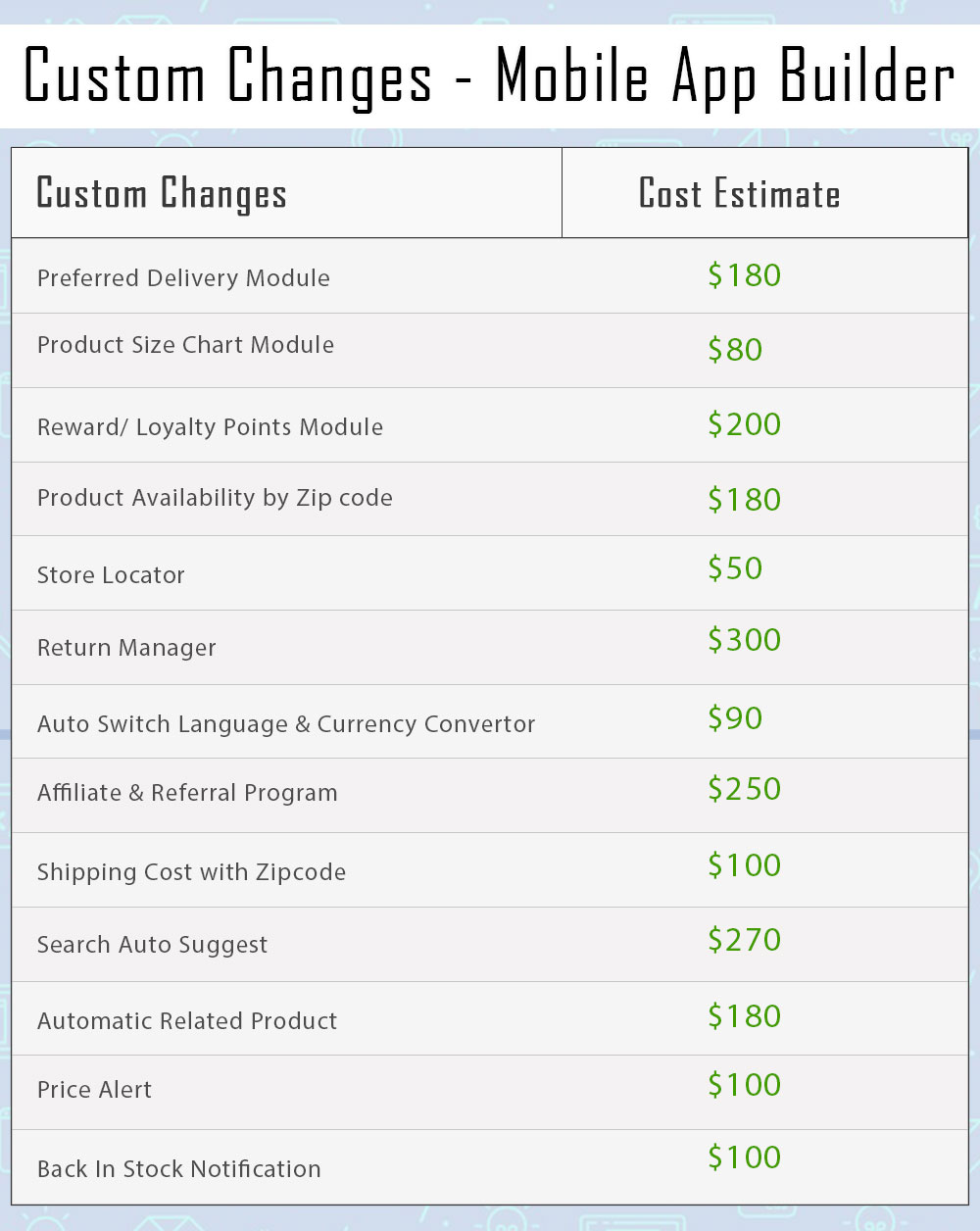
Note: All sorts of custom changes are subject to additional costs based on the involved time & efforts. Although, the prices will be kept as reasonable and fair as possible.

Here is the list of a few modules which can be made compatible with PrestaShop Mobile App-

1. Product Size Chart

When it comes to purchasing a clothing item, online shoppers often have doubts regarding product size. They are not sure which size would be a perfect fit for them. This eventually leads to customers placing a return request later because of the size issue.

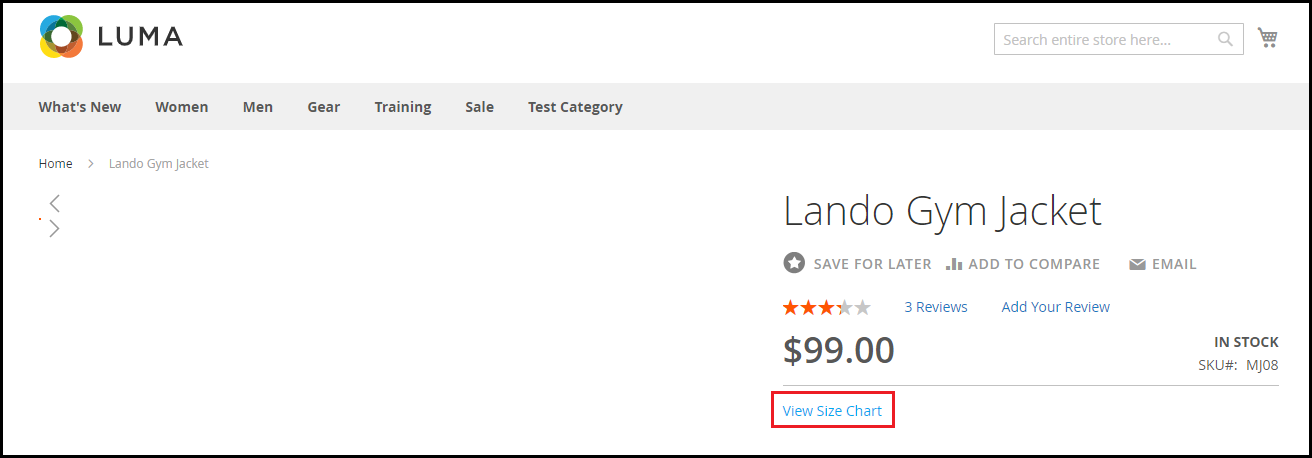
Let finding the appropriate size product not be a problem anymore for your visitors. The Product Size module adds a “View Size Chart” section on your product pages, with the help of which shoppers can check the measurements of a product for every size type. This ensures that your customers do not face trouble with the product size.

Get to know more from here.

Rough Cost Estimation: $80

2. Return Manager

One of the major concerns for eCommerce businesses is product returns. They cannot be eradicated, however, if managed well, can be reduced by a significant margin. Manage your returns without any hassle with the Return Manage module.

The module offers three types of return choices to your customers: Store Credits, Refund and Replacement. You can set up the return policies, set up the return terms and conditions, track your returns and do much more. The module not only helps you reduce your eCommerce return rate but also improves customer retention.

Get to know more from here.

Rough Cost Estimation: $300

3. Automatic Related Products

E-commerce businesses benefit a lot from cross-selling. It is one of the effective strategies implemented by them to increase their store sales. If you run an online business, you should follow it too.

Encourage cross-selling on your website with Related Products module. The module lets you display top-visited products, best sellers, new products and products based on a user’s history. You can customize the display position and filter the products to be displayed as per keywords and attributes.

Get to know more from here.

Rough Cost Estimation: $180

4. Preferred Delivery Time

Many times customers demand the product to be delivered at a specific date and time. Allow this facility to your customers with Preferred Delivery Time module.

The module lets you define a minimum delivery gap to allow customers to choose the preferred date and time. You can specify the time slots, the time cycle for delivery, and also exclude days on which the delivery won’t take place.

Get to know more from here.

Rough Cost Estimation: $180

5. Loyalty Points
A majority of online businesses run loyalty programs today. Loyalty Points module aims to improve customer retention on your website and also builds customer loyalty. It lets you provide loyalty points to your customers on some certain tasks like when they have shopped for more than the specified amount, when they have chosen a specific payment or shipping method, when a user successfully registers, or when a user places an order, etc.

Get to know more from here.

Rough Cost Estimation: $200

6. Product Availability Check by Zip Code

Let customers check right on the product page whether the product they desire to purchase is available for delivery at their location or not.

The module adds a Zip Code verification check on your product pages, using which the visitors can enter their area zip code and verify whether the item is eligible for delivery for the specified Zip Code.

Get to know more from here.

Rough Cost Estimation: $180

7. Store Locator

The store locator module encourages the self pick up facility on your website. Many a time, a product reaches the shipping centre on time but takes too long for the delivery. In such cases where customers want the product to reach them as soon as possible, they can choose for a self pick up.

The module lets you add your store addresses from the back-end which are available to the customers on the checkout page. They can filter the stores as per the distance and choose the nearby store accordingly.

Get to know more from here.

Rough Cost Estimation: $50

8. Auto Switch Language and Currency

If your business is set up internationally or you are planning to do so, the Auto Switch Language and Currency module is a must-have module for you.

The Auto Switch Language and Currency module change the language and currency as per the visitor’s location. It tracks the IP address of the visitors and automatically converts the website content into the native language.

The module helps you expand your business on a global level and makes it easy for outsiders to shop from your website.

Get to know more from here.

Rough Cost Estimation: $90

9. Affiliate and Referral Program

Affiliate and Referral Marketing has helped brands gain a lot of new customers and sales. What’s exciting about these programs is that they create a win-win situation for both the customer and the brand. The affiliate brings you customers and you offer them some incentives in return.

With Affiliate and Referral Program module, you can start a similar program on your store. The module allows users to register as an affiliate on your website. Once successfully registered, they can start referring your website to others and earn some exciting incentives for a successful referral. The affiliate can share the referral code, share a direct link, share the link via email, share the link on social media or share the voucher code with other people.

Get to know more from here.

Rough Cost Estimation: $250

10. Shipping Cost by Zip Code

This module lets you charge different shipping prices for different zones. The admin can specify the shipping price for different countries from the back-end. When a shopper enters the zip code in the address fields, he or she will be charged the shipping cost as per defined by the merchant.

Get to know more from here.

Rough Cost Estimation: $100

11. Search Auto-Suggest

The Search Auto Suggest module enhances the search functionality of your website. With the help of this module, you can display the product price right in the search suggestions (in the drop-down list) and also the product category under which the product falls.

You can customize the search bar and also track the searches performed by the user. You can also limit the number of products to be shown on the search results and also specify the minimum letters that need to be entered for the search system to work.

Get to know more from here.

Rough Cost Estimation: $270

12. Price Alert

Many times it happens that customers drop the purchase idea because they feel the product price is too high. Now with Price Alert module, the customers can specify the desired price for that product on the product page and get price alert over their email whenever there is a reduction in the product price as per what they wanted.

Get to know more from here.

Rough Cost Estimation: $100

13. Back in stock Notification

Online shoppers often get disappointed when they visit a website to purchase a product but find it out of stock. And they have to keep checking back multiple times to check its availability. Reduce this hassle with Back in stock notification module.

The module allows shoppers to subscribe to the product availability alert. Hence, if subscribed, the user will be immediately alerted about the product availability that it is back in stock so that they do not miss out on the purchase.

Get to know more from here.

Rough Cost Estimation: $100

Summary of Custom Changes

Any confusion? Discuss with us on support@knowband.com

Exit Popup: What is it? How it works? Example, Best Practices and Benefits

Did you ever go to any fashion store and started walking out later without purchasing anything because you couldn’t find what you were looking for or the price was too high?

This has happened with almost everyone.

And as soon as the shopkeeper realized that you are on your way without purchasing anything, he tries to stop you either with some discount game or some offers. Sometimes, you agree and sometimes you don’t.

This is exactly what an Exit Pop up does in eCommerce. A majority of the online businesses leverage exit pop-ups to increase conversions on their website.

What is an Exit Pop up?

An exit popup also referred to as an exit-intent pop up is a popup that appears on a visitor’s screen when they intend to take an exit from your website. It is basically a last-minute effort made by website owners to stop visitors from leaving.

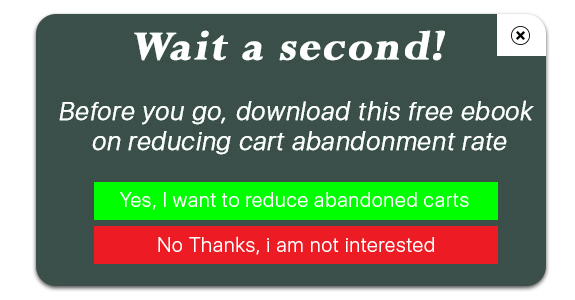
For example, if a user is trying to leave your website after abandoning the cart, you can make an attempt and try making him stay and complete that purchase by displaying some enticing offers through the exit pop up.

I usually find exit pop-ups better than any other kind of popup, the reason being they do not irk visitors. They do not disturb the flow and are displayed only when a visitor tries to exit.

Exit popups ensure that the user experience is maintained until the very last moment, unlike other popups that can appear at any point of time.

How does an Exit pop up work?

The exit popup or the exit-intent technology tracks the mouse movement of the visitors and triggers the popup when it captures that the user is heading towards the exit button. It is usually in the form of an overlay pop up.

One thing to mention here is that the popup is not displayed only when the cursor has moved towards the exit button, it is triggered when the user leaves the browsing area.

An exit popup is not always used to display offers. You can customize it as per your requirements depending on what actions do you want your visitors to take after seeing it or what results do you want to achieve through it.

Exit Popup Examples

Through an exit intent pop up, website owners primarily aim to capture the email address of the visitors so that they remain in touch with the brand and are often brought back on the website. Brands then try to build communication over email and persuade the subscribers to become their customer.

In most of the cases, an exit popup is used in two ways-

1. To induce visitors to make a purchase using an exclusive coupon code

2. To make visitors download a free guide or an eBook

Exit Pop up Best Practices

Let’s take a look at some of the best practices for an exit popup to achieve good results.

1. Provide Irresistible Offers

The best way to stop your visitors from leaving your website is by offering them something which they can’t resist to grab.

Offer something exciting. It should be worth their attention and should encourage them to claim that offer instantly. If the offer doesn’t excite them, the pop up will fail to bring conversions.

2. Make it Visually Appealing

If you want to make an impact with the exit intent pop up, make sure it is highly appealing and designed in such a way that users are not disturbed by it and feel the need to check it out even when they have decided to leave.

Use attractive colour combinations, pay attention to what font you are using, write tempting content and most importantly, make your CTA, i.e. call to action stand out. Do not use common CTAs like Sign Up or Subscribe, use the ones that create urgency.

3. Use it to Collect Feedback

Exit Popups are also used to collect the feedback of the visitors. Ask them if they have any suggestions to provide or have any complaints or anything that they feel is missing or needs to be improved.

Benefits of an Exit Popup

An exit pop up provides you with some amazing benefits.

1. Boost Conversions

No other pop up draws the visitor’s attention as much as an Exit Pop up. The effectiveness of pop up doubles when it is displayed to the user when they are only focused on taking an exit. It is not the same when the user is browsing some stuff and is interrupted by a pop-up.

Through exit popups, you can reduce the cart abandonment possibility and eventually increase your conversions.

2. Reduce Bounce Rate

If a user lands on your website and does not find anything helpful, most likely they will bounce off. And while they try to leave, an exit pop up could be of some help and it can encourage them to check out your website.

3. Exit Popups are not annoying (Usually)

Pop-ups have mostly been an annoyance for users. They hamper the user experience. But this is not the case with Exit Popups because they appear only when the user has already decided to leave your website and there is no harm in making a try to stop them from leaving.

Exit Pop up Module by KnowBand

The Exit Pop up module by KnowBand is a feature-packed module that allows you to make tons of customizations to the pop-up and adjust the popup functionality. For example, you can set up the pop-up frequency, hide the pop up after a few seconds automatically, and do much more.

The interesting thing about this module is that it not only works as an exit pop up but also as entry pop up. You have the option to disable it anytime and can use it particularly when users try to exit. Check out-

PrestaShop Exit Pop up Addon

OpenCart Exit Pop up Extension

Magento Exit Pop up Extension

Magento 2 Exit Pop up Extension

If you need any assistance in the mentioned modules, you can reach out to us at support@knowband.com

You may also like:

Trigger Impulse Buying with PrestaShop Exit Popup Addon

8 Email Popup Best Practices to Grow Email List and Boost Conversions

10 Best Practices for a Hotel Booking Website

Did you know approximately 148 million travel bookings are made every year and the sales made through travel bookings are expected to hit an $817 billion mark? [Source: Condor Ferries]

The market is expanding rapidly and more and more people are entering into the business of travel niche. And if you are also looking to open a hotel chain, it could be worth a move.

People love going on vacations and exploring places with their family and friends. Once the plan is confirmed, the first thing that they look for is some of the best hotels around that region.

They open Google, type their query and a list of hotel booking websites appear in front of them. Then they check out a few websites and choose the best one.

How does a visitor decide which is the best hotel booking website? Well, there are a number of factors based on which the user comes to a conclusion. And this is what I would be covering in this blog post.

In this write-up, we will discuss the best practices for a hotel booking website like what should be the basic steps that you should follow if you are thinking to open a hotel chain.

1. User-Friendly Interface

A clunky, cluttered website will leave a highly negative impression of your brand. As soon as people enter your website and find it too difficult to browse, they would take an exit within a fraction of seconds.

For a hotel booking website to capture the immediate attention of visitors, make sure you have given it an attractive look. The use of eye-catching visuals, high-quality hotel images, appealing home page layout, can make a strong first mark.

It should be designed in such a way that users feel irresistible to leave your website. This is why having a user-friendly interface becomes highly important here. Everything should look clean and organized.

2. Make it easy to search Hotels

Your site search functionality should make it extremely easy for the visitors to search for their query. Primarily, allow users to enter their destination, check-in and check-out date, number of guests, number of rooms so that they have a relevant list of hotels to choose from.

The search bar in your hotel website should be made large and clearly visible so that it is immediately noticed by the visitors. Apart from the home page, it should be visible on every page that the user navigates. Do not compel users to come to the home page to conduct a search.

3. Display Hotel Ratings

When I say display hotel ratings, I do not mean the ratings given by the customers to a particular hotel but the star rating of that hotel. For example, some budget-friendly hotels can be 1-star or 2-star, average hotels can be 3-star. 4-star and 5-star hotels are slightly expensive with more facilities.

Highlight the hotel star rating clearly even on the search results and let customers choose what kind of a hotel type they want for their stay.

Besides, you can also mention the ratings defined by the customers. This gives the user an overview of whether a particular hotel is worth booking or not. People will usually ignore hotels that do not have positive ratings. This can save a lot of time for the visitors.

4. Sorting and Filtering

When a user has made the search, make their task more easy by providing with them with the sort and filter option.

A hotel booking website might display a lot of hotels to users with different sort of booking price and ratings. Let them sort the hotels as per the price (low to high and vice versa) and filter the hotel type and hotel ratings. It will present a more specific and relevant list in front of the users.

5. Display Room Category, Room Type and Hotel Amenities

Most of the hotel website owners list the hotels into a few categories such as Budget hotels, Premium hotels, etc. And you should do the same. A visitor looking for a stay at a reasonable price would look for budget-friendly hotels whereas someone who wants more services would go with a premium one.

Similarly, you can categorize the room type as well, for example, specify if it is a single bedroom, double bedroom, Queen sized bedroom, King-sized bedroom, twin bedroom, etc.

Lastly, display hotel amenities. Let the customers know what they can expect from your hotel and rooms. Hotel amenities could be like parking facility, swimming pool, etc. and for rooms, in particular, it could be whether the room as AC or Geyser installed, television, etc.

6. Let the Hotel pictures speak for themselves

It is all about visuals when it comes to a hotel booking website. People want to book hotels where they can expect hygiene and comfort. There can be some other factors as well but these two are usually the top priorities.

Most of the people book a hotel by checking the hotel conditions through pictures. Only if they find the look comforting, they make the booking.

Visuals leave a significant impact and this is why adding amazing pictures of the hotel is one of the best practices for a hotel website. Hotel pictures should contain the look of the hotel from outside, pictures of reception, sitting area, floor, rooms, washrooms, etc.

The more satisfying the hotel looks, the more will be the chances of a user making a booking. If there are some hangout spots nearby, you can include them too.

7. Show what Customers have to say

Help your visitors in choosing the best hotel by displaying hotel reviews. Let the prospects know what the previous customers think about the property, how has been their experience, what did they find good, what did they find bad.

Reviews influence people in their decision. And if the hotels listed on your website have good reviews, it would hardly take time for a user to make a booking.

8. Integrate Google Maps for Easy Navigation

Instead of just displaying the hotel address and expecting the potential customers to search for the location on Google Maps themselves, wouldn’t it be great if you could add the location through Google Maps on the booking page itself?

Visitors would not have to leave your website and then open Google Maps and enter the address. They just have to turn on their location and the destination would be already added. This makes it convenient for people to reach the hotel without any hassle.

9. Provide Hassle-free booking

Make it easy for your visitors to book a hotel. Have all the major payment options on your payment page including e-wallets. A majority of the people are taking the help of digital wallets for conducting a transaction.

You can also allow users to pay the amount at the time of check-in, and to avoid any cancellation at the last minute, you can ask for a little payment in advance for confirmation.

10. Optimize your website for Mobile

Today, any website, be it a hotel booking website or any eCommerce website, needs to be responsive. Most of the transactions are taking place through mobile devices. So it’s vital that your hotel website is mobile-friendly else you may face a heavy downfall in your mobile conversions.

Your mobile users should be able to enjoy the same browsing experience as your desktop users, in fact, more than that. Therefore, it is highly recommended to optimize your hotel website for mobile if you want to double your sales.

Add the Hotel Booking Facility on your website with Knowband’s Booking and Rental System Module

The Booking and Rental System module by Knowband lets you provide the online hotel booking facility to your customers. In fact, this module is not restricted to hotel bookings specifically, you can also add an appointment booking facility or rental facility through it.

But since this write-up focuses on a hotel booking website, let’s check out what this module has in offer for you.

With the Hotel Booking System, you can

– Specify the hotel name and add a description about it

– Set up an upfront booking price

– Specify the hotel rating

– Display hotel location via maps

– Add hotel images

– Specify the booking period

– Adjust the price as per days and time slots

– Specify the minimum and maximum days for which a booking can be made

– Set the check-in and checkout time

– Specify the room type and room category

– Specify the maximum number of children and adult allowed for a particular room type.

And there’s much more you can do with this module. Try out this module for PrestaShop and OpenCart

PrestaShop Booking and Rental System Addon

OpenCart Booking and Rental System Extension

Knowband also offers a combination of PrestaShop Booking and Rental System and PrestaShop Mobile App. Check out-

PrestaShop Booking and Rental Mobile App

Final Word

That’s it. These are some of the best practices that you should follow if you are thinking to set up a hotel website and want to know what all elements it should have to make it a perfect fit for you as well as your visitors.

Once you have tick marked all the mentioned points, find out how you can promote your hotel website to bring it to the notice of your target audience. Do proper SEO, promote your business on social media or whatever it takes to reach out to your visitors and bring traffic to your website.

All the best!

If you liked this write-up, do leave a comment below, and for any assistance with the module, you can contact us at support@knowband.com

You may also like:

PrestaShop Booking and Rental System | Manage your Online Bookings

Make Online Booking System Convenient with PrestaShop Booking and Rental Mobile App

18 Rental Ideas to scale-up your Rental Business

Top 4 Magento 2 Extensions to Improve Performance of your Product Pages

A product page is one of the important elements for any eCommerce website. It is the page which, if optimized well, can make the purchase journey of your potential customers flexible and make their buying decision even stronger.

What elements should be added to the product page? How can its performance be improved? Which extensions will be beneficial?

If you have these questions running through your mind, this blog post will provide you with the answers.

In this write-up, I have specified 4 Magento 2 Extensions that can help you improve your product pages’ performance.

1. Magento 2 Product Size Chart

If you have a Fashion website, this Magento 2 extension is a must.

For any website that deals with clothing items, providing shoppers with a size guide is necessary. Many eCommerce returns take place due to customers not receiving the correct sized product.

Though websites allow choosing the desired size, not many of them display the size guide in detail. For example, simply displaying S, M, L and XL would not help with the exact measurements. Different websites have different measurements, and even a slight difference in measurement can lead to the size issue. It would be wise if you could display the measurements as well along with the size type so that shoppers have a clear idea of what would be a perfect fit for them.

With Magento 2 Product Size Chart extension, you can add a size chart option on your product pages that reflects the dimensions of the product, hence enhancing the shopping experience and reducing the possibility of return.

2. Magento 2 Web Push Notification

Brands leverage the power of web push notifications to deliver important updates to their subscribers even when they are not present on the website. From boosting website traffic to increasing sales, web push notifications deliver effective results.

Talking about the Magento 2 Web Push Notification extension, though it has too many features, there are some extremely useful features that would help you set up a perfect product page.

In this module, particularly for the product pages, you can ask users to subscribe to product price alert or product back-in-stock alert so that if a user feels that the product price is too high or finds that the product is currently not in stock, they can subscribe to receive alerts whenever there is a price drop or product is available.

3. Magento 2 Advance Wish List/ Save For Later

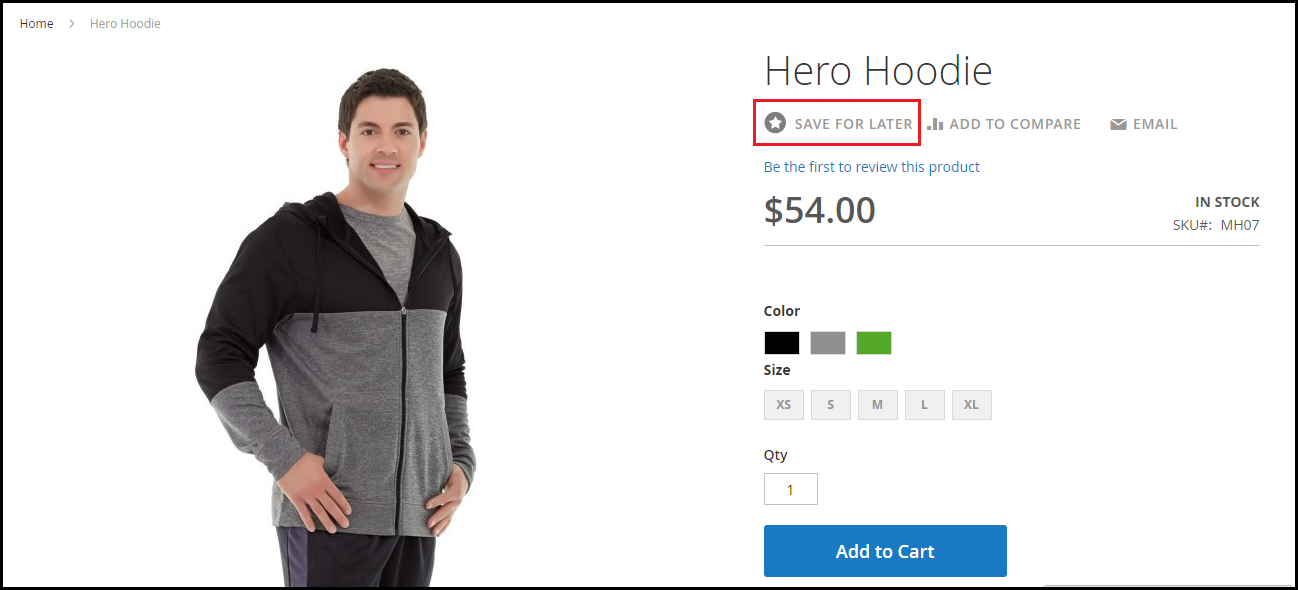
The Magento 2 Advance Wish List/Save for Later extension allows your potential customers to save the items they wish to purchase in the future. Generally, when people make a purchase decision, they add the items in their wish list so that they do not have to search it again and they can directly view that product in their save items. It also happens when visitors are usually not much impressed with the product price.

By having the option to save for later, they can put that product in that section and access it anytime without having to search again.

4. Magento 2 Infinite Scroll

This Magento 2 extension might not seem much relevant from the product page optimization perspective, but it can help you with product listing system.

If you usually follow the pagination process on your website for product listing, the Magento 2 Infinite Scroll extension lets you turn that into Infinite Scrolling. As a result, all the products that have been segmented into multiple pages will be brought together on a single page and would load automatically as the user scrolls down.

This tends to make product browsing simple and exciting, and increases user engagement at the same time.

If you have anything to ask regarding these Magento 2 extensions, do let me know in the comments below or if you need any kind of assistance, you can contact us at support@knowband.com

A Definitive Guide to Effective Email Marketing in 2020

The most common form of online marketing over the years has been Email Marketing. Even though it has become conventional, it is still one of the most preferred communication channels for marketers.

There has been a huge shift in the way marketing is done, especially with the introduction of social media. But does that mean email marketing is no longer effective?

No! Even today, email marketing is quite effective but just like every other thing that requires improvisation or a change over time, email marketing, too, requires a change in its approach.

In this write-up, I am going to share how to do email marketing the right way in 2020. Let’s begin.

What is Email Marketing?

In the simplest words, making use of emails to promote your products or services is what we call as Email marketing. But it doesn’t just involve promotion.

Email marketing is the beginning of your relationship with your potential customers, and to make that relationship successful, it needs to be given time and effort plus you need to provide some value to your prospects.

It requires regular communication to understand your clients so that you could pitch them your products as per their response.

Email Marketing Best Practices 2020

Follow the below mentioned best practices for email marketing.

1. Let your subject line arouse Curiosity

If you want your email subscribers to pay attention to your emails, the subject line has a major role to play. The email content inside would not even matter if your subject line does not stand out. And that way your email would either remain unopened or land in the spam folder after some time.

To have a high email open rate, make sure the subject line is catchy and arousing curiosity to open it, but at the same time, it should not be vague or misleading like a click-bait.

2. Show a bit of Creativity in the Email Content

The job does not end if you have successfully made your prospects open your emails with a tempting subject line. The email content is equally important. Both of them complement each other. If the content is not interesting, the email subjects can lose their importance over time.

Imagine for a second. Impressed by the subject line, your subscribers opened your email expecting the content to be as amazing as the subject but after a while, they find it too boring.

What would happen? First, you will have low click rates. Second, they might even unsubscribe. Third, they would not fall for the subject line in the future.

But if your content is amazing that keeps them engaged, they will be waiting to receive your email updates. This way, you will have a higher open rate as well as higher click rate.

To write awesome content, keep it as crisp as you can. Write in plain and easy to understand English. Keep a flow and add a bit of humour element in it as well. Yes, you should be professional but too much of it can kill the interest. There should be friendliness.

3. Segment your Audience

It is important that your emails are delivered to the right audience instead of any random subscriber. While it can be useful to some, it can be totally irrelevant to others. This does not leave a good impression and can often lead to your subscribers unsubscribing from your emails.

So what should you do? Segmentation is the answer. Segment your email database into relevant categories and target them accordingly. There is no point sending emails to those prospects for whom the email is not relevant.

4. Do not Spam

A normal user receives a heck of emails every day. And no one has this much time to open every single email. Thus, you should restrict yourself from sending emails too often. Continuous messaging can land your messages in the spam folder.

Understand that people have subscribed to you because they feel it is something valuable. If you bombard them with emails, the value declines. And remember quality always matters over quantity.

Limit your email frequency and maintain the quality.

5. Remove Inactive Subscribers

There will be many in your email subscribers’ list who never respond to your emails. They do not even open your emails, let alone paying attention to the inside content.

So, it would be better if you clean them off your list. I am sure you would have tried many attempts to engage them but got no sign. In such cases where your subscribers have not shown any kind of indication in the past six months or a year maximum, removing them would make more sense.

Email Marketing Trends and Strategy 2020

Let’s check out the email marketing strategies and trends that would help you in your email marketing campaigns in 2020.

1. Go Mobile

The count of mobile phone internet users is exceeding rapidly. Majority of the people today are using hand-held devices to browse the Internet, be it for surfing social media or checking their emails.

So if you have not made your emails mobile-friendly, you can face a downfall in mobile traffic. When you are sending emails, make sure that the text, as well as the visuals, fit well both in desktop and mobile. Sometimes, visuals do not look as appealing on mobile as they look on desktop. They take time to load and do not fit properly with the screen. It often leads to users bouncing off within a fraction of seconds.

Optimize your emails for mobile. It has a higher potential to increase your email open rate.

2. Add testimonials in your Email content

It’s a good move to showcase what your customers think about your products or services in your emails. Whatever you are trying to pitch to your potential customers, try adding some testimonials related to it inside the email. Testimonials are influential and can bring positive results.

You have very limited time to impress your prospects. And within that time, you need to hit your point right. By displaying testimonials, you can develop interest inside them and make them keen to check it out.

3. Personalize your Emails

Adding a personal touch to your emails can deliver much better results than without it. You need to make your subscribers feel that it is them whom you are talking to in personal else it sounds like an automated message that has been set same for all.

For example, if I am receiving an email that says Hey or Dear Customer and there is another email that starts with Hey Manish or Dear Manish, the latter would catch my attention immediately. This is what you need to do as well.

And it does not mean that you need to reach out to every prospect individually. You can make use of your customer data and put a first name tag on your emails. Almost every email marketing tool provides email personalization.

Personalized email marketing has been in the trend for quite some time now and it is here to remain in 2020 as well.

4. A/B Testing

A/B testing always helps when you are running an email marketing campaign. It helps you find out which kind of emails users are finding more helpful. You can know which email at what time is having more open and click rates as compared to the other. It provides you with an opportunity to improvise your approach and make changes accordingly.

5. Set your timing right

Ok, let’s say you have subscribers from all around the world. Will sending emails to all at one time make sense? Definitely No! There would be no point of sending an email to a subscriber who is receiving it at 4 am or 11 pm.

This is why I previously mentioned that it is important to segment your subscribers so that emails are delivered to the right audience at the right time.

The Bottom Line

Email Marketing is not going anywhere. It is here to stay not just even in 2020 but for many upcoming years. Just go with the trend, notice the changes in the approach and try to come up with some creative thoughts every now and then instead of following a mainstream approach every time.

What’s your take on email marketing for the year 2020? Do let me know in the comments below.

You might also like:

8 Email Popup Best Practices to Grow Email List and Boost Conversions

6 Effective Ways to Build and Grow your Email List

5 Conventional Mistakes that are Killing your Email Subscriptions

How to drive eCommerce Conversions through email marketing?

7 email marketing software for small businesses

7 Must-Have OpenCart Extensions to prepare your store for Valentine’s Day

The week of love is just around the corner. On one hand where the love birds would be searching a perfect gift for their partner, Brands, on the other hand, would love to make their shopping experience better and smoother.

Have you done your preparations for Valentine’s Day? Is your marketing strategy ready to be implemented? Well, even if you haven’t, it is still not too late.

OpenCart Extensions for Valentine’s Day

If you have a website on the OpenCart platform, here are the 7 must-have OpenCart extensions that you can consider implementing on your website to catch the spirit of Valentine’s Day. Check them out.

1. OpenCart Gift Card Extension

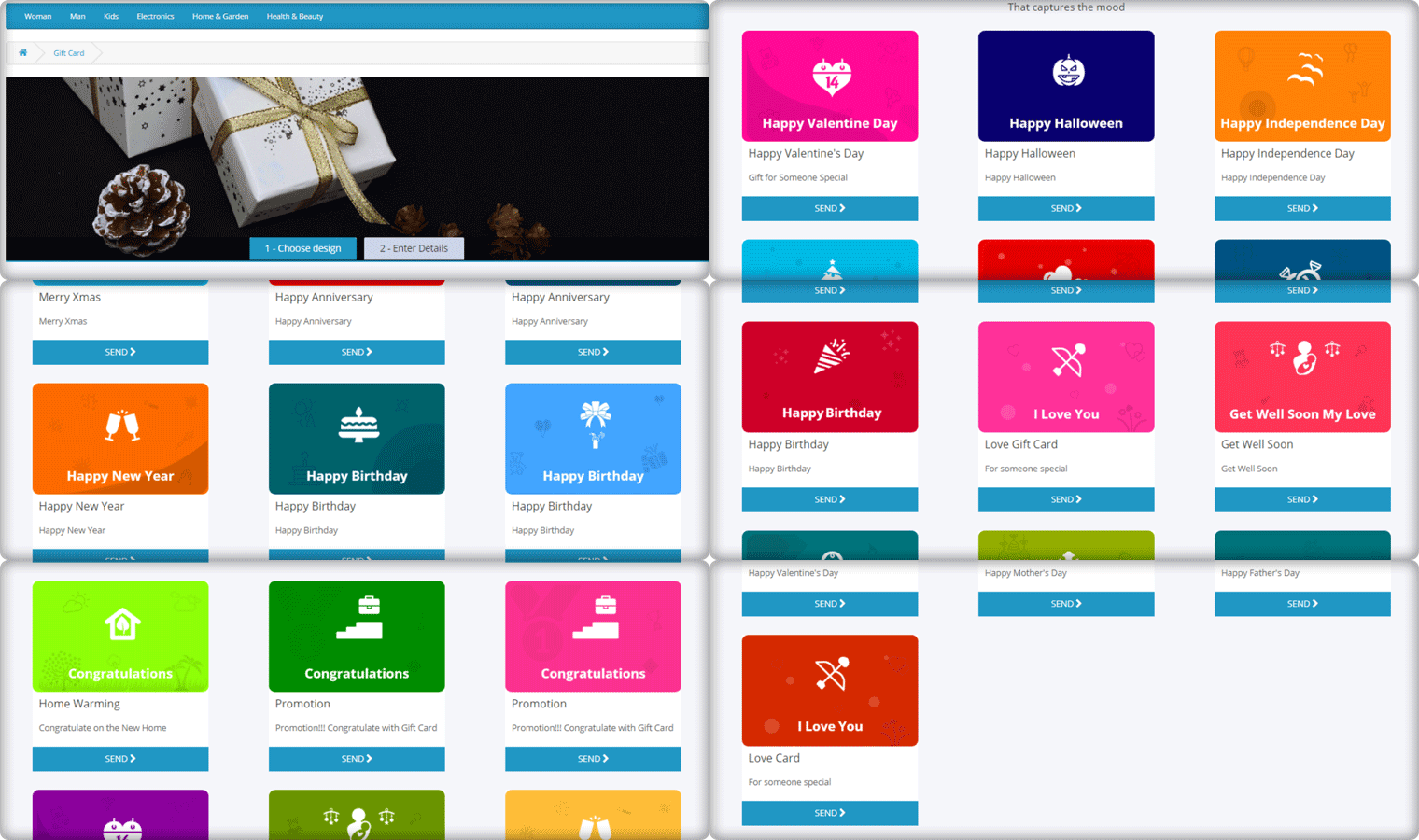
Gift Cards purchases are seen in high numbers during Valentine’s week and there is no doubt shoppers would be looking for some Valentine’s theme-based Gift Cards on your website too. Reduce this hassle with OpenCart Gift Card Extension.

The Gift Card module adds a gift card section on your OpenCart website and provides you with pre-existing gift card templates for multiple occasions including Valentine’s Day. It allows the users to print personalized gift card by uploading a custom image. You can customize these templates, add new ones, and do many more customization with the help of this OpenCart Gift Card Extension.

2. OpenCart Spin and Win Extension

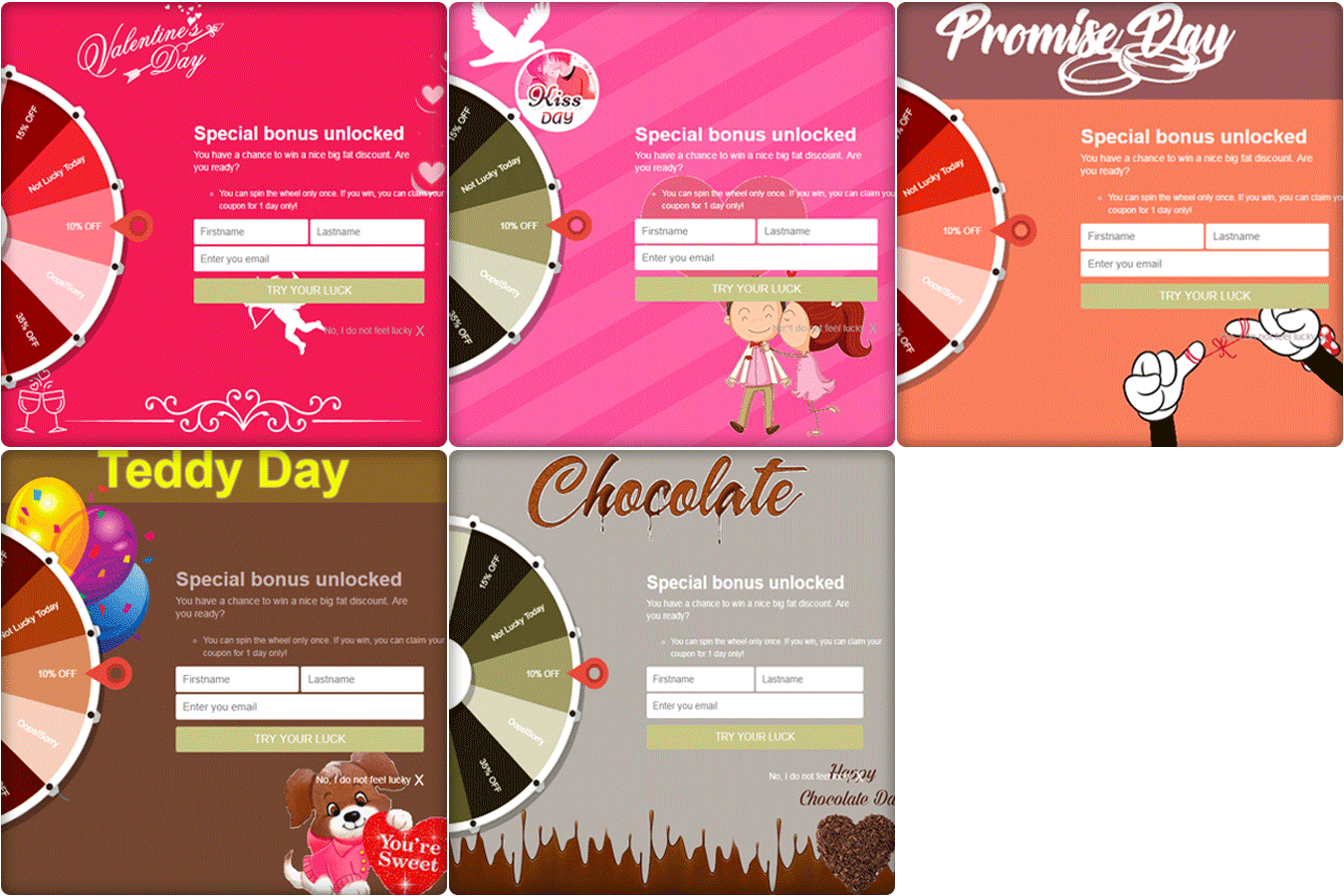
How about giving your visitors Valentine’s feel as soon as they enter your website? The OpenCart Spin and Win extension has multiple themes designed for Chocolate Day, Hug Day, Rose Day, Kiss Day, Promise Day, Propose Day, Teddy Day, and Valentine’s Day, to give your popup an amazing look.

The Spin and Win Popup extension adds a gamified Spin 2 win wheel on your website. Besides keeping Valentine’s feel, it tends to generate higher user engagement, helps you grow your email list, and boosts your conversions.

It lets you encourage your visitors to spin the wheel and earn some enticing discounts.

3. OpenCart Countdown Sales Timer Extension

Announce your Valentine’s sale to your store visitors through OpenCart Countdown Sales Timer extension.

This OpenCart module helps you set a countdown timer on the front end of your website for your upcoming sales so that your store visitors are very well aware of the commencement of your sales day and do not miss out on it later.

It is a perfect module to highlight your future sale offers without disturbing the user experience. By implementing this module on your OpenCart website, you can expect an increase in your sales when the actual sale season starts.

4. OpenCart One Page Checkout

Though this might make you think as to how one page checkout can be helpful during Valentine’s, it is something that you should definitely consider using.

Many cart abandonments take place due to a long and complicated checkout process. And you can lose out on huge conversions when the visitors count on your store is high but they are not making past the checkout page.

Remove the multi-step checkout barrier with the simple OpenCart One Page Checkout. The extension puts all the checkout fields on a single page and helps your prospects take a quick exit. A user can fill the entire checkout related information in any particular order and check out quickly.

Guest checkout, Social login, checkout field customization, multiple shipping and payment modes support are some of the amazing features of OpenCart One Page Checkout.

5. Print-on-demand Products

Print-on-demand services provide an alternative way to bypass inventory management time, investment, and risk, letting you go from creating to selling custom items at a fraction of the cost.

You can put your original spin on everyday items and sell them online, from t-shirts to posters, backpacks to books.
You can always graduate from using a print on demand platform to keeping your inventory if one of your online business ideas pans out and you start making a large number of sales or continue to use these services while exploring new ways to expand your audience.

This Valentine’s Day, to achieve this you can add a Product Customization Module to your eCommerce store. The users surprise their loved ones with custom, personalized gift items. The choice is yours!

6. OpenCart Preferred Delivery Time Extension

There will be many last-minute shoppers on your store this Valentine who would want to order an item and get it as soon as possible or at a specific date and time. Make this possible for those shoppers with OpenCart Preferred Delivery Time extension.

Through this module, shoppers can specify the date and time on which they want to get their order delivered. They can choose their preferred delivery time on the checkout page. This would prove very beneficial to those users who want to receive a product at a certain occasion and at a certain time.

From the backend configurations, you can make certain changes in the module functionality.

7. OpenCart Cash on Delivery with Fee Extension

With OpenCart Cash on Delivery with Fee extension, you can ask your customers to pay an additional fee when they choose COD option on the payment page. The cash on delivery method is the widely adopted payment method as the majority of the shoppers do not like paying the product price until it reaches them.

The extension helps customers feel more secure and relaxed as they do not need to worry about sharing their card details online.

Over to You

Make the best of this Valentine’s week with these 7 OpenCart Extensions. You will surely witness a boost in your conversions.

If you face any issue with any of these modules or need any kind of assistance, reach out to us at support@knowband.com

6 Amazing OpenCart Extensions for Product Page Optimization

When a user lands on your website in search of a product, it is primarily the product page that gives them a push to go for the purchase. Although for a conversion to take place, every element from the beginning till the end is vital. But the product page is the primary focus, and this is why product page optimization is highly important.

If the product page does not look appealing, informative and standardized, the prospect might give up the purchase idea and look for that product on your competitor’s store.

Understanding the importance of optimized product pages, here are the 6 OpenCart Extensions that will help you with product page optimization. Check them out.

1. OpenCart Product Video Extension

What could be a better way to help a prospect in his/her purchase than showing them an informative video of that product? Shoppers have plenty of doubts roaming around their head when purchasing a product online.

Besides product images, a product video eliminates those doubts to a great extent and helps you gain more trust of consumers.

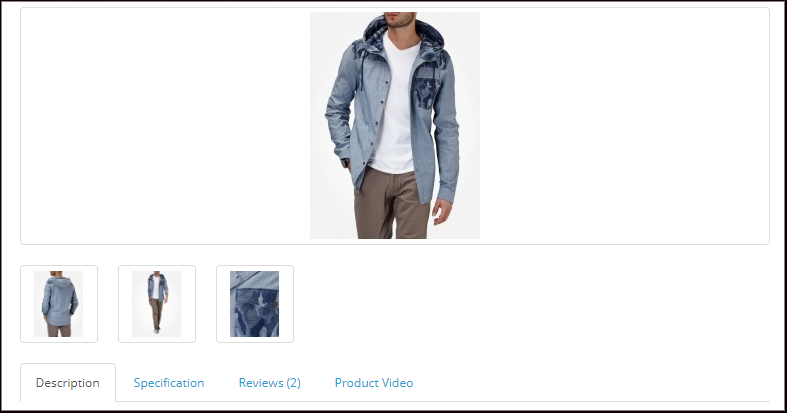
OpenCart Product Video extension adds a “Product Video” tab on your product pages, hence allowing customers to have a look at the product video before purchasing the desired product. You can integrate videos to your OpenCart website effortlessly from multiple platforms likes YouTube, Dailymotion, and Vimeo.

Related: 4 Benefits that Highlight the Importance of Product Videos in eCommerce

2. OpenCart Product Size Chart Extension

One of the major reasons why customers return clothing items is the incorrect product size. Not having an idea of the accurate product size often leads to customers ordering an incorrect sized product. In fact, different eCommerce websites have different length measures for particular size type. An L-sized t-shirt would not necessarily be of the same size everywhere.

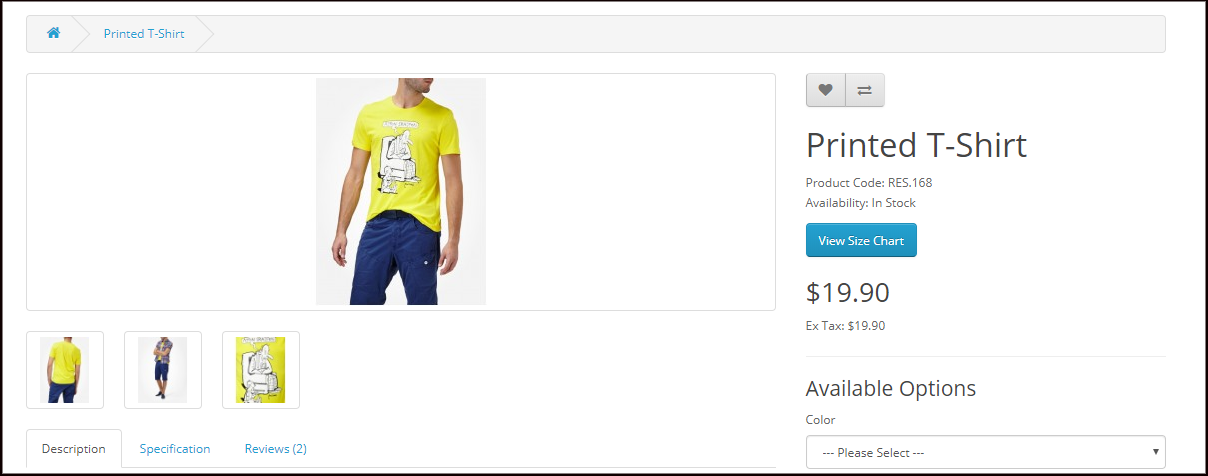
OpenCart Product Size Chart extension adds a “View Size Chart” tab on your product pages through which users can confirm which size product would fit them the best. From the back-end, you can specify the measurements of a particular size type.

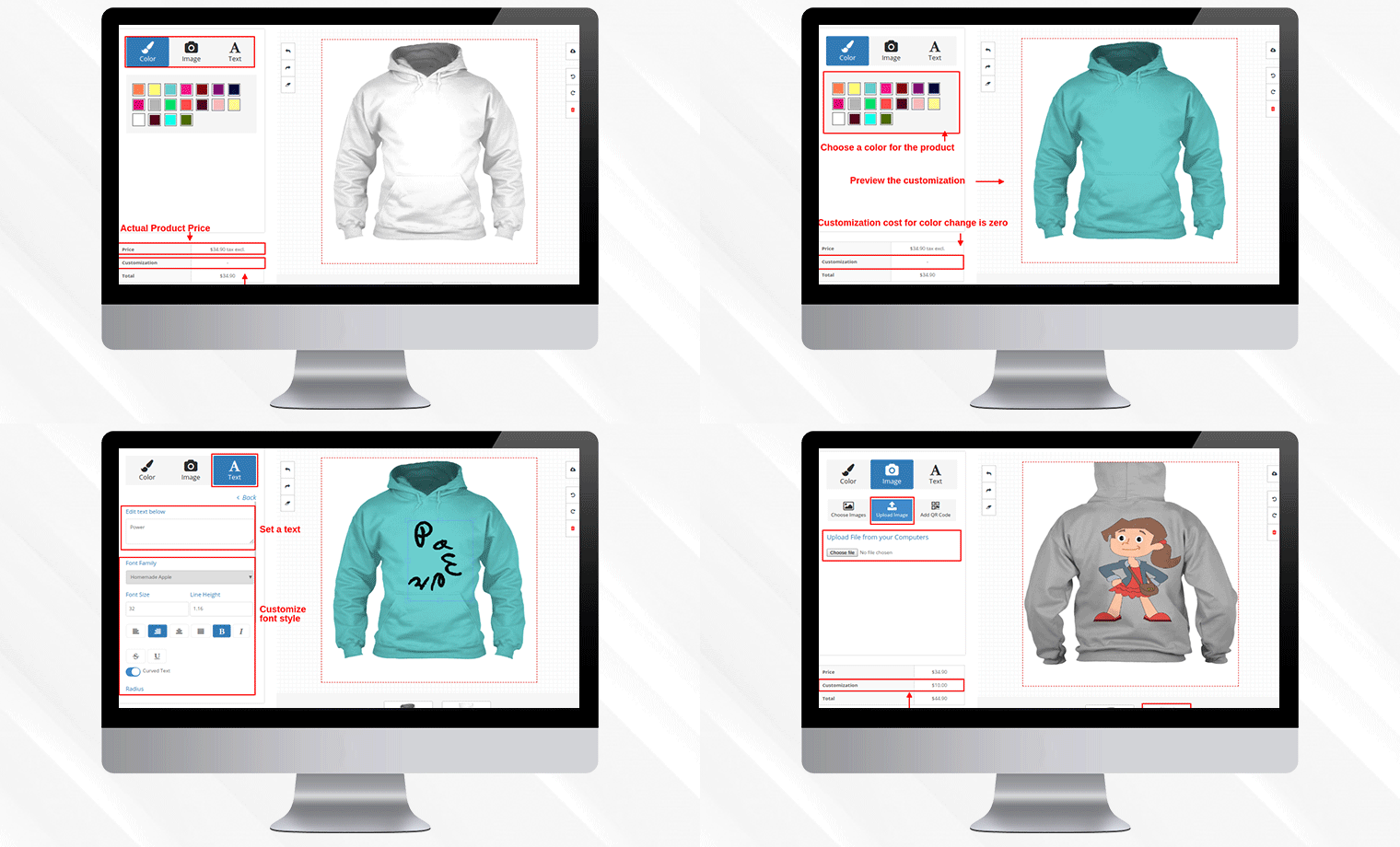
3. OpenCart Product Designer/Customizer Extension

Product customization has been in the trend for quite a few years now. Many online shoppers look to purchase customized products. In fact, today, there are entire businesses set up on product customization.

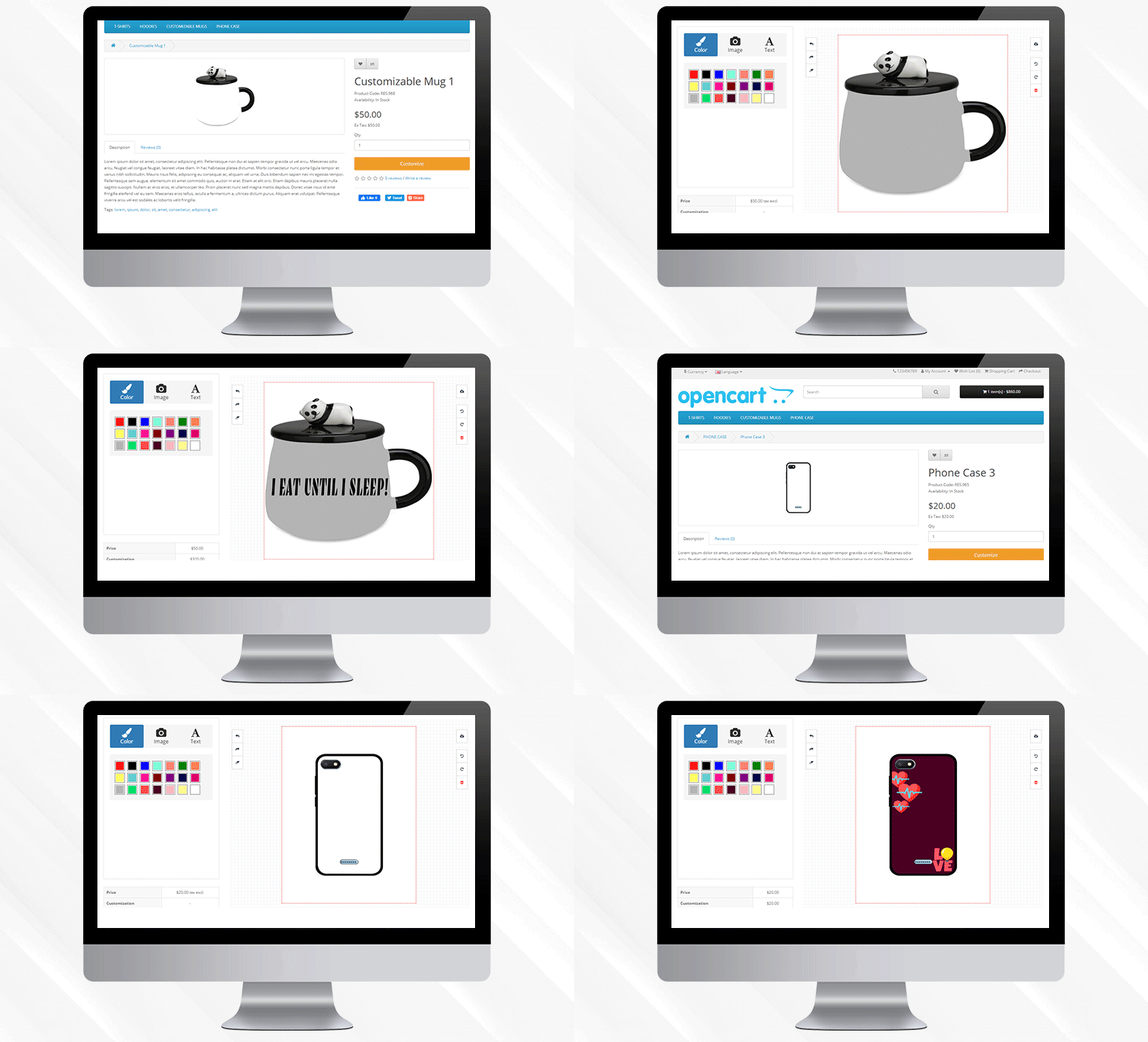
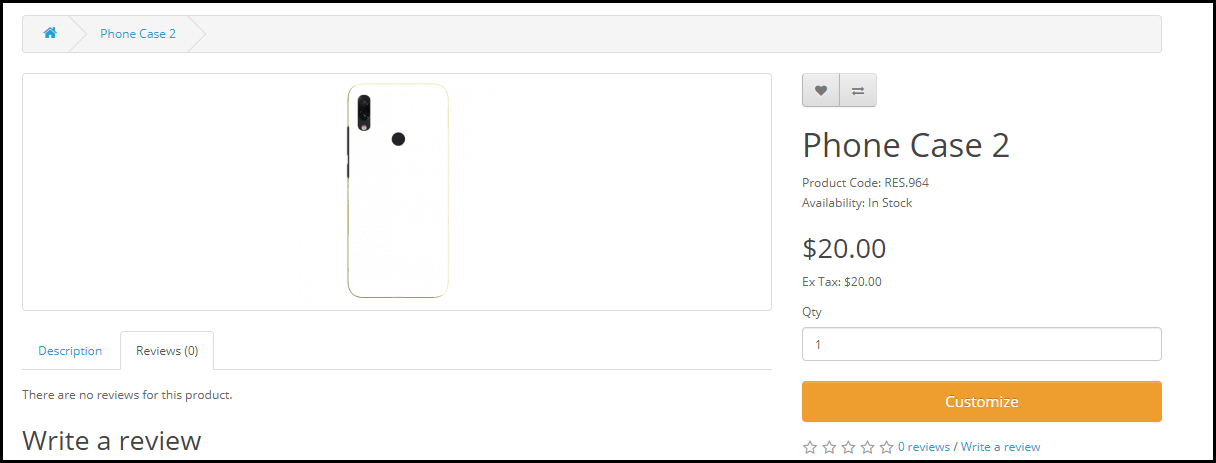
OpenCart Product Designer/Customizer extension adds a “Customize” tab on your product pages with the help of which a user can personalize a product as per their needs and desire. The configurations for this module can be modified from the back-end including setting up the customization price as well.

Related: 5 Benefits of Product Customization

4. OpenCart Product Availability Check by Zip Code Extension

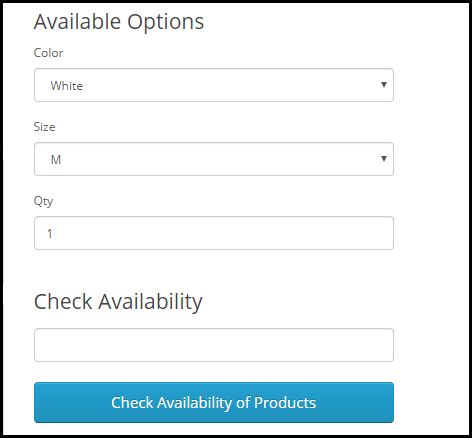
Let customers check whether a particular product is eligible for delivery or not, at their desired location, right on the product page.

With the help of OpenCart Product Availability Check by Zip Code extension, also called as OpenCart Zip Code Validator, the buyer can check whether the product is available for delivery at their location or not by simply specifying the area zip code. The module adds a “Check Availability of Products” tab on your product pages.

If unavailable, it will display that the product is not available at the specified zip code.

5. OpenCart Advance Wish List/ Save for Later Extension

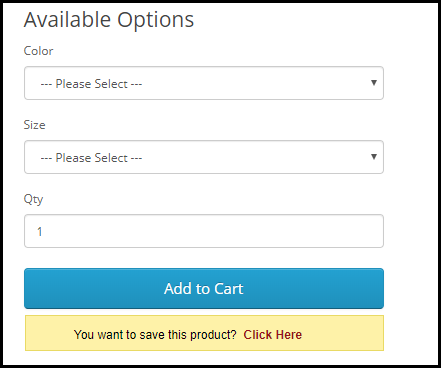
Let shoppers save a product for later if they do not want to purchase it at that particular moment. With OpenCart Advance Wish List/ Save for Later extension, you can allow your prospects to add the products in their saved items list.

The module adds an option right below the “Add to Cart” button to make customers save that product. As a result, whenever the prospect returns and decides to make the purchase, they can simply view that product from their saved items.

This gives you an idea of the customer’s requirements and you can approach them later and help them purchase that product.

6. OpenCart Review Incentive Extension

Product Reviews highly matter for any online business. They not only influence the buying decision of the future customers but also help businesses get feedback about the product quality as well as the issues customers are facing with it. Brands do reach out to customers and ask them to review the product they recently purchased, but not many customers take it seriously.

With OpenCart Review Incentive Extension, you can encourage customers to leave a review on the products and reward them with exciting incentives for every successful (approved) review. You can set the incentive value, review reminder date and do much more through OpenCart Review Incentive Extension.

Related: Why Product Reviews are Important in eCommerce?

Final Word

Do whatever it takes to make your product pages user-friendly. Take the help of these 6 OpenCart Extensions for product page optimization and make the purchase experience of your visitors better than ever.

If you need any assistance in any of the above-mentioned OpenCart Extensions, reach out to us at support@knowband.com