As the concept of Facebook marketing is increasing and the store owners want to grow their business. Hence, updating their product description with photo description will boost the product sales. According to a survey, “46% of customers would purchase a product after receiving visual aid from the seller”. Thus, this makes considerable matter for the seller to attach some kind of graphic or visual content of the product.
A study reveals that customers prefer the products with images over the product without the images. It helps the customer in making decision about the purchase of the product, eventually increasing the sales. Moreover, the various social media platforms is one of the place to enhance the visibility of your products and bring it in the notice of the prospective customers. As the customers now have an option to access the products via Facebook, therefore, attaching photo albums to the store may provide customers with a better insight of the products.
If you are a Prestashop site owner and want to grow your product popularity on Facebook, Knowband offers you an effortless way to do so. The Prestashop Facebook album Module is surely the thing which can give a better look to your store on Facebook and make sure you receive better traffic and improved sales on your products.
Let us discuss how this plugin can enhance your social marketing tactics.
Better coverage
The module enables the store owner to reach out to more people. As most of the online shoppers are active on Facebook, the module can help you promote your web store effortlessly. Photo albums can help you increase the popularity of your store’s FB page and in achieving a better customer base. At the same time, it makes sure that the products’ visibility is increased. The chances of conversions are better through graphical aid rather than tedious description and lengthy contents.
Easy approach
The module enables the seller to automatically synchronize the product photos to the FB album. Thus, making sure that the product description is well received to the customers without putting any extra effort. It saves a lot of efforts and time of the seller. Moreover, when photos are attached to the store photo album, they are accessible by the customers. Thus, store owners start promoting their offerings on the social media platform with minimum effort and time.
More conversions
The attachment of photos improves the rate of conversions. More customers tend to buy a product where they can virtually feel the product and attaching a photo fulfills the purpose. There are around 27% more conversion rates with products that were provided with photos. Hence, one of the important factor for the store owner is fulfilled by attaching photos. The module enables the seller to attach as many photos as they want. Once the products is able to attract larger audience, the chances of conversions shall increase automatically.
Social sharing
One of the best advantages of sharing the product image on social networking site is that it help in spreading the word-of-mouth. Most people who like your product can share it with their family and friends. A study reveals that more than 56% people tend to buy a product after someone else has liked and reviewed it. Thus, it helps growing more opportunities for the sellers. The social sharing feature makes it easier for the sellers to promote their products as most of the time customers do that for them.
Interactive
The feature of adding photos make it quite interactive for the customers. The customers can now relate themselves better with the products, thus making it easier for seller to make sale. Moreover, you can now keep your audience engaged even at the platforms other than your website. The improved interface also open the concept of window shopping. It enhances the rate of sales of the store and ultimately resulting in increased number of conversions.
If you are running an eCommerce store, then, prioritizing customer’s satisfaction becomes inevitable. Most of the time, customers prefer to make a purchase after they are fully satisfied with the services provided by the web store. If you think that providing quality product can lure the customer to your store, then, you may not be right completely as there are many other factors contributing to customer acquisition. Nowadays, almost every other store is using the same brand merchandise. Customers have plenty of options to buy those products.
So, what factor differentiates between the stores for a customer? Why should he/she choose your online store over the others. Well, getting required traffic to your website and at the same time having a healthy amount of satisfied customers is different. The eCommerce store owners need to think differently and creatively, in order to be upfront. The sellers must divert their attention from ‘only providing quality products’ to enhancing the customers experience with the web store. A better UX ensures a better customer relationship.
Seller need to make sure that the customers have a smooth and pleasant experience while shopping. It helps in making sure that the customer will engage them with your web store in future too.
Discussed below are certain strategies which can be used to build a stronger customer base.
1. Better navigation
The web store owners needs to provide the customers with smooth browsing and better access to the site features. The website should be enhanced for better user engagement and shopping experience. The category and product navigation should be easy and effortless. Keep the category pages uncluttered. Moreover, the filters and deep linking can help you get some customers. In addition to this, features like one page check out, Infinite scroll and others prove to be useful features in binding the customer’s interest towards the web store. These may seem to be small details, but if acted properly, it can lead on to a significant raise in your sales and ultimately boost your conversions.
2. Interactive Pop ups
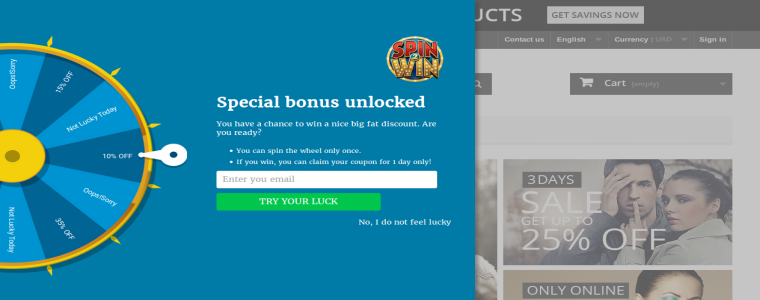
The main task for the web store owners is to keep their customers occupied. Thus, the sellers must provide the customers with an interactive platform where they can easily make purchase. The web store can use creative ideas like Spin and Win pop up and other gamified popups that are less annoying and ensures longer engagement at the same time. These pop ups keeps the customers on the website and curbs their exit-intend. The seller can also make huge sales by luring the customers through various offers, provided using these pop ups.
3. Social Media Marketing
The concept of social media marketing is heating up. Most of the web store have either started to market using social media platforms like Facebook, Twitter and Instagram or planning to do so. The user based on these sites is way too much and it is never a bad idea to promote your products among such crowd. If proper strategy is followed than social media marketing can boost the product sales and increase the amount on conversions significantly.
4. Mobile Apps
The significant rise in the numbers of mobile phones have changed the marketing strategies. With an easy access to mobile phones, it has become a better source to increase the number of customers visiting your store. In addition to this, the customers find mobile app more comfortable and trustworthy rather to desktop site. Thus, launching a mobile app for your web store might show an increase in your revenue generated through sales. Knowband offers an robust medium to all the eCommerce owners for having their own mobile app. Our Mobile App Builder can help you get your application in a matter of moment.
5. Product reviews
According to a study, “Almost 54% of people would prefer to purchase a product after reading positive reviews about the products”. Thus, try to maintain a section which consists of all the product reviews. It enables the customers to share their experience about the products and helps other to make up their mind in order to purchase the particular product. It serves a huge purpose in increasing the sales.
Conclusion
Marketing with time has become more research based than service based. The sellers need to be stay updated about the trends which can boost their eCommerce store. If they want to grow more than they must give preference to their customer’s choices. Take the above mentioned consideration into account and optimize your store for better results.
For more Information about Shopify Spin & Win Module visit here:-
There are many aspects to manage the online business like: marketing strategy, social media optimization, email marketing- the list goes on and on. Present time most of the online merchants offering free shipping to their customer & they see the result free shipping generates more sale. Knowband offers you a Prestashop Free Shipping Manager Addon.
The Knowband Prestashop Free Shipping manager addon allows the admin to offer free shipping to the customers. Not just this, the admin can even apply shipping charges when the cart value is below a certain limit. All this can be done following few simple customization option at the back end of the admin interface of the module.
The shipping charges are determined by two factors. They are listed below:
The cart value or the total price of the order: The store admin can determine the shipping charges as needed when the cart value of the shopper is below a certain limit. This limit can be set by the store owner himself.
The total weight of the order: The store admin can even charge shipping amount when the weight of the parcel exceeds beyond a certain permissible limit.
1.1 Benefits of Merchant
The Prestashop free shipping manager addon is aimed at making it easier for the store owner to manage the shipping cost of their website. Listed below are some of the objectives that can be achieved by the Prestashop extension:
Terms & Conditions: It allows the store owner to set the terms and conditions for the shipping of the eCommerce store. The admin can offer free shipping or charge an amount as per his wish.
Free Shipping by Price: It allows the store owner to set the price of cart value below this price admin won’t be allowed the Free shipping by price.
Free Shipping by Weight: It allows the store merchant to set the minimum and maximum limit of the weight of the package below this weight they can charge the shipping cost.
Free Shipping by Zone: It allows the PrestaShop admin to select the country where they want to offer free shipping by zone.
Free Shipping by Carrier: It allows the owners to select the carrier option which his/her want to provide the free shipping option.
Look and Feel Settings: In this option admin can change the background color, button color and border color of the free shipping block.
Customer Selection: In this option, Prestashop store merchant can select the customer according to the need.
The Free shipping comples customer to add more product to the shopping cart.
These Prestashop addons motivate customers to spend more time on your website and your customers will feel in control of what they’re spending on.
1.2 Benefits of Customer
This Prestashop Free Shipping manager module shows a block on cart summary which gives the exact information about the condition.
This Prestashop Free Shipping manager extension gives them access to a customer to buy the product with free shipping.
2.0 Installation
After purchasing the Prestashop Free Shipping manager addon, you will get following files as listed below in the apk folder:
freeshipping.zip (contains source code of the module)
User Manual
In order to install the extension in your Prestashop store follow the below mentioned steps:
Unzip the freeshipping.zip file. It would contain a number of files and folders as shown below
Copy the entire content, that is, the files and folders of the unzipped folder. Paste the same into the “Modules” folder of your store’s directory. Follow the below-mentioned address path – Root Directory/modules/.
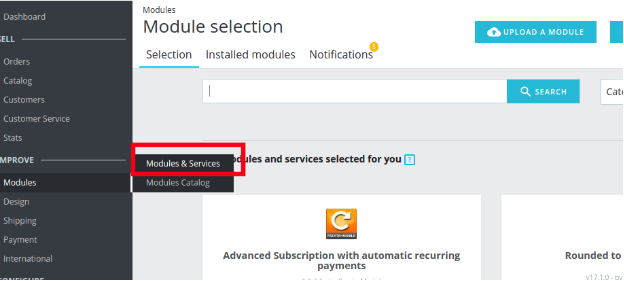
The plugin is all set to be installed in the store. Go to the Store Admin and then to‘Modules and Services’. Your module will be shown as below –
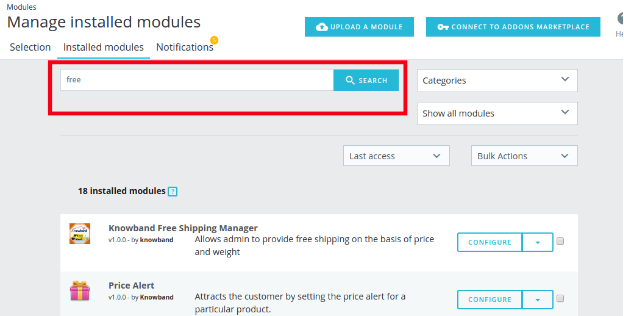
In case, you are not able to find module in admin modules list, you can do so by searching for it with the details mentioned below-
Keyword – Free Shipping
Category – Front office
Filter By – Installed & Not Installed / Enabled & Disabled
Click on the “Install” button just next to your module. It would show a pop-up for your confirmation. Click on “Proceed with the installation” option. This step will install the module and show notification – “Module(s) installed successfully”.
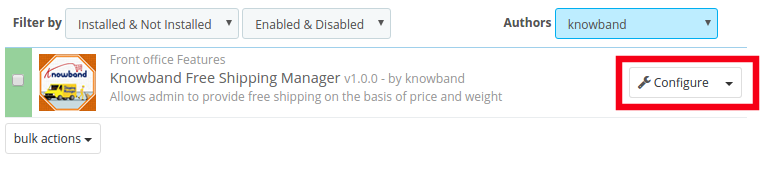
Once the installation is complete, you can get an access to the admin interface of the module by clicking on the “Configure” button.
3.0 Admin Interface
The Prestashop Free Shipping Manager addon is fully configurable. The best thing is the configuration settings can be updated via the admin interface by just clicking the buttons. No code changes are required for the same. The admin interface of the extension has two customization options. They are listed below:
1- Configuration
2- Free Shipping Rule
These options are discussed in detail below:
3.1 Configuration Settings
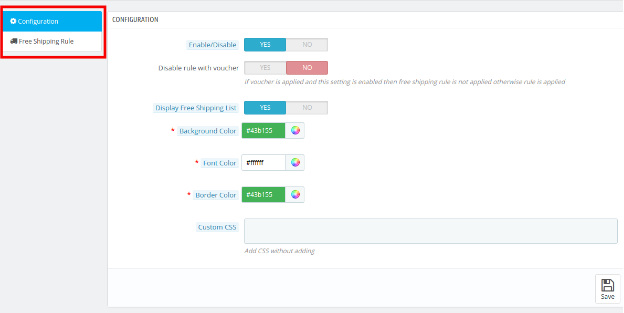
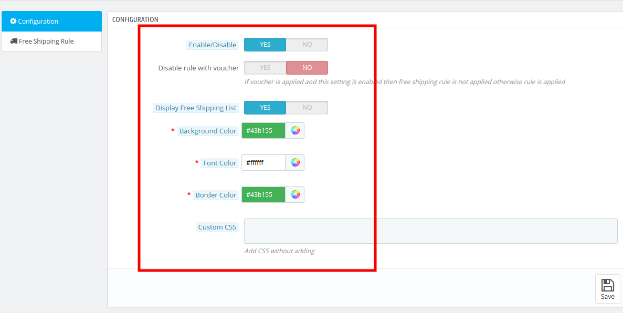
The ‘configuration’ tab of the Prestashop Free Shipping Manager extension offers the seven options to admin that are shown on image below:
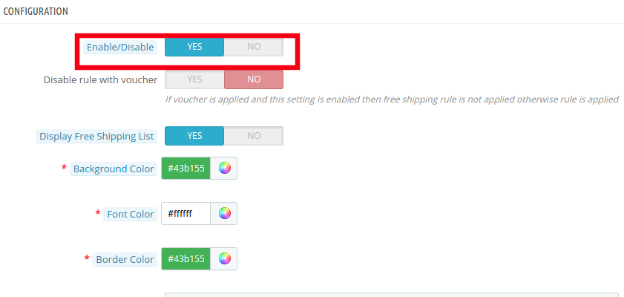
3.1.1 Enable the module: In this section admin can enable/disable the module. This can be done with a button toggle as shown below.
Listed below are some of the options that are offered to the store owner by Prestashop Free Shipping Manager Module.
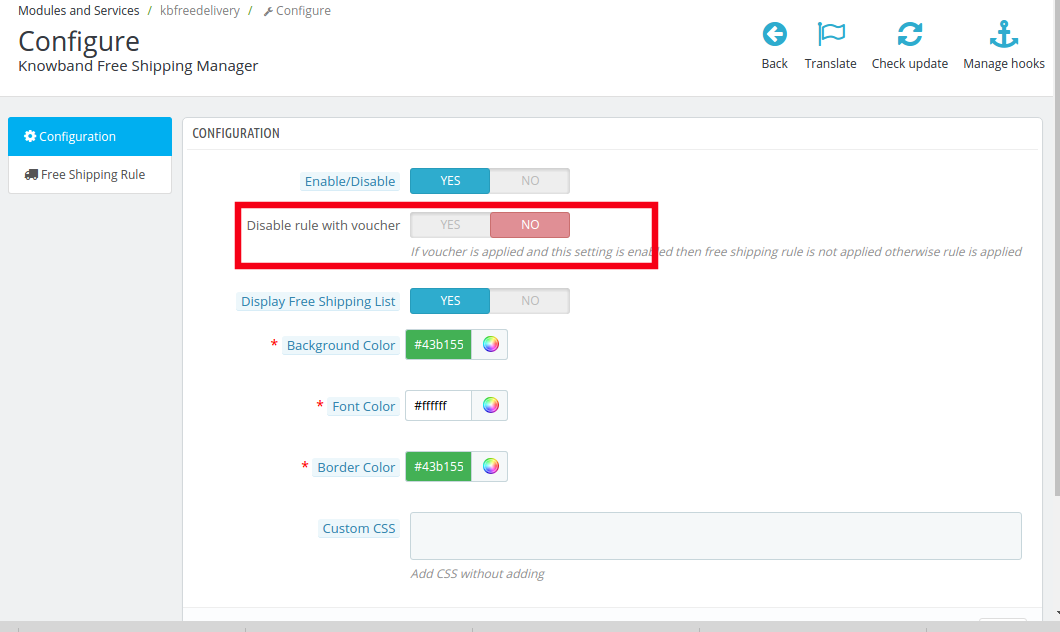
3.1.2 Disable Rule With Voucher
Once this setting is disabled, the free shipping offer will not be applicable even when the voucher is applied.
As it is disabled, the free shipping rule will not be applicable if the voucher is applied on any purchase.
In case, you want to offer free shipping even if any voucher code is applied, then, you can do so by enabling the button.
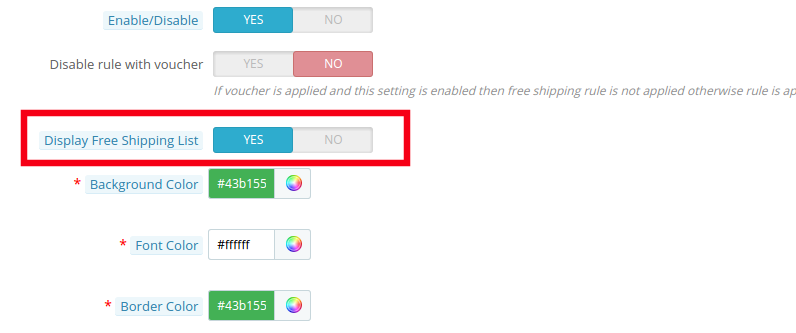
3.1.3 Display Free Shipping List
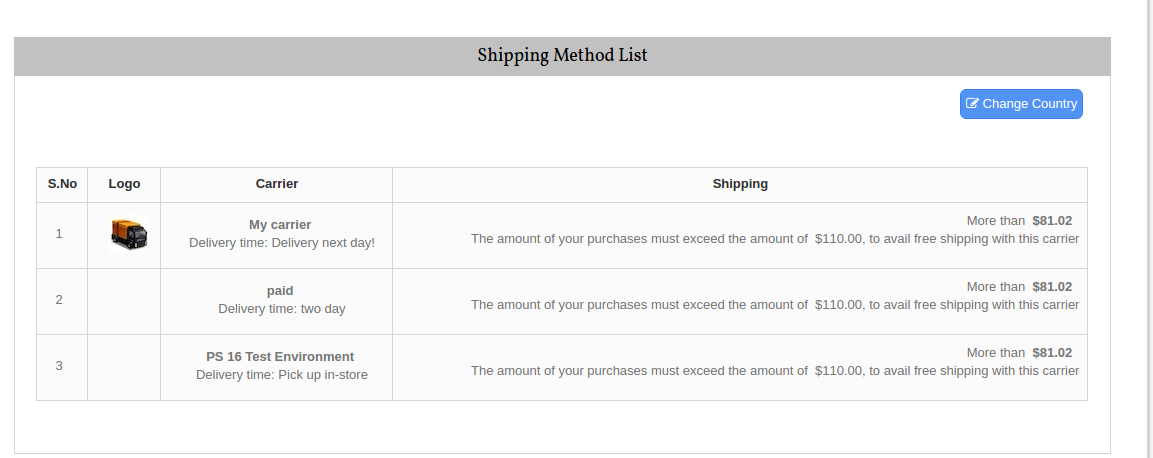
The various free shipping methods can be displayed to the visitors on the website. The list will be shown as mentioned in the image below.
However, if the Prestashop store admin wants to remove the feature, he can do so by disabling the button mentioned below.
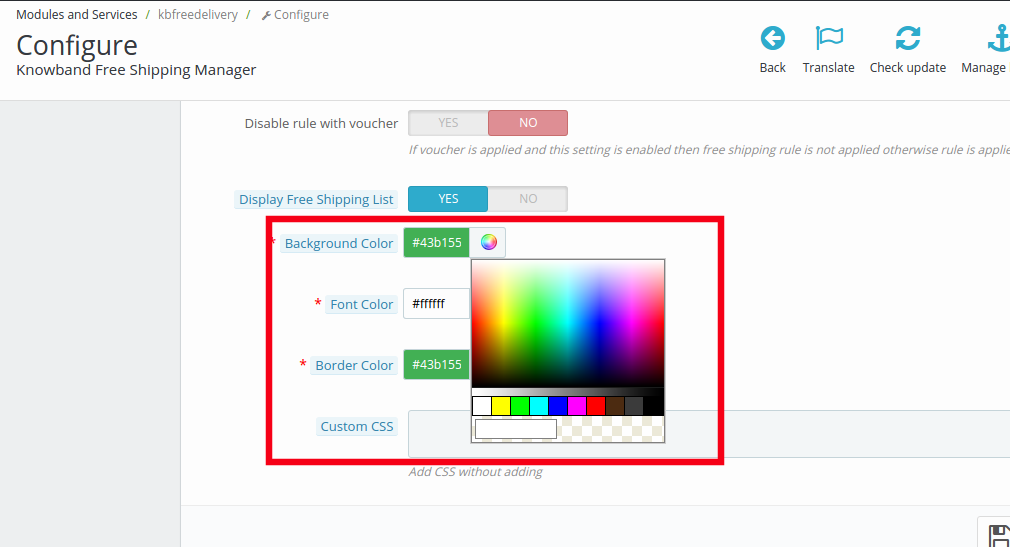
3.1.4 Background Color
The color picker can help you change the background color of the free shipping display.
You may the color that suits the theme of your Prestashop store.
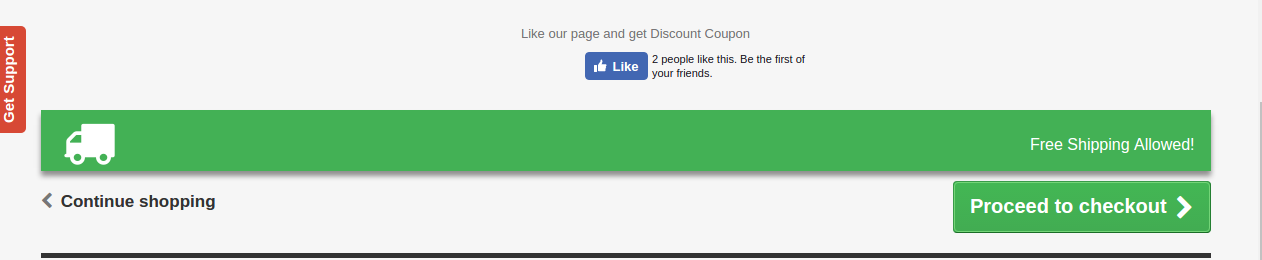
The message will be displayed in the front end of the website as shown in the image below.
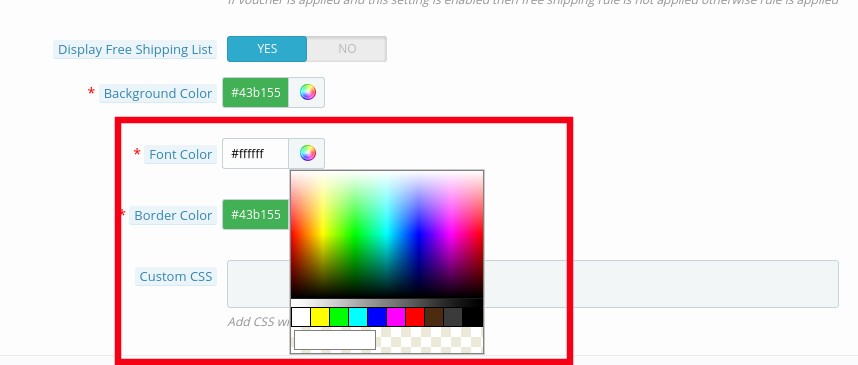
3.1.5 Font Color
The font color of the message that is to be flashed on the website can be picked and set from here.
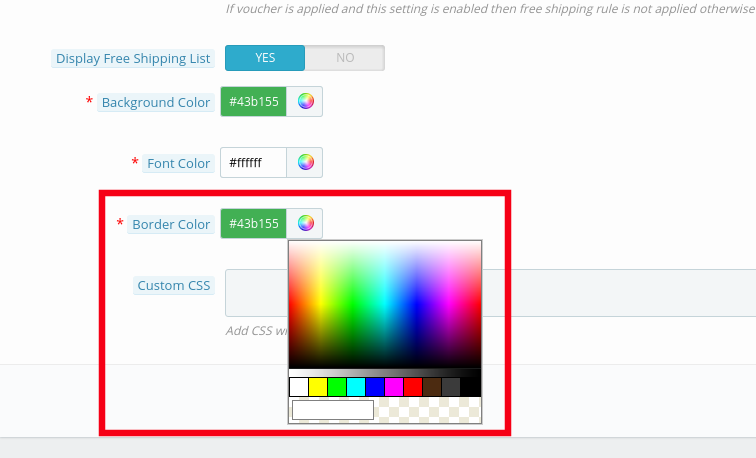
3.1.5 Border Color
The entire block can be customized as per the requirement of the website. The border color of the box can be selected and changed from color picker as shown in the image below.
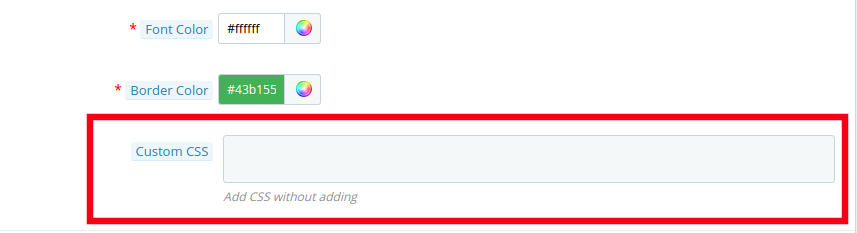
3.1.6 Custom CSS
Any custom change in the look and feel of the module can be done from here. The store admin can customize it by entering custom CSS code in the block shown below.
3.2 Free Shipping Rule
The online merchants get full access to change and modify the terms and conditions of shipping method on their website. All this can be done by just filling up few information.
Follow the steps mentioned below in order to make the changes:
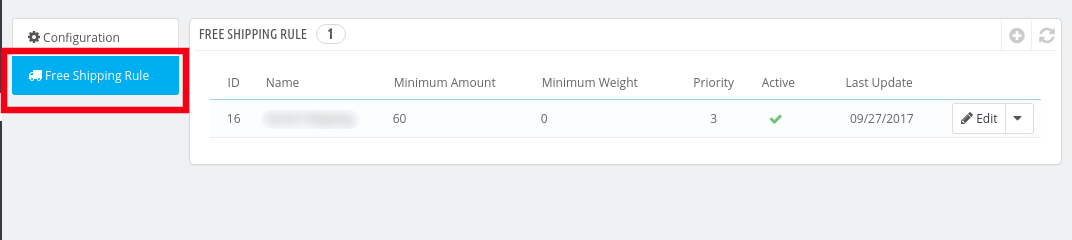
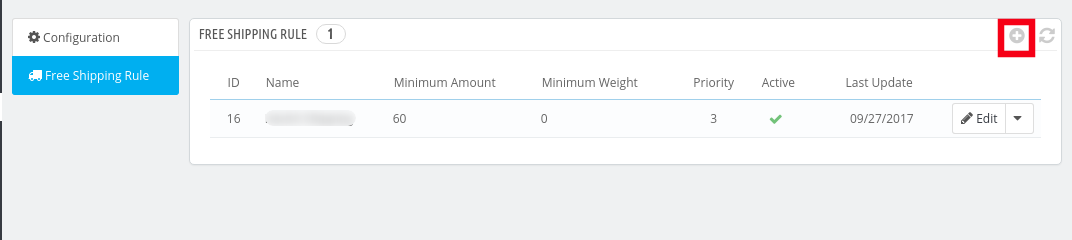
Go to “Free Shipping Rule”. You’ll be redirected to the interface where you will get the list of the rules already fixed by you.
In order to add new rules click on the ‘+’ sign on the right end of the page as shown in the image below:
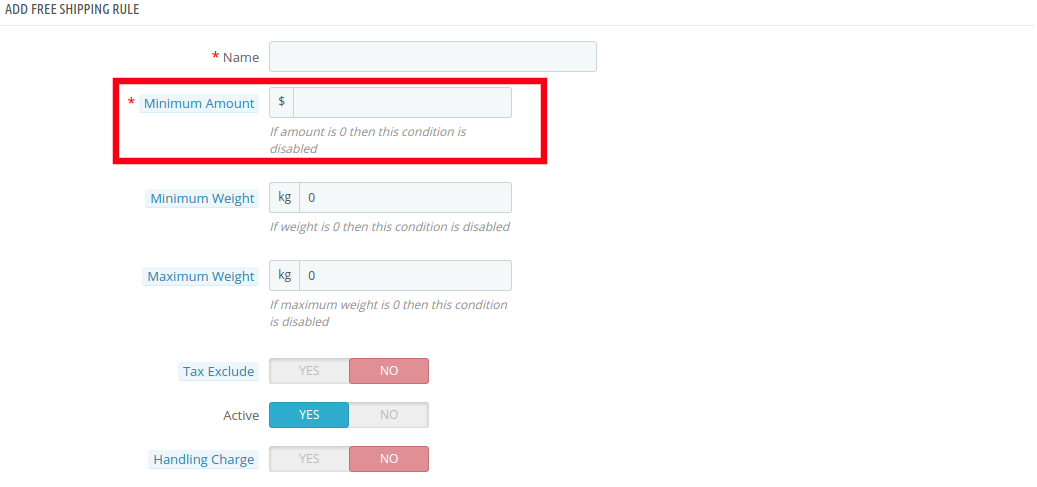
You’ll be redirected to “Add Free Shipping Rule” page.
Listed below are some of the information that you need to enter in order to set the free shipping rules.
Enter the Name: Enter the name of the shipping rule. It can be anything as per your convenience.
Minimum Amount: Enter the minimum cart value at which you want to offer the free shipping by price options. This facility will be disabled at the store if the minimum amount is ‘0’.
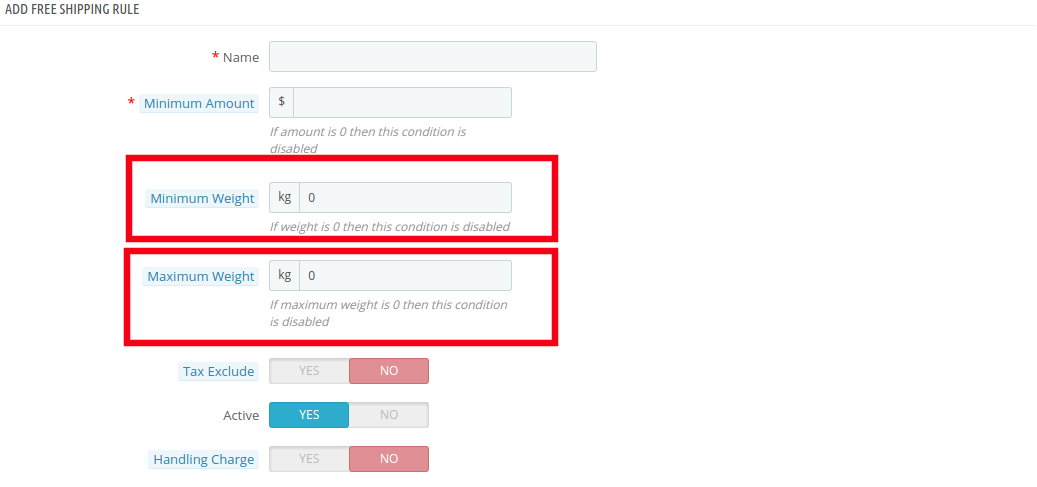
Minimum Weight and Maximum Weight: Set the minimum and maximum weight of the parcel beyond which you are looking to charge the shipping cost. Below this limit, the site will by default offer free shipping facility. The weight is to be entered in Kilogram.
Tax Exclude: You can include the tax or exclude it from the shipping charges by enabling or disabling the button mentioned below.
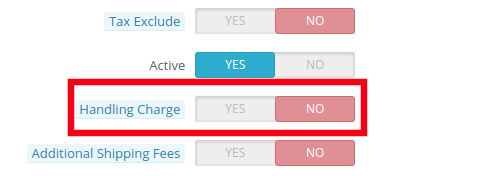
Handling Charge: The merchant can even include the handling charge in the shipping cost by enabling this button. Otherwise, he can leave it disabled.
Additional Shipping Charge: In case of any additional shipping charge, the store owner can enable the button shown in the image below.
Zone: The Prestashop Free Shipping Manager Addon even allows the store admin to set free shipping facility as per the geographical location of the customer. The admin can choose the zones where he wants to offer this facility and give the facility to customer to buy the products free shipping by zone.
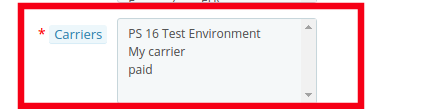
Carrier: In this section prestashop store admin can selectall the carrier options in which you would like to include this facility.
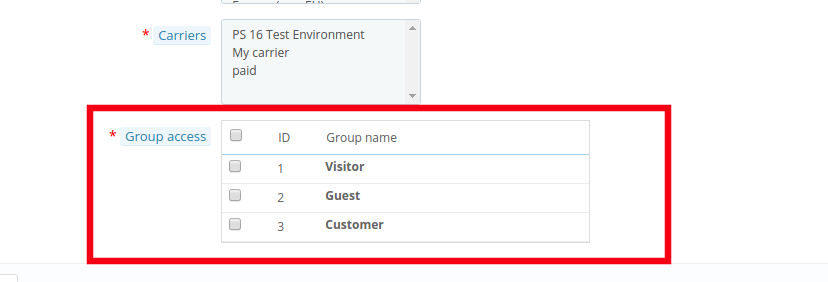
Group Access: The store admin can offer the free shipping facility to the Registered Customer, the Visitors or the New Customers as per his wish. Just check the options that you want to include in the feature.
4.0 Website UI
The changes done in the prestashop store back-end will be reflected in the front-end of the website.
4.1 Free Shipping Block
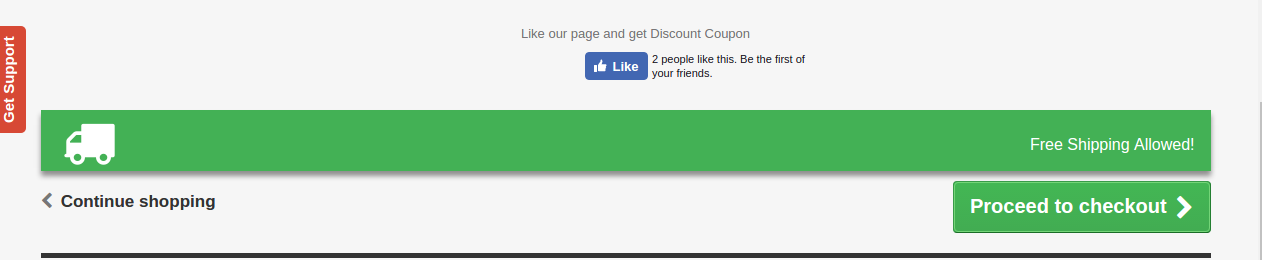
The free shipping block will be shown as mentioned below.
4.2 Free Shipping Limit
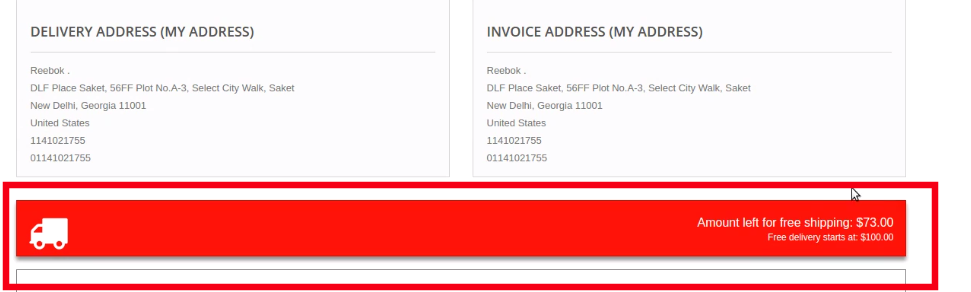
In case you have fixed any limit for the offering free shipping than the same will be shown on the cart of the shopper. If the customer select the product below the cart limit this block shows a block on cart summary which gives them the exact information on the condition to fulfill.
4.2 Free Shipping List Display
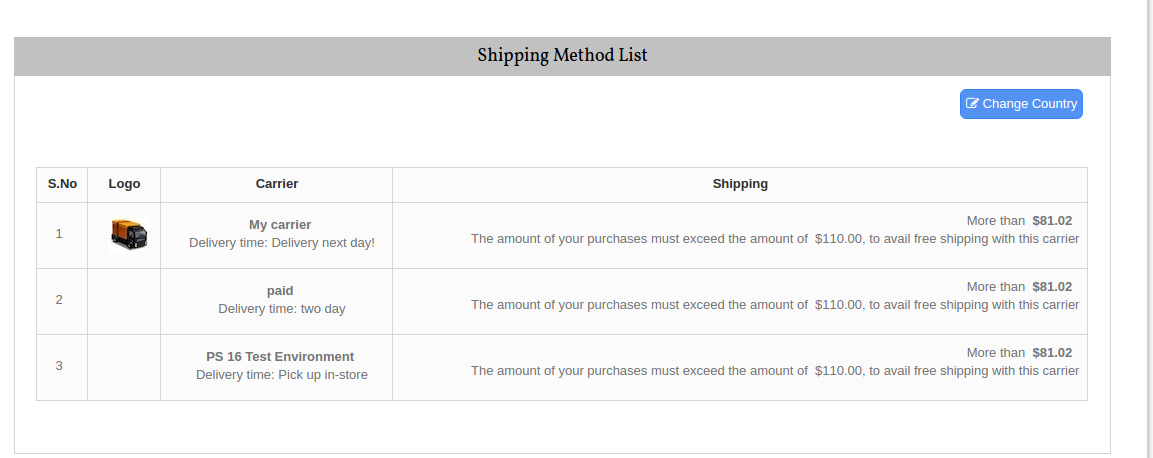
The entire list of the free shipping methods will be displayed on the website if the functionality is enabled by the store admin. This can provide a better user experience and ensure more transparency during the transaction.
Now you can try Prestashop free shipping manager module for on your Prestashop website. KnowBand Prestashop Free Shipping Manager Addon helps you enagege more customer to your store & increase the customer base.
In the past couple of years, there has been a significant increase in the number of eCommerce stores. On one hand, this has opened multiple options for the online shoppers to shop from, while on the other hand, this tremendous rise has made it quite challenging for the e-retailers to keep their customers stick to their store. The competitive market has led the eCommerce merchants to come up with some unique ideas on their store at regular intervals to ensure that their visitors enjoy a smooth experience and remain loyal. One such idea adopted by the e-merchants is the use of Infinite Scroll, also known as an endless scroll.
Great user experience is essential to ensure customer acquisition as well as customer retention. To make sure that users enjoy a hassle-free browsing experience, Knowband comes up with the Infinite Scroll module for Prestashop, OpenCart, Magento and Magneto 2 store owners.
The Infinite Scroll module eliminates the traditional pagination system from your eCommerce store and optimizes your site to load the next page products automatically within the same page. It helps customers browse your store products easily without the need to navigate to the next page manually. The infinite scroll module saves a lot of time and effort of your customers.
Why do we prefer the Infinite Scroll module?
Infinite Scroll module has proved to be very effective in increasing the conversion rate. How? Check out the points mentioned below.
Efficient
With the help of the Infinite Scroll module, merchants can now provide an easy browsing experience to their customers. Because of continuous loading, customers can now browse all the products of a particular category on a single page. Since a user needs to put minimum efforts to browse content, this makes infinite scroll an efficient module as it saves time that otherwise would have been wasted while switching multiple pages. Along with this feature, the customers are provided with a “Go to top” link button, clicking on which they would be able to navigate to the top of the page with just a button click.
Engaging
The availability of Infinite Scrolling has proved to be very engaging for the customers, which has helped store owners in keeping high the customer engagement rate on their store The potential buyers now need not skip from page to page in order to browse their desired product. The option to view all the products under a single page makes an infinite scroll module more convincing and provides an interactive interface to the store. With easy automatic scrolling, e-retailers have found a significant increase in the average time spent by the customer on their eCommerce store.
Effective
The infinite scroll module has turned out to be very effective as far as the conversions are concerned. Most of the time, when customers don’t find the product matching their expectations after scrolling a number of pages, it certainly kills their interest to browse further. Who knows if they had got the perfect fit on the next page? But since they stopped after a point, they couldn’t be converted into potential buyers. This causes an effect on your sales. Hence, with the introduction of the infinite scroll module, it becomes quite easy for the customers to keep looking for the products without skipping to another page. It doesn’t break their flow and keeps the chances of conversions very high.
Emerging
The infinite scroll module has given a new definition to product browsing. The concept has emerged and started to catch the attention of merchants as well as the customers. A majority of the customers now seek for the Infinite Scrolling feature on different eCommerce stores. It won’t be wrong to say that, “Infinite scroll is the new cool” for the e-commerce industry. Most of the web stores have already opted for this feature. If your store is lagging behind, you are seriously missing out on a great opportunity to scale-up your conversion funnel.
Evident
Serving customers with better features and functionality to provide them an amazing user experience is the necessity of every store owner today. The infinite scroll module is one of the features that have evidently proved to be a boon for the eCommerce merchants. This not just ensures better conversion rates but also promises to keep your customers stays intact with your web store for future purchases.
The tough competition in the e-commerce market has enforced the online businesses to come up with creative ideas to stand out in the market. Businesses are keen on looking for ways to improvise user experience, and reducing clicks is one of the best practices for that matter. If you found this article helpful, do drop a comment in the comment section below.
According to a report by Pew Research Center, it is revealed that almost 93% of teens aged between 12–17 have access to the Internet. With such huge numbers of teens going online regularly, online businesses have started taking the responsibility to prevent children from seeing explicit content. Hence, they do so by setting up the age verification process on their websites. Online age verification is important to restrict the underage from browsing age-restricted content and prevent any law-breaking.
The easy access to age-restricted content by children has become a major concern for parents, teachers, and e-retailers. Many e-commerce platforms deal with alcohol selling, and tobacco selling. If a minor gets access to such websites/stores, it can create serious problems.
Why does Your Store need Age Verification Module?
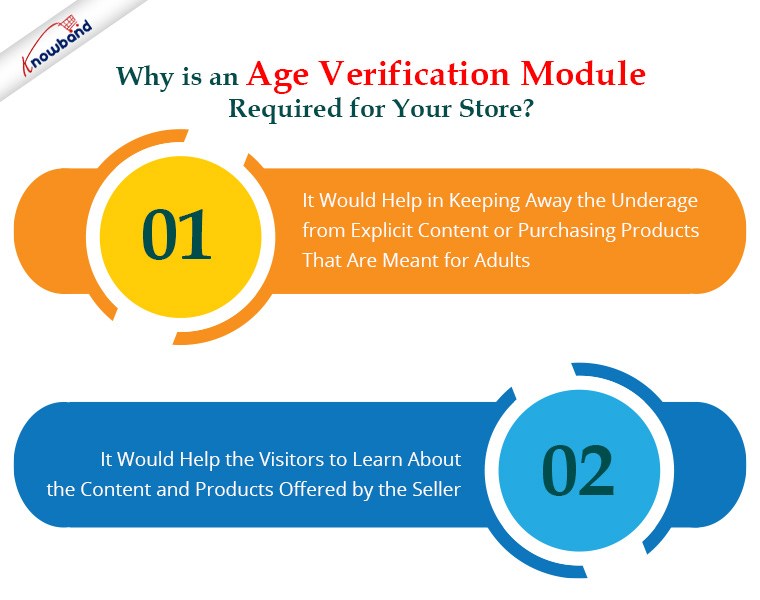
It is more crucial than ever to safeguard our children. While age-restricted commerce continues to expand, keep the goods and services meant for adults out of reach of kids. Hence, strong online age verification is essential to weed out people who are underage and stop any illegal activity.
Online businesses can stop children from viewing sexual information or buying things intended for adults by strictly enforcing the Age-verification set up on the web store. It would help in keeping away the underage from such stores.
Most of the time, it is unavoidable to block access for users under a certain age if a site owner offers age-oriented products or has some explicit content on their website. Hence, it becomes a concern for the site owners to inform the visitors about the site content before their access. It would help the visitors to learn about the content and products offered by the seller. Also, they can redirect them accordingly.
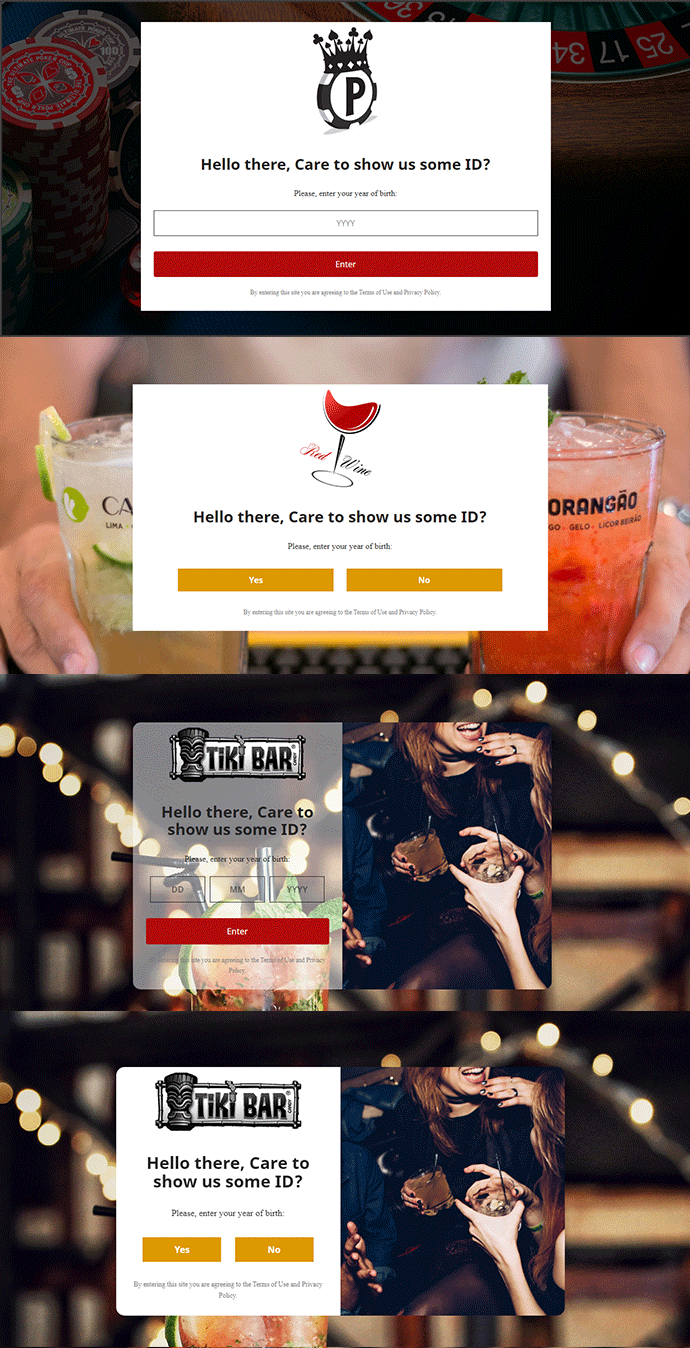
If your eCommerce store contains any explicit content you can try out the Age Verification module by Knowband. This module presents an age verification popup as soon as a visitor enters your store and asks them to confirm their age. Only after the age entered is found suitable to browse the store, permission is granted. Knowband offers the Age verification module for Prestashop and OpenCart eCommerce platforms. Do visit to check their complete features and benefits. that you wish to display to people of a certain age only,
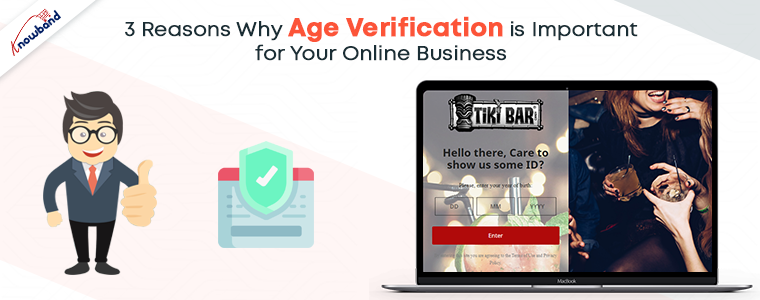
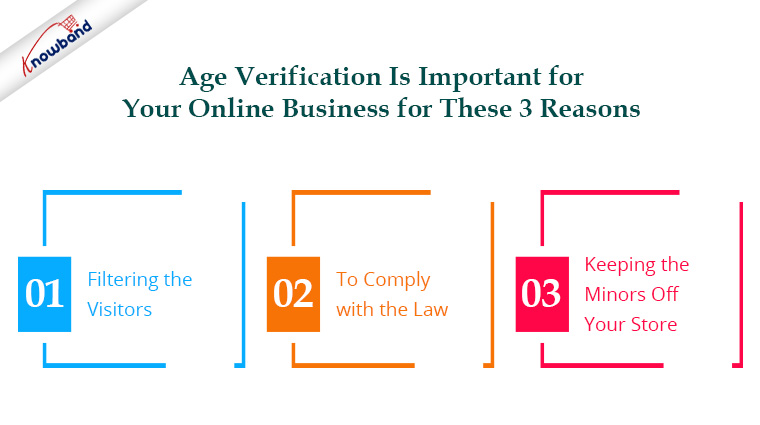
Top 3 Reasons Why Age Verification is Important for your Online Business.
1) Filtering the Visitors
By setting up the Age verification process on your online store, you can filter out the eligible visitors for your product. When visitors are asked to confirm their age, it gives a clear message that the content they are trying to view is age-restricted. A wise teen would understand this and leave your store.
2) To comply with the law
The age verification procedure must be in place in your store if you deal with goods that must only be purchased by those who are over a certain age. This is by the law. Failing to follow the age verification system can result in legal penalties, worse can be imprisonment.
3) Keeping the minors off your store
With a high rise in Internet users, e-merchants must keep minors away from their store, if it contains adult products. Online access to improper products for children can hurt their thinking. Thus could get worse down the road. Hence, this is why age verification becomes mandatory today.
Age Verification Module by Knowband
The Age Verification module developed by Knowband is one of the best solutions available to restrict accessibility. You can keep away underage users from exploring explicit content. It is not the only feature, but it lets you customize the entire age verification popup. Along with the custom title and content, it also helps the user to read the privacy policy before entering your website.
It lets you verify age in 3 ways. It has DOB verification, Year of Birth verification, and a Yes/No option for the users if they are adults or not. The business owner can apply a filter to the website visitors based on their age with the aid of this Age Verification Popup module. Installing and configuring the popup 18+ module is quite simple. Technical expertise is not necessary.
Conclusion
An essential component of online safety is the urgent necessity to notify users about the site’s content and offerings. So, online businesses that contain explicit content but do not follow the age verification process on their store can find themselves in big trouble for allowing underage, access to age-restricted content. Thus, it will not only create law-related problems but would also damage the reputation of your store. Additionally, you can receive a fine.
For any eCommerce assistance, drop an email at support@knowband.com.
Customer Acquisition and Customer Retention are two of the most important aspects of any eCommerce business. While acquiring new customers can be arduous, retaining customers is, sometimes, even more challenging. Once a visitor/prospect becomes your customer, you need to ensure that they stick to your brand in the long run.
You might be surprised to know but around 65% of a company’s business comes from existing customers (Source: Small Business Trends). If you lose the grip on your existing customers, you will lose them to your competitors.
What is Customer Retention?
Customer retention is defined as the process of retaining your existing customers or in other words, you can say reducing customer defections. It involves various activities and programs that a Brand performs to keep its customers loyal to the Brand.
How to Calculate Customer Retention Rate?
For customer retention rate calculation, firstly you need to define the period for which you want to calculate the customer retention rate and you should have some parameters defined such as customers at the start of the period, customers acquired during the period, and customers at the end of the period. Once you have these numbers, you can easily calculate the customer retention rate. The formula for customer retention rate is as follows-
Customer retention rate = {(Number of customers at the end of the period- Number of customers acquired during the period)/(Number of customers at the start of the period)} x 100
Customer Retention Strategies
As I said above, different businesses have different strategies to retain their customers but they are a few which can be applicable to all types of businesses.
Let’s try to find out how you can improve customer retention in your online business. In this article, I will discuss 7 customer retention strategies that can be helpful to retain current customers.
1. Launch a Loyalty Program
A loyalty program is a marketing strategy used by Brands where they reward some loyalty points to customers on every successful purchase, which they can use a discount on their next purchase. The motive behind offering loyalty points is to encourage customers to continue shopping from the same brand in the future.
Many eCommerce businesses run customer loyalty programs and they have proved to be an effective customer retention strategy. They ensure repeat purchases and ultimately improve customer retention. It creates a win-win situation for both the Brand and the customer.
The loyalty Points module by Knowband is a feature-packed module that lets you provide loyalty points to your customers on a number of factors. If you are thinking to add a loyalty points system to your business, this module will be a perfect fit. It is available for a number of eCommerce platforms. Check out:
Email marketing is still one of the best ways to strengthen your relationship with your customers. So once they land in your email subscribers’ list, take the onus of making them your valued loyal customers.
Here is what you can do. After the user has made the purchase, thank them for showing trust in your brand and choosing your platform to shop. Ask them about their shopping experience. It is a nice way to start the conversation and leaves a good sign of a healthy relationship in the future.
Afterward, you can ask your customers if they had any issues with the product they purchased. Appreciate them for leaving a review. It shows that you value your customers’ opinions.
Then in your next email, you can recommend some products that could be related to their previous purchase or some products that they might be interested in. And this is how your emails should go always. Keep engaging with your customers at regular intervals. This makes it one of the effective strategies for customer retention.
Keep a few things in mind. Do not clutter your emails with just the Sales tag every time, else you would land in their spam folder or they might even unsubscribe. Add a personal touch to your emails. Customers feel more connected to your emails if it contains a personal touch.
You need to add value to your customers’ lives if you want to improve customer retention.
3. Bring Surprises to Your Loyal Customers
Is there anyone who doesn’t love surprises? We all do. Surprises are a delight and bring pleasure to one’s life.
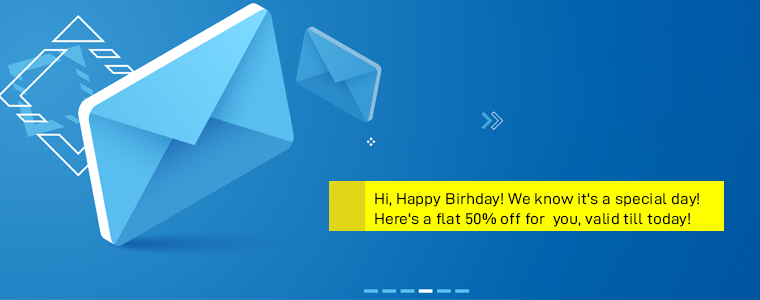
Surprise your existing customers at regular intervals with some amazing deals. Offer them credits or discount code and persuade them to come back to your store. If you have a database of customers’ birthdays, send them exclusive offers. Add happiness to their lives and make their day more memorable.
This is an important part of customer retention management.
There cannot be a better way to improve customer retention than making your customers feel special and treating them well. Customers love it when they are presented with some personalized offers, especially when they expect it least. It leads to a good brand image and leaves a positive remark about your Brand.
This customer retention strategy does more than just improving customer retention. It does free word-of-mouth, builds customer loyalty and trust, and improves brand loyalty.
Loyal customers need to feel that you still care for them and haven’t forgotten their contribution to your business.
4. Find Out Customers Who Haven’t Purchased Since Long
It is always a good idea to find out why your existing customers have not made it again to your store rather than regretting it later when they are all gone.
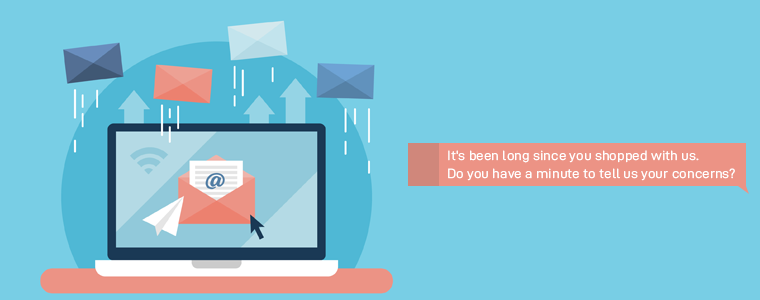
Once you get that data, reach out to them and ask why they haven’t shown up for long, or is there something that is bothering them from making the purchase again?
Make an emotional connection, tell them that you miss them. And if they have decided to part ways, tell them that you would love to see them back. The relationship should end on a high note.
You should also often conduct surveys to know what your customers feel about your brand, products, or services. And this is important to know beforehand so that you can work upon those issues.
This customer retention strategy will definitely help you improve your customer retention rate.
5. Enhance Your Customer Support
One of the most important customer retention strategies is to provide a quality support service to your customers. Quality customer support has a huge role to play in a successful consumer-brand relationship.
You can never grow as a brand if you fail to resolve your customers’ queries. I mean how awful it would be if customers put their trust in your brand but cannot reach out to you for a quick resolution when needed. This way, customers would always remain unsatisfied and will likely stop shopping from your brand.
If you do not want to lose your customers to your competitors, provide them with a quick response, be it via live chat, email, customer support number, or social media. Listen to their queries and sort out their problems as soon as possible.
A high-quality customer support service is the best way to win your customer’s trust and improve customer satisfaction. It is then only a matter of a few minutes to see a frustrated customer turning into a happy and satisfied customer.
6. Connect with customers on Social Media
Social media sites like Facebook, Instagram, Twitter, and LinkedIn are some of the best platforms to connect with your audience and build customer relationships. They give you access to communicate with your followers in a friendly manner unlike emails or chat where you have to be professional all the time.
Perform some activities to engage with your customers. Keep up the excitement about your brand.
7. Collect Customer Feedback
Even if you do everything right, there will be some customers who will leave and would no longer like to be a part of your business. For such customers, it is important that you know what made them leave your brand.
To improve customer retention, you should ask for customer feedback so that if such a problem exists as defined by the customer, you can work on it and avoid losing further customers.
Why is Customer Retention Important?
Customer retention tells you how good you are at retaining existing customers. You might be having a good customer acquisition rate but if there is a major difference between the acquisition and retention rate, it means you are not able to get hold of your customers for a longer period. And this is why customer retention is important so that you get an idea about the areas that you are lacking to retain them.
Final Thoughts
While it is important to acquire new customers, not turning away the interest of the existing customers is essential too. The latter holds more potential for your business.
You might discover some other strategies for customer retention, however, I find these 7 customer retention strategies to be the most helpful and effective to improve customer retention rate. Once you get a clear idea of how to retain customers, you will be able to deal with this issue quite conveniently.
Right customer retention strategies provide a number of benefits to your eCommerce business, including improved Brand Loyalty, Customer Loyalty, Customer Acquisition, Brand Relationship, etc.
Just be honest with your customers and stand by your promises. That’s it for customer retention management.
If you find this information useful, do leave a comment below. What customer retention strategies have you implemented for your business? What has been your success rate?
With an increase in the number of online stores, the availability of choices for online shoppers has increased. The advanced technology and enhanced features have made marketing a strategic approach. There are times when a product that is high in demand, may get out of stock due to more customers’ demand. In the competitive scenario, the non-availability of the product may cost you some potential buyers. Thus, reaching out to the customers once the products are back in stock is important.
The Prestashop Back in Stock notification Addon is one such plugin that allows the Prestashop eCommerce store owners to inform the customers about the re-stocked products. The information can be send across via email or Push notifications. The customers can apply to get notified when the product of their interest comes back in the stock. It is an easy approach as the customers need not to put extra efforts to be updated on the products that they were looking for in the web store. Moreover, the web store makes easy sale by informing the customers and the customers are direct benefitted from this as they don’t have to put extra effort and time to make sure that their product is back online.
The availability of such a feature makes it possible for the web store owners to reach out to the customers easily. It also makes the store owner sure to make a sale on the products which would have otherwise gone unnoticed by the customers without getting proper update on the products. Have you ever lost conversions because of the low inventory? Here are some of the ways in which the back in stock plugin can help you.
Customer and Seller oriented
The module is quite easy to understand and use. It has some added features that are both customer oriented as well as seller oriented. The notification send by the module enables the customer to approach the website for the product as soon the product is re-stocked. It saves customer the time and lengthy process of keeping an eye on their favorite products by deliberately visiting the online store. The major target of the web store owners is to make the product available for the customers, thus the back in stock module is one such good example of providing the products at customers steps. All, that that customer needs to do is visit the store and make purchase.
Effortless customization
The Prestashop back in stock notification module has enabled editing feature. It allows the seller to design the theme layout of their block, making it more engaging for the customers. The module helps in increasing the product’s reach. Now, your prospective customers can get notified about the product re-stock, which in return will enhance your chanced of conversions. The module can be edited as per the owners preferences and the modifications made can be implemented easily.
Increases the Subscriber List
The module supports email listings which helps the user to keep in touch about the products and offers. It helps in maintaining an interactive communication between the seller and customers. The seller can keep customer aware about other offers too via email or push notification. It makes the process of feedback and reviews more transparent. Not just this, the personal details of the subscriber can be further used for remarketing and email marketing. Thus, it is an overall win-win situation for the online sellers.
Compatibility
As most of the customers prefer to make purchase using mobiles, the back in stock module is designed in such a way that it can be run on any mobile devices as well. The module also is also compatible with all browsers which makes it even more convenient for the customers. In addition to this, the multi-store compatibility of the modules enables the seller to use it in a flawless way. Hence, customers can be now be informed about different products with minimum effort.
Multi-lingual Support
Most of the people who make purchases may not be well-versed with English. Therefore, the Prestashop Back in Stock addon supports multiple languages. This feature makes it easy for the people of all ethnicity to use your services and get notified about the restocked products all over the globe. The module makes it easy for the web store owners to inform the customers about the products all across the globe which doesn’t restrict the store owners to a particular location.
Improved Marketing
The attracting of the customers by using back in stock module enables the web store to market the products in a better way. Earlier the products were less discoverable and the web store had to provide efforts to make a sale. By the notification option using the back in stock, all that the web store owners need to do is send an Email, then the customers are auto informed about the product. Now the customers need to visit the web store and make a purchase on the products. It is an easy approach to make a sale on the products.
Conclusion
The Prestashop back in stock notification module provides the customers an option to get notified about the products that they find interesting. The notification is send in the demand of the customers. Thus, it is an effortless way to bring the customer back to your store. This feature helps them to be notified about product’s stock arrival without having to browse the website. It save customers both time and effort. The Back in stock alert is one of the best idea to generate a good web traffic and possibly make immediate conversions.
The SSL compatibility feature of the module, ensures the customers that their online transaction data is safe. The seller can also track records of the subscribed customers and can view their purchase history. Hence, it enables the seller to improve services based upon the trending products in the market. Ultimately, ensuring that the customers receive the products they want.
For More Information About Prestashop Back In Stock Addon Visit Here:-
The increase in the number of eCommerce stores have opened a gateway for the customers to buy their favorite products with best deals. Most of the time customers browse through the website, select the best-suited products and make a purchase. While there are times when the customers may like the product, add it to their wish list and want to purchase it. However, due to they may not purchase the product because it’s out of stock. It leads to sales loss to the seller and an unsatisfied customer. In order to deal with such scenario, the seller must come up with better ideas to inform their customers about their favorite products. Knowband offers Prestashop Back in Stock module. The module enables the seller to inform the customers about the updated information on their selected products.
It has made easy for Prestashop site owners to keep their customers informed about the Products back in stock through notification. The plugin enables the seller to reach out most of the potential buyers of the products and lead on to effective conversions.
Here are 5 W’s discussing the utility of Back in Stock notification.
1. WHY should the customer be notified?
Online marketing is growing at a drastic rate. Therefore, it becomes important for the sellers to keep a track of their customer’s preferences. Hence, it is one of the easy approach to drag the customers back to your store, in order to boost the sales. The approach gives an exposure to other products provided by the sellers which helps in increasing the product visibility. It will eventually results in better and immediate conversions.
2. WHAT encourages you to notify the customers
The seller may prefer to inform a customer on the basis of his previous engagement. This factor plays an important role. The seller doesn’t want to lose a regular customer. Therefore, adopting this approach helps him in binding the customers who are a frequent buyer of your products. It enables the customer to have a smooth and pleasant experience with your store. The trust and reliability of the customer is kept intact by following this approach.
3. WHO must be notified
According to a survey, “If a regular customer is notified about the services from a store owner than they are much likely to check in make a purchase”. Thus, targeting the regular customers through this approach serves the purpose. It helps the sellers to retain their regular customers and keep their sales high in the meantime. The method can be used to attain higher traffic as well as boost the sales drastically.
4. WHEN is the right time to notify the customers?
As the customers don’t want to keep checking about the re-stock of the product. Hence, it becomes the sellers concern to keep the customers updated about the products availability. The customers may find it more convenient and can check on the web store back to purchase the products. It saves the customers efforts and time and a useful approach to achieve better conversions.
5. WHERE can the customers be notified?
The eCommerce store owners can notify the customers about the products either through an email or via notifications. It helps the customers to get updated about the products as they check their emails. The push notification helps the customers to be informed about the product as soon as they log on to the site with their accounts. The customers doesn’t have to put extra efforts in order to purchase the products, they were looking for.
Over to You
It is an important aspect for the eCommerce store owners to keep track of their customers. It can help them to retain a better relationship with the customers and at the same time will help you cut down your exit rate.
For More Information About Prestashop Back In Stock Plugin Visit Here:-
Getting customer engagement on the social media platform is the biggest need of the hour for the eCommerce business. However, this is at the same time a tricky affair and get a bit frustrating. With so many distractions, keeping the prospective leads engaged on your Facebook store or Twitter profile can be a tough task if the strategy is not planned appropriately.
The blog has listed some of the key aspects that can help improve your social media engagement, regardless your company’s industry or size. Check them out.
Provide social media login option
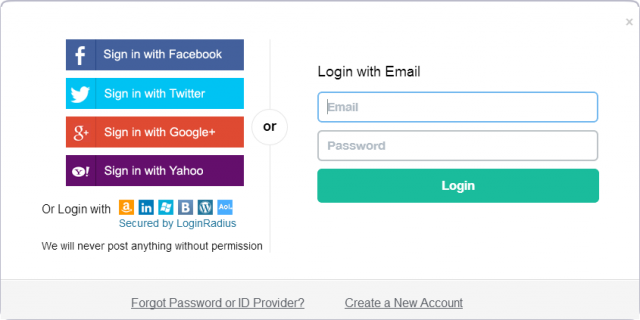
When it comes to building a reputation in the eCommerce ecosystem, making the shopping experience of the customers is the key. The social login option is one of the ways to reduce the complexity involved in registration and checkout of the customers. The importance of social login is not just restricted to easing out the work of the visitors, it even helps in customer engagement on the social media platform. Unlike the conventional login process, the quick login option makes it easier to get the information of the customers. As a result of which, this information can be further used for remarketing your products. You can include the PrestaShop social login addon on your Prestashop website. The same type of plugins are available for Magento and OpenCart eCommerce sites. You may now upgrade your site for grabbing required conversions and sales in a few easy steps.
Have a Facebook store
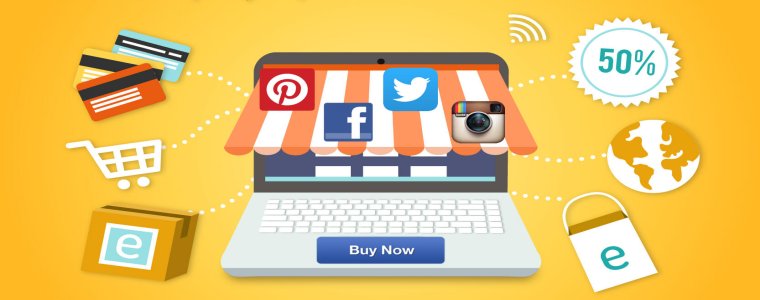
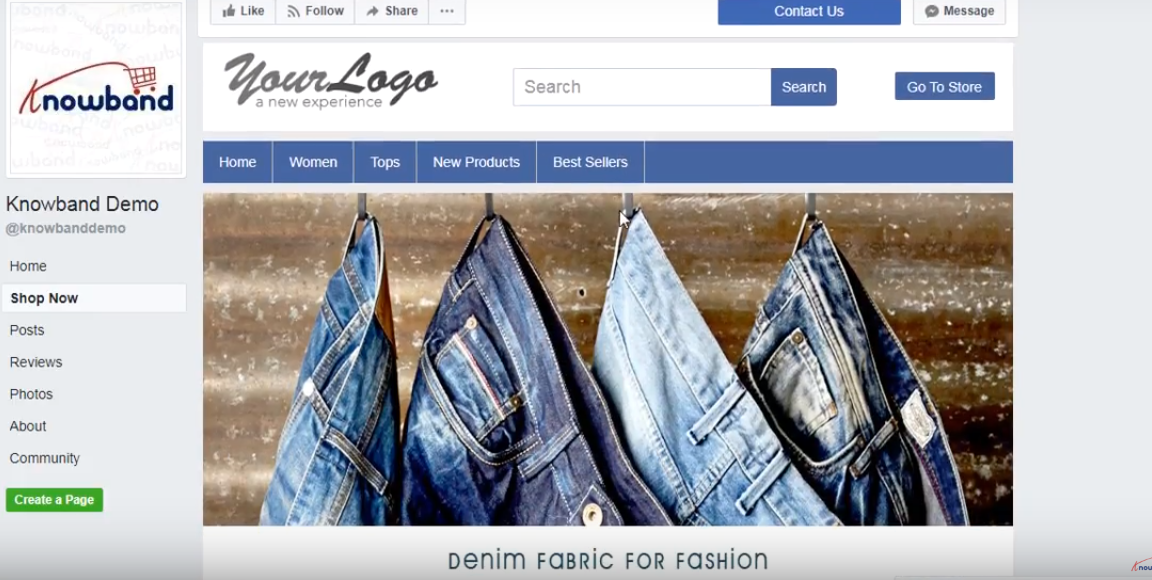
Moving your online business to the social media domain is a good idea. Having a Facebook shop is one of the ways to build a strong presence on the social media platform. The face of online trading is changing from eCommerce to m-commerce and from m-commerce to F-commerce now. F-commerce is surely the future of online selling. Trading your products on Facebook is one of the ways to enhance the visibility of your site on this platform. While it is a bit difficult to compel the visitors to ‘Like’ and ‘Share’ the contents, grabbing their attention with product images and deals are easier. Prestashop FB store module is one such module that can help you sync your Prestashop store on your Facebook store. Thus, your target audience can place their order directly from your Facebook page without browsing your site to search for the same product there.
Facilitate social sharing
Another way to create buzz on the social media platform is by providing the customers the option to share the product images on the various social media platform. The urge of getting everything at a click of a button is on a rise for the online buyers. There has been a shift in the consumer behavior. They prefer coming to an instant purchase decision, unlike earlier when there was a lot of hesitance in shopping online. Despite this fact, taking a second opinion before placing the order is a usual practice. This option of social sharing facilitates the much-needed word-of-mouth. Moreover, this is a better ways to build engagement because they stand out better compared to status updates or posted links.
Build up engaging contents
Once you have set the Facebook shop and the Twitter store, the next step is to drive the quality traffic to your store. This is when the content posted on these platforms comes into play. Listed below are some of the things that you can do in this regard.
Understanding your target audience is extremely important. Try to analyze the online behavior of your prospective customers. Figure out the kind of posts that they find interesting. Build up your post accordingly.
Along with quality, timing is everything when it comes to enhancing your online presence. Google Analytics can give you an insight of the time when your target audience is most active on their social media profiles. Post your contents accordingly.
Indulging your customers in contests are another great way to increase engagement. Reward your loyal customers and raise the bar of excitement, instead of making the shopping a tedious job for them.
Regulate the frequency of the online posting. Hit the right note between being annoying and engaging. As per Kissmetrics, posting 1-2 contents on Facebook a day can increase the engagement by 40%.
Create hashtag contents
Even though hashtags started on Twitter, they are now and inevitable part of Facebook, Pinterest, Instagram and even Google+. It is not just an easier way to make the photo posted self-explanatory. It is in fact, one of the ways to make your content easy to search and find. As per a research, tweets with hashtags get 50% more engagement. However, using too many hashtags can even drop the engagement. Hence, the using them wisely and in moderation is recommended. Everyone likes free stuff and offers. All you need to is to make it visible to the target audience. The hashtags are one of the ways of increasing the visibility of the stuff that you are posting on your social media account.
Solve the queries of the customers
While it one of the most effective marketing tool, social media is a platform for the customers to post their feedbacks and queries. A number of positive feedbacks may fail to produce the desired result, but a single negative review can kill your business. Hence, whether you are running any contest or not, you need to stay on your toes to handle the queries and problems of your target audience. No question of the visitors should go unanswered. This is one way to strengthen the customer relationship and enhance user experience.
Conclusion
Social media marketing is ineffective without customer engagement. In order to get comments, likes, and shares you need to lure your visitors with attractive contents and images. The better you plan your strategy, the better engagement you’ll get.
The popularity of social media is increasing every day. With the tremendous increase in the number of users approaching Facebook, Twitter and Instagram, it has opened new doors of marketing for eCommerce sellers. According to a study conducted by Zephoria, there are around 1.5 billion active accounts on Facebook and they are likely to be doubled within next couple of years. So, if we take a look at these stats, we can easily realize that Facebook is one of the best-suited platforms for promoting your online store.
Most of the online sellers are already adapting to the concept of Facebook marketing. Facebook marketing is one of the easiest ways to reach the customers, boost your sales and make effective conversions. In order to make Facebook marketing feasible for Prestashop owners, Knowband has come up with Prestashop Facebook Store Module. The Facebook shop module is used to create an online store on Facebook and start making sales.
So, what are you waiting for? If you are a Prestashop eCommerce store owner then Facebook Store plugin might be the thing, you are missing on your store. Just use the Facebook store module and see the boost in your sales. Here are some of the ways by which this Facebook store module helps you tap your target audience on Facebook.
Product Visibility
The internet is a huge space with unlimited product choices. Customers who wish to make an online purchase has plenty of options. If you want them to purchase your products then you need to ensure that the products can be fetched with required information easily. With a very high number of active users on Facebook, it serves as the best platform to showcase your products. The rate of conversions highly depends upon the product and store visibility. Having a Facebook store is definitely one of the ways that can enable you to reach out to more customers and make higher sales.
Marketplace Insight
The Facebook Store module helps you to provide your customers a glimpse of your actual web store. The Prestashop owner has the option to showcase any product they want on the Facebook shop. The Facebook store helps the visitors to view the products and services provided by the store without actually visiting it. The visitors also have an option of making purchase from the Facebook shop itself, making effective conversions.
Customizable Facebook Store
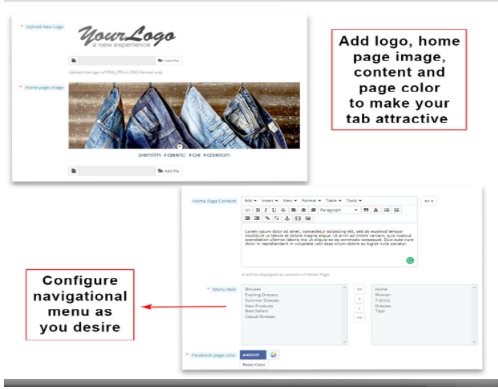
One of the immediate advantage of this Facebook store module is easy customization option. Most of the sellers want the theme layout of their store such that it is more engaging for the customers to relate. Sellers can select from a large number of fonts, color composition and product categorization. The Facebook shop module helps in making the store more engaging and customers can relate themselves to the products quite easily.
Improved sales
The presence of a Facebook Store enables the web store owners with another platform to make sales. As, there is huge customer base for online store in Facebook, hence, there is always a chance that visitors might take a look at your products. The Facebook Shop allows the visitors with the product display from the actual web store. At the same time, if customers want to make purchase they can click on the Buy button and they will be redirected to the webs store. It helps in increasing the traffic of your web store and enhance the sales ultimately.
Reduced Marketing expenses
The presence of a Facebook Shop helps you in promoting your eCommerce store without actually promoting it. The marketing expenses that the store owners would have to pay, in order to promote their web store is considerably reduced. The Facebook Store allows the store owner to publicize the web store on the biggest social media platform, which helps in reducing the expenses store owner has to bear on marketing of the web store.
Conclusion
Facebook is one of the best place to grow your business. It helps you to interact with your customers on a personal basis too. The social media trend can boost your eCommerce, all you need is to keep yourself up with it.