PrestaShop Booking and Rental System Addon

The online booking system has made life much easier than before. Today, if I need to go somewhere, I can book a cab. If I need to consult a doctor, I can create an appointment in a few taps. If I am heading out of the station and need a place to stay, I can reserve a room without any hassle.

The online reservation system has added convenience to the daily lifestyle of the people. People, now, do not worry about getting a booking as they know they have the option to book a facility anytime. And it can be done within a few steps.

Witnessing various benefits of an online booking system, many online businesses have now started offering booking facilities to their customers. If you are also looking to add a reservation system to your online business, PrestaShop Booking and Rental System will help you do so.

PrestaShop Booking and Rental system allows you to create and manage multiple booking services, be it an Appointment, Car/Bike Rental or a Hotel Booking. It lets your customers book an online service anytime from anywhere.

If you own a store on the PrestaShop platform where you want to make people book a service without facing any trouble, PrestaShop Booking and Rental system is the one-stop solution.

PrestaShop Booking System

PrestaShop Booking System is basically classified into three types:

1. Appointment Bookings

2. Hotel Bookings

3. Rental Bookings

1. PrestaShop Appointment Booking system

Appointment booking tools are mostly used for a doctor visit, home checkup, and other professional services.

With the help of PrestaShop Appointment Booking system, you can

– Allow your customers to book an appointment effortlessly.

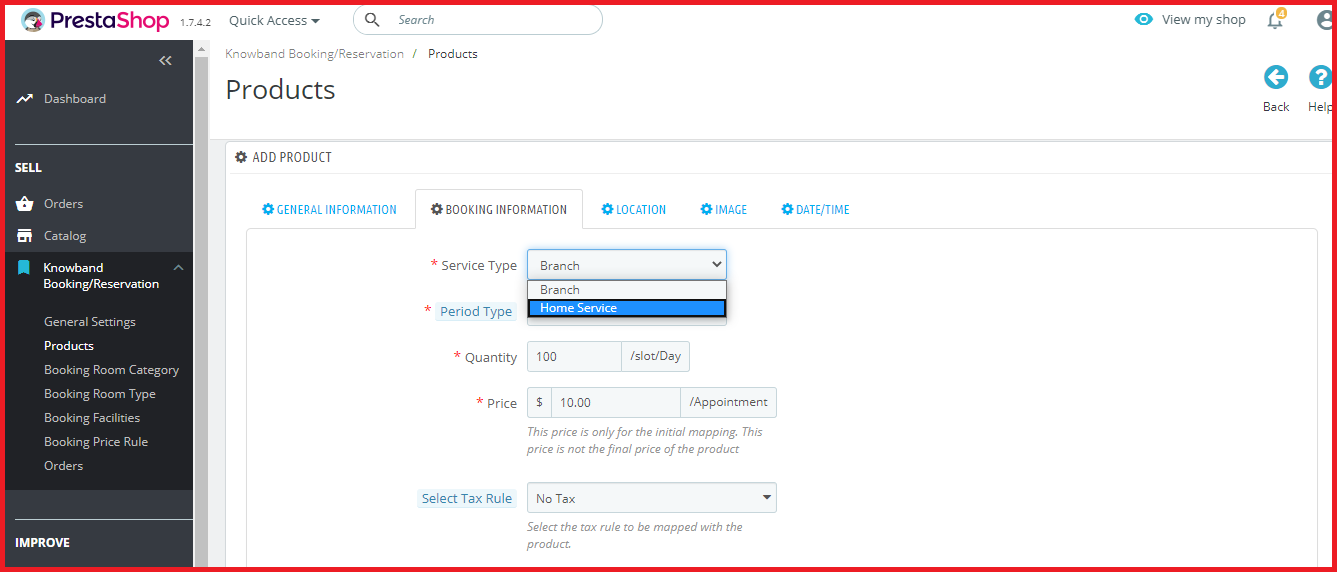
– Provide two types of appointment services: Branch visit or Home service.

– Set the number of bookings that you wish to take per slot per day.

– Set an upfront booking price.

– Specify the days and time slots for which the appointments can be generated.

– Adjust the booking price for different timings.

2. PrestaShop Hotel Booking System

Online hotel bookings take place in huge number nowadays. Customers can check multiple hotels online, check the price, room condition, hotel facilities and much more.

With the help of PrestaShop Hotel Booking system, you can

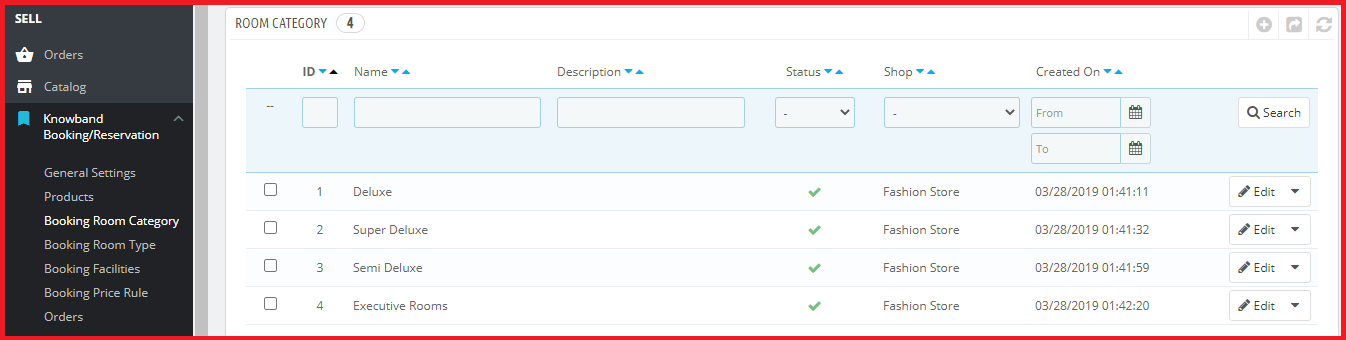
– Assign categories to your hotel rooms, for example, Deluxe, Premium, Flagship, etc.

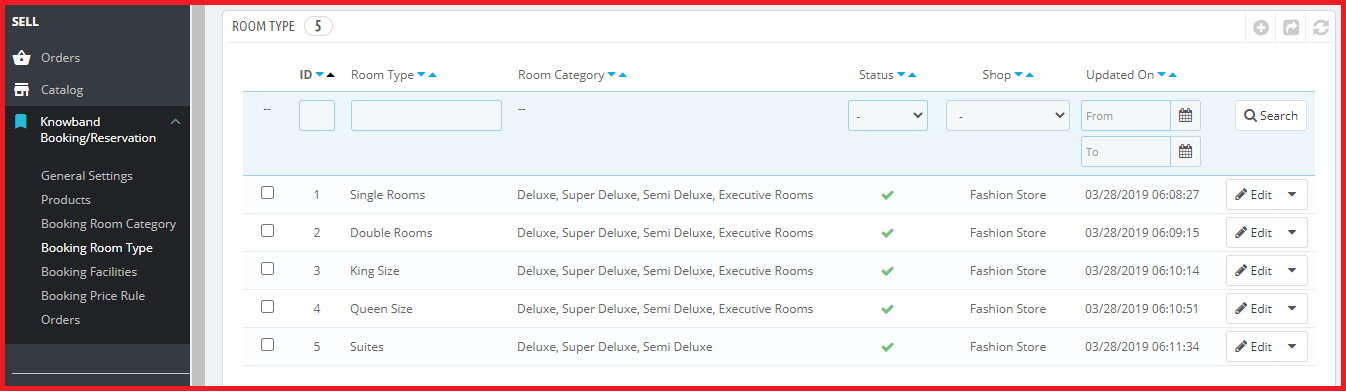
– Specify the hotel room type, for example, Single Bedroom, Double Bedroom, etc.

While adding a room type, you can also specify the maximum children and adult allowed for that particular room.

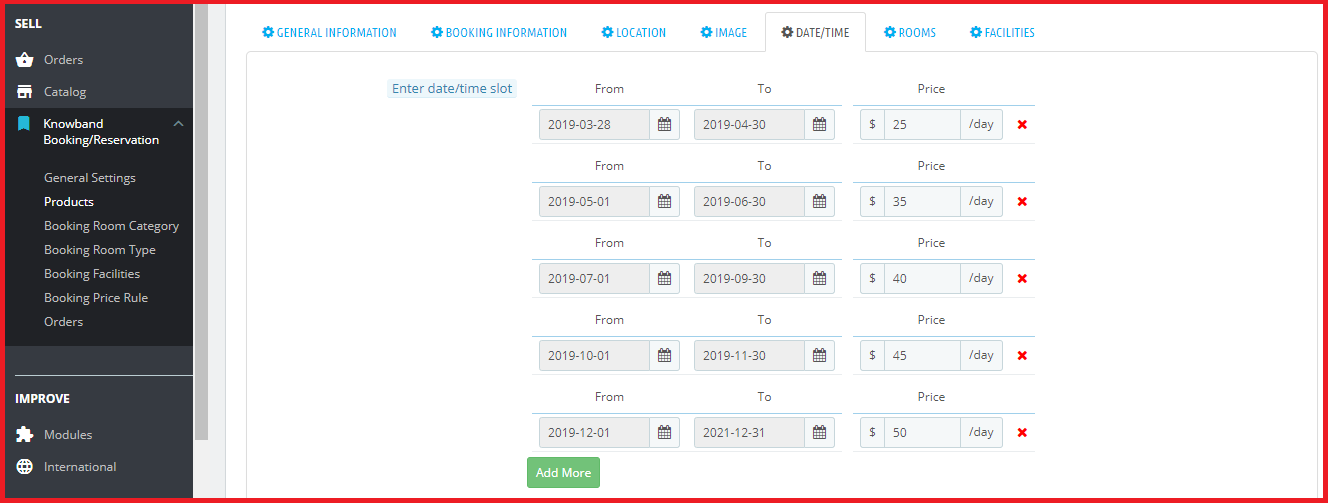
– Specify the period within which the hotel bookings can be made.

– Display an upfront booking price.

– Adjust the booking price for different time periods.

– Set an additional price for different categories and room type.

– Specify the minimum and the maximum number of days for which a booking can be made.

– Specify the booking quantity per day for different room type and category.

– Define the hotel rating and display it on the front-end.

– Set a check-in and check-out time.

– Add hotel and room amenities like AC, WiFi, TV, Parking facility, Elevator, etc.

3. PrestaShop Rental Booking System

People usually prefer to book a car or a cycle/bike, depending on the travelling distance they want to cover. Many online businesses have been set up from where users can rent a vehicle.

The PrestaShop Rental module is further classified into

Daily Rentals

Hourly Rentals

With the help of PrestaShop Rental system, you can

– Specify the number of bookings that can be made per slot per day

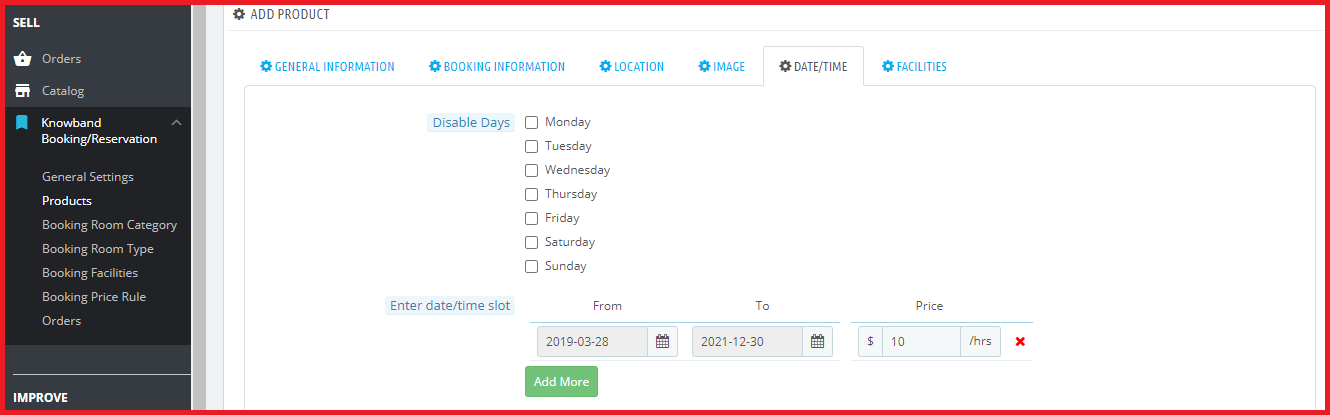
– Define the days for which the rental bookings can be made.

– Specify the minimum and the maximum number of hours for which a booking can be made. (This is particularly for hourly rentals)

– Display an upfront booking price

– Specify the minimum and the maximum number of days for which a user can obtain the rental booking facility.

– Adjust the booking price for different slots.

– Add facilities that the customer would receive, for example, an AC bus or a Non-AC bus.

PrestaShop Booking System also allows you to offer a discount to your customers on a particular date or for a particular period. Apart from this, it lets you check your booking orders which can be viewed under the “Orders” tab.

Final Word

PrestaShop Booking and Rental system can facilitate online booking system of your PrestaShop website. It enhances the online booking experience of your customers and lets you manage your bookings comfortably. With PrestaShop Booking system, you can provide a 24×7 booking facility to your users.

Try out the PrestaShop Reservation and Booking system today and enjoy the ample features and benefits that it offers!

To have your online booking app, you can check the PrestaShop Booking and Rental Mobile App.


OpenCart One Page Checkout Pro

It often happens that customers get stuck on the checkout page and do not proceed further. Do you know why that happens? Once customers have decided what they want to purchase, they prefer to check out as quickly as they can, yet many e-commerce stores have put up some barriers on the checkout page that breaks the flow of a customer’s purchase.

If you are an OpenCart store owner, we have a solution for this, OpenCart One Page Checkout Pro by Knowband eliminates multiple steps of checkout and gives pleasing UX to your customers.

Update Alert(January 8, 2026): The Knowband Opencart Page Checkout Extension now supports OpenCart 4.x.x, offering a faster and smoother checkout experience for your customers

The Knowband Opencart One Page Checkout Extension now allows the stores to effortlessly integrate all major payment gateways. From PayPal, PayU, Stripe, Authorize.Net, Square, and Razorpay to Buy Now, Pay Later (BNPL) options, your customers can select the payment method that suits them best, making checkout faster and more convenient.

For more information visit: https://www.opencartmarketplaceapp.com/

OpenCart One Page Checkout Pro

OpenCart One Page Checkout Pro extension is one of the best OpenCart extensions that focus on making the customer purchase quick and easy. It is a dynamic multi-lingual extension with multi-store compatibility, compatible with all themes, and is fully mobile responsive. Opencart One Page Checkout Plugin Pro is easy to install and set up.

What’s new in OpenCart One Page checkout?

OpenCart One page checkout comes with some striking most demanded features and this is a must buy plugin if you are an OpencCart eCommerce store owner. Let’s sneak into it.

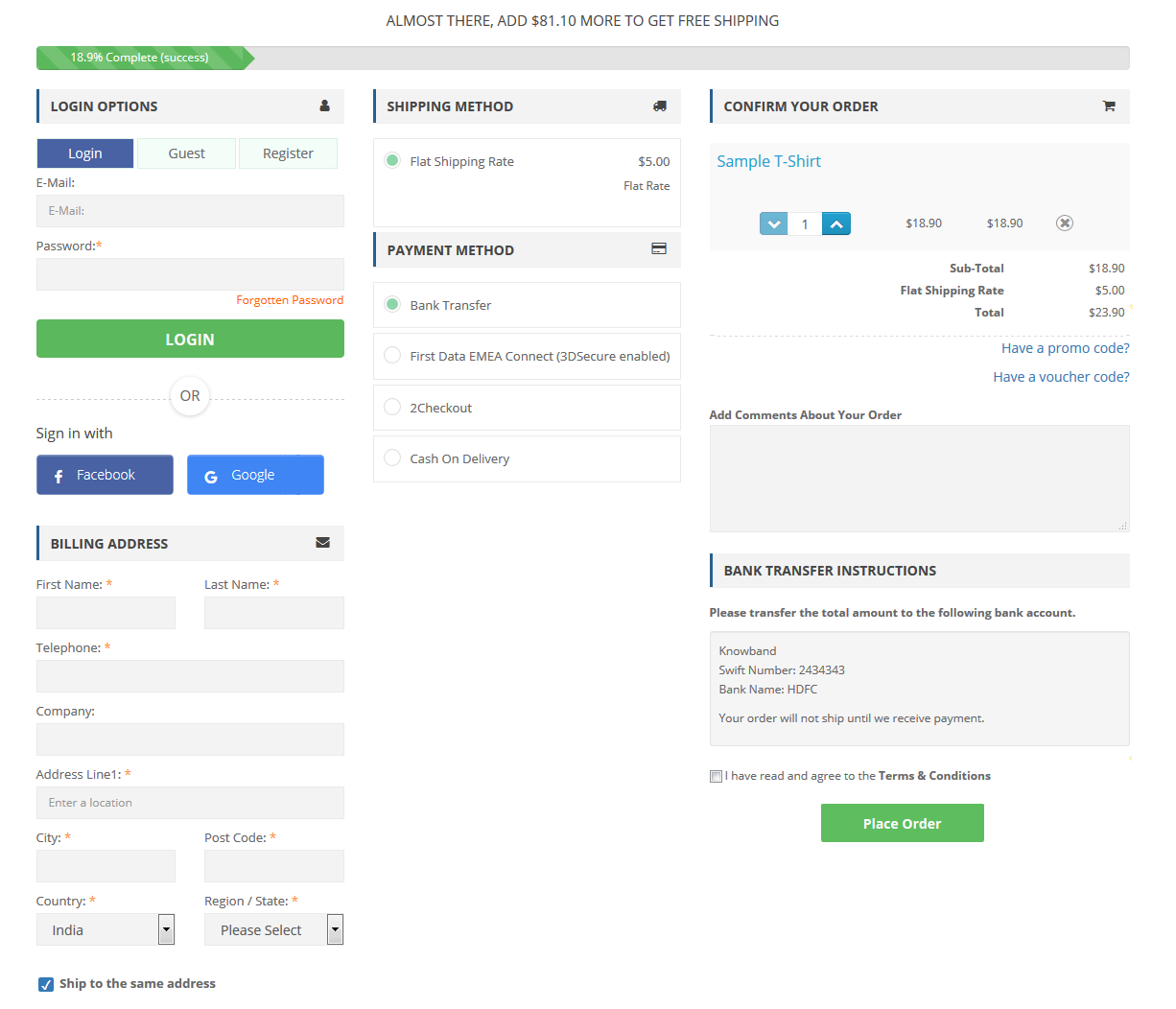
Google Auto Address Fill option

The updated version of Opencart One Page Checkout has the functionality of the address auto-fill by Google. By reducing customer’s check-out time it encourages customer conversion. Google Auto-Address Fill displays the address suggestions when a customer enters the address information. It collects the typed characters and displays related data. The Zip Code and the City Column will be extracted automatically when the proposed address is selected.

Dynamic layout with new customizer settings

No theme is similar and as a store owner, an attractive look for the website is what we desire for. You don’t need to be a coder for this. Now an OpenCartStore owner can customize the checkout page buttons by changing background and text color according to the theme. All can be accomplished from the OpenCart single page checkout Plugin without changing the base code.

Social login with Google+, Facebook, and PayPal

Let your customers sign up or sign in to your store directly with their social media accounts. OpenCart One Page Checkout offers Facebook and Google+ login for quick registration. PayPal login is one of the most demanding features for OpenCart Checkout. This updated version of the OpenCart One Page checkout plugin allows the customer to login by their PayPal account.

Add Subscribers to your Newsletter

In this One Step Checkout OpenCart Extension, a built-in MailChimp, Klaviyo, and SendinBlue integrator is included so you can save time and money. It sends customer email IDs directly to your account either when the customer comes out of the email field or when they place an order after choosing a newsletter subscription checkbox. If you log in via Google or Facebook, your email will also be sent to your email marketing tool which helps you grow your subscribers.

Key features of OpenCart One Page Checkout Pro

Guest Checkout

OpenCart One Page Checkout Pro extension provides a Guest checkout option to customers who do not want to create an account on your e-commerce store. In fact, they do not even need to set a password. A customer just needs to provide his/her email address and a password will be automatically sent over their email.

Multiple payment modes

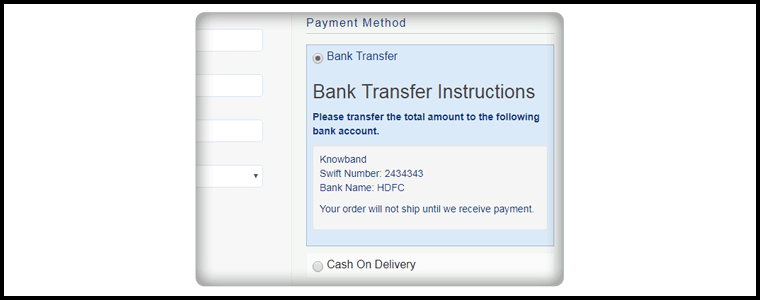
OpenCart single page checkout extension supports multiple payment modes like Credit Card, Debit Card, PayPal, PayU, PayZippy, Boleto, etc. You can set a default payment method.

Multiple shipping services

OpenCart quick checkout extension supports all the major shipping services that include USPS, UPS, FedEx, RoyalMail, Citilink, etc. You can set a default shipping service.

Set the payment modes for a particular shipping service

OpenCart one step checkout extension comes with a Ship2Pay feature, under which you can mention which payment modes do you support for a particular shipping method.

Drag and Drop fields

OpenCart fast checkout extension provides the drag and drop functionality, with the help of which, the store admin can prioritize the checkout fields. Just pick a field and place it where you want to get it displayed.

Decide which field you want to keep mandatory and which as optional

OpenCart simplified checkout extension provides you the option to keep a field mandatory or optional. For example, on the checkout page, you can keep “First name” as mandatory and the “Last name” is optional. Try to keep only important fields as mandatory.

Multiple layouts

The design of your checkout page matters a lot for an amazing user experience. OpenCart One Page Checkout Pro offers 3 layout designs; 1-column, 2-columns, 3-columns. With this option, you can choose to display all the checkout information in a single column or segment it into two or three columns.

Customize cart fields

It is up to you to decide which cart details do you want to display on the checkout page. You can choose to show or hide the product image, product name, product description, model, quantity, product price, etc.

Benefits of OpenCart one page checkout extension

1. Fast and quick checkout:

OpenCart Single Page Checkout has the new user interface, Autofill address functionality, and social login options which allow the guest or logged in customers to make quick checkout.

2. Reduce abandoned cart:

The simple and fast checkout process encourages the customer to make the checkout process quickly without turning back. Study shows that more than 60% of abandoned carts are due to a complex or slow checkout page. One page Checkout helps in reducing abandoned cart rates.

3. Increase Sales and Conversion rate:

Our OpenCart Single Page checkout extension makes the checkout process effortless which increases the conversion rate of their eCommerce store.

4. Newsletter and Voucher Field:

One Page Checkout plugin of OpenCart by Knowband has the option to provide a newsletter subscription tab and voucher field on the checkout page. Now your customer can put the voucher code during the checkout process.

5. Complete Cart Summary

OpenCart One Step Checkout extension displays full Cart Summary, displays the product image directly, or when the customer moves the cursor over the product name. Customers can change the quantity directly on the checkout page.

6. Mobile Responsive

With more than half of the shopping done through mobile, it is extremely important to have a mobile responsive website. The OpenCart One Page Plugin is fully mobile responsive and compatible with all browsers and devices.

Final word

No matter how appealing you have made your e-commerce website, if you cannot deliver a great checkout experience to your users, you may lose out on conversions. Try out the OpenCart One Page Checkout Pro today that includes all the above-mentioned features and much more!

OpenCart One Page Advanced Checkout

The checkout page is the most crucial part of a customer’s journey on your eCommerce store. A lengthy and complicated checkout process takes no time in turning away the focus of the customer from your store. To be very honest, customers do not like to go through a number of steps before they could make their purchase. What if all the checkout steps could be put together on a single checkout page? This is exactly what One Page Checkout does. It makes the checkout process easy for the customers and persuades them to complete their purchase, hence reducing the abandoned cart possibility. Considering the importance of a single page checkout, Knowband comes up with the OpenCart One Page Advanced Checkout extension for OpenCart store owners to make their checkout process convenient for their users.

OpenCart One Page Advanced Checkout

In the list of the OpenCart extensions, OpenCart One Page Advanced Checkout extension is considered to be the finest. OpenCart One Page Advanced Checkout adds a responsive checkout popup to your OpenCart store and makes the checkout process hassle-free for the customers. Customers can make changes to their checkout page without getting redirected to a different URL.

This checkout extension has multi-lingual support and is multi-store compatible. It is a fully mobile responsive extension, that is compatible with all OpenCart themes. Also, the OpenCart One Page Advanced Checkout module is easy to install and configure.

Features of OpenCart One Page Advanced Checkout-

Guest Checkout

OpenCart One Page Advanced Checkout extension provides a Guest checkout option that avoids the mandatory sign-up process on your store. Users can check out as a guest if they do not wish to create an account. Moreover, they are not even required to set a password. Once a customer provides his or her email address, a password is generated and automatically sent over their email.

Social login facility

OpenCart One Page Advanced Checkout extension allows customers to register on your store directly with their Facebook or Google+ account for quick and easy registration.

Multiple payment modes

OpenCart One Page Advanced Checkout module supports multiple payment options like Debit Card, Credit Card, Sage Pay, PayPal, Mollie, etc. You can set any of the payment modes as the default payment method.

Multiple shipping services

OpenCart Advanced quick checkout extension supports various shipping services like FedEx, Smart Send, USPS, RoyalMail, Collisimo, etc. You can set any of the shipping services as the default shipping method.

Define the payment modes for the shipping services

OpenCart One Step advanced checkout extension has a Ship2Pay option, under which you can mention which payment modes do you want to provide for a particular shipping service.

Rearrange fields with Drag and Drop

Opencart simplified checkout extension offers the drag and drop functionality, through which, the admin can prioritize the checkout fields. Just pick a field, drag and drop it to the place where you want to display it.

Make a field mandatory or optional

OpenCart fast checkout extension provides you the option to make a field mandatory or optional. For example, you can keep fields like First name or Address as mandatory and Company name or postcode as optional.

Newsletter subscription and MailChimp Integrator

You can display the newsletter subscription option to the customers and ask them to subscribe to your future updates or marketing campaigns. Following this, when a user provides the email address and subscribes to your newsletters, the information is instantly transferred to your MailChimp account.

Remove unwanted cart fields

OpenCart One Page Advanced checkout contains a “Cart” tab under which you get options like Display product image, Display Product quantity, Display price, etc. You have the option to choose which cart field do you want to display and which cart field do you want to avoid on the checkout page.

Benefits of OpenCart One Page Advanced Checkout-

1. Easy and fast checkout

2. Quick user registration

3. Reduces the cart abandonment rate

4. Increases conversions

5. Enhances the user experience by simplifying the checkout process

Final Word

Let your users enjoy a seamless checkout experience. Optimize your checkout process by implementing OpenCart One Page Advanced Checkout. This OpenCart extension can make a significant impact on your conversion rate.

Social Media Marketing for eCommerce: Strategies and Best Practices

If you run an eCommerce business, you would probably know how much importance social media holds these days for brand promotion. From boosting brand awareness to grabbing more conversions, social media has shown huge potential and played a crucial part in the eCommerce growth in recent years.

The reality is, businesses do understand its value but not everyone is able to capitalize on social media platforms. Social media is not just about random posting and advertising on Ad-hoc basis.

Some brands mark their presence on social media just because they feel it is a necessity or a trend that should be followed. Or maybe because their competitors have also set foot on some platforms.

Let me be very clear. If you are following the same approach, you are not going to get any benefit through it. Moreover, there is no point continuing with your social media pages if you do not have a plan and time to implement your social media marketing strategies.

Except that you use social media just to post random stuff about your brand or company’s inside stories, it would be better if you utilize that time at somewhere important. Do not start just for the sake of your brand presence.

In this article, I will be discussing some social media marketing strategies along with some useful social media practices to enhance your eCommerce business and take it to the next level.

Social Media Marketing Strategies

1. Set Your Goals

The primary social media marketing strategy would be deciding beforehand what you would like to achieve through social media. Whether your motive is to drive more inbound traffic to your website, increase followers count, generate leads or get sales, the plan to achieve the ultimate result should be clear from the very beginning.

Prepare a roadmap. Get a blueprint and start working accordingly. Moreover, focus only on those platforms which you feel are relevant to your business. There is no point in wasting time on Twitter if your target audience is on Facebook.

So put your time and effort on channels from where you can get desirable results. Do not focus on succeeding on every social platform.

2. Analyze Your Audience

Adding to the social media marketing strategies is analyzing your audience. Social media is spread across countries, and people of every age group spend time on social media. But is every age group relevant to your business?

As of now, Facebook has nearly 2.4 billion monthly users followed by Instagram with more than 1 billion monthly users. With such a vast user base, it becomes important to narrow down the demographics to reach the relevant target audience. If the majority of your business comes from people aged 20-35, targeting people over 50 would not make any sense.

For the informative purpose, Linkedin and Twitter can be beneficial, and if you are expecting higher engagement from the young community, there is no better option than Facebook and Instagram. It all depends on your niche and your audience base.

3. Create Quality Content

One of the common mistakes that businesses generally make is they focus only on promotion. Excessive promotion is a downside. It may take away the interest of your followers and you may lose out on potential customers.

Remember, social networks were not meant for selling but to connect with people. So, ensure you are providing quality content with a mixture of information and entertainment. Yes, promotion is necessary but do not sound like a salesman every time.

Brands who know how to keep the interest of their followers succeed in the social media platforms. Be witty, make attractive but useful posts, post videos. People react to what they like and what they find attractive which tends to bring more user engagement.

4. Have a Facebook Store and Instagram Shop

The Facebook business page consists of a “Shop Now” tab where brands can add their store products and promote them. Users can check out the products right from your brand page and are redirected to the website for buying purpose. The Facebook shop helps you drive more traffic to your website and generate more sales.

Similarly, you can consider the idea of Instagram shoppable posts that allow you to tag your products on the images, boosting product visibility. Consumers can now checkout directly from Instagram without getting redirected to the original website. But to have an Instagram Shop, you need to match the eligibility criteria defined by the Instagram community.

Facebook and Instagram Shop play crucial roles in your social media marketing strategy.

Read: The Pros and Cons of a Facebook store

Having a website on the PrestaShop or Magento platform and want to open a Facebook shop for your business, try out our PrestaShop Facebook store addon and Magento Facebook store extension.

Social Media Best Practices

1. Post at Regular Intervals

One of the basic social media best practices is to remain active. Post content at regular intervals, at least 1 piece of content daily or on alternate days.

Do not keep too much gap between your posts. It results in losing out followers and affects your brand image. When there is a long gap between posts, followers feel that you are not active and that there’s no point following you.

And it can cost you new followers too. If someone visits your brand page and finds out that you have been highly inactive, they would hardly be interested in following you.

You may or may not find it true but people stop engaging in posts when the posting frequency is too less.

 2. Use Appealing Visuals for your Posts

I would not even bother to pay a look at a post that contains untidy visuals, let alone engaging with it. But if I find a post having great visuals, I would surely stop for a moment while scrolling through my feed. This is why visuals make one of the most important social media best practices. They tend to grab user attention.

Use high-quality pictures and colours that are pleasing to the eyes. Avoid writing too much text on pictures and make sure you are using the appropriate image size. Different social media platforms have different image sizes set for proper display.

3. Use Hashtags

The game of hashtags is very interesting and popular on social media. Hashtags are generally user-generated tagging which makes it possible for users to find posts or messages regarding a specific theme, content or news. It gives you a wide organic reach and increases viewership.

Hashtags play a crucial role in social media sites like Twitter and Instagram. When people use a particular hashtag for search, all the relevant content associated with that hashtag appears in front of the user. This makes it easy for people to filter out what exactly they want to look for.

Hashtags are an ACE for user-generated content campaigns.

4. Engage with your Audience

Social media is all about interacting with each other. People don’t use social media to just read or watch. Interaction is important. Successful businesses care a lot about their audience and they like interacting with their followers.

Ask questions, organize quizzes, participate in discussions, reply to users’ queries in comments. Join people in their conversations and show them your human side instead of sending automated answers.

Try to come up live on Facebook and Instagram, look for their questions and answer them at that very moment.

5. Find the Right Time to Post

Post at the right time is crucial to get a higher reach. The right time, here, means the time when a majority of your followers are active on social media. The reach of your posts would be very less if they aren’t posted at an appropriate time.

So, what’s the ideal time to post? You can find the best time to post on different social media platforms on CoSchedule Blog. You should also use social media tools like Buffer and Hootsuite for post scheduling.

6. Boost Posts That Are Performing Well

You want more and more people to see your content, right? Social media ads would help you do so. You may argue that spending money on boosting posts would be a waste of money until you are expecting an ROI from it but sometimes, reach is more important than the results.

I am not suggesting spending huge bucks, a little amount that too on well-performing posts would do great.

Final word

Utilizing social media platforms can be a big boost for your online business. All you need to do is follow the right approach and implement the right tactics. This will help you drive more traffic and conversions and increased brand awareness.
Hope you enjoyed reading the social media marketing strategies and best practices. If you found this information useful and have any point to add, let me know in the comments below.

Also Read:

6 Must-Have Social Media Addons for your PrestaShop store

7 ways to boost up your Sales using Social Media

How to Simplify the Online Shopping Experience of Customers?

The success of an eCommerce store majorly depends on the kind of experience that it provides to its users. User experience is of vital importance for customer acquisition as well as customer retention. With fierce competition among brands in the e-commerce market, the one which provides a simplified shopping experience to its users wins the race.

Why is UX so important?

Consumers do not easily forget a brand that offers a great user experience. UX is important for your online business to provide comfort to your visitors and make them loyal to your brand. It is the user experience that will keep your customers stick to your store in the long run.

Now, the important part, how to simplify the online shopping experience for customers? Think from a customer’s point of view. Treat yourself as your own store visitor, browse your website and ask yourself whether you are finding a comfortable experience or not.

There are always areas for improvement. In this article, I will provide you with 7 useful tips to simplify the online shopping experience and enhance the customer experience. Check them out.

1. Design your Home Page well

Your home page is the interaction point for your visitors. It decides whether the user is going to spend some time on your store or take an early exit. No matter how amazing your offerings are, if the home page of your eCommerce store doesn’t please the visitors, you are going to see a significant increase in the bounce rate and eventually lose out on potential customers.

Do not miss out on the prospects. Make your home page attractive, something that keeps the excitement in the visitor to browse your store. Give it a good design. Make your first impression count.

2. Provide easy Search Functionality

Enable easy search functionality for your customers to search for their desired product effortlessly. Well, even before this, place your search bar in the right places and make it easy to spot.

Your site search functionality should understand your users’ queries and provide relevant results. An effective site search should be responsive enough to display appropriate results on abbreviations, misspellings, related product searches, etc.

Try out Knowband’s Search Auto-suggest addon for Prestashop that allows you to customize your search bar as per your choice and helps you enhance your site search functionality.

3. Simplify your checkout process

Do not make your users wait for too long to place the order. The longer it takes for them to check out, the higher the chances of cart abandonment.

Make sure your checkout page offers easy login facility like Social login, a Guest checkout for those who do not want to get themselves registered on your e-commerce store, an easy option to update the product quantity without going back to the product page, multiple payment options, etc.

Try out our One Page Checkout for PrestaShop, OpenCart, Magento and Magento 2.

PrestaShop One Page Checkout

OpenCart One Page Checkout

Magento One Page Checkout

Magento 2 One Page Checkout

Read: One Page Checkout vs Multi-Page Checkout: Which is better and Why?

4. Make your site mobile responsive

A majority of online shoppers prefer to shop from their mobile devices. Not everyone carries a laptop with him/her every time and not everyone is available at the desktop, but almost everyone owns a mobile phone today. This is why a mobile-optimized e-commerce site is a must for e-retailers in order to gain more mobile traffic and improve the online shopping experience of their mobile users.

5. Have a mobile app

Today, almost every business has their mobile app. Having a mobile app makes the shopping journey of consumers more convenient. In addition to this, the benefit of having a mobile app is that consumers are generally logged in into the app even when they are inactive. It avoids the re-login headache, and on top of that, offers faster loading and quick entry into the store. A mobile app is a necessity today for consumers as well as for merchants to simplify the customer experience.

6. Encourage reviews and ratings

Reviews heavily influence a customer’s decision to purchase a product. When shoppers search for a particular item, they look for its reviews to ensure its quality, to know whether it’s worth spending money or not.

Similarly, ratings define product quality. A well-rated product automatically builds up the trust in the user about that product and encourages them to make a purchase. This enhances user experience and reduces product return.

7. Enhance customer support

Consumers are filled with queries. It can be about some offerings, product availability, product return, etc. Anyone would love getting their queries resolved as soon as possible. Online shoppers are no different. Providing customers with an easy way to reach out to your support team makes them feel more relaxed and satisfied. Allow customers to contact you by dropping an instant message, email or a phone number.
Conclusion

Online businesses have realized the importance of providing a simplified shopping experience to users. If you want to grow as an eCommerce brand, focus on your customers’ needs and try to fulfil them. Take care of your customers and you will need not worry about your conversions much.

If you find the above-mentioned tips on “How to simplify the shopping experience of your customers?” helpful, do leave a comment below.

How Affiliate and Referral program helps online businesses during Holiday Season?

Did you know 81% of the marketers and 84% of the publishers leverage the power of affiliate marketing? (Source: Web Market Support) Also, according to Business Insider, 15% of the total digital media advertising revenue is attributed to Affiliate Marketing. Consumers trust referrals from people they know 92% of the time. Consumers who have been suggested by a friend are four times more likely to make a purchase.

People have a 37 percent greater retention rate when they are suggested by other customers. Leads from referrals convert at a 30% higher rate than leads from any other source. 65% of new business is generated through referrals. B2B enterprises that receive referrals have a 70% greater conversion rate.

Talking about the referral programs, a report by Nielsen says that 92% of the consumers trust referrals from people they know and 77% of the consumers are likely to buy a new product if they hear about it from their friends or families.

What is Affiliate Marketing?

When an online retailer pays some commission to its affiliate for promoting their products/brand and bringing traffic or sales through their affiliate link, the marketing is said to be affiliate marketing.

Affiliate programs have proved to be very effective for marketers as well as retailers. It helps e-retailers in customer acquisition and boosting sales. This can do wonders if marketed properly during the holiday season.

How do Affiliate Programs work?

Affiliates promote the link of your store products on their website, blog, or YouTube channel, etc. When the visitors/followers of the affiliate use that link to make a purchase on your store, you pay a small commission of the product amount to the affiliate for generating sales for you.

Why you should use Affiliate Marketing for your online business?

The affiliate and referral programs benefit your business in multiple ways. If you consider this during holiday season sales, there are chances that you end up getting huge conversions and a lot of new leads.

Boost sales

The main motive of any online business is to drive sales and to keep the sales graph always high. Affiliate Marketing ensures increased sales by driving more potential customers towards your website.

Enhance product visibility

Make your products reach a wider audience with Affiliate Marketing. If your affiliate gets a handsome amount of traffic on his website, the visibility of your product enhances. When more and more new visitors use the affiliate link to get some discount on your products, you capture more sales.

Increase Brand Awareness

Affiliates highlight your brand in front of a new audience. This creates brand awareness and brings more traffic to your store.

What is Referral Marketing?

Referral marketing or Referral Programs are considered amongst the most successful marketing tools. With this type of marketing, you encourage people to refer your products or services to their friends, family, associates, etc. in exchange for some rewards. Rewards can be gift vouchers, discounts on products or cash. It is also known as word-of-mouth marketing. You can promote your brand with discount vouchers during holiday season.

How do Referral Programs work?

In this type of marketing program, a visitor or customer shares your products to their people and when the people referred by the customers make a purchase from your store, you provide them some kind of referral reward. A customer can choose to share the product link or voucher code.

Why you should use Referral Marketing for your online business for Holiday Season Sale?

People trust referrals

When a customer recommends a product to his/her friends, a sense of trust develops among the referred persons. It creates more chances for sales than conventional advertising.

Improves customer acquisition and customer retention

The referred persons already get a positive response about your brand/products when they are being recommended by someone. This makes them loyal to your brand, increasing customer retention. When new visitors come to your store through referrals, you improve customer acquisition.

Increases user engagement

Referral Marketing can bring you high user engagement on your website. When your product gets circulated among people through referrals, the visits to your online shop increase significantly. You get more engagement, which could lead to increased sales.

Is there any difference between Affiliate and Referral Marketing?

There’s not much difference. For an e-retailer, both Affiliate Marketing and Referral Marketing are a way to promote their brand and get sales by offering some incentives to the affiliates, it is just the process that varies. The key difference between both is that Affiliate Marketing requires third-party websites to promote your business on their channel whereas Referral Marketing focuses on providing rewards to your existing customers for referring your products to others.

Checkout:

Affiliate and Referral program- Prestashop addon

Magento Affiliate and Referral program extension

Conclusion

Both Affiliate and Referral Programs are effective at inflating sales and growing brand awareness. You can try out the Affiliate and Referral program module by Knowband if you run a store on Prestashop or Magento platform. This module incorporates the Affiliate and Referral program on your store and helps you manage both programs quite comfortably.

How to Increase Holiday Season Sales?

Holiday Season Sale – Amazing Offers on Android and iOS Mobile App Builder

Add Gamification to give Holiday Season Flair to your Ecommerce Website Design

How to Prepare Online Store for Holiday Season- Module Guide

5 ways to Manage eCommerce Returns

Managing eCommerce returns can be a headache for online retailers. If a rise in sales makes eCommerce merchants extremely happy, an increase in product return neutralizes that happiness.

It is to be of no doubt that online stores have higher return rates than offline stores and there are strong reasons to back this fact.

When customers visit a brick-and-mortar store, there is no confusion regarding the product size. There are no possibilities of getting the wrong product. Most importantly, what it looks is what it is, which is not possible during online shopping.

Basically, customers can try out a product in a physical store. They can touch it, hold it, feel it and find out the flaws at that moment, which is not possible in the case of an online store. This is why e-retailers face excessive returns and it becomes quite a difficult task to manage them.

In this article, we will discuss how you can manage eCommerce returns and improve customer satisfaction.

1. Create a flexible Return Policy

One of the important points in the returns management best practices is to craft your return policies well. Be clear about the terms and conditions. Mention what kind of returns you accept, what should be the condition of the item to get its replacement, what is the time span for returning an item, what is the procedure to raise a return request, etc.

A well-written eCommerce return policy helps a user to understand your return procedure better. Also, avoid using any hard language that is difficult for a user to understand.

Product return policy not just helps you handle customer returns efficiently but also encourages users in their purchase decision process.

Want to know how you can write an effective return policy?

 2. Allow Customers to make a Return Choice

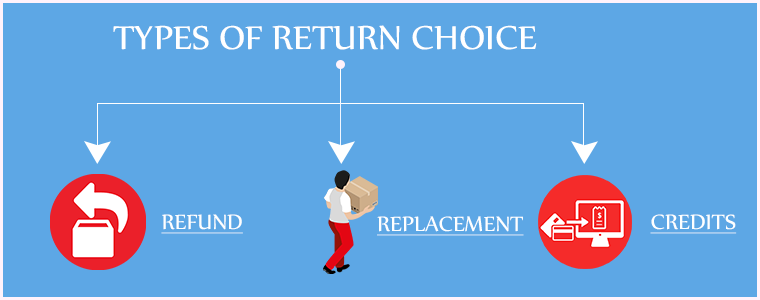
Adding to the list of eCommerce returns management is letting customers decide what they want to do with the product they wish to return. Whether they want to replace the product, raise a full refund or need the product amount in the form of points/store credits, the choice should be left to them.

Providing a return choice is a persuasive tactic to make customers return to your store in the future. For example, if a customer opts for the credits worth the product amount, providing him with that would ensure that the customer is going to come back to your store in the nearby future and make a purchase.

Put simply, it improves customer retention on your website.

 3. Automate your Return Process

If you have a large e-commerce store, you will have more product returns. Imagine how difficult it would get if you manually handle product returns. Moreover, it will be very time-consuming.

Automating your eCommerce returns can save you a lot of time and effort. You would not need to handle each and every step on your own. From informing the customer about the placed return request to notifying them about the return status until the process is over, make everything an automatic process. This will decrease the return processing time.

 4. Speed up your eCommerce returns

Speeding up your return process is a vital point in eCommerce returns best practices.

Right after a customer places the return request, they expect their money’s worth in some form to the earliest. Though it can take a few days at least, you should not make your customers wait for too long. A long delay creates frustration among customers and they would think a few times before placing an order from your store again. Make sure the returns are processed as quickly as possible. It improves customer loyalty.

5. Provide free shipping

Customers do not like to pay an extra penny for returning a product. In fact, no one would like to pay some extra amount for a product that is defective or doesn’t match their expectations. If there is already a defect and on top of that, customers are asked to pay a small charge for returning it, they will feel annoyed.

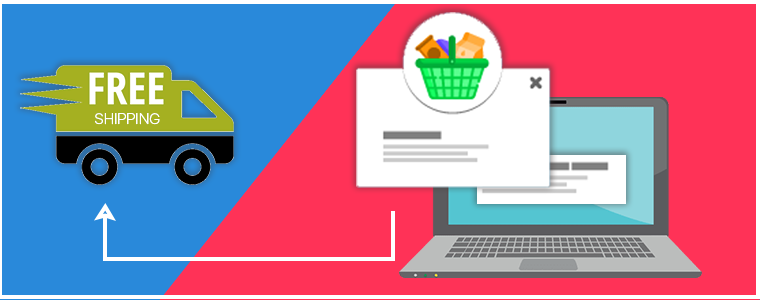
To avoid this, you can allow free shipping on returns and keep your customers happy and satisfied.

Return Manager module by KnowBand

Considering all the above points, if you want to handle your product returns easily and make the product return process on your store well-structured, you can opt for our Return Manager module.

Knowband provides the RMA extension to various e-commerce platforms such as PrestaShop, Magento, Magneto 2. Check out

PrestaShop Return Manager

Magento Return Manager

Magento 2 Return Manager

Key Features of Return Manager-

1. Provide your customers with the option of Credit, Refund or Replacement

The Return Manager module allows three return methods: Credit, Refund, and Replacement. Through Credit, a customer can ask for the product amount to be transferred to their store account in the form of credits so that they can use them for the future purchase or they can simply ask for a refund or a replacement.

2. Customers can highlight the defect by uploading the product image

This addon allows customers to upload an image on the product return form to point out the defect so that the merchants can easily know the issue that led to product return.

3. Make it easy for the customers to specify their return reason

The product return manager enables you to create a list of possible reasons for product return. When a customer is raising a return request, he or she would be able to select the return reason from the drop-down list in the product return form.

4. Update customers with return status

Similarly, you can create a list of return status that defines whether the return is in process, returned, rejected, etc. and update your customers accordingly.

5. Set up multiple store addresses

If you have multiple stores located in different areas, you can set up multiple addresses and display them in the return form. When a customer places a return request, he/she can choose the return address based on the area where he/she lives.

Some of the other features that the module provides are-

6. You can track your returns from the back-end, allowing you to check how many return requests have been raised and how many have been approved.

7. Customers can further submit their query regarding their return by creating a new ticket under their return history.

8. The RMA extension also allows you to place a return on your customer’s behalf.

9. You can set up your return policies and return guidelines.

10. You can customize the emails as per your choice.

Look out for your preferred module to check its complete features and benefits.

The Bottom Line

Ecommerce returns management is highly important for customer retention. If customers face difficulty in placing a return request, it will discourage them to make a purchase on your store from next time onwards, and you will eventually lose them.

But if you make the return process convenient, customers will be more likely to visit your store again in the future despite receiving an incorrect order sometimes.

Do try the Return manager module and apply the above-suggested 5 ways to manage your eCommerce returns.

Also Read:

8 Simple Tips to Reduce Product Returns in eCommerce

Benefits of Google Accelerated Mobile Pages (AMP) for eCommerce

The world has witnessed an enormous increase in mobile users count in the last few years. According to Statista, the number of mobile phone users, worldwide, is expected to cross the 5 billion mark by 2020, which makes an estimate of 65% of the total world population (7.8 Billion by March 2020) having access to mobile phones. Talking about Internet users, 56.1% of the world’s population has access to the Internet, as of April 2019. (Source: Wikipedia)

With such a vast majority of people having access to mobile devices and the Internet, it leaves no question why Google gives high priority to faster loading of web pages on mobile phones.

Research says that 40% of mobile users abandon the website or the web page if it takes more than 3 seconds to load. Considering the importance of page load speed, Google launched Accelerated Mobile Pages or AMP that loads pages lightning fast in mobile devices. Google showed the AMP versions of web pages in mobile search results for the first time in February 2016.

What exactly are Accelerated Mobile Pages?

AMP is an open-source initiative by Google that primarily focuses on the faster loading of web pages on mobile to provide an enhanced and smooth browsing experience to mobile users without interrupting the desktop view. Whether you are an e-commerce company, a publisher or an advertiser, AMP is the need today to improve the experience of mobile users on the web.

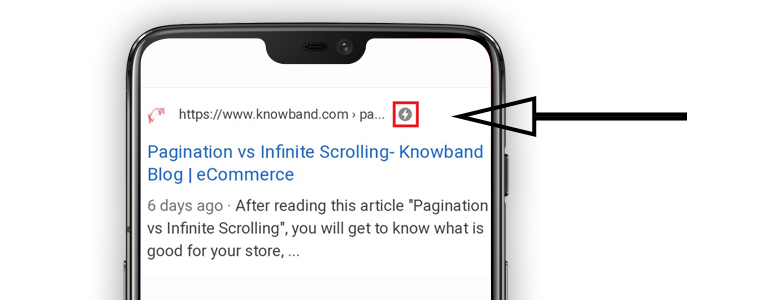
AMP-enabled pages show a lightning symbol right next to the page URL.

Google AMP for eCommerce

Since a majority of online shoppers use mobile phones to shop, page load speed, therefore, holds extreme value. As per the stats collected by Statista, mobile commerce accounted for 63.5% of the total sales worldwide in 2018. M-commerce already surpassed eCommerce in 2016 and the sales count is expected to reach nearly 73% by 2021.

The percentage reflects the change in the trend of online shopping and how m-commerce is continuously dominating eCommerce year-over-year. The introduction of Accelerated Mobile Pages has helped eCommerce businesses scale-up their conversions by improving their performance and visibility on mobile searches.

Let’s now try to understand the benefits of Google AMP for eCommerce

Benefits of Accelerated Mobile Pages for eCommerce

1. Increases the Page Load Speed

Accelerated Mobile Pages improve the web page load speed or say reduces the page load time of your website. It avoids clunky elements that might slow down your site speed and enables quick browsing facility across mobile devices.

Your website might be amazing but if there’s a lag in loading or if it is not mobile-friendly, users will leave it straight away. Better the site speed, better the conversion rate.

2. Reduces Bounce Rate

Since AMP offers quick loading, it puts an end to the troublesome experience that users face due to slow page loading. The increased load speed leads to reduced bounce rate, higher user engagement and the boosts the average site time.

3. Increase in Mobile Search Engine Rankings

The swift loading offered by Google AMP improves the mobile rankings in the Search Engine Result Pages(SERPs). Your web pages might not be ranking well on the search engine when browsing from a desktop, enabling AMP on your e-commerce website can improve the chances of ranking those pages at a better position when browsing via mobile devices, though it is not guaranteed as rankings depend on so many factors.

4. Accelerated Mobile Pages improve Website’s Performance

Accelerated Mobile Pages create a rich and mobile-friendly version of your eCommerce website and bring in high click-through rates and the AMP pages can be adjusted for multiple browsers. Besides, you do not need to make an XML sitemap for the AMP pages. Google automatically creates the sitemaps for your AMP pages.

5. AMP can be implemented across various pages on your Website

You can implement Google AMP on multiple pages on your eCommerce website and make it easier for your mobile visitors to surf your store’s content without any trouble.

Accelerated Mobile Pages Module by Knowband

The AMP module by Knowband accelerates the web page loading on mobile devices and allows you to enable AMPs for multiple pages on your website like Home Page, Category Page, Product Page, CMS pages. Knowband currently offers this module to Prestashop and OpenCart platforms. Do check out-

Accelerated Mobile Pages(AMP)- Prestashop addon

Accelerated Mobile Pages(AMP)- OpenCart extension

Key features

The AMP module offers some remarkable features:

1. Generate AMP on your

Home Page

Category Page

Product Page

CMS Pages

2. Display a YouTube video, Instagram and Twitter posts, etc. on your AMP-enabled website.

3. The AMP extension allows the store admin to customize the look and feel of their e-commerce website on hand-held devices.

Apart from this, you get many other features to enhance the experience of your mobile users.

Note: For the AMP module to work, your website must have an HTTPS protocol. AMP will not function with the HTTP version.

Final word

AMP is powerful. You should definitely consider implementing it on your eCommerce website. With so much to offer, it can be a powerful tool to take your eCommerce business to new heights.

If your website is already AMP-enabled, do let me know what changes it brought to your online business.

Also read:

What is Google’s AMP and how it will impact eCommerce businesses?

AMP Extension for OpenCart