Sell Gift Vouchers Using Knowband’s OpenCart Gift Card Extension

KnowBand’s OpenCart Gift Card extension makes it easy for you to sell gift cards on your website to provide your customers with customized options like a Photo Gift Card.
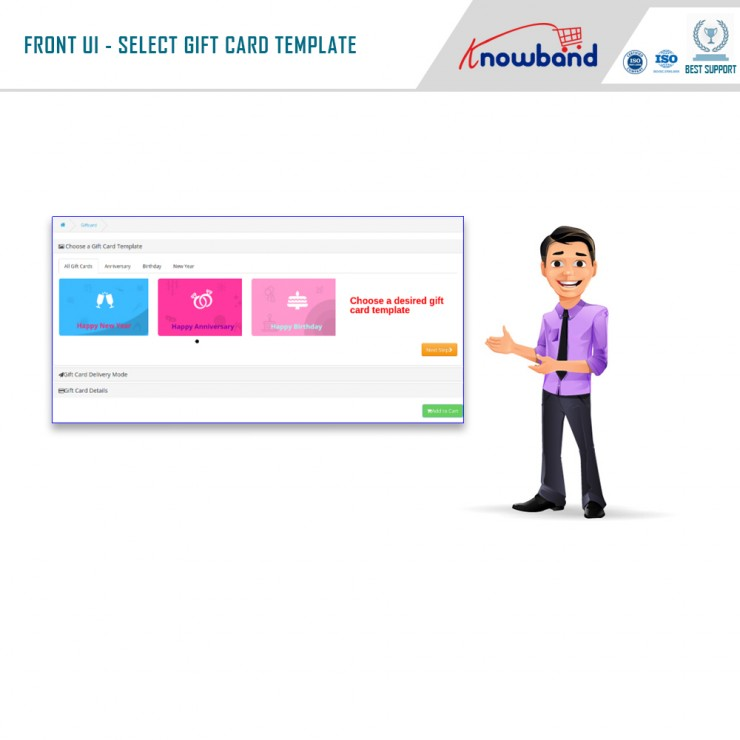
For a shopper, finding a perfect gift for their friends or family for events like Christmas, New Year, Holiday season is always a difficult choice as there are thousands of options available. Thanks to Digital Gift cards that have put an end to the long hour’s gift search.

Digital Gift Cards

Digital gift cards have made it convenient for people to purchase a gift card anytime, anywhere, and send it to their special ones within no time. This is the reason why many eCommerce businesses offer gift card facilities to their customers. If you are also looking to incorporate a gift card section on your OpenCart website, OpenCart Gift Card Manager Extension by Knowband is all you need. KnowBand’s OpenCart Gift Card extension makes it easy for you to sell gift cards on your website to provide your customers with customized options like a Photo Gift Card.


Best Time to sell Gift Cards on Opencart store

The best time to sell gift cards at the Opencart store is the holiday season. The holiday season is the time when eCommerce and retailers achieve the highest sales of the year. The 4th quarter of the year brings a lot of traffic to the website and this is the best time when you can start selling Gift Cards on your online store. There is no time when you can’t sell a gift card but a few occasions must call for it. Include some most common gift cards like Birthday Gift Vouchers, Congratulation Gift Certificates, and Anniversary gift cards.

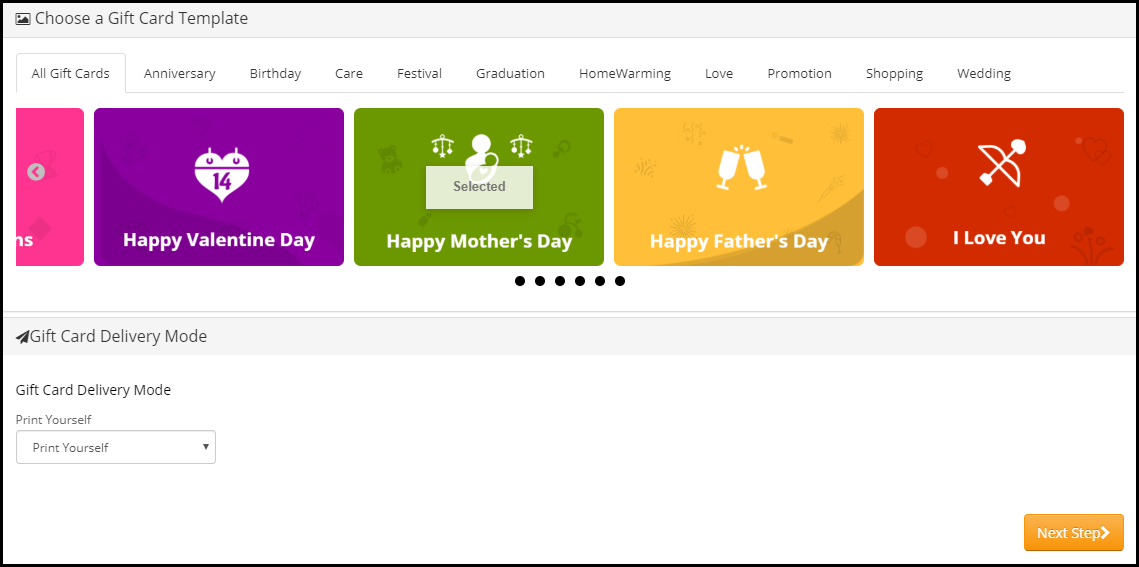
You can create custom gift cards for occasions like Christmas, New Year, Halloween, Diwali, Holi, Independence Day, Valentine’s day, and other festivals based on your target audience. For instance, have a look at the mother’s day gift voucher and how easy it is to customize its template. In the US, the Mother’s Day Gift voucher spending was around 21 billion U.S. dollars which is remarkable.
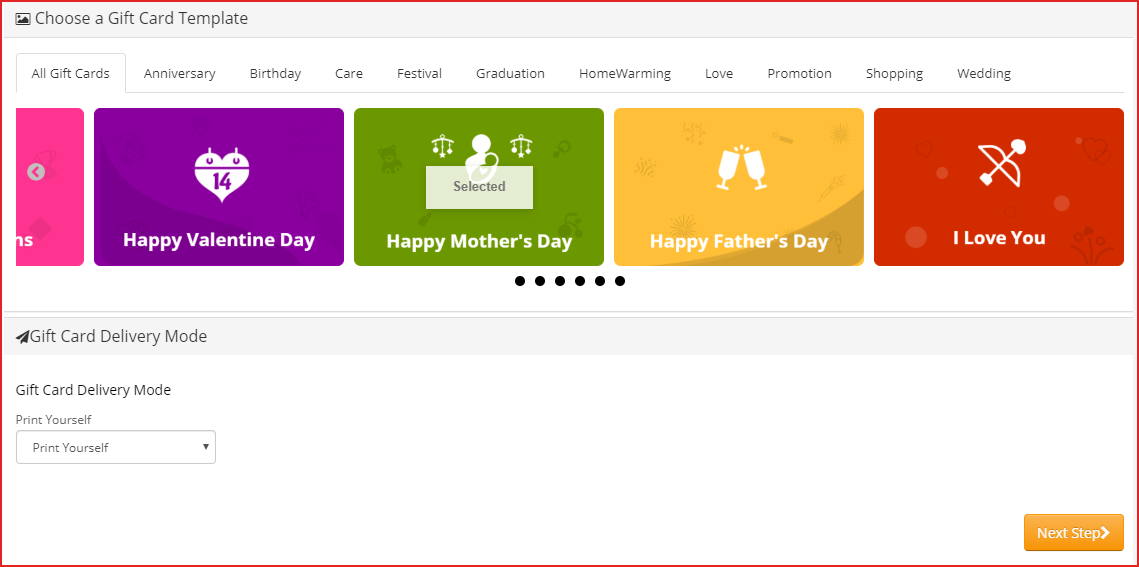

Benefits of Selling Digital Gift Cards

  1. Increase your store sales

Anyone looking for a gift card will shop from your store in the future. Henceforth, Gift Cards bring more revenue to your store and increase advance sales.

  1. Boost brand awareness

Digital gift cards, along with sales, also help in increasing brand awareness. Furthermore, the Gift Card recipient will come to know about your store when they receive it from their loved ones. Moreover, you can add the logo as well as the brand name on the physical card and even in the email.

  1. Capture new customers

Every time a sender buys and sends a Gift Card will bring you a new customer. Digital gift cards are the best way to capture new customers to store during the holiday season.

Overview of OpenCart Gift Card Manager

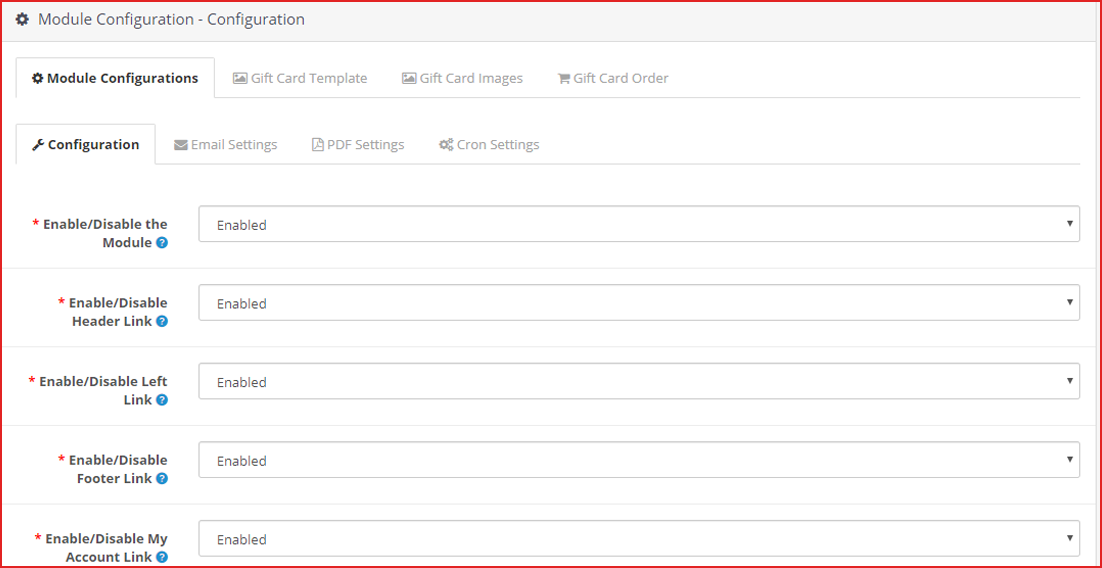
  1. Place the gift card link in multiple places.
  2. Set up gift cards of multiple price ranges.
  3. Allow customers to create personalized Gift Card by uploading an image
  4. Set the gift card delivery gap
  5. Customizable gift card templates for multiple occasions
  6. View all ordered gift cards in one place
  7. Multi-lingual support, GDPR, and multi-store compatible
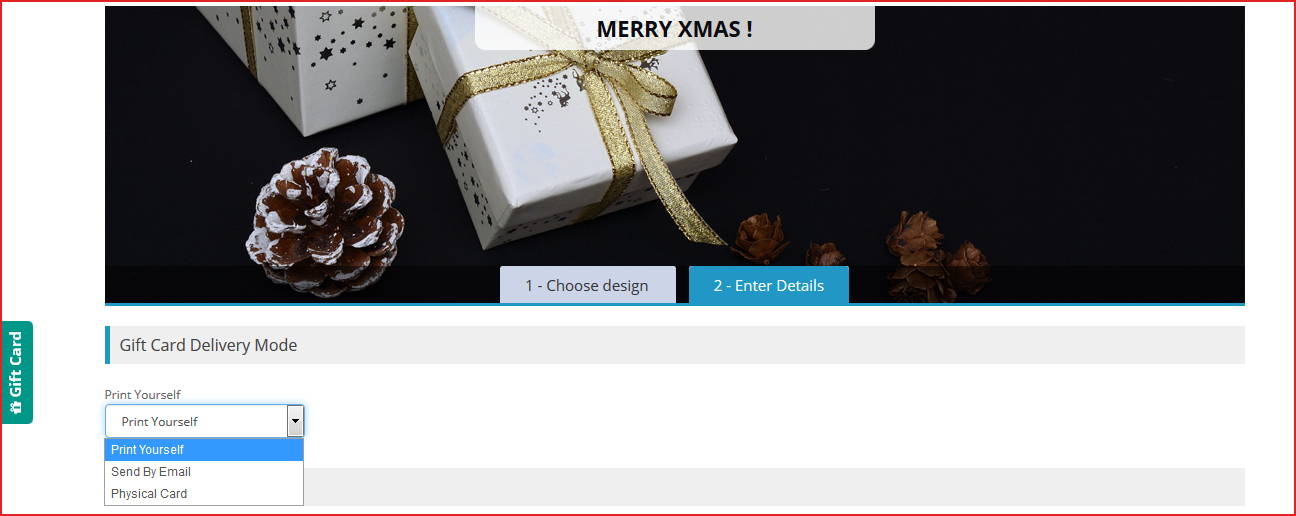
  8. 3 Gift Card Delivery options:
  • Print yourself,
  • Send by email,
  • Physical card

How to sell gift vouchers on Opencart?

Features of OpenCart Gift Card extension [Detailed]-

As the store owner, you must know the facilities a gift card plugin can offer because you have to provide the best possible options. Thus, know how you can configure it for increasing the Gift card sale. Let’s dive in.

Ways to create Gift Certificate with Opencart Gift Card Plugin

1. Customized Photo gift cards & templates

  • Customizable default templates:

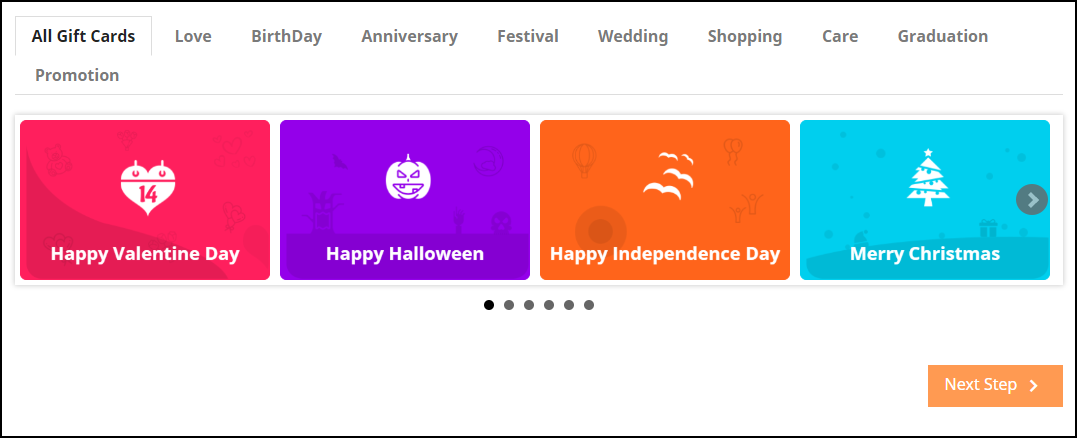
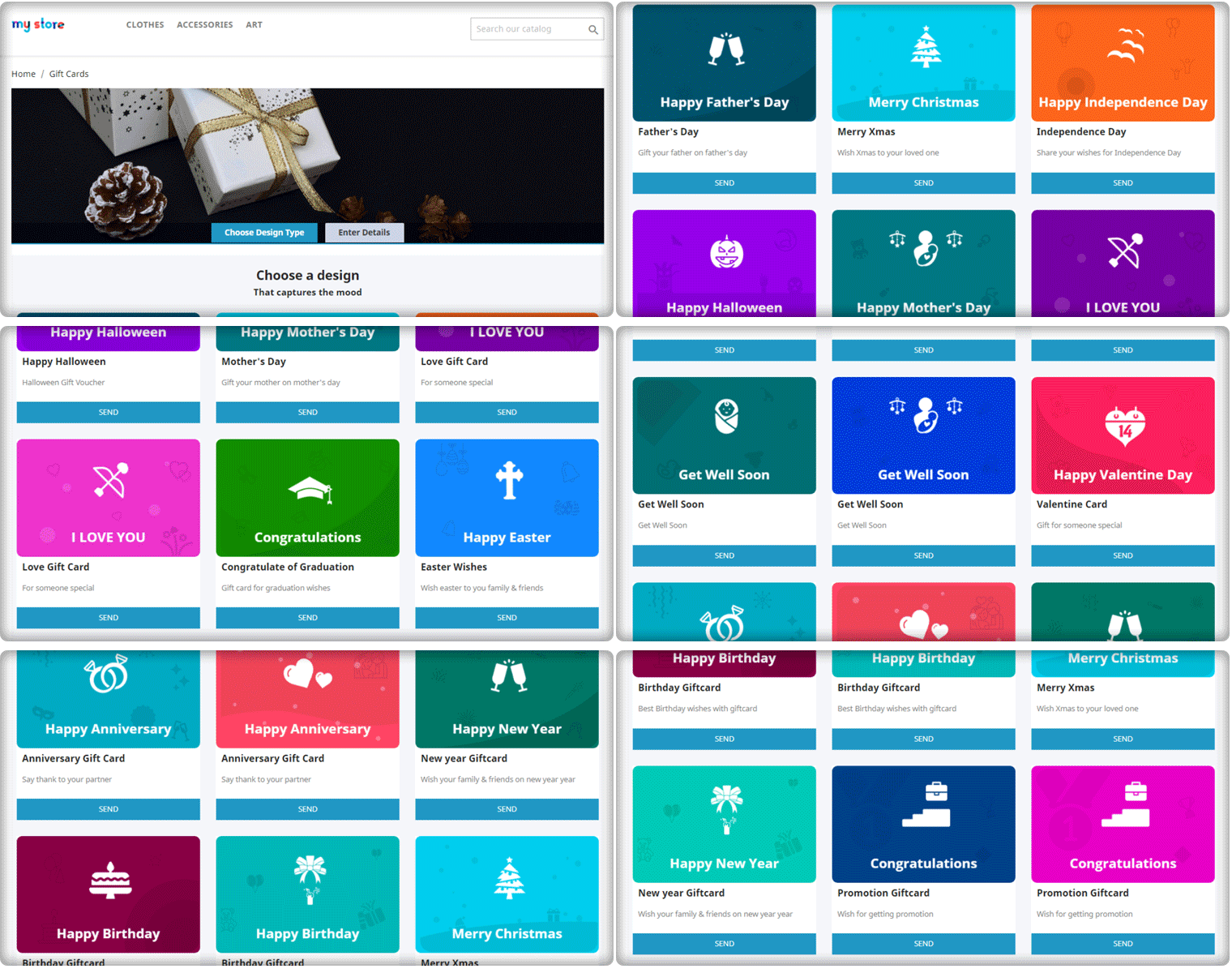
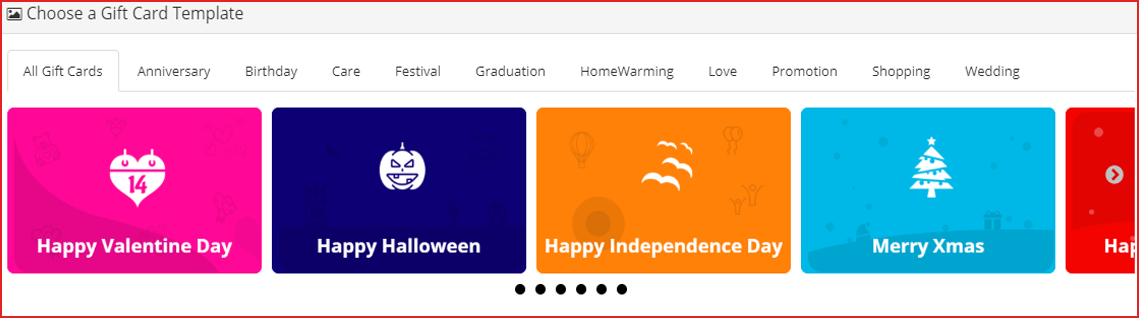
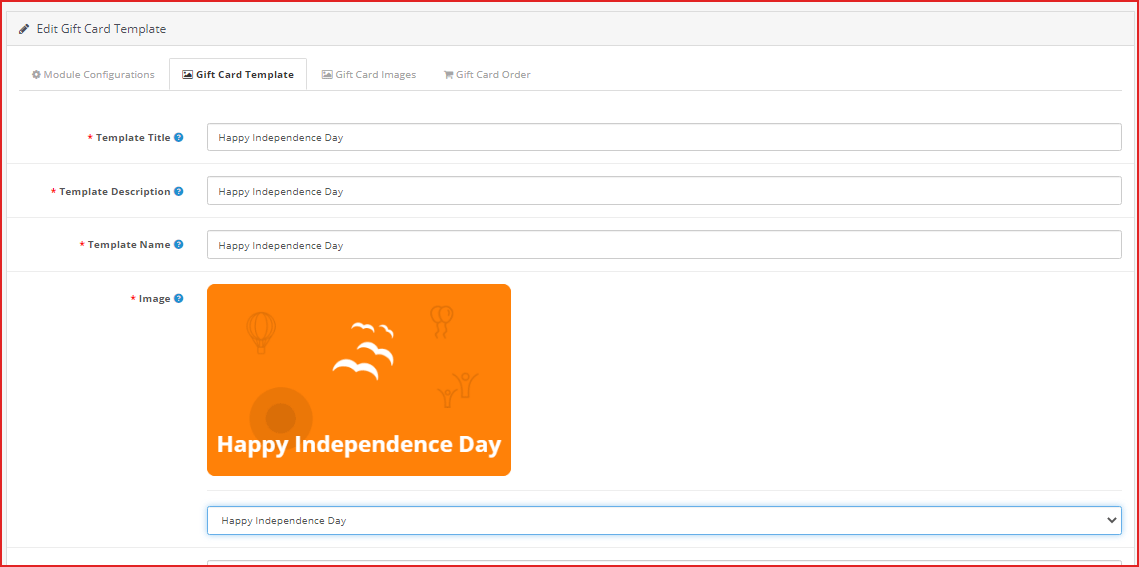
OpenCart Gift voucher extension provides you with gift card templates for multiple occasions like Valentine’s, Halloween, Christmas, Easter, Birthdays, Anniversaries, Father’s Day, Mother’s Day, etc. The templates can be customized as per your choice.
  • Personalized Photo Gift Card–

With the OpenCart Gift Certificate plugin, now you can let your shoppers create their own customized gift card by uploading an image. The sender can also add a custom message for the email and PDF.

Advanced Admin Configuration

2. Offer Gift Cards of variable Amounts:

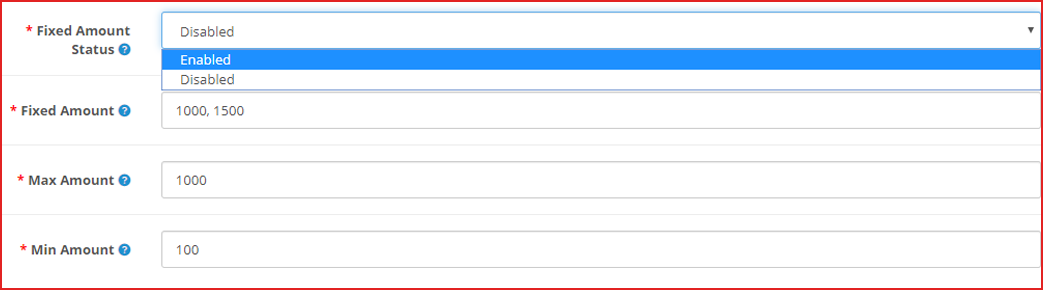
OpenCart Gift Card Manager extension enables you to set up gift cards in different price ranges. For example, you can have gift cards of $100, $200, $500, etc. If you do not want to provide fixed-value gift cards, you can specify a range within which a customer can shop for the gift card. For example, if the specified range is between $100 and $1000, then a customer can buy the gift card for any amount in between.

3. Add gift vouchers product link to multiple places on the website

OpenCart Gift voucher extension allows you to place the gift card link on various places on your website such as the Header, Footer, My Account section, and on the center-left of the website.

The image shows the Gift card link present on the left-most of the web page.

4. Categorize the Opencart Gift certificates by Occasion

In Opencart Gift Card manager settings, you can also define a category for gift cards to make it easy for the customers to find the relevant gift card.

For example, put the gift cards for the holiday season like Christmas, Halloween, New Year under one category.

Follow the eCommerce marketing calendar to plan your gift card categories.

5. Send Custom email and PDF to sender and receiver

OpenCart Gift voucher extension also lets you customize your email templates that would be sent to the recipient and the sender when the gift card has been delivered. The email subject and the inside email content can be customized as per your choice.

Customers can also download the gift card in PDF format.

6. How to make the Gift Card Delivery?

  • Frame Delivery Rules

OpenCart gift certificate extension lets you specify the order status for which the gift card would be generated and would be sent to the recipient.

You can define the minimum number of days within which the customers can expect the gift card delivery.
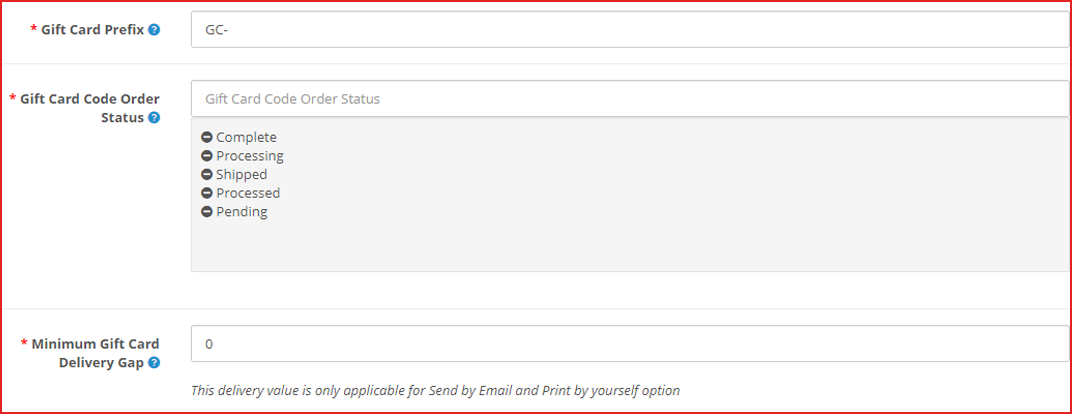
7. Offer Multiple Gift Card Delivery Options

Sometimes customer likes to send gift card physically. There are three options available for the delivery of the Opencart Gift cards. With the help of the OpenCart Gift Card extension, you can specify whether a particular gift voucher should be allowed to send

  1. physically deliver the Gift Card
  2. Print the Gif Certificate by Yourself
  3. Send virtual gift card via email

8. OpenCart Gift Certificate builds brand identity

You can set a prefix for your gift cards to promote your brand.

For example Knowband-12XZ

9. Track redeemed Gift Card Coupons

OpenCart Gift certificate plugin lets you track your gift card orders. It contains details like the recipient’s email address, Order reference ID, sending date of the gift card, and the current status of the gift card. This helps you manage the stocks and inventory.

10. Store and theme compatibility

OpenCart Gift voucher module is GDPR compatible, multi-store compatible, and provides multi-lingual support. You can use the Gift Card module for the OpenCart Journal theme as well.

What kind of features can we expect from the updated version of the Opencart Gift Card Extension?

Opencart Gift Card Vouchers Plugin’s updated version offers some special features for a better user experience.

  1. When online users select the “Print by yourself” option, an additional email template is available for sending an email notification to them. This email will be forwarded to the person who sent the gift card.
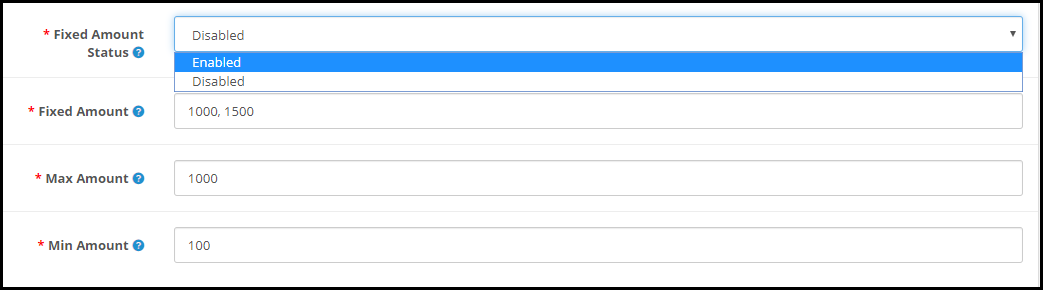
  2. On the website front end interface, the fixed amount to drop-down can be displayed. Moreover, online users can select the amount for the gift card and the amount can be separated by comma by the store admin.
  3. From the admin interface, online merchants can efficiently set the minimum and maximum gift card value. Furthermore, users must select gift card value in between max and min amount.
  4. While selecting a virtual Gift card option, there is no need for clients to pay shipping charges.

In the end

With the festive season around the corner, now is the perfect time to have a gift card section on your eCommerce store. Start selling the exclusive gift cards which are most recommended for personal and corporate giftings. Knowband is offering the module at $28.79 and Year-End Sale – Min 20% Off Sitewide + Extra 20% Off | Use Code: KBOFF20

Have any query? Feel free to ask in the comment section below. Or you can contact us at support@knowband.com for any kind of assistance regarding this module.

Live Demo:

KnowBand OpenCart Gift Card Voucher/Certificate Extension

You may also like:

Why Digital Gift Cards are Important to your eCommerce Business?

Get more Holiday sales by setting up a Gift Card section on your store

Give Some Holiday Season Flair to an Ecommerce Website Design

13 Holiday Marketing Ideas and Tips to Boost Sales This Holiday Season

The holiday season is about to arrive and it’s the best time to pay attention to such marketing ideas which can generate more sales.

The festive season brings plenty of opportunities for brands to scale up their sales graph. Looking to make the best use of this holiday season? Here are the 13 Holiday Marketing Ideas and Tips for 2021 to kick-start your holiday season journey and boost sales.

1. Focus on planning

The foremost holiday marketing tip would be to plan your offers early. Customers do know that brands would be competing to outperform each other to attract more people with their exciting rewards and offers and be ahead in the competition.

Think and try something different. Keep an eye on what your competitors move and figure out what they aren’t doing or haven’t done before. Furthermore, plan your promotions, get the customers excited. And when the holiday season begins, keep bringing changes in your offers at regular intervals to surprise your customers.

Capturing more holiday sales would require unique as well as enticing offers.

2. Decorate your store as per the occasion

Besides decorating your houses, you should also decorate your website in the holiday spirit following the coming festivals. For example, change the theme, give it a new look & feel so that your customers get the holiday feel by visiting your website.

For instance, if you have implemented a Spin and Win popup on your website, you can customize it as per the occasion. You can even add addons like Spin and win depending upon the eCommerce website you are using.

Knowband’s Spin and Win popup module provide several attractive themes for almost every important occasion like Christmas, Halloween, New Year, Black Friday, Valentine’s Day, Mother’s Day, etc. For every platform, Knowband offers a Spin and Win popup module hence you can.

Check out Spin and Win for PrestaShop, OpenCart Spin and Win extension, Magento Spin and Win extension, Magento 2 Spin and Win extension, Spin and Win for WooCommerce.

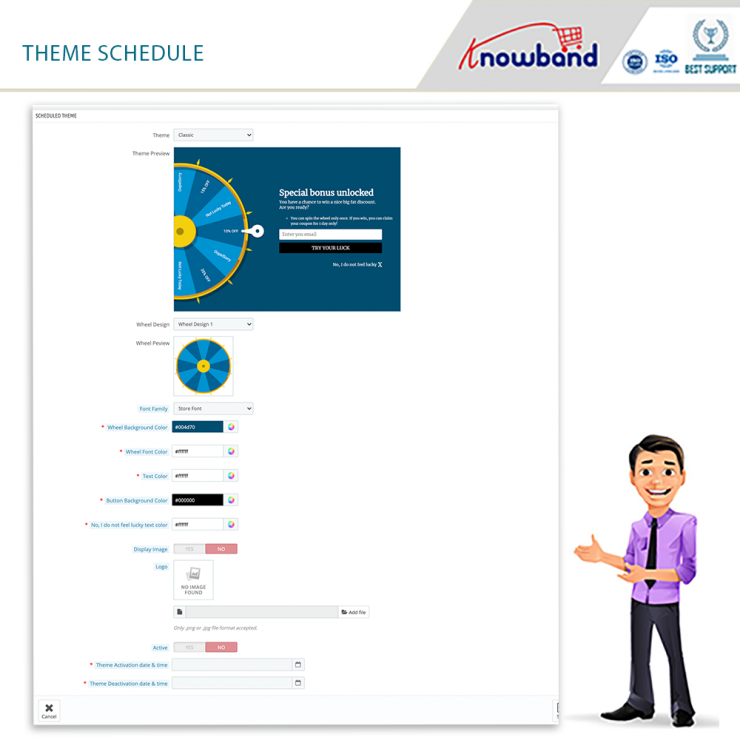
Spin and Win for Prestashop has recently launched incredible features such as Theme scheduling and customizing slice for the wheel.


The number of slices in the wheel can be changed to suit your needs. By simply pressing a few buttons, the administrator can change the look and feel of the spin wheel. The merchant can control the spin’s display location, frequency, and gravity from the module’s backend.


With the assistance of the theme scheduling feature, the store admin can set a date and even time validity for a specific theme that will be shown for the duration of that time.

3. Provide Gift Cards

What’s best than offering gift cards in the holiday season? Digital gift cards can boost sales. Having occasion-based gift cards would be an effective holiday marketing idea as Gift cards capture huge sales during the holiday season. In 2016, around $26 billion were spent on gift cards during the winter holidays.

The upcoming months are going to be hectic for online shoppers as they would have to buy a number of gift cards for their loved ones. You can lessen the burden on your customers’ shoulders by providing them with the Gift card facility.

Get your gift cards ready for the coming holiday season. Give your digital gift cards a look at the festival. For example, you can make theme-based Gift Cards for Christmas, New Year, etc. Gift Cards will have the upper hand in your holiday sales.

Read: Why Digital Gift Cards are important to your Business?

Want to add the gift card section to your store? Try out our Gift Card Manager module for PrestaShop, OpenCart, Magento and Magento 2.

Have a look- PrestaShop Gift Card Manager, OpenCart Gift Card Manager, Magento Gift Card Manager, Magento 2 Gift Card Manager

4. Make your loyal customers feel special

We understand that acquiring new customers is important. However one should even focus on retaining existing customers as they are equally important for the website. Bring them back to your store and show that you care.

Offer a special gift to your loyal customers. Make them feel that you miss them in your store. Existing customers contribute to 40% of your sales. So, do not go behind the new customers only.

Read: 6 customer retention strategies

5. Optimize for Mobile

Adding to the holiday marketing tips would be optimizing your eCommerce website for mobile.

Mobile commerce accounted for more than $35 billion in revenue in the 2017 holiday season. (Source: Marketing Land) The numbers went higher in 2018 and it is expected that mobile sales are going to outpace desktop sales in 2019.

Whatever ideas you have, plan them keeping mobile users in mind. Make sure that your site is mobile-friendly. If it isn’t, optimize it today! Failing to do so can cost you a huge loss in your e-commerce sales.

It would be great if you have a mobile app for your Brand.

6. Run contests, offer giveaways

Launching holiday campaigns is another holiday marketing idea. Host contests related to festivals. Ask users to share user-generated content. For example, on Christmas, you can ask your customers or followers to tell how they celebrated Christmas during Covid-19 and provide giveaways to the people coming up with the most interesting stories.

In this way, you will be able to witness maximum participation and keep up with the festival spirit, at the same time. It is one of the best ideas to grab user attention and catch more user engagement.

7. Create Urgency

Active online shoppers wait eagerly for the festive seasons to collect heavy discounts and offer on products. Though customers show the intent to purchase when the holiday season arrives, they take a lot of time while making a purchase decision.

Create a sense of urgency by setting up a timer for the sale. Let customers feel that they have a limited time to grab this opportunity. Highlight the timer clearly on the top of your website. This will help you in scaling up your conversions graph.

8. Leverage the power of Social Media

Customers are highly active on social media networks during festivals. Set a plan as to how you are going to utilize Facebook, Instagram or Twitter to shout out about your holiday sales. Promote and advertise your campaigns. It is the best time to get noticed by the people. Come up with some interesting and creative posts.

9. Start doing Email Marketing

Start sending emails to your subscribers. Get them ready for the coming holiday season. Let them know what is waiting for them this festive season.

Push your emails at regular intervals but do not spam. An effective email marketing campaign can bring you a lot of customers.

This might interest you: How to grow your email list using popups and make them effective?

10. Launch a Referral or Loyalty program

There is no better way to boost your holiday sales than a referral or loyalty program. When the shopping fever is high, it will help you maximize your sales.

Offer loyalty points every time a customer makes a purchase during the holiday season. Apart from a loyalty program, start a referral program. Ask users to refer your store products to their friends or family and reward them with a gift or cashback on a successful referral.

With KnowBand’s Affiliate and Referral Program module, you will not only get the option to set a referral program but you can also allow customers to be your affiliate partner to earn gift vouchers.

Check out: PrestaShop Affiliate and Referral program addon, Magento Affiliate and Referral Program extension, Magento 2 Affiliate and Referral Program extension

11. Free Shipping

A study by Invesp reports that 9 out of 10 consumers say that free shipping is the primary reason to shop online.

If not on other days, you should definitely consider the idea of providing free shipping during the festive season. Feed it in the mind of customers by reminding them repeatedly about free shipping.

If you are worried about the profit, you can adjust the shipping cost in the product amount. The tag of “free shipping” shifts the focus from the increased product price. This would make a smart holiday marketing idea.

12. Make use of Hashtags

Hashtags provide you with a high organic reach and increase your product visibility.

Set an occasional hashtag for your brand and start using it actively on the major social media platforms, mainly Instagram and Twitter. But make sure the hashtags are relevant.

Your brand hashtags will allow your followers to easily look around your brand, products, or info just by searching with the defined hashtag.

Read: 4 reasons why you should start using Instagram Hashtags

13. Prepare a video

It is the trend of Video marketing. Videos grab a lot more attention and engagement than images or texts. Use this to your advantage. Brands try to share happiness by creating a short, funny, and message-giving video clip.

You can follow a similar approach to make your brand stand out from the rest. A video can make a personal connection between your brand and your followers.

Final word

E-retailers rejoice the second half of the year as this is the time when the sales graph rises drastically. If you follow the right approach in implementing your holiday marketing ideas, you can earn huge profits too.

There are many more ideas that you can get, however, I find these 13 Holiday Marketing Ideas and Tips to be the most effective to boost your holiday sales.

If you have some more points to add, do let me know in the comments below.

Get more Holiday Sales by Setting up a Gift Card section on your Store

“This holiday season, turn up your sales volume by adding the gift card facility to your online business.”

Gifting sounds great but not for the one who has to gift. Well actually, this has remained a problem for people. Gifting was never a concern but when it comes to deciding what to gift, people find themselves in a stressful situation. According to the National Retail Federation, 80% of holiday buyers will include a gift card in their buying list this year, according to a separate poll. Furthermore, to reduce the hassle of searching for the right gift for customers, Knowband offers the Gift Card Manager module.

Gift Card Manager

Gift Card Manager by Knowband helps your customers find the desired gift card easily. The module integrates a gift card section on your eCommerce website.

With Christmas and New Year around the corner, it is high time that you get this module and start offering gift cards on your website related to these occasions. Furthermore, the Knowband Gift Card module makes it easy to add multiple gift cards to your website.

Have a look at what our Gift Card module offers:

1. Pre-existing Gift Card templates for multiple occasions

We have added a number of Gift Card templates to ease up the task for the merchants. The Gift Card Manager extension provides merchants with Gift card templates for Halloween, Christmas, New Year, etc. Apart from the Holiday based Gift cards, the Gift Card Manager comes up with templates related to Birthdays, anniversaries, Mother’s Day, Valentine’s Day, etc.

2. Add new Gift Cards

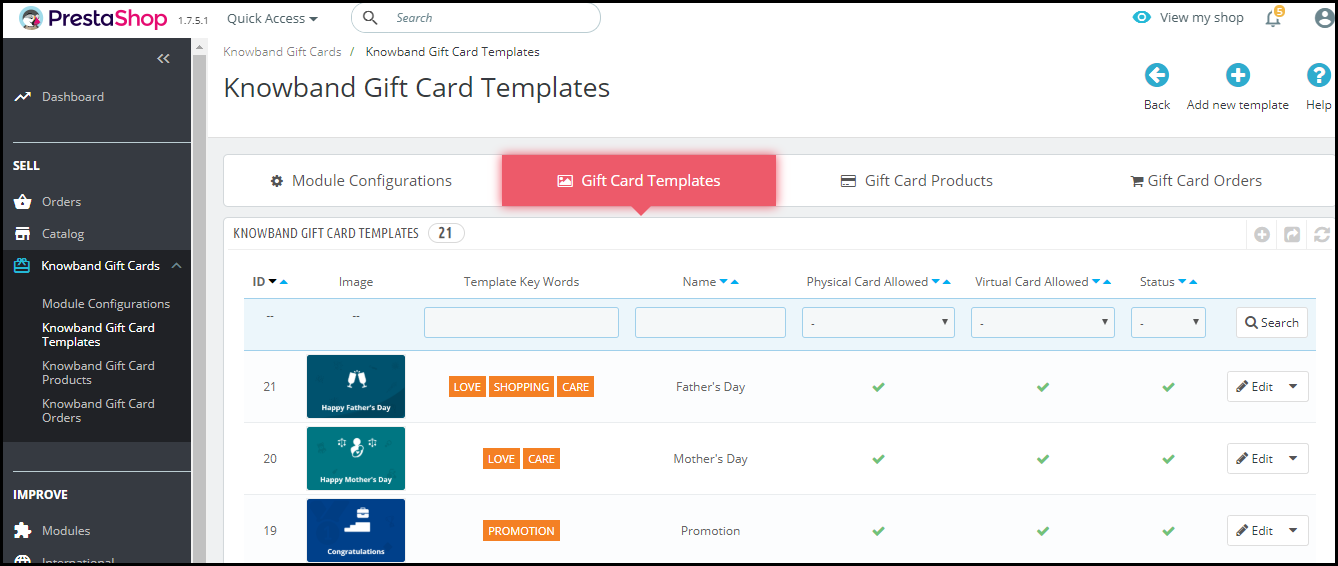
Couldn’t find the template you were looking for? No issues. You can add templates on your own. Just tap the “Add new template” button and make your customizations.

3. Assign a category to your Gift Cards

Assigning a category to your Gift Cards helps customers to look for the desired gift card quickly. When you assign multiple categories to different Gift Cards, those categories are shown at the front end of your website, hence saving customers time in search of the desired gift card.

For example, Gift cards related to Halloween and Christmas can be put under the Festival category.

4. Customize your Gift cards

Well, attracting more and more customers is possible only if your Gift cards look more appealing. Furthermore, the Gift Card Manager provides you with the option to set attractive images for your gift cards.

You can also allow your customers to send the gift card to the recipients over their email address or deliver at their residence address. The “Physical Gift Card allowed” option needs to be enabled for the gift card delivery to a recipient’s address and on the other hand, the “Virtual Gift Card allowed” option needs to be enabled for giving customers the option to send it via email.

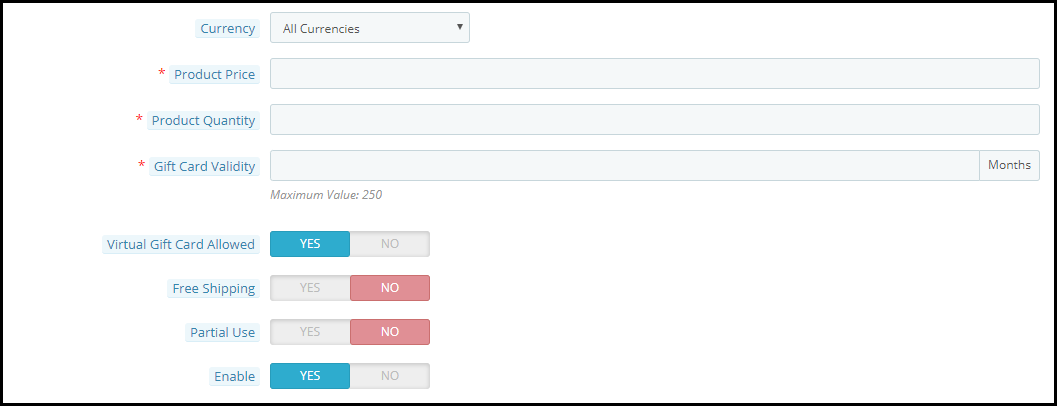
The Gift Cards tab allows you to define the gift card’s worth. Within this tab:

1. You can provide a name to your gift card

2. Set the gift card price

3. Define the gift card quantity

4. Set the gift card validity

5. Allow free shipping

6. Allow partial usage of the gift card amount

7. Set the currency in which the gift card can be purchased. If currency preference is set to “All currencies”, then a gift card can be purchased for all of the mentioned currencies.

5. View your Gift card orders

Every gift card purchased will be displayed under the “Gift Card orders.” The tab consists of the order reference id, recipient’s email address, delivery date, gift card status, etc.

6. Set a minimum delivery gap for the gift card

You can keep a few days’ gaps between the order placement and the delivery of the gift card. No gift card will be delivered before this period.

7. Display the Gift Card block at multiple places

You can display the gift card tab at the header, footer, or under the “My Account” section of the customer.

It can also be displayed separately on the center-left side of the website.

8. Print Photo Gift Card

The module allows your customers to send photo gift cards to their loved ones. You can have several default gift card templates but nothing is better than giving an option to your customers to print their own gift card. They can upload a picture and create a new gift card.

9. Personalize your email content

Changes can be made in both email content and subject for both the recipient and the sender. Moreover, the Gift Card Manager Extension by Knowband is GDPR compliant and available for different platforms including PrestaShop, OpenCart, Magento, and Magento 2.

PrestaShop Gift Card addon

OpenCart Gift Card extension

Magento Gift Card extension

Magento 2 Gift Card extension

Knowband is offering year-end sale – Min 20% Off Sitewide + Extra 20% Off. Use Code KBOFF20

Encouraging individuals to purchase gift cards is the next stage once your program is up and running. Follow these ideas for increasing sales:

  • Promote your business both online and in person.
  • Customize your gift cards
  • Provide incentives
  • Analyze your customers.

Front End View of the Gift Card Module

Final word

This holiday season, turn up your sales volume by adding the gift card facility to your online business. If you are looking for Gift Card modules for the holiday season, you must try Knowband Gift Card Manager for your respective platform. Hence, get the module today and boost your sales on Christmas and New Year. Let Gifting not be a trouble anymore. Drop a mail to us at support@knowband.com in case of any query.

Happy shopping and Merry Christmas!!

Have any doubts about any of the modules? Drop a mail to us at support@knowband.com

Also read:

Why Digital Gift Cards are important to your business?

Knowband’s list of modules to look out for this Holiday season

10 Halloween Marketing Ideas to Uplift your Sales this October

This Holiday Season, launch Spin-wheel integrated PrestaShop Mobile App to boost sales

4 Magento extensions to capture holiday sales

Top 6 PrestaShop addons to boost your Holiday sales

13 Marketing Ideas to boost your Holiday sales

This Holiday Season, launch Spin-wheel integrated PrestaShop Mobile App to boost sales

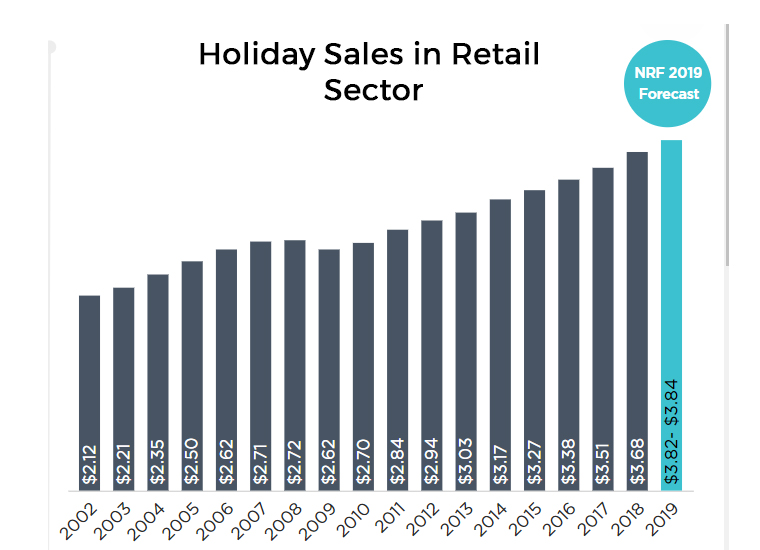
The holiday season is the most awaited time of the year, not only for online shoppers but also for eCommerce merchants. The final quarter of the year has always remained exciting. The shopping fever will be at its peak during the upcoming three months which provides e-retailers with a perfect opportunity to achieve sky-high sales.


Statistics Source

How to achieve sale targets?

From designing your eCommerce website to planning holiday campaigns using exclusive offers, brands do certain things to catch up with the holiday spirit with a primary motive to provide their customers with a sense of joy while shopping. These efforts, sooner or later increase total sales count, hence more revenue.

The two most important things to boost your sales are to persuading customers to shop and providing them with a simplified shopping experience. This can be achieved by having a Gamified Pop-up on your website and having a Mobile app for your business, and these two will be the focus of this article today. Stick till the end to know the fool-proof plan of success.

PrestaShop Spin and Win

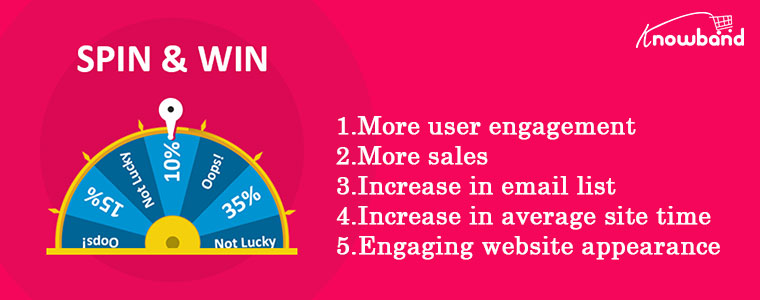
You would have often encountered the Spin and Win pop-up on the homepage of many websites. Well, it is an effective user engagement tool, which is why it is highly preferred by website owners. PrestaShop Spin and Win addon by KnowBand is an attractive pop-up that adds a gamified element to your website’s interface and catches more user engagement.

The primary motive of this addon is to provide enticing offers and discounts to your visitors by engaging them in a fun activity rather than being very straightforward about it. People try their luck by spinning the wheel. Upon winning an offer, a user feels a sense of excitement. Ultimately, the user provides his/her details to claim the offer and use it on the purchase.

Here is what our PrestaShop Spin and Win module offer:

  1. Tons of customization of the pop-up not only regarding its look and feel but also about its placement. You can decide where, when and who you want to display the pop-up. You can set a time for the pop-up appearance, adjust the display frequency, and much more.
  2. Personalize your offers that would be displayed in the slices of the wheel.
  3. To catch the holiday spirit, we have added multiple themes in this popup for Halloween, Thanksgiving, Black Friday, Christmas, etc.

With Christmas and New Year around the corner, you can also customize the spin and win popup as per the occasion to catch the spirit of Christmas and New Year.

Latest updates in Prestashop Spin and Win Module:

  1. Prestashop Spin and Win Module have currently introduced some incredible features like theme scheduling, customization of a slice of the wheel, Progress Meter, Progress percentage, and Progress label. Starting with theme scheduling, this can be done before the actual event day. This freshly added feature in the Spin and Win Entry popup module helps in scheduling the themes dates as well as the time. Furthermore, the latest feature added to the Spin and Win Entry popup module helps the admin set a date and time validity for a certain theme that will be shown for the duration of that time.
  2. The number of slices in the wheel can be changed to suit your needs. By simply pressing a few buttons, the administrator can change the look and feel of the spin wheel. The merchant can control the spin’s display location, frequency, and gravity from the Prestashop module’s backend.
  3. Progress Meter feature in Prestashop Spin and Win email subscription Popup addon displays a progress meter on the user interface. Furthermore, the Progress percentage allows the admin to add value to the progress meter. The percentage indicated by the administrator is displayed on the progress meter.
  4. Progress label, the newly added feature in Prestashop spin and win entry popup below the progress meter, a label or a message is displayed. Admin can change the label text in the general settings menu.

PrestaShop Mobile App Builder

Today, customers desire a convenient browsing & shopping experience. And with mobile apps in trend over the last few years, people now expect an app for their every small need. Having a mobile app surely connects you to more people and creates a higher chance of a sale.

This is why I suggest having a mobile app for your PrestaShop website so that people get more involved and feel familiar with your business. PrestaShop Mobile App Builder lets you develop a responsive mobile app(Android and iOS.) for your website without any requirement of coding or technical knowledge. The latest updates in the module are compatibility with Prestashop  Delivery Boy App. Furthermore, it is compatible with Prestashop Hyperlocal Marketplace and Prestashop marketplace module.

Here is what our PrestaShop Mobile App Builder offers:

Easy customization: Enhance the look and feel of your mobile app by customizing your mobile app design. It includes adjusting the app color, background color, font of the PrestaShop Mobile App, and much more.

Homepage optimization: Optimize your home page as per your requirements. Design your homepage for multiple occasions, and catch user attention. You can also make changes in your banners and home screen products set a countdown timer to create urgency and display your brand logo on the Header.

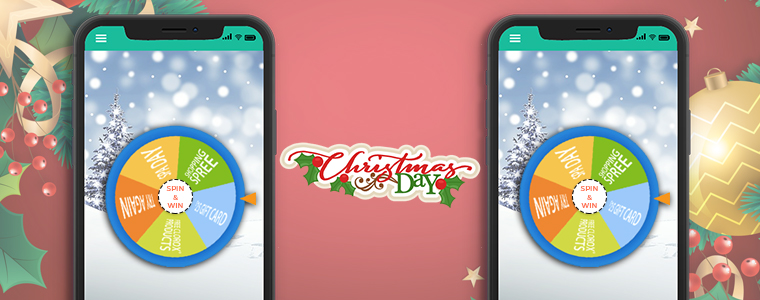
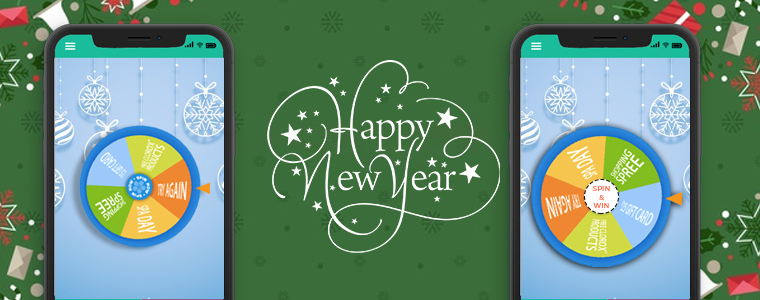
A theme-based Spin and Win popup will add an attractive interface to your mobile app during the holiday season.

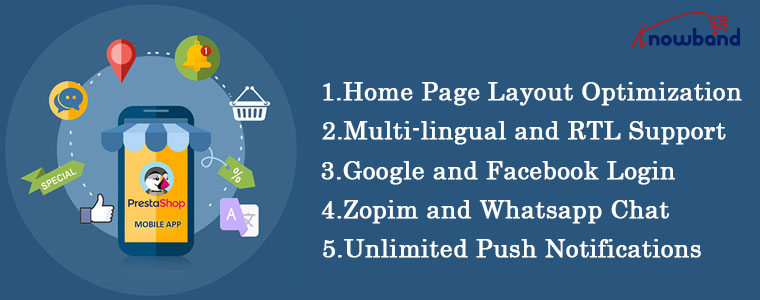
Multi-lingual and RTL Support: Supports multiple languages along with RTL writing styles like Arabic, Hebrew, etc.

Real-time synchronization: Any changes made to the website are instantly reflected on the mobile app.

Easy login facility: Google and Facebook login, Fingerprint login, and log in through OTP.

PrestaShop Mobile App Builder has countless other features like multiple payment and shipping support, all types of product support, Zopim, and WhatsApp Chat support, Push Notifications, simplified checkout, etc.

PrestaShop Mobile App Builder is a one-stop solution for all your mobile app needs.

Here is what we have for you in the offer!

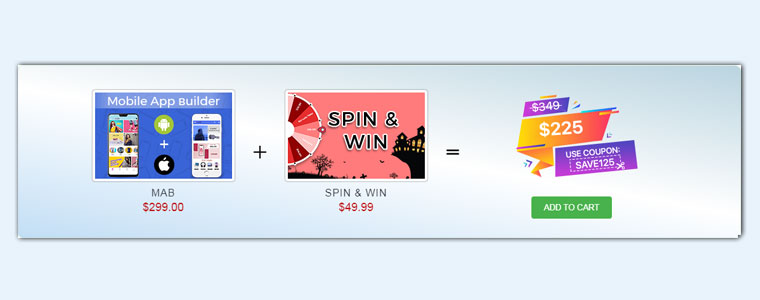
We are currently offering the combination of PrestaShop Spin and Win and PrestaShop Mobile App Builder for just $225, which is way below the cost of PrestaShop Mobile App Builder alone.

PrestaShop Mobile App builder(Android and iOS)- $207.20

The PrestaShop Spin and Win- $39.99

Prestashop Mobile App Builder is available at an additional 30% Off. Use Code MOBI30.

Year-end sale- Min 20% Off Sitewide+ Extra 20% Off. Use Code: KBOFF20

Go, grab the offer today!

The following snapshots will depict how this integration could be valuable for your online business shop:

Christmas

Happy New Year

If you have any queries regarding the module or need any further customizations, you can raise a ticket by emailing us at support@knowband.com.

Good luck with your Holiday sales!

You would not like to miss these:

4 Magento extensions to capture holiday sales

Top 6 PrestaShop addons to boost your Holiday sales

10 Halloween Marketing Ideas to Uplift your Sales this October

13 Marketing Ideas to boost your Holiday sales

The “Mobile App Effect” In eCommerce Industry during Holiday Season

6 OpenCart Extensions for Shipping and Delivery Purpose

If you are looking for shipping and delivery related extensions for your OpenCart based website, you have landed at the right place.

In this write-up, I have compiled a list of six OpenCart extensions that would not only add shipping and delivery related features on your website but also enhance the customer shopping journey at the same time.

Let’s take a look.

1. Product Availability Check by Zip Code

OpenCart Product Availability Check by Zip Code extension allows your customers to confirm the product availability before they head towards the checkout page.

The extension adds a “Check Availability” section on your product pages where shoppers can enter their area zip code and check if their desired product is available for delivery at their location or not.

If the business doesn’t deliver to that area, it displays that the product is not available at the specified zip code. If available, customers are displayed the estimated delivery date.

From the back-end, you can add multiple zones and map products accordingly, and adjust other settings.

2. Preferred Delivery Time

OpenCart Preferred Delivery Time extension allows your customers to pick up the desired date and time slot for their order.

On the checkout page (under delivery method), a new section is added named “Your Preferred Delivery Time” where customers can choose the desired date and time slot if they want to receive the order at a specific date and time.

From the back-end, you can specify the minimum delivery gap (in days) for preferred delivery. You can also adjust the time slots, set the delivery time, specify delivery days and also allow customers to update the delivery date and time even after placing the order.

3. Free Shipping Manager

OpenCart Free Shipping Manager lets you offer free shipping to customers only if they match the eligibility criteria set by you from the back-end.

This module is helpful since customers now look to get free shipping on their order. From the back-end configurations, you can specify the minimum amount for which a customer needs to shop if he or she wants to get free shipping on his/her order.

Similarly, you can specify the weight which must watch if the customer wants to enjoy the free shipping benefit.

The extension also lets you disable the free shipping facility for specific countries.

Free shipping increases the chances of conversion to a significant extent and also helps you increase your average order value.

4. Store Locator

OpenCart Store Locator and Pickup extension helps you register your local stores on the website so that customers can easily locate and navigate to those stores and examine the product physically.

At the same time, the extension also encourages the in-store pickup facility that allows customers to self-pickup their order at the desired date and time.

You can add multiple stores from the back-end with their complete information and also specify the days and timings on which the stores remain open.

When customers are on the checkout page, they can choose the pickup option and select the nearby store from where they can pick-up their item.

5. Shipping Timer

OpenCart Shipping Timer extension integrates a shipping timer on your product pages through which customers are displayed the time within which they need to shop if they want their product to get shipped on the same day.

You can set the timer validity for a single day or multiple days and also set the start and end time of the countdown timer.

Besides, you can specify the days on which the timer would be displayed to the users. You can also customize the shipping timer banner.

6. Cash on Delivery with Fee

OpenCart Cash on Delivery with Fee extension allows merchants to charge an additional fee on cash on delivery option.

This is basically to encourage customers to make the online payment right at the checkout page instead of choosing to pay later at the time of delivery. But since many consumers hesitate to share their card details online, you can provide them with the Cash on Delivery (COD) option along with some additional charge.

You can set up different charges for the different order amount. There are many other customizations you can make from the back-end.

For any kind of assistance regarding the above-mentioned shipping and delivery related OpenCart extensions, kindly reach out to us at support@knowband.com

How to Win Customers with Discounts and Boost Sales?

Consumers love discounts and I am no exception. While purchasing something online, I look for coupon codes. This is the natural consumer behaviour.

Discount coupons are helpful to entice customers to shop and not only it boosts your sales but brings higher conversions.

As per a survey conducted by Statista in 2019 that had 1000 respondents, 92% of the US consumers said they had used coupons for shopping.

With consumers getting habitual of using coupons and benefitting from other discount and promotions as well, it’s vital to implement a strong promotional strategy.

The strategy should focus on acquiring new customers and retaining the existing ones.

Why should businesses offer Discounts?

Apart from consumers’ love for discounts, here are a few reasons why online stores should offer it.

1. Boost Sales

While discounts may seem a compromise in the profit, they boost your sales significantly. Offering discounts or running promotions at regular intervals keeps customers hooked with your brand. Moreover, discounts reduce the possibility of cart abandonment.

2. Attract New Customers

Targeting visitors with promo codes that would be applicable only on the first purchase holds the potential to bring you a lot of new customers.

This is the ideal way to convert a visitor into a customer. Exclusive coupon codes for the first time users/shoppers are highly persuasive.

You can highlight the promo code on various places such as on your website’s home page, social media accounts, or reach out to those users via email who have registered on your store but haven’t shopped yet.

3. Increase Website Traffic

After the first two points, this doesn’t need much explanation. As you market your offers and promotions on different platforms, it will likely bring more visitors to your website. Ensure that they are not just exploring your website but also getting converted.

Related: 7 Ways to Increase your Website Traffic

4. Build Loyalty

Consumers feel valued when you reward them with discounts or coupon codes which ultimately builds customer loyalty. Nothing would please a brand more than loyal customers.

Types of Discounts

I have put forward 7 types of discounts or promotion strategies that you can use to entice customers.

1. Discount on the First Purchase

Having already discussed this above, this type of promotion should run forever on your website. You never know when a visitor comes across your brand and if there’s nothing for him/her on their first purchase, they might not show interest in shopping from your website.

Have exclusive and alluring discount coupons for first-time shoppers.

2. Bundled/Package Discounts

As it suggests, this type of discount includes offering a bundle of products at a slightly lesser price than the sum of the individual cost of those items. It provides you with the opportunity to sell more number of items and eventually increases your average order value.

Check your inventory and see products that complement each other. Create a bundle and offer them at a discounted price. You would probably have products that aren’t purchased independently. Including them in a package increase their sales count as well. This is an effective cross-selling strategy.

3. Pre-payment Discount

This type of discount is usually offered to make customers pay the complete order amount at the time of checkout.

For example, on many eCommerce websites, customers are encouraged to pay full amount at once using the online payment method and get a discount on their order else they are devoided of discount if they choose cash on delivery.

This is also seen on hotel booking websites where there is a price difference for paying online and paying at the hotel.

4. Seasonal Discounts

E-commerce sales touch the sky during the holiday season. When occasions like Halloween, Black Friday, Cyber Monday, Christmas, etc. arrive, consumers look to shop and spend a lot.

Brands introduce occasion-based coupon codes to give customers a heavy discount on their purchase or announce a sale prior to the occasion highlighting how much discount they would get on the coming sale.

5. BOGO Deals

BOGO deals, abbreviated for Buy One Get One are great promotional deals from the cross-selling perspective, having a significant impact on your average order value.

These are highly enticing deals where customers get two items at the price of one or get a complimentary product worth the same amount on the primary purchase.

You can run deals like Buy 2, Get 1 or Buy 3 and get the 4th one free to encourage customers to spend more.

Different Ways of Offering a Discount

Implement discount strategies at different moments in a customer journey. Let’s see how you can win customers by offering them discounts in different ways.

1. Use Popups

Popups are amazing to present your offers, deals, promotions or coupons to your website visitors. Some of the popups that you can consider are-

Exit-Intent Popup

This popup appears only when a user is trying to take an exit from your website. So you can use this to attract users at the last moment and change their mind.

You can try our Exit popup module and highlight your offers.

Spin and Win popup

This popup works exceptionally well for websites. It adds a Gamification element on your website in the form of a spin and win wheel. Users can spin the wheel and earn some exciting discounts.

Scratch coupon

Use our scratch coupon module that places an unscratched coupon on the header and generates curiosity in the visitors to scratch the coupon and see the discount coupon code which they can claim on the checkout page.

2. Persuade Abandoned Cart Users with Discount

Not chasing your abandoned carts can cost you a high number of conversions and lost sales. Reach out to those abandoned cart users and persuade them to complete their purchase by offering them a discount.

You can check out our Abandoned Cart module for this matter.

3. Referral Offers

Referral marketing is one of the best ways to encourage customers to spread a word about your brand and get rewarded in return.

So, you can run some referral programs like “Invite your friends and you both get $5 OFF on your next purchase.” This will help you acquire new customers and boost brand awareness.

Final Thoughts

The game of deals and discounts is necessary to survive in the rapidly growing eCommerce market. If you want to be ahead of your customers, you will have to come up with some exciting offers.

While discount and coupons are exciting for customers, make sure you are not compromising much on the profit margin especially if you are a new business. Consider every factor before you start running deals on your website.

10 Tips to Double Your Ecommerce Conversions in 2023

Every eCommerce website owner looks to improve conversions on their store. More eCommerce conversions mean more revenue. Whether you have just started your eCommerce business or been in the journey since long, there’s always room for improvement which you can work upon to boost your conversion rate.

There are certain tricks, strategies, and best practices for it. Putting all together, here are the top 10 tips to consider for higher eCommerce conversions.

1. Improve Your Page Loading Speed

If your website or web pages take time to load, it can severely affect your eCommerce conversions. Studies suggest that visitors bounce off from websites that take more than 3 seconds to load.

To test the loading speed of your website/web pages, use Google PageSpeed Insights or Pingdom.

A slow-loading website can hinder the shopping experience of your customers and they may choose to abandon the purchase mid-way.

Consider upgrading your hosting plan or switching web hosts to accommodate more website traffic. Remove unnecessary large files that are taking too much space.

2. Optimize your Website for Mobile Devices

Since the majority of the website traffic comes from mobile devices (smartphones) nowadays, it’s important to optimize your website accordingly.

Mobile Commerce is on the rise and has already surpassed eCommerce. A mobile-friendly eCommerce website brings more conversion than the non-friendly ones.

Take help of Google AMP for faster loading of mobile web pages. It helps you reduce your website’s bounce rate to a significant extent and improves the browsing experience of your mobile visitors.

Knowband provides the AMP plugin for PrestaShop and OpenCart platform.

Related: Benefits of Google Accelerated Mobile Pages (AMP) for eCommerce

3. Focus on simplifying your Design
One of the keys to boosting eCommerce conversions is simplifying your website design. From the homepage to the checkout page, every element should be highly optimized.

Eliminate clutter. Avoiding filling your website with too many elements and make it easy for users to navigate. You do not want to distract customers from their purpose, right?

Make use of whitespace and use visuals sparingly on your homepage. A simple, clean and well-organized website enhances user experience. Besides, it keeps the customer’s focus on your products and encourages them to explore your website without getting distracted.

4. Use High-Quality Visuals

Visuals play a crucial role in your eCommerce conversions. Texts aren’t enough to drive sales; you need high-quality images and videos.

Try to give as much information as you can through visuals. Give customers the type of experience they would feel when they are holding the product in their hands.

Take pictures from every angle with pinch-in and pinch-out zoom functionality. Use product videos to demonstrate how the product works. For example, if you are selling an automatic washing machine, show how to operate it or let’s say you are selling shirts, show how it would look on a person. Also, add a product size chart to highlight the measurements and let users know the model height as well so that if their height is the same, they can relate with it.

Don’t compromise on the image quality. Hire a professional photographer.

5. Simplify Checkout

As per Baymard Institute, 21% of the abandoned carts take place due to a long and complicated checkout process.

The fact confirms that if your checkout process isn’t convenient, shoppers will likely give up the purchase. Every extra step added in your checkout process reduces your chances of conversion.

Simplify it as much as you can. Keep only those fields which are highly important; avoid asking for unnecessary information.

I would recommend using One Page Checkout that converts the standard checkout process into a single page checkout. It puts all checkout-related information on one page and allows customers to check out quickly.

Try out Knowband’s One Page Checkout for PrestaShop, OpenCart, Magento and Magento 2.

6. Chase Abandoned Carts

Cart Abandonment is inevitable no matter how many strategies you apply. But that doesn’t mean you should give up on abandoned carts easily. Even if you recover a small percentage of those abandoned carts, it can add a certain value to your revenue.

Reach out to the abandoned cart users and persuade them to complete the purchase. Take regular follow-up as well but don’t overdo it.

It’s easier to sell to someone who has added the product to his/her cart than to a complete stranger. With Knowband’s Abandoned cart module, you can track abandoned carts and target those users accordingly.

Lesser the cart abandonment rate, higher the eCommerce conversions.

7. Leverage Social Proof

Why should consumers put trust in your brand? Why should they buy from you and not from your competitors? How do they believe in your quality services?

This is where social proof becomes valuable.

Do you know a consumer reads an average of 10 online reviews before finalizing their purchase decision?

Include reviews on your product pages. Yes, there will be some negative reviews as well but if you only highlight positive reviews, it can make shoppers doubt the authenticity.

Do not forget to highlight testimonials on your homepage. Testimonials are a great boost to your eCommerce conversions. They build customer trust by highlighting the experience of your previous clients or customers with your brand.

8. Provide Free Shipping

Offering free shipping to shoppers is one of the best ways to boost your conversion rate.

As per Invesp, 9 out of 10 consumers find free shipping to be the number 1 incentive to shop online. Also, orders with free shipping have a 30% higher average order value.

Today, most of the eCommerce websites offer free shipping so if you want to compete, you need to do the same else customers will likely prefer other brands over your brand.

You can slightly adjust your products’ price to cover the shipping cost. Now you can easily manage free shipping with our Free Shipping Manager, which is available for PrestaShop and OpenCart.

If you still don’t feel free shipping is a good idea, I would like to tell you that high shipping cost is the primary reason for shopping cart abandonment.

9. List Multiple Payment Options

How would you feel if a consumer finds everything so perfect on your website, decides to purchase but stops at the last moment just because you don’t provide enough payment options?

That would seriously hurt. This is not the way you would want to see a conversion getting failed. Different consumers have likings towards different payment options and that’s why you need to offer multiple payment options. Credit Cards and Debit Cards simply won’t be enough.

Accept digital wallets/e-wallets like Google Pay, Amazon Pay, PayPal, and some more in trend.

10. Display Trust Badges

With too much of hoax and fraudulent activities taking place over the Internet nowadays, consumers have become a bit sensitive and fearful to share their card details online.

People have been deceived and lost their money. Others don’t want to be a victim of it. It’s your responsibility to ensure your customers that their information is safe with you.

Highlight the trust badges on your website, mainly on the checkout page that includes security logos related to site security, anti-virus, payment protection, etc.

Final Thoughts

There are some other ways as well such as offering guest checkout, adding a live chat support option to your website, creating a customer-friendly return policy, etc.

Follow the above-mentioned tips and I am pretty sure you would be able to boost your eCommerce conversions.

If you need more details into a particular point, you can leave a comment below. For assistance regarding modules, you can contact us at support@knowband.com

9 Underrated OpenCart Extensions To Look Out For

When we go through OpenCart forum, we come across many such questions where merchants put forward their requirements which we feel can be fulfilled by the extensions which aren’t popular or which they are not aware of.

Popular extensions are always on demand while other extensions get unnoticed. In this write-up, I will be covering those useful but highly underrated extensions that can be fruitful for the OpenCart merchants.

1. Preferred Delivery Time

OpenCart Preferred Delivery Time extension allows customers to pick a desired date and time slot for their order delivery. Many times, it happens that customers want to receive the product on a fixed date and time slot; majorly when they want to gift someone or when they do not want to miss on the product due to their unavailability. With this module, you can encourage users to choose the preferred delivery date and time as per their convenience and availability.

From the back-end configurations, you can adjust the time-slots, specify the non-delivery days and also allow consumers to update the delivery date and time even after they have placed the order.

2. Advanced One Page Checkout

If you do not want your customers to go through a multi-step checkout process and want to offer a short and seamless checkout experience, OpenCart Advanced One Page Checkout is the extension you need.

The extension adds a responsive one page checkout popup on your website and allows customers to switch between the checkout fields without requiring to load multiple pages or getting the URL changed. It offers guest checkout, social login, option to customize checkout fields, etc. and encourages a quick checkout.

3. Store Locator and Pickup

OpenCart Store Locator and Pickup extension encourages the in-store pickup facility and allows your customers to self-pickup the items from your stores at their desired date and time slot. They can locate the nearby stores and choose the pickup date and time accordingly.

You can add (manually or through CSV upload) multiple stores, adjust the pick-up timings and perform various other tasks from the back-end.

4. Spam Blocker

On the forum, many OpenCart merchants complain about receiving spam traffic on their website. This can be avoided by OpenCart Spam Blocker.

OpenCart Blocker lets you restrict bots coming to your website from various IP addresses. You can specify those IP addresses and block them. Similarly, you can prevent spammers from different countries or User agents (Mozilla, Chrome, etc).

In case if you block a genuine customer, they can raise an unblock request which you can check from the back-end. The extension helps you keep your website safe and secure with real users.

5. Free Shipping Manager

Consumers crave free shipping. They get delighted if they do not have to pay the shipping price but offering free shipping isn’t easy especially for small and mid-scale companies.

With OpenCart Free Shipping Manager, you can create certain free shipping rules, such as Free shipping on a certain amount and certain weight. You can specify the amount and weight of the order which needs to be matched for a customer to get free shipping on his/her order. You can also specify countries which will be restricted from the free shipping rules.

The extension helps in increasing the average order value on your store.

6. Private Shop

OpenCart Private Shop extension allows merchants to make their shop or store private. They can restrict access to their store and let only selected customers or wholesale members explore it.

You can privatize the entire store or restrict access to some specific pages only. Users are required to sign-up initially and only after the admin’s approval from the back-end, they will be able to access the store.

7. Product Availability Check by Zipcode

OpenCart Zipcode Validator extension adds a “Check Availability” tab on your product pages, using which shoppers can check whether the product is available for delivery at their location or not by specifying their area zip code.

This saves a customer’s time as they do not need to head to the checkout page, put their address and then confirm whether it is eligible for delivery or not at your location. A customer cannot proceed to the checkout page without checking the product availability.

8. PDF Invoice

OpenCart PDF Invoice extension allows merchants to send customers their order’s invoice in the PDF format in the order confirmation email. They can also download it from their order history.

The extension comes with multiple options to customize the invoice.

9. Cash on Delivery with Fee

OpenCart Cash on Delivery with Fee extension lets you charge some additional fee to your customers on their COD order. It is helpful for those shoppers who do not want to share their card details with the website and are ready to pay some additional amount for cash-on-delivery mode. You can charge customers with a fixed or percentage-based fee.

For any queries or assistance regarding these OpenCart extensions, kindly contact us at support@knowband.com

Various Key Performance Indicators (KPIs) in eCommerce

Key Performance Indicators or KPIs are used to measure the progress of an intended result or you can they measure a business’ performance based on the objectives and target. Evaluating KPIs helps companies identify the progress towards marketing, sales, and many other things.

Difference between Metric and KPI

KPIs tell you how effective you are at achieving your objectives whereas metric track the status of a process. Put simply, KPIs reflect the result while the metric reflects the process.

Let’s understand the various key performance indicators in eCommerce. In this article, I have specified key performance metrics for Sales, Marketing (including email marketing) and Facebook Marketing.

Key Performance Indicators for Sales

Sales KPIs measure how your business is doing in terms of conversions and revenue. It includes:

1. Sales

E-retailers can monitor the total sales by hour, day, week, month, or year.

2. Average Order Value

Also called average order size or average purchase value, it tells you how much a customer spends on a single order.

3. Average Profit Margin

This KPI helps sales team evaluate the profit margin over a period of time across products and services.

4. Conversion Rate

It is the rate at which conversions are happening on your website. It can be assessed by dividing the total number of visitors to total conversions.

5. Customer Lifetime Value

This KPI tells you how much a customer is expected to spend on your products or services over their lifetime. This requires strengthening the relationship with customers and building customer loyalty.

6. Retention and Churn Rate

The retention rate tells you the percentage of customers you have retained over a period while the churn rate is the percentage of customers leaving your brand over a period.

7. Cart Abandonment Rate

This KPI tells how many users are adding the product to the cart but not purchasing it. A high cart abandonment rate can have many reasons including an intricate checkout.

8. Product Affinity

It tells you about the products that are purchased together, helping you improve your cross-selling strategies.

9. Customer Acquisition Cost

This KPI tells you how much amount you are spending on acquiring a new customer.

10. Gross Profit

This is calculated by subtracting the total cost of goods sold from total sales.

Key Performance Indicators for Marketing

1. Website Traffic

It refers to the total number of users visiting your website.

2. Average Time on Site

It provides data on the time spent by a visitor on your website and web pages.

3. Bounce Rate

It is the percentage of visitors who exit from your website after viewing only one page. Higher bounce rate is an indication that your homepage is not appealing enough to generate curiosity in the visitors to explore further web pages.

4. Average Session Duration

It tells you the average time a user spends on your website on a single visit.

5. Traffic Source

The traffic source tells you where most of your visitors are coming from, for example, Google (organic), social media, paid ads, etc.

6. Email Open Rate

It tells you the percentage of your email subscribers who open your email. If you have a low email open rate, you can try to improve it by testing different subject lines, removing inactive subscribers, or even sending emails at a different time.

7. Email Click-Through Rate

This marketing KPI tells you how many subscribers are clicking on the inside link after opening your email. This is important because if they are not clicking on the link, you won’t be able to drive them to your website.

8. Unsubscribe Rate

It tells you the percentage of subscribers who unsubscribed to your emails.

9. Social Media Engagement

It provides you insights on how your followers are interacting with your brand on social media.

10. Clicks

This KPI tells you the total number of clicks on the link and can be measured for website, social media, email, ads, etc.

Key Performance Indicators for Facebook Marketing

1. Audience Profile

It provides you with insights on your Facebook followers. You can know which gender is more attracted to your brand, which age group most of your followers belong to, which location does most of your followers belong to, etc. This helps you analyze your target audience.

2. Growth

This KPI tells you how quickly your brand is growing over Facebook.

3. Reach

It tells you how many people have seen your post or Ad on the platform.

4. Engagement

Engagement tells you how often people are interacting with your brand. Low engagement is a sign of boring content.

5. Leads

It tells how many users filled out your lead form be it through paid ads or organic reach.

6. Conversions

This KPI tells you how many leads got converted.

7. Response Rate

It tells you how quickly you are responding to your messages. Facebook shows the response time for pages.

There are many performance indicators in eCommerce. Once you have set your objectives and selected KPIs, monitoring them will become your daily routine.