OpenCart PDF Invoice Module – User Manual

1.0 Introduction

Knowband offers OpenCart pdf invoice Extension which generates an invoice in pdf format and allows the online users to download and view the pdf invoice from the order history page. The online merchant can also send a pdf invoice along with the order confirmation email. With this feature-rich OpenCart pdf invoice Module, the online merchant can create an invoice format by selecting the fields which he wants to show on the invoice pdf. The OpenCart pdf invoice plugin is mobile responsive and multi-lingual compatible. The eCommerce store merchant can view and print order invoices from the admin interface of this OpenCart invoice PDF module.

1.1 Basic Features offered by OpenCart pdf invoice Extension

  • The OpenCart pdf invoice plugin enables Online retailers to enable the invoice download option and attach PDF with the email option.
  • The online store merchant can add Custom CSS if they want to make PDF invoices more attractive.
  • The online store admin can design his invoice from the admin interface of the OpenCart auto-generate invoice module.
  • .The Advance Invoice PDF module for OpenCart allows displaying/hiding store details and order details from invoice pdf and payslip.
  • The online store admin can include/exclude Payment and Shipping Address fields by selecting the show/hide option.
  • The online merchant has an option to display or hide the Payment and Shipping Address fields.
  • OpenCart auto-generate invoice module allows the store merchant to set the business logo, invoice title and store title if he wishes to do so.
  • The online store merchant has an option to add the Custom block to the PDf Invoice. Admin can add header and footer text.
  • The Admin can send an invoice to customers in PDF format along with confirmation mail.
  • This Opencart pdf invoice Extension will help you get a clear insight into the purchases made by your targeted customers.

2.0 Installation Steps

Purchase OpenCart pdf invoice Module fromKnowband. You will receive these files after purchasing the OpenCart pdf invoice Module:

  • First, you will get a source code zipped file.
  • User Manual

Follow the below-mentioned steps to install the OpenCart pdf invoice Module:

  1.  Unzip the received zip file. You will get the folders.
  2. Copy all the folders of the zip file in the Root Directory of OpenCart setup via FTP manager.
  3. There will be a file named kbpdf_invoice.ocmod.xml (In the case of Openvar v3.0.x file name would be kbpdf_invoice.ocmod.zip). Upload the same file from the page “Admin -> Extension -> Extension Installer -> upload”.

So, OpenCart pdf invoice Module is now successfully installed and ready to use at your store.

3.0 Admin Settings

After the successful installation of OpenCart generates invoice plugin, the online store merchant can apply the required settings for implementing the module functionality.

There are the following sections available to the admin interface:

  1. General Settings
  2. Header Information
  3. Store Information
  4. Order information
  5. Payment Details
  6. Shipping Details
  7. Cart Details
  8. Custom Block
  9. Support

Each section of this Opencart email customer pdf invoice extension is explained in this user manual.

3.1 General Settings tab

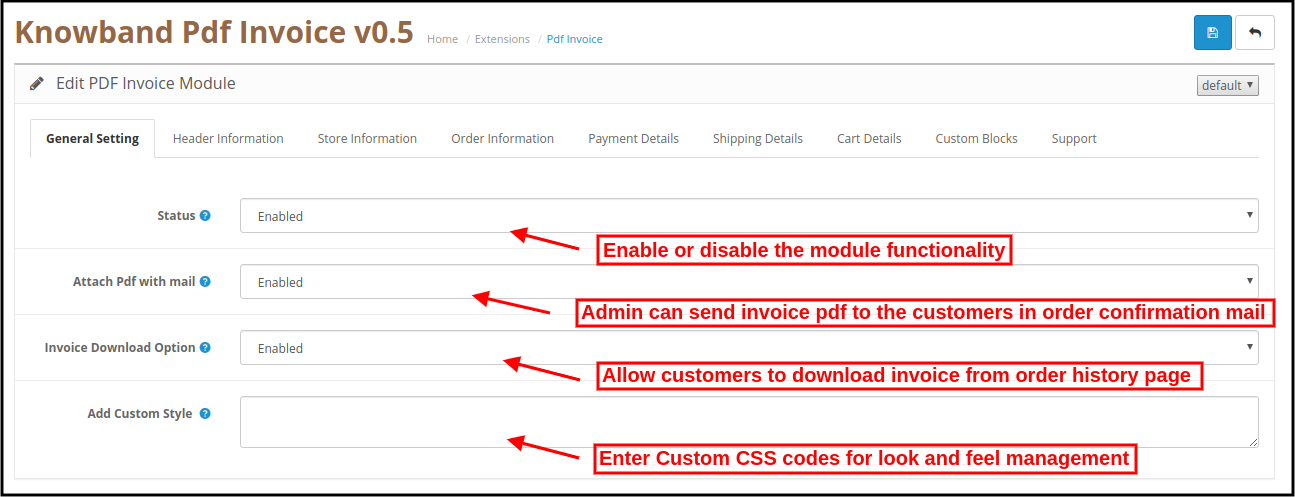
This tab contains general settings of the PDF Invoice module as shown below:
opencart-pdf-invoice-module-general-settings

  • Status: To enable the Opencart PDF Invoice plugin, switch the enable button from OFF to ON which is just to the right of the “Status” label.
  • Attach PDF with Email: Enable the option if you want to send the invoice pdf along with the order confirmation email. The online users can easily view and download the pdf from the order confirmation email.
  • Invoice Download Option: To enable the Invoice download option to Customer, switch the button from OFF to ON which is just to the right of the “Invoice download option to Customer” label.
  • Add Custom Style: To customize the Invoice, add CSS in Add Custom Style.

3.2 Header Information tab

The online store admin can apply Header information settings for pdf customization:
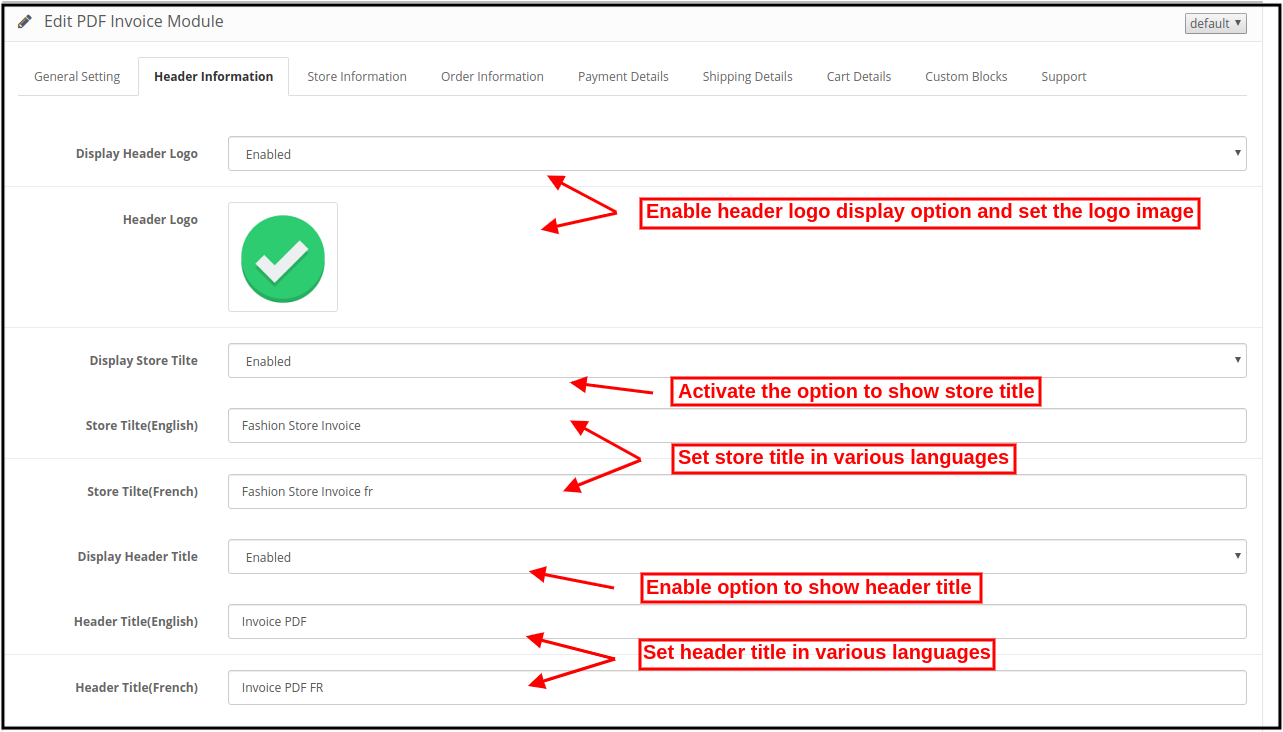
  • Display Header Logo: The Admin can enable or disable the settings for showing/hiding the header logo.
  • Header Logo: Select the image which you want to show as the header logo.
  • Display Store Title: Show or Hide the store title by enabling or disabling the “display Store Title” option.
  • Store Title: store admin can set store titles in English and French languages.
  • Display Header Title: Show or Hide the Invoice title by enabling or disabling the “display Invoice Title” option.
  • Header Title: Set header title in English and French languages.

3.3 Store Information tab

It consists of two sections. The one on the left is for Invoice and the right one is for Payslip as shown below:


The online merchant can show/hide any field just by a single click:

  • Display Store Name: Admin can show store name on invoice and payslip by selecting the “show” option.
  • Display Store Address: Admin can also show the store address by selecting the show option.
  • Display Store URL: Show/hide store URL on invoice and payslip.
  • Display Store Contact: The OpenCart pdf invoice plugin also provides an option to show store contact.
  • Display Store Fax: Admin can also show store fax details.
  • Display Store Email: Show/hide store email details on invoice pdf and payslip.

3.4 Order Information tab

It consists of two sections. The one on the left is for Invoice and the right one is for Payslip as shown below:
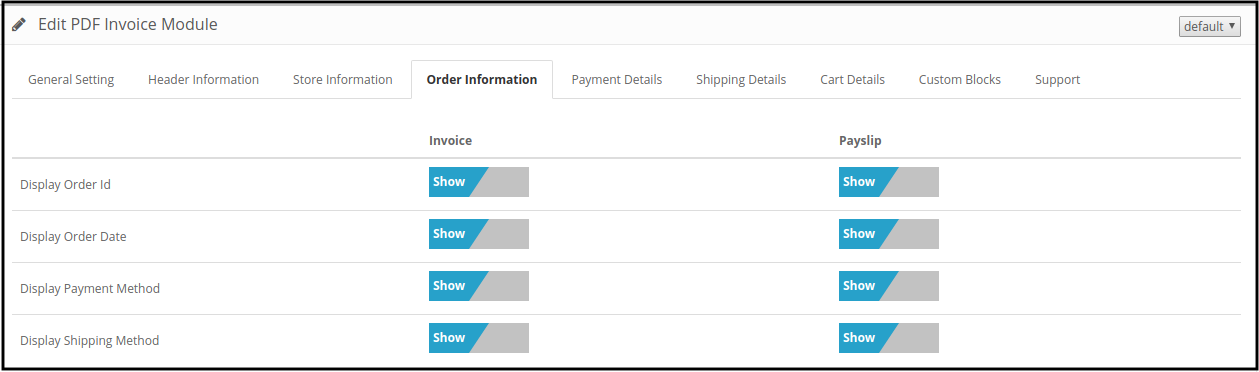
Admin can show/hide these fields on invoice and payslip by a single slide. These are the available fields:

  • Display Order Id: Select the “show” option if you want to display Order id.
  • Display Order Date: Admin can display Order date on invoice pdf and payslip by selecting the “show” option.
  • Display Payment Method: The OpenCart pdf invoice plugin allows showing/hiding payment methods.
  • Display Shipping Method: Slide to the “show” option if you want to display the shipping method.

3.5 Payment Details tab

This tab contains settings for the fields which are to be shown in the Payment or Billing Address section on the invoice page as shown below.
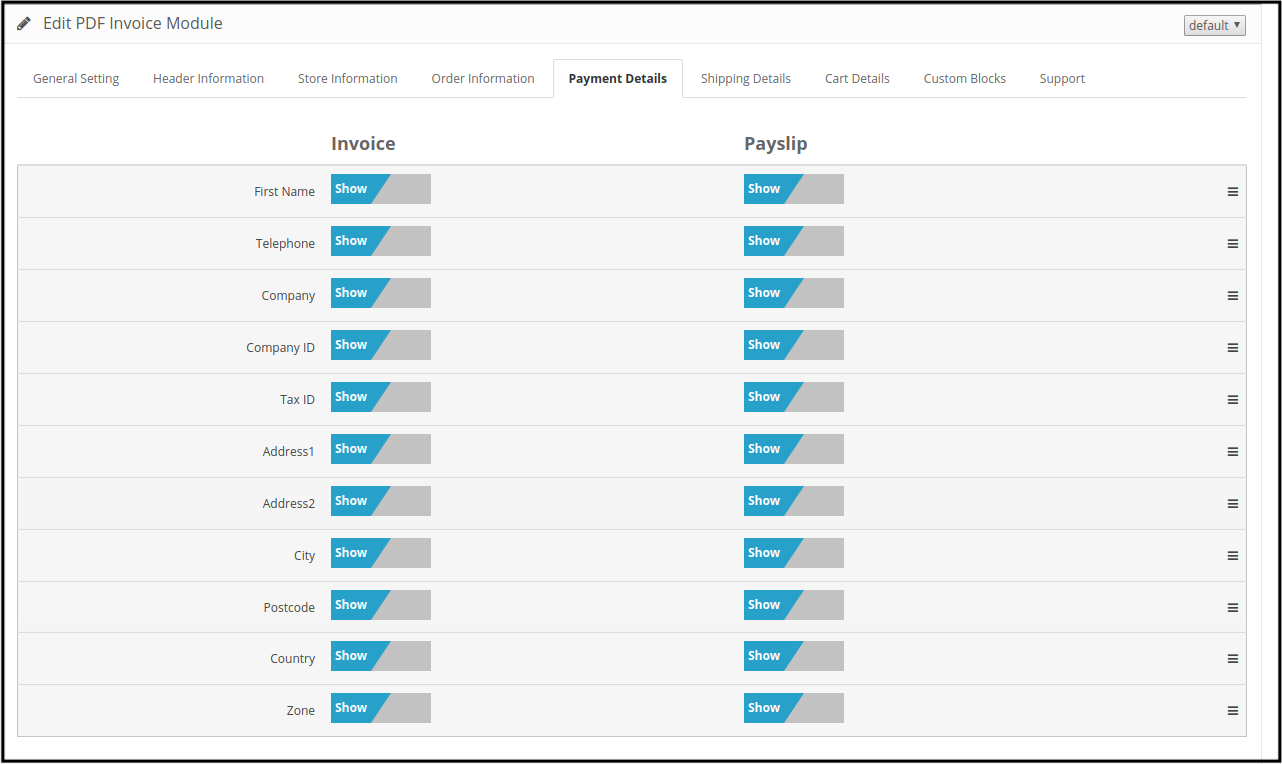

It consists of two sections. The one on the left is for Invoice and the right one for Payslip.

The online store merchant can show/hide every field for invoice pdf and payslip.

3.6 Shipping Details tab

This tab contains settings for the fields which will be shown under the shipping details tab:
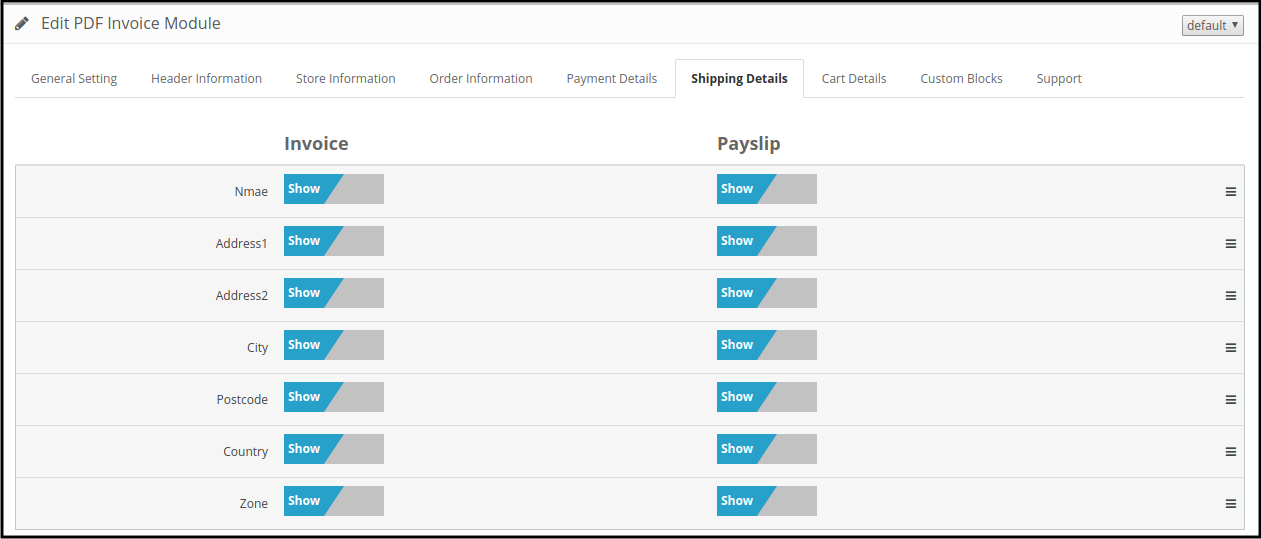
It consists of two sections ie Invoice and Payslip section. The online store merchant can select a show/hide option as per the requirements.

3.7 Cart Details tab

This tab is again divided into two sections, the left one is for Invoice and the Right one for Payslip as shown below.
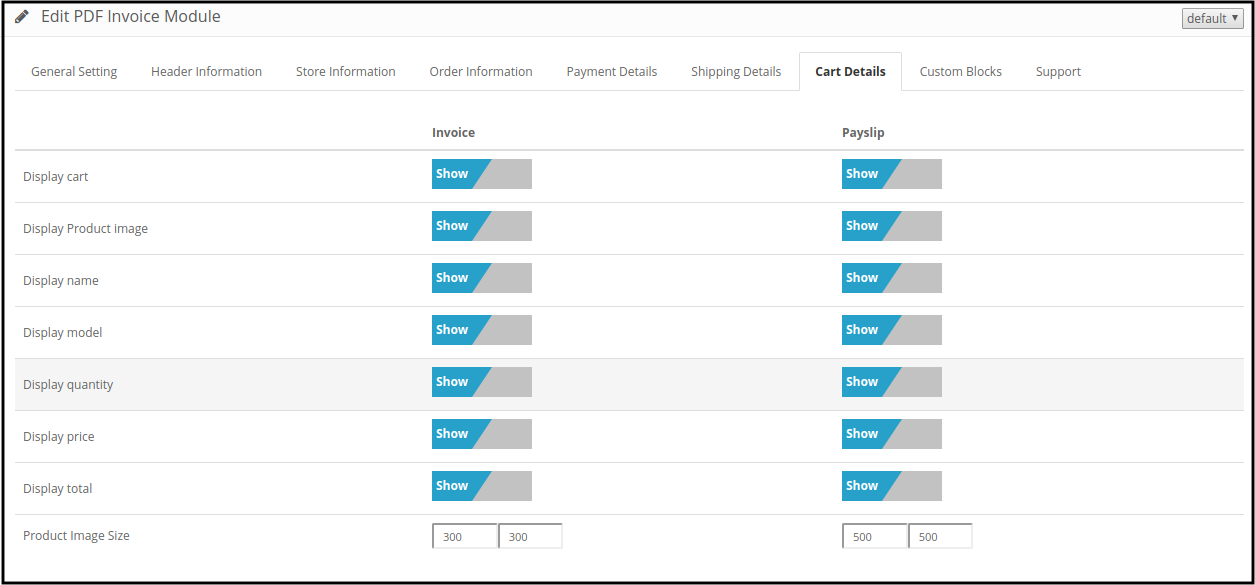

The online merchant can show/hide the field’s visibility on the invoice pdf and payslip. The eCommerce store merchant can also set the product image size specifically for payslip and invoice pdf.

3.8 Custom Blocks tab

This tab contains the Option to add HTML Content to Invoice Page as shown below. Admin can set header and footer HTML content on invoice pdf and payslip.
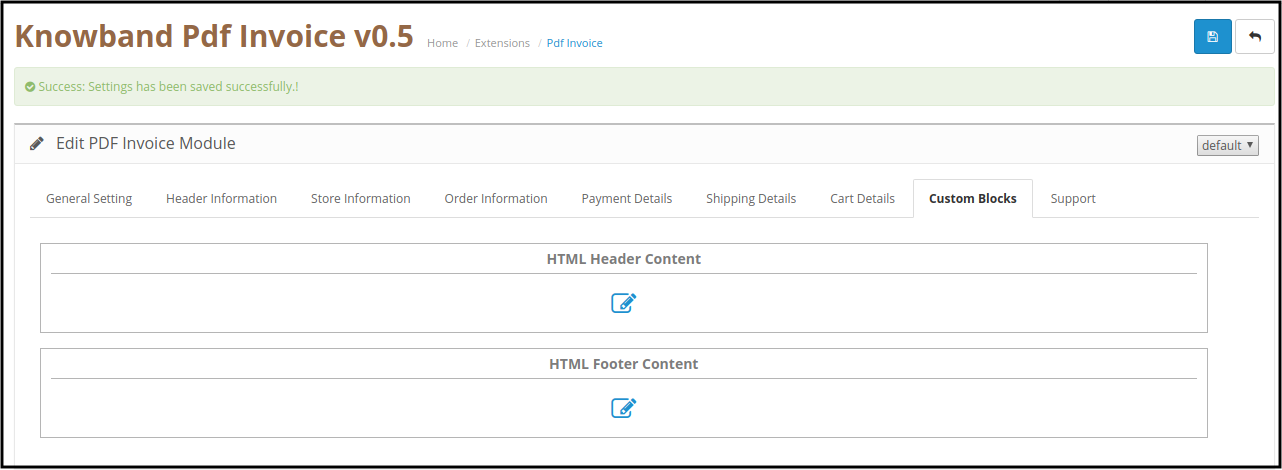
  • Click on either HTML Header Content to add additional information on the header section of invoice pdf and payslip.
  • Click on the HTML Footer Content option to add content in the pdf footer section.

Whenever you click on either button, a pop-up image will be displayed as shown below. Header Content will be displayed on the top of the invoice and Footer content will be displayed at the bottom.

3.9 Get Support tab

By clicking on the Get Support tab, you will be redirected to our support website, where you can contact our support for help. Use this tab in case you have any queries/issues or found some bugs.

4.0 Front-end Interface

In the storefront section of the OpenCart pdf invoice plugin, there are 2 features for customers.

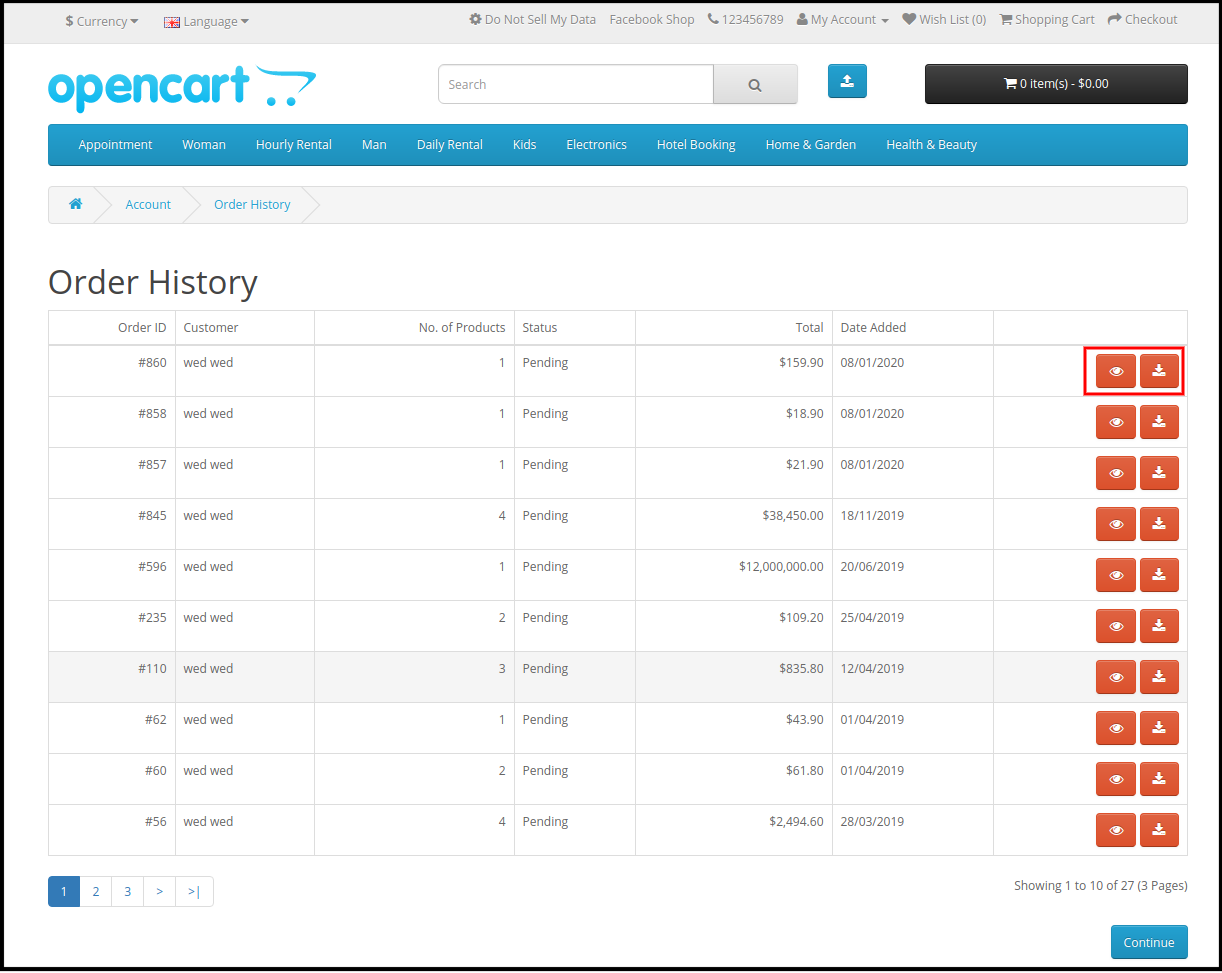
1. Download Invoice option

The online users have an option to view and download invoice pdf from the order history page.
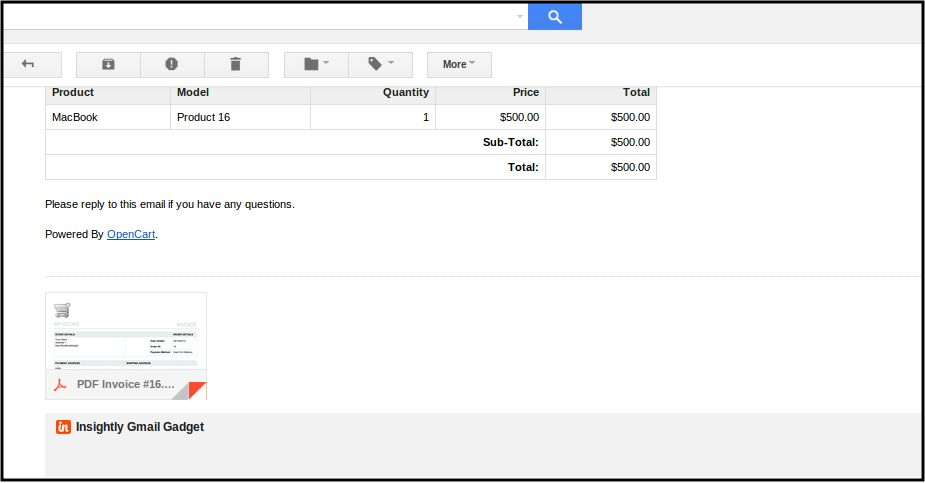
2. PDF with the order confirmation mail

The customer will receive an attached PDF Invoice with the confirmation mail.
The online store admin can also view and print any invoice pdf and payslip from the admin interface

In 3.0 Version:

The store admin can print invoices and payslips from the admin interface.
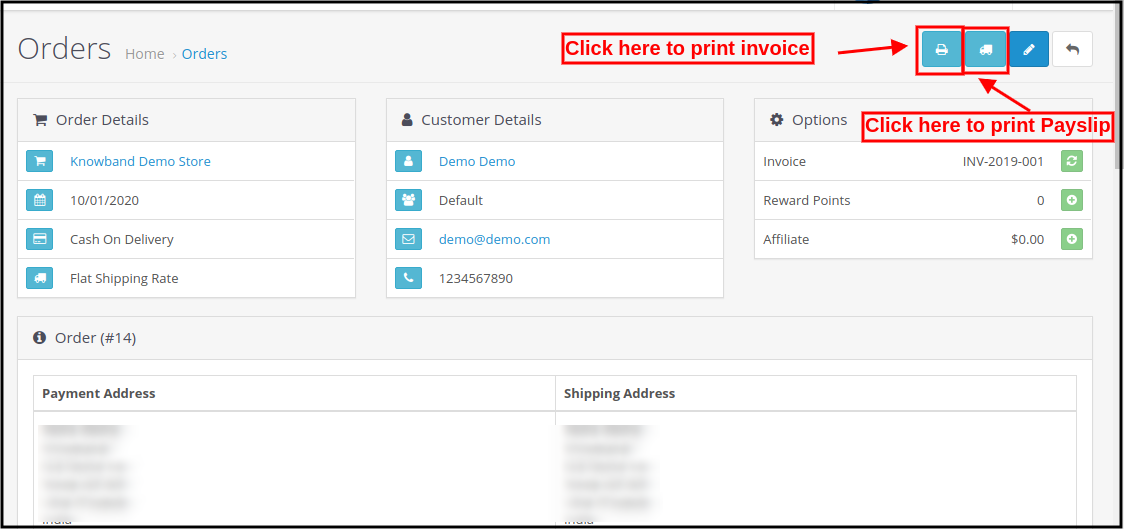
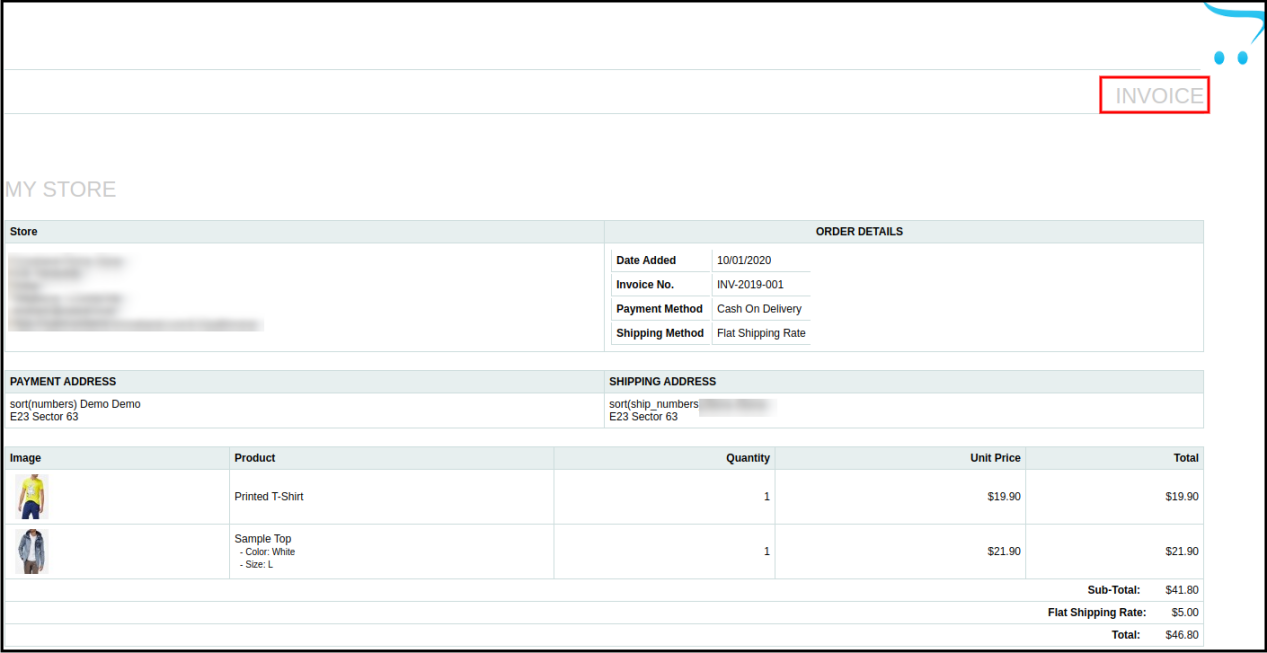
The store admin can view and print the invoice as shown below:
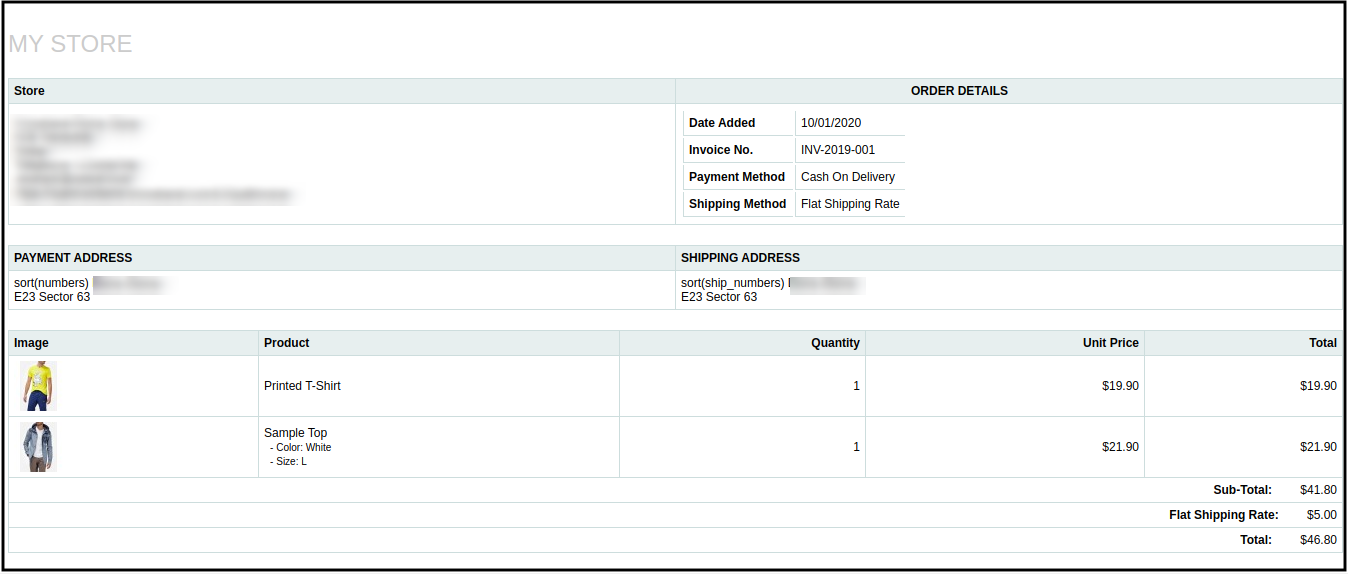
Admin can also view and print the payslip as shown below:
You can try Knowband’s Opencart PDF Invoice extension on your Opencart store. Opencart auto generates PDF Invoice plugin helps you increase customer engagement to your store and give a better user experience to your eCommerce customer.
Take your E- commerce business to new heights with the help of this Magento Google Analytic Enhanced E- Commerce Plugin

Tracking and analytics has become an important part of e- commerce organization so as to understand the mindset and behavior of the site visitors. By having a clear idea about the mindset and views of your customers, business organizations can make effective marketing strategies about their e- commerce store. Further, the launch of this Magento Google Analytic Enhanced E- commerce extension has helped the various e- commerce organizations to plan in a better way. Here are some of the brilliant features that has made this module a priced asset for various e- commerce organizations around the world.

Helps in tracking the user behavior

Now, store owners can easily track and analyze the user behavior on their e- commerce site so as to understand their intention and mindset while making an online purchase. With this crucial information, it is now much easier to make desired changes in the elements and site usability so as to grab the maximum attention of the site visitors. Further, it helps in understanding what fascinates the visitors and what immediately turns them away from the site.

Helps in maintaining the effective profiling of the site visitors

With the help of this Magento Google Analytic Enhanced E- commerce extension, it is now easier to maintain the complete profiling of the site visitors for the effective targeting. This module provides important customer centric details like location of the user, device used by the visitor, browser used for the surfing, operating system of the device used and other such information. With the availability of this information, it is now easier to persuade customers for making an online purchase by understanding their personal surfing details.

Easy integration of the Google analytic enhanced e- commerce extension into the Magento admin console

One of the most wonderful aspect of this Magento extension is that it integrates the latest Google Universal Analytic Enhanced E- commerce tool with the administration console of this Magento extension. Due to this effective integration, store owners can easily view all statistical reports and analytical data with the help of admin console. All this has happened due to the presence of Google Dashboard feature on this Magento module. It has helped the business organizations a lot in making business strategies by providing them relevant statistical information.

Provides effective information about the shopping behavior of the customers

Now, it is easier to have the entire shopping information about your site visitors. The tracking and analytics feature of this module has helped in tracking the shopping behavior of the customers by various e- commerce organizations. By studying the shopping behavior of their site visitors, e- commerce organizations can advertise their products in an effective manner so as to improve their product sales. Further, it helps in understanding what is being liked by your customers for making an online purchase and organizations can provide suggestions to their customers based on their past shopping behavior. Moreover, by studying the shopping behavior of their customers closely, business organizations can make necessary changes in their product categories and can provide relevant shopping offers so as to encourage site visitors for making an online purchase through their e- commerce store.

So, considering the huge competition in the e- commerce business segment, this Magento extension is really a great ray of hope for numerous e- commerce organizations around the world. Take your time off and surf on our e- commerce site www.knowband.com to know more about this module. You will be simply amazed by the wide range of e- commerce module displayed by our site for various e- commerce platforms like Magento, Prestashop and Opencart.

Liked This? You’ll Like These Too

Say goodbye to those annoying checkout processes with this Magento Module

With the growth of the numerous e- commerce organizations around the world, it is important to prove your e- commerce store different from the rest so as to grab the immediate attention of your targeted customers. Checkout process on an e- commerce store can easily make a difference in the popularity and preference of the store among your other business rivals. You need to have a simple, easy and user friendly interface so as to encourage your potential customers to make online purchase through your e- commerce store. If you really want to write your own success story in the field of e- commerce business, you need to pay attention to this Magento checkout extensions that can improve the performance of your e- commerce organization. Here are some of the wonderful features of this Magneto One Page Supercheckout Extension that has made it quite popular among various e- commerce organizations of the world.

Easy login facility with the use of social media

Now, customers can easily register on your e- commerce store by logging through their social media accounts on sites like Facebook and Google+. There is no need to create a new separate account for registration during checkout process. Further, guest customers can easily perform login on your site due to its wonderful login facility.

Supports multiple design layout for checkout page

With the help of this Magento Extension, site admins can easily choose the layout, design or size for presenting information on their checkout page. They can choose a table layout for their checkout page that can provide complete information on a single page checkout and thus improves the site usability. Due to this feature, customers can have an easy access to their complete checkout information on a single page which can improve user experience and user engagement on your e- commerce site.

Facilitates seamless addition of the HTML content

Due to the easy addition of the HTML content, this Magento module has become one of the most popular extensions among numerous business organizations of the world. Store owners can easily add any desired image, text or link anywhere on their checkout page so as to increase the usability of their checkout information.

So, it is time to surprise your customers by providing them a simple, clean, user friendly and elegant checkout experience on your e- commerce store. This will not only improve your conversion rates but will also give a major push to your product sales. Just surf our e- commerce site www.knowband.com and purchase this module to give a new definition to your online shopping experience.

Liked This? You’ll Like These Too

OpenCart Push Cart Promotion – User Manual

How to install OpenCart Push Cart Promotion plugin on your server

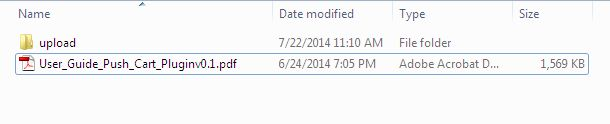
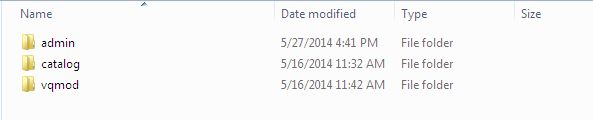
1. Download the zip from open-cart & unzip into a folder. After unzip folder structure of Push Cart -Promotion plugin will be similar to shown in below screen.

2. Open the upload directory & you will see following folder structure.

3. Login via FTP & Drag drop all the folders into your server root directory. You don’t have the change the default theme folder name to your theme folder name.
You must have VQMOD installed for this plug-in to work. If VQMOD is not installed please download and install from the here:

4. You will find the plugin ready to be installed in the Order Totals of your open-cart.

5. Click on Install link to install the plugin.

6. Delete the vqcache files from the vqmod/vqcache folder.

7. To excess Push Cart – Promotion plugin, Click on edit button in of Push Cart – Promotions module as shown below.

8. On clicking edit button the module for plugin will open. It contains navigational bar at the top, menu at the left and main content in the center as shown below.


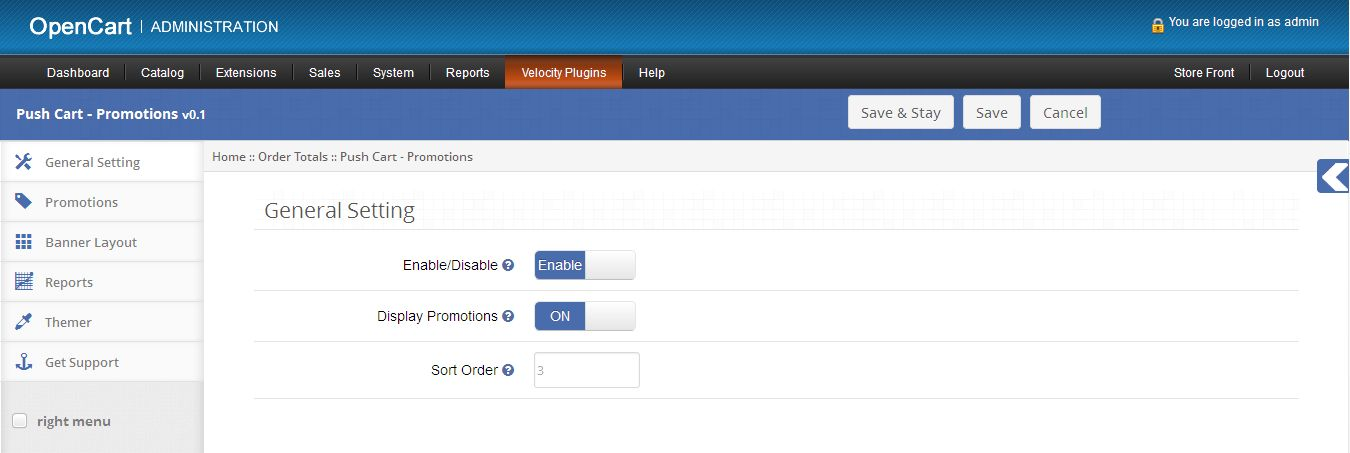
1. General Setting tab

1. To enable this plugin, switch the enable button from Disable to Enable which is just to the right of Enable/Disable label.

2. To display promotions on product and shopping cart page, set Display Promotions status to Enable.

3. To set sort order for Push Cart Promotion, provide the value in the text-box which is just to the right of Sort Order.

2. Promotions tab

1. This tab will list the details of all the promotions which exist within the system as shown below.

2. You can create new promotion, edit or delete any existing promotion from promotion list.

Add/Edit Promotion

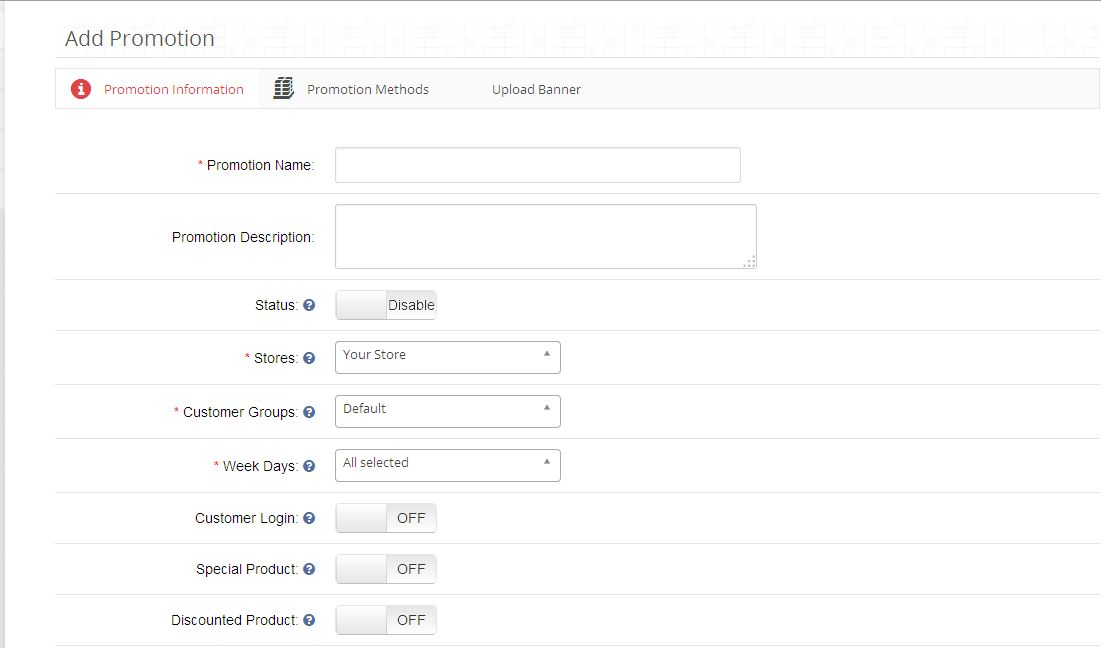
1. To add new promotion, click on Add Promotion button shown at the top of promotion list table which will display the Add
promotion form as shown below:

2. Add Promotion form consist of three tabs:

  • Promotion Information
  • Promotion Methods
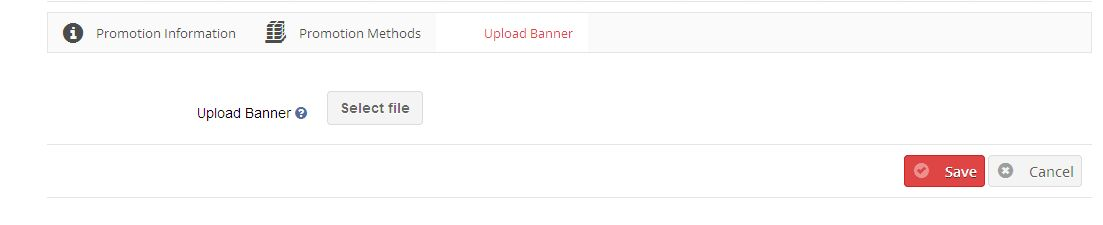
  • Upload Promotion Banner

Promotion Information

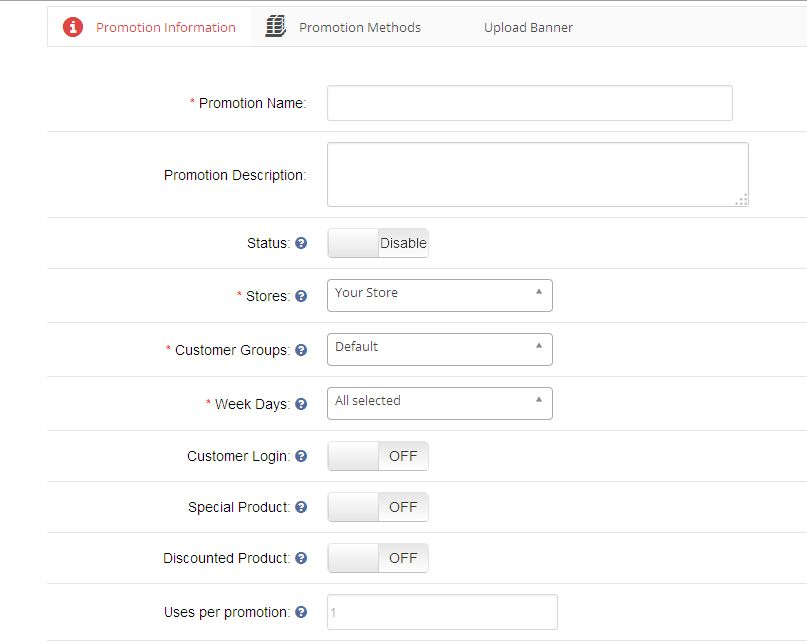
Promotion information tab consists of following entries which were needed while creating promotion:

a) Promotion Name (Required): Name of your promotion.

b) Promotion Description: Description of your promotion.

c) Status: Promotion status (Enable/Disable).

d) Stores (Required): Store to which promotion will be applicable.

e) Customer Groups (Required): Customer Groups to which promotion will be applicable

f) Week Days (Required): Week Days to which promotion will be applicable

g) Customer Login: Set if customer must logged-in to use promotion.

h) Special Products: Set if promotion to apply on special products.

i) Discounted Products: Set if promotion to apply on discounted products.

j) Uses per promotion (Required): Define the limit for number of times promotion can be used by all customers. Set 0 for unlimited.

k) Uses per customer (Required): Define the limit for number of times promotion can be used by single customers. Set 0 for unlimited.

l)Start Date (Required): Define the start date for promotion.

m) End Date (Required): Define the end date for promotion.

n) Sort Order: Set sort order for promotion.

Promotion Methods

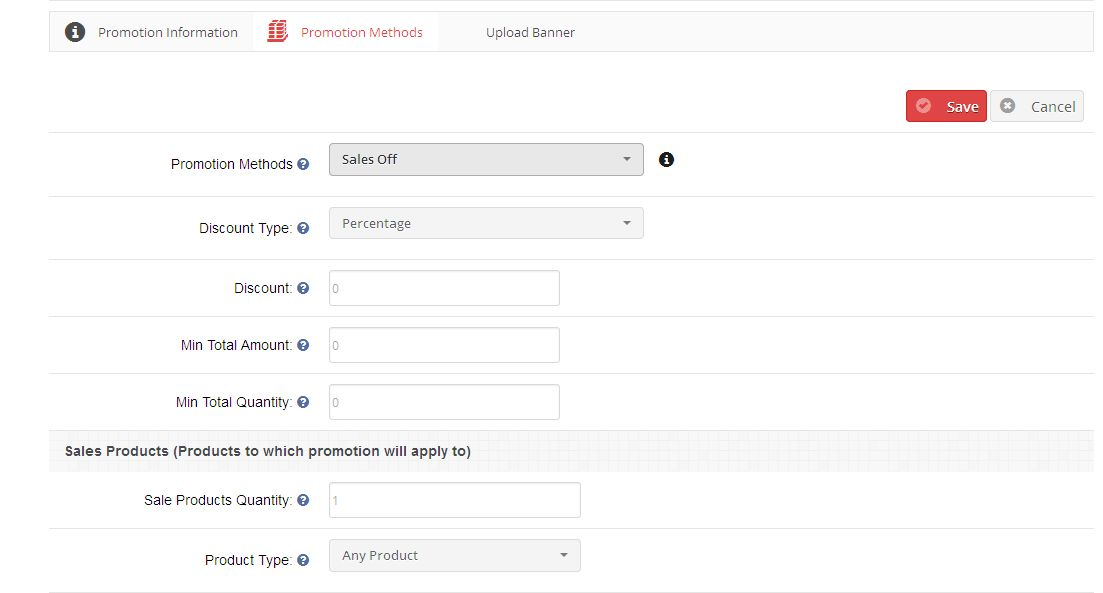
Promotion methods tab consists of following entries which were needed while creating promotion:

a) Promotion Method (Required):
To create promotion within the system, promotion method type must be selected from the following promotion methods:

1) Sales Off
With this promotion method, you can create promotion to provide discount on sales products.

Example:
a) Buy product X and Get 10% off on product X
b) Buy product X and product Y and Get 50% off on product X and Y

2) Buy X and Get Y
With this promotion method, you can create promotion to provide discount on promoted products. Example:
a) Buy product X and Get product Y free
b) Buy product X and product Y and Get 50% off on product Z

3) Spent $X more and Get $Y Off
With this promotion method, you can create promotion like “Spent $X more with product X andGet 50% off on product X”.

4) Cheapest product free
With this promotion method, you can create promotion to provide discount on cheapest productin cart. Example:
a) Buy products X, Y and Z and Get 40% off on cheapest product

b) Buy products X, Y and Z and Get cheapest product free

b) Discount Type: Select discount type (Percentage/Fixed). Default will be percentage.

c) Discount (Required): Provide the discount value. (Discount will be applied product price).

d) Min Total Amount (Required): Set the minimum cart total that must be reached to use promotion.

e) Min Total Quantity (Required): Set the minimum cart quantity that must be reached to use
promotion.

f)Sales Product Quantity (Required): Define the sales products quantity. (Required with promotion methods Sales Off & Spent $X more and Get $Y Off)

g) Product Type: Select product type ( Any/All Product ). ( Any product – Discount to be applied if anyone of selected products was present in cart, All Products – Discount to be applied if all selected products was present in cart).

h) Spent Amount (Required): Define spent amount. (Required with promotion method Spent $X more and Get $Y Off)

i)Buy Product (Required): Select buy product with quantity (Required with promotion method
Buy X and Get Y).

j)Get Product (Required): Select get product with quantity (Required with promotion method Buy X and Get Y).

Promotion Banner

Promotion banner tab consists of following entries which were needed while creating promotion:

a) Upload Banner (Optional): You can upload a banner with a promotion which is to be shown on store.
To show promotion banner on store refer Promotion Banner Tab.

3. Banner Layout tab

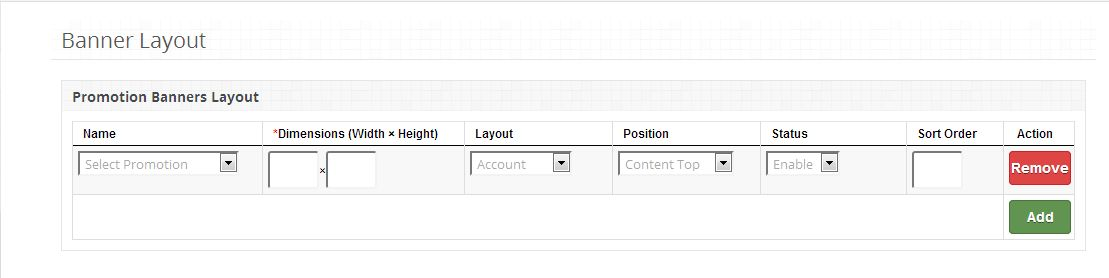
1. This tab will list the details of all the promotion banners which exist within the system as shown below.

2. You can add new banner or remove any existing banner from promotion banner list.

3. You can define following fields for Promotion banner:

a) Banner Layout: Select the promotion from the list having banner which is to be shown on store.

b) Dimension (Width*Height): Define the dimension (width*height) for banner to be shown on store.

c) Layout: Set the layout for banner (Page on which selected banner to be shown).

d) Position: Set the position for banner.

e) Status: Define the banner status. (Default will be enable)

f)Sort Order: Set the sort order for banner.

4. Reports tab

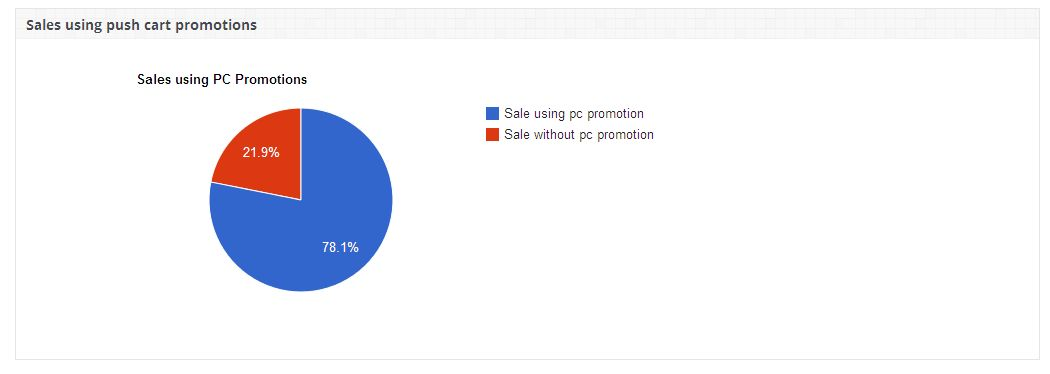
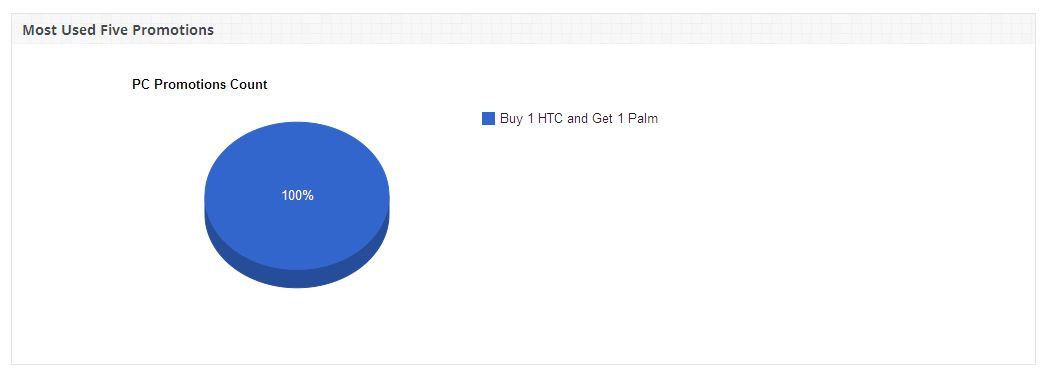
1. Promotion reports tab consist of three charts to show the graphical representation of promotion being used which in the system:
a) Sales using Push Cart Promotion :
This chart provides the estimation of total sales made using push cart promotion with respect to sales without push cart promotion.


b) Most Used Five Push Cart Promotion :
This chart shows the most used five push cart promotion among all the promotions within the system.


c) Daily Used Push Cart Promotion :
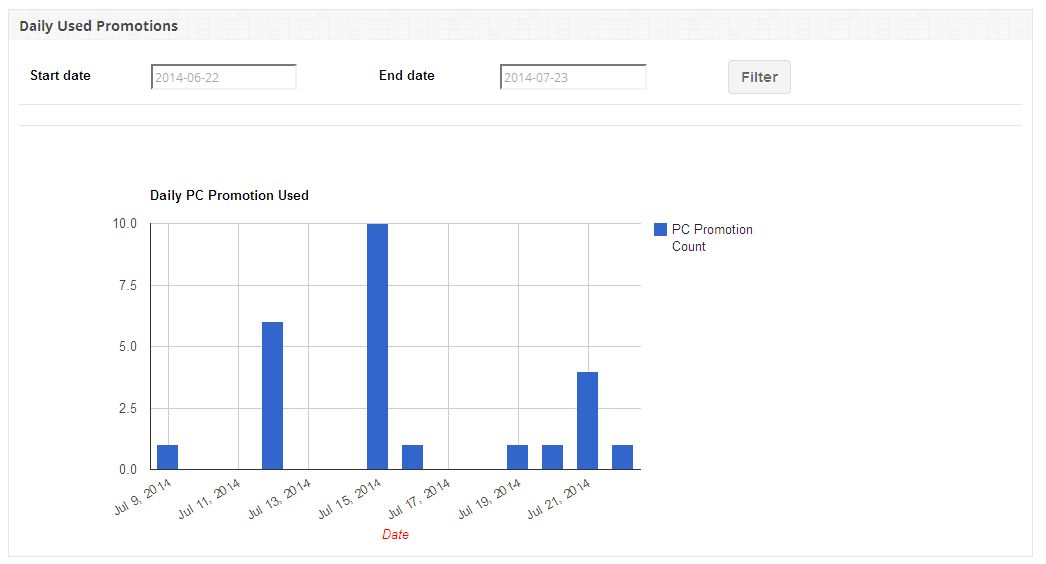
This cart shows the number push cart promotion used on daily basis. You can get number of push cart promotion used within the specific dates using filter.


Promotion on Stores

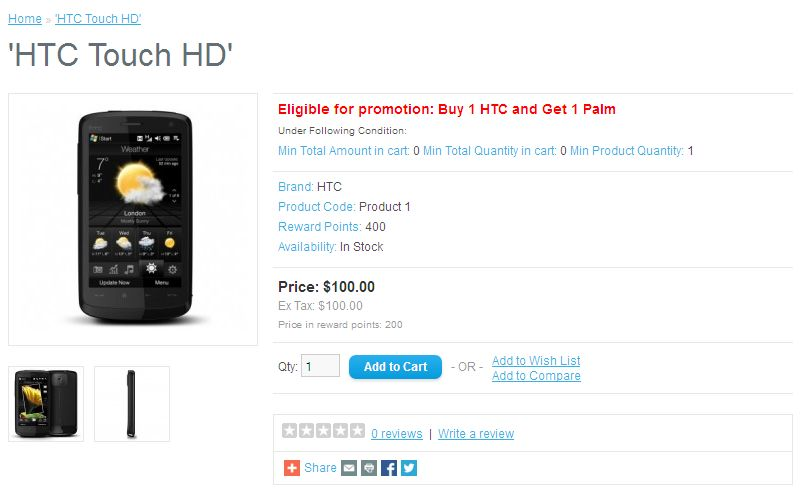
1. Promotion will be shown on products page with following terms and conditions:

a) Min Total Amount: Minimum total amount that must reached to use promotion.

b) Min Total Quantity: Minimum total quantity that must reached to use promotion.

c) Min Product Quantity: Minimum product quantity that must reached to use promotion.

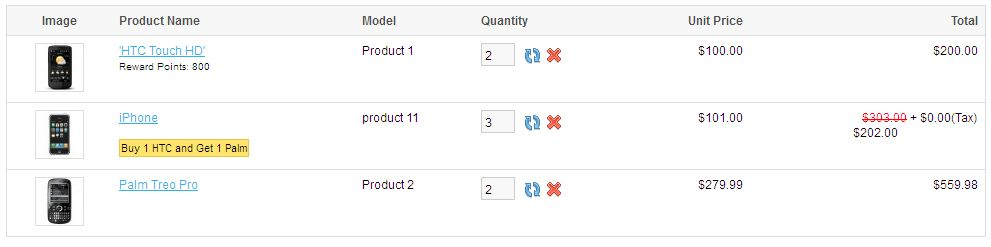
2. Promotion applied to any product in cart will be displayed shopping cart page, order total ,checkout page as shown below:

3. If promotion exists on any product in cart then push cart shown below will be displayed on shopping cart page which will allow user to add discounted products more easily into their shopping cart.

Put an end to login related issues on your site with the help of this Magento Facebook Login Extension

Business organizations often need customer login on their site as to gather important customer details and to target them more effectively based on their email address and login details. However, this whole exercise can be a challenging task if your login process is very complicated and time consuming. This will not only prevent your business organization from acquiring important customer details but will also affect your conversion rates to a great extent. Although, there are various e- commerce Magento extension that can help you in this task but Magento Facebook Login is special among them due to its wonderful features. Let us take a look at the different functionalities that makes this module the smartest choice for numerous business organizations around the world.

Provides easy login facility with social media site like Facebook

Often, customers on an e- commerce site are asked for unnecessary details and encounter frequent redirects which makes it difficult for them to complete the entire login process. Due to this, customers leave these sites in the middle and do not show any active interest towards registration process. But, this whole situation has now changed with the quick and easy login facility through Facebook accounts. Customers don’t have to create any separate email account for the login process and can complete registration process through their existing Facebook accounts.

Works perfectly with various popular browsers

Now, customers don’t have to search for any updates and extension for their browser as this Magento module supports various popular browsers like Chrome, Internet Explorer, Firefox and such others. Customers can easily use this module on any browser of their choice without taking any tension about its functionalities.

Has compatability with different versions of the Magento e- commerce platform

One of the fascinating feature that makes this extension the most valuable among various available Magento extension is its effective compatability with different versions of the Magento like 1.7, 1.8 and 1.9. So, it doesn’t matter on which Magento version your e- commerce site is developed, the module will provide same level of functionality and features to your e- commerce site customers.

Comes with additional backing of other important features

The module is designed in such a way that it doesn’t provide any hinderance in the functioning and working of any other existing module on your e- commerce store. There is no issue of any sort of conflict between the various extension installed on your site as this Magento module works independently from every other available module. Apart from this, buyers of this module are provided extra attention by providing effective free technical support assistance for any issues related to the functioning and installation of this Magento Facebook Login Extension. Customers can inform about their issues by opening this link and can create new ticket for their extension related issues. Our skilled technical team will actively support you with your problems and will provide you speedy resolutions. Customers can also check the status of their previously created ticket about their earlier issue so as to be familiar with the developments that have taken place in the whole scenario.

E- commerce organizations can take a huge sigh of relief as they don’t have to face any registration related issues on their e- commerce site again with the arrival of this Magento module. It is definitely a huge booster for registration process on your e- commerce site and can achieve active participation from your e- commerce customers.

Liked This? You’ll Like These Too

Redefine your subscription based requests with the support of this Magento Auto Subscribe Extension

Customers as well as the store owners are often at the receiving end if the subscription forms are not user friendly and simple. It not only makes customers reserved for sharing his/her personal details but also prevents effective utilization of the email marketing strategies by numerous e- commerce organizations. This can have an adverse effect on your customer engagement efforts and can cause a major setback to the establishment of healthy company- customer relationship. But, thank God, all this can be avoided by taking the expertise of this Magento Auto Subscribe Extension for your e- commerce store. Here are some of the features of the Magento auto subscribe extension for subscription that will pay you rich dividends in terms of conversion rates and increased site traffic.

Provides customization facility regarding email templates

Personalized emails play a crucial role in spreading your message among your customers in the best possible way. With the help of this Magento auto subscribe extension, site admin can insert desired content like logo, image, text, color and other such element so as to make their emails more vibrant and for conveying a stronger message about their business organization.

Supports easy access to the contact information of your customers

With the help of this Magento auto subscribe extension, it is now easier to synchronize the Magento newsletter list with the constant contact list of your email reporting system. By providing top notch information about your email responses, this Magento auto subscribe extension can greatly improve the email marketing efforts of your e- commerce organization.

Provides option of creating customized subscriber form for your customers

The Magento auto subscribe extension provides additional functionality to store owners for creating their own customized subscriber form for their business organization for getting increased subscription. You can choose the desired color, text, description and layout for your email subscription form so as to encourage your customers for subscribing on your e- commerce site.

Now, everything is much simplified and easier with this Magento auto subscribe extension and customers on your site will not be frustrated with those unwanted subscription forms. Further, Magento auto subscribe extension will improve your promotional email marketing efforts and will consolidate your market gains and product sales. So, don’t take chances any more and purchase this Magento auto subscribe extension from our e- commerce site, www.knowband.com for getting increased customer attention towards subscription related requests.

Related Stories:

Beginning of a new era of easy checkout process with the emergence of Magento One Page Supercheckout Lite Module

Gone are those days when the customer on your e- commerce site used to complain about the lengthy and time consuming checkout process on your website. This is because everything has become much simplified and faster with the emergence of this Magento One Page Supercheckout. Its brilliant features has made it one of the most popular Magento checkout extensions among numerous e- commerce stores. Here are some of its mind blowing features that has made the lives of numerous online shoppers and store owners much easier.

It comes equipped with feature rich admin panel

With the presence of numerous options on the admin panel, store admin can easily manage their whole e- commerce store effectively. They can easily make desired changes in the layout, content, theme and design of their website based on the requirements of their business organization. Apart from this, store admin can make certain fields mandatory in the checkout process and can simultaneously enable/disable fields so as to simplify the whole checkout process.

Facilitates easy installation and configuration of the module

One of the best point about this Magento module is that it can be easily installed and configured by any individual with a minimum technical know how. This minimizes the requirement of any external technical support during the whole installation and configuration of this checkout extension. All this can be single handedly done by a person who is capable to work on the computers.

Consists of Ajax based checkout process for Magento based e- commerce stores

The checkout process of this extension is based on ajax which means that there is faster sharing of the information between client side and server side without the need for the frequent reloading of the whole web page. Due to this, the checkout process doesn’t require redirects and the necessary information is effectively shared between the involved parties for a faster completion of the payment process.

Has free installation guide and support for helping out the customers that are in distress

Inspite of the easy installation, there are few customers who are unable to perform the required instructions in a right way during the installation process and often end up in the middle of the installation process. To assist these types of customers, this module has free installation guide that can provide a step by step guidance during the installation process. Further, you can also take the help of our free technical support by our helpdesk link https://www.knowband.com/helpdesk. Through this help desk, customers with a issue can create a new ticket about their problem and can also check the status of their ticket regarding their pending technical issues.

It is high time to address the long pending checkout related issues of your site visitors through this Magento module. Also, you do not need to think about your budget anymore as this module is absolutely free. Further, if you want to add any other functionality on your e- commerce store, you just need to surf our e- commerce site, www.knowband.com to look out for other extensions related to Magento, PrestaShop and OpenCart platforms.

You Might Also Like:

Make business strategies for your E- commerce organization with the help of this statistical information

For preparing business strategies and to take business decisions logically, you need to take the help of various statistical based information. This statistical information will help you understand what are the core areas of your business organization where you are lagging and which areas require your immediate attention. With the integration of the latest Google Analytic Enhanced E- commerce, this Magento extension has become more valuable for various business organizations of the world. Some of the features of this module that has increased its demand and has made it one of the top 5 Magento extensions are as follows:

Provides complete information about the orders made by customers

Now, store owners can easily track any order made by the customers by closely monitoring all order transactions made through their e- commerce store. Due to this information, it becomes easier for the business organizations to track and manage every other order which interns avoids situation like missing orders. Further, business organizations can easily track the order coupons so as to manage customer orders in an effective manner.

Helps in preparing effective business strategies for each product lists

Due to the availability of the statistical information about various product categories, business organizations can easily decide which product categories are getting special attention and maximum sales and which product categories are unable to make a significant push in their sales. With this information, it becomes much easier to prepare individual marketing strategies and promotional offers for each product category based on their product sales. Thus, with this extension, business organizations can easily take their lagging product categories to the top of their most popular product categories.

Facilitates easy checking of the analytical reports and properties associated with the Google Analytic account

Due to the effective integration of the latest Google Universal Analytic Enhanced E- commerce module, business organizations can easily check all their statistical reports and views through the admin console of this Magento extension. It has simplified the checking of the Google Analytic based reports and views much easier and this wonderful feature clearly explains why it has become one of the top 5 extension among the various e- commerce organizations. With the help of these detailed statistical reports, business organizations can frame their business and marketing strategies more effectively.

Helps in tracking the checkout behavior of site visitors

Business organizations can provide an effective shopping experience to its targeted customers by tracking the checkout behavior of its site visitors. By having a detailed information about the checkout behavior of your customers, you can easily decide what are the sore points in website payment process that is causing the customers to abandon their shopping carts. This Magento module provides crucial information like which customers are the frequent shopping cart abandoners, payment options that are most preferred by the customers, shipping delivery options that are most popular and other such data so as to improve the online shopping experience and to improve the future engagement of the site visitors on your e- commerce site.

These are some of the wonderful features that has made this module as one of the best extensions in the Magento development family. If you want more information about this module or any other e- commerce module, you can surf on our site www.knowband.com. So, add this extension to your site and see the tremendous improvement in your conversion rates and product sales.

Related Stories:

Enhance the customer interaction on your E- commerce store with the assistance of Magento Module

It is important to provide your site visitors something extra so as to grab their attention towards your e- commerce store. Initiating communication in this direction can make your customers hooked onto your e- commerce store for a long time and can contribute significantly in improving your conversion rates to a great extent. To accomplish this task, creation of an interactive blogging environment can help a lot in fostering the stronger customer- company relationship. With the help of this extension, you can easily publish, view, create and edit blogs on your Magento online store so as to encourage your site visitors to share their views on your e- commerce site. Here are the few wonderful features of this Magento e- commerce module that has made it most popular among various e- commerce organizations of the world.

Easy installation and configuration of the module

One of the prominent reason for this ever increasing popularity of this extension is that it can be easily installed and configured by any individual with minimum technical knowledge. You don’t need to be proficient in any of the programming language for the effective installation of this extension as it only requires a minimum understanding and operating of the computer system.

Consists of responsive front end for adapating to various computing devices

This Magento extension is built on the responsive web design so as to be adapative to numerous computing devices like desktops, laptops, smart phones or tablets. It can be easily accessed and used by the user on any device without any performance related issues. It provides the same level of functionality, options and user experience on any of the computing devices used by the customers.

The interface has blog widgets that helps in searching blog posts, recent posts and parent categories

This e- commerce Magento based extension comes in the form of blog widgets that helps in the effective searching of the blog posts, recent posts and parent categories. Site visitors can easily navigate between various blogs through its interactive user interface and there is enhanced seamless search facility for quick viewing of any posted blogs on the site.

Helps in mediating the approval or disapproval of the commenting system

With the help of this module, store owners have now extended freedom to decide the posting of the comments on their blogging system. They can now easily approve or disapprove the comments made by the user so as to ensure that only relevant comments are posted on the site and the commenting facility is not misused by anyone.

So, it is really a brilliant move to establish an effective communication between your e- commerce organization and your targeted customers. Also, you don’t have to pay any price for this extension as it is available free of cost. Make haste now and don’t get laid back so as to improve your customer interaction for increasing your product sales and conversion rates. Just surf our e- commerce site, www.knowband.com and add this extension to your e- commerce store as early as possible.

You Might Also Like:

Improve the social reputation and image of your business organization with Magento Module

Increasing customer reach and business impact of the social media can’t be ignored in any way as platforms like Facebook has a user base of more than 1.2 billion which means that you have a chance to spread the positive word about your e- commerce organization through your loyal social media customers. As, people from different ethnicity, regions, linguistic backgrounds are using a common social communication platform, so you can now have a diverse customer base for your products so as to increase your global value and reputation. Further, this Magento Social Login module has made the social media login facility much simplified so that users on your e- commerce site can easily login to their social media accounts. Here are some of the features of this e- commerce Magento extension that can help in enhancing the social reputation of your business organization.

Supports multiple computing devices used by the customers

This module is built on the responsive web design which means that this extension can be easily used on different devices like desktops, laptops, smart phones or tablets. The user don’t have to install any additional upgrade or extension for this module so as to use its features on different computing devices.

It helps in tracking the customer social media accounts through reports

Now, store owners can easily track the most popular social media accounts of their e- commerce customers based on the reports generated by this extension. Further, it helps in analyzing the entire history of the customers by tracking the number of users who have logged in and registered on your site through different social media accounts.

Provide functionality to admin to make desired customization in their social media icons

With the help of this Magento extension, store admin can easily implement desired changes in their social media icons on their website. It allows admin freedom to display and sort their social media icons either vertically or horizontally on their e- commerce site with the help of simple drag and drop feature. Apart from this, site admin can also make customization in the social bar heading and the text of the login link.

So, move ahead and grab this one time opportunity to increase the social reputation and presence of your business organization with the help of this module. You need to spend a little amount on the purchase of this extension through our e- commerce site, www.knowband.com and can increase the social engagement of your site visitors for improving your conversion rates and product sales.

You Might Also Like: