9 Checkout Conversion Killers Driving Your Buyers Away

An eCommerce store owner observes maximum cart abandonment when a buyer reaches the checkout page. What factors are responsible for cart abandonment and acting as conversion killers? Talking about the statistics, it is been observed that sixty-nine out of a hundred people abandoned their cart on the checkout page.  Optimizing your checkout process is as important as the website optimization.

There might be many visitors to your blog posts or product pages. But, are they giving you any business? If not, then below are 9 most common checkout conversion killers that drive your customers away.

1.     Mandatory Registration during Checkout:

Forcing your customers to set up an account before they can complete their transaction could kill your conversions. Therefore, make sure that your website always allows customers to shop as visitors without having to register.

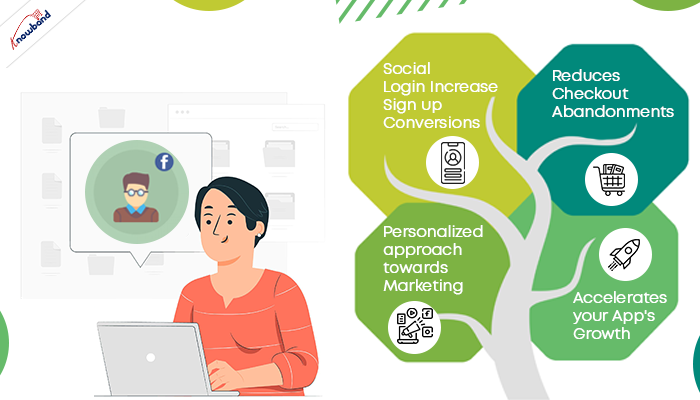
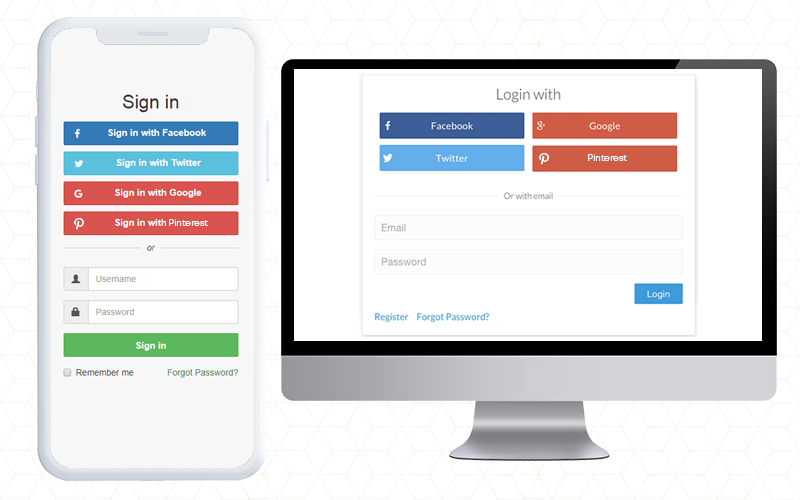
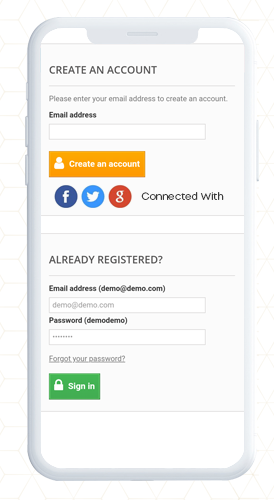
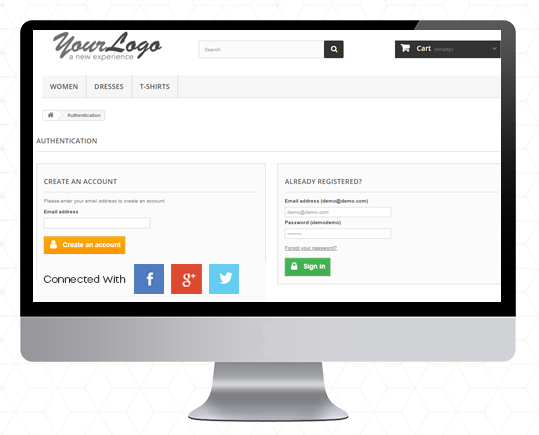
You can provide them guest checkout facility or social login option which will make it easier for them without taking much time.

2.     Long and complicated Process:

Nothing is more irritating than filling in super-long forms with complicated fields before you make a purchase. Stop enticing consumers to buy additional items with pop-ups. They sometimes interrupt the checkout process and end up doing more damage than good.

So make your signup form simple and quicky. Make sure that they include relevant drop-downs, radio buttons, and an indication of optional information. Most importantly, hold field labels so that consumers can quickly fill out what they need.

3.     Lacking or Weak Product Details:

It’s just profanity! How do you picture someone buying from you when you don’t have a convincing, thorough explanation of the product. Forget about that. Online shopping is like an impersonal activity. The best way to persuade a customer to buy is through words and amazing images! Start putting some bewitching images to your product description for not making your customers head off.

4.     Never-ending loading time:

Do you like waiting for someone or something? Neither you nor is your customers would like that. Optimize your checkout page for speed. Analyze and cut off the extra fields and graphics from the page which can be a conversion killer. Long loading time will demotivate your customer and encourages them to leave the site.

5.     Lack of payment options:

You can provide several payment options already available for the checkout. The mode of payment is a necessary element to focus on. In the competitive market place you must have an online payment option but having multiple modes can be advantageous. You can put some common secured payment options on your checkout page. Payment gateways provide encryption to keep your customer’s information secure. It provides a more streamlined and convenient experience for them — especially on mobile devices.

6.     Not being mobile-responsive:
A growing amount of online transactions are taking place over mobile devices. Almost any way you look at the numbers, millennials are more open to accepting and more likely to participate on mobile devices than their older counterparts. Customers who shop on their smartphones and tablets have less time than they do on desktops. Buttons need to be bigger and easier to reach, shape fields need to be minimized to speed up the checkout process, and labels and text need to be clearly visible. Ensuring that the checkout process is designed for mobile shoppers is important. You can lose many if your website doesn’t work well with mobile.

7.     Extra Shipping and Hidden Costs:

Imaging, you are buying something online. The product costs $20 and then you move to the checkout page where you see the cost raised by $5. This was the cost they were charging as taxation. You will be discouraged and might leave the checkout process immediately.

If you don’t reveal all the expenses in advance, you’re turning your customers away. 23 percent of customers cancel their purchases because they do not realize the additional costs in advance. Therefore, make sure that you display all costs right on your product page to make the customer experience easier. If you are charging extra for shipping, make sure to highlight it with the product cost on the product page. This can be a conversion killer and will add another order to your abandoned cart list.

8.     Not enough Product reviews:

Product reviews are an essential part of the branding and marketing of an online store. They help create trust and loyalty, and they usually define what sets the goods apart from others. Reviews help your store increase sales, and you can persuade customers to leave more of them. When the comments are found to be credible and correct, they will most certainly listen to them.

9.     Website isn’t Secure:
Customers don’t always like using their credit cards online, so it can be even more difficult if you’re a new small business that still builds confidence in your audience. As an online retailer, you need to make customers feel comfortable about the security of your checkout process. The positive thing about incorporating PayPal Checkout is that PayPal is an internationally recognized payment brand.

A simple mention of secure payment on the payment section will reassure your buyers that there won’t be any foul play.

Final Thoughts:

In order to stop cart abandonment, you can install a checkout module to your eCommerce store which will be incorporated with all the important payment gateways, customizable fields, social login options, and much more. By adding One Page Checkout addon to your store you can get rid of all these conversion killers. Knowband offers One Page Checkout modules for PrestaShop, OpenCart and Magento stores.

One Page Checkout – PrestaShop Addons

One Page Checkout Pro – OpenCart Extensions

One Page Checkout – Magento ® Extensions

One Page Checkout – Magento 2 ® Extensions

Could you think of any other checkout killers that can scare consumers away? Please let me know in the comments below.

You May Like To Read:

Benefits of Having Multiple Payment Options on the Checkout Page

10 Tips to Double Your eCommerce Conversions in 2020

One page checkout for eCommerce stores, Is it a one stop solution for all your issues?

All you need to know about PrestaShop Advanced One Page Checkout

Best extensions for OpenCart store to boost Holiday sales

OpenCart is undoubtedly one of the fastest-growing bizarre e-commerce sites. Flexibility, functionality, and ease of use are great. Moreover, the broad variety of customization options available to create personalized customer experience is the key reason why OpenCart is the first choice for most business owners and e-commerce entrepreneurs.

It is an open-source platform and there are plenty of free and paid extensions available for OpenCart websites. These extensions can provide you with excellent customer conversions, good customer retention, and an amazing user experience.

The last quarter of the year is about to begin. This is the best time to add these extensions to your eCommerce store which can boost your overall sale this holiday season. ‘Knowband’ provides many extensions that can help you with multi-channel selling improve customer experience, boost customer conversions, and much more. These exiting modules will increase your sale in the 2020 holiday season. Let’s have a quick understanding of extensions which can benefit you as a store owner.

This holiday season start New Services at your eCommerce store

To increase your turnover you can start providing new services on your eCommerce store. These days renting over the buying trend is on a boom. Every individual wants to buy or gift personalized kinds of stuff. Some of the extensions you can add to your store for providing new services are discussed below:

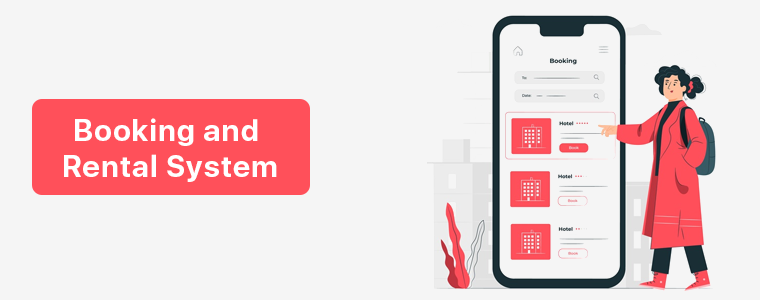
1. Booking and Rental System:

With Booking and Rental System – OpenCart Extension installed in the eCommerce store, the online merchant allows online users to fix an appointment, book hotel rooms, and book daily or hourly rental products. During the holiday season, people often rent costumes and vehicles. Renting a product can be a productive idea from both vendor and marketplace owner.

With the help of Knowband’s OpenCart Booking and Rental System Extension the online merchant can offer these facilities on the website:

  • The online merchant can offer booking and rental facilities
  • Showcase location on the booking/rental product pages
  • Offer hotel booking facility
  • Showroom details
  • Allow fixing appointments
  • Offer to book daily/hourly rental based products like cars, bikes, and even costumes.

The product features and details are available on the Knowband shop. Click here link to know more about this very useful extension.

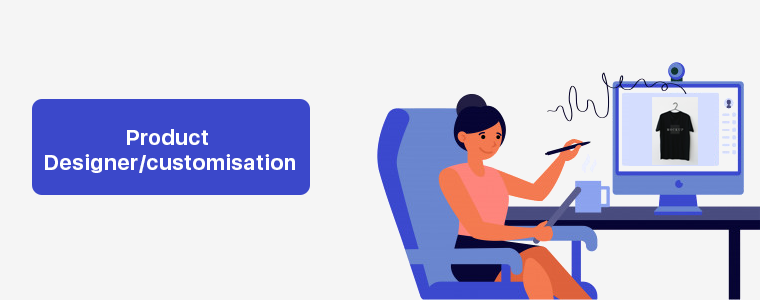
2. Product designer/customization:

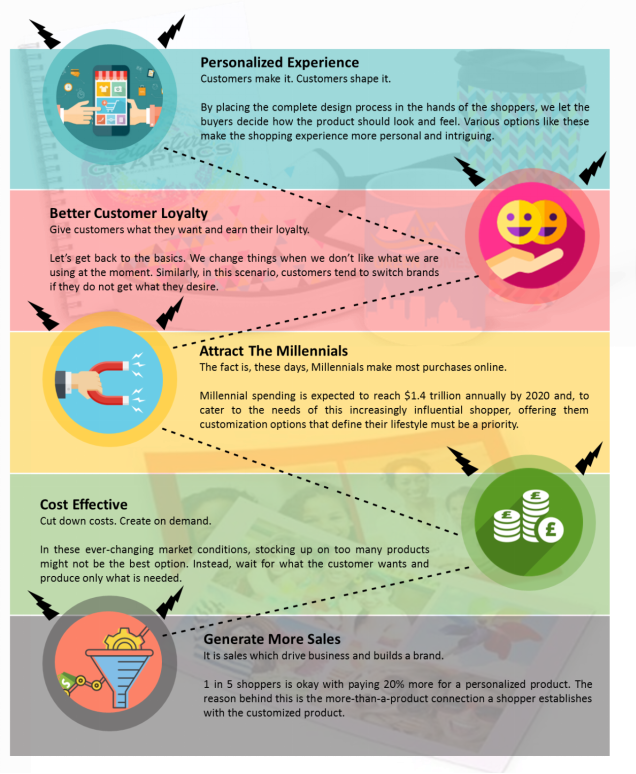
Product designer/customization extension for OpenCart store empowers your customers with the ability to design and shop custom products at your websites like T-shirts, mugs, cushions, and more. People prefer products which match their look and vibe. This holiday season, Why not giving them a personalized solution with which they can buy customized products for themselves and their loved ones? Here is why it would make your Web store better.

You can visit the product page for the Product designer/customization extension.

3. Multivendor Marketplace:

Knowband’s OpenCart Marketplace plugin will easily turn your single-vendor platform into a fully functioning marketplace. Plugin highlights:

  • The admin system of the OpenCart Multi-vendor marketplace module renders sales management effortless.
  • This Multi-seller marketplace extension renders commission management effortless for the store administrator.
  • Offers easy product and category management
  • It is compatible with the OpenCart mobile app builder plug-in multi-Channel selling

Buy OpenCart Multi-vendor marketplace extension from Knowband store.

List of modules for Marketplace integration in OpenCart store:

OpenCart is an advanced and strange open source e-commerce store management program written in PHP using MySQL database and HTML components. This makes it an easy interactive platform for merchants and customers. With the help of available extensions and modules, you can easily sell on multiple marketplaces like eBay, Amazon, Google Shopping, Wallmart, Etsy, Wish, Reverb, Mercadolibre, etc.

What makes a multichannel extension a must buy?

  • Multichannel sales or omnichannel sales are the processes of providing consumers with a range of outlets from which they can buy different products.
  • It is ideal for companies that do not have physical stores and operate in the virtual world as multi-market online platforms.
  • If you’re selling your product in more than one location, it can be a brick and mortar store.

Some of the best selling extensions for market place integration by Knowband are:

4. Google Shopping:

The Google Shopping Integrator Extension helps consumers to scan, view, and compare items on the Google Search page. Google Shopping OpenCart extension lets store owners map their items to Google Shopping.

5. eBay – OpenCart Integration:

The eBay OpenCart integration module offers a smart solution for the store owners to link their store to the eBay marketplace. It provides a profile based product update feature.

6. Walmart – OpenCart Integration:

KnowBand provides a Walmart OpenCart integration extension to help the store owners start selling their goods on the Walmart site. The Walmart OpenCart Integration Module is the simplest way to connect your OpenCart store to the popular Walmart Marketplace.

7. Etsy Marketplace Integration:

Etsy OpenCart Integration module provides an effective user-friendly interface to manage the product listing, inventory, and orders for the Etsy marketplace from the admin panel.

Sears – OpenCart Integration and Jet – OpenCart Integration is coming soon in the knowband shop.

A smart way to prevent bad bot visits:

There could be any reasons to prohibit a malicious IP or user agent from visiting the eCommerce website. Undoubtedly, in this digitally transformed world, bots can be of any kind, either good or bad. Blocking irrelevant traffic helps to protect the website from potential threats and malware. Knowband has two extensions for your store which can save you from unwanted visitors.

8. OpenCart Blocker – Block Bot/User by IP, Country or User Agent Extension

Knowband gives you full power to block unwanted traffic and irrelevant users from accessing site information. With OpenCart Block user extension, prevent as many suspected users or bots from accessing your store and stealing website data without your knowledge. The Spam Blocker extension gives you great versatility to intelligently screen out suspicious bot traffic on the store.

  • Safeguard your site from unauthorized users and their malicious content
  • This multilingual blocker module enhances the speed and contributes to the overall user experience.
  • OpenCart Block Bot by IP module helps reduce the cost of server loads and bandwidth.

To know more about this amazing blocker bot visit our Knowband store.

9. Google ReCaptcha:

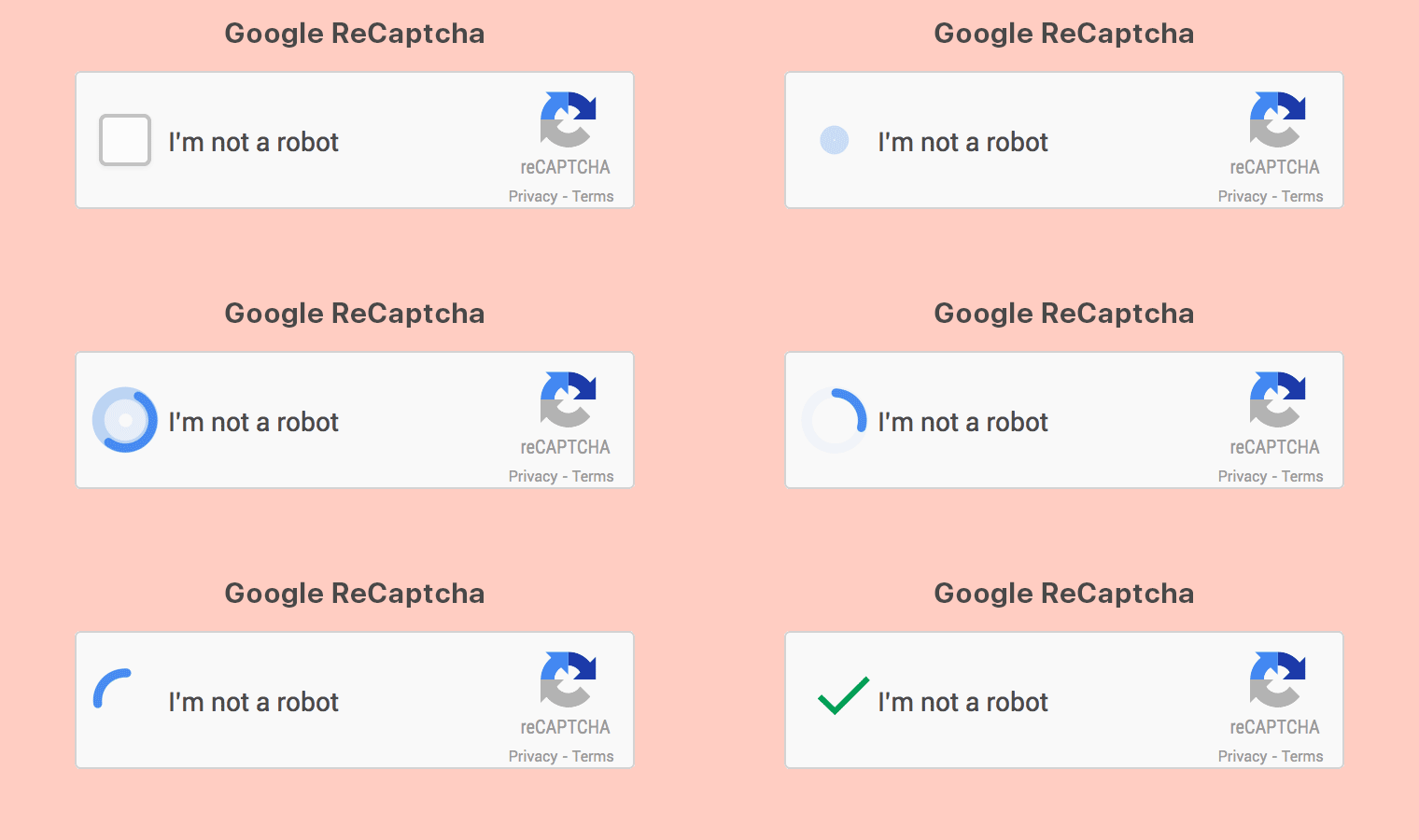
Many spammers try to divert the traffic from your website in the heavy sell days. But, by incorporation Google reCaptcha to your store, you can protect your site from such bad bots. Protect your OpenCart store from spambots by integrating the Google ReCaptcha extension for human verification. This Google Captcha operates by checking the people accessing the website are human or not.

  • Admin can include the Google ReCaptcha on the login page, registration page, contact us page and forgot password page
  • Google ReCaptcha module helps to push quality content to your website and also helps avoid fake registrations in your shop
  • multi-store and multi-lingual compatible

Knowband OpenCart Google reCaptcha can be a great deal for your eCommerce store.

Shipping Services:

10. Shipping Timer:

Adding a fully-featured countdown timer to the OpenCart can Take your eCommerce website to another level. eCommerce store owner can draw urgency for the goods and boost the conversions with an easy-to-use shipping timer. Fast shipping or one day shipping always excites the customer to shop more. It displays a countdown timer on your eCommerce store.

  • One day or the same day, delivery helps to create trust in customers for a swift buying decision.
  • This Countdown Timer keeps the customer aware of the expiry of the shipping deal. As a result, buyers can position their orders accordingly.
  • This Shipping module removes the challenge of comparing the delivery time of the same goods on different websites.

Excite your customers with this countdown timer by Knowband, the Shipping Timer – OpenCart Extensions, and take advantage of the holiday season.

11. Free Shipping Manager:

With this Free Shipping Manager extension by Knowband, online merchants can offer free shipping to online customers. Online store owners can set up free shipping rules, and free shipping terms and conditions to customers. Store admin can set the minimum time duration available for free shipping. Free shipping reduces the number of abandoned carts and also motivates customers to buy products to reach the minimum amount.

The OpenCart Free shipping Manager allows customers to purchase more from your store which increases the sale. For more details on the OpenCart Free shipping Manager, please visit Knowband shop.

12. Deal Timer:

Knowband’s OpenCart Deal Timer plugin allows the admin to provide discounts to the customer for a special period of time. You can give discounts or special deals on Christmas or Halloween days. The admin can set the list of products in which the OpenCart countdown timer is to be used to provide the discount. The OpenCart extension helps the store owners to boost the conversion of the site.

To add this extension to your store you can visit the Knowband shop and read more about this Deal Timer.

Conclusion:

After the COVID 19 outbreak, this is the best time to make some money. These modules can bring a lot more traffic to your store. By providing new services you can establish a multivendor market place which will allow many sellers to generate more and more revenue. Add these super-smart modules to your store and boost your sales.

Related Articles:

Essential Features In eCommerce Mobile Apps To Cover Up Loss Faced Amid Covid-19

E-Commerce businesses regularly face challenges to make the online shopping experience pleasant & personalized for the mobile audience. Amid the COVID-19 pandemic, keeping such business efficiently operational has been even more challenging for the store managers. The pandemic has been reformed online/mobile trading for both sellers and buyers. A thing of note is that online shopping has gained more momentum these days as shoppers have to maintain social distancing. Such unforeseen opportunities in these hard times can help in keeping your business running and stable with the eCommerce mobile app.

As I said, both online selling and purchasing norms are changed and we need to reform our standards as well. Launching an eCommerce mobile app is a sort of necessity than a luxury. Users around us are concerned for their safety and well beings. To achieve the same, one major step is to avoid visiting physical stores for any sort of online shopping. Be it grocery, apparel, electronics, food  & drinks, etc. all eCommerce merchants are somewhere struggling with fewer sales and revenue.

The situation demands more, so we provide more. We have narrowed down some essential features which can be helpful in providing value to users shopping through mobile. These tips will surely be a helping hand in keeping your business on foot and efficiently functioning amid COVID-19.

#1. Secure Online Payment:

To follow the social distancing guidelines, Cash-On-Delivery (or any sort of payment method that involves physical contact) is disabled for the safety of customers as well as delivery personals. Instead, store owners must have in-built secure payment options in their eCommerce Mobile App.

To win the trust of the audiences who don’t trust online payments, the mobile app must have secure payment gateways. Also, try to include multiple payment options like credit/ debit card, net banking, wire transfer, PayPal, & some of the popular e-wallets. This will allow the app users to make payments using the options that they prefer the most. For the good part, integrate the same payment methods on the app as of store in order to bring the online payment flexibility and ease.

FYI: KnowBand Mobile App supports all sorts of website payment options available on eCommerce store on PrestaShop, OpenCart, Magento & WooCommerce platforms.

#2. Push Notifications:

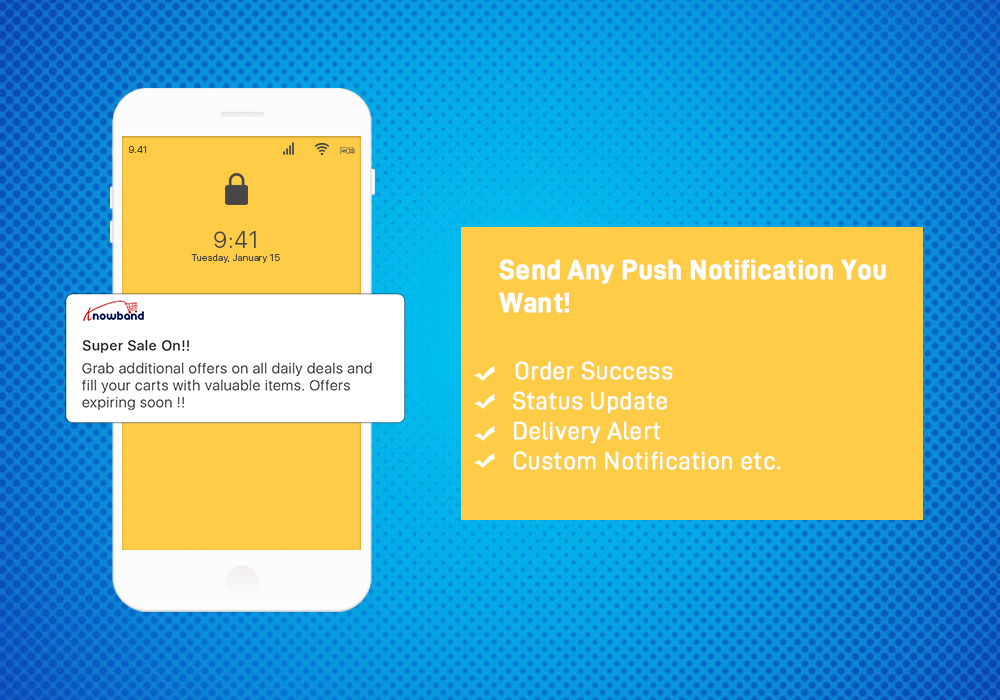
Keep your app users well informed about your services being resumed in specific/all locations. Also, during the COVID-19 pandemic, stores may run out of stocks sometimes. In that case, it’s ideal to inform the same of the customers to maintain transparency. If the app users left some products in their cart/wish list, inform them about the deals on them and availability.

The push notifications are helpful in both informing users or promoting sales/deals. Offer additional discounts or cross-sale offers to boost sales and revenue through your eCommerce Mobile Application.

FYI: KnowBand Mobile App offers both automatic and custom notifications which store admin can configure from the admin panel of  Mobile App Maker on PrestaShop, OpenCart, Magento & WooCommerce platforms.

#3. Reviews & Ratings:


Reviews have always been an easy means to win customer’s trust. When app users add a review and give start ratings on an eCommerce store or mobile application, not only it helps in getting honest feedback but also serves as a source of new leads. Genuine reviews always help in boosting sales if the products & services are good. This also encourages the sellers to keep their products & services at par to get good reviews.

Offering View Review & Write review functionality on the eCommerce Mobile App improves the brand credibility and allows indirect comparison of products before purchase. Star ratings implicate the worth of the product and helps customers in making their decisions.

FYI: KnowBand Mobile App for PrestaShop, OpenCart, Magento & WooCommerce platforms has inbuilt star rating and review feature. The users are allowed to both View and Write reviews from the application.

#4. Wishlist & Simplified Checkout:


Some app users may want to shortlist multiple products on an easily accessible page within the app. That’s when the wishlist comes into play. Wishlist allows online shoppers to finalize the buyable products later from the list of shortlisted products.

The checkout page of an eCommerce mobile app must not be time-consuming to fill. Enable name & address auto-fill options for nonfirst time shoppers on the store. Ask for only the necessary details on the checkout page. It is recommended to have a one-page checkout so that users won’t have to navigate to multiple pages while placing orders.



FYI: KnowBand Mobile App Builder comes with inbuilt wishlist and one-page checkout in both Android and iOS apps. 

#5. Easy Registration:


E-Mail login & signup options can get too hectic. Instead, use simpler options in your eCommerce Mobile App like Facebook & Google social media. Also, you can offer another log in options like OTP (one-time-password) & fingerprint authentication.

Simpler is the onboarding, more are the chances of a successful purchase. Offer more than one login option in the app and that too keep them one-tap or such that allow users to access apps in seconds. This will improve the usability and performance of the app.

FYI: KnowBand Mobile App offers four types of login options: Google, Facebook, Phone Number (OTP) and Fingerprint. 

How Can You Get Such an eCommerce Mobile App?

For eCommerce businesses that are willing to build & launch their Mobile Apps for Android &/or iOS devices, get your hands on the eCommerce Mobile App Builder extension. Such an extension builds customizable apps that are feature-rich on the backend as well as the user-end. If you have a multi-vendor marketplace website, then this extension is compatible with that also.

PrestaShop Mobile App Builder

OpenCart Mobile App Builder

Magento Mobile App Builder

Magento 2 Mobile App Builder

WooCommerce Mobile App Builder

We also offer Marketplace Mobile Apps ( Multivendor Marketplace + Mobile Apps) for the above-mentioned platforms. Check them out from below links:

PrestaShop Advanced Marketplace with Mobile App

OpenCart Advanced Marketplace with Mobile App

Magento Advanced Marketplace with Mobile App

Magento 2 Advanced Marketplace with Mobile App

Conclusion:

Keep your eCommerce businesses relevant & well-prepared to resolve the issues & uncertainties that you may encounter during this COVID-19 pandemic. Follow the essential features described above as it can help your eCommerce business in succeeding even during such difficult times.

Drop your queries on support@knowband.com for a quick discussion or connect with us on skype at support@knowband.com.


Hyperlocal Business Model: Go Local with this New Trend

Strengthening the curiosity and enthusiasm of a large number of entrepreneurs who have been on the lookout for something that can make them stand out, hyperlocal eCommerce business has served the purpose. Many companies like Amazon, Flipkart, Grofers are serving regionally or locally for the past few years. But the Hyperlocal Business concept is roaring after COVID 19 outbreak. 
What is Hyperlocal?

There is a small difference between hyperlocal and eCommerce. Hyperlocal businesses are the one who serves in the nearby vicinity and eCommerce businesses have a large network of the national or international market.  Hyperlocal is often used only to describe delivery businesses or on-demand services. Entrepreneurs are switching to hyperlocal as it allows consumers to place generic orders, sending parcels from one location in the city to the other, food, groceries, household essentials, or even medicines. This transition will open the doors for small businesses to enter the digital world. 

Why go Hyperlocal?

A unique advantage of Hyperlocal eCommerce is that their whole supply chain is situated next to both the buyer and the seller. As a consequence, the vendors themselves are retailers or smaller traders. A hyperlocal business platform allows local offline businesses to reach out to their targeted customers confirming product delivery within a very short time.

The challenge for an eCommerce can be an advantage to hyperlocal Businesses

  • eCommerce often faces a challenge of on-time delivery but with a Hyperlocal business, the same product can be delivered within a few hours. Customer doesn’t have to wait for days but he/she can use a Hyperlocal business platform for getting it immediately. 
  • Trusting online eCommerce websites is a matter of concern and it leads to many frauds. But with an eCommerce, the chances of fraud are least. 

Challenges faced by Hyperlocal businesses:

You might have heard that many Hyperlocal businesses got shut within a few years of their journey. There are multiple challenges faced by a Hyperlocal business while going through this transition.

– Area of operation

Starting in cities that are not yet technologically wired and most of the population is not used to buying stuff online, the primary option for hyperlocal business cannot, of course, be the right choice.

–Brick and mortar stores

People still prefer buying groceries themselves as they do not trust the quality of online products. Buying fresh fruits and vegetable from a market is an old practice which will take time to change. 

– Cutthroat competition

The hyperlocal businesses have to compete with well-established eCommerce enterprises as they trying to reach out on three tires for grocery and other such services. 

What is the Solution for Hyperlocal Business problems?

The solution to these challenges is by adopting a strategic path to reach your targeted customers and providing them a better customer experience. COVID-19 outbreak brought the new trend to go local and now businesses are trying to expand their networks digitally. People in three- tire cities are opting for online shopping, even for groceries. 

Many Digital Solution Companies are providing various user-friendly applications that can help local entrepreneurs to go Hyperlocal.

  • A dynamic website: A Hyperlocal business owner can ask a developer for a well-versed website where the customer will find all the products listed to it. 
  • Store locator and Pickup services:  A website where customers can place orders and pick a delivery time or pickup timings. The owner who intends to switch to hyperlocal business can incorporate a module for the online users to find the nearest store and pick up the product from the store. Many stores have different outlets. With the module installed in your eCommerce store, you can allow the customer to choose the nearby store to pick up the order. Knowband provides a store locator and pickup module for many eCommerce platforms. 
  • Product availability check by zip code: This module can help the customer to check the availability of a product in an online store. Customers can check the availability of the products in any particular area just by entering the zip code, this way owner can restrict the customer in one region. 
  • Mobile responsive or a mobile application- Being an eCommerce store owner you must ensure that your website is mobile responsive or you can build an app for the same. Now you can install a mobile app builder plugin and make your website mobile responsive.
  • Tie-ups with other local vendors: You can make tie-ups with other store owners. This will help you fulfill the customer demands on time and you can generate more revenue.  

Go Local with Hyperlocal:

Going Hyperlocal is the need of the hour. This will bridge the gap between the online and offline market. The availability of a Geolocation database can help you in targeting the right customers. With Hyperlocal business, entrepreneurs can focus on customer-centric models by controlling quality and inventory. With minimum efforts, larger goals can be achieved. The hyperlocal business owner can run all the operations on smartphones with very few efforts as compared to a physical store.

Conclusion:

Given the limited geographic distribution of the hyperlocal industry, marketing investment is typically very effective as there is little waste and Word of mouth will spread quickly.

Visit Knowband Shop for eCommerce solutions. Our enthusiastic team will be glad to provide solutions to your problems. 

Related Articles:

How Easy Is It To Send Push Notifications On WooCommerce Mobile App?

A good marketing strategy always involves keeping the customers engaged, retained & interested in your products or services. This especially is highly useful for the eCommerce Industry. For such e-retail businesses, having a WooCommerce Native Mobile Application (iOS & Android) can do wonders. It eases the online shopping experience for the app users & also keeps user engagement & entertainment at par. For that, Mobile Apps use a powerful feature i.e. Push Notifications. This writeup will explain how a WooCommerce Mobile App makes it quick and handy to send mobile push notifications to users. 

Once your WooCommerce Mobile App (Android & iOS) is installed on the users’ devices, they receive promotional & engaging Push notifications from your end. You (store owners) can control, create & optimize such push notifications as per your business needs. Subsequently, Push Notifications have been reported to perform much better in terms of engaging app users when compared to email reminders/ newsletters.

Recommended Read: How Easy Is It To Design Home-Page Of WooCommerce Mobile App?

Push Notifications with WooCommerce Mobile App Builder:

KnowBand provides personalized push notifications feature in WooCommerce Mobile App Builder. This plugin assists in launching Android and iOS apps from your existing WooCommerce website. Further, there is no need for coding with this plugin. This write-up will introduce you to the backend settings of this WooCommerce Mobile App Maker plugin so that store admins can configure and send Push Notifications to users’ devices.

While keeping the mobile app synchronized with the website, this app creator plugin provides a wide range of front-end & back-end features. 

Follow this tutorial write-up to know how you can create, automate & send these notifications without a hassle. On the backend of your WooCommerce website, where you have the Mobile App Builder installed, hit ‘configure’. Now, from the backend of this Plugin, navigate to the Push Notification Settings Tab from the side menu.

Recommended Read:  Top WooCommerce Mobile Apps Developed By KnowBand

Push Notification Settings:

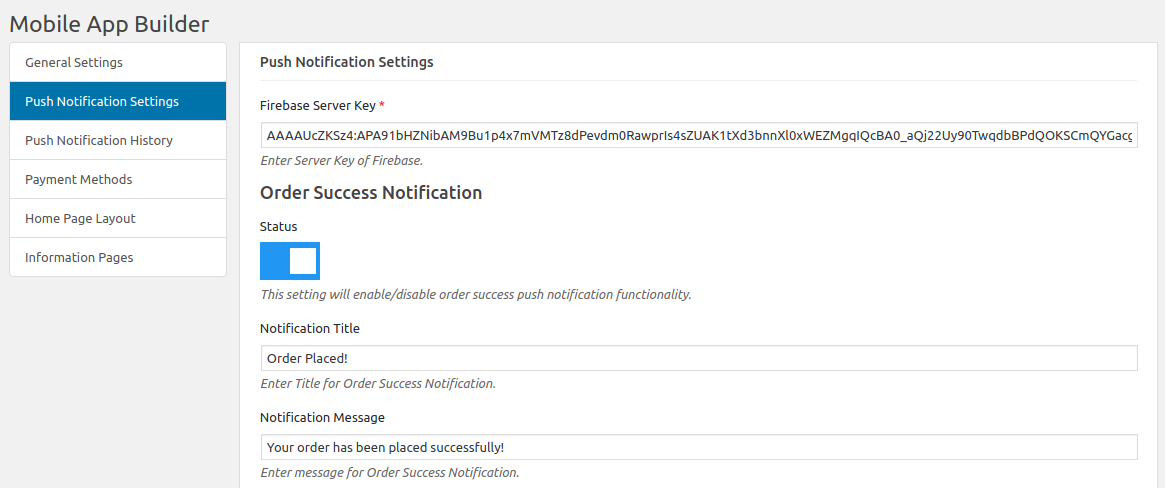
From the backend, you will only have to enter your Firebase Server key (which will be provided along with apps). The WooCommerce Mobile App Builder by KnowBand provides an unlimited number of push notifications that store owners & their admins can send to their app users.

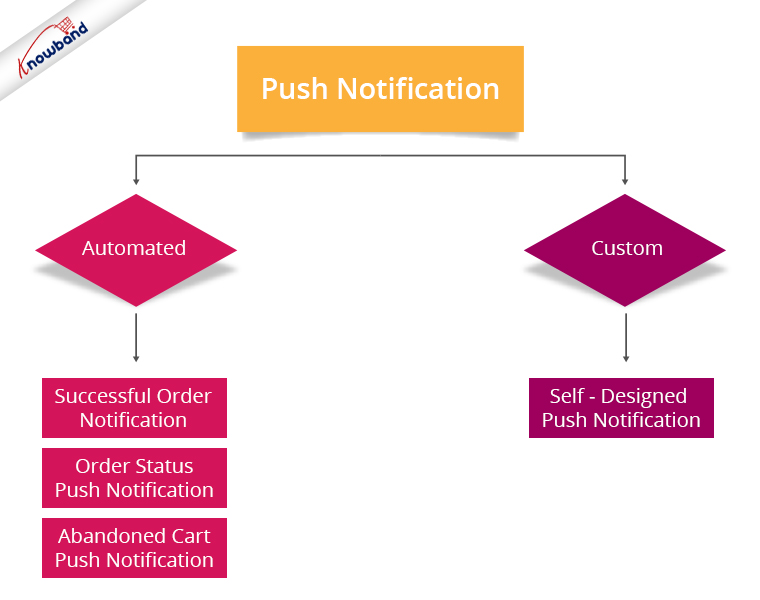
By default, some of the automated Push Notifications are already provided for your ease. These notifications can even be disabled or enabled with just a toggle switch as shown in the screen capture. Besides those, you can create any other kind of Push Notification from this backend as well. Here is how you can configure them.

A) Successful Order Notification:

Using this notification setting, the store admin can set the title & message for successful orders. This notification will appear each time a user of the app successfully places an order through the app.

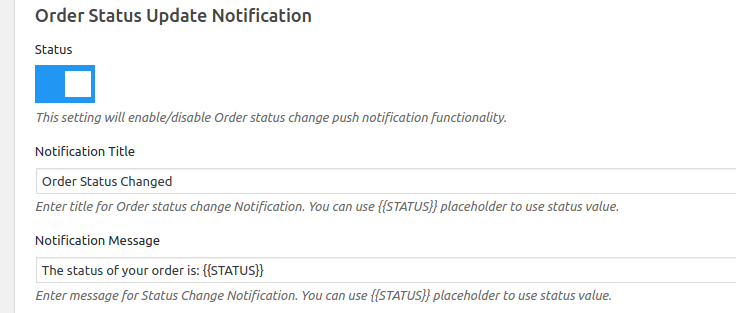
B) Order Status Push Notification:

This notifies your app users about any status update of their active orders. Some examples of these are ‘order packed’, ‘order shipped’, ‘on the way’, ‘delivered’, ‘cancelled’, etc.

Use the variable ‘{{STATUS}}’ anywhere in the message body to form your automated order status push notification.

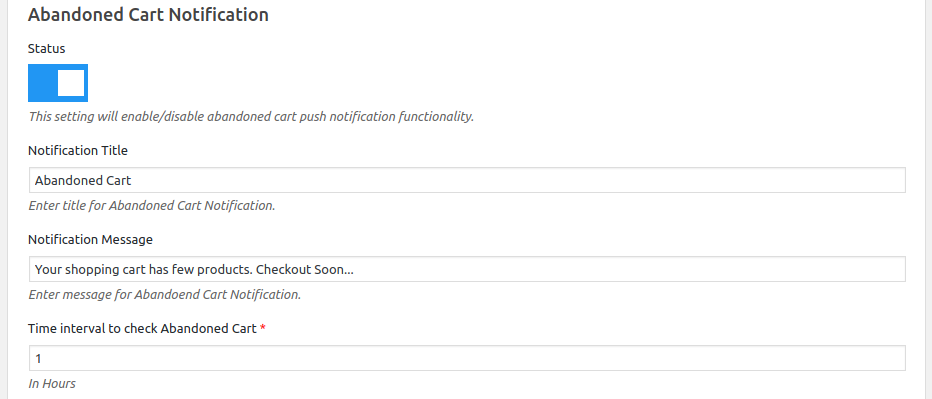
C) Abandoned Cart Push Notification:

Automate the abandoned cart notification by setting the timer provided in this push notification setting. Every time an app user leaves his/her cart abandoned, then automatically this push notification is sent to him/her after the specified time.

Recommended Read: How To Quickly Build WooCommerce Mobile App for eCommerce Store?

Custom Push Notifications:

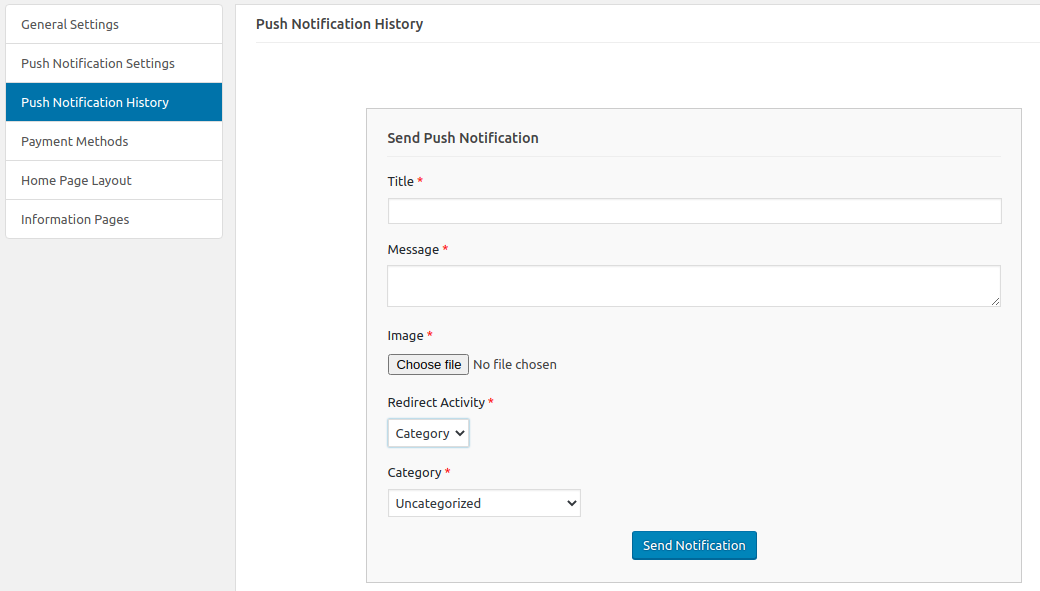
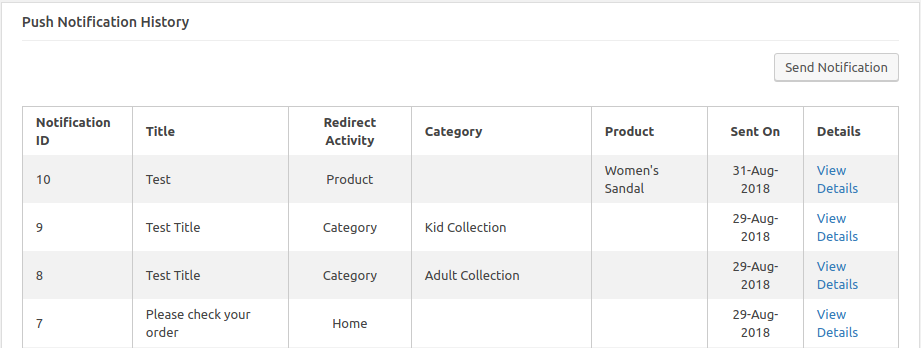
Apart from the above three pre-defined notifications elaborated above, admins can create any kind of self-designed Push Notification from this setting. First, from the side menu of this app maker Plugin, select ‘Push Notification History’. Then using the ‘Send Notifications’ button on the top right of the page, create a new notification manually according to your needs.

Additionally, you can even choose to selectively send these notifications to any android/ iOS device. Moreover, use attractive images to get more customer engagement using these notifications. Then choose the redirecting activity to be any of the categories/ subcategories/ products or even the homepage of the app. Finally, these notifications will be sent to all the app users once you hit send.

Push Notification History:

Keep a record of your previously sent notifications & their configurations by accessing the ‘Push Notification History’. You can even filter out the ones you want to view from the advanced search bar as shown in the screenshot above.

To make it even more convenient & effortless for the store owners out there, WooCommerce Mobile App Maker Plugin, by KnowBand, has most of the settings automated. Hence, the store owners don’t need to make even the slightest effort to yield great results. Besides, the Push Notification functionality, the home screens of the apps are completely dynamic and may be customised from the module backend. The built-in WhatsApp and Zopim chat features provide a dependable communication channel between app users and the admin. The apps have quick login choices including Google, Facebook, Phone No (OTP), and Fingerprint.

Conclusion:

Mobile push notifications are a major feature that makes an app stand out from the website. When used properly, these can lead to an exponential increase in customer retention & engagement rate. Thus, they help store owners effortlessly boost their sales. Moreover, for all smartphone users, WooCommerce mobile apps provide a lot easier and more efficient buying experience. Hence, with flawless functioning & incredible features, an eCommerce mobile app bridges the gap between admin and users. Thus, Launching your own shopping app will increase sales and money as you have such a great business option.

For any queries related to this WooCommerce Mobile App Plugin, reach out by emailing us at support@knowband.com. We would be delighted to assist you.

How Easy Is It To Design Home-Page Of WooCommerce Mobile App?

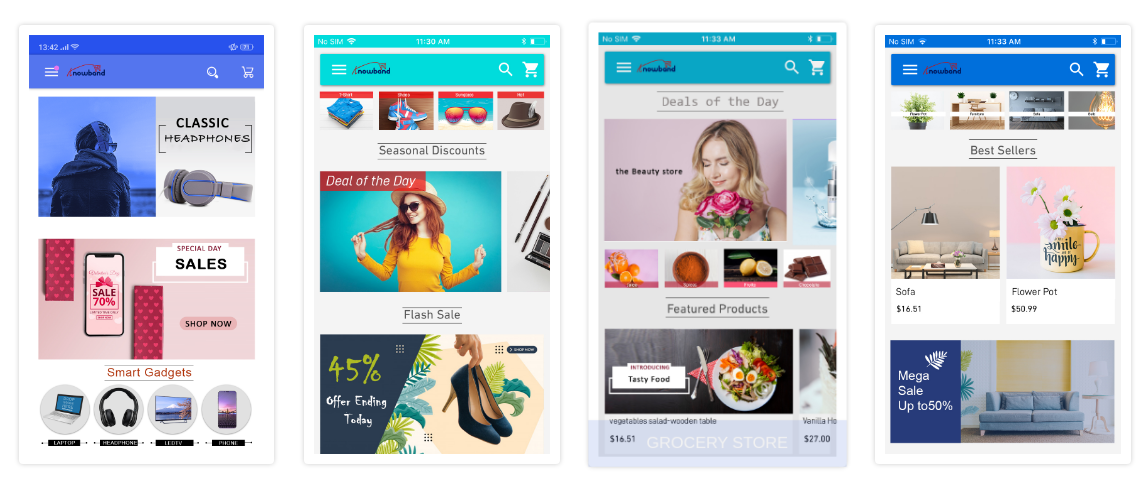
The usage of mobile devices has increased quite a lot in the past decade. That too, when we consider online shopping, everyone prefers to shop from the app on their smartphone. Hence, more businesses are willing to make extra efforts to be available on mobile platforms. For eCommerce businesses, having a mobile app with a dynamic & customizable home-page design helps them to keep their customers engaged in a profitable manner. Every time, a new offer/ new-arrival/ sale/ etc. is put up on the shopping app, making the customers aware of it can naturally boost their sales. The most organic way to do so is by optimizing the home-page design of the shopping app (apart from push notifications & other campaigns).

To make the home-page designing & re-editing easier for store owners, KnowBand has developed eCommerce Mobile App Builder extensions. It helps the eCommerce businesses with building their eCommerce Mobile Apps & also offers feature-rich backend & frontend to benefit the app users as well as the businesses. This tutorial write-up will elaborate on how to use the WooCommerce Mobile App Creator plugin to create, design & edit the dynamic home-page layouts of the Mobile Apps.

Once this WooCommerce Mobile App Builder plugin is installed on your WooCommerce website backend, you can easily customize the home-page of your app from the backend of this plugin.

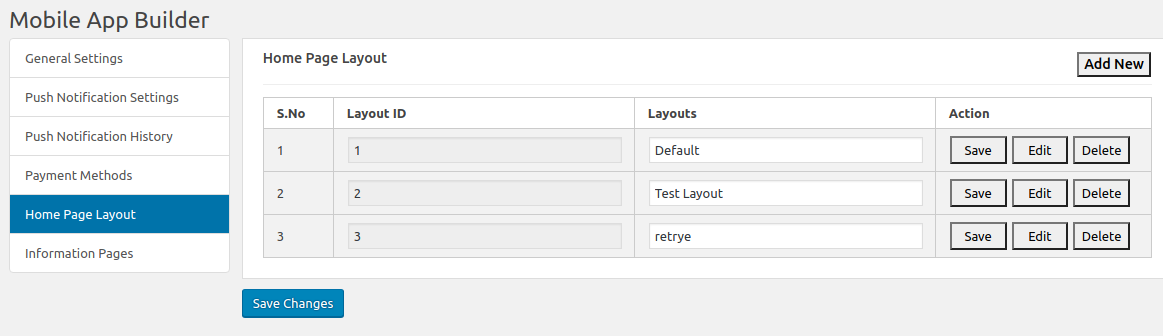
  • Select ‘Home-Page Layout’ from the side menu.
  • To create a new layout, click the ‘add new layout’ button. You can also re-edit the existing layouts. Also, you can pre-design multiple layouts & keep any one of the active (from the General settings on the side menu).

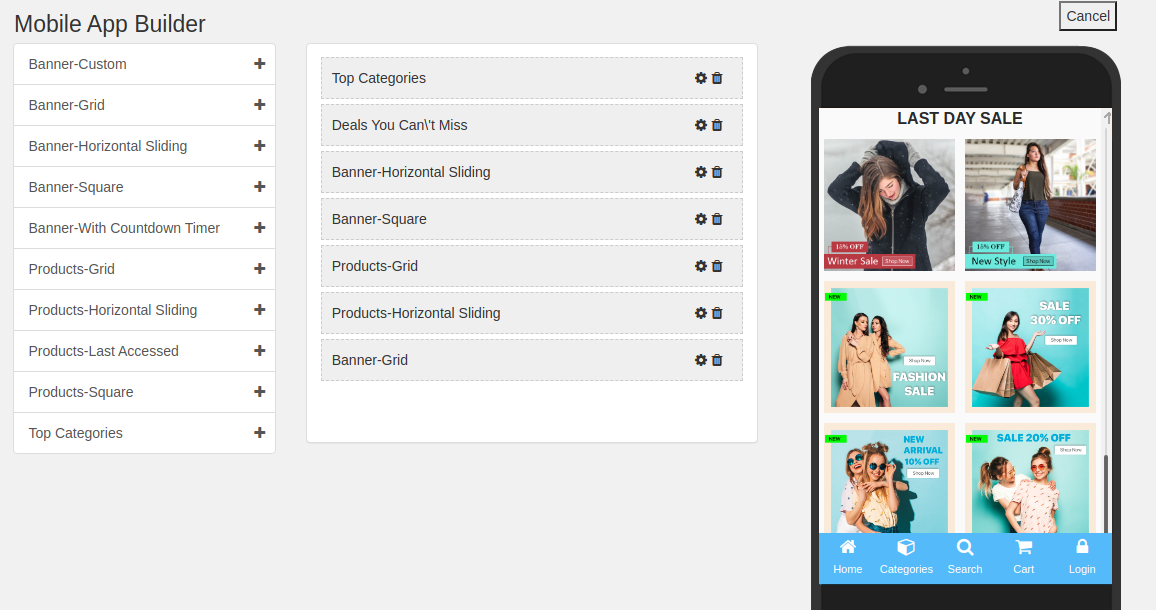
  • While designing or editing your app home-page layout, you can use a maximum of 20 components (from the complete list of different components shown in the side menu on the left). Hence, you can also use a single component multiple times in your layout
  • Upon adding these components, you can edit each one of them & organize them using the drag & drop feature.

All the edits that you make instantly reflect on the demo app screen as shown in the screenshot above.

Components To Design Your WooCommerce Home-Page Layout:

1. Top Categories:

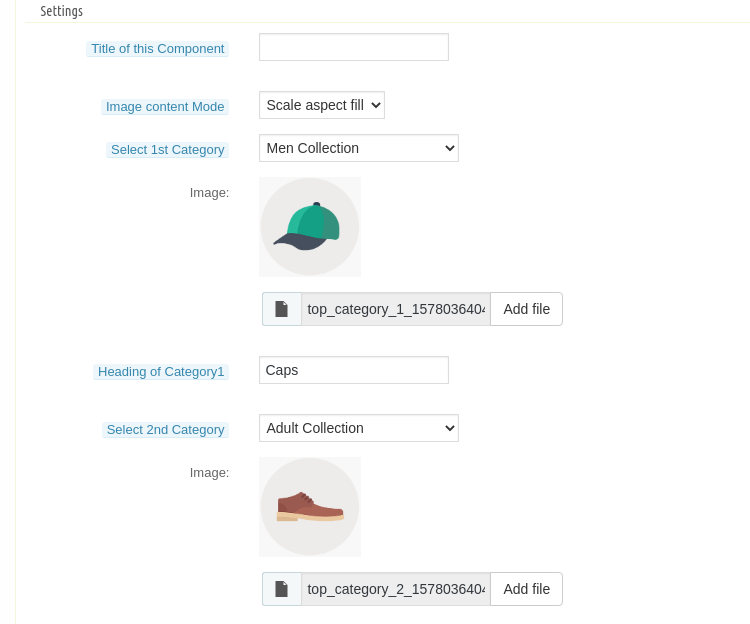
In a slider form, you can display small image icons with landing page links to relevant categories on your app. You can add a total of 8 of such categories in a single ‘top category’ component.

2. Square, Grid & Horizontal-Sliding Banners:

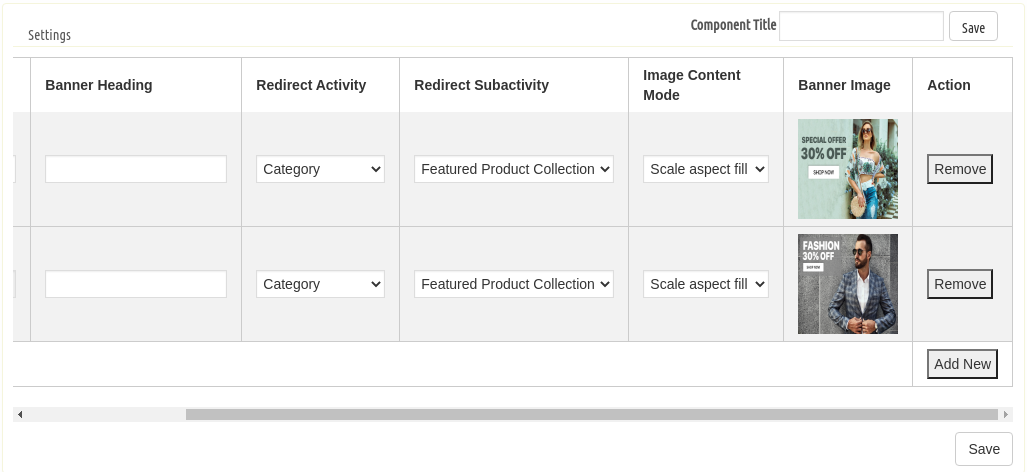
For all these 3 banner types, you can choose the landing page options among category pages, product pages, home-page & even any of the CMS pages. 

3. Square, Grid & Horizontal-Sliding Products:

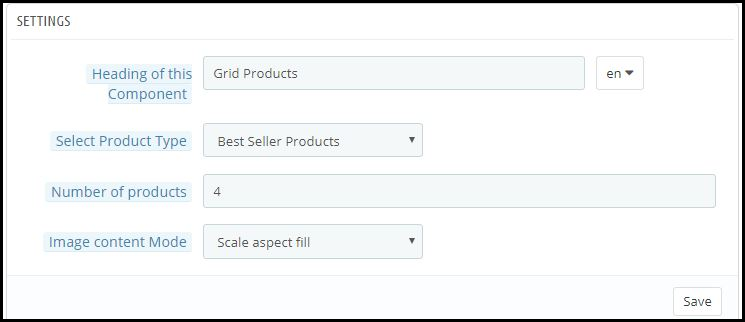
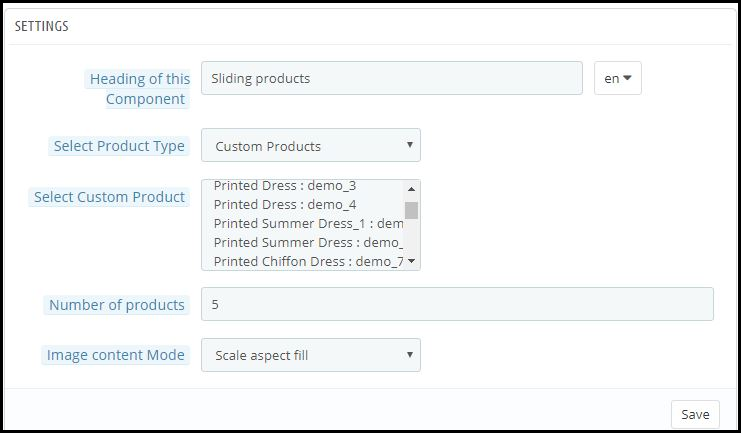
With these 3 components, you can display singular products redirecting the app user straight to the specific product page. Because this WooCommerce Mobile App Builder plugin also lets you set featured product listings. You can choose among the following options to display the products:

  • Best Seller Products
  • New Arrivals
  • Featured Products
  • Special Products
  • Products from a category
  • Custom Products

4. Recently Accessed Products:

Including this component anywhere on the layout simply creates a horizontal slider for products displaying only the products that an app user has recently viewed. It is ideal to add this component only once in a home-page layout.

5. Countdown-Timer Banner:

The count-down-timer banner has an in-built countdown timer with all the necessary settings to make it your own. You can use it to inform your app users about an offer that is ending in a specified time. 

Apart from all the edits, you can make to design your WooCommerce App’s home-page, there is one more useful thing that’s present all the time on your app’s screen. It is the bottom tab bar navigation in shopping apps.

Wrap Up:

By now, you must have understood how user-friendly it is to create, design & edit the home-page layout of a WooCommerce Mobile app using the WooCommerce Mobile App Maker plugin by KnowBand.

From time-to-time, eCommerce apps do have to change their home-page layout to complement different offers, seasonal sales, new arrivals, etc. Hence, to make it feature-rich yet easy for the store owners, our experts at KnowBand have developed this WooCommerce Mobile App Maker plugin. You can even go through the demo of this plugin before you decide to purchase it.

Explore more on detail from below Video & drop us your message on support@knowband.com in case of any query:


Sneak peek to the new Membership Plan feature of the PrestaShop Multi-Vendor Marketplace Addon

Subscription business models are everywhere. Talking from Netflix to Apple Music. Recent research shows that subscription businesses are getting 5x faster revenue growth. The subscription revenue model benefits both customers and companies. Customers enjoy the convenience of auto-renewals and having access to high-value products and offers for a low ongoing investment. 

It’s no wonder more and more companies are moving towards subscription business model. So we are also coming up with a new membership plan feature for Prestashop Marketplace addon. This membership plan feature allows the admin to create membership plans for the sellers. 

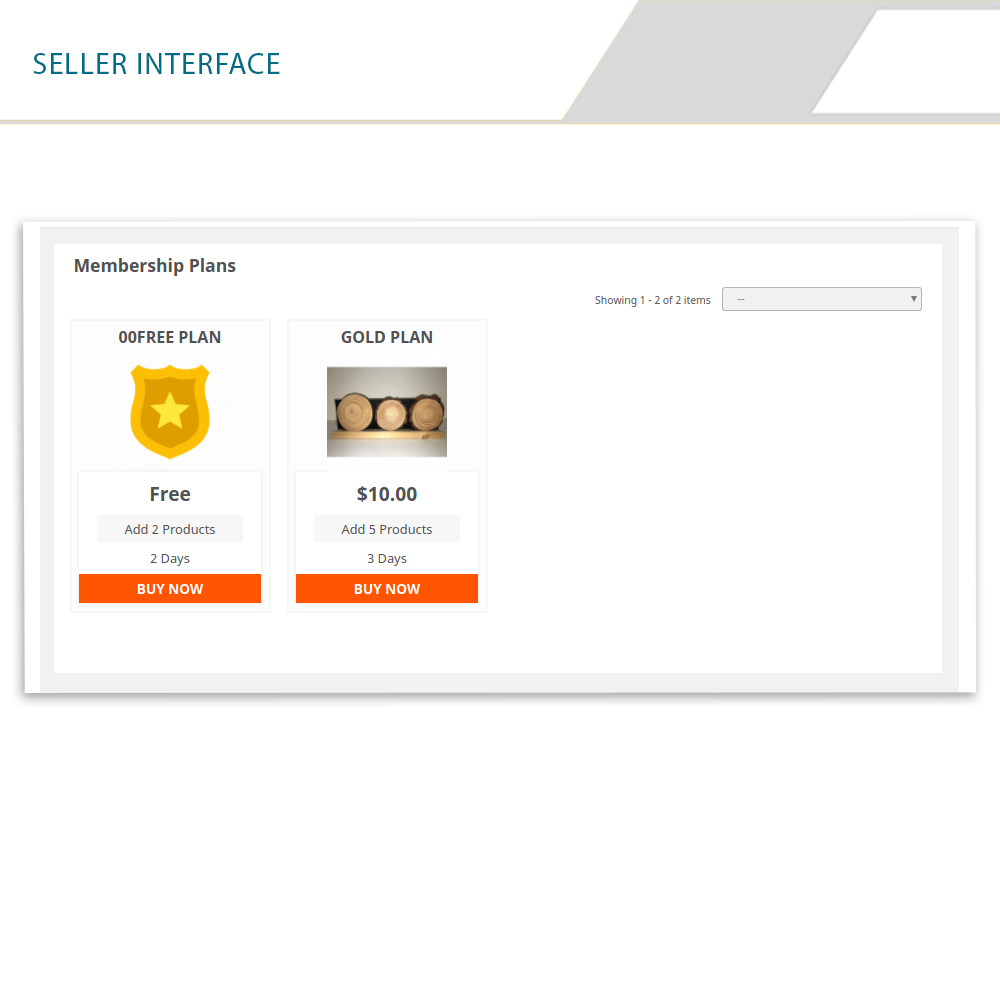
Sellers need to purchase these membership plans in order to upload their product in the Marketplace. The subscription-based Marketplace allows the admin to create subscription plans based on the number of products and time constraints. The Membership based Marketplace module offers customized email templates that help to automate the membership request and membership approval process.


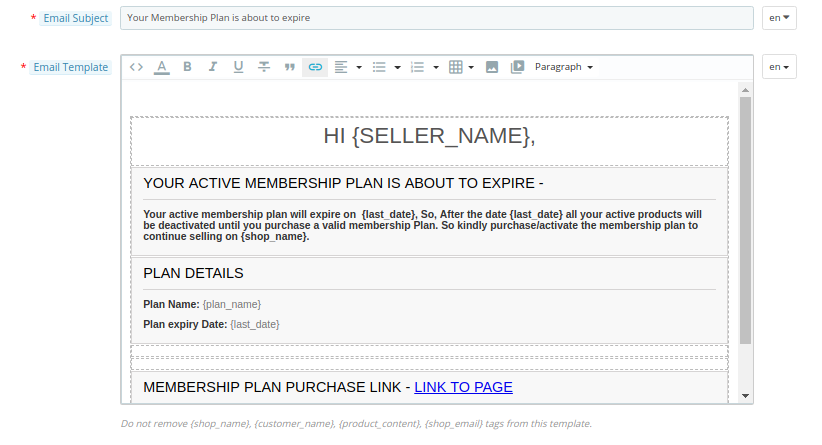
In order to start selling on the marketplace, the sellers need to purchase the membership plan as per their requirements. Sellers can easily upgrade their membership plans as well. Warning message is sent to the sellers before the membership plan will be expired and even after the expiry of the membership plans sellers will get an email for upgrading their membership plans.


Note: We are going to increase the price of Prestashop multi-vendor Marketplace add on after adding this new membership feature. So if you are planning to buy this add on then hurry up now before it will be too late. And for existing users, they can extend their support period.

Steps to extend the support period are as follows:

1) Firstly, log in to your account. 

2) Then go to the Downloads under My Orders.

3) Here you will find the option to extend the support period. Click on the desired time period for the support.

Various features of Membership plans functionality:  

  1. Admin can create different membership plans for the sellers.

  1. Admin can also create a free membership plan for the sellers.
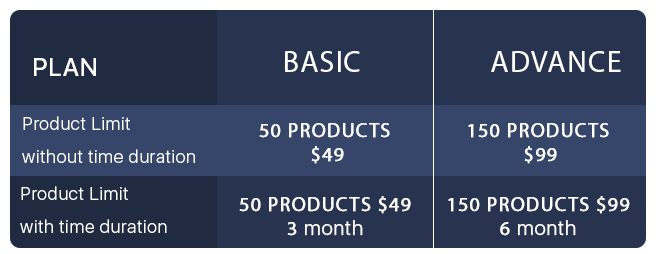
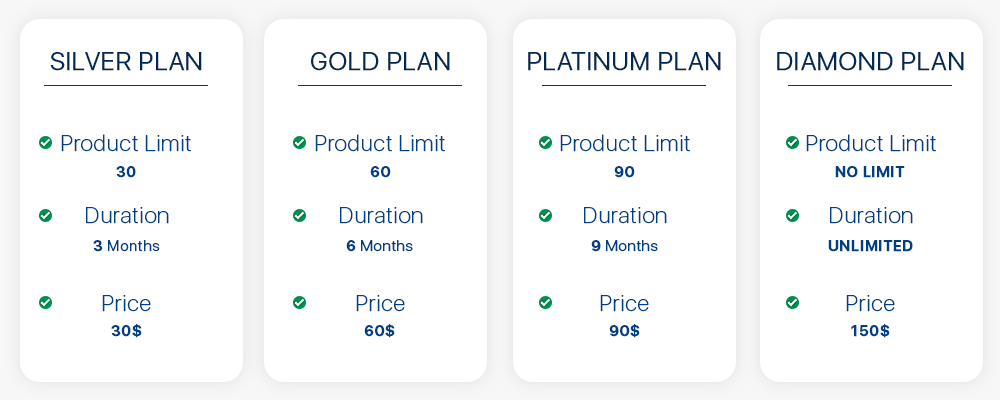
  1. Admin can create marketplace membership plans based on the number of products like Basic Plan – 50 Products only at $99 charges, Advanced plan 150 products only at $149 charges. The admin can also add the time constraint in the plan like Basic plan – 50 Products, $99 and 6 months duration, Advanced plan 150 products, $149, and 12 months duration.

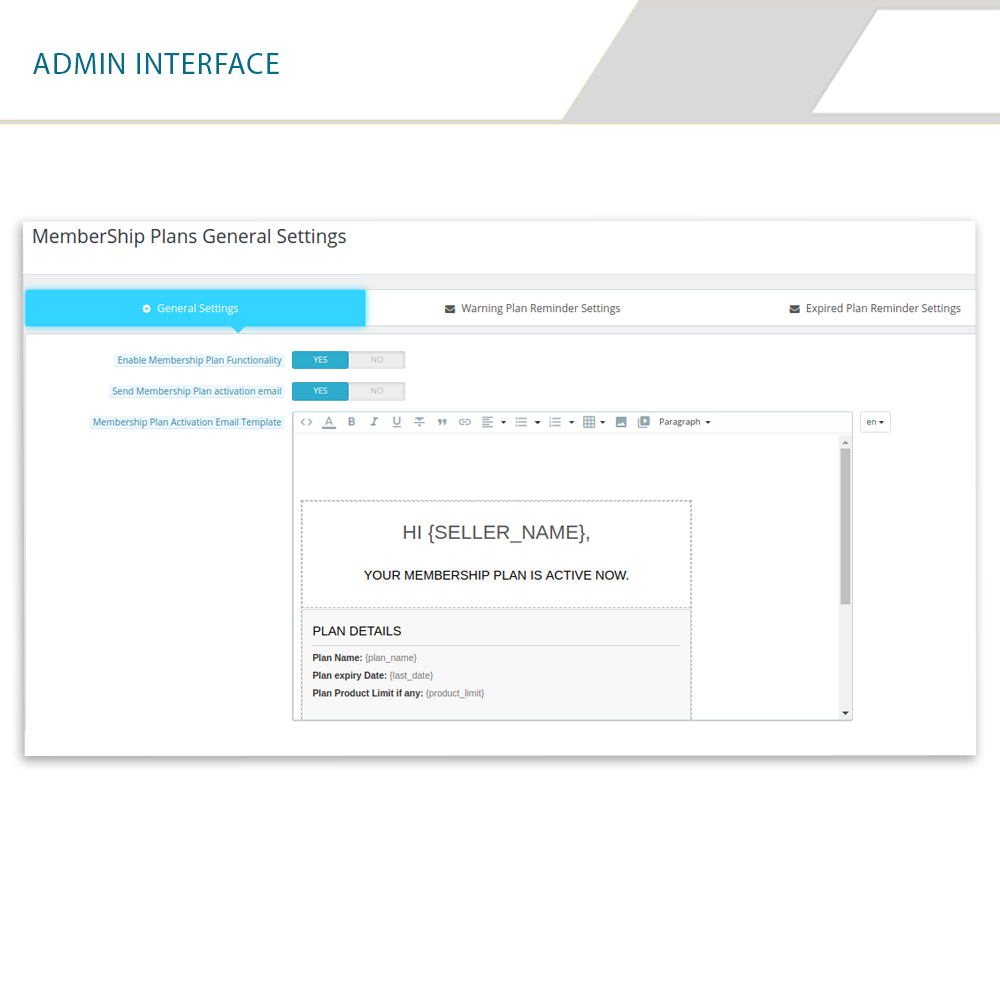
  1. Admin gets some pre-made email templates which helps them to notify the sellers about their membership plans. Admin can also edit these templates as per their requirements. For example below is the email template of warning message for the sellers whose marketplace membership plan is about to expire.

  1. Admin can set the membership plan select box in the sellers registration form.
  2. Admin can also set the product active limit for the membership plans.
  3. Admin can set the duration of the membership plan from the back interface.
  4. Sellers can upgrade their membership plans very easily and whenever it is required.

Product active limit of membership plans:

For each membership plan, admin has an option to set product active limit and sellers can sell products till that limit only but, this doesn’t mean that sellers can upload products till the active limit only. Sellers can upload products till their limits but active products which will be shown on the Marketplace will be equal to that limit only.

For example; A seller purchased a membership plan named as silver plan and the product active limit for that silver plan is only 20 products. So the seller can upload even 30 products but the products which will be shown in the Marketplace will be only 20.

Duration period of membership plans:

Admin has also an option to set the duration of membership plans. After this duration, the plan will be expired and sellers have to upgrade their membership plans again. Admin can set different durations for different membership plans.

For example, a silver plan duration is 30 days and the gold plan duration is 60 days, etc. Admin can also set the marketplace membership plan duration to unlimited time. 

Various subscription models:

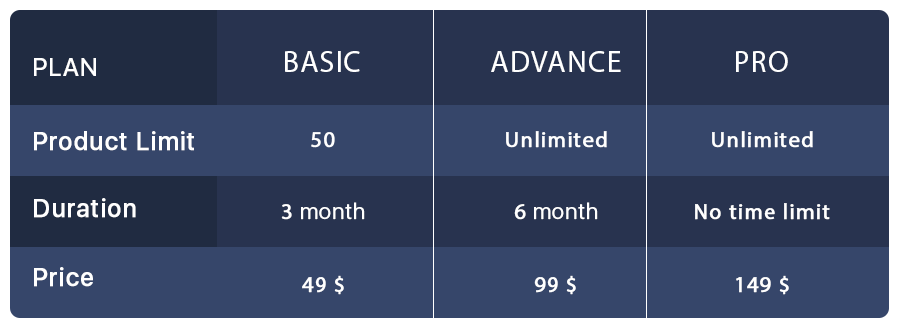
Store admin can create different marketplace membership plans for the sellers. For better understanding, we created some membership plan examples which give you a brief idea about these membership plans.

Prestashop multi-vendor Marketplace compatible addons:

If you are a PrestaShop Marketplace store admin then you must read this blog which helps you to understand compatible addons for Prestashop multi-vendor Marketplace. Using these compatible add-ons you can customize your Marketplace and make it even more advanced.

Conclusion:

Membership plan feature removes the hectic tension of commissions for each product sale. After enabling this feature, sellers can also register themselves on the basis of membership plans rather than Commission basis. So this membership plan feature helps both the sellers and the store admins.

10 Ways to Market your Deals and Offers This Summer

It’s been said that consumers spend less time on the web during summer and eventually do less online shopping, but these are just self-induced beliefs. While marketing and promotion campaigns keep changing with seasons, summer makes a perfect season and opportunity to provide your customers with the best deals and offers. 

Coming up with different promotional ideas for your business during this summer will not only help you achieve high sales but would also make your brand stand out from the rest. In today’s post, I have put forward 10 summer promotion and marketing ideas.

1. Launch a New Product or Service

Launching a new item or service while marking the beginning of a beautiful summer season to attract new customers is an amazing summer promotion idea. By bringing in the new collection at the beginning of summer, and by making your new products or services occasionally themed, you can grab the attention of both your existing customers and new visitors.

2. Announce a Summer Solstice Party


Summer is an energizing season to celebrate- the days get longer, the climate gets hotter, the beverages get colder, and people want to beat the heat! The primary day of summer, called as the summer solstice, is an ideal time to set up a gathering. 

Offering free tastes and nibbles, a seashore themed photo booth, or a little inflatable pool loaded up with treats at your gathering is an incredible method to allure your crowd to shop at your business. Run a giveaway at your gathering with free products or services.

3. Run contests on Facebook or Instagram

Your customers will be scrolling Instagram and Facebook this summer. Use this to your advantage by hosting a contest. Ask your new and existing customers to send in their extraordinary summer shots.

Set a unique hashtag and ask users to post pictures using the same. Reward the ones with the most unique and interesting post. This is a great way to create user-generated content and boost your brand visibility on the platform.

4. Offer free shipping

Free shipping is one of the best strategies to boost your sales. It can allure even the most solidified customers to tap the buy button.

An effective method to run this offer during this summer is by using an exit-intent popup. As a visitor tries to leave your website after adding the product to the cart, trigger a message with a “Free Shipping” offer to encourage the shoppers to purchase.

5. Create a “summer products” bundle

Check your inventory and make a list of the products that shoppers are most likely to purchase during the summer season. Offer the bundle at a slightly lesser price than the sum of the individual cost of those items. This increases your average order value and creates a win-win situation for you as well as your customers.

6. Reward your VIP/Loyal Customers

You need to keep your loyal customers happy, here’s a fruitful way. Run a late spring email showcasing thankfulness to your VIP or loyal customers for being so loyal to your brand.

By means of email, offer them a coupon code or a freebie, an enticing discount, or a price drop exclusively for them. Possibly you can do this for seven days in a row, offering discounts on different categories and products.

Related: Benefits of Customer Loyalty Programs for your Online Business

7. Partner-up with other businesses

Contact your industry friends! Summer is a calmer season for online retailers and the best time of the year for some experimentation. So utilize this time and opportunity to connect with non-contending accomplices to throw a few thoughts around, and check whether there are open doors for a commonly useful business association.

8. Have a Seasonal Sale

While many associate sales with the retail business, a seasonal deal is an extraordinary summer promotion thought for any small to mid business.

Offering discounts and deals throughout the late spring months will help attract new customers, hold old ones, and help spread positive brand mindfulness. Offering a summer season referral program, where a current customer gets a reward when they refer other people, is another approach to incentivize those customers to do word-of-mouth for your brand and bring their friends to your website.

Related: A Guide to Referral Marketing

9. Temperature-based Deals

Customers consistently appreciate a movement where they can win prizes or coupons, and the climate makes for an ideal chance! Select a day where the climate is truly problematic and offer an unconditional present with buy on the off chance that it comes to over a specific degree that day. For instance, if it is normally just around 35 degrees in May where you are found, offer an unconditional present with buy on the off chance that it comes to around 40.

10. Have a Back-To-School Sale

While the school year may appear to be far away, some of the parents have started getting ready a long time ahead of time. Tossing a class kickoff deal is a compelling summer promotional strategy for any industry, and will draw in anybody hoping to set aside some cash. Offering extra discounts for teachers and students will also bring you sales. 

Final word

Summer is an ideal season to capitalize on the warm climate and inundation of vacationers! Utilize these 10 summer promotional and marketing ideas and strategies for your eCommerce or retail business to help drive more offers and boost brand awareness throughout the summer season.

PWA For Magento 2: Grow Your Business With This Readymade Tool

It’s 2020 & by now most online businesses have realized the importance of mobile applications. Mobile devices, especially smartphones, always remain switched on & connected to the internet & more importantly, they are in quick reach of the smartphone users. For businesses, this makes mobile devices the best medium to be present.

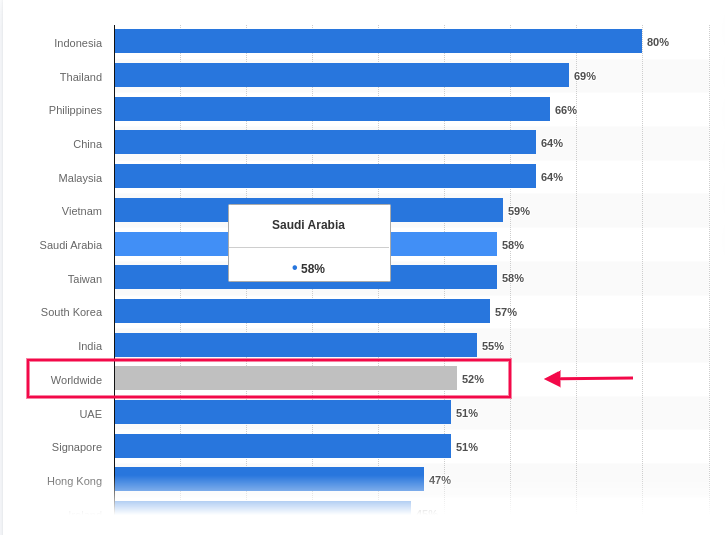
Based on a report by Statista, the global average percentage of online shoppers, who used their mobile devices to shop online, was 52%. This clearly states the urgency to provide a better shopping experience on mobile devices. Native Mobile Applications & Progressive Web Apps are a great solution to this.

Out of these, Progressive Web Apps (PWA) have been around for only 5 years now but in just a short amount of time, they have gained huge popularity among smartphone users as well as businesses. Upon transitioning to PWA, almost every eCommerce business has reported an exponential increase in conversion rates, app downloads & a lot more. You can check out the reports of Starbucks, Flipkart, Alibaba, etc. for your reference.

Building & launching is indeed very convenient for e-merchants now because of technological advancements & automated tools. In this write-up, we will elaborate on how you can also grow your eCommerce business, built on Magento 2, using a readymade tool.

The Magento 2 PWA Mobile App Creator extension is that ultimate tool. Whether you have a single-vendor Magento 2 website or a multi-vendor Magento 2 website, you can easily use this PWA maker tool on your website to automatically build a PWA Mobile App for your online store.

Doesn’t it seem magical? Well, it’s just the perfect use of web technologies.

How Does A Magento PWA Mobile App Builder Tool Work?

Just like any other Magento 2 extension, this PWA Maker tool is also a Magento 2 extension. Upon installing this extension on a Magento 2 website, it builds a customizable PWA derived from the data of that website. This keeps both the website & the PWA in live synchronization with each other.

Speaking of a customizable PWA, the Magento 2 PWA Maker tool provides the store-admins with various easy-to-use editing tools on the backend using which they can customize their PWA while it’s live. There is no need to worry about any downtime. Also, on the user-end, all the best & latest UI/ UX elements are equipped to provide an excellent user experience.

How Can Netizens Install A PWA?

Progressive Web Apps aren’t published in any of the app stores. Instead, they are made live on the website (on which this extension is installed). This means whenever netizens visit such a PWA active mobile-website, they are greeted with an ‘Add-To-HomeScreen’ popup at the bottom of the screen. Once they click it, the PWA automatically gets installed on their mobile device & appears to work just like any other mobile app on the mobile device.

How Store Owners Can Launch A PWA Using The Magento 2 PWA Builder?

Step 1: Purchase the Magento 2 PWA Mobile App Creator extension.

Step 2: Install this extension on your Magento 2 website.

Step 3: Fill the app pre-requisite form & review your app before making it live on your mobile website.

Features Of The Magento 2 PWA Builder Plugin:

#1. Simplified PWA Admin Panel:

The store owners and admins can easily configure their PWA App, set its color theme, logo, design the home-page layout, & do a lot more without a hassle. For their home-page, they can use any of the predefined components (like sliders, banners, product blocks, countdown-timer banner, etc.), configure it & rearrange them the way they want.

#2. Unlimited Push Notifications:

Store admins can send an unlimited number of push notifications to their app users and keep them engaged. Admins can also send personalized notifications & also automate & schedule some of the common ones like the abandoned cart notifications, order status notification. Admins can also use relevant graphics and catchy messages with desired redirect links on your Push Notifications.

#3. Multi-lingual & Multi-currency Support:

The Magento 2 PWA App built using this tool supports multiple currencies and multiple languages including RTL scripts like Arabic, Persian, etc. The Progressive Web Apps are capable of expanding your business reach across borders simply without any additional effort. 

#4. Offline Accessibility:

By default, the Progressive Web Apps support offline access. Because of data caching, PWA Apps work even when the app user is offline or under slow internet connection.

#5. All Payment & Shipment Methods:

All of the payment and shipment methods active on your Magento 2 website will automatically be active and fully functional on your Magento 2 PWA App.

#6. Social Login & Quick Sharing:

App users can easily onboard your Magento 2 PWA App with hassle-free social login options i.e. via Facebook & Google accounts. The PWA App built using this readymade tool also has a quick sharing link on the product pages. App users can hence easily share their choice of products on any of their social media handles.

#7. Order Tracking:

App users can also track all of their active orders and stay updated with the status of their order’s delivery. Any changes/ updates in the status of the order instantly reflect on the app & in the form of an order status push notification.

#8. Quick Login Options:

With traditional E-mail sign up & login options, the Magento 2 PWA Mobile App comes with inbuilt Google and Facebook login allowing users to seamlessly access the app in no time.

#9. Customizable Home Screen:

The PWA mobile app for Magento 2 comes with a customizable home screen whose layout can be designed from the admin panel. The store admin gets to craft and makes changes in the home screen as per any festival, sales or any other occasion.

Check all the features in detail from here.

Concluding:

Apart from just having a mobile-optimized eCommerce website &/or native mobile application (on the app store), having a PWA gives businesses more opportunity to reach all kinds of audiences with fewer efforts. With the use of a powerful ready-made tool like the Magento 2 PWA Mobile App Builder, building, launching & managing a PWA becomes a thousand times more convenient than building one from scratch.

So why wait longer? If you have a Magento 2 website for which you need a PWA, reach out to our experts at support@knowband.com or simply own your PWA maker tool from the Knowband e-store.