What Are the Steps to Follow for Mobile WordPress SEO Audit?

Modern society finds it simple to browse or make purchases online using mobile applications because they are widely used and easily available. With mobile SEO, it will be difficult if you don’t know which tactics are successful and which ones are not. You can review your website, find areas for development, and fix significant problems by performing an SEO audit. 

SEO Audit: What It Is? 

To ensure that your website is performing at its peak, you should conduct an SEO audit. Along with identifying any flaws and how to correct them, the effectiveness of your website’s SEO strategies is also evaluated. There are currently online tools that make recommendations for possible changes you can have to make to your strategy to achieve the best SEO performance. 

How to Do a Mobile SEO Audit:
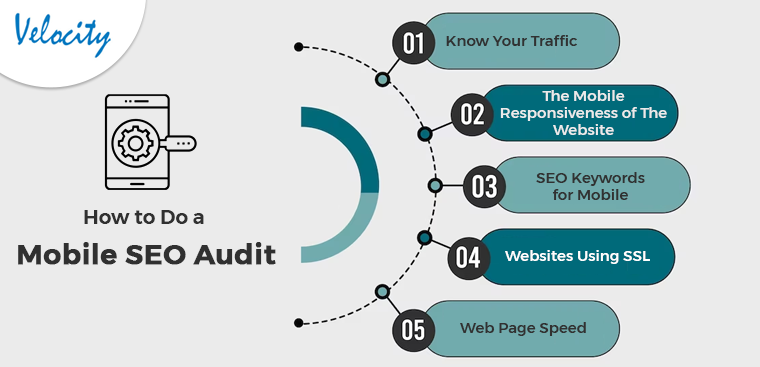
Know Your Traffic

You must be aware of how many mobile users there are and what kind of mobile device they like to use to access your website. Using Google Analytics, you can ensure that your website works on a variety of devices. Further, all suitable screen sizes, not simply the most popular ones, can be perfectly optimized for your website. Also, you can plan your keyword approach if you are aware of the many device types that your users have to visit the website.

Knowing which pages on mobile people are seeing will help you ensure that the websites are optimized appropriately. Knowing the search phrases can also help you develop a mobile keyword strategy. You can finally get ready for the continued movement of clients to mobile. Also, by observing how your visitors interact with your website while using a mobile device, you can adapt to the change accordingly.

The Mobile Responsiveness of The Website 

One of the most important things to consider in a mobile WordPress SEO audit is the layout of your website. To optimize performance, it is crucial to have a mobile-responsive design. As soon as all of your site’s optimization is done, the user experience will increase. 

A website is mobile-responsive if it can adapt its design according to any screen size. The good news is Building a mobile-responsive WordPress site is simple. WordPress automatically aligns a component for the mobile version of the website. Many internet tools, like Google Search Console, can help you see how people are interacting with your website. The content should only be displayed when needed for the best user experience. 

SEO Keywords for Mobile

Mobile WordPress SEO primarily relies on keyword optimization when determining how a page will rank in the SERPs. Due to the improved technology in our world today, most searches are coming from cell phones. Users of desktop computers and tablets often carry out searches in a different way than users of smartphones. Instead of using longer, more difficult-to-type keywords, mobile browsers use shorter, more user-friendly keywords. You should re-evaluate your mobile SEO strategy after conducting mobile keyword research.

There shouldn’t be ignorance of the local element. Considering how convenient they are, users favor using mobile queries. A huge population uses google Maps for transportation as it is convenient. Your WordPress site can be optimized by using locally relevant keywords.

Websites Using SSL

The next factor for an SEO audit checklist is determining whether your website has an SSL certificate. An SSL encryption certificate facilitates communication between a user’s browser and your website server. Websites that utilize HTTPS are more secure than those that do not, according to Google and other search engines. If your site is secure, you may tell by looking for a padlock icon in the browser’s search field. 

Web Page Speed

Google gives ranking consideration to how quickly your website loads. When performing an SEO audit, it’s critical to look for factors that can make your website load slowly. Identifying the speed of user access to your website is the first thing you need to perform. Once you have connected Google Analytics to your WordPress website, simply go to Insights then Reports from your dashboard, and select the “Site Speed” option.

You can view a rating for how quickly your site loads on desktop and mobile devices. Other information in the report is also shown, and this information is vital for figuring out how quickly your website loads. Caching plugins are available to improve server response times, and a content delivery network (CDN) is an alternative for increasing website speed. 

In the End

In this article, we have been discussing the various steps using which the SEO audit is possible for WordPress on Mobile. Apart from that in case there are any issues or concerns related to our module then we can assist you for the same. Moreover, if you want to have any customization in our module or want any additional feature to it then connect with us at support@knowband.com. We also provide custom development services which are specific to your business and we will be happy to assist you with the same.

Opencart Product Label | Product Sticker Extension – User Manual

1.0 Introduction

Modern customers have a very short attention span. In other words, if they are hovering over an eCommerce website, the admin has very less time to provide them with the information and offers at the same time. Even, many kinds of information help the customers to understand if the product is a perfect fit for their needs or not.

Following the same, we have designed the Opencart Product label extension for the Opencart eCommerce merchants. Using the extension, the admins can add responsive stickers on their shopfronts. Moreover, the admins can even upload the stickers and set the dimensions and sticker position at their convenience.

Likewise, if you are willing to make your customers aware of sales, offers, delivery time, and other pieces of information. We have got you covered with Knowband’s Product Label Extension for Opencart. On top of that, the extension comes with tons of richly loaded features to make sure your piece of mind. Let’s find out some of the most highlighted features offered by the Opencart product sticker plugin.

1.1 Major Highlighted Features Offered by Knowband’s Product Label Extension:

The Opencart product sticker plugin is empowered by tons of incredible features. Not only the plugin is configurable from the back end but also provides high-quality pre-loaded stickers.

We have tried to cover up some of the most sounding features of the Opencart product sticker module.

  • The admins can boost their revenue by showing the offer discounts on products.
  • The Opencart store admins can choose the pages where they want to show the product stickers.
  • For example, the store administrators can choose the options from the product page, product listing page, search page, home page, and much more.
  • The Opencart admins can include or exclude specific products for the sticker appearance.
  • With the help of the Opencart Product Sticker module, the store admins can include the Opencart store categories where they want to show the responsive stickers.
  • Along with pre-available stickers, the admins can also upload the stickers of their own will in the module and make them appear within no time on the shopfront.
  • The Opencart Product Label plugin provides the option to show the stickers based on the products’ available stock conditions.
  • Create as many labels as you want within clicks.
  • The Opencart store admins can manage the sticker positions on the product images right from the module backend.
  • Moreover, the admins can choose the start date and end date for particular stickers.
  • The admins get an option for choosing between all products, specific products, and special categories for the sticker appearance.

2.0 Installation Guide

The installation of the Opencart product label module is pretty easy. You can simply install the module by just following the below-mentioned steps.

After you will proceed with the order of Knowband OpenCart product label extension, you will get the following files at your end.:

  • Zipped File containing the source code of the OpenCart product label extension.
  • User Manual of OpenCart product label extension.

Follow the steps below to install the OpenCart Product Label Extension in the OpenCart store:

  1. For the first step, Unzip the zipped file (you will find the same in my account>>downloads). You’ll get the folders as shown in the image below:

  1. Copy all the files and folders of the zip file in the Root Directory of OpenCart setup via FTP manager.
  2. The Opencart product label module installation is done and the module is ready to configure now.

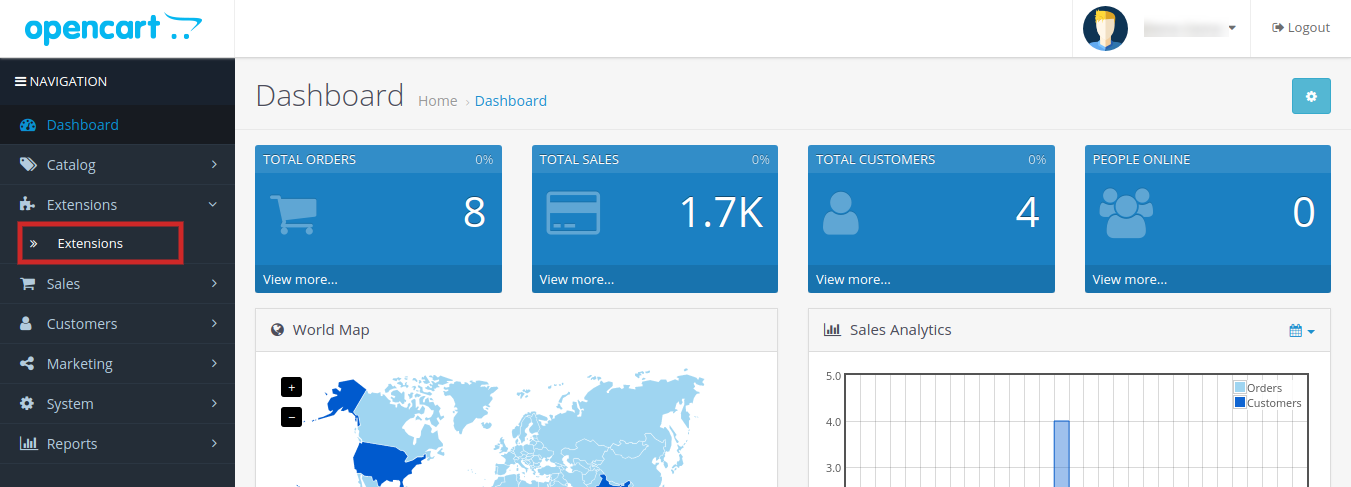
Go to Admin -> Main Menu -> Extensions as shown in the image below:

  1. Choose the product label by Knowband extension from the list of extensions and click on the Edit button.

3.0 Admin Interface of OpenCart Product Label/Sticker Extension:

The Opencart product sticker module comes with an easy-to-manage admin dashboard. The admins can manage every ounce of their extension within just a few clicks. The control panel for all the incredible features is managed in apple-pie order to deliver the piece of mind to the store admins.

Let’s discuss the admin panel configuration of Opencart Product Label Extension one by one.

3.1 General Setting:

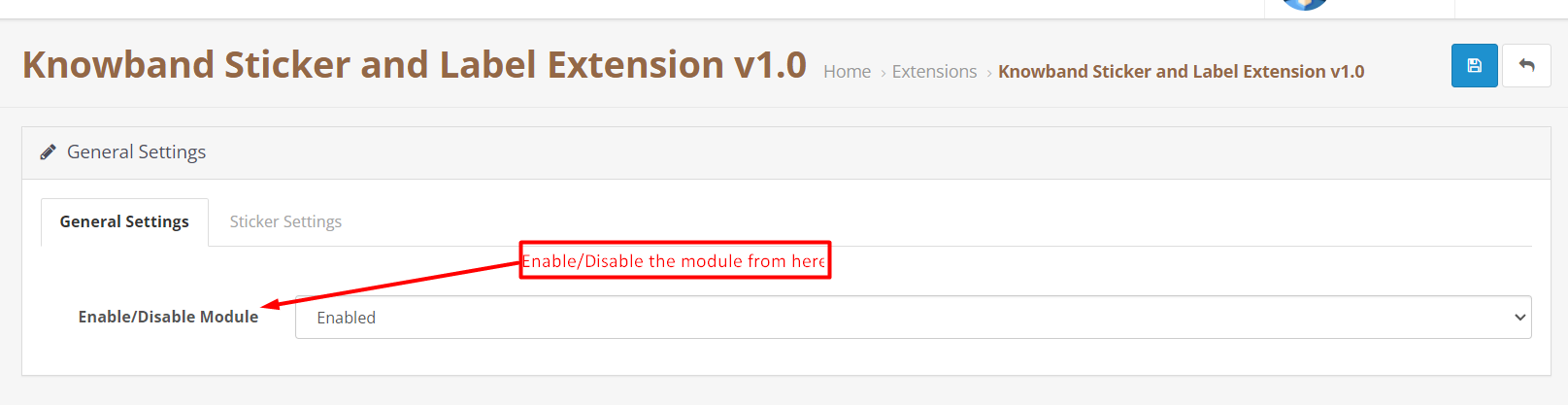
Under the General setting tab, we have provided an option for enabling/disabling the module.

Enable/Disable:

The admins can enable/disable the extension with the help of the following button.

3.2 Sticker Setting:

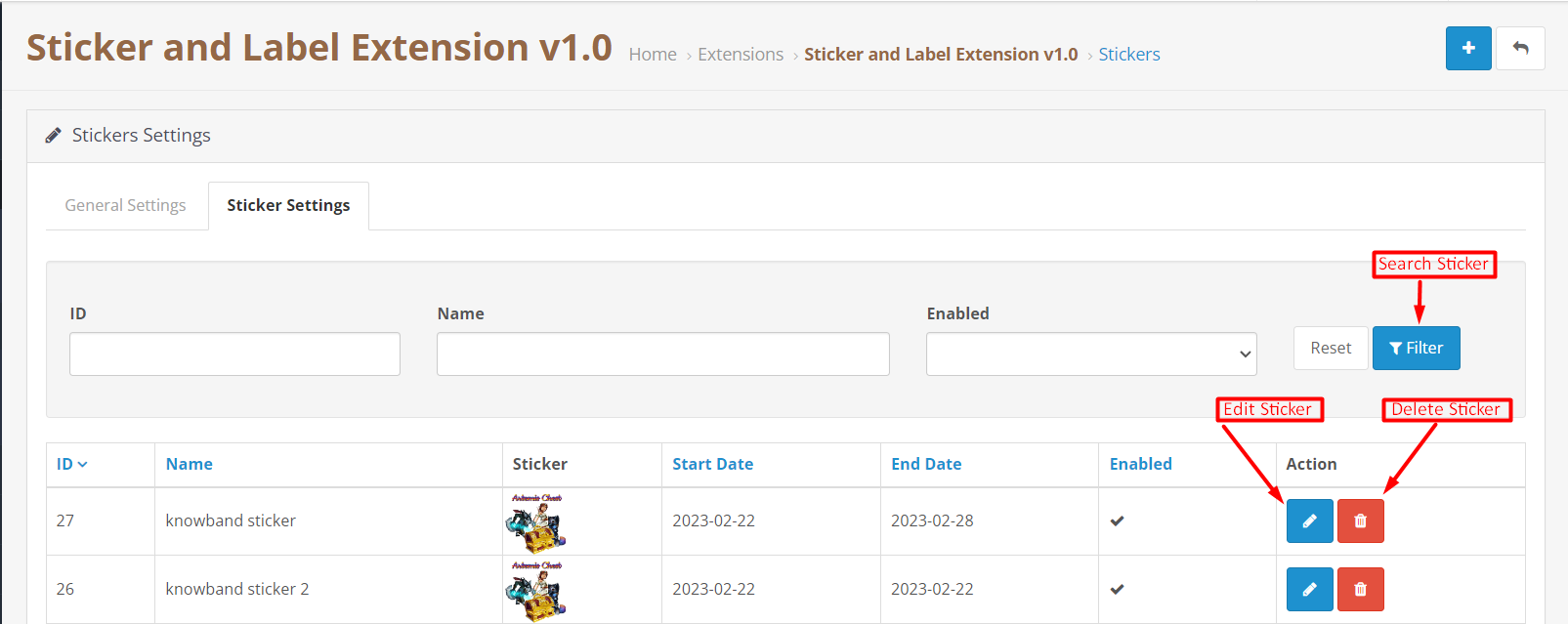
In the following tab of the Opencart Product Label plugin, we have provided options for showing all the added stickers. The admins can perform basic operations for stickers under the sticker setting tab.

Search Sticker Button:

You can search the sticker by sticker ID, Sticker Name, or by enable/disable condition in the following section.

Delete Sticker:

By the following option, the admins can remove the sticker permanently.

Edit Label:

The following option is for managing the sticker configuration. By clicking the following option, the admins will be redirected to the sticker setting page.

3.2.1 Sticker Setting: General

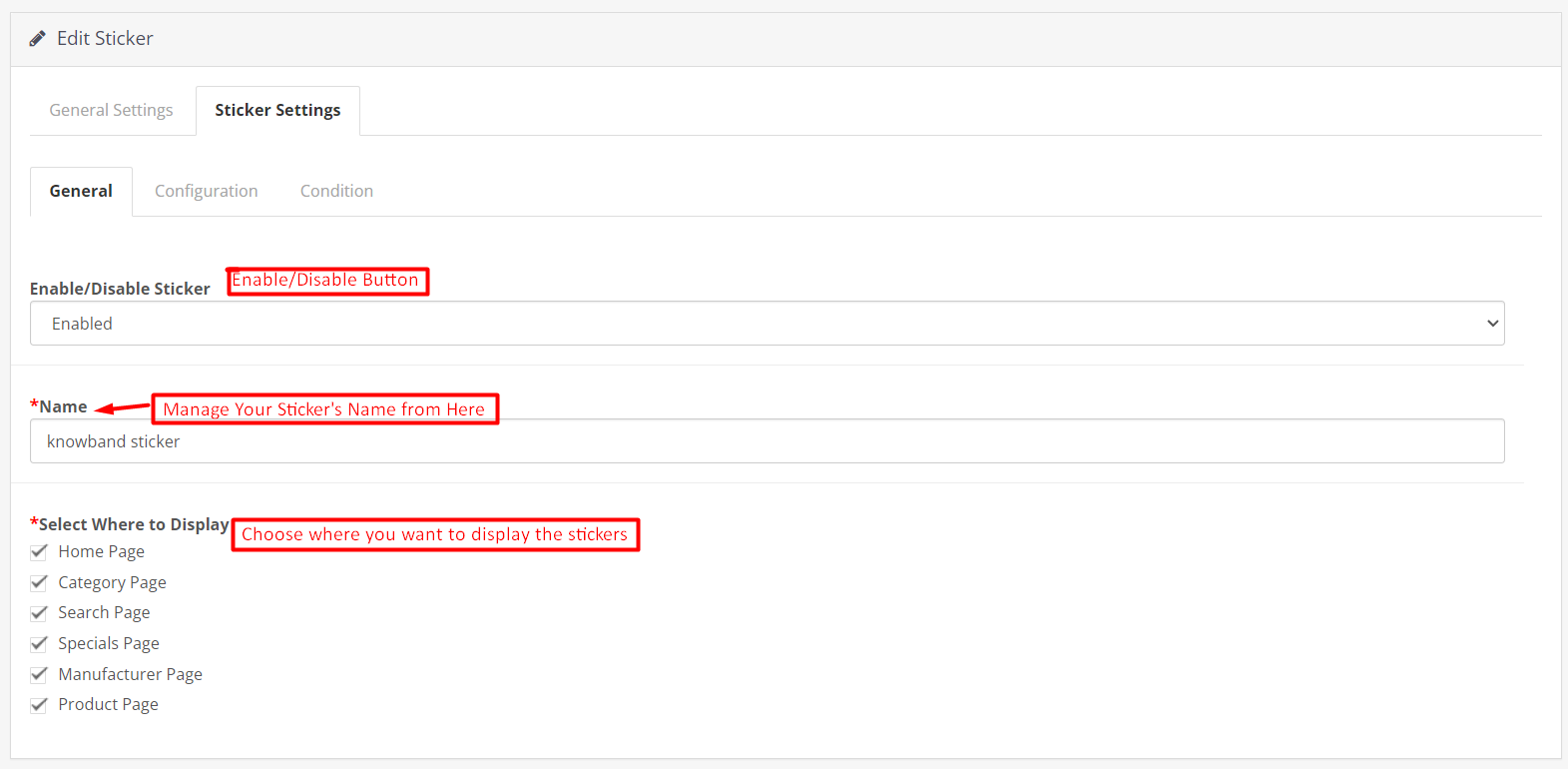
In the following tab, we have covered all the general settings for the Opencart Product Label Extension.

Enable/Disable Sticker:

The admin can choose the sticker appearance status from this button by simply choosing to enable/disable the button.

Name:

In the following text field, the Opencart store retailers can assign the name to a sticker.

Select Where to Display:

This particular section is added to provide the options of choosing the sticker appearance place. The admins can simply check the boxes where they want to show the stickers from the general setting tab.

For example, if you have selected the option product page and home page from this section. The added sticker will only appear on the home page and the product pages on the website’s front end.

3.2.2 Edit Sticker: Configuration:

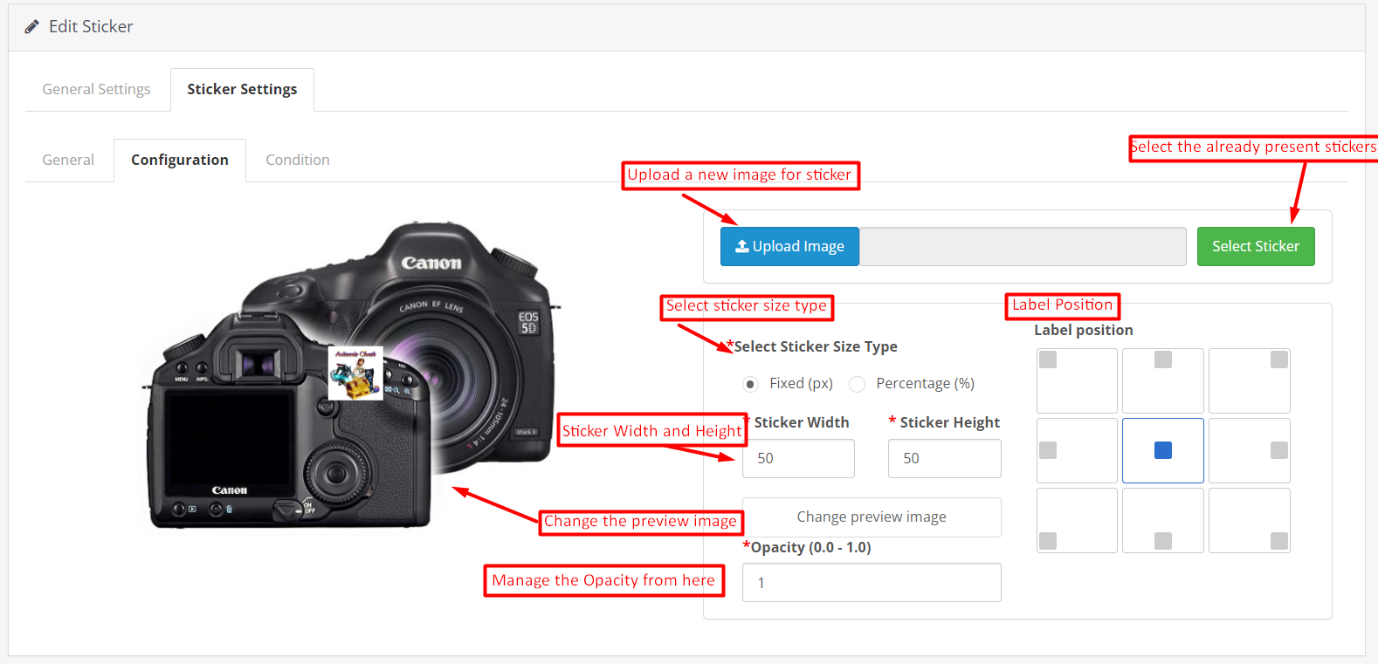
Opencart Product Label Extension’s edit sticker tab allows the store admins to configure the physical appearance of the product label.

Select Sticker:

We provide various pre-loaded stickers along with the Product sticker module plugin for Opencart. By hitting the following button you can simply choose from the already available stickers. Apart from it, the stickers you will add from the module will also appear in the following section.

Upload Sticker:

If you want to upload a new sticker from your system, you can simply choose the upload sticker button.

Select Sticker Size Type:

In the following button, we have provided 2 options. If you want to manage the size of the sticker based on fixed (px.) you can click on the radio button.

Moreover, if you want to configure the sticker size based on percentage, we also provide the option for percentage.

Height and Width of Sticker:

By the following button, you can manage the height and width of your product label. Moreover, you can also see a live preview of the sticker appearance along with the size change. Maximum height and width for sticker should be mentioned for both cases i.e. 300px for fixed size and 100% for percentage.

Change the Preview Image:

With the following button, the admins can choose a new preview image for checking the appearance of the product labels.

Opacity:

In the following option, you can choose the opacity of the sticker.

3.2.3 Edit Sticker: Condition:

The condition tab in the sticker configuration tab is for managing the condition of stickers to appear on the front end.

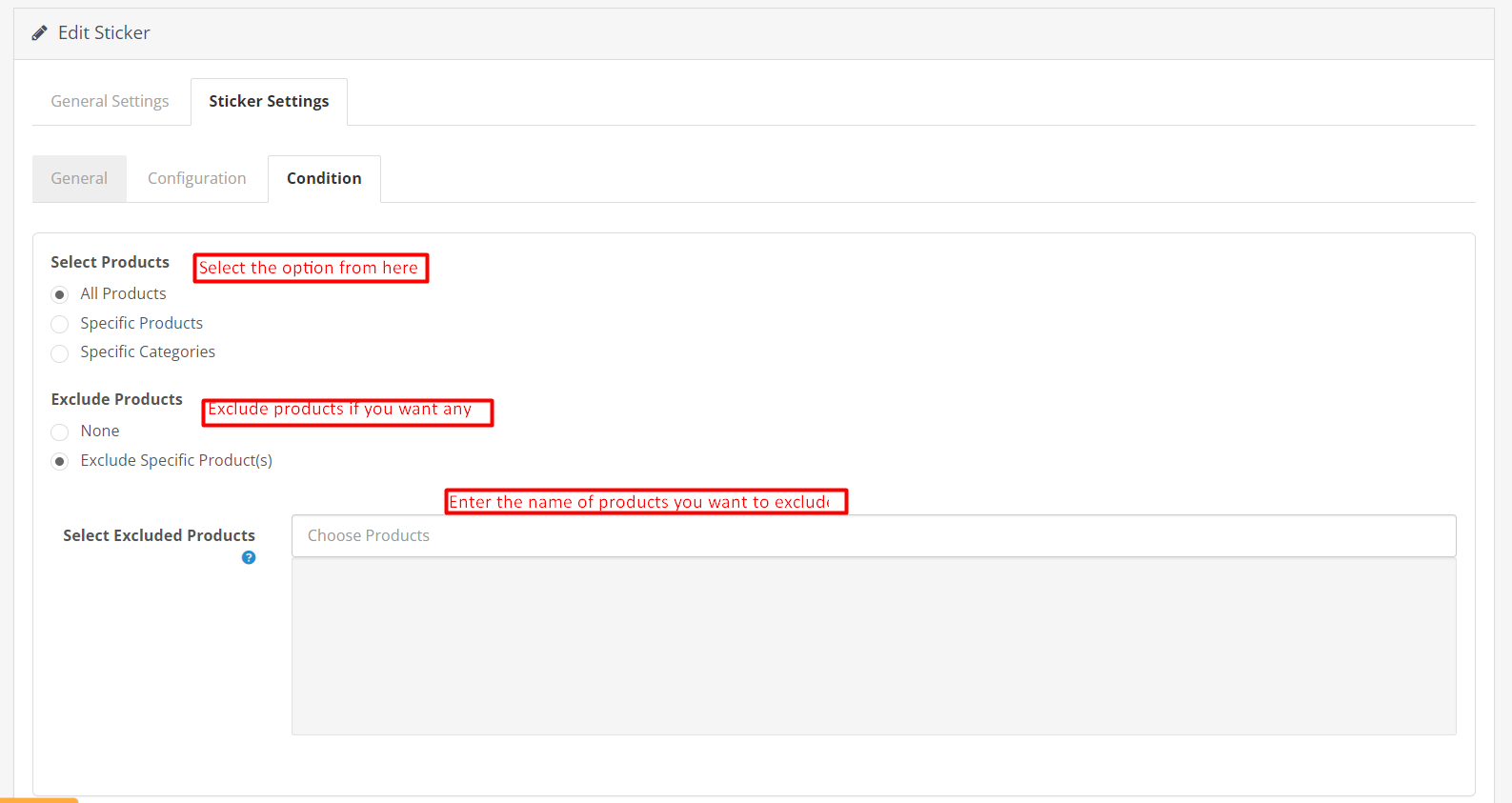
Select Products:

In the following button, the admins can choose the products where the sticker needs to appear.

Exclude Products:

If you do not want to exclude any product from the above-selected condition, you can go with the none option.

However, if you are planning to hide any specific product from the above-selected product group. You can simply choose the option to exclude products as shown in the image.

Select Excluded Products:

For excluding any product all you need to do is to enter the name of the product in the following text box field.

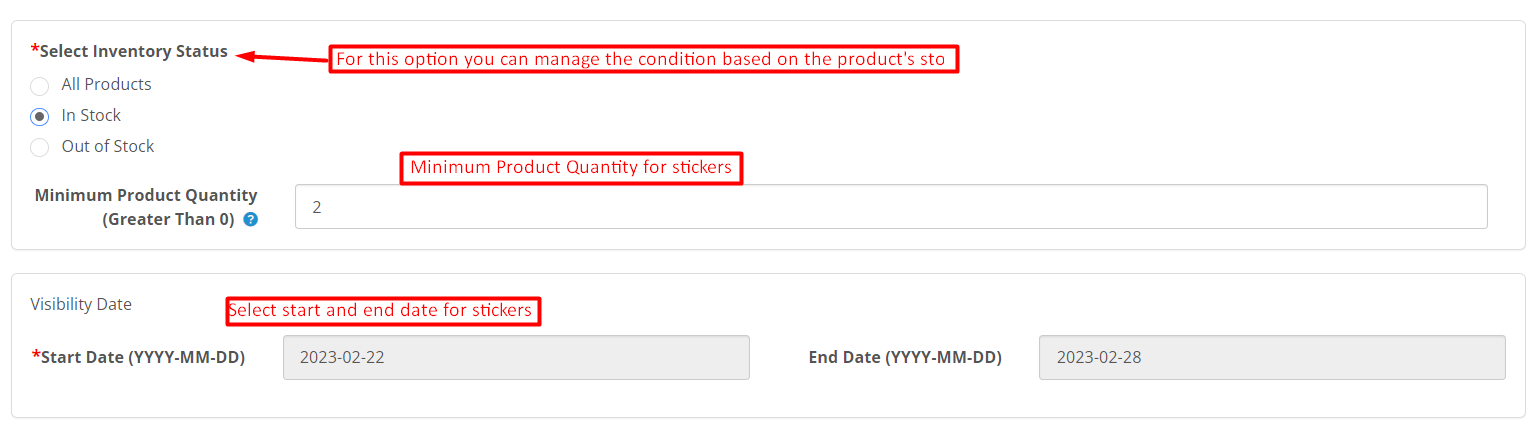
Select Inventory Status:

This particular section allows the admins to choose the sticker appearance based on the inventory status of the products.

All Products:

If you select this particular option, the sticker will appear for all the products.

In Stock:

If you select this option, the label will only appear for the in-stock products. Moreover, you can also add the minimum product quantity which needs to be considered for stickers.

Out of Stock:

By selecting the following option, the admins can show the product label for the out-of-stock products only.

Visibility Date:

Knowband’s Opencart Product Label Extension provides the following option for selecting the start and end date for the sticker.

You can simply pick any starting date and visibility end date for the sticker.

4.0 Front End of Opencart Product Label Plugin:

After making the changes as per convenience and saving the data from the module back-end. The Opencart store admins can check the preview of the made changes within no time. On top of that, the Opencart Product Sticker Extension allows the admins to show off high-quality stickers on their shopfronts. Below are some samples of the product sticker extension’s front end.

What Are the Best Methods for Making an eCommerce Website Profitable?

For having a profitable business, it is very important to have a good online presence. Customers want websites to be easily navigable and intuitive. It is important to provide customers with a seamless browsing experience, and apart from these various benefits and offers, others should also be present.

With so much competition in the eCommerce market, it is very hard to establish your ground. To have a good and established website, it is very important to have some points implemented in the website that are essential for a successful website.

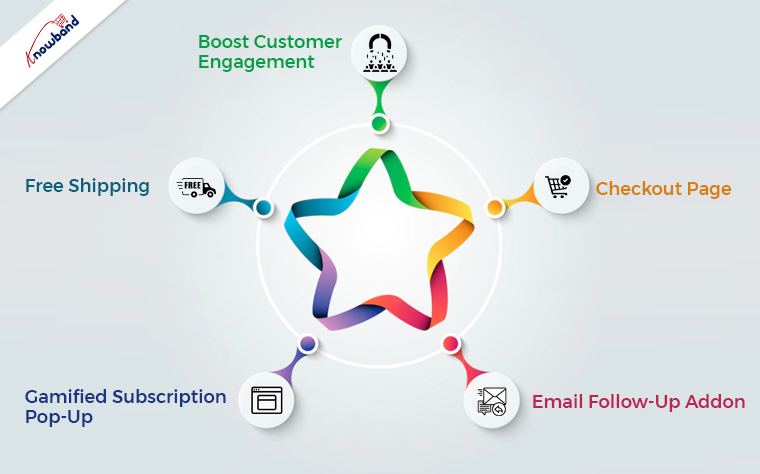
Boost Customer Engagement

It is very important to increase the engagement of the customers on the website. If customers spend more time on the website, there is a greater chance that they will purchase if they browse for an extended period. An exit pop-up module is there, which can increase customer engagement on the website. As soon as the customer tries to exit the browser, an exit popup appears with offers for the user. The users will be happy to use the discounts and will continue to shop from the website. This will increase their engagement and increase their customer base. With this exit intent pop-up, the users spend more time and end up making a purchase, which thereby results in profit for the eCommerce website.

Checkout Page

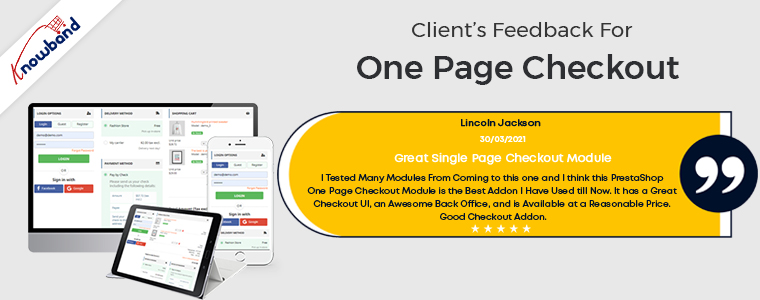
Checkout is a very important part of the eCommerce website, as, without it, the purchase is not complete. A good checkout integration is necessary for any online store to function properly. It is not pleasing for the customers to use the long drawn-out checkout process. Users should have an easy time completing the checkout procedure and feel at ease doing so. Online shoppers can complete their purchases quickly and easily with the help of our single-step checkout plugin. With the one page checkout plugin, it is simple for the users to checkout as all the information is present on one page.

The default checkout process requires you to browse through several pages, which is annoying. Due to customers’ dislike of lengthy, drawn-out checkouts, cart abandonment occurs. The single-page checkout has been effective in preventing such problems, which is evident from the customer reviews.

Email Follow-Up Addon

For resolving the issue of cart abandonment by users, the email follow-up plugin is useful. The abandoned cart module is activated when users add an item to their shopping carts and then remove it for any reason. One of the biggest problems e-commerce companies are dealing with is cart abandonment. This plugin assists in increasing cart conversion and decreasing cart abandonment, hence recovering lost sales. Using the abandoned cart module, we can send clients several follow-up emails if they leave items in their shopping carts. There are two variations of these follow-up emails: those with discounts and those without discounts. Customers will be persuaded to finish their purchases with this alluring offer. We send reminders to them when they forget to finish the purchase so that they will remember to complete the purchase.

Gamified Subscription Pop-Up

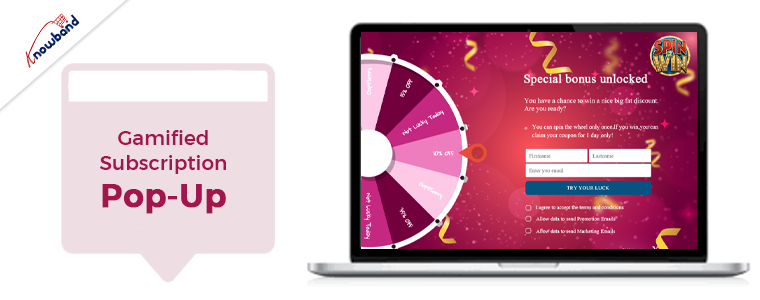
The email subscription popup helps boost both sales and website subscriber numbers. Customers are persuaded to subscribe to the email list with this “spin and win” plugin that offers them gifts or discount codes. As they will be receiving rewards for spinning the wheel, users are eager to spin it in hopes of receiving the free rewards. When employing this gamified plugin to subscribe to the website, users subscribe without hesitation as they are receiving gifts. Unlike other subscription pop-ups that annoy customers, the Spin and Win modules don’t do so, as they are not like the other subscription pop-ups. Additionally, customers are encouraged to sign up for the online store.

Free Shipping

The conversion rate greatly impacts the total cost of the cart. Free shipping is offered to clients for their orders when the free shipping manager plugin is enabled. When customers realize that by purchasing additional items, they can reduce the cost of shipping, they are more likely to add more items to their shopping cart. The conditions for providing customers with free shipping are configurable in the free shipping module. When an eCommerce website offers free delivery, people are happy to make a purchase and are more likely to return to make additional purchases.

Wrapping It Up

In this article, we have been discussing the various implementations we can perform to improve the website. In case you have any concerns or issues related to our module, you can connect with us at support@knowband.com. We also assist with custom developments as per your requirements. Also, we can add a feature to the module or modify the module depending on your business requirements. Kindly let us know so that we can assist you with your requirements.

Top Reasons Why Social Media Marketing Is Crucial for A Business!!

Nowadays, social media marketing is considered one of the most effective promotional methods. Not only social marketing is trending in the market. But also, it ensures the quickest results for businesses. There are various reasons behind the success of social media marketing. Although if you are doing social media marketing for your eCommerce business. You may have to pay some amount to the respective platform. Yet, spending on social media marketing entirely justifies the expenses because of the assured success rate.

Thus, following the same, in this article, we are going to spread some light on why social media marketing is crucial for online businesses.

What is Social Media Marketing?

In simple words, social media marketing is a modern marketing method in which a brand/user uses social media platforms to promote their eCommerce business. For example, some of the best social media platforms to promote a business are. Instagram, Facebook, Snapchat, TikTok, etc.

Social media marketing ensures promising benefits by getting a business noticed in front of a vast customer audience.

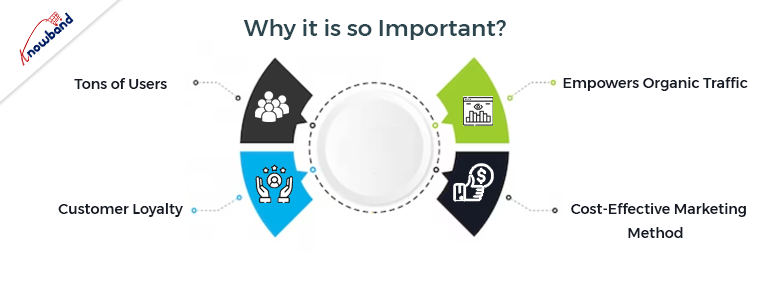
Why it is So Important?

1. Tons of Users:

One of the most sounding reasons for using social media marketing for a brand’s promotion is that. There are tons of social platform users available worldwide. Moreover, social platforms such as Snapchat, Instagram, and WhatsApp are some of the online places where modern users love to spend their quality time.

As an online business owner, it is advantageous for you to get a chance to represent your brand in front of a vast audience. Thus, the first reason for choosing social media marketing for promoting an online business is that. Social platforms have millions of users waiting for their favorite content. The same creates a huge opportunity for small business to show off their inventory.

2. Customer Loyalty:

The other major advantage of social media marketing is that it helps a brand to gain brand loyalty from customers. How? If you are posting your marketing content online, then there are huge chances that customers will have queries regarding the same.

Now, the other benefits of social platforms are that anyone can raise a query to a respective page/account. Thus, while promoting your business online on social media platforms, you can directly keep in touch with your customers can ensure their peace of mind against all sorts of concerns/queries.

In the following way, it is much easier for a brand to gain customer loyalty using social media marketing for promoting their business.

3. Empowers Organic Traffic:

Building an enchanting business page on social media platforms impacts the organic customer traffic for a website. In case you are providing valuable and eye-catching content on your Instagram page, there is a huge chance that users might like your content and further would love to visit your website.

In the following way, social media platforms are securing huge opportunities for online business to enhance their customer traffic by just following a few simple steps.

4. Cost-Effective Marketing Method:

Well, it might sound a bit awkward. Yet, SMM (Social media marketing) is one of the most cost-effective promotional methods available in the market. On top of that, SMM ensures the lowest customer acquisition cost for online businesses. For those, who are unaware, CAQ (Customer Acquisition Cost) entirely defines the effectiveness of a marketing method.

Thus, not only you can boost and easily enhance your brand reputation using Social Media Marketing but also SMM is going to be quite pocket friendly for your business.

In the End,

Amongst all the others, Social Media Marketing is one of the most effective marketing strategies that are playing important role in the growth of eCommerce businesses. Following the same, SMM is becoming the favorite all-time marketing method for the eCommerce community. Moreover, if you are using SEO and SMM together, you can easily get the eyes of your desired customer base.  You can also check out our other recent content about how SEO is empowering online businesses.

A9 Fragrances: One of the UK’s Leading Brands | Journey with Knowband

England is a country that is famous for its royalty and is highly developed in industrialization for chemical and textile products. England, being one of the major powers in the world, has huge markets for all kinds of industries. The country is famous for its textile and chemical products, whose market is on a very large scale in physical as well as online market. As eCommerce business growth has been remarkable, many offline businesses are moving a part of their business online too.

A9 Fragrances is one of the fastest-growing online businesses in the country with its signature exclusive scents. They have been in this business and have shown exponential business growth, the reason being their premium-class fragrances. The brand is very popular among the elite as the products are classy and exclusive, making them popular among customers.

About A9 Fragrances

A9 Fragrances is a leading brand for perfumes, scents, and other products due to its top-notch quality. The fragrances are long-lasting, exclusive, and lovable to the elite class of users. The fragrances are very popular among users, as the brand has a reputation for high-grade and lasting fragrances. The users can maintain their status and appearance in society, which makes the products extremely popular.

The brand has its roots in London, the capital of the country. Further, they have a combination of eastern and western fragrances, which allows them to have a wide range of products. A9 Fragrances has truly amazing products, including sprays, purely oil-based rolls, and many more.

When it comes to categories, there are five of them available for customers to choose products from. There is also a gift section for gifting purposes. The products for men and women are available in several subcategories. With so many products to choose from, customers have wide-ranging options depending on their needs and preferences.

A9 Fragrances Mobile App by Knowband for Android and iOS Platforms

Apart from the e-commerce website, A9 Fragrances has moved its business to mobile apps. The Knowband for A9 Fragrances Android and iOS app includes many useful features for customers. The mobile apps are handy and provide the users with a great experience, thereby making browsing more fun and easier.

There are some integrations in the mobile app as per the business requirements of A9 fragrances. Moreover, Knowband’s role in these implementations was very crucial for successfully deploying the app with these features. The Knowband team also created the feature of gift set creation, which allows customers to create their product bundles.

The A9 Fragrances app is for the WooCommerce platform, and during the app’s development, the role of the Knowband Mobile App Team was vital. Many customizations are present at both the app and web end to meet the needs of the business. The A9 Fragrances app deployment and numerous customizations from the beginning were possible with the Knowband teams’ assistance.

About WooCommerce Mobile App Builder

Building Android and iOS mobile apps for WooCommerce eCommerce websites are easy with Knowband’s WooCommerce Mobile App Builder. There are several functionalities available in apps created with the WooCommerce App Builder. Also, the plugin provides Flutter-based mobile apps for Android and iOS for eCommerce businesses. A seamless user experience and quick loading times are the features of Flutter-based Android and iOS apps.

Apart from WooCommerce, Knowband provides a mobile app for various eCommerce platforms like OpenCart, Magento, WooCommerce, and Magento 2, as well as PrestaShop. Thus, Mobile App Builder from Knowband is a great option if you’re not comfortable with coding for the creation of iOS and Android mobile apps. The mobile app builder provided by Knowband does not involve coding for app creation.

What Does A9 Fragrances Think of Knowband?

In the initial phase of the project, we had some custom development requirements, which was possible due to the Knowband App team. Throughout the app development process, we proposed requests for app and web end customizations. Further, the project development and customization completion within the decided period was possible with Knowband. We are looking forward to working with Knowband on some integrations and customizations in the future for our business.

Success Mantra to Grow Your eCommerce Business!!

Starting an online business is not just about building an eCommerce website and listing products on it. The most important part is getting customer traffic and on top of that converting the visitors into customers. Thus, it takes marketing and other promotional methods to make the customers aware of a brand and boost the brand’s reach. Following the same, various trending strategies in the market are adding value to the growth of start-up eCommerce businesses.

Following the same, in this article, we are going to discuss some of the best marketing strategies that can skyrocket brand awareness for small eCommerce businesses.

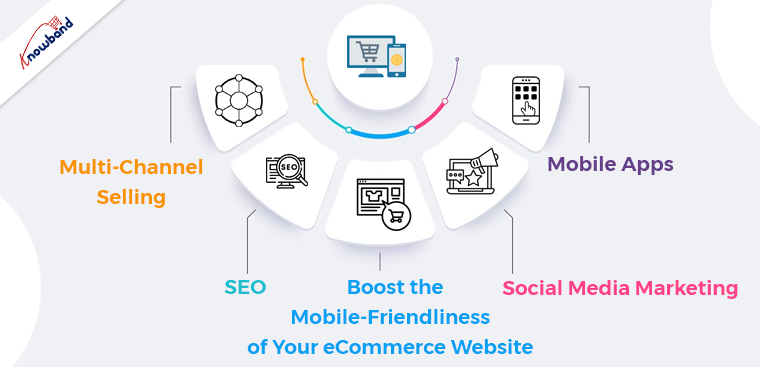
1. Multi-Channel Selling:

Selling the same products on multiple platforms at the same time is called multi-channel selling. For example, if you are selling your PrestaShop eCommerce website’s products on marketplaces like eBay, Etsy, and Amazon. You will be recognized as a multi-channel seller business. The multi-channel selling not only improves the overall sales for a business but also impacts the brand reputation positively.

Thus, in the support of the same, we also offer eBay, Etsy, and Google Shopping Marketplace connectors for the PrestaShop, OpenCart, WooCommerce, and Magento 2 eCommerce platforms.

2. SEO:

Search engine optimization is one of the most effective techniques from the last decade to boost organic traffic for a website. Moreover, the other major advantage of SEO is that small businesses can start SEO with zero investments.

Although it will take some time for getting your backlinks stronger yet, once you can get your backlinks, it will be a win-win situation for your eCommerce business.

Moreover, it is important to use SEO-friendly URLs for a website to be on the positive side. You can also check out SEO Wizard by Knowband for enhancing your website’s links from the Search Engine Optimization perspective.

3. Boost the Mobile-Friendliness of Your eCommerce Website:

Modern consumers spend most of their time on the Mobile Phone than laptops, scrolling through their favorite content. For the same reason, it becomes important to make a website mobile friendly for visitors. The mobile-friendliness of a website not only improves the User Experience but also impacts SEO according to Google’s Page Experience Update.

Thus, it becomes crucial for small eCommerce businesses to provide a fast-loading mobile responsive website for the users. Moreover, you can also check out Knowband’s Accelerated Mobile Pages Addon for boosting the Mobile pages loading speed of Your Prestashop eCommerce website.

4. Social Media Marketing:

If you talk about the trendiest marketing method in the market, it is social media marketing. The reason behind the same is that social platforms such as Instagram and Facebook are some of the favorite places where you will find your consumers. Following the same, even major businesses spend a lot on promotions on social platforms. Although you will get the most relevant leads from promoting your online business on social platforms. Yet, you might have to pay some extra charges to platforms for making the most out of it.

5. Mobile Apps:

Having Android and iOS Apps for an online business is not only a need for the modern market but also a success remark. For the same reasons, it becomes important for an online business to have fully functional Mobile Apps. Mobile Apps not only provide a rich user experience to the customers but also keeps them engaged with business with Push Notifications and other direct marketing methods.

Thus, in case you are having your online website based on Prestashop, OpenCart, WooCommerce, or Magento 2 eCommerce platform. And willing to launch your Flutter-Based Android and iOS Apps without writing a single line of code. You can check out Knowband’s Mobile App Builder for fulfilling your business need.

In the End,

Although the eCommerce industry has a wide scope for newcomers. Yet, it takes a lot of effort to make a business well-recognized. Thus, the only solution is to try out different strategies on various occasions to keep up with the market competition. Moreover, in case you are having any queries or suggestions regarding our modules. Or willing to develop custom modules for your online business, you can drop us a mail at support@Knowband.com.

Factors Affecting Google Page Ranking for A Website

The components of your website that the Google search algorithm takes into account when determining which web pages to show in the search results for a specific search query are Google ranking factors. It might be challenging to stay up to date with innovations as SEO criteria changes frequently. But you need to know if you want to witness a rise in your Google ranks from the bottom of the list to the top.

The sites which are having proper optimization experience more traffic and this results in an increase in sales and revenue of the website. Shoppers won’t be able to reach your website without SEO, meaning all your effort will be no good without SEO. We’ll tell you about the numerous elements influencing Google search ranking in this article.

Page Speed

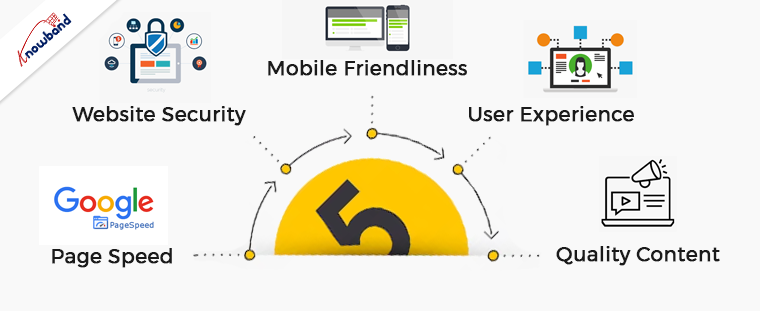
For many years, one of the most important SEO ranking variables has been page speed. Fast-loading web pages will help Google achieve its goal of improving people’s browsing experiences. Google revealed an improvement to its search engine algorithm that started to have an impact on websites and was centering around mobile page performance. Your website can suffer if it doesn’t load quickly on mobile devices. To examine how your site performs, use Google’s mobile testing tool. But if you haven’t already been using Google Search Console then is the best course of action to have. This contains a whole area devoted to providing you with information on your site’s performance, including speed.

Mobile Friendliness

While we’re talking about mobile, mobile friendliness is another important SEO ranking factor. There have been adjustments made to how Google ranks search results since more people use mobile devices than desktop computers to browse online. Google’s mobile-first index is now a reality. This means that it draws its results from sites optimized for mobile devices first rather than those designed for desktop computers. Your website is in danger of being unfairly under-ranked if it isn’t mobile-optimized. Many of the SEO ranking variables we have in this post will assist you in building a strong search engine ranking. Further, you must also consider the user experience when visitors arrive at your website.

Website Security

Having the appropriate website URL is without any surprise the first of our SEO ranking variables. It’s a URL that Google’s bot can simply access and crawl. In another way, Google has to be able to access the URL and view the page’s content to determine what the page is about.

Sitemap creation is possible with All in One SEO if you manage a WordPress website. You can utilize a sitemap generator online if not. Whether or not to index a page depends in part on HTTPS. HTTPS is a ranking indication according to Google. So now would be an excellent time to update if your website doesn’t already have an SSL certificate.

User Experience

Google has been using AI to rank websites more favorably for users for some time. When visitors arrive at your website, don’t like it, and leave, Google will assume that it is not appropriate for customer needs. If sufficient numbers of people carry out this action, it will become more challenging for your website to appear higher in search results.

This is not a good indication that the searcher’s goal and your content don’t align. You might start over and choose a better keyword to target. In contrast, if Google knows that your material is relevant to customers’ search if visitors go over to your website and browse around for a time.

Quality Content

Many websites have been experiencing a boost in their business when they update the content as per their audience interest. Content of low quality has no place on the internet. Additionally, it doesn’t require anything complicated or fancy to create content. It is one of the most significant Google ranking factors. Google will favor your material if it is excellent, detailed, and valuable.

Write helpful, engaging, and informative content that readers want to read. Researching the queries that your target audience needs and producing content that addresses those inquiries is a wonderful idea. For your target audience on social media, employ keyword research tools to identify frequently asked questions.

In The End!!

We have been discussing the various factors responsible for ranking on google. If you have issues with your website SEO then try SEO optimizer and other SEO modules. Apart from that, we can also assist you with the concerns or issues related to the module for which you can revert to us at support@knowband.com.

We can also provide custom development as per your business requirements. Moreover, if you want to add any extra functionality in our modules then we can help you with the same. Kindly connect with us if you have an interest in our mobile apps and we will be happy to assist you.

5 Common Methods of Growing Your Business with Digital Marketing

Most companies are doing whatever they can to maintain their position at the top in this highly developed digital environment. Traditional marketing’s reach is also limited, and digital marketing has carved out new paths for itself. You can receive benefits greatly if your local company is present on the home page of the internet or social media sites.

Potential customers are lost if your company isn’t present on online platforms. Your company needs to embrace digital marketing if it wants to establish a strong online presence. Finding, interacting with, and keeping your target shoppers are made easier by local businesses using digital marketing. A company must have an online presence for the growing popularity of mobile searches and the impact of social media.

Ways to Grow your Local Business with Digital Marketing

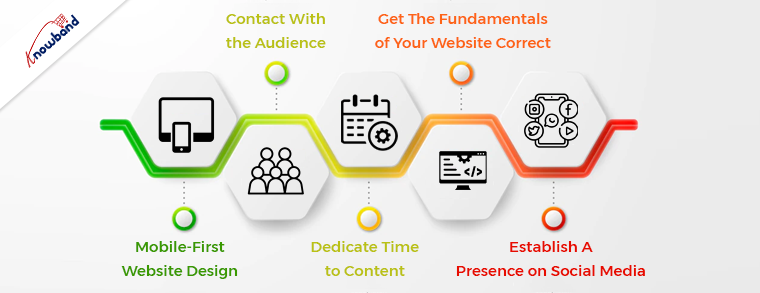
Mobile-First Website Design

Your business must have a mobile site that performs well to be successful. Today, mobile devices account for more than half of all web traffic, including most online searches. Furthermore, Google has made it quite apparent that it prioritizes mobile friendliness when determining a website’s ranking. The search engine shifted to mobile-first indexing earlier this year, which means that they now rank webpages based solely on their mobile versions. 

However, a lot of companies fail to make their websites mobile-friendly. Due to this, companies with mobile-friendly websites now have the chance to both increase their search engine ranks and leave a positive user experience. 

The best strategy to optimize your website for mobile devices is to adopt a responsive web design. All of your web pages will be able to automatically adjust to each user’s device as a result, giving your website a fantastic design and speedy loading time.

Dedicate Time to Content

Your published content determines how well your marketing strategies work. Just writing informative content for users is not enough. While the typical blogs and articles are wonderful for traffic generation, they aren’t adequate on their own.

To better understand your audience, you should utilize highly interactive content on social media, such as questions, polls, comments, etc. All sizes of businesses are starting to recognize the importance of audience connection. To keep the audience interested, many popular companies provide a mix of entertaining and informative material.

Contact With the Audience

Through email newsletters and social media posts, you can communicate with your target audience digitally and earn their trust. Digital marketing is so important today because of many of its beneficial aspects about it. You will learn what your customers want by talking to them, and you can then make an effort to fulfill that need. Customers are more likely to return when you establish these positive interactions with them.

Get The Fundamentals of Your Website Correct

Customers make the decisions, and people are growing choosy about the experiences they want from websites. As a minimal requirement, they want a website that loads quickly and is simple to use. Even while your small company may not have the same resources as larger, national, or worldwide companies, you can at the very least do the fundamentals well.

Check your website for any potential speed-related problems. Users are more inclined to stay on your site if your pages load quickly. As user experience is now a key component of SEO, a slow website will also negatively impact your chances of getting high results in Google.

Establish A Presence on Social Media

You can immediately expand your customer base by having a strong social media presence. You must understand your target demographic to develop a profile. Further, to produce content that will appeal to them if you want to stand out from the crowd of brands competing for attention on social media.

To avoid people forgetting about you, it’s crucial to be active and frequently interact with your audience. For gaining the most exposure, you’ll need to keep up with trends and improve your material. Furthermore, to manage your social media accounts, you can access a variety of tools available.

To Wrap Up!!

In this article, information about the various methods for growing the business is given with the help of digital marketing. In case you need assistance in SEO and other services then you can connect with us at support@knowband.com. Our plugins for SEO and other website features are very effective and we can give you suggestions regarding the same. 
If you have any customization requirements which are specific to your business then kindly let us know about the same for our assistance. Also, for any concerns or issues related to the module we are here to assist you. Moreover, we can add or remove any functionality of the module if you have any such requirements and we will be happy to help you.

Cache: An eCommerce Store Taking Over the Market on the Mexican Continent

The e-commerce industry is constantly expanding as it encourages new businesses to try out their business ideas. Online business owners are usually flooded with ideas for the business, and they need a platform for the business.

Online merchants can set up their businesses on multi-vendor marketplaces. The marketplace is also of two types; one is the general one, which is available to everyone selling clothes, electronics, etc. Further, there is also a hyperlocal marketplace that provides its services to specific areas, only selling items like dairy, grocery, fruits, etc. Cacheshop is one of the leading marketplaces and has its base in Guatemala City, Guatemala.

Depending on the business requirements, the sellers choose the type of marketplace and set it up online for the customers. Marketplaces like eBay and Etsy are also good options. Apart from that, Google Shopping is also a useful plugin for listing products on Google. It looks like a huge task to set up and rank your market, but with dedicated efforts and planning, you can build a reputation for your brand.

About Cacheshop

The Cache Shop is an e-commerce multivendor marketplace for the PrestaShop platform. The store is among the top-ranked marketplaces on the Mexican continent and is spreading its wings in the e-commerce market and holding its place among the top brands. The brand is well known for its variety of products from a diverse range of sellers.

The Cacheshop has several categories with a huge variety of products for its customers. The customers choose to take service from the brand as it has a good name in the market and is famous for its superior quality of products. The business sought to build a connection between the sellers and the buyers in a safe and friendly atmosphere.

The transparency of the brand is very much appreciated by the sellers, as it lets them know the product sales cycle at each step. They have authenticity and legality, which is clear from their store policies.

Cacheshop: Exponential Business Growth with Knowledge

The brand uses Knowband’s vendor marketplace plugin for Prestashop. Furthermore, cache shop is based on the PrestaShop platform and manages the entire marketplace with Knowband’s plugin. Moreover, this brand offers several functionalities to the sellers, such as managing and setting up the products and importing and exporting them. The admin can manage the sellers, commissions, and other aspects using the features of the Knowband Marketplace plugin. 

There were numerous customizations done by the Knowband team to meet the business requirements of the brand. Further, some of the customizations were things like exporting all the bank wire details in one file, displaying customer addresses to sellers, etc. The Cache Shop is no average online marketplace, as it has loads of custom features implemented with the help of Knowband.

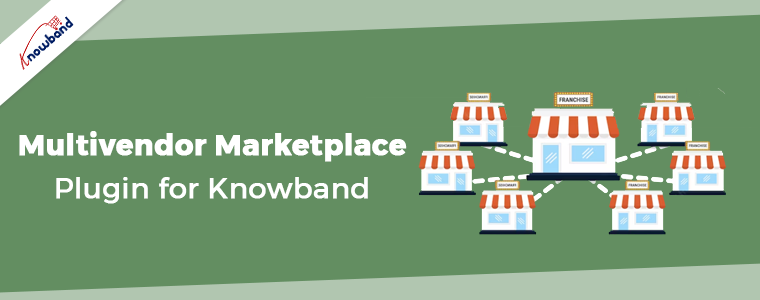
Multivendor Marketplace Plugin for Knowband

The term “multi-vendor marketplace” is used to describe an online store where customers can purchase goods from many sellers. Further, a wider selection of goods from various vendors who are in charge of inventory, pricing, product details, and delivery is possible. Multi-vendor marketplaces are popular among businesses because they are easy to manage.

Knowband’s Prestashop Multi-Vendor Marketplace provides options for membership, scheduled payments for merchants, a page for vendor registration, and many other options. Additionally, the suppliers can manage each of their products with the help of a specific seller portal and dashboard.

Hence, the Knowband Multi-vendor plugin is the go-to option for the management of an online marketplace.

What Cache-Store Thinks of Knowband

The service they give to their customers is just awesome. They were always there in case of any assistance and took on custom development services too, which was impressive. I hope to work with them again on other projects and will connect soon for some business-specific customizations.

How to Add Payment Methods to Your eBay Shop!!

eBay is undoubtedly one of the best marketplaces in the eCommerce industry. With over 187 million active consumers, eBay is offering amazing services to both consumers as well as sellers.

Aside from products and sellers, eBay is a well-known multi-vendor marketplace for algorithm updates. Moreover, the major marketplace has its in-built SEO algorithms to manage the rankings of sellers.

On top of that, selling on the eBay marketplace is an absolutely easy task. You do not require to have any specific kind of technical knowledge for being an eBay seller. Furthermore, the marketplace offers ease of payment methods to the seller community. The sellers can even add cards, PayPal, and many more payment methods to their eBay shop just by following some simple steps.

Thus, in the following article, we are going to spread light on how new sellers can add payment methods to their eBay shops.

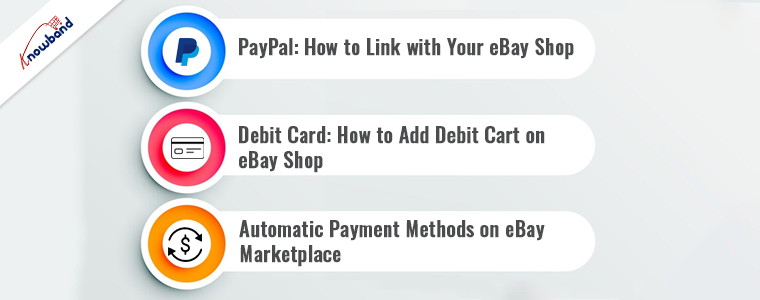
1. PayPal: How to Link with Your eBay Shop!!

PayPal is a widely introduced payment method with millions of transactions per day. Likewise, eBay allows sellers to add PayPal as a payment method on their store-front. One can simply add the PayPal payment method on eBay just by following the below-mentioned steps.

1.1. Log in to Your eBay dashboard.

1.2. Visit the eBay admin panel and then click on the account settings.

1.3. Click on Payments>>PayPal.

1.4. If you already have a PayPal account, you can simply add the details here. Otherwise, you can always create a new one by clicking on the signup button.

1.5. By following the above steps, you will be redirected to PayPal.

1.6. Come back to the eBay admin panel>>Payments>>PayPal.

1.7.  Click on become verifies button.

1.8.  Authenticate yourself with a PayPal account and all set to go.

2. Debit Card: How to Add Debit Cart on eBay Shop!!

Adding debit cards on eBay shop is a pretty easy task. Follow the below-mentioned steps to add debit card payment options to your eBay shop.

2.1. Click on the top left corner buttons.

2.2. Go to Account settings.

2.3. Choose the option payment options from the appeared tab.

2.4. Choose to add payment methods.

2.5. Pick the debit or credit card option.

2.6. Fill in all the details on the appeared page. After getting done with all the details, click on add. All good to go.

3. Automatic Payment Methods on eBay Marketplace:

Automatic payment methods help sellers to minimize headaches during the eBay invoice cycle. The monthly ebay fee gets deducted automatically when the sellers add automatic payment methods on the eBay Marketplace.

Here are the steps to add automatic payment methods on the eBay marketplace.

3.1. Click on the top left corner of your eBay dashboard.

3.2. Visit the account settings page.

3.3. Click on the personal info tab. And then, hit the business info button.

3.4. Click on the financial information tab. Choose the update your automatic payment methods.

3.5. Choose your suitable payment option among PayPal, credit, debit card, or checkout accounts.

3.6. Fill in all the details and click on the save button.

In the above article, we have discussed how to add payment methods to your eBay shop just by following the simple steps. Although eBay is known for changing its algorithms. Yet, we believe the above information is surely helpful for you.

Do You Know!!

Do you know that if you are selling the products from your personalized eCommerce website and are willing to sell the products on eBay? You can simply manage your eBay shop from your personal shop’s admin panel.

How? Knowband’s eBay Marketplace connector extension is the answer. At Knowband, we provide the eBay Marketplace connectors for the eCommerce platforms Magento 2, Prestashop, WooCommerce, OpenCart, and Magento.

One can simply manage both eBay and a personal eCommerce shop at his fingertips. And can even sell their products on eBay Marketplace at an increased/decreased price with real-time stock management.

Want to know more? Feel free to find us at our official email address support@knoband.com for your beloved queries and suggestions.