How PrestaShop One Page Checkout can Boost Holiday Season Sale

Prestashop One Page Checkout Module is the solution to all your conversion issues. If you are facing a lot of cart abandonment on your PrestaShop store it can be because of the lengthy and boring checkout page. Prestashop One Page Checkout v7.0.1, the new version is offering some time-saving features which will reduce checkout time and enhance the customer experience.

The upcoming holiday season can help you overcome the losses you have faced during the COVID-19 outbreak. You can raise your sales with various modules available on the PrestaShop store. The most important of all is the PrestaShop Quick Checkout Page module. It is necessary to replace the conventional multi-page checkout with PrestaShop One Page Checkout. An optimized checkout page for your PrestaShop store will reduce the bounce rate and helps to boost conversions.

What is new in Knowband’s PrestaShop One Page Checkout

We keep updating our best seller PrestaShop One Page Checkout module. It helps sellers boosting conversion and reducing abandoned carts during the holiday season sale.

If you want to know how this checkout module works, give this blog a read. PrestaShop One Page checkout is incorporated with new features:

(New) Customers can Choose Profile type:

This is a new feature added in the PrestaShop One Page Checkout module. Now it allows customers to select a profile type as an individual, or business. This helps the owner in running personalized marketing campaigns. It also lets the owner decide what fields are mandatory for each profile type. In addition, the owner can display the mandatory or some of the fields on the invoice too.

(New) Redirect the Customer to Checkout Page Instead of Cart

With the previous version of PrestaShop One Page Checkout, when a customer hits the call-to-action button on the product page it redirects them to the cart. But with a new feature added, PrestaShop store admin can allow the consumer to jump to the checkout page directly. It will save them from taking extra effort.

(New) Use Payment Address Name for Registration

Prestashop store admin can allow customers to Use Payment Address Name for Registration. Earlier the delivery address was the only option that was used as default registration details. But from now on, if the admin wants he can enable the setting on PrestaShop One Page checkout to use the payment address name for registration.

Checkout features you must not forget about when deciding on your marketing campaigns during holidays

The user interface of One Page Checkout can cast spells on your customers and will do magic to stop them from leaving the website. The PrestaShop Quick One Page Checkout gives you appealing layout options, various login choices like guest checkout, social login with Facebook and Google+, multiple Payment and delivery choices, and what not!

Offer Free Shipping and increase average cart value:

Asking them to shop more with a popup not always works. Besides, you can offer free shipping over a definite amount and they will grab the chance without giving a second thought. Free shipping is the most compelling thing out there.

The store owner can add a free shipping bar on the top of the One Page Checkout Page.

Improve engagement with its simple and sleek UI:
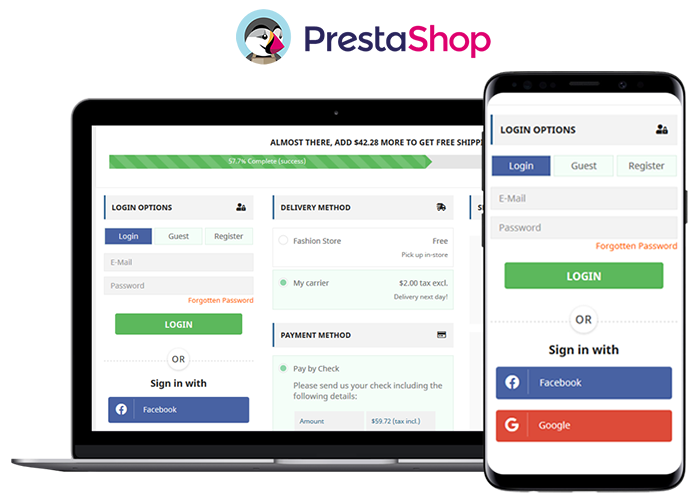
The simple and riveting user interface of the checkout page increases conversions. It helps to convert your visitors into customers with features like guest checkout and social login. All the required fields appear on a single page. No more waiting or jumping pages! Prestashop One Page Checkout is mobile responsive.

Ship-to-pay:

The responsive One Page Checkout has functionality for your PrestaShop store which lets the store owner set the payment mode for available delivery choices. If you don’t want to accept bank checks for fashion store delivery mode then you can disable the service.

Highly Recommended Modules with One Page Checkout

There are many PrestaShop modules available in the market which can fit well into your store. I am going to recommend you two super engrossing modules which are compatible with One Page Supercheckout on your PrestaShop store.

Store Locator and Pick up

The hyperlocal marketplace is the new trend in eCommerce. Prestashop Store Locator and Pickup Module incorporate website delivery features in-store and displays positions in physical stores using Google Maps.

Cash On Delivery with Fee

Offer Cash on Delivery with Fee to your customers on PrestaShop Store. Integrating Cash on Delivery with Fee module along with PrestaShop One Page Checkout can gain the trust and loyalty of a customer. Remove the barrier of secured payment which is a major concern for many. Click here to know more about Cash On Delivery with Fee module for the PrestaShop store.

We have produces a listicle on compatible modules with PrestaShop One Page Checkout, click here to explore.

To wrap up

I have always said that the checkout page is most important when it comes to conversion rates. Replace the existing checkout page with PrestaShop One Page Checkout and you can observe the change by yourself. Prestashop One Page Checkout with these new features can help you grow your business and earn loyal customers. What are you waiting for?

You can visit the Knowband store and check on the modules available for boosting holiday season sales.

Recommended Reads:

Manage Order Returns and Order Cancellation with PrestaShop RMA Module

10 Useful but Underrated PrestaShop Modules to look out for

PrestaShop Smart One Page Checkout Addon -User Manual

9 Checkout Conversion Killers Driving Your Buyers Away

Manage Order Returns and Order Cancellation with PrestaShop RMA Module

It is often observed that customers want to return or cancel their orders. Managing orders and fulfilling customer’s demands isn’t an easy task. Considering consumer rights in the EU, every eCommerce platform needs an easy return manager to maintain the records and meeting customer’s needs.  EU has a policy that a consumer can request a return or refund for a faulty product within 14 days after purchase. As an eCommerce owner, it may sound tedious and time taking.

Don’t worry! PrestaShop Return Manager Addon takes care of all the functions required to cancel or order returns. With additional features described below, this new version gives a user-friendly experience to eCommerce store owners and customers.

What’s New in PrestaShop Return Manager Addon?

Customer retention is a merchant’s need and this can be achieved with customer satisfaction. PrestaShop Return Manager module comes with an easy cancel request format with multiple return and cancellation methods for a customer.

1.          Decide when to start calculating Policy time

Imagine a situation when the product is delivered after the expiry of the return date. What impression this will create on your customer? Sometimes the return date expires if the product delivery is delayed, to resolve this issue, the addon now provides a drop-down menu for selecting a product status after which the return policy time will be calculated.

2.         Quick Access of Return Listing from Dashboard

You don’t have to find the module from a long list of installed modules in the admin panel, instead, you can configure the PrestaShop Return Manager Addon from the left menu of the admin panel.

Additionally, a new option to access all the return listing counts has been added on top of the admin panel. All the return listings like order returns, canceled orders, etc can be seen in one place.

3.         Custom features for email templates

In the updated version of Return Manager, the admin is provided with an option in the admin panel to add a custom text for each Return Status and created a placeholder that can be used in the Return Status Email templates. The updated version provides an option in the admin panel to ‘send a Test Email’.

4.         Search and Filter all the Listing Tabs

With the latest version, the store manager can easily sort and filter the listing tabs on the basis of date, customer ID, Return ID, Customer Name, etc. This makes the task easier for the admin.

Features that enhance admin’s power

5.     Allows Partial or complete order replacement

The online store administrator can now allow online customers to pick items from their orders for replacement. Online customers can even request for returning the whole order if they want to do so. They can now choose all the products from the list. This increases the usability rate.

6.     Admin can add Custom Field

This updated version of PrestaShop Return Manager Addon allows an online merchant to create custom fields. Online store owners can build several custom fields from the PrestaShop Refund Order Addon admin interface. The store owner may set custom field block names, apply validations, and also set default values (if required). Admin can make any field as required. Admin can set a default value and validation type.

Why choose PrestaShop RMA over other Order Return Module?

The RMA plays a vital role in the eCommerce store. The Customer sometimes raises the request for the product return, refund, and replacement. To improve customer retention and usability the online merchant needs a flawless RMA interface. Other eCommerce like the Magento Return Manager plugin does not come with these new features.  This rejuvenated tool provides both a user-friendly experience and customer satisfaction.

1.     Increased Customer Conversion Rate

Easy refund and return policy builds trust and makes the customer believe in the merchant. This eventually increases the word-of-mouth publicity of the website and brings more traffic to the site. From this, you can expect a good conversion rate. This one small change will catapult your conversion rate and this way you can keep the complaints zero.

2.     Customer Satisfaction

The front-end easy ‘return’ option lets them believe if they are not completely satisfied with their purchase, they may return it or replace it. This assurance lets your visitor believe in your product policy and allows them to shop more. The easy email template functionality sends an email to both parties which enhances your business relationship. A happy customer always comes back to you without any pause.

Benefits of PrestaShop Return Manager for the merchants:

  • PrestaShop Order Return Manager Addon makes it easy to handle the returns of customers.
  • PrestaShop RMA easy return module boosts customer loyalty.
  • The possibility of receiving “Store Credits” for a faulty product helps to improve consumer retention.
  • The product issues can be fixed by knowing the return reasons.
  • With the aid of the PrestaShop Consumer Return Manager, you will find out the exact problem in the product by providing customers with the option of uploading the picture of the faulty product.
  • Email template makes you craft a mail for your customer at every return stage.
  • With RMA quick return addon, by adding custom fields you can collect more information from the customer.

Benefits of PrestaShop RMA return module for the customers:

  • A ‘Return’ button allows the existing customer or guest customer to return or cancel the placed order completely or partially.
  • PrestaShop Order Return Manager provides an easy cancel request format with credit, refund, and replacement options
  • Customers can upload an image of a faulty product highlighting the defect.
  • An email with custom text will be sent to the customer at every stage for their order cancellation or return request.
  • PrestaShop Order Return Manager allows customers to select a nearby store address for shipping the damaged product.
  • Customers can return partial or whole orders by easy select option.
  • Customers will have the option to cancel the order for a short period. The customers need to go to the My Account >> Return Manager section to cancel the order.

Other useful features of order return or cancellation addon

Easy Return Request Option

There are some other features that make this addon more convenient and user-oriented. It helps you identify the return reasons for customers and lets you raise a return request on behalf of your customer. Thanks to a quick and effective cancellation method, customers are more likely to go back to your platform.

Crafted Email-Templates

Well-designed email Templates emerged as an attractive feature. This pre-formatted email template option gives the admin a hassle-free experience at the backend and directly sends an email to both the parties as soon as the query is raised and updates the customer at every stage of their request. There are 14 different email templates as per the requirements. It is a timesaver for both merchants and customers.

Managing Return Requests at one place

Managing an eCommerce store with fewer efforts is like a cherry on the cake and this amazing addon does that. It helps you manage all the return requests in one place. You can find pending return lists, active return lists, and canceled return lists on the admin panel as well as on the dashboard. This information is also available to export in .csv format in case you want the compiled data.

Compatible with GDPR Module

PrestaShop Return Manager is compliant with GDPR. When you are using the Knowband GDPR module, both the customer and the administrator will be able to access the information of the return request. Besides, the Customer can request the admin to remove personal data from their shop.

Final Words

PrestaShop Return Manager addon is an interesting and helpful tool for the eCommerce store owner to manage the return and cancel the request at the backend.  A hassle-free return policy attracts buyers and gains the customer’s trust.

For more information or to shop the PrestaShop Return Manager for your PrestaShop store, you can visit Knowband store or reach out to us at support@knowband.com. Return Manager Extension is also available for Magento and Magento 2 stores.

You May Like To Read:

5 ways to Manage eCommerce Returns

8 Simple Tips to Reduce Product Returns in eCommerce

Compel the Customer to Return to your Store with Back in Stock Module

12 Ways to Reduce Shopping Cart Abandonment

9 Checkout Conversion Killers Driving Your Buyers Away

List of Other modules Compatible with PrestaShop One Page Checkout module

A smooth and fast checkout page is one of the most important aspects of an increased conversion rate. The checkout page is also important because it is the step where the customer decides whether he will complete the order or not. There are two types of checkout pages i.e., Multi-step checkout and One-page checkout.

Nowadays, the One Page Checkout is known as better checkout in comparison to multi-step checkout. There are various reasons for that. The One Page Checkout simplifies the checkout process and saves the time of the customers and reduces the chances of cart abandonment because of its easy and fast layout.

Knowband offers the PrestaShop Single Page Checkout module which replaces your website’s default checkout with a fast and responsive Single Page Checkout and enhances the checkout experience of your customers. This module plays a great role in reducing the cart abandonment rate on the checkout page by allowing the customers to quickly fill in all the required details and complete their orders.

The Prestashop simplified checkout addon offers various advanced features like social login, auto-detect country, auto-address fill that make it easy for the users to fill in their details.

Prestashop One Page Checkout addon is one of the best-selling addons and it has more than 10000+ downloads on the PrestaShop Addon store and more than 5000+ downloads on the Knowband store.

How to replace your store’s default checkout with PrestaShop Fast Checkout addon:

Follow the following steps to integrate this addon into your online store:

  1. First of all, you need to purchase the PrestaShop One Page Checkout module from Knowband.
  2. After buying and downloading the addon, unzip it in the modules directory of your PrestaShop store.
  3. After the PrestaShop One Page Checkout plugin will be available and ready to be installed in the module list.
  4. Click on the install button to install it on your PrestaShop store. After installing it successfully, the addon will be ready to configure.

Other Compatible Modules with PrestaShop One Page Checkout:

1. Store Locator and Pickup module:

Being a store owner, it is really important to let your customers know about the actual geolocation of your physical stores. Knowband offers a Store locator and Pickup module which allows your customers to find and locate your stores near their locations.

They can also place Takeaway orders to pick up the product from the store using the Store locator and Pickup addon. The addon is mobile responsive and offers smooth functioning. This addition to your store will improve the checkout experience.

Get to know more from here.

2. Abandoned Cart module:

According to research, nearly 70% of the customers leave the cart abandoned on an eCommerce store. Checkout page abandonment is very common.

With the PrestaShop Abandoned Cart module, you can identify the abandoned carts on your online store and can recover them by sending tailored follow-up emails. You can also highlight your exclusive discounts in the reminder emails.  It encourages buyers to come back to your store and complete their orders.

Know more about this addon from here.

3. Product Availability Check by Zipcode module:

There are times when customers get frustrated! For instance, they initiate purchasing an item, and later at the time of checkout, they find that the product is not available in their locations. It is frustrating. Right? This leads to a low customer retention rate for your online business.

With the Product Availability Check by Zipcode module, it is easy to allow your customers to check if the product is available in a particular location. This can be done by entering the zip code. You can also add a search box on the product page to let your customers check the product’s availability before adding it to the cart.

If you want to implement this in your store then click here.

4. Mobile Login module:

Being an eCommerce store owner, it occurs registrations with fake email addresses on your website. With the PrestaShop Mobile Login module, you can allow your store visitors to register using mobile numbers with SMS OPT verification.

With this add-on, you can also implement a secure registration and login process on your PrestaShop store. In addition, you can allow the user to register without an email address. Know more from here.

5. Google reCaptcha module:

Spam registrations and spambots can be harmful to your website as they can steal the website’s data or can delete it.

With Knowband’s Google reCaptcha module, you can prevent your website from spamming. By implementing Google reCaptcha on various pages of your website including the Registration page, Login page, Contact page, and Forgot Password page, and the checkout page. With the PrestaShop Google reCaptcha module, you can prevent the spambots and drive quality traffic to your website. This module is compatible with PrestaShop One Page Checkout.

Know more about the module from here.

6. Social Loginizer- compatible checkout module

Social Login is gaining popularity nowadays as it saves users from creating new accounts and remembering new login credentials. With the PrestaShop Social Login module, you can allow your website’s visitors to log in through the most popular social media networks including Facebook, Google, Instagram, LinkedIn, Twitter, etc.

Offering login with social media accounts not only eases the login process but also reduces the chances of failed logins in your store. It also helps to reduce the abandoned carts on the checkout page as the customer doesn’t require to create a new account. Know more about this module from here.

7. Cash on Delivery with Fee module:

Nearly 18-20 % of the abandoned carts are caused because the users don’t trust the security in online payment on a new eCommerce website. With Cash on Delivery with Fee module, you can allow your customers to place the orders with cash on delivery option with an additional fee. You can provide these options to those customers who don’t want to go through the online process. Know more about this module from here.

Conclusion: So, these are the compatible modules with the PrestaShop One Page Checkout module which offers to add various advanced features to your online store. For any eCommerce assistance or custom module development, you can always trust Knowband as we are delivering the best customer support for 12 years. Write us at support@knowband.com and our team will be happy to help.

Sneak peek to the new Membership Plan feature of the PrestaShop Multi-Vendor Marketplace Addon

Subscription business models are everywhere. Talking from Netflix to Apple Music. Recent research shows that subscription businesses are getting 5x faster revenue growth. The subscription revenue model benefits both customers and companies. Customers enjoy the convenience of auto-renewals and having access to high-value products and offers for a low ongoing investment. 

It’s no wonder more and more companies are moving towards subscription business model. So we are also coming up with a new membership plan feature for Prestashop Marketplace addon. This membership plan feature allows the admin to create membership plans for the sellers. 

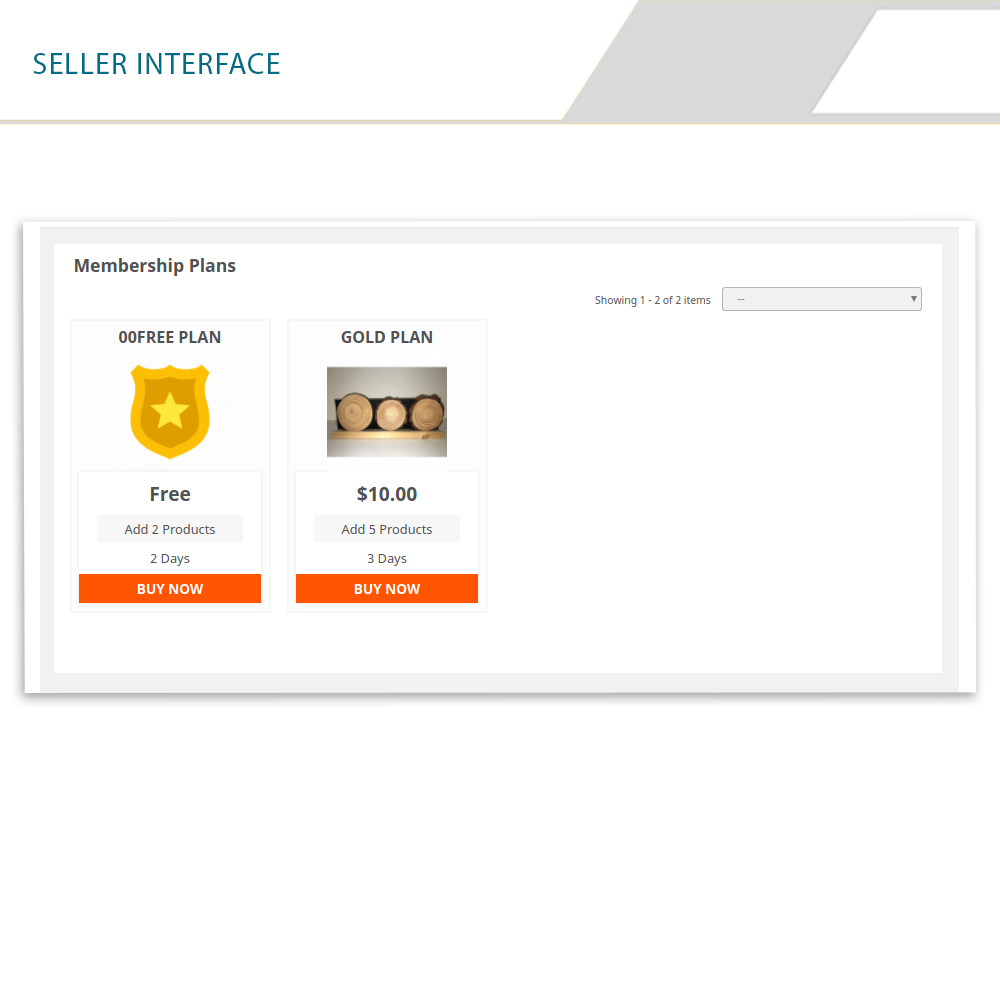
Sellers need to purchase these membership plans in order to upload their product in the Marketplace. The subscription-based Marketplace allows the admin to create subscription plans based on the number of products and time constraints. The Membership based Marketplace module offers customized email templates that help to automate the membership request and membership approval process.


In order to start selling on the marketplace, the sellers need to purchase the membership plan as per their requirements. Sellers can easily upgrade their membership plans as well. Warning message is sent to the sellers before the membership plan will be expired and even after the expiry of the membership plans sellers will get an email for upgrading their membership plans.


Note: We are going to increase the price of Prestashop multi-vendor Marketplace add on after adding this new membership feature. So if you are planning to buy this add on then hurry up now before it will be too late. And for existing users, they can extend their support period.

Steps to extend the support period are as follows:

1) Firstly, log in to your account. 

2) Then go to the Downloads under My Orders.

3) Here you will find the option to extend the support period. Click on the desired time period for the support.

Various features of Membership plans functionality:  

  1. Admin can create different membership plans for the sellers.

  1. Admin can also create a free membership plan for the sellers.
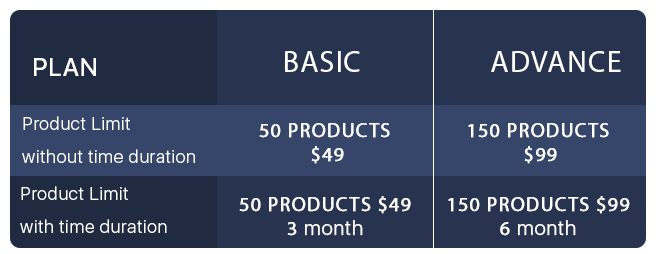
  1. Admin can create marketplace membership plans based on the number of products like Basic Plan – 50 Products only at $99 charges, Advanced plan 150 products only at $149 charges. The admin can also add the time constraint in the plan like Basic plan – 50 Products, $99 and 6 months duration, Advanced plan 150 products, $149, and 12 months duration.

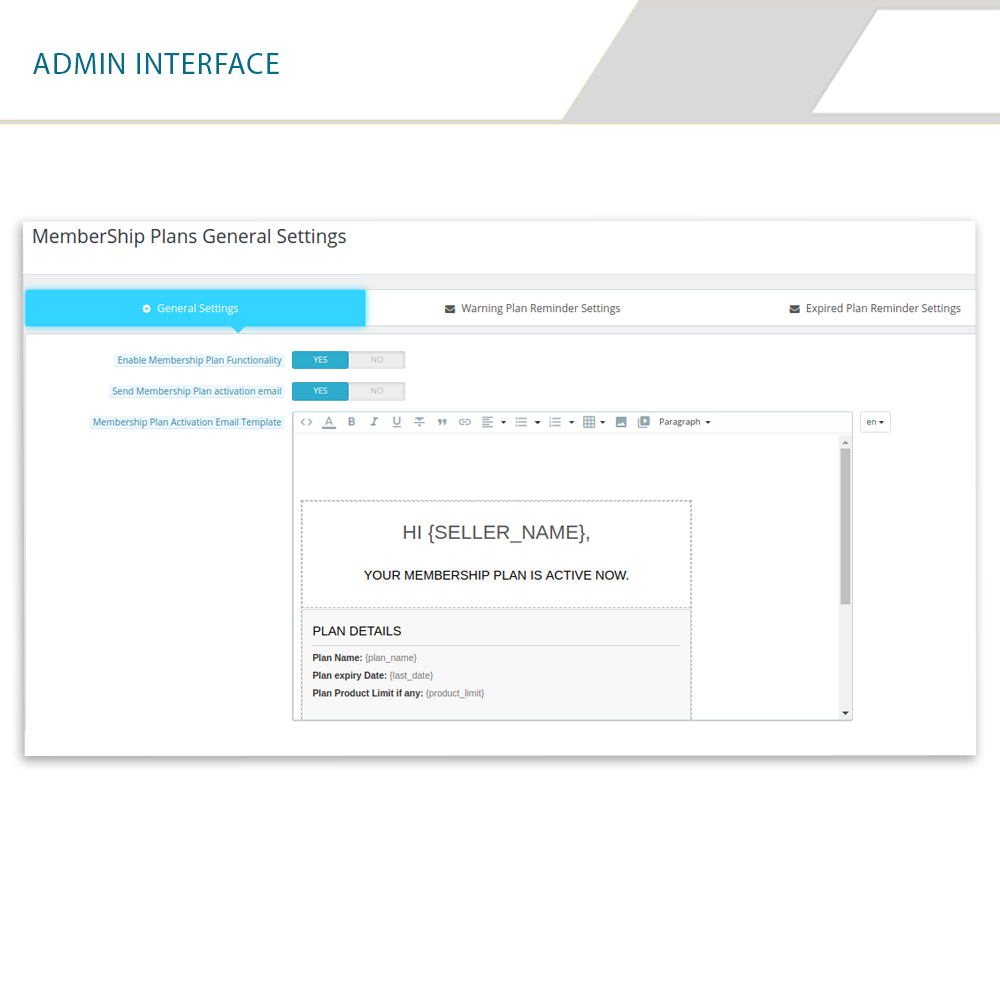
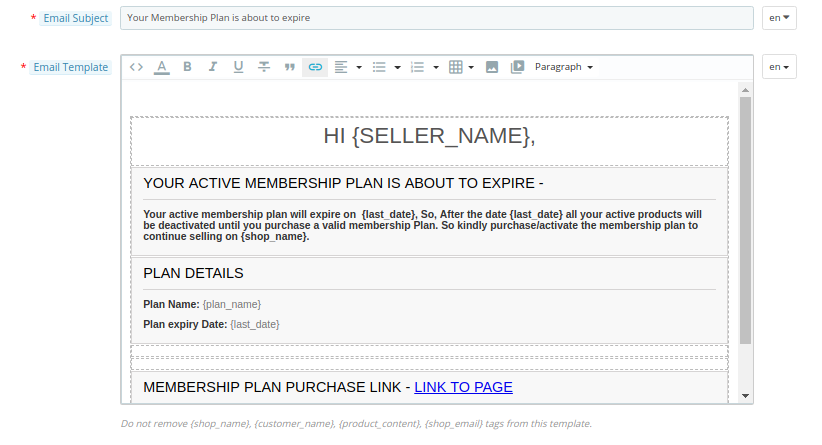
  1. Admin gets some pre-made email templates which helps them to notify the sellers about their membership plans. Admin can also edit these templates as per their requirements. For example below is the email template of warning message for the sellers whose marketplace membership plan is about to expire.

  1. Admin can set the membership plan select box in the sellers registration form.
  2. Admin can also set the product active limit for the membership plans.
  3. Admin can set the duration of the membership plan from the back interface.
  4. Sellers can upgrade their membership plans very easily and whenever it is required.

Product active limit of membership plans:

For each membership plan, admin has an option to set product active limit and sellers can sell products till that limit only but, this doesn’t mean that sellers can upload products till the active limit only. Sellers can upload products till their limits but active products which will be shown on the Marketplace will be equal to that limit only.

For example; A seller purchased a membership plan named as silver plan and the product active limit for that silver plan is only 20 products. So the seller can upload even 30 products but the products which will be shown in the Marketplace will be only 20.

Duration period of membership plans:

Admin has also an option to set the duration of membership plans. After this duration, the plan will be expired and sellers have to upgrade their membership plans again. Admin can set different durations for different membership plans.

For example, a silver plan duration is 30 days and the gold plan duration is 60 days, etc. Admin can also set the marketplace membership plan duration to unlimited time. 

Various subscription models:

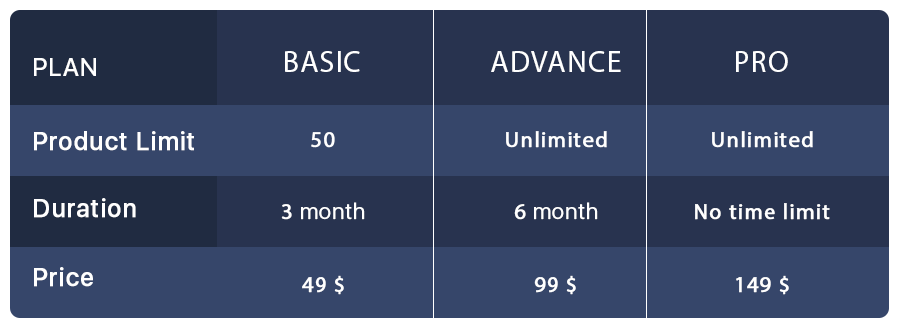
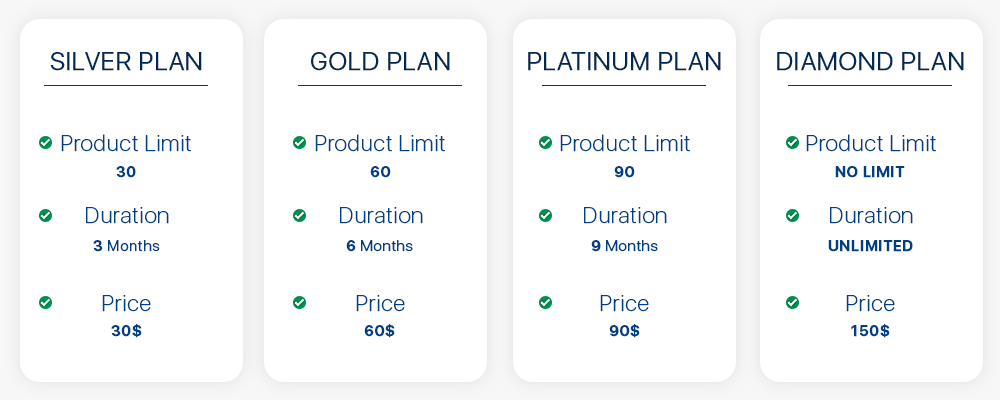
Store admin can create different marketplace membership plans for the sellers. For better understanding, we created some membership plan examples which give you a brief idea about these membership plans.

Prestashop multi-vendor Marketplace compatible addons:

If you are a PrestaShop Marketplace store admin then you must read this blog which helps you to understand compatible addons for Prestashop multi-vendor Marketplace. Using these compatible add-ons you can customize your Marketplace and make it even more advanced.

Conclusion:

Membership plan feature removes the hectic tension of commissions for each product sale. After enabling this feature, sellers can also register themselves on the basis of membership plans rather than Commission basis. So this membership plan feature helps both the sellers and the store admins.

All You Need To Know About PrestaShop Private Shop Addon

PrestaShop is one of the best eCommerce platforms offering great flexibility and opportunities for selling all types of products and services.

PrestaShop Private Shop module is focused around B2B online businesses, allowing wholesalers to make their store/shop private. With the help of this module, they can restrict access to their store and let only selected customers or wholesale members explore it.

Unlike B2C online stores that are easier to manage, B2B is a bit complex. But with PrestaShop Private Shop addon, you would not find it difficult to manage your wholesale online store.

Benefits of PrestaShop Private Shop addon

The benefits of creating a private store are-

1. You can allow only selected buyers to access your store

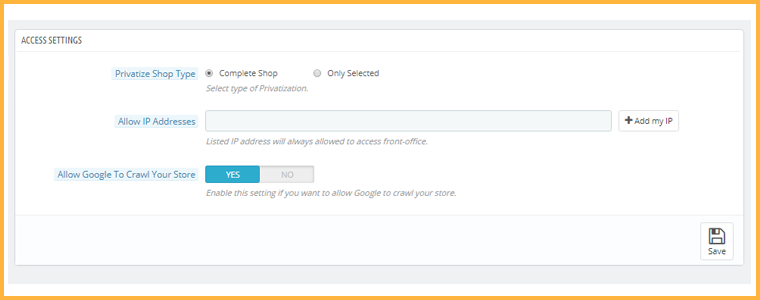
2. You can privatize the complete store for regular visitors or give access to some specific pages

3. Access to specific IP addresses only

4. Easy to install and configure

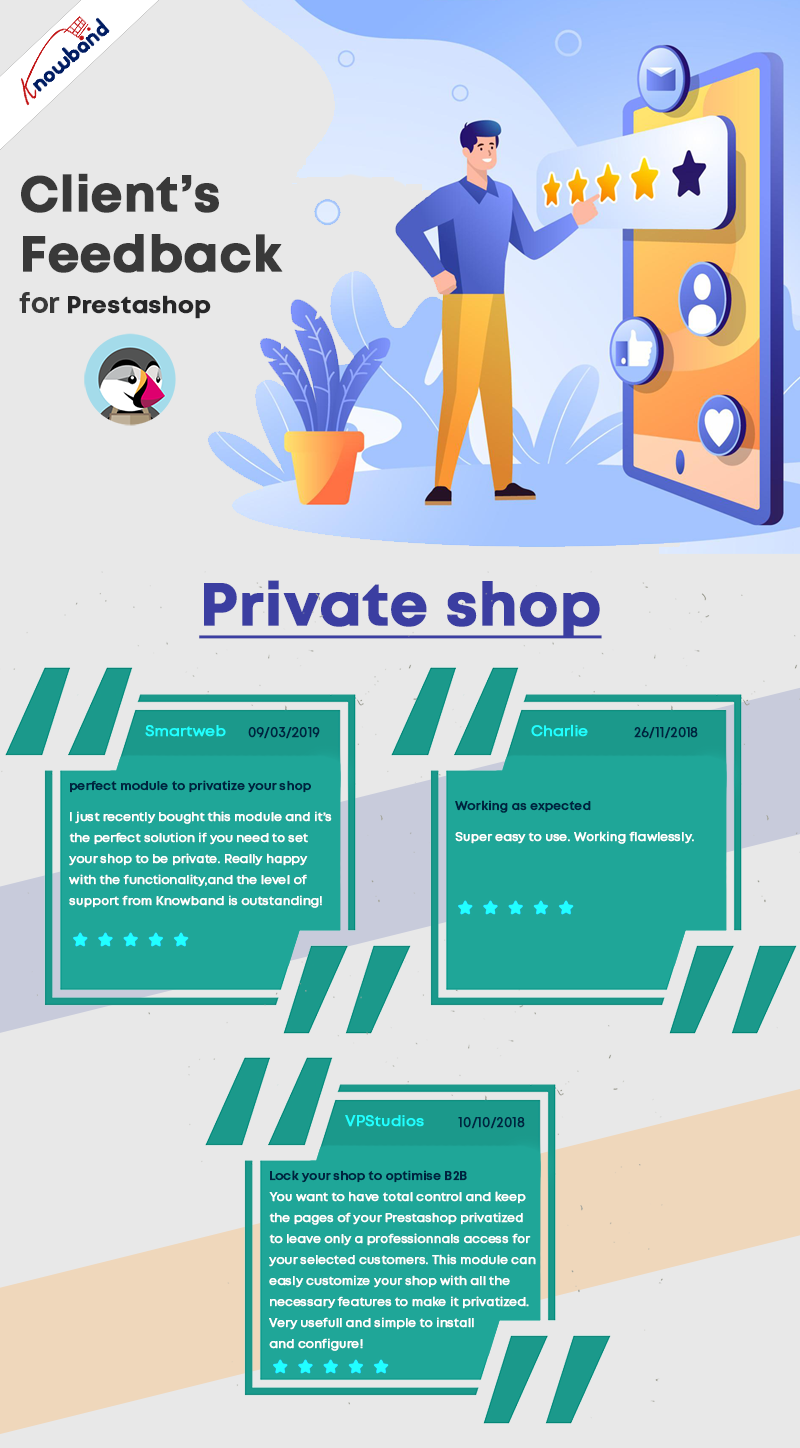
Before jumping to the module features, here are some reviews:

What does the Private Shop module offer?

Talking about the configurations and features of this module,

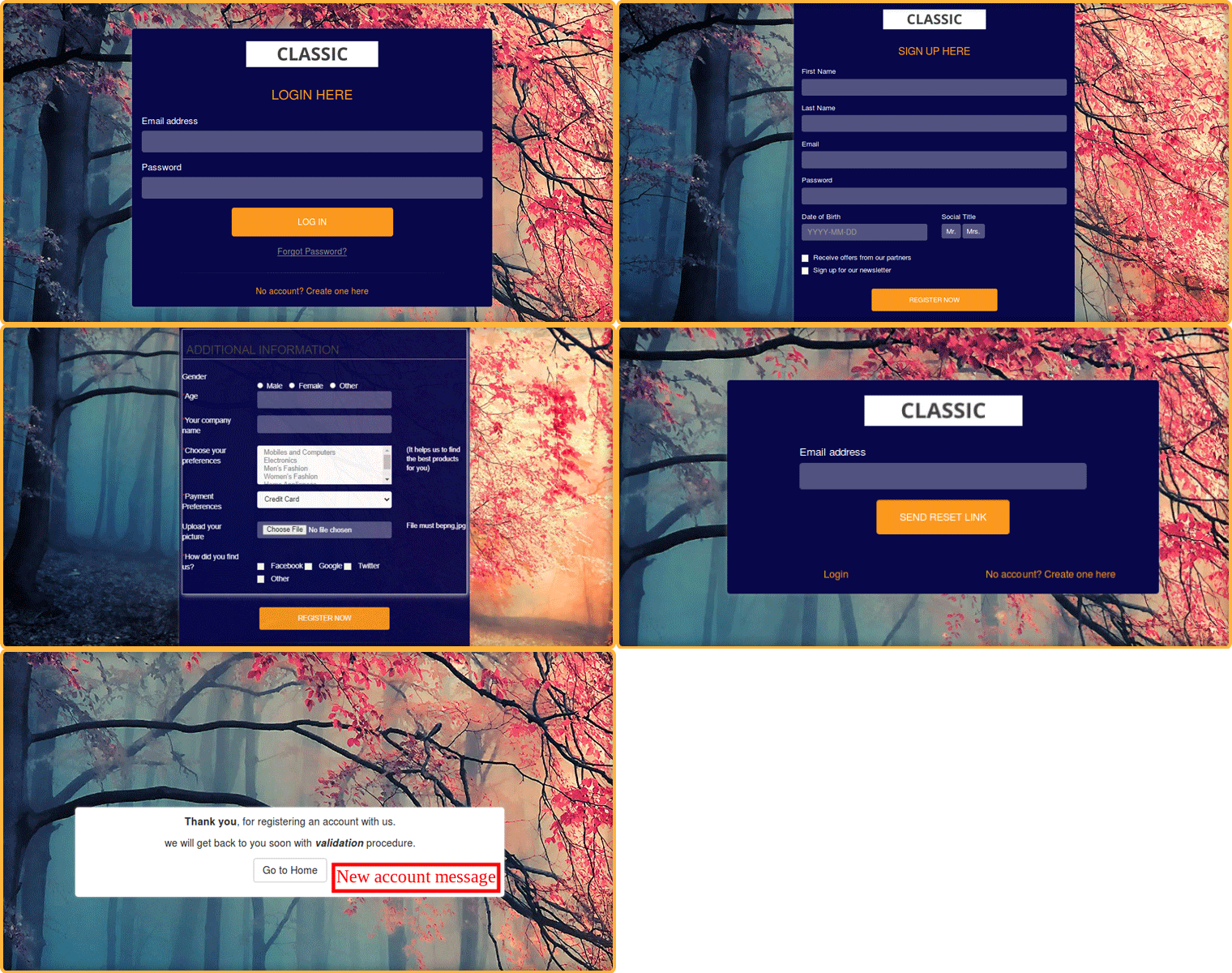
1. It provides you with the option to make your entire store private. No one will be able to access it without logging in. Initially, users will have to create an account to access the front office. Once approved by you from the back-end, they will be able to log in and explore your store products.

2. If not privatizing the complete store, you can permit users to access only a few pages, categories, or products on your website. From the back-end configurations, you can specify the products and categories that you want to keep private and also select the web pages which will be accessible only to private customers and not others.

3. PrestaShop Private Shop addon also lets you allow specific IP addresses to visit your wholesale online store.

4. Customers who signed up on your store will be put under “Private Customers.” From there, you can view the list and approve/deny a customer’s request. You can disable the approval setting if you want.

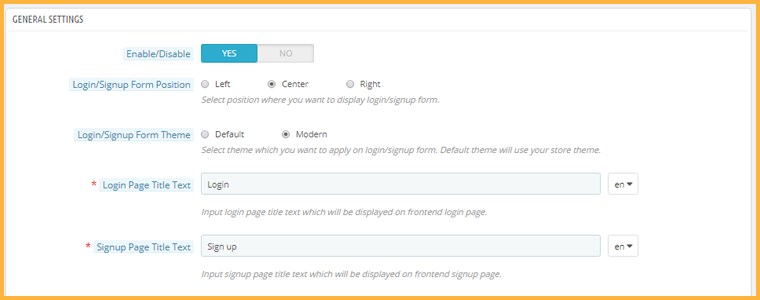
5. You can adjust the look and feel of the signup page. You get the option to adjust the position of the sign-up form, choose the desired theme and make some other customizations. For a better appearance, the admin can also add the company logo to it.

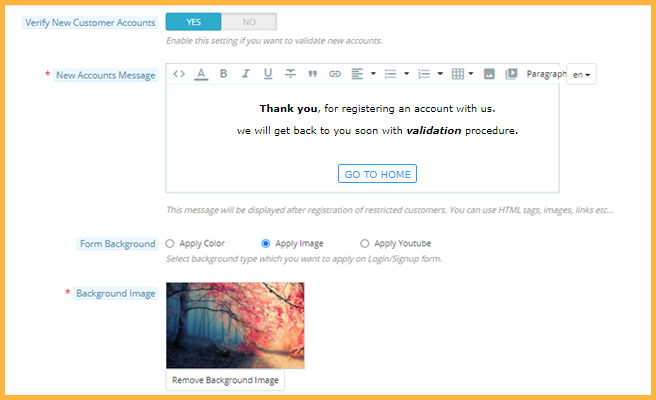
6. You can give your storefront an attractive look. The create Account page can be customized. Store admin can add a background image for the form. There is an amazing option for adding a YouTube video in the background.

7. You can adjust the look and feel of the signup page. You get the option to adjust the position of the sign-up form, choose the desired theme and make some other customizations.

Front end view of PrestaShop private Shop:

8. Every newly registered customer will receive a custom message. The owner of PrestaShop Private Shop can enable new account verification and send a message with HTML tags, images, links, etc.

9. You can also enable or disable the functionality to allow Google to crawl your store. If you wish to keep it private, your store content will be hidden from the search engine.

For any kind of query or assistance, reach out to us at support@knowband.com

What’s New in Order Pages in PrestaShop 1.7.7.0?

One of the major changes in the latest PrestaShop version 1.7.7.0 (Beta) focuses on the order management page. New features have been introduced around the order process.

As per the PrestaShop team, the pages were becoming unpleasant because they looked old-fashioned and the same was the case with its hierarchy of information which led to inefficiency and misunderstanding for the merchants. This is why this page was put more stress in particular.

Let’s see the changes that have taken place in PrestaShop 1.7.7

Listing Orders Page

The new features in the listing order page help merchants save time and boost productivity.

1. Preview Order Details

A dropdown toggle is added right next to the serial number that opens a panel indicating the needful order information. Earlier, merchants had to open the order to check related information but now they can preview it by just clicking on the toggle.

The order preview displays the following information: Invoice address, Shipping address, Customer details, Carrier details, Tracking ID and the Products’ list.

The Products’ list displays only the first 10 products; the remaining can be seen by expanding the list. The product information displayed consists of product name, reference, stock location, quantity, tax price and total price (tax included or tax excluded).

There’s a new hook called displayOrderPreview on the bottom of the preview that allows adding new elements on the preview

2. Editable Order Status Labels

It allows merchants to update the order status directly from the listing, making it a time-saving process.

3. Order Status Color

Order status have been grouped into four different colors-

Dark Blue: Orders awaiting a customer action

Light Blue: Orders awaiting a merchant action

Green: No action required from the merchant, i.e. when the product gets shipped or delivered.

Red or Black: Payment error

This helps merchants identify the work to be done between the order placement and delivery.

4. Easy Access to Customer’s Profile

Earlier, merchants were required to open the order to access the customer page. It can now be accessed from the orders listing. Merchants just need to click on the customer’s name which will open the customer page in a new tab.

5. Redesigning of Bulk Action

It is now easy to take bulk action. Merchants can now process multiple orders in just three clicks. How?

  • Select orders for which you want to update the status at once
  • Choose the new order status from the drop-down list in the popup
  • Validate the new status update

The bulk action was redesigned to make it more visible and quicker to use.

6. Open Orders in New Tabs

Merchants can now open multiple orders at once on the new tabs. All they need to do is select the orders and click on new tabs under bulk action.

Order Details Page

A few features have been added in the PrestaShop version 1.7.7 focused on improving the readability and the position of the information.

1. Pagination in Products Listing

The products’ listing is now in the form of pagination, allowing merchants to navigate to different pages separately and hence putting an end to the endless and unreadable list of products in one place. Moreover, the products’ list has been moved to the top of the page which was earlier at the bottom and required merchants to continuously scroll to view the ordered products. Pagination works when there are more than 8 products.

2. Pack and Customized Products

For customized products, texts or files are displayed below the product. While the files are added to a new column on the same line, the texts are displayed below each other.

For a pack of products, a link below the product pack displays related products along with the order quantity and available product stock in a popup.

3. Message Interface

The message interface is now designed like messaging apps. The customer-merchant conversation pop-in displays the 4 latest messages and allows a merchant to see the entire conversation. At the 5th message, a link is displayed to open the pop-in which displays the complete conversation.

4. New Hooks Positions

The hooks have been relocated to more strategic positions to match the layout redesign and provide a better user experience.

The PrestaShop team has been continuously working over the last few months to deliver these new features and fix many bugs on these pages.

You should definitely switch your PrestaShop store to the new beta version 1.7.7.0

Welcoming the PrestaShop 1.7.7.0 Beta Version- What’s New?

The first Beta version for PrestaShop 1.7.7.0 is now ready for you to test! You can now download and install it and check if all your modules and themes are working properly.

As per the news shared by the PrestaShop team, it took them more than a year to build this version and it is even bigger than the previous one with 957 merged pull requests already (final release is yet to be out) compared to 748 for version 1.7.6.0.

More than 110 external contributors participated in the development of this version, fixed bugs, enhanced the existing features and even developed new features for the merchants.

What does PrestaShop 1.7.7.0 Beta Version cover?

This version covers topics such as-

  • Order Management
  • Redesigning and new features of order pages
  • More stability

Let’s try to understand in-depth what’s new in this release and what sort of issues have been fixed.

New Features and Improvements

1. The order pages have been redesigned and migrated to Symfony. Several new features have been added to improve efficiency and avoid going back and forth between orders.

2. PrestaShop version 1.7.7.0 comes with Fuzzy search, an improved search mechanism that has been added on the front office to improve conversions by taking misspellings and typos into account.

3. PrestaShop merchants can now add new official and non-official currencies to their store and customize their display in the desired language.

4. The field Manufacturer Part Number which is used to identify a specific product of a manufacturer is now available for Product management. It aims to improve the indexing and searching and also leaves a positive effect on SEO.

5. Under Shop Parameters>General, an option has been added to enable or disable suppliers in front-office. Previously, there was only one generic option.

6. The latest release presents an error page in the back-office. If you encounter an error in the back-office when running in production mode, you are displayed an error page instead of a blank page.

7. Merchants can now translate the email content by visiting Design>Email Theme.

8. New languages have been added.

9. Installer and localization packs have been updated to offer accurate international data for all businesses.

10. PrestaShop 1.7.7.0 brings support for emojis both on front-office and back-office. All database tables are now encoded in utf8bm4 by default, enabling the emojis support.

Improvement in Core modules

A few modules have been improved with bug fixes for increased robustness and new features for better productivity.

1. Theme customization is now available for product and category pages too apart from the homepage and they are easy to configure and customize.

2. Customer reassurance is now available on all web pages which was earlier restricted to product pages and the checkout page. It now allows you to customize the icon color and you can also add a description and a link.

Technical Improvements

1. PrestaShop 1.7.7.0 comes with updated PHP support. It has brought support for PHP 7.3 and has dropped support for PHP versions earlier than 7.1.3 for better stability.

2. jQuery has been updated to the latest version 3.4.1 in the back office and Classic & Core theme.

3. Another improvement that the latest version brings is the Automatic Form Rendering. Back-office forms are now much easy to render. You can now add form fields anywhere in the form without overriding the form template. (The feature is in the implementation phase, not all forms support it currently)

4. A new CQRS Debugger has been included in the Symfony debug war. This helps you identify which command and queries have been used to build the page you are viewing. You can make further customization by decorating or overriding it from a module.

5. There has been an improvement in tab management. You no longer require a fake legacy controller as the tab now support Symfony routes and automatic detection in modules. Moreover, it now supports the enable/disable functionality. The tab is hidden whenever a module is disabled and is gets visible again on enabling.

Bug Fixes

Over 160 bugs have been fixed for the PrestaShop version 1.7.7.0 so far that includes 11 highly unexpected bug fixes, 5 front-office and 5 back-office notable fixes.

It’s time to Switch

If you are still using the older PrestaShop version, it’s time for you to move to PrestaShop 1.7.7.0. PrestaShop community is already asking the merchants to test the latest version.

If you need any help to migrate your PrestaShop store to the latest version, you can contact us at support@knowband.com

Knowband, a leading name as an eCommerce development company provides PrestaShop plugin development services to enhance the functionality of your eCommerce store. We have hired experienced PrestaShop developers who are always dedicated to resolving your issues.

PrestaShop Starter Pack: Must-Have PrestaShop Modules To Start Your Store

If you have just built your eCommerce website on the PrestaShop platform, you would be looking around for some PrestaShop plugins that you should integrate on your website as a beginner. Your search ends here.

In this article, I have put forward some of the basic yet effective PrestaShop modules to start with. We also call this the PrestaShop starter pack. Check them out.

1. One Page Checkout

PrestaShop One Page Checkout converts the default multi-step checkout process of your PrestaShop based website into a One Page Checkout. It aims to improve the checkout experience of your customers besides boosting your conversions by encouraging a quick and hassle-free checkout.

The module provides Guest Checkout, Facebook, Google and PayPal Login, option to customize checkout fields, multiple shipping services and payment methods support, layout customization, and much more. You can also display a free shipping banner on the top of the checkout section that helps to increase the average order value. It is a GRPR compatible module.

One Page Checkout has been downloaded 5000+ times on the official addon store and more than 2500+ times on our Knowband store.

2. Abandoned Cart

PrestaShop Abandoned Cart addon lets you track the abandoned carts on your website and provides you with the opportunity to convert those users into customers. The module aims to recover lost sales and helps you reduce the cart abandonment rate on your website.

Talking about some of its key features, it lets you create an abandoned cart alert; you need to specify the duration after which the cart is automatically assumed to be abandoned and a reminder email is sent to the user. The email functionality can be customized from the back-end configurations.

It also offers different types of discount email templates through which you can persuade the abandoned cart users to complete their purchase by providing a discount code inside the email.

3. Spin and Win

PrestaShop Spin and Win adds a Gamification element to your website in the form of a Spin and Win popup. The module focuses on certain aspects like increasing user engagement, reducing website’s bounce rate, boosting the average site time but most importantly, it is an email subscription popup that helps you grow your email list and scale-up your conversions.

With the help of this module, you can customize the look and feel of the popup and the text on it. Besides, you can configure the popup display settings like the display frequency, when to show, where to show, on which pages to show the popup, etc. It also provides you with the option to customize the popup slices as per the way you want.

4. Affiliate and Referral Program

PrestaShop Affiliate and Referral Program addon is an exciting way to boost your brand awareness and acquire new customers. The module allows users to register as an affiliate on your website, after approval of which they can earn rewards/incentives upon referring the website to others.

The user can share his/her referral code with others which they can use during the sign-up process. They can also share a direct referral link to sign-up and also share the link directly on their social media platforms or on someone’s email address.

The referral is considered successful if a new user has registered or made a purchase; depending on the configurations set from the back-end. Upon successful referral, the rewards are provided to the affiliate which can be claimed in the form of a discount voucher or the affiliate customer can raise a payout request.

5. SEO Optimizer

PrestaShop SEO Optimizer also referred to as URL redirect or URL cleaner module helps you convert the URLs of your website into SEO-friendly URLs. You can rewrite duplicate URLs and perform three types of redirect; 301 redirect, 302 redirect and 303 redirect. The module helps you improve the performance of your website on the search engine.

It’s a multi-lingual module, is SSL compatible, and also has multi-store compatibility.

6. SEO Wizard

PrestaShop SEO Wizard addon helps you manage the SEO of your web pages. The module automatically updates interlink and metadata on your website after the cron is executed from the back-end. The optimization is offered for four different web pages that include Product pages, Category pages, CMS pages and Manufacturer pages.

For any kind of assistance or query, reach out to us at support@knowband.com and our support team will reach out to you to the earliest.

You May Also Like:

10 Must-have Addons to Optimize Prestashop Product Pages

6 Must-Have Social Media Addons For Your PrestaShop Store

Top 10 PrestaShop addons to boost your Holiday sales

All you need to know about PrestaShop Advanced One Page Checkout

If your checkout page is not optimized, you are probably going to face a lot of abandoned carts, and this can severely affect your conversions.

What’s needed? An uncluttered, simplified and a user-friendly checkout! If you are a PrestaShop store merchant looking for the same, PrestaShop Advanced One Page Checkout will most likely put an end to your search.

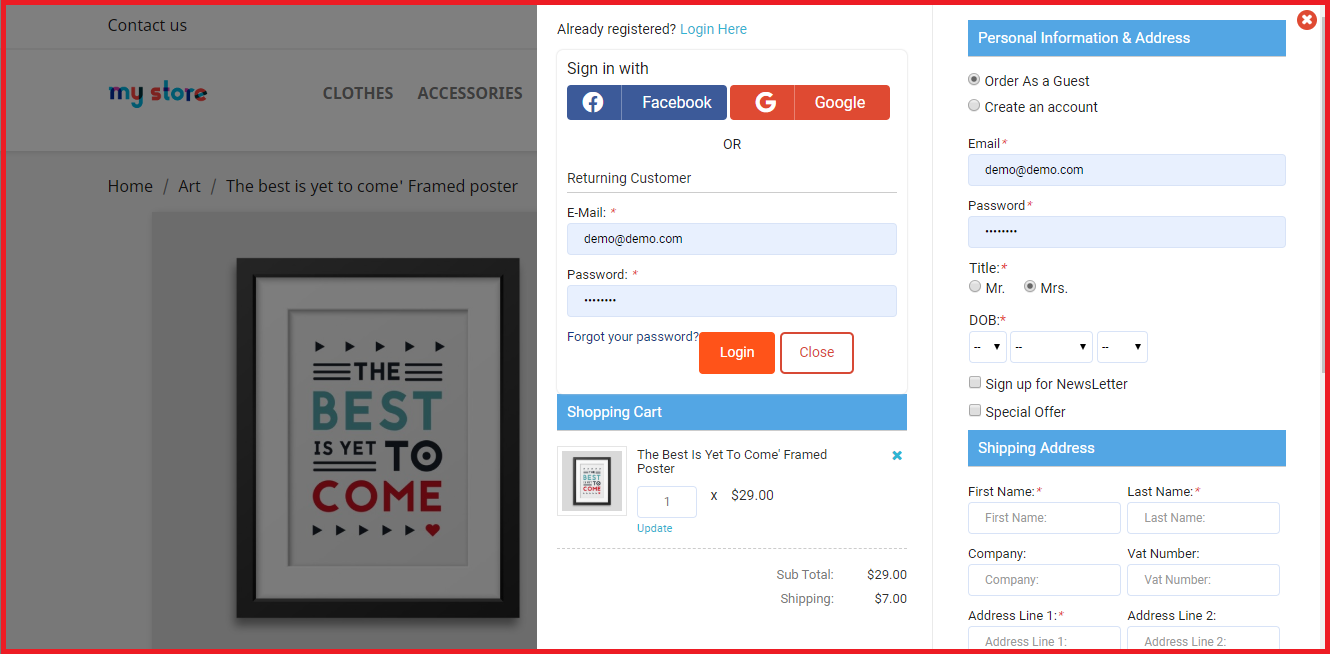
PrestaShop Smart One Page Checkout replaces the default checkout of your website with a responsive checkout popup. Unlike the usual One Page Checkout where all the checkout fields are visible on a single page, the advanced checkout creates a checkout popup where the fields remain on the same page (under the same URL) but are split into a number of steps.

Overview

1. Responsive Ajax-based Checkout popup

2. Guest Checkout and Social Login

3. Arrange Checkout fields through Drag and Drop functionality

4. Hide unnecessary fields from the checkout page

5. Mark Important fields as Mandatory

6. Auto-fill address functionality

7. Support for multiple payment methods and shipping services

8. Custom checkout fields

9. Cart customization available

10. GDPR compatible

Description

1. PrestaShop Advanced One Page Checkout is a responsive Ajax-based checkout popup that loads all the checkout steps on a single page. You would be presented with the next fields step by step but all will be under a single URL. So do not confuse this with a multi-page checkout.

2. PrestaShop Smart Checkout module offers Guest Checkout and Social login functionality to encourage quick checkout. Visitors can register as a guest if they do not want to create an account on your website.

Social login allows customers to log in/sign-up through their Google or Facebook account. If you want to provide more social login options, consider our PrestaShop Social Loginizer module.

3. The module provides you with the option to arrange checkout fields in an order of your choice through Drag and Drop functionality. Choose a field, drag and drop it to the desired position.

4. With PrestaShop Fast Checkout addon, you can decide which fields you want to keep mandatory and which as optional. You can also select fields that you do not want to display on the checkout page. The settings can be modified separately for both Guest and Registered users.

5. PrestaShop Simplified Checkout addon provides the auto-detect country and auto-fill address functionality, which helps users to fill their address information in a quick span. Besides, it offers Inline Validation that verifies whether the entered inputs are correct or not.

6. PrestaShop Advanced One Page Checkout addon provides support for multiple shipping services and payment methods. Using the “Ship2Pay” feature, you can choose which payment methods should be applicable on a particular shipping type.

7. With the help of the PrestaShop Single Page Checkout, you can add more fields on your checkout page.

8. The responsive checkout popup module also lets you customize the cart settings. You can select which options you want to display on the cart page.

9. This quick checkout module offers email synchronization into MailChimp, SendinBlue, and Klaviyo account. Well, you can ask users to subscribe to your newsletters on the checkout page and if they tick-mark that field, their information will be sent to the respective accounts.

10. PrestaShop Advanced One Page Checkout is GDPR compatible. Some other features that it provides are the test mode functionality; to check the module functionality, enabling this checkout for selected IP addresses, and option to customize the “Place order” button. It also offers multi-lingual support and has multi-store compatibility.
Benefits of PrestaShop Advanced One Page Checkout

1. User-friendly Checkout

2. Encourage Quick Checkout

3. Increase email subscription and grow your email list

4. Reduce cart abandonment rate

5. Boost Conversions

For any kind of assistance, reach out to us at support@knowband.com

You May Also Like:

One Page Checkout vs Multi-Page Checkout

11 Checkout Page Optimization Practices to Increase Conversions

Reduce Checkout Friction with Magento 2 One Page Checkout