Cart Abandonment is the primary concern for every eCommerce retailer. And in the online world, it is something that you have to deal with. It cannot be eradicated no matter how many efforts or techniques you apply.
However, many modules or plugins help website owners to reduce the cart abandonment rate on their website. One such module is the Abandoned Cart module by Knowband.
If you have a website on the Magento 2 platform and looking for some of the best Magento 2 Abandoned Cart extensions, Knowband’s Abandoned Cart extension for Magento 2 will probably put an end to your search.
1. Option to mark a cart as abandoned after a certain time
2. Auto-email functionality
3. Multiple email templates
4. Send discount and non-discount emails
5. Track Abandoned Carts
6. View Converted Carts
7. Abandoned Cart Analytics
8. Test mode functionality
Features of Magento 2 Abandoned Cart Extension [Detailed]-
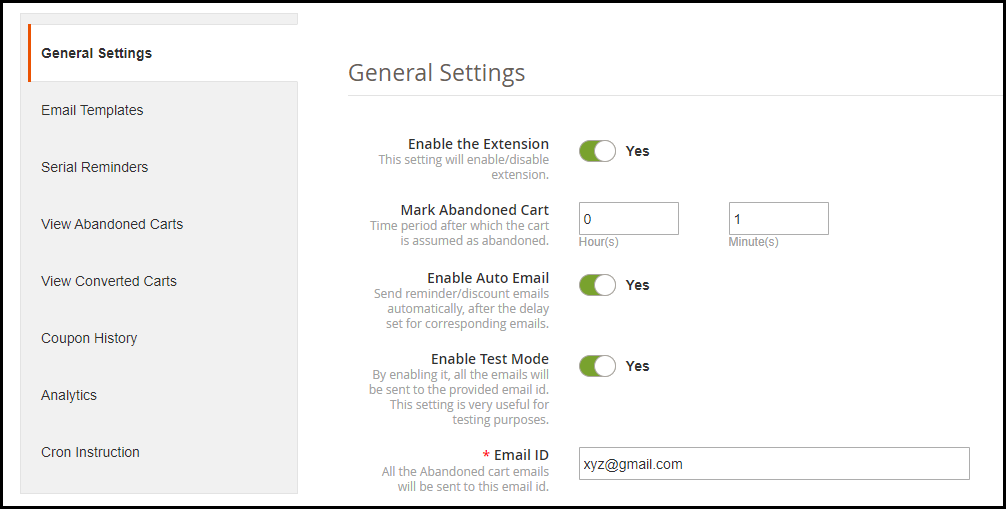
1. Magento 2 Abandoned Cart extension lets you specify a time period after which a customer’s cart is automatically marked as abandoned. For example, if the duration is set to 1 hour, then after 1 hour it will be added to the abandoned cart list.
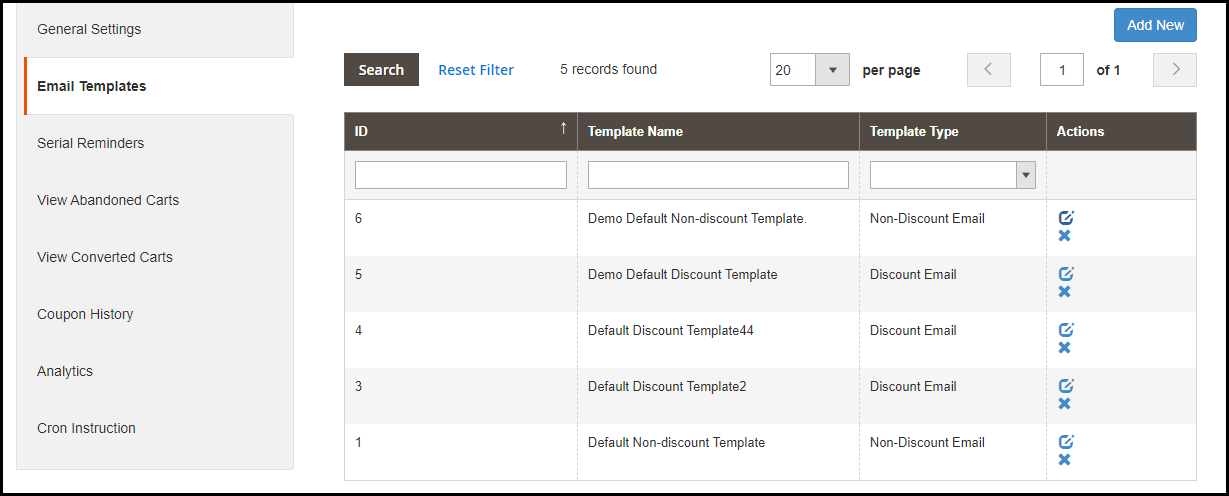
2. The Magento 2 follow up email extension offers multiple pre-existing email templates and you can also create new ones or customize the existing ones. For every email template, you can specify the template type whether it should be a discount email or a non-discount email. The latter is simply a reminder email where a user would be reminded about the pending items in his cart whereas the discount email contains a coupon code inside the email content which a user can claim to get discount on his left purchase.
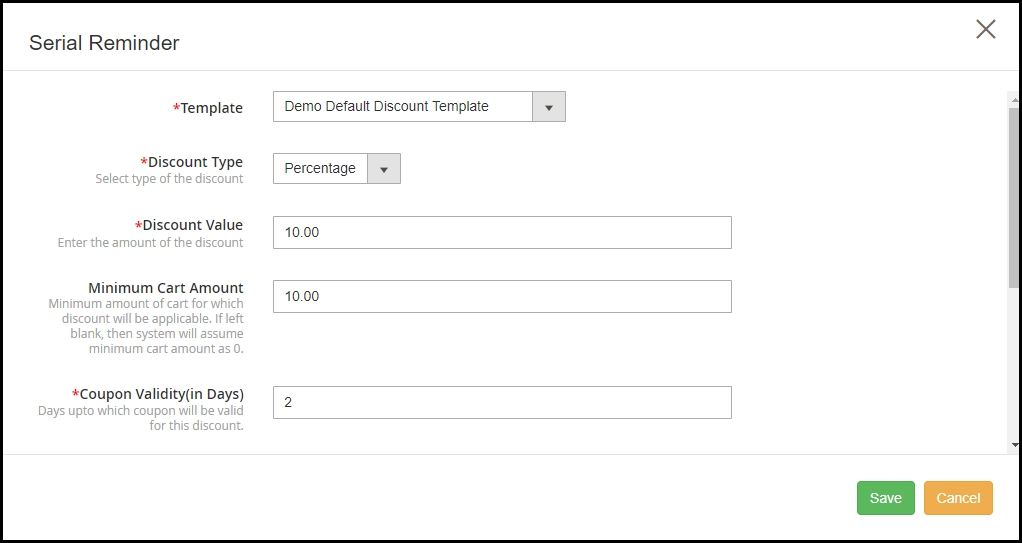
3. The Magento 2 Abandoned Cart extension allows you to schedule your emails. For discount email type, you can specify whether you want to provide a flat discount or percentage discount. You can also set the coupon value, coupon validity and specify the minimum cart amount for which the discount would be applicable. Besides, you can also offer free shipping to customers on their purchase.
4. Magento 2 Shopping cart abandonment extension also provides auto-email functionality enabling which the reminder emails would be automatically sent to the abandoned cart user after the set delay.
5. Track details of the abandoned cart users easily with the Magento 2 Abandoned Cart Reminder module. It displays some very useful information of the users like their name, email address, left cart amount, customer type whether they are registered or non-registered, their last visit or whether they have been sent a reminder email or not.
You can also check the pending items in their cart. Besides, you can view the list of the users who made a purchase after they had been sent the reminder email.
6. Check the complete history of the coupon codes that shows the discount amount, discount type, status of the coupon and whether it has been used or not.
7. Magento 2 Abandoned Cart Email extension provides you with some amazing analytics view in the form of line graphs and pie charts. You can compare abandoned carts and converted carts, abandoned cart amount and converted amount, and cart abandonments stats over a period.
8. There is test mode functionality that allows you to check how the emails are delivered to the user.
9. Enable/disable the extension in a single click.
If you need any assistance with this abandoned cart extension, you can reach out to us at support@knowband.com and we will try to resolve your query to the earliest.
Magento 2 Return Manager, also referred to as Magento 2 RMA extension helps you manage your store returns comfortably.
Product returns take place in massive numbers in an eCommerce website and managing those return requests require a flexible returns management system. Failing to provide easy return facility to the customers may degrade your brand reputation.
1. Three types of return choices: Replacement, Refund, and Credits
2. Image upload option for customers to highlight the defect
3. Easy returns for even Guest customers
4. Set up return policies and return guidelines
5. Create returns on customers’ behalf
6. View pending, approved and successful returns
7. Email customization
8. Responsive, multi-lingual, multi-store compatible, SSL compatible, and compatible with all browsers
Features offered by Magento 2 Return Manager Extension (detailed)-
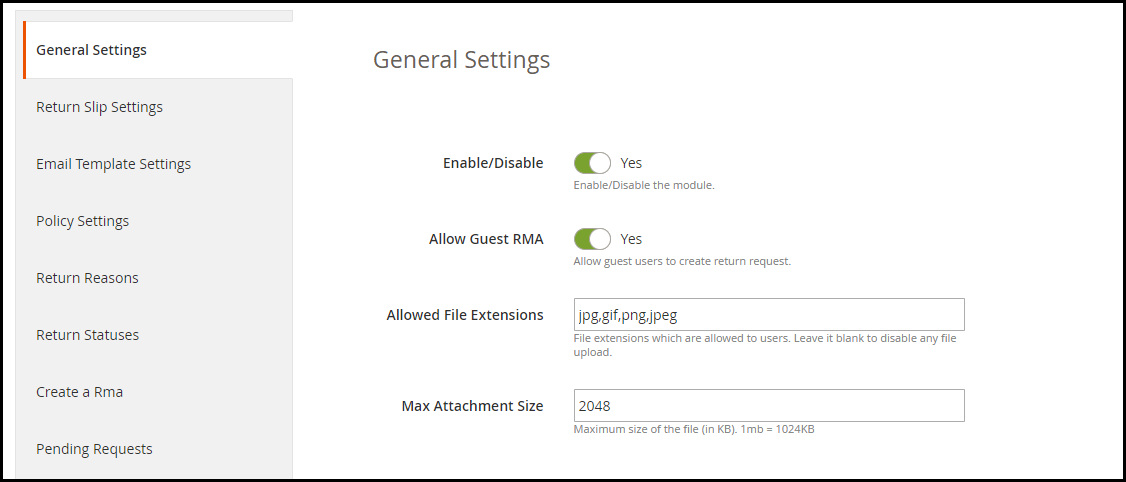
1. Enable or disable the module anytime within a single click.
2. Allow even guest users to raise a return request.
3. Magento 2 RMA extension allows customers to upload the image of the product to be more specific about the issue in the product. The supported file formats for image upload are jpg, jpeg, png, gif, and the image size cannot be more than 2 MB.
4. Make customers aware of the return guidelines while they return their item. A return slip is generated when a customer’s return request is approved that contains your return guidelines.
5. Magento 2 Returns Management extension allows you to set up your store addresses to make it convenient for your customers to send their return item. The store addresses are displayed when a customer is creating a return request. They can choose their desired nearby store.
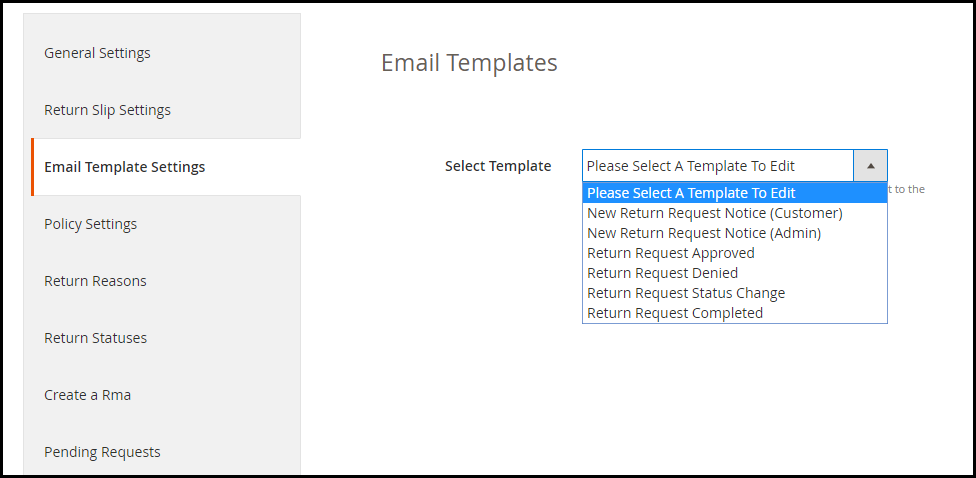
6. Magento 2 Returns and Refund Management extension provides multiple email templates for different order return status. You can customize these email templates as per your way.
7. You can create your return policies with the help of the Magento 2 Product Return extension. It will be displayed to the users while they create a return. For different return type, you can highlight different return policies. You can specify when can a customer expect the solution for his return, and also specify what should be the condition of the item to submit it for return. You can also map products for particular return policy.
8. Add some of the common return reasons to make it easier for the customers to pick their return cause from the drop-down list.
9. You can create different order return statuses through Magento 2 Return Manager module.
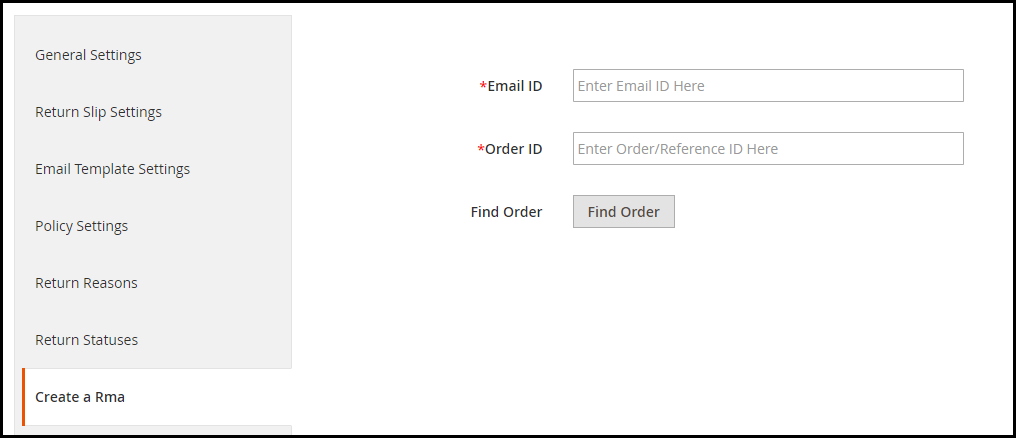
10. This RMA extension also allows you to create a return request on your customer’s behalf.
11. You can track your pending (non-approved) return requests and approved return requests from the back end. It displays the Order ID, product info, product quantity, customer’s name and email address, return reason, return type, and the return status. All the successful return orders are displayed under the Archives list.
12. A success message is displayed to the user every time a return request is placed.
Benefits of Magento 2 RMA Extension
Improve Returns management on your Magento 2 store.
Provide a hassle-free return facility to your customers.
Improve customer retention (because of store credits)
If you need any assistance with the Magento 2 Return Manager module, feel free to ask it in the comment section below or you can submit your query at support@knowband.com and our team will reach out to you shortly.
A product page is one of the important elements for any eCommerce website. It is the page which, if optimized well, can make the purchase journey of your potential customers flexible and make their buying decision even stronger.
What elements should be added to the product page? How can its performance be improved? Which extensions will be beneficial?
If you have these questions running through your mind, this blog post will provide you with the answers.
In this write-up, I have specified 4 Magento 2 Extensions that can help you improve your product pages’ performance.
1. Magento 2 Product Size Chart
If you have a Fashion website, this Magento 2 extension is a must.
For any website that deals with clothing items, providing shoppers with a size guide is necessary. Many eCommerce returns take place due to customers not receiving the correct sized product.
Though websites allow choosing the desired size, not many of them display the size guide in detail. For example, simply displaying S, M, L and XL would not help with the exact measurements. Different websites have different measurements, and even a slight difference in measurement can lead to the size issue. It would be wise if you could display the measurements as well along with the size type so that shoppers have a clear idea of what would be a perfect fit for them.
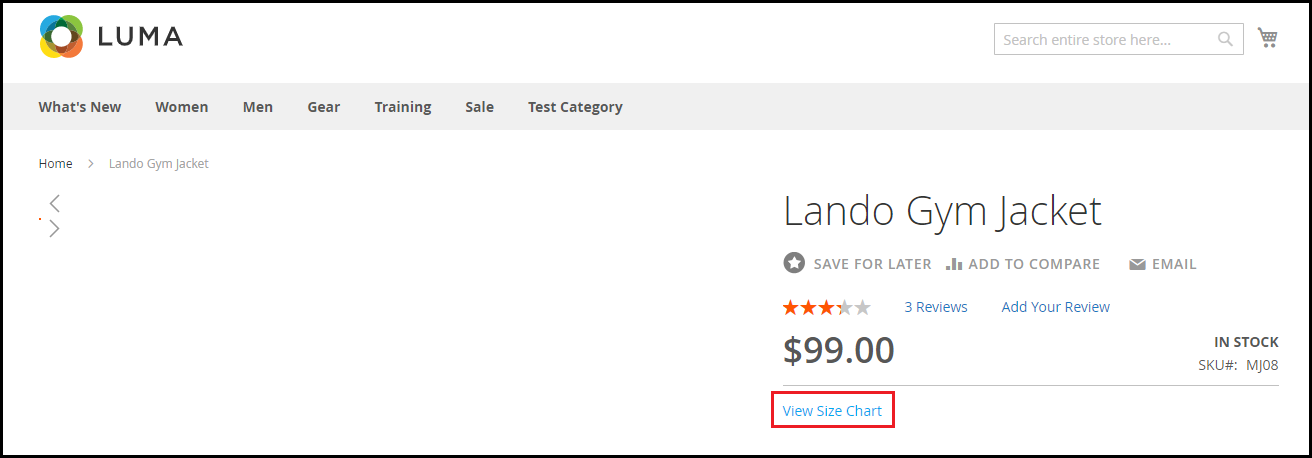
With Magento 2 Product Size Chart extension, you can add a size chart option on your product pages that reflects the dimensions of the product, hence enhancing the shopping experience and reducing the possibility of return.
2. Magento 2 Web Push Notification
Brands leverage the power of web push notifications to deliver important updates to their subscribers even when they are not present on the website. From boosting website traffic to increasing sales, web push notifications deliver effective results.
Talking about the Magento 2 Web Push Notification extension, though it has too many features, there are some extremely useful features that would help you set up a perfect product page.
In this module, particularly for the product pages, you can ask users to subscribe to product price alert or product back-in-stock alert so that if a user feels that the product price is too high or finds that the product is currently not in stock, they can subscribe to receive alerts whenever there is a price drop or product is available.
3. Magento 2 Advance Wish List/ Save For Later
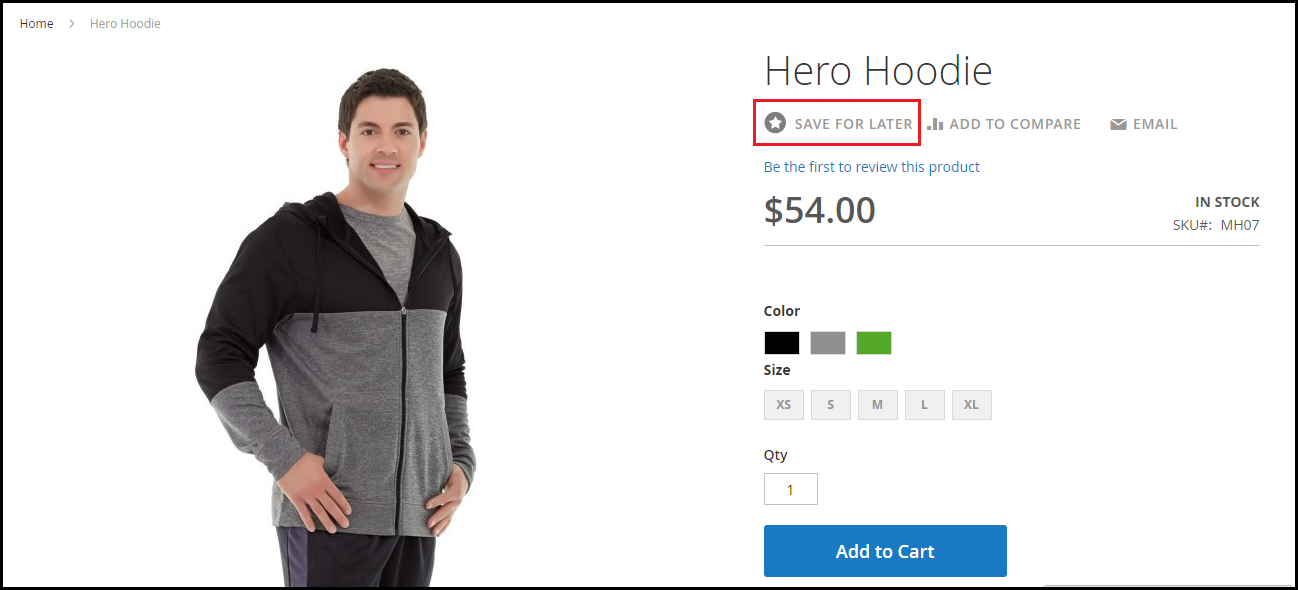
The Magento 2 Advance Wish List/Save for Later extension allows your potential customers to save the items they wish to purchase in the future. Generally, when people make a purchase decision, they add the items in their wish list so that they do not have to search it again and they can directly view that product in their save items. It also happens when visitors are usually not much impressed with the product price.
By having the option to save for later, they can put that product in that section and access it anytime without having to search again.
4. Magento 2 Infinite Scroll
This Magento 2 extension might not seem much relevant from the product page optimization perspective, but it can help you with product listing system.
If you usually follow the pagination process on your website for product listing, the Magento 2 Infinite Scroll extension lets you turn that into Infinite Scrolling. As a result, all the products that have been segmented into multiple pages will be brought together on a single page and would load automatically as the user scrolls down.
This tends to make product browsing simple and exciting, and increases user engagement at the same time.
If you have anything to ask regarding these Magento 2 extensions, do let me know in the comments below or if you need any kind of assistance, you can contact us at support@knowband.com
Black Friday is just around the corner. While online shoppers are desperately waiting for the occasion to arrive, e-retailers are making sure that they do not miss any opportunity to achieve sky-high sales on this Black Friday. From designing the website as per Black Friday to running attractive deals and promotions, merchants have tick-marked every option in their Black Friday checklist to catch the holiday spirit.
Magento Extensions for Black Friday
In this article, I have listed down 7 Magento Extensions that you shouldn’t miss out on this Black Friday. Have a look.
1. Magento Spin and Win
Magento Spin and Win extension adds a gamified interface to your website in the form of a spin and win wheel. The “Spin to Win” popup asks users to try their luck by spinning the wheel and win some exciting rewards.
The extension helps you with more user engagement and makes it a better way to catch the email address of your visitors rather than conventional pop-ups.
Set a Black Friday theme for this engaging pop-up and shoot up your conversions.
Magento Mobile App Builder extension transforms your Magento Website into a native mobile app for both Android & iOS.
The extension helps you with enhanced online shopping experience for your customers by reducing the hassle of visiting the website by typing its URL on the search engine. Magento Mobile App Builder makes it a one-click task.
It is a feature-packed extension that offers Home Page layout optimization, Social login, Fingerprint and OTP login, Zopim and WhatsApp Chat Support, Unlimited Push Notifications, Convenient Checkout, etc.
Apart from these, it lets you sync your website content into a mobile app in real-time and supports multiple shipping and payment methods.
So, launch a mobile app for your website and double your sales volume on this Black Friday. You can customize the look and feel of your mobile app by setting up a Black Friday theme.
Magento Gift Card extension adds a gift card section to your Magento website and lets you provide a range of gift cards to your customers. You can set up gift cards for multiple occasions like Birthday, Anniversary, Black Friday, Cyber Monday, etc.
The extension ends the customer’s time-consuming search for a perfect gift and helps them gift a desired/occasional gift card to their loved ones.
Digital Gift Cards have brought humongous sales for eCommerce merchants. You can expect higher sales too. Get the Magento Gift Card extension today.
Magento Abandoned Cart extension helps you recover your abandoned carts by sending follow-up reminders to the abandoned cart users.
You can set the duration after which the cart is assumed to be abandoned, and then send abandoned cart alerts to those users about the pending items in the cart. You can include the discount in your follow-up emails and encourage the prospects to complete the purchase.
Recover your lost sales on this Black Friday and scale-up your conversion graph. Though you cannot convert all abandoned carts, even a few conversions would make up for good revenue.
The extension allows you to send website notifications to your subscribers even if they are not present at your website and is supported for both mobile and desktop. (Subscriber here refers to the visitors who have approved to receive notifications)
With Magento Web Browser Push Notifications, you can announce abandoned cart alerts, product price alerts (drop in product price), Product back-in-stock alert, Order Status updates, etc.
Ask visitors to subscribe to alerts and make them grab their desired product instantly on your Black Friday sale.
Magento Affiliate and Referral Program extension adds an affiliate section on your Magento website and allows your visitors/customers to register as an affiliate partner.
Once registered, the user gets a commission for every successful referral; which can be a new user registration, order placement or both.
The extension encourages word-of-mouth marketing and boosts brand awareness. Run enticing offers and let your affiliates do the marketing for you for this Black Friday. It helps you acquire new customers and increases your sales.
While you would be capturing a huge number of orders on this Black Friday, there would surely be a few returns and it can get extremely difficult to manage them in the busy shopping hours. Avoid this headache with Magento Return Manager.
Magento Return Manager extension helps you manage your eCommerce returns conveniently. Apart from the usual refund and replacement choice, it offers store credits worth the product amount which a customer can utilize on his future purchases.
The extension speeds up your return process and helps you with improved customer loyalty and customer retention.
“Magento 2 One Page Checkout, also called as Magento 2 One Step Checkout converts the lengthy checkout process of your Magento 2 website into a simple One-Page Checkout. It lets you remove the unwanted checkout fields and make your checkout page as convenient as possible for your customers.”
The checkout page is the most crucial part of the customer journey on any e-commerce website. An optimized and simplified checkout process is the mantra for successful conversions.
Earlier, e-commerce merchants used to be hell-bent on having a multi-step checkout process. But today, feeling the importance of a quick and a user-friendly checkout process, the same e-retailers are switching to the One Page Checkout process.
Having an eCommerce website on the Magento 2 platform? Consider using the Magento 2 One-Page Checkout by Knowband to reduce the checkout friction.
Features of Magento 2 One Page Checkout
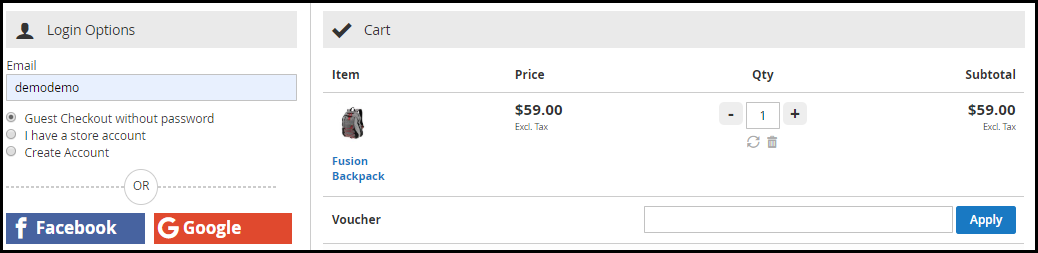
1. Guest Checkout
Many users avoid signing up on e-commerce websites. Brands that have made the sign-up process mandatory during the checkout lose out on such customers which significantly bring down their conversion rate.
For such users, Magento 2 One Step Checkout offers Guest Checkout so that they could check out easily without getting themselves registered on the website.
Magento 2 One Page Checkout even allows users to register as a guest without even setting up a password. A user just needs to provide his email address and the password would be sent over their inbox.
2. Social Login
While there are some people who do not want to create an account at any cost, some consider filling up the registration form a tedious task.
Magento 2 One Step Checkout provides the Social Login facility and ensures that users are able to make a quick checkout. This Magento extension offers Facebook and Google login option.
A majority of online shoppers remain logged in their Facebook and Google account. Hence, the social login option eases up the registration task and also avoids the headache of remembering passwords.
3. Prioritize Checkout Fields Using Drag and Drop Functionality
Arrange checkout fields as per your priority. Place a field wherever you want. Just pick a field and drop it to the place where you want to get it displayed. For example, you can keep the Contact number field above the Address field or vice versa.
4. Mark Mandatory Fields and Avoid Unnecessary Ones
Magento 2 One Page Checkout provides you with the option to mark checkout fields as Mandatory or Optional. If you wish to capture some important information, you can keep that field as mandatory and if you feel it can be avoided, you can keep it as optional.
You can set these fields differently for Guest and Logged in customers.
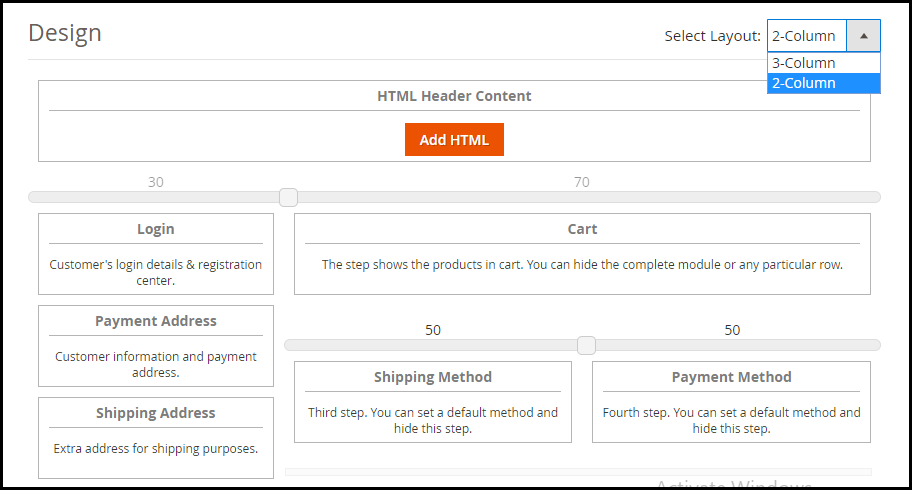
5. Choose the best layout design for your Checkout page
Magento 2 One Page Checkout provides 2 layout designs: 2-Column Layout and 3-Column Layout that gives you the opportunity to try and test which checkout layout is bringing more conversions compared to the other.
You can customize your layout accordingly.
6. Supports Multiple Payment Methods and Shipping Services
Magento 2 One Page Checkout supports nearly all the payment modes and shipping services so that you do not have to compromise a conversion due to the non-availability of a payment method or shipping provider.
How Magento 2 One Page Checkout benefits the Merchants?
Magento 2 One Step Checkout provides ample benefits to the eCommerce merchants. Have a look
1. Simplify the Checkout experience of customers by having a trouble-free One Page Checkout.
2. Encourage an Easy and Quick Checkout.
3. Capture more sign-ups with the Social Login facility.
5. One Page Checkout for Magento 2 increases your overall conversions and revenue.
The Bottom Line
There are good enough reasons to opt for a single page checkout that overshadow the multi-step checkout process. Having a One Page Checkout not only creates a frictionless checkout but also saves the much important time of your customers.
Do check out the Magento 2 One Page Checkout. Confused between a one page checkout and multi-page checkout?
Mandatory sign-ups have been an annoyance for long. People just hate creating an account every time they visit a new eCommerce website. While some get irked by the lengthy and a time-consuming registration form, some just do not like sharing their personal details at all.
The compulsory account creation forms a barrier in your conversions as well. While being on the checkout page, consumers are presented with a sign-up form, which breaks the checkout flow and sometimes becomes a major reason for cart abandonment. In addition, you fail to gather customer data.
Now, get rid of the mandatory registration forms and reduce the obstacles in your checkout process by allowing users/customers to sign in to your Magento 2 store easily with their social media accounts.
The Magento 2 Social Login extension is designed to provide an easy and quick login facility to your visitors by avoiding the manual registration task and providing them with various social login options. Hence, customers do not need to create an account and remember the login credentials.
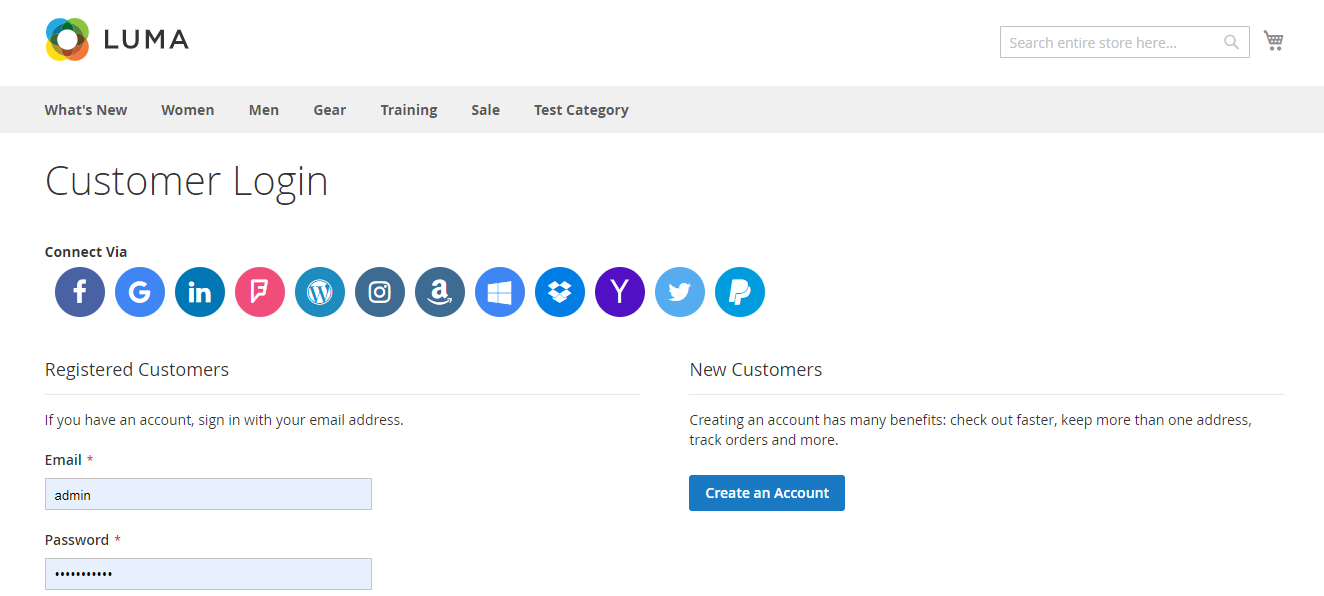
Social Login extension for Magento 2 provides up to 12 social login options to your customers. The social networks supported by this extension are:
Facebook
Google
Instagram
Twitter
LinkedIn
Amazon
PayPal
Yahoo
WordPress
Foursquare
Live
Dropbox
2. Display the social login block at multiple pages
The Social Login extension for Magento 2 allows you to place the social login block at multiple pages like Login Page, Registration Page, Checkout Page, etc.
3. Sort social icons
You can arrange the social icons as per your requirements. For example, you can keep the major social networks like Facebook, Google, Twitter and Instagram on the top and rest of the icons below them.
4. Customize icons
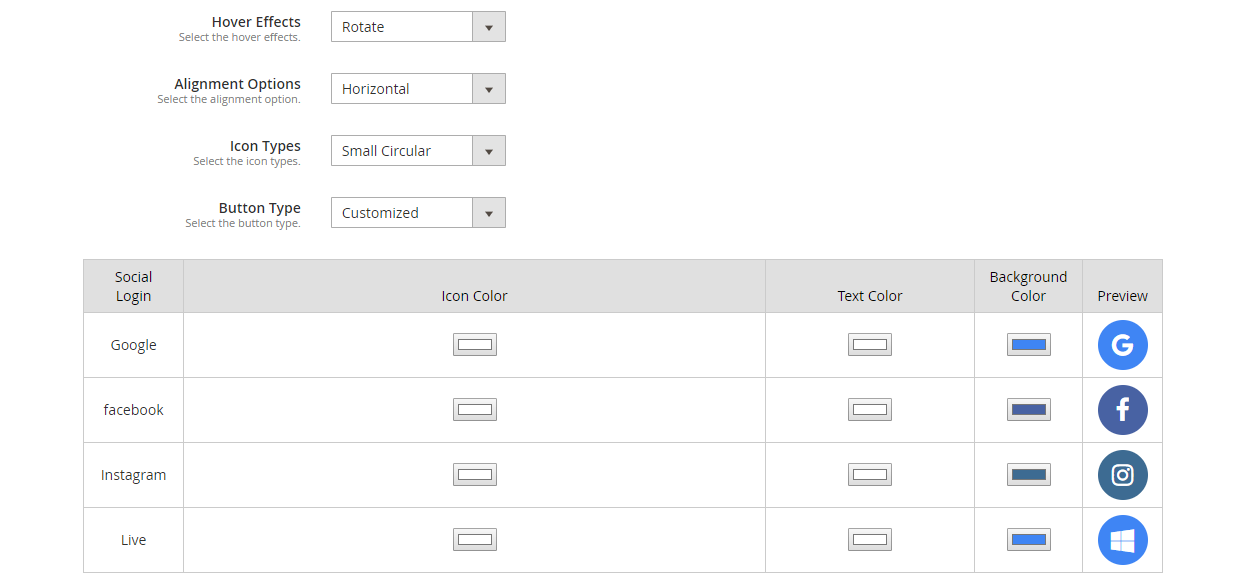
Magento 2 Social Login extension allows you to customize the social icons. It includes:
Alignment of the icons: Choose whether you want to display the icons vertically or horizontally.
Add effects to the icons: The social icons with either get highlighted, rotate or zoom when clicked.
Icon type: Select how you want your icons to be displayed. It consists of options such as small circular, small rectangular, large rectangular, small rounded, large rounded.
Button type: Choose the default button of the social networks or you can adjust the icon colour, text colour and background colour accordingly. A preview will be displayed as you make custom changes.
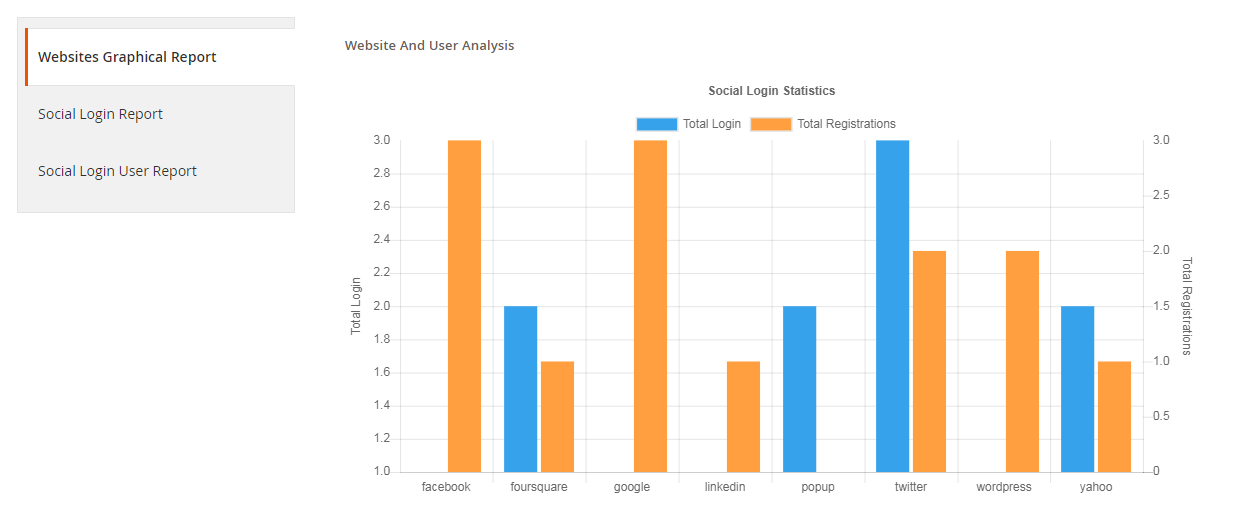
5. Get a complete analysis of the social registrations
Check which social login users preferred the most for signing in, how many login and registrations have been captured in total.
You can also track the email address of the users and check which user came from which platform.
6. Fully compatible with One Page Checkout
Magento 2 Social Login extension is fully compatible with our popular Magento 2 One Page Checkout. The Magento 2 One Page Checkout has in-built social login option but it is only restricted to Facebook and Google login. However, by installing the Magento 2 Social Login extension, you can provide your users with up to 12 social login options.
Why should you choose Magento 2 Social loginizer?
1. Quick and easy login
2. Capture more sign-ups
3. Simplify and speed up the registration process
4. Customers do not need to remember passwords
5. Excellent for target marketing
6. Increase conversions
7. Reduce cart abandonment rate
8. Lower bounce rate
Adding to a fact that 77% of the users find social login to be a perfect solution for registration and 60% of the users are more likely to use it on mobile (Source: Annex Cloud), you should definitely consider this Magento extension for your Magento store.
Mark your calendar for the coming holiday season. It is time to start preparing your ideas and strategies to capture more holiday sales this season. Online businesses are grabbing huge sales every year during the holiday season, and you should not miss it too.
If you own a Magento 2 store and wondering which Magento extensions you should focus on in this holiday season, here are the 7 Magento extensions that I highly recommend implementing on your Magento and Magento 2 store to capture holiday sales.
1. Magento Spin and Win
Magento Spin and Win makes it to the top in our list of Magento holiday extensions.
Though the Spin and Win popup majorly focuses on creating more user engagement and growing your email list by providing a gamified experience to customers, you can capture huge sales with it by making it more appealing in the coming holiday season.
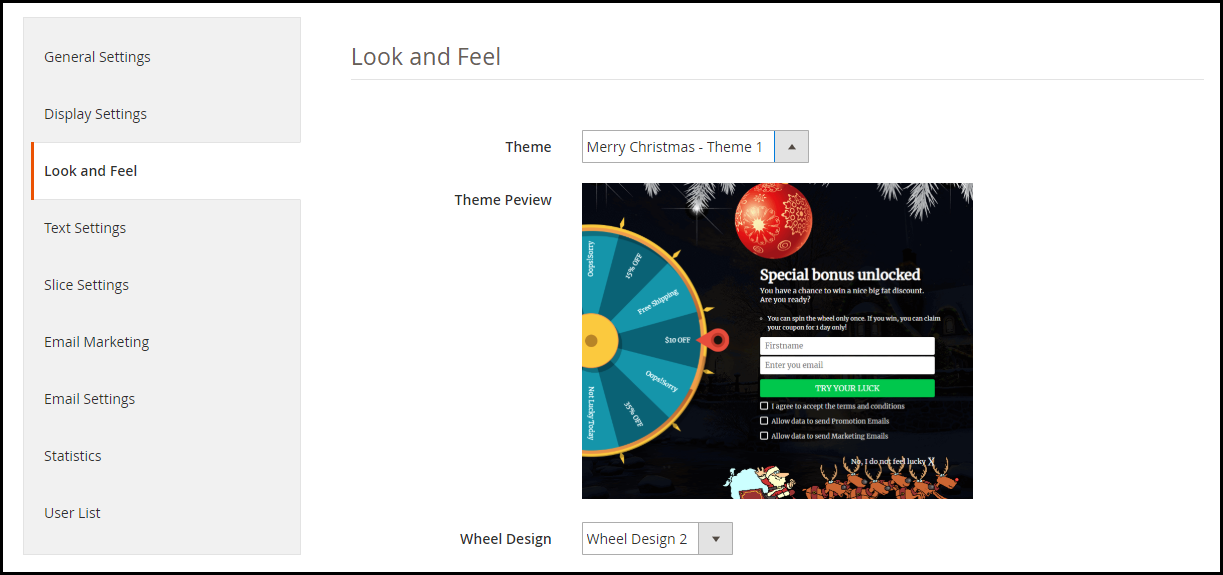
Magento Spin and Win extension provides you with the option to design your popup for various occasions. It comes with pre-existing themes for Halloween, Christmas, New Year, etc. You can adjust the look and feel of your popup in accordance with the occasion.
A popup having a holiday theme will draw more user attention during the holiday season. People would be excited to spin the wheel and earn some offers and discounts.
With this approach, you would be able to catch the holiday spirit and grab more holiday sales. Not to forget your email list would witness a lot of new entries.
Enhance the online shopping experience of your customers by launching a mobile app for your Magento website.
Magento Mobile App Builder converts your website into a user-friendly mobile app (Android and iOS). Talking about its key features, it offers Real-time synchronization of the website into app, Home Page Layout Optimization, Fingerprint Login, Zopim and WhatsApp Chat support, Unlimited Push Notifications, All Product type support and much more.
If you are aiming for a high sales count in the coming holiday season, you should definitely go with this Magento extension.
The schedule is hectic during the holiday season and people do not get enough time to purchase a gift for their every close one. This is when Gift Cards make things easier. Gift cards are the best option for last-minute shoppers.
A digital gift card is a one-stop solution for those who do not want to feel the burden of choosing gifts and spending hours in the search for a perfect gift.
Magento Gift Card Manager comes up with multiple gift card templates like for Halloween, Christmas, New Year, etc. You can create your own gift card template to give it a festive touch. Occasion based Gift Cards capture huge eCommerce sales.
If you do not have the gift card functionality, set it up today to grab holiday sales in the coming season.
Social media has around 3.6 billion people user base and 1.69 out of which are registered users on Facebook. Share and win Magento extension for Facebook is the one that can help the e-merchant to offer a fixed or percentage-based discount if the customer shares the store product on their social media account. The customers will be receiving a coupon code if they share the store product on their Facebook wall or with a friend over Facebook messenger.
Thus, the offer encourages customers to promote store products without any extra efforts. This increases customer retention and brings new customers to the store. Facebook share and win for Magento and Magento 2 is one of the easiest ways to increase brand awareness.
If you are looking for a Magento extension which can help you doing cross-sell then the best strategy which can work will be showing related products to the customers. Magento’s Automatic Related Product extension helps to cross-sell the store’s other products. Depending upon the product view or purchase statistics, this extension displays relevant products.
With Automatic Related Product Plugin, Magento 2 store owner can highlight the best-selling or new arrival pieces. This plug-in improves the up-selling and cross-selling of items from the shop.
To know more about the features and benefits you can refer to the product page of Magento Automatic Related Products extension.
6. Magento Affiliate and Referral Program
The “Refer and Earn” scheme works the best during the holiday season. It is the time when people shop the most and look for the sites offering heavy discounts. Therefore, the referral program, in this case, brings more sales, if you ask your users to refer your Brand to other people.
Magento Affiliate and Referral Program extension allows users to register as an affiliate on your store. After successful registration, the affiliate partner can share your website link to his/her audience through a referral code, a referral link, or share it on social media or via email.
You can also assign vouchers to the affiliate partner. The affiliate can share that voucher code with his known people and ask them to use that code while they shop. After a successful order, the affiliate will receive the incentives as set by the store merchant.
The holiday season grabs countless orders, due to which customers face delays in the delivery. When the delay extends more than usual, it creates a sense of frustration among customers. This is where Magento store locator can prove beneficial for you as well as your customers.
Magento Store Locator extension allows you to display your store locations on the front end of your website. While purchasing a product, a customer can choose his nearest store and pick up the order when it reaches the location, to avoid late delivery.
People expect to receive the product as fast as possible during the holiday season. You can save their important time by implementing the store locator extension on your Magento store. The pickup facility will surely mark a change in your holiday sales graph.
Have any doubt in any of the Magento extensions? Feel free to ask by dropping a comment below or you can mail us your query at support@knowband.com
I hope these Magento extensions for the holiday season provide a big boost to your online business. You can look out for some more Magento extensions in our store.
“Magento 2 Spin and Win email subscription pop up extension adds a Gamification interface on your website and provides a gamifying experience to your web visitors. In return, you can capture their email addresses.”
Email Popups are amazing. They help you grow your email list faster than any other technique. Among all the email subscription popups, the spin and win popup also referred to as the spin to win or spin 2 win popup is the most effective and engaging.
Today, you need to provide a reason to your customers to make them stay on your website. There should be something engaging or entertaining, a kind of fun activity that catches their interest. Spin 2 win gamification popup does exactly the same. It involves a user in a game, which eventually increases the average time spent by a user on your website.
Thus, we can say that the Spin and Win pop up is not only helpful in building the email list but also improves your website’s bounce rate.
Magento 2 Spin and Win Pop up
In this article, I am going to talk about the Magento 2 Spin and Win email subscription pop up extension. If you have an e-commerce store set up on the Magento 2 platform, you can take advantage of this Magento 2 extension to increase user engagement, enhance user experience and grow your email list.
Magento 2 Spin and Win Interactive pop up extension is a 3-in-1: Entry, Exit and Email subscription popup that helps you grab user attention and user engagement followed by the user email address. Wondering how?
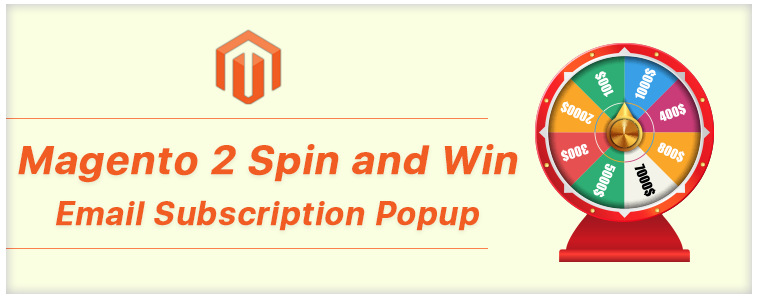
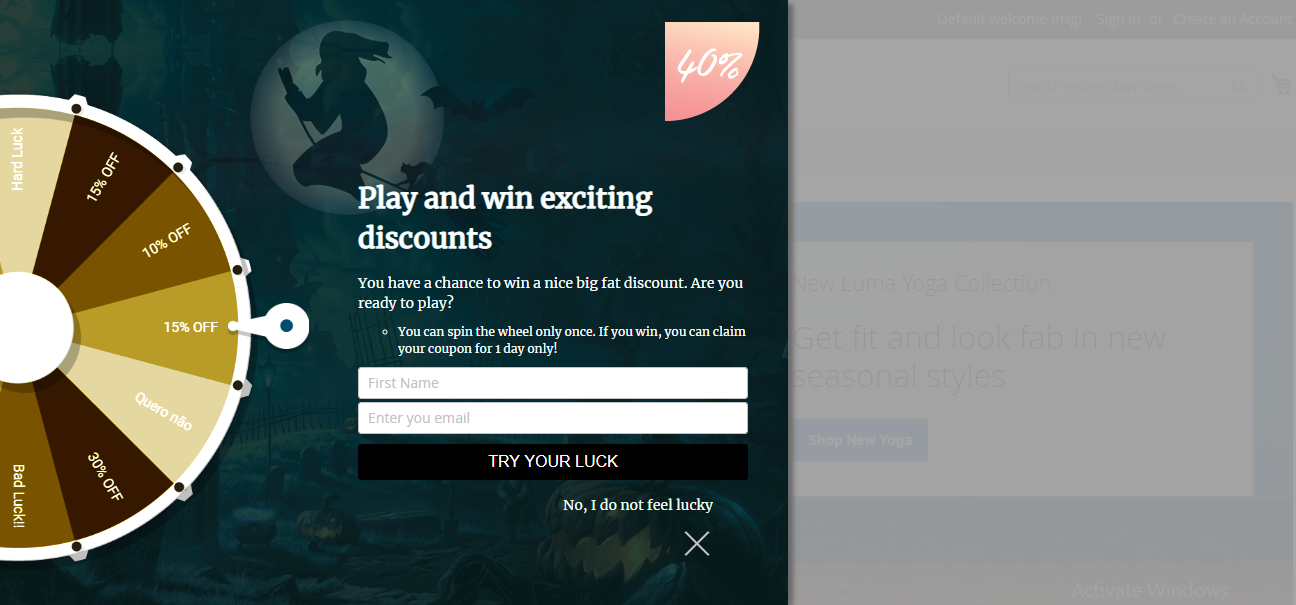
Magento 2 Spin and Win email sign up pop up extension allows you to display a spin and win wheel on your website. Because of a gaming look, it attracts user attention. The wheel contains some offers and discounts which a user can avail after spinning it. The wheel asks users to try their luck by spinning it to earn some amazing discounts.
Spinning the wheel requires a user to enter his/her details like name and email address. Once the details have been provided, the wheel starts spinning. As a result, the user spends more than the usual time on your website and you also get the customer data without sounding needy.
Features of the Magento 2 Spin and Win extension
1. Schedule a theme:
With the updated version of Magento 2 Spin and Win extension, you can schedule a theme by adding a date validity and theme expiry time. It will automatically switch the theme as scheduled. This new functionality will reduce the extra efforts of the store admin.
2. Themes for multiple occasions
Magento Spin and Win popup comes up with pre-existing themes for multiple occasions like Halloween, Diwali, Christmas, New Year, etc. You can design your popup as per the occasion to give it the festival look. There are many other options to adjust the look and feel of the popup.
With Mother’s Day just around the corner, you can also customize the popup as per the occasion to give your web visitors the feel of Mother’s Day when they land on your website. If you are running exclusive offers on Mother’s Day, displaying those offers with a related theme would look very appealing.
3. Customize the spin and win wheel
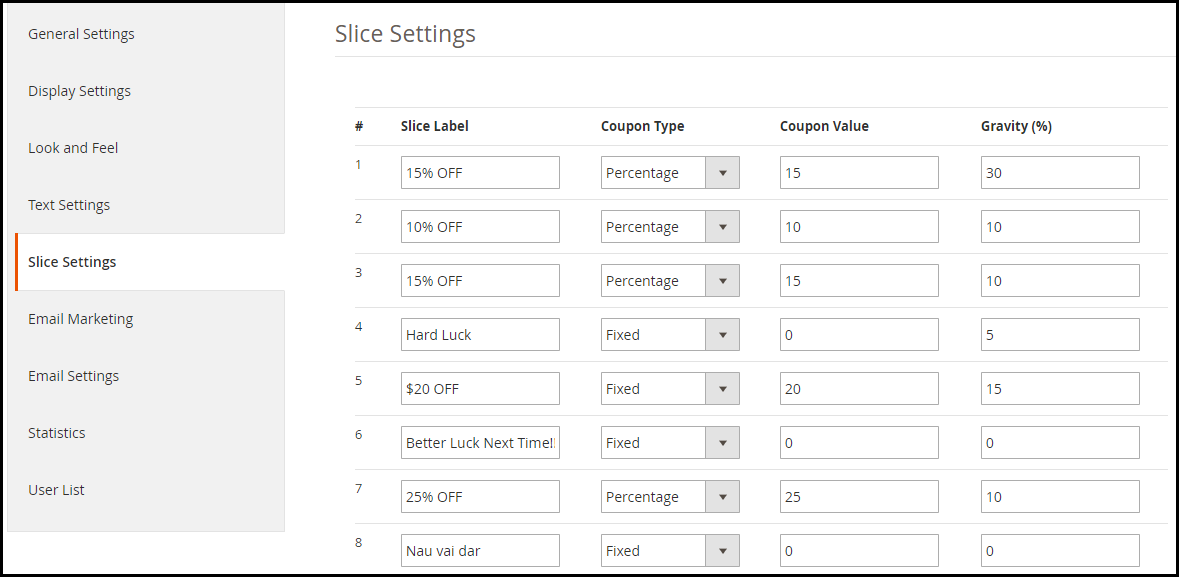
Magento 2 Spin and Win subscription pop up extension comes up with 6, 8, and 12 slices in the wheel. You can create a label for each slice. For example, you can create one label as “10% off”, other as “Better luck next time” and so on.
In addition to this, you can set the coupon value for each slice. There is also an option called “Gravity” which lets you set the frequency of a slice. For example, a slice having a gravity of 20 will have a higher probability of appearance than a slice having the gravity below 20. The combined gravity for all the slices cannot be more than 100.
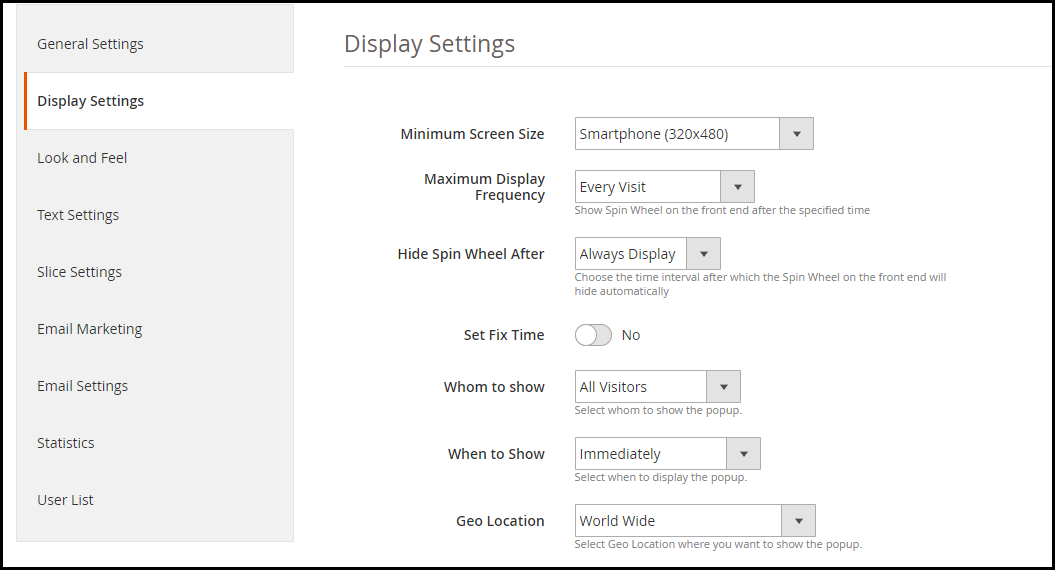
4. Set maximum display frequency of the popup
Display the spin and win gamification popup every time a user visits your website/ one visit per hour/ one visit per day/ one visit per week or one visit per month.
5. Set the hiding time of the popup
You can either choose to display the spin 2 win popup always or hide it after a short time, for example, 10 seconds, 20 seconds, 30 seconds, etc.
6. Choose whom to display the popup
Display the spin and win popup either to all visitors, new visitors, or returning visitors.
7. Show the progress meter for offers claimed
With this new version of the Magento 2 Spin and Win email subscription module, the store owner can show the percentage for number of offers claimed along with the custom text for the progress meter.
8. Display popup based on user behavior
The Magento 2 Spin and win newsletter subscription pop up extension provides 4 options to display the popup based on user behavior:
Immediately: As soon as a user enters your website
After a time(in seconds): The popup is displayed after a user spends the defined time on your website.
When scrolling down: Popup is displayed to the user after he or she scrolls down a considerable percentage of your website content.
When exit: Popup is displayed when a user intends to take an exit from your website.
9. Display popup based on location
You can either display the spin 2 win pop up to the users coming from worldwide or you can show or hide the popup for users of a particular location.
10. Set a specific period for the popup appearance
If you want to display the spin and win gamification popup for a limited time, just mention the active and inactive date. The popup functionality will run for the defined time only.
11. Allow a customer to spin the wheel once or for n number of times
Magento 2 Spin and win interactive pop up extension has an Email recheck functionality. If enabled, a single visitor won’t be able to spin the wheel more than once else a user can spin the wheel and generate the coupon as many times he or she wants.
12. Enable wheel sound and display fireworks on winning a discount
Turn on the wheel sound so that every time a user spins the wheel, it creates a sound. Moreover, you can display fireworks when a user wins an offer.
13. Set the wheel display interval
If you want to display the spin 2 win popup after a certain time, you can mention the number of days after which you want to get it displayed. For example, if the number of days is selected to be 2, then only after the completion of 48 hours, the popup will be displayed to the user.
14. Collect emails directly in your MailChimp, Klaviyo, and Constant Contact account
If a visitor turns into your subscriber, their information would directly be sent over your MailChimp, Klaviyo, and Constant Contact account, whichever you have set up from the back-end.
15. Customize your Email templates
Magento 2 Spin and win email sign up pop up extension offers pre-existing email templates to give a pleasant look to your emails. You can customize the email content accordingly.
16. Track Statistics
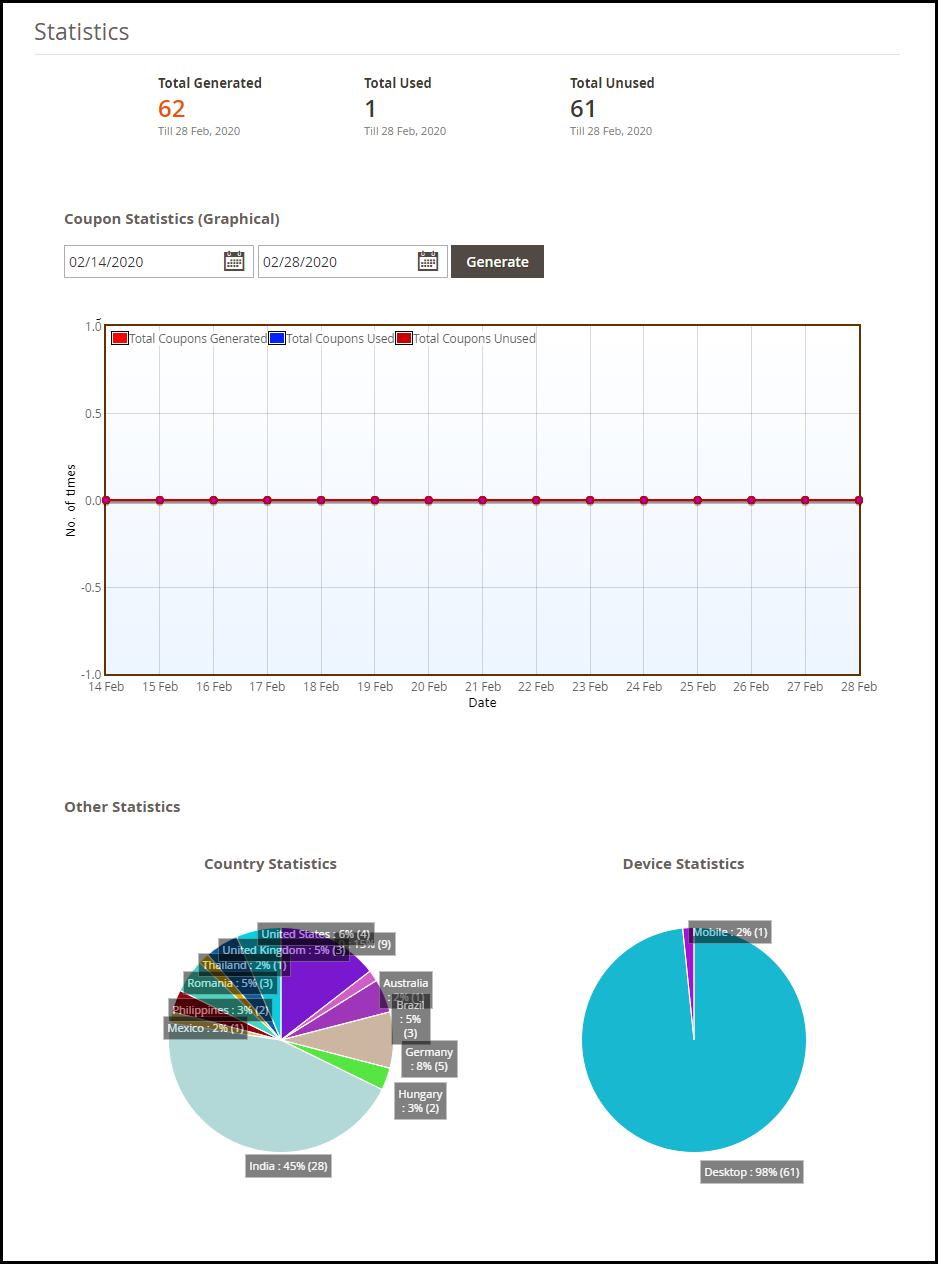
With Magento 2 Spin wheel pop up extension, you can view stats in graphical form and pie charts, for-
Total coupons generated, used coupons, and unused coupons
Country-wise stats (visitors coming from different countries)
Device-wise stats (mobile, desktop, tablet, etc)
Final Word
If you are serious about growing your email list, you should definitely consider implementing the Spin to Win extension on your Magento 2 store. Though the primary purpose of a spin and win popup is to collect more email addresses, it provides many more benefits to your e-commerce website.
If you have any queries regarding this Magento 2 Spin and Win pop up extension, feel free to drop a comment below or you can contact us at support@knowband.com
In many e-commerce websites, it often happens that if a user has some pending items in their cart, they cannot purchase some other product until they remove the previously added items. Though it is not something which irks a customer as they are the only ones who added the products in their cart. However, sometimes, it can discourage the instant purchase intent of the customer. To make things easy, KnowBand presents the One Click Checkout extension. If you have set up an e-commerce store on the Magento platform, Magento One Click Checkout can be beneficial for you.
Magento One Click Checkout triggers impulse purchases by allowing customers to purchase a product directly, without adding it to the cart. It does not interfere with the existing cart.
Note: Do not get confused between a One Page Checkout and a One Click Checkout. A one-page checkout simplifies the checkout process by placing all the checkout fields on a single page whereas the purpose of a one click checkout is to make customers buy a product without making any changes to the current cart details.
Features of Magento One Click Checkout
1. Magento One Click Checkout displays a “Buy Now” button at every product page. The product page displays two options: Add to Cart and Buy Now. A customer can click on Buy Now to purchase that particular product even if he/has some other pending items in the cart.
2. You can customize the “Buy Now” button as per your website design and adjust it for different themes and occasions.
3. Magento quick checkout extension offers an amazing analytics view to check the statistics. You can view how many users visited the product page, how many clicked on the Buy Now button, and out of those, how many eventually converted, in the form of a pie-chart.
4. Magento single click checkout is fully responsive.
5. Magento fast checkout extension is compatible with all Magento themes.
8. Magento Instant checkout extension has the option to include jQuery.
Why you should choose Magento one click checkout for your e-commerce store?
1. To encourage easy and instant purchase
2. To improve user experience
3. To minimize the possibilities of cart abandonment
4. To increase conversions and drive more sales
5. To save the important time of a customer which otherwise would have been wasted in removing the existing cart items.
Final word
Make your store the go-to option for active online shoppers with the easily customizable Magento One Click Checkout. If you have any queries regarding this Magento extension, reach out to us at support@knowband.com or leave a comment below.
If you own an e-commerce store on the Magento 2 platform and want to give your store a look of an Instagram shop, the Magento 2 Instagram Shop Gallery extension will surely match your requirements.
Magento 2 Instagram Shop Gallery extension lets you fetch content from Instagram hashtags and convert them into shoppable posts. The content is displayed in your Instagram Shop gallery.
Note: Products are not tagged on the images but are mentioned outside the image.
Key features of Instagram Shop Gallery extension for Magento 2
You can search for images based on hashtags and use them to display similar products that are available in your store.
Display the Instagram Galley on multiple pages of your website. For example, Home Page, Product Page, Top navigation bar, etc.
Choose images that you want to feature on your Instagram Gallery to grab people’s attention. While adding images, you can mark them approved and map your related products to them. After adding, you can select whether you want to display only approved images, images attached to product or both. This can be done under “Image visibility”.
Add the products that you want to link to a particular image.
Display the likes and comments of the Instagram posts on your Instagram Gallery.
Set a limit to the maximum number of images to be shown on a particular page or the Instagram gallery.
You can create multiple galleries.
Arrange product images based on your preference. For example, if you want to display an image at the number 1 position, you can keep the sort order as 1.
You can add as many images as you want.
Enable/Disable the Magento 2 Instagram Shop Gallery extension anytime.
It is a mobile responsive and multi-store compatible module.
Benefits of Magento 2 Instagram Shop Gallery extension
Through your Instagram account, you can ask your followers to share their content, story or photos related to your products using a hashtag, and then feature them on your website. It is generally known as user-generated content.
User-generated content provides free brand awareness which no advertisement can beat.
Having an Instagram Shop Gallery section attracts customers and increases customer engagement.
Final Word
Magento 2 Instagram Shop Gallery extension helps you provide appealing visuals to your store products. It enhances the user interface of your store by adding a beautiful Instagram gallery. Do try out this Magento 2 extension.