PrestaShop: A Valuable eCommerce Platform or a Wrong Turn?

Today, when only the biggest eCommerce sites like Amazon, Alibaba, eBay, Etsy, etc are the only ones with huge global acknowledgment, why it is still said that eCommerce is a hit?

The reason is, despite only a few big sites are in the global limelight, the niche based inventory model sites are doing so well in their limited local market. The brick and mortar based business owners are budding into eCommerce entrepreneurs by adopting easiest solutions to make their retail an online shop.

The easiest solutions that I am talking about are the various eCommerce platforms that provide a ready-made eCommerce site on the go. PrestaShop is one such eCommerce platform which is becoming popular among the eCommerce entrepreneurs day after day. A large number of eCommerce business aspirants has chosen this platform to launch the eCommerce site of their dreams and claim their share in the huge profit that eCommerce generates each second.

Current stats about PrestaShop

  • PrestaShop was launched on 31st July 2008, in France.
  • Currently, it is powering more than 250,000 eCommerce sites worldwide in 60 different languages.
  • PrestaShop Shares the total market share of 9% for open-source eCommerce platforms.
  • According to W3Techs, there are total 0.5% PrestaShop websites out of all the websites on the internet.

This is an impressive stat. 0.5% of total websites on the internet is a huge share. So, PrestaShop is very popular I guess.

In all these good talks about PrestaShop, haven’t we ignored the fact that PrestaShop is not the most popular eCommerce platform? I mean if PrestaShop is the best that you can have for your startup, why Magento, Shopify, WooCommerce etc are being chosen by several other entrepreneurs?

The reason is, none of the eCommerce platforms can be said to be a perfect solution. Factors that differentiate these platforms and allow them to survive parallelly highly depend on requirements, usability, flexibility, modules, ease of use and a lot more.

This is where you need to ask yourself “Is PrestaShop a perfect solution for your eCommerce stratup?” Let’s examine it.

Factors that make PrestaShop better than others

1. Ease of use

Usability is one factor that makes PrestaShop better than most of the eCommerce platforms. Most of the entrepreneurs come from a non-technical background. They hardly have the knowledge of coding and other technical stuff.

Luckily PrestaShop has been designed to be used by any kind of user. It doesn’t matter if you are a tech savvy user or have zero coding skills, You can setup a store and manage it all without any hassle.

From installation to configuring the whole website, from product uploads to managing the orders from your customers, you get the easiest interfaces to do it all.

You can install PrestaShop using the guided interface that clearly explains everything you need to do in the process. In fact, the cloud version of PrestaShop saves you from the hassle of installation and directly provides the ready-made store, waiting for you to upload the products and start selling on the go.

2. Highly extensible

PrestaShop possesses a number of built-in features to get a ready made store for you. These features include:

  • Store personalization
  • SEO friendly URLs
  • Product upload management
  • Shipping management
  • Supply management
  • Customer management
  • Discount management
  • Order Management etc.

Apart from these features, the platform allows the addition of any number of new features through PrestaShop modules. By simply installing a PrestaShop module, you can add a functionality that has not been given in the default system. Moreover, you can also enhance the built-in functionalities through these modules.

For example, Social Login is a quite important requirement for the eCommerce website to improve their site’s usability for their customers but is not present in default PrestaShop system. The good news is, you can easily integrate this functionality by installing a social login module.

The extensiveness in PrestaShop is not limited to the modules only. It saves you from the cost and effort of designing your new eCommerce store by simply allowing third party PrestaShop themes to be installed.

Frankly, every other eCommerce platform allows the module and theme extension, then how it makes PrestaShop better than them? This question takes me to my next point.

3. Huge number of modules and themes

PrestaShop has a huge community of users, developers, and website owners. It is one of the most active communities where you can find the solutions for everything about PrestaShop.

This highly active community consist of a very big population of third-party PrestaShop developers. These developers contribute to the community by developing the PrestaShop modules, themes, and templates for every trending need and requirement.

The official PrestaShop marketplace is a hub of all your modules, themes, and template requirements. Moreover, some big community developers also sell their modules and other developments on their own official sites. You need to just Google your requirement, and a large number of PrestaShop modules fulfilling them would be shown to you in the SERPs.

This is where PrestaShop beats most of the eCommerce platforms available today. As compared to other eCommerce platforms, PrestaShop modules and themes are so easily available and at a very lower cost than others. It is because of the massive competition among the developers, you can get some pretty fair deal in modules, themes and other custom developments from these developers.

4. Mobile Friendliness

Mobile Optimization is not an option, it has become a necessity today. If your eCommerce site is not optimized for mobile viewing you will loose your business in no time.

PrestaShop is a mobile-ready platform, which has been fully optimized for responsive viewing. The well optimized mobile responsive shopping cart allows your customers to easily shop on your site from their mobile phones.

Not just the shopping cart, the default PrestaShop theme is also fully mobile responsive. That means, your shoppers can browse anything and everything on your site without having an irritating experience on their mobile phones.

Moreover, almost all of the third-party modules and themes are also mobile responsive as the developers too know that mobile is important for your business. This mobile friendliness of PrestaShop is enough to make it one of the best eCommerce platforms in terms of usability for the customers.

5. A guided and well-supported platform

PrestaShop is one of the best platforms in terms of user support and guidance to use the platform. You can get all the valuable documentations and support whenever you need them. In fact, you can find all the documentations about all the PrestaShop versions on the website of PrestaShop itself.

This mainly includes comprehensive information about installation, features, settings, version upgrade, and much more. There are official as well as third-party forums and communities that support the website owners in various tasks and issue resolution activities.

The PrestaShop forums or community officially support the users by answering their queries. Moreover, they also provide paid support and training courses whenever you require. This also includes custom module development as per your requirement.

6. It’s highly flexible

There is very little left to talk about the flexibility as I have talked a lot about it when I mentioned about the modules and themes to extend the functionalities. Something that I would like to add in this would be the possibility of developing a module for almost every requirement you can think of. Other platforms also allow modules and themes to be installed, so what’s the difference here?

The difference is there in the feasibility to develop modules for a wide variety of needs and requirement. In fact, with a single module installation, you can even get even the most complex functionalities.

A perfect example of one such module is the “Marketplace Module”. A single PrestaShop module that can convert your whole PrestaShop store into a fully-fledged marketplace site.

Before the first marketplace module was introduced, no one would have thought that an originally inventory based eCommerce platform can also be used to develop a huge marketplace site. A site where you can add and manage new sellers/vendors.

This is the kind of flexibility that PrestaShop provides which is not found in most of the other eCommerce platforms.

7. It’s free to use

PrestaShop is fully open-source and free eCommerce platform. This means you don’t need to spend a penny if you want to use PrestaShop platform to build your online store. You can download the PrestaShop file for free and install it on your web server. As soon as you install it, you are ready to start selling from your store without spending a single amount.

Unlike various other hosted eCommerce platforms like Shopify, BigCommerce, Volusion etc, PrestaShop does not charge you for using it as a platform to build your site.

The places where you will need to spend some money are:

  • Installing a paid PrestaShop theme
  • Installing a paid PrestaShop module
  • Getting a custom theme or module
  • Hosting your website with a paid web host and
  • Paid training courses

These expenditures are important, necessary, and you will happily pay for them if you require them. With PrestaShop, at least you can save the money that would have been spent it getting an access to the platform itself.

8. I didn’t miss the basic features

The features and benefits of PrestaShop that I have mentioned in the above points are the ones that make PrestaShop stand out from the rest. However, I have not mentioned the basic functions because it’s understandable that PrestaShop does not omit these basic features either. PrestaShop seamlessly provides these features too:

  • Fully functional and easy to use Back-end interface.
  • Flexibility to support a large number of payment options.
  • Flexibility to Provide multiple payment options to customers at a time.
  • SEO friendly URLs for any controller or page on your store.
  • CMS page management.
  • Extensive shipping management.
  • Multi-lingual platform- more than 60 languages.
  • Multi-store feature.
  • Easily available latest security patches and upgrades.
  • Comprehensive reporting system etc.

Places where you might find PrestaShop difficult

As mentioned in the beginning, PrestaShop is not the most popular platform. What could be the reasons? Is it a wrong turn to adopt PrestaShop?

I can certainly say, it would not be a wrong turn to choose PrestaShop. It is just that not all the eCommerce platforms have everything you would need. The needs and requirements for a perfect and highly competitive eCommerce platform are changing day by day. The platform which can match up with the changing trends can only become the entrepreneurs choice.

1. It highly depends on the modules

Despite PrestaShop already provides all the essential features by default, it lags some important trends that have become a necessity for today’s entrepreneur. For example, It has been ages when social login feature was introduced to the websites and developers.

Even after so many upgrades and updates, PrestaShop has not included this feature in the default installation. A website owner seeking this very basic feature has to purchase a third party module for the same.

PrestaShop depends on third party and official modules for most of the trending features. Probably they do not want to burden the default installation with the features that can be easily achieved by installing a simple module.

2. The major upgrades do not support carry-forward

By carry-forward I mean the ability of the PrestaShop modules to be used with all the major versions without any change in the module.

The recent major upgrades still supported by PrestaShop include:

  • PrestaShop version 1.5
  • PrestaShop version 1.6
  • PrestaShop version 1.7

Each time when a new major upgrade is released and if you decide to upgrade to the new version you will not be able to use your old PrestaShop modules or theme on the new version. That is, either you need to upgrade your module according to the new PrestaShop version or buy a new module developed for the new major version.

Luckily, there is not much to worry as a PrestaShop store owner. Third party developers are highly active and they make their modules compatible with the new version as soon as it is released. If you are lucky you need to just ask your module developers for the upgrade they will provide you the new module version without any cost.

3. Scalability could be a problem

PrestaShop is best suited for small to medium sized businesses. When it comes to scaling it as a fully-fledged giant eCommerce site, it is not the best option. With a massively increased scale of the store, you may notice lags in the various aspects like page loading time, back-ends performance, database overload etc.

By a fully fledged website, we mean the very big eCommerce sites that can be compared with the biggest eCommerce giants. If you have the intention to build another Amazon, probably you must look for an enterprise level solution like Magento Enterprise edition or build your own framework.

Scalability limit on PrestaShop is not that small as it seems. You can handle thousands of SKUs, Sellers, and Customers without any hassle. In case if you have millions of SKUs in your mind then PrestaShop could be a wrong turn.

To Roundup

PrestaShop has proven to be an efficient eCommerce platform and is still trying its best to prove better on various grounds. Of course, it’s not a perfect solution, and there are limitations with major upgrades, scalability. However, considering its target users, it has got everything they would need to launch a successful medium sized eCommerce site.

Nevertheless, it offers various benefits and greater flexibility with a competitively lower investment cost. It cannot be termed as a perfect platform but would not be a wrong turn either.

I can say that Magento is a better solution than PrestaShop for large scale eCommerce sites. While PrestaShop could be a great choice for small to medium sized business which is comparatively more in number.

How to Connect your PrestaShop Store to the Etsy marketplace?

Exciting Updates in Knowband’s PrestaShop Etsy Integrator – Version 4.0.1

We’re always looking for ways to make your Etsy integration smoother and more efficient. With the latest Version 4.0.1 of our PrestaShop Etsy Integrator, we’ve added a couple of features that we think you’ll find really useful.

[Alert]Make sure to upgrade before 18 January, as connections may be interrupted if the module isn’t updated by then.

1. Seamless OpenAPI Authentication for Etsy
Etsy has updated its API authentication, and we’ve updated our Prestashop Etsy Marketplace Connector Module to match. All your API requests now include the necessary authentication headers, so you don’t have to worry about interruptions. Your PrestaShop store will continue to communicate with Etsy smoothly, exactly as before, just better.
2. Simplified Return Policy Management
Handling return policies can be tricky, but we have made it easier. You can now create multiple return policies and assign them to different profiles. Not only you can you create, but you can also sync the existing policies from Etsy Marketplace by running retun policy cron.
Once a profile is linked to a product, the return policy is automatically updated on Etsy. This saves you time and ensures your listings always display the correct information for your customers.

These updates are part of our ongoing commitment to make your PrestaShop-Etsy integration as seamless and hassle-free as possible.

If you run an eCommerce store and not satisfied with your sales, you might be thinking about several ways to improve the same. Starting a shop on some popular marketplace is one such idea that might have surely come into your mind. Well! If so, this is a good decision as it will help you to leverage the traffic and customer base of an already established marketplace and generate some serious sales for your business.

The aim here is to expand the reach so as to generate desired revenue from the business. However, It might be a tough task to manage two shops on different domains at the same time. Therefore, I am going to explain how can you manage to be a seller on a popular marketplace like Etsy and manage your own eCommerce site at the same time.

PrestaShop – Etsy connection

Both your website and selling on Etsy shop are important; managing both the entities separately is not an easy task, though. You need time, effort and manpower to make sure everything goes as planned. It made us realize, if we can integrate your eCommerce site and a marketplace like Etsy, it will curtail a huge burden at once by allowing a store owner to sell on the marketplace directly from his eCommerce store.

A PrestaShop-Etsy connection is a similar approach that works by integrating an interface on the PrestaShop back-office which possess the controls and configurations for:

  • Synchronizing the updates and changes in the stock
  • Managing orders received from the Etsy store
  • Preparing product feed for Etsy listing
  • Preparing different profiles for Product listing for bulk uploading of the products or selected products of the store
  • Preparing product Shipping options for Etsy orders
  • Setting up an Etsy API configuration to establish the connection

1. The connection setup

The PrestaShop-Etsy integration process is simple and you can do it without knowing to code.

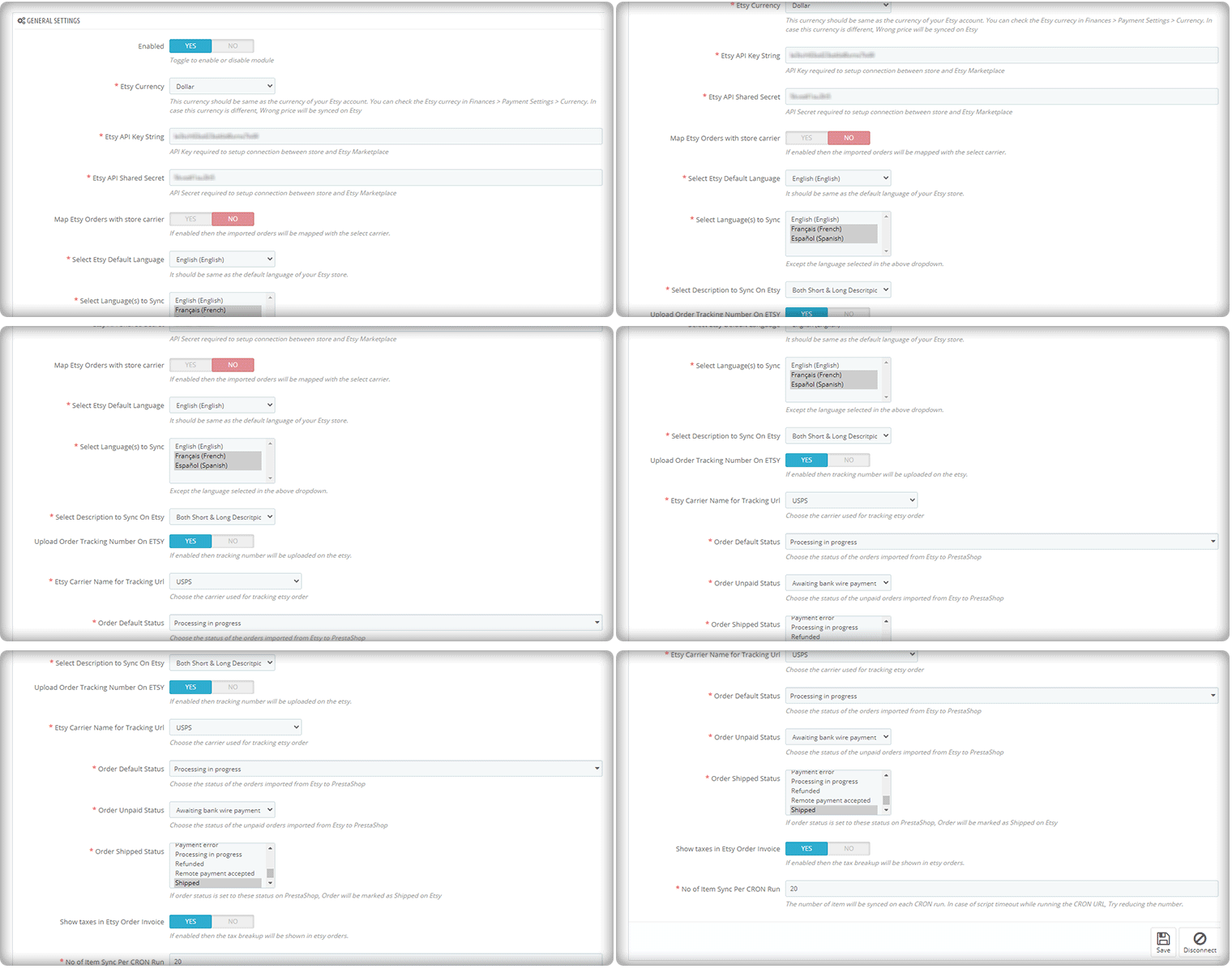
To start selling on Etsy Marketplace you will need a seller account on Etsy. Create a seller account on the Etsy marketplace before you can set up a Prestashop-Etsy connection. After seller account registration, you need to set up an App on Etsy to get the API details. The API details will be used by the PrestaShop-Etsy integration module to set up a connection between the store and the Etsy seller account. The integration allows you to select the default language and the language in which you want to sync the product details, categories, shipping methods, and other features.

The updated version of the Etsy-PrestaShop Integration module allows you to upload the order tracking number for Etsy shoppers and the order status as well. There is an invoice setting that can be enabled if you want to show taxes on the invoice.

The auto cron run feature is the most appealing one and it lets the user select the number of products that can be synced automatically.

2. Shipping management for Etsy

Next, you will need to prepare the product feeds and upload them to the Etsy product listing. However, before your PrestaShop products are visible on your Etsy seller profile, you need to make sure that you have configured the shipping options.

The customers on the marketplace would want to see what shipping options are available with the product and when it is going to be delivered to them.

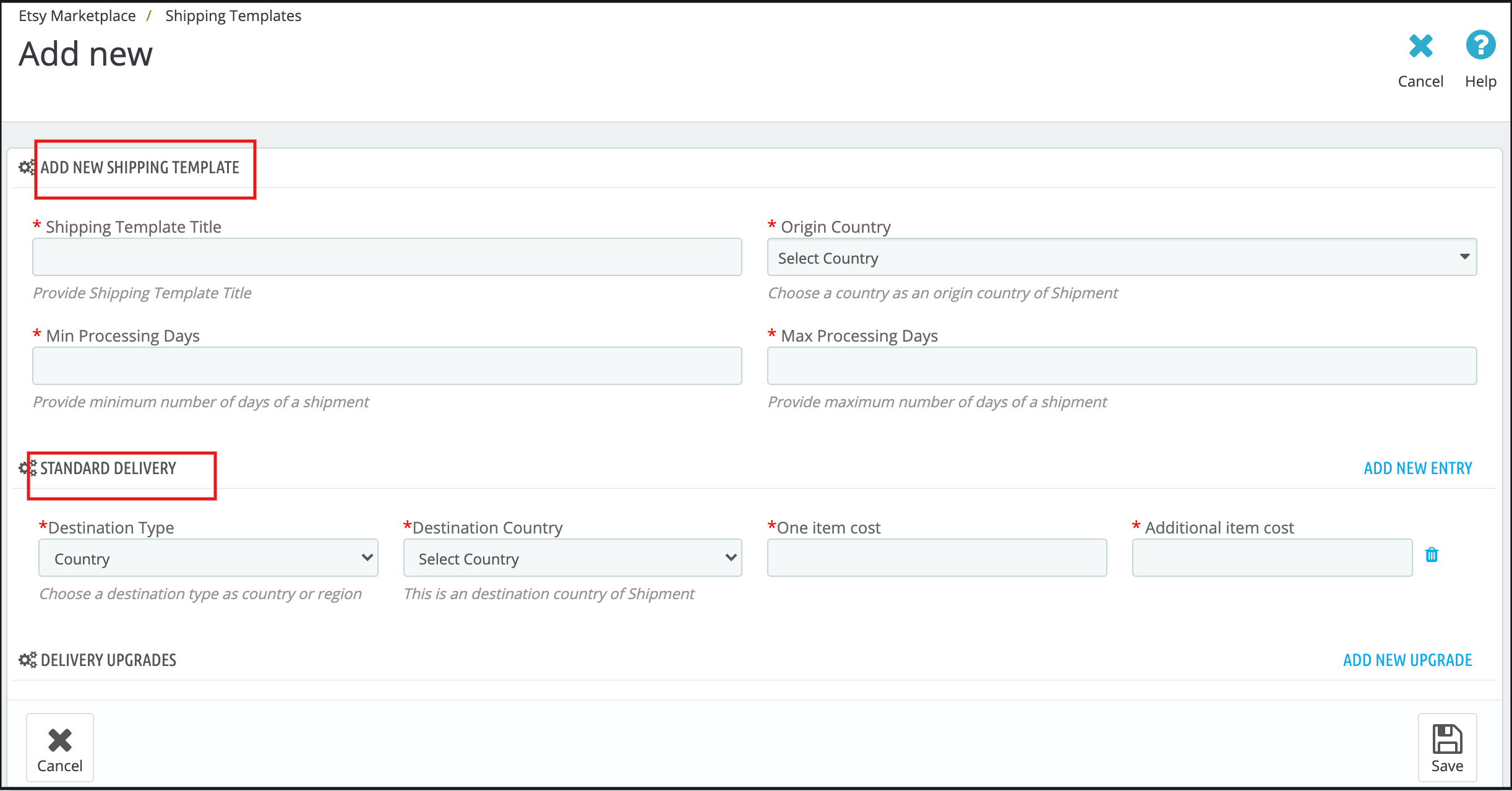
So, you must update the shipping options and let your customers on Etsy stay informed about them. You can add multiple shipping templates and improve your conversion rate because shipping is a major turn-off if a user couldn’t see the expected delivery date.

Prestashop Etsy integration module can be utilized for configuring the shipping templates by updating various information required by the Etsy marketplace. The interface of the shipping templates is the same as the Etsy Marketplace.

3. Product Listing for Etsy

To list the products on Etsy Marketplace the sellers first need to create the profiles. The seller can select the option to map the PrestaShop store category with the Etsy category or can select the products that need to be synced to the Etsy store.

The cron setup will list the goods to the Etsy Marketplace from the PrestaShop Etsy Integration module along with the variants, inventory, and definition of the product. So, this purpose helps list the goods.

4. Local Sync Option

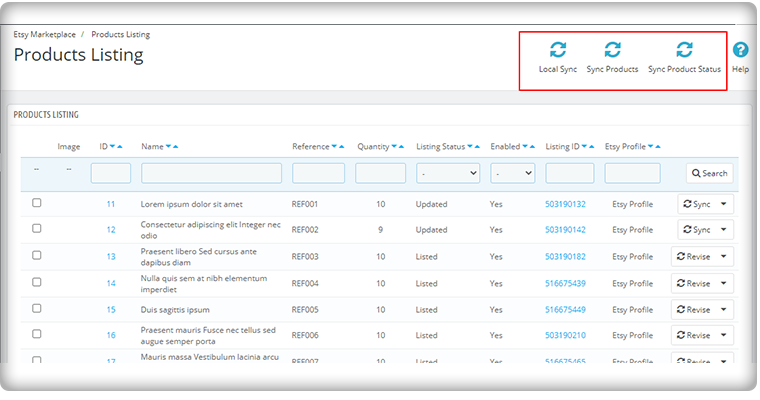
Local Sync synchronizes the product in the PrestaShop store to the Etsy Integration module. Sellers can synchronize their product from the PrestaShop store to an Etsy Integration module with the aid of local sync. This tab is available under the PrestaShop Etsy Integration extension synchronization tab. After syncing the products to the Etsy Integration module, the sellers can sync the products in bulk or sync the selected products as per their choice.

5. Synch Products individually

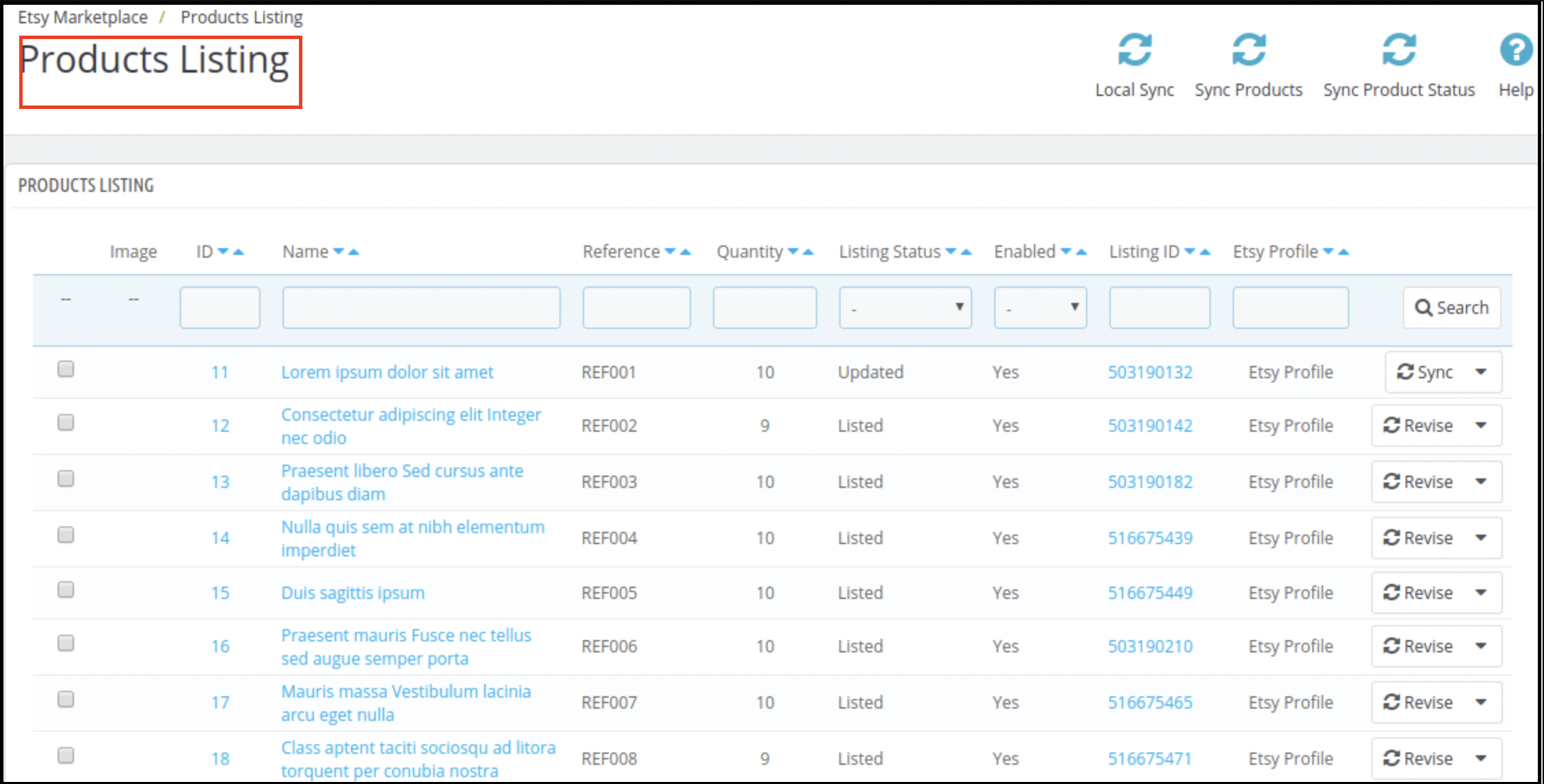
The listing status of the products is shown on the product listing tab of the integration module. The administrator may display items mapped to different profiles under this tab along with their Etsy Name, Listing Status, Etsy (Active, Ended), Activated or Disabled status, and Enable/Disable/Relist/Renew option. By running cron, the administrator may list the individual product or all the items.

Also, the seller can easily remove the product from a specific profile, and it is impossible to add the excluded items to the Etsy marketplace. All of this can be conducted once the cron is executed from the PrestaShop Etsy Integration Extension back-office.

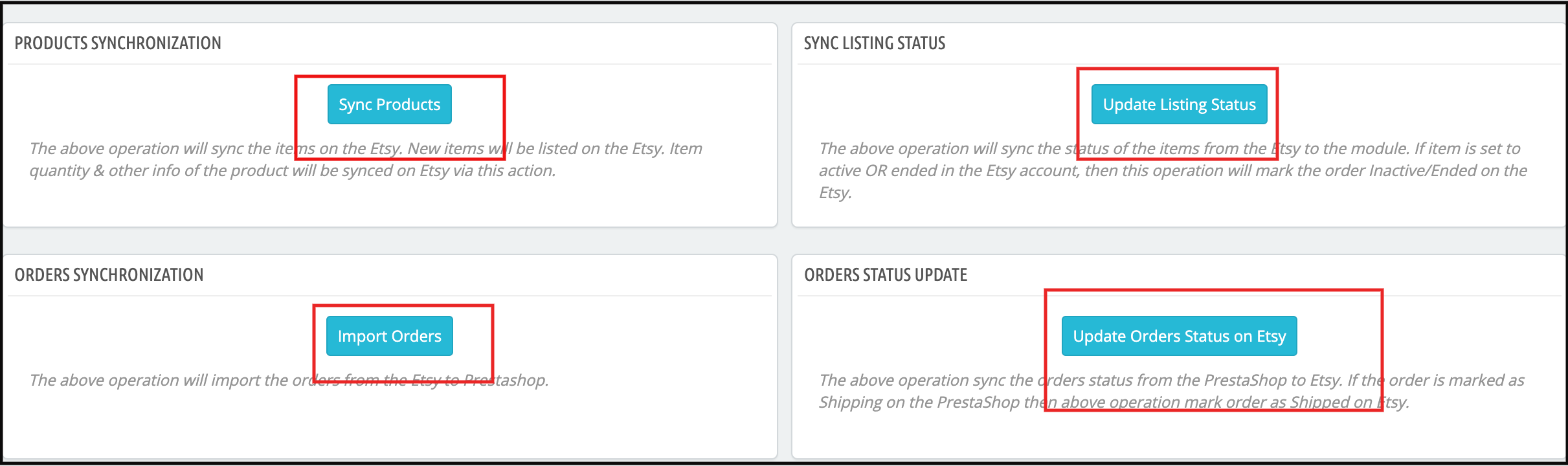
You can update the product status for all the products manually or by running the cron.

6. Product Feed Management for Etsy

When shipping options are configured and ready for mapping with different products, you can prepare product feeds that will be shown in the Etsy marketplace. The product feeds are created based on the profiles, category mapping, and attribute mapping between the store and the marketplace.

Creating a new profile will have the options to perform category mapping and attribute mapping according to which the list of products will be shown. From this list of products, you can select those products on your store which you want to upload on the Etsy marketplace.

7. The order management

In a standard Etsy seller account, when your products become visible on the marketplace, you start receiving the order for them. A PrestaShop Etsy connection works efficiently to let you manage these product orders from the PrestaShop dashboard itself.

Now, based on the order status mapping between the PrestaShop and Etsy marketplace, you can update the order status and perform all the order management tasks from your PrestaShop back office itself.

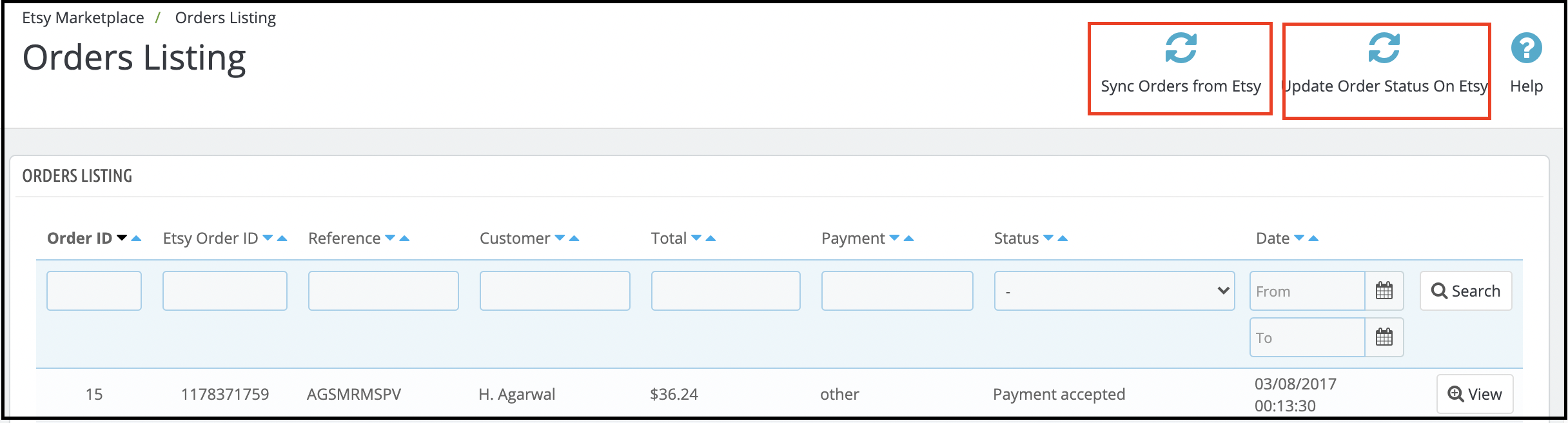
You can see the order ID, Etsy order ID, reference, customer details, total order amount, and payment status of placed orders.
Etsy product orders are listed on the PrestaShop dashboard as shown in the figure below:

Other Functionalities of Etsy-PrestaShop Integration Addon that helps you connect the store

Cron set up to automate the process

The admin can set up the cron jobs so that the inventory update, order sync from Etsy to PrestaShop, and order status update from PrestaShop to Etsy will work automatically. Newly added products will also get updated accordingly.

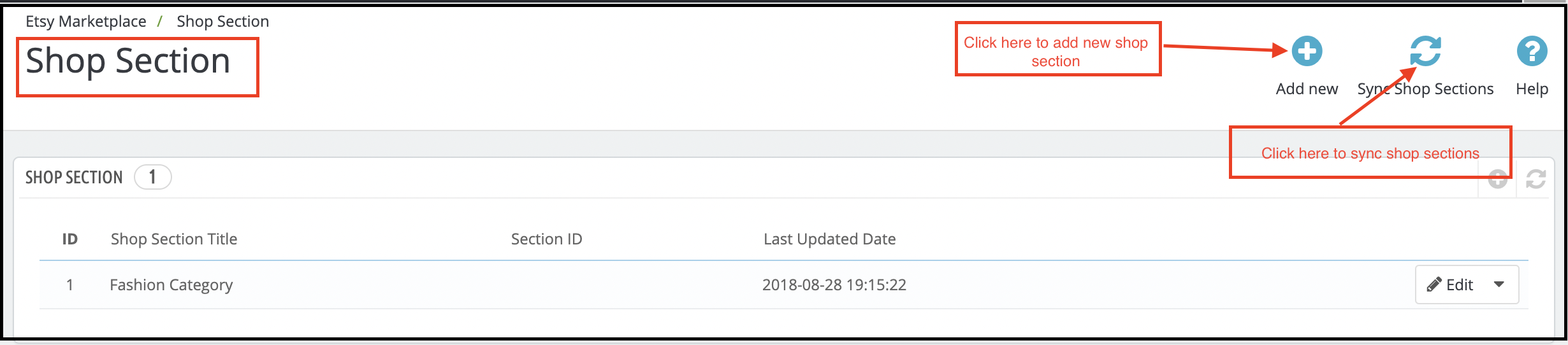
Add Shop Sections

The PrestaShop Etsy Integration add-on provides an option to create the store and the profile can be mapped to the store. Category Wise Mapping

The PrestaShop store administrator needs to map the PrestaShop store category to the most appropriate Etsy Store category to list the items on the Etsy Marketplace, so that all PrestaShop store products can be mapped to the correct Etsy category.

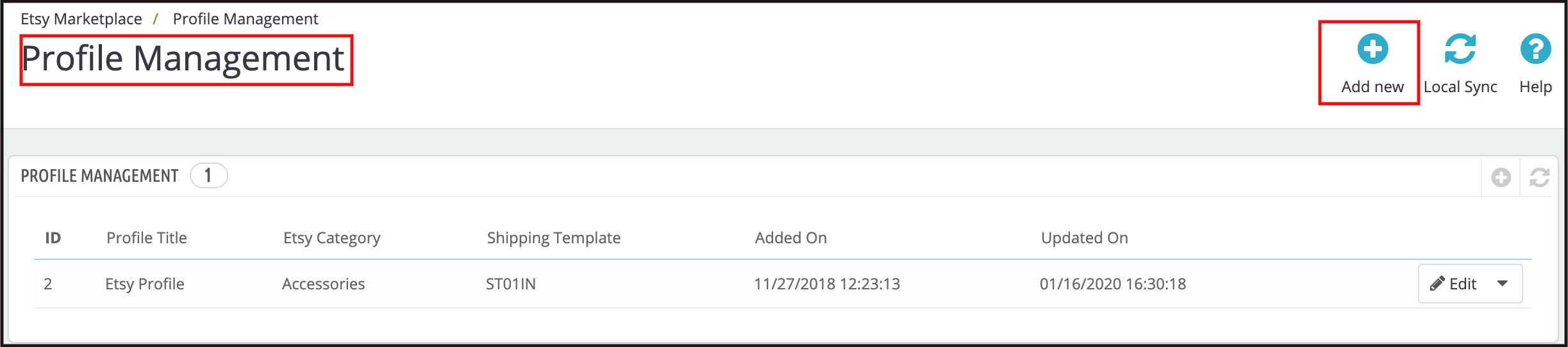
Managing Profiles with Ease

Admin can pick simple settings to list the product with the aid of profile management, such as – Etsy Shop (country-wise), Currency, Language, and Shipping Profile. Using the Size chart image function, Store Admin may add an extra image for each profile. This image will be added as an extra image to the Etsy marketplace.

You can customize the product title by inserting certain details and placeholders with the title. The place-holders like {sample} will be replaced by dynamic content at the time of execution.

The Custom Pricing for Etsy

Integration Extension enables the PrestaShop store administrator to list their goods from the PrestaShop store to the Etsy Marketplace at a price different from the price of the PrestaShop store.

Using PrestaShop Etsy Integration Extension, the admin may increase or decrease the price range at the Etsy Store. The administrator has the option to list the goods at a lower or higher price based on fixed or percentage-wise changes.

Product Image Size

Prestashop Etsy Integration module allows the admin to select the size of the product image in our module to sync the same to Etsy Marketplace.

Alter Quantity

The admin can set a maximum quantity of products that will be synced to Etsy with the products. If a product has 10 quantities on the store but Alter quantity is set as 5 then only 5 quantities will be synced to Etsy for that product.

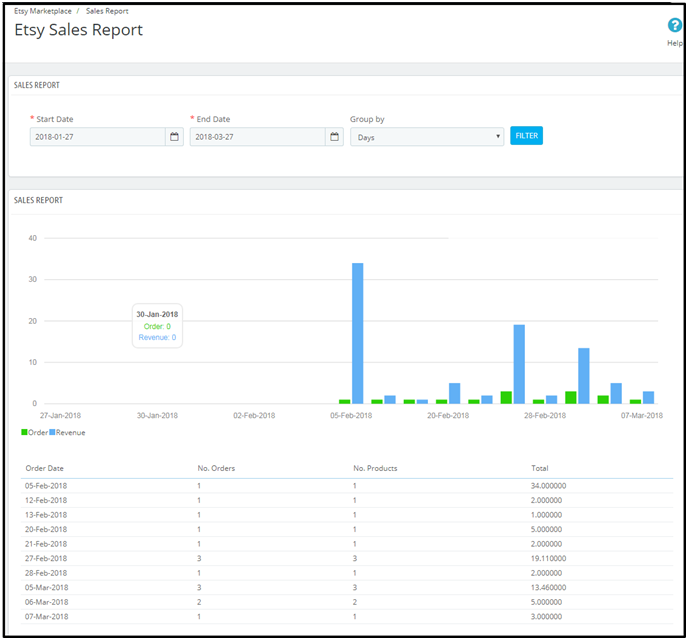
Sales Data Analytics and Stats

It allows the store owner to use PrestaShop Etsy Integration Extension to monitor the sales report.

The Etsy PrestaShop integration plug-in sales report tab helps the sellers to access the order and revenue report. This helps the administrator to review the sales report for orders from the Etsy store.

Also, a product sales report is displayed that allows you to see the product-wise status.

Watch how to connect Prestashop store with Etsy Marketplace

This is how a PrestaShop-Etsy integration works to allow an eCommerce site to receive orders directly from the Etsy marketplace. An effective PrestaShop-Etsy connection lets you perform all the activities of a seller account from the PrestaShop admin panel itself. Knowband’s PrestaShop Etsy integration module is one such PrestaShop module that you can leverage to generate heightened conversions on your store. It’s time you accept the importance of being a part of a popular marketplace and understand how you can leverage them to generate sales for your business.


Related Stories:

3 Free PrestaShop Addons for Defeating your Business Rivals Effortlessly

PrestaShop is an eCommerce platform of new business opportunities and has been continuously growing to provide an “all together” different online shopping experience to its customers. This enhanced experience to customers is often delivered through the help of various plugins that are available in the PrestaShop community or through third party PrestaShop developers. You need to understand the requirements and expectations of your clients in order to install the various required PrestaShop plugins for optimum site performance.

It is the need of the hour to pay adequate attention to the functionalities of your PrestaShop store in order to face the turbulent winds of market uncertainity. However, most of the store owners based on PrestaShop platform often hold back their hands due to the steep prices of these PrestaShop plugins. Considering the pocket size limitations of its customers, Knowband which is a pioneering name in the field of eCommerce plugin development company has developed some of the free PrestaShop Addons for its diverse range of customers. Below is the brief account of the PrestaShop free extensions that can transform the performance of your eCommerce store to a great extent.

1. PrestaShop Free Marketplace module–

When you have to bring buyers and sellers together at one place, PrestaShop Marketplace Addons are the way to go out for. It can explore alternate channels of growth opportunities and conversions for your eCommerce store among your rivals to achieve that initial lead. Some of the out- of- the- box features of this extension that can take your online business to great heights are described below:

  • Front end management of the seller and buyer account.
  • Seamless facility for buyers to sell their products on the online marketplace store through “Register as Seller” option.
  • Offers individual seller account profile for easy account management making it as one of the most PrestaShop Advanced Marketplace modules for PrestaShop stores.
  • Helps in setting the commission rates for various sellers globally or can also set individual commission rates for each and every seller on your PrestaShop marketplace store.
  • It provides authority to store admin to approve or disapprove the seller request for selling their offered products on this marketplace store.

2. PrestaShop Free Social Login–

If you are facing a uphill task of getting customers registered on your PrestaShop site, you are in dire need of this amazing one social login plugin for PrestaShop stores. It comprises of various popular social media options like Facebook, Google+, Linked in, Twitter or other such sites for persuading visitors to register on your PrestaShop site. The module comes with fully mobile responsive design that makes it effective for using on various devices like desktops, laptops, smart phones and tablets. Apart from this, the PrestaShop addon supports an effective drag and drop feature that makes it easier to perform various customizations on your PrestaShop store that makes it one of the most popular free PrestaShop plugins among various PrestaShop store owners.

3. PrestaShop One Page Checkout Free version-

With this free PrestaShop checkout extension, it is now much easier to simplify the checkout functionality of your eCommerce store without spending a single penny. It has an interactive back end admin panel that makes it much easier to convert the multiple pages checkout form into a single page form for higher customer engagement and sales. The module is packed with numerous payment and shipping methods that make customers more confident while doing an online shopping. In addition to this, it is packed with loads of features and functionalities that together makes it one of the most effective free PrestaShop extensions among the PrestaShop store owners.

So, don’t think about your pocket size and install these free PrestaShop plugins for mking a strong global impact among your business rivals. Come to our Knowband site at www.knowband.com and avail these free plugins for your PrestaShop store.

You Might Also Like:

Some Supporting PrestaShop Addons for a Seamless Checkout Experience- Part 2

If you have been around an eCommerce site for an online shopping, you would have felt the need of a simplified checkout experience that could save your significant time and efforts for a quick product purchase. Checkouts are capable to drive higher conversions and sales on an online store as nobody has so much time and patience to purchase a product online after so much headache. If you are not able to make things simpler for your online buyers, they will definitely find another alternative option which could hurt your business chances in the long run. Here are some of the wonderful PrestaShop checkout addons that can be a game changer for your online business.

1. PrestaShop Single Page Checkout–

This amazing PrestaShop checkout addon is a promising Knowband extension that can optimize the performance of your eCommerce store. It can redefine the online shopping experience of your customers in a completely different manner by reducing the multi page checkout form to a single page. With this module, you can persuade your targeted customers towards your online store for maximum conversions and sales. Some of the exceptional features of this PrestaShop extension are as follows:

  • In- built quick login facility through social media sites like Facebook, Google+ and much more.
  • Offers responsive design to ensure seamless accessibility on multiple devices.
  • Helps in quick customization of shopping cart for a brilliant checkout experience.
  • Ensures effortless addition of coupon codes and vouchers on checkout page.
  • Works uninterruptedly with other third party themes and extensions.

2. PrestaShop One Page Checkout Free version-

If you need a simple checkout process for your eCommerce store without paying a single penny, you need to go for this PrestaShop One Page checkout module. It is one of the most dynamic checkout addon that has transformed the shopping experience for numerous online buyers. This Knowband module has helped in providing multiple shipping and payment methods to customers in order to help them in a quick checkout process. Apart from this, you can easily access the entire cart summary without any problem for a swift online shopping experience. The PrestaShop checkout addons consists of an interactive admin panel that makes customization a much seamless task for grabbing instant customer attention and conversions. Let us explore some of the other features and functionalities of this PrestaShop module which are described below:

  • Helps in reducing shopping cart abandonments by a simple checkout form.
  • Offers safe and secure checkout experience to customers.
  • Highly compatible with all other browser and themes.
  • Customization in shopping cart is now much easier.
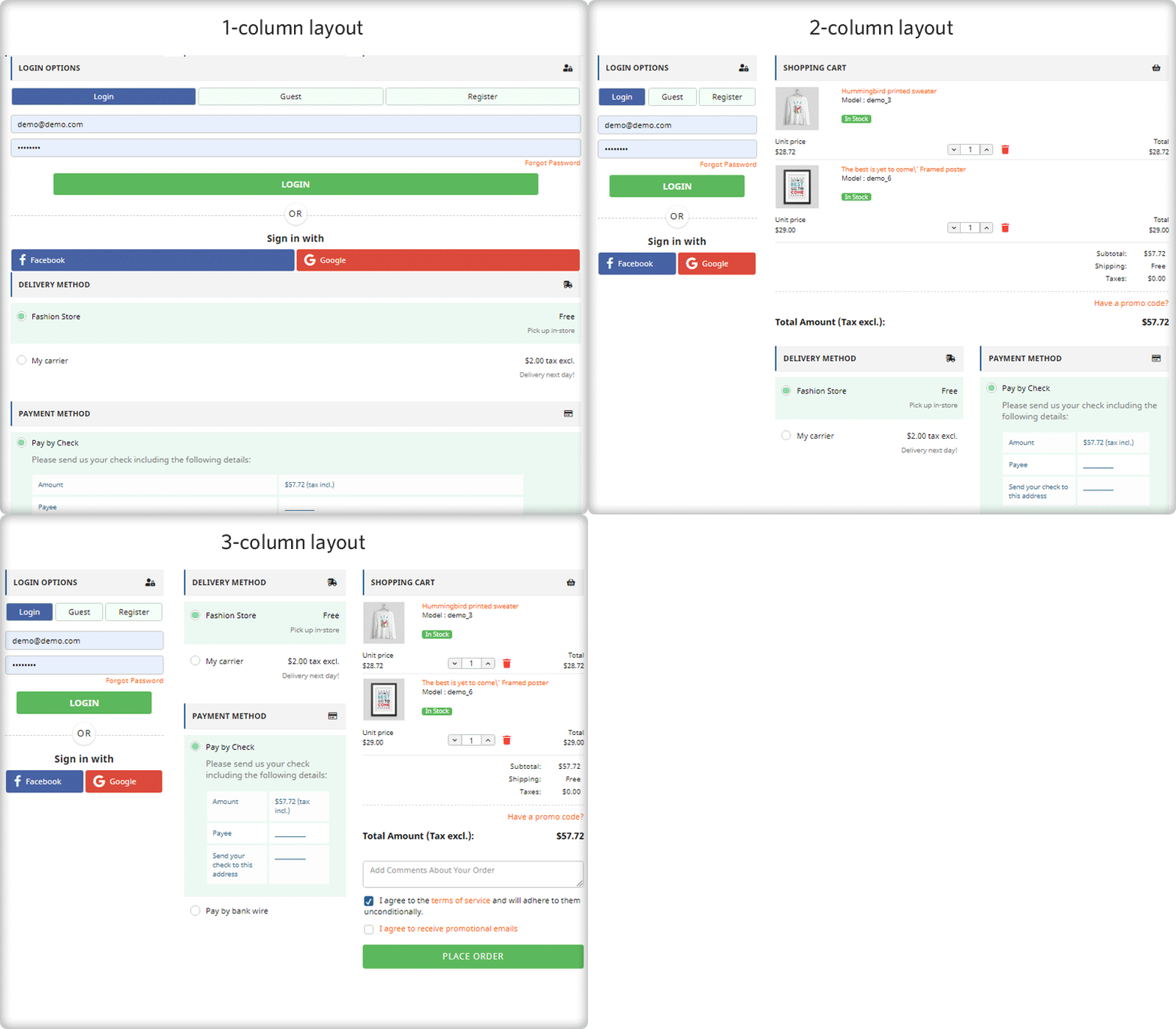
  • Quick checkout process with the help of a 3 column checkout design.

Don’t ruin your business chances with an existing checkout experience for your online store as it is the foremost priority for any buyer while making an online purchase. If you are not vigilant at the right time, you might end up losing your conversions and sales to your rivals. So, roll up your sleeve now and install any of these PrestaShop checkout addons for a tremendous business makeover.

You Might Also Like:

Try out Ajax Cart Module for PrestaShop Stores to Upgrade your Shopping Experience

Busy lifestyles of people have restricted their outdoor activities to a great extent and they are now exploring various alternatives to accomplish various tasks. Shopping is one such activity which has seen a tremendous change in the last few years and this once thought outdoor activity has become the comfort task of your home. Now, you don’t have to roam here and there carrying your shopping bags as you can get the desired products at your doorstep with the help of online shopping facility.

With this comfort of home shopping, numerous eCommerce stores have emerged on the block that claims to take away all your worries related to online shopping experience. However, there are instances when online shoppers have experienced difficulty in making changes in their shopping carts and leave a site in the middle not to return back again. In order to take your online shopping to a new level, Knowband has come up with an excellent Ajax Cart module for PrestaShop stores. It can certainly transform your old shopping cart into a more feature packed dynamic cart for a seamless online shopping. Here are the few ways by which this PrestaShop Module can act as a game changer for your eCommerce store.

1. Comes equipped with easy to use admin panel-

This PrestaShop Ajax Cart+ Module has an simple, engaging and feature packed admin panel to make quick customization or modifications in the module and site settings. With this admin panel, you can make changes in the layout, appearance and design of your site according to your business requirements and customer expectations for grabbing maximum customer attention.

2. Can be easily installed and configured without any external help-

One of the main reason for the worldwide popularity of this Ajax Cart module for PrestaShop stores is that it can be installed and configured without any trouble. It does not require any special skill-set and technical knowledge during its installation which makes it easier to be used by anyone. You just have to perform simple click functions and this extraordinary module is installed and ready to use for your PrestaShop store.

3. Has extensive reach and presence on multiple devices and platforms-

Unlike other eCommerce modules, this Ajax Cart module for PrestaShop is not built for any particular device and has a responsive layout that makes it suitable to be used across multiple devices. Now, you just need a single module and it can efficiently cater to your targeted customers that are using various devices such as desktop, laptop, smart phones and tablets.

4. Works independently without interfering with the working of other modules and themes-

If you are having third party themes and modules on your PrestaShop store, you can install this PrestaShop Ajax Cart+ module without thinking about the performance and working of other such modules and themes. This is because this PrestaShop addon is designed in such a way that it works independently without any interference and influence on any other theme or module.

If you are looking towards making a big leap in terms of conversion rates, customer engagement and sales, this is your golden chance with the emergence of this Ajax Cart module for PrestaShop stores. It has all the features and functionalities that can transform your online store into a unstoppable champion in its particular business segment. Go grab this PrestaShop addon and make your mark now.

This Would Also Interest You

A PrestaShop Addon for Converting your Store into a Brilliant Marketplace- Part 2

Marketplaces are seen as the new medium of business opportunities as they can improve the sales and conversion rates for any online store. They serve as an external sales channel that provides merchants a chance to sell their products or items if they are unable to influence customers on their online store for the first time. These online marketplaces are seen as a major relief for various small and medium eCommerce stores that do not have a much stronger customer base and visibility in the online world.

Everything is going to change sooner with the emergence of this PrestaShop Marketplace module that can provide an opportunity to each and every PrestaShop store to turn themselves into a full-fledged marketplace store for achieving desired business returns. Here, we are exploring the amazing features of this PrestaShop Marketplace Module that has been a blessing in disguise for the large community of sellers that are spread around the world.

1. Facilitates easy registration facility for seller community

The brilliant USP of this excellent eCommerce marketplace is its effortless registration facility for the seller community. Now, sellers can seamlessly register from the front end itself by selecting the “Register as Seller” option on the registration form.

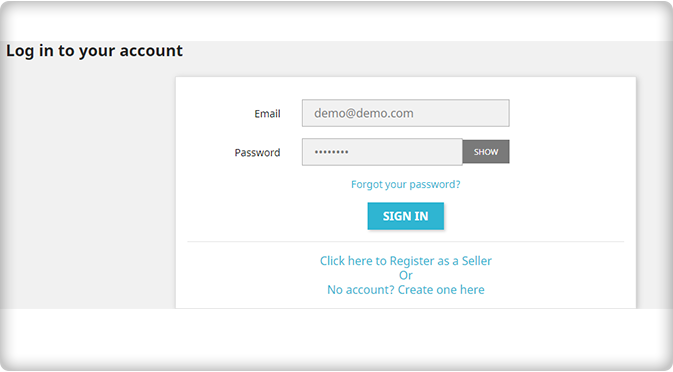
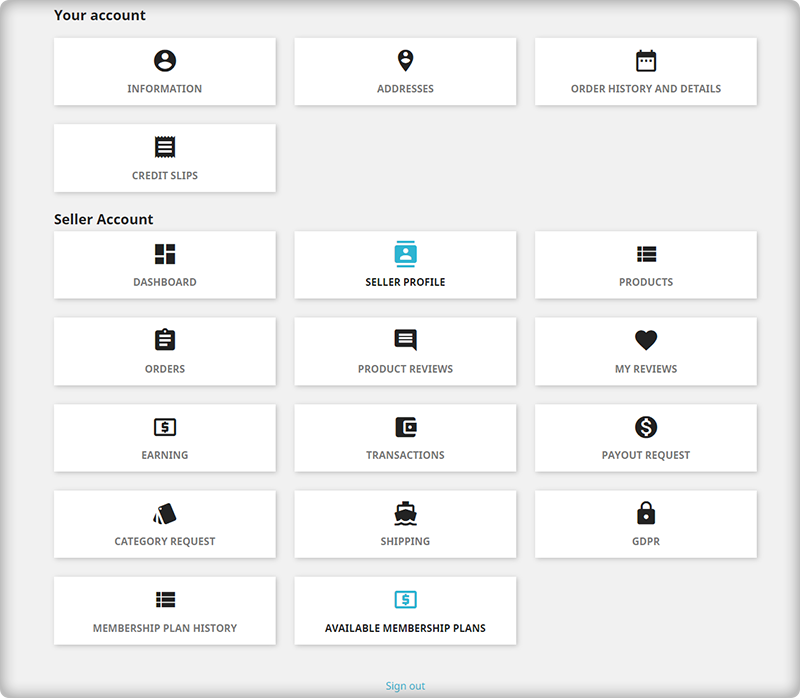
2. Easy account management

With this PrestaShop Marketplace Module, sellers can effortlessly manage all their account activity through the front end only without any requirement for back end login. They can manage their account profile and product details without any problem.

3. Offers analytical data for quick decision making

Tracking customer and checkout behavior on a site is a critical task as it influences the purchasing decision, customer engagement, conversions, and product sales. This PrestaShop Marketplace module helps in tracking sales information in the form of average revenue per order statistics, items sold, order earnings of sellers, and other such data in the form of graphs and other analytical figures.

4. Provides easy customization facility

Sellers can now quickly add banner, shop logo, custom HTML, additional special price, product enable/disable, product quantity update, and other such elements on their seller account without any hassle. Due to this brilliant feature, making changes in the seller’s account has become a cakewalk experience for numerous store owners across the world.

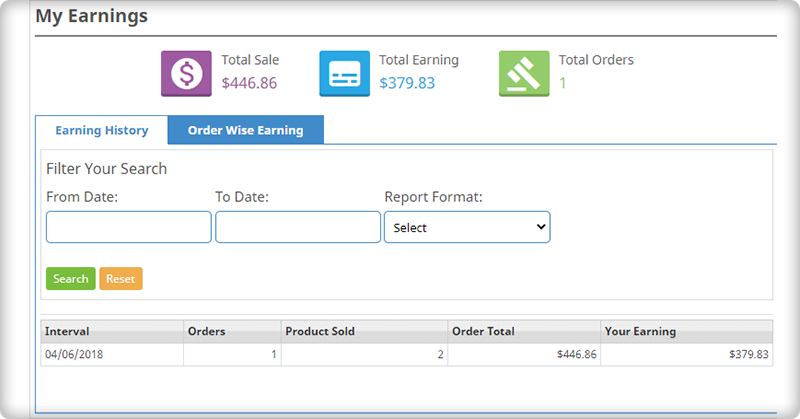
5. Helps in displaying detailed reports to seller account holders

This PrestaShop Marketplace Module provides detailed nature of reports in the form of income, revenue per order, items sold, interactive seller transaction report, and other such information. In this way, it is much easier for any PrestaShop store to achieve its desired goals and business aspirations.

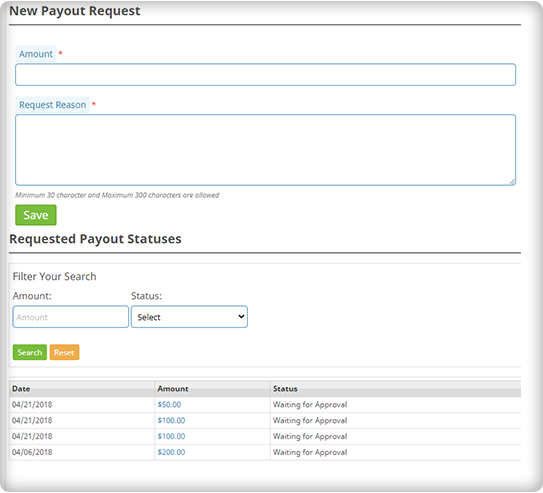
6. Payout Management

The sellers will seek a payout for the remaining balance. The seller may specify the payout sum and purpose, as well as choose one of the three payment methods available.

Admin will approve Payout requests with a single click of a button. For initiating the payout request of the sellers, PrestaShop Marketplace Module provides Bank wire, Pay by Check, and PayPal options.

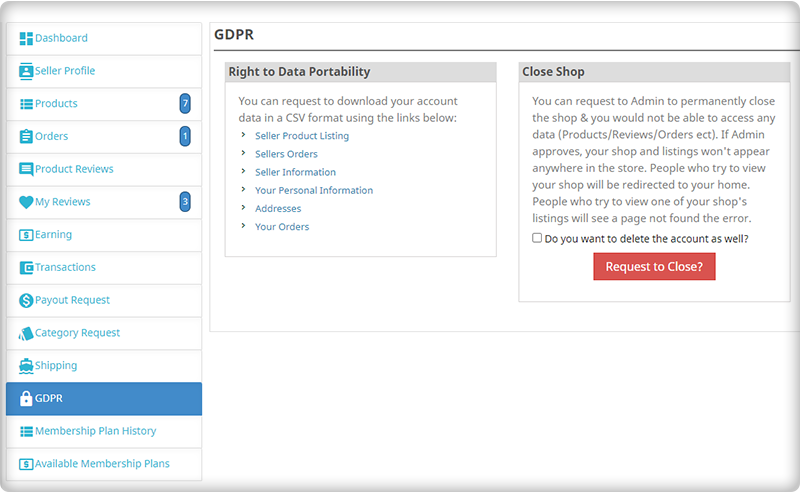
The PrestaShop Marketplace Module is compatible with Marketplace Mobile Application and you can build your application in a few clicks. It is GDPR compliant and supports multiple languages and currencies.

PrestaShop Marketplace Gold Plan

The Gold Plan is a package of several marketplace modules that supports PrestaShop Marketplace addon and adds several extra features to it.

Along with multi-vendor Prestashop Marketplace modules, the following modules are included in the Marketplace Gold plan.

PrestaShop Marketplace CSV Import/Export Addon

PrestaShop Marketplace Customers-Sellers Ticket System Addon

PrestaShop Marketplace Low Stock Alert Addon

PrestaShop Marketplace Deal Manager Addon

PrestaShop Marketplace Sellers Invoice Addon

PrestaShop Marketplace Sellers-Admin Ticket System Addon

The Prestashop Marketplace Gold plan enables the store owner to expand his or her company.

Conclusion:

It is time to explore the business potential of your PrestaShop store with the help of a feature-loaded eCommerce marketplace that can provide equal opportunities for both the seller and buyer communities. You need to install this outstanding PrestaShop Marketplace Module for your online store that can transform it into an extraordinary online marketplace for boosting your chances of business growth, conversion rates, and product sales.

If you missed reading the previous article, PrestaShop Marketplace Addon Part-1, Click here and explore more…

Related Stories:

Ensure an Infallible Checkout Experience with these PrestaShop Checkout Addons

Checkouts are an important parameter that can make a profound impact on the growth and customer engagement potential of an online store. If it is not simple and engaging, you will definitely face severe losses in terms of customer attention, conversion rates and product sales. Every online shopper wants a simple and seamless checkout experience that can facilitate faster online shopping and can boost your product sales. Store owners are utilizing various techniques and use of checkout extensions are one among them that can instantly grab the attention of your site visitors. If you are facing the same issue on your PrestaShop store, here are the few Prestashop checkout extensions that can save the day for your business.

1. PrestaShop One click checkout–

Sometimes, making changes in a cart during product addition for a purchase can be time consuming and deviates the mind of a shopper from a particular online store. Understanding this grave situation, it is now easy to purchase a single product item quickly with the help of this PrestaShop checkout addon. The module also has the facility to provide the access back to your previous cart in order to ensure a seamless checkout experience to your site visitors. It is available in 17 different languages, can be customized properly, shows compatibility with various themes and is adaptable to various types of devices like desktops, laptops, smart phones, tablets and other such platforms.

2. PrestaShop Smart Checkout–

Lengthy checkout forms often acts as a stalemate for converting site visitors into potential customers. No online shopper would like to engage with a site which does not offer a simplified checkout formalities to its visitors. Keeping your checkout formalities restricted to a single page can effortlessly grab more customer attention and sales for your online store. This PrestaShop checkout addon has got added functionality like quick hiding or revealing of any checkout fields, customization of buttons, integration of  MailChimp software, setting any field as optional, sorting of address fields, language translation, inclusion of custom CSS and much more. Collectively with all these features, it would not be difficult for your visitors to carry out the online shopping process on your eCommerce site.

3. PrestaShop checkout page analysis–

Support of analytical information helps in speedy decision making and reduces the chances of failure. The checkout process is a critical stage for every online store and thus it needs to be much more simplified and engaging for your site visitors. With this PrestaShop checkout addon, you can seamlessly keep a track on your visitor activity regarding the checkout process and can get a clear insight about how customers are behaving on your checkout page. Once, you know the stage from where your customers are leaving, you can effortlessly retarget them for higher conversions and sales.

4. PrestaShop checkout payment fee addon–

Online customers often get irritated when they notice illegitimate taxes and charges at the final checkout process and ultimately abandons the particular site. In order to avoid such situation, here comes this wonderful PrestaShop checkout addon that can reveal all the additional charges to buyers regarding the extra payment fees charged by various payment systems. Thus, there will not be any addition of hidden charges on the final checkout page.

5. PrestaShop One Page Checkout Free version–

When you have to achieve a seamless checkout experience without spending a single penny, you would not find a better alternative than this PrestaShop checkout addon. It allow store owners to make quick changes in their checkout process without costing a single penny. You can utilize it for any type of online store and it works perfectly for every third party theme and extension. It is simply an unmatched eCommerce extension that can be savior for your store.

It is time to invest your efforts and little money on these PrestaShop checkout addon for changing the future of your business entity. This each and every PrestaShop checkout addon is made up of multiple features and functionalities that can take your eCommerce store to new heights. So, explore the amazing world of modules with our Knowband store.

You Might Also Like:

PrestaShop Brings YouTube channel for E-Commerce Customers- It is Time for Videos!!!

PrestaShop, an eCommerce platform which started in year 2005 is growing by leaps and bounds. This Open source platform is used by 250,000 shops around the world and is available in 60 different languages for its customers. It has made up of more than 300 hundred built- in features that is crucial for the effective management and maintenance of any eCommerce store. The platform has a huge stock of themes, add- on modules and other such features which has helped in its constant growth and development over the years.

This globally recognized eCommerce platform has again pulled another wonderful feather from its cap by launching their own YouTube channel on 29th March, 2016 which is dedicated entirely for its eCommerce customers. This is definitely a big day for PrestaShop as it has redefined the customer engagement to a new level with its own YouTube channel. It is the end result of several weeks and months of preparations, multiple filming and editing sessions and the constant guidance and recommendations of various dedicated employees. With this initiative, it will be much more easier for online merchants to create, develop and grow their online store for their particular business segment.

This YouTube channel consists of helpful tutorials, advices, tips, best practices and analysis from Protestant experts, feedback, corporate seminars replays and much more. It is definitely a great way to inform your customers about the essence, nature, product USP, how- to- use guide and much more in order to keep them informed about your business and company for boosting your business chances among your rivals.

It is time to get yourself subscribed to this channel in order to stay in constant touch with the ever growing PrestaShop store community. Check out now!!!

In this You Tube video, viewers can get a quick insight about the working, features and back end interface of this PrestaShop single page checkout Addons. Now, you can understand this plugin properly for improving the checkout process of your store.

In this You Tube video, you can get a fair idea about this PrestaShop Abandoned Cart Addons that can reduce abandoned carts on your store and can ensure higher conversions. This tutorial video can provide you insight about how this plugin can be a true savior for your eCommerce store.

With this You Tube video, viewers can understand the various dimensions of PrestaShop Scratch Coupon module in terms of working, features, scratch coupon redemption and much more. This video will explain you why this PrestaShop addon is one of the most popular eCommerce module for numerous PrestaShop store owners.

Liked This? You’ll Like These Too

Prestashop Infinite Scroll Module by Knowband – User Manual

1.0 Introduction

The Prestashop Infinite Scroll Module by Knowband is an integration of scrolling of products on the product listing page in place of pagination.

Pagination on a product listing page is a very common feature that we see on different eCommerce websites but this Prestashop infinite scroll module will make the listing of products on the product listing page a bit more interesting. When this Prestashop list product module will be enabled the customer will just scroll down the page to view more products which are listed in the product listing page.

2.0 Steps For Installation of Prestashop infinite scroll module:

Once you purchase the infinite scroll addon, follow the below steps:

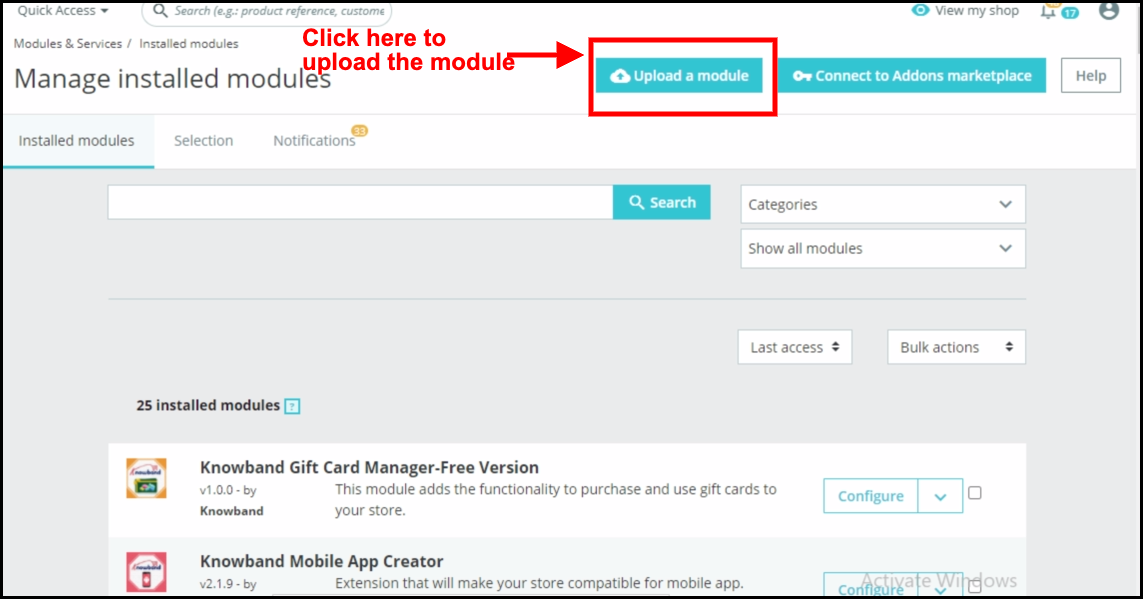
  1. Go to the Store Admin -> Modules and Services.

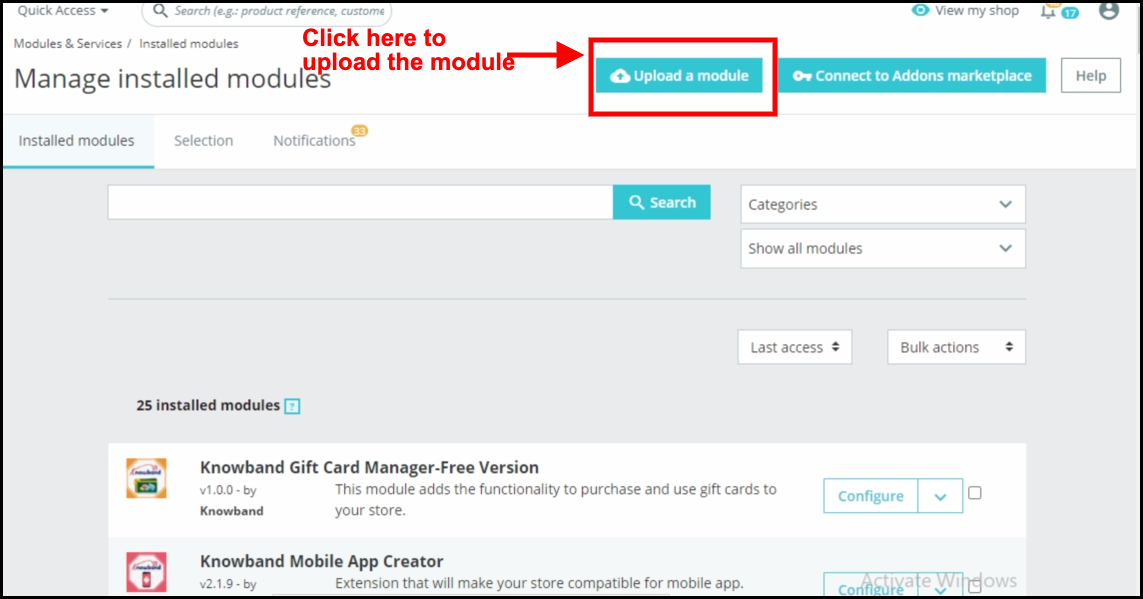
2. Click on “ Upload a module”. You can drag or drop the file or can simply select the file from the system.

Once the file is completely uploaded, a notification of “Module(s) installed successfully” will be displayed. Now you can configure your module.

3.0 Administration Module

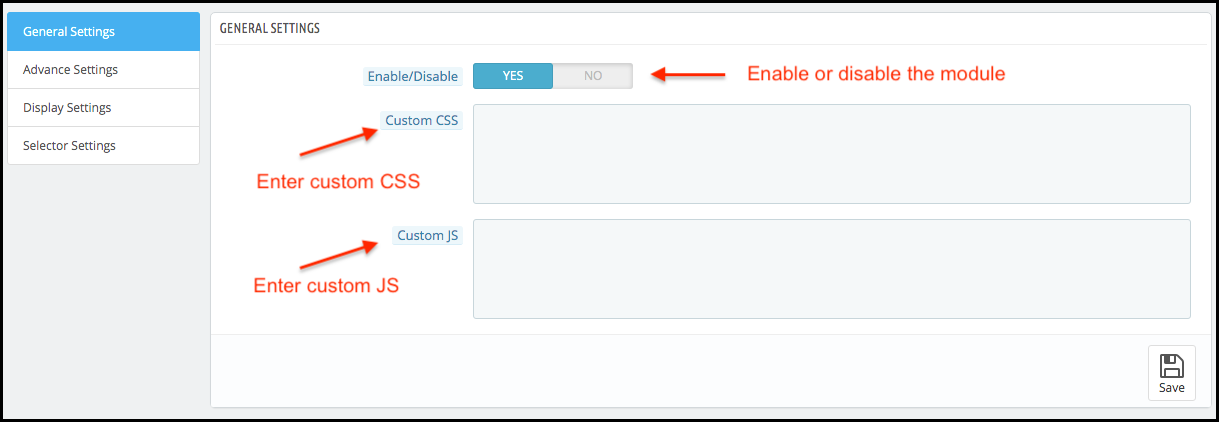
In admin interface of the Prestashop infinite scrolling module, there will be following options to configure this Prestashop list view module. The Prestashop dropdown scrolling module includes 4 tabs and they are as follows.

1. General Settings

2. Advance Settings

3. Display Settings

4. Selector Settings

Each section of the Prestashop Infinite Scroll plugin is described in details below.

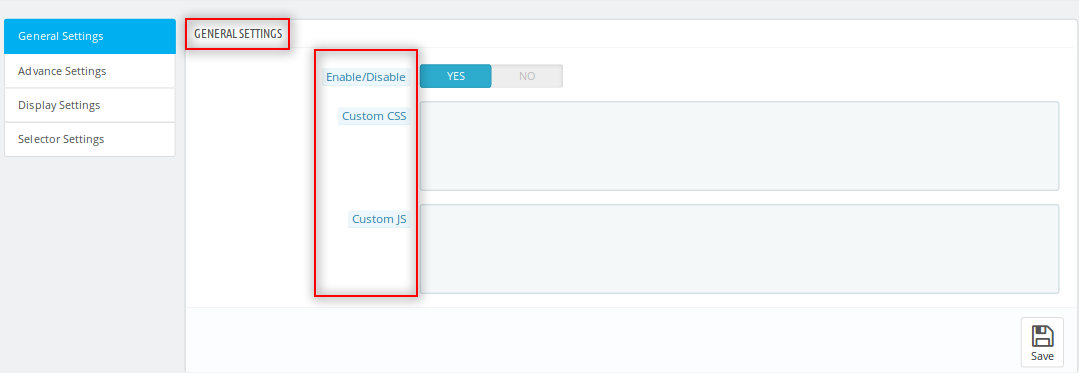
3.1 General Settings of the Prestashop infinite scroll module:

This section of the Prestashop list product module will be having following options to configure this Prestashop infinite scroll module:

  • Enable/Disable: This option of the Prestashop fast scroll module will be having a toggle button with two specific values ON and OFF. This Prestashop module by Knowband will only work if this is set to ON. If this is set to OFF then none of the feature will be working and not even impacting any other section of website. By default, this option will be OFF.
  • Custom CSS and JS: These fields of the Prestashop Infinite Scroll module have been provided to let the admin change the look and feel of the front end of the Prestashop quick scroll module.

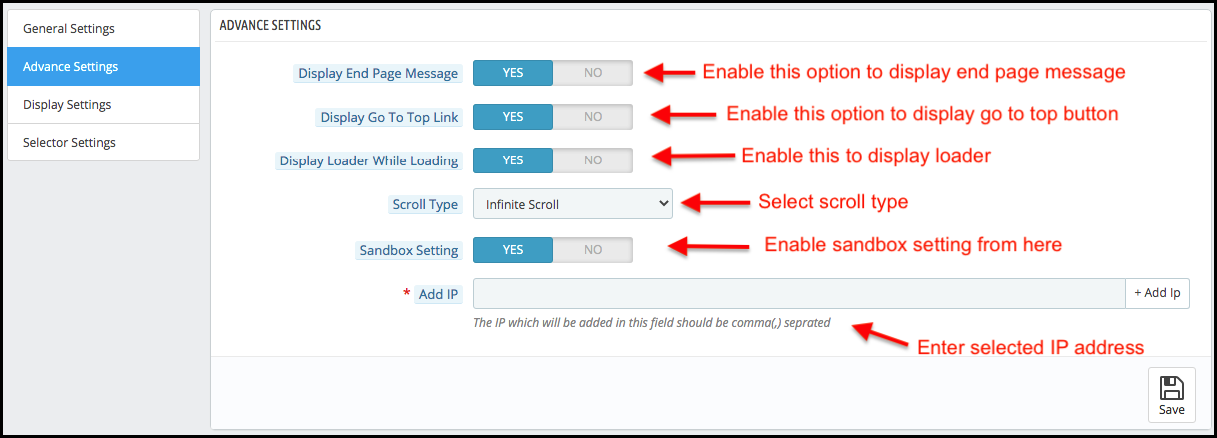
3.2 Advance Settings of the Prestashop infinite scrolling module:

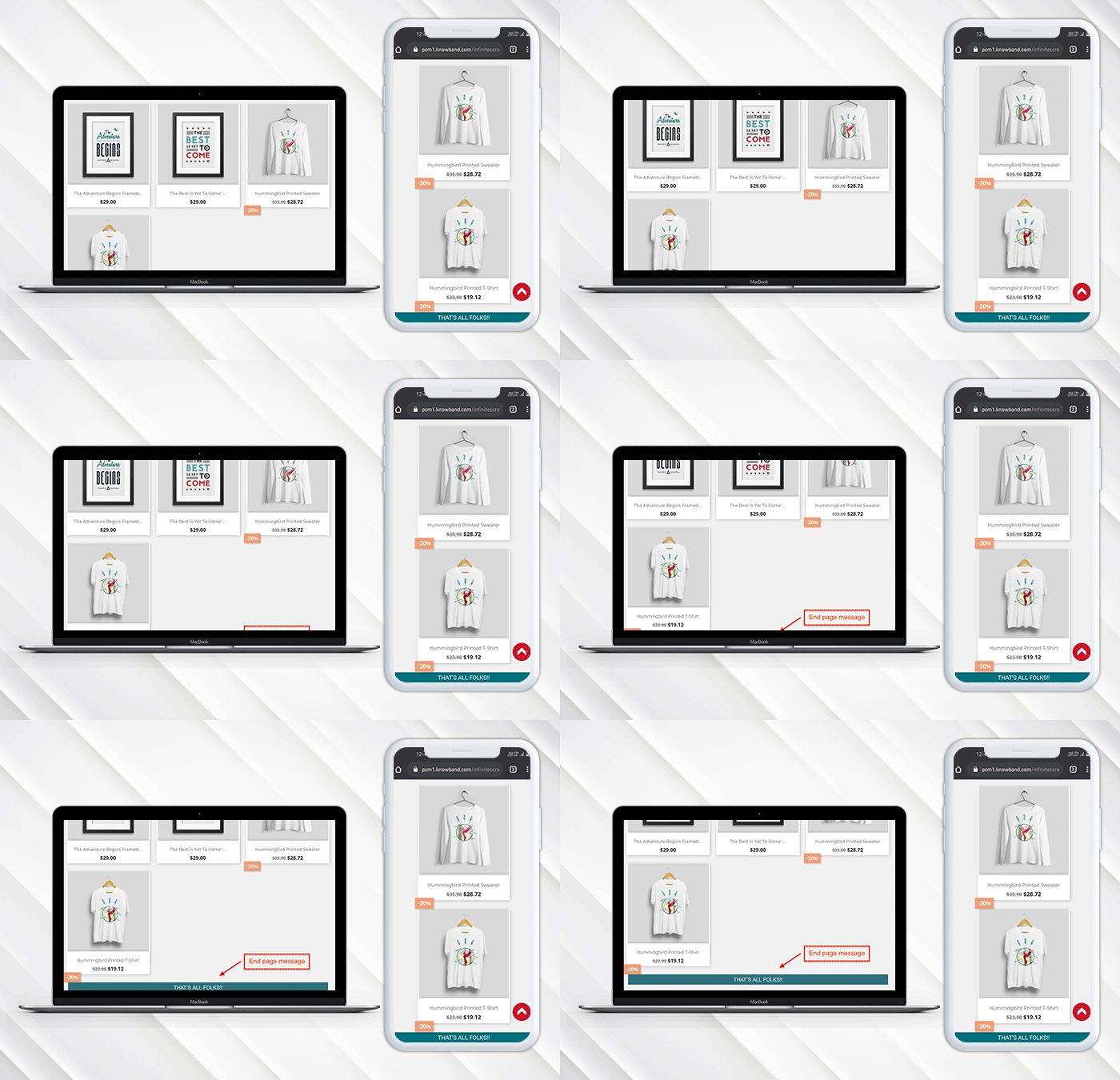
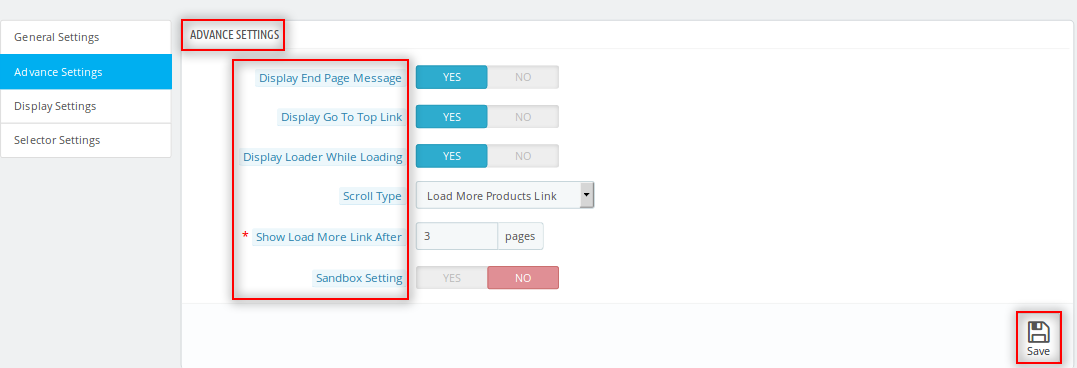
  • Display End Page Message: This field of the Prestashop drop down scrolling module offers the store owner to display the message at the end of product listing page.
    If the Owner enables Display End Page the following option will appear:
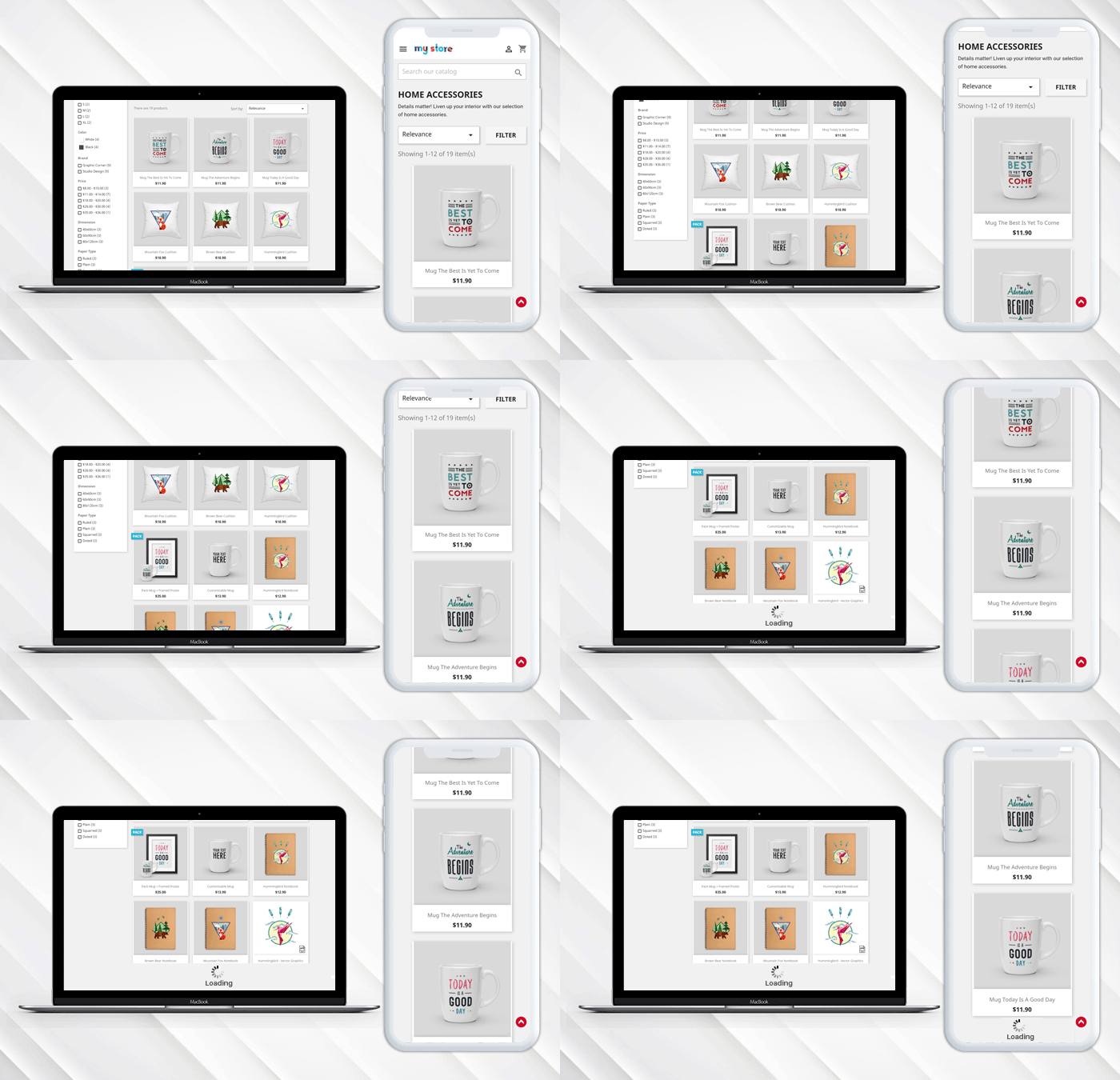
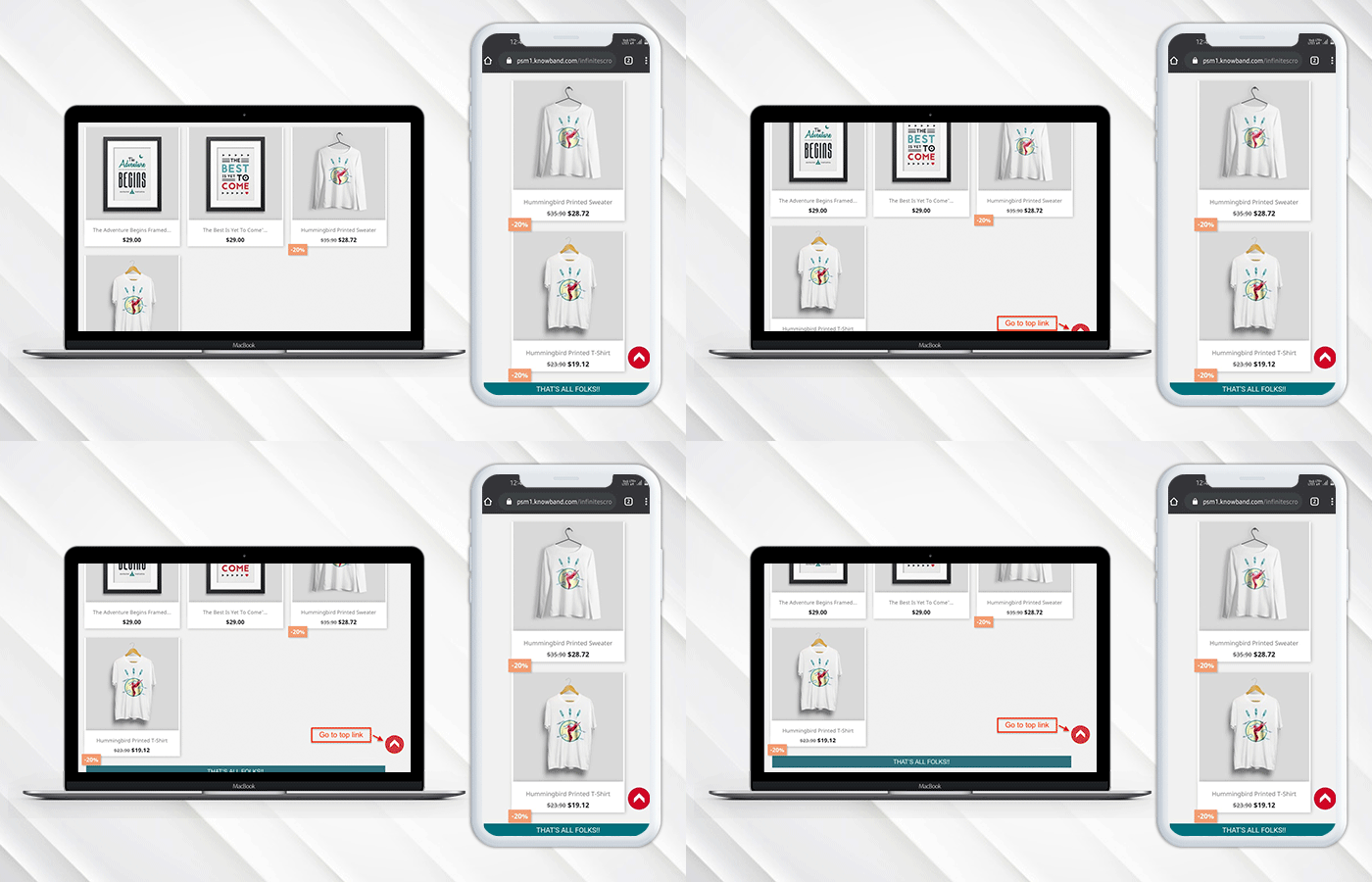
  • Display Go To Top Link: This field of the Prestashop Infinite Scroll module lets the store owner to display a link in the front-interface to go to top of the page by displaying a button at the bottom of the page.
  • Display Loader while Loading: This option of the Prestashop infinite scroll plugin offers the store owner to set display the loader during the loading of the product. So whenever customers scroll the page they can see a loader while loading the
  • Scroll Type: The Prestashop infinite scroll addon allows the store owner to choose between the scrolling option between the infinite scroll and load more products link.
    If the Owner can select the Load More Link then there will be following Option:
    Show More Link After: The owner can set the frequency to show load more link i.e after this many page loads the link will appear.
  • Sandbox Settings: Admin can also test the Prestashop infinite scroll module by enabling this field.
    If the Owner enables Sandbox settings the following option will appear:
  • Add IP: In this field of the Prestashop quick scroll module by Knowband, the admin can add different IP by separating them using a comma and the Prestashop module will work only for these IP addresses only.

3.3 Display Settings of Prestashop infinite scroll module:

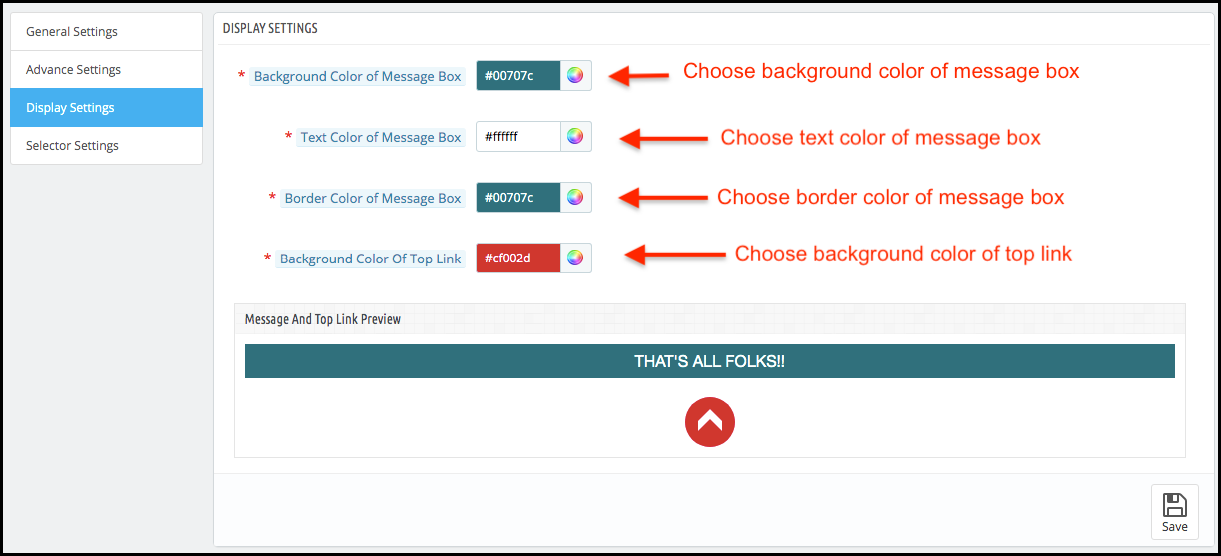
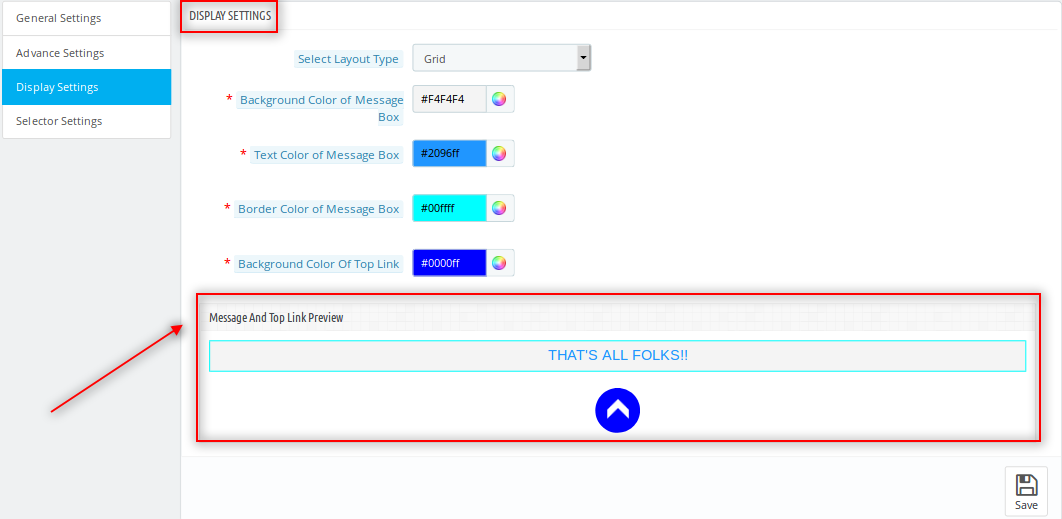
  • Background color of the Message Box: This field of the Prestashop drop-down scrolling module allows the admin to customize the background color of the message box that would be displayed when all the products loading will done.
  • Text color of the Message Box: The Prestashop Infinite Scroll module allows the admin to change the text color of the message box.
  • Border color of the Message Box: The Prestashop infinite scroll module allows the admin to customize the border color of the message box as per his requirement.
  • Background color of Top Link: The admin can customize the background color of the Top Link of the Prestashop list product module.
  • Message and Top link preview: Store admin can preview the end page message and top link button design.

The preview of the changes which will be done are reflected in the preview box given just below the fields of this Prestashop drop down scrolling module.

3.4 Selector Settings of the Prestashop infinite scrolling module:

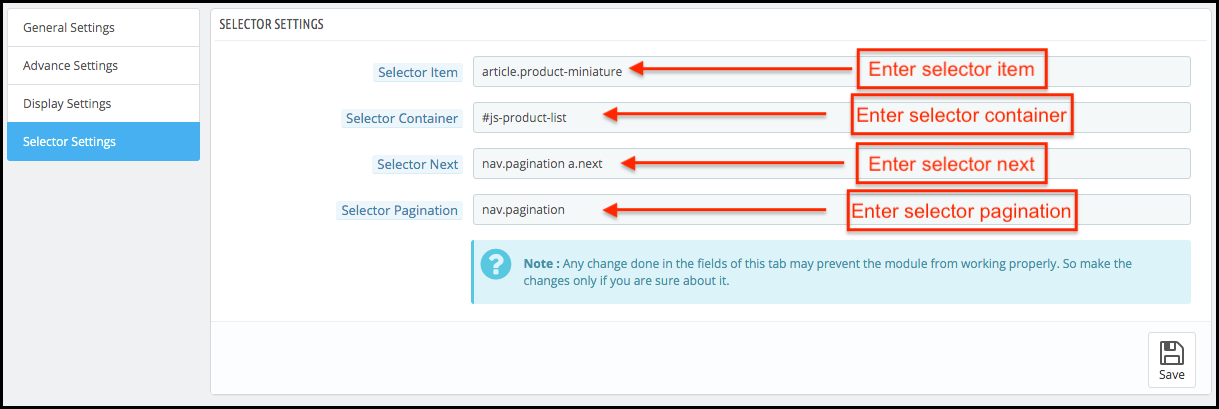
The values in this tab of the Prestashop dropdown scrolling module needs to be correct to let this Prestashop quick scroll module work properly. The values in this tab of the Prestashop Infinite Scroll module may change according to the theme of the Prestashop used in the front.

NOTE: If the selector values in these tabs of the Prestashop infinite scroll module are entered wrong then the Prestashop Infinite Scroll module will surely not work properly.

  • Selector Item: Store admin can enter the selector item value from this tab.
  • Selector Container: Store admin can enter the selector container value from this tab.
  • Selector next: Store admin can enter the selector next value from this tab.
  • Selector pagination: Store admin can enter the selector pagination value from this section.

4.0 Front Interface of the Prestashop Infinite Scroll Module:

When the Prestashop infinite scroll module by Knowband is enabled from the admin panel then on every product listing page pagination of the products would not appear. The customer will be able to view all the products just by scrolling down on the page and if the display go to top link is enabled then the link will appear on the bottom right of the page to scroll the customer back to the top of the page.

End Page Message:

Go to top button:

When all the pages are loaded a message appears in the bottom which states that all the pages are loaded now.Watch how this Prestashop Infinite Scroll Module by Knowband works:

Know more about this Prestashop Infinite Scroll Plugin here:

Prestashop Infinite Scroll Module Link: https://www.knowband.com/prestashop-infinite-scroll
Prestashop Infinite Scroll Module Admin Demo: https://psm.knowband.com/demo/?module=infinitescroll&demo=admin&referrer=kb&lang=en
Prestashop Infinite Scroll Module Front Demo: https://psm.knowband.com/demo/?module=infinitescroll&demo=front&referrer=kb&lang=en

Get this Knowband’s Prestashop Infinite Scroll Module on Addon Store as well. Visit here: https://addons.prestashop.com/en/navigation-tools/23643-knowband-infinite-scroll.html

“Also, explore more Prestashop modules for your Prestashop e-commece website.”

This Would Also Interest You:

5 Best PrestaShop Checkout Addons to Boost Sales and User Experience

Ignoring your checkout process on your PrestaShop store for a while? It is time to make amends and work towards the improvement of the online shopping experience for your targeted customers. Your clients might be scratching their heads when making a purchase on your eCommerce store due to which your business suffers a significant drop in conversion rates and product sales.

To set yourself apart from the competition, don’t puzzle your online shoppers with a complicated checkout process. Find a checkout page that allows you to remove unnecessary fields or steps. Instead, find the best PrestaShop checkout solution to delight your customers and eliminate any doubt they may have.

A non-engaging checkout solution brings fewer sales and site traffic. It would be an altogether different story with the help of these five amazing PrestaShop extensions by the Knowband store.

1. PrestaShop One Page checkout Free version

Nothing comes as a respite for eCommerce store owners other than the news of getting improved checkout functionality at no cost at all. With the presence of the PrestaShop checkout module (free version), there are no longer multi-page checkout formalities. Everything has been consolidated into a one-page checkout solution.

The PrestaShop checkout addon provides a complete cart summary to shoppers for better customer engagement and product sales. It consists of multiple payment and shipping methods for store owners to boost the interest of their online shoppers for doing shopping through your online store. Further, it works independently of other available third-party extensions and gives a satisfactory user experience to your PrestaShop store customers.

2. PrestaShop One click checkout (Buy Now)

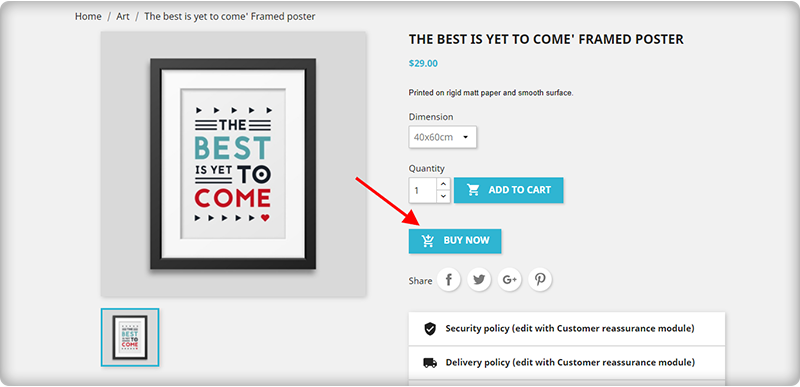
Another best way to motivate quick sales on your online store is by adding a ‘Buy Now’ button on the product page. Purchasing a single product online is now an easy task with PrestaShop One click checkout (Buy Now) module.

You can seamlessly provide amazing quick checkout functionality to your customers without making changes in your existing shopping cart while purchasing a single product. Some top-notch features of this PrestaShop One-click checkout (Buy Now) extension are as follows:

  • Seamless and quick customization facility.
  • Fully mobile responsive design for enhanced functionality for smartphones, tablets, and other mobile-based devices.
  • Compatible with all types of themes.
  • Translation facility for 17 languages.
  • Independent working to provide seamless functioning with third-party modules.

3. PrestaShop One Page Supercheckout

With the Single-Page PrestaShop checkout module, it is now much easier to customize the checkout process for your online store by displaying/hiding the various checkout fields. It consists of a brilliant drag-and-drops feature for layout customization that makes changing much easier and faster.

There are various functionalities like integration of desired payment and shipping method, SEO friendly and SSL secure design, in-built social media integration, guest checkout, social media log in, Google auto-address fill, mobile responsive design, compatibility with all browsers, and other such features. Grab this module for once and provide an amazing checkout experience to your targeted customers.

the PrestaShop One Page Checkout addon allows the owner to see the abandoned checkout statistics and checkout behavior report. In addition, PrestaShop allows you to display the product prices with or without taxes on the checkout page.

The module is a best seller with 5000+ downloads on the Knowband store and 9000+ downloads on the addon store.

These numbers can tell you how impactful it is!

Click here to explore the module features and free demo.

4. PrestaShop checkout page analytics

Customer tracking is an important part to provide a seamless checkout experience for online shoppers. It gives a clear insight into the reasons or steps that are causing your customers to abandon their cart. Store owners will get a full report in terms of monthly, weekly, and annual statistics with PrestaShop checkout page analytics to improve their merchandise revenue, customer loyalty, and conversion rates.

This PrestaShop checkout page analytics module also allows customers to record email id and cart details in order to assist shoppers who experienced technical issues or problems during the checkout process. Once you have all the essential statistical information with you, it will be much simpler for you to recover your abandoned carts and lost sales opportunities.

5. PrestaShop checkout payment fee addon

To show additional fees which are charged by various payment methods on your store, you need to install this PrestaShop checkout payment fee addon extension. The module can show percentage-based or fixed price-based additional fees that are charged by each payment method.

Besides this, there are other amazing functionalities like enabling/disabling currency conversion, compatibility with all payment methods having additional fees, quick installation, and configuration, and other such features.

Wrapping Up:

These PrestaShop checkout addons by Knowband have all the required features and functionalities that can easily set your cash counter on fire. Once you have the support of these above-mentioned PrestaShop checkout addons, you can easily win the decisive battle of conversion rates, product sales, and site traffic. Don’t miss this opportunity to get the initial business lead for your online store.

Which PrestaShop checkout addon should you choose?

If you’re testing first, start with the free One Page Checkout. If most of your sales come from single-product purchases, the One Click Checkout addon reduces friction faster than a full checkout overhaul. Stores with high cart abandonment should prioritise Checkout Page Analytics first, you need the data before you can fix the problem. Updated September 10, 2026

You Might Also Like: