Walmart jest jedną z największych korporacji detalicznych. Liczby nie kłamią, a dane statystyczne z tego rynku zdecydowanie oferują pozytywny klimat dla e-sprzedawców. Internetowy detalista zagłębił się w prawie wszystkie segmenty pod słońcem. Będąc jednym z największych i najwyższych punktów sprzedaży detalicznej, platforma umożliwia nawet małym sprzedawcom i sprzedawcom zwiększenie zasięgu działalności.
Walmart ma sklepy 11,000 + na całym świecie. Tak więc, jeśli chcesz rozszerzyć swoją działalność na arenie międzynarodowej, to jest to miejsce dla Ciebie. globalna sprzedaż netto firmy wyniosła około X XUM miliarda USD. O ile w roku obrotowym 2018 dochody wzrosły do 500.3 miliarda.
Oczekuje się, że liczby te będą jeszcze większe w nadchodzących latach. Dlatego integracja sklepów eCommerce z Walmart.com jest koniecznością dla sprzedawców internetowych. Czy chcesz zintegrować swój sklep internetowy z rynkiem? Czy dowiadujesz się o technicznych aspektach związanych z tym samym? Już nie musisz się martwić. Rozszerzenie integracji Walmart może pomóc właścicielom e-commerce zintegrować swój sklep internetowy z Walmart.com.
Mimo że rynek oferuje e-sprzedawcom możliwość łatwego rozszerzenia zasięgu działalności, ma również pewne wady. Trudna konkurencja może wyleczyć nerwy w dążeniu do wyróżnienia się. Zwiększenie swojej obecności na popularnym
W jaki sposób sprzedawcy zewnętrzni mogą zoptymalizować swoją obecność na walmart.com?
Oto kilka sposobów, dzięki którym możesz zoptymalizować swoją obecność na zatłoczonym rynku. Czytaj dalej, aby dowiedzieć się więcej.
Obraz jest wart tysiąca słów
Ponieważ cały proces zakupu online nie zapewnia klientowi wyglądu i stylu produktu, ma sens praca nad grafiką wizualną. Celem wyróżnienia się jest zmotywowanie klientów do wyboru produktu względem konkurencji ". Właśnie wtedy pojawia się visual merchandising.
Uporządkuj swoje produkty, aby zmaksymalizować ich widoczność. Ułatw klientom dostęp do nich. Białe tło z rynku Walmart stanowią bardzo zgrabny i profesjonalny interfejs dla sprzedawców, aby zoptymalizować wyświetlacz.
Integrator rynku Walmart zapewnia obrazy o wysokiej rozdzielczości i wymiar 3 produktów.
Szczegółowy Opis
Najlepszym sposobem wyróżnienia się z tłumu, jeśli chodzi o zakupy online, jest dostarczenie klientom właściwych informacji. Jednym ze sposobów osiągnięcia tego poprzez szczegółowe opisy produktów.
Klienci mają tendencję do szukania nazwy produktu. W związku z tym wskazane jest, aby sprzedawcy sprzedawali tytuły produktu elegancko. Rynek Walmart pozwala na użycie maksymalnie 200 znaków w tytule produktu, więc wykorzystaj go w pełni. Kluczowymi atrybutami tytułu są: marka, nazwa przedmiotu, styl, kolor, materiał i inne.
Specyfikacja produktu jest koniecznością. Uwzględnij wszystkie informacje, których szukają klienci.
Uwzględnij słowa kluczowe, długie słowa kluczowe i wyszukiwane hasła na stronie produktu. Ułatwi to wyższą pozycję produktów w SERP Google.
Skup się na budowaniu relacji z klientami
Jest to coś, czego potrzebuje e-kupiec uczyć się od sklepu stacjonarnego. Zaangażuj swoich klientów i zwiększ wartość poprzez rozwój emocjonalnego związku. Podobnie jak każda inna firma lub marka, relacja z klientem jest kluczowym aspektem zapewniającym lojalność klientów. Niezależnie od tego, czy są jednorazowymi kupującymi, czy długoletnimi kupującymi, utrzymywanie relacji z klientami może pomóc Ci przetrwać w konkurencyjnym scenariuszu. Zapewnienie klientom płynnej transakcji online jest kluczowe. Oferuj przejrzyste zasady zwrotu / zwrotu pieniędzy. Rozwiązuj skutecznie swoje problemy i problemy. Skorzystaj z ich opinii, a praca nad negatywnymi opiniami może sprawić, że poczują się docenieni.
Idealna kategoryzacja
Stwórz dobre wrażenia zakupowe dla swoich klientów. Kategoryzacja produktów może pomóc im w znalezieniu pożądanego produktu. Zachowaj podobne produkty na tym samym wykazie, aby kupujący mogli wyświetlać wszystkie możliwe produkty bez konieczności dużo nawigacji. To ułatwia proces zakupu i prowadzi do wyższego współczynnika konwersji. Integrator Walmart Marketplace zapewnia ponad 24 różne kategorie. Umieść produkty w odpowiedniej kategorii, aby opisać atrybuty produktu. Staraj się unikać wybierania "innej kategorii". Im więcej atrybutów podasz, tym wyższy będzie ranking produktu na stronie wyszukiwania produktu.
Jest to trudna sprawa, ponieważ kategorie sklepu internetowego i rynku mogą się różnić. Jednak ręczna integracja nie jest tak trudna. Ponadto w przypadku witryny e-commerce opartej na CMS, takiej jak Prestashop, Magento, OpenCart i inne, dostępne są wtyczki, które mogą zautomatyzować cały proces. Mapowanie kategorii odbywa się po kliknięciu kilku przycisków na zapleczu rozszerzenia, co ułatwia wylistowanie produktów w odpowiedniej kategorii.
Eksperymentuj z ekwipunkiem
Nie trzymaj się konwencjonalnych sposobów sprzedaży. Eksperymentuj z asortymentem, który oferujesz na rynku Walmart. Kluczem do sukcesu na zatłoczonym rynku, takim jak Walmart, są duże ilości i niskie ceny. Atrakcyjnie zapakowane tanie przedmioty mogą pomóc Ci przyciągnąć uwagę docelowych odbiorców. Od czasu do czasu wprowadzaj nowe produkty. Śledź zachowania klientów, aby zobaczyć, jak szybko sprzedają. Zarządzaj starymi stosami. Spróbuj i sprawdź obszar bólów klientów. Inwentaryzacja oparta na okazjach może pomóc w znalezieniu odpowiedniego rozwiązania, którego szukają.
BuyBox
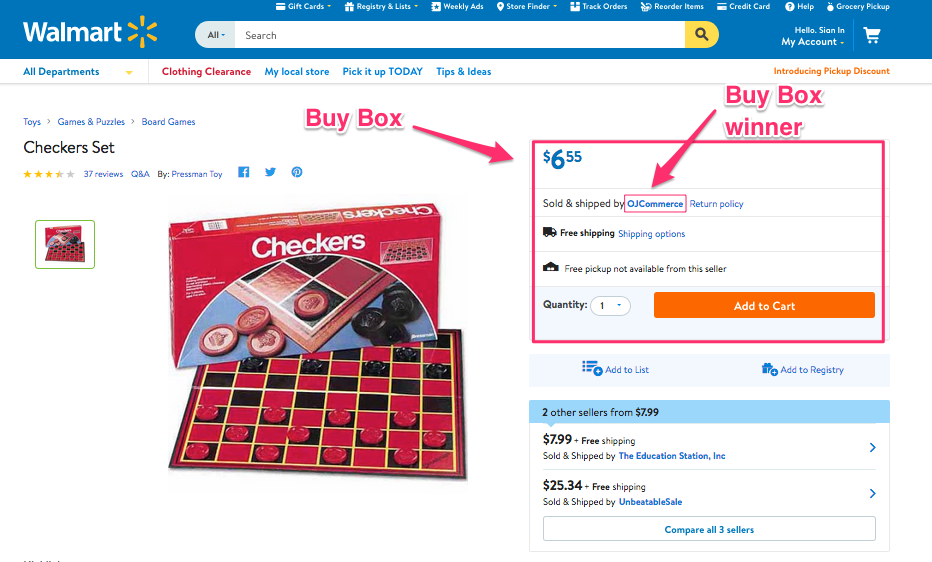
Walmart dostarczył opcję Buy Box, w której sprzedający mogą z łatwością konkurować o cenę swojego produktu z innym sprzedawcą. Produkty konkurujące ze sobą powinny być wymienione w tej samej kategorii. Produkt, który wygra Kupno, pojawi się na górze listy szukanych przedmiotów. To zwiększa widoczność produktów i ostatecznie zwiększa szanse na konwersję. Z Prestashop Dodatek do integracji Walmart, wygrywając BuyBox jest teraz tort-spacer dla właścicieli sklepów eCommerce opartych na Prestashop. Wtyczka oferuje pełny raport BuyBox dla sprzedawców, który umożliwia łatwe śledzenie. Mogą porównać ceny i zmienić produkt z poziomu interfejsu administratora. Podobny, Integrator Magento Walmart i Magento 2 Złącze Walmart może pełnić tę samą funkcję dla poszczególnych platform.
Tablica wyników sprzedawcy
Karta Wyników Sprzedawcy w Centrum Sprzedawcy Walmart śledzi wydajność konta danego dostawcy. Ten wynik jest oparty na metodzie spełnienia i możliwościach dostawców. Utrzymuj swoją tablicę wyników i dostosuj oferowane usługi zgodnie z wynikiem.
Reklamy Walmart
Rynek Walmart oferuje nawet pośrednikom trzecim możliwość sprzedaży swoich produktów na Walmart bez nawet ich wymieniania. Właściciele marek mają możliwość bezpośredniej współpracy z Walmart w zakresie reklamy. Rynek Walmart to kolejny sposób na zwiększenie widoczności produktu. Sekcja Produkty sponsorowane znajduje się po lewej stronie stron wyników wyszukiwania. Za każdym razem, gdy użytkownik wprowadza słowo kluczowe w pasku wyszukiwania, reklamy generowane przez te same słowa kluczowe stają się dostępne w sekcji "Produkty sponsorowane". Kliknięcie tych reklam spowoduje przekierowanie użytkowników sklepu z witryny Walmart.com na witrynę innej firmy.
Ostatnie słowa
Nawet jeśli pomijasz gigantów handlu elektronicznego, takich jak Amazon, eBay i inne, rynki takie jak Walmart i Jet.com oferuje wiele atrybutów które są niezbędne dla e-kupców. Wszystko, co musisz zrobić, to sprawdzić zachowanie klienta i skoordynować merchandising w celu znalezienia przewagi konkurencyjnej.
Prace związane z integracją z rynkiem stały się łatwe, ponieważ Knowband oferuje różne intuicyjne rozwiązania integratorzy rynku lubić Integrator eBay, Integrator Etsy i inni wraz z Integrator Walmart. Znajdź odpowiednie rozwiązanie dla swojego biznesu eCommerce i w pełni wykorzystaj globalny zasięg któregokolwiek z popularnych rynków internetowych.
O Walmart é uma das maiores empresas de varejo. Os números não mentem e os números estatísticos com este mercado definitivamente oferecem uma vibração positiva para os e-vendedores. O varejista on-line mergulhou em quase todos os segmentos sob o sol. Sendo uma das maiores e maiores varejistas de arrecadação, a plataforma oferece uma oportunidade para até mesmo os pequenos vendedores e vendedores expandirem seu alcance comercial.
Espera-se que esses números aumentem ainda mais nos próximos anos. Assim, a integração das lojas de comércio eletrônico com o Walmart.com é uma obrigação para os fornecedores on-line. Você está procurando integrar sua loja online ao mercado? Você está intimado pelos aspectos técnicos envolvidos no mesmo? Você não precisa se preocupar mais. A extensão de integração do Walmart pode ajudar os proprietários de comércio eletrônico a integrar sua loja virtual ao Walmart.com.
Embora o mercado ofereça uma oportunidade fácil para os e-sellers expandirem seu alcance comercial, ele também apresenta alguns inconvenientes. A dura competição pode prejudicar sua coragem na busca de se destacar. Impulsionando sua presença no popular
Como os vendedores de terceiros podem otimizar sua presença no walmart.com?
Aqui estão algumas maneiras pelas quais você pode otimizar sua presença no mercado lotado. Leia para saber mais.
Uma imagem vale mais que mil palavras
Como todo o processo de compra on-line não oferece nenhuma aparência do produto para o cliente, faz sentido trabalhar nos gráficos visuais. Todo o propósito de se destacar é motivar os clientes a escolherem seu produto em detrimento dos concorrentes. É quando o merchandising visual entra em cena.
Organize seus produtos para maximizar sua visibilidade. Facilite o acesso dos clientes a eles. Os fundos brancos do mercado Walmart fornecem uma interface muito elegante e profissional para os vendedores otimizarem a exibição.
O integrador do mercado Walmart fornece imagens de alta resolução e a visão dimensional 3 dos produtos.
Descrição Detalhada
A melhor maneira de se destacar da multidão quando se trata de fazer compras on-line é fornecer aos clientes as informações certas. Uma das maneiras de alcançá-lo através de descrições detalhadas de produtos.
Os clientes tendem a procurar o nome do produto. Por isso, é aconselhável que os vendedores façam a curadoria do título do produto com inteligência. O mercado do Walmart permite que você use até caracteres 200 em um título de produto, então aproveite ao máximo. Os principais atributos do título incluem Marca, Nome do item, Estilo, Cor, Material e outros.
A especificação do produto é obrigatória. Inclua todas as informações que os clientes estão procurando.
Inclua as palavras-chave, palavras-chave de cauda longa e consultas de pesquisa na página do produto. Isso facilitará a classificação dos produtos na SERP do Google.
Foco na construção de relacionamento com o cliente
Isso é algo que o e-comerciante precisa aprenda com a loja de tijolo e argamassa. Envolva seus clientes e agregue valor desenvolvendo uma conexão emocional. Assim como qualquer outra empresa ou marca, o relacionamento com o cliente é o aspecto chave para garantir a fidelidade do cliente. Quer sejam compradores ocasionais ou compradores de longa data, manter relações com os clientes pode ajudá-lo a sobreviver no cenário competitivo. Fornecer aos clientes uma transação on-line perfeita é a chave. Ofereça políticas transparentes de devolução / reembolso. Resolva seus problemas e os problemas de forma eficaz. Tome o seu feedback e trabalhando nas avaliações negativas pode fazê-los sentir-se valorizados.
Categorização perfeita
Crie uma boa experiência de compra para seus clientes. A categorização de produtos pode ajudá-los a encontrar o produto desejado. Mantenha os produtos semelhantes na mesma listagem, para que os compradores possam ver todos os produtos possíveis sem navegar muito. Isso facilita o processo de compra e leva a uma taxa de conversão mais alta. O integrador do Walmart Marketplace oferece mais de 24 categorias diferentes. Coloque seus produtos na categoria correta para descrever os atributos do produto. Tente evitar a seleção da "Outra categoria". Quanto mais atributos você fornecer, maior será o produto classificado em uma página de pesquisa de produtos.
Isso soa complicado porque as categorias da loja online e do mercado podem ser diferentes. No entanto, a integração manual não é tão complicada. Além disso, para o site de comércio eletrônico baseado em CMS, como Prestashop, Magento, OpenCart e outros, existem plugins disponíveis que podem automatizar todo o processo. O mapeamento de categoria é feito apenas clicando em alguns botões do back-end da extensão, o que facilita a listagem dos produtos na categoria relevante.
Experimente com o inventário
Não se atenha aos meios convencionais de venda. Continue experimentando o mix de produtos que você oferece no mercado do Walmart. A chave para o sucesso em um mercado lotado como o Walmart é o alto volume e os preços baixos. Itens de baixo custo empacotados atraentes podem ajudá-lo a atrair a atenção do público-alvo. Continue apresentando novos itens de vez em quando. Acompanhe o comportamento do cliente para ver a rapidez com que eles vendem. Gerencie a pilha dos antigos de forma eficiente. Experimente e descubra a área de dor dos clientes. O inventário baseado em ocasiões pode ajudá-lo a fornecer a solução adequada que eles estão procurando.
BuyBox
O Walmart forneceu uma opção de Buy Box, onde os vendedores podem facilmente competir pelo preço do produto com outro vendedor. Os produtos concorrentes entre si devem ser listados na mesma categoria. O produto que ganhar o Buy Box será listado no topo da lista de itens pesquisados. Isso aumenta a visibilidade dos produtos e, em última análise, aumenta as chances de conversão. Com Complemento de Integração Prestashop WalmartVencer a BuyBox é agora uma caminhada de bolo para os proprietários de lojas de comércio eletrônico baseados em Prestashop. O plugin oferece um relatório completo da BuyBox para os vendedores que permitem o fácil rastreamento. Eles podem comparar os preços e reprogramar o produto a partir da própria interface do administrador. Semelhante, Integrador Magento Walmart de Conector Magmart 2 Walmart pode servir a mesma função para as respectivas plataformas.
Painel de avaliação do vendedor
O cartão de pontuação do vendedor no centro do vendedor do Walmart rastreia o desempenho da conta de um determinado fornecedor. Essa pontuação é baseada no método de atendimento e nos recursos dos fornecedores. Mantenha seu placar e ajuste os serviços que você oferece de acordo com a pontuação.
Anúncios do Walmart
O mercado Walmart oferece até um meio para os vendedores terceirizados venderem seus produtos no Walmart sem precisar listá-los. Os proprietários da marca têm a opção de trabalhar diretamente com o Walmart para publicidade. O mercado Walmart é outro meio para aumentar a visibilidade do produto. A seção Produtos patrocinados é exibida no lado esquerdo das páginas de resultados de pesquisa. Sempre que o usuário insere uma palavra-chave na barra de pesquisa, os anúncios acionados por essas mesmas palavras-chave tornam-se qualificados para aparecer na seção "Produtos patrocinados" designada. Clicar nesses anúncios redirecionará os visitantes da loja do Walmart.com para um site de terceiros.
Palavras finais
Mesmo que você deixe de lado os gigantes do eCommerce, como Amazon, eBay e outros, os marketplaces como Walmart e Jet.com oferece muitos atributos que tornam uma obrigação para os comerciantes eletrônicos. Tudo o que você precisa fazer é verificar o comportamento do cliente e selecionar o merchandising para encontrar a vantagem competitiva.
O trabalho de integração do mercado tornou-se sem esforço, agora que a Knowband está oferecendo os vários recursos intuitivos. integradores de mercado como integrador do eBay, Integrador Etsy e outros junto com o Integrador do Walmart. Encontre a solução adequada para o seu negócio de comércio eletrônico e aproveite ao máximo o alcance global de qualquer um desses populares mercados on-line.
Andriod mobile application and iOS apps are one of the most anticipated advancements in the technology as well as in the eCommerce industry. Right from retail to travel, none of the industries have stayed away from the online shopping scenario. However, the fashion industry is one of the most active on the internet. In the US, approximately 96% of fashion brands now have an Instagram presence, tapping into our heightened engagement with imagery. Surprisingly, even today 60% of the online business worldwide don’t have an app to conduct their business on the mobile ecosystems. This implies that they are losing approximately 60% of their prospective customers who prefer shopping through their phones.
Magento offers an easy and handy way to upgrade your business unit in the form of Magento App Builder Extension. All the fashion store owner on Magento can now have their application in a few simple steps. Wonder why you require a mobile app when your website is working just fine for you? Here are some of the reasons that will make it obvious for you. Have a look.
1. Smooth performance
If you own a fashion store, then, you need to stay at an arms distance to your customers. In the fashion driven-world, the need and requirements of the style-customers are never ending. You just need to uplift their purchase intention. One of the ways to do so is to stay in touch with them through follow-ups and promotional messages, via email and SMS. Hence, they need a smooth performing device that can help them browse the store whenever they feel like. The Magento mobile app builder offers the much-needed seamless functionality that can compel them to stay at your store, thus, amplifying the chances of conversion.
2. Handles higher traffic
The fact that the shopping mobile application of the hand held devices is more engaging than the mobile responsive websites is the only reason for the inclination of the store owners towards it. In fact, the standalone software offers many other umpteen benefits. The Magento Andriod App builder is one tool that can engage more customers and have the capacity of handling more traffic than the mobile responsive websites. The mobile sites tend to load slowly and crash most of the time when the traffic is higher. This frustrates the prospective customers and may cost you some conversions. Thus, the powerful and fast Magento mobile app builder is one of the ways to retain your customers.
3. Personalized approach
The personalized approach of the mobile provides a better experience not just to the users, but to the store managers and owners as well. The Magento mobile app builder provides better control of the online business to the merchants. Keeping a track of the overall transactions and sales becomes easier with the mobile app. The application comes with a bundle of themes to choose from. You can design your store as per your requirement. The Magento mobile app will be compatible on multiple devices such as Android phones, tablets, and others. At the same time, the mobile app is multi-lingual. The users get the facility of social login and voice search. With the advanced features you can easily rule the mobile app.
4. Easy functionality for the online merchants
Along with the front-end features, Magento mobile app provides full backend control to the store admin. The mobile app analytics is easy to understand. The owners need not have technical skills to track the data. A close study of the data can even give you an insight of the consumer behavior. The Magento mobile app can be installed and configured easily. It does not require manual synchronization with the Magento store. Moreover, it supports most of the Android versions.
5. Hassle-free shopping experience during sales season
One of the biggest challenges for the fashion store owners is to prepare for the holiday seasons of the year. This is the time of the year that decide the fate of your business for the entire year. While 64% of the online shoppers rely on the smartphones and mobile devices for shopping, the sale season is makes the mobile website more prone to slow load time, crash and other server related issues. Magento mobile app builder is an ice breaker in your current sales condition. Its quick and personalized shopping experience will help you retain the flocks of online shoppers even after the sales season.
6. Enhanced push notification
It is said that if you are sending follow-up emails and messages to your customers once in 90 days, then, you are losing 95% chances of their conversions. This makes the presence of push notification inevitable in the applications. The push notification of these stores can keep the shoppers notified about the deals, discounts, offers and flash sales offered by the site. Not just this, it can even help the online marketers in tapping the abandoned cart. You can offer special discounts and offers and send personalized messages for the particular products added in the cart.
Final say
The mobile app is not just a means to engage the users for a longer period of time, it definitely ensures transparency in your business model. Thus, it a means to build the trust with the customers. The smart and dedicated user-centric eCommerce tool is a perfect way to boost the business of the Magento fashion stores. check out the user manual for Magento mobile app builder and find the Magento mobilw app for your business model.
The Magento Multi-Vendor Marketplace Extension is a solution that converts your Magento eCommerce store into an online multi-vendor marketplace site. Just like a physical Shopping mall or marketplace where you can invite sellers to open their shop and sell their products. In return to it, you have the option to take commission from the sellers as the rent for the online space you would provide them in your complex (marketplace site).
Marketplace ad-dons on the other hand, are those extensions which add new features and functionalities to the Magento marketplace extension. These features add new opportunities for the marketplace admin and sellers to manage various aspects of the whole marketplace. There are ad-dons for SEO improvement, Conversion Rate Optimization, Product Management, Helpdesk management and much more.
Here in this article, we are going to enlist 3 such marketplace ad-dons that can help you make a strong relationship with your sellers. These extensions provide some extended accessibility options that make the operation of the marketplace shop easier for the sellers. By using these ad-dons, the marketplace admin can create an improved UX for the sellers/merchants/vendors and encourage more sellers to come and register a shop account on the marketplace.
Any seller who wishes to register on a marketplace would first of all want to know if he is doing business with a responsible business on the other side. Not having a seller support system is a clear sign of chances for negligence in seller grievance handling by the marketplace admin. No seller would want to open a shop in a marketplace where they can’t even register their query or complaint if needed.
In this situation a marketplace site can always provide the desired support to its sellers with a seller support system on board. The Marketplace Contact Admin ad-don is one such seller support system that would be liked by your onboard sellers.
It allows a seller to create a query or complaint ticket with the marketplace admin right from the seller dashboard.
Allows admin to check the complaint and queries from all the sellers and reply back repetitively.
The seller or admin might not be logged for the whole time to instantly see the tickets and replies. That’s why, along with the messages on the marketplace interface, the ad-don also sends an email to the seller and admin whenever a new message is received.
This ad-don could be a great extension for the marketplace. With better user experience and seamless seller support, you will have a USP on your marketplace site that will attract more and more Merchants to do business with you.
When we look at the eCommerce competition level in 2017, keeping the sales rate at desired level is a complex task. When everyone in eCommerce market is busy recovering their abandoned carts, new sales generation seems to be a mega task.
However, if you are not able to complete this mega task and keep your marketplace’s conversion rate optimal, you would hardly attract any new seller to your site. Moreover, there are chances that the onboard merchants would also pull their hands back.
In this situation, you need to keep your customers happy by providing every possible facility that can be imagined on an eCommerce store as of now. Happy customers mean more sales, more sales mean happy sellers.
The option for easy returns is one such facility which every eCommerce customer looks out for. You will hardly find an eCommerce customer making a purchase without reading the products return policy of the store. That’s where you need a return management ad-don on your marketplace.
With easy return facility through the ad-don, you can allow your customers to place a return, refund or replacement request directly to the concerned sellers.
The admin and sellers both get notified on a new return request. The sellers can process the return request and can approve/disapprove it based on the marketplace’s return policies.
Now based on your return policies you can use this ad-don to create an ultimate shopping experience on your marketplace. Of course, the customers will like the return and refund facility. Such facilities to the customers can help generate more sells and a good name for your website in the market.
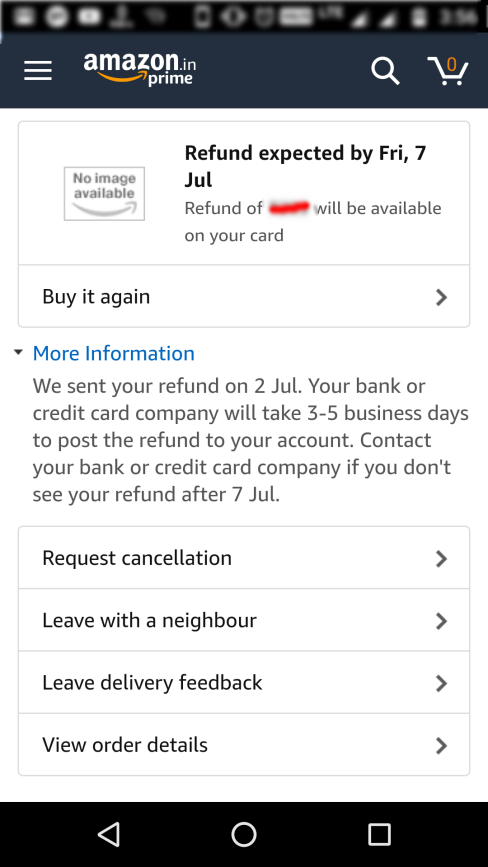
Who doesn’t like the speedy refund management of Amazon on failed for undelivered orders? Despite, I had an undelivered order experience due to courier boy’s mistake, I was happy to place a re-order with Amazon because they refunded me for the undelivered order so fast.
That’s how even a bad shopping experience cannot stop your customers to trust you if you have a recovery plan like easy refund and returns.
Whether you have a run a marketplace site or an inventory based eCommerce store, customer experience is one such thing that will decide the fate of your business. But you cannot expect your website to provide even a decent customer experience when you cannot fulfill the orders on time.
On a marketplace, the failure to fulfill an order on time can happen due to many reasons:
Product was out of stock
Courier service’s mistake
Seller didn’t dispatch the order or time etc.
Whatever be the reason for the failure in product delivery or order fulfillment, the bad name is going to stick on your marketplace; not on the seller. So it’s your job to make sure that sellers are dispatching the orders on time.
Now, that’s a hectic task. Not always but sometimes there might come a situation for a seller when he/she might not be available to fulfill an order received for his product. The reason could be anything:
The seller might have gone on a holiday and he might not have anyone else deployed to manage the marketplace shop till then. The reasons for the holiday could be numerous- recreational or unavoidable circumstances.
In such situation, when the seller would not be available to fulfill the orders, it’s a sure thing that you will lose some happy customers due to this.
How to avoid this?
The Marketplace Seller Vacation Mode Ad-don is the answer. Behind explanation of all these situations, my main aim was to introduce this ad-don as a big problem solver, and it efficiently does that.
This ad-don allows a seller to turn on the vacation mode before going for any such holidays. In this situation:
All the product listing from the particular seller will get hidden from the customers. That is, the customers will not see the products of this seller on the marketplace until he is back from the holiday.
The seller can set an automatic timer to turn off the vacation mode, or can manually do it when he is back from the holiday.
The marketplace admin sees the list of all the sellers who have turned on their vacation mode.
The admin can choose to approve or disapprove a seller’s vacation mode request. That means, the sellers cannot turn on the vacation mode until the admin allows them.
So, admin is still the boss, sellers cannot just go on the vacation every now or then.
Over to you
So, these three features on any marketplace site are definitely the conversion booster and saver as well. The Magento Multi-Vendor Marketplace Extension is backed by many such ad-dons like these. You can have a free demo of both the Admin panel and Front-end interface. Have a tour of the extension as see how it can help you launch a marketplace business of your own.
With a change in the eCommerce business scenario, the revenue of online stores has also been affected. Mobile optimization has become quite an essential requirement for eCommerce website sites nowadays. From conversion rate optimization to search engine optimization, no expert will tell you that targeting mobile customers is not beneficial. In fact, you will remain in a disadvantage against your rivals by not considering mobile customers in your marketing plan. In this write-up, I am going to tell you the easiest way to own a pair of native mobile apps. Earlier, you either required to learn the coding/programming or hire a professional to create eCommerce Mobile App. But, now all you need to go for automated solutions and launch fully synced eCommerce apps for your business.
KnowBand has brought one such solution with Mobile App Builder plugin. This is a readymade solution to provide you native Android/iOS apps for your store. It is designed in such a way that all the functionalities of the app can be controlled from the backend panel without making any code changes. The eCommerce Mobile App Creator is available for following CMS platforms:
How to create eCommerce mobile app in a few steps?
In order to utilize the services of Mobile App Builder extension, you need to follow the following steps:
Step 1: Purchase the Module
Visit the above links as per your eCommerce website platform. Purchase the module and install the zip file on your store. Once installed you get the complete admin panel access to control the app. Open it and enable the respective Mobile App Builder.
Step 2: Share your App Specifications
After purchasing the module, you will receive an email having a small questionnaire that you need to fill and respond back. In the questionnaire, you will be asked to share some information regarding your app. Based on which, the development team will develop and customize the app.
Step 3: Publish APK/IPA on App Stores
After the development is complete, the team will share the APK file of the app with you. Now, you need to publish this APK on Google Play to make your App available to your customers. You can publish the app by yourself, or it can also be done by Knowband for a small fee.
That’s all with the process to create your own mobile app with KnowBand. You can even test your store on our demo app before going for the actual module purchase. Let’s find out how?
How to test your store on our demo Mobile App for free?
In case you want to see how your mobile app would look like, there are free versions of the Mobile App builder that you can try. The free version of the Mobile App Builder lets you see how your eCommerce store will look and work on the App. You need to implement the following steps that are mentioned below for having a free demo:
Step 1: Visit any of the links below according to your eCommerce platform:
Step 4: Open the App and enter your store URL in the field. Make sure you enter the full store URL of your store i.e. https://www.example.com/
Step 5: You have successfully completed the initial setup of the demo app. Now you can experience your store as a mobile app and test it as you want.
That’s all! Now, analyze your app functionalities. You can even find the detailed testing process from here.
Why own a pair of native eCommerce mobile app?
In addition to having a mobile responsive site, mobile apps have come up as a more advanced way to target mobile users. No doubt you still need a mobile site to come in the good eyes of Google and your mobile customers. But, all of your rival sites know this too, and that’s why they have already started the mobile optimization for their stores. So, what else do you need to have an upper hand against your competitors? A mobile app for sure. Let’s take a look at some of the major benefits of tapping into mobile commerce:
1. Improved Usability for online shoppers-
Downloading and installing the app is a one-time process. After that, your customers can visit your store anytime in just a single click. This ease of visiting your store improves the interactivity of the customers with your business and ensures a 24X7 availability. The exclusive mobile app interface makes navigation through your store quite easy, quick, and interactive. Furthermore, mobile apps can be presented as per your will. You can design the home screen and highlight popular products of your store as well.
2. Leverage built-in Smart Phone features-
The Android and iOS platforms provide a number of built-in features on smartphones. Mobile apps can adapt to these built-in features and leverage them for providing a more engaging user experience to the customers. For example, you can use the GPS location tracking to present the location-based shopping experience to your customers. You can leverage microphone to provide voice-based app search for faster-searching experience.
3. Users always prefer mobile apps over the mobile site-
Apps make the shopping experience faster, interactive, more secure, and reliable. Users don’t have to remember an URL or log in each time they visit the store. Sites having both mobile apps and mobile sites receive more qualified traffic on the mobile app than on the mobile sites.
4. Mobile app push notifications is a boon-
You don’t have to depend only on email marketing for communicating with your customers. Through mobile apps push notifications, you can always and instantly send messages to your users that too in a more personalized way. You can’t integrate push notifications to boost sales if you don’t have an app. Push notifications are more hardware features that are based on GPS, secure connection and some API and it’s not available for websites.
5. Brand loyalty will enhance user engagement-
Nothing can be more useful for putting your products and brand in the center of attraction than a mobile app. Apps are the shortest route to your business available for 24X7. Just a single click on the app icon and customer is on your business center. Mobile apps are useful tools for creating a more loyal section of customers who love online shopping anytime from anywhere. Showcasing your brand logo on the mobile app leave your professionalism on the shoppers.
Over To You
So, this is how you can get a mobile app for your eCommerce store without doing much of the complex tasks. KnowBand’s Mobile app builder is the easiest way to get a native Android/iOS app for your store. Moreover, I have also explained how you can try a free demo of the app to experience your store as a mobile app. Leverage this useful service and get your app developed today by the expert eCommerce and mobile app developers.
One page checkout has been in the debate for a very long time now. The whole idea of simplified checkout revolves around the optimizing the shopping experience of the store visitor. The shopping site will lead to conversions only when the customers are able to complete their transaction effortlessly.
How can one page checkout optimize your site?
The online shoppers prefer to make purchases only if the web store offers easy to approach and with minimal efforts. Here are some of the ways in which the this feature can optimize the shopping site and enhance the user experience.
Most of the e-marketers advocate the incorporation of a single-page checkout as it is an easier approach for the customers to complete their transactions. The online shoppers prefer going with the idea of single page checkout as it reduces the time consumed in reloading the web pages.
The idea of using super page checkout is more convincing than the traditional idea where the customers have to be jumped from page to page filling out all the details. The e-sellers can help the customer complete their transaction with minimal effort. Even though the number of fields remains almost the same, the shoppers can view the length of the form left to be filled. This provides them a psychological motivation to complete the transaction.
There are dozens of articles on the topics like “Should you choose a one-page checkout?” “Pros and Cons of One Page Checkout” and so one. Most of these articles effectively address the drawbacks, but it seems like we have been promoting these drawbacks like they are there forever and cannot be taken down anyhow.
Let’s face the truth, every new introduction has some cons for sure. Gradually, with the development and research, these cons fade away for sure.
In this blog, I am going to address 3 such cons of a one-page checkout which we eliminated from our Magento one page checkout extension and also the PrestaShop One page checkout module. Most of these cons were never there in our checkout extension, as we took care of them while in the development and testing phase itself.
One page checkout fixed drawbacks
1. So much of details on a single page? It will be congested
Most of the checkout pages, when introduced in the past, had this problem. It was really a massive task to adjust everything from a multi-page checkout on a single page.
The most problematic challenge was to fit all those checkout elements on a single page and it should provide a full view of the whole checkout page as well. Moreover, all the checkout elements like login, delivery address form, billing address form, payment options, shipping options, and cart review should not overlap with each other, and neither they should overlap on themselves. A lot of HTML, CSS, JavaScript, and Ajax were needed to be handled to keep the design all fine with the default as well as the third party Magento themes. But we intended to keep them as lesser as possible for faster page loading.
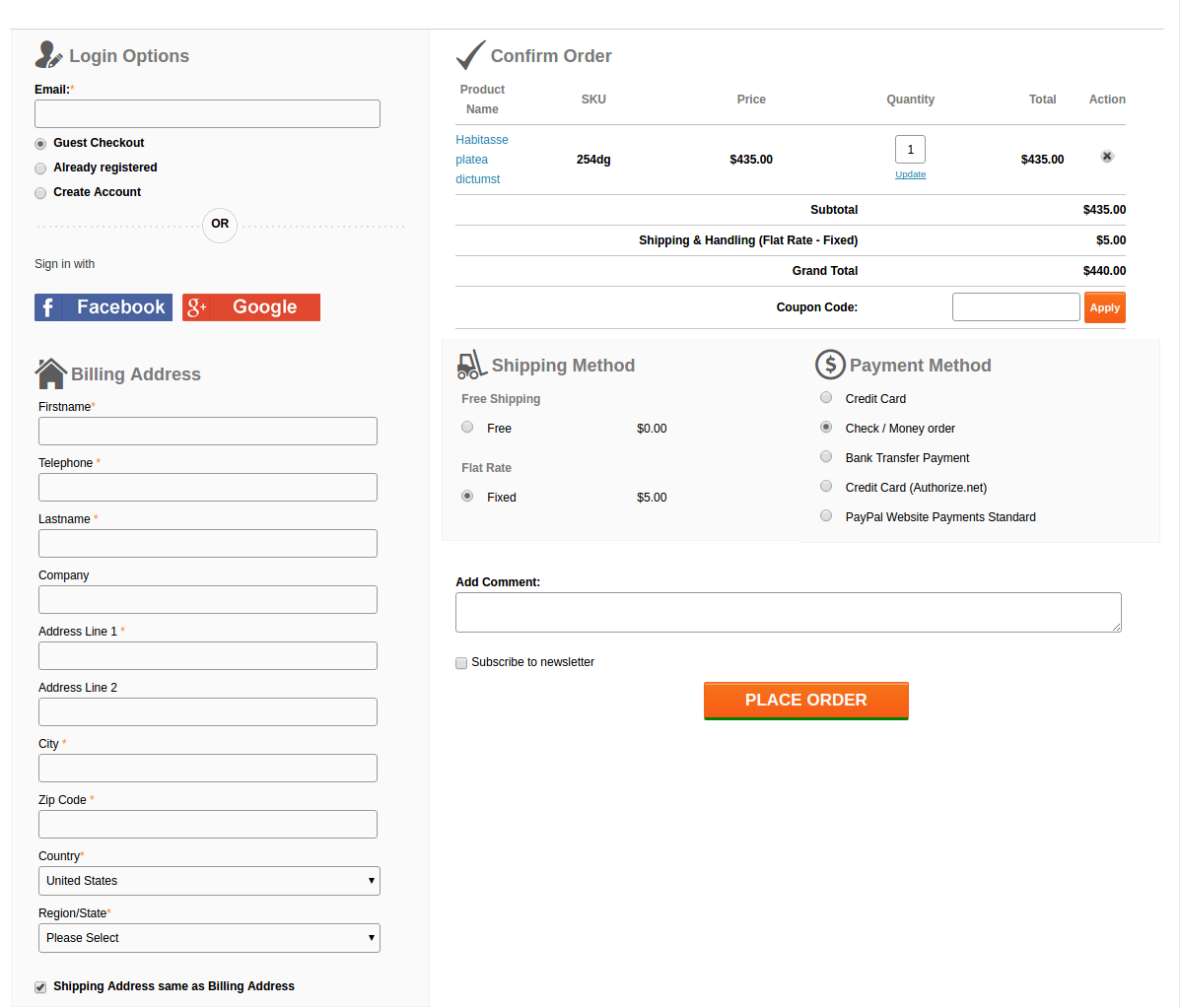
This is what we came up with:
A lot of HTML, CSS, JS, and Ajax were tweaked by our designers to fit all the elements neatly and clearly on a single page and also to keep the page loading time optimal. Moreover, thanks to our designers, after all these, there was sufficient space left to add the Social login option using Facebook and Google+ on our checkout page.
2. The form on the page are congested with no white-spaces and proper label usage
While designing the forms, the main aspects that we were looking for were:
Keeping the forms compact
All the necessary fields should be there
Fields should have proper white-spaces
Labels should not confuse the users
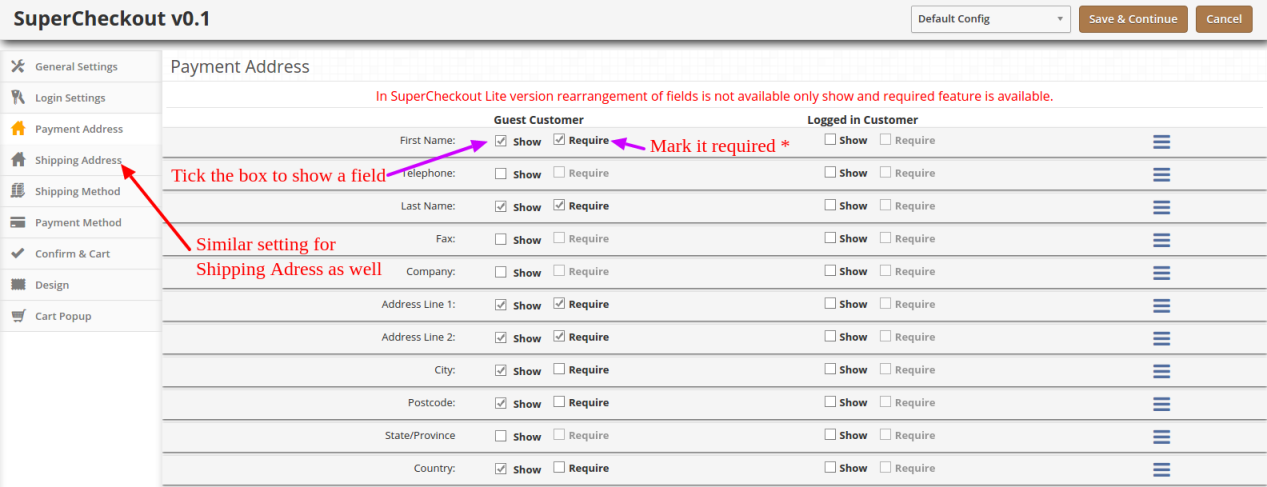
Admin should be able to choose which form field he wants to show on the page to customers.
Labels
Labels were coming out as a major concern here. If we would keep the labels by the side of the respective fields, the horizontal length of the form would give a very less space for the other sections on the page.
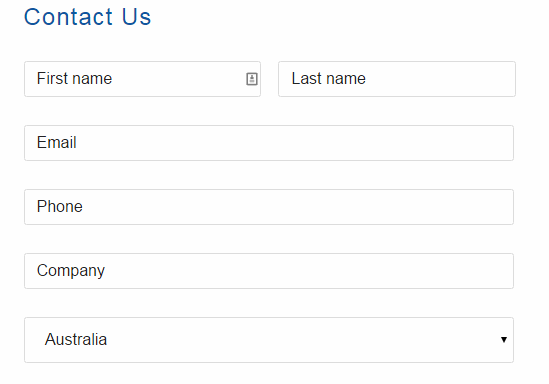
We also thought about a form design where we would skip the labels and use Placeholders in place of them. Something like this:
But, there was a problem in that. For considerably long forms like Billing and Address forms, if customer once filled the detail, and the later stage if he would want to re-check them, he would get confused about what actually are these details. Since the placeholder vanishes away as you type in, and there is no label as well, there always remains a confusion if my details are right or wrong.
We didn’t want your customers to get into such confusion and forget the main goal of making a purchase, that’s why we drop the idea. Otherwise, it could have saved a lot of space as well.
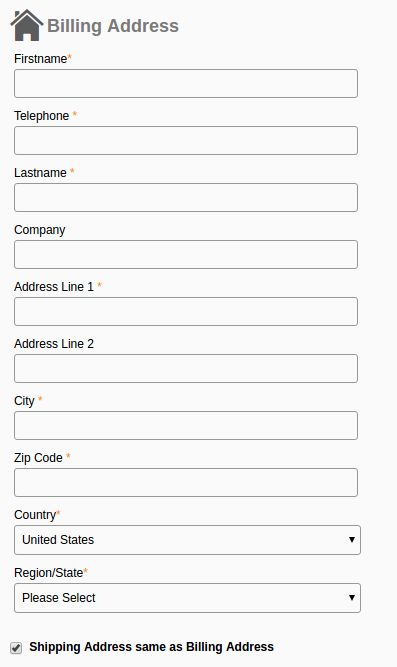
Finally, we decided to not to compromise with the user experience anyhow and we adopted the label placement above the fields as shown in this image:
It saved the horizontal space that we needed for other elements and also helped in one another feature which has been discussed below.
The necessary fields
After dealing with the label placement, the last thing in the forms that gave us a nightmare was to include every necessary field in the form. Problem is, the term necessary is quite relative here. A form field which is necessary for one store owner might be of no use to the other.
For example, the VAT number, and Company Name is a necessary field of a store owner who has a B2B selling business. All of your European business clients would also need this field for making the purchases on your store. On the other hand, a store owner who directly sells to the individual consumers would have no use of the fields like VAT Number and Company Name.
How we handled it?
It was a time to open our checkout extension a bit and give the store owners some easy yet crucial development access. We add a feature in our module, using which the admin can easily enable, disable, add, and delete a field from the checkout form. That too, without editing the code. All this can be done from the backend itself.
So, if any of the fields is not usable for a store owner, he can simply hide it with a simple click and save. No need to go through the complex Magento or PrestaShop codes to do this now.
3. Frequent page reload on cart update
Those multi-page checkouts have a dedicated page for editing the shopping carts. It was a challenge for us to include the shopping cart on the checkout page. Customers would frequently update the cart by increasing or decreasing the product counts, removing a product from the cart and so one.
All these requests required a page reload to update all the checkout details and information according to the latest cart status. If a product has been removed from the cart, we needed to update the total cost, cart product quantity, shipping methods and so on with it.
It would have become so irritating for the customers if the checkout page would reload every now and then. This challenge is faced by every one-page checkout development. However, we managed to fix it with the Ajax based shopping cart and form update request.
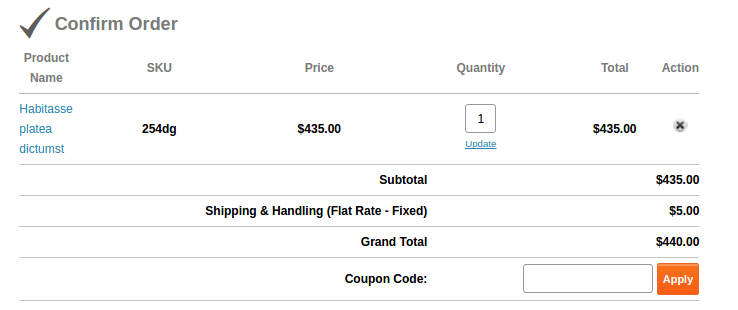
Now, with Ajax shopping cart and updates, if a customer changes anything in the cart, all the dependent details would get automatically updated without reloading the whole checkout page. Even the customer can apply a coupon code to the cart and page would validate the coupon without being reloaded.
This is how we solved these issues in our checkout extension. You can have a free demo to experience all these features of the extension. Free Demo one page checkout Magento and PrestaShop and OpenCart.
This functionality can be added to a Prestashop site with the help of Prestashop one page super checkout addon. The same extensions are available for Magento, Opencart and other eCommerce platforms as well. Whether you go for the Prestashop addon, Magento extension or OpenCart plugin, it enables the customers to complete their transaction and make the product purchase on the same page. It is one of the best features for reducing the exit rate at the checkout page. The customers are annoyed if they are redirected to lengthy checkout process in order to complete the purchasing. Thus, one-page checkout makes sure that the customers can complete the purchase by filing up all the necessary details in one single page and provides the customers with an easy approach to complete the purchase.
A Mobile App is definitely one such solution that can take your eCommerce business to far off places. With the support of the Magento Mobile App Builder for Android/iOS, you can seamlessly target your multi-platform customers and grab maximum sales as well as customer engagement. The mobile apps with Magento eCommerce Mobile App Builder can make your eCommerce business accessible to the worldwide mobile-based consumers. The store owners can now improve the chances of their business growth and expansion. This Mobile App Maker for Magento allows the store owners to get their customized mobile app as per their business requirements and needs.
Whether your eCommerce site is recording a consistent sale volume or if it’s on the verge of finding your niche market, nowadays mobile apps have the potential to drive quality traffic as well as conversions. Mobile applications have become the flavor of the current time and the idea of taking your business on the mobile platform sounds quite perplexing.
To ease the task for all the Magento store owners out there, KnowBand has brought its readymade framework Magento Mobile App Builder. This pre-designed mobile app solution builds full-fledged Android & iOS apps for your eCommerce website.
1.1 Salient Feature of Magento Mobile App Builder
The Magento Mobile App Builder comes with some of the major sale pushing features:
–> Customizable Home Screen Layout (Complete Flexibility)
–> Store Branding
–> Zopim & WhatsApp Chat Support (24*7)
–> Google & Facebook Login
–> OTP & Fingerprint Login
–> Both Tablet & Mobile Support
–> Android 4.2 to Android 8.0 (Oreo) Support
–> iOS 9 to iOS 11 Support
–> Automatic Inventory Update
–> Multiple Color & Font Choices
–> Multi-lingual & RTL (Right To Left) Support
–> Multi-currency Support
–> All Product Type Support
–> Website Payment Method Supported on Apps
–> Website Shipping Method Supported on Apps
–> Custom Payment Method Integration
–> Unlimited Push Notifications
–> Product Social Sharing Options
–> Multiple Filtering & Sorting Options
–> Advanced Voice Search (Android Only)
–> Wishlist Functionality
–> Website Coupon/Vouchers Supported on Apps.
–> Simplified Checkout Screen
–> Real-time Order Tracking
2.0 Magento Mobile App Demo
KnowBand offers a FREE Magento Mobile Apps demo for you before making the actual purchase. The store admin can experience the apps functioning on your testing devices.
2.1 View Our Demo Store working on Apps
We have set up a free Demo store just to test the Magento Mobile App functionalities. Install the application on your device & explore its flawless working.
Step 1: Download and install the Nautica Magento Mobile App on your mobile device. Here, are the links to the apps: Apple App Store Google Play Store
Step 2: Once the apps are successfully installed, open & tap “View Demo” option on the splash screen. Start testing the apps working with ease.
Note: You can access the admin panel of Magento Mobile App Builder from here.
2.2 View Your Store working on Demo Apps
Still not convinced? Want to test your own website on the demo apps. We got you covered with that as well in just 3 simple steps:
Step 2: Install the demo Magento Apps on the testing devices & enter the store URL in View Your Store option.
Step 3: Tap “View Your Store” and start experiencing your own website on Magento Android & iOS Apps.
Note: This Free version of Mobile App Builder is just for the demo purpose & no APK/IPA files will be provided with this module. In order to get your own APK/IPA files, you need to purchase the paid version of the Magento Mobile App Builder.
3.0 Process to build Magento Mobile Apps
Satisfied with our demo apps & want a pair for yourself? Build Magento Mobile Apps in just 3 simple steps:
Step 1: Purchase & Install Module on your website.
Get paid version of Magento Mobile App Builder from KnowBand & install the same on your website.
Step 2: Share some App-related Specifications
We would require some app-related specifications & requirements from your end. For this, we would send a pre-requisites to form with you.
Step 3: Get Your Android & iOS Apps in 1-2 days
Our developers & technical team will develop the apps & get back to you in 1-2 days.
Note: You can publish these APK/IPA files on respective app stores. Refer following links for the same:
If there is any issue while publishing app on respective stores, we would get it done for you.
4.0 Admin Panel Screens
After successful purchase & install of Magento Mobile App Builder, the store admin can configure the backend panel. Go to System>>KnowBand Extensions>>Mobile App Builder & you would find the following tabs in the module backend:
4.1 General Settings:
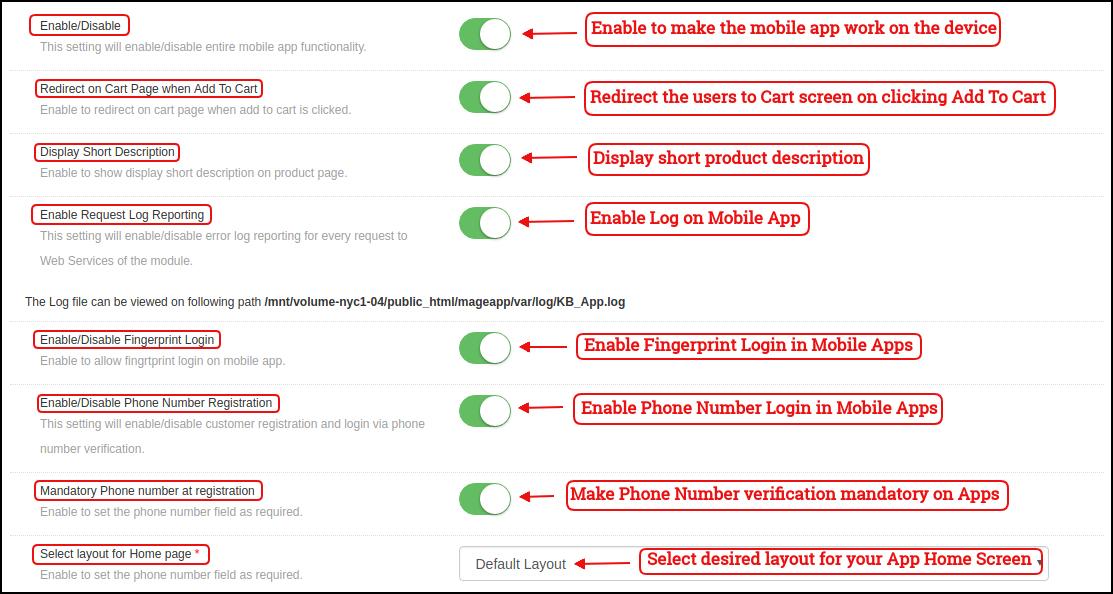
a) Enable/Disable: Enable/disable the Magento Mobile App Builder module to make the apps work on the smartphone. b) Redirect on Cart Page when Add To Cart: Redirect the mobile app users to the cart screen whenever any user tap Add To Cart button. c) Display Short Description: Enable to display the short product description on the mobile apps. d) Enable Request Log Reporting: This functionality enables the error log on the mobile devices. This error log file is used to rectify any error or abnormal behavior of App. e) Enable Fingerprint Login: Enable the fingerprint login option in the mobile apps. f) Enable Phone Number Registration: Enable Phone Number login/registration in the mobile apps. g) Select Layout for Home Page: Choose the desired layout for your app home screen. You can create multiple layouts under Home Page Layout tab which will be displayed here in the drop-down menu.
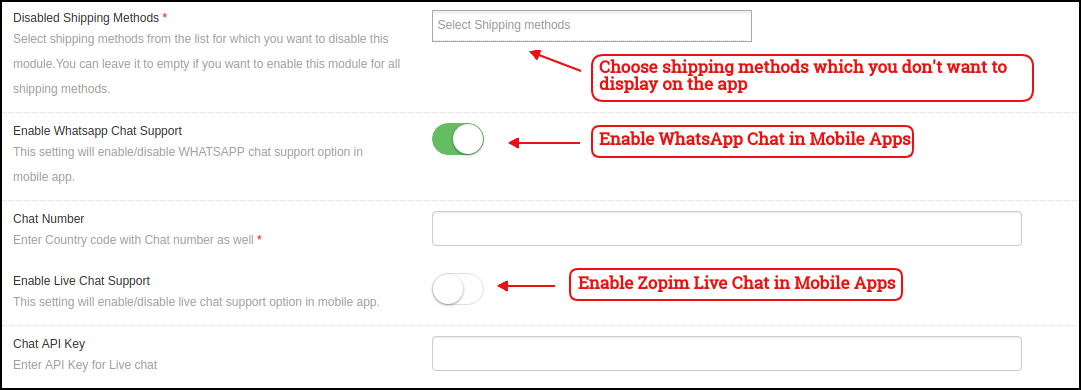
h) Disabled Shipping Methods: Choose shipping methods which you don’t want to display on the Mobile Apps. i) Enable WhatsApp Chat Support: Enable/disable the WhatsApp chat option on mobile apps. J) Enable Live Chat Support: Enable/disable Zopim chat options in mobile apps.
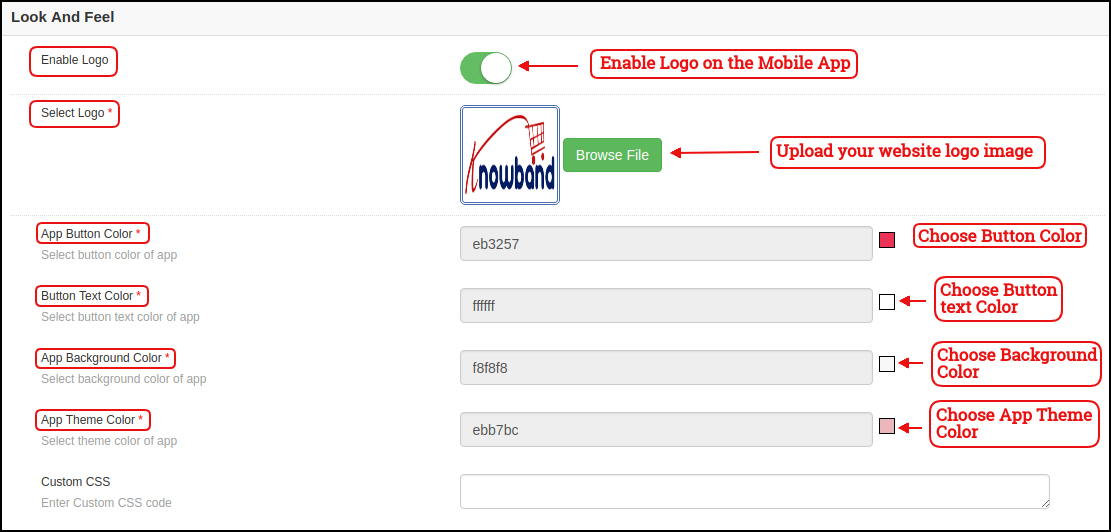
k) Enable Logo: Enable logo in your mobile apps. You can upload the logo image which will be displayed on the header of the mobile apps. l) App Button Color: Choose the button color for your apps. m) App Button Text Color: Choose the button-text color for your apps. n) App Background Color: Choose the background color for your apps. o) App Theme Color: Choose the theme color for your apps.
4.2 Mobile Menu Settings
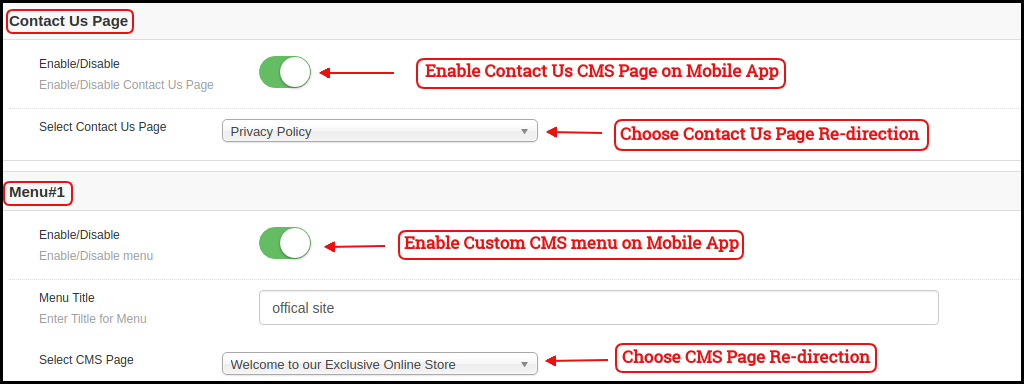
This tab of the Magento Mobile App Maker allows the store admin to display various website CMS pages on the Mobile Apps. You can add as many custom CMS pages as you want. The Mobile App Maker for Magento allows you to bring all the website CMS pages on the app.
4.3 Payment Methods:
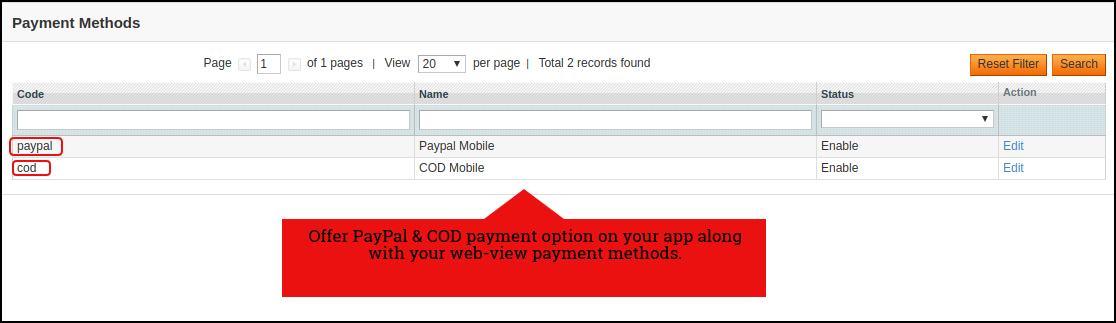
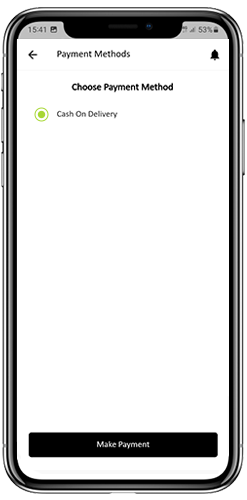
The Magento Mobile App Creator offers additional PayPal & COD payment options to make the payments easier in the apps. The mobile apps with this extension already support web-view payment options in mobile apps.
4.4 Push Notifications:
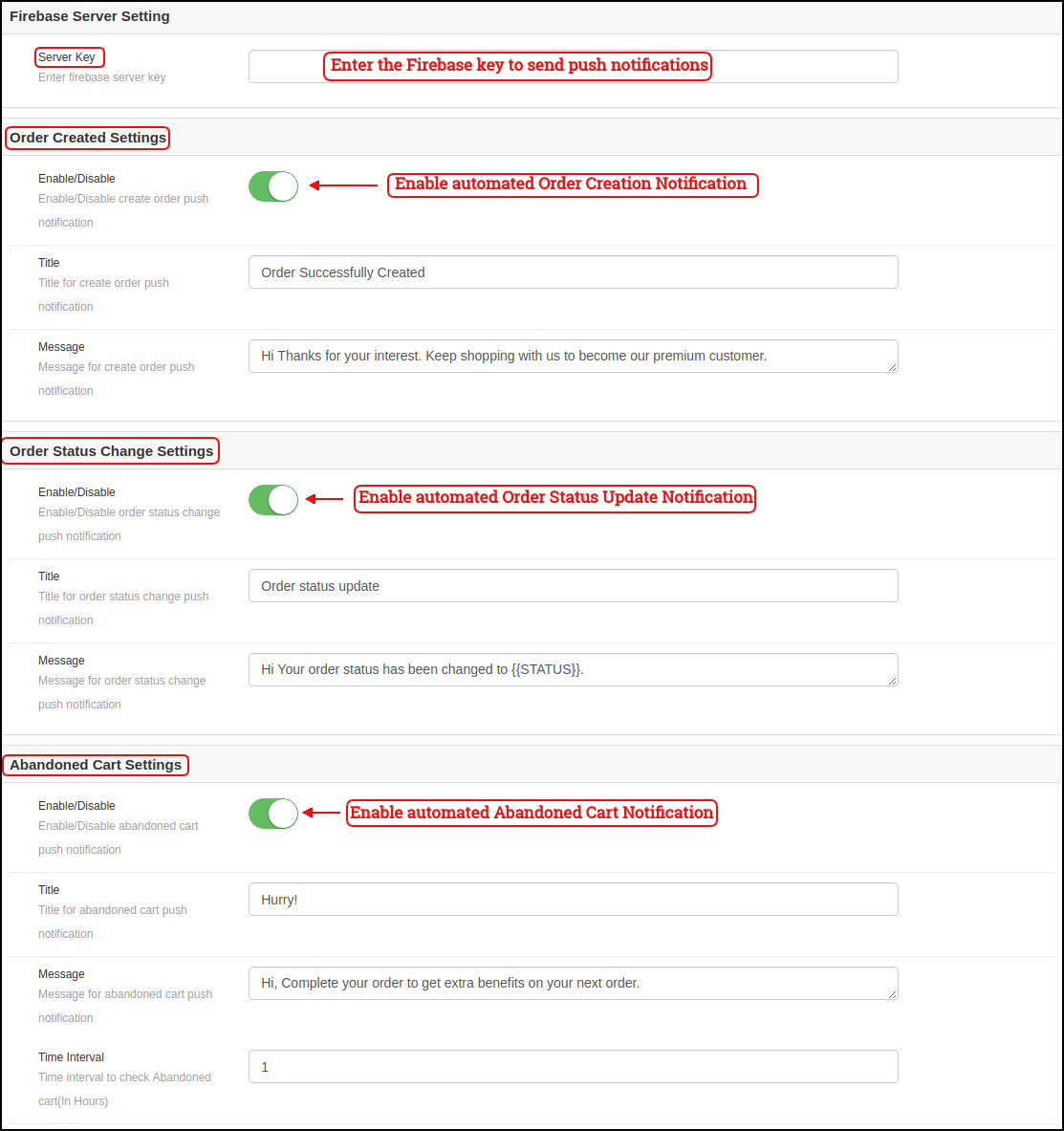
a) Firebase Key: Enter the Google Firebase key to send push notifications on your Magento Apps. You can skip this setting for the Free version. We would set up the same with the paid version of the module.
b) Order Success Notification: Configure automated Order Creation Push notification which would be sent automatically to the user’s who successfully creates an order. c) Order Status Update Notification: Configure automated Order Status Update notification which would be sent automatically to the users whenever there is an update in order delivery status. d) Abandoned Cart Notification: Configure automated Abandoned Cart notification which would be sent automatically to the users who left their products in the cart. This notification is sent repeatedly to the users after a fixed time duration. e) Send Notification:
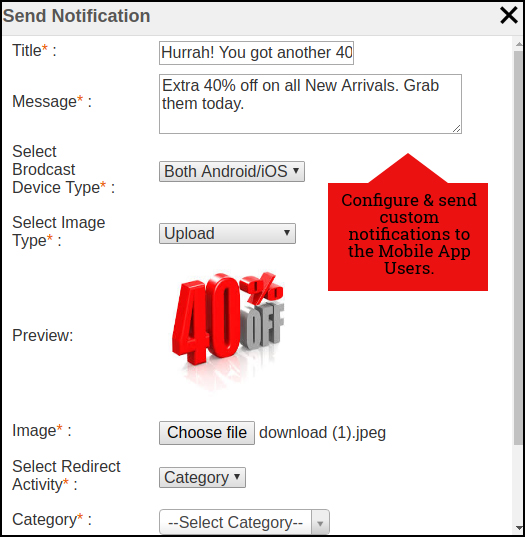
If the store admin feels like there is a need to highlight any daily deals or discounts, custom notifications can also be sent to the app users. These notifications can be configured from the backend panel & will be broadcasted to all app users.
4.5 Home Page Layout
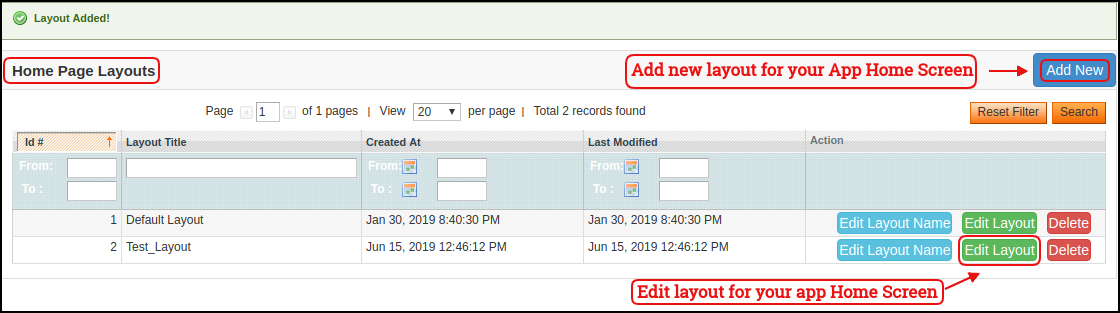
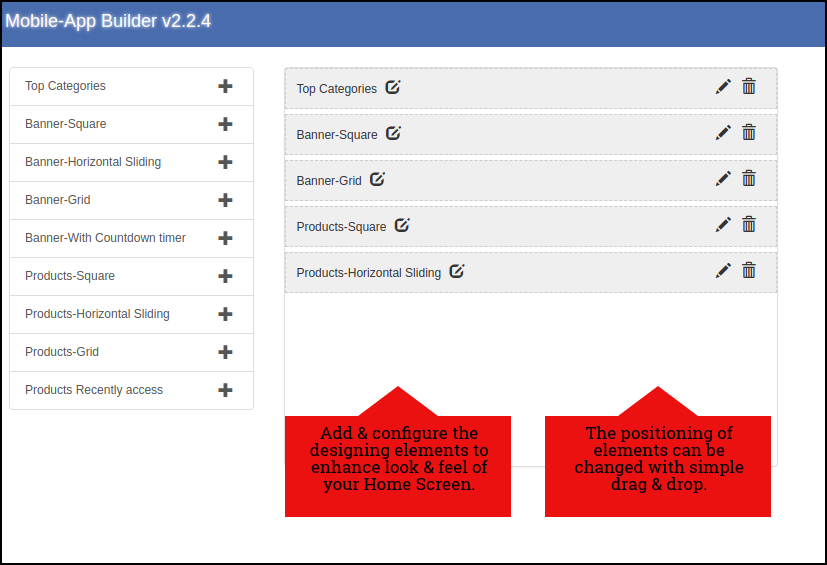
The Magento Mobile App Builder offers customizable Home Screen in your apps whose layout can be configured by you. You can create & save multiple layouts based on various themes, festivals or events & select them for your app as per the requirement.
The module offers the flexibility to add as many layouts as needed along with the options to edit previous layouts.
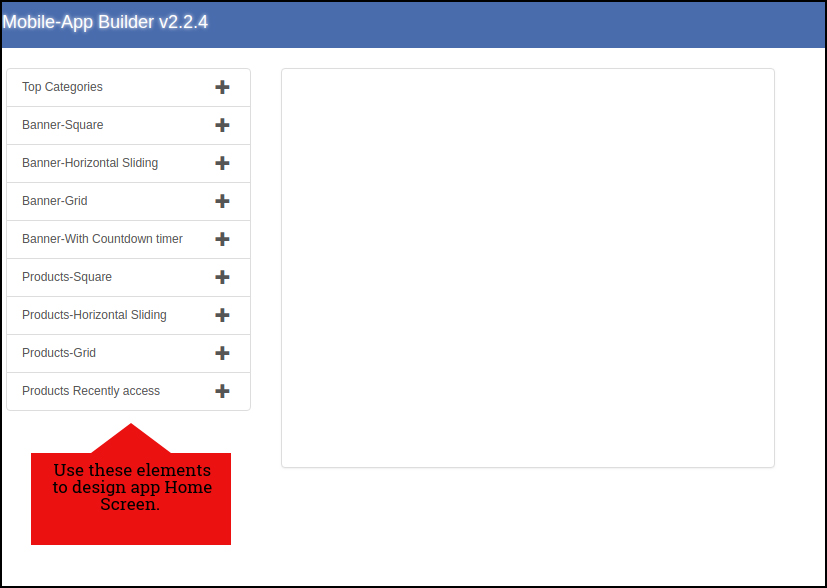
In the Home Page Layout of Magento Mobile App Creator, the store admin gets to edit & customize the following designing elements:
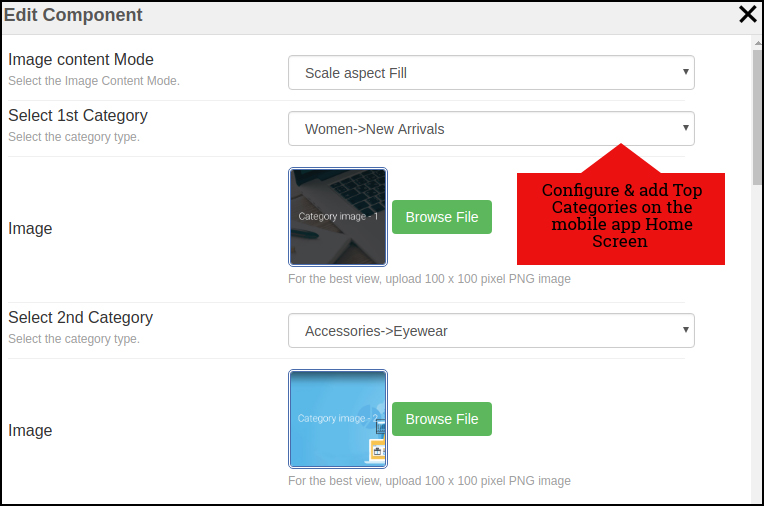
Top Categories:
Top categories are displayed in the form of small squares on the Home Screen which can be configured from the backend using images & landing pages.
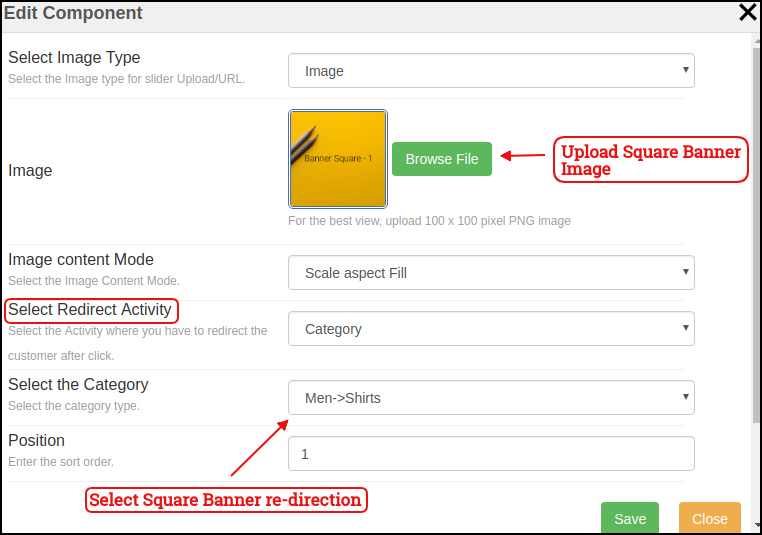
Square Banner:
Square Banner is a configurable square shaped listing on the Home Screen whose image & landing pages can be configured from module backend.
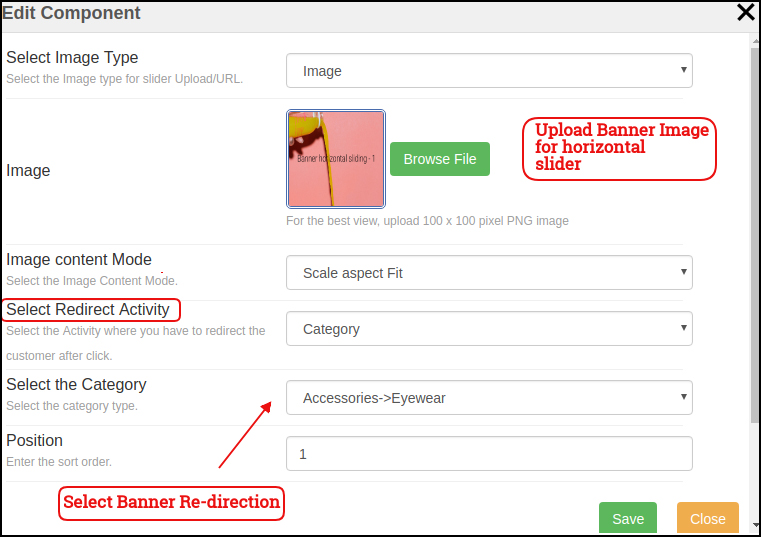
Sliding Banner:
The Banners can also be displayed in horizontal sliding & their image/landing page can be configured from the backend interface.
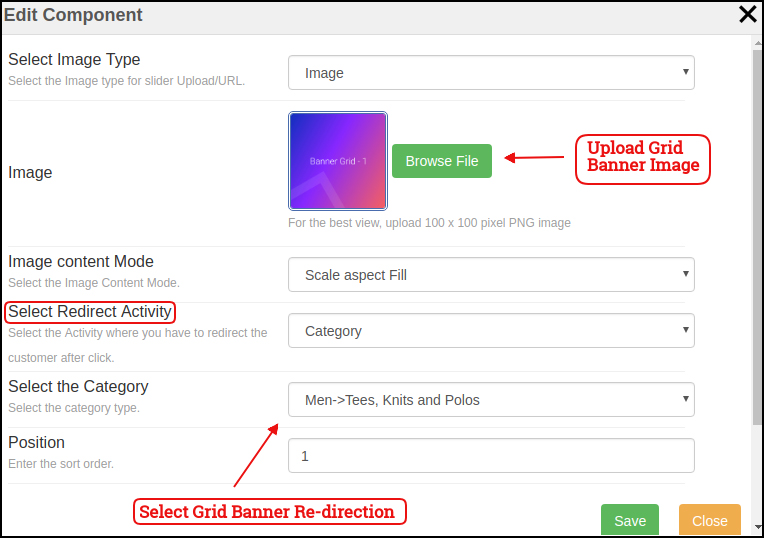
Grid Banner:
The Banners can also be displayed in the form of grid listing on mobile app Home Screen. These banner images & landing pages can be customized easily from the backend interface.
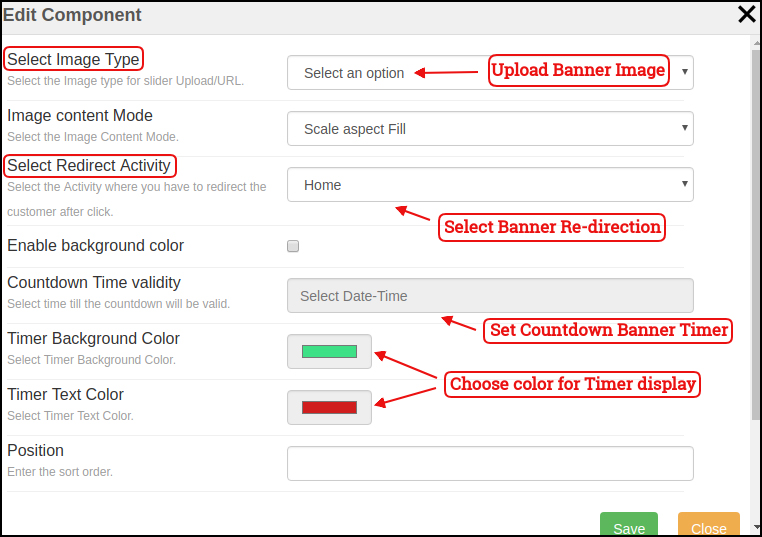
Countdown Banner:
The Magento eCommerce Mobile App Maker offers a count-down timer banner on your home screen in order to offer a time-based sale (Flash Sale). The banner timer, image, landing page can be configured from backend panel.
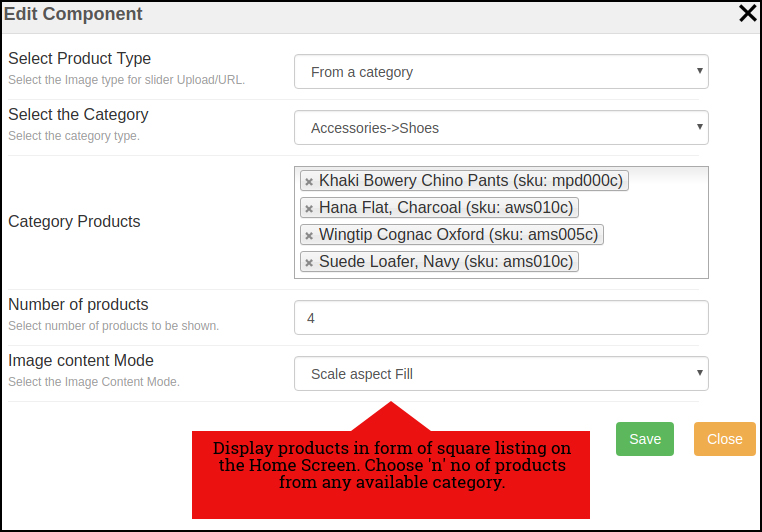
Square Products:
The products on your store can be listed on the Home Screen of the app in the square listing.
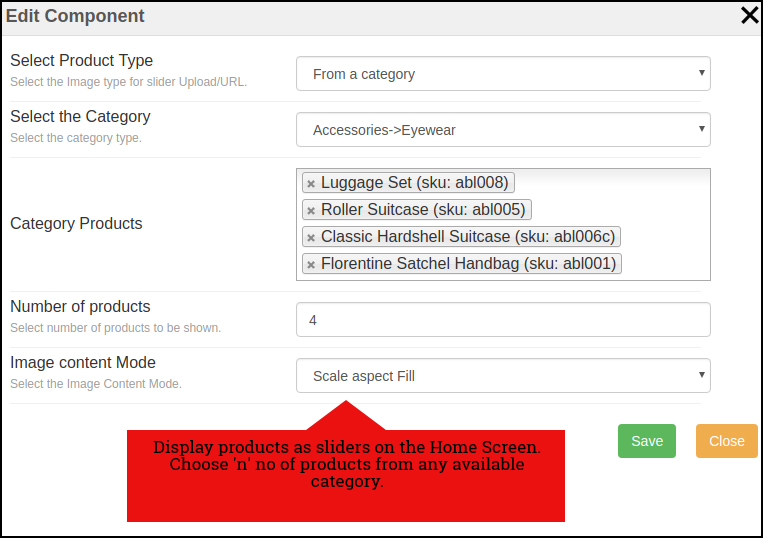
Sliding Products
The products can be displayed in the sliding view on the mobile app Home Screen & can be configured from backend panel.
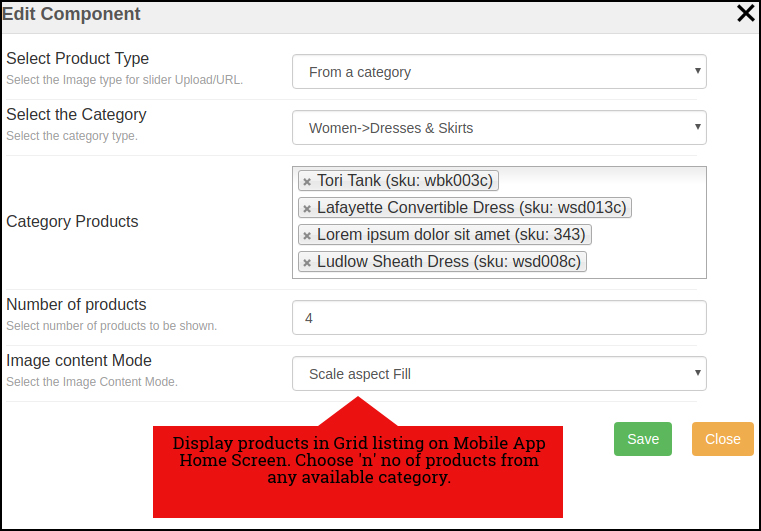
Grid Products:
The products can also be displayed in the grid view on Mobile App Home Screen. These listing can be configured as shown in the snapshot below:
Products Recently Accessed:
The Magento Mobile App Creator brings one more element of Recently Viewed Products. This attribute displays those products in the sliding view which were being visited recently by the user.
Note: The store admin can add up to 20 elements while designing layout in the backend panel.
5.0 Mobile App Screens:
5.1 Home Screen:
The Magento Mobile App Builder offers a dynamic home screen in the mobile apps which can be easily designed from the backend panel. The store admin gets the complete flexibility to design & craft the home screen as per his/her choice. The Magento Mobile App Builder offers the following designing elements:
The positioning of these attributes can also be changed as well just with simple drag & drop.
a) Dynamic Layouts: Craft alluring home screen layouts on your own which connect with the users & compel them to make the purchase.
b) Website Logo: Add your store logo in the module backend & display the same on the header of the app.
c) Search: The search option in Magento Mobile App allows the users to search for products without any hassle. Both keyword & voice search makes it easier for the buyers to get the right product in the least time.
d) Wishlist: Wishlist option in the Magento Mobile App lets you bookmark the products regarding future purchase.
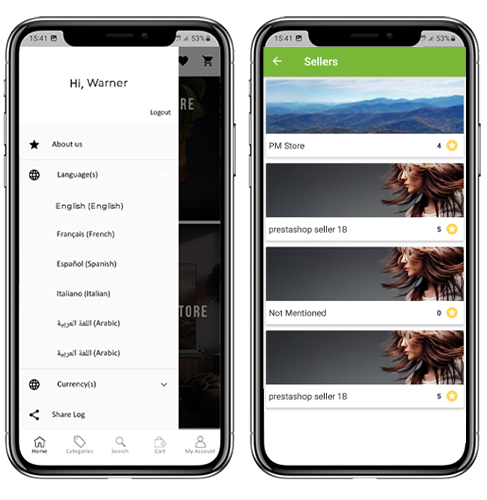
e) Shopping Cart: The users can access the shopping cart from the top-right corner of the home screen.
f) WhatsApp/Zopim Chat: Your Magento Mobile App users can directly contact you regarding any query or concern through WhatsApp & Zopim chat option on the home screen.
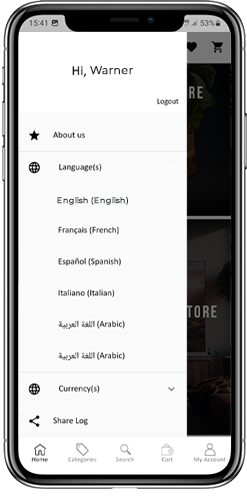
5.2 Accordion Menu (Navigation Bar)
The Magento Mobile Apps for Android & iOS come up with easy to use categorization of your store products. The online shoppers get to browse all the categories in the navigation bar along with all CMS pages. The Accordion menu categories are the same as of your store & it provides the following options:
My Account:
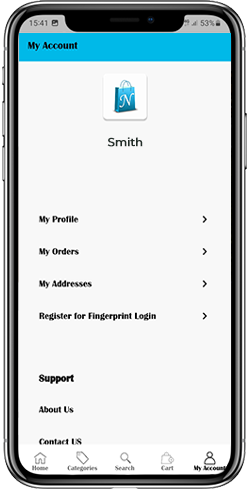
The My Account screen of Magento Mobile App contains all the user information like Personal Details, Shipping Address(s) & Order Details. There is even an option for the users to register their fingerprint. The online shoppers get to view complete personal details from here & update the password as well.
Categories:
All your store categories are fetched on the mobile apps as well. Offer a multi-level categorization to your app users & let them browse products with ease.
CMS Pages:
All of your website CMS pages like About Us, Contact Us, Terms & Conditions, etc will be displayed here.
Language(s):
The Magento Mobile Apps are both multi-lingual & RTL supported. The users can choose the desired language & all the app contents will be translated accordingly. Every language available on the store is displayed here.
Currency(s):
Just like languages all sorts of currencies available on your website will be displayed in Magento Mobile Apps. This allows the users to make the payments with the desired currency option.
5.3 Category Screen:
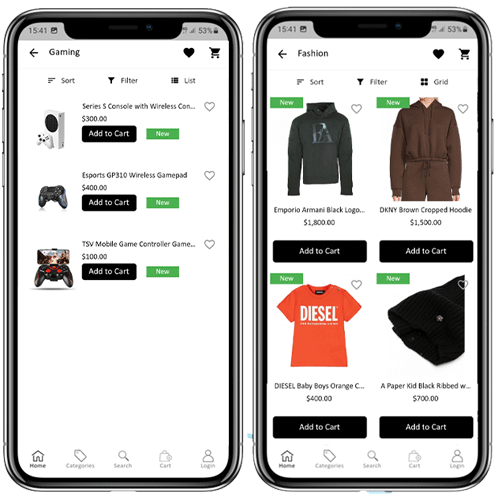
All sorts of categorization available on your Magento stores will be displayed in the mobile apps as well. The category screen has two views: Grid & List view. The product image, name, price is displayed for all product listings. The mobile apps with Magento Mobile App Maker have multiple filter & sorting options which simplify product search for the users.
Grid & List View:
The products can be displayed in both grid & list view.
Sort:
Sort option in Magento Mobile Apps allows the users to view products in Low to High or High to Low category.
Filter:
Filter down the category products with various attributes like price, cost, etc. & search desired products without any efforts.
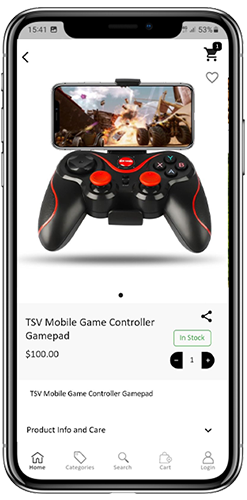
5.4 Product Screen:
The product screen of Magento Mobile App is as simple & easy-to-use as it could get. Every product has multiple images displayed along with name & price. The product availability is also displayed as “In Stock” or “Out Of Stock”. The product screen has the following other options:
Product Options:
Various options related to the product like size, color, etc. are displayed on the product screen. These options are the same as available on your website.
Short Description:
Users get to read the short description of your product to quickly make up their mind. The Magento Mobile App displays both short & full description of the products.
Product Info & Care:
All the information related to the specific product is displayed under this section. This is the same information as of website.
Add To Wishlist:
The users can even add the products into the wishlist bag from here. The products added in wishlist are bookmarked for the future purchase.
Add To Cart:
The Add To Cart button allows you to add product in the cart which can be processed further in successful order creation.
Product Social Sharing:
The Magento Mobile App has the option to share the products on different social platforms, Bluetooth & e-mail. The users can share the products with their friends & relatives & bring potential users to your store.
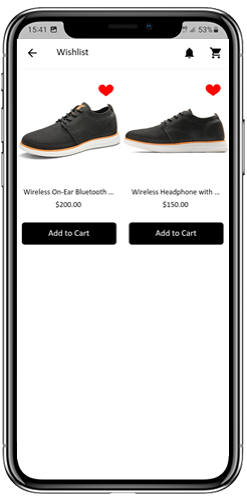
5.5 Wishlist Screen:
The Magento Mobile App Builder has a wishlist bag allowing the users to bookmark products for future purchase. The users can view the list of all wishlist products from this screen. It has the following options:
Add To Cart:
The app users can add the wishlist product directly into the shopping cart with Add To Cart option.
Remove From Wishlist:
The users can even remove any wishlist product with remove option if required.
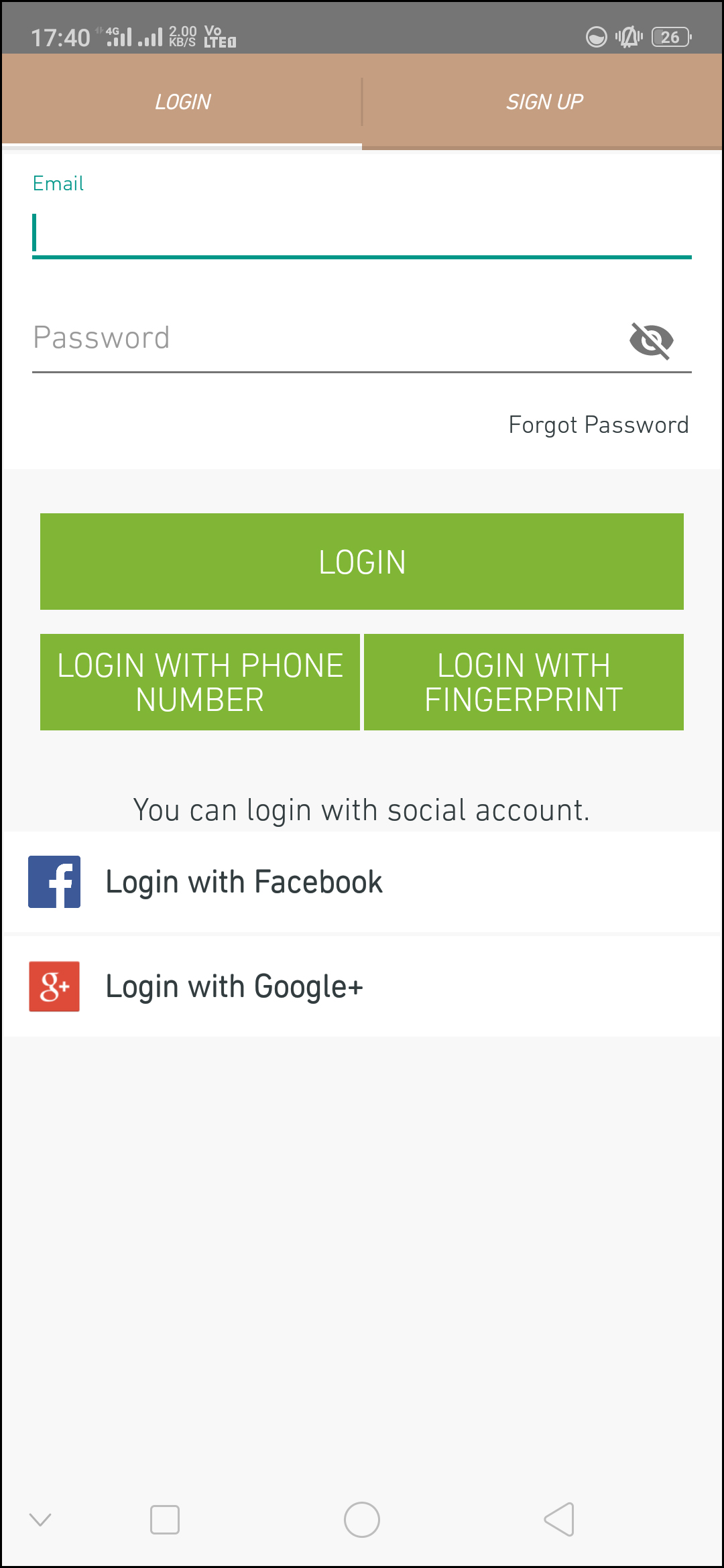
5.6 Login Screen
The Magento Mobile App Creator offers various one-tap login options & make sign-in/registration process more seamless:
Login:
The app users can authenticate & access to Magento Mobile Apps using e-mail sign-in credentials.
Sign Up:
All the new users can sign-up & create their account on the store from mobile App. The sign-up form of Magento Mobile App is fully uncluttered.
Login with Phone Number:
Your Magento Mobile App comes up with phone number login option as well which allows users to verify OTP & login without any hassle.
Login with Fingerprint:
Your app users also get an option to log in with a fingerprint. This biometric authentication allows the users to login apps in seconds.
Login with Facebook:
The users can log in into mobile apps using their Facebook Account Credentials.
Login with Google+:
The users can log in into app using their Google+ Account Credentials.
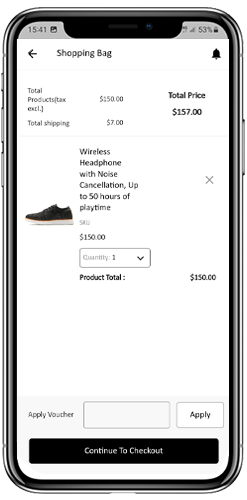
5.7 Shopping Cart Screen:
The Shopping Cart screen of your Magento Mobile App will display all products added into shopping cart. The app user’s can view Product name, quantity, total price & shipping cost. This screen has the following options:
1. Apply Voucher:
This option allows the users to get discounts & offers by entering valid coupon & voucher running on your website.
2. Total Product Price:
The users can view the complete cost of their shopping bag which is automatically updated as per any addition in the cart.
3. Update Product Quantity:
The users can even update the specific product quantity.
4. Remove Product:
The app users can simply remove the product from the cart.
5. Continue Shopping:
The app users can leave the cart to browse more products on your app. The shoppers will be re-directed to the home screen on tapping Continue Shopping option.
6. Continue To Checkout
The app users can proceed further to the checkout & payment screens just by tapping the “Continue To Checkout” option. It will re-direct users on the checkout screen.
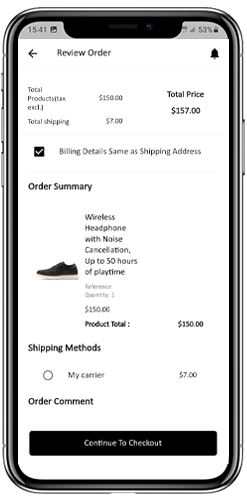
5.8 Checkout Screen
The mobile apps built with Magento Mobile App Maker has a simplified checkout approach on a single-screen. The users can review complete order details like shipping details, billing details, order summary, order comment, payment summary before making the actual order.
Shipping Address:
The checkout screen of Magento Mobile Apps screen provides details of all addresses saved by the user. If required, the user can also edit/save new shipping address. The total checkout cost is also displayed on this screen.
Billing Details:
The users can even enter billing details along with shipping details for their purchase. They can also choose the shipping address to be same as the billing address.
Order Summary:
The app users get to view purchased product details along with the quantity before making the final purchase.
Shipping Methods:
Every shipping methods running on your website are displayed on the checkout screen as well. The users can choose the desired one from here.
Order Comment:
The app users can also add any comment related to their order which will be visible to the store admin in the backend.
5.9 Payment Screen:
The payment screen on the Magento Mobile App displays both web-view & native app payment methods. The Magento Mobile Apps supports all sorts of website payment options along with PayPal & COD payment methods. Moreover, various other native payment options like PayU, Apple Pay, Amazon Pay, Braintree, Stripe etc. can also be added in your mobile app over a fair price.
5.10 My Account Screen
My Account screen of the Magento Android/iOS App allows the users to view the complete account details including list of all previous orders. My Account screen has the following other options:
Order History:
The users get to know about complete order details created on the app. The order creation date, reference, price & delivery status is available on this screen.
Update Profile:
Users can also update their pre-saved profile details like First or last name, phone number & password.
Shipping Address(s):
The app users can see the complete list of saved Shipping Addresses. New Shipping address can also be added from here.
Order Details:
The app users can view the complete list of the previously placed orders from the app.
Re-order feature:
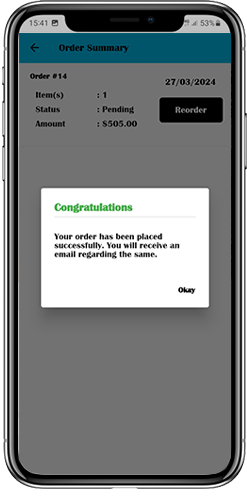
There is a direct re-order functionality allowing the users to repeat the order just by clicking “Re-order” button.
5.11 Order Detail Screen
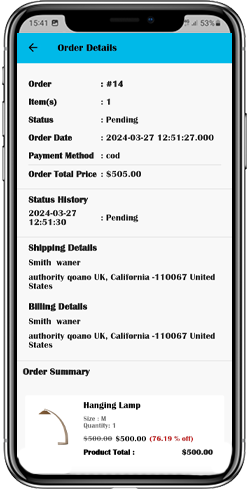
Order details screen of Magento Android & iOS App provides complete order detail such as shipping address, product summary, shipping and payment method and total cost summary. This order detail is of the previous order placed by you. The users can even track the delivery of previously placed orders directly from this screen.
6.0 Advanced Magento Marketplace with Mobile App
KnowBand’s Magento Marketplace converts your online website into a fully fledged marketplace. The Magento Mobile App Builder is fully compatible with Magento Marketplace extension. This means you can bring the entire marketplace listing on the same Magento Mobile Apps. Thus, launch a pair of Marketplace compatible Mobile Apps with KnowBand & attract a large base of sellers & customers to your store.
–> As the user clicks on the Seller option, he/she is redirected to the Seller page of the mobile store. The user can view the list of the sellers of the marketplace along with their rating.
–> The customers can click on the name of the seller in order to see his profile and product being offered. The sellers can log in with their username and password. They are then redirected to the dashboard.
Get to know more about the Magento Mobile App Builder plugin with:
According to a data from BuiltWith, there are currently 250,642 live Magento sites worldwide and this count is still increasing day by day. So many eCommerce stores on Magento means so many problems for each of them to deal with. Naturally, website owners can face problems while using any eCommerce platform.
Fortunately, Magento does not leave it’s users in disguise and has various resources to provide the help. It gives me a great pleasure to compile a list of all the useful resources that you can leverage to keep running with the Magento eCommerce platform.
Where can you find the support about Magento issues?
In order to get a help/assistance/support for solving the different issues that you may face while running your business on this great platform, you can primarily latch on four categories of resources:
Magento Related Forums
Magento Related Blogs
Magento Related Social Groups
Certified Magento developers
Magento has one of the biggest communities
Magento is used by the website owners from different countries in the world. It has reached to almost every party you can imagine . Especially it is so popular in the countries like United States, Canada, United Kingdom, Germany, France, Italy, India, and Netherlands etc.
When this platform has users from every corner of the globe, it is more likely to possible that links given in this article would belong to different languages and region. It’s perfectly fine, as you have translators that can help in understanding and communicate with them.
How would this list help the developers?
Resources compiled in this list will not only help the website owners to get the support for their Magento stores but would also help the developers to generate leads to make new customers. You might find customers for your Magento Extensions, themes, and custom Magento development.
Magento Related forums
Here is the list of top Magento forums that you can visit to find a support. URLs for all the mentioned forums will be given in the list. You can copy and paste these URLs into your browser and visit them.
1. Official Magento Forum
The official Magento forum has currently 245797 members and more than 63,000 live posts. Before going anywhere, it is the best place to find the support and solution to your Magento related issues. Here you can post your issues, browse the threads of already created issues, Stay updated with latest Magento news, and much more.
Just don’t forget to stay abide the forum rules and regulations while posting anything over there.
Link to Forum: www.community.magento.com
2. Expert Magento Forum
Expert Magento Forum is the most popular resources after the official forum to get support for Magento related issues. Not just issues, you can find the news updates, Magento job updates, and freelance projects, etc.
Currently, there are 10,790 members with 7,529 threads and 25,406 active posts.
Link to Forum: www.magentoexpertforum.com
3. Magento Stack Exchange Forum
Magento Stack Exchange is a special version of the popular forum “Stack Exchange” forum. It is a question and answer platform where users can get the information from very basics to advanced level topics and issues.
The best place to find a support for any of your Magento related issues, even if you are a beginner. From Magento configuration to coding related issues, you can expect this platform to give you an answer to everything about Magento.
Link to Forum: www.magento.stackexchange.com
4. Magesolution Forum
Magentosolution community is incredibly active and the best place for Magento beginners as well as advanced programmers to get the support. Generally, the people behind this forum are the ones who reply to your queries. The moderators take pretty active part in the discussions too.
The forum claims to reply to your queries in less than 24 hours on the weekdays and less than 48 hours on the weekends. Moreover, they also post articles and blogs related to Magento which are also quite helpful.
Link to Forum: magesolution.com/support/forums/
5. Magento community Russian
This is the official Russian Magento forum which is one of the most popular international forums for Magento. The expert Russian developers are always active and ready to help the needy. Most of the times, I have found the solutions for my those Magento issues which were not there on the English version of the forum. So, it is a useful resource that you can bookmark.
You can easily understand the posts and thread on this forum by using translators.
Link to Forum: community.magento.com/t5/Russian/bd-p/russia
6. Magento community German
This official Magento forum is especially for the very active German Magento Community. You may also want to have a look at this forum to find solutions and resources.
Link to Forum: www.community.magento.com/t5/German/bd-p/germany
7. Go Mage Magento Forum
This is a quite young forum yet it has a decent population of Magento developers, users, and website owners. You can always check the useful resources provided here in the form of forum threads, blogs, and articles.
Link to Blog: www.magentoforum.com
8. Escola Magento Forum
This forum was created for sharing useful Magento related information and discussing on various issues and solutions. It also provides Magento tutorials, blogs, and articles. It can be a very useful resource for Magento developers.
Link to Forum: www.forum.escolamagento.com
9. Polish Magento Forum
This is a special forum for Polish Magento community. However, you can easily access the resources, tips, tricks, tutorials, issues, threads etc by just using a translator.
Obviously, you won’t want to loose a useful resource when language is no more a bar.
Link to forum: www.magentoforum.pl/
10. Magentovietnam Forum
This is a special forum for Vietnamese Magento community. However, it is easily accessible throughout. It is one of the most useful forums in my list here.
Just translate and see how useful it can be to your Magento development and Management related tasks.
Link to forum: www.magentovietnam.com
Magento Related Blogs
Forums are considerably the best way to get the support for all your Magento related issues and requirements. However, most of the people don’t know about all the useful forums they can leverage. As an alternative or the next level, Magento related blogs come quite handy and easily accessible.
Given below is the list of top 10 Magento related blogs that can be pretty helpful to you:
1. The home team (Knowband blog)
Knowband is primarily an eCommerce plugin and extension development company. Apart from Magento, here you can find useful blogs, tips, tricks, tutorials, and insights about PrestaShop, OpenCart and various eCommerce related topics. You can also find the detailed user manuals, and documentations about all the ecommerce plugins and extensions developed at Knowband.
Magento has an official blog where you can find latest News, updates, articles released by the official Magento team. Here, you can also find various guest posts and case studies posted by the Several Magento experts, website owners, and developers.
Link to Blog: www.magento.com/blog
3. DLTR
What could be better than getting the tips and tricks from a certified and experienced Magento developer? DLTR is one such blog written by Damodar Bashyal a certified Magento developer. This blog is a very good repository of valuable contents that basically deals with technical stuff. It’s worth a look.
Link to Blog: www.dltr.org/blog
4. Inchoo
Inchoo is one of the most popular blogs for Magento. Here you can find the solutions to various real context issues related to Magento. From trending news to technical contents with usable codes, you can find a great help here.
Link to Blog: inchoo.net/blog/
5. Magetraining
Magetraining is basically a Magento training company for Merchants. Its blog is quite resourceful and you can find a lot of valuable information that can be applied in your Development and Magento operation related tasks.
Link to Blog: www.magetraining.com/uk/blog/
6. Aheadworks
Aheadworks blog not only publishes the Magento related contents but the latest news, updates, and article on various eCommerce related trends and developments. It is quite popular among the readers.
Link to Blog: blog.aheadworks.com
7. Magento Fox
This amazing blog provides a great compilation of Magento news, tips, tricks, and tutorials. You can also find Magento tutorial videos here.
Link to Blog: www.creare.co.uk/blog/magento
8. Amastyteam
Run by Magento developers this blog can be quite useful for referring to the useful Magento tips, tricks, articles, and tutorials. This is one of the pretty active blogs where they produce a lot of contents.
Link to Blog: www.blog.amasty.com
9. Magenticians
Run by expert Magento developers, writers, and guest post contributors this blog is a useful platform to get the resources and insight about Magento news, updates, development related contents, Magento SEO tips, etc.
Link to blog: magenticians.com
10. Fooman
Fooman has been publishing contents for a very long time now. Here you easily can find a good ultimate repository of useful Magento related blog posts and other articles. It’s full of informative contents about Magento 1 and Magento 2.
Link to Blog: www.store.fooman.co.nz/blog
Summary
The resources mentioned in this post can come pretty handy for most of your Magento related requirements. You can refer to these resources for getting a support on various aspects like:
Development related issues
Tips and tricks
News updates
Tutorials
Training
E-Commerce Insights
Magento SEO and much more.
Hopefully, this post will act as a directory to access the best support for Magento. Let me know in comments if you can name some more useful resources for the global audience. All suggestions are welcomed here.
In case you cannot find satisfying support from these resources, you are always welcomed to get in touch with us. Our certified Magento developers are also active in most of the forums and guest posting blogs. Feel free to contact us.
The time has come when no one can deny the role of eCommerce websites in making the life of customers easier. Additionally, eCommerce has provided loads of opportunities for business owners for reaching out even to the remotest places on the planet. B2B eCommerce is one such opportunity provided by the eCommerce world. Although B2B eCommerce market is quite new, it has a very promising future as estimated by the experts. Forrester said in 2009 that B2B eCommerce will grow its value as twice the value of the B2C market, and that’s a huge share.
Since B2B market is having a very promising future, it’s a fact that competition in this segment is also toughest. So, the first question that comes to our mind in this situation is regarding choosing the best eCommerce platform for facilitating a hassle-free B2B business in long run.
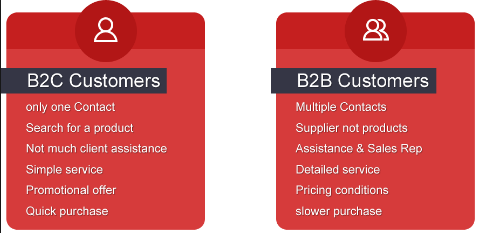
The modus operand of B2B and B2C are quite different from each other
Magento B2B eCommerce
B2B websites are quite different from regular eCommerce sites and they possess quite complex functionalities for facilitating a hassle free system in long run. If not chosen wisely, it will certainly be a great challenge to shift to any other solution as it involves a large number of direct participants at all levels- Business to Business level as well as Business to Customers level.
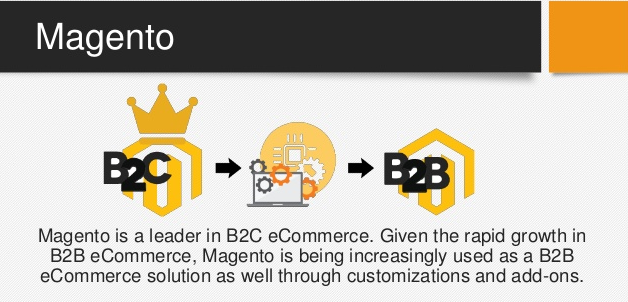
Magento was originally originated a B2C platform. Gradually, it was evolved to fulfill the B2B functionalities. Later, the Magento platform acquired even the most complex B2B features that make it a perfect tool to even compete against B2B specific platforms. Let’s take out some very important features of Magento for B2B and find out how it is a wise choice for B2B websites.
Magento fits in the B2B model because of multiple reasons
Extensive Flexibility for customization
Magento possesses a very high affinity for the customizable features. Being an Open source platform and built on very popular PHP programming language, it has a wide base of Magento professionals who can work to customize it in many ways. This affinity and strong base of Magento experts make Magento a perfect option for B2B specific developments.
Magento B2B is comparatively economical than other B2B platforms
Magento is comparatively less expensive when it comes to leveraging its implementation cost and Enterprise license. Other enterprise-level B2B solutions like IBM and Oracle come out as far more expensive than Magento for B2B solutions. Moreover, due to a massive base of Magento developers, freelancers, and Magento development companies Magento provides a good bargain power to the Magento services seekers.
Large number of already developed Magento B2B solutions
Now, it’s known that Magento is a master of a huge community of users, developers, freelancers and business owners, third party Magento developers are always ready with pre-developed solutions to make the customization quick, and less expensive. For example, Magento multi-vendor marketplace extension is a third party Magento extension that converts a Magento store into a marketplace site. This is a perfect example to explain that most of the advanced B2B features can be achieved in Magento without going for customization services. You can always find most of the Magento extensions and install them to extend the functionalities in minutes.
Complex pricing system of B2B market
The B2B market also consists of the wholesalers and manufacturing companies who require a more complex and advanced pricing system. The pricing system includes individual and group discounts, location and tire-oriented rates, prices based on sales volume etc. This massive flexibility in pricing system cannot be handled by a simple eCommerce platform. Therefore Magento for B2b fits the best here as it provides a wide flexibility to decide the pricing based on all these factors. It is a perfect platform to handle the business from Wholesale and Manufacturer market.
Order fulfillment in B2B websites
Magento possesses a very robust order management system which allows the admin to track every order in a single view. Clicking on each individual orders show a detailed information including order status, payment information, pending payment details, pending order details, processed orders and much more. The invoicing system is also highly flexible and you can send invoices to your customers from the back end order management interface itself. On, the whole Magento for B2B gives you the control and flexibility to showcase a very strong and error free B2B experience to your customers.
Anyway, the nearest future is looking forward to growing exponentially in terms of B2B eCommerce business. For this, you will need a tool by your side that will support your business in a long run. Magento for B2B is a solution that is worth paying attention to.
E-Commerce is a field of huge business opportunities and the success of companies like Amazon, eBay, Alibaba, Flipkart, and others have proved it numerous times. No doubt, it has endless opportunities but with the emergence of other players, competition in the eCommerce field has heated up to a great extent. Most importantly, the worst sufferers are the small and medium companies that don’t have a huge customer base and market reach. To guide those vendors, online marketplaces seem to be the perfect place for grabbing higher conversions and sales among bigger stalwarts.
We are glad to inform you that our company, Knowband has come up with this extraordinary Magento Multi-vendor Marketplace Extensions that has raised new hopes among small and medium vendors in terms of conversions and sales. Let us discuss the various ways which make this Magento extension as the most loved and popular choice among various Magento Marketplace extensions.
Quick registration facility for sellers
Unlike other available Magento Marketplace Modules, this Magento Marketplace extension has the feature that provides the smooth seller registration from the front end itself. It features a “Register as Seller” option on the registration form that eliminates the hurdles in the seller registration process.
Smooth management and control of the seller account
It is now much easier to manage and control your seller account with the interactive and friendly front end interface of this module. Being a seller, you can manage various seller activities like the addition of a product, quantity, or price. Apart from this, there is no need for any back end login by sellers for accessing their individual account making it as one of the most lucrative Magento Marketplace modules for its targeted customers.
Helps in tracking sales behavior for improving their business in the long run
With the help of this Magento Marketplace extension, the seller can now track the sales information in the form of average revenue per order statistics, items sold by a seller, income, order details, and other such statistics through the help of various graphs, charts, and reports. By having all these relevant data about their seller account, it will be a much-simplified task for individual sellers to boost their conversions and sales.
Magento Marketplace extension provides an easy mechanism to include special prices for products
In order to boost more conversions and sales on your Magento store, you need to run various shopping offers and campaigns from time to time. Furthermore, to create a sense of urgency among your customers, it is important to run campaigns with your attractive offers in the form of special prices. The availability of features like ‘Special Price From’ and ‘Special Price To’ dates in this Magento Marketplace extension can inform customers about the life span of your offers to grab higher conversions and sales in a coherent manner.
Effortless addition of various elements and components
It is now much easier to include a banner, shop logo, custom HTML content, social URLs, and another such element in your Magento site for better performance and productivity. Due to the smooth integration of various elements in this Magento marketplace module, it is now a cakewalk experience to achieve an initial lead among your business rivals. Thus, the easy addition of various site elements makes this Knowband extension as one of the popular choices among numerous Magento Marketplace Modules for providing equal business opportunities to small and medium vendors.
Don’t lose higher conversions and sales even if you are one of those small and medium-size vendors as this Magento Multi-Vendor Marketplace plugin is ready at your service. With the baggage of features and functionalities, it can stand tall among various available Magento Multi-vendor marketplace modules for imparting a unique place to your eCommerce business. Grab this module now by visiting our Knowband store and exploring other ways of getting higher conversions and sales.