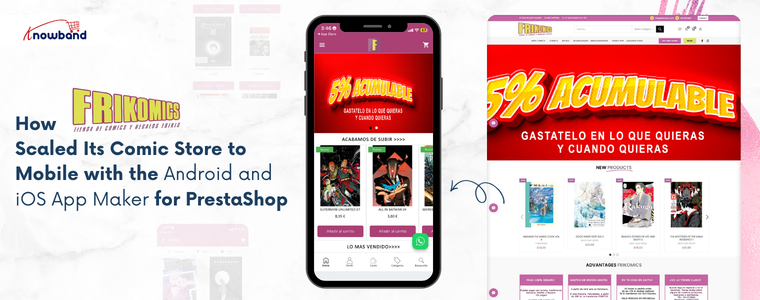
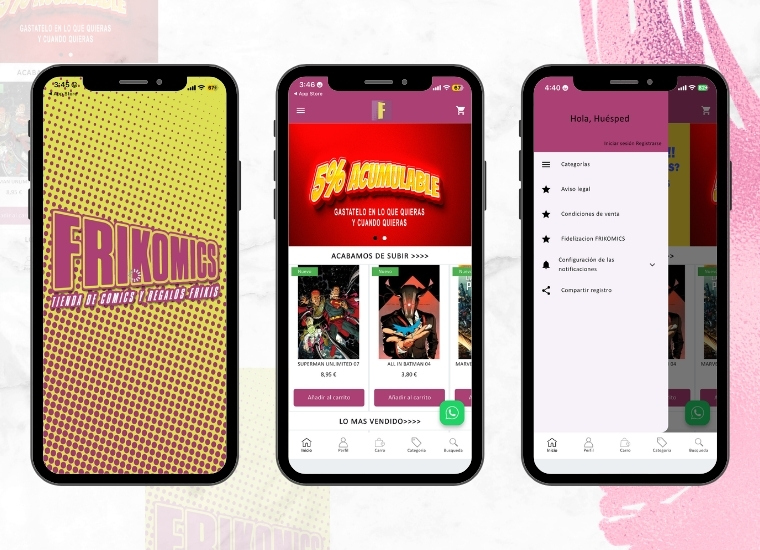
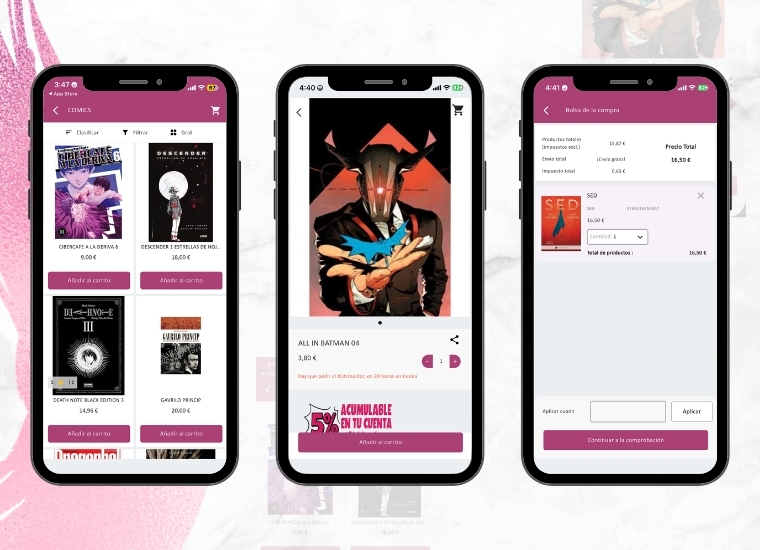
Frikomics is a comic brand built for readers who are serious about their hobby. The store stocks comics, graphic novels, and fan merchandise for readers of all ages. Over the years, the brand earned real loyalty from its community by focusing on what matters most: good products and a reliable shopping experience. But as the catalogue grew, so did the traffic coming in from mobile devices. The Frikomics team noticed that most customers are browsing on their phones. However, a browser-based mobile experience was not giving them what a dedicated app could. Frikomics saw the gap clearly and decided it was time to act and that’s where the Android and iOS App Maker for PrestaShop by Knowband came in.
Why a Mobile App Became the Next Step
Comics thrive on discovery. Customers browse often, shortlist titles, and return when something new drops. Therefore, re-engagement methods like push notifications and wishlist functionality are not just extra features; they are central to how the business grows.
Without a dedicated app, Frikomics struggled to connect with its customers between visits. Furthermore, the browser checkout on mobile added friction right where the buying decision was most fragile. As a result, the team recognised that a proper mobile app was the next necessary step.
The challenge was doing it without a long and costly development process.
Choosing the Android and iOS App Maker for PrestaShop
To solve this, Frikomics partnered with Knowband and integrated the Android and iOS App Maker for PrestaShop.The PrestaShop Android and iOS Mobile App Creator Module connected directly with the existing store and pulled in all products, categories, inventory levels, and payment methods automatically. Hence, nothing needed to be rebuilt or duplicated. Additionally, the addon delivered a Flutter-based mobile app solution covering both Android and iOS, so one decision handled both platforms at once.
🤖 AI-Powered
Automate Store Conversations with a Prestashop AI Chatbot using OpenAI
Answer customer questions 24/7, reduce cart abandonment, and free up your support team, all with one smart AI Chatbot for Prestashop.
Furthermore, the PrestaShop Android App Builder Module managed branding, home screen layout design, and final app delivery. Frikomics shared their specifications, and the app was ready within the standard turnaround window.
Once live, Knowband’s PrestaShop Android and iOS Mobile App Creator Addon gave Frikomics a branded presence on the Google Play Store and the Apple App Store. Customers could browse the comic catalogue in list or grid view, save titles to a wishlist, and complete purchases through a checkout screen built specifically for mobile use.
Moreover, the PrestaShop Mobile App Creator Module brought push notifications into the marketing mix for the very first time. The team could now send direct alerts to customers’ phones, keeping them informed about new releases, current deals, and reminders of abandoned carts. This change replaced the need to rely on email open rates with a more immediate way of communicating.
Social login through Google, PayPal, and Facebook reduced sign-up steps for new users. Additionally, OTP-based phone number login gave returning customers a faster way back into their accounts.
The addon also handled multi-language and multi-currency support, opening the store to a broader audience without extra configuration. The PrestaShop eCommerce Mobile App kept product data and inventory synced between the website and the app at all times. Since everything updated automatically, the team did not have to manually adjust stock levels or recheck listings across two separate systems.
Results After Implementing the Mobile App
After the app went live, Frikomics noticed real changes in how customers interacted with the store:
Mobile browsing became faster and more comfortable, and customers spent more time in the app.
Push notifications brought back readers who had not visited in a while, especially around new comic releases.
The touch-optimised checkout reduced the drop-off that typically happens on mobile.
Day-to-day operational tasks took noticeably less time, thanks to automatic syncing.
As a result, the team had more room to focus on what the brand is actually built around, sourcing great comics and staying connected with the community.
Frikomics came in with a clear problem: customers were on mobile, but the store was not truly built for it. After choosing the Android and iOS App Maker for PrestaShop by Knowband, that gap closed quickly. The brand now has a proper mobile presence, branded, functional, and built to grow alongside the business.
The PrestaShop Mobile App Creator by Knowband provided Frikomics with direct access to its audience, a reach that email marketing couldn’t quite match. Frikomics has since broadened its mobile presence, regularly utilising push notifications to keep its community informed about new releases.
This demonstrates that establishing a mobile presence doesn’t require a complete redesign. With the right solution, a PrestaShop store can cultivate a robust mobile presence efficiently and without added complications.
Regardless of whether you’re operating a small shop or have a vast inventory, Knowband’s PrestaShop eCommerce Mobile App Module presents a straightforward and dependable route to mobile expansion, designed to integrate seamlessly with your existing store operations.
Get fully Flutter Android & iOS apps for your PrestaShop website & start selling your products on Mobile Apps!
1.0 Introduction
This is the user guide of the advanced & readymade Flutter mobile app solution of PrestaShop Mobile App Builder. This is an eCommerce website plugin designed & crafted to build perfect & featured Android & iOS shopping apps for you.
1.1 PrestaShop Mobile App Builder: A Brief Introduction
The PrestaShop Mobile App Builder is the most advanced & automated solution to take your online website business to the mobile platform. It transforms your entire website into a featured Mobile App & allows you to sell products on mobile along with the traditional website. The functionalities & working of the app exactly match the website & work flawlessly on both Android & iPhone devices.
Our PrestaShop Mobile App Builder is the pre-configured framework designed by experts & professionals to build a pair of Flutter eCommerce apps. The apps are capable of taking all your store products to the user’s fingertips & boost sales & revenue. So, if you are a PrestaShop store merchant & looking for a full-fledged mobile app solution, this is your best chance. Read the complete article to get fully intact info on PrestaShop Mobile App Development.
Also, our PrestaShop Mobile App Builder extension is fully compatible with the Multi-vendor Marketplace plugin. You can bring the entire marketplace listing on the same Mobile Apps. We even offer a combo pack of our PrestaShop Mobile App Builder with PrestaShop Multi-Vendor Marketplace in PrestaShop Advanced Marketplace With Mobile App.
New Update: PrestashopMobile App and AI Chatbot Integration 6.0.6
The PrestaShop Mobile App Builder now supports integration with the PrestaShop AI Chatbot, helping store owners provide AI-powered assistance to mobile app users. The chatbot can help customers find products, get answers to common questions, and receive personalized product recommendations directly within the mobile shopping experience.
Moreover, the following benefits of PrestaShop Mobile App Maker would compel you to go for this Flutter app solution:
A no-code Mobile App solution.
Friendly admin panel with complete access.
3 months of free support
Fully Flutter solutions (Android & iOS)
100% synchronization between your apps & website
Highly customizable with design & functioning control.
Increases user engagement with handy marketing tools.
Increases traffic & revenue to your store.
1.2 Top-notch Features of PrestaShop Mobile App Builder:
Here is the list of some of the key features which you will get in your apps with Prestashop Mobile App Builder:
Customizable Home Screen Layout (Complete Flexibility)
Store Branding
WhatsApp Chat Support (24*7)
Google & Facebook Login
OTP & Fingerprint Login
Both Tablet & Mobile Support
Android 4.2 and so on Android VersionSupport
iOS 9 and so on iOS VersionSupport
Automatic Inventory Update
Multiple Color & Font Choices
Multi-lingual & RTL (Right To Left) Support
Multi-currency Support
All Product Type Support
Website Payment Method Supported on Apps
Website Shipping Method Supported on Apps
Unlimited Push Notifications
Product Social Sharing Options
Multiple Filtering & Sorting Options
Wishlist Functionality
Website Coupon/Vouchers Supported on Apps.
Simplified Checkout Screen
Real-time Order Tracking
Seamless Accordion Menu
Clear-cut Product & Category Screen
Show Video Banner Elements on the Home Page and Category Product Listing Pages
List/Grid Product View Options
Login/Sign-up pop-up
Enhanced Review Section
Multi-layered layout
Automated Banner Sliders
Notification Tab
Latest Version Updates in PrestaShop Mobile Apps:
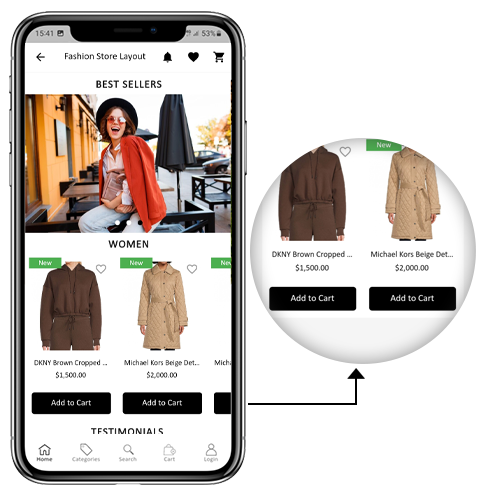
a) “Add To Cart” Button on Home & Category Screen
The PrestaShop Mobile App has been made more usable for online shoppers with an inbuilt “Add To Cart” button for products on the Home & Category screen. This allows users to quickly add products to the cart by just tapping the cart button.
The Add To Cart button is also available on the category screen of mobile apps. The users can simply scroll down to the bottom to browse the products and keep on adding products to the cart by simply tapping the Add To Cart button.
b) Product Reviews on App
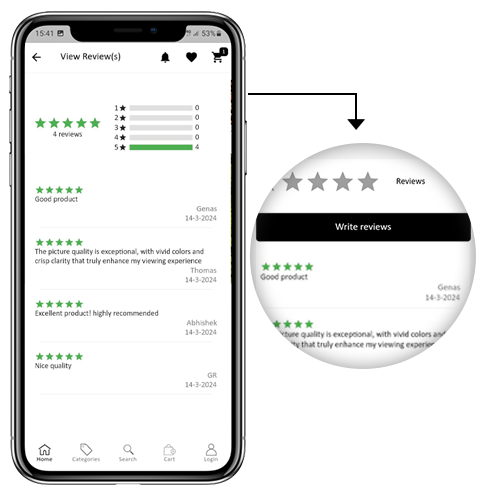
Our PrestaShop Mobile App is now compatible with the default Product Comments module of PrestaShop. Now, the user can post reviews for the products on the website and the same will appear on the app as well. Also, the user gets to view all reviews from the app and write them as well.
c) Related Products on App
The PrestaShop Mobile App Builder is now compatible with the Automatic Related Products module. The related products can be displayed on the product page of the website and mobile app. This compatibility can be used as a perfect tool to improve cross-selling for your business.
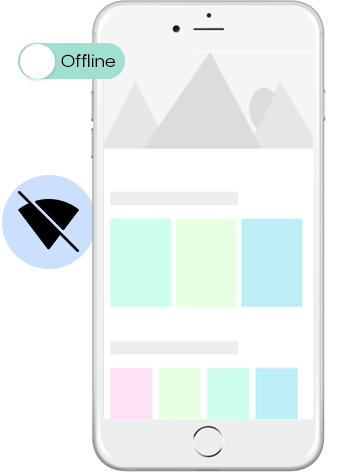
The eCommerce mobile apps with this extension will now work in offline mode as well i.e. without internet connectivity. The users get to browse the pages anytime which were loaded while active internet. Categories, products, cart screen, etc.
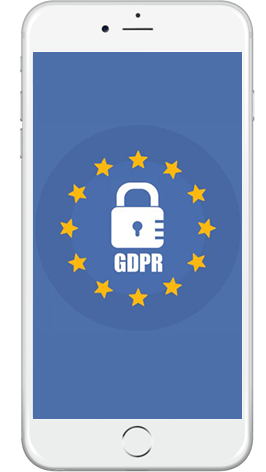
Now, the apps with PrestaShop Mobile App Builder are fully compliant as per the GDPR regulations of the EU. It will offer more control to app users over their stored personal data. The store admin can simply configure the GDPR settings to work on the application & the same will be displayed on various app screens like sign-up, login, checkout, payment, etc. Online shoppers even get the right to ask the store merchant for the removal of his/her personal information.
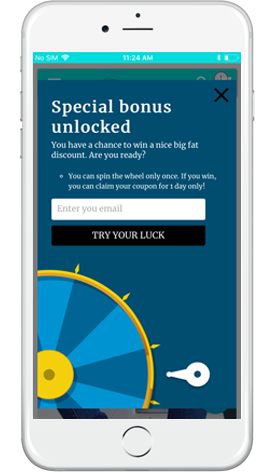
The PrestaShop Mobile App Creator is also compatible with PrestaShop Spin & Win extension. The gamified email subscription pop-up is used for offering a spin-wheel interactive pop-up that can be scheduled for entry or exit display on the web store. Now, with this integration, the same pop-up will be automatically displayed on the apps. You just need to install the extension on your website.
This list doesn’t end here. Get to know more about the features in detail from here.
g). Video Banner Elements:
The all-new Prestashop App Maker comes with video banner components available on the home page. The store admin can now showcase different videos with the option to upload/YouTube videos on the home page banner components.
h). List/Grid View:
The Android and iOS App built with Prestashop Native Mobile App Builder provides the app users with the opportunity to explore the products in list/grid view, enhancing the visuals and customer experience.
Now, the users can simply tap on the list/grid button provided on the product listing pages to switch between list and grid view for the products.
i). Video/Banner Options on the Category Product Listing Pages:
Showcase your product carousal with the all-new video/banner upload options introduced in the updated Mobile App Maker for Prestashop. The store admin can upload videos below 2 MB or can also showcase the YouTube videos directly on the category product listing pages. This feature provides better UI control to the store admin, enhancing the customer experience at the same time.
J). Automated Banner Sliders:
In the latest Mobile App Builder module, we have introduced the automated banner slider feature that allows the Prestashop store administrator to configure the automated sliding time from the module backend.
The admin can use the functionality, particularly for the “Banner Horizontal Sliders” home page layout components, and can add sliders for both videos and image banners.
K). Enhanced Review Section:
If you are using PrestaShop’s default Product Comment module, you can enjoy the enhanced review section in the app. All the approved reviews now come with enhanced UI that delivers a top-notch visual experience for your Android and iOS App users.
L). Login/Sign-up Pop-up:
Capturing the visitors’ emails is one of the biggest challenges in eCommerce. However, we have simplified this process by introducing the login/sign-up pop-up in the recent Mobile App Builder version.
The store admin can add a login pop-up that will appear for non-logged-in customers, increasing the email opt-in chances by providing simple login options to the users.
2.0 PrestaShop Mobile App Demo
KnowBand understands your concern about your uncertainty to go for the solution & to curb the same, it has offered a free demo for all eCommerce store owners. The merchants can view our demo store working on the mobile app & even their store working on our demo apps.
2.1 View Our Demo Store working on Apps
Want to see the eCommerce app features? We have integrated our demo store with the app where you can explore the fully functional app and see all its features. Just follow the below instructions:
Step 1: Download and install the Nautica PrestaShop Mobile App from either App Stores on your mobile device. Here, are the links to download demo apps:
Step 2: the Open the Nautica PrestaShop App and hit the view demo button.
That’s it! You will see our demo store running on the demo app. You can browse the same, check all functionalities, create an orders, etc.Note: To access the Admin Panel of KnowBand Mobile App Builder on our demo store, visit here.
2.2 View Your Store working on Demo Apps
Not satisfied? Want to test your store on the demo apps? Well, we got you covered with everything. You can experience your store on our demo app as well that too without any cost. Just 3 steps are all you need to follow for the same:
Step 2: Install the Demo Apps (links in the previous section) on your mobile device. Open App & enter your Store URL.
Step 3: Tap “View Your Store” and start experiencing your store on demo apps.
Step 4: Enter your store URL in the appeared box.
Example: https://www.example.com/
Note: This Free version of Mobile App Builder is just for the demo purpose & no APK/IPA files will be provided with this module. To get your own APK/IPA files, you need to purchase the paid version of the PrestaShop Mobile App Builder.
3.0 Build your PrestaShop Mobile App in 3 Simple Steps
We hope that you liked the demo of our PrestaShop Mobile Apps and found what you were looking for. So, this is the time to get a Flutter pair of apps for your store. The process to build an eCommerce mobile app is as simple as it could get. Just follow 3 simple steps & your app will be ready in 1-2 working days.
Step 1: Install-Module on your website
Download Prestashop Mobile App Builder & install the same on your store.
Once the PrestaShop Mobile App Maker is successfully installed on your website, it’s time to configure the Admin Panel of PrestaShop Mobile App Creator. Once you click on the “Configure” option on KnowBand Mobile App Builder, you will get the following tab with friendly interfaces. Let’s narrow down them one by one.
5.1 General Settings
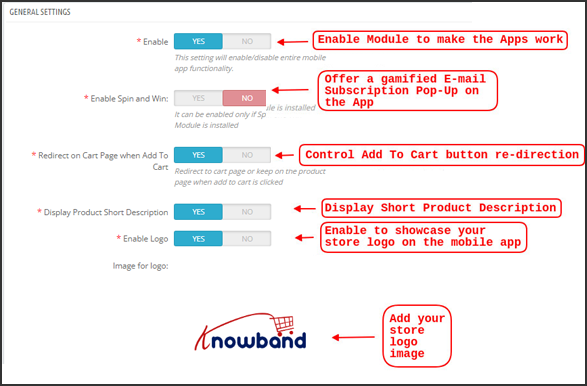
The General Setting tab is all about the settings required to run your Mobile App on the user’s devices. This tab contains all the necessary generalized options to sync the app.
a) Enable Plugin: Enable the PrestaShop Mobile App Creator plugin to make your mobile app work on user’s devices.
b) Enable Spin and Win: Enable to display a gamified spin-wheel pop-up on the home screen whenever any user opens the app. It can be used to offer discounts/deals & capture their e-mails in return for marketing purposes. To make this functionality work, you need to install Knowband’s Spin and Win module on your website.
Note: The Spin and Win Module will only work in case you have installed the plugin in your store end.
c) Redirect on Cart Page when Add To Cart: This functionality allows you to control the navigation of the “Add To Cart” button. You can either redirect your users to the shopping cart or keep them on the product page whenever they tap Add To Cart button. This enhances the chances of additional purchases.
d) Display Short Description: Enable to display product short description on the product screen along with full description & other details.
e) Select Layout: Choose the desired Home Page Layout for your PrestaShop app. You can create multiple home screen layouts in the backend as per various festivals & themes & use them as per your store requirement.
f) App Button Color: Choose the desired button color for your PrestaShop Mobile App.
g) App Theme Color: Choose the desired theme color for your PrestaShop Mobile App.
h) Image for logo: Upload your store logo image to be displayed on the top header of the app. This promoted your brand among worldwide mobile shoppers.
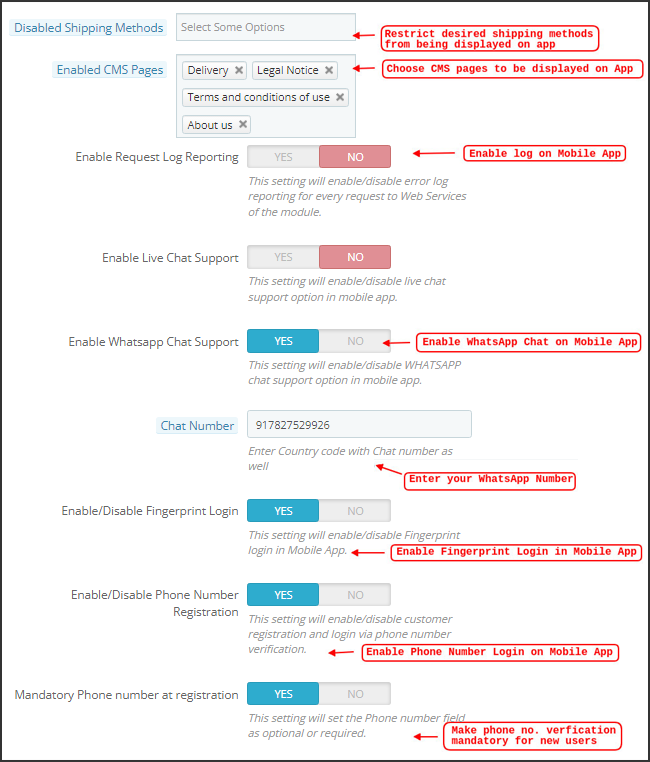
i) Disabled Shipping Methods: Choose desired shipping methods that you don’t want to be displayed on your PrestaShop Mobile App.
j) Enabled CMS Pages: Choose desired CMS pages to be displayed on the mobile apps.
k) Enable Request Log Reporting: Enable log on the mobile apps to get details of any abnormal behavior of your app.
l) Enable WhatsApp Chat Support: Enable the WhatsApp chat option on your PrestaShop Mobile Apps. The users can directly contact you at your WhatsApp number entered in the backend.
m) Enable/disable Phone Number Registration: Enable the Phone Number login option in your PrestaShop Mobile App & let your users authenticate with OTP verification.
n) Enable URL encoding of Image links: Enable this functionality to support Non-ASCII characters on the app.
o). Enable/Disable Fingerprint Login: This option enables or disables the fingerprint of Face ID login options in the Android and iOS apps.
p). Enable Notification List Feature: The admin can show/hide the notification section in the app for the customers with the help of this button.
q). Enable Sign In Login Popup: This button is designed to enable/disable the login pop-up for customers who have not completed registration on the store.
r). App Icon Theme Color: The store admin can configure the color of app icon themes, especially Wishlist, Cart, and Hamburger menu icons.
s). Enable Social Login: The following button can show/hide the social login options Google, Facebook, and Apple from the apps.
5.2 Push Notifications Settings
The PrestaShop Mobile App Creator for Android/iOS leverages the Power of Push Notification using the Google Primary Services for the Push Notification to Mobile devices. It brings this handy marketing tool to grab immediate user attention & boost sales. Highlighting your daily deals & offers is just a message away with your PrestaShop Mobile App. Both automated & custom notifications are available with PrestaShop Mobile App Maker.
a). Service Account Json: Since the traditional Firebase push messaging API is deprecated and replaced with a service Json file, this section allows the admin to configure the Json file extracted from the Firebase account.
Either you can configure the same on your own, or we will also share your service Json file at the time of app creation.
b) Enable/Disable Order Creation Notification: Enable/Disable automated Push Notification sent to the app users for successful order creation.–> Title and Message for Push Notification: Enter the title and message on the push notification setting for successful order creation.
c) Enable/Disable Order Status Changed Notification: Enable/Disable automated Push Notification sent to the app users for any update regarding their previous order delivery status.–> Title and Message for Push Notification: Enter the title and message on the push notification setting whenever there is an update the in previous order delivery status.
d) Enable/Disable Abandoned Cart Notification: Enable/Disable automated push notifications sent to the users who have abandoned cart without successful purchase.–> Title and Message for Push Notification: Enter the title & message of the push notification for abandoned cart app users.
e) Time Interval: Interval (in hours) for sending Push Notification to app users who have abandoned their cart without successful purchase.
5.3 Push Notification History
This tab contains the history of all sorts of push notifications sent to every user with concerned details. The merchant can get to know about every notification sent earlier. This tab also has the option to send a custom notification to the users crafted from the backend. You can easily make them aware of any store-related details or discounts through manually sent notifications.
Send Notification:
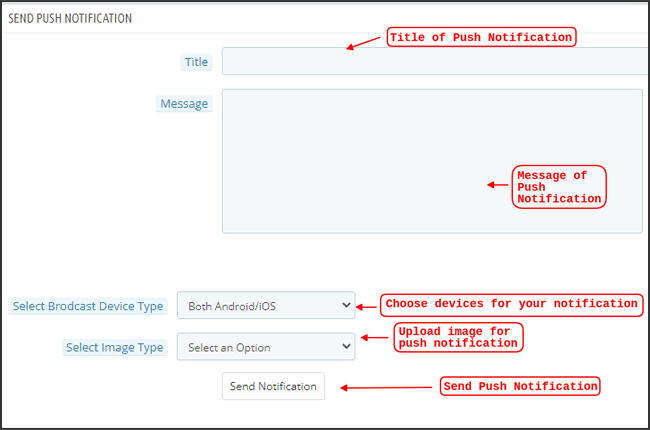
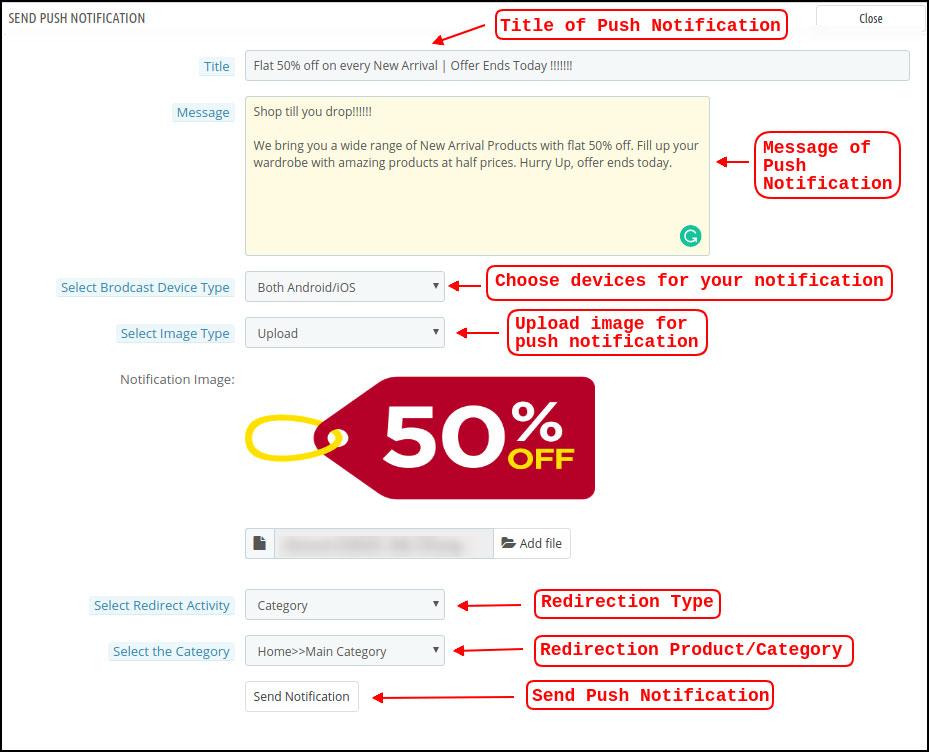
This option is there to send a manual notification to the app users as per your choice. You can configure the title, message, landing page, image, etc., and notification of your choice as shown below snapshot:
a) Title of the Push Notification: The title of your manual Push Notification that is to be sent to the app users.
b) Message of the Push Notification: The message of your manual notification which is to be sent to the app users.
c) Device Type: You can choose the users on Android/iOS or on both to whom your manual Push Notification is to be sent.
d) Image Type: You can upload the desired image/banner justifying your notification. The banner image can be uploaded or used through an existing URL.
e) Notification Image: The store admin get to preview the notification image & analyze how it will look on the user’s apps.
f) Image URL: The actual URL of the notification image which is to be sent to the app users.
g) Redirection Activity: You can choose the redirection of your notification by choosing from Home Screen/Any Category/ Any Product here. Whatever you set, your users will be redirected to the same on tapping the push notification.
h) Select the Category/Product: You can choose any relevant category/product screen for your notification.
i) Send Notification: Once you have crafted & previewed your notification, it is time to send the same on your apps.
5.4 Payment Methods
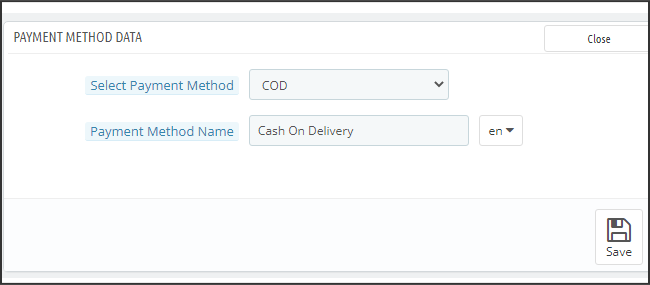
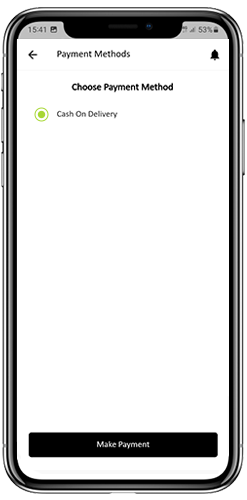
The PrestaShop Mobile App Creator for Android & iOS supports all sorts of website payment methods on the Android & iOS apps. Additionally, it brings COD payment option & the flexibility to add other Web-Viewpayment methods as well.
By-Default, there is only a Cash On Delivery Payment Method in our Mobile App. However, if you want to add the same payment methods as on your PrestaShop store, disable the COD method from the module back-end. After disabling the COD method, all the payment methods that are available on your web-end will appear fine in your Mobile Apps.
5.5 Home Page Layout
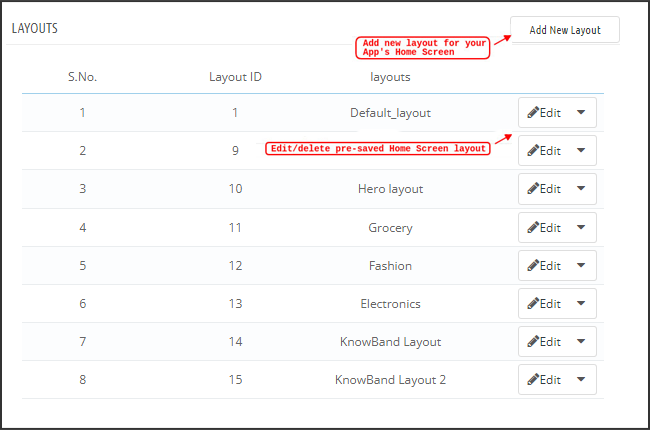
This is one of the most amazing functionalities of the PrestaShop Mobile App Builder plugin to design & craft multiple home screen layouts using various designing attributes/elements. This tab contains the list of all the home screen layouts configured earlier based on various themes & fonts as shown in the snapshot below:
To configure the home page layouts, the following elements are available in the back-end:
Top categories
Square Banner
Horizontal Sliding Banner
Grid Banners
Countdown Banner
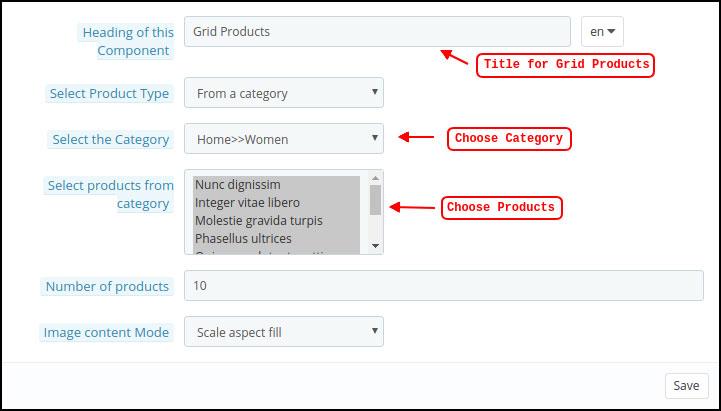
Grid Products
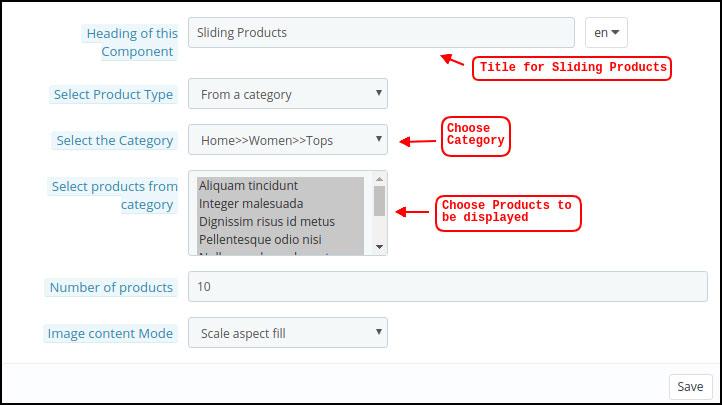
Horizontal Sliding Products
Recently Accessed Products
Login/Sign-Up Pop-Up
The store merchant can configure & use any of these attributes to craft & save multiple layouts. These layouts can be used as per the theme & requirements. Also, the positioning of various elements can be altered with just a simple drag & drop functionality.
Top Categories:
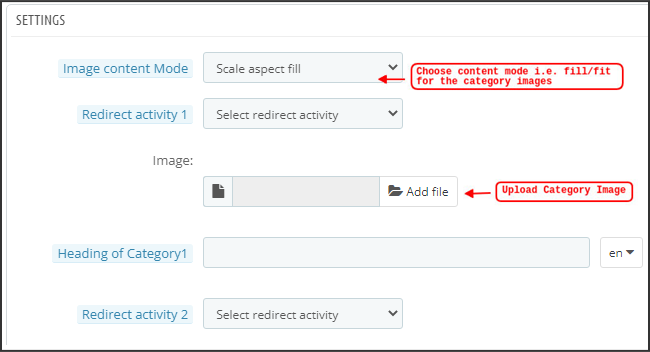
Top categories are displayed in the form of small squares on the home screen & can be configured including their image & landing categories/products. The PrestaShop Mobile App Maker offers a maximum of 8 categories in which a minimum of 4 are mandatory.
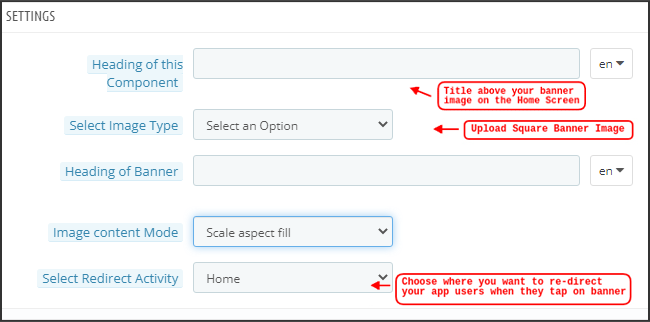
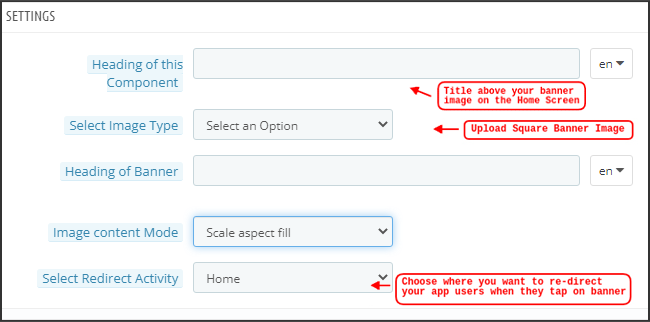
Square Banner:
Another attribute is Square Banner listing which is used to offer a square-shaped banner on the home screen of the app. You can customize the banner by choosing the right image & landing screen for the same. In the Recent Updates, we have also added the video selection option for the banner squares. Now the admin can also choose between the options of Video Upload or YouTube Video Link for the square banners.
Horizontal Sliding Banner:
These are the rectangle-shaped available in horizontal sliding & can be fully customized from the backend. The admin can also configure the automated banner sliding time interval for the horizontal banner sliders components.
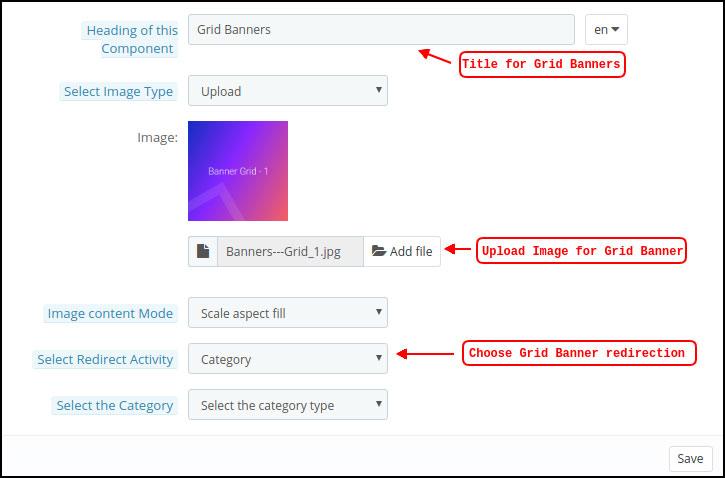
Grid Banners:
These are square-shaped banners listed on the home screen in the grid form. You can set as many banners as you want on the home screen & customize their image & landing page accordingly.
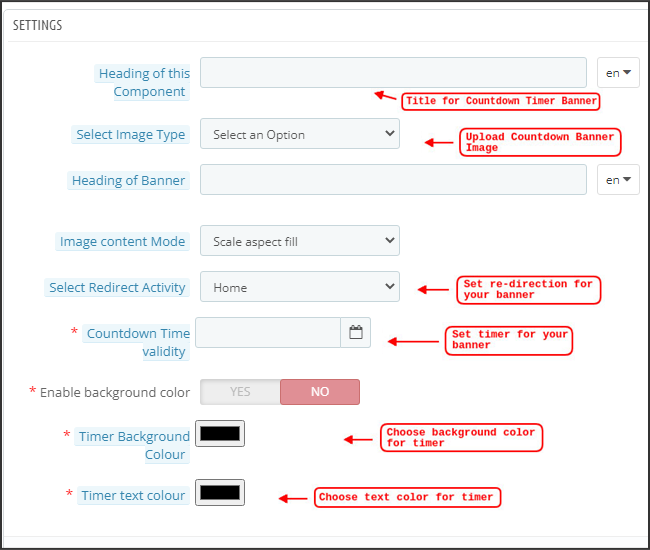
Countdown Timer Banner:
The PrestaShop Mobile App Builder offers a banner with a countdown timer. You can set the banner image & landing screen & set the timer till you want to display the banner. Once the timer is over, the banner will automatically disappear.
Square Products:
As for banners, the PrestaShop Mobile App Creator offers products to display on the home screen in the form of a square listings.
Horizontal Sliding Products
You can add the products in the form of horizontal sliders. The selected products could be of any specific category or other highlights as Best Sellers, Featured Products, etc.
Grid Products:
The products can also be added to the home screen in the form of grid listings. The products can be chosen from any category.
Recently Accessed Products:
The PrestaShop Mobile App Creator provides the recent tab element which displays the recent products viewed by the user. You can just add the element in your layout to display the same on the home screen.
Note: The store admin can add up to 20 elements while designing a layout in the backend panel.
Login/Sign Up Pop-Up:
We have introduced a new login pop-up that will encourage the customers to log in to their accounts with a single tap login/sing-up option provided on the home page of the apps.
5.6 GDPR Compliance
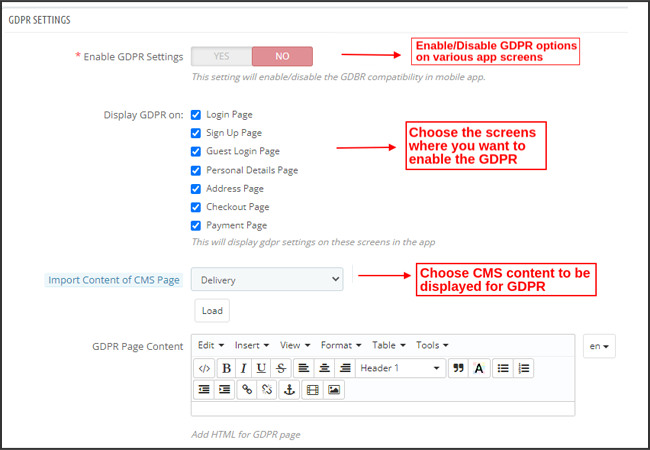
The PrestaShop Mobile App Builder offers GDPR compliance in mobile apps. The store admin can simply make a few clicks in the admin panel and apps will become GDPR compliant.
a) Enable GDPR Settings: Enable this tab to offer GDPR compatibility on various app screens.
b) Display GDPR on: Choose the app screens where you want to activate GDPR options.
c) Import Content Of CMS Page: Choose the CMS page whose content needs to be added for the GDPR option.
6.0 Mobile App Screens
6.1 Home Screen
The Home screen of your PrestaShop Mobile App will be exactly as you want it to be. The PrestaShop Mobile App Maker offers complete flexibility to design & craft a home screens into your hands. Using multiple banners(Square, Grid, Sliding), products (Square, Grid, Sliding), countdown timer banner, and recent products tab in the backend, you get to design intuitive layouts for your home screen. The following options are available on your app home screen:
Moreover, the positioning of various design elements can also be altered as per the requirement.
1. Dynamic Layouts:
Using various elements you can create & save various layouts in the backend & re-use them as per various events & festivals. You can design & craft your app home screen dynamically.
2. Brand Logo:
Your store logo is represented on the left-middle section of the top header of your PrestaShop Mobile App. The logo is fully configurable from the module backend & can be enabled/disabled including image changes.
3. Search:
The search option allows the mobile app shoppers to get easily & quickly what they desire. In your PrestaShop Mobile App, product search will be in two forms: The search option can be found on the bottom tab bar layout of PrestaShop Mobile App.
–> With Text: Your App users can search for desired products just by typing some related keywords. The PrestaShop Mobile App will show relevant results to that keyword.
4. Wishlist Bag:
The wishlist bag is displayed on the top header of your PrestaShop Mobile App containing all bookmarked products. The app users can save their desired products in a wishlist bag for future purchases.
5. Shopping Cart:
The Shopping Cart is available on the top-right corner of the app home screen. The users can get to know about the products added to their cart right from there.
6. WhatsApp
On the right-bottom of the home screen, there is a live seller-buyer chat option. The mobile app shoppers can easily & directly message you their query & you can resolve them instantly.
6.2 Accordion Menu (Navigation Bar)
The PrestaShop Mobile Apps for Android & iOS come up with proper categorization of products is available on the website. Mobile shoppers can easily browse products from multiple categories. All CMS pages are also available in Accordion Menu. It provides the following options:
1. My Account
My Account screen contains all the user information like Personal Details, Shipping Address(s) & Order Details. The shoppers can view all the info related to them & can update personal details & login passwords as well.
2. Categories
These categories are the same as on your website. You can map them accordingly & offer a 3-level categorization to your app users for hassle-free browsing.
3. CMS Pages
Various CMS pages like About Us, Contact Us, Terms & Conditions, etc. Available on your website are displayed here. You can choose the desired one from the PrestaShop Mobile App Builder backend to be displayed on Mobile App.
4. Language(s)
The language option allows your users to view PrestaShop Mobile app in their Nativelanguage. All available languages are displayed under this option only.
5. Currency(s)
All available currencies on your eCommerce website are displayed on PrestaShop Mobile App as well. The shoppers can view & purchase the product price in their desired currency.
6. Login/Logout
Your users can easily log in/log out from PrestaShop Mobile App using this option.
7. Notification Settings:
The app users can control the specific push notifications they want to receive in the app. The options allow mobile app users to choose between all notifications, promotional notifications, and order status update notifications.
6.3 Category Screen:
All the sub-categories, parent categories & other associated categories are available in your PrestaShop Mobile App. The category screen is designed to deliver clutter-free experience in two basic views: Grid & List. The product image, name, price, the discount is displayed in all listings with an option to add them to the wishlist bag as well. The Mobile Apps with PrestaShop Mobile App Builder have layered navigation which makes the product search just simpler. The following options are available on the category screens:
Furthermore, now the admin can also enhance the UI of the category product listing page by adding video/images on the category page section.
1. Sort:
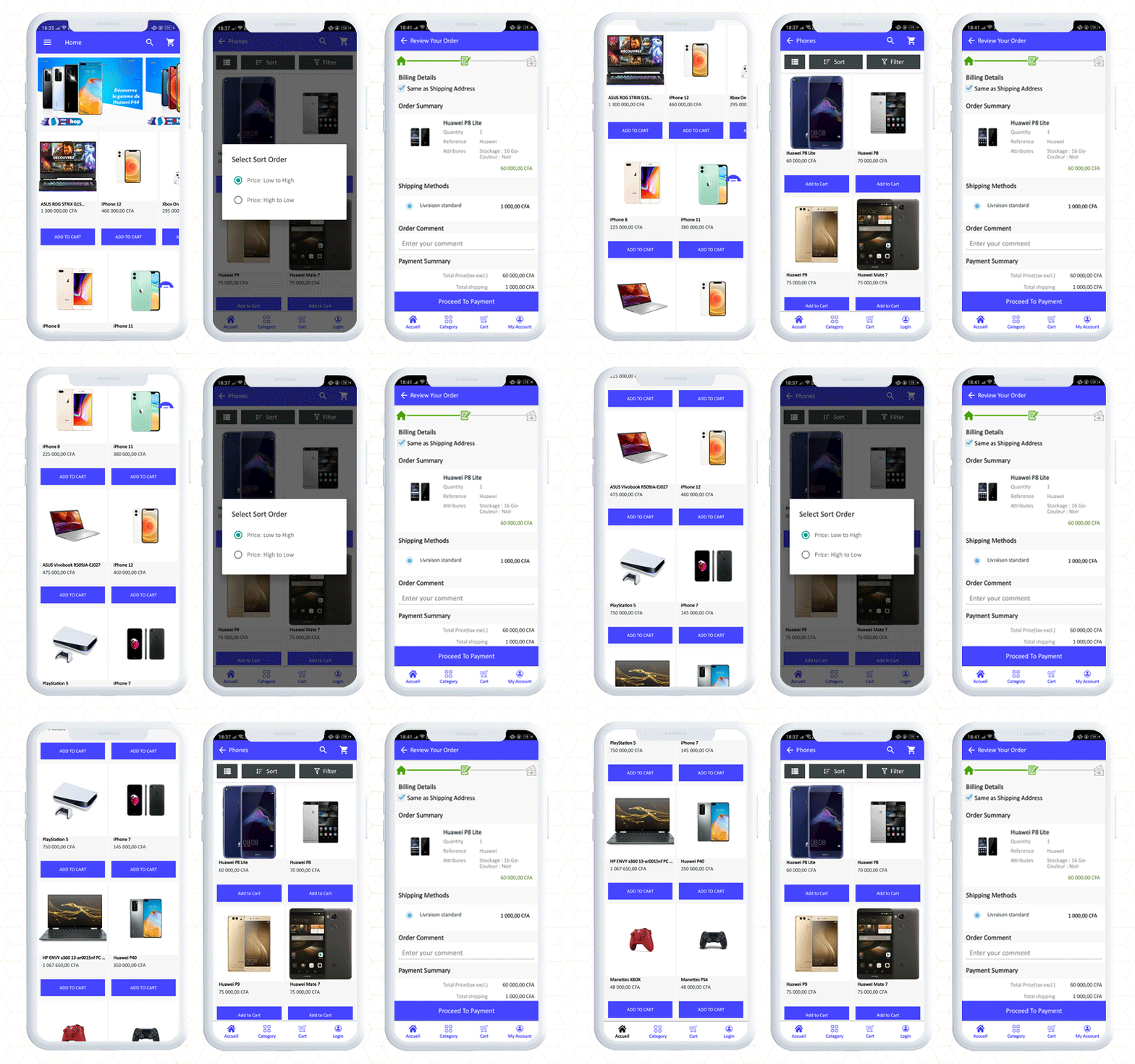
This option allows the shoppers to select the desired order in which the category product pricing is to be sorted. Two sorting orders are available in your apps: Price: Low to High & Price: High to Low.
2. Filter:
The option to filter products simplifies product search. The app users can filter the products in your PrestaShop Mobile App based on various attributes like size, color, compositions, Condition, Manufacturer, Price, etc. The users can search for their favorite products in minutes using these filters.
6.4 Product Screen:
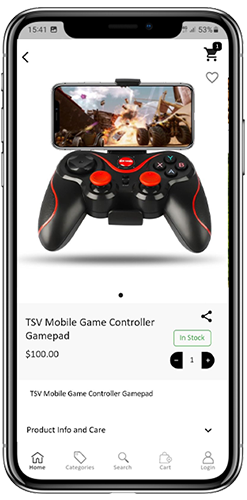
The product screen of your PrestaShop Mobile App is simple & intriguing. Multiple images of the same product are displayed along with the name & price. The product availability is also displayed as “In Stock” or “Out Of Stock” based on inventory status. It contains the following other options:
1. Product Options:
All the options related to the product like size, color, etc. are displayed on this screen. These product options are the same as available on the website.
2. Short Description
Users get to read the short description of your product to quickly make up their minds.
3. Product Info & Care
The complete product information is listed on the website is displayed here. The app users can get complete product details from here.
4. Add To Wishlist:
The Mobile App users can directly bookmark the product just by tapping “Add To Wishlist” on the left bottom of the product screen.
5. Add To Cart:
As the name “Add To Cart” button adds the product directly into the cart & the users can further go on with the purchase.
6. Product Social Sharing:
There is an option on this screen to share your product on multiple social platforms, including Bluetooth & e-mail. The app users can share the products among their friends/relatives on multiple social platforms & lure heavy users to your app.
6.5 Wishlist Screen:
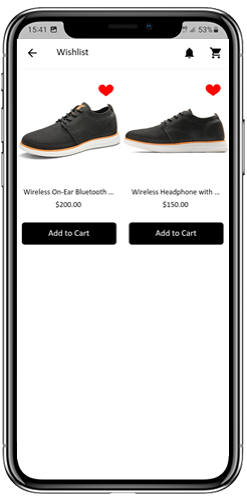
Your PrestaShop Mobile App Creator would have a wishlist bag allowing the users to bookmark products for future purchases. The users can view the list of all bookmarked products from here. It has two options:
1. Add To Cart:
The app users can add the bookmarked product directly into the shopping cart by choosing Add To Cart option.
2. Remove From Wishlist:
The users can even remove any wishlist product if not feel like buying that.
6.6 Login Screen
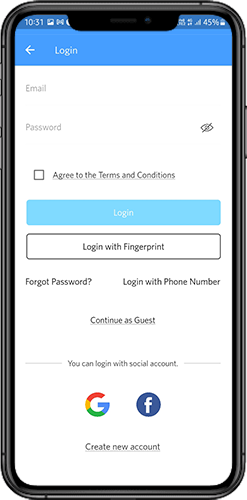
The PrestaShop Mobile App Creator offers various one-tap login options & makes the sign-in/registration process more seamless:
1. Login
The app users can authenticate & access apps using e-mail sign-in credentials.
2. Sign Up
All the new app users can sign-up & create their account on the store from the mobile App. The sign-up form of the PrestaShop Mobile App only asks for relevant details.
3. Login with Phone Number
Your Mobile App comes up with an easier & robust phone number login option which makes it easier for the users to verify the OTP & login app.
4. Login with a Fingerprint
Your users also get an option to log in with fingerprint authentication. This allows users to access apps in seconds.
5. Login with Facebook
The users can log in to the app using their Facebook Account Credentials.
6. Login with Google
The users can log in tothe app using their GoogleAccount Credentials.
6.7 Shopping Cart Screen:
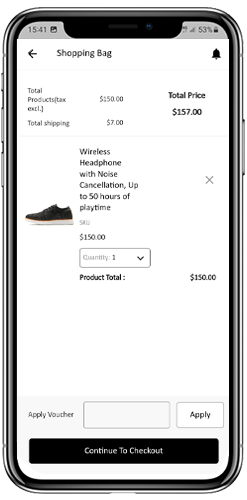
The Shopping Cart screen of your PrestaShop Mobile App will display all products to the shopping cart. The app users can view the product’s name, quantity, total price & shipping cost. This screen has the following options:
Apply Voucher
This option allows the users to get discounts & offers by entering valid coupons & vouchers running on your website.
2. Total Product Price
The users can view the complete cost of their shopping bag from here. It is automatically updated as per any update with product quantity or addition.
3. Update Product Quantity
The app users can even update the product quantity with the “Update Quantity” option.
4. Remove Product
The app users can simply remove the product from the cart by simply tapping the “Remove” option.
5. Continue To Checkout
The front-end mobile app users can proceed further to the checkout & payment screens just by tapping the “Continue To Checkout” option. It will re-direct them on the checkout screen.
6.8 Checkout Process
The Prestashop mobile app Builder consists of a simplified checkout process. The front-end mobile app users have the option to select the shipping details, billing details, order numbers, order comments, and so on in the checkout process of the mobile app.
Users of the Android and iOS apps only need to follow a few simple steps to place their orders.
1. Customers can select the desired product and add it to the shopping cart. After clicking on the shopping bag, he or she can also select the desired product quantity. Moreover, the front-end mobile app users can see the total number of products and shipping costs.
The customer also has the option to apply any voucher and coupon code at the bottom of the same page.
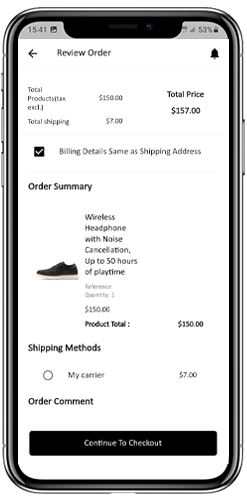
2. After clicking on the Continue to Checkout option, the user can review the order where he or she can see several details. Such as product price, shipping cost, shipping address (It can be edited on the same page), order summary (Number of the products), total price, and so on.
Additionally, the customer has the option to select their preferred mode of shipping on the same page. The user can also put his or her special request or requirement in the order comment option appearing on the bottom of the screen.
The user will be redirected to the payment method screen after clicking on the continue to checkout option.
On this screen, users have the option to select from all of the website payment options. By default, the shopping app consists of a cash-on-delivery option as a mode of payment.
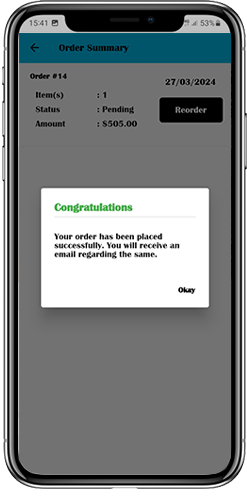
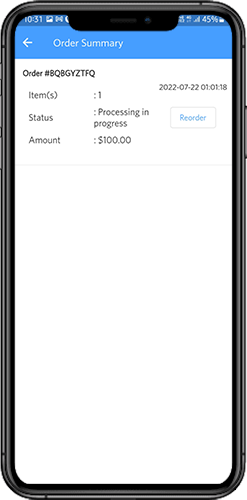
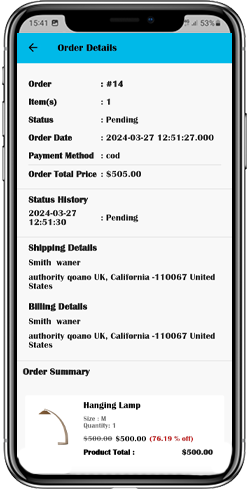
When the user performs the payment activity, then he or she will be redirected to the order summary screen. where the customer can see the order status, order number, amount, and so on. The front-end mobile app users will get the order confirmation popup message on their mobile phone screens as well.
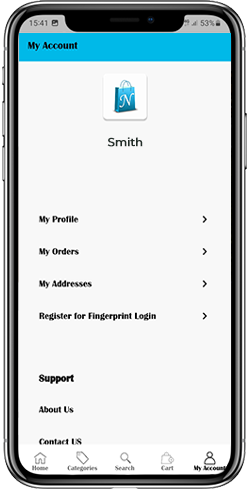
6.8 My Account Screen
My account screen of the Android/iOS eCommerce app allows users to view the complete account details including a list of previous orders. My Account screen offers the following options:
Order History
The users get to know about complete order details being placed earlier. The order submission date, order reference, price & delivery status is displayed.
2. Update Profile
Users can also update their pre-saved profile details such as First or last name, phone number & password.
3. Shipping Address(s)
The app users can see the complete list of saved Shipping Addresses. A new Shipping address can also be added from here.
4. Order Details
The app users can get to view the complete list of the previously placed app orders.
5. Re-order feature
There is a direct re-order product directly by clicking the “Re-order” button. All the previous orders will be added to the cart by just tapping a single button.
6.10 Order Detail Screen
Order details screen of PrestaShop eCommerce App provides complete order detail such as shipping address, product summary, shipping and payment method, and total cost summary. The users can even track the delivery of previously placed orders directly from this screen.
7.0 Video Tutorials
8.0 Advanced PrestaShop Marketplace with Mobile App
KnowBand’s PrestaShop Marketplace converts your online website into a fully fledged marketplace. The PrestaShop Mobile App Builder is fully compatible with PrestaShop Marketplace extension. This means you can bring the entire marketplace listing on the same PrestaShop Mobile Apps. Thus, launch a pair of Marketplace-compatible Mobile Apps with KnowBand & attract a large base of sellers & customers to your store.
–> As the user clicks on the Seller option, he/she is redirected to the Seller page of the mobile store. The user can view the list of the sellers of the marketplace along with their ratings.
–> The customers can click on the name of the seller in order to see his profile and product being offered. The sellers can log in with their username and password. They are then redirected to the dashboard.
Get to know more about PrestaShop Marketplace with Mobile App from here.
Everything, including services, products, and even supplies, had to be appropriate for portable devices like cell phones and tablets because the number of mobile users has surpassed the number of desktop users globally. It’s increasingly essential to design for mobile.
Owning a mobile app is currently considerably more advantageous than having a responsive website if your company sells goods. To increase user engagement or increase productivity, we don’t think mobile sites are sufficient. To keep ahead of the competition, companies will soon need to think about creating mobile applications.
Companies with mobile apps for their business gain major benefits over others as more potential customers use smartphones. With the rise in popularity of mobile wallets and cash transfer services, many Shoppers now buy and pay with their smartphones.
Hiring an app development company that will provide the most suitable and trustworthy applications may be a wise choice. Moreover, apps are best for eCommerce business owners looking to gain greatly from customers over the world. The advantage of mobile eCommerce apps for your business is the content in-depth in this article.
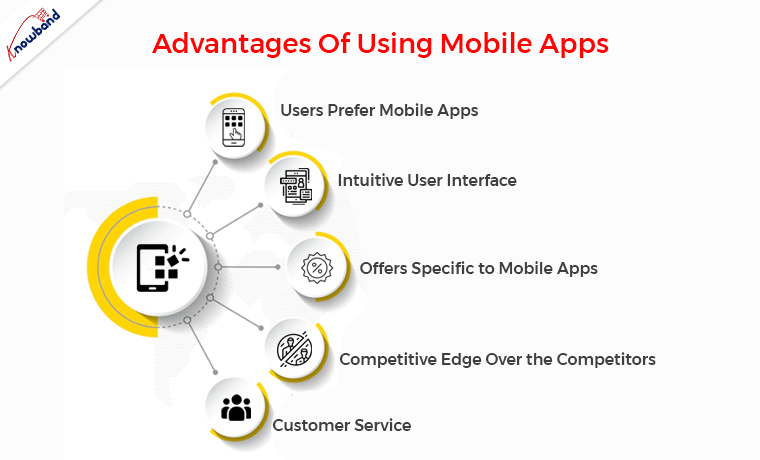
Advantages Of Using Mobile Apps
Users Prefer eCommerce Apps
Simply because mobile apps are easier to access, consumers prefer smartphone applications over websites. Mobile eCommerce applications make it simple to browse and buy without having to visit an online store. You don’t even need to remember the URL or your login credentials to access the online store. Mobile applications are also more effective and secure than web browsers.
Furthermore, the first step in generating eCommerce sales from mobile users is having a user-friendly mobile site.
Therefore, if your eCommerce site lacks a mobile app, you are ignoring the majority of the market. Also, giving your current customers a great experience should be the priority of Online business owners. Therefore, mobile app development should be preferred by Online businesses.
Intuitive User Interface
One of the most reliable ways to make a profit nowadays is by using eCommerce apps, which are currently ruling the market. You can promote your brand in competitive online markets by developing a mobile application to improve your company’s profits.
A mobile app does not guarantee success for every internet business. While creating the application, you must do some extra work. Since customers want intuitive features, user comfort should always be the preference for the Ecommerce business. Ecommerce giants innovate their mobile apps to the highest degree, yet they still keep things straightforward and uncomplicated. The e-commerce application ought to be as easy to use and understandable as possible.
Offers Specific to Mobile Apps
Various features are using the customer’s engagement increases to the mobile app. Mobile gives you an additional chance to regularly communicate with your customers. A top mobile e-commerce solution can assist you in integrating with all necessary technologies, engaging and converting your customers with a flawless mobile experience. Additionally, you can request comments from your clients within the app. By doing this, you may learn more about their requirements and improve their purchasing experience.
When compared to desktop purchasing, mobile app conversion rates will be greater. Furthermore, this is due to the improved design, simple navigation, and usability that the customers use the apps more.
Competitive Edge Over the Competitors
The app user interface is responsible for increasing sales, whether it is a website or a mobile app. As a general rule, avoid confusing users and give them clear instructions instead. Constantly offer a small number of app features while focusing on targeted sales. On the homepage of your eCommerce app, for instance, you can highlight your best-selling products. You can increase sales by displaying a sample of your product line.
The accessibility of key buttons within the mobile app is another aspect. The “Add to cart,” “Checkout,” and “Buy Now” buttons need to always be in the top or most noticeable areas of the screen. The most important step in boosting your internet sales is this one. To get more clicks and sales, you must place the buttons properly and use the appropriate font. Simply displaying the buttons will not help the business.
Customer Service
If you provide eCommerce customer care through the chat window, mail, or helplines, it is simpler to interact with your customers and solve their problems online. The assurance that they will receive a response is provided to your customers as a result. Customers are comforted when they shop with you which guarantees a seamless user experience.
Wrapping it up
In this article, we have shared the advantages of using mobile apps for the e-commerce business. We would like to inform you that we also assist with the eCommerce modules. You can visit our website and check for the eCommerce plugins and seek our assistance if needed. We also assist with custom developments as per the business requirements. Kindly let us know if you need help with our plugins and customization of plugins and other business requirements.
Today’s world appears to run on applications. If it’s anything that people can engage with, there’s a good chance it’ll be available as an app. Applications that are well designed attract your eye and make you want to use them, whereas apps that are poorly designed are frustrating and don’t do what we want them to.
You want to create a straightforward and intuitive user experience for the first edition of your eCommerce mobile app. Any element that detracts from the experience’s intuitiveness isn’t worth having. A Poland Fashion App has completed its 1000+ downloads, delivering an exclusive user experience. This blog will grab your attention to its features and how they have developed it.
Wieszakshop. pl – Premium Brands Outlet
Wieszakshop. pl is an online store that sells women’s, men’s, and children’s clothing, as well as shoes and accessories from popular brands, at up to 70% less than typical retail pricing in Poland and around the world. If you adore well-known brands and one-of-a-kind designer finds, you’ve arrived at a veritable haven of fashionable events.
How can you place an order on this eCommerce Mobile App?
Every mobile app has basic features like product listing, product page, shopping cart, checkout page, and transaction page. Wieszakshop. pl is a Fashion focused PrestaShop mobile app created using KnowBand’s Mobile App builder Plugin which is specially designed and developed for eCommerce.
Users in Poland may now purchase top brand clothing with ease. Allow me to take you on a shopping spree over PrestaShop Mobile App. For instance, consider buying black denim from your favorite brand:
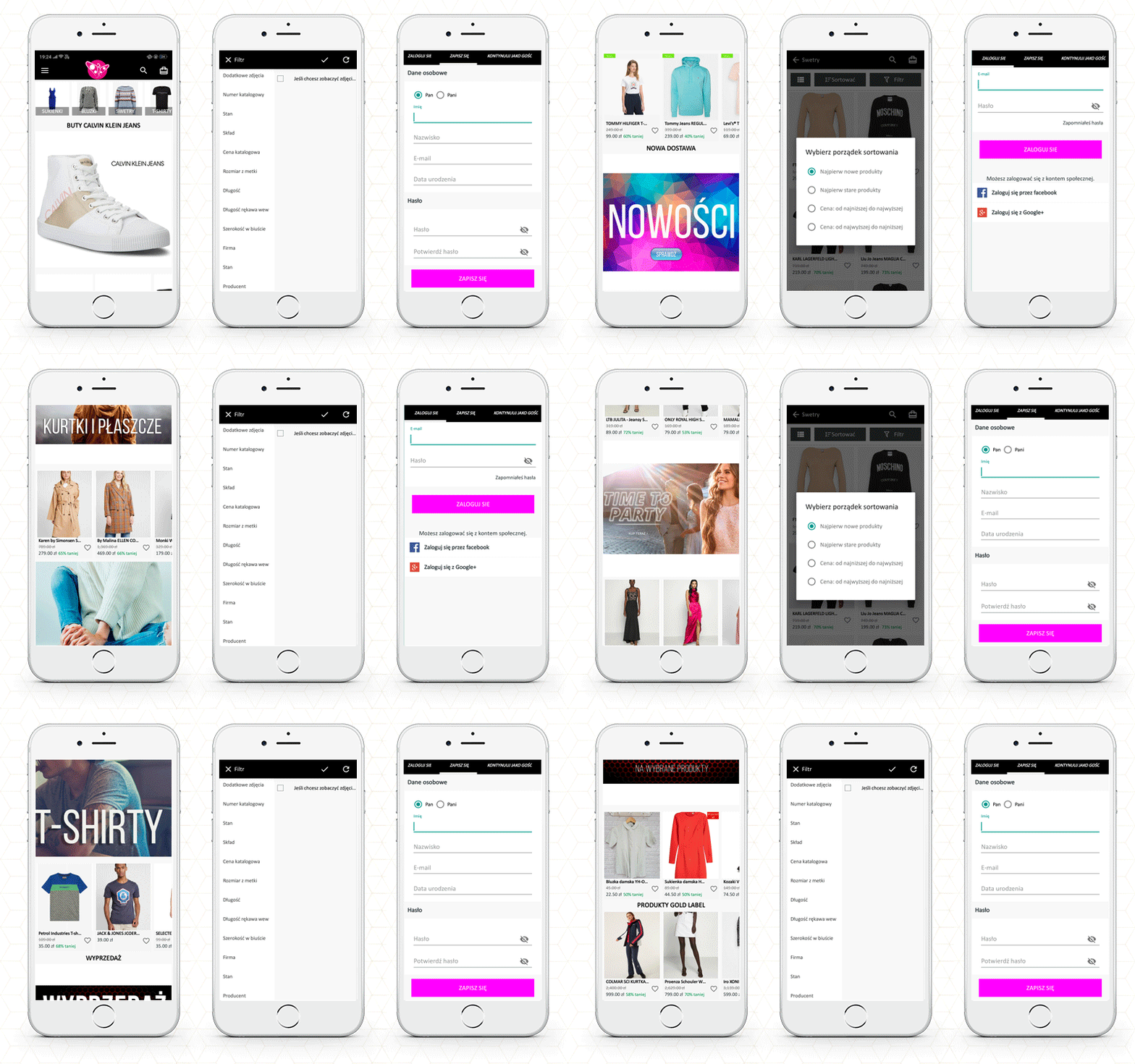
The Home Page
The app’s primary screen provides customers with access to the new arrivals, best sellers, etc. Also, the brand logo appears on the landing page.
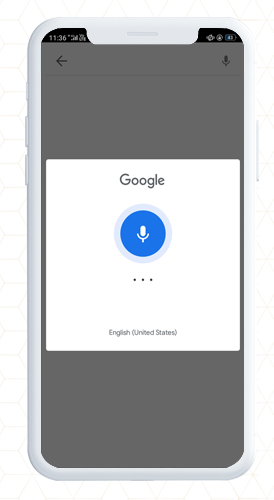
The function of basic search and voice search
Now, to buy a pair of denim, you will have to search for it. It allows users to search the products within the app; from the product page as well as the home page.
Add to cart or wishlist
Once you find the black denim, you can add it to the cart or the wishlist. Pushing the checkout button will redirect you to the checkout login page.
Customer Login Page
The shopper can purchase by signing up for the app from here. You can also checkout as a guest if this feature is enabled.
With successful signup, you can log in with your email address, Google+ or Facebook. It also allows fingerprint login.
Payment and Shipping Address
Now the app will take you to the shipping page where you need to fill up the delivery address. You will also have to select the payment methods.
Your order will be placed successfully!
Other features of the PrestaShop Mobile App
Push Notifications
App sends push notifications to customers. It can be a text that the user may be interested in. They are easier to send than emails and are less likely to end up in spam folders.
In-App Chat Support
The mobile app provides in-app chat support to customers. It has a WhatsApp chat option integrated.
Store admin can add or remove the features from the mobile app. It is easy to customize the app’s home page, add new banners, put a logo and add colorful windows to the app.
It works in real-time synchronization with the fashion store website.
Now you have a mobile app that allows you to take orders online but do you have a smooth delivery management system? If your answer to this question is ‘no’, then read ahead.
How to manage your local on-time deliveries?
In eCommerce, local deliveries/shipping enables consumers to purchase the products online and deliver them directly to their doorstep. Local delivery acts as an alternative to both carrier and in-store pickup.
It has had a particular effect on retailers and consumers alike in an environment where shipping companies are facing increased delays and in-store shopping also carries risks. To ensure, on-time delivery and manage them, you can use Knowband’s effective module- ‘The Delivery Boy App‘.
This application provides functionality that establishes a connection between the Admin and the Delivery Boy. Through this application, the admin can allocate an order to the delivery boy and monitor them. This helps to provide a better shipping service, as it is monitored by the admin, too with the help of an application that works on your eCommerce platform.
The delivery boy application is available for PrestaShop and OpenCart platform.
KnowBand is helping eCommerce organizations for a decade and we have 100+ plugins for various eCommerce platforms. Visit the KnowBand store or write an email to our support team for your module or website development requirements.
Are you looking for a mobile app model for your pharmacy store? There are various phases, starting from an app design to its development, and creating a robust app becomes more hectic when you are not tech-savvy. Online shopping is making our life easier. With the advancement of technology, now we can also order medicines online and receive them at our doorstep.
KnowBand is presenting you a real-life example of a Dental Shopping App that can be an inspiration for making a successful pharmacy clinical app. This Dental medicine ordering app is live in India and has 5000+ installs.
Order Medicines in India with Dental Shopping Android Mobile App
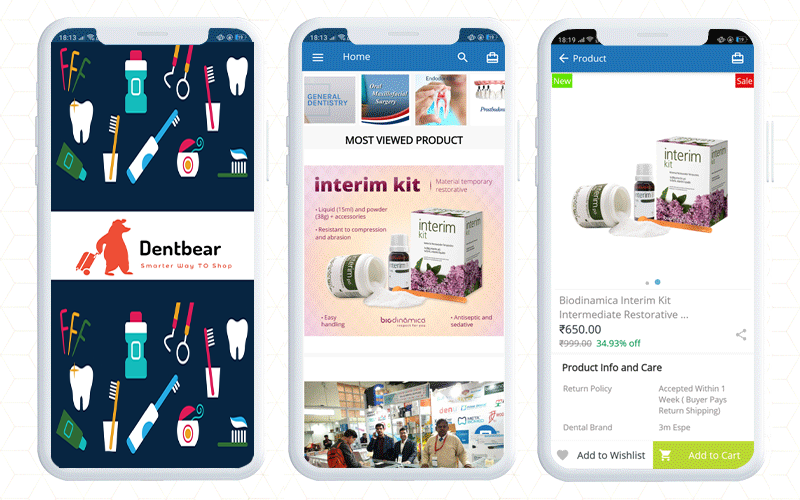
Dentbear.com is an Indian website for dental care products and medicines which is developed on Magento 2 platform. To make the Dentbear Mobile App for Android, they have used Magento 2 Mobile App Builder module, a tailored solution developed by KnowBand.
How does this Medicine Delivery App work?
Firstly, customers have to install the app from the Google Play store.
How to find the right product on Magento 2 Mobile App?
Once the customer opens the app, they will be landed on the home page. The Magento 2 app will be in real-time synchronization with the website.
The online dental store will show banners with current offers, new arrivals, best sellers, etc.
To place an order, search for the product you want to buy. For better search results, the app has voice search functionality.
Customers can sort and filter the products accordingly. The product page also displays the features and specifications of the product. Read product page best practices for mobile apps.
Now, customers can add the desired product to the cart or to the wishlist to make the purchase later.
How to complete the order on Dental Medicine Ordering App?
The App allows guest checkout or you can register at the dentbear store.
Signup or Continue as guest
If you are an existing customer then log in to place your medicine order
For login, customers get choices like login with email address and password, they can use social media accounts or log in with a fingerprint sensor.
Now add the shipping address and complete the payment process. Magento 2 mobile app builder supports all the payment and shipping methods.
What to do if you need customer support?
This application has a live chat support facility with which you can talk to the customer service team. It is a default feature of Magento 2 Mobile App builder. It allows the app merchant to connect with the customer via WhatsApp and Zopim live chat support.
DentBear delivers dental products all over the world.
Finally, getting a mobile app adds a lot of ease to your business. The mobile app builder, a delivery boy app, and an appointment booking system modules make your life easier than ever. On top of that, they simplify your local delivery services, management and deliver a satisfactory customer experience. With the help of these modules, you can start your online pharmacy delivery services right away.
Good luck with your new venture!
E-commerce development Support by KnowBand
Several modules can help you optimize your eCommerce store. If there is a functionality you want on your eCommerce website, any KnowBand extension will likely allow you to do so or if you don’t find any such plugin, you can always contact us at support@knowband.com for your custom plugin creation needs.
There’s no doubting that smartphone apps have revolutionized our lives. There is an app for everything, whether you need to travel, buy groceries, order food, chat, or do a banking transaction.
Entrepreneurs are seeking for new markets to penetrate and strategies to engage clients to normalize their situations. E-commerce app development is one of these possibilities. When done correctly, a mobile app can help you increase your e-commerce presence for years to come.
Tajikistan’s first online pharmacy app has exceeded 1000+ downloads on Google Play Store. The app is developed using Knowband’s PrestaShop Mobile App Builder module which is multilingual and is available in Russian and English.
In this blog, we will be explaining its features and also help you with how you can manage your local on-time deliveries? And how to make a website for clinical appointment bookings?
The PrestaShop Mobile App- Apteka24
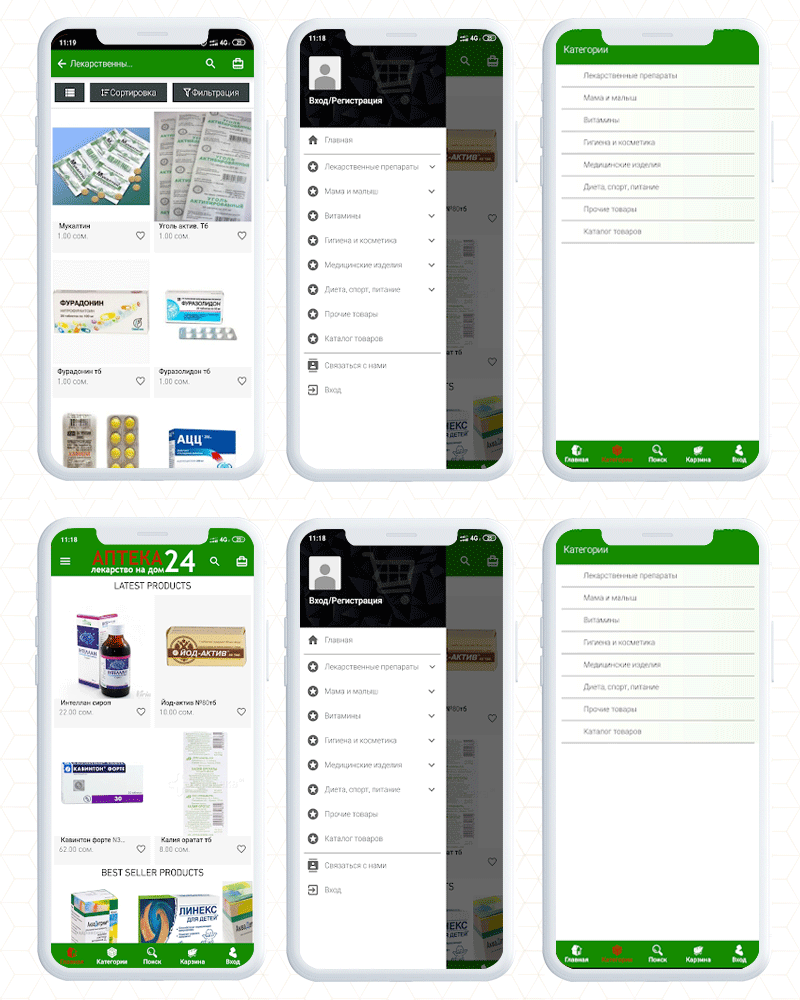
The Apteka 24 is a pharmacy app that allows users to order medicines in Tajikistan. For a fully functional app, it is required to have an engaging UI and KnowBand’s Mobile App Builder gives that personalized shopping experience to every app user.
Having a mobile app is beneficial over a website as it allows users to access things from their fingertips. It’s speed and ease of browsing, as well as a well-thought-out design that seems natural and seamless.
Notifications can be very effective in terms of remarketing if done correctly. The app allows the store owner to send endless notifications to ensure they will keep coming back to your store.
A customer can reorder the medicines with a button click. Voice search, chatbots, push notifications, advanced support, and marketing analytics are all available.
Customers can save lists of things they’d like to have in wishlist. The product page and landing page allow buying things based on images.
The accessibility and convenience of mobile payments are a bonus. These are the basic features of the app and every mobile app created using PrestaShop Mobile App Builder can be customized for its look and theme by incorporating your brand logo and other marketing elements.
How to make a mobile app for your dental medicine website?
To create a mobile app just like Apteka 24, you only need KnowBand’s PrestaShop Mobile App Builder plugin.
It is completely customizable like you can add banners, change theme colors, add colorful buttons, provide live chat support, etc.
It lets you bring your website to the hands of every mobile phone user. With a button click, anyone can get their medicines or products at their doorstep.
This module is available for many other popular eCommerce open-source platforms. Also, you can launch it for both Android and iOS operating systems.
You have to make a one-time payment and our expert team will provide post-purchase 3-month support.
How to add an appointment booking feature to your pharmacy website?
Doctors who consult patients in their clinic find it difficult to manage their demanding schedules. This is where Knowband’s Appointment Booking System module comes in handy.
The Appointment Booking System module allows you to list your clinic on your website and let consumers (patients) book an appointment. In addition, the module provides a number of configuration options for you to customize your bookings to your liking.
What are the features of the Appointment Booking System Module?
Easily add your business/clinic (You can add multiple clinics as well)
Specify if the service is a clinic visit or a home visit
Determine an Upfront Booking Fee
Allow the patient to select the desired day and time
Indicate any day that is not available for booking
Keep the minimum number of reservations for each day
Include your company’s location, contact information, and images
Keep an eye on your appointments and track them
The Appointment booking system makes your job easier while providing your consumers with a hassle-free booking experience.
To make it more convenient, you can also use the booking and rental mobile app.
Here is an in-depth blog on the Appointment booking system, especially for the clinics.
Best way to manage doorstep medicine deliveries
To manage the doorstep deliveries and to assign orders to the delivery boy, you can use a delivery boy mobile app. This app helps you in creating a delivery boy profile, tracking the order status, sending notifications to the delivery boy, and facilitates many other tasks.
It also shows the location info of the customer where the order is to be delivered. Check out the live demo of the Delivery boy and read this blog which includes some real-life examples of eCommerce merchants who are using Knowband’s Delivery Boy Mobile App.
Visit the KnowBand store to find the desired plugins for your eCommerce store or you can write to us at support@knowband.com for any custom eCommerce development assistance.
A mobile app increases business opportunities as it allows you to handle information in real-time. To create an app, a developer has to do a lot of research based on platform, product type, niche, target audience, etc. The work does not stop here, but it also requires an accessible user interface. Your eCommerce app should provide a delightful user experience to everyone regardless of the demography or the region.
KnowBand has developed several apps considering the user’s needs for various eCommerce clients worldwide. We have designed and developed an Application Builder module that only requires updating the configuration settings and your app will be ready to go live on the play store.
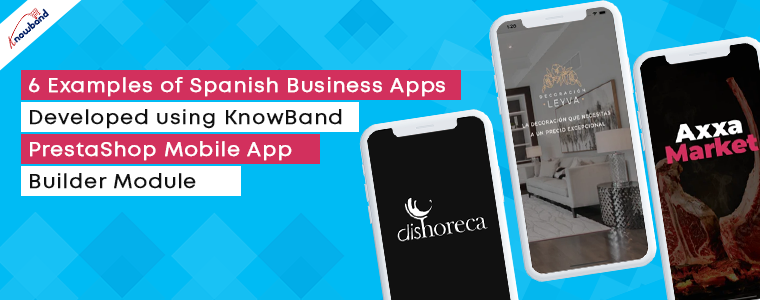
In this blog, we have compiled some examples of Spanish Mobile Business Apps developed using PrestaShop Mobile App Builder Module.
PrestaShop Business App Builder Module
From conversion to customer retention, mobile apps are the most effective tools for every eCommerce business. It has several features to improve the online shopping experience of your store.
The App builder is available for both iOS and Android.
It works in real-time synchronization with the website
The merchant can add or change the banners to redesign the home page
For the product page, it has sort and the filter feature
Simple and easy checkout process with social login, OTP login, and mobile number login
Supports multiple payment and shipping options
Let’s examine these features of the app builder module with some real-life examples of Spanish eCommerce.
6 Examples of PrestaShop Business Apps Developed for Spanish eCommerce
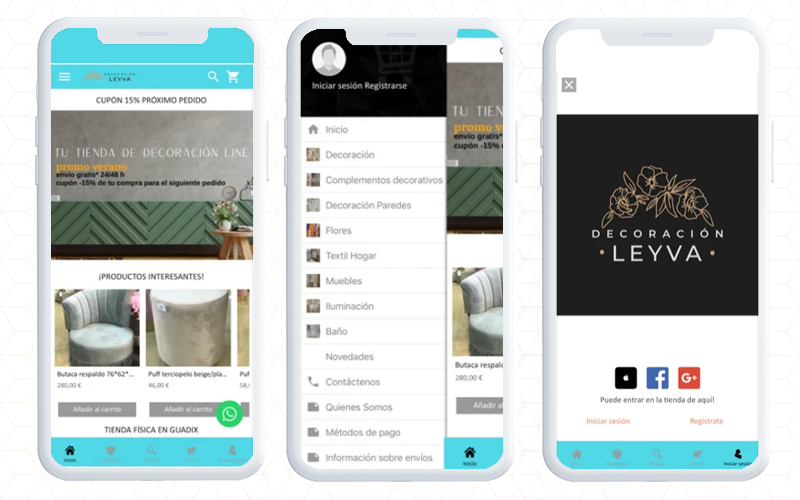
1. Leyva Decoration- eCommerce mobile App
If you’ve recently shifted to a new apartment or want to renovate one, Leyva Decoration can assist you in designing and redecorating it to achieve excellent results. With a new design and a large choice of items, get inspired and buy anywhere and whenever you want with Leyva Decoration App developed and designed using PrestaShop Mobile App Builder Module.
You can use the app to: -View decorative products by category -Use an advanced search engine to conduct searches, Pay quickly and securely, Pay with cash or credit card at the time of delivery, Track orders, Log in to Facebook and Google. Choose a shipping address for your products, Receive updates about discounts and special offers, Compare products, etc.
Download the app for free and take advantage of Decoration Leyva’s daily specials.
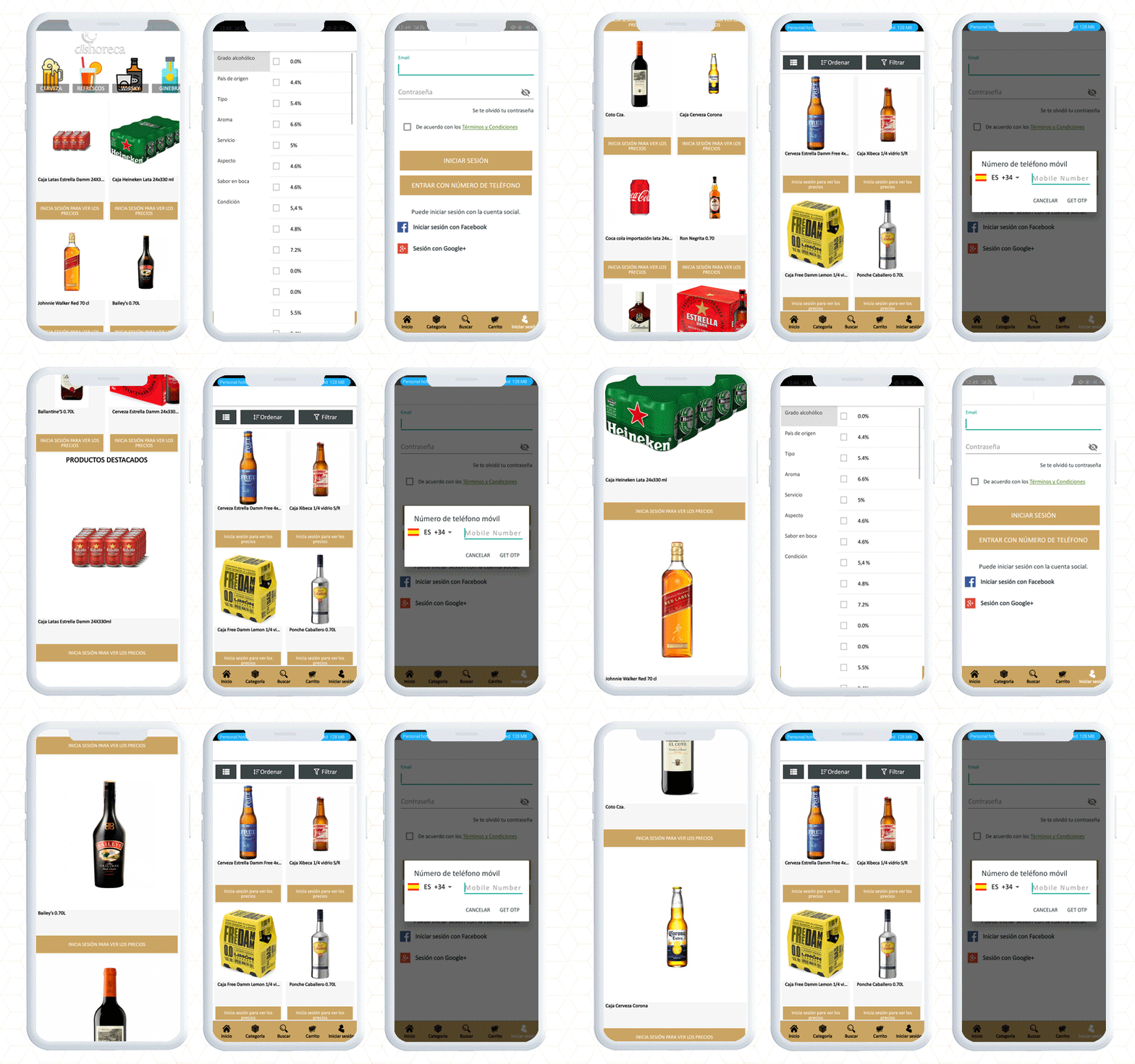
2. DISHORECA- PrestaShop Mobile App
DISHORECA is a mobile application that allows you to order drinks 24 hours a day. The app also allows you to place orders within few seconds, saving you time and allowing you to focus on your business. Dishoreca is a popular website in Spain and to make their App, they used KnowBand’s Mobile App Builder.
This PrestaShop mobile app is designed for HORECA professionals, convenience stores, and supermarkets. You can use the app to place orders, repeat purchases with a single click, review historical data, and receive news, offers, special deals, and other features that will make your company purchases easier.
Have a look at the app features:
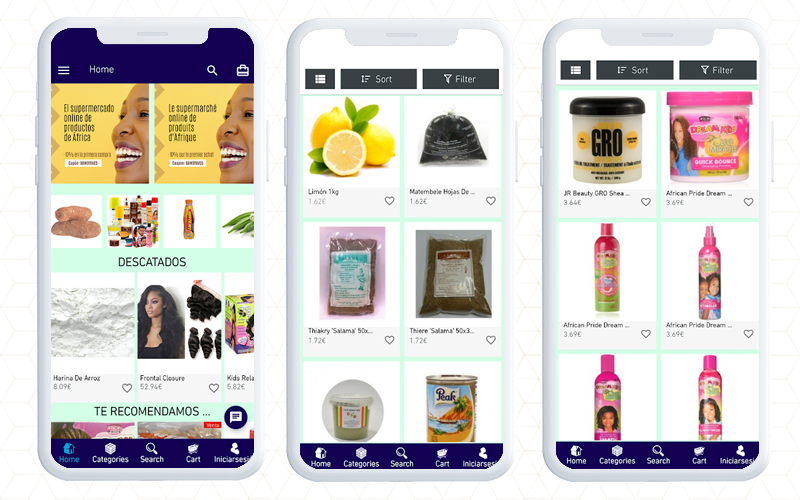
3. bawone- PrestaShop eCommerce Mobile App
Bawone is an online African and Latin goods superstore where you can find any product from any country and save time and money.
Bawone is built on the PrestaShop platform and to create the mobile app for android users, they have used KnowBAnd’s PrestaShop Android app builder.
You will find all the groceries and with filters, you can easily find the desired products.
4. AXXA Market- PrestaShop Business App
At AXXA Market, you can get the best culinary supplies without leaving the convenience of your own home. Install it now and start having fun!
The app sends push notifications with the latest information on the local market on high-quality, healthy, and dietary products.
As a user of this app, you will be notified of our specials as soon as they are published. For customer service, they respond to your concerns from WhatsApp, mail, or by phone.
App filters can help you identify and sort products that meet your diet and lifestyle, such as Paleo, Keto (ketogenic), vegan, and more. We’ve covered all you need to know about caring for and protecting your health.
Have a look at the app features with checkout page and payment gateways.
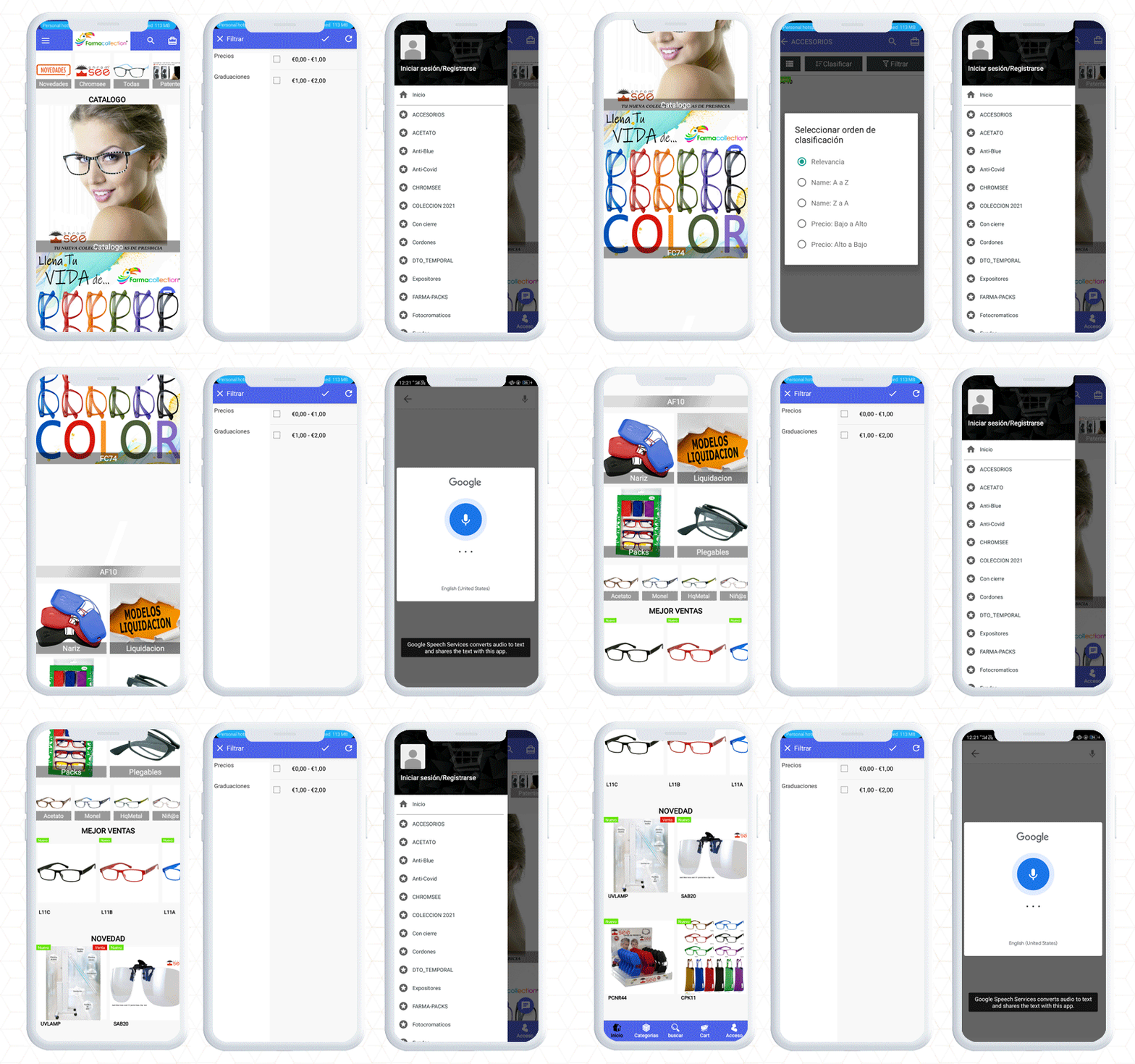
5. Farmacollection- Mobile App for Android
The Next Mobile eCommerce app on the list is the Farmacollection mobile app. They have a wide range of eyewear for every face type. The app is build up using KnowBand’s PrestaShop Mobile App builder facilitating easy search to find the right spectacles for you.
A customer can purchase a suitable product by applying filters and sorting features. To complete the purchase on Farmacollection mobile app, the user will have to register first by providing a mobile number and email address.
Once a customer gets registered, they can log in with email, phone number, or using the fingerprint sensor.
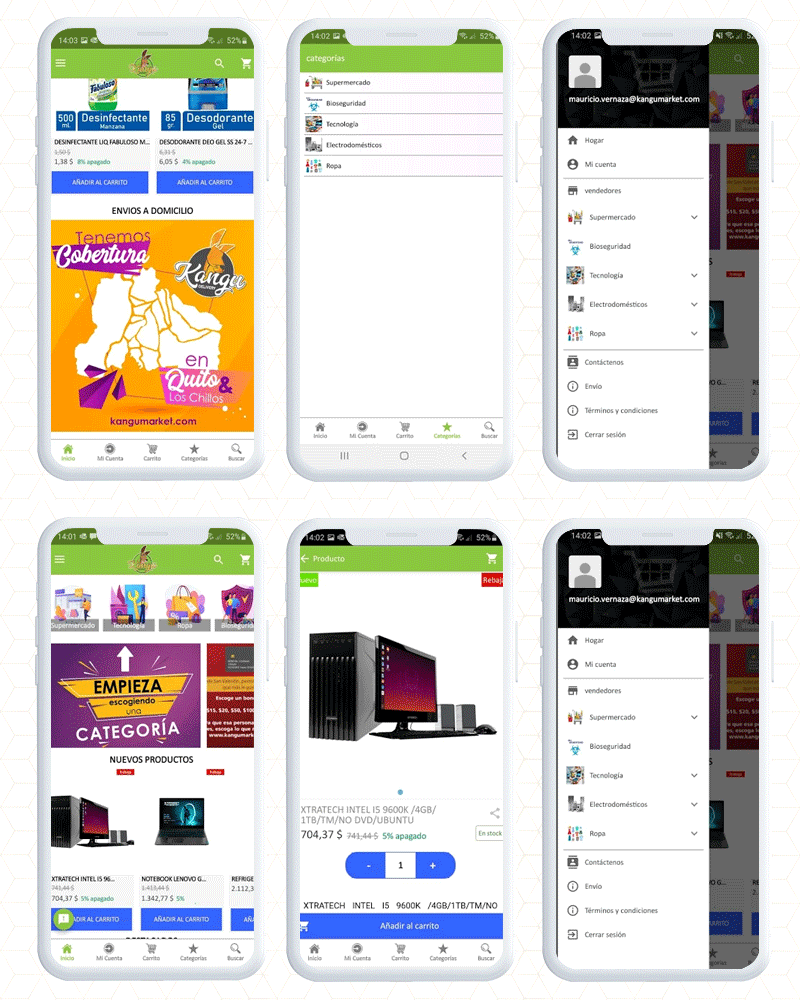
6. Kangumarket Android Mobile App
Kangumarket is another real-life example of Spanish PrestaShop business apps created by KnowBand using the PrestaShop mobile app builder module. It encompasses all the features. The app also provides easy access to products, is findable, and builds credibility with the customers.
Final thought
For the time being, an eCommerce mobile app will stay in a long run and as an eCommerce business owner, having a mobile app for the store will be a thoughtful decision. Click here to get your mobile app builder and our expert team will help you set up and configure it for your eCommerce business. If you are looking for delivery management software then the delivery boy app might help you.
E-commerce apps allow you to sell products to customers using a mobile app. Mobile usage for eCommerce has evolved and thrived like never in the past two years. Creating an app for your eCommerce has become statutory and unavoidable.
Mobile apps offer unique features to maximize the shopping experience for shoppers. We have gathered five Android/iOS Apps developed using KnowBand’s PrestaShop Mobile App builder Addon that provides a sophisticated shopping experience.
1. Apteka24
Apteka24.TJ is Tajikistan’s first online pharmacy, and as a result of their collaboration, purchasing medicines has become an easy and convenient activity. Apteka24.TJ brings medications and hygiene items directly to your home, saving you both time and money.
With 1000+ installs on Google Play store, this PrestaShop mobile app is helping people get their medicines at their doorsteps. Apteka24 Mobile App has a separate category listing, a personalized home screen, and uncomplicated navigation for customers to find required medications.
It is easy to find products with voice search options and sort filters. Have a look at the checkout and payment screens of the app.
2. BabyButik-nsk
BabyButik is a website for kid’s clothing and accessories. You will find a variety of shoes and outerwear for kids. The store has an app for iOS users that they have created with the help of KnowBand’s Mobile App Builder.
An eCommerce mobile App makes shopper’s life more convenient. Having a functional in-app search reduces the friction in the purchase path. The Voice search option gives a personalized experience to customers.
With the OTP login, the sign-up process becomes simple. Also, the implementation of live chat support in the PrestaShop mobile app offers seamless customer support and services.
Shipping options mentioned in the app are:
CDEK Courier Service, Russian Post, provides next-day delivery. CDEK courier service delivers to Belarus, Kazakhstan, and Kyrgyzstan. Residents of Novosibirsk can self-pickup the products.
Colormarket is a service market that has been selling auto repair parts for over ten years. Use their mobile app to choose automotive paint and painting supplies for your cars. It is your dependable and high-quality car’s cosmetic care assistance in Russia.
You can explore and search for the products on the store’s mobile app developed on PrestaShop. The KnowBand’s PrestaShop iOS App builder has a feature to send endless push notifications. Thus, customers will always get notified about the store’s activities like inventory, new product arrivals, etc.
The checkout process is easy with a simple registration and sign-up option. Explore the app features:
4. Meniňki
Meniňki is a clothing app where you will find a collection for women, clothing for men, children, and household goods. The app’s home page is interactive and has good CTAs. It has a category page, sorting option, product filter, shopping cart, and other personalized features to deliver an amazing shopping experience.
The checkout page of the Meninki PrestaShop Mobile app supports all of the famous payment gateways and shipping methods. It has a simple sign-up form. The Mobile App allows social login with Facebook and Google. It also has features like fingerprint login and mobile number login.
Below are the App’s images:
5. Gutmarkt
Gutmarkt is a professional shop for permanent makeup and tattoo artists. The app for Gutmarkt is developed using the PrestaShop Mobile App Builder module. It shows best sellers, new arrivals, and appealing banners on the home page.
On the other hand, you can search for the products in the category section. Every product of the store has a piece of descriptive information for better understanding. Its clear CTAs also influence the purchase decision of the customer.
A mobile app that gives a seamless shopping experience increases conversion rate, customer retention, and customer acquisition.
Features of PrestaShop iOS and Android Mobile App Builder Module:
Build a mobile app with PrestaShop Mobile App creator developed by Knowband. The plugin is highly customizable and does not require any coding.
Create a native iOS/Android App for your website
The data will be in real-time synchronization
Customize the home page design and layout
Allows Tablet and Mobile Optimization
It supports all product types including digital products
Integrate with WhatsApp and Zopim for Live Chat support
Simplified checkout with social login, fingerprint login, and OTP sign up
Send unlimited push notifications to customers
Customers can track orders
Compatible with Multi vendor Marketplace module and delivery boy app.
For Mobile App customization and to add any additional features, drop us an email at support@knowband.com. You can discuss your requirement with our experts and they will help you create a mobile app that matched your needs.
App building requires skilled app developers who know to test and deploy a mobile application. Every app has to be user-friendly and platform compatible with Android and iOS.As you may be aware, the demand for mobile apps has risen in recent years, and the industry has experienced unprecedented growth since the emergence of COVID 19. Many businesses are prioritizing bringing their online enterprises to mobile devices as a result of rising demand.
What if you get a solution that does not require finding an app developer? It isn’t a dream! An eCommerce Mobile App Builder Module helps digital commerce merchants creating their Android/iOS app without hiring any coder. For PrestaShop eCommerce, many clients worldwide have launched their mobile apps using KnowBand’s PrseatShop Mobile App Builder.
In this blog post, we will explain the features of Mobile App Builder that you must have noted for your app and the best Three examples of Poland PrestaShop Mobile App developed by Mobile App Builder Module.
Traits of PrestaShop App Builder- KnowBand Plugin
A sophisticated mobile app software for every online business! PrestaShop Mobile App Builder creates an app with practically all of the features that a company needs. This data-driven app gives customer satisfaction and improves the shopping experience of customers on mobile and tabs.
How to create an app with PrestaShop Android App builder?
It is a simple process. KnowBand’s team takes care of the initial app configuration with three months of free support after your purchase with lifetime validity. You can integrate your website with the app after purchasing it, and it will function in real-time sync.
Some Notable features of Prestashop app builder are:
Builds a native app that is mobile and tablet responsive
Supports a wide range of items, including digital ones
Compatible for multiple languages
Integrated with voice search, provides wishlist option, etc.
All applicable shipping methods and payment methods compatibility
Merchant can redesign and customize the home page
Multiple login options for seamless customer experience
Google login
Facebook signup
OTP registration
Fingerprint login
Link WhatsApp or Zopim for Live Chat support for customer service
Send unlimited Push Notifications to customers
Smooth 3 step checkout process in real-time synch
3 Android Apps developed by Prestashop Mobile App Builder Plugin for Poland Stores
Let us explore the apps and their features:
1. Wieszakshop.pl – Premium Brands Outlet
With 1000+ downloads, Wieszakshop.pl is an online outlet of premium clothing brands. Wieszakshop.pl mobile app offers a large range of fashionable women’s, men’s, and children’s clothing and shoes, as well as accessories, at up to 70% off standard retail prices in Poland and around the world.
For a fashion-focused mobile app, every UI and UX element from navigation tabs, home page design, shopping cart design, product description, layout, to the checkout page, is crucial. With the help of the PrestaShop App builder plugin, Wieszakshop.pl has launched an amazing shopping app for customers in Poland and internationally.
Have a look!
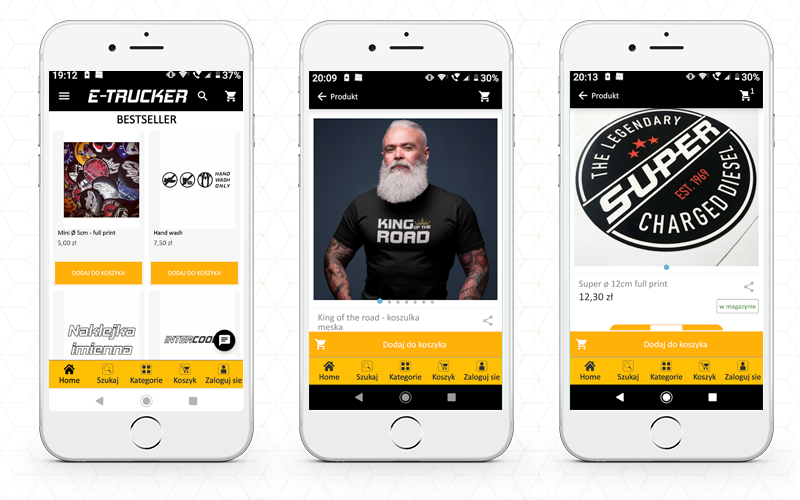
2. e-trucker.eu- PrestaShop eCommerce App
e-trucker.eu is another eCommerce workwear clothing app for Poland users. You will find a collection of exclusive truck styling products, clothes, accessories specially designed for truckers.
The app is feature-rich with a user-friendly interface. Anyone can buy products from anywhere.
Have a look at this cool app created by the PrestaShop App builder module:
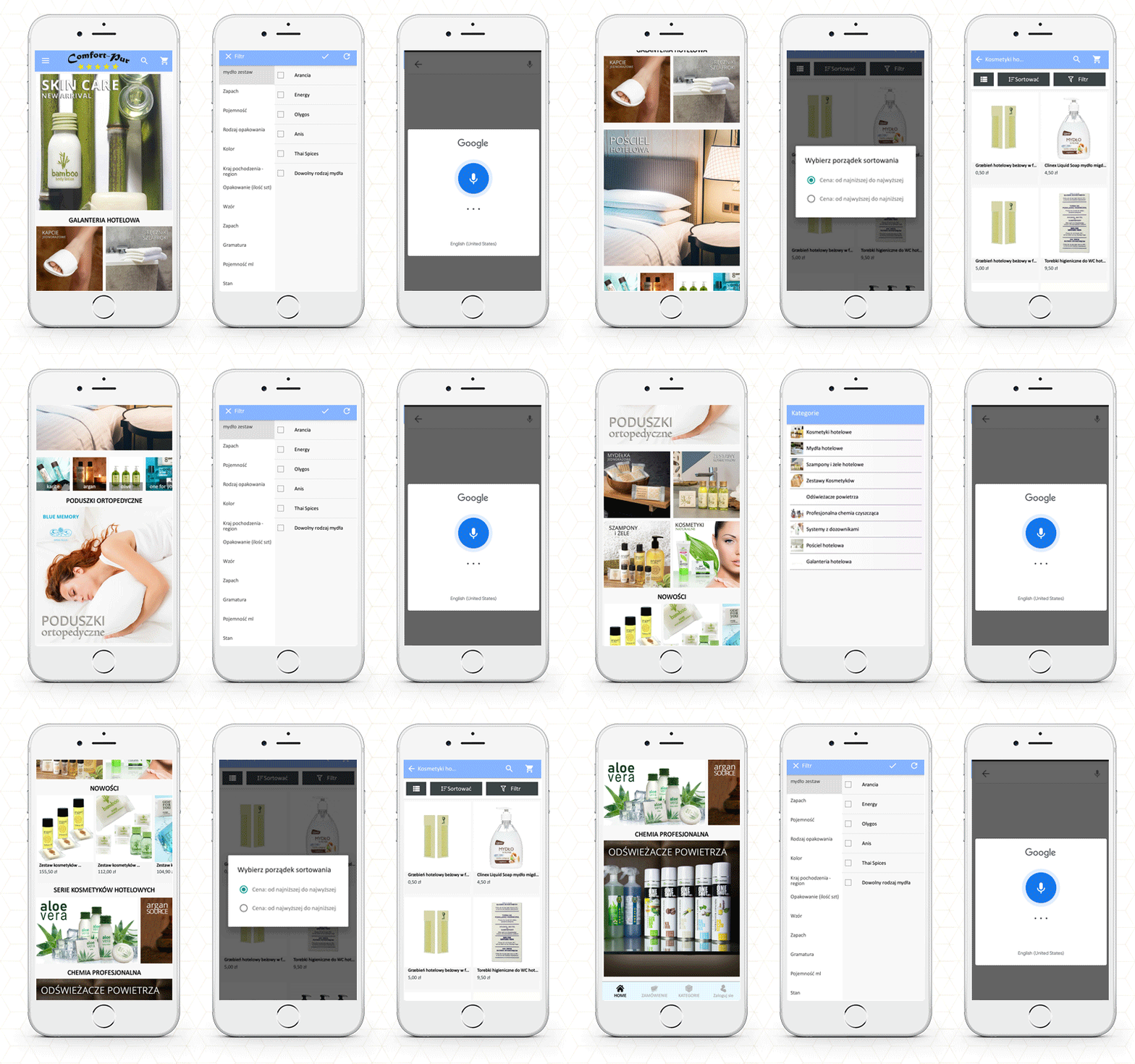
3. Comfort-Pur Kosmetyki Hotelowe- eCommerce App
Comfort-Pur Hotel Cosmetics is a platform that provides a range of cosmetics and accessories for your hotel. The software makes buying easy and safe. Shopping with the Comfort -Pur app is simple and enjoyable. You may quickly repeat your previous order or add new products and take the advantage of promotions.
Installing applications provides access to unique discounts only for app users. The mobile app always displays promotions, discounts, and specials on the home screen as the app provides features for updating the banners with drop and drag functionality.
It has all the features that I have listed in the App feature section. Have a look at this amazing app!
Custom eCommerce Development Solution by KnowBand
To create a personalized app, you can share your custom app features with our team, and with some additional cost, we will make an app that exactly matches your expectations. KnowBand has a collection of modules for creating an eCommerce website and for optimizing each and every element from the product page to the checkout page. You can also start a service-providing marketplace that can allow you to sell locally or globally.
A mobile app becomes a success if it caters to the requirements of the shoppers and delivers an exclusive shopping experience. While thousands of apps get published every day, why do only a few get successful? There could be many reasons that make an app successful but above all the idea matters.
Once you come up with the striking idea, it’s time for the implementation. Create a website first and then a robust mobile app for giving an incredible shopping experience.
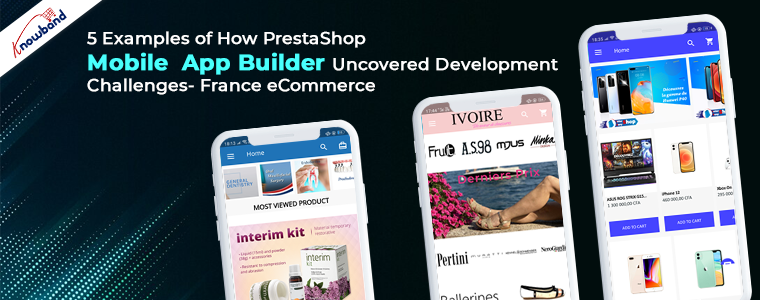
In this blog post, we have gathered the 5 best examples of France eCommerce Mobile Apps that have been created using KnowBand’s PrestaShop eCommerce Mobile App Builder. You can install them from the Google Play store to check out the features.
Challenges in building a mobile app
1. Decide on the right App to develop
The very first challenge in launching an app is deciding what is right for your brand. The app should be innovative and engaging. You must comprehend and narrow down the fundamental criteria, such as the app’s aim, budget, and more!
2. Development technology
Since you have a clear understanding of your niche and the app idea, you can focus on the development technology. The challenge here is choosing the right development technology. It can be hybrid, native, or cross-platform.
3. Who will be the developer
This is most challenging when there are thousands of people providing their services. To develop a native app for an existing website, instead of going from scratch, you can use a ready-made Mobile App builder plugin from KnowBand.
4. Customer Experience and feedback
A customer should not find any difficulty in operating the app and searching for the desired product. For this, navigation comes in the scenario. For the business app, keep the buttons viewable that a user can access with ease.
The PrestaShop Mobile App builder by KnowBand provides clear and bold navigation, CTAs, voice search, sort and filter options for the shoppers.
5. Security
Mobile app developers confront a number of challenges when it comes to security. To overcome this, KnowBand PrestaShop Mobile App Builder provides live chat support. To solve any concerns you can also ask for a customized app, the developer team will deliver you an app matching your expectations.
Fab-5 PrestaShop Mobile Apps in Action- France eCommerce
For the starter, I must mention that the PrestaShop Mobile App Builder is an extremely easy-to-configure solution for launching a robust android and iOS app. It takes you 3 steps to install and configure. Finding a mobile app for your business that supports all the payment gateways for your country can be tedious but KnowBand’s Mobile App supports multiple payment and shipping methods that are popular in France.
Category: Lifestyle
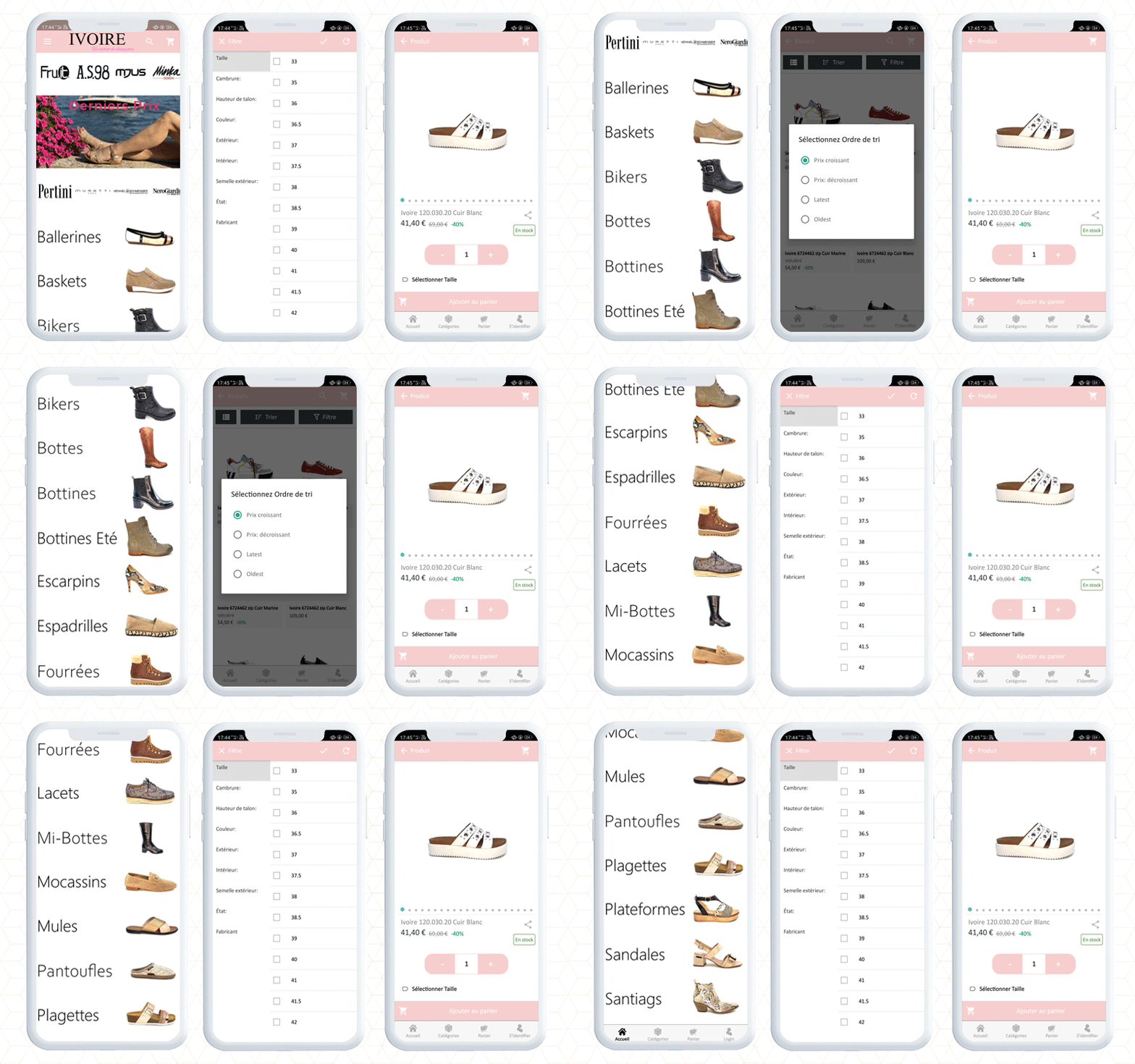
1. Ivoire Chaussures France eCommerce store
Ivoire Chaussures is a lifestyle app created on PrestaShop platform. It is a store for France users where you will find a variety of shoes for various occasions.
The mobile app is created using the PrestaShop Android Mobile App builder. The front end of the app looks engaging and has a captivating design. To find the products, customers can use voice search or explore in the category section.
CTAs for adding a product to the cart and checkout is very clear. Anyone in France can access the app and shop from the Ivoire store with ease.
Category: Health and Fitness
As said before, we are helping businesses creating mobile apps that cater to customer satisfaction and delivers incredible shopping experiences.
We have created some mobile apps for businesses dealing in health and fitness. Our Mobile App Builder helped these eCommerce companies of France in bringing their store to everyone’s pocket.
2. Ivory Fitnex
Ivory Fitness is an eCommerce mobile app dedicated to bodybuilding and related products.
The app is in real-time synch with the website. All the offers running on the website are also applicable on the mobile app.
This PrestaShop Android app is developed using KnowBand’s Mobile App Builder Module.
From the landing page to the super checkout page, the user will find the app easy and accessible.
3. Viva Medical
You now have instant access to the complete Viva Medical store with its app developed using KnowBand PrestaShop Mobile App Builder.
Both in terms of medical supply services and health care, Viva Medical is a must-have provider in the healthcare area. Whether you are a healthcare professional, a medical student, or a person, this app allows you to find “best sellers” of medical equipment that satisfy all of your demands.
Have a look at its features:
The app supports all the application payment and shipping methods of France.
Manage doorstep delivery with Delivery Boy App
Mobile App demand is increasing and with that the management of online delivery becomes tedious. To manage the delivery process with ease, explore KnowBand’s delivery boy app which is also compatible with the PrestaShop Mobile App Builder module.
Category: eCommerce Shopping
Shopping Apps developed using PrestaShop Mobile App Builder
4. Inter Easy Shop
The Inter Easy Shop Mobile App has a collection of books, laptops, smartphones, connected objects, consoles, and video games, cosmetics, etc, to ensure shopping!
It has a personalized home page, custom login, payment and shipping options, a great checkout page with social login, fingerprint login, and mobile number sign-up. Additionally, it provides live chat support and many other exciting features for customers.
It offers simple and secure payment!
Customers can pay their payments by mobile money (Moov Money, Orange Money, Tmoney, MTN Mobile Money, others), by credit card (Visa, MasterCard, others), and by cryptocurrency (bitcoin, others).
5. Europhone.gp Gadget Shopping App
Europhone is a website delivering products in France. You will find a variety of electronic gadgets, mobile phones, tablets, etc. from multiple brands on one platform!
The mobile app has a great design that matches the theme of the store. The banners are attractive and can be changed from the backend of the application.
If there is a product that a customer likes and want to save, they allow their customers to add such products to the wishlist as well. The entire purchase process is simple from finding the product to placing the order
With the mobile app purchase, you get 3 months of free support from the KnowBand at a 1-time payment. The PrestaShop Mobile App Builder is available for Android and iOS. You can also create a mobile app for your marketplace with the same module if you are using KnowBand’s Marketplace plugin.
For any custom features, you can share your query with our team at support@knowband.com. We will discuss, work on it and deliver the product matching your expectations.