Prestashop PWA Addon v2.0.1 is Here: Explore the Exciting New Enhancements!

Progressive web apps are one of the most advanced technologies that allow users to have an app-like experience without installing the apps from the stores. On top of that the PWAs are light in size and compatibility and load much faster than the native Android and iOS App. For the same reason, it becomes crucial for the Prestashop vendors to keep up with the latest techno trends and take the next step by launching PWA apps for Prestashop.

At Knowband, we are committed to helping Prestashop store owners excel in this dynamic environment. We’re excited to announce the release of the Prestashop PWA Addon v2.0.1, packed with innovative features designed to enhance your store’s functionality and user engagement.

Why Choose a PrestaShop Progressive Web App?

The PWA offers a seamless, app-like experience directly from their browsers. Thus, with the PrestaShop PWA Mobile App by Knowband, you can combine the best of web and mobile app functionalities and provide your customers with fast, reliable, and engaging experiences.

Here’s a look at the significant enhancements in our latest version of the PrestaShop Progressive Web App.

Major Enhancements in PrestaShop PWA Addon v2.0.1:
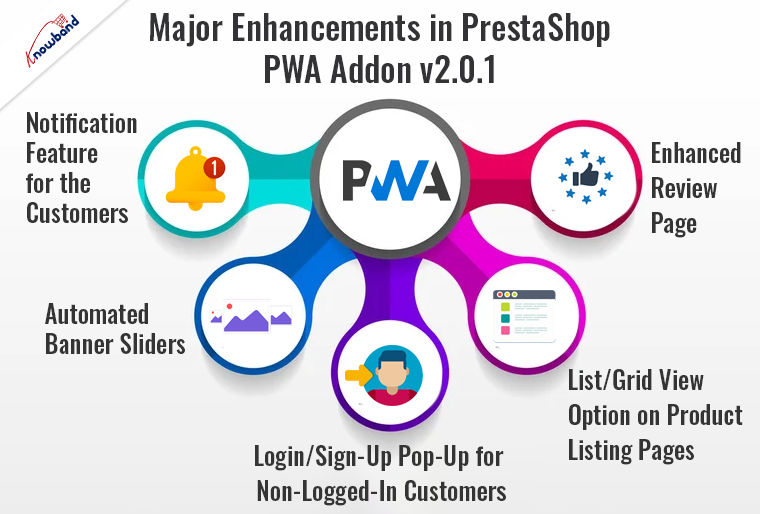
  1. Notification Feature for the Customers:

One of the standout features in version 2.0.1 is the introduction of the push notifications tab. This feature allows your customers to explore the order notifications and keep updated about new updates directly in the notification tab available on the home screen.

Furthermore, with a top-notch feature like push notifications, you can engage with your customers in real-time, sending personalized updates directly to their devices.

Whether it’s a new product launch, a flash sale, or an order update, notifications ensure that your customers stay informed and engaged.

  1. Automated Banner Sliders:

Knowband’s PWA app comes with an in-built home page layout editor that allows the store admin to tailor the home page layout as per their business needs with simple drag-and-drop layout components.

Therefore, visual appeal is crucial in capturing customer attention, and our new automated banner sliders do just that. The newly implemented automated banner sliders make it easier than ever to showcase your latest products, promotions, and announcements in a dynamic, eye-catching manner. The automated feature ensures your homepage remains fresh and up-to-date with minimal effort, enhancing the overall user experience.

  1. Login/Sign-Up Pop-Up for Non-Logged-In Customers:

Ease of access is paramount in retaining visitors and converting them into loyal customers. The new login/sign-up pop-up feature simplifies the process for non-logged-in customers, providing a seamless way to access their accounts or create new ones. This enhancement not only improves user experience but also helps in building a robust customer database for targeted marketing campaigns.

  1. Enhanced Review Page:

The enhanced review page in Prestashop Progressive web apps by Knowband makes it easier for customers to leave feedback and for potential buyers to read reviews. Furthermore, the enhanced layout is more intuitive and visually appealing, encouraging more customer interactions and helping to build credibility for your products.

  1. List/Grid View Option on Product Listing Pages:

Flexibility in how products are viewed can significantly impact user satisfaction. Furthermore, with the new list/grid view option, customers can choose their preferred way of browsing your catalog. This customization enhances the shopping experience by allowing users to navigate products in a manner that suits their preferences, making it easier to find what they’re looking for.

Why Upgrade to PrestaShop PWA Addon v2.0.1?
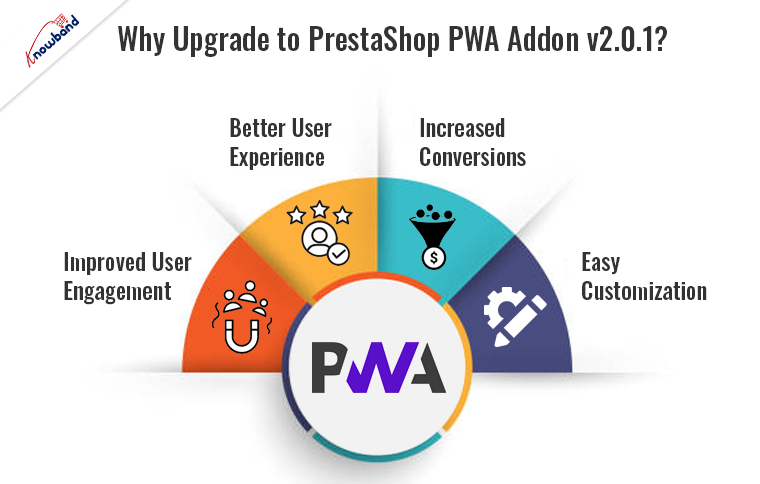
Upgrading to the latest version of Knowband’s PrestaShop PWA App Builder offers numerous benefits. The enhancements in v2.0.1 are designed to make your store more interactive, user-friendly, and efficient. 

Improved User Engagement:

With push notifications and enhanced visual elements, you can keep your customers engaged and informed, leading to higher retention rates.

Better User Experience:

Features like the login/sign-up pop-up and list/grid view options streamline the shopping process, making it more enjoyable for users.

Increased Conversions:

An improved review page and automated banner sliders can help in showcasing your products more effectively, driving more sales.

Easy Customization:

The PrestaShop PWA App Creator allows for easy customization, enabling you to tailor the app to your specific business needs without extensive coding knowledge. 
PrestaShop PWA Mobile App

Explore Knowband’s Prestashop PWA Mobile App solution for enhancing your e-commerce store’s mobile experience and performance.

SHOP NOW

Conclusion!

The PrestaShop PWA Addon v2.0.1 is a game-changer for online stores, bringing a host of new features that enhance user engagement, improve functionality, and drive conversions. Thus, upgrading to the latest version can provide your customers with a superior shopping experience, ensuring your store stays ahead in the competitive e-commerce landscape.

Experience the future of e-commerce with the PrestaShop Progressive Web Application and see the difference it can make for your business. Upgrade to version 2.0.1 today and start reaping the benefits of these exciting new enhancements. 

Recommended Read: From Angular to React: Enhancing the PrestaShop PWA Addon for Faster Performance!


Revolutionize Your Prestashop Store: 5 Free Modules for Success!

In the competitive world of e-commerce, standing out from the competition requires innovation, efficiency, and the right tools. For Prestashop store owners, having access to powerful modules can make a significant difference. At Knowband, we understand this need and are offering five incredible free Prestashop modules to help you optimize and enhance your store.

Furthermore, these modules not only simplify your operations but also improve customer experience and boost sales. Let’s explore these game-changing tools.

The Importance of Free Modules:

Free modules are not just budget-friendly options; they provide immense value by allowing you to test new functionalities and improve your store’s features without any financial risk. Moreover, the free Prestashop Addons can be particularly beneficial for startups and small businesses that are navigating their way through the competitive e-commerce landscape. On top of that, the free modules help you stay innovative and agile, enabling you to deliver a superior shopping experience to your customers. Furthermore, if you are a Prestashop retailer, you can also check the free modules to get in hand experience with the module features in workflow.

Elevating Your Prestashop Store:

Integrating the right modules can transform your store’s functionality and customer experience. Therefore, these modules streamline operations, enhance user engagement, and ultimately contribute to increased sales. Let’s delve into the five free Prestashop modules from Knowband that can elevate your store.

Free Prestashop Gift Card Manager:

The gift card market is booming, and having a robust gift card system can be a game-changer for your store. The Free Prestashop Gift Card Manager addon for Prestashop enables you to offer customizable gift cards, making it easy for your customers to buy and send gift cards for any occasion. Furthermore, this module not only drives additional revenue but also attracts new customers who might be introduced to your store through gift cards.

Imagine your customers purchasing gift cards for birthdays, anniversaries, or holidays. At the same time, each gift card sold is a potential new customer who may become a loyal shopper. This simple addition can significantly enhance your store’s appeal and customer base.

Free Prestashop Abandoned Cart Serial Reminders:

Cart abandonment is a common issue in e-commerce, leading to lost sales. On the other hand, the Free Prestashop Abandoned Cart Serial Reminders module by Knowband addresses this problem by sending automated reminders to customers who have left items in their carts. This gentle nudge can significantly increase the chances of recovering lost sales.

Thus, by re-engaging potential buyers, you can turn abandoned carts into completed sales, boosting your overall revenue without any additional marketing effort.

Free Prestashop Return Manager:

A smooth return process is crucial for maintaining customer satisfaction and loyalty. Following the same, the Free Prestashop Return Manager simplifies the returns process for both you and your customers. It streamlines return requests and provides automated status updates, making the entire experience hassle-free.

Efficiently handling returns builds trust and confidence in your brand. Moreover, customers are more likely to make a purchase if they know they can easily return a product if needed. Furthermore, Knowband’s free Prestashop Return Manager Addon helps you manage returns professionally, enhancing your store’s reputation and customer loyalty.

Free One Page SuperCheckout:

The Prestashop Free Quick Checkout Addon is created to simplify the purchase journey and help online stores convert visitors into customers more effectively. Instead of forcing shoppers through multiple steps, this solution presents everything in a single, well-organized layout. This Prestashop simplified checkout addon, it reduces distractions, shortens checkout time, and provides a smoother shopping experience that encourages users to complete their orders confidently.

To support global buyers, this quick checkout extension for Prestashop is compatible with leading payment gateways such as PayPal, Stripe, Authorize.Net, Amazon Pay, Apple Pay, Google Pay, Braintree, Square, Klarna, Worldpay, Mollie, Skrill, Neteller, Payoneer, 2Checkout, PayU, Razorpay, Boleto, ccAvenue, Sage Pay, Ogone, MobilPay, Pago Fácil, and ePay. By offering multiple secure payment options, store owners can meet customer preferences across regions and increase successful transactions.

Knowband’s Prestashop Free One Page SuperCheckout module consolidates the entire checkout process into a single page. This factor makes the checkout process quick and easy for customers to complete their purchases.

Furthermore, by reducing the steps required to complete a purchase, you minimize the risk of customers abandoning their carts. This Responsive one page checkout prestashop module ensures a seamless, user-friendly checkout experience, encouraging more conversions and higher sales.

Free Android and iOS Mobile App Builder:

The Free Android and iOS Mobile App Builder allows you to create a mobile app for your Prestashop store without any coding knowledge. This opens up a new avenue for reaching and engaging with your customers.

With a mobile app, your store is accessible anytime, anywhere. Moreover, the customers can browse and shop on the go, receiving personalized notifications and updates. This module helps you stay connected with your audience, providing a convenient and engaging shopping experience that can lead to increased loyalty and sales.

Knowband’s Free Prestashop Modules

Knowband offers free PrestaShop modules to enhance your store’s functionality and customer engagement. These tools streamline various aspects of store management, from improving checkout processes to boosting user interaction.

SHOP NOW

Conclusion!

Incorporating these five free Prestashop modules from Knowband can revolutionize your Prestashop store. They offer an array of features designed to enhance customer experience, streamline operations, and boost sales. By leveraging these tools, you can stay ahead in the competitive e-commerce landscape without incurring additional costs. Start using these free modules today and pave the way for your store’s success.

Furthermore, we are also available at our official email address support@knowband.com for queries and concerns. 

Your WooCommerce Store Deserves a Mobile App: Discover Our Builder Plugin on WordPress!

In today’s fast-paced digital landscape, having a mobile presence is no longer optional—it’s essential. As mobile commerce continues to grow exponentially, online retailers must adapt to meet the demands of their customers. On the other hand, the apps are also reliable from the customers’ perspective. Not only does the app provide a native user experience but it also maintains a secure environment for the order and payment process. Thus, it becomes crucial to sell via Android and iOS apps along with your eCommerce website to grab your customers’ attention and grow the business.

For WooCommerce store owners, this means offering a seamless mobile shopping experience. Furthermore, at Knowband we offer Android and iOS App Builder for WooCommerce that allows the store admin to create and upload the apps on the stores within 2-3 business days. Moreover, we are thrilled to introduce our WooCommerce Mobile App Builder, now available on the official WordPress Plugin Directory.

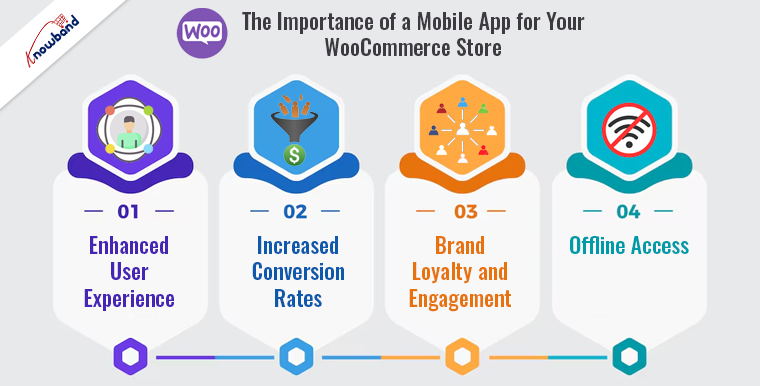
The Importance of a Mobile App for Your WooCommerce Store:

According to recent studies, mobile transactions are expected to account for nearly 73% of total e-commerce sales. This trend highlights the need for online retailers to optimize their stores for mobile devices. Therefore, a mobile app can significantly enhance the shopping experience by offering faster load times, better navigation, and personalized user interactions compared to a mobile-optimized website.

Enhanced User Experience:

Mobile apps provide a more engaging and intuitive shopping experience to customers. Furthermore, features such as push notifications, easy navigation, and quick checkout processes can lead to higher customer satisfaction and retention rates.

Increased Conversion Rates:

Mobile apps typically have higher conversion rates than mobile websites and there are several reasons behind this. This is due to their superior performance, personalized content, and ease of use, encouraging customers to make purchases more frequently.

Brand Loyalty and Engagement:

A mobile app allows you to build a stronger connection with your customers. Furthermore, through personalized offers, loyalty programs, and direct communication via push notifications, you can foster brand loyalty and keep customers engaged.

Offline Access:

Unlike mobile websites, apps can offer offline access to certain features. This ensures that customers can browse products and add them to their cart even without an internet connection, improving their overall shopping experience.

WooCommerce Mobile App Builder

Easily convert your WooCommerce store into a feature-rich mobile app with Knowband’s WooCommerce Mobile App Builder, enhancing user engagement and sales.

SHOP NOW

Introducing the WooCommerce Mobile App Builder Plugin-

At Knowband, we understand the importance of providing a seamless mobile shopping experience for your customers. Thus, following the same, our WooCommerce Mobile App Builder plugin is designed to help you create a fully functional mobile app for your WooCommerce store with minimal effort. We are proud to announce that our plugin is now available on the official WordPress Plugin Directory. Here’s why our plugin stands out:

Key Features of the WooCommerce Mobile App Builder Plugin:


Easy Installation and Setup: The plugin can be easily installed from the WordPress Plugin Directory. With our user-friendly interface, you can set up your mobile app without any coding knowledge.

Customization Options: You can customize the look and feel of your app to match your brand’s identity. Our WooCommerce app builder plugin offers various themes, layouts, and design elements that can be tailored to your preferences.

Real-Time Synchronization: The apps developed with WooCommerce app maker by Knowband synchronize with your WooCommerce store in real-time. Any changes made to your store, such as product updates or inventory changes, are instantly reflected in the app.

With the unlimited push notification feature: The store admin can notify the customers about new arrivals, special offers, and order updates to keep them coming back to the store.

Multiple Payment Gateways: The app maker for WooCommerce supports various payment gateways, ensuring a smooth and secure checkout process for your customers.

Multi-Language and Currency Support: With multi-lingual and multi-currency support, the app can reach a global audience.

Analytics and Reporting: Gain insights into your app’s performance with built-in analytics. Track user behavior, sales data, and other key metrics to make informed decisions.

Conclusion!

In the competitive world of e-commerce, staying ahead means adapting to the latest trends and technologies. Thus, by offering a mobile app for your WooCommerce store, you can provide a superior shopping experience that meets the expectations of today’s mobile-savvy customers. On top of that, our WooCommerce Mobile App Builder plugin, now available on the official WordPress, makes it easier than ever to create a powerful mobile app that drives engagement, increases conversions, and fosters brand loyalty.

Don’t miss out on the opportunity to elevate your WooCommerce store. Discover the WooCommerce Mobile App Builder plugin on WordPress today. 


Boost Sales and Engagement with Push Notifications in Prestashop Stores!

In today’s competitive e-commerce landscape, maintaining customer engagement and driving sales are critical challenges. eCommerce store admins follow various strategies to get customer traffic on the website and convert them to actual orders. Push notifications are one the most relevant marketing methods that get renders in front of your shoppers within no time. Furthermore, push notifications offer a powerful solution to these challenges, providing a direct line of communication with your customers. For Prestashop store owners, utilizing the “Prestashop web push notification addon by Knowband” can be a game-changer. Therefore, this article explores the benefits of push notifications and how this add-on can boost your sales and engagement effectively.

What are Push Notifications?

Push notifications are clickable messages sent directly to a user’s device or browser. Unlike emails or SMS, they are delivered instantly and can reach users even when they are not actively browsing your store. Moreover, these notifications can inform customers about promotions, new products, order updates, and more.

Benefits of Push Notifications in E-commerce:

Instant Reach: 

Push notifications to ensure that your message is delivered instantly. Hence, this immediacy can be crucial for time-sensitive promotions or updates as the customers receive the messages instantly.

High Visibility: 

Unlike emails that can end up in spam folders, push notifications appear directly on the user’s screen. This factor makes push notifications highly visible and a relevant modern marketing method.

Increased Engagement: 

Usually, push notifications have higher open rates than emails. They can re-engage inactive users and drive them back to your store.

Personalization: 

Notifications can be tailored to individual user preferences and behaviors, making them more relevant and effective.

Cost-Effective: 

Sending push notifications is relatively inexpensive compared to other marketing channels like paid ads. If you own a Prestashop store, you can grab Knowband’s Prestashop Web Push Notifications Module and configure it. Once done, you can send unlimited push notifications at zero charges.

Introducing the Prestashop Web Push Notification Addon!

The “Prestashop web push notification addon” is a robust tool designed to help Prestashop store owners leverage the power of push notifications. Furthermore, it integrates seamlessly with your Prestashop store and offers a range of features to optimize your marketing efforts.

Key Features:

Easy Installation and Setup: The Web Push Notification Extension for Prestashop is easy to install and configure, even for those with minimal technical expertise.

Customizable Notifications: With the web push notifications module installed on your store, you can create and send customized notifications based on user behavior, preferences, and segmentation. Therefore, tailored messages are more likely to engage users and drive conversions.

Automated Campaigns: Set up automated campaigns for abandoned cart reminders, order updates, product recommendations, and more. This automation saves time for the store retailer and ensures consistent communication with the customers.

Cross-Device Support: Reach your customers across multiple devices, including desktops, tablets, and smartphones. Ensure that your messages are seen regardless of the device being used.

How Push Notifications Boost Sales and Engagement!

Abandoned Cart Reminders:

The push notifications can significantly reduce cart abandonment rates by reminding users of the items left in their carts. Thus, sending timely and personalized reminders can nudge users to complete their purchases, resulting in increased sales.

Time-Sensitive Promotions:

Push notifications are perfect for promoting flash sales, limited-time offers, or special events. Furthermore, the instant nature of push notifications ensures that your customers are informed immediately, encouraging quick action and boosting sales.

New Product Announcements:

Keep your customers informed about new arrivals and product launches. Push notifications can create excitement and anticipation, driving traffic to your store and increasing the likelihood of purchases.

Re-Engagement Campaigns:

Re-engage inactive users with personalized notifications. Offer special discounts, recommend products based on their browsing history, or simply remind them of your store. Re-engagement campaigns can rekindle interest and drive repeat purchases.

Order Updates:

Enhance customer satisfaction by keeping them informed about their order status. Send notifications for order confirmations, shipping updates, and delivery confirmations.

Prestashop Web Push Notification Addon

Discover Knowband’s Prestashop Web Push Notifications Addon, empowering e-commerce stores with instant, impactful customer engagement tools.

SHOP NOW


Conclusion!

Incorporating push notifications into your Prestashop store’s marketing strategy can significantly boost sales and engagement. Moreover, the Prestashop web push notification addon by Knowband provides a comprehensive solution for leveraging this powerful tool effectively. Thus, by sending personalized, timely, and relevant notifications, you can enhance customer experience, drive conversions, and ultimately grow your business.

Furthermore, along with Web push notifications, we provide various other cart recovery solutions. Instance, you can check our Abandoned Cart addon for Prestashop. Meanwhile, if you have any queries or suggestions, feel free to get in touch with us at support@knowband.com.


Recommended Read:

7 Major Benefits of Using Web Push Notifications in eCommerce

Web Push Notifications: 5 Best Practices to Boost eCommerce Conversions

How easy is it to send Push Notifications on PrestaShop Mobile Apps?


Identify 7 Elements That Degrade Your Checkout Experience!

In the world of e-commerce, a smooth and efficient checkout process is crucial for converting visitors into customers. On the other hand, a complex or frustrating checkout experience can lead to cart abandonment, negatively impacting your revenue. Therefore, identifying and addressing the elements that degrade the checkout experience is essential for boosting sales and customer satisfaction. Here are seven common issues that degrade the checkout experience and strategies to overcome them.

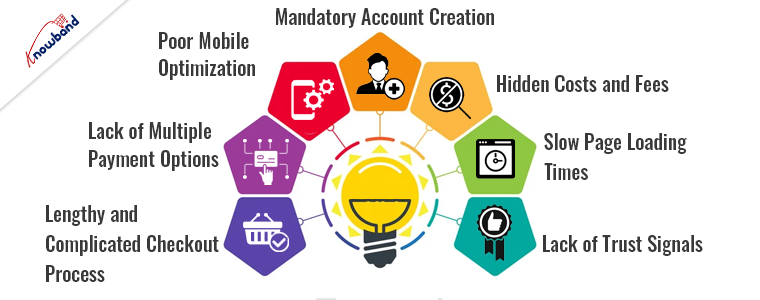
1. Lengthy and Complicated Checkout Process:

Customers prefer a quick and straightforward checkout where they can complete their purchase with minimal steps.

Solution: As a store admin, you can simplify the checkout process by condensing it into fewer steps. Thus, streamlining the number of required fields and making navigation intuitive can significantly improve the user experience. A single-page checkout can be particularly effective in reducing complexity and speeding up the process.

2. Lack of Multiple Payment Options:

Customers have different preferences for payment methods. For the same reason, limiting them to only a few options can be a significant deterrent, that can lead to cart abandonment.

Solution: To avoid such situations, you can offer multiple payment gateways to give customers the flexibility to choose their preferred method. Moreover, supporting a variety of payment options such as credit cards, PayPal, and local payment methods can cater to a broader audience and enhance convenience.

3. Poor Mobile Optimization:

With the increasing number of shoppers using mobile devices, a checkout process that is not optimized for mobile can frustrate users. This factor can not only lead to higher abandonment rates but also can cause lost customer interest during checkout.

Solution: Ensure that your checkout process is fully responsive and mobile-friendly. Furthermore, a seamless experience across all devices is essential. This includes optimizing button sizes, simplifying form fields, and ensuring fast loading times on mobile networks.

4. Mandatory Account Creation:

Forcing customers to create an account before making a purchase can be a significant barrier, especially for first-time visitors who may prefer to check out as guests.

Solution: Provide the option for guest checkout alongside account creation. If account creation is necessary, streamline the process and highlight the benefits of creating an account, such as faster future checkouts and order tracking.

Likewise, in our One Page Supercheckout Addon for Prestashop, we provide a wide variety of login methods including social login and guest checkout.

Prestashop One Page Supercheckout

Optimize your PrestaShop checkout with Knowband’s One Page Supercheckout addon for a streamlined, user-friendly shopping experience.

SHOP NOW

5. Hidden Costs and Fees:

Unexpected costs, such as shipping fees, taxes, or additional charges that appear late in the checkout process, can lead to cart abandonment. Therefore, the customers dislike surprises and may leave your site if they feel deceived.

Solution: To handle such situations, be transparent about all costs early in the checkout process. Displaying shipping and tax calculations upfront helps build trust and reduces the likelihood of abandonment due to unexpected costs.

6. Slow Page Loading Times:

A slow-loading checkout page can frustrate customers and lead to cart abandonment. In today’s fast-paced world, users expect pages to load quickly, and delays can result in lost sales. Not only users but also slow-loading pages are not considered well as per Google’s SEO guidelines. Thus, it becomes crucial to work on the loading speed of the checkout process. Furthermore, if you are a Prestashop store retailer, you can checkout our Accelerated Mobile Page Addon for Prestashop to enhance the loading speed on your checkout.

Solution: Optimize your checkout page for performance. This includes minimizing the use of heavy scripts, leveraging content delivery networks (CDNs), and ensuring that your hosting infrastructure can handle high traffic volumes. A swift and responsive checkout process keeps customers engaged and reduces the risk of abandonment.

7. Lack of Trust Signals:

Security is a significant concern for online shoppers. Therefore, a checkout process that lacks trust signals, such as SSL certificates, secure payment icons, and customer reviews, can deter customers from completing their purchases.

Solution: Integrate various trust elements into the checkout page. Display SSL certificates, secure payment badges, and customer testimonials prominently. These signals reassure customers that their information is safe, encouraging them to complete their transactions.

Enhancing Your Checkout Experience!
Improving your checkout process is essential for reducing cart abandonment and increasing sales. By addressing these common checkout issues, you can create a more user-friendly, efficient, and secure checkout process that meets the needs of modern online shoppers. Here are some additional tips to further enhance your checkout experience:

Streamlined Design:

  • Clean Layout: Ensure your checkout page has a clean and uncluttered layout. Avoid unnecessary distractions and focus on guiding the user through the process smoothly.

Personalization:

  • Save Cart Feature: Allow customers to save their cart for later. This is particularly useful for returning customers needing more time to complete their purchases.
  • Pre-filled Forms: For returning customers, pre-fill forms with saved information to expedite the checkout process.

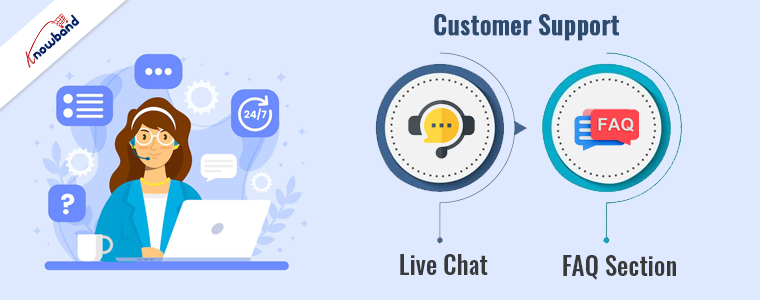
Customer Support:

  • Live Chat: Provide live chat support during checkout to assist customers with any questions or issues they may encounter.
  • FAQ Section: Include a frequently asked questions (FAQ) section to address common concerns related to the checkout process.

Conclusion!

Enhancing the checkout experience is vital for converting visitors into customers and reducing cart abandonment. Simplifying the checkout process does not necessarily mean only enhancing some factors. These include the checkout process, offering multiple payment options, optimizing for mobile, allowing guest checkout, being transparent about costs, ensuring fast loading times, and integrating trust signals, so you can create a seamless and secure checkout experience.

Recommended Read:

Some Supporting PrestaShop Addons for a Seamless Checkout Experience- Part 1

Some Supporting PrestaShop Addons for a Seamless Checkout Experience- Part 2

Which OpenCart Extensions can help you in a Seamless Checkout Experience?


7 Key Factors to Choose the Best Shopping Cart Solutions with Knowband!

The shopping cart is one of the customers’ most important aspects of the checkout process. Not only does it help the customers make the order decision but it also defines the overall checkout experience.

For the same reason, selecting the right shopping cart solution is crucial for the success of your online store. A robust shopping cart can enhance the user experience, streamline the checkout process, and ultimately drive sales. Therefore, at Knowband, we offer a vast variety of solutions to streamline the cart experience for your shoppers. This article will explore seven key factors when choosing the best shopping cart solutions.

1. User-Friendly Interface:

A user-friendly interface is essential for any shopping cart solution. Moreover, customers expect a seamless and intuitive experience when shopping online. Knowband’s Ajax Cart module for Prestashop exemplifies this by allowing customers to add products to their cart without page reloads, providing a smoother shopping experience. This not only reduces cart abandonment but also improves customer satisfaction.

Key Features:

  • Quick product addition without page reload
  • Supports product variations and customizations
  • Mobile-friendly design

2. Cart Abandonment Solutions:

Cart abandonment is a significant challenge in eCommerce. Addressing this issue can greatly increase your conversion rates. Knowband’s Prestashop Abandoned Cart Serial Reminders module helps recover lost sales by sending automated reminders to customers who have left items in their carts.

With the abandoned cart recovery module for Prestashop, you can set automated mail reminders for the incomplete orders of your customers.

Key Features:

  • Customizable email templates
  • Multiple reminder schedules
  • Detailed reporting and analytics

3. Integration with Payment Gateways:


A good shopping cart solution should support multiple payment gateways, ensuring a convenient checkout process for customers. While Knowband provides various plugins that integrate seamlessly with popular payment gateways, it’s essential to choose a solution that aligns with your target market’s preferences.

On the other hand, we provide a One-page supercheckout extension for Prestashop that can help you reduce the time frame during checkout for your shoppers.

Considerations:

  • Support for major payment gateways (PayPal, Stripe, etc.)
  • Secure payment processing
  • Flexibility to add or remove payment options and layout modifications

4. Incentive Programs:

Incentive programs like loyalty points can significantly boost customer retention and repeat purchases. Loyalty programs not only work as a silent marketing tool but also spread brand awareness in the market.

Knowband’s Loyalty Points module allows you to reward customers for their purchases, encouraging them to return and shop more frequently.

Key Features:

  • Customizable point-earning and redemption rules
  • Integration with various eCommerce platforms
  • Easy management of loyalty points

5. Flexibility and Customization:

Every online store has unique needs, and a one-size-fits-all approach rarely works. The ability to customize your shopping cart solution is crucial. Knowband’s Opencart and Prestashop Gift the Product modules add a personal touch to the shopping experience, allowing customers to send products as gifts with personalized messages and wrapping options.

Furthermore, the store admin can set various Gift product rules from the module backend to attract customers.

Gift The Product – Prestashop Addons

The Prestashop Gift the Product module from Knowband enables customers to send personalized gifts directly from the online store, enhancing shopping experience and customer satisfaction.

SHOP NOW

Key Features:

  • Customizable gift options
  • Easy integration with the shopping cart
  • Enhanced customer satisfaction

6. Security:

Security is a paramount concern for online transactions. Ensuring your shopping cart solution is secure can build trust with your customers and protect sensitive data. At Knowband, we ensure a safe and secure environment for our plugin users by providing the below-mentioned features.

Security Features:

  • SSL support
  • Regular updates and patches
  • Compliance with data protection regulations

Our Cart Recovery Specials!

1. Abandoned Cart Serial Reminders:

The abandoned cart module helps recover lost sales by sending timely reminders to customers who have abandoned their carts. With customizable templates and multiple reminder schedules, it significantly boosts conversion rates.

2. Gift the Product:

Enhance the shopping experience with this module that allows customers to send gifts directly to their loved ones, complete with personalized messages and wrapping options. This feature can differentiate your store and increase customer loyalty. Moreover, the store admin gets the flexibility to configure the Gift rules based on various criteria.

3. Loyalty Points:

Reward your customers for their purchases with the Loyalty Points module. It provides flexible point earning and redemption rules, integrating seamlessly with your eCommerce platform to drive repeat business.

4. Ajax Cart:

The Ajax Cart module enhances the shopping experience by enabling quick product additions without page reloads. This feature reduces cart abandonment and keeps customers engaged throughout their shopping journey.

Recommended Read – Try out Ajax Cart Module for PrestaShop Stores to Upgrade your Shopping Experience

Conclusion!

Choosing the right shopping cart solution is pivotal for the success of your eCommerce store. Factors such as a user-friendly interface, cart abandonment solutions, payment gateway integration, incentive programs, flexibility, security, and customer support are crucial. On the other hand, you can enhance the shopping experience, increase customer satisfaction, and ultimately drive more sales for your online store with Knowband’s cart recovery specials.

Feel free to get in touch with our support team at our address support@knowband.com for more queries. Also, you can watch videos here:

For more videos, visit our YouTube channel here: @knowbandplugins5978


Build a Multi-Vendor Marketplace like eBay with Knowband!

Creating a multi-vendor marketplace akin to eBay can be a transformative step for your e-commerce business. However, building such a comprehensive platform can be challenging without the right tools. Fortunately, Knowband offers an exceptional Multi-Vendor Marketplace module for PrestaShop and OpenCart, designed to simplify the process and provide a seamless experience for both marketplace administrators and users.

Furthermore, multi-seller marketplaces like eBay have revolutionized the e-commerce landscape by bringing together a diverse array of products and sellers under one virtual roof. This model not only attracts a broad audience but also enhances the variety and competitiveness of the offerings.

Knowband’s Multi-Vendor Marketplace Extension:

Knowband is a trusted name in the e-commerce industry, known for delivering high-quality modules and extensions that enhance online store functionalities. On top of that the Multi-Vendor Marketplace Extension for Opencart is a comprehensive solution that equips you with all the tools needed to create and manage a successful multi-seller marketplace.

Key Features!

Intuitive Seller Dashboard: 

With the multi-seller marketplace addon for Prestashop, sellers have access to a dedicated dashboard where they can manage their products, orders, and sales with ease. The dashboard provides detailed insights into performance metrics, helping sellers optimize their strategies.

Easy Product Listing: 

The extension simplifies the product listing process for sellers. They can add, edit, and manage their products effortlessly, ensuring a smooth and efficient workflow.

Moreover, the admin has proper control over seller shops, which means the seller must have to get the product listings and orders approved by the Prestashop store admin to continue selling on the marketplace.

Commission Management: 

Administrators can set and manage commission rates for different sellers. The extension supports flexible commission structures, including fixed and percentage-based fees, providing multiple revenue streams.

This means you can charge different commission rates from sellers based on their selling category.

Order and Shipping Management: 

Sellers can handle their orders and shipping independently. The Multi-Vendor extension for Opencart integrates with various shipping carriers and supports multiple shipping methods, ensuring timely and reliable deliveries.

Review and Rating System: 

A robust review and rating system enhances transparency and trust. Buyers can leave feedback for sellers and products, helping other users make informed purchasing decisions.

Multi-Language and Multi-Currency Support: 

To cater to a global audience, the extension supports multiple languages and currencies.

Mobile-Friendly Design: 

With a responsive design, the marketplace offers an optimal browsing experience across all devices, including desktops, tablets, and smartphones.

Benefits of Using Knowband’s Extension!

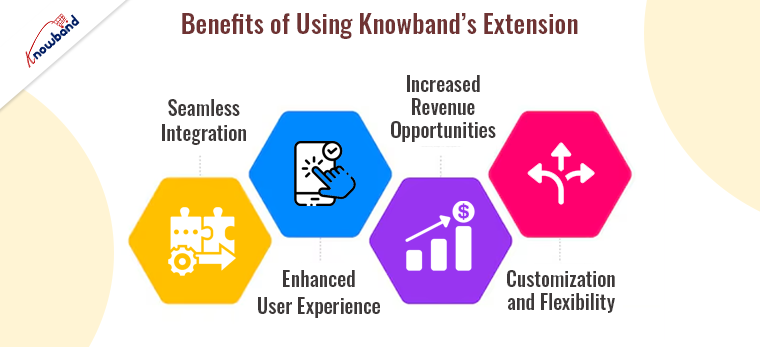
Seamless Integration:

Knowband’s Multi-Seller Marketplace Addon seamlessly integrates with PrestaShop and OpenCart, two of the most popular e-commerce platforms. This ensures that you can leverage the powerful features of these platforms while adding robust multi-vendor functionalities. The extension is designed to work out of the box, reducing the need for extensive customization and allowing you to focus on growing your marketplace.

Enhanced User Experience:

A user-friendly interface is crucial for attracting and retaining users. Furthermore, Knowband’s Multi-Channel Marketplace extension offers an intuitive experience for both sellers and buyers. It ensures that the sellers can manage their stores with ease, while buyers can enjoy a streamlined shopping experience, complete with advanced search and filtering options.

Increased Revenue Opportunities:

By providing a platform for multiple sellers, you can significantly expand your product range and attract more customers. The competitive nature of a multi-vendor marketplace often leads to better prices and increased sales.
Additionally, the marketplace extension for Prestashop allows you to earn through various revenue streams, including commission fees, subscription plans for sellers, and featured product listings.

Customization and Flexibility:

Knowband’s extension offers a high degree of customization, allowing you to tailor the marketplace to your specific needs. Moreover, you can configure seller registration processes, set commission rates, and customize the appearance of your marketplace to align with your brand identity. Therefore, this flexibility ensures that your marketplace stands out in a crowded e-commerce landscape.

Getting Started!

Building your own multi-vendor marketplace with Knowband’s extension is straightforward. Here’s a step-by-step guide to get you started:

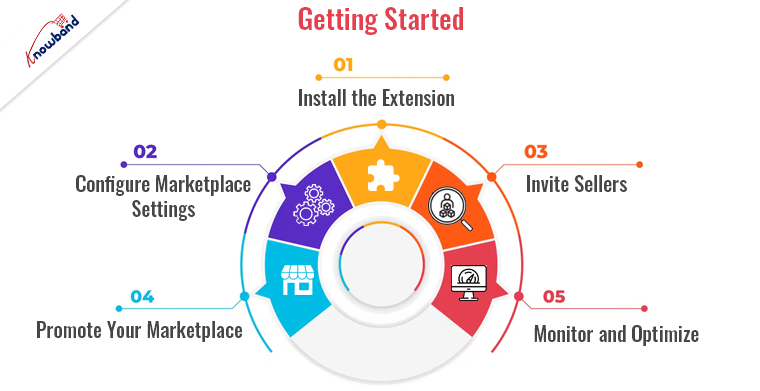
Install the Extension: 

Purchase and download the extension from Knowband’s website. Follow the provided installation instructions to integrate it with your PrestaShop or OpenCart store.

Configure Marketplace Settings: 

Access the extension’s settings from your admin panel. Configure general marketplace settings, including commission rates, payment methods, and shipping options.

Invite Sellers: 

Encourage sellers to join your marketplace by highlighting the benefits and ease of use. Provide them with clear guidelines and support to get started.

Promote Your Marketplace: 

Utilize various marketing strategies to attract buyers and sellers to your new marketplace. Consider email marketing, social media campaigns, and SEO techniques to drive traffic.

Monitor and Optimize: 

Use the detailed reports and analytics provided by the extension to monitor marketplace performance. Make data-driven adjustments to optimize user experience and maximize revenue.

Conclusion!

Building a multi-vendor marketplace like eBay is an ambitious but achievable goal with the right tools and strategies. Knowband’s Multi-Vendor Marketplace provides all the features and functionalities needed to create a successful platform. By leveraging this powerful extension, you can offer a unique shopping experience that attracts buyers, empowers sellers, and drives business growth.

Visit Knowband today and start building your multi-vendor marketplace with confidence!


Recommended Read: Stay Tuned: Prestashop v8.1 Compatible Multi-Vendor Marketplace Addon!

PrestaShop Introduces a New Translation System

PrestaShop is a well-known open-source e-commerce platform which has released PrestaShop version 1.7.6, which includes a new Prestashop translation system meant to enhance online stores’ multilingual capabilities. This new system offers improved accuracy, efficacy, and user-friendliness, and addresses the drawbacks of previous translation techniques. In this blog post, we will provide a thorough technical explanation of PrestaShop’s new translation system, highlighting its features, architecture, and benefits.

Context and Purpose:-

The ability to offer information in many languages is essential for addressing a varied customer base as e-commerce continues to grow globally and conventional translation systems frequently suffer from errors, inefficiencies, and human labor.

Classic vs. New Prestashop Translation System

Classic Translation System: –

The classic translation system in PrestaShop was primarily file-based and less flexible:

  • File-Based Translations: Translations were stored in PHP files, which could be cumbersome to manage.
  • Limited Context Awareness: The classic system lacked robust context handling, leading to potential translation inconsistencies.
  • Manual Updates: Translating and updating content required significant manual effort, especially for larger stores.

New Translation System: –

The new Prestashop translation system offers several improvements:

  • Symfony Translation Component: Utilizes Symfony’s robust framework for handling translations efficiently.
  • XLIFF Translation Files: Employs the XLIFF (XML Localization Interchange File Format) standard, making translations easier to manage and more consistent.
  • Database Storage: Centralizes translation data, improving management and performance.
  • Contextual Awareness: Ensures that translations are accurate within their specific usage context.

Demonstrating the New Prestashop Translation System with a Demo Module

Let’s walk through creating a demo module to showcase the new translation system for Prestashop. We’ll call this module ‘kbdemotranslation’.

Step 1: Setting Up the Module Structure

First, create the basic structure of your PrestaShop module. Your directory structure should look like this:

Step 2: Setting Up the Module’s Main File

Create the main module file kbdemotranslation.php:

Therefore, in this main module file, we define the module class, its metadata, and the basic installation and uninstallation methods. The getContent() method is where we assign the translated strings to Smarty variables and render the configuration template.

Here, ‘Modules.Kbdemotranslation.Kbdemotranslation’ is the translation domain of the text.

Step 3: Creating the Template File 

Create custom template file named ‘configure.tpl’ in the views/templates/admin directory of the module:

This template file displays the translated strings assigned in the getContent method. The ‘nofilter’ modifier is used to ensure that HTML tags in the translations are rendered correctly.

Step 4: Adding Translations via the PrestaShop Back Office

With the module structure and files in place, the next step is to add translations via the PrestaShop back office. Here’s how you can do it:

  • Access the Translation Interface: Go to your PrestaShop back office, and navigate to “International” > “Translations.”
  • Select the Module to Translate: Under “Modify translations,” choose “Installed modules translations” from the dropdown menu, select your language, and choose the ‘kbdemotranslation’ module.

  • Add Translations: You will see a list of translatable strings. Add translations for the strings “Demo Translation Module,” “A module to demonstrate the new translation system in PrestaShop,” “Hello World,” and “Your order will be delivered soon.”

Further, after adding translations, these translations will be stored in the database and automatically applied when the module is used.

Translation Domain:

The translation domain used by PrestaShop is below-

Modules.Nameofthemodule.Specificpart

  • Here ‘Modules’ refer to the name of the modules directory. This part will always be the same.
  • ‘Nameofthemodule’ refers to the name of the module for which you want to add the translations. There are some rules to define this part-
    The first letter will always be in Upper Case, and all other alphabets will be in lower case. And (A-z, 0-9) characters are allowed in this part.
  • ‘Specificpart’ is for the developers to define to what section the translation belongs. And in this part, underscores, dots, and dashes are allowed.

Conclusion

Moreover, the new Prestashop translation system represents a significant advancement in managing multilingual content for e-commerce stores. By addressing the challenges of traditional translation methods and introducing innovative features, PrestaShop provides merchants and developers with a powerful tool to enhance their global reach. Hence, the system’s technical robustness ensures improved efficiency, accuracy, and scalability, making it an essential component for any business looking to expand its international presence.

You can also explore a wide range of Prestashop, Opencart, WooCommerce, Shopify, and Magento 2 ready-to-use eCommerce extensions.

In case you have queries/suggestions, you can reach out to our technical support portal at our email address support@knowband.com.

Take a look at our bestseller module One Page Supercheckout for Prestashop and Android and iOS App Maker for Prestashop.

Recommended blog: 

All You Need to Know About New Prestashop 8.1.5

Which One To Choose: PrestaShop 1.7 or PrestaShop 8.1?

How Shipping Costs Affect Conversion Rates: Prestashop Seller Guide by Knowband!

In the competitive landscape of e-commerce, conversion rates serve as a critical metric for success. Understanding the factors that influence these rates is paramount for businesses striving to turn visitors into customers. Among these factors, shipping costs play a significant role. Not only does it impact the overall order total but also plays an important role for customers during the decision-making process.

Thus, being one of the major factors for customers, the Shipping costs play a vital role for both store admin and customers. Following the same, this article delves into the impact of shipping costs on sales and highlights how tailored shipping solutions, such as Knowband’s “Prestashop Shipping Cost by Zipcode” module, can optimize conversion rates.

The Influence of Shipping Costs on Conversion Rates:

Shipping costs are a pivotal consideration for online shoppers. It means high shipping fees can prevent potential buyers from making the orders, leading to cart abandonment and lost sales. Therefore, conversely, transparent and reasonable shipping costs can enhance customer trust and increase the likelihood of completing a purchase.

Here’s a closer look at why shipping costs matter so much for customers:

Price Sensitivity: Consumers are highly sensitive to total purchase costs, including shipping. For the same reason, unexpected or high shipping fees can lead to sticker shock, causing shoppers to abandon their carts at the final step.

Perceived Value: Free or low-cost shipping often enhances the perceived value of a product. Customers may perceive the same product as more valuable if they don’t have to pay extra for shipping. Leading further, the following fact boosts the chances for the customer to make orders.

Trust and Transparency: Clear communication of shipping costs on Prestashop upfront fosters trust. On the other hand, hidden fees or late-stage revelations about shipping costs can erode trust and deter purchases.

Competitor Comparison: In a market where comparison shopping is easy, competitive shipping rates can be a deciding factor. Shoppers choose a retailer that offers lower or free shipping over one with higher fees.

Customizing Shipping Costs to Enhance Sales!

One effective way to address these concerns is by customizing shipping costs based on various factors such as location. Furthermore, the tailored shipping solutions not only meet customer expectations but also optimize the business’s operational costs.
The “Prestashop Shipping Cost by Zipcode” module by Knowband offers a sophisticated approach to managing shipping costs.

Benefits of Zipcode-Based Shipping Cost Customization:

Precision: 

With the Prestashop Shipping Cost by Zipcode addon, businesses can set precise shipping rates based on the destination. Moreover, this precision ensures that customers are charged fairly, reflecting the actual cost of delivery to their specific location.

Flexibility: 

Knowband’s Prestashop Shipping Cost by Post Code module allows for flexible pricing strategies. Furthermore, the retailers can offer free or reduced shipping rates in strategic zones to boost sales in targeted areas.

Enhanced Customer Experience: 

Providing accurate shipping costs at the point of checkout improves the overall customer experience. Furthermore, the shoppers appreciate knowing their total cost upfront, which increases the likelihood of completing the purchase.

Operational Efficiency: 

The Prestashop Shipping Cost by Postal Code module helps streamline shipping operations. Thus, by automating the calculation of shipping fees based on zip code, businesses can reduce manual errors and save time.

Practical Implementation with Knowband’s Module!

Knowband’s “Prestashop Shipping Cost by Zipcode” module is designed to address these needs effectively. Here’s how it can be implemented to maximize sales:

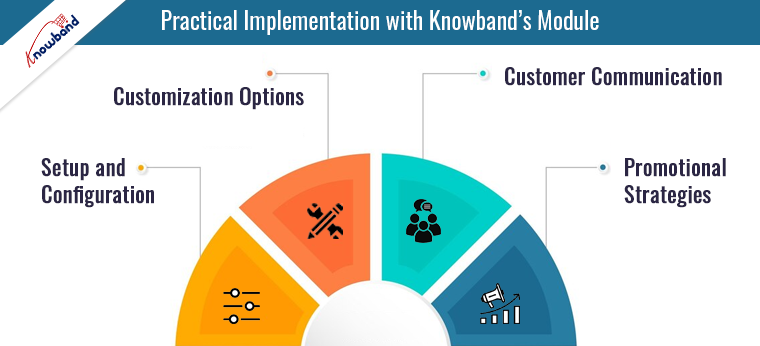
Setup and Configuration: 

The module is easy to install and configure within the Prestashop platform. Businesses can define shipping rates based on zip code, postal code, or country, ensuring that each location is accurately accounted for.

Customization Options: 

Retailers can set different shipping rates for various locations, including international destinations. This feature is particularly beneficial for businesses looking to expand their market reach without compromising on shipping cost accuracy.

Customer Communication: 

With the Prestashop Shipping Cost by Postal Address module, businesses can communicate shipping costs to customers during the checkout process. This transparency reduces cart abandonment and enhances customer satisfaction.

Promotional Strategies: 

Businesses can leverage the Prestashop Delivery Cost by Post Code module to create promotional shipping offers. For example, offering free shipping in specific zip codes can drive sales in targeted regions.

Conclusion!

Shipping costs have a profound impact on e-commerce conversion rates. By understanding and addressing the factors that influence these rates, businesses can enhance their sales performance. The “Prestashop Shipping Cost by Zipcode” module by Knowband provides a robust solution for customizing shipping costs based on location, ensuring fair pricing, and improving customer experience.

Recommended blog: PrestaShop Shipping Cost by Zip Code Addon