In the ever-evolving world of e-commerce, staying ahead means embracing strategies that not only enhance your reach but also diversify your sales avenues. Multi-channel selling is one such strategy that has proven to be highly effective, particularly with powerhouses like eBay and Etsy in the mix. As we step into 2024, here are five compelling reasons why you should consider expanding your online presence to multiple marketplaces. Furthermore, we are also going to spread light on how tools like the PrestaShop Etsy Marketplace Connector and PrestaShop eBay Marketplace Connector can streamline this transition.
1. Expanded Customer Base:
One of the most significant advantages of multi-channel selling is the substantial expansion of your potential customer base. Moreover, eBay and Etsy both have their unique audiences, with eBay being a global marketplace known for its vast and diverse product range. On the other hand, Etsy is renowned for handmade, vintage, and unique items. Thus, by listing your products on platforms having such potential and huge customer base, you’re not just waiting for customers to find your shop; you’re putting your products directly in front of millions of potential buyers who are ready to purchase.
2. Increased Brand Visibility:
Selling on multiple channels naturally increases your brand’s visibility. When customers see your products on eBay and Etsy, it not only boosts your chances of making sales on these platforms but also enhances your brand’s overall online presence. Moreover, highlighting the fact that you are also providing services on platforms like eBay and Etsy on your shop can help you draw the attention of your customers too.
Therefore, this increased visibility can lead to higher traffic to your website and can boost your brand’s credibility and trustworthiness in the eyes of consumers.
3. Risk Diversification:
Relying on a single sales channel can be risky. Changes in marketplace policies, algorithm updates, or unexpected downtrends can significantly impact your business. On the other hand, multi-channel selling mitigates these risks by spreading your presence across several platforms. Thus, if one channel experiences a downturn, sales from other channels can help compensate, ensuring your business remains stable and continues to grow.
4. Insights into Consumer Behavior:
Each marketplace comes with its analytics and insights, allowing you to understand better and cater to your target audience. Furthermore, by selling on eBay and Etsy, you can gather data on what works best on each platform and tailor your strategies accordingly. Therefore, this data can be invaluable in refining your overall marketing and sales tactics, ensuring you meet your customers’ needs more effectively.
5. Leverage the Power of PrestaShop Connectors:
To seamlessly integrate your PrestaShop store with eBay and Etsy, leveraging Knowband’s PrestaShop Etsy Marketplace Connector and PrestaShop eBay Marketplace Connector can be a game-changer. Moreover, these connectors simplify the process of listing your products on these marketplaces, synchronizing inventory, and managing orders directly from your PrestaShop dashboard. This means you can enjoy the benefits of multi-channel selling without the added complexity of managing each platform separately, making it easier to scale your business.
Conclusion
In conclusion, multi-channel selling in 2024 is not just a trend but a strategic necessity for e-commerce businesses aiming for growth and sustainability. Platforms like eBay and Etsy offer unique opportunities to reach a broader audience, increase brand visibility, and gain valuable consumer insights. Thus, by leveraging the capabilities of the PrestaShop Etsy Marketplace Connector and PrestaShop eBay Marketplace Connector, you can streamline your operations and ensure a cohesive and efficient multi-channel selling strategy. Embrace the power of multi-channel selling and watch your e-commerce business soar to new heights in 2024.
eBay is undoubtedly one of the best marketplaces in the eCommerce industry. With over 187 million active consumers, eBay is offering amazing services to both consumers as well as sellers.
Aside from products and sellers, eBay is a well-known multi-vendor marketplace for algorithm updates. Moreover, the major marketplace has its in-built SEO algorithms to manage the rankings of sellers.
On top of that, selling on the eBay marketplace is an absolutely easy task. You do not require to have any specific kind of technical knowledge for being an eBay seller. Furthermore, the marketplace offers ease of payment methods to the seller community. The sellers can even add cards, PayPal, and many more payment methods to their eBay shop just by following some simple steps.
Thus, in the following article, we are going to spread light on how new sellers can add payment methods to their eBay shops.
1. PayPal: How to Link with Your eBay Shop!!
PayPal is a widely introduced payment method with millions of transactions per day. Likewise, eBay allows sellers to add PayPal as a payment method on their store-front. One can simply add the PayPal payment method on eBay just by following the below-mentioned steps.
1.1.Log in to Your eBay dashboard.
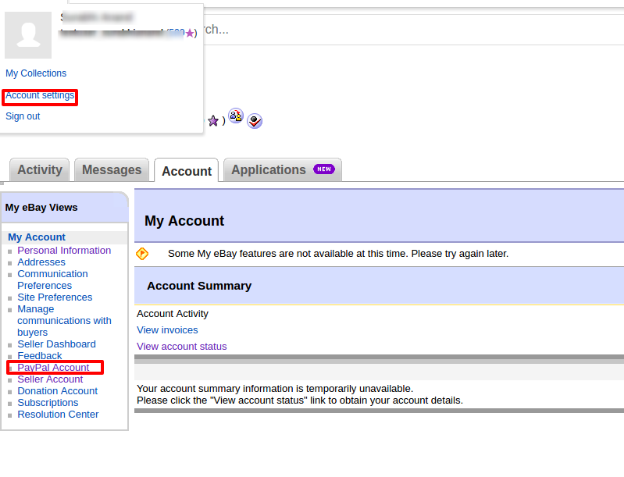
1.2.Visit the eBay admin panel and then click on the account settings.
1.3.Click on Payments>>PayPal.
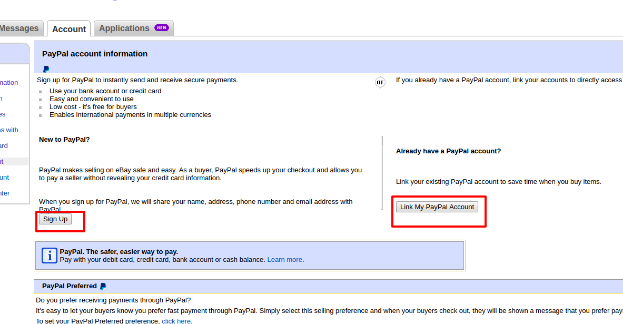
1.4.If you already have a PayPal account, you can simply add the details here. Otherwise, you can always create a new one by clicking on the signup button.
1.5. By following the above steps, you will be redirected to PayPal.
1.6.Come back to the eBay admin panel>>Payments>>PayPal.
1.7.Click on become verifies button.
1.8.Authenticate yourself with a PayPal account and all set to go.
2. Debit Card: How to Add Debit Cart on eBay Shop!!
Adding debit cards on eBay shop is a pretty easy task. Follow the below-mentioned steps to add debit card payment options to your eBay shop.
2.1. Click on the top left corner buttons.
2.2.Go to Account settings.
2.3.Choose the option payment options from the appeared tab.
2.4. Choose to add payment methods.
2.5.Pick the debit or credit card option.
2.6.Fill in all the details on the appeared page. After getting done with all the details, click on add. All good to go.
3. Automatic Payment Methods on eBay Marketplace:
Automatic payment methods help sellers to minimize headaches during the eBay invoice cycle. The monthly ebay fee gets deducted automatically when the sellers add automatic payment methods on the eBay Marketplace.
Here are the steps to add automatic payment methods on the eBay marketplace.
3.1.Click on the top left corner of your eBay dashboard.
3.2. Visit the account settings page.
3.3.Click on the personal info tab. And then, hit the business info button.
3.4.Click on the financial information tab. Choose the update your automatic payment methods.
3.5.Choose your suitable payment option among PayPal, credit, debit card, or checkout accounts.
3.6.Fill in all the details and click on the save button.
In the above article, we have discussed how to add payment methods to your eBay shop just by following the simple steps. Although eBay is known for changing its algorithms. Yet, we believe the above information is surely helpful for you.
Do You Know!!
Do you know that if you are selling the products from your personalized eCommerce website and are willing to sell the products on eBay? You can simply manage your eBay shop from your personal shop’s admin panel.
One can simply manage both eBay and a personal eCommerce shop at his fingertips. And can even sell their products on eBay Marketplace at an increased/decreased price with real-time stock management.
Want to know more? Feel free to find us at our official email address support@knoband.com for your beloved queries and suggestions.
Due to the marketplace’s dynamic nature, it is necessary to continuously improve and update your marketing plan. Your brand might acquire a competitive edge by looking for ways to enhance your marketplace approach. The most popular locations for today’s online shoppers are still online marketplaces like eBay, Etsy, and many others. Online marketplaces are now used by around half of US businesses and European ones to sell their products.
Making the proper online marketplace decisions is crucial for brands all around the world. To be sure you’re on the right path, we have listed 2 the Advantages of two Marketplaces to enhance your online marketplace approach.
eBay Marketplace
One of the most popular online marketplaces in the world is eBay Marketplace thanks to its huge user base. Concurrently operating eBay businesses and internet stores may be challenging. The handling of orders and inventory on the eBay Marketplace takes a lot of time and effort. For owners of e-commerce businesses, this eBay plugin is an excellent option. Owners of online stores can easily link them with eBay storefronts by using eBay Integration. To manage both your eBay store and your offline business, use eBay integration.
The following are the benefits of using eBay:
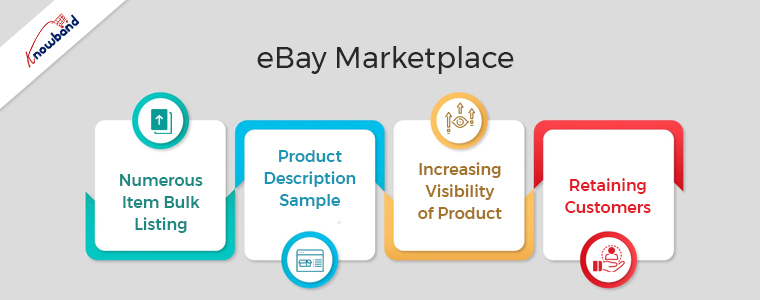
Numerous Item Bulk Listing
The bulk product listing feature of the eBay Integration plugin is very beneficial. The admin can also link the shop category to the eBay Marketplace category. The eBay Marketplace will never run out of the shop class products in that particular eBay category. Furthermore, a single eBay category connection to the administrator is possible with several courses.
Product Description Sample
To reflect the presence of the HTML layout, the shop administrator might apply this plugin. The API Integrator for eBay works with HTML layouts. Shop owners may track eBay product descriptions more easily with the help of this plugin.
Increasing Visibility of Product
By subscribing to an eBay store, more people can see your stuff. You can draw in more customers by being subjected to more crowds. Sales for sellers who switched to eBay store subscriptions significantly increases over the period.
Retaining Customers
When you stock your store with standout goods, people will return to you because they will remember you. They’ll contact you again the next time they need that thing. You can successfully improve your client experience and service if you operate an eBay store. One of the most important elements that affect customer retention is excellent customer service.
Etsy Marketplace
Utilizing the Etsy marketplace is essential for companies offering handmade goods, antique goods, and creative supplies. The US’s fourth-most popular eCommerce site is Etsy. Even though it has a limited user base, there are several advantages for merchants using Etsy Marketplace.
To sell their goods, effectively manage inventory, and process orders, Etsy offers retailers APIs. The Etsy Marketplace Integration module utilizes these APIs, which eliminates the requirement for a store administrator. The Etsy Marketplace is not required for sellers who have separate listings for their products on each platform. Your products need only be present in your store for the Etsy Integration module to immediately list them on the Etsy Marketplace.
Following are the advantages of Etsy Marketplace:
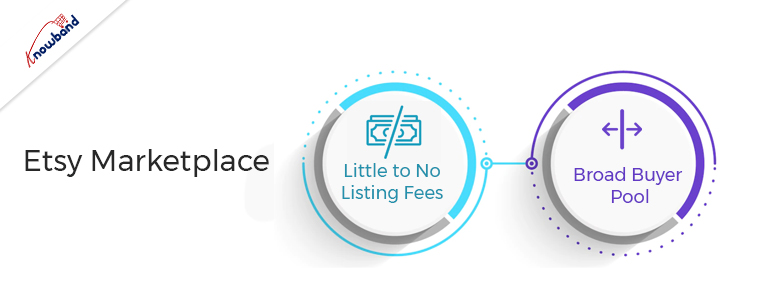
Little to No Listing Fees
You can get access to a variety of tools and the knowledge of a seller community by opening an Etsy shop, which is free to do. When you list items, a small fee of $0.20 per listing applies. It is less expensive to open a shop because there are no ongoing expenses, unlike other possibilities. A minor commission fee and a standard payment processing fee are there for the completion of a sale. To encourage the success of small businesses, Etsy generally maintains moderate fees.
Broad Buyer Pool
One of the main benefits of the website is that it is widely known. This shows that you already have a market for your products. Compared to larger eCommerce sites, Etsy is more frequently visited by customers looking for authentic goods. Etsy has distinct products rather than a product with numerous entries that are comparable.
If your company shares Etsy’s mission of offering customers unique, handcrafted, vintage items, then this is the place for you. This helps you attract visitors who are currently spending time on the website.
Wrapping Up
In this article, we have explained the advantages of two marketplaces and why they are useful for eCommerce businesses. If you want our help with the same, please contact us at support@knowband.com. For specific developments for your company also you can get in touch with us. We will also help you to add additional functionality to the plugins. Kindly let us know in case you need our help regarding any concerns or issues related to our modules.
Marketplace platforms are adding new features to their product pages and designs to provide the best customer satisfaction on their platform. eBay, which is an eCommerce platform recently announced that they will allow some sellers to post videos to their listings.
This is not the first time when eBay allowed videos, but previously eBay used a service called WebyClip to upload the video automatically but, the feature was removed in 2017. This time, eBay made an announcement introducing the video feature on storefront and product pages.
eBay is constantly working to provide you with a new, feature-rich platform that will help you engage customers and increase your eBay sales. Adding video capabilities for listings and storefronts is a part of this initiative.
Videos will begin to appear on selected product pages and storefronts in the coming months. In the eBay announcement, they mentioned that they continue to extend these new video features to more sellers in the year 2021. Buyers would be able to watch videos on the eBay app at first, and then on the desktop and mobile web later.
The only information eBay provides was this demo picture on the eBay app.
Video is the next step to assist marketplace sellers in providing more engaging shopping experiences to their existing and prospective customers. Product videos are attractive and they help to show off the goods and brand while also assisting in buyer engagement and sales.
The announcement seems to be chaotic and lacking in specifics, they have mentioned that more details on guidelines and eligibility will be revealed soon.
Sell on eBay from your online store
The eBay platform is preferred by sellers because it is feature-rich and offers a variety of marketplace advantages. It’s now easier to sell on eBay, thanks to the marketplace integration plugins that allow automated product listing, and this new video feature will boost your brand’s visibility.
Marketplace integration plugin allows sellers to link their existing eCommerce website seamlessly to the eBay profile. The seller can manage all the inventories and orders from one place. Additionally, its user-friendly interface provides payment and shipping regulations.
The Marketplace Integration plugin is available for all the major eCommerce platforms. Click on the links below to visit and explore the modules.
The eBay Marketplace Integration module can also be downloaded from PrestaShop Addon Store.
It is a smart solution that can provide you with a quick and easy seller dashboard. Customers can choose from a larger selection of items to find the item they want. Customers can choose from a variety of domestic and foreign shipping options to get their product via the most cost-effective carrier. The eBay marketplace is an amazing platform to expand your business.
The possible benefits to be obtained by entering an online marketplace can differ between industries and firms, and between buyers and sellers. If you are looking for the advantages and the downside of the online marketplace before starting one then you have landed on the right page.
The marketplace model is booming in the business industry and the growth rate is out of the blue. Companies like Amazon, Flipkart, Myntra, ETSY are operating for years and are now at the top.
There are many types of online marketplaces and websites where you can sell your goods to customers who would not otherwise find you, in addition to having your own physical and e-commerce shop. An online marketplace has various advantages for the admin, seller, and buyers.
Benefits of Online Marketplace for your businesses
An online marketplace is a platform for small businesses to bring it on the web. Sellers and merchants are benefited but the customers get the most advantage. Some of the potential advantages are summarised below:
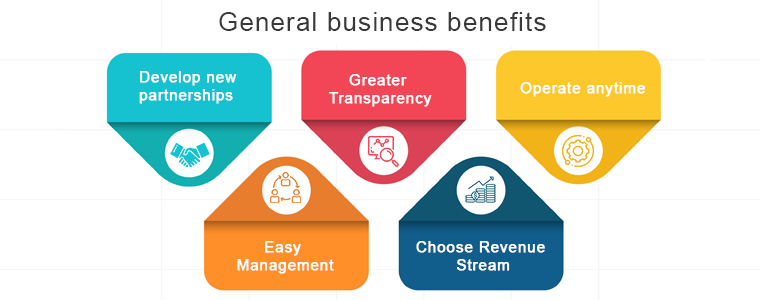
General business benefits
Develop new partnerships:
There are greater opportunities, either within their supply chain or through supply chains, for sellers and buyers to develop new trading relationships. The radar of a marketplace is anytime greater than an individual eCommerce website because many sellers and buyers from different niches come to the same platform for their needs.
Greater Transparency:
Because the availability, rates and stock levels are all available in an open environment; e-marketplaces can provide greater transparency in the buying process.
Operate anytime:
Time restrictions and concerns with various working hours for foreign trade are avoided when round-the-clock operations are feasible. No one has to wait for the shop to open as these marketplaces can be operated anytime from anywhere. The online Marketplace is highly convenient for both sellers and buyers.
Easy Management:
Product Information Management software that automates the bulk upload to your marketplaces of product information. This way, at the same time, you can be sure that the catalog and stock details are standardized in all your networks.
Choose Revenue Stream:
There are two ways the marketplaces earn income, one is commission based and another is by charging subscription or membership fees. Some of the e-marketplaces find commission the best choice as it is easier to operate and is a sustained source of income. While the online marketplaces like OLX make money through premium subscription plans.
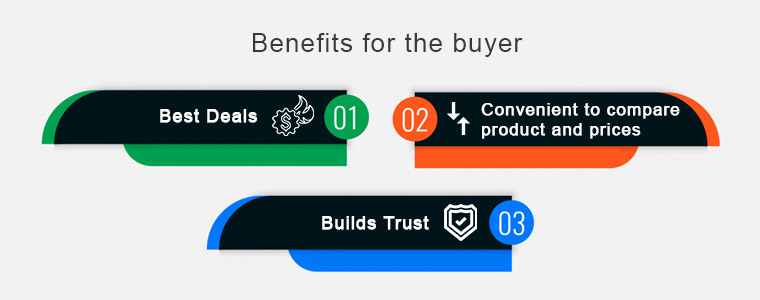
Benefits of the online marketplace for the buyer
Best Deals:
Buyers can secure the best deals due to updated information on the availability and price of the product. An online marketplace brings the right buyers in touch with the right sellers with much greater precision than it could ever happen in a simple web search.
Convenient to compare product and prices:
Instead of wasting time calling individual suppliers, e-marketplaces provide an easy way to compare rates and products on a single platform. One of the key benefits of an online marketplace is that it puts together all deals from different vendors or service providers. Customers are more likely to use an app with a wide variety of choices so that they can select exactly what they want without restricting a single provider to their preference.
Builds Trust:
Developed e-marketplaces provide the customer with a degree of confidence as they exclusively work with vendors who are members. This builds trust and looks convincing when a new customer visits the eCommerce marketplace. A significant number of buyers feel intimidated by sharing card details for financial transactions when they operate on a new website.
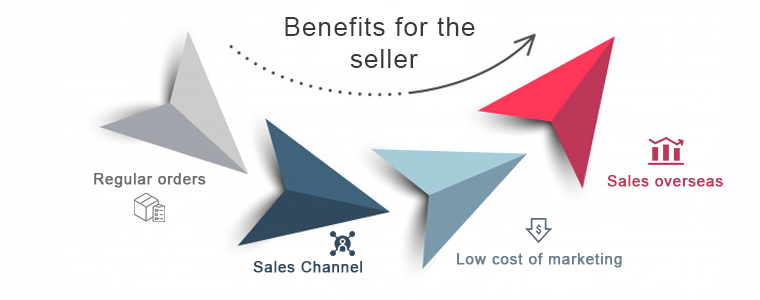
Benefits of the online marketplace for the seller
Regular orders
Sellers get daily requests from both new and existing customers for quotes and products. An e-marketplace increases business opportunities. You could meet customers with whom you’ve never crossed paths before, or pursue new demographic niches and find new prospects for sales.
Sales Channel
You provide multiple touchpoints for clients to connect with your brand when you sell through multiple platforms, online, offline, and everywhere in between. To advertise and sell products, the online marketplace creates an alternative distribution channel.
Low cost of marketing
When compared to other distribution platforms, e-marketplaces may deliver reduced marketing costs. The seller can reach a potential customer with little effort. You can sell right there where potential customers are found without investing either extra time or money. Marketplaces have the benefit that they have their resources, target groups, and customers.
Sales overseas
The global e-marketplaces will provide opportunities that you would not be aware of for overseas sales. Through online marketplaces, overseas sales are incredibly easy. In particular, foreign operators, such as Amazon or eBay, typically provide assistance and rights to retailers. In the face of high inventory levels, an enticing price will persuade foreign customers most of all. Provide multiple payment gateways according to customer demands.
Final Words:
These were the major advantages of the online marketplace but never forget the fact that there is a risk involved in every new business. Different types of online marketplaces are classified considering several parameters like their focus, niche, revenue-generating system, etc. If you want to start your marketplace or sell on an e-marketplace then you should study both advantages and disadvantages. An online marketplace might be the ticket to building a big, profitable business with a lasting impact if you can resolve the challenges.
eBay Marketplace Integrator for Magento 2 offers the quickest means to the Magento 2 store owners to integrate their store with the very popular eBay marketplace. The eBay integration allows the merchants to manage the inventory and orders from a single interface.
Headquartered in San Jose, California, eBay is a multinational eCommerce corporation that popular as an online auction and shopping site. It facilitates consumer-to-consumer and business-to-consumer sales and offers an easy and customizable interface for sellers across the globe to list and sell their products effortlessly. eBay operates in over 30 nations. The product listing of eBay combines 800+ million product listings that are not just unique but are even coupled with great deals.
eBay Marketplace connector module for Magento 2 offers a smart solution to the e-merchants to integrate their store with the eBay Marketplace. The store admin can list products to the marketplace and sync the orders from the marketplace to their Magento 2 store.
1.1 Merchant benefits of eBay Integrator for Magento 2:
The Magento 2 eCommerce sites can easily expand their reach by integrating their store with the popular marketplace with the help of this eBay integrator for Magento 2.
The eBay API integrator for Magento 2 allows the store admin to sell their products to a larger audience base.
eBay integration for Magento 2 allows the sellers to sync their site with any of the eBay sites.
The eBay connector module for Magento 2 offers multi-currency and multi-lingual support that helps you offer the services according to the target customer.
The eBay integration plugin for Magento 2 is easy-to-understand and the admin can start selling in the marketplace in a few simple steps.
The user-friendly interface of the eBay connector extension for Magento 2 makes it easier for the store admin to manage their merchandise from a single platform.
The merchants can add/remove the product, manage the details and inventory from the admin panel of the eBay integration plugin for Magento 2.
The admin can manage the shipping methods for the eBay store from the admin panel of the eBay Marketplace connector extension for Magento 2.
Profile-based product listing of the eBay API integration module for Magento 2 makes it easier for the merchants to list the products in bulk.
Even the order processing becomes easier with the robust eBay API integrator for Magento 2.
The seller can check the reason for the error product rejection and rectify accordingly from the back-end of the eBay integrator for Magento 2.
The eBay API integration plugin for Magento 2 comes with free support for 3 months.
The eBay connector extension for Magento 2 is easy-to-use. Further, the admin can configure it with the least effort.
2.0 Installation
Follow the following steps for installing the eBay Magento Marketplace integration extension:
1. Download the Magento 2 eBay connector extension package.
2. Unzip the package in your root folder of Magento setup via FTP manager (like Filezilla or WinSCP – download here: https://filezilla-project.org/).
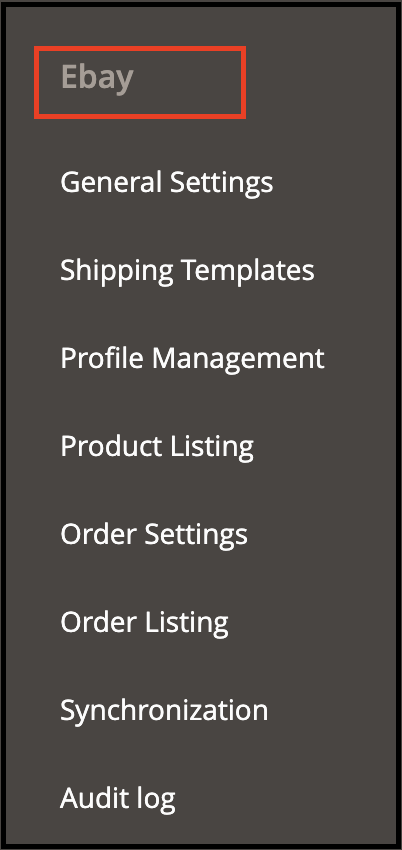
3. In the admin panel, go to eBay Marketplace in the main menu.
4. The Magento 2 eBay Marketplace connector module is now ready for use.
This User Manual will guide the users through the Magento 2 eBay integration extension configuration and settings.
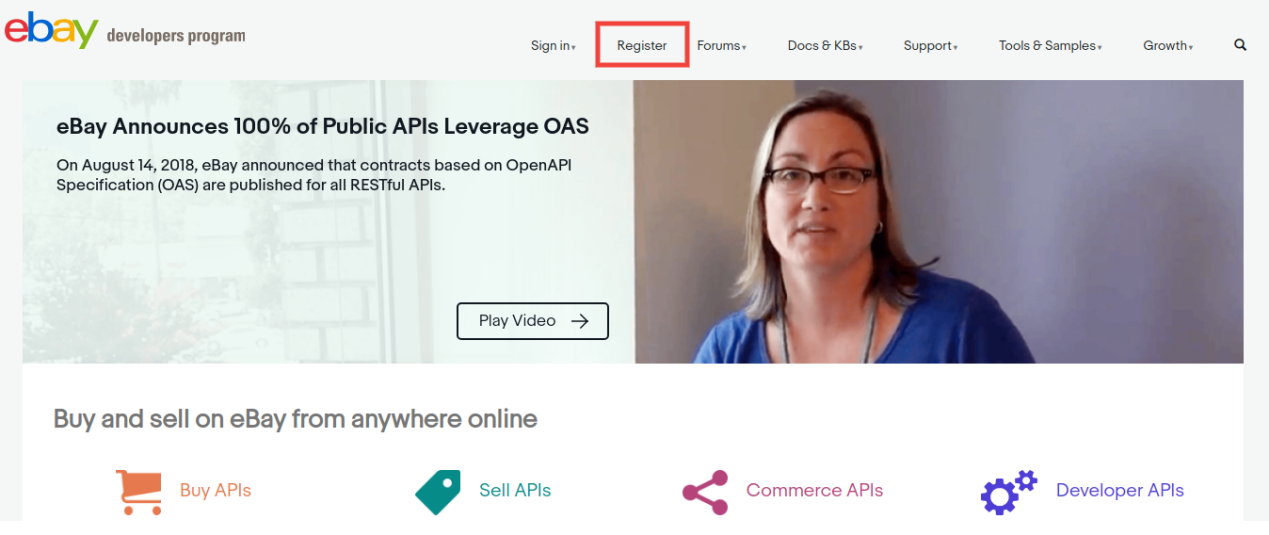
To start selling on eBay Marketplace you need to have a seller account on eBay. In this section, we are listing all the steps to create a seller account on eBay. Please find them below –
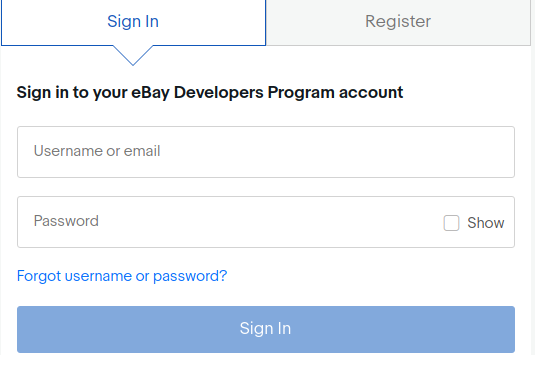
After filling-in valid data click on join and you will head to the application creation page.
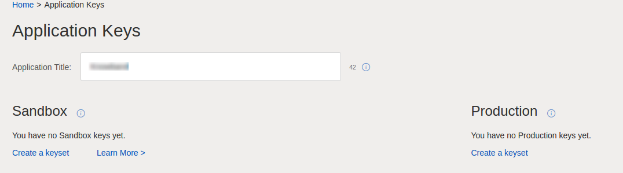
Enter the application name and click on ‘Create a keyset’ under the Production section, a new form will be opened.
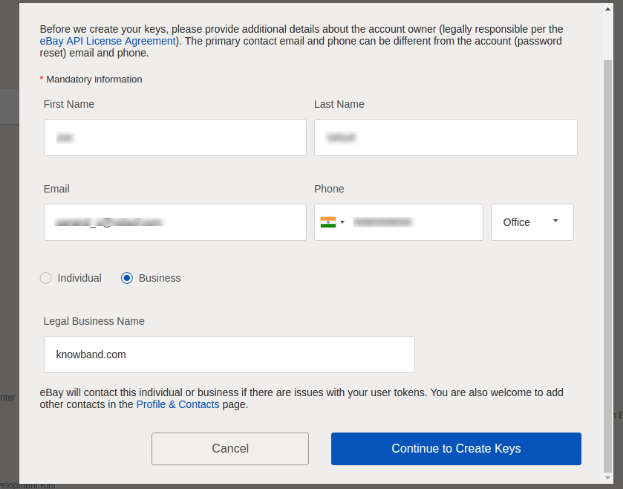
Enter the details and click on Continue to create Keys.
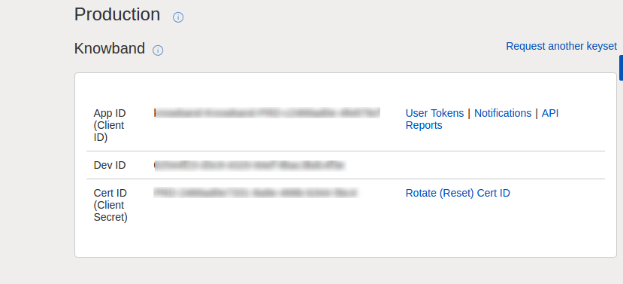
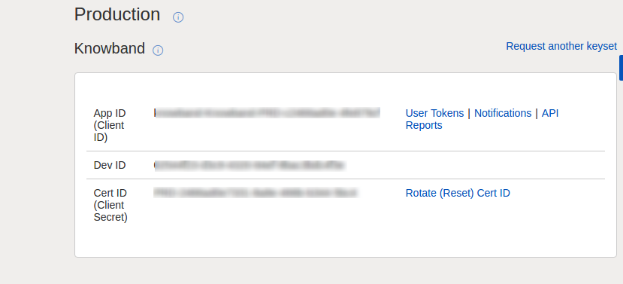
The application keys will be shown.
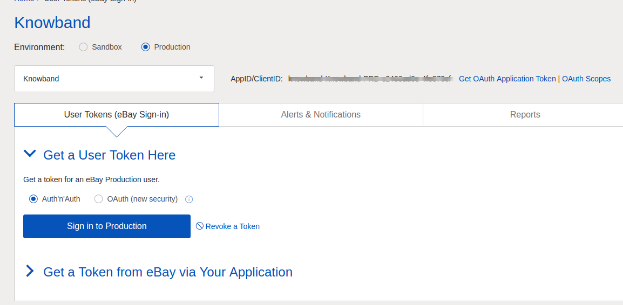
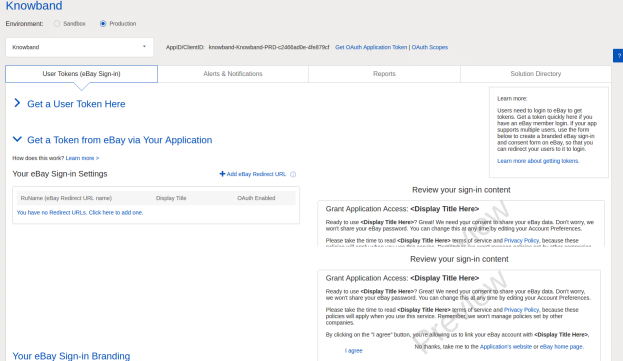
To create a user token, click on the User Tokens link in the above image.
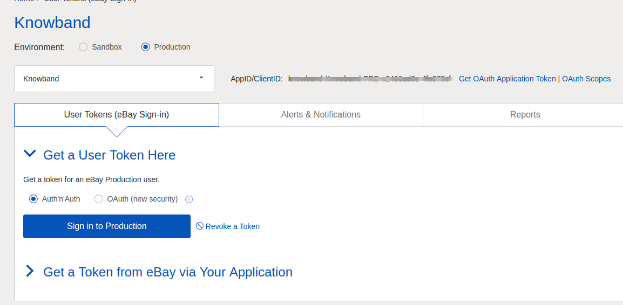
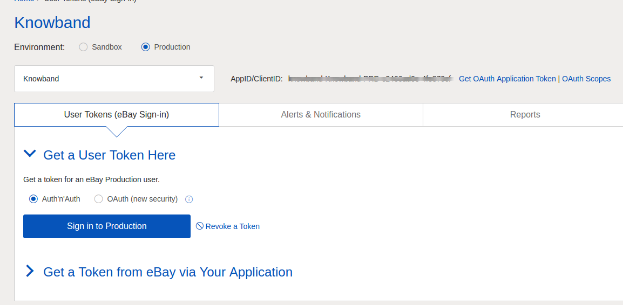
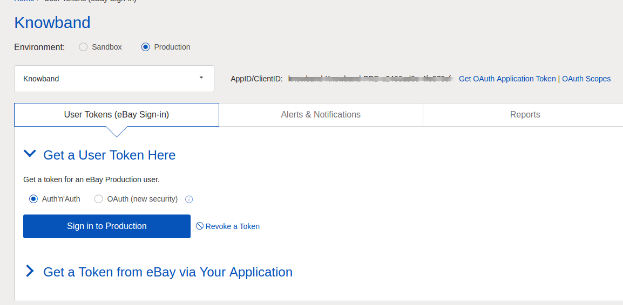
Click on ‘Sign in to Production’ to get a token.
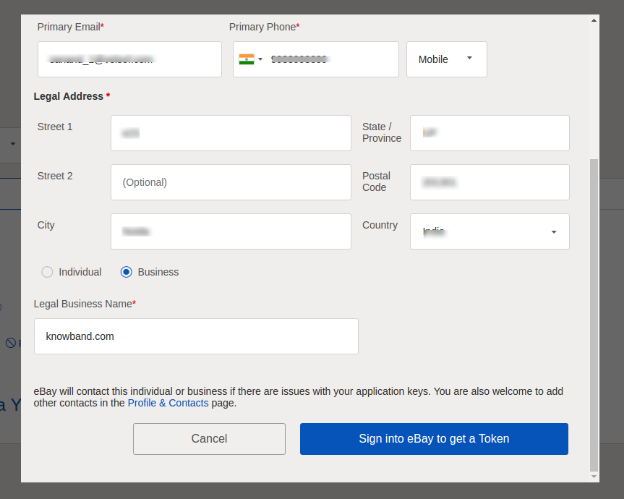
Fill in the details and click on “Sign in to eBay to get a Token”.
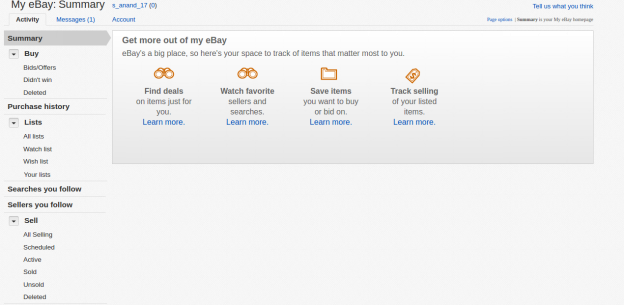
Sign into an already created eBay Seller account or register as shown below:
11. On clicking register and filling in details you will head to your Seller eBay account.
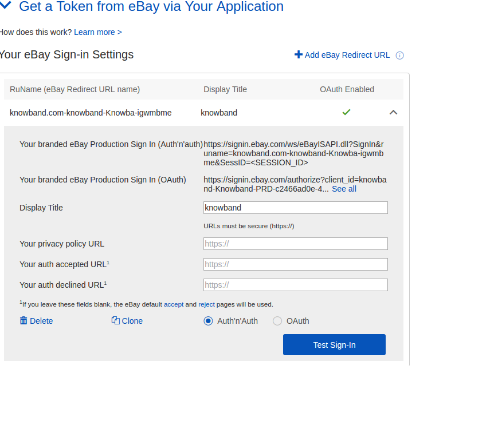
2.2 To Get a token from eBay via your application
To create a user token, click on the User Tokens link in the below image.
Steps to reach this screen:-
A. Login into your developer’s eBay account.
B. On successful login, you will see the below-added screen.
Click on “Get a Token from eBay Via Your Application.”
Steps to reach this screen:-
A. Click on “User Tokens” from the above screen.
Click on add eBay redirect URL and fill the form and save.
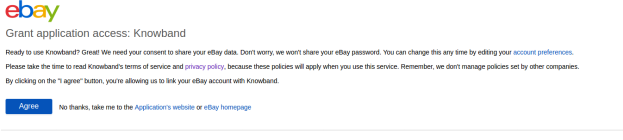
On clicking I agree from the right side form, you will head to the authentication page.
3.0 Admin Interface of eBay Integrator for Magento 2:
The Admin Panel of the eBay API Integration extension for Magento 2 offers 8 configuration options.
General Settings
2. Shipping Templates
3. Profile Management
4. Product Listing
5. Order Setting
6. Order Listing
7. Synchronization
8. Audit Log
3.1 General Settings
Once you have created a seller’s account, you need to fill-up the form to validate the synchronization of the store with the marketplace. Navigate to Admin Interface>eBay Marketplace>General Settings.
Fill out the form shown in the General settings section. Each field for the configuration panel of the eBay connector plugin for Magento 2 is explained below:-
1. Enable/Disable
Enable/disable the eBay API integrator for Magento 2 by toggling this button.
2. Account Type
The admin can either choose the Sandbox account or the Production eBay account. The sandbox account is for testing purposes. While the Production account is for the final store integration.
3. Dev Id
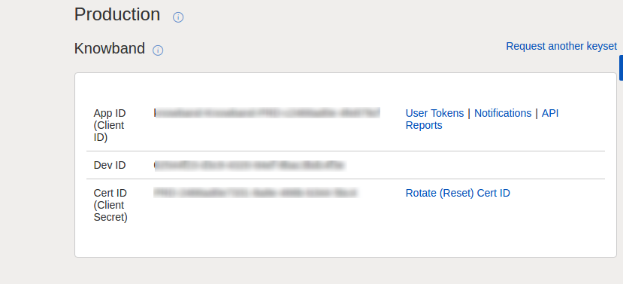
Enter the Dev ID of your eBay account in this section. To find your Dev ID, sign in to the eBay developer account. In the application key section, you’ll find App ID, Dev ID, and Cert ID as shown in the image below.
4. App Id
Copy the App ID from your eBay account and copy the same in this field.
5. Cert Id
Enter the Cert Id of the eBay account in this section. You can find the Cert Id as shown in the above image.
6. RU Name
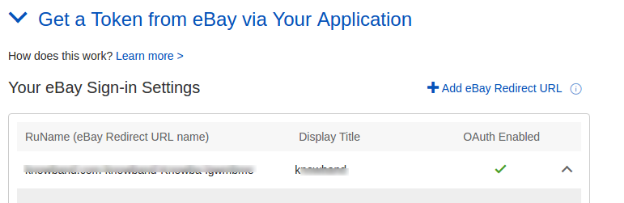
Enter the RU Name of the eBay account. To obtain your RU name, go to the ‘Get a Token from eBay via Your Application’ tab after adding a redirect URL.
7. Paypal Email
Enter a valid PayPal ID connected to your eBay account. Follow the steps mentioned below:
Log in to your eBay seller account.
Click on account settings from the top-left dropdown and click on Paypal account.
Now Sign up or link your already created PayPal account with the eBay seller account.
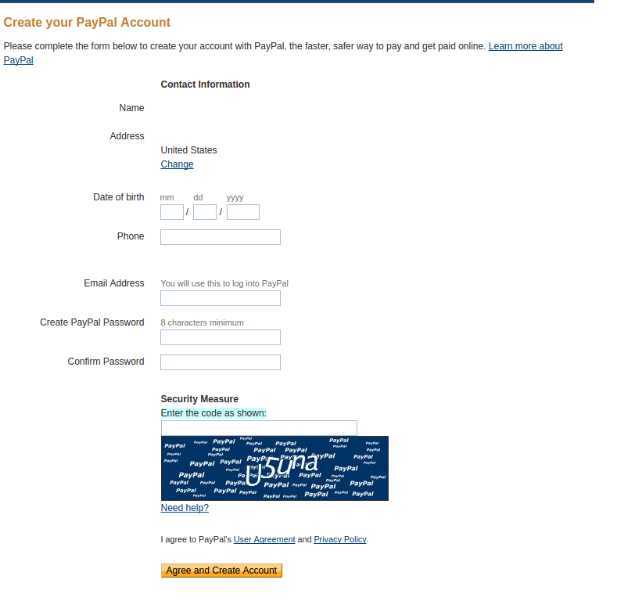
On clicking Sign Up, you will move to the PayPal account creation page. Just create a profile by filling in the details and linking it to your seller’s account.
8. Token Listing Link
Click on this link to add the tokens for eBay countries. To get the access token, you need to click on Sign in to Production as shown in the below image.
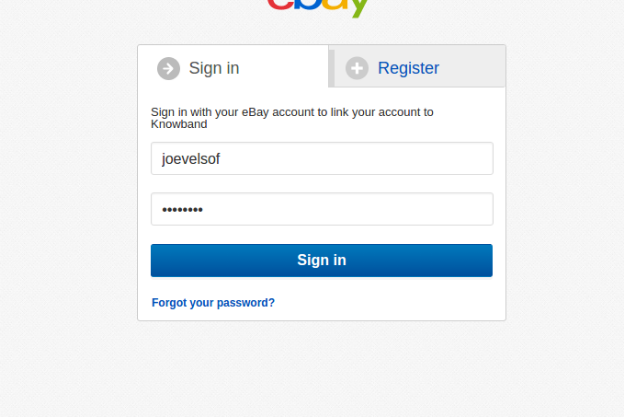
Sign in to the account from the form below:-
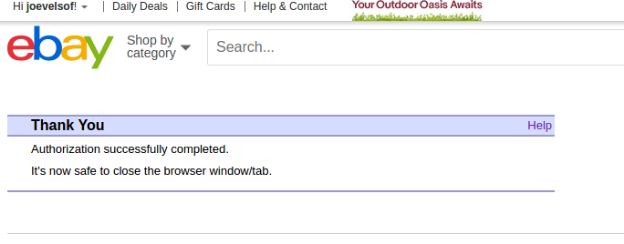
Click on I agree and get access tokens.
3.2 Shipping Templates
The Magento 2 store admin gets to create an N number of shipping templates from the back-end of the eBay Integration extension for Magento 2.
3.2.1 How to create New Shipping Templates?
To create new shipping templates, click on the ‘Add New’ button.
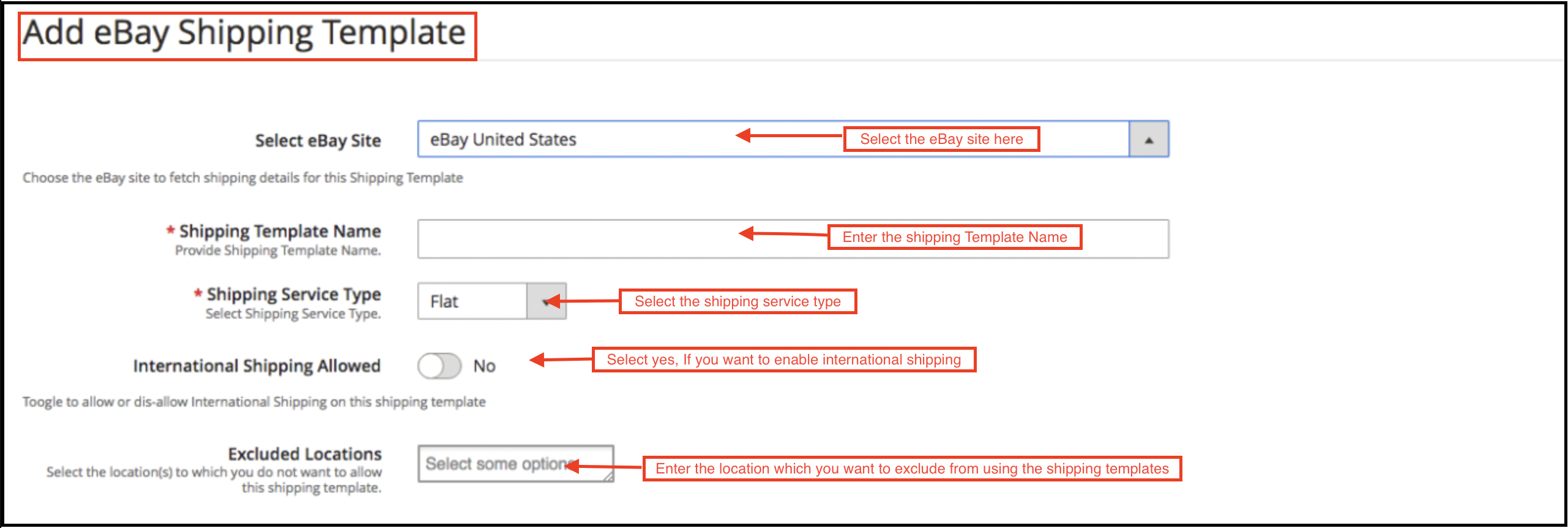
You’ll move to the shipping template creation page.
Select eBay Site: First, select the eBay site for which you are creating the shipping template.
Shipping Template Name: Enter a name for the shipping template.
Shipping Service Type: Select the shipping service type.
International Shipping Allowed: Switch on the button if you want to allow international shipping.
Excluded Location: Select the locations (if any) that you want to exclude from this shipping method.
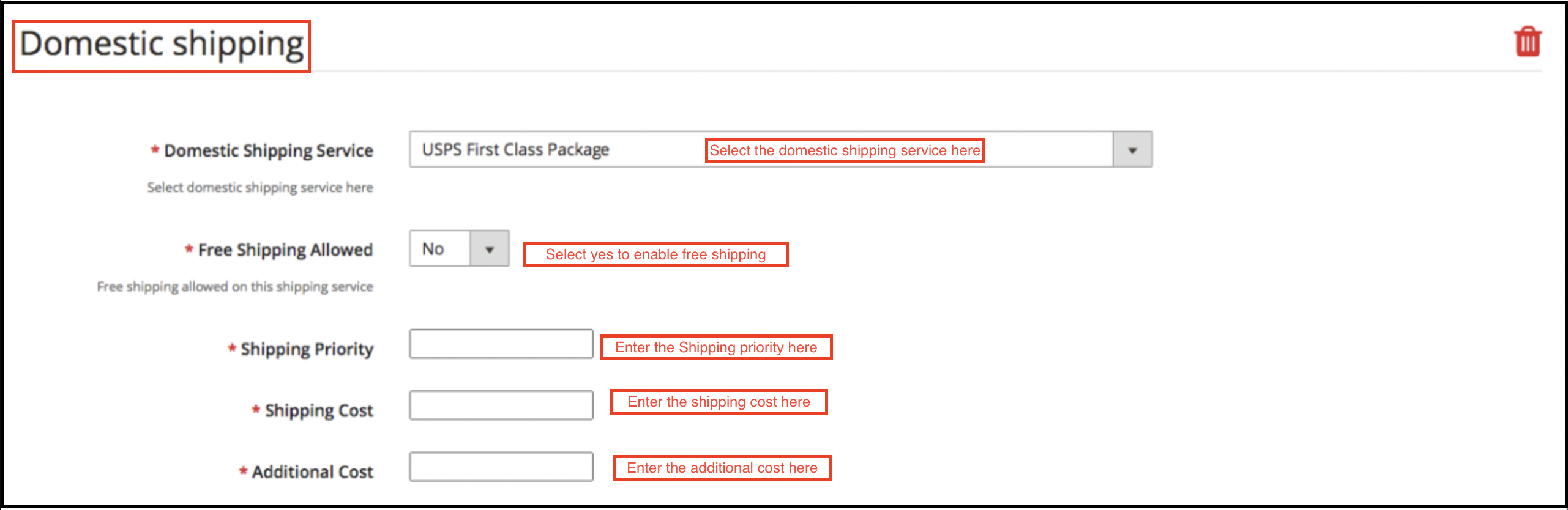
Fill the below-mentioned fields for domestic shipping:
Domestic Shipping Service: Select the domestic shipping service from here.
Free Shipping Allowed: Select ‘Yes’ if you want to allow free shipping services.
Shipping Priority: Set the priority for the shipping methods. The options will display in the front-end as per the priority set.
Shipping Cost: Enter the Shipping Cost that is chargeable.
Additional Cost: Specify the additional cost that is chargeable.
3.2.2 How to Edit/Delete Shipping Templates?
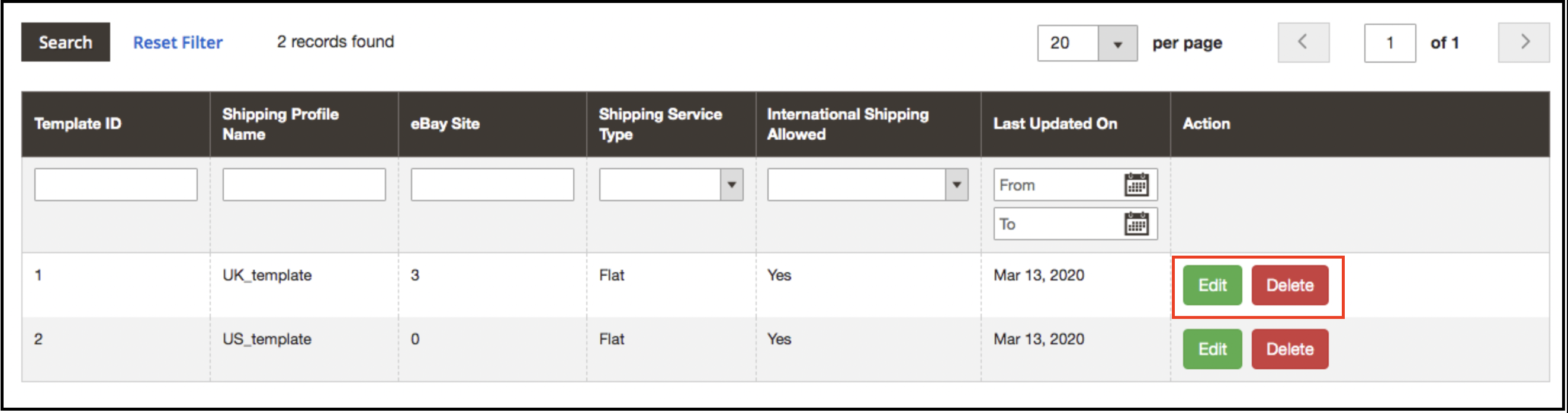
The admin can edit/delete the shipping template by entering the Edit or Delete button as highlighted in the image below:
3.3 Profiles Management
The eBay Marketplace Integrator plugin for Magento 2 offers an option of the profile-based product listing. The profiles created in the admin interface of the eBay connector plugin for Magento 2 can be viewed in this tab. The admin can create a new profile and edit or delete the already created profiles.
3.3.1 How to Add New Profiles?
Follow the steps, to create new profiles, Go to the Admin Panel>eBay Marketplace>Profile Management.
Click on the ‘Add New’ button as shown below:
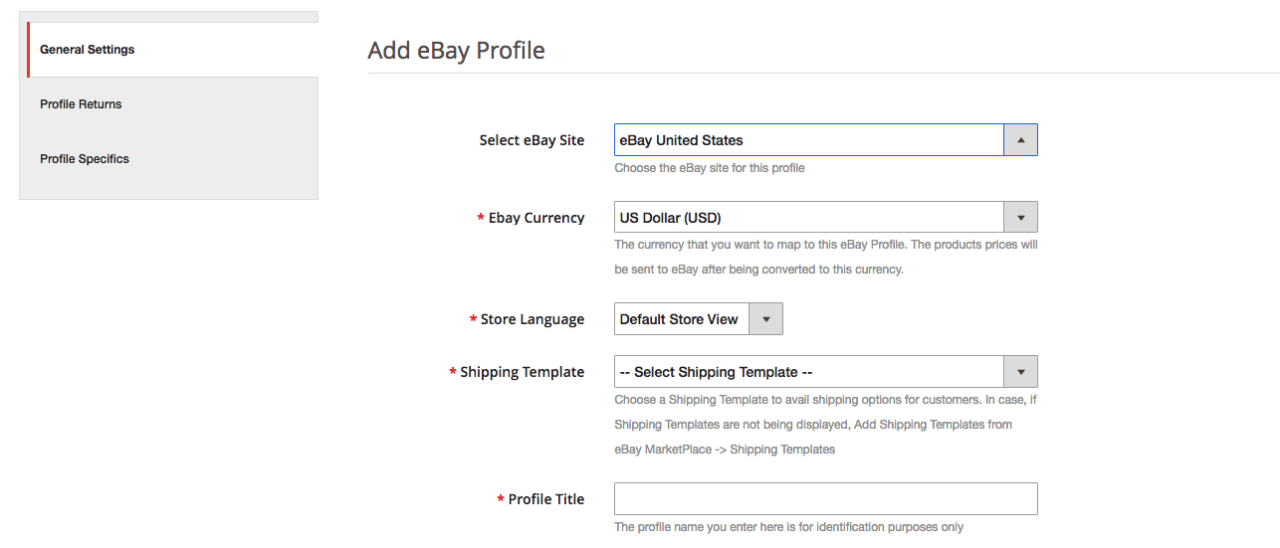
The profile creation tab of the eBay Integration plugin for Magento 2 is categorized into three tabs. They are:
General Setting
Profile Return
Profile Specifics
3.3.1.1 General Settings
Once the admin selects the eBay site, he has to enter the following information.
eBay Currency: The currency will be automatically selected as per the eBay site selected by the admin. The store admin can even change the currency if required.
Store Language: The store admin needs to select the language as per the selected eBay site.
Shipping Template: The shipping options created in the Shipping Template Tab will be listed here. Select the shipping option that you want to display to the marketplace customer.
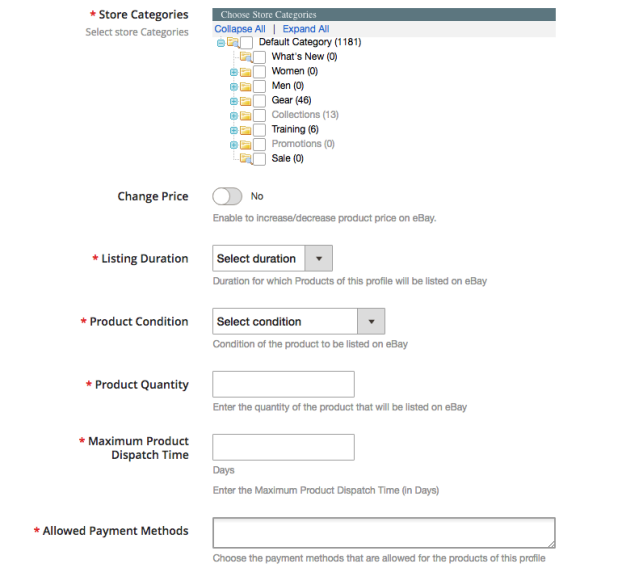
eBay Category: Select the eBay category from the dropdown menu in which you want to map the categories of the store.
Store Categories: Check the categories that you want to map in the selected category of eBay. The eBay integrator for Magento 2 allows the admin to map multiple categories of the Magento 2 store with a single category of eBay. To list multiple eBay categories, you are supposed to create multiple profiles.
Listing Duration: Select the duration for which the products of the profile are to be listed in the marketplace.
Product Condition: The default conditions are listed in the drop-down menu. Select the condition of your product.
Product Quantity: Enter the quantity of the product here.
Maximum Product Dispatch Time: Enter the maximum expected product dispatch time.
Allowed Payment Methods: Select the payment methods that you want to allow for this particular profile.
3.3.1.2 Profile Returns
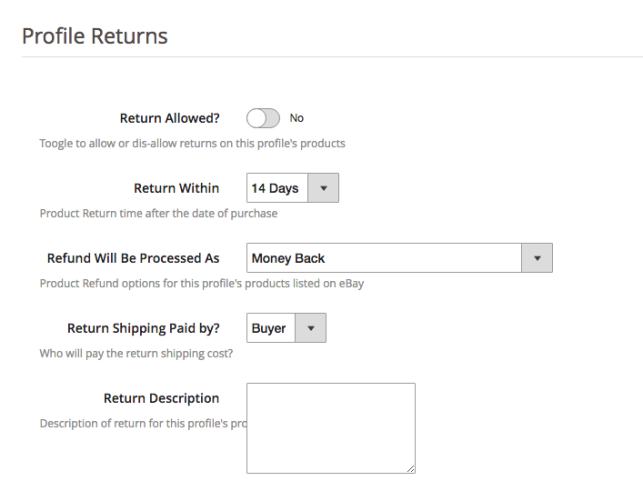
The store admin can manage the return requests of the marketplace from the back-end of the eBay API integrator for Magento 2. Here are some of the customization options offered in this tab.
Return Allowed: Enable the button if you want to allow the return option in this profile.
Return Within: Enter the maximum number of days within which the return request should be initiated.
Refund will Process: As selected how the refund will be offered to the customer.
Return Shipping Paid by?: Select who will pay for the shipping cost of the returned product.
Return Description: Enter a short description for the return option here.
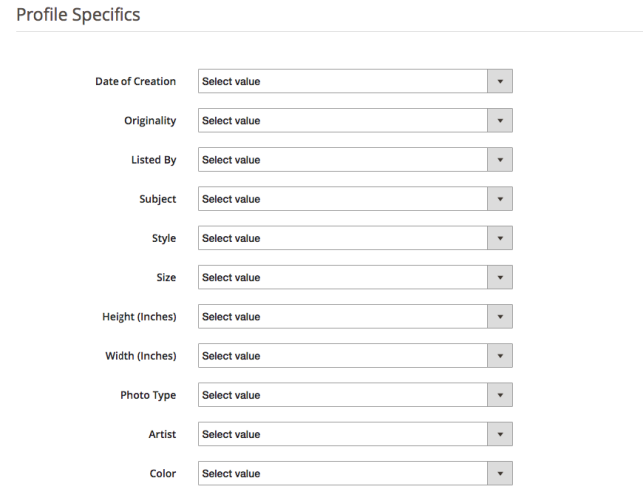
3.3.1.3 Profile Specifics
Profile specifics will appear as per the category of eBay selected in the General Setting tab of the Profile Management. This tab includes fields like Type, Brand, Model, Color, Features, and others. Fill up the fields as per the category selected and the product mapping will be done accordingly. The specifics marked by * are mandatory. Other specifics can be left blank.
3.3.2 How to Edit/Delete the existing Profile?
Click on the ‘Edit or Delete’ button to edit/delete the profile as shown in the image:
The admin can enable/disable the Profiles by selecting the option in the ‘Active’ tab.
3.4 Product Listing
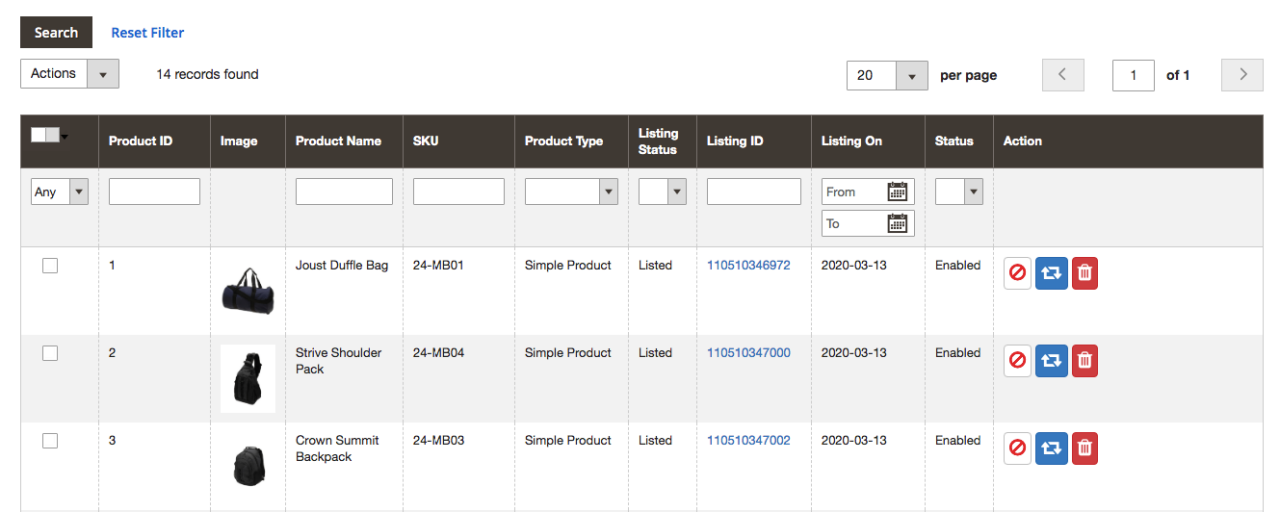
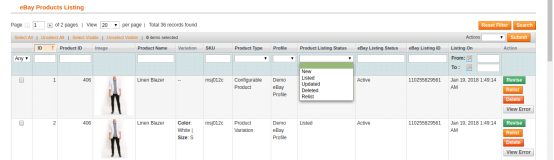
The store admin can view all the products listed in the marketplace from the Product Listing tab of the eBay Integration extension for Magento 2.
Here are some of the listing options offered in this tab of the eBay connector plugin for Magento 2.
Revise
The store admin can click on the ‘Revise’ button to update any change in the product detail. Whether you make a change in the product description, pricing, or quantity of the products, all the changes will be updated in the marketplace by this button.
Delete
This option allows the admin to delete the product from eBay Marketplace. Click on the “Delete” action corresponding to each product listing if you want to remove it from eBay.com.
Disable Products
The admin can disable the products that are listed For this, click on the ‘Disable Product’ action.
Adding products from the product listings tab
If you want to add a product to the product listing tab, the admin has to create a profile of the product in the Profile section of the module. There you will get a step-by-step procedure of creating a profile and adding the product in the products listing tab.
Different statues in the filter of the product listing
Here are some different statuses in the filter of the product listing.
New: After applying this filter, the admin can view the new products listed on the Marketplace.
Listed: After applying this filter, the admin can view the listed products listed on the Marketplace.
Updated: After applying this filter, the admin can view the updated products listed on the Marketplace.
Deleted: After applying this filter, the admin can view the list of disabled products.
Relist: After applying this filter, the admin can view the relist products listed on the Marketplace.
3.5 Orders Settings
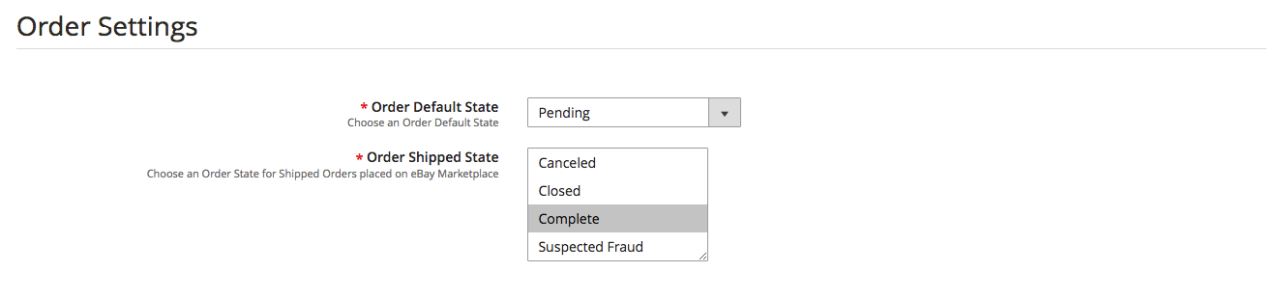
The eBay connector for Magento 2 offers two-way integration. The admin can mark which status will display when an order syncs.
It includes three options:
Order Default State: Select the default status of the orders that will display in the marketplace.
Order Shipped State: Select the status for shipped orders.
Note –
The default status is the first status of the order when it is placed in the store.
Shipped status means that ordered items have been shipped.
To update the change in the order status by executing cron in the Synchronization tab of the eBay Marketplace connector plugin for Magento 2.
3.6 Orders Listing
The orders available from the marketplace will sync to the Magento 2 store. Furthermore, when the cron executes in the Synchronization tab.
The orders are listed as shown in the image below. To view the details and process the same click on the ‘View’ button corresponding to each order.
The store admin can now see the following details of each order.
It offers basic information like order date, status, billing and shipping address, payment information, gift options, item ordered, comments history.
3.7 Synchronization
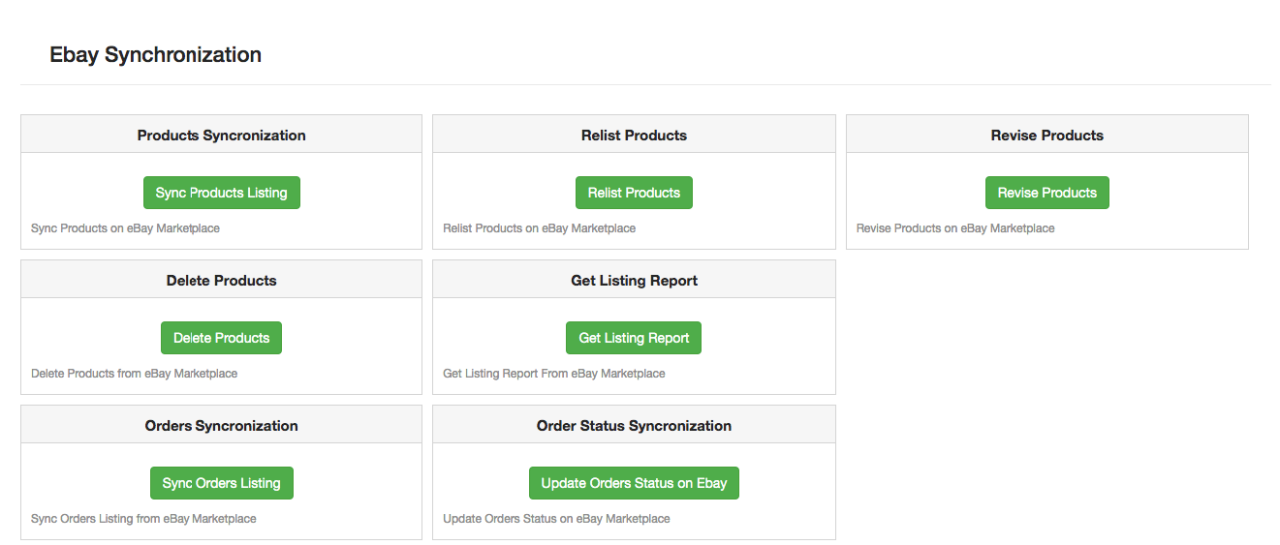
The eBay integration for Magento 2 allows easy synchronization between both stores. All the synchronization jobs can be performed from this tab.
The synchronization tab of the eBay connector module for Magento 2 offers two synchronization options. That is Product and Order synchronization.
3.7.1 How to sync the products on eBay Marketplace?
Click on the “Sync Product Listing” button as shown below.
It will add products in the marketplace with the respective product details.
3.7.2 How to Relist the product on the eBay Marketplace?
Click on the “Relist Products” button as shown below.
This will relist the expired products in the marketplace. It will update the listing of the products whose relisting was initiated in the Product Listing tab.
3.7.3 How to Revise the product on the eBay Marketplace?
Click on the ‘Revise Product’ as shown below to revise the products on the marketplace. Any change in the product details, image, pricing, etc can sync by executing this cron offered by eBay Integrator for Magento 2.
3.7.4 How to Remove a product on the eBay Marketplace?
Click on the ‘Delete Products’ as shown below to remove products from the marketplace. The admin has to click on the ‘Delete’ button in the products listing tab before executing this cron eBay Integrator for Magento 2.
3.7.5 How to Import the listing report from the eBay Marketplace?
By executing ‘Get Products Listing Report’, the admin can import the report of the product listing from the marketplace. The eBay status column will fill up when this action executes by eBay Integrator for Magento 2.
3.7.6 How to sync Orders from the eBay Marketplace?
Click on the “Sync Orders Listing” button as shown below.
It would perform the following actions:
The plugin will sync the Orders and related details from eBay Marketplace to the Magento 2 store.
It creates the orders in the Magento 2 store as per the details of the order received from the Marketplace.
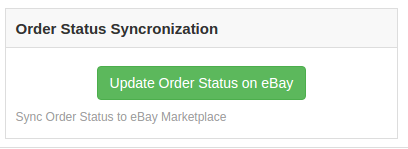
3.7.7 How to sync Order Status to the eBay Marketplace?
Click on the “Update Order Status on eBay” button as shown below.
It would perform the following actions
The cron checks if there is any status update recorded by the eBay integrator for any order.
The updates are then synchronized accordingly.
It updates the Status of Orders as per the configuration settings modification in the “Order Settings” tab of the admin interface of the eBay Integration module for Magento 2.
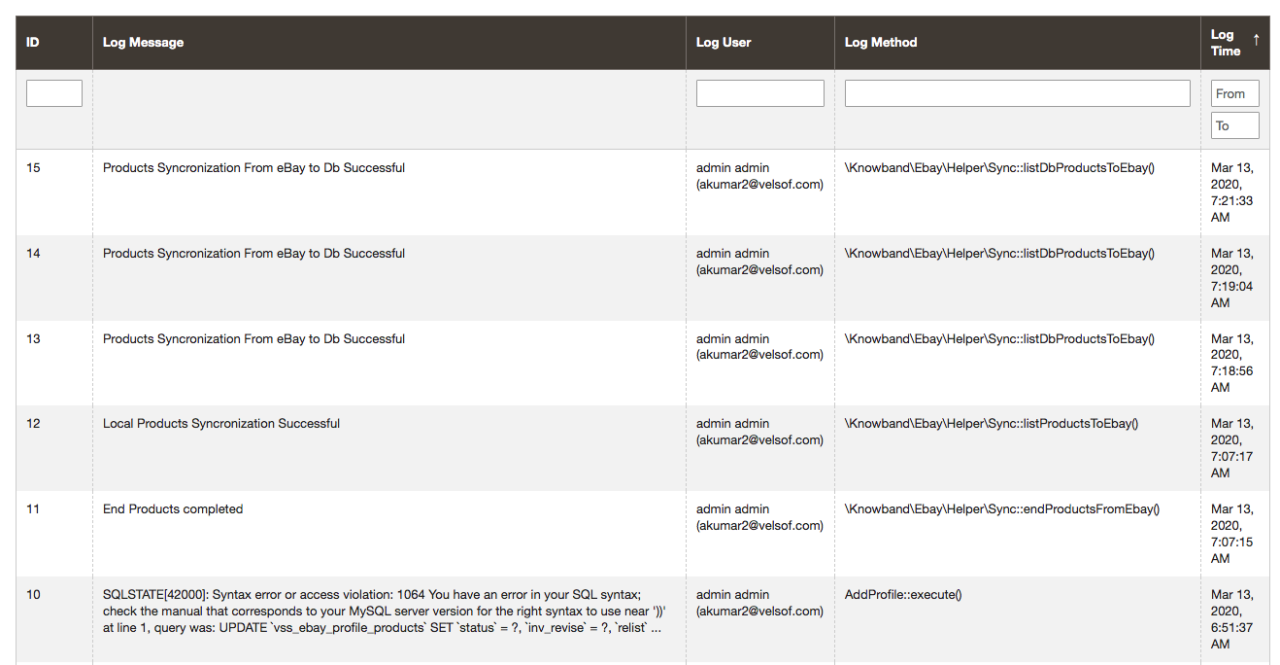
3.8 Audit Log
This tab offers an overview of all the tasks being performed in the back-end of the eBay Integrator extension for Magento 2.
Thanks to the idea of hyperlocal business models which are redefining the economy with on-demand delivery models. The idea of home delivery is gaining ground and businesses are cashing in on it. BigBasket a famous brand have established their hyperlocal marketplace in the year 2016 and the change in the pattern has provided a wide range of product availability to the customers with super-fast delivery.
With hyperlocal delivery model, BigBasket established an online marketplace for local vendors and sellers and they have integrated a network of all the possible bakeries and popular vendors. This move opened up the doors for many small businesses to grow with the help of a marketplace.
There are multiple types of online marketplaces categorised based on industry, focus and target audience. We will be discussing them one by one and how the Multi Vendor Marketplace Module can help you build your own marketplace is explained.online
Online Marketplace based on Core-Focus:
There are two types of online marketplaces based on focus segments: There are marketplaces that provide either one type of service or sell one category of products and the others are a hub for multiple services with a variety of niche.
Vertical Marketplace
A marketplace providing a single type of service and not diving into the pool full of fishes. Let us consider an example of Etsy, what started out as a simple place for people to sell crafts has become a behemoth.
Horizontal Marketplace
A marketplace where you will find many services or different types of products on one online platform. For example, a mall where you will find all the brands and products under one roof. An online eCommerce marketplace like Amazon is a horizontal marketplace.
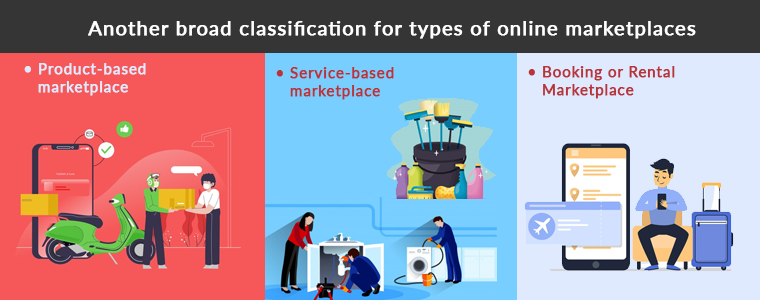
Another broad classification for types of online marketplaces
A major feasible classification for the online marketplace occurs on the verticals they are offering:
· Product-based online marketplace
This type of online marketplace deals with selling products. Like Amazon and Flipkart are product based marketplaces. Commission and subscription are the two ways product based marketplaces earn money. They can even charge for delivery fees.
· Service-based online marketplace
An online marketplace where service providers can list and provide services like personal care, cleaning, plumbing, appliance repair, pest control, graphic designing, etc.
Popular service-based online marketplaces are the Urban Company, Fiverr, Upwork who are providing multiple services with hundreds of categories.
· Booking or rental online marketplace
No chance you haven’t heard about a booking or rental service providing an online marketplace. Ola, Uber, booking.com, MakeMyTrip are the most popular websites for booking or rental Marketplace.
A platform or an online marketplace for the purchase or sale of goods and services through wireless handheld devices or mobile phone
eCommerce
A two-party site, e.g. seller – shopper, company owner – investor, etc.
The crowdfunding-the website enables people to post their projects and raise funds through fundraising efforts for their execution.
Marketplaces on the basis of Customer Type:
B2B – an online marketplace for the exchange of goods or services between companies or two business merchants
B2C – an online marketplace for the transaction from the merchant to customer for goods or services
C2C– an online platform for the transaction between customers for goods or services
How to start a Hyperlocal Marketplace with Multi Vendor Marketplace?
An online marketplace should have a seller and customer-driven features covering all possible requirements of the admin, seller, and the consumer. A multi-vendor marketplace extension is a module that can serve you well for setting up a B2B or B2C marketplace.
You can customize the settings as an admin. With Multi Vendor Marketplace module the seller who registers on your marketplace can easily manage the functionality for providing the service or selling a product to the customers.
Benefits of Multi Vendor Marketplace
Protection and guarantee for users
Authentic sellers and customers
Customizable settings and easy to configure from admin and sellers end
Track product details and orders for operating intermediate transactions
Marketplace handles the complete process
Multi vendor Marketplace provides superior customer experience
How to generate revenue with an Online Marketplace using Multi Vendor marketplace addon?
Based on Commission Model
How does the commission model work for Multi Vendor Marketplace? A commission is a percentage or amount of money a person gets when the product or service is being provided to the customer. With the aid of Marketplace Module, the store admin can set up a global commission for the sellers.
Using Multi Vendor Marketplace, commission for the individual sellers can be set. It provides the marketplace owner with the functionality of the category level commission. Marketplace admin can charge different commission rates on various marketplace product categories.
By offering a Membership Plan
Membership plans allow the store administrator to launch a subscription-based program. If the store administrator allows membership plans to work, then all new sellers and current sellers will have to purchase a marketplace membership to list their goods in the Multi Vendor Marketplace.
The marketplace owner can allow a free membership plan in which sellers can list only restricted products. Store admin can also send custom notifications to those sellers whose membership plans are about to expire. By giving a free subscription for a limited period will grab you more sellers in your market place.
Conclusion:
Some vendors and small businesses think it is easier to sell their goods in an online marketplace than to build a website and look for technological tools that handle several e-commerce sites. A marketplace is easy to manage with multi vendor marketplace addon.
If you’re willing to have an omnichannel approach with several online marketplaces, research all the industries and niche and think about which one suits you best and looks more lucrative, to begin with. Then we’ll help you keep your product details in order, safely, conveniently for all your marketplaces and networks.
With over 1.2 billion listings on eBay, sellers have to compete a lot for the attention of eBay’s 182 million active buyers. And this is a little tough for the new sellers. So this is the main reason most of the sellers are looking for some tips to getting started selling on eBay. This marketplace is not only too vast but also complicatedalso be complicated at times. If you are new to eBay, it is best to start slowly, learn the landscape, read the rules, find out about the fee structure, and grow your eBay hobby or business methodically. Here are some pro tips for the sellers to sell on eBay Marketplace.
Make your post outstanding
By using some eye-catching words in the header can grab a buyer’s attention. Your headline description must be clear. Inside your description, all your product conditions must be clearly specified. Along with the headline and description, product image plays an important role in the buyer’s attention.
Apply Seller Initiated Offer
Recently eBay Marketplace introduced a new feature called Seller Initiated Offer, which can be directed to buyers who put a product in their watch list or who have a product in their cart. For example, if a buyer adds a laptop to their watch list or cart, that’s a clear indication a buyer is interested in a product, and so you as the seller can go into the Seller Hub and check the specific listing and see that people have shown interest. Then, the seller can send an exclusive offer with a personalized message.
Timing is key, price your item right
According to eBay, Sunday is the best day for purchases, followed by Saturday and Monday. To sell your items quickly, think of the time and most important what products people want. For instance, Christmas items will do better in early December than March. You get the idea. As for pricing, make sure your item is perfectly priced as most buyers purchase a product after comparing it to others. Free shipping also helps to sell your product more quickly.
Understand Seller Limits
Selling limits are ruled for all sellers, but they are more strict for new sellers. It places certain limits on sellers to prevent any kind of fraud. New sellers have different limits like account limits, category limits, and item limits. After you have successfully sold a few products, then you can request higher selling limits.
Choose the Right Listing Category
The product listing category is very important in the marketplace. Always put the product in the right category. For instance, the right category for a smartphone is electronics than any other category. If you put your product in the wrong category then no one buys it because they are looking for a product that matches the right category.
Other selling tips:
Be clear about your return or refund policies; build up your seller reputation by asking happy customers to post a short review and star rating, and advertise your eBay post elsewhere, including auction sites and social media, to maximize your reach.
Use eBay extensions to list your e-commerce store products on eBay:
We provide the best extensions which help you to list your products on eBay Marketplace from the e-commerce stores like Prestashop, Opencart, and Magento. Listing your products individually on these platforms is a very time-consuming process. So these extensions help you to save your time and money.
Some benefits of these extensions are as follows:
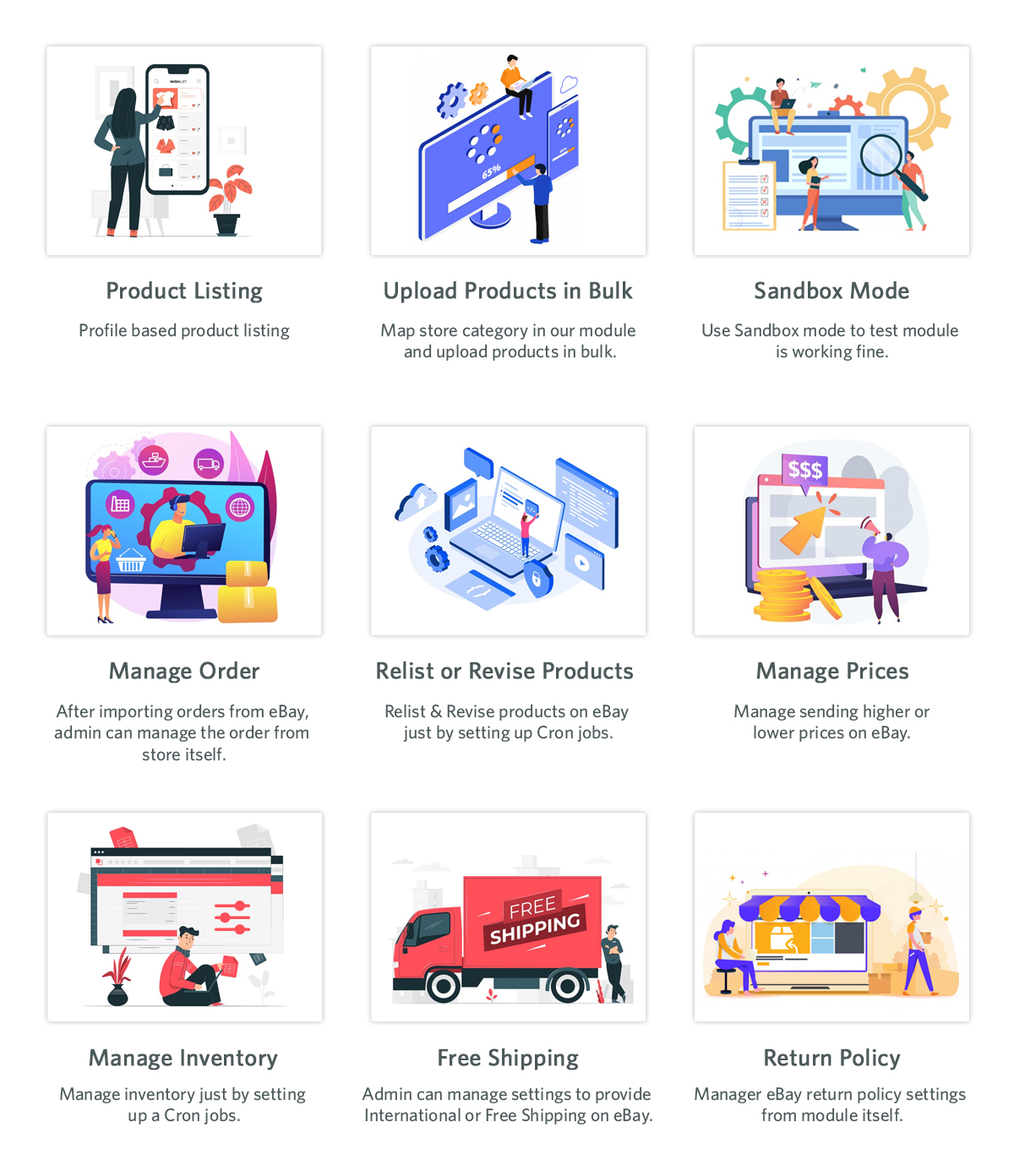
Bulk product listing: With the help of eBay integration extensions sellers can upload products in bulk and they can map the e-commerce store categories with the eBay categories as well.
Profile Management: Sellers can upload products by creating multiple profiles. Under profile, Management sellers can also select the basic settings. Profile-based product listing will help you to list different products in different categories on the marketplace.
Product listing: Under this tab, sellers can see their product status. From this tab, the seller can check which checks that which products linked to which category, their listing ID and their listing status, etc.
Price Management: Using this feature sellers can list their product at a different price than their e-commerce store price. They can adjust the price higher or lower on the basis of fixed and percentage-wise.
Various Payment Methods: eBay integration extension helps the seller to set the payment methods as per their choice.
Quantity Management: Admin can add a quantity buffer while listing products on eBay to avoid any out-of-stock orders. This module also allows admin to sync inventory in bulk from store admin to eBay.
Shipping Management: Admin can create multiple shipping profiles and can also offer free shipping or international shipping on eBay using our module.
Return Policy: Admin can manage eBay return policy settings from the module itself.
Conclusion:
So, if you are selling on eBay or you are a new one then you must follow these tips to get the most of eBay. These tips will help you to sell your products more quickly. And if you are selling on other e-commerce stores like Prestashop, Opencart, and Magento in addition to eBay Marketplace then you must use these integration extensions to save your time and efforts.
The marketplace is the professional seller community that provides sellers a platform for selling their products and earn a huge chunk of profits. eBay is one of the best and most popular Marketplaces all over the world. Selling on eBay will definitely help sellers to earn a huge chunk of profits. Sellers can avail access to millions of customers worldwide which will rapidly boost up sales and revenues.
With over 182 million active users, eBay is a continuously growing marketplace that has provided a lot of sellers a platform with an infinite conversion rate. Selling on eBay marketplace is a dream for many sellers and luckily if you got this chance then here are the 4 ultimate tips which would help you to increase your sales on eBay:
1) Make friendly communication with your customers:
This point may sound murky but trust me this is the most useful way to all your leads. In today’s world, you have to play smartly and try to provide an enhanced shopping experience to your beloved customers to be remembered for the long term and repeated sales. Instead of running towards materialistic things, sellers should keep a check on the quality of the product as it is directly related to the feedback of consumers.
eBay has an outcome with a user-friendly interface for marketplace sellers which lures them to sell more and to add more product listings to it. It’s very important to understand the market base and go for the right decision which will suit best for your niche.
For example, if you deal in eyewear and the summer season is around the corner then my dear friend, you should add some cool sunglasses to your listings and earn a huge chunk of profits and a huge customer base too.
2) Use relevant tools for increment in the sale:
Sellers should be efficiently involved in multichannel selling as it is a big boon nowadays. For the past 10-20 years, multichannel selling is one of the most popular ways of marketing in all forms of selling and will be even in the future too.
All sales channels are efficiently interlinked with each other to achieve every possible facet and convert them into fruitful leads.
So interlinking and back-linking your website on different selling platforms and website blogs would be beneficial to you in terms of sales and revenues.
Although the process sounds a bit tricky due to the presence of certain tools but believes me, these tools help you to easily manage the products, inventory and their prices too.
So, here are some tools discussed which helps in increasing sales on eBay:
i) When you manage your eBay orders Directly:
Managing orders directly could be a hectic task on eBay. However, the journey from selling on the store to selling on eBay has taken a few steps ahead. Here are some Product Lister services which will certainly help you list your products in bulk in just a single click.
ii) When you manage your orders from an online store:
eBay Marketplace supports all the tools used for conversion rate optimization driven by the concept of multi-channel selling. If you own an eCommerce store on an open-source platform like Magento, PrestaShop, etc., or on SaaS-based platforms like Shopify, etc., then you can use various eBay Integration Apps which come with the following features:
Product Listing
Seamless Store Integration
Profile-based upload
Order Management
Payment and Shipping Regulation
Inventory Update
Seller’s Dashboard
View error
User-friendly interface
This is the sure-shot method to achieve Conversion Rate Optimisation!
3) Product Detail Optimisation:
Just imagine your product is shown interest by your customers but you failed to describe your product efficiently. How will a customer feel? Frustrated, right? Why is this so? This is because the way you described your product was not appropriate for a customer to understand and this will result in loss of sales.
Once your product detail is been optimized, it’s also important to rank your product listings in the search results. If your products are not visible on the top of search results, then there is no benefit from product detail optimization.
Below are some of the points to be kept in mind as they will directly help sellers to rank their products on top of the search results.
a) Keywords and Titles should be a priority!
Being able to identify and use the correct keywords is the most important task to perform. The product keyword should be user-friendly so put yourself in customer’s shoes and try to think like them and search any product using the keywords that come to your mind first.
Titles should be nice and user-friendly and it is important to use the relevant keywords. A title will help to attract the huge amount of traffic to your eBay listings.
Although eBay has set its own algorithm this strategy is totally inevitable and could really work to rank your product listings.
b) Include multiple and high-quality images:
eBay’s search engine analyses product images by analyzing the number of photos and the product information conveyed by them. So if you want to rank your product on top of the list, it is important to use high-quality photos with detailed information about the product.
Avoid using overly bright colors and click a picture in light background with high resolution to get a clear image of the product. Always try to click multiple photos of the product from different angles as it helps the customers to know more about the product. The image should be uncluttered and should not be overlayed with other text or line art.
c) List your product in relevant category:
Selecting a relevant category is incredibly important as this directly influences the search results and helps the buyer to find your products. Opting a wrong category will definitely limit you from being found by customers. So list your products accordingly in the category and your listings should comply with eBay algorithms.
4) Popularity and efficiency in Market to build customer’s trust:
In the current scenario where the customer is the thrown owner and we work only in the direction of achieving better consumer experience, it’s the responsibility of sellers to include them in your selling process and involves them actively.
You can make the visitors and customers a part of your process by the following simple practices:
Reviews: Sometimes there are customers who are not sure about the quality of the product at the time of purchase. To overcome this, it’s very important for you to grab feedback from your customers on your products in order to ensure that the products are working well and what is needed for the betterment.
e-mail advertisement: email marketing is one of the best ways to promote your business nowadays. With the help of email, you can initiate different e-mail campaigns to let your customers know about your upcoming products.
Social Media Marketing:Social Media Marketing is the primary key to marketing key these days. Consumers today are at-least present on one social media profile these days, so you can make the leads out of it by promoting your brand on the same. You can make your brand profile and follow random customers. This will not only help you to promote your brand, but it will also help you to direct your followers on eBay which can give you good leads in return.
Conclusion:
The above compilation of 4 ultimate tips would definitely help you to optimize, enhance and emerge out as a leading seller on eBay Marketplace. Just follow these simple guidelines like product description, shipping process, customer reviews and many more. So try to accommodate all these strategies and keep yourself updated about the latest trends and techniques and excel like never before!
With an increase in customer’s demand and advancement in technology, Marketplaces like Etsy, eBay, etc have already started gaining popularity. Creating an Online Marketplace like these Marketplaces requires lots of efforts and strategies. The marketplace is one of the most profits generating business. An online merchant can earn a huge profit from the commissions paid by the sellers. The store admin need not invest in inventories of products.
Why should we create an online Marketplace?
The Marketplace is an eCommerce platform where multiple buyers and sellers are connected on a single platform. Multi-vendor store bridges the gap between users and retailers. Multiple retailers integrate to sell their valuable items on the Marketplace. Retailers need to get themselves registered at the Marketplace and be a part of the large shopping organization. The marketplace can help an admin to increase the customer retention rate and earn from listing seller products, seller services, seller commission in addition to its sale.
The demand and reach of the Marketplaces are expanding every millisecond. It’s never too late to build your Marketplace.
B) If the admin is having an eCommerce store then there are various Marketplace extensions available in the Market to simply upgrade the store into a fully-featured Marketplace.
2. Merchant Panel:
Progress of a Marketplace mainly depends on its two main stakeholders i.e buyers and retailers. Details of buyers and sellers are very sensitive and need to be secured and protected. A Merchant panel to manage the seller list and listing of products is mandatory for running a Marketplace.
3. Effective Notification system:
A Notification system is required to keep the sellers and customers updated about any change at the Marketplace.
4. Feedback panel:
Review and Rating platform to monitor the customer’s valuable feedback needs to be there. Feedback sent by the customers is important for the growth of the eCommerce store.
5. Seller dashboard:
A dashboard for sellers to manage their product listings is required in a Marketplace.
How to build your Marketplaces like Etsy and eBay?
There is no denial in this fact that Marketplace is a great source of revenue for store owners. But to run a successful multi-vendor store is not a cup of tea for everyone. The total cost of building a fully-fledged Marketplace may vary from place to place. In various places, the cost of building a Multi vendor store is too lengthy and costly but the availability of the Marketplace modules has lessened the pain and it’s now easy and cheap to build a Marketplace like Etsy and eBay. To start building your Marketplace like Etsy and eBay you must keep the two basic pillars of the Marketplace in mind i.e., seller and buyers. A Marketplace can never run without its sellers and customers.
1. Patience and a plan
Patience is the key mantra in the way of your Multi vendor business. Patience is required in the initial stages of setting up the multi-vendor store. Keep your patience with you till both sides’ sellers and customer communities have established. The period required for the establishment is somewhat greater than an inventory based eCommerce startup where we build our supply chain. However, in the marketplace, both the customer and seller communities are required to build which eventually requires more time to run. The multi-vendor store may take a few months to prove their real worth in the meanwhile the admin needs to look for the target area and start focusing on that.
Etsy is one of the examples which started from a niche market (Vintage, handmade products, and books respectively) and later widened its target area. Thus the admin needs to stay focused, steady and patient with its plan.
2. Emphasis on the initial investment
Never rush for the initial investment decision. The online merchant needs to give himself some time to calculate the worth of its own business as everybody is not a Microsoft owner who has no scarcity of dollars. Some businesses show huge success with early big deals but it’s not possible to buy the speed while building a Marketplace. Emphasis on the initial investments would take your business furthermore on the runway.
Plans like big teams and big offices in the early stages of the multi-vendor store launch can be avoided. Initial marketplace investments are mostly required in two functions:
A. Building the marketplace site, and
B. Building the supply chain with the buyers and sellers community.
3. Target on the niche market
Etsy marketplace started as an eCommerce platform for Vintage and handmade crafts and later expanded its target area to other categories. As of now, Etsy even accepts the integration and the merchants can sell their goods on the oldest and successful multi-vendor store from their stand-alone eCommerce sites. Successful business though may provide you with diverse and rich quality stuff in one place but none of them has started from there where they are now. This narrowly targeted approach steadily grew up into a diverse market and the result is a successful online place like Etsy.
Action plans for targeting certain types of product categories and sellers can be adopted to gradually expand outside the niche of the circle.
4. Niche users utilities
From the above point, it’s clear that successful marketplaces are built from a niche to the masses. During the initial period, the emphasis is required to provide better user experiences to the early on-boarders. Before making plans to appeal the masses focus on user engagement for both the early sellers and customers.
Etsy in its budding stages did a superb job as a marketplace for handmade crafts which ultimately led to its expansion to other categories. Thus before focusing on the broader section first make sure the marketplace is doing justice in the narrow section which ultimately will take you to the enhanced section automatically.
5. Build a community with your Niche users
Focus on the utilities of the targeted Niche users and support them from time to time. Various social media platforms are available that can be used to build a community. Online Merchants can approach these platforms to expand their reach and build a healthy community. Like the Meowing tons that focused on the women who like cats and started selling the cat accessories, cat utilities, and cat theme accessories for women. Women Cat lovers shared a major part of the US population and thus it turned out to be a successful startup with more than 500 thousand followers on different social media platforms.
6. Focus on Stats
While building your Multi-vendor business the online merchant needs to have a vision and trust in himself. Having a vision is important to achieve success in the business but blind faith leads often leads to falling. Tracking your progress and reassessing these steps from time to time will enable you to calculate what is working for you and what is not.
If the stats are not in favor, the admin can rethink them and find measures to turn the result in its favor. Moreover, you can’t run a successful marketplace just with your vision, the online merchant needs to stay tuned with the latest stats and facts.
Measures to be taken care of in your online marketplace.
If you have been a vendor ever that experience can help you to get the best from the third-party sellers. Similarly having practical experience as a customer will help you to address the issues faced by the customers on the eCommerce site. For running a successful multi-vendor store equal attention must be paid to both the sellers and customers. Build a personal connection not only with your sellers but also have a strong customer relationship. A strong customer base will help you to approach the sellers for your multi-vendor store, in the same way, a large number of sellers and product variety can compel the visitors to shop from your site. Moreover, advertisements involving celebrities can play a major role in attracting both sellers and end-users.
How to get the customers?
As discussed earlier, some of the strategies the merchant needs to follow to bring the traffic on their site are:
1. Focus on the niche market.
2. Create a strong customer base
3. Take measures for customer retention.
4. Pay attention to the follow-up emails and social media engagements.
How to get the retailers on your site?
Once the Marketplace is established and you are clear about the niche, things will turn to be fruitful in your way. After you have conquered a place in the market, attracting the sellers will be easier.
Finally,
The steps discussed above will guide you in giving a correct start to your business. Building your own Marketplace business is a hard job as compared to a one-sided inventory model, but once the Marketplace is properly established and is going in the planned direction then things would start kicking and would setup your footwell and firm in the Market. Till then stay in touch with the latest trends and techniques to give your business new wings to fly high with both sides being well established.
For any query, feel free to contact support@Knowband.com