Every eCommerce store needs the support of an amazing Magento themes and templates for improving the performance and productivity of their store. These themes consists of various features and functionalities that can help in making your various tasks perform in a seamless manner. Although, there are thousands of Magento themes and templates available but there are only few of them that have the potential to change your business fortune in a tremendous manner. Let us take a look at some of the mind blowing free Magento themes of 2015 that can be the game changer for your eCommerce store.
Fit Body
This amazing Magento theme is designed by Magento theme development company, TemplateMonster and is equipped with a wide range of advanced tools and features that can improve the appeal and functionality of your eCommerce store. The theme consists of a clean and minimal layout with parallax, hover, sliders and galleries for adding various features and functionality to your Magento site. Due to the presence of fixed mega menu, visitors can effortlessly navigate to any section of the site on the fly and thus improves the website navigation to a great extent.
Trex
Trex is a dynamic theme that comprises of an engaging look and clean code. This fully responsive design along with an off- canvas menu provides a superb performance on multiple devices like desktop, laptop, smart phone or tablet.
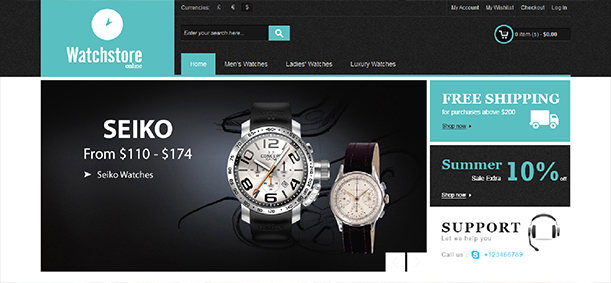
Watch Store
Now, you can build a stylish store with the help of this up to date theme. This free Magento theme provides a clean and minimal layout that helps store owners to showcase their products in the best possible manner.
Hello Magento
If there is one theme that is perfect for every type of eCommerce store, it is this theme only. This free Magento theme provides a clean layout with an easy navigation facility which makes the product management a much easier task.
AccessShop
For all those professional people who want to give a boost to their product sales, this Magento theme is the ultimate choice for them. It can help you in creating an up to date site for increasing the sales of your online store. You can easily modify the theme according to your business requirements. Moreover, you need to worry about the performance of this theme on multiple devices due to this fully mobile responsive design.
Wine Shop
This free Magento theme is designed by the Magento theme development company for various wine and liquor stores but it does not mean that it can’t be used for any businesses or eCommerce store. It consists of numerous options and features which makes it adaptable for clothes, sports, gift stores and other types of businesses.
If you have made a new transition into the world of Magneto, it is high time that you need to install these free Magento themes for grabbing that initial business lead among your rivals. If you miss out these mind blowing themes for your eCommerce store, you are sure to suffer a huge business setback in terms of conversion rates, product sales and brand awareness. For more information about the various amazing plugins and extensions for your eCommerce store, do visit our Knowband store which has plugins for Magento, OpenCart and PrestaShop stores.
Magento site owners have a reason to be cheerful again as up till now they have been able to perform some of the site optimization tips on their Magento store for making a significant improvement in terms of the conversion rates, product sales and site traffic. Further, in this final part of this article series, let us discuss some more mind blowing tips that can improve the website loading speed of your online store drastically. Take a close look below.
1. Utilize the services of PHP accelerators
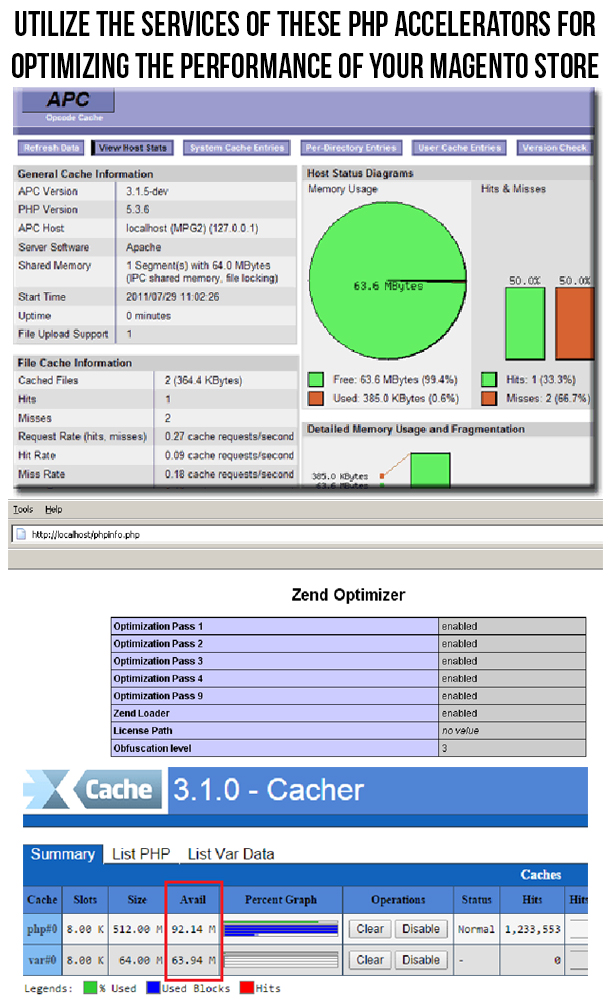
For improving the performance of a Magento site, you can utilize the services of a PHP accelerator, which is another form of caching. With the help of these accelerators, it is now easy to improve the performance of your PHP scripts by caching them in their compiled state. Apart from this, you can utilize the various PHP accelerators like APC, ZendOptimizer+ or Xcache. Some of them are described below.
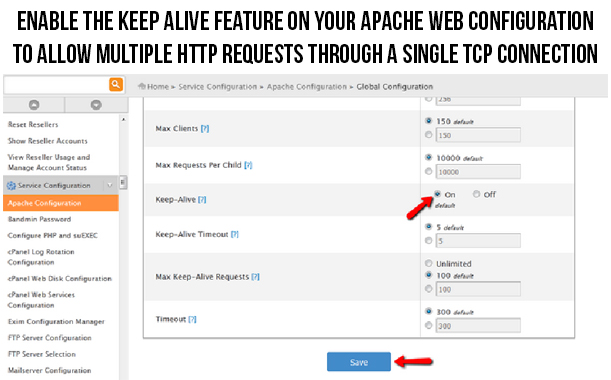
This Apache Keep Alive is a mind blowing feature that establishes open connection between the client and server platform. In order to improve the loading time of your site, you need to ensure that the multiple requests are handled on the same connection. To take required step in this direction, you need to check that the “Keep Alive” option on your Apache configuration is enabled. This option is an effective tricky solution that allow multiple HTTP requests to be funneled through a single TCP connection. Due to this, the additional time that is spent on the setting up of the individual TCP connection is reduced and thus the downloading time required for files like HTML, JavaScript, images and others are minimized to a significant level.
3. Replace Apache web server with other suitable alternatives
For improving the performance of your Apache web server, you need to look out for the suitable alternatives for your web server. LiteSpeed Enterprise web server that can be used as an effective replacement for the Apache web server due to various available features and facilities. With the help of this server, the performance of the PHP application can be increased by up to 50% and it is about 6 times faster than the Apache serving static content. Besides LiteSpeed, Nginx is also an effective replacement for Apache web server.
4. Make use of the advantage performance optimization
Due to the complexity of the Magento system, it is important to implement the caching in the workflow process of your Magento site. For situations like this, you need to have a full page cache extension that can save the excess load on your Magento server. Apart from this, you can utilize the services of Varnish Magento extensions to optimize the performance of your Magneto site. Check out this link to try out this free Magento extension for the purpose of full page caching.
5. Optimize the performance of your website on mobile devices
Due to the increased use of the mobile devices, more and more number of people are surfing the site through these mobile devices. Therefore, it is important to optimize the performance of your site on mobile devices for providing the same level of user experience to your customers irrespective of the device used by them. In order to carry out this crucial task, you need to take the help of various mobile optimization tools like PageSpeed Insights, Pingdom, Mobile Friendly Test, GT Metrix and such others. Apart from this, you need to utilize the various other factors like HTML5, CSS and Javascript files, mobile responsive design, optimized images and other such components that can make your Magento site more accessible on numerous mobile devices.
6. Disable ETags for the faster performance of your browsers
Browsers make use of ETags feature for validating the cached components across the various subsequent visits. Due to this, it can slow down the performance of a site if it is served from the cluster that has not implemented ETags properly. To avoid such a situation, it is important to disable them completely with the following syntax:
############################################
## If running in cluster environment, uncomment this
For optimizing the performance of your Magento site, you need to install a JS/CSS minifer like the Minify Javascript/CSS that can optimize the performance of your site drastically. This Minify JS/CSS Magento extension can effortlessly combine, compress and cache the Javascript and CSS file for faster site loading and performance. Apart from this, the minifer will also add forever expiry tags to your Magento files for ensuring the faster browser loading time.
8. Make required changes in the PHP realpath_cache settings
For optimizing the website loading speed of your Magento store, you need to update the realpath of your PHP coding accordingly. This is due to the fact that whenever a new file is added to the PHP, it is required to use a relative path so that the PHP does not have to spend a considerable time in looking out for that particular file. This Realpath cache minimizes the disk lookup time by allowing PHP to cache the reference paths and location of various files/directories that are being used by you. Further, in order to improve the efficiency of real path cache, you need to increase the parameter realpath_cache_size. If you are not capable to change your filepaths at a regular interval of time, it is recommended to increase the count of realpath_cache_ttl.
9. Reduce the logging time of your web server
For reducing the disk write up time of your web server, you need to take efforts towards reducing or disabling the logging time of your server. For Linux servers that are having access time logging enabled on any of their mysql, web server or any other cache partitions can easily get them disabled for optimizing the performance of their Magento site. Moreover, for the users that are using ext3 or reiserfs, you need to check out the faster journal write methods by clicking on this valuable link.
With the help of these mind blowing site optimization tips, Magento site owners can effortlessly improve the performance of their online store for grabbing the maximum site traffic, conversion rates, product sales and customer engagement. Therefore, it is your time to make the mark in your particular business segment by providing a seamless online shopping experience to your targeted customers.
Most of the online users are always in a dearth of time and are in mood to wait for even a few extra seconds while accessing a particular website. Due to this habit of impatience, they often leave a particular site without even completing a particular task and thus adds up to your list of shopping cart abandonments and thus affects your product sales to a great extent. All this significant loss to the credibility and popularity of your Magento site can be effectively tackled by reducing your website loading speed to an acceptance level. Don’t test the “patience” of your targeted customers while trying to access your particular website. But, try to provide them a seamless ride through the entire process by implementing these site optimization tips on your Magento site.
1. Make sure to enable flat catalog on your site
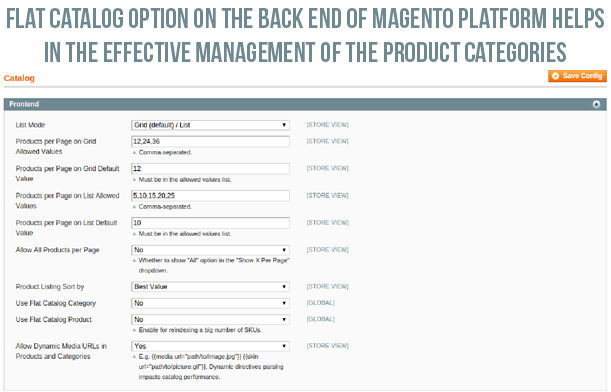
In order to improve the performance of your Magento store, it is important to enable the flat catalog for various categories and products on your site in order to facilitate their seamless merging into one single table. Due to this step, website performance is said to improve drastically as MySQL queries can now be processed in a faster manner. For utilizing this effective feature, you need to perform the following steps:
Click on the “System” -> “Configuration” and then “Catalog”.
Now, click on the “Frontend” and then change the “Use Flat Catalog Category” and “Use Flat Catalog Product” option to “Yes”.
After the above step, click on “Save Config” option.
It is advised to clear the cache. One of the recommended way to perform this is by deleting everything from the /var/cache directory. Otherwise, you can also do it by following these simple steps.
Navigate towards “System”-> “Cache Management” and then click on the “Flush Cache Storage” option for deleting the entire cache from your Magento site.
2. Delete unwanted files from Magento database and clear up your logs
Due to the default settings of the Magento, the log files in Magento are stored for upto a period of 180 days. This results in storage of a large number of log files which ultimately occupies a lot of your Magento server space. To avoid such a situation, site owners have the freedom to change their settings to a smaller time duration like two weeks (14 days) to reduce your occupied space. To perform this action, just follow these simple steps.
– Go to “System” -> “Configuration” -> “Advanced” -> “System”-> “Log”.
– Now, under the “Save Log, Days”, you need to change the settings over there to 14 days or any other specific time period of your choice.
– Finally, click on the “Save Config” option.
Apart from this, you can also perform the above task in another manner by clearing up your lob tables manually in your database. To do this, follow these steps,
– For this, you need to select all of the log_% tables from the phpMyAdmin and then select the “Empty” option from the drop down menu.
– Now, click on the “Yes” option when a popup asks you about whether you want to truncate the tables or not.
3. Install only limited number of extensions on your site
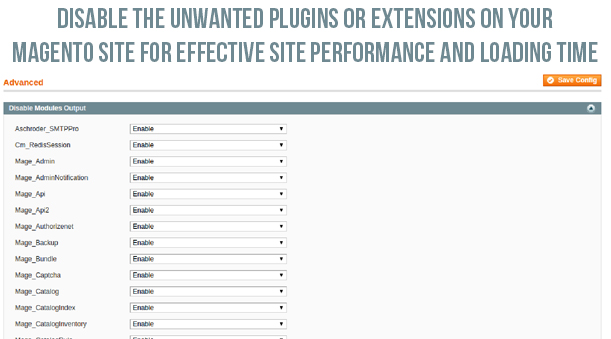
It is a known fact that too many extensions often utilize too many server space and resources which ultimately affects your website loading speed. This is due to the numerous reasons like running up of multiple HTTP requests along with the additional loading up of the CSS and Javascript files. In order to optimize your website performance, you need to install the only relevant Magento modules that can perform multiple tasks at one go. If you are clueless about which extensions to choose for your Magento store, you can check out the various amazing eCommerce plugins from our Knowband store. For disabling the other rarely used extensions, you need to perform the following steps.
Go to “System” -> “Configuration” -> “Advanced” -> “Advanced”-> “Log”.
Now, in front of the required plugins, you need to select the “Disable” from the drop down box and then click finally on the “Save Config” option.
4. Configure your MySQL database- This open source relational database management system (RDBMS), MySQL consists of its own “query cache” that is utilized on the Magento platform for the generation of dynamic pages and content in order to improve your site performance. Take a look at some of the recommended settings for your my.cnf file.
query_cache_type = 1
query_cache_size = 32M
query_cache_limit=2M
Apart from this, the recommended settings for php.ini file is as follows:
php_value memory_limit 128M
5. Optimize the Magento server configuration for your site
An effective web hosting server can play a decisive role in improving the website loading speed and is one of the important site optimization tips. If this is not the case with your Magento store, there are possible chances that your site may crash or go down due to the large incoming site traffic. Thus, to avoid such issues, you need to have a reliable and robust Magento server that can handle the multiple HTTP requests from numerous clients.
6. Use a productive theme for your website
For making your website as the ultimate obsession among your site visitors, you need to have an appealing Magento theme that can improve the functionality and performance of your Magento site. The theme allow site visitors to perform various tasks with great ease and without any headache. There are various free themes like Eros, Wine Store, Glamour, Blue Scale, Bag Store and such others that can help in giving a unique look, appeal and functionality to your Magento store for improving the customer engagement, site traffic and various other site performance metrics.
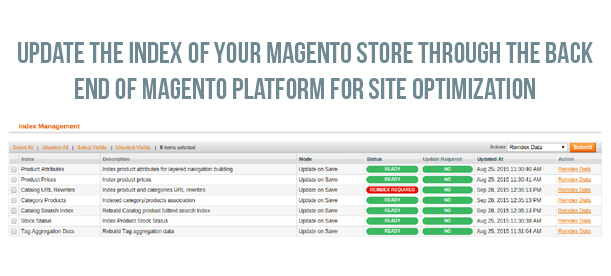
7. Update indexes of your Magento site
Although, indexes are automatically updated on the Magento platform by default whenever an object store is added. But, in some cases, this process does not take place automatically and needs to be done manually. This index updation is important as it improves the performance of your MySQL queries. To accomplish this crucial task, you need to implement the following steps.
Navigate towards the “System” -> “Index Management”.
Now, you need to select all the indexes or those indexes which you need to update. After this, you need to choose the “Reindex Data” option from the dropdown menu.
Finally, click on the “Submit” button.
Now, by implementing these mind blowing site optimization tips, Magento site owners can easily speed up the performance of their Magento store to a great extent. With this crucial information, you can effortlessly improve the online shopping experience, customer engagement and site traffic on your online store and can easily tread the “first step” towards being a market leader in your particular business segment. For making a drastic improvement in the field of site optimization and performance, you need to check out the final part of this series of article titled- Turbo boost your Magento site with these tips- Volume 3.
“Time is money” is an age old proverb that has not lost its pristine shine and significance in this jet age and people are now struggling hard to synchronize their daily life with their scheduled time duration. Similarly, when it comes to the web browsing, people often leave a particular site if it is not loading up quickly. The average website loading speed is around 2- 3 seconds and even a delay of few seconds can be catastrophic for the growth and expansion of your online business. In order to save your Magento site from the consequences of slow loading time, you need to implement these tips on your online store for getting the instant attention and engagement of your targeted customers.
1. Make sure that your site is on the latest Magento version-
For ensuring the seamless functioning of your Magento store, make sure that you are using the latest Magento 2 platform that is packed with various new features and functionalities. With the downloading of this newer update, various existing bugs and problems that were faced earlier has eliminated all together. This has made the working of various site tasks much faster and has improved the site performance to a great extent. Apart from this, you can try out the various Magento 2 extensions from Knowband that can help in optimizing the performance of your Magento store.
2. Utilize the services of Content Delivery Network (CDN)-
With the help of CDN, it is now possible to provide services to your targeted customers at the same speed irrespective of the location of your customers. You need to take the expertise of an effective CDN services that can ensure the seamless delivery of the product images, CSS files, javascript and other such components without any delay.
3. Implement caching on your Magento site-
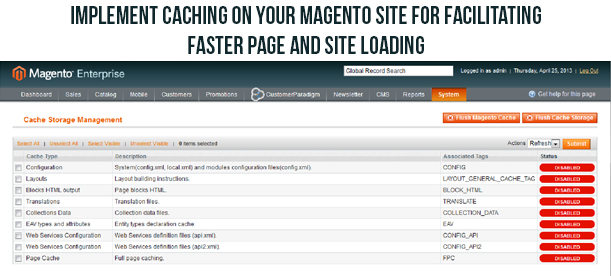
Caching makes it easier to load a particular site and thus reduces the overall load that is falling on the site server. Various eCommerce sites use this caching technique that consists of NGINX + APC + Memcache + Varnish caching. Apart from this, you need to perform browser caching, Gzip compression, page caching and other such strategies for reducing the website loading speed.
4. Optimize your product images
For any Magento site, product images need to be detailed and optimized for getting the instant attention of your targeted customers. There are various image compression techniques like lossless image compression, TinyPNG extension, compressor extension and other such extensions that can help in the seamless compression of your product images without any loss of picture quality and clarity.
5. Make use of Expires headers for your Magento site optimization
By utilizing the services of Expires headers, browsers can easily determine the extent upto which a page component can be cached. Static components like images need to have far- future expires headers but it is recommended to have expires headers for all your page components. In order to enable this feature, you need to uncomment the required line and include “Expires Active On” above the line. Here is the sample code for enabling this feature. For more information about this topic, do check out this link–
Note- While using the far future Expires header, it is advised to rename the file name of component during the implementation of any changes.
6. Merge the CSS and javascript files into one single component-
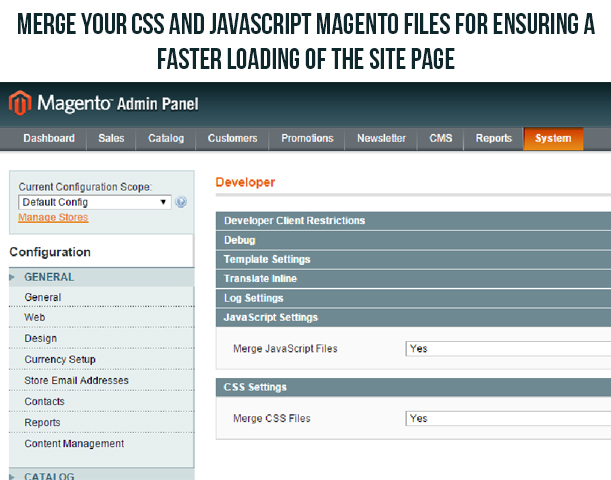
It is now easy to merge the CSS and javascript files of your Magento site into one single file with the inbuilt feature of the Magento platform. This concatenation will reduce the HTTP requests from your site and will in turn improve the page loading speed to a great extent. Here are the steps that can help you in enabling this feature.
You need to navigate towards the “System”- “Advanced” and then “Developer” option.
Ensure that the dropdown option under the “Javascript settings” and “CSS settings” is set to “Yes”. Now, click on the “Save Config” option.
Once, your CSS and javascript files are merged, you need to clear the cache of your Magento store.
7. Initiate the Magento compilation process-
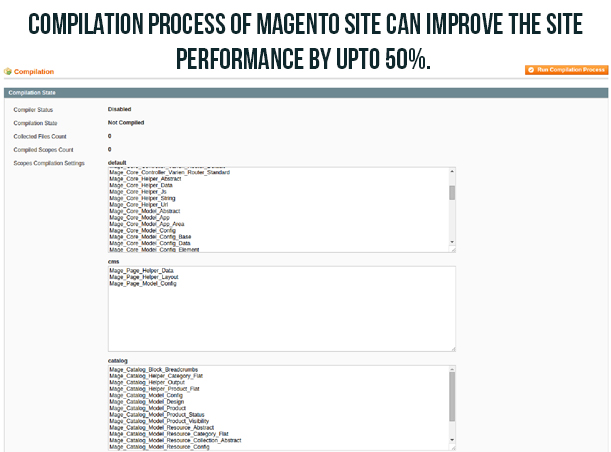
It has been seen that by utilizing the compilation feature of Magento store, the performance of the site can be enhanced by upto 50%. Due to searching of the application files of Magento platform in a particular order during the page loading process, a significant amount of filesystem reads are lost. Here are the steps that can help in utilizing this compilation feature.
You need to navigate towards the “System”- “Tools and then “Compilation” option.
Click on the “Run Compilation Process” option there.
These steps will start the compilation process on your Magento site.
If you want to keep your customers engaged to your online store for ensuring better product sales and conversion rates, you need to work towards improving your website loading speed. Always remember that online shoppers would not wait for your site to get loaded properly as they are always “short of time” and has plenty of online options to choose from. For more information on this crucial topic, you need to check out our next blog- Turbo boost your Magento site with these tips- Volume 2.
Due to the monopoly of the eCommerce giants like Amazon, eBay, Ali Baba, Flipkart and others in the online shopping segment, various small and medium size eCommerce stores are finding it much difficult to sell their products online. Due to their limited customer base and popularity, they are flocking towards various marketplaces for ensuring their product reach among large number of online shoppers. However, the situation is going to change soon as eCommerce store owners can now effortlessly turn their Magento store into an effective marketplace with the advanced features of this Magento 2 Multi vendor marketplace extension that can bring together the community of sellers and buyers at one single location. For providing a better insight about this mind blowing Magento 2 extensions, you need to take a look about how it has been transforming the lives of numerous buyers, sellers and other related individuals.
A boon for the seller community due to its unmatched features and functionalities
Sellers will have a sigh of relief as this module has opened up new market of opportunities and customer engagement for improving the reach of their product among their targeted customers. Magento 2 Multi vendor marketplace module has provided them enhanced functionality to improve their product sales and conversion rates to a great extent. Let us explore the other path breaking features of this Marketplace extension that are described below:
Sellers can now register easily from the front end of the store due to the presence of “Register as Seller” option.
Provides a complete detailed information about all the sellers on the store through the help of an easy to use, intuitive seller profile page.
With this plugin, it is now easier for sellers to add the product quantity and price into the product list along with the simplified product management.
Allow sellers to check the interactive seller transaction report through the help of panel options.
Provides complete detailed sales information in the form of average revenue per order statistics and graphs for getting a clear insight about the order and earnings on your Magento store.
Helps in enhancing the functionality of the product page through options like addition of social URLs, product enable/disable feature, easy insertion of the special price, seller account profile, category and sub category approval/disapproval requests and other such multiple functionalities.
Reinvented the online shopping experience for buyer community
To improve your product sales, customer engagement and conversion rates on your eCommerce stores, it is important to provide a unique online shopping experience to your buyers. Due to the tough competitive business environment, expectations of the customers are rising to an all time high and this module has provided the enhanced functionality to buyer community for getting them engaged to your site. Here is an account of the features that has redefined the online shopping experience for the buyers.
Provides seamless access to the list consisting of sellers and the related ratings on your Magento marketplace.
Helps buyers to check all the related products from an individual seller on each product page.
Allow customization facility to make desired changes in the email subject lines and body content through the back end of the Magento store.
Provides a simple option for turning buyers into sellers for facilitating effective product sales.
Facilitates quick searching of the sellers by the buyer community through the presence of multiple searching filters.
Expanded the powers, functionality and roles of the store admin
With this Magento Marketplace extensions, store admin has achieved greater functionality and freedom in maintaining their marketplace store. It has made online buying and selling products a much seamless task. It is time to explore its various features for store admin that are as follows:
Store admin can now effortlessly manage the seller account as well as vendor list through the presence of advanced features of this plugin.
Provides full control and authority to store admin for accepting or rejecting any seller request for the purpose of product addition.
Store admin can now set the commissions for various vendors on the marketplace store. Apart from this, it provides freedom to set separate commissions for individual seller as well as decide the commission percentage for each seller on your store.
Consists of a simplified interface for store owners for the effective maintenance of seller accounts, seller products, seller orders, commissions and seller transaction details.
Allow store owners to set restrictions on various product categories for ensuring the product addition into select allowed categories. Further, you can set different product restrictions for different sellers on your marketplace store.
It can now be easily deduced that this Magento 2 Multi vendor Marketplace extension is loaded with numerous features and functionalities for everyone be it store admin, buyers or sellers community and is truly a remarkable plugin. It has the potential to revolutionize your entire eCommerce store for giving a major boost to your conversion rates, product sales, customer engagement and site traffic. Come to our Knowband site, www.knowband.com now and purchase this Magento module for securing your effective future in the eCommerce business segment.
Various e- commerce organizations are giving added emphasis to the social login on their site so that visitors can engage with their business organization and can create the necessary awareness about their featured products and e- commerce company. But, the major stumbling block in this regard is the complex social login facility that makes it extremely difficult for your visitors to login into your e- commerce site. By analyzing this grave situation, our organization has developed a wonderful e- commerce social checkout extension for Magento site owners that can ensure customers a seamless social login facility. Here are the salient features of this Magento Social Login extension that has created huge ripples in the online business community.
Faster sign up facility through interactive login facility
Now, customers don’t have to create unnecessary accounts for logging into their social media accounts as they can now easily login through social login popup options. They can seamlessly login with their existing social media accounts due to this wonderful Magneto extension. The Magento social login extension also consists of a “Quick login” feature that help visitors to login successfully without filling out any login form.
Work uninterruptedly with multiple devices
By thinking about the diverse range of online customers that are using multiple devices like desktops, laptops, smartphones or tablets, this e- commerce modules can be used with any of these devices without any problem. The responsive design of Magento social login extension makes it superb to be used across multiple devices and offer same level of services to every customers irrespective of the device used by them.
Trouble free installation and configuration
This Magento social extensions is very easy to be installed by any individual irrespective of its technical and non- technical background. The user can effortlessly transfer files from the server to the Magneto site and can simultaneously install it also. The Magento social login extension has facilitated the quick installation and configuration with a simple click.
Effective management of the social accounts
For preventing the misuse of the social accounts by some miscreants, this Magento social login extension has provided freedom to site admin for easy enabling or disabling of the social media accounts through the back end of the web store. Further, it has helped in the easy checkout process as customers can seamlessly access their social media accounts if their account is showing disabled.
Allow effective sorting of the social media buttons
One of the best feature of this Magento social login extension is that it allows effective sorting of the social buttons on the horizontal and vertical basis. Moreover, site admin can easily drag and drop the social media buttons and can decide about placing these buttons horizontally or vertically. By using A/B testing tool he can check which button is more preferred by the customers.
Effortless customization and tracking facilities
Now, with the help of this Magento social module, site admin are capable of making swift changes in the social bar headings and the text of the social login link. Further, it provides authority to site admin to track any desired social media account of customer and analyze his/her complete login history through various social media accounts.
So, you don’t have to be impatient if you are unable to get the effective number of followers on social media, all you need to do is just surf our e- commerce site, www.knowband.com. By visiting our Knowband site, users can place an easy order for this Magento social login extension or any other e- commerce module for their Magento, OpenCart and PrestaShop customers.
The E-commerce industry is facing a lot of challenges that are dragging its conversion rates and product sales down. These problems are plaguing e-commerce organizations for a long time. Increased shopping cart abandonments are one such problem that is affecting numerous e-commerce businesses in a bigger way. But, here is good news for all those that are facing the severe problem of increased abandoned shopping cart over the years. The situation is going to change immensely due to the arrival of this Magento Abandoned cart plugin that has some of the wonderful features to change the face of your online business to a great extent.
Helps in providing easy incentives to site visitors
Most of the customers often don’t complete their shopping orders and abandon their cart in the middle due to the absence of any attractive shopping offers. However, now with these eCommerce Magento extensions, business organizations can easily add discount coupons in the reminder emails of their customers so as to encourage them to complete their pending shopping orders.
Customization facility in email templates
Perfectly tailored reminder emails play an important role in the completion of the pending shopping orders. With the rich email customization features of this module, business organizations can easily give a personal touch to their reminder emails. They can now change the color, size, text, and layout of their email templates so as to make them more appealing to your abandoned cart customers. With these personalized emails, e-commerce organizations can easily reduce their abandoned shopping carts and can improve their conversion rates to a great extent.
Quick recovery of the shopping carts
The Magento abandoned cart plugin has greatly simplified the whole process of recovering the abandoned carts with just a simple click. Now, customers don’t have to add the entire contents to their shopping carts again for completing their pending order at a later stage. This enhanced simplicity in the recovery of the abandoned shopping carts has prompted the various customers to complete their pending shopping orders at their suitable time.
Some features of Magento Abandoned Cart Reminder Extension
Unlimited email reminders
Send Pop-up reminder
Web-browser notification reminder
Pre crafted discounted, non-discounted email templates
Schedule reminder emails and follow-up email
Gives a graphical view of the abandoned cart value and converted cart value
It is time to understand how some of the eCommerce extensions can greatly simplify the lives of both the shoppers as well as business organizations. Abandoned cart reminder is really a pioneering achievement in the field of the e-commerce industry which is grappling with the increased instances of shopping cart abandonment. With its wonderful features and easy user interface, Magento abandoned cart extension is really a day saver for numerous e-commerce organizations around the world.
Due to the increasing business competition and the pressure of fulfilling customer expectations, business organizations are resorting to new mediums of advertising and promotion so as to grab the attention of their targeted customers. Popup ads are one of the similar effort in that direction that can help in the effective advertisement of your business organization and your featured products. Now, store owners can easily create popup ads for their website so as to provide information about their product to the user when they visit their particular website. Let us now explore more about this Magento popup promotion Extension about how it can revolutionize the whole process of popup advertisement with its wonderful features.
Provides an easy medium to store owners to create popup advertisement for their website
With the help of this module, store owners can easily create popup advertisement for their website. They can save multiple images with the corresponding links for creating popup advertisement for their website. Further, these popups can be designed in such a way that it can redirect the user to a particular link when they click on these ads by making changes in the Magento popup extension settings.
Compatibility with multiple stores
This Magento module is capable of working with any type of e- commerce store without any functionality issues. Its features and functionalities can be used with any type of online store without any hiccups. Store owners can easily create popup advertisement for their e- commerce store by making effective utilization of its rich features.
Can be worked with any type of computing devices
Due to the responsive design of this module, it can be easily accessed and worked on any type of computing devices like desktops, laptops, smart phones or tablets. With the wide range functionality of this popup plugin, it is now easier to target your large customer base which is distributed across numerous devices. There is no difference in the functionality, features and user experience of this module when used upon different types of devices.
Provides customization facility to allow desired viewing of the popup ads on different pages of the website
Now, store owners enjoy the freedom to show their popup ads on various pages of their website like product pages, categories pages or on all pages of their website. It will help you control the visibility of your popup ads on the various pages of your website so as to target your selective group of people.
Offers facility of easy linking of popup ads
This extension has helped store owners to link their popup ads with any product page, category page or any other URL of your site so as to promote your desired products with this popup advertisement. With this feature, you can easily create popup ads for any type of products or services and can boost your product sales by creating necessary awareness among your targeted customers.
So, it is time to revamp your advertising efforts with the help of this Magento Popup Promotion plugin. It can help your business organization in reaching out to their targeted customers in the form of running popup ads on their site. Boost your chances of increased product sales and conversion rates by surfing our e- commerce site, www.knowband.com and by purchasing this wonderful plugin from our store.
Every online shopper is always concerned about two things- the checkout process and the delivery services before making an online purchase through any e- commerce website. Among these two factors, checkout process has the maximum weightage due to the fact that time consuming and complex checkouts are an important factor that contributes significantly in the shopping cart abandonments. Due to this, it needs immediate attention of the various e- commerce organizations so as to improve their product sales and conversion rates. Here are some of its mind blowing features that will explain why your business organizations need to select this Magneto one page checkout module for changing their business fortunes.
Reduces the checkout complexities by shortening the checkout page
Earlier, customers used to fret and fume due to the multi- page, lengthy and time consuming checkout process. But, now everything has become so much simplified that customers have to fill out the required checkout details only on a single page. All other irrelevant personal details have been avoided and the customers are only asked for important details during the checkout which have greatly increased the checkout process and have drastically reduce the shopping cart abandonments.
Customers get multiple social media options to login
Often, customers are reluctant to sign into a new social media account just for the sake of making an online purchase and thus leave the checkout process in the middle. In order to avoid this situation, this Magento module has provided multiple social media options like Facebook, Twitter, Google+ and such others so that customers can easily complete their checkout process by logging into their previous social media accounts. Guest customers also enjoy a trouble free login facility due to the wonderful features of this e- commerce module.
Customers get multiple social media options to login
Often, customers are reluctant to sign into a new social media account just for the sake of making an online purchase and thus leave the checkout process in the middle. In order to avoid this situation, this Magento modules has provided multiple social media options like Facebook, Twitter, Google+ and such others so that customers can easily complete their checkout process by logging into their previous social media accounts. Guest customers also enjoy a trouble free login facility due to the wonderful features of this e- commerce module.
Has responsive theme design to support a wide range of computing devices
Due to the increasing customer base that are using multiple computing devices like desktop, laptop, smart phones and tablets, responsive design of this e- commerce extension has ensured that the features and services of this module are not affected by the different screen sizes. It has the ability to adapt perfectly according to the device used by the customers and provide services without any device bias.
Provides easy access to the shopping cart details
This one page checkout module allow customers to view their shopping cart details along with the product image preview. It means that you can check the quantity, applied shipping charges, product quantity and other such information without any complication. Further, it provides opportunity to shoppers to add coupon codes and other voucher coupons so as to continue the checkout process without any hassles.
Effective control to the store admin
With the help of the feature rich admin panel of this e- commerce extension, it is now much easier for site admin to make any desired changes in the layout, design and content of their website. They have the freedom to choose the desired theme and layout for their website from the free available themes and layout design from Magento store. Also, you can decide which checkout fields need to be eliminated and which fields need to be set as mandatory so as to make checkout process much simplified.
Functionality to choose desired layout
In order to improve your checkout experience and customer engagement, business organizations can select the desired layout design for their checkout page so as to improve its functionality and usability. It allows site admin to decide the effective tabular layout for their checkout page with multiple columns like column 1, column 2, column 3 and others for getting checkout information on a single page.
So, don’t lose business opportunities and product sales by following the old time consuming checkout process. It is time to make a sensible decision by making online purchase of this e- commerce module through our e- commerce site, www.knowband.com and take your online business to greater heights. This Magento module is definitely the gateway to your sure shot success in terms of increased product sales and conversion rates along with the simultaneous decrease in the bounce rates and abandoned shopping carts.
An easy checkout process is both in the requirement list as well as on the wishlist of numerous Magento site owners for improving their conversion rates among their business rivals. If you want to boost your product sales and sales revenue for your e- commerce store, you need to provide a hassle free and simple checkout process to your targeted customers so as to encourage them to purchase through your e- commerce store. Customers often feel frustrated and disillusioned when they have to encounter multiple redirects, unnecessary checkout details, time consuming login process and other such problems during the checkout process and often leave the process in the middle thereby increasing the abandoned shopping carts. To limit the extent of damage done by these checkout process, here are the list of top 5 Magento checkout extensions that can simplify the lives of both the site owners as well as the online shoppers.
Magento Quick One Step Checkout
This Magento checkout module can drastically reduce the number of checkout steps from 6 to just 1 on the checkout page. This top class plugin can be easily installed and upgraded by the users without any trouble. Some of the features of this Magento checkout module are as follows.
Easy back end maintenance.
User friendly and simple configuration of the module.
Support for HTML/CSS validation.
Compatibility with multiple browsers.
Works perfectly with multiple stores and languages. – Easy customization through front end.
AM One Step Checkout
Let us check some of the brilliant features of these Magento module that has brought it among the 5 best checkout modules for Magento store owners.
Minimizes the checkout steps from 6 to only 1.
Can be configured easily through admin panel.
Provides default shipping and payment method.
Multiple customer registration options.
Seamless facility to make changes on checkout page.
Magento One Page Supercheckout
This wonderful plugin from Knowband has grabbed the fancy and imagination of every e- commerce store owners due to its multiple features. It has eliminated the several concerns of the merchant and buyers community by simplifying the complicating checkout process. Here are some of its wonderful features for the Magento site owners.
Quick and easy installation with a single click.
User friendly design for effective customer interaction.
Multiple social media options for easy login during checkout process.
Allow site admin to make desired changes in their website through the admin panel of this module.
Facility to choose any layout design for the checkout page.
Supports multiple screen sizes due to responsive design.
Functionality to add any type of HTML content like images, text, logo, link anywhere on the checkout page.
Allow customers to check image preview of their product and make desired changes in their shopping carts.
Magesolution One Step Checkout
It is one of the best checkout module that has made great improvements in the checkout process of various business organizations of the world. Take a look at the various features that is provided by this Magento module.
Allows multiple languages for customer comfort.
Configurable options available in the admin backend.
This final checkout module for Magento store owners has shortened the 6 step checkout process to just 1 step. Here are some of the features of this Magento checkout module for a seamless online purchasing process.
Easy account creation facility for guest or new customers.
Effective back end management.
Open source module with support for various browsers.
Allows use in multiple stores and languages.
Seamless installation and upgradation.
Facility to show optional fields.
So, now Magento store owners don’t have to suffer frequent shopping cart abandonments and lower conversion rates as they can avail the wonderful services of any of these checkout extensions for their business organization. These brilliant Magento modules can help you in utilizing the true potential of your e- commerce store and can change your business fortunes to a great extent.
















%20.jpg)