If you are looking for the best prestashop abandoned cart email reminder module, then it’s the best choice. Here we will be talking about the best abandoned cart modules and strategies to recover the lost sales.
Your Default Checkout Can be the Issue
Most people come and add the products to the cart, and then they leave. The top reason that to abandoned cart is complex checkout. If you are using the complex checkout that requires many pages, this is the reason your customer is abandoning the cart.
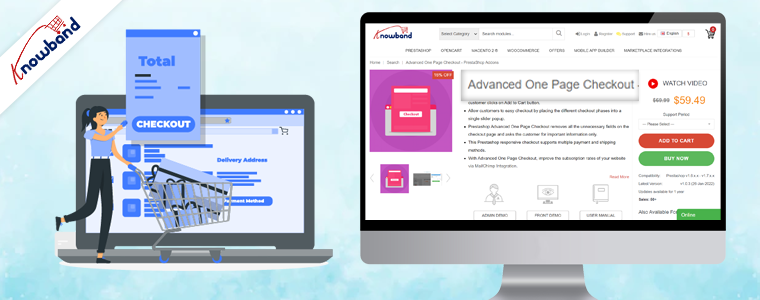
First, switch to a prestashop Quick checkout addon, and add this addon to your prestashop store. As this Fast Checkout for Prestashop will help you to combine all the pages like shipping address, delivery address, payment options, shipping options, product details and many more.
One thing that also increases the rate of abandoned carts is a lengthy login or registration process. This Knowband Prestashop Quick Checkout Addon also comes with built-in social login options like Facebook and Google.
How can you reduce the Prestashop Abandoned Carts
But what if there are already so many abandoned cart and now you want to clear abandoned carts in prestashop? So email follow-up and reminders are one of the best ways.
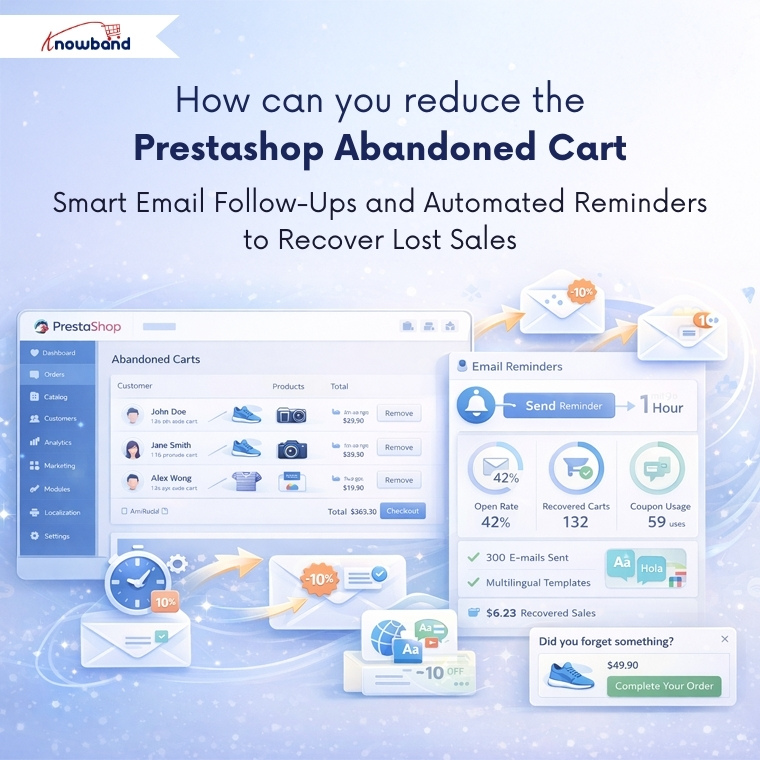
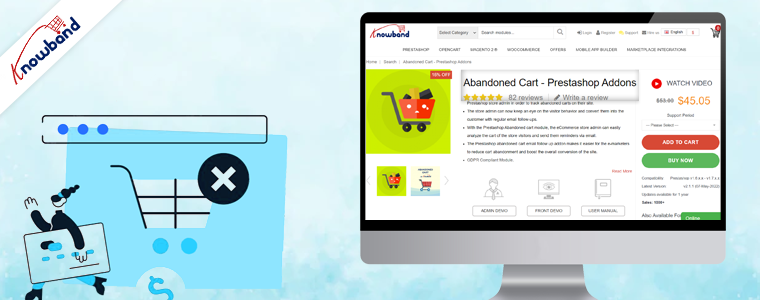
Integrate a Prestashop Email Follow-up module, which will send the reminder and emails to your prestashop abandoned cart users. Additionally, you can see all the details and statistics of the email coupon that has been sent to the users.
Moreover, you can schedule this cron at any of the time, like midnight time when users mostly scroll.
If your customers are international or you have an international audience, then do not worry. This Knowband Prestashop Email Follow-up module has provided the email template option differently in all the languages.
This Prestashop Email Follow-up module allows you to send the reminder to the website as well. Using this reminder, customers can easily grab the offers, make a deal and clear your abadnoned carts.
Tracking Your Success Using Prestashop Email Follow-Ups
These email reminder modules provide detailed analytics showing which emails are being opened, which discount codes are being used, and ultimately, which abandoned carts are converting into sales. Furthermore, this data becomes valuable for analysing the pattern of purchase. Furthermore, you might discover that certain products have higher recovery rates or that specific discount percentages work better than others.
The Power of Wishlists
Here’s something many store owners miss: not every product a customer browses needs to go straight to the cart. Offering this Knowband Prestashop wishlist Module feature gives customers a way to save items they’re interested in without the pressure of immediate purchase.
For customers, they provide a convenient way to bookmark products they want to return to later, maybe they are waiting for payday, comparing options, or just planning future purchases. For you as a store owner, wishlists offer incredible insights into customer preferences and trending products.
By analysing wishlist data, you can identify which items generate the most interest, spot seasonal trends, and even plan your inventory more effectively. You might notice certain products frequently appear together in wishlists, which could inform bundle deals or cross-selling strategies.
Putting These Abandoned Cart Solutions All Together
Recovering abandoned carts isn’t about using just one technique – it’s about creating a comprehensive approach. Start by removing complexity from your checkout process, then implement smart email follow-up strategies for those who still don’t complete their purchase. You should give customers flexibility with features like wishlists, and always keep testing and refining based on the data you collect.
Not every abandoned cart will convert, and that’s okay. But by implementing these strategies and modules, you will recover a meaningful percentage of lost sales, which can significantly impact your bottom line over time.
Always remember, each recovered cart represents a customer who wanted your product enough to add it to their cart in the first place. Your job is simply to make this as easy and appealing as possible for them to complete the purchase that final step.
For more information, check out the Quick checkout Addon for Prestashop. You can also try the demo. If you face any issues, you can reach out to us at support@knowband.com.
Read our latest blogs on AI Chatbots: https://www.whatech.com/og/artificial-intelligence/blog/1008494-ai-chatbot-now-available-for-opencart-and-prestashop-stores-in-2026.html
Get fully Flutter Android & iOS apps for your PrestaShop website & start selling your products on Mobile Apps!
1.0 Introduction
This is the user guide of the advanced & readymade Flutter mobile app solution of PrestaShop Mobile App Builder. This is an eCommerce website plugin designed & crafted to build perfect & featured Android & iOS shopping apps for you.
1.1 PrestaShop Mobile App Builder: A Brief Introduction
The PrestaShop Mobile App Builder is the most advanced & automated solution to take your online website business to the mobile platform. It transforms your entire website into a featured Mobile App & allows you to sell products on mobile along with the traditional website. The functionalities & working of the app exactly match the website & work flawlessly on both Android & iPhone devices.
Our PrestaShop Mobile App Builder is the pre-configured framework designed by experts & professionals to build a pair of Flutter eCommerce apps. The apps are capable of taking all your store products to the user’s fingertips & boost sales & revenue. So, if you are a PrestaShop store merchant & looking for a full-fledged mobile app solution, this is your best chance. Read the complete article to get fully intact info on PrestaShop Mobile App Development.
Also, our PrestaShop Mobile App Builder extension is fully compatible with the Multi-vendor Marketplace plugin. You can bring the entire marketplace listing on the same Mobile Apps. We even offer a combo pack of our PrestaShop Mobile App Builder with PrestaShop Multi-Vendor Marketplace in PrestaShop Advanced Marketplace With Mobile App.
New Update: PrestashopMobile App and AI Chatbot Integration 6.0.6
The PrestaShop Mobile App Builder now supports integration with the PrestaShop AI Chatbot, helping store owners provide AI-powered assistance to mobile app users. The chatbot can help customers find products, get answers to common questions, and receive personalized product recommendations directly within the mobile shopping experience.
Moreover, the following benefits of PrestaShop Mobile App Maker would compel you to go for this Flutter app solution:
A no-code Mobile App solution.
Friendly admin panel with complete access.
3 months of free support
Fully Flutter solutions (Android & iOS)
100% synchronization between your apps & website
Highly customizable with design & functioning control.
Increases user engagement with handy marketing tools.
Increases traffic & revenue to your store.
1.2 Top-notch Features of PrestaShop Mobile App Builder:
Here is the list of some of the key features which you will get in your apps with Prestashop Mobile App Builder:
Customizable Home Screen Layout (Complete Flexibility)
Store Branding
WhatsApp Chat Support (24*7)
Google & Facebook Login
OTP & Fingerprint Login
Both Tablet & Mobile Support
Android 4.2 and so on Android VersionSupport
iOS 9 and so on iOS VersionSupport
Automatic Inventory Update
Multiple Color & Font Choices
Multi-lingual & RTL (Right To Left) Support
Multi-currency Support
All Product Type Support
Website Payment Method Supported on Apps
Website Shipping Method Supported on Apps
Unlimited Push Notifications
Product Social Sharing Options
Multiple Filtering & Sorting Options
Wishlist Functionality
Website Coupon/Vouchers Supported on Apps.
Simplified Checkout Screen
Real-time Order Tracking
Seamless Accordion Menu
Clear-cut Product & Category Screen
Show Video Banner Elements on the Home Page and Category Product Listing Pages
List/Grid Product View Options
Login/Sign-up pop-up
Enhanced Review Section
Multi-layered layout
Automated Banner Sliders
Notification Tab
Latest Version Updates in PrestaShop Mobile Apps:
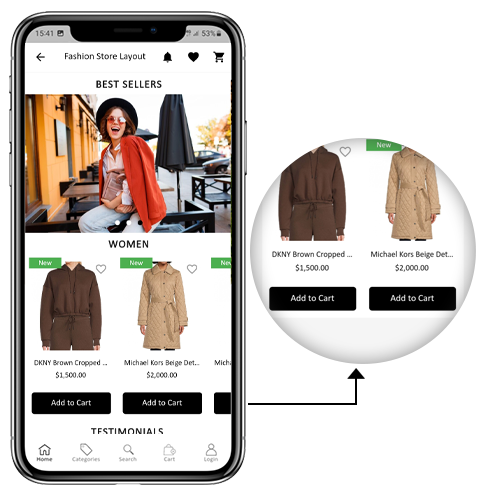
a) “Add To Cart” Button on Home & Category Screen
The PrestaShop Mobile App has been made more usable for online shoppers with an inbuilt “Add To Cart” button for products on the Home & Category screen. This allows users to quickly add products to the cart by just tapping the cart button.
The Add To Cart button is also available on the category screen of mobile apps. The users can simply scroll down to the bottom to browse the products and keep on adding products to the cart by simply tapping the Add To Cart button.
b) Product Reviews on App
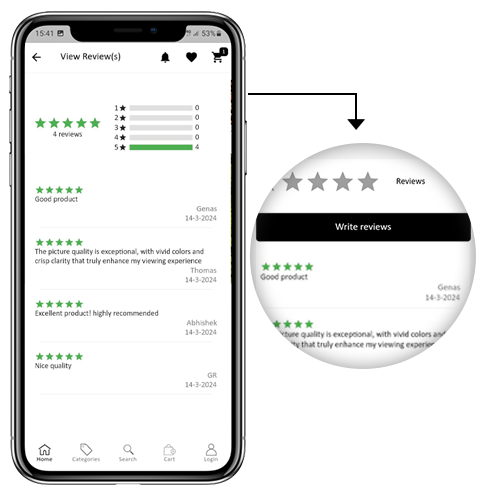
Our PrestaShop Mobile App is now compatible with the default Product Comments module of PrestaShop. Now, the user can post reviews for the products on the website and the same will appear on the app as well. Also, the user gets to view all reviews from the app and write them as well.
c) Related Products on App
The PrestaShop Mobile App Builder is now compatible with the Automatic Related Products module. The related products can be displayed on the product page of the website and mobile app. This compatibility can be used as a perfect tool to improve cross-selling for your business.
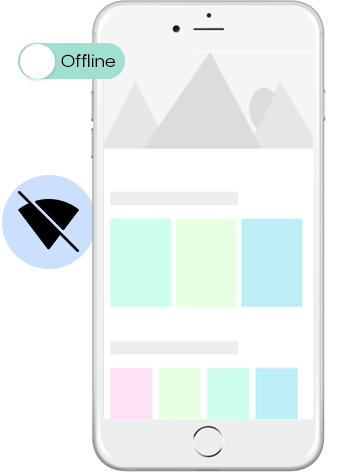
The eCommerce mobile apps with this extension will now work in offline mode as well i.e. without internet connectivity. The users get to browse the pages anytime which were loaded while active internet. Categories, products, cart screen, etc.
Now, the apps with PrestaShop Mobile App Builder are fully compliant as per the GDPR regulations of the EU. It will offer more control to app users over their stored personal data. The store admin can simply configure the GDPR settings to work on the application & the same will be displayed on various app screens like sign-up, login, checkout, payment, etc. Online shoppers even get the right to ask the store merchant for the removal of his/her personal information.
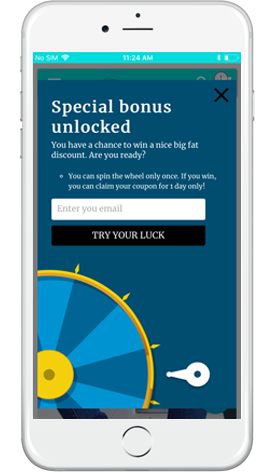
The PrestaShop Mobile App Creator is also compatible with PrestaShop Spin & Win extension. The gamified email subscription pop-up is used for offering a spin-wheel interactive pop-up that can be scheduled for entry or exit display on the web store. Now, with this integration, the same pop-up will be automatically displayed on the apps. You just need to install the extension on your website.
This list doesn’t end here. Get to know more about the features in detail from here.
g). Video Banner Elements:
The all-new Prestashop App Maker comes with video banner components available on the home page. The store admin can now showcase different videos with the option to upload/YouTube videos on the home page banner components.
h). List/Grid View:
The Android and iOS App built with Prestashop Native Mobile App Builder provides the app users with the opportunity to explore the products in list/grid view, enhancing the visuals and customer experience.
Now, the users can simply tap on the list/grid button provided on the product listing pages to switch between list and grid view for the products.
i). Video/Banner Options on the Category Product Listing Pages:
Showcase your product carousal with the all-new video/banner upload options introduced in the updated Mobile App Maker for Prestashop. The store admin can upload videos below 2 MB or can also showcase the YouTube videos directly on the category product listing pages. This feature provides better UI control to the store admin, enhancing the customer experience at the same time.
J). Automated Banner Sliders:
In the latest Mobile App Builder module, we have introduced the automated banner slider feature that allows the Prestashop store administrator to configure the automated sliding time from the module backend.
The admin can use the functionality, particularly for the “Banner Horizontal Sliders” home page layout components, and can add sliders for both videos and image banners.
K). Enhanced Review Section:
If you are using PrestaShop’s default Product Comment module, you can enjoy the enhanced review section in the app. All the approved reviews now come with enhanced UI that delivers a top-notch visual experience for your Android and iOS App users.
L). Login/Sign-up Pop-up:
Capturing the visitors’ emails is one of the biggest challenges in eCommerce. However, we have simplified this process by introducing the login/sign-up pop-up in the recent Mobile App Builder version.
The store admin can add a login pop-up that will appear for non-logged-in customers, increasing the email opt-in chances by providing simple login options to the users.
2.0 PrestaShop Mobile App Demo
KnowBand understands your concern about your uncertainty to go for the solution & to curb the same, it has offered a free demo for all eCommerce store owners. The merchants can view our demo store working on the mobile app & even their store working on our demo apps.
2.1 View Our Demo Store working on Apps
Want to see the eCommerce app features? We have integrated our demo store with the app where you can explore the fully functional app and see all its features. Just follow the below instructions:
Step 1: Download and install the Nautica PrestaShop Mobile App from either App Stores on your mobile device. Here, are the links to download demo apps:
Step 2: the Open the Nautica PrestaShop App and hit the view demo button.
That’s it! You will see our demo store running on the demo app. You can browse the same, check all functionalities, create an orders, etc.Note: To access the Admin Panel of KnowBand Mobile App Builder on our demo store, visit here.
2.2 View Your Store working on Demo Apps
Not satisfied? Want to test your store on the demo apps? Well, we got you covered with everything. You can experience your store on our demo app as well that too without any cost. Just 3 steps are all you need to follow for the same:
Step 2: Install the Demo Apps (links in the previous section) on your mobile device. Open App & enter your Store URL.
Step 3: Tap “View Your Store” and start experiencing your store on demo apps.
Step 4: Enter your store URL in the appeared box.
Example: https://www.example.com/
Note: This Free version of Mobile App Builder is just for the demo purpose & no APK/IPA files will be provided with this module. To get your own APK/IPA files, you need to purchase the paid version of the PrestaShop Mobile App Builder.
3.0 Build your PrestaShop Mobile App in 3 Simple Steps
We hope that you liked the demo of our PrestaShop Mobile Apps and found what you were looking for. So, this is the time to get a Flutter pair of apps for your store. The process to build an eCommerce mobile app is as simple as it could get. Just follow 3 simple steps & your app will be ready in 1-2 working days.
Step 1: Install-Module on your website
Download Prestashop Mobile App Builder & install the same on your store.
Once the PrestaShop Mobile App Maker is successfully installed on your website, it’s time to configure the Admin Panel of PrestaShop Mobile App Creator. Once you click on the “Configure” option on KnowBand Mobile App Builder, you will get the following tab with friendly interfaces. Let’s narrow down them one by one.
5.1 General Settings
The General Setting tab is all about the settings required to run your Mobile App on the user’s devices. This tab contains all the necessary generalized options to sync the app.
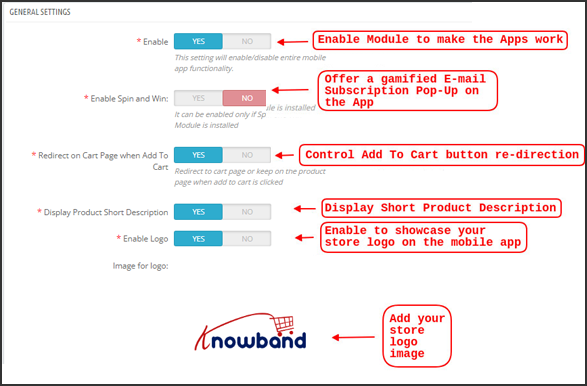
a) Enable Plugin: Enable the PrestaShop Mobile App Creator plugin to make your mobile app work on user’s devices.
b) Enable Spin and Win: Enable to display a gamified spin-wheel pop-up on the home screen whenever any user opens the app. It can be used to offer discounts/deals & capture their e-mails in return for marketing purposes. To make this functionality work, you need to install Knowband’s Spin and Win module on your website.
Note: The Spin and Win Module will only work in case you have installed the plugin in your store end.
c) Redirect on Cart Page when Add To Cart: This functionality allows you to control the navigation of the “Add To Cart” button. You can either redirect your users to the shopping cart or keep them on the product page whenever they tap Add To Cart button. This enhances the chances of additional purchases.
d) Display Short Description: Enable to display product short description on the product screen along with full description & other details.
e) Select Layout: Choose the desired Home Page Layout for your PrestaShop app. You can create multiple home screen layouts in the backend as per various festivals & themes & use them as per your store requirement.
f) App Button Color: Choose the desired button color for your PrestaShop Mobile App.
g) App Theme Color: Choose the desired theme color for your PrestaShop Mobile App.
h) Image for logo: Upload your store logo image to be displayed on the top header of the app. This promoted your brand among worldwide mobile shoppers.
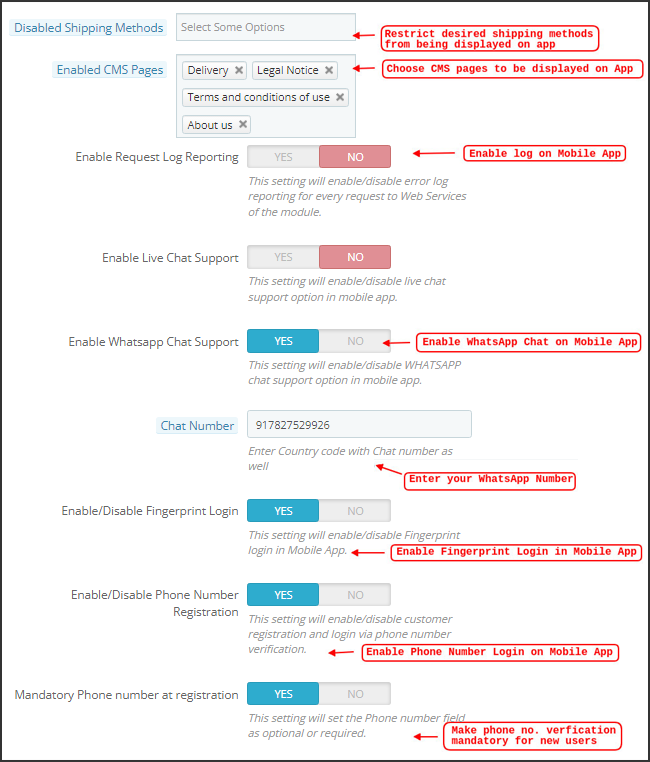
i) Disabled Shipping Methods: Choose desired shipping methods that you don’t want to be displayed on your PrestaShop Mobile App.
j) Enabled CMS Pages: Choose desired CMS pages to be displayed on the mobile apps.
k) Enable Request Log Reporting: Enable log on the mobile apps to get details of any abnormal behavior of your app.
l) Enable WhatsApp Chat Support: Enable the WhatsApp chat option on your PrestaShop Mobile Apps. The users can directly contact you at your WhatsApp number entered in the backend.
m) Enable/disable Phone Number Registration: Enable the Phone Number login option in your PrestaShop Mobile App & let your users authenticate with OTP verification.
n) Enable URL encoding of Image links: Enable this functionality to support Non-ASCII characters on the app.
o). Enable/Disable Fingerprint Login: This option enables or disables the fingerprint of Face ID login options in the Android and iOS apps.
p). Enable Notification List Feature: The admin can show/hide the notification section in the app for the customers with the help of this button.
q). Enable Sign In Login Popup: This button is designed to enable/disable the login pop-up for customers who have not completed registration on the store.
r). App Icon Theme Color: The store admin can configure the color of app icon themes, especially Wishlist, Cart, and Hamburger menu icons.
s). Enable Social Login: The following button can show/hide the social login options Google, Facebook, and Apple from the apps.
5.2 Push Notifications Settings
The PrestaShop Mobile App Creator for Android/iOS leverages the Power of Push Notification using the Google Primary Services for the Push Notification to Mobile devices. It brings this handy marketing tool to grab immediate user attention & boost sales. Highlighting your daily deals & offers is just a message away with your PrestaShop Mobile App. Both automated & custom notifications are available with PrestaShop Mobile App Maker.
a). Service Account Json: Since the traditional Firebase push messaging API is deprecated and replaced with a service Json file, this section allows the admin to configure the Json file extracted from the Firebase account.
Either you can configure the same on your own, or we will also share your service Json file at the time of app creation.
b) Enable/Disable Order Creation Notification: Enable/Disable automated Push Notification sent to the app users for successful order creation.–> Title and Message for Push Notification: Enter the title and message on the push notification setting for successful order creation.
c) Enable/Disable Order Status Changed Notification: Enable/Disable automated Push Notification sent to the app users for any update regarding their previous order delivery status.–> Title and Message for Push Notification: Enter the title and message on the push notification setting whenever there is an update the in previous order delivery status.
d) Enable/Disable Abandoned Cart Notification: Enable/Disable automated push notifications sent to the users who have abandoned cart without successful purchase.–> Title and Message for Push Notification: Enter the title & message of the push notification for abandoned cart app users.
e) Time Interval: Interval (in hours) for sending Push Notification to app users who have abandoned their cart without successful purchase.
5.3 Push Notification History
This tab contains the history of all sorts of push notifications sent to every user with concerned details. The merchant can get to know about every notification sent earlier. This tab also has the option to send a custom notification to the users crafted from the backend. You can easily make them aware of any store-related details or discounts through manually sent notifications.
Send Notification:
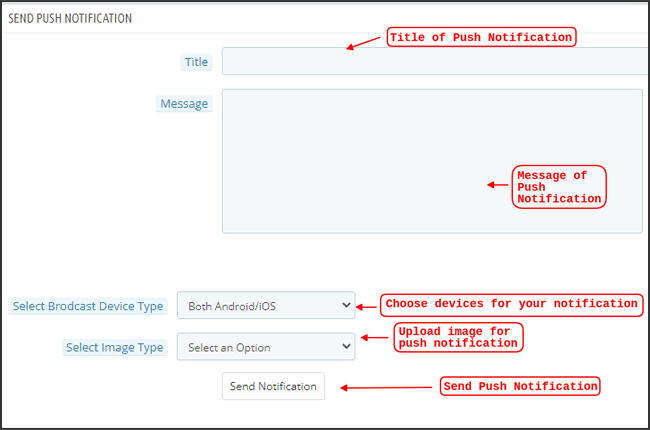
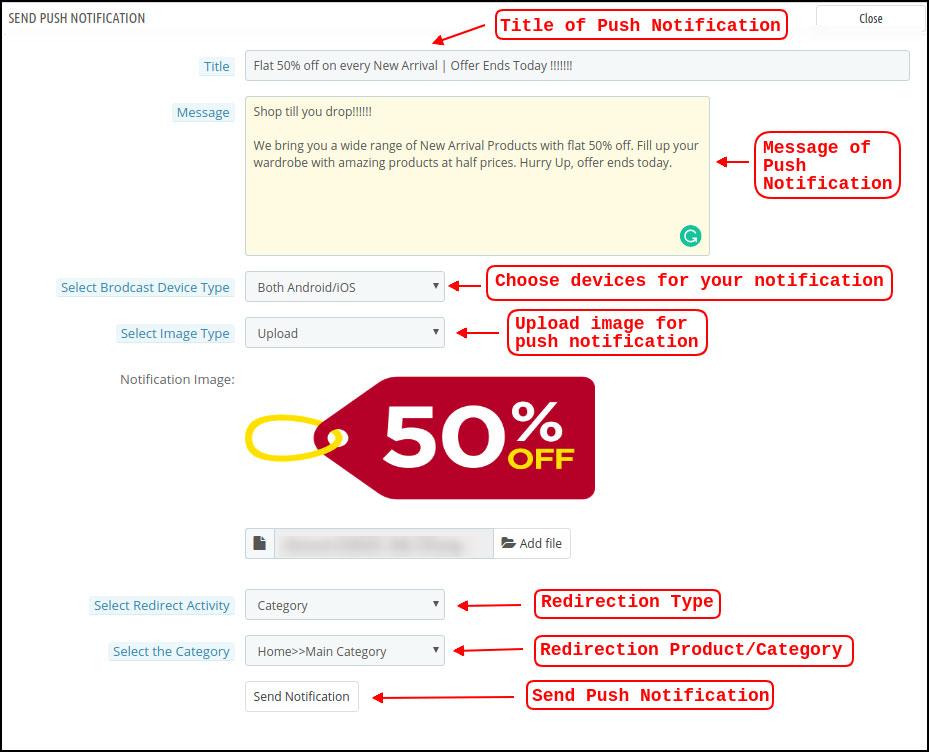
This option is there to send a manual notification to the app users as per your choice. You can configure the title, message, landing page, image, etc., and notification of your choice as shown below snapshot:
a) Title of the Push Notification: The title of your manual Push Notification that is to be sent to the app users.
b) Message of the Push Notification: The message of your manual notification which is to be sent to the app users.
c) Device Type: You can choose the users on Android/iOS or on both to whom your manual Push Notification is to be sent.
d) Image Type: You can upload the desired image/banner justifying your notification. The banner image can be uploaded or used through an existing URL.
e) Notification Image: The store admin get to preview the notification image & analyze how it will look on the user’s apps.
f) Image URL: The actual URL of the notification image which is to be sent to the app users.
g) Redirection Activity: You can choose the redirection of your notification by choosing from Home Screen/Any Category/ Any Product here. Whatever you set, your users will be redirected to the same on tapping the push notification.
h) Select the Category/Product: You can choose any relevant category/product screen for your notification.
i) Send Notification: Once you have crafted & previewed your notification, it is time to send the same on your apps.
5.4 Payment Methods
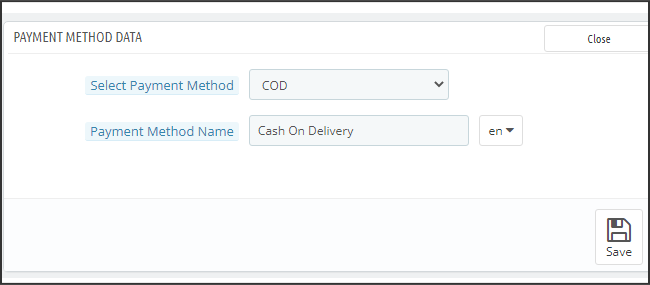
The PrestaShop Mobile App Creator for Android & iOS supports all sorts of website payment methods on the Android & iOS apps. Additionally, it brings COD payment option & the flexibility to add other Web-Viewpayment methods as well.
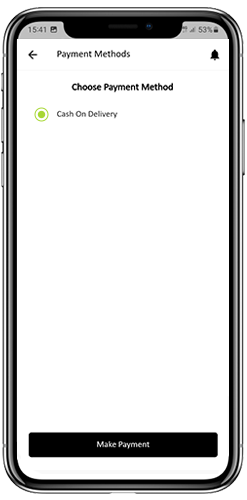
By-Default, there is only a Cash On Delivery Payment Method in our Mobile App. However, if you want to add the same payment methods as on your PrestaShop store, disable the COD method from the module back-end. After disabling the COD method, all the payment methods that are available on your web-end will appear fine in your Mobile Apps.
5.5 Home Page Layout
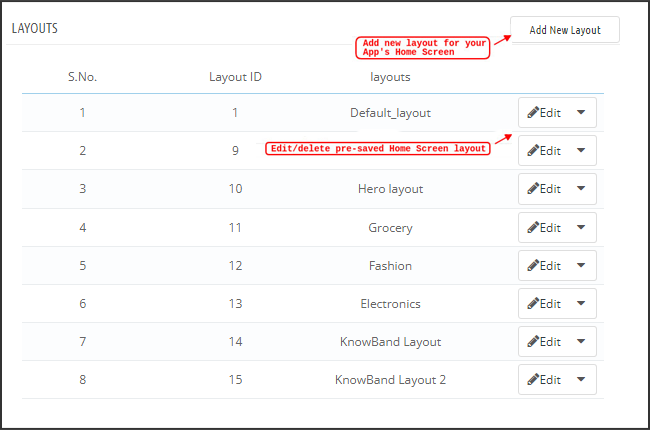
This is one of the most amazing functionalities of the PrestaShop Mobile App Builder plugin to design & craft multiple home screen layouts using various designing attributes/elements. This tab contains the list of all the home screen layouts configured earlier based on various themes & fonts as shown in the snapshot below:
To configure the home page layouts, the following elements are available in the back-end:
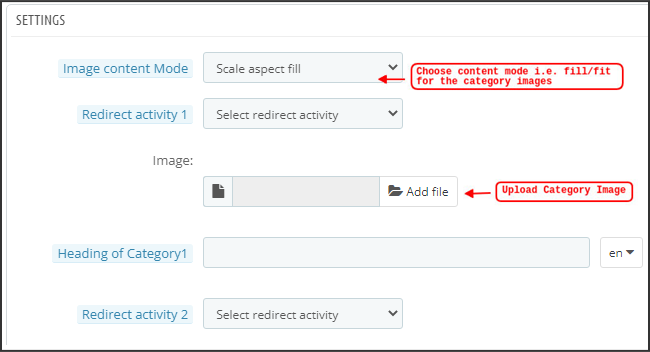
Top categories
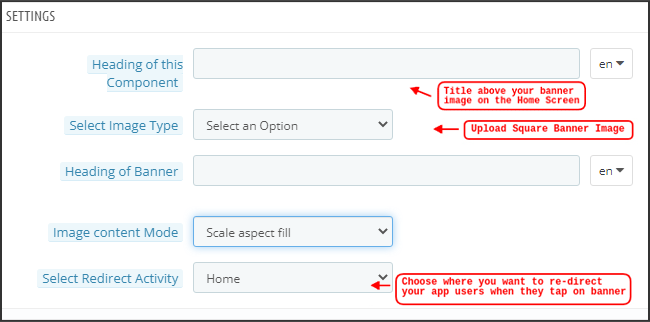
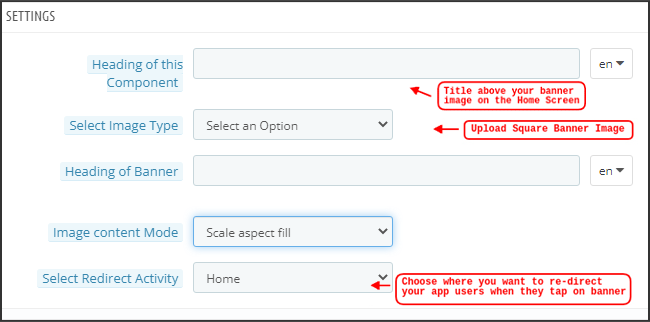
Square Banner
Horizontal Sliding Banner
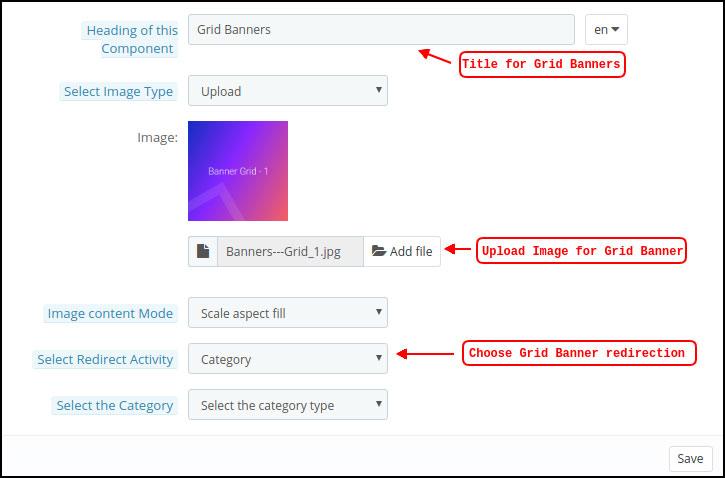
Grid Banners
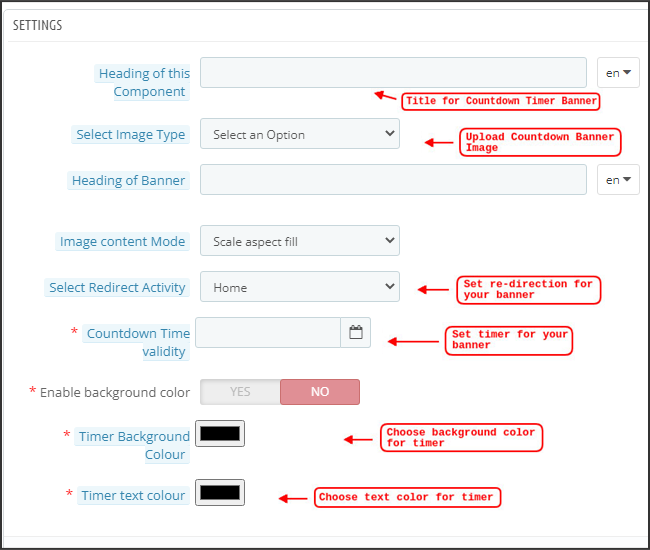
Countdown Banner
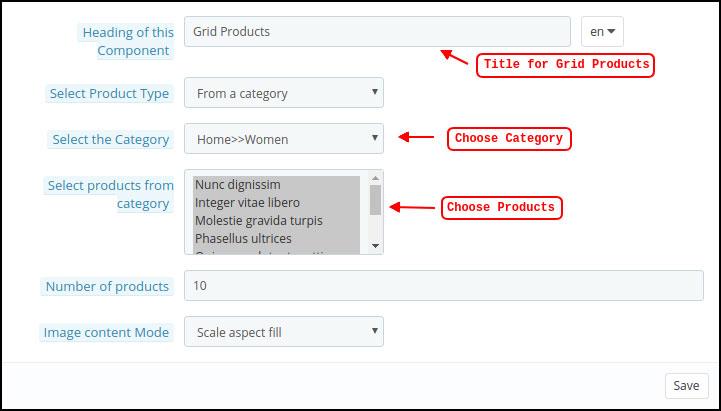
Grid Products
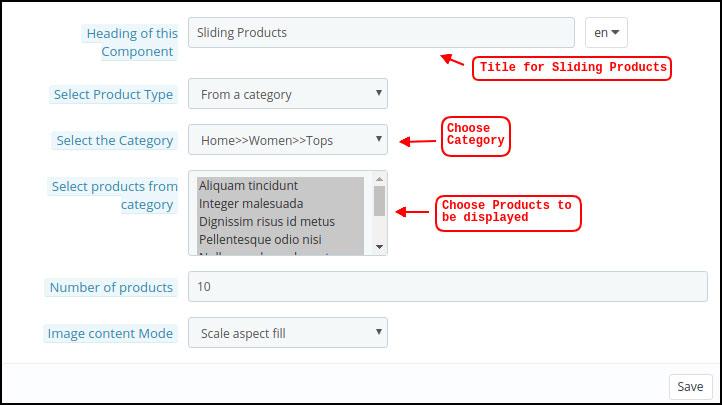
Horizontal Sliding Products
Recently Accessed Products
Login/Sign-Up Pop-Up
The store merchant can configure & use any of these attributes to craft & save multiple layouts. These layouts can be used as per the theme & requirements. Also, the positioning of various elements can be altered with just a simple drag & drop functionality.
Top Categories:
Top categories are displayed in the form of small squares on the home screen & can be configured including their image & landing categories/products. The PrestaShop Mobile App Maker offers a maximum of 8 categories in which a minimum of 4 are mandatory.
Square Banner:
Another attribute is Square Banner listing which is used to offer a square-shaped banner on the home screen of the app. You can customize the banner by choosing the right image & landing screen for the same. In the Recent Updates, we have also added the video selection option for the banner squares. Now the admin can also choose between the options of Video Upload or YouTube Video Link for the square banners.
Horizontal Sliding Banner:
These are the rectangle-shaped available in horizontal sliding & can be fully customized from the backend. The admin can also configure the automated banner sliding time interval for the horizontal banner sliders components.
Grid Banners:
These are square-shaped banners listed on the home screen in the grid form. You can set as many banners as you want on the home screen & customize their image & landing page accordingly.
Countdown Timer Banner:
The PrestaShop Mobile App Builder offers a banner with a countdown timer. You can set the banner image & landing screen & set the timer till you want to display the banner. Once the timer is over, the banner will automatically disappear.
Square Products:
As for banners, the PrestaShop Mobile App Creator offers products to display on the home screen in the form of a square listings.
Horizontal Sliding Products
You can add the products in the form of horizontal sliders. The selected products could be of any specific category or other highlights as Best Sellers, Featured Products, etc.
Grid Products:
The products can also be added to the home screen in the form of grid listings. The products can be chosen from any category.
Recently Accessed Products:
The PrestaShop Mobile App Creator provides the recent tab element which displays the recent products viewed by the user. You can just add the element in your layout to display the same on the home screen.
Note: The store admin can add up to 20 elements while designing a layout in the backend panel.
Login/Sign Up Pop-Up:
We have introduced a new login pop-up that will encourage the customers to log in to their accounts with a single tap login/sing-up option provided on the home page of the apps.
5.6 GDPR Compliance
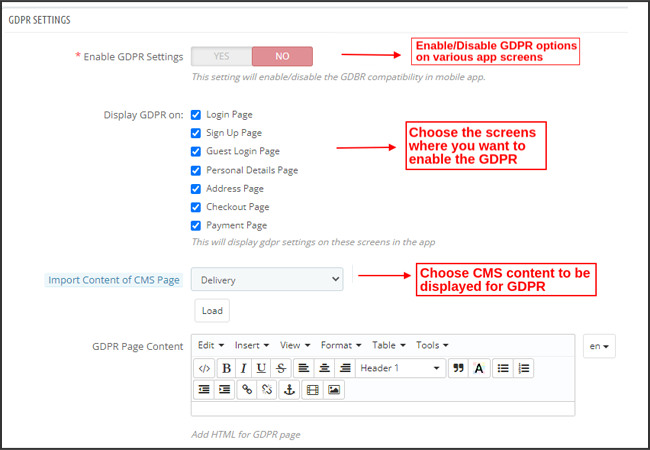
The PrestaShop Mobile App Builder offers GDPR compliance in mobile apps. The store admin can simply make a few clicks in the admin panel and apps will become GDPR compliant.
a) Enable GDPR Settings: Enable this tab to offer GDPR compatibility on various app screens.
b) Display GDPR on: Choose the app screens where you want to activate GDPR options.
c) Import Content Of CMS Page: Choose the CMS page whose content needs to be added for the GDPR option.
6.0 Mobile App Screens
6.1 Home Screen
The Home screen of your PrestaShop Mobile App will be exactly as you want it to be. The PrestaShop Mobile App Maker offers complete flexibility to design & craft a home screens into your hands. Using multiple banners(Square, Grid, Sliding), products (Square, Grid, Sliding), countdown timer banner, and recent products tab in the backend, you get to design intuitive layouts for your home screen. The following options are available on your app home screen:
Moreover, the positioning of various design elements can also be altered as per the requirement.
1. Dynamic Layouts:
Using various elements you can create & save various layouts in the backend & re-use them as per various events & festivals. You can design & craft your app home screen dynamically.
2. Brand Logo:
Your store logo is represented on the left-middle section of the top header of your PrestaShop Mobile App. The logo is fully configurable from the module backend & can be enabled/disabled including image changes.
3. Search:
The search option allows the mobile app shoppers to get easily & quickly what they desire. In your PrestaShop Mobile App, product search will be in two forms: The search option can be found on the bottom tab bar layout of PrestaShop Mobile App.
–> With Text: Your App users can search for desired products just by typing some related keywords. The PrestaShop Mobile App will show relevant results to that keyword.
4. Wishlist Bag:
The wishlist bag is displayed on the top header of your PrestaShop Mobile App containing all bookmarked products. The app users can save their desired products in a wishlist bag for future purchases.
5. Shopping Cart:
The Shopping Cart is available on the top-right corner of the app home screen. The users can get to know about the products added to their cart right from there.
6. WhatsApp
On the right-bottom of the home screen, there is a live seller-buyer chat option. The mobile app shoppers can easily & directly message you their query & you can resolve them instantly.
6.2 Accordion Menu (Navigation Bar)
The PrestaShop Mobile Apps for Android & iOS come up with proper categorization of products is available on the website. Mobile shoppers can easily browse products from multiple categories. All CMS pages are also available in Accordion Menu. It provides the following options:
1. My Account
My Account screen contains all the user information like Personal Details, Shipping Address(s) & Order Details. The shoppers can view all the info related to them & can update personal details & login passwords as well.
2. Categories
These categories are the same as on your website. You can map them accordingly & offer a 3-level categorization to your app users for hassle-free browsing.
3. CMS Pages
Various CMS pages like About Us, Contact Us, Terms & Conditions, etc. Available on your website are displayed here. You can choose the desired one from the PrestaShop Mobile App Builder backend to be displayed on Mobile App.
4. Language(s)
The language option allows your users to view PrestaShop Mobile app in their Nativelanguage. All available languages are displayed under this option only.
5. Currency(s)
All available currencies on your eCommerce website are displayed on PrestaShop Mobile App as well. The shoppers can view & purchase the product price in their desired currency.
6. Login/Logout
Your users can easily log in/log out from PrestaShop Mobile App using this option.
7. Notification Settings:
The app users can control the specific push notifications they want to receive in the app. The options allow mobile app users to choose between all notifications, promotional notifications, and order status update notifications.
6.3 Category Screen:
All the sub-categories, parent categories & other associated categories are available in your PrestaShop Mobile App. The category screen is designed to deliver clutter-free experience in two basic views: Grid & List. The product image, name, price, the discount is displayed in all listings with an option to add them to the wishlist bag as well. The Mobile Apps with PrestaShop Mobile App Builder have layered navigation which makes the product search just simpler. The following options are available on the category screens:
Furthermore, now the admin can also enhance the UI of the category product listing page by adding video/images on the category page section.
1. Sort:
This option allows the shoppers to select the desired order in which the category product pricing is to be sorted. Two sorting orders are available in your apps: Price: Low to High & Price: High to Low.
2. Filter:
The option to filter products simplifies product search. The app users can filter the products in your PrestaShop Mobile App based on various attributes like size, color, compositions, Condition, Manufacturer, Price, etc. The users can search for their favorite products in minutes using these filters.
6.4 Product Screen:
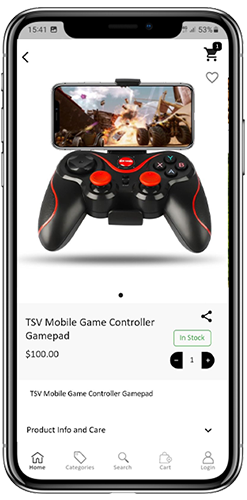
The product screen of your PrestaShop Mobile App is simple & intriguing. Multiple images of the same product are displayed along with the name & price. The product availability is also displayed as “In Stock” or “Out Of Stock” based on inventory status. It contains the following other options:
1. Product Options:
All the options related to the product like size, color, etc. are displayed on this screen. These product options are the same as available on the website.
2. Short Description
Users get to read the short description of your product to quickly make up their minds.
3. Product Info & Care
The complete product information is listed on the website is displayed here. The app users can get complete product details from here.
4. Add To Wishlist:
The Mobile App users can directly bookmark the product just by tapping “Add To Wishlist” on the left bottom of the product screen.
5. Add To Cart:
As the name “Add To Cart” button adds the product directly into the cart & the users can further go on with the purchase.
6. Product Social Sharing:
There is an option on this screen to share your product on multiple social platforms, including Bluetooth & e-mail. The app users can share the products among their friends/relatives on multiple social platforms & lure heavy users to your app.
6.5 Wishlist Screen:
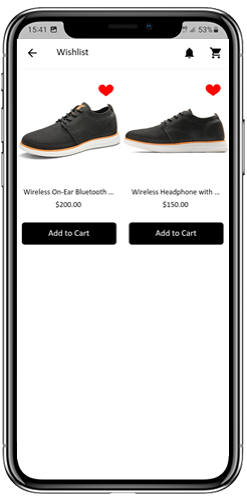
Your PrestaShop Mobile App Creator would have a wishlist bag allowing the users to bookmark products for future purchases. The users can view the list of all bookmarked products from here. It has two options:
1. Add To Cart:
The app users can add the bookmarked product directly into the shopping cart by choosing Add To Cart option.
2. Remove From Wishlist:
The users can even remove any wishlist product if not feel like buying that.
6.6 Login Screen
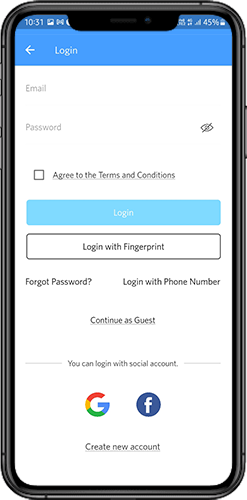
The PrestaShop Mobile App Creator offers various one-tap login options & makes the sign-in/registration process more seamless:
1. Login
The app users can authenticate & access apps using e-mail sign-in credentials.
2. Sign Up
All the new app users can sign-up & create their account on the store from the mobile App. The sign-up form of the PrestaShop Mobile App only asks for relevant details.
3. Login with Phone Number
Your Mobile App comes up with an easier & robust phone number login option which makes it easier for the users to verify the OTP & login app.
4. Login with a Fingerprint
Your users also get an option to log in with fingerprint authentication. This allows users to access apps in seconds.
5. Login with Facebook
The users can log in to the app using their Facebook Account Credentials.
6. Login with Google
The users can log in tothe app using their GoogleAccount Credentials.
6.7 Shopping Cart Screen:
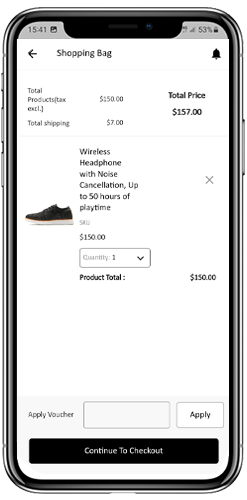
The Shopping Cart screen of your PrestaShop Mobile App will display all products to the shopping cart. The app users can view the product’s name, quantity, total price & shipping cost. This screen has the following options:
Apply Voucher
This option allows the users to get discounts & offers by entering valid coupons & vouchers running on your website.
2. Total Product Price
The users can view the complete cost of their shopping bag from here. It is automatically updated as per any update with product quantity or addition.
3. Update Product Quantity
The app users can even update the product quantity with the “Update Quantity” option.
4. Remove Product
The app users can simply remove the product from the cart by simply tapping the “Remove” option.
5. Continue To Checkout
The front-end mobile app users can proceed further to the checkout & payment screens just by tapping the “Continue To Checkout” option. It will re-direct them on the checkout screen.
6.8 Checkout Process
The Prestashop mobile app Builder consists of a simplified checkout process. The front-end mobile app users have the option to select the shipping details, billing details, order numbers, order comments, and so on in the checkout process of the mobile app.
Users of the Android and iOS apps only need to follow a few simple steps to place their orders.
1. Customers can select the desired product and add it to the shopping cart. After clicking on the shopping bag, he or she can also select the desired product quantity. Moreover, the front-end mobile app users can see the total number of products and shipping costs.
The customer also has the option to apply any voucher and coupon code at the bottom of the same page.
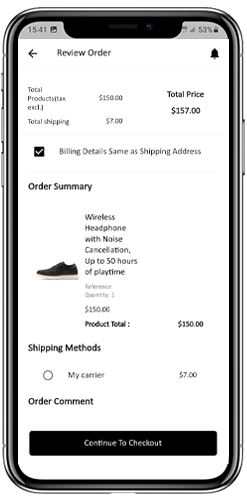
2. After clicking on the Continue to Checkout option, the user can review the order where he or she can see several details. Such as product price, shipping cost, shipping address (It can be edited on the same page), order summary (Number of the products), total price, and so on.
Additionally, the customer has the option to select their preferred mode of shipping on the same page. The user can also put his or her special request or requirement in the order comment option appearing on the bottom of the screen.
The user will be redirected to the payment method screen after clicking on the continue to checkout option.
On this screen, users have the option to select from all of the website payment options. By default, the shopping app consists of a cash-on-delivery option as a mode of payment.
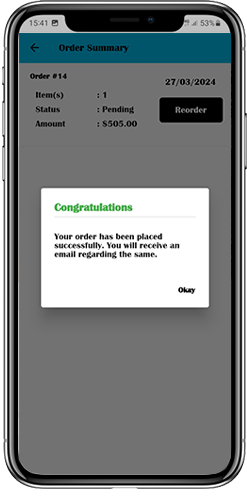
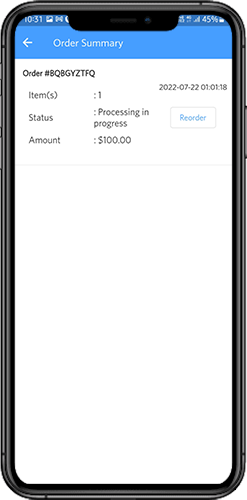
When the user performs the payment activity, then he or she will be redirected to the order summary screen. where the customer can see the order status, order number, amount, and so on. The front-end mobile app users will get the order confirmation popup message on their mobile phone screens as well.
6.8 My Account Screen
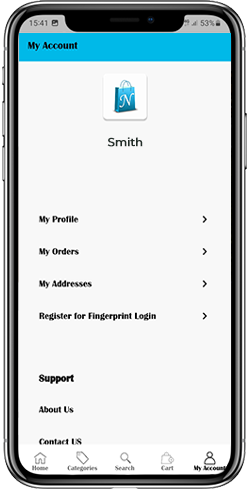
My account screen of the Android/iOS eCommerce app allows users to view the complete account details including a list of previous orders. My Account screen offers the following options:
Order History
The users get to know about complete order details being placed earlier. The order submission date, order reference, price & delivery status is displayed.
2. Update Profile
Users can also update their pre-saved profile details such as First or last name, phone number & password.
3. Shipping Address(s)
The app users can see the complete list of saved Shipping Addresses. A new Shipping address can also be added from here.
4. Order Details
The app users can get to view the complete list of the previously placed app orders.
5. Re-order feature
There is a direct re-order product directly by clicking the “Re-order” button. All the previous orders will be added to the cart by just tapping a single button.
6.10 Order Detail Screen
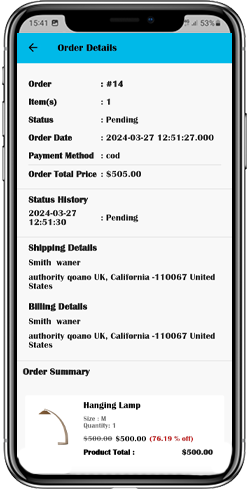
Order details screen of PrestaShop eCommerce App provides complete order detail such as shipping address, product summary, shipping and payment method, and total cost summary. The users can even track the delivery of previously placed orders directly from this screen.
7.0 Video Tutorials
8.0 Advanced PrestaShop Marketplace with Mobile App
KnowBand’s PrestaShop Marketplace converts your online website into a fully fledged marketplace. The PrestaShop Mobile App Builder is fully compatible with PrestaShop Marketplace extension. This means you can bring the entire marketplace listing on the same PrestaShop Mobile Apps. Thus, launch a pair of Marketplace-compatible Mobile Apps with KnowBand & attract a large base of sellers & customers to your store.
–> As the user clicks on the Seller option, he/she is redirected to the Seller page of the mobile store. The user can view the list of the sellers of the marketplace along with their ratings.
–> The customers can click on the name of the seller in order to see his profile and product being offered. The sellers can log in with their username and password. They are then redirected to the dashboard.
Get to know more about PrestaShop Marketplace with Mobile App from here.
In recent years, mobile commerce, or M-commerce, has taken the eCommerce world by storm. With the proliferation of smartphones and the convenience they offer, consumers are increasingly turning to their mobile devices to shop online. Furthermore, this mobile shopping revolution presents a golden opportunity for businesses to expand their reach and boost sales. Following the same, in this article, we’ll explore how Knowband extensions can play a pivotal role in enhancing M-commerce for your online store.
The Rise of M-commerce:
Mobile devices have become an integral part of our daily lives. From browsing social media to checking emails, and, most importantly, shopping, our smartphones are always within arm’s reach. For the same reason, the number of mobile users is far more than the number of desktop ones. Moreover, according to recent statistics, mobile devices now account for a significant portion of eCommerce sales. As a savvy eCommerce business owner, it’s crucial to tap into this growing trend to stay competitive.
Why M-commerce Matters:
Accessibility:
Mobile shopping allows customers to browse and purchase products from anywhere, at any time. Therefore, this level of accessibility is unparalleled and can lead to increased sales.
User Experience:
Smartphones offer touchscreens, making navigation and product selection more intuitive. A seamless user experience is vital for keeping customers engaged and encouraging repeat business. Therefore, user experience is the second most important factor that makes investing in M-commerce a must.
Speed:
With high-speed mobile networks and responsive websites, the loading times for mobile stores have drastically improved. This contributes to a positive shopping experience and reduces bounce rates.
Push Notifications:
M-commerce apps can send push notifications to users, notifying them of discounts, promotions, or abandoned carts, further boosting sales opportunities.
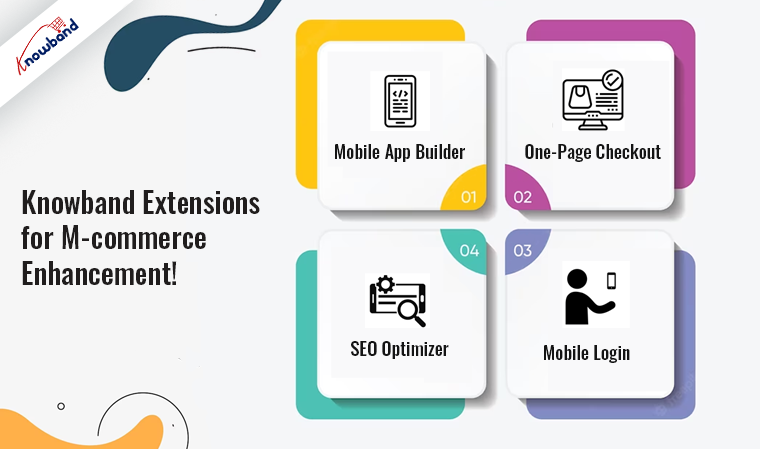
Knowband Extensions for M-commerce Enhancement!
Knowband offers a wide range of eCommerce extensions designed to optimize your online store for M-commerce. These extensions are tailored to various eCommerce platforms, ensuring compatibility with popular systems like PrestaShop, WooCommerce, Magento, and Opencart. Let’s delve into how these extensions can benefit your M-commerce strategy:
1. Mobile App Builder:
The first step you should take as an eCommerce store admin for enhancing M-commerce is to create a mobile app for your online store. Providing a dedicated shopping experience for mobile users. At Knowband, we offer no-code mobile app builders for eCommerce platforms Prestashop, Opencart, WooCommerce, Magento, and Magento 2. This extension enhances user engagement and allows you to send push notifications, and many more incredible features, increasing customer retention.
2. One-Page Checkout:
Simplify the checkout process on mobile devices with Knowband’s one-page checkout extension. Reduce cart abandonment rates and boost conversions.
3. Mobile Login:
Streamline the login and registration process for mobile users, enhancing user convenience and security. Also, visit Mobile Login Extension.
4. SEO Optimizer:
Improve your store’s visibility on mobile search engines with the SEO Optimizer extension by Knowband. Because the higher mobile search rankings can lead to increased traffic and sales.
Conclusion!
In the era of the mobile shopping revolution, adapting to the preferences and behaviors of your customers is essential. Knowband extensions provide a comprehensive suite of tools to enhance your M-commerce strategy. By optimizing your online store for mobile devices, you can tap into the growing M-commerce market, increase customer satisfaction, and ultimately boost your sales.
Stay ahead in the eCommerce game by embracing M-commerce with Knowband extensions. Transform your online store into a mobile shopping destination that captures the attention and loyalty of mobile-savvy customers. Don’t miss out on the mobile shopping revolution – take advantage of Knowband’s M-commerce solutions today!
Running a successful online store hinges on one critical factor – the ability to showcase your products to potential customers. This is where Search Engine Optimization (SEO) plays a pivotal role.
In the realm of e-commerce, PrestaShop is a favored choice, renowned for its versatility and extensive feature set. Nevertheless, like any other platform, it necessitates meticulous SEO optimization to secure a prominent position in search engine rankings.
In this article, we will delve into some essential SEO strategies tailored to enhance the search visibility of your PrestaShop store and draw in more organic traffic.
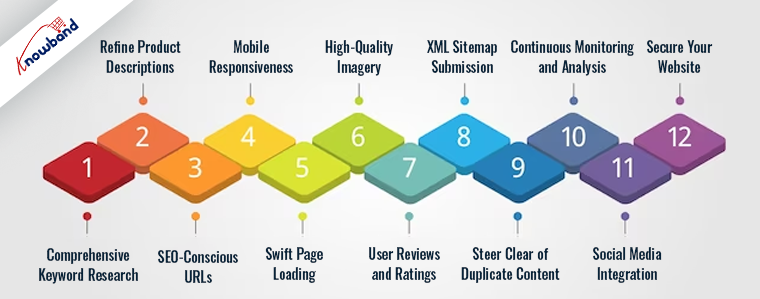
1. Comprehensive Keyword Research:
Keyword research serves as the cornerstone of an effective SEO strategy. Initiate the process by identifying pertinent keywords and phrases that your target audience is likely to employ when searching for the products you offer. Tools such as Google Keyword Planner and SEMrush prove invaluable for discovering these keywords. Skillfully integrating them into your product titles, descriptions, and content can markedly augment the search engine rankings of your PrestaShop store.
2. Refine Product Descriptions:
Crafting unique and compelling product descriptions not only benefits your customers but also appeals to search engines. Abstain from using manufacturer-provided descriptions, which are often duplicated across multiple websites. Instead, create original, informative descriptions that incorporate your target keywords. Emphasize product attributes, advantages, and any distinctive selling points.
3. SEO-Conscious URLs:
PrestaShop permits you to customize your URLs. Optimize them for SEO by incorporating pertinent keywords and keeping them concise. For instance, replace “/product123” with “/red-womens-running-shoes.” Moreover, you can also employ Knowband’s Prestashop SEO Optimizer addon to ensure SEO-friendly page URLs.
4. Mobile Responsiveness:
Google prioritizes mobile-friendly websites in its search rankings due to the larger user base on mobile devices. Consequently, as a PrestaShop administrator, it’s imperative to ensure that your store is responsive and delivers an exceptional user experience on mobile devices. Utilize Google’s Mobile-Friendly Test to assess your site’s mobile optimization.
5. Swift Page Loading:
Site speed constitutes a pivotal ranking factor. Slow-loading pages can provoke user frustration and lead to high bounce rates. To circumvent such pitfalls, leverage tools like Google PageSpeed Insights to identify and rectify speed-related issues. Furthermore, you can optimize load times by compressing images, enabling browser caching, and selecting a dependable hosting provider.
6. High-Quality Imagery:
In the realm of e-commerce, images play an integral role. Employ high-quality images for your products and ensure that you include alt text containing pertinent keywords. Alt text not only enhances SEO but also enhances site accessibility.
7. User Reviews and Ratings:
Encourage customers to provide reviews and ratings for your products. Positive feedback not only bolsters your credibility but also contributes to SEO. Google often displays star ratings in search results, enticing higher click-through rates.
8. XML Sitemap Submission:
PrestaShop automates the generation of XML sitemaps. Submit your sitemap to Google Search Console to ensure efficient crawling and indexing by search engines. This expedites the appearance of your pages in search results.
9. Steer Clear of Duplicate Content:
Duplicate content can compromise your SEO endeavors. To circumvent such scenarios, employ canonical tags to specify the preferred version of a page when multiple similar pages exist. Additionally, set up 301 redirects for outdated URLs to mitigate duplicate content issues.
10. Continuous Monitoring and Analysis:
Regularly monitor your website’s performance utilizing tools like Google Analytics and Google Search Console. Track keyword rankings, organic traffic, and user behavior. This data yields valuable insights into what’s effective and where improvements are warranted.
11. Social Media Integration:
Integrate your PrestaShop store with social media platforms. Sharing your products on social media amplifies visibility, boosts traffic, and can lead to enhanced search engine rankings.
12. Secure Your Website:
Google favors secure websites with HTTPS. Ensure that your PrestaShop store employs an SSL certificate to encrypt data and safeguard customer information.
In Conclusion:
In summary, optimizing SEO in PrestaShop is pivotal for elevating your online store’s search rankings and attracting organic traffic. By adhering to these strategies and staying abreast of SEO best practices, you can bolster the visibility of your PrestaShop store in search engine results pages (SERPs) and ultimately elevate your e-commerce sales.
Bear in mind that SEO is an ongoing endeavor. Continuously refine your strategy, adapt to shifts in search engine algorithms, and stay ahead of the competition to maintain and enhance your search rankings.
Prestashop is the greatest e-commerce platform for running self-hosted, open-source e-stores. With the help of various PrestaShop addons, the website operates smoothly. There are currently 65 different languages accessible on Prestashop, and it is useful for many stores all over the world. Starting an online store requires some effort. With the Prestashop addons, features, and characteristics, it becomes easier.
Using Prestashop, a business strategy is possible to incorporate themes and add-on features. The online store setup grows leaps and bounds by integrating Prestashop plugins into their website. The user interface for Prestashop’s store is sturdy and responsive, and it is simple to use. Also, it offers all its features without charging anything.
Some Must-Have Prestashop Addons for Online Stores:
One Page Checkout:
The Prestashop single-page checkout module for checkout makes purchasing simple and fast for customers. So, when the checkout page is clean and simple, the customer will move through the payment in one go. The one-page checkout Prestashop addon aids in cart abandonment reduction. The customers do not want the long-drawn-out process for checkout. With this add-on, the checkout process time reduces. The single page checkout plugin is useful for increasing conversions. Furthermore, the Prestashop addon for checkout supports many payment methods. One page checkout supports compatibility with mobile devices and enhances checkout funnels.
Abandoned Cart:
The Prestashop abandoned cart reminder addon is useful for tracking abandoned carts on the website. The customers receive email follow-ups after they abandon the cart. The Prestashop Cart Abandoned addon increases the conversion of the online store. The customer’s requirements analysis using the features of this Prestashop plugin is possible. This information is useful for marketing campaigns and also when sending discount emails for follow-up. The email follow-up addon helps in reducing cart abandonment and increasing overall conversion.
SEO Optimizer:
The Prestashop plugin SEO Optimizer is useful as the default URLs change to SEO-friendly URLs when using this addon. When the URL is SEO-friendly, then the ranking on Google will also improve. This makes the URL optimizing module one of the must-have Prestashop plugins for online stores in 2022. The auto-generated numbers and IDs erasure is possible with this Prestashop addon to make the URL SEO-friendly. The SEO optimizer addon Prestashop is mobile responsive and multi-store compatible.
Mobile App Builder:
The Prestashop mobile app builder is useful for developing a mobile app for the online store without any coding background. People are moving to purchase most of their products online, so having mobile apps for your business is necessary. The store owner can design the layout of the app all by themselves using this Prestashop addon. The created mobile apps have various login options such as fingerprint, mobile number, social login, etc. Having an app for your business increases the growth percentage of the business.
Google Shopping:
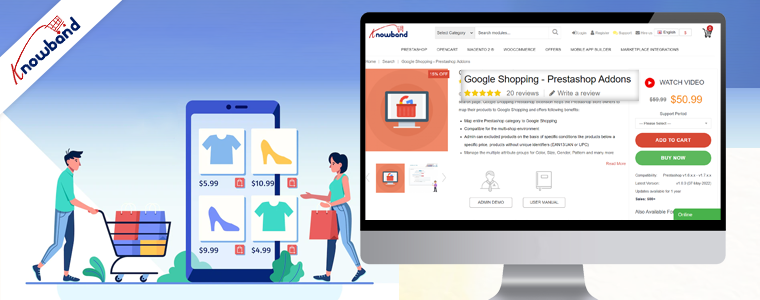
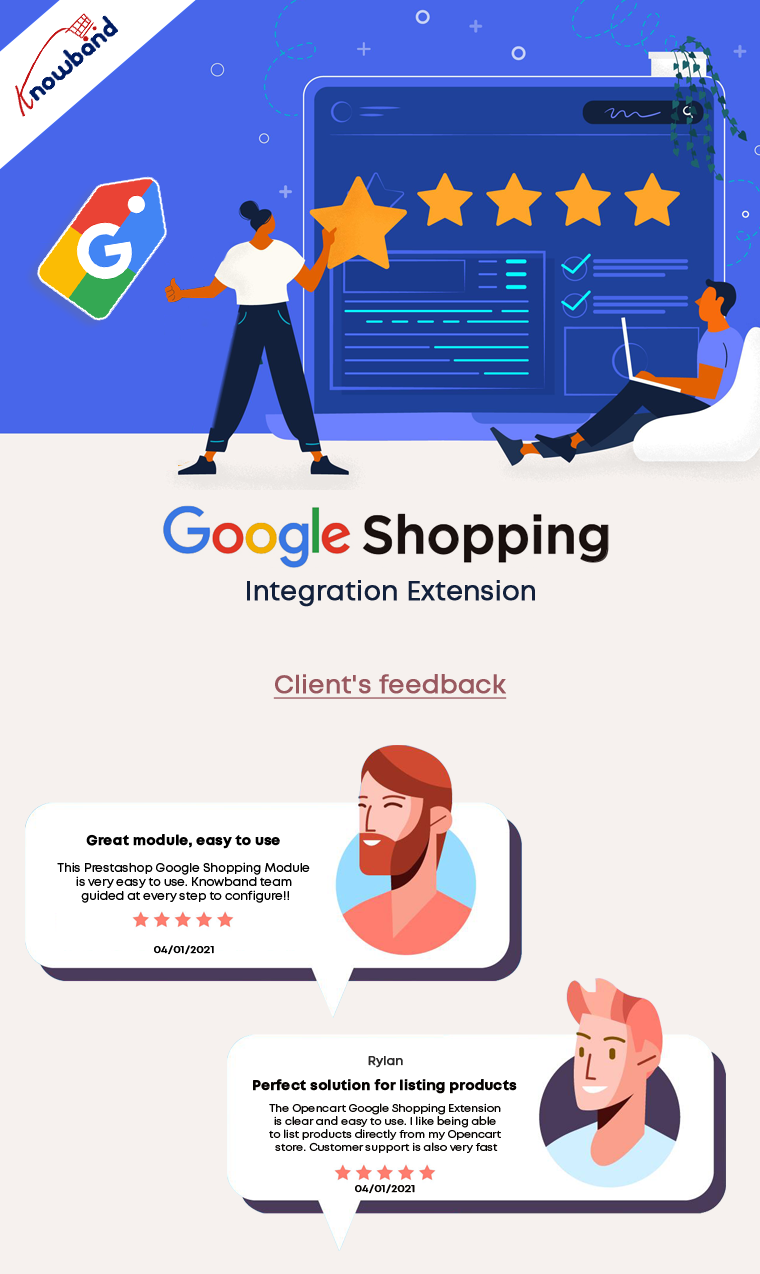
Before visiting any website, the customer searches for the required products on Google first. The Prestashop Google Shopping plugin helps in listing your products on Google. The products listed on Google have a higher probability of customers noticing them. The Google Shopping Feed addon is useful to sync products and let them map entire categories on Google. This addon is useful for product listing and is multistore compatible. The Google Shopping Connector plugin improves the visibility of the products and improves SEO. The Prestashop module for listing products on google boosts sales by bringing traffic to the store and improving sales.
Gift Card Manager:
The Prestashop Gift card plugin help with gifting on various occasions like birthdays and Halloween. Integrating this gift card system module will bring in traffic as gift cards are on trend these days and a go-to idea for gifting. The gift voucher that customers receive is customizable. The gift card Prestashop addon sends vouchers through the mail and can also be given as a physical gift. This addon is helpful in brand promotion and acquiring new customers. The gift card’s partial use is possible, and also the usage of gift codes is traceable. This Prestashop gift card manager helps to increase sales as well as gain more customers.
Back in Stock:
Customers use the Prestashop Back in Stock module to learn whether the desired products are back in stock. Hence, customers can subscribe to receive updates on the availability of desired products if they are not currently in stock. Those who subscribe using this Prestashop stock alert addon will get an email about the product’s stock status. Customers provide their name and email address when subscribing to the product. This will be useful for marketing initiatives for marketing campaigns. Obtaining customer information using the prestashop product stock notification addon is possible. It is possible by integrating this addon with Klaviyo, Sendinblue, and Mailchimp. In the backend of this product subscription module, products in the subscription list are visible. Custom fields, order sorting in the notification box, and V3 Recaptcha are some of the other appealing features.
In the End
The Prestashop addons mentioned above are some of the top modules which will boost the sales and conversion of the online store. These PrestaShop addonsare the basic requirements of any online website. We are here to assist to inform you about these Prestashop plugins and will assist you if you need to have them. Not only we sought to achieve great reviews from the customers but on top of that, we believe in delivering more than they desire. Also, we provide custom development also depending on the customer’s need. If you have any custom requirements or business ideas or have an interest in any of the above add-ons, then kindly contact us at support@knowband.com.
Have you ever thought about having the Prestashop One Page Checkout for your store? A checkout process is of great value. Further, you must pay attention to your website’s checkout process if you want to increase revenue for your company. It is one of the most important factors that might influence whether a shopper converts or leave the shopping cart empty. Any eCommerce store’s cycle is regarded as a crucial component that addresses getting greater conversion rates.
If you are unable to improve the checkout process, it will undoubtedly have a significant impact on your conversion rates and sales. One Page Checkout Prestashop is receiving support from several website marketers. Furthermore, to reduce the growing number of abandoned carts.
Here are some of the several arguments in favour of using the Prestashop One Page Supercheckout to increase sales. Moreover, increase conversions to your store.
What makes the Prestashop One Page Checkout Addon a Must-Have?
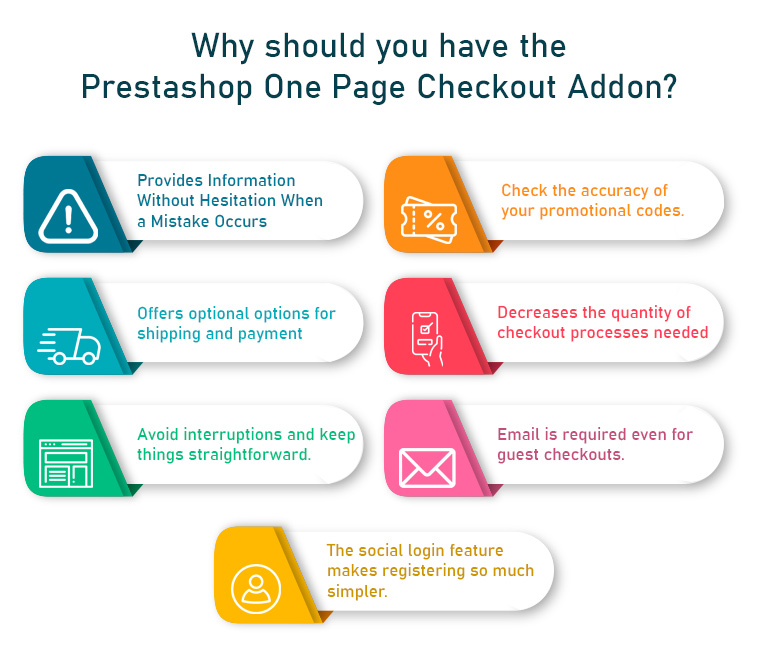
Doesn’t hesitate to Provide Details When a Mistake Happens
It would be a brilliant idea to let customers know about errors they made on the checkout page itself. This error reporting will aid in completing your checkout process right away, decreasing the likelihood of shopping cart abandonment.
Introduce the corresponding One Step Checkout Prestashop Module to your shop. A perfect checkout module should be capable of telling customers about checkout-related errors.
Investigate the validity of your promotional codes
An excellent way to boost the sales of your online shop is to attract customers with enticing discount coupons or promotion codes. It is common human behaviour to pay close attention to coupon restrictions while making an online purchase.
The availability of excellent discounts or promotion codes motivates the customer to complete a recent buy.
Choose a One Step Checkout Prestashop Module that enables you to share discount coupons with your customers so that they can use them at checkout.
Provides Optional Payment And Shipping Options
It has been observed that offering customers a variety of shipping and payment options enhances customer loyalty to an online retailer. Do not force customers to use your present shipping and payment options to make an online purchase. This preoccupation is best addressed by this Prestashop One Page Checkout from the Knowband store, which streamlines the online purchasing process for Prestashop websites.
It gives customers the option to select any of the available payment and transportation options for a simple checkout process. Having a variety of payment options increases product sales and conversions and builds customer confidence in an online company.
PayPal, Advanced PayPal, Boleto, PayU, Stripe, and 2Checkout are a few of the payment gateways offered by Responsive one-page checkout Prestashop.
Reduces the number of checkout procedures required
When making an online purchase, customers choose this way of buying over going door to door since they are too busy to do so. They would not want to waste their time on pointless check-out procedures, but this is not the case in the current circumstances.
The opportunity of increasing sales with a single-page checkout process is finally squandered due to the confusing checkout procedures. If you want to increase sales and the consumer experience throughout the checkout process, it is essential to have everything on one page.
Eliminate any interruptions and keep things simple
The primary goal of creating a checkout page is to persuade the consumer to finish the process of buying. To provide clients with the only fields they need to fill out to make the process simple and distraction-free, the Prestashop Responsive One Step Checkout Addon allows you to remove superfluous processes and distractions from the checkout page.
With the necessary CTA buttons, the procedure also becomes engaging and functionally simple.
Even for guest checkouts, demands an email
Customers leave their shopping carts because they have to register for an account to check out. Clients find that annoying. Why do you think that would irritate them? It’s because if they filled out the registration form and provided all the necessary information, they would get a barrage of daily, multiple-day, or even hourly advertising emails from the website.
The guest checkout option is available in the Prestashop responsive one-step checkout addon’s design. Thus, website users who would like to purchase without signing up for anything can do so.
The social login option makes signing up so much easier
Signing up or logging in on a website can be very tricky and lengthy. Therefore, social login comes as a handy option for customers. Furthermore, if you allow your customers to signup or log in using social media, there can be more conversions. Well, that is why the Prestashop one-page check has the option to use their social login accounts to sign up or login on to the website.
Faster Checkouts, Higher Sales: The OpenCart One Page Advanced Checkout Extension
Running an OpenCart store? The One Page Supercheckout by Knowband is available for OpenCart too, social login, Ship2Pay linkage, drag-and-drop field management, Mailchimp and Klaviyo integration, guest checkout, and a fully responsive layout, all in one place.
Without implementing a necessary checkout measure, there isn’t a single online store that can increase sales and conversions. It is a crucial component of any eCommerce shop that may immediately achieve success in terms of revenue and clients. Using the Prestashop one-page checkout might help you attract more consumers and increase conversions. Furthermore, do everything it takes not to waste a second in putting them into place. Your eCommerce store’s success depends on maintaining a flexible and user-friendly checkout process.
For store owners looking to improve checkout performance without additional costs, you can also explore modern solutions like the Prestashop free quick checkout addon, designed to simplify the checkout process, improve speed, and enhance overall user experience.
Lessen the possibility of cart abandonment and bounce rate of your Prestashop store with this Prestashop One Page Checkout by Knowband. Which replaces the default checkout usefulness of your Prestashop store and offers the online store owners to put every one of the steps on a single page.
This gives a lot less difficult checkout process to the clients and gives them a better shopping experience too.
The Prestashop One Page Checkout by Knowband is one of the most famous modules. It has been sold more than multiple times on Knowband and the Addon Store. Along these lines, there’s even more requirement for the Prestashop One Step Checkout Addon to your store.
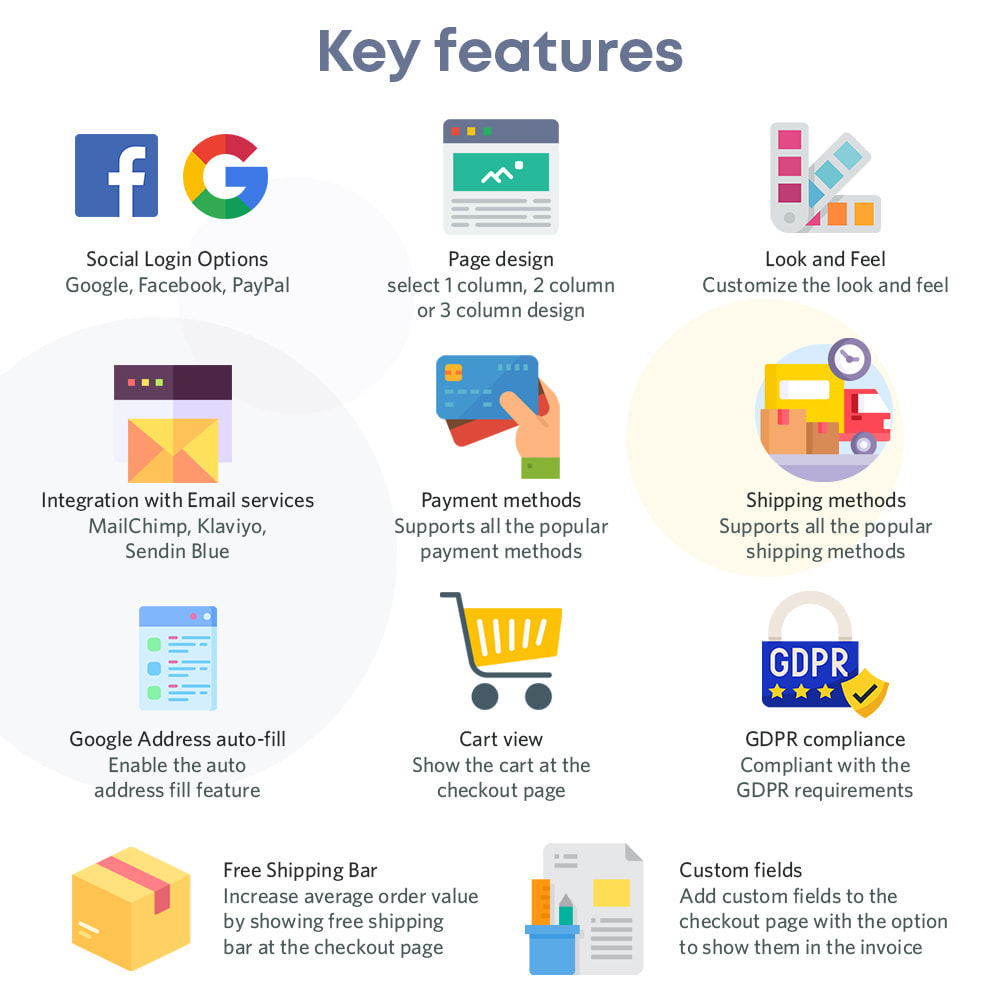
Must-have features of the Prestashop One Page Checkout by Knowband
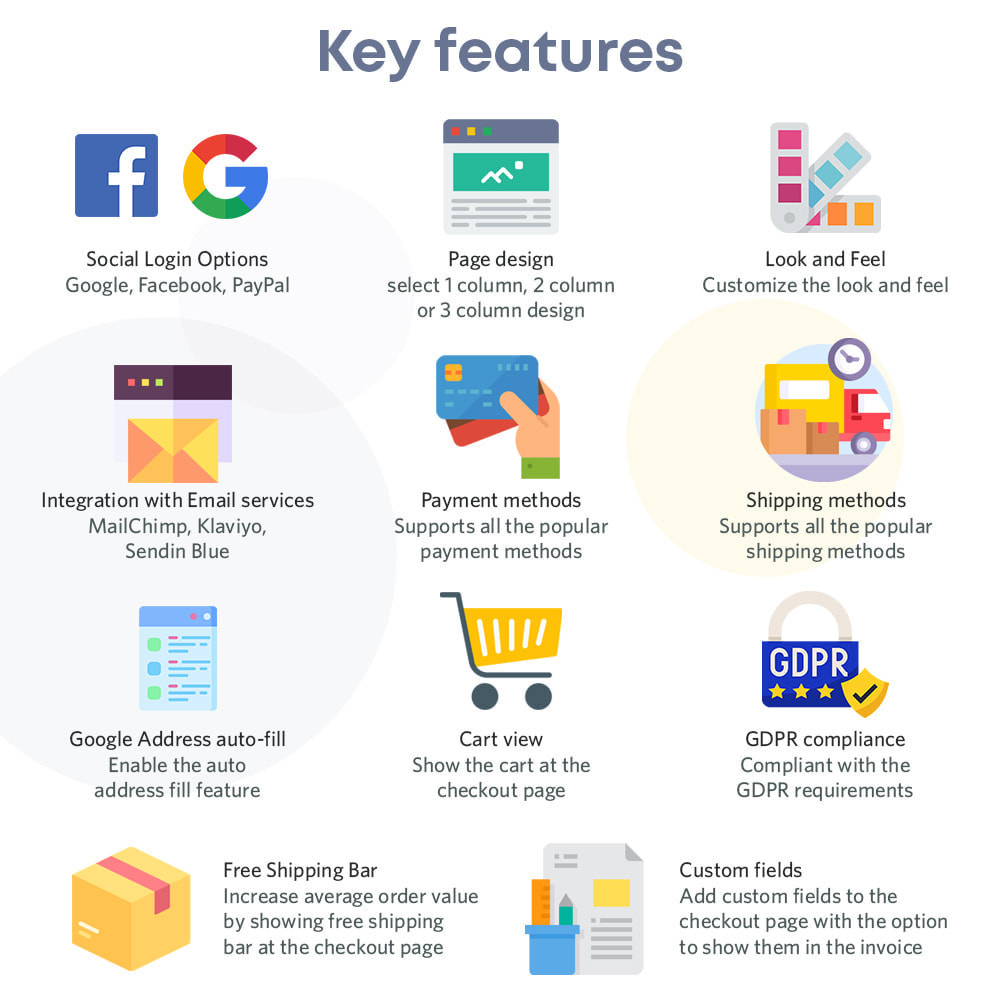
Complete the buy as a visitor
One of the best components that make Single Page checkout an absolute requirement is the Guest Checkout choice. Utilizing the visitor checkout highlights, new customers might complete their buys without enlisting in the business.
Utilize your informal communication record to sign in
Clients may effectively sign in or register thanks to the accompanying capacities. They might sign in or register involving social login choices in Prestashop’s One Page Checkout. Take, for instance, a Google, Facebook, or another social account.
Prestashop offers an assortment of installment choices
Assuming your clients like to pay through a specific strategy, he/she can do that. The choices accessible are PayPal, PayU, or Braintree, for example. You ought to have the option to oblige them. In actuality, Prestashop offers a wide scope of installment techniques.
There are many shipping choices accessible
The One-Page Responsive Checkout Prestashop offers a few conveyance choices. Mondial Relay, So Colissimo, Ulozenka Delivery, Zasielkovn Delivery, LP Express 24 Delivery, and others are a couple of models.
One will see the issues quickly with Inline Validation
Suppose a client commits an error while finishing up the data on the checkout page. The ongoing capacities of the Prestashop One Page Checkout feature the issue at a similar second. Subsequently, clients will want to cure it.
The pieces of the checkout procedure streamline
The store administrator can rapidly move the subtleties of the checkout page all over because of their need. Moreover, the Single Page Checkout administrator can without much of a stretch achieve a similar errand from the backend.
Item amount refreshes
Customers can without much of a stretch change the rundown of components on the checkout page by using the Prestashop One Page Checkout choice. Therefore, Prestashop’s One Page Checkout permits you to change something very similar on the checkout page.
Finishing out the Google auto-address structure
At the point when a client starts entering his area data, Google Auto-address fill gives address proposals. The postal district and city segment are naturally delivered when you pick the proposed address.
Various layout formats
Three different layout formats are accessible in Knowband’s Prestashop One Page Supercheckout. Besides, the store chairman might pick the one that best suits the subject of the eCommerce firm.
MailChimp, SendinBlue, and Klaviyo integrators
Clients’ exact subtleties go straightforwardly into your various records. For example, MailChimp, SendinBlue, or Klaviyo accounts. Further, when they utilize the Prestashop One Step Checkout Addon.
Information on abandoned checkouts is accessible
The One Page Responsive Checkout Prestashop likewise offers an extremely valuable capacity to the entrepreneur. They can likewise screen transformation rates at the checkout. Besides that, there are abandoned checkouts, abandoned incomes, the number of orders put in, and the money acquired from such exchanges.
Checkout Behavior Report
The administrator will right now need to know the number of fields their clients are finishing up. It provides the overseer with a decent comprehension of which checkout stage the clients skipped and abandoned their shopping baskets.
The finished marker with the expectation of complimentary shipping
A free shipping progress bar is accessible in the most recent variant of the Prestashop One Page Checkout. Clients may likewise perceive the amount they need to add to their shopping to fit the bill ‘with the expectation of complimentary conveyance.’
Making a new customer profiles
Besides the abilities recorded over, the new version currently permits you to make unmistakable client profiles. The director can characterize custom profile type fields on the checkout page utilizing this ability.
Thusly, with this multitude of elements, the Prestashop One Page Checkout by Knowband is an unquestionable requirement. In addition, there are various advantages of introducing the plugin in your store. What do you think of the addon? Do you have any queries related to the module? Do let us know at support@knowband.com.
It is only at the point when you really think something is missing, that you understand what will actually make a difference. In fact, that’s something true with all genres and fields – eCommerce is no different. When you have a Prestashop store, you certainly include different addons with time you think, it’s time to make some changes.
In this blog, we will look at 3 Prestashop modules that make a vast difference for any eCommerce business that they have associated with. Further, we will talk about what these 3 Prestashop modules do. Later, we’ll lay down the signs that you really need to install these 3 Prestashop modules in your eCommerce store for better results.
Let’s get down to the 3 Prestashop modules below.
Prestashop module One Page Supercheckout Addon
The Prestashop One Page Supercheckout addon is one of the maximum beneficial modules in your business. The Prestashop One Page Checkout Addon is supposed to lessen the variety of superfluous fields on the checkout page. By simplifying the page, you may easily reduce your store’s departure rate as well as the abandoned cart rate. Furthermore, you can boost your store’s conversions, sales, and income. It is feature-rich and guarantees positive outcomes.
You’re in for a successful conversion with features like social login, guest checkout, custom field prioritization, and more.
Signs that you need the Responsive one page checkout Prestashop
Increased abandoned cart rate – customers exiting on the checkout page
Decreased sales and revenues
Prestashop module Abandoned Cart Module
Knowband’s Prestashop Abandoned Cart plugin is a great way to minimize your store’s abandoned cart rate. You can easily send reminder emails to your customers with the Prestashop abandoned cart email follow up plugin.
Furthermore, those who abandoned their shopping carts. It is entirely up to you whether or not to include the promo code in the mail. The discount code works as a motivator for buyers to complete their transactions.
The following are some of the features that make the Prestashop abandoned cart reminder plugin a must-have. For example, you may recover lost purchases, issue reminder popups, and send web push alerts, among other things.
Signs that you need the Prestashop Abandoned cart recovery email addon
Increased abandoned cart rate
Customers are not willing to complete the purchase even when online.
Knowband’s eBay PrestaShop Integration Module lets the admin promote his commodities on eBay. How? It simply connects your shop to eBay. Furthermore, it enables you to map your items on the marketplace and begin selling.
However, that is only the first impression. In fact, having the eBay Marketplace Connector module has a slew of other advantages.
Bulk product listing, pricing control, order management, and other capabilities are among the highlights.
Signs that you need the Prestashop eBay API Integration Module
You want to expand your business
You see the potential of growing your customer base
When you’re willing to increase the sales and revenues.
In the End
Hence, these were the 3 Prestashop modules by Knowband that you really should invest in. Further, when you see these tell-tale secrets for sure. Get in touch with us at support@knowband.com for any information about these 3 Prestashop modules or any eCommerce solutions.
Further reading for the most useful Prestashop addons available for you:
Knowband’s Prestashop One Page Checkout is an astonishing option for your eCommerce business. Truly, a superb apparatus can help your eCommerce organization in an assortment of circumstances. In this article, we will investigate why the Single Page checkout is an absolute requirement. Above all, how about we examine how Responsive one page checkout Prestashop functions.
Presently, how about we look at the reasons you want to purchase the Prestashop One Step Checkout Addon.
Why is Prestashop One Page Checkout by Knowband popular?
The motive of the Prestashop responsive one step checkout addon
Knowband’s One Step Checkout Prestashop Module assists you with smoothing out the checkout page. Besides, it helps the owner in diminishing cart relinquishment and expanding incomes. It further develops purchaser fulfillment. Besides, the administrator can add or erase custom fields from the checkout page. Therefore, to ensure that clients do not worry while finishing the information. Besides, finish the buying system effortlessly. Since checkout is a crucial point in time when most carts abandon.
The Prestashop one page checkout is a consistent arrangement
Knowband guarantees that the Prestashop module is a simple choice for you. In fact, beginning from the establishment to its working, everything occurs easily. Moreover, update the boundaries from the administrator connection point to guarantee that it runs well. Therefore, you can rapidly help your organization’s development.
The Prestashop One Page Supercheckout incorporates a visitor checkout choice
Visitor checkout is a fabulous other option. A checkout technique ought to likewise contain. Truth be told, this capacity permits clients to shop without first enrolling on the site. Besides, people can undoubtedly complete their exchanges in the store without giving an excessive number of subtleties. Thus, the Prestashop One Page Checkout sparkles with the visitor checkout.
There is a social login highlight
The meaning of social login usefulness is not generally hidden. Besides, customers can easily join or sign in utilizing social login. Truth be told, Facebook and Google are two of the most famous potential outcomes. The Prestashop One Page Checkout Addon from Knowband, then again, gives buyers two other options.
Additional features of Knowband Prestashop One Page Supercheckout
Prestashop One Page Supercheckout acknowledges an assortment of installment and conveyance techniques.
The in-line validation system guarantees that no mistakes happen. As a general rule, if the buyer commits a blunder while finishing up the structure, the strategy will fall flat.
The administrator can lay out many profiles for clients utilizing the client profile’s usefulness. For instance, businesses, individuals, etc. Accordingly, when the customer chooses the profile, every one of the information under that profile will be accessible. For instance, the location, contact data, etc.
Integrators for MailChimp, Klaviyo, and SendinBlue are accessible in the module. You can catch a shopper’s information in your MailChimp, SendinBlue, or Klaviyo account when they enter their data.
There is a back-end choice where the custom CSS and JSS might be acquainted with the checkout page. The store executive might use this part of the Prestashop One Page Checkout to roll out important improvements without changing the code of the Prestashop one page checkout module.
This element of the Prestashop One Page Checkout addon permits the store administrator to concentrate on the way of behaving of customers. Further, who forsakes the bin while on the checkout page. The module shows a rate worth of the data. Moreover, given by online clients who abandoned their bins. This permits the overseer to discard superfluous areas. That of the checkout cycle and abatement cart surrender.
The Prestashop module permits the store head to effectively modify delivering/installment strategies and that’s just the beginning. Further, the name, or the thumbnail picture without changing the code.
The Prestashop addon incorporates a setting that permits store chairmen to make any field discretionary or compulsory.
The store administrator can likewise sort out some way to orchestrate all area fields utilizing the Prestashop module’s worked-on component.
Advantages of Prestashop One Page Checkout
The checkout cycle becomes straightforward
The module consolidates the entire checkout process onto a single page. This way simplifies it for clients to fill in their data.
Customers’ time is saved
Clients don’t need to finish out such a large number of fields or burden a few pages to buy with Knowband’s Prestashop responsive one step checkout addon. They can finish up the structure quickly and easily, and their exchange will finish in a matter of moments.
There will be lesser abandoned carts
It requires a great deal of work to draw in clients to the checkout page, and assuming he passes on the site without completing the exchange because of solid and tedious checkouts, he feels upset. The Responsive one page checkout Prestashop takes out this obstruction by making the checkout page perfect and simple. Further, permitting clients to rapidly complete their shopping.
The conversion rate increases
The Prestashop One Page Checkout from Knowband further develops your customers’ checkout experience. Moreover, assists you with expanding your web-based company’s change rate.
Mobile-friendly
Customers can likewise finish orders utilizing their smartphones on account of the addon’s versatile checkout interface.
Conclusion
There is a long way to go about the One Step Checkout Prestashop Module. For sure, these are the reasons that make Knowband’s Prestashop one page checkout an unquestionable requirement. What is your take? If it’s not too much trouble, reach us at support@knowband.com assuming that you have any inquiries. You could look at additional insights concerning the module on the Knowband store.
Further sources for most useful Prestashop addons:
Looking for the finest ways to upsell or cross-sell to customers? Add related products on your PrestaShop website pages. It’s not simply a nice-to-have feature for your e-commerce site; it’s an essential aspect of the sales process. To make your business marketing strategy work well, you can give a shot to upsell and cross-sell. This technique works for every business, be it a small company or an eCommerce like Amazon. If you are not sure, how to display related products on the product page, shopping cart, or various website pages, I will recommend you to add the PrestaShop Automatic Related Product Module to your PrestaShop storefront.
Discover about PrestaShop Automatic related product module
There are several methods for displaying related products on multiple pages. The PrestaShop-related products module can be configured by the store administrator to meet the needs.
Features of PrestaShop Automatic Related Product addon:
With the aid of PrestaShop Automatic Related Products module, display related products automatically on:
Homepage
Product pages
Category pages
Cart pages
Manufacturer page
Purchase confirmation pages
Store owners can display the most relevant products and can only include available products.
The PrestaShop-related products module allows customizing the title of the related product block in a variety of languages.
Easy positioning of the related products. Show related products in the left column, right column, or at the bottom of the page.
The store manager can choose how to display the related products. Showcase the most popular products, best sellers, new items, or by using user history.
The PrestaShop automatic related product addon allows the manager to show a list of specific products on the related product list.
There is an attribute, keyword filter, that can be specified for particular pages.
Set the maximum number of linked products that can be displayed on various pages.
The PrestaShop-related products module allows specifying the priority mechanism to display related products.
If no related products exist for the first priority requirement, the module will go on to the next level of priority.
How store owners get benefited by showing Recommended Products?
PrestaShop Automatic related product addon has several advantages.
Cross-sell by displaying related products
On the homepage, product pages, category pages, cart pages, manufacturer sites, and purchase confirmation pages; this related product extension displays the related items. Showing a mobile cover when a customer is buying a new mobile phone increases the chances of purchase. This is how cross-selling works.
Several filters to achieve the relevancy
Display only available and in-stock products as related items. Select the method for displaying related products, such as
Top-visited products
Bestsellers
New items
Displaying relevant goods based on user history
Hide out-of-stock from recommended products
Showing a product that is ‘out of stock’ will create a negative impact on your prospect. To save yourself from this situation, you can now hide out-of-stock items from the related product list. After all, customer experience is your priority.
PrestaShop related product module reduce bounce rate
This may happen that a customer does not find the right product while exploring your website. They even get confused about what is best to have. Show related products on the product page to help them find what they were looking for.
Increase average cart value on your PrestaShop store
Customers can buy more things if they look at the products that are similar to the ones they have picked. To improve sales, the administrator can show excellent identical products.
Mobile responsive and compatibility check
The module is responsive to all the devices like mobile phones, tablets, and desktops. Every user can see related products in every browser automatically. The PrestaShoprelated product module is highly compatible with all other Prestashop themes. Multistore compatibility, multi-lingual compatibility, and SSL compatibility are some of the plus points.
Conclusion: It is easy to install and can be a major game-changer if used as a cross-selling tool. It emphasizes the look of the product page and other website pages. Display related products anywhere on the website. To the left, right, or on the bottom of the website page. The PrestaShop Related Product addon maximizes the engagement rate on your store and reduces bounce rate.
So, how long are you going to wait? Now is the time to get this cross-selling solution and take your earnings to the next level.