PrestaShop Mobile App Builder – User Manual

Get fully Flutter Android & iOS apps for your PrestaShop website & start selling your products on Mobile Apps!

1.0 Introduction
prestashop-mobile-app-builder

This is the user guide of the advanced & readymade Flutter mobile app solution of PrestaShop Mobile App Builder. This is an eCommerce website plugin designed & crafted to build perfect & featured Android & iOS shopping apps for you.

1.1 PrestaShop Mobile App Builder: A Brief Introduction

The PrestaShop Mobile App Builder is the most advanced & automated solution to take your online website business to the mobile platform. It transforms your entire website into a featured Mobile App & allows you to sell products on mobile along with the traditional website. The functionalities & working of the app exactly match the website & work flawlessly on both Android & iPhone devices.

Our PrestaShop Mobile App Builder is the pre-configured framework designed by experts & professionals to build a pair of Flutter eCommerce apps. The apps are capable of taking all your store products to the user’s fingertips & boost sales & revenue. So, if you are a PrestaShop store merchant & looking for a full-fledged mobile app solution, this is your best chance. Read the complete article to get fully intact info on PrestaShop Mobile App Development.

Also, our PrestaShop Mobile App Builder extension is fully compatible with the Multi-vendor Marketplace plugin. You can bring the entire marketplace listing on the same Mobile Apps. We even offer a combo pack of our PrestaShop Mobile App Builder with PrestaShop Multi-Vendor Marketplace in PrestaShop Advanced Marketplace With Mobile App.

New Update: PrestashopMobile App and AI Chatbot Integration 6.0.6

The PrestaShop Mobile App Builder now supports integration with the PrestaShop AI Chatbot, helping store owners provide AI-powered assistance to mobile app users. The chatbot can help customers find products, get answers to common questions, and receive personalized product recommendations directly within the mobile shopping experience.

Moreover, the following benefits of PrestaShop Mobile App Maker would compel you to go for this Flutter app solution:

  • A no-code Mobile App solution.
  • Friendly admin panel with complete access.
  • 3 months of free support
  • Fully Flutter solutions (Android & iOS)
  • 100% synchronization between your apps & website
  • Highly customizable with design & functioning control.
  • Increases user engagement with handy marketing tools.
  • Increases traffic & revenue to your store.

1.2 Top-notch Features of PrestaShop Mobile App Builder:

Here is the list of some of the key features which you will get in your apps with Prestashop Mobile App Builder:

  • Customizable Home Screen Layout (Complete Flexibility)
  • Store Branding
  • WhatsApp Chat Support (24*7)
  • Google & Facebook Login
  • OTP & Fingerprint Login
  • Both Tablet & Mobile Support
  • Android 4.2 and so on Android VersionSupport
  • iOS 9 and so on iOS VersionSupport
  • Automatic Inventory Update
  • Multiple Color & Font Choices
  • Multi-lingual & RTL (Right To Left) Support
  • Multi-currency Support
  • All Product Type Support
  • Website Payment Method Supported on Apps
  • Website Shipping Method Supported on Apps
  • Unlimited Push Notifications
  • Product Social Sharing Options
  • Multiple Filtering & Sorting Options
  • Wishlist Functionality
  • Website Coupon/Vouchers Supported on Apps.
  • Simplified Checkout Screen
  • Real-time Order Tracking
  • Seamless Accordion Menu
  • Clear-cut Product & Category Screen
  • Show Video Banner Elements on the Home Page and Category Product Listing Pages
  • List/Grid Product View Options
  • Login/Sign-up pop-up
  • Enhanced Review Section
  • Multi-layered layout
  • Automated Banner Sliders
  • Notification Tab

Latest Version Updates in PrestaShop Mobile Apps:
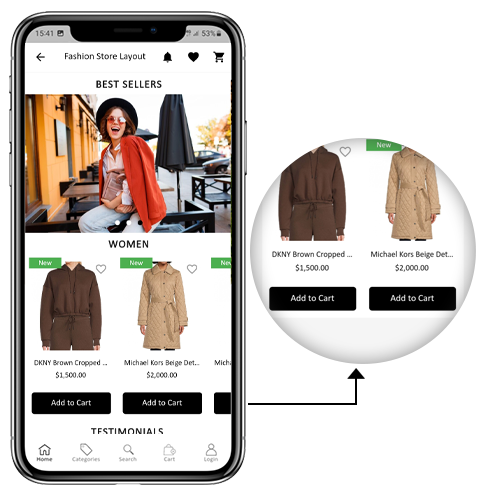

a) “Add To Cart” Button on Home & Category Screen

The PrestaShop Mobile App has been made more usable for online shoppers with an inbuilt “Add To Cart” button for products on the Home & Category screen. This allows users to quickly add products to the cart by just tapping the cart button.

The Add To Cart button is also available on the category screen of mobile apps. The users can simply scroll down to the bottom to browse the products and keep on adding products to the cart by simply tapping the Add To Cart button.
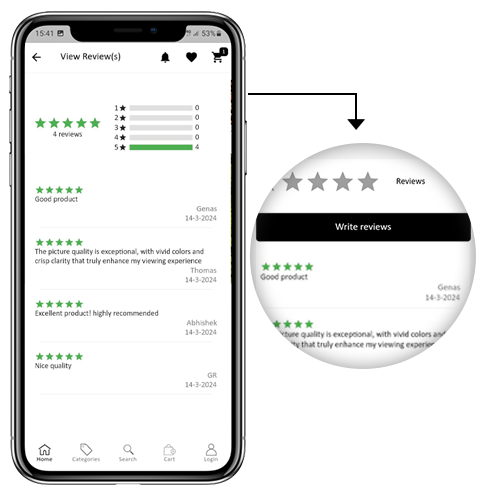
b) Product Reviews on App

Our PrestaShop Mobile App is now compatible with the default Product Comments module of PrestaShop. Now, the user can post reviews for the products on the website and the same will appear on the app as well. Also, the user gets to view all reviews from the app and write them as well.

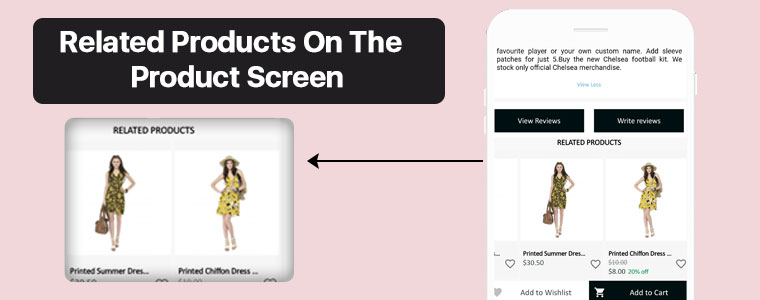
c) Related Products on App

The PrestaShop Mobile App Builder is now compatible with the Automatic Related Products module. The related products can be displayed on the product page of the website and mobile app. This compatibility can be used as a perfect tool to improve cross-selling for your business.

–> Explore PrestaShop Related Products

d) Offline Mode Accessibility:
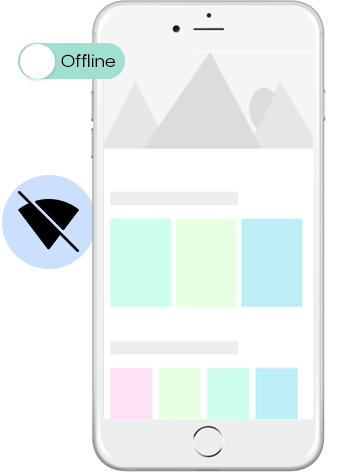
The eCommerce mobile apps with this extension will now work in offline mode as well i.e. without internet connectivity. The users get to browse the pages anytime which were loaded while active internet. Categories, products, cart screen, etc.

–> Explore PrestaShop Image Search

e) GDPR Compliance:

Now, the apps with PrestaShop Mobile App  Builder are fully compliant as per the GDPR regulations of the EU. It will offer more control to app users over their stored personal data. The store admin can simply configure the GDPR settings to work on the application & the same will be displayed on various app screens like sign-up, login, checkout, payment, etc. Online shoppers even get the right to ask the store merchant for the removal of his/her personal information.

–> Explore PrestaShop GDPR Module

f) Spin & Win (Gamified Email Subscription) Compatibility:
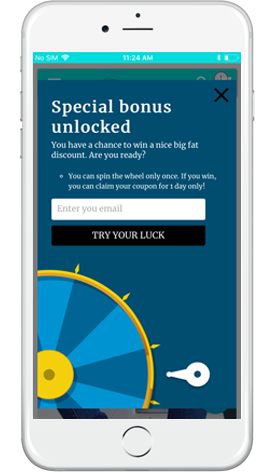
The PrestaShop Mobile App Creator is also compatible with PrestaShop Spin & Win extension. The gamified email subscription pop-up is used for offering a spin-wheel interactive pop-up that can be scheduled for entry or exit display on the web store. Now, with this integration, the same pop-up will be automatically displayed on the apps. You just need to install the extension on your website.

–> Explore PrestaShop Spin Win Module

This list doesn’t end here. Get to know more about the features in detail from here.

g). Video Banner Elements:

The all-new Prestashop App Maker comes with video banner components available on the home page. The store admin can now showcase different videos with the option to upload/YouTube videos on the home page banner components.

h). List/Grid View:

The Android and iOS App built with Prestashop Native Mobile App Builder provides the app users with the opportunity to explore the products in list/grid view, enhancing the visuals and customer experience. 

Now, the users can simply tap on the list/grid button provided on the product listing pages to switch between list and grid view for the products.

i). Video/Banner Options on the Category Product Listing Pages:

Showcase your product carousal with the all-new video/banner upload options introduced in the updated Mobile App Maker for Prestashop. The store admin can upload videos below 2 MB or can also showcase the YouTube videos directly on the category product listing pages. This feature provides better UI control to the store admin, enhancing the customer experience at the same time. 

J). Automated Banner Sliders:

In the latest Mobile App Builder module, we have introduced the automated banner slider feature that allows the Prestashop store administrator to configure the automated sliding time from the module backend. 

The admin can use the functionality, particularly for the “Banner Horizontal Sliders” home page layout components, and can add sliders for both videos and image banners. 

K). Enhanced Review Section:

If you are using PrestaShop’s default Product Comment module, you can enjoy the enhanced review section in the app. All the approved reviews now come with enhanced UI that delivers a top-notch visual experience for your Android and iOS App users. 

L). Login/Sign-up Pop-up:

Capturing the visitors’ emails is one of the biggest challenges in eCommerce. However, we have simplified this process by introducing the login/sign-up pop-up in the recent Mobile App Builder version. 

The store admin can add a login pop-up that will appear for non-logged-in customers, increasing the email opt-in chances by providing simple login options to the users. 

2.0 PrestaShop Mobile App Demo

KnowBand understands your concern about your uncertainty to go for the solution & to curb the same, it has offered a free demo for all eCommerce store owners. The merchants can view our demo store working on the mobile app & even their store working on our demo apps.

2.1 View Our Demo Store working on Apps

Want to see the eCommerce app features? We have integrated our demo store with the app where you can explore the fully functional app and see all its features. Just follow the below instructions:

Step 1: Download and install the Nautica PrestaShop Mobile App from either App Stores on your mobile device. Here, are the links to download demo apps:

Apple App Store  – https://testflight.apple.com/join/PAcL7EEE

Google Play Store– https://play.google.com/store/apps/details?id=com.velsof.prestashopgenericapp&pli=1

Step 2: the Open the Nautica PrestaShop App and hit the view demo button.

That’s it! You will see our demo store running on the demo app. You can browse the same, check all functionalities, create an orders, etc.Note: To access the Admin Panel of KnowBand Mobile App Builder on our demo store, visit here.

2.2 View Your Store working on Demo Apps

Not satisfied? Want to test your store on the demo apps? Well, we got you covered with everything. You can experience your store on our demo app as well that too without any cost. Just 3 steps are all you need to follow for the same:

Step 1: Download & install FREE PrestaShop Mobile App Builder plugin & install it on your store.

Step 2: Install the Demo Apps (links in the previous section) on your mobile device. Open App & enter your Store URL.

Step 3: Tap “View Your Store” and start experiencing your store on demo apps.

Step 4: Enter your store URL in the appeared box.

Example: https://www.example.com/

Note: This Free version of Mobile App Builder is just for the demo purpose & no APK/IPA files will be provided with this module. To get your own APK/IPA files, you need to purchase the paid version of the PrestaShop Mobile App Builder.

3.0 Build your PrestaShop Mobile App in 3 Simple Steps

We hope that you liked the demo of our PrestaShop Mobile Apps and found what you were looking for. So, this is the time to get a Flutter pair of apps for your store. The process to build an eCommerce mobile app is as simple as it could get. Just follow 3 simple steps & your app will be ready in 1-2 working days.

Step 1: Install-Module on your website

Download Prestashop Mobile App Builder & install the same on your store.

Step 2: Share your App Specifications

Share your App details/requirements in our pre-requisites form.

Step 3: Get Your Apps in 1-2 days

Our skilled & professional developers build your apps matching exactly the shared details. We would get back to you with APK/IPA files in 1-2 days.

Note: You can publish these APK/IPA files on respective app stores. Refer following links for the same:

How to publish an app on Google Play Store?

How to publish an app on the Apple App Store?

Still an issue? Tell us, we would publish the apps for you. Moreover, for any queries and suggestions, please reach us at support@knowband.com.

4.0 Module Installation

Once you have purchased the PrestaShop Mobile App Builder module, you will get the following files as listed below:

1. Compressed File in ZIP format (contains the source code of the addon)2. User Manual

Now, you can go on with the further installation process in the following two ways:

Module Installation using FTP Details

Module Installation using Admin Details

5.0 Admin Panel Screens

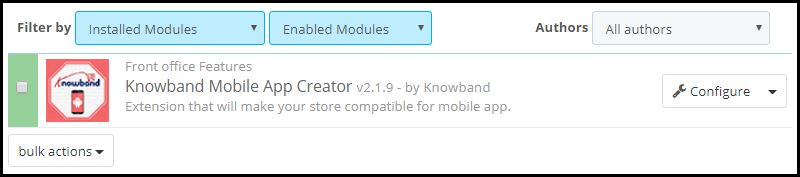
Once the PrestaShop Mobile App Maker is successfully installed on your website, it’s time to configure the Admin Panel of PrestaShop Mobile App Creator. Once you click on the “Configure” option on KnowBand Mobile App Builder, you will get the following tab with friendly interfaces. Let’s narrow down them one by one.

5.1 General Settings

The General Setting tab is all about the settings required to run your Mobile App on the user’s devices. This tab contains all the necessary generalized options to sync the app.
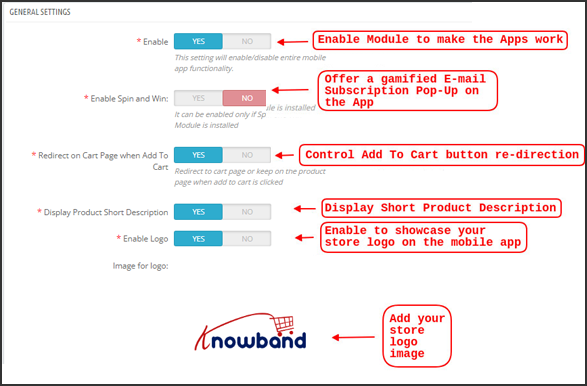
a) Enable Plugin: Enable the PrestaShop Mobile App Creator plugin to make your mobile app work on user’s devices.

b) Enable Spin and Win: Enable to display a gamified spin-wheel pop-up on the home screen whenever any user opens the app. It can be used to offer discounts/deals & capture their e-mails in return for marketing purposes. To make this functionality work, you need to install Knowband’s Spin and Win module on your website.

Note: The Spin and Win Module will only work in case you have installed the plugin in your store end.

c) Redirect on Cart Page when Add To Cart: This functionality allows you to control the navigation of the “Add To Cart” button. You can either redirect your users to the shopping cart or keep them on the product page whenever they tap Add To Cart button. This enhances the chances of additional purchases.

d) Display Short Description: Enable to display product short description on the product screen along with full description & other details.

e) Select Layout: Choose the desired Home Page Layout for your PrestaShop app. You can create multiple home screen layouts in the backend as per various festivals & themes & use them as per your store requirement.

f) App Button Color: Choose the desired button color for your PrestaShop Mobile App.

g) App Theme Color: Choose the desired theme color for your PrestaShop Mobile App.

h) Image for logo: Upload your store logo image to be displayed on the top header of the app. This promoted your brand among worldwide mobile shoppers.
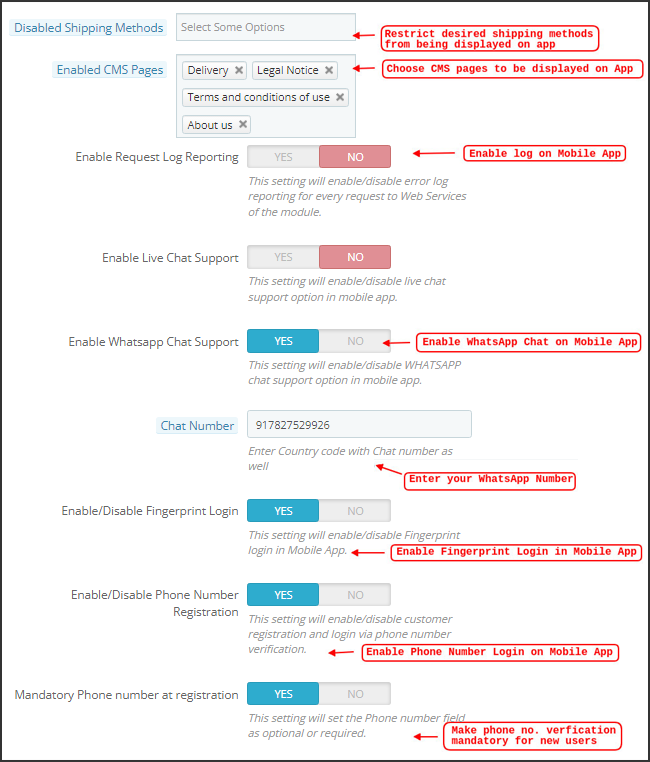
i) Disabled Shipping Methods: Choose desired shipping methods that you don’t want to be displayed on your PrestaShop Mobile App.

j) Enabled CMS Pages: Choose desired CMS pages to be displayed on the mobile apps.

k) Enable Request Log Reporting: Enable log on the mobile apps to get details of any abnormal behavior of your app.

l) Enable WhatsApp Chat Support: Enable the WhatsApp chat option on your PrestaShop Mobile Apps. The users can directly contact you at your WhatsApp number entered in the backend.

m) Enable/disable Phone Number Registration: Enable the Phone Number login option in your PrestaShop Mobile App & let your users authenticate with OTP verification.

n) Enable URL encoding of Image links: Enable this functionality to support Non-ASCII characters on the app.

o). Enable/Disable Fingerprint Login: This option enables or disables the fingerprint of Face ID login options in the Android and iOS apps. 

p). Enable Notification List Feature: The admin can show/hide the notification section in the app for the customers with the help of this button. 

q). Enable Sign In Login Popup: This button is designed to enable/disable the login pop-up for customers who have not completed registration on the store. 

r). App Icon Theme Color: The store admin can configure the color of app icon themes, especially Wishlist, Cart, and Hamburger menu icons. 

s). Enable Social Login: The following button can show/hide the social login options Google, Facebook, and Apple from the apps.

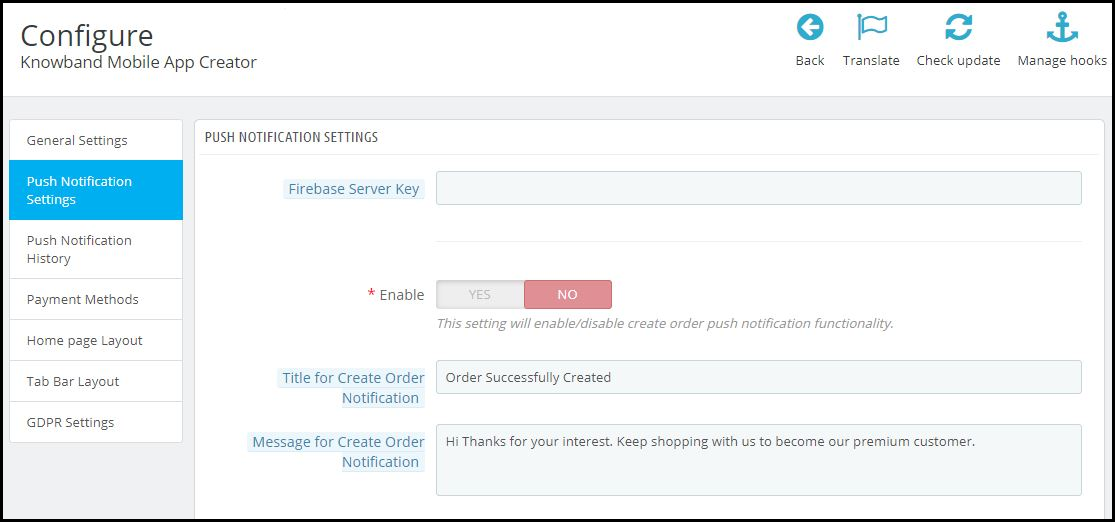
5.2 Push Notifications Settings

The PrestaShop Mobile App Creator for Android/iOS leverages the Power of Push Notification using the Google Primary Services for the Push Notification to Mobile devices. It brings this handy marketing tool to grab immediate user attention & boost sales. Highlighting your daily deals & offers is just a message away with your PrestaShop Mobile App. Both automated & custom notifications are available with PrestaShop Mobile App Maker.

a). Service Account Json: Since the traditional Firebase push messaging API is deprecated and replaced with a service Json file, this section allows the admin to configure the Json file extracted from the Firebase account. 

Either you can configure the same on your own, or we will also share your service Json file at the time of app creation.

b) Enable/Disable Order Creation Notification: Enable/Disable automated Push Notification sent to the app users for successful order creation.–> Title and Message for Push Notification: Enter the title and message on the push notification setting for successful order creation.

c) Enable/Disable Order Status Changed Notification: Enable/Disable automated Push Notification sent to the app users for any update regarding their previous order delivery status.–> Title and Message for Push Notification: Enter the title and message on the push notification setting whenever there is an update the in previous order delivery status.

d) Enable/Disable Abandoned Cart Notification: Enable/Disable automated push notifications sent to the users who have abandoned cart without successful purchase.–> Title and Message for Push Notification: Enter the title & message of the push notification for abandoned cart app users.

e) Time Interval: Interval (in hours) for sending Push Notification to app users who have abandoned their cart without successful purchase.

5.3 Push Notification History

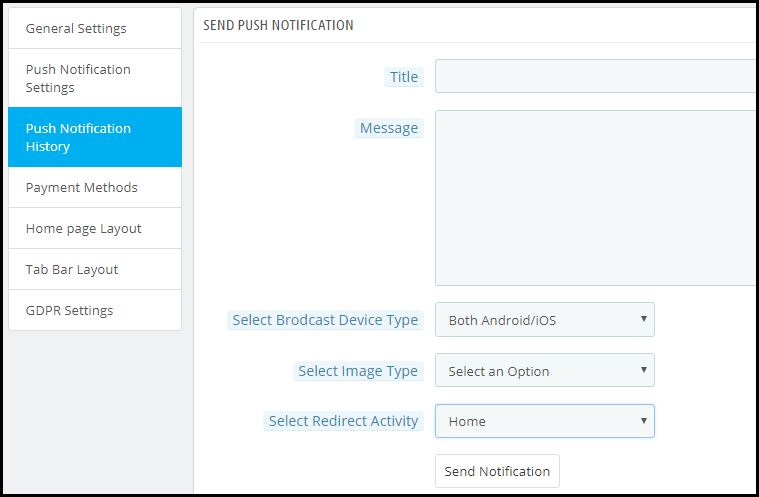
This tab contains the history of all sorts of push notifications sent to every user with concerned details. The merchant can get to know about every notification sent earlier. This tab also has the option to send a custom notification to the users crafted from the backend. You can easily make them aware of any store-related details or discounts through manually sent notifications.
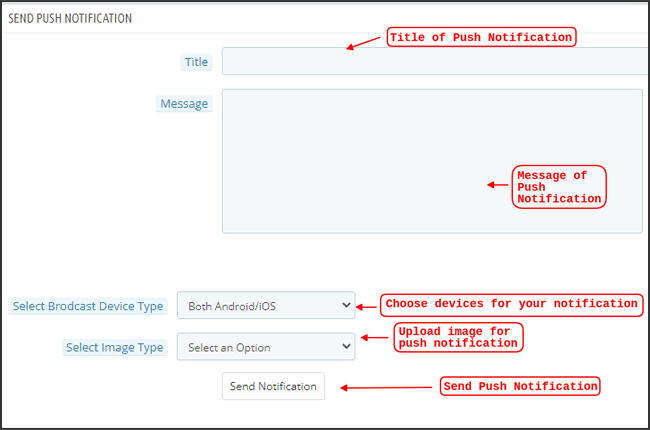
Send Notification:

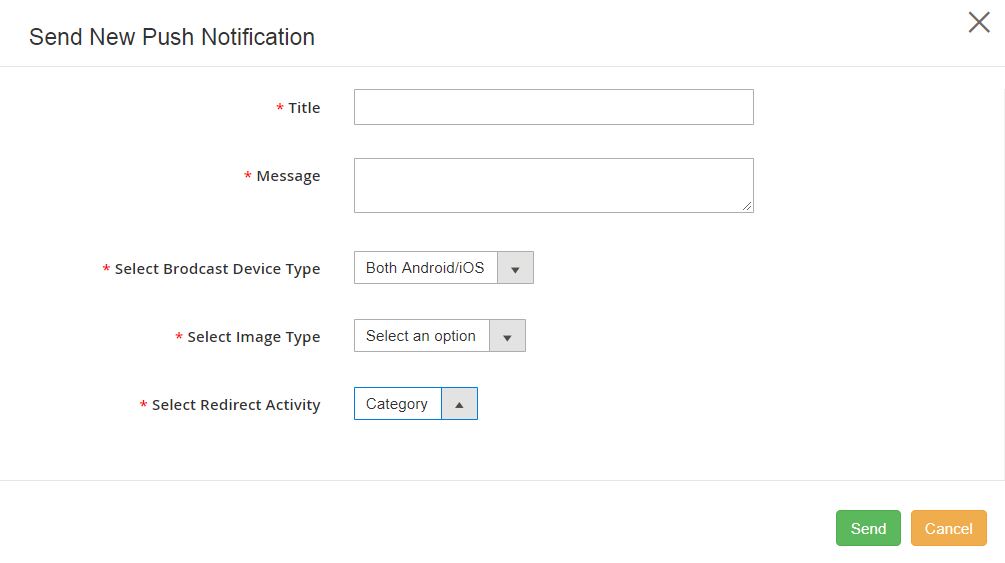
This option is there to send a manual notification to the app users as per your choice. You can configure the title, message, landing page, image, etc., and notification of your choice as shown below snapshot:
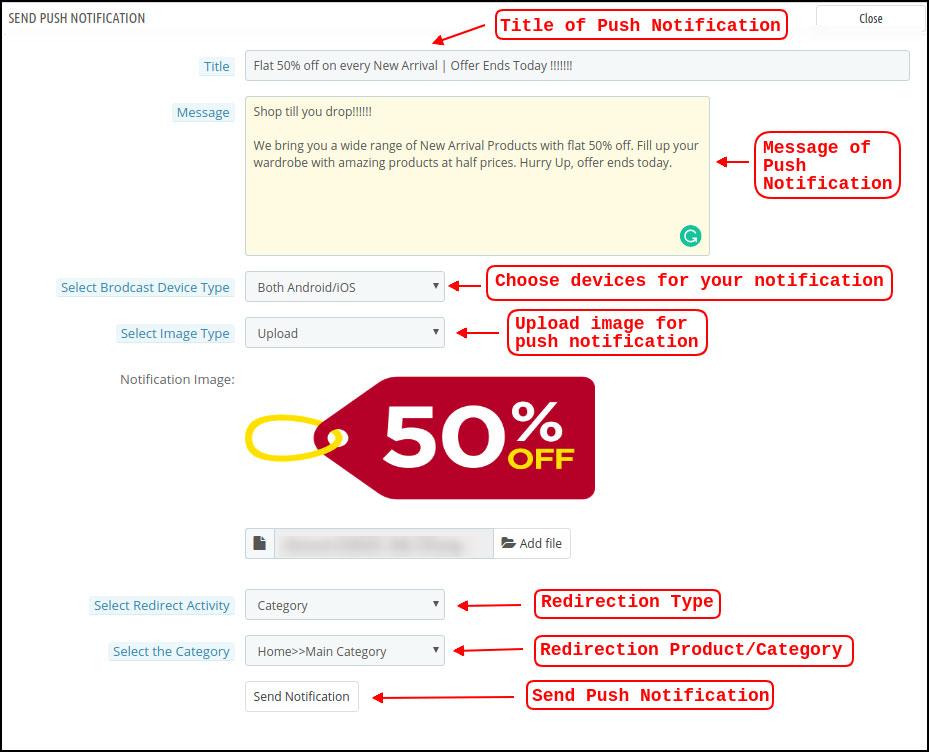
a) Title of the Push Notification: The title of your manual Push Notification that is to be sent to the app users.

b) Message of the Push Notification: The message of your manual notification which is to be sent to the app users.

c) Device Type: You can choose the users on Android/iOS or on both to whom your manual Push Notification is to be sent.

d) Image Type: You can upload the desired image/banner justifying your notification. The banner image can be uploaded or used through an existing URL.

e) Notification Image: The store admin get to preview the notification image & analyze how it will look on the user’s apps.

f) Image URL: The actual URL of the notification image which is to be sent to the app users.

g) Redirection Activity: You can choose the redirection of your notification by choosing from Home Screen/Any Category/ Any Product here. Whatever you set, your users will be redirected to the same on tapping the push notification.

h) Select the Category/Product: You can choose any relevant category/product screen for your notification.

i) Send Notification: Once you have crafted & previewed your notification, it is time to send the same on your apps.

5.4 Payment Methods

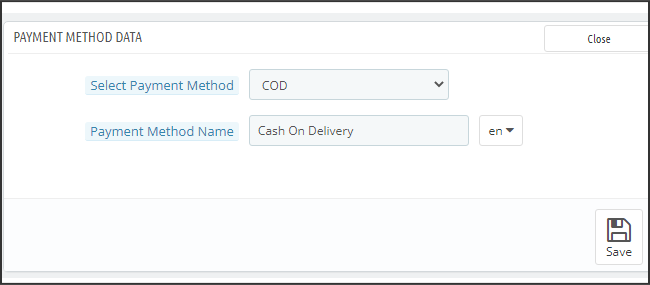
The PrestaShop Mobile App Creator for Android & iOS supports all sorts of website payment methods on the Android & iOS apps. Additionally, it brings COD payment option & the flexibility to add other Web-Viewpayment methods as well.

By-Default, there is only a Cash On Delivery Payment Method in our Mobile App. However, if you want to add the same payment methods as on your PrestaShop store, disable the COD method from the module back-end. After disabling the COD method, all the payment methods that are available on your web-end will appear fine in your Mobile Apps.
5.5 Home Page Layout

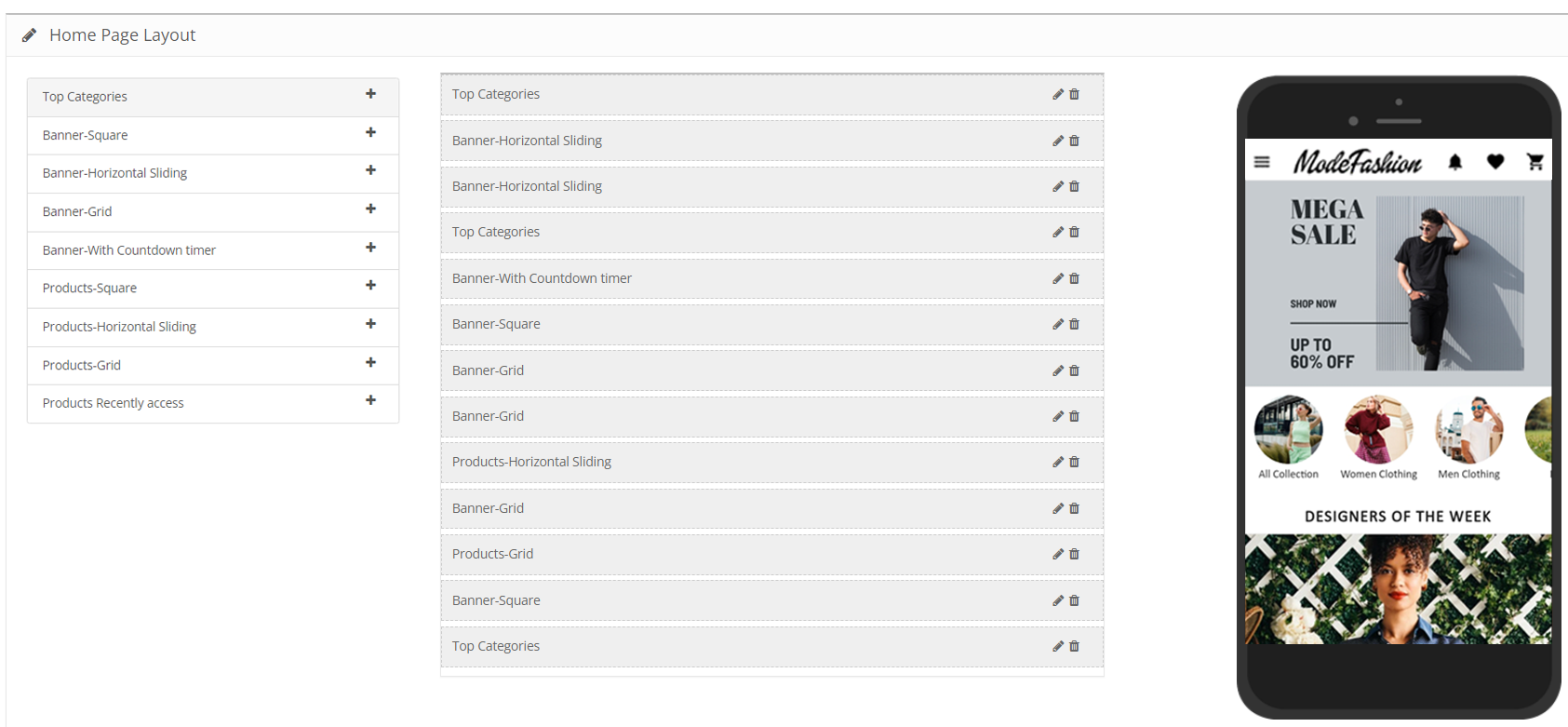
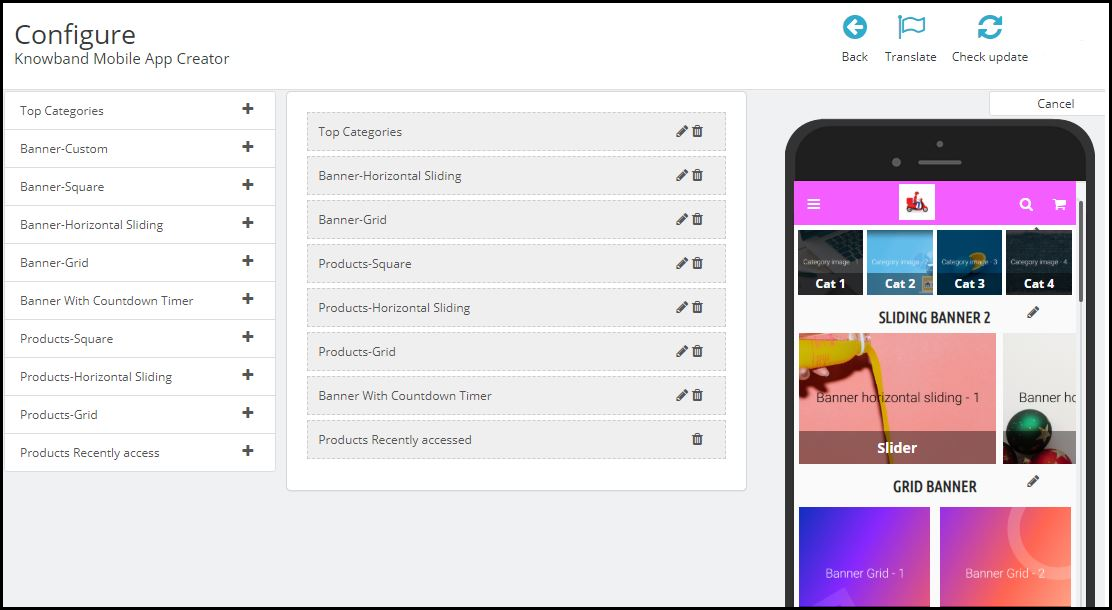
This is one of the most amazing functionalities of the PrestaShop Mobile App Builder plugin to design & craft multiple home screen layouts using various designing attributes/elements. This tab contains the list of all the home screen layouts configured earlier based on various themes & fonts as shown in the snapshot below:
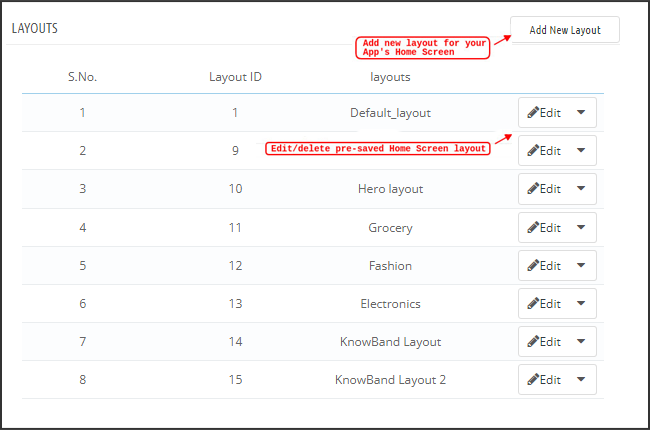
To configure the home page layouts, the following elements are available in the back-end:

  • Top categories
  • Square Banner
  • Horizontal Sliding Banner
  • Grid Banners
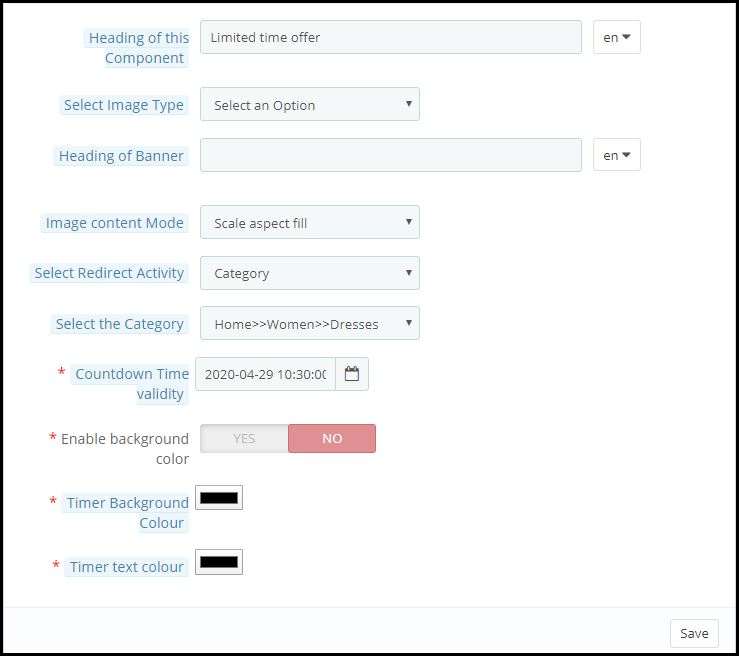
  • Countdown Banner
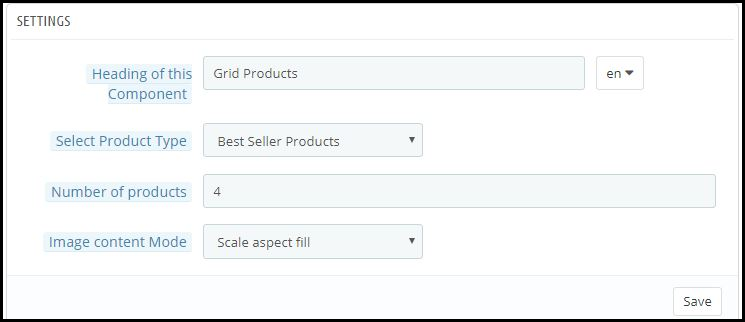
  • Grid Products
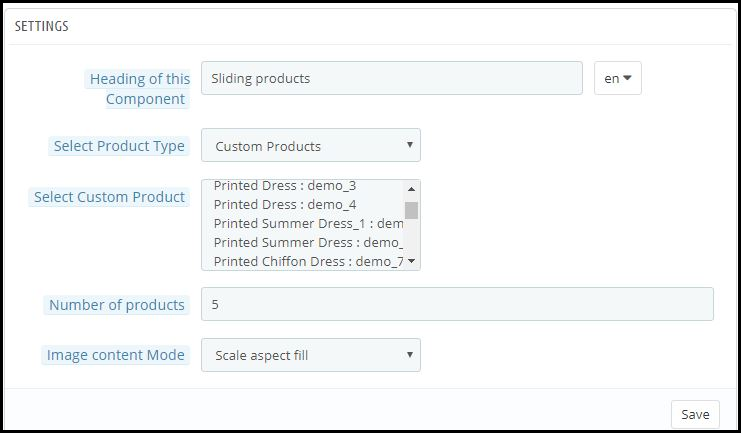
  • Horizontal Sliding Products
  • Recently Accessed Products
  • Login/Sign-Up Pop-Up

The store merchant can configure & use any of these attributes to craft & save multiple layouts. These layouts can be used as per the theme & requirements. Also, the positioning of various elements can be altered with just a simple drag & drop functionality.

Top Categories:

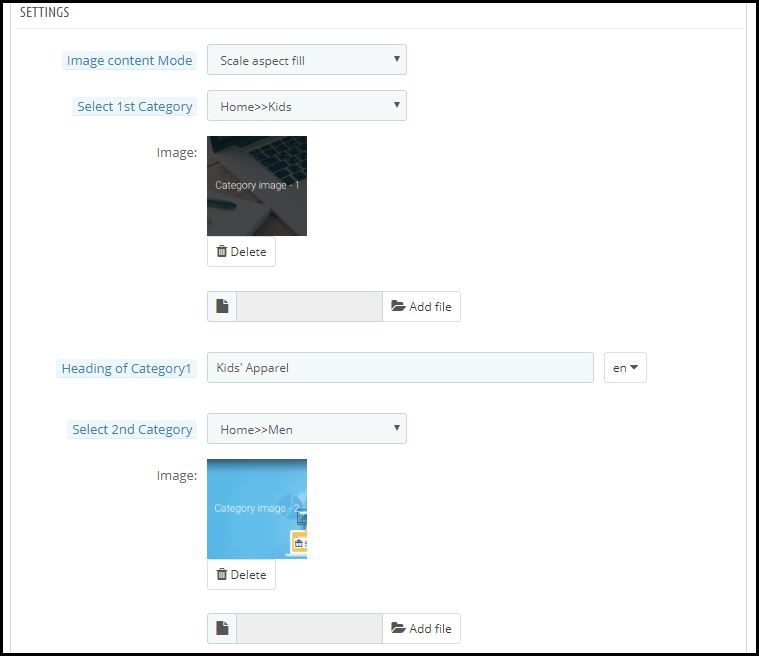
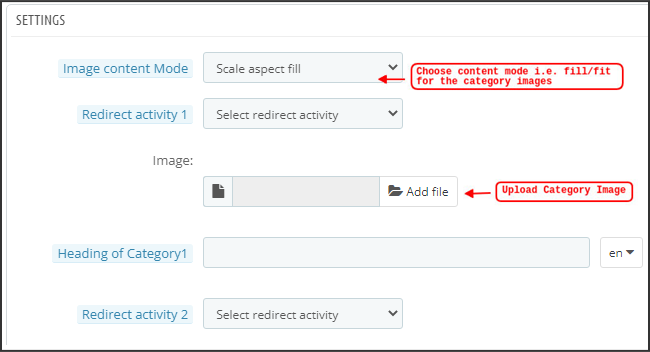
Top categories are displayed in the form of small squares on the home screen & can be configured including their image & landing categories/products. The PrestaShop Mobile App Maker offers a maximum of 8 categories in which a minimum of 4 are mandatory.
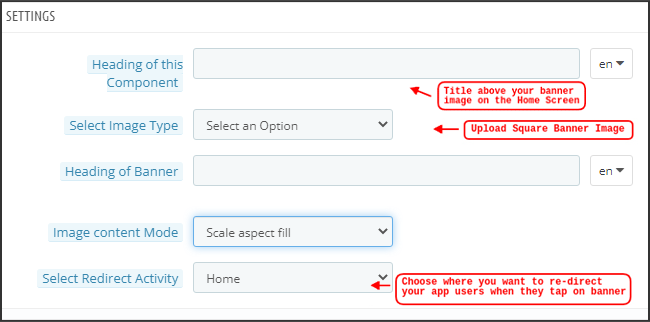
Square Banner:

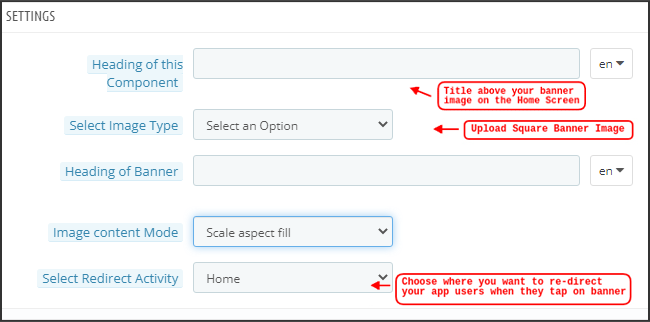
Another attribute is Square Banner listing which is used to offer a square-shaped banner on the home screen of the app. You can customize the banner by choosing the right image & landing screen for the same. In the Recent Updates, we have also added the video selection option for the banner squares. Now the admin can also choose between the options of Video Upload or YouTube Video Link for the square banners.
Horizontal Sliding Banner:

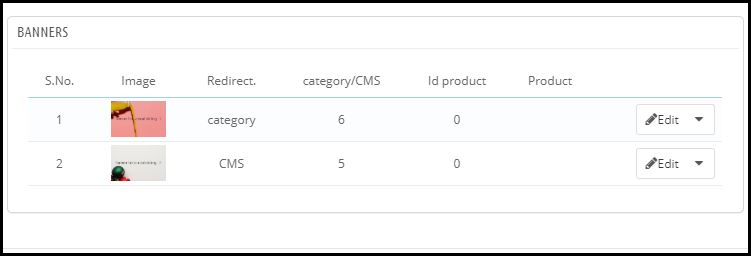
These are the rectangle-shaped available in horizontal sliding & can be fully customized from the backend. The admin can also configure the automated banner sliding time interval for the horizontal banner sliders components.

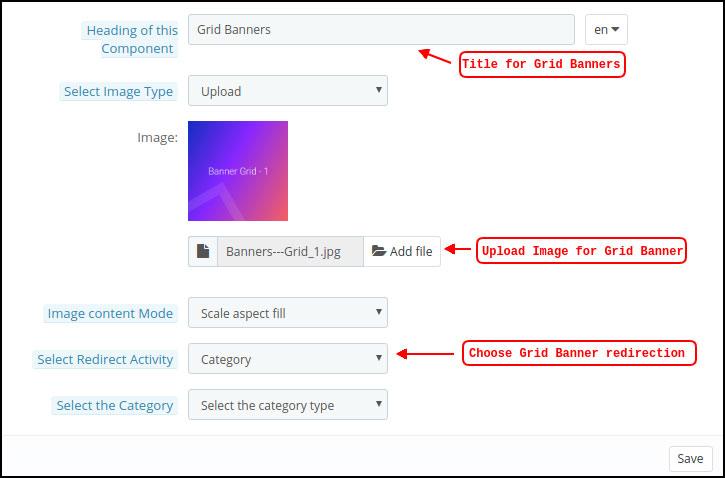
Grid Banners:

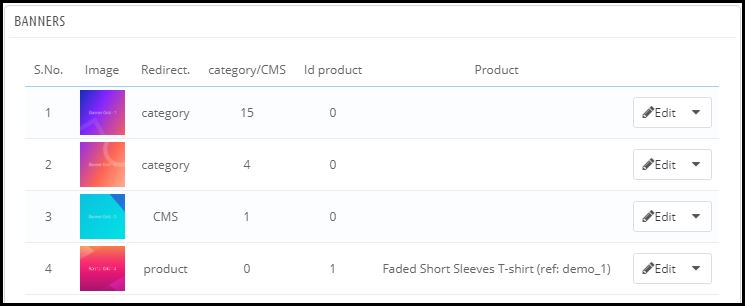
These are square-shaped banners listed on the home screen in the grid form. You can set as many banners as you want on the home screen & customize their image & landing page accordingly.
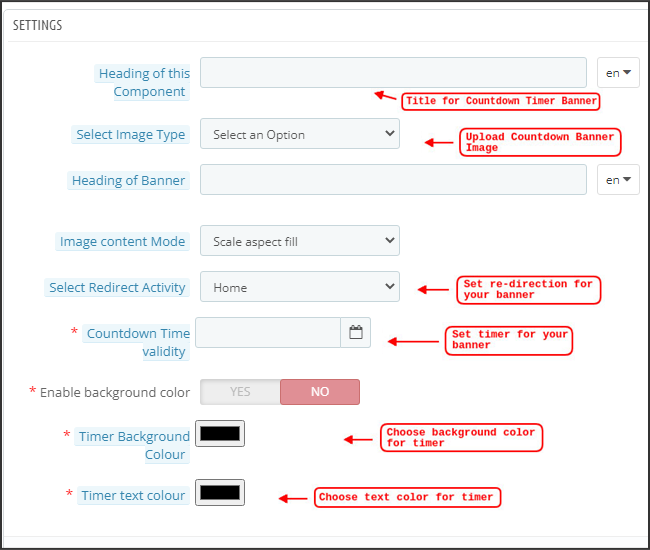
Countdown Timer Banner:

The PrestaShop Mobile App Builder offers a banner with a countdown timer. You can set the banner image & landing screen & set the timer till you want to display the banner. Once the timer is over, the banner will automatically disappear.
Square Products:

As for banners, the PrestaShop Mobile App Creator offers products to display on the home screen in the form of a square listings.
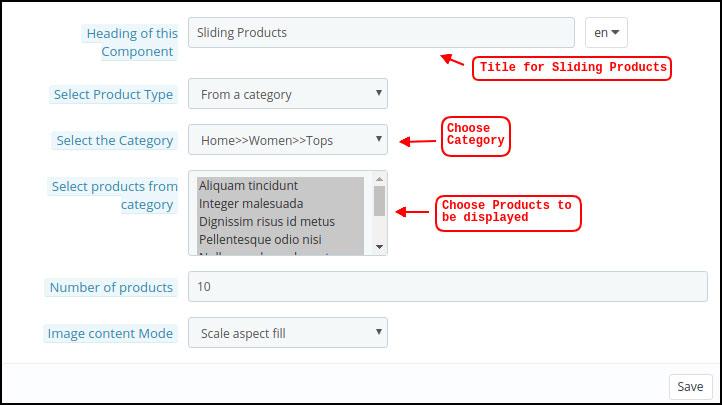
Horizontal Sliding Products

You can add the products in the form of horizontal sliders. The selected products could be of any specific category or other highlights as Best Sellers, Featured Products, etc.
Grid Products:

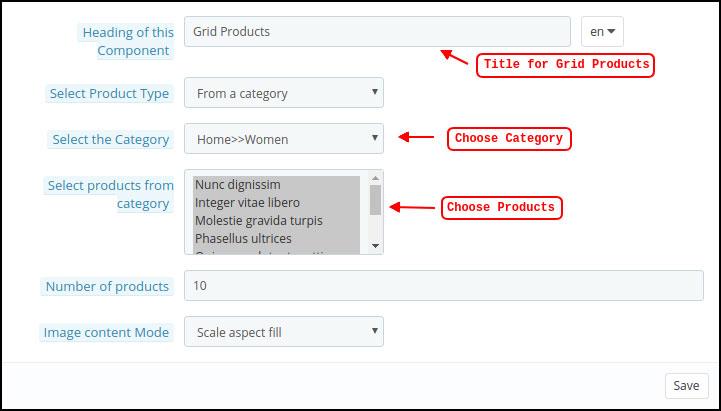
The products can also be added to the home screen in the form of grid listings. The products can be chosen from any category.
Recently Accessed Products:

The PrestaShop Mobile App Creator provides the recent tab element which displays the recent products viewed by the user. You can just add the element in your layout to display the same on the home screen.

Note: The store admin can add up to 20 elements while designing a layout in the backend panel. 

Login/Sign Up Pop-Up:

We have introduced a new login pop-up that will encourage the customers to log in to their accounts with a single tap login/sing-up option provided on the home page of the apps.

5.6 GDPR Compliance

The PrestaShop Mobile App Builder offers GDPR compliance in mobile apps. The store admin can simply make a few clicks in the admin panel and apps will become GDPR compliant.
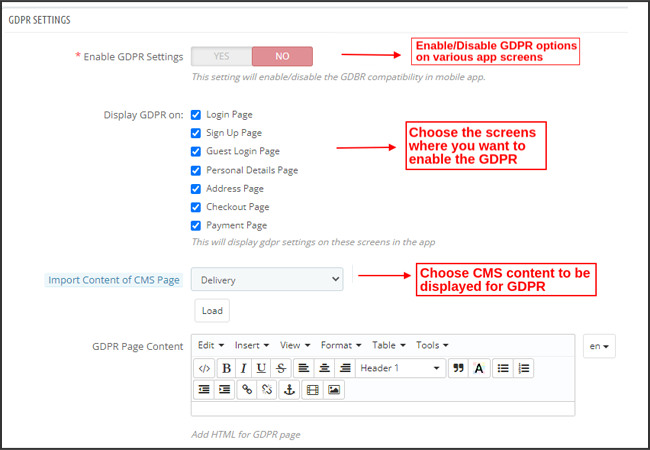
a) Enable GDPR Settings: Enable this tab to offer GDPR compatibility on various app screens.

b) Display GDPR on: Choose the app screens where you want to activate GDPR options.

c) Import Content Of CMS Page: Choose the CMS page whose content needs to be added for the GDPR option.

6.0 Mobile App Screens

6.1 Home Screen

The Home screen of your PrestaShop Mobile App will be exactly as you want it to be. The PrestaShop Mobile App Maker offers complete flexibility to design & craft a home screens into your hands. Using multiple banners(Square, Grid, Sliding), products (Square, Grid, Sliding), countdown timer banner, and recent products tab in the backend, you get to design intuitive layouts for your home screen. The following options are available on your app home screen:

Moreover, the positioning of various design elements can also be altered as per the requirement.

1. Dynamic Layouts:

Using various elements you can create & save various layouts in the backend & re-use them as per various events & festivals. You can design & craft your app home screen dynamically.

2. Brand Logo:

Your store logo is represented on the left-middle section of the top header of your PrestaShop Mobile App. The logo is fully configurable from the module backend & can be enabled/disabled including image changes.

3. Search:

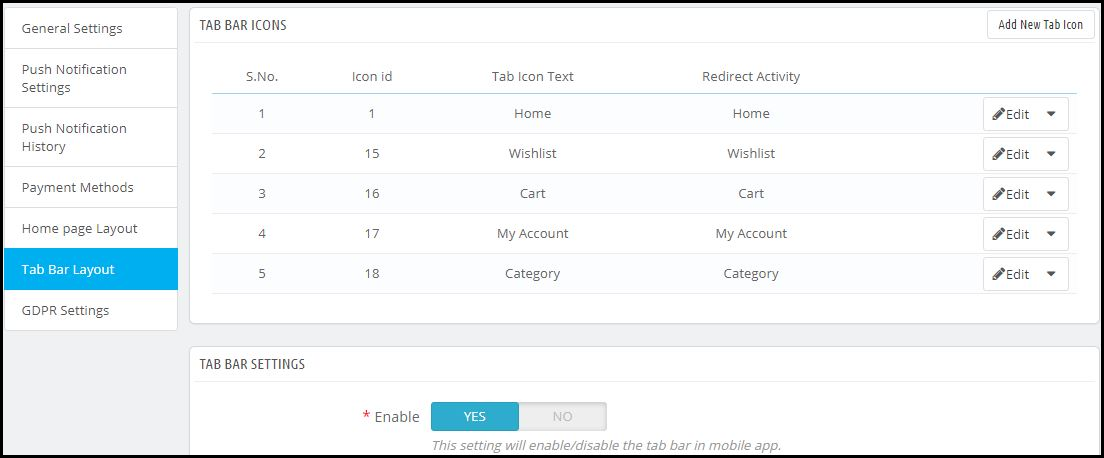
The search option allows the mobile app shoppers to get easily & quickly what they desire. In your PrestaShop Mobile App, product search will be in two forms: The search option can be found on the bottom tab bar layout of PrestaShop Mobile App.

–> With Text: Your App users can search for desired products just by typing some related keywords. The PrestaShop Mobile App will show relevant results to that keyword.

4. Wishlist Bag:

The wishlist bag is displayed on the top header of your PrestaShop Mobile App containing all bookmarked products. The app users can save their desired products in a wishlist bag for future purchases.

5. Shopping Cart:

The Shopping Cart is available on the top-right corner of the app home screen. The users can get to know about the products added to their cart right from there.

6. WhatsApp

On the right-bottom of the home screen, there is a live seller-buyer chat option. The mobile app shoppers can easily & directly message you their query & you can resolve them instantly.

6.2 Accordion Menu (Navigation Bar)

The PrestaShop Mobile Apps for Android & iOS come up with proper categorization of products is available on the website. Mobile shoppers can easily browse products from multiple categories. All CMS pages are also available in Accordion Menu. It provides the following options:

1. My Account

My Account screen contains all the user information like Personal Details, Shipping Address(s) & Order Details. The shoppers can view all the info related to them & can update personal details & login passwords as well.

2. Categories

These categories are the same as on your website. You can map them accordingly & offer a 3-level categorization to your app users for hassle-free browsing.

3. CMS Pages

Various CMS pages like About Us, Contact Us, Terms & Conditions, etc. Available on your website are displayed here. You can choose the desired one from the PrestaShop Mobile App Builder backend to be displayed on Mobile App.

4. Language(s)

The language option allows your users to view PrestaShop Mobile app in their Nativelanguage. All available languages are displayed under this option only.

5. Currency(s)

All available currencies on your eCommerce website are displayed on PrestaShop Mobile App as well. The shoppers can view & purchase the product price in their desired currency.

6. Login/Logout

Your users can easily log in/log out from PrestaShop Mobile App using this option.

7. Notification Settings:

The app users can control the specific push notifications they want to receive in the app. The options allow mobile app users to choose between all notifications, promotional notifications, and order status update notifications.

6.3 Category Screen:

All the sub-categories, parent categories & other associated categories are available in your PrestaShop Mobile App. The category screen is designed to deliver clutter-free experience in two basic views: Grid & List. The product image, name, price, the discount is displayed in all listings with an option to add them to the wishlist bag as well. The Mobile Apps with PrestaShop Mobile App Builder have layered navigation which makes the product search just simpler. The following options are available on the category screens:

Furthermore, now the admin can also enhance the UI of the category product listing page by adding video/images on the category page section.


1. Sort:

This option allows the shoppers to select the desired order in which the category product pricing is to be sorted. Two sorting orders are available in your apps: Price: Low to High & Price: High to Low.

2. Filter:

The option to filter products simplifies product search. The app users can filter the products in your PrestaShop Mobile App based on various attributes like size, color, compositions, Condition, Manufacturer, Price, etc. The users can search for their favorite products in minutes using these filters.

6.4 Product Screen:

The product screen of your PrestaShop Mobile App is simple & intriguing. Multiple images of the same product are displayed along with the name & price. The product availability is also displayed as “In Stock” or “Out Of Stock” based on inventory status. It contains the following other options:
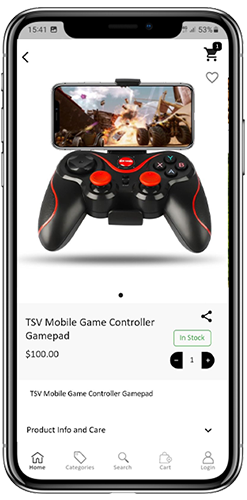
1. Product Options:

All the options related to the product like size, color, etc. are displayed on this screen. These product options are the same as available on the website.

2. Short Description

Users get to read the short description of your product to quickly make up their minds.

3. Product Info & Care

The complete product information is listed on the website is displayed here. The app users can get complete product details from here.

4. Add To Wishlist:

The Mobile App users can directly bookmark the product just by tapping “Add To Wishlist” on the left bottom of the product screen.

5. Add To Cart:

As the name “Add To Cart” button adds the product directly into the cart & the users can further go on with the purchase.

6. Product Social Sharing:

There is an option on this screen to share your product on multiple social platforms, including Bluetooth & e-mail. The app users can share the products among their friends/relatives on multiple social platforms & lure heavy users to your app.

6.5 Wishlist Screen:
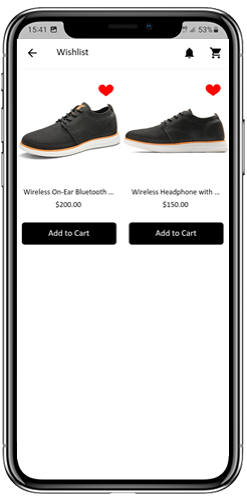

Your PrestaShop Mobile App Creator would have a wishlist bag allowing the users to bookmark products for future purchases. The users can view the list of all bookmarked products from here. It has two options:

1. Add To Cart:

The app users can add the bookmarked product directly into the shopping cart by choosing Add To Cart option.

2. Remove From Wishlist:

The users can even remove any wishlist product if not feel like buying that.

6.6 Login Screen

The PrestaShop Mobile App Creator offers various one-tap login options & makes the sign-in/registration process more seamless:

1. Login

The app users can authenticate & access apps using e-mail sign-in credentials.
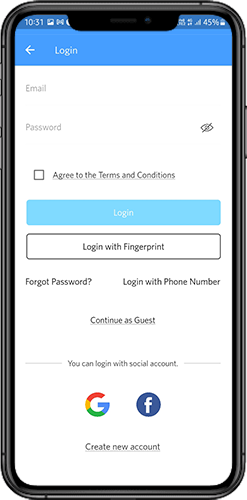
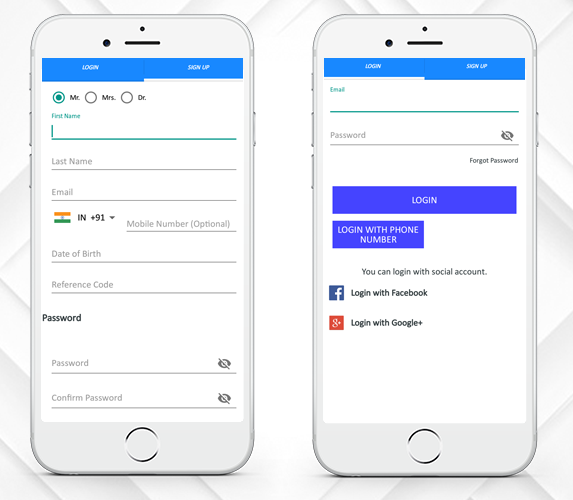
2. Sign Up

All the new app users can sign-up & create their account on the store from the mobile App. The sign-up form of the PrestaShop Mobile App only asks for relevant details.

3. Login with Phone Number

Your Mobile App comes up with an easier & robust phone number login option which makes it easier for the users to verify the OTP & login app.

4. Login with a Fingerprint

Your users also get an option to log in with fingerprint authentication. This allows users to access apps in seconds.

5. Login with Facebook

The users can log in to the app using their Facebook Account Credentials.

6. Login with Google

The users can log in tothe app using their GoogleAccount Credentials.

6.7 Shopping Cart Screen:

The Shopping Cart screen of your PrestaShop Mobile App will display all products to the shopping cart. The app users can view the product’s name, quantity, total price & shipping cost. This screen has the following options:
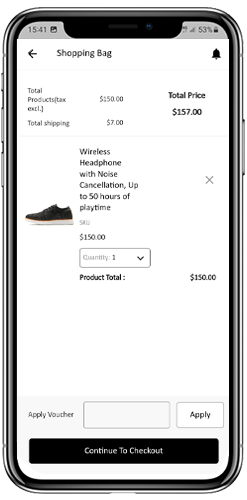
  1. Apply Voucher

This option allows the users to get discounts & offers by entering valid coupons & vouchers running on your website.

2. Total Product Price

The users can view the complete cost of their shopping bag from here. It is automatically updated as per any update with product quantity or addition.

3. Update Product Quantity

The app users can even update the product quantity with the “Update Quantity” option.

4. Remove Product

The app users can simply remove the product from the cart by simply tapping the “Remove” option.

5. Continue To Checkout

The front-end mobile app users can proceed further to the checkout & payment screens just by tapping the “Continue To Checkout” option. It will re-direct them on the checkout screen.

6.8 Checkout Process

The Prestashop mobile app Builder consists of a simplified checkout process. The front-end mobile app users have the option to select the shipping details, billing details, order numbers, order comments, and so on in the checkout process of the mobile app.

Users of the Android and iOS apps only need to follow a few simple steps to place their orders.

1. Customers can select the desired product and add it to the shopping cart. After clicking on the shopping bag, he or she can also select the desired product quantity. Moreover, the front-end mobile app users can see the total number of products and shipping costs.

The customer also has the option to apply any voucher and coupon code at the bottom of the same page.

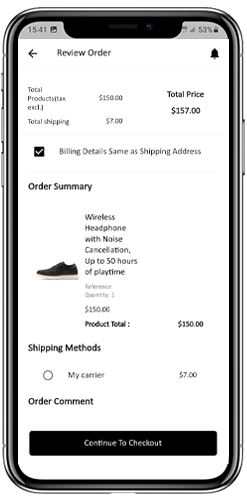
2. After clicking on the Continue to Checkout option, the user can review the order where he or she can see several details. Such as product price, shipping cost, shipping address (It can be edited on the same page), order summary (Number of the products), total price, and so on.

Additionally, the customer has the option to select their preferred mode of shipping on the same page. The user can also put his or her special request or requirement in the order comment option appearing on the bottom of the screen.
  1. The user will be redirected to the payment method screen after clicking on the continue to checkout option.
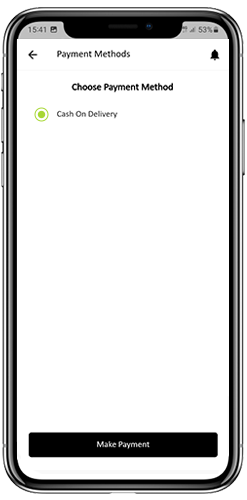
On this screen, users have the option to select from all of the website payment options. By default, the shopping app consists of a cash-on-delivery option as a mode of payment.

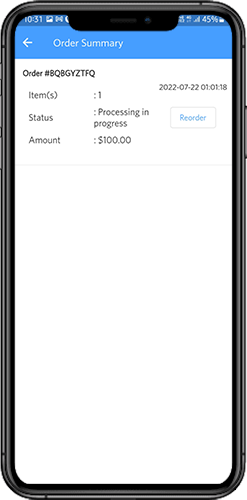
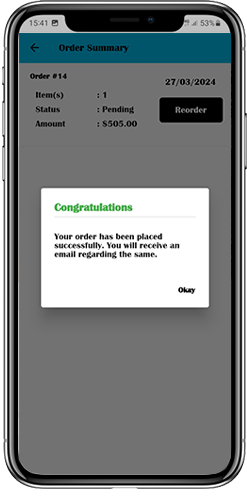
  1. When the user performs the payment activity, then he or she will be redirected to the order summary screen. where the customer can see the order status, order number, amount, and so on. The front-end mobile app users will get the order confirmation popup message on their mobile phone screens as well.
6.8 My Account Screen

My account screen of the Android/iOS eCommerce app allows users to view the complete account details including a list of previous orders. My Account screen offers the following options:
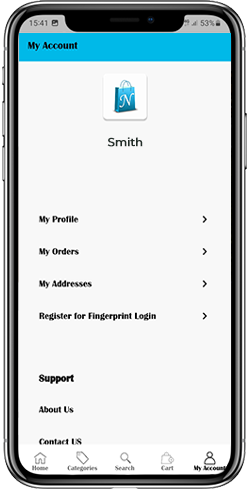
  1. Order History

The users get to know about complete order details being placed earlier. The order submission date, order reference, price & delivery status is displayed.

2. Update Profile

Users can also update their pre-saved profile details such as First or last name, phone number & password.

3. Shipping Address(s)

The app users can see the complete list of saved Shipping Addresses. A new Shipping address can also be added from here.

4. Order Details

The app users can get to view the complete list of the previously placed app orders.

5. Re-order feature

There is a direct re-order product directly by clicking the “Re-order” button. All the previous orders will be added to the cart by just tapping a single button.

6.10 Order Detail Screen
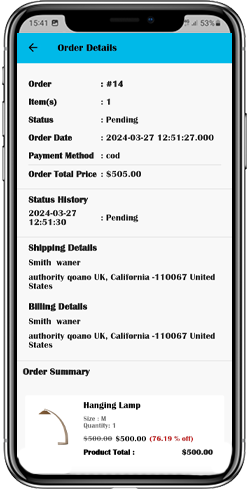
Order details screen of PrestaShop eCommerce App provides complete order detail such as shipping address, product summary, shipping and payment method, and total cost summary. The users can even track the delivery of previously placed orders directly from this screen.

7.0 Video Tutorials

8.0 Advanced PrestaShop Marketplace with Mobile App

KnowBand’s PrestaShop Marketplace converts your online website into a fully fledged marketplace. The PrestaShop Mobile App Builder is fully compatible with PrestaShop Marketplace extension. This means you can bring the entire marketplace listing on the same PrestaShop Mobile Apps. Thus, launch a pair of Marketplace-compatible Mobile Apps with KnowBand & attract a large base of sellers & customers to your store.

–> As the user clicks on the Seller option, he/she is redirected to the Seller page of the mobile store. The user can view the list of the sellers of the marketplace along with their ratings.

–> The customers can click on the name of the seller in order to see his profile and product being offered. The sellers can log in with their username and password. They are then redirected to the dashboard.

Get to know more about PrestaShop Marketplace with Mobile App from here.

Android & iOS Mobile App Builder for PrestaShop is also available at the Offical PrestaShop Addon Store
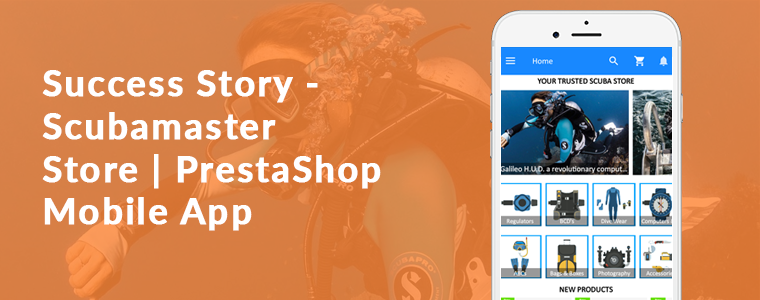
Success Story – Scubamaster Store | PrestaShop Mobile App Builder

This article is a toast to the success story of the Prestashop Mobile App for Scubamaster store developed using the Mobile App Builder plugin. Consider using KnowBand’s Mobile App Builder Module to develop Android & iOS Mobile app for the PrestaShop store. The Mobile App Builder offers the following advantages to the store admin:

  • No coding skills required
  • One Time Payment
  • Real-time synchronization between PrestaShop store and Mobile App
  • Supports all major payment methods
  • Supports all major shipping methods
  • Customizable Home Screen
  • Push Notifications
  • For the complete list of the feature please click here
  • Our technical team will assist you to submit the app at Google and Apple Play Store

Aside from growing your product sales and company exposure, a mobile app enhances customer retention. Each time users view it, an application guarantees the same presentation of goods and services. Customers, no matter which page they visit, will go through the same user experience. A mobile app allows you to get in touch with your customers quickly.

ScubaMaster Store created their mobile app with various functionalities that are required. With the aid of Mobile App Builder, they have customized the theme and added all the needful categories and menus in the App. Along with that, Prestashop Mobile App for Scubamaster store has an order return feature that is incorporated additionally using Return Manager PrestaShop Module. They have options like Gift Card for every occasion and an Affiliate and Referal Program to incentivize the users.

Let’s dive deep into the Prestashop Mobile App for Scubamaster store’s success story!

About PrestaShop Scubamaster store

The ScubaMaster Store is Bahrain’s and Saudi’s one-stop-shop for diving’ for the east coast. In the Kingdom of Bahrain and the Kingdom of Saudi Arabia, ScubaMaster is proud to be the number one diving center. They have the widest collection of scuba equipment under one roof from top brands that cater to specialist and advanced equipment for scuba divers’ basic needs.

You will find top-quality products, the best customer service, and a broad selection of PADI courses from beginners to expert levels. From beginners to advanced levels, they have male and female instructors who teach a wide variety of PADI courses, which makes the ScubaMaster the only PADI 5 Star Dive Center in Bahrain. To keep the game going and to deliver a superior user experience, they have asked KnowBand to develop a full-fledged mobile app.

-> Click on the link to visit the ScubaMaster Website

-> Download the ScubaMaster Mobile App  from Playstore

ScubaMaster is quite popular in Bahrain. It has 10K Instagram followers! Whoa!

-> Follow on Instagram @scubamasterco

Prestashop Mobile App for Scubamaster store-Top features

The Prestashop Mobile App for Scubamaster store is a versatile app with all the necessary features. Some of the top-notch functionalities are discussed in this section.

1.     Home Screen, Product Page, and Categories

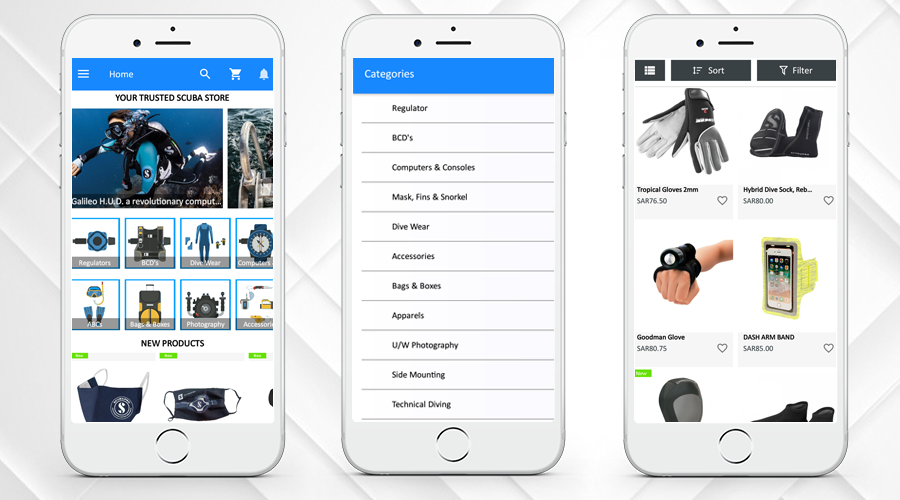
By using the eCommerce Web App Builder plugin, store owners get a personalized app. Scubamaster store has designed the home page of their app easily using different home page editor tools provided on the backend of the Prestashop Mobile App for the Scubamaster store. Several categories can be added to the store’s navigation.

The home page design can be customized and the admin can add the banners, products, or other blocks to the home screen to offer a better customer experience. The Android Mobile App Creator for PrestaShop has an easy-to-manage admin interface that helps the admin to create attractive home screens.

2.     Multiple languages and Currency Support

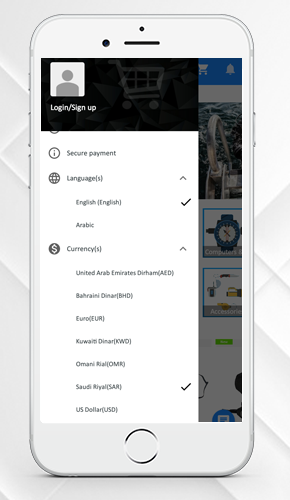
Developing a different mobile app for different languages is not possible for the store administrator. The user can select and check any desired language on the app in their preferred language. Take a look at the multi-lingual and multiple currency support features of the ScubaMaster Store Mobile App. The PrestaShop Mobile App Builder supports multi-lingual functionality and also supports RTL language.

3.     New Product, Bestsellers, Hot Products, Wishlist features

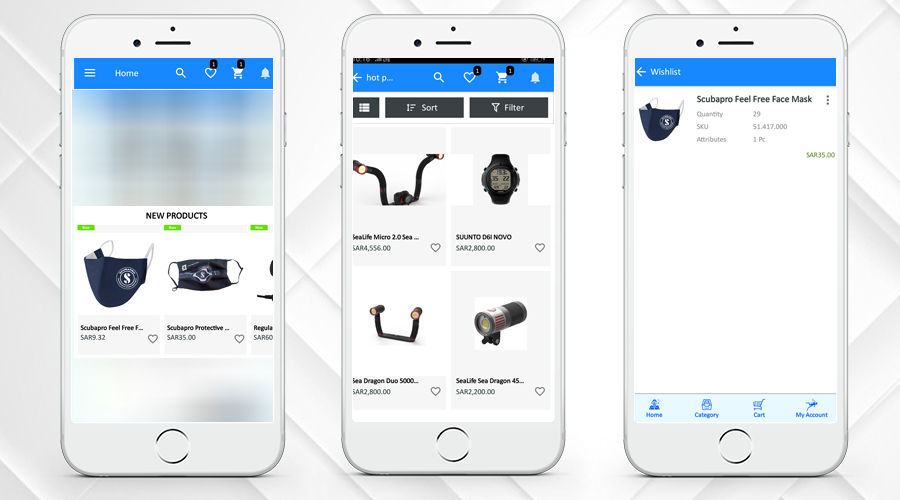
Clear navigation for new products, best sellers, and hot products keeps the customer engaged. The admin can select the products like New Arrivals, Best Sellers, Special Products, Products from a category, or Custom Products to showcase on the home screen that will help the customers to make their purchase decision.

Another interesting feature that you should have in your mobile app for eCommerce is the wishlist. The Mobile App Creator’s built-in wishlist feature enables customers to add the product to the wishlist and access it for later purchase.

4.     Easy Sign-up and Login

Prestashop Mobile App for Scubamaster store provides multiple login options. Now users can login with Google, and Facebook, email & Phone Number. Users of the mobile app will simply log in to the app and conveniently access the items and categories. Users can easily share products on social media.

5.     Supports Various Payment and Shipping Methods

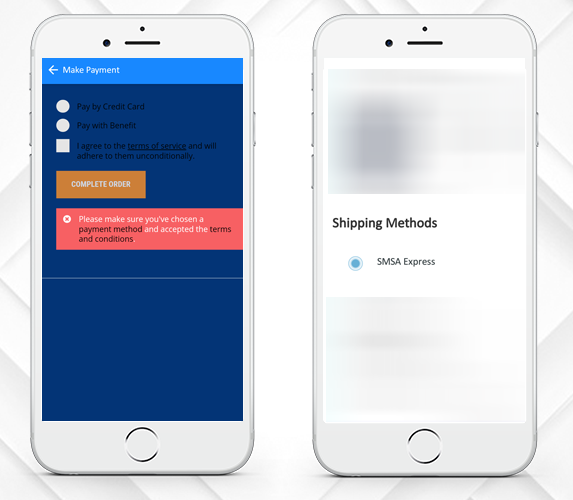
The ScubaMaster is offering various payments and shipping options that enhance the urge to buy more. On the website and mobile apps, the front-end mobile shopper will find the same kind of checkout experience.

ScubaMaster Store Mobile App has more PrestaShop modules for store management and to boost sales

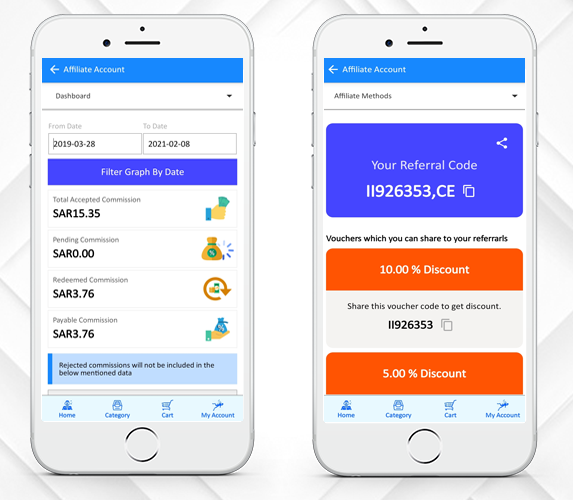
6.     Affiliate and Referral Program

The ScubaMaster Store has incorporated the Affiliate and Referral Program. Affiliates promote the link on their website, blog, or YouTube channel of your store products, etc. The affiliates get a small commission on every sale through their affiliate link.

A visitor or customer shares your products with their people in the Referral marketing program. When people make purchases from your store, you provide them with some kind of referral reward. A customer can choose to share the link or voucher code for the product.

7.     Return Manager

Return Manager Module by KnowBand is another successful tool used by ScubaMaster to manage the order returns on their store. they can track the return from the backend.

They have also customized this module to work well with the mobile app. KnowBand added this custom feature at the client’s request. Customers can place return, order cancellation requests, or refund requests from ScubaMaster Store Mobile App.

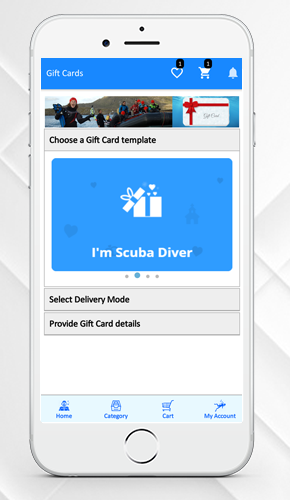
8.     Gift Card Manager-Gift Card for your loved ones

Digital Gift Cards, also referred to as electronic gift cards or e-gift cards, contain a branded gift code and are sent via email. All over the world, e-gift cards can be sent to anyone. The same has been added to the ScubaMaster Store Mobile App.

The module adds a gift card section and provides pre-existing customizable gift card templates. Use these templates for various occasions such as Halloween, Christmas, New Year, Mother’s Day, Birthday, Anniversary, etc. For any desired occasion, you can add new gift card templates so that you do not miss out on any important event.

Why build a mobile app for your business?

Nowadays, for almost every purpose you can think of, like selling products and rendering utilities, mobile app development services have been used to create iOS and Android mobile apps.

The mobile device consumer population currently stands at over 1 billion worldwide. The reasons why every business owner wants a mobile app for his or her company are below.

Mobile Applications improves customer experience; it increases customer engagement on your store and adds value to your customers. Along with that, mobile apps play a crucial role in building a brand’s identity.

The purpose of mobile apps is to reinforce and inform the client about your brand. The more he likes you, the more he listens to you and your sales pitches and ultimately commits himself to your brand.

PrestaShop Android & Ios Mobile App Builder Module

Without any coding, you can create an eCommerce mobile app for your PrestaShop store. The Mobile App Builder Module helps the shop administrator to launch the shopping app under its website/business name and value. To make the shopping app look attractive and enticing for front-end shoppers, there are intuitive color and font options.

The iOS and Android mobile app let you send infinite push notifications. You can customize the entire home screen and look and feel of the PrestaShop mobile app front-end. It is most useful for the store admin to design the home screen layout of the mobile app. Only select the required banners, sliders, categories, products, etc., and to change them, use drag & drop. It is possible to modify and customize locations, headings, names, etc. from the admin panel at any time. These adjustments on the app will be mirrored in real-time on the apps.

Please visit the link below for details:

PrestaShop Mobile App Builder

For any further details, feel free to contact us. Please drop an email to support@knowband.com.

More Success Stories to celebrate:

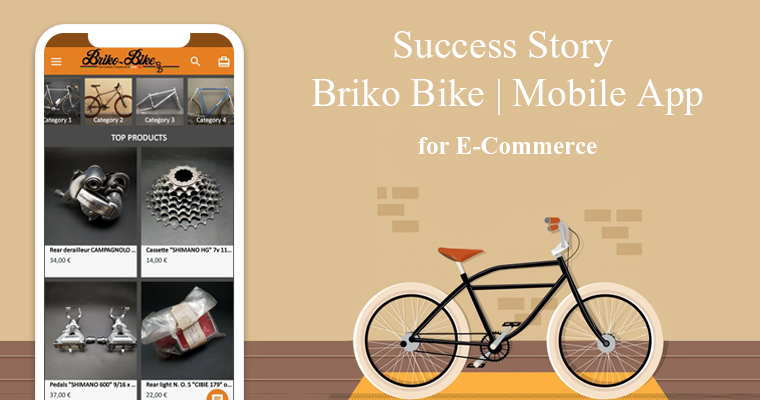
Success Story – Briko Bike Mobile App for E-Commerce

What if we told you that there is a simple way to increase your profits, improve your customer base, and give your brand a boost? It is all possible by developing a smartphone app for your online store. The eCommerce Mobile App is now taking over the industry, drawing many users and racking up huge profits. The number of users who choose to shop on mobile devices is increasingly rising and with that the growth of mobile e-commerce is surplus.

This article is to celebrate the success story of our client ‘Briko Bike’, an eCommerce store which was established in 2008 in France. They built a shopping native mobile app using KnowBand’s eCommerce Mobile App Creator plugin. The app builder plugin automatically creates a shopping app using the data from the website & its APK & IPA files are released on the Google Play Store & Apple App Store. Store owners only have to install the app plugin on their website.

About Briko Bike:

Briko Bike’s store owner is a great enthusiast and old bike collector and he converted the hobby into his profession. You can find a collection of spare parts of the old vintage bikes on the Briko Bike’s website and the Mobile App that was created using KnowBand’s Mobile App Plugin.

Services offered by Briko Bike:

At Briko Bike store, they provide accessories for road bikes, mountain bikes, BMX old school parts, and all the parts from a brake shoe to luggage storage bag. Briko Bike is one of the exclusive stores that sell such products online.

–> Click here to visit Briko Bike Website

–> Click here to Install Briko Bike Mobile Application from Play Store

–> Click here to Install Briko Bike Mobile Application from Apple Store

Top Features of Briko Bike Mobile App:

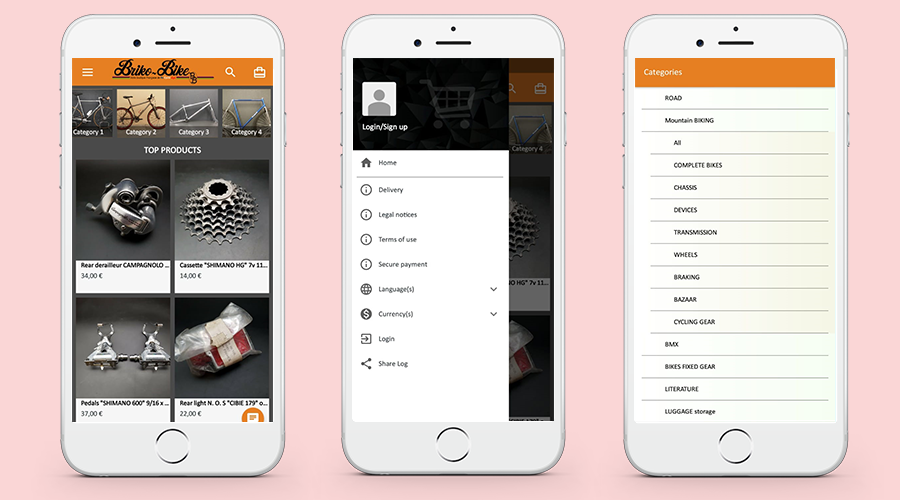
1. Home-Page, Menu & Category Page:

These app screens are from the Mobile App of ‘Briko Bike’. The Home Page, Navigation Menu, and the Category Tab are shown on the 3 screens above. Store owners get a customized app by using the eCommerce Web App Creator plugin. Using various home page editor tools given on the backend of the eCommerce Mobile App Creator plugin, they can design the home page of their app easily.

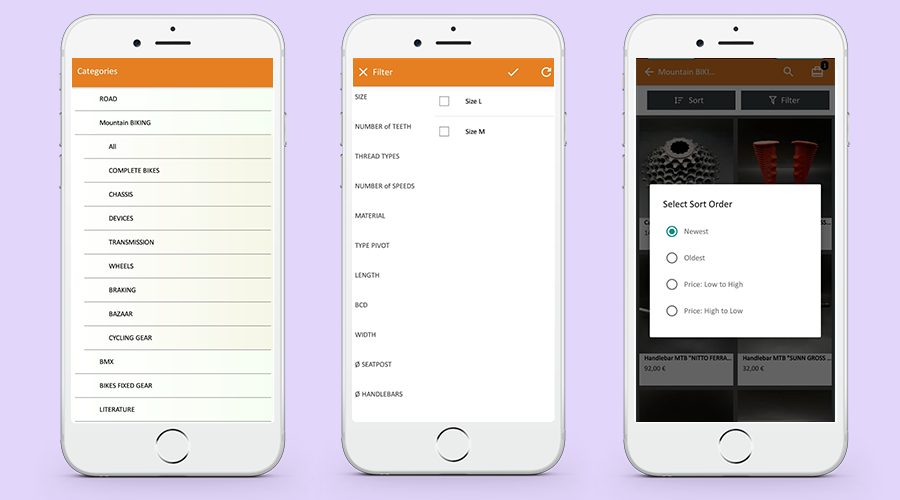
2. Categories and Sort Filters for Product Page:

While making a purchase, sometimes it is difficult to find the right product. To simplify the search results, the mobile app is integrated with the category selection and sorting menu as shown in the pictures below. From the listed categories, customers can select desired ones and sort them accordingly.

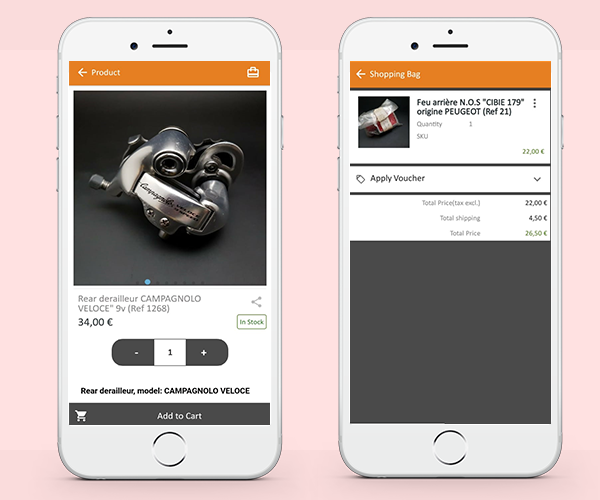
3. Shopping Cart Design:

The shopping cart is used by e-commerce websites not only to promote a customer’s shopping experience but also to boost sales. Briko Bike Mobile Application has a custom shopping cart. Customers can add one or more products to the cart and purchase them immediately.

4. Clear CTAs:

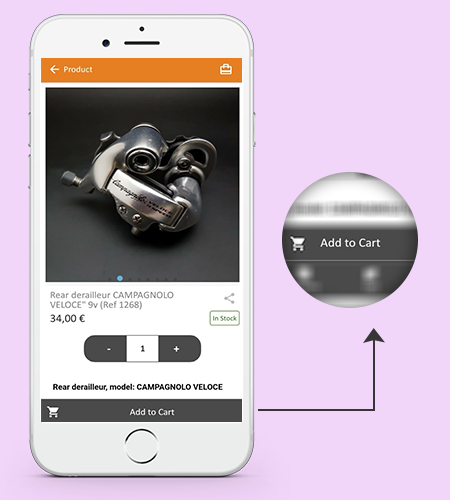
A lot of emphases is put on the homepage when developing an online shop, which is the first thing visitors see when they arrive. The product page of the Mobile App is highly responsive and its design is drool-worthy that can easily convert. It has a clear ‘CTA’ (Call to Action) button that allows the user to add the product to the cart.

5. Easy Sign-up, log in, and Guest Checkout:

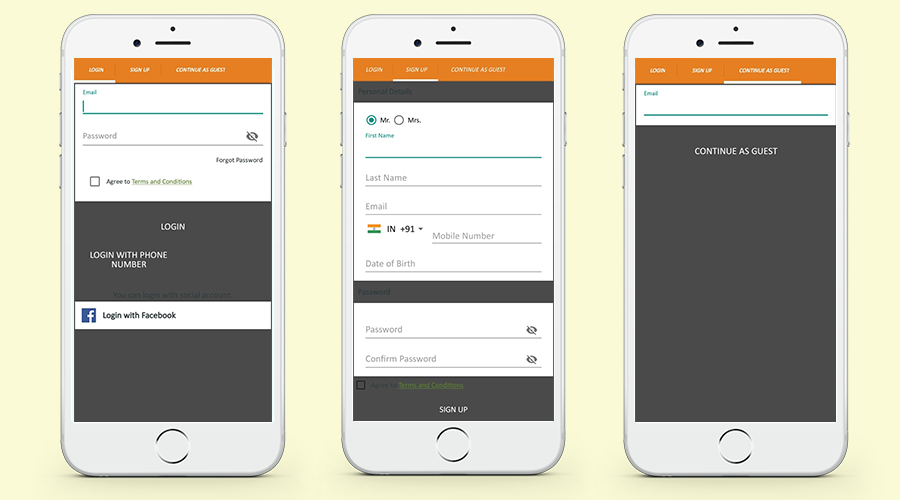
Briko Mobile Application created by KnowBand’s Mobile App Builder provides 3 checkout options for the user. Customers can register by filling up the registration form, log in via Facebook (Social Media Account), and can also opt for a Guest checkout by inserting the email ID. These features are provided by the Mobile App and can be customized as per the user requirements.

Message from Briko Bike:

After long researching and testing different ways to create an application for my Prestashop site, I finally decided on the BUILDER APP module which perfectly matched my expectations.

The main advantage of this module is that you buy it only once and you have no other costs, unlike other solutions which take a percentage on the sale of your products !!!!

This solution is very easy to implement without knowing how to code to obtain a nice and modern application, I still called on the Knowband technical service for some specific improvements which were carried out very quickly according to my request.

I would like to thank the entire Knowband team for their quality work and their reactivity during our exchanges of messages.

I would also like to point out that the Android and Apple applications are put online by the technical service on the stores, let you guide;)

About PrestaShop Android & iOS Mobile App:

KnowBand offers more than 60 PrestaShop modules that are also listed on the official PrestaShop addon store. Some top-notch PrestaShop modules developed by KnowBand are- One Page Checkout Module, Abandoned Cart Module, Return Manager Module, Marketplace Integration modules (eBay, Etsy, Google Shopping), Multi-vendor Marketplace & Android & iOS Mobile app.

The Android & iOS Mobile app module allows the PrestaShop store admin to create a mobile app for the existing PrestaShop store. The store manager needs to purchase the Mobile app module (One-time payment) and along with that he/she has to submit the prerequisite form. As per the shared details, the mobile app development team of the KnowBand will share the app for review and as per the final approval, the APK and IPA files will be shared. These APK and IPA files can be used to list the module on Google and Apple App store. All the data available on the website will get sync to the mobile App automatically in real-time.

For more details please visit the link below:

PrestaShop Mobile App Builder

Feel free to contact us for any further details. Please drop an email to support@knowband.com.

Top-notch Features To Consider For Your ECommerce Mobile App

The eCommerce industry is growing at a rapid rate with other technological advancements like mobile apps and customers are adopting them in their daily lifestyle. It is very much easy for the customers to shop from the mobile app rather than using the eCommerce website. There are many growth opportunities in the market for the eCommerce business and shopping apps will also boost sales conversion. The Mobile App Creator extension helps the store admin to easily launch the native eCommerce shopping App for Android and iOS. Having a shopping app for any eCommerce store opens door to the majority of opportunities and benefits.

But, creating a mobile application potent enough to generate leads and sales for your business isn’t a piece of cake. It must have an impressive user-experience with powerful features to make the shopping handy. In this blog, you will find some of the major features which can improve your business performance on mobile. Before diving into the list, here are some of the readymade solutions to launch apps for an eCommerce store:

PrestaShop: https://www.knowband.com/prestashop-mobile-app-builder

OpenCart: https://www.knowband.com/opencart-mobile-app-builder

Magento 2: https://www.knowband.com/magento-2-mobile-app-builder

WooCommerce: https://www.knowband.com/woocommerce-mobile-app-builder

All the above-listed plugins are ready-to-launch frameworks for mobile application needs. The solutions are fully featured and come with all necessary settings in the admin panel to simplify the work of store admin. Now, let’s explore the beneficial factors of creating apps with these modules:

1. Custom Branding and Configuration Control

It is important for every eCommerce business to have their own custom branding logo, app name, splash screen, etc along with the right color schemes. The Mobile app Creator allows the store admin to launch the shopping app under their website/business name and value. Intuitive color and font options are there to make the shopping app look attractive and enticing for the front-end shoppers. The entire look and feel of the eCommerce Mobile App can be controlled over a few mouse clicks and button toggles.

Designing the home screen layout of the mobile app is most handy for store admin. Just choose relevant banners, sliders, categories, products, etc., and use drag & drop to adjust them. The positions, headings, titles, etc. can be edited and configured from the admin panel anytime and the changes will be reflected on the apps in real-time. Along with this, other necessary settings are also available in the admin panel of the Android & iOS Mobile App Builder.

2. Handy Marketing & Promotion Tool

Push notifications are one of the important features of eCommerce Mobile Apps in terms of driving sales. The custom push notifications can be used to give constant reminders to the customers about the latest product, offers, discounts available on the eCommerce mobile app. Researches show that more users prefer to purchase on the eCommerce app after receiving push notifications.

The Mobile App Maker extension makes all website coupons and vouchers supported on the apps. As a result, the store admin is allowed to showcase the same coupons on the mobile app which are already running on the website. The users can choose the right coupons and make the purchase. The store admin can craft any notification template in the admin panel or can even automate the same for automatic deployment. Unlimited push notifications can be sent to the app users free of cost. No additional integration is required.

3. Simpler Login & Checkout

Make sure to keep the registration/signup or login simpler for the front end shoppers. Lengthy and complex registration in eCommerce mobile app can annoy users and they can end up leaving the Android and iOS app. It is quite important for the store admin to grab your user interest in order to motivate them for more purchases.

The Mobile App Maker for eCommerce offers inbuilt login options with Google, Facebook, Fingerprint & Phone Number (OTP). The mobile app users can simply login into the app and browse the products, categories easily. The users can also share the products on multiple social media platforms.

4. Multi-lingual & RTL Support

It is not possible for the store admin to develop a different mobile app for different languages. Having one language in the eCommerce app can rigid the targeted segment and impact the sales well. The Mobile App Builder offers multiple languages compatible apps including RTL (Right To Left) scripts. The plugin will make all website languages work on the app and allow the store admin to sell across borders and target both regional as well as global audiences. The user can choose any desired language on the app and check it in their preferred language.

5. All Payments & Shipping Method Support

Customers tend to shop more if they are getting favorable shipping and payment options. Offering multiple payment and shipping options enhances the urge of buying more. The store admin can easily integrate all the payment and shipping methods available on the eCommerce website into the Mobile App. The front end mobile shopper will find the same sort of checkout experience on the website and mobile apps.

6. Real-time Inventory Update

It is very difficult for the store admin to manage the inventory on the website and mobile apps. The apps with the Mobile App Maker extension gets automatically synchronized with the website inventory. The changes will be reflected automatically on the app as they are made on the store inventory.

7. Offline Mode Working

Most of the mobile apps do not work perfectly after getting interruptions in the internet connection. The offline mode of Mobile App Builder helps users to browse the products even in case of no internet connection. This feature enhances the user experience and helps in increasing the sales of the eCommerce Mobile App.

8. Rating and Feedback

User rating and feedback option is very much important for any eCommerce business and acts as a guide for others. The user product reviews and rating option helps to improve the satisfaction level of customers and users’ reliability. This helps the customers to have good recommendations and increase the sales of your eCommerce store.

9. Wishlist Functionality

Wishlist is another interesting feature that you should have in your eCommerce Mobile App. The reason being is that the app consists of a huge number of products and it can be very difficult and time taking for the customers to find a favorable product. The inbuilt wishlist feature of the Mobile app creator allows customers to add the product to the wishlist and access them for later purchase.

Conclusion:

The eCommerce mobile app is a part of our day to day life these days. The users are getting more dependent on the shopping apps for online purchases. So it is important for the eCommerce store owners to come up with exciting features that make the eCommerce app stand out. Knowband provides a great Mobile app creator module and consists of a team of an experienced pool of developers to do the job. To know more about it, send us an email at support@knowband.com

Top WooCommerce Mobile Apps Developed By KnowBand

This is the age of smartphones and the majority of eCommerce stores are somewhere looking for the perfect Android and iOS Mobile Applications. But, searching the right shopping application for your business isn’t a piece of cake. The apps on Google Play Store and Apple App store is increasing exponentially with each passing day. This is increasing the surrounding competition in eCommerce and your business. So, launching a regular shopping app won’t be helpful. You need to be sure that the app must have all the necessary features and should go hand-in-hand with the current market trends. KnowBand has been a leading eCommerce plugins and mobile app provider for websites on multiple eCommerce platforms like PrestaShop, OpenCart, Magento and WooCommerce. Let’s explore more about WooCommerce Mobile App Builder in detail and explore the amazing benefits it can offer.

A Brief Introduction:

The WooCommerce Mobile App Builder plugin is an automated extension using which WooCommerce store owners can automatically build & launch their native Android & iOS App for their WooCommerce Store. The WooCommerce Mobile App Builder offers customizable apps so that store owners can modify any time from the simplified backend dashboard of this extension. Now, let’s take a look at the steps using which store owners can launch their app using this extension.


Three Simple Steps To Launch Android & iOS Mobile Apps:

# Step 1. Purchase WooCommerce Mobile App Builder plugin.
#Step 2. Install the plugin on your WooCommerce website.
#Step 3. Fill our pre-requisite form & review your app before publishing it on App store/ Play Store.

Note: The final apps will be completely white label and branded to your store. Apps will be published on Google Play and Apple App Store using your own developer accounts.

Free of Cost Preview App Before Purchase

We understand the eCommerce merchants confusion and doubts and offer free of cost demo app preview for their own store. You just need to raise the free demo request on support@knowband.com. Our prompt support staff will ask for required information and share the working demo apps for your store.

Some Of Our Best Work of WooCommerce Mobile Apps:

#1. AQ Mobile:

Website: https://aq-mobile.com/

Mobile App: https://play.google.com/store/apps/details?id=com.aqmobile.androidapp&hl=en

AQ mobile sells various kinds of smartphones & tablets (both new & used/refurbished) on their store. They have their website built on WooCommerce. Hence, to build & launch their Native Mobile App, AQ Mobile used the WooCommerce Mobile App Builder plugin on their website. Because of the multi-language feature provided by this app maker plugin, AQ Mobile’s app supports English & Arabic (an RTL script). You can check out their Mobile App & website at the following links.

#2. Salami Foods:

Website: https://salamifoods.com/

Mobile App: https://play.google.com/store/apps/details?id=com.salamifoods.androidapp

Salami foods sell different kinds of seafood & meat online. Their Mobile App follows the same & acts like a Grocery shopping app. Salami foods used our WooCommerce Mobile App Maker plugin on their website i.e. now they are able to effortlessly send & manage push notifications & customize their app from the simplified backend dashboard of this extension.

#3. Kevajo

Website: https://kevajo.com/

Mobile App: https://play.google.com/store/apps/details?id=com.kevajo.androidapp

Kevajo is an all rounder eCommerce store selling all kinds of things from home appliances to apparels, shows & gadgets. Its app supports languages- English & French. It’s good to have a mobile application for such a B2C eCommerce model. We are glad that our WooCommerce App Builder plugin has been helpful for the Kevajo Team.

#4. iSteel:

Website: https://i-steel.com/

Mobile App: https://play.google.com/store/apps/details?id=com.isteel.androidapp

This eCommerce store sells various gadgets on its WooCommerce website & Mobile App. iSteel App also supports RTL script language (Arabic). The WooCommerce Mobile App Builder plugin allows them to effortlessly manage their app without the need for coding. As this plugin offers live synchronization feature, the inventory management is automatic on the app.

#5. Forza

Website: https://forza.eu/

Mobile App: https://play.google.com/store/apps/details?id=com.forzaeu.woocommercegenericapp&hl=en_IN

Forza is an eCommerce store that sells fighting gears online. Its store is available in two languages i.e. English & Dutch (Netherlands). Their WooCommerce Mobile App build using this app maker extension gives their store owners the freedom to customize & manage their app.

Release App for your own WooCommerce Website Today:

With such potent and feature-rich WooCommerce App Creator plugin, the store owners can effortlessly launch their own Android & iOS shopping apps. Selling via mobile apps along with the store will simply enhance the reach of your store and bring more sales. This makes mobile app an excellent medium to market almost anything.

So, why wait longer? Get your own WooCommerce Mobile App up & running asap. For any queries or assistance, feel free to reach out to our experts at support@knowband.com.

Also Read: 

How Easy Is It To Design Home-Page Of WooCommerce Mobile App?

How Easy Is It To Send Push Notifications On WooCommerce Mobile App?

[Version 2.0.2 Released] New Features Added To PrestaShop Mobile Apps

Having all the latest features in a mobile app is something that every business is concerned about these days. The same is the case with eCommerce businesses too. To cater to the app users in the best possible way, shopping apps must be laced with the latest features as they help improve the UI & UX of the app.

For PrestaShop, a popular open-source eCommerce platform, mobile applications have become more efficient now. With the addition of 3 new features described below, KnowBand Plugins have rejuvenated their PrestaShop Mobile App Builder module.

Simple Steps To Launch A PrestaShop Mobile App:

1. Purchase PrestaShop Mobile App Builder module.

2.  Fill the app pre-requisite form. (We need these details to create apps)

3. Review your final app before confirm to publishing it on the app stores.

Note: We only publish apps with your developer accounts (Google Play and Apple App store) without any extra charges at our end.

Quick Glance to New Feature Additions:

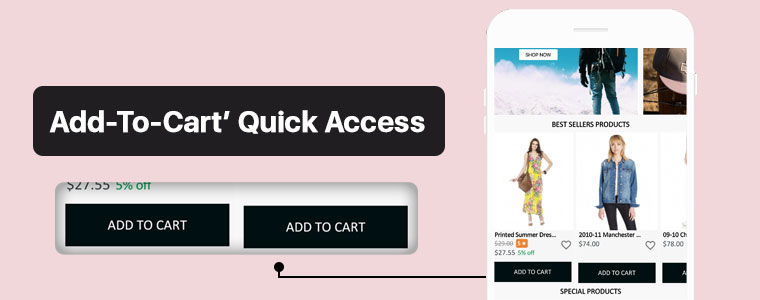
#1. ‘Add-To-Cart’ Quick Access:

This new feature adds the ‘Add-To-Cart’ button on the Category Page & also on the Home-Page wherever product blocks are used. This way, app users won’t have to open the individual product pages in order to add that product to their cart. App users can quickly add their choice of products from the category or home-page.

Now, the user can simply browse the app and keep on adding products into cart seamlessly.

#2. Related Products On Product Screen:

On an eCommerce product page, one great way to motivate the customers’ to shop more is to show some products related to the main product on that page. To serve this purpose, now the PrestaShop Mobile App Builder is compatible with our Automatic Related Products module.

Now, it’s way simple to showcase related products on both website and apps and improve revenue through cross-selling.

#3.  Product Reviews and Ratings:

On the product page, app users can rate the products & write & submit their product reviews. Upon approval, they are displayed on the product page so that others can view it for reference. The PrestaShop Mobile App Builder is compatible with the default Product Comments Module.

Now, showcase user reviews & ratings for products on app and motivate new buyers for more purchases.

Compatibility With Other PrestaShop Modules:

1. Multi-vendor Marketplace Module:

With the use of this module, store owners can easily transition their single-vendor PrestaShop App to a multi-vendor PrestaShop App. Because the Mobile App Builder module is compatible with the Marketplace module (both by KnowBand Plugins), all of the processes are automatic. All you need to do is install the marketplace module on your PrestaShop website.

Having a marketplace allows the store owner to have multiple sellers on his/her store, each with a unique vendor panel. Store owners can sell their own products too on a marketplace & also make profits by taking commissions from the vendors.

–> Check out combo pack of (Multi-vendor Marketplace + Mobile App) below:

https://www.knowband.com/prestashop-advanced-marketplace-with-mobile-app

2. Booking & Rental Module:

This module by KnowBand allows eCommerce stores to have all the functionalities & layout of a booking or a rental app/ website. Now, this module is also compatible with the PrestaShop Mobile App Builder module by KnowBand.

–> Check out combo pack of (Booking and Rental + Mobile App) below:

https://www.knowband.com/prestashop-booking-and-rental-mobile-app

3. Image Search Module:

The Image Search module allows the app user to search for products of your e-store using any reference image that they either clicked with their phone camera or using any reference image from their phone’s gallery. You can also enable this feature automatically in your PrestaShop App by installing this module on your PrestaShop website.

–> Check out Image Search Module from below:

https://www.knowband.com/prestashop-image-search

4.‘Spin & Win’ Module:

Using this module, store owners can show a ‘spin & win’ discount wheel which the customers can spin to avail any one of the discounts mentioned on the pie wheel. Enable this feature on your PrestaShop App by installing this ‘Spin & Win’ module on your PrestaShop website & configure it & then simply set its toggle switch to ‘ON’ (from the App Builder module).

–> Check out Spin-win module from below link: 

https://www.knowband.com/prestashop-spin-and-win

5. Related Products Module:

This PrestaShop module, by KnowBand, displays a list of products related to the main product (on the product page). When an app user is shopping for a particular product, he/she will be able to see related products when they scroll down on that product page. Equip your PrestaShop Mobile App with this feature by simply installing the ‘Related Products’ module on your PrestaShop website.

–> Check out Related Products from below link: 

https://www.knowband.com/prestashop-automatic-related-product

Now that all the new features, compatible modules & installation steps are covered, let’s take a look at core features of the PrestaShop Mobile App Builder module & learn how it can benefit your business.

Core Features & Benefits Of The PrestaShop Mobile App Builder:

#1. Multi-Lingual & Multi-Currency Support:

This app maker module is great for businesses who are willing to launch a PrestaShop App that supports multiple languages & currencies. It can help with localization & even with expansion to multiple countries.

#2. DIY Home-Page Editor:

This feature allows the store admins to design their app’s homepage without having to code. All the tools provided in the DIY Homepage editor of this module are easy-to-use. Admins can add, rearrange & configure various components like sliders, banners, grids, recent product tab, count-down timer, etc. Admins can make multiple layouts & enable anyone of them at a time. This again saves them from designing at the last moment.

Regularly updated & re-designed homepage keeps the app users engaged & allows the business to display the most relevant & in-trend content on their homepage.

#3. Unlimited Push Notifications:

Your app users who have enabled push notifications on your app will be able to receive the notifications that you (admin) create & send from the backend of this PrestaShop Mobile App Builder module.
There is no limitation with this module because store admins can send an unlimited number of push notifications to their app users. Push notifications help to re-engage the app users & remind them about any abandoned cart items, order status, upcoming sale & its benefits & a lot more.

#4. Offline Mode Working:

The PrestaShop Mobile Apps are made to work in offline mode as well i.e. under slow internet or no internet connectivity. Online shoppers get to browse apps with pre-loaded screens without actually needing the internet.

#5. Admin Panel Control:

The mobile apps for PrestaShop can be fully controlled by the friendly admin panel. The store admin can make a few clicks and button toggles and make the app work as per the requirement. The flexibility and customizable options with this extension make it the most preferred choice for store owners.

Drop us an email at support@knowband.com or check all such amazing features in detail from:

https://www.knowband.com/prestashop-mobile-app-builder

[New Version Release] Magento 2 Mobile App Builder : v1.0.6

As the technologies keep evolving, it has become quite essential to keep up with the trends. For businesses, it gets really important to keep their website, mobile app, etc. up to date. eCommerce business owners are aware of this & are making all the efforts to have all the latest functionalities on their sites & mobile apps.

To help such business out, mobile app builder extensions from KnowBand underwent updation. The new version of Magento 2 Mobile App Builder is out. Despite already being a full-fledged tool, this app maker plugin has now even more to offer.

Recent Additions In Magento 2 Mobile App Builder (v1.0.6):

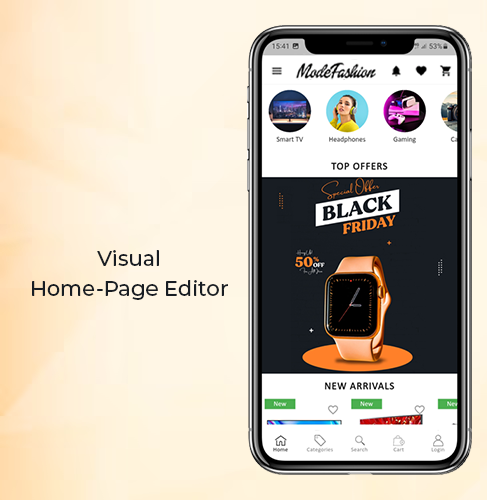
1. Visual Home-Page Editor With Live Preview:

This recent update allows the admins to edit the home-page design while all those changes are visually previewed on the backend itself. This way, they can get a live view of the changes they make on their home-page layout. Once the admin is satisfied with the preview, he/she can save the design. After saving, the new design would instantly reflect on users’ devices.

Add multiple banners, sliders, & even countdown-timer with just a few clicks & swipes. Rearrange the home-page components to suit your theme. Add call-to-action & relevant redirects on the desired components of your homepage. Admins can also pre-design multiple layouts & enable any one of them at a time.

2. Deep Linking:

Deep Linking is a great way to retain app users without any effort. All those who have your Magento Shopping app installed will automatically get redirected to the relevant page on the app if they end up visiting any page on your mobile site. This ensures more personalization to the app users & better user experience. Such factors naturally improve the engagement on the app.

Other Features of the Magento Mobile App Builder:

1. Push Notifications:

With this app maker extension, store owners can create & send an unlimited number of Push Notifications to their app users. There are even 3 automated templates provided for ‘successful order’ notification, ‘order tracking’, and ‘abandoned cart’ notifications. Admins can even set the timer after which the abandoned cart message would be sent to particular app users.

2. Multi-lingual & Multi-Currency Support:

This app maker add-on equips the Magento app to support multiple languages and currencies. App users can choose the ones according to their preferences.

3. Fully Customization White Label App:

The Magento 2 mobile apps built using this plugin are totally customizable. Most of the customizations can be made by the admins from the backend of this module. They do not need to perform any coding or spend hours on any task because of the simplified backend. Any other unique customizations can even be programmed into it if the need arises.

4. Tablet & Smartphone Compatible:

These Magento 2 Mobile Apps will be compatible to run on both smartphones and tablets on both Android & iOS operating systems. Store owners can even opt for an app for just a single operating system.

5. Live Synchronized:

This feature keeps both your Magento website and the eCommerce mobile app always in real-time sync with each other. This also keeps the catalog management automatic for your app.

6. Quick Onboarding Options:

App users can log in/ signup using their Facebook or Google accounts. They can also login using fingerprint authentication.

7. Multiple Chat Support Options:

By default, Whatsapp & Zopim chat support is provided with this add-on. Admin can enable/ disable any or both of them whenever they wish.

8. Enhanced Navigation:

The navigation menu & the filter & sort provide the app users with very user-friendly navigation. The category and subcategory arrangement is automatically set in a proper manner. Admins can even add a few CMS pages on the menu of their Magento 2 Mobile App. They can select those CMS pages from their website.

9. Multiple Social Sharing Options:

This allows the app users to share a product page directly to their social media platforms. App users can choose from a large number of platforms to share with just a single click.

10. Simplified Checkout:

This Magento 2 Mobile App maker extension offers one-page checkout to make it easier for app users to place orders without a hassle. The address is pre-filled out of all the addresses stored on the users’ my-account page. The app users can even track their active orders directly from the eCommerce app.

Conclusion:

This Magento 2 Mobile App Builder, developed by KnowBand, is an ultimate tool to build a Magento app for your business from your own Magento website.

Now that mobile apps are getting a lot more preference by the netizens, it is now a necessity for eCommerce businesses to have a synchronized mobile app. With an extension like this one, eCommerce businesses have a great advantage & opportunity to excel.

How easy is it to design Home-Page of PrestaShop Mobile App?

With the growing use of mobile apps, more businesses are willing to make extra efforts to stand out from their competitors. For eCommerce businesses, having a mobile app with regularly updating home-page design helps them to keep their customers engaged in a profitable way. Every time, a new offer/ new-arrival/ sale/ etc. is put up on their shopping app, making the customers aware of it can naturally boost their sales. This can be done by optimizing the home-page design as well (apart from push notifications & other campaigns) in PrestaShop Mobile App.

To make the home-page designing & re-editing easier for business owners, KnowBand offers eCommerce Mobile App Builder extensions. It not only helps eCommerce businesses with building their eCommerce Mobile Apps without a hassle & but also offers feature-rich backend & frontend for the benefit of businesses as well as app users. This article will shed light on how to use the PrestaShop Mobile App Creator Module to create, design & edit the home-page layouts.

Once the PrestaShop Mobile App Builder module, by KnowBand, is installed on your PrestaShop website backend, the home-page of the app can be easily customized anytime from the backend of this module.

On clicking ‘configure’ on this app maker module, you are presented with various editing options.

-Select ‘Home-Page Layout’ from the side menu.

-To create a new layout, click the ‘add new layout’ button. You can also re-edit the existing layouts. Also, you can pre-design multiple layouts & keep any one of them active on your Mobile App (from the general settings on the side menu).

-While designing or editing your app home-page layout, you can use a maximum of 20 components out of the complete list of different components shown in the side menu on the left. Hence, you can also use a single component multiple times in your layout

-Upon adding these components, you can edit each one of them & organize them using the drag & drop feature.

The best thing is that all the edits that you make, instantly reflect on the demo app screen within the home-page customization tab itself.

Components To Design Your PrestaShop Home-Page Layout:

1. Top Categories:

In a slider form, you can display small image icons with redirect links to relevant categories on your eStore. You can add a total of 8 of such categories in a single ‘top category’ component.

2. Square, Grid & Horizontal-Sliding Banners:


For all these 3 banner types, you can choose the redirect options among category pages, product pages, home-page & even any of the CMS pages. Add single or multiple elements under such banners according to your needs.

3. Square, Grid & Horizontal-Sliding Products:

With these 3 components, you can display singular products redirecting the app user straight to the specific product page. Because this PrestaShop App Builder Module also lets you set featured product listings. You can choose among following options to display the products:

● Best Seller Products
● New Arrivals
● Featured Products
● Special Products
● Products from a category
● Custom Products

4. Recently Accessed Products:

Including this component anywhere on the layout simply creates a horizontal slider for products displaying only the products that an app user has recently viewed. It is ideal to add this component only once in a home-page layout.

5. Countdown-Timer Banner:

This banner has an in-built countdown timer with all the necessary settings to make it your own. You can use it to inform your app users about an offer that is ending in a specified time. Having the timer running helps to engage the customers & to make successful purchases until the clock is running. Refer to the screenshot below for its settings.

Apart from all the edits, you can make to design your PrestaShop App’s home-page, there is one more useful thing that’s present all the time on your app’s screen. It is the tab bar.

Tab Bar-Designing:

From the side menu of the PrestaShop Mobile App Maker module backend, you can also design the tab-bar. This design remains common for all the home-page layouts. Add 3 to 5 elements in your tab-bar with necessary links to make your PrestaShop App look more professional & user friendly.


Here is how the ‘My Account’ tab-bar setting looks like:


By now, you must have gotten an idea of how user-friendly it is to create, design & edit the home-page layout of a PrestaShop Mobile app using the PrestaShop Mobile App Maker module.

From time-to-time, eCommerce apps do have to change their home-page layout to complement different offers, seasonal sales, new arrivals & whatnot. Hence, to make it easier yet effective for the eStore owners, our experts at KnowBand have developed this PrestaShop Mobile App Maker Module. Those who wish to test out this module before purchasing can even try out its free version.

Some of our beautifully designed client app:

A) Body Organics App:

B) Elecbee App:

C) ChirulliShop App:

D) Caribstore App: 

E) Terminal Fashion App:

F) VenusSense App:

G) Xbahrain App:

If you still have any queries related to this, feel free to email us at support@knowband.com. We would be more than happy to assist you.

Also Read: 

How easy is it to send personalized Push Notifications in PrestaShop Mobile App?

How easy is it to send Push Notifications on PrestaShop Mobile Apps?

Keeping the customers always interested & engaged is what every online eCommerce business wishes for. Having a native mobile app (Android/iOS) is gonna ease the online shopping for users. User engagement has always been a prime requirement and to fulfill the same mobile apps have come up with the Push Notification tool.

Push notifications are directly received by the app users on their mobile devices. The only condition is that the app must be installed on the device. Push Notifications have been noted to perform way better in terms of engaging app users and retaining them when compared to email reminders/ newsletters & campaigns.

Push Notifications with PrestaShop Mobile App Builder

KnowBand offers personalized push notifications feature in PrestaShop Mobile App Builder. The module aims to launch Android and iOS apps for running PrestaShop store without any coding knowledge. This write-up will introduce you to the backend settings to configure and send Push Notifications on the user’s devices.

While keeping your app in sync with the website, this app maker module provides a wide array of front-end & back-end features. The ones for Push Notifications are stated below. Follow this article to know how you can create, automate & send these notifications with utter ease.

On the backend of your PrestaShop website, where you have the Mobile App Builder installed, hit ‘configure’. Now, from the backend of this module, navigate to the Push Notification Settings Tab from the side menu.

Push Notification Settings:

From the backend, you only need to enter your Firebase Server key (which will be provided along with apps), the rest is set for you to proceed. The PrestaShop Mobile App Builder by KnowBand provides an unlimited number of push notifications that e-merchants & admins can send to their app users.

Some of the automated Push Notifications are already provided by default for your convenience. These notifications can even be disabled/ enabled with just a toggle switch. Apart from those, you can create any other kind of Push Notification from this backend as well. Here is how you can configure them.

A) Successful Order Notification:

Using this notification setting, the store owner or the admin can set the title & message for successful orders. Each time an app user successfully places an order on the app, he/she will be greeted with this notification.

B) Order Status Push Notification:

This informs your customers about any status update on their active orders. Some examples of these are ‘order packed’, ‘order shipped’, ‘on the way’, ‘delivered’, ‘canceled’, etc.

Use the variable ‘{{STATUS}}’ anywhere in the message body to form your order status push notification.

C) Abandoned Cart Push Notification:

Automate the abandoned cart notification by setting the timer provided in this push notification setting. Every time an app user leaves his/her cart abandoned, then automatically this push notification is sent to him/her after the specified time.

Custom Push Notifications:

Apart from the above three pre-defined notifications elaborated above, admins can create any kind of self-designed Push Notification from this setting. From the side menu of this app maker module, select ‘Push Notification History’. Then using the ‘Send Notifications’ button on the top right of the page, create a new notification according to your needs.

You can even choose to selectively send these notifications to any of android/ iOS devices. Use attractive images to get more customer engagement using these notifications. Choose the redirecting activity to be any of the categories/ subcategories/ products or even the homepage of the app. These notifications get sent to all the app users once you hit send.

Push Notification History:


Keep a record of your previously sent notifications & their configurations by accessing the ‘Push Notification History’. You can even filter out the ones you want to view from the advanced search bar as shown in the screenshot above.

Conclusion:

Mobile push notifications are a major feature that makes an app stand out from the website. When used properly, these can lead to an exponential increase in customer retention & engagement rate. They help store owners to effortlessly boost their sales.

To make it even more convenient & effortless for the app admins, this PrestaShop Mobile App Maker module, by KnowBand, has most of the settings automated. Hence, the store owners don’t need to make even the slightest effort to yield great results.

For any further queries related to this module, reach out to the experts at KnowBand by emailing us at support@knowband.com. We would be delighted to assist you.

Also Read:

How easy is it to design Home-Page of PrestaShop Mobile App?

How eCommerce Mobile Apps enhance Customer Loyalty?

The revolution in the mobile app space has created a significant buzz in our lives. Almost every sector has been digitized with the impact of mobile apps & the eCommerce industry isn’t an exception to this. After online commerce, mobile commerce has changed the perception of how users shop products these days. Various research & studies are confirming the fact that users prefer eCommerce mobile app & are more loyal to that as compared to desktop websites. The simple factor behind it is that the users get all relevant product information at their fingertips.

Mobile commerce & customer loyalty go hand-in-hand. When it comes to bonding of your online store with worldwide users, mobile apps are the best solution. Those days are gone when marketing through websites was enough to bring potential users to your store. Currently, mobile apps are the bridge between your business & the user. Technically, an app takes your store straight to user’s pockets, compel them to browse & purchase products.

Here, I am discussing a few points which will hopefully clear the value of launching mobile shopping apps. Read them:

#1 Keep users updated about latest happenings

In online shopping, the users are always keen to get the best products at reasonable prices. If you can adapt this strategy, it will make a huge impact on your sales. At times, the users keep on spending their valuable time in searching best offers. Don’t let them struggle. Try to keep them fully notified & updated about the best deals on your store along with upcoming sale or offers. You can even let specific users pre-sales offer before it’s available in general.

Marketing store deals & offers is much easier with a handy push notification tool. It not only builds your brand reputation but also notifies users about the offers even when they are not using the app. The personalized push notifications will deliver the right information to the users & compel them for instant purchase.

Also Read:

#2 Personalize App Home Screen for better Experience:

The home screen has its importance for a shopping app as the basis interaction begins here only. Try to highlight daily deals, best offers, new arrivals, seasonal discounts, etc. with attractive banners & graphics. This will compel the users to browse the selected product grouping & has the high chances of successful purchase as well. The store admin can even go for Flash Sale or Timer sale to create the necessary spark.

More you personalize the app, more it gets able to connect with users. The users even feel more valued with the availability and ease of everything required. Keep other screens of your app simple & intuitive offering better user experience gaining customer loyalty in return.

Also Read:

#3 Offer Discount Coupons & Rewards to boost sales

Coupons had been a strengthening factor in increasing the conversion rate of your online store. That too for the long past back. It will also work with mobile apps. Make sure the coupons running on your website also work on mobile apps & allow users to avail the valid discount. It will even reduce the rate of cart abandonment.

Everyone around us loves to get a price drop or something extra while shopping products. You can use your mobile app to build the right strategy for that. Offer reward points for their previous purchases or let them earn points by app referral system. It will also invite other users to your app & will maintain a sense of excitement about the purchase.

Also Read:

#4 Provide 24*7 User Support to gain trust

Customer interaction is a must for an online business. Often, the users need some sort of confirmation or having doubts before making payment. We should have a relevant medium to curb out their queries. Mobile Apps are the best suited for this job. They allow the users to directly contact you with inbuilt WhatsApp or Zopim chat options.

The prompt response to their queries will make them satisfied & increase customer engagement as well. Moreover, it brings you the best chance to improve user retention & gain loyalty. This is also one of the leading factors behind satisfactory feedback for your products.

Also Read:

#5 Strengthen your positive brand image

The mobile apps improve the visibility & reach of your online store & thus strengthen your brand presence worldwide. Nowadays all the leading eCommerce giants are majorly accessed through their mobile apps. That big is the scope of mobile apps in today’s market branding.

Your app icon in the user’s devices, brand logo in apps makes sure that whenever users browse the mobile, your app will notify them about the brand. Keeping all your online store details readily available for users, the mobile apps form a positive image for your brand improving user retention & loyalty.

Also Read:

Conclusion:

With the above-discussed points, it must have been clear that mobile Commerce app can be a potential source of engagement & loyalty for your eCommerce business. It connects well with the right audience & hits where it should. Thus, to build strong user-base with increased revenues, creating an eCommerce mobile app should be your very next move.