The composition of various features are collectively responsible for the success of any website. If a website wants to grow and get better engagement then it be developed keeping in mind the need and requirement of the consumer. The customers will readily agree to interact with a website if it takes the customer’s interest into consideration and at the same time, also makes shopping a better experience.
Though the need for optimizing a website on regular basis may seem less concerning, but if we look at the larger picture then we can realize that the web traffic received by the website is able to produce only 2-3% conversion. Thus, an immediate need rises to check the points where the performance of the website is lagging. Most of the time, the admin can make the process of shopping a better experience for the customers by providing them with better methods to access the website. It can be done either by incorporating new features to the website or by removing the pitfalls from the website.
The availability of multiple modules in the market has made it easy for the website to perform better. The website can utilize the several addons for different extensions such as Prestashop, Magento or Shopify. The approach to improving the marketing of the products using the websites have become way too easy. The customers are also benefited due to the availability of these plugins. It makes their shopping experience far better and also helps them to save a lot of time and effort which would have otherwise been consumed to a very large extent.
Let us discuss some of the pitfalls where the website can use the available plugins to get better results.
1. Complex login process
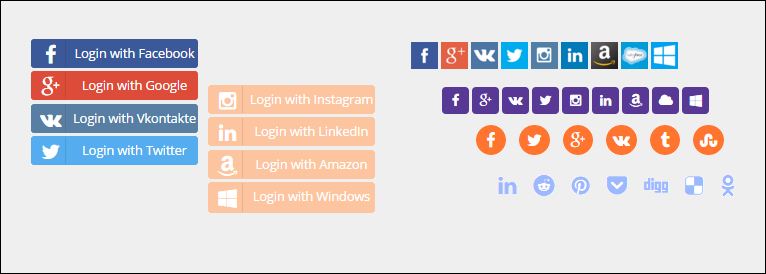
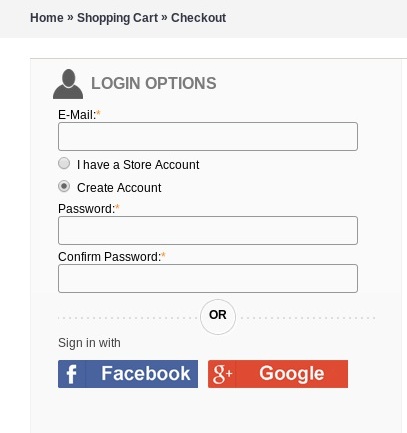
One of the initial steps for any customer to access the website would be login. Most of the time the website ask the visitor to fill out the lengthy forms which can annoy the visitor and the chances are that they may not login to the website. Thus, in order to avoid the fleeing away of the visitors, the websites can use the Magento Social loginizer. This module helps the visitors to enter the web store without entering any personal details. All they need to do is use the details of their social media account and get an instant access to the website. The website can use the information from their social media account to make better sales to the customer.
2. Lack of motivation to stay
The website may be failing to make better sales due to lack of interactive contents. In order to eliminate this problem, the website may always make use of interactive contents such as pop ups. One of such pop up is Magento Spin and win. The spin and win pop up is roulette type game, where the customers get a chance to spin the wheel and avail offers according to the needle landing. The customers are more likely to make a purchase using the offers through spin and win as they have a strong feeling of availing the offer though the gaming platform.
3. Social media influence
One of the trending approach in order to improve the influence of the website would be Social media. Most of the website have started to approach the social media marketing in order to grow their marketing. As, the social media like Facebook and twitter has a very large fan base thus it becomes quite easy for the websites to reach out to maximum potential buyers. The Magento Facebook post is one of the options that enables the websites to make a sale on Facebook. It is even used for promotional purposes.
4. Low descriptive content
The absence of the complete information or description about the product also kills the urge inside the customer to know the product more. Therefore, the website must try to provide a brief insight of the product using the images and videos. In order to make use of the video the website can always use the Magento product video module. It helps in attaching a video to the product. The ratio of the pick u rate of the product with video description is lot higher than the ones lacking it. Thus adding a product video helps in better marketing of the product.
5. Lengthy checkout process
As most of the customers have already sent a better amount of their time in making a purchase. In any case, if the website comes up with lengthy checkout process then the customer is very liable to cancel the transaction and quit the store. It will lead on to losing a potential buyer. Thus, the website may use the Magento one page checkout module. The module enables the customers to make easy checkout without having to fill out any separate information and also making a quick purchase. It helps in making the shopping process better.
6. Shipping Assistance
One of the expectations that the customers have formed the website is shipping assistance. The customer always appreciates the help provided to them through the delivery system but meanwhile, the website must also look out in order to check out the feasibility of providing the delivery to the customers. Thus, the web stores can always sue the Prestashop Free Shippping manager module in order to provide shipping assistance to the customers. The module can be made to happy the charges or deliver the product for free using the information regarding the weight of the product or the location of the delivery. It is one of the most convenient methods to have a transparency with regards to the delivery of the product.
The season sales is always brought up by huge website traffic and boost in sales. The holiday season is the time of year when the customers show up in plenty and make purchases. The online stores experiences the busiest time during this sales season. The key to making profits during this season is to adopt the right approach and offer better user experience.
The web stores needs to give a proper attention to the products and service that are being offered in order to give a kick start to the season sales. The online store owners must take proper steps to counter the expectations of the customers. If proper arrangements are made before the commencement of the season then the chances for the web stores are quite high to earn significant amount of profits with enhanced sales.
Let us discuss what preparations can be made by the web store before the commencement of the season sale.
1. Easy browsing options
As the season sale is about to commence, the eCommerce websites must take all the possible scenarios into consideration. As getting higher website traffic is expected, thus, the website must ensure seamless browsing. One of the ways to ensure it by providing quick log in. The store admins can use the Prestashop Social login, Magento social login or OpenCart social login plugins for the respective platforms. feature to enable the customers to browse the store using the social login feature. The lengthy sign up forms may upset the user and the user may exit the web store. Thus, the feature of social login will help the web store to lure more customers to make a purchase for the web store.
2. Re-stocking the products
The season sale will attract a large number of people to the web store. Most of the people have already waited for a long period of time in order to make a purchase. Hence, chances are that the customers will make more purchase of the products quantity wise. Thus, the web store owners need to manage his inventory in sufficient quantity so that there is no shortage of the products if in any case the demand rises more than expected.
3. Improving the website performance
One of the important aspect would be the improvement of the website performance. According to a survey, “Nearly 40% customers tend to exit the web store, if the response of the store is delayed by 3 seconds”. Now, if the season sale arrives which will bring more than the expected traffic to the web store and in this case the web store owners wouldn’t want to provide the customers with a poor website performance. Thus, the web stores must be optimized properly before the season sales for better commencement of the sales and at the same time making more and better sales.
4. Customize the web store
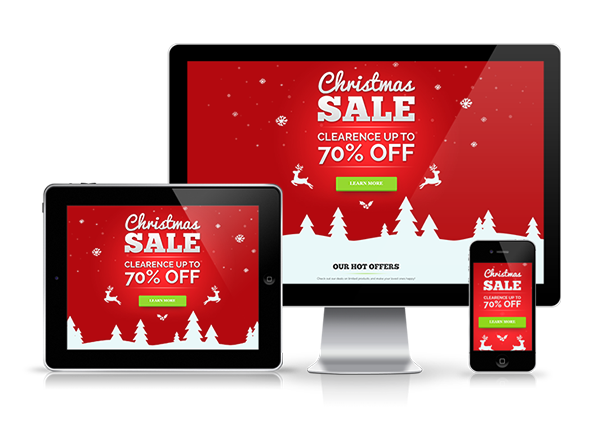
The web store must be customized properly before the season sales. Incorporating landing pages for that particular event is another way to attract more and more conversions. The customization process consists mainly of making the web store match the season theme. It helps the customers to connect them emotionally with the web store and they can make better sales. Moreover, the season sales witnesses the customers using every possible mediums to make a purchase. This is one of the reasons that a mobile app is needed for the eCommerce businesses. The store must be made reachable and approachable by everyone.
5. Payment options
The payment options is also one of the main reason for cancellation of multiple transactions. Thus, the web store must be ready to provide the customers with plenty of available options in order to pay for the items that they have purchased. As the season sales attracts a large number of customers, thus not everyone prefers a single option to make payment. Therefore, multiple payment options should be made available by the web stores so that everyone has a smooth and better experience while making the transaction.
6. Maintain Shipping Assistance
With more sales rises the problem of shipment. Thus, the webs stores must prepare for the worst from the beginning. As, the number of orders would increase, so would be the problem of delivering them. Therefore, an additional care must be given to this matter. The web store must provide the shipping assistance to every customer with respect to the amount or the zone of the products to be delivered. Therefore, a special concern must be given to this matter in order to win the customers trust and make a special bond for their next sale.
Over to You
The commencement of season sale is followed up by chaos and load. Therefore, the web stress must make proper arrangement before the start so that they can end the sale on high nodes. Basically, the commencement of sale must be made after the web store is sure to be ready for taking orders to delivering them. A small confusion during the sale may result in heavy losses and most of all the web store may lose the potential buyers too. Gear up your website for the holiday sales and reap the desired results.
Holiday season is one of the most awaited time of the year, especially for the online retailers. The eCommerce websites are jam packed with the visitors and the sales are at the peak. With so many offers and discounts available, even the customers are all geared up make their holidays purchases from the web stores. The trend of giving and receiving gifts during the season is an old tradition. Thus, it becomes an important concern for the online retail stores to keep their websites ready for the unexpected traffic.
Not just this, the eCommerce stores must be ready to provide every possible assistance to the customer in order to make their purchase better and vivid. Most of the time the web stores would love to provide features that would encourage the customers to make more purchases. As the holiday season is just around the corner, it is not just the deals that should be focused, the store owners need to optimize their website for better user experience as well.
The online merchants need to make sure that they provide some common features which most of the customers search in an eCommerce store. The online stores should ensure a better clarity of the products and offers to the customers. Thus, aiding the purchase decision of the visitors.
Let us discuss some of the features that must be incorporated in the web store by the sellers in order to get better sales from the web store during the holiday season.
1. Quick check-in and browsing option
One of the most important problem that arises for the customers to avail the web store services is login. The customers may be using your web store for the first time. Thus, asking them to delve into the lengthy sign up process would repel them away from the store. Thus, the web store must provide the option of social login option, in order to help the visitors browse the web store easily. Prestashop social login addon can help include the quick login option on the Prstashop stores. There are similar module for other eCommerce platforms as well such as Magento social login extension and OpenCart social login plugin.
2. Offer better product clarity
The product description must be vivid and graphical. The customers would live t make a purchase form the web store if they get a better insight of the product from the seller. Thus, incorporating various options like product images or product videos might help the customers relate better with the product and can make purchase without any difficulty. Prestashop product video module can help you upload the videos without changing the code of the site.
3. Multi-lingual support
The idea of connecting to vast group of people must consider connecting them at lingual level. The customers may not be supportive of English, so the web stores must make sure that they are transmitting the products in multiple language which is more comfortable to the customers. It helps in growing the popularity of the web store in various regions.
4. Product availability
The web stores must be clear about the product availability to the customers. It can be done by providing information regarding different sellers and the count of the products with different sellers and their remaining count. The customers must be made aware about the availability of the products. Moreover, they should be given the feature of check the availability for a particular location. This can be done on the Prestashop store by incorporating Prestashop product availability by ZipCode module. The customer can make up their mind, in order to choose a particular product regarding this feature. It also helps in clearing the clouds of bad hosting.
5. Offers and discounts
Most people prefer to shop during holidays with the basic idea of availing more and better discount on the products. Thus, the sellers must introduce exciting offers in their web store so that customers could make more purchase using those offers. It helps in boosting the sales as a customer would prefer to make a purchase on any product after receiving a good deal.
6. Better interactive contents
The interaction with the customers must be maintained with the customers all the time. In order to do so, the web stores can provide various pop ups in the web store such as Spin and win and many other exciting pop ups, which can divert the attention of the customers back to store. In case a customer is wishing to exit the store then they can be brought back in store.
7. Shipping assistance
The customers would like to get a better shipping option in order to receive their products. Thus, the web store must be clear to the customers about their options to receive the products and the additional charges that may be added separately with the product cost in delivering the products.
Conclusion
The holiday season can bring a boom in the amount of sales made by the web stores. The secret of making it lies in better services and feature provided to the customers. Thus, the web store must always be provide with better and engaging options so that the customers could browse and make better purchase from the web store. It helps in enhancing the performance of the web store.
Various e- commerce organizations are giving added emphasis to the social login on their site so that visitors can engage with their business organization and can create the necessary awareness about their featured products and e- commerce company. But, the major stumbling block in this regard is the complex social login facility that makes it extremely difficult for your visitors to login into your e- commerce site. By analyzing this grave situation, our organization has developed a wonderful e- commerce social checkout extension for Magento site owners that can ensure customers a seamless social login facility. Here are the salient features of this Magento Social Login extension that has created huge ripples in the online business community.
Faster sign up facility through interactive login facility
Now, customers don’t have to create unnecessary accounts for logging into their social media accounts as they can now easily login through social login popup options. They can seamlessly login with their existing social media accounts due to this wonderful Magneto extension. The Magento social login extension also consists of a “Quick login” feature that help visitors to login successfully without filling out any login form.
Work uninterruptedly with multiple devices
By thinking about the diverse range of online customers that are using multiple devices like desktops, laptops, smartphones or tablets, this e- commerce modules can be used with any of these devices without any problem. The responsive design of Magento social login extension makes it superb to be used across multiple devices and offer same level of services to every customers irrespective of the device used by them.
Trouble free installation and configuration
This Magento social extensions is very easy to be installed by any individual irrespective of its technical and non- technical background. The user can effortlessly transfer files from the server to the Magneto site and can simultaneously install it also. The Magento social login extension has facilitated the quick installation and configuration with a simple click.
Effective management of the social accounts
For preventing the misuse of the social accounts by some miscreants, this Magento social login extension has provided freedom to site admin for easy enabling or disabling of the social media accounts through the back end of the web store. Further, it has helped in the easy checkout process as customers can seamlessly access their social media accounts if their account is showing disabled.
Allow effective sorting of the social media buttons
One of the best feature of this Magento social login extension is that it allows effective sorting of the social buttons on the horizontal and vertical basis. Moreover, site admin can easily drag and drop the social media buttons and can decide about placing these buttons horizontally or vertically. By using A/B testing tool he can check which button is more preferred by the customers.
Effortless customization and tracking facilities
Now, with the help of this Magento social module, site admin are capable of making swift changes in the social bar headings and the text of the social login link. Further, it provides authority to site admin to track any desired social media account of customer and analyze his/her complete login history through various social media accounts.
So, you don’t have to be impatient if you are unable to get the effective number of followers on social media, all you need to do is just surf our e- commerce site, www.knowband.com. By visiting our Knowband site, users can place an easy order for this Magento social login extension or any other e- commerce module for their Magento, OpenCart and PrestaShop customers.
Often customers are seen struggling with the login option on an e- commerce site and are getting frustrated with the frequent interruptions and redirects. E- commerce sites are also clueless about how to make these crucial site logins a painless easy task so as to encourage customers for making online purchase through their e- commerce site. But, all this is going to change forever due to this Magento social media extension which is known as Magento Facebook Login module. Here are some of its brilliant features that has made it so much popular in the entire e- commerce industry.
Easy installation and configuration options
Installing this plugin is a cakewalk for both technical and non- technical users. It comes with easy to follow guidelines that make this extension extremely easy to be installed by any individual with a limited knowledge about computers. There are no difficult and cumbersome instructions that are difficult to be followed by non- technical customers.
User friendly admin interface and configuration options
This Magento extension comes with an easy to use and configure admin panel which makes it extremely painless to perform different task for your e- commerce site. The admin interface is very engaging and allow store owners to manage the easy login attempt of the site visitors on your e- commerce site. There is now increased freedom for site admins to perform different tasks related to the quick login very easily and without any hap- hazard manner.
Provides facility to manage Facebook login strip without any strenuous efforts
Due to the numerous features of this module, it is now easy to make any desired changes in the social media, Facebook login strip of your e- commerce store. Now, store admin can set their Facebook login strip in their desired manner so as to encourage more number of site visitors to register on their e- commerce store. All this has become so much simplified with the arrival of this wonderful extension.
Comes equipped with free user manual for easy installation and understanding of the features of the plugin
One of the wonderful feature of this module is that it comes along with free user manual that provides detailed information about the installation of this plugin and explains customers about the various features provided by this e- commerce extension. There is no need for any head scratching due to the non familiarity with the features of this Magento extension as the user manual is at your rescue.
So, you need not to take tension about the login facility on your e- commerce store as this Magento extension will take effective control of this issue by providing a quick login facility through Facebook accounts. You just need to surf our e- commerce site www.knowband.com and look out for this plugin on our store so as to end your long pending issue of ineffective site registration.
Effective social engagement with your customers is an important necessity and requirement of every business organization in the changing business times. If you can’t make your customers connect with your organization through their social media accounts, you are ultimately losing the opportunity to increase your business leads among your rivals. In this competitive business environment, no organization can thrive well without the support and backing of its social media customers. But, most often, this engagement is limited due to the frustrating login facility which avoids customers to login into their social media accounts. However, there is a good news for the business organizations as well as for the social butterflies as the login facility has been simplified and made quite easier with the arrival of this Magento Social Login module. Here are some of its brilliant features of this Magento social login extension that has made it much popular among various e- commerce organizations of the world.
Quick interactive login facility through popups
This Magento social media extension has greatly simplified the social media login facility by allowing customers to login through their existing social media accounts. It provides about 10- 12 popular social media platforms so as to facilitate quick login into their social media accounts. Further, visitors are provided with option like “Quick login” which eliminates the need to fill out lengthy registration forms.
Magento social login extension provides easy functionality of enabling or disabling social media accounts
With the help of this Magento social login extension, it is now easy to enable or disable the social media accounts of the customers. All this task can be seamlessly performed by the store admin itself through the back end of the e- commerce store. So, there is no need to go for third party sources to get your customers social media accounts enabled or disabled at any point of time.
Magento social login extension helps in increasing your social engagement through faster and easier login facilities
As, there are no more frequent redirects and frustrating login facilities so customers on your site can easily login to their social media accounts and can spread the positive word about your business organization among their friends and known people. By informing more number of people about your e- commerce organization, these social media customers can improve the conversion rates and reputation of your Magento store among your business rivals. This Magento social login extension can definitely boost the social image of your organization for improving your business fortunes.
Faster and easier installation
It is exceptionally easy to install this Magento social media extension on your e- commerce site without facing any technical glitches and installation related issues. Further, the Magento social login extension does not require any technical knowledge for its installation and can be installed seamlessly by anyone even with the basic knowledge about computers. This is one of its best features that makes this Magento extension truly uncomparable with any other e commerce plugin based on any other platforms like Drupal, WooCommerce, JigoShop and such others.
So, enjoy increased social media logins on your e- commerce store with the help of this Magento extension and boost the social image of your organization among your targeted customers. The Magento social login extension is really remarkable that can help in unleashing the huge business potential of social media for the growth of your business organization. All you need to do is just surf our e- commerce site, www.knowband.com and purchase this Magento social login extension so as to improve your social image for increased business leads and conversion rates.
Introduction of Magento Social Login Extension by Knowband:
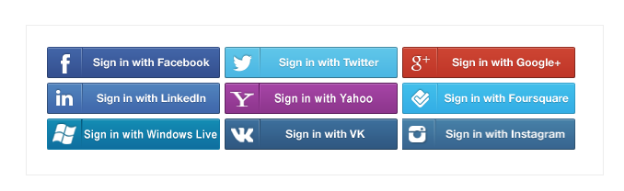
Magento Social Login Extension by Knowband allows users to login via their social accounts out of prvided 15. For example Facebook, Google Plus, Twitter, LinkedIn, Live, Yahoo, Instagram and many others. The Magento social login plugin is designed to simplify the logins for the users. By integrating social login plugin on your Magento store, you allow your visitors to login to your website with their existing social network accounts.
Steps For Installation of Magento Social Loginizer Extension:
Required Materials:
All files used by the extension.
FTP access to your website.
The connect manager is a useful tool for installing Magento extensions, but prefer hands-on method when it comes to installations. It feels more comfortable when you are personally in control of the process.
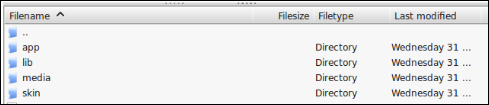
Do you see an app-code directory there, what about app-etc-modules? If you don’t see these directory paths and files contained within them, chances are that the extension download was faulty. Take a look at the package.xml file, this is the blueprint used by Magento Connect to arrange the files in the proper places. You may need to use this to ensure that everything is as it should be. Once you have reviewed the extension files you are ready to perform the last step. Using your ftp client, drag all of the files onto the store root of the magento instance.
Depending on the number of files in the Magento extension by Knowband, this may take a few moments. Now go to the admin console and click Flush Cache Storage. This is the requirement for any extension that adds pages to the admin console. Logging out and back in is also required to ensure that everything loads properly. If you cannot clear the cache via the admin console for any reason, you will need to clear the cache manually via your FTP client (see the first FAQ question for assistance). That is the final step. Congratulations on a successful installation.
Troubleshooting & FAQs
I loaded all files onto my Magento store, and now get a white screen for some or all of the admin console.
This is a fairly common problem, and 99% of the time it is cache related. If you can get to it, go to System->Cache Management and click Flush Cache Storage. This will ensure that everything cached by Magento is deleted and will to be regenerated. Log out and back in to complete the process.
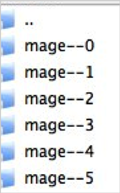
If you are completely cut off from the admin console, navigate to the var-cache directory of your website. You should see a series of directories named mage*. Delete all of these directories (DO NOT DELETE var-cache). This is the equivalent of flushing the cache storage from the admin console.
I am receiving a Magento error when accessing certain pages. How can I debug this?
This question really deserves a blog post all to itself, but a good start would be to go into the errors directory of your store. Locate the local.xml.sample file and rename it local.xml. The next time you see the error detailed information will be provided explaining where the error took place. Dont forget to change this back when you are finished troubleshooting!
I have a critical error with my webstore and need to turn off an extension I cannot access the admin console. What do I do?
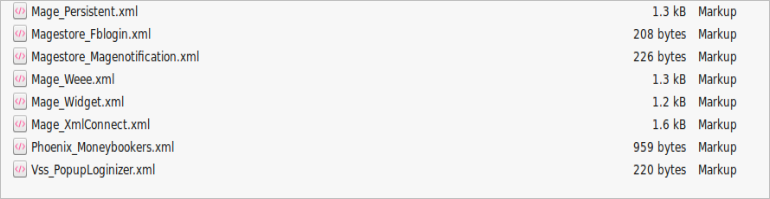
Go to the app-etc-modules directory and open the file that goes with your extension. The naming convention is generally DeveloperName_ExtensionName.xml. In this case it would be Velocity_SocialLoginizer.xml.
Look for the active tags in the file, change the value from true to false and save your changes. This tells Magento that the Magneto extension is disabled and not to run any code associated to it. Deleting the Magento cache is recommended (and most likely required) for this change to take effect.
User Guide
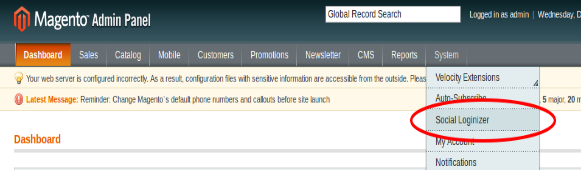
To excess Magento Social Loginizer plugin, Click on Social Loginizer Menu appearing in System Menu navigation menu as shown below.
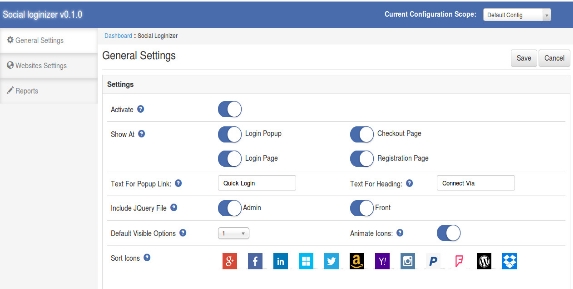
After clicking on Social Loginizer menu, the Magento social login plugin by Knowband will open. It contains navigational bar at the top, Tab menu at the left and in main content the first general setting tab will display.
General Settings Tab
General Settings:
Active: To enable the Magento facebook login extension plugin, select enable present under the label Activate.
Show At :
Login Popup: To enable the login popup.
Checkout Page: To add Magento social media login plugin on checkout page.
Login Page: To add social login bar on login page.
Registration Page: To add Magento social login extension on registration page.
Test for Popup Link: Set the text for login popup link which will shown next to default login link of the Magento social login plugin.
Test for Heading: Set the text for heading of social media login plugin Magento which will shown on selected pages.
Include jQuery File: jQuery i.e. a javascript framework is required for this Magento plugin to work. Sometimes themes used in Magento already includes it but sometime they do not. If jquery is already included in your theme then deactivate else activate to include it.
Default Visible Option: Select the no. of social icons to be visible by default on Magento social media login extension.
NOTE : In Magento social login module, only small icons will be visible and only maximum 6 icons will be visible.
Animate Icons: Activate this option to turn on the animation effect on icons of Magento social login.
Sort Icons: This option of Magento social media login allow to sort the order of icons in which they will display at login bar and login popup.
Loginizer Settings Tab
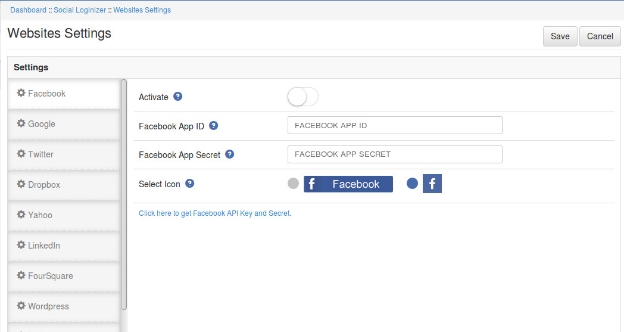
In this tab of Magento twitter login extension, you can save API key and Secret for each social website. There is a side bar listing all the websites. On click of any website its corresponding setting options will be shown. Below option there a link of corresponding website where you can create your application and get your client id and secret. In each website settings there will be following 4 options:
Website Settings:
Active: To enable the Magento social login, select enable present under the label Activate.
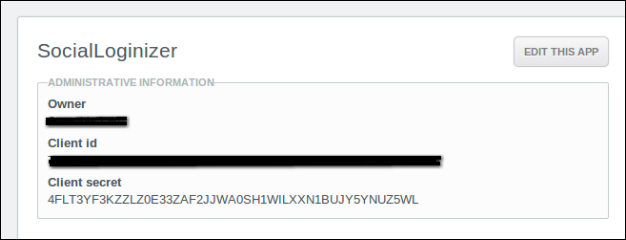
App ID (eg. for Facebook : Facebook App Id): In this field of Magento social media login, you need to enter your Application ID/Client ID/Consumer ID provide by corresponding website
App Secret (eg. for Facebook : Facebook App Secret): This field of Magento social login extension allows you to enter your Application Secret/Client Secret /Consumer Secret provide by corresponding website.
Select Icons: For each Magento social login, there are two kind of icons small and large. Select any one of the icon to show at social login bar.
Report Tab:
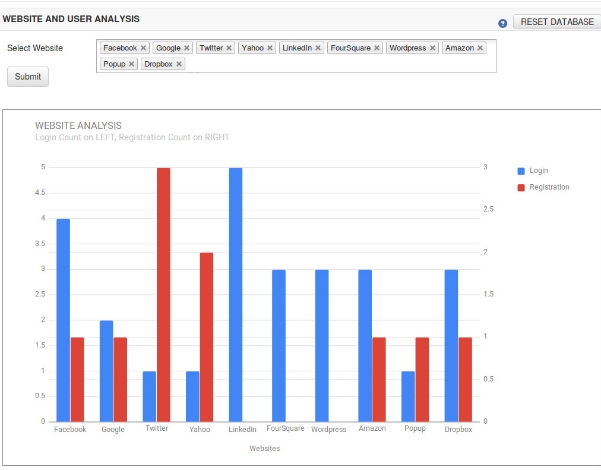
In this tab of Magento social login module, you can get graphical and tabular analytic data that will help you for analysis. There is a option of select website. On click of the option a dropdown listing all the websites will display choose websites and click on the submit button. That will create a graph for the selected website represent login and registration count for each selected websites.
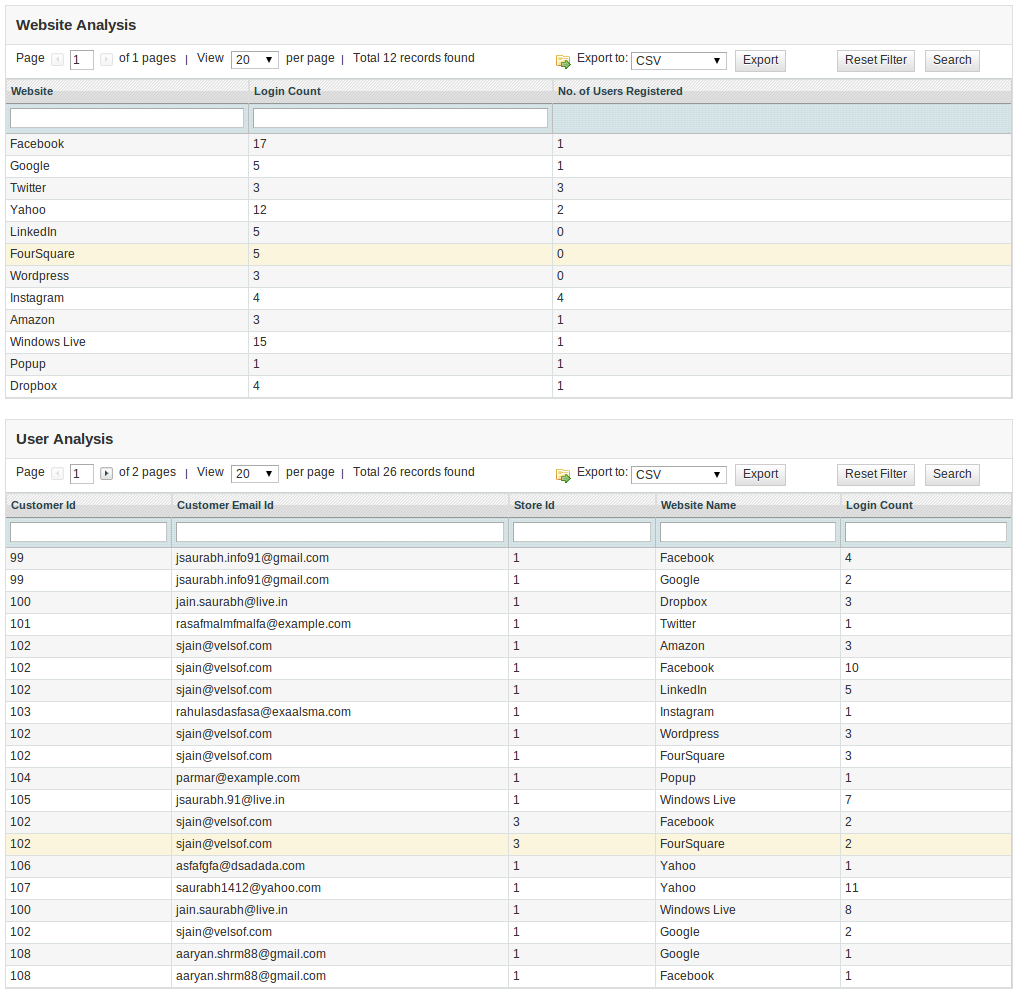
In the graph below, you can see the table for website analysis and another table for customer analysis data. The website analysis table show websites and their total login and registration count and the customer analysis table shows customer details and his login details (login count and website name).
At top right , there is button Reset Database. This option will delete all the login and registration data from database. This will not affect your core database table. It will clear records only from the table created by this magento social media login extension.
How To Set Redirect URL?
Let your website url be www.example.com.
If Url Rewrite is enabled in your website then redirect url will be
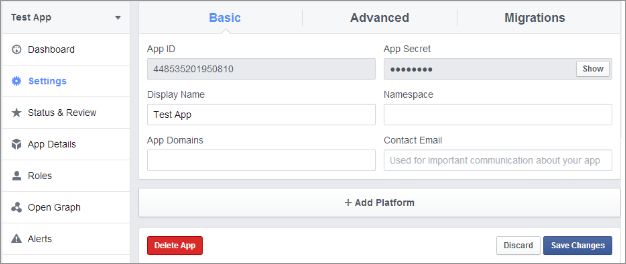
1. Go to Facebook Developers Website (https://developers.facebook.com) or click on link given top right of respective tab in module configuration page.
2. Click on Apps -> Create a new App.
3. Follow the instructions on the screen.
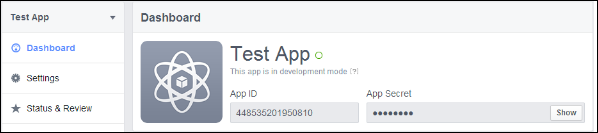
4. You will get the App ID and App Secret (Click Show button).
5. Now, go to Settings from left menu.
6. Click on Add Platform button.
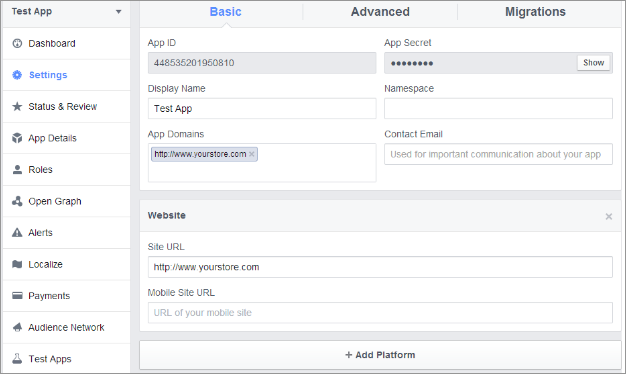
7. Select Website.
8. Enter your App Domain and Site URL.
Application Type: Web Application.
Authorized JavaScript origins: Your store domain name. (https://www.example.com)
9. Click Save Changes button.
10. Now, go to Status & Review tab from left menu and make the Application Live.
How To Get Google App Details?
Steps:
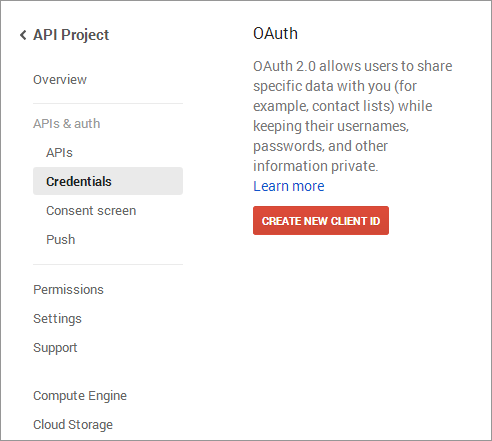
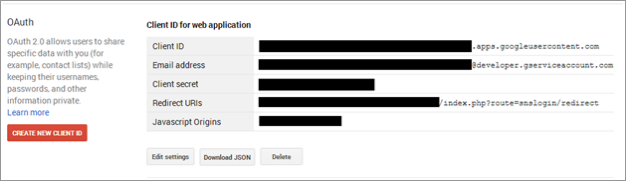
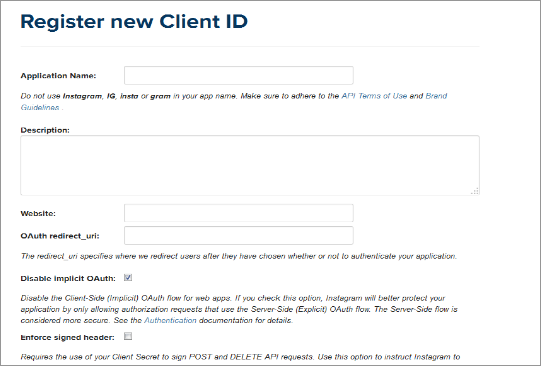
1. Go to Google Developers Console (https://code.google.com/apis/console)or click on link given top right of respective tab in module configuration page.
2. Now click Apps &Auth-> Credentials from left menu.
3. Click Create New Client ID button from the right panel of the screen.
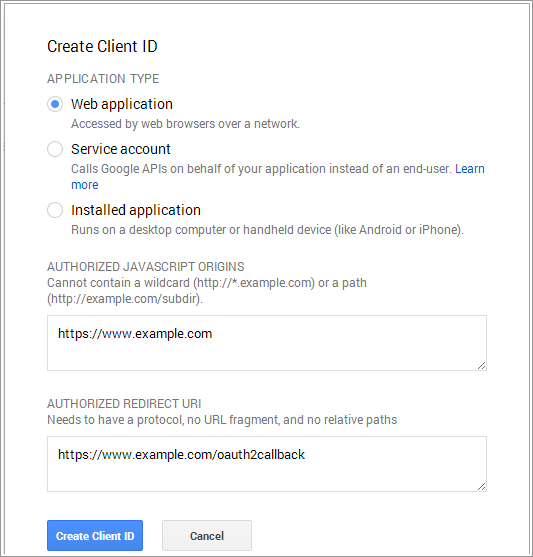
4. Fill the pop-up form with below details:
Application Type: Web Application.
Authorized JavaScript Origins: Your store domain name. (https://www.example.com)
5. Now click Create Client ID button to get your Client ID and Client Secret Key.
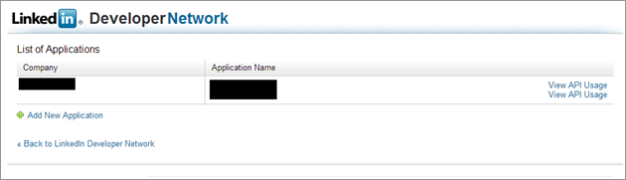
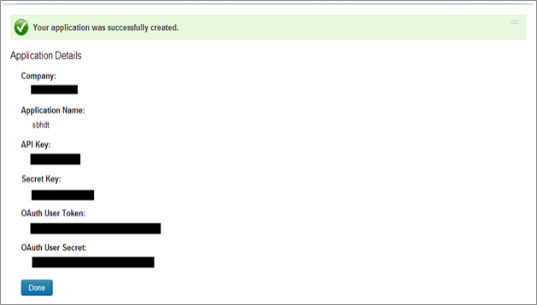
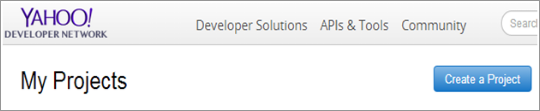
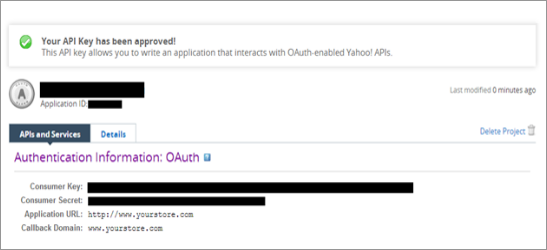
3. Fill the required details as per instructions. Home URL will be your Store URL.
4. Click Create Project button.
5. Copy your Consumer Key and Consumer Secret.
How To Get Amazon App Details?
Steps:
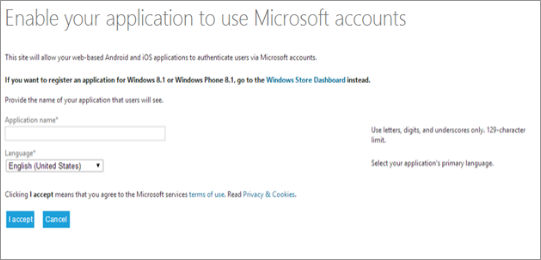
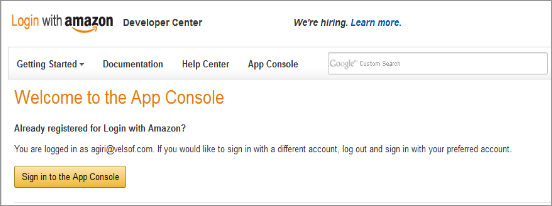
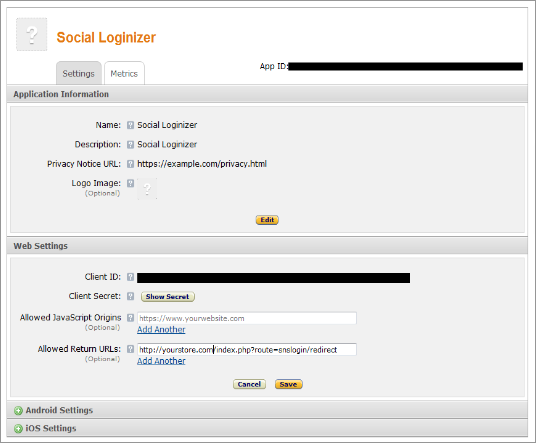
1. Go to Amazon Developer Network (https://login.amazon.com/manageApps) or click on link given top right of respective tab in module configuration page.
2. Click on Sign in to App Console button.
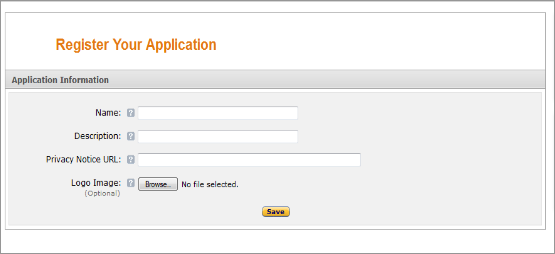
3. After successful login to App Console click on Register new application button in top right of page and you will be redirected to following page.
4. Enter Application Details as follows:
Name: Name of your Application.
Description: Description of your application.
Privacy Notice URL: Url of privacy policy page of your store.
5. Logo Image: Select optional logo image of your store.
6. Click Save button.
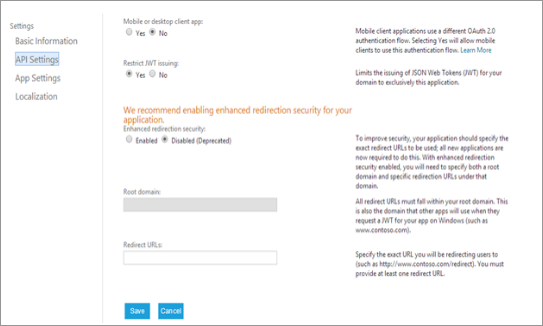
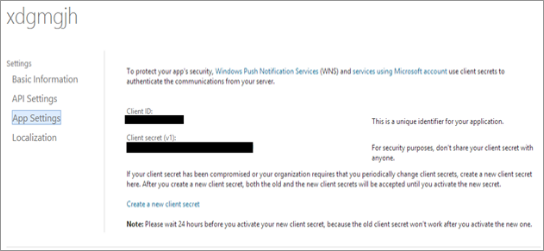
7. Now click on Web Settings to get your client id and secret.
8. Allowed Return URL : Loginizer redirect page URL of your store.
Note: To enable Amazon login into your website, your website must be secure with HTTPS otherwise Amazon login will not work.
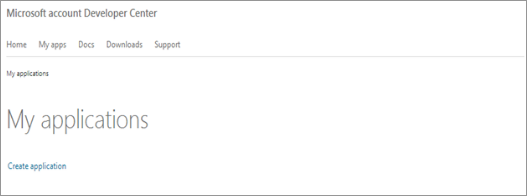
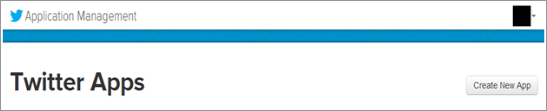
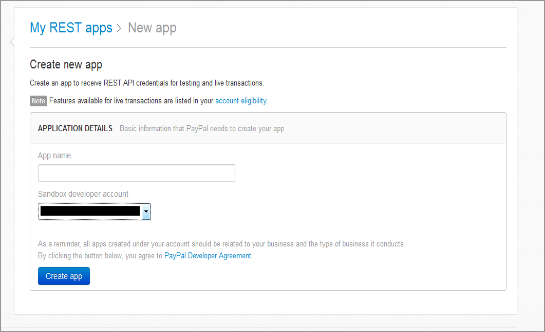
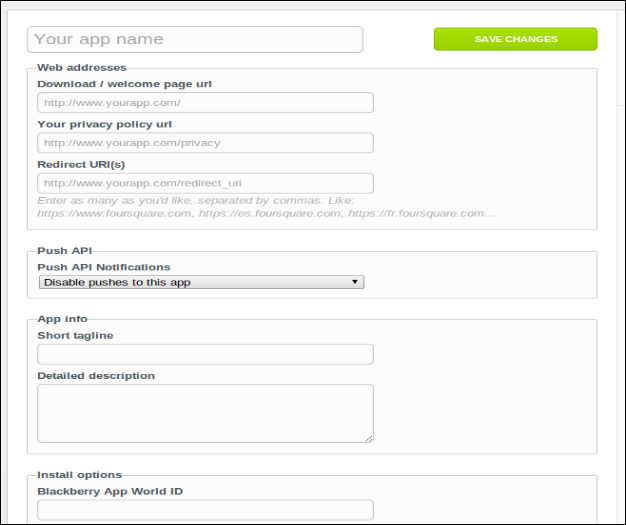
2. Click On the Create App button and provide a name for Application.
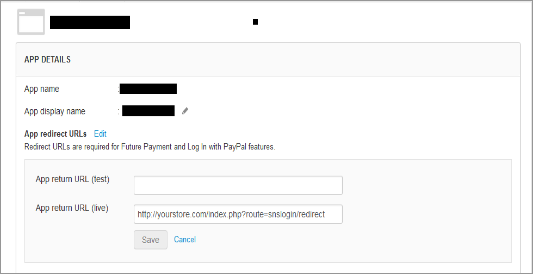
3. Fill up the details , set redirect url and save the settings.
4. Copy and paste the key and secret in plugin admin panel.
How To Get WordPress App Details?
Steps:
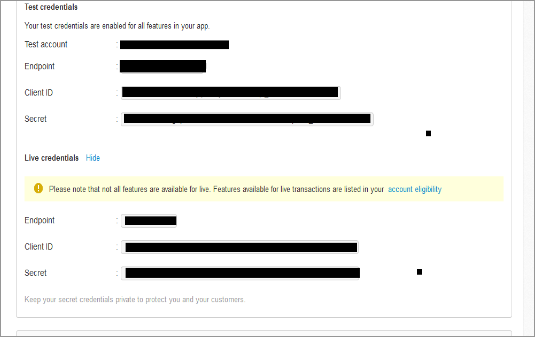
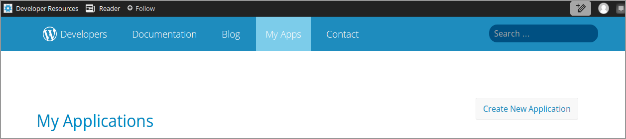
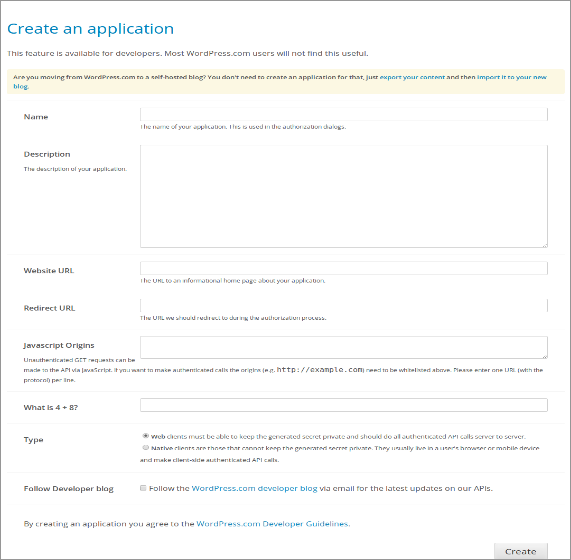
1. Go to WordPress Developer Website (https://developer.wordpress.com/apps/) or click on link given bottom of respective tab in module configuration page.
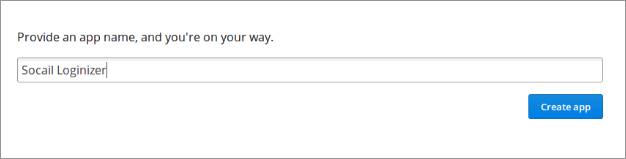
2. Click On the Create App button and provide a name for Application.
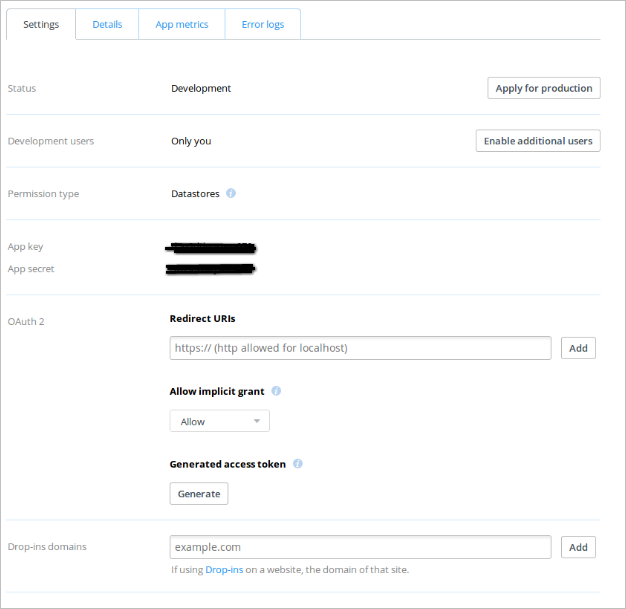
3. Fill up the details and save the application.
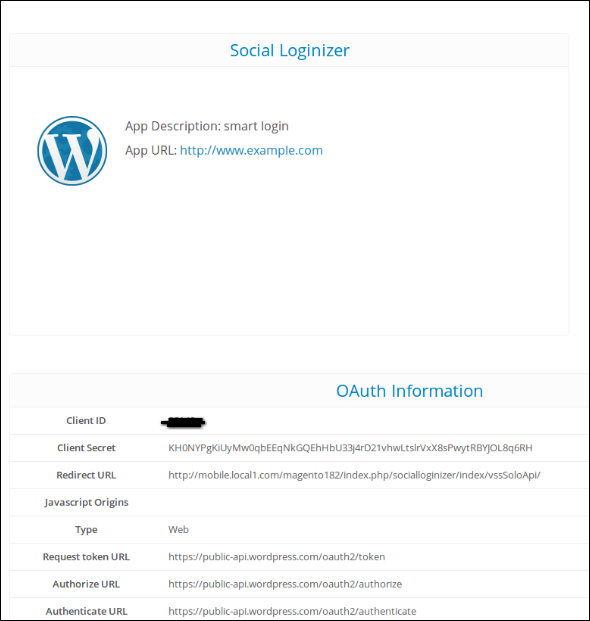
4. Copy and Paste the credentials in Magento extension admin console.
This brings Social Logins into picture.. While logging into your site, visitors always look for a simple, convenient and quick registration process and this is where “Magento Social Login” stands better and reliable. Let’s take a closer look that tells why is it imperative to have this plugin installed on your website-
Magento Social Loginizer- Adding Value To Your Site
1. This plugin allows your customers to link their store accounts with social networks like Facebook and Google+, thereby simplifying the registration process.
Benefits– No more spending too much time messing around with a form if they can click one button instead. Customers no longer have to remember lengthy username and password which opens up opportunities for super-fast and hassle free sign-ups.
2. Install this module for a frictionless checkout experience. The more easier is account creation during checkout, the higher are chances to complete purchase.
3. User Friendly (Supports all devices)
With this extension installed on your Magento designed store, you”ll be able to increase user engagement and customer retention. How?
The UI, interface and icon of our social loginizer plugin is completely mobile responsive and adjusts itself for different screen sizes.
Whether you have a mobile friendly or desktop website, Magento Social Loginizer functions well for all websites allowing you to achieve increased sales and revenue.
4. Improves Registration, Conversion and User Retention
With a hassle free, quick and simple sign-up process, there are increased number of chances that more and more users will register which improves registration process.
Similarly, if registration is simple, there are chances customers will further complete their online purchase and this will improve sales for your business. By providing the option of social sign-ups, you will be able to acquire customer details for better communication.
With Magento Social Loginizer installed on your system, your business will be benefited with continue rise in customer database, increasing conversion rates and user retention.