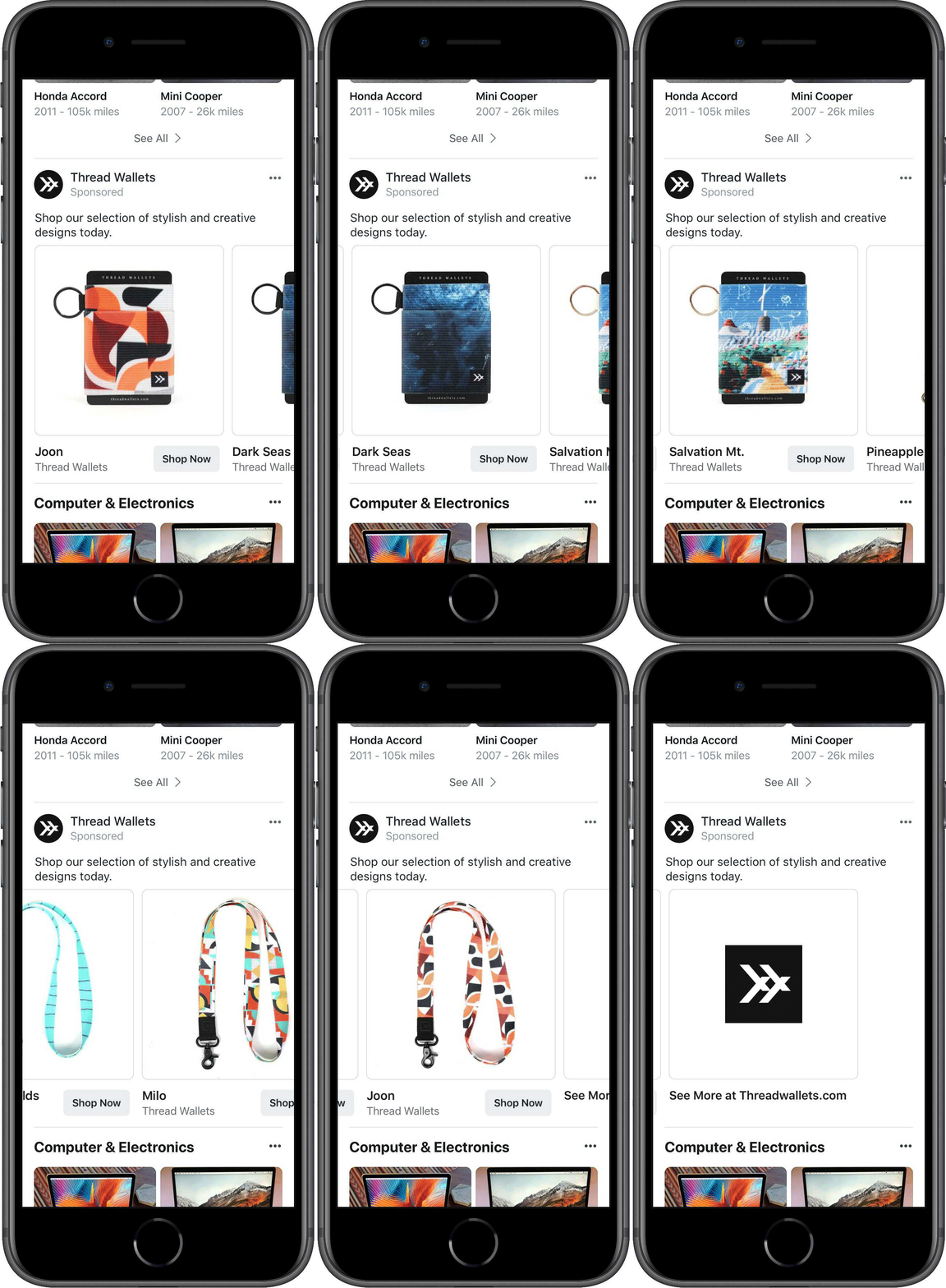
Facebook launched the Marketplace in the year 2016, the main objective of the Facebook Marketplace was to allow the users buy and sell locally. In order to promote the marketplace, Facebook has started showing it in the main navigation bar. Facebook Marketplace allows the users to browse the products and services from the people in their localities. As posted on the Facebook business page “Over the past few months, we’ve enabled businesses to list a variety of offerings in Marketplace such as used vehicles, home rentals, home services and jobs. And now, businesses can advertise in Marketplace to reach people where they’re actively shopping.
Ads from businesses appear alongside other products and services in Marketplace, and extending your ads to Marketplace is easy. By selecting Automatic Placements, your ads can appear across our various placement options such as News Feed, Instagram, Messenger, Audience Network and now, Marketplace. Advertising across our platforms enables you to reach your target audience wherever they’re spending time, giving you more opportunities to connect with people likely to be interested in your offerings.
Businesses are already seeing results using ads in Marketplace. Thread Wallets, an accessories company, generated more than 300 purchases while increasing its year-over-year return on ad spend by 41% after adding Marketplace as a placement for its conversions campaigns.
Over the next few weeks, all advertisers targeting audiences in the US, Canada, Australia and New Zealand will be able to run ads in Marketplace using the traffic, conversions, product catalog, video views and reach objectives.”
Use Facebook Shop to grow your business faster
Facebook provides an interface to the users and brands to showcase their products and services on their page. Facebook Shop allows you to display the products from your shop on Facebook. It helps sellers to reach to more audience, in order to reduce the additional efforts of listing the products one by one Facebook has also released the Shop API to automate the process of listing the products on Facebook Shop. By using the Facebook Shop, you can allow the customers to browse and discover the products with ease.
Knowband offers the FB Store Module for the Prestashop store owners to make the process of creating the Facebook Shop hassle-free for the Prestashop store owners.
Benefits of the using FB Shop Module developed by Knowband:
1) Interactive banner to promote your brand:
For the businesses, it is important to win the customer trust. The banner on your Facebook shop allows you to show the vision and purpose, your core values, your culture and behavior. By displaying an attractive homepage banner you can create your brand value.
2) Home Page content:
In this section, you can explain the product and services you offers.
3) Navigation Menu:
You can display the Navigation Menu on the Facebook Shop and highlight the top categories of your Prestashop store on the Facebook Shop page.
4) Featured categories and featured products:
This section allows you to display the featured categories and products on the Facebook shop page.
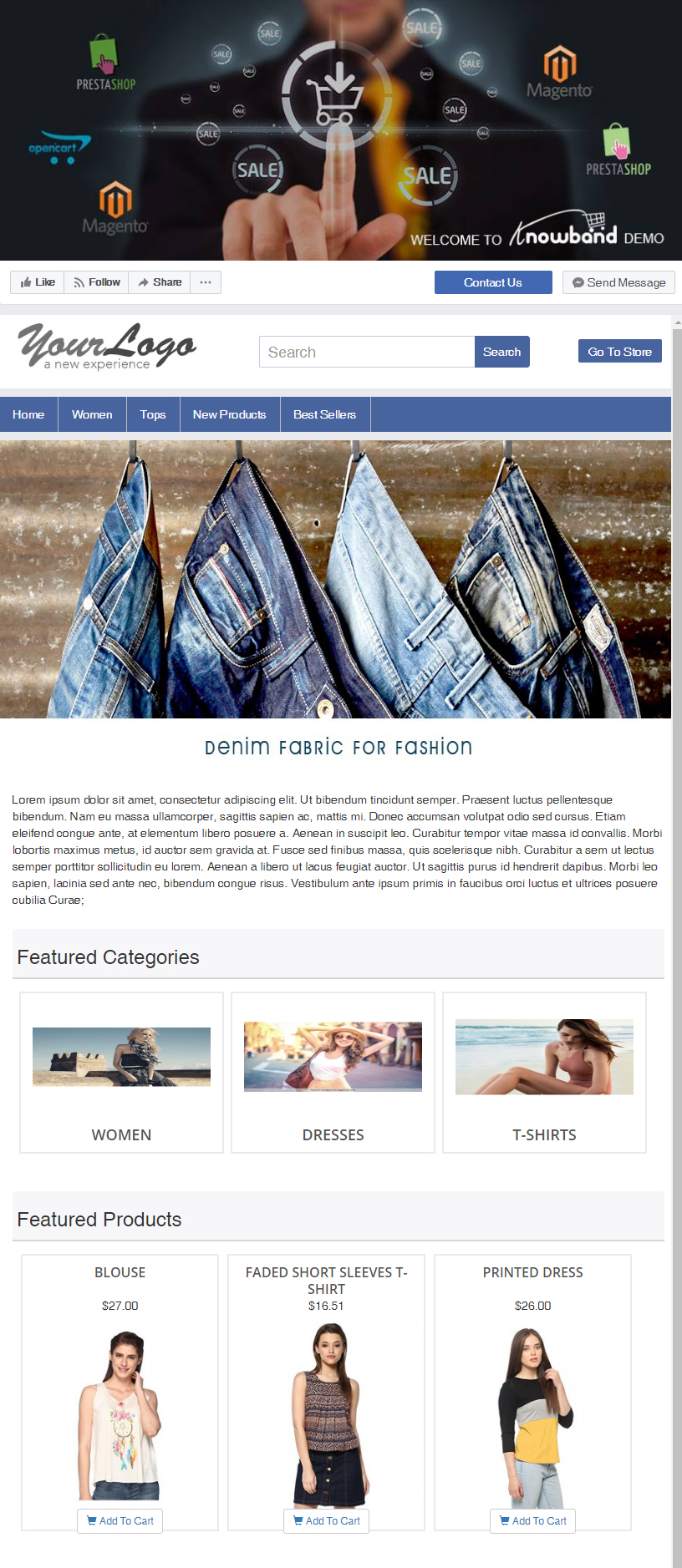
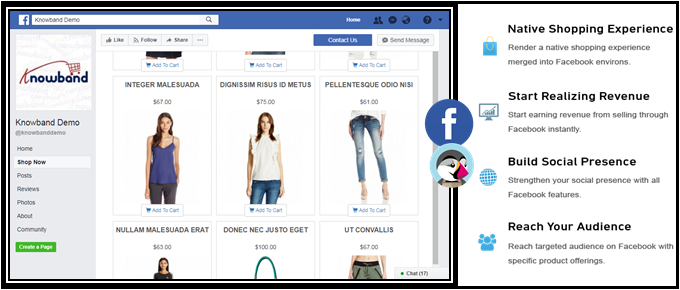
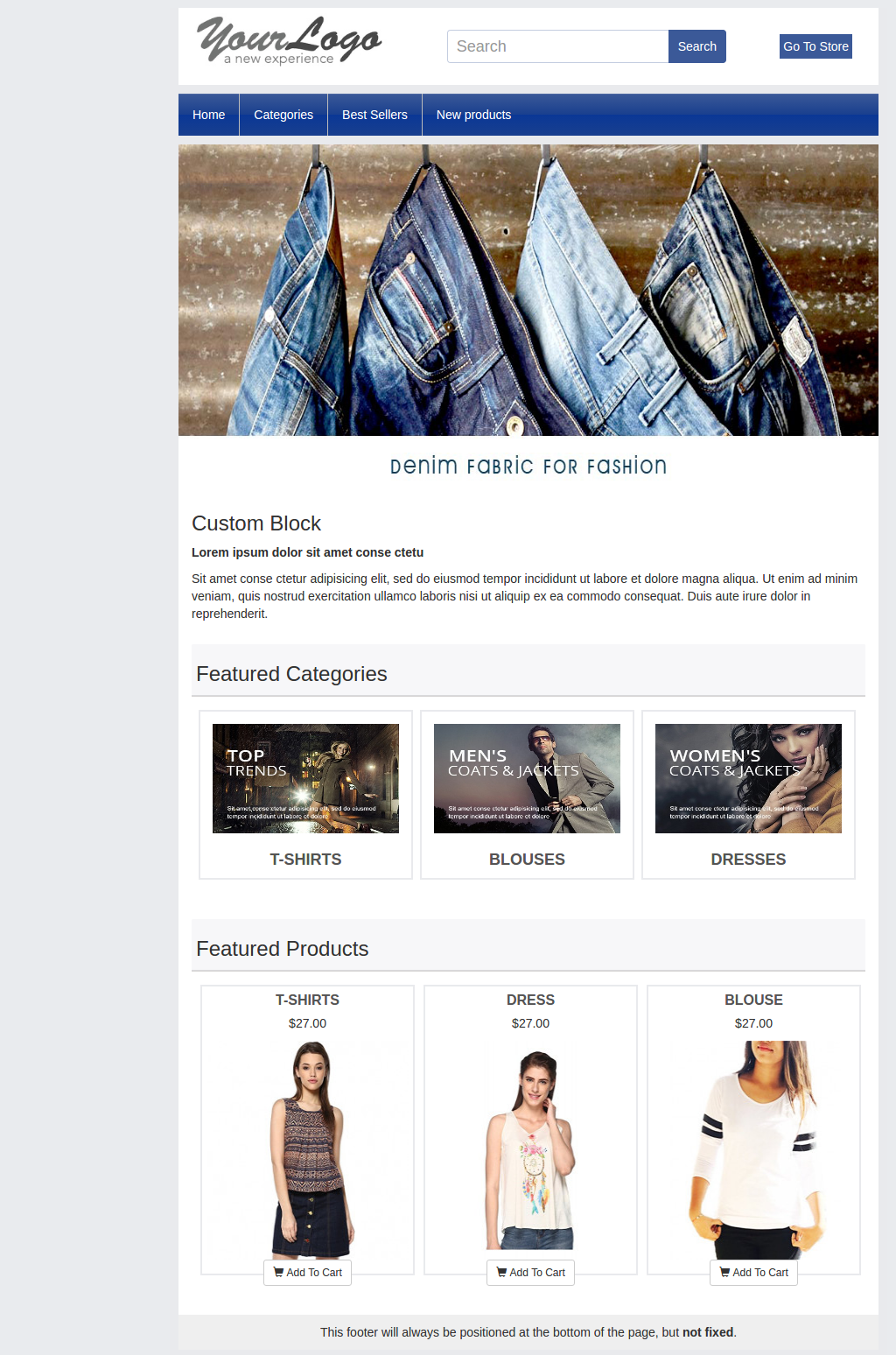
Please refer to the attached screenshot of the demo Facebook Shop page:
Well, to start with, how it would feel like to promote the product on a platform which has over 4 billion user? Isn’t it amazing? The increasing trend of social media has gained an ultimate rise in the last decade. At present, if we take a closer look, then, we can easily realize that almost every internet user is using some kind of social media. The popularity of Facebook is one of top rated among all the social media platforms. Hence, F-commerce is one of the better opportunity to stay ahead of competition in the eCommerce world.
The approach to grow your web store’s presence on Facebook is not that difficult. The eCommerce owners can now make their presence on this social media platform as well. With Facebook store, the customer can place their orders while surfing their profile. The Facebook store is a smaller version of the original eCommerce website.
The primary aim of any web store owners is to reach out to the potential buyers and try to connect with them. A better connection ensures the web stores with more sales and at the same time higher rate of conversions. The trend of using the social media platform specifically Facebook as the mean of selling the products is new and very effective. According to a survey, “46% of the online buyers wants the websites to provide their services on Facebook, but only 23% provide it”. Thus, the demand for an online store on Facebook is quite high and the results corresponding to the Facebook store are quite positive. It won’t be wrong to say that F-commerce is the future of online selling.
Let us discuss some of the ways in which F-Commerce can help you in staying ahead in the eCommerce field.
1. Increase user Engagement
One of the important factor which plays a vital role in popularizing the product would be the user engagement. The power of Facebook is not unknown. Most of the people from the age group 13-70 prefers to stay active on Facebook. Thus, the online shops have better chances to reach out to maximum buyers on the platform. The Facebook shop helps the e-merchants to grow more and get better engagement from the customers. The more engagement a platform is able to create the better are the chances of making a sale.
2. Better access for the users
How about getting a chance to explore your favorite shopping site from your favorite social media platform? The thought may brings a big smile on the faces of the customers. The customers don’t have to access the website separately and can check on their favorite products from the social media platform itself. The Facebook shop helps the customers in making instant purchase decision. The idea of shopping through Facebook is quite exciting and it compels the customers to look out for better products using the social media platform.
3. Rising trend
It has been observed that the sites which provided their services using the F-Commerce has an abrupt rise of 33% on the sales made. Thus, opting for the better options is never a waste of efforts for the eCommerce store owners. Though F-Commerce may seem an additional job for the website owners, but the result are more fruitful than the overall effort of launching a Facebook store.
4. Easy promotion
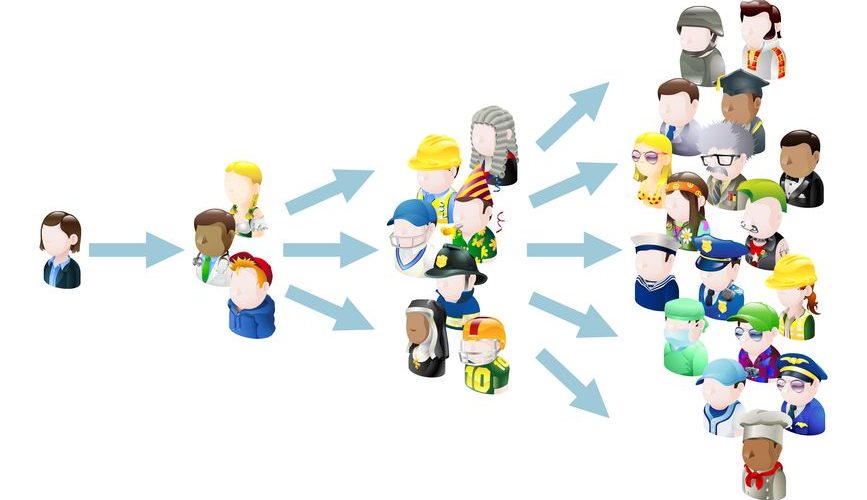
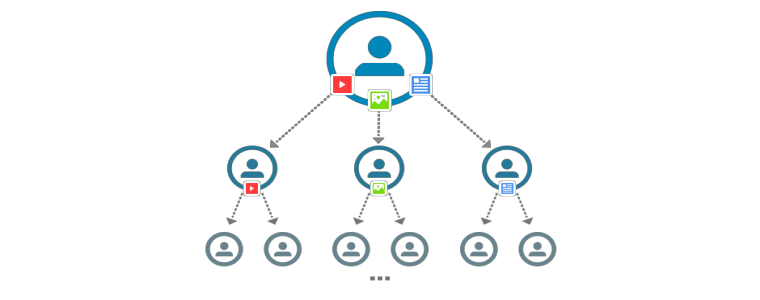
The idea of promoting any eCommerce business is quite troublesome, but F-Commerce has made it quite easy. The Facebook shop even provides the option of social sharing. The option has proved to be one of the most efficient way in making sure that the products are promoted to the farthest of the customers. The advantage of using Facebook as a source of marketing is that the visitors in Facebook can share the products that they like with their friends and so a chain of free promotion starts which enables the web store owners to make better sales on the promoted products.
5. Increased conversions
The rate of conversions is one of the deciding factor in any eCommerce store. Every online vendor wants to get better conversion rates. Thus, Facebook shop proves to be an efficient step in achieving his target. The reach of Facebook is quite large, hence, it makes it possible for the eCommerce owners to reach out to maximum potential buyers. Thus, bringing about a significant rise in the total number of effective conversions.
6. Enhanced word-of-mouth
The important factor which leads to the growth of any business is an idea. All the web store owners are in search of various ideas and opportunities to promote their web store and their products. The idea of utilizing Facebook in order to get more popularity and at the same time better coverage is one of the added advantage that drives the web store owners to make better profits. Most of the customers have already know about Facebook and to access a web store using Facebook all they need is to click on a post, which is not a difficult task. The web store owners can make better use of the Facebook by making use of various modules such as FB wall post module which adds more convenience to the users.
Conclusion
The trend is shifting from the restricted media platform to social media. Most of the people are quite aware with the concept of social media. If the web store needs to get higher conversion rates and also make better sales than picking the F-Commerce route will suit best to them. The optimization of the web store to meet customer requirements help in reaching out to more buyers. It is well set up, people can access it easily and most of all it provides the feature of social sharing. Hence, the web store owner must not care much about the social promotion of the product.
Prestashop FB Store is one such addon for the Prestashop eCommerce stores that can help the e-merchants set up their shop on this platform. So, the store owners can now cater a larger audience with minimal effort.
If you are an active Facebook user, you probably would have seen brands promoting their store’s products through their Facebook page and when you open those pages, you will see they have a “Shop Now” option, which we call it as a “Facebook Store.” For an e-commerce store, a Facebook store is a part of their actual eCommerce store that allows them to sell their products directly through their Facebook page.
“Social media is important for online retailers!”
If you are looking to take your eCommerce business to new heights, social media is the trump card today. The vast engagement of the users on social media platforms has proved to be an important aspect for the online sellers to use them for effective marketing. Amongst all the social media platforms, Facebook is one of the most widely used. That is why it is an inevitable aspect for the merchants to establish their web store on the world’s largest social media platform and make more sales. All they need is a facebook page with a few followers to start with.
Facebook provides a platform for eCommerce store owners in the form of a facebook shop to assist them to market their business. It helps online retailers to expand their business in front of a large audience of Facebook.
It is a proven fact that customers tend to purchase a product when it comes to their notice. For this matter, a Facebook shop proves effective. Sellers can create some amazing content on their Facebook business pages and grab users’ attention towards their store. You can easily link your e-commerce store to your Facebook page with the help of some plugins.
Prestashop Facebook store addon by Knowband is one such addon for Prestashop owners that helps them incorporate their own shop on Facebook. It allows them to manage their Facebook shop quite comfortably. A merchant can adjust the look and feel of their shop with multiple color combinations, feature selected categories and products on the shop and do much more.
Let us briefly discuss how a Facebook store can help you grow your web store and get better conversions.
1. Drives the traffic from Facebook to the website
The number of Facebook users is hitting a new count every day. It is estimated that the number will reach 3 billionin in the next couple of years. With such numbers, retailers get a huge advantage of making people aware of their brand and achieve higher sales. This creates a good opportunity for e-commerce store owners to redirect a good portion of page traffic to their website directly. The Facebook store can create a significant impact on your store conversions
2. Social sharing
Facebook store ensures social sharing. Many times, if a product posted by a seller is liked by the visitors, there are certain chances that they will suggest that product to some of their family members or friends. The Facebook store enables the feature of social sharing where the visitors can share the products with their known ones. The Facebook shop helps the seller in many ways. Firstly, the seller is able to promote the products on a free platform. Secondly, the visitors who share the product can lead it to a potential buyer which helps in making the sales of the product quite easy.
3. Better product visibility
One of the best advantages of the Facebook store is that it is easy to reach for users. Most people do own a Facebook account. Therefore, it becomes quite easy for the seller to reach out to potential buyers. One of the major encountered problems by the seller is to find a good and well-known platform in order to promote the product. With a Facebook store, this problem gets minimized and the chances of conversions increase considerably. In addition to this, the merchants can even increase the number of followers on their Facebook shop with some amazing discounts and offers. Prestashop Superfan addon is one such way to compel the visitors to follow you on Facebook.
4. Ease of shopping
What could be a better option for the users than browsing for their favorite products on the same platform which they use generally for entertainment purposes? The Facebook store ensures that the customer doesn’t have to leave the platform while browsing some stuff on your store. It improves the customer’s experience and helps the seller to improve sales performance.
5. Easy access to the website’s product
Most of the people who use the Internet have easy access to Facebook. Thus, establishing a Facebook store helps the seller to make their e-commerce store easily accessible to Facebook users.
People can access Facebook through mobiles, tablets and other devices. Therefore, the idea of accessing the web store just by using the desktop site becomes obsolete. Users can browse the Facebook store using any mode. Using the Facebook shop approach removes the barrier of a limited form of access to the web store, ensuring better coverage to get more visibility and a better conversion rate.
6. Easy to track the traffic coming through Facebook
Having a Facebook shop makes it easy to track your Facebook community members. When you link your store to your Facebook page, then with the help of Google Analytics, you can get an overview of the traffic coming through Facebook. You can check where your customers are coming from, you can track conversions and optimize your shop accordingly.
7. More user Engagement
Selling products on Facebook isn’t difficult if you know how to engage users. For this to happen, you need to make a friendly relation with your community. Make them feel that you care for them. Announce exciting prizes, sales, discounts, solve their queries in the comment section, use facebook stories, organize quizzes, etc. This way, you will find more user engagement on your facebook shop and it will help you understand your community better.
8. Facebook ads
Facebook ads help you get more customers and increase brand awareness. It presents your brand to a new set of people so that more and more people get to know about it. Facebook provides a “Boost post” option by which you can take your brand visibility to the next level. You can target a specific audience with a specified budget.
Conclusion
Most of the eCommerce stores are shifting to social media for better growth. One simply can’t ignore the power of social media if they wish to take their business to the next level.. Not having a Facebook shop might result in losing a large portion of potential buyers. So, go and open your facebook shop today!
If you have any more points to add, do let us know by leaving a comment below.
Having a Facebook store is one of the intelligent ways to hike your business growth. One of the best steps to recognize your business globally is to step into a social community, one amongst them is Facebook. It allows you to seek attention of your new audiences and thereby generate more customers for the store. The best part is that you can easily share your content with ease, market your store product and services. Opening a Prestashop Facebook Store is a no-brainer that improves your site sales from the bottom line.
PrestaShop is a free e-commerce platform where anyone can create his/her shop with just few steps. After having a shop, the main concern comes up to every shop owner is the marketing and making his products/brand more and more exposed to the world. As the Facebook claims, there are over 2 billion active users on Facebook by the year 2017. Here, we have made your work easier with Prestashop Facebook Store Addon.
Now you can have your Facebook Shop, change layout, template, and module with no design or coding skills required.
KnowBand Prestashop Facebook Store module helps you connect your PrestaShop store with Facebook and help you showcase your products to a very wide range of people.
1.1. Benefits of Prestashop Facebook Store Module for merchant
The store owner can increase the number of visitors and potential buyers on his/her PrestaShop store and boost their Facebook community with the help of this Facebook store integration Prestashop module.
The Prestashop Facebook integration module integrates your fan page on Facebook with your PrestaShop store.
The Facebook store integration with Prestashop offers auto listing of products on your Facebook store.
The Prestashop Facebook shop integration module has the option to display categories and featured products, etc.
The Prestashop Facebook Store Integration module increases your revenue and increase customer following/loyalty to your brand.
The Prestashop Facebook store module increase the genuine likes and followers on your Facebook Page.
The Prestashop Facebook Store Setup module creates a Shop tab inside your Facebook fan page to allow users to see products.
The Prestashop Facebook Integration module analyzes the change in sale with Google Analytics.
Change look and feel of the Prestashop Facebook shop anytime.
The Prestashop Facebook Shop Addon displays the desired products and categories.
1.2. Benefits of the Prestashop Facebook Store Integration for customers
With this Prestashop Facebook integration module by Knowband, the customer can have a look at your shop/products without actually visiting your PrestaShop store.
The Prestashop Facebook store module can be translated into desired language.
The prices of the Prestashop Facebook shop module can be changed to the local currency.
After clicking the “Add to cart” button corresponding to a product on FB Store, the customer is taken to the store to have an authenticated shopping experience.
2.0 Installation of Prestashop Facebook Shop Module
After purchasing the Prestashop Facebook shop module, you will get following files as listed below:
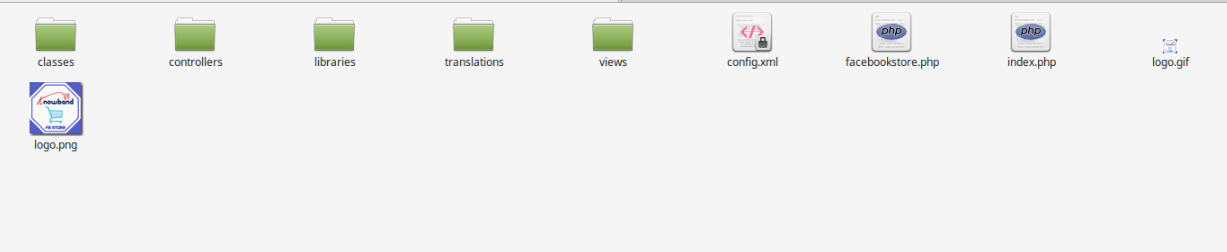
facebookstore.zip (contains source code of the module)
User Manual
Follow the following steps to install the Prestashop Facebook shop module:
Step 1: Unzip the facebookstore.zip file. It would contain files and folders as shown below –
Step 2: Copy all the files and folders of unzipped folder into your store “modules” directory on the path – Root Directory/modules/.
Step 3: Now the Prestashop Facebook Store module is ready to be installed on your store and you can find that in Store Admin -> Modules and Services. It would shown as below –
In case, you are not able to find this Prestashop Facebook shop module in admin modules list, please try searching module with following details –
Keyword – Fb Store
Category – Front office
Filter By – Installed & Not Installed / Enabled & Disabled
Step 4: Click on “Install” button to install the Prestashop Facebook shop module. It would show a pop-up for your confirmation. Click on “Proceed with the installation” option. This step will install the Prestashop Facebook store module and show notification – “Module(s) installed successfully”.
3.0 System Setup of Prestashop Facebook Store Addon
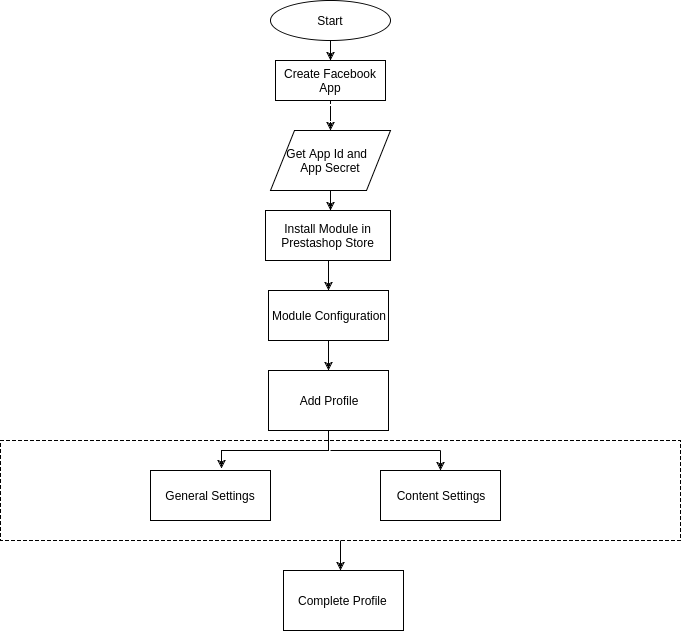
Before proceeding ahead, it is important to know that what is the correct flow of actions to setup this system as there are several things which are dependent of other things and if we do not take care of them then it would become difficult to process smoothly or may be error prone.
4.0 Facebook App Creation
Facebook App can be created by following below mentioned steps:-
Step 1: Go to given url :https://developers.facebook.com/apps/
Step 2: Click on the “Add a New App”button.
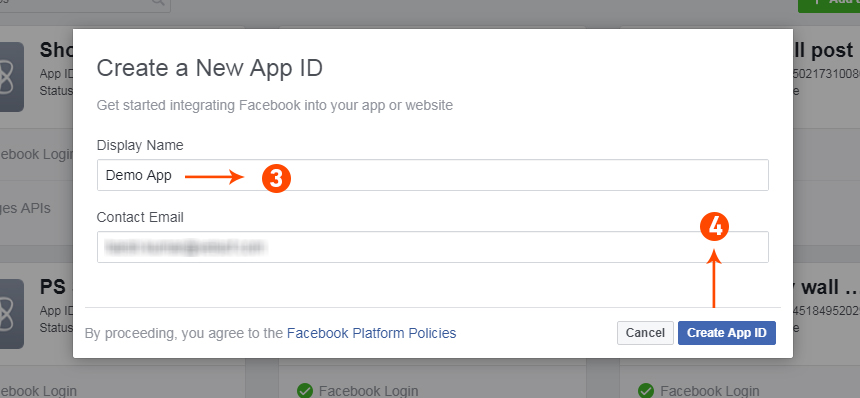
Step 3&4: Enter your App name and email id, then click on “Create App ID” button.
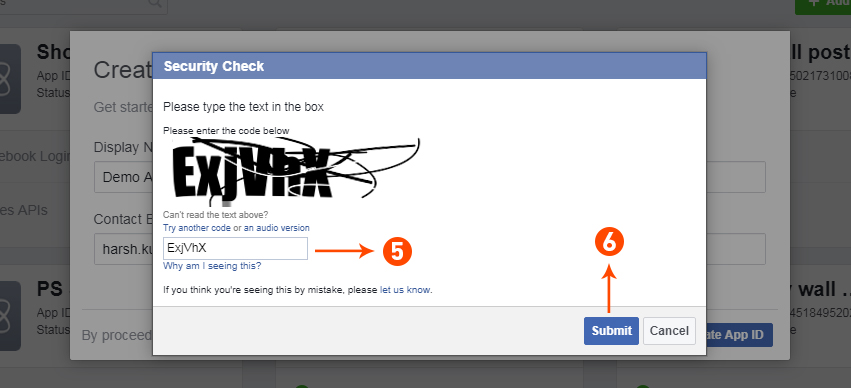
Step 5&6: After clicking on Create App ID you will have to go through a security check as shown:
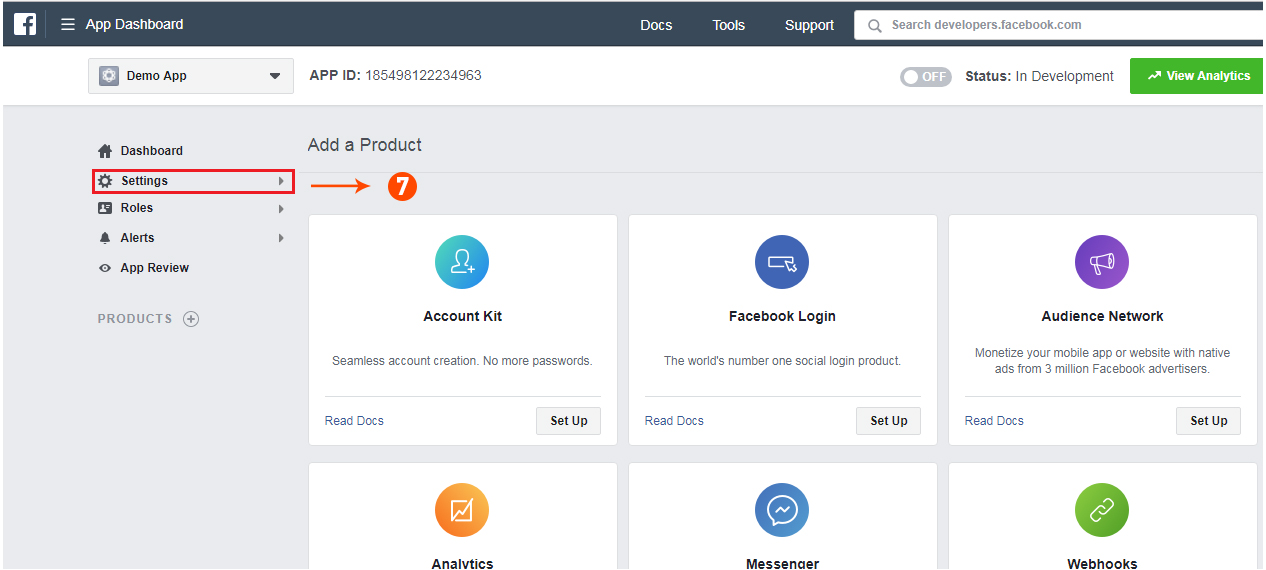
Step 7: Click on “Setting” tab of Prestashop Facebook Store Addon.
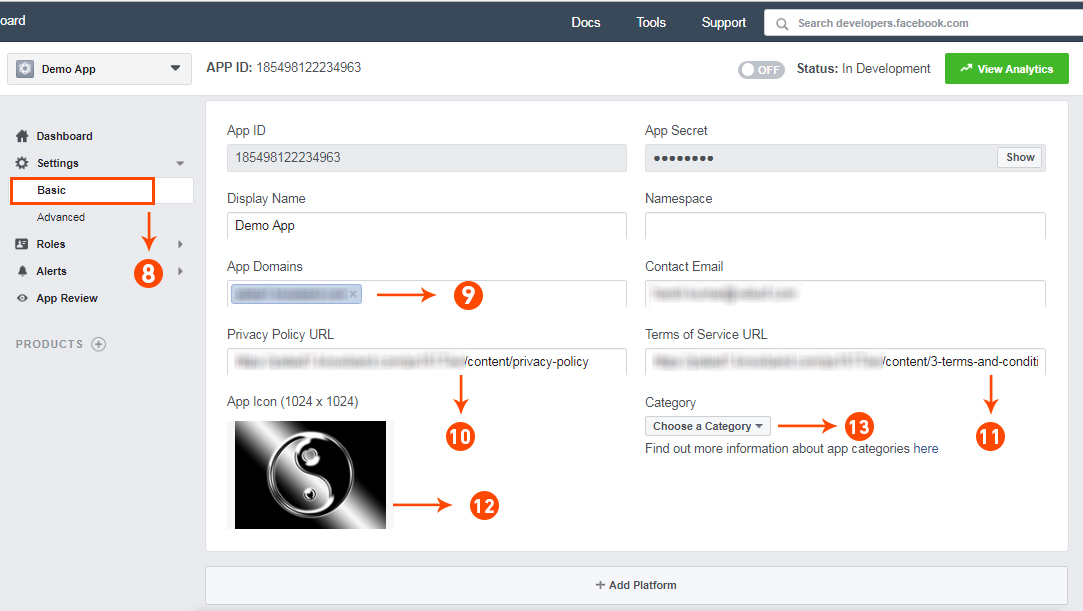
Step 8-13: Two option will be available in the dropdown, Basic and Advanced, click on “Basic”. And then enter your “App Domain”, “Contact Email”, ”Privacy URL”, ”Terms and Conditions URL”, ”Add Logo”, ”Select Category” and click on “Save Changes” button.
App Domains:
yourdomain.com is correct
yourdomain.com/store is incorrect
www.domain.com is incorrect
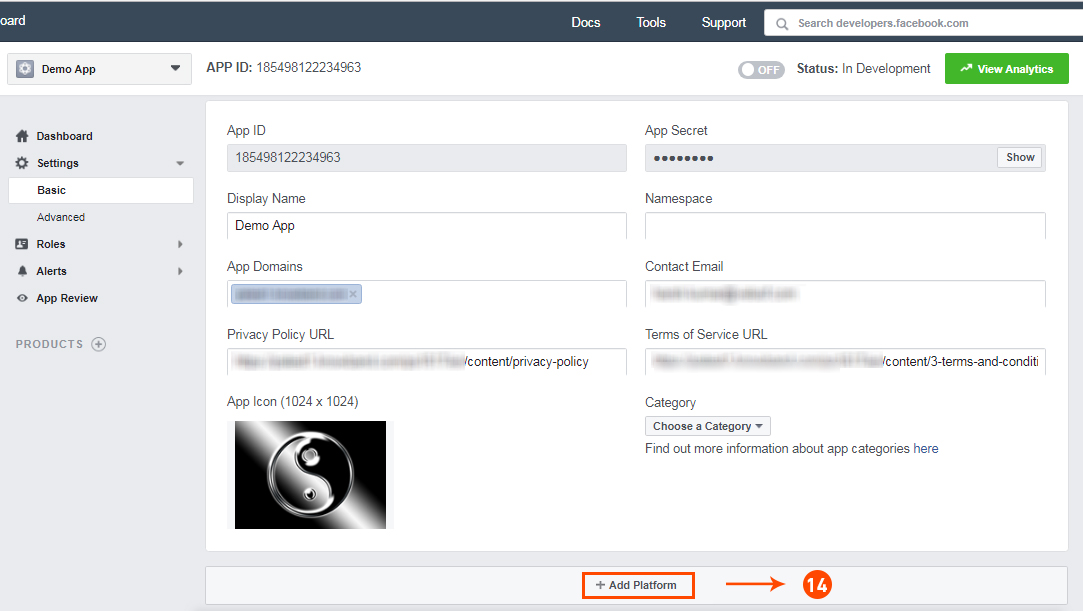
Step 14: Now click on “+Add Platform”.
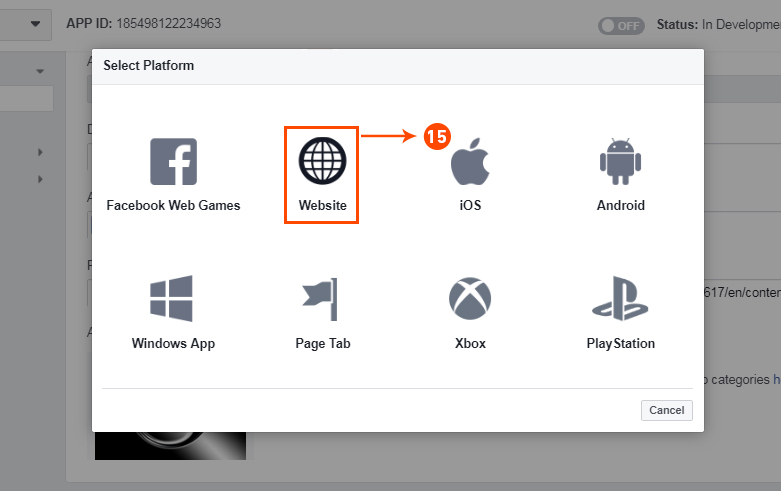
Step 15: And select Website as Platform
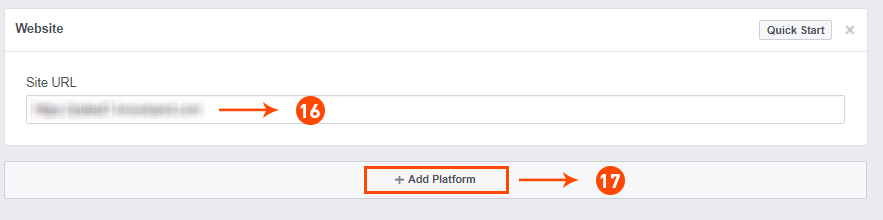
Step 16&17: Now Enter your site URL and Click on “+Add Platform”.
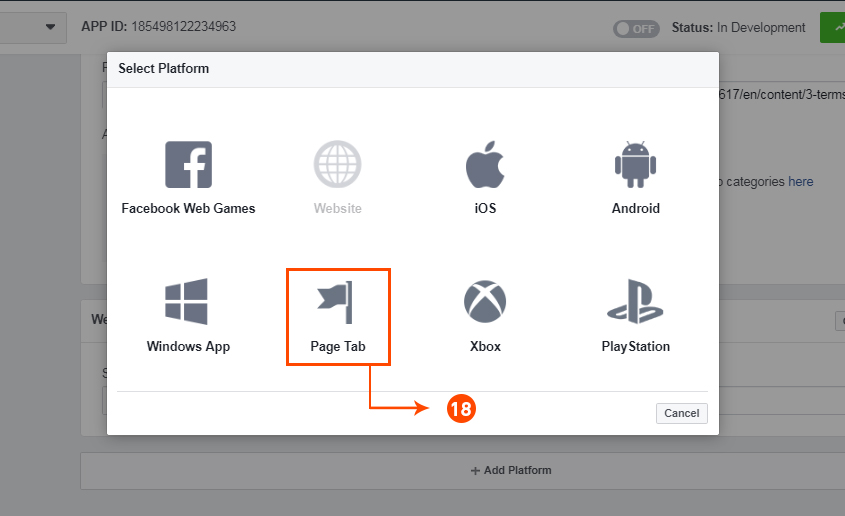
Step 18: This time select “Page Tab” as your platform.
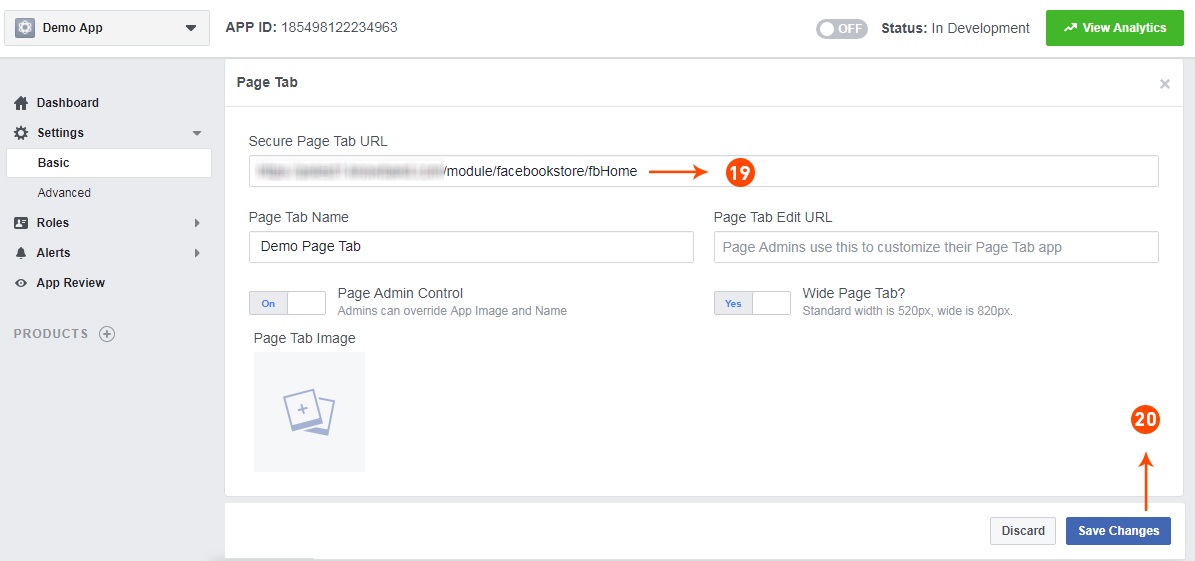
Step 19&20: Add Page tab URL and Save changes. If the changes are not saved, it means you have not configured the app properly. Check again the app domain, privacy policy, terms and condition URLs and website URL and try again.
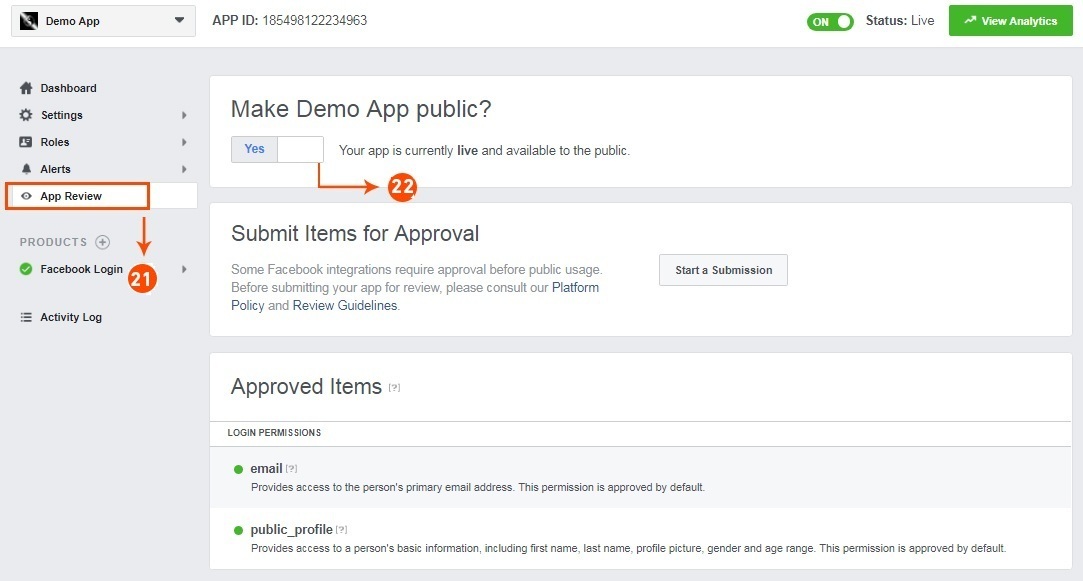
Step 21&22: Click on “App review”. And mark “Make ‘your app name’ Public” to Yes.
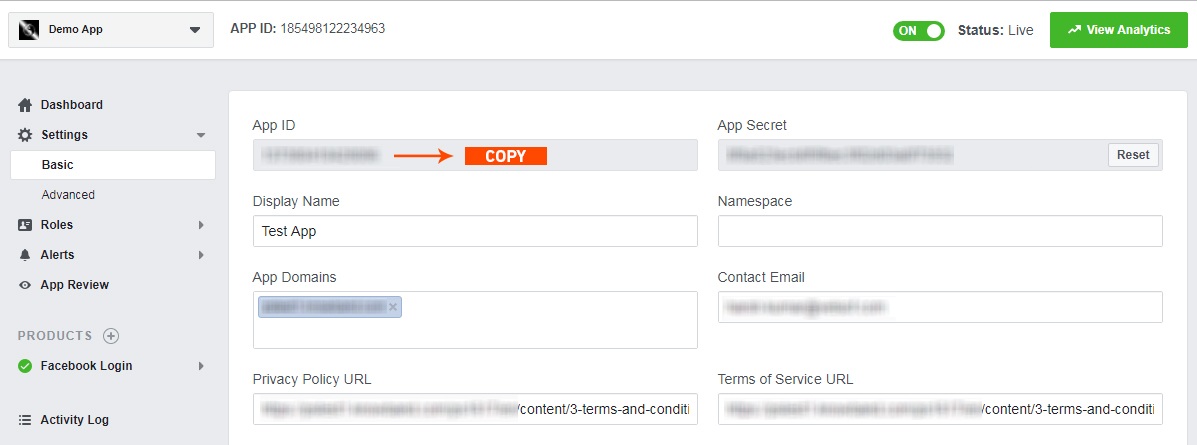
Step 23: Copy the App ID and paste it into the fields provided in the module.
5.0 Admin Interface of Prestashop Facebook Store Module
The admin interface of the facebook store integration with Prestashop is designed in such a way that a PrestaShop store owner can make the changes to his/her Facebook Store have the changes without wasting the time. Once the Prestashop module is setup completely, then the store owner can change the logo, banners and the layout of the shop.
Following are the steps which will help you setup your admin interface of the Facebook store plugin by Knowband:
5.1 How To Start configuration process of Prestashop Facebook Store Addon?
On clicking configure from Prestashop Facebook shop integration module listing page, the admin will be redirected to configuration page to save the “Facebook App Id” as shown below:-
Facebook App Id:- This field of the Prestashop Facebook Store Integration module is for Facebook App Id created for this Facebook shop module.
2. Next:- On Clicking this button, Facebook App ID will be saved in Db
5.2 How To Add Profile?
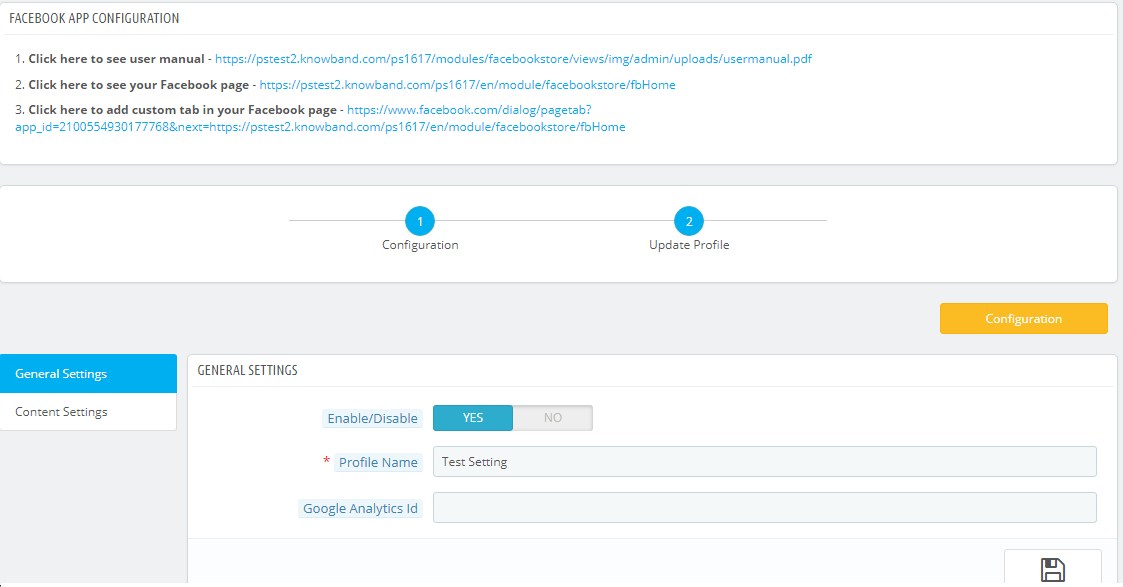
After successfully saving the App Id you will be redirected to the General settings page.
Add Profile Form has mainly two sections:-
General Settings
Content Settings
5.2.1 General Settings
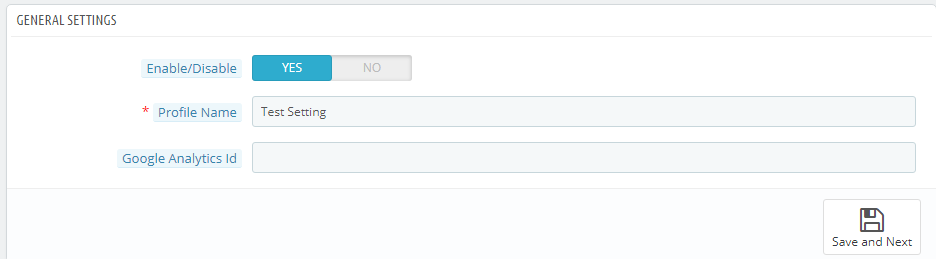
In general settings tab of Prestashop Facebook Store Addon, the Prestashop Admin has an option to add the profile name, option to enable and diable the Profile and Integration with the Google analytics using Google analytics ID.
Save and Next: Clicking on this button will save the settings and will create a profile.
Enable:- Facebook Tab content will be enabled or disables using this setting of the Prestashop Facebook Integration module.
Profile Name:- This field of the Prestashop Facebook Shop Addon is for the profile name for differentiating Profiles.
Google Analytics Id:- This field of Prestashop facebook shop integration module, the admin can enter Google analytics id to track the performance of the pages of Prestashop Facebook store.
5.2.2 Content Settings:–
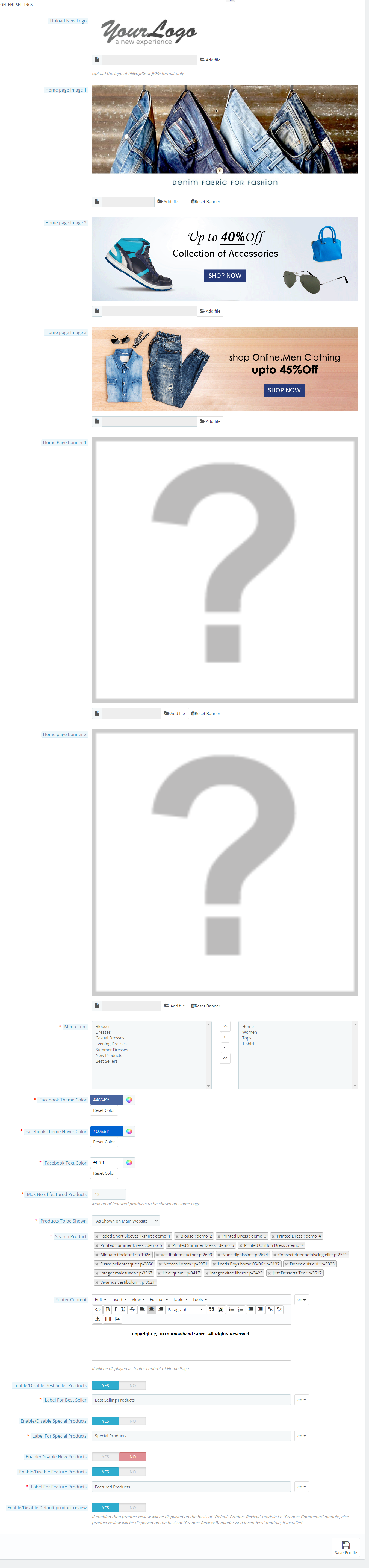
All home page content settings of the Prestashop Facebook integration module will be saved from here:-
Logo: System will pick the default logo from the PrestaShop. If user wants, he/she can upload new logo which will be displayed on Prestashop Facebook Shop Page.
Home Page Banner: In this field of Facebook store integration with Prestashop plugin, the admin can upload a banner image which will be displayed on the home page.
Home Page Content: In this field of Prestashop Facebook Store Setup module, added text will be displayed on Home Page of Prestashop Facebook shop tab.
Menu Items: Admin can select the menu items from Predefined list of the Prestashop Facebook shop integration module, which will be displayed on Facebook Shop tab. As of now keep the menu as single level which will be displayed on the Facebook Store tab.
Possible Menu Items which user can select.
Home Page
Categories
Best Sellers
New Products
Facebook Page Color: This option of Prestashop Facebook shop integration addon will be the color of all buttons and menu of Facebook Store Page.there will be option to reset to FB original color any time on clicking reset button. Default color will be :”#48649f”
Max No of featured Categories: Admin can select max number of featured categories to be shown on Home page under this field of Prestashop Facebook Store Integration module.
Featured Categories: In this field of Prestashop Facebook store module, the admin user can select the categories which will be displayed on the Home Page.
Product To be shown: In this field of Prestashop Facebook Store Integration module, system will ask the type of product to be shown on home page, i.e. From selected from below options or as shown on main website home page. It will be a dropdown.
Max No of featured Products: This field of Prestashop Facebook Store Setup module by Knowband allows the admin to select max number of featured products to be shown on Home page.
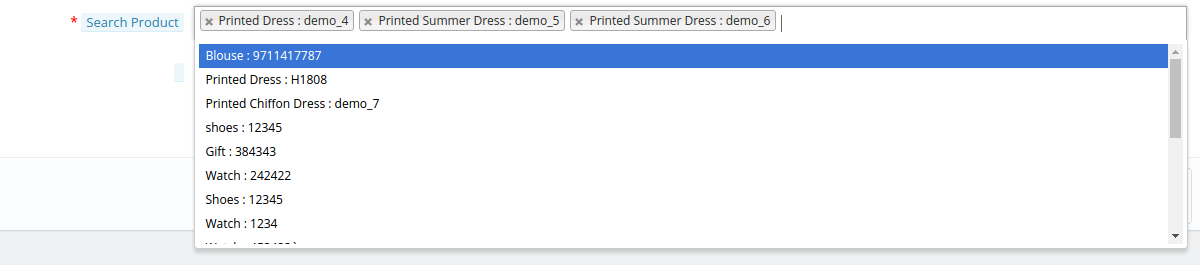
Featured Products On Home: In this field of Prestashop Facebook integration module, the admin user can select the products which will be displayed on the Home Page of the Facebook store.
Product Image Size: In this field of Prestashop Facebook Integration module by Knowband, the system will ask the size of image, i.e. small or big.
Footer Content: In this field of Facebook store integration with Prestashop module, the admin can add the content in the footer. Added text will be displayed on Home Page of Prestashop Facebook shop tab.
5.2.2 How to add a Custom tab in the FB page?
After saving the General settings and Content settings, you will have to add the Custom tab in the FB page. And to do this, click on the link to add the Custom tab as shown in the Screenshot below:
After clicking on this link you will be directed to page shown below:
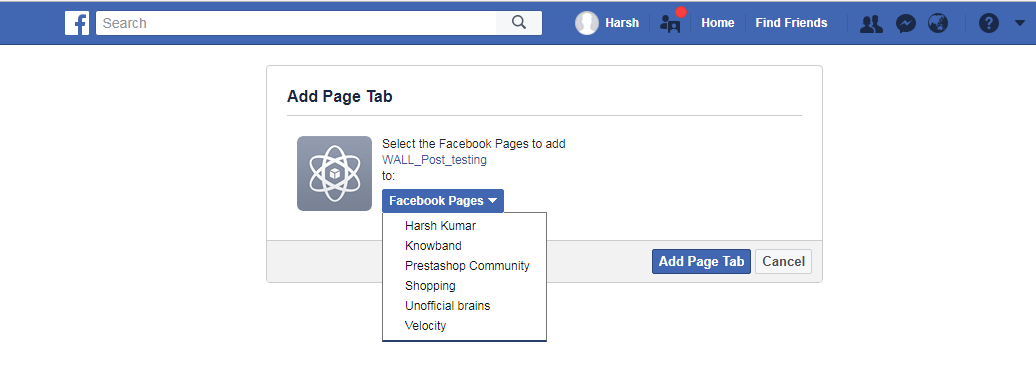
You can select the page where you want to add the Custom tab. After selecting the page click on Add Page tab. After clicking on this button you will be directed to the page shown below:
This page will display how the Custom tab will look.
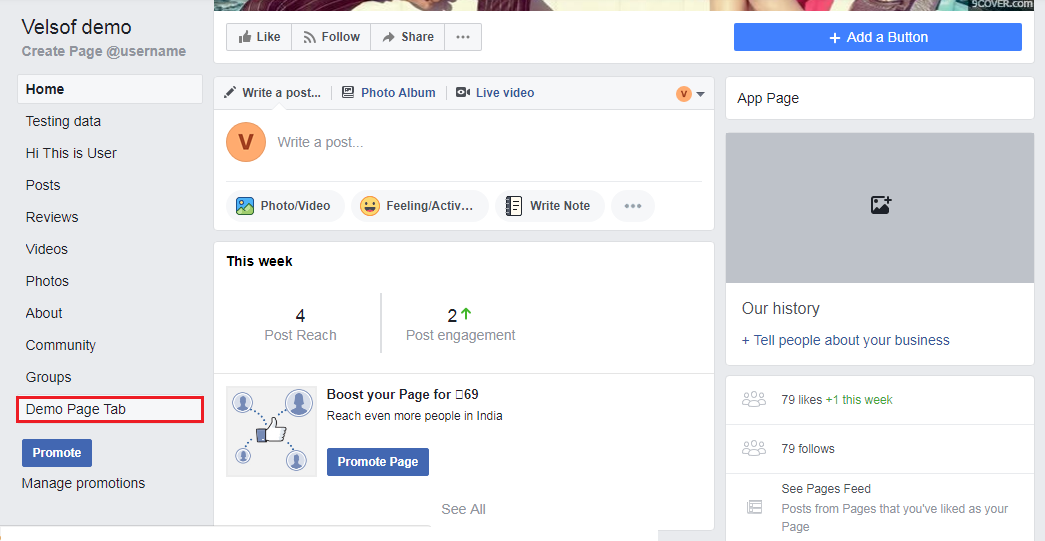
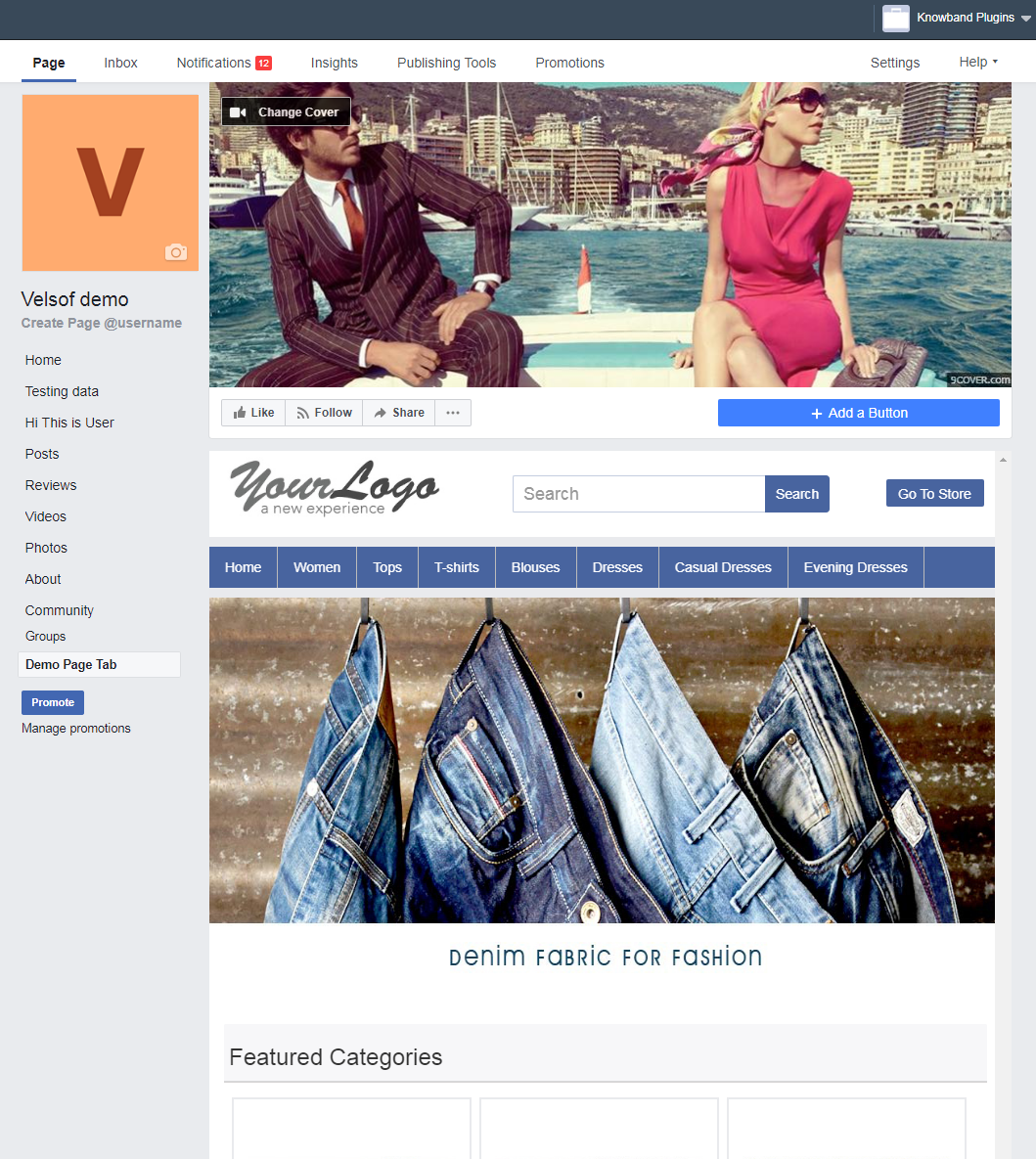
After this, you can go to the FB page where you have added the Custom Tab. You can see it will be added to the FB page as shown below:
The Custom Tab will look as shown as below:
6.0 Facebook Tab UI
Clicking on the Added Tab from the Facebook page, Facebook Shop home page will be displayed.
6.1 Home Page
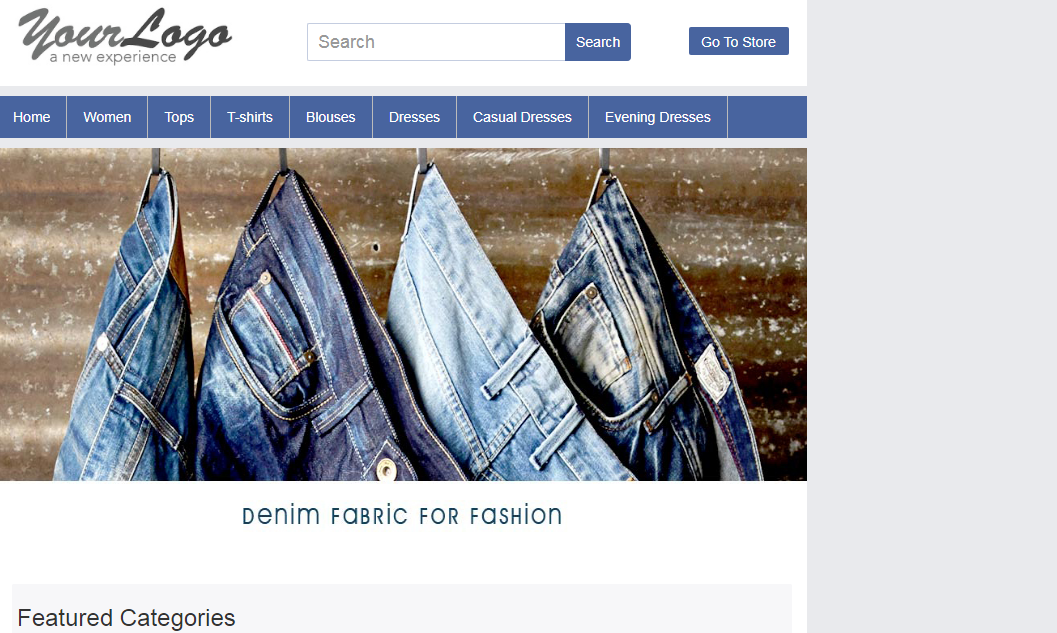
Home page will have the UI similar as mentioned below displaying the following:
Top bar
Header section
Menu bar
Text
Featured categories
Featured products, etc.
Top Bar: Top bar of the Prestashop facebook integration plugin will have Home link, Language Selection Dropdown & Currency Selection Dropdown if store is having multiple language or currency. Option to Go to Online will also be there (Go to Shop)
Header Section: Header section of the Prestashop Facebook store will have the logo, Search bar and Go to Store link.
Menu Bar: In thi field of Prestashop Facebook store module, based on the selection of Menu Items, Menu will be displayed. All the links needs to be opened in facebook iframe itself instead of redirecting user to Website.
Banner Image: In this field of Prestashop Facebook Store Setup addon, the admin can upload the banner image as well. If uploaded from Admin Panel, Home page of the Prestashop Facebook store will display the banner on Home page.
Text: If any text added in admin, Home page of the Prestashop Facebook store will display the text block otherwise it will be not be displayed.
Featured Categories: Featured categories section of the Prestashop Facebook Store Setup module will be displayed after “Text” section. Feature categories section will have category image, name of the category. Clicking on the same will redirect user to respective category page.
Featured Products: Featured Products will be shown as per profile settings.
6.2 Other Pages
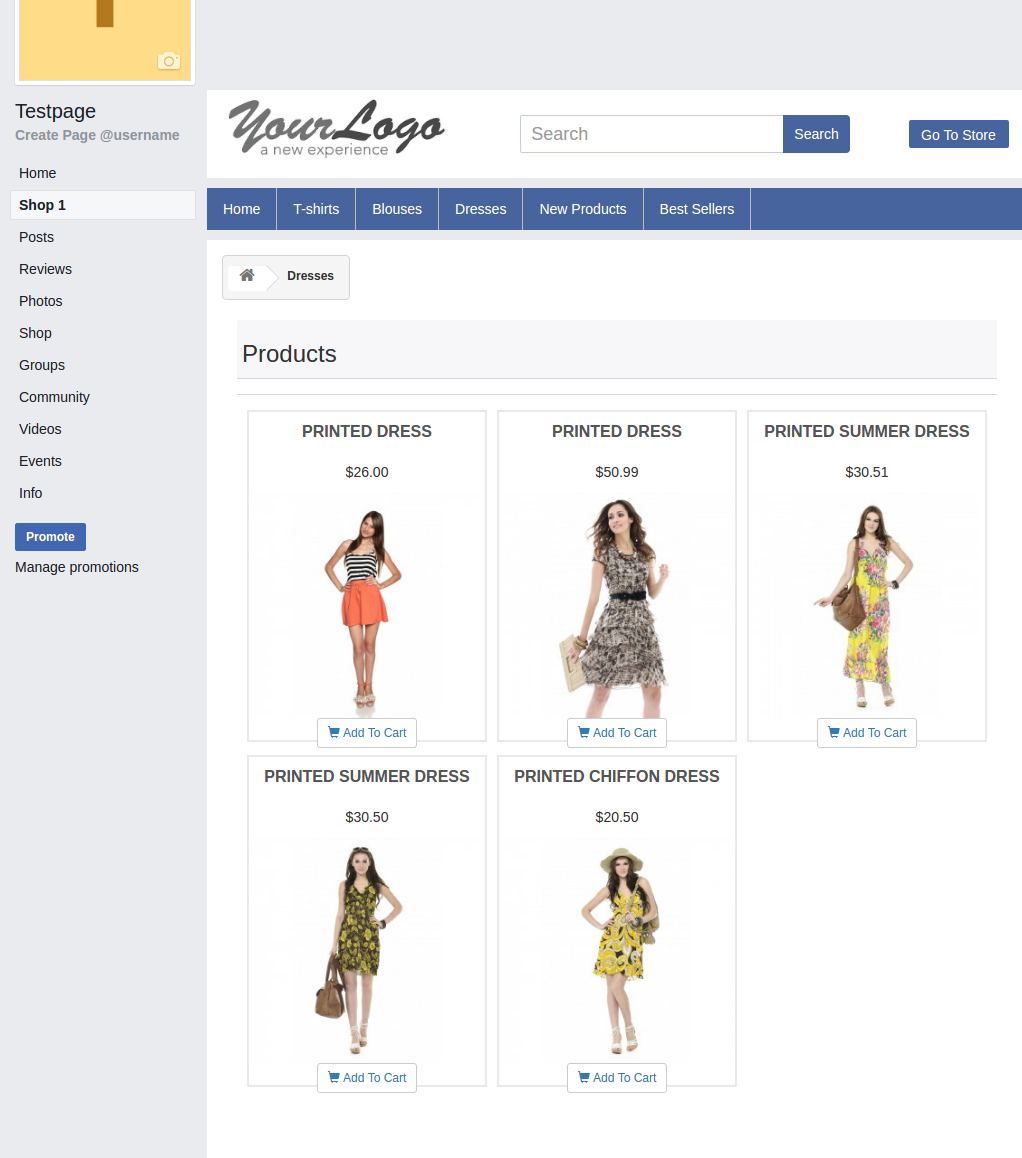
New Products page, Best sellers, category pages layout will be similar to below screen.
Now you are ready to have your Prestashop Facebook Shop giving your customers a way to connect with you with just one click. Clicking on the “Add to cart” option, the customer is redirected to your store to have a secure shopping experience.
Find below more details about this Prestashop Facebook Store Addon by Knowband:
The growth and expansion of any business be it offline or online depends mainly on the conversions. In the case of eCommerce stores, the conversions are usually referred to as product sales achieved. Agree, every store owner can’t succeed in terms of making bumper sales but it is a fact that every eCommerce store owner has a strong urge about making a significant increase in his/her store sales.
If you are not lucky enough in increasing the sales of your online stores, it is time to start looking for an effective remedy. A low performing eCommerce site in terms of product sales is not of much use and is actually more of a burden if the operational cost of the store is too high. This blog is certainly a big relief for those sales deprived eCommerce store owners who are looking to escape out of the long continuous sales dud. We have figured out some ways and came up with 9 effective tips to improve sales on your eCommerce store.
1. Provide exciting offers and deals to your customers
Almost every online shopper is in search of exciting shopping offers and deals that could persuade them for a quick product purchase. If your eCommerce store is unable to excite its targeted customers through amazing deals, discounts, shopping offers, free shipping service, gift cards, sales coupon, and other such components, it is certainly going to hurt your business fortunes in the long run
2. Offer multiple payment and shipping methods
Don’t be adamant while offering payment and shipping options to your customers but try to be more flexible. You need to make a survey among your customers for including the popular payment and shipping options on your online store for ensuring a comfortable online shopping experience. The presence of only selected payment and shopping options also results in higher shopping cart abandonment and bounce rates.
3. Provide easy navigation around your site
Customers nowadays are very choosy when it comes to a product purchase. They want to look out for a number of products before actually going for the final purchase. In order to offer easy navigation around your eCommerce website, you can take the help of a productive heatmap and A/B testing tool like MockingFish that can improve the customer engagement on a site to a great extent.
4. Remove hurdles from your checkout process
Due to the scarcity of time with online shoppers, eCommerce stores need to focus on ways to improve the checkout process on their site. They need to remove unnecessary fields and checkout steps that are hampering the quick online product purchase of customers. If you want to manage this critical task through an eCommerce plugin, you can take the help of Knowband modules like Prestashop One Page Checkout, OpenCart One Page Checkout, OpenCart One Page Checkout Pro, Magento 2 One Page Checkout for simplifying the checkout process on your eCommerce store.
5. Spread the information about the urgency of your offers
In this competitive business environment, you need to showcase that the advertised offer on your site is much more engaging and is available for a limited time only. Once, your customers are aware of the urgency and limited availability of your shopping offers, they will be much more eager to purchase from your online store. Store owners can convey this message to their targeted customers in the form of appealing CTA buttons and CTA texts for grabbing higher conversion rates and sales.
6. Reduce Cart Abandonment Rate
There’s a heavy impact on sales due to abandoned carts. Though there is no magic to stop someone from abandoning their cart, there are ways that can help you bring the abandoned cart rate under control.
For that matter, you can try out the Abandoned Cart module by Knowband or use Web Push Notifications to give a gentle reminder to your visitors every time they abandon their cart. This way you can make an improvement in your sales.
7. Launch a facebook shop
With over 2.38 billion Facebook users today, not utilizing the Facebook platform means missing out on a great opportunity to improve sales on your eCommerce store. Link your eCommerce store to your Facebook business page, interact with your audience and run contests or offers at regular intervals to increase customer engagement. You can try out the Prestashop FB store addon for integrating your store to your Facebook page. If your brand doesn’t have a Facebook page, create one today.
8. Use popups effectively
Popups are a great way of attracting customers and capturing more sales, but they do not work as easy as it seems. Designing a good popup that could bring conversions requires your time, efforts and most importantly creativity. Pop-ups bring results only if they have been made in such a way that doesn’t unnecessarily irk a user. In fact, e-retailers today, are using pop-ups to engage users in some kind of fun activity, before actually asking for their email address.
Do not kill the interest of your visitors by making the sign-up process on your store mandatory. In this way, you are only restricting a visitor from making a purchase.
Offer Guest Checkout to your visitors or enable social login options. Guest checkout is very helpful for users who do not want to get themselves registered on your platform while the social login option allows visitors to avoid the long registration process by asking them to login with their social accounts.
Conclusion
Do not consider the low sales as the fate of your eCommerce store. Make the required corrections with the help of the above-mentioned informative tips. If you are able to make the changes within the stipulated time, you can effortlessly grab more conversions and sales for your eCommerce store. Keep in check the above-mentioned 9 effective tips to improve sales on your eCommerce store. For more updates regarding eCommerce plugins and other related information, do visit our Knowband store at www.knowband.com